1. Overview
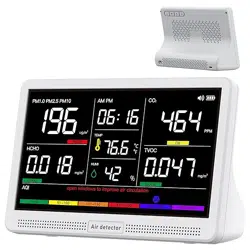
The bonoch AirSentry is a 16-in-1 indoor air quality monitor designed for home use. It features a 7-inch display and tracks nine key environmental parameters in real-time. The device is portable with a rechargeable battery, allowing for room-to-room monitoring.

2. Features & Specifications
2.1 Monitored Parameters
The device monitors the following nine parameters simultaneously:
- CO2 (Carbon Dioxide)
- PM2.5
- PM1.0
- PM10
- HCHO (Formaldehyde)
- TVOC (Total Volatile Organic Compounds)
- Temperature
- Humidity
- AQI (Air Quality Index)
The device also displays the current time.
2.2 Sensor Technology
- Sensor Types: Electrochemical, Metal Oxide, Optical.
- Accuracy: External high-precision sensors with a stated 0.001-level accuracy for direct air sampling.
- Temperature & Humidity Precision: ±1–3°F and ±2–3% RH.
2.3 Display & Alerts
- Display: 7-inch LED screen with adjustable 3-level brightness.
- Alerts: Seven distinct audible alarm modes for CO2, PM2.5/PM1.0/PM10, HCHO, TVOC, and AQI. Includes a mute function.
2.4 Power & Battery
- Battery: Built-in 2500mAh Lithium-Ion battery.
- Battery Life: Up to 8 hours of cordless operation.
- Charging: USB-C cable and adapter included. A red indicator light shows charging status.
2.5 Physical Specifications
- Material: Plastic
- Color: White (as per provided model)
- Screen Size: 7 Inches
- Item Weight: 0.66 Kilograms (1.48 lbs)
- Dimensions: 2.95 x 5.59 x 7.91 inches
- Model Number: AK22A
3. What's in the Box
- 1 x Air Quality Monitor
- 1 x Charging Adapter
- 1 x USB-C Cable
- 1 x User Manual (this document)
4. Use Guide
4.1 Initial Setup and Charging
- Connect the provided USB-C cable to the charging adapter and the monitor's charging port.
- Plug the adapter into a power outlet. A red indicator light will confirm the device is charging.
- Ensure the cable is fully inserted for proper charging.
- Allow the device to charge fully before first use.
4.2 Powering On/Off
Press the Power button to turn the device on or off.
4.3 Understanding the Display
The 7-inch screen shows real-time numerical values and status for all nine monitored parameters. The AQI provides a composite air quality score.
4.4 Adjusting Settings
Setting the Time
- Switch Time Format: Click the "Time button" to toggle between 12-hour and 24-hour format.
- Set Hours: Long press the "Time button" to enter setting mode. Use the "Alarm button" or "Brightness button" to adjust the hour value.
- Set Minutes: Click the "Time button" again. Use the "Alarm button" or "Brightness button" to adjust the minute value.
- Confirm: Click the "Time button" to save and exit the time setting mode.
Switching Temperature Units
Double-press the "Power" button to toggle the temperature display between Fahrenheit (°F) and Celsius (°C).
Adjusting Screen Brightness
Use the "Brightness button" to cycle through the three available brightness levels for the display.
4.5 Managing Alarms
- The device will sound an audible alarm and provide a visual alert on the display when any of the seven monitored pollutant levels exceed preset thresholds.
- Press the "Alarm button" or "Mute button" (as referenced in the product description) to silence an active alert.
4.6 Portable Use
Once charged, unplug the device to use it cordlessly for up to 8 hours. You can move it to different rooms to assess air quality throughout your home.
5. Care & Maintenance
- Sensor Care: For accurate readings, avoid touching the external sensors directly. Avoid exposing the sensors to strong perfumes, aerosols, or other concentrated odors that could temporarily affect readings.
- Cleaning: Wipe the exterior casing with a soft, dry cloth. Do not use liquids or cleaners on the device.
- Storage: Store the device in a dry place at room temperature when not in use for extended periods.
6. Troubleshooting
- Device won't turn on: Ensure the battery is charged. Connect to the power adapter using the included cable.
- No display or dim display: Press the "Brightness button" to increase the screen brightness. Ensure the device is powered on.
- Inaccurate readings: Ensure sensors are clean and unobstructed. Allow the device to acclimate to a new environment for several minutes. Avoid localized contamination sources (e.g., breathing directly on the device).
- Charging indicator not on: Check that the USB-C cable is fully inserted into both the device and the adapter. Try a different power outlet.
7. Manufacturer & Support
Manufacturer: Shenzhen Langtao Technology Co., Ltd.
Brand: bonoch
According to the product information, the bonoch support team aims to respond to queries within 24 hours.