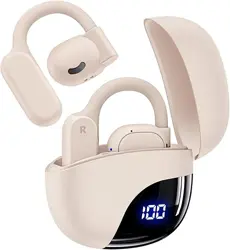
TAGRY K08 - Open Ear Headphones 80H Beige

Product's Documents

Below are documents related to this product, you can read online or download:
K08 photo

Overview

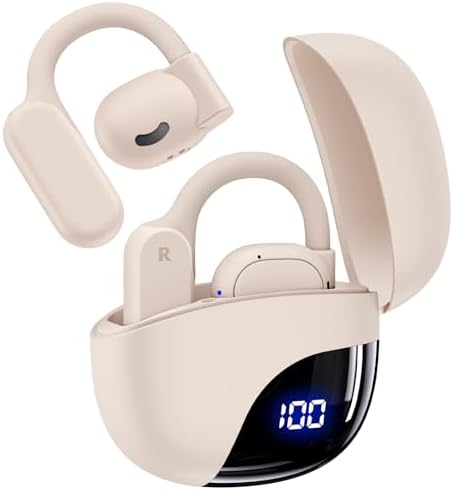
TAGRY Open Ear Headphones 80H Beige showing the earbuds and charging case

The TAGRY Open Ear Headphones (Model K08) are wireless Bluetooth headphones with an open-ear design. They are designed for sports and fitness activities, featuring ergonomic ear hooks, an IPX7 waterproof rating, and a portable charging case with an LED display.

Key identifiers:
  • Model: K08-0813
  • Color: Beige
  • Form Factor: Open Ear

What's in the Box

  • Open Ear Headphones (Left and Right Earbud)
  • Charging Case
  • USB-C Charging Cable
  • User Manual

Features and Specifications

Design and Comfort

  • Open-Ear Design: Does not block the ear canal. Intended to protect hearing while allowing awareness of surroundings.
  • Ergonomic Silicone Ear Hooks: Designed to fit securely and comfortably over the ear for various activities.
  • Lightweight Construction: Earbuds are designed for all-day wear.

Audio and Connectivity

  • Bluetooth Version: 5.3 for stable connection and low latency.
  • Wireless Range: Up to 33 feet (10 meters).
  • Drivers: 16mm dynamic drivers for immersive, 360° surround sound.
  • Frequency Response: 20 Hz - 20,000 Hz.
  • Microphone: Integrated for clear calls.
  • Noise Control: Sound Isolation (Note: This is an open-ear design; it does not provide active noise cancellation).

Battery and Charging

  • Earbud Battery: 85mAh capacity.
  • Playtime per Charge: Up to 13.5 hours of continuous use.
  • Charging Case Battery: 400mAh capacity.
  • Total Playtime with Case: Up to 80 hours.
  • Charging Case Features: LED digital display shows remaining battery percentage.
  • Charging Port: USB-C. Input: 5V/1A.
  • Case Charging Time: Approximately 1.5 hours.

Durability and Use

  • Waterproof Rating: IPX7. Can withstand immersion in water up to 1 meter for 30 minutes. Suitable for sweat and rain.
  • Control Method: Touch controls on each earbud.
  • Compatible Devices: Phones, tablets, laptops, TVs, and smartwatches with Bluetooth.

Use Guide

Small icon of the TAGRY Open Ear Headphones

Charging the Headphones

  1. Place the earbuds into their corresponding slots in the charging case. Ensure the charging contacts align.
  2. Close the case lid. The earbuds will begin charging automatically.
  3. Charge the case itself by connecting the provided USB-C cable to the port on the back of the case and a power adapter (5V/1A) or computer USB port.
  4. The LED display on the front of the case will show the combined battery level of the case and earbuds.

Powering On/Off and Pairing

  1. Power On: Remove both earbuds from the charging case. They will power on automatically and enter pairing mode (indicated by a blinking LED).
  2. Initial Pairing: On your Bluetooth device (e.g., smartphone), go to Bluetooth settings, enable Bluetooth, and select "TAGRY K08" from the list of available devices.
  3. Subsequent Use: After initial pairing, the earbuds will typically reconnect to the last paired device automatically when removed from the case.
  4. Power Off: Place both earbuds back into the charging case. They will power off and charge automatically.

Wearing the Headphones

  1. Identify the left (L) and right (R) earbuds.
  2. Hook the flexible silicone ear hook over the top of your ear.
  3. Adjust the earbud so the speaker driver is positioned near the entrance of your ear canal without inserting it.
  4. Ensure the fit is secure and comfortable before starting vigorous activity.

Touch Controls

Tap the touch-sensitive area on the body of either earbud to perform actions. Controls may vary; refer to the manual included in the box for the definitive control scheme. A typical layout is:

  • Play/Pause: Single tap.
  • Next Track: Double tap the right earbud.
  • Previous Track: Double tap the left earbud.
  • Answer/End Call: Single tap.
  • Reject Call: Press and hold.
  • Volume Up/Down: Often controlled by triple taps or press-and-hold gestures (check included manual).
  • Voice Assistant: Activate your device's voice assistant (e.g., Siri, Google Assistant) with a specific tap pattern.

Using the Charging Case Display

The LED screen on the charging case shows a numeric percentage representing the remaining battery capacity of the case and earbuds combined. A brief press of the function button on the case may activate the display.


Care and Maintenance

  • Clean the earbuds and case with a soft, dry cloth. Do not use liquids or chemicals.
  • Ensure the earbuds and charging contacts are dry before placing them in the case.
  • Store in a cool, dry place away from direct sunlight.
  • Although IPX7 rated, avoid exposing the headphones to high-pressure water jets or submerging them for extended periods unnecessarily.

Troubleshooting

Earbuds Won't Power On

  • Place earbuds in the charging case to ensure they have power.
  • Charge the case fully using the USB-C cable.

Bluetooth Connection Issues

  • Ensure the earbuds are within 33 feet of your device without major obstructions.
  • Turn off Bluetooth on your device and turn it back on.
  • Place both earbuds back in the case, close the lid for 10 seconds, then remove them to re-initiate pairing.
  • Delete "TAGRY K08" from your device's Bluetooth paired list and pair again.

One Earbud Not Working

  • Place both earbuds in the charging case, then remove them simultaneously.
  • Reset the earbuds (refer to the included manual for the reset procedure, often involving holding the touch controls).

Poor Sound Quality or Low Volume

  • Check the volume level on your connected device.
  • Ensure the earbuds are positioned correctly near your ear canal.
  • Clean the speaker mesh gently with a dry brush.

Technical Specifications Summary

  • Model: K08-0813
  • Bluetooth: Version 5.3
  • Playtime: 13.5 hrs (earbuds), 80 hrs (with case)
  • Driver Size: 16mm
  • Waterproof: IPX7
  • Charging: USB-C
  • Charging Case Battery: 400mAh with LED display
  • Weight: 120g (Total)

Reference file: TAGRY K08 - Open Ear Headphones 80H Beige

Specifications

TAGRY K08 Questions and Answers

See other models: X88 X18 X08