1. Product Overview

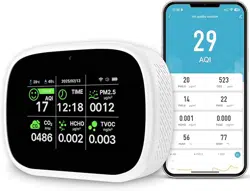
The Bcetasy 18-in-1 Smart Air Quality Monitor is a multi-function indoor device designed to monitor various air quality parameters in real-time. It connects to your home Wi-Fi network to provide remote monitoring and data tracking via a smartphone app.
The device is equipped with an array of sensors to measure the following:
- AQI (Air Quality Index)
- CO2 (Carbon Dioxide)
- PM2.5, PM1.0, PM10 (Particulate Matter)
- TVOC (Total Volatile Organic Compounds)
- HCHO (Formaldehyde)
- Temperature & Humidity
- Time and Date
It features a bright HD LCD display, an audible alarm, and is powered by a rechargeable 3000mAh battery.
2. Package Contents
- Bcetasy 18-in-1 Smart Air Quality Monitor (White-Black2)
- USB Type-C Charging Cable
- User Manual
- Note: A power adapter is not included.
3. Technical Specifications
- Brand: Bcetasy
- Model Number: PV33-3
- Power Source: Rechargeable 3000mAh Battery (USB Type-C)
- Product Dimensions: 2"D x 3"W x 3"H
- Item Weight: 0.31 kg
- Alarm Type: Audible
- Display: HD LCD with adjustable brightness
- Connectivity: Wi-Fi (2.4GHz required)
- Compatible Apps: Smart Life, Tuya Smart
4. Device Layout and Controls

Front View
- HD LCD Screen: Displays real-time air quality data, time, and battery status. Uses color-coded alerts (e.g., green, yellow, red) to indicate air quality levels.
Side Controls
- Power Button: Located on the side. Press and hold for 3 seconds to turn the device on or off.
- Function Buttons: Side buttons allow for switching between different data display interfaces on the screen.
Charging Port
- USB Type-C Port: Located on the side or back for charging the internal battery.
5. Initial Setup and Use
5.1 First-Time Power On
- Before first use, charge the device for at least 10 minutes using the provided USB Type-C cable.
- Press and hold the power button for 3 seconds to turn the device on.
- The device will boot up. Within approximately one minute, it will begin displaying accurate air quality readings from its sensors.
5.2 Basic Operation
- Use the side buttons to cycle through the different data screens (e.g., AQI, CO2, Temperature/Humidity).
- The screen brightness adjusts automatically, but settings can be customized via the mobile app.
- The device can operate in screen-off monitoring mode to conserve battery while still tracking air quality.
5.3 Wi-Fi and App Setup
- Download and install the "Smart Life" or "Tuya Smart" app on your smartphone from the Apple App Store or Google Play Store.
- Create an account or log in to the app.
- Ensure your smartphone is connected to a 2.4GHz Wi-Fi network. The device does not support 5GHz networks. If you have a Wi-Fi 6+ router, enable compatibility mode.
- Follow the in-app instructions to add a new device. Select the appropriate device category (e.g., Air Quality Monitor).
- The app will guide you through connecting the monitor to your Wi-Fi network. This typically involves putting the device into pairing mode (often via a button press sequence) and entering your network credentials.
- Once paired, the device will appear in your app. You can now view real-time data, check historical trends, and customize settings.
- Note: The device connects to one smartphone at a time. To pair with a new phone, you must reset the device's Wi-Fi settings.
6. Features and Functions Guide

6.1 Real-Time Monitoring & Display
The device continuously samples the air. Key metrics are shown on the LCD screen and updated in the app in real-time.
6.2 App Data Storage & Tracking
- The app stores historical data, allowing you to view trends for each parameter over hours, days, or weeks.
- You can set alerts and receive push notifications on your phone if air quality levels exceed your defined thresholds, even when you are away from home.
6.3 Alarm Function
The device has an integrated audible alarm. It can be triggered when monitored parameters (like CO2 or TVOC) reach unhealthy levels. Alarm thresholds can often be adjusted within the companion app.
6.4 Dual-Chip Technology
The device uses two specialized chips: one for high-speed sensor data processing and another to manage the user interface. This is designed to provide fast, accurate readings.
6.5 Battery and Power Management
- The 3000mAh battery provides approximately 7-15 hours of continuous monitoring on a full charge, depending on screen brightness and Wi-Fi usage.
- For extended data recording without interruption, it is recommended to keep the device plugged into a USB power source.
- The energy-efficient chip allows the device to continue monitoring air quality even in power-saving or screen-off mode.
6.6 Mounting
The device is wall-mountable. Refer to the physical product for mounting hole locations.
7. Maintenance and Troubleshooting
7.1 Regular Maintenance
- Keep the device's sensor inlets free from dust and obstructions. Wipe the exterior with a soft, dry cloth.
- Avoid exposing the device to direct, intense sunlight, extreme temperatures, or splashing water.
7.2 Troubleshooting
- Inaccurate Readings Over Time: Restart the device to recalibrate the sensors. Power it off and then on again.
- Wi-Fi Connection Issues:
- Ensure you are using a 2.4GHz Wi-Fi network.
- Move the device closer to your router.
- Restart both the monitor and your router.
- Reset the device's Wi-Fi settings and re-pair it with the app.
- App Not Showing Data: Ensure your smartphone has an active internet connection. Check that the device is online in the app.
- Device Won't Turn On: Ensure the battery is charged. Connect it to a USB power source for at least 30 minutes and try again.
8. Safety Information
- This device is for indoor use only.
- Use only the provided or a certified USB Type-C cable for charging. Do not use a damaged cable.
- Do not disassemble the device. There are no user-serviceable parts inside.
- The readings from this device are for informational purposes. For professional-grade air quality assessment, consult appropriate experts.
- Keep the device away from children and pets to prevent damage or choking hazards from small parts.
9. Compliance
This device complies with relevant FCC regulations. For detailed compliance information, refer to the documentation included in the packaging or the manufacturer's website.