Overview
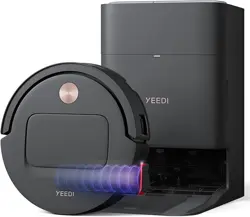
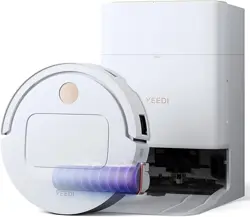
The Yeedi S14 Plus is a robotic vacuum and mop designed for hard floors and carpets. It combines powerful suction with a roller mopping system and an all-in-one station that automates cleaning maintenance.

Key components:
- Robot vacuum – navigates and cleans autonomously
- OMNI Station – charges, washes, dries, empties dust, and refills water
- OZMO Roller – 6.89-inch rotating mop for scrubbing
- ZeroTangle 2.0 – anti-hair-wrap brush system
- TruEdge 3D Sensor – detects edges and obstacles
Features
OZMO Roller Mopping System
The roller spins at 200 RPM while 16 nozzles spray water to keep the mop clean during operation. The system applies constant pressure to lift stains.

18,000Pa Suction & ZeroTangle 2.0
The vacuum generates 18,000Pa of suction. The ZeroTangle 2.0 system uses a 45° V-shaped bristle arrangement and comb teeth to prevent hair tangles.

TruEdge 2.0 & 3D Sensor
The side brush extends to reach corners and edges. The TruEdge 3D Sensor helps the robot navigate along walls and avoid obstacles.

OMNI Station
The station performs the following tasks automatically:
- Washes the mop with 167°F (75°C) hot water
- Dries the mop with 145°F (63°C) hot air
- Empties the dust bin
- Refills the clean water tank

App Control
Use the YEEDI app (2.4 GHz Wi-Fi only) to:
- Start, stop, or schedule cleaning
- Adjust suction power and water flow
- Lift the mop for carpet-only cleaning
- Set no-go zones and multi-pass routines
Compatible with: Amazon Echo, Google Home, smartphones
What's in the Box
- Robot Vacuum × 1
- OMNI Station × 1
- Power Cord × 1
- User Manual × 1
- Quick Guide × 1
- Roller (OZMO) × 1
- Side Brush × 1
- Main Brush & Cover × 1
- Clean Water Tank × 1
- Waste Water Tank × 1

Product Specifications
| Brand | Yeedi |
|---|---|
| Model | S14 PLUS |
| Color | Black (S14 Plus Ozmo Roller) |
| Surface Recommendation | Hard Floor & Carpet |
| Suction Power | 18,000 Pa |
| Battery Life | 270 minutes |
| Battery Type | Lithium Ion (included) |
| Cleaning Path Width | 6.89 inches |
| Dust Bin Capacity | 3 Liters (station) |
| Noise Level | 65 dB |
| Voltage | 110 V (US) |
| Power Source | Corded Electric & Battery Powered |
| Controller Type | App Control, Touchpad Control, Voice Control |
| Wi-Fi | 2.4 GHz only (5 GHz not supported) |
| Dimensions (Station) | 13.8" L × 18.8" W × 21" H |
| Manufacture Year | 2025 |
Use Guide
1. Setup
- Place the OMNI Station on a hard, level surface near a power outlet.
- Connect the power cord to the station and plug it in.
- Fill the clean water tank with water and insert it into the station.
- Install the side brush and main brush on the robot.
- Place the robot on the station to charge.

2. First-Time Mapping
Before cleaning, the robot will perform a mapping run. Ensure the area is tidy and doors are open. The robot uses LiDAR and sensors to create a map of your home.
Video guide: How to Use – Mapping Guide
3. Starting a Cleaning Cycle
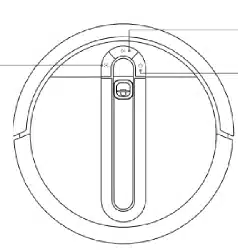
- Auto mode: Press the power button on the robot or use the app.
- Zone/room cleaning: Select a specific room in the app.
- Spot cleaning: Use the app to target a small area.
4. Using the OMNI Station
The station automatically performs the following after each cleaning:
- Washes the roller mop with hot water (167°F)
- Dries the mop with hot air (145°F)
- Empties the dust bin into the station's 3L bag
- Refills the robot's water tank
Check the clean and waste water tanks periodically. Empty the waste tank and refill the clean tank as needed.
5. Removing and Installing the Roller Mop
Video guide: How to remove and install the Roller Mop
6. App Customization
In the YEEDI app you can:
- Schedule cleaning times
- Adjust suction power (2 levels)
- Adjust water flow for mopping
- Enable carpet boost (increases suction on carpet)
- Set no-mop zones for carpets
- View cleaning history and maps
7. Maintenance
- Empty the waste water tank after each full cleaning cycle.
- Clean the roller mop and main brush every 2 weeks.
- Replace the filter every 3–6 months.
- Wipe the sensors and charging contacts with a dry cloth.
Video guide: Dock Maintenance
Troubleshooting
| Issue | Possible Cause | Solution |
|---|---|---|
| Robot not charging | Station not plugged in or contacts dirty | Check power, clean charging contacts |
| Poor suction | Bin full or filter clogged | Empty bin, clean or replace filter |
| Mop not wet | Water tank empty | Refill clean water tank |
| Wi-Fi connection fails | 5 GHz network | Use 2.4 GHz band only |
| Robot stuck | Obstacle or low clearance | Clear area, use no-go zones in app |
Warranty and Support
Warranty: 1-year coverage for manufacturing defects or quality issues.
Return policy: 30-day free return through Amazon.
Support: Contact Yeedi customer service via the YEEDI app or the Yeedi website for assistance.
Manufacturer: YEEDI