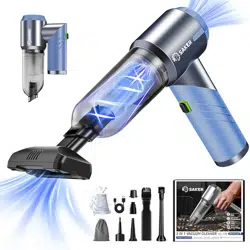
Saker HL132 Portable Car Vacuum Cleaner Cordless High Power 17000PA

Product's Documents

Below are documents related to this product, you can read online or download:
HL132 photo

1. Overview

The Saker HL132 is a cordless, handheld 3-in-1 vacuum cleaner designed for portable use in cars, homes, and offices. It functions as a vacuum, blower, and inflator. The unit is foldable for compact storage.

Saker Portable Car Vacuum Cleaner HL132 Blue, shown folded and with accessories

Key Characteristics:

  • Form Factor: Handheld, foldable.
  • Power Source: Rechargeable battery (Cordless).
  • Primary Functions: Vacuuming, blowing, inflating.
  • Weight: 13.6 oz (380g).
  • Dimensions (Folded): Approximately palm-sized.

2. Features and Specifications

2.1 Core Features

  • 3-in-1 Functionality: Integrates vacuuming, blowing, and inflating capabilities.
  • 17000PA Suction Power: Features an upgraded high-speed brushless motor with three adjustable suction levels.
  • Cordless & Rechargeable: Powered by a 3*2500mAh battery with a Type-C charging interface. Provides up to 40 minutes of runtime.
  • Dual Filtration System: Includes a washable HEPA filter (2-3 month use) and a reusable fine steel filter (over 1-year lifespan).
  • Portable Design: Lightweight and folds to a compact size for easy carrying and storage. Includes a storage bag.

2.2 Technical Specifications

  • Model: HL132-Blue
  • Suction Power: 17000 PA
  • Motor: Brushless
  • Battery: 3*2500mAh, Type-C rechargeable
  • Dust Capacity: 0.2 Liters
  • Voltage: 12V
  • Wattage: 120W
  • Number of Speeds/Power Levels: 3
  • Filter Type: HEPA Filter & Fine Steel Filter
  • Item Dimensions (LxWxH): 8.8" x 7.6" x 2.8"
Infographic highlighting product features: 17000PA suction, 3-in-1 function, brushless motor, 40min battery

3. Components and Accessories

The following items are included in the package:

  • Main Vacuum Unit (HL132)
  • Floor brush x1
  • Stainless steel filter screen x1
  • Air extraction nozzle x1
  • Short blowing nozzle x1
  • Flat suction brush x1
  • Long flat suction attachment x1
  • Pipe blowing round brush x1
  • Long blowing pipe x1
  • Small and large inflator nozzles
  • Storage bag x1
  • USB Type-C charging cable x1
Long flat suction brush accessory for cleaning gaps Vacuum floor brush accessory Long blowing pipe with brush accessory Small inflator nozzle accessory

4. Use Guide

4.1 Getting Started

  1. Unpacking: Remove all components from the packaging and identify all accessories.
  2. Initial Charge: Connect the provided USB Type-C cable to the vacuum's charging port and a power source (e.g., wall adapter, car USB port). Charge fully before first use.
  3. Assembly: Select the desired accessory (nozzle or brush) and attach it to the main unit's intake/blower port until it clicks securely into place.
  4. Power On/Off & Suction Control: Locate the power button. Press to turn on. The device features three suction/power levels. Press the power button repeatedly to cycle through the levels or to turn the device off.

4.2 Operating Modes

Vacuum Mode:

  • Attach the floor brush, flat suction brush, or long flat suction for cleaning.
  • Use the floor brush for carpets and flat surfaces in cars or homes.
  • Use the flat suction brushes to clean gaps in doors, cabinet corners, drawers, and other tight spaces.
  • Car vacuum cleaner being used to clean a car interior seat

Blowing Mode:

  • Attach the short blowing nozzle, long blowing pipe, or pipe blowing round brush.
  • Short Nozzle: Suitable for inflating small items like lifebuoys or life jackets.
  • Long Pipe/Round Brush: Suitable for computer dust removal, keyboard cleaning, track dust removal, or soot blowing.

Inflating Mode:

  • Attach the small or large inflator nozzle to the blowing port.
  • Use to inflate small air mattresses, pool toys, or sports balls. Note: Monitor pressure manually; the device does not have an automatic shut-off pressure gauge.

4.3 Emptying and Cleaning the Dust Cup

  1. Turn off and disconnect the vacuum from any power source.
  2. Press the dust cup release button or twist the cup counterclockwise to detach it from the main body.
  3. Empty the collected debris into a trash bin.
  4. Wipe the interior of the dust cup with a dry cloth.

4.4 Filter Maintenance

HEPA Filter (Washable):

  1. Remove the dust cup to access the filter.
  2. Gently remove the HEPA filter.
  3. Rinse under lukewarm tap water. Do not use detergents.
  4. Allow the filter to air dry completely for 24 hours before reinstalling.
  5. Replace every 2-3 months with normal use.

Fine Steel Filter (Reusable):

  1. Remove the filter from the unit.
  2. Tap gently to dislodge loose dust or rinse with water.
  3. Allow to dry completely before reinstalling.
  4. This filter has a service life of over 1 year.
Important: Never operate the vacuum without both filters correctly installed. Ensure filters are completely dry before reinserting to prevent motor damage.

5. Charging and Battery

  • Use only the provided USB Type-C cable to charge the device.
  • Charging can be done from a standard wall adapter, computer USB port, or car USB charger.
  • A full charge provides approximately 40 minutes of intermittent runtime (actual time depends on power level used).
  • The battery is not user-replaceable. For battery service, contact support.
  • For long-term storage, charge the battery to approximately 50% and store in a cool, dry place.

6. Safety Instructions

  • Read all instructions before using the appliance.
  • Do not use to pick up flammable or combustible liquids, burning materials (ashes, hot coals), or fine powders like cement, plaster, or drywall dust.
  • Do not immerse the main vacuum unit, battery, or charger in water or other liquids.
  • Do not use the vacuum with a damaged cord, plug, or housing.
  • Keep hair, loose clothing, fingers, and all parts of the body away from openings and moving parts.
  • This appliance is for indoor, household use only. Not for outdoor or industrial use.
  • Unplug the charger from the outlet when not in use and before cleaning or maintenance.
  • Use extra care when cleaning on stairs.

7. Troubleshooting

ProblemPossible CauseSolution
Vacuum will not turn on Battery is depleted.
Power button not pressed correctly.
Charge the vacuum fully.
Press and hold the power button for 2 seconds.
Weak suction or no suction Dust cup is full.
Filters are clogged or wet.
Accessory or hose is blocked.
Empty the dust cup.
Clean and dry the filters.
Check and clear any blockages in the accessory or intake.
Vacuum turns off unexpectedly Battery is low.
Motor overheating protection activated.
Recharge the battery.
Turn off the vacuum and let it cool for 30-60 minutes.
Unusual noise or vibration Foreign object stuck in the impeller or hose.
Loose accessory.
Turn off immediately. Disassemble and check for blockages.
Ensure all accessories are securely attached.
Battery not charging Faulty cable or power source.
Charging port is dirty or damaged.
Try a different USB cable and power source.
Inspect the Type-C port for debris or damage.

Reference file: Saker HL132 Portable Car Vacuum Cleaner Cordless High Power 17000PA

Specifications

Saker HL132 Questions and Answers