Overview
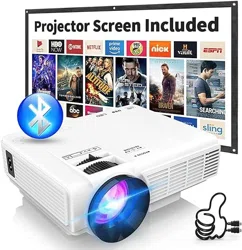
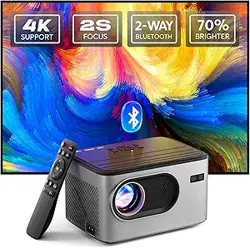
The PANSEBA HI-03 is a portable mini projector designed for home cinema use. It features a native 720P resolution with 1080P Full HD support, a built-in speaker, Bluetooth audio connectivity, and multiple input ports for compatibility with various devices.

Key attributes include its compact size (5.9"L x 4.1"W x 2.1"H), a built-in handle for portability, and a low-noise cooling system.
What's in the Box
- PANSEBA HI-03 Mini Bluetooth Projector
- HDMI Cable
- Power Cord
- Remote Control
Please inspect the contents upon receipt. If any item is missing or damaged, contact the seller.
Features and Specifications
Display & Image
- Native Resolution: 1280 x 720 (720P)
- Maximum Supported Resolution: 1920 x 1080 (1080P Full HD)
- Display Technology: 3LCD with Advanced Color Calibration
- Brightness: 1500 lumen
- Contrast Ratio: 7000:1
- Projection Size: 40 to 200 inches
- Projection Distance: 1.5 to 5 meters (Approx. 4.9 to 16.4 feet)
- Keystone Correction: Digital, ±15°
Audio
- Built-in Speaker: HiFi Stereo Speakers
- Bluetooth Audio: Bluetooth 5.2 for connecting to external speakers, soundbars, or headphones.
- Audio Port: 3.5mm audio jack.
Connectivity & Ports
- HDMI Port: For connecting laptops, TV sticks (Fire Stick, Roku), gaming consoles, Blu-ray players, etc.
- USB 2.0 Port: For playing media files from USB flash drives.
- TF Card Slot: For playing media files from microSD cards.
- 3.5mm Audio Jack: For wired audio output or input.
- Chromecast Interface: For screen mirroring compatible devices.
Physical & Operational
- Dimensions: 5.9" x 4.1" x 2.1"
- Weight: 2.64 lbs (1.2 kg)
- Power Consumption: 55 Watts
- Input Voltage: 240V AC
- Lamp Life: Up to 55,000 hours
- Cooling System: Built-in, low-noise fan.
- Control: On-device buttons and included infrared remote control.
- Mounting: Compatible with ceiling, floor, tabletop, tripod, and wall mounts.
Compatible Devices
The projector is compatible with:
- Laptops and PCs
- Smartphones and Tablets (via HDMI adapter or Chromecast)
- TV Sticks (Amazon Fire Stick, Roku Stick)
- Gaming Consoles (e.g., PS5, Xbox via HDMI)
- Blu-ray/DVD Players
- Media Players
- USB Flash Drives and TF Cards
Use Guide
Initial Setup
- Placement: Position the projector on a stable, flat surface. Ensure there is adequate ventilation around the vents.
- Power: Connect the power cord to the projector and a wall outlet. The power indicator will light up.
- Power On: Press the power button on the projector or remote control.
- Lens Cap: Remove the lens cap.
Connecting Video Sources
Select the correct input source on the projector's menu or using the Source button on the remote.
- HDMI: Use the included HDMI cable to connect your device (laptop, TV stick, game console).
- USB/TF Card: Insert a USB flash drive or microSD card with supported video/photo/music files.
- Smartphone/Tablet (Wired): Requires a compatible HDMI adapter for your device (not included).
- Smartphone/Tablet (Wireless): Use a Chromecast or similar streaming dongle plugged into the HDMI port.
Focus and Image Adjustment
- Focus Ring: Rotate the focus ring around the lens until the image is sharp.
- Keystone Correction: Access the Keystone menu (via remote or on-screen menu) to adjust the vertical trapezoid distortion. Use the +/- buttons to correct up to ±15°.
- Positioning: For the best image, place the projector perpendicular to the screen. Use keystone correction for minor angle adjustments.
Using the Remote Control
The remote control requires two AAA batteries (not included). Point it at the front of the projector. Common functions include:
- Power: Turns the projector on/off.
- Source/Input: Cycles through input modes (HDMI, USB, AV, etc.).
- Menu: Opens the on-screen display (OSD) menu.
- Navigation (Up/Down/Left/Right, OK): Navigates the OSD menu.
- Volume +/-: Adjusts the built-in speaker volume.
- Keystone +/-: Direct access to keystone adjustment.
- Playback Controls: Play/Pause, Forward, Backward for media files.
Audio Setup
- Built-in Speaker: Audio will play automatically from the projector when a video source is active. Use the volume buttons to adjust.
- Bluetooth Speaker/Audio Device:
- Turn on Bluetooth on your external audio device and set it to pairing mode.
- On the projector, go to the Settings menu and select Bluetooth.
- Search for and select your audio device from the list to pair.
- Wired Audio: Connect external speakers or headphones to the 3.5mm audio jack.
Playing Media from USB/TF Card
- Insert a USB flash drive or TF card into the corresponding port.
- Press the Source button until you select "USB" or "TF Card."
- Use the file browser to navigate to your video, photo, or music files.
- Select a file and press OK to play.
Troubleshooting
| Problem | Possible Cause | Solution |
|---|---|---|
| No power / No indicator light | Power cord not connected properly; outlet issue. | Check power connections. Try a different outlet. |
| No image / "No Signal" | Incorrect input source selected; loose cable; source device not on. | Press Source button to cycle inputs. Check all cable connections. Ensure source device is on and outputting signal. |
| Image is blurry | Lens is out of focus. | Adjust the focus ring on the projector lens. |
| Image is distorted (trapezoid) | Projector is not perpendicular to the screen. | Reposition the projector. Use the Keystone correction function in the menu. |
| No sound from built-in speaker | Volume is muted or low; audio cable plugged into 3.5mm jack. | Increase volume. If an audio cable is plugged into the 3.5mm jack, the internal speaker is disabled; unplug it. |
| Bluetooth audio device won't connect | Device not in pairing mode; out of range. | Ensure the audio device is in pairing mode. Move devices closer together (within 10 meters). |
| Projector overheats or shuts down | Vents blocked; fan malfunction. | Turn off projector, unplug it, and let it cool. Ensure all vents are clear of obstructions. |
| Remote control not working | Batteries dead; obstructed signal. | Replace remote batteries. Ensure you are pointing the remote at the projector's front sensor. |
Care and Maintenance
- Cleaning: Use a soft, dry cloth to clean the projector casing and lens. Do not use liquid or aerosol cleaners directly on the lens.
- Ventilation: Always keep the ventilation openings clear. Do not place the projector on soft surfaces like beds or sofas that can block airflow.
- Lamp Life: The LED lamp has a long lifespan. To maximize it, allow the fan to run and cool the projector for 2-3 minutes before disconnecting power after use.
- Storage: Store in a cool, dry place. Use the original packaging if possible.
Warranty and Support
This product is covered by a 3-year warranty from the date of purchase. The warranty covers defects in materials and workmanship under normal use.
Warranty Service: For warranty claims or product support, please contact the seller, "PANSEBA," through your Amazon purchase history or visit the PANSEBA Store on Amazon.