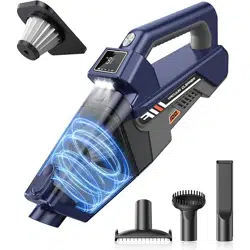
JONYJ VC-100 Handheld Vacuum Cordless, 16000PA High Power Car Vacuum Cleaner

Product's Documents

Below are documents related to this product, you can read online or download:
VC-100 photo

Overview

The JONYJ Handheld Vacuum is a cordless, rechargeable cleaning device designed for use in homes, cars, offices, and for pet hair removal. It features a high-power motor, multiple nozzles, an LED light, and a digital display.

JONYJ Handheld Vacuum Cordless, 16000PA High Power Car Vacuum Cleaner, Portable Hand Held Vacuum Cleaner with LED Light & Multi-Nozzles, Dust Buster Rechargeable for Home, Car, Office, Pet Side view of the JONYJ handheld vacuum cleaner

Features and Specifications

Key Features

  • 16000PA Suction Power: High-speed motor for removing dirt, dust, and pet hair.
  • Cordless & Portable: Battery-powered design for use anywhere. Weighs 1.85 lbs.
  • Multi-Functional Nozzles: Includes three accessories for different cleaning tasks.
  • LED Light: Illuminates dark areas to locate debris.
  • Digital Display Screen: Shows suction power level and battery status.
  • Type-C Fast Charging: Rechargeable 3000mAh battery with included cable.
  • One-Click Dust Removal: Button to easily empty the dust cup.
  • Washable HEPA Filter: Reusable filter that helps maintain suction power.
  • Large 400mL Dust Cup: Capacity for extended cleaning sessions.

Technical Specifications

  • Model: VC-100
  • Power Source: Battery Powered (Cordless)
  • Voltage: 12 Volts
  • Battery Runtime: Up to 30 minutes per full charge
  • Charging Time: Approximately 3 hours (via Type-C)
  • Dust Cup Capacity: 400 Milliliters
  • Filter Type: HEPA Filter
  • Weight: 1.9 Pounds (approx. 1.85 lbs)
  • Dimensions (L x W x H): 14.17" x 5.24" x 3.62"
  • Included Components: Vacuum, Type-C Charging Cable, Accessory Kit (3 nozzles)

Parts and Components

Diagram showing the main parts of the vacuum: main body, dust cup, filter, and nozzles.
  • Main Body & Handle: Ergonomic design with power button and display screen.
  • Dust Cup: Translucent container for collecting debris. Features a one-click release button.
  • HEPA Filter: Located inside the dust cup assembly. Washable and reusable.
  • Charging Port: Type-C port located on the body of the vacuum.
  • LED Light: Located near the suction intake to illuminate the cleaning path.
  • Display Screen: Shows battery level indicator and suction power status.

Included Accessories (Nozzles)

Illustration of the three included nozzle accessories.
  • Extended Suction Nozzle: A long, narrow nozzle for cleaning tight spaces, crevices, and hard-to-reach areas.
  • Brush Suction Nozzle: A nozzle with bristles designed to agitate and remove pet hair and dirt embedded in carpets, upholstery, and fabric.
  • Widened Nozzle: A broader nozzle suitable for cleaning larger surfaces like floors, sofas, beds, and can also be used for pet grooming massage.

Use Guide

Initial Setup and Charging

  1. Unpack all components: vacuum, charging cable, and accessory nozzles.
  2. Before first use, fully charge the vacuum. Connect the provided Type-C cable to the charging port on the vacuum and to a standard USB power adapter or port (5V/2A recommended).
  3. The display screen will indicate the charging status. A full charge takes approximately 3 hours.

Basic Operation

  1. Power On/Off: Press and hold the power button (located on the handle or body) for 1-2 seconds to turn the vacuum on. Press and hold again to turn it off.
  2. Using the Display: The screen shows the current battery level. Ensure the battery has sufficient charge before starting a cleaning task.
  3. Attaching Nozzles: Align the desired nozzle with the suction intake at the front of the vacuum and push until it clicks into place.
  4. Cleaning: Move the vacuum slowly over the surface to be cleaned. The LED light will turn on automatically to illuminate the area.
  5. For best results on carpets or for pet hair, use the brush nozzle. For crevices, use the extended nozzle. For large flat surfaces, use the widened nozzle or the main intake.

Emptying the Dust Cup

Diagram showing how to press the dust cup release button to empty debris.
  1. Turn off the vacuum.
  2. Hold the vacuum over a trash bin.
  3. Press the "One-Click Dust Removal" button (usually located near the top of the dust cup).
  4. The bottom of the dust cup will open, allowing debris to fall out.
  5. Close the dust cup door securely until it clicks.

Cleaning and Maintenance

Illustration showing the removal and washing of the HEPA filter.
  1. Regular Emptying: Empty the dust cup after each use or when it is half full to maintain optimal suction.
  2. Cleaning the Filter:
    • Remove the dust cup from the main body.
    • Take out the HEPA filter from inside the dust cup assembly.
    • Gently tap the filter to remove loose dust. For a thorough clean, rinse it under lukewarm water. Do not use detergents.
    • Allow the filter to air dry completely for at least 24 hours before reinstalling.
    • Never operate the vacuum without the filter installed.
  3. Cleaning the Dust Cup and Nozzles: Wipe with a dry or slightly damp cloth. Ensure all parts are completely dry before reassembly.
  4. Checking for Blockages: If suction power decreases, turn off the vacuum and check the dust cup, filter, and nozzle for clogs. Remove any obstructions.

Battery and Charging

  • For longest battery life, avoid completely draining the battery. Recharge when the battery indicator shows one bar or less.
  • If the vacuum will not be used for an extended period, store it with a 50-80% charge.
  • Use only the provided Type-C cable or a certified equivalent. Using an incorrect charger may damage the battery.

Troubleshooting

  • Vacuum won't turn on: Check battery level and recharge. Ensure the filter is correctly installed and the dust cup is securely attached.
  • Weak suction power: Empty the dust cup. Check and clean the HEPA filter. Check the nozzle and intake for blockages.
  • Battery not charging: Ensure the Type-C cable is firmly connected at both ends. Try a different USB power source.
  • LED light not working: The light is tied to the motor function. If the vacuum runs but the light is off, contact support.
  • Unusual noise or vibration: Turn off immediately. Check for and remove any large obstructions in the nozzle or dust cup.

Safety Instructions

  • Read all instructions before use.
  • Do not use to pick up liquids, burning materials (ashes, cigarettes), or sharp, hard objects (glass, nails).
  • Do not use on wet surfaces.
  • Keep hair, loose clothing, fingers, and all body parts away from openings and moving parts.
  • Do not use if the vacuum or charger cord is damaged.
  • Unplug the charger from the outlet when not in use and before cleaning or maintenance.
  • This appliance is for indoor, household use only. Not for commercial or industrial purposes.
  • Keep the vacuum and charger away from heated surfaces and open flames.
  • Do not store or charge the vacuum in extreme temperatures (below 32°F/0°C or above 104°F/40°C).

Reference file: JONYJ VC-100 Handheld Vacuum Cordless, 16000PA High Power Car Vacuum Cleaner

Specifications

JONYJ VC-100 Questions and Answers

See other models: LT-135 LT-156 LT-154