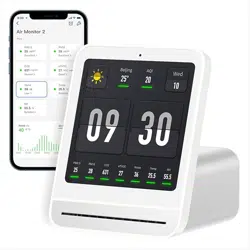
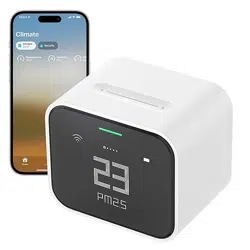
The Qingping Air Quality Monitor Gen 2 is an indoor air quality detector designed to provide real-time monitoring of multiple environmental metrics. It measures temperature, humidity, CO2, PM2.5, PM10, eTVOC (total volatile organic compounds), and noise levels. The device features a 4-inch IPS touchscreen display that shows the date and time, and supports an alarm clock function with multiple alarms to suit daily routines. It connects to Wi-Fi for remote monitoring via the Qingping+ app and supports firmware upgrades for feature enhancements.
Product Features
Multifunction Air Quality Detection
The device monitors seven key metrics:
Temperature: 14°F to 140°F (-10 to 60℃)
Humidity: 0 to 99% RH (non-condensation environment)
CO2: 400 to 9999 ppm
PM2.5 and PM10: 0 to 999 μg/m³
eTVOC: VOC Index 0 to 500, or 0.005 to 9.999 mg/m³
Noise level: 36 to 95 dB
Date and time display
Replaceable PM Sensor
The particulate matter (PM) sensor is designed for easy replacement. It connects to the device body through contact points, and the back cover is attached magnetically, facilitating simple maintenance and sensor replacement.
High-resolution Touchscreen
The 4-inch IPS touchscreen has a resolution of 254 PPI and features automatic brightness adjustment. Each metric is accompanied by a color indicator beneath the number, allowing quick assessment of indoor air quality and noise levels. The interface supports tapping and sliding gestures for smooth operation.
Smart Wi-Fi Connectivity
The monitor supports connection to 2.4GHz or 5GHz Wi-Fi networks, enabling remote monitoring through the Qingping+ app. Users can view real-time data and access historical data for the past 30 days. Firmware updates are supported to improve functionality and add new features.
Alarm Clock Function
The device includes an alarm clock feature that allows setting multiple alarms to accommodate daily schedules.
Important Notes
The product does not measure formaldehyde.
It is recommended to keep the device connected to USB power during daily use. The built-in battery provides up to 3 hours of operation after a full charge.
The USB power adapter is not included; the power input should be 5V⎓1A.
Product Components
Main air quality monitor unit with 4-inch IPS touchscreen
Connect the device to a USB power source using the included USB-C cable. Note that the USB power adapter is not included; use a 5V⎓1A adapter.
Power on the device. The screen will display the current air quality metrics along with date and time.
Use the touchscreen to navigate through different metrics by tapping or sliding.
To change system language to English, slide to the settings page, tap the settings icon, then tap the earth icon and select English.
To switch temperature units, go to Settings > Units and select the preferred unit.
Replacing the PM Sensor
Detach the back cover of the device, which is magnetically attached.
Remove the PM sensor module connected via contact points.
Attach the new PM sensor module and reattach the back cover.
Alarm Clock Function
Set multiple alarms through the touchscreen interface to suit your daily routine.
Remote Monitoring
Connect the device to your Wi-Fi network (2.4GHz or 5GHz) to enable remote monitoring via the Qingping+ app.
App / Software
The Qingping+ app allows remote monitoring of the seven environmental metrics measured by the device. Features include:
Real-time data viewing
Access to historical data for the last 30 days
Exporting historical data
Firmware upgrade support for the device
Device management and settings adjustment
Maintenance & Cleaning
Keep the device clean by wiping the touchscreen and outer surfaces with a soft, dry cloth.
Replace the PM sensor module as needed to maintain accurate particulate measurements.
Avoid exposing the device to moisture or extreme temperatures.
Ensure the USB-C charging port and cable are kept clean and free from debris.
Troubleshooting
Screen turns off automatically: When not connected to power, the screen will turn off after 5 minutes of inactivity. This setting can be changed in Settings > Screen.
Inaccurate initial readings: After moving the device indoors from outdoors, allow 20+ minutes for adjustment. Avoid blocking vents or holding the device as body heat affects readings. Charging may temporarily raise temperature readings.
Changing language: Navigate to Settings > Language (earth icon) to select English.
Changing temperature unit: Go to Settings > Units to switch between Celsius and Fahrenheit.
Battery life issues: The built-in battery lasts up to 3 hours after full charge. It is recommended to keep the device connected to USB power during use.
Wi-Fi connection problems: Ensure your network is 2.4GHz or 5GHz and that the device is within range. Restart the device and router if needed.
Safety Information
Use only the specified power input of 5V⎓1A to avoid damage or overheating.
Do not expose the device to water or moisture to prevent electrical hazards.
Keep the device out of reach of children to avoid accidental damage or injury.
Do not attempt to disassemble or repair the device yourself. Contact customer support for assistance.
Use the device indoors only, in a non-condensation environment.