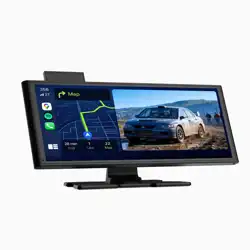
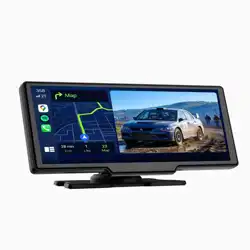
1. Product Overview
The Podofo Portable Car Stereo is a 7-inch touch screen device designed to add wireless smartphone integration to your vehicle. It functions as a secondary display and interface for your phone, providing access to navigation, music, calls, and other apps through Apple CarPlay or Android Auto.
It is a plug-and-play device that connects to your car's 12V power outlet (cigarette lighter) and does not require the removal of your factory-installed stereo.

2. Key Features
2.1 Wireless Smartphone Integration
- Wireless Apple CarPlay: Wirelessly connect a compatible iPhone to access maps, music, messages, and supported apps via the car's touchscreen and voice control.
- Wireless Android Auto: Wirelessly connect a compatible Android phone to access Google Maps, media, and communication apps.
- Mirror Link: Allows screen mirroring from compatible smartphones.
- Voice Control: Use your phone's native voice assistant (Siri or Google Assistant) for hands-free operation.

2.2 Display & Design
- 7-inch Touch Screen: HD 1024 x 600 resolution touchscreen for control.
- Integrated Sunshade: A top sunshade is included to improve screen visibility in bright sunlight or under strong light.
2.3 Audio Output Options
- Upgraded Bluetooth Audio: Can connect directly to your car's existing Bluetooth system to play audio through the car's speakers.
- FM Transmitter: Broadcasts audio to a vacant FM radio frequency on your car stereo.
- AUX Cable Connection: Use the included 3.5mm AUX cable for a wired connection to your car's AUX input.
- Built-in Speaker: A basic speaker is included in the unit itself.
2.4 Connectivity & Media
- Bluetooth 5.0: For hands-free calling and audio streaming from phones not using CarPlay/Android Auto.
- TF Card Slot: Supports playback of media files from a microSD (TF) card.
- Supported Formats: Audio (WAV, WMA), Video (F4V, MOV, MP4, TS).
3. What's in the Box
- 1 x 7-inch Smart Screen Player (Main Unit)
- 1 x Suction Cup and Bracket Mounting Kit
- 1 x User Manual
- 1 x Cigarette Lighter Power Cable (Car Charger)
- 1 x 3.5mm AUX Cable
Note: A rearview camera is not included with this unit. It must be purchased separately if desired.
4. Installation & Setup
4.1 Mounting the Unit
Choose one of the two installation methods:
- Dashboard Mount (Bracket): Attach the bracket to the back of the unit. Place it on your dashboard. Ensure the dashboard surface is smooth and flat for secure adhesion.
- Windshield Mount (Suction Cup): Attach the suction cup mount to the unit. Press the suction cup firmly onto the windshield in a location that provides a clear view without obstructing driving visibility. Adjust the angle as needed.

4.2 Power Connection
- Plug the included car charger cable into your vehicle's 12V cigarette lighter/power outlet.
- Connect the other end of the cable to the power input port on the Podofo unit.
- The device will power on automatically when your car is started.
Important: Use only the included original car charger. Using a different charger may cause voltage instability and cause the device to restart unexpectedly.
4.3 Audio Connection (Choose One Method)
- Bluetooth to Car Stereo: Pair the Podofo unit as a Bluetooth audio source with your car's factory stereo system. This is the recommended method for stable, high-quality sound.
- FM Transmitter: On the Podofo unit, set an unused FM frequency (e.g., 88.1). Tune your car radio to the same frequency.
- AUX Cable: Connect the included 3.5mm AUX cable from the Podofo unit's AUX output to your car stereo's AUX input jack.
- Built-in Speaker: Sound will play from the small speaker on the unit itself (volume is limited).
5. Use Guide
5.1 Connecting Your Phone
For iPhone (Wireless CarPlay):
- Ensure your iPhone's Bluetooth and Wi-Fi are enabled.
- On the Podofo unit's home screen, select the "CarPlay" icon.
- On your iPhone, go to Settings > General > CarPlay and select the Podofo device from the available list.
- Follow any on-screen pairing prompts. The connection should establish wirelessly.

For Android Phone (Wireless Android Auto):
- Ensure your phone's Bluetooth is on and the Android Auto app is installed and set up.
- On the Podofo unit's home screen, select the "Android Auto" icon.
- On your phone, you should receive a connection prompt. Accept to pair and connect.
5.2 Basic Operation
- Touch Screen: Use the 7-inch capacitive touchscreen to navigate menus, select apps, and control functions.
- Home Screen: The main screen provides icons for CarPlay, Android Auto, Bluetooth, Media Player, and Settings.
- Voice Control: Press and hold the voice control button on the screen (or use your steering wheel button if connected via Bluetooth) to activate Siri or Google Assistant.
- Volume Control: Adjust volume using the on-screen controls or your car's stereo volume knob (if audio is routed through the car's speakers).
5.3 Playing Media from TF Card
- Insert a microSD (TF) card with media files into the slot on the unit.
- On the home screen, select the "Media" or "Music" icon.
- Navigate to the TF card source and select your audio or video files to play.
5.4 Troubleshooting Common Issues
- No Sound or Low Volume:
- Check your selected audio output method (Bluetooth, FM, AUX). Ensure your car stereo is on the correct source (e.g., Bluetooth audio or the correct FM frequency).
- Increase the volume on both the Podofo unit (on-screen) and your car stereo.
- The built-in speaker has limited volume; for louder sound, use Bluetooth, AUX, or FM connection to your car's speakers.
- Device Restarts or is Unstable:
- You are likely using a non-original car charger. Use only the included charger.
- Phone Won't Connect:
- Ensure wireless CarPlay/Android Auto is supported on your specific phone model and OS version.
- Restart both the Podofo unit and your phone.
- Delete old pairings from your phone's Bluetooth settings and try the connection process again.
6. Technical Specifications
- Model: A3327
- Screen: 7-inch IPS Touchscreen, 1024 x 600 resolution
- Voltage Input: 7-32V DC (compatible with 12V/24V vehicle systems)
- Wireless Protocols: Bluetooth 5.0, Wi-Fi (for wireless projection)
- Audio Output: Stereo, 4.0 Channel Surround Sound Configuration
- Connections: 3.5mm AUX Out, TF Card Slot, DC Power Input
- Cooling: Passive cooling
- Operating Temperature: -4°F to 149°F (-20°C to 65°C)
- Languages: English, Russian, Spanish, French, German, Japanese, Korean
- Item Weight: 690 grams (1.52 lbs)
7. Safety & Warnings
- Install the device in a location that does not obstruct the driver's view of the road or airbag deployment zones.
- Secure all cables to prevent them from interfering with driving controls.
- Set up navigation destinations and music playlists before you start driving. Use voice commands for operation while driving.
- Do not disassemble the device. There are no user-serviceable parts inside.
- Keep the device away from liquids and extreme temperatures.
- Use only the provided car charger. Incompatible chargers can damage the device and pose a safety risk.