1. Overview
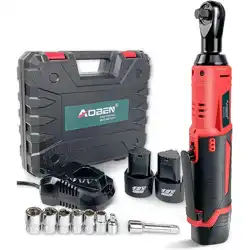
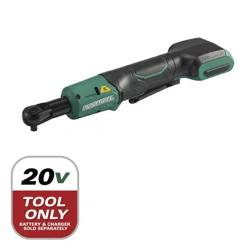
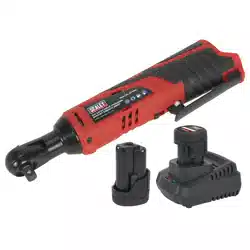
This manual provides instructions for the safe and effective use of the AOBEN Cordless Electric Ratchet Wrench Set. The tool is a 12V, 3/8" drive power ratchet designed for removing and installing bolts and nuts in automotive, mechanical, and home improvement applications.

2. Package Contents
Before use, verify your kit contains the following items:
- 1 x AOBEN Cordless Ratchet Wrench
- 2 x 2000mAh 12V Lithium-Ion Batteries
- 1 x Battery Charger
- 6 x Sockets (Various Sizes)
- 1 x 1/4 inch Adapter
- 1 x 3 inch Extension Bar
- 1 x User Manual
- 1 x Carry Case


3. Product Features & Specifications
3.1 Key Features
- Powerful Motor: 12V Max motor delivering up to 40 ft-lbs (54 Nm) of torque.
- High Speed: Variable-speed trigger providing up to 280 RPM.
- LED Work Light: Integrated light on the front illuminates dark workspaces.
- Battery Indicator: LED lights on the side display remaining battery power.
- Directional Switch: A reverse switch located on the back of the head to change rotation direction and prevent accidental activation.
- Heat Management: Air-cooled motor with heat-sinking capability to stabilize battery temperature.
- Ergonomic Design: Slip-resistant grip for secure handling.

3.2 Technical Specifications
- Drive Size: 3/8 inch
- Voltage: 12 Volts DC
- Battery Capacity: 2000mAh (per battery)
- No-Load Speed: 280 RPM
- Max Torque: 40 ft-lbs (54 Nm)
- Head Style: Fixed Square
- Length: 30.5 cm (12 inches)
- Weight (Approx.): 2 kg (4.4 lbs) with battery
- Material: Metal construction with polished finish.
4. Use Guide
4.1 Initial Setup & Charging
- Remove all components from the carry case.
- Insert a battery into the charger. The charger indicator will light up to show charging status.
- Fully charge both batteries before first use. Refer to the charger's indicator lights for charge completion.
- Insert a charged battery into the base of the ratchet wrench until it clicks into place.
4.2 Attaching Sockets and Accessories
- Select the appropriate socket size for your fastener (bolt or nut).
- Push the socket onto the 3/8" square drive of the ratchet head. It should lock into place with a click.
- To use the 1/4" adapter or 3" extension bar, first attach it to the ratchet drive, then attach the socket to the adapter or extension.
- To remove a socket or accessory, pull the locking collar on the ratchet head back and pull the accessory off.

4.3 Operating the Ratchet
- Power On/Off & Direction: Use the switch on the back of the ratchet head to select forward (clockwise) or reverse (counter-clockwise) rotation. The center position is off.
- Speed Control: Squeeze the variable-speed trigger to start the motor. Apply more pressure to increase speed.
- Using the LED Light: The front LED work light turns on automatically when the trigger is pressed.
- Checking Battery Level: The LED indicator lights on the side of the unit show the approximate remaining battery charge.
- For final tightening or breaking loose stubborn fasteners, you may need to apply manual force to the handle in conjunction with the tool's power.
4.4 Storage and Maintenance
- Store the tool and all accessories in the provided carry case to keep them organized and protected.
- Keep the tool clean and free of debris. Wipe with a dry cloth.
- Do not immerse the tool or battery in water or other liquids.
- Store batteries in a cool, dry place away from direct sunlight and metal objects.
- If the tool will not be used for an extended period, remove the battery.

5. Safety Information
- Read all instructions before using the tool.
- Always wear appropriate personal protective equipment (PPE) such as safety glasses.
- Ensure the directional switch is in the correct position (off) before inserting or removing a battery.
- Do not use the tool if it or the battery is damaged.
- Use only the provided AOBEN charger to charge the batteries.
- Do not expose the tool or battery to rain or wet conditions.
- Keep hands and clothing away from moving parts.
- The tool is designed for driving bolts and nuts. Do not use it as an impact wrench or for drilling.
6. Troubleshooting
- Tool does not start: Check if the battery is charged and properly inserted. Ensure the directional switch is not in the center "off" position.
- Weak power or slow speed: The battery may be low. Recharge or replace with a charged battery.
- Socket won't stay on: Check the locking mechanism on the drive head for debris or damage. Ensure the socket is fully seated.
- LED work light not functioning: The light activates with the trigger. If the tool runs but the light doesn't work, the LED may be faulty.
- Excessive heat: Allow the tool and battery to cool down if they become hot during prolonged use.
7. Warranty and Support
This product is backed by a 12-month limited warranty from the date of purchase. For warranty service or support, please contact the manufacturer:
Manufacturer Contact Information: Jinhua, Zhejiang 321399, CN
Please have your model number (AB7331T) ready when contacting support.