UserManual Electric Range
Introducing your new range
Overview
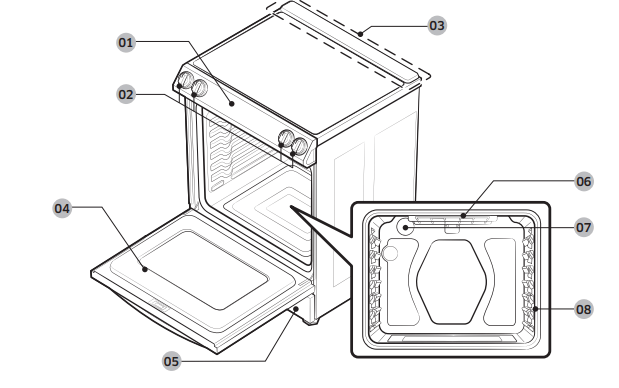
01 Touch display
02 Surface control knobs* (See page 23 for more information).
03 Vent
04 Oven door
05 Storage drawer
06 Broil oven heater
07 Oven light
08 Shelf position
What’s included
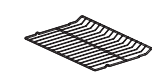
NOTE If you need an accessory marked with a *, you can buy it from the Samsung Contact Center (1-800-726-7864)
Operating the oven
The oven control panel
READ THE INSTRUCTIONS CAREFULLY BEFORE USING THE OVEN. For satisfactory use of your oven, become familiar with the various features and functions of the oven as described below. Detailed instructions for each feature and function follow later in this user manual.
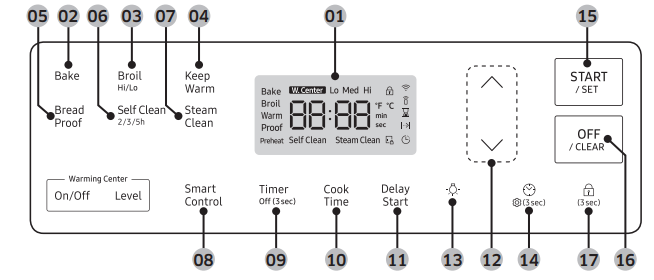
01 Display: Shows the time of day, oven temperature, whether the oven is in the bake, broil, or self-cleaning mode, and the time set for the timer or automatic oven operations.
02 Bake: Use to select the bake function of the oven
03 Broil (Hi/LoSelf Clean (2/3/5h): Use to select the Self-cleaning function of the oven.
04 Keep Warm: Use to select the keep warm function of the single oven to keep cooked foods warm.
05 Bread Proof: Use to select the bread proof function of the oven.
06 Self Clean (2/3/5h): Use to select the Self-cleaning function of the oven.
07 Steam Clean: Use to select the steam cleaning function of the oven.
08 Smart Control: Use to select the smart control feature.
09 Timer (Off (3sec)): Use to set or cancel the kitchen timer. The kitchen timer does not start or stop cooking. Press and hold for 3 seconds to turn off the timer.
10 Cook Time: Press this button, and then use the  or
or  to set the cooking time. The oven will shut off when the cooking time has run out.
11 Delay Start: Press to set the oven to start and stop automatically at a time you set. (Bake, Cooking Time, and self clean only.)
12  /
/ : Use to raise or lower the temperature and increase or decrease times.
13 Lamp: Press to turn the oven light on or off.
14 Clock / Setting: Use to set the time of day. / Use to bring up the user preference menu in the display. (Press for 3 seconds.)
15 START/SET: Use to start any cooking or cleaning function in the oven.
16 OFF/CLEAR: Press to cancel all oven operations except the clock and timer. / Press to cancel a previously entered temperature or time.
17 Oven lock: Use to disable all oven functions.
Oven lock
Lock the oven door and the buttons on the touch pad so they cannot be activated accidentally. Oven lock can only be activated in standby mode.
How to activate the Oven lock feature
Press Oven lock  for 3 seconds. The display will show the Lock (
 ) icon as well as the current time. All functions must be cancelled before Oven lock is activated. This function is available only when the oven temperature is under 400 °F.
How to unlock the controls
Press Oven lock  for 3 seconds. The Lock (
 ) icon will disappear from the display.
Setting the clock
The clock must be set to the correct time of day for the automatic oven timing functions to work properly. The time of day cannot be changed during timed cooking, delay-timed cooking, or a self-cleaning cycle.
How to set the clock
1. Press Clock 
2. Press  or
or  to set the current time. (hour and minute)
3. Press Clock or START/SET to save the changes.
Setting the kitchen timer
The kitchen timer serves as an extra timer that will beep when the set time has elapsed. It does not start or stop cooking functions. You can use the kitchen timer with any of the other oven functions.
How to set the timer
1. Press Timer.
2. Press or
or to set the desired time. The timer can be set for any amount of time from 1 minute to 9 hours and 59 minutes. If you make a mistake, press timer, and then enter the amount of time again.
3. Press START/SET.
4. When the set time has elapsed, the oven will beep and the display will show "End" until you press the Timer pad. You can cancel the timer at any time by pressing Timer for 3 seconds.
Timed cooking
In timed cooking, the oven turns on immediately and cooks for the length of time you select. At the end of the cooking time, the oven turns off automatically.
• You can use the timed cooking feature only with another cooking operation (bake).
How to set the oven for timed cooking
1. Start the cooking operation in Bake mode. The default temperature is 350 °F.
2. Press Cook Time. You can set the Cook Time at any time. (After selecting the cook mode, during preheating, after preheating.)
3. Press  or
or  to set the desired cook time. You can set the cooking time for any amount of time from 1 minute to 9 hours and 59 minutes.
4. Press START/SET. The temperature display will start to change once the oven temperature reaches 175 °F. The oven will continue to cook until the set amount of time has elapsed, then turn off automatically unless you set the keep warm feature. (Refer to the section on the keep warm feature on page 35.)
5. You can cancel a cook time at any time by setting the cook time to 0 minutes. (Press Cook Time -> set cook time to 0 min -> press START/SET)
NOTE When timed cooking is done, the range will beep several times.
CAUTION Use caution with the timed cooking or delay start features. Use these features to cook cured or frozen meats and most fruits and vegetables. Foods that can easily spoil, such as milk, eggs, fish, meat, or poultry, should be chilled in the refrigerator first. Even when chilled, they should not stand in the oven for more than 1 hour before cooking begins, and should be removed promptly when cooking is completed. Eating spoiled food can result in sickness from food poisoning.
Delay start
In a delay timed cooking, the oven’s timer turns the oven on and off at times you select in advance.
• You can use the delay start feature only with another cooking operation (bake or self-clean.)
• You can set the oven for a delay start before setting other cooking operations.
• The clock must be set to the current time.
How to set the oven for delay start
1. Position the oven rack(s) and place the food in the oven.
2. Press the pad for the cooking operation you want, eg. Bake. The default temperature is 350 °F.
3. Press or to select the desired temperature.
4. Set the cooking time if you want. (Refer to the section on the timed cooking feature on page 30).
5. Press Delay Start.
6. Press or
or  to set the desired time for the oven to start.
7. Press START/SET. At the set time, a short beep will sound. The oven will begin to bake
Turning the oven light on and off
The oven light turns on automatically when the door is opened.
• The oven light turns off automatically when the door is closed.
• You can turn the oven light on and off manually by pressing the  pad.
pad.
Minimum and maximum settings
All of the features listed in the table below have minimum and maximum time or temperature settings. A beep will sound each time a pad on the control panel is pressed and the entry is accepted. An error tone will sound in the form of a long beep if the entered temperature or time is below the minimum or above the maximum setting for the feature.
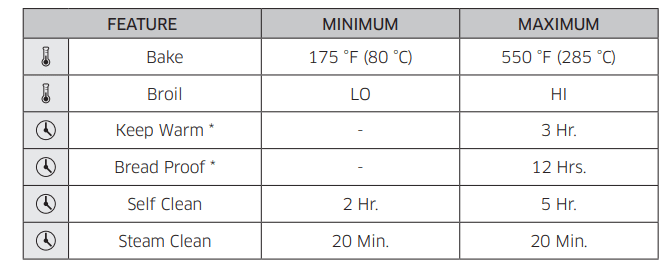
NOTE If you turn off the 12 hour energy saving feature, the feature marked with a * will operate until canceled. (12 hour energy saving's default setting : on) See page 36 for more information.
Using the oven racks
Oven rack positions
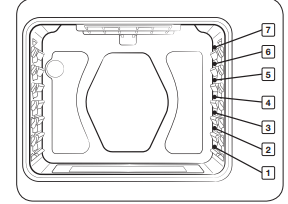
Recommended rack position for cooking
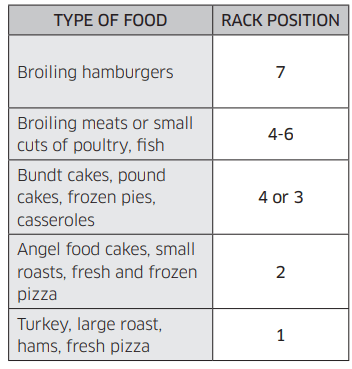
- This table is for reference only.
Rack and Pan placement
Centering the baking pans in the oven as much as possible will produce better results. If baking with more than one pan, place the pans so each has at least 1" to 1½" of air space around it.
When baking on a single oven rack, place the oven rack in position 3 or 4.
See the figure on the left.
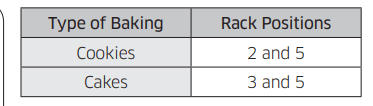
Cakes place the oven racks in positions 3 and 5, Cookies place the racks in positions 2 and 5.
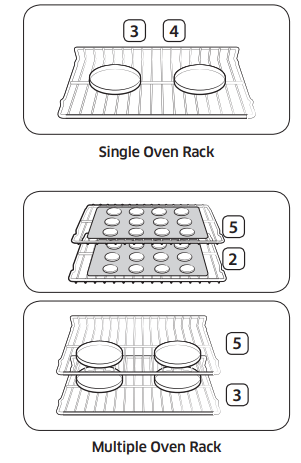
Using Multiple Oven Racks
Before using the racks
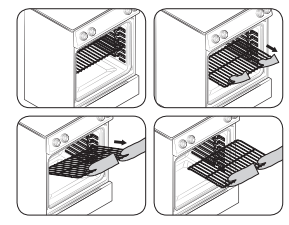
The oven has two racks. Each rack has stops that need to be placed correctly on the supports. These stops will keep the rack from coming completely out.
REMOVING THE RACKS
1. Pull the rack straight out until it stops.
2. Lift up the front of the rack, and then pull it out.
REPLACING THE RACKS
1. Place the end of the rack on the support.
2. Tilt the front end up and push the rack in.
CAUTION
• Do not cover a rack with aluminum foil or place aluminum foil on the oven bottom. This will hamper heat circulation, resulting in poor baking, and may damage the oven bottom.
• Arrange the oven racks only when the oven is cool.
Baking
The oven can be programmed to bake at any temperature from 175 °F to 550 °F. Baking temperature and time will vary depending on the ingredients and the size and shape of the baking pan used. Dark or nonstick coatings may cook faster with more browning.
How to set the temperature
1. Press Bake. The default temperature is 350 °F.
2. Press  or
or  to select the desired temperature.
3. Press START/SET. The temperature display will start to change once the oven temperature reaches 175 °F. 4. If you want to cancel baking or if you have finished, press OFF/CLEAR.
• Place food in the oven after preheating if the recipe calls for it. Preheating is very important for good results when baking cakes, cookies, pastry, and breads. After the oven has reached the desired temperature, the range will beep several times.
How to adjust the temperature while cooking
1. Press Bake. The display will show the present temperature, eg. 375 °F.
2. Press  or
or  to select the desired temperature.
3. Press START/SET to complete the change.
Broiling
Broiling is a method of cooking tender cuts of meat by direct heat under the broil element of the oven.
The high heat cooks quickly and gives a rich, brown outer appearance. Broil mode is best for meats, fish, and poultry up to 1" thick.
Always preheat the oven for 4 minutes before broiling.
How to set the oven for broiling
1. Press Broil once for Hi or twice for Lo. (You can select Hi or Lo by pressing or .) Use Lo to cook foods, such as poultry or thick cuts of meat thoroughly without over-browning them.
2. To start broiling, press START/SET. Broil one side until the food is browned. Turn over and broil the other side.
3. Press OFF/CLEAR once you have finished cooking or if you want to cancel broiling.
NOTE
• This oven is designed for CLOSED DOOR broiling. The oven door must be closed during broiling.
• If you leave the oven door open for more than 2 minutes when the oven is on, all heating elements will shut off automatically.
• When you have finished cooking, the cooling fan will continue to run until the oven has cooled down.
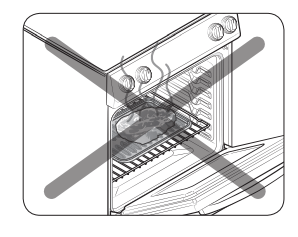
CAUTION
• Always use this cooking mode with the oven door closed. Use care when opening the door. Let hot air or steam escape before you remove food from or put food into the oven.
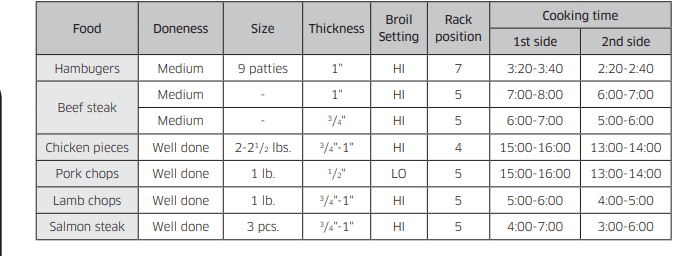
Broiling Recommendation Guide
The size, weight, thickness, starting temperature, and your doneness preference will affect broiling times. This guide is based on meats at refrigerator temperature. Always use a broiler pan and its grid when broiling. Always preheat the oven for 4 minutes before broiling.
Using the special fuction
Bread proof
The Bread Proof function automatically provides the optimum temperature for the bread proof process, and therefore does not have a temperature adjustment. If you press Bread Proof when the oven temperature is above 95 °F, Hot will appear in the display. Because these functions produce the best results when started while the oven is cool, we recommend that you wait until the oven has cooled down and Hot disappears from the display.
1. Press Bread Proof.
2. Press START/SET.
3. Press OFF/CLEAR at any time to turn off the Bread Proof feature.
NOTE
Use rack position 3 for bread proofing.
CAUTION
• Do not use Bread proof when the oven temperature is above 125 ˚F. If temperature is above 125 ˚F, this mode won’t be able to use. Wait until the oven cools down.
• Do not use Bread proof for warming food. The proofing temperature is not hot enough to keep food warm.
• Place the dough in a heat-safe container on rack position 3 or 4 and cover it with a cloth or with plastic wrap. The plastic wrap may need to be anchored underneath the container so that the oven does not blow the plastic wrap off the dough.
• To avoid lowering the temperature and extending proofing time, do not open the oven door.
Using the keep warm feature
When cooking is finished, Keep Warm will hold the food at a safe serving temperature for up to 3 hours. After 3 hours, the feature will shut off automatically. You can use the keep warm feature without any other cooking operations, or you can set it to activate after a timed or delay timed cooking operation. You should not use this feature to reheat cold food.
How to use the keep warm feature
1. Press Keep Warm.
2. Press START/SET.
3. Press OFF/CLEAR at any time to turn the feature off
How to set the oven to activate the keep warm mode after a timed cooking
1. Set Timed Cooking to start cooking. (Refer to the section on the timed cooking feature on page 30.)
2. Press Keep Warm to use the feature.
3. Cooking mode is switched directly to Keep Warm mode after the Timed cooking period has ended. In this case, you can turn off Keep Warm by pressing OFF/CLEAR.
• Press Keep Warm once again to cancel Keep Warm setting during cooking mode operation.
NOTE If you turn off the 12 hour energy saving feature, the keep warm feature will operate until canceled. (12 hour energy saving's default setting : on) See page 36 for more information.
Using the smart control feature
Functions that can be operated from the SmartThings app may not work smoothly if communication condition becomes poor or the product is installed in a place with a weak Wi-Fi signal.
Please refer to the following table for the main functions that can be operated from the app.
- When the remote control is off
- Monitoring (Oven, Cooktop, Probe), Oven off
- When the remote control is on
- Monitoring (Oven, Cooktop, Probe), Oven start, Oven off, Auto cook, My cook, Error check
How to connect the oven
1. Download and open the SmartThings app on your smart device.
2. Follow the app’s on-screen instructions to connect  your range.
3. Once the process is complete, the connected icon located on your range displays and the app will confirm you are connected.
4. If the connection icon does not turn on, follow the instruction in the app to reconnect.
To start the oven remotely
1. Press Smart Control appears in the display. The oven can now be started remotely with a connected device.
Oven remote control
• Transfer the oven setting (mode, time, temperature) from the device to the oven.
• Remotely start the oven (Only available for Electric range).
• Turn the oven off remotely.
• Once cooking starts, you can change the time, temperature remotely.
• Self clean mode cannot be started remotely.
NOTE
• Opening the oven door or pressing Smart Control will delete from the display and prevent you from turning the oven on remotely.
• If it is not shown in the display, you can still monitor the oven and cooktop status and turn the oven off.
• When oven cooking is finished or cancelled, Smart Control will turn off.
Using the options function
This function enables you to control various electronic control options. Refer to the following table for available options. The option menu is only available when the oven is not being used (not cooking).
1. Temp Adjust
- Lets you correct the temperature in the oven.
2. Temp Unit
- Lets you program the oven control to display temperatures in Fahrenheit or Centigrade.
3. 12 hour energy saving
- This feature automatically turns off the oven after 12 hours during baking functions or after 3 hours during a broil function.
4. Sound On/Off
- Lets you set the oven controls to operate silently.
5. Wi-Fi On/Off
- Lets you set the wi-fi network to deactivate.
0. Demo mode
- This option is for use by retail establishments for display purposes only.
NOTE
Options key location
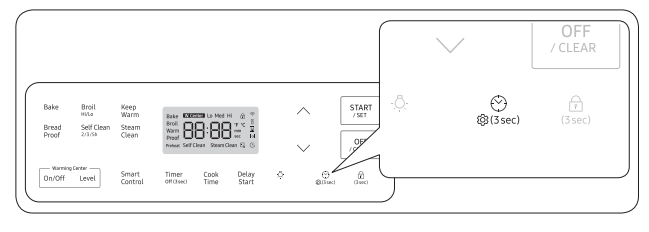
Temp Adjust
The temperature in the oven has been calibrated at the factory. When first using the oven, be sure to follow recipe times and temperatures. If you think the oven is too hot or too cool, you can correct the temperature in the oven. Before correcting, test a recipe by using a temperature setting that is higher or lower than the recommended temperature. The baking results should help you to decide how much of an adjustment is needed. The oven temperature can be adjusted ±35 °F (±19 °C ). How to correct the oven temperature
1. Press  Options for 3 seconds.
2. Press  or
or  to select 1, and then press START/SET.
3. Press  or
or  to select the desired temperature you want to adjust. (-35~35)
4. Press START/SET to save the changes.
NOTE This adjustment will not affect the broiling or the self-cleaning temperatures. The adjustment will be retained in memory after a power failure.
Temp Unit (Fahrenheit or Celsius temperature selection)
You can program the oven control to display the temperature in Fahrenheit or Celsius. The oven has been preset at the factory to display in Fahrenheit.
How to change the display from Fahrenheit to Celsius or Celsius to Fahrenheit
1. Press  Options for 3 seconds.
2. Press  or
or  to select 2, and then press START/SET.
3. Press  or
or  to select F (Fahrenheit) or C (Celsius).
4. Press START/SET to save the changes.
12-hour energy saving
If you accidently leave the oven on, this feature will automatically turn off the oven after 12-hours during baking functions or after 3 hours during a broil function. (Default setting : on)
How to turn the 12-hour energy saving feature on or off
1. Press  Options for 3 seconds.
2. Press  or
or  to select 3, and then press START/SET.
3. Press  or
or  to select --Hr (Off) or 12Hr (On).
4. Press START/SET to save the changes.
Sound On/Off
Using Sound On/OFF, you can set the oven controls to operate silently.
How to turn the sound on or off
1. Press  Options for 3 seconds.
2. Press  or
or  to select 4, and then press START/SET.
3. Press  or
or  to select ON or OFF.
4. Press START/SET to save the changes. Wi-Fi On/Off You can turn the range’s Wi-Fi connection on or off.
How to turn the Wi-Fi on or off
1. Press  Options for 3 seconds.
2. Press  or
or  to select 5, and then press START/SET.
3. Press  or
or  to select ON or OFF.
4. Press START/SET to save the changes.
NOTE
When you turn the range’s Wi-Fi connection off, users can’t set to easy setup. Demo mode This option is for use by retail establishments for display purposes only. (The heating element does not operate).
How to enable or disable the demo mode
1. Press  Options for 3 seconds.
2. Press  or
or  to select 0, and then press START/SET.
3. Press  or
or  to select ON or OFF.
4. Press START/SET to save the changes.
Using the Sabbath feature
You can use the Sabbath feature with baking only. The oven temperature may be set higher or lower after you set the Sabbath feature. (The oven temperature adjustment feature should be used only during Jewish holidays). The display, however, will not change and tones will not sound when a change occurs. Once the oven is properly set for baking with the Sabbath feature active, the oven will remain on continuously until the Sabbath feature is cancelled. This will override the factory preset 12 hour energy saving feature. If the oven light is needed during the Sabbath, press  before activating the Sabbath feature. Once the oven light is turned on and the Sabbath feature is active, the oven light will remain on until the Sabbath feature is turned off. If the oven light needs to be off, be sure to turn the oven light off before activating the Sabbath feature.
How to use the Sabbath feature
1. Press Bake. The default temperature is 350 °F.
2. Enter the temperature you want, eg. 375 °F, by using the  or
or  pad.
pad.
3. Press START/SET. The temperature display will start to change once the oven temperature reaches 175 °F.
4. Press Bake and  at the same time for 3 seconds. The display will show SAb.
Once SAb appears in the display, the oven will not beep or display any further changes.
You may change the oven temperature once baking has started. Remember that the oven will not beep or display any further changes once the Sabbath feature is engaged.
5. You can turn the oven off at any time by pressing OFF/CLEAR. This will turn only the oven off. If you want to deactivate the Sabbath feature, hold down Bake and  at the same time for 3 seconds. Sab will disappear from the display.
Do not to attempt to activate any other program feature except BAKE while the Sabbath feature is active. ONLY the following key pads will function correctly with the Sabbath feature on: ,
, , Bake, START/SET and OFF/ CLEAR. All other keys should not be used once the Sabbath feature is activated.
You can change the oven temperature, but the display will not change and tones will not sound when a change occurs. (The oven temperature adjustment feature should be used only on Jewish holidays). After changing the temperature while the unit is in Sabbath mode, there is a 15-second delay before the unit recognizes the change.
You can set the Cook time function before activating the Sabbath feature.
Should you experience a power failure or interruption, the oven will shut off. When power is returned, the oven will not turn back on automatically. SAb will be displayed in the oven control display, but the oven will not operate. Food may be safely removed from the oven while it is still in the Sabbath mode, however the oven cannot be turned back on until after the Sabbath/ Holidays. After the Sabbath observance, turn OFF the Sabbath mode. Press and hold both Bake and  for at least 3 seconds simultaneously to turn the Sabbath mode off. The oven can then be used with all normal functions.
Do not open the oven door or change the oven temperature for about 30 minutes after you have started Sabbath mode to allow the oven to reach the set temperature. Note that, for best performance, the oven fan operates only when the oven temperature is rising.
Do not use the cooktop when the oven is in the Sabbath mode.
Maintaining your appliance
Self-cleaning
This self-cleaning oven uses high temperatures (well above cooking temperatures) to burn off leftover grease and residue completely or reduce them to a finely powdered ash that you can wipe away with a damp cloth.
CAUTION
• During the self-cleaning cycle, the outside of the range will become very hot to the touch. Do not leave small children unattended near the appliance.
• Some birds are extremely sensitive to the fumes given off during the selfcleaning cycle of any range. Move birds to another well-ventilated room.
• Do not line the oven walls, racks, bottom, or any other part of the range with aluminum foil. Doing so will result in poor heat distribution, poor baking results, and cause permanent damage to the oven interior. Aluminum foil will melt and adhere to the interior surface of the oven.
• Do not force the oven door open. This can damage the automatic door locking system. Use care when opening the oven door after the self-cleaning cycle is complete. Stand to the side of the oven when opening the door to allow hot air or steam to escape. The oven may still be VERY HOT.
Before a self-cleaning cycle
• We recommend venting your kitchen with an open window or using a ventilation fan or hood during the selfcleaning cycle.
• Remove the wire rack, broil pan, broil pan insert, all cookware, and any aluminum foil from the oven.
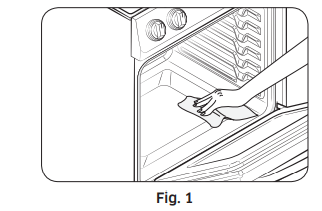
• Wipe up debris from the oven bottom. (Fig. 1)
• The silver-colored oven racks can be self-cleaned, but they will darken, lose their luster, and become hard to slide.
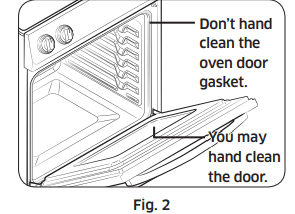
• Residue on the front frame of the range and outside the gasket on the door will need to be cleaned by hand. Clean these areas with hot water, soap-filled steel-wool pads, or cleansers, such as Soft Scrub. Rinse well with clean water and dry.
• Do not clean the gasket. The fiberglass material of the oven door gasket cannot withstand abrasion. It is essential for the gasket to remain intact. If you notice it becoming worn or frayed, have it replaced. (Fig. 2)
• Make sure the oven light bulb cover is in place and the oven light is off.
NOTE
Remove oven racks and accessories before starting the self-clean mode.
How to run a self-cleaning cycle
1. Select the length of time for the self-cleaning operation, e.g., 3 hours. Press Self Clean once for a 3 hour clean time, twice for a 5 hour clean time, or 3 times for a 2 hour clean time
The default setting is 3 hours.
2. Press START/SET to start the self-cleaning cycle. The motor-driven door lock will engage automatically.
NOTE
• You will not be able to start a self-cleaning cycle if the control lock feature is activated or if the oven’s temperature is too hot.
• The oven door locks automatically. The display will show the cleaning time remaining. It is not be possible to open the oven door until the temperature drops to a safe and cool temperature.
• The self-cleaning feature will not operate when the warming center is on.
3. When the self-cleaning cycle is done, End will appear in the display and the range will beep several times.
How to delay the start of self-cleaning
1. Press Self Clean. Select the desired self-clean time by pressing Self Clean.
2. Press Delay Start.
3. Enter the time you want the clean cycle to start.
4. Press START/SET. The display will show Delay, Self clean, and the Lock icon. The motor-driven door lock will engage automatically.
5. The Self-Cleaning cycle will turn on automatically at the set time.
How to turn off the self-cleaning feature
You may find it necessary to stop or interrupt a self-cleaning cycle due to smoke in the oven
1. Press OFF/CLEAR.
2. You will be able to open the oven door once the oven has cooled down for approximately 1 hour.
After a self-cleaning cycle
• You may notice some white ash in the oven. Wipe it up with a damp cloth after the oven cools. (If white spots remain, remove them with a soap-filled steel wool pad and rinse thoroughly with a vinegar and water mixture). •If the oven is not clean after one cycle, repeat the cycle.
• You cannot set the oven for cooking until the oven is cool enough for the door to unlock.
Steam-cleaning
How to set the oven for steam-cleaning
For light cleaning, the steam-cleaning function saves time and energy. For heavierduty cleaning, use the self-cleaning function.
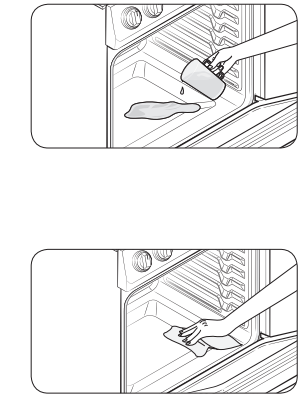
1. Remove all accessories from the oven.
2. Pour approximately 10 oz. (300 ml) of water onto the bottom of the empty oven and then close the oven door. Use normal water only, not distilled water.
3. Press Steam Clean.
4. Press START/SET. When the operation is complete, the display will blink and a beep will sound.
5. Press OFF/CLEAR.
6. Clean the oven’s interior. There will be a significant amount of water remaining on the bottom of the oven after a steam-cleaning cycle. Remove the residual water with a sponge or soft dry cloth.
NOTE
When steam-cleaning, use exactly 10 oz. of water since this produces the best results.
NOTE
If you press Steam Clean when the oven temperature is above 100˚F, Hot will appear in the display. Because this function produces the best results when started while the oven is cool, we recommend that you wait until the oven has cooled down and Hot disappears from the display
After a steam-cleaning cycle
• Take care when opening the door before a steam-cleaning procedure has ended. The water on the bottom is hot.
• Open the oven door and remove the remaining water with a sponge. Do not leave the residual water in the oven for any length of time. Wipe the oven clean and dry with a soft cloth. Do not forget to wipe under the oven door seal.
• Use a detergent-soaked sponge, a soft brush, or a nylon scrubber to wipe the oven interior. Remove stubborn residue with a nylon scourer. You can remove lime deposits with a cloth soaked in vinegar.
• If the oven remains dirty, you can repeat the procedure once the oven has cooled.
• For heavy residue, such as grease left over from roasting, we recommend that you rub detergent into the residue before activating the steam-cleaning function.
• After cleaning, leave the oven door ajar at a 15° angle to allow the interior enamel surface to dry thoroughly
Care and cleaning of the oven
WARNING
• Be sure all controls are OFF and all surfaces are COOL before cleaning any part of the range.
• If your range is moved for cleaning, servicing, or any reason, be sure the Anti-Tip device is re-engaged properly when the range is replaced. If you fail to reengage the Anti-Tip device, the range could tip and cause serous injury.

vent
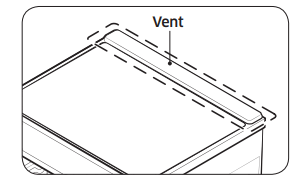
• The vents are located at the back of the oven range.
• This area could become hot during oven use.
• It is normal for steam to come out of the vent.
• The vent is important for proper air circulation. Never block this vent.
Cleaning painted parts and decorative trim
• For general cleaning, use a cloth with hot, soapy water.
• For more difficult residue and built-up grease, apply a liquid detergent directly onto the area and leave for 30 to 60 minutes. Wipe with a damp cloth and dry. Do not use abrasive cleaners on any of these surfaces. They can scratch.
Cleaning stainless steel surfaces
1. Shake the bottle of Stainless Steel Appliance Cleaner or Polish well.
2. Place a small amount of Stainless Steel Appliance Cleaner or Polish on a damp cloth or damp paper towel.
3. Clean a small area, rubbing with the grain of the stainless steel if applicable.
4. Dry and buff with a clean, dry paper towel or soft cloth.
5. Repeat as necessary.
NOTE
• Do not use a steel-wool pad. It will scratch the surface.
• If a mineral oil-based Stainless Appliance Cleaner has been used before to clean the appliance, wash the surface with dishwashing liquid and water prior to using the Stainless Steel Appliance Cleaner or Polish
Oven racks
If the racks are left in the oven during a self-cleaning cycle, their color will turn slightly blue and the finish will be dull. After the self-cleaning cycle is complete and the oven has cooled, rub the sides of the racks with wax paper or a cloth containing a small amount of oil. This will help the racks glide more easily on their tracks.
NOTE
• Do not clean in a dishwasher.
• If the rack becomes hard to remove or replace, lightly wipe the oven rack guides with cooking oil. Do not wipe cooking oil on the slides.
• If the rack becomes difficult to slide, the rack may need to be lubricated using a graphite lubricant.
Oven door
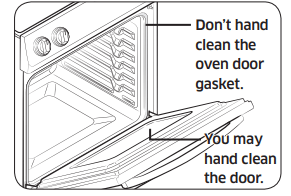
• Use soap and water to thoroughly clean the top, sides, and front of the oven door. Rinse well. You may use a glass cleaner on the outside glass of the oven door. DO NOT immerse the door in water. DO NOT spray or allow water or the glass cleaner to enter the door vents. DO NOT use oven cleaners, cleaning powders, or any harsh abrasive cleaning materials on the outside of the oven door.
• DO NOT clean the oven door gasket. The oven door gasket is made of a woven material, which is essential for a good seal. Care should be taken not to rub, damage, or remove this gasket.
Care and cleaning of the glass cooktop
CAUTION
Do not block the vent and cooling motors or let any foreign matter get into them when cleaning the cooktop.
Normal daily use cleaning
Use only a ceramic cooktop cleaner. Other creams may not be as effective. By following these steps, you can maintain and protect the surface of your glass cooktop.
1. Before using the cooktop for the first time, clean it with a ceramic cooktop cleaner. This helps protect the top and makes cleanup easier.
2. Daily use of a ceramic cooktop cleaner will help keep the cooktop looking new.
3. Shake the cleaning cream well. Apply a few drops of cleaner directly to the cooktop.
4. Use a paper towel or a cleaning pad for ceramic cooktops to clean the entire cooktop surface.
5. Use a dry cloth or paper towel to remove all cleaning residue. No need to rinse.
WARNING
DAMAGE to your glass surface may occur if you use scrub pads other than those recommended.
Removing burned-on residue
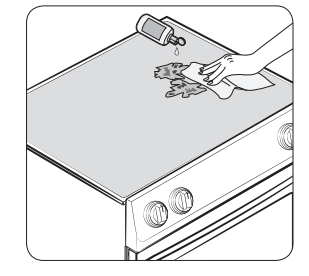
1. Allow the cooktop to cool.
2. Spread a few drops of ceramic cooktop cleaner on the entire burned residue area.
3. Using a cleaning pad for ceramic cooktops, rub the residue area, applying pressure as needed.
4. If any residue remains, repeat the steps listed above as needed.
5. For additional protection, after all residue has been removed, polish the entire surface by applying ceramic cooktop cleaner with a paper towel.
Removing heavy, burned-on residue
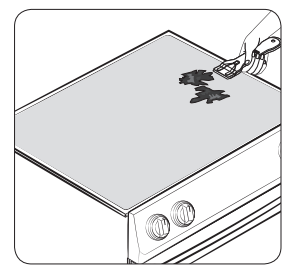
1. Allow the cooktop to cool.
2. Use a single-edge razor-blade scraper at approximately a 45° angle against the glass surface and scrape the soil. It will be necessary to apply pressure to remove the residue.
3. After scraping with the razor scraper, spread a few drops of ceramic cooktop cleaner on the entire burned residue area. Use a cleaning pad to remove any remaining residue. (Do not scrape the seal.)
4. For additional protection, after all residue has been removed, polish the entire surface by applying ceramic cooktop cleaner with a paper towel.
Removing metal marks and scratches
1. Be careful not to slide pots and pans across your cooktop. It will leave marks on the cooktop surface. You can remove these marks by applying ceramic cooktop cleaner with a cleaning pad for ceramic cooktops.
2. If pots with a thin overlay of aluminum or copper are allowed to boil dry, the overlay may leave black discoloration on the cooktop. You should remove this discoloration immediately or it may become permanent.
WARNING
Carefully check the bottoms of pans for roughness that may scratch the cooktop.
Cleaning the cooktop seal
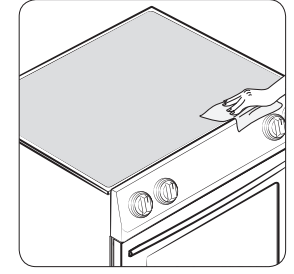
To clean the seal around the edges of the glass, lay a wet cloth on it for a few minutes, then wipe clean with a nonabrasive cleaner.
Potential for permanent damage to the glass surface
• Sugary spillovers (such as jellies, fudge, candy, syrups) or melted plastics can cause pitting of the surface of your cooktop. This is not covered under the warranty. You should clean the spill while it is still hot. Take special care when removing hot substances. Refer to the section below.
• When using a scraper, be sure it is new and the razor blade is still sharp. Do not use a dull or nicked blade.
Cleaning sugary spills and melted plastic
1. Turn off all surface units. Remove hot pans.
2. Wearing an oven mitt, use a single-edge razor blade scraper to move the spill to a cool area of the cooktop. Remove the spill with paper towels.
3. Any remaining spillover should be left until the surface of the cooktop has cooled.
4. Don’t use the surface units again until all of the residue has been completely removed.
NOTE
If pitting or indentations in the glass surface have already occurred, the cooktop glass will have to be replaced. In this case, service will be necessary
Removing and reinstalling the oven door How to remove the door
CAUTION
• The door is very heavy. Be careful when removing and lifting the door. Do not lift the door by the handle.
• Turn the power OFF before removing the door.
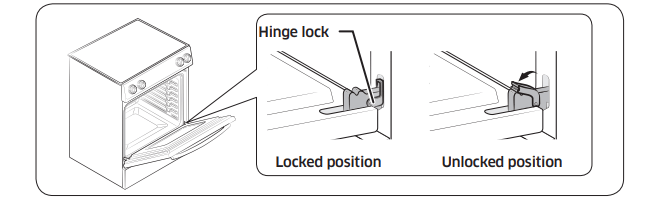
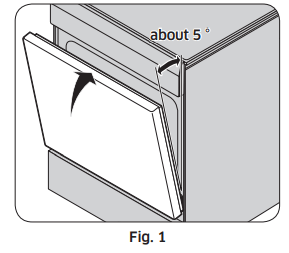
1. Open the door completely.
2. Pull the hinge locks down toward the door frame to the unlocked position.
3. Firmly grasp both sides of the door at the top.
4. Close the door to the door removal position, which is approximately 5 degrees from vertical (Fig. 1).
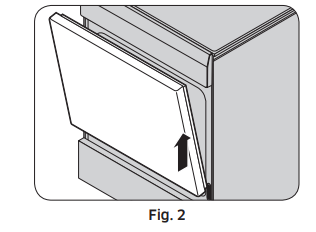
5. Lift door up and out until the hinge arm is clear of the slot (Fig. 2).
How to re-install the door
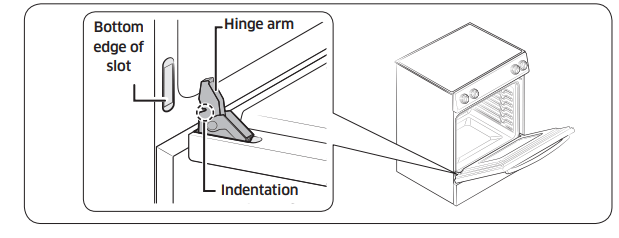
1. Firmly grasp both sides of the door at the top.
2. With the door at the same angle as the removal position, slide the indentation of the hinge arm into the bottom edge of the hinge slot. The notch in the hinge arm must be fully inserted into the bottom of the slot.
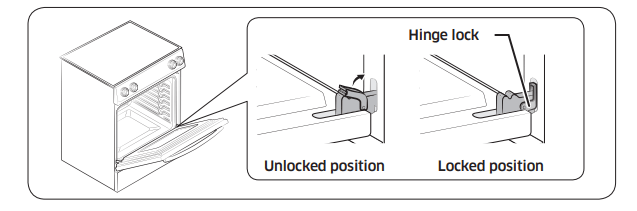
3. Open the door fully. If the door will not open fully, the indentation is not inserted correctly in the bottom edge of the slot.
4. Push the hinge locks up against the front frame of the oven cavity to the locked position.
5. Close the oven door.
Removing and reinstalling the storage drawer
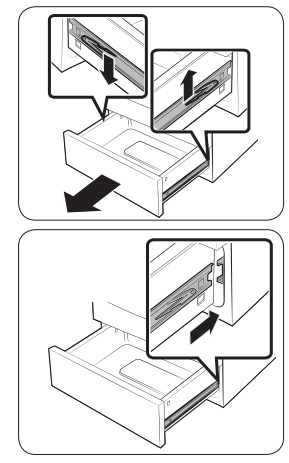
1. Slide open the drawer until it stops.
2. Locate the roller guide clips on either side. Using both hands, pull down the left clip while lifting the right clip, and then remove the drawer.
3. Clean the drawer in warm, soapy water using a cloth or soft brush. Then, rinse and dry it thoroughly.
4. Put the drawer in the roller guides on either side, and then snap the clips into place.
Changing the oven light
The oven light is a standard 40-watt appliance bulb. It will come on when the oven door is open. When the oven door is closed, press the  pad to turn it on or off. It will not work during a self-cleaning cycle
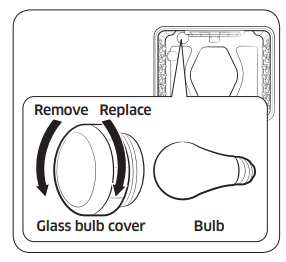
1. Make sure the oven and the bulb are cool.
2. Unplug the range or disconnect the power.
3. Turn the glass bulb cover in the back of the oven counterclockwise to remove.
4. Turn the bulb counterclockwise to remove it from its socket.
5. Insert a new 40 watt appliance bulb, and then turn it clockwise to tighten. Replace the bulb cover by turning clockwise.
6. Plug in the range or reconnect the power.
CAUTION
Before changing your oven light bulb, disconnect the electrical power to the range at the main fuse or circuit breaker panel. Make sure the oven and the bulb are cool.
Troubleshooting
Troubleshooting
Samsung works hard to ensure that you don’t have problems with your new electric range. If you run into unexpected trouble, look first for a solution in the tables below. If you’re still having trouble after trying the suggested solution, call Samsung at 1-800-SAMSUNG (1-800-726-7864).
Installation
The range is not level.
- The appliance has been installed improperly
- Place the oven rack in the center of the oven. Place a level on the oven rack. Adjust the leveling legs at the base of the range until the oven rack is level.
- Insure the floor is level and strong and stable enough to adequately support the range.
- The floor is sagging or sloping.
- Contact a carpenter to correct the situation.
- The kitchen cabinets are not properly aligned and make the range appear to be not level.
- Insure the cabinets are square and provide sufficient room for installation.
The appliance must be accessed for servicing and cannot be moved easily
- The kitchen cabinets are not square and too close to the appliance.
- Contact a builder or installer to make the appliance accessible.
- Carpet is interfering with movement of the range.
- Provide sufficient space so the range can be lifted over the carpet.
CONTROL DISPLAY
The display goes blank.
- A fuse in your home may be blown or the circuit breaker tripped.
- Replace the fuse or reset the circuit breaker.
The display flashes.
- There was a power failure.
COOKTOP
The surface units will not maintain a rolling boil or will not cook fast enough.
- You may be using inappropriate cookware.
- Use pans that are flat and match the diameter of the surface unit selected
- In some areas, the power (voltage) may be low.
- Cover the pan with a lid until the desired heat is obtained.
The surface units will not turn on.
- A fuse in your home may be blown or a circuit breaker may have tripped.
- Replace the fuse or reset the circuit breaker.
- The cooktop controls are set improperly.
- Check if the correct control is set for the surface unit you are using.
Areas of discoloration on the cooktop.
- Food spillover was not cleaned.
- Refer to the section on the care and cleaning of the glass cooktop on page 43.
- The surface is hot and the model features a lightcolored cooktop.
- This is normal. The surface may appear discolored when it is hot. This is temporary and will disappear as the glass cools.
The surface unit frequently cycles on and off.
- The element will cycle on and off to maintain the power setting.
- This is normal operation, and not a system failure. Use the range as usual.
The surface unit stops glowing when changed to a lower setting.
- This is normal. The unit is still on and hot.
Scratches or abrasions on the cooktop surface.
- The cooktop is being cleaned improperly. Scratches are not removable.
- Tiny scratches will become less visible in time as a result of cleaning. Use ceramic glass top cleaning cream. Do not use chemical or corrosive agents. These agents may damage the surface of the product.
- Cookware with rough bottoms was used on the cooktop or there were coarse particles (e.g., salt or sand) present between the cookware and the surface of the cooktop.
- To avoid scratches, follow the recommended cleaning procedures. Make sure cookware bottoms are clean before use, and use cookware with smooth bottoms.
- Cookware has been slid across the cooktop surface.
Brown streaks or specks.
- Boilovers have been cooked onto the surface.
- Wait until the surface cools down. Then, use a single-edge razor-blade scraper at approximately a 45° angle against the glass surface to remove the soil.
- See the section on the care and cleaning of the glass cooktop on page 43.
Areas of discoloration with metallic sheen.
- Mineral deposits from water and food have been left on the surface of the cooktop.
- Remove using a ceramic-glass cooktop cleaning cream.
- Use cookware with clean, dry bottoms. Clean the cooktop with a ceramic cleaning agent regularly every week.
"Cracking" or "popping" sound.
- This is the sound of the metal heating and cooling during both the cooking and self-cleaning functions.
- This is normal operation, and not a system failure. Use the range as usual.
OVEN
The oven will not turn on.
- The range is not completely plugged into the electrical outlet.
- Make sure the electrical plug is inserted into a live, properly grounded outlet.
- A fuse in your home may be blown or a circuit breaker may have tripped.
- Replace the fuse or reset the circuit breaker.
- The oven controls have been set improperly.
- See the chapter on operating the oven starting on page 28.
- The oven is too hot.
- Incomplete service wiring.
- Power outage.
- Check to see if the house lights will turn on. If necessary, call your local electric company for service.
The oven light will not turn on.
- The light bulb is loose or defective.
- Tighten or replace the bulb.
- The switch operating the light is broken.
The appliance will not turn on.
- The appliance is not completely plugged into the electrical outlet or a fuse in your home may be blown or a circuit breaker may have tripped.
- Make sure the power cord is plugged into a live, properly grounded outlet. Check the fuse and circuit breakers.
- Incomplete service wiring.
- Power outage.
- Check to see if the house lights will turn on. If necessary, call your local electric company for service.
The oven smokes excessively during broiling.
- The oven controls have not been set properly.
- Refer to the section on using the broiler starting on page 33.
- The meat has been placed too close to the element.
- Reposition the rack to provide proper clearance between the meat and the element. Preheat the broil element for searing.
- The meat has not been properly prepared.
- Remove the excess fat from the meat. Cut away fatty edges that may curl, leaving the lean intact.
- Grease has built up on oven surfaces.
- Regular cleaning is necessary when broiling frequently.
Food does not bake or roast properly.
- The oven controls have not been set correctly.
- See the chapter on operating the oven starting on page 28.
- The oven rack has been positioned incorrectly or is not level.
- See the section on using the oven racks on page 31.
- Incorrect cookware or cookware of improper size is being used.
- The oven sensor needs to be adjusted.
- See the section on adjusting
Food does not broil properly.
- The serving size may not be appropriate.
- Refer to the cooking guide for serving sizes on page 34, and then try again.
- The rack has not been properly positioned.
- See the broiling recommendation guide on page 34.
- The cookware is not suited for broiling.
- In some areas, the power (voltage) may be low.
- Preheat the broil element for 10 minutes.
- See the broiling recommendation guide on page 34.
The oven temperature is too hot or too cold.
- The oven sensor needs to be adjusted.
- See the section on adjusting the thermostat on page 36.
The oven will not self-clean.
- The oven temperature is too high to start a self-clean operation.
- Allow the range to cool and then reset the controls.
- The oven controls have been set incorrectly.
- See the section on selfcleaning on page 38.
- A self-cleaning cycle cannot be started if the oven lock feature has been activated or if a radiant surface element is on.
- Deactivate the oven lock (see page 28). Make sure all surface elements are turned off.
Excessive smoking during a self-cleaning cycle.
- There is excessive soiling in the oven
- Press OFF. Open the windows to rid the room of smoke. Wait until the self-cleaning cycle is cancelled. Wipe up the excessive soil and then start the self-cleaning cycle again.
The oven door will not open after a selfcleaning cycle.
The oven is not clean after a self-cleaning cycle.
- The oven controls were not set correctly.
- See the section on selfcleaning on page 38.
- The oven was heavily soiled.
- Wipe up heavy spillovers before starting the selfcleaning cycle. Heavily soiled ovens may need to be selfcleaned again or for a longer period of time.
Steam is coming out of the vent.
- When using the oven feature, it is normal to see steam coming out of the oven vent.
- This is normal operation and not a system failure. Use the range as usual.
- As the number of racks or amount of food being cooked increases, the amount of visible steam will increase.
A burning or oily odor is coming from the vent.
- This is normal in a new oven and will disappear in time.
- To speed the process, set a self-cleaning cycle for a minimum of 3 hours.
- See the section on selfcleaning on page 38.
Strong odor.
- An odor coming from the insulation around the inside of the oven is normal for the first few times the oven is used.
- Operate the oven empty on the bake setting at 400 °F for 1 hour.
Oven racks are difficult to slide.
- The shiny, silver-colored racks were cleaned in a selfcleaning cycle.
- Apply a small amount of vegetable oil to a paper towel, and then wipe the edges of the oven racks with the paper towel.
DRAWER
The drawer does not slide smoothly or drags.
- The drawer is out of alignment.
- Fully extend the drawer and push it all the way in. See the page 47.
- The drawer is overloaded or the load is unbalanced.
- Reduce weight. Redistribute drawer contents.
Excessive condensation in the drawer.
- There is liquid present in the drawer.
- Uncovered foods.
Information codes
OVEN
- C-d0 This code occurs if the control key is short for 1 minute.
- C-d1 This code occurs if the door lock is mispositioned.
- C-F0 This code occurs if communication between the Main and Sub PBA is interrupted.
- C-F2 This code occurs if communication between the Main and Touch is interrupted.
- C-20 The oven sensor is open when the oven is operating. There is a short in the Oven sensor.
- C-21 This code occurs if the internal temperature rises abnormally high.
=> Press OFF, and then restart the oven. If the problem persists, disconnect all power to the range for at least 30 seconds and then reconnect the power. If this does not solve the problem, call for service.
- C-22
- The PCB sensor is open when the oven is operating.
- There is a short in the PCB sensor.
- C-30
- The PCB sensor is open when the oven is operating.
- There is a short in the PCB sensor.
=> Press OFF, and then restart the oven. If the problem persists, disconnect all power to the range for at least 30 seconds and then reconnect the power. If this does not solve the problem, call for service.
- C-31
- This code occurs if the PCB temperature rises abnormally high.
- bAd LinE
- This error message appears if the power cord is installed improperly.
- If the power connection is plugged in improperly, “bAd LinE” appears on the display. Reconnect the power connection properly, and the message disappears.
- C-A2
- This code occurs if the sub PCB temperature rises abnormanlly high.
- Press OFF, check the vent. If the vent is closed, never block the vent by anything. After cooling the oven, restart the oven. If this does not solve the problem, call for service.