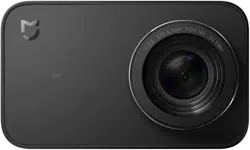

Mi Action Camera 4K User Manual
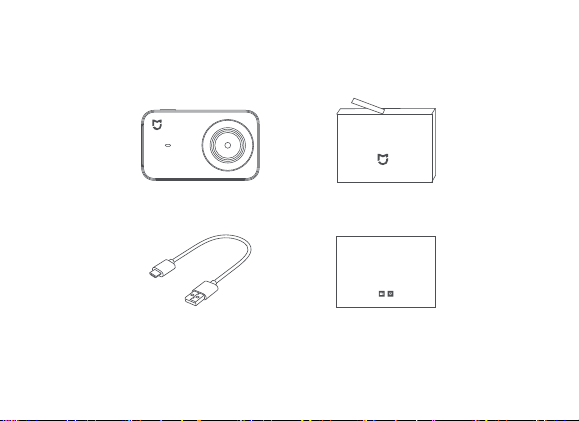
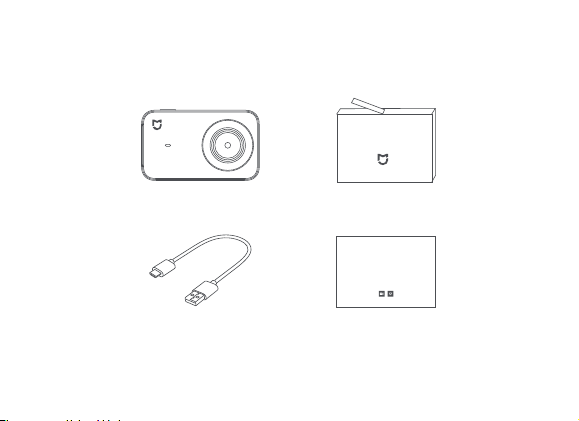
1. Package Contents
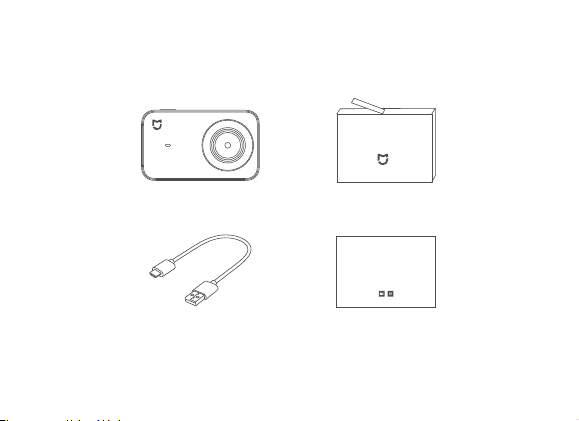
Mi Action Camera 4K x 1
User manual x 1USB cable x 1
Battery x 1
M A ton Came a B t e y
Mi Ac ion Camera 4K U er M nual
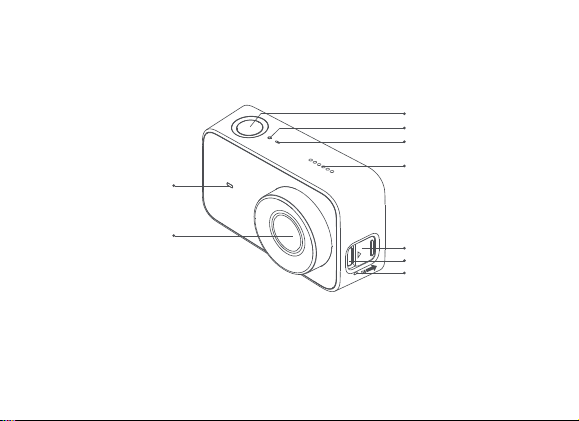
2. Product Overview
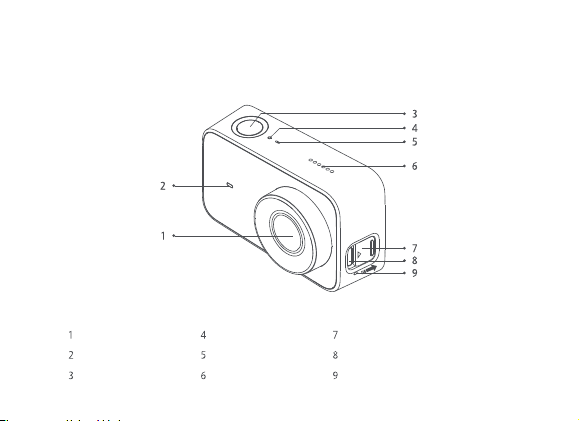
Lens Top Indicator Port Protective Cover
Front Indicator Microphone Micro-USB Port
Function Button Speaker Microphone
1
2
3
4
5
6
7
8
9
1
2
3
4
5
6
7
8
9
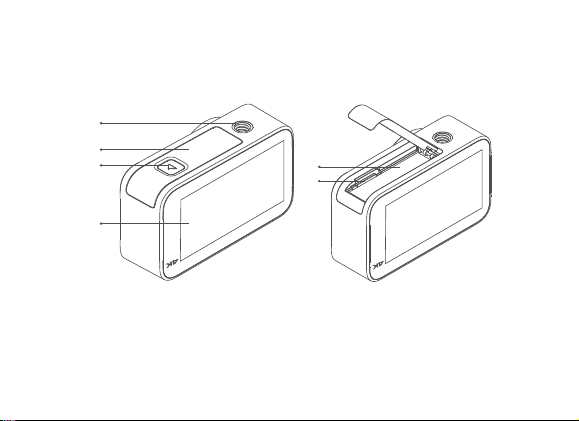
10
14
15
11
12
13
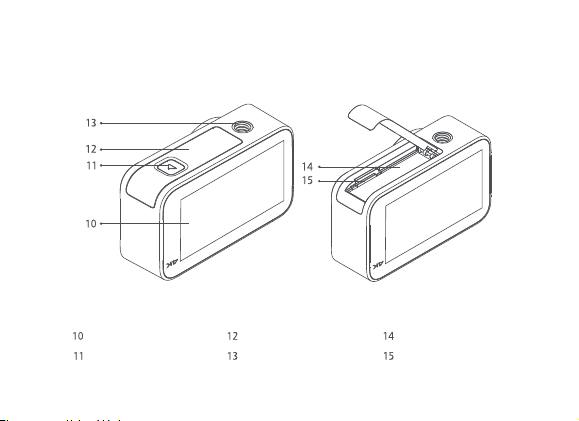
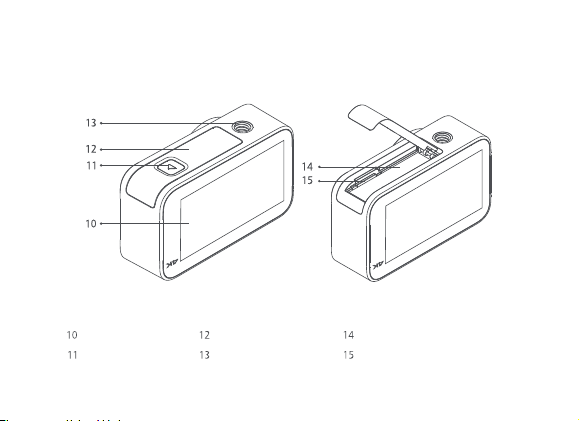
Touch Screen Battery Cover Battery
Lock Button 1/4-inch Thread Hole MicroSD Card Slot
10
11
14
15
12
13
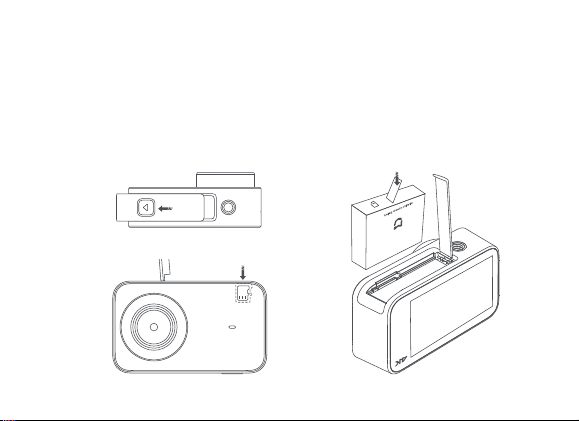
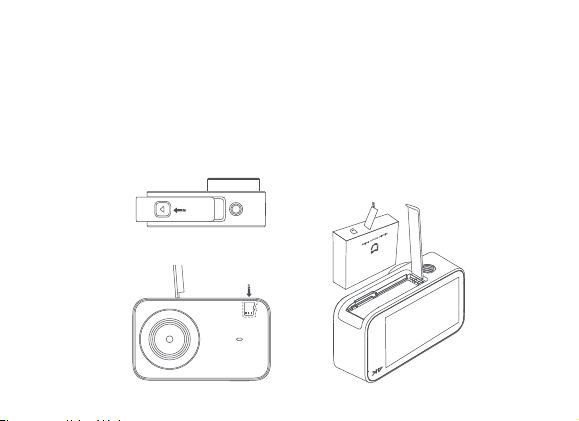
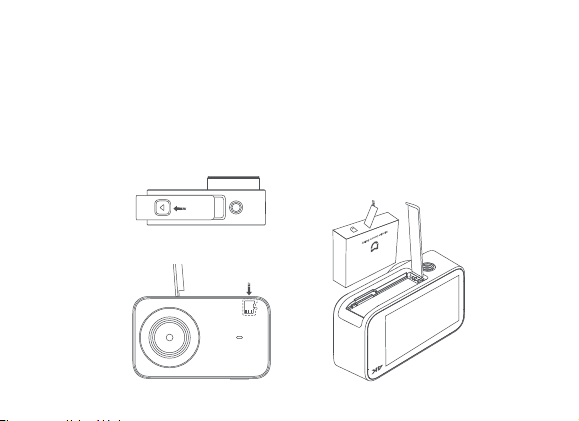
a. Remove the battery cover (as shown in the figure), align the battery pins with the direction
of the lens, and insert the battery. To remove the battery, gently pull the handle bar on the
battery.
b. Keep the label side of the MicroSD card towards the back of the camera body, and insert
the card into the card slot. To remove the MicroSD card, gently press the top edge of the
card to eject it from the slot.
3. Install and Disassemble
Do not damage the handle bar.
MicroSD Card
Press the battery cover lock button and
push the battery cover outwards.
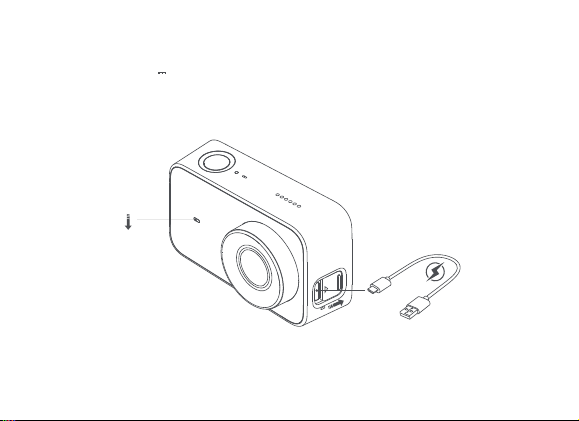
4. Battery Charging
Red
Off
Note:
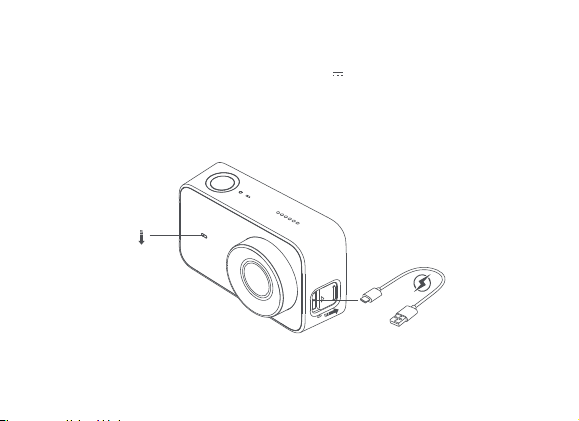
It is recommended to remove the battery if you connect the camera to a power supply for a
prolonged period during use.
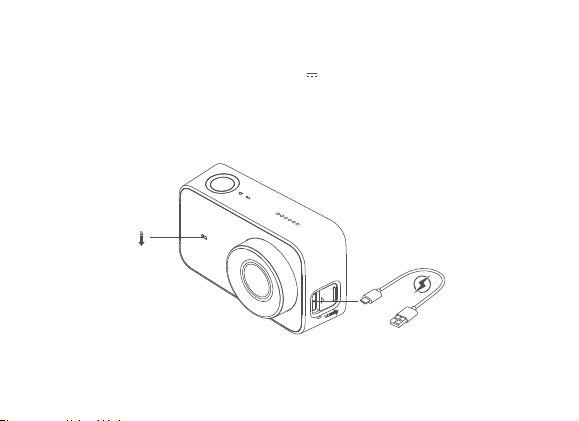
a. You can use a 5V 1A power adapter, PC, or mobile power bank to charge the camera
via a data cable. It is recommended to turn off the camera during charging.
b. The front indicator is solid red while charging, and turns off automatically when the battery
is fully charged.
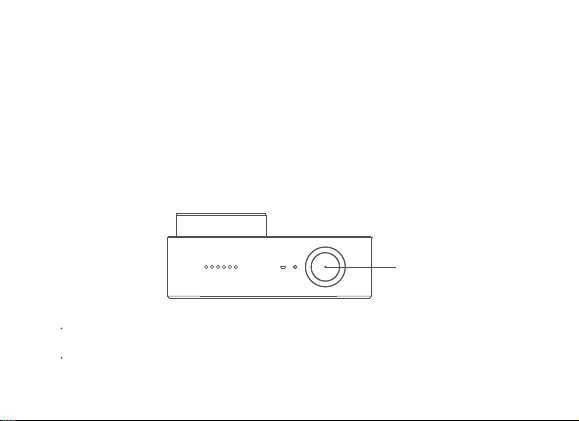
a. Power-on/Power-off
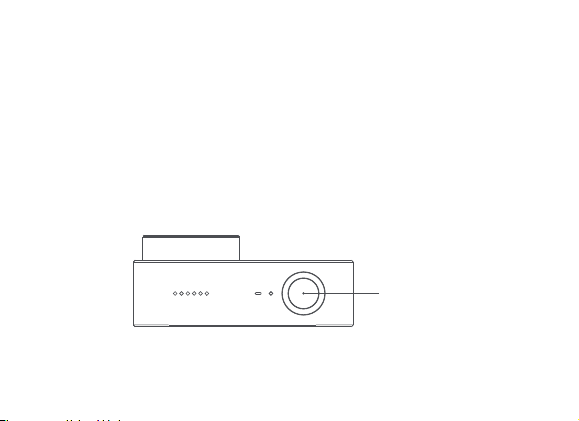
Power-on: Press and hold the function button for about 3 seconds, followed by a power-on sound.
Power-off: Press and hold the function button for about 3 seconds, followed by a power-off sound.
b. Photo
Select the photo mode, and press the function button to take photos.
c. Video
Select the video mode, and press the function button to start the recording.
Press the function button again to stop the recording.
5. Operating Instructions
Function button
Note:
When shooting a 4K-video, it is recommended to use a main brand UHS-3 MicroSD card
with a capacity not less than 16 GB.
Video files are stored in the FAT32 format. The maximum size of a single video file is 4 GB.
A video file exceeding 4GB will be fragmented for storage.
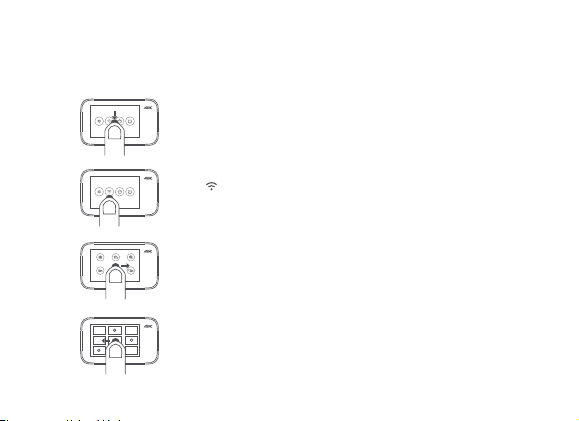
d. Operating screen
The preview page is displayed after the camera is powered on (in screen lock mode, you can
double-tap the screen or press the function button to wake up the camera).
Camera setup
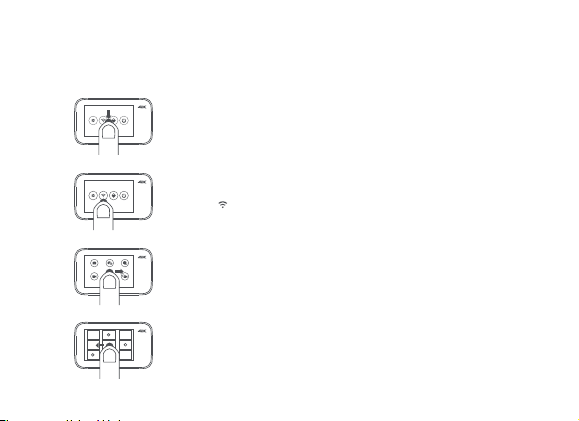
On the preview page, slide down to enter setup page. Slide the
screen in the reverse direction or press the function button to
return to the preview page.
Media library
On the preview page, slide leftward to enter media library preview
page. Slide the screen in the reverse direction or press the function
button to return to the preview page.
Note: A MicroSD card needs to be installed.
Mode selection
On the preview page, slide rightward to enter mode selection page.
Slide the screen in the reverse direction or press the function button
to return to the preview page.
h t
Ph t
l M t
V d
Wi-Fi setup / Bluetooth device connection
Tap to enable or disable the Wi-Fi function.
Select the bluetooth device in the setup page, and connect according
to the prompt
6. Quick Setup
Control your device and interact it with other smart home devices in Mi Home App.
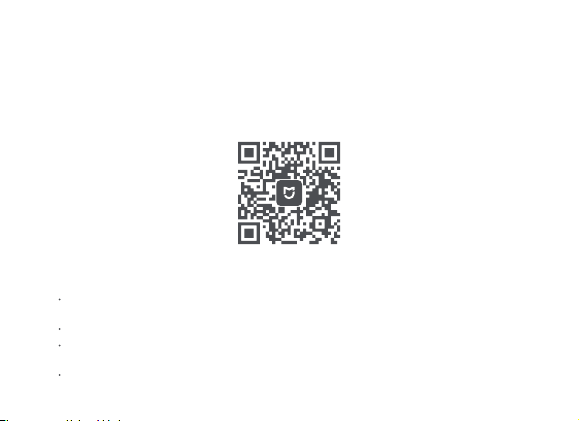
a. Download Mi Home App
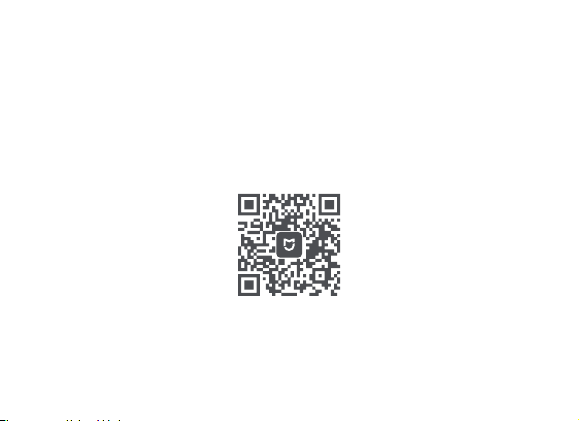
Scan the QR code or go to App store to download and install Mi Home App.
b. Add and connect a Mi Action Camera 4K
Tap "My devices" in Mi Home App, select "+" on the upper right, and select Mi Action
Camera 4K. Install the plug-in and follow prompts to add the device.
Open the Mi Action Camera 4K plug-in.
Turn on Mi Action Camera 4K and slide down to access the shortcut menu page. Enable
the Wi-Fi function.
Tap "Connect" on the App, and follow the instructions to complete the Wi-Fi connection.

7. Indicator Status
Status Description
Powered on indicator
No card/Card error
Upgrading
Photo shooting/Video recording
Front indicator On
Front/Top indicator Slow blinking
Front indicator Fast blinking red
Front/Top indicator Fast blinking alternately
Note: When the front indicator is blue, the unit is fully charged; when is it yellow, the
battery is adequate; when is it red, the battery is low.
Note:
The GPS must be activated for some certain phones when searching for the Mi Action
Camera 4K via Wi-Fi.
After the App is connected to the camera successfully, Android phones disconnect the
Internet and a prompt indicating no Internet connection is displayed on some certain
phones. In this case, choose to maintain the current connection.
To upgrade the camera firmware, you need to maintain the phone's connection to the
Internet.

8. Specications
Product name: Mi Action Camera 4K
Dimensions: 2.81 x 1.68 x 1.16 inch
Net weight: 3.49 ounces (including battery)
Operating temperature: 32℉~113℉
Storage temperature: -4℉~140℉
Wireless connections: Wi-Fi IEEE 802.11b/g/n
Maximum photo resolution: 3840 x 2160
Maximum video resolution: 3840 x 2160p at 30 fps
Model: YDXJ01FM
Aperture: F2.8
Focal length: 3.2 mm
Wide angle: 145°
Bluetooth: Bluetooth 4.1
Recording: dual microphone
MicroSD card: maximum 64GB
Screen: 2.4-inch touch screen
9. Precaution
a. Do not put the battery into fire or smash the battery. The capacity of the lithium battery
shrinks substantially at low temperature. Therefore, do not use it in an environment
below 0℃.
b. Keep the product properly and keep the lens away from scratches and dirt. Use a
professional brush and lens blower to clean the product. Protect the product against dirt
and damp during storage.
c. In case of waterproof case is not mounted, please don‘t use the camera in harsh
environments such as underwater, rain, dust and severe cold etc.

CAUTION
RISK OF EXPLOSION IF BATTERIES IS REPLACED BY AN INCORRECT TYPE.
DISPOSE OF USED BATTERIES ACCORDING TO THE INSTRUCIONS.
Old electrical appliances must not be disposed of together with the residual
waste, but have to be disposed of separately. The disposal at the communal
collecting point via private persons is for free. The owner of old appliances is
responsible to bring the appliances to these collecting points or to similar
collection points. With this little personal effort, you contribute to recycle val-
uable raw materials and the treatment of toxic substances.
Environmentally friendly disposal

This device complies with Part 15 of the FCC Rules. Operation is subject to the following two
conditions:
(1) this device may not cause harmful interference, and
(2) this device must accept any interference received, including interference that may cause
undesired operation.
Please note that changes or modifications not expressly approved by the party responsible
for compliance could void the user’s authority to operate the equipment.
This equipment has been tested and found to comply with the limits for a Class B digital
device, pursuant to Part 15 of the FCC Rules. These limits are designed to provide reasonable
protection against harmful interference in a residential installation.
This equipment generates, uses and can radiate radio frequency energy and, if not installed
and used in accordance with the instructions, may cause harmful interference to radio com-
munications. However, there is no guarantee that interference will not occur in a particular in-
stallation.
If this equipment does cause harmful interference to radio or television reception, which can
be determined by turning the equipment off and on, the user is encouraged to try to correct
the interference by one or more of the following measures:
-- Reorient or relocate the receiving antenna.
-- Increase the separation between the equipment and receiver.
-- Connect the equipment into an outlet on a circuit different from that to which the receiver
is connected.
-- Consult the dealer or an experienced radio/TV technician for help.

This device complies with Industry Canada license-exempt RSS standard(s). Operation is
subject to the following two conditions: (1) this device may not cause interference, and (2) this
device must accept any interference, including interference that may cause undesired opera-
tion of the device.Le présent appareil est conforme aux CNR d'Industrie Canada applicables
aux appareils radio exempts de licence. L'exploitation est autorisée aux deux conditions
suivantes :
(1) l'appareil ne doit pas produire de brouillage, et
(2) l'utilisateur de l'appareil doit accepter tout brouillage radioélectrique subi, même si le
brou llage est susceptible d'en compromettre le fonctionnement.
This equipment complies with FCC radiation exposure limits set forth for an uncontrolled
environment. End user must follow the specific operating instructions for satisfying RF
exposure compliance. This transmitter must not be co-located or operating in conjunction
with any other antenna or transmitter.
The portable device is designed to meet the requirements for exposure to radio waves
established by the Federal Communications Commission (USA). These requirements set
a SAR limit of 1.6 W/kg averaged over one gram of tissue. The highest SAR value reported
under this standard during product certification for use when properly worn on the body.
During testing, this product are set to their highest transmission levels and placed in positions
that simulate uses against the body with 5mm separation.

This equipment complies with ISED radiation exposure limits set forth for an uncontrolled
environment. End user must follow the specific operating instructions for satisfying RF
exposure compliance. This transmitter must not be co-located or operating in conjunction
with any other antenna or transmitter.
The portable device is designed to meet the requirements for exposure to radio waves
established by the ISED. These requirements set a SAR limit of 1.6 W/kg averaged over one
gram of tissue. The highest SAR value reported under this standard during product
certification for use when properly worn on the body.
Cet équipement est conforme aux limites d’exposition aux rayonnements ISED établies
pour un environnement non contrôlé. L’utilisateur final doit suivre les instructions spécifiques
pour satisfaire les normes. Cet émetteur ne doit pas être co-implanté ou fonctionner en
conjonction avec toute autre antenne ou transmetteur.
Le dispositif portatif est conçu pour répondre aux exigences d’exposition aux ondes radio
établie par le développement énergétique DURABLE. Ces exigences un SAR limite de 1,6
W/kg en moyenne pour un gramme de tissu. La valeur SAR la plus élevée signalée en vertu
de cette norme lors de la certification de produit à utiliser lorsqu’il est correctement porté sur
le corps.
The highest SAR value for this YDXJ01FM camera when properly worn on the body is
0.144 W/kg, for ICNIRP recommendation. SAR is measured against head and with the device
at a separation of 5 mm to the body, while transmitting at the highest certified output power
level in all frequency bands of the mobile device.
Principal: Xiaomi Communications Co., Ltd.
Manufacturer: Beijing FIMI Technology Co., Ltd.
For further information, please go to www.mi.com/en/
Address:No.348, Floor 3, 1# Complex Building, Yongtaijiayuan, Qinghe,
Haidian District, Beijing, China
Read this manual carefully before use, and
retain it for future reference.

Caméra d’action 4K Mi Mode d’emploi
1. Contenu du paquet
Caméra d’action 4K Mi x 1
Mode d’emploi x 1Câble USB x 1
Batterie x 1
M A t on Came a B t e y
Caméra d ac ion 4K Mi Mode d emp oi

2. Présentation du produit
Objectif Indicateur supérieur Protection du port
Indicateur avant Micro Port micro-USB
Bouton de fonction Haut-parleur
Micro
Écran tactile Couvercle de batterie Batterie
Bouton de verrouillage Trou fileté de 1/4 po Emplacement pour
carte micro SD
a. Retirez le couvercle de batterie (comme indiqué sur la figure), alignez les broches de la
batterie sur la direction de l’objectif et insérez la batterie. Pour retirer la batterie, tirez
doucement sur la languette de la batterie.
b. Avec le côté de la carte micro SD portant l’étiquette vers l’arrière du boîtier de la caméra,
insérez la carte dans l’emplacement prévu à cet effet. Pour retirer la carte micro SD,
appuyez doucement sur le bord supérieur de la carte pour l’éjecter de l’emplacement.
3. Installation et démontage
N’endommagez pas la languette.
Carte micro SD
Appuyez sur le bouton de verrouillage du couvercle de
batterie et poussez le couvercle de batterie vers l’extérieur.
a. Vous pouvez utiliser un adaptateur secteur 5 V 1 A, un PC ou un chargeur mobile pour
charger la caméra par l’intermédiaire d’un câble de données. Il est recommandé d’éteindre
la caméra pendant la charge.
b. L’indicateur avant s’allume en rouge pendant la charge et s’éteint automatiquement lorsque
la batterie est complètement chargée.
4. Charge de la batterie
Remarque :
il est recommandé de retirer la batterie lorsque vous raccordez la caméra à une alimentation
pendant une période prolongée lors de l’utilisation.
Rouge
Éteint
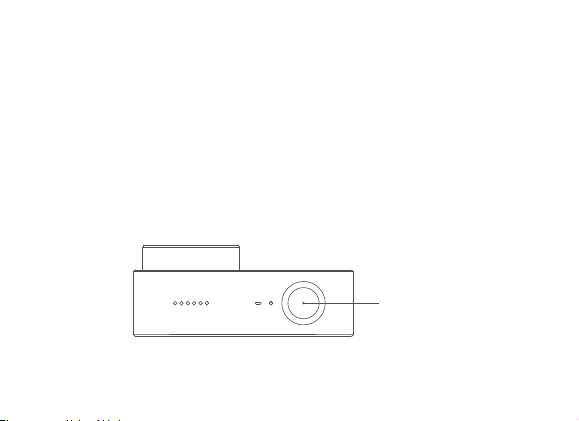
a. Mise hors/sous tension
Allumer : appuyez sur le bouton de fonction et maintenez-le enfoncé pendant environ 3
secondes, un son de mise sous tension est alors émis.
Éteindre : appuyez sur le bouton de fonction et maintenez-le enfoncé pendant environ 3
secondes, un son de mise hors tension est alors émis.
b. Prise de photo
Sélectionnez le mode de prise de photo et appuyez sur le bouton de fonction pour prendre
des photos.
c. Enregistrement vidéo
Sélectionnez le mode d’enregistrement vidéo et appuyez sur le bouton de fonction pour
lancer l’enregistrement. Appuyez de nouveau sur le bouton de fonction pour arrêter
l’enregistrement.
5. Instructions d’utilisation
Bouton de fonction
Remarque :
lorsque vous enregistrez une vidéo au format 4K, il est recommandé d’utiliser une carte
micro SD UHS-3 d’une grande marque présentant une capacité d’au moins 16 Go.
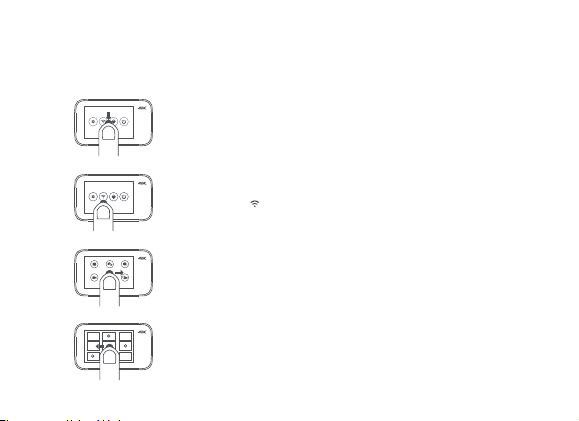
d. Écran de fonctionnement
La page d’aperçu s’affiche à l’allumage de la caméra (en mode Écran verrouillé, vous devez
appuyer deux fois sur l’écran ou appuyer sur le bouton de fonction pour activer la caméra).
Conguration de la caméra
Sur la page d’aperçu, faites défiler vers le bas pour accéder à la page
de configuration. Faites défiler l’écran en sens inverse ou appuyez
brièvement sur le bouton de fonction pour revenir à la page d’aperçu.
Bibliothèque multimédia
Sur la page d’aperçu, faites défiler vers la gauche pour accéder à la page
d’aperçu de la b bliothèque multimédia. Faites défiler l’écran en sens inverse
ou appuyez sur le bouton de fonction pour revenir à la page d’aperçu.
Remarque : une carte micro SD doit être installée.
Sélection de mode
Sur la page d’aperçu, faites défiler vers la droite pour accéder à la page
de sélection de mode. Faites défiler l’écran en sens inverse ou appuyez
sur le bouton de fonction pour revenir à la page d’aperçu.
Conguration du Wi-Fi
Appuyez sur « » pour activer ou désactiver la fonction Wi-Fi.
6. Conguration rapide
Contrôlez votre appareil et interagissez avec d’autres appareils intelligents dans
l’application Mi Home.
a. Téléchargement de l’application Mi Home.
Scannez le code QR ou allez sur le magasin d’applications pour télécharger et installer
l’application Mi Home.

b. Ajout et connexion d’une caméra d’action 4K Mi.
Dans l’application Mi Home, appuyez sur « Mes appareils », sélectionnez « + » dans le coin
supérieur droit, puis sélectionnez Caméra d’action 4K Mi.
Installez le plug-in et suivez les instructions pour ajouter l’appareil.
Ouvrez le plug-in de la caméra d’action 4K Mi.
Allumez la caméra d’action 4K Mi et faites défiler vers le bas pour accéder à la page du
menu contextuel. Activez la fonction Wi-Fi.
Allumez la caméra d’action 4K Mi et faites défiler vers le bas pour accéder à la page du
menu contextuel. Activez la fonction Wi-Fi.
Remarque :
le GPS doit être activé sur certains téléphones lors de la recherche de la caméra
d’action 4K Mi par l’intermédiaire du Wi-Fi.
Une fois l’application connectée à la caméra, les téléphones Android se déconnectent
d’Internet et une invite indiquant l’absence de connexion Internet s’affiche sur certains
téléphones. Dans ce cas, choisissez de maintenir la connexion actuelle.
Pour mettre à niveau le firmware de la caméra, vous devez maintenir la connexion
Internet du téléphone.

7. Dénitions des indicateurs
État Description
Indicateur de mise sous tension
Pas de carte/Erreur carte
Mise à niveau
Prise de photo/Enregistrement vidéo
Indicateur avant Allumé fixe
Indicateur avant/supérieur Clignotement lent
Indicateur avant
Clignotement
rapide rouge
Indicateur avant/supérieur
Clignotement
rapide en alternance
Remarque :
la couleur de l’indicateur avant et l’état de charge : Bleu glacier - batterie entièrement chargée
Jaune - batterie à moitié chargée Rouge - batterie faible

9. Précautions
a. Ne détruisez pas la batterie et ne la jetez pas au feu. La capacité de la batterie au lithium
diminue sensiblement à basse température. Par conséquent, ne l’utilisez pas dans un
environnement dont la température est inférieure à 0 ℃.
b. Conservez correctement le produit et protégez l’objectif contre les rayures et la saleté.
Utilisez un pinceau professionnel et une poire pneumatique pour nettoyer le produit.
Protégez le produit contre la saleté et l’humidité pendant le stockage.
8. Caractéristiques
Nom du produit : caméra d’action 4K Mi
Dimensions : 2.81 x 1.68 x 1.16 inch
Poids net : 3.49 ounces (batterie comprise)
Température de fonctionnement : 32℉~113℉
Température de stockage : -4℉~140℉
Connexions sans fil : Wi-Fi IEEE 802.11b/g/n
Résolution photo maximale : 3 840 x 2 160
Résolution vidéo maximale : 3 840 x 2 160 p à 30 images par seconde
Modèle : YDXJ01FM
Ouverture : F2.8
Distance focale : 3,2 mm
Grand angle : 145°
Enregistrement : double microphone
Carte micro SD : 64 Go maximum
Écran : écran tactile 2,4 po

c. N’utilisez pas la caméra dans l’eau, sous la pluie ou dans un environnement poussiéreux
ou froid, etc., dans l’éventualité où l’étui étanche ne serait pas correctement monté.
ATTENTION
RISQUE D’EXPLOSION SI LES BATTERIES NE SONT PAS REMPLACÉES PAR UN MODÈLE
COMPATIBLE ; ÉLIMINEZ LES BATTERIES USÉES CONFORMÉMENT AUX INSTRUCTIONS.
Élimination respectueuse de l’environnement
Les appareils électriques usés ne doivent pas être éliminés avec les déchets résiduels,
mais séparément. L’élimination dans un site de collecte communal via des personnes
privées est gratuite. Le propriétaire des appareils usés est tenu d’amener les appareils
sur ces sites de collecte ou autres lieux de collecte similaires. En faisant ce petit effort, vous
contribuez au recyclage des matériaux bruts précieux et au traitement des substances toxiques.
Lire attentivement ce mode d’emploi avant l’utilisation et le
conserver pour toute référence ultérieure.
Fabricant : Beijing FIMI Technology Co., Ltd.
Produit fabriqué pour : Xiaomi Communications Co., Ltd.
Pour plus d’informations, rendez-vous sur http://www.mi.com/en/
Adresse : N° 348, Floor 3, 1# Complex Building, Yongtaijiayuan, Qinghe,
Haidian District, Pékin, Chine

Cámara deportiva 4K Mi Manual de usuario
1. Contenido del paquete
Cámara deportiva 4K Mi x1
Manual del usuario x1Cable USB cable x1
Batería x1
M A t on Came a B t e y
Mi Act on C me a 4K Manua de usu r o
2. Descripción del producto
Objetivo Indicador superior Tapa protectora para el puerto
Indicador frontal Micrófono Puerto Micro-USB
Botón de función Altavoz
Micrófono
Pantalla táctil Tapa para la batería Batería
Botón de bloqueo Orificio roscado 1/4" Ranura para tarjeta Micro SD
a. Retire la tapa de la batería (como se muestra en la imagen), alinee los contactos
de la batería en la dirección del objetivo e introduzca la batería. Para extraer la
batería, tire suavemente del tirador de la batería.
b. Introduzca la tarjeta MicroSD en la ranura para tarjetas con la cara de la etiqueta
hacia la parte posterior del cuerpo de la cámara. Para retirar la tarjeta MicroSD,
pulse suavemente en el borde superior de la tarjeta para extraerla de la ranura.
3. Instalación y desmontaje
No dañe el tirador.
Tarjeta MicroSD
Pulse el botón de bloqueo de la tapa de la
batería y empuje la tapa hacia afuera.
a. Puede utilizar un adaptador de corriente de 5 V 1 A, un ordenador o un cargador
portátil para cargar la cámara a través de un cable de datos. Se recomienda apagar
la cámara durante la carga.
b. El indicador frontal se ilumina en rojo durante la carga y se apaga una vez que la
batería se ha cargado por completo.
4. Carga de la batería
Nota:
se recomienda extraer la batería si conecta la cámara a una fuente de alimentación durante un
tiempo prolongado.
Rojo
Apagado
a. Encendido/Apagado
Encendido: mantenga pulsado el botón de función durante 3 segundos, escuchará el sonido
de encendido.
Apagado: mantenga pulsado el botón de función durante 3 segundos, escuchará el sonido
de apagado.
b. Fotografía
Seleccione el modo de fotografía y pulse el botón de función para hacer fotos.
c. Grabación de vídeo
Seleccione el modo de grabación de vídeo y pulse el botón de función para comenzar la
grabación. Vuelva a pulsar el botón de grabación para detener la grabación.
5. Instrucciones de funcionamiento
Botón de función
Nota:
Para realizar un vídeo 4K se recomienda utilizar una tarjeta Micro SD UHS-3 de una de las
principales marcas y con una capacidad que no sea inferior a 16 GB.
d. Pantalla de funcionamiento
Tras encender la cámara se muestra la página de previsualización (en el modo de pantalla
bloqueada, puede tocar la pantalla dos veces o pulsar el botón de función para activar la cámara).
Conguración de la cámara
En la página de previsualización, deslice la pantalla hacia abajo para
acceder a la página de configuración.Deslice la pantalla en la dirección
contraria o pulse brevemente el botón de función para volver a la
página de previsualización.
Biblioteca multimedia
En la página de previsualización, deslice la pantalla hacia la izquierda
para acceder a la página de previsualización de la biblioteca multimedia.
Deslice la pantalla en la dirección opuesta o pulse el botón de función
para volver a la página de previsualización.
Nota: debe instalarse una tarjeta MicroSD.
Selección de modo
En la página de previsualización, deslice la pantalla hacia la derecha
para acceder a la página de selección de modo. Deslice la pantalla en
la dirección opuesta o pulse el botón de función para volver a la página
de previsualización.
Conguración de la conexión Wi-Fi
Toque " " para activar o desactivar la función Wi-Fi.
6. Conguración rápida
Controle el dispositivo e interactúe con otros dispositivos inteligentes en Mi Home App.
a. Descargue Mi Home App.
Escanee el código QR o vaya a la tienda de aplicaciones para descargar e instalar la
aplicación Mi Home.

b. Añada y conecte su Cámara deportiva 4K Mi.
Toque "My devices" (Mis dispositivos) en la aplicación Mi Home, seleccione "+" en la parte
superior derecha y seleccione Cámara deportiva 4K Mi.
Instale el complemento y siga las instrucciones para añadir el dispositivo.
Abra el complemento Cámara deportiva 4K Mi.
Encienda Mi Action Camera 4K y deslice la pantalla hacia abajo para acceder a la página
del menú de accesos directos. Active la función Wi-Fi.
Toque "Connect" (Conectar) en la aplicación y siga las instrucciones para completar la
conexión Wi-Fi.
Nota:
El GPS debe activarse para algunos teléfonos al buscar Cámara deportiva 4K Mi a través
de Wi-Fi.
Una vez que la aplicación se ha conectado a la cámara correctamente, los teléfonos Android
desconectan la conexión a Internet y se muestra un aviso que indica que no hay conexión
a Internet en algunos teléfonos. En este caso, seleccione mantener la conexión actual.
Para actualizar el firmware de la cámara, el teléfono debe permanecer conectado a Internet.

7. Deniciones de los indicadores
Estado Descripción
Indicador de encendido
No hay tarjeta/Error de tarjeta
Actualizando
Fotografía/Grabación de vídeo
Indicador frontal Encendido
Indicador frontal/superior Parpadeo lento
Indicador frontal Parpadeo lento
Indicador frontal/superior
Parpadeo rápido
alternativamente
Nota:
Color del indicador frontal y estado de la batería: Azul - Carga completa
Amarillo - Batería con media carga Rojo - Poca batería

9. Precauciones
a. No arroje la batería al fuego ni intente destruirla. La capacidad de la batería de litio se
reduce sustancialmente a baja temperatura. Por lo tanto, no la utilice en entornos con
temperaturas por debajo de los 0 ℃.
b. No arroje la batería al fuego ni intente destruirla. La capacidad de la batería de litio se
reduce sustancialmente a baja temperatura. Por lo tanto, no la utilice en entornos con
temperaturas por debajo de los 0 ℃.
8. Especicaciones
Nombre del producto: Cámara deportiva 4K Mi
Dimensiones: 2.81 x 1.68 x 1.16 inch
Peso neto: 3.49 ounces (batería incluida)
Temperatura de funcionamiento: 32℉~113℉
Temperatura de almacenamiento: -4℉~14 0℉
Conexiones inalámbicas: Wi-Fi IEEE 802.11b/g/n
Resolución máxima para fotos: 3840 x 2160
Resolución máxima para vídeos: 3840 x 2160p a 30 fps
Modelo: YDXJ01FM
Apertura: F2.8
Distancia focal: 3,2 mm
Gran angular: 145°
Grabación: micrófono doble
Tarjeta MicroSD: 64 GB máximo
Pantalla: pantalla táctil de 2,4 pulgadas

c. No use la cámara en el agua, bajo lluvia, frío o polvo, en el caso que la carcasa sumergible
no esté correctamente montada.
PRECAUCIÓN
HAY RIESGO DE EXPLOSIÓN SI LAS BATERÍAS SON REEMPLAZADAS CON UN MODELO
INCORRECTO. ELIMINE LAS BATERÍAS SEGÚN LAS INSTRUCCIONES.
Eliminación respetuosa con el medio ambiente
Los aparatos eléctricos viejos no deben ser reciclados junto con el resto de desechos
sino que deben serlo de forma separada. El almacenamiento en el punto de reciclado
comunitario por particulares es gratuito. El dueño de los aparatos es responsable de
llevar los dispositivos a estos puntos de reciclado o a lugares similares. Con este pequeño
esfuerzo personal contribuye a reciclar valiosas materias primas y al tratamiento de sustancias
tóxicas.
Lea detenidamente este manual antes de usar la
cámara y consérvelo para futuras consultas.
Fabricante: Beijing FIMI Technology Co., Ltd.
Empresa principal: Xiaomi Communications Co., Ltd.
Para obtener más información, visite http://www.mi.com/en/
Dirección: No.348, Floor 3, 1# Complex Building, Yongtaijiayuan, Qinghe,
Haidian District, Beijing, China