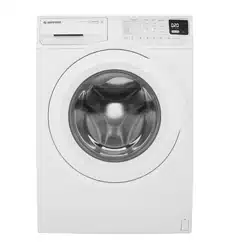
User Manual Washing Machine
PRODUCT DESCRIPTION
Parts
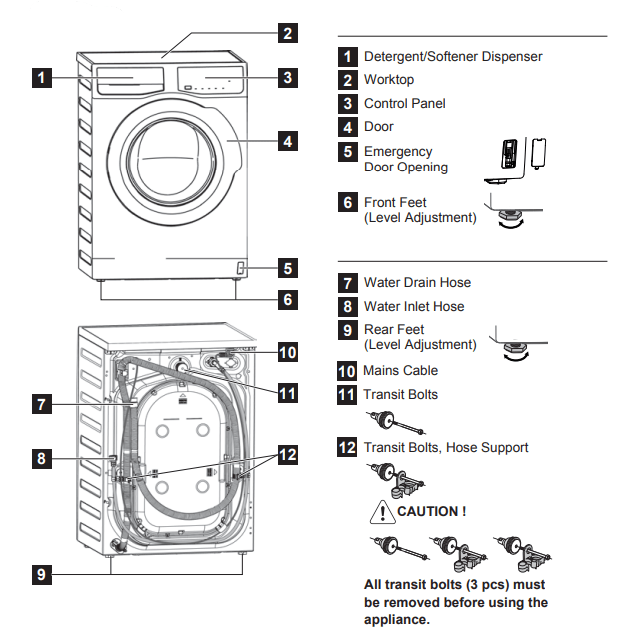
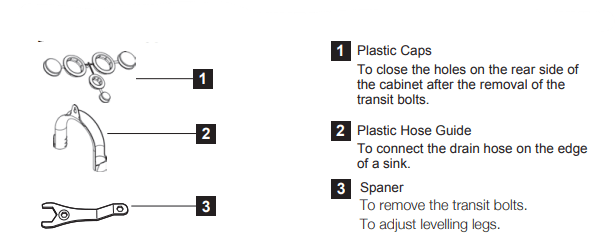
Accessories
CONTROL PANEL
Control Panel Description
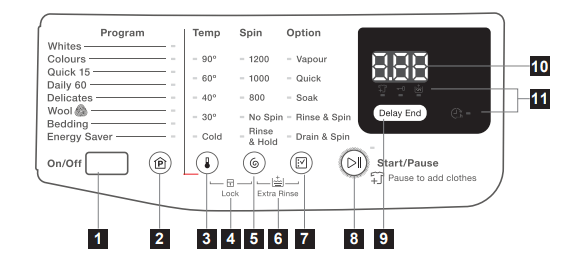
*** Maximum spin speed depended on model.
- On/Off Button
- Program Touchpad
- Temp Touchpad
- Child Lock Option
- Spin Touchpad
- Extra Rinse Option
- Option Touchpad
- Start/Pause Touchpad
- Delay End Touchpad
- LED Digital Number, will tell you:
- Washing Cycle Time, Delay End Time
- The alarm codes. Refer to the chapter “Troubleshooting” for their description.
- LED Icon
 Pause to add clothes status icon
 Door Lock status icon
 Extra Rinse status icon
 Delay End status icon
Woolmark Apparel Care

The wool wash cycle of this machine has been approved by The Woolmark Company for the washing of machine washable wool products provided that the products are washed according to the instructions on the garment label and those issued by the manufacturer of this washing machine. M1758.
The Woolmark symbol is a Certification mark in many countries.
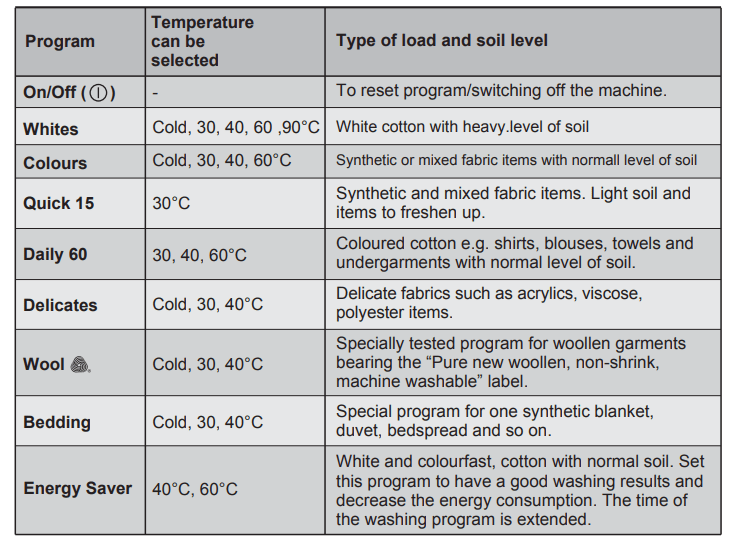
Program Description
Maximum Load
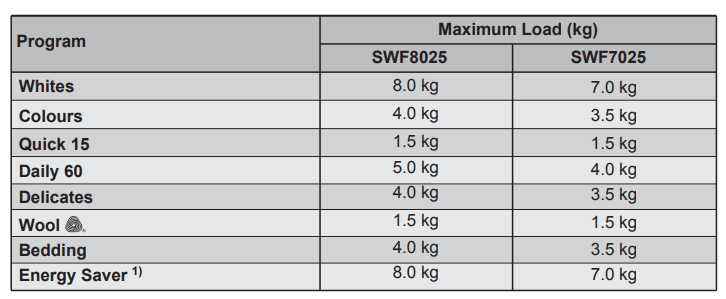
1) Energy Saver program with 60 °C option selected is recommended for a full load of normally soiled cottons, and is the Energy rating label program.
Program Options Compatibility
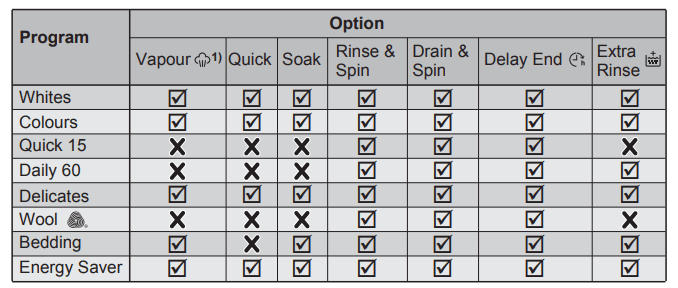
1) Vapour option can be combined with temperature 40°C to 90°C only.
Options
Temperature Touchpad
Press this touchpad repeatedly to increase or decrease the wash temperature if you want your laundry to be washed at a temperature different from the one proposed by the washing machine
Spin Selection Touchpad
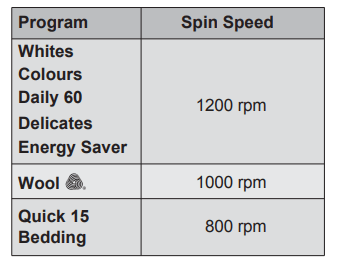
Press this touchpad repeatedly to increase or decrease the spin speed or select Rinse Hold, if you want your laundry to be spun at a speed different from the one proposed by the washing machine.
Maximum speeds are:
No spin option eliminates all the spin phases and increase the number of rinses.
By selecting this option, the water of the last rinse is not emptied out and the drum turns regularly to prevent the laundry creases
The door is still locked to indicate that the water must be emptied out.
NOTE The door stays locked with the water in the drum. To continue the cycle, you must press  (Start/Pause).
Vapour  Touchpad
Select this option to add approximately 30 minutes of tumbling in vapour during the wash cycle. Vapour helps open fabric fibers up to allow laundry additives to release tough stains. The indicator of this option will be on.
NOTE:
- Vapour may not necessarily be visible inside the drum during a vapour wash cycle. Vapour is created below the drum and allowed to naturally rise into the clothes.
- Vapour may not be present during the entire vapour wash cycle.
- Vapour function is more effective with half load
- At the end of the Vapour cycle, the clothes will be warmer, softer and detached from the drum.
NOTE If Vapour option is selected, rinse temperatures will be elevated. During a vapour cycle, you may notice vapour exiting from the drain hose of the washing machine, this is normal and there is no cause for alarm.
Quick
With this option you can decrease the program duration. Use this option for items with light soil or items to refresh.
This option will reduce the working time and the number of rinses.
If you need to add more rinse phases, press “Spin” + “Option” at the same time to add “Extra Rinse ” option.
Soak
This option allows you to soak heavily soiled clothes and stained items at the beginning of the wash before main washing phase.
This option will increase the duration of the program selected for about 50 minutes. And uses more water from normal wash. The process is as follows.
1. fill water and turn the washing drum (this takes about 20 minutes)
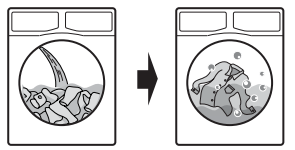
After press Start/Pause touchpad, the machine will start add water to the washing drum, which will start to rotate slowly to dissolve detergent and evenly distribute cloths.
2. soak (this takes about 30 minutes.)
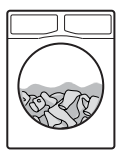
The machine will enter the process of soaking, The washing drum will stop and rotate once in a while in order to redistribute cloths.
3. Once the soak process complete, the machine will check the water level again and will start the selected program and continue by using the same soak water.
NOTE
If you Do not wish to use the soak water to wash cloth, please follow the steps below:
1. Press Start/Pause to pause the washing machine. Then press On/Off to turn off the machine.
2. Press On/Off again to start the machine, add detergent, and select the program of your choice. Press Start/Pause again to start the selected program
The machine will detect and drain the water in the washing drum out automatically and fill in water once again to be used for washing.
NOTE
- Any temperature may be selected, but “Cold” water is recommended with this cycle as hotter water may set some stains.
- Use the amount of detergent recommended for a normal wash cycle. If desired, use a bleach or a soaking agent safe for the fabric, by pouring it into the detergent compartment
Rinse & Spin
With this option you can perform only a last rinse of a selected washing program
- If you set also the “Extra Rinse” option () the appliance adds two rinses.
- If you set also the “No Spin” option, the appliance only rinse.
Drain & Spin
Use this option for very wet clothes to remove the water and spin.
If you set also the “No Spin” option, the appliance only drains.
Delay End Touchpad ()
Before you start the program, this option makes it possible to define the end of the washing program from minimum of 1 hour to maximum of 20 hours.
NOTE
eg. if program duration is longer than 3 hours, minimum Delay End option starts from 4 hours.
Press the Delay End touchpad to choose the end time as you wish. The display shows the number of hours and the indicator beside the touchpad is on.
NOTE
This option must be selected after choosing the wash program, and before pressing the “Start/Pause” touchpad.
For example, if the program duration of your selected program is 3.20 hours and you define the “Delay End” time to 6 hours. This means your wash program will finish in 6 hours. (See diagram)
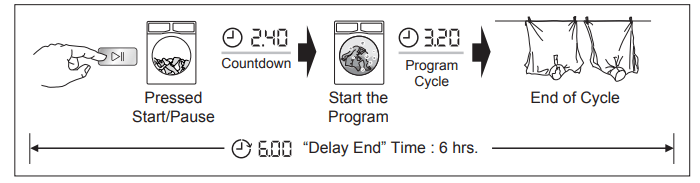
After selecting Delay End time, press Start/Pause touchpad to start the program. Machine will then countdown and update time on the display every hours until it reaches the starting point of the wash cycle
If you wish to modify or cancel Delay End option after starting the program, follow the steps below:
- set the washing machine to PAUSE by pressing “Start/Pause” touchpad;
- deselect this option by pressing “Delay End” touchpad repeatedly till the display shows delay time “
 ”;
”;
- press the “Start/Pause” to start the program.
Setting
Extra Rinse Option ()
This option is recommended for people who are allergic to detergents, and in areas where the water is very soft. Use this option to add two rinse phases to a program.
- To activate this option, press “Spin” and “Option” touchpads at the same time until the “Extra Rinse” () LED turn on.
- To deactivate this option, press “Spin” and “Option” touchpads at the same time until the “Extra Rinse” () LED turn off.
NOTE
This option remains enabled even after the appliance is switched off.
Child Safety Lock Option ( )
)
Your appliance is provided with CHILD SAFETY LOCK which permits you to leave the appliance unsupervised with the door closed without having to worry that children might be injured by or cause damage to the appliance.
NOTE Set this option after pressing the “Start/Pause ” touchpad.
To set “Child Lock” option:
- To activate the function, press “Temp” and “Spin” touchpads at the same time until symbol “
 ” (lock) show on the display with sound.
NOTE After active this function, if you press any touchpad, symbol “ ” will flash on display along with buzzer sound. (except “On/Off” button)
- To deactivate the function, press “Temp” and “Spin” touchpads at the same time until symbol “
 ” (unlock) show on the display with sound.
NOTE This function remains enabled even after the appliance is switched off
Enabling/Disabling End-Of-Wash Buzzer
This setting permits you to either enable or disable the buzzer at the end of the program. As an example, you might wish to disable this buzzer when you start a wash when going to bed, so that when the wash finished approximately 1 hour later, it will not disturb you through the night.
NOTE Error warning beeps such as critical faults are not disabled.
- To disable the buzzer sound, press “Program” and “Temp” touchpads at the same time for 3 seconds, and listen for “BEEP, BEEP”.
- To return to default configuration press these 2 touchpads at the same time for 3 seconds, and listen for “BIP”.
Start/Pause (), Pause to add clothes ()
This touchpad has 2 functions:
Start/Pause ( )
After you have selected the desired program and options, press this touchpad to start the machine. The “Start/Pause” pilot light will stop flashing and remain lit until the water level is above the bottom edge of the door then pilot light goes OFF. If you have selected a “Delay End” option, the countdown will begin and will be shown in the display
To interrupt a program which is running, press this touchpad to pause the machine, the “Start/Pause” pilot light flashes
To restart the program from the point at which it was interrupted, press this touchpad again, the “Start/Pause” pilot light will stop flashing.
Pause to add clothes ()
NOTE You can only add clothes if add clothes “ ” pilot light is lit.
While running a program, you may add clothes by:
- Pressing the “ ” touchpad to pause the program.
- Wait for the machine to come to a complete stop before opening the door.
- Add clothing and close the door.
- Resume the program by pressing “ ” touchpad again.
NOTE You cannot open the door if the water inside the machine drum are hot, the door remains locked for your safety. Although the LED light still remain lit.
BEFORE FIRST USE
NOTE
During installation or before first use you may observe some water in the machine. This is a residual water left in the machine after a full functional test in the factory to ensure the machine is delivered to customers in perfect working order and is no cause for concern.
1. Ensure that the electrical and water connections comply with the installation instructions.
2. Put 2 litres of water in the detergent compartment for washing phase. This activates the drain system.
3. Select a Cottons cycle at 90 °C, without any laundry in the machine, to remove any manufacturing residue from the drum and tub then start the machine.
DAILY USE
Loading The Laundry
1. Turn the water tap on.
2. Connect the main plug to the main socket
3. Press the On/Off button to turn on the washing machine. The indicator of the “Start/Pause” touchpad flashes
Press the Program touchpad, to choose the wash program you require. (For more information about washing programs, please see page 9)
- The relevant light will light up.
- The display shows the program duration
4.Check and remove objects (if there are any) that could be trapped in the fold.
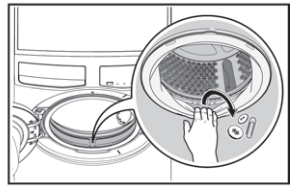
5. Place the laundry in the drum, one item at a time, shaking them out as much as possible. (Refer to page 19 “WASHING HINTS”)
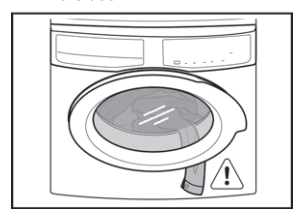
6. Close the door.
CAUTION Make sure that no laundry remains between the seal and the door
Using Detergent And Additives
NOTE IMPORTANT: Please read “Detergents Type and Quantity of Detergent”on page 20 before use
1. Detergent Dispenser Drawer
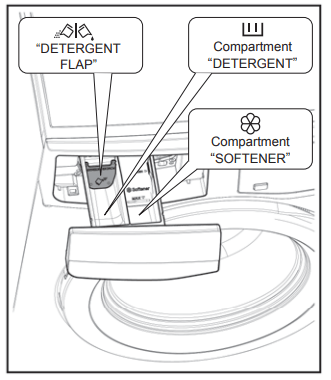
The detergent dispenser is divided into two compartments
 Compartment “DETERGENT”
This compartment is used for detergent on all programs.
 Compartment “SOFTENER”
This compartment is used for fabric conditioner and starching agent.
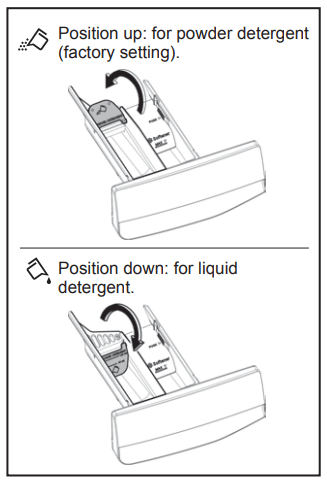
Powder or liquid detergent 
 Position down: for liquid detergent.
 Position up: for powder detergent (factory setting).
NOTE When you use the liquid detergent:
- Do not use gelatinous or thick liquid detergents.
- Do not put more liquid than the maximum level.
- Do not set the Delay End.
2. Measure out the detergent and the fabric softener;
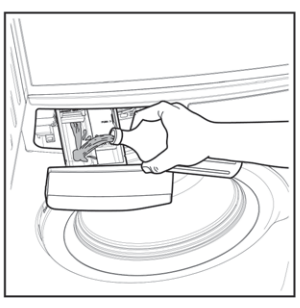
- Pull out the dispenser drawer until it stops
- Measure out the amount of detergent required, pour it into the Detergent compartment.
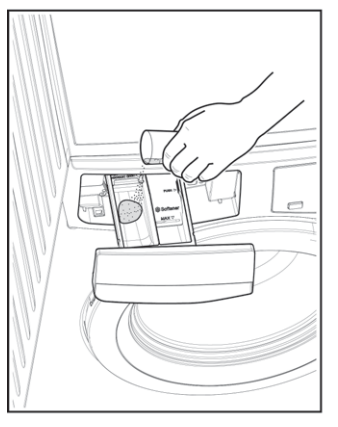
- If required, pour fabric softener into the compartment marked
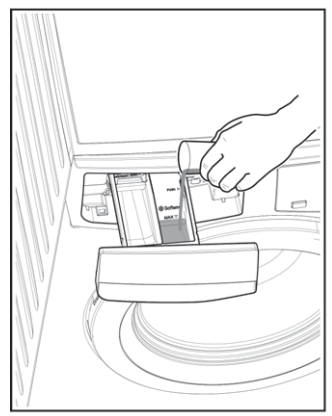
NOTE
The amount used must not exceed the “MAX” mark in the drawer.
If you use thick softeners it is recommended to dilute with water.
NOTE Residues of detergent, softener and water may remain in the dispenser. It is recommended to clean the dispenser regularly to remove any residue.
Options Setting
1. If you want your laundry to be spun or use temperature different from the one proposed by the washing machine, pess the “Spin” and the “Temp” touchpads repeatedly to change the spin speed and temperature.
Press the option touchpads, if you want your laundry to be washed with special functions.
NOTE
Different functions can be combined which is dependent on the program selected.
If an option is not compatible with the wash program selected, symbol “- - - ” will flash on display along with buzzer sound.
2. If you want to decrease washing time, press the “Quick” option touchpad. See page 11.
If you want to define the end of the washing cycle, press the “Delay End ()” touchpad repeatedly to choose your washing machine working time.
Starting A Cycle ()
To start a program, press the Start/Pause touchpad. The corresponding pilot light will stop flashing and a default program duration will be displayed on the screen.
If you press any touchpad while a program is operating, symbol “- - -'' will flash on display along with buzzer sound. (except Start/Pause touchpad)
NOTE After approx. 15 minutes from the start of a program:
The appliance will automatically adjust the selected program duration according to the type and size of the load. The display will show adjusted program duration.
Interruption Of A Program
- To pause, press Start/ Pause. The indicator will start flashing.
- Press the Start/Pause again. The program will continue.
Changing A Program
Changing a running program is possible only by switching off the appliance.
- Press the “On/Off” button to cancel the program and to turn off the appliance.
- Press the “On/Off” button again to start the appliance. Now, you can set a new washing program.
NOTE The appliance will not drain the water.
Changing The Options
It is possible to change only some option after the program has started.
1 Press the touchpad Start/Pause. The indicator will start flashing.
2 If available change the options that you wish.
3 Press Start/Pause again. The program will continue.
Opening The Door
While a program or the Delay End is operating, the appliance door is locked and the door lock indicator “ ” is on. First set the machine to PAUSE by pressing the “Start/Pause” touchpad. Wait until the door lock indicator “ ” goes off, then the door can be opened
If the door lock indicator “ ” does not disappear, this means that the machine is already heating and the water level is above the bottom edge of the door or the drum is turning. In this case the door CAN NOT be opened. If you need to open it, you must drain the water to open the door.
To drain the water, you have to switch the machine off by pressing the “On/Off” button to deactivate the appliance. Turn On the machine and select “Drain & Spin” option, you can select “No Spin”, if you want the machine to only drain the water then press Start/Pause touchpad to start the program.
NOTE In case of emergency please refer to “Emergency door opening” on page 27.
At The End Of The Program
- The appliance stops automatically.
- The acoustic signal will operate.
- The display will show “ ”.
- The indicator of the touchpad Start/Pause goes off
- The door lock indicator “
 ” goes off.
- Remove the laundry from the appliance.
- Make sure that the drum is empty
- Keep the door partly open, to prevent the mildew and odours.
- Turn off the water tap
NOTE:
At the end of the program, the time remaining can suddenly decrease from 7 minutes or less to 0 due to the overestimated total program time during the load sensing phase. In some cases (with perfectly balanced load) the program time can be shorter than the time estimated after the load sensing phase is completed. This is a normal behavior of the machine and not a cause for concern as it does not compromise its performance.
When The Washing Program Is Completed, But There Is Water In The Drum (Option “Rinse & Hold” is used)
-
The drum turns regularly to prevent the creases in the laundry.
- The indicator “Start/Pause” flashes to remind you to drain the water.
- The door lock indicator “ ” is on. The door stays locked.
You must drain the water to open the door.
To drain the water:
1. Press the “Start/Pause ” touchpad. The appliance drains the water and spins with the maximum spin speed for selected program.
Alternatively, before pressing the “Start/Pause” touchpad, you can press the “Spin” touchpad to change the spin speed. You can select “No Spin”, if you want the machine to only drain the water
2. When the program is completed and the door lock indicator “ ” goes off, you can open the door.
3. Press the “On/Off” button to deactivate the appliance.
NOTE: After approximately 18 hours, if you do not press Start/Pause touchpad, the appliance will drain and spin automatically (except for “Wool” program) .
AUTO Standby Mode
The AUTO Stand-by option automatically deactivates the appliance to decrease the energy consumption when:
NOTE Press the “On/Off” button to activate the appliance again.
- After 5 minutes from the end of the washing program.
NOTEPress the “On/Off” button to activate the appliance again.
WASHING HINTS
Sorting The Laundry
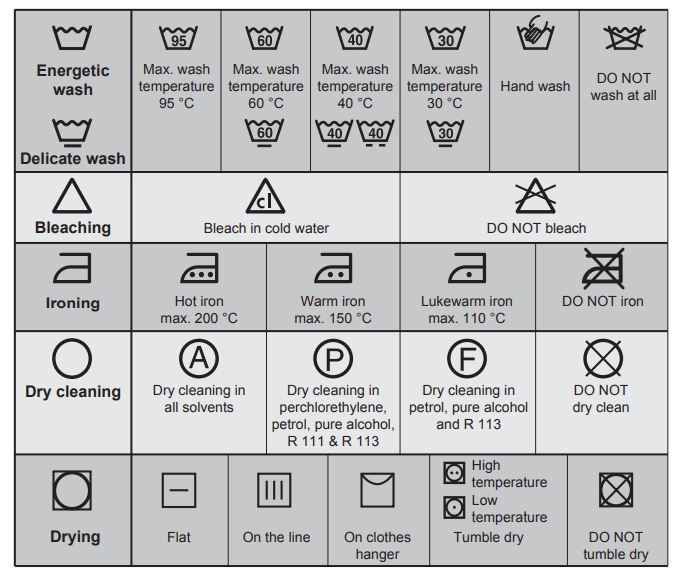
Follow the wash code symbols on each garment label and the manufacturer’s washing instructions. Sort the laundry as follows: whites, coloureds, synthetics, delicates, woollens.
Temperatures
90°C
For normally soiled white cottons and linen (e.g. teacloths, towels, tablecloths, sheets...)
60°C
For normally soiled, colourfast garments (e.g. shirts, night dresses, pajamas....) in linen, cotton or synthetic fibres and for lightly soiled white cotton (e.g.underwear).
40°C 30°C Cold
For delicate items (e.g. net curtains), mixed laundry including synthetic fibres and woollens bearing the label pure new wool, machine washable, non-shrink.
Before Loading The Laundry
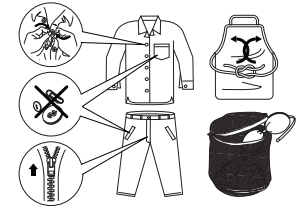
- Make sure that no metal objects are left in the laundry (e.g. hair clips, safety pins, pins)
- Button up pillowcases, close zip fasteners, hooks and poppers. Tie any belts or long tapes.
- Wash bras, pantyhose and other delicates in a mesh laundry bag, which you can purchase from your supermarket
- Make sure that you wash lint collectors separately from lint producers.
- Never wash whites and coloureds together. Whites may lose their “whiteness” in the wash.
- New coloured items may run in the first wash; they should therefore be washed separately the first time. Button up pillowcases, close zip fasteners, hooks and poppers. Tie any belts or long tapes.
- Remove persistent stains before washing.
- Rub particularly soiled areas with a special detergent or detergent paste. Treat curtains with special care. Remove hooks or tie them up in a bag or a net.
Maximum Loads
Recommended loads are indicated in the program charts. General rules:
- Cotton, linen: drum full but not too tightly packed;
- Synthetics: drum no more than half full;
- Delicate fabrics and woollens: drum no more than one third full.
Washing a maximum load makes the most efficient use of water and energy. For heavily soiled laundry, reduce the load size.
Removing Stains
Stubborn stains may not be removed by just water and detergent. It is therefore advisable to treat them prior to washing.
Blood: treat fresh stains with cold water. For dried stains, soak overnight in water with a special detergent then rub in the soap and water.
Oil based paint: moisten with benzine stain remover, lay the garment on a soft cloth and dab the stain; treat several times.
Dried grease stains: moisten with turpentine, lay the garment on a soft surface and dab the stain with the fingertips and a cotton cloth.
Rust: oxalic acid dissolved in hot water or a rust removing product used in cold water. Be careful with rust stains which are not recent since the cellulose structure will already have been damaged and the fabric tends to hole
Mould stains: treat with bleach, rinse well (whites and fast coloureds only).
Grass: soap lightly and treat with bleach (whites and fast coloureds only).
Ball point pen and glue: moisten with acetone (*), lay the garment on a soft cloth and dab the stain.
Lipstick: moisten with acetone (*) as above, then treat stains with methylated spirits. Remove any residual marks from white fabrics with bleach.
Red wine: soak in water and detergent, rinse and treat with acetic or citric acid, then rinse. Treat any residual marks with bleach.
Ink: depending on the type of ink, moisten the fabric first with acetone (*), then with acetic acid; treat any residual marks on white fabrics with bleach and then rinse thoroughly.
Tar stains: first treat with stain remover, methylated spirits or benzine, then rub with detergent paste. (*) do not use acetone on artificial silk.
Detergents Type And Quantity Of Detergent
Low sudsing detergent is required for this washing machine to prevent oversudsing problems, unsatisfied washing result and harm to the machine. Low sudsing detergents designed for front load washing machines are labelled “Front Loading”, “high efficiency”, “HE”, such as Cold Power for Front Loaders or “Matic”.
Do not use wrong types of detergent, such as Top Loading, Handwash detergent or Soap-Based products in your frontload washing machine. This can result in excessive suds, longer cycle time, low spin speeds, poor rinsing and overloading of the motor.
Quantity of detergent to be used
The choice of detergent and use of correct quantities not only affects your wash performance, but also helps to avoid waste and protect the environment. Although biodegradable, detergents contain substances which in large quantities can upset the delicate balance of nature.
The choice and quantity of detergent will depend on ;
- type of fabric (delicates, woollens, cottons, etc.) ;
- the colour of clothes ;
- size of the load ;
- degree of soil ;
- wash temperature ; and
- hardness of the water used
Water hardness is classified by so-called “degrees” of hardness.
Information on hardness of the water in your area can be obtained from the relevant water supply company, or from your local authority
You may have to try using the detergent quantity as per manufacturers’ instructions then compare the wash result to the list below and adjust the amount of detergent for your future washes accordingly.
Not enough washing powder causes:
- the washload to turn grey,
- greasy clothes.
Too much washing powder causes:
- sudsing,
- reduced washing effect
- inadequate rinsing.
Use less detergent if:
- you are washing a small load,
- the laundry is lightly soiled,
- large amounts of foam during washing.
INTERNATIONAL WASH CODE SYMBOLS
NOTE: These symbols appear on fabric labels, in order to help you choose the best way to treat your laundry.
CARE AND CLEANING
WARNING! You must DISCONNECT the appliance from the electricity supply, before you can carry out any cleaning or maintenance work.
External Cleaning
Clean the appliance only with soap and warm water. Fully dry all the surfaces.
CAUTION! Do not use alcohol, solvents or chemical products.
Descaling
The water we use normally contains lime. It is a good idea to periodically use a water softening powder in the machine.
Do this separately from any laundry washing, and according to the softening powder manufacturer's instructions.
This will help to prevent the formation of lime deposits.
After Each Wash
Leave the door open for a while. This helps to prevent mould and stagnant smells forming inside the appliance.
Keeping the door open after a wash will also help to preserve the door seal.
Maintenance Wash
With the use of low temperature washes it is possible to get a build up of residues inside the drum. We recommend that a maintenance wash be performed on a regular basis.
To run a maintenance wash:
- The drum should be empty of laundry.
- Select the hottest cotton wash program.
- Use a normal measure of detergent, must be a powder with biological properties.
Cleaning The Dispenser Drawer
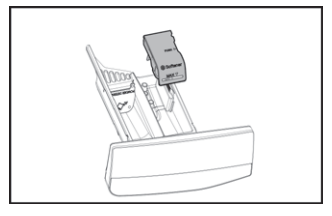
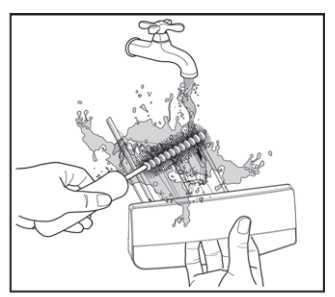
The washing powder and additive dispenser drawer should be cleaned regularly. Remove the drawer by pressing the catch downwards and by pulling it out. Flush it out under a tap, to remove any traces of accumulated powder.
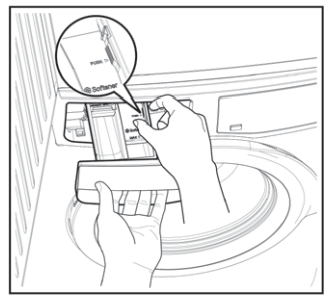
To aid cleaning, the top part of the additive compartment should be removed.
Cleaning The Drawer Recess
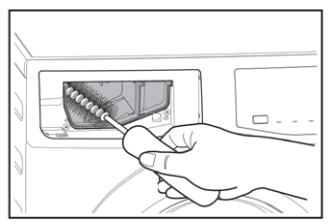
Having removed the drawer, use a small brush to clean the recess, ensuring that all washing powder residue is removed from the upper and lower part of the recess. Replace the drawer and run the rinse program without any clothes in the drum
Cleaning The Drawer Bottom
After washing cycle finish, residues of softener and water may remain in the softener dispenser. It is recommended to clean the bottom of softener dispenser regularly to remove any residue.
To clean the bottom of softener dispenser:
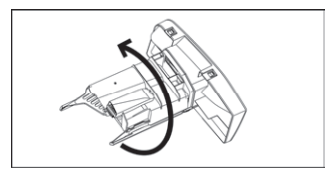
1. After pulling out the drawer from its recess, turn the bottom side up
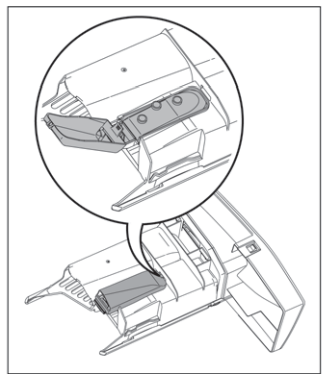
2. . Push the catch and pull up the softener bottom cover.
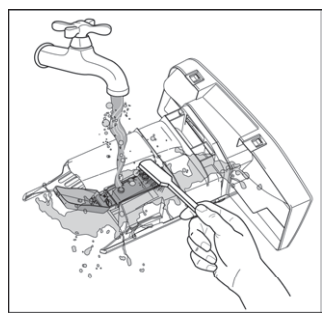
3. Clean the dispenser with an old toothbrush under the water tap.
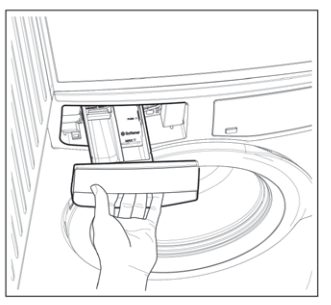
4. Close the softener bottom cover.
Cleaning The Water Inlet Filter
If your water is very hard or contains traces of lime deposit, the water inlet filter may become clogged. It is therefore a good idea to clean it from time to time.
To clean the water inlet filters:
1. Close the water tap.
2. Remove the water inlet hose from the water tap.
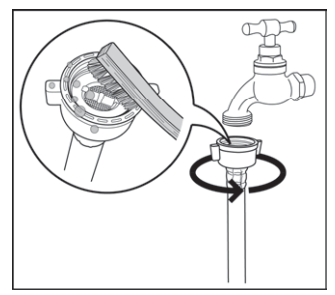
3. Clean the filter in the inlet hose with a stiff brush.
4. Remove the inlet hose behind the appliance.
5. Clean the filter in the valve with a stiff brush or a towel.
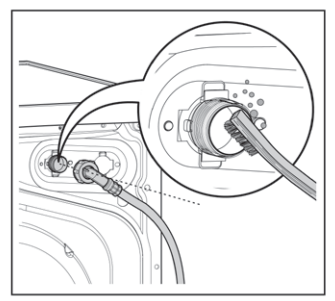
6. Install the inlet hose again. Make sure that the couplings are tight to prevent leakages.
7. Open the water tap.
Frost Precautions
If the appliance is installed in an area where the temperature can be less than 0 °C, remove the remaining water from the inlet hose and the drain pump.
Emergency Drain
1. Disconnect the main plug from the main socket. Turn off the water tap.
2. Remove the water inlet hose.
3. Remove the drain hose from the rear support and unhook it from sink or spigot.
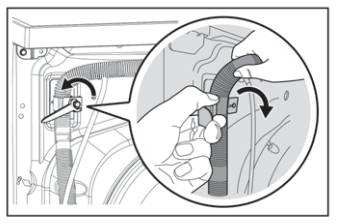
4. Put the end of the drain and inlet hose in a container. Let the water flow out of the hoses.
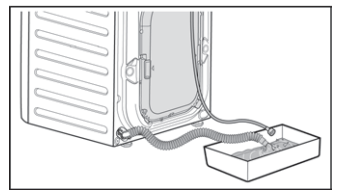
5. When no more water flows, install the inlet hose and the drain hose again.
NOTE: Make sure that the temperature is more than 0 °C before you use the appliance again
TROUBLESHOOTING
Possible Failures
Certain problems are due to lack of simple maintenance or oversights, which can be solved easily without calling out an engineer. Before contacting your local Service Centre, please check possible cause of malfunction and solution listed below.
Once the problem has been eliminated, press the Start/Pause button to restart the program. If after all checks, the problem persists, contact your local Service Centre
WARNING! Deactivate the appliance before you do the checks.
Alarm Code:
 The appliance does not fill with water properly
 The appliance does not drain the water
 The appliance door is open or not closed correctly. Please check the door!
 The main supply is unstable. Wait until the main supply is stable.
 No communication between electronic elements of the appliance. Switch off and switch on again.
 Water leaks inside the machine. Please call Service Centre.
The washing machine does not start:
- The door has not been closed. (code:
 )
)
- The plug is not properly inserted in the power socket.
- Insert the plug into the power socket.
- There is no power at the socket
- Please check your domestic electrical installation.
- The Start/Pause ( ) touchpad has not been pressed.
- Press the Start/Pause ( ) touchpad.
- The “Delay End” has been selected.
- If the laundry are to be washed immediately, cancel the “Delay End”.
- The Main supply is unstable. (If code “
 ” appears in the display.)
- Wait until the main supply is stable. Appliance will start automatically.
The machine does not fill the water:
- The water tap is closed. (code:
 )
)
- The inlet hose is squashed or kinked. (code: )
- Check the inlet hose connection.
- The filter in the inlet hose is blocked. (code: )
- Clean the water inlet hose filter.
- The door is not properly closed. (code: )
The machine fills then empties immediately:
- The end of the drain hose is too low. (code: )
- Refer to relevant paragraph in “water drainage” section on page 31.
The machine does not empty and/or does not spin:
- The drain hose is squashed or kinked. (code:
 )
)
- Check the drain hose connection.
- The option “Rinse & Hold” has been selected.
- Press Start/Pause ( ) touchpad to drain the water or select spin program.
- The laundry is not evenly distributed in the drum.
- Pause the machine and redistribute laundry manually
There is water on the floor:
- Too much detergent or unsuitable detergent (creates too much foam) has been used
- Reduce detergent quantity and use correct type of detergent (refer page 20)
- Check whether there are any leaks from one of the inlet hose fittings. It is not always easy to see this as the water runs down the hose; check to see if it is damp
- Check the water inlet hose connection.
- The drain hose is damaged
- Water leaks inside the machine. (code:
 )
)
- Disconnect the main plug from the main socket. Turn off the water tap. Contact your local Service Centre.
Unsatisfactory washing results:
- Too little detergent or unsuitable detergent has been used.
- Increase detergent quantity or use different detergent (refer page 20).
- Stubborn stains have not been treated prior to washing.
- Use commercial products to treat the stubborn stains.
- The correct temperature was not selected.
- Check if you have selected the correct temperature.
- Excessive laundry load.
The door will not open:
- The program is still running.
- Wait until the end of cycle.
- There is water in the drum.
- You must drain the water to open the door (refer “Opening The Door” on page 17).
- This problem may be caused by a failure of the appliance.
- Contact Service. If you need to open the door, please read carefully “Emergency door opening” on next page.
The machine vibrates or is noisy:
- The transit bolts and packing have not been removed.
- Check the correct installation of the appliance.
- The support feet have not been adjusted
- Check the correct levelling of the appliance.
- The laundry is not evenly distributed in the drum
- Pause the machine and redistribute laundry manually.
- There is very little laundry in the drum.
- Unstable floors eg. wooden floors.
- Refer to relevant paragraph in “Positioning” section.
Cycle time longer than displayed:
- Detergent over dose
- Reduce the detergent quantity or use another one. (Refer page 20 “Detergents Type And Quantity Of Detergent”).
- Machine unbalance
- Redistribute laundry manually in the drum and start the spin phase again.
The cycle is shorter than the time displayed.
- The appliance calculated a new time according to the laundry load
No water is visible in the drum:
- Machines based on modern technology operate very economically using very little water without affecting performance.
Spinning starts late or the machine does not spin:
- The electronic unbalance detection device has cut in because the laundry is not evenly distributed in the drum. The laundry is redistributed by reverse rotation of the drum. This may happen several times before the unbalance disappears and normal spinning can resume. If, after 10 minutes, the laundry is still not evenly distributed in the drum, the machine will not spin. In this case, redistribute the load manually and select the spin program.
- Pause the machine and redistribute laundry manually.
The machine makes an unusual noise:
- Machine not installed properly.
- Make sure the levelling of the appliance is correct. Refer to “Installation”.
- Transit bolts or packaging not removed
- Make sure that the packaging and/or the transit bolts are removed. Refer to “Unpacking”
- The load may be too small
- Add more laundry in the drum.
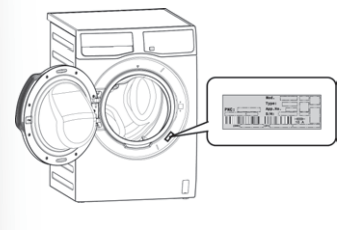
NOTE: If you are unable to identify or solve the problem, contact our service centre. Before calling service centre, make a note of the model, serial number and purchase date of your machine: the Service Centre will require this information.
Emergency Door Opening
In case of power failure or appliance failure, the appliance door remains locked.
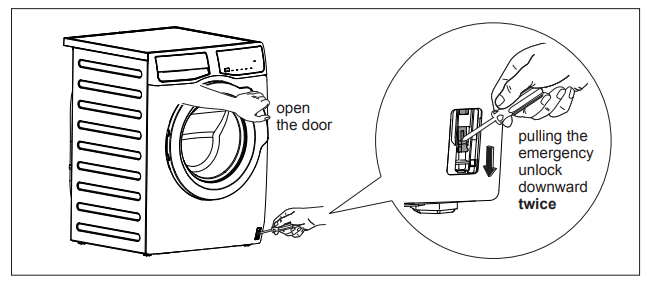
The wash program continues when power is restored. If the door remains locked in case of failure, it is possible to open it using the emergency unlock feature.
Before Opening The Door:
WARNING!
- Make sure that the water temperature and the laundry are not hot. Wait until they cool down if necessary.
- Make sure that the drum is not rotating. Wait until the drum stops rotating if necessary.
- Make sure that the water level inside the drum is not too high. If necessary, perform an Emergency Drain (see page 24).
To open the door proceed as follows:
1. Press “On/Off” to switch the appliance off. Disconnect the main plug from the main socket.
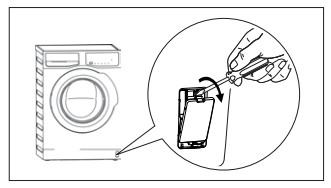
2. Remove the cover door, as picture below.
3. Pull twice the emergency unlock trigger downward then open the appliance door.
4. Take out the laundry.
5. Re-assemble the cover door.
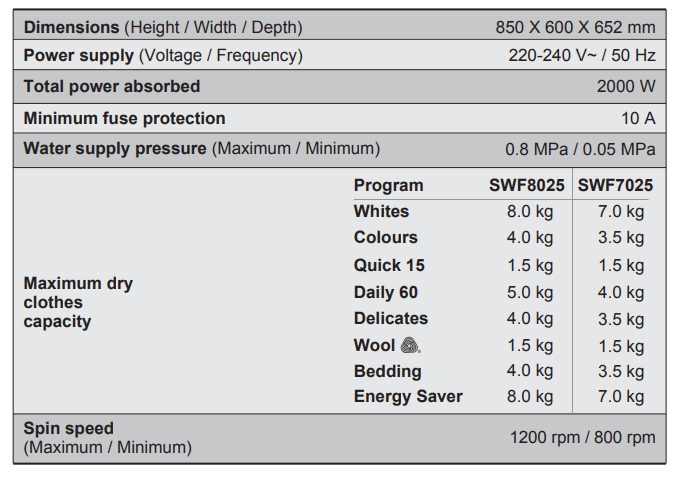
TECHNICAL DATA
INSTALLATION
Unpacking
CAUTION!
All transit bolts and packing must be removed before using the appliance.
You are advised to keep all transit devices so that they can be refitted if the machine ever has to be transported again.
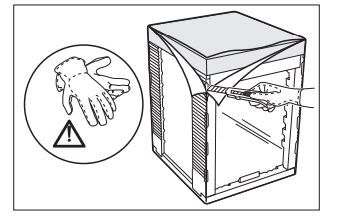
1. Use gloves. Remove the external film. If necessary, use a cutter.
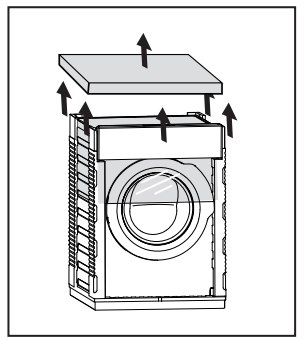
2. Remove the cardboard top
Remove the polystyrene packaging materials.
Remove the plastic bag on top of the machine.
3. Open the door.
Remove the polystyrene piece from the door seal and all the items from the drum.
4. Put one of the polystyrene «A» packaging elements on the floor behind the appliance. Carefully put down the appliance with the rear side on it. Make sure not to damage the hoses.
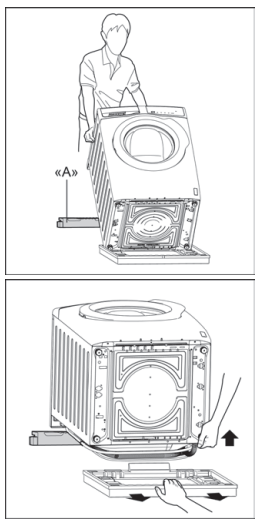
5. Remove the polystyrene base.
6. Put one of the polystyrene
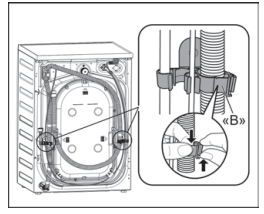
7. Remove the power supply cable and the drain and inlet hoses from the hose holders «B» on the rear of the appliance.
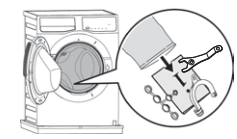
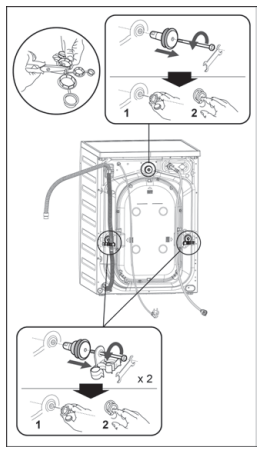
8.Remove the three transit bolts.
9. Pull out the plastic spacers.
10. Put the plastic caps in the holes. You can find these caps in the user manual bag.
Positioning
It is important that your washing machine stands firm and leveled on the floor to ensure correct operation. The appliance must not be installed behind a lockable door, a sliding door or a door with a hinge on the opposite side to avoid restricting the washing machine door.
Use a spirit level on the top and side of the washing machine to check the levels.
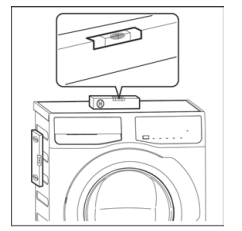
If you do not have a spirit level, as a guide use the edge of a door frame, cupboard or bench to check that the washing machine is leveled.
Loosen or tighten the feet to adjust the level. A correct adjustment of the appliance level prevents vibration, noise and the movement of the appliance when in operation.
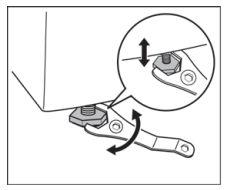
When the washing machine is levelled, try to rock it from corner to corner. If it does rock, adjust the legs again until it is levelled and does not rock.
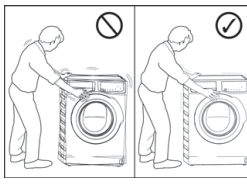
Never place cardboard, wood or similar materials under the machine to compensate for any unevenness in the floor. Install the machine on a flat hard floor. Make sure that air circulation around the machine is not impeded by carpets, rugs etc.
Check that the machine does not touch the wall or cupboard units.
Water Inlet
Connect the water inlet hose to a tap with 3/4” BSP thread.
Use the hose supplied with the washing machine. DO NOT USE OLD HOSES.
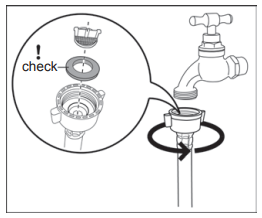
The inlet hose must not be lengthened. If it is too short and you do not wish to move the tap, you will have to purchase a new, longer hose specially designed for this type of use.
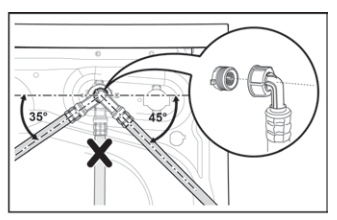
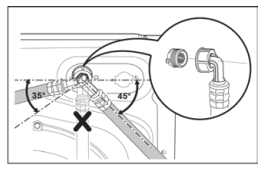
Loosen the ring nut to angle the hose to the left or right depending on the position of your water tap. Do not place the inlet hose downwards. After positioning the inlet hose, be sure to tighten the ring nut again to prevent leaks.
Water Drainage
The end of the drain hose can be positioned in three ways:
- Hooked over the edge of a sink, using the plastic hose guide supplied with the machine.
Fitting Hose Guide
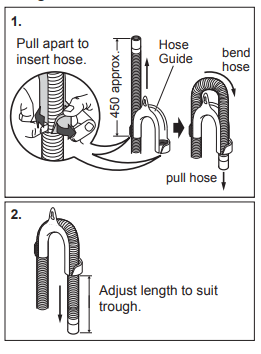
In this case, make sure the end cannot come unhooked when the machine will be emptied. This could be done by tying it to the tap with a piece of string or attaching it to the wall.
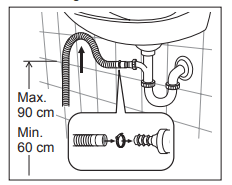
- In a sink, drain pipe branch
This branch must be above the trap so that the bend is at least 60 cm above the ground.
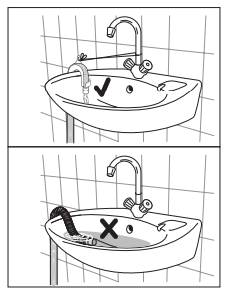
Push the drain hose onto the spigot and secure with a clip, ensure a loop is formed in the drain hose to prevent waste from the sink entering the appliance.
- Directly into a drain pipe, at a height of not less than 60 cm and not more than 90 cm.
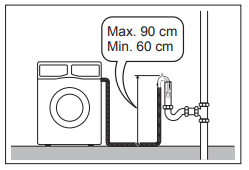
The end of the drain hose must always be ventilated, i.e. the inside diameter of the drain pipe must be larger than the outside diameter of the drain hose
The drain hose must not be twisted or curled. Run it along the floor; only the part near the drainage point must be raised
For the correct functioning of the machine, the drain hose must remain hooked on the proper support piece situated on the top part of back side of the appliance.
Electrical Connectio
This machine is designed to operate on a 220-240 V, single-phase, 50 Hz supply.
“An incorrect power supply may void your warranty.”
Check that your domestic electrical installation can take the maximum load required (2.0 kW), also taking into account any other appliances in use.
CAUTION!
- Connect the machine to an earthed socket outlet.
- The manufacturer declines any responsibility for damage or injury through failure to comply with the above safety precaution.
- Should the appliance power supply cable need to be replaced, this shall be carried out by our Service Centre.
When the appliance is installed, the power supply cable must be easily accessible.
If this appliance is supplied from a cord extension set or electrical portable outlet device, the cord extension set or electrical portable device must be positioned so that it is not subject to splashing or ingress of moisture.