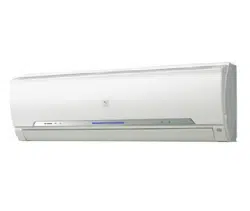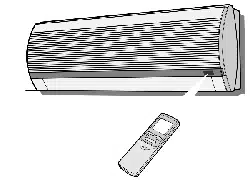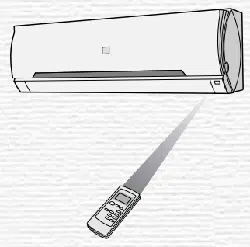
AH-A24FEF
AH-A24FEF
INDOOR UNIT
SPLIT TYPE
ROOM AIR CONDITIONER
OPERATION MANUAL
OUTDOOR UNIT
AU-A24FF
Thank you for purchasing a SHARP air
conditioner. Please read this manual care-
fully before operating the product.
• SPECIFICATIONS ........................................ 2
• IMPORTANT SAFETY INSTRUCTIONS...... 3
• ADDITIONAL NOTES ON OPERATION ...... 5
• TIPS ON SAVING ENERGY......................... 5
• PART NAMES............................................... 6
• USING THE REMOTE CONTROL ............... 8
• BASIC OPERATION ..................................... 10
•
ADJUSTING THE AIR FLOW DIRECTION ......
11
• TIMER OPERATION..................................... 12
• TURBO COOLING OPERATION.................. 14
• ONE-HOUR OFF TIMER .............................. 14
• AUXILIARY MODE ....................................... 15
• MAINTENANCE............................................ 16
• BEFORE CALLING FOR SERVICE ............. 18
CONTENTS
R22
SPECIFICATIONS
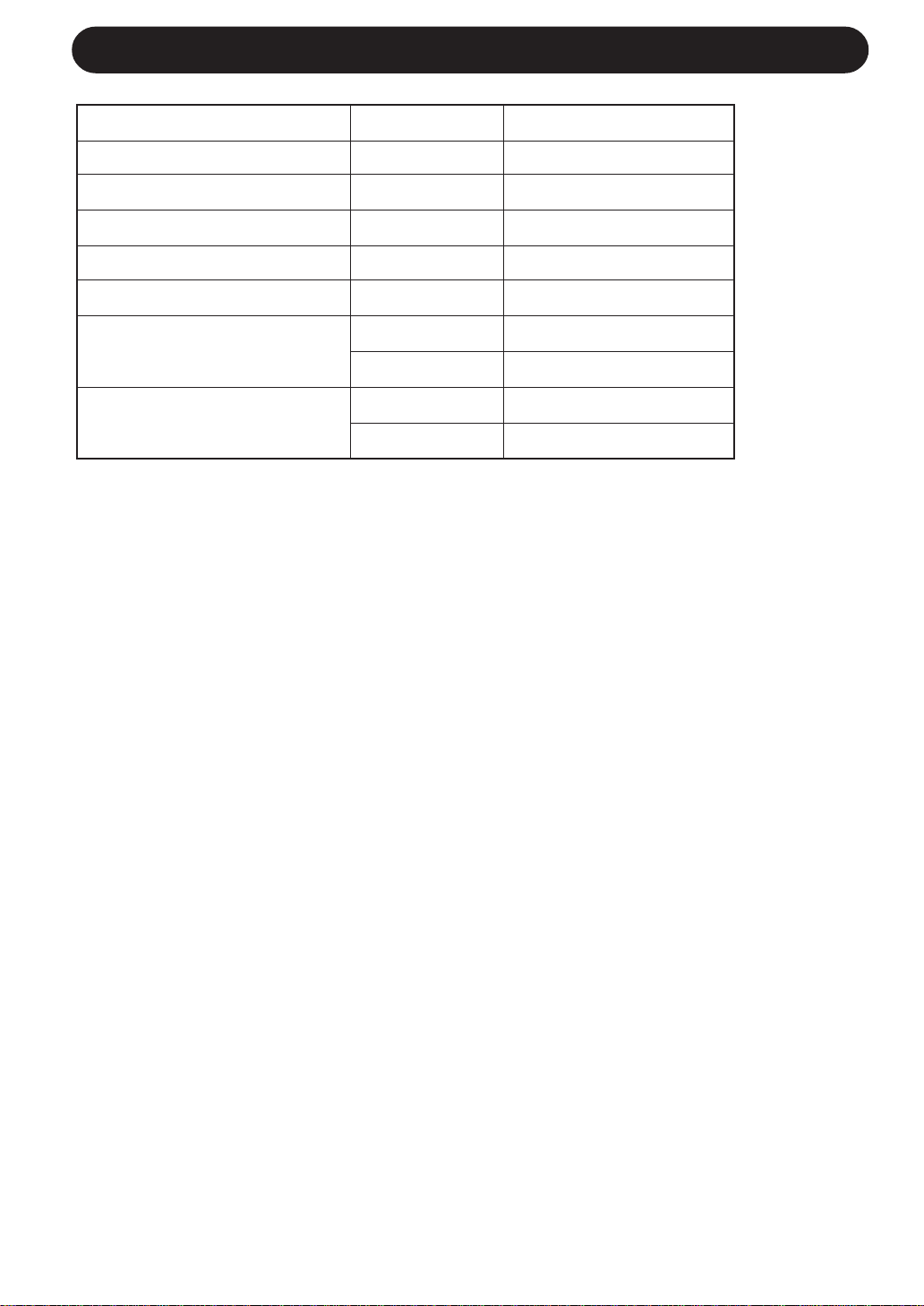
Model AH-A24FEF
Cooling capacity (kJ/h) 22680
Rated freqency (Hz) 60
Rated voltage (V) 230
Rated current (A) 10.3
Rated input (W) 2260
External dimensions (mm) Indoor unit 1040x325x229
(WxHxD) Outdoor unit 890x645x327
Weight (kg)
Indoor unit 16
Outdoor unit 59
We reserve the right to change the materials and apecifications without notice.
2

3
IMPORTANT SAFETY INSTRUCTIONS
WARNINGS FOR USE
1
Do not pull or deform the power supply cord. Pulling and misuse of the power supply cord
can result in damage to the unit and cause electrical shock.
2
Be careful not to expose your body directly to the outlet air for a long time. It may affect
your physical conditions.
3
When using the air conditioner for infants, children, elderly, bedridden, or disabled people
make sure the room temperature is suitable for those in the room.
4
Never insert objects into the unit. Inserting objects can result in injury due to the high
speed rotation of internal fans.
5
Ground the air conditioner without fail. Do not connect the grounding wire to gas pipe,
water pipe, lightning rod or telephone grounding wire. Incomplete grounding may cause
electric shock.
6
If anything is abnormal with the air conditioner (ex. a burning smell), stop the operation
immediately and turn the circuit breaker OFF.
7
The appliance shall be installed in accordance with national wiring regulations. Improper
cable connection can cause the power supply cord, plug and the electrical outlet to
overheat and cause fire.
8
If the supply cord is damaged, it must be replaced by the manufacturer or its service agent
or a similarly qualified person in order to avoid a hazard. Use only the manufacture-
specified power cord for replacement.
WARNINGS FOR INSTALLATION / REMOVAL / REPAIR
• Do not attempt to install/remove/repair the unit by yourself. Incorrect work will cause electric
shock, water leak, fire etc. Consult your dealer or other qualified service personnel for the
installation/removal/repair of the unit.

IMPORTANT SAFETY INSTRUCTIONS
CAUTIONS FOR USE
1
Open a window or door periodically to ventilate the room, especially when using gas
appliances. Insufficient ventilation may cause oxygen shortage.
2
Do not operate the buttons with wet hand. It may cause electric shock.
3
For safety, turn the circuit breaker off when not using the unit for an extended period of
time.
4
Check the outdoor unit mounting rack periodically for wear and to make sure it is firmly
in place.
5
Do not put anything on the outdoor unit nor step on it. The object or the person may fall
down or drop, causing injury.
6
This unit is designed for residential use. Do not use for other applications such as in a
kennel or greenhouse to raise animals or grow plants.
7
Do not place a vessel with water on the unit. If water penetrates into the unit, electrical
insulations may deteriorate and cause electric shock.
8
Do not block the air inlets nor outlets of the unit. It may cause insufficient performance
or troubles.
9
Be sure to stop the operation and turn the circuit breaker off before performing any
maintenance or cleaning. A fan is rotating inside the unit and you may get injured.
10
Do not splash or pour water directly on the unit. Water can cause electrical shock or
equipment damage.
11
This appliance is not intended for use by young children or infirm persons without
supervision.
Young children should be supervised to ensure that they do not play with the appliance.
CAUTIONS FOR LOCATION / INSTALLATION
• Make sure to connect the air conditioner to power supply of the rated voltage and
frequency.
Use of a power supply with improper voltage and frequency can result in equipment
damage and possible fire.
• Do not install the unit in a place where inflammable gas may leak. It may cause fire.
Install the unit in a place with minimal dust, fumes and moisture in the air.
• Arrange the drain hose to ensure smooth drainage. Insufficient drainage may cause wetting
of the room, furniture etc.
• Make sure a leak breaker or a circuit breaker is installed, depending on the installation
location, to avoid electrical shock.
4

INDOOR TEMP. OUTDOOR TEMP.
COOLING
upper limit
32˚C D.B. 43˚C D.B.
23˚C W.B. -
lower limit
21˚C D.B. 21˚C D.B.
15˚C W.B. -
ADDITIONAL NOTES ON OPERATION
OPERATING TEMPERATURE RANGE
• The built-in protective device may prevent the unit from operating when used out of this
range.
• Condensation may form on the air outlet if the unit operates continuously in the COOL or
DRY mode when humidity is over 80 percent.
D.B. = Dry-bulb W.B. = Wet-bulb
TIPS ON SAVING ENERGY
Below are some simple ways to save energy when you use your air conditioner.
WHEN POWER FAILURE OCCURS
This air conditioner has a memory function to store settings when a power failure occurs.
After power recovery, the unit will automatically re-start in the same settings which were
active before the power failure, except for timer settings.
If the timers were set before a power failure, they will need to be re-set after power recovery.
5
SET THE CORRECT TEMPERATURE
• Setting the thermostat 1°C higher than the desired temperature in the COOL mode will
save approximately 10 percent in power consumption.
• Setting the temperature lower than necessary during cooling operation will result in
increased power consumption.
BLOCK DIRECT SUNLIGHT AND PREVENT DRAFTS
• Blocking direct sunlight during cooling operation will reduce power consumption.
• Close the windows and doors during cooling operation.
SET PROPER AIR FLOW DIRECTION TO OBTAIN THE BEST AIR
CIRCULATION
KEEP FILTER CLEAN TO ENSURE THE MOST EFFICIENT OPERATION
MAKE MOST OF THE TIMER OFF FUNCTION
DISCONNECT THE POWER CORD OR TURN OFF THE CIRCUIT BREAKER
WHEN THE UNIT IS NOT USED FOR AN EXTENDED PERIOD OF TIME
• The indoor unit still consumes a small amount of power when it is not operating.

PART NAMES
1 Inlet (Air)
2 Open Panel
3 AUX. Button
4 Air Filters
5 Receiver Window
6 Louvre Unit
Open to clean the inside of the
air conditioner.
7 Power Supply Cord
8 Indicator Panel
9 Vertical Adjustment Louvres
0 Horizontal Adjustment Louvres
q Outlet (Air)
w Remote Control
e TURBO COOLING Lamp (green
)
r TIMER Lamp (orange
)
t OPERATION Lamp (red
)
OUTDOOR UNIT
NOTE: Actual units might vary slightly from those shown above.
INDOOR UNIT
1
2
3
4
5
6
7
8
9
0
q
w
y Inlet(Air)
u Refrigerant Tube and Inter-
connecting Cord
i Drainage Hose
o Outlet(Air)
6
e
r
t
y
u
i
o
7
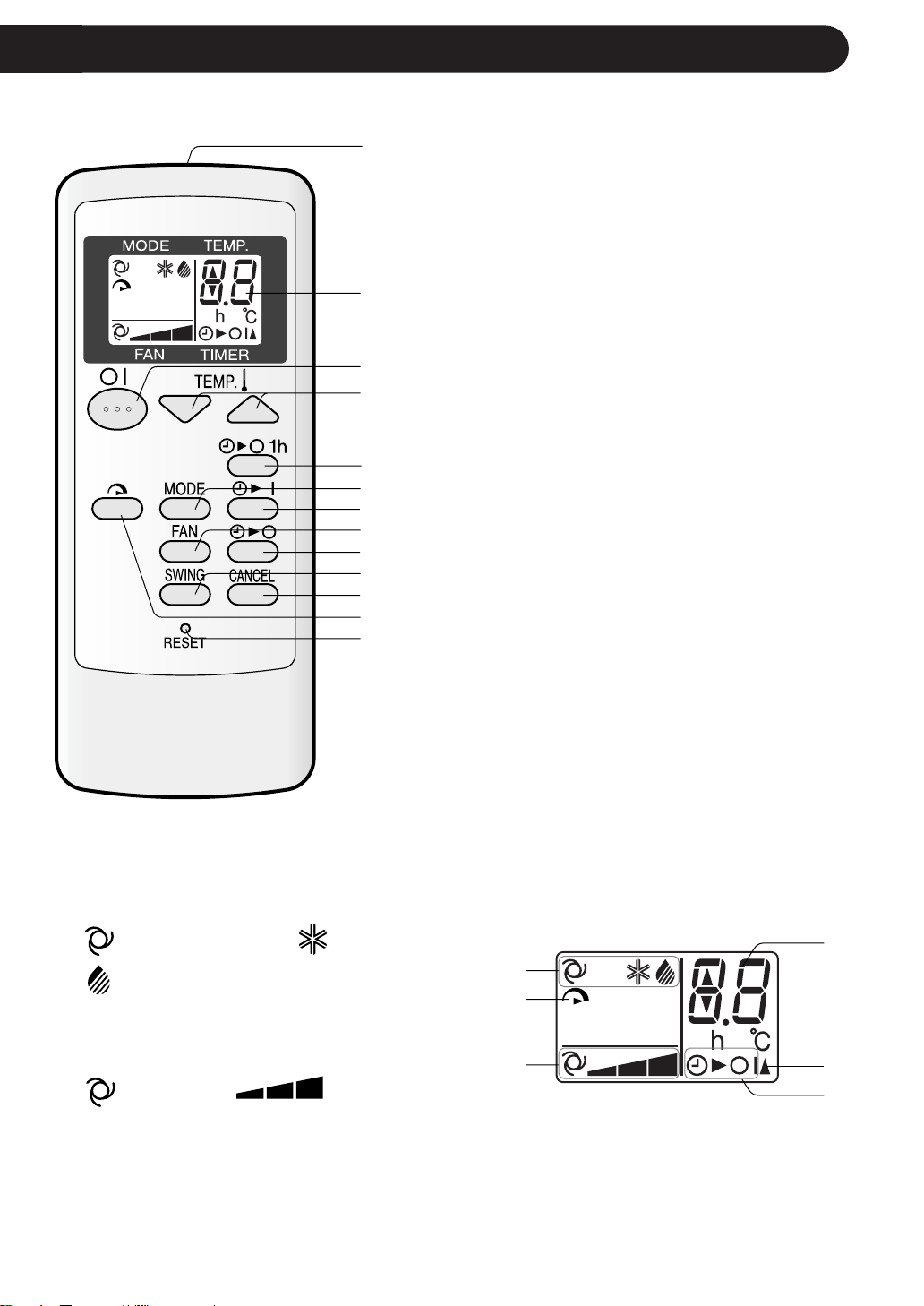
REMOTE CONTROL
1 TRANSMITTER
2 DISPLAY (Liquid Crystal Display)
3 ON/OFF Button
4 TEMP. Button
5 ONE-HOUR OFF TIMER Button
6 MODE Button
7 TIMER ON Button (for setting the timer)
8 FAN Button
9 TIMER OFF Button (for setting the timer)
0 SWING Button
q TIMER CANCEL Button
w TURBO COOLING Button
e RESET Button
r MODE SYMBOLS
: AUTO : COOL
: DRY
t TURBO COOLING SYMBOL
y FAN SPEED SYMBOLS
: AUTO : Manual setting
u TEMPERATURE AND TIMER COUNT DOWN
INDICATOR
i TRANSMITTING SYMBOL
o TIMER ON/TIMER OFF INDICATOR
Indicates when timer on or timer off is set.
L.C.D. REMOTE CONTROL DISPLAY
1
2
3
4
5
6
7
8
9
0
q
w
e
r
t
y
u
i
o
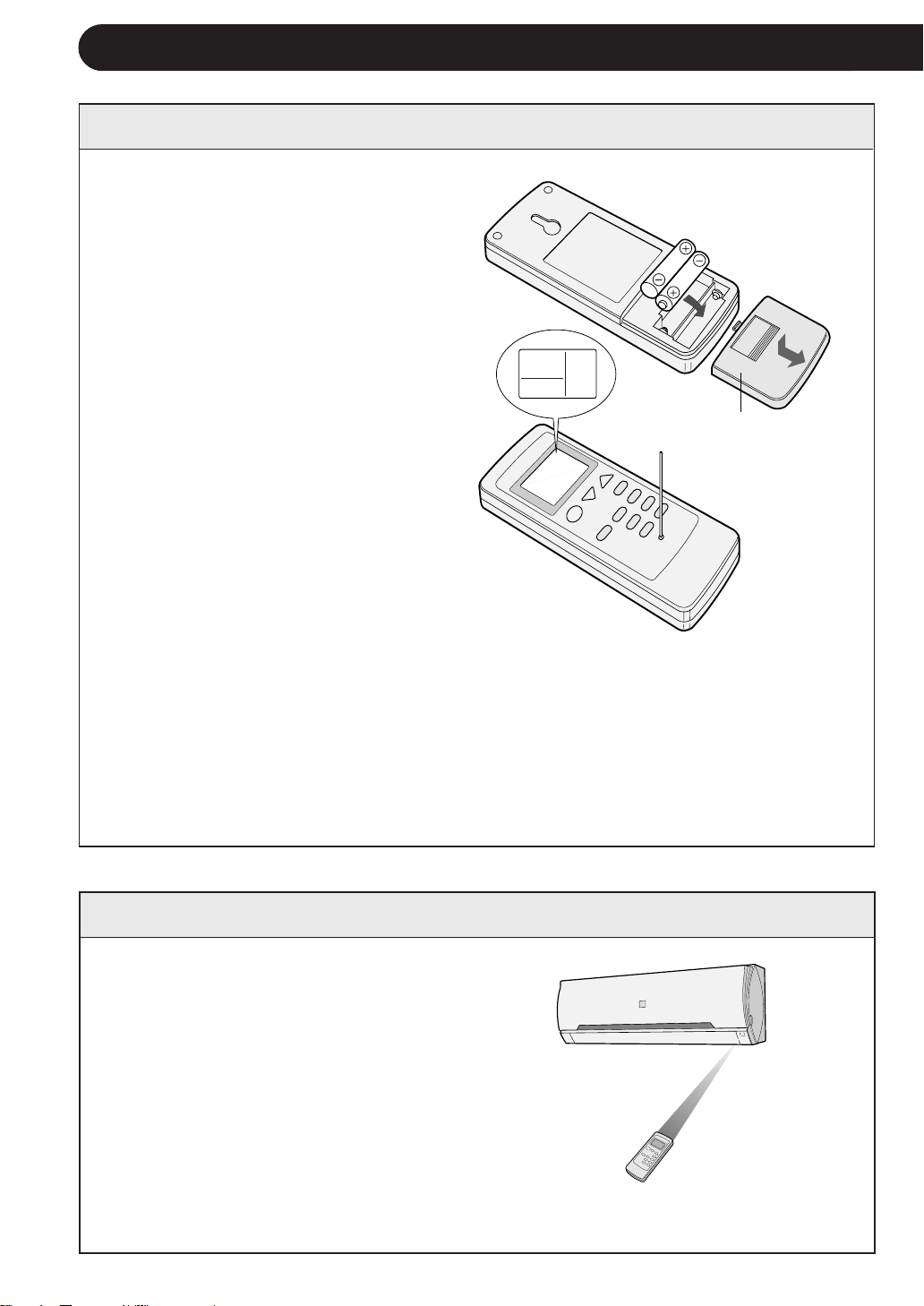
1
Remove the battery cover at the
back of the remote control.
2
Insert batteries in the compartment,
making sure the ± and —
polarities are correctly aligned.
• Lines will be indicated on the dis-
play when batteries are properly
installed.
3
Reinstall the battery cover.
4
Press the RESET button using a
thin stick.
USING THE REMOTE CONTROL
8
NOTES:
• The battery life is approximately one year in normal use.
• When you replace the batteries, always change both batteries, and make sure
they are the same type.
• If the remote control does not operate properly after replacing the batteries, press
the RESET button using a thin stick.
• If you will not be using the unit for a long time, remove the batteries from the
remote control.
Point the remote control towards
the unit’s signal receiver window
and press the desired button. The
unit generates a beep when it re-
ceives the signal.
• Make sure there is no curtain or other
object between the remote control and
the unit.
• The remote control can send signals
from up to 7 metres away.
LOADING BATTERIES Use two size-AAA (R03) batteries.
HOW TO USE THE REMOTE CONTROL
Remote control
cover

CAUTION
• Do not allow the signal receiver window to receive strong direct sunlight, since it can
adversely affect its operation. If the signal receiver window is exposed to direct sunlight,
close a curtain to block the light.
• Using a fluorescent lamp with a quick starter in the same room may interfere with
transmission of the signal.
• The unit can be affected by signals transmitted from the remote control of a television,
VCR or other equipment used in the same room.
• Do not leave the remote control in direct sunlight or near a heater. Also, protect the unit
and remote control from moisture and shock which can discolour or damage them.
9

Press the TEMP. button to set the
desired temperature.
AUTO/DRY MODE
The temperature can be changed in 1°C
increments within the range of 2°C higher
to 2°C lower from the temperature auto-
matically determined by the air conditioner.
COOL MODE
The temperature can be set within the
range of 18 to 32°C.
1
10
BASIC OPERATION
2
Press the ON/OFF button to start
operation.
• The red OPERATION lamp (
) on the
unit will light.
3
4
Press the MODE button to select
the operation mode.
AUTO COOL DRY
5
Press the FAN button to set the
desired fan speed.
AUTO SOFT LOW HIGH
• In the DRY mode, the fan speed is pre-
set to AUTO and cannot be changed.
Automatic Operation
Mode
Temperature Setting
Below 24°C
DRY
Room Temp. at start-up
24°C-26°C COOL
24°C
26°C-28°C COOL
25°C
Above 28°C COOL
26°C
Modes and Temperature Settings
Room temp.
at operation
start-up
TIPS ABOUT AUTO MODE
In the AUTO mode, the temperature set-
ting and mode are automatically selected
according to the room temperature when
the unit is turned on.
To turn off the unit, press the ON/
OFF button again.
• The red OPERATION lamp (
) on the
unit will turn off.
1
4
5
2
3
11
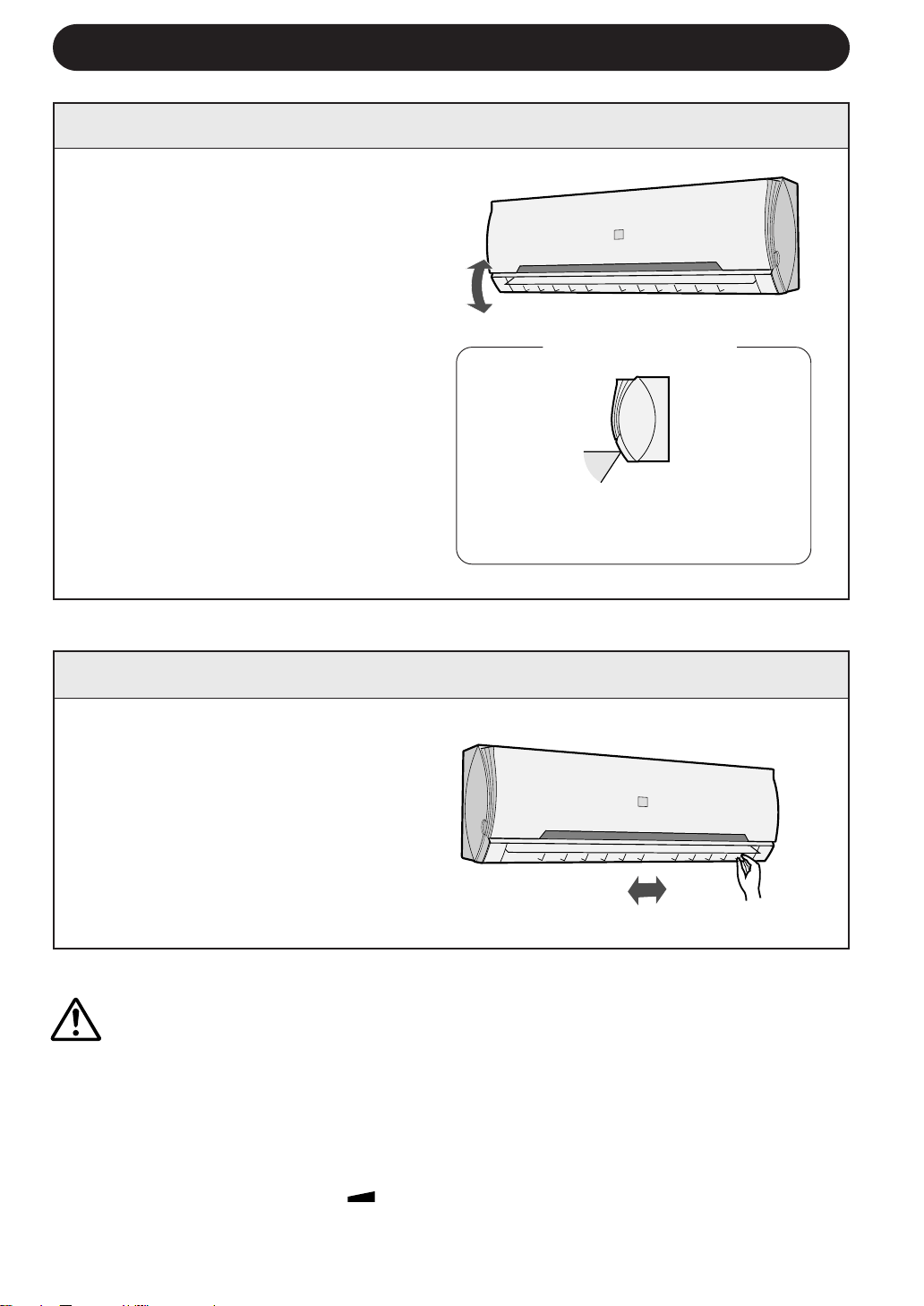
ADJUSTING THE AIR FLOW DIRECTION
VERTICAL AIR FLOW DIRECTION
The adjustment range is narrower the
SWING range in order to prevent con-
densation from dripping.
Hold the horizontal adjustment lou-
vre as shown in the diagram and
adjust the air flow direction.
Press the SWING button on the remote
control once.
• The vertical adjustment louvre will
change its angle continuously.
Press the SWING button again when
the vertical adjustment louvre is at the
desired position.
• The louvre will stop moving within the
range shown in the diagram.
• The adjusted position will be memo-
rized and will be automatically set to
the same position when operated the
next time.
Adjustment range
HORIZONTAL AIR FLOW DIRECTION
CAUTION
Never attempt to adjust the vertical adjustment louvres manually.
• Manual adjustment of the vertical adjustment louvre can cause the unit to malfunction
when the remote control is used for adjustment.
• When the vertical adjustment louvre is positioned at the lowest position in the COOL or
DRY mode for an extended period of time, condensation may result.
Do not adjust the horizontal adjustment louvre to the extreme left or right in the COOL mode
with the fan speed set to "SOFT(
)" for an extended period of time.
Condensation may form on the louvres.
12
The unit will turn off automatically according to your setting.
Timer duration can be set from a minimum half an hour (30 minutes) to a maximum
of 12 hours.
Up to 9.5 hours, you can set in half-hour (30-minute) increments, and from 10 to 12
hours, in 1-hour increments.
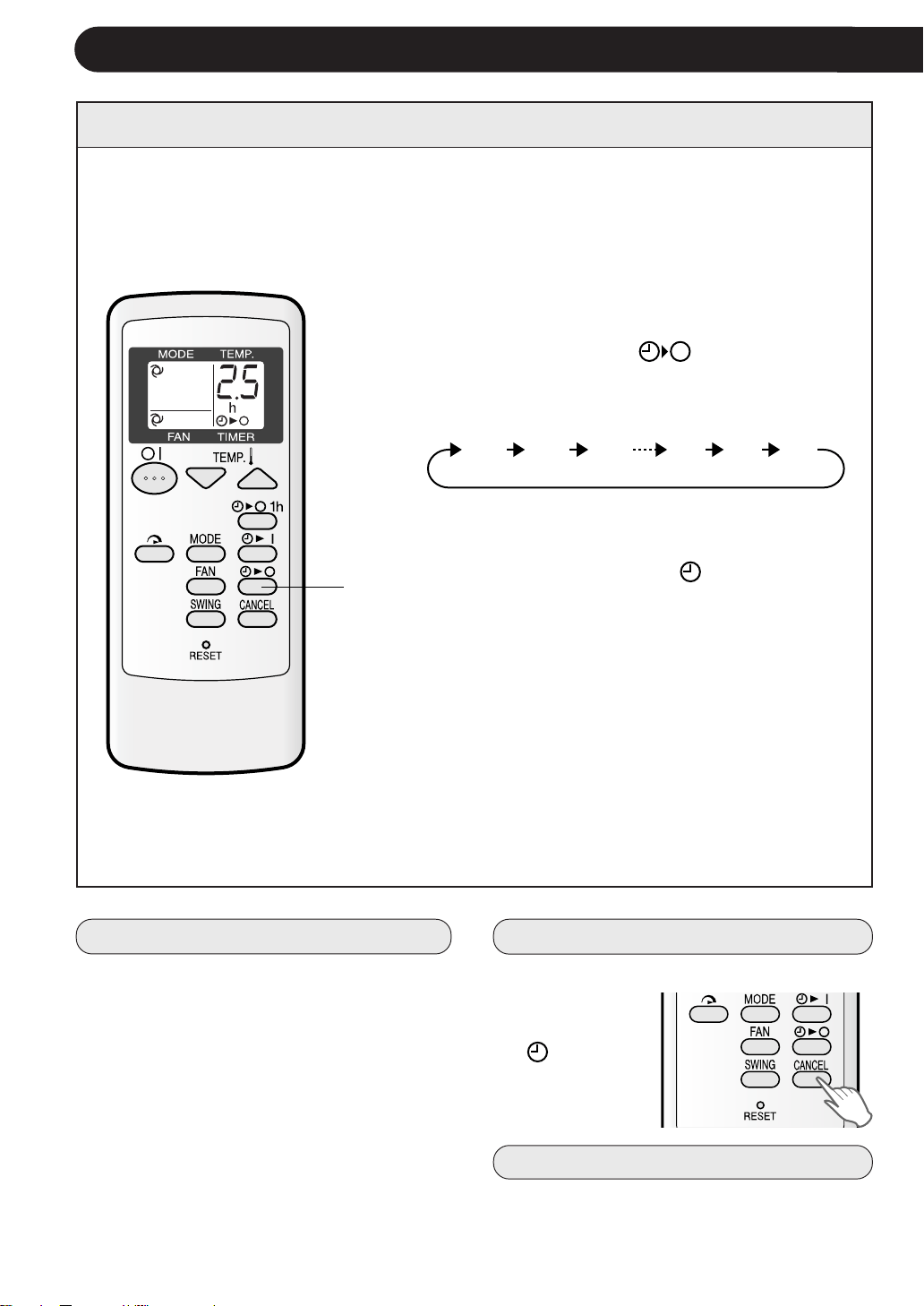
TIMER OPERATION
TIMER OFF
When the TIMER OFF is set, the temperature
setting is automatically adjusted to prevent
the room from becoming excessively cold
while you sleep. (Auto Sleep function)
• One hour after the timer operation begins,
the temperature setting rises 1°C higher
than the original temperature setting.
1
TO CANCEL TIMER
TIPS ABOUT TIMER OFF OPERATION
Point the remote control at the signal receiver win-
dow on the unit.
1
Press the TIMER OFF (
) button and set
the time as desired.
• The time setting will change as you press the
button as follows,
Hold the button down to speed through the
settings.
• The orange TIMER lamp (
) on the unit
will light.
• The unit will generate a beep when it re-
ceives the signal.
• The time setting will count down to show the
remaining time.
Display shown when you
set the unit to ture off 2.5
hours later.
Press the CANCEL button.
• The orange
TIMER lamp
(
) on the
unit will turn
off.
TO CHANGE TIMER SETTING
Press the TIMER button which you wish to
change, (TIMER OFF or TIMER ON) and
change the time setting.
0.5h 1.0h 1.5h 10h 11h 12h
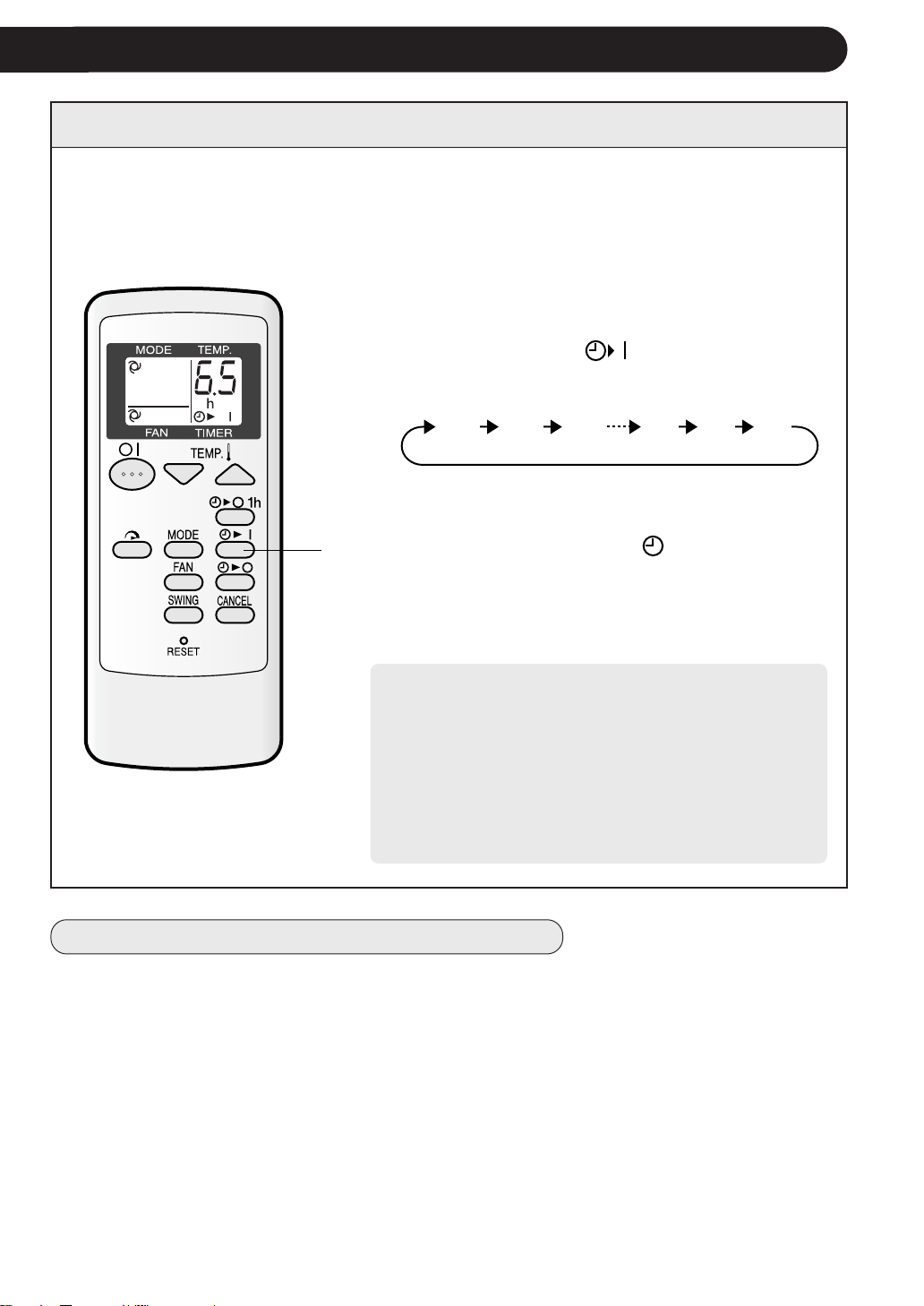
The unit will turn on automatically according to your setting.
Timer duration can be set from a minimum of half an hour (30 minutes) to a
maximum of 12 hours.
Up to 9.5 hours, you can set in half-hour (30 minute) increments, and from 10 to 12
hours, in 1-hour increments.
TIMER ON
1
Point the remote control at the signal reciever window
on the unit.
1
Press the TIMER ON (
) button.
• The time setting will change as you press the
button as follows.
Hold the button down to speed through the set-
ting.
• The orange TIMER lamp (
) on the unit will
light.
• The unit will generate a beep when it receives
the signal.
• The time setting will count down to show the
remaining time.
Select the mode, temperature and fan speed set-
ting as desired.
• When the temperature is set with the TIMER ON, the
temperature will show in the display for 5 seconds
and then return to the time display.
• If you do not change the setting, the unit will operate
using the most recent settings.
• The unit will turn on prior to the set time to allow the
room to reach the desired temperature by the pro-
grammed time. (Awaking function)
Display shown when you
set the unit to reach the
desired room temperature
6.5 hours later.
13
NOTES ON TIMER SETTING AND OPERATION
• The latest time setting will be memorized and will appear on the remote control display
the next time you set the TIMER OFF or TIMER ON.
• The TIMER OFF and TIMER ON can not be set together.
Only the most recent TIMER setting will be valid.
• While ONE-HOUR OFF TIMER is set, the TIMER OFF and TIMER ON setting are
unavailable.
• If the ONE-HOUR OFF TIMER is set while the TIMER OFF or TIMER ON is activated,
the TIMER ON or TIMER OFF setting will be cancelled.
0.5h 1.0h 1.5h 10h 11h 12h
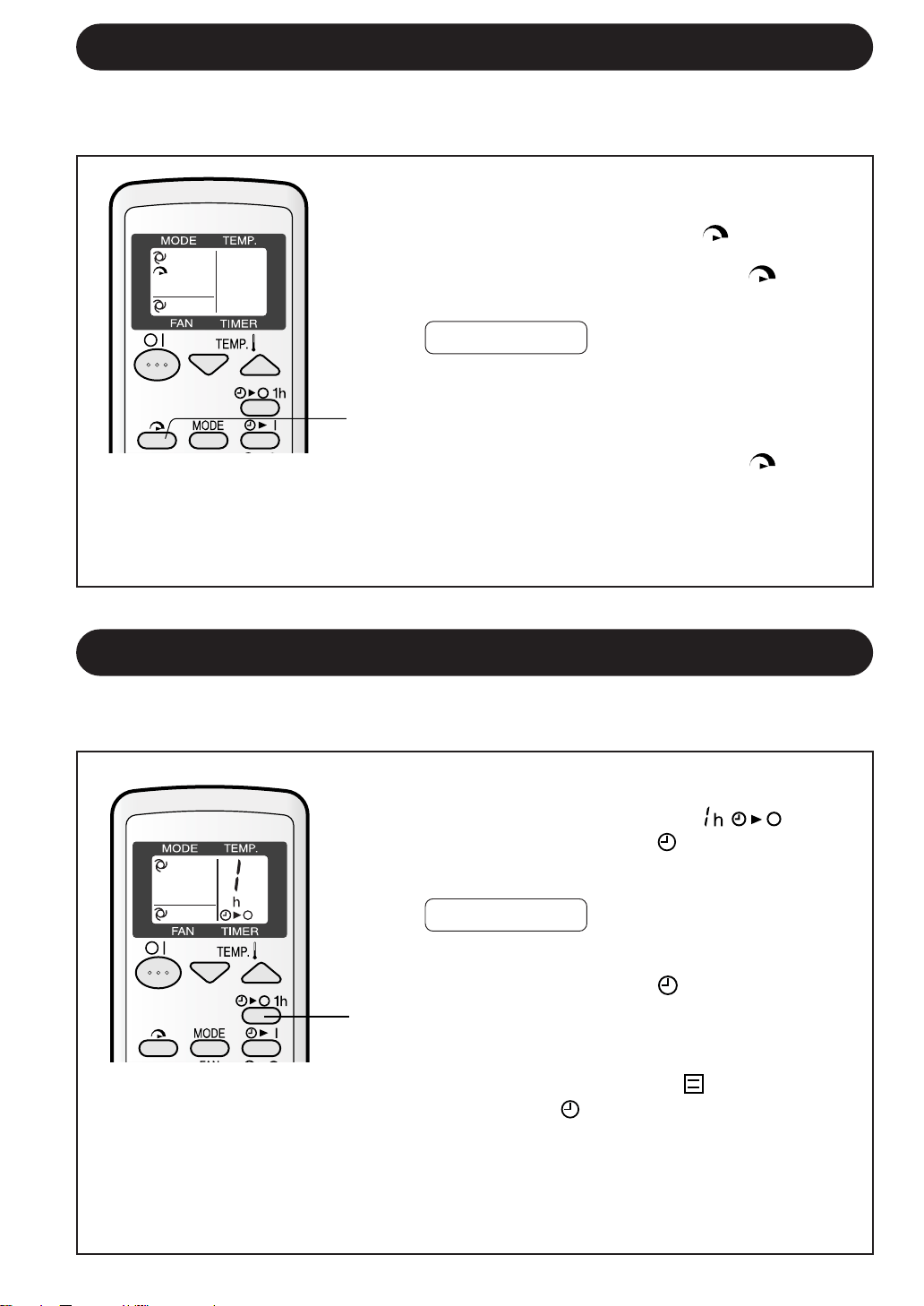
TURBO COOLING OPERATION
1
Press the TURBO COOLING button during op-
eration.
• The remote control will display "
".
• The temperature display will go off.
• The green TURBO COOLING lamp (
) on the
unit will light up.
1
In this operation, the air conditioner fan works at "extra high" speed with a setting
temperature of 15°C to rapidly cool the room.
TO CANCEL
Press the TURBO COOLING button again.
• TURBO COOLING operation will also be cancelled
when the operation mode is changed, or when the
unit is turned off.
• The green TURBO COOLING lamp (
) on the
unit will turn off.
14
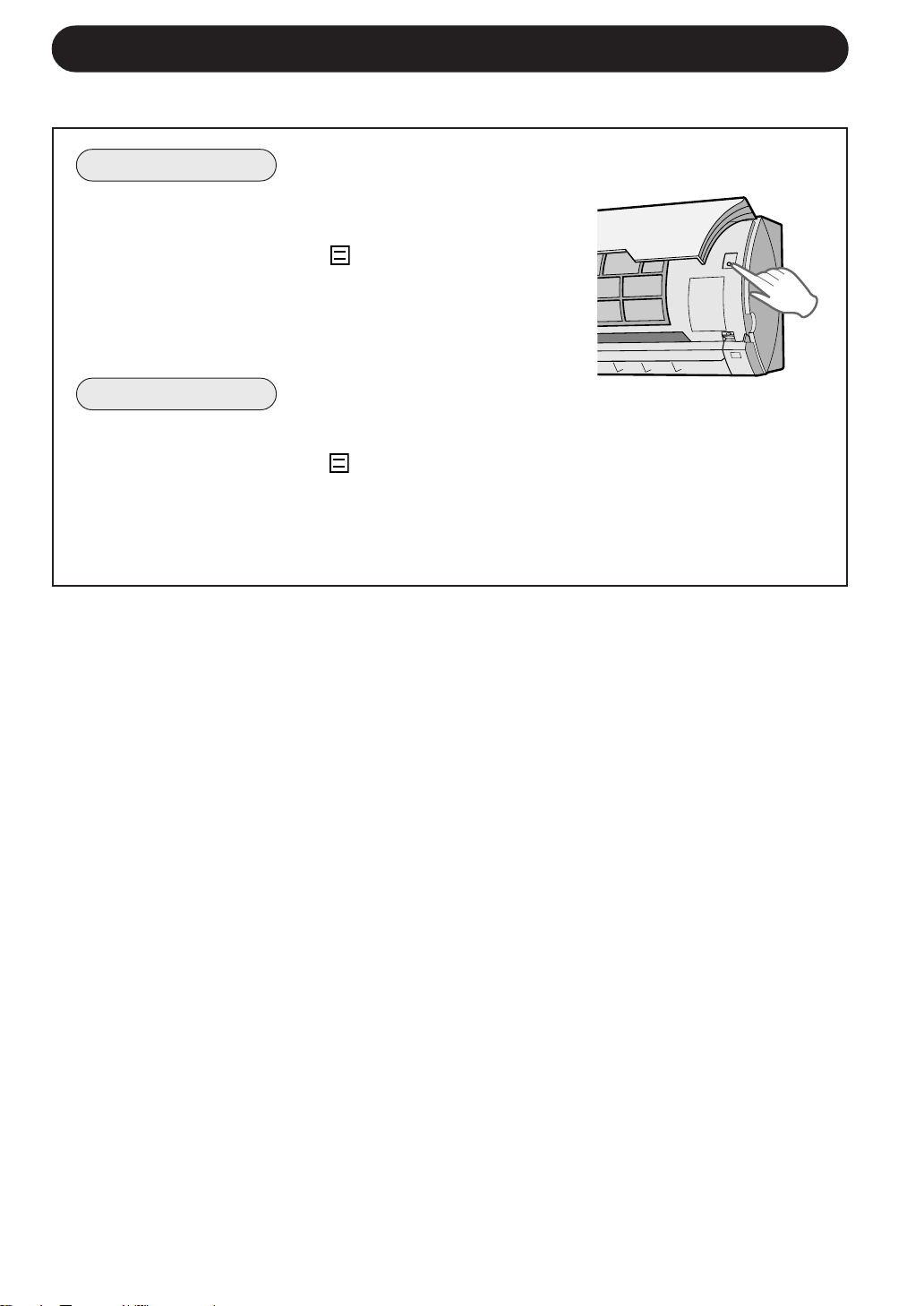
1
Press the ONE-HOUR OFF TIMER button.
• The remote control will display “
”.
• The orange TIMER lamp ( ) on the unit will light
up.
• The unit will stop operating after one hour.
TO CANCEL
Press the CANCEL button.
• The orange TIMER lamp (
) on the unit will turn
off.
Alternatively, turn the unit off by pressing the
ON/OFF button.
• The red OPERATION lamp ( ) and the orange
TIMER lamp (
) on the unit will turn off.
1
When the ONE-HOUR OFF TIMER is set, the unit will automatically turn off after one
hour.
ONE-HOUR OFF TIMER
NOTES:
• The ONE-HOUR OFF TIMER operation has priority over TIMER ON and TIMER OFF
operations.
• If the ONE-HOUR OFF TIMER is set while the unit is not operating, the unit will operate for
an hour at the formerly set condition.
• If you wish to operate the unit for another hour before the ONE-HOUR OFF TIMER is
activated, press the ONE-HOUR OFF TIMER button again during operation.
NOTES:
• You cannot set the temperature or fan speed during TURBO COOLING operation.
• The fan and temperature settings become "HIGH" speed and 18°C after the unit has run for
30 minutes in TURBO COOLING operation.
15
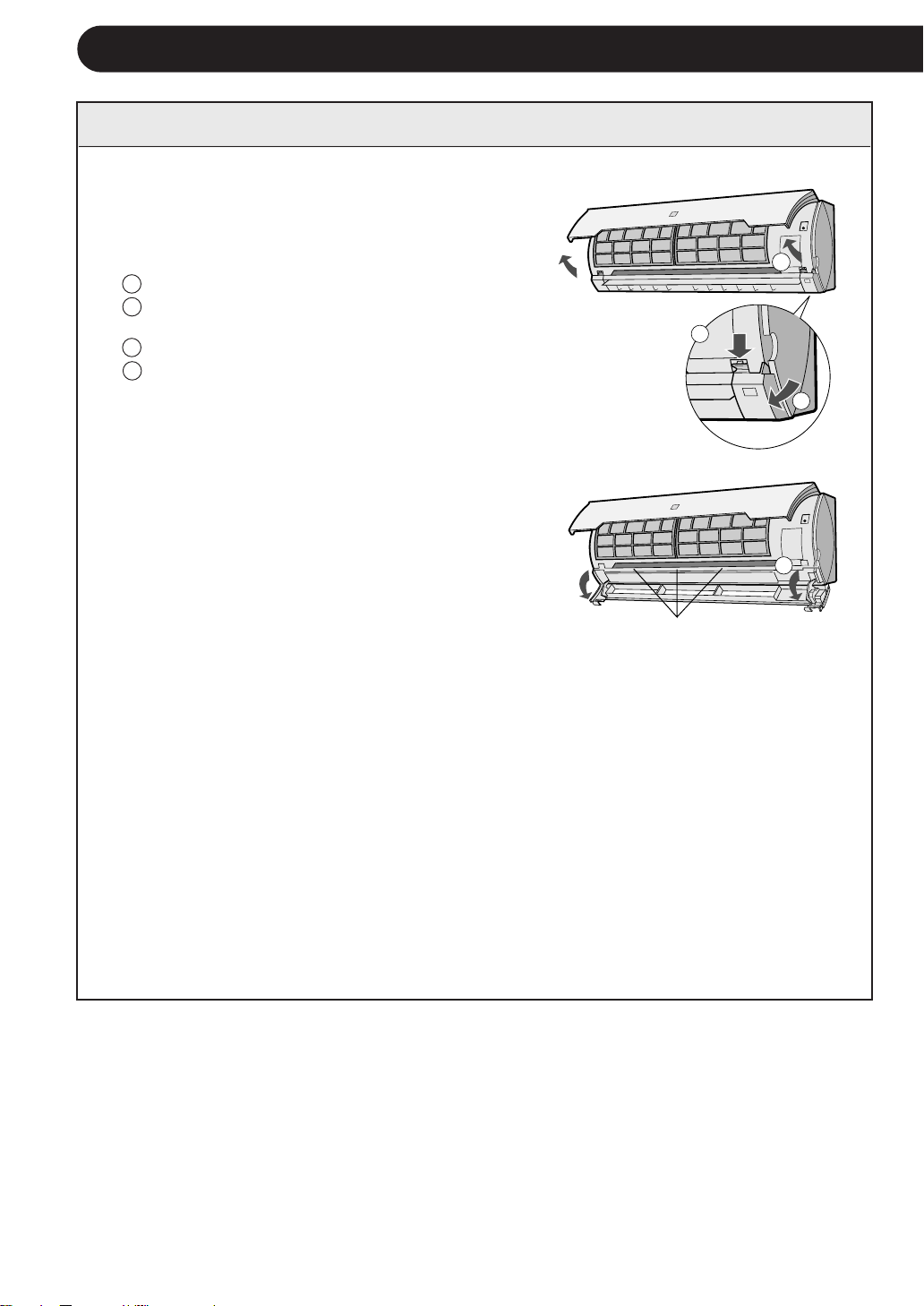
AUXILIARY MODE
Use this mode when the remote control is not available.
TO TURN ON
Lift the front panel of the indoor unit and press the
AUX. button on the operation panel.
• The red OPERATION lamp (
) on the unit will light and
the unit will start operating in the AUTO mode.
• The fan speed and temperature setting are set to AUTO.
TO TURN OFF
Press the AUX. button on the operation panel again.
• The red OPERATION lamp (
) on the unit will turn off.
NOTE:
If the AUX. button is pressed during normal operation, the unit will turn off.
MAINTENANCE
CLEANING THE INTERIOR OF AIR CONDITIONER UNIT
1
Be sure to disconnect the power cord from the
wall outlet or turn off the circuit breaker.
2
OPEN THE LOUVRE UNIT
1 Lift the open panel.
2 Push down both hooks at the left and right, and
release the lock.
3 Pull out the louvre unit forward.
4 Let it open downward gently.
3
CLEAN THE INTERIOR OF THE AIR CONDI-
TIONER UNIT
Make sure the fan inside is not rotating.
Remove the dust using a vacuum cleaner or
wipe with dry cloth.
4
CLOSE THE LOUVRE UNIT
1 Lift up the louvre unit and slide it back into its
position.
2 Make sure both hooks at the left and right are
locked in place and the three supports are firmly fit.
3 Close the open panel.
5
Connect the power cord to the wall outlet or turn
on the circuit breaker.
6
Make sure the all lamps on the indicator panel
are not blinking.
If the louvre unit is not reinstalled properly, the
safety equipment will work and the lamps will
blink, preventing the unit from operating. In such
case, reinstall the louvre unit properly. Push the
ON/OFF button of the remote control and check
if the unit operates properly.
1
2
3
4
16
supports
17
CLEANING THE UNIT AND THE REMOTE CONTROL
Be sure to disconnect the power cord from the wall outlet or turn off the circuit
breaker before performing any maintenance.
CLEANING THE FILTERS
The air filters should be cleaned every two weeks.
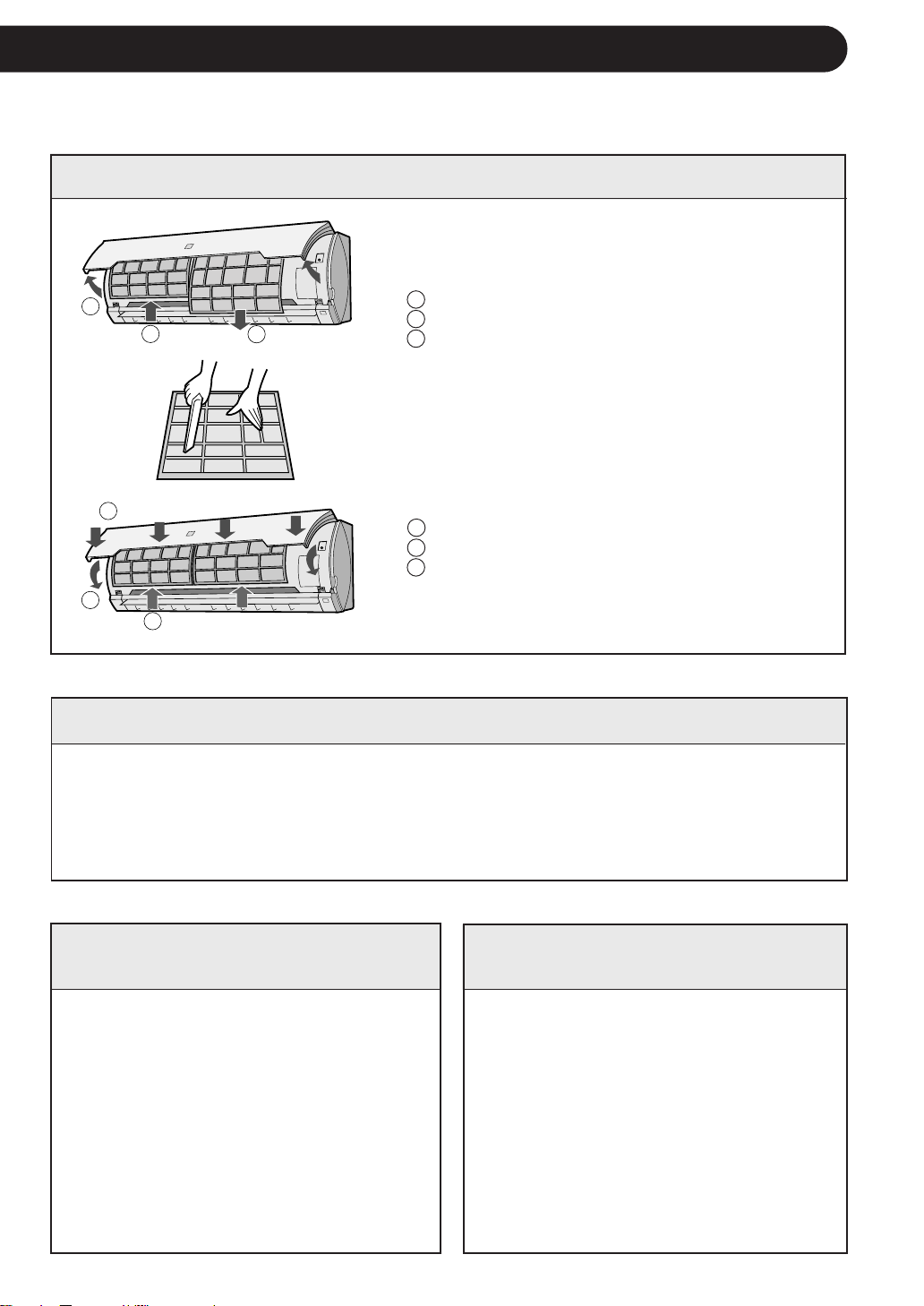
1
TURN OFF THE UNIT
2
REMOVE THE FILTERS
1 Lift the open panel.
2 Push the air filters up slightly to unlock them.
3 Pull the air filters down to remove them.
3
CLEAN THE FILTERS
Use a vacuum cleaner to remove dust. If the
filters are dirty, wash them with warm water
and a mild detergent. Dry filters in the shade
before reinstalling.
4
REINSTALL THE FILTERS
1 Reinstall the filters in the original positions.
2 Close the open panel.
3 Push the arrow-marked points shown left
firmly to lock it in place.
MAINTENANCE AFTER AIR
CONDITIONER SEASON
1
Operate the unit in the COOL
mode, temperature setting 32°C,
for about half a day to allow the
mechanism to thoroughly dry.
2
Stop the operation and unplug the
unit. Turn off the circuit breaker, if
you have one exclusively for the air
conditioner.
3
Clean the filters, then reinstall
them.
MAINTENANCE BEFORE
AIR CONDITIONER SEASON
1
Make sure that the air filters are
not dirty.
2
Make sure that nothing obstructs
the air inlet or outlet.
3
Check the outdoor mounting rack
periodically for wear and to make
sure it is firmly in place.
• Wipe them with a soft cloth.
• Do not directly splash or pour water on them, or it can cause electrical shock or
equipment damage.
• Do not use hot water, thinner, abrasive powders or strong solvents.
1
2
3
2
3
1
IF THE UNIT FAILS TO RECEIVE THE REMOTE CONTROL SIGNAL
Check whether the remote
control batteries have be-
come old and weak.
Try to send the signal again
with the remote control
pointed properly towards the
unit’s signal receiver window.
Check whether the remote
control batteries are in-
stalled with the polarities
properly aligned.
18
BEFORE CALLING FOR SERVICE
The following conditions do not denote equipment malfunctions
UNIT DOES NOT OPERATE
The unit will not operate if it is turned on
immediately after it is turned off. The unit will not
operate immediately after the mode is changed.
This is to protect the internal mechanisms. Wait 3
minutes before operating the unit.
CRACKING NOISE
The unit may produce a cracking noise. This sound
is generated by the friction of the front panel and
other components expanding or connecting due to
a temperature change.
If the unit appears to be malfunctioning, check the following points before calling for
service.
IF THE UNIT FAILS TO OPERATE
• Check to see if the circuit breaker has tripped or the fuse has blown.
• Check if the louver unit is properly installed. All lamps on the indicator panel will blink when
the louver unit is not properly installed.
IF THE UNIT FAILS TO COOL THE ROOM EFFECTIVELY
Check the filters. If dirty,
clean them.
Check the outdoor unit to
make sure nothing is blocking
the air inlet or outlet.
Check the thermostat is
proper setting.
Make sure windows and
doors are closed tightly.
A large number of people in
the room can prevent the unit
from achieving the desired
temperature.
Check whether any heat-
generating appliances are
operating in the room.
ODORS
Carpet and furniture odors that entered into the
unit and the air conditioner's inner component
odors at the early stage of installation may be
sent out from the unit.
SWISHING NOISE
The soft, swishing noise is the sound of
the refrigerant flowing inside the unit.
WATER VAPOUR
In the COOL and DRY operation, water
vapour can sometimes be seen at the
air outlet due to the difference between
the room air temperature and the air
discharged by the unit.
Please call for service when OPERATION Lamp and TIMER Lamp on the indicator panel blink.


This file has been downloaded from:
www.UsersManualGuide.com
User Manual and User Guide for many equipments like mobile phones, photo cameras, monther board, monitors, software, tv, dvd, and othes..
Manual users, user manuals, user guide manual, owners manual, instruction manual, manual owner, manual owner's, manual guide,
manual operation, operating manual, user's manual, operating instructions, manual operators, manual operator, manual product,
documentation manual, user maintenance, brochure, user reference, pdf manual
Downloaded from: http://www.usersmanualguide.com/