User Manual
\
Electric Freestanding
Oven
\
RU9EEB

Dear Customer, Congratulations on purchasing your new cooker.
The Residentia brand is proudly distributed within
Australia by Residentia Group Pty Ltd.
Please refer to the warranty card at the rear of this
manual for information regarding your product’s
parts and labour warranty, or visit us online at
www.residentiagroup.com.au.
At Residentia Group, we are customer obsessed and
our Support Team are there to ensure you get the most
out of your appliance. Should you want to learn more
about cooking with your oven or most importantly taking
care of your oven when cleaning, our Support Team are
here to help.
You can use our online Support Centre at anytime by
visiting http://support.residentiagroup.com.au, or you
can contact us via phone by dialling 1300 11 HELP (4357).
It is important that you read through the following use
and care manual thoroughly to familiarise yourself with
the installation and operation requirements of your
appliance to ensure optimum performance.
Again, thank you for choosing a Residentia appliance
and we look forward to being of service to you.
Kind Regards,
The Residentia Team
T 1300 11 4357
E info@residentiagroup.com.au
W residentiagroup.com.au
ACN
600 546 656
Residentia Group
PO Box 581
Stanhope Gardens
NSW Australia 2768

This cooker must only be installed in
accordance with the instructions provided
and by a suitably licensed and qualified
installer. Incorrect installation may cause harm
to persons, damage property and void the
product’s warranty.
Important
Please ensure that you read the entire
instructions before beginning the installation
of your cooker.
Please Note
When the oven is first switched on, it may
give o an unpleasant smell. This is due to
the bonding agent used for the insulating
panels within the oven. This is completely
normal, if it does occur, you merely have
wait for the smell to clear before putting
food into the oven.
–
The appliance and its accessible parts
become hot during use.
– Care should be taken to avoid touching
heating elements.
– Children less than 8 years of age shall be
kept away unless continuously supervised.
– This appliance can be used by children
aged from 8 years and above and persons
with reduced physical, sensory or mental
capabilities or lack of experience and
knowledge if they have been given
supervision or instruction concerning use of
the appliance in a safe way and understand
the hazards involved. Children shall not
play with the appliance. Cleaning and user
maintenance shall not be made by children
without supervision.
– Do not use harsh abrasive cleaners or sharp
metal scrapers to clean the oven door glass
since they can scratch the surface, which
may result in shattering of the glass.
– The hob surface is of glass-ceramic: if the
surface is cracked, switch o the appliance
to avoid the possibility of electric shock.
– For the models equipped with a facility to
use a temperature 2 sensing probe: Only
use the temperature probe recommended
for this oven.
–
During use, the appliance becomes very hot.
– Care should be taken to avoid touching
heating elements inside the oven.
– Do not allow children to go near the oven
when it is operating, especially when the
grill is on.
–
Ensure that the appliance is switched o
before replacing the oven lamp to avoid
the possibility of electric shock.
–
The means for disconnection must
be incorporated in the fixed wiring in
accordance with the wiring specifications.
– Children should be supervised to ensure
that they do not play with the appliance.
–
This appliance is not intended for use by
persons (including children) with reduced
physical, sensory or mental capabilities,
or lack of experience and knowledge,
unless they have been given supervision or
instruction concerning use of the appliance
by person responsible for their safety.
– Accessible parts may become hot during
use. Young children should be kept away.
–
Never use steam cleaners to clean your
cooking range
– For models with induction hobs: metallic
objects such as knives, forks, spoons and
lids should not be placed on the hob surface
since they can get hot.
– For models with induction hobs : After use,
switch o the hob element by its control
and do not rely on the pan detector.
–
For the models with a lid : any spillage should
be removed from the lid before opening.
The hob surface should be allowed to cool
be
fore closing the lid.
Warning
The appliance must not be used by
people (including children) with or without
experience or their safety.
Young children should be supervised to
ensure they not play with the limited physical,
sensory or mental abilities, expertise, unless
they have received instructions for using it
from those responsible for appliance.
Safety Instructions
\


Contents
\
Page
Safety Precautions
\
06
Before Installing
\
06
Your Cooker
\
07
Installation
\
08
Fitting the Adjustable Feet
\
08
Fitting the Splash Guard
\
09
Positioning & Levelling
\
09
Electrical Connection
\
10
Stability Brackets
\
12
Using Your Cooker
\
13
–
46
Residentia\User Manual

Safety precautions
This manual is valid for several models. Variations
in details for each cooker are possible.
The safe operation of this appliance can only be
guaranteed if it has been professionally assembled
and installed in accordance with these instructions.
The individual who assembled and installed the
appliance is liable for damage or faults resulting
from incorrect assembly or installation.
All installation and adjustment work, must be
undertaken by an authorized expert and carried
out in accordance with the currently applicable
rules and regulations of the local electricity supply
company.
Shut off the supply of electricity before carrying
out any work.
Electrical appliances must always be earthed.
If an extractor hood is to be fitted, it must be
fitted according to the associated assembly
instructions. Ensure that the hood is fitted at
least 650 mm clear of the hob.
Before installing
Appliance
Unpacking
Check the condition of the appliance after
unpacking
it. Do not connect the appliance if it has
been
damaged in transport.
Dispose of packaging in an environmentally-
friendly
manner.
6
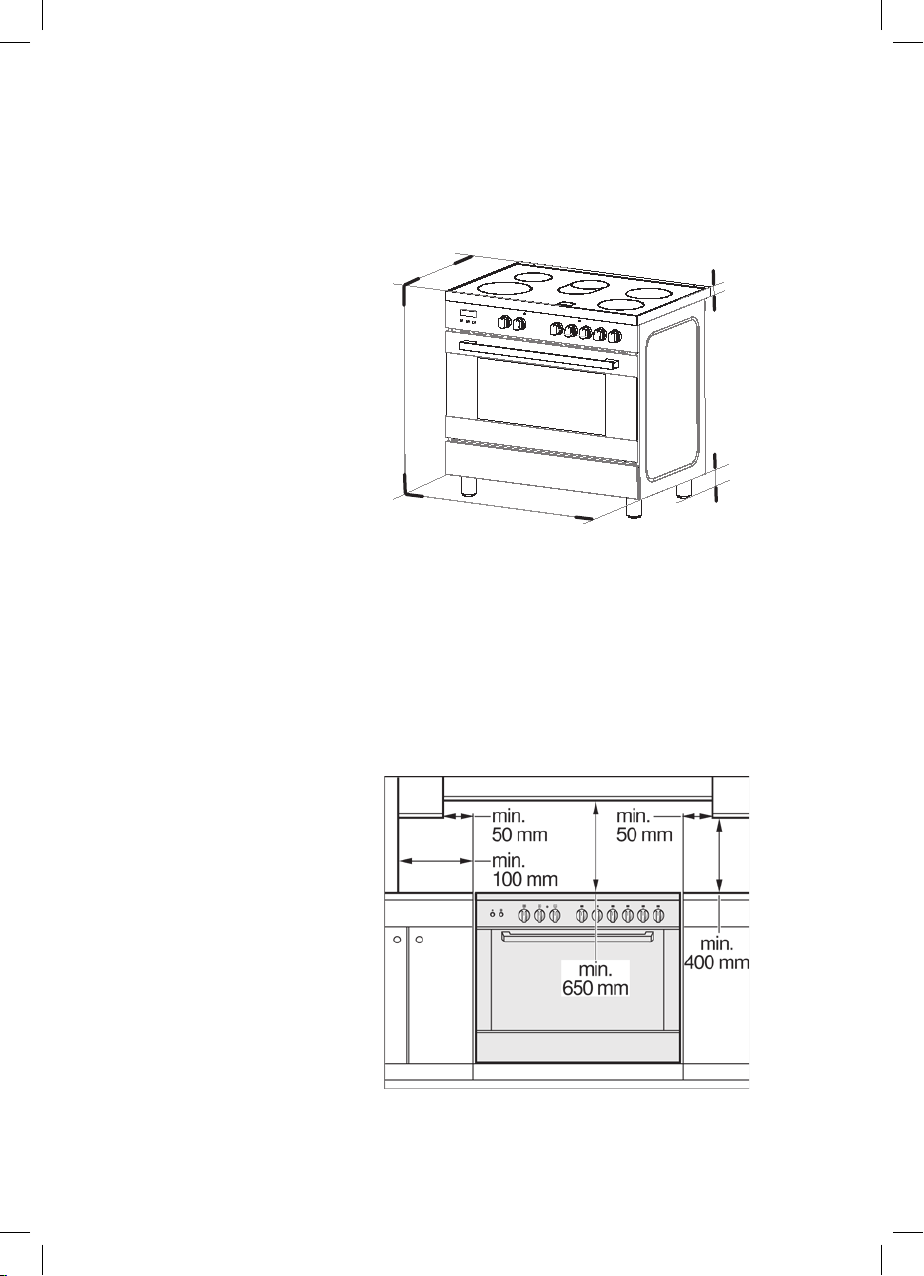
Appliance dimensions Note the specified dimensions.
A=95-160 mm
40 mm
A
895 mm
597 mm
769 mm
All product outward appearance, the color
take the material object as, the picture only
supply the reference.
Adjacent units Adjacent units must be made of non-combustible
material. The fronts of adjacent units must be
resistant to temperatures up to at least 90 °C. If the
appliance is fitted close to other units, the minimum
distances specified in the picture must be maintained.
7
Safety precautions
This manual is valid for several models. Variations
in details for each cooker are possible.
The safe operation of this appliance can only be
guaranteed if it has been professionally assembled
and installed in accordance with these instructions.
The individual who assembled and installed the
appliance is liable for damage or faults resulting
from incorrect assembly or installation.
All installation and adjustment work, must be
undertaken by an authorized expert and carried
out in accordance with the currently applicable
rules and regulations of the local electricity supply
company.
Shut off the supply of electricity before carrying
out any work.
Electrical appliances must always be earthed.
If an extractor hood is to be fitted, it must be
fitted according to the associated assembly
instructions. Ensure that the hood is fitted at
least 650 mm clear of the hob.
Before installing
Appliance
Unpacking
Check the condition of the appliance after
unpacking
it. Do not connect the appliance if it has
been
damaged in transport.
Dispose of packaging in an environmentally-
friendly
manner.
6
Appliance dimensions Note the specified dimensions.
A=95-160 mm
40 mm
A
895 mm
597 mm
769 mm
All product outward appearance, the color
take the material object as, the picture only
supply the reference.
Adjacent units Adjacent units must be made of non-combustible
material. The fronts of adjacent units must be
resistant to temperatures up to at least 90 °C. If the
appliance is fitted close to other units, the minimum
distances specified in the picture must be maintained.
7
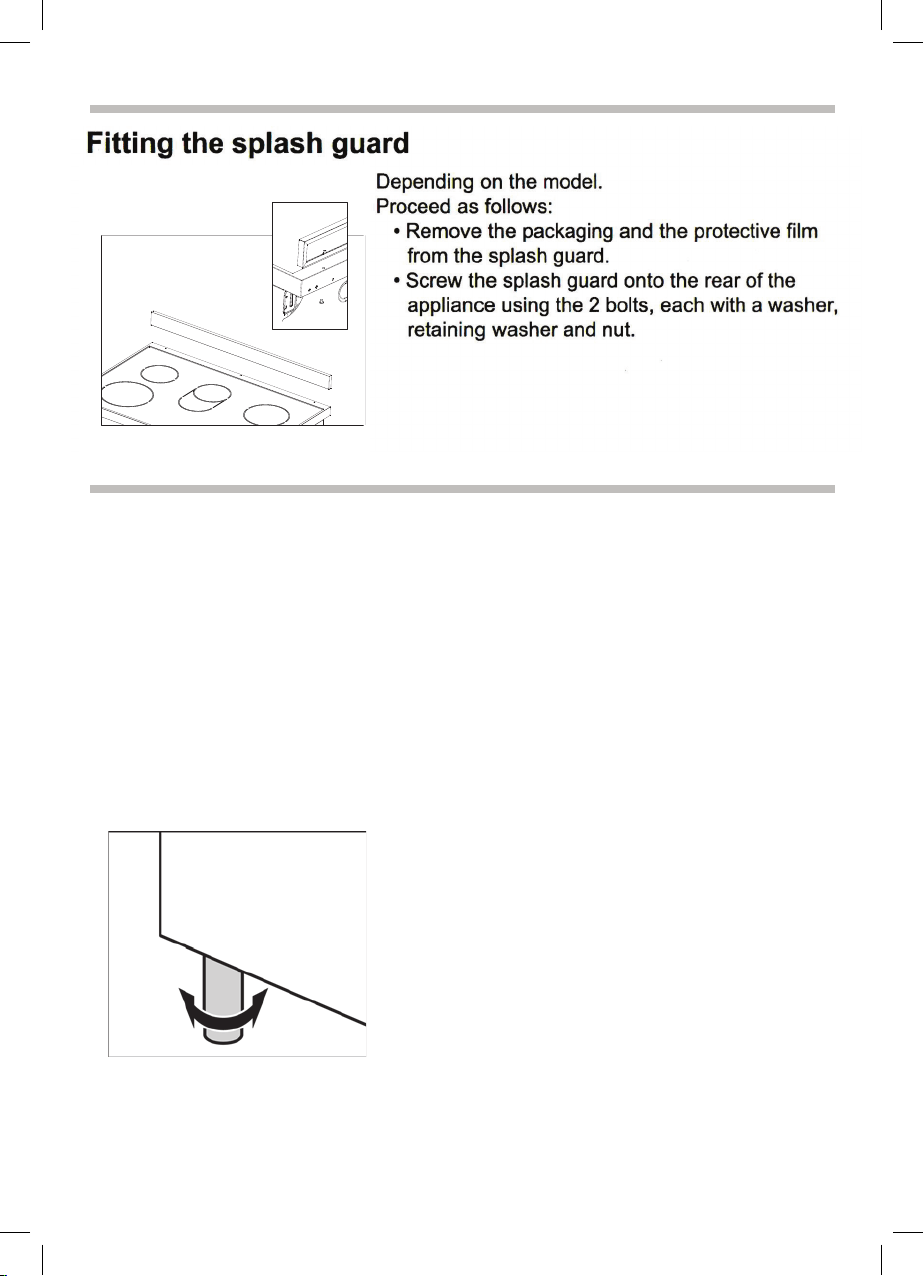
Installation
This appliance is always supplied with a set of
a
d
j
u
s
table feet and, depending on the model, with a
splash guard.
The appliance may also be used without the splash
guard.
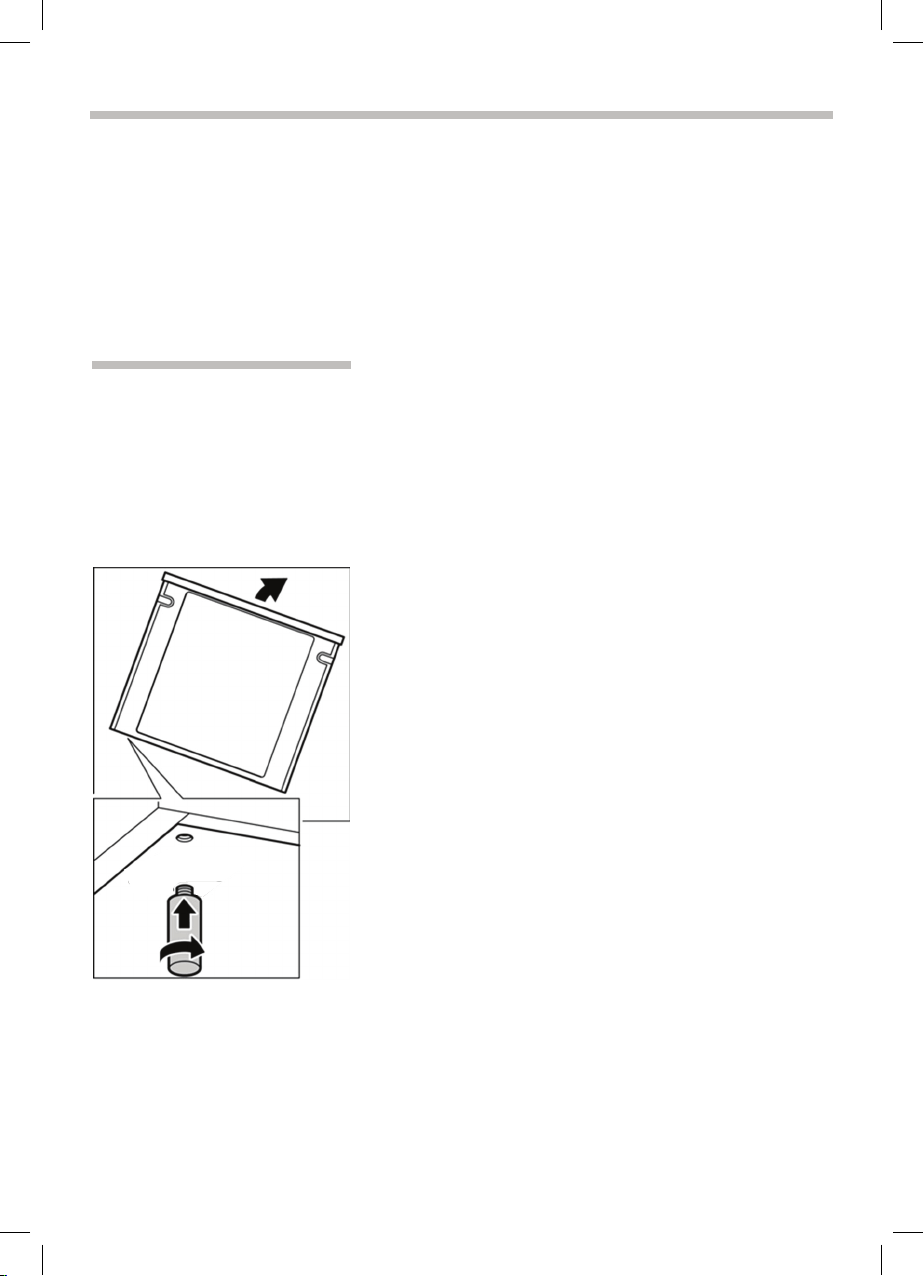
Fitting the adjustable feet
Beforehand:
•
Remove all parts that are not permanently fixed,
especially the pan supports and burners.
•
Remove the accessories from the oven.
Pro
ce
e
d
as follows:
•
Tilt the appliance by raising one side slightly from
t
h
e
f
loor.
•
With the plates in position, screw the adjustable
feet into the mounting holes on the underneath of
the appliance.
•
Repeat the process on the other side.
You can make the final adjustments to the feet in
order to level the appliance once the gas and
electricity supply have been connected.
If it is necessary to pull the appliance, screw the
adjustable feet in fully. Make the final settings only
when the other installation tasks have been
completed.
8
Positioning and levelling
Positioning the appliance
When installing the appliance, make sure that there
is enough space in the final installation location to
pull
the appliance forwards for cleaning and
maintenance
work.
The ground underneath must be hard and stable.
The wall immediately behind the appliance must be
made from non-flammable material, e.g. tiles.
If you need to pull the appliance in order to position
it,
make sure that the adjustable feet are screwed
in
fully.
Levelling the appliance
Level the appliance once all other work has been
completed.
To do this, turn the adjustable feet.
9
Installation
This appliance is always supplied with a set of
a
d
j
u
s
t
able feet and, depending on the model, with a
spl
ash guard.
The appliance may also be used without the splash
guar
d.
Fitting the adjustable feet
Beforehand:
•
Remove all parts that are not permanently fixed,
espec
ially the pan supports and burners.
•
Remove the accessories from the oven.
Pro
ce
e
d as
follows:
•
Tilt the appliance by raising one side slightly from
t
h
e f
l
oor.
•
With the plates in position, screw the adjustable
fee
t into the mounting holes on the underneath of
the
appliance.
•
Repeat the process on the other side.
You
can make the final adjustments to the feet in
order
to level the appliance once the gas and
elec
tricity supply have been connected.
If
it is necessary to pull the appliance, screw the
adj
ustable feet in fully. Make the final settings only
whe
n the other installation tasks have been
comp
leted.
8
Positioning and levelling
Positioning the appliance
When installing the appliance, make sure that there
is enough space in the final installation location to
pull
the appliance forwards for cleaning and
maintenance
work.
The ground underneath must be hard and stable.
The wall immediately behind the appliance must be
made from non-flammable material, e.g. tiles.
If you need to pull the appliance in order to position
it,
make sure that the adjustable feet are screwed
in
fully.
Levelling the appliance
Level the appliance once all other work has been
completed.
To do this, turn the adjustable feet.
9
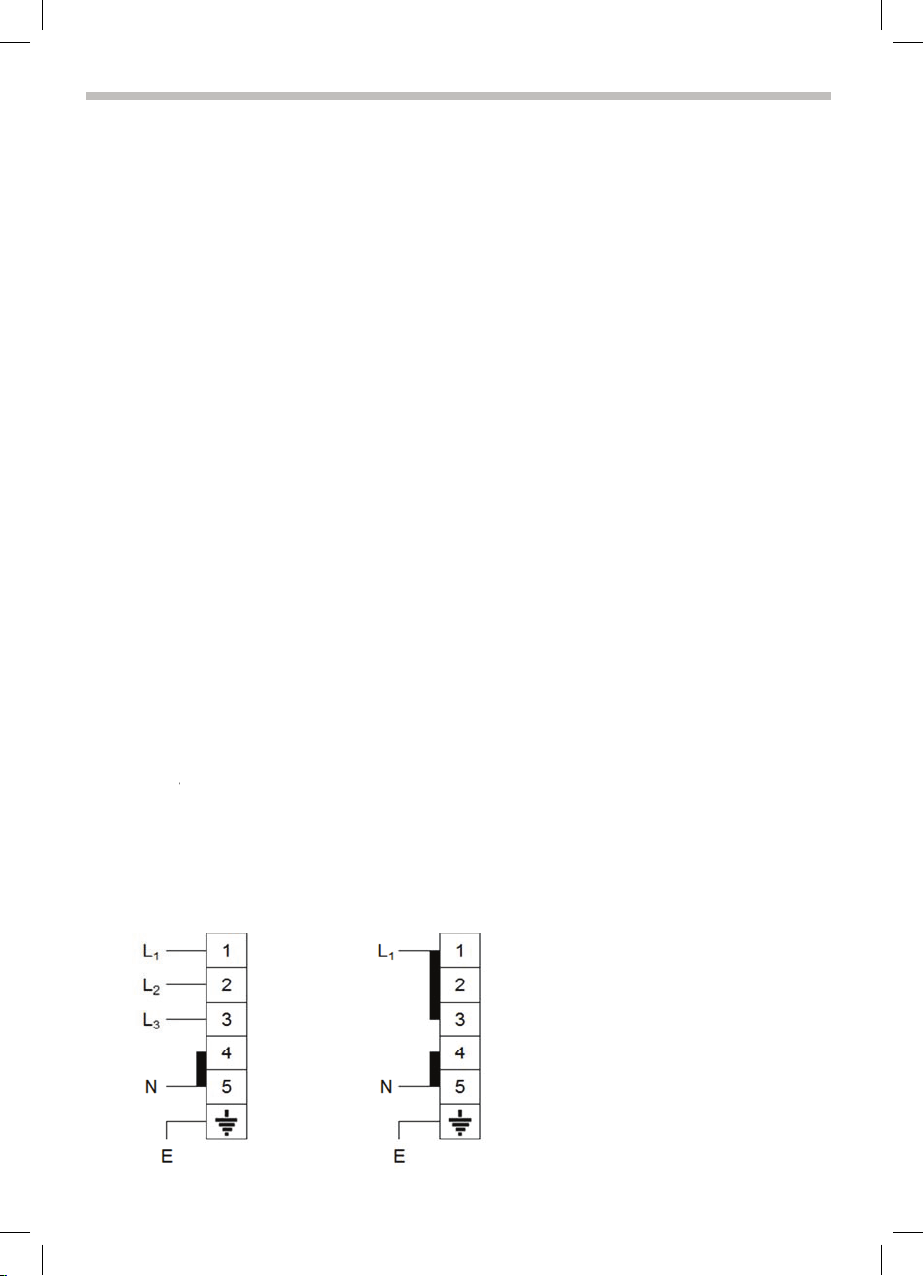
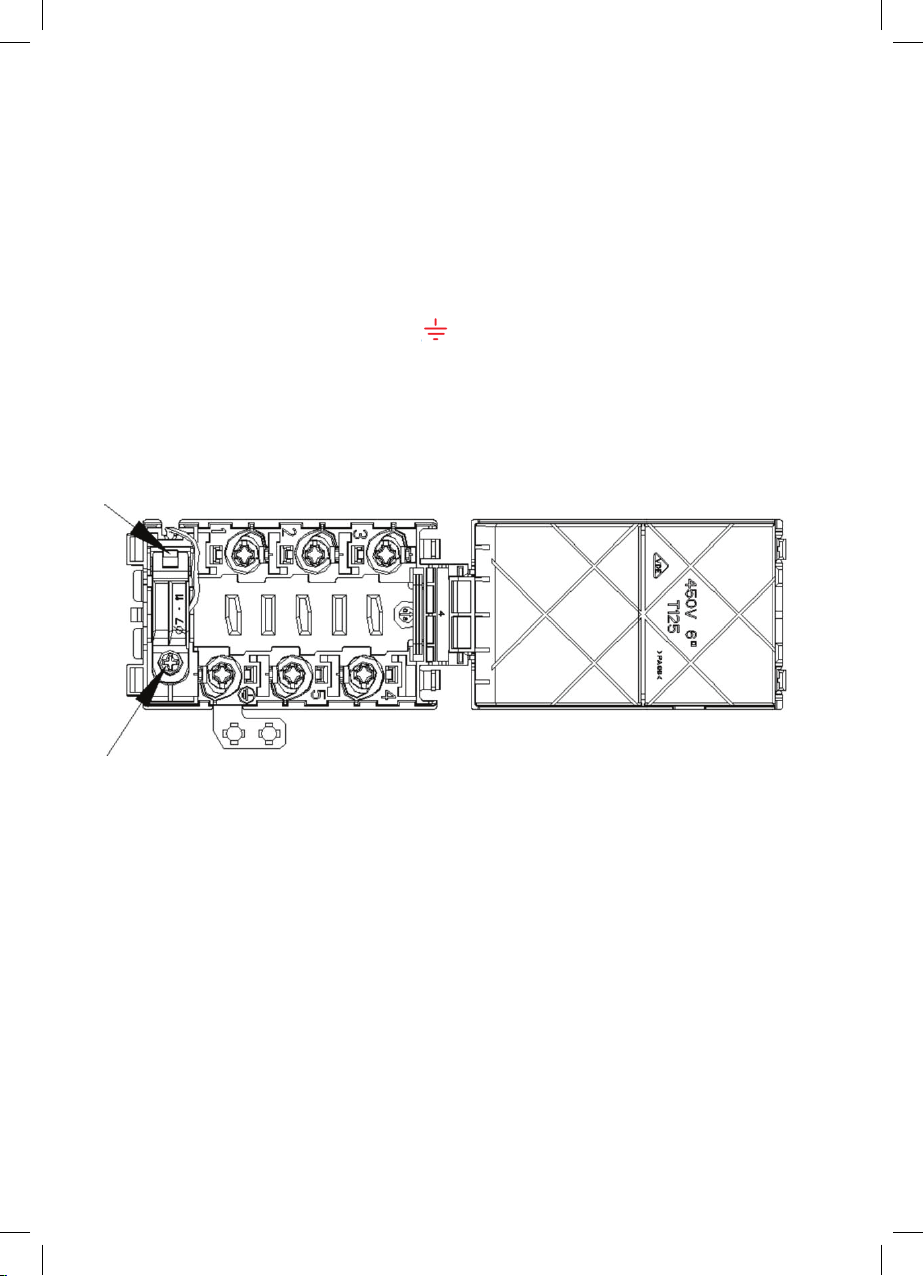
Electrical connection
•
This appliance must be earthed by law. Before connecting the appliance to the
electrical supply, check that the earth system in your house is working correctly.
•
Check that unit voltage and power, marked on the rating plate applied on the
appliance, are correct for the supply. It is necessary that the feeding network is
protected by a powerful switch able to disconnect completely the network with a
contacts separation of at least 3 mm. Be sure that the earth wire green/yellow is
not interrupted by the switch.
WARNING: THIS APPLIANCE MUST BE EARTHED
•
In order to avoid hazard, any electrical work performed on this equipment or its
associated wiring should only be done by persons authorised by the manifacture
or similary qualified persons.
Replacement or mounting of the power cord
The mains cable is replaced via the rear backboard.
The mains cable must be of the following type:
380
-
H05
H05
V
H05
H07
-
415V 3N~
RR-F
V
V-F 5×
2
RN-F
RN-F
2
.5mm2
220-240V
H05RR-F
H05VV-F
H05RN-F
H07RN-F
3×4mm2
10
•
C
o
n
n
e
ct the yellow-green wire to the terminal.
T
h
i
s wire must be at least 10 mm
longer than the
other
wires.
•
C
o
n
n
e
ct the blue neutral wire to terminal N.
•
Connect the brown power wire to terminal L.
Leave the mains cable slightly overlong so that you can
pull out the appliance for
cleaning purposes.
Proceed as follows:
•
Remove the rear backboard.
•
Undo the screw on the terminal block that fixes the cable in place.
•
Loosen the screw contacts and replace the cable with a new one of the same length.
The cable must comply with the stipulated specifi-
cati
ons.
11
Electrical connection
•
This appliance must be earthed by law. Before connecting the appliance to the
electrical supply, check that the earth system in your house is working correctly.
•
Check that unit voltage and power, marked on the rating plate applied on the
appliance, are correct for the supply. It is necessary that the feeding network is
protected by a powerful switch able to disconnect completely the network with a
contacts separation of at least 3 mm. Be sure that the earth wire green/yellow is
not interrupted by the switch.
WARNING: THIS APPLIANCE MUST BE EARTHED
•
In order to avoid hazard, any electrical work performed on this equipment or its
associated wiring should only be done by persons authorised by the manifacture
or similary qualified persons.
Replacement or mounting of the power cord
The mains cable is replaced via the rear backboard.
The mains cable must be of the following type:
380
-
H05
H05
V
H05
H07
-
415V 3N~
RR-F
V
V-F 5×
2
RN-F
RN-F
2
.5mm2
220-240V
H05RR-F
H05VV-F
H05RN-F
H07RN-F
3×4mm2
10
•
C
o
n
n
e
ct the yellow-green wire to the terminal.
T
h
i
s
wire must be at least 10 mm
longer than the
other wires.
•
C
o
n
n
e
ct the blue neutral wire to terminal N.
•
Connect the brown power wire to
terminal L.
Leave the mains cable slightly overlong so that you
can pull out the appliance for
cleaning purposes.
Proceed as follows:
•
Remove the rear backboard.
•
Undo the screw on the terminal block that fixes
the cable in place.
•
Loosen the screw contacts and replace the cable
with a new one of the same length.
The cable must comply with the stipulated specifi-
cations.
11
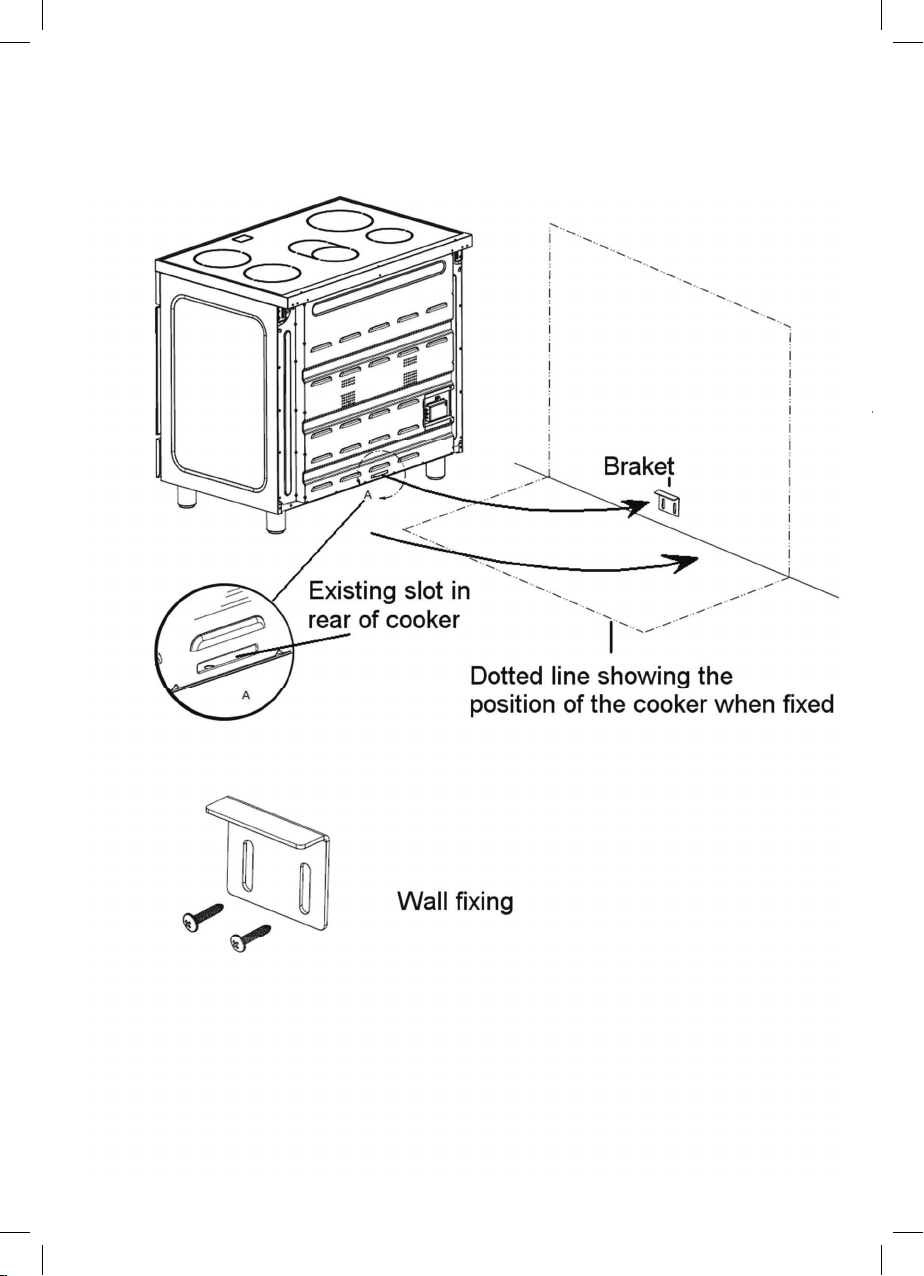
Stability bracket
12
Instructions for use
Important information
Safety precautions .................................................................................... 15
Property damage .................................................................
....................
17
Your new appliance:
18
The hob ...............................................................
.................................... 19
The oven ..
................................................................................................21
The storage compartment ...............................................................
......... 28
Before using for the first time
29
Baking out the oven .................................................................................
29
U
s
i
n
g t
he rotary spit
...
.............................................................................. 31
Cleaning and care
Cat
alytic cooking compartment panels
Using the correct cleaning agent ...
........................................................... 35
Removing and fitting the appliance door ...
................................................ 37
Faults and the after-sales service 40
Replacing the oven light bulb
...............
..................................................... 41
Aftersales service
..
................................................................................... 42
Tips and tricks
Tips for saving energy ............................................................................... 43
Tips for using your appliance..................................................................... 44
14
34
43
.
.................................................... 34
Cleanng the interior glass of the oven ...................................................... 36
Removing and inserting the hook-in racks ...................
............................. 39
13

Stability bracket
12
Instructions for use
Important information
Safety precautions
.................................................................................... 15
Property damage
.....................................................................................
17
Your new appliance:
18
The hob
................................................................................................... 19
The oven
..................................................................................................21
The storage compartment
........................................................................ 28
Before using for the first time
29
Baking out the oven
...
..............................................................................
29
U
s
i
n
g
t
he rotary spit
................................................................................. 31
Cleaning and care
Catalytic cooking compartment panels
Using the correct cleaning agent
.............................................................. 35
Removing and fitting the appliance door
................................................... 37
Faults and the after-sales service 40
Replacing the oven light bulb
.................................................................... 41
Aftersales service
..................................................................................... 42
Tips and tricks
Tips for saving energy ............................................................................... 43
Tips for using your appliance ..................................................................... 44
14
34
43
..................................................... 34
Cleanng the interior glass of the oven ...................................................... 36
Removing and inserting the hook-in racks
................................................ 39
13

Important information
Read the instructions for use carefully.
This will enable you to operate your appliance
safely
and correctly.
This manual is valid for several models. Variations in
details for each cooker are possible.
Please keep the instruction manual, installation
instructions and the various accessories in a safe
place. Please pass on these manuals and
accessories to the new owner if you sell the
appliance.
Transport damage
Check the appliance for damage after unpacking
it. Do not connect the appliance if it has been
damaged
in transport.
Environmentally-friendly
disposal
Dispose of packaging in an environmentally-
friendly
manner.
This appliance is labelled in accordance with
European Directive 2012/19/EU on Waste
Electrical
and Electronic Equipment WEEE.
Connections Have a licensed professional carry out the electric
connection .
Assembly instructions are supplied with the
appliance.
Any damage caused by the appliance being
i
n
co
rre
ct
ly connected is not covered under the
guarantee. We assume no liability for damage and
faults caused by connection and setting errors.
¦
14
Safety precautions
This appliance is intended for domestic use only.
This appli
ance must only be used for food
preparat
ion.
Adults and children must not operate the appliance
without
supervision if:
•
they do not have the physical or mental ability;
•
or they lack the knowledge and experience
required to operate the appliance safely and
correctly.
Never let children play with the appliance.
Never drag, push or move the device once
unpacked. The appliance should
be lifted and
placed in the position desired in order to prevent
accidental damage to the floor.
Open
the cover plate when the oven is working.
Do not use harsh abrasive cleaners or sharp
metal scrapers to clean the oven door glass
since they can scratch the surface, which may
result in shattering of the glass.
Do not use steam cleaners to clean the appliance.
Hot surfaces Risk of burns.
Never touch the hob plates, the surfaces of the
cooking
co
m
p
a
rt
m
ent, the heating elements or the
oven
steam
outlets when they are hot.
Children must be kept at a safe distance from the
applianc
e at all times.
Open the appliance door carefully. Hot steam may
escape.
I
f the hob plates are in operation for a prolonged
period,
the ar
eas between them can become hot.
Risk of fire.
Never leave flammable objects on the hob or in
the
storage compartment, or keep them in
the
cooking compartment.
Risk
of short-circuit.
Never trap the mains cable of electrical
appliances in the appliance door when it is
hot or
pull the cable over
the
hob plates when they
are hot. The cable insulation may melt.
15

Important information
Read the instructions for use carefully.
This will enable you to operate your appliance
safely
and correctly.
This manual is valid for several models. Variations in
detail
s for each cooker are possible.
Please keep the instruction manual, installation
instruc
tions and the various accessories in a safe
place.
Please pass on these manuals and
accessories
to the new owner if you sell the
applianc
e.
Transport damage
Check the appliance for damage after unpacking
it. Do not connect the appliance if it has been
damaged
in transport.
Environmentally-friendly
disposal
Dispose of packaging in an environmentally-
friendly manner.
This
appliance is labelled in accordance with
European Directive 2012/19/EU on Waste
Electrical and Electronic Equipment WEEE.
Connections Have a licensed professional carry out the electric
connecti
on .
Assembly instructions are supplied with the
applianc
e.
Any damage caused by the appliance being
i
n
co
rre
ct
l
y connected is not covered under the
guarantee. We assume no liability for damage and
faults
caused by connection and setting errors.
¦
14
Safety precautions
This appliance is intended for domestic use only.
This appliance must only be used for food
preparation.
Adults and children must not operate the appliance
without supervision if:
•
they do not have the physical or mental ability;
•
or they lack the knowledge and experience
required to operate the appliance safely and
correctly.
Never let children play with the appliance.
Never drag, push or move the device once
unpacked.
The appliance should be lifted and
placed in the
position desired in order to prevent
accidental
damage to the floor.
Open the cover plate when the oven is working.
Do not use harsh abrasive cleaners or sharp
metal scrapers to clean the oven door glass
since they can scratch the surface, which may
result in shattering of the glass.
Do not use steam cleaners to clean the appliance.
Hot surfaces Risk of burns.
Never touch the hob plates, the surfaces of the
cooking
co
m
p
a
rt
ment, the heating elements or the
oven
steam outlets when they are hot.
Children must be kept at a safe distance from the
appliance at all times.
Open the appliance door carefully. Hot steam may
escape.
If the hob plates are in operation for a prolonged
period,
the areas between them can become hot.
Risk of fire.
Never leave flammable objects on the hob or in
the
storage compartment, or keep them in the
cooking
compartment.
Risk of short-circuit.
Never trap the mains cable of electrical
appliances in
the appliance door when it is hot or
pull the cable over
the
hob plates when they
are hot. The cable insulation may melt.
15

O
v
e
r
h
eated oil and fat
Risk of f
i re.
Overheated oil or fat can ignite very quickly.
Never leave fat or oil to heat unattended. Should the
oil ignite, do not try to put it out by pouring water on it.
Cover the pan immediately with a lid or plate. Switch
off the hob plate. Allow the cookware to cool down
on the hob plate.
High-proof alcohol Be careful with food that is prepared using drinks with
a high alcohol content (e.g. cognac, rum).
Alcohol evaporates at high temperatures. In
unfavourable circumstances, the alcoholic vapours
could catch fire in the appliance.
Risk of burns.
Only use small quantities of drinks with a high alcohol
content and open the appliance door carefully.
Repairs Risk of electrocution.
Incorrect repairs are dangerous.
Repairs may only be carried out by one of our
experienced after-sales engineers.
Risk of electrocution.
Never replace a damaged power cable yourself.
Po
w
e
r
ca
bles may only be replaced by one of our
experienced after-sales engineers.
Switch off the circuit breaker in the fuse box if the
appliance is faulty.
16
P
roperty damage
Damage to the hob Only use the hob plates if cookware is placed on
them.
Do not heat empty pots or pans. This will damage the
pan base.
Do
not allow saucepans to boil dry, in particular
enamel and aluminium saucepans.
T
he pan base must be clean, dry and flat.
With electric hotplates, it is possible that not enough
heat i
s drawn off and the pans become red hot.
Please follow the manufacturer's instructions when
using
special cookware. Aluminium foil and plastic
container
s can melt and stick on hot burners.
Do not use a roasting dish which has to be heated
using
two burners. This will cause heat to
accumulat
e. This could damage the appliance.
Please note that appliances with a hob cover may
only be
used with the hob cover open.
17

O
v
e
r
h
eated oil and fat
R isk of fire.
Overheated oil or fat can ignite very quickly.
Never leave fat or oil to heat unattended. Should the
oil ignite, do not try to put it out by pouring water on it.
Cover
the pan immediately with a lid or plate. Switch
off the
hob plate. Allow the cookware to cool down
on the
hob plate.
High-proof alcohol Be careful with food that is prepared using drinks with
a high alcohol content (e.g. cognac, rum).
Alcohol evaporates at high temperatures. In
unfavour
able circumstances, the alcoholic vapours
could c
atch fire in the appliance.
Risk of burns.
Only use small quantities of drinks with a high alcohol
content
and open the appliance door carefully.
Repairs Risk of electrocution.
Incorrect repairs are dangerous.
Repairs may only be carried out by one of our
experi
enced after-sales engineers.
Risk of electrocution.
Never replace a damaged power cable yourself.
Po
w
e
r
ca
bl
es may only be replaced by one of our
experi
enced after-sales engineers.
Switch off the circuit breaker in the fuse box if the
applianc
e is faulty.
16
P
roperty damage
Damage to the hob Only use the hob plates if cookware is placed on
them.
Do not heat empty pots or pans. This will damage the
pan base.
Do not allow saucepans to boil dry, in particular
enamel and aluminium saucepans.
The pan base must be clean, dry and flat.
With electric hotplates, it is possible that not enough
heat is drawn off and the pans become red hot.
Please follow the manufacturer's instructions when
using special cookware. Aluminium foil and plastic
containers can melt and stick on hot burners.
Do not use a roasting dish which has to be heated
using two burners. This will cause heat to
accumulate. This could damage the appliance.
Please note that appliances with a hob cover may
only be used with the hob cover open.
17
Damage to the oven Never cook meals on the floor of the cooking
compartment. Do not leave the baking tray on the
cooking compartment floor. Do not cover it with
aluminium foil.
Do not place oven or cookware on the oven floor.
This will cause heat accumulation. The baking and
roasting times will no longer be correct and the
enamel will be damaged.
Never pour water directly into a hot oven. This will
damage the enamel.
When making very moist fruit flans, do not put too
much on the baking tray. Fruit juice dripping from the
baking tray leaves stains that cannot be removed.
Do not stand or sit on the open oven door.
Damage to the fronts of
adjacent units
Only leave the oven to cool down with the door
closed. The fronts of adjacent units may eventually
b
e
co
m
e
damaged even if you only leave the oven
door open slightly.
If the oven door seal is very dirty, the appliance door
will no longer close properly during operation. The
fronts of adjacent units will become damaged over
time. Keep the seal clean.
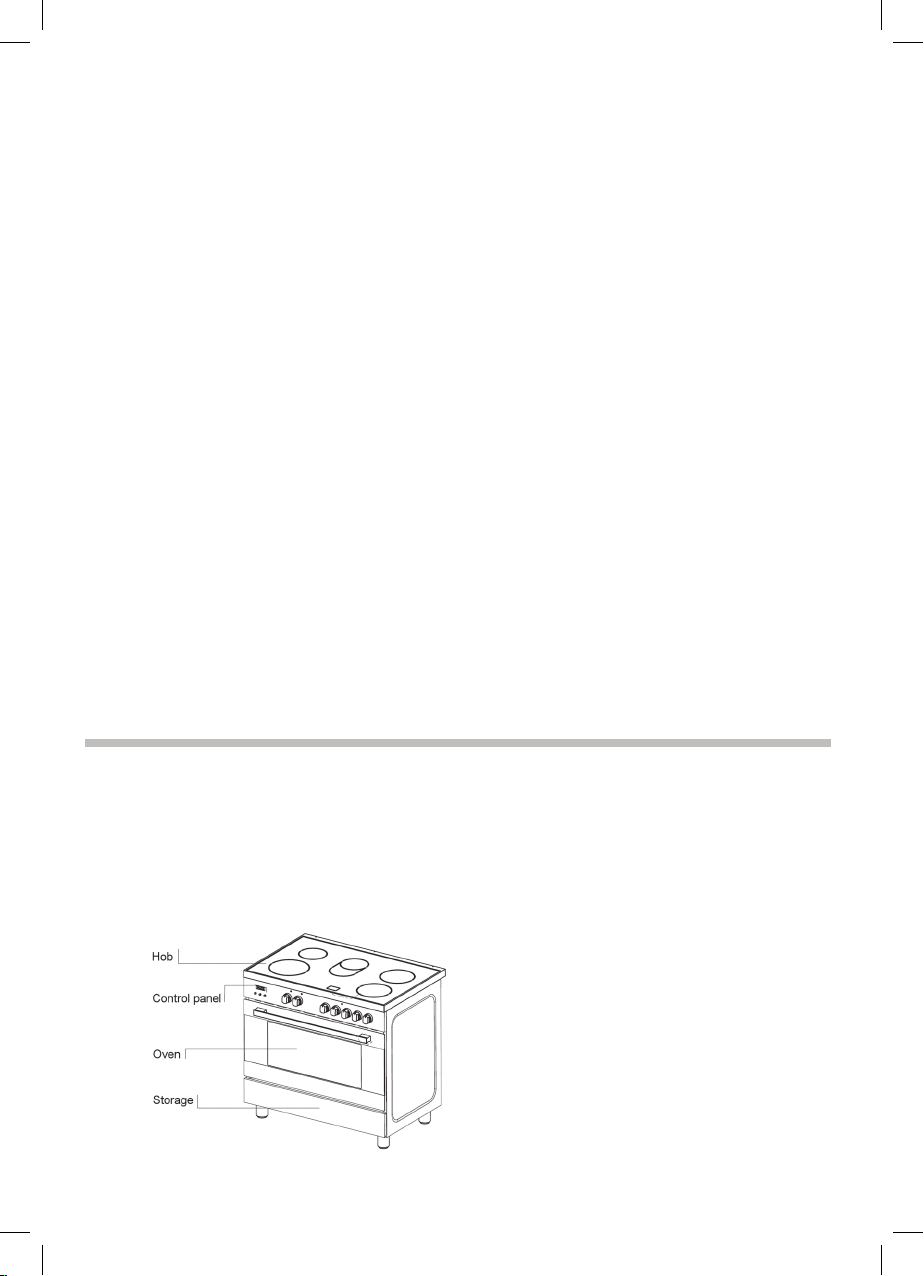
Your new
appliance
Get to know your appliance. You will find information
about the control panel and
hob, as well as the oven,
types of heating and accessories.
18
Cer
am
i
c hob
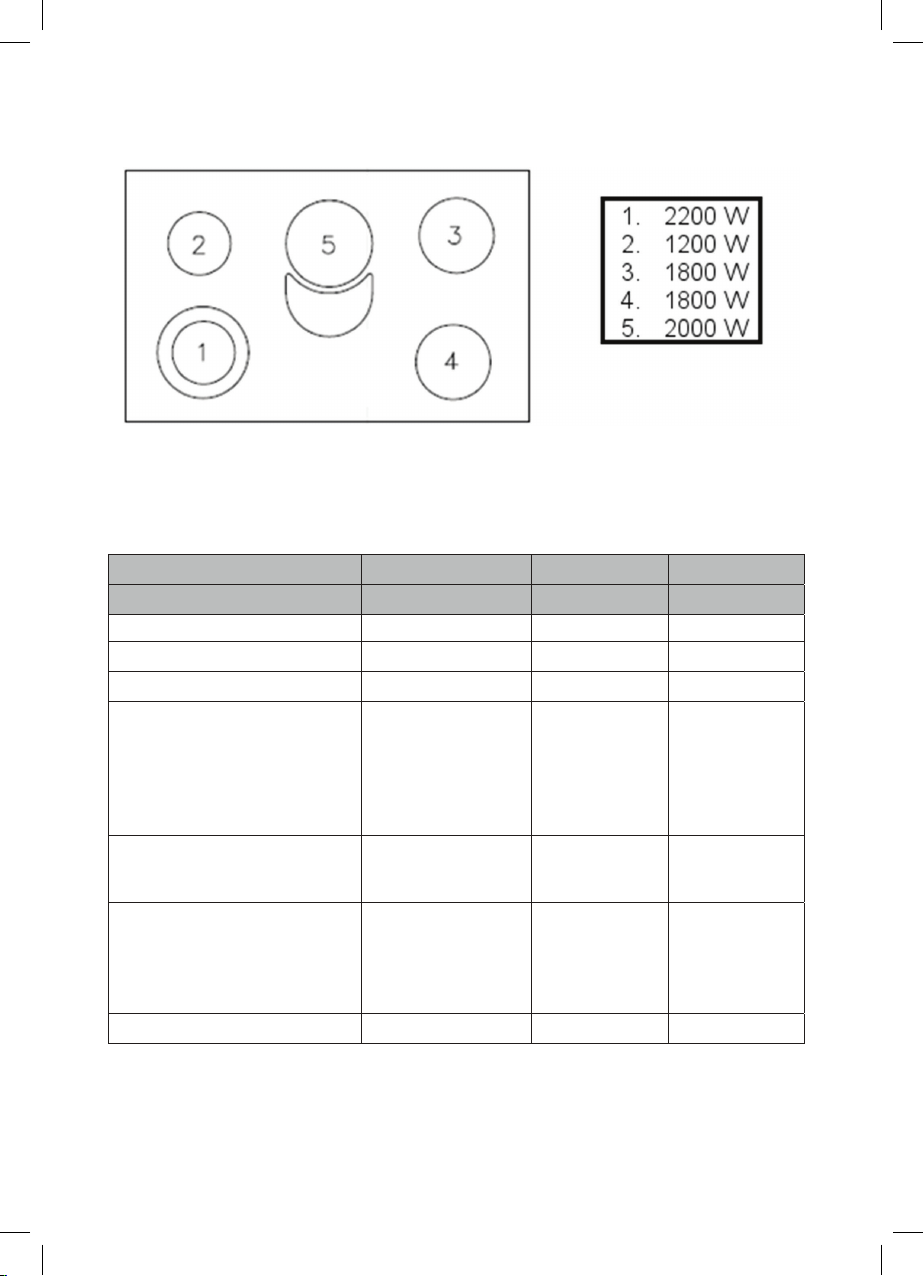
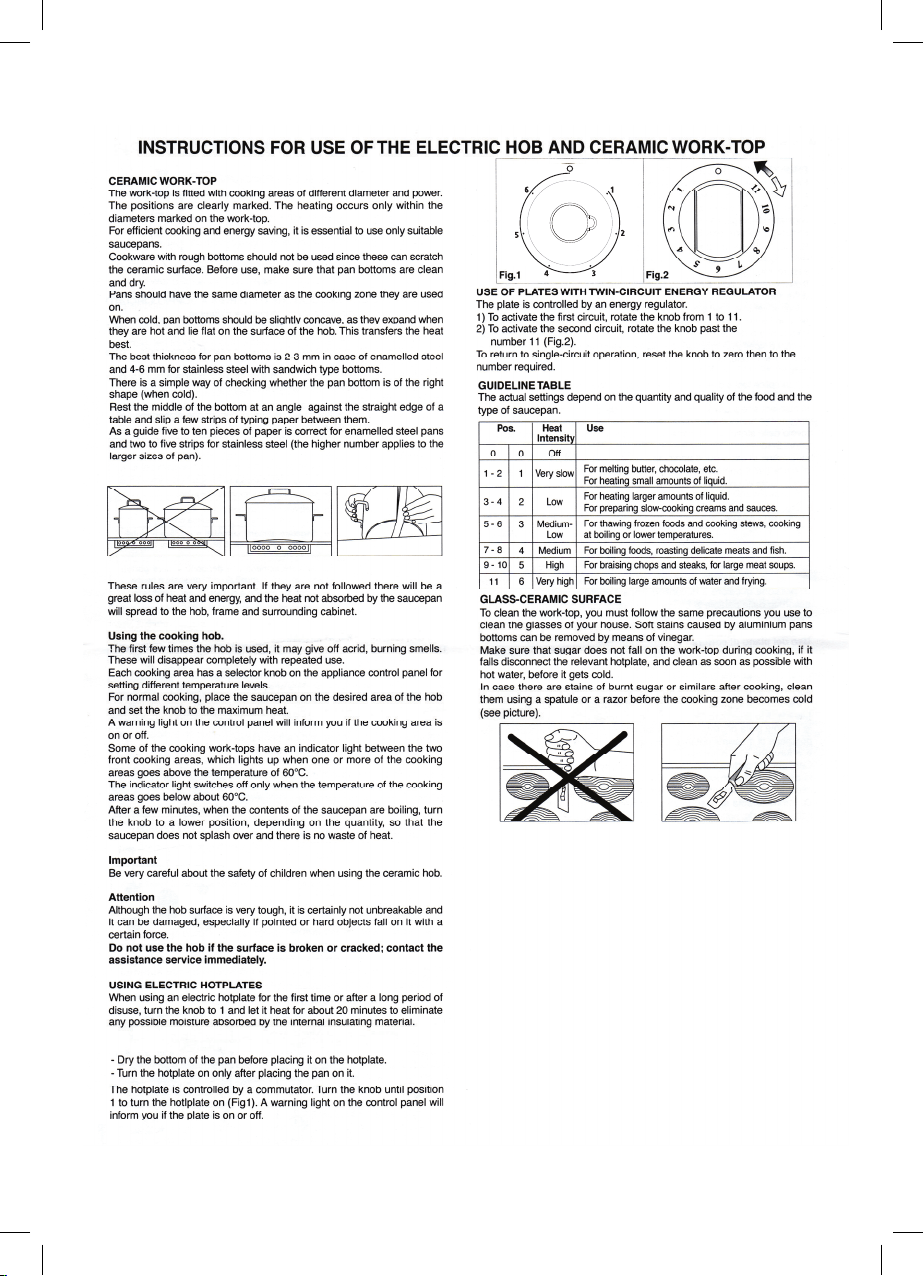
Table for for domestic electric hob in according to the Delegated
Regulation (UE) n° 65/2014 and Regulation (UE) n° 66/2014 Energy
Consumption calculated according to standard EN 60350-2: 2013-07
MIDEA
Identification Model See rating plate
Type hob
Cooktop
Number of zones or areas of cooking
5
Type of hea
t
in
g system Radiating plate
Cooking circular zones
1 =
2 =
3 =
4 =
22,0
15,5
19,0
19,0
cm
cm
cm
cm
Cooking not circular zones
5 L
W
26,0
15,5
cm
cm
Energy consumption per area
EC electric cooking
1 = 190,5
2 = 218,0
3 = 203,0
4 = 201,4
5 = 220.4
Wh/kg
Wh/kg
Wh/kg
Wh/kg
Wh/kg
Energy consumption of the hob
EC electric hob 206,6 Wh/kg
HOB TOTAL 9.0KW
OVEN TOTAL 2.94KW
Maximum Power 11.94KW
Voltage
220-240V~50/60Hz
380-415V 3N~50/60Hz
19
Damage to the oven Never cook meals on the floor of the cooking
compartment. Do not leave the baking tray on the
cooking c
ompartment floor. Do not cover it with
alumin
ium foil.
Do
not place oven or cookware on the oven floor.
This will cause heat accumulation. The baking and
r
oasting
times will no longer be correct and the
enamel will be damaged.
Ne
ver pour water directly into a hot oven. This will
damage the enamel.
W
hen making very moist fruit flans, do not put too
much on the baking tray. Fruit juice dripping from the
b
aking
t
ray leaves stains that cannot be removed.
Do not stand or sit on the open oven door.
Damage to the fronts of
adjacent units
O
nly leave the oven to cool down with the door
closed. The fronts of adjacent units may eventually
b
e
co
m
e
da
maged even if you only leave the oven
door open slightly.
I
f the oven door seal is very dirty, the appliance door
will no longer close properly during operation. The
f
ronts
o
f adjacent units will become damaged over
time.
K
eep the seal clean.
Your new appliance
Get to know your appliance. You will find information about the control panel and
hob, as well as the oven, types of heating and accessories.
18
Cer
am
i
c hob
Table for for domestic electric hob in according to the Delegated
Regulation (UE) n° 65/2014 and Regulation (UE) n° 66/2014 Energy
Consumption calculated according to standard EN 60350-2: 2013-07
IdentificationModel Seeratingplate
Typehob
Cooktop
Numberofzonesorareasofcooking
5
Typeofhea
t
in
gsystem Radiatingplate
Cookingcircularzones
1 =
2 =
3 =
4 =
22,0
15,5
19,0
19,0
cm
cm
cm
cm
Cookingnotcircularzones
5 L
W
26,0
15,5
cm
cm
Energyconsumptionperarea
EC electric cooking
1 = 190,5
2 = 218,0
3 = 203,0
4 = 201,4
5 = 220.4
Wh/kg
Wh/kg
Wh/kg
Wh/kg
Wh/kg
Energyconsumptionofthehob
EC electric hob 206,6 Wh/kg
HOB TOTAL 9.0KW
OVEN TOTAL 2.94KW
Maximum Power 11.94KW
Voltage
220-240V~50/60Hz
380-415V 3N~50/60Hz
19
20
The oven
Always keep small children away from the oven while it is in use.
Before cooking for the first time switch the oven on and allow it to heat up while empty. At this
point you may notice a slightly odour, this is perfectly normal and occurs as the protective
covering which surrounds the insulating panels is gently removed. This covering is designed
for transit purposes only and its removal will not affect the performance of your oven.
Prior to use simply wipe the oven interior with a damp cloth, it is then ready for cooking.
21

20
The oven
Always keep small children away from the oven while it is in use.
Before cooking for the first time switch the oven on and allow it to heat up while empty. At this
point you may notice a slightly odour, this is perfectly normal and occurs as the protective
covering which surrounds the insulating panels is gently removed. This covering is designed
for transit purposes only and its removal will not affect the performance of your oven.
Prior to use simply wipe the oven interior with a damp cloth, it is then ready for cooking.
21

Kn
o
b
s
c
ontrol
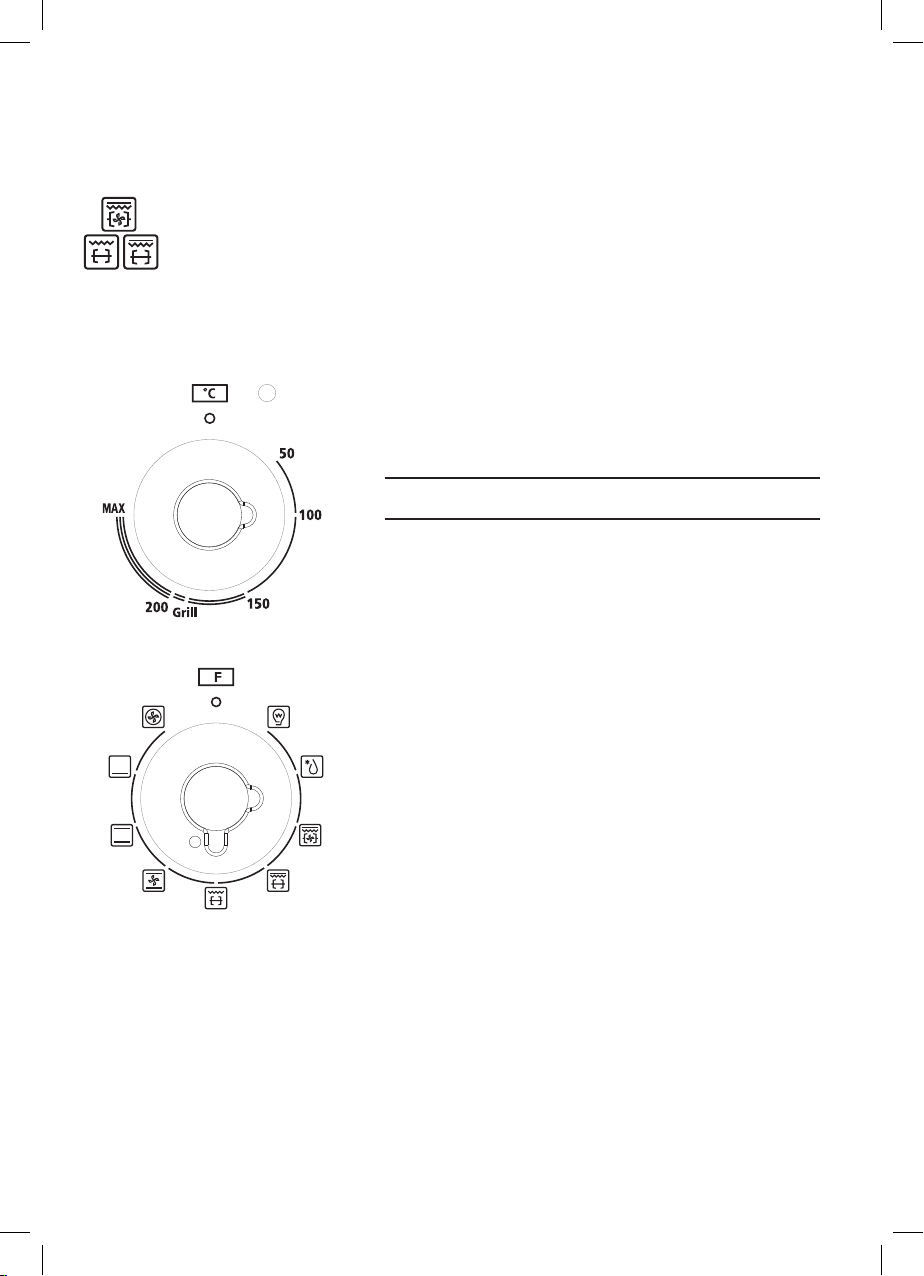
• COOKING METHODS (according to models)
ELECTRICAL OVEN : conventional oven (from 50 to MAX)
MULTIFUNCTION OVEN : conventional cooking, fan cooking, lower element, grill,
fan assisted grill.
Lighting the oven
Defrosting
Conventional cooking : top and bottom heating elements are used together.
Preheat the oven for about ten minutes. This method is ideal for all
traditional roasting and baking.
For sealing red meats, roast beef, leg of lamb, game, bread, foil-wrapped food
(papillotes), flaky pastry. Mid sheld position recommended.
Fan assisted multilevel oven
Cooking of similar or different foods placed on different shelves (up to 2
levels at a time).
Fan cooking : both top and bottom heating elements are used and the fan
circulates the air inside the oven. Recommended for poultry, pastries, fish
and vegetables. Heat penetrates the food better and both the cooking and
preheating times are reduced. Different foods can be cooked at the same time in
one or more positions. This function provides even heat distribution and does not
mix the smells. Allow about ten minutes extra when cooking foods at the same time.
Lower element : using the lower element. Ideal for cooking all pastry based
dishes.
This allows you to cook dry tart pastry without over cooking the fruit filling. Use this
for flans, quiches, tarts, pâté and any cooking that needs more heat and radiation
from below.
Grill : Caution: In this function, the adjustment knob of the temperature
must be set in the position indicated with "G".
U
s
i
n
g
the top level element.
Success is guaranteed for mixed grills, kebabs and au gratin dishes. Five minutes
preheating is required to get the element hot. Use the grill when the door is closed.
Fan assisted grilling : Caution: In this function, the adjustment knob of the
temperature must be set in the position indicated with "G". The top
heating element is used in conjunction with the fan circulating the air inside the
oven. Ideal for cooking thicker food stuffs, whole pieces of meat such as roast
pork, poultry, etc. Preheating is necessary for red meats but not for white meats.
Place the food to be grilled directly on the shelf centrally, at the middle level.
22
Slide the drip tray under the shelf to collect the juices. Make sure that the food is
not too close to the grill. Turn the food over halfway through cooking.
Rotisserie (in option) : the top heating element is used in conjunction with
the rotisserie providing the real flavour of a traditional roast.
Control knob for oven
Use this control knob to set the heat output of the oven
Setting Meaning
50 - Oven temperature range in °CM A X
50 - Grill temperature range in °CGrill
Function selector (according to the models)
Use this knob to set the desired cooking function
23
Kn
o
b
s
c
ontrol
• COOKING METHODS (according to models)
ELECTRICAL OVEN : conventional oven (from 50 to MAX)
MULTIFUNCTION OVEN : conventional cooking, fan cooking, lower element, grill,
fan assisted grill.
Lighting the oven
Defrosting
Conventional cooking : top and bottom heating elements are used together.
Preheat the oven for about ten minutes. This method is ideal for all
traditional roasting and baking.
For sealing red meats, roast beef, leg of lamb, game, bread, foil-wrapped food
(papillotes), flaky pastry. Mid sheld position recommended.
Fan assisted multilevel oven
Cooking of similar or different foods placed on different shelves (up to 2
levels at a time).
Fan cooking : both top and bottom heating elements are used and the fan
circulates the air inside the oven. Recommended for poultry, pastries, fish
and vegetables. Heat penetrates the food better and both the cooking and
preheating times are reduced. Different foods can be cooked at the same time in
one or more positions. This function provides even heat distribution and does not
mix the smells. Allow about ten minutes extra when cooking foods at the same time.
Lower element : using the lower element. Ideal for cooking all pastry based
dishes.
This allows you to cook dry tart pastry without over cooking the fruit filling. Use this
for flans, quiches, tarts, pâté and any cooking that needs more heat and radiation
from below.
Grill : Caution: In this function, the adjustment knob of the temperature
must be set in the position indicated with "G".
U
s
i
n
g the top level element.
Success is guaranteed for mixed grills, kebabs and au gratin dishes. Five minutes
preheating is required to get the element hot. Use the grill when the door is closed.
Fan assisted grilling : Caution: In this function, the adjustment knob of the
temperature must be set in the position indicated with "G". The top
heating element is used in conjunction with the fan circulating the air inside the
oven. Ideal for cooking thicker food stuffs, whole pieces of meat such as roast
pork, poultry, etc. Preheating is necessary for red meats but not for white meats.
Place the food to be grilled directly on the shelf centrally, at the middle level.
22
Slide the drip tray under the shelf to collect the juices. Make sure that the food is
not too close to the grill. Turn the food over halfway through cooking.
Rotisserie (in option) : the top heating element is used in conjunction with
the rotisserie providing the real flavour of a traditional roast.
Control knob for oven
Use this control knob to set the heat output of the
oven
Setting Meaning
50 - Oven temperature range in °CM A X
50 - Grill temperature range in °CGrill
Function selector (according to the models)
Use this knob to set the desired cooking function
23
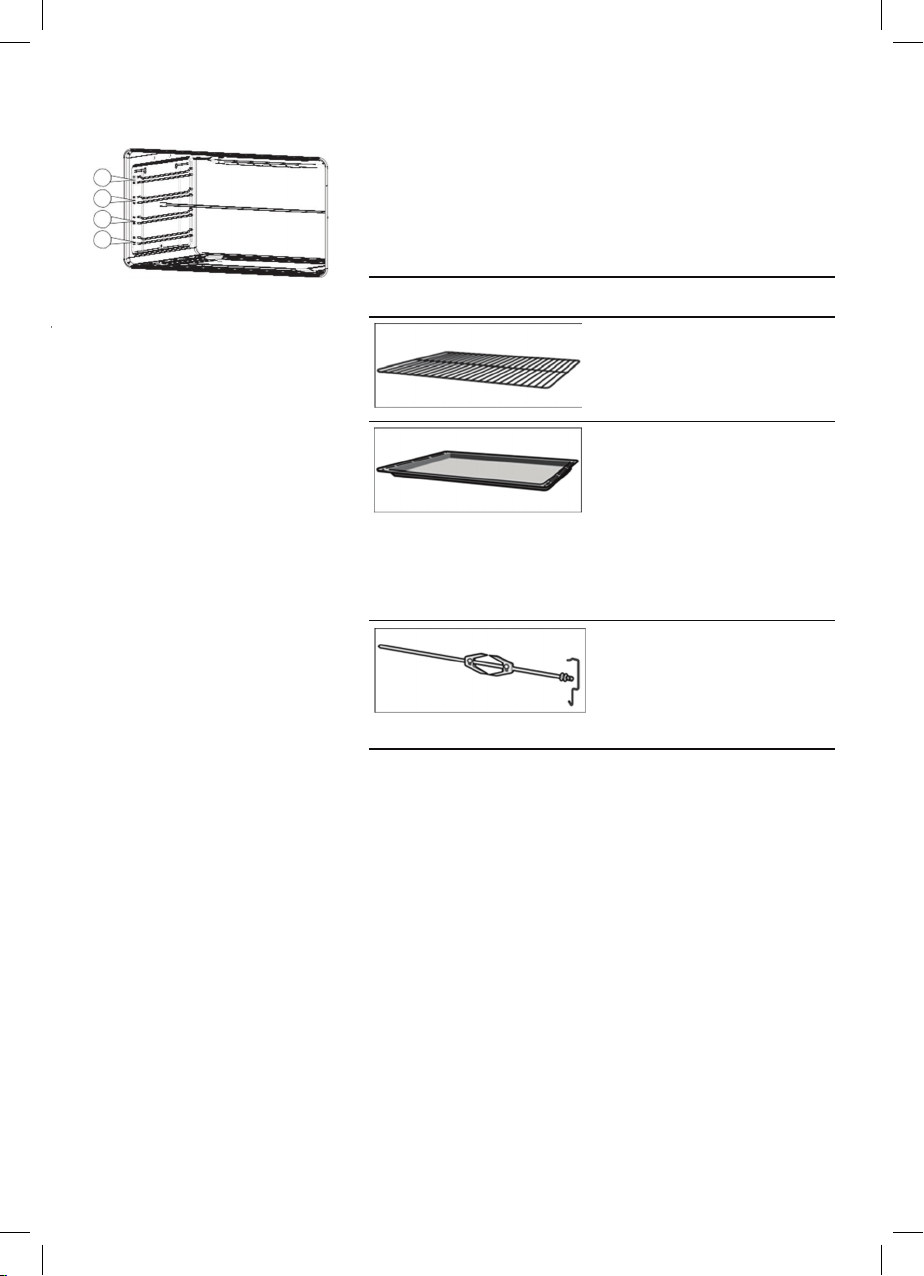
Oven Accessories The accessories can be inserted in the oven in 4
differ
ent shelf positions.
You can pull the accessories two-thirds of the way out
1
without them tipping. This allows meals to be
2
removed easily.
3
4
Yo
u
ca
n
buy accessories from the after-sales service
or from specialist retailers.
Accessory Description
Baking and roasting shelf
For ovenware, cake tins,
roasts, grilling and frozen
meals.
Enamelled baking tray
For moist cakes, pastries,
frozen meals and large
roasts. Can also be
inserted underneath the
wire rack or rotary spit and
used as a drip tray to
collect fat.
Rotary spit
For roasts and large pieces
of poultry. Use only in
combination with the
enamelled baking tray.
24
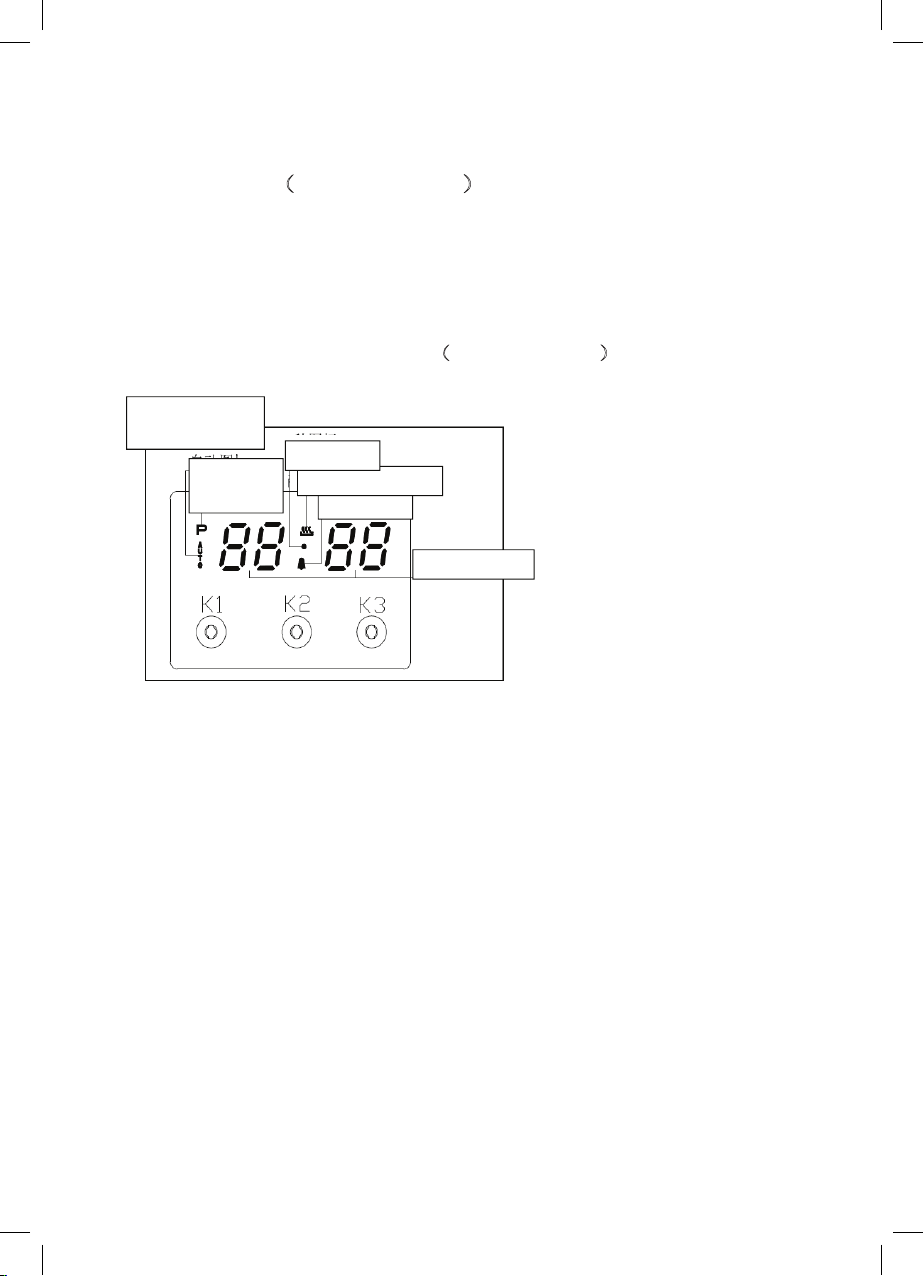
Using the programmer of cooking (
according to models )
Main functions(for some models)
1,Time function, keep the time in 24 hours.
2,Make an reservation for the oven work time, and can set anytime in 24 hours.
3,Set the oven work time, the longest maybe 10 hours.
Operation Panel and Instructions (for some models)
1 List of functions
Instructions from left to right: Key1, Key2, Key3.
Key1 Decrease Key
Key2 Mode Key
Key3 Increase Key
Note: Press Key 1 and Key 3 under the setting mode, which changes the time by one
minute either up or down. If keep pressing them, the number will be up or down quickly.
2 Icon Instructions
“ Auto-programming icon”: it will flash when setting automatic program and the end of
automatic program. If automatic program has been set, after 5s, it will keep lighting up. At
the end of automatic program, the flash will be off when resetting the clock or it will keep
lighting up when resetting automatic program after 5s.
“Time-setting Icon” will flash when setting Beijing time.
“ Sec Icon” and “Alarm Icon” are flashing under the mode of time setting and alarm setting,
after 5s of setting, it will turn to lighting up.
Alarm Icon
Rela
y
O
p
eration Icon
Auto-programming
icon
Time-setting
Icon
Sec Icon
Number Dis
p
la
y
25
Oven Accessories The accessories can be inserted in the oven in 4
differ
ent shelf positions.
You can pull the accessories two-thirds of the way out
1
without them tipping. This allows meals to be
2
removed easily.
3
4
Yo
u ca
n
buy accessories from the after-sales service
or from specialist retailers.
Accessory Description
Baking and roasting shelf
For ovenware, cake tins,
roasts, grilling and frozen
meals.
Enamelled baking tray
For moist cakes, pastries,
frozen meals and large
roasts. Can also be
inserted underneath the
wire rack or rotary spit and
used as a drip tray to
collect fat.
Rotary spit
For roasts and large pieces
of poultry. Use only in
combination with the
enamelled baking tray.
24
Using the programmer of cooking (
according to models )
Main functions(for some models)
1,Time function, keep the time in 24 hours.
2,Make an reservation for the oven work time, and can set anytime in 24 hours.
3,Set the oven work time, the longest maybe 10 hours.
Operation Panel and Instructions (for some models)
1 List of functions
Instructions from left to right: Key1, Key2, Key3.
Key1 Decrease Key
Key2 Mode Key
Key3 Increase Key
Note: Press Key 1 and Key 3 under the setting mode, which changes the time by one
minute either up or down. If keep pressing them, the number will be up or down quickly.
2 Icon Instructions
“ Auto-programming icon”: it will flash when setting automatic program and the end of
automatic program. If automatic program has been set, after 5s, it will keep lighting up. At
the end of automatic program, the flash will be off when resetting the clock or it will keep
lighting up when resetting automatic program after 5s.
“Time-setting Icon” will flash when setting Beijing time.
“ Sec Icon” and “Alarm Icon” are flashing under the mode of time setting and alarm setting,
after 5s of setting, it will turn to lighting up.
Alarm Icon
Rela
y
O
p
eration Icon
Auto-programming
icon
Time-setting
Icon
Sec Icon
Number Dis
p
la
y
25
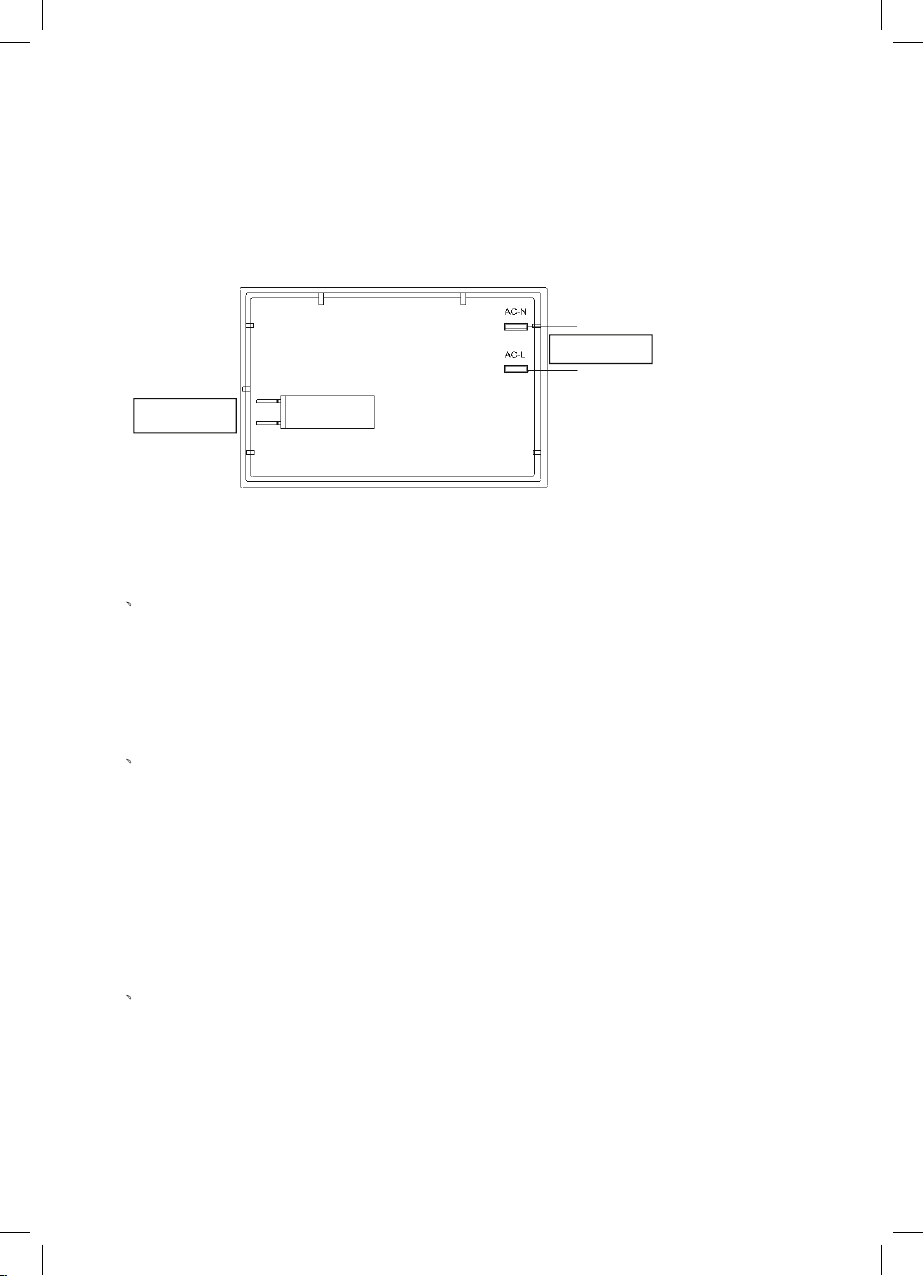
“Relay Operation Icon” shows the working state of relays. The icon will keep lighting up
if contacts are connected, and will be off if contacts are disconnected.
“Number Display” is LED Nixie Tube.
Control Function and Instructions
As shown in the picture, on-off control is used to control heating components of oven, the
left is power source which can be connected under the 220V.
1、
Time Adjustment after Starting up
When the power is on, it shows 12:00 and flashes. The relay contact is disconnected,
auto-programming icon keeps lighting up, time setting icon flashes.
Press K1 or K3 to adjust the present time or press K2 to get into the working mode. The
relay contact is connected.
Press K2 by 4 times to get into the present time-setting mode under the common mode.
2、
Alarm and Buzz Function
Press K2 once under the common mode: “Alarm Icon” flashes. Press K1 or K3 to adjust the
present alarm clock.
5s after adjusting to the time you need, “Alarm Icon” keeps flashing, and will work after
setting up. In this case, pressing K1 can know the alarming time( it will show seconds at
one last minute).
When alarm counts down to zero, alarming program ends, alarm icon flashes, and the
buzzer is buzzing. Press any key to stop the buzzing or it will turn off automatically after 2
minutes.
3、
Auto-programming Setting and Instructions
① Sem
iautomatic program m
ode
Use this setting for oven working tim
e, automatic heating switch-of
f at the end of setting
time, buzzer will inform the user.
on-off control
Power source
Press K2 twice or three times to get into the auto-programming time setting,
“Auto-programming Icon” flashes. Press K1 and K3 to adjust continuous time and end
time.
26
5s after setting, it will work automatically work, “ Auto-programming Icon” keeps
lighting up. If continuous time is 0, turn off the relay contact, and “ Relay Operation
Icon” is dark, “ Auto-programming Icon” flashes, the buzzer is buzzing.
This mode’s range of continuous time and end time:
Adjustment range for continuous time: > 0 but ≤ 10 hours
Adjustment range for end time: present time< end time<= present time + 10 hours
If meet this standard: end time = present time + continuous time
For example: the present time is 2:00, then the max. end time is adjusted to 12:00(2:
00+10:00=12:00. When the end time is adjusted to 12:00, then the continuous time
is 10:00.
5s after adjusted, automatic program is working. After 10 hours, if continuous time is
counting down to 0, turn off the relay contact, and “Relay Operation Icon” is dark,
“Auto-programming Icon” flashes, the buzzer is buzzing.
Note:
1. only use this setting for either continuous time or end time.
For example: the present time is 2:00, and if let the oven work for 3 hours, set the
continuous time to 3:00, and the end time will automatically change to 5:00 and
vice versa.
2. If the continuous time is equal to 0 or the end time is equal to the present time, it
means that the automatic program is over.
3. When the automatic program is over, the continuous time is 0 and the end time is
equal to the present time.
② Automatic Mode
Use this mode for setting oven’s starting time and end time, which means make an
appointment to boot. When the time is over, it will automatically turn off the heating
and the buzzer is buzzing to inform the user.
Press twice to get into the continuous time setting mode under the common mode, press
three times to get into the end time setting mode.
When the continuous time setting is ok or the end time setting is ok, then press K2 to get
into the other kind of automatic program time setting, “ Auto-programming Icon”
flashes, press K1 and K3 to adjust continuous time and end time.
5s after automatic program setting, it will automatically work, and “Auto-programming
Icon” keeps lighting up. Turn off the relay contact, and the icon is dark. When work
until the starting time, the relay contact is connected, the icon is light. When the
continuous time is counting down, if the continuous time is 0, turn off the relay contact,
“Relay Operation Icon” is dark, “ Auto-programming Icon” flashes, and the buzzer is
buzzing.
27

“Relay Operation Icon” shows the working state of relays. The icon will keep lighting up
if contacts are connected, and will be off if contacts are disconnected.
“Number Display” is LED Nixie Tube.
Control Function and Instructions
As shown in the picture, on-off control is used to control heating components of oven, the
left is power source which can be connected under the 220V.
1、
Time Adjustment after Starting up
When the power is on, it shows 12:00 and flashes. The relay contact is disconnected,
auto-programming icon keeps lighting up, time setting icon flashes.
Press K1 or K3 to adjust the present time or press K2 to get into the working mode. The
relay contact is connected.
Press K2 by 4 times to get into the present time-setting mode under the common mode.
2、
Alarm and Buzz Function
Press K2 once under the common mode: “Alarm Icon” flashes. Press K1 or K3 to adjust the
present alarm clock.
5s after adjusting to the time you need, “Alarm Icon” keeps flashing, and will work after
setting up. In this case, pressing K1 can know the alarming time( it will show seconds at
one last minute).
When alarm counts down to zero, alarming program ends, alarm icon flashes, and the
buzzer is buzzing. Press any key to stop the buzzing or it will turn off automatically after 2
minutes.
3、
Auto-programming Setting and Instructions
① Semiautomatic program mode
Use this setting for oven working time, automatic heating switch-off at the end of setting
time, buzzer will inform the user.
on-off control
Power source
Press K2 twice or three times to get into the auto-programming time setting,
“Auto-programming Icon” flashes. Press K1 and K3 to adjust continuous time and end
time.
26
5s after setting, it will work automatically work, “ Auto-programming Icon” keeps
lighting up. If continuous time is 0, turn off the relay contact, and “ Relay Operation
Icon” is dark, “ Auto-programming Icon” flashes, the buzzer is buzzing.
This mode’s range of continuous time and end time:
Adjustment range for continuous time: >
0 but ≤ 10 hours
Adjustment range for end time: present time<
end time<= present time + 10 hours
If meet this standard: end time = present time + continuous time
For example: the present time is 2:00, then the max. end time is adjusted to 12:00(2:
00+10:00=12:00. When the end time is adjusted to 12:00, then the continuous time
is 10:00.
5s after adjusted, automatic program is working. After 10 hours, if continuous time is
counting down to 0, turn off the relay contact, and “Relay Operation Icon” is dark,
“Auto-programming Icon” flashes, the buzzer is buzzing.
Note:
1. only use this setting for either continuous time or e
nd time.
F
or example: the present time is 2:00, and if let the oven wo
rk for 3 hours, set the
continuous time to 3:
00, and the end time will automatically change to 5:
00 and
vice ver
sa
.
2. If the continuous time is equal to 0 or the
end time is equal to
the present time, it
m
eans that the automatic program is over.
3. When the automatic program is over, the continuous time is 0 and the end tim
e is
equal to the present time.
② Automatic Mode
Use this m
ode for setting oven’s starting time and end time, which means make an
appointment to boot. When the time is over, it will automatically turn of
f the heating
and the buzzer is buzzing to inform
the user
.
Press twice to get into the continuous time setting m
ode under the common mo
de, press
three tim
es to get into the end time setting m
ode.
When the continuous tim
e setting is ok or the end time setting is ok, th
en press K2 to get
into t
he other kind of automatic program time setting, “ Auto-programm
ing Icon”
f
lashes, press K1 and K3 to adjust continuous tim
e and end time.
5s after automatic program set
ting, it will automatically work, and “Auto-programm
ing
Icon” keeps lighti
ng up. Turn off the relay contact, and the icon is dark. When
work
until the starting time, the relay contact is connected, the icon is light. When the
continuous tim
e is counting down, if the continuous time is 0, turn of
f the relay contact,
“Relay
Operation Icon” is dark, “ Auto-programming Icon” flashes,
and the buzzer is
buzzing
.
27
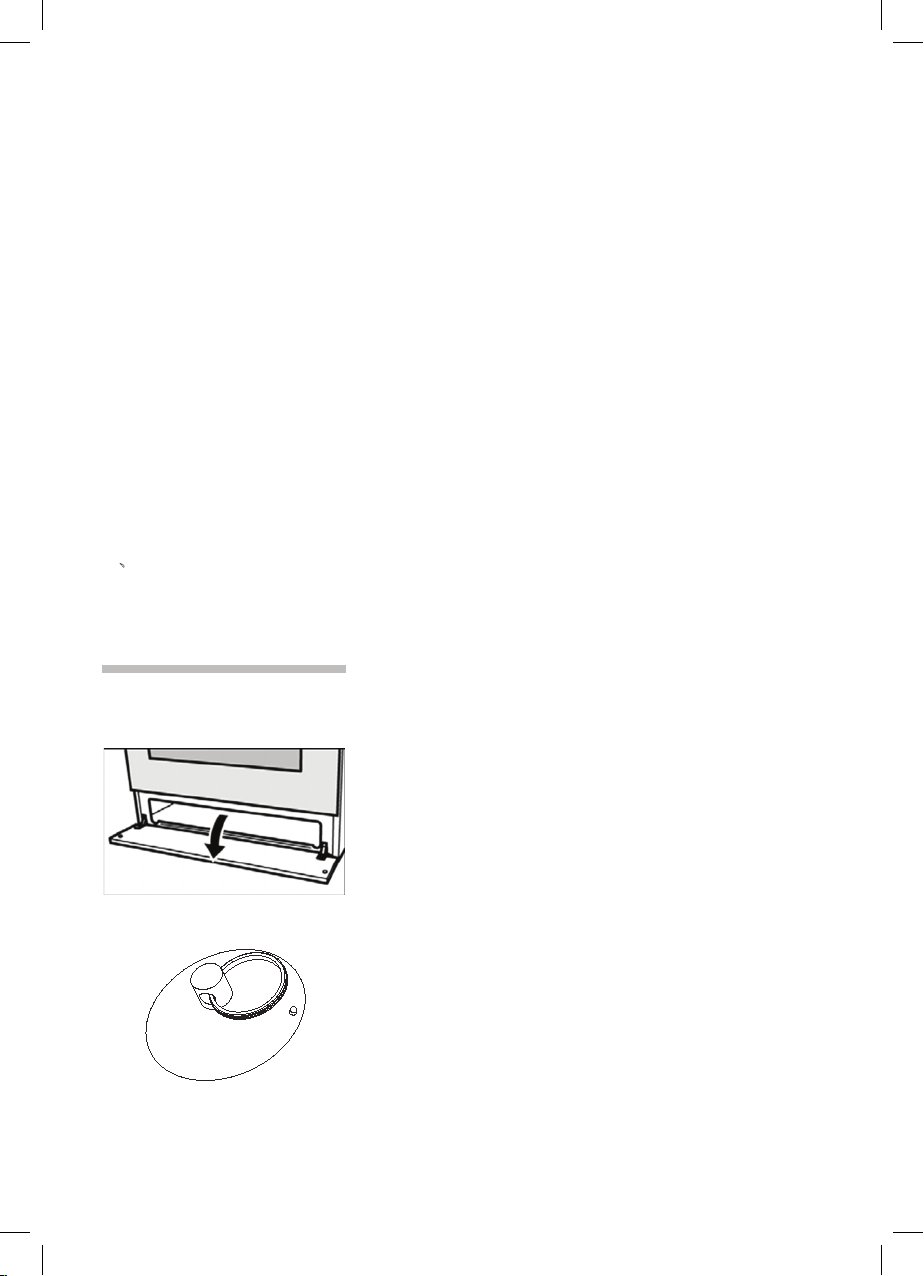
The storage compartment
Open the storage compartment by folding down
the
fascia panel.
This compartment can be used to store hob or
oven
accessories.
There is a plastic sucker in some models can
help you open the drawer.
Risk of fire.
Never leave combustible items in the storage
compartment.
The continuous time and the end time under this mode will be set as follow:
Starting time = end time- continuous time
For example, the present time is 2:00, set the continuous time to 3:00, and the end time
to 10:00, then the starting time is 7:00(7:00=10:00-3:00). The relay contact
is connected and its icon is light. After working for continuous 3 hours, the continuous
time is 0, turn off the relay contact, “ Relay Operation Icon” is dark,
“ Auto-programming Icon” flashes, the buzzer is buzzing.
Note:
1 End time >present time+ continuous time, but ≤23 hours and 59 minutes
For example: the present time is 2:00, continuous time is 0:01, then the range for end
time is 2:02(2:02>2:00+1)
2 Continuous time ≥1 minute, continuous time and end time both will be set.
3 If the continuous time is equal to 0 or the end time is equal to the present time, it means
the automatic program is over.
4 When the automatic program is over, the continuous time is 0, and the end time is the
same with the present time.
4、
Cancel Function
When semiautomatic or automatic function is starting, press K1 and K3 at the same time
which can cancel the automatic mode.( to cancel continuous time and end time).
28
Before using for the first time
Please read the following instructions before using
yo
u
r
a
p
p
li
ance for the first time.
Remove the appliance packaging and dispose of this
appropria
tely.
Baking out the oven
C
o
o
k
i
n
g compartment
initial
cleaning
Remove the accessories from the cooking
compartm
ent.
Completely remove any leftover packaging, e.g.
small pi
eces of polystyrene, from the cooking
compartm
ent.
Some parts are covered with a protective film.
Remove t
his film.
1.
Clean the outside of the appliance with a soft,
damp cl
oth.
2.
I
f t
h
e
hook-in racks have already been fitted,
unhook
and remove them. For information on
removing
the racks, see the section “Removing
and refi
tting hook-in racks.”
3.
Clean the cooking compartment with warm soapy
water.
Heat
ing up the oven
(according to the model)
To remove the new cooker smell, heat up the oven
when it
is empty and closed.
1. Put the switch in position conventional
cooking
Set the thermostat to 200 ° C
2. After 25 minutes, switch the oven off by
turning the control knob clockwise to position 0 .
1. Put the switch in position fan assisted
multilevel oven
Set the thermostat to 200 ° C
2. After 25 minutes, switch the oven off by
turning the control knob clockwise to position 0
.
29

The storage compartment
Open the storage compartment by folding down
the fascia panel.
This
compartment can be used to store hob or
oven accessories.
There
is a plastic sucker in some models can
help you open the drawer.
Risk of fire.
Never leave combustible items in the storage
compart
ment.
The continuous time and the end time under this mode will be set as follow:
Starting time = end time- continuous time
For example, the present time is 2:00, set the continuous time to 3:00, and the end time
to 10:00, then the starting time is 7:00(7:00=10:00-3:00). The relay contact
is connected and its icon is light. After working for continuous 3 hours, the continuous
time is 0, turn off the relay contact, “ Relay Operation Icon” is dark,
“ Auto-programming Icon” flashes, the buzzer is buzzing.
Note:
1 End time >present time+ continuous time, but ≤23 hours and 59 minutes
For example: the present time is 2:00, continuous time is 0:01, then the range for end
time is 2:02(2:02>2:00+1)
2 Continuous time ≥1 minute, continuous time and end time both will be set.
3 If the continuous time is equal to 0 or the end time is equal to the present time, it means
the automatic program is over.
4 When the automatic program is over, the continuous time is 0, and the end time is the
same with the present time.
4、
Cancel Function
When semiautomatic or automatic function is starting, press K1 and K3 at the same time
which can cancel the automatic mode.( to cancel continuous time and end time).
28
Before using for the first time
Please read the following instructions before using
yo
u
r
a
p
p
liance for the first time.
Remove the appliance packaging and dispose of this
appropria
tely.
Baking out the oven
C
o
o
k
i
n
g compartment
initial cleaning
Remove the accessories from the cooking
compartment.
Completely remove any leftover packaging, e.g.
small pieces of polystyrene, from the cooking
compartment.
Some parts are covered with a protective film.
Remove this film.
1.
Clean the outside of the appliance with a soft,
damp cl
oth.
2.
I
f
t
h
e
hook-in racks have already been fitted,
unhook
and remove them. For information on
removing
the racks, see the section “Removing
and refi
tting hook-in racks.”
3.
Clean the cooking compartment with warm soapy
water.
Heat
ing up the oven
(according to the model)
To remove the new cooker smell, heat up the oven
when it is empty and closed.
1. Put the switch in positi
on
conventional
cookin
g
Set the thermostat to 200 ° C
2. After 25 minutes, switch the oven off by
turning the control knob clockwise to position 0 .
1. Put the switch in positi
on
fan assisted
multilevel oven
Set the thermostat to 200 ° C
2. After 25 minutes, switch the oven off by
turning the control knob clockwise to position 0
.
29

Heating up the grill
1 Put the switch in position grill
2
A
f
t
er 25 minutes, switch the oven off by turning the control knob clockwise to
position 0 .
.
Rinsing cooking
c
o
mpa
r
tme
nt after initial
cleaning
Clean the cooking compartment with hot soapy
water. Refit the hook-in racks.
gas lighter or a match.
30
Using the rotary spit
The rotary spit can be used to cook joints such as
rolled
joints and poultry with excellent results. The
meat i
s roasted thoroughly and evenly.
The rotary spit function only when the switch
is in position grill.
Preparing joints Place the joint as centrally as possible on the rotary
spit and secure it at both ends with the retaining clips.
You can also truss the joint with string. With poultry,
bind t
he ends of the wings underneath the back and
the th
ighs against the body. This will prevent them
from bec
oming too dark.
Pierce the skin on the underside of the wings to allow
the fat
to escape.
31

Heating up the grill
1 Put the switch in position grill
2 A
f
t
er 25 minutes, switch the oven off by turning the control knob clockwise to
position 0 .
.
Rinsing cooking
c
o
mpa
r
tme
n
t after initial
cleani
ng
Clean the cooking compartment with hot soapy
water.
Refit the hook-in racks.
gas lighter or a match.
30
Using the rotary spit
The rotary spit can be used to cook joints such as
rolled joints and poultry with excellent results. The
meat is roasted thoroughly and evenly.
The rotary spit function only when the switch
is in position grill.
Preparing joints Place the joint as centrally as possible on the rotary
spit and secure it at both ends with the retaining clips.
You can also truss the joint with string. With poultry,
bind the ends of the wings underneath the back and
the thighs against the body. This will prevent them
from becoming too dark.
Pierce the skin on the underside of the wings to allow
the fat to escape.
31
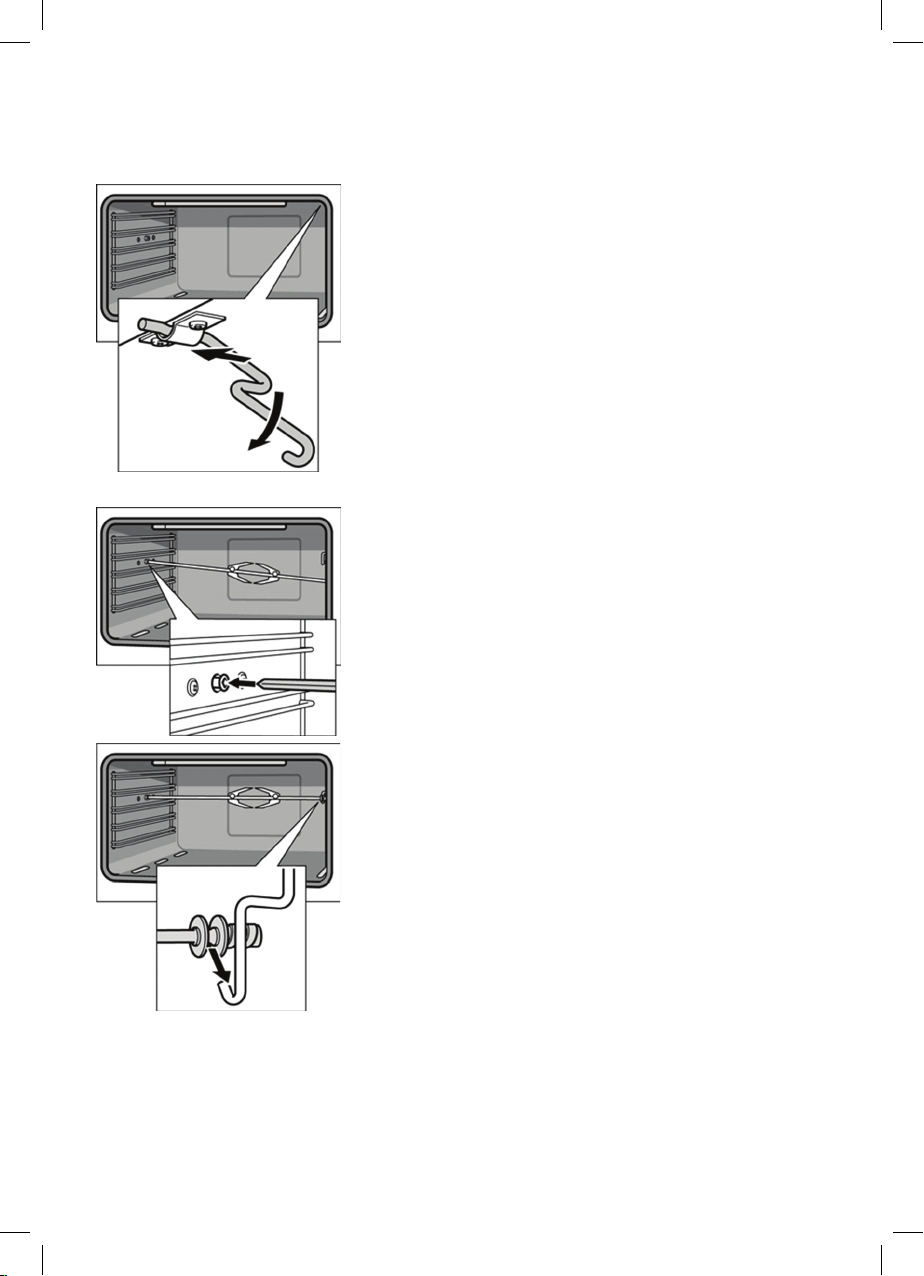
Inserting the rotary spit Insert the rotary spit as follows:
1.
Hook the spit holder into the bracket on the ceiling
of the cooking compartment.
If you require to preheat the oven, hook in the
holder
before preheating.
G
Risk of burns
Never touch the hot surfaces of the cooking
compartment or the heating elements.
Children must be kept at a safe distance from the
appliance at all times.
Open the appliance door carefully. Hot steam may
escape.
2.
If the oven has been preheated, only attach the
ro
t
a
ry
s
pit if you are using an oven cloth or wearing
(thermal
) oven gloves. To attach the spit, slide one
end int
o the recessed adapter in the left-hand side
panel
of the cooking compartment.
3. Hook the other end into the holder.
4.
Pour a little bit of water into the baking tray and
slide this into shelf position 1 to collect the run-off
fat.
32
Removing the rotary spit
G
Riskofburns.
N
ever touch the hot surfaces of the cooking
compartment or the heating elements.
Children must be kept at a safe distance from the
applianc
e at all times.
Open the appliance door carefully. Hot steam may
escape.
G
Riskofburns.
N
ever touch the rotary spit or other accessories
directly when they are hot.
Always wear oven gloves or heat-resistant gloves
when handl
ing hot accessories.
Remove the rotary spit as follows:
1.
Carefully open the appliance door. Carefully
re
m
o
v
e
the rotary spit from the holder.
2.
Carefully withdraw the rotary spit from the
recessed adapter in the side panel and remove it
from the oven.
3.
Take out the baking tray.
33
Inserting the rotary spit Insert the rotary spit as follows:
1.
Hook the spit holder into the bracket on the ceiling
of the cooking compartment.
If you require to preheat the oven, hook in the
holder
before preheating.
G
Risk of burns
Never touch the hot surfaces of the cooking
compart
ment or the heating elements.
Children must be kept at a safe distance from the
applianc
e at all times.
Open the appliance door carefully. Hot steam may
escape.
2.
If the oven has been preheated, only attach the
ro
t
a
ry s
pit if you are using an oven cloth or wearing
(thermal
) oven gloves. To attach the spit, slide one
end int
o the recessed adapter in the left-hand side
panel
of the cooking compartment.
3. Hook the other end into the holder.
4.
Pour a little bit of water into the baking tray and
slide this into shelf position 1 to collect the run-off
fat.
32
Removing the rotary spit
G
Risk of burns.
Never touch the hot surfaces of the cooking
compartment or the heating elements.
Children must be kept at a safe distance from the
appliance at all times.
Open the appliance door carefully. Hot steam may
escape.
G
Risk of burns.
Never touch the rotary spit or other accessories
directly when they are hot.
Always wear oven gloves or heat-resistant gloves
when handling hot accessories.
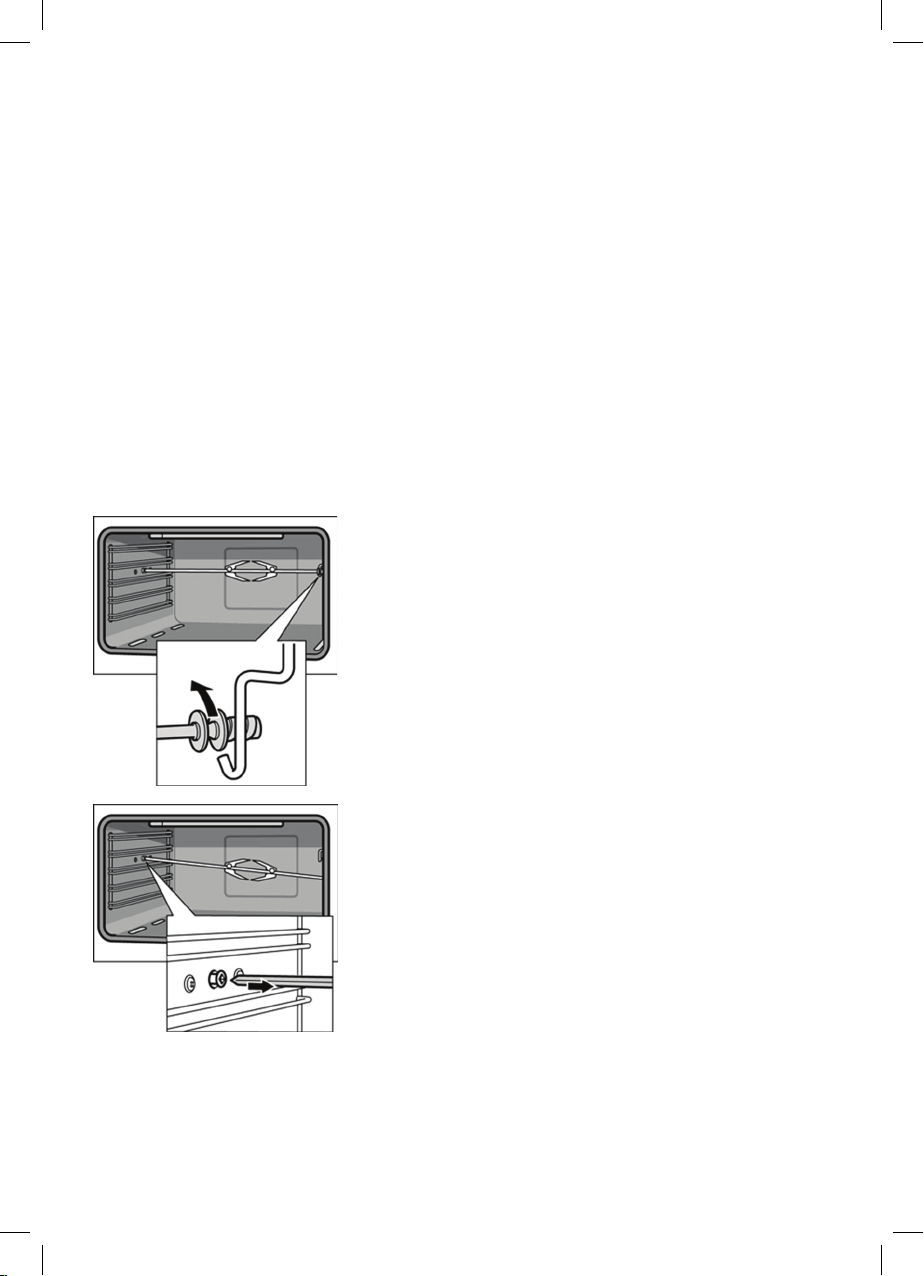
Remove the rotary spit as follows:
1.
Carefully open the appliance door. Carefully
re
m
o
v
e
the rotary spit from the holder.
2.
Carefully withdraw the rotary spit from the
recessed adapter in the side panel and remove it
from the oven.
3.
Take out the baking tray.
33

Cleaning and care
G
Never use high-pressure cleaners or steam jets. Risk
o f s hort circuit.
Never use caustic or abrasive cleaning agents.
These could damage the surface. If such an agent
gets on the front of the appliance, wipe it off
immediately with water.
Do not clean any surfaces of the appliance while they
are hot.
Switching on the oven
lighting
To make it easier to clean the oven, you can switch
on the oven lighting.
To switch on the lighting, press the function button for
oven lighting until it locks into place.
Ca
t
al
y
t
ic cooking compartment panels
The catalytic cooking compartment panels are
coated with self-cleaning enamel.
The surfaces clean themselves while the oven is in
operation. Larger splashes will only be removed after
the oven has been used several times.
Se
l
f-c
l
e
aning surfaces The rear and side walls are protected with catalytic
panelling.
Never clean these surfaces with oven cleaner.
Slight discolouration of the enamel does not affect
automatic self-cleaning.
34
Using the correct cleaning agent
Do not use cleaning agents that contain abrasive
substan
ces or acids, or cleaning aids such as steel
wool or
stainless steel sponges. These could damage
t
h
e s
ur
faces.
Appliance parts Cleaning agent and cleaning aid
Appliance door glass panel
• Use glass cleaner.
Risk of injury.
The lower edge of the door may have sharp edges.
Clean the door and glass panels with care.
• Do no
t use a glass scraper.
Control panel and knobs
• Wipe with a damp, soft cloth.
Seal
(on the cooking
compartment)
• Use w
arm soapy water.
Hook-in racks
• Use warm soapy water.
Cooking compartment
Enamelled surfaces
Appliance exterior
Stainless steel surfaces
Glas
s co
ver
(in front of the oven lighting)
• Use w
arm soapy water; Dry off with a soft cloth.
• Use w
arm soapy water; Dry off with a soft cloth.
• Always
remove flecks of limescale, grease, starch
and albumin (e.g. egg white) immediately.
• Speci
al stainless steel cleaners are available from
the after-sales service or specialist shops.
• Use w
arm soapy water.
Pan support
• Use warm soapy water.
•
D
o n
o
t clean the pan supports in the dishwasher.
Appliance parts Cleaning agent and cleaning aid
Accessory
• Soak in hot soapy water. Clean with a brush
or sponge.
35

Cleaning and care
G
Never use high-pressure cleaners or steam jets. Risk
o f s hort circuit.
N
ever use caustic or abrasive cleaning agents.
These
could damage the surface. If such an agent
gets on
the front of the appliance, wipe it off
immediat
ely with water.
Do not clean any surfaces of the appliance while they
are hot.
Sw
itching on the oven
lighti
ng
To make it easier to clean the oven, you can switch
on the
oven lighting.
To switch on the lighting, press the function button for
oven li
ghting until it locks into place.
Ca
t
al
y
t
ic cooking compartment panels
The catalytic cooking compartment panels are
coated
with self-cleaning enamel.
The surfaces clean themselves while the oven is in
operati
on. Larger splashes will only be removed after
the ov
en has been used several times.
Se
l
f-c
l
e
aning surfaces The rear and side walls are protected with catalytic
panelling.
Never clean these surfaces with oven cleaner.
Slight discolouration of the enamel does not affect
automat
ic self-cleaning.
34
Using the correct cleaning agent
Do not use cleaning agents that contain abrasive
substances or acids, or cleaning aids such as steel
wool or stainless steel sponges. These could damage
t
h
e
s
urfaces.
Appliance parts Cleaning agent and cleaning aid
Appliance door glass panel
• Use glass cleaner.
Risk of injury.
The lower edge of the door may have sharp edges.
Clean the door and glass panels with care.
• Do not use a glass scraper.
Control panel and knobs
• Wipe with a damp, soft cloth.
Seal
(on the cooking
compartment)
• Use warm soapy water.
Hook-in racks
• Use warm soapy water.
Cooking compartment
Enamelled surfaces
Appliance exterior
Stainless steel surfaces
Glas
s
co
ver
(in front of the oven lighting)
• Use warm soapy water; Dry off with a soft cloth.
• Use w
arm soapy water; Dry off with a soft cloth.
• Always
remove flecks of limescale, grease, starch
and albumin (e.g. egg white) immediately.
• Speci
al stainless steel cleaners are available from
the after-sales service or specialist shops.
• Use w
arm soapy water.
Pan support
• Use warm soapy water.
•
D
o
n
o
t clean the pan supports in the dishwasher.
Appliance parts Cleaning agent and cleaning aid
Accessory
• Soak in hot soapy water. Clean with a brush
or sponge.
35
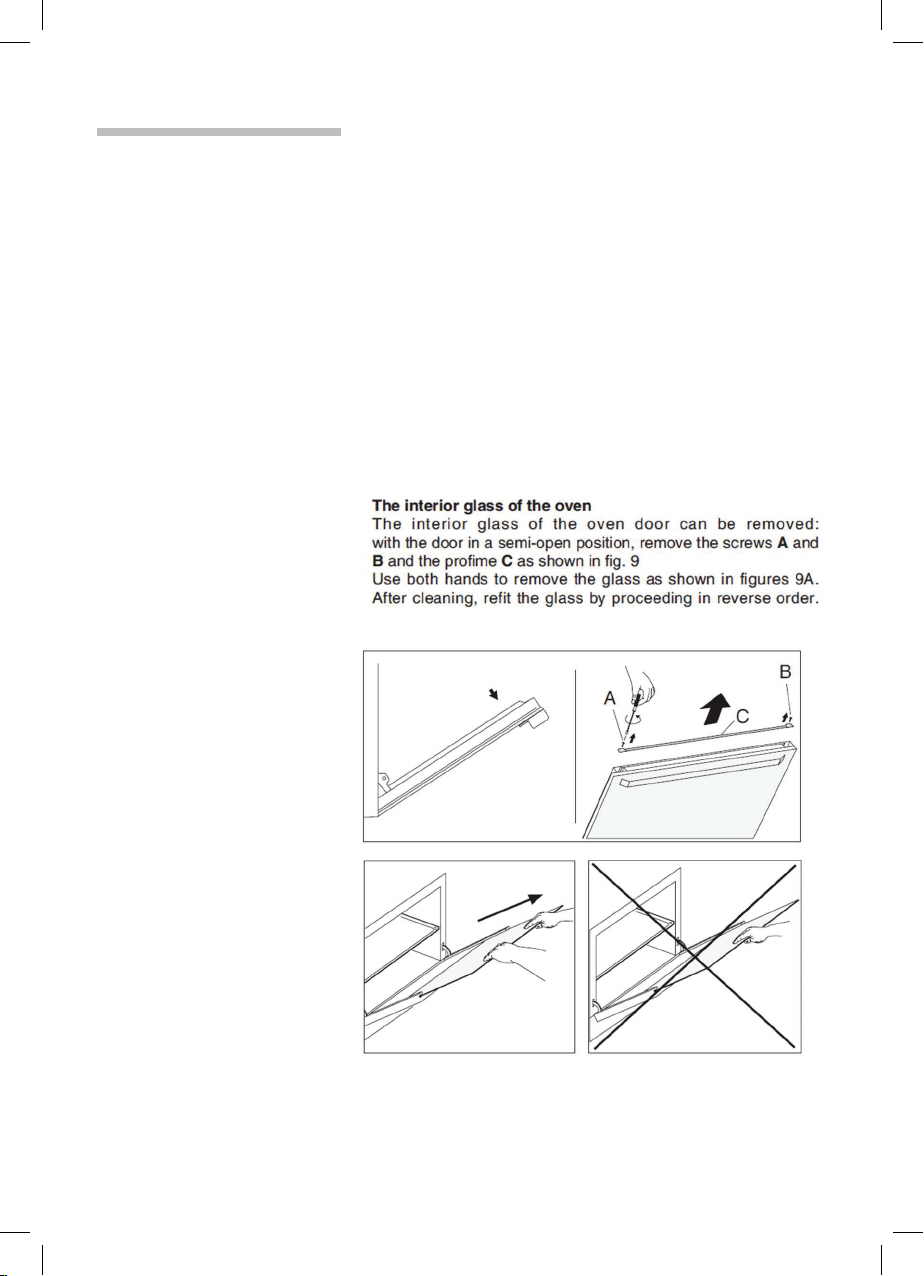
Cleaning the interior glass of the oven
The interior glass of the oven door can be removed:
with the door in the semi-open position, use both
hands to remove the glass .After cleaning, refit the
the glass by proseeding in reverse order.
Note
In some models, the glass is screenprinted.
In this case, when refitting the glass make sure the
screenprinted part is legible when the oven door
is opened.
Fig 9
Fig 9A
36
Removing and fitting the appliance door
You can remove the appliance door for easier
cleaning.
T
he hinges of the appliance door are each secured
by a l
ocking lever.
When the locking lever is folded in (A), the appliance
d
o
o
r i
s secured. It cannot be unhinged.
If the locking lever is open (B), only the hinge is
secured,
and you can remove the appliance door.
Risk of injury.
Do not reach inside the hinge.
Removing the appliance
d
o
o
r
Pro
ceed
as follows:
1. Open the appliance door.
2.
Lift up the locking levers on both sides.
3.
Close the appliance door until you feel resistance
at an angle of around 15° (in relation to the closed
applianc
e door).
4.
Grip the door on either side with both hands.
5.
Close the appliance door a little further.
6. Lift the door upwards and at an angle to remove it.
Do not disassemble the door.
37
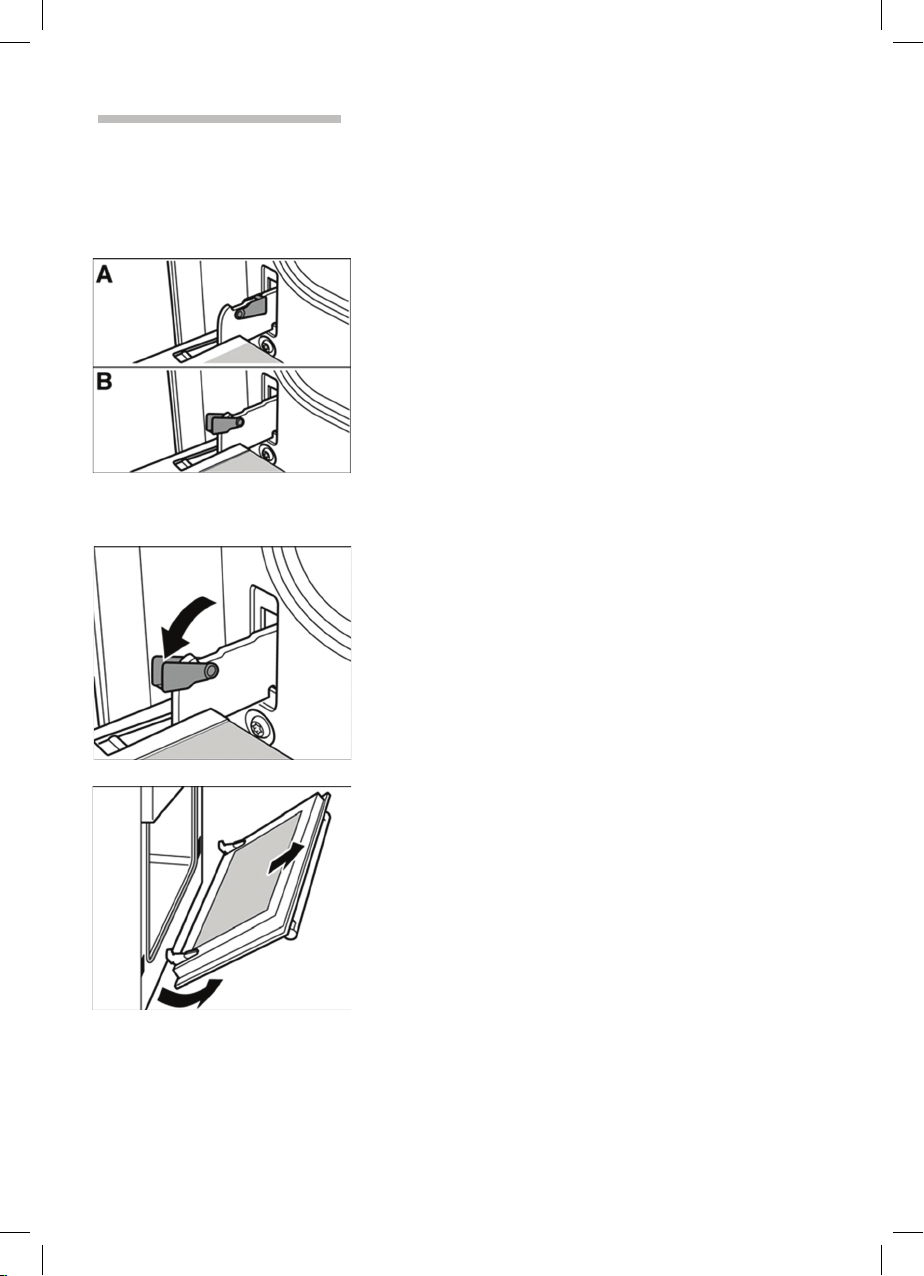
Cleaning the interior glass of the oven
The interior glass of the oven door can be removed:
with t
he door in the semi-open position, use both
hands
to remove the glass .After cleaning, refit the
the glass by proseeding in reverse order.
Note
I
n some models, the glass is screenprinted.
In this case, when refitting the glass make sure the
screenprinted part is legible when the oven door
is opened.
Fi
g 9
Fig 9A
36
Removing and fitting the appliance door
You can remove the appliance door for easier
cleaning.
The hinges of the appliance door are each secured
by a locking lever.
When the locking lever is folded in (A), the appliance
d
o
o
r
is secured. It cannot be unhinged.
If the locking lever is open (B), only the hinge is
secured, and you can remove the appliance door.
Risk of injury.
Do not reach inside the hinge.
Removing the appliance
d
o
o
r
Pro
ceed as follows:
1. Open the appliance door.
2.
Lift up the locking levers on both sides.
3.
Close the appliance door until you feel resistance
at an angle of around 15° (in relation to the closed
applianc
e door).
4.
Grip the door on either side with both hands.
5.
Close the appliance door a little further.
6. Lift the door upwards and at an angle to remove it.
Do not disassemble the door.
37

Fitting the appliance door Proceed as follows:
1.
Hold the appliance door at an angle.
2.
Insert both hinges, left and right, into the supports.
3. Position the door so that the hinge grooves
e
n
g
a
g
e on both sides.
4.
Open the appliance door.
5.
Fold in the locking levers on both sides.
6.
C
l
o
s
e
the appliance door.
38
Removing and inserting the hook-in racks
You can remove the hook-in racks in order to clean
them separately.
The hook-in racks are all fixed to the walls of the
cooking compartment at four points.
Removing the hook-in
racks
To remove the hook-in racks, proceed as follows:
1.
Undo the screw on the bottom the hookin rack.
The lower hooks of the hook
-
in rack are released.
2.
Take hold of the top of the hook-in rack and screw
on the screw on the bottom the hook-in rack again.
I
n
s
e
rting the hook-in rack To reinsert the hook-in racks, proceed as follows:
1.
Insert the upper hooks into the drill holes in the
side panel.
2.
Pull the hook-in rack slightly downwards and insert
the lower hooks into the drill holes.
39
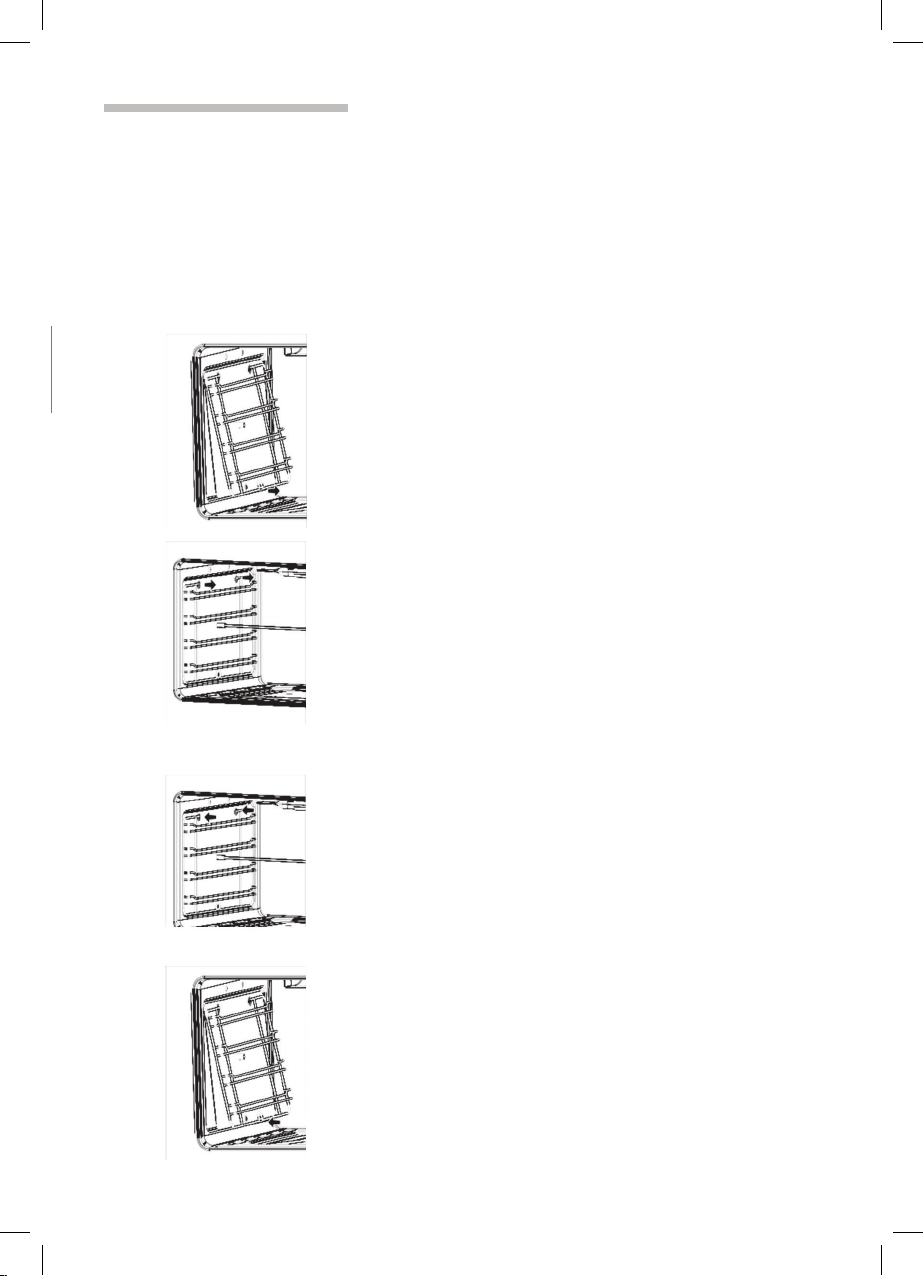
Fitting the appliance door Proceed as follows:
1.
Hold the appliance door at an angle.
2.
Insert both hinges, left and right, into the supports.
3. Position the door so that the hinge grooves
e
n
g
a
g
e on both sides.
4.
Open the appliance door.
5.
Fold in the locking levers on both sides.
6.
C
l
o
s
e
the appliance door.
38
Removing and inserting the hook-in racks
You can remove the hook-in racks in order to clean
them separately.
The hook-in racks are all fixed to the walls of the
cooking compartment at four points.
Removing the hook-in
racks
To remove the hook-in racks, proceed as follows:
1.
Undo the screw on the bottom the hookin rack.
The lower hooks of the hook
-
in rack are released.
2.
Take hold of the top of the hook-in rack and screw
on the screw on the bottom the hook-in rack again.
I
n
s
e
r
ting the hook-in rack To reinsert the hook-in racks, proceed as follows:
1.
Insert the upper hooks into the drill holes in the
side panel.
2.
Pull the hook-in rack slightly downwards and insert
the lower hooks into the drill holes.
39

Faul
t
s
and
the after-sales service
Malfunctions often have simple explanations.
Please read the following notes before calling the
aftersales service.
Fault Possible cause Remedial action
T
h
e
d
oor panel steams up when
the oven is hot.
N
o
r
m
a
l occurrence;
caused by the
difference in
temperature.
N
o
t
p
ossible; this has no
effect on oven performance.
.
The appliance does not work. Defective circuit
breaker
Look in the fuse box and
check that the circuit breaker
for the appliance is in
working order.
All dishes that are prepared in
the oven become burnt very
quickly.
P
o
w
e
r
cut Check whether the kitchen
light works, for example.
Thermostat faulty Call the after-sales service.
The oven lighting has failed. Oven light is faulty Replace the oven light.
(see section "Replacing
oven light")
R
e
p
a
i
rs may only be carried out by fully trained after-
sales service engineers.
If your appliance is not repaired professionally, you
may be exposing yourself to substantial risks.
40
Replacing the oven light bulb
WARNING: Ensure that the appliance is switched
off before replacing the lamp to avoid the
possibility of electric shock
If the oven light bulb fails, it must be replaced.
Replacement heat-resistant bulbs can be obtained
f
ro
m
t
h
e after-sales service or from specialist
retailers. Please specify the SN number
of your appliance. Do not use any other type
of bulb.
Proceed as follows:
1.
Switch off the relevant circuit breaker.
2.
Open the appliance door.
3.
Lay a tea towel in the cooking compartment if it is
cold to prevent damage.
4.
Unscrew the glass cover from the bulb inside the
cooking compartment by turning it anti-clockwise.
5.
Replace the bulb with one of the same type.
Voltage: 230 V
Power: 25 W
Thread: E14
Temperature resistance: 300°C
6.
Screw on the glass cover again.
7.
Remove the tea towel and switch the circuit
breaker back on.
Turn the oven switch or your control panel in
position
in order to check whether the
oven lighting is working properly.
41
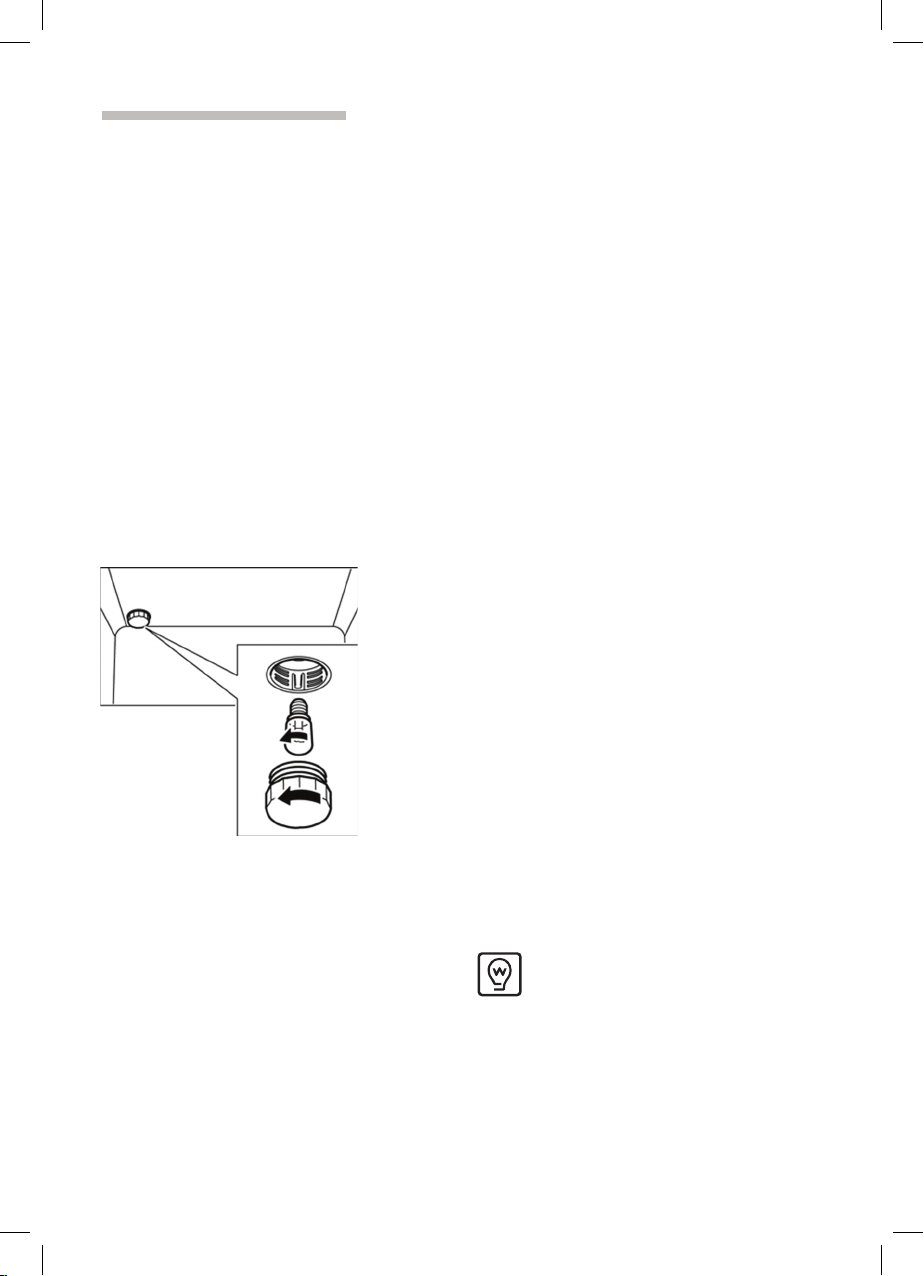
Faul
t
s
and
the after-sales service
Malfunctions often have simple explanations.
Please read the following notes before calling the
aftersales service.
Fault Possible cause Remedial action
T
h
e
d
oor panel steams up when
the oven is hot.
N
o
r
m
a
l occurrence;
caused by the
difference in
temperature.
N
o
t
p
ossible; this has no
effect on oven performance.
.
The appliance does not work. Defective circuit
breaker
Look in the fuse box and
check that the circuit breaker
for the appliance is in
working order.
All dishes that are prepared in
the oven become burnt very
quickly.
P
o
w
e
r
cut Check whether the kitchen
light works, for example.
Thermostat faulty Call the after-sales service.
The oven lighting has failed. Oven light is faulty Replace the oven light.
(see section "Replacing
oven light")
R
e
p
a
i
rs may only be carried out by fully trained after-
sales service engineers.
If your appliance is not repaired professionally, you
may be exposing yourself to substantial risks.
40
Replacing the oven light bulb
WARNING: Ensure that the appliance is switched
off before replacing the lamp to avoid the
possibility of electric shock
If the oven light bulb fails, it must be replaced.
Replacement heat-resistant bulbs can be obtained
f
ro
m
t
h
e after-sales service or from specialist
retailers. Please specify the SN number
of your appliance. Do not use any other type
of bulb.
Proceed as follows:
1.
Switch off the relevant circuit breaker.
2.
Open the appliance door.
3.
Lay a tea towel in the cooking compartment if it is
cold to prevent damage.
4.
Unscrew the glass cover from the bulb inside the
cooking compartment by turning it anti-clockwise.
5.
Replace the bulb with one of the same type.
Voltage: 230 V
Power: 25 W
Thread: E14
Temperature resistance: 300°C
6.
Screw on the glass cover again.
7.
Remove the tea towel and switch the circuit
breaker back on.
Turn the oven switch or your control panel in
position
in order to check whether the
oven lighting is working properly.
41

Aftersales service
Our after-sales service is there for you if your
appliance needs to be repaired. You will find the
address and telephone number of your nearest after-
s
a
l
e
s
service centre in the phone book. The after-
sales service centres listed will also be happy to give
you the details of an after-sales service point near
you.
Please quote the SN number of the appliance when
contacting the after-sales service. These numbers
can be found on the rear backboard.
So you do not have to spend time looking for it if
there is a fault, you can enter the data for your
appliance here now.
SN
n
o
.
After-sales service
SN number
42
T
i
p
s
and tricks
The following are tips and tricks to help you when
cooking food in your appliance.
Tips for saving energy
Here are a few tips for saving energy when using
the
hob and oven.
Tips on using the hob
Suitable cookware
diameter
Make sure that the diameter of the cookware is
suitable for the diameter of whichever hotplate
you
are using.
You can find an overview of suitable diameters in
the
section entitled “Your new appliance - the
hob”. The flame of the gas burner must not be
larger than
the diameter of the cookware.
Cookware with lids Use cookware with a flat bottom.
If possible, use cookware with lids to save gas.
Less water
To reduce the cooking time for e.g. vegetables
and
potatoes, use less water.
Tips on using the oven
Several cakes
It is best to bake several cakes one after the other.
The oven is still warm. This reduces the baking
time
for the second cake. You can also place two
cake tins
next to each other.
Using residual heat Where longer cooking times are used, you can switch
the oven off 10 minutes before the end of the cooking
time and use the residual heat to finish cooking.
Closing the appliance door Always keep the appliance door closed when it is in
operation. If you need to open the appliance door,
close it again as soon as possible. Otherwise, the
temperature will drop and the oven will need to
heat
itself up again.
43

Aftersales service
Our after-sales service is there for you if your
appliance needs to be repaired. You will find the
address and telephone number of your nearest after-
s
a
l
e
s
service centre in the phone book. The after-
sales service centres listed will also be happy to give
you the details of an after-sales service point near
you.
Please quote the SN number of the appliance when
contacting the after-sales service. These numbers
can be found on the rear backboard.
So you do not have to spend time looking for it if
there is a fault, you can enter the data for your
appliance here now.
SN
n
o
.
After-sales service
SN number
42
T
i
p
s
and tricks
The following are tips and tricks to help you when
cooking food in your appliance.
Tips for saving energy
Here are a few tips for saving energy when using
the
hob and oven.
Tips on using the hob
Suitable cookware
diameter
Make sure that the diameter of the cookware is
suitable for the diameter of whichever hotplate
you
are using.
You can find an overview of suitable diameters in
the
section entitled “Your new appliance - the
hob”. The flame of the gas burner must not be
larger than
the diameter of the cookware.
Cookware with lids Use cookware with a flat bottom.
If possible, use cookware with lids to save gas.
Less water
To reduce the cooking time for e.g. vegetables
and
potatoes, use less water.
Tips on using the oven
Several cakes
It is best to bake several cakes one after the other.
The oven is still warm. This reduces the baking
time
for the second cake. You can also place two
cake tins
next to each other.
Using residual heat Where longer cooking times are used, you can switch
the oven off 10 minutes before the end of the cooking
time and use the residual heat to finish cooking.
Closing the appliance door Always keep the appliance door closed when it is in
operation. If you need to open the appliance door,
close it again as soon as possible. Otherwise, the
temperature will drop and the oven will need to
heat
itself up again.
43

T
i
p
s
for using your appliance
The following tips relate to ovenware and cooking
and explain what to do if something goes wrong.
General tips Since a lower temperature allows more even
browning.
Clean the appliance and accessories after each
use,
once they have cooled down.
Always place baking tins or ovenware in the centre
of
the wire rack.
Always place cookware in the middle of the
hotplate
on the hob.
Boiling and frying
Cookware For dishes which require a lot of liquid, use deep-
sided pots so that they do not boil over.
The pan base must be clean, dry and flat.
44
B
a
k
i
ng tips
How to confirm whether your
sponge cake is cooked
through.
Approximately 10 minutes before the end of the
baking time stated in the recipe, pierce the highest
point of the cake with a wooden skewer. If no cake
mixture sticks to the wood, the cake is ready.
The cake collapses.
Next time, use less liquid or bake at a slightly lower
temperature. Note the stirring times indicated in the
recipe.
The cake has risen high in the
middle and less around the
edges.
The cake is too dark on the
top.
D
o
n
ot grease the edges of the baking tin. After
baking, carefully loosen the cake using a knife.
Place the cake lower in the oven and bake at a lower
temperature for slightly longer.
The cake is too dry.
Make tiny holes in the finished cake using a cocktail
stick. Then pour fruit juice or an alcoholic drink over
the cake. Next time, bake at a slightly higher
temperature for less time.
The bread or cake looks good
but it is streaked with water
inside.
The pastries are not evenly
browned.
Next time, use less liquid and bake at a lower
temperature for slightly longer. For cakes with a moist
topping: Pre-bake the base first. Sprinkle the base
with almonds and breadcrumbs and then pour the
topping on. Take care to follow recipes and baking
times.
Set the temperature slightly lower. Excess
greaseproof paper can affect the air circulation.
Always cut the greaseproof paper down to the size of
the baking tray.
Tips on using the rotary
spit
Place the joint as centrally as possible on the rotary
spit and secure it at both ends with the retaining clips.
You can also truss the joint with string. With
poultry,
bind the ends of the wings underneath the
back and
the thighs against the body. This will
prevent them
from becoming too dark.
Pierce the skin on the underside of the wings to
allow
the fat to escape.
45

T
i
p
s
for using your appliance
The following tips relate to ovenware and cooking
and explain what to do if something goes wrong.
General tips Since a lower temperature allows more even
browning.
Clean the appliance and accessories after each
use,
once they have cooled down.
Always place baking tins or ovenware in the centre
of
the wire rack.
Always place cookware in the middle of the
hotplate
on the hob.
Boiling and frying
Cookware For dishes which require a lot of liquid, use deep-
sided pots so that they do not boil over.
The pan base must be clean, dry and flat.
44
B
a
k
i
ng tips
How to confirm whether your
sponge cake is cooked
through.
Approximately 10 minutes before the end of the
baking time stated in the recipe, pierce the highest
point of the cake with a wooden skewer. If no cake
mixture sticks to the wood, the cake is ready.
The cake collapses.
Next time, use less liquid or bake at a slightly lower
temperature. Note the stirring times indicated in the
recipe.
The cake has risen high in the
middle and less around the
edges.
The cake is too dark on the
top.
D
o
n
ot grease the edges of the baking tin. After
baking, carefully loosen the cake using a knife.
Place the cake lower in the oven and bake at a lower
temperature for slightly longer.
The cake is too dry.
Make tiny holes in the finished cake using a cocktail
stick. Then pour fruit juice or an alcoholic drink over
the cake. Next time, bake at a slightly higher
temperature for less time.
The bread or cake looks good
but it is streaked with water
inside.
The pastries are not evenly
browned.
Next time, use less liquid and bake at a lower
temperature for slightly longer. For cakes with a moist
topping: Pre-bake the base first. Sprinkle the base
with almonds and breadcrumbs and then pour the
topping on. Take care to follow recipes and baking
times.
Set the temperature slightly lower. Excess
greaseproof paper can affect the air circulation.
Always cut the greaseproof paper down to the size of
the baking tray.
Tips on using the rotary
spit
Place the joint as centrally as possible on the rotary
spit and secure it at both ends with the retaining clips.
You can also truss the joint with string. With
poultry,
bind the ends of the wings underneath the
back and
the thighs against the body. This will
prevent them
from becoming too dark.
Pierce the skin on the underside of the wings to
allow
the fat to escape.
45
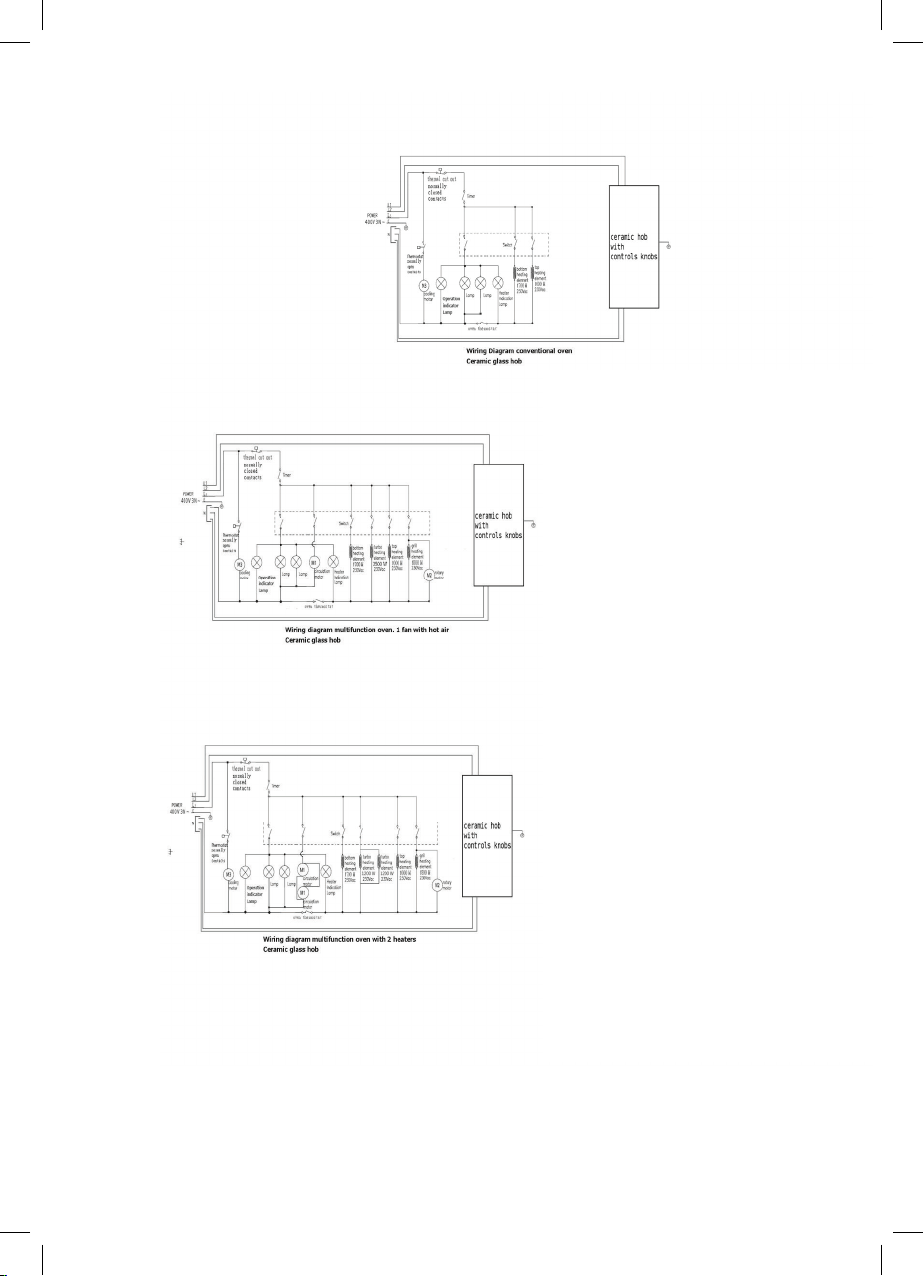
46

46

Warranty terms and conditions:
Cooking appliances (cookers)
This document sets out the terms and conditions of the
product warranties for Residentia Group Appliances. It is
an important document. Please keep it with your proof of
purchase documents in a safe place for future reference
should you require service for your Appliance.
1. In this warranty
(a) ‘acceptable quality’ as referred to in clause
10 of this warranty has the same meaning
referred to in the ACL;
(b) ‘ACL’ means Trade Practices Amendment
(Australian Consumer Law) Act (No.2) 2010;
(c) ‘Appliance’ means any Residentia Group
product purchased by you accompanied by
this document;
(d) ‘ASR’ means Residentia Group authorised
service representative;
(e) ‘Residentia Group’ means Residentia Group
Pty Ltd of 20 Yaltara Avenue, Bundoora
Victoria 3083, ACN 600 546 656 in respect
of Appliances purchased in Australia;
(f) ‘major failure’ as referred to in clause 10 of
this warranty has the same meaning referred
to in the ACL and includes a situation when
an Appliance cannot be repaired or it is
uneconomic for Residentia Group, at its
discretion, to repair an Appliance during the
Warranty Period;
(g) ‘Warranty Period’ means:
(i) where the Appliance is used for
personal, domestic or household
use (i.e. normal single family
use) as set out in the instruction
manual, the Appliance is warranted
against manufacturing defects for
24 months, following the date of
original purchase of the Appliance;
(h) ‘you’ means the purchaser of the Appliance
not having purchased the Appliance for re-
sale, and ‘your’ has a corresponding meaning.
2. This warranty only applies to Appliances purchased
and used in Australia and is in addition to (and does
not exclude, restrict, or modify in any way) any non-
excludable statutory warranties in Australia.
3. During the Warranty Period Residentia Group or
its ASR will, at no extra charge if your Appliance
is readily accessible for service, without special
equipment and subject to these terms and
conditions, repair or replace any parts which it
considers to be defective. Residentia Group or its
ASR may use remanufactured parts to repair your
Appliance. You agree that any replaced Appliances
or parts become the property of Residentia Group.
This warranty does not apply to light globes,
batteries, filters or similar perishable parts.
4. Parts and Appliances not supplied by Residentia
Group are not covered by this warranty.
Warranty
\

5. You will bear the cost of transportation, travel and
delivery of the Appliance to and from Residentia
Group or its ASR. If you reside outside of the
service area, you will bear the cost of:
(a) travel of an authorised representative;
(b) transportation and delivery of the Appliance
to and from Residentia Group or its ASR, in all
instances, unless the Appliance is transported
by Residentia Group or its ASR, the Appliance
is transported at the owner’s cost and risk
while in transit to and from Residentia Group
or its ASR.
6. Proof of purchase is required before you can make
a claim under this warranty.
7. You may not make a claim under this warranty
unless the defect claimed is due to faulty or
defective parts or workmanship. Residentia Group
is not liable in the following situations (which are
not exhaustive):
(a) the Appliance is damaged by:
(i) accident
(ii) misuse or abuse, including failure to
properly maintain or service
(iii) normal wear and tear
(iv) power surges, electrical storm
damage or incorrect power supply
(v) incomplete or improper installation
(vi) incorrect, improper or inappropriate
operation
(vii) insect or vermin infestation
(viii) failure to comply with any additional
instructions supplied with the
Appliance;
(b) the Appliance is modified without authority
from Residentia Group in writing;
(c) the Appliance’s serial number or warranty seal
has been removed or defaced;
(d) the Appliance was serviced or repaired by
anyone other than Residentia Group, an
authorised repairer or ASR.
8. This warranty, the contract to which it relates and
the relationship between you and Residentia Group
are governed by the law applicable where the
Appliance was purchased.
9. To the extent permitted by law, Residentia Group
excludes all warranties and liabilities (other than
as contained in this document) including liability
for any loss or damage whether direct or indirect
arising from your purchase, use or non use of the
Appliance.
10. For Appliances and services provided by
Residentia Group in Australia, the Appliances come
with a guarantee by Residentia Group that cannot
be excluded under the Australian Consumer Law.
You are entitled to a replacement or refund for a
major failure and for compensation for any other
reasonably foreseeable loss or damage. You are
also entitled to have the Appliance repaired or
replaced if the Appliance fails to be of acceptable
quality and the failure does not amount to a major
failure. The benefits to you given by this warranty
are in addition to your other rights and remedies
under a law in relation to the Appliances or services
to which the warranty relates.
11. At all times during the Warranty Period, Residentia
Group shall, at its discretion, determine whether
repair, replacement or refund will apply if an
Appliance has a valid warranty claim applicable to
it.
12. To enquire about claiming under this warranty,
please follow these steps:
(a) carefully check the operating instructions,
user manual and the terms of this warranty;
(b) have the model and serial number of the
Appliance available;
(c) have the proof of purchase (e.g. an invoice)
available;
(d) telephone the numbers shown below.
13. You accept that if you make a warranty claim,
Residentia Group and its ASR may exchange
information in relation to you to enable Residentia
Group to meet its obligations under this warranty.
Our goods come with guarantees that cannot be excluded under the
Australian Consumer Law. You are entitled to a replacement or refund for
a major failure and for compensation for any other reasonably foreseeable
loss or damage. You are also entitled to have the goods repaired or replaced
if the goods fail to be of acceptable quality and the failure does not amount
to a major failure.
Telephone contacts
► Service: Please call 1300 11 HELP (4357)
► Spare Parts: Please call 1300 11 SPARE (7727)
The Australian Consumer Law requires the inclusion of the following
statement with this warranty:
IMPORTANT
Before calling for service, please ensure that the steps
in point 12 have been followed.


Purchase Details
\
For your records, please record details of your purchase below and staple your
receipt on the opposite page.
Store details
Store name
|
Address
|
Telephone
|
Purchase date
|
Product details
Model no.
|
Serial no.
|
Model Code
\
RU9EEB