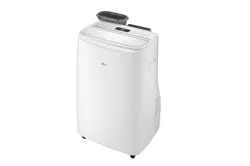
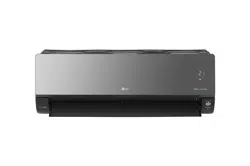
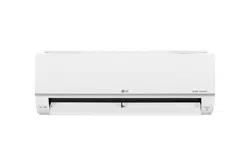
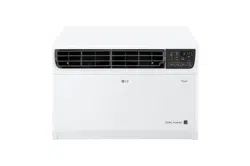
Do not over-cool the space. This may be harmful for your health and may consume more electricity.
Block sunlight with blinds or curtains while you are operating the air conditioner.
Keep doors or windows closed tightly while you are operating the air conditioner.
Adjust the direction of the air flow vertically or horizontally to circulate indoor air.
Speed up the fan to cool or warm indoor air quickly, within a short period of time.
Open windows regularly for ventilation. The indoor air quality may deteriorate if the air conditioner is used for long durations.
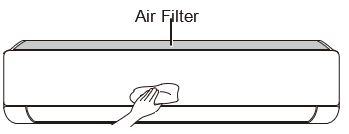
Clean the air filter once every 2 weeks. Dust and impurities collected in the air filter may block the air flow or reduce the unit performance.
Parts and Functions
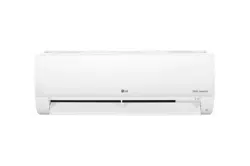
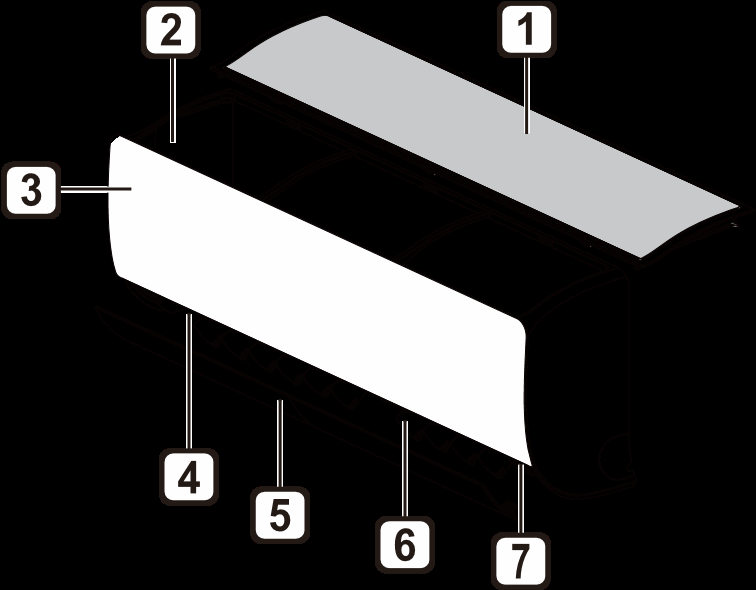
Indoor Unit
Air FilterAir Intake Vents
Air IntakeAir Outlet Vents
Front Cover
Air Outlet
Air Deflector (Horizontal Vane)
Air Deflector (Vertical Louver)
On/Off Button
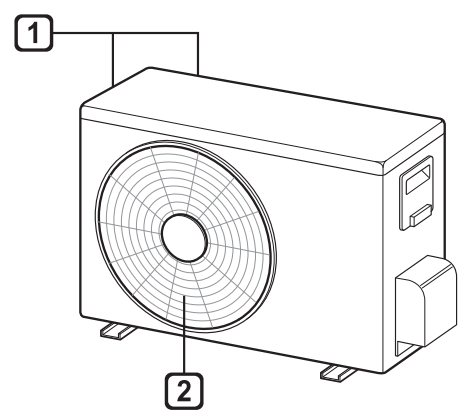
Outdoor Unit
Air Intake Vents
Air Outlet Vents
NOTE
The number and location of operation lamps may vary according to the model of the air conditioner.
The feature may be changed according to the type of model.
Wireless Remote Control
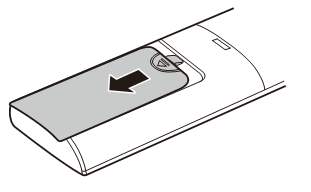
Inserting Batteries
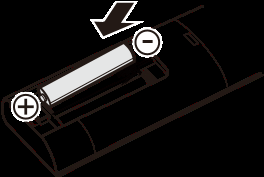
If the display screen of the remote control begins to fade, replace the batteries. Insert AAA (1.5 V) batteries before using the remote control.
1. Remove the battery cover.
2. Insert the new batteries and make sure that the + and - terminals of the batteries are installed correctly.
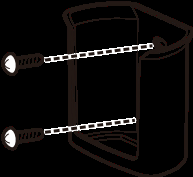
Installing the Remote Control Holder
To protect the remote control, install the holder where there is no direct sunlight.
Choose a safe and easily accessible location.
Fix the holder by fastening 2 screws firmly with a screwdriver.
Operating Method
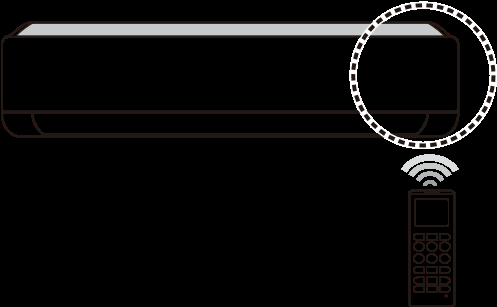
Point the remote control towards the signal receiver at the right side of the air conditioner to operate it
NOTE
The remote control may operate other electronic devices if it is directed towards them. Make sure to point the remote control towards the air conditioner signal receiver.
For proper operation, use a soft cloth to clean the signal transmitter and receiver.
In case of a function not provided in the product, no buzzer sound occurs from the product when a button for such function on the remote control is pressed except for Air Flow Direction ( ),
Energy Display ( ), Air Purification function ( ).
Setting the Current Time
Insert batteries.
The icon below blinks at the bottom of the display screen.
Press or button to select the minutes.
Press SET/CANCEL button to finish.
NOTE
• The On/Off Timer is available after setting the current time.
Using the °C/°F Conversion Function (Optional)
This function changes unit between °C and °F
• Press and hold button about 5 seconds.
Operating the Air Conditioner without the Remote Control
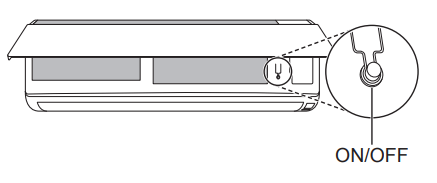
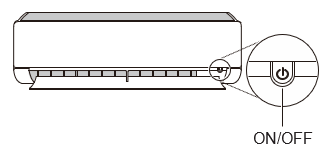
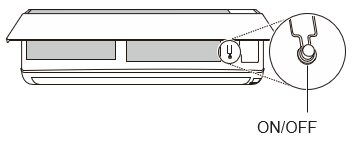
You can use the ON/OFF button of the indoor unit to operate the air conditioner when the remote control is unavailable.
1. Open the front cover (Type2) or horizontal vane (Type1).
2. Press the ON/OFF button.
Type1
Type2
NOTE
The stepping motor may be broken, if the horizontal vane opens rapidly.
The fan speed is set to high.
The feature may be changed according to the type of model.
The temperature cannot be altered when using this emergency ON/OFF button.
For cooling & heating models, the temperature is set from 22 °C to 24 °C
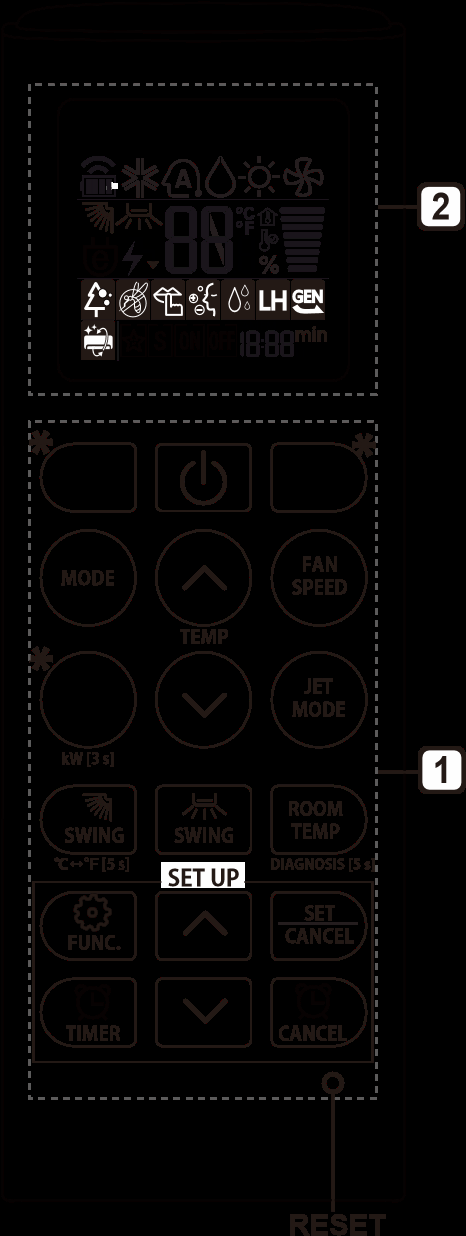
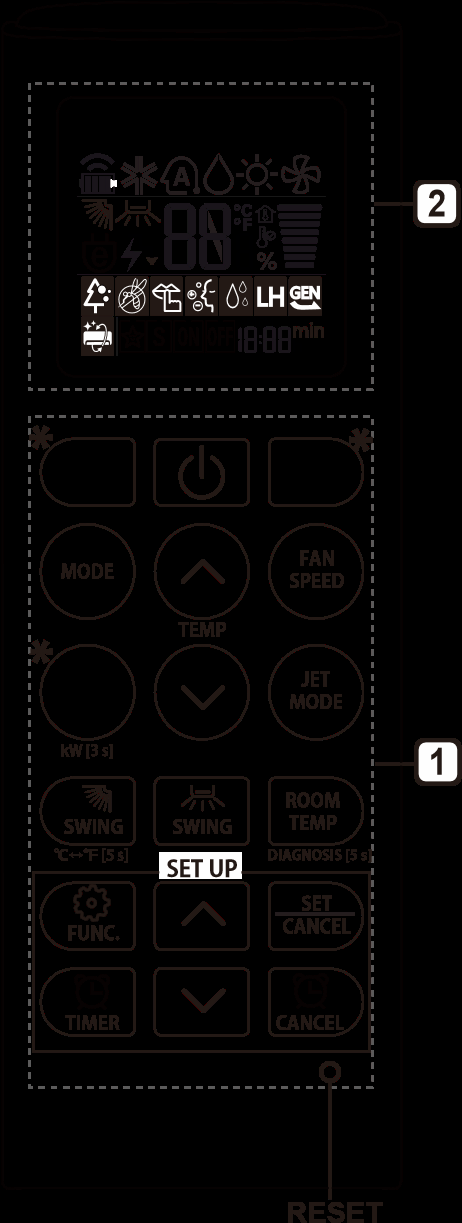
Using Wireless Remote Control
You can operate the air conditioner more conveniently with the remote control.
Button
DisplayScreen
Description
Available Function
Single Split
Multi
-
To turn on/off the air conditioner.
O
O
To adjust the desired room temperature in cooling, heating or auto changeover mode.
O
O
MODE
To select the cooling mode.
O
O
To select the heating mode.
O
O
To select the dehumidification mode.
O
O
To select the fan mode.
O
O
To select the auto changeover/auto operation mode.
O
O
JET
MODE
To change room temperature quickly.
O
O
FAN
SPEED
To adjust the fan speed.
O
O
To adjust the air flow direction vertically or horizontally.
O
O
NOTE
* buttons may be changed according to the type of model.
When connected to the Multi Outdoor unit, the Energy Display, Energy Control, Silent and Smart Diagnosis function may not be supported.
Button
Display Screen
Description
Available Function
Single Split
Multi
To turn on/off air conditioner automatically at desired time.
O
O
SET/
CANCEL
-
To set/cancel the special functions and timer.
O
O
-
To cancel the timer settings.
O
O
-
To adjust time.
O
O
*LIGHT OFF
-
To set the brightness of the display on the indoor unit.
O
O
ROOM TEMP
To display the room temperature.
O
O
°C↔°F
[5 s]
To change unit between °C and °F
O
O
*ENERGY SAVING
To minimize power consumption.
O
O
*COMFORT AIR
To adjust the air flow to deflect wind.
O
O
kW
[3 s]
-
To set whether or not to display information regarding energy.
O
X
*ENERGY CTRL
To bring the effect of the power saving.
X
X
*COMFORT SLEEP
To make a comfortable sleeping environment.
O
X
DIAGNOSIS
[5 s]
-
To conveniently check maintenance information of a product.
O
X
Button
Display
Screen
Description
Available Function
Single Split
Multi
The Ion generator uses millions of ions to help improve indoor air quality.
X
X
To reduce noise from outdoor units.
X
X
To keep your skin moisturized by generating ion clusters.
X
X
To lower indoor humidity quickly.
X
X
To maintain a minimum room temperature and prevent objects in the room from freezing.
O
(Optional)
X
To scare away a mosquito.
X
X
To remove moisture generated inside the indoor unit.
O
O
To make a comfortable sleeping environment.
X
X
RESET
-
To initialize the remote control settings.
O
O
NOTE
Some functions may not be supported, depending on the model.
* buttons may be changed according to the type of model.
Press the SET/CANCEL button to operate the selected FUNC.
Restarting the Air Conditioner Automatically
When the air conditioner is turned on again after a power failure, this function restores the previous settings.
Disabling Auto Restart
Open the front cover (Type2) or horizontal vane (Type1).
Press the ON/OFF button and hold it for 6 seconds, then the unit will beep twice and the lamp will blink twice 4 times.
• To re-enable the function, press the ON/OFF button and hold it for 6 seconds. The unit will beep twice and the lamp will blink 4 times.
Type1
Type2
NOTE
The feature may be changed according to the type of model.
If you press and hold the ON/OFF button for 3 – 5 seconds, instead of 6 seconds, the unit will switch to the test operation. In the test operation, the unit blows out strong cooling air for 18 minutes and then returns to factory default settings.
Using the Mode Function
This function allows you to select the desired function
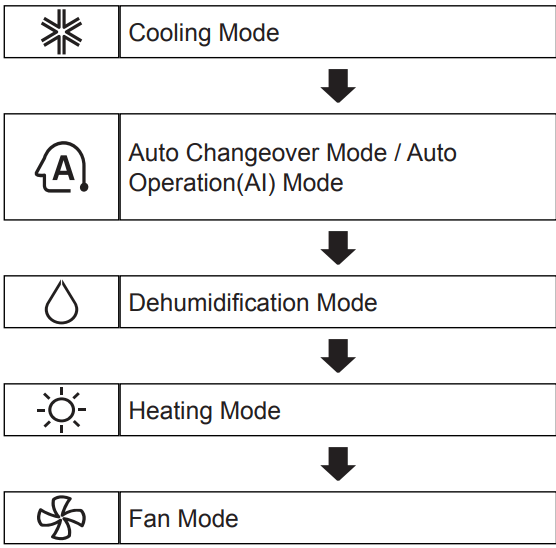
Cooling Mode
Turn the appliance on.
Press MODE button repeatedly to select the Cooling Mode.
is displayed on the display screen.
Press or button to set the desired temperature.
Auto Operation (Artificial Intelligence)
Multi Model
In this operation mode, the system is automatically operated by the electronic controls. 1 Turn the appliance on.
Press MODE button repeatedly to select the Auto Operation.
is displayed on the display screen.
Press or button to set the desired temperature.
Press FAN SPEED button to adjust the fan speed.
Auto Changeover Mode
Single Split Model
This mode changes the mode automatically to maintain the set temperature at ±2 °C
Turn the appliance on.
Press MODE button repeatedly to select the Auto Changeover Mode.
is displayed on the display screen.
Press or button to set the desired temperature.
Press FAN SPEED button to adjust the fan speed.
Dehumidification Mode
This mode removes excess moisture from a highly humid environment or during the rainy season, in order to prevent mildew from setting in. This mode adjusts the room temperature and the fan speed automatically to maintain the optimal level of humidity.
Turn the appliance on.
Press MODE button repeatedly to select the Dehumidification Mode.
• is displayed on the display screen.
NOTE
In this mode you cannot adjust the room temperature, it is adjusted automatically.
The room temperature is not displayed on the display screen.
Heating Mode
1. Turn the appliance on.
2. Press MODE button repeatedly to select the Heating Mode
is displayed on the display screen.
3. Press or button to set the desired temperature.
NOTE
will be displayed on the indoor unit when defrosting is operating.
Furthermore, this indication will be displayed on the indoor unit:
− When preheating is operating.
− When the room temperature has been reached to the set temperature.
Fan Mode
This mode only circulates the indoor air without changing the room temperature.
Turn the appliance on.
1. Turn the appliance on.
2. Press MODE button repeatedly to select the Fan Mode.
is displayed on the display screen.
3. Press FAN SPEED button to adjust the fan speed.
Using the Jet Mode Function
Changing Room Temperature Quickly
This function allows you to cool indoor air quickly during the summer or warm it quickly during winter.
• The Jet Mode function is available with Cooling, Heating and Dehumidification Mode.
Turn the appliance on.
Press MODE button repeatedly to select the desired mode.
Press JET MODE button.
• is displayed on the display screen.
NOTE
Jet Heating Mode is not available on some models.
In Jet Cooling Mode, strong air blows out for 30 minutes.
After 30 minutes later, setting temperature is maintaining 18 °C
If you want to change the temperature, Press or button to set the desired temperature.
In Jet Heating Mode, strong air blows out for 30 minutes.
After 30 minutes later, setting temperature is maintaining 30 °C
If you want to change the temperature, Press or button to set the desired temperature.
This function may operate differently from the remote control display.
Using the Fan Speed Function
Adjusting the Fan Speed
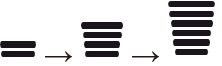
• Press FAN SPEED button repeatedly to adjust the fan speed.
Display Screen
Speed
High
Medium - High
Medium
Medium - Low
Low
-
Natural Wind
NOTE
The fan speed of Natural Wind adjusts automatically.
The fan speed icons are displayed on some indoor units.
Indoor unit display is displayed only 5 seconds and return to the setting temperature on some models.
Using the Air Flow Direction Function
This function adjusts the direction of the air flow vertically (horizontally).
• Press ( ) button repeatedly and select the desired direction.
− Select ( ) to adjust the direction of the air flow automatically.
NOTE
Adjusting the air flow direction horizontally may not be supported, depending on the model.
Adjusting the air deflector arbitrarily may cause product failure.
If you restart the air conditioner, it starts to operate with the previously set direction of air flow, so the air deflector may not match the icon displayed on the remote control. When this occurs, press or button to adjust the direction of the air flow again.
This function may operate differently from the remote control display.
Setting the On/Off Timer
This function sets the air conditioner to turn on/off automatically at desired time. On/Off Timer can be set together.
Setting the On Timer
1. Press button repeatedly.
• The icon below blinks at the bottom of the display screen.
2. Press or button to select the minutes
3. Press SET/CANCEL button to finish.
• After setting the timer, current time and icon are displayed on the display screen indicating that the desired time is set.
Canceling the On Timer
1. Press button repeatedly.
• The icon below blinks at the bottom of the display screen.
2. Press SET/CANCEL button to cancel the setting.
Setting the Off Timer
1. Press button repeatedly.
• The icon below blinks at the bottom of the display screen.
2. Press or button to select the minutes.
3. Press SET/CANCEL button to finish.
• After setting the timer, current time and icon are displayed on the display screen indicating that the desired time is set.
NOTE
• This function is disabled when you set Simple Timer.
Canceling the Off Timer
1. Press button repeatedly.
• The icon below blinks at the bottom of the display screen.
2. Press SET/CANCEL button to cancel the setting.
Canceling the Timer Setting
• Press button to cancel all timer settings.
SMART FUNCTIONS
Using LG ThinQ Application
Things to check before using LG ThinQ
For appliances with the or ThinQ logo 1 Check the distance between the appliance and the wireless router (Wi-Fi network).
If the distance between the appliance and the wireless router is too far, the signal strength becomes weak. It may take a long time to register or installation may fail.
2. Turn off the Mobile data or Cellular Data on your smartphone.
3. Connect your smartphone to the wireless router.
NOTE
To verify the Wi-Fi connection, check that Wi-Fiicon on the control panel is lit.
The appliance supports 2.4 GHz Wi-Fi networks only. To check your network frequency, contact your Internet service provider or refer to your wireless router manual.
LG ThinQ is not responsible for any network connection problems or any faults, malfunctions, or errors caused by network connection.
If the appliance is having trouble connecting to the Wi-Fi network, it may be too far from the router. Purchase a Wi-Fi repeater (range extender) to improve the Wi-Fi signal strength.
The Wi-Fi connection may not connect or may be interrupted because of the home network environment.
The network connection may not work properly depending on the Internet service provider.
The surrounding wireless environment can make the wireless network service run slowly.
The appliance cannot be registered due to problems with the wireless signal transmission. Unplug the appliance and wait about a minute before trying again.
If the firewall on your wireless router is enabled, disable the firewall or add an exception to it.
The wireless network name (SSID) should be a combination of English letters and numbers. (Do not use special characters.)
Smartphone user interface (UI) may vary depending on the mobile operating system (OS) and the manufacturer.
If the security protocol of the router is set to WEP, you may fail to set up the network. Please change it to other security protocols (WPA2 is recommended) and register the product again.
Installing LG ThinQ
Search for the LG ThinQ application from the Google Play Store or Apple App Store on a smart phone. Follow instructions to download and install the application.
Wi-Fi Function
• For appliances with the or ThinQ logo
Communicate with the appliance from a smart phone using the convenient smart features.
Smart Diagnosis™
If you use the Smart Diagnosis function, you will be provided with the useful information such as a correct way of using the appliance based on the pattern of use.
Settings
Allows you to set various options on the appliance and in the application.
NOTE
If you change your wireless router, Internet service provider, or password, delete the registered appliance from the LG ThinQ application and register it again.
The application is subject to change for appliance improvement purposes without notice to users.
Functions may vary by model.
Open Source Software Notice Information
To obtain the source code under GPL, LGPL, MPL, and other open source licenses, that is contained in this product, please visit http://opensource.lge.com.
In addition to the source code, all referred license terms, warranty disclaimers and copyright notices are available for download.
LG Electronics will also provide open source code to you on CD-ROM for a charge covering the cost of performing such distribution (such as the cost of media, shipping, and handling) upon email request to [email protected]. This offer is valid for a period of three years after our last shipment of this product. This offer is valid to anyone in receipt of this information.
Smart Diagnosis™ Using a Smart Phone
• For appliances with the logo
Use this function if you need an accurate diagnosis by an LG Electronics customer information centre when the appliance malfunctions or fails.
Smart Diagnosis™ can not be activated unless the appliance is connected to power. If the appliance is unable to turn on, then troubleshooting must be done without using Smart Diagnosis™.
NOTE
Be sure to keep ambient noise to a minimum or the phone may not correctly receive the buzzer beeps from the indoor unit.
When connected to the Multi Outdoor unit, this function may not be supported.
MAINTENANCE
If the air conditioner will not be used for an extended period of time, dry the air conditioner to maintain it in best condition. Clean the product regularly to maintain optimal performance and to prevent possible breakdown.
Dry the air conditioner in Fan mode for 3 to 4 hours and disconnect the power. There may be internal damage if moisture is left in its components.
Before using the air conditioner again, dry the inner components of the air conditioner in Fan mode for 3 to 4 hours. This will help to remove the odor generated from moisture.
The feature may be changed according to the type of model.
Type
Description
Interval
Air filter
Clean with a vacuum or hand wash.
2 weeks
Triple filter
Clean with a vacuum or brush.
Every 3 months
Micro dust filter
Clean with a vacuum or brush.
Every 6 months
Ionizer (Optional)
Use dry cotton bud to remove any dust.
Every 6 months
Indoor unit
Clean the Indoor unit surface by using a soft, dry cloth.
Regularly
Have a professional clean the condensate drain pan.
Once a year
Have a professional clean the condensate drain pipe.
Every 4 months
Replace the remote control batteries.
Once a year
Outdoor unit
Have a professional clean the heat exchanger coils and the panel vents. (Consult with technician.)
Once a year
Have a professional clean the fan.
Once a year
Have a professional clean the condensate drain pan.
Once a year
Have a professional verify that all the fan assembly is firmly tightened.
Once a year
Clean the electric components with air.
Once a year
NOTE
Never use water that is higher than 40 °C when you clean the filters. It may cause deformation or discoloration.
Never use volatile substances when you clean the filters. They may damage the surface of the product.
Do not wash the Micro dust filter with water, because the filter can be damaged (Optional).
Do not wash the Triple filter with water, because the filter can be damaged (Optional).
Clean the Air Filter
Clean the air filters once every 2 weeks, or more, if necessary.
NOTE
The air filter can be broken when it is bent.
When the air filter is not assembled correctly, dust and other substances can enter into the indoor unit.
Type1
If you look at the indoor unit from above it, can assemble the top filter easily.
1. Turn off the power to the unit.
2. Hold the knobs of the air filter, lift it up slightly.
3. Remove it from the indoor unit.
4. Clean the filter with a vacuum cleaner or with lukewarm water with neutral detergent.
5. Dry the filter in the shade.
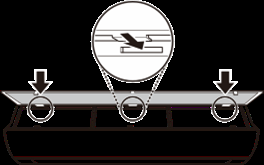
6. Insert the hooks of the air filter into the front cover.
7. Push down hooks to assemble the air filter.
8. Check the side of the front cover for correct assembly of the air filter.
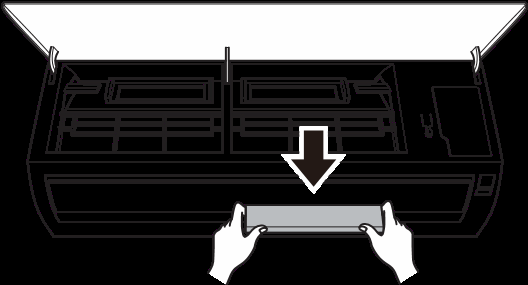
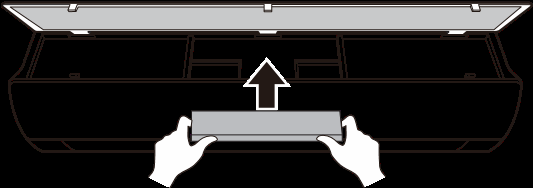
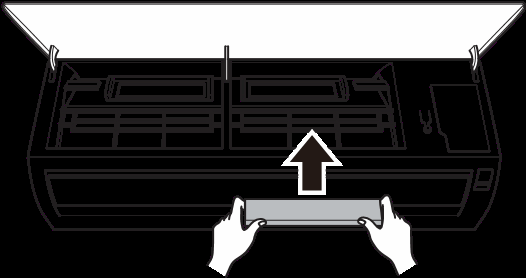
Type2
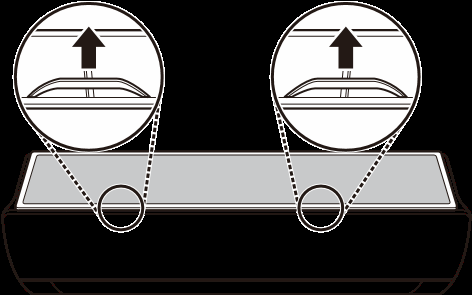
1. Turn off the power to the unit.
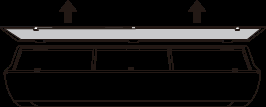
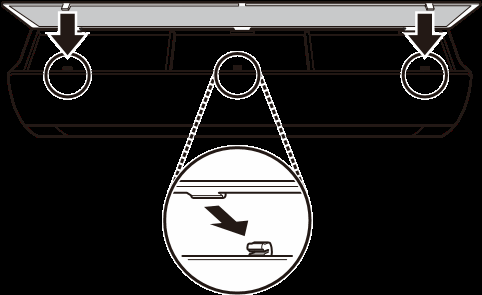
2. Open the front cover.
• Lift up both sides of the cover slightly.
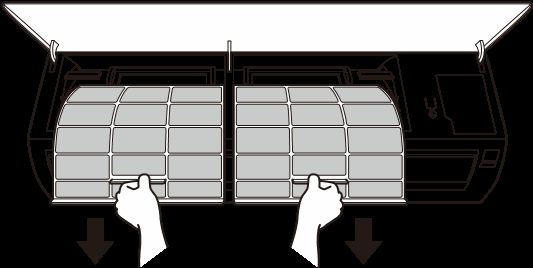
3. Hold the knobs of the air filters, pull them down slightly and remove them from the indoor unit.
4. Clean the filters with a vacuum cleaner or with lukewarm water with neutral detergent.
5. Dry the filters in the shade.
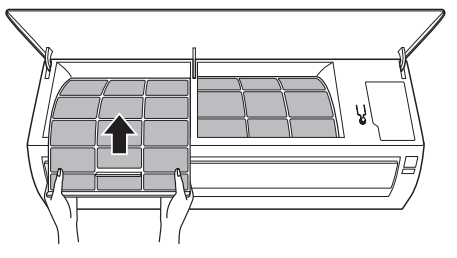
6. Insert the hooks of the air filters into the front cover.
7. Check the side of the front cover for correct assembly of the air filters.
Clean the Micro Dust and Triple Filter (Optional)
1. Turn off the power to the unit.
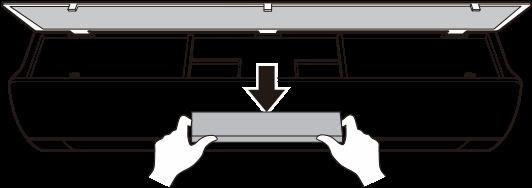
2. Remove the air filters from the indoor unit.
3. Remove the Micro dust and Triple filter from the indoor unit.
Type1
Type2
4. Clean the filter with a vacuum cleaner.
5. Insert the Micro dust and Triple filter.
Type1
Type2
6. Assemble the air filters.
7. Check the side of the front cover for correct assembly of the air filters.
NOTE
• The feature and location of Micro dust and Triple filter may vary according to the type of model.
TROUBLESHOOTING
Self-diagnosis Function
This product has a built-in self-diagnosis function. If an error occurs, the lamp of the indoor unit will blink in 2 second intervals. If this occurs, contact your local dealer or service center.
Before Calling for Service
Please check the following before you contact the service center. If the problem persists, contact your local service center.
Problem
Possible Causes & Corrective Action
The air conditioner does not work normally.
Burning smell and strange sounds are coming from the unit.
• Turn off the air conditioner, switch OFF, or disconnect the power supply, and contact the service center.
Water leaks from the indoor unit even when the humidity level is low.
• Turn off the air conditioner, switch OFF, or disconnect the power supply, and contact the service center.
The power cable is damaged or it is generating excessive heat.
• Turn off the air conditioner, switch OFF, or disconnect the power supply, and contact the service center.
A switch, a circuit breaker (safety, ground), or a fuse is not operated properly.
• Turn off the air conditioner, switch OFF, or disconnect the power supply, and contact the service center.
The unit generates an error code from its self-diagnosis.
• Turn off the air conditioner, switch OFF, or disconnect the power supply, and contact the service center.
The air conditioner does not work.
The air conditioner is unplugged.
• Check whether the power cord is plugged into the outlet or the power isolators are switched on.
A fuse exploded, or the power supply is blocked.
• Replace the fuse or check if the circuit breaker has tripped.
A power failure has occurred.
Turn off the air conditioner when a power failure occurs.
When the power is restored, wait 3 minutes, and then turn on the air conditioner.
The voltage is too high or too low.
• Check if the circuit breaker has tripped.
The air conditioner was turned off automatically at a preset time.
• Turn the air conditioner on.
The battery setting in the remote controller is incorrect.
Make sure that the batteries are inserted correctly in your remote controller.
If the batteries are placed correctly, but the air conditioner still does not operate, replace the batteries and try again.
Problem
Possible Causes & Corrective Action
The air conditioner does not emit cool air.
Air is not circulating properly.
• Make sure that there are no curtains, blinds, or pieces of furniture blocking the front of the air conditioner.
The air filter is dirty.
Clean the air filter once every 2 weeks.
See “Clean the Air Filter” for more information.
The room temperature is too high.
• In summer, cooling the indoor air fully may take some time. In this case, select the Jet Mode to cool the indoor air quickly.
Cold air is escaping from the room.
• Make sure that no cold air is escaping through the ventilation points in the room.
The desired temperature is higher than the current temperature.
• Set the desired temperature to a level lower than the current temperature.
There is a heating source nearby.
• Avoid using heat generators like electric ovens or gas burners while the air conditioner is in operation.
Fan Mode is selected.
During Fan Mode, air blows from the air conditioner without cooling or heating the indoor air.
Switch the operation mode to cooling operation.
Outside temperature is too high.
• The cooling effect may not be sufficient.
The fan speed cannot be adjusted.
The Jet Mode, or Auto Operation Mode is selected.
• In some operation modes, you cannot adjust the fan speed. Select an operation mode in which you can adjust the fan speed.
The temperature cannot be adjusted.
The Fan Mode or Jet Mode is selected.
• In some operation modes, you cannot adjust the temperature. Select an operation mode in which you can adjust the temperature.
The air conditioner stops during operation.
The air conditioner is suddenly turned off.
• The Timer Function may have timed out, which turns the unit off. Check the timer settings.
A power failure has occurred during operation.
• Wait for the power to come back. If you have the Auto Restart function enabled, your unit will resume its last operation several minutes after power is restored.
Problem
Possible Causes & Corrective Action
The indoor unit is still operating even when the unit has been turned off.
The Auto Clean function is being operated.
• Allow the Auto Clean function to continue since it removes any remaining moisture inside the indoor unit. If you do not want this feature, you can turn the unit off.
The air outlet on the indoor unit is discharging mist.
The cooled air from the air conditioner makes mist.
• When the room temperature decreases, this phenomenon will disappear.
Water leaks from the outdoor unit.
In the heating operations, condensed water drops from the heat exchanger.
• This symptom requires installing a drain hose under the base pan. Contact the installer.
There is noise or vibration.
A clicking sound can be heard when the unit starts or stops due to movement of the reversing valve.
Creaking sound: The plastic parts of the indoor unit creak when they shrink or expand due to sudden temperature changes.
Flowing or Blowing sound: This is the flow of refrigerant through the air conditioner.
• These are normal symptoms. The noise will stop.
The indoor unit gives off an odor.
Odors (such as cigarette smoke) may be absorbed into the indoor unit and discharged with airflow.
• If the smell does not disappear, you need to wash the filter. If this does not work, contact the service center to clean your heat exchanger.
The air conditioner does not emit warm air.
When Heating Mode starts, the vane is almost closed, and no air comes out, even though the outdoor unit is operating.
• This symptom is normal. Please wait until the unit has generated enough warm air to blow through the indoor unit.
The outdoor unit is in Defrosting Mode.
• In Heating Mode, ice/frost is built up on the coils when the outside temperature falls. This function removes a layer of frost on the coil, and it should finish in approximately 15 minutes.
Outside temperature is too low.
• The heating effect may not be sufficient.
Problem
Possible Causes & Corrective Action
Your home appliance and smartphone is not connected to the Wi-Fi network.
The password for the Wi-Fi that you are trying to connect to is incorrect.
• Find the Wi-Fi network connected to your smartphone and remove it, then register your appliance on LG ThinQ.
Mobile data for your smartphone is turned on.
• Turn off the Mobile data of your smartphone and register the appliance using the Wi-Fi network.
The wireless network name (SSID) is set incorrectly.
• The wireless network name (SSID) should be a combination of English letters and numbers. (Do not use special characters.)
The router frequency is not 2.4 GHz.
• Only a 2.4 GHz router frequency is supported. Set the wireless router to 2.4 GHz and connect the appliance to the wireless router. To check the router frequency, check with your Internet service provider or the router manufacturer.
The distance between the appliance and the router is too far.
• If the distance between the appliance and the router is too far, the signal may be weak and the connection may not be configured correctly. Move the location of the router so that it is closer to the appliance.
NOTE
• Some functions may not be supported, depending on the model.
 ),
), ), Air Purification function (

 or
or  button to select the minutes.
 button about 5 seconds.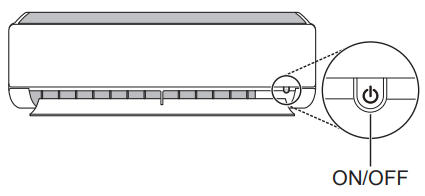





 or
or  button to set the desired temperature.
 is displayed on the display screen.
 is displayed on the display screen.
 is displayed on the display screen.
 is displayed on the display screen.
 will be displayed on the indoor unit when defrosting is operating.
 is displayed on the display screen.
 is displayed on the display screen.



 (
(  ) button repeatedly and select the desired direction.
 (
(  ) to adjust the direction of the air flow automatically.
 button repeatedly.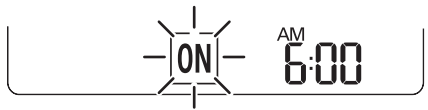
 or
or  button to select the minutes
 icon are displayed on the display screen indicating that the desired time is set.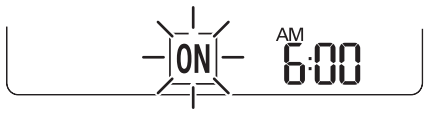
 button repeatedly.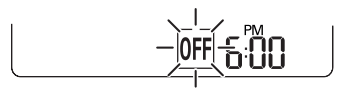
 icon are displayed on the display screen indicating that the desired time is set.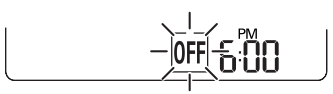
 button to cancel all timer settings.
 or ThinQ logo
 icon on the control panel is lit.
 logo
logo