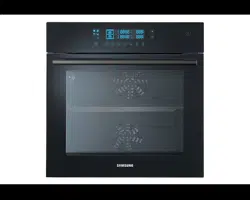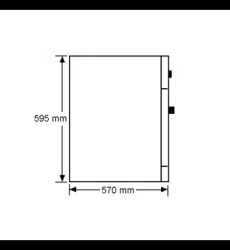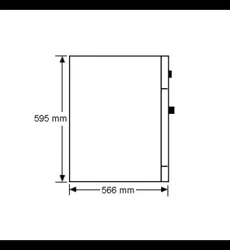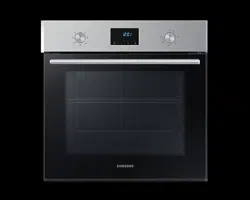
BQ2Q7G078
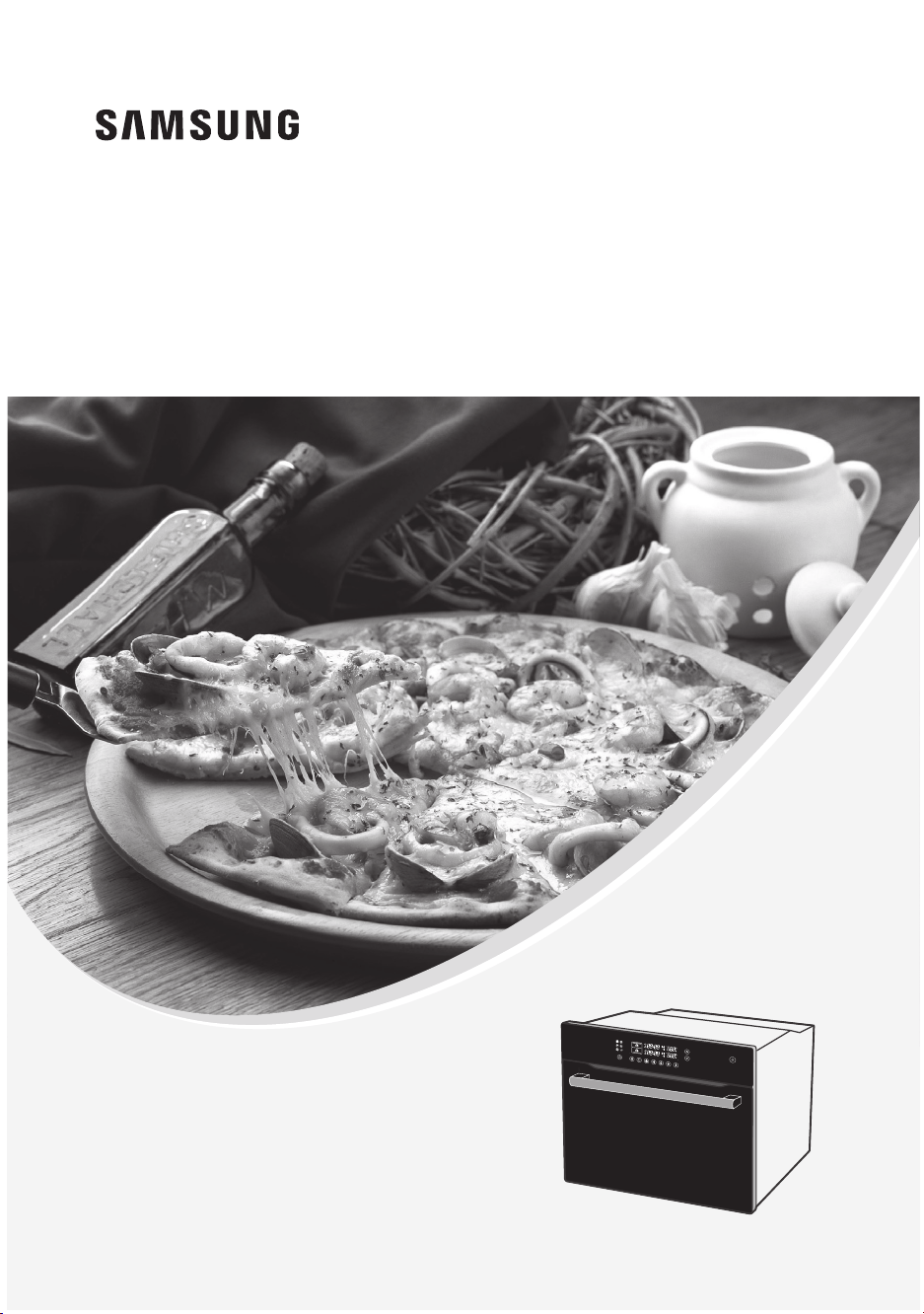
Owner’s Manual
Installation and Operating Instructions
Built-In Oven
BQ2Q7G078_XEU00182-S02-_EN.indd 1 5:44:07 2013/21/6 PM

2
. . . . 3
. . . . 3
. . . . 3
. . . . 4
. . . . 4
. . . . 5
. . . . 5
. . . . 5
. . . . 6
. . . . 7
. . . . 8
. . . . 8
. . . . 9
. . . . 9
. . . . 10
. . . . 11
. . . . 11
. . . . 11
. . . . 12
. . . . 12
. . . . 13
. . . . 14
. . . . 14
. . . . 18
. . . . 19
. . . . 19
. . . . 21
. . . . 21
. . . . 22
. . . . 22
. . . . 23
. . . . 31
. . . . 32
. . . . 32
. . . . 36
. . . . 37
. . . . 38
. . . . 39
. . . . 39
. . . . 40
. . . . 43
Warranty & Service . . . . . . . . . . . . . . . . . . . . . . . . . . . .
. . . . . . . . . . 45
F
AQs and Troubleshooting. . . . . . . . . . . . . . . . . . . . . . . . . . . . . . . . . 45
Error and Safety codes . .. . . . . . . . . . . . . . . . . . . . . . . . . . . . . . . . 45
46Product data sheet . .... . .... . ... . .... . .... . .... . .... . .... . ....
Contents
Using This Manual
Safety Instructions
Electrical safety
Safety during operation
Disposal Instructions
Installing the Oven
Safety instructions for the installer
Installing into a low cabinet
Connecting to the mains power supply
Installing into a high cabinet
Parts and Features
Oven
Oven controls
Special features
Accessories
Using the accessories
Safety shutoff
Cooling fan
Before You Begin
Setting the clock
Initial cleaning
Oven Use
Setting the divider mode
Setting the oven temperature
Switching the oven off
Cook time
Kitchen timer
Oven lamp on / off
Child safety function
Switching the beeper off
Oven functions
Test dishes
Automatic Cooking
Single oven auto cook programmes
Upper Oven Auto Cook Programmes
Lower Oven Auto Cook Programmes
Twin Oven Auto Cook Programmes
Cleaning and Care
Self cleaning
Steam cleaning
Door removal
BQ2Q7G078_XEU-00182S-02_EN.indd 2 6/21/2013 5:44:07 PM
EN

3
EN
Using This Manual
Thank you for choosing a SAMSUNG Built - In Oven.
This Owner’s Manual contains important information on safety and instructions intended to assist
you in the operation and maintenance of your appliance.
Please take the time to read this Owner’s Manual before using your oven and keep this book for
future reference.
The following symbols are used in the text of this Owner’s Manual.
* )
Important Note
Safety Instructions
Installation of this oven must be performed only by a licensed electrician. The installer is
responsible for connecting the appliance to the mains power supply in observance of the relevant
safety recommendations.
Electrical safety
If the oven has been damaged in transport, do not connect it
● This appliance must be connected to the mains power supply only by a specially licensed
electrician
● In the event of a fault or damage to the appliance, do not attempt to operate it
● Repairs should be performed by a licensed technician only Improper repair may result
in considerable danger to you and others If your oven needs repair, contact a SAMSUNG
Service Centre or your dealer
● If the supply cord is defective, it must be replaced by a special cord or assembly available
from the manufacturer or an authorised service agent
● Electrical leads and cables should not be allowed to touch the oven
● The oven should be connected to the mains power supply by means of an approved circuit
breaker or fuse Never use multiple plug adapters or extension leads
● The rating plate is located on the right side of the door
● The power supply of the appliance should be turned off when it is being repaired or
cleaned
● Take care when connecting electrical appliances to sockets near the oven
● This appliance is not intended for use by persons (including children) with reduced
physical, sensory or mental capabilities, or lack of experience and knowledge, unless they
have been given supervision or instruction concerning use of the appliance by a person
responsible for their safety
WARNING
Accessible parts may become hot during use To avoid burns young children should be kept
away
WARNING
The appliance should be powered down before replacing the lamp to avoid the possibility of
electric shock During oven operation, the interior surfaces become very hot
BQ2Q7G078_XEU-00182S-02_EN.indd 3 6/21/2013 5:44:08 PM

4
EN
Safety Instructions (Continued)
Safety during operation
● This oven has been designed only for the cooking of household foods
● During use, the oven interior surfaces become hot enough to cause burns Do not touch
heating elements or interior surfaces of the oven until they have had time to cool
● Never store ammable materials in the oven.
● The oven surfaces become hot when the appliance is operated at a high temperature for
an extended period of time
● When cooking, take care when opening the oven door as hot air and steam can escape
rapidly
● When cooking dishes that contain alcohol, the alcohol may evaporate due to the high
temperatures and the vapour can catch re if it comes into contact with a hot part of the oven.
●
For your safety, do not use high-pressure water cleaners or steam jet cleaners
● Children should be kept at a safe distance when the oven is in use
● Frozen foods such as pizzas should be cooked on the wire grill If the baking tray is used, it
may become deformed due to the great variation in temperatures
● Do not pour water into the oven bottom when it is hot This could cause damage to the
enamel surface
● The oven door must be closed during cooking
● Take care when opening the door before the end of the steam cleaning procedure; the
water on the bottom is hot
● Do not line the oven bottom with aluminium foil and do not place any baking trays or tins on
it The aluminium foil blocks the heat, which may result in damage to the enamel surfaces
and cause poor cooking results
● Fruit juices will leave stains, which can become indelible on the enamel surfaces of the
oven When cooking very moist cakes, use the deep pan
● Do not rest bakeware on the open oven door
● This appliance is not intended for use by young children or inrm persons without the
adequate supervision of a responsible person ensuring that they are using the appliance
safely
● Young children should be supervised to ensure that they do not play with the appliance
● Keep children away from the door when opening or closing it as they may bump
themselves on the door or catch their ngers in the door.
● Excess spillage should be removed before self cleaning and all utensils should not be left
in the oven during pyrolytic self cleaning
● During self cleaning the surfaces get hotter than usual and children should be kept a safe
distance
Disposal Instructions
Disposing of the packaging material
● The material used to package this appliance is recyclable
● Dispose of the packaging materials in the appropriate container at your local waste
disposal facility
Disposing of old appliances
WARNING
Before disposing of old appliances, make them inoperable so that they cannot be a source of
danger
To do this, disconnect the appliance from the mains supply and remove the mains lead
To protect the environment, it is important that old appliances are disposed of in the correct
manner
● The appliance must not be disposed of with household rubbish
● You can obtain information about collection dates and public refuse disposal sites from
your local refuse department or council
BQ2Q7G078_XEU-00182S-02_EN.indd 4 6/21/2013 5:44:08 PM
5
EN
Installing the Oven
* Electrical installation of this appliance must be performed only by a licensed
electrician
The oven must be installed according to the instructions supplied
Remove the protective vinyl from the door after installation
Remove the protective tape from the interior surfaces of the oven after installation
* With built-in furniture, plastic surfaces and adhesive for the oven should be resistant
to 90°C inside of the furniture and to 75°C for adjacent furniture
Samsung will take no responsibility for damage of plastic surfaces or adhesive from
the heat
Safety instructions for the installer
● Installation must guarantee protection against exposure to electrically live parts
● The unit in which the appliance is tted must satisfy the requirements of DIN 68930 in
respect of stability
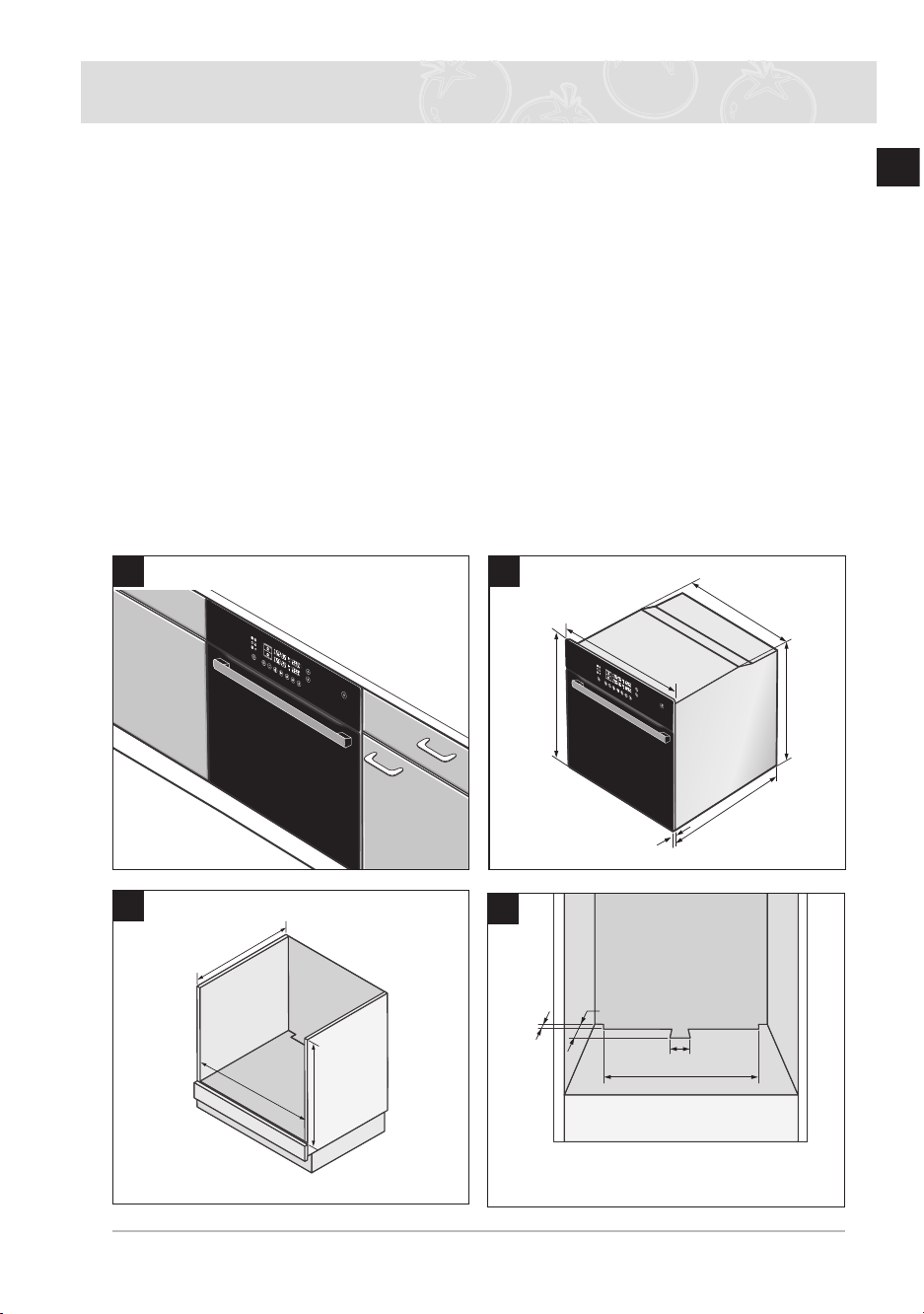
Installing into a low cabinet
● Observe minimum clearance requirements
● Secure oven into place with screws on either side of the oven
50
460
min.50
min.20
4
min.550
min.560
min.600
3
1
560
572
595
21
595
545
2
BQ2Q7G078_XEU-00182S-02_EN.indd 5 6/21/2013 5:44:08 PM
6
EN
Installing the Oven (Continued)
Connecting to the mains power supply
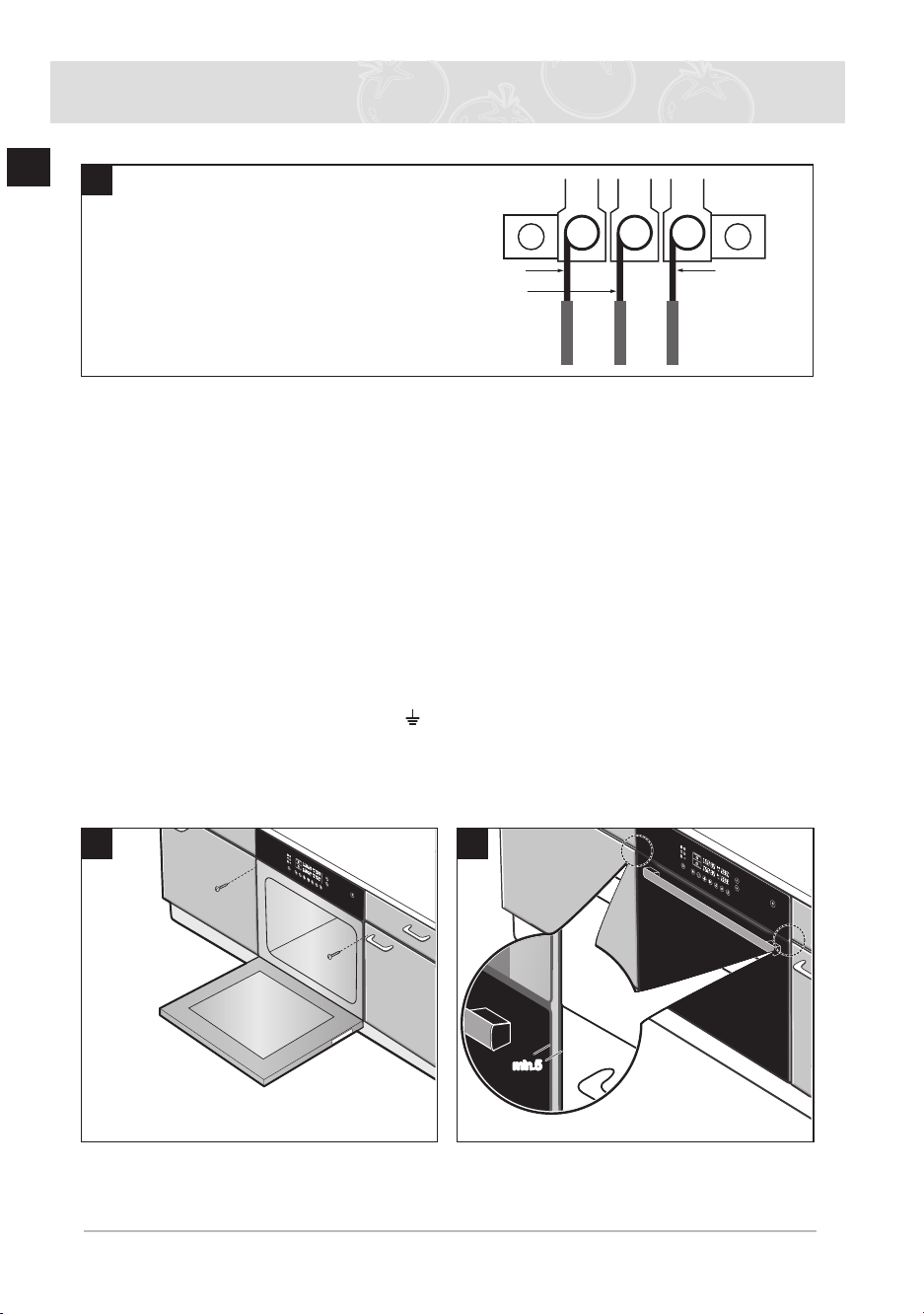
Electrical connections must be made as per the connection plate xed to the back of the
appliance by an electrical tter who must ensure that the appliance has been connected up in
accordance with tting instructions and local regulations.
Where the appliance is not connected to the mains electricity supply by a plug, an omni polar
cutout device (with a contacts gap of at least 3 mm) must be tted on the supply side of the
connection to meet safety requirements
) When power is connected, the electronics of the oven are initialised; this neutralizes
the lighting for a few seconds The electric cable (H05 RR-F or H05 VV-F, Min 1 5
m, 1 5~2 5 mm²) must be long enough for it to be connected to the built-in oven
standing on the oor in front of its unit.
Open the back cover of the oven at the bottom (using a at-bladed screwdriver)
and completely unscrew the connection screw and the cable clamp before tting
conducting wires into the appropriate terminals
The earth wire must be connected to the ( ) terminal of the oven
If the oven is connected to the power supply by a plug, this must remain accessible once the
oven has been tted.
We cannot accept any liability in the event of an accident resulting from non-existent or faulty
earthing
Live Earth
Neutral
5
6
min.5min.5
7
Connecting the oven to the power supply
(H05VV-F, H05RR-F, Min 1 5 m, 1 5~2 5 mm²)
BQ2Q7G078_XEU-00182S-02_EN.indd 6 6/21/2013 5:44:09 PM
7
EN
Installing the Oven (Continued)
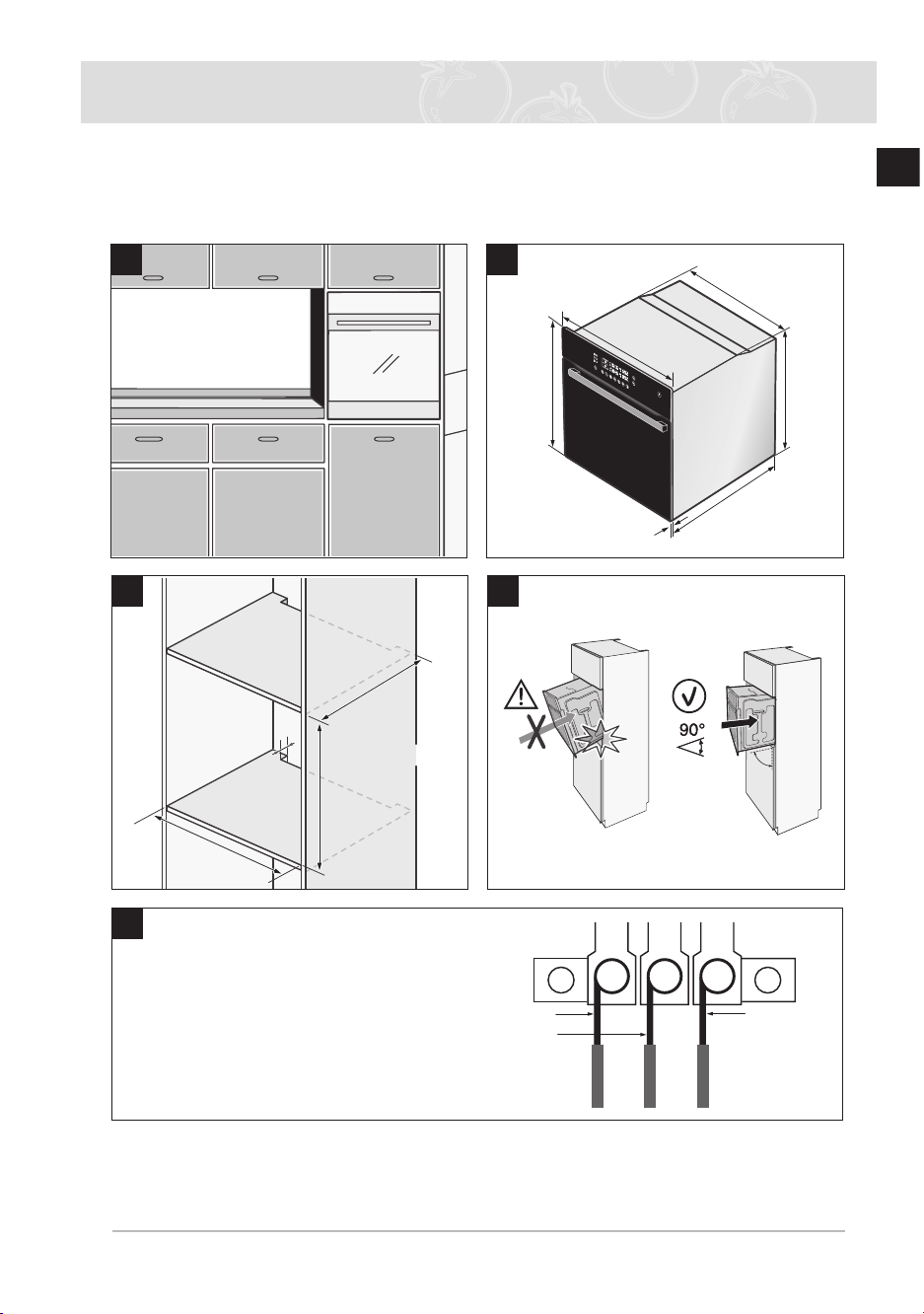
Installing into a high cabinet
● Observe minimum clearance requirements
● The oven should be slid into place at the proper angle of alignment
4
min.550
min.590~max.600
min.560
50
3
Live Earth
Neutral
5
1
560
572
595
21
595
545
2
Connecting the oven to the power supply
(H05VV-F, H05RR-F, Min 1 5 m, 1 5~2 5 mm²)
BQ2Q7G078_XEU-00182S-02_EN.indd 7 6/21/2013 5:44:09 PM
8
EN
Parts and Features
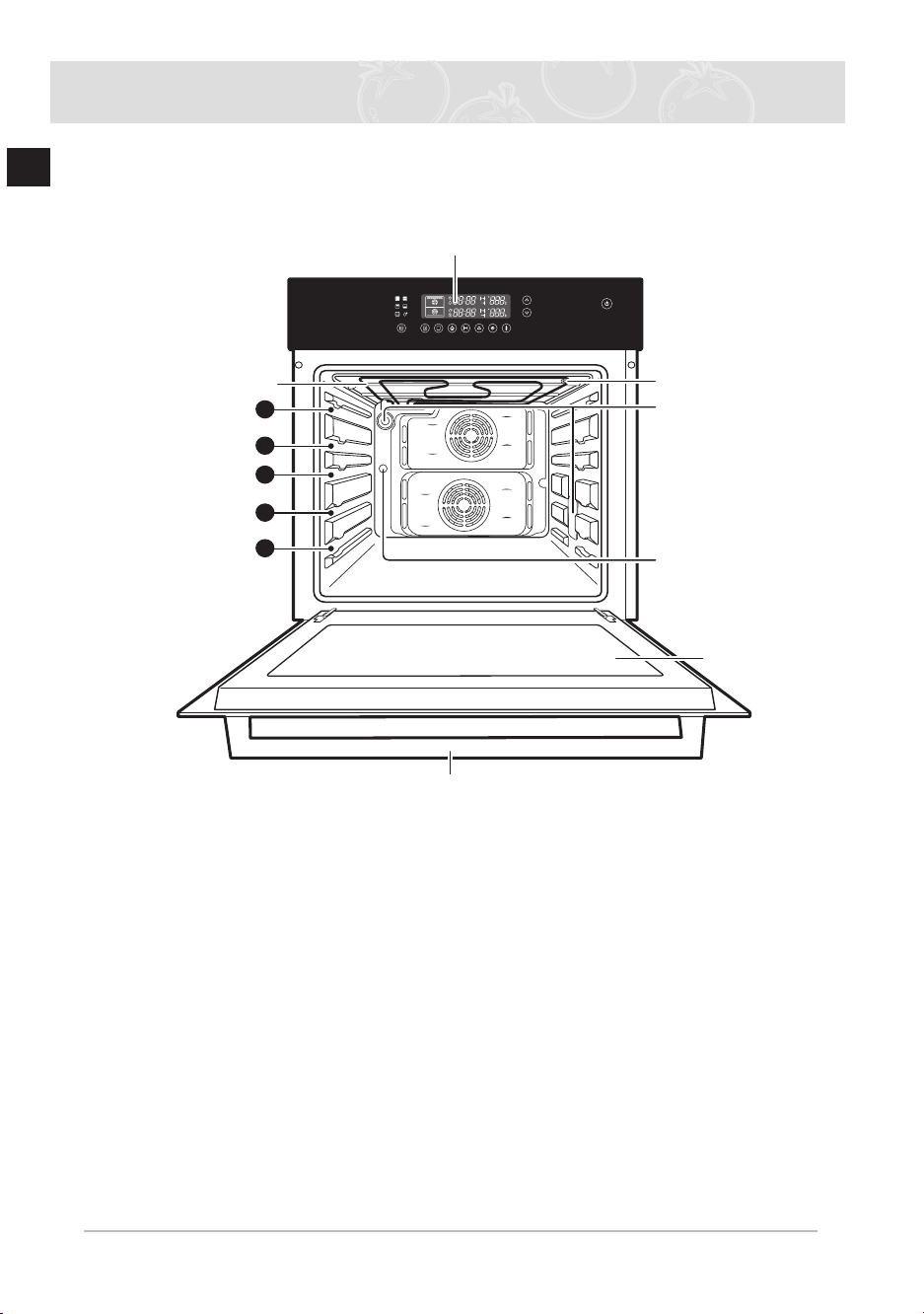
Oven
) Shelf levels are numbered from the bottom up
Levels 4 and 5 are used mainly for the grill function
Please refer to the cooking guides provided throughout this manual to determine
appropriate shelf levels for your dishes
5
4
3
2
1
Control panel
Oven light
Glass door
Door handle
Top heating elements
Level
Level
Level
Level
Level
Air outlet lter
Switch divider
BQ2Q7G078_XEU-00182S-02_EN.indd 8 6/21/2013 5:44:10 PM
9
EN
Parts and Features (Continued)
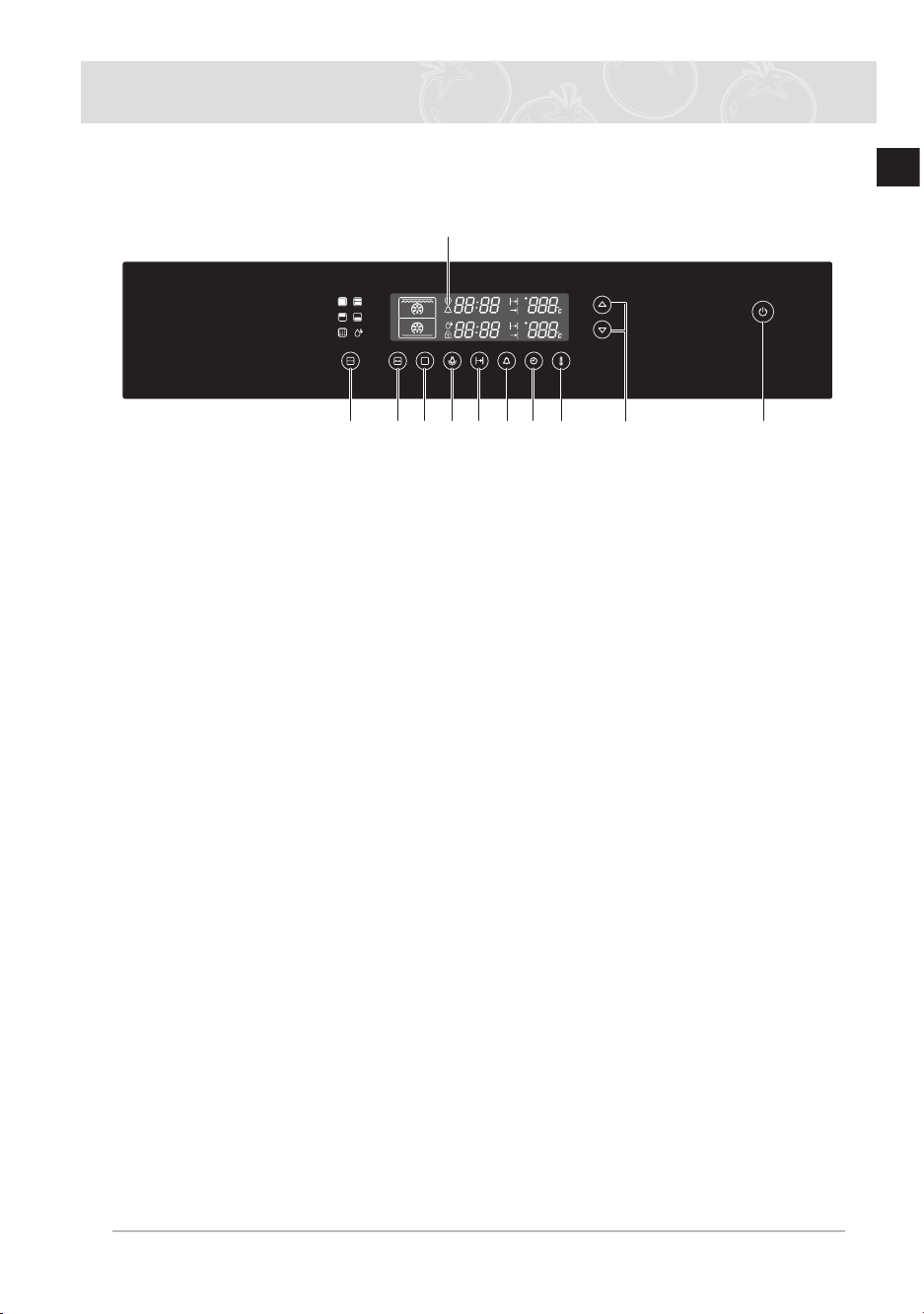
Oven controls
1 Power On/Off button
2 Partition Select button
3 Auto Cook select button
4 Cooking Mode Select button
5 Lamp Button
6 Cooking Time button
7 Kitchen Timer button
8 Clock button
9 Temperature button
10 Time/temperature Control buttons
11 Information Screen
) Power On/Off button
You can Press the oven on or off
If you press the Power On/Off button, the lights for the buttons and the display
panel are turned off As a result, all buttons other than the Power On/Off button are
deactivated
Pressing the Power On/Off button again will turn the lights of the other buttons and
the display panel back on Consequently, all buttons are reactivated
Special features
The oven comes equipped with the following special features
● Divider modes: When the divider inserted, the appliance’s divider facility enables
independent cooking in two separated partitions, enhancing energy efciency and
convenience for use
● Steam cleaning: The oven’s self- cleaning function uses the power of steam to cut through
grease and grime to clean the oven interior safely
11
32 4 5 6 7 8 9
10
1
BQ2Q7G078_XEU-00182S-02_EN.indd 9 6/21/2013 5:44:10 PM
10
EN
Parts and Features (Continued)
Accessories
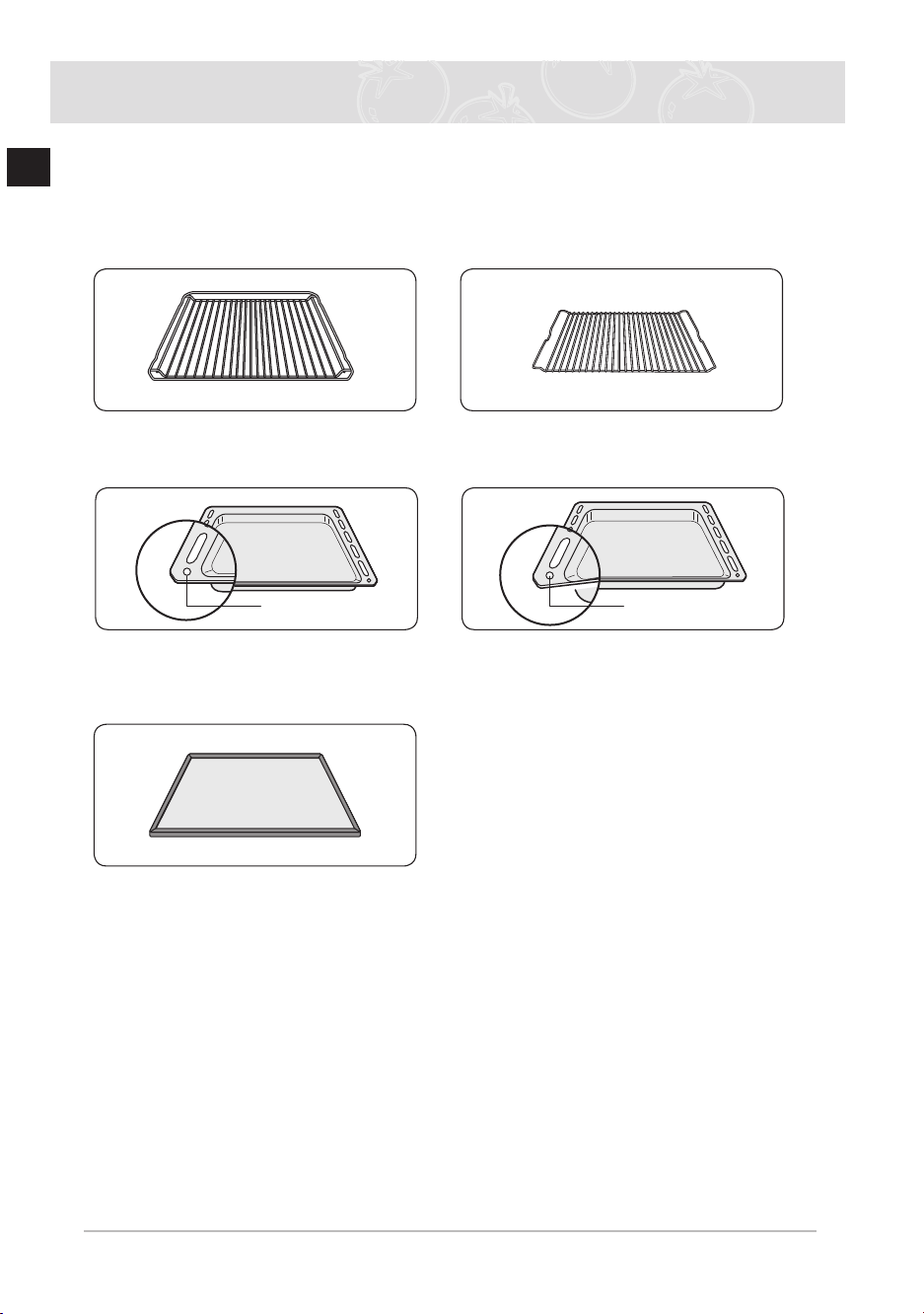
The following accessories are provided with your oven.
1
Wire grill, for dishes, cake tins,
roasting and grilling trays
2
Wire roast, for roasting
3
Baking tray, for cakes and biscuits
4
Deep pan, for roasting or collecting
meat juices or fat drippings
5
Divider, for the upper, lower and twin
modes Use inserted in level 3 There
is a divider-sensing switch on the
rear wall of the cooking compartment
Insert into the back completely
Front
Front
✉
The oven operates without the side runners and racks in position
BQ2Q7G078_XEU-00182S-02_EN.indd 10 6/21/2013 5:44:10 PM
11
EN
Parts and Features (Continued)
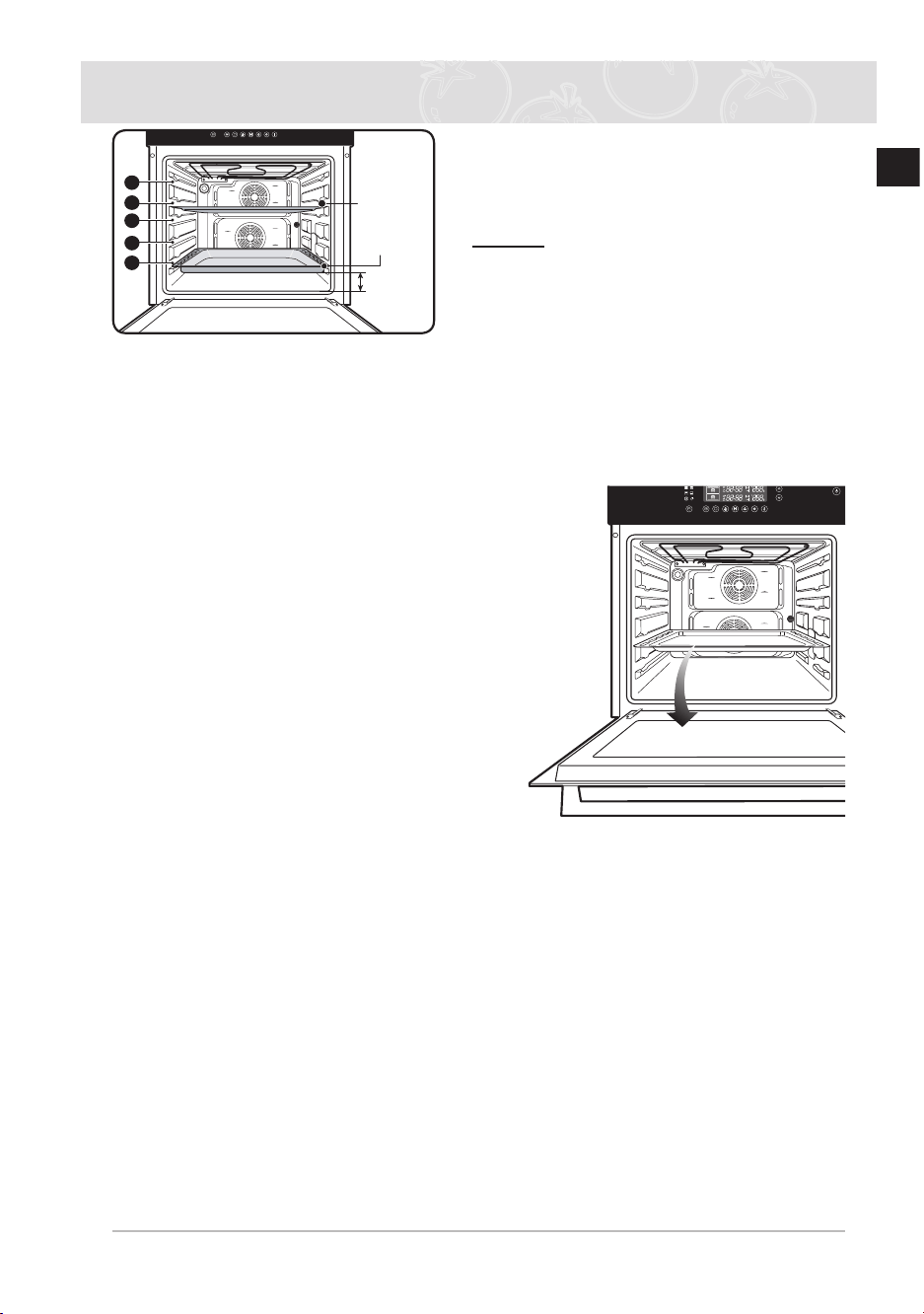
The baking tray, deep pan and wire grill should
be inserted correctly into the side runners
When taking out the cooked foods from the
oven, be careful of hot utensils and surfaces
Example Level 1: Deep pan
Level 4: Baking tray
) When using the deep pan or the baking tray to collect drippings from cooking foods,
ensure that the pan or tray is properly placed in the side runners Allowing these
accessories to contact the bottom surface of the oven can damage the enamel of
the surface Trays and pans placed on level 1 should clear the bottom surface of the
oven by at least 1 cm
Using the accessories
Divider, wire grill, baking tray and deep pan
Positioning the divider
Insert the divider into level 3 of the oven
Positioning the wire grill
Insert the wire grill at any desired level
Positioning the baking tray or deep pan
Insert the baking tray and/or the deep pan at any desired
level
WARNING
To cook in the lower, upper or twin divider modes,
you must insert the divider
Safety shutoff
● If a cooking time is not entered, the oven will shut itself off after the lengths of time
indicated below
Shutoff times for various temperature settings
Under 105°C 16 hours
From 105°C to 240°C 8 hours
From 245°C to 300°C 4 hours
● This oven’s electrical circuitry features a thermal shutoff system If the oven heats to
abnormally high temperatures, the system will shut off the power supply to the heating
elements for a period of time
Cooling fan
During cooking, it is normal for the vent to release hot air from the front of the oven
● The cooling fan will also continue to operate after the oven has been in use It will turn off
when the internal cabinet temperature has dropped to 60°C or after 22 minutes
4
3
2
1
5
gap 1 cm
Baking tray
Deep pan
BQ2Q7G078_XEU-00182S-02_EN.indd 11 6/21/2013 5:44:11 PM
12
EN
Before You Begin
Setting the clock
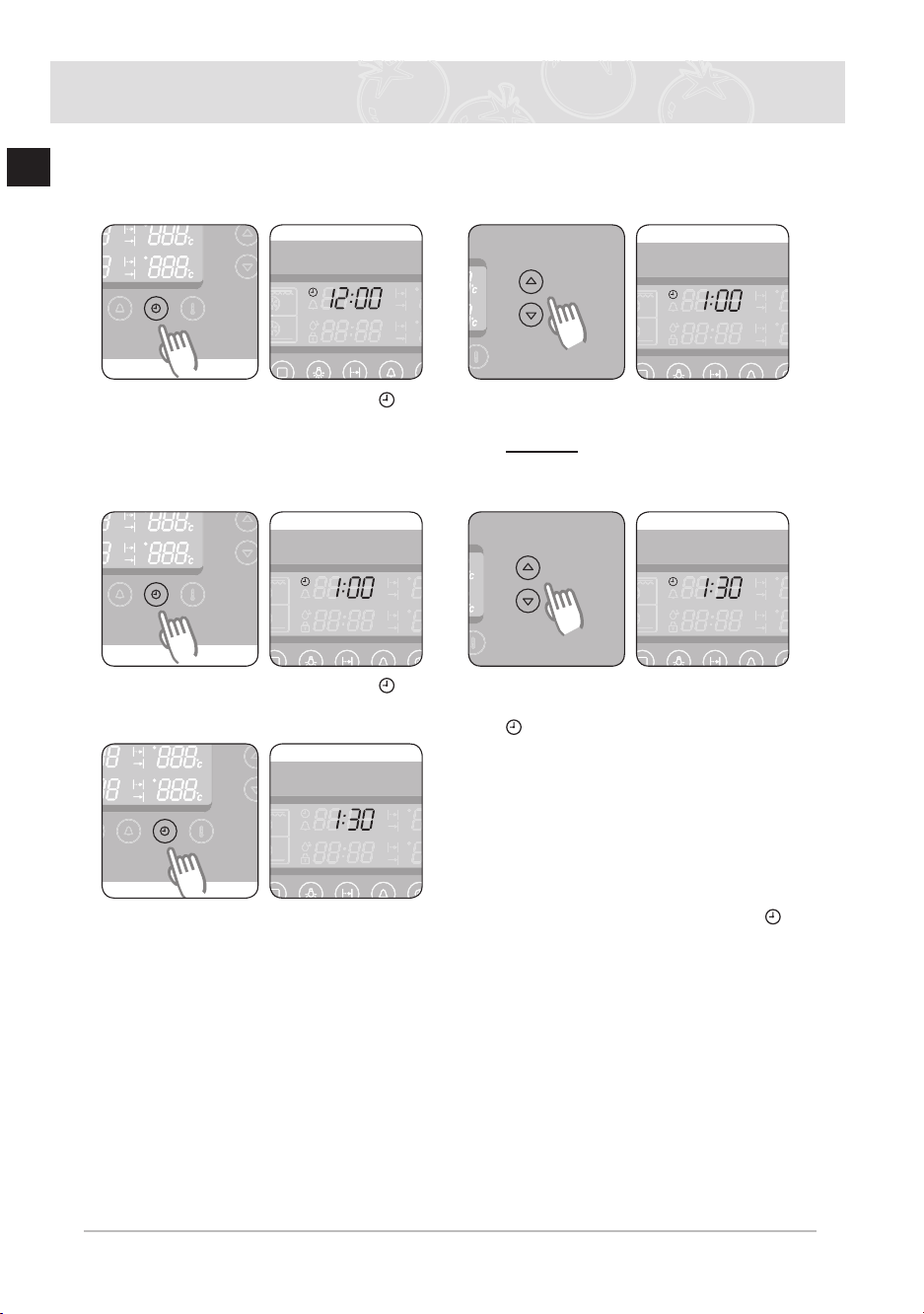
When connecting the power for the rst time, please use the product after setting the time.
1
Press the Clock Button The “ ” and
“12: ” will blink 2
Press the Time / Temp Control
Button
to set the hour of the day
Example To set 1:30
Wait for about 10 seconds The clock
stops blinking and shows the set hour
3
Press the Clock Button The “ ” and
“ :00” will blink 4
Press the Time / Temp Control
Button
to set the minute of the time “
” will blink
5
Press the Clock Button to nish setting the clock or wait for about 10 seconds. “
” will disappear and “30” will stop blinking The display shows the time of day The
appliance is now ready to use
BQ2Q7G078_XEU-00182S-02_EN.indd 12 6/21/2013 5:44:12 PM

13
EN
Before You Begin (Continued)
Initial cleaning
Clean the oven thoroughly before using for the rst time.
* Do not use sharp or abrasive cleaning materials These could damage the oven
surface For ovens with enamel fronts, use commercially available cleaning agents
To clean the oven
1 Open the door
2 Clean all oven trays, accessories and side runners with warm water or washing - up liquid
and polish dry with a soft clean cloth
3 Wash the oven interior in the same way
4 Wipe the front of the appliance with a damp cloth
Check that the clock is set correctly Remove accessories and operate the oven at the
convection setting at 200°C for 1 hour before using There will be a distinctive odor; this is
normal, but ensure your kitchen is well ventilated during this conditioning period
BQ2Q7G078_XEU-00182S-02_EN.indd 13 6/21/2013 5:44:12 PM
14
EN
Oven Use
Setting the divider mode
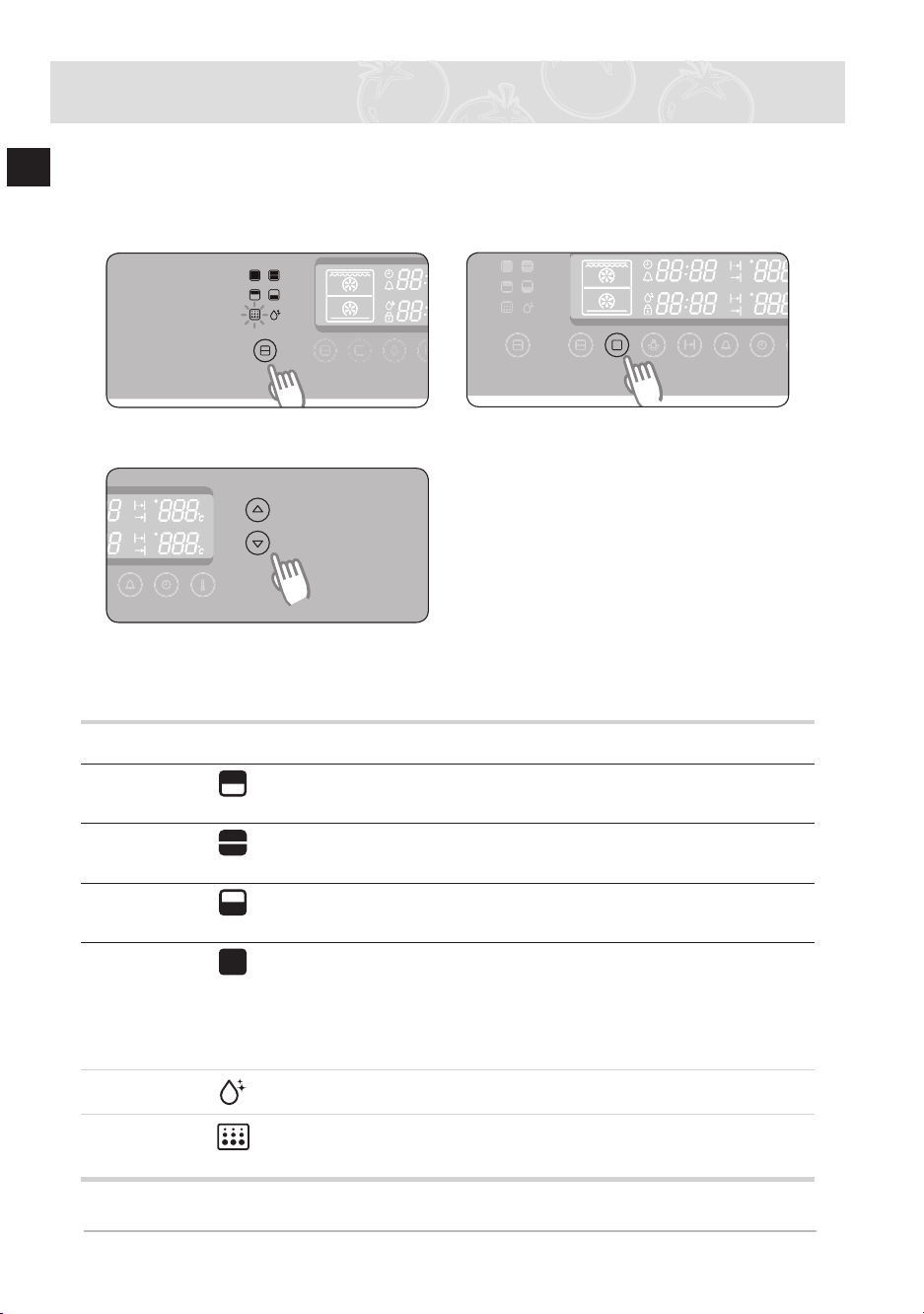
For upper, twin and lower modes, insert the divider For single mode, remove the divider And
then Press the Partition Select button to select the mode you want For further details, see
the table below
1
Press the Partition Select button to
select the desired partition 2
Press the Cooking Mode Select
button
(skip this step in single mode)
3
Press the Time / Temp Control button to select the desired oven function If 3
seconds have elapsed and there are no further adjustments, the oven will begin
automatically in the selected mode and function
Divider
Mode
Marking Oven Function
Insert
Divider
Usage Information
Upper Mode
1 Convection
2 Top Heat + Convection
3 Large Grill
Yes This mode saves energy
and time when cooking
small amounts of food
Twin Mode Both Upper and Lower
Partition Function
Yes You can cook two dishes at
two different temperatures
at the same time
Lower Mode 1 Convection
2 Bottom Heat + Convection
Yes This mode saves energy
and time when cooking
small amounts of food
Single Mode 1 Convection
2 Top Heat + Convection
3 Conventional
4 Large Grill
5 Small Grill
6 Bottom Heat + Convection
No
Steam
Clean Mode
No
Self Clean
Mode
1 P1
2 P2
3 P3
No
BQ2Q7G078_XEU-00182S-02_EN.indd 14 6/21/2013 5:44:13 PM
15
EN
Oven Use (Continued)
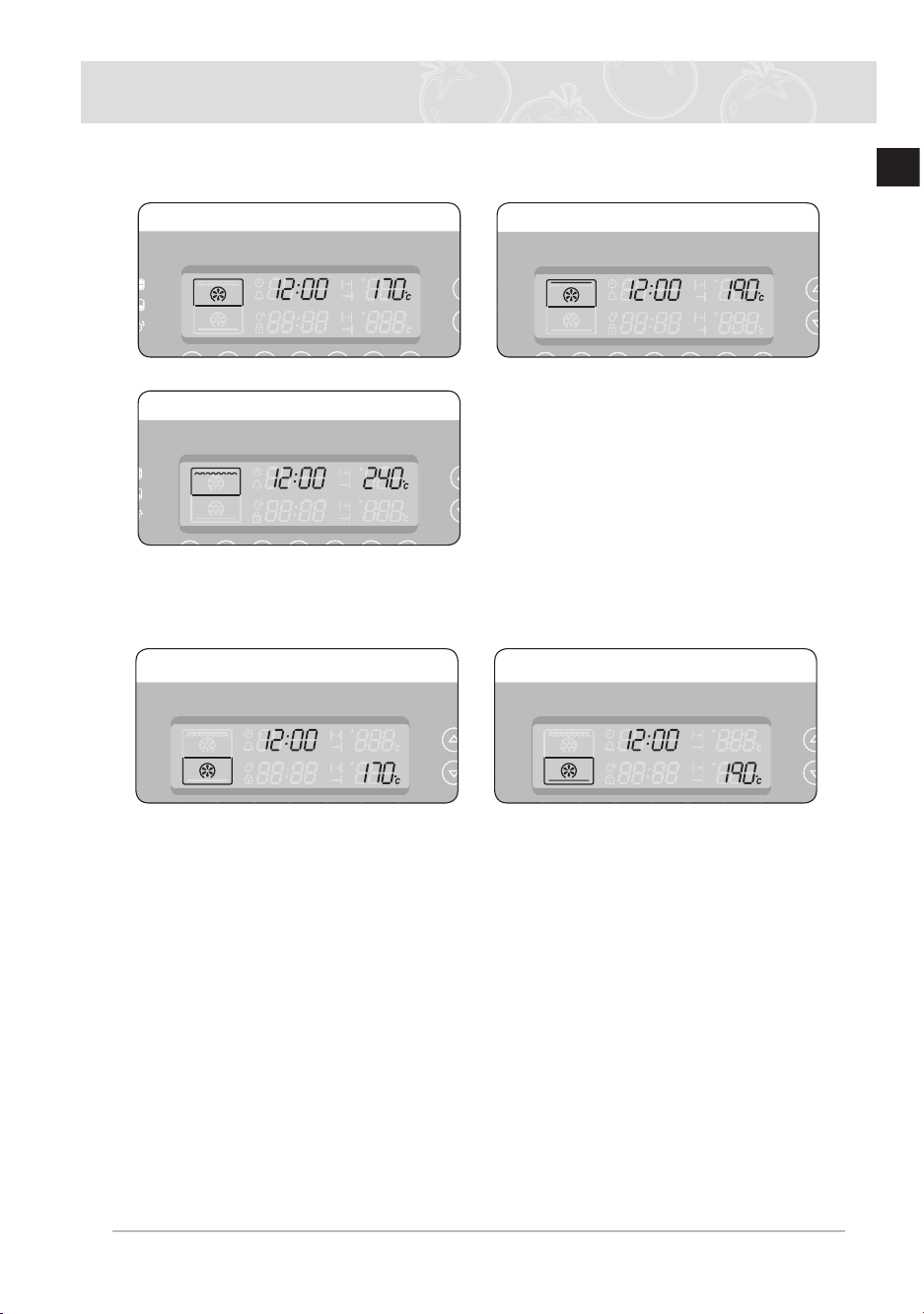
Upper mode
Only the upper heating element operates The divider should be inserted
Convection Top Heat + Convection
Large Grill
Lower mode
Only the lower heating element operates The divider should be inserted
Convection Bottom Heat + Convection
BQ2Q7G078_XEU-00182S-02_EN.indd 15 6/21/2013 5:44:13 PM
16
EN
Oven Use (Continued)
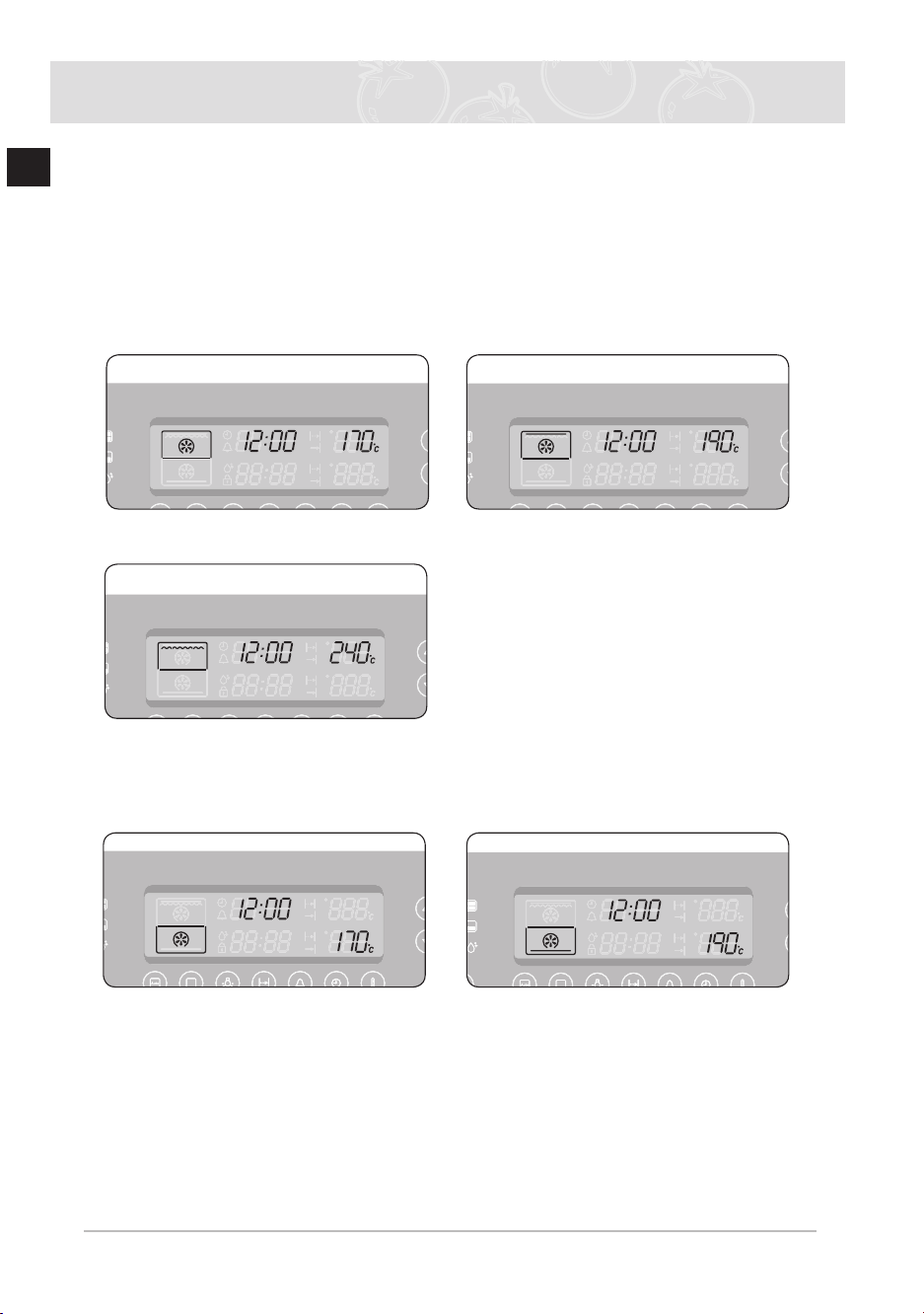
Twin mode
The upper and lower modes operate at the same time It is possible to set which mode
activates rst. When one of the dishes has nished cooking in twin mode and you would like
to change the cooking time or temperature of the other partition, Press the Partition Select
button
to select the mode (upper or lower) that you would like to continue operating Divider
should be inserted
Twin mode 1: The upper mode begins operating rst. If the Cooking Mode Select button
is pressed or if 15 seconds elapse after the upper mode is set and there has
been no further adjustment, the oven begins the lower mode
Convection Top Heat + Convection
Large Grill
Twin mode 2: As the upper mode starts, if the Cooking Mode Select button is pressed or if
15 seconds elapse and there has been no further adjustment, the oven moves
to the lower mode The upper and lower modes operate at the same time
Convection Bottom Heat + Convection
BQ2Q7G078_XEU-00182S-02_EN.indd 16 6/21/2013 5:44:13 PM
17
EN
Oven Use (Continued)
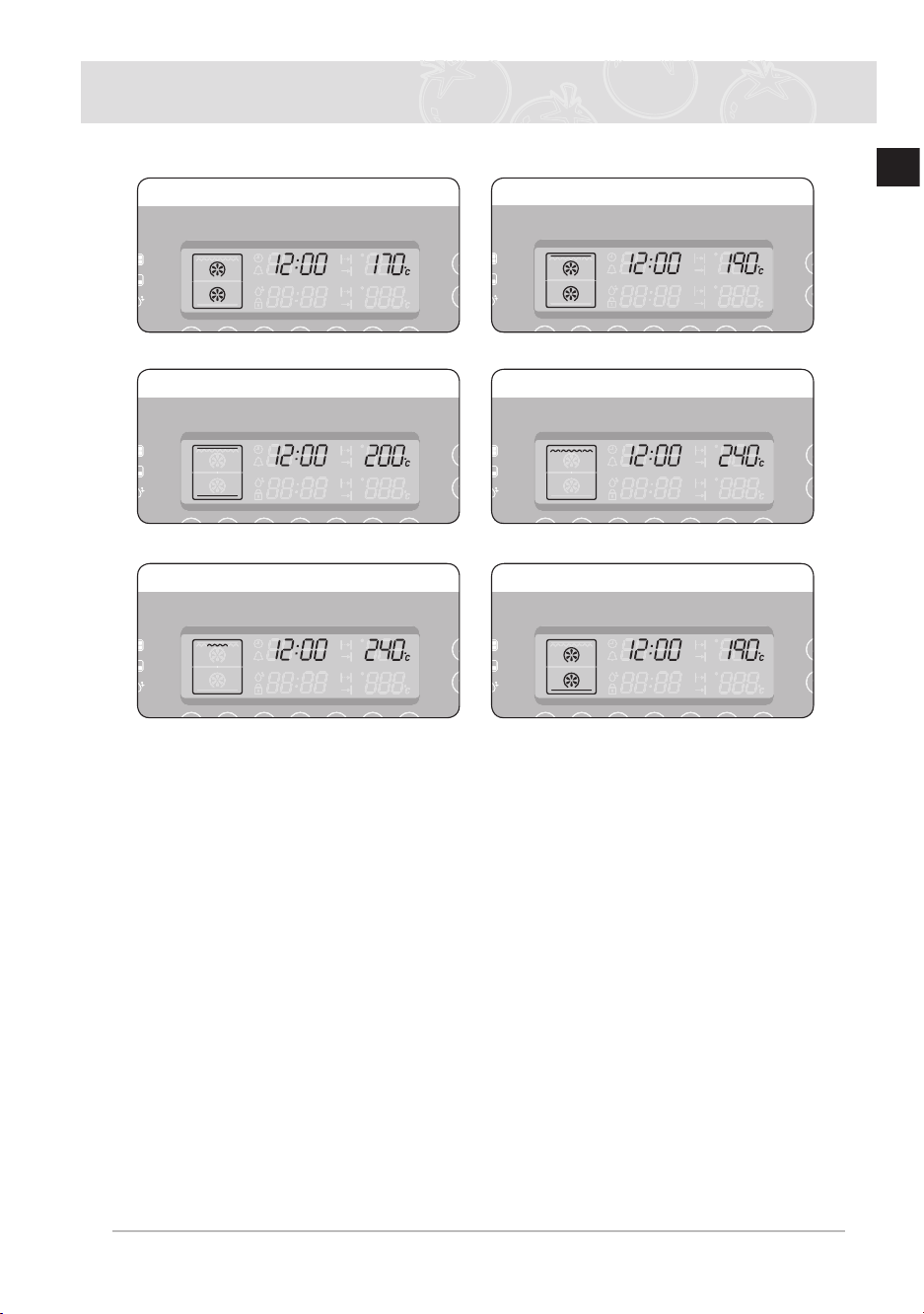
Single mode
Convection Top Heat + Convection
Conventional Large Grill
Small Grill Bottom Heat + Convection
BQ2Q7G078_XEU-00182S-02_EN.indd 17 6/21/2013 5:44:14 PM
18
EN
Oven Use (Continued)
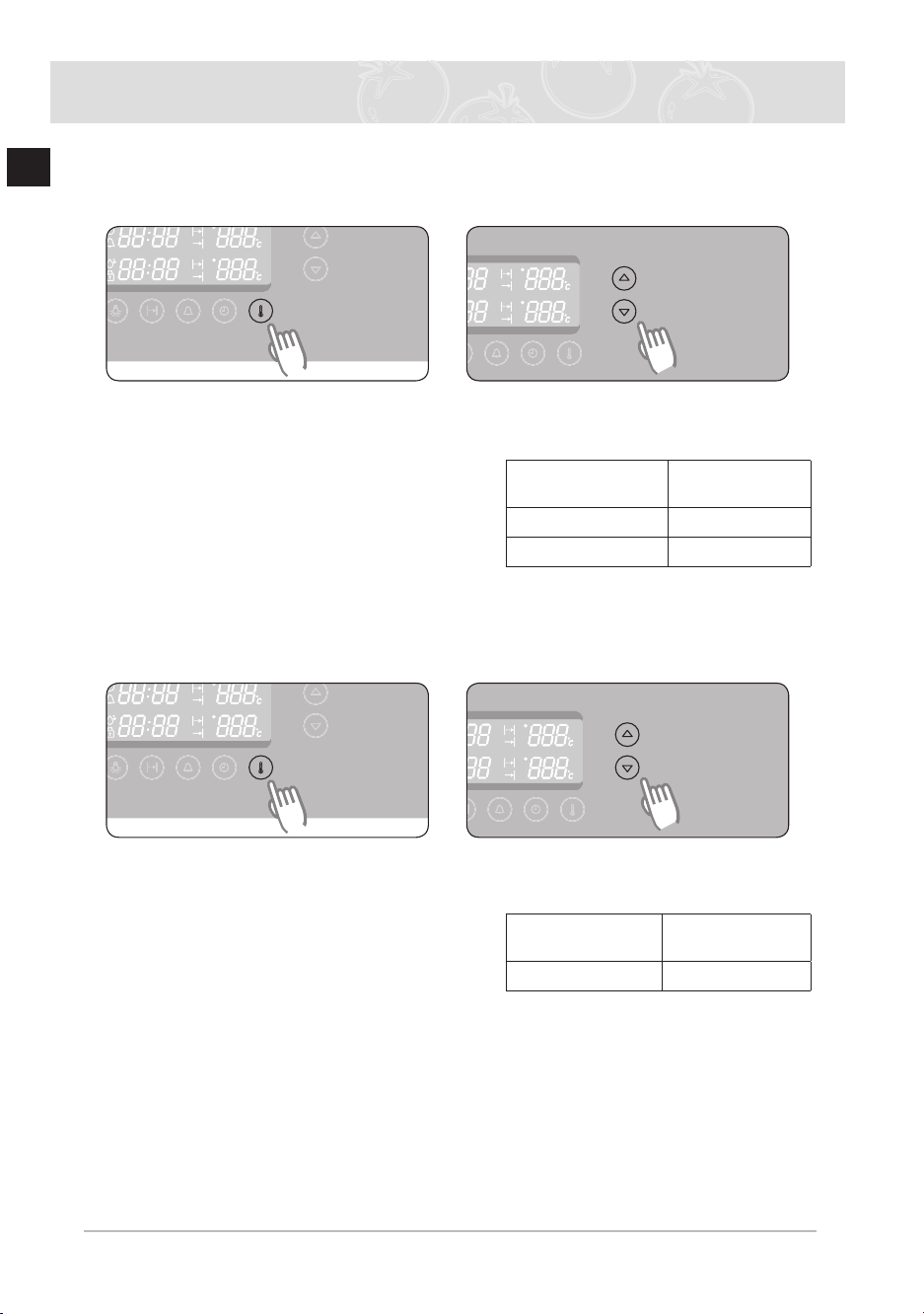
Setting the oven temperature
In single, upper and lower modes
1
Press the Temperature Button
2
Press the Time / Temp Control
Button to adjust the temperature in
increments of 5°C
Single Mode (Large
& Small Grill)
40°C – 250°C
(40°C – 300°C)
Upper Mode 40°C – 250°C
Lower Mode 40°C – 250°C
) The temperature may be adjusted during cooking
In the oven mode settings, the top and bottom heating elements cycle on and off in
intervals through the cooking process to regulate and maintain the temperature
In twin mode
1
Press the Temperature Button
(upper mode)
Press the Temperature Button twice
(lower mode)
2
Press the Time / Temp Control
Button to adjust the temperature in
increments of 5°C
Upper Mode
(Large Grill)
170°C – 250°C
(200°C – 250°C)
Lower Mode 170°C – 250°C
) The temperature may be adjusted during cooking
BQ2Q7G078_XEU-00182S-02_EN.indd 18 6/21/2013 5:44:14 PM
19
EN
Oven Use (Continued)
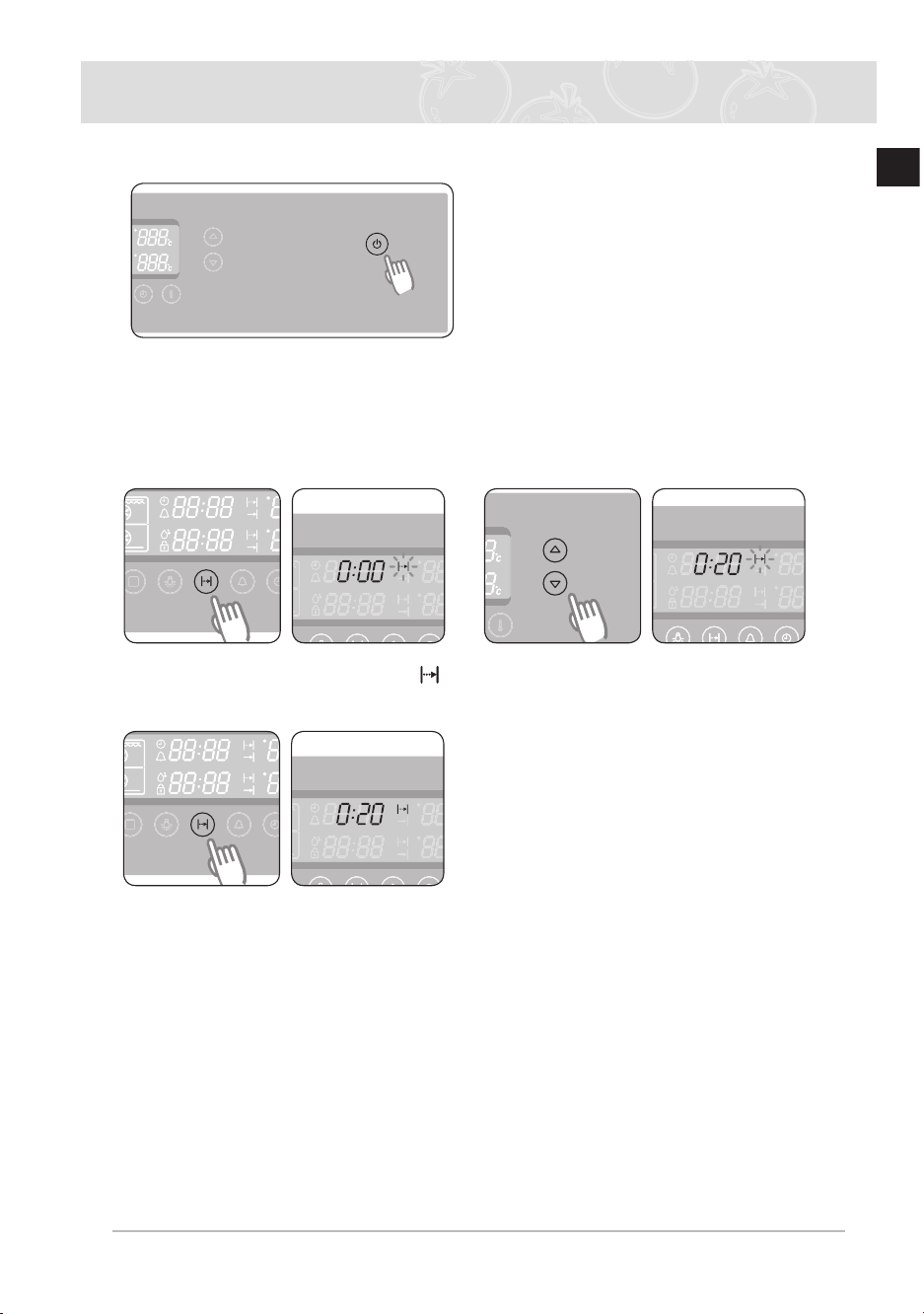
Switching the oven off
To switch the oven off, Press the Power On/Off
button
Cook time
You can set the cook time during cooking
In single, upper and lower modes
1
Press the Cook Time Button “ ”
will blink 2
Press the Time / Temp Control
Button
to set the desired cook time
3
Press the Cook Time Button
The oven operates with the selected
cook time unless the Cook Time
Button
is pressed within 5 seconds
) During cooking, you can adjust the previously set cook time with the Time / Temp
Control Button
for better results
BQ2Q7G078_XEU-00182S-02_EN.indd 19 6/21/2013 5:44:15 PM
20
EN
Oven Use (Continued)
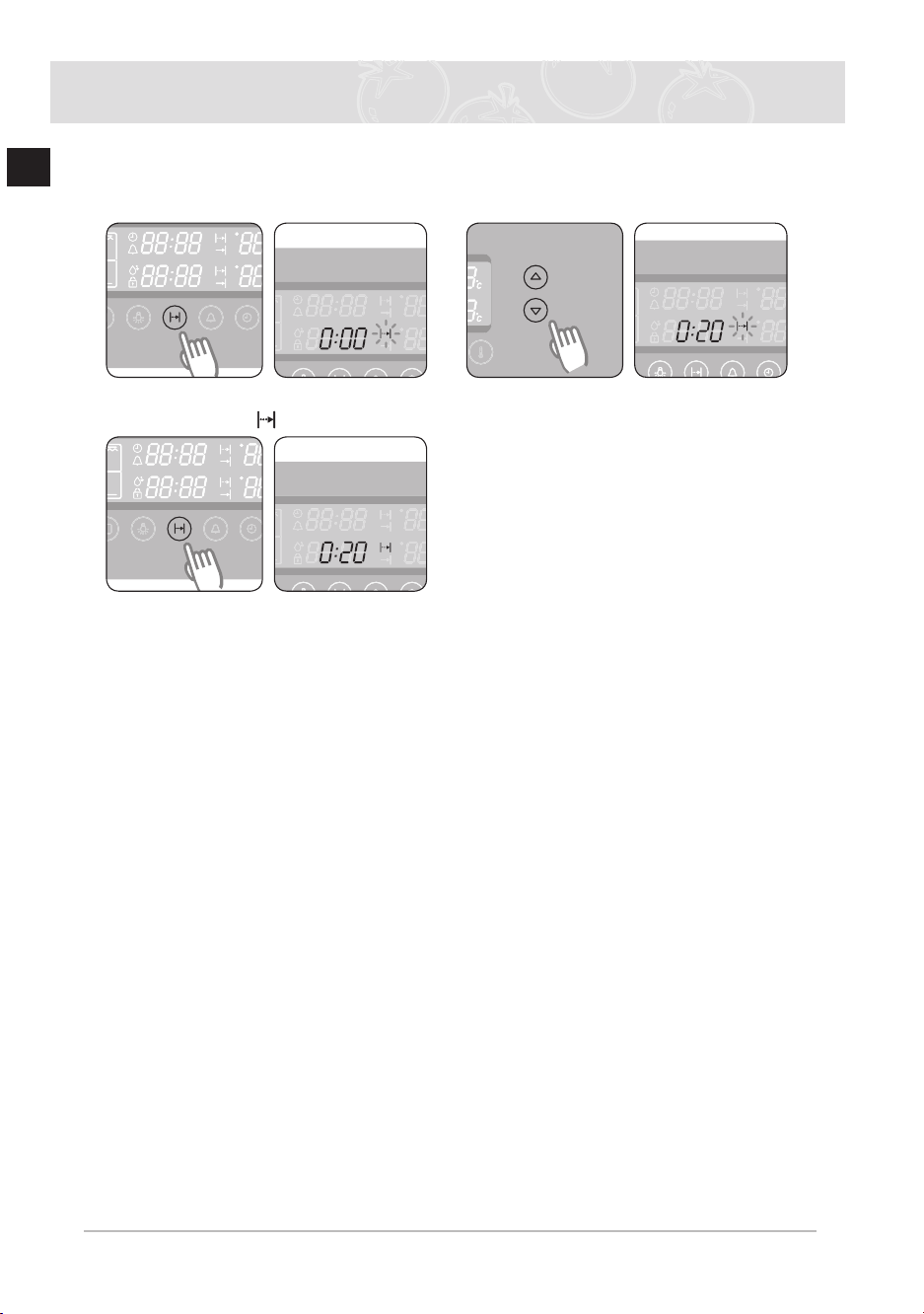
In twin mode
Cook times for the upper and lower modes can be selected by using the Cook Time Button
and the Time / Temp Control Button
1
Press the Cook Time Button twice
(lower mode) “
” will blink 2
Press the Time / Temp Control
Button
to set the desired cook time
3
Press the Cook Time Button
The oven operates with the selected
cook time unless the Cook Time
Button
is pressed within 5 seconds
) During cooking, you can adjust the previously set cook time with the Time / Temp
Control Button
for better results
BQ2Q7G078_XEU-00182S-02_EN.indd 20 6/21/2013 5:44:16 PM
21
EN
Oven Use (Continued)
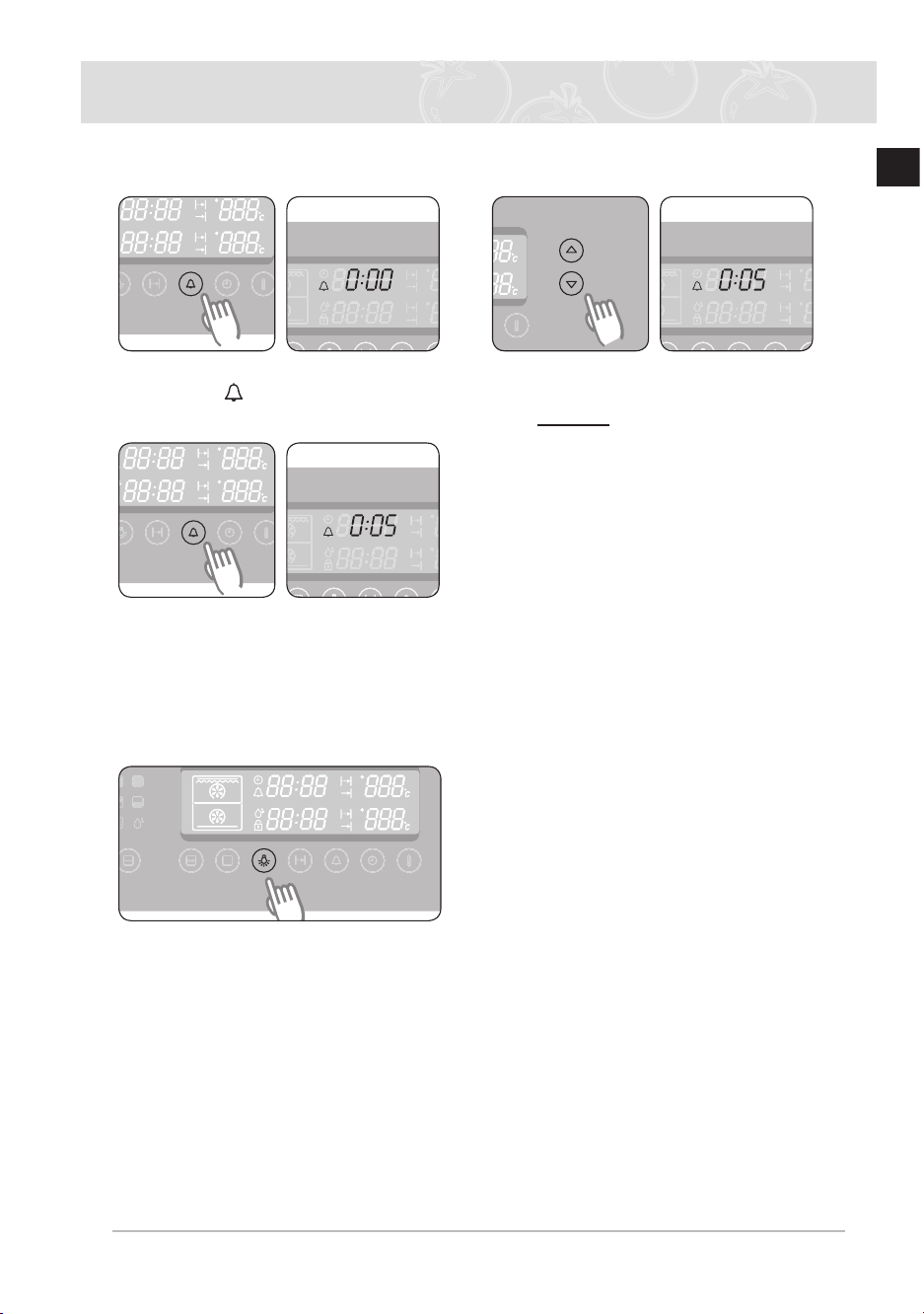
Kitchen timer
1
Press the Kitchen Timer Button
once “ ” ashes. 2
Turn the Time / Temp Control Button
to set the desired time
Example 5 minutes
3
Press the Kitchen Timer Button to
start the kitchen timer When the set
time has elapsed, an audible signal
sounds
) Press and hold the Kitchen Timer Button for 2 seconds each to cancel the timer
Oven lamp on / off
1
)
The lamp automatically turns
off within a few minutes.
1st Upper and Lower
2nd Upper
3rd Lower
4th Off
BQ2Q7G078_XEU-00182S-02_EN.indd 21 6/21/2013 5:44:16 PM
Press the Lamp button to turn
the lamp of the active cavity
(Single/Upper/Lower) on or off.
In Twin mode, the lamp lights up
in the following sequence.
22
EN
Oven Use (Continued)
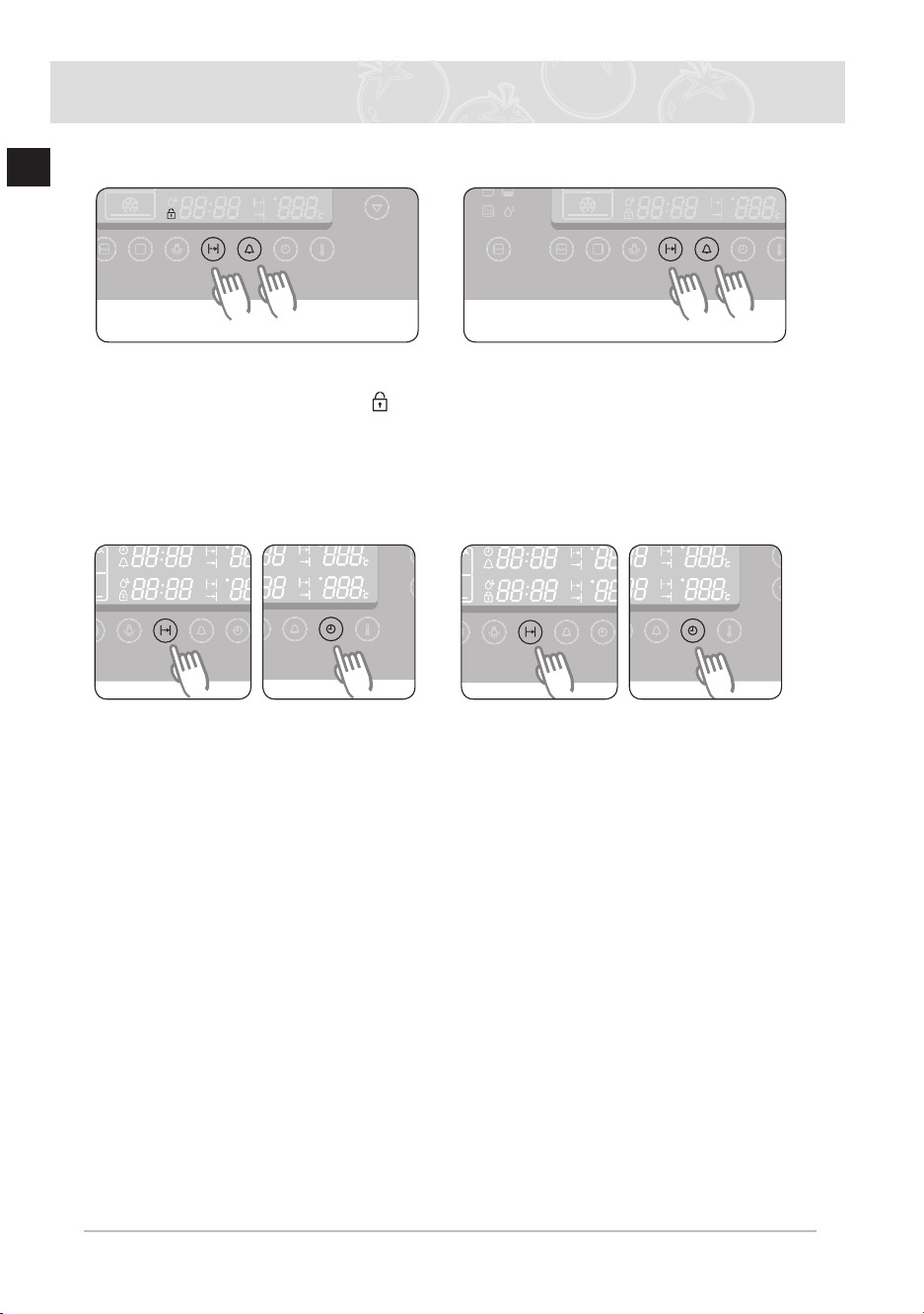
Child safety function
1
Press the Cooking Time button and
Kitchen Timer button at the same
time and hold for 3 seconds ( ) will
appear in the display eld.
2
Press the Cooking Time button and
Kitchen Timer button at the same
time and hold for 3 seconds again to
unlock
) When locked, all buttons except the Power On/Off button will not operate The lock
is available whether or not the oven is in operation
Switching the beeper off
1
To turn the beeper off, press the
Cooking Time and Clock buttons at
the same time and hold for 3 seconds
2
To turn the beeper back on, press the
Cooking Time and Clock buttons
again at the same time and hold for 3
seconds
BQ2Q7G078_XEU-00182S-02_EN.indd 22 6/21/2013 5:44:17 PM
23
EN
Oven Use (Continued)
Oven functions
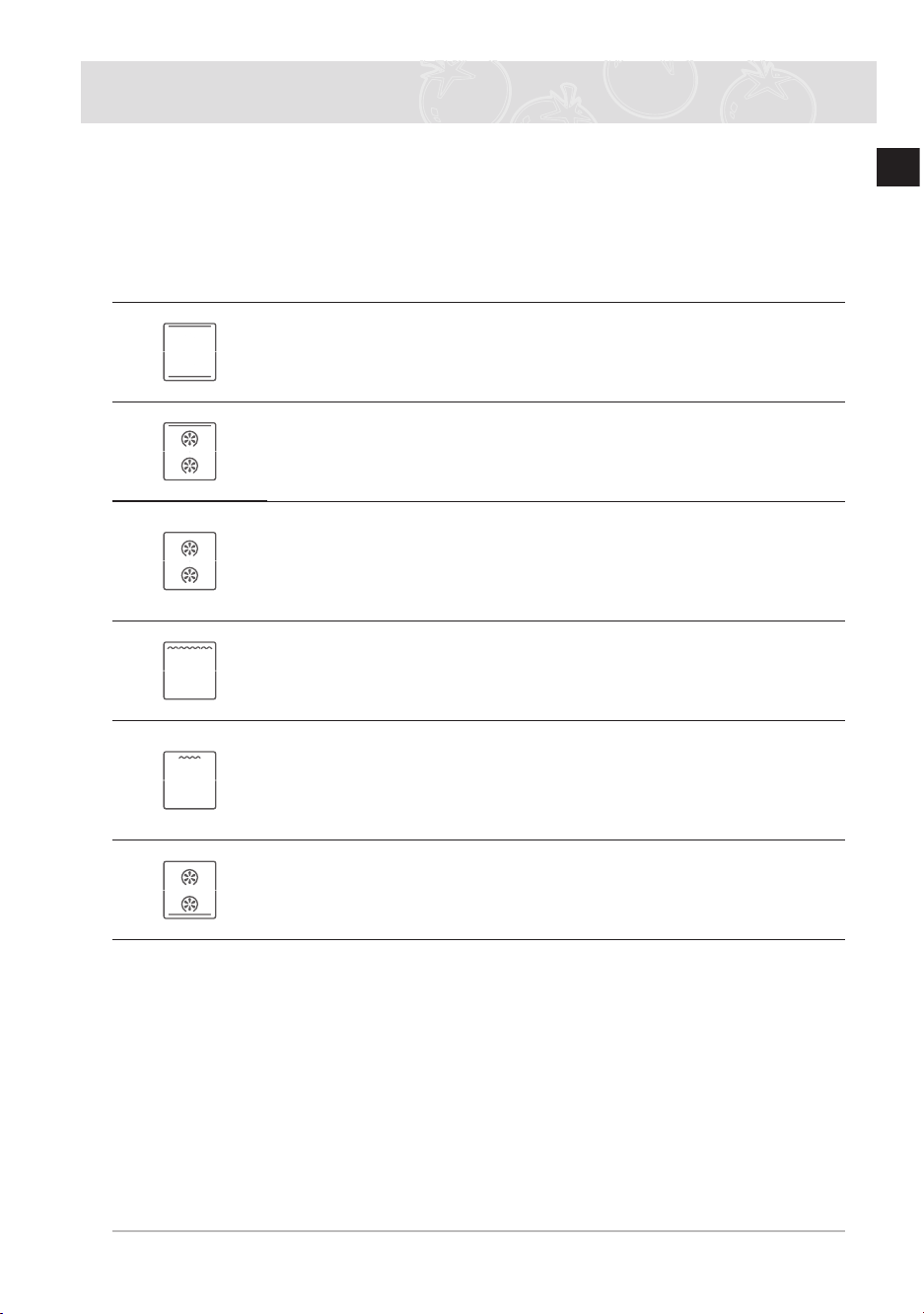
The features of this oven include the following functions
Oven Modes
The following table represents the various oven modes and settings of your oven
Use the cooking guide tables for these modes in the following pages as guidelines for cooking
Conventional
Food is heated by top and bottom heating elements This setting is
suitable for baking and roasting
Top Heat + Convection
We recommend this mode when roasting meat The top heating element
is in operation and the fans operate to circulate the hot air coming from
top and back wall heating element
Convection
Food is heated by the hot air from the heating element in the back and
circulated by two fans This setting provides uniform heating and is ideal
for frozen convenience food as well as cake and croissants
This mode can be used for baking on two levels
Large Grill
Food is heated by the top heating elements We recommend this mode
for grilling steaks and sausages as well as cheese toasts
Small Grill
This mode is ideal for grilling small amounts of foods, such as
baguettes, cheese or sh llets.
Place the food in the middle of the wire grill, as only the smaller heating
element in the centre is operating
Bottom Heat + Convection
The bottom heating element and back wall heating element provide hot
air which is circulated by the fans This mode is ideal for baking food
such as quiches, pizza, bread and cheesecakes
* Close the oven door while oven is cooking
If you leave the door open, it has the potential to make damage on your furniture due
to cooking oil from the food
BQ2Q7G078_XEU-00182S-02_EN.indd 23 6/21/2013 5:44:17 PM
24
EN
Oven Use (Continued)
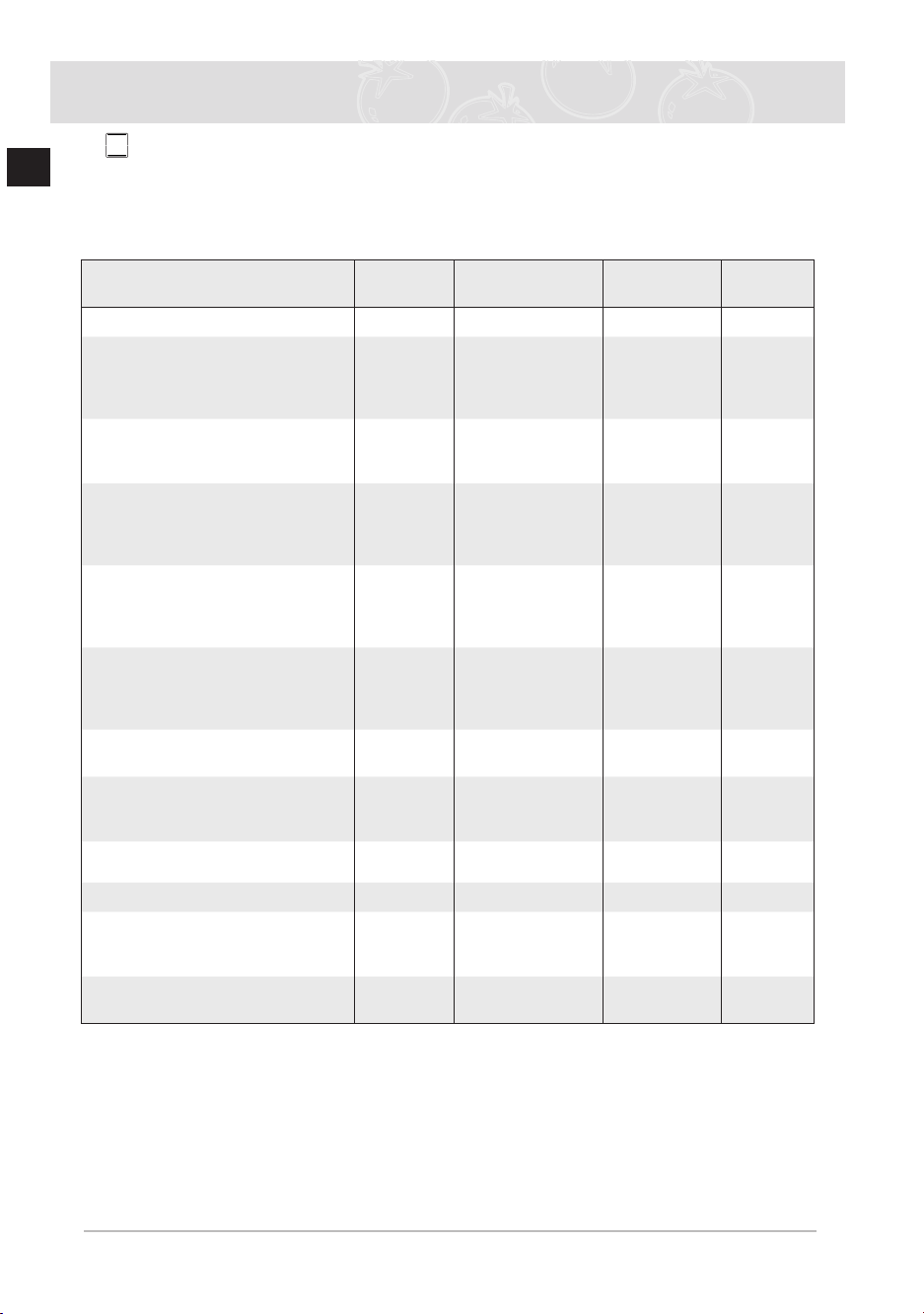
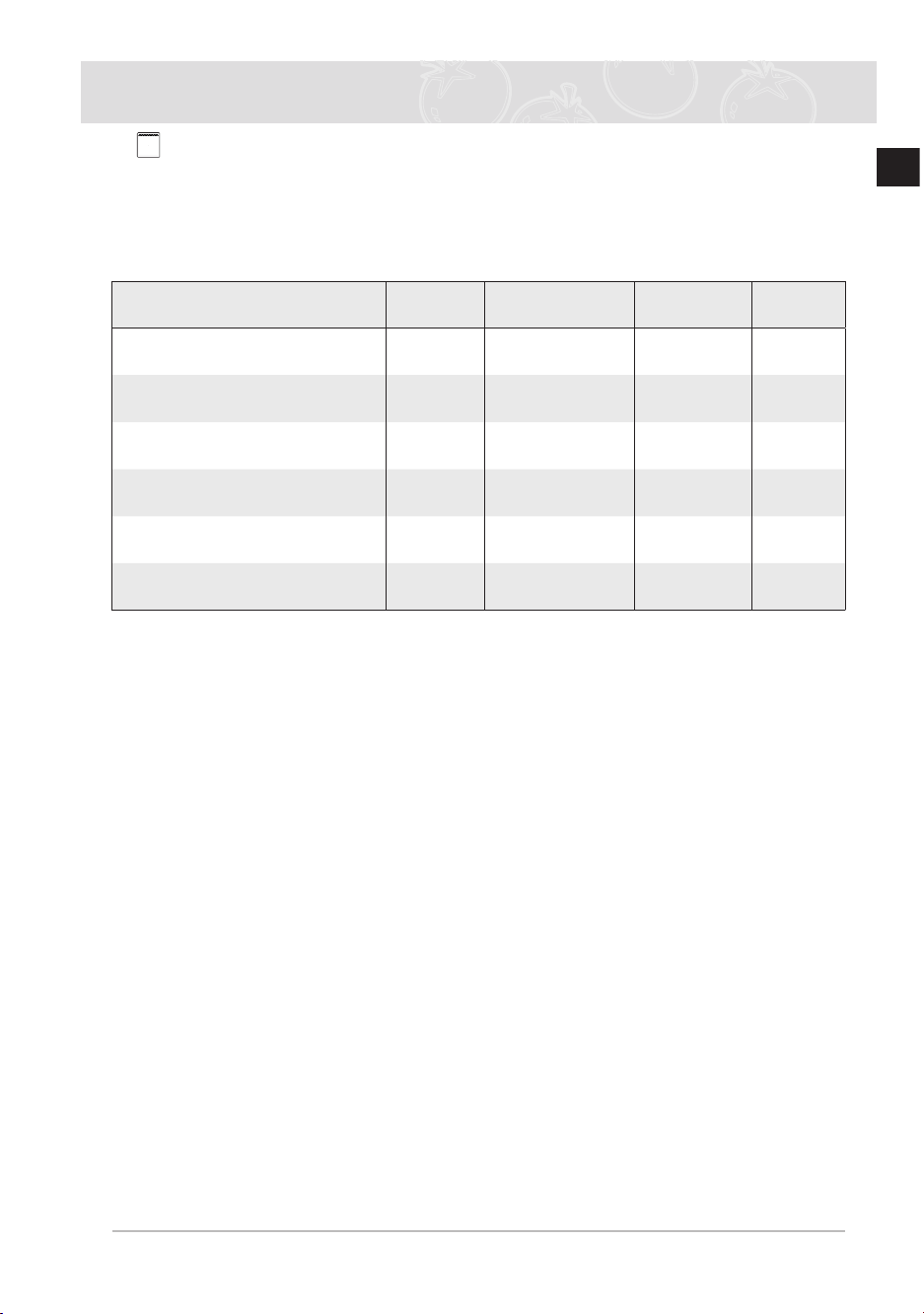
1 Conventional
Suggested temperature: 200°C
The conventional function is ideal for baking and roasting foods arranged on one rack Both
the top and bottom heating elements operate to maintain the oven temperature
We recommend to preheat the oven in conventional mode
Food Item
Shelf
Level
Accessory
Temperature
(°C)
Time
(min)
Frozen Lasagne (500-1000g) 3 Wire grill 180-200 40-50
Whole Fish (e g Dorade) (300-
1000g)
3-4 cut on each side
DROPOIL
3 Wire roast +
Deep Pan
240 15-20
Fishlets(500-1000g)
3-4 cut on each side
DROPOIL
3 Baking tray 200 13-20
Frozen cutlets (350-1000g)
minced meat & with ham,
cheeseormushroomling
DROPOIL
3 Baking tray 200 25-35
Frozen cutlets from minced,
carrot, beetroot or potato (350-
1000g)
DROPOIL
3 Baking tray 200 20-30
Pork on bone cutlets (500-
1000g)
DROPOIL,ADDSALT&PEP-
PER
3/2 Wire roast/Deep
Pan
200 40-50
Baked potato (cut in half) (500-
1000g)
3 Baking tray 180-200 30-45
Frozen Meat roll with mush-
roomsling(500-1000g)
DROPOIL
3 Baking tray 180-200 40-50
Sponge Cake (250-500g) 2 Wire grill 160-180 20-30
Marble Cake (500-1000g) 2 Wire grill 170-190 40-50
Yeast Cake on Tray
with fruit & crumbles topping
(1000-1500g)
2 Baking tray 160-180 25-35
Mufns
(500-800 g)
2 Wire grill 190-200 25-30
BQ2Q7G078_XEU-00182S-02_EN.indd 24 6/21/2013 5:44:17 PM
25
EN
Oven Use (Continued)
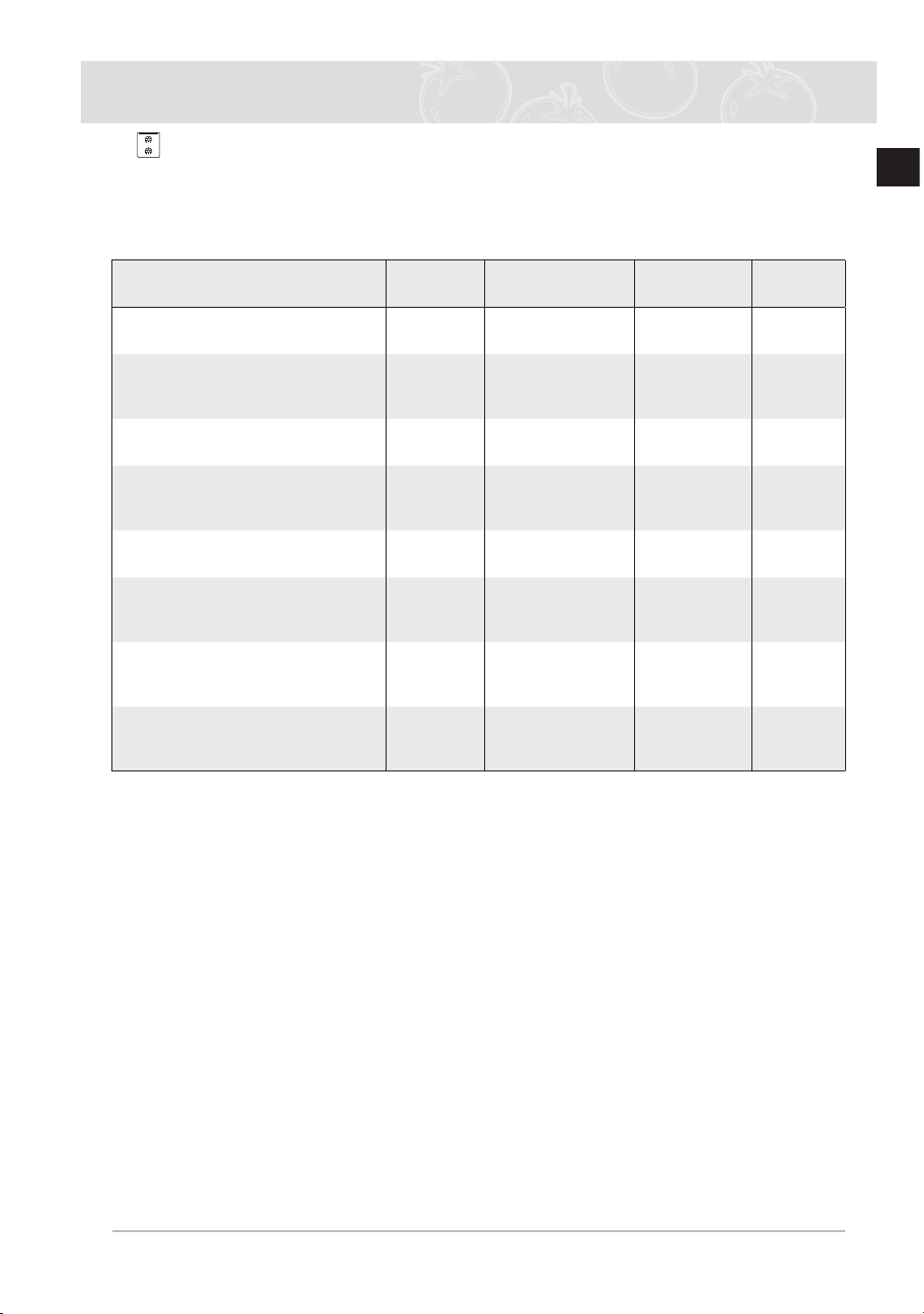
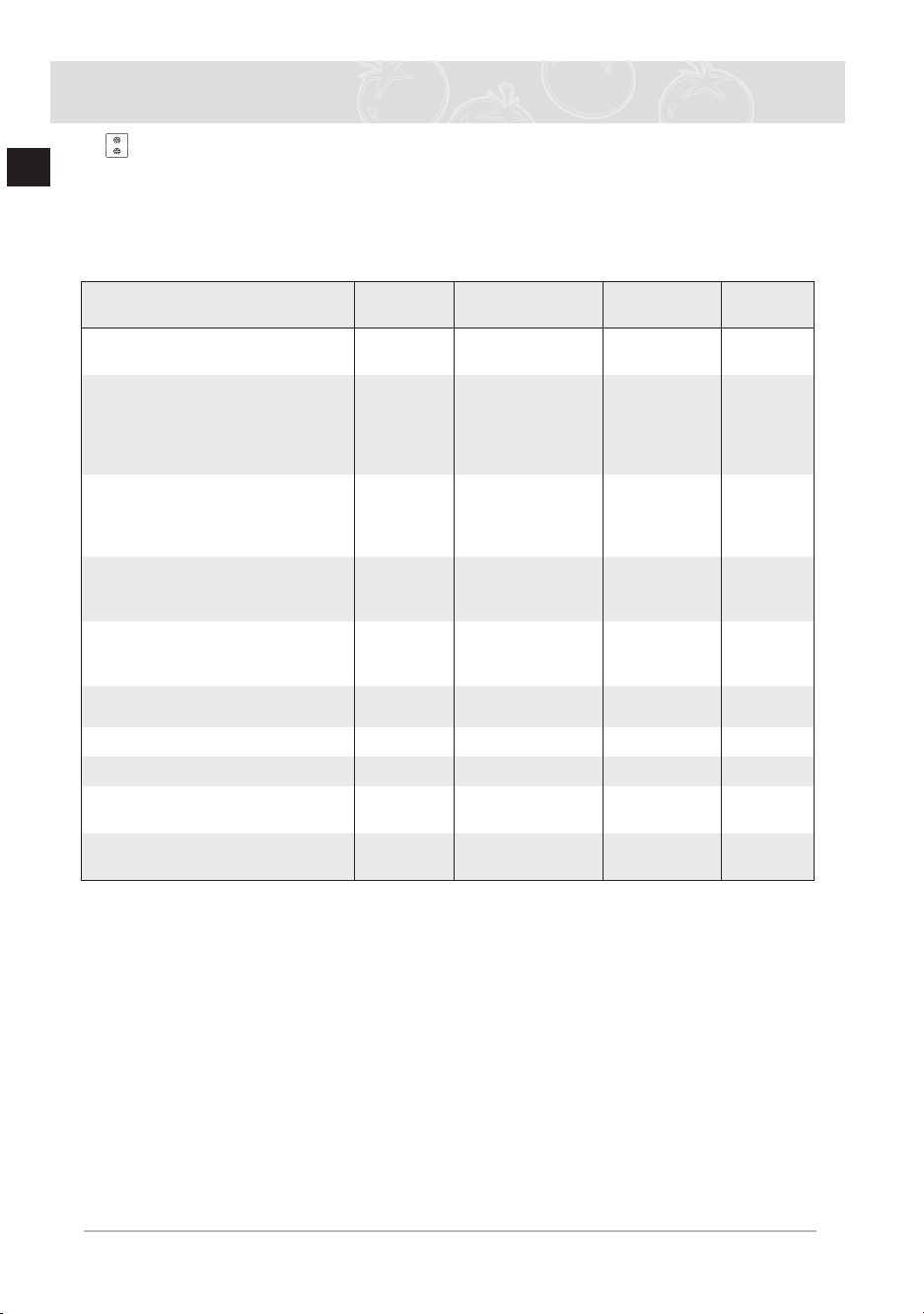
2 Top Heat + Convection
Suggested temperature: 190°C
The top heating element is in operation and the fan operates to constantly circulate the hot
air
We recommend to preheat the oven with Top Heat + Convection mode
Food Item
Shelf
Level
Accessory
Temperature
(°C)
Time
(min)
Pork on bone (1000g)
BRUSHWITHOIL&SPICES
3 Wire roast +
Deep pan
180-200 50-65
Pork shoulder in foil (1000-
1500g)
MARINATE
2 Baking tray 180-230 80-120
Whole chicken (800-1300g)
BRUSHWITHOIL&SPICES
2 Wire roast +
Deep pan
190-200 45-65
Meatorshsteaks(400-800g)
DROPOIL,ADDSALT&PEP-
PER
3 Wire roast +
Deep pan
180-200 15-35
Chicken Pieces (500-1000g)
BRUSHWITHOIL&SPICES
4 Wire roast +
Deep pan
200-220 25-35
RoastFish(500g-1000g)
use ovenproof dish
BRUSHWITHOIL
2 Wire grill 180-200 30-40
RoastBeef(800-1200g)
BRUSHWITHOIL&SPICES
2 Wire roast +
Deep pan
Add 1 cup water
200-220 45-60
Duck Breast (300-500g) 4 Wire roast +
Deep pan
Add 1 cup water
180-200 25-35
BQ2Q7G078_XEU-00182S-02_EN.indd 25 6/21/2013 5:44:18 PM
26
EN
Oven Use (Continued)
3
Convection
Suggested temperature: 170°C
This function bakes foods placed on up to three shelves and is also appropriate for
roasting Cooking is achieved by the heating element on the rear wall and the fan
distributes the heat
We recommend to preheat the oven in convection mode
Food Item
Shelf
Level
Accessory
Temperature
(°C)
Time
(min)
Lamb rack (350-700g)
BRUSHWITHOIL&SPICES
3 Wire roast +
Deep pan
190-200 40-50
Baked Bananas (3-5 pcs), cut
with knife on top, add10-15g
chocolate, 5-10g nuts into cuts,
drop sugar water, wrap in alu-
minium foil
3 Wire grill 220-240 15-25
Baked apples 5-8pcs each 150-
200g
Take out the hearts, add raisins
and jam Use ovenproof dish
3 Wire grill 200-220 15-25
Cutlets from minced meat (300-
600g)
DROPOIL
3 Baking tray 190-200 18-25
MincedMeatrollwithlling
,Russianstyle’(500g-1000g)
BRUSHWITHOIL
3 Baking tray 180-200 50-65
Frozen Croquettes (500-1000g) 2 Baking tray 180-200 25-35
Frozen Oven Chips (300-700g) 2 Baking tray 180-200 20-30
Frozen Pizza (300-1000g) 2 Wire grill 200-220 15-25
Apple & Almond Cake (500-1000
g)
2 Wire grill 170-190 35-45
Fresh Croissant (200-400g)
(ready-dough)
3 Baking tray 180-200 15-25
BQ2Q7G078_XEU-00182S-02_EN.indd 26 6/21/2013 5:44:18 PM
27
EN
Oven Use (Continued)
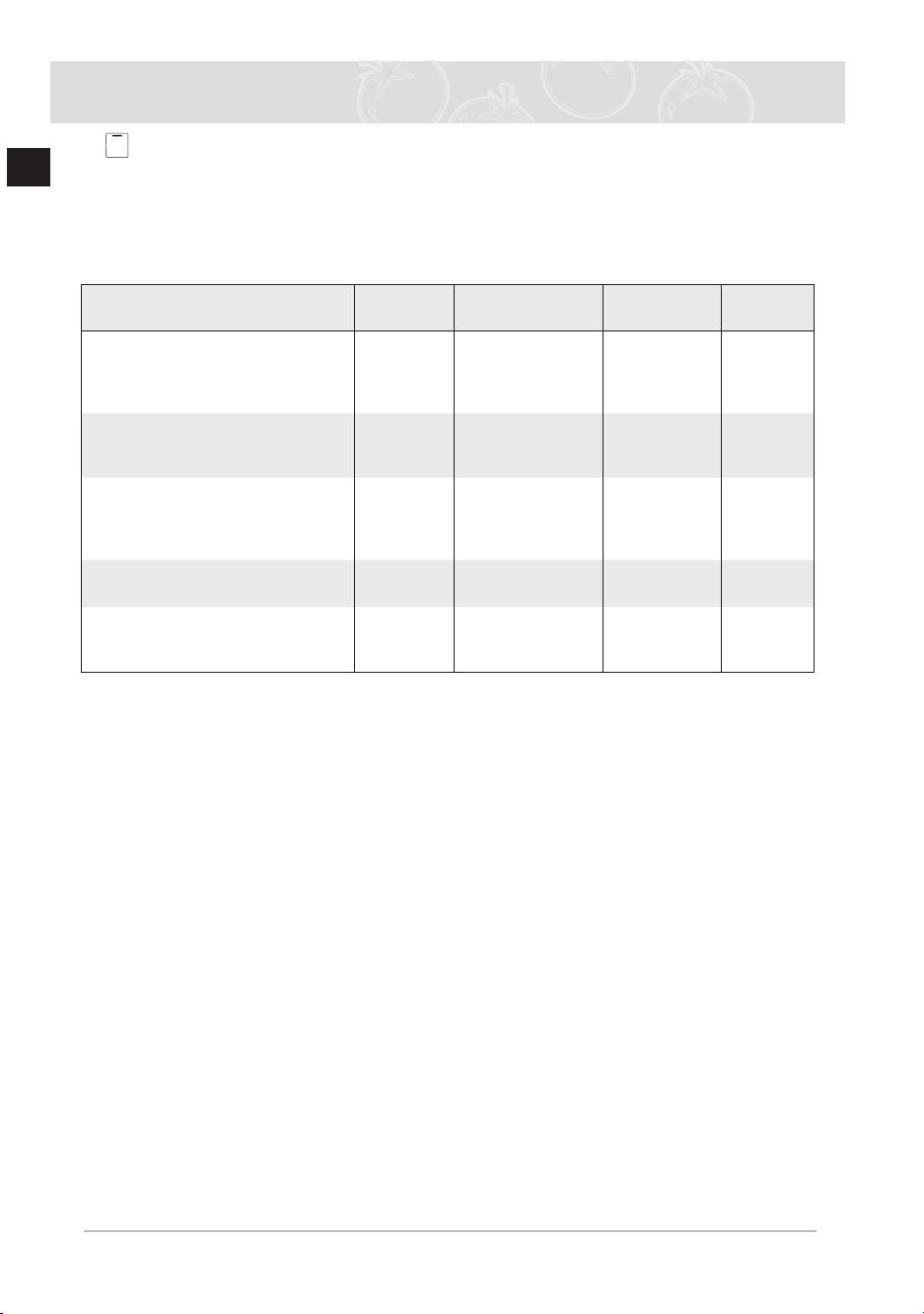
4 Large Grill
Suggested temperature: 240°C
The large grill function grills large quantities of at foods, such as steaks, schnitzels and
sh. It is also suitable for toasting. Both the top heating element and the grill are on in this
mode
We recommend to preheat the oven using Large Grill mode
Food Item
Shelf
Level
Accessory
Temperature
(°C)
Time
(min)
Sausages (thin) 5-10pcs 4 Wire roast +
Deep pan
220 5-8 turn-
over 5-8
Sausages (thin) 8-12pcs 4 Wire roast +
Deep pan
220 4-6 turn-
over 4-6
Toasts 5-10pcs 5 Wire grill 240 1-2 turn-
over 1-2
Cheese Toasts 4-6 pcs 4 Wire roast + Bak-
ing tray
200 4-8
FrozenPancakeswithlling
,RussianStyle’(200-500g)
3 Baking tray 200 20-30
Beef Steaks (400-800 g) 4 Wire roast +
Deep pan
240 8-10 turn-
over 5-7
BQ2Q7G078_XEU-00182S-02_EN.indd 27 6/21/2013 5:44:18 PM
28
EN
Oven Use (Continued)
5 Small Grill
Suggested temperature: 240°C
This setting is for grilling smaller amounts of at foods, such as steaks, schnitzels, sh and
toast, placed in the middle of the tray Only the top element is in operation
We recommend to preheat the oven using Small Grill mode
Put food in the centre of accessory
Food Item
Shelf
Level
Accessory
Temperature
(°C)
Time
(min)
Frozen Oven Camembert (2 – 4
each 75g)
PUT IN COLD OVEN (before
preheat)
3 Wire grill 200 10-12
Frozen Baguettes with topping
(Tomato-Mozzarella or Ham &
Cheese)
3 Wire roast + Bak-
ing tray
200 15-20
FrozenFishngers(300-700g)
PUT IN COLD OVEN (before
preheat)
DROPOIL
3 Wire roast + Bak-
ing tray
200 15-25
Frozen Fish burger (300- 600g)
PUTINCOLDOVEN,DROPOIL
3 Baking tray 180-200 20-35
Frozen Pizza (300-500g)
PUT IN COLD OVEN (before
preheat)
3 Wire roast + Bak-
ing tray
180-200 23-30
BQ2Q7G078_XEU-00182S-02_EN.indd 28 6/21/2013 5:44:18 PM
29
EN
Oven Use (Continued)
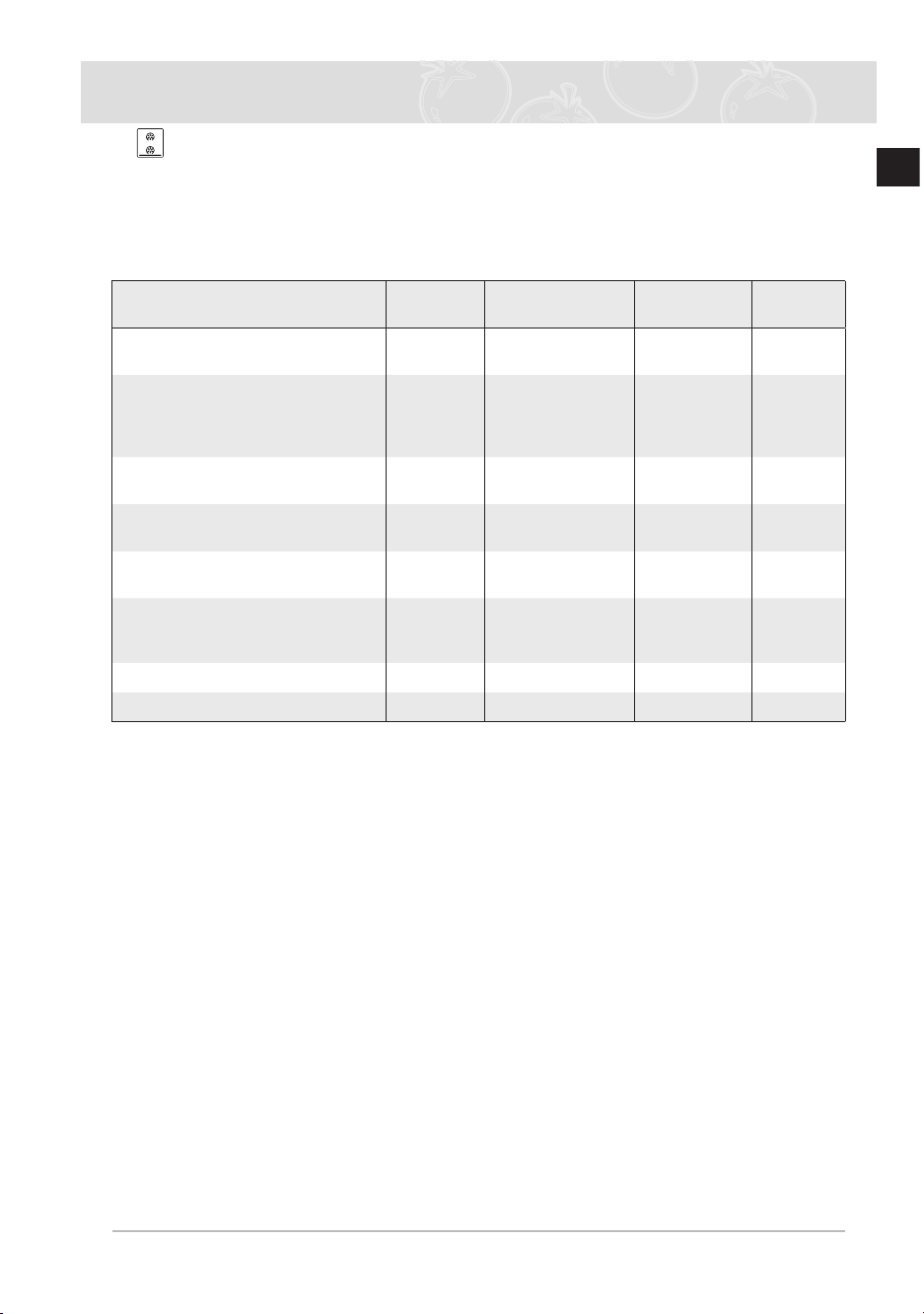
6 Bottom Heat + Convection
Suggested temperature: 190°C
The Bottom Heat + Convection mode is for recipes calling for a moist topping and a
crisp base, as with foods like pizzas, quiches lorraine, German-style open fruitcakes and
cheesecakes
We recommend to preheat the oven in Bottom Heat + Convection mode
Food Item
Shelf
Level
Accessory
Temperature
(°C)
Time
(min)
Yeast dough pie with apple
frozen (350-700g)
3 Wire grill 180-200 15-20
Puffpastrysmallpieswithlling
frozen (300-600g)
BRUSHEGGYOLK,PUTIN
COLD OVEN (before preheat)
3 Baking tray 180-200 20-25
Meat balls in sauce (250-500g)
use ovenproof dish
3 Wire grill 180-200 25-35
Puff pastry fans (500-1000g)
BRUSHEGGYOLK
3 Baking tray 180 15-23
Cannelloni in sauce (250-500g)
use ovenproof dish
3 Wire grill 180 22-30
Yeastdoughpieswithlling
(600-1000g)
BRUSHEGGYOLK
3 Baking tray 180-200 20-30
Homemade Pizza (500-1000g) 2 Baking tray 200-220 15-25
Homemade Bread (700-900g) 2 Wire grill 170-180 45-55
BQ2Q7G078_XEU-00182S-02_EN.indd 29 6/21/2013 5:44:18 PM

30
EN
Oven Use (Continued)
7 Twin Mode
Using twin mode you can cook two different food items in your oven When cooking in
upper and lower cavity you can use different temperatures, cooking modes and cooking
times For example, you can grill steaks and bake gratin simultaneously Using the divider,
you can cook gratin in the lower and steaks in the upper part of the oven
Always insert divider into shelf level 3 before you start cooking
Suggest 1: Cooking at different temperatures
Cavity Food Item
Shelf
Level
Cooking
Mode
Tempera-
ture
(°C)
Accessory
Time
(min)
UPPER
Frozen Pizza
(300-400g)
4 Convection 200 - 220 Wire Grill 15 - 25
LOWER
Marble Cake
(500-700g)
1 Convection 170 - 180 Baking Tray 50 - 60
Notice: Put food in cold oven
Suggest 2:
Cooking at different cooking modes
Cavity Food Item
Shelf
Level
Cooking
Mode
Tempera-
ture
(°C)
Accessory
Time
(min)
UPPER
Chicken Pieces
(400-600g)
4
Top Heat +
Convection
200 - 220
Wire Roast
+ Deep Pan
25 - 35
LOWER
Potato Gratin
(500-1000g)
1 Convection 170 - 180 Wire Grill 30 - 40
Notice: Put food in cold oven
BQ2Q7G078_XEU-00182S-02_EN.indd 30 6/21/2013 5:44:18 PM
31
EN
Oven Use (Continued)
Test dishes
According to standard EN 60350
1 Baking
The recommendations for baking refer to preheated oven
Type of Food Dish & Notes
Shelf
level
Cooking
Mode
Temp °C
Cooking
time min
Small Cakes Baking tray 3 Conventional 160-180 15-25
Deep pan + Baking
tray
1+4 Convection 150-170 20-30
Fatless Sponge
Cake
Baking tin on Wire
grill (Dark coated, ø
26 cm)
2 Conventional 160-180 20-30
Apple Pie Wire grill + Baking
tray + 2 Springform
cake tins (Dark
coated, ø 20 cm)
1+3 Convection 170-190 80-100
Wire grill + 2 Spring-
form cake tins (Dark
coated, ø 20 cm)
1 Placed
diago-
nally
Conventional 170-190 70-80
2 Grilling
Preheat the empty oven for 5 minutes using the Large Grill function
Use this function with the maximum temperature setting of 300°C
Type of Food Dish & Notes
Shelf
level
Cooking
Mode
Temp °C
Cooking
time min
White Bread
Toasts
Wire grill 5 Large Grill 300 1
st
1-2
2
nd
1-1 1/2
Beef Burgers Wire Roast + Deep
pan (to catch drip-
pings)
4 Large Grill 300 1
st
7-10
2
nd
6-9
BQ2Q7G078_XEU-00182S-02_EN.indd 31 6/21/2013 5:44:18 PM
32
EN
Automatic Cooking
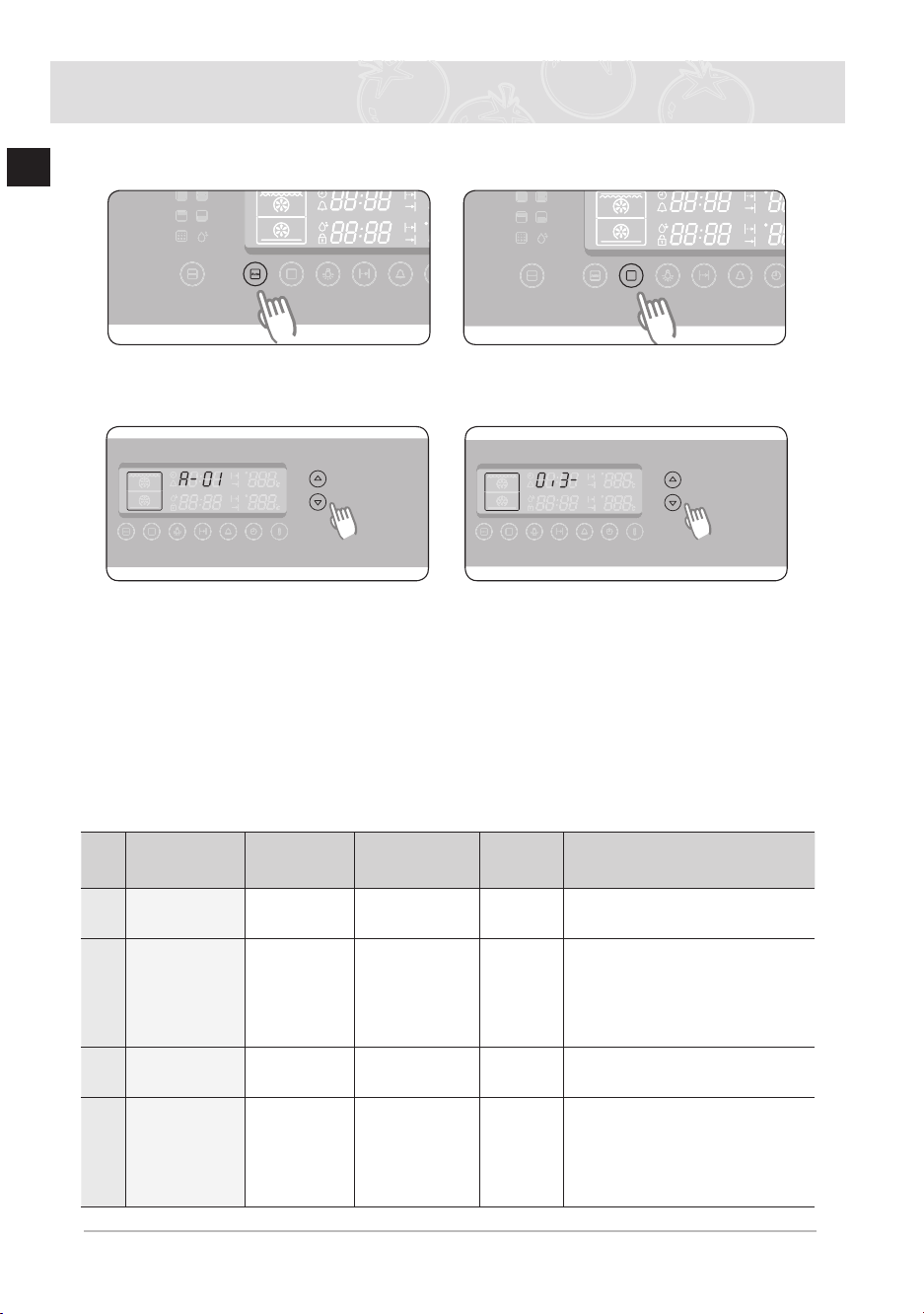
In auto cook mode you can select 40 Auto Programmes for cooking, roasting and baking
For upper, twin and lower modes, insert the divider
1
Press Auto Cook select button
2
Select the desired function by
pressing Cooking Mode Select
button
(skip this step in single mode)
3
Select the desired recipe by
pressing Time/temperature
Control buttons
Wait 5 seconds
4
Select the desired weight by pressing
Time/temperature Control buttons
Single oven auto cook programmes
The following table presents 25 Auto Programmes for Cooking, Roasting and Baking
Those can be used in the single cavity of your oven Always remove the divider
It contains its quantities, weight ranges and appropriate recommendations
Cooking Modes and times have been pre-programmed for your convenience
You can refer to these guide lines for cooking Always insert food in cold oven
No Food Item Weight/kg Accessory
Shelf
Level
Recommendation
1 Frozen Pizza 0.3-0.6
0.7-1.0
Wire grill 2 Put frozen pizza in the middle of
the wire grill.
2 Frozen Oven
Chips
0.3-0.5 (thin)
0.6-0.8
(thick)
Baking tray 2 Distribute frozen oven chips
evenly on the baking tray. First
setting is for thin French fries, the
second setting is for thick oven
chips.
3 Frozen Oven
Croquettes
0.3-0.5
0.6-0.8
Baking tray 2 Put frozen potato croquettes on
the tray.
4 Homemade
Lasagne
0.3-0.5
0.8-1.0
Wire grill 3 Prepare fresh lasagne or use
ready prepared product and put
into a suitable sized ovenproof
dish. Put dish in the centre of
oven.
BQ2Q7G078_XEU-00182S-02_EN.indd 32 6/21/2013 5:44:19 PM
33
EN
Automatic Cooking (Continued)
No Food Item Weight/kg Accessory
Shelf
Level
Recommendation
5 Beef Steaks 0.3-0.6
0.6-0.8
Deep pan with
wire roast
4 Put marinated beef steaks side
by side on the wire roast. Turn
over as soon as the oven beeps.
The first setting is for thin beef
steaks, the second setting is for
thick beef steaks.
6 Roast Beef 0.6-0.8
0.9-1.1
Deep pan with
wire roast
2 Put marinated roast beef on wire
roast.
Turn over, as soon as the oven
beeps.
7 Roast Pork 0.6-0.8
0.9-1.1
Deep pan with
wire roast
2 Put marinated roast pork on wire
roast.
Turn over as soon as the oven
beeps.
8 Lamb Chops 0.3-0.4
0.5-0.6
Deep pan with
wire roast
4 Marinate lamb chops. Put lamp
chops on wire roast. Turn over, as
soon as the oven beeps.
The first setting is for thin chops,
the second setting is for thick
chops.
9 Chicken
pieces
0.5-0.7
1.0-1.2
Deep pan with
wire roast
4 Brush chicken pieces with oil and
spices.
Put chicken pieces side by side
on the wire roast.
10 Whole
Chicken
1.0-1.1
1.2-1.3
Deep pan with
wire roast
2 Brush whole chicken with oil and
spices.
Put chicken on the wire roast.
Turn over, as soon as the oven
beeps.
11 Duck breast 0.3-0.5
0.6-0.8
Deep pan with
wire roast
4 Prepare duck breast, put on
the wire roast with the fat-side
up. First setting is for one duck
breast, the second setting is for 2
thick duck breasts.
12 Roll of Turkey 0.6-0.8
0.9-1.1
Deep pan with
wire roast
4 Put roll of turkey on the wire
roast.
Turn over, as soon as the oven
beeps.
13 Steamed Fish 0.5-0.7
0.8-1.0
Wire grill 2 Rinse and clean fishes, such
as whole trout, perch or sea
bass. Put head to tail in an oval
ovenproof glass dish. Add 2-3
tablespoon lemon juice. Cover
with lid.
BQ2Q7G078_XEU-00182S-02_EN.indd 33 6/21/2013 5:44:19 PM
34
EN
Automatic Cooking (Continued)
No Food Item Weight/kg Accessory
Shelf
Level
Recommendation
14 Roast Fish 0.5-0.7
0.8-1.0
Deep pan with
wire roast
4 Put fishes head to tail on the wire
roast.
First setting is for 2 fishes, the
second setting is for 4 fishes. The
programme is suitable for whole
fishes, like trout, pikeperch or
gilthead.
15 Salmon
Steaks
0.3-0.4
0.7-0.8
Deep pan with
wire roast
4 Put salmon steaks on the wire
roast.
Turn over, as soon as the oven
beeps.
16 Oven
Potatoes
0.4-0.5
0.8-1.0
Baking tray 2 Rinse potatoes, cut potatoes into
halves.
Brush with olive oil, herbs and
spices.
Distribute on the tray evenly.
The first setting is for small
potatoes (each 100 g), the
second setting is for large oven
potatoes (each 200 g).
17 Roast
Vegetables
0.4-0.5
0.8-1.0
Deep pan 4 Put vegetables, such as sliced
courgette, pieces of pepper,
sliced aubergine, mushrooms and
cherry tomatoes into deep pan.
Brush with a mixture of olive oil,
herbs and spices.
18 Vegetable
Gratin
0.4-0.6
0.8-1.0
Wire grill 2 Prepare vegetable gratin using an
ovenproof round dish. Put dish in
the centre of oven.
19 Marble Cake 0.5-0.6
0.7-0.8
0.9-1.0
Wire grill 2 Put dough into a suitable sized
buttered baking dish for bundt
cake.
20 Fruit Flan
Base
0.3-0.4
(large)
0.2-0.3
(tartlets)
Wire grill 2 Put dough into buttered baking
dish for cake base. First setting is
for one fruit flan base, the second
setting is for 5-6 small tartlets.
21 Sponge Cake 0.4-0.5
(midsize)
0.2-0.3
(small)
Wire Grill 2 Put dough into a round black
metal baking tin.
First setting is for Ø 26cm and
the second setting is for small Ø
18cm baking tin.
BQ2Q7G078_XEU-00182S-02_EN.indd 34 6/21/2013 5:44:19 PM
35
EN
Automatic Cooking (Continued)
No Food Item Weight/kg Accessory
Shelf
Level
Recommendation
22 Muffins 0.5-0.6
0.7-0.8
Wire Grill 2 Put dough into black metal
baking dish for 12 muffins.
First setting is for small muffins,
the second setting is for large
muffins.
23 Bread 0.7-0.8
(white)
0.8-0.9
(wholemeal)
Wire Grill 2 Prepare dough according to
manufacturers instructions and
put into a black metal rectangular
baking dish (length 25 cm).
The first setting is for white
bread (0.7-0.8 kg) and the
second setting (0.8-0.9 kg) is for
wholemeal bread.
24 Homemade
Pizza
1.0-1.2
1.3-1.5
Baking tray 2 But pizza on the tray. The weight
ranges include topping such
as sauce, vegetables, ham and
cheese. Setting 1 (1.0-1.2 kg)
is for thin pizzas and setting 2
(1.3-1.5 kg) is for pizza with much
topping.
25 Yeast Dough
Fermentation
0.3-0.5
0.6-0.8
Wire Grill 2 The first setting is recommended
for rising pizza yeast dough. The
second setting is suitable for
yeast dough for cake and bread
dough. Put into a large round
heat-resistant dish and cover with
cling film.
BQ2Q7G078_XEU-00182S-02_EN.indd 35 6/21/2013 5:44:19 PM
36
EN
Automatic Cooking (Continued)
Upper Oven Auto Cook Programmes
The following table presents 5 Auto Programmes for Cooking, Roasting and Baking
It contains its quantities, weight ranges and appropriate recommendations
Cooking Modes and times have been pre-programmed for your convenience
You can refer to these guide lines for cooking Always insert food in cold oven
No Food Item Weight/kg Accessory
Shelf
Level
Recommendation
1 Frozen Bread
Rolls
0.2-0.3
0.4-0.5
Wire grill 4 Distribute frozen bread rolls evenly
on wire grill.
2 Frozen Pizza 0.1-0.2
0.3-0.4
Wire grill 5 Put frozen pizza in the centre of
wire grill.
3 Frozen Pizza
Snacks
0.2-0.3
0.4-0.5
Wire grill 5 Distribute pizza snacks side by side
on the wire grill.
4 Frozen Fish
fingers
0.2-0.3
0.4-0.5
Baking tray 5 Distribute fish fingers evenly on
baking tray.
0.2-0.3 kg weight range is
suggested for 10pcs, 0.4-0.5 kg
for 15 pcs. Turn over after beep
sounds.
5 Frozen Oven
Chips
0.4-0.5
0.6-0.7
Baking tray 5 Distribute frozen oven chips on
baking tray.
The first setting is recommended
for thin French fries, the second
setting is recommended for thick
oven chips. Use baking paper.
Turn over after beep sounds.
BQ2Q7G078_XEU-00182S-02_EN.indd 36 6/21/2013 5:44:19 PM
37
EN
Lower Oven Auto Cook Programmes
The following table presents 5 Auto Programmes for Cooking, Roasting and Baking
It contains its quantities, weight ranges and appropriate recommendations
Cooking Modes and times have been pre-programmed for your convenience
You can refer to these guide lines for cooking
Insert food in cold oven, unless it is recommended to preheat the oven
No Food Item Weight/kg Accessory
Shelf
Level
Recommendation
1 Frozen
Salmon
in puff pastry
0.2-0.3
0.5-0.6
Baking tray 1 Use baking paper. Put 2 pcs (0.2-
0.3 kg) side by side or 4 pcs (0.5-
0.6 kg) puff pastries in two rows on
the baking tray.
2 Homemade
Quiche
0.5-0.6
(small)
0.9-1.0
(large)
Wire grill 1 We recommend to preheat the
lower oven to 210˚C with Bottom
heat + Convection mode until beep
sounds. Use black metal baking
tin.
After preheating put in the centre
of wire grill.
For first setting use Ø 18 cm tin, for
second setting use Ø 26 cm tin.
3 Homemade
Pizza
0.2-0.6
0.8-1.2
Baking tray 1 Use baking paper. Put 0.2-0.6 kg
on a round pizza tray, put 0.8-1.2
kg on the square baking tray.
4 Muffins 0.5-0.6
0.7-0.8
Wire grill 1 Put dough into black metal baking
dish for 12 muffins.
5 Puff Pastry in
Fruit
0.2-0.3
0.4-0.5
Baking tray 1 Put 4 puff pastries in two rows on
the baking tray using baking paper.
Use first setting for 4 small puff
pastries (0.2-0.3 kg) and second
setting for 4 large puff pastries
(0.4-0.5 kg).
Automatic Cooking (Continued)
BQ2Q7G078_XEU-00182S-02_EN.indd 37 6/21/2013 5:44:19 PM

38
EN
Twin Oven Auto Cook Programmes
Before using twin auto cook function insert the divider into the oven
The following table presents 5 Twin Auto Cook Programmes for Cooking, Roasting and Bak-
ing Using those programmes you will be able to cook your main dish & side dish or main dish
& dessert simultaneously This table contains quantities, weight ranges and appropriate rec-
ommendations Cooking Modes and times have been pre-programmed for your convenience
Please refer to those guide lines for cooking Always insert food in cold oven
No Cavity Food Item
Weight/
kg
Accessory
Shelf
Level
Recommendation
1 upper Chicken
Pieces
0.3-0.5
0.8-1.0
Deep pan with
wire roast
4 Brush chicken pieces with oil
and spices. Put pieces with
the skin side up on the wire
roast.
lower Potato
Gratin
0.4-0.6
0.8-1.0
Wire grill 1 Use ovenproof baking dish.
Place in the centre of the wire
grill.
2 upper Roast
Vegetables
0.4-0.5
0.7-0.8
Deep pan 4 Distribute sliced vegetables,
such as courgettes, pepper,
onions, mushrooms, fennel,
egg plants and tomatoes on
the deep pan. Brush with olive
oil and spices.
lower Pizza Bread 0.1-0.2
0.3-0.4
Baking tray 1 Put pizza bread on baking
paper on tray.
3 upper Roast Fish 0.3-0.5
0.6-0.8
Deep pan with
wire roast
4 Rinse and prepare whole
fishes, such as trout, bream,
pike-perch or gilthead, add
lemon juice, herbs and spices.
Brush skin with olive oil and
spices. Put on wire roast.
lower Potato
wedges
0.3-0.4
0.5-0.6
Baking tray 1 Rinse and clean potatoes.
Cut them into wedges or cut
small potatoes into halves.
Brush with olive oil and spices.
4 upper Roast Duck
Breast
0.3-0.5
( 1-2 thin)
0.6-0.8
( 2 thick)
Deep pan with
wire roast
4 Put marinated duck breasts
with the fat side up on the wire
roast.
The first setting is for normal
sized duck breasts (0.3 kg),
the second setting is for 2
duck breasts (each 0.4 kg)
lower Baked
Apples
0.4-0.5
0.9-1.0
Wire grill 1 Rinse and core apples and fill
with marzipan or raisins. Put
into a round ovenproof dish.
5 upper Muffins 0.5-0.6
0.7-0.8
Wire grill 4 Put dough into black metal
baking dish for 12 muffins.
lower Homemade
Pizza
0.2-0.6
0.8-1.2
Baking tray 1 Put 0.2-0.6 g on a round
metal pizza baking dish, put
0.8-1.2 kg on the baking tray.
Use baking paper.
Automatic Cooking (Continued)
BQ2Q7G078_XEU-00182S-02_EN.indd 38 6/21/2013 5:44:19 PM
39
EN
Cleaning and Care
Self cleaning
This mode for cleaning the oven automatically
This mode burns the leftover grease in the oven so that it can be wiped out when the oven
cools down
The oven is heated up to around 500°C
During the Self Cleaning (pyrolytic self-cleaning), oven door is locked automatically
Door locking ( )
When the oven temperature heats up to 300°C , the door will be
locked automatically for safety
Unlocking
When the oven temperature is falls below 260°C, the door will
be unlocked automatically
WARNING
● During this process the oven becomes very hot
● Children must be kept at a safe distance
Attention
Before carrying out the self cleaning function, all accessory parts should be taken out of the
oven
Remove any large pieces of dirt by hand beforehand
Because thick food residue, grease and meat juices are amable, a re may happen in the
oven during the Self Cleaning
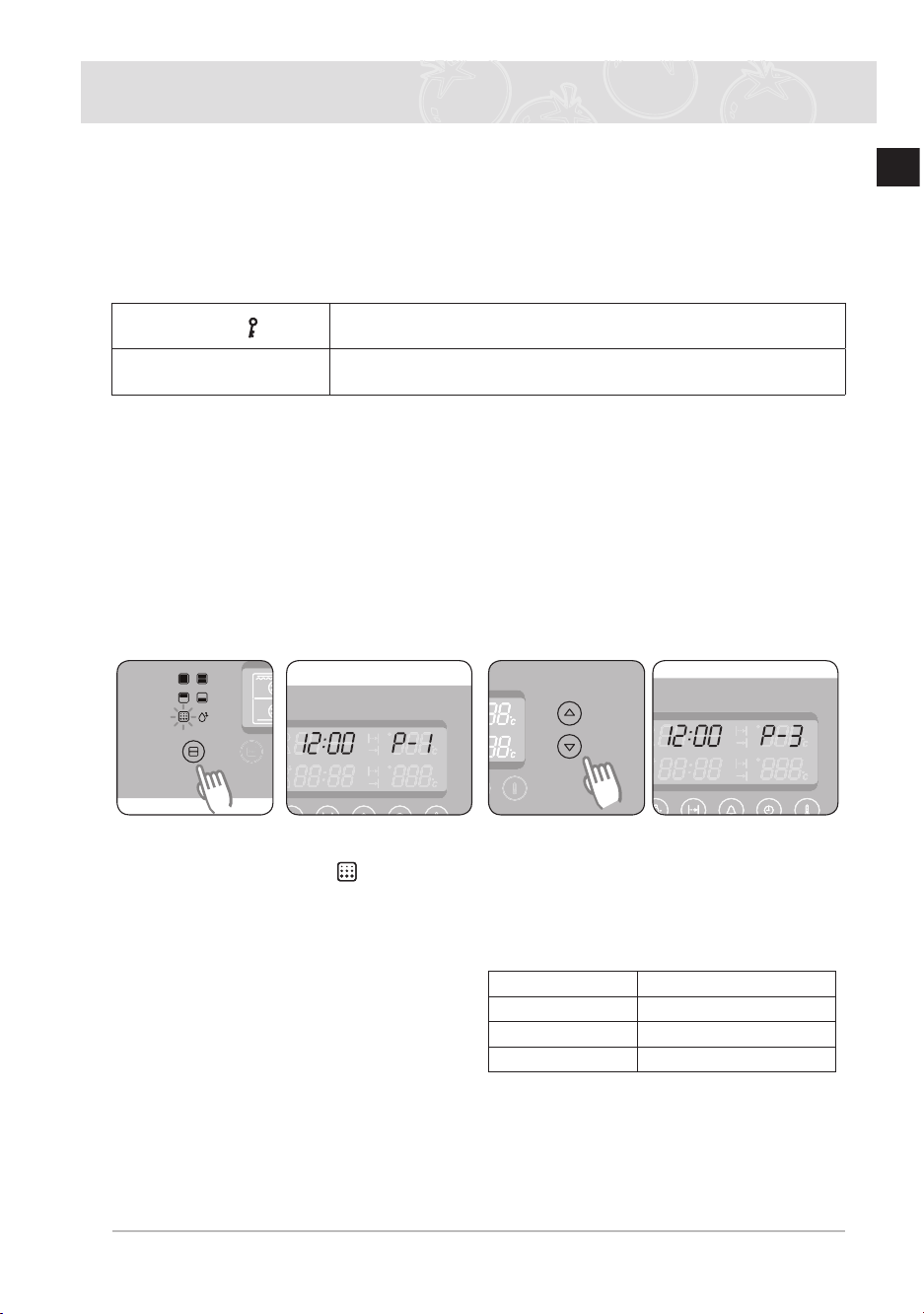
1
Press the Partition Select button to
self cleaning mode “ ” will blink 2
Press the Time / Temp Control
button to level 1,2 or 3 according to
the dirt level of oven If 5 seconds
have elapsed and there are no further
adjustments, the oven will begin
automatically in the selected level
Level Duration
P1(Low) approx 120 minutes
P2(Medium) approx 150 minutes
P3(High) approx 180 minutes
3
After the oven cools down, wipe the
oven door and along the edges of the
oven out with a damp cloth
BQ2Q7G078_XEU-00182S-02_EN.indd 39 6/21/2013 5:44:20 PM
40
EN
Cleaning and Care (continued)
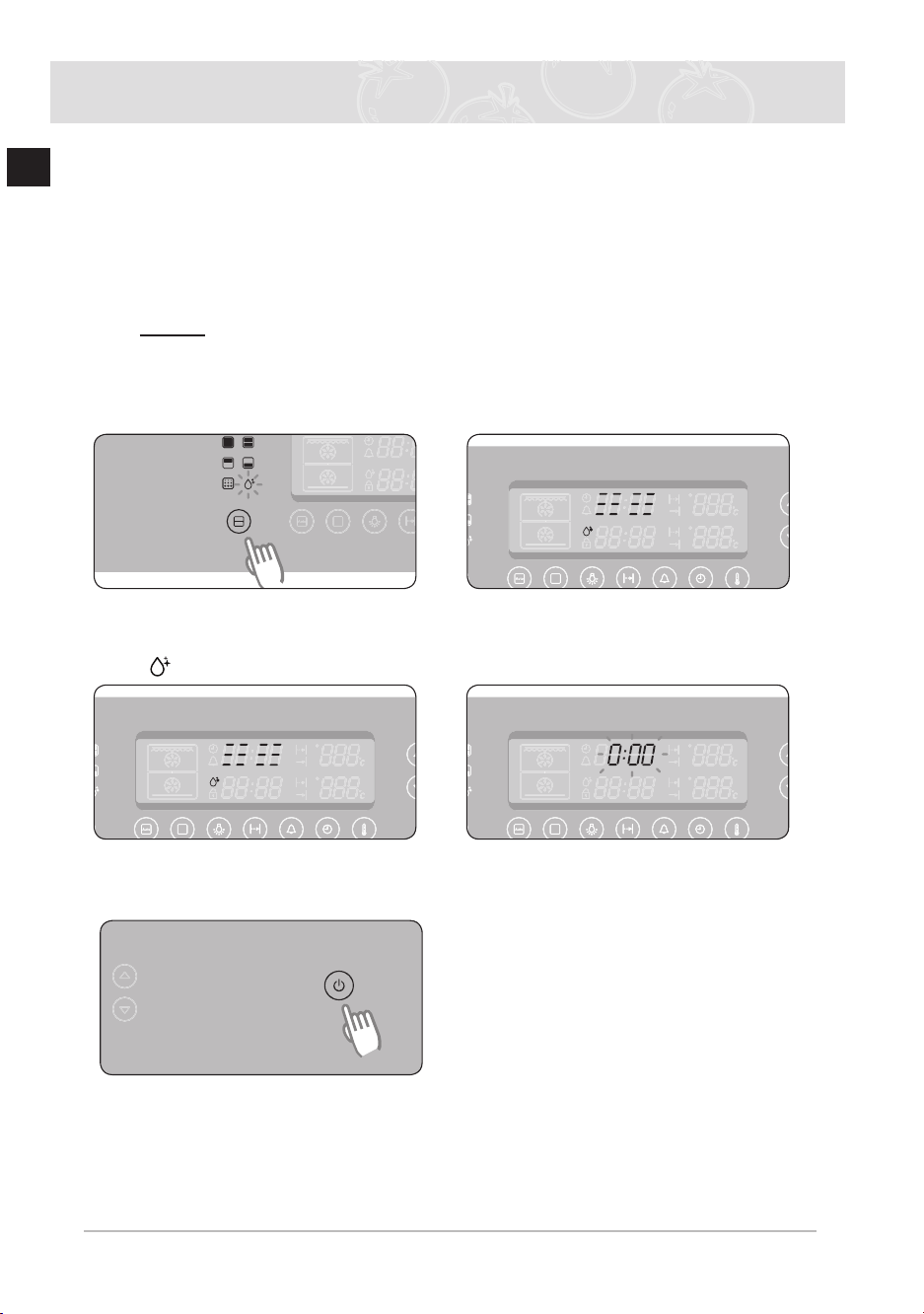
Steam cleaning
1
Remove all accessories from the oven
2
Pour approximately 400 ml (3 / 4 pint) of water onto the bottom of the empty oven
Use normal water only, no distilled water
3
Close the oven door
Caution The steam cleaning system can be switched on only when the oven
has cooled to room temperature completely Allow the oven to cool
completely if it does not work
4
Press the Partition Select button to
steam clean mode and wait 5sec
“ ” will blink
5
After an amount of time, the heater
completes operating and its lamp
remains on
6
When the operation is complete, the
display will blink and a beep indicates
the end
7
Press the Power on/off button to end
the operation and clean the interior
BQ2Q7G078_XEU-00182S-02_EN.indd 40 6/21/2013 5:44:20 PM
41
EN
Cleaning and Care (continued)
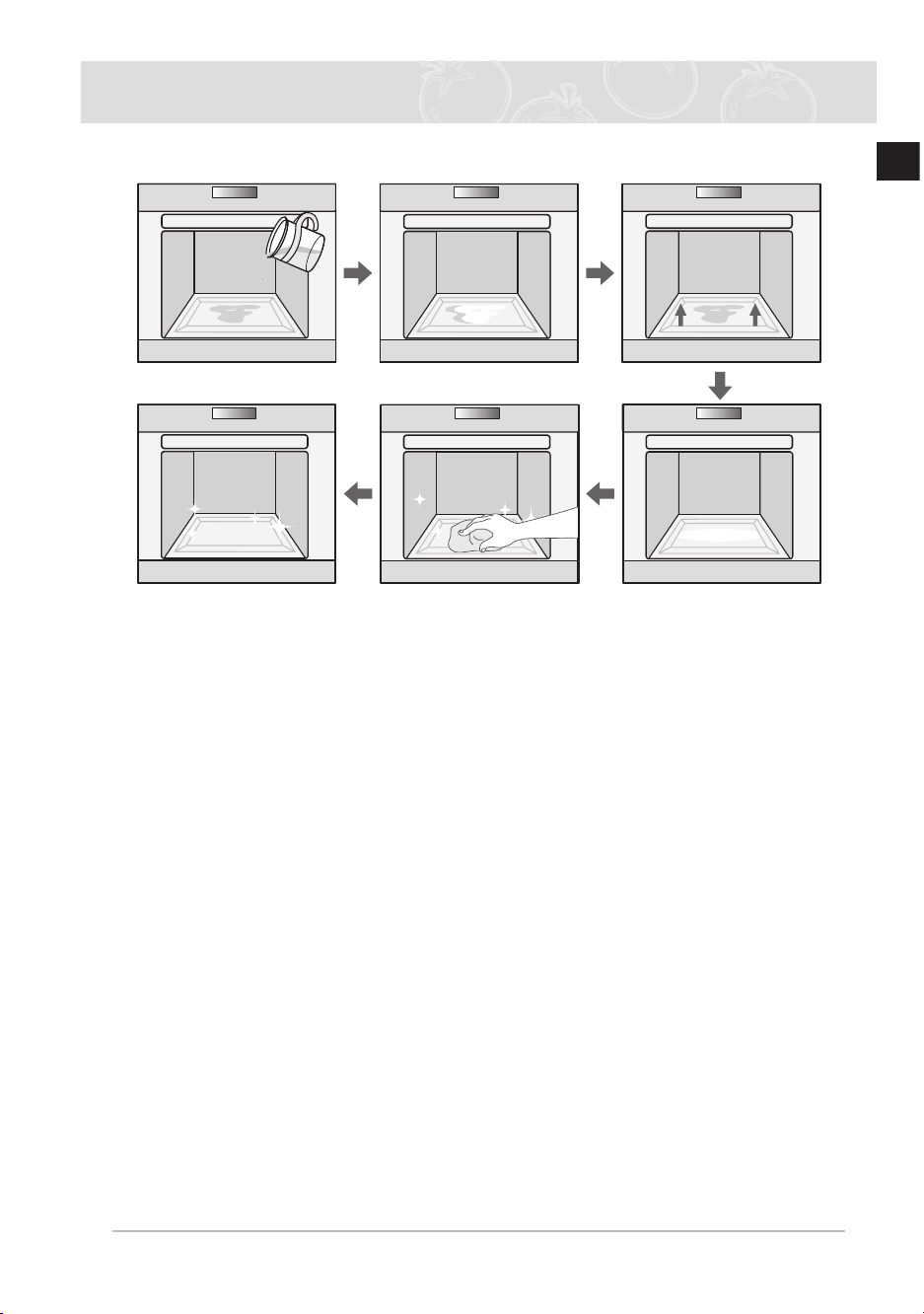
After deactivating the Steam Cleaning
Tips
● Take care when opening the door before the end of the steam cleaning procedure; the
water on the bottom is hot
● Never leave the residual water in the oven for any length of time, for example, overnight
● Open the oven door and remove the remaining water with a sponge
● Using a detergent - soaked sponge, a soft brush or a nylon scrubber, wipe the oven interior
Stubborn soil can be removed with a nylon scourer
● Lime deposits may be removed with a cloth soaked in vinegar
● Wipe clean with clear water and dry with a soft cloth (do not forget to wipe under the oven
door seal)
● If the oven is heavily soiled, the procedure may be repeated after the oven has cooled
● If the oven is heavily soiled with grease, for example, after roasting or grilling, it is
recommend that you rub detergent into the stubborn soil before activating the oven
cleaning function
● After cleaning, leave the oven door ajar at a 15° angle to allow the interior enamel surface
to dry thoroughly
BQ2Q7G078_XEU-00182S-02_EN.indd 41 6/21/2013 5:44:21 PM

42
EN
Cleaning and Care (continued)
Rapid drying
1 Leave the oven door ajar at an angle of approximately 30°
2 Press the Partition Select button to single mode
3 Press the Cooking Mode Select button
4 Press the Time / Temp Control button to convection
5 Set the cook time to about 5 minutes and the temperature to 50°C
6 Switch the oven off at the end of this period
WARNING
Do not use high - pressure water cleaners or steam jet cleaners to clean the oven
Oven exterior
● For cleaning both the interior and exterior of the oven, use a cloth and a mild cleaning
agent or warm soapy water
● Dry with kitchen paper or a dry towel
● Do not use scourers, caustic cleaners or abrasive products
Stainless steel oven fronts
● Do not use steel wool, scouring pads or abrasives. They may damage the nish.
Aluminium oven fronts
● Wipe the plate gently with a soft cloth or microber cloth and a mild window cleaning
detergent
WARNING
Make sure the oven is cool before cleaning
Oven interior
● Do not hand - clean the door seal
● Do not use coarse scouring pads or cleaning sponges
● To avoid damaging the enameled oven surfaces, use commercially available oven
cleaners
● To remove stubborn soil, use a special oven cleaner
Accessories
Wash all bakeware and accessories after each use and dry with a kitchen towel
To clean easily, soak in warm soapy water for about 30 minutes
BQ2Q7G078_XEU-00182S-02_EN.indd 42 6/21/2013 5:44:21 PM
43
EN
Cleaning and Care (Continued)
Door removal
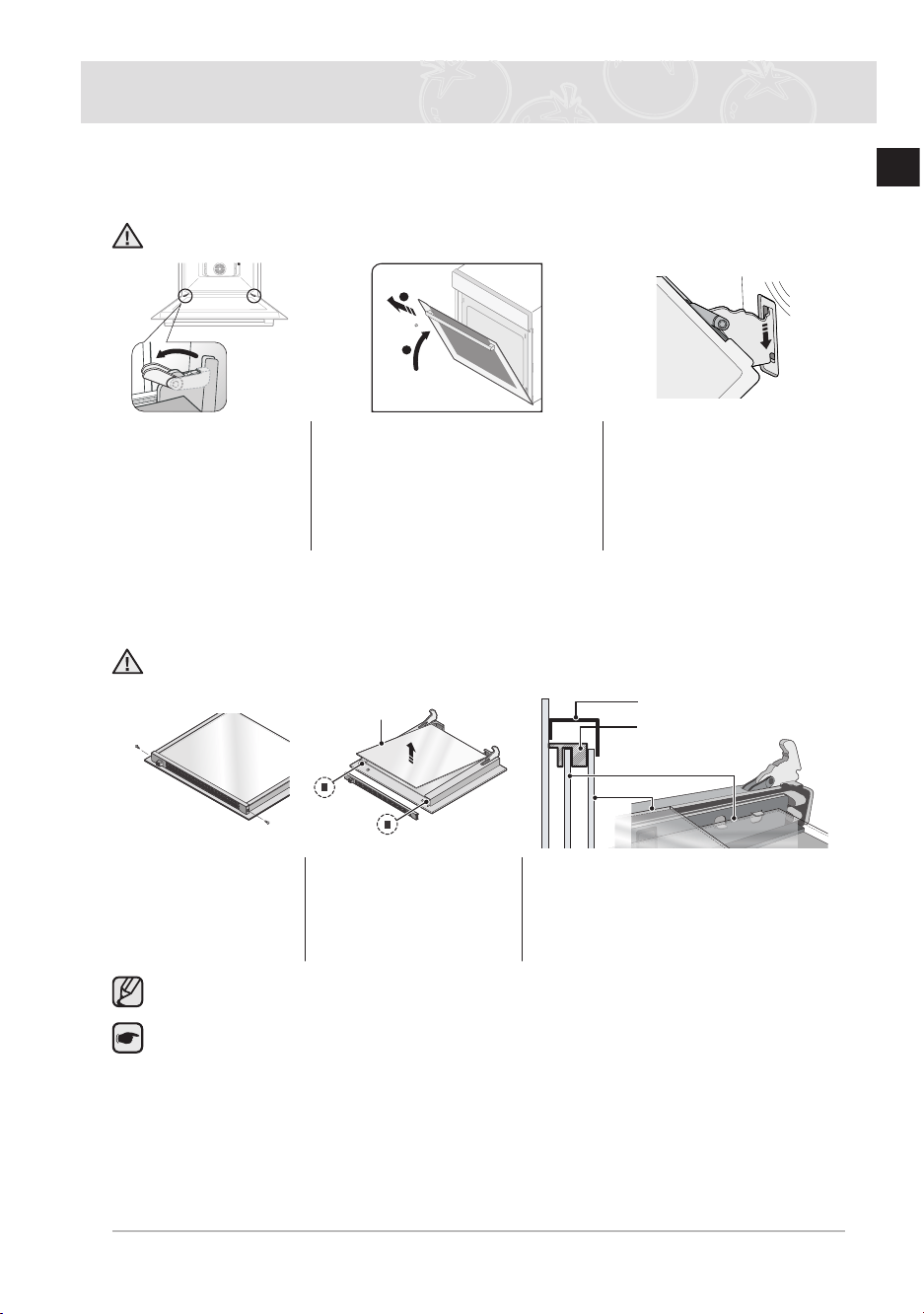
For normal use, the oven door must not be removed but if removal is necessary, for example,
for cleaning purposes, follow these instructions
CAUTION: The oven door is heavy
70
2
1
1 Open the door and
ip open the clips
at both hinges
completely
2 Close the door by
approximately 70 ° With both
hands, grasp the sides of the
oven door at its middle and
pull-lift until the hinges can be
taken out
3 After cleaning, for
attaching the door
repeat the 1 and 2 steps
in revers order The clip
on the hinge should be
closed on both side
Door glass removal
The oven door is equipped with 3 sheets of glass placed against each other These sheets can
be removed for cleaning
WARNING: The oven door must be removed from the oven for cleaning the door
glasses
Glass 1
2 Guide
rubbers
Glass 1
Glass 2
Guide rubbers (Right and Left)
Cover
1 Remove 2 screws
on the left and
right sides of the
door
2 Detach the cover and
remove glass 1, 2
and 2 guide rubbers
from the door
3 After cleaning the door glasses,
for assembly repeat 1, 2 steps
in revers order Check the right
locations of glasses with above
picture
The quantity of door glass is different from 3 EA to 4 EA model by model
Important: When assembly the inner glass 1, make sure not to use glass 2 and put
printing to direction below
BQ2Q7G078_XEU-00182S-02_EN.indd 43 6/21/2013 5:44:22 PM
44
EN
Cleaning and Care (Continued)
Water collector cleaning
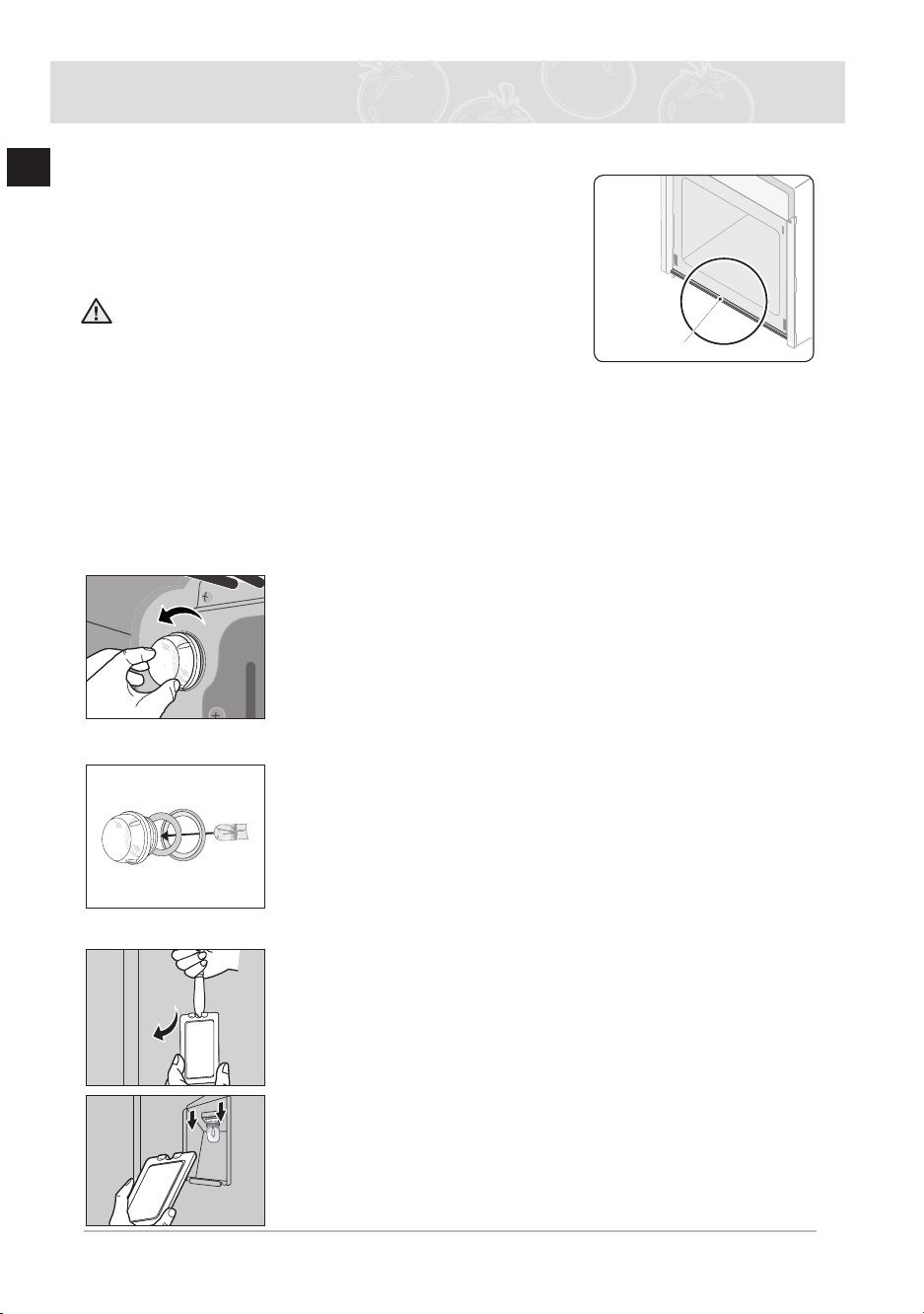
The water collector is for collecting the water from the moisture
when oven is operating with very moist food Food waste can be
stack on the water collector If the cleaning is not performed, the
built-in furniture can be damaged Clean the water collector to
protect your furniture after cooking
WARNING: If you encounter a water leakage from the
water collector after the cooking, please contact us at the
service center
Changing the lamp
* Danger of electric shock!
Before replacing the oven light bulb, take the following steps:
● Switch off the oven;
● Disconnect the oven from the mains supply; and
● Protect the oven light bulb and the glass cap by laying a cloth on the bottom of the
oven
) You can buy a lamp at SAMSUNG service centre
Replacing the rear oven lamp and cleaning the glass cap
1 Take off the cap by turning counterclockwise
2 Remove the metal rings and clean the glass cap
3
If necessary, replace the halogen bulb with a 25 watt, 230 V, 300°C
heat - resistant halogen oven light bulb
Tip
● Always use a cloth when handling a halogen bulb to avoid
depositing oils from your ngers on to the surface of the bulb.
4 Fit the metal rings to the glass cap
5 Replace the glass cap
Replacing the oven side lamp and cleaning the glass cap
1 To remove the glass cover, hold the lower end with one hand,
insert a at sharp implement such as a table knife between the
glass and the frame and pop out the cover
2 If necessary, replace the halogen bulb with a 25 ~ 40 watt, 230
V, 300°C heat - resistant halogen oven light bulb
Tip
● Always use a cloth when handling a halogen bulb to avoid
depositing oils from your ngers on to the surface of the bulb.
3 Replace the glass cover
Water collector
BQ2Q7G078_XEU-00182S-02_EN.indd 44 6/21/2013 5:44:23 PM

45
EN
Warranty & Service
FAQs and Troubleshooting
What should I do if the oven doesn’t heat up?
Check to see if one of the following actions resolves the issue:
●
The oven may not be switched on Switch the oven on
● The clock may not be set Set the clock (see section “Setting the clock”)
● Check to see if the required settings have been applied
● A household fuse may have blown or a circuit breaker may have tripped Replace the fuses
or reset the circuit If this happens repeatedly, call an authorised electrician
What should I do if, even though the oven function and temperature have been set, the oven does
not heat up?
There may be problems with the internal electrical connections Call your local service centre
What should I do if an error code appears and the oven does not heat up?
There is a fault in the internal electrical circuit connection Call your local service centre
What should I do if the time display is blinking?
There was a power failure Set the clock (see section “Setting the clock”)
What should I do if the oven light doesn’t illuminate?
The oven light is faulty Replace the oven light bulb (see section “Changing the lamp”)
What should I do if the oven’s fan is running without having been set?
Following use, the oven’s fan runs until the oven has cooled down Call your local service
centre if the fan continues to run after the oven has cooled down
6/21/2013 5:44:23 PM
Error and Safety codes
BQ2Q7G078_XEU-00182S-02_EN.indd 45
Error and
Safety codes
General Functions Solution
E-2
*
1)
TEMPSENSORERROR Call local SAMSUNG service
centre
5-01
SAFETY SHUTOFF
Oven has continued operating at set
temperature for prolonged time
Turn oven off and remove food
Allow oven to cool before using
again
-SE-
E-0
*
1)
An error of the oven may cause low
performance and problems in safety
Stop using the oven immediately
Call local Samsung service
centre
-dE-
PARTITIONMISSING
The usage of divider is not correct
Refer to the ‘Setting the divider
mode
’ (14page)
For upper, twin and lower mode,
divider should be inserted, and
for single mode, divider should
be eliminated
1)
*
refers to all numbers or characters
46
EN
Warranty & Service (Continued)
BQ2Q7G078_XEU-00182S-02_EN.indd 46
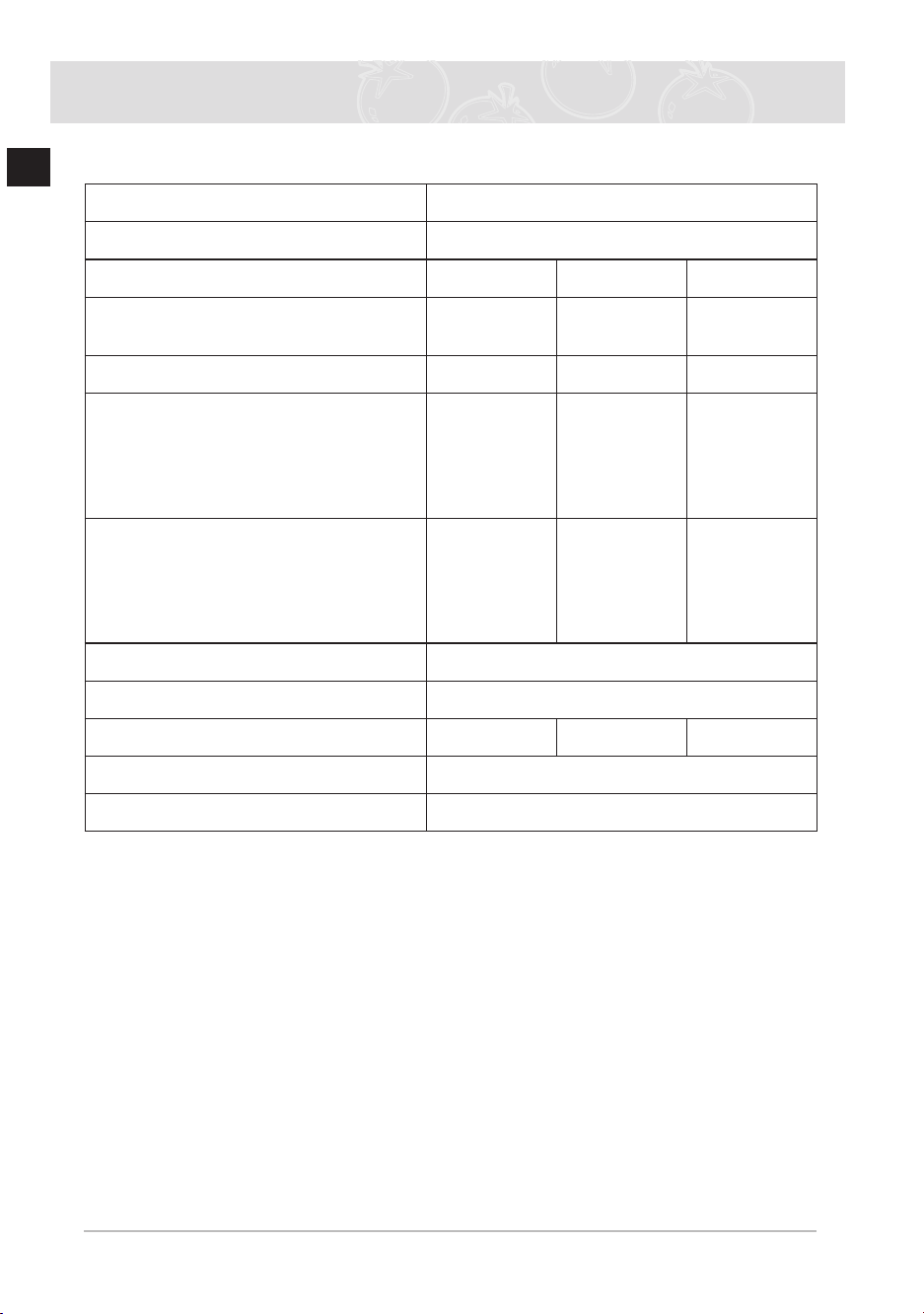
Product data sheet
SAMSUNG
SAMSUNG
Model identication
BQ2Q7G078
Cavity type
Single Upper Lower
Energy Efciency Index per cavity
(EEI
cavity
)
106.1 98.5 98.5
Energy Efciency Class per cavity
A A A
Energy consumption required to heat
a standardised load in a cavity of an
electric heated oven during a cycle in
conventional mode per cavity
(electric nal energy) (EC
electric cavity
)
0.89 kWh/cycle - -
Energy consumption required to heat
a standardised load in a cavity of an
electric heated oven during a cycle in fan-
forced mode per cavity
(electric nal energy) (EC
electric cavity
)
0.87 kWh/cycle 0.67 kWh/cycle 0.67 kWh/cycle
Number of cavities
3 (Single, Upper, Lower)
Heat source per cavity (electricity or gas)
electricity
Volume per cavity (V)
65 L 30 L 32 L
Type of oven
Built-in
Mass of the appliance (M)
41.7 kg
Data determined according to standard EN 60350-1 and Commission Regulations (EU)
No 65/2014 and (EU) No 66/2014.
Energy saving tips
● During cooking, the oven door should remain closed except for turning food over.
Do not open the door frequently during cooking to maintain the oven temperature and to
save energy.
● If cooking time is more than 30 minutes, the oven may be switched off 5-10 minutes
before the end of the cooking time to save energy.
The residual heat will complete the cooking process.
● Plan oven use to avoid turning the oven off between cooking one item and the next to
save energy and reduce the time for re-heating the oven.
● Wherever possible cook more than one item at a time.

47
EN
Warranty & Service (Continued)
CORRECT DISPOSAL OF THIS PRODUCT
(WASTE ELECTRICAL & ELECTRONIC EQUIPMENT)
(Applicable in countries with separate collection systems)
BQ2Q7G078_XEU-00182S-02_EN.indd 4 ٧ 65:44:23 2013/21/ PM
This marking on the product, accessories or literature indicates that the product
and its electronic accessories (e.g. charger, headset, USB cable) should not be
disposed of with other household waste at the end of their working life. To prevent
possible harm to the environment or human health from uncontrolled waste
disposal, please separate these items from other types of waste and recycle them
responsibly to promote the sustainable reuse of material resources.
Household users should contact either the retailer where they purchased this
product, or their local government office, for details of where and how they can
take these items for environmentally safe recycling.
Business users should contact their supplier and check the terms and conditions of
the purchase contract. This product and its electronic accessories should not be
mixed with other commercial wastes for disposal.
For information on Samsung’s environmental commitments and product specific
regulatory obligations e.g. REACH visit:
samsung.com/uk/aboutsamsung/samsungelectronics/corporatecitizenship/data_co
rner.html
BQ2Q7G078_XEU00182-S02-_EN.indd 47
DG68-00182S-05
QUESTIONS OR COMMENTS?
COUNTRY CALL OR VISIT US ONLINE AT
AUSTRIA
0800-SAMSUNG (0800-7267864)
[Only for Premium HA] 0800-366661
[Only for Dealers] 0810-112233
www.samsung.com/at/support
BELGIUM 02-201-24-18
www.samsung.com/be/support (Dutch)
www.samsung.com/be_fr/support (French)
DENMARK 70 70 19 70 www.samsung.com/dk/support
FINLAND 030-6227 515 www.samsung.com//support
FRANCE 01 48 63 00 00 www.samsung.com/fr/support
GERMANY 06196 9340275 www.samsung.com/de/support
ITALIA 800-SAMSUNG (800.7267864) www.samsung.com/it/support
CYPRUS 8009 4000 only from landline, toll free
www.samsung.com/gr/support
GREECE
80111-SAMSUNG (80111 726 7864)
only from land line
(+30) 210 6897691 from mobile and
land line
LUXEMBURG 261 03 710 www.samsung.com/be_fr/support
NETHERLANDS 088 90 90 100 www.samsung.com/nl/support
NORWAY 815 56480 www.samsung.com/no/support
PORTUGAL 808 20 7267 www.samsung.com/pt/support
SPAIN 0034902172678 www.samsung.com/es/support
SWEDEN 0771 726 786 www.samsung.com/se/support
SWITZERLAND 0800 726 78 64 (0800-SAMSUNG)
www.samsung.com/ch/support (German)
www.samsung.com/ch_fr/support (French)
UK 0330 SAMSUNG (7267864) www.samsung.com/uk/support
IRELAND (EIRE) 0818 717100 www.samsung.com/ie/support