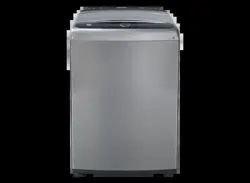
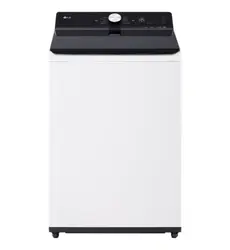
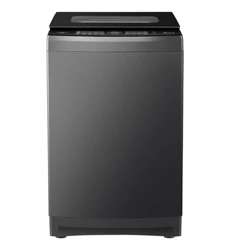
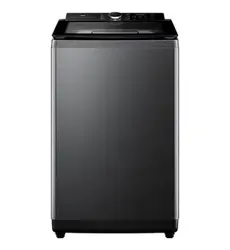
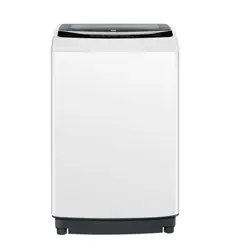
User Manual
FEATURES AND BENEFITS
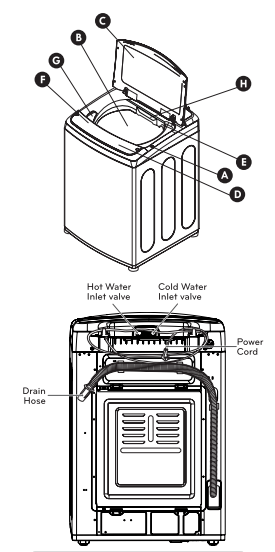
KEY PARTS AND COMPONENTS
A LID LOCK
The washer lid is locked during operation. The lid can be unlocked by pressing the START/PAUSE button to stop the washer.
B ULTRA-CAPACITY STAINLESS STEEL TUB
The ultra-large stainless steel tub offers extreme durability.
C SOFT CLOSE, TEMPERED GLASS LID
The soft close hinges allow the lid to close gently and quietly. The tempered glass is durable and makes it easy to observe the washer.
D FRONT TOUCH PANEL
The front touch panel is specially designed to be water resistant and provides easy access to controls, eliminating the need to reach for rear controls. The soft-surface touch buttons add a premium touch.
E SMARTRINSE
This washer is designed to save rinse water by using a jet spray rinse system in NORMAL and HEAVY DUTY cycles.
F KENMORE CONNECT™
Should you experience any problems with your washing machine, it has the capability of transmitting data via your telephone to the Kenmore Connect Team. This gives you the capability of speaking directly to our specially trained technicians. The technician records the data transmitted from your machine and uses it to analyze the issue, providing a fast and effective diagnosis.
G BLEACH DISPENSER
The Bleach Dispenser compartment holds liquid bleach, that is dispensed automatically at the proper time during the wash cycle.
H DISPENSER DRAWER
Add detergent or softener to the main wash compartment of the dispenser drawer. Cleaning products are dispensed automatically at the proper time during the wash cycle.
HOW TO USE
CONTROL PANEL FEATURES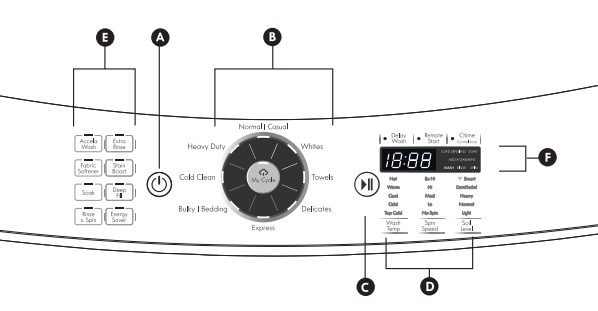
A POWER (ON/OFF) BUTTON
Press to turn the washer ON. Press again to turn the washer OFF. Pressing the POWER button dur- ing a cycle will cancel that cycle and any load settings will be lost. The lid will unlock after a brief pause.
NOTE: If the washer remains idle for four minutes after turning the washer off, any water left in the tub will automatically be drained. An alarm will sound one minute prior to draining, and ‘dr’ will appear on the display. You may restart the washer at this time. However, once the washer initiates draining, all functions will be suspended and cycle settings lost, and ‘dr’ will be displayed until draining is complete.
B CYCLE SELECTOR BUTTON
Press the cycle button to select the desired cycle. Press the Specialties button repeatedly to cycle through the specialty cycles. Once the desired cycle has been selected, the standard presets will appear in the dis- play. These settings can be adjusted using the cycle setting buttons any time before starting the cycle.
C START/PAUSE BUTTON
Press this button to start the selected cycle. If the washer is running, use this button to pause the cycle without losing the current settings.
NOTE: If you do not press the START/PAUSE button within 60 minutes of selecting a cycle, the washer automatically turns OFF. If the washer is paused during a cycle for more than 4 minutes, the cycle will be cancelled and any water remaining in the tub will be drained. An alarm will sound at 3 minutes to warn you that the tub is about to drain.
O CYCLE MODIFIER BUTTONS
Use these buttons to adjust the settings for the se- lected cycle. The settings light up above the buttons to show the current selection.
E SPECIAL CYCLE AND OPTION BUTTONS
These buttons allow you to select special cycles or options.
F TIME AND STATUS DISPLAY
The display shows the cycle status and estimated time remaining.
NOTE: To protect your clothing, not all settings are available on all cycle selections.
OPERATING THE WASHER
1 SORT LAUNDRY AND LOAD WASHER
Sort laundry by fabric type, soil level, color and load size, as needed. Open the door and load the items into the washer.

2 ADD CLEANING PRODUCT
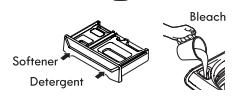
Add High-Efficiency (HE) detergent to the detergent dispenser drawer. For proper wash performance, always measure the detergent using the measuring device provided by the detergent manufacturer.
3 TURN ON THE WASHER
Press the POWER button to turn ON the washer. The lights above the cycle buttons will illuminate and a chime will sound.

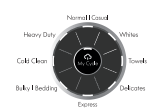
4 SELECT A CYCLE
Press the cycle button directly or the Specialties button repeatedly to select the desired cycle.
The preset Wash Temp, Spin Speed, Soil Level, and Option settings for that cycle will be shown.
5 SELECT CYCLE MODIFIERS & OPTIONS (optional)
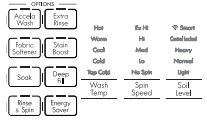
Default settings for the selected cycle can now be changed if desired. Use the cycle modifier buttons.
NOTE: To protect your fabrics, not all modifiers are available on all cycles. A different chime will sound and the LED will not come on if the selection is not allowed. Cycle options can also be added by using the option buttons.
6 BEGIN CYCLE
Press the START/PAUSE button to begin the cycle. The door will lock, and the washer will briefly tumble the load without water to measure its weight. Once the weight of the load is measured, the washer will begin the selected wash cycle.

7 ADD A GARMENT LIGHT
The ADD A GARMENT light will illuminate near the beginning of the wash cycle to indicate when it is safe to add items to the load. Press the START/PAUSE button to pause the cycle and add any additional items to the load.
NOTE: It is not recommended to add items unless the ADDA GARMENT light is illuminated, as this could result in poor performance.

8 RESUME CYCLE
Press the START/PAUSE button to resume the wash cycle.
CAUTION
Do not stand on top of the appliance or place objects (such as laundry, lighted candles, lighted cigarettes, dishes, chemicals, metal objects, etc.) on the appliance.
Failure to follow these cautions can cause fire, electric shock, problems with the product, or injury.

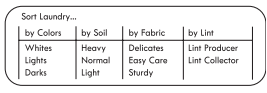
SORTING WASH LOADS
Grouping Similar Items
For the best washing results, and to reduce the possibility of damage to clothing, care should be taken to sort the clothing into loads that are made up of similar items. Mixing different fabric types and/or soil levels can result in poor wash performance, color transfer or discoloration, fabric damage or linting. Fabrics should be sorted into groups as described below.
Colors
Sort articles by color. Wash dark clothes together in aseparate load from light colors or whites. Mixing dark clothes with light clothes can result in dye transfer or discoloration of the lighter clothes.
Soil Level
Wash heavily soiled clothing together. Washing lightly soiled clothing in the same load with heavily soiled clothing could result in poor wash performance for the lightly soiled clothing.
Fabric Type
Delicate articles should not be mixed with heavier or sturdier fabric types. Washing delicates in a load with heavy fabrics can result in damage to the more delicate fabrics. Washing heavier fabrics in a delicate load can result in poor wash performance for the heavier fabrics and possible damage to the delicates.
Lint Type
Some fabrics attract and bind lint to them while others give off lint in the laundry process. Avoid mixing these lint collectors and lint producers in the same load. Mixing these fabrics will result in pilling and linting on the lint collectors. (For example, lint collector — knit sweater; lint producer — terrycloth towels.)
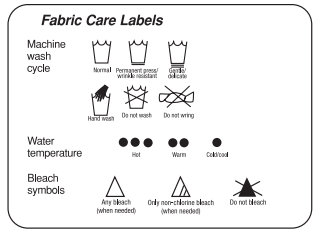
Fabric Care Labels
Many articles of clothing include a fabric care label. Using the chart below, adjust the cycle and option selections to care for your clothing according to the manufacturer’s recommendations.
Loading the Washer

- Check all pockets to make sure that they are empty. Items such as clips, matches, pens, coins, and keys can damage both your washer and your clothes.
- Close zippers, hooks, and drawstrings to prevent these items from snagging or tangling on other clothes.
- Pretreat heavily stained areas for best results.
- Combine large and small items in a load. Load large items first.
- Large items should not be more than half of the total wash load.
- The washer can be fully loaded, but the tub should not be tightly packed with items. The lid of the washer should close easily.
- To prevent an out-of-balance load, do not wash sin gle items. Add one or two similar items to the load. Large, bulky items, such as a blanket, comforter, or bedspread, should be washed individually.
- Waterproof items do wash or spin Waterproof cycle. (i.e. Water resistant clothing, mattress covers, out door clothes, plastic mats etc.)
- The washer will not fill or operate with the lid open.
NOTE: Use the Bedding cycle for large or bulky items such as poly-filled jackets, comforters, pillows, etc. These items may not be as absorbent as other laundry items and should be sorted into a separate wash load for optimal results.
Bulky items should be placed as far down in the tub as possible for optimal results. Always place buoyant items at the bottom of the tub. The washer will auto mati- cally detect the load size. Because of the high efficiency wash system, the water level may not com pletely cover the load.
1. For best performance, load clothes as shown.
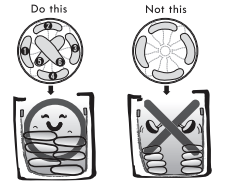
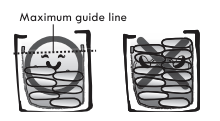
2. Load clothes loosely, and do not load clothes over the maximum guideline on the tub. Clothes need room to circulate in order to get clean.
ABOUT THE DISPENSERS
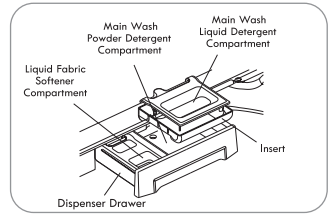
The automatic dispenser consists of two compartments which hold:
- Liquid fabric softener.
- Liquid or powdered detergent for main wash.
Detergent Pods
Do not place liquid or powered detergent pods in the dispensr drawer. Place the pod in the tub before load- ing laundry.
Main Wash Detergent Compartment
This compartment holds laundry detergent for the main wash cycle. The detergent is added to the load at the beginning of the cycle. Always use High-Efficiency (HE) detergent with your washing machine. Either powdered or liquid detergent may be used.
Never exceed the manufacturer’s recommendations when adding detergent. Using too much detergent can result in detergent buildup in clothing and the washer.When using liquid detergent, make sure the liquid detergent cup and insert are in place. Do not exceed the maximum fill line.
When using powdered detergent, remove the liquid detergent cup from the compartment. Powdered detergent will not dispense with the liquid detergent cup in place.
Fabric Softener Compartment
This compartment holds liquid fabric softener, which is automatically dispensed during the final rinse cycle.Never exceed the manufacturer’s recommendations when adding softener. Using too much fabric softener can result in buildup in clothing and the washer.
- Always follow the manufacturer’s recommendations when adding fabric softener. Do not exceed the maximum fill line. Using too much fabric softener may stain clothes.
- Dilute concentrated fabric softeners with warm water.Do not exceed the maximum fill line.
- Never pour fabric softener directly onto the load or into the tub.
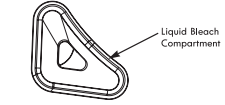
Liquid Bleach Compartment
The bleach dispenser is a separate compartment at the left front of the tub opening. This compartment holds liquid bleach, which is dispensed automatically at the proper time during the wash cycle. Any liquid remaining in the dispenser at the end of the cycle is water, not bleach.
- Do not add powdered bleach to this compartment. The bleach compartment is designed to dispense liquid bleach only. Powdered or liquid color-safe bleach will not dispense properly.
- Always follow the manufacturer’s recommendations when adding bleach. Never add more than one cup and do not exceed the maximum fill line since this can cause the bleach to be dispensed immediately, resulting in damage to fabrics. Using too much bleach can damage fabrics.
- Never pour undiluted liquid chlorine bleach directly onto the load or into the tub. Fabric damage can occur.
- Do not use color-safe bleach or Oxi products in the same cycle with liquid chlorine bleach.
DETERGENT AND DISPENSER USE
A Word About Detergents High-Efficiency (HE) detergents produce fewer suds, dissolve more efficiently to improve washing and rinsing performance, and help to keep the interior of your washer clean. Using detergent that is not HE may cause oversudsing and unsatisfactory performance which could result in error codes, cycle failure, and machine damage.
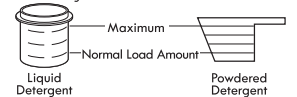
The normal amount of HE detergent needed, for average loads, is less than 2 of the recommended maximum. Use less detergent for soft water, light soil or smaller loads. Never use more than the maximum amount recommended by the detergent manufacturer.
IMPORTANT: Not all detergents are the same. Pay careful attention to the amount of detergent used to avoid overusing, poor rinsing and detergent buildup in clothing, and residue buildup that can contribute to odors in the machine. NEVER use a cup or scoop other than the one supplied by the manufacturer of the detergent you are using. Never use more than the maximum amount of detergent recommended by the manufacturer.
Always measure the detergent amount. While HE detergents are designed for this type of washing machine, be careful when measuring the detergent. For most normal loads, no more than 14 to 2 of cap or scoop of HE detergent should be used.
NOTE: Extra care must be exercised when using 2X and3X concentrated detergents because even a little bit extra can contribute to the problems mentioned above.
NOTE: Detergents designated as HE compatible may not provide optimal results.
Using the Softener and Detergent Dispenser
To add detergent, bleach, and fabric softener to the automatic dispenser:
- Open the dispenser drawer.
- Load the laundry products into the appropriate compartments.
- Close the drawer before starting the cycle.
NOTE: It is normal for a small amount of water to remain in the bleach and softener compartments at the end of the cycle.
IMPORTANT: Do not place or store laundry products, such as detergent, bleach, or liquid fabric softener, on top of your washer or dryer. Wipe up any spills immedi- ately. These products can damage the finish and controls.
Using the Liquid Bleach Dispenser
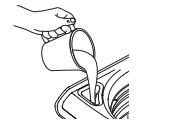
The bleach dispenser automatically dilutes and dispenses liquid bleach at the proper time in the wash cycle.
- Check clothing care labels for special instructions.
- Measure liquid bleach carefully, following instructions on the bottle. High-efficiency washers use less water, so less bleach is needed. One half cup is enough for most loads.
- Carefully pour the pre-measured amount of bleach directly into the bleach dispenser. If you are using powdered bleach of any kind, pour it directly into the tub before adding the laundry. Never add powdered bleach to the liquid bleach dispenser.
- Never pour undiluted liquid chlorine bleach directly onto clothes or into the tub.
- Do not pour powdered bleach into bleach dispenser.
- Do not place laundry items on top of the bleach dispenser when loading and unloading the washer.
- Always measure and pour bleach carefully. Avoid overfilling or splashing when adding bleach fo the dispenser. The maximum capacity of the bleach dispenser is one cup of bleach per wash cycle. Overfilling could result in bleach being dispensed immediately.
TIME AND STATUS DISPLAY
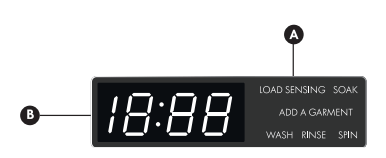
A CYCLE STATUS INDICATOR
These LEDs will illuminate when a cycle is selected to indicate which stages will run. When a cycle is running, the LED will blink for the active stage. Once a stage is complete, the LED will turn off. If a cycle is paused, the active LED will stop blinking.
B ESTIMATED TIME REMAINING
When a cycle is selected, the default time for that cycle is displayed. This time will change as modifiers or options are selected. Once the START/ PAUSE button is pressed, the washer will measure the size of the load. The estimated time may change once the load size has been measured.
NOTE: The time shown is only an estimate. This time is based on normal operating conditions. Several external factors (load size, room temperature, incoming water temperature, etc.) can affect the actual time.
CYCLE MODIFIER BUTTONS
Each cycle has default settings that are selected automatically. You may also customize these settings using the cycle modifier buttons. Press the button for the desired modifier until the indicator light for the desired setting is lit. The washer automatically adjusts the water level for the type and size of wash load for best results and maximum efficiency.
Due to the high-efficiency nature of this product, water levels may be much lower than expected. This is normal and cleaning/rinsing performance will not be compromised.
NOTE: To protect your garments, not every wash/rinse temperature, spin speed, soil level, or option is avail- able with every cycle. A chime will sound and the LED will not light if a selection is not allowed.
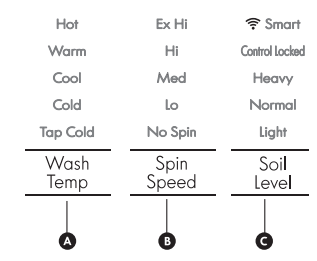
A WASH TEMP
WASH TEMP selects the wash and rinse temperature combination for the selected cycle. Press the WASH TEMP button until the indicator light for the desired setting is lit.
- Select the wash temperature suitable for the type of load you are washing. Follow the garment fabric care labels for best results.
- Cold rinses use less energy. The actual cold rinse temperature depends on the temperature of the cold water at the faucet.
B SPIN SPEED
Higher spin speeds extract more water from clothes, reducing drying time and saving energy.
Press the SPIN SPEED button until the desired speed is selected. Some fabrics, such as delicates, require a slower spin speed. To protect your clothing, not all spin speeds are available for all cycles.
C SOIL LEVEL
Adjusting the soil level setting will modify the cycle times and/or wash actions. Press the SOILLEVEL button until the desired soil level is selected.
OPTION BUTTONS
Your washing machine features several additional cycle options that customize cycles to meet your individual needs.
- Turn ON the washer and press the cycle button to select the desired cycle. If the cycle selection is changed after the options have been selected, all settings will be changed to the default settings for the new cycle.
- Use the cycle modifier buttons to adjust the settings for that cycle.
- Press the cycle option button(s) for the option(s) you would like to add. The button will light when that option is selected. If the selected option is not allowed for the selected cycle, the chime will sound twice to alert you and the LED will not illuminate.
- Press the START/PAUSE button to start the cycle. After a brief delay, the lid will lock and the cycle will begin.
NOTE:
- To protect your garments, not every option is available with every cycle.
- If the START/PAUSE button is not pressed within 60 minutes to start the cycle, the control will shut off and all settings will be lost.
 ACCELA WASH
Adding this option reduces the cycle time while maintaining wash performance similar to the same cycle without ACCELA WASH.
 STAIN BOOST
Use this option for heavily soiled loads that need improved stain treatment. When Stain Boost is selected, the wash cycle will begin with warm water to help prevent the setting of certain types of stains. Then, as the cycle progresses, hot water will be added to gradually increase the water temperature to help remove stains that require treatment at higher temperatures
NOTE:
- Best results are obtained with smaller loads (less than 6 Ib).
- If you select Stain Boost, the Energy Saver option is not available.
 EXTRA RINSE
This option will add an extra rinse to the se- lected cycle. Use this option to help ensure the removal of detergent or bleach residue from fabrics. Liquid fabric softener, if used, is always dispensed in the final rinse.
 DEEP FILL
Use this option to add extra water to the wash cycle for better wash performance and stain treatment of large or bulky items.
NOTE:
- If the washing machine reaches its maximum water level, the DEEP FILL button will have no effect.
- The Deep Fill option can only be selected or deselected while the cycle is running Once the Deep Fill option has been added to a cycle, it is saved as a default option on that cycle until you deselect it.
- To deselect the option, press Deep Fill after starting the cycle.
Adding the Deep Fill Option to a Cycle
- While the cycle is running, press START/PAUSE to pause the cycle.
- Press DEEP FILL to add Deep Fill as a default option for that cycle.
- Press START/PAUSE to resume the cycle.
ADD A GARMENT
The ADD A GARMENT light will illuminate during the early stage of the wash cycle to indicate that it is safe to pause the cycle to add more items.
Once the ADD A GARMENT light goes out, additional laundry should not be added to the load. Doing so may result in unsatisfactory performance because the washer will not compensate for the additional garments.
- Press the START/PAUSE button to pause the washer.
- Open the lid after it unlocks.
- Add your additional items.
- Close the lid.
- Press the START/PAUSE button. The cycle will resume after the lid locks.
 CHIME
CHIME
Press repeatedly to adjust the volume of the chime. The chime will sound at the new volume with each press of the button. When no chime is heard, the chime is off. The volume settings are LOW — HIGH — OFF.
 FABRIC SOFTENER
Fabric softener is dispensed in the final rinse. This washer is designed to save rinse water by using a jet spray rinse system (SMARTRINSE) in NORMAL and HEAVY DUTY cycles. Press the FABRIC SOFTENER button to change the final rinse from spray rinse to regular rinse so that the fabric softener is most effective.
NOTE: Select the FABRIC SOFTENER option or EXTRA RINSE option if liquid fabric softener is used in NORMAL and HEAVY DUTY cycles. Failure to select one of these options will greatly reduce the effectiveness of the softener.
 SOAK
SOAK
This option provides a maximum 180-minute presoak prior to the start of the selected cycle. Use the SOAK option to presoak garments to help remove difficult spots or stains on fabrics. At the end of the presoak time, the selected cycle will begin with the same water used for the soak.
 DELAY WASH
Once you have selected the cycle and other settings, press this button to delay the start of the wash cycle. Each press of the button increases the delay time by one hour, for up to19 hours. Once the desired delay time is set, press theSTART/PAUSE button to start the delay time.
NOTE: If the START/PAUSE button is not pressed to begin the delay time, the washer will automatically shut off after 60 minutes.
 RINSE & SPIN
Select this option to rinse and spin a load separately from a regular cycle. This can be helpful in preventing fresh stains from setting in fabrics. You can change the spin speed by pressing the SPIN SPEED button
- Press the START/PAUSE button to turn on the washer.
- Press the RINSE & SPIN button.
- Press the SPIN SPEED button to select the desired spin speed. Selecting NO SPIN is not allowed.
- Press the START/PAUSE button.
 CONTROL LOCK
Use this option to disable the controls. This feature can prevent children from changing cycles or operating the machine. Once the control lock is set, it must be deactivated before any controls, except the POWER button, can be used. Once the washer has shut off, the POWER button will allow the machine to be turned ON, but the controls will still be locked. When the controls are locked, CL will display alternately with the estimated time remaining. Press and hold the CONTROL LOCK button for three seconds to activate or deactivate Control Lock.
SPECIAL DRAIN FEATURE
This washer is equipped with a special feature that is designed to make your washer as safe as possible.
If the washer is paused or shut off while there is still water in the tub, the water will drain after several minutes. This helps keep children safe by reducing the possibility of water remaining in the tub. The washer can be restarted any time before the drain begins.
If no action is taken, the or error code will display and the water will drain from the tub, Once the washer begins draining the water, the controls are disabled and the drain process cannot be interrupted. Once the water is completely drained, the washer will shut off.
NOTE: In the unlikely event that the washer experiences a problem that causes an error code to be displayed, the washer will still drain after several minutes. However, only the original error code will be displayed.
SMART FEATURES
GETTING CONNECTED
You need the following devices and applications to use the smart features of your appliance.
Required Devices: A wireless connection and a mobile device.
Required Application: Kenmore Smart app.
IMPORTANT: You must download the Kenmore Smart app to your mobile device, connect your Kenmore Elite
Smart appliance to the internet, and register the appliance to your account by following the prompts.
Connecting the Washer
Refer to the Quick Start Guide that came with your smart appliance for detailed instructions on creating Kenmore account and setting up the appliance for connected operation from your mobile device.
NOTE: When successfully connected to the internet, the SMART icon LED on the control panel will turn on.
 REMOTE START
NOTE: You must first close the door and connect to the internet to use this function. The SMART icon LED should be illuminated.
Using Remote Start
- Select a cycle and options.
- Press REMOTE START. The Remote Start LED will turn on,
- Start the washer from the application on your smart phone. (For more information, see the booklet shipped with your washer.) If you do not start the washer remotely, the washer will wait to start the cycle until the START button is pressed.
CARE AND CLEANING
REGULAR CLEANING
Cleaning the Exterior
Proper care of your washer can extend its life. The outside of the machine can be cleaned with warm water and a mild, nonabrasive household detergent.
Immediately wipe off any spills with a soft, damp cloth.
IMPORTANT: Do not use solvents, cleaning alcohols, or similar products. Never use steel wool or cibrasive cleaners because they can damage the surface.
Care and Cleaning of the Interior
Use a towel or soft cloth to wipe around the washer lid opening and lid glass.
Always remove items from the washer cs soon as the cycle is complete. Leaving damp items in the washer can cause wrinkling, color transfer, and odor.
Storing the Washer
If the washer will not be used for an extended period of time and is in an area that could be exposed to freezing temperatures, perform the following steps to protect the washer from damage.
- Turn OFF the water supply.
- Disconnect hoses from water supply and drain water from hoses.
- Plug the power cord into a properly grounded electrical outlet.
- Add 1 gallon of nontoxic recreational vehicle (RV) an- tifreeze to the empty tub and close the lid. NEVER use automotive antifreeze.
- Press the POWER button, then press the RINSE & SPIN button. Press the START/PAUSE button to activate the drain pump. Allow the drain pump to run for one minute, then press the POWER button to shut off the washer. This will expel some of the antifreeze, leaving enough to protect the washer from damage.
- Unplug the power cord, dry the tub interior with a soft cloth, and close the lid.
- Remove the inserts from the dispenser. Drain any water in the compartments and let them dry.
- Store the washer in an upright position.
- To remove the antifreeze from the washer after storage, run a complete EXPRESS WASH cycle using detergent. Do not add laundry to this cycle.
Removing Mineral Buildup
If you live in an area with hard water, mineral scale can form on internal components of the washer. Use of a water softener is recommended in areas with hard water.
Use a descaler, such as Washer Magic®, to remove visible mineral buildup. After descaling, always run anExpress Wash cycle with detergent before washing clothing.
Mineral scale and other spots may be removed from the stainless steel tub using a stainless steel cleaner. Do NOT use steel woo! or abrasive cleaners.
Leave the Lid Open
If the washer will not be used for several days, leave the lid open overnight to allow the tub to dry.
MAINTENANCE
Cleaning the Water Inlet Filters
If the washer does not fill properly, an error message will show on the display. The inlet valve filter screens could be plugged by hard water scale, sediment in the water supply, or other debris.
NOTE: The inlet screens protect the delicate parts of the inlet valve from being damaged by particles that could enter the valves with the water supply. Operat- ing the washer with these filters removed could cause a valve to stick open resulting in flooding and/or property damage.
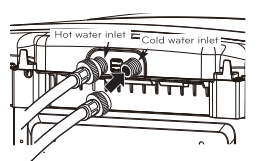
1 Turn OFF both water faucets completely. Unscrew the hot and cold water lines from the back of the washer.
IMPORTANT: Only use inlet hoses provided by KENMORE. Aftermarket hoses are not guaranteed to fit or function correctly. Other hoses may not tighten correctly and could cause leaks. Subsequent damage to prod- uct or property will not be covered under the terms of the product warranty. Hoses can be ordered by calling 1-844-553-6667.
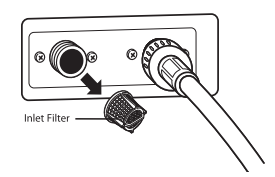
2 Carefully remove the filters from the water valves and soak them in white vinegar or a lime scale re- mover, following the manufacturer’s instructions. Be careful not to damage the filters while cleaning.
3 Rinse thoroughly before reinstalling. Press the filters back into place.
4 Before reattaching the hoses, flush the hoses and water lines by running several gallons of water into a bucket or drain.
CLEANING THE WASHER
Proper Use of Detergent
Using too much detergent is a common cause of laundry problems. Today’s detergents are formulated to be effective without visible sudsing. Be sure to carefully read and follow manufacturer’s recommendations for how much detergent to use in your wash. You can use less detergent if you have soft water, a smaller load, or a lightly soiled load.
NOTE: Use only low-sudsing, high-efficiency detergent. These detergents can be identified by the HE logo. Wf
Care and Cleaning of the Washer
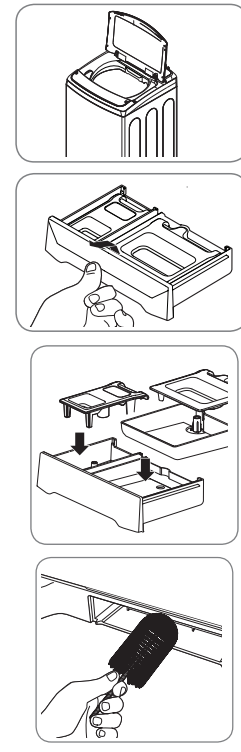
Lid: Wash with a damp cloth on the outside and inside and then dry with a soft cloth,
Exterior: Immediately wipe off any spills. Wipe with damp cloth. Do not touch the surface or the display with sharp objects.
Moving and Storage: Contact a service technician to remove water from the drain pump and hoses Reinstall the foam tub block to protect the washer from damage while moving. Do not store the washer where it will be exposed to outdoor weather conditions.
Long Vacations: Be sure water supply is shut off at the faucets. Follow the instructions if the washer will be exposed to freezing temperatures.
Dispenser Drawer: Detergent and fabric softener may build up in the dispenser drawer. Remove the drawer and inserts and check for buildup once or twice a month.
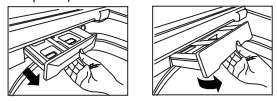
1 Remove the drawer by pulling it straight out until it stops. Lift up on the front of the drawer and pull it completely out.
2 Remove the inserts from the two compartments. Rinse the inserts and the drawer with warm water to remove buildup from laundry products.
3 To clean the drawer opening, use a small, non- metal brush to clean the recess. Remove alll residue from the upper and lower parts of the recess.
4 Return the inserts to the proper compartments and replace the drawer. Set the drawer into the opening at an angle as shown above, then lower it and slide it into place.
TROUBLESHOOTING
NORMAL SOUNDS YOU MAY HEAR
The following sounds may be heard while the washer is operating. They are normal.
CLICKING:
Lid lock relay when the lid locks and unlocks.
SPRAYING OR HISSING:
Water spraying or circulating during the cycle.
HUMMING OR GURGLING:
Drain pump is pumping water from the washer at times during a cycle.
WATER SLOSHING SOUND:
A liguid in the balance ring around the wash basket helps the basket spin smoothly.
SOUND OF WATER BEING ADDED AFTER THE WASHER HAS ALREADY BEEN IN OPERATION
- The washer adapts to the load size and type to add more water to the cycle as needed.
- The wash load may be unbalanced. If the washer senses that the load is unbalanced, it will stop and refill to redistribute the load.
- The washer may be diluting laundry additives to add to the wash load.
BEFORE CALLING FOR SERVICE
Your washing machine is equipped with an automatic error-monitoring system to detect and diagnose problems at an early stage. If your washer does not function properly or does not function at all, check the following before you call for service:
Rattling and clanking noise
- Foreign objects, such as keys, coins, or safety pins may be in tub
- Stop washer, check tub and drain filter for foreign objects. If noise continues after washer is restarted, call or pump. for service.
Thumping sound
- Heavy wash loads may produce a thumping sound.
- This is normal. If sound continues, washer is probably out of balance. Stop and redistribute wash load.
- Wash load may be out of balance.
- Pause the cycle and redistribute the load after the lid unlocks
Vibrating noise
- Packaging materials were not removed.
- See the Unpacking and Removing Shipping Material section in the installation requirements section.
- Wash load may be unevenly distributed in the tub.
- Pause the cycle and redistribute the load after the lid unlocks.
- Not all leveling feet are resting firmly and evenly on the floor.
- See Leveling the Washer in the Installation Instructions section.
- Floor not rigid enough.
- Make sure that the floor is solid and does not flex. See Flooring in the Installation Requirements section.
Water leaking
- Inlet hose connection is loose at faucet or washer.
- Check hoses for leaks, cracks and splits.
- Check and tighten hose connections.
- House drain pipes are clogged.
- The washer pumps out water very rapidly. Check for water backing up out of the drain pipe during drain. If water is seen coming out of the drain, check for proper drain hose installation and check for restrictions in the drain. Contact a plumber to repair drain pipe.
- Drain hose has come out of drain or is not inserted far enough.
- Tie drain hose to inlet hose or standpipe to prevent it from coming out during drain. For smaller drain pipes, insert the drain hose into the pipe as far as the drain hose flange. For larger drain pipes, insert the drain hose into the pipe 1-2 inches past the flange.
- A large item such as a pillow or blanket is above the top of the tub.
- Use the BEDDING cycle for large or bulky items. Use extra care and never wash more than half a load of items that float, such as pillows.
- Stop the washer and check the load. Make sure the load does not crest above the top edge of the tub.
Wrinkling.
- Washer not unloaded promptly.
- Always remove items from the washer as soon as the cycle is complete.
- Washer overloaded.
- The washer can be fully loaded, but the tub should not be tightly packed with items. The lid of the washer should close easily.
- Hot and cold water inlet hoses are reversed.
- Hot water rinse can set wrinkles in garments. Check the inlet hose connections.
Excessive sudsing
- Too much detergent or incorrect detergent.
- HE detergents are formulated specifically for High-Efficiency washers and contain suds-reducing agents. Only use detergent with the High-Efficiency (HE) logo. For detergent quantities refer to the How to Use section.
Staining
- Bleach or softener dispensed too soon
- Dispenser compartment is overfilled causing bleach or softener to dispense immediately. ALWAYS measure bleach to prevent overfilling - one cup maximum.
- Dispenser drawer closed too quickly causing softener to dispense immediately.
- Bleach or softener was added directly to the wash load in the tub.
- Always use the dispensers to ensure that laundry products are properly dispensed at the right time in the cycle.
- Washer was not unloaded promptly
- Always remove items from the washer as soon as possible after the cycle is complete.
- Clothes were not properly sorted.
- Always wash dark colors separately from light colors and whites to prevent discoloration.
- Never wash heavily soiled items washed with lightly soiled items.
Washer will not turn ON
- Power cord is not properly plugged in
- Make sure that the plug is plugged securely into a grounded, 3-prong, 120-VAC, 60-Hz outlet.
- House fuse is blown, circuit breaker has tripped, or power outage has occurred.
- Reset circuit breaker or replace fuse. Do not increase fuse capacity. If the problem is a circuit overload, have it corrected by a qualified electrician.
Wash cycle time is longer than usual
- The washer automatically adjusts the wash time for the amount of laundry, water pressure and other operating conditions.
- This is normal. The washer adjusts cycle time automatically to provide optimal results for the selected cycle. The time remaining shown in the display is only an estimate. Actual time may vary.
Musty or mildewy odor in washer
- Incorrect or too much detergent has been used.
- Use only High-Efficiency (HE) detergent in accordance with the manufacturer's instructions.
- Inside of tub was not cleaned properly.
- Run the Tub clean cycle regularly.
Water leaks
- Oversudsing of detergent.
- Oversudsing may create leaks, and may be caused by the type and amount of detergent used. High-Efficiency de- tergent is the only detergent recommended. Make sure that detergent and any additives are put into the correct dispenser compartments. The normal amount of deter- gent to use is 1/4 to 1/2 of the maximum amount recom- mended by the detergent manufacturer. Always reduce the amount of detergent if the load is small or lightly soiled, or if your water is very soft. Never use more than the maximum amount recommended by the detergent manufacturer.
Washer will not operate
- Control panel has powered off due
- This is normal. Press the POWER button to turn the to inactivity. washer on.
- Washer is unplugged.
- Make sure cord is plugged securely into a working outlet
- Water supply is turned off.
- Turn both hot and cold faucets fully on.
- Controls are not set properly.
- Make sure the cycle was set correctly, close the lid and press the START/PAUSE button.
- Lid is open
- The washer will not operate if the lid is open. Close the lid and make sure that nothing is caught under the lid preventing it from closing completely.
- Circuit breaker/fuse is tripped/ blown.
- Check house circuit breakers/fuses. Replace fuses or reset breaker. The washer should be on a dedicat- ed branch circuit. The washer will resume the cycle where it stopped once power is restored.
- Control needs to be reset.
- Press the POWER button, then re-select the desired cycle and press the START/PAUSE button.
- START/PAUSE was not pressed after a cycle was set.
- Press the POWER button then re-select the desired cycle and press the START/PAUSE button. The washer will shut off if the START/PAUSE button is not pressed within five minutes.
- Extremely low water pressure.
- Check another faucet in the house to make sure that household water pressure is adequate.
- Washer is too cold.
- If the washer has been exposed to temperatures be- low freezing for an extended period of time, allow it to warm up before pressing the POWER button. Otherwise, the display will not come on.
Washer not filling properly
- Filter clogged.
- Make sure the inlet filters on the fill valves are not clogged. Refer to the filter cleaning instructions.
- Inlet hoses may be kinked.
- Check that inlet hoses are not kinked or clogged.
- Energy efficiency.
- This is a High Efficiency (HE) washer. As a result, the water level settings for this washer may be different than for conventional washers
- Insufficient water supply.
- Make sure that both hot and cold water faucets are turned on all the way.
- The washer lid is en
- The washer will not operate if the lid is open Close the lid and make sure that nothing is caught under the lid preventing it from closing completely.
- Hot and cold inlet hoses are reversed.
- Check inlet hose connections. Make sure the hot water supply is connected to the hot inlet valve, and the cold water supply is connected to the cold inlet valve.
- Water level is too low.
- This is a high efficiency washer. The water will not normally cover the clothes. The fill level is optimized for the wash motion to achieve the best wash performance.
Washer will not drain water
- Kinked drain hose.
- Ensure that the drain hose is not kinked
- Drain located higher than 96 in.
- Make sure that the drain hose is no higher than 8 ft. above the floor. above the bottom of the washer and is no more than 5 ft away from the washer
Poor stain removal
- Proper options not selected
- Heavier soils and tougher stains may require extra cleaning power. Select the Soak or Stain Care feature to boost the cleaning power of the selected cycle.
- Previously set stains.
- Articles that have previously been washed may have stains that have been set. These stains may be difficult to remove and may require hand washing or pre- treating to aid in stain removal
Bleach does not dispense
- Bleach dispenser cover is not properly installed.
- Make sure that the bleach cover is properly installed and snapped into place before the beginning of the cycle.
- Bleach dispenser is dirty or clogged.
- Lift out the bleach dispenser cover and clean out the reservoir. Lint and other foreign debris that collects in the inside the dispenser may prevent proper dispensing of the bleach
Premature dispensing of bleach
- Bleach dispenser filled for future load.
- You cannot store bleach in the dispenser for future use. The bleach will be dispensed every load.
- Overfilling the bleach dispenser.
- Overfilling the bleach dispenser will cause the bleach to dispense immediately, which will damage items in the tub. ALWAYS measure bleach, but never fill above the MAX line on the disponsor. One cup of bloach is normal, but never add more than one cup
Incomplete or no dispensing
- Detergent compartments of detergent clogged from incorrect filling.
- Make sure that detergent and additives are put into the correct dispenser compartments. If liquid detergent is used, make sure that the liquid detergent cup and insert are in the detergent compartment. If pow dered detergent is used, make sure that the liquid detergent cup and insert are not used. For all detergent types, always make sure that the dispenser drawer is fully closed before the start of the cycle.
- Too much detergent used.
- Make sure that the suggested amount of detergent is used per the manufacturer's recommendations. You may also dilute the detergent with water to the maximum fill line on the compartment to avoid cloggingNormal residue.Use only HE (High-Efficiency) detergent.
NOTE: Always use as little detergent as possible High-Efficiency washers need very little detergent to achieve optimum results. Using too much detergent will cause poor wash and rinse performance and may contribute to odors in washer.
- Insufficient water supply
- Make sure that both hot and cold water faucets are turned on all the way.
- Normal residue
- It is normal for a small amount of detergent to remain in the dispenser. If this residue builds up it can interfere with normal dispensing of products. Refer to the cleaning instructions.
Water leaks every load
- Hoses not installed correctly.
- Check all fill and drain hose connections to ensure that they are tight and secure.
ERROR CODES
The display shows: dE
- The lid is not closed properly.
- Make sure that the lid is closed properly and press the START/PAUSE button. After starting a cycle, it may take a few moments before the tub begins to turn or spin. The washer will not spin unless the lid is locked.If the lid is closed and the lid lock error mes-sage is displayed, call for service
The display shows: dL
- Lid lock switch error.
- Make sure that the lid is closed properly and press the START/PAUSE button. The washer will not operate unless the lid is locked.
- Make sure that nothing is caught under the lid, including shipping material or clothing
- Make sure that the latch mechanism is fully retracted.
- If the lid is closed and the lid lock error message is displayed, call for service.
The display shows: 
- Special Drain Feature.
- If the washer is paused during a cycle for more than five minutes, the cycle will be cancelled and any water remaining in the tub will be drained.
Washer fills with water slowly or not at all, or the display shows: IE
- Water supply faucets are not fully
- Make sure that the water faucets are fully open.
- Water line hoses are kinked, pinched, or crushed.
- Make sure that the hoses are not kinked or pinched. Be careful when moving the washer during cleaning and maintenance.
- Water inlet filters are clogged.
- Clean the inlet filters. See Maintenance in the Care and Cleaning section.
- Water supply pressure to faucet ỏ house is too low.
- Check another faucet in the house to make sure that household water pressure is ad- equate and flow is not restricted. Disconnect the inlet hose from the washer and run a few gallons of water through the hose to flush the water supply lines. If flow is too low, contact a plumber to have the water lines repaired open.
- Water supply connected with leak limiting hoses.
- Hoses designed to limit leaks can trip falselyand prevent the washer from filling. The use of leak limiting hoses is not recommended.
Washer will not turn on
- Power cord is not properly plugged in
- Make sure that the plug is plugged seruely into a grounderd, 3-prong. 120-VAC, 60-Hz.
- House fuse is blown, circuit break-outlet. er has tripped, or power outage has occurred.
- Reset circuit breaker or replace fuse. Do not increase fuse capacity. If the problem is a circuit overload, have it corrected by a qualified electrician.
The display shows:LE1
- Foreign objects, such as coins, pins, clips, etc., caught between the wash plate and the inner basket
- Turn off the washer and then press the Power button. Press the spin speed button without selecting a cycle to drain and spin the load.
- When the spin is complete, remove the clothes and then find and remove any objects caught in the wash plate
- Always check pockets, etc., before washing to prevent error codes or damage to the washer or clothing
Water in the washer drains slowly or not at all, or the display shows: 0E
- Drain hose is kinked, pinched, or clogged
- Make sure the drain hose is free of clogs. kinks, etc., and is not pinched behind or under the washer
- Drain discharge is more than 96 inches above bottom of washer.
- Adjust or repair drain. Maximum drain height is 96 inches (8 ft)
The display shows ub
- The washer has detected an out of balance load.
- If the washer detects a load that is too far out of balance to spin, it will display this code while it is attempting to rebalance the load The washer will add water and try to redistribute the load automatically. This display is for your information only, and no action is required
The display shows: UE
- If the ub rebalance (see above) is not successful, this error will be displayed.
- The automatic attempt to rebalance the load was not successful. The cycle has been paused to allow the load to be manually adjusted
- The load is too small.
- Small loads may need additional items to be added to allow the washer to balance the loads
- Heavy articles are mixed with lighter items
- The load may have heavy items loaded with lighter items. Always try to wash articles of somewhat similar weight to allow the washer to evenly distribute the weight of the load for spinning
- The load is out of balance.
- Manually redistribute the load if articles have become tangled preventing the automatic distribution from working properly.
The display shows: 
- Control error.
- Unplug the washer and wait 60 seconds. Reconnect power and try again. If the error reappears, call for service.
The display shows FE
- Water level is too high due to a faulty water valve.
- Close the water faucets, unplug the washer, and call for service.
The display shows: PE
- The water level sensor is not working correctly.
- Close the water faucets, unplug the washer, and call for service.
The display shows: LE
- A motor error has occurred.
- Allow the washer to stand for 30 minutes and then restart the cycle. If the LE error code persists, call for service.
The display shows: E6
- Clutch error
- Mechanical failure.
- Unplug the washer and call for service.
The display shows:L E1
- Foreign objects, such as coins, pins, clips, etc., caught between the wash plate and the inner basket.
- Turn off the washer and then press the Power button. Press the spin speed button without selecting a cycle to drain and spin the load.When the spin is complete, remove the clothes and then find and remove any objects caught in the wash plate. Always check pockets, etc., before washing to prevent error codes or damage to the washer or clothing.