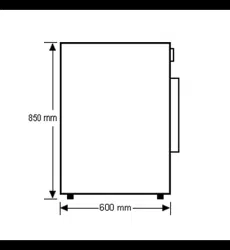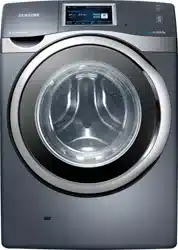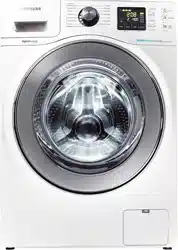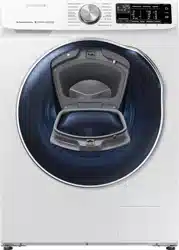
Washing Machine
User manual
WD10N6*****
WD10N645R2X_DC68-03976n_EN.indd 1 2018/8/16 19:51:21
2 English
Contents
Contents
Safety information 4
What you need to know about the safety instructions 4
Important safety symbols 4
Important safety precautions 5
Installation 15
What’s included 15
Installation requirements 17
Step-by-step installation 19
Before you start 27
Initial settings 27
Laundry guidelines 27
Detergent drawer guidelines 30
Operations 33
Control panel 33
Simple steps to start 35
Dry clothes only 36
Cycle overview 37
Special features 41
Settings 43
Using dry course 44
59’ WASH+DRY 45
SmartThings 46
Maintenance 50
Eco drum clean 50
Smart Check
51
Emergency drain 52
Cleaning 53
Maintenance 57
Recovery from freezing 57
Care against an extended time of disuse 57
Troubleshooting 58
Checkpoints 58
Information codes 62
WD10N645R2X_DC68-03976n_EN.indd 2 2018/8/16 19:51:21
English 3
Contents
Specications 65
Fabric care chart 65
Protecting the environment 66
Specication sheet 67
WD10N645R2X_DC68-03976n_EN.indd 3 2018/8/16 19:51:21
4 English
Safety information
Safety information
Congratulations on your new Samsung washing machine. This manual contains important
information on the installation, use and care of your appliance. Please take some time to read
this manual to take full advantage of your washing machines many features and benets.
What you need to know about the safety instructions
Please read this manual thoroughly to ensure that you know how to safely and efciently
operate the extensive features and functions of your new appliance. Please store the manual
in a safe location close to the appliance for future reference. Use this appliance only for its
intended purpose as described in this instruction manual.
Warnings and Important Safety Instructions in this manual do not cover all possible
conditions and situations that may occur. It is your responsibility to use common sense,
caution and care when installing, maintaining and operating your washing machine.
Because the following operating instructions cover various models, the characteristics of your
washing machine may differ slightly from those described in this manual and not all warning
signs may be applicable. If you have any questions or concerns, contact your nearest service
centre or nd help and information online at www.samsung.com.
Important safety symbols
What the icons and signs in this user manual mean:
WARNING
Hazards or unsafe practices that may result in severe personal injury, death and/or property
damage.
CAUTION
Hazards or unsafe practices that may result in personal injury and/or property damage.
NOTE
Indicates that a risk of personal injury or material damage exists.
Read the instructions
WD10N645R2X_DC68-03976n_EN.indd 4 2018/8/16 19:51:22
English 5
Safety information
These warning signs are here to prevent injury to yourself and others.
Please follow them explicitly.
After reading this manual, store it in a safe place for future reference.
Read all instructions before using the appliance.
As with any equipment that uses electricity and moving parts, potential hazards exist. To
safely operate this appliance, familiarise yourself with its operation and exercise care when
using it.
Important safety precautions
WARNING
To reduce the risk of re, electric shock, or injury to persons when
using your appliance, follow basic precautions, including the
following:
1. This appliance is not to be used by persons (including children)
with reduced physical, sensory or mental capabilities, or lack
of experience and knowledge, unless they have been given
supervision or instruction concerning use of the appliance by a
person responsible for their safety.
2. For use in Europe: This appliance can be used by children aged
from 8 years and above and persons with reduced physical,
sensory or mental capabilities or lack of experience and
knowledge if they have been given supervision or instruction
concerning use of the appliance in a safe way and understand
the hazards involved. Children shall not play with the appliance.
Cleaning and user maintenance shall not be made by children
without supervision.
3. Children should be supervised to ensure that they do not play
with the appliance.
4. If the supply cord is damaged, it must be replaced by the
manufacturer, its service agent or similarly qualied persons in
order to avoid a hazard.
WD10N645R2X_DC68-03976n_EN.indd 5 2018/8/16 19:51:22
6 English
Safety information
Safety information
5. Use the new hose-sets supplied with the appliance and do not
reuse the old hose-sets.
6. For appliances with ventilation openings in the base, the carpet
must not obstruct any openings.
7. For use in Europe: Children of less than 3 years should be kept
away unless continuously supervised.
8. CAUTION :
In order to avoid a hazard due to inadvertent
resetting of the thermal cut-out, this appliance must not be
supplied through an external switching device, such as a timer,
or connected to a circuit that is regularly switched on and off by
the utility.
9. The tumble dryer is not to be used if industrial chemicals have
been used for cleaning.
10. The lint trap has to be cleaned frequently, if applicable.
11. Lint must not to be allowed to accumulate around the tumble
dryer. (not applicable for appliances intended to be vented to the
exterior of the building)
12. Adequate ventilation has to be provided to avoid the back ow
of gases into the room from appliances burning other fuels,
including open res.
13. Do not dry unwashed items in the tumble dryer.
14. Items that have been soiled with substances such as cooking
oil, acetone, alcohol, petrol, kerosene, spot removers, turpentine,
waxes and wax removers should be washed in hot water with
an extra amount of detergent before being dried in the tumble
dryer.
15. Items such as foam rubber (latex foam), shower caps, waterproof
textiles, rubber backed articles and clothes or pillows tted with
foam rubber pads should not be dried in the tumble dryer.
WD10N645R2X_DC68-03976n_EN.indd 6 2018/8/16 19:51:22
English 7
Safety information
16. Fabric softeners, or similar products, should be used as specied
by the fabric softener instructions.
17. The nal part of a tumble dryer cycle occurs without heat (cool
down cycle) to ensure that the items are left at a temperature
that ensures that the items will not be damaged.
18. Remove all objects from pockets such as lighters and matches.
19. WARNING : Never stop a tumble dryer before the end of the
drying cycle unless all items are quickly removed and spread out
so that the heat is dissipated.
20. Exhaust air must not be discharged into a ue which is used for
exhausting fumes from appliances burning gas or other fuels.
21. The appliance must not be installed behind a lockable door, a
sliding door or a door with a hinge on the opposite side to that
of the tumble dryer, in such a way that a full opening of the
tumble dryer door is restricted.
22. WARNING: The appliance must not be supplied through an
external switching device, such as a timer, or connected to a
circuit that is regularly switched on and off by a utility.
23. This appliance is intended to be used in household only and it is
not intended to be used such as:
- staff kitchen areas in shops, ofces and other working
environments;
- farm houses;
- by clients in hotels, motels and other residential type
environments;
- bed and breakfast type environments;
- areas for communal use in blocks of ats or in launderettes.
WD10N645R2X_DC68-03976n_EN.indd 7 2018/8/16 19:51:22
8 English
Safety information
Safety information
Critical installation warnings
WARNING
The installation of this appliance must be performed by a qualied technician or service
company.
• Failure to do so may result in electric shock, re, an explosion, problems with the product,
or injury.
The appliance is heavy, therefore take care when lifting it.
Plug the power cord into a wall socket that meets local electrical specications. Use the
socket for this appliance only, and do not use an extension cord.
• Sharing a wall socket with other appliances using a power strip or extending the power
cord may result in electric shock or re.
• Ensure that the power voltage, frequency, and current are the same as those of the
product specications. Failure to do so may result in electric shock or re. Plug the power
plug into the wall socket rmly.
Remove all foreign substances such as dust or water from the power plug terminals and
contact points using a dry cloth on a regular basis.
• Unplug the power plug and clean it with a dry cloth.
• Failure to do so may result in electric shock or re.
Plug the power plug into the wall socket so that the cord is running towards the oor.
• If you plug the power plug into the socket in the opposite direction, the electric wires
within the cable may be damaged and this may result in electric shock or re.
Keep all packaging materials out of the reach of children as these may be dangerous.
• If a child places a bag over its head, it may suffocate.
When the appliance, power plug or power cord is damaged, contact your nearest service
centre.
This appliance must be properly grounded.
Do not ground the appliance to a gas pipe, plastic water pipe, or telephone line.
• This may result in electric shock, re, an explosion, or problems with the product.
• Never plug the power cord into a socket that is not grounded correctly and make sure
that it is in accordance with local and national regulations.
Do not install this appliance near a heater or any inammable material.
Do not install this appliance in a humid, oily or dusty location, or in a location exposed to
direct sunlight or water (rain drops).
WD10N645R2X_DC68-03976n_EN.indd 8 2018/8/16 19:51:22
English 9
Safety information
Do not install this appliance in a location exposed to low temperatures.
• Frost may cause the tubes to burst.
Do not install this appliance in a location where gas may leak.
• This may result in electric shock or re.
Do not use an electric transformer.
• This may result in electric shock or re.
Do not use a damaged power plug, damaged power cord, or loose wall socket.
• This may result in electric shock or re.
Do not pull or excessively bend the power cord.
Do not twist or tie the power cord.
Do not hook the power cord over a metal object, place a heavy object on the power cord,
insert the power cord between objects, or push the power cord into the space behind the
appliance.
• This may result in electric shock or re.
Do not pull the power cord when unplugging the power plug.
• Unplug the power plug by holding the plug.
• Failure to do so may result in electric shock or re.
This appliance should be positioned so that the power plug, the water supply taps, and the
drain pipes are accessible.
Installation cautions
CAUTION
This appliance should be positioned in such a way that the power plug is easily accessible.
• Failure to do so may result in electric shock or re due to electric leakage.
Install your appliance on a solid, level oor that can support its weight.
• Failure to do so may result in abnormal vibrations, movement, noise, or problems with
the product.
WD10N645R2X_DC68-03976n_EN.indd 9 2018/8/16 19:51:22
10 English
Safety information
Safety information
Critical usage warnings
WARNING
If the appliance is ooded, turn off the water & power supplies immediately and contact your
nearest service centre.
• Do not touch the power plug with wet hands.
• Failure to do so may result in electric shock.
If the appliance generates a strange noise, a burning smell, or smoke, unplug the power plug
immediately and contact your nearest service centre.
• Failure to do so may result in electric shock or re.
In the event of a gas leak (such as propane gas, LP gas, etc.), ventilate immediately without
touching the power plug. Do not touch the appliance or power cord.
• Do not use a ventilating fan.
• A spark may result in an explosion or re.
Do not let children play in or on the washing machine. In addition, when disposing of the
appliance, remove the washing machine door lever.
• If trapped inside the product, children may suffocate to death.
Make sure to remove the packaging (sponge, styrofoam) attached to the bottom of the
washing machine before using it.
Do not wash items contaminated with gasoline, kerosene, benzene, paint thinner, alcohol or
other inammable or explosive substances.
• This may result in electric shock, re, or an explosion.
Do not open the washing machine door by force while it is operating (high-temperature
washing/drying/spinning).
• Water owing out of the washing machine may result in burns or cause the oor to be
slippery. This may result in injury.
• Opening the door by force may result in damage to the product or injury.
Do not insert your hand under the washing machine while an operation is in progress.
• This may result in injury.
Do not touch the power plug with wet hands.
• This may result in electric shock.
Do not turn the appliance off by unplugging the power plug while an operation is in progress.
• Plugging the power plug into the wall socket again may cause a spark and result in
electric shock or re.
WD10N645R2X_DC68-03976n_EN.indd 10 2018/8/16 19:51:22

English 11
Safety information
Do not let children or the inrm use this washing machine without proper supervision. Do
not let children climb in or onto the appliance.
• This may result in electric shock, burns or injury.
Do not insert your hand or a metal object under the washing machine while it is operating.
• This may result in injury.
Do not unplug the appliance by pulling the power cord. Always grip the plug rmly and pull
it straight out of the outlet.
• Damage to the power cord may cause a short-circuit, re and/or electric shock.
Do not attempt to repair, disassemble, or modify the appliance yourself.
• Do not use a fuse (such as copper, steel wire, etc.) other than a standard fuse.
• When the appliance needs to be repaired or reinstalled, contact your nearest service
centre.
• Failure to do so may result in electric shock, re, problems with the product, or injury.
If the water supply hose comes loose from the water tap and oods the appliance, unplug the
power plug.
• Failure to do so may result in electric shock or re.
Unplug the power plug when the appliance is not being used for long periods of time or
during a thunder or lightning storm.
• Failure to do so may result in electric shock or re.
If any foreign substance enters into the appliance, unplug the power plug and contact you
nearest Samsung Customer Service.
• This may result in electric shock or re.
Do not let children (or pets) play in or on your washing machine. The washing machine door
does not open easily from the inside and children may be seriously injured if trapped inside.
Usage cautions
CAUTION
When the washing machine is contaminated by a foreign substance such as detergent, dirt,
food waste, etc., unplug the power plug and clean the washing machine using a damp, soft
cloth.
• Failure to do so may result in discolouration, deformation, damage, or rust.
The front glass may be broken by a strong impact. Take care when using the washing
machine.
• If the glass is broken, it may result in injury.
WD10N645R2X_DC68-03976n_EN.indd 11 2018/8/16 19:51:22
12 English
Safety information
Safety information
After a water supply failure or when reconnecting the water supply hose, open the water tap
slowly.
Open the water tap slowly after a long period of non-use.
• The air pressure in the water supply hose or the water pipe may damage a product part
or result in a water leak.
If a draining error occurs during an operation, check if there is a draining problem.
• If the washing machine is used when it is ooded because of a draining problem, it may
result in electric shock or re.
Insert the laundry into the washing machine completely so that the laundry does not get
caught in the door.
• If laundry gets caught in the door, it may result in damage to the laundry or the washing
machine, or result in a water leak.
Turn the water supply off when the washing machine is not being used.
Ensure that the screws on the water supply hose connector are properly tightened.
• Failure to do so may result in property damage or injury.
Ensure that the rubber seal and front door glass are not contaminated by a foreign substance
(e.g. waste, thread, hair, etc.).
• If a foreign substance is caught in the door or the door is not completely closed, it may
cause a water leak.
Open the water tap and check if the water supply hose connector is rmly tightened and that
there is no water leak before using the product.
• If the screws on the water supply hose connector are loose, it may result in a water leak.
The product you have purchased is designed for domestic use only.
Using the product for business purposes qualies as a product misuse. In this case, the
product will not be covered by the standard warranty provided by Samsung and no
responsibility can be attributed to Samsung for malfunctions or damages resulting from such
misuse.
Do not stand on the appliance or place objects (such as laundry, lighted candles, lighted
cigarettes, dishes, chemicals, metal objects, etc.) on the appliance.
• This may result in electric shock, re, problems with the product, or injury.
Do not spray volatile material such as insecticide onto the surface of the appliance.
• As well as being harmful to humans, this may result in electric shock, re or problems
with the product.
Do not place objects that generate electromagnetic elds near the washing machine.
• This may result in injury due to a malfunction.
WD10N645R2X_DC68-03976n_EN.indd 12 2018/8/16 19:51:22
English 13
Safety information
Water drained during a high-temperature wash or drying cycle is hot. Do not touch the water.
• This may result in burns or injury.
Do not wash, spin, or dry water-proof seats, mats, or clothing (*) unless your appliance has a
special cycle for washing these items.
(*): Woollen bedding, rain covers, shing vests, ski pants, sleeping bags, diaper covers, sweat
suits, and bicycle, motor cycle and car covers, etc.
• Do not wash thick or hard mats even if the washing machine mark is on the care label.
This may result in injury or damage to the washing machine, walls, oor, or clothing due
to abnormal vibrations.
• Do not wash throw rugs or doormats with rubber backing. The rubber backing may come
off and stick to inside the drum, and this may result in malfunction such as a drainage
error.
Do not operate the washing machine when the detergent drawer is removed.
• This may result in electric shock or injury due to a water leak.
Do not touch the insides of the drum during or just after drying as it is hot.
• This may result in burns.
Do not insert your hand into the detergent drawer.
• This may result in injury as your hand may be caught by the detergent input device.
• The liquid detergent guide (applicable models only) is not used for powder detergent.
Remove the guide when using powder detergent.
Do not place any objects (such as shoes, food waste, animals) other than laundry into the
washing machine.
• This may result in damage to the washing machine, or injury and death in the case of
pets due to the abnormal vibrations.
Do not press the buttons using sharp objects such as pins, knifes, ngernails, etc.
• This may result in electric shock or injury.
Do not wash laundry contaminated by oils, creams or lotions usually found in skincare shops
or massage clinics.
• This may cause the rubber seal to become deformed and result in a water leak.
Do not leave metal objects such as safety pins, hair pins or bleach in the drum for long
periods of time.
• This may cause the drum to rust.
• If rust starts appearing on the surface of the drum, apply a (neutral) cleansing agent to
the surface and use a sponge to clean it. Never use a metal brush.
Do not use dry cleaning detergent directly and do not wash, rinse, or spin laundry
contaminated by dry cleaning detergent.
• This may result in spontaneous combustion or ignition due to the heat from the oxidation
of the oil.
WD10N645R2X_DC68-03976n_EN.indd 13 2018/8/16 19:51:23
14 English
Safety information
Safety information
Do not use water from water cooling/heating devices.
• This may result in problems with the washing machine.
Do not use natural hand-washing soap for the washing machine.
• If it hardens and accumulates inside the washing machine, it may result in problems with
the product, discolouration, rust, or bad odours.
Place socks and brassieres in a washing net and wash them with the other laundry.
Do not wash large laundry items such as bedding in the washing net.
• Failure to do so may result in injury due to abnormal vibrations.
Do not use hardened detergent.
• If it accumulates inside the washing machine, it may result in a water leak.
Make sure that the pockets of all the clothing items to be washed are empty.
• Hard, sharp objects such as coins, safety pins, nails, screws, or stones can cause extensive
damage to the appliance.
Do not wash clothing with large buckles, buttons or other heavy metal objects.
Sort the laundry by colour on the basis of its colorfastness and select the recommended
cycle, water temperature and additional functions.
• This may result in discolouration or fabric damage.
Take care that children’s ngers are not caught in the door when you close it.
• Failure to do so may result in injury.
Critical cleaning warnings
WARNING
Do not clean the appliance by spraying water directly onto it.
Do not use the a strong acidic cleaning agent.
Do not use benzene, thinner or alcohol to clean the appliance.
• This may result in discolouration, deformation, damage, electric shock or re.
Before cleaning or performing maintenance, unplug the appliance from the wall socket.
• Failure to do so may result in electric shock or re.
WD10N645R2X_DC68-03976n_EN.indd 14 2018/8/16 19:51:23
English 15
Installation
Installation
Follow these instructions carefully to ensure proper installation of the washing machine and
to prevent accidents when doing laundry.
What’s included
Make sure all the parts are included in the product package. If you have a problem with
the washing machine or the parts, contact a local Samsung customer centre or the retailer.
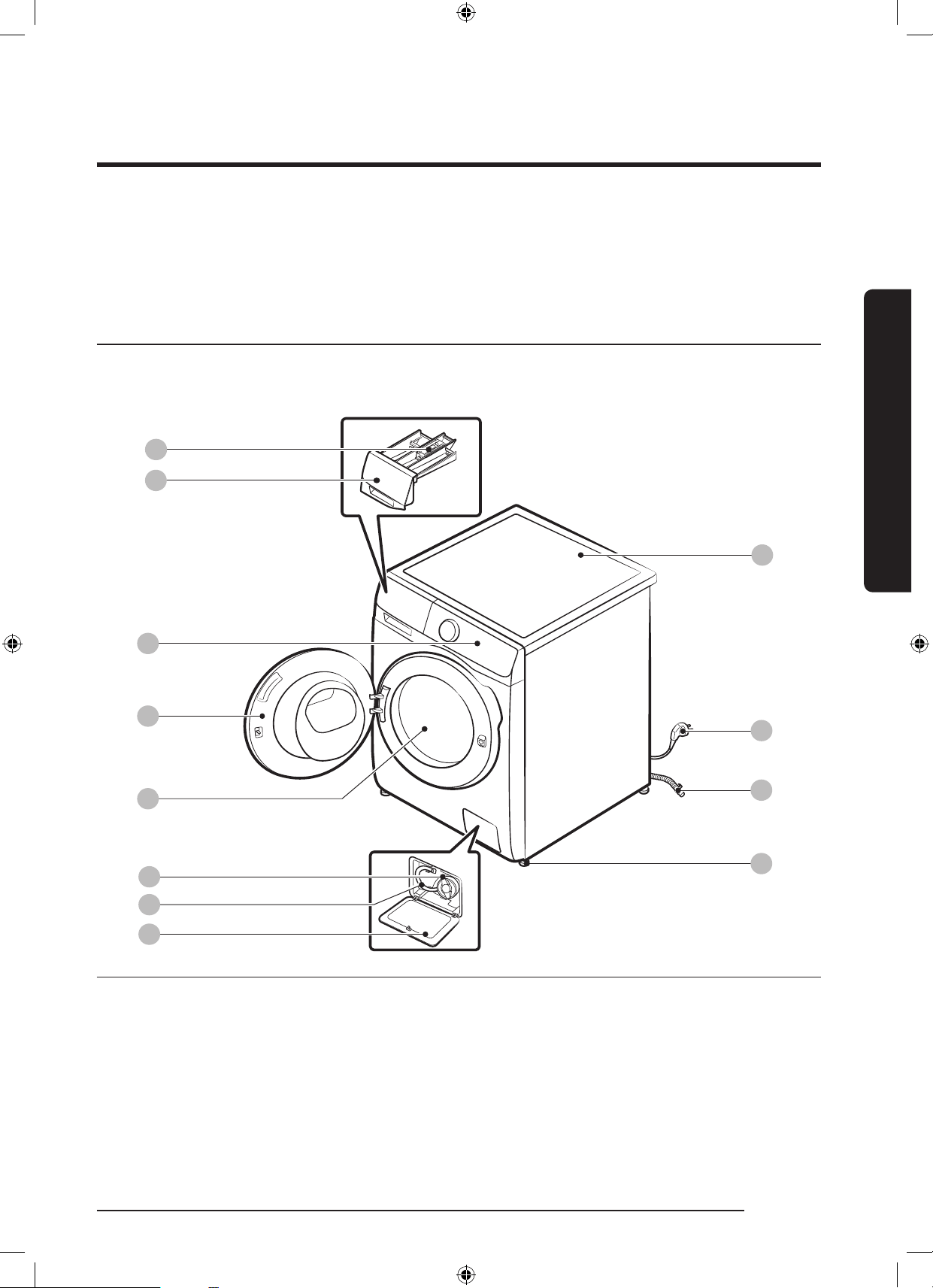
12
06
08
07
03
04
05
09
11
10
01
02
01 Release lever 02 Detergent drawer 03 Control panel
04 Door 05 Drum 06 Pump lter
07 Emergency drain tube 08 Filter cover 09 Worktop
10 Power plug 11 Drain hose 12 Levelling feet
* The design of the drawer and/or the lever differs with the model.
WD10N645R2X_DC68-03976n_EN.indd 15 2018/8/16 19:51:23
16 English
Installation
Installation
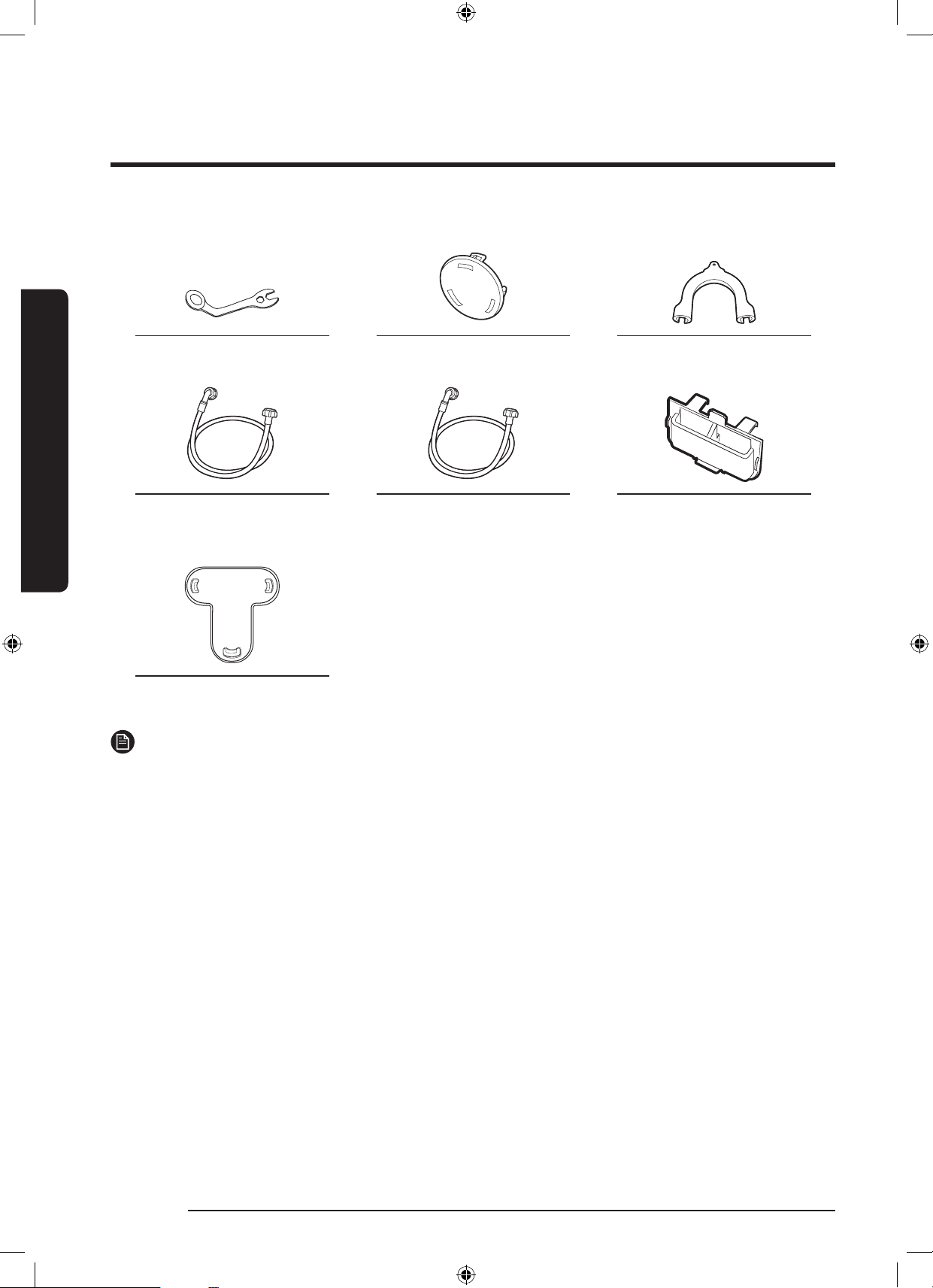
Spanner Bolt caps Hose guide
Cold water hose Hot water hose Liquid detergent guide
(applicable models only)
Cap Fixer
NOTE
• Bolt caps : The provided number (3 to 6) of bolt caps depends on the model.
• Hot water hose: Applicable models only.
• Liquid detergent guide: Applicable models only.
WD10N645R2X_DC68-03976n_EN.indd 16 2018/8/16 19:51:24
English 17
Installation
Installation requirements
Electrical supply and grounding
• AC 220-240 V / 50 Hz fuse or circuit
breaker is required
• Use an individual branch circuit specic
to the washing machine
To ensure proper grounding, the washing
machine comes with a power cord featuring
a three-prong grounding plug for use in a
properly installed and grounded outlet.
Check with a qualied electrician or
serviceperson if you are not sure about the
grounding.
Do not modify the provided plug. If it does
not t the outlet, call a qualied electrician
to install a proper outlet.
WARNING
• Do NOT use an extension cord.
• Use only the power cord that comes
with the washing machine.
• Do NOT connect the ground wire to
plastic plumbing, gas lines, or hot water
pipes.
• Improperly connected grounding
conductors may cause electric shock.
Water supply
A proper water pressure for this washing
machine is between 50 kPa and 800 kPa.
Water pressure less than 50 kPa may cause
the water valve not to close completely. Or,
it may take longer to ll the drum, causing
the washing machine to turn off. Water taps
must be within 120 cm from the rear of the
washing machine so that the provided inlet
hoses reach the washing machine.
To reduce the risk of leaks:
• Make sure water taps are easily
accessible.
• Turn off the taps when the washing
machine is not in use.
• Check for any leaks at the water inlet
hose ttings on a regular basis.
CAUTION
Before using the washing machine for the
rst time, check all connections at the water
valve and taps for any leaks.
Drain
Samsung recommends a standpipe in
height of 60-90 cm. The drain hose must
be connected through the hose clip to the
standpipe, and the standpipe must fully
cover the drain hose.
WD10N645R2X_DC68-03976n_EN.indd 17 2018/8/16 19:51:24
18 English
Installation
Installation
Flooring
For best performance, the washing
machine must be installed on a solid oor.
Wood oors may need to be reinforced
to minimize vibration and/or unbalanced
loads. Carpeting and soft tile surfaces are
not a good resistance to vibrations and may
cause the washing machine to move slightly
during the spin cycle.
CAUTION
Do NOT install the washing machine on a
platform or a poorly supported structure.
Water temperature
Do not install the washing machine in areas
where water may freeze as the washing
machine always retains some water in its
water valves, pumps, and/or hoses. Frozen
water left in the connection parts may
cause damage to belts, the pump, and other
components of the washing machine.
Alcove or closet installation
Minimum clearance for stable operation:
Sides 25 mm
Top 25 mm
Rear 50 mm
Front 550 mm
If both the washing machine and a dryer
are installed in the same location, the front
of the alcove or closet must have at least
a 550 mm unobstructed air opening. Your
washing machine alone does not require a
specic air opening.
WD10N645R2X_DC68-03976n_EN.indd 18 2018/8/16 19:51:24
English 19
Installation
Step-by-step installation
STEP 1 Select a location
Location requirements:
• Solid, level surface without carpeting or ooring that may obstruct ventilation
• Away from direct sunlight
• Adequate room for ventilation and wiring
• The ambient temperature is always higher than the freezing point (0 ˚C)
• Away from a heat source
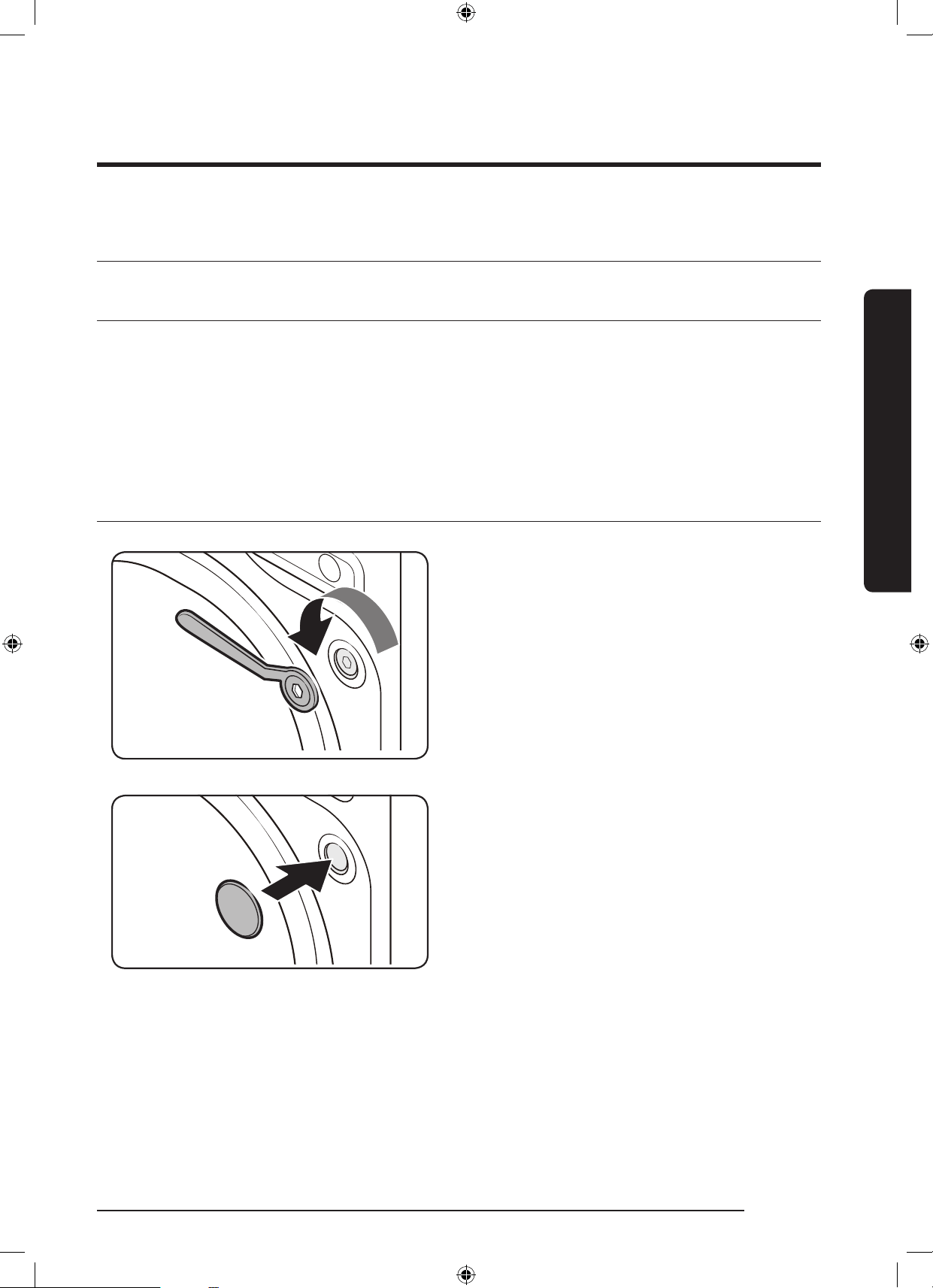
STEP 2 Remove the shipping bolts
Unpack the product package and remove all
shipping bolts.
1. Loosen all shipping bolts on the rear of
the machine using the supplied spanner.
2. Fill the holes with the supplied plastic
bolt caps.
Keep the shipping bolts for future use.
WD10N645R2X_DC68-03976n_EN.indd 19 2018/8/16 19:51:25
20 English
Installation
Installation
A
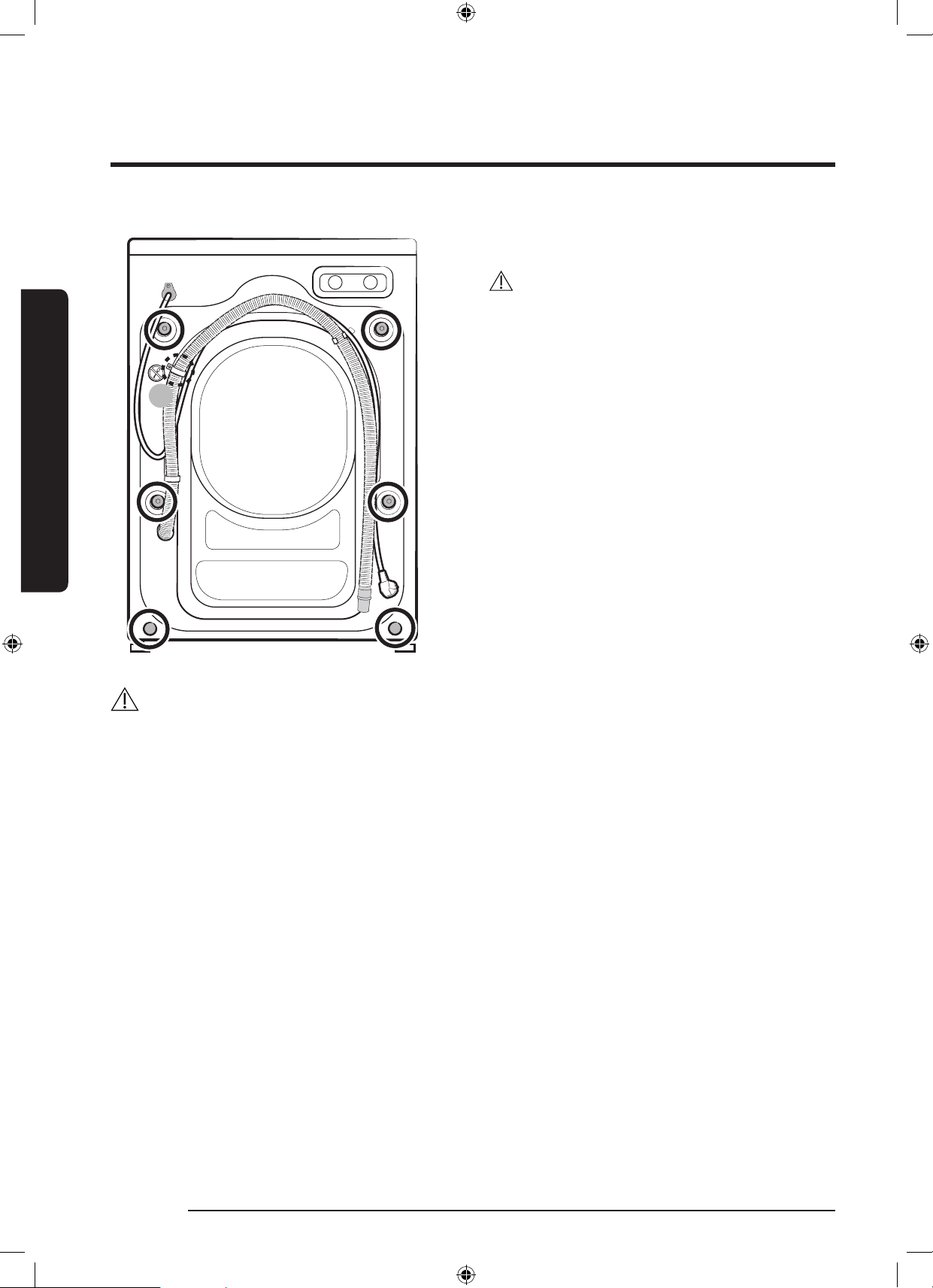
3. Close all plastic bolt caps on the rear of
the washing machine.
CAUTION
Do not remove the screw (A) that xes the
hose clip.
WARNING
Packaging materials can be dangerous to children. Dispose all packaging material (plastic
bags, polystyrene, etc.) out of children’s reach.
WD10N645R2X_DC68-03976n_EN.indd 20 2018/8/16 19:51:25
English 21
Installation
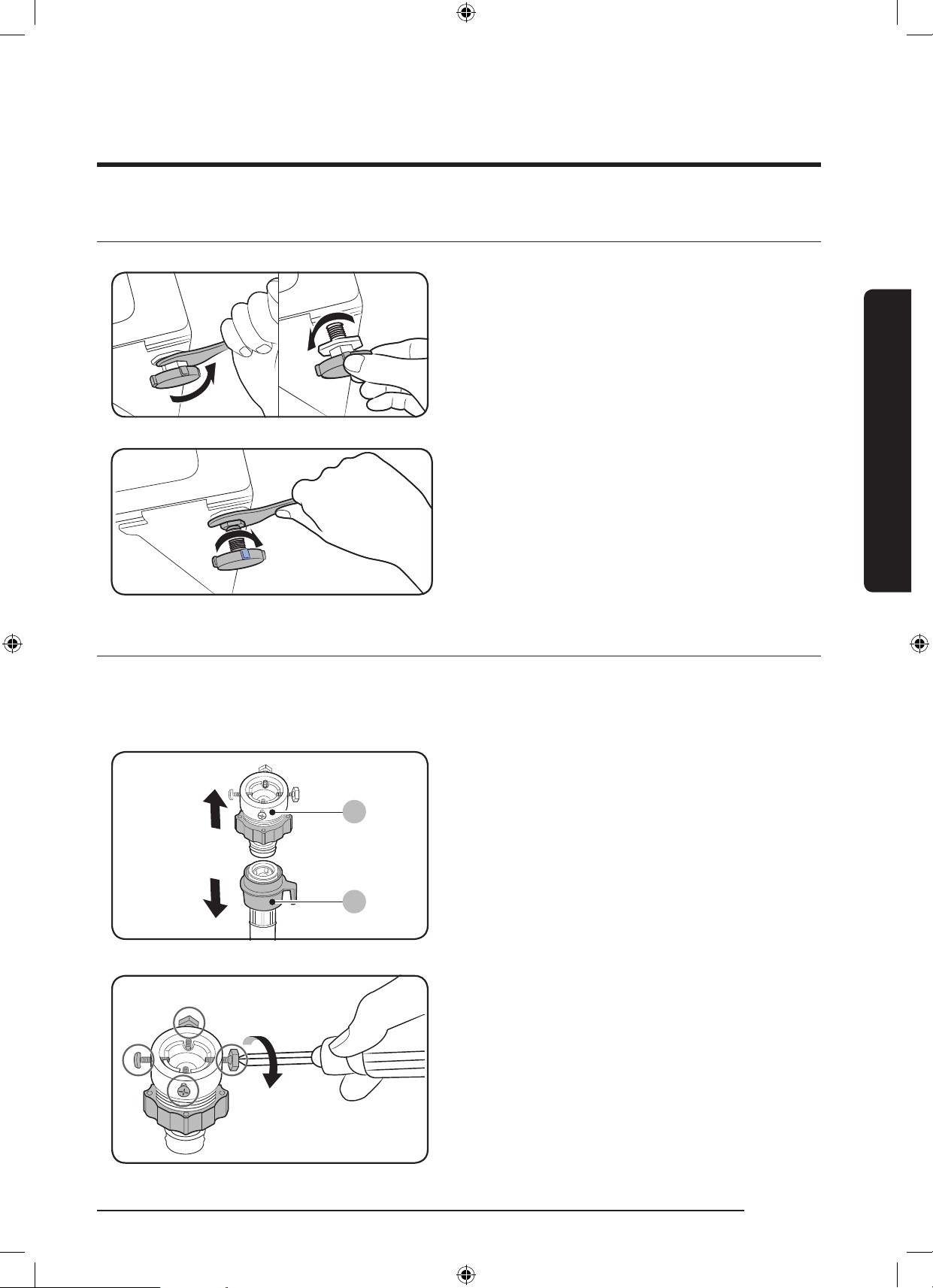
STEP 3 Adjust the levelling feet
1. Gently slide the washing machine into
position. Excessive force may damage
the levelling feet.
2. Level the washing machine by manually
adjusting the levelling feet.
3. When levelling is complete, tighten the
nuts using the spanner.
STEP 4 Connect the water hose
The provided hose adaptor may differ with the model. This step guides you through
connecting the connector-type adaptor. If you are provided with the screw-type adaptor, go
to 7.
A
B
Connect the water hose to the water tap.
1. Remove the adaptor (A) from the water
hose (B).
2. Use a Philips screwdriver to loosen four
screws on the adaptor.
WD10N645R2X_DC68-03976n_EN.indd 21 2018/8/16 19:51:26
22 English
Installation
Installation
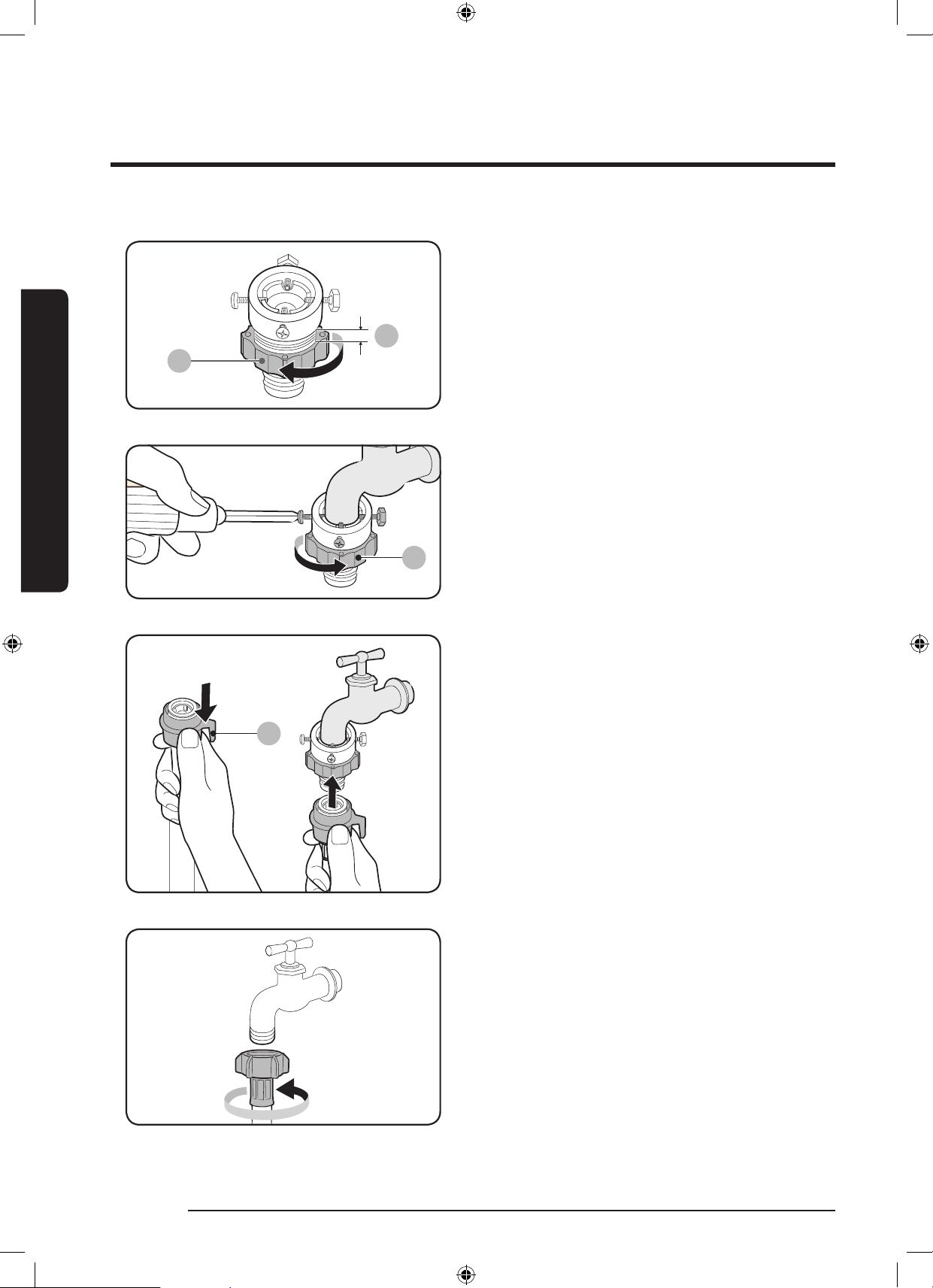
C
3. Holde the adaptor and turn part (C) in
the arrow direction to loosen it by 5 mm
(*).
C
4. Insert the adaptor into the water tap,
and tighten the screws while lifting up
the adaptor.
5. Turn part (C) in the arrow direction to
tighten it.
E
6. While holding down part (E), connect the
water hose to the adaptor. Then, release
part (E). The hose ts into the adaptor
with a clicking sound.
7. If you are using a screw type of water
tap, use the provided screw-type
adaptor to connect to the water tap as
shown.
WD10N645R2X_DC68-03976n_EN.indd 22 2018/8/16 19:51:26
English 23
Installation
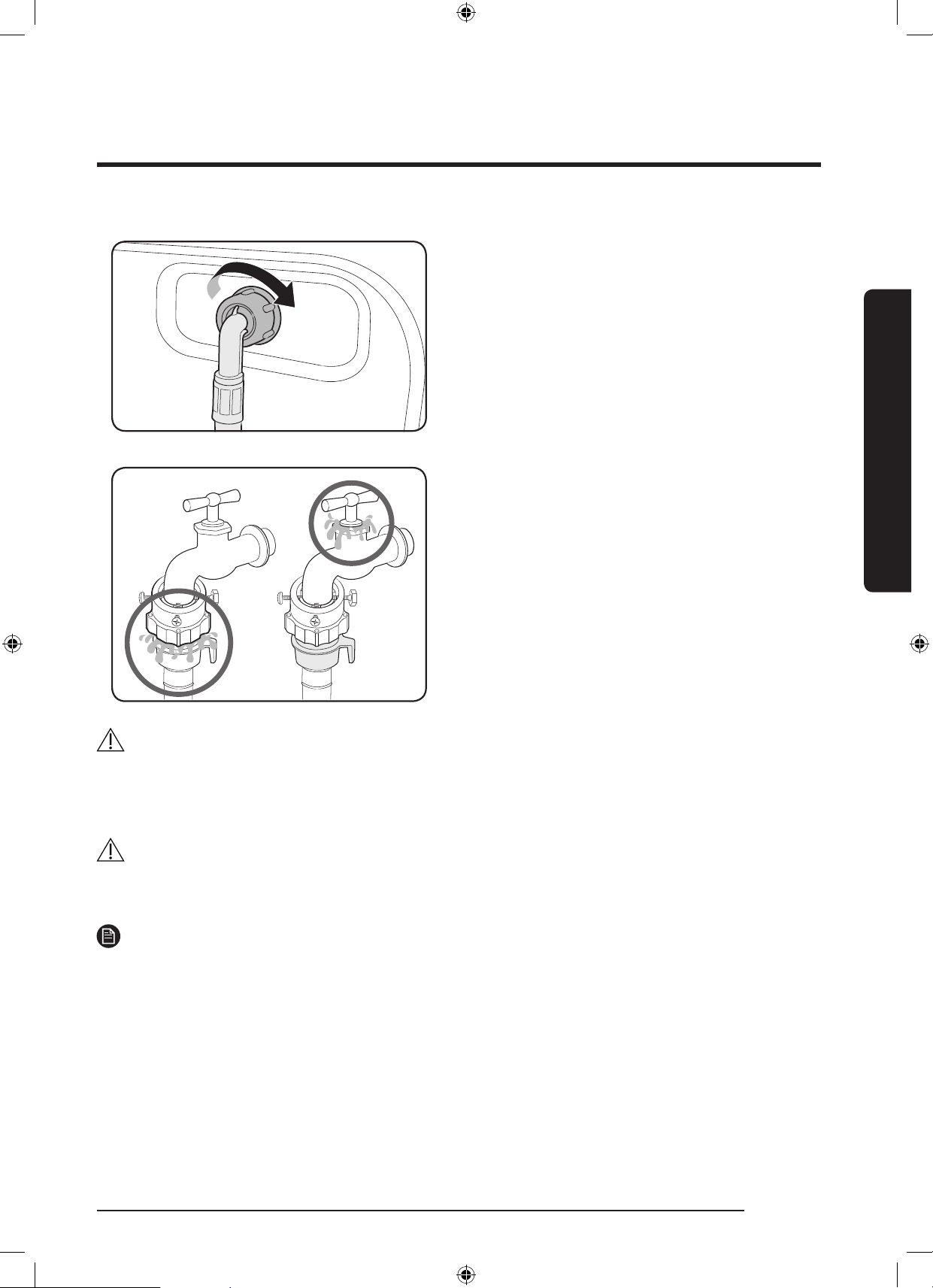
8. Connect the other end of the water
hose to the inlet valve on the back of
the washing machine. Turn the hose
clockwise to tighten.
9. Open the water tap and check if there
are any leaks around the connection
areas. If there are water leaks, repeat the
steps above.
WARNING
If there is a water leak, stop operating the washing machine and disconnect from the
electrical supply. Then, contact a local Samsung service centre. Otherwise, this may cause
electric shock.
CAUTION
Do not stretch the water hose by force. If the hose is too short, replace the hose with a
longer, high-pressure hose.
NOTE
• After connecting the water hose to the adaptor, check if it is connected properly by
pulling the water hose downwards.
• Use a popular type of water taps. If the tap is square-shaped or too big, remove the
spacer ring before inserting the tap into the adaptor.
WD10N645R2X_DC68-03976n_EN.indd 23 2018/8/16 19:51:27
24 English
Installation
Installation
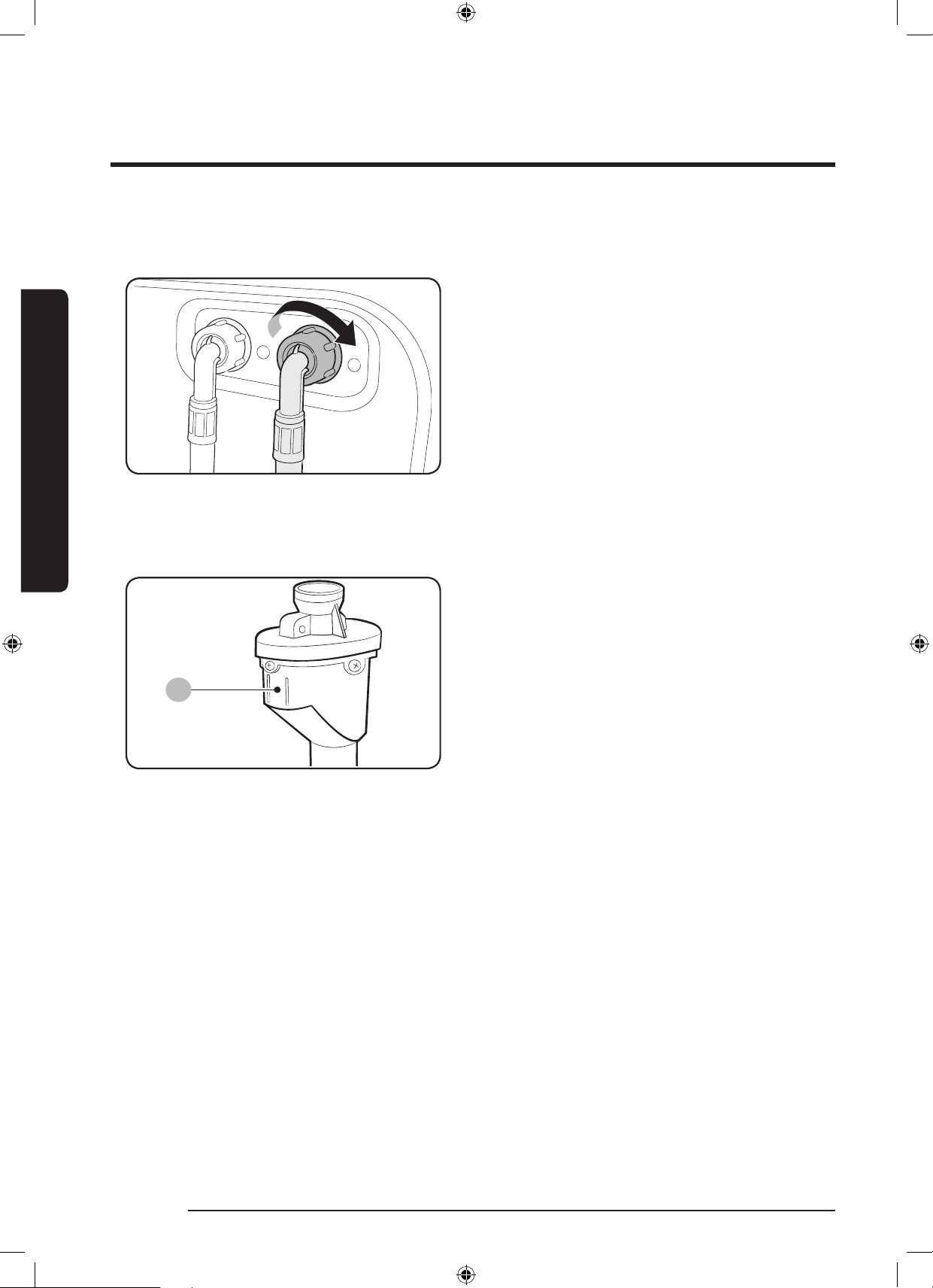
For models with an additional hot water inlet:
1. Connect the red end of the hot water
hose to the hot water inlet on the back
of the machine.
2. Connect the other end of the hot water
hose to the hot water tap.
Aqua hose (applicable models only)
A
The aqua hose alerts users of a risk of water
leaks. It senses the water ow and turns red
on the centre indicator (A) in case of a leak.
WD10N645R2X_DC68-03976n_EN.indd 24 2018/8/16 19:51:27
English 25
Installation
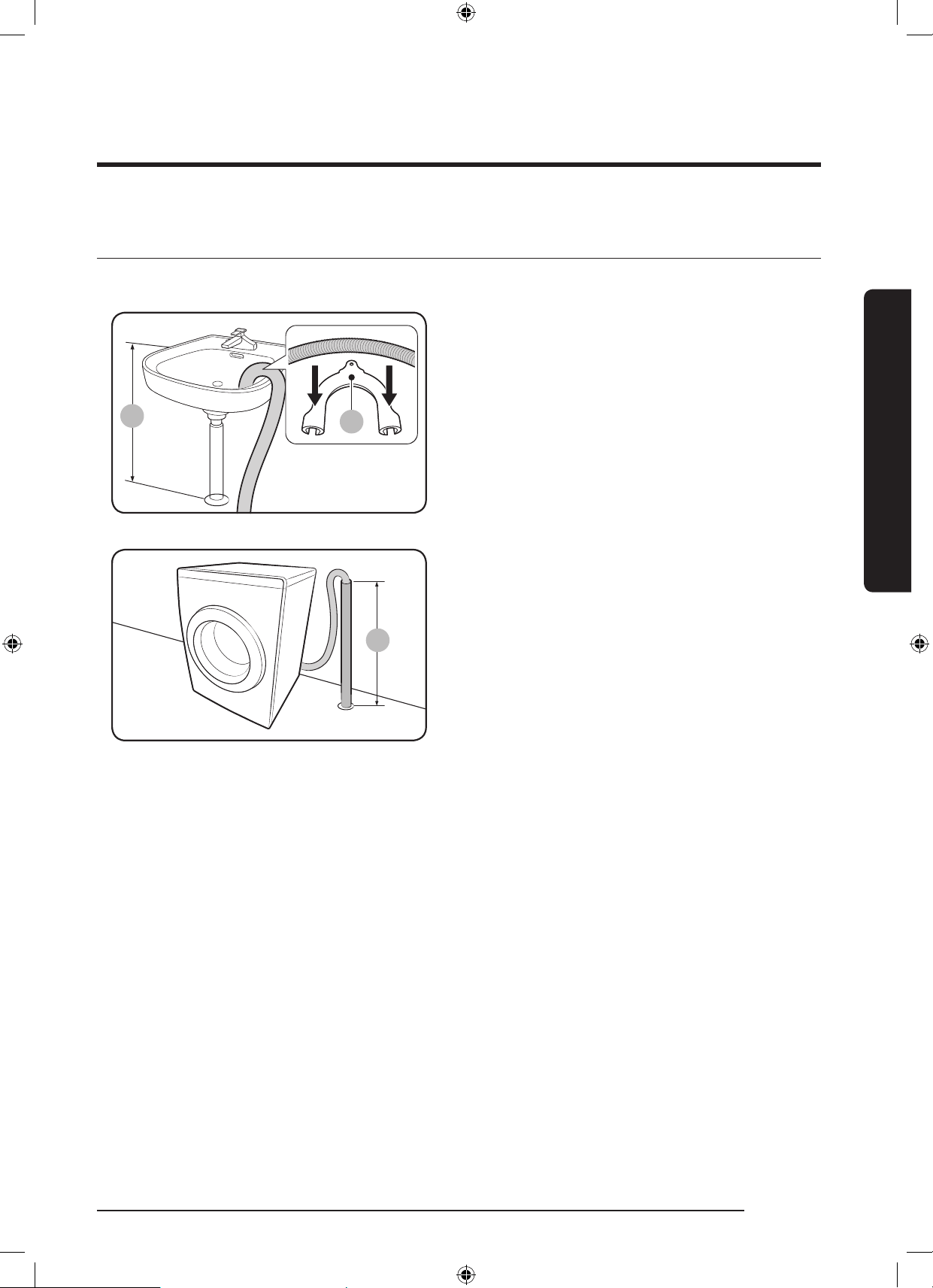
STEP 5 Position the drain hose
The drain hose can be positioned in three ways:
A
Over the edge of a wash basin
The drain hose must be placed at a height
of between 60 cm and 90 cm (*) from the
oor. To keep the spout of the drain hose
bent, use the supplied plastic hose guide (A).
Secure the guide to the wall using a hook to
ensure stable drainage.
ln a drain pipe
The drain pipe should be between 60 cm
and 90 cm high (*). It is advisable to use
a 65 cm high vertical pipe. Make sure the
drain hose is connected to the stand pipe at
a slant.
Drain standpipe requirements:
• Minimum diameter of 5 cm
• Minimum carry-away capacity of
60 litres per minute
WD10N645R2X_DC68-03976n_EN.indd 25 2018/8/16 19:51:27

26 English
Installation
Installation
In a sink drain pipe branch
The drain pipe branch mush be above the
sink siphone so that the end of the hose is
at least 24 in. (60 cm) above the ground.
(*) : 24 in. (60 cm)
STEP 6 Power on
Plug the power cord into a wall socket featuring an AC 220-240 V / 50 Hz approved electrical
outlet protected by a fuse or circuit breaker. Then, press Power to turn on the washing
machine.
WD10N645R2X_DC68-03976n_EN.indd 26 2018/8/16 19:51:27
English 27
Before you start
Before you start
Initial settings
Run Calibration (recommended)
Calibration ensures accurate weight detection by the washing machine. Make sure the drum
is empty before running Calibration.
1. Power off, and then power on the washing machine.
2. Hold down Temp. and Delay End+ simultaneously for 3 seconds to enter Calibration
mode. The “Cb” message appears.
3. Press and hold Start/Pause to run the Calibration cycle. The drum will rotate clockwise
and counter-clockwise for about 3 minutes.
4. When the cycle is complete, “0” appears on the display and the washing machine will turn
off automatically. The washing machine is now ready for use.
Laundry guidelines
STEP 1 Sort
Sort the laundry according to these criteria:
• Care Label: Sort the laundry into cottons, mixed bres, synthetics, silks, wools, and rayon.
• Colour: Separate whites from colours.
• Size: Mixing different-sized items together in the drum improves the washing
performance.
• Sensitivity: Wash delicate items separately for pure, new woollen items, curtains, and silk
items. Check the labels on the items.
NOTE
Make sure to check the care label on the clothing, and sort them accordingly before starting
the wash.
WD10N645R2X_DC68-03976n_EN.indd 27 2018/8/16 19:51:27
28 English
Before you start
Before you start
STEP 2 Empty pockets
Empty all the pockets of your laundry items
• Metal objects such as coins, pins, and buckles on clothing may damage other laundry
items as well as the drum.
Turn clothing with buttons and embroideries inside out
• If pants or jacket zippers are open while washing, the drum may be damaged. Zippers
should be closed and xed with a string.
• Clothing with long strings may become entangled with other clothes. Make sure to tie the
strings before starting the wash.
STEP 3 Use a laundry net
• Brassieres (water washable) must be placed in a laundry net. Metal parts of the brassieres
may break through and tear other laundry items.
• Small, light clothing such as socks, gloves, stockings, and handkerchiefs may become
caught around the door. Place them inside a ne laundry net.
• Do not wash the laundry net by itself without other laundry. This may cause abnormal
vibrations that could move the washing machine and result in injury.
STEP 4 Prewash (if necessary)
Select the Prewash option for the selected course if the laundry is heavily soiled. Do not use
the Prewash option when detergent is manually added into the drum or if applying liquid
detergent.
STEP 5 Determine the load capacity
Do not overload the washing machine. Overloading may cause the washing machine to not
wash properly. For the load capacity for the type of clothing, see page 37.
NOTE
When washing bedding or bedding covers, the wash time may be lengthened or the spin
efciency may be reduced. For bedding or bedding covers, the recommended maximum spin
cycle speed is 800 rpm, and the load capacity is 2.0 kg or less.
CAUTION
• Unbalanced laundry may reduce the spinning performance.
• Make sure the laundry is fully inserted in the drum and not caught in the door.
• Do not slam the door. Close the door gently. Otherwise, the door may not be closed
properly.
WD10N645R2X_DC68-03976n_EN.indd 28 2018/8/16 19:51:27
English 29
Before you start
STEP 6 Apply a proper detergent type
The type of detergent depends on the type of fabric (cotton, synthetic, delicate items, wool),
colour, wash temperature, and degree of soiling. Always use “low suds” laundry detergent,
which is designed for automatic washing machines.
NOTE
• Follow the detergent manufacturer’s recommendations based on the weight of the
laundry, the degree of soiling, and the hardness of the water in your local area. If you are
not sure about the water hardness, contact a local water authority.
• Do not use detergent that tends to be hardened or solidied. This detergent may remain
after the rinse cycle, blocking the drain outlet.
• If too many bubbles occur during a cycle, a message of ‘Sud’ will be displayed.
CAUTION
When washing wool using the wool course, use only a neutral liquid detergent. If used with
the Wool course, powder detergent may remain on the laundry and discolour the laundry.
Laundry capsules
To get the best results from using laundry capsules, please follow these instructions.
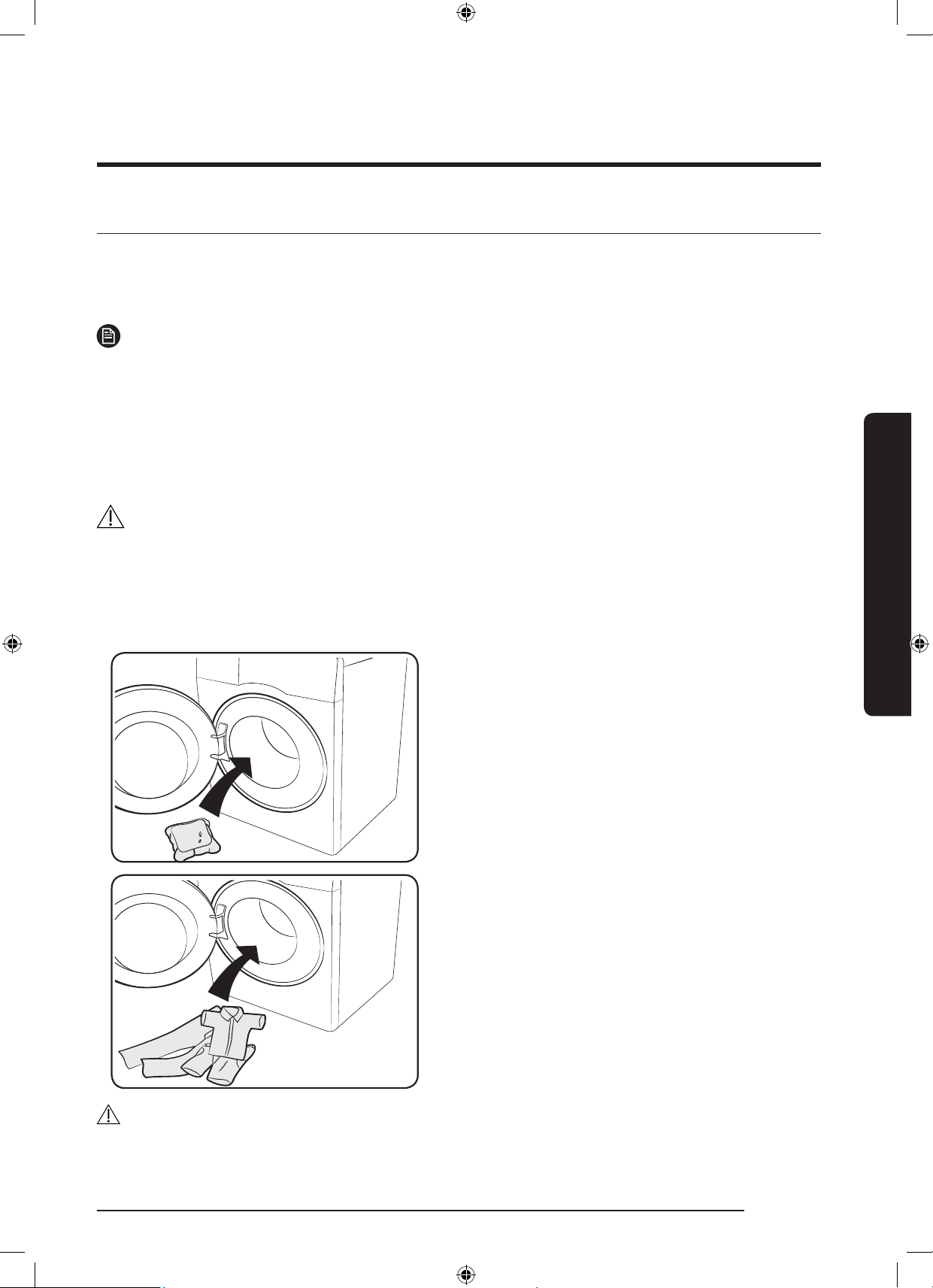
1. Put the capsule in the bottom of the
empty drum towards the rear.
2. Put the laundry in the drum on top of
the capsule.
CAUTION
For cycles using cold water or cycles that complete in less than one hour, the capsule may
not dissolve completely.
WD10N645R2X_DC68-03976n_EN.indd 29 2018/8/16 19:51:27
30 English
Before you start
Before you start
Detergent drawer guidelines
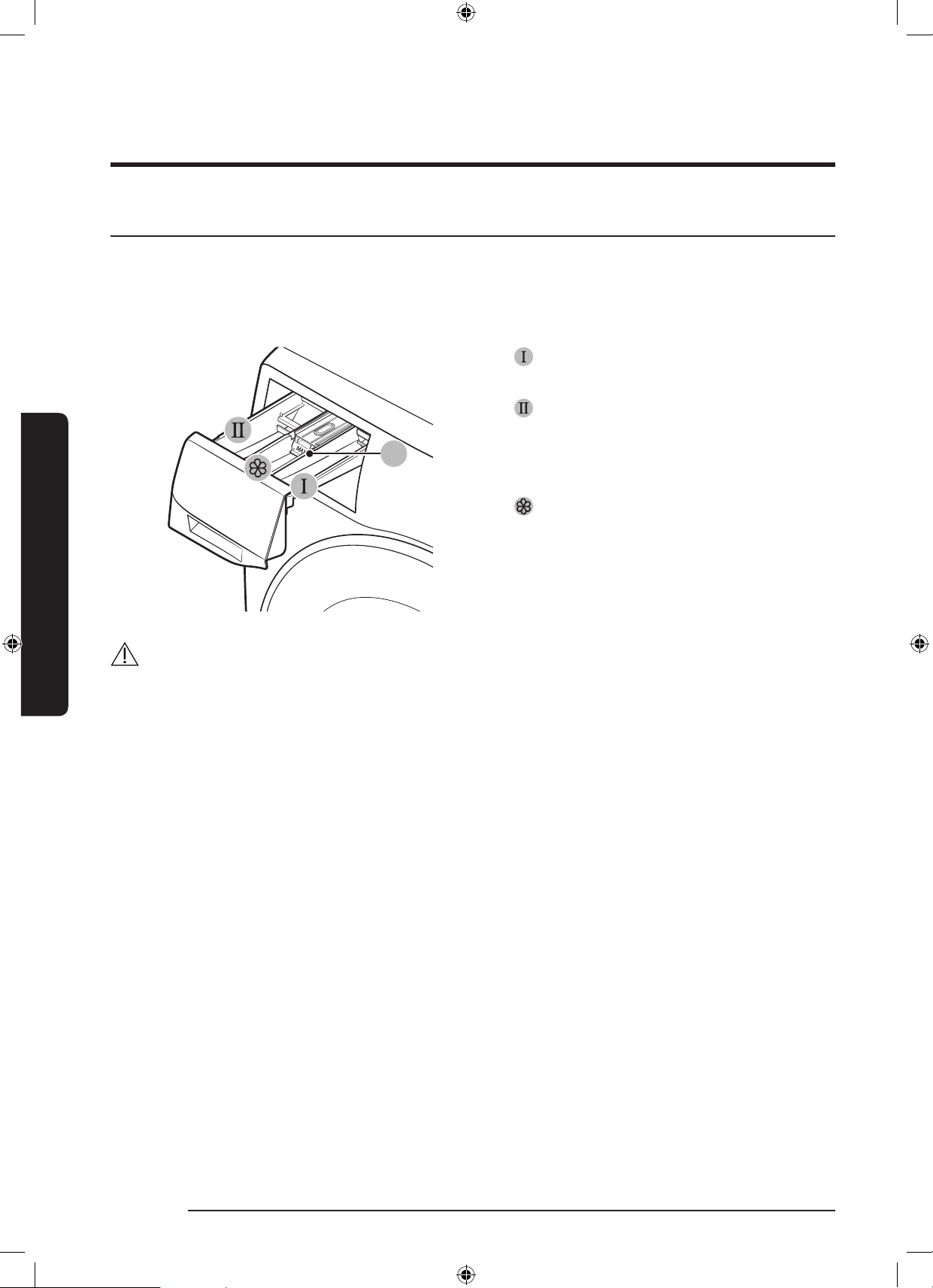
The washing machine provides a three-compartment dispenser: the left compartment for the
main wash, the middle compartment for fabric softeners, and the right compartment for the
preliminary wash.
A
1. Prewash compartment: Apply
prewash detergent.
2.
Main-wash compartment: Apply
main-wash detergent, water softener,
soaking detergent, bleach, and/or stain
removers.
3.
Softener compartment: Apply
additives such as fabric softener. Do not
exceed the max line (A).
CAUTION
• Do not open the detergent drawer while the washing machine is operating.
• Do not use the following types of detergent:
- Tablet or capsule types
- Ball or net types
• To prevent the compartment clogging, concentrated or highly-enriched agents (fabric
softener or detergent) must be diluted with water before being applied.
• Before moving the washing machine, make sure to empty the detergent drawer that
might contain detergent and/or fabric softener. The content in the drawer may spill out
on the oor.
WD10N645R2X_DC68-03976n_EN.indd 30 2018/8/16 19:51:28
English 31
Before you start
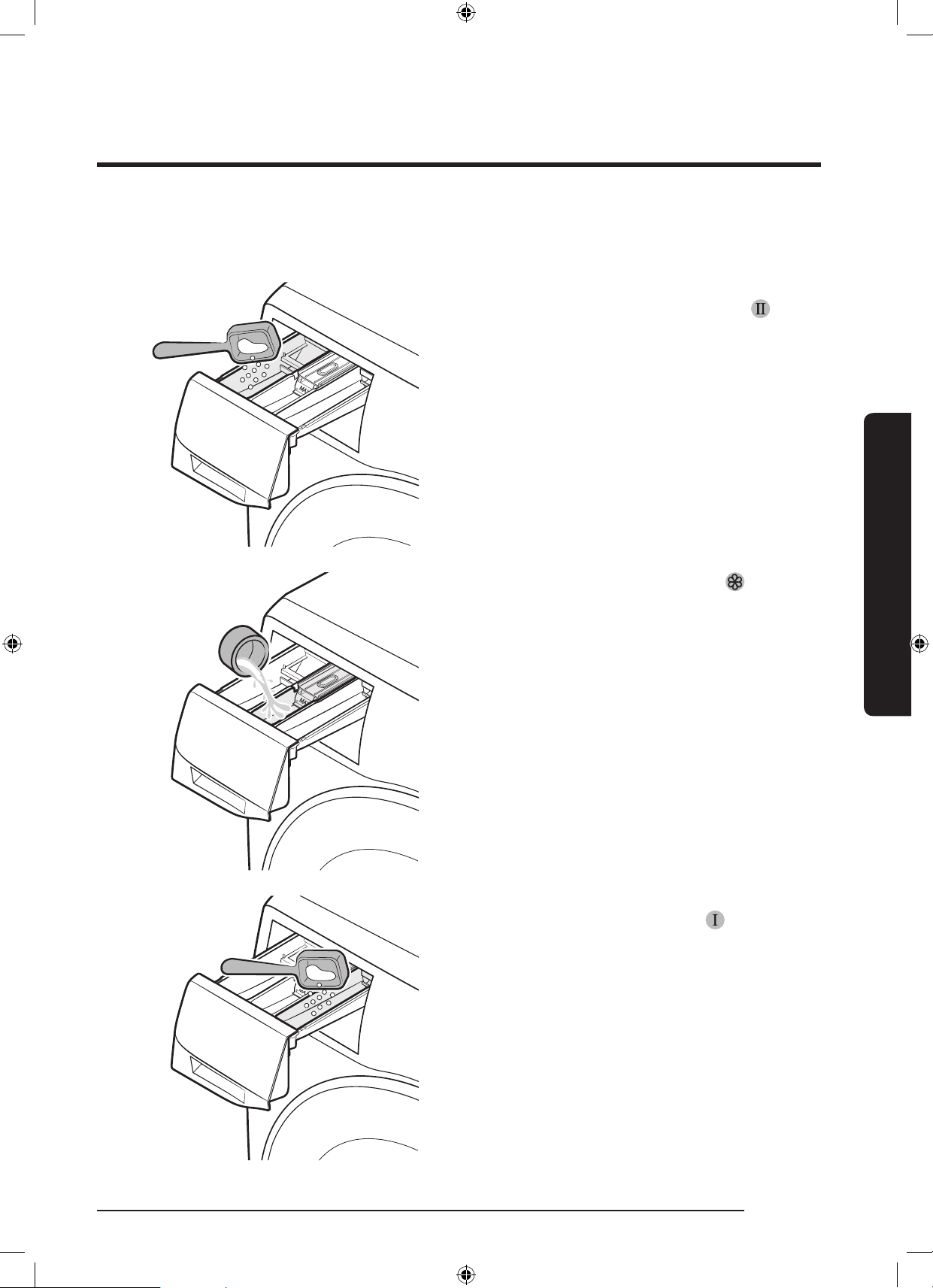
To apply washing agents to the manual dispenser
1. Slide open the detergent drawer.
2. Apply laundry detergent to the
main-
wash compartment as instructed or
recommended by the manufacturer. To
use liquid detergent, see page <33>.
3. Apply fabric softener to the softener
compartment. Do not exceed the max
line.
4. If you want to prewash, apply
prewash detergent to the
prewash
compartment as instructed or
recommended by the manufacturer.
5. Close the detergent drawer.
WD10N645R2X_DC68-03976n_EN.indd 31 2018/8/16 19:51:29
32 English
Before you start
Before you start
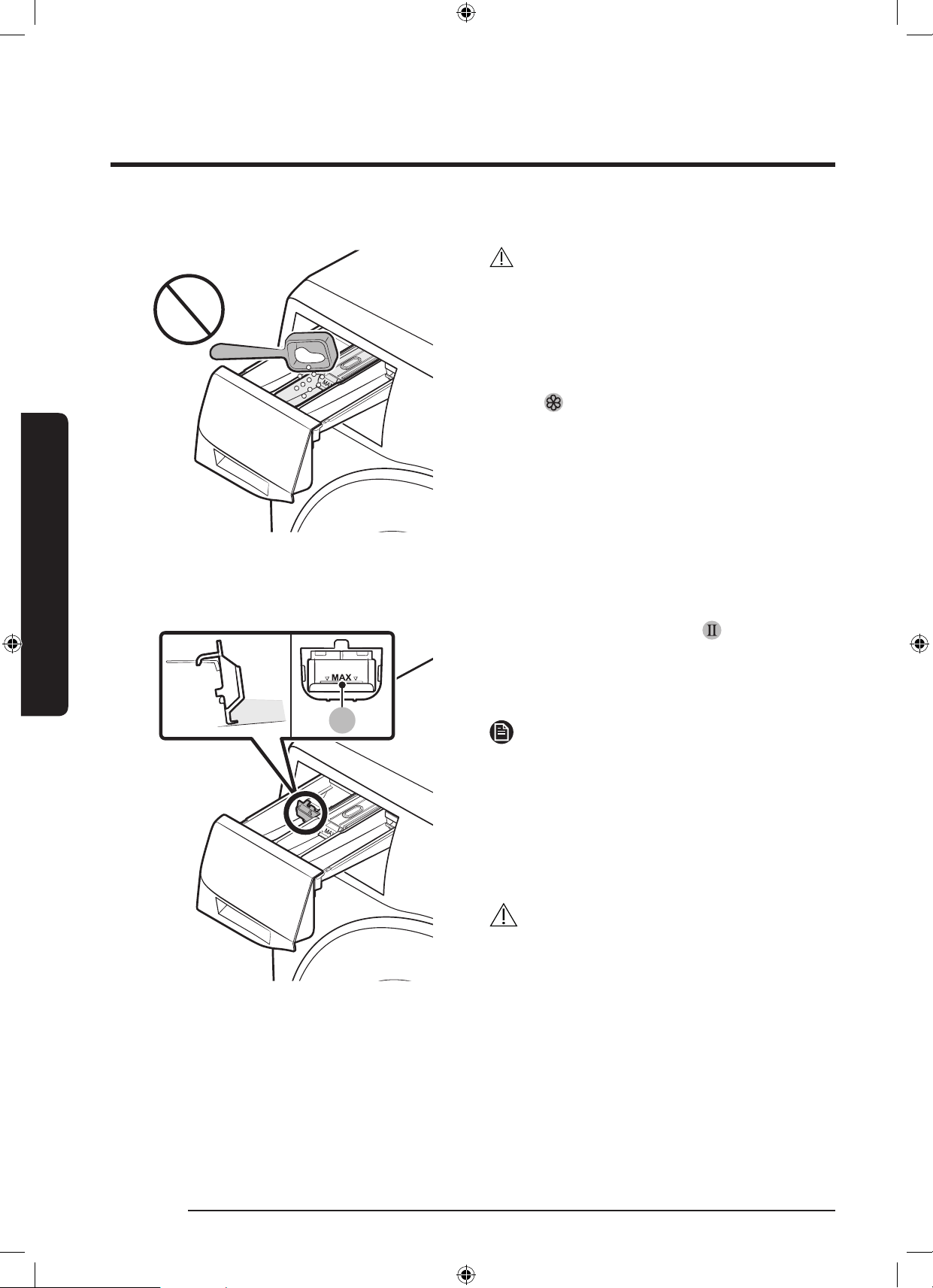
CAUTION
• Do not apply powder detergent to the
liquid detergent container.
• Concentrated fabric softener must be
diluted with water before applied.
• Do not apply main-wash detergent to
the
softener compartment.
To use liquid detergent manually (applicable models only)
A
First insert the provided liquid
detergent container in the
main-wash
compartment. Then, apply liquid detergent
to the container below the marked max
line (A).
NOTE
• Insert the liquid detergent guide only
after you remove the detergent drawer
from the washing machine by pressing
release lever (A).
• After a wash, some liquid detergent
may remain in the detergent drawer.
CAUTION
• Do not exceed the max line that is
marked inside the container.
• Remove the liquid container if using
powder detergent.
WD10N645R2X_DC68-03976n_EN.indd 32 2018/8/16 19:51:30

English 33
Operations
Operations
Control panel
01
02
03
07
05
06
12
11
10
08
09
04
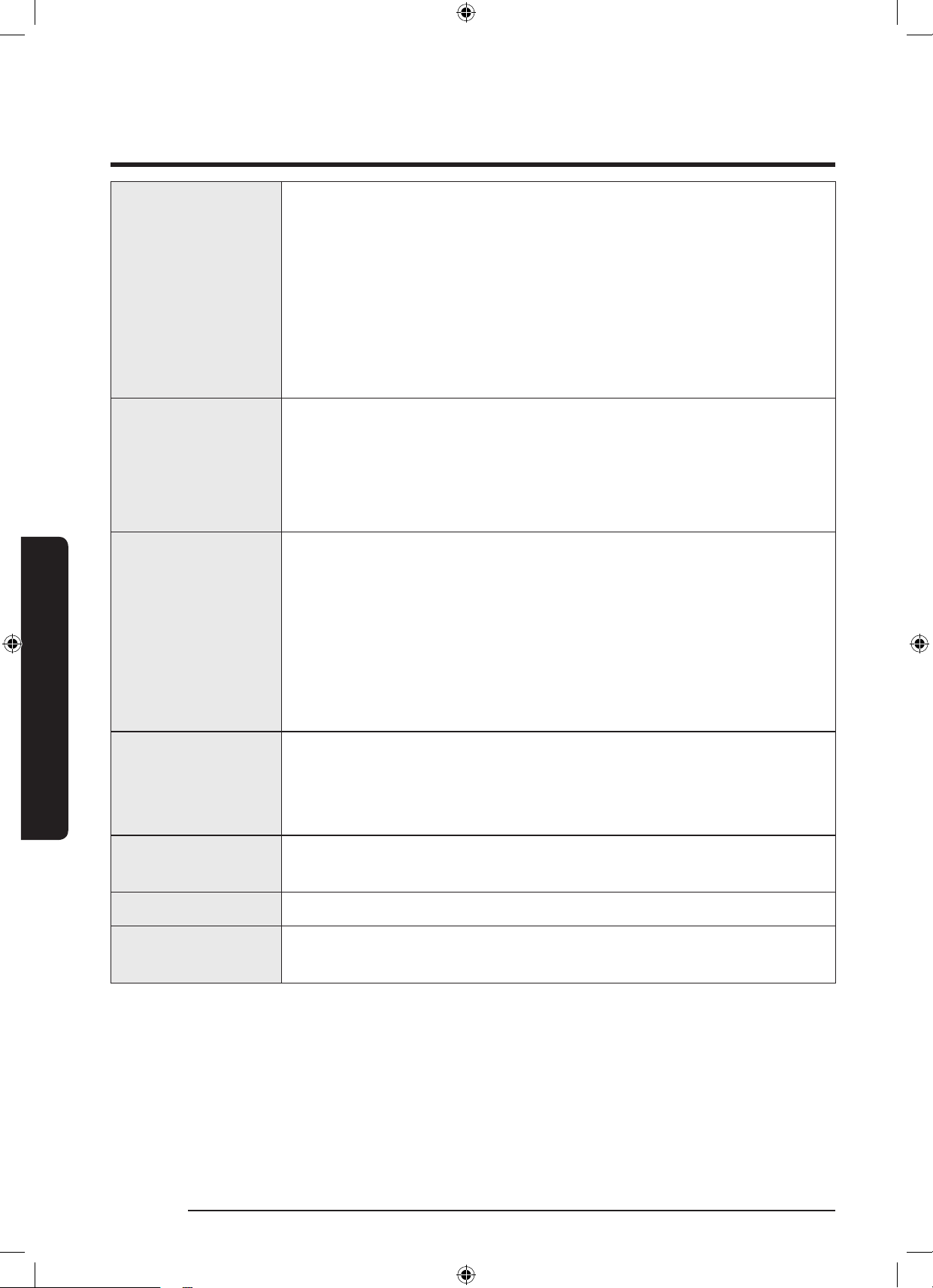
01 Cycle Selector Turn the dial to select a cycle.
02 Display
The display shows current cycle information and estimated time
remaining, or an information code when a problem occurs.
For buttons and icons, refer to the corresponding page..
03 Temp. Press to change the water temperature for the current cycle.
04 Rinse
Press to change the rinse count for the current cycle. You can set the
rinse count to a max of 5, depending on the cycle.
05 Spin
Press to change the spinning speed for the current cycle. The
revolutions per minute (RPM) differs with the model.
• Rinse Hold( No indicator ): The nal rinse process is suspended
so that the laundry remains in the water. To unload the laundry,
run a drain or spin process.
- To use the Rinse Hold option, press Spin repeatedly until all
rpm numeric indicators turn off. Not available for the DRAIN/
SPIN cycle.
• No Spin(
): The drum does not rotate after the nal drain
process.
- To use the No Spin option, press Spin repeatedly until all rpm
numeric indicators turn off. Only available for the DRAIN/
SPIN cycle.
• Spin Only: To run the Spin Only cycle, press Spin for 3 seconds.
When the cycle time and spinning speed appear, press Spin
repeatedly until a desired spinning speed is selected. Then,
press and hold Start/Pause to start the cycle. The spinning time
depends on the selected cycle.
WD10N645R2X_DC68-03976n_EN.indd 33 2018/8/16 19:51:30
34 English
Operations
Operations
06 Dry Option
Press to select a drying level: Cupboard Dry > Time Dry (30 min >
1:00 h > 1:30 h > 2:00 h > 2:30 h > 3:00 h > 3:30 h > 4:00 h > 4:30
h) > No Dry
• Cupboard Dry: Use this option to dry laundry such as cotton,
underwear, and linen.
• Time Dry: Use this option to dry the laundry for the specied
period of time depending on the bres, amount of laundry
quantity and moisture.
• No Dry: Use this option if not using a drying cycle.
07 Delay End
Delay End lets you set the end time of the current cycle. Based
on your settings, the start time of the cycle will be determined
by the machine’s internal logic. For example, this setting is useful
for programming your machine to nish a wash at the time you
normally return home from work.
• Press to choose a preset unit of hours.
08 Bubble soak
Press to activate/deactivate the Bubble Soak function. This
function helps remove a wide variety of stubborn stains.
• Bubble Soak helps remove a variety of stubborn stains.
• With Bubble Soak selected, laundry is thoroughly soaked in
water bubbles for effective washing.
• Bubble Soak is available with and adds up to 30 minutes to
these cycles: COTTON, SYNTHETICS, DAILY WASH, 59’ WASH +
DRY .
09 Smart Control
Press to activate/deactivate the Smart Control function. When the
Smart Control function is activated, you can control your washing
machine using your mobile device. For more information, see the
SmartThings section on page <47>.
10 Options
Press to select an option from Intensive and Pre Wash. Press again to
deselect.
11 Power Press to turn on/off the washing machine.
12 Start/Pause
(Hold to start)
Press and hold to start an operation, or press to stop an operation
temporarily.
For more information on the options, see the Special features section.
WD10N645R2X_DC68-03976n_EN.indd 34 2018/8/16 19:51:31
English 35
Operations
Simple steps to start
5
1
6
4
3
2
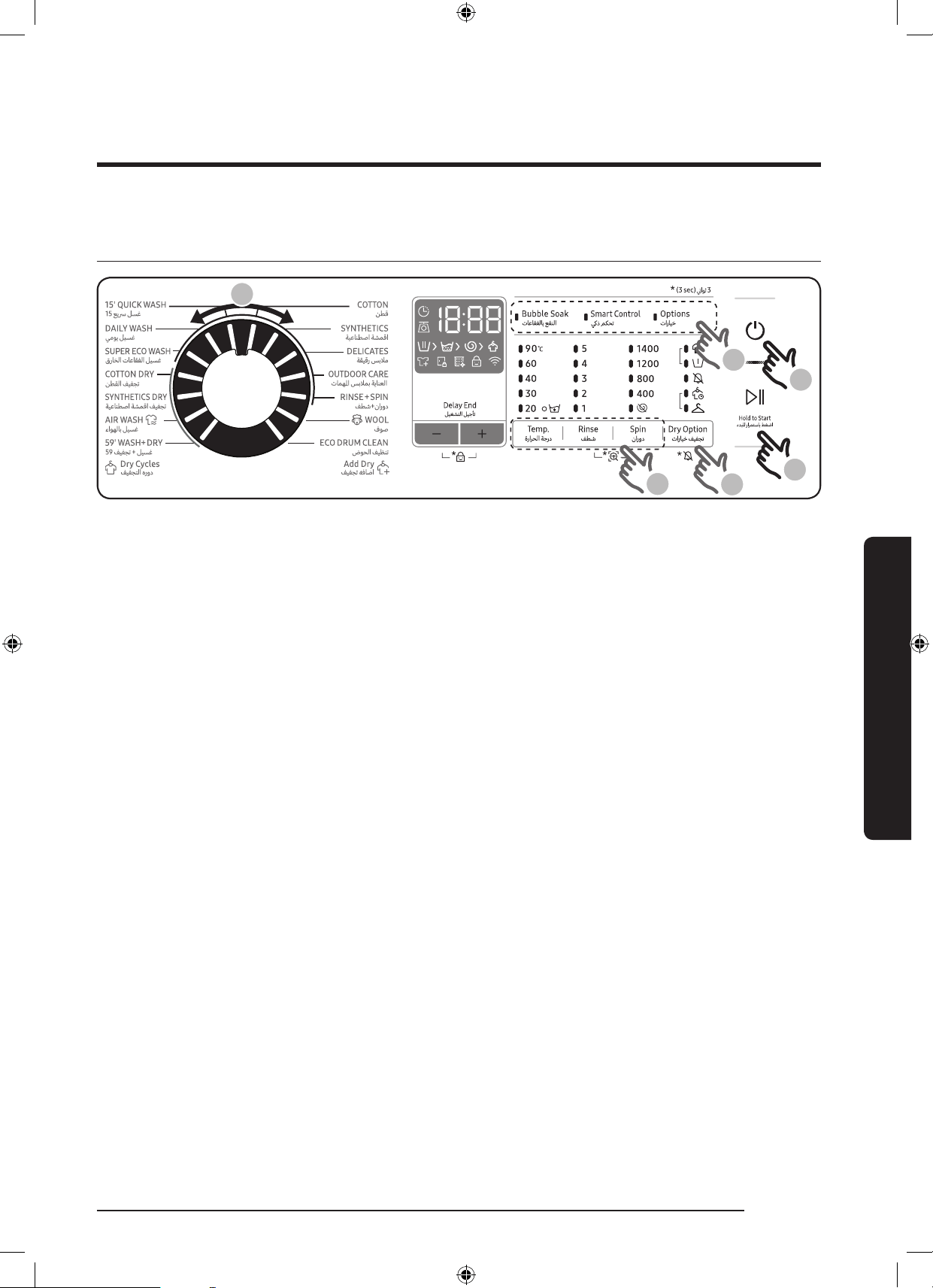
1. Press Power to turn on the washing machine.
2. Select a cycle in the cycle panel.
3. Change the cycle settings (Temp., Rinse, and Spin) as necessary.
4. To add an option, press Dry Option Use the button again to choose a preferred item.
5. The machine provides three easy to access buttons for Bubble Soak, Smart Control
and
Options for easy access. To use an option item, press the corresponding button.
6. Press and hold Start/Pause.
To change the cycle during operation
1. Press Start/Pause to stop operation.
2. Select a different cycle.
3. Press Start/Pause again to start the new cycle.
WD10N645R2X_DC68-03976n_EN.indd 35 2018/8/16 19:51:31
36 English
Operations
Operations
Dry clothes only
1
3
2
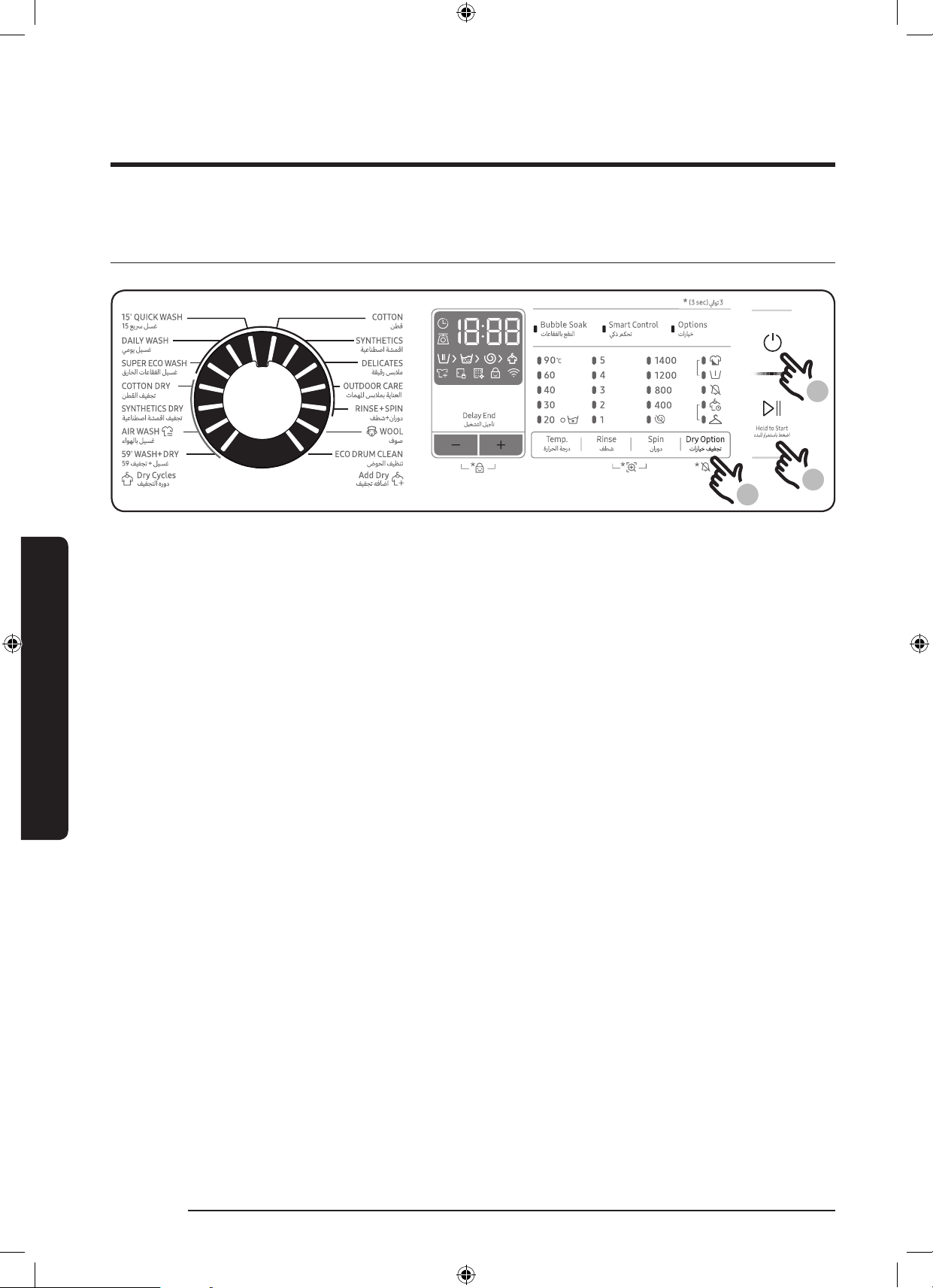
1. Press Power button on the washing machine.
2. Press Dry Option repeatedly until a desired dry level is set.
3. Press and hold Start/Pause.
To change the cycle during operation
1. Press Start/Pause to stop operation.
2. Select a different cycle.
3. Press and hold Start/Pause again to start the new cycle.
WD10N645R2X_DC68-03976n_EN.indd 36 2018/8/16 19:51:31
English 37
Operations
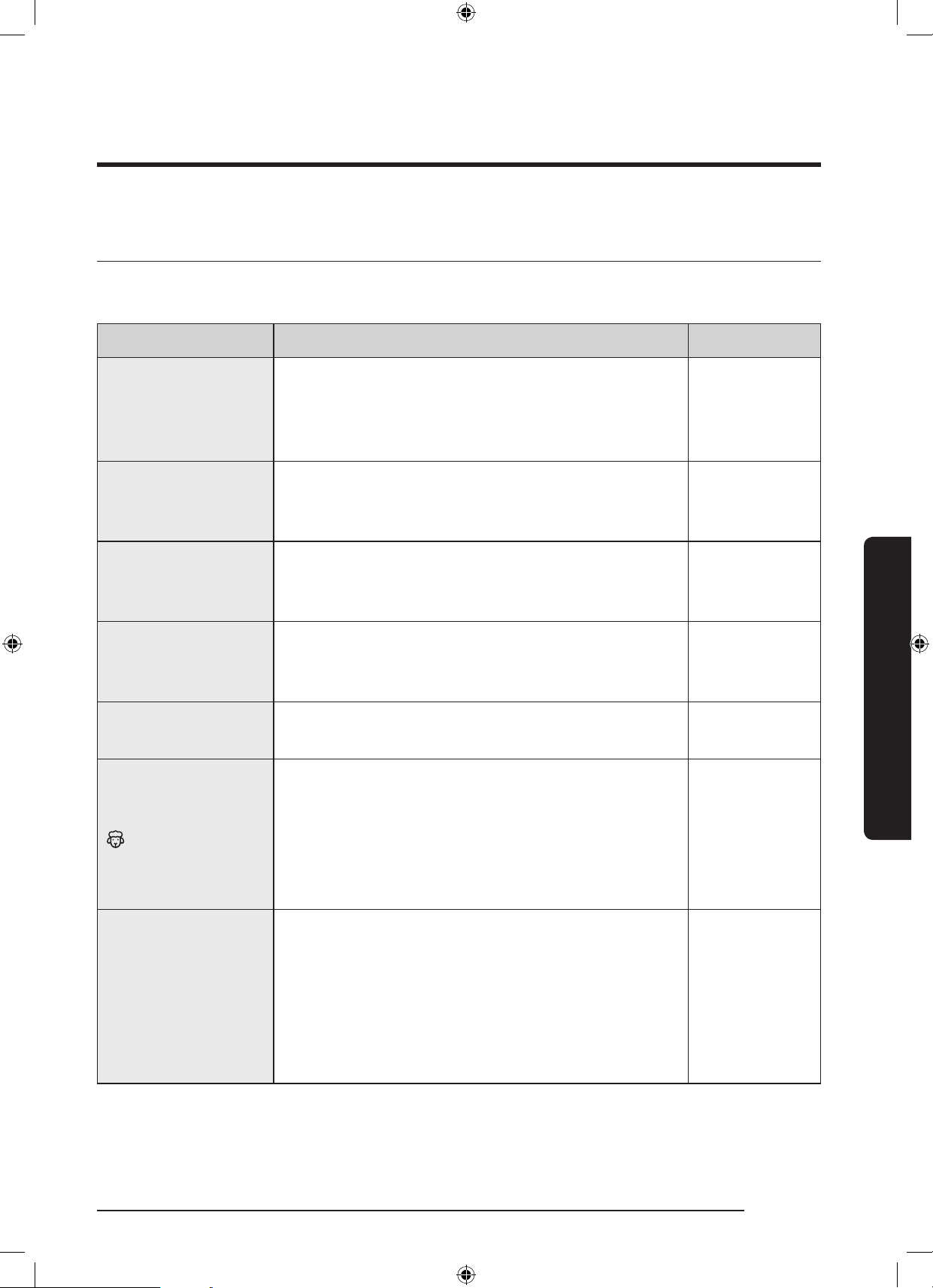
Cycle overview
Standard cycles
Cycle Description Max load (kg)
COTTON
• For cottons, bed linens, table linens, underwear,
towels, or shirts.
The washing time and the rinse count are
automatically adjusted according to the load.
Max
SYNTHETICS
• For blouses or shirts that are made of
polyester (diolen, trevira), polyamide (perlon,
nylon), or the like.
4.0
DELICATES
• For sensitive fabrics as rayon, viscose and
synthetics blended bre.
• For best performance, use liquid detergent.
2.0
OUTDOOR CARE
• For outdoor clothes, skiwear, and sportswear
that are made of functional materials such as
spandex, stretch, and micro-bre
2.0
RINSE+SPIN
• Featuring an additional rinse process after
applying fabric softener to the laundry.
Max
WOOL
• Specic for machine-washable wool for loads
less than 2.0 kg.
• The wool cycle features gentle cradling and
soaking to protect the wool bres from
shrinkage/distortion.
• A neutral detergent is recommended.
2.0
ECO DRUM CLEAN
• Cleans the drum by removing dirt and bacteria
from the drum.
• Perform once every 40 washes with no
detergent or bleach applied.
• Make sure the drum is empty.
• Do not use any cleaning agents for cleaning
the drum.
-
WD10N645R2X_DC68-03976n_EN.indd 37 2018/8/16 19:51:31
38 English
Operations
Operations
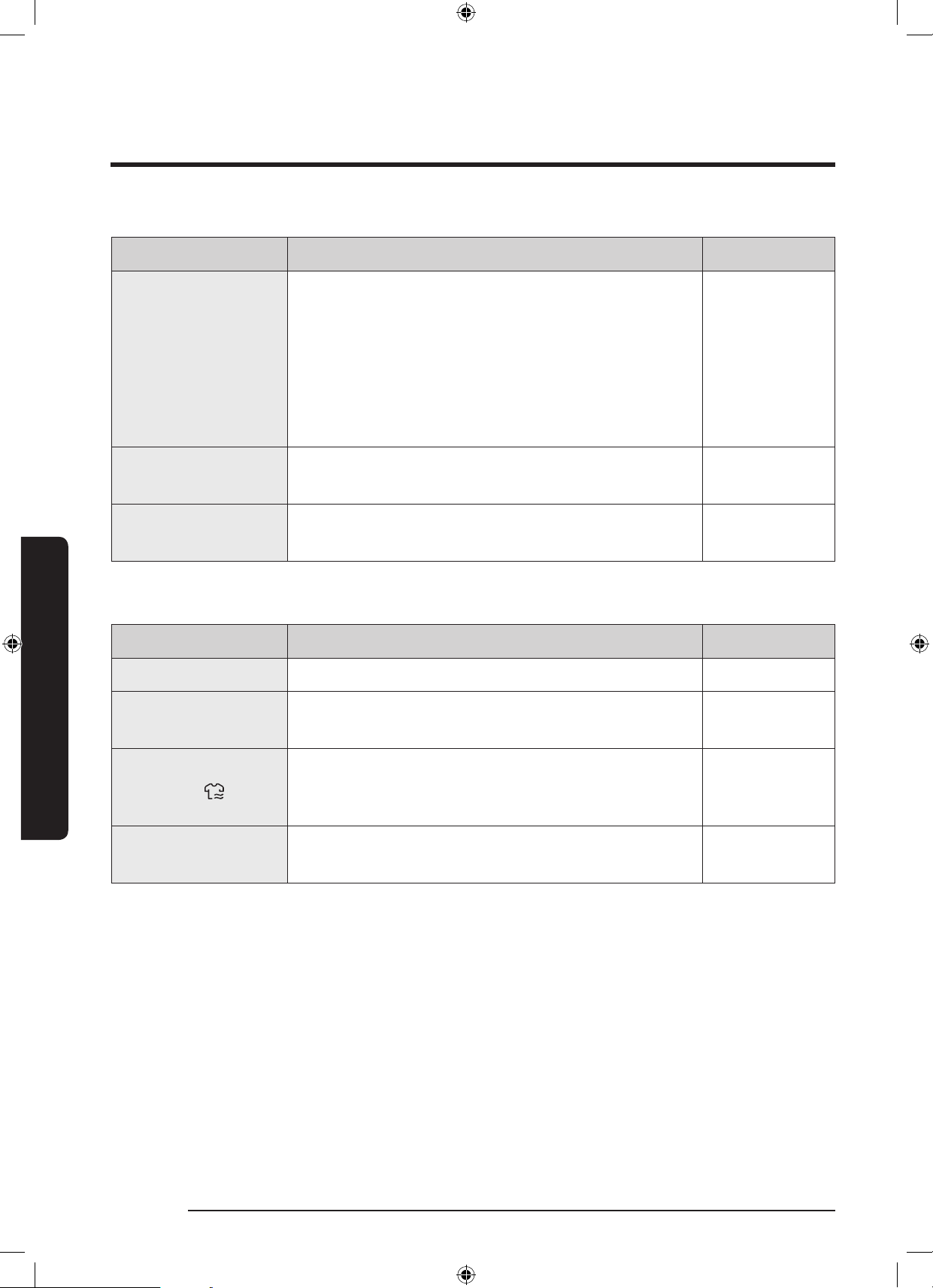
Cycle Description Max load (kg)
15’ QUICK WASH
For lightly soiled items in less than 2.0 kg that
you want to wash quickly.
• Use less than 20 g of detergent. Using more
than 20 g of detergent may leave detergent
residue.
• For liquid detergent, use a max of 20 ml of
liquid detergent.
2.0
DAILY WASH
• Use for everyday items such as underwear and
shirts.
4.0
SUPER ECO WASH
• Low temperature ecobubble cycle helps reduce
power consumption.
4.0
Dry cycles
Cycle Description Max load (kg)
COTTON DRY • For general drying. 6.0
SYNTHETICS DRY
• A low temperature drying cycle for heat-
sensitive garments.
3.0
AIR WASH
• This course is useful for removing bad odors.
Turning the Cycle Selector cycles through the
following operating modes.
1.0
59’ WASH+DRY
• Specic to quickly wash and dry for few
synthetics clothes.
1.0
WD10N645R2X_DC68-03976n_EN.indd 38 2018/8/16 19:51:31
English 39
Operations
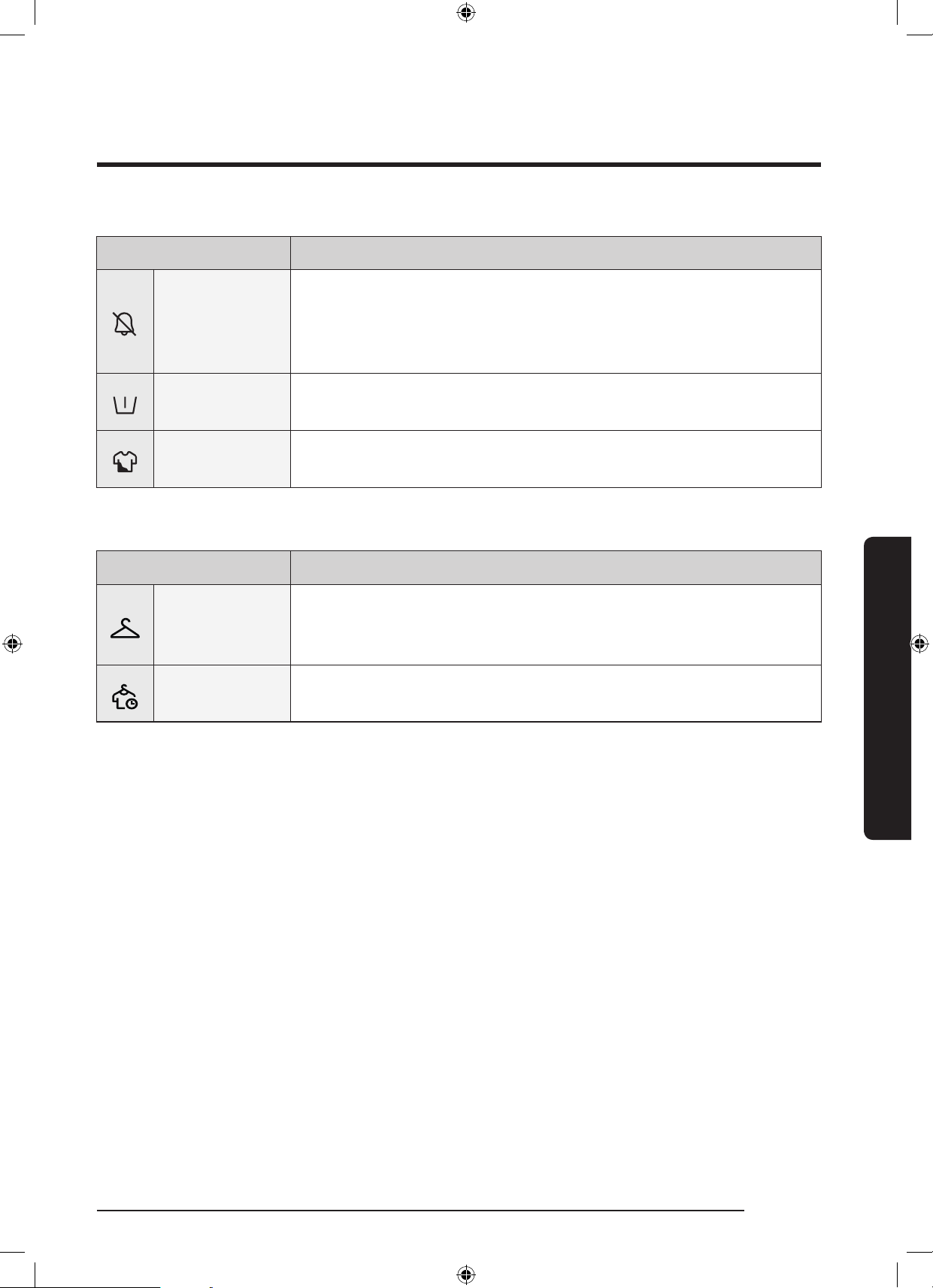
Options
Option Description
Sound On/Off
• You can turn on or off the sound from the washing machine.
When this function is set to Off, the AddWash alarm, the
melody of cycle completion, and the power-off beep will not
sound. However, the other sounds stay active.
Pre Wash
• This will add a preliminary washing cycle before the main
wash cycle.
Intensive
• For badly soiled laundry. The operation time for each cycle is
longer than normal.
Dry Option
Option Description
Cupboard dry
• Select to dry laundry automatically by detecting the amount
and weight of the laundry. Select this to dry cotton clothing
such as cotton trousers, T-shirts, and cotton underwear.
Time Dry
• Use to dry the laundry for a specied period of time
according to the material, load, and moisture.
WD10N645R2X_DC68-03976n_EN.indd 39 2018/8/16 19:51:32
40 English
Operations
Operations
Delay End
You can set the washing machine to nish your wash automatically at a later time, choosing
a delay of between 1(60minutes) to 24 hours (in 1 hour increments). The hour displayed
indicates the time the wash will nish.
1. Select a cycle. Then change the cycle settings if necessary.
2. Press Delay End (the +/- button) repeatedly until a desired end time is set.
3. Press and hold Start/Pause. The Delay End indicator blinks and the washing machine
tumbles the drum to sense the weight of the load if load sensing is preset for the selected
cycle. When complete, it displays your set time with the timer running.
4. To cancel the Delay End, restart the washing machine by pressing Power.
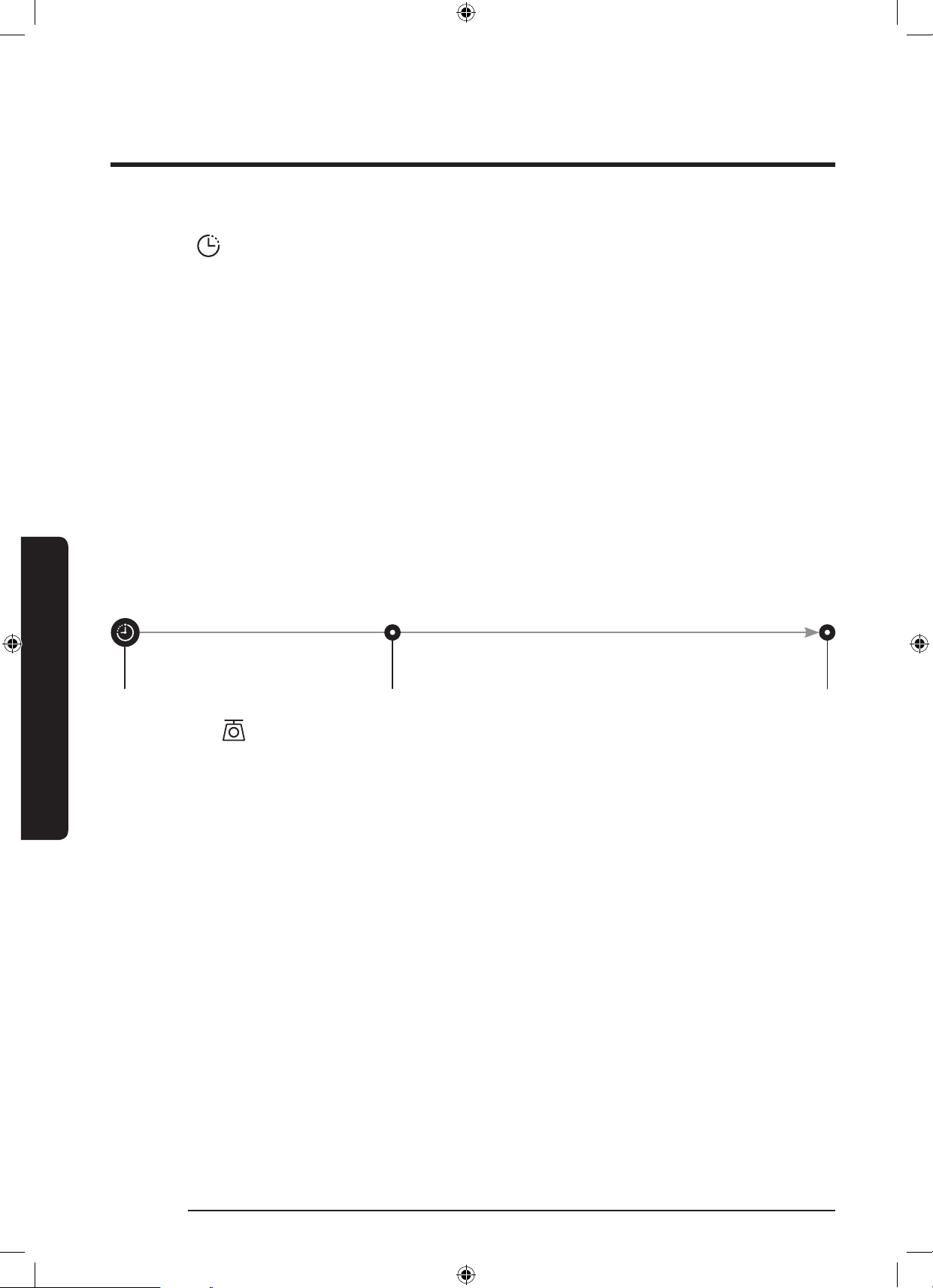
Real-life case
If you are going out at 5pm want to make sure the 2 hour wash cycle is completed by this
time, select the Delay End option. Simply select the 3 hour setting and press Start/Pause at
2:00 pm. The washing machine will then start operating at 3:00 pm and will end at 5:00 pm.
Please see below for the diagram which explains the timings of this example.
2:00 pm
Set the Delay End to 3 hours
3:00 pm
Start
5:00 pm
End
Load sensor
The load sensor icon lights up when you select a cycle that supports load sensing. Some
cycles may not support loading sensing. Once you start the cycle, the icon blinks or stays
solid during the load sensing process, and turns off when the process is complete.
WD10N645R2X_DC68-03976n_EN.indd 40 2018/8/16 19:51:32
English 41
Operations
Special features
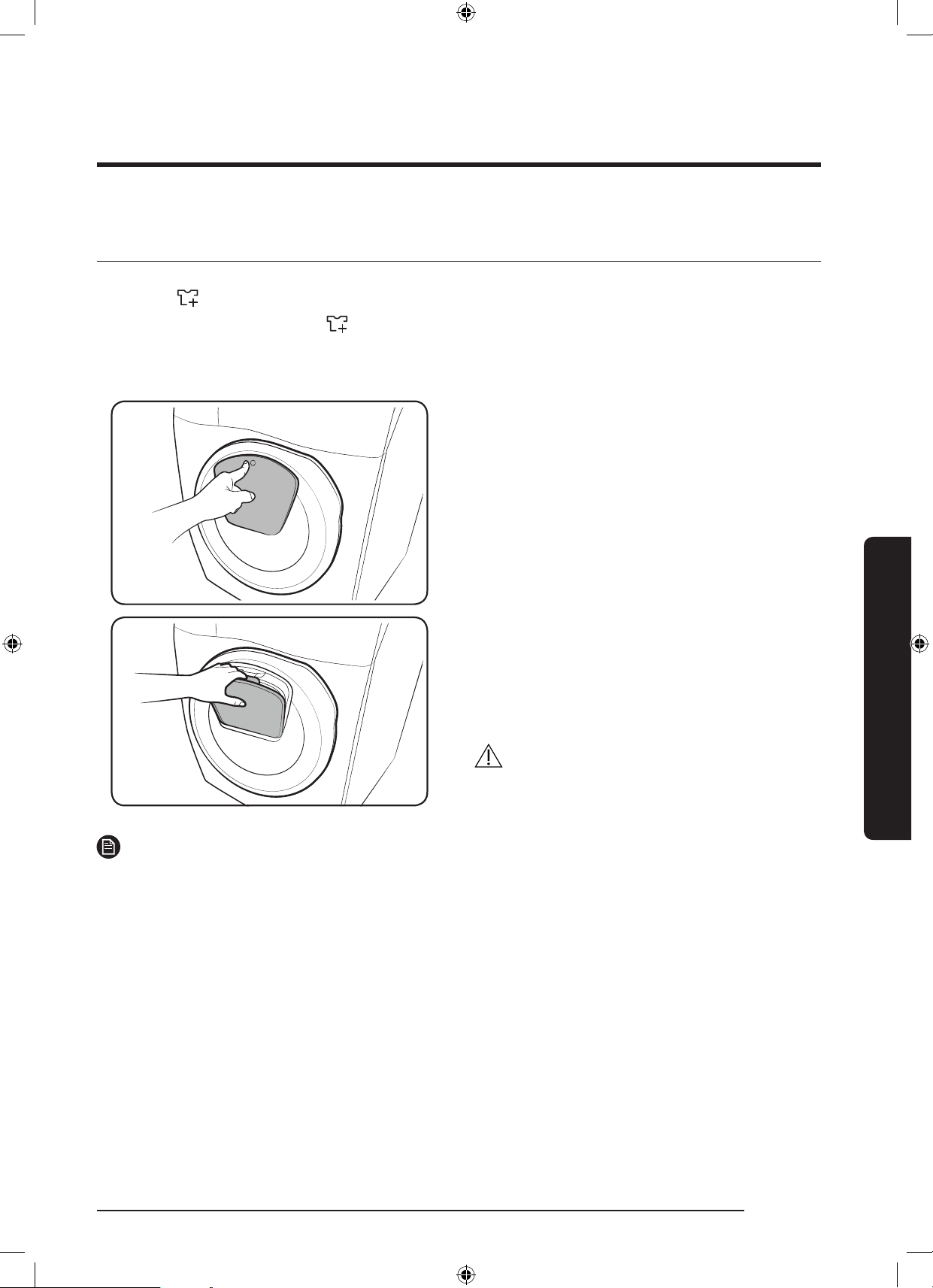
AddWash
When the AddWash indicator turns on, you can stop operation of the machine and put
additional laundry or softener into the drum. The Add Door opens by more than 130° for
easy access.
1. Press Start/Pause to stop operation.
2. Press the upper area of the Add Door
until you hear a clicking sound to unlock.
Pull the handle of the Add Door to open.
3. Open the Add Door and insert additional
laundry or softener into the drum.
4. Push to lock the Add Door until you hear
a clicking sound.
5. Press Start/Pause to resume operation.
CAUTION
Do not put excessive force on the Add Door.
It may break.
NOTE
The water inside the drum does not leak if the Add Door is closed properly. Water drops may
form around the window, but they do not leak from inside the drum.
WD10N645R2X_DC68-03976n_EN.indd 41 2018/8/16 19:51:33
42 English
Operations
Operations
CAUTION
• Do not open the Add Door if suds have formed inside the drum that rise above the level
of the Add Door.
• Do not attempt to open the Add Door while the machine is operating without rst
pressing Start/Pause. Please note that the Add Door can be opened unintentionally
(without pressing Start/Pause) when the wash is complete.
• Do not add an excessive load through the Add Door. Performance may be degraded.
• Do not use the lower area of the Add Door as a handle. Your ngers may be caught.
• Make sure that no laundry is caught in the Add Door.
• Keep your pets out of the washing machine, especially the Add Door.
• When using hot water for the wash, the Add Door seems to leak water after opening and
closing the Add Door. This is normal, simply because steam emerging from the open Add
Door has cooled and formed water drops on the surface.
• When the Add Door closes, the door seals up and no water can leak. However, you
may encounter what appears to be water leak around the door - some residual water
remaining around the Add Door may form water drops. This is normal.
• Neither the main door or the Add Door can opened when the water temperature is over
50 ˚C. If the water level inside the drum is over a certain point, the main door cannot be
opened.
• If an information code of DDC appears on the display, see the “Information codes” section
for further actions.
• Keep the Add door and its surroundings clean at all times. Debris or detergent on or
around the seals of the Add door may cause a leak.
WD10N645R2X_DC68-03976n_EN.indd 42 2018/8/16 19:51:33
English 43
Operations
Settings
Child Lock
To prevent accidents by children, Child Lock
locks all buttons except for Power.
To activate Child Lock
• On the manual dispenser models, press
and hold - and + (of the Delay End
option) simultaneously for 3 seconds.
Then, press and hold Start/Pause to
activate. The door locks and the Child
Lock indicator turns on.
To deactivate Child Lock temporarily
On the manual dispenser models, press
and hold - and + (of the Delay End option)
simultaneously for 3 seconds.
NOTE
• If you open the door 1 minute or more
after deactivating Child Lock, an alarm
sounds for up to 2 minutes.
• If you close the door within 2 minutes,
the door locks and Child Lock is
reactivated. If you do not close the door
or the door is not properly closed, the
alarm keeps sounding for 2 minutes.
• To add laundry after activating Child
Lock, rst deactivate Child Lock or restart
the washing machine.
To cancel the Child Lock
• On the manual dispenser models, press
and hold - and + (of the Delay End
option) simultaneously for 3 seconds to
deactivate, and then press and hold the
buttons again for 3 seconds to cancel
Child Lock. The door unlocks and the
Child Lock indicator turns off.
Sound On/Off
You can turn on or off the sound from the
washing machine. When this function is set
to Off, the AddWash alarm, the melody of
cycle completion, and the power-off beep
will not sound. However, the other sounds
stay active.
• To mute the sound, press and hold Dry
Option for 3 seconds.
• To unmute the sound, press and hold
again for 3 seconds.
• Your setting will be kept even after
restarting the machine.
WD10N645R2X_DC68-03976n_EN.indd 43 2018/8/16 19:51:33
44 English
Operations
Operations
Using dry course
All drying options except for the Time Dry option detect the weight of the laundry in order to
display a more accurate drying time and dry the laundry more effectively.
Refer to the chart below to select the appropriate drying option according to the type and
amount of laundry and the moisture you want to leave.
Mode Drying option Usage
Load capacity(kg)
COTTON DRY SYNTHETICS DRY
Auto Drying
Cupboard
Use this option to dry laundry such
as cotton, underwear, and linen.
6 kg 3 kg
Manual
Drying
Time Dry
Use this option to dry the laundry
for the specied peiod of time
depending on the bes, amount of
laundry quantity and moisture.
30 ~ 270 min
(in 30 minutes
increments)
30 ~ 270 min
(in 30 minutes
increments)
NOTE
• The drying result may differ depending
on the selected washing cycle and the
type/amount of laundry.
• If both washing and drying cycles are
selected, the spin speed is automatically
set to enhance the drying efciency.
• In case you want to dry laundry after
a hand wash, turn the cycle selector to
select the spin cycle, and then select a
drying option for best performance.
• When drying is complete, dust from the
dry surface of the clothes may remain on
the diaphragm due to the ironing effect
that prevents wrinkles. The dus will be
washed away during the following wash.
Alternatively, you can easily remove it
with a damp towel or cloth.
CAUTION
• Do not use the drying function after
applying a chlorine bleach agent to the
laundry during a wash or drying cycle.
Otherwise, the laundry may become
discolored or the material may be
damaged.
• Do not use the drying function for
clothing with fur lining or made from
acrylic material. This may result in the
drying function being degraded.
• Do not touch the insides of the drum or
the washing machine surface during or
just after drying as it may be hot. This
may result in burns.
WD10N645R2X_DC68-03976n_EN.indd 44 2018/8/16 19:51:34
English 45
Operations
59’ WASH+DRY
For lightly soiled garments in less than 1.0 kg that you want to wash or dry quickly.
NOTE
• Dry function is set to initial value. It can not be released.
• Use to wash small loads in less than 1.0 kg, such as 4 cotton/polyester blend shirts.
• You must avoid washing laundry that can’t safely be dried as it may be deformed even at
low temperatures, so that you are not at liberty to dry any laundry.
• When the supplying water pressure is changed, the wash time may be extended.
• Washing for the rst time, we recommend you to wash 3~4 cotton/polyester blend shirts.
• Brushed sportswear, clothing made from acrylic material, towel that are easy to stick
ashes.
• When the internal temperature of the drum is high and remaining time is 1 minute, the
washing time may be extended a few minutes to reduce the temperature.
• When drying process is running, the external temperature of the machine becomes high.
• This cycle is based on the laundry in less than 1.0 kg, refer to the chart below for the
mixing ratio of textiles (If polyester ration is high than the mixing ratio in the chart, the
drying performance may be enhanced):
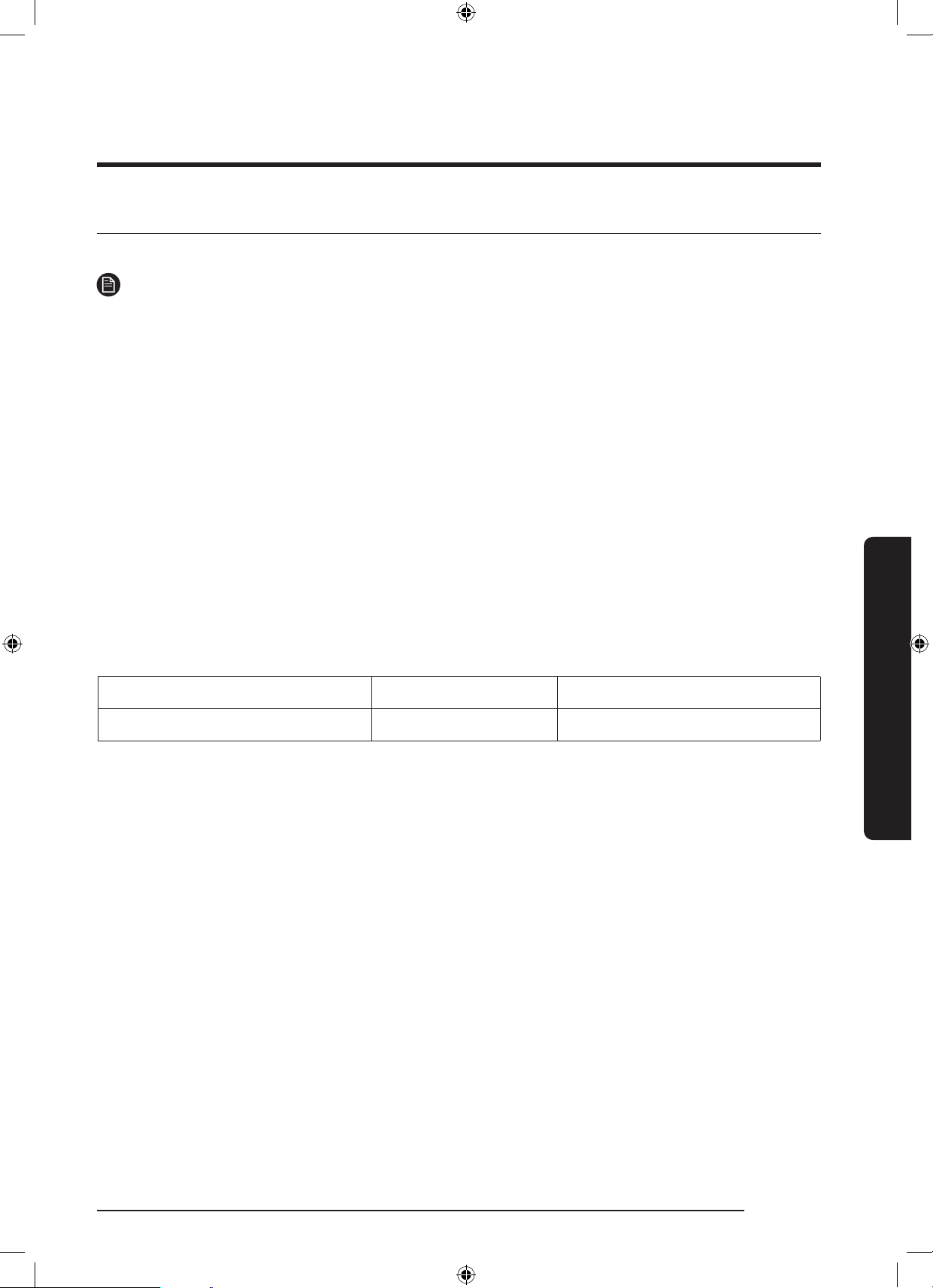
Recommended laundry load Weight of the laundry Mixing ratio of textiles
3~4 cotton/polyester blend shirts About 800g Polyester - 65%, Cotton - 35%
WD10N645R2X_DC68-03976n_EN.indd 45 2018/8/16 19:51:34
46 English
Operations
Operations
SmartThings
Wi-Fi connection
On your smartphone, go to the Settings and turn on the wireless connection and select an AP
(Access Point).
NOTE
• This device is designed for household use only (Class B), and can be used in all
residential areas.
• This device may cause wireless interference, and neither the manufacturer or the
installer of this device can provide a safety measure of any kind.
• Recommended encryption methods are WPA/TKIP and WPA2/AES. Newly developed
Wi-Fi protocols or unapproved Wi-Fi protocols are not supported.
• The reception sensitivity of a wireless network may be affected by surrounding
wireless environments.
• If your Internet provider has registered the MAC address of your PC or the modem
module for permanent use, your Samsung washing machine fails to connect to the
Internet. If this is the case, contact your Internet provider.
• The Internet rewall may interrupt your Internet connection. If this happens, contact
your Internet provider.
• If Internet failure continues after following the measurement of your Internet provider,
contact a local Samsung retailer or service centre.
• For installing wired and wireless routers, refer to the user manual of the router you use.
• Samsung washing machine supports the Wi-Fi 2.4 GHz protocols.
• Samsung washing machine supports the IEEE802.11 b/g/n (2.4 GHz), Soft-AP protocols.
(IEEE802.11n is recommended)
• An unapproved wired/wireless router may fail to connect to Samsung washing machine.
Download
On an app market (Google Play Store, Apple App Store, Samsung Galaxy Apps), nd the
SmartThings app with a search term of “SmartThings”. Download and install the app on
your device.
NOTE
• The SmartThings app is available on third-party devices with Android OS 6.0
(Marshmallow) or higher, Samsung devices with Android OS 5.0 (Lollipop) or higher, and
iOS devices with iOS 10.0 or higher. (For iPhones, it must be iPhone 6 or higher). The
app is optimised for Samsung smartphones (Galaxy S and Note series).
• Some functions of the app may operate differently on third-party devices.
• The app is subject to change without notice for improved performance.
WD10N645R2X_DC68-03976n_EN.indd 46 2018/8/16 19:51:34
English 47
Operations
Log in
You must rst log into SmartThings with your Samsung account. To create a new Samsung
account, follow the instructions on the app. You don’t need a separate app to create your
account.
NOTE
If you have a Samsung account, use the account to log in. A registered Samsung smartphone
user automatically logs in.
To register your device to SmartThings
1. Make sure your smartphone is connected to a wireless network. If not, go to the
Settings and turn on the wireless connection and select an AP (Access Point).
2. Select to run SmartThings on your smartphone.
3. When a message of “A new device is found.”, select Add.
4. If no message appears, select + and select your washing machine in a list of devices
available. If your washing machine is not listed, select Device Type > Specic Device
Model, and then add your washing machine manually.
5. Register your washing machine to the SmartThings app as follows.
a. Log into SmartThings with your Samsung account.
b. Turn a Wi-Fi connection on.
c. Add your washing machine to SmartThings. Make sure your washing machine is
connected to SmartThings.
d. When registration is complete, your washing machine appears on your smartphone.
Washing Machine app
Integrated control: You can monitor and control your washing machine both at home and
on the go.
• Select the Washing Machine icon on SmartThings. The Washing Machine page appears.
• Check the operation status or notications related to your washing machine, and
change options or settings if necessary.
WD10N645R2X_DC68-03976n_EN.indd 47 2018/8/16 19:51:34
48 English
Operations
Operations
SmartThings
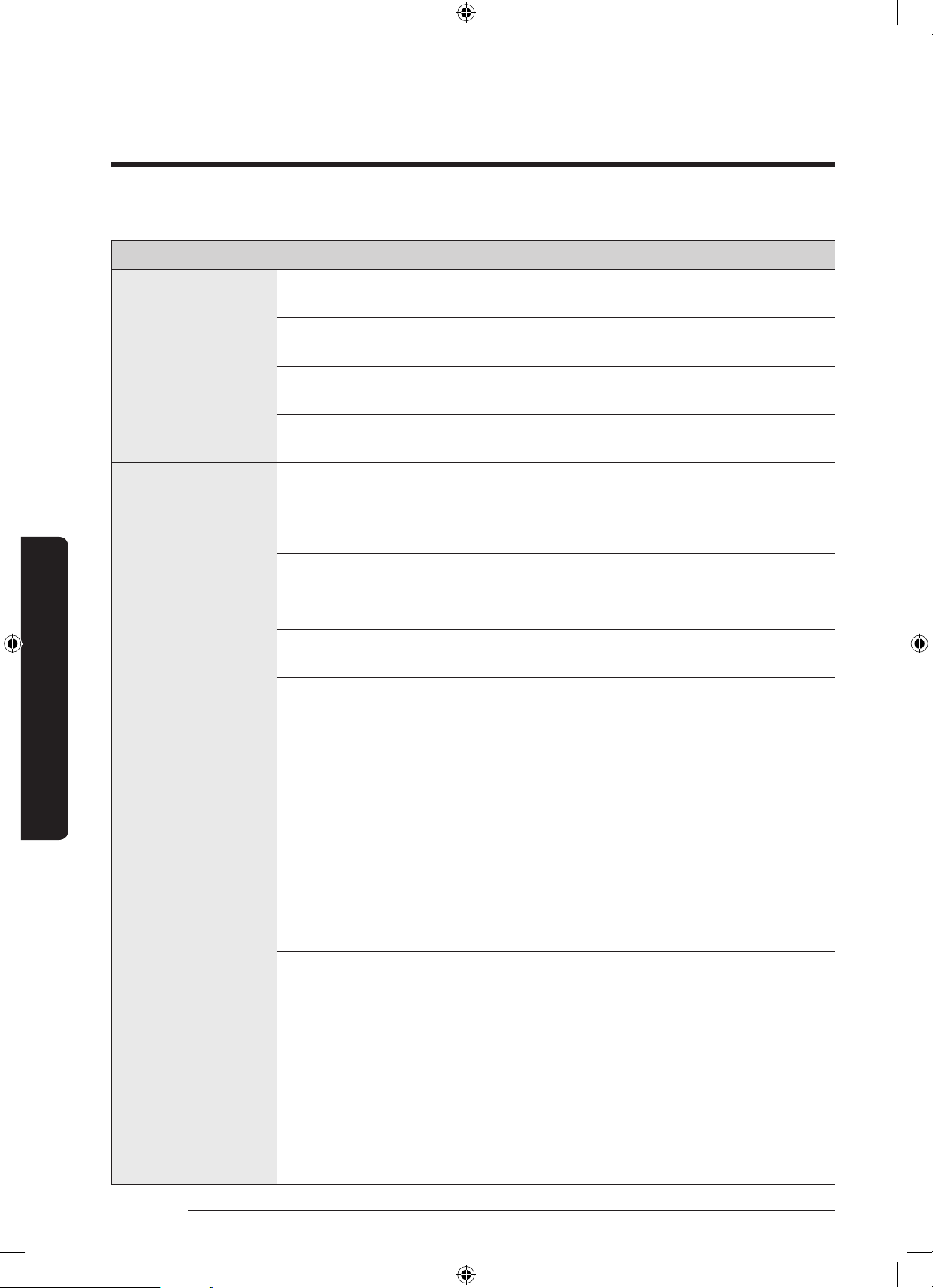
Category Checkpoint Description
Monitoring
Washing status
You can check the current cycle and its
options, and the remaining cycle time.
Smart Control
The Smart Control status is shown for the
washing machine.
Self Check
Use this to check if the washing machine
operates normally.
Energy monitoring
Use this to monitor the energy
consumption status.
Control
Start/Pause/Cancel
Select a cycle and necessary options, and
then select Start/Pause/Cancel to start an
operation, to stop temporarily, or to cancel
the current operation.
My Favorite
Add frequently used cycles and options to
My Favorite for later use.
Notication
Cycle completed Noties you the current cycle is complete.
AddWash alarm (applicable
models only)
Noties you of the addition of a new load.
Remaining laundry (applicable
models only)
Noties you of any laundry left after a
cycle is complete.
Q-Rator
Laundry Recipe*
You can select the fabric type, color, and
the soil level to get recommended options
and wash cycles that you can start right
away.
Laundry Planner*
You can set the desired time for a wash
cycle to nish.
After you set the desired time, you will get
a recommended cycle that will end within
the time you set, and you can start or
reserve the recommended cycle.
HomeCare Wizard *
Provides a regular report with an analysis
of the machine operation state in a user-
set frequency (every week/month).
You can use this regular report to
check your usage pattern, maintenance
requirements, and energy consumption **
for the set period of time.
* Requires ‘SmartThings’, available on Android and iOS.
Registration required.
** Indicative results only.
WD10N645R2X_DC68-03976n_EN.indd 48 2018/8/16 19:51:34
English 49
Operations
Open Source Announcement
The software included in this product contains open source software. You may obtain the
complete corresponding source code for a period of three years after the last shipment of
this product by sending an email to mailto:oss.reques[email protected].
It is also possible to obtain the complete corresponding source code in a physical medium
such as a CD-ROM; a minimal charge will be required.
The following URL http://opensource.samsung.com/opensource/SMART_AT_051/seq/0 leads to
the download page of the source code made available and open source license information as
related to this product. This offer is valid to anyone in receipt of this information.
NOTE
ereby, Samsung Electronics, declares that the radio equipment type appliance is in
compliance with Directive 2014/53/EU. The full text of the EU declaration of conformity is
available at the following internet address: The ofcial Declaration of conformity may be
found at http://www.samsung.com, go to Support > Search Product Support and enter the
model name.
Wi-Fi max transmitter power : 20 dBm at 2.412 GHz – 2.472 GHz
WD10N645R2X_DC68-03976n_EN.indd 49 2018/8/16 19:51:34
50 English
Maintenance
Maintenance
Keep the washing machine clean to prevent deteriorated performance and to preserve its life
cycle.
Eco drum clean
Perform this cycle regularly to clean the drum and to remove bacteria from it. This cycle also
removes accumulated dirt from the rubber door gasket.
1. Press Power to turn on the washing machine.
2. Turn the Cycle Selector to select ECO DRUM CLEAN.
3. Press and hold Start/Pause.
NOTE
The water temperature for ECO DRUM CLEAN is set to 70 °C, which cannot be changed.
CAUTION
Do not use any cleaning agents for cleaning the drum. Chemical residue in the drum
deteriorates the washing performance.
ECO DRUM CLEAN reminder
• The ECO DRUM CLEAN reminder appears on the main screen once every 40 washes. It is
advisable to perform the ECO DRUM CLEAN regularly.
• When you rst see this reminder, you can ignore the reminder for 6 consecutiv washes.
From the 7
th
wash, the reminder no longer appears. However, it appears again on the
second 40
th
wash.
WD10N645R2X_DC68-03976n_EN.indd 50 2018/8/16 19:51:34
English 51
Maintenance
Smart Check
To enable this function, you must rst download the Samsung Smart Washer app at the Play
Store or the Apple Store, and install it on a mobile device featuring a camera operation.
The Smart Check function has been optimized for Galaxy & iPhone series (applicable models
only).
1. When the washing machine detects an issue to check, an information code appears on the
display. To enter Smart Check mode, press and hold Rinse and Spin simultaneously for 3
seconds.
2. The washing machine starts the self-diagnosis procedure and display an information code
if a problem is detected.
3. Run the Samsung Smart Washer app on your mobile device, and tap Smart Check.
4. Put the mobile device close to the washing machine’s display so that the mobile device
and the washing machine face each other. Then, the information code will be recognized
automatically by the app.
5. When the information code is recognized correctly, the app provides detailed information
about the problem with applicable counteractions.
NOTE
• The function name, Smart Check, may differ depending on the language.
• If there is strong reected light on the washing machine display, the app may fail to
recognize the information code.
• If the app fails to recognize the Smart Check code consecutively, enter the information
code manually onto the app screen.
WD10N645R2X_DC68-03976n_EN.indd 51 2018/8/16 19:51:35
52 English
Maintenance
Maintenance
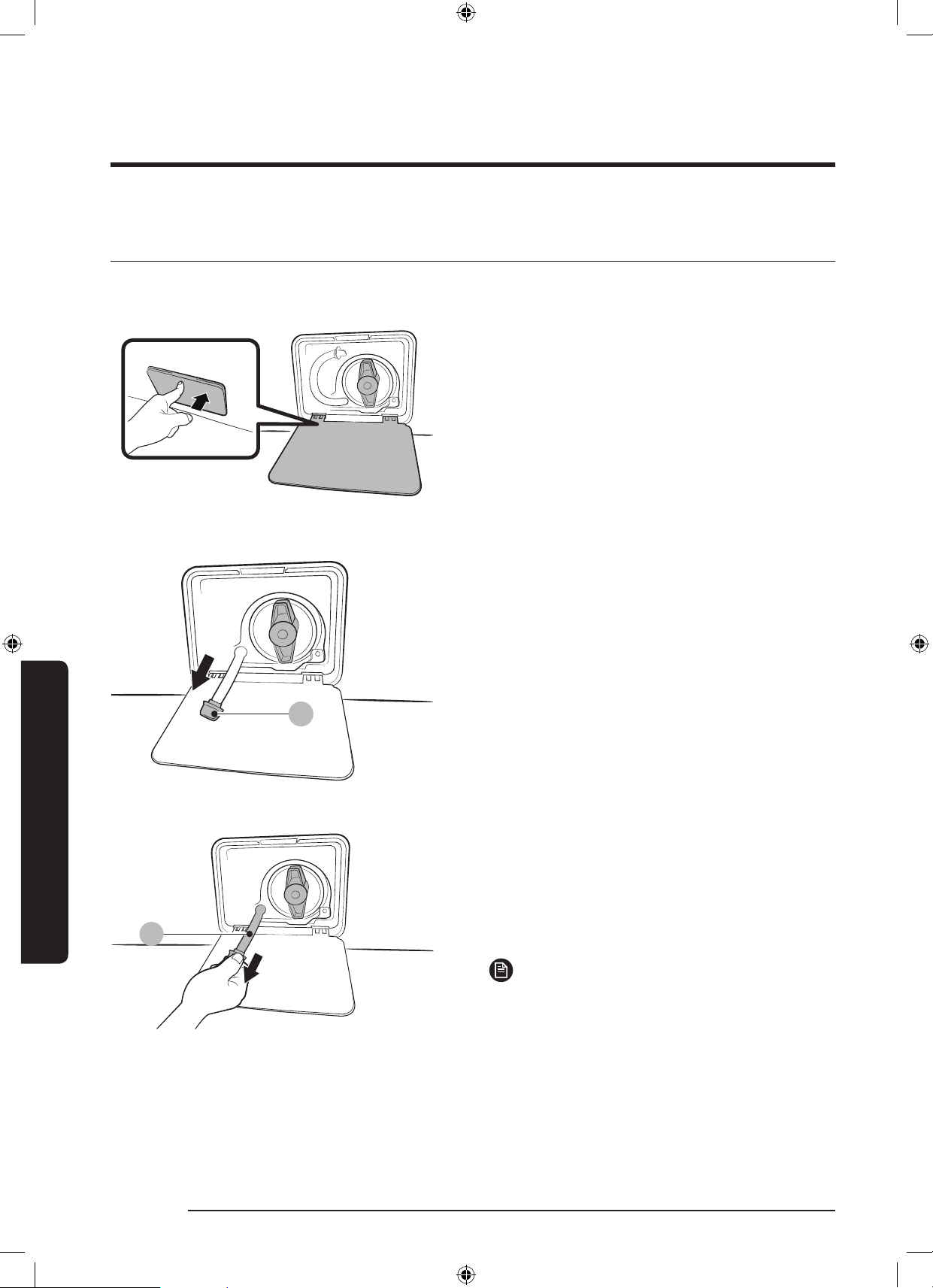
Emergency drain
In case of a power failure, drain the water inside the drum before taking out the laundry.
1. Power off and unplug the washing
machine from the electrical outlet.
2. Gently press the top area of the lter
cover to open.
A
3. Put an empty, spacious container around
the cover, and stretch the emergency
drain tube to the container while holding
the tube cap (A).
B
4. Open the tube cap and let water in the
emergency drain tube (B) ow into the
container.
5. When done, close the tube cap, and
reinsert the tube. Then, close the lter
cover.
NOTE
Use a spacious container because the
water in the drum may be more than
expected.
WD10N645R2X_DC68-03976n_EN.indd 52 2018/8/16 19:51:35
English 53
Maintenance
Cleaning
Surface of the washing machine
Use a soft cloth with a nonabrasive household detergent. Do not spray water onto the
washing machine.
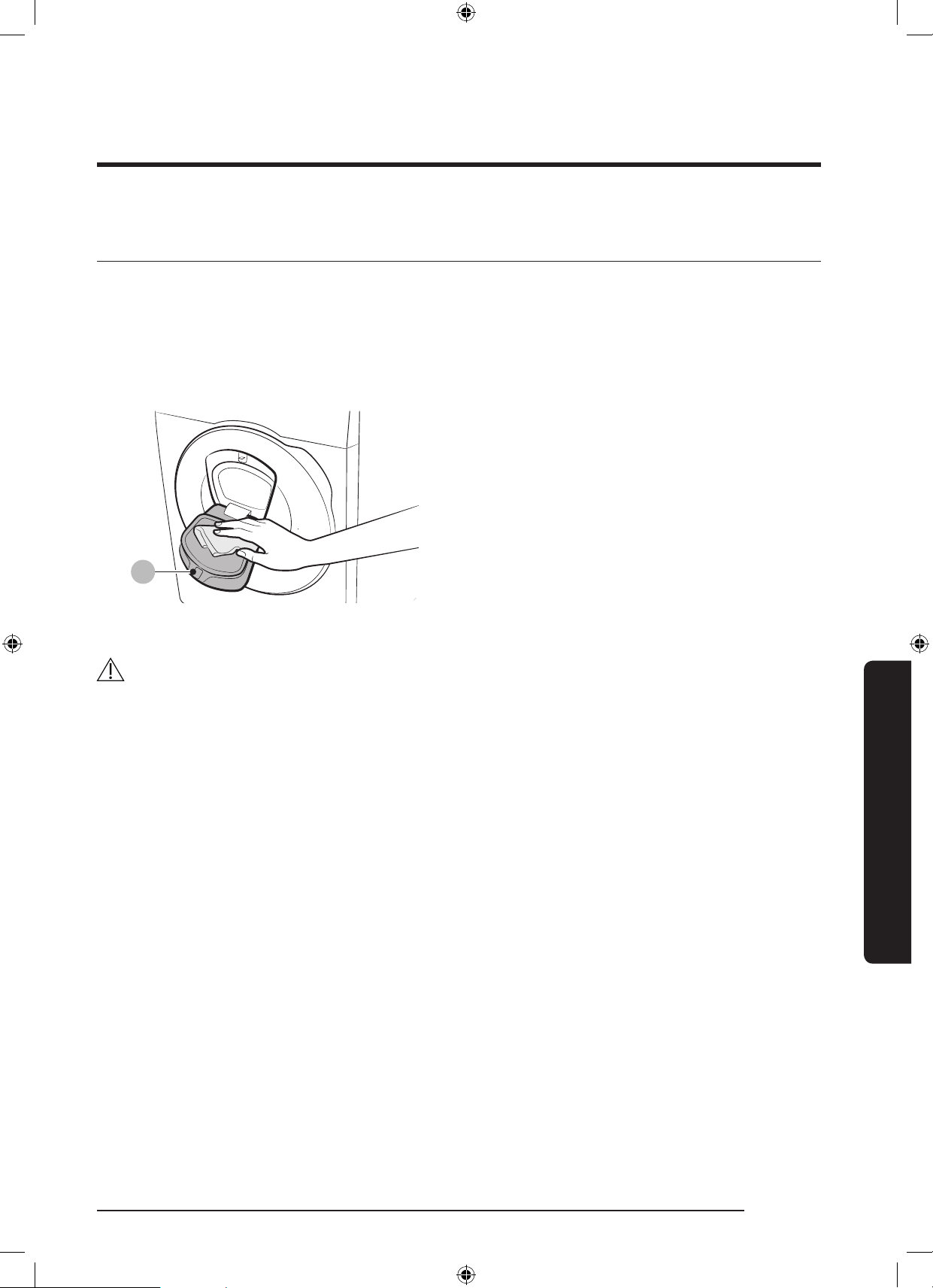
Add Door
A
1. Open the Add Door.
2. Use a wet cloth to clean the Add Door.
- Do not use cleaning agents.
Discolouration may occur.
- Use caution when cleaning the
rubber packing and the locking
mechanism (A).
- Dust off the door area regularly.
3. Wipe up and close the Add Door until
you hear a clicking sound.
CAUTION
• Do not apply force on the Add Door. It may break.
• Do not leave the Add Door open while the machine is operating.
• Do not put heavy objects on the Add Door at any time.
• To prevent physical injury, do not touch the Add Door while the drum is rotating.
• Do not open the Add Door while the machine is operating. This may cause physical injury.
• Do not manipulate the feature panel while the Add Door is open. This may cause physical
injury or system failure.
• Do not input objects other than laundry.
• Do not input bulky items to the drum through the Add Door.
• Do not pull out the rubber packing of the Add Door when cleaning. This may cause
damage.
WD10N645R2X_DC68-03976n_EN.indd 53 2018/8/16 19:51:36
54 English
Maintenance
Maintenance
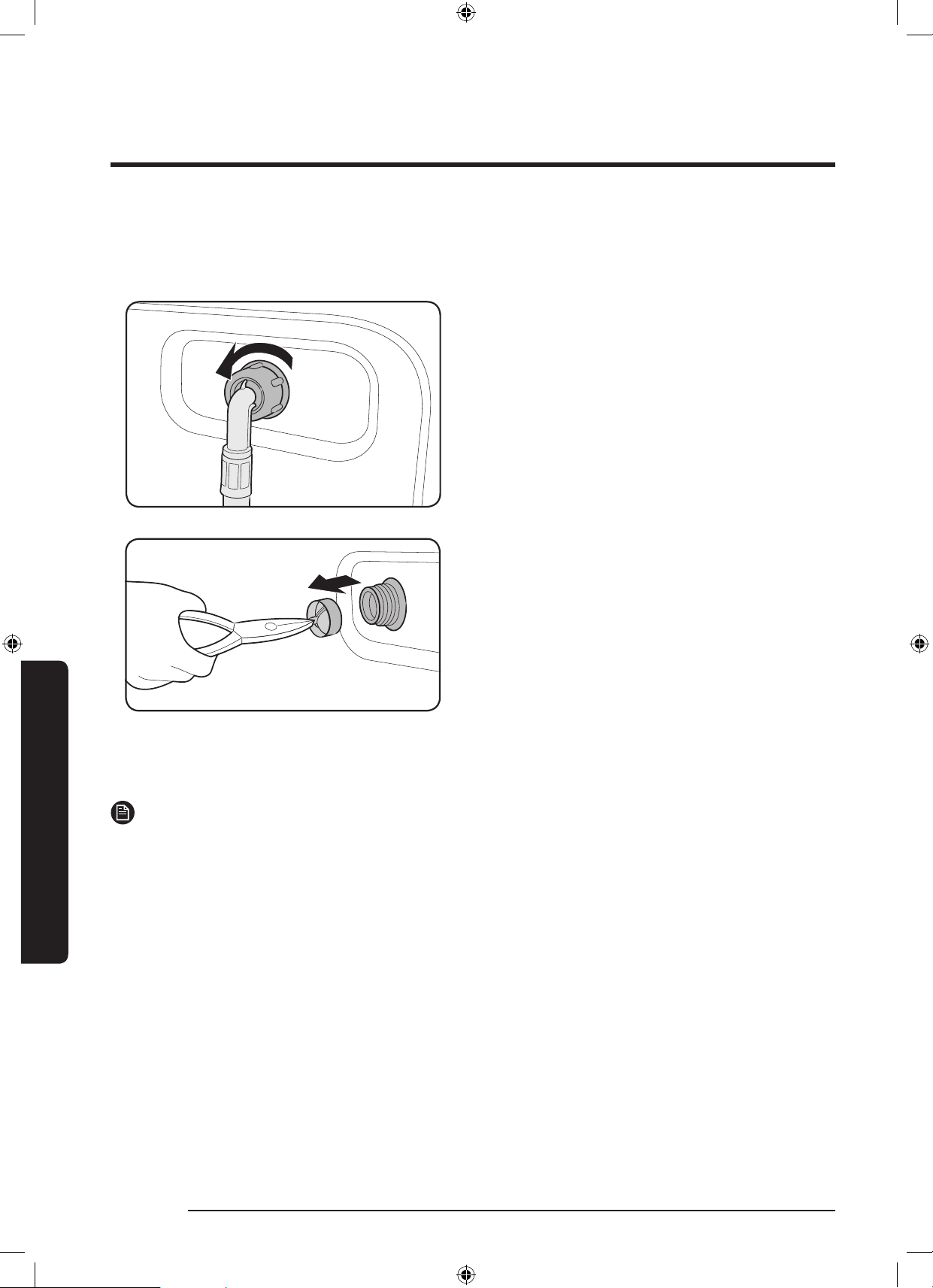
Mesh lter
Clean the mesh lter of the water hose once or twice a year.
1. Turn off the washing machine, and
unplug the power cord.
2. Close the water tap.
3. Loosen and disconnect the water hose
from the back of the washing machine.
Cover the hose with a cloth to prevent
water from gushing out.
4. Use pliers to pull out the mesh lter
from the inlet valve.
5. Submerge the mesh lter deeply in
water so that the threaded connector is
also submerged.
6. Dry the mesh lter completely in the
shade.
7. Reinsert the mesh lter into the inlet
valve, and reconnect the water hose to
the inlet valve.
8. Open the water tap.
NOTE
If the mesh lter is clogged, an information code of “4C” appears on the screen.
WD10N645R2X_DC68-03976n_EN.indd 54 2018/8/16 19:51:36
English 55
Maintenance
Pump lter
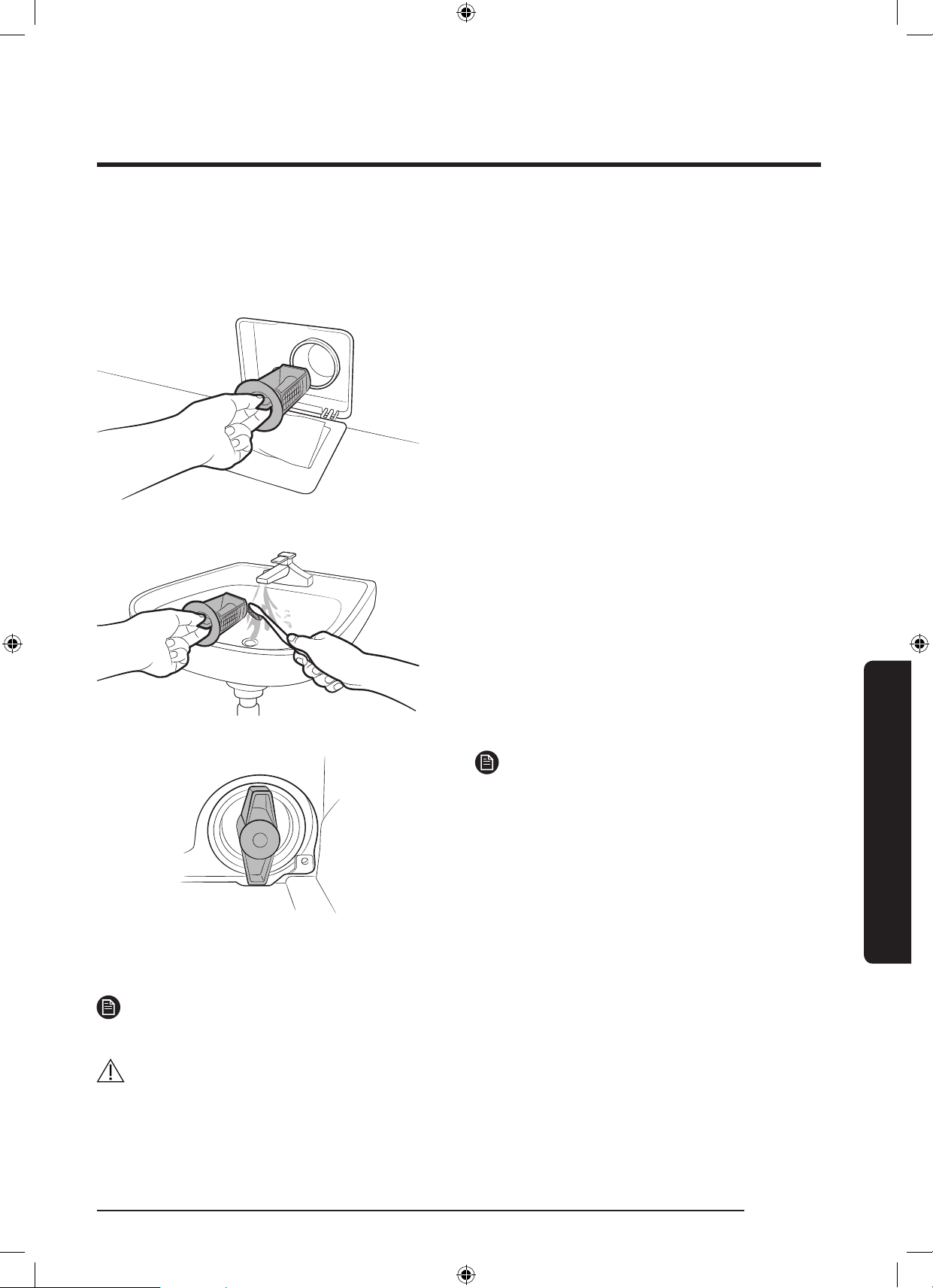
It is advisable to clean the pump lter 5 or 6 times a year to prevent its clogging. A clogged
pump lter may reduce the bubble effect.
1. Turn off the washing machine, and
unplug the power cord.
2. Drain the remaining water inside the
drum. See the Emergency drain section.
3. Gently press the top area of the lter
cover to open.
4. Turn the pump lter knob to the left, and
drain off the remaining water.
5. Clean the pump lter using soft brushes.
Make sure the drain pump propeller
inside the lter is unclogged.
6. Reinsert the pump lter, and turn the
lter knob to the right.
NOTE
• Some pump lters feature a safety knob
that is designed to prevent accidents
by children. To open the safety knob
of the pump lter, push in and turn it
anticlockwise. The spring mechanism of
the safety knob helps open the lter.
• To close the safety knob of the pump
lter, turn it clockwise. The spring makes
a rattling sound, which is normal.
NOTE
If the pump lter is clogged, an information code of “5C” appears on the screen.
CAUTION
• Make sure the lter knob is closed properly after cleaning the lter. Otherwise, this may
cause a leak.
• Make sure the lter is inserted properly after cleaning it. Otherwise, this may cause an
operational failure or a leak.
WD10N645R2X_DC68-03976n_EN.indd 55 2018/8/16 19:51:36
56 English
Maintenance
Maintenance
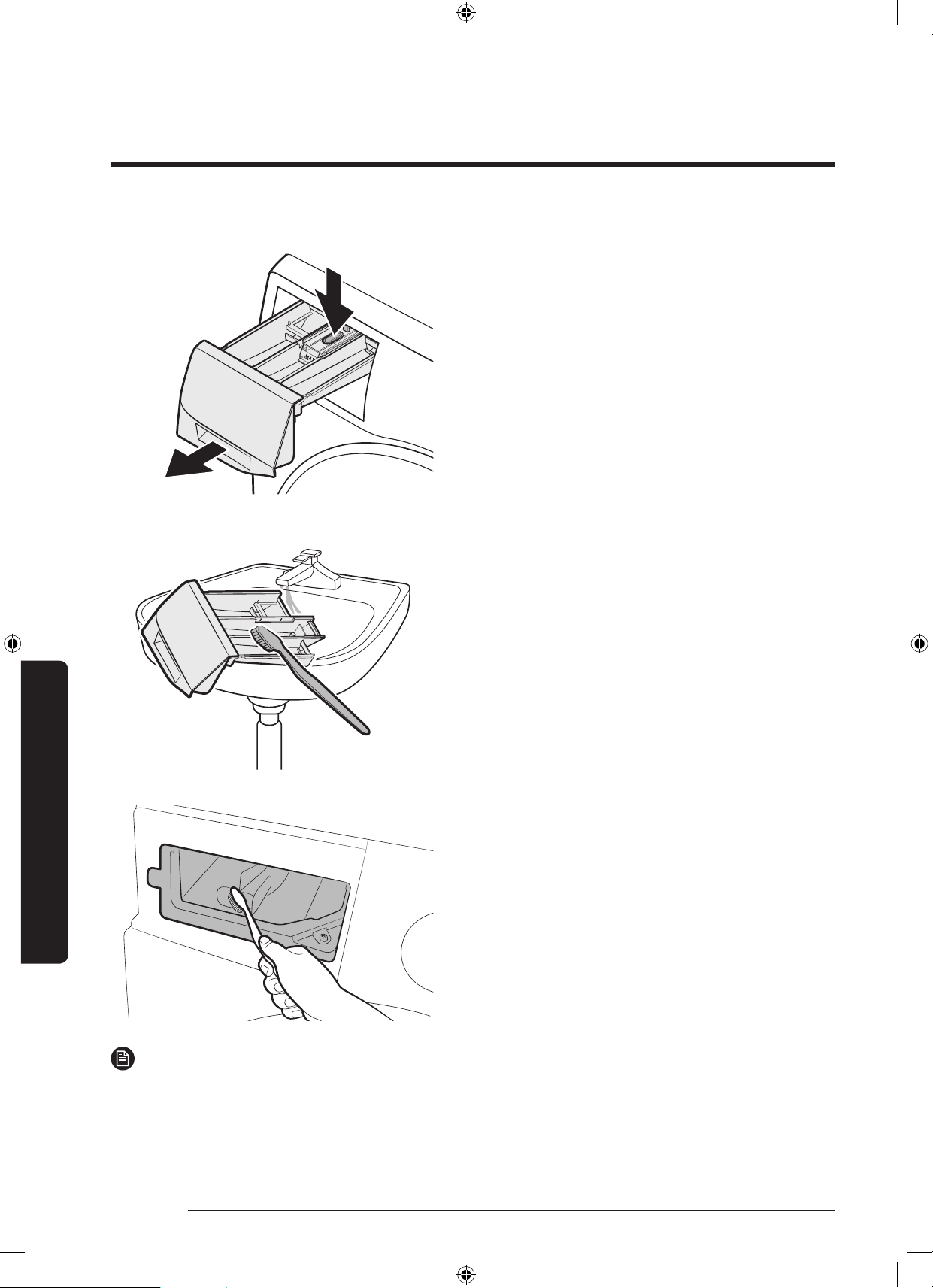
Detergent Drawer
1. While holding down the release lever
inside the drawer, slide open the drawer.
2. Clean the drawer components in owing
water using a soft brush.
3. Clean the drawer recess using a soft
brush.
4. Reinsert the liquid detergent container
to the drawer.
5. Slide the drawer inward to close it.
NOTE
To remove remaining detergent, perform the RINSE+SPIN cycle with the drum being empty.
WD10N645R2X_DC68-03976n_EN.indd 56 2018/8/16 19:51:37
English 57
Maintenance
Maintenance
Recovery from freezing
The washing machine may freeze when it drops below 0 °C.
1. Turn off the washing machine, and unplug the power cord.
2. Pour warm water over the water tap to loosen the water hose.
3. Disconnect the water hose, and soak it in warm water.
4. Pour warm water into the drum and leave it for about 10 minutes.
5. Reconnect the water hose to the water tap.
NOTE
If the washing machine still doesn’t operate normally, repeat the above steps until it operates
normally.
Care against an extended time of disuse
Avoid leaving the washing machine unused for an extended time. If this is the case, drain the
washing machine and unplug the power cord.
1. Turn the Cycle Selector to select a RINSE+SPIN.
2. Empty the drum, and press Start/Pause.
3. When the cycle is complete, close the water tap and disconnect the water hose.
4. Turn off the washing machine, and unplug the power cord.
5. Open the door to let air circulate through the drum.
WD10N645R2X_DC68-03976n_EN.indd 57 2018/8/16 19:51:37
58 English
Troubleshooting
TroubleshootingTroubleshooting
Checkpoints
If you encounter a problem with the washing machine, rst check the table below and try the
suggestions.
Problem Action
Does not start.
• Make sure the washing machine is plugged in.
• Make sure the door is properly closed.
• Make sure the water taps are open.
• Press and hold Start/Pause to start the washing machine.
• Make sure Child Lock
is not activated.
• Before the washing machine starts to ll, it will make a series
of clicking noises to check the door lock and does a quick
drain.
• Check the fuse or reset the circuit breaker.
Water supply is
insufcient, or no
water is supplied.
• Fully open the water tap.
• Make sure the door is properly closed.
• Make sure the water supply hose is not frozen.
• Make sure the water supply hose is not kinked or clogged.
• Make sure there is sufcient water pressure.
After a cycle,
detergent remains in
the detergent drawer.
• Make sure the washing machine is running with sufcient
water pressure.
• Make sure the detergent is added to the centre of the
detergent drawer.
• Make sure the rinse cap is inserted properly.
• If using granular detergent, make sure the detergent selector
is in the upper position.
• Remove the rinse cap and clean the detergent drawer.
Excessive vibrations
or makes noise.
• Make sure the washing machine is installed on a level, solid
oor that is not slippery. If the oor is not level, use the
levelling feet to adjust the height of the washing machine.
• Make sure the shipping bolts are removed.
• Make sure the washing machine is not contacting any other
object.
• Make sure the laundry load is balanced.
• The motor can cause noise during normal operation.
• Overalls or metal-decorated clothes can cause noise while
being washed. This is normal.
• Metal objects such as coins can cause noise. After washing,
remove these objects from the drum or lter case.
WD10N645R2X_DC68-03976n_EN.indd 58 2018/8/16 19:51:37

English 59
Troubleshooting
Problem Action
Does not drain and/
or spin.
• Make sure the drain hose is straightened all the way to the
drain system. If you encounter a drain restriction, call for
service.
• Make sure the debris lter is not clogged.
• Close the door and press and hold Start/Pause. For your
safety, the washing machine will not tumble or spin unless the
door is closed.
• Make sure the drain hose is not frozen or clogged.
• Make sure the drain hose is connected to a drain system that
is not clogged.
• If the washing machine is not supplied with sufcient power,
the washing machine temporarily will not drain or spin. As
soon as the washing machine regains sufcient power, it will
operate normally.
The door does not
open.
• Press Start/Pause to stop the washing machine.
• It may take a few moments for the door lock mechanism to
disengage.
• The door will not open until 3 minutes after the washing
machine has stopped or the power turned off.
• Make sure all the water in the drum is drained.
• The door may not open if water remains in the drum. Drain
the drum and open the door manually.
• Make sure the door lock light is off. The door lock light turns
off after the washing machine has drained.
Excessive suds.
• Make sure you use the recommended types of detergent as
appropriate.
• Use high efciency (HE) detergent to prevent oversudsing.
• Reduce the detergent amount for soft water, small loads, or
lightly soiled loads.
• Non-HE detergent is not recommended.
Cannot apply
additional detergent.
• Make sure the remaining amount of detergent and fabric
softener is not over the limit.
WD10N645R2X_DC68-03976n_EN.indd 59 2018/8/16 19:51:38
60 English
Troubleshooting
Troubleshooting
Problem Action
Stops.
• Plug the power cord into a live electrical outlet.
• Check the fuse or reset the circuit breaker.
• Close the door and press and hold Start/Pause to start the
washing machine. For your safety, the washing machine will
not tumble or spin unless the door is closed.
• Before the washing machine starts to ll, it will make a series
of clicking noises to check the door lock and does a quick
drain.
• There may be a pause or soak period in the cycle. Wait briey
and the washing machine may start.
• Make sure the mesh lter of the water supply hose at the
water taps is not clogged. Periodically clean the mesh lter.
• If the washing machine is not supplied with sufcient power,
the washing machine temporarily will not drain or spin. As
soon as the washing machine regains sufcient power, it will
operate normally.
Fills with the wrong
water temperature.
• Fully open both taps.
• Make sure the temperature selection is correct.
• Make sure the hoses are connected to the correct taps. Flush
water lines.
• Make sure the water heater is set to supply a minimum 120 °F
(49 °C) hot water at the tap. Also, check the water heater
capacity and recovery rate.
• Disconnect the hoses and clean the mesh lter. The mesh
lter may be clogged.
• While the washing machine lls, the water temperature may
change as the automatic temperature control feature checks
incoming water temperature. This is normal.
• While the washing machine lls, you may notice just hot and/
or just cold water going through the dispenser when cold or
warm temperatures are selected. This is a normal function
of the automatic temperature control feature as the washing
machine determines the water temperature.
Load is wet at the
end of a cycle.
• Use the High or Extra High spin speed.
• Use high efciency (HE) detergent to reduce oversudsing.
• Load is too small. Small loads (one or two items) may become
unbalanced and not spin completely.
• Make sure the drain hose is not kinked or clogged.
WD10N645R2X_DC68-03976n_EN.indd 60 2018/8/16 19:51:38
English 61
Troubleshooting
Problem Action
Leaks water.
• Make sure the door is properly closed.
• Make sure all hose connections are tight.
• Make sure the end of the drain hose is correctly inserted and
secured to the drain system.
• Avoid overloading.
• Use high efciency (HE) detergent to prevent oversudsing.
Has odours.
• Excessive suds collect in recesses and can cause foul odours.
• Run cleansing cycles to sanitise periodically.
• Clean the door seal (diaphragm).
• Dry the washing machine interior after a cycle has nished.
No bubbles are seen
(Bubbleshot models
only).
• Overloading may screen bubbles.
• Severely contaminated laundry may not generate bubbles.
Can I open the Add
Door at any time?
• The Add Door can be opened only when the
indicator
appears. However, it does not open in the following cases:
- When the boiling or drying process is running and the
internal temperature becomes high
- If you set the Child Lock for safety reasons
- When the drum wash or drum drying cycle is running that
does not involve additional laundry
The auto dispenser
indicators blink.
(applicable models
only)
• Check if the detergent drawer is closed properly.
- Open the detergent drawer and close it again. Make sure
it’s closed properly.
• This may happen if liquid detergent has hardened inside the
detergent compartment.
- Clean and unclog the detergent compartment.
If a problem persists, contact a local Samsung service centre.
WD10N645R2X_DC68-03976n_EN.indd 61 2018/8/16 19:51:38
62 English
Troubleshooting
Troubleshooting
Information codes
If the washing machine fails to operate, you may see an information code on the screen.
Check the table below and try the suggestions.
Code Action
4C
Water is not supplied.
• Make sure the water taps are open.
• Make sure the water hoses are not clogged.
• Make sure the water taps are not frozen.
• Make sure the washing machine is operating with sufcient
water pressure.
• Make sure that the cold water tap and the hot water tap are
properly connected.
• Clean the mesh lter as it may be clogged.
NOTE
When the washer displays the “4C” code, the washer do draining
for 3 minutes. During this time, the Power button is inoperative.
4C2
• Make sure the cold water supply hose is rmly connected to
the cold water tap.
If it is connected to the hot water tap, the laundry may be
deformed with some cycles.
5C
Water is not draining.
• Make sure the drain hose is not frozen or clogged.
• Make sure the drain hose is positioned correctly, depending on
the connection type.
• Clean the debris lter as it may be clogged.
• Make sure the drain hose is straightened all the way to the
drain system.
• If the information code remains, contact a customer service
centre.
dC
Operating the washer with the door open.
• Make sure the door is properly closed.
• Make sure laundry is not caught in the door.
DC1
The Main Door lock/unlock is not working properly.
• Turn the machine off, and restart the cycle.
• If the information code remains, contact a customer service
centre.
WD10N645R2X_DC68-03976n_EN.indd 62 2018/8/16 19:51:38
English 63
Troubleshooting
Code Action
DC3
The Add Door lock/unlock is not working properly.
• Turn the machine off, and restart the cycle.
• If the information code remains, contact a customer service
centre.
OC
Water is overowed.
• Restart after spinning.
• If the information code remains on the display, contact a local
Samsung service centre.
LC, LC1
Check the drain hose.
• Make sure the end of the drain hose is placed on the oor.
• Make sure the drain hose is not clogged.
• If the information code remains, contact a customer service
centre.
NOTE
When the washer displays the “LC,LC1” code, the washer do
draining for 3 minutes. During this time, the Power button is
inoperative.
Ub
Spinning does not work.
• Make sure laundry is spread out evenly.
• Make sure the washing machine is on a at, stable surface.
• Redistribute the load. If only one item of clothing needs
washing, such as a bathrobe or pair of jeans, the nal spin
result might be unsatisfactory, and an “Ub” check message will
be shown in the display.
3C
Check the motor for operation.
• Try restarting the cycle.
• If the information code remains, contact a customer service
centre.
UC
The electronic control needs to be checked (Over Voltage Error).
• Check the PCB and wire harness.
• Check if power is supplied properly.
• If the information code remains, contact a customer service
centre.
Low voltage detected
• Check if the power cord is plugged in.
• If the information code remains, contact a customer service
centre.
WD10N645R2X_DC68-03976n_EN.indd 63 2018/8/16 19:51:38
64 English
Troubleshooting
Troubleshooting
Code Action
HC
High temperature heating check
• If the information code remains, contact a customer service
centre.
1C
The Water Level sensor is not working properly.
• Try power off and restarting the cycle.
• Check WaterLevel Sensor wire harness.
• If the information code remains, contact a customer service
centre.
NOTE
When the washer displays the “1C” code, the washer do draining
for 3 minutes. During this time, the Power button is inoperative.
8C
The MEMS sensor is not working properly.
• Turn the machine off, and restart the cycle.
• If the information code remains, contact a customer service
centre.
AC
Check communications between main and sub PBAs.
• Try power off and restarting the cycle.
• If the information code remains, contact a customer service
centre.
AC6
Check communications between main and inverter PBAs.
• Depending on the state, the machine may automatically returns
to normal operation.
• Turn the machine off, and restart the cycle.
• If the information code remains, contact a customer service
centre.
ddC
This message appears when you open the Add Door without
pressing Pause. If this happens, do one of the following:
• To add laundry, press the Add Door to close it properly. Then,
press Start/Pause and try again.
• If you press the Add Door by mistake, press the Add Door
again to close it properly. Then, press Start/Pause to resume
operation.
If any information code keeps appearing on the screen, contact a local Samsung service
centre.
WD10N645R2X_DC68-03976n_EN.indd 64 2018/8/16 19:51:38
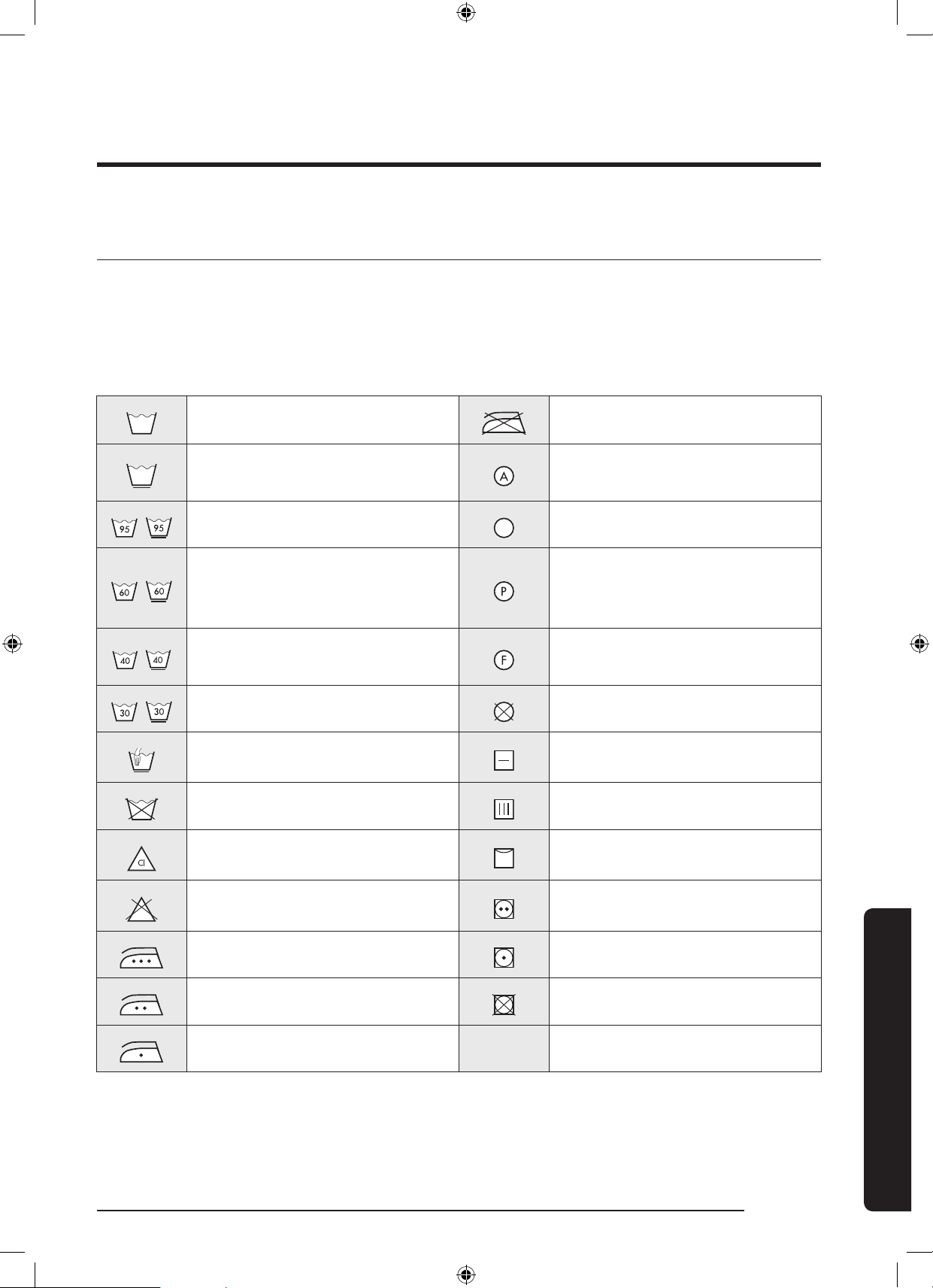
English 65
Specications
Specications
Fabric care chart
The following symbols provide garment care directions. The care labels include four symbols
in this order: washing, bleaching, drying and ironing (and dry cleaning when necessary).
The use of symbols ensures consistency among garment manufacturers of domestic and
imported items. Follow the care label directions to maximize garment life and reduce laundry
problems.
Resistant material Do not iron
Delicate fabric
Can be dry cleaned using any
solvent
Item can be washed at 95 ˚C Dry Clean
Item can be washed at 60 ˚C
Dry clean with perchloride,
lighter fuel, pure alcohol or
R113 only
Item can be washed at 40 ˚C
Dry clean with aviation fuel,
pure alcohol or R113 only
Item can be washed at 30 ˚C Do not dry clean
Hand wash only Dry at
Dry clean only Can be hung to dry
Can be bleached in cold water Dry on clothes hanger
Do not bleach Tumble dry, normal heat
Can be ironed at 200 ˚C max Tumble dry, reduced heat
Can be ironed at 150 ˚C max Do not tumble dry
Can be ironed at 100 ˚C max
WD10N645R2X_DC68-03976n_EN.indd 65 2018/8/16 19:51:42
66 English
Specications
Specications
Protecting the environment
• This appliance is manufactured from recyclable materials. If you decide to dispose of this
appliance, please observe local waste disposal regulations. Cut off the power cord so that
the appliance cannot be connected to a power source. Remove the door so that animals
and small children cannot get trapped inside the appliance.
• Do not exceed the detergent quantities recommended in the detergent manufacturer’s
instructions.
• Use stain removal products and bleaches before the wash cycle only when strictly
necessary.
• Save water and electricity by only washing full loads (the exact amount depends upon the
program used).
WD10N645R2X_DC68-03976n_EN.indd 66 2018/8/16 19:51:42
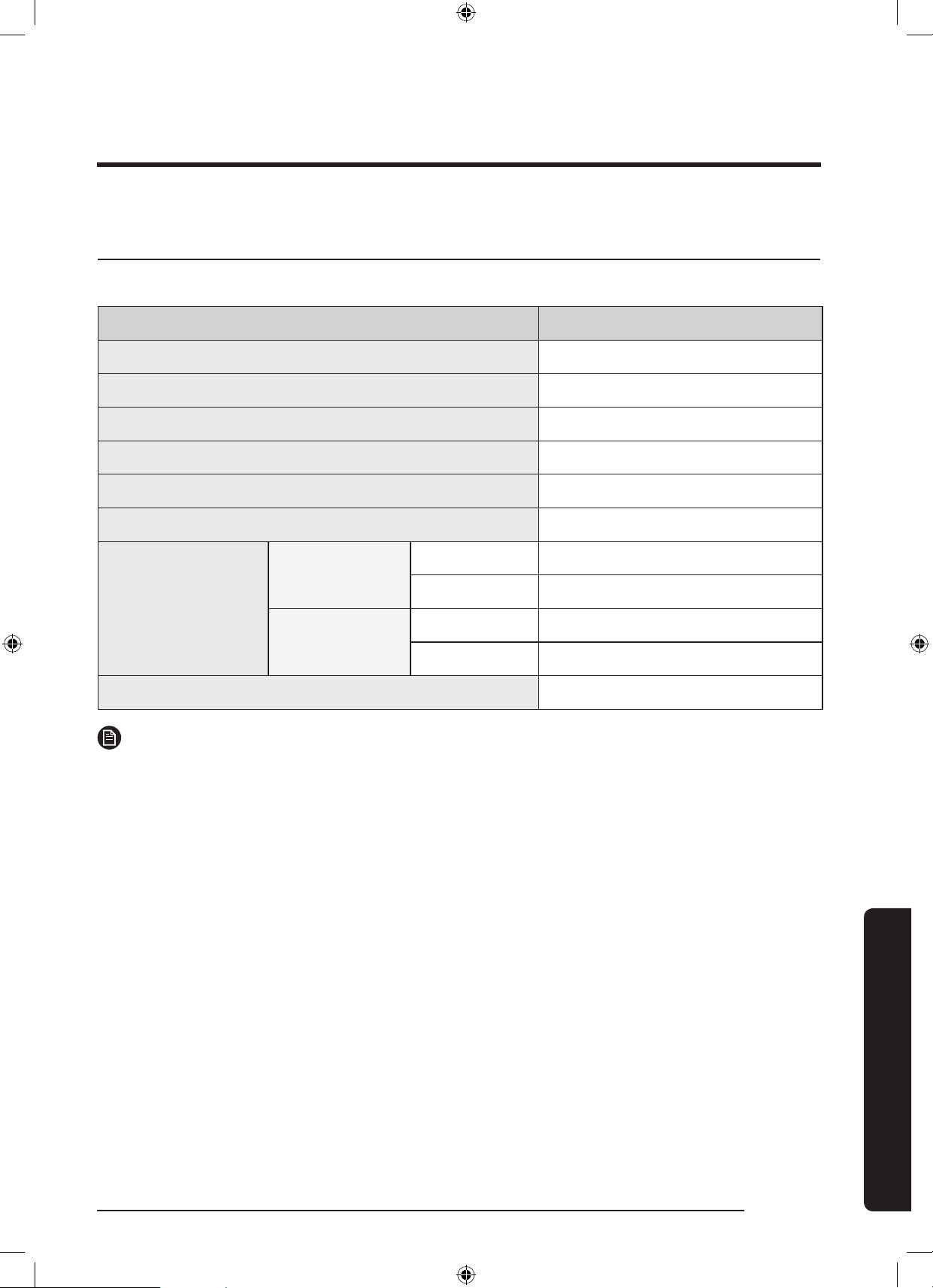
English 67
Specications
Specication sheet
“ * “ Asterisk(s) means variant model and can be varied (0-9) or (A-Z).
Type Front loading washing machine
Model name WD10N64****
Dimensions W600 x D600 x H850 (mm)
Water pressure 50 kPa - 800 kPa
Net weight 81 kg
Wash and spin capacity 10.0 kg
Dry Capacity 6.0 kg
Power
consumption
Washing and
heating
220 V 2000 W
240 V 2400 W
Drying
220 V 1600 W
240 V 1900 W
Spin revolutions 1400 rpm
NOTE
The design and specications are subject to change without notice for quality improvement
purposes.
WD10N645R2X_DC68-03976n_EN.indd 67 2018/8/16 19:51:42
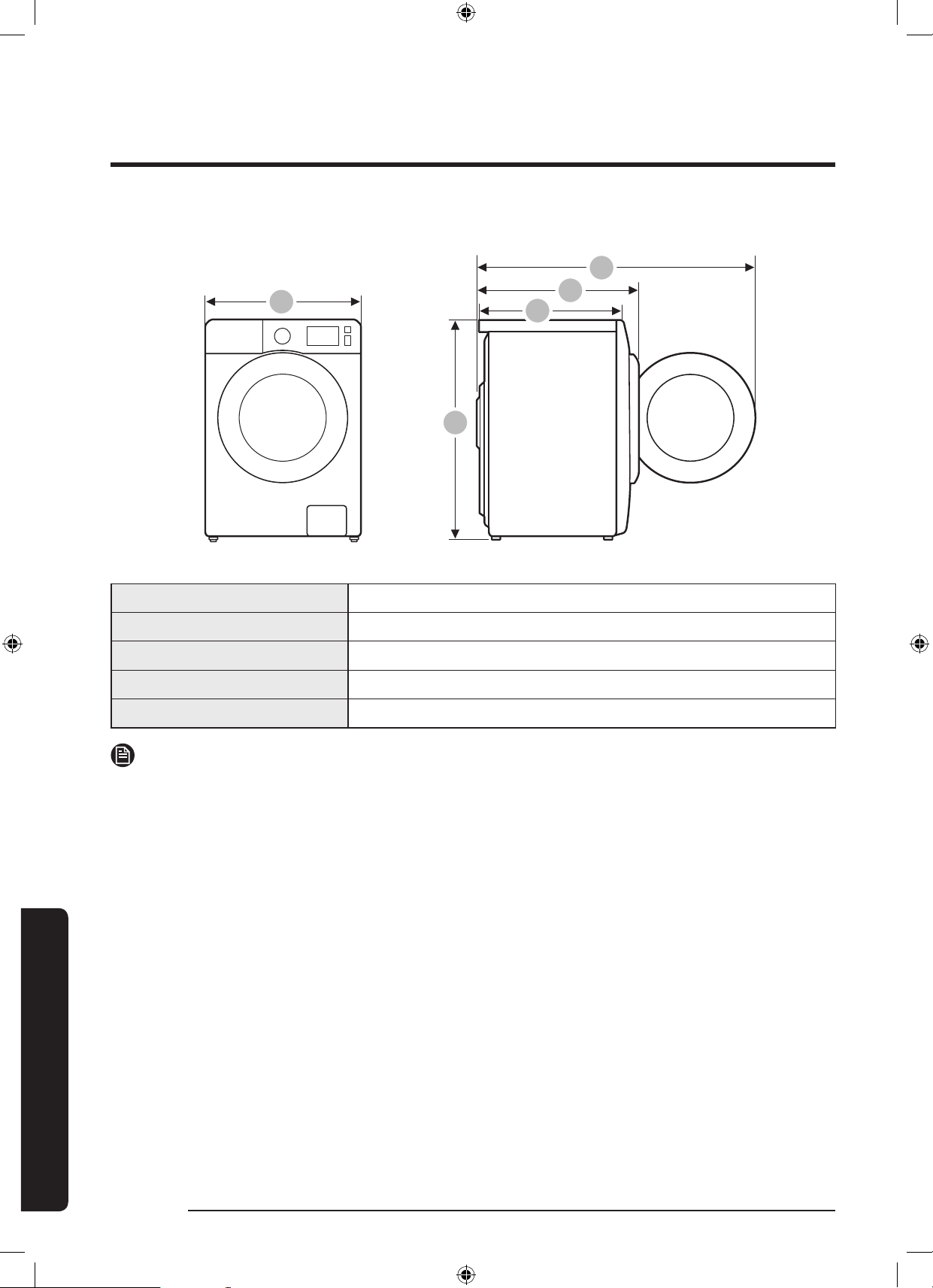
68 English
Specications
Specications
A
B
C
D
E
A 600 mm
B 850 mm
C 600 mm
D 680 mm
E 1115 mm
NOTE
The design and specications are subject to change without notice for quality
improvement purposes.
WD10N645R2X_DC68-03976n_EN.indd 68 2018/8/16 19:51:42
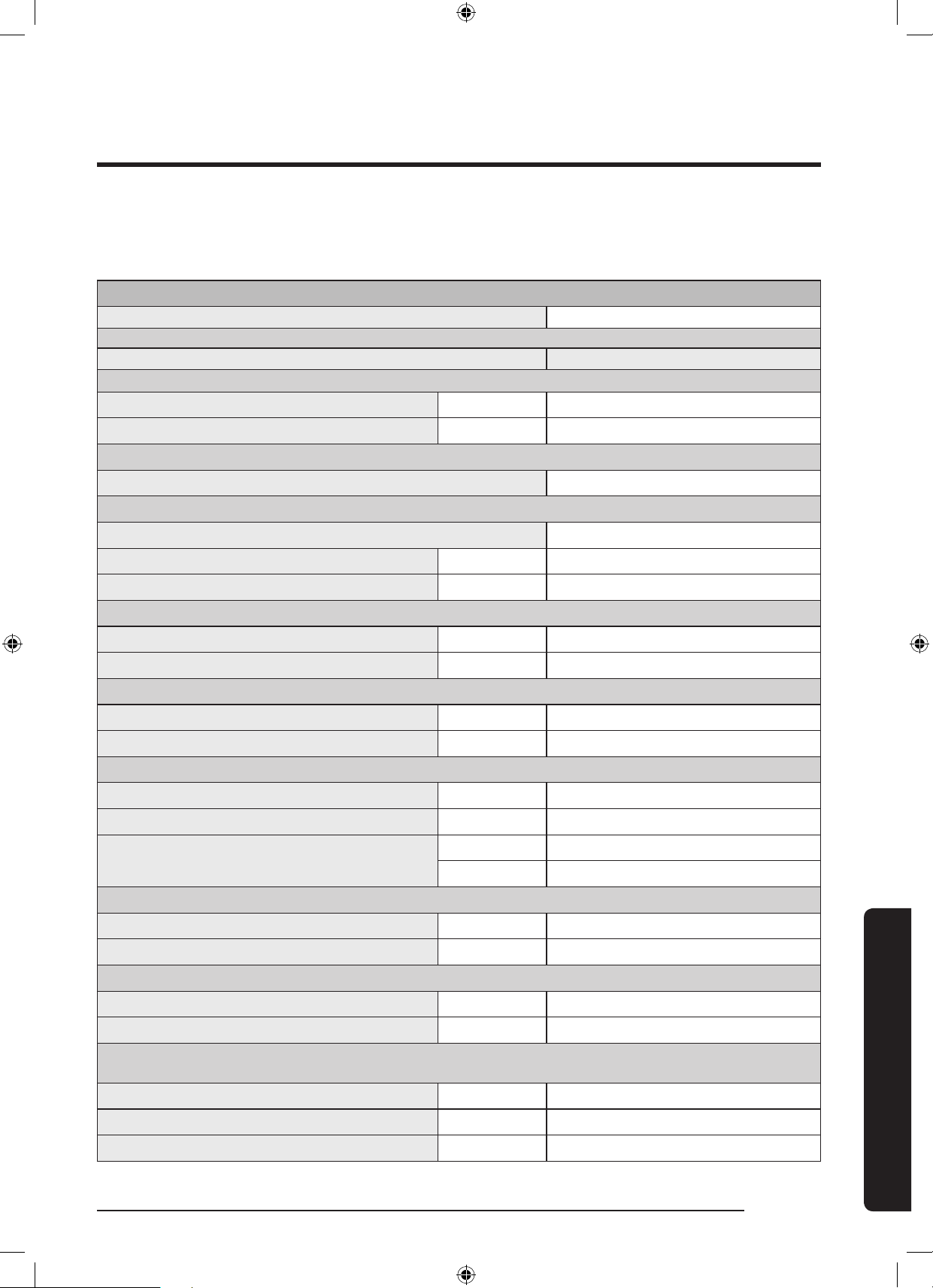
English 69
Specications
According to Regulation (EU) No. 96/60/EC
“ * ” Asterisk(s) means variant model and can be varied (0-9) or (A-Z).
Samsung
Model Name WD10N64****
Energy Efciency Class
A (highest efcient) to G (lowest efcient) A
Energy Consumption
Washing, spinning, and drying kWh 6.80
Washing and spinning only kWh 1.30
Washing Performance Class
A (highest efcient) to G (lowest efcient) A
Water Extraction Efciency Class
A (highest efcient) to G (lowest efcient) A
Residual moisture % 44
Maximum Spin Speed rpm 1400
Capacity
Washing kg 10.0
Drying kg 6.0
Water Consumption
Washing, spinning, and drying ℓ 140
Washing and spinning only ℓ 60
Program Duration
Washing, spinning, and drying min 778
Washing and spinning only min 278
Programs to which the information on the label
and the Sheet relate
Wash Cotton 60 ºC + Intensive
Dry Cotton Dry
Estimatd annual consumption for a 4-person household, always using the dries (200 cycles)
Energy Consumption kWh/yr 1360
Water Consumption ℓ 28000
Estimatd annual consumption for a 4-person household, never using the drier (200 cycles)
Energy Consumption kWh/yr 260
Water Consumption ℓ 12000
Noise using standard 60 ºC cotton washing cycle and ‘ dry cotton’
drying cycle
Washing dB (A) re 1 pW 49
Spinning dB (A) re 1 pW 73
Drying dB (A) re 1 pW 62
WD10N645R2X_DC68-03976n_EN.indd 69 2018/8/16 19:51:42
70 English
Specications
Specications
The drying energy consumption data has been measured under the conditions specied
inStandard EN50229.
• First drying should be performed with 6 kg load (the load consist: 2 sheets and 8
pillowcases and 23 towels) by selecting Cotton Dry;
• Second drying should be performed with 4 kg load (the load consist: 2 sheets and 8
pillowcases and 5 towels) by selecting Cotton Dry;
(1 or 2 towels can be added or removed for setting weight.)
WD10N645R2X_DC68-03976n_EN.indd 70 2018/8/16 19:51:42
English 71
Specications
WD10N645R2X_DC68-03976n_EN.indd 71 2018/8/16 19:51:42
QUESTIONS OR COMMENTS?
COUNTRY CALL OR VISIT US ONLINE AT
JORDAN
0800-22273
06 5777444
www.samsung.com/levant/support
SYRIA 962 5777444
Lebanon 1299
Iraq 80010080
DC68-03976N-00
WD10N645R2X_DC68-03976n_EN.indd 72 2018/8/16 19:51:43
ةلاسغلا
مدختسا ليلد
WD10N6*****
DC68-03976N-00
WD10N645R2X_DC68-03976N_AR.indd 1 2018/8/16 19:51:02
ةيبرعلا 2
اامحتوا
اامحتوا
4 ةمسلا اامحلعم
4 ةمسلاتاداشرإلوحهفرعتنأبجيام
4 ةماهلاةمسلازومر
5 ةماهلاةمسلاتاطايتحا
15 بيكرتلا
15 تايوتا
17 بيكرتلاتابلطتم
19 ةوطخبةوطخبيكرتلا
27 ليغشتلا ءدب لبق ام
27 ةيلواتادادعا
27 سبالسغليلد
30 ليسغلاقوحسمجردبةصاختاداشرإ
33 اايلمعلا
33 مكحتلاةحول
35 ءدبللةلهسوةريسيتاوطخ
36 طقفةفااسبا
37 ةرودللةماعةيؤر
41 ةصاختازيم
43 تادادعإ
44 ةفااةرودلامادختسا
45 59فيف+ليسغ
46 SmartThings
50 ةنايصلا
50 ضوافيظنت
51
)يكذلاصحفلا(Smart Check
52 ئراوطلادنعفيرصتلل
53 فيظنتلا
57 ةنايصلا
57 دمجتلاةلاححصإ
57 مادختساءوسنمةينمزلاتارتفلانأشبءاجررذابجي
58 اهحصإو ءاطخا فاشكتسا
58 صحفلاوققحتلاطاقن
62 تامولعازومر
WD10N645R2X_DC68-03976N_AR.indd 2 2018/8/16 19:51:03
3 ةيبرعلا
اامحتوا
65 اافصاحا
65 ةشمقابةيانعلالودج
66 ةئيبلاةيامح
67 ةينفلاتافصاواةمئاق
WD10N645R2X_DC68-03976N_AR.indd 3 2018/8/16 19:51:03
ةيبرعلا 4
ةمسلا اامحلعم
ةمسلا اامحلعم
ةءارقىجري.هتياعروهمادختساوزاهابيكرتةيلمعلوحةماهتامولعمىلعليلدلااذهىوتحي.ةديداSamsungةلاسغكئارشىلعانيناهت
.كتلاسغلةديدعلادئاوفلاوتازيانمةلماكلاةدافتسانمنكمتتلةيانعبليلدلااذه
ةمسلا ااداشرإ لحح هفرعت نأ بجم ام
ءاجرلا.لاعفونمآلكشبديداكزاهجيفةعونتافئاظولاوتازياليغشتةيفيكفرعتكنأنمدكأتللةلماشةءارقليلدلااذهةءارقءاجرلا
وهامكطقفهلصصاضرغللزاهااذهمدختسي.لبقتسايفهيلإعوجرلالجأنمزاهانمبرقلابنمآناكميفليلدلااذهبظافتحا
.اذهكلااليلديفروكذم
هابتناورذحبلماعتلابجياذل.اهلضرعتلالمتافقاواوفورظلاةفاكةيلاتلاةماهلاةمسلاتاداشرإوتاهيبنتلاوتاريذحتلايطغت
.اهليغشتواهتنايصوةلاسغلابيكرتدنعةيانعو
اذهيفةفوصواكلتنع
ً
يلقفلتختدقكبةصااةلاسغلاصئاصخنإف،ةددعتمتازارطىلعقبطنتةيلاتلاليغشتلاتاداشرإنا
ً
رظن
رثعاوأةمدخزكرمبرقأبلصتا،تؤاستوأةلئسأيأكيدلتناكاذإ.قيبطتللةلباقريغنوكتدقةروكذاريذحتلاتامعضعبنأامك،ليلدلا
.www.samsung.comعقومىلعتنرتناربعتامولعاوتاميلعتلاىلع
ةماهلا ةمسلا زحمر
:يلم ام ىلإ اذه مدختسا ليلد يف ةدحجحا اامعلاو زحمرلا ريشت
رمذ
.ةلاسغلا فلت وأ/و احا وأ دارفل ةريطخ ااباصإ ىلإيدؤتدقيتلاةنماريغوأةريطاتاسراما
هيبنت
.ةلاسغلا فلت وأ/و دارفل ااباصإ ىلإيدؤتدقيتلاةنماريغوأةريطاتاسراما
ةظحم
.ةدعابغلابررضقاإوأةباصضرعتلاةوطخىلإريش
ُ
يثيح
تاميلعتلاأرقا
WD10N645R2X_DC68-03976N_AR.indd 4 2018/8/16 19:51:03
5 ةيبرعلا
ةمسلا اامحلعم
.نمرخلو كل ااباصإ ثودح عنم ىلإ هذه رمذحتلا اامع فدهت
.ةمانعب اهعابتا ءاجرلا اذل
.لبقتسا يف هيلإ عحجرلا لجأ نم نمآ ناكم يف هتءارق دعب ليلدلا اذهب ظفتحا
.زاهامادختسالبق
ً
وأتاداشراةفاكأرقا
رذا
ّ
خوتوزاهااذهليغشتىلعكسفنبفرعت.ةكرحتااهئازجأوةيئابرهكلاةزهجاةفاكعملااوهامكرطاخمللضرعتلالامتحادجوي
.نمآلكشبهليغشتنمنكمتتىتحهلامعتسادنع
ةماهلا ةمسلا ااطايتحا
رمذ
مق ،ةلاسغلا مادختسا ءانثأ صاخشل ةباصإ وأ ةيئابرهك ةقعص وأ قمرح بحشن ةيناكمإ ليلقتل
:يلم ام كلذ يف ا ةيساسا ناما ااطايتحا عابتاب
1 .ةيسحوةيلقعوةيدسجتكشممهيدلصاخشألب
ِ
قنممادختسلزاهااذهميمصتمتيمل
نمهمادختساصوصخبتاميلعتوأفارشإتإ،ةرباوأةفرعايفصقنوأ)لافطامهيفا(
.مهتمسنعلوؤساصخشلالب
ِ
ق
2 .نمنوغلبينيذلالافطاةطساوبزاهااذهمادختسانك:ابوروأ يف مادختسل ةبسنلاب
وأيسحوأيدسجروصقنمنوناعينيذلاصاخشاةطساوبكلذكوربكأوأتاونس8رمعلا
مادختسابةصااتاداشرابمهتيعوتوفارشلمهعوضخطرشبةفرعاوةرباصقنوأيلقع
أبجيو.زاهاببعللانملافطاعنمبجي.ةنماكلارطاااومهفتينأوةنمآةقيرطبزاها
.فارشإنودباهبمايقلامدختسمللنكيتلاةنايصلالامعأوأفيظنتلاةيلمعبلافطاموقي
3 ..ةلاسغلابمهثبعمدعنامضللافطاةبقارمبجي
4 .ليكووأةع
ّ
نصاةكرشلالب
ِ
قنمهرييغتبجي،)يئابرهكلارايتلاكلس(زاهالباكفلتةلاحيف
.رطخيضرعتلايدافتللهؤمينفيأوأاهبصااةنايصلا
5 ..ةدقلاميطاراةعومجممادختسامدعبجيوةديداميطاراتاعومجممادختسابجي
6 .تاحتفلاهذهدسوأةقاعإمدععتي،اهتدعاقيفةيوهتلاتاحتفتاذةزهجلةبسنلاب
.ةداجسلاب
7 .نودمهتبقارموأتاونس3نملقالافطابارتقامدعبجي:ابوروأ يف مادختسل ةبسنلاب
.مهبارتقالاحيفعاطقنا
WD10N645R2X_DC68-03976N_AR.indd 5 2018/8/16 19:51:03
ةيبرعلا 6
ةمسلا اامحلعم
ةمسلا اامحلعم
8 .
مدععتيهنإف،يرارالصافلليدصقلاريغطبضلاةداعإنعةمجانلارطاابنجتلو
:هيبنت
اهليغشتفاقيإواهليغشتيرجيةرئادبلاصتاوأتقؤالثميجراخليدبتزاهجلخزاهاديوزت
.امةيصاخةطساوبمظتنملكشب
9 ..فيظنتلاءانثأةيعانصتايواميكمادختسادنعريودتلابفيفجتلامادختسايرجي
10 ..كلذنكمأاذإمئادلكشبةلاسنلاةديصمفيظنتعتي
11 .ةصص
ُ
اةزهجلرفوتمريغرمأوهو(.راودلاففالوحةلاسنلامكارتنودةلوليانمدب
)ينبانميجرااءزاةيوهتل
12 .دوقوقرةزهجأنمةفرغلايفتازاغلليفلاقفدتلابنجتلةيوهتلانمفاكردقريفوتبجي
.قئاراكلذيفارخآ
13 ..يرئادلافف
ُ
ايفةلوسغاريغءايشافف
ُ
14 .لورتبلاولوحكلاونوتيساويهطلاتيزلثمداوةخستاءايشاوسبمللةبسنلاب
نخاسءااهلسغبجيهنإفعمشلاتيزموعمشلاوةنيتنبرتلاوعقبلاتيزموسوريكلاو
.ريودتلابفيفجتلامادختساباهفيفلبقتافظنانمةيفاضإةيمكةفاضإعم
15 .ةشمقاوةلسغاةيطغأو)طاطمةوغر(طاطارارغىلعءايشاوسبمللةبسنلاب
اهفيفبجيهنإفطاطابةوشادئاسولاوأسباوطاطابةنطباداواوءامللةمواقا
.ريودتلابفيفجتلامادختساب
16 ..مادختساتاميلعتقفوةلثاماتاجتناوأةشمقاتامعنممادختسابجي
17 .ىلعظافانامضلكلذو)درابلاىلعةرود(خستنودبريودتلابفيفجتلانمريخاءزايرجي
.فلتللاهضرعتةرارحةجرديفضارغاوسبا
18 ..باقثلابلعوتاعولالثمبويانمضارغاةفاكلزأ
19 .ةلازإبموقتستنكاذإإا
ً
قلطمفيفجتلاةرودةياهنلبقريودتلابفيفجتلافقوت :رمذ
.ةراراتيتشتيرجيثيحبةعرسباهطسبوضارغاةفاك
20 .قريتلاةزهجانمةرخبادرطلمدختس
ُ
تيتلاةنخدايفءاوهلامداعفيرصتمدععتي
.دوقولانمكلذريغوأزاغلا
WD10N645R2X_DC68-03976N_AR.indd 6 2018/8/16 19:51:04
7 ةيبرعلا
ةمسلا اامحلعم
21 .نمبناجوذبابواأقلزنمبابوأقلغلاوأةكرحلللباقبابفلخزاهابيكرتيرجيأعتي
.اهتكرحدنعلماكلابةحوتفمريودتلابفيفجتلاةحتفىلعظافاةقاعإاهنأش
22 .يرجيةرئادبلاصتاوأتقؤالثميجراخليدبتزاهجلخزاهاديوزتمدععتي:رمذ
.امةيصاخةطساوبمظتنملكشباهليغشتفاقيإواهليغشت
23 .:لثمتامادختسممصمريغوطقفةيلزناتامادختسلممصمزاهااذه
-؛لمعلاتائيبنماهريغوبتاكاوةيراجتلاتابفظواخباطمقطانم
-؛ةيفيرلالزانا
-؛ةينكسلاتائيبلانماهريغوتاحارتساوقدانفلايفءمعلابناجنموأ
-؛راطفاعمتيبمللةيقدنفلاتادحولا
-
.لساغايفوأققشلاتتكتيفيعامامادختساقطانم
WD10N645R2X_DC68-03976N_AR.indd 7 2018/8/16 19:51:04
ةيبرعلا 8
ةمسلا اامحلعم
ةمسلا اامحلعم
بيكرتلا دنع ةماه اارمذ
رمذ
.ةصصختمةنايصةكرشوألهؤمينفةطساوبزاهااذهبيكرتمتينأبجي
.ةباصلضرعتلاوأجتنابقلعتتلكاشموأراجفناوأقيرحوأةيئابرهكةمدصثودحتاميلعتلاهذهعابتايفلشفلانعجتنيدق
.ليقثهنزونزاهاعفردنعرذايخوتبجي
.ةلاطإلباكمدختستوطقفزاهااذهلسباقلامدختسا.ةدد
ُ
اةيبرهكلاتافصاواهيفققحتينوكينأىلعسبقايفةقاطلالباكبكر
.قيرحوأةيئابرهكةمدصثودحىلإةقاطلاكلسدموأةقاطكلسمادختسابىرخأةزهجأعمطئااسبقمةكراشميدؤيدق
ثودحىلإرمااذهبمازتلايفلشفلايدؤي.جتناتافصاوةصااتاسايقللةقباطمرايتلاوددرتلاوةقاطلليبرهكلادهانأنمدكأت
.ماكحإبطئااسبقميفةقاطلاكلسليصوتنمدكأت،اذل.قيرحوأةيبرهكةمدص
.مظتنملكشبةفاجشامقةعطقمادختسابلاصتاطاقنوةقاطلاكلسلةيفرطلاتاياهنلانمءااوأةبرتالثمةيجراخداوميأةلازإبمق
.ةفاجشامقةعطقمادختسابهفيظنتوةقاطلاكلسليصوتءاغلإبمق
.قيرحوأةيبرهكةمدصثودحىلإرمااذهبمازتلايفلشفلايدؤي
.ةيضراوحنيبرهكلارايتلاكلسديدمتيثيحبطئاابيبرهكلارايتلاسبقميف"ةشيفلا"يبرهكلاسباقلاليصوتبمق
ىلإرمااذهيدؤيدقولبكلالخادةدوجواةيئابرهكلاكسافلتتدقف،سكاعاهاايفسبقايفةقاطلاكلسليصوتبتمقاذإ
.قيرحوأةيبرهكةمدصثودح
.مهيلعا
ً
رطخلثدقاهنلافطالوانتمنعا
ً
ديعبفيلغتلاداومعيمجبظفتحا
.قانتخابهتباصإىلإهسأرقوفسيكللفطلاعضويدؤيدق
.كيلإةنايصزكرمبرقأبلصتا،ةقاطلالصوموأةقاطلاكلسوأزاهافلتةلاحيف
.ميلسلكشبضراىلعزاهااذهتيبثتببجي
.نوفيلتطخوأيكيتسبءامبوبنأوأزاغبوبنأبناجبضراىلعزاهاتيبثتبمقت
.جتنابقلعتتلكاشموأراجفناوأقيرحوأةيئابرهكةمدصثودحرمااذهنعجتنيدق
.ةينطولاوةيلاناوقلاعمسبقااذهقفاوتنمدكأتوحيحصلكشبضرؤمريغسبقميفيبرهكلارايتلاكلسليصوتبمقت
.لاعتشلةلباقداوموأناخسنمبرقلابزاهااذهبيكرتمدعبجي
.)رطاتارطق(ءااورشاباسمشلاءوضلضرعتيناكميفوأةبرتأوأتيزهبعقوموأةبطرةئيبيفزاهااذهبيكرتمدعبجي
.ةضفخنمهترارحةجردنوكتعقوميفزاهااذهبيكرتمدعبجي
.بيباناراجفناىلإديلايدؤيدق
.زاغللبرستهبنوكيعقوميفزاهااذهبيكرتمدعبجي
.قيرحوأةيبرهكةمدصثودحرمااذهنعجتنيدق
.يبرهكلوحممدختست
.قيرحوأةيبرهكةمدصثودحرمااذهنعجتنيدق
WD10N645R2X_DC68-03976N_AR.indd 8 2018/8/16 19:51:04
9 ةيبرعلا
ةمسلا اامحلعم
.مكحمريغطئاحسبقموأفلاتةقاطلبكوأفلاتةقاطكلسمدختست
.قيرحوأةيبرهكةمدصثودحرمااذهنعجتنيدق
.ةوقبهينثوأةقاطلاكلسبذجمدعبجي
.هيطوأةقاطلاكلسفلمدعبجي
يفةقاطلاكلسعفدوأةقاطلاكلسبتانئاكجاردإوأةقاطلاكلسقوفليقثنئاكعضووأيندعمنئاكقوفةقاطلاكلسقيلعتمدعبجي
.زاهافلخةدوجواةحاسا
.قيرحوأةيبرهكةمدصثودحرمااذهنعجتنيدق
.ةقاطلالصومليصوتمدعءانثأ،ةقاطلاكلسبذجمدعبجي
.لصوابكاسماقيرطنعةقاطلالصوملصفبمق
.قيرحوأةيبرهكةمدصثودحىلإرمااذهبمازتلايفلشفلايدؤي
.اهيلإلوصولالهسيثيحبءاافيرصتميطارخوءااديروتريبانصو،يئابرهكلارايتلاذخأمنمبرقلابزاهاعضوبجي
بيكرتلاب ةصاخ ااهيبنت
هيبنت
.يبرهكلارايتلاسباقىلإةلوهسبلوصولااهلخنمنكةقيرطبزاهااذهعضويغبني
.ءابرهكلابيرستلةجيتنقيرحوأةيبرهكةمدصثودحىلإرمااذهبمازتلايفلشفلايدؤي
.زاهانزولمحتتةبلصوةيوتسمةيضرأىلعكزاهجبيكرتبجي
.جتنابقلعتتةيعيبطريغلكاشموأءاضوضوأتاكروأتازازتهادوجوتاميلعتلاهذهعابتايفلشفلانعجتنيدق
زاها اذه لامعتسا دنع ةماه اارمذ
رمذ
.ةنايصزكرمبرقأبلصتاو،يروفلكشبءابرهكلالاصتاعطقوهاياليغشتفاقيإبمق،ءاانمةدئازةيمكلزاهاضرعتةلاحيف
.تلتبمنيديبيبرهكلارايتلاكلسسملت
.ةيبرهكةمدصدوجورمااذهنعجتنيدق
.ةنايصللزكرمبرقأبلصتاوا
ً
روفةقاطلاكلسليصوتءاغلإبمق،ناخدوألاعتشاةحئاروأ،ةيعيبطريغءاضوضلزاهارادصإةلاحيف
.قيرحوأةيبرهكةمدصثودحىلإرمااذهبمازتلايفلشفلايدؤي
سملبمقت.ةقاطلاكلسسنودبا
ً
روفناكاةيوهتبجي،)كلذهباشامو،لاسايطفنلازاغلاو،نابوربلازاغك(زاغللبيرستدوجوةلاحيف
.ةقاطلاكلسوأزاها
WD10N645R2X_DC68-03976N_AR.indd 9 2018/8/16 19:51:04
ةيبرعلا 10
ةمسلا اامحلعم
ةمسلا اامحلعم
.ةيوهتةحورممدختست
.قيرحوأةيبرهكةمدصثودحةرارشلانعجتنيدق
.زاهانمصلختلادنعةلاسغلابابلماحةلازإبجي،كلذك.اهلخادبوأةلاسغلاقوفنوبعليلافطاعدت
.ةلاسغلاهذهلخادمهسابتحاةلاحيفا
ً
قانتخالافطاتودق
.مادختسالبقةلاسغلالفسأبقفرا)موفلا،جنفسا(فغلاةلازإنمدكأت
.راجفناوألاعتشلةلباقىرخأداوميأوألوحكلاوأءطلارنتوأنيزنبلاوأسوريكلاوأزاااهبقلاعلارصانعلالسغمدعبجي
.راجفناوأقيرحوأةيبرهكةمدصثودحرمااذهنعجتنيدق
.)ةيلاعةرارحةجرددنعفيشنتلا/فيفجتلا/لسغلا(ليغشتلاءانثأةوقلابةلاسغلابابحتفمدعبجي
تاباصإرمااذهنعجتنيدق.ةقلزنمضراحبصتنأيفببستلاوأقورابةباصاثودحةلاسغلاجراخءااعافدنانعجتنيدق
.ةيصخش
.ةباصاوأجتنافلتىلإةوقلاببابلاحتفيدؤيدق
.ليغشتلاديقاهدوجوءانثأةلاسغلاتكيديلخدت
.ةيصخشتاباصإرمااذهنعجتنيدق
.تلتبمنيديبيبرهكلارايتلاكلسسملت
.ةيبرهكةمدصدوجورمااذهنعجتنيدق
.زاهاليغشتءانثأةقاطلاكلسلاصتاعطققيرطنعزاهاليغشتفاقيإمدعبجي
.قيرحوأةيبرهكةمدصاهنعجتنيةرارشثودحىلإسبقابىرخأةرمةقاطلاكلسليصوتيدؤيدق
اذهلخادقلستلابلافطلحمست.بسانملكشبمهيلعفارشانودةلاسغلاهذهمادختسابةصااتاجايتحايوذوألافطلحمست
.هقوفوأزاها
.ىرخأتاباصإعوقووأقورابةباصاوأ،ةيبرهكةمدصلضرعتلاىلإكلذيدؤيدق
.اهليغشتءانثأةلاسغلالفسأيندعمنئاكيأوأكيديعضت
.ةيصخشتاباصإرمااذهنعجتنيدق
جراخىلإميقتسمطخيفاهبحساوماكحإبا
ً
مئاد"ةشيفلا"سباقلاكسمأ.هسفنيبرهكلارايتلاكلسبحسقيرطنعزاهاسباقعزنت
.يبرهكلارايتلاسبقم
.ةيبرهكةمدصوأ/وقيرحوأيبرهكسامثودحىلإكلسلافلتيدؤيدق
.كسفنبهليدعتوأهكفوأزاهاحصإلوا
.يسايقلارهصنافخ)كلذىلإامويندعمكلسوأساحنلالثم(رهصنميأمادختسامدعبجي
.هبيكرتةداعإوأزاهااذهحصإيرورضلانمنوكيامدنعكلةمدخزكرمبرقأبلصتا
.تاباصإعوقووأجتنابةقلعتمتكشمعوقووأقيرحبوشنوأةيبرهكةمدصلضرعتلاىلإكلذبمازتلامدعيدؤيدق
.ءابرهكلاذخأمنمةقاطلاكلسلصفبجي،زاهايفءامللبيرستهنعجتنيومكحمريغءاابد
ّ
وزتلاموطرخحبصيامدنع
.قيرحوأةيبرهكةمدصثودحىلإرمااذهبمازتلايفلشفلايدؤي
WD10N645R2X_DC68-03976N_AR.indd 10 2018/8/16 19:51:04
11 ةيبرعلا
ةمسلا اامحلعم
.ةيقربلاةفصاعلا/دعرلاءانثأوأةليوطةينمزتارتفلزاهامادختسامدعلاحيفةقاطلاسباقعزنبمق
.قيرحوأةيبرهكةمدصثودحىلإرمااذهبمازتلايفلشفلايدؤي
.زاهااذهىلإةبيرغداوميألوخدةلاحيفSamsungءمعةمدزكرمبرقأبلصتاو"ةشيفلا"يبرهكلارايتلاسباقعزنا
.قيرحوأةيبرهكةمدصثودحرمااذهنعجتنيدق
لافطاباصيدقو،لخادلانمةلوهسبةلاسغلابابحتفنكثيح.اهلخادبوأةلاسغلاقوفنوبعلي)ةفيلاتاناوياوأ(لافطاعدت
.اهلخادبمهسابتحاةلاحيفةغلابتاباصإب
لامعتسا ااهيبنت
هيبنت
ةلاسغلافيظنتوةقاطلاكلسليصوتءاغلإبمق،كلذىلإاموماعطلاتافلخموأةبرتاوأتافظنالثمةبيرغةدامةلاسغلابقلعيامدنع
.ةمعانوةللبمشامقةعطقمادختساب
.أدصلاوأفلتلاوأهيوشتلاوأناولايفرييغتدوجوىلإرمااذهبمازتلايفلشفلايدؤي
.ةلاسغلامادختسادنعصرابجي.يوقمادطصاثودحةجيتنيماماجاجزلارسكنيدق
.ةباصإثددقجاجزلارسكنيامدنع
.ءطببروبنصلاحتفبجي،ءااديروتموطرخليصوتةداعإدنعوأءااديروتيفلشفثودحدنع
.ةليوطةرتفلمادختسامدعةلاحيفءطببروبنصلاحتفبجي
.ءامللبيرستدوجووأةلاسغلانمءزجفلتىلإءاابوبنأوأءااديروتموطرخيفءاوهلاطغضدوجويدؤيدق
.فيرصتلابقلعتتةلكشمدوجونمقق،ليغشتلاءانثأفيرصتلابقلعتيأطخثودحةلاحيف
بوشنوأةيبرهكةمدصلضرعتلاىلإيدؤيدقكلذنإف،فرصلايفةلكشمببسباهجراخءاابايسناءانثأةلاسغلامادختسااذإ
.قيرح
.بابلابليسغلاقلعتمتيثيحبلماكلابةلاسغلايفليسغلاخدإبجي
.ءامللبيرستثودحهنعجتنيدقامك،ةلاسغلاوأليسغلافلتىلإكلذيدؤيدق،بابلابليسغلاقلعتةلاحيف
.ةلاسغلالامعتسامدعدنعهايادادمإطوطخقلغأ
.ءااديروتموطرخليصوترامسمماكحإنمدكأت
.ةباصاوأزاهافلتىلإرمااذهبمازتلايفلشفلايدؤي
.)كلذريغوأ،رعشلاوأ،طوياوأتايافنلاك(ةبيرغداوميأبيمامابابلاجاجزوةيطاطاةدادسلاخاستامدعنمدكأت
.هايابرستيفببستيدقكلذنإف،ا
ً
مابابلاقلغمتيملوأبابلايفةبيرغةداميأتقلعاذإ
.جتنامادختسالبقءامللبيرستدوجومدعوءااموطرخلصومماكحإنمققحتلاوروبنصلاحتفبجي
.ءامللبيرستثدحيدق،ءااديروتموطرخلصوموأريماساماكحإمدعةلاحيف
WD10N645R2X_DC68-03976N_AR.indd 11 2018/8/16 19:51:04
ةيبرعلا 12
ةمسلا اامحلعم
ةمسلا اامحلعم
.طقفيلزنامادختسلهئارشبتمقيذلاجتناميمصت
ةكرشهمدقتيذلايساسانامضلالبقنمجتناةيطغتمتي،ةلااهذهيفو.هلمادختساءوسلمعلاضارغجتنامادختسادع
ُ
ي
.مادختساءوسنعمجنتيتلارئاساوألاطعانعةيلوئسمةيألمحتتSamsungةكرشنأامك،Samsung
وأةيواميكلاداواوأقابطاوأةلعتشارئاجسلاوألعتشانادعمشلاوأليسغلالثم(هقوفءايشأعضووأزاهاقوففوقولامدعبجي
.)كلذىلإاموةيندعاتانئاكلا
.ةباصاوأجتنابقلعتتلكاشموأقيرحوأةيئابرهكةمدصثودحرمااذهنعجتنيدق
.زاهاحطسقوفةيرشاتاديبالثمةرياطتمداومشرمدعبجي
.جتنابقلعتتلكاشموأقيرحوأةيئابرهكةمدصدوجوا
ً
ضيأهنعجتنيدقف،ناسنابرضيرمااذهنأىلإةفاضابف
.ةلاسغلاهذهنمبرقلابةيسيطانغمورهكتاجماهنمثعبنتماسجأةيأعضت
.ليغشتلابقلعتيأطخدوجوةجيتنةيصخشتاباصإرمااذهنعجتنيدق
.ةنخاسلافرصلاهايمسملت.فيفجتلاةرودوأةيلاعةرارحتاجرديفليسغلاءانثأاهفيرصتمتيامدنعةنخاسفرصلاهايمحبصت
.ىرخأتاباصإعوقووأقورابةباصاىلإكلذيدؤيدق
هذهلسغلا
ً
صاخا
ً
جمانربنمضتيكزاهجنكيملاماهفيفوأاهفيشنتوأءامللداضا)*(شامقلاوأداجسلاوأدعاقالسغمدعبجي
.رصانعلا
ةيطغأوةيضايرلالدبلاوأتاضافاوأمونلابئاقحوأجلزتلالاطنبوأديصلاتارتسوأراطمانمةيقاولاةيطغاوأةيفوصلاتاشورفا:)*(
.كلذىلإاموتارايسلاوةيراخبلاتاجاردلاوتاجاردلا
وأةباصإدوجوىلإرمااذهيدؤيدق.ةيانعلاةمعىلعةلاسغلاةمعدوجوةلاحيفىتحبلصلاوأكيمسلاداجسلالسغمدعبجي
.ةيعيبطلاريغتازازتهلةجيتنسباوأةيضراوأطئاواوأةلاسغلافلت
قصتلتوةيطاطاةيفلاةماعدلاهذهكفنتدق.ةيطاطمةيفلخةماعدىلعلمتشتيتلالجراتاحسوأتاياشامقطألسغت
.فيرصتلايفلطع
ً
ثمثدحينأكيفيظولاءادايفروصقىلإكلذيدؤيدقوةلاسغلاةلحلخاد
.قوحساجرددوجومدعةلاحيفةلاسغلاليغشتمدعبجي
.ءاابيرستلةجيتنةباصإوأةيبرهكةمدصدوجورمااذهنعجتنيدق
.
ً
انخاسنوكيهنإثيح
ً
ةرشابماهدعبوأفيشنتلاةيلمعءانثألخادلانمضواسمدعبجي
.قورابةباصارمااذهنعجتنيدق
.فيظنتلاقوحسمجردلخادكديعضت
.قوحسالاخدإزاهجةطساوبكيديةباصإنكثيحةيصخشتاباصإاذهنعجتنيدق
نعليلدلالزأ.)طقفةيصااهذهمعدتيتلاتيدوايفكلذو(فظناقوحسامادختساةلاحيفلئاسلافظناليلدمدختس
ُ
ي
.فظناقوحسامادختسا
.ةلاسغلالخادبسباريغ)تاناوياوماعطلااياقبوةيذحالثم(ءايشأيأعضوبن
.ةيعيبطلاريغتازازتهلةجيتنةفيلأتاناويحدوجوةلاحيفتواوةباصاوأةلاسغلافلتىلإرمااذهيدؤيدق
WD10N645R2X_DC68-03976N_AR.indd 12 2018/8/16 19:51:04
13 ةيبرعلا
ةمسلا اامحلعم
.كلذىلإامورفاظاوأكاكسلاوأريماسالثمةداحتانئاكمادختسابرارزاىلعطغضلامدعبجي
.ةباصإوأةيبرهكةمدصثودحرمااذهنعجتنيدق
تارضحتسمرجاتميفةدوجومبلاغلايفنوكتيتلاو،مسابةيانعلاتارضحتسموأتاركوأتويزىلعيوتيتلاسبالسغرظح
ُ
ي
.كيلدتلاتادايعوأةرشبلابةيانعلا
.هايابرستىلإيدؤيوةيطاطاةدادسلاهوشتيفكلذببستيدق
.تقولانمةليوطتارتفلضوايفضييبتلاداوموأرعشلاسنبوأسيبابدلالثمةيندعمتانئاكيأكرتمدعبجي
.ضواأدصىلإرمااذهيدؤيدق
مدعبجي.هفيظنتيفجنفسإو)يداع(فيظنتلئاسمادختساببوبناحطسفيظنتلضف
ُ
ي،بوبناحطسىلعأدصلاروهظةلاحيفو
.
ً
ايئاهنةيندعمةاشرفمادختسا
فيظنتللقوحسمنمضتيناكاذإهفيشنتوأهفطشوأليسغلالسغمدعبجيامك،رشابملكشبفيظنتلالئاسمادختسامدعبجي
.فاا
.تيزلادسكأتنعةانلاةرارحللةجيتنيروفلاعتشادوجوىلإرمااذهيدؤيدق
.خستلا/ديربتلاةزهجأنمةباسناهايامدختست
.ةلاسغلايفلكاشمثودحرمااذهنعجتنيدق
.ةلاسغلاعميعيبطلانيديلالسغنوباصمادختسامدعبجي
.ةئيسةحئاردوجووأأدصلاوأنوللارييغتلثمجتنابقلعتتلكاشمثددق،ةلاسغلالخادبلصتلاومكارتلاةلاحيفف
.رخأليسغعماهلسغوليسغلاةكبشيفتايردصلاوبراواعضوبجي
.ليسغلاةكبشيفتاشورفانمليسغلانمعاونألسغمدعبجي
.ةيعيبطلاريغتازازتهلةجيتنةباصإدوجوىلإرمااذهبمازتلايفلشفلايدؤي
.بلصليسغقوحسممدختست
.ةلاسغلالخادهمكارتةلاحيفءامللبيرستثدحيدقف
.اهلسغمتيسيتلاسبابويجغيرفتنمدكأت
.زاهابةغلابرارضأثادحإيفراجحاوأيغاربلاوأريماساوأسيبابدلاوأةيندعاتمعلالثمةدااوةبلصلاءايشاببستتدق
.نزولاةليقثىرخاةيندعاءايشاوأمجاةريبكرارزأوأتازبإبةدوزاسبالسغبمقت
ةرارحةجردو،اهبىصواةرودلاددحوناتهبلامدعونوللابظافتحاىلعاهتردقساسأىلعاهنولبسحاهفينصتوليسغلاسبمزرفبمق
.ةيفاضافئاظولاو،هايا
.تاجوسنافلتوأناولاهوشتىلإكلذيدؤيدق
.هبةقلاعلالافطاعباصأىلعةلاسغلابابقلغتىتحرذا
خوت
.ةباصإعوقويفكلذبمازتلامدعببستيدق
WD10N645R2X_DC68-03976N_AR.indd 13 2018/8/16 19:51:04
ةيبرعلا 14
ةمسلا اامحلعم
ةمسلا اامحلعم
فيظنتلا دنع ةماه اارمذ
رمذ
.
ً
ةرشابمزاهاقوفءااشرقيرطنعزاهافيظنتمدعبجي
.يوقضمحىلعيوتحيفظنممادختسابمقت
.زاهافيظنتللوحكلاوأرمتلاوأنيزنبلامادختسامدعبجي
.قيرحوأةيبرهكةمدصوأهيوشتوأنوللايفرييغتدوجورمااذهنعجتنيدق
.هتنايصوأهفيظنتلبقطئااسبقمنمزاهاسباقلصفبمق
.قيرحوأةيبرهكةمدصثودحىلإرمااذهبمازتلايفلشفلايدؤي
WD10N645R2X_DC68-03976N_AR.indd 14 2018/8/16 19:51:04
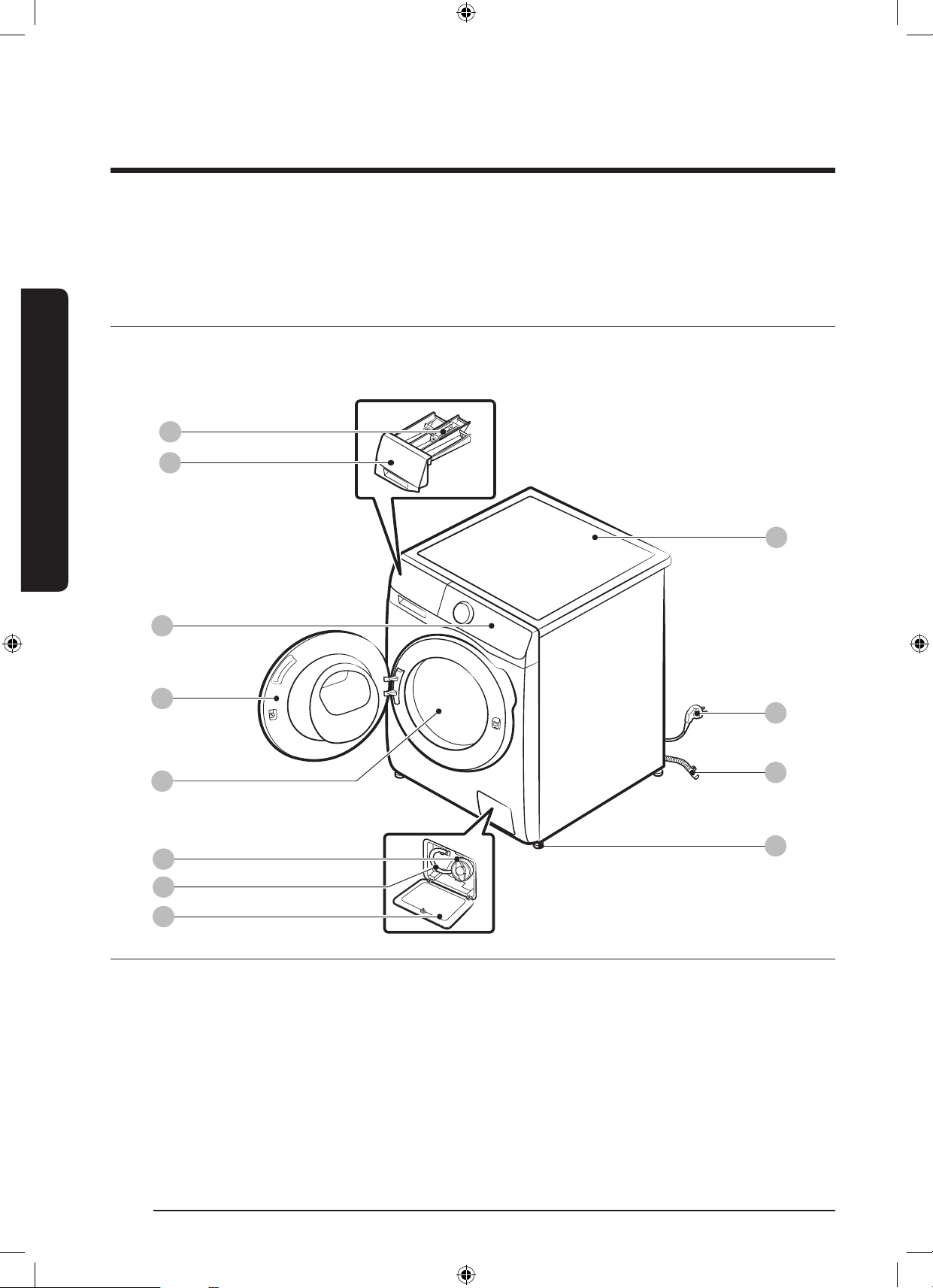
15 ةيبرعلا
بيكرتلا
بيكرتلا
.ليسغلادنعثداوحةيأعوقوعنموحيحصلكشبةلاسغلابيكرتنامضلةيانعبتاميلعتلاهذهعبتا
اامحتوا
وسماسءمعةمديلازكرابلصتا،ءازجاوأةلاسغلايفامةلكشميناعتتناكاذإ.جتناةبلعيفةدوجومءازجالكنأدكأت
.ةئزجتلارجاتوأSamsung
12
06
08
07
03
04
05
09
11
10
01
02
01 ءاخراعارز02 ليسغلاقوحسمجرد03 مكحتلاةحول
04 ةلاسغلاباب05 ةناوطسا06 ةخضاةافصم
07 ئراوطلادنعفيرصتلابوبنأ08 ةافصاءاطغ09 ةلاسغلاحطس
10 ءابرهكلاسباق11 فيرصتلاموطرخ12 ةلاسغلالجرأءاوتسا
.زارطلافتخابفلتخيعارذلاوأ/وجر
ُ
دلاميمصت*
WD10N645R2X_DC68-03976N_AR.indd 15 2018/8/16 19:51:04
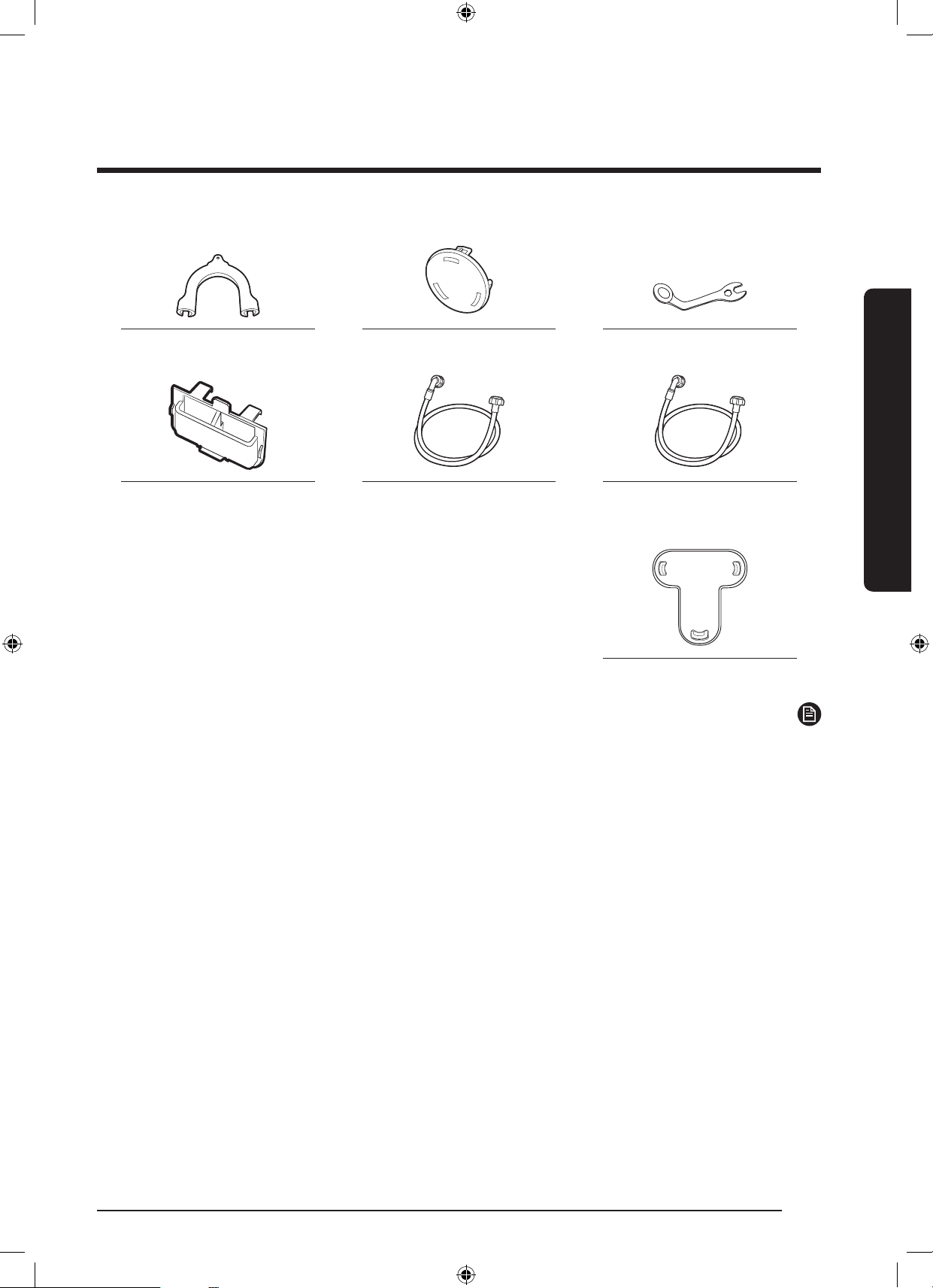
ةيبرعلا 16
بيكرتلا
بيكرتلا
طبرلاحيتافمةيطغاريماسمموطرالماح
درابلاءااديروتموطرخنخاسلاءااديروتموطرخلئاسلافظناةريجح
)طقفاهبدوزاتيدواب(
ءاطغلاتبثم
ةظحم
.ةلاسغلاليدومىلع)6ىلإ3نم(ءاطغلاتاذةبلواريماساةيطغأددعدمتعي:ةيطغاريماسم
.طقفاهبدوزاتيدواب:نخاسلاءااديروتموطرخ
.طقفاهبدوزاتيدواب:لئاسلافظناةريجح
WD10N645R2X_DC68-03976N_AR.indd 16 2018/8/16 19:51:05
17 ةيبرعلا
بيكرتلا
بيكرتلا اابلطتم
يضرا ليصحتلاو ةيئابرهكلا ةقاطلا ردصم
رايتطلوف240 - 220ةردقبرهصنموأةيئابرهكةرئادعطاق
زتره50/ددرتم
طقفةلاسغلاليغشتلةيعرفةيئابرهكةرئاد
يئابرهكرايتكلسبةلاسغلاديوزتيرجي،بساناضيرأتلانامضل
يفحيحصلكشباهمادختسضيرأتتاكوشثثيذسباقهب
.حيحصلكشببكر
ُ
ميضرأسبقم
ريغتنكاذإةمدخينفوأءابرهكينفبا
ً
نيعتسمرمانمقق
.ضيرأتلاةمسنأشب
ً
ادكأتم
مدعةلاحيفو.ةلاسغلابدوزاسباقلاىلعتيدعتيأير
ذخأمبيكرتللهؤميئابرهكينفبنعتسا،رايتلاذخأمعمهتمءم
.بسانم
رمذ
.ديدلبكمدختست
.طقفةلاسغلاعمقفرايئابرهكلارايتلاكلسمدختسا
ةيكيتسبلاةكابسلاريساومطوطخبيضراكلسلالصت
.نخاسلاهاياريساوموأزاغلاطوطخوأ
ببس
ُ
تدقبسانمريغلكشبةلصتاضيرأتلاتصومنإ
.ةيبرهكتامدصثودح
هاياب دادما
لاكسابوليك50بنوكيةلاسغلاهذهلبساناهاياطغضنإ
لاكسابوليك50نملقأهاياطغضناكاذإ.لاكسابوليك800ىلإ
ءلمجاتحيدق.هايامامصقغإماكحإمدعببسيدقكلذنإف
.لمعلانعةلاسغلافقوتىلإيدؤياعقوتانملوطأا
ً
تقوةيواا
يفلابناانممس120ةفاسمنمضهاياريبانصنوكتنأعتي
.ةلاسغلاىلإةقفراهاياريبانصميطارخلوصوليهستلةلاسغلل
:يلاتلاذيفنتعتي،برستلارطاخمليلقتل
.هاياريبانصىلإميطارالوصوريسيت
.ةلاسغلاليغشتمدعةلاحيفريبانصلاقغإ
تصويفبرستيأدوجونعفشكللمظتنملكشبصحفا
.ءاالاخدإموطرخ
هيبنت
ققحتللءااريبانصومامصيفةدوجواتيصوتلاةفاكصحفبمق
.ىلواةرمللةلاسغلامادختسالبقتابيرستيأكانهتناكاذإا
فمرصتلا
90-60اهعافتراغلبيةيسأرةروساممادختسابSamsungيصوت
ىلإموطراكبشملخفيرصتلاموطرخليصوتعتي.مس
.فيرصتلابوبنأةيسأرلاةروساايطغتنأعتيوةيسأرلاةروساا
WD10N645R2X_DC68-03976N_AR.indd 17 2018/8/16 19:51:05
ةيبرعلا 18
بيكرتلا
بيكرتلا
ةيضرا حطس
لضفأىلعلوصحللبلصوتباثحطسىلعةلاسغلاتيبثتبجي
وأ/وزازتهاليلقتلاهتيوقتىلإةيبشاحطساجاتدق.ءادأ
ةباثةمعانلاطبلاحطسأوداجسلانوكي.ةنزتاريغلامحا
ةلاسغلاكرةيلامتحاوزازتهاتايلمعيفةمهاسملماوع
.فيشنتلاةرودءانثأفيفطلكشب
هيبنت
.ةفيعضةينبوأةيضرأىلعةلاسغلابيكرتبمقت
هايا ةرارح ةجرد
نأكلذدمجتللهايااهيفضرعتيقطانميفةلاسغلابكرت
وأ/وةخضاوهايامامصيفهاياضعببا
ً
مودظفتةلاسغلا
فلتليصوتلاءازجأيفيقبتادمجتاهاياببس
ُ
يدق.ميطارا
.ةلاسغلاتانوكمنمكلذريغوأةخضاوأرويسلا
ةنازا وأ ةرطنقلا بيكرت
:رقتساليغشتللىنداصولا
بناوا25
يولعلاءزا25
يفلابناا50
ةهجاولا550
يولعلابناابنوكينأبجي،
ً
اعمففاوةلاسغلابيكرتةلاحيف
.لقاىلعرتميللم550اهردقةيلاخءاوهةحتفةنازاوأةرطنقلل
.اهنيعبءاوهةحتفاهدحوةلاسغلابلطتت
WD10N645R2X_DC68-03976N_AR.indd 18 2018/8/16 19:51:05
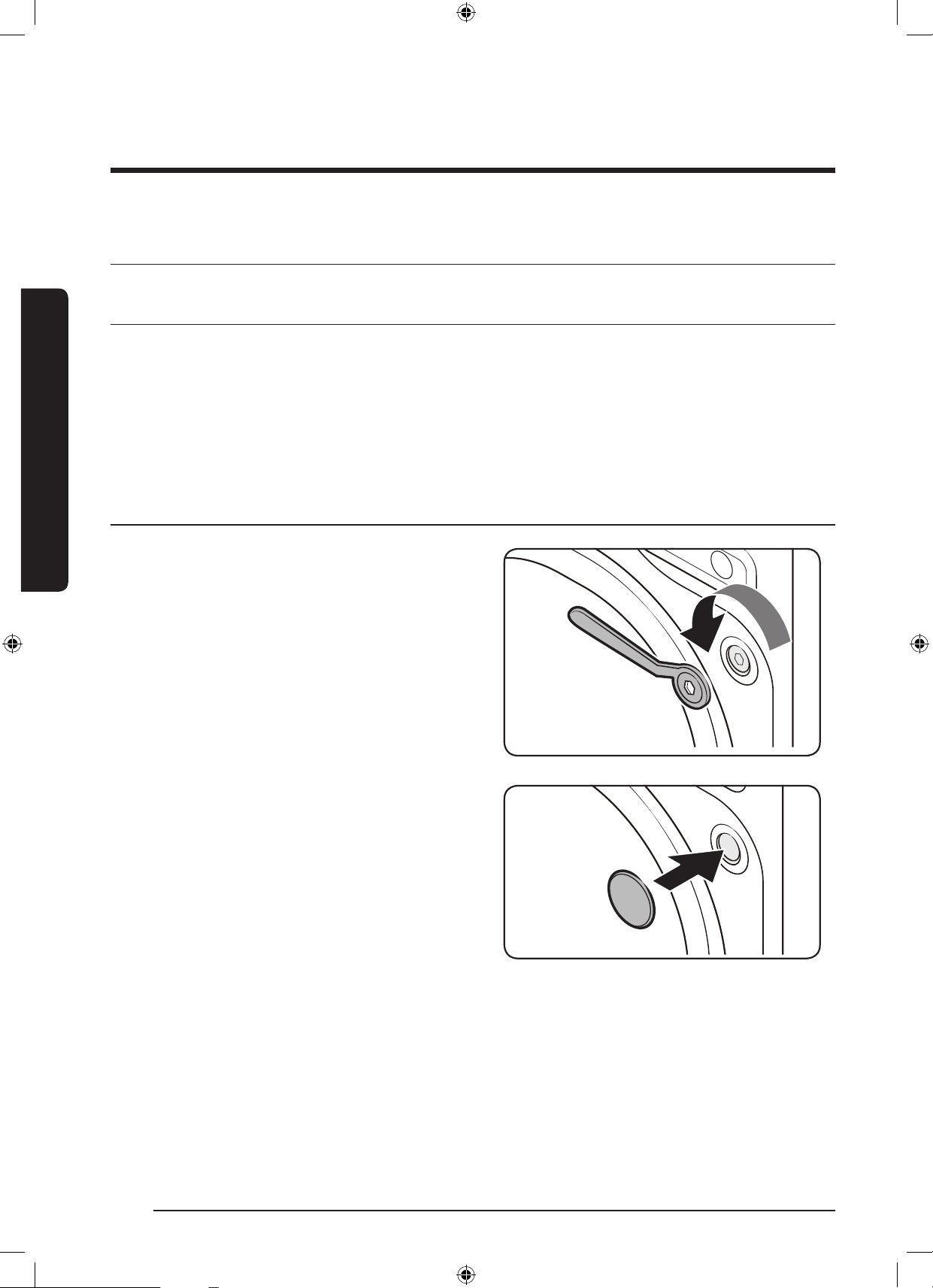
19 ةيبرعلا
بيكرتلا
ةحطخب ةحطخ بيكرتلا
ةلاسغلا ناكم رايتخا - 1 ةحطا
:ناكا اابلطتم
ةيوهتلاةيلمعقوعيدقطبوأداجسدوجونوديوتسمبلصحطس
ةرشاباسمشلاةعشأنعديعب
كساليصوتوةيوهتللةيفاكةحاسم
)سويزلس0(دمجتلاةطقننمىلعأةراراةجردنوكتنأعتي
ةرارارداصمنعديعب
نحشلا ريماسم ةلازإ - 2 ةحطا
.نحشلا ريماسم لك لزأو جتنا ةحبع كف
1 .ةلاسغلليفلابنااىلعةدوجوانحشلاريماسملككف
.ةلاسغلاعمةقفراطبرلاحاتفممادختساب
2 .ةيكيتسبلاريماساةيطغأمادختسابتاحتفلاعيمجيطغ
.ةلاسغلاعمةقفرا
دنع
ً
بقتسماهمادختسنحشلاريماسمىلعظفاح
.ةجاا
WD10N645R2X_DC68-03976N_AR.indd 19 2018/8/16 19:51:06
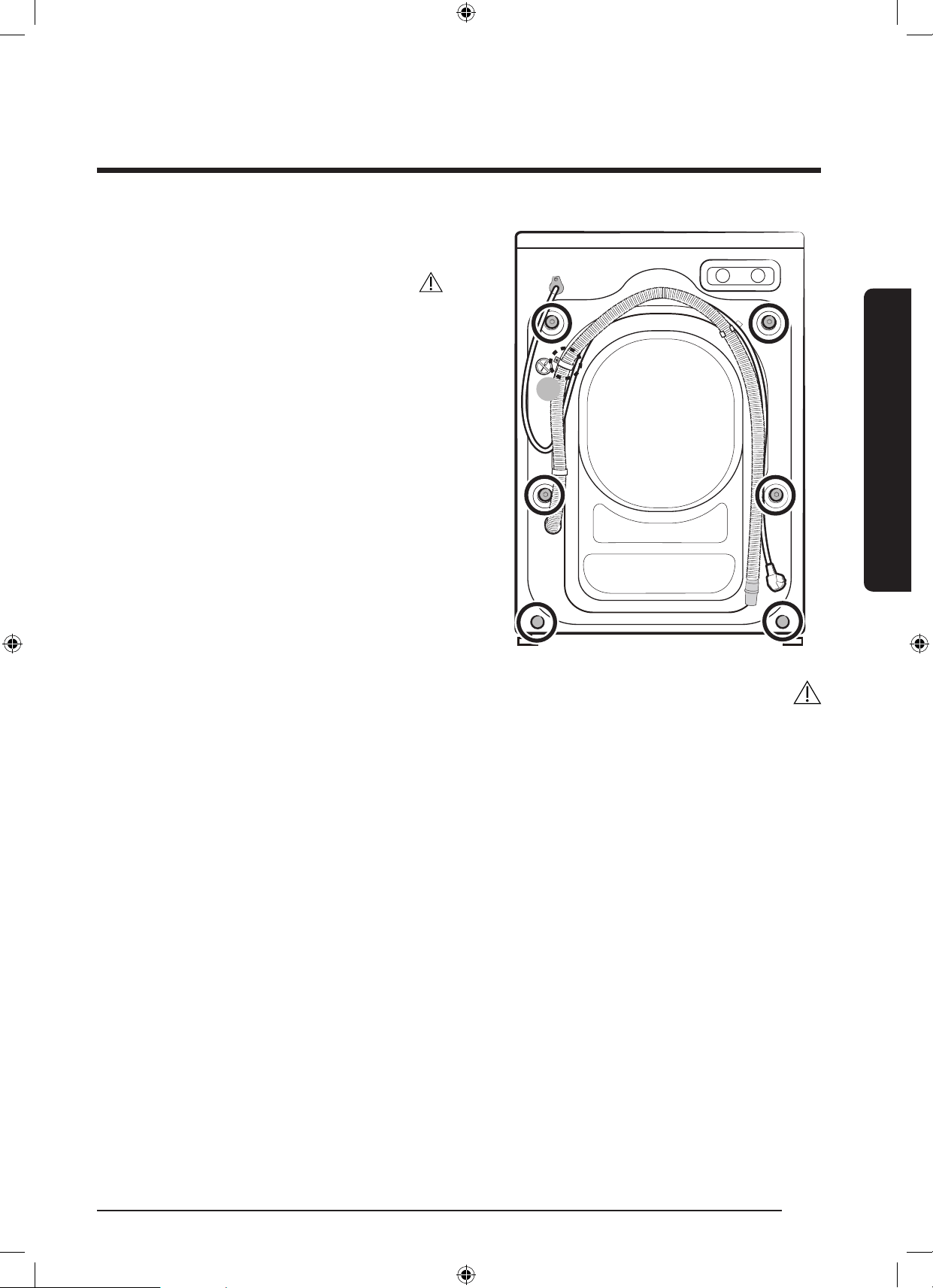
ةيبرعلا 20
بيكرتلا
بيكرتلا
A
3 .نميفلاءزايفةيكيتسبلاةيطغاعيمجقلغا
.ةلاسغلا
هيبنت
.موطراكبشمتيبثتىلعلمعييذلا)A( رامساةلازإبمقت
رمذ
ةدامنمةعونصاداواووأةيكيتسبلابئاقا(ةئبعتلاوفيلغتلاداومعيمجنمصلخت.لافطاىلعا
ً
رطخلثدقةئبعتلاوفيلغتلاداومنإ
.لافطالوانتمنع
ً
اديعب).خلا،نيريتسيلوبلا
WD10N645R2X_DC68-03976N_AR.indd 20 2018/8/16 19:51:06
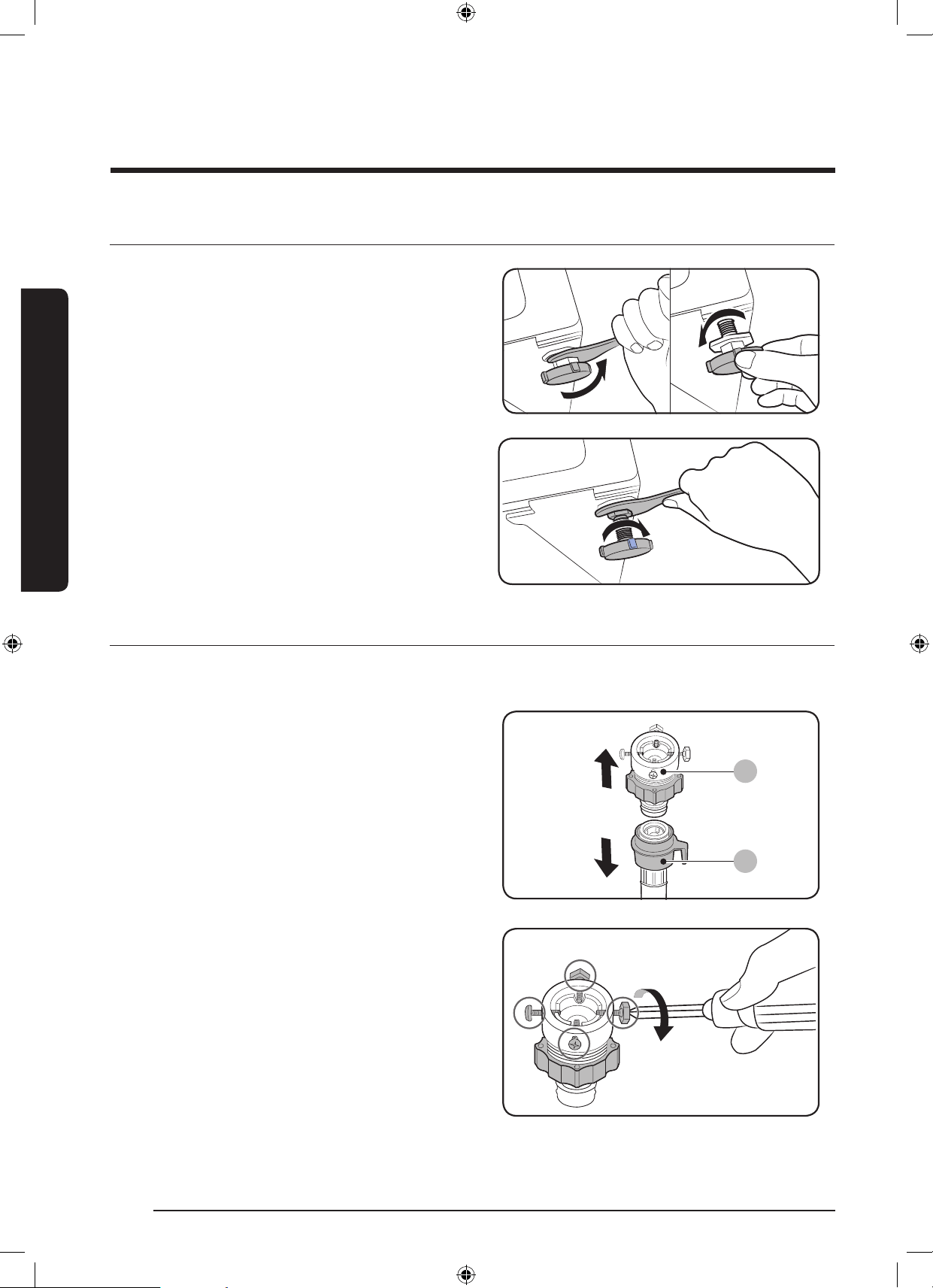
21 ةيبرعلا
بيكرتلا
ةلاسغلا ءاحتسا لجرأ طبض - 3 ةحطا
1 .ةدئازلاوأةطرفاةوقلانإ.قفربدداناكايفةلاسغلاعض
.ةلاسغلاءاوتسالجرأفلتىلإيدؤتدق
2 ..ءاوتسالجرأطبضقيرطنعا
ً
يوديةلاسغلاءاوتساطبضا
3 .حاتفممادختسابليماوصلامكحأ،ءاوتساةيلمعماإب
.طبرلا
هايا محطرخ ليصحت - 4 ةحطا
،يغربلاعوننميئاهمكيدلناكاذإ.لصومعوننميئاهاليصوتةيفيكيفتاوطاهذهكدشرت.ليدوابسان
ُ
يموطرايئاهمنوكيدق
.7ةوطخلللقتنا
A
B
.هايا رحبنص ىلإ هاياب دادما محطرخ لص
1 ..)B( هايا دادمإ محطرخنم)A( لحوالزأ
2 .ريماساطبرءاخر)ةبيلص(يعابرسأرب
ً
اكفممدختسا
.ئياهابةعبرا
WD10N645R2X_DC68-03976N_AR.indd 21 2018/8/16 19:51:06
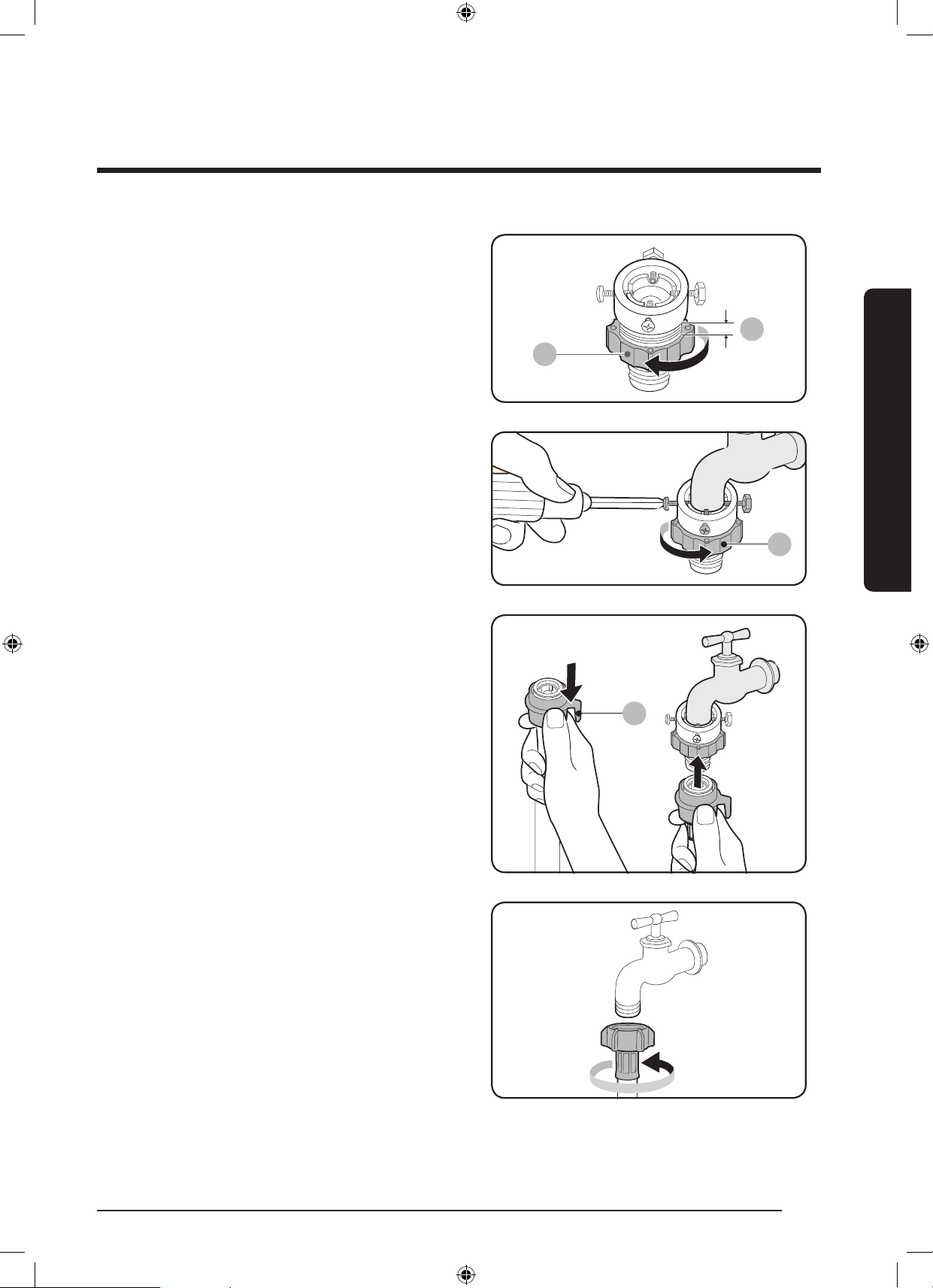
ةيبرعلا 22
بيكرتلا
بيكرتلا
C
3 . 5رادقهكفلمهسلاهاايف)C(ءزاردأولواكسمأ
.)*(رتميللم
C
4 .عفرعميغاربلاريماسمطبرمكحأوهاياروبنصيفلواعض
.ىلعلوا
5 ..هطبرماكحمهسلاهاايف )C( ءزاردأ
E
6 ..لواىلإهايادادمإموطرخلص،لفس)E( ءزاكاسمإعم
توصعمس
ُ
يولوابهعضوموطرابكري.)E( ءزاررحمث
.ةقطقط
7 .عوننميئاهملص،يغربلاعوننميئاهممدختستتنكاذإ
.لكشلابحضوموهامكروبنصلاىلإيغربلا
WD10N645R2X_DC68-03976N_AR.indd 22 2018/8/16 19:51:07
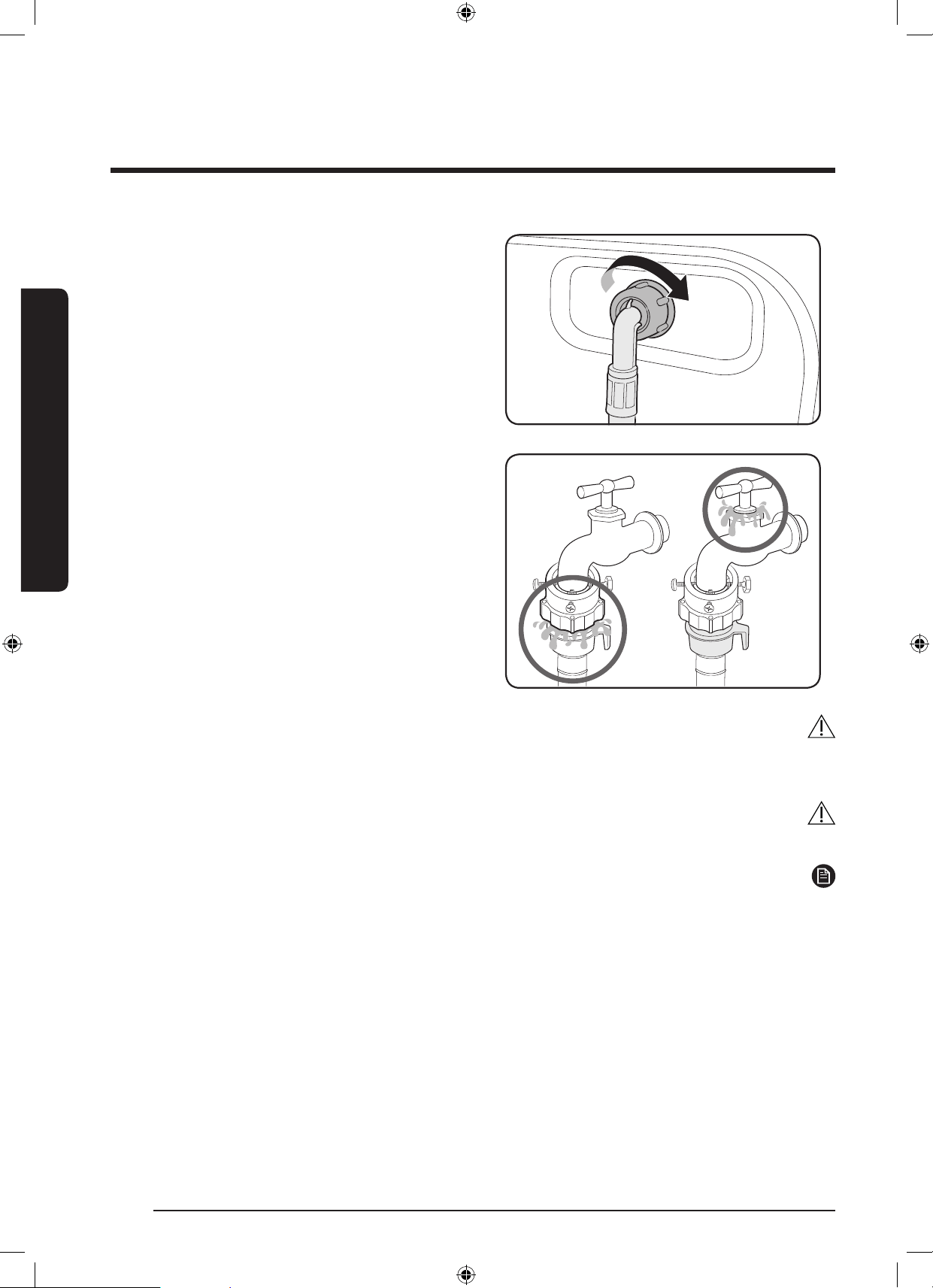
23 ةيبرعلا
بيكرتلا
8 .دوجوالوخدلامامصبهايادادمإموطرخنمرخافرطلالص
براقعهاايفموطراردأ.ةلاسغلانميفلابنااب
.هطبرماكحةعاسلا
9 .نكامألوحتابيرستيأدوجونمققوهاياروبنصحتفا
.هاياببرستدوجوةلاحيفةقباسلاتاوطاررك.تيصوتلا
رمذ
مازتلامدعيدؤيدق.يلاوسماسءمعةمدخزكرلصتامث.ءابرهكلاردصمنعاهلصفاوةلاسغلاليغشتفقوأ،هايمللبرستثدحاذإ
.يبرهكلاقعصلاىلإكلذب
هيبنت
.يلاعلاطغضلالمحتيلوطأموطرخبنعتسا،ةياغلل
ً
اريصقموطراناكاذإ.ةوقلابهايابدادماموطرخليط
ُ
ت
ةظحم
.لفسءااديروتموطرخبحسقيرطنعحيحصلكشبهليصوتنمدكأت،لوابءااديروتموطرخليصوتدعب
.لوايفروبنصلالاخدإلبقةلصافلاةقلالزأ،
ً
ادج
ً
اريبكوأ
ً
اعبرمروبنصلاناكاذإ.هاياريبانصنما
ً
جئارا
ً
عونمدختسا
WD10N645R2X_DC68-03976N_AR.indd 23 2018/8/16 19:51:07
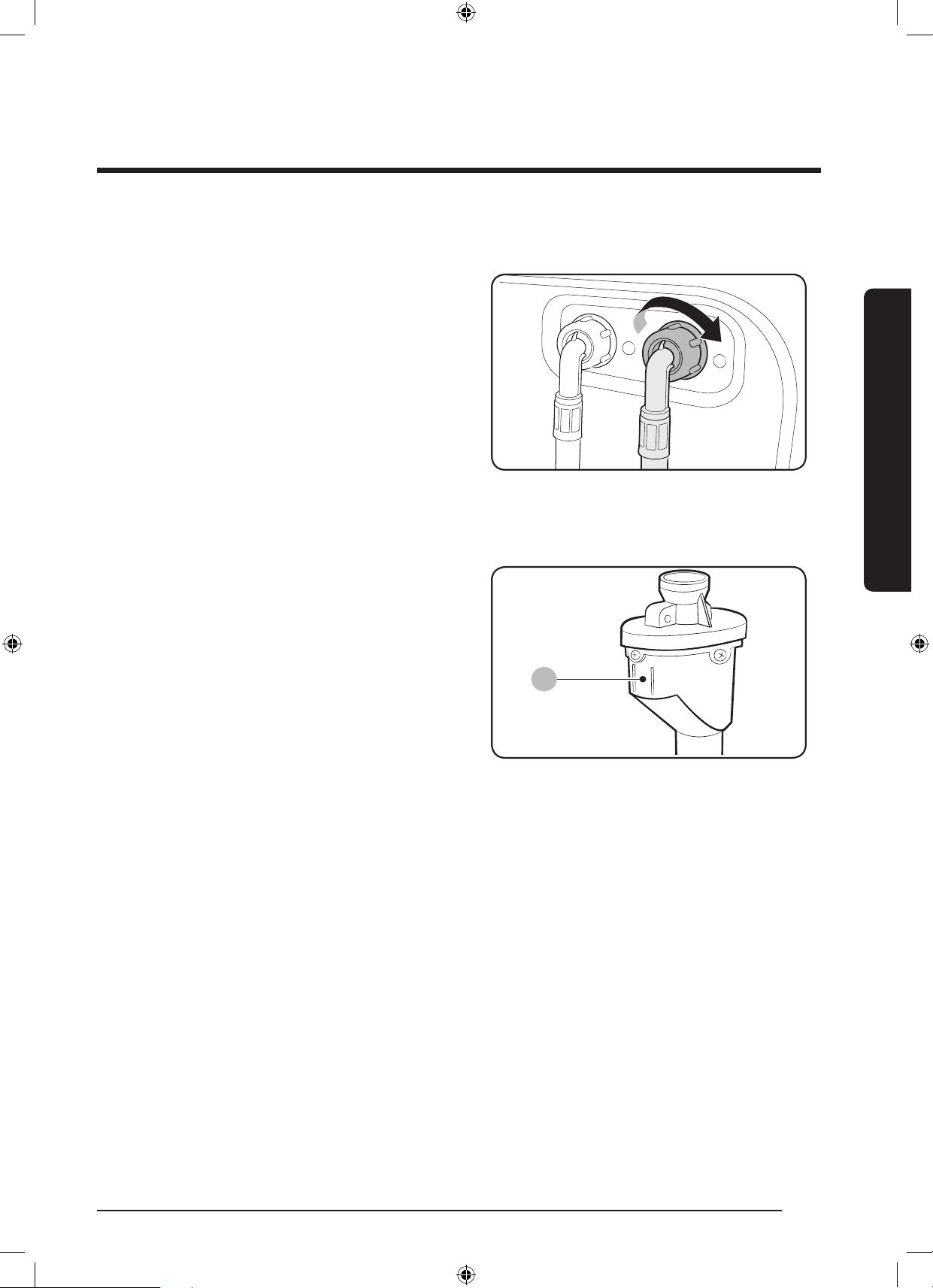
ةيبرعلا 24
بيكرتلا
بيكرتلا
:نخاسلا هاياب دادمل يفاضإ لخد ةدوزا ةددوا اازارطلل ةبسنلاب
1 .مامصبنخاسلاهايابدادماموطرخنمرمحافرطلالص
.ةلاسغلانميفلابناابدوجوالوخدلا
2 .روبنصىلإنخاسلاهايابدادماموطرخنمرخافرطلالص
.نخاسلاهايا
)طقف ةددحم اازارط( يئاا محطرا
A
دنعهايابرسترطاخمنممدختسايئااموطرارذح
ُ
ي
زكرابدوجوا)A( رشؤائضيوهاياقفدترعشتسيوهف.اهعوقو
.برستدوجوةلاحيفرمحانوللابيف
WD10N645R2X_DC68-03976N_AR.indd 24 2018/8/16 19:51:07
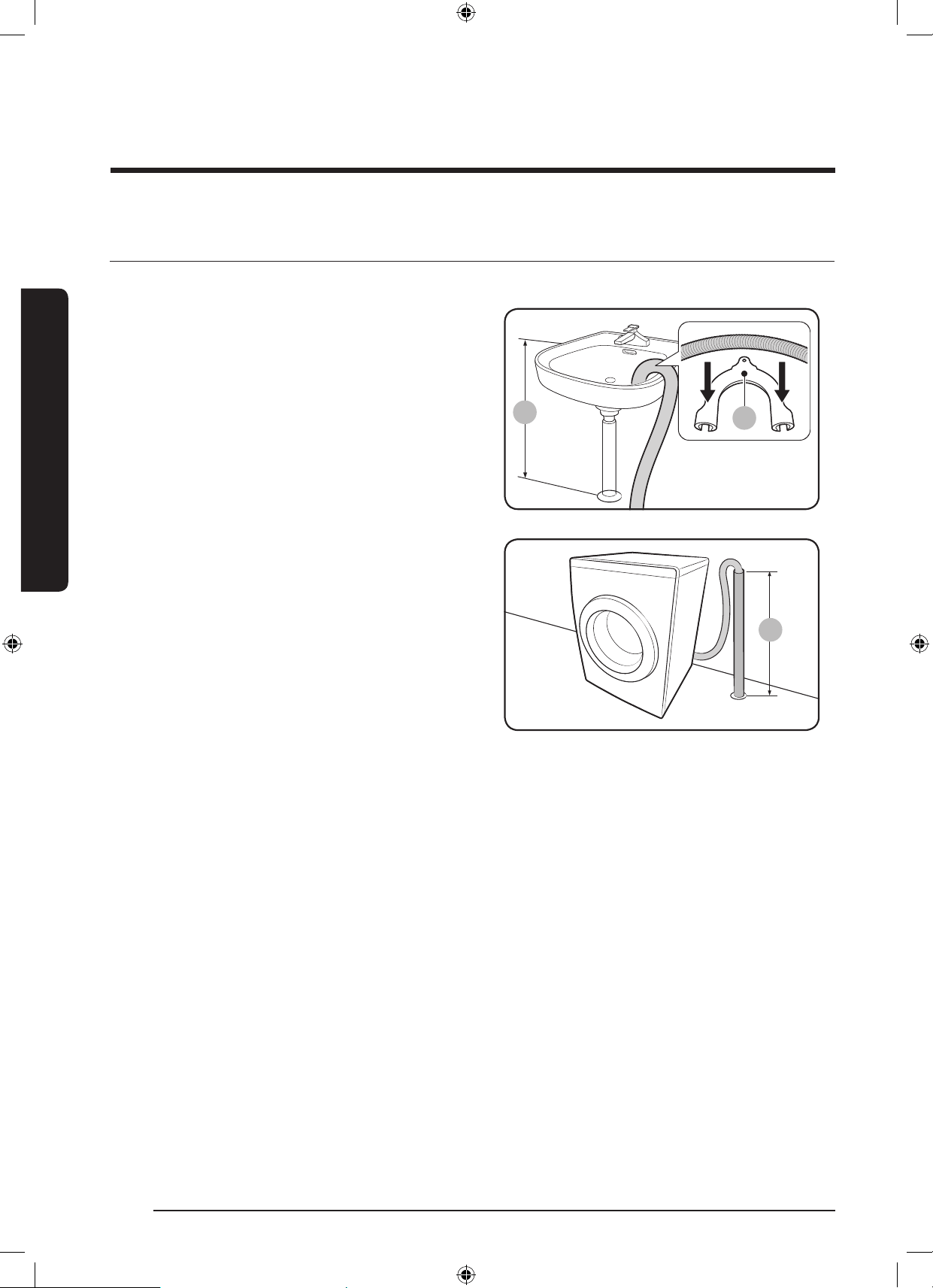
25 ةيبرعلا
بيكرتلا
فرصلا محطرخ ليصحت - 5 ةحطا
:قرطثثبفيرصتلاموطرخعضونك
A
ليسغلا ضحح ةفاح قحف
)*(مس90ومس60بعافتراىلعفيرصتلاموطرخعضوعتي
مدختسا،فيرصتلاموطرخءانثناىلعءاقبل.ةيضراىوتسمنم
ةطساوبراداىلعكسااتبث.)A( يكيتسبلا محطرا كسام
.رقتسمفيرصتنامضلفاطخ
فمرصتلا بحبنأ لحح
.)*(عافترامس90ومس60بفيرصتلابوبنأنوكينأبجي
بوبنأنأدكأت.مس65غلبيعافترايذيسأربوبنأمادختسابحصن
ُ
ي
.لييسأرلابوبنابلصتمفيرصتلا
:فيرصتلليسأرلابوبناتابلطتم
مس5ةرئادلارطقلىندأدح
ةقيقدلايفرتم60فراةعسلىندادا
WD10N645R2X_DC68-03976N_AR.indd 25 2018/8/16 19:51:07
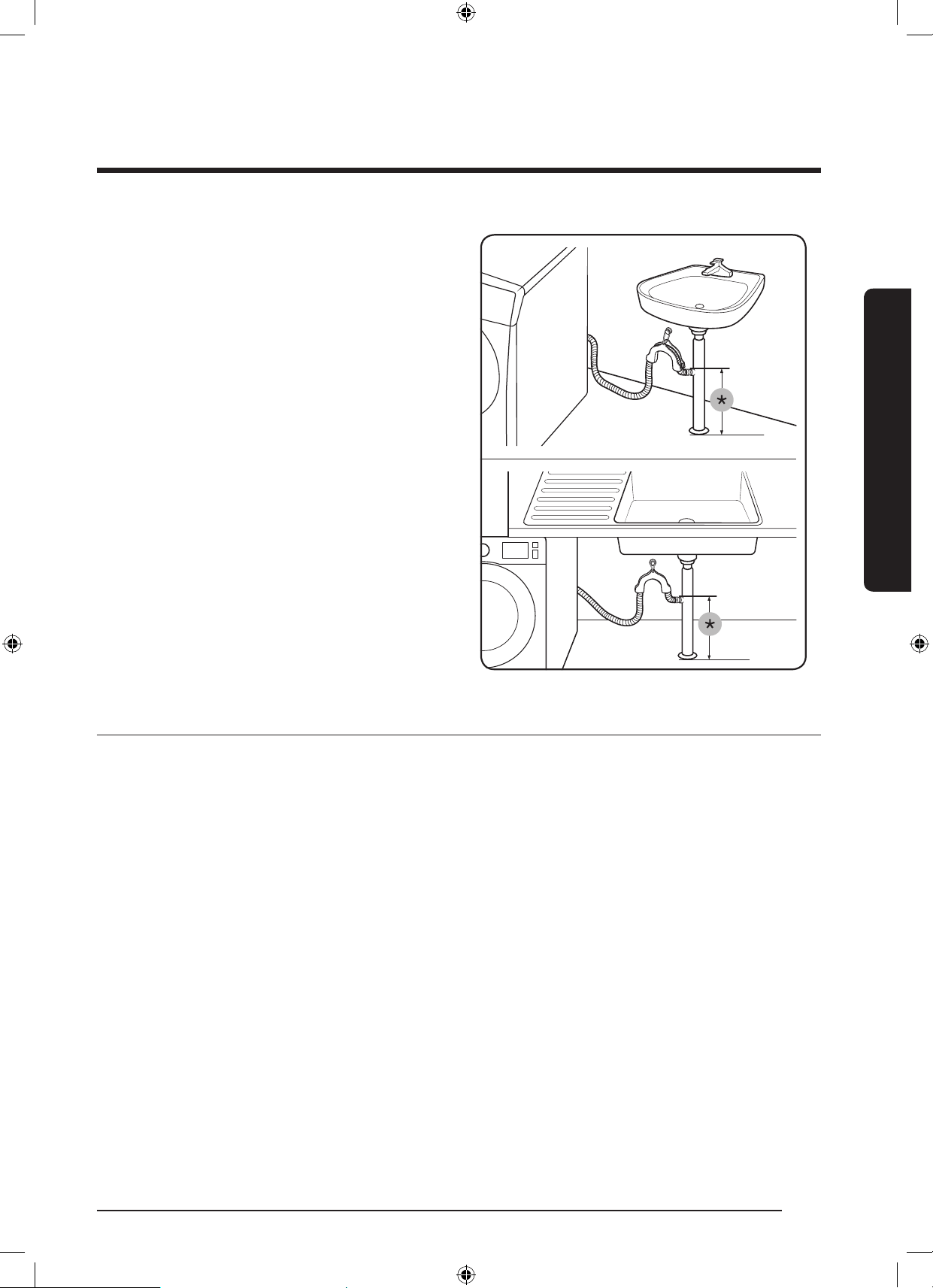
ةيبرعلا 26
بيكرتلا
بيكرتلا
ضحا فمرصت بحبنأ عرف يف
نوكيثيحبضواةكابسقوففيرصتلابوبنأعرفنوكينأبجي
.ضرانعلقاىلعمس60عافتراىلعموطرافرط
مس60:)*(
ةلاسغلا لغش - 6 ةحطا
.ةرئادعطاقوأرهصنيمحمزتره50/ددرتمرايتطلوف240 - 220نمةردقبيئابرهكرايتجرخمكدمتعمطئاحسبقةقاطلاكلسلص
.ةلاسغلاليغشتل ةقاطلارزىلعطغضا
WD10N645R2X_DC68-03976N_AR.indd 26 2018/8/16 19:51:08
27 ةيبرعلا
ليغشتلا ءدب لبق ام
ليغشتلا ءدب لبق ام
ةيلوا اادادعا
)كلذب ىص
ُ
حم( ةرماعا عضو لغش
.ةيصااهذهمادختسالبقةغرافةلاسغلاةيواحنأنمدكأت.ةقدبليسغلانزوباسحىلعةلاسغلاةردقنمضتةرياعاةيصاخنإ
1 ..ىرخأةرماهليغشتدعأمثةلاسغلاليغشتفقوأ
2 ..”Cb“ةلاسررهظتانه."ةرياعاعضو"ءدبلناوث3ةدا
ً
عم+ ليغشتلا ليجأتوةرارا ةجرديرزىلع
ً
وطمطغضا
3 ..قئاقد3ةدةعاسلابراقعدضوةعاسلابراقعهاايفةيواارودت.ةرياعاةرودليغشتلفقوت/ليغشترارمتسابطغضا
4 ..نامادختسلةزهاجةلاسغلا.
ً
ايئاقلتةلاسغلاليغشتفاقيإيرجيوضرعلاةشاشىلع”0“رهظت،ةرودلاهذهنمءاهتنادنع
سبا لسغ ليلد
زرفلا- 1 ةحطا
:ةيلاتلا ريماعا نم يأ قفو سبا زرفا
.نوياروفاوصأوةيريرحسبموةيعانصةشمقأوةطولخمفايلأوناطقأىلإسبازرفا:ةيانعلاةقاطب
.ةنولاسبانعءاضيبلاسبالصفبمف:نوللا
.ليسغلاءادأنسح
ُ
يةلاسغلاةناوطسأيفا
ً
عمسبانمةفلتخمماجحأبعمانإ:مجا
عطقلاورئاتسلاوةصلااةيفوصلاداوانمضارغاةلاحيفكلذوةدحىلعلكةقيقرلاوةساساضارغالسغيرجي:سملاةقر
.ضارغاىلعتاقصلانمقق.ةيريرا
ةظحم
.ليسغلاءدبلبقكلذىلعءانباهزرفاوسبابةيانعلاةيفيكتاقصلمنمققحتلانمدكأت
WD10N645R2X_DC68-03976N_AR.indd 27 2018/8/16 19:51:08
ةيبرعلا 28
ليغشتلا ءدب لبق ام
ليغشتلا ءدب لبق ام
بحيا غارفإ - 2 ةحطا
سباو ليسغلا بحيج لك عرفأ
.اهسفنةناوطسافلتتوأضارغانماهريغفلتتدق.سباىلعزباوسيبابدلاوةيندعاتمعلالثمةيندعاضارغانإ
اهرهظ ىلع ةزرطاو رارزاب ةنمزا سبا بلقا
اهتيبثتوتاباحسلاقلغبجياذل.ةناوطساةلسفلتببسيدقاذهنإف،لسغلاءانثأةحوتفمتكاواوليوارسلاتاباحستكرتاذإ
.لسغلالبقطيخب
.لسغلاءدبلبقطوياتيبثتىلعصرحا.ىرخأسبمعمةليوطلاةطرشاوطوياتاذسباكباشتتدق
ليسغلا ةكبش مادختسا- 3 ةحطا
ضارغأفشتورسكنتدقردصلاتامحيفةيندعاءازجاف.ليسغةكبشيف)هايايفاهلسغنكيتلا(ردصلاتامحعضونمدكأت
.ىرخاليسغلا
.ةديجلسغةكبشلخادمهعضوبمقاذل.ليداناوتاجوسناوتازافقلاوبراوالثمبابلابةفيفاوةريغصلاسباقلعتتدق
ببستواهكردقةلاسغلايفةيعيبطريغتازازتهاثودحىلإكلذيدؤيدقف.اهبسبمدوجونوداهدحولسغلاةكبشلسغبمقت
.تاباصإثودح
)ةرورضلا ةلاح يف( ليسغلا لبق ام- 4 ةحطا
ىلإا
ً
يوديفيظنتلاقوحسمةفاضإةلاحيفيلوألسغرتخت.راتاجمانربللليسغلالبقامراياددح،خاستاديدشليسغلاناكاذإ
.لئاسفظنممادختساةلاحيفوأةيواا
نزحلا ةعس دمد - 5 ةحطا
فوقولل37ةحفصرظنا.ليسغللةبسنلابةيضرمريغجئاتنىلإكلذيدؤيثيحةلاسغللددانزولازواجتت.ةلاسغللددانزولازواجتت
.سباعونقفونزولاةعسىلع
ةظحم
ةلاحيفاهبىصومفيفةرودةعرسىصقأنإفاذل.فيفجتلاةيلمعةيلاعفلقتوألسغلاةدملوطتدق،ةفاوأشرافالسغدنع
.لقأوأمجك2.0نزولاةعسنوكتوةقيقدلايفةفل800يهةفاوأشرافا
هيبنت
.فيفجتلاءادأةيلعافللق
ُ
يدقةلاسغلالخادنزاوتاريغليسغلانإ
.بابلابةقلعتمتسيلاهنأو،اماضوايفسبالوخدنمدكأت
.حيحصلكشببابلاقلغنيار،إو.قفرببابلاقلغأ.ةدشببابلاقلغت
WD10N645R2X_DC68-03976N_AR.indd 28 2018/8/16 19:51:08
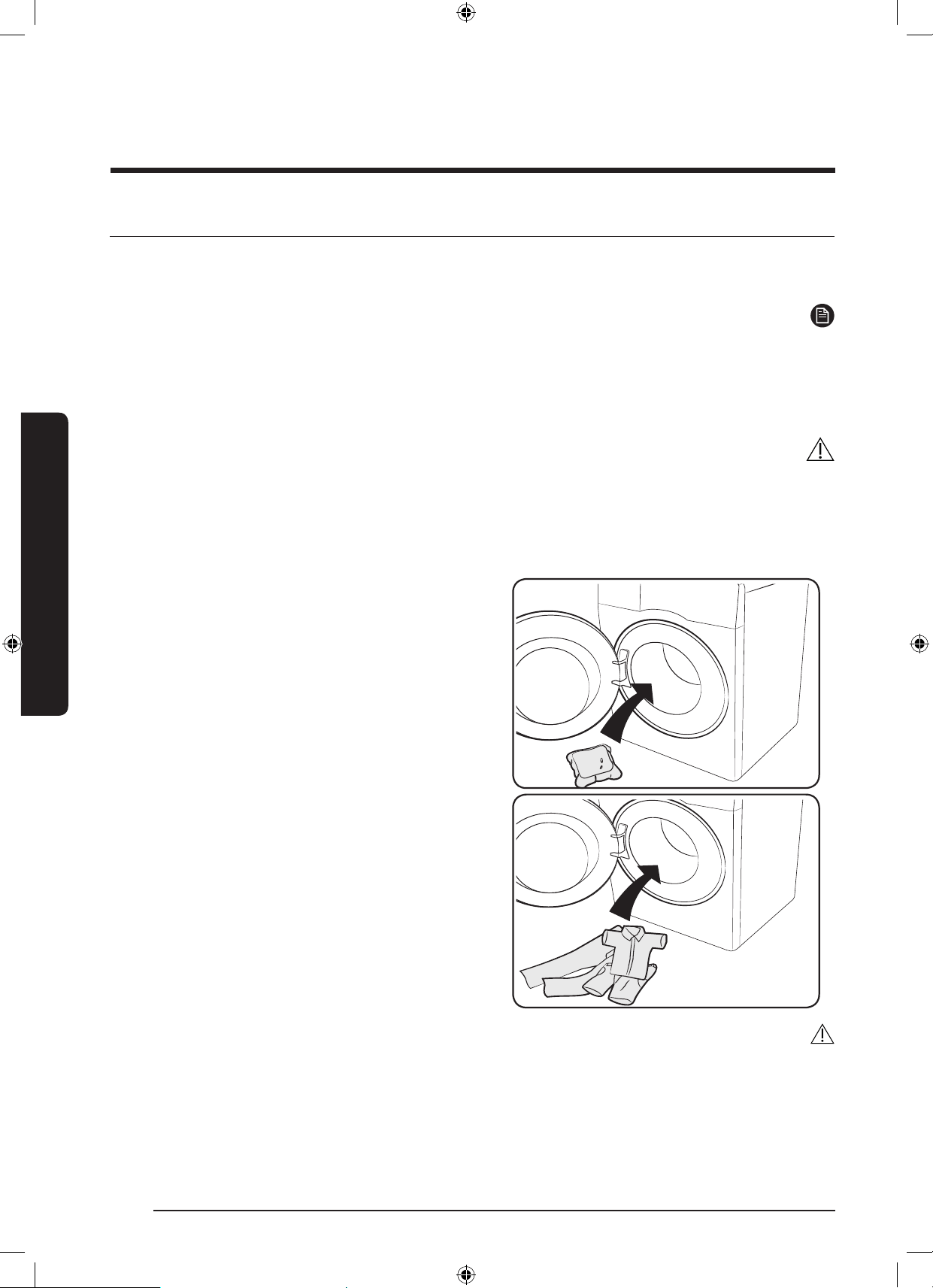
29 ةيبرعلا
ليغشتلا ءدب لبق ام
بسانا فظنا عضو- 6 ةحطا
ةجردوهاياةرارحةجردوناولاو،)فوصلاوأةمعانلاسباوأةيعانصلافايلاوأنطقلا(شامقلاعونىلعليسغلاقوحسمعوندمتعي
.ةيكيتاموتواتاسغلل
ً
اصيصخم
مصا”ةليلقلاةوغرلا“اذليسغلاقوحسم
ً
امودمدختسا.خاستا
ةظحم
نما
ً
دكأتمنكتملاذإف.كتقطنميفءااءاقنةجردوخاستاةجردوسبانزولا
ً
قفوليسغلاقوحسةعنصاةكرشلاتايصوتعبتا
.ةلوئساةيلاتاهابلصتا،هايارسعةجرد
.فرصلاجرخمدسيوفطشلاةورددعبفظنالظيدق.ةلويسلاوأبلصتلاىلإليفظنممدختست
.’Sud‘ةلاسرضرعمتيس،ةرودلالخادجةريثكتاعاقفروهظةلاحيف
هيبنت
ىقبيدقفوصةروديفقوحسمفظنممادختساف.طقفلداعتملئاسفظنممادختساعتي،فوصلاجمانربيفةيفوصلاداوالسغدنع
.هنولريغيوليسغلاىلع
ليسغلاتوسبك
.ليسغلاتوسبكنمجئاتنلالضفأىلعلوصحللةيلاتلاتاوطاعابتإىجر
ُ
ي
1 .ءزاهاةغرافيهوليسغلاةلحعاقيفةلوسبكلاعضن
.اهنميفلا
2 ..ةلوسبكلاىلعأةلايفليسغلاعضن
هيبنت
.اماةلوسبكلابوذتار،ةدحاوةعاسنملقأيفيهتنتيتلاتارودلاوأةدرابلاهايامدختستيتلاتارودلايف
WD10N645R2X_DC68-03976N_AR.indd 29 2018/8/16 19:51:08
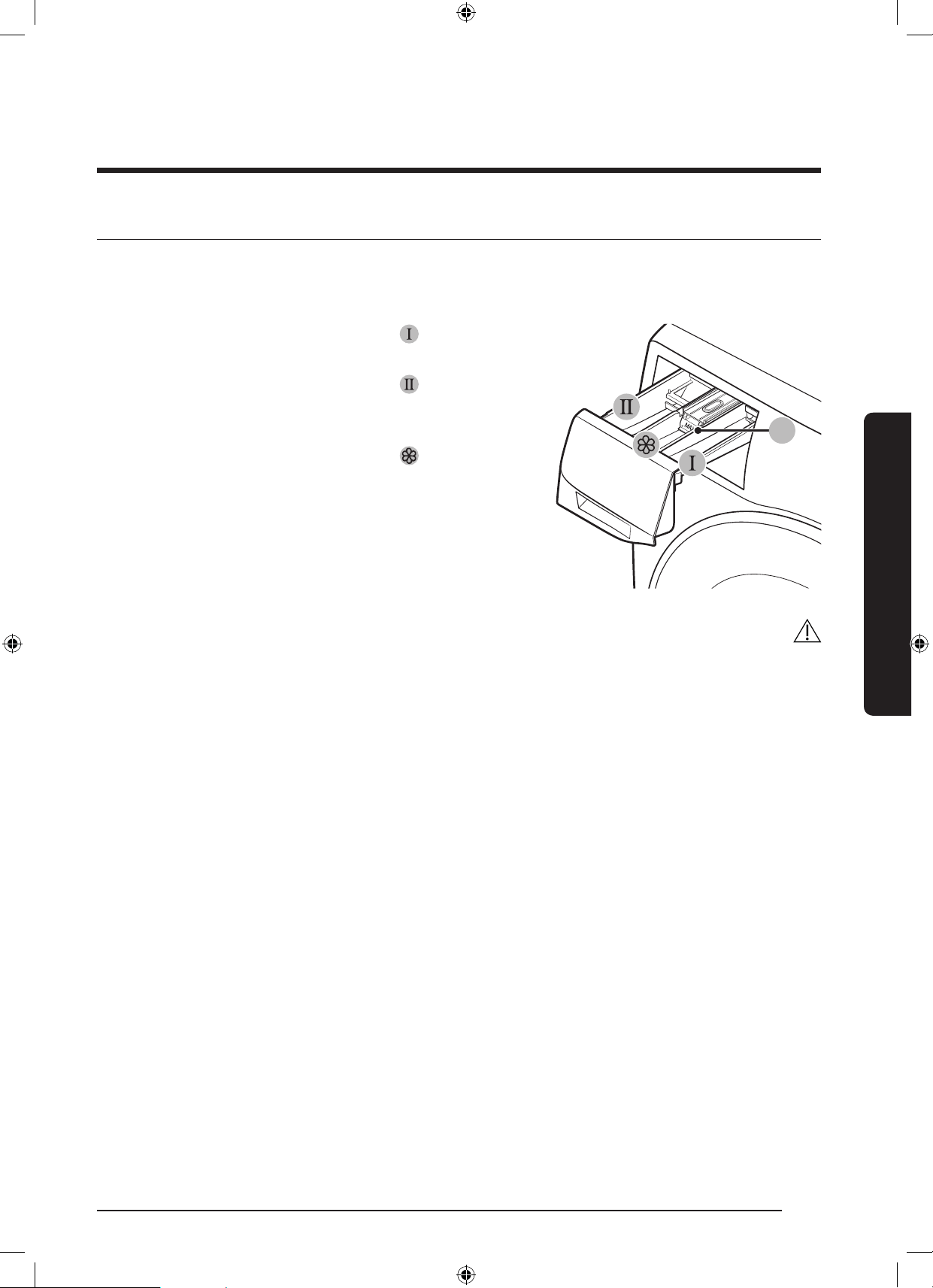
ةيبرعلا 30
ليغشتلا ءدب لبق ام
ليغشتلا ءدب لبق ام
ليسغلا قححسم جردب ةصاخ ااداشرإ
ةشمقاتامعنىطسولاةريجاويسيئرلاليسغللةصصخ
ُ
مىرسيلاةريجاثيحتاريجحثثتاذعيزوتةدحوىلعةلاسغلايوت
.يديهمتلاليسغللىنميلاةريجاو
A
1 .لبقامفظنممدختسا:ليسغلا لبق ام ةريج
ُ
ح
.ليسغلا
2 .فظنممدختسا:يسيئرلا ليسغلا ةريج
ُ
ح
/وضيباوعقنلافظنموءاامعنمويسيئرلاليسغلا
.عقبلاتيزموأ
3 .معنملثمةيفاضاداواعض:معنا ةريجح
.)A( ىصقا داةمعيطختمدععتي.ةشمقا
هيبنت
.ةلاسغلالمعءانثأقوحساجردحتفت
:تافظنانمةيلاتلاعاونامدختست
-صارقأوأحاولألكشىلعتافظنا
-تاكبشوأتايركلكشىلعتافظنا
.ةريجادادسنايدافتلمادختسالبقهاياب)تافظناوأةشمقاتامعنمكلذكو(زيكرتلاةيلاعوأةزكراداوافيفختعتي
ىلعجردلاىوتحمباكسنيارف.جيسنلاتامعنموأ/وفيظنتلاداومىلعيوتحيدقف؛تافظناجردغارفإنمدكأت،ةلاسغلالقنلبق
.ضرا
WD10N645R2X_DC68-03976N_AR.indd 30 2018/8/16 19:51:08
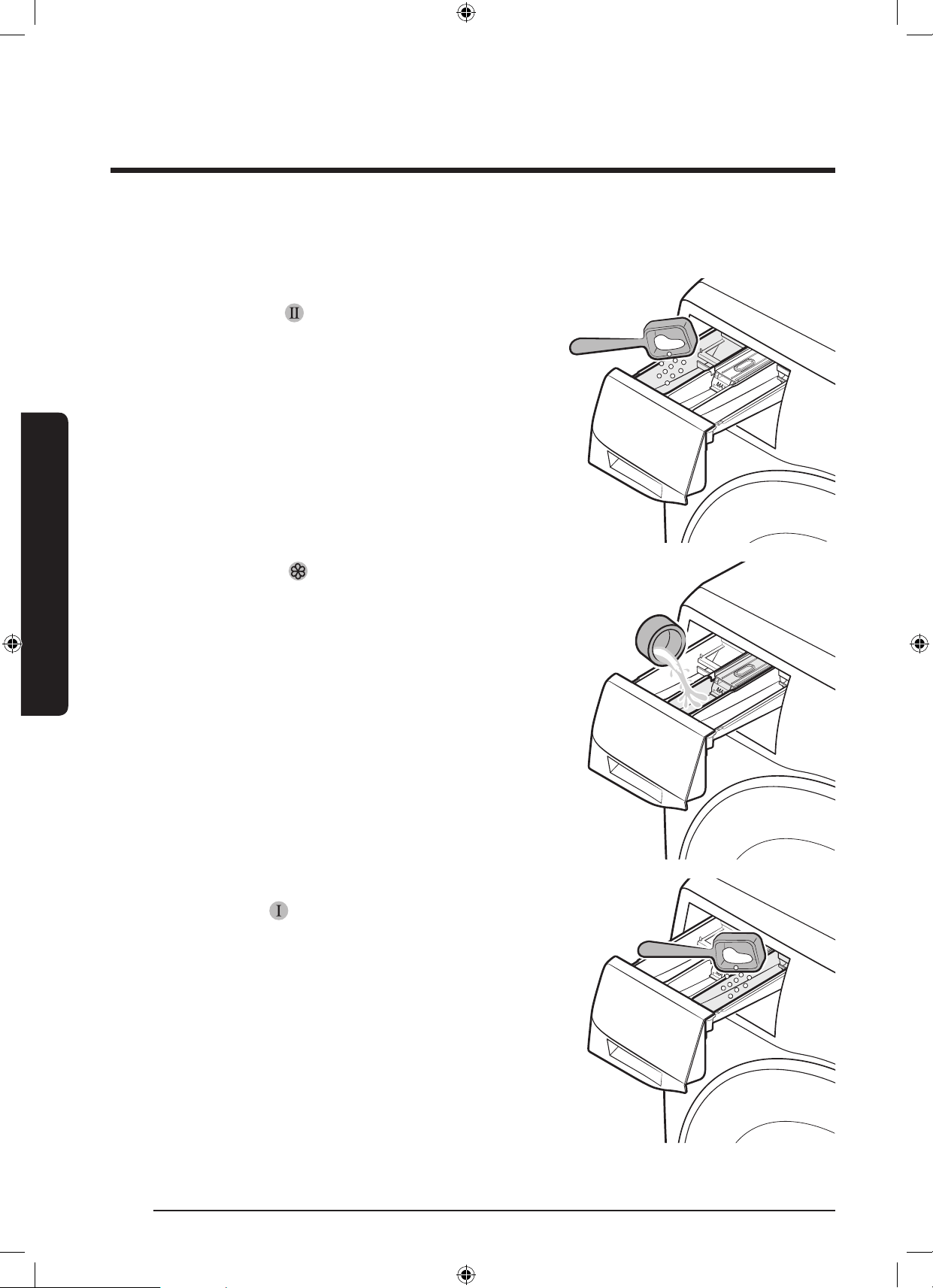
31 ةيبرعلا
ليغشتلا ءدب لبق ام
يوديلا عزحا ىلإ ليسغلا اادعاسم ةفاض
1 ..
ً
يلقتافظناجردحتفا
2 . ةيسيئرلا ليسغلا ةريجح
يفليسغلافظنمعض
.ددصلااذهباهتايصوتوأةعنصاةهاتاميلعتقفو
ةحفصبداشرتساىجر
ُ
ي،ةلئاسلاتافظنامادختس
.>33<
3 ..ةشمقا معنم ةريج
ُ
ح يفةشمقامعنمعض
.ىصقا داةمعيطختمدععتي
4 .عض،ليسغلالبقامةيصاخمادختسةجاحبتنكاذإ
ليسغلا لبق ام ةريج
ُ
ح يفليسغلالبقامفظنم
.اهتايصوتوأعينصتلاةهجتاميلعتقفو
5 ..تافظناجردقلغأ
WD10N645R2X_DC68-03976N_AR.indd 31 2018/8/16 19:51:09
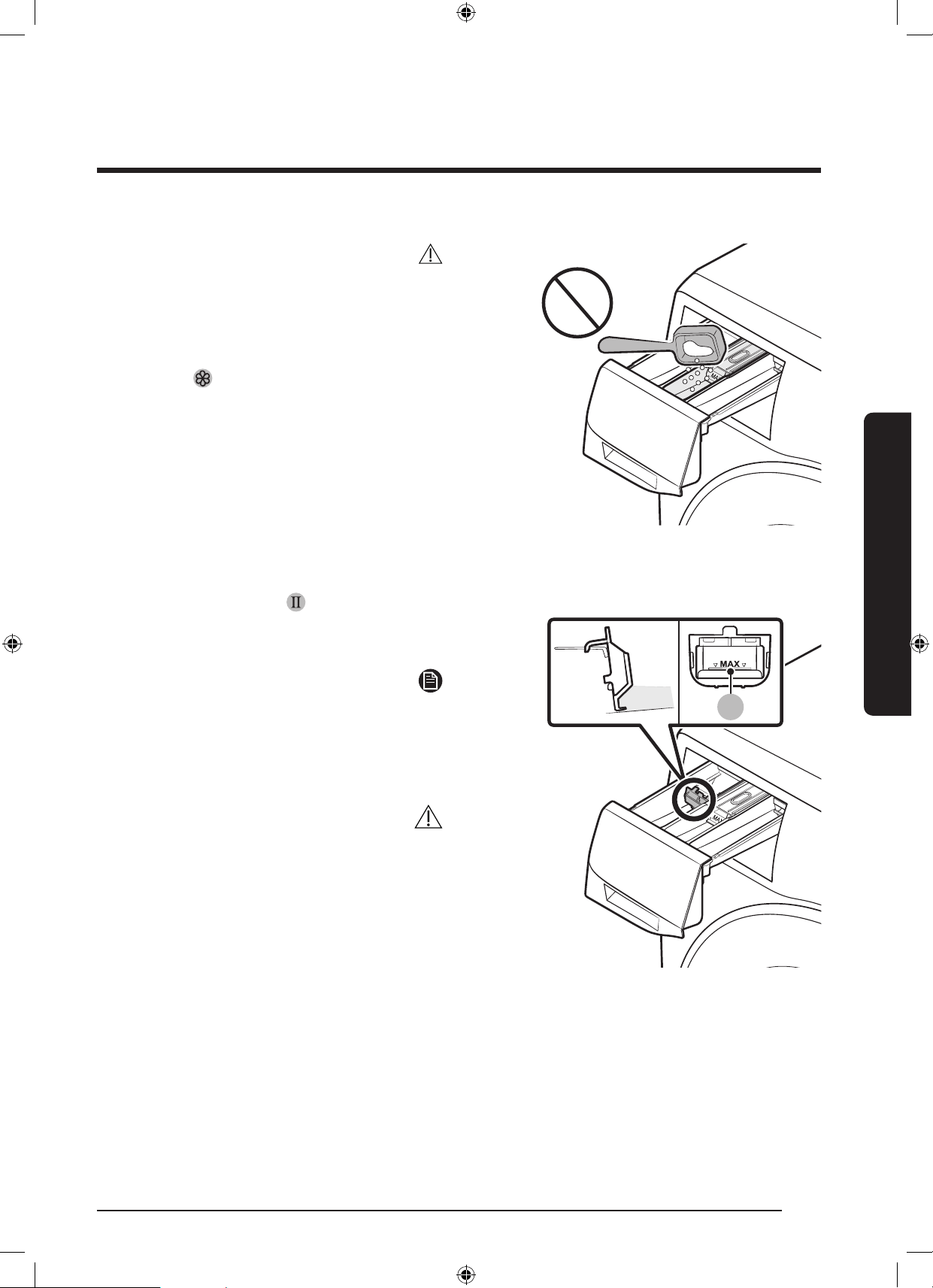
ةيبرعلا 32
ليغشتلا ءدب لبق ام
ليغشتلا ءدب لبق ام
هيبنت
فظناعضوميفةردوبلافيظنتلاقوحسمعضت
.لئاسلا
هعضولبقزكراةشمقامعنمفيفختبمازتلاعتي
.ةلاسغلاب
ةريج
ُ
ح يفيسيئرلافيظنتلاقوحسمعضت
.ةشمقا معنم
)طقف ةنيعا زرطلا( ا
ً
مودم ةلئاسلا اافظنا مادختسا
A
عضمث.ةيسيئرلا ليسغلا ةريج
ُ
ح يفلئاسلاءاعولخدأ:
ً
وأ
فظنابوسنمنوكيثيحبءاعولايفلئاسلاسبافظنم
.)A( ىصقا دا ةمعلفسأ
ةظحم
نمليسغلاجردةلازإدعبلئاسلافظنمليلدفضأ
.)A( رمرحتلا عارذىلعطغضلابةلاسغلا
دعبفظناجرديفلئاسلافظنانمةيمكىقبتيدق
.لسغلانمءاهتنا
هيبنت
.ءاعولابةدوجواىصقاداةمعزواجتت
.فظنمقوحسممدختستستنكاذإلئاسلافظناءاعولزأ
WD10N645R2X_DC68-03976N_AR.indd 32 2018/8/16 19:51:09
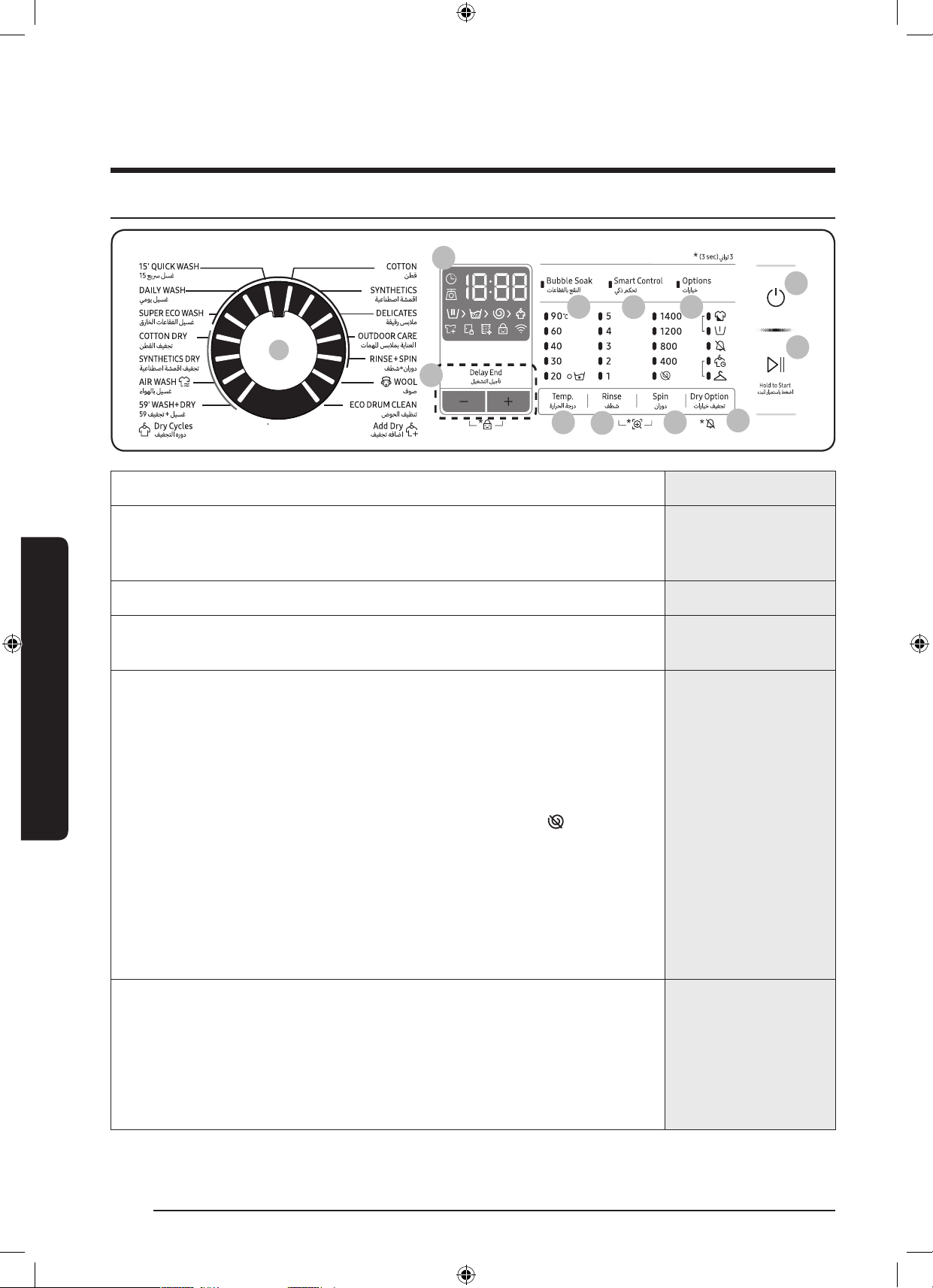
33 ةيبرعلا
اايلمعلا
اايلمعلا
مكحتلا ةححل
01
02
03
07
05
06
12
11
10
08
09
04
01 ةرودلا ديدحت صرق
.ةرودرايتخصرقلاردأ
02 ضرعلا ةشاش
ضرعتكلذكواهماردقايقبتاتقولاوليسغللةيلااةرودلانع
َ
تامولعا
ِ
ضرعلا
ُ
ةشاشحضوت
.امةلكشمثودحلاحيفتامولعاداوكأ
.ةلباقاةحفصلاىلإعجرا،زومرلاورارزل
03 ةرارحلا ةجرد
.ةيلااةرودللةبسنلابهاياةرارحةجردرييغتلانهطغضا
04 فطش
دحب-تارم5ىتحفطشلاطبضنك
ُ
.ةيلااةرودللةبسنلابفطشلاتارمددعرييغتلانهطغضا
.ليسغلاةرودعونقفو-ىصقأ
05 نارود
ةدحاولاةقيقدلايفتافللاددعفلتخي.ةيلااةرودللةبسنلابنارودلاتارمددعرييغتلانهطغضا
.زارطلافتخاب)RPM(
جارخ.هايايفليسغلالظيثيحبفطشلاةيلمعقيلعتيرجي:)رشؤم ب( فطشلا فاقمإ
.نارودةرودلغشوأهايافرص،ليسغلا
-ةفاكفقوتتىتحىرخاولتةرمنارودىلعطغضا،فطشلاراظتنارايخمادختس
.فيف/فرصةرودلرفوتمريغ.ةقيقدلايفتافللاددعلةيمقرلاتارشؤاعيمج
.يئاهنلافيرصتلاةروددعبسباةناوطسافف:)
( نارود نودب
-ددعتارشؤمةفاكئفطنتىتحا
ً
رارمنارودطغضا،"نارودنودب"رايامادختس
.فيف/فرصةروديفطقفرفوتم.ةقيقدلايفتافللا
تقورهظيامدنع.ناوث3ةد نارود ىلعطغضا،طقففيشنتةرودذيفنتل: طقف فيشنت ةرود
نارودلاةعرسللصتىتح نارود ىلعطغضلاررك،ةشاشلاىلعريودتلاةعرسوليسغلاةرود
ةرودلاىلعنارودلاتقوفقوتي.ةرودلاءدبلفقحت/ليغشترارمتسابطغضا،مث.اهرتخاوةبوغرا
.ةراتا
06 تارايخ فيفجت
>س2:30>س2:00>س1:30>س1:00>قد30(فيفجتلاتقو>ةنازخ:فيفجتلاىوتسمديدحتلطغضا
فيفنودب>)س4:30>س4:00>س3:30>س3:00
.ناتكلاوةيلخادلاسباوناطقالثمليسغلافيفجتلمدختس
ُ
ي:ةنازخ
فايلأىلعءانبةددحمةدملخليسغلافيفجتلرايااذهمدختسا:فيفجتلاتقو
.ةبوطرلاوليسغلاةيمكوأليسغلا
.فيفجتلاةرودمدختستنكتملاذإرايااذهمدختسا:فيفنودب
WD10N645R2X_DC68-03976N_AR.indd 33 2018/8/16 19:51:10
ةيبرعلا 34
اايلمعلا
اايلمعلا
07 ليغشتلا ليجأت
ةرودءدبنمةفيظولاهذهكنك
ُ
و.ةيلااةرودلاماإداعيمديدةفيظولاهذهحيتت:ليغشتلاليجأت
قفوةلاسغللةيلخادلاةيقطنامكحتلاةادأةطساوبكلذوهديديرجييذلاتقولايفليسغلا
هيفدوعتيذلادعوايفليسغلاةيلمعءاهنكتلاسغجمربيف
ً
ثمةديفمتادادعاهذهف.كتادادعإ
.ةداعكلزن
.تاعاسلابةيلااةدحولاراتختلرزلاىلعطغضا
08 تاعاقفلاب عقنلا
ةلازإىلعةيصااهذهدعاس
ُ
تو.تاعاقفلابعقنلاةفيظوليغشتفاقيإ/ليغشتلرزلاىلعطغضا
.ةبعصلاعقبلانمريثكلا
.ةبعصلاعقبلانمريثكلاةلازإىلعةفيظولاهذهدعاس
ُ
ت:تاعاقفلابعقنلا
ليسغلاقيقحتلءااتاعاقفيفليسغلاعقنيرجي،تاعاقفلابعقنلاةفيظورايتخادنع
.لاعفلا
ةشمقا،نطق:ةقيقد30ىلإلصياماهيلإفيضيوتارودلاهذهعمرفوتيتاعاقفلابعقنلا
. 59 فيف+ليسغ ،يمحم ليسغ،ةيعانطصا
09
ي
كذ مكحت
كنك،يكذمكةيصاخطيشنتدنع.يكذمكةفيظوليغشتفاقيإ/ليغشتلرزلاىلعطغضا
SmartThingsمسقعجار،تامولعانمديزمىلعلوصحلل.ليابوازاهجمادختسابةلاسغلايفمكحتلا
.>47<ةحفصيف
10 تارايخ
.ديدحتلاءاغلىرخأةرمطغضا.ليسغلالبقاموفثكمبنمرايتخلرزلاىلعطغضا
11 ةقاطلا
.ةلاسغلاليغشتفاقيإ/ليغشتلطغضا
12 فقوت/ليغشت
)ءدبلل رارمتساب طغضا(
.اتقؤمةيلمعفاقيهيلعطغضاوأ،ةيلمعءدبلطغضلابرمتساورزلاىلعطغضا
.ةصااتازيامسقعجار،تارايالوحتامولعانمديز
WD10N645R2X_DC68-03976N_AR.indd 34 2018/8/16 19:51:10
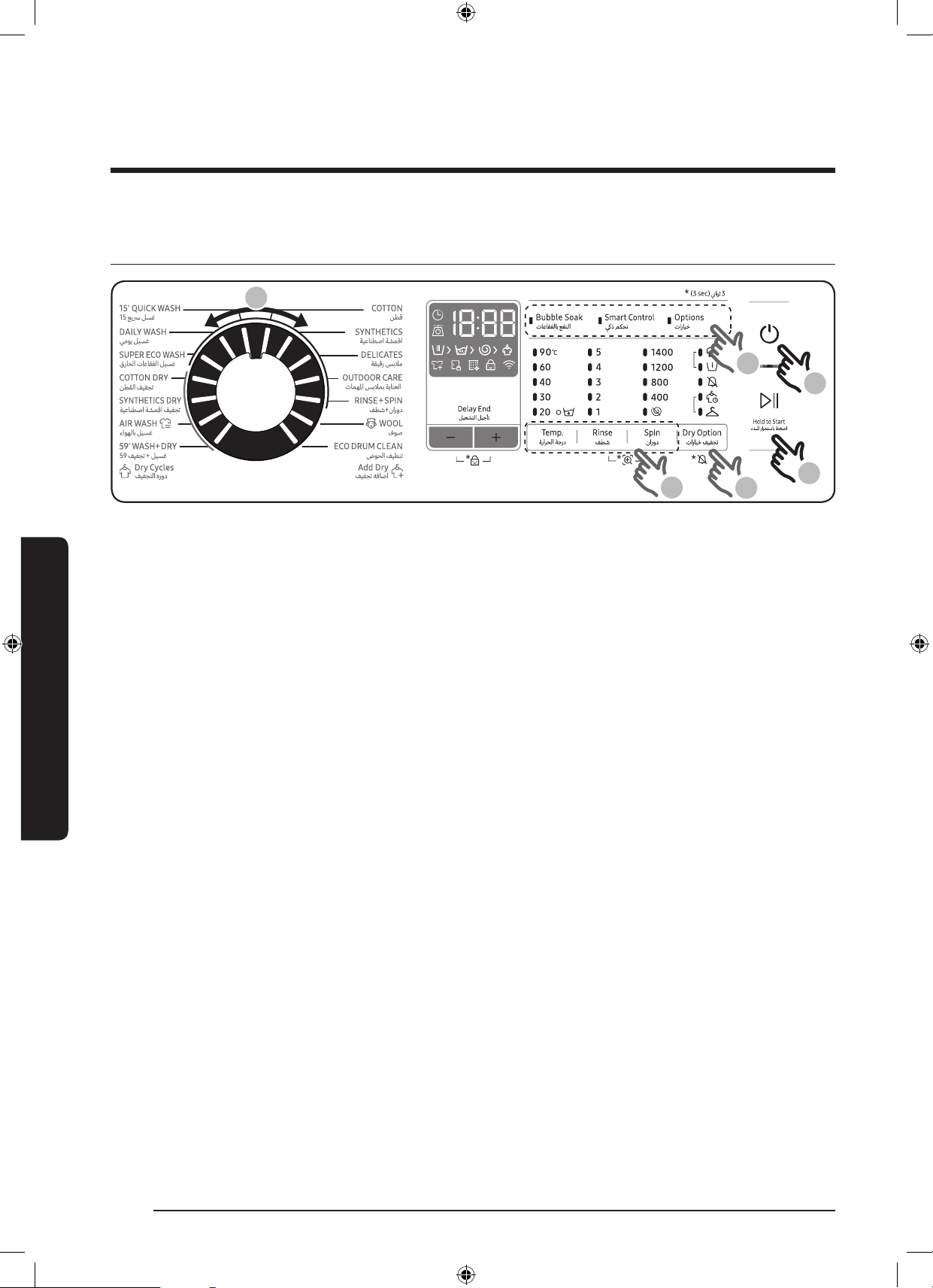
35 ةيبرعلا
اايلمعلا
ءدبلل ةلهسو ةريسم ااحطخ
5
1
6
4
3
2
1 ..ةلاسغلاليغشتل ةقاطلارزىلعطغضا
2 ..ةرودةحولنمةرودلاددح
3 ..ةرورضلايضتقتامقفو)نارودوفطشوةراراةجرد(ةرودلاتادادعإريغ
4 ..بوغراراياءاقتنرزلااذهىلعىرخأةرمطغضا.اارايخ فيفطغضا،امرايخةفاض
5 .طغضا،رايارصنعمادختس.بغرتامبسحباارايخويكذ مك و ااعاقفلاب عقنلانملكلعيرسلوصورارزأثثةلاسغلارفوت
.لباقارزلاىلع
6 ..فقحت/ليغشتىلعطغضلايفرمتساوطغضا
يتا عبتا ،ليغشتلا لخ ةرودلا رييغتل
1 ..ليغشتلافاقيفقحت/ليغشتىلعطغضا
2 ..ةفلتخمةرودرتخا
3 ..ةديدجةرودءدبلفقحت/ليغشترزىلعطغضا
WD10N645R2X_DC68-03976N_AR.indd 35 2018/8/16 19:51:10
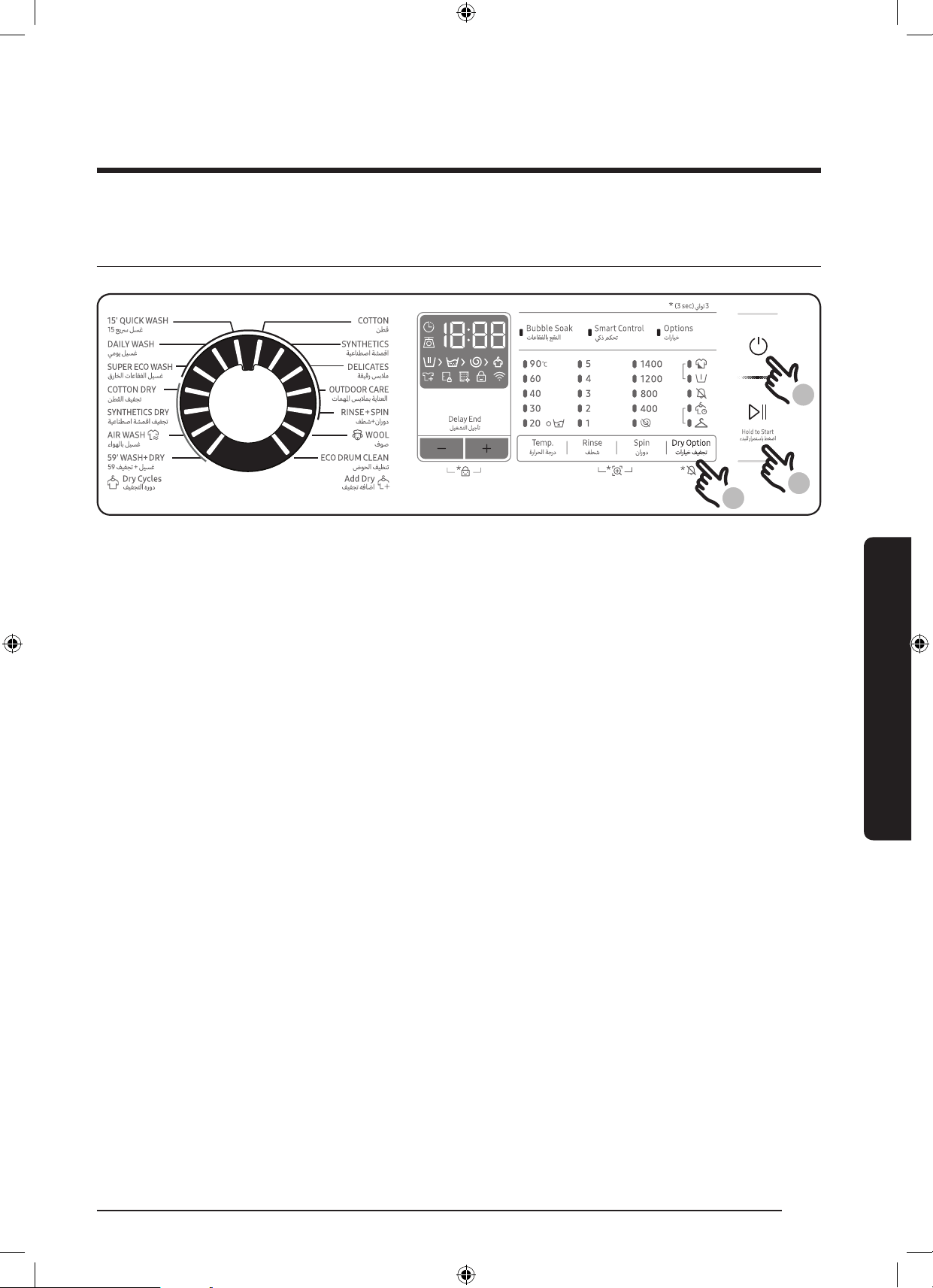
ةيبرعلا 36
اايلمعلا
اايلمعلا
طقف ةفاا سبا
1
3
2
1 ..ةلاسغلايفدوجوا ةقاطلارزىلعطغضا
2 ..بولطافيفجتلاىوتسمطبضتىتحا
ً
رارماارايخ فيفطغضا
3 ..فقحت/ليغشتىلعطغضلايفرمتساوطغضا
يتا عبتا ،ليغشتلا لخ ةرودلا رييغتل
1 ..ليغشتلافاقيفقحت/ليغشتىلعطغضا
2 ..ةفلتخمةرودرتخا
3 ..ةديدجةرودءدبلىرخأةرمفقحت/ليغشترارمتسابطغضا
WD10N645R2X_DC68-03976N_AR.indd 36 2018/8/16 19:51:10
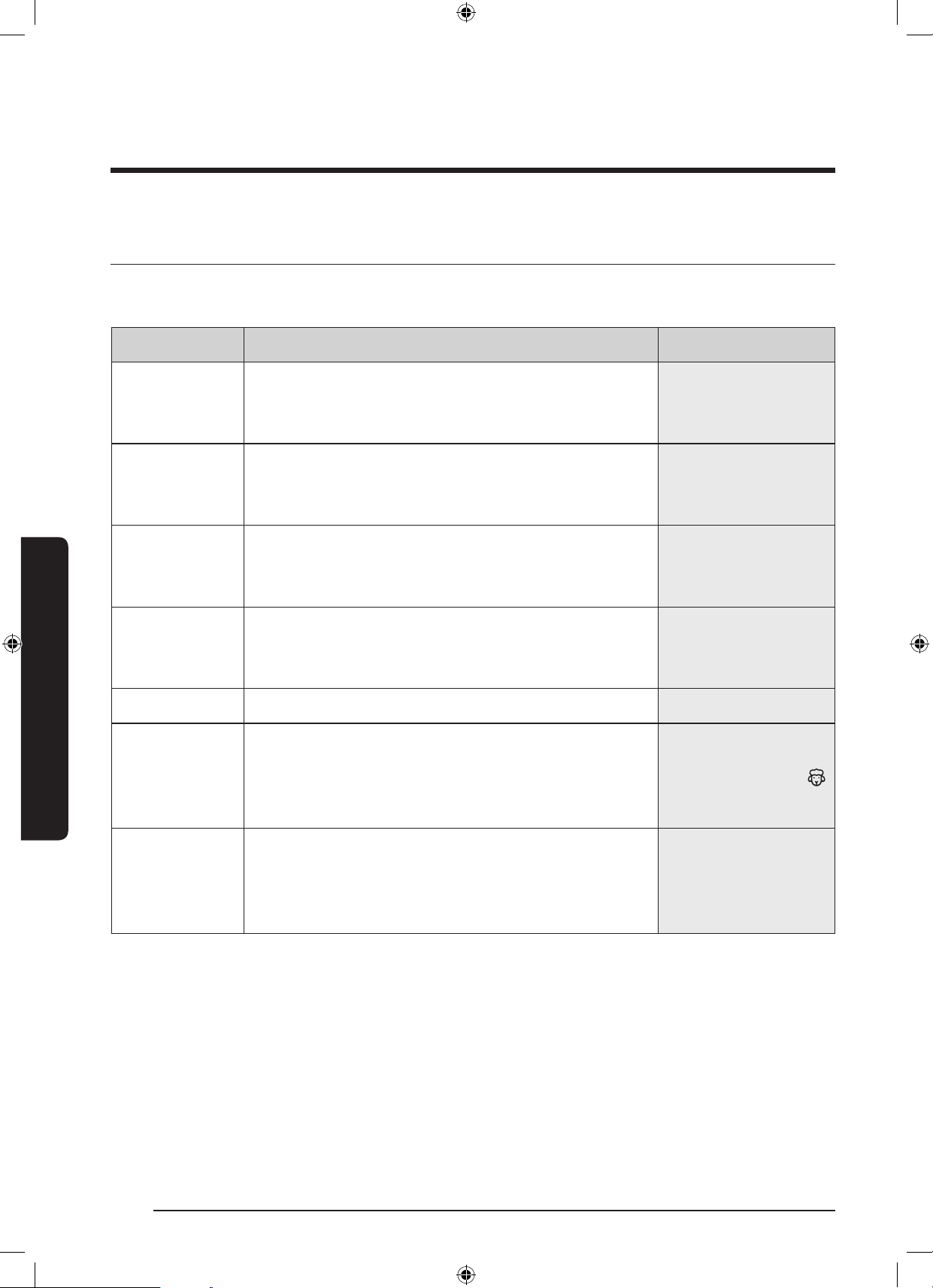
37 ةيبرعلا
اايلمعلا
ةرودلل ةماع ةمؤر
ةيسايقلا اارودلا
اارودفصحلا)مجك( نزو ىصقأ
نطق
ةيلخادلاسباوأةدئااشرافموأريرسلاةيطغأوأةينطقلاسبملل
.ناصمقلاوأفشاناو
.نزولاقفوا
ً
يكيتاموتوأاهليدعتوفطشلاوليسغلاةدمطبضيرجي
ىصقادا
ةيعانطصا ةشمقا
سبانماهريغوخاستاةفيفخوأةطسوتمناصمقلاوأتازولبلل
نولريبلا(ديامايلوبلاةدامو)اريفيرتلاولويدلا(رتسيلوبلانمةعونصا
.ةجسنانمكلذلثا
ُ
اموأ)نولينلاو
4.0
ةقيقر سبم
ةيعانصلافايلاو،زوكسيفلاو،نويارلالثمةساساةشمقل
.ةطلتا
.ةلئاسةفظنمةداممدختسا،جئاتنلالضفأىلعلوصحلل
2.0
تامها سبمب ةيانعلا
نمةعونصاةيضايرلاسباوجلزتلاوقلستلاسبمكلذبسان
ُ
ي
فايلاوددمتلللباقلاشامقلاوةندللافايلالثمةصاختاماخ
ةقيقدلا
2.0
فطش+نارود
.ليسغلاىلعةشمقامعنمعضودعبيفاضافطشلاىلعدمتعيىصقادا
فوص
.مجك2نملقأنازوةلاسغلايفليسغللةلباقلافوصلابصاخ
ةجسنأةيامكلذوءىداهلاعقنلاورزازتهاىلعفوصلاةروددمتعت
.فلتلا/شامكنانمفوصلا
.لدتعمفظنممادختسابىصوي
2.0
ضوحلا فيظنت
.ةيواانمايرتكبلاوخاسوانمصلختلإبةيوااةيصااهذهفظنت
.ضيبموأفظنمعضونودبةلسغ40لككلذذيفنتيرجي
.ةناوطساولخنمدكأت
.ةناوطسافيظنتلةفظنمداوميأمدختست
-
WD10N645R2X_DC68-03976N_AR.indd 37 2018/8/16 19:51:10
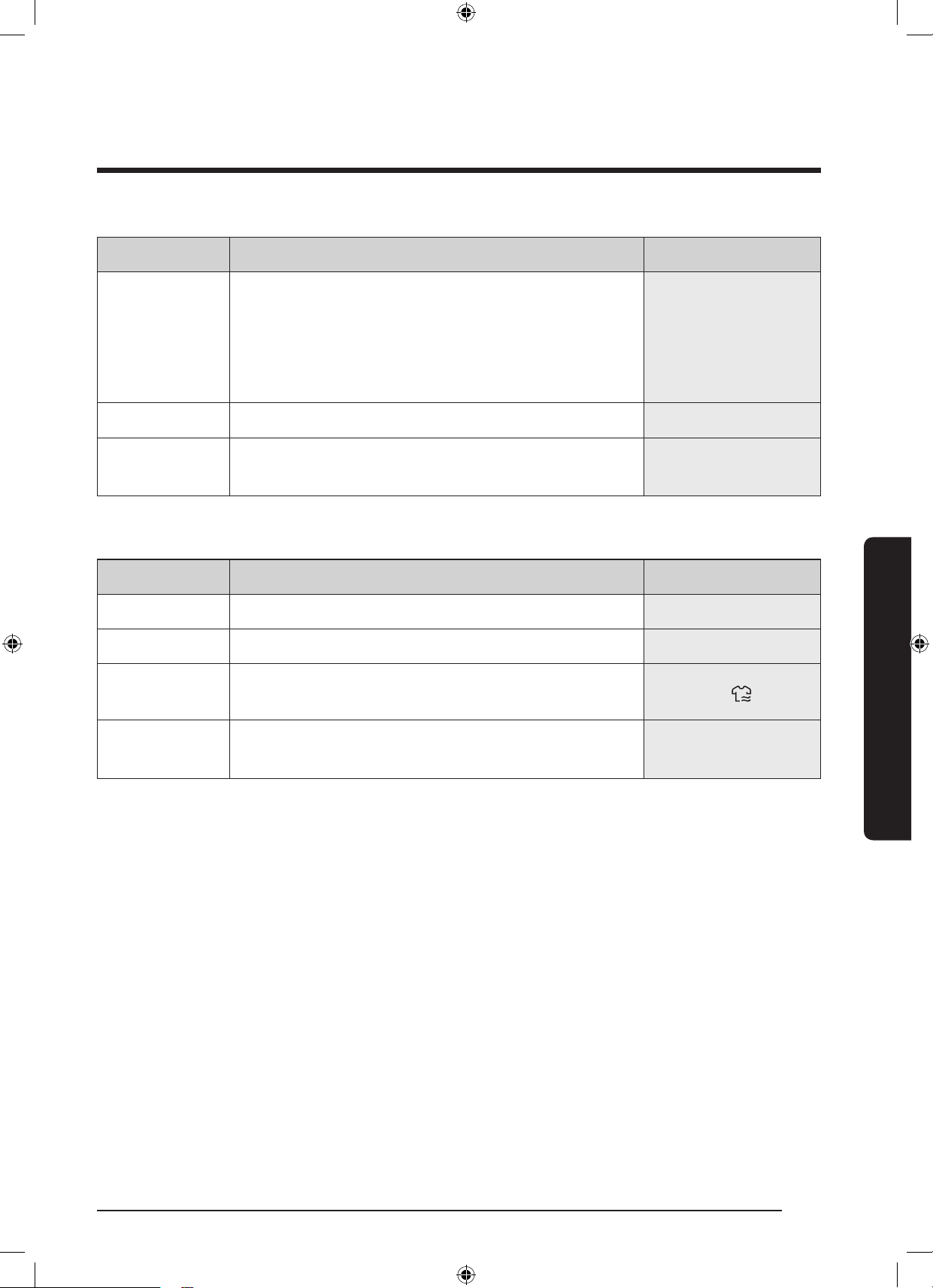
ةيبرعلا 38
اايلمعلا
اايلمعلا
اارودفصحلا)مجك( نزو ىصقأ
15 عي لسغ
.ةعرسباهجاتيتلامجك2.0نملقأنزوبخاستاةفيفخسبالسغل
20نمرثكأمادختسا.تافظنانمامارغ20نملقأمادختسا
.تافظنااياقبكرتيدقتافظنانمامارغ
دحبةلئاسلاتافظنانملم20مادختسا،ةلئاسلاتافظنملل
.ىصقأ
2.0
يموي ليسغ
.ناصمقلاوةيلخادلاسبالثما
ً
يمويمدختستيتلاسبملل4.0
قراخلا تاعاقفلا ليسغ
ةضفخناةراراةجردوذ)تاعاقفلاليسغ(ecobubbleعضومهاسي
.ةقاطلاىلعظافايف
4.0
فيفجتلا هرود
اارودفصحلا)مجك( نزو ىصقأ
نطقلا فيفجت
.ماعلكشبفيفجتلاضارغل6.0
ةيعانطصا ةشمقا فيفجت
.ةراراةجردلةساساسبمللةراراةضفخنمفيفةرود3.0
ءاوهلاب ليسغ
طاأبةرودلاديدصرقليدبت.ةئيسلاحئاورلاةلاز
ً
اديفمجمانربلااذه
:ةيلاتلاليغشتلا
1.0
59 فيفجت+ليسغ
ةشمقاسبمضعبلعيرسلافيفجتلاوليسغللصصخم
.ةيعانصلا
1.0
WD10N645R2X_DC68-03976N_AR.indd 38 2018/8/16 19:51:10
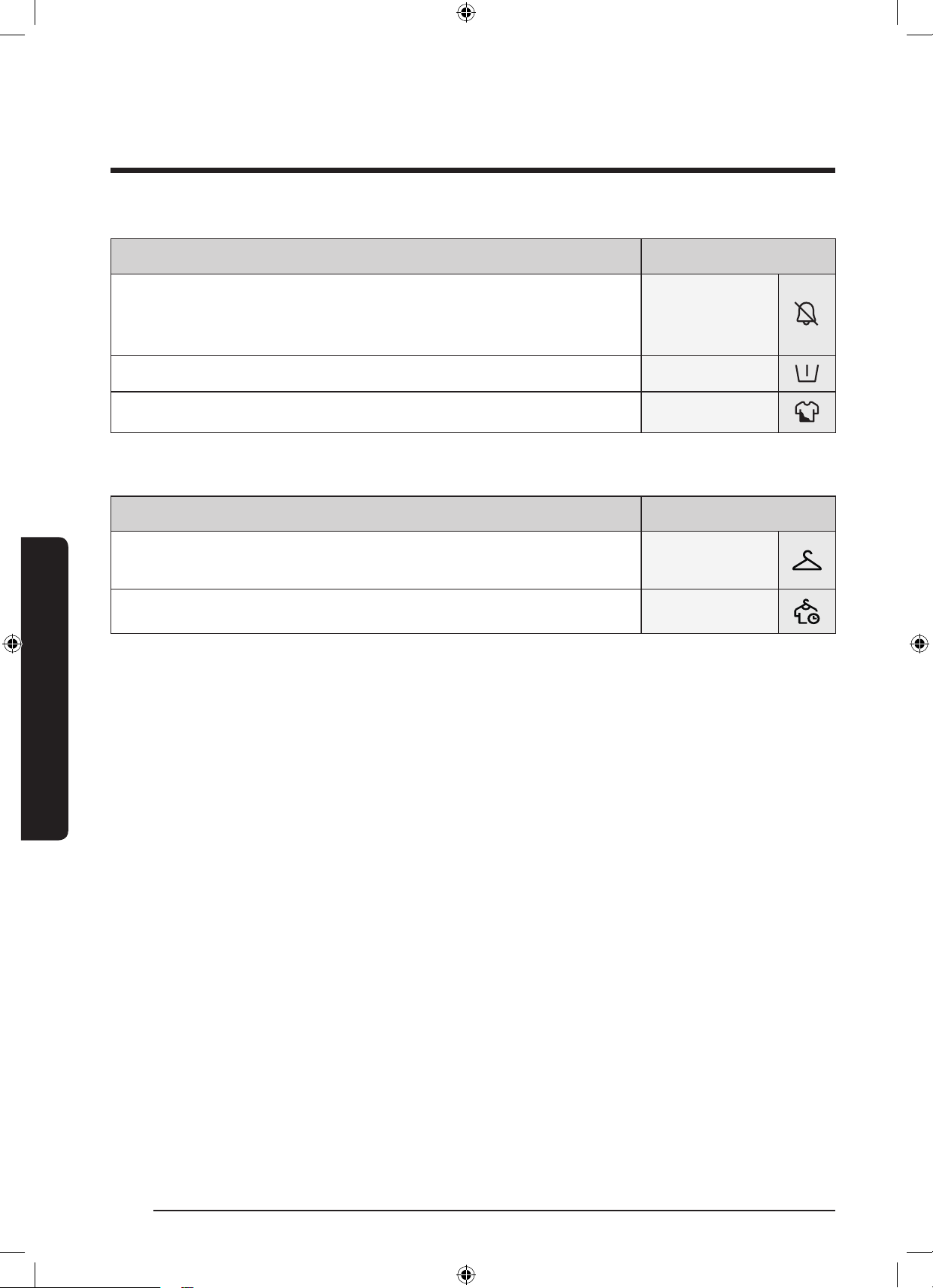
39 ةيبرعلا
اايلمعلا
اارايخ
رايافصحلا
فاقمإ/احصلا ليغشت
احصلا ليغشت
،فاقيإىلعةفيظولاهذهيعتمتيامدنع.ةلاسغللتوصلاليغشتفاقيإوأليغشتكنك
.يئابرهكلارايتلاعاطقناهيبنتو،ةرودلاماإتوصو،AddWashـلهيبنتلاليغشتفقوتيفوس
.ةطشنىرخاتاوصالظت،كلذعمو
يلوأ ليسغ .ةيساساليسغلاةرودلبقةيلوأليسغةرودرايااذهفيضي
فثكم .داتعانملوطأةرودلكليغشتةدمنوكيو.خاستاديدشليسغلل
اارايخ فيف
رايافصحلا
ةنازخ
سبافيفجتلاذهددح.ليسغلانزوومجحنعفشكلابليسغلليئاقلتلافيفجتللددح
.ةينطقلاةيلخادلاسباوناصمقلاونطقلاليوارسلثمةينطقلا
فيفجتلا تقو .ةبوطرلاو،لماو،ةداابسحةددحمةينمزةرتفلليسغلافيفجتلاذهمدختسا
WD10N645R2X_DC68-03976N_AR.indd 39 2018/8/16 19:51:11
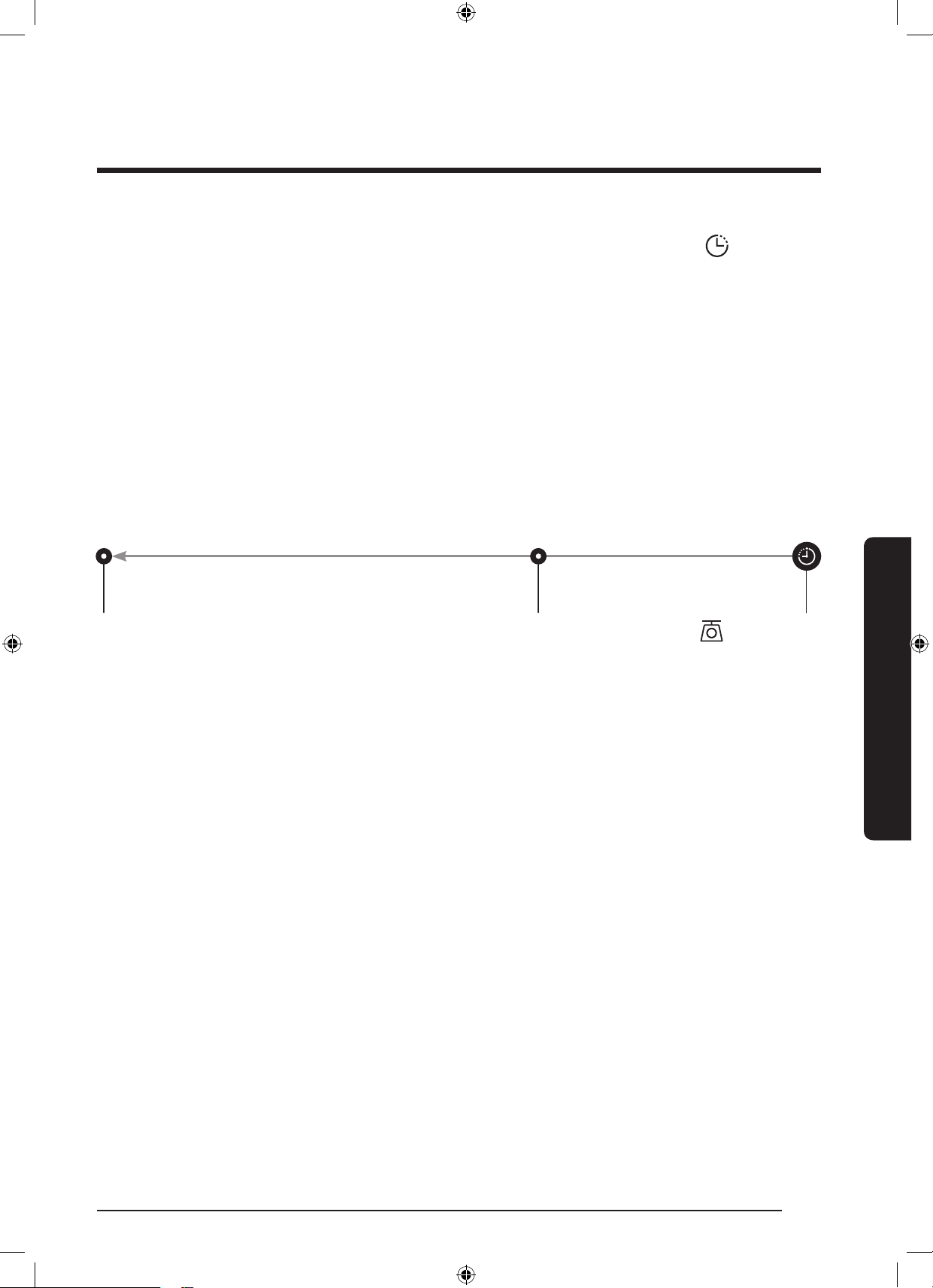
ةيبرعلا 40
اايلمعلا
اايلمعلا
ليغشتلا ليجأت
ةدايزب(.ةعاس24ىتحتاعاس)ةقيقد60(1نمتقولاليجأترايتخابمق،قحتقويف
ً
ايئاقلتليسغلاةيلمعءاهنةلاسغلاطبضكنك
.لسغلاةيلمعنمهيفءاهتنامتييذلاتقولاىلإةضورعاةعاسلاريشت.)ةدحاوةعاس
1 ..ةرورضلاتضتقااذإةرودلاتادادعإريغمث.ةرودرتخا
2 ..بوغراتقولللصتىتحىرخاولتةرم) -/+ ( ليغشتلا ليجأتطغضا
3 .ناكاذإكلذو،نزولالقثبراعشتسضواةلاسغلاريدتوليغشتلاليجأترشؤمضموي.فقحت/ليغشتىلعطغضلايفرمتساوطغضا
.تقولاطبضزاهجليغشتعمدداكتقوضرعتاهنإف،ءاهتنادنع.ةراتاةرودللاقبسمددحملماراعشتسا
4 ..ةقاطلارزىلعطغضلابةلاسغلاليغشتدعأ،ليغشتلا ليجأتءاغل
لاثم
كيلعام.ليغشتلاليجأتراياددح،تقولااذهيفتعاسلاتاذليسغلاةرودلامتكانمدكأتلاديرتو،
ً
ءاسم5ةعاسلاجوراديرتتنكاذإ
يهتنتو
ً
ءاسم3:00ةعاسلايفلمعلابةلاسغلاأدبتس.
ً
ءاسم2:00ةعاسلايففقحت/ليغشتىلعطغضلاوتاعاس3ةددادعاديدىوس
.هاندألاثااذهتيقوتحضوييذلاينايبلامسرلاىلععطاىجري.
ً
ءاسم5:00ةعاسلا
م 02:00
تاعاس3ىلعليغشتلاليجأتطبضا
م 03:00
أدبإ
م 05:00
ةياهن
لمارعشتسم
زمرلاضموي،ةرودلاءدبدرج.لماراعشتساتارودلاضعبمعدتار.لماراعشتسامعدتةرودددامدنعلماراعشتسازمرءيضي
.ةيلمعلالامتكادنعئفطنيو،لماراعشتساةيلمعءانثأائيضملظيوأ
WD10N645R2X_DC68-03976N_AR.indd 40 2018/8/16 19:51:11
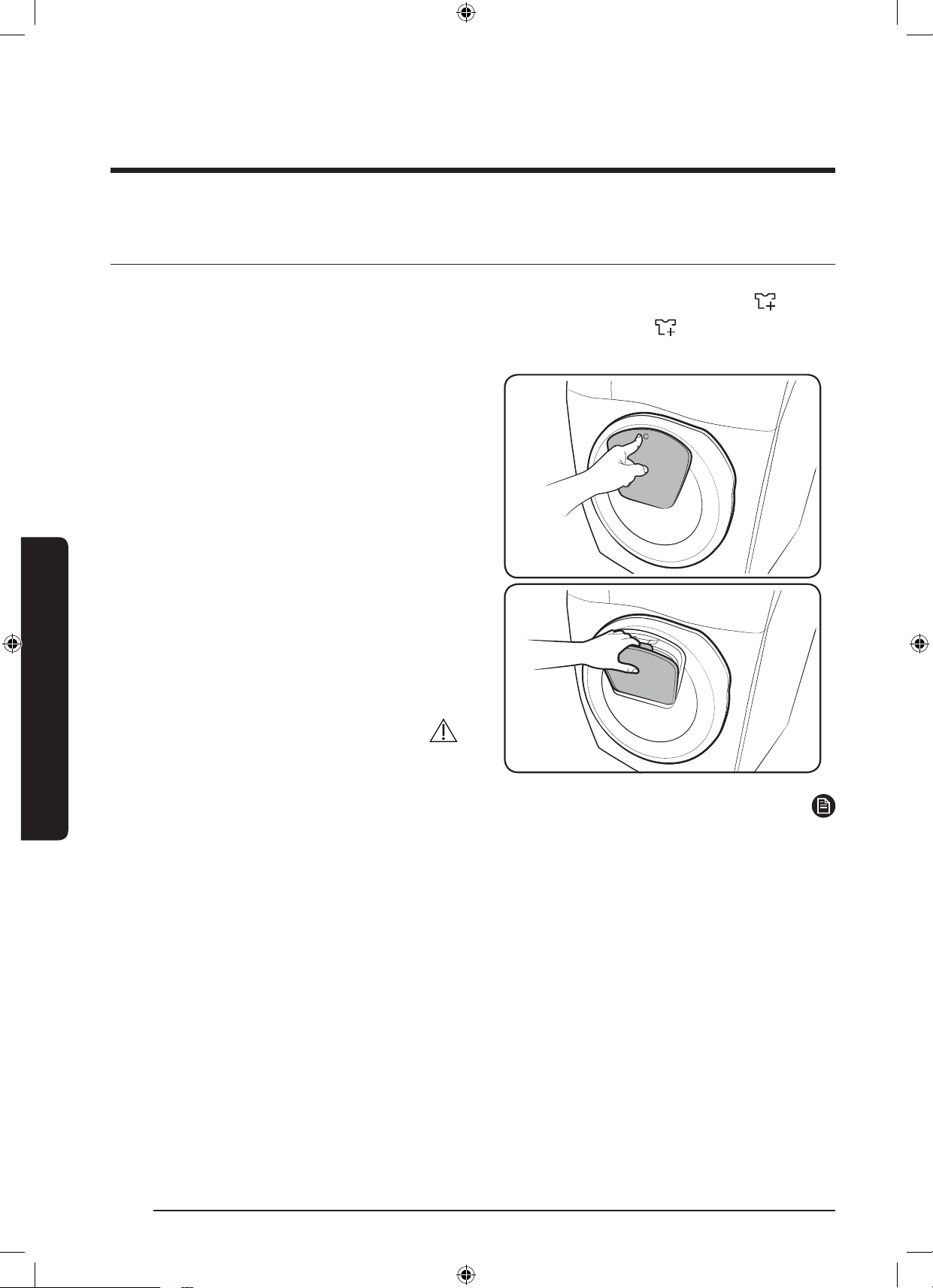
41 ةيبرعلا
اايلمعلا
ةصاخ اازيم
AddWash
رثكأبAddDoorحتفيو.ليسغلاةيواحيفمعنموأيفاضإليسغعضووةلاسغلاليغشتفاقيإكنك
ُ
، AddWashرشؤمءيضيامدنع
.ةلاسغلاعملماعتلاولوصولاةلوهسلةجرد130نم
1 ..ليغشتلافاقيفقوت/ليغشتيلعطغضا
2 .توصعمستىتحAddDoorنميولعلاءزاىلعطغضا
.حتفيلAddDoorضبقمبحسا.حتفيلةفيفخةقطقط
3 .ةيواحيفمعناوأيفاضاليسغلافضأمثAddDoorحتفا
.ليسغلا
4 .ةقطقطتوصعمستىتحAddDoorلفقىلعطغضا
.ةفيفخ
5 ..ليغشتلاةلصاوفقوت/ليغشتىلعطغضا
هيبنت
.رسكللةضرعاهنإ.ةدشبAddDoorىلعطغضت
ةظحم
نمبرستتاهنكلةذفانلالوحءاانمتارطقعمجتتدق.ا
ً
ميلسا
ً
مكحما
ً
قلغAddDoorقغإةلاحيفةيواالخاددوجواءاابرتسي
.ةيواا
WD10N645R2X_DC68-03976N_AR.indd 41 2018/8/16 19:51:11
ةيبرعلا 42
اايلمعلا
اايلمعلا
هيبنت
.AddDoorىوتسمزواجتياةيواايفةدئازلانوباصلاةلاسغتلكشتاذإAddDoorحتفت
دنعدصقنودAddDoorحتفنكهنأةظحمىجر
ُ
ي.
ً
وأفقحت/ليغشتىلعطغضلانودةلاسغلالمعءانثأيفAddDoorحتفلوا
.فقحت/ليغشتىلعطغضلانودكلذو(ليسغلاماإ
.ا
ً
بلسهرثأتوأةلاسغلاءادأفعضكلذببسيدق.AddDoorلخنما
ً
دئاز
ً
محفيضت
.اهبكعباصأرشدق.ضبقمكAddDoorنمةيلفسلاةقطنامدختستو
.AddDoorيفةقلاعريغسبانأدكأت
.AddDoorةصاخبوةلاسغلانعةفيلاتاناوياداعبإىلعصرحا
اهببسوةيعيبطةلأسمهذهو.AddDoorقلغوحتفدعبءاابرسيهنأولامكAddDoorودبي،ليسغلايفئفادلاءاامادختسادنع
.حطسلاىلعءامتارطقنوكتمثنموAddDoorنمجرااراخبلافثكتوهةطاسبب
ءاانمضعب-بابلالوحءامللا
ً
برستودبيءاضرعتتدقكنإفكلذعمو.ءاابرستيوا
ً
مكح
ُ
منوكيبابلانإفAddDoorقلغدنعامأ
.يعيبطرمأاذهو.ءامتارطقنوكيدقAddDoorلوحيقبتا
ةيواايفءااىوتسمناكاذإكلذكو.AddDoorوأيسيئرلابابلاحتفنكهنإف،ةيوئمةجرد50نمىلعأءااةرارحةجردتناكىتم
.يسيئرلابابلاحتفنكهنإفعمةطقننمىلعأ
.ةعبتاتاوطاةفرع"اامحلعا داحكأ"مسقةعجارمىجر
ُ
ي،ضرعلاةشاشىلعDDCدوكلارهظاذإامأ
.برستلاببستدقAdddoorلافقألوحوأىلعتافظناوأاياقبلاف.تاقواةفاكيفهبةطياقطاناوAdddoorةفاظنىلعظفاح
WD10N645R2X_DC68-03976N_AR.indd 42 2018/8/16 19:51:12
43 ةيبرعلا
اايلمعلا
اادادعإ
لافطا لفق
ةفيظوقلغت،لافطاثبعنعةلمتاثداوانمةياقولاوةيامحلل
.ةقاطلاادعاماهلكرارزالافطالفق
لافطالفقطيشنتل
رايخنم(+و-ىلعرارمتسابطغضا،يوديلاعيزوتلازرطعم
/ليغشترارمتسابطغضا،مث.ناوث3ةداعم)ليغشتلاليجأت
.لافطالفقرشؤمءيضيوبابلالفقني.طيشنتللفقحت
اتقؤملافطالفقةفيظولمعفاقي
ليجأترايخنم(+و-ىلعرارمتسابطغضا،يوديلاعيزوتلازرطعم
.ناوث3ةداعم)ليغشتلا
ةظحم
لفقطيشنتءاغلإدعبرثكأوأةدحاوةقيقدةدبابلاحتفدنع
.تقيقدىلإلصتةدراذنإقلطنيفوسف،لافطا
وبابلالفقطيشنتمتي،تقيقدلخبابلاقغإبتمقاذإ
متيملوأبابلاقغإبمقتملاذإ.لافطالفقطيشنتداعي
.تقيقدةدراذنالظي،حيحصلكشببابلاقغإ
لفقءاغلإبوأمق،لافطالفقطيشنتدعبسبمةفاض
.ةلاسغلاليغشتةداعإوألافطا
لافطالفقءاغل
رايخنم(+و-ىلعرارمتسابطغضا،يوديلاعيزوتلازرطعم
مث،لافطالفقليطعتلناوث3ةداعم)ليغشتلاليجأت
ئفطنيوبابلاحتفني.هئاغلناوث3ةدىرخأةرمرارزاطغضا
.لافطالفقرشؤم
احصلا ليغشت فاقمإ/احصلا ليغشت
يعتمتيامدنع.ةلاسغللتوصلاليغشتفاقيإوأليغشتكنك
،AddWashـلهيبنتلاليغشتفقوتيفوس،فاقيإىلعةفيظولاهذه
لظت،كلذعمو.يئابرهكلارايتلاعاطقناهيبنتو،ةرودلاماإتوصو
.ةطشنىرخاتاوصا
.ناوث3ةداارايخ فيفرارمتسابطغضا،توصلامتكل
.ناوث3ةدىرخأةرمرارمتسابطغضا،توصلامتكءاغل
ليغشتةداعإدعبةطشناهلاحىلعلظتوتدادعايرست
.ةلاسغلا
WD10N645R2X_DC68-03976N_AR.indd 43 2018/8/16 19:51:12
ةيبرعلا 44
اايلمعلا
اايلمعلا
ةفاا ةرودلا مادختسا
.ةءافكلانمديزاهفيفوةقدرثكأفيفتقوضرعلةلوسغاسبانزوديدىلعفيفجتلاتارايخعيمجلمعت
.ةبوغراةبوطرلاوهتيمكوليسغلاعونىلعءانببسانافيفجتلارايخرايتخهاندأحضوالوداعجار
عضحلافيفجتلا رايخمادختسا
)مجك( ةلحما
نطقلا فيف
ةشمقا فيف
ةيعانطصا
فيفجتلا
يكيتامحتوا
ةنازا فيف
سباو ناطقا لثم ليسغلا فيفجتل مدختس
ُ
م
.ناتكلاو ةيلخادلا
مجك 6مجك 3
يوديلا فيفجتلا
يتقحلا فيفجتلا
ةدم لخ ليسغلا فيفجتل رايا اذه مدختسا
ليسغلا ةيمك وأ ليسغلا فايلأ ىلع ءانب ةددحم
.ةبحطرلاو
.قئاقد 270 ~ 30
.)ةقيقد 30 لصافب(
.قئاقد 270 ~ 30
.)ةقيقد 30 لصافب(
ةظحم
ةيمكوعونوليسغلاةرودل
ً
اقفوفيفجتلاجئاتنتوافتتدق
.ةلوسغاسبا
ةعرسديدمتيس،فيفجتلاوليسغلاتارودديدلاحيف
.فيفجتلاةيلاعفةدايزل
ً
ايكيتاموتوأرصعلا
ددح
ُ
مردأ،يوديلاليسغلادعبليسغلافيفتبغرلاحيف
لوصحللفيفجتلارايخرتخامثرصعلارودرايتختاعرسلا
.ءادألضفأىلع
ىلعسباحطسنمرابغمكارتيدق،فيفجتلاةرودماإدنع
.سباديعنودلوحييذلايكلاريثأتببسببابلاةبلج
هتلازإكنك
ُ
وأ.ةيلاتلاةلسغلايفرابغلااذهلسغيرجيسو
.ةللبمةفشنموأةللبمشامقةعطقب
هيبنت
ىلعرولكلاضيبمعضودعبفيفجتلاةيصاخمدختست
مازتلامدعببس
ُ
يدق.فيفجتلاةرودوأليسغلالخليسغلا
.اهفلتوأسباناولأعايضهيونتلااذهب
ةعونصموأءارفلاتاذسبمللفيفجتلاةيصاخمدختست
.فيفجتلاةيصاخىوتسمعجارتكلذببس
ُ
يدق.كيليركانم
ةيلمعءانثأةلاسغلاحطسوألخادلانمضواسمدعبجي
اذهنعجتنيدق.هترارحةجردعافتر
ً
ةرشابماهدعبوأفيف
.قورابةباصارما
WD10N645R2X_DC68-03976N_AR.indd 44 2018/8/16 19:51:12
45 ةيبرعلا
اايلمعلا
59 فيف+ليسغ
.ا
ً
عمرس اهفيفو اهلسغب بغرت يتلاو مجك 1 نم لقأ نزحب خاستا ةفيفخ سبا لسغب صاخ
ةظحم
.اهيطختنك.ةيلواةميقلاىلعفيفجتلاةفيظويعتمتي
.رتسيلوبلا/نطقلاطيلخنمناصمق4لثم،مجك1.0نملقأةريغصلالامحالسغلمدختست
فيفجتلةيراكيدلتسيلمثنمو،ةضفخناةراراتاجرديفىتحفلتتدقاهننامأباهفيفنكيتلاسباليسغبنبجي
.ليسغيأ
.ليسغلاتقولوطيدق،رفوتاءااطغضريغتامدنع
.رتسيلوبلا/نطقلاطيلخنمناصمق4 ~ 3لسغتنأبكيصون،ةرملوليسغلا
.اهقارتحالهسييتلافشانا،كيليركاةدامنمةعونصاسبا،ةمعانلاةيضايرلاسبا
.ةراراةجردضفقئاقدعضبليسغلاتقوديدنك،تقولانمةدحاوةقيقدءاقبعمةناوطسلةيلخادلاةراراةجردعافترادنع
.زاهجللةيجرااةراراةجردعفترت،فيفجتلاةيلمعليغشتدنع
ةبسنتناكاذإ(تاجوسنابطلاةبسنلهاندأينايبلامسرلاىلإعجرا،مارجوليك1.0نملقليسغلاىلعةرودلاهذهدمتعت
:)فيفجتلاءادأسنك،ططايفطلاةبسننمىلعأرتسيلوبلا
ليسغللهبىصوالماليسغلانزوتاجوسنمللطلاةبسن
رتسيلوبلا/نطقلاطيلخنمناصمق4 ~ 3ا
ً
بيرقتمارغ800%35-نطق،%65-رتسيلوب
WD10N645R2X_DC68-03976N_AR.indd 45 2018/8/16 19:51:12
ةيبرعلا 46
اايلمعلا
اايلمعلا
SmartThings
يكلسلاصتا
.)AP(لوصولاةطقنددحويكلسلالاصتاليغشتبمقوتادادعاىلإلقتنا،يكذلاكفتاهىلع
ةظحم
.ةينكسلاقطاناعيمجيفهمادختسانكو،)بةئف(طقفيلزنامادختسلممصمزاهااذه
نمعونيأريفوتزاهااذهلبيكرتلابةمئاقلاوأةعنصاةهاعيطتستو،يكلسلخادتثودحيفزاهااذهببستيدق
.ةيئاقولاتاءارجا
ةدمتعاريغتوكوتوربلاوأاثيدحةعوضواةيكلسلاتوكوتوربلا.WPA2/AESوWPA/TKIPيهاهبىصواريفشتلالئاسو
.ةموعدمتسيل
.ةطياةيكلسلاةئيبلابةيكلسلاةكبشلالابقتساةيساسحرثأتتدق
ةلاسغنإف،مئادلامادختسلمدواةدحووأكبصاارتويبمكلازاهMACناونعليجستبتنرتناةمدخبكدوزمماقاذإ
.تنرتناةمدخدوزلصتاف،ةلاايههذهتناكاذإ.تنرتنابلاصتايفلشفتكبةصااوسماس
.تنرتناةمدخدوزلصتاف،كلذثدحاذإو.تنرتنابكلاصتاتنرتناىلعةيامارادجعطقيدق
.ةئزجتلارجاتوأيلاوسماسةمدخزكرلصتاف،تنرتنابكدوزمريبادتعابتادعبتنرتنالشفرمتسااذإ
.هيجوتلازاهجمادختساليلدىلإعجرأ،ةيكلسلاوةيكلسلاهيجوتلاةزهجأتيبثتل
.زترهاغيغ2.4ةيكلسلاتوكوتوربلاوسماسةلاسغمعدت
)IEEE802.11n(نسحتسانم(.Soft-APتوكوتورب،)زترهاغيغ2.4(IEEE802.11b/g/nوسماسةلاسغمعدت
.وسماسةلاسغبلاصتايفدمتعاريغيكلسلاويكلسلاهيجوتزاهجلشفيدق
ليزنت
نعثحبلابSmartThingsقيبطتنعثحبا،)SamsungGalaxyAppsو،AppleAppStoreو،GooglePlayرجتم(تاقيبطتلاقاوسأيف
.هتيبثتوكزاهجىلعقيبطتلاليزنت.”SmartThings“تاملك
ةظحم
ماظنبةلماعلاوسماسةزهجأو،ىلعأوأ)Marshmallow(6.0 AndroidماظنبةلماعلاىرخاةزهجاىلعرفوتمSmartThingsقيبطت
.)ثدحأوأ6نوفيآزاهانوكينأبجي،نوفيآةزهج(.ىلعأوأ10.0 iOSماظنبةلماعلاiOSةزهجأو،ىلعأوأ)Lollipop(5.0 Android
.)NoteوGalaxySةلسلس(ةيكذلاوسماسةزهجأىلعقيبطتلانوكياملضفأ
.ىرخاةزهجاىلعفلتخملكشبقيبطتلاماهمضعبلمعتدق
.ءاداسحتلقبسمراعشإنودرييغتللةضرعقيبطتلا
WD10N645R2X_DC68-03976N_AR.indd 46 2018/8/16 19:51:12
47 ةيبرعلا
اايلمعلا
لوخدلاليجست
.قيبطتلايفتاداشراعبتا،وسماسىدلديدجباسحءاشن.وسماسىدلكباسحبSmartThingsىلإلوخدلاليجستبجيوأ
.كبصاخباسحءاشنلصفنمقيبطتىلإجات
ةظحم
لوخدلانولجسيةلجساةيكذلاوسماسفتاوهومدختسم.لوخدلاليجستلباسااذهمدختسا،وسماسىدلباسحكيدلناكاذإ
.ايئاقلت
SmartThingsىلعكبصاازاهاليجستل
1 .ليغشتبمقو)اادادعإ( Settingsىلإلقتنا،صتمزاهانكيملاذإو.ةيكلسلاصتاةكبشبلصتميكذلاكفتاهنأنمدكأت
.)AP(لوصولاةطقنددحويكلسلالاصتا
2 ..يكذلاكفتاهىلعSmartThingsليغشتلددح
3 ..)ةفاضإ( Addددح،".ديدجزاهجىلعروثعلا"ةلاسررهظتامدنع
4 .،ةمئاقلايفةجردمكتلاسغنكتملاذإ.ةرفوتاةزهجاةمئاقنمكبةصااةلاسغلاددحو+ددح،ةلاسريأروهظمدعةلاحيف
.ايوديكتلاسغفضأمث،)عم زاهج زارط( Specic Device Model>)زاها عحن( Device Typeددح
5 ..يلاتلاوحنلاىلعSmartThingsقيبطتيفكتلاسغلجس
a ..وسماسىدلكباسحمادختسابSmartThingsىلإلوخدلاليجستبمق
b ..يكلسلالاصتال
غش
c ..SmartThingsـبكبةصااوسماسةلاسغلاصتانمدكأت.SmartThingsىلإكبةصااوسماسةلاسغفضأ
d ..يكذلافتاهلاىلعكبةصااةلاسغلارهظت،ليجستلانمءاهتنادنع
ةلاسغلاقيبطت
.لقنتلاءانثأوألزنايفءاوساهيفمكحتلاوكتلاسغةبقارمكنك:لماكتممك
.ةلاسغلاةحفصرهظت.SmartThingsىلعةلاسغلازمرددح
.رماجاتحااذإتادادعاوأتارايارييغتبمقو،ةلاسغلابةطبتراتاراعشاوألمعلاةلاحنمقق
WD10N645R2X_DC68-03976N_AR.indd 47 2018/8/16 19:51:13
ةيبرعلا 48
اايلمعلا
اايلمعلا
SmartThings
فينصتلاصحفلا ةطقنفصحلا
ةبقارا
ليسغلاةلاح.ةرودلليقبتاتقولاو،اهتارايخوةيلااةرودلانمققحتلاكنك
يكذمك.ةلاسغليكذمكةلاحراهظإمتي
يتاذلاققحتلا.داتعملكشبةلاسغلالمعنمققحتللرايااذهمدختسا
ةقاطلاةبقارم.ةقاطلاكهتساةلاحةبقاررايااذهمدختسا
مكحتلا
ءاغلإ/فقوت/ءدب
ءدبلءاغلإ/فقوت/ءدبددحمثنمو،ةبولطاتاراياوةرودلاددح
.ةيلااةيلمعلاءاغلوأ،اتقؤمفقوتللوأ،ةيلمعلاليغشت
يتضفم
يتضفمىلإرركتملكشبةمدختساتاراياوتارودلافضأ
.قحتقويفاهمادختس
ااهيبنتلا
ةرودلات.ةيلااةرودلالامتكابكملعي
)طقفةحاتازرطلا(AddWashراذنإ.ديدجلمحةفاضإبكملعي
)طقفةحاتازرطلا(ةيقبتاسباليسغ.ةرودلالامتكادعبةكورتمسبميأبكملعي
Q-Rator
*ليسغلاةفصو
ىلعلوصحللخاستاةجردونوللاوجيسنلاعونديدكنك
ىلعاهأدبتنأكنكيتلاليسغلاتارودواهبىصواتارايا
.روفلا
*ليسغلاططخم
.اهماإىتحليسغلاةرودلبولطاتقولاطبضكنك
اهبىصواةرودلاىلعلصفوس،بولطاتقولايعتدعب
ةرودلاءدبكنكو،هنييعتبتمقيذلاتقولايفيهتنتسيتلاو
.اهظفحوأاهبىصوا
*HomeCareجلاعم
يتلاةدايفزاهاليغشتعضوليلعما
ً
مظنما
ً
ريرقترفوي
.)رهش/عوبسألك(مدختسااهنيعي
،كمادختساطنمققحتلليداعلاريرقتلااذهمادختساكنكو
.نمزلانمةددحمةرتفل**ةقاطلاكهتساو،ةنايصلاتابلطتمو
.iOSوAndroidىلعحاتموهو،’SmartThings‘بلطتي*
.ليجستلانمدب
.طقفةيداشرتساجئاتنلا**
WD10N645R2X_DC68-03976N_AR.indd 48 2018/8/16 19:51:13
49 ةيبرعلا
اايلمعلا
حوتفاردصانعإ
نمتاونسثثةدانمةلباقمةلماكةيردصمةيرفشةخسنىلعلوصاكنك
ُ
.ردصاحوتفمجمانربنوكيجتنااذهيفدارولاجمانربلانإ
[email protected]:ينورتكلاديربلاىلعانتلسارمربعكلذوجتنمللنحشرخأخيرات
.ةلااهذهلثميفطيسبمسربلطيوجمدمصرقلثميدامطيسويفردصمدوكىلعلوصانكمانمكلذكو
ةحاتاردصادوكلاليمةحفصىلإURL:http://opensource.samsung.com/opensource/SMART_AT_051/seq/0يلاتلاطبارلالصي
.ةمولعااذههغلبتصخشيرفوتموحاتمضرعلااذهو.جتنابةلصلاتاذةحوتفاةصخرلاتامولعمو
ةظحم
يبورواداانعلماكلاصنلا.2014/53/EUهيجوتللعضاخوهو،ويدارلاتادعمعوننمزاهانأتاينورتكللوسماسحرصت،كلذبجو
ىلإلقتنا،http://www.samsung.comيفقفاوتلليمسرلانعاىلععطانكو:تنرتناىلعيلاتلاناونعلاىلعحاتمةقباطابصاا
.زارطلامسالخدأو)جتنامعدثحب(SearchProductSupport>)معدلا(Support
زترهاغيغ2.472-زترهاغيغ2.412يفطاويليملبيسيد20:يكلسلالاسراةوقلىصقادا
WD10N645R2X_DC68-03976N_AR.indd 49 2018/8/16 19:51:13
ةيبرعلا 50
ةنايصلا
ةنايصلا
.يضارتفااهرمعىلعظافاوءاداىوتسمضفخنيىتحةفيظنةلاسغلاىلعظفاح
ضحا فيظنت
.يطاطابابلاقوطنمةمكارتاخاسواليزتا
ً
ضيأةرودلاهذه.ايرتكبلانمصلختلاوةناوطسافيظنتلمظتنملكشبةرودلاهذهذفن
1 ..ةلاسغلاليغشتل ةقاطلارزىلعطغضا
2 ..ضحا فيظنترايتخةرودلاددح
ُ
مردأ
3 ..فقحت/ليغشت ىلع طغضلا يف رمتساو طغضا
ةظحم
.هرييغتنك
ُ
وسويزلسةجرد70ىلعددح
ُ
مضحا فيظنتيفهاياةرارحةجردنإ
هيبنت
.ا
ً
بلسليسغلاءادأىلعرثؤتةناوطسابةيقبتاوةبسرتاةيئاميكلاداوانإ.ةناوطسافيظنتلةفظنمداوميأمدختست
ضوافيظنتريكذتلاهبنم
.ماظتنابضحا فيظنتذيفنتبحصني.ليسغةرم40لكةيسيئرلاةشاشلاىلعضحا فيظنتريكذتلاهبنمرهظي
ةرمرهظيريكذتلانإفكلذعمو.ةعباسلاةلسغلانم
ً
ءدبريكذتلااذهرهظيو.ةعباتتمتارم6هلهاكنك
ُ
،ريكذتلااذهىرتامدنع
.ةيلاتلاعبراةلسغلادنعةيناث
WD10N645R2X_DC68-03976N_AR.indd 50 2018/8/16 19:51:13
51 ةيبرعلا
ةنايصلا
)يكذلا صحفلا( Smart Check
يذليابوازاهجىلعهتبثوApple StoreوأPlay StoreنمSamsung Smart Washer قيبطتليزنتةيادبعتي،ةفيظولاهذهلمعكمتل
.اريماكلاةيصاخ
تيدوا()نوفيأويسكاج(Galaxy&iPhoneةلسلسعمصوصاهجوىلعقفاوتيل)يكذلاصحفلا(Smart Checkقيبطتريوطتىرج
.)طقفةموعدا
1 .صحفلا(Smart Checkعضوىلإلوخدلل.ضرعلاةشاشىلعيتامولعمزمررهظي،صحفلاىلإجاتحيرمأةلاسغلافشتكتامدنع
.ناوث3ةداعمنارودوفطشىلعطغضلايفرمتساوطغضا،)يكذلا
2 ..تدجونإتامولعاداوكأضرعتويتاذلاصيخشتلاءارجإبةلاسغلاأدبت
3 ..)يكذلاصحفلا(Smart CheckىلعطغضاوصااليابوازاهجىلعSamsung Smart Washerقيبطتلغش
4 .دوكىلعا
ً
يكيتاموتوأقيبطتلافرعتيانهو.امهضعبةلاسغلاوليابوالباقيثيحبةلاسغلاضرعةشاشةحولنما
ً
بيرقليابوازاهجعض
.تامولعا
5 .تاوطاىلإةفاضابةلكشالوحةلصفمتامولعمقيبطتلاضرعي،ا
ً
ميلسا
ً
حيحصا
ً
فرعتتامولعادوكىلعفرعتلايرجيامدنع
.ةمئاةيحيحصتلا
ةظحم
.ةغللاءانب)يكذلاصحفلا(Smart Checkمسافلتخيدق
.ضورعادوكلاىلعفرعتلايفقفخيدققيبطتلانإف،ةشاشلاىلعا
ً
يوقا
ً
ءوضسكعتةلاسغلاتناكاذإ
.قيبطتلاةشاشىلإا
ً
يوديدوكلالخدأ،)يكذلاصحفلا(Smart Checkدوكىلعفرعتلايفقيبطتلاقفخأاذإ
WD10N645R2X_DC68-03976N_AR.indd 51 2018/8/16 19:51:13
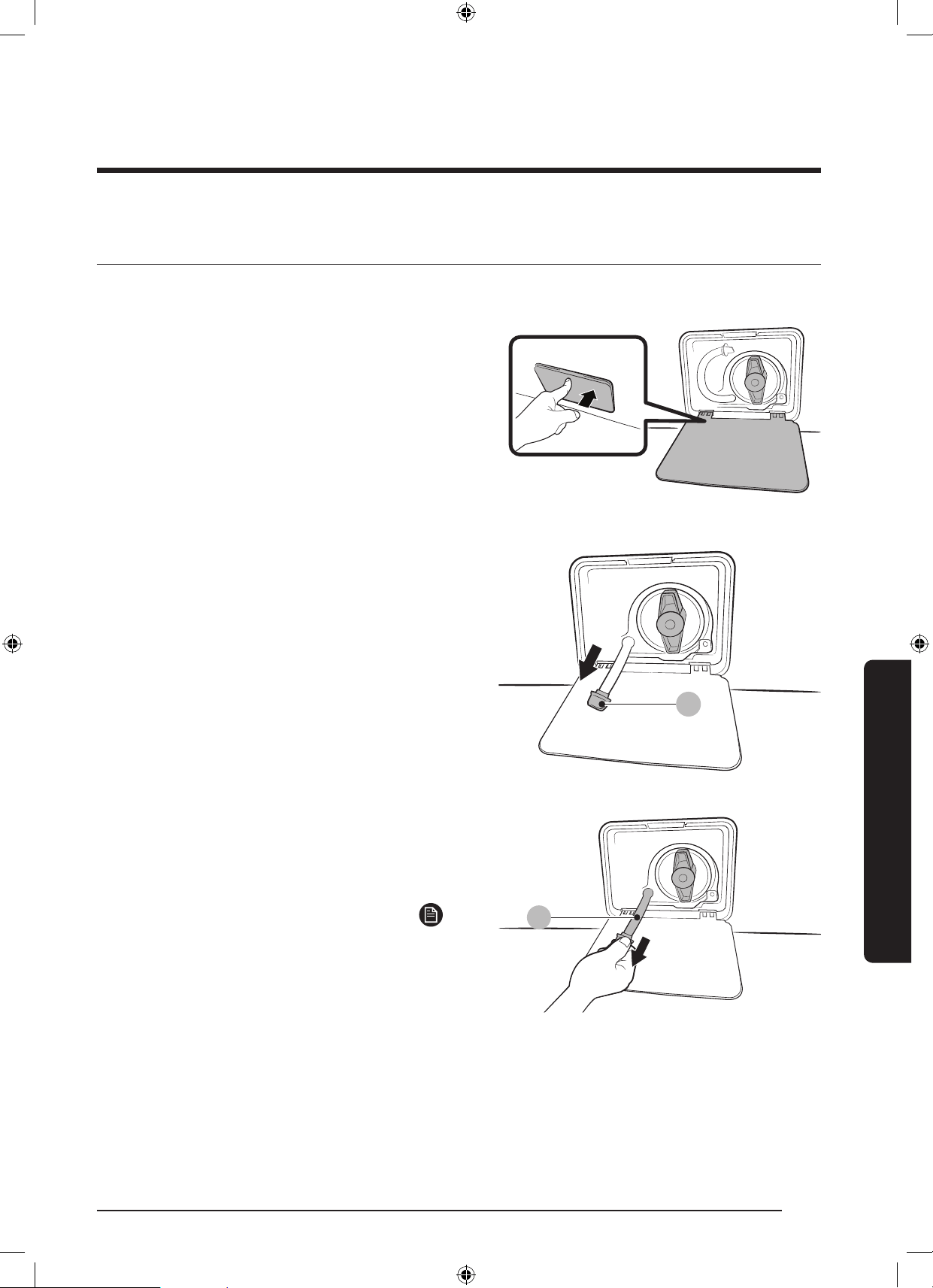
ةيبرعلا 52
ةنايصلا
ةنايصلا
ئراحطلا دنع فمرصتلل
.ليسغلاجارخإلبقةناوطسايفدوجواهايافرص،ءابرهكلاعاطقناةلاحيف
1 ..ءابرهكلاذخأمنمةلاسغلالصفامثةلاسغلاليغشتفقوأ
2 ..حتفنيلةافصا ءاطغنميولعلاءزاىلعطغضا
A
3 .فيرصتلاموطرخبحسامثءاطغلالوحعستمغرافءاعوعض
بحبنا محطرخبكاسماعمءاعولللصيلءىراوطلاةلاحيف
.)A(
B
4 . )B( ئراحطلا دنع فمرصتلا بحبنأءااعدوموطراءاطغحتفا
.ءاعولايفقفدتي
5 .موطرخدعأمثموطراءاطغقلغأ،غيرفتلانمءاهتناب
.حشراءاطغقلغأ.هعضومىلإفيرصتلا
ةظحم
.عقوتانمربكأةيواايفءااةيمكنريبكءاعومدختسا
WD10N645R2X_DC68-03976N_AR.indd 52 2018/8/16 19:51:14
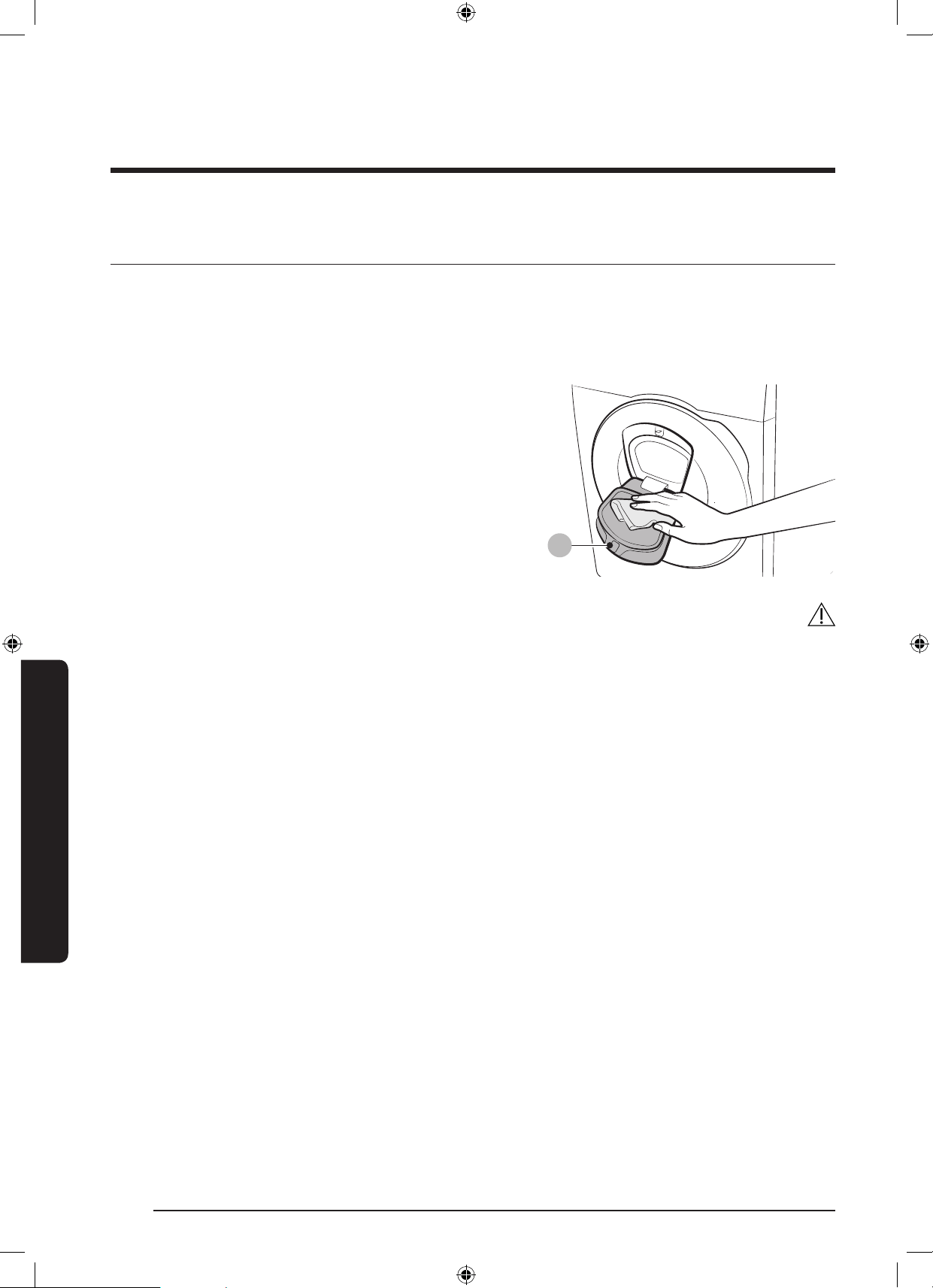
53 ةيبرعلا
ةنايصلا
فيظنتلا
ةلاسغلا حطس
.ةلاسغلاىلعهاياعضت.ةلكآداومىلعيوتحييلزنمفظنماهيلعشامقةعطقمدختسا
Add Door
A
1 ..AddDoorحتف
2 ..AddDoorفيظنتلةللبمشامقعطقمدختسا
-يفريغتثدحيدق.فيظنتداوممدختست
.نوللا
-ةيطاطاةقلافيظنتدنعرذاخوت
.)A( لفقلا زناكيمو
-.مظتنملكشبةذفانلاةقطنمنعرابغلالزأ
3 ..ةفيفخةقطقطتوصعمستىتحهقلغاوAddDoorحسما
هيبنت
.رسكللةضرعاهنإ.ا
ً
ديدشطغضAddDoorىلعطغضت
.ةلاسغلاليغشتءانثأيفا
ً
حوتفمAddDoorكرتت
.ا
ً
دبأAddDoorىلعةليقثءايشأعضت
.ةيواانارودءانثأيفAddDoorس،يندبلاىذانمةياقولل
.ةيندبلاةباصاوأىذلكلذكضرع
ُ
يدق.ةلاسغلالمعءانثأيفAddDoorحتفت
.ماظنلايفلشفوأةيندبةباصإكلذببس
ُ
يدقو.ا
ً
حوتفمAddDoorنوكيامنيبصئاصاةحولمدختست
.ليسغلافخبا
ً
ضارغأعضت
.AddDoorلخةيواايفةريبكا
ً
ضارغأعضت
.ا
ً
ررضوأاًفلتكلذببس
ُ
يدقو.فيظنتلاءانثأيفAddDoorلةيطاطاةقلابحست
WD10N645R2X_DC68-03976N_AR.indd 53 2018/8/16 19:51:14
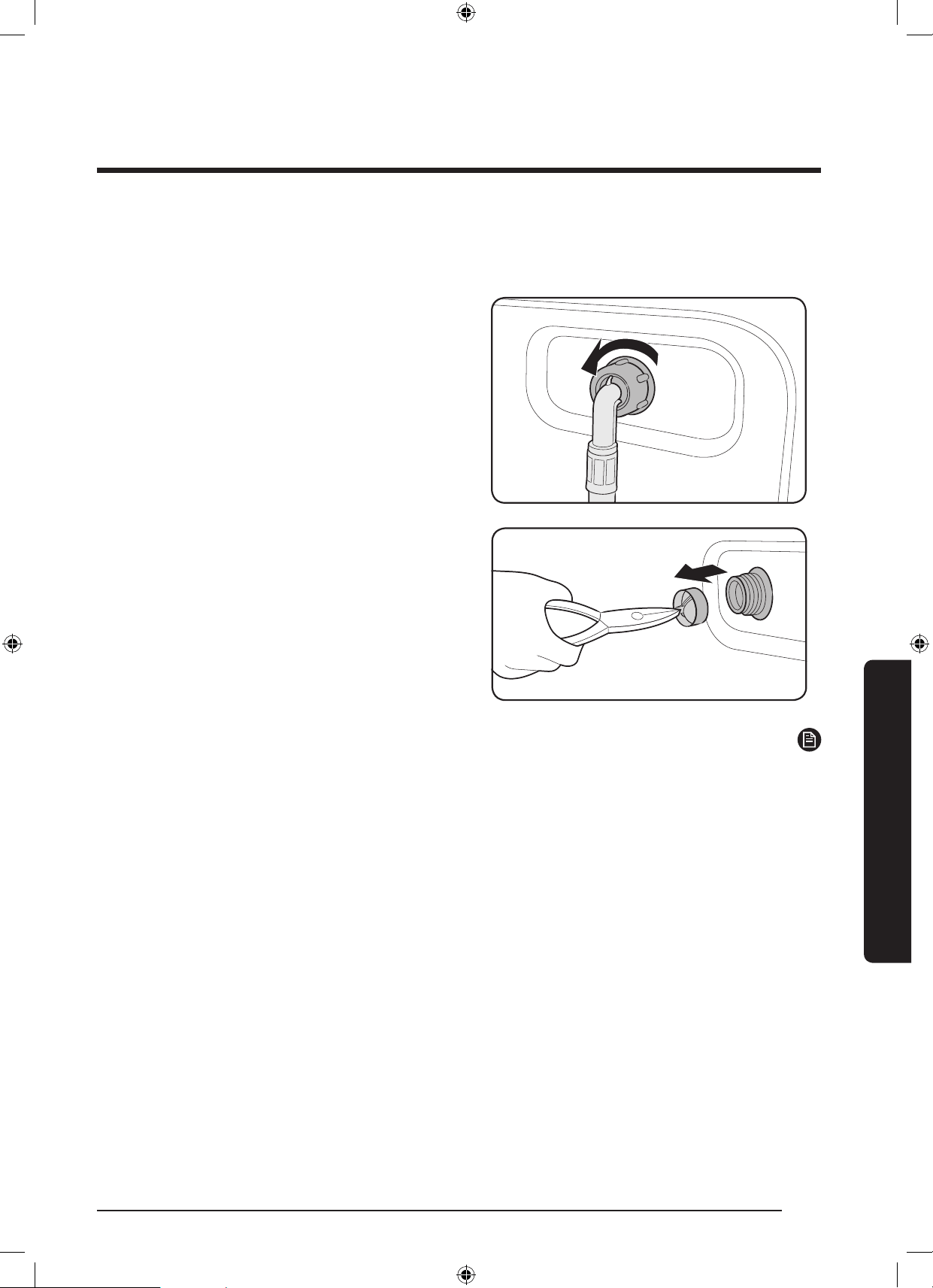
ةيبرعلا 54
ةنايصلا
ةنايصلا
ةيكبشلا ةافصا
.ماعلكةرمهايابدادملةيكبشلاةافصافظن
1 ..ءابرهكلالباكلصفاوةلاسغلاليغشتفقوأ
2 ..هاياروبنصقلغأ
3 .موطراطغ.ةلاسغلانميفلابناانمهكفوموطراررح
.هنمهاياجورخنودةلوليحللشامقةعطقب
4 .مامصةحتفنمةيكبشلاةافصابحسلة
ّ
يد
َ
ر
َ
زمدختسا
.لوخدلا
5 .رمغيرجيثيحبقمعبهايايفةيكبشلاةافصارمغا
.نونسلايذلصوا
6 ..لظلايفا
ً
ماةيكبشلاةافصاففج
7 .دعأولوخدلامامصةحتفيفةيكبشلاةافصالاخدإدعأ
.لوخدلامامصيفءااموطرخلصو
8 ..هاياروبنصحتفا
ةظحم
.”4C“أطاةشاشلاضرعت،دادسنلةيكبشلاةافصاتضرعتاذإ
WD10N645R2X_DC68-03976N_AR.indd 54 2018/8/16 19:51:15
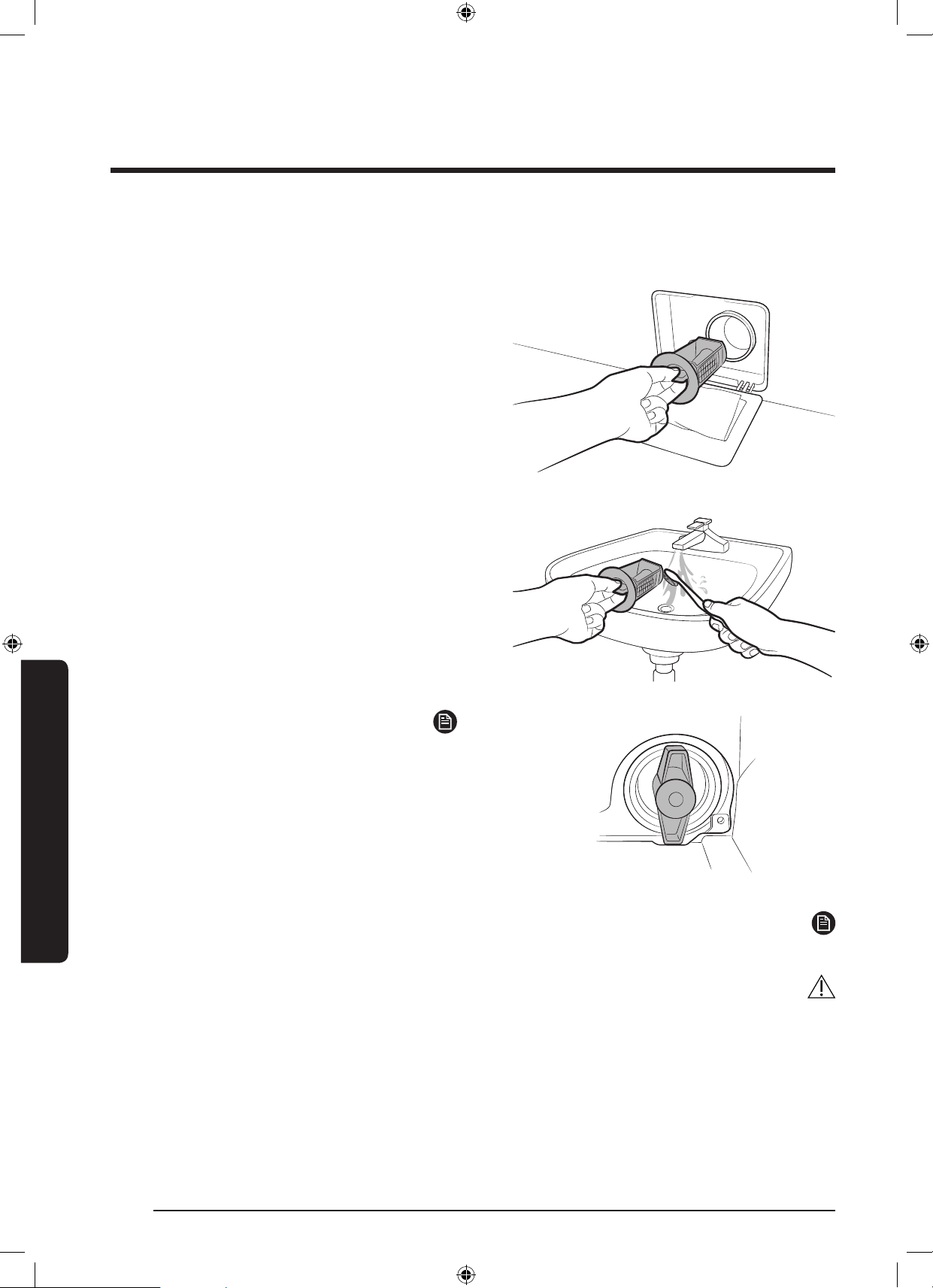
55 ةيبرعلا
ةنايصلا
ةخضا ةافصم
.تاعاقفلاريثأتليلقتنمةخضاةافصمدادسناللق
ُ
يدقف.اهدادسناعنا
ً
يونستارم6وأ5ةخضاةافصمفيظنتبحصن
ُ
ي
1 ..ءابرهكلالباكلصفاوةلاسغلاليغشتفقوأ
2 .دنعفيرصتلل"مسقعجار.ةيواالخاديقابلاءاافرص
."ئراوطلا
3 ..حتفنيلةافصاءاطغنميولعلاءزاىلعطغضا
4 ..ةيقبتاهايافرصوراسيلاىلإةخضاةافصمءاطغردأ
5 .ةخضمةحورمنأدكأت.ةمعانةاشرفبةخضاةافصمفظن
.ةدودسمريغتافلاةافصمفلخةدوجوافيرصتلا
6 ..ميلاهاةافصاءاطغردأوةخضاةافصمبيكرتدعأ
ةظحم
ةممص
ُ
منامأءاطغةيصاخبتاخضايفاصمضعبزيمتت
،ةخضاةافصمنامأءاطغحتفل.لافطاثبعنودةلوليحلل
.ةعاسلابراقعهااسكعهردأولخادللءاطغلاىلعطغضا
ىلعناماءاطغيفةجواضبانلاةيكينايكمدعاس
ُ
تانهو
.ةافصاحتف
.ةعاسلابراقعهاايفهردأ،ةخضاةافصمنامأءاطغقلغل
.يعيبطرمأاذهوكلذلخا
ً
توصكربنزلاردصي
ةظحم
.”5C“أطاةشاشلاضرعت،دادسنلةخضاةافصمتضرعتاذإ
هيبنت
.برستثودحىلإكلذبمازتلامدعيدؤيدق.ةافصافيظنتدعبةافصاءاطغقغإنمدكأت
.برستثودحوأليغشتلابللخىلإكلذبمازتلامدعيدؤيدق.ةافصافيظنتدعبحيحصلكشبةافصاعضوقغإنمدكأت
WD10N645R2X_DC68-03976N_AR.indd 55 2018/8/16 19:51:16
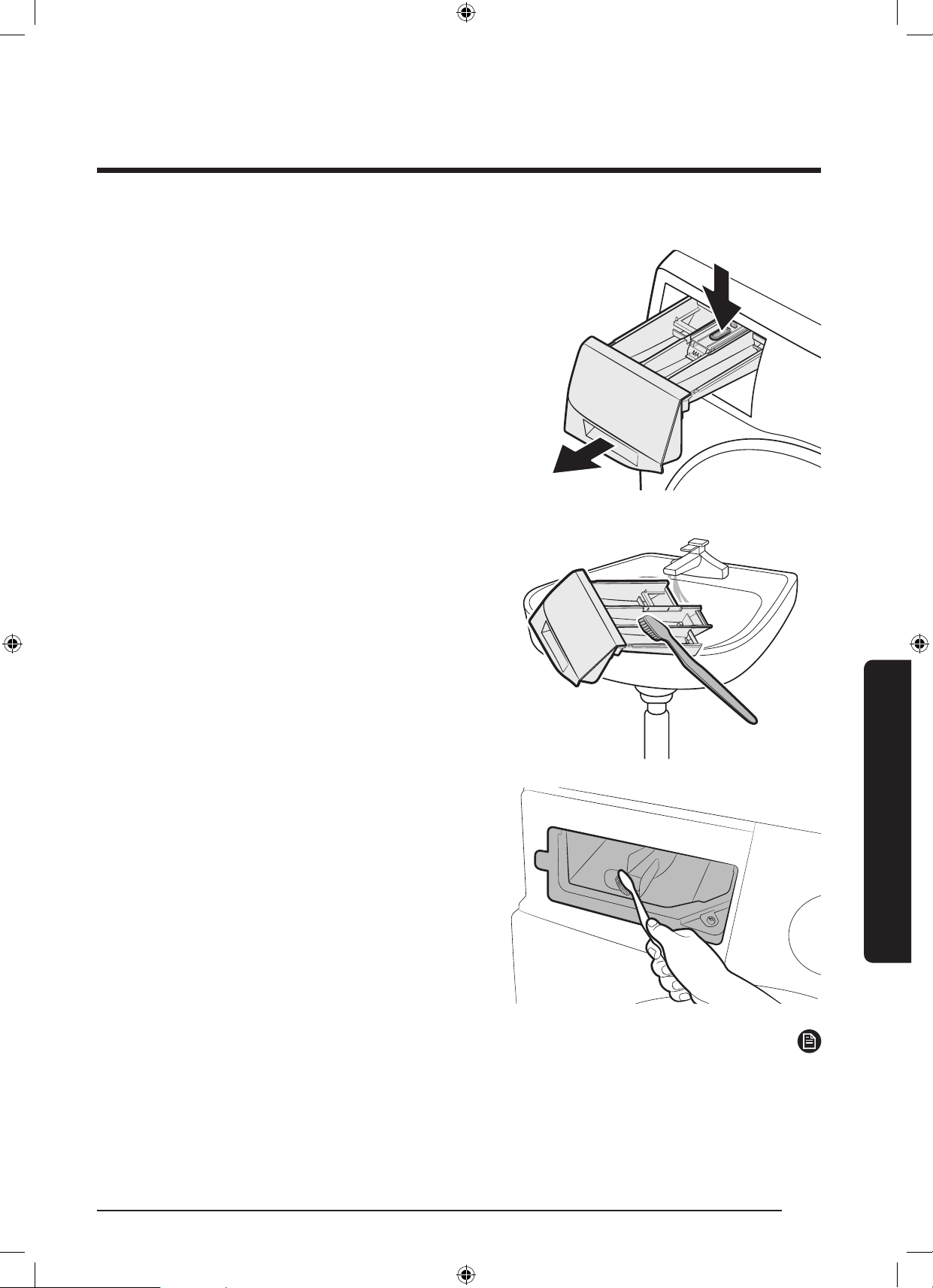
ةيبرعلا 56
ةنايصلا
ةنايصلا
ليسغلا قححسم جرد
1 .،جردلانميلخادلابنااىلعريرحتلاعارذبلفساكس
.يلقجردلاحتفا
2 ..ةمعانةاشرفمادختسابيراجءاميفجردلاتانوكمفظن
3 ..ةمعانةاشرفمادختسابيراجءاميفجردلافيوفظن
4 ..جردلايفةلئاسلاتافظناةيواحلاخدإدعأ
5 ..هقلغللخادللقوحساجردبعفدا
ةظحم
.ةيلاخةناوطسانوكتامنيبفطش+نارودةرودلاذقن،فظنانميقبتاءزاةلاز
WD10N645R2X_DC68-03976N_AR.indd 56 2018/8/16 19:51:16
57 ةيبرعلا
ةنايصلا
ةنايصلا
دمجتلا ةلاح حصإ
.سويزلس0نودةراراةجردتضفخنااذإةلاسغلادمجتتدق
1 ..ءابرهكلالباكلصفاوةلاسغلاليغشتفقوأ
2 ..هاياديروتموطرخءاخرهاياروبنصىلعئفادلاهايابص
3 ..ئفادلاهايايفهعقناوهاياديروتموطرخلزأ
4 ..قئاقد10ةدهكرتاوةلاسغلاةناوطسأيفئفادلاهايابص
5 ..هاياروبنصىلإهايابدادماموطرخلصودعأ
ةظحم
.يعيبطلكشبةلاسغلالمعتىتحهعأتاوطاررك،يعيبطلكشبةلاسغلالمعتملاذإ
مادختسا ءحس نم ةينمزلا اارتفلا نأشب ءاجر رذا بجم
.ةلااهذهيفةقاطلالباكلصفاوةلاسغلانمهايافيرصتعتي.مادختسانودةليوطتارتفلةلاسغلاكرتبن
1 ..فطش+نارودرايتخةرودلا ددح
ُ
مردأ
2 ..فقحت/ليغشترزىلعطغضاوةناوطساغرفأ
3 ..ةرودلاماإدنعءاابدادماموطرخلصفاوءااروبنصقلغأ
4 ..ءابرهكلالباكلصفاوةلاسغلاليغشتفقوأ
5 ..ةناوطسالخرءاوهلاعدوبابلاحتفا
WD10N645R2X_DC68-03976N_AR.indd 57 2018/8/16 19:51:16
ةيبرعلا 58
اهحصإو ءاطخا فاشكتسا
اهحصإو ءاطخا فاشكتسااهحصإو ءاطخا فاشكتسا
صحفلاو ققحتلا طاقن
.تاحارتقانمهبامبرجويلاتلالودانمقق،ةلاسغلابةلكشمتهجاواذإ
ةلكشاعبتا ءارجا
.لمعت ةلاسغلا
.يئابرهكلارايتلاردصةلاسغلاسباقليصوتنمدكأت
.ماكحإببابلاقغإنمدكأت
.ةحوتفمهاياردصمتايفنحنأدكأت
.ةلاسغلاليغشتلفقحت/ليغشترارمتسابطغضا
.طشنريغ
لافطالفقنأنمدكأت
ةقطقطلكشىلعءاضوضلانمةلسلسءارجإبموقتدق،ءتمايفةلاسغلاءدبلبق
.ةعيرسفيرصتةرودءارجإوبابلالفقنمققحتلل
.ةرئادلاعطاقطبضةداعإوأرهصاصحفا
ةيفاك ريغ ءاا ةيمك نحكت ار
.هايا اادادمإ تعطقنا ار وأ
.
ً
ماكهاياروبنصحتفا
.ماكحإببابلاقغإنمدكأت
.دمجتمريغءاابةيذغتلاموطرخنأدكأت
.ا
ً
دودسموأا
ً
ينثمسيلءاابةيذغتلاموطرخنأدكأت
.ءااطغضةيافكنمدكأت
جرد يف فظنا نم ردق يقبتم
ةرود لامتكإ دعب ىتح اافظنا
.ليسغلا
.فاكءامطغضبةلاسغلاليغشتنمدكأت
.قوحساجردفصتنميفليسغلاقوحسمةفاضإنمدكأت
.ا
ً
ميلس
ً
اخدإفطشلاءاطغلاخدإنمدكأت
.بسان
ُ
اعضوايففظناديدصرقنأدكأت،ا
ً
يبيبحاًفظنممدختستتنكاذإ
.تافظناجردفظنوفطشلاءاطغلزأ
وأ ةلاسغلا يف ةفينع اازازتها
.ةيلاع ءاضحض
نكتملاذإ.ةقلزريغةبلصةيضرأىلعاهنأوةلاسغلاتيبثتىوتسمءاوتسانمدكأت
.ةلاسغلاعافتراطبضلءاوتسالجرأبنعتسا،ةيوتسمةيضرا
.نحشلاريماسمةلازإنمدكأت
.رخآءيشيةلاسغلاةسمممدعنمدكأت
.ةلاسغلايفةدوجواسبانزوعيزوتنمدكأت
.يداعلاليغشتلاءانثأيفءاضوضلانمردقروتواردص
ُ
ينأنك
ُ
ءانثأيفءاضوضلانمردقيلوارسلاءادرلاوأنداعابةنيزاسباببستدقكلذك
.يعيبطرمأاذهو.اهلسغ
هذهلزأ،ليسغلاماإدعب.ا
ً
تاوصأا
ً
يندعاتمعلالثمةيندعاضارغاببس
ُ
تكلذك
.حشراةبلعوأةيواانمةيندعاضارغا
WD10N645R2X_DC68-03976N_AR.indd 58 2018/8/16 19:51:17

59 ةيبرعلا
اهحصإو ءاطخا فاشكتسا
ةلكشاعبتا ءارجا
.نارودلا وأ /و ،فمرصتلا مدع
،فيرصتللةقاعإيأتدجواذإ.فرصلاماظندادتماىلعفرصلاموطرخةماقتسانمدكأت
.ةنايصلاةمدخبلصتاف
.ةدودسمريغءااموطرخبةلصتاةيكبشلاةافصانأنمدكأت
كلذوبابلاقلغلبقرودتوأةلاسغلالمعتنل.فقحت/ليغشترارمتسابطغضاوبابلاقلغأ
.كنامأوكتمسل
.ا
ً
دودسموأا
ً
دمجمسيلءاابةيذغتلاموطرخنأدكأت
.ا
ً
دودسمسيلفرصلاماظننأوفيرصتلاماظنبلصتمفرصلاموطرخنأدكأت
نعا
ً
تقؤمفقوتتةلاسغلانإفةيفاكلاةوقلابةلاسغللةيفاكلاهاياةيمكرفوتتملاذإ
اهنإفةيفاكلاةوقلابهايانمةيفاكلاةيمكلاةلاسغللرفوتتنأامو.فيفجتلاوأفيرصتلا
.يعيبطلكشبلمعلادواعت
.حتفم ةلاسغلا باب
.ةلاسغلافاقيفقحت/ليغشتطغضا
.بابلالفقررحتييتحةليلقناوثرماقرغتسيدق
.يبرهكلارايتلالصفوألمعلانعةلاسغلافقوتىلعقئاقد3رىتحبابلاحتفنك
.جراخللةلاسغلاةيواايفءاالكفيرصتنمدكأت
.ا
ً
يوديبابلاحتفامثةيواايفهايافرص.ةيواايفهايمدوجوةلاحيفبابلاحتفنك
ُ
نمءاافيرصتماإدعببابلالفقحابصمأفطني.أفط
ُ
مبابلالفقحابصمنأدكأت
.ةلاسغلا
.اافظنا يقابو ةلاسغ
ُ
لا ةدامز
.تافظنانماهبىصواعاونامادختسانمدكأت
.هتو
ْ
غ
َ
روأنوباصلاة
َ
لاس
ُ
غنوكتةدايزعنةيلاعفلاةيلاعةفظنمةداممدختسا
فيفخليسغلاوأةريغصلاليسغلاتايمكوأرسيلاءامللةفظناةدااةيمكضفخ
.ةطيسبوأةريغصخاسوأبخاستا
.HEريغةفظنمةداممادختسابىصوي
نم ةيفاضإ ةيمك عضو نك
ُ
ي
.اافظنا
.حومسادازواجتتةشمقامعنموفظنانمةيقبتاةيمكلانأدكأت
WD10N645R2X_DC68-03976N_AR.indd 59 2018/8/16 19:51:17
ةيبرعلا 60
اهحصإو ءاطخا فاشكتسا
اهحصإو ءاطخا فاشكتسا
ةلكشاعبتا ءارجا
.فقحتم
.لماعيبرهكذفنميفءابرهكلالباكعض
.ةرئادلاعطاقطبضةداعإوأرهصاصحفا
رودتوأةلاسغلالمعتنل.ةلاسغلاليغشتلفقحت/ليغشترارمتسابطغضاوبابلاقلغأ
.كنامأوكتمسلكلذوبابلاقلغلبق
ةقطقطلكشىلعءاضوضلانمةلسلسءارجإبموقتدق،ءتمايفةلاسغلاءدبلبق
.ةعيرسفيرصتةرودءارجإوبابلالفقنمققحتلل
لمعلاةلاسغلالصاوتاروةطيسبةرتفرظتنا.ةرودلايفعقنةرتفوأتقؤمفاقيإدجويدق
.ليلقدعب
فظن.هاياريبانصيفةدوجوادادماموطرخيفةيكبشلاةافصادادسنامدعنمدكأت
.ا
ً
يرودةيكبشلاةافصا
نعا
ً
تقؤمفقوتتةلاسغلانإفةيفاكلاةوقلابةلاسغللةيفاكلاهاياةيمكرفوتتملاذإ
اهنإفةيفاكلاةوقلابهايانمةيفاكلاةيمكلاةلاسغللرفوتتنأامو.فيفجتلاوأفيرصتلا
.يعيبطلكشبلمعلادواعت
ريغ ةرارح ةجرد يذ ءا ءلا
.ةبسانم
.
ً
ماكا
ً
حتفنيروبنصلاحتفا
.حيحصةراراةجردديدنأنمدكأت
.ءااطوطخعضوبمق.ةمئاتايفنابةلصتمميطارانأنمدكأت
)سويزلس49(تياهنرهف120ىلعنخاسلاءامللىنداداىلعءااناخسطبضنمدكأت
.ضيوعتلالدعموءىفادلاءااةعسصحفاكلذك.روبنصلايف
.ةدودسمةيكبشلاةافصانوكتدق.ةيكبشلاةافصافظنوميطارالصفإ
مكحتلاةزيممايقءانثأءااةرارحةجردلرييغتثدحيدقف،ءاابكتلاسغءلممتيامدنع
.يعيبطرمأاذهو.مداقلاءااةرارحةجردنمققحتلاب
ً
ايكيتاموتوأةراراةجردب
ربعقلطنيطقفدرابلاءااوأ/وطقفنخاسلاءاانأءاابكتلاسغءلمءانثأيفظحتدق
ةفيظولايههذه.درابلاوأنخاسلاءااىلعليسغلاةرارحتاجردرايتخادنععيزوتلاةدحو
.ءااةرارحةجردكتلاسغددامنيبةراراةجردبيكيتاموتوامكحتلاةيصاةيعيبطلا
يف
ً
لبم ا
ً
بطر لظم ليسغلا
.ليسغلا ةرود ةماهن
.ةيفاضاوأةيلاعلافيفجتلاةعرسمدختسا
.هتو
ْ
غ
َ
روأنوباصلاة
َ
لاس
ُ
غنوكتةدايزعنةيلاعفلاةيلاعةفظنمةداممدختسا
وأدحاوضرغ(ةريغصلاليسغلاةيمكدق.
ً
ادجةريغص)سباةيمك(ليسغلاةيمك
.
ً
ماكاًفيففيفجتلامدعونزاوتلامدعىلإيدؤت)ضرغ
.ا
ً
دودسموأا
ً
دمجمسيلءااديروتموطرخنأدكأت
WD10N645R2X_DC68-03976N_AR.indd 60 2018/8/16 19:51:17
61 ةيبرعلا
اهحصإو ءاطخا فاشكتسا
ةلكشاعبتا ءارجا
.ءاا برست
.ماكحإببابلاقغإنمدكأت
.طبرلاةمكحمموطراتصولكنأنمدكأت
.فيرصتلاماظنيفهتيبثتوةحيحصةقيرطبفيرصتلاموطرخفرطلاخدإنمدكأت
.دئازلاليمحتلابن
.هتو
ْ
غ
َ
روأنوباصلاة
َ
لاس
ُ
غنوكتةدايزعنةيلاعفلاةيلاعةفظنمةداممدختسا
.ةلاسغلا نع ردصت حئاور ةمث
.ةهيركحئاورببس
ُ
ياموهوتافيوجتلايفةدئازلانوباصلا
ُ
ة
َ
لاس
ُ
غعم
.اهميقعتلةفظناليسغلاتارودىلعةلاسغلايرودلاليغشتلا
.)طط
ُ
ارظنا(بابلاةبلجفظن
.ليسغلاةرودماإدعبةلاسغللةيلخادلاءازجافظن
امدحا( ااعاقف ةمؤر نك
ُ
ي
ةنخاسلا ااعاقفلا معدت يتلا
.)طقف
.تاعاقفلاةلوماةديزبجدق
.تاعاقفلادلاوتحيتتدقخاستاةديدشسبا
يف Add Door حتف يننك
ُ
ي له
؟تقو يأ
يفAddDoorحتفنكهنإفكلذعمو.طقف
رشؤارهظيامدنعAddDoorحتفنك
ُ
:ةيلاتلاتاا
-ةيلخادلاةراراةجردعافتراوفيفجتلاوأيلغلاتايلمعءانثأيف
-ةمسلاونماضارغلافطالفقطبضةلاحيف
-
ً
يسغلمشتيتلاوفيفجتلاةيواحةرودوأليسغلاةيواحذيفنتءانثأيف
ا
ً
يفاضإ
.يلا عزحا اارشؤم ضيمو
)طقف اهب دوزا امدحاب(
.حيحصلكشبتافظناجردقغإنمقق
-.حيحصلكشبهقغإنمدكأت.ىرخأةرمهقلغأوتافظناجردحتفا
.تافظناةناخلخادةلئاسلاتافظناتبلصتاذإاذهثدحيدق
-.اهنمقئاوعلالزأوتافظناةناخفظن
.يلاSamsungءمعةمدخزكرلصتا،ةلكشارارمتساةلاحيف
WD10N645R2X_DC68-03976N_AR.indd 61 2018/8/16 19:51:17
ةيبرعلا 62
اهحصإو ءاطخا فاشكتسا
اهحصإو ءاطخا فاشكتسا
اامحلعا زحمر
.تاحارتقانمهبامبرجويلاتلالودانمقق.ضرعلاةحولىلعتامولعازومردحأرهظيدق،لطعللةلاسغلاضرعتةلاحيف
دحكلاعبتا ءارجا
4C
.ءااب ةلاسغلا ةمذغت يرجم
.ةحوتفمهاياردصمتايفنحنأدكأت
.ةدودسمريغءااميطارخنأدكأت
.ةدمجمريغهاياريبانصنأدكأت
.فاكءامطغضبةلاسغلاليغشتنمدكأت
.ةنخاسلاهاياوةدرابلاهاياروبنصليصوتةمسنمدكأت
.دادسنلتضرعتارفةيكبشلاةافصافظن
ةظحم
لعفمريغةقاطلارزنوكيو.قئاقد3ةدءاافرصتةلاسغلانإف،"4C"دوكلاةلاسغلاضرعتامدنع
.ةداهذهلاوط
4C2
.درابلاءااروبنصبدرابلاءاابةيذغتلاموطرخليصوتةمسنمدكأت
خسفتللضرعتيدقليسغلانإفنخاسلاءااروبنصبدرابلاءاابةيذغتلاموطرخليصوتىرجاذإ
.تارودلاضعبيف
5C
.ءاا فمرصت يرجم
.ا
ً
دودسموأا
ً
دمجمسيلءاابةيذغتلاموطرخنأدكأت
.ليصوتلاعونىلعءانبفيرصتلاموطرخعضومةمسنمدكأت
.دادسنلتضرعتارفتافلاةافصمفظن
.فرصلاماظندادتماىلعفرصلاموطرخةماقتسانمدكأت
.ءمعلاةمدخزكرلصتا،ةحوللاىلعا
ً
رهاظتامولعادوكلظاذإ
dC
.ححتفم بابلا امنيب ففا ليغشت
.ماكحإببابلاقغإنمدكأت
.بابلابةقلاعريغسبانأدكأت
DC1
.مئم لكشب لمعم يسيئرلا بابلا حتف/ لفق
.ليسغلاةرودليغشتدعأو،ةلاسغلاليغشتفقوأ
.ءمعلاةمدخزكرلصتا،ةحوللاىلعا
ً
رهاظتامولعادوكلظاذإ
WD10N645R2X_DC68-03976N_AR.indd 62 2018/8/16 19:51:17
63 ةيبرعلا
اهحصإو ءاطخا فاشكتسا
دحكلاعبتا ءارجا
DC3
.مئم لكشب لمعم Add Door حتف/ لفق
.ليسغلاةرودليغشتدعأو،ةلاسغلاليغشتفقوأ
.ءمعلاةمدخزكرلصتا،ةحوللاىلعا
ً
رهاظتامولعادوكلظاذإ
OC
.ءاا ةيمك ةدامز
.فيفجتلادعبليغشتلادعأ
.يلاSamsungةمدخزكرلصتا،ةشاشلاىلعا
ً
رهاظداوكادحألظاذإ
LC، LC1
.فمرصتلا محطرخ نم قق
.ةيضراىلععوضومفيرصتلاموطرخفرطنأدكأت
.ا
ً
دودسموأا
ً
دمجمسيلفيرصتلاموطرخنأدكأت
.ءمعلاةمدخزكرلصتا،ةحوللاىلعا
ً
رهاظتامولعادوكلظاذإ
ةظحم
ريغةقاطلارزنوكيو.قئاقد3ةدءاافرصتةلاسغلانإف،"LC،LC1"دوكلاةلاسغلاضرعتامدنع
.ةداهذهلاوطلعفم
Ub
.لمعم فيفجتلا
.ا
ً
يوتسما
ً
طسبليسغلاطسبنمدكأت
.رقتسموتباثوتسمحطسىلعةلاسغلابيكرتنمدكأت
دق،زنيجوأمامحسنر
ُ
بلثم،سبانمةدحاوةعطقليسغةلاحيفو.سباعيزوتةداعإبمق
.ةشاشلاىلعيف”Ub“هيبنتلاةلاسررهظتو،ةيضرميئاهنلافيشنتلاةجيتننوكت
3C
.رحتحا لمع ةمس نم قق
.ليسغلاةرودءدبةداعإلواح
.ءمعلاةمدخزكرلصتا،ةحوللاىلعا
ً
رهاظتامولعادوكلظاذإ
UC
.)ةيطلحفلا ةدامز أطخ( ينورتكلا مكحتلا صحفل ةجاح ةمث
.كساةريفضوPCBنمقق
.ةيبرهكلاةقاطلاردصليصوتلاةمسنمقق
.ءمعلاةمدخزكرلصتا،ةحوللاىلعا
ً
رهاظتامولعادوكلظاذإ
ةيطلحفلا يف ضافخنا فاشتكا
.ةقاطلالباكبيكرتنمقق
.ءمعلاةمدخزكرلصتا،ةحوللاىلعا
ً
رهاظتامولعادوكلظاذإ
HC
ةرارا ةجرد عافترا نم ققحتلا
.ءمعلاةمدخزكرلصتا،ةحوللاىلعا
ً
رهاظتامولعادوكلظاذإ
WD10N645R2X_DC68-03976N_AR.indd 63 2018/8/16 19:51:17
ةيبرعلا 64
اهحصإو ءاطخا فاشكتسا
اهحصإو ءاطخا فاشكتسا
دحكلاعبتا ءارجا
1C
.ةحيحص ةقمرطب لمعم ءاا ىحتسم رعشتسم
.ىرخأةرمةرودلاءدبةداعإمثةلاسغلاليغشتفاقيإبرج
.ءااىوتسمرعشتسمكسأةريفضنمقق
.ءمعلاةمدخزكرلصتا،ةحوللاىلعا
ً
رهاظتامولعادوكلظاذإ
ةظحم
لعفمريغةقاطلارزنوكيو.قئاقد3ةدءاافرصتةلاسغلانإف،"1C"دوكلاةلاسغلاضرعتامدنع
.ةداهذهلاوط
8C
.ةحيحص ةقمرطب لمعم MEMS رعشتسم
.ليسغلاةرودليغشتدعأو،ةلاسغلاليغشتفقوأ
.ءمعلاةمدخزكرلصتا،ةحوللاىلعا
ً
رهاظتامولعادوكلظاذإ
AC
.ةيعرفلاو ةيسيئرلا PBA ب ايصحتلا ةمس نم قق
.ىرخأةرمةرودلاءدبةداعإمثةلاسغلاليغشتفاقيإبرج
.ءمعلاةمدخزكرلصتا،ةحوللاىلعا
ً
رهاظتامولعادوكلظاذإ
AC6
.ةسكاعلاو ةيسيئرلا PBA ب ايصحتلا ةمس نم قق
.ةلااىلعادامتعايداعلاليغشتلاىلإا
ً
يكيتاموتوألمعلاةلاسغلادواعتدق
.ليسغلاةرودليغشتدعأو،ةلاسغلاليغشتفقوأ
.ءمعلاةمدخزكرلصتا،ةحوللاىلعا
ً
رهاظتامولعادوكلظاذإ
ddC
ااحطا نم يأ عبتا ،كلذ ثدح اذإف .فاقمإ ىلع طغضلا نود Add Door حتف دنع ةلاسرلا هذه رهظت
:ةيلاتلا
مثفقحت/ليغشتىلعطغضامث.مئموحنىلعهقلغلAddDoorىلعطغضا،ليسغلاةفاض
.ةيناثةرمةلواا
وحنىلعهقلغلةيناثةرمAddDoorىلعطغضا،أطابا
ً
يضرعAddDoorىلعتطغضاذإف
.ليغشتلاةلصاوفقحت/ليغشتىلعطغضا.مئم
.يلاSamsungةمدخزكرلصتا،ةشاشلاىلعروهظلابرمتسيداوكادحأنأتدجواذإ
WD10N645R2X_DC68-03976N_AR.indd 64 2018/8/16 19:51:18
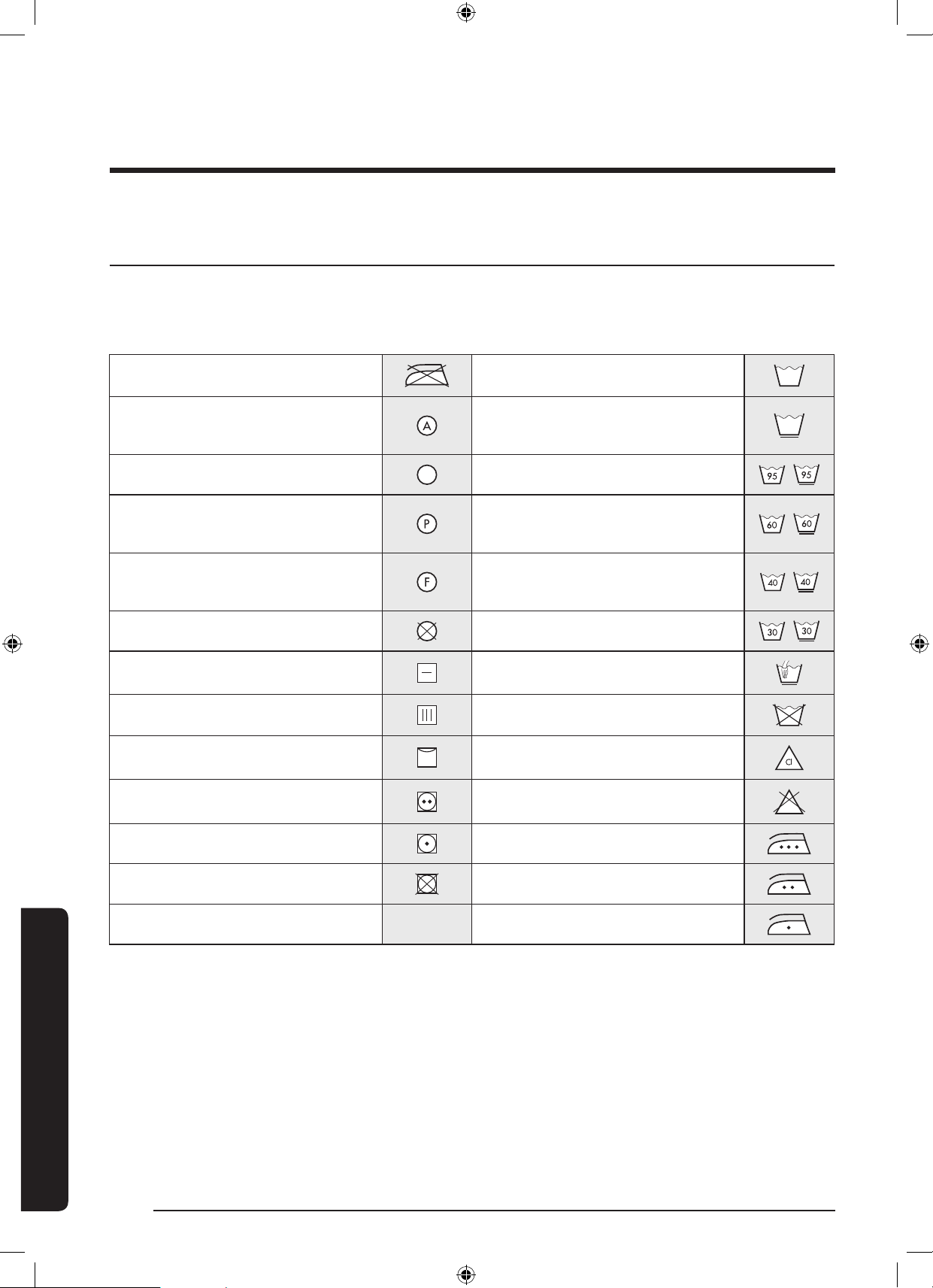
65 ةيبرعلا
اافصاحا
اافصاحا
ةشمقاب ةمانعلا لودج
فيظنتو(يكوفيفوضييبتوليسغ:يلاتلاوحنلاىلعزومرةعبرأةيانعلاتاقاطبنمضتت.سبابةيانعلاتاميلعتةيلاتلازومرلاحضوت
ةدايزلةيانعلاةقاطبتاميلعتعبتا.ةدروتساوةيلاسبمللةعنصاتاكرشلابقسانتلازومرلاهذهمادختسانمضي.)رمامزلاذإفاج
.ليسغلالكاشمليلقتوسبارمع
ةمواقمداوميكلارظحي
ةقيقرسبم
داوميأمادختسابفاافيظنتلامادختسانك
ةبيذم
م˚95دنعلسغلانكفاجفيظنت
م˚60دنعلسغلانك
وأففادوقولاوأديرولكوربلابفاافيظنتلا
طقفR113وأيقنلالوحكلا
م˚40دنعلسغلانك
يقنلالوحكلاوأتارئاطلادوقوبفاافيظنتلا
طقفR113وأ
م˚30دنعلسغلانكفاافيظنتلامادختسارظحي
طقفيوديلسغةدورفميهوفف
طقففاجفيظنتفجتلاهرشننك
درابلاءااعمضييبتةداممادختسانكةلامحىلعةقلعميهوسبافيف
ضييبتةداممادختسارظحيةيداعةرارح،ريودتلابفيف
ىصقأدحبم˚200دنعيكلانكةفيفخةرارح،ريودتلابفيف
ىصقأدحبم˚150دنعيكلانكريودتلاباهفيفرظحي
ىصقأدحبم˚100دنعيكلانك
WD10N645R2X_DC68-03976N_AR.indd 65 2018/8/16 19:51:25
ةيبرعلا 66
اافصاحا
اافصاحا
ةئيبلا ةمامح
.تايافنلانمصلختلابةصااةيلاناوقلاةاعارمىجري،زاهااذهنمصلختلاتررقاذإ.ريودتلاةداعةلباقداومنمعونصمزاهااذه
.زاهالخادسابتحلراغصلالافطاوأتاناوياضرعتعنبابلاةلازإبمق.ةقاطردصزاهاليصوتنكثيحبرايتلاكلسعطقا
.ليسغلاقوحسةعنصاةكرشلاتاداشرإيفةنيباةيمكلانمرثكأليسغقوحسمعضت
.طقفةجاادنعليسغلاةرودلبقضييبتلاداوموعقبلاةلازإداوممدختسا
.)مدختساجمانربلل
ً
اقفوةيمكلافلتخت(ةلماكنازوأبليسغلاءارجإلخنمءابرهكلاوءاارفو
WD10N645R2X_DC68-03976N_AR.indd 66 2018/8/16 19:51:25
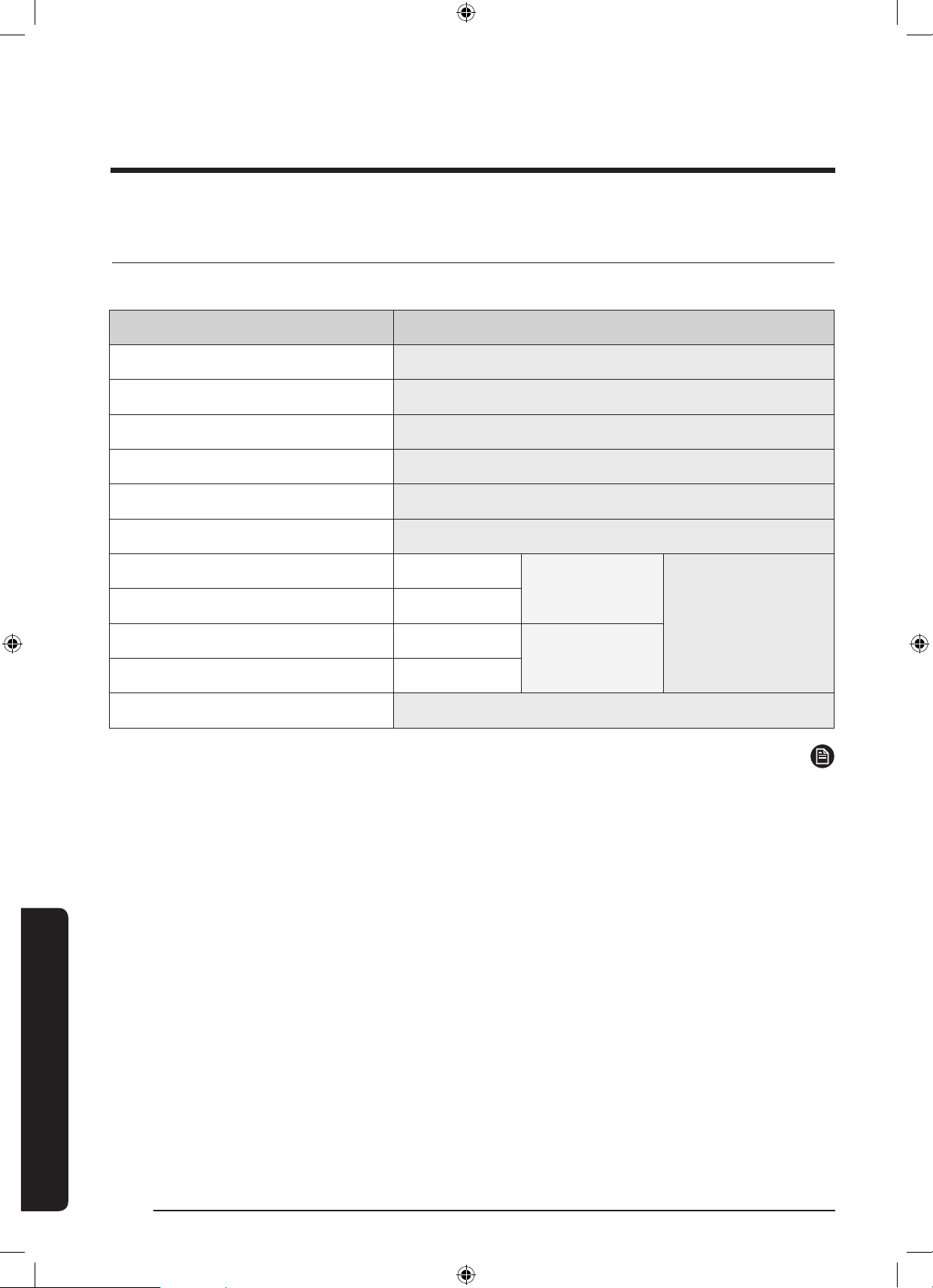
67 ةيبرعلا
اافصاحا
ةينفلا اافصاحا ةمئاق
.)A-Z(وأ)9-0(نماهتميقفلتختنأنك
ُ
وةفلتخمتيدوم"*"ةمعينعت
عحنلاةيمامأ ةئبعت ةحتف ااذ كيتامحتأ ةلاسغ
ليدوامساWD10N64****
داعبا850عافترا×600قمعلا×600ضرعلا
ءااطغضلاكسابوليك800-لاكسابوليك50
يفاصلانزولامجك81
فيشنتلاوليسغلاةعسمجك10.0
فيفجتلاةعسمجك6.0
ةقاطلاكهتسا
خستلاولسغلا
تلوف220طاو2000
تلوف240طاو2400
فيفجتلا
تلوف220طاو1600
تلوف240طاو1900
فيشنتلاتارودةقيقدلايفةرود1400
ةظحم
.لضفأةدوجقيقفدهبكلذوراعشإنودرييغتللةضرعتافصاواوميمصتلانإ
WD10N645R2X_DC68-03976N_AR.indd 67 2018/8/16 19:51:25
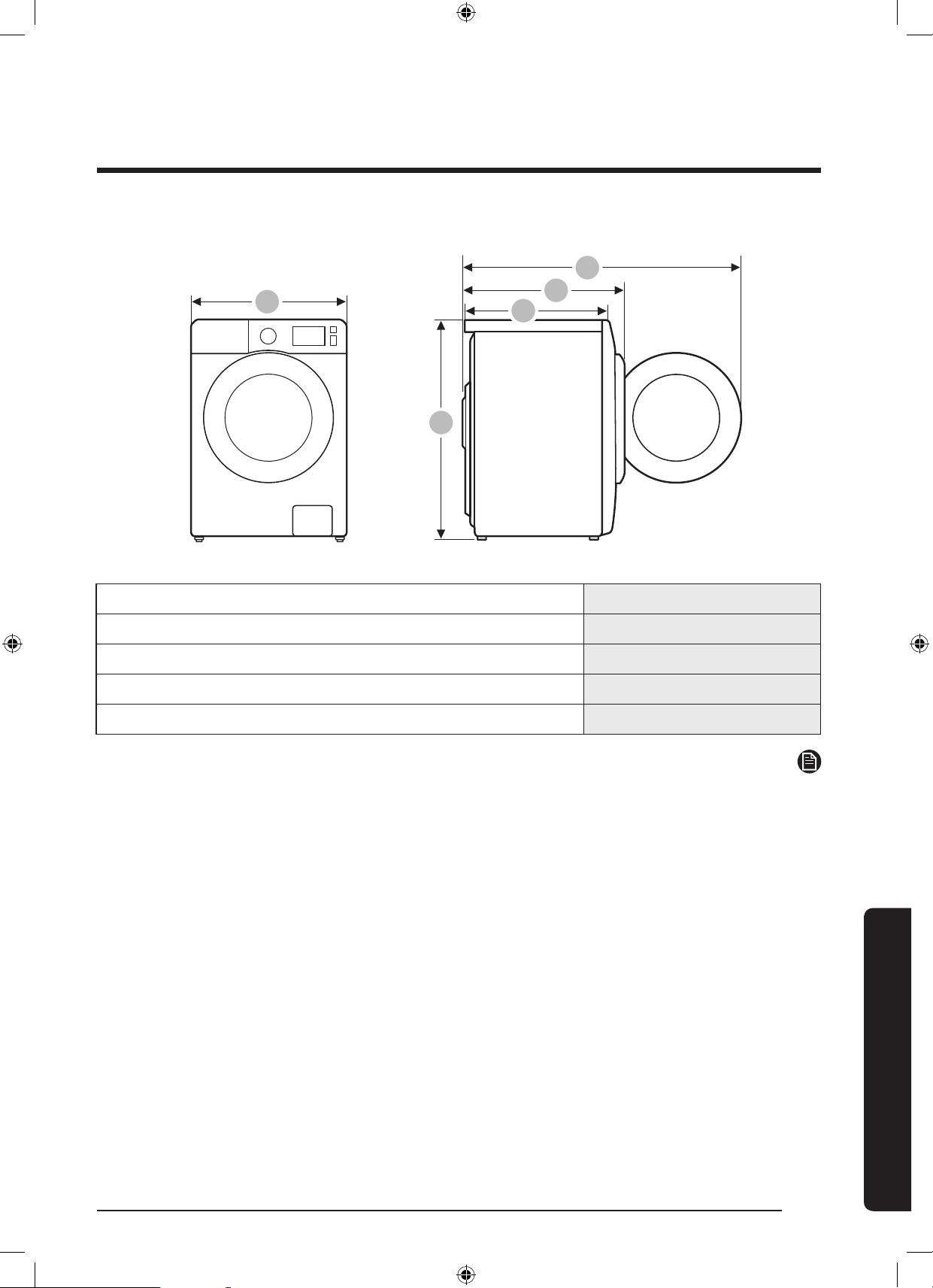
ةيبرعلا 68
اافصاحا
اافصاحا
A
B
C
D
E
A600
B850
C600
D680
E1115
ةظحم
.لضفأةدوجقيقفدهبكلذوراعشإنودرييغتللةضرعتافصاواوميمصتلانإ
WD10N645R2X_DC68-03976N_AR.indd 68 2018/8/16 19:51:25
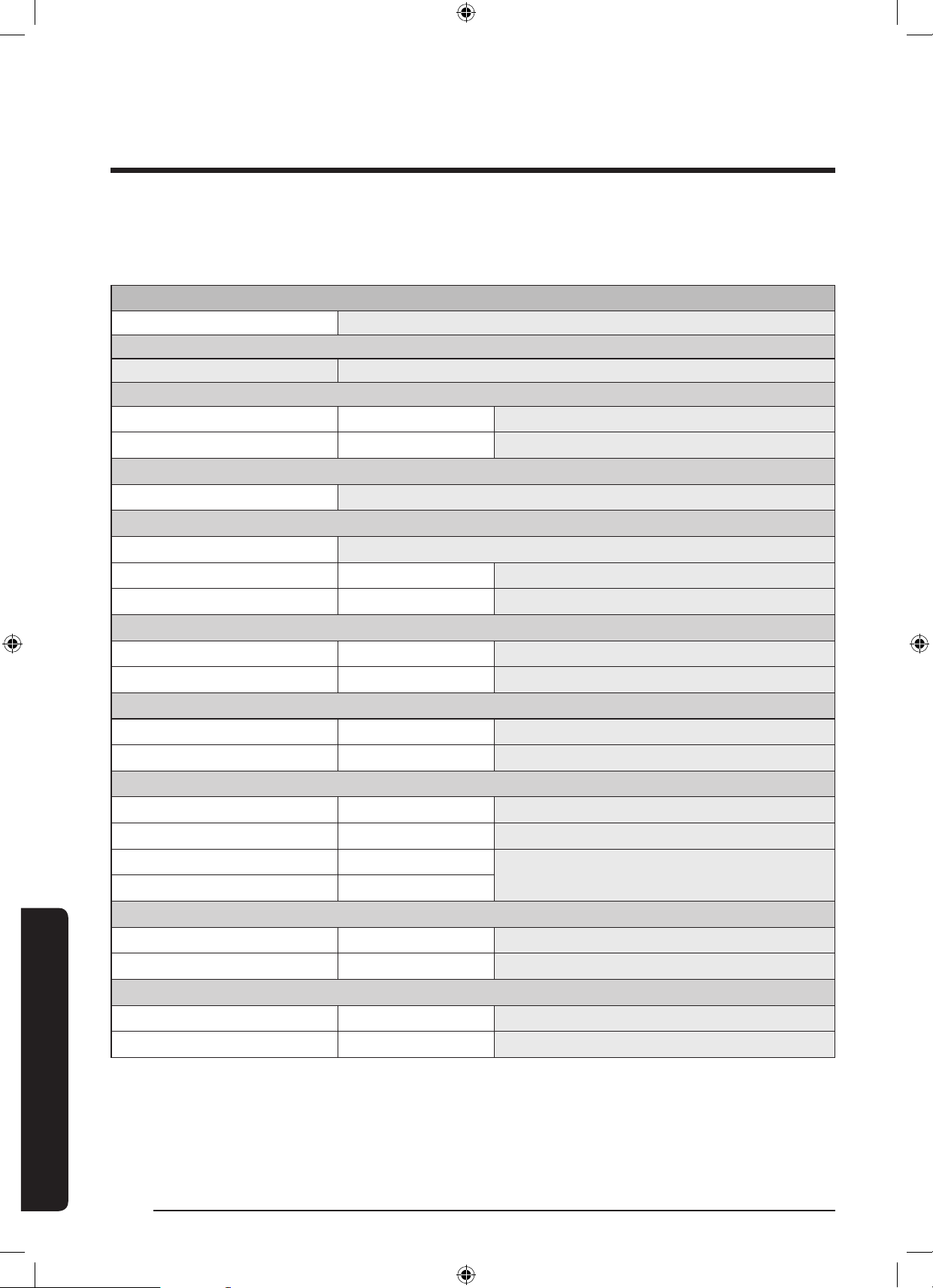
69 ةيبرعلا
اافصاحا
96/60/EC مقر )يبوروا داا( ميظنتلل ا
ً
قفو
.)A-Z(وأ)9-0(نماهتميقفلتختنأنك
ُ
وةفلتخمتيدوم"*"ةمعينعت
Samsung
ليدوامساWD10N64****
ةقاطلا كهتسا ةءافك
)ةءافكلقا(Gىلإ)ةءافكرثكا(AنمA
ةقاطلا كهتسا
فيفوفطشوليسغةعاسلايفطاووليك6.80
طقففطشوليسغةعاسلايفطاووليك1.30
ليسغلا ءادأ ىحتسم ةئف
)ةءافكلقا(Gىلإ)ةءافكرثكا(AنمA
ءاا درط ةءافك ةئف
)ةءافكلقا(Gىلإ)ةءافكرثكا(AنمA
ةيقبتاةبوطرلا%44
نارودةعرسىصقأةقيقدلايفةرود1400
ةعسلا
لسغمجك10.0
فيفجتلامجك6.0
ءاا كهتسا
فيفوفطشوليسغرتل140
طقففطشوليسغرتل60
جمانربلا نمز
فيفوفطشوليسغةقيقد778
طقففطشوليسغةقيقد278
نايبلاوقصلاىلعةدوجواتامولعابةلصلاتاذجماربلا
لسغفثكم+ةيوئم60نطق
فاجنطقلافيف
)ليسغ ةرود 200( فف
ُ
ا نحمدختسم صاخشأ ةعبر يلزنم ليسغل ردقا ىحنسلا كهتسا
ةقاطلاكهتساةنس/ةعاسلايفطاووليك1360
ءااكهتسارتل28000
)ليسغ ةرود 200( ا
ً
دبأ فف
ُ
ا نحمدختسم صاخشأ ةعبر يلزنم ليسغل ردقا ىحنسلا كهتسا
ةقاطلاكهتساةنس/ةعاسلايفطاووليك260
ءااكهتسارتل12000
WD10N645R2X_DC68-03976N_AR.indd 69 2018/8/16 19:51:25
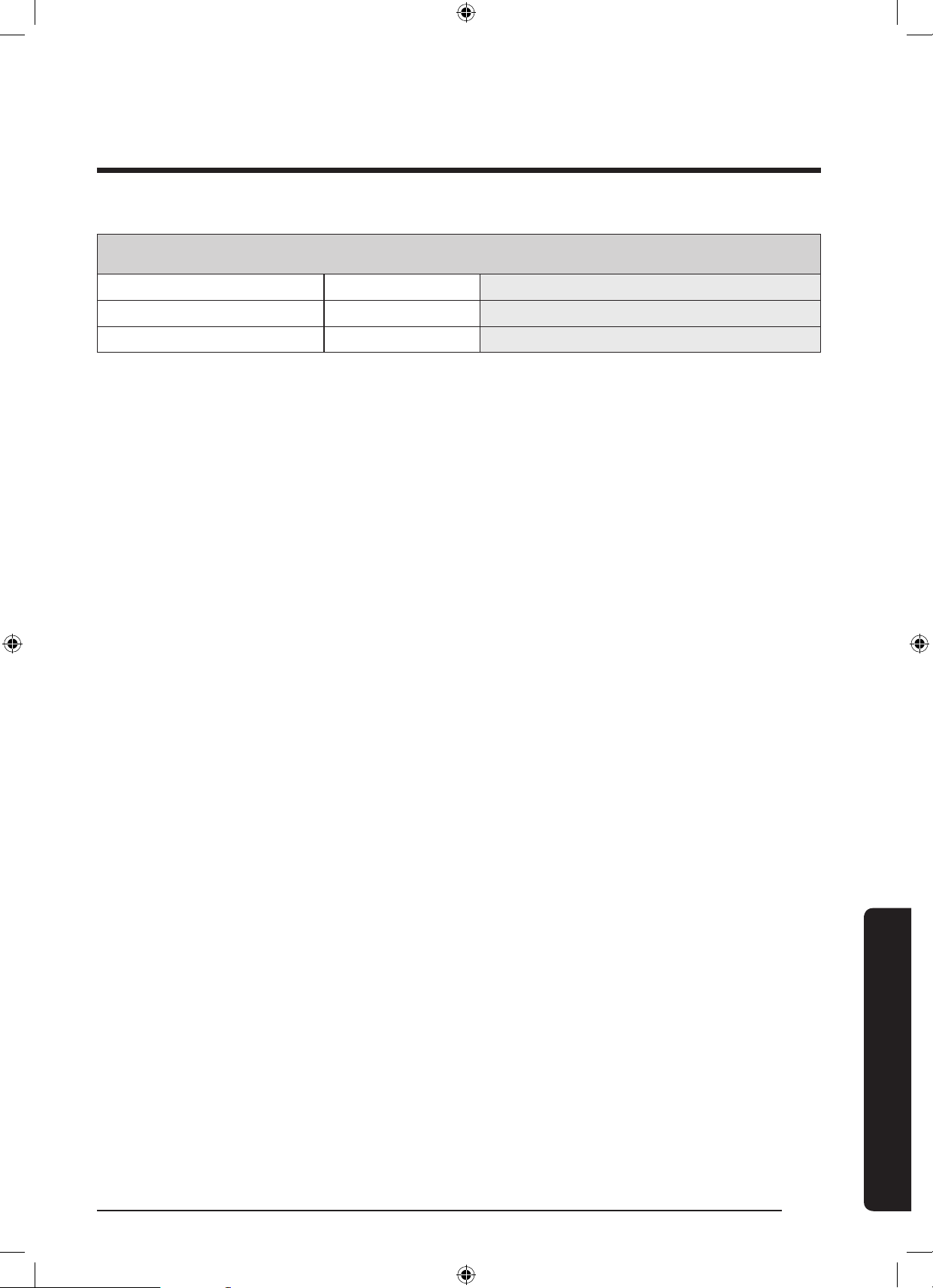
ةيبرعلا 70
اافصاحا
اافصاحا
نطقلا فيف ةرودو ،ةمحئم ةجرد 60 ةيسايقلا نطقلا لسغ ةرود مادختسا دنع جيجضلا
لسغpW 1 dB)A(re49
نارودpW 1 dB)A(re73
فيفجتلاpW 1 dB)A(re62
.EN50229ةيسايقلاتافصاوايفاهيلعصوصناطورشلل
ً
اقفوفيفجتلاةقاطكهتساتانايبسايق
فيفرايتخابكلذو)ةفشنم23و،ةداسوسيك8،تاءم2:نمةلومانوكتت(مجك6غلبتةلومحدنعلوافيفجتلاذيفنتبجي
؛نطقلا
فيفرايتخابكلذو)ةفشنم5و،ةداسوسيك8،تاءم2:نمةلومانوكتت(مجك4غلبتةلومحدنعيناثلافيفجتلاذيفنتبجي
؛نطقلا
).نزولاطبضلامهتلازإوأةفشنم2وأ1ةفاضإنك(
WD10N645R2X_DC68-03976N_AR.indd 70 2018/8/16 19:51:25
71 ةيبرعلا
اافصاحا
WD10N645R2X_DC68-03976N_AR.indd 71 2018/8/16 19:51:25
؟ااقيلعت وأ ةلئسأ كمدل له
دلبلاـب لصتاىلع تنرتنا ىلع انعقحم ةرامزب مق وأ
JORDAN
0800-22273
065777444
www.samsung.com/levant/support
SYRIA9625777444
Lebanon1299
Iraq80010080
WD10N645R2X_DC68-03976N_AR.indd 72 2018/8/16 19:51:26