
User Guide
• Someofthecontentsinthismanualmaydifferfromyourdevicedependingonthe
softwareversionofthedevice,OSversionoryourserviceprovider,andaresubject
tochangewithoutpriornotice.
• AlwaysusegenuineLGaccessories.Thesupplieditemsaredesignedonlyforthis
deviceandmaynotbecompatiblewithotherdevices.
• Thisdeviceisnotsuitableforpeoplewhohaveavisualimpairmentduetothe
touchscreenkeyboard.
• Allscreenshotsinthisguidearesimulated.
• Actualdisplaysandthecolorofthedevicemayvary.
ENGLISH

2
SERVICE ACTIVATION
SERVICE ACTIVATION
IfyouareanewT-Mobile
®
customerandyourservicehasnotbeenactivated,simply
callCustomerCareat1-800-937-8997fromyourlandlinephoneandaT-Mobile
Activationsrepresentativewillassistyou.Youwillneedthefollowinginformationwhen
activatingservice:
• ServiceAgreementandagentcodeonyourAgreement.
• Yourname,homeaddress,homephone,andbillingaddress.
NOTE: For business and government accounts, please provide the name of
your company or government agency, address, and tax ID.
• YourSocialSecuritynumber,currentdriver’slicensenumber,anddateofbirthfor
creditcheckpurposes.
• YourchoiceofT-Mobilerateplanandservices(seewww.t-mobile.comforthe
latestplaninformation).
• SIMserialnumberandIMEInumber(locatedontheboxbarcodelabel).
Byactivatingservice,youacknowledgethatyouhaveread,understand,andagreetobe
boundbyeachofT-Mobile’sTermsandConditionsandyourServiceAgreement.

3
SERVICE ACTIVATION
About this user guide
Pleasereadthisuserguidecarefullybeforeyouuseyourphoneandkeepithandyfor
futurereference.
Shouldyourphonefailstooperatecorrectly,refertotheFAQsection.
• Somefeaturesandservicemayvarybyarea,phone,carrier,planandversionof
phonesoftware.
• Screendisplaysandillustrationsonthisusermanualmaydifferfromthoseyousee
ontheactualphone.
• Designsandspecificationsofthephoneandotheraccessoriesaresubjectto
changewithoutanynotice.

4
Table of contents
Table of contents
SERVICE ACTIVATION ................................2
About this user guide .................................3
Important Notice .......................................6
Getting to know your device ....................9
Phone layout ..............................................9
Connecting cables to the ports .................12
Installing the SIM card or microSD card ...14
Removing the memory card .....................16
Locking and unlocking the device ............16
Your Home screen ...................................18
Touch screen tips .....................................18
Home screen ............................................19
Customizing the Home screen .................20
Returning to recently-used applications ...22
Notifications panel ...................................22
On-screen keyboard.................................25
Special Features .....................................26
Gesture shot .............................................26
Gesture View ............................................27
KnockON ..................................................28
Knock Code ..............................................28
Dual window ............................................29
QuickMemo+ ...........................................30
QSlide ......................................................31
QuickRemote ...........................................32
Google Account Setup ............................34
Connecting to Networks and Devices ....36
Wi-Fi ........................................................36
Bluetooth .................................................37
Wi-Fi Direct ..............................................38
SmartShare ..............................................39
QPair ........................................................40
Transferring data between a PC and your
device ......................................................42
Contacts ..................................................43
Searching for a contact ............................43
Adding a new contact ..............................43
Favorites contacts ....................................43
Creating a group ......................................44
Email .......................................................45
Managing email accounts ........................45
Working with account folders ...................45
Composing and sending email .................46
Camera and Video ...................................47
Using the advanced settings ....................48
Taking a photo .........................................49
Once you have taken a photo ...................49
Recording a video ....................................50
After recording a video .............................50
Gallery......................................................51
Multimedia ..............................................54
Music .......................................................54

5
Table of contents
Utilities ....................................................56
Clock ........................................................56
Calculator .................................................57
Calendar ..................................................58
Voice Search ............................................58
Downloads ...............................................59
Browsing the Web...................................60
Chrome ....................................................60
Settings ...................................................61
WIRELESS NETWORKS .............................61
DEVICE .....................................................62
PERSONAL ...............................................67
SYSTEM ...................................................70
Software Update .....................................74
Device Software Update ...........................74
LG Device Software Update via
Over-the-Air (OTA) ....................................74
About this user guide .............................75
About this user guide ...............................75
Trademarks .............................................76
Trademarks ..............................................76
DivX HD ....................................................76
Troubleshooting ......................................77
For Your Safety........................................79
Safety Information ....................................82
Limited Warranty Statement ...................109
6
Important Notice
Please read this before you start using your device!
Pleasechecktoseewhetheranyproblemsyouencounteredwithyourdeviceare
describedinthissectionbeforetakingthedeviceinforserviceorcallingaservice
representative.
1. Device memory
Youmayneedtocheckyourdevicememoryanddeletesomedata,suchas
applicationstomakemorememoryavailable.
To uninstall applications:
1 Tap > > >Apps.
2 Onceallapplicationsappear,scrolltoandselecttheapplicationyouwanttouninstall.
3 TapUninstall.
2. Optimizing battery life
Extendyourbattery'spowerbyturningofffeaturesthatyoudonotneedtorun
constantlyinthebackground.Youcanmonitorhowapplicationsandsystemresources
consumebatterypower.
Extending your device's battery life:
• Turnoffradiocommunicationswhenyouarenotusing.IfyouarenotusingWi-Fi,
BluetoothorGPS,turnthemoff.
• Reducescreenbrightnessandsetashorterscreentimeout.
• TurnoffautomaticsyncingforGmail,Calendar,Contactsandotherapplications.
• Someapplicationsyoudownloadmayconsumebatterypower.
Important Notice

7
Important Notice
• Whileusingdownloadedapplications,checkthebatterychargelevel.
3. Before installing an open source application and OS
WARNING
• If you install and use an OS other than the one provided by the manufacturer it
may cause your device to malfunction. In addition, your device will no longer be
covered by the warranty.
• To protect your device and personal data, only download applications from
trusted sources, such as Play Store™. If there are improperly installed
applications on your device, the device may not work normally or a serious error
may occur. You must uninstall those applications and all associated data and
settings from the device.
4. Using the Hard Reset (Factory Reset)
Ifyourdevicedoesnotrestoretoitsoriginalcondition,useaHardReset(FactoryReset)
toinitializeit.
1 Turnthepoweroff.
2 PressandholdthePower/Lock Key + Volume Down Keyontherightsideofthe
deviceuntiltheLGlogoisdisplayed.
3 BrieyreleaseonlythePower/Lock KeywhentheLGlogoisdisplayed.
4 ImmediatelypressandholdthePower/Lock Keyagain.
5 ReleaseallkeyswhentheFactoryresetscreenisdisplayed.
6 PresstheVolume KeystoselectYes,andthenpressthePower/Lock Keyto
performaHardReset.Performthissteptwice.
8
Important Notice
WARNING
If you perform a Hard Reset, all user applications, user data and DRM
licenses will be deleted. Please remember to backup any important data
before performing a Hard Reset.
5. Opening and switching applications
MultitaskingiseasywithAndroid;youcankeepmorethanoneapplicationrunningat
thesametime.Thereisnoneedtoquitanapplicationbeforeopeninganother.Useand
switchbetweenseveralopenapplications.Androidmanageseachapplication,stopping
andstartingthemasneededtomakesurethatidleapplicationsdon'tconsume
resourcesunnecessarily.
1 Tap
.Apppreviewsofrecentlyusedapplicationswillbedisplayed.
2 Taptheapplicationyouwanttoaccess.Thisdoesnotstopthepreviousappfrom
runninginthebackground.Makesuretotap
tobackoutofanappafterusingit.
• Tocloseanappfromtherecentappslist,swipetheapppreviewtotheleftorright.
Toclearallapps,tapClear all.
6. If the screen freezes
Ifthescreenfreezesorthedevicedoesnotrespondwhenyoutrytooperateit:
PressandholdthePower/Lock Keyforabout10secondstoresetyourdevice.Toturn
yourdeviceoff,pressandholdthePower/Lock Keyforabout20seconds.Ifitstill
doesnotwork,pleasecontacttheservicecenter.
9
Getting to know your device
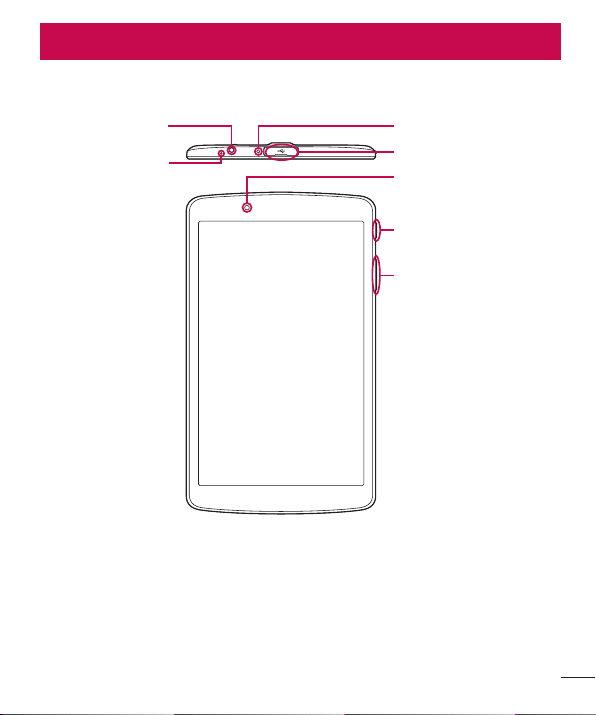
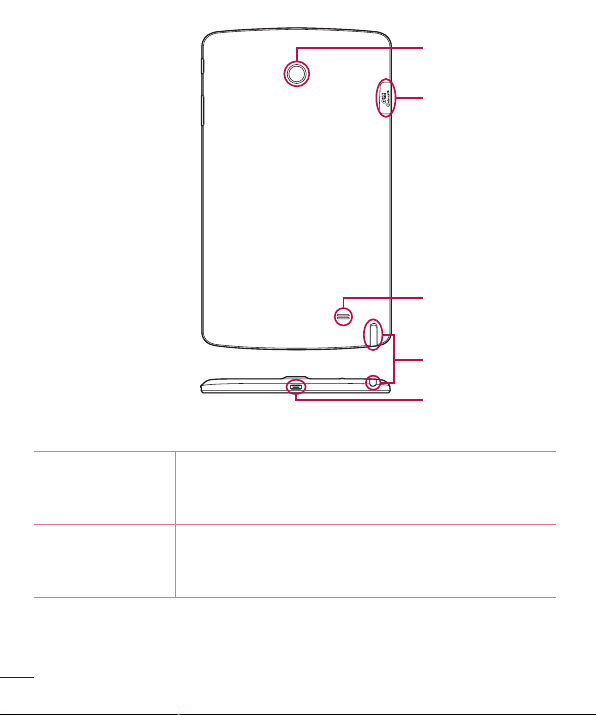
Phone layout
Volume keys
Front-facing camera
USB peripheral port
Infrared (IR) LED
Power/Lock key
Earphone jack
Microphone
Getting to know your device
10
Getting to know your device
SIM card/microSD
card slot
Rear-facing camera
Speaker
Stylus Pen
Charger / USB port
Front-facing
camera
Usetotakepicturesandrecordvideosofyourself.Youcan
alsousethisforvideochatting.Keepitcleanforoptimal
performance.
Power/Lock key
Presstolock/unlockthescreen.Pressandholdtoturn
thetableton/off,restartit,andactivate/deactivateairplane
mode.

11
Getting to know your device
Volume keys
Allowyoutoadjustthemediavolumes.Pressandholdboth
keysatthesametimetoaccesstheQuickMemo+while
screenisunlocked.PressandholdDownorUptoaccess
theCamerawhilescreenisofforlocked.
Earphone jack
Allowsyoutopluginanoptionalheadsetforconvenient,
hands-freeconversations.Youcanalsopluginheadphones
tolistentomusic.
Infrared (IR) LED UsedasasensorfortheQuickRemoteapp.
SIM card/MicroSD
card slot
AllowsyoutoinsertyourSIMcardandamicroSDcard.
Microphone
Recordsyourvoiceandallowsuseforvoice-activatedfunctions.
USB peripheral
port
AllowyoutoconnectaUSBperipheral,suchasakeyboard,
mouse,andexternalstoragetoyourtablet.Alsoallowsyou
tochargeanotherdevice.
Charger / USB port
AllowsyoutoconnectthetabletandtheUSBcablefor
usewiththechargeradapter,yourPC,orothercompatible
accessories.
Rear-facing
camera
Usetotakephotosandrecordvideos.Keepitcleanfor
optimalperformance.
Speaker
Usetolistentotheaudiofromtheselectedfunction(e.g.,
music,videos,soundclips,etc.).
Stylus Pen
Allowsyoutouseaconvenientstyluspenthatyoucanuse
toinputcommandsandnavigateyourdevice.Italsoworks
wellwithpopularwritinganddrawingapplications.Touse
thestylus,slideitoutfromthebottomofthedevice.
12
Getting to know your device
Connecting cables to the ports
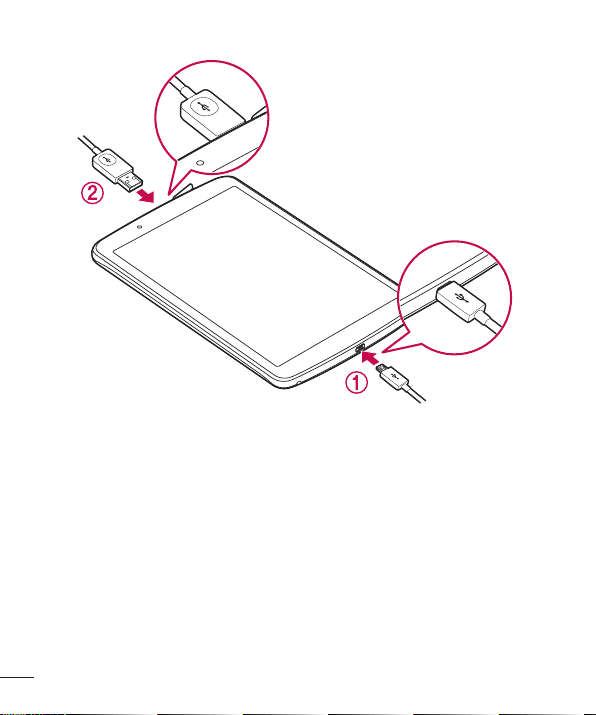
1. Charging the battery
TheCharger/USBPortislocatedatthebottomofthedevice.Insertthechargerand
plugitintoapoweroutlet.
Chargethebatterybeforeusingitforfirsttime.Usethechargerincludedwithyour
devicetochargethebattery.Acomputercanalsobeusedtochargethebatteryby
connectingthedevicetoitusingtheUSBcable.

13
Getting to know your device
WARNING
Use only LG-approved chargers, batteries and cables. If you use unapproved
chargers, batteries or cables, it may cause a battery charging delay or display
a pop-up message regarding slow charging. This can also cause the battery
to explode or damage the device, which is not covered by the warranty.
NOTE:
• Your device has an internal rechargeable battery. For your safety, do not remove
the embedded battery.
• The battery must be fully charged initially to improve battery lifetime.
Yourdevicesupportsuptoa128GBmicroSDcard.Dependingonthememorycard
manufacturerandtype,somememorycardsmaynotbecompatiblewithyourdevice.
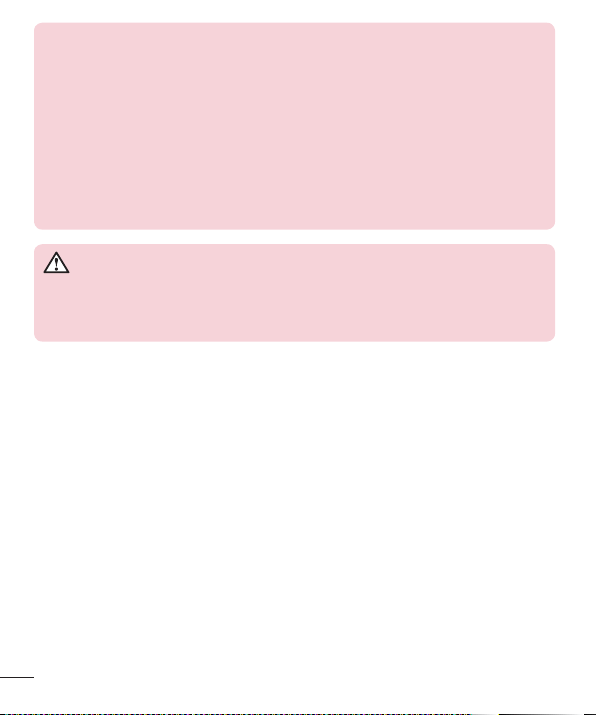
2. Connecting a USB device to your tablet
TheUSBperipheralportislocatedatthetopofthedevice.InserttheUSBportandplug
itintothedesireddevice.
SomeoftheUSBdevicessupportedthroughtheUSBportincludeakeyboard,mouse,
gamecontroller,digitalcamera,andstoragedevice(includinganAndroidsmartphone
actingasexternalstoragedevice).AsmostUSBkeyboards,mouseandgame
controllersaredesignedfordesktopcomputersandoperationsystems,somedevices
maynotfunction.
14
Getting to know your device
NOTE:
• Only devices that meet the USB specs may connect to the USB peripheral port.
• If you are experiencing errors with device recognition, please use a shorter USB
cable or check the USB Hub with external power supply (Self-Powered Hub).
• Only file systems such as FAT32, exFAT, and NTFS are supported for the
external USB storage device.
• Transferring data through both USB devices at the same time is not supported.
The first device that is connected has priority. The USB device connected
second can only be charged.
WARNING
You cannot store data using USB storage when the battery level is below
15%. Please charge the battery above 15% in order to use the USB storage
function.
Installing the SIM card or microSD card
Beforeyoucanstartexploringyournewdevice,youneedtosetitup.
YourdevicesupportstheuseofmicroSDmemorycardsofupto128GBcapacity.
MultimediacontentscanbesavedinthemicroSDcard.
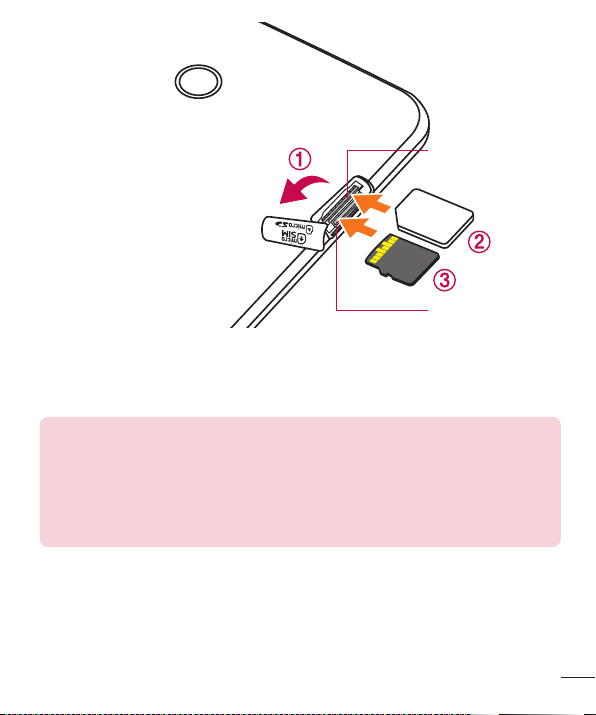
1 OpentheSIM/microSDslotcover.
2 SlidetheSIMcardintotheupperslotasshowninthegurebelow.Makesurethe
goldcontactareaonthecardisfacingdownward.
15
Getting to know your device
SIM card slot
microSD card slot
3 Ifyouwanttouseamemorycard,insertthememorycardintothelowerslot.Make
surethegoldcontactareaisfacingupwards.SlidethemicroSDcardintotheslotuntil
it“clicks”intoplaceandthenclosetheslotcover.
NOTE:
• Cards must be positioned as shown.
• MicroSD card is not included.
• Only microSIM cards work with this device.
• Depending on the memory card manufacturer and type, some memory cards
may not be compatible with your device.
16
Getting to know your device
Removing the memory card
Beforeremovingthememorycard,firstunmountitforsaferemoval.
1 Tap
> > >Storage>Unmount SD card.
2 Openthecardslotcoverandpressthememorycardintounlockit.Thenpullitout
oftheslot.
WARNING
Do not remove the memory card while the device is transferring or accessing
information. Doing so can cause data to be lost or corrupted or damage to
the memory card or device. LG is not responsible for losses that result from
the misuse of damaged memory cards, including the loss of data.
Locking and unlocking the device
PressingthePower/Lock Keyturnsoffthescreenandputsthedeviceintolockmode.
Thedeviceautomaticallygetslockedifitisnotusedforaspecifiedperiod.Thishelpsto
preventaccidentaltapsandsavesbatterypower.
Tounlockthedevice,pressthePower/Lock Keyandswipethescreeninanydirection.
NOTE: Double-tapping on the screen also can wake up the screen instead of
the Power/Lock Key.
Changing the screen lock method
Youcanchangethewaythatyoulockthescreentopreventothersaccessingyour
personalinformation.
1 Tap
> > >Display>Lock screen>Select screen lock.
2 SelectadesiredscreenlockfromNone,Swipe,KnockCode,Pattern,PINand
Password.
17
Getting to know your device
NOTE: Create a Google account before setting an unlock pattern and
remember the Backup PIN you created when creating your pattern lock.
Caution! If you haven't created a Google account on the device and you
forgot your PIN, Password, and the backup PIN, you need to perform a hard
reset. If you perform a hard reset, all user applications and user data will be
deleted. Please remember to back up any important data before performing
a hard reset.
TIP! Smart Lock
• You can use Smart Lock to make unlocking your device easier. You can set
it to keep your device unlocked when you have a trusted Bluetooth device
connected to it, when it's in a familiar location like your home or work, or when
it recognizes your face.
• Setting up Smart Lock
1 Tap > > > Display > Lock screen > Smart Lock.
2 Before you add any trusted devices, trusted places, or trusted face, you
need to set up a screen lock (pattern, PIN, or password).

18
Your Home screen
Your Home screen
Touch screen tips
Herearesometipsonhowtonavigateonyourdevice.
• Tap or touch–Asinglefingertapselectsitems,links,shortcutsandlettersonthe
on-screenkeyboard.
• Touch and hold–Touchandholdanitemonthescreenbytappingitandnot
liftingyourfingeruntilanactionoccurs.
• Drag–Touchandholdanitemforamomentandthen,withoutliftingyourfinger,
moveyourfingeronthescreenuntilyoureachthetargetposition.Youcandrag
itemsontheHomescreentorepositionthem.
• Swipe or slide–Toswipeorslide,quicklymoveyourfingeracrossthesurface
ofthescreen,withoutpausingwhenyoufirsttapit(soyoudon'tdraganitem
instead).
• Double-tap–Double-taptozoomonawebpageoramap.
• Pinch-to-Zoom–Useyourindexfingerandthumbinapinchingorspreading
motiontozoominoroutwhenusingthebrowser,Maps,orwhenviewingpictures.
• Rotate the screen–Frommanyapplicationsandmenus,thescreenorientation
adjuststothedevice'sphysicalorientation.
NOTE:
• Do not press too hard; the tap screen is sensitive enough to pick up a light, yet
firm tap.
• Use the tip of your finger to tap the option you want. Be careful not to tap any
other buttons.
19
Your Home screen
Home screen
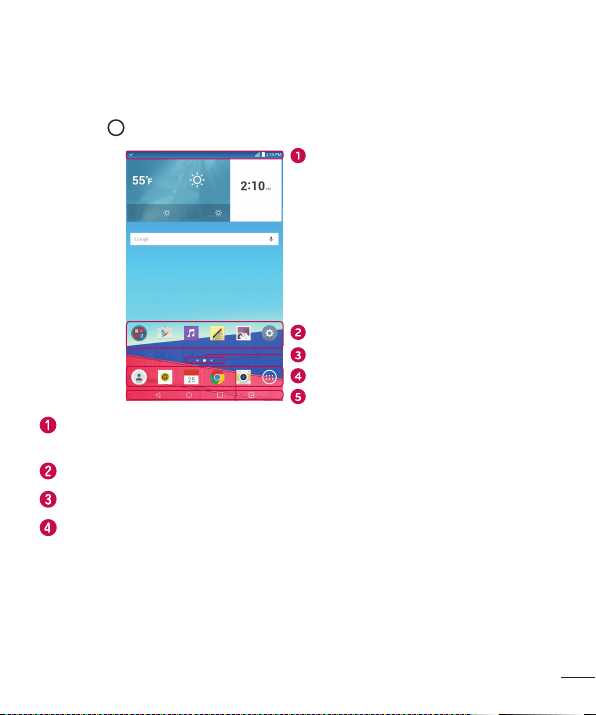
TheHomescreenisthestartingpointformanyapplicationsandfunctions.Itallows
youtoadditemslikeappshortcutsandGooglewidgetstogiveyouinstantaccessto
informationandapplications.Thisisthedefaultcanvasandaccessiblefromanymenu
bytapping
.
Status Bar
Application Icons
Location Indicator
Quick Button Area
Home Touch Buttons
Showsthedevice'sstatusinformation,includingthetime,signalstrength,battery
statusandnotificationicons.
Tapanicon(application,folder,etc.)toopenanduseit.
IndicateswhichHomescreencanvasyouarecurrentlyviewing.
Providesone-touchaccesstothefunctionfromanyHomescreencanvas.
20
Your Home screen
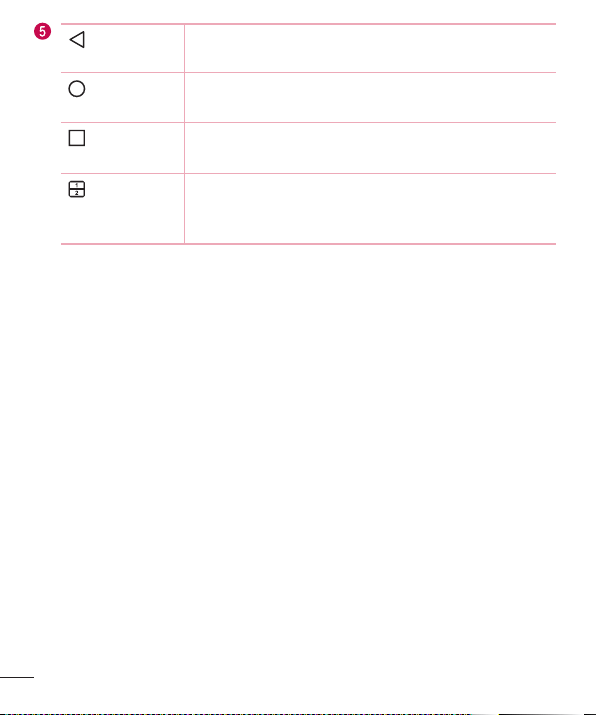
Back Button
Returnstothepreviousscreen.Alsoclosespop-upitems,
suchasmenus,dialogboxesandtheon-screenkeyboard.
Home Button
ReturntotheHomescreenfromanyscreen.Touchandhold
toaccesstheGoogleNowshortcut.
Recent Apps
Button
Displaysrecentlyusedapplications.Ifyoutouchandhold
thisbutton,itopensamenuofavailableoptions.
Dual Window
button
Taptochangetodualwindowmode.Itallowsyouto
managetwodifferentappsatthesametimebysplittingthe
screenintwo.
Extended Home screen
TheoperatingsystemprovidesmultipleHomescreencanvasestoprovidemorespace
foraddingicons,widgetsandmore.
• SlideyourfingerleftorrightacrosstheHomescreentoaccessadditional
canvases.
Customizing the Home screen
YoucancustomizeyourHomescreenbyaddingappsandwidgetsandchanging
wallpapers.
Adding items on your Home screen
1 TouchandholdtheemptypartoftheHomescreen.
2 TaptheWidgetstabandselecttheitemyouwanttoadd.Youthenseethisadded
itemontheHomescreen.
3 Dragittothedesiredlocationandliftyournger.
21
Your Home screen
TIP! To add an application icon to the Home screen from the Apps screen,
touch and hold the application you want to add.
Removing an item from the Home screen
• WhileontheHomescreen,touchandholdtheiconyouwanttoremovethendrag
itto andreleaseit.
Adding an app to the Quick Button area
• FromtheAppsscreenorontheHomescreen,touchandholdanapplicationicon
anddragittotheQuickButtonarea.Thenreleaseitinthedesiredlocation.
Removing an app from the Quick Button area
• TouchandholdthedesiredQuickButton,dragitto ,andreleaseit.
NOTE: The Apps Button cannot be removed.
Customizing app icons on the Home screen
1 Touchandholdanapplicationiconuntilitunlocksfromitscurrentposition,then
releaseit.Theeditingicon appearsintheupper-rightcorneroftheapplication.
2 Taptheapplicationiconagainandselectthedesiredicondesignandsize.
3 TapOKtosavethechange.
NOTE: You can also tap Add new to personalize icons with your pictures.
22
Your Home screen
Returning to recently-used applications
1 Tap .Apppreviewsofrecentlyusedapplicationswillbedisplayed.
2 Tapanapppreviewtoopentheapplication.Ortap
toreturntoyourprevious
screen.
Notifications panel
Notificationsalertyoutothearrivalofnewmessages,calendareventsandalarms,as
wellasongoingevents,suchasdownloads.
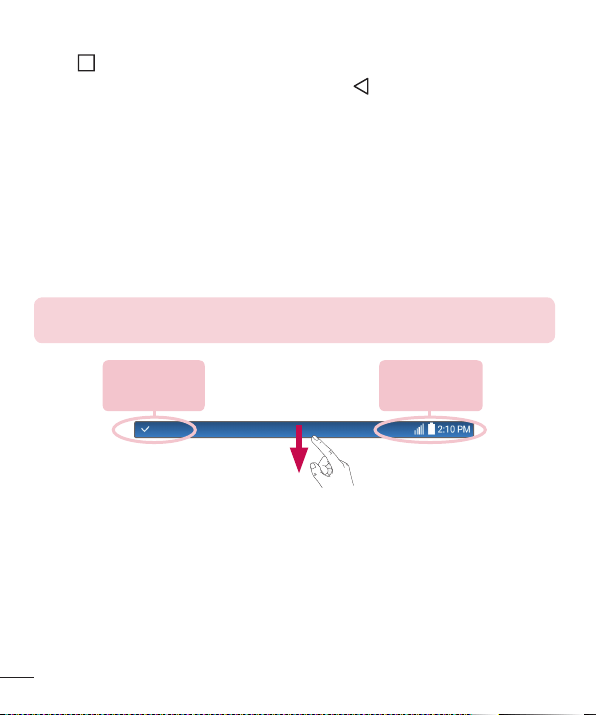
Whenanotificationarrives,itsiconappearsatthetopofthescreen.Iconsforpending
notificationsappearontheleft,andsystemicons,suchasWi-Fiandbatterystrength
areshownontheright.
NOTE: The available options may vary depending on the region or service
provider.
Pending
notifications
System
notifications
23
Your Home screen
Opening the Notifications panel
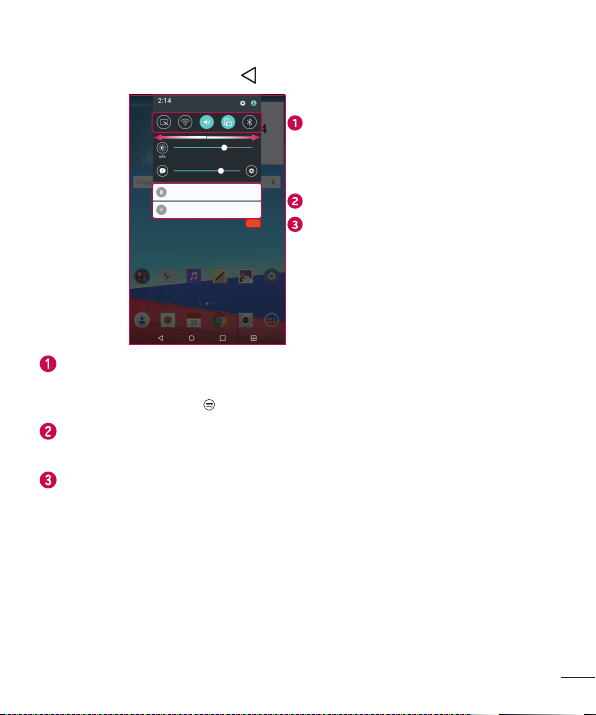
SwipetheStatusbartoopentheNotificationspanel.ToclosetheNotificationspanel,
swipethescreenupwardsortap .
Quick Settings Area
Notifications
Clear
Tapeachquicksettingbuttontotoggleiton/off.Touchandholdthedesiredbutton
todirectlyaccessthesettingsmenuforthefunction.Toseemoretogglekeys,
swipeleftorright.Tap
toremove,addorrearrangequicksettingbuttons.
Currentnotificationsarelisted,eachwithabriefdescription.Tapanotificationto
viewit.
Taptoclearallofthenotifications.
24
Your Home screen
Indicator icons on the Status Bar
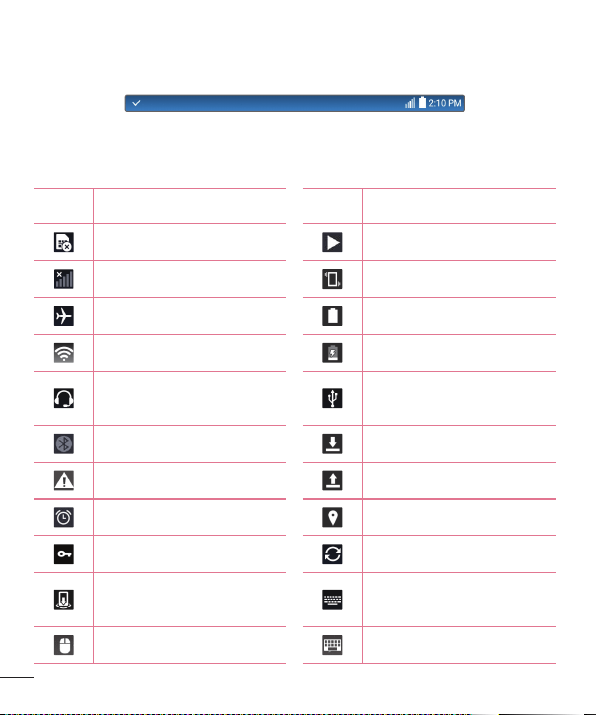
IndicatoriconsappearontheStatusbaratthetopofthescreentocalendarevents,
devicestatusandmore.
Theiconsdisplayedatthetopofthescreenprovideinformationaboutthestatusofthe
device.Theiconslistedinthetablebelowaresomeofthemostcommonones.
Icon Description Icon Description
NoSIMcardinserted Asongiscurrentlyplaying
Nonetworksignalavailable Vibratemodeison
Airplanemodeison Batteryfullycharged
ConnectedtoaWi-Finetwork Batteryischarging
Wiredheadset(withmic)
connected
The device is connected to a
PCviaaUSBcable
Bluetoothison Downloadingdata
Systemwarning Uploadingdata
Analarmisset GPSison
VPNisactive Dataissynchronizing
Media server content sharing
ison
Chooseinputmethod
Themouseisconnected Thekeyboardisconnected
25
Your Home screen
NOTE: The icon's location in the Status bar may differ according to the
function or service.
On-screen keyboard
Youcanentertextusingtheon-screenkeyboard.Theon-screenkeyboardappearson
thescreenwhenyoutapanavailabletextentryfield.
Using the keypad and entering text
Taponcetocapitalizethenextletteryoutype.Double-tapforallcaps.
Taptogotothekeyboardsettings.Touchandholdtoentertextbyvoice,
handwriting,oraccessthecliptray.
Taptoenteraspace.
Taptocreateanewline.
Taptodeletethepreviouscharacter.
Entering special characters
Theon-screenkeyboardallowsyoutoenterspecialcharacters.
Forexample,toinput"á",touchandholdthe"a"buttonuntilthepop-upappearsand
displaysrelatedspecialcharacters.Withoutliftingthefinger,dragyourfingertothe
desiredspecialcharacter.Onceit'shighlighted,liftyourfinger.
NOTE: A symbol at the top right corner of a key indicates that additional
characters are available for that key.
26
Special Features
Gesture shot
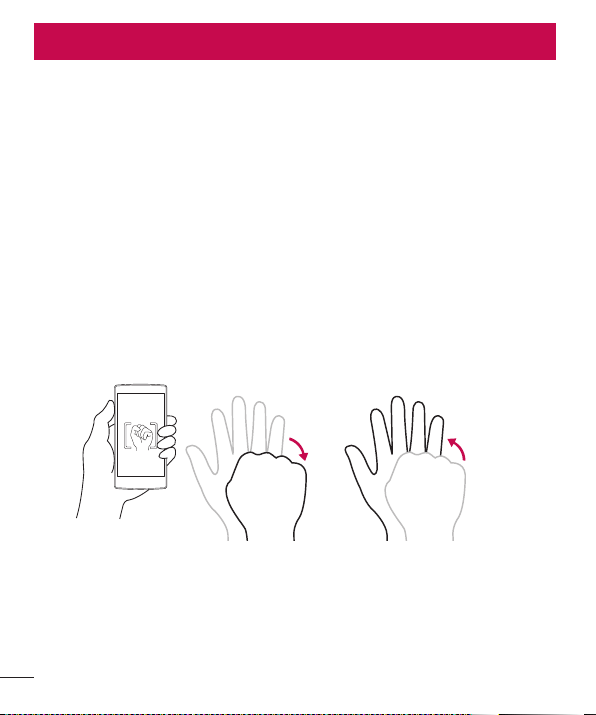
TheGestureshotfeatureallowsyoutotakeapicturewithahandgestureusingthe
frontcamera.
To take photo
TherearetwomethodsforusingtheGestureshotfeature.
• Raiseyourhand,withanopenpalm,untilthefrontcameradetectsitandabox
appearsonthescreen.Thencloseyourhandintoafisttostartthetimer,allowing
youtimetogetready.
OR
• Raiseyourhand,inaclenchedfist,untilthefrontcameradetectsitandabox
appearsonthescreen.Thenunclenchyourfisttostartthetimer,allowingyoutime
togetready.
or
Special Features
27
Special Features
Gesture View
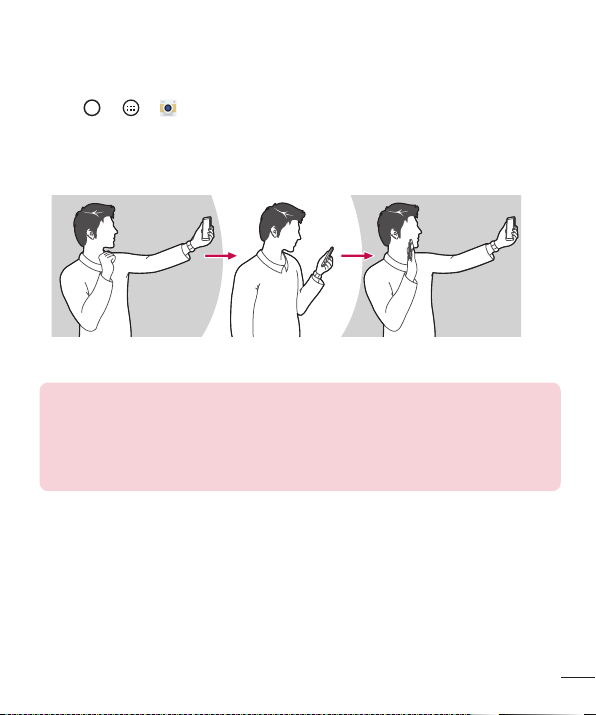
Aftertakingaphotowiththefrontcameralens,youcanautomaticallycheckthe
capturedphotowiththisgesture.
1 Tap
> > .
2 Takeapicturewiththefrontcamera.
3 Aftertakingthepicture,bringthedeviceclosetoyourface.Thecapturedphotowill
bedisplayed.
Take a picture Quick preview Return to front camera mode
NOTE:
• Depending on the speed and angle of the gesture, this feature may not work
properly.
• When the angle is changed after the quick preview, the device returns to camera
mode. You must access the Gallery to view the picture again.

28
Special Features
KnockON
TheKnockONfeatureallowsyoutodouble-tapthescreentoeasilyturnitonoroff.
To turn the screen on
1 Double-tapthecenterofthescreentoturnthescreenon.
2 Unlockthescreenoraccessanyoftheavailableshortcutsorwidgets.
To turn the screen off
1 Double-tapanemptyareaoftheHomescreenortheStatusBar.
2 Thescreenwillturnoff.
NOTE: Tap on the center area of the screen. If you tap on the bottom or the
top area, the recognition rate may decrease.
Knock Code
TheKnockCodefeatureallowsyoutocreateyourownunlockcodeusinga
combinationofknocksonthescreen.YoucanaccesstheHomescreendirectlywhen
thescreenisoffbytappingthesamesequenceonthescreen.
NOTE:
• If you enter the wrong Knock Code 6 times, it will compulsorily take you to your
google account log in/backup PIN.
• Use the fingertip instead of finger nail to tap the screen for turning it on or off.
1 Tap > > >Display>Lock screen>Select screen lock>Knock
Code.
2 TapthesquaresinapatterntosetyourKnockCode.YourKnockCodepatterncanbe
3to8taps.
29
Special Features
Unlocking the screen using the Knock Code
YoucanunlockthescreenbytappingtheKnockCodepatternyoualreadyset,when
thescreenturnsoff.
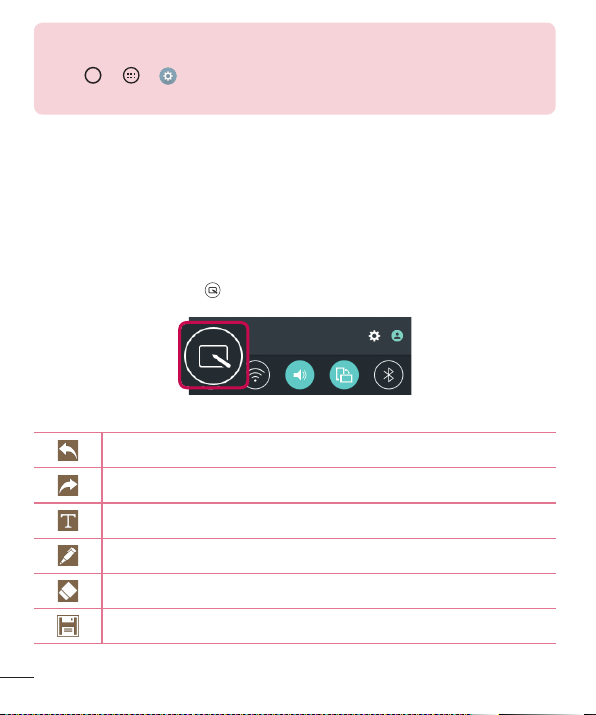
Dual window
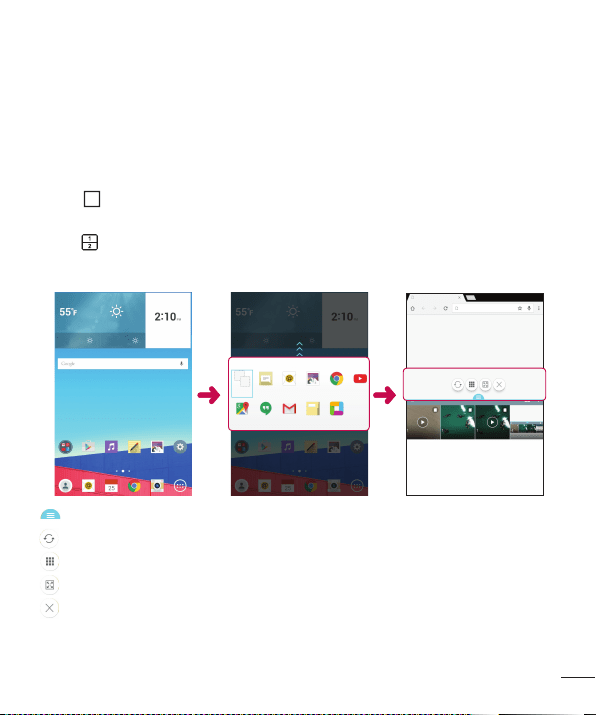
Thisfeatureallowsyoutomulti-taskbysplittingupthescreenintotwo,allowingyouto
usetwocompatibleapplicationsatthesametime.
1 Tap
>Dual window
OR
tap
.
2 Tapordragtheappiconforthecorrespondingapplicationyouwishtouse.
:TaptoviewtheDualwindowmenuoptions,ordragtoresizethesplitscreens.
:Switchthetwoscreens.
:Viewtheapplist.
:Changetheselectedwindowtofullscreen.
:Closethecurrentlyselectedappwindow.
30
Special Features
NOTE: Dual window is enabled by default. You can enable or disable Dual
window through the Settings menu.
1 Tap
> > > Dual window.
2 Slide the toggle button to On or Off.
QuickMemo+
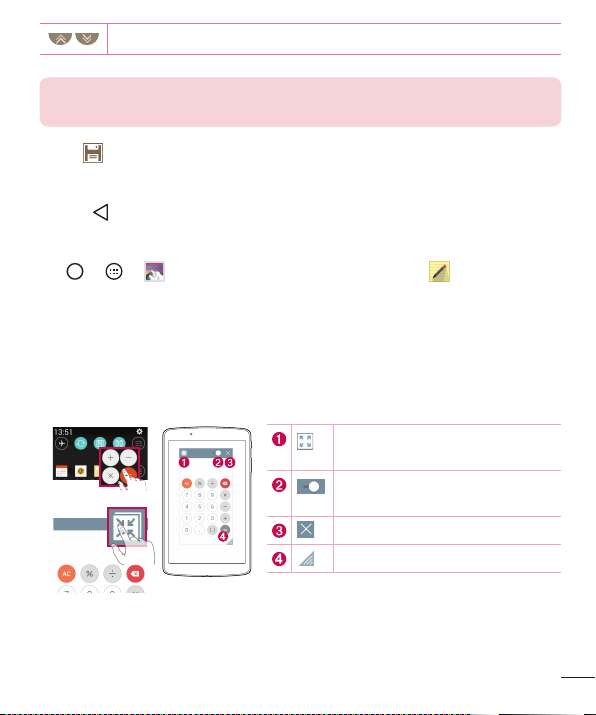
TheQuickMemo+featureallowsyoutocreatememosandcapturescreenshots.
YoucanuseQuickMemo+toeasilyandefficientlywhenyoucreatememos,capture
screens,andsharethemwithfamilyandfriends.
1 Whileviewingthescreenyouwanttocaptureanduseinyourmemo,dragthe
Statusbardownandtap
.
2 Createamemousingthefollowingoptions:
Taptoundothemostrecentaction.
Taptoredothemostrecentlydeletedaction.
Taptoinserttextintoyourmemo.
Taptoselectthepentypeandcolor.
Taptousetheerasertoerasethepenmarksonthememo.
Taptosavethememoyou'vecreated.
31
Special Features
Taptohideordisplaythetoolbar.
NOTE: Please use a fingertip or Stylus Pen while using the QuickMemo+
feature. Do not use your fingernail.
3 Tap tosavethecurrentmemototheQuickMemo+orGallery.
Discard Memos
• Tap .
View the Saved Memo
Tap > > andselecttheQuickMemo+albumortap andselectthe
desiredmemo.
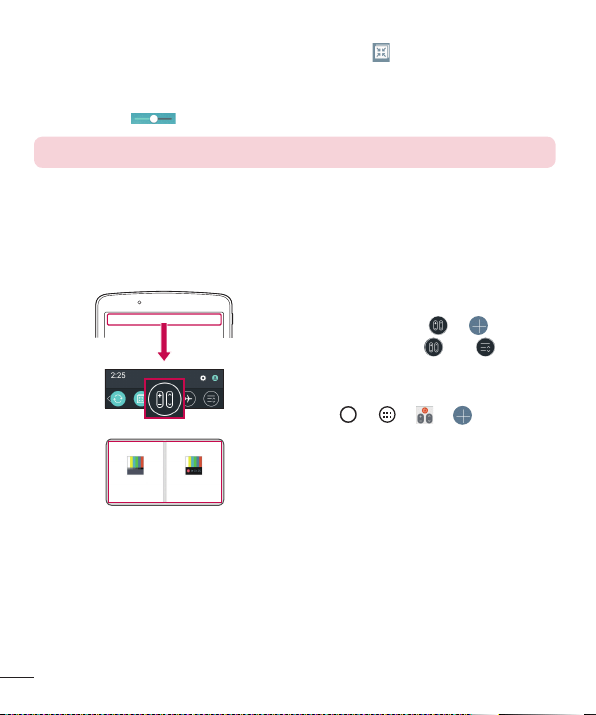
QSlide
Fromanyscreen,usetheNotificationpaneltoeasilyaccessandusetheCalendar,
Calculator,andmorewithQSlide.
OR
Taptoexpandthewindowtofull
windowsize.
Taptoadjustthewindow's
transparency.
TaptoclosetheQSlidewindow.
Dragtoadjustthewindowsize.
1 SlidetheStatusbardownward,thentapQSlidetoviewtheavailableQSlideapps.
ThentapthedesiredappfromtheQSlideAppssection.
32
Special Features
OR
Also,whileusingapplicationsthatsupportQSlide,tap .Thefunctionisdisplayed
asasmallwindowonyourscreen.
2 YoucanuseandtapthescreenundertheQSlidewindowswhenthetransparency
barisnotfull
.
NOTE: QSlide can support up to two window at the same time.
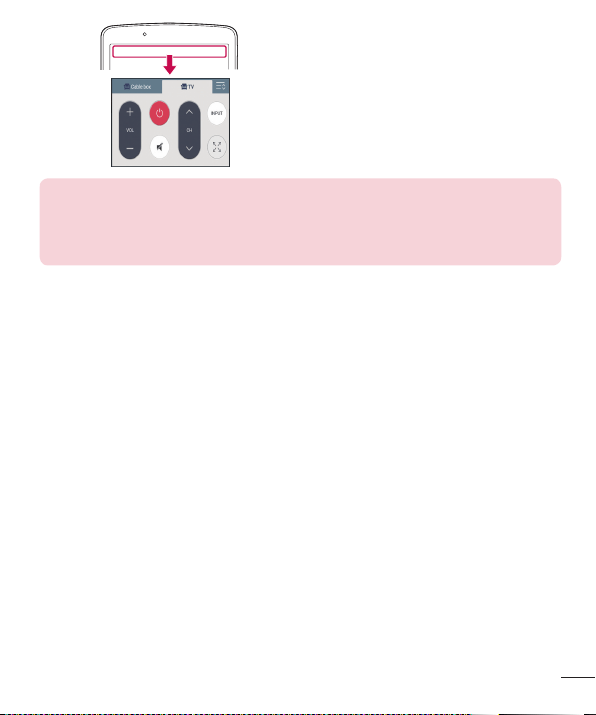
QuickRemote
QuickRemoteturnsyourdeviceintoaUniversalRemoteforyourhomeTV,set-topbox
andaudiosystem,andmore.
1 TouchandslidetheStatusbar
downwardandtap
> .
Ifyoucannotsee ,tap >
checkmarkQuickRemotetoenable.
OR
Tap
> > > .
2 Selectthetypeandbrandofthe
device,thenfollowtheon-screen
instructionstocongurethedevice.
33
Special Features
3 Onceyouhavecompletedtheinitial
setup,youcaneasilyaccessthe
QuickRemotefromtheNotication
panel.OpentheNoticationpaneland
usetheQuickRemotefunctions.
NOTE: QuickRemote operates the same way as an ordinary remote control
infrared (IR) signals. Be careful not to cover the infrared sensor at the top of
the device when you use the QuickRemote function. This function may not be
supported depending on the model, the manufacturer or service company.
34
Google Account Setup
Google Account Setup
ThefirsttimeyouopenaGoogleapplicationonyourdevice,youwillberequiredtosign
inwithyourexistingGoogleaccount.IfyoudonothaveaGoogleaccount,youwillbe
promptedtocreateone.
Creating your Google account
1 Tap > .
2 Tap
>Accounts & sync>Add account>Google>Or create a new
account.
3 Enteryourrstandlastname,thentapNEXT.
4 EnterausernameandtapNEXT.YourdevicewillcommunicatewithGoogleservers
andcheckforusernameavailability.
5 EnteryourpasswordandtapNEXT.
6 Followtheinstructionsandentertherequiredandoptionalinformationaboutthe
account.Waitwhiletheservercreatesyouraccount.
Signing into your Google account
1 Tap > .
2 Tap
>Accounts & sync>Add account>Google.
3 EnteryouremailaddressandtapNEXT.
4 OnceyouhavesetupyourGoogleaccount,yourdevicewillautomaticallysynchronize
withyourGoogleaccountontheweb(ifadataconnectionisavailable).

35
Google Account Setup
Aftersigningin,yourdevicewillsyncwithyourGoogleservices,suchasGmail,
Contacts,andGoogleCalendar.YoucanalsouseMaps,downloadapplicationsfrom
PlayStore,backupyoursettingstoGoogleservers,andtakeadvantageofotherGoogle
servicesonyourdevice.
IMPORTANT
• Some applications, such as Calendar, work only with the first Google
Account you add. If you plan to use more than one Google Account
with your device, be sure to sign into the one you want to use with such
applications first. When you sign in, your contacts, Gmail messages,
Calendar events, and other information from these applications and services
on the web are synchronized with your device. If you don't sign into a
Google Account during setup, you will be prompted to sign in or to create
a Google Account the first time you start an application that requires one,
such as Gmail or Play Store.
• If you have an enterprise account through your company or other
organization, your IT department may have special instructions on how to
sign into that account.
36
Connecting to Networks and Devices
Connecting to Networks and Devices
Wi-Fi
Youcanusehigh-speedInternetaccesswhilewithinthecoverageofthewireless
accesspoint(AP).
Connecting to Wi-Fi networks
1 Tap > > >Wi-Fi.
2 Tap
OFF ON
toturnWi-FionandstartscanningforavailableWi-Finetworks.
3 Tapanetworktoconnecttoit.
• Ifthenetworkissecuredwithalockicon,youwillneedtoenterasecuritykeyor
password.
4 TheStatusbardisplaysiconsthatindicateWi-Fistatus.
NOTE: If you are out of the Wi-Fi zone or have set Wi-Fi to Off, the device
may automatically connect to the Web using mobile data, which may incur
data charges.
TIP! How to obtain the MAC address
Tap
> > > Wi-Fi > > Advanced Wi-Fi > MAC address.
37
Connecting to Networks and Devices
Bluetooth
Bluetoothisashort-rangecommunicationstechnologythatallowsyoutoconnect
wirelesslytoanumberofBluetoothdevices,suchasheadsetsandhands-freecarkits,
andBluetooth-enabledhandhelds,computers,printers,andwirelessdevices.
NOTE:
• LG is not responsible for the loss, interception or misuse of data sent or
received via the Bluetooth feature.
• Always make sure that you share and receive data with devices that are trusted
and properly secured.
• If there are obstacles between the devices, the operating distance may be
reduced.
• Some devices, especially those that are not tested or approved by Bluetooth
SIG, may be incompatible with your device.
Pairing your device with another Bluetooth device
1 Tap > > >Bluetooth.
2 Tap
OFF ON
toturnBluetoothon.
3 TapSearchtoviewthevisibledevicesinrange.
4 Choosethedeviceyouwanttopairwithfromthelist.Oncetheparingissuccessful,
yourdeviceconnectstotheotherdevice.
NOTE: Pairing between two Bluetooth devices is a one-time process. Once
a pairing has been created, the devices will continue to recognize their
partnership and exchange information.
TIP! Please consult documentation included with Bluetooth device for
information on pairing mode and passcode (typically 0 0 0 0 – four zeroes).
38
Connecting to Networks and Devices
Sending data via Bluetooth
1 Selectafileoritemsuchasacontactormediafile.
2 SelecttheoptionforsendingdataviaBluetooth.
3 SearchforandpairwithaBluetooth-enableddevice.
• DuetodifferentspecificationsandfeaturesofotherBluetooth-compatibledevices,
displayandoperationsmaybedifferent,andfunctionssuchastransferor
exchangemaynotbepossiblewithallBluetoothcompatibledevices.
Receiving data via Bluetooth
1 Tap > > >Bluetooth.
2 Tap
OFF ON
toturnBluetoothon.
3 Youwillreceivearequesttoacceptapairingattemptfromthesendingdevice.Be
suretoselectAccept.
Wi-Fi Direct
Wi-FiDirectprovidesadirectconnectionbetweenWi-Fienableddeviceswithout
requiringanaccesspoint.
Turning on Wi-Fi Direct
1 Tap > > > Wi-Fi.
2 Tap
> Advanced Wi-Fi > Wi-Fi Direct.
NOTE: When in this menu, your device is visible to other visible Wi-Fi Direct
devices nearby.

39
Connecting to Networks and Devices
SmartShare
SmartShareallowsyoutoreceivemultimediacontentviaLGdeviceandtablets.
1 Whileviewingthecontentyouwanttoshare,tap
or >SmartShare.
2 TapPlayorBeaminthepop-upthatisdisplayed.
• Play: YoucanstreamyourcontentviaaTV,Bluetoothspeaker,etc.
• Beam: YoucansendyourcontenttoBluetoothdevicesorviaSmartShareBeam*to
supportedLGdevicesortablets.
*SmartShareBeamquicklytransfersmultimediacontentsthroughWi-FiDirect.
3 Tapthedeviceyouwanttosharefromthelist.
• Ifthedeviceisnotdisplayedonthelist,makesurethatWi-Fi,Wi-FiDirect,or
Bluetoothisturnedon.ThentapRescan.
4 TapSendtosharetheles.
Enjoying content from nearby devices
1 Toconnectnearbydevicestoyourdevice,taptheNearby devicesoptiononthe
GalleryandMusicapps.
• MakesurethatyourdeviceandnearbydevicesareconnectedtothesameWi-Fi
networkandthattheDLNAserviceonthenearbydeviceisturnedon.
2 Tapthedeviceyouwishtoconnectto.
Ifthedeviceisnotlisted,tapSearch nearby devices.
3 Afteraconnectionisestablished,youcanenjoythecontentonyourdevice.
40
Connecting to Networks and Devices
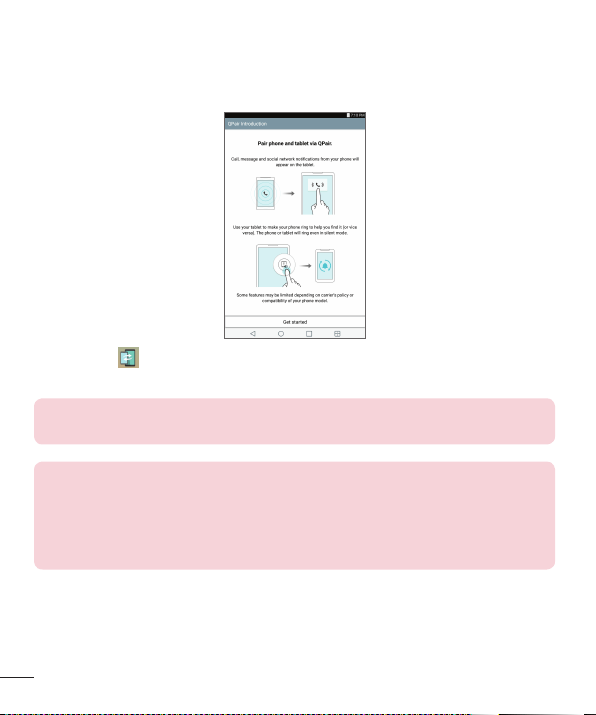
QPair
ByconnectingyourtabletandmobiledeviceviaQPair,youcansyncincomingcalls,
messages,andsocialnetworkingnotificationsbetweenyourtabletandmobiledevice.
1 RunQPair andtapGet started>Startonyourtabletfirstandthenrunthe
samestepsonyourdevice.
TIP! QPair may not be pre-installed on the device. Go to the Google Play
Store and search for QPair and install it.
NOTE:
• QPair works with devices running Android 4.1 or later. Some features may be
limited depending on your device model.
• Since QPair uses the Bluetooth function, it may not work normally if you change
the Bluetooth settings while QPair is in use.
2 Bluetoothconnectionwillbeturnedonandyouwillbeabletopairthedevices.

41
Connecting to Networks and Devices
QPair features
Call notifications–Sendsthetabletanotificationwhenthedevicereceivesacall.The
notificationdisplaysthecaller'snumberandallowsyoutoansweranddeclinethecall.
Youcanalsochangecallsettings,suchasaringtone,ringtonevolume,ringtonewith
vibration,orsendadeclinemessagewhenyougetacall.
NOTE: You can only receive a call supported by Bluetooth technology. Dialing
a call from the tablet using the QPair feature is not possible.
Message notifications–Sendsthetabletanotificationwhenthedevicereceivesa
message.Youcanalsochangemessagesettings,suchasmessagepop-up,message
preview,notificationsound,andnotificationvibration.
Social network notifications–Displaysasocialnetworkingnotificationonyour
tablet'sStatusBarwhenitarrivesonyourdevice.
NOTE: To enable this feature, turn the QPair social network notifications
option on your device (Settings > Accessibility > QPair social network
notifications). This option allows you to be notified of social networking
notifications on your tablet.
QuickMemo+ transfer–SavesyourcurrentQuickMemo+inthetablet'sGallery,and
thensyncsthetablet'sGallerywiththeGalleryonyourdevice.

42
Connecting to Networks and Devices
Transferring data between a PC and your device
YoucancopyormovedatabetweenaPCandthedevice.
Transferring data
1 ConnectyourdevicetoaPCusingtheUSBcablethatcamewithyourdevice.
2 OpentheNoticationspanel,tapthecurrentUSBconnection,andselectMedia
device (MTP).
3 AwindowwillpopuponyourPC,allowingyoutotransferthedesireddata.
NOTE:
• The LG United Mobile Driver is required to be installed on your PC to be able to
detect the device.
• Check the requirements for using Media device (MTP).
Items Requirement
OS Microsoft Windows XP SP3, Vista or higher
Window Media Player version Windows Media Player 10 or higher
• Please refer to www.android.com/filetransfer/#tips in order to use MTP on the
MAC OS.
43
Contacts
Contacts
Youcanaddcontactsonyourdeviceandsynchronizethemwiththecontactsinyour
GoogleAccountorotheraccountsthatsupportsyncingcontacts.
Searching for a contact
1 Tap > > toopenyourcontacts.
2 TapSearch contactsandenterthecontactnameusingthekeyboard.
Adding a new contact
1 Tap > > > .
2 Selectthedesiredaccount(ifapplicable).
3 Ifyouwanttoaddapicturetothenewcontact,taptheimagearea.
ChooseTake photoorSelect from Gallery.
4 Enterthedesiredinformationforthecontact.
5 TapSave.
Favorites contacts
Youcanclassifyfrequentlycalledcontactsasfavorites.
Adding a contact to your favorites
1 Tap > > toopenyourcontacts.
2 Tapacontacttoviewitsdetails.
3 Tapthestaratthetoprightofthecontactdetailsscreen.Thestarturnsgold.
44
Contacts
Removing a contact from your favorites list
1 Tap > > toopenyourcontacts.
2 TaptheFavoritestabandchooseacontacttoviewitsdetails.
3 Tapthegoldstaratthetoprightofthecontactdetailsscreen.Thestarturnsadark
colorandthecontactisremovedfromyourfavorites.
Creating a group
1 Tap toopenyourcontacts.
2 TapGroup>
.
3 Enteranameforthenewgroup.
4 TapAdd memberstoaddcontactstothegroup.
5 TapSavetosavethegroup.
NOTE: If you delete a group, the contacts assigned to that group will not be
lost. They will remain in your contact list.
45
Email
Email
YoucanusetheEmailapplicationtoreademailfromprovidersotherthanGmail.
TheEmailapplicationsupportsthefollowingaccounttypes:POP3,IMAPandMicrosoft
Exchange(forEnterpriseusers).
Managing email accounts
To open the Email application
ThefirsttimeyouopentheEmailapplication,asetupwizardopenstohelpyouaddan
emailaccount.Aftertheinitialsetup,thecontentsofyourinboxaredisplayed.Ifyou
haveaddedmorethanoneaccount,youcanswitchamongaccounts.
• Tap > > .
Adding another email account:
• Tap > > > >Settings > .
Changing the email general settings:
• Tap > > > >Settings>General settings.
Deleting an email account:
• Tap > > > >Settings> >Remove account>Selectthe
accounttodelete>Remove>Yes.
Working with account folders
EachaccounthasInbox,Outbox,SentandDraftsfolders.Dependingonthefeatures
supportedbyyouraccount'sserviceprovider,youmayhaveadditionalfolders.
• Tap > > > >Folders.
46
Email
Composing and sending email
1 Inthe application,tap tocreateanewemail.
2 Enteranaddressforthemessage'sintendedrecipient.Asyouentertext,matching
addresseswillbeofferedfromyourcontacts.Separatemultipleaddresseswith
semicolons.
3 TaptheCc/Bcceldtocopyorblindcopytoothercontacts/emailaddresses.
4 Tapthetexteldandenteryourmessage.
5 Tap
toattachtheleyouwanttosendwithyourmessage.
6 Tap
tosendthemessage.
47
Camera and Video
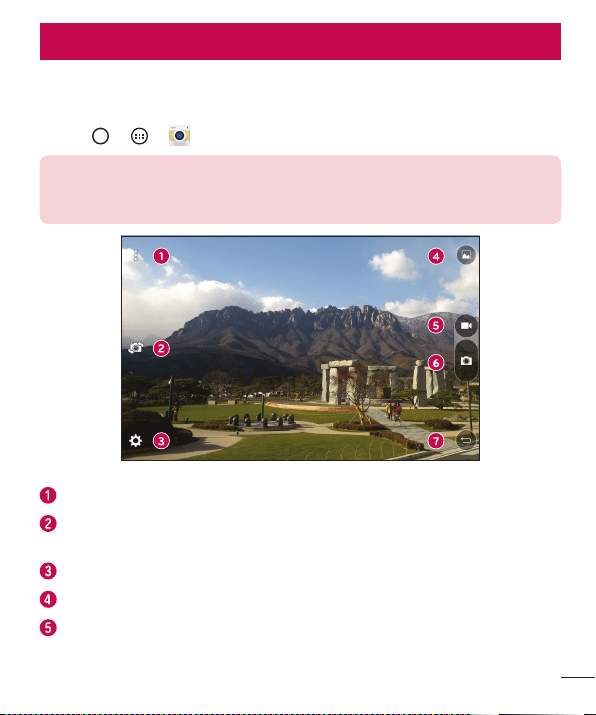
Camera options on the viewfinder
Youcanusethecameraorcamcordertotakeandsharepicturesandvideos.
• Tap > > .
NOTE: Be sure to clean the protective lens cover with a microfiber cloth
before taking pictures. A lens cover with smudges from fingers can cause
blurry pictures with a "halo" effect.
Hide/Display Options–Taptohide/displaythecameraoptionsontheviewfinder.
Swap camera–Taptoswapbetweentherearcameralensandthefrontcamera
lens.
Settings–Tapthisicontoopenthecamerasettingsmenu.
Gallery–Taptoviewthelastphotoorvideoyoucaptured.
Record–Taptostartrecording.
Camera and Video
48
Camera and Video
Capture –Taptotakeaphoto.
Exit –Taptoexitthecamera.
Using the advanced settings
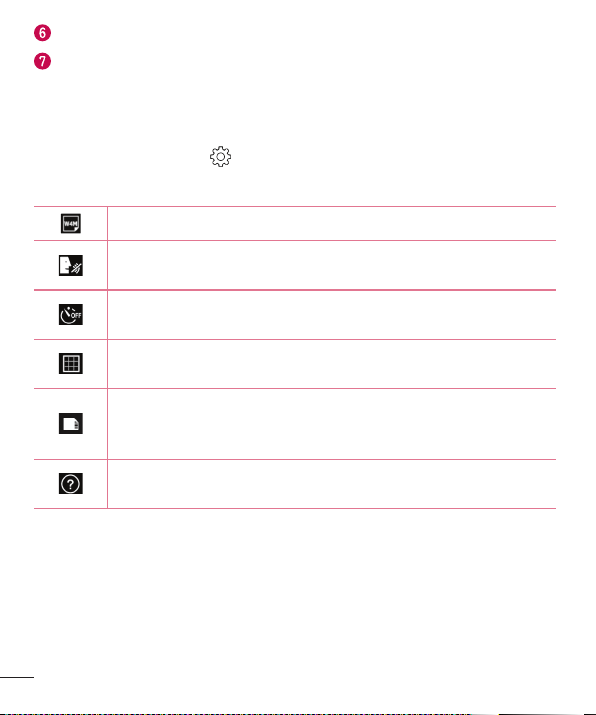
Inthecameraviewfinder,tap toshowtheadvancedoptions.Tapeachiconto
adjustthefollowingcamerasettings.
Setthesizeofyourpictureandvideo.
Allowsyoutosayavoicecommandtotakepictures.YoucansayLG,
Cheese,Smile,oranyothersupportedcommand.
Setyourcamera'stimer.Thisisidealifyouwanttobeapartofthe
pictureorvideo.
Allowsyoutotakebetterpicturesandrecordbettervideosbydisplaying
agridlineforhelpwithalignment.
Setthestoragelocationforyourpicturesandvideos.ChoosefromIN
(internalmemory)andSD(memorycard).Thismenuappearsonlywhen
theSDcardisinserted.
Allowsyoutolearnhowafunctionworks.Thisiconwillprovideyouwith
ahelpguide.
49
Camera and Video
Taking a photo
1 OpentheCameraapplicationandpointthelenstowardthesubjectyouwantto
photograph.
2 Focusindicatorswillappearinthecenteroftheviewnderscreen.Youcanalsotap
anywhereonthescreentofocusonthatspot.
3 Whenthefocusindicatorsturnblue,thecamerahasfocusedonyoursubject.
4 Tap
tocapturethephoto.
Once you have taken a photo
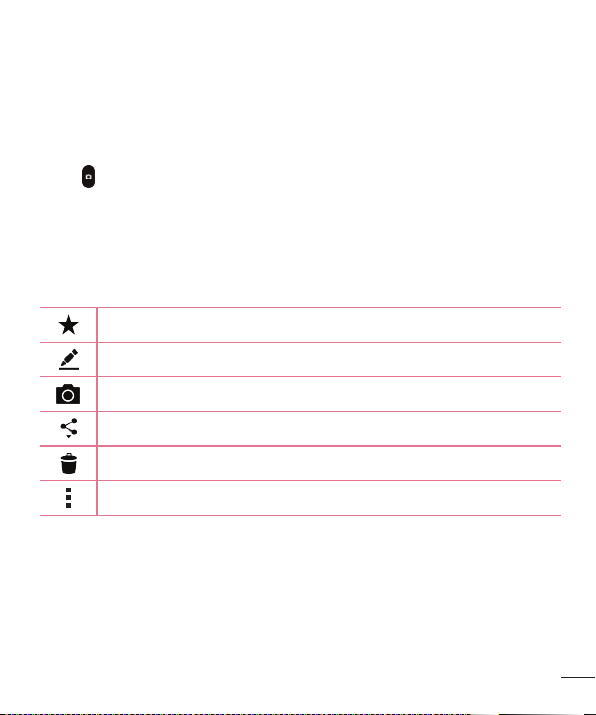
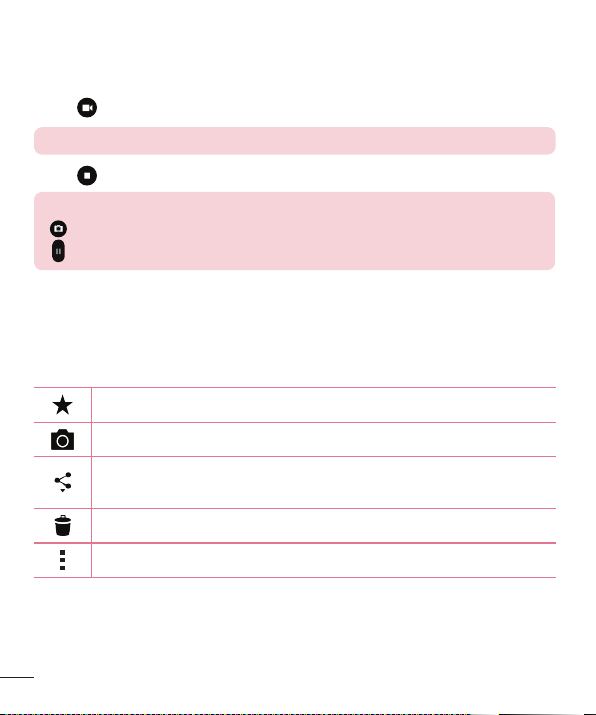
Taptheimagethumbnailonthescreentoviewthelastphotoyoutook.Thefollowing
optionsareavailable.
Taptoaddthephototoyourfavorites.
Taptoeditthephoto.
Taptotakeanotherphotoimmediately.
Taptoopentheavailablesharingoptions.
Taptodeletethephoto.
Taptoaccessadditionaloptions.
50
Camera and Video
Recording a video
1 OpentheCameraapplicationandpointthelenstowardthesubjectyouwantto
captureinyourvideo.
2 Tap
oncetostartrecording.
NOTE: The timer will be displayed on the screen.
3 Tap tostoprecording.
TIP!
– Tap to capture a screen shot while recording a video.
– Tap to pause the recording.
After recording a video
Tapthevideothumbnailonthescreentoviewthelastvideoyourecorded.The
followingoptionsareavailable.
Taptoaddthevideotofavorites.
Taptorecordanothervideoimmediately.
Taptosendyourvideotoothersorshareitviaanyavailablesocialnetwork
services.
Taptodeletethevideo.
Taptoaccessadditionaloptions.
Multi-point Auto-focus
Whenyoutakeapicture,theMulti-pointAuto-focus(AF)functionoperatesautomatically
andallowsyoutoseeaclearimage.
51
Camera and Video
Burst shot
Allowsyoutotakemultipleshotsquickly.Touchandhold .
Gallery
TheGalleryapplicationpresentsthepicturesandvideosinyourstorage,includingthose
you'vetakenwiththeCameraapplicationandthoseyoudownloadedfromthewebor
otherlocations.
1 Tap
> > toviewtheimagesstoredinthestorage.
2 Tapanalbumtoopenitandviewitscontents.(Thepicturesandvideosinthealbum
aredisplayedinchronologicalorder.)
3 Tapapictureinanalbumtoviewit.
NOTE:
• Depending on the software installed, some file formats may not be supported.
• Some files may not play properly due to their encoding.
Viewing pictures
TheGallerydisplaysyourpicturesinfolders.Whensomeappssaveapicture,afolderis
automaticallycreatedtocontainthepicture.
Picturesaredisplayedbythedatetheywerecreated.Selectapicturetoviewitfull
screen.Scrollleftorrighttoviewthenextorpreviousimage.
Zooming in and out
Useoneofthefollowingmethodstozoominandoutonanimage:
• Double-tapanywheretozoominandout.
• Spreadtwofingersapartonanyplaceinthepicturezoomin.Pinchintozoomout.
52
Camera and Video
Video options
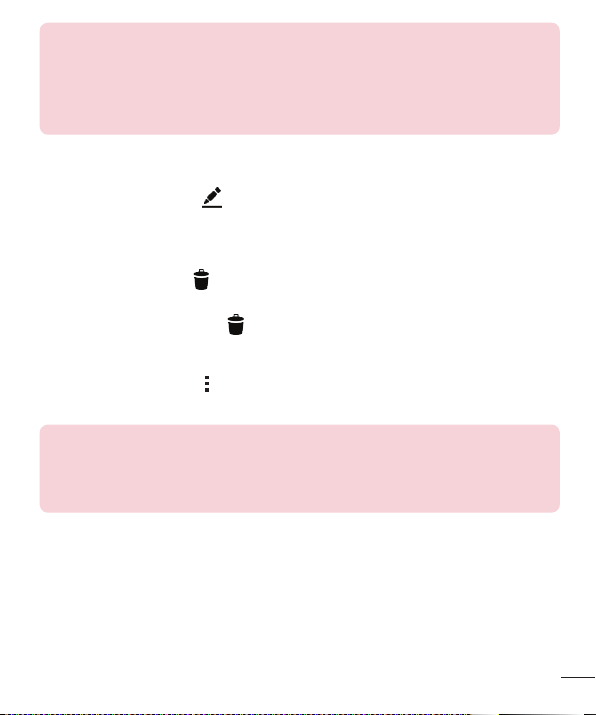
1 Tap > .
2 Selectthevideoyouwanttowatch.
TouchtouseQSlidefortheVideoapp.
TaptoshareyourvideousingtheSmartSharefunction.
Taptoaccessadditionaloptions.
Touchtoadjustvideovolume.
Touchandholdtorewindin3secondincrements.Taptogoto
previousvideo.
Touchtopause/resumevideoplayback.
Touchandholdtofast-forwardin3secondincrements.Taptogo
tonextvideo.
Touchtolock/unlockthescreen.
53
Camera and Video
NOTE:
• While playing a video, the following options are available:
• Slide the right side of the screen up or down to adjust the sound.
• Slide the left side of the screen up or down to adjust the brightness.
• Slide your finger from left to right (or vice versa) to fast-forward and rewind.
Editing photos
Whileviewingaphoto,tap .
Deleting photos/videos
Useoneofthefollowingmethods:
• Whileinafolder,tap ,selectthephotos/videosyouwanttodelete.Thentap
Delete.
• Whileviewingaphoto,tap .
Setting wallpaper
Whileviewingaphoto,tap >Set image astosettheimageaswallpaperorassign
ittoacontact.
NOTE:
• Depending on the software installed, some file formats may not be supported.
• If the file size exceeds the available memory, an error can occur when you open
files.
54
Multimedia
Music
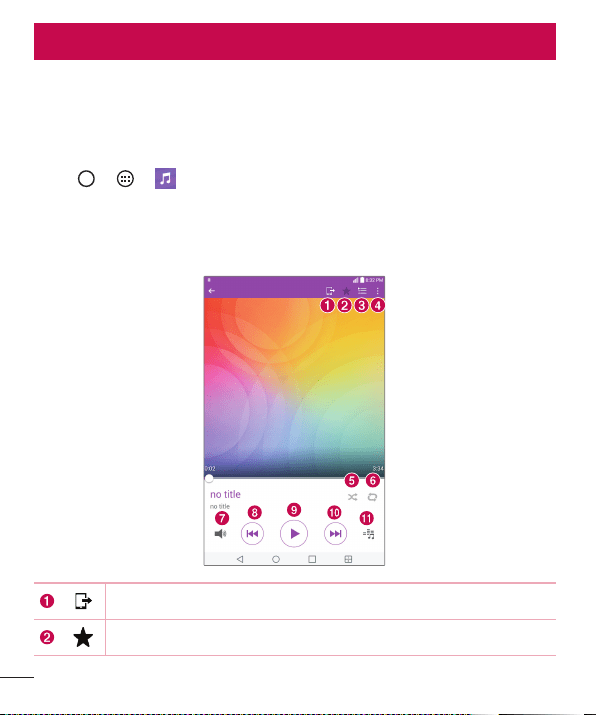
Yourdevicehasamusicplayerthatletsyouplayallyourfavoritetracks.
Playing a song
1 Tap > > .
2 TaptheSongstab.
3 Selectthesongyouwanttoplay.
4 Thefollowingoptionsareavailable.
TaptoshareyourmusicviatheSmartSharefunction.
Taptoaddthesongtoyourfavorites.
Multimedia
55
Multimedia
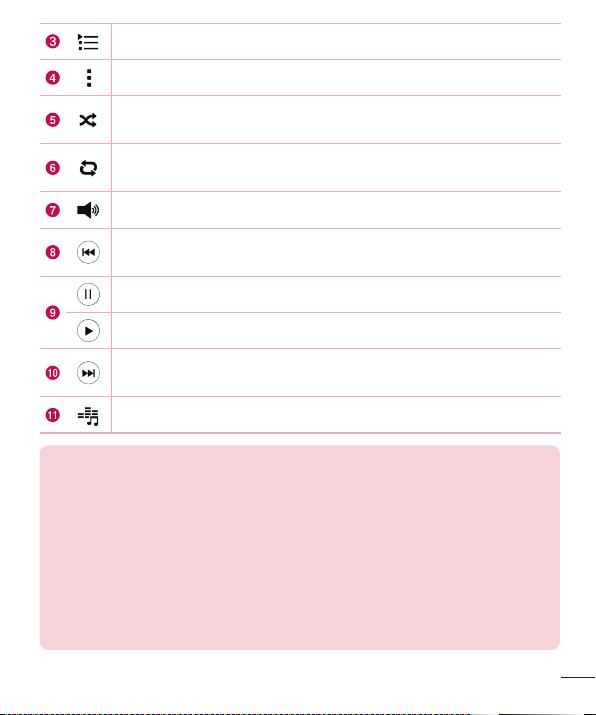
Taptoopenthecurrentplaylist.
Taptoaccessadditionaloptions.
Taptoplaythecurrentplaylistinshufflemode(tracksareplayedin
randomorder).
Taptotogglethroughrepeatallsongs,repeatcurrentsongandrepeat
off.
Taptoadjustthevolume.
Taptorestartthecurrenttrackorskiptotheprevioustrackinthealbum,
playlistorshufflelist.Touchandholdtorewind.
Taptopauseplayback.
Taptoresumeplayback.
Taptoskiptothenexttrackinthealbum,playlistorshufflelist.Touch
andholdtofast-forward.
Taptosetaudioeffects.
NOTE:
• Depending on the software installed, some file formats may not be supported.
• If the file size exceeds the available memory, an error can occur when you open
files.
• Music file copyrights may be protected by international treaties and national
copyright laws. Therefore, it may be necessary to obtain permission or a licence
to reproduce or copy music. In some countries, national laws prohibit private
copying of copyrighted material. Before downloading or copying the file, please
check the national laws of the relevant country concerning the use of such
material.
56
Utilities
Clock
TheClockappgivesyouaccesstotheAlarms,Timer,WorldclockandStopwatch
functions.Accessthesefunctionsbytappingthetabsacrossthetopofthescreenor
swipinghorizontallyacrossthescreen.
Tap
> > .
Alarms
TheAlarmstaballowsyoutosetalarms.
1 Openthe
app,thenselecttheAlarmstab.
2 Tap
toaddanewalarm,tapanalarm.
3 AdjustthesettingsasnecessaryandtapSave.
NOTE: You can also tap an existing alarm to edit it.
Timer
TheTimertabcanalertyouwithanaudiblesignalwhenasetamountoftimehas
passed.
1 Openthe
app,thenselecttheTimertab.
2 Setthedesiredtimeonthetimer.
3 TapStarttostartthetimer.
4 TapStoptostopthetimer.
Utilities
57
Utilities
World clock
TheWorldclocktaballowsyoutoeasilycheckthecurrenttimeinothercitiesaround
theworld.
1 Openthe
app,thenselecttheWorld clocktab.
2 Tap
andselectthedesiredcity.
Stopwatch
TheStopwatchtaballowsyoutouseyourdeviceasastopwatch.
1 Openthe
app,thenselecttheStopwatchtab.
2 TaptheStartbuttontoinitiatethestopwatch.
• TaptheLapbuttontorecordlaptimes.
3 TaptheStopbuttontostopstopwatch.
Calculator
TheCalculatorappallowsyoutoperformmathematicalcalculationsusingastandardor
scientificcalculator.
1 Tap
> > .
2 Tapthenumberkeystoenternumbers.
3 Tapthenumberkeystoenternumbers.
4 Forsimplecalculations,tapthefunctionyouwanttoperform(+,–,xor÷)followed
by=.
NOTE: For more complex calculations, tap > Scientific calculator.
58
Utilities
Calendar
TheCalendarappallowsyoutotrackyourscheduleofevents.
1 Tap
> > .
2 Tapthedateyouwanttoaddaneventto.Thentap
.
Voice Recorder
TheVoiceRecorderapprecordsaudiblefilesforyoutouseinavarietyofways.
Recording a sound or voice
1 Tap > > .
2 Tap
tobeginrecording.
3 Tap
toendtherecording.
4 Tap
tolistentotherecording.
NOTE: Tap to access your recordings. You can listen to your saved
recordings.
Voice Search
Usethisapplicationtosearchwebpagesusingvoice.
1 Tap
> > > .
2 SayakeywordorphrasewhenSpeak nowappearsonthescreen.Selectoneofthe
suggestedkeywordsthatappear.
NOTE: This application may not be available depending on the region or
service provider.
59
Utilities
Downloads
Usethisapplicationtoseewhatfileshavebeendownloadedthroughtheapplications.
• Tap > > .
NOTE: This application may not be available depending on the region or
service provider.
60
Browsing the Web
Browsing the Web
Chrome
UseChrometosearchforinformationandbrowsewebpages.
1 Tap
> > .
NOTE: This application may not be available depending on your region and
service provider.
Viewing webpages
Taptheaddressfield,andthenenterawebaddressorsearchcriteria.
Opening a page
• Togotoanewpage,tap atthetopofthebrowser.
• Togotoanotherwebpage,tapatabatthetopofthescreentoselectthepage.
61
Settings
Settings
TheSettingsapplicationcontainsmostofthetoolsforcustomizingandconfiguringyour
device.AllofthesettingsintheSettingsapplicationaredescribedinthissection.
To open the Settings application
• Tap >touchandhold >System settings.
-or-
• Tap > > .
WIRELESS NETWORKS
< Airplane mode >
AirplaneMode(flightmode)allowsyoutousemanyofyourdevice'sfeatures,suchas
games,andmusic,whenyouareinanareawheredatauseisprohibited.Whenyouset
yourdevicetoAirplaneMode,itcannotaccessonlinedata.
< Wi-Fi >
TurnsonWi-FitoconnecttoavailableWi-Finetworks.
< Bluetooth >
TurnstheBluetoothwirelessfeatureonorofftouseBluetooth.
< Mobile data >
Displaysthedatausageandallowsyoutosetapersonalizedmobiledatausagelimit.
< Share & connect >
• SmartShare Beam–AllowsyoutoreceivemultimediacontentfromLGdevices
ortablets.
• Media Server–SharemediacontentwithnearbyDLNA-compatibledevices.

62
Settings
• Miracast–YoucanmirroryourtabletscreenandsoundontoLGMiracastdongle
orTVwirelessly.
• LG PC Suite–ConnectLGPCSuitewithyourdevicetoeasilymanagemultimedia
contentandapps.
< Tethering & networks >
• USB tethering–Allowsyoutosharetheinternetconnectionwithyourcomputer
viaaUSBcable.
• Mobile HotSpot–Allowsyoutocreateahotspotandshareyourconnection.
• Help–DisplaysHelpinformationaboutUSBtethering,Wi-Fihotspot,andBluetooth
tethering.
• Mobile networks–Setoptionsfornetworkoperators,accesspointnames,and
mobiledata.
• VPN–Fromyourdevice,youcanadd,setup,andmanagevirtualprivatenetworks
(VPNs)thatallowyoutoconnectandaccessresourcesinsideasecuredlocal
network,suchasyourcorporatenetwork.
DEVICE
< Sound >
Sound profile
AllowsyoutosetthesoundprofiletoSound,Vibrate onlyandInterruptions.
Volume
Adjustthedevice'svolumesettingstosuityourneedsandenvironment.
Notification sound
Selecttheringtonefornotificationssuchasnewmessagesreceiptorcalendarevents.

63
Settings
Interruptions
Allowsyoutosetaschedulewhentopreventinterruptionsfromnotifications.Youcan
settoallowcertainfeaturestointerruptwhenPriorityonlyisset.
Lock screen
Allowsyoutochooseifyouwanttoshoworhidenotificationsonthelockscreen.
Apps
Allowsyoutopreventappsfromdisplayingnotificationsorsetappstoshow
notificationswithprioritywhenDonotdisturbissettoPriorityonly.
Touch sound
Allowsyoutosetyourtablettoplayasoundwhenyoutouchbuttons,iconsandother
onscreenitemsthatreacttoyourtouch.
Screen lock sound
Allowsyoutosetyourtablettoplayasoundwhenlockingandunlockingthescreen.
Vibrate on tap
CheckmarktovibratewhentappingtheHometouchbuttonsandduringotherUI
interactions.
< Display >
Home screen
• Wallpaper –AllowsyoutosetthedesiredwallpaperforyourHomescreen.
• Screen swipe effect–Choosethedesiredtypeofeffecttodisplaywhenyou
swipefromoneHomescreencanvastothenext.
• Allow Home screen looping–Choosethedesiredtypeofeffecttodisplaywhen
youswipefromoneHomescreencanvastothenext.
• Home backup & restore–AllowsyoutobackupandrestoretheHomescreen
applayoutandwallpaper.
• Help–DisplayshelpinformationfortheHomescreen.

64
Settings
Lock screen
• Select screen lock–Allowsyoutosetascreenlocktosecureyourdevice.
• Smart Lock–Setstokeepyourdeviceunlockedwhenyouhaveatrusted
Bluetoothdeviceconnectedtoit,whenit'sinafamiliarlocationlikeyourhomeor
work,orwhenitrecognizesyourface.
• Screen swipe effect–Setstheeffectusedwhenswipingthelockscreen.
• Wallpaper–Selectthewallpapertodisplayforyourlockscreen.
• Shortcuts–Customizeshortcutsonthelockscreen.
• Contact info for lost tablet–Displayscontactinfoonthelockscreenintheevent
thetabletislost.
• Lock timer–Allowsyoutosettheamountoftimebeforethescreenautomatically
locksafterthescreenhastimed-out.
• Power button instantly locks–Checkmarktoinstantlylockthescreenwhenthe
Power/LockKeyispressed.ThissettingoverridestheSecuritylocktimersetting.
Brightness
Allowsyoutoadjustthescreenbrightness.CheckmarkNight brightnesstoset
brightnessat0%automaticallybetween12:00AM~06:00AM.
Screen timeout
Allowsyoutosettheamountoftimebeforethescreentimesout.
Screen-off effect
Allowsyoutosetthescreenoffeffectusedwhenthescreenturnsoff.
Auto-rotate screen
Allowsyoutosettoswitchthescreenorientationautomaticallywhenyouphysically
rotatethedevice.
Daydream
Selectthescreensavertodisplaywhenthedeviceissleepingwhiledockedand/or
charging.

65
Settings
Font type
Selectthedesiredfonttype.
Font size
Selectthedesiredfontsize.
Smart screen
Keepsthescreenonwhenthedevicedetectsyoureyeslookingatthescreen.
Home touch buttons
AllowsyoutosetwhichHometouchbuttonsaredisplayedandtheirpositiononthebar.
Youcanalsoselectthecolorandthebackground.
Motion sensor calibration
Allowsyoutoimprovetheaccuracyofthetiltandspeedofthesensor.
< Storage >
Internal Storage
Allowsyoutoviewinformationabouttheinternalstorageusage.
SD Card
AllowsyoutoviewinformationaboutstorageuseontheSDcard.TapUnmount SD
cardtoallowsaferemovalofthecard.IfnoSDcardismounted,tapMount SD card.
TapErase SD cardifyouwanttodeleteallofthedatafromtheSDcard.
< Battery >
TheBatterychargeinformationisdisplayedonabatterygraphicalongwiththe
percentageoftheremainingchargeanditsstatus.
Battery information
TheBatterychargeinformationisdisplayedonabatterygraphicalongwiththe
percentageoftheremainingchargeanditsstatus.
Battery usage
Displaysthebatteryusagelevelandbatteryusedetails.Taponeoftheitemstosee
moredetailedinformation.

66
Settings
Battery percentage on status bar
CheckmarktodisplaythebatterylevelpercentageontheStatusbarnexttothebattery
icon.
Battery saver
TaptheBatterySaverswitch
OFF ON
totoggleitOnorOff.Youcanalsosetwhentoturn
batterysaveron.
Help
DisplayshelpinformationfortheBatterysaverfeature.
< Apps >
Displaythelistofapplicationssuchascurrentlyrunningordownloaded.Swipeleft
andrighttoviewoneofthethreetabsacrossthetopofthescreentoviewdetailed
informationforDOWNLOADED,ON SD CARD,RUNNING,andALLapplications.Tap
anentrytoviewmoreinformation,tapForce stop(orStop),thenOKtostopitfrom
running.
< Default message app >
Thismenuallowsyoutochoosewhatmessagingapptouseasyourdefaultmessaging
app.
< Dual window >
Auto-open
AllowsthedevicetoautomaticallyopenDualwindowwhenyoutapalinkonthefull
screenortapane-mailattachment(imagesonly).
Help
DisplayshelpinformationaboutusingtheDualwindowfeature.

67
Settings
PERSONAL
< Users >
Thismenuallowsyoutomanagethecurrentusers.
Add user
AllowsyoutoaddnewaccountforthedeviceandusetheMulti-userfeature.
< Location >
Turnonlocationservice,yourdevicedeterminesyourapproximatelocationusingWi-Fi
andmobilenetworks.Whenyouselectthisoption,you'reaskedwhetheryouconsentto
allowingGoogletouseyourlocationwhenprovidingtheseservices.
• Mode –Setsthehowyourcurrentlocationinformationisdetermined.
• Recent Location Request–Displaysapplicationsandservicesthathaverecently
requestedyourlocation.
• Camera –Checkmarktotagphotosorvideoswiththeirlocations.
• Google Location History –AllowsyoutoviewandmanageyourGooglelocation
history.
< Security >
UsetheSecuritymenutoconfigurehowtohelpsecureyourdeviceanditsdata.
Encrypt tablet
Allowsyoutoencryptdataonthedeviceforsecurity.YouwillberequiredtoenteraPIN
orpasswordtodecryptyourdeviceeachtimeyoupoweriton.
Encrypt SD card storage
EncryptSDcardstorageandkeepdataunavailableforotherdevices.
Set up SIM card lock
SetsthePINtolockyourSIMcardandallowsyoutochangethePIN.
Password typing visible
Checkmarktobrieflyshoweachcharacterofpasswordsasyouenterthemsothatyou
canseewhatyouenter.

68
Settings
Tablet administrators
Viewordeactivatedeviceadministrators.
Unknown sources
Allowinstallationofnon-PlayStoreapplications.
Verify apps
Disalloworwarnbeforeinstallationofappsthatmaycauseharm.
Storage type
Displaysthestoragetypeforcredentials.
Trusted credentials
AllowsyoutochecktrustedCAcertificateslist.
Install from storage
Touchtoinstallasecurecertificate.
Clear credentials
Deletesallsecurecertificatesandrelatedcredentialsanderasesthesecurestorage's
ownpassword.
Trust agents
Selectappstousewithoutunlockingscreen.
Screen pin
Thisfeatureallowsyoutolockyourdevicesothatthecurrentusercanonlyaccessthe
pinnedapp.Thisisusefulforuserswithchildren.
App usage access
Allowthisapptoviewusageinfoofappsonyourdevice.
< Accounts & sync >
UsetheAccounts&syncsettingsmenutoadd,remove,andmanageyourGoogleand
othersupportedaccounts.Youcanalsousethesesettingstocontrolhowandwhether
allapplicationssend,receive,andsyncdataontheirownschedulesandwhetherall
applicationscansynchronizeuserdataautomatically.

69
Settings
Gmail™,Calendar,andotherapplicationsmayalsohavetheirownsettingstocontrol
howtheysynchronizedata;seethesectionsonthoseapplicationsfordetails.Touch
Add accounttoaddnewaccount.
< Language & input >
UsetheLanguage&inputsettingstoselectthelanguageforthetextonyourdevice
andtoconfiguretheon-screenkeyboard,includingwordsyou'veaddedtoitsdictionary.
< Backup & reset >
Changethesettingsformanagingyoursettingsanddata.
Back up my data
Backupappdata,Wi-Fipasswords,andothersettingstoGoogleservers.
Backup account
Displaystheaccountthatiscurrentlybeingusedtobackupinformation.
Automatic restore
Whenreinstallinganapp,restorebackedupsettingsanddata.
Collect diagnostics
Allowsyoutocollectdiagnosticsdatafortroubleshooting.
LG Backup service
Backsupallinformationonthedeviceandrestoresitintheeventofdatalossor
replacement.
Factory data reset
Resetyoursettingstothefactorydefaultvaluesanddeleteallyourdata.Ifyouresetthe
devicethisway,youarepromptedtore-enterthesameinformationaswhenyoufirst
startedAndroid.

70
Settings
SYSTEM
< Shortcut Key >
AllowsyoutoturntheShortcutkeysonandoff.PressandholdtheVolumeUpand
DownkeystogetherwhenthescreenisunlockedtoaccessQuickMemo+.Press
andholdtheVolumeUporDownkeywhenthescreenisofforlockedtoaccessthe
camera.
< Date & time >
UseDate×ettingstosethowdateswillbedisplayed.Youcanalsousethese
settingstosetyourowntimeandtimezoneratherthanobtainingthecurrenttimefrom
themobilenetwork.
< Accessibility >
UsetheAccessibilitysettingstoconfigureaccessibilityplug-insyouhaveinstalledon
yourdevice.
TalkBack
AllowsyoutosetuptheTalkBackfunctionwhichassistspeoplewithimpairedvisionby
providingverbalfeedback.TaptheTalkBackswitch
OFF ON
atthetoprightcornerofthe
screentoturniton.TapSettingsatthebottomofthescreentoadjusttheTalkBack
settings.
Font size
Allowsyoutochangethesizeofthetext.
Invert colors
Checkmarktoinvertthecolorsofthescreenandcontent.
Color adjustment
Setstoviewthescreenwithgreatercolorcontrast.Taptheswitch
OFF ON
toturniton.
Thentapthescreenanddragacrossthescreeninanydirectionuntilyouseethecolor
contrastyouwanttouse.
71
Settings
Touch zoom
Allowsyoutozoominandoutbytriple-tappingthescreen.
Screen shade
Dimsthescreen'sbacklight.
Accessibility shortcut
Activatethisfeaturetoallowyoutoquicklyenableaccessibilityfeaturesintwosteps.
Text-to-speech output
Setsthetext-to-speechpreferredengineandspeechratesetting.Alsoplaysashort
demonstrationofspeechsynthesis.Thedefaultlanguagestatusisalsodisplayed.
Audio type
Setstheaudiotype.ChooseMonoorStereo.
Sound balance
Setstheaudioroute.Movethesliderontheslidebartosetit.
Turn off all sounds
Turnsoffallsounds.
Captions
Allowstocustomizecaptionsettingsforthosewithhearingimpairments.Taptheswitch
OFF ON
toturnthisfeatureon.Setthelanguage,textsize,andcaptionstyleoptionsas
desired.
Touch feedback time
Setsthetouchandfeedbacktime.ChoosefromShort,Medium,andLong.
Touch assistant
Touchtheswitch
OFF ON
totogglebetweenonandoff.Onallowsyoutoreplacethe
hardwarekeyswithaUniversaltouchboard
.
TaptheUniversaltouchicon toaccessthePower,Home,Volume down,Volume
up,Screen capture,Accessibility,andPinchbuttons.Drawa"W"ontheboard
toautomaticallylaunchthebrowserapp.Drawan"S"ontheboardtoautomatically
displaythesettingsapp.Drawan"L"ontheboardtolockthescreen.Drawa"e"on

72
Settings
theboardtoaccesstheEmailapp.
Screen timeout
Setstheamountoftimebeforethescreenturnsoff.
Touch control areas
Taptheswitch
OFF ON
toturnthisfeatureon.Allowsyoutolimitthetouchcontrolto
selectedareasofthescreen.PresstheVolume Down KeyandHome Buttonatthe
sametimetoactivateanddeactivatethefeature.
Auto-rotate screen
Checkmarktoallowthedevicetorotatethescreendependingonthedeviceorientation
(portraitorlandscape).
Password voice confirmation
Checkmarktohaveverbalconfirmationwheninputtingpasswords.
Accessibility settings shortcut
Setsquickandeasyaccesstoselectedfeatureswhenyoutriple-taptheHomeKey.
One-touch input
Eachfingertouchentersaletter/characterontheLGkeyboard.
Switch Access
Allowsyoutointeractwithyourdeviceusingoneormoreswitchesthatworklike
keyboardkeys.Thismenucanbehelpfulforuserswithmobilitylimitationsthatprevent
themfrominteractingdirectlywithyourdevice.TapSettingsatthebottomofthe
screentoadjusttheSwitchaccesssettings.
< Printing >
Allowsyoutoprintthecontentofcertainscreens(suchaswebpagesdisplayedin
Chrome)toaprinterconnectedtothesameWi-FinetworkasyourAndroiddevice.
< About tablet >
Thismenuallowsyoutomanageyoursoftwareupdatesandviewvariousinformation
relatingtoyourdevice.

73
Settings
Tablet name
Allowsyoutosetyourdevicename.
Update Center
Allowsyoutocheckforsoftwareupdates.
Network
Allowsyoutoseethenetwork,signalstrength,mobilenetworktypeandstate,service
state,roamingstate,andIPaddress.
Status
Allowsyoutoviewthedevicenumber,IMEI,andIMEISV.
Battery
Allowsyoutoviewbatterystatus,batterylevel,andbatteryuseinformation.
Hardware info
Allowsyoutoviewthemodelnumber,hardwareversion,uptime,Wi-FiMACaddress
andBluetoothaddress.
Software info
AllowsyoutoviewAndroidversion,basebandversion,kernelversion,buildnumber,and
softwareversion.
Legal info
AllowsyoutoviewlegaldocumentsforLGsoftware,opensourcelicensesandGoogle
legalinformation.
Patent information
DisplaysLGpatentinformation.
74
Software Update
Device Software Update
Thisfeatureallowsyoutoupdatethefirmwareofyourdevicetothelatestversion
convenientlyfromtheinternetwithouttheneedtovisitaservicecenter.
Formoreinformationonhowtousethisfunction,pleasevisit:
http://www.lg.com/common/index.jsp.
Asthedevicefirmwareupdaterequirestheuser’sfullattentionforthedurationofthe
updateprocess,pleasemakesuretocheckallinstructionsandnotesthatappearat
eachstepbeforeproceeding.PleasenotethatremovingtheUSBcableorbatteryduring
theupgrademayseriouslydamageyourdevice.
LG Device Software Update via Over-the-Air (OTA)
Thisfeatureallowsyoutoupdatethefirmwareofyourdevicetothenewerversion
convenientlyviaOTAwithoutconnectingtheUSBcable.Thisfeatureisonlyavailableif
andwhenLGmakesthenewerversionofthefirmwareavailableforyourdevice.
First,youcancheckthesoftwareversiononyourdevice:
Tap
> > >About tablet>Software info.
Toperformthedevicesoftwareupdate,tap
> > >About tablet>Update
Center > System updates.
NOTE: Your personal data—including information about your Google
account and any other accounts, your system/application data and settings,
any downloaded applications and your DRM licence —might be lost in the
process of updating your device's software. Therefore, LG recommends that
you back up your personal data before updating your device's software. LG
does not take responsibility for any loss of personal data.
Software Update

75
About this user guide
About this user guide
About this user guide
• Beforeusingyourdevice,pleasecarefullyreadthismanual.Thiswillensurethat
youuseyourdevicesafelyandcorrectly.
• Someoftheimagesandscreenshotsprovidedinthisguidemayappeardifferently
onyourdevice.
• Yourcontentmaydifferfromthefinalproduct,orfromsoftwaresuppliedbyservice
providersorcarriers,Thiscontentmaybesubjecttochangewithoutpriornotice.
Forthelatestversionofthismanual,pleasevisittheLGwebsiteatwww.lg.com.
• Yourdevice'sapplicationsandtheirfunctionsmayvarybycountry,region,or
hardwarespecifications.LGcannotbeheldliableforanyperformanceissues
resultingfromtheuseofapplicationsdevelopedbyprovidersotherthanLG.
• LGcannotbeheldliableforperformanceorincompatibilityissuesresultingfrom
editedregistrysettingsbeingeditedoroperatingsystemsoftwarebeingmodified.
Anyattempttocustomizeyouroperatingsystemmaycausethedeviceorits
applicationstonotworkastheyshould.
• Software,audio,wallpaper,images,andothermediasuppliedwithyourdeviceare
licensedforlimiteduse.Ifyouextractandusethesematerialsforcommercialor
otherpurposesis,youmaybeinfringingcopyrightlaws.Asauser,youarefullyare
entirelyresponsiblefortheillegaluseofmedia.
• Additionalchargesmaybeappliedfordataservices,suchasmessaging,uploading
anddownloading,auto-syncing,orusinglocationservices.Toavoidadditional
charges,selectadataplantoissuitableforyourneeds.Contactyourservice
providertoobtainadditionaldetails.

76
Trademarks
Trademarks
• Copyright2015LGElectronics,Inc.Allrightsreserved.LGandtheLGlogoare
registeredtrademarksofLGGroupanditsrelatedentities.
• Bluetooth
®
isaregisteredtrademarkoftheBluetoothSIG,Inc.worldwide.
• Wi-Fi
®
,theWi-FiCERTIFIEDlogo,andtheWi-Filogoareregisteredtrademarksof
theWi-FiAlliance.
• Allothertrademarksandcopyrightsarethepropertyoftheirrespectiveowners.
DivX HD
ThisDivXCertified
®
devicehaspassedrigoroustestingtoensureitplaysDivX
®
video.
ToplaypurchasedDivXmovies,firstregisteryourdeviceatvod.divx.com.Findyour
registrationcodeintheDivXVODsectionofyourdevicesetupmenu.
DivX Certified
®
to play DivX
®
video up to HD 720p, including premium content.
DivX
®
, DivX Certified
®
and associated logos are trademarks of DivX, LLC and are
used under license.
NOTE: Wi-Fi
®
and Wi-Fi Protected Access
®
are registered trademarks of the
Wi-Fi Alliance.
Trademarks
77
Troubleshooting
Troubleshooting
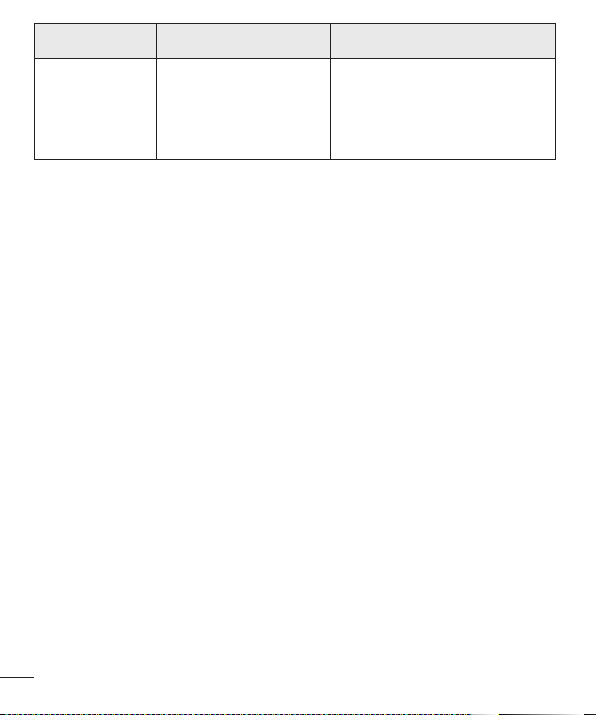
Thischapterlistssomeproblemsyoumightencounterwhenusingyourdevice.Some
problemsrequireyoutocallyourserviceprovider,butmostareeasytofixyourself.
Message Possible causes Possible corrective measures
Noapplications
canbeset
Notsupportedbyservice
providerorregistration
required.
Contactyourserviceprovider.
Chargingerror
Batteryisnotcharged. Chargebattery.
Outsidetemperatureis
toohotorcold.
Makesuredeviceischargingata
normaltemperature.
Contactproblem
Checkthechargerandits
connectiontothedevice.
Novoltage
Plugthechargerintoadifferent
socket.
Chargerdefective Replacethecharger.
Wrongcharger UseonlyoriginalLGaccessories.
Impossibleto
receive/send
photos
Memoryfull
Deletesomeimagesfromyour
device.
Filesdonot
open
Unsupportedfileformat Checkthesupportedfileformats.
78
Troubleshooting
Message Possible causes Possible corrective measures
Nosound Vibrationmode
Checkthesettingsstatusin
thesoundmenutomakesure
youarenotinvibrationorsilent
mode.
79
For Your Safety
Important Information
Thisuserguidecontainsimportantinformationontheuseandoperationofthisdevice.
Pleasereadalltheinformationcarefullyforoptimalperformanceandtoprevent
anydamagetoormisuseofthedevice.Anychangesormodificationsnotexpressly
approvedinthisuserguidecouldvoidyourwarrantyforthisequipment.Anychanges
ormodificationsnotexpresslyapprovedbythemanufacturercouldvoidtheuser’s
authoritytooperatetheequipment.
Before You Start
Warning
Violationoftheinstructionsmaycauseseriousinjuryordeath.
WARNING:ThisproductcontainschemicalsknowntotheStateofCaliforniatocause
cancerandbirthdefectsorreproductiveharm.
Wash hands after handling.
ELECTRICAL SAFETY
Thisproductisintendedforusewhensuppliedwithpowerfromthedesignatedbattery
orpowersupplyunit.Otherusagemaybedangerousandwillinvalidateanyapproval
giventothisproduct.
SAFETY PRECAUTIONS FOR PROPER GROUNDING INSTALLATION
CAUTION:Connectingtoimproperlygroundedequipmentcanresultinanelectric
shocktoyourdevice.ThisproductisequippedwithaUSBcableforconnectingtoa
desktopornotebookcomputer.Besureyourcomputerisproperlygrounded(earthed)
beforeconnectingthisproducttothecomputer.Thepowersupplycordofadesktop
ornotebookcomputerhasanequipment-groundingconductorandagroundingplug.
For Your Safety
80
For Your Safety
Theplugmustbepluggedintoanappropriateoutletwhichisproperlyinstalledand
groundedinaccordancewithalllocalcodesandordinances.
SAFETY PRECAUTIONS FOR POWER SUPPLY UNIT
Use the correct external power source
Aproductshouldbeoperatedonlyfromthetypeofpowersourceindicatedonthe
electricalratingslabel.Ifyouarenotsureofthetypeofpowersourcerequired,consult
yourauthorizedserviceproviderorlocalpowercompany.Foraproductthatoperates
frombatterypowerorothersources,refertotheoperatinginstructionsthatare
includedwiththeproduct.
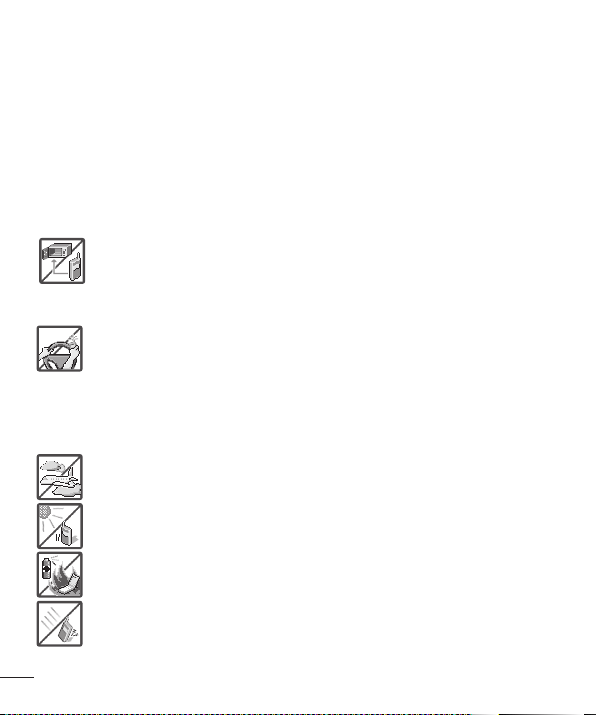
• Neverplaceyourtabletinamicrowaveovenasitwillcausethebattery
toexplode.
• Neverstoreyourtabletintemperatureslessthan-4°Forgreaterthan
122°F.
• Whenridinginacar,donotleaveyourtabletorsetupthehands-freekit
neartheairbag.Ifwirelessequipmentisimproperlyinstalledandtheair
bagisdeployed,youmaybeseriouslyinjured.
• Yourtabletcontainsaninternalbattery.Donotdisposeofyourtabletnear
fireorwithhazardousorflammablewaste.Youshoulddisposeofyour
tabletinaccordancewithallapplicablelaws.
• Donotusethetabletinareaswhereitsuseisprohibited.(Forexample:
aircraft)
• Donotexposethebatterychargeroradaptertodirectsunlightoruseit
inplaceswithhighhumidity,suchasabathroom.
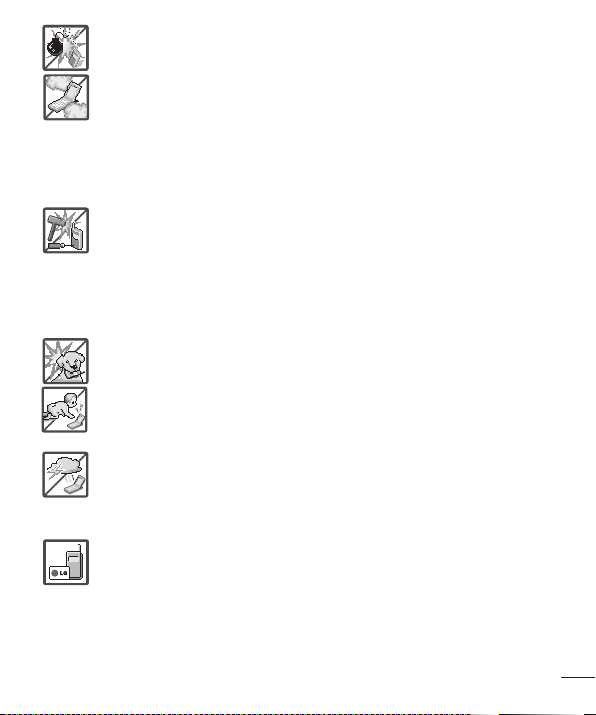
• Donotuseharshchemicals(suchasalcohol,benzene,thinners,etc.)or
detergentstocleanyourtablet.Thiscouldcauseafire.
• Donotdrop,strike,orshakeyourtabletseverely.Itmayharmtheinternal
circuitboardsofthetablet.
81
For Your Safety
• Donotuseyourtabletinhighexplosiveareasasthetabletmaygenerate
sparks.
• Donotdamagethepowercordbybending,twisting,pulling,orheating.
Donotusetheplugifitislooseasitmaycauseelectricshockorfire.
• Donotplaceanyheavyitemsonthepowercord.Donotallowthepower
cordtobecrimpedasitmaycauseelectricshockorfire.
• Donothandlethetabletwithwethandswhileitisbeingcharged.Itmay
causeanelectricshockorseriouslydamageyourtablet.
• Donotdisassemblethetablet.
• Donotattempttorepairormodifythedeviceyourself.Yourdeviceis
equippedwithaninternalrechargeablebatterywhichshouldbereplaced
onlybyLGoranauthorizedLGrepaircenter.
• Youshouldneverattempttoopenordisassemblethisdeviceyourselfand
doingsomaycausedamagethatvoidsyourwarranty.
• Makesurethatnosharp-edgeditems,suchasanimal’steethornails,
comeintocontactwiththebattery.Thiscouldcauseafire.
• Becarefulthatchildrendonotswallowanyparts(suchasearphone,
connectionpartsofthetablet,etc.)Thiscouldcauseasphyxiationor
suffocationresultinginseriousinjuryordeath.
• Unplugthepowercordandchargerduringlightningstormstoavoid
electricshockorfire.
• OnlyusechargersprovidedbyLG.Thewarrantywillnotbeappliedto
productsprovidedbyothersuppliers.
• Onlyauthorizedpersonnelshouldservicethetabletanditsaccessories.
Faultyinstallationorservicemayresultinaccidentsandconsequently
invalidatethewarranty.

82
For Your Safety
• Yourtabletisanelectronicdevicethatgeneratesheatduringnormal
operation.Extremelyprolonged,directskincontactintheabsenceof
adequateventilationmayresultindiscomfortorminorburns.Therefore,
usecarewhenhandlingyourtabletduringorimmediatelyafteroperation.
Safety Information
Pleasereadandobservethefollowinginformationforsafeandproperuseofyourtablet
andtopreventdamage.
• Donotdisassembleoropencrush,bendordeform,punctureorshred.
• Repairsunderwarranty,atLG’soption,mayincludereplacementpartsorboards
thatareeitherneworreconditioned,providedthattheyhavefunctionalityequalto
thatofthepartsbeingreplaced.
• Donotmodifyorremanufacture,attempttoinsertforeignobjectsintothebattery,
immerseorexposetowaterorotherliquids,exposetofire,explosionorother
hazard.
• Onlyusethebatteryforthesystemforwhichitisspecified.
• Onlyusethebatterywithachargingsystemthathasbeenqualifiedwiththe
systemperCTIACertificationRequirementsforBatterySystemComplianceto
IEEE1725.Useofanunqualifiedbatteryorchargermaypresentariskoffire,
explosion,leakage,orotherhazard.
• Donotshortcircuitabatteryorallowmetallicconductiveobjectstocontactbattery
terminals.
• Replacethebatteryonlywithanotherbatterythathasbeenqualifiedwiththe
systemperthisstandard,IEEE-Std-1725.Useofanunqualifiedbatterymay
presentariskoffire,explosion,leakageorotherhazard.Onlyauthorizedservice
providersshallreplacebattery(Ifthebatteryisnon-userreplaceable)
• Batteryusagebychildrenshouldbesupervised.
• Avoiddroppingthetablet.Ifthetabletisdropped,especiallyonahardsurface,and

83
For Your Safety
theusersuspectsdamage,takeittoaservicecenterforinspection.
• Improperbatteryusemayresultinafire,explosionorotherhazard.
• ForthosehostdevicesthatutilizeaUSBportasachargingsource,thehost
device’susermanualshallincludeastatementthatthedeviceshallonlybe
connectedtoproductsthatbeartheUSB-IFlogoorhavecompletedtheUSB-IF
complianceprogram.
WARNING! Notice for Battery replacement
• Foryoursafety,donotremovethebatteryincorporatedintheproduct.Ifyouneed
toreplacethebattery,takeittothenearestauthorizedLGElectronicsservicepoint
ordealerforassistance.
• Li-IonBatteryisahazardouscomponentwhichcancauseinjury.
• Batteryreplacementbynon-qualifiedprofessionalcancausedamagetoyour
device.
Charger and Adapter Safety
• Thechargerandadapterareintendedforindooruseonly.
• Insertthebatterypackchargerverticallyintothewallpowersocket.
• Unplugthepowercordandchargerduringlightningstormstoavoidelectricshock
orfire.
• Usethecorrectadapterforyourtabletwhenusingthebatterypackchargerabroad.
Battery Information and Care
• Pleasereadthemanualofproperinstallationandremovalofthebattery.
• Pleasereadthemanualofspecifiedchargeraboutchargingmethod.
• Donotdamagethepowercordbybending,twisting,orheating.Donotusethe
plugifitislooseasitmaycauseelectricshockorfire.
Donotplaceanyheavyitemsonthepowercord.Donotallowthepowercordtobe
crimpedasitmaycauseelectricshockorfire.
• Unplugthepowercordpriortocleaningyourtablet,andcleanthepowerplugpin

84
For Your Safety
whenit’sdirty.Whenusingthepowerplug,ensurethatit’sfirmlyconnected.Ifnot,
itmaycauseexcessiveheatorfire.Ifyouputyourtabletinapocketorbagwithout
coveringthereceptacleofthetablet(powerplugpin),metallicarticles(suchasa
coin,papercliporpen)mayshort-circuitthetablet.Short-circuitoftheterminalmay
damagethebatteryandcauseanexplosion.Alwayscoverthereceptaclewhennot
inuse.
• Rechargethebatteryafterlongperiodsofnon-usetomaximizebatterylife.Battery
lifewillvaryduetousagepatternandenvironmentalconditions.
• Neverstoreyourtabletintemperaturelessthan-4°Forgreaterthan122°F.
• Chargingtemperaturerangeisbetween0°C/32°Fand45°C/113°F.Donotcharge
thebatteryoutofrecommendedtemperaturerange.Chargingoutofrecommended
rangemightcausethegeneratingheatorseriousdamageofbattery.Andalso,it
mightcausethedeteriorationofbattery’scharacteristicsandcyclelife.
• Donotuseorleavethedeviceundertheblazingsunorinheatedcarbysunshine.
Thedevicemaygenerateheat,smokeorflame.Andalso,itmightcausethe
deteriorationofbattery’scharacteristicsorcyclelife.
• Thebatterybackinthedevicehasprotectioncircuittoavoidthedanger.Donot
usenearplacesthatcangeneratestaticelectricitymorethan100Vwhichcould
damagetheprotectioncircuit.Damagedprotectioncircuitsmaygeneratesmoke,
ruptureorignite.
• Whenusingthedeviceforthefirsttime,ifitemitsabadsmell,youseerustonit,
oranythingelseabnormal,donotusetheequipmentandbringthebatterytothe
shopwhichitwasbought.
• Keepdeviceawayfrombabiesandsmallchildren.Ifchildrenusethebattery,their
parentsorlegalguardiansareresponsibleforsupervisingandteachingthemabout
thesafehandlingofdeviceandhowtousebatteriesaccordingtothemanualwith
care.
• Ifliquidfromthebatteryinthedevicerubsagainstskinorclothing,washwithfresh
water.Itmaycausetheskininflammation.Donotuserthebatteryandtakeittothe

85
For Your Safety
nearestauthorizedLGElectronicsservicepointordealerforassistance.Becareful
thatchildrendonotswallowanyparts(suchasearphone,connectionpartsofthe
device,etc.).Thiscouldcauseasphyxiationorsuffocationresultinginseriousinjury
ordeath.
• Donothandlethetabletwithwethandswhileitisbeingcharged.Itmaycausean
electricshockorseriouslydamageyourtablet.
• Donotuseharshchemicals(suchasalcohol,benzene,thinners,etc.)ordetergents
tocleanyourtablet.Thiscouldcauseafire.
• Alwaysunplugthechargerfromthewallsocketafterthetabletisfullychargedto
saveunnecessarypowerconsumptionofthecharger.
Care and Maintenance
Yourmobiledeviceisaproductofsuperiordesignandcraftsmanshipandshouldbe
treatedwithcare.Thesuggestionsbelowwillhelpyoufulfillanywarrantyobligations
andallowyoutoenjoythisproductformanyyears:
Keep your Mobile Device away from: Liquids of any kind
Keepthemobiledevicedry.Precipitation,humidity,andliquidscontainmineralsthatwill
corrodeelectroniccircuits.Ifthemobiledevicedoesgetwet,donotacceleratedrying
withtheuseofanoven,microwave,ordryer,becausethismaydamagethemobile
deviceandcouldcauseafireorexplosion.
Donotusethemobiledevicewithawethand.
Doingsomaycauseanelectricshocktoyouordamagetothemobiledevice.
Extreme heat or cold
• Avoidtemperaturesbelow0°C/32°Forabove45°C/113°F.
• Useyourtabletintemperaturesbetween0ºC/32°Fand40ºC/104°F,ifpossible.
Exposingyourtablettoextremelyloworhightemperaturesmayresultindamage,
malfunction,orevenexplosion.

86
For Your Safety
Microwaves
Donottrytodryyourmobiledeviceinamicrowaveoven.Doingsomaycauseafireor
explosion.
Dust and dirt
Donotexposeyourmobiledevicetodust,dirt,orsand.
Sunscreen lotion
Donotexposeorwearyourdevicetoanyliquidlikesunscreenlotion.
Doingsomaycauseyourdevicetoordamagetothemobiledevice.
Cleaning solutions
Donotuseharshchemicals,cleaningsolvents,orstrongdetergentstocleanthemobile
device.
Wipeitwithasoftclothslightlydampenedinamildsoap-and-watersolution.
Shock or vibration
Donotdrop,knock,orshakethemobiledevice.
Roughhandlingcanbreakinternalcircuitboards.
Paint
Donotpaintthemobiledevice.Paintcanclogthedevice’smovingpartsorventilation
openingsandpreventproperoperation.
General Notice
• Donotplaceitemscontainingmagneticcomponentssuchasacreditcard,phone
card,bankbook,orsubwayticketnearyourdevice.Themagnetismofthedevice
maydamagethedatastoredinthemagneticstrip.
• Whenthetabletisnotusedforalongperiodtime,storeitinasafeplacewiththe
powercordunplugged.

87
For Your Safety
• Donotusethedeviceiftheantennaisdamaged.Ifadamagedantennacontacts
skin,itmaycauseaslightburn.PleasecontactanLGAuthorizedServiceCenterto
replacethedamagedantenna.
• Thedatasavedinyourtabletmightbedeletedduetocarelessuse,repairof
thetablet,orupgradeofthesoftware.Pleasebackupyourimportantcontacts.
(pictures,andvideoscouldalsobedeleted.)Themanufacturerisnotliablefor
damageduetothelossofdata.
• Whenyouusethetabletinpublicplaces,setthevolumetovibrationsoyoudon’t
disturbothers.
• Donotturnyourtabletonoroffwhenputtingittoyourear.
• Yourdeviceisanelectronicdevicethatgeneratesheatduringnormaloperation.
Extremelyprolonged,directskincontactintheabsenceofadequateventilationmay
resultindiscomfortorminorburns.Therefore,usecarewhenhandlingyourdevice
duringorimmediatelyafteroperation.
• Useaccessories,suchasearphonesandheadsets,withcaution.Ensurethatcables
aretuckedawaysafelyanddonottouchtheantennaunnecessarily.
Part 15.19 statement
Thisdevicecomplieswithpart15ofFCCrules.
Operationissubjecttothefollowingtwoconditions:
(1)Thisdevicemaynotcauseharmfulinterference,and(2)thisdevicemustacceptany
interferencereceived,includinginterferencethatmaycausesundesiredoperation.
Part 15.21 statement
Changesormodificationsnotexpresslyapprovedbythemanufacturerforcompliance
couldvoidtheuser’sauthoritytooperatetheequipment.
Part 15.105 statement
ThisequipmenthasbeentestedandfoundtocomplywiththelimitsforaclassBdigital
device,pursuanttoPart15oftheFCCRules.Theselimitsaredesignedtoprovide

88
For Your Safety
reasonableprotectionagainstharmfulinterferenceinaresidentialinstallation.This
equipmentgeneratesusesandcanradiateradiofrequencyenergyand,ifnotinstalled
andusedinaccordancewiththeinstructions,maycauseharmfulinterferencetoradio
communications.However,thereisnoguaranteethatinterferencewillnotoccurina
particularinstallation.Ifthisequipmentdoescauseharmfulinterferenceortelevision
reception,whichcanbedeterminedbyturningtheequipmentoffandon,theuseris
encouragedtotrytocorrecttheinterferencebyoneormoreofthefollowingmeasures:
• Reorientorrelocatethereceivingantenna.
• Increasetheseparationbetweentheequipmentandreceiver.
• Connecttheequipmentintoanoutletonacircuitdifferentfromthattowhichthe
receiverisconnected.
• Consultthedealeroranexperiencedradio/TVtechnicianforhelp.
FCC RF Exposure Information
WARNING! Read this information before operating the device.
InAugust1996,theFederalCommunicationsCommission(FCC)oftheUnitedStates,
withitsactioninReportandOrderFCC96-326,adoptedanupdatedsafetystandard
forhumanexposuretoRadioFrequency(RF)electromagneticenergyemittedby
FCCregulatedtransmitters.Thoseguidelinesareconsistentwiththesafetystandard
previouslysetbybothU.S.andinternationalstandardsbodies.Thedesignofthisdevice
complieswiththeFCCguidelinesandtheseinternationalstandards.
Body-worn Operation
Thisdevicewastestedfortypicalusewiththebackofthedevicekept0inch(0cm)
fromthebody.
Caution
Useonlythesuppliedantenna.Useofunauthorizedantennas(ormodificationstothe
antenna)couldimpaircallquality,damagethedevice,voidyourwarrantyand/orviolate
FCCregulations.

89
For Your Safety
Don’tusethedevicewithadamagedantenna.Adamagedantennacouldcausea
minorskinburn.Contactyourlocaldealerforareplacementantenna.
Consumer Information About Radio Frequency
Emissions
Yourwirelessdevice,whichcontainsaradiotransmitterandreceiver,emitsradio
frequencyenergyduringuse.Thefollowingconsumerinformationaddressescommonly
askedquestionsaboutthehealtheffectsofwirelessdevices.
Are wireless devices safe?
Scientificresearchonthesubjectofwirelessdevicesandradiofrequency(“RF”)energy
hasbeenconductedworldwideformanyyears,andcontinues.IntheUnitedStates,the
FoodandDrugAdministration(“FDA”)andtheFederalCommunicationsCommission
(“FCC”)setpoliciesandproceduresforwirelessdevices.TheFDAissuedawebsite
publicationonhealthissuesrelatedtodeviceusagewhereitstates,Thescientific
communityatlarge…believesthattheweightofscientificevidencedoesnotshow
anassociationbetweenexposuretoradiofrequency(RF)fromthedevicesandadverse
healthoutcomes.Stillthescientificcommunitydoesrecommendconductingadditional
researchtoaddressgapsinknowledge.Thatresearchisbeingconductedaroundthe
worldandFDAcontinuestomonitordevelopmentsinthisfield.Youcanaccessthe
jointFDA/FCCwebsiteathttp://www.fda.gov(under“C”inthesubjectindex,selectCell
Phones>Research).YoucanalsocontacttheFDAtoll-freeat(888)463-6332or(888)
INFO-FDA.InJune2000,theFDAenteredintoacooperativeresearchanddevelopment
agreementthroughwhichadditionalscientificresearchisbeingconducted.TheFCC
issueditsownwebsitepublicationstatingthat“thereisnoscientificevidencethat
provesthatwirelessdeviceusagecanleadtocanceroravarietyofotherproblems,
includingheadaches,dizzinessormemoryloss”.
Thispublicationisavailableathttp://www.fcc.gov/oet/rfsafetyorthroughtheFCCat
(888)225-5322or(888)CALL-FCC.

90
For Your Safety
What does “SAR” mean?
In1996,theFCC,workingwiththeFDA,theU.S.EnvironmentalProtectionAgency,and
otheragencies,establishedRFexposuresafetyguidelinesforwirelessdevicesinthe
UnitedStates.Beforeawirelessdevicemodelisavailableforsaletothepublic,itmust
betestedbythemanufacturerandcertifiedtotheFCCthatitdoesnotexceedlimits
establishedbytheFCC.OneoftheselimitsisexpressedasaSpecificAbsorptionRate,
or“SAR”.SARisameasureoftherateofabsorptionofRFenergyinthebody.Testsfor
SARareconductedwiththedevicetransmittingatitshighestpowerlevelinalltested
frequencybands.Since1996,theFCChasrequiredthattheSARofhandheldwireless
devicenotexceed1.6wattsperkilogram,averagedoveronegramoftissue.
AlthoughtheSARisdeterminedatthehighestpowerlevel,theactualSARvalue
ofawirelessdevicewhileoperatingcanbelessthanthereportedSARvalue.This
isbecausetheSARvaluemayvaryfromcalltocall,dependingonfactorssuchas
proximitytoacellsite,theproximityofthedevicetothebodywhileinuse,andthe
useofhands-freedevices.Beforeadevicemodelisavailableforsaletothepublic,it
mustbetestedandcertifiedtotheFCCthatitdoesnotexceedthelimitestablished
bythegovernment-adoptedrequirementforsafeexposure.Thetestsareperformedin
positionsandlocations(e.g.,attheearandwornonthebody)asrequiredbytheFCC
foreachmodel.
TheFCChasgrantedanEquipmentAuthorizationforthismodeldevicewithallreported
SARlevelsevaluatedasincompliancewiththeFCCRFemissionguidelines.SAR
informationonthismodeldeviceisonfilewiththeFCCandcanbefoundunderthe
DisplayGrantsectionofhttp://www.fcc.gov/oet/ea/fccid/aftersearchingonFCCID
ZNFV496.
FormoreinformationaboutSARs,seetheFCC’sOETBulletins56and65athttp://
www.fcc.gov/Bureaus/Engineering_Technology/Documents/bulletinsorvisittheCellular
TelecommunicationsIndustryAssociationwebsiteathttp://www.ctia.org/consumer_info/
index.cfm/AID/10371.Youmayalsowishtocontactthemanufacturerofyourdevice.

91
For Your Safety
Can I minimize my RF exposure?
IfyouareconcernedaboutRF,thereareseveralsimplestepsyoucantaketominimize
yourRFexposure.Youcan,ofcourse,reduceyourtalktime.Youcanplacemore
distancebetweenyourbodyandthesourceoftheRF,astheexposureleveldropsoff
dramaticallywithdistance.TheFDA/FCCwebsitestatesthat“hands-freekitscanbe
usedwithwirelessdevicesforconvenienceandcomfort.Thesesystemsreducethe
absorptionofRFenergyintheheadbecausethedevice,whichisthesourceofthe
RFemissions,willnotbeplacedagainstthehead.Ontheotherhand,ifthedeviceis
mountedagainstthewaistorotherpartofthebodyduringuse,thenthatpartofthe
bodywillabsorbmoreRFenergy.WirelessdevicesmarketedintheU.S.arerequired
tomeetsafetyrequirementsregardlessofwhethertheyareusedagainstthehead
oragainstthebody.Eitherconfigurationshouldresultincompliancewiththesafety
limit”.Also,ifyouuseyourwirelessdevicewhileinacar,youcanuseadevicewithan
antennaontheoutsideofthevehicle.Youshouldalsoreadandfollowyourwireless
devicemanufacturer’sinstructionsforthesafeoperationofyourdevice.
Do wireless devices pose any special risks to children?
TheFDA/FCCwebsitestatesthat“thescientificevidencedoesnotshowadangerto
usersofwirelesscommunicationdevices,includingchildren”.TheFDA/FCCwebsite
furtherstatesthat“somegroupssponsoredbyothernationalgovernmentshave
advisedthatchildrenbediscouragedfromusingwirelessdeviceatall”.Forexample,
theStewartReportfromtheUnitedKingdom[“UK”]madesucharecommendation
inDecember2000.Inthisreportagroupofindependentexpertsnotedthatno
evidenceexiststhatusingadevicecausesbraintumorsorotherilleffects.[TheUK’s]
recommendationtolimitdeviceusebychildrenwasstrictlyprecautionary;itwasnot
basedonscientificevidencethatanyhealthhazardexists.AcopyoftheUK’sleafletis
availableathttp://www.dh.gov.uk(search“mobile”),oryoucanwriteto:NRPB,Chilton,
Didcot,OxonOX11ORQ,UnitedKingdom.CopiesoftheUK’sannualreportsonmobile
deviceandRFareavailableonlineatwww.iegmp.org.ukandhttp://www.hpa.org.uk/

92
For Your Safety
radiation/(search“mobile”).Parentswhowishtoreducetheirchildren’sRFexposure
maychoosetorestricttheirchildren’swirelessdeviceuse.
Where can I get further information about RF emissions?
Forfurtherinformation,seethefollowingadditionalresources(websitescurrentasof
April2005):
U.S. Food and Drug Administration
FDAConsumermagazine
November-December2000
Telephone:(888)INFO-FDA
http://www.fda.gov
(Under“C”inthesubjectindex,selectCellPhones>Research.)
U.S. Federal Communications Commission
44512thStreet,S.W.
Washington,D.C.20554
Telephone:(888)225-5322
http://www.fcc.gov/oet/rfsafety
Independent Expert Group on Mobile Devices
http://www.iegmp.org.uk
Royal Society of Canada Expert Panels on Potential Health Risks of Radio
Frequency Fields from Wireless Telecommunication Devices
283SparksStreet
Ottawa,OntarioK1R7X9
Canada
Telephone:(613)991-6990

93
For Your Safety
World Health Organization
AvenueAppia20
1211Geneva27
Switzerland
Telephone:01141227912111
http://www.who.int/mediacentre/factsheets/fs193/en/
International Commission on Non-Ionizing Radiation Protection
c/oBundesamtfurStrahlenschutz
IngolstaedterLandstr.1
85764Oberschleissheim
Germany
Telephone:0114918883332156
http://www.icnirp.de
Engineering in Medicine and Biology Society, Committee on Man and
Radiation (COMAR) of the Institute of Electrical and Electronics Engineers
http://ewh.ieee.org/soc/embs/comar/
Consumer Information on SAR
(Specific Absorption Rate)
Thismodeldevicemeetsthegovernment'srequirementsforexposuretoradiowaves.
Yourwirelessdeviceisaradiotransmitterandreceiver.Itisdesignedandmanufactured
nottoexceedtheemissionlimitsforexposuretoRadioFrequency(RF)energysetby
theFederalCommunicationsCommissionoftheU.S.Government.Theselimitsarepart
ofcomprehensiveguidelinesandestablishpermittedlevelsofRFenergyforthegeneral
population.Theguidelinesarebasedonstandardsthatweredevelopedbyindependent
scientificorganizationsthroughperiodicandthoroughevaluationofscientificstudies.

94
For Your Safety
Thestandardsincludeasubstantialsafetymargindesignedtoassurethesafetyofall
persons,regardlessofageandhealth.
Theexposurestandardforwirelessmobiledevicesemploysaunitofmeasurement
knownastheSpecificAbsorptionRate,orSAR.TheSARlimitsetbytheFCCis1.6W/
kg.
TestsforSARareconductedusingstandardoperatingpositionsspecifiedbytheFCC
withthedevicetransmittingatitshighestcertifiedpowerlevelinalltestedfrequency
bands.AlthoughSARisdeterminedatthehighestcertifiedpowerlevel,theactualSAR
levelofthedevicewhileoperatingcanbewellbelowthemaximumvalue.Becausethe
deviceisdesignedtooperateatmultiplepowerlevelstouseonlythepowerrequiredto
reachthenetwork,ingeneral,thecloseryouaretoawirelessbasestationantenna,the
lowerthepoweroutput.
Beforeadevicemodelisavailableforsaletothepublic,itmustbetestedandcertified
totheFCCthatitdoesnotexceedthelimitestablishedbythegovernment-adopted
requirementforsafeexposure.Thetestsareperformedinpositionsandlocations(e.g.,
attheearandwornonthebody)asrequiredbytheFCCforeachmodel.
ThehighestSARvalueforthisdevicewhenwornonthebody,asdescribedinthisuser
guide,is0.83W/kg.(body-wornmeasurementsdifferamongdevicemodels,depending
uponavailableaccessoriesandFCCrequirements).Whiletheremaybedifferences
betweenSARlevelsofvariousdevicesandatvariouspositions,theyallmeetthe
governmentrequirementforsafeexposure.
TheFCChasgrantedanEquipmentAuthorizationforthismodeldevicewithall
reportedSARlevelsevaluatedasincompliancewiththeFCCRFemissionguidelines.
SARinformationonthismodeldeviceisonfilewiththeFCCandcanbefoundunder
theDisplayGrantsectionofhttp://www.fcc.gov/oet/fccidaftersearchingonFCCID
ZNFV496.AdditionalinformationonSpecificAbsorptionRates(SAR)canbefoundon
theCellularTelecommunicationsIndustryAssociation(CTIA)websiteathttp://www.ctia.
org/.
*IntheUnitedStatesandCanada,theSARlimitformobiledeviceusedbythepublic

95
For Your Safety
is1.6watts/kg(W/kg)averagedoveronegramoftissue.Thestandardincorporatesa
substantialmarginofsafetytogiveadditionalprotectionforthepublicandtoaccount
foranyvariationsinmeasurements.
Caution: Avoid potential hearing loss.
Prolongedexposuretoloudsounds(includingmusic)isthemostcommoncauseof
preventablehearingloss.Somescientificresearchsuggeststhatusingportableaudio
devices,suchasportablemusicplayersandcellulartelephones,athighvolumesettings
forlongdurationsmayleadtopermanentnoise-inducedhearingloss.Thisincludes
theuseofheadphones(includingheadsets,earbudsandBluetooth
®
orotherwireless
devices).Exposuretoveryloudsoundhasalsobeenassociatedinsomestudieswith
tinnitus(aringingintheear),hypersensitivitytosoundanddistortedhearing.Individual
susceptibilitytonoise-inducedhearinglossandotherpotentialhearingproblemsvaries.
Theamountofsoundproducedbyaportableaudiodevicevariesdependingonthe
natureofthesound,thedevice,thedevicesettingsandtheheadphones.Youshould
followsomecommonsenserecommendationswhenusinganyportableaudiodevice:
• Setthevolumeinaquietenvironmentandselectthelowestvolumeatwhichyou
canhearadequately.
• Whenusingheadphones,turnthevolumedownifyoucannothearthepeople
speakingnearyouorifthepersonsittingnexttoyoucanhearwhatyouare
listeningto.
• Donotturnthevolumeuptoblockoutnoisysurroundings.Ifyouchoosetolisten
toyourportabledeviceinanoisyenvironment,usenoise-cancellingheadphonesto
blockoutbackgroundenvironmentalnoise.
• Limittheamountoftimeyoulisten.Asthevolumeincreases,lesstimeisrequired
beforeyourhearingcouldbeaffected.
• Avoidusingheadphonesafterexposuretoextremelyloudnoises,suchasrock
concerts,thatmightcausetemporaryhearingloss.Temporaryhearinglossmight

96
For Your Safety
causeunsafevolumestosoundnormal.
• Donotlistenatanyvolumethatcausesyoudiscomfort.Ifyouexperienceringingin
yourears,hearmuffledspeechorexperienceanytemporaryhearingdifficultyafter
listeningtoyourportableaudiodevice,discontinueuseandconsultyourdoctor.
Youcanobtainadditionalinformationonthissubjectfromthefollowingsources:
Safety 205
AmericanAcademyofAudiology11730
PlazaAmericanDrive,Suite300
Reston,VA20190
Voice:(800)222-2336
Email:info@audiology.org
Internet:www.audiology.org
NationalInstituteonDeafnessandOtherCommunication
Disorders
NationalInstitutesofHealth
31CenterDrive,MSC2320
Bethesda,MDUSA20892-2320
Voice:(301)496-7243
Email:nidcdinfo@nih.gov
Internet:http://www.nidcd.nih.gov/health/hearing
NationalInstituteforOccupationalSafetyandHealthHubertH.HumphreyBldg.
200IndependenceAve.,SWWashington,DC20201Voice:
1-800-35-NIOSH(1-800-356-4674)
Internet:http://www.cdc.gov/niosh/topics/noise/default.html

97
For Your Safety
TIA Safety Information
ThefollowingisthecompleteTIASafetyInformationforwirelesshandhelddevices.
Exposure to Radio Frequency Signal
Yourwirelesshandheldportabledeviceisalowpowerradiotransmitterandreceiver.
WhenON,itreceivesandsendsoutRadioFrequency(RF)signals.
InAugust,1996,theFederalCommunicationsCommissions(FCC)adoptedRF
exposureguidelineswithsafetylevelsforhandheldwirelessdevices.Thoseguidelines
areconsistentwiththesafetystandardspreviouslysetbybothU.S.andinternational
standardsbodies:
ANSIC95.1(1992)*
NCRPReport86(1986)
ICNIRP(1996)
*AmericanNationalStandardsInstitute;NationalCouncilonRadiationProtectionand
Measurements;InternationalCommissiononNon-IonizingRadiationProtection
Thosestandardswerebasedoncomprehensiveandperiodicevaluationsoftherelevant
scientificliterature.Forexample,over120scientists,engineers,andphysiciansfrom
universities,governmenthealthagencies,andindustryreviewedtheavailablebodyof
researchtodeveloptheANSIStandard(C95.1).
ThedesignofyourdevicecomplieswiththeFCCguidelines(andthosestandards).
Antenna Care
Useonlythesuppliedoranapprovedreplacementantenna.Unauthorizedantennas,
modifications,orattachmentscoulddamagethedeviceandmayviolateFCC
regulations.
Tips on Efficient Operation
Foryourdevicetooperatemostefficiently:
Don’ttouchtheantennaunnecessarilywhenthetabletisinuse.Contactwiththe

98
For Your Safety
antennaaffectscallqualityandmaycausethetablettooperateatahigherpowerlevel
thanotherwiseneeded.
Electronic Devices
MostmodernelectronicequipmentisshieldedfromRFsignals.However,certain
electronicequipmentmaynotbeshieldedagainsttheRFsignalsfromyourwireless
device.
Pacemakers
TheHealthIndustryManufacturersAssociationrecommendsthataminimumseparation
ofsix(6)inchesbemaintainedbetweenahandheldwirelessdeviceandapacemaker
toavoidpotentialinterferencewiththepacemaker.Theserecommendationsare
consistentwiththeindependentresearchbyandrecommendationsofWireless
TechnologyResearch.
Personswithpacemakers:
• ShouldALWAYSkeepthedevicemorethansix(6)inchesfromtheirpacemaker
whenthedeviceisturnedON;
• Shouldnotcarrythedeviceinabreastpocket;
• Shouldusetheearoppositethepacemakertominimizethepotentialfor
interference;
• ShouldturnthetabletOFFimmediatelyifthereisanyreasontosuspectthat
interferenceistakingplace.
Hearing Aids
Somedigitalwirelessdevicemayinterferewithsomehearingaids.Intheeventofsuch
interference,youmaywanttoconsultyourserviceprovider(orcallthecustomerservice
linetodiscussalternatives).

99
For Your Safety
Other Medical Devices
Ifyouuseanyotherpersonalmedicaldevice,consultthemanufacturerofyourdevice
todetermineifitisadequatelyshieldedfromexternalRFenergy.Yourphysicianmaybe
abletoassistyouinobtainingthisinformation.
Health Care Facilities
TurnyourdeviceOFFinhealthcarefacilitieswhenanyregulationspostedinthese
areasinstructyoutodoso.Hospitalsorhealthcarefacilitiesmayuseequipmentthat
couldbesensitivetoexternalRFenergy.
Vehicles
RFsignalsmayaffectimproperlyinstalledorinadequatelyshieldedelectronicsystems
inmotorvehicles.Checkwiththemanufactureroritsrepresentativeregardingyour
vehicle.Youshouldalsoconsultthemanufacturerofanyequipmentthathasbeen
addedtoyourvehicle.
Posted Facilities
TurnyourdeviceOFFinanyfacilitywherepostednoticessorequire.
Aircraft
FCCregulationsprohibitusingyourdevicewhileintheair.SwitchOFFyourtablet
beforeboardinganaircraft.
Blasting Areas
Toavoidinterferingwithblastingoperations,turnyourdeviceOFFwhenina“blasting
area”orinareasposted:“Turnofftwo-wayradio”.Obeyallsignsandinstructions.
Potentially Explosive Atmosphere
TurnyourdeviceOFFwheninanyareawithapotentiallyexplosiveatmosphereand
obeyallsignsandinstructions.Sparksinsuchareascouldcauseanexplosionorfire
resultinginbodilyinjuryorevendeath.

100
For Your Safety
Areaswithapotentiallyexplosiveatmosphereareoften,butnotalwaysmarkedclearly.
Potentialareasmayinclude:fuelingareas(suchasgasolinestations);belowdeckon
boats;fuelorchemicaltransferorstoragefacilities;vehiclesusingliquefiedpetroleum
gas(suchaspropaneorbutane);areaswheretheaircontainschemicalsorparticles
(suchasgrain,dust,ormetalpowders);andanyotherareawhereyouwouldnormally
beadvisedtoturnoffyourvehicleengine.
For Vehicles Equipped with an Air Bag
Anairbaginflateswithgreatforce.DONOTplaceobjects,includingeitherinstalledor
portablewirelessequipment,intheareaovertheairbagorintheairbagdeployment
area.Ifin-vehiclewirelessequipmentisimproperlyinstalledandtheairbaginflates,
seriousinjurycouldresult.
FDA Consumer Update
TheU.S.FoodandDrugAdministration’sCenterforDevicesand
RadiologicalHealthConsumerUpdateonMobileTablets:
1. Do tablets pose a health hazard?
Theavailablescientificevidencedoesnotshowthatanyhealthproblemsareassociated
withusingtablets.
Thereisnoproof,however,thattabletsareabsolutelysafe.Tabletsemitlowlevels
ofRadioFrequency(RF)energyinthemicrowaverangewhilebeingused.Theyalso
emitverylowlevelsofRFwheninidlemode.WhereashighlevelsofRFcanproduce
healtheffects(byheatingtissue),exposuretolowlevelRFthatdoesnotproduce
heatingeffectscausesnoknownadversehealtheffects.Manystudiesoflowlevel
RFexposureshavenotfoundanybiologicaleffects.Somestudieshavesuggested
thatsomebiologicaleffectsmayoccur,butsuchfindingshavenotbeenconfirmedby
additionalresearch.Insomecases,otherresearchershavehaddifficultyinreproducing
thosestudies,orindeterminingthereasonsforinconsistentresults.

101
For Your Safety
2. What is the FDA’s role concerning the safety of tablets?
Underthelaw,theFDAdoesnotreviewthesafetyofradiation-emittingconsumer
productssuchastabletsbeforetheycanbesold,asitdoeswithnewdrugsormedical
devices.However,theagencyhasauthoritytotakeactioniftabletsareshowntoemit
RadioFrequency(RF)energyatalevelthatishazardoustotheuser.Insuchacase,the
FDAcouldrequirethemanufacturersoftabletstonotifyusersofthehealthhazardand
torepair,replace,orrecallthetabletssothatthehazardnolongerexists.
AlthoughtheexistingscientificdatadoesnotjustifyFDAregulatoryactions,theFDAhas
urgedthetabletindustrytotakeanumberofsteps,includingthefollowing:
• SupportneededresearchintopossiblebiologicaleffectsofRFofthetypeemitted
bytablets;
• DesigntabletsinawaythatminimizesanyRFexposuretotheuserthatisnot
necessaryfordevicefunction;and
• Cooperateinprovidingusersoftabletswiththebestpossibleinformationon
possibleeffectsoftabletuseonhumanhealth.
TheFDAbelongstoaninteragencyworkinggroupofthefederalagenciesthathave
responsibilityfordifferentaspectsofRFsafetytoensurecoordinatedeffortsatthe
federallevel.Thefollowingagenciesbelongtothisworkinggroup:
• NationalInstituteforOccupationalSafetyandHealth
• EnvironmentalProtectionAgency
• OccupationalSafetyandHealthAdministration
• NationalTelecommunicationsandInformationAdministration
TheNationalInstitutesofHealthparticipatesinsomeinteragencyworkinggroup
activities,aswell.
TheFDAsharesregulatoryresponsibilitiesfortabletswiththeFederalCommunications
Commission(FCC).AlltabletsthataresoldintheUnitedStatesmustcomplywithFCC
safetyguidelinesthatlimitRFexposure.TheFCCreliesontheFDAandotherhealth
agenciesforsafetyquestionsabouttablets.

102
For Your Safety
TheFCCalsoregulatesthebasestationsthatthetabletnetworksrelyupon.While
thesebasestationsoperateathigherpowerthandothetabletsthemselves,theRF
exposuresthatpeoplegetfromthesebasestationsaretypicallythousandsoftimes
lowerthanthosetheycangetfromtablets.Basestationsarethusnotthesubjectofthe
safetyquestionsdiscussedinthisdocument.
3. What kinds of devices are the subject of this update?
Theterm“wirelessdevice”refersheretohandheldwirelessdeviceswithbuilt-in
antennas,oftencalled“cell”,“mobile”,or“PCS”devices.Thesetypesofwireless
devicescanexposetheusertomeasurableRadioFrequency(RF)energybecauseof
theshortdistancebetweenthedeviceandtheuser’shead.
TheseRFexposuresarelimitedbyFCCsafetyguidelinesthatweredevelopedwith
theadviceoftheFDAandotherfederalhealthandsafetyagencies.Whenthedevice
islocatedatgreaterdistancesfromtheuser,theexposuretoRFisdrasticallylower
becauseaperson’sRFexposuredecreasesrapidlywithincreasingdistancefromthe
source.
4. What are the results of the research done already?
Theresearchdonethusfarhasproducedconflictingresults,andmanystudieshave
sufferedfromflawsintheirresearchmethods.Animalexperimentsinvestigatingthe
effectsofRadioFrequency(RF)energyexposurescharacteristicofwirelessdevices
haveyieldedconflictingresultsthatoftencannotberepeatedinotherlaboratories.A
fewanimalstudies,however,havesuggestedthatlowlevelsofRFcouldacceleratethe
developmentofcancerinlaboratoryanimals.However,manyofthestudiesthatshowed
increasedtumordevelopmentusedanimalsthathadbeengeneticallyengineeredor
treatedwithcancer-causingchemicalssoastobepre-disposedtodevelopcancer
intheabsenceofRFexposure.OtherstudiesexposedtheanimalstoRFforupto22
hoursperday.Theseconditionsarenotsimilartotheconditionsunderwhichpeople
usewirelessdevices,sowedonotknowwithcertaintywhattheresultsofsuchstudies
meanforhumanhealth.Threelargeepidemiologystudieshavebeenpublishedsince

103
For Your Safety
December2000.Betweenthem,thestudiesinvestigatedanypossibleassociation
betweentheuseofwirelessdevicesandprimarybraincancer,glioma,meningioma,
oracousticneuroma,tumorsofthebrainorsalivarygland,leukemia,orothercancers.
Noneofthestudiesdemonstratedtheexistenceofanyharmfulhealtheffectsfrom
wirelessdeviceRFexposures.However,noneofthestudiescananswerquestions
aboutlong-termexposures,sincetheaverageperiodofdeviceuseinthesestudieswas
aroundthreeyears.
5. What research is needed to decide whether RF exposure from tablets
poses a health risk?
Acombinationoflaboratorystudiesandepidemiologicalstudiesofpeopleactually
usingtabletswouldprovidesomeofthedatathatareneeded.Lifetimeanimal
exposurestudiescouldbecompletedinafewyears.However,verylargenumbersof
animalswouldbeneededtoprovidereliableproofofacancerpromotingeffectifone
exists.Epidemiologicalstudiescanprovidedatathatisdirectlyapplicabletohuman
populations,buttenormoreyearsfollow-upmaybeneededtoprovideanswersabout
somehealtheffects,suchascancer.Thisisbecausetheintervalbetweenthetimeof
exposuretoacancer-causingagentandthetimetumorsdevelop—iftheydo—may
bemany,manyyears.Theinterpretationofepidemiologicalstudiesishamperedby
difficultiesinmeasuringactualRFexposureduringday-to-dayuseoftablets.Many
factorsaffectthismeasurement,suchastheangleatwhichthetabletisheld,orwhich
modeloftabletisused.
6. What is the FDA doing to find out more about the possible health effects
of tablet RF?
TheFDAisworkingwiththeU.S.NationalToxicologyProgramandwithgroupsof
investigatorsaroundtheworldtoensurethathighpriorityanimalstudiesareconducted
toaddressimportantquestionsabouttheeffectsofexposuretoRadioFrequency(RF)
energy.
TheFDAhasbeenaleadingparticipantintheWorldHealthOrganizationInternational

104
For Your Safety
ElectroMagneticFields(EMF)Projectsinceitsinceptionin1996.Aninfluentialresultof
thisworkhasbeenthedevelopmentofadetailedagendaofresearchneedsthathas
driventheestablishmentofnewresearchprogramsaroundtheworld.Theprojecthas
alsohelpeddevelopaseriesofpublicinformationdocumentsonEMFissues.
TheFDAandtheCellularTelecommunications&InternetAssociation(CTIA)havea
formalCooperativeResearchAndDevelopmentAgreement(CRADA)todoresearchon
wirelessdevicesafety.TheFDAprovidesthescientificoversight,obtaininginputfrom
expertsingovernment,industry,andacademicorganizations.CTIA-fundedresearchis
conductedthroughcontractswithindependentinvestigators.Theinitialresearchwill
includebothlaboratorystudiesandstudiesofwirelessdeviceusers.TheCRADAwill
alsoincludeabroadassessmentofadditionalresearchneedsinthecontextofthe
latestresearchdevelopmentsaroundtheworld.
7. How can I find out how much Radio Frequency energy exposure I can
get by using my tablet?
AlltabletssoldintheUnitedStatesmustcomplywithFederalCommunications
Commission(FCC)guidelinesthatlimitRadioFrequency(RF)energyexposures.The
FCCestablishedtheseguidelinesinconsultationwiththeFDAandtheotherfederal
healthandsafetyagencies.TheFCClimitforRFexposurefromwirelessdevicesis
setataSpecificAbsorptionRate(SAR)of1.6wattsperkilogram(1.6W/kg).TheFCC
limitisconsistentwiththesafetystandardsdevelopedbytheInstituteofElectricaland
ElectronicEngineering(IEEE)andtheNationalCouncilonRadiationProtectionand
Measurement.Theexposurelimittakesintoconsiderationthebody’sabilitytoremove
heatfromthetissuesthatabsorbenergyfromthetabletandissetwellbelowlevels
knowntohaveeffects.ManufacturersoftabletsmustreporttheRFexposurelevelfor
eachmodeloftablettotheFCC.TheFCCwebsite(http://www.fcc.gov/oet/rfsafety)
givesdirectionsforlocatingtheFCCidentificationnumberonyourtabletsoyoucan
findyourtablet’sRFexposurelevelintheonlinelisting.

105
For Your Safety
8. What has the FDA done to measure the Radio Frequency energy coming
from tablets?
TheInstituteofElectricalandElectronicEngineers(IEEE)isdevelopingatechnical
standardformeasuringtheRadioFrequency(RF)energyexposurefromtabletsand
otherwirelesshandsetswiththeparticipationandleadershipofFDAscientistsand
engineers.Thestandard,“RecommendedPracticeforDeterminingtheSpatial-Peak
SpecificAbsorptionRate(SAR)intheHumanBodyDuetoWirelessCommunications
Devices:ExperimentalTechniques”,setsforththefirstconsistenttestmethodology
formeasuringtherateatwhichRFisdepositedintheheadsandbodiesoftablet
users.Thetestmethodusesatissue-simulatingmodelofthehumanheadandbody.
StandardizedSARtestmethodologyisexpectedtogreatlyimprovetheconsistency
ofmeasurementsmadeatdifferentlaboratoriesonthesametablet.SARisthe
measurementoftheamountofenergyabsorbedintissue,eitherbythewholebody
orasmallpartofthebody.Itismeasuredinwatts/kg(ormilliwatts/g)ofmatter.This
measurementisusedtodeterminewhetheratabletcomplieswithsafetyguidelines.
9. What steps can I take to reduce my exposure to Radio Frequency energy
from my tablet?
Ifthereisariskfromtheseproducts—andatthispointwedonotknowthatthere
is—itisprobablyverysmall.Butifyouareconcernedaboutavoidingevenpotential
risks,youcantakeafewsimplestepstominimizeyourexposuretoRadioFrequency
(RF)energy.Sincetimeisakeyfactorinhowmuchexposureapersonreceives,
reducingtheamountoftimespentusingatabletwillreduceRFexposure.Ifyou
mustconductextendedconversationsusingawirelessdeviceeveryday,youcould
placemoredistancebetweenyourbodyandthesourceoftheRF,sincetheexposure
leveldropsoffdramaticallywithdistance.Forexample,youcoulduseaheadsetand
carrythetabletawayfromyourbodyoruseawirelessdeviceconnectedtoaremote
antenna.Again,thescientificdatadoesnotdemonstratethattabletsareharmful.Butif
youareconcernedabouttheRFexposurefromtheseproducts,youcanusemeasures
likethosedescribedabovetoreduceyourRFexposurefromtabletuse.

106
For Your Safety
10. What about children using tablets?
Thescientificevidencedoesnotshowadangertousersoftablets,includingchildren
andteenagers.IfyouwanttotakestepstolowerexposuretoRadioFrequency(RF)
energy,themeasuresdescribedabovewouldapplytochildrenandteenagersusing
tablets.Reducingthetimeoftabletuseandincreasingthedistancebetweentheuser
andtheRFsourcewillreduceRFexposure.
Somegroupssponsoredbyothernationalgovernmentshaveadvisedthatchildrenbe
discouragedfromusingwirelessdevicesatall.Forexample,thegovernmentinthe
UnitedKingdomdistributedleafletscontainingsucharecommendationinDecember
2000.Theynotedthatnoevidenceexiststhatusingawirelessdevicecausesbrain
tumorsorotherilleffects.Theirrecommendationtolimitwirelessdeviceusebychildren
wasstrictlyprecautionary;itwasnotbasedonscientificevidencethatanyhealth
hazardexists.
11. What about wireless communications device interference with medical
equipment?
RadioFrequency(RF)energyfromwirelesscommunicationsdevicescaninteract
withsomeelectronicdevices.Forthisreason,theFDAhelpeddevelopadetailed
testmethodtomeasureElectroMagneticInterference(EMI)ofimplantedcardiac
pacemakersanddefibrillatorsfromwirelessdevices.Thistestmethodisnowpartofa
standardsponsoredbytheAssociationfortheAdvancementofMedicalInstrumentation
(AAMI).Thefinaldraft,ajointeffortbytheFDA,medicaldevicemanufacturers,and
manyothergroups,wascompletedinlate2000.Thisstandardwillallowmanufacturers
toensurethatcardiacpacemakersanddefibrillatorsaresafefromwireless
communicationsdeviceEMI.
TheFDAhastestedhearingaidsforinterferencefromhandheldwirelessdevices
andhelpeddevelopavoluntarystandardsponsoredbytheInstituteofElectricaland
ElectronicEngineers(IEEE).Thisstandardspecifiestestmethodsandperformance
requirementsforhearingaidsandwirelesscommunicationsdevicessothatno

107
For Your Safety
interferenceoccurswhenapersonusesa“compatible”deviceanda“compatible”
hearingaidatthesametime.ThisstandardwasapprovedbytheIEEEin2000.
TheFDAcontinuestomonitortheuseofwirelesscommunicationsdevicesforpossible
interactionswithothermedicaldevices.Shouldharmfulinterferencebefoundtooccur,
theFDAwillconducttestingtoassesstheinterferenceandworktoresolvetheproblem.
TheFDAcontinuestomonitortheuseofwirelessdevicesforpossibleinteractionswith
othermedicaldevices.Shouldharmfulinterferencebefoundtooccur,theFDAwill
conducttestingtoassesstheinterferenceandworktoresolvetheproblem.
12. Where can I find additional information?
Foradditionalinformation,pleaserefertothefollowingresources:
FederalCommunicationsCommission(FCC)RFSafetyProgram
(http://www.fcc.gov/oet/rfsafety)
InternationalCommissiononNon-lonizingRadiationProtection
(http://www.icnirp.de)
WorldHealthOrganization(WHO)InternationalEMFProject
(http://www.who.int/emf)
NationalRadiologicalProtectionBoard(UK)
(http://www.hpa.org.uk/radiation/)
Driving
Checkthelawsandregulationsontheuseofwirelessdevicesintheareaswhereyou
driveandalwaysobeythem.Also,ifusingyourdevicewhiledriving,pleaseobservethe
following:
• Givefullattentiontodriving--drivingsafelyisyourfirstresponsibility;
• Usehands-freeoperation,ifavailable;
• Pullofftheroadandparkbeforeusingit.

108
For Your Safety
Open Source Software Notice Information
ToobtainthesourcecodeunderGPL,LGPL,MPL,andotheropensourcelicenses,that
iscontainedinthisproduct,pleasevisithttp://opensource.lge.com.
Inadditiontothesourcecode,allreferredlicenseterms,warrantydisclaimersand
copyrightnoticesareavailablefordownload.
LGElectronicswillalsoprovideopensourcecodetoyouonCD-ROMforacharge
coveringthecostofperformingsuchdistribution(suchasthecostofmedia,shipping,
andhandling)uponemailrequesttoopensource@lge.com.Thisofferisvalidforthree
(3)yearsfromthedateonwhichyoupurchasedtheproduct.

109
For Your Safety
Limited Warranty Statement
1. WHAT THIS WARRANTY COVERS:
LGoffersyoualimitedwarrantythattheenclosedsubscriberunitanditsenclosed
accessorieswillbefreefromdefectsinmaterialandworkmanship,accordingtothe
followingtermsandconditions:
(1)ThelimitedwarrantyfortheproductextendsforTWELVE(12)MONTHSbeginning
onthedateofpurchaseoftheproductwithvalidproofofpurchase,orabsentvalid
proofofpurchase,FIFTEEN(15)MONTHSfromdateofmanufactureasdetermined
bytheunit’smanufacturedatecode.
(2)Thelimitedwarrantyextendsonlytotheoriginalpurchaseroftheproductandisnot
assignableortransferabletoanysubsequentpurchaser/enduser.
(3)Thiswarrantyisgoodonlytotheoriginalpurchaseroftheproductduringthe
warrantyperiodaslongasitisintheU.S.,includingAlaska,Hawaii,U.S.Territories
andCanada.
(4)Theexternalhousingandcosmeticpartsshallbefreeofdefectsatthetimeof
shipmentand,therefore,shallnotbecoveredundertheselimitedwarrantyterms.
(5)UponrequestfromLG,theconsumermustprovideinformationtoreasonablyprove
thedateofpurchase.
(6)ThecustomershallbearthecostofshippingtheproducttotheCustomerService
DepartmentofLG.LGshallbearthecostofshippingtheproductbacktothe
consumerafterthecompletionofserviceunderthislimitedwarranty.
2. WHAT THIS WARRANTY DOES NOT COVER:
(1)Defectsordamagesresultingfromuseoftheproductinotherthanitsnormaland
customarymanner.

110
For Your Safety
(2)Defectsordamagesfromabnormaluse,abnormalconditions,improperstorage,
exposuretomoistureordampness,unauthorizedmodifications,unauthorized
connections,unauthorizedrepair,misuse,neglect,abuse,accident,alteration,
improperinstallation,orotheractswhicharenotthefaultofLG,includingdamage
causedbyshipping,blownfuses,spillsoffoodorliquid.
(3)Breakageordamagetoantennasunlesscauseddirectlybydefectsinmaterialor
workmanship.
(4)ThattheCustomerServiceDepartmentatLGwasnotnotifiedbyconsumerofthe
allegeddefectormalfunctionoftheproductduringtheapplicablelimitedwarranty
period.
(5)Productswhichhavehadtheserialnumberremovedormadeillegible.
(6)Thislimitedwarrantyisinlieuofallotherwarranties,expressorimpliedeitherin
factorbyoperationsoflaw,statutoryorotherwise,including,butnotlimitedtoany
impliedwarrantyofmarketabilityorfitnessforaparticularuse.
(7)DamageresultingfromuseofnonLGapprovedaccessories.
(8)Allplasticsurfacesandallotherexternallyexposedpartsthatarescratchedor
damagedduetonormalcustomeruse.
(9)Productsoperatedoutsidepublishedmaximumratings.
(10)Productsusedorobtainedinarentalprogram.
(11)Consumables(suchasfuses).
3. WHAT LG WILL DO:
LGwill,atitssoleoption,eitherrepair,replaceorrefundthepurchasepriceofany
unitthatiscoveredunderthislimitedwarranty.LGmaychooseatitsoptiontouse
functionallyequivalentre-conditioned,refurbishedornewunitsorpartsoranyunits.
Inaddition,LGwillnotre-installorback-upanydata,applicationsorsoftwarethatyou
haveaddedtoyourtablet.Itisthereforerecommendedthatyouback-upanysuch
dataorinformationpriortosendingtheunittoLGtoavoidthepermanentlossofsuch
information.

111
For Your Safety
4. STATE LAW RIGHTS:
Nootherexpresswarrantyisapplicabletothisproduct.THEDURATIONOFANY
IMPLIEDWARRANTIES,INCLUDINGTHEIMPLIEDWARRANTYOFMARKETABILITY
ORMERCHANTABILITYORFITNESSFORAPARTICULARPURPOSE,ISLIMITEDTO
THEDURATIONOFTHEEXPRESSWARRANTYHEREIN.LGSHALLNOTBELIABLE
FORTHELOSSOFTHEUSEOFTHEPRODUCT,INCONVENIENCE,LOSSORANY
OTHERDAMAGES,DIRECTORCONSEQUENTIAL,ARISINGOUTOFTHEUSEOF,
ORINABILITYTOUSE,THISPRODUCTORFORANYBREACHOFANYEXPRESSOR
IMPLIEDWARRANTY,INCLUDINGTHEIMPLIEDWARRANTYOFMARKETABILITYOR
MERCHANTABILITYORFITNESSFORAPARTICULARPURPOSEAPPLICABLETOTHIS
PRODUCT.
Somestatesdonotallowtheexclusivelimitationofincidentalorconsequential
damagesorlimitationsonhowlonganimpliedwarrantylasts;sotheselimitationsor
exclusionsmaynotapplytoyou.Thiswarrantygivesyouspecificlegalrightsandyou
mayalsohaveotherrightswhichvaryfromstatetostate.
5. HOW TO GET WARRANTY SERVICE:
Toobtainwarrantyservice,pleasecallorfaxtothefollowingtelephonenumbersfrom
anywhereinthecontinentalUnitedStates:
Tel. 1-800-793-8896 or Fax. 1-800-448-4026
Orvisithttp://us.lgservice.com.Correspondencemayalsobemailedto:
LGElectronicsService-MobileHandsets,P.O.Box240007,Huntsville,AL35824
DO NOT RETURN YOUR PRODUCT TO THE ABOVE ADDRESS.Pleasecallorwritefor
thelocationoftheLGauthorizedservicecenternearestyouandfortheproceduresfor
obtainingwarrantyclaims.

112
For Your Safety
7.11 Warranty Laws
Thefollowinglawsgovernwarrantiesthatariseinretailsalesofconsumergoods:
• TheCaliforniaSong-BeverlyConsumerWarrantyAct[CC§§1790etseq],
• TheCaliforniaUniformCommercialCode,DivisionTwo[ComC§§2101etseq],
and
• ThefederalMagnuson-MossWarrantyFederalTradeCommissionImprovement
Act[15USC§§2301etseq;16CFRParts701–703].AtypicalMagnuson-Moss
Actwarrantyisawrittenpromisethattheproductisfreeofdefectsorawritten
promisetorefund,repair,orreplacedefectivegoods.[See15USC§2301(6).]
Remediesincludedamagesforfailingtohonorawrittenwarrantyorservice
contractorforviolatingdisclosureprovisions.[See15USC§2310(d).]Exceptfor
somelabelinganddisclosurerequirements,thefederalActdoesnotpreemptstate
law.[See15USC§2311.]
TheConsumerWarrantyActdoesnotaffecttherightsandobligationsofpartiesunder
thestateUniformCommercialCode,excepttheprovisionsoftheActprevailover
provisionsoftheCommercialCodewhentheyconict.[CC§1790.3.]
Forpurposesofsmallclaimsactions,thiscoursewillfocusonrightsanddutiesunder
thestatelaws.