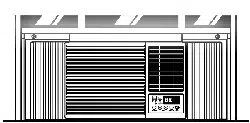

Room
Air
Conditioner
SERVICE
MANUAL
CAUTION
-
BEFORE
SERVICING
THE
UNIT,
READ
THE
SAFETY
PRECAUTIONS
IN
THIS
MANUAL.
-
ONLY
FOR
AUTHORIZED
SERVICE
PERSONNEL.
MODEL:
KG8000RY3,
M8003ER,
M1003RY3,
WG1000RY3,
M1003RA3
website
http://biz.LGservice.com
e-mail
http://www.LGEservice.com/techsup.html
---2---
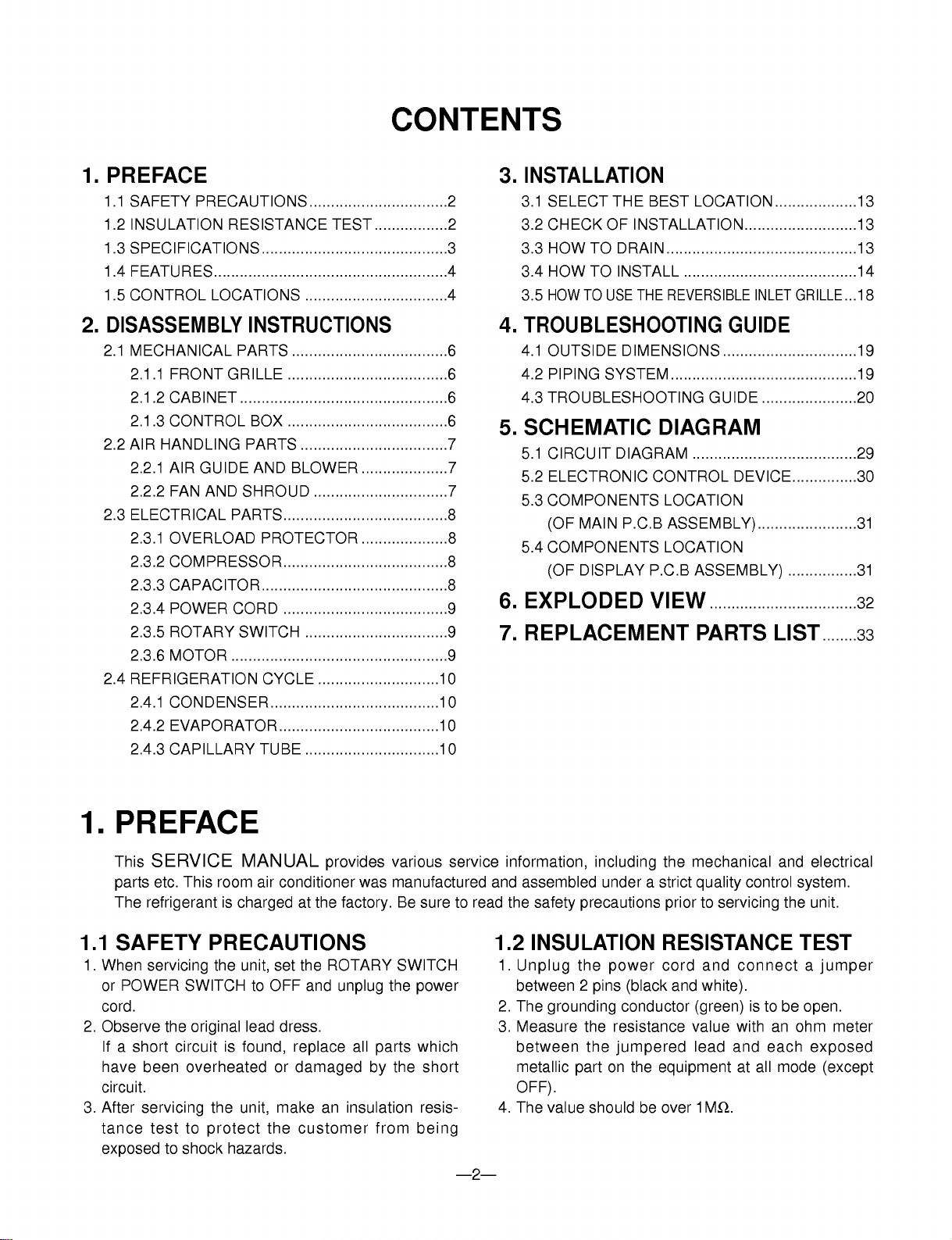
1.
PREFACE
1.1
SAFETY
PRECAUTIONS................................2
1.2
INSULATION
RESISTANCE
TEST
.................2
1.3
SPECIFICATIONS
...........................................3
1.4
FEATURES......................................................4
1.5
CONTROL
LOCATIONS
.................................4
2.
DISASSEMBLY
INSTRUCTIONS
2.1
MECHANICAL
PARTS
....................................6
2.1.1
FRONT
GRILLE
.....................................6
2.1.2
CABINET
................................................6
2.1.3
CONTROL
BOX
.....................................6
2.2
AIR
HANDLING
PARTS
..................................7
2.2.1
AIR
GUIDE
AND
BLOWER
....................7
2.2.2
FAN
AND
SHROUD
...............................7
2.3
ELECTRICAL
PARTS......................................8
2.3.1
OVERLOAD
PROTECTOR
....................8
2.3.2
COMPRESSOR......................................8
2.3.3
CAPACITOR...........................................8
2.3.4
POWER
CORD
......................................9
2.3.5
ROTARY
SWITCH
.................................9
2.3.6
MOTOR
..................................................9
2.4
REFRIGERATION
CYCLE
............................10
2.4.1
CONDENSER.......................................10
2.4.2
EVAPORATOR.....................................10
2.4.3
CAPILLARY
TUBE
...............................10
3.
INSTALLATION
3.1
SELECT
THE
BEST
LOCATION...................13
3.2
CHECK
OF
INSTALLATION..........................13
3.3
HOW
TO
DRAIN............................................13
3.4
HOW
TO
INSTALL
........................................14
3.5
HOW
TO
USE
THE
REVERSIBLE
INLET
GRILLE...18
4.
TROUBLESHOOTING
GUIDE
4.1
OUTSIDE
DIMENSIONS
...............................19
4.2
PIPING
SYSTEM...........................................19
4.3
TROUBLESHOOTING
GUIDE
......................20
5.
SCHEMATIC
DIAGRAM
5.1
CIRCUIT
DIAGRAM
......................................29
5.2
ELECTRONIC
CONTROL
DEVICE...............30
5.3
COMPONENTS
LOCATION
(OF
MAIN
P.C.B
ASSEMBLY).......................31
5.4
COMPONENTS
LOCATION
(OF
DISPLAY
P.C.B
ASSEMBLY)
................31
6.
EXPLODED
VIEW
..................................32
7.
REPLACEMENT
PARTS
LIST
........33
1.
PREFACE
This
SERVICE
MANUAL
provides
various
service
information,
including
the
mechanical
and
electrical
parts
etc.
This
room
air
conditioner
was
manufactured
and
assembled
under
a
strict
quality
control
system.
The
refrigerant
is
charged
at
the
factory.
Be
sure
to
read
the
safety
precautions
prior
to
servicing
the
unit.
1.1
SAFETY
PRECAUTIONS
1.
When
servicing
the
unit,
set
the
ROTARY
SWITCH
or
POWER
SWITCH
to
OFF
and
unplug
the
power
cord.
2.
Observe
the
original
lead
dress.
If
a
short
circuit
is
found,
replace
all
parts
which
have
been
overheated
or
damaged
by
the
short
circuit.
3.
After
servicing
the
unit,
make
an
insulation
resis-
tance
test
to
protect
the
customer
from
being
exposed
to
shock
hazards.
1.2
INSULATION
RESISTANCE
TEST
1.
Unplug
the
power
cord
and
connect
a
jumper
between
2
pins (black
and
white).
2.
The
grounding
conductor
(green)
is
to
be
open.
3.
Measure
the
resistance
value
with
an
ohm
meter
between
the
jumpered
lead
and
each
exposed
metallic
part
on
the
equipment
at
all
mode
(except
OFF).
4.
The
value
should
be
over
1MΩ.
CONTENTS
M1003RA3
M1003RY3
WG1000R
KG8000RY3
M8003ER
---3---
POWER
SUPPLY
COOLING
CAPACITY
(Btu/h)
INPUT
(W)
RUNNING
CURRENT
(A)
E.E.R
(BTU/W.h)
INDOOR
(°C)
OUTDOOR
(°C)
REFRIGERANT
(R-22)
CHARGE
FAN,
INDOOR
FAN,
OUTDOOR
FAN
SPEEDS,
FAN/COOLING
FAN
MOTOR
OPERATION
CONTROL
ROOM
TEMP.
CONTROL
AIR
DIRECTION
CONTROL
CONSTRUCTION
PROTECTOR
COMPRESSOR
FAN
MOTOR
OUTSIDE
DIMENSION
(inch)
(WxHxD)
(mm)
1ø,
115,
60Hz
/
1ø,
220,
60Hz
8,000 7,800
10,000
820 720
1,020
7.6 6.6
9.2
9.8
10.8
9.8
26.7(DB)*
19.4(WB)**
35(DB)*
23.9(WB)**
260g(9.2
oz)
445g(15.7
oz)
460g
(16.2
oz)
440g(15.5oz)
440g(15.5
oz)
BLOWER
or
TURBO
FAN
PROPELLER
TYPE
FAN
WITH
SLINGER-RING
3/3
6POLES
TOUCH
&
REMOTE
CONTROL
THERMISTOR
VERTICAL
LOUVER
(RIGHT
&
LEFT)
HORIZONTAL
LOUVER
(UP
&
DOWN)
SLIDE
IN-OUT
CHASSIS
OVERLOAD
PROTECTOR
INTERNAL
THERMAL
PROTECTOR
181/2
x137/8
x2011/16
235/8
x1431/32
x225/16
470x353x525
600x380x567
MODELS
ITEMS
OPERATING
CONDITION
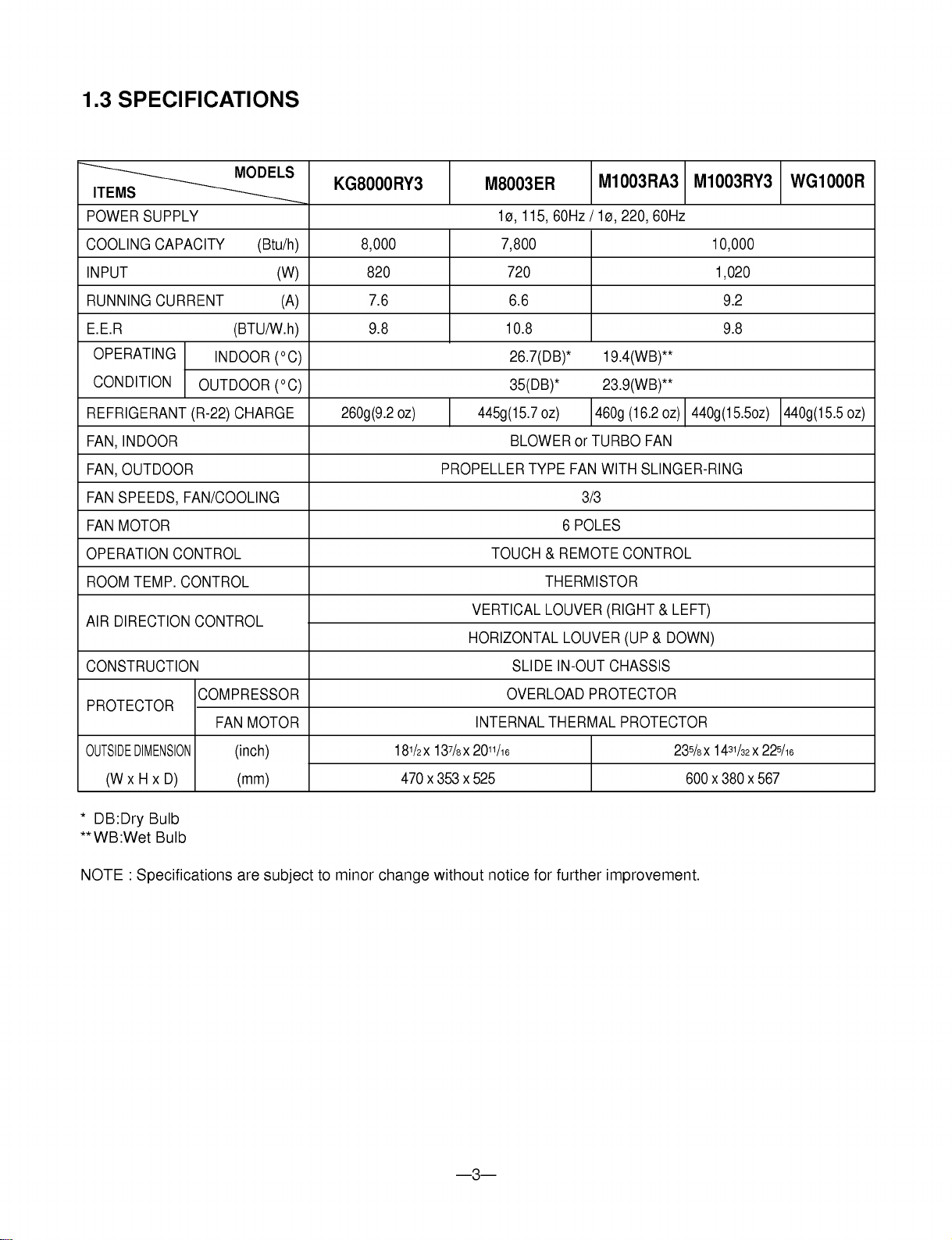
1.3
SPECIFICATIONS
*
DB:Dry
Bulb
**
WB:Wet
Bulb
NOTE
:
Specifications
are
subject
to
minor
change
without
notice
for
further
improvement.

1.4
FEATURES
?
Designed
for
COOLING
ONLY.
?
Powerful
and
whispering
cooling.
?
Slide-in
and
slide-out
chassis
for
the
simple
installation
and
service.
?
Side
air-intake,
side
cooled-air
discharge.
1.5
CONTROL
LOCATIONS
1.5.1
COOLING
ONLY
MODEL
?
VENTILATION
The
ventilation
lever
must
be
in
the
CLOSE
position
in
order
to
maintain
the
best
cooling
conditions.
When
a
fresh
air
is
necessary
in
the
room,
set
the
ventilation
lever
OPEN
position.
The
damper
is
opened
and
room
air
is
exhausted.
?
Washable
one-touch
filter
?
Compact
size
?
Reliable
and
efficient
rotary
compressor
is
equipped.
---4---
CLOSE
VENT
OPEN
1.5.2
COOLING
ONLY
MODEL
WITH
REMOTE
CONTROL
AND
TOUCH
TYPE
?
DISPLAY
1
5
2
3
7
64
8
1
7
8
2
6
45
3

---5---
Power
Temp
Fan
Speed
Timer
Mode
Energy
Saver
Auto
Swing
POWER
?
To
turn
the
air
conditioner
ON,
push
the
button.
To
turn
the
air
conditioner
OFF,
push
the button
again.
?
This
button
takes
priority
over
any
other
buttons.
?
When
you
first
turn
it
on,
the
air
conditioner
is
on
the
High
cool
mode
and
the
temp.
at
72°F(22˚C).
TEMPERATURE
SETTING
?
This
button
can
automatically
control
the
temperature
of
the
room.
The
temperature
can
be
set
within
a
range
of
60°F
to
86°F
by
1°F.
(16˚C
to
30˚C
by
1˚C)
Select
the
lower
number
for
lower
temperature
of
the
room.
FAN
SPEED
?
Everytime
you
push
this
button
it
is
set
as
follows.
{High(F3)
Low(F1)
Med(F2)
High(F3)...}.
ENERGY
SAVER
(AVAILABLE
IN
SOME
MODELS)
?
If
the
switch
is
set
to
"On",
the
fan
stops
when
the
compressor
stops
cooling.
Approximately
every
3
minutes
the
fan
will
turn
on
and check
the
room
air
to
determine
if
cooling
is
needed.
MODE
?
Everytime
you
push
this
button,
it
will
toggle
between
COOL,
FAN
and
DRY.
ON/OFF
TIMER
-
STOPPING
OPERATION
?
Everytime
you
push
this
button,
when
the
air
conditioner
is
operating,
timer
is
set
as
follows.
(1Hour
2Hours
3Hours
4Hours 5Hours
6Hours 7Hours
8Hours 9Hours
10Hours 11Hours 12Hours
Cancel)
?
The
Setting
Temperature
will
be
raised
by
2°F
(1°C)
30min.
later
and
by
2°F
(1°C)
after
another
30
min.
-
STARTING
OPERATION
?
Everytime
you
push
this
button,
when
the
air
conditioner
is
not
operating,
timer
is
set
as
follow.
(1Hour
2Hours
3Hours 4Hours
5Hours
6Hours
7Hours 8Hours 9Hours
10Hours
11Hours 12Hours
Cancel)
AUTO
SWING
?
This
button
can
automatically
control
the
air
flow
direction.
REMOCON
SIGNAL
RECEIVER
?
REMOTE
CONTROLLER
Precaution:
The
Remote
Controller
will
not
function
properly
if
strong
light
strikes
the
sensor
window
of
the
air
conditioner
or
if
there
are
obstacles
between
the
Remote
Controller
and
the
air
conditioner.
6
6
7
7
8
8
AUTO
RESTART
In
failure
of
electric
power,
the
unit
runs
as
previous
setting
operation.
(Available
in
some
models)

---6---
2.1
MECHANICAL
PARTS
2.1.1
FRONT
GRILLE
1.
Open
the
lnlet
grille
upward
or
downward.
2.
Remove
the
screw
which
fastens
the
front
grille.
3.
Pull
the
front
grille
from
the
right
side.
4.
Remove
the
front
grille.
5.
Re-install
the
component
by
referring
to
the
removal
procedure,
above.(See
Figure
1)
2.1.2
CABINET
1.
After
disassembling
the
FRONT
GRILLE,
remove
the
2
screws
which
fasten
the
cabinet
at
both
sides.
2.
Remove
the
2
screws
which
fasten the
cabinet
at
back.
3.
Pull
the
base
pan
forward.
(See
Figure
2)
4.
Remove
the
cabinet.
5.
Re-install
the
component
by
referring
to
the
removal
procedure,
above.
2.1.3
CONTROL
BOX
1.
Disconnect
the
unit
from
the
power
source.
2.
Remove
the
front
grille.
(Refer
to
section
2.1.1)
3.
Remove
the
cabinet.
(Refer
to
section
2.1.2)
4.
Remove
the
screw
which
fastens
the
control
box
cover.
5.
Remove
the
housing
which
connects
motor
wire
in
the
control
box.
6.
Remove
the
3
leads
from
the
compressor.
(Refer
to
section
2.3.1)
7.Discharge
the
capacitor
by
placing
a
20,000
ohmresistor
across
the
capacitor
terminals.
8.
Remove
the
2
screws
which
fasten
the
control
box.(See
Figure
3)
9.
Pull
the
control
box
forward
completely.
10.
Re-install
the
components
by
referring
to
the
removal
procedure,
above.
(See
Figure
3)
(Refer
to
the
circuit
diagram
found
on
page
24
in
this
manual
or
on
the
control
box.)
2.
DISASSEMBLY
INSTRUCTIONS
---
Before
the
following
disassembly,
POWER
SWITCH
set
to
OFF
and
disconnect
the
power
cord.
Figure
1
Figure
3
Figure
2

---7---
2.2
AIR
HANDLING
PARTS
2.2.1
AIR
GUIDE
AND
BLOWER
1.
Remove
the
front
grille.
(Refer
to
section
2.1.1)
2.
Remove
the
cabinet.
(Refer
to
section
2.1.2)
3.
Remove
the
control
box.
(Refer
to
section
2.1.3)
4.
Remove
the
3
screws
which
fasten
the
brace.
5.
Remove
the brace.
6.
Remove
the
2
screws
which
fasten
the
evaporator.
7.
Move
the
evaporator
forward
and
pulling
it
upward
slightly.
(See
Figure
4)
8.
Move
the
evaporator
to
the
left
carefully.
9.
Pull
out
the
hook
of
orifice
by
pushing
the
tabs
and
remove
it.
(See
Figure
5)
10.
Remove
the
clamp
with
a
hand
plier
which
secures
the
blower.
11.
Remove
the
blower.
12.
Remove
the
4
screws
which
fasten
the
air
guide
from
the
barrier.
13.
Move
the
air
guide
backward,
pulling
out
from
the
base
pan.
14.
Re-install
the
components
by
referring
to
the
removal
procedure,
above.
2.2.2
FAN
AND
SHROUD
1.
Remove
the
cabinet.
(Refer
to
section
2.1.2)
2.
Remove
the
brace
(Refer
to
section
2.2.1)
3.
Remove
the
3
screws
which
fasten
the
condenser.
4.
Move
the
condenser
to
the
left
carefully.
5.
Remove
the
clamp
which
secures
the
fan.
6.
Remove
the
fan
and
then
pull
out
the
shroud.
(See
Figure
6)
7.
Re-install
by
referring
to
the
removal
procedure.
Figure
4
Figure
5
Figure
6

---8---
2.3
ELECTRICAL
PARTS
2.3.1
OVERLOAD
PROTECTOR
1.
Remove
the
cabinet.
(Refer
to
section
2.1.2)
2.
Remove
the
nut
which
fastens
the
terminal
cover.
3.
Remove
the
terminal
cover.
(See
Figure
7)
4.
Remove
all
the
leads
from
the
overload
protector.
5.
Remove
the
overload
protector.
6.
Re-install
the
component
by
referring
to
the
removal
procedure,
above.
2.3.2
COMPRESSOR
1.
Remove
the
cabinet.
(Refer
to
section
2.1.2)
2.
Discharge
the
refrigerant
system
using
a
FreonTM
Recovery
System.
If
there
is
no
valve
to
attach the
recovery
system,
install
one
(such
as
a
WATCO
A-1)
before
venting
the
FreonTM.
Leave
the
valve
in
place
after
servicing
the
system.
3.
Remove
the
overload
protector.
(Refer
to
section
2.3.1)
4.
After
purging
the
unit
completely,
unbraze
the
suction
and
discharge
tubes
at
the
compressor
connections.
5.
Remove
the
3
nuts
and
the
3
washers
which
fasten
the
compressor.
6.
Remove
the
compressor.
(See
Figure
8)
7.
Re-install
the
components
by
referring
to
the
removal
procedure,
above.
2.3.3
CAPACITOR
1.
Remove
the
control
box.
(Refer
to
section
2.1.3)
2.
Remove
the
screw
which
fasten
control
panel
from
control
box.
3.
Remove
the
screw
which
located
in
the
front.
4.
Open
the
bottom
side
of
control
box.
5.
Remove
the
screw
and
the
clamp
which
fastens
the
capacitor.
6.
Disconnect
all
the
leads
of
capacitor
terminals.
7.
Re-install
the
components
by
referring
to
the
removal
procedure,
above.
(See
Figure
9)
Figure
7
Figure
8
Figure
9

---9---
2.3.4
POWER
CORD
1.
Remove
the
control
box.
(Refer
to
section
2.1.3)
2.
Open
the
control
box.
(Refer
to
section
2.3.3)
3.
Disconnect
the
grounding
screw
from
the
control
box.
4.
Disconnect
the
2
receptacles.
5.
Remove
a
screw
which
fastens
the
clip
cord.
(See
Figure
10)
6.
Remove
the
power
cord.
7.
Re-install
the
component
by
referring
to
the
above
removal
procedure,
above.
(Use
only
one
ground-marked
hole
for
ground
connection.)
8.
If
the
supply
cord
of
this
appliance
is
damaged,
it
must
be
replaced
by
the
special
cord.
(The
special
cord
means
the
cord
which
has
the
same
specification
marked
on
the
supply
cord
attached
at
the
unit.)
2.3.5
MOTOR
1.
Remove
the
cabinet.
(Refer
to
section
2.1.2)
2.
Remove
the
evaporator.
(Refer
to
section
2.2.1)
3.
Remove
the
orifice.
(Refer
to
section
2.2.1)
4.
Remove
the
blower.
(Refer
to
section
2.2.1)
5.
Remove
the
fan.
(Refer
to
section
2.2.2)
6.
Remove
the
control
box
cover
and
housing
of
the
motor
in
the
control
box.
(Refer
to
section
2.1.3)
7.
Remove
the
2
screws
which
fasten the
motor
from
the
mount
motor.
(See
Figure
11)
8.
Remove
the
motor.
9.
Re-install
the
components
by
referring
to
the
removal
procedure,
above.(See
Figure
11)
Figure
11
Figure
10

---10---
2.4
REFRIGERATING
CYCLE
2.4.1
CONDENSER
1.
Remove
the
cabinet.
(Refer
to
section
2.1.2)
2.
Remove
the
3
screws
which
fasten
the
brace.(Refer
to
section
2.2.1)
3.
Remove
the
3
screws
which
fasten
the
condenser
and
shroud.
4.
After
discharging
the
refrigerant
completely,
unbraze
the
interconnecting
tube
at
the
condenser
connections.
5.
Remove
the
condenser
carefully.
6.
Re-install
the
component
by
referring
to
notes.
(See
Figure
12)
2.4.2
EVAPORATOR
1.
Remove
the
cabinet.
(Refer
to
section
2.1.2)
2.
Remove
the
2
screws
which
fasten
the
evaporator.
3.
Move
the
evaporator
sideways
carefully.
(Refer
to
section
2.2.1)
4.
After
discharging
the
refrigerant
completely,
unbraze
the
interconnecting
tube
at
the
evaporator
connections.
5.
Remove
the
evaporator
carefully.
6.
Re-install
the
component
by
referring
to
notes.
(See
Figure
13)
2.4.3
CAPILLARY
TUBE
1.
Remove
the
cabinet.
(Refer
to
section
2.1.2)
2.
After
discharging
the
refrigerant
completely,
unbraze
the
interconnecting
tube
at
the
capillary
tube.(See
caution
above)
3.
Remove
the
capillary
tube.
4.
Re-install
the
component
by
referring
to
notes.
Figure
12
Figure
13
Discharge
the
refrigerant
system
using
a
FreonTM
Recovery
System.
If
there
is
no
valve
to
attach
the
recovery
system,
install
one
(such
as a
WATCO
A-1)
before
venting
the
FreonTM.
Leave
the
valve
in
place
after
servicing
the
system.
CAUTION

---11---
---
Replacement
of
the
refrigeration
cycle.
1.
When
replacing
the
refrigeration
cycle,
be
sure
to
Discharge
the
refrigerant
system
using
a
FreonTM
recovery
System.
If
there
is
no
valve
to
attach
the
recovery
system,
install
one
(such
as a
WATCO
A-1)
before
venting
the
FreonTM.
Leave
the
valve
in
place
after
servicing
the
system.
2.
After
discharging
the
unit
completely,
remove
the
desired
component,
and
unbraze
the
pinch-off
tubes.
3.
Solder
service
valves
into
the
pinch-off
tube
ports,
leaving
the
valves
open.
4.
Solder
the
pinch-off
tubes
with
Service
valves.
5.
Evacuate
as
follows.
1)
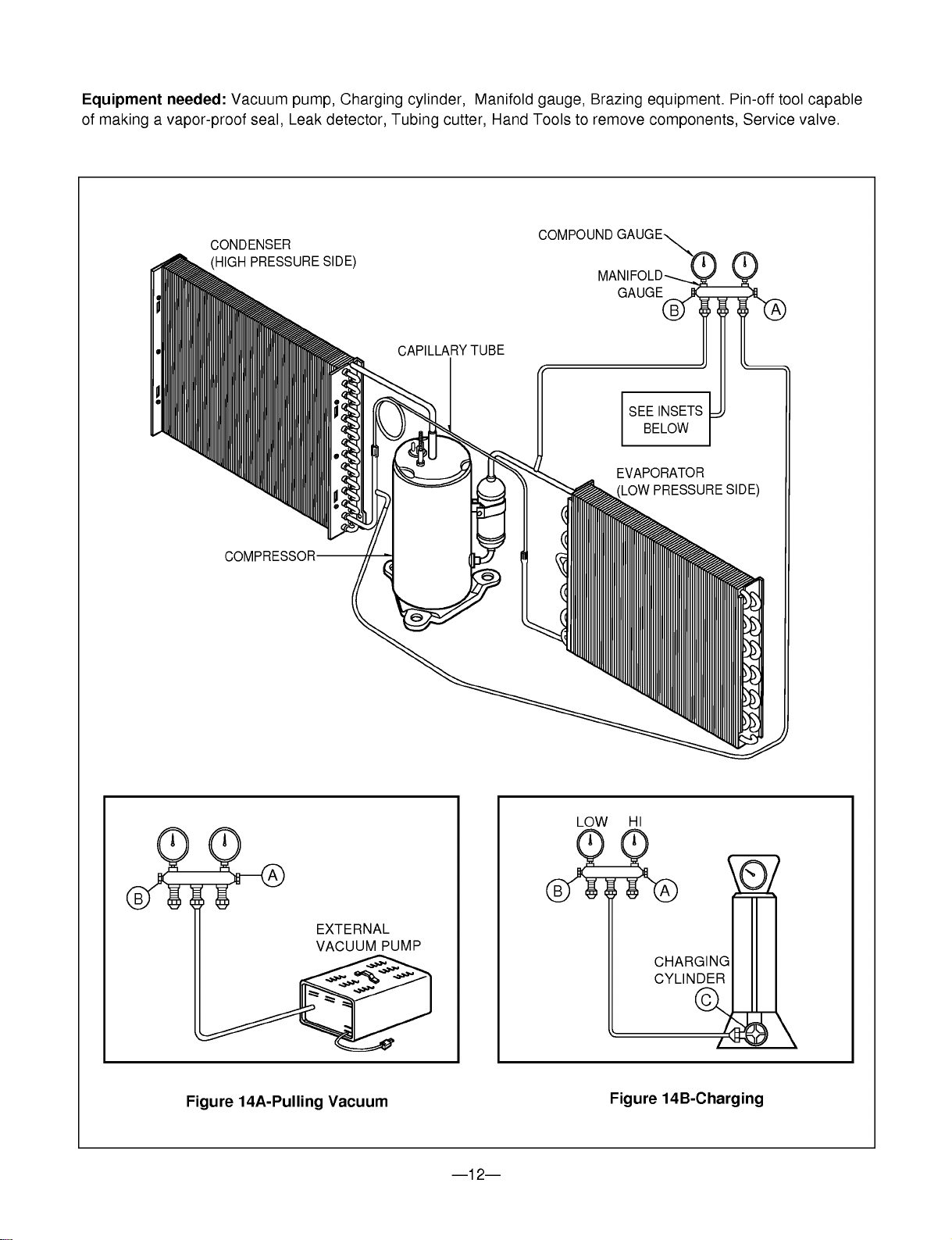
Connect
the
vacuum
pump,
as
illustrated
figure
14A.
2)
Start
the
vacuum
pump,
slowly
open
manifold
valves
A
and
B
with
two
full
turns
counterclockwise
and
leave
the
valves
open.
The
vacuum
pump
is
now
pulling
through
valves
A
and
B
up
to
valve
C
by
means
of
the
manifold
and
entire
system.
3)
Operate
the
vacuum
pump
for
20
to
30
minutes,
until
600
microns
of
vaccum
is
obtained.
Close
valves
A
and
B,
and
observe
vacuum
gauge
for
a
few
minutes.
A
rise
in
pressure
would
indicate
a
possible
leak
or
moisture
remaining
in
the
system.
With
valves
A
and
B
closed,
stop
the
vacuum
pump.
4)
Remove
the
hose
from
the
vacuum
pump
and
place
it
on
the
charging
cylinder.
See
figure
14B.
Open
valve
C.
Discharge
the
line
at
the
manifold
connection.
5)
The
system
is
now
ready
for
final
charging.
6.
Recharge
as
follows
:
1)
Refrigeration
cycle
systems
are
charged
from
the
High-side.
If
the
total
charge
cannot
be
put
in
the
High-side,
the
balance
will
be
put
in
the
suction
line
through
the
access
valve
which
you
installed
as
the
system
was
opened.
2)
Connect
the
charging
cylinder
as
shown
in
figure
14B.
With
valve
C
open,
discharge
the
hose
at
the
manifold
connection.
3)
Open
valve
A
and
allow
the
proper
charge
to
enter
the
system.
Valve
B
is
still
closed.
4)
If
more
charge
is
required,
the
high-side
will
not
take
it.
Close
valve
A.
5)
With
the
unit
running,
open
valve
B
and add
the
balance
of
the
charge.
a.
Do
not
add
the
liquid
refrigerant
to
the
Low-
side.
b.
Watch
the
Low-side
gauge;
allow
pressure
to
rise
to
30
lbs.
c.
Turn
off
valve
B
and
allow
pressure
to
drop.
d.
Repeat
steps
b.
and
c.
until
the
balance
of
the
charge
is
in
the
system.
6)
When
satisfied
the
unit
is
operating
correctly,
use
the
pinch-off
tool
with
the
unit
still
running
and
clamp
on
to
the
pinch-off
tube.
Using
a
tube
cutter,
cut
the
pinch-off
tube
about
2
inches
from
the
pinch-off
tool.
Use
sil-fos
solder
and
solder
pinch-off
tube
closed.
Turn
off
the
unit,
allow
it
to
set
for
a
while,
and
then
test
the
leakage
of
the
pinch-off
connection.
NOTES
If
high
vacuum
equipment
is
used,
just
crack
valves
A
and
B
for
a
few
minutes,
then
open
slowly
with
the
two
full
turns
counterclockwise.
This
will
keep
oil
from
foaming
and
being
drawn
into
the
vacuum
pump.
CAUTION
---12---
Equipment
needed:
Vacuum
pump,
Charging
cylinder,
Manifold
gauge,
Brazing
equipment.
Pin-off
tool
capable
of
making
a
vapor-proof
seal,
Leak
detector,
Tubing
cutter,
Hand
Tools
to
remove
components,
Service
valve.
A
COMPOUND
GAUGE
EVAPORATOR
(LOW
PRESSURE
SIDE)
COMPRESSOR
CAPILLARY
TUBE
CONDENSER
(HIGH
PRESSURE
SIDE)
SEE
INSETS
BELOW
MANIFOLD
GAUGE
B
Figure
14A-Pulling
Vacuum
Figure
14B-Charging
A
B
EXTERNAL
VACUUM
PUMP
A
CHARGING
CYLINDER
LOW
HI
B
C

---13---
3.
INSTALLATION
3.1
SELECT
THE
BEST
LOCATION
1.To
prevent
vibration
and
noise,
make
sure
the
unit
is
installed
securely
and
firmly.
2.Install
the
unit
where
the
sunlight
does
not
shine
directly
on
the
unit.
3.The
outside
of
the
cabinet
must
extend
outward
for
at
least
11"
and
there
should
be
no
obstacles,
such
as
a
fence
or
wall,
within
20"
from
the
back
of
the
cabinet
because
it
will
prevent
heat
radiation
of
the
condenser.
Restriction
of
outside
air
will
greatly
reduce
the
cooling
efficiency
of
the
air
conditioner.
4.Install
the
unit
a
little
slanted
so
the
back
is
slightly
lower
than
the
front
(about
1/2
").
This
will
help
force
condensed
water
to
the
outside.
5.Install
the
unit
from
the
bottom
about
30"~60"
above
the
floor
level.
3.2
CHECK
OF
INSTALLATION
The
setting
conditions
must
be
checked
prior
to
initial
starting.
The
undermentioned
items
are
especially
important
checking
points
when
the
installation
is
finished.
1.
Grounding
wire
(Green
or
Green
and
Yellow)
is
provided
in
the
power
cord.
The
green
wire
must
be
grounded.
2.
Connect
to
a
single-outlet
15A
circuit.
3.
To
avoid
vibration
or
noise,
make
sure
the
air
conditioner
is
installed
securely.
4
Avoid
placing
furniture
or
draperies
in
front
of
the
air
inlet
and
outlet.
3.3.
HOW
TO
DRAIN
(When
using
drain
pipe)
The
air
conditioner
must
be
installed
horizontally
or
tilted
slightly
to
the
outside
for
proper
water
drainage.
On
exceptionally
hot
and
humid
days
the
air
conditioner
may
overflow
condensed
water.
If
the
air
conditioner
is
used
in
a
hot
and
high
humidity
zone,
exchange
the
HOLE
RUBBER
for
the
DRAIN
PIPE.(See
figure
16,
figure
17.)
All
side
louvers
of
the
cabinet
must
remain
exposed
to
the
outside
of
the
structure.
AWNING
COOLED
AIR
HEAT
RADIATION
30"~60"
ABOUT
1/2"
Over
20"
FENCE
BASE
PAN
HOLE
RUBBER
DRAIN
PIPE
1
BOTTOM
2
BASE
PAN
BOTTOM
Figure
16
Figure
17
Figure
15
CAUTION

---14---
3.4
HOW
TO
INSTALL
3.4.1
WHEN
USING
GASKET
3.4.2
WHEN
USING
INSTALLATION
KITS
(SOME
MODELS
INCLUDING
INSTALLATION
KIT)
A.
WINDOW
REQUIREMENTS
This
unit
is
designed
for
installation
in
standard
double
hung
windows
with
actual
opening
widths
from
22"
to
36".
The
top
and
bottom
window
sash
must
open
sufficiently
to
allow
a
clear
vertical
opening
of
15"
from
the
bottom
of
the
upper
sash
to
the
window
stool.
A
B
DE
F
C
H
J
2
3
4
2
1
G
A
RIGHT
SIDE
HORIZONTAL
LINE
B
1.
WINDOW
(WIDTH-A,
HEIGHT-B)
2.
GASKET
3.
WALL
4.
DETAILS
5.1
x
30
ROUND
HEAD
WOOD
SCREWS
ABCDE
F
G
HJK
495mm 366mm 250mm
30mm
0~25mm
OVER
420mm
12mm
32mm
5~10mm
0~5mm
(191/2")
(147/16")
(10")
(11/16")
(0~1")
(OVER
1617/32")
(1/2")
(11/4")
(3/16"~3/8")
(0~3/16")
1
2 3
4
8 13
10
765
9
12
14
15
11
B.
INSTALLATION
KITS
CONTENTS
22"
to
36"
Stool
Interior
wall
181/2"
min
(Without
frame
curtain)
Offset
1/2"
to
11/4"
Sill
Exterior
15"
min
(With
frame
curtain)
NO.
NAME
OF
PARTS
Q'TY
1
FRAME
CURTAIN
2
2
SILL
SUPPORT
2
3B
O
L
T
2
4N
UT
2
5
SCREW(TYPE
A)
16
6
SCREW(TYPE
B)
3
7
SCREW(TYPE
C)
5
8
FOAM-STRIP
1
9
UPPER
GUIDE
1
10
FOAM-PE
1
11
FRAME
GUIDE
2
12
WINDOW
LOCKING
BRACKET
1
13
FOAM-PE
1
14
DRAIN
JOINT
PIPE
1
15
DRAIN
WASHER
1

---15---
SUGGESTED
TOOL
REQUIREMENTS
SCREWDRIVER(+,
-),
RULER,
KNIFE,
HAMMER,
PENCIL,
LEVEL
PREPARATION
OF
CHASSIS
1.
Remove
the
screws
which
fasten
the
cabinet
at
both
sides
and
at
the
back.
2.
Slide
the
unit
from
the
cabinet
by
gripping
the
base
pan
handle
and
pulling
forward
while
bracing
the
cabinet.
3.
Cut
the
window
sash
seal
to
the
proper
length.
Peel
off
the
backing
and
attach
the
foam-pe
to
the
underside
of
the
window
sash.
4.
Remove
the
backing
from
the
top
upper
guide
Foam
PE
and
attach
it
to
the
bottom
of
the
upper
guide
5.
Attach
the
upper
guide
onto
the
top
of
the
cabinet
with
3
type
A
screws.
6.
Insert
the
frame
guides
into
the
bottom
of
the
cabinet.
7.
Insert
the
Frame
Curtain
into
the
upper
guide
and
frame
guides
.
8.
Fasten
the
curtains
to
the
unit
with
4
Type
A
screws.
CABINET
INSTALLATION
1.
Open
the
window.
Mark
a
line
on
center
of
the
window
stool(or
desired
air
conditioner
location).
Carefully
place
the
cabinet
on
the
window
stool
and
align
the
center
mark
on
the
bottom
front
with
the
center
line
marked
in
the
window
stool.
2.
Pull
the
bottom
window
sash
down
behind
the
upper
guide
until
it
meets.
NOTE:
?
Do
not
pull
the
window
sash
down
so
tightly
that
the
movement
of
Frame
Curtain
is
restricted.
9
10
9
5
5
5
11
11
(Type
A)
(Type
A)
Upper
Guide
Window
Sash
Window
stool
Front
Angle
Upper
guide
9
Frame
Curtain
1
Foam-pe
10
Foam-pe
13
Cabinet
13
Shipping
Screws
Figure
18
Figure
19

INDOOR
OUTDOOR
Sill
Support
Nut
Bolt
2
4
3
INDOOR
OUTDOOR
11
6
7
2
5
Frame
Guide
About 1/2"
Screw(Type
A)
Cabinet
6
2
About 1/2"
Screw(Type
B)
5
Screw(Type
A)
Sill
support
Sash
track
Front
Angle
Type
C
Screw(Type
B)
Sill
support
---16---
3.
Loosely
assemble
the
sill
support
using
the
parts
in
Figure
20.
4.
Select
the
position
that
will
place
the
sill
support
near
the
outer
most
point
on
sill
(See
Figure 21)
NOTE:
Be
careful
when
you
install
the
cabinet
(frame
guides
are
broken
so
easily).
5.
Attach
the
sill
support
to
the
cabinet
track
hole
in
relation
to
the
selected
position
using
2
Type
A
screws
in
each
support(See
Figure
21).
6.
The
cabinet
should
be
installed
with
a
very
slight
tilt(about
1/2")
downward
toward
the
outside
(See
Figure
22).
Adjust
the
bolt
and
the
nut
of
sill
support
for
balancing
the
cabinet.
7.
Attach
the
cabinet
to
the
window
stool
by
driving
the
screws
(Type
B:
Length
sixteen
millimeters
and
below.)
through
the
front
angle
into
window
stool.
8.
Pull
each
Frame
curtain
fully
to
each
window
sash
track,
and
repeat
step
2.
9.
Attach
each
Frame
curtain
the
window
sash
using
screws
(Type
C).(See
Figure
23)
CAUTION:
DO
NOT
DRILL
A
HOLE
IN
THE
BOTTOM
PAN.
The
unit
is
designed
to
operate
with
approximately
1/2"
of
water
in
bottom
pan.
Figure
20
Figure
21
Figure
22
Figure
23

Screw(Type
A)
Screw(Type
A)
Power
cord
Foam-Strip
8
12
---17---
10.
Slide
the
unit
into
the
cabinet.(See
Figure
24)
CAUTION:
For
security
purpose,
reinstall
screws(Type
A)
at
cabinet's
sides.
11.
Cut
the
foam-strip
to
the
proper
length
and
insert
between
the
upper
window
sash
and
the
lower
window
sash.
(See
Figure
25)
12.
Attach
the
window
locking
bracket
with
a
type
C
screw.
(See
Figure
26)
13.
Attach
the
front
grille
to
the
cabinet
by
inserting
the
tabs
on
the
grille
into
the
tabs
on
the
front
of
the
cabinet.
Push
the
grille
in
until
it
snaps
into
place.
(See
Figure
27)
14.
Lift
the
inlet
grille
and
secure
it
with
a
type
A
screw
through
the
front
grille.
(See
Figure
28)
15.
Window
installation
of
room
air
conditioner
is
now
completed.
See
ELECTRICAL
DATA
for
attaching
power
cord
to
electrical
outlet.
Figure
24
Figure
25
Figure
26
Figure
29
Figure
28
Figure
27

---18---
3.5
HOW
TO
USE
THE
REVERSIBLE
INLET
GRILLE
1.
If
you
want
to
pull
out
the
filter
upward,
open
the
inlet
grille
slightly.
Turn
inside
out
the
front
grille.
Disassemble
the
inlet
grille
from
the
front
grille
with
separating
the
hinged
part
by
inserting
a
"---"
type
screw-driver
tip.
Rotate
the
inlet
grille
180
degrees
and
insert
the
hooks
into
the
lower
holes
of
front
grille.
Then,
insert
the
filter.
(See
Figure
30,
31)
2.
Attach
the
front
grille
to
the
cabinet
by
inserting
the
tabs
on
the
grille
into
the
tabs
on
the
front
of
the
cabinet.
Push
the
grille
in
until
it
snaps
into
place.
(See
Figue
32)
3.
Lift
the
inlet
grille
and
secure
it
with
a
type
A
screw
through
the
front
grille.
(See
Figure
33)
4.
If
you
want
to
pull
out
the
filter
downward,
use
the
reversible
inlet
grille
without
change.
(The
grille
is
already
assembled
for
that
way.)
Inlet
Grille
Figure
30
Figure
31
Figure
32
Figure
33

---19---
4.2
PIPING
SYSTEM
Following
is
a
brief
description
of
the
important
components
and
their
function
in
what
is
called
the
refrigeration
system.
Reference
should
made
to
Figure
34
to
follow
the
refrigeration
cycle
and
the
flow
of
the
refrigerant
in
the
cooling
cycle.
MOTOR
COMPRESSOR
OIL
(LIQUID
REFRIGERANT)
CAPILLARY
TUBE
OUTSIDE
COOLING
AIR
FOR
REFRIGERANT
PASS
THROUGH
SUCTION
LINE
COOL
LOW
PRESSURE
VAPOR
COOLED
AIR
COMPLETE
LIQUID
BOIL
OFF
POINT
LIQUID
PRESSURE
DROP
ROOM
AIR
HEAT
LOAD
VAPOR
INLET
HOT
DISCHARGED
AIR
LIQUID
OUTLET
HIGH
PRESSURE
VAPOR
LIQUID
REFRIGERANT
LOW
PRESSURE
VAPOR
ROOM
AIR
CONITIONER
EVAPORATOR
COILS
CONDENSER
COILS
CYCLE
OF
REFRIGERATION
CAPILLARY
TUBE
COMPRESSOR
BLOWER
EVAPORATOR
COIL
CONDENSER
COIL
FAN
MOTOR
Figure
34
4.
TROUBLESHOOTING
GUIDE
4.1
OUTSIDE
DIMENSIONS
unit:
mm(inch)
353(13 7/8")
470(18
1/2")
525(20
11/16")

---20---
4.3
TROUBLESHOOTING
GUIDE
In
general,
possible
trouble
is
classified
in
two
kinds.
The
one
is
called
Starting
Failure
which
is
caused
from
an
electrical
defect,
and
the
other
is
ineffective
Air
Conditioning
caused
by
a
defect
in
the
refrigeration
circuit
and
improper
application.
Unit
runs
but
poor
cooling.
Ineffective
Cooling
Check
outdoor
coil
(heat
exchanger)
&
the
fan
operation.
Check
gas
leakage.
Repair
gas
leak.
Replacement
of
unit
if
the
unit
is
beyond
repair.
Satisfactory
operation
with
temperature
difference
of
inlet
&
outlet
air
;
44~50°F(7~10°C)
Check
heat
load
increase.
Clean
condenser.
Not
on
separate
circuit.
Check
inside
gas
pressure.
Adjusting
of
refrigerant
charged.
Malfunction
of
compressor.
Replacement
of
compressor.
Check
cold
air
circulation
for
smooth
flow.
Dirty
indoor
coil
(Heat
exchanger)
Stop
of
auto
air-swing
Correct
above
trouble
Check
clogging
in
refrigera-
tion
circuit.
Repair
clogging
in
refrigera-
tion
circuit.
Obstruction
at
air
outlet
Clogged
of
air
filter.
Malfunction
of
fan

---21---
Fails
to
Start
Check
circuit
breaker
and
fuse.
Gas
leakage
of
feeler
bulb
of
thermostat
Check
of
control
switch.
Fan
only
fails
to
start.
Improper
wiring.
Defect
of
fan
motor
capacitor.
Irregular
motor
resistance
().
Irregular
motor
insulation
().
Replacement
of
fan
motor.
Regular
but
fails
to
start.
Replacement
of
compressor
(locking
of
rotor,
metal).
Improper
thermostat
setting.
Loose
terminal
connection.
Improper
wiring.
Irregular
motor
resistance
(
)
Irregular
motor
insulation
(
)
Replacement
of
compressor
(Motor
damaged)
Drop
of
power
voltage.
Capacitor
check.
Replacement
Compressor
only
fails
to
start.
Defect
of
compressor
capacitor.
Check
of
power
source.
Check
of
control
switch
setting.

---22---
.
Is
the
Trans
input
power
the
same
as
specified?
Is
the
Trans
output
power
about
AC
14V?
Is
shorted
the
Trans.
output?
Is
output
Voltage
of
IC01D
DC
12V?
Is
output
Voltage
of
IC02D
DC
5V?
Is
the
voltage
No.18
of
Micom
DC
5V?
Exchange
Main
PCB
Ass'y.
Is
the
connection
between
Main
and
Display
all
right?
Is
the
reset
circuit
all
right?
(The
No.14
of
Micom
is
5V.)
?
Check
the
Fuse.
?
Check
the
wiring
diagram.
?
Check
the
Main
PCB
pattern.
?
Exchange
the
Trans.
?
Exchange
D02D~D05D.
?
Exchange
IC01D.
?
Exchange
IC02D.
?
Exchange
IC01A,
C02A.
?
Connect
connector
exactly.
?
Check
the
PCB
pattern.
NO
NO
NO
NO
NO
NO
NO
YES
YES
YES
YES
YES
YES
YES
NO
YES
ELECTRICAL
PARTS
TROUBLESHOOTING
GUIDE
Possible
Trouble
1
The
unit
does
not
operate.

---23---
Possible
Trouble
2
The
compressor
does
not
operate.
Possible
Trouble
3
The
compressor
always
operate.
Is
setting
Temp.
set
lower
than
Room
Temp.-0.5°C?
Is
the
voltage
No.10
of
IC01M
0V?
?
Exchange
IC01M.
?
Select
the
setting
Temp.
to
lower
Number.
?
Wait
3
Minutes.
Is
the
Unit
for
3
minutes
delay?
?
Exchange
MAIN
PCB
Ass'y.
Is
the
voltage
N0.7
of
IC01M
DC
5V?
?
Check
the
RY-COMP.
?
Check
the
wiring
Diagram.
NO
NO
NO
YES
YES
YES
YES
Is
the
wire
connection
of
RY-COMP
all
right?
?
Check
the
RY-COMP.
?
Connect
LEAD
Wire
to
RY-COMP
again.
NO
YES
NO

---24---
Possible
Trouble
4
FAN
does
not
operate.
Possible
Trouble
5
The
function
of
Energy
Saver
does
not
operate.
?
Exchange
IC01M.
?
Exchange
IC01M.
Is
the
voltage
NO.1
or
2
or
4
of
IC01M
DC
5V?
Is
the
voltage
NO.13
or
15
or
16
of
IC01M
0V?
?
Check
the
RY-Hi
or
RY-Med
or
RY-Low.
?
Check
the
wiring
diagram.
NO
NO
YES
YES
NO
NO
YES
YES
Does
SW3
push
properly?
Is
the
voltage
No.17
of
CN-DISP
of
Main
PCB
Ass'y
DC
5V?
?
Reference
to
OWNER'S
MANUAL.
?
Check
the
SW3
working
?
Check
the
Energy
Saver
LED
?
Check
the
SW3.
?
Check
the
pattern
of
Main
&
Display
PCB.

---25---
Possible
Trouble
6
Remote
controller
does
not
operate.
Possible
Trouble
7
It
displays
abnormally
on
display
PCB
Ass'y.
NO
NO
NO
NO
YES
YES
YES
Is
the
IC01G
all
right?
Is
the
connection
of
CN-DISP
all
right?
?
Exchange
the
display
PCB
Ass'y.
?
Exchange
IC01G.
?
Exchange
Q01G,
Q02G,
Q03G,
Q04G
?
Connect
connector
to
CN-DISP
exactly.
Does
the
Q01G,
Q02G, Q03G,
Q04G
operate
normally
on
main
PCB
Ass'y?
.
Is
the
voltage
of
Battery
about
over
2.3V?
?
Exchange
Receiver
Ass'y.
Is
the
connection
of
CN-DISP
all
right?
Is
the
voltage
No.16
of
CN-DISP
on
Main
PCB
Ass'y
DC
5V?
?
Exchange
the
battery.
?
Check
the
PCB
pattern.
?
Connect
connector
to
CN-DISP
exactly.
NO
NO
NO
YES
YES
YES
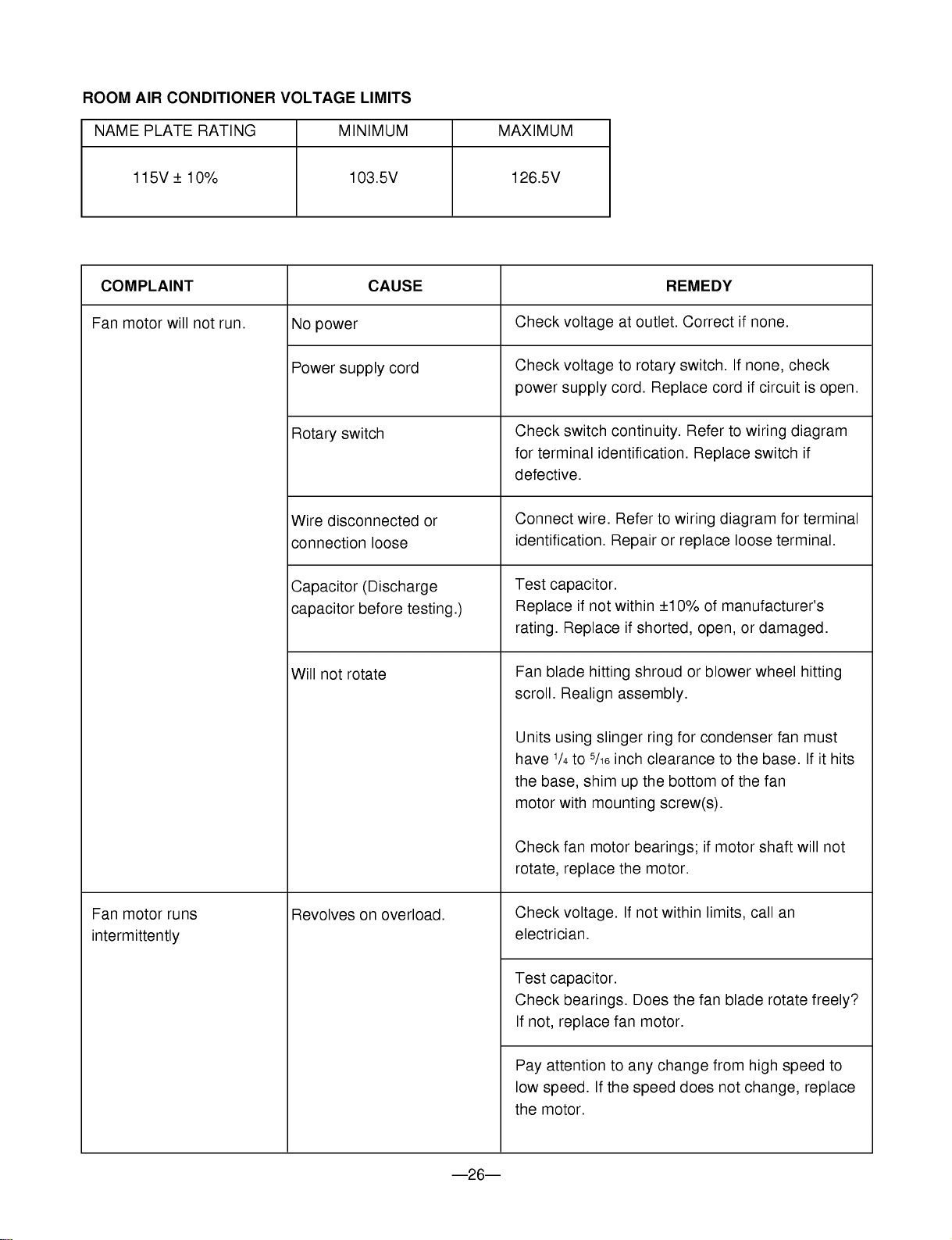
---26---
ROOM
AIR
CONDITIONER
VOLTAGE
LIMITS
NAME
PLATE
RATING
MINIMUM
MAXIMUM
115V
±
10%
103.5V
126.5V
Check
voltage
at
outlet.
Correct
if
none.
Check
voltage
to
rotary
switch.
If
none,
check
power
supply
cord.
Replace
cord
if
circuit
is
open.
Check
switch
continuity.
Refer
to
wiring
diagram
for
terminal
identification.
Replace
switch
if
defective.
Connect
wire.
Refer
to
wiring
diagram
for
terminal
identification.
Repair
or
replace
loose
terminal.
Test
capacitor.
Replace
if
not
within
±10%
of
manufacturer's
rating.
Replace
if
shorted,
open,
or
damaged.
Fan
blade
hitting
shroud
or
blower
wheel
hitting
scroll.
Realign
assembly.
Units
using
slinger
ring
for
condenser
fan
must
have
1/4
to
5/16
inch
clearance
to
the
base.
If
it
hits
the
base,
shim
up
the
bottom
of
the fan
motor
with
mounting
screw(s).
Check
fan
motor
bearings;
if
motor
shaft
will
not
rotate,
replace
the
motor.
Check
voltage.
If
not
within
limits,
call
an
electrician.
Test
capacitor.
Check
bearings.
Does
the
fan
blade
rotate
freely?
If
not,
replace
fan
motor.
Pay
attention
to
any
change
from
high
speed
to
low
speed.
If
the
speed
does
not
change,
replace
the
motor.
No
power
Power
supply
cord
Rotary
switch
Wire
disconnected
or
connection
loose
Capacitor
(Discharge
capacitor
before
testing.)
Will
not
rotate
Revolves
on
overload.
Fan
motor
will
not
run.
Fan
motor
runs
intermittently
COMPLAINT
CAUSE
REMEDY
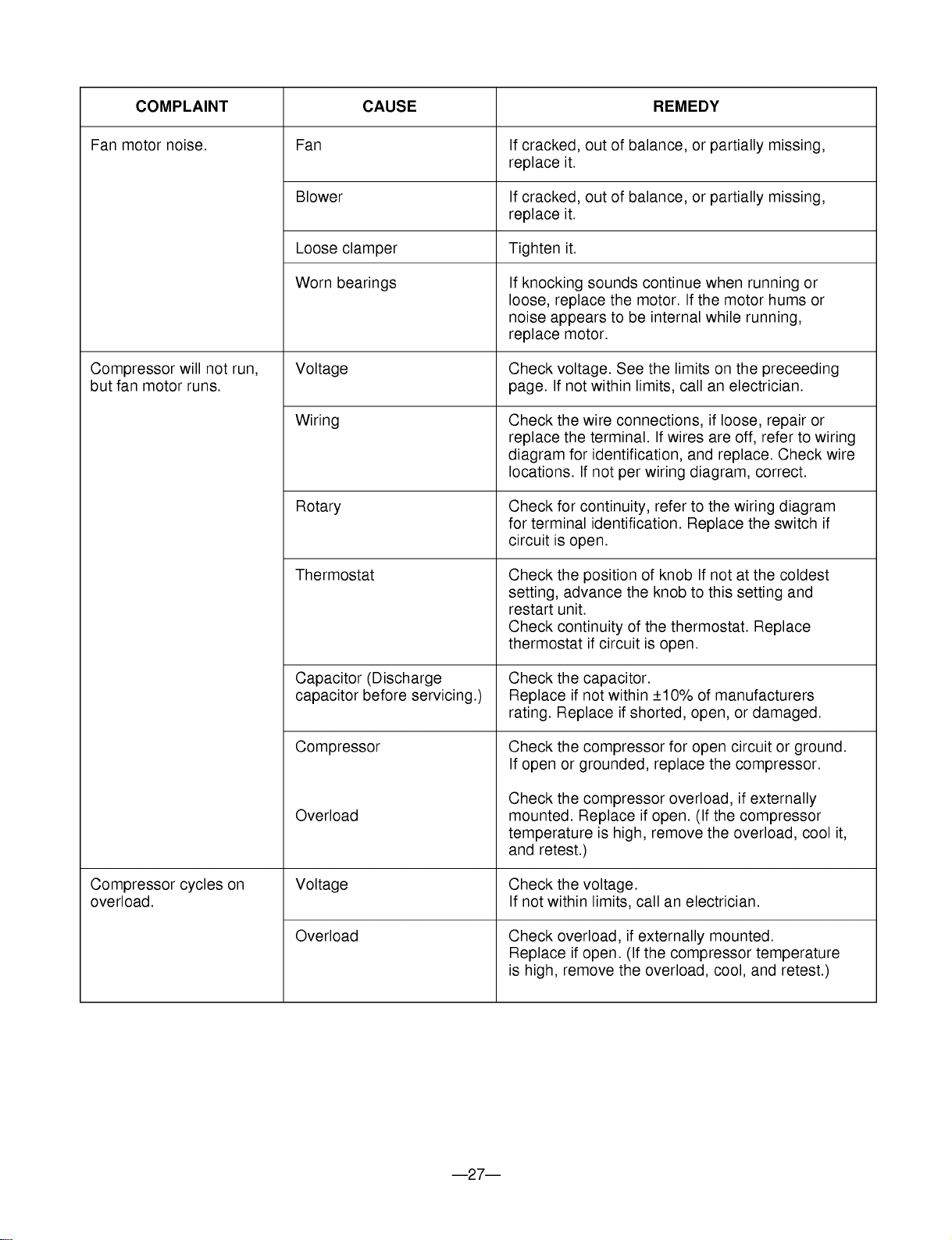
---27---
COMPLAINT
CAUSE
REMEDY
If
cracked,
out
of
balance,
or
partially
missing,
replace
it.
If
cracked,
out
of
balance,
or
partially
missing,
replace
it.
Tighten
it.
If
knocking
sounds
continue
when
running
or
loose,
replace
the
motor.
If
the
motor
hums
or
noise
appears
to
be
internal
while
running,
replace
motor.
Check
voltage.
See
the
limits
on
the
preceeding
page.
If
not
within
limits,
call
an
electrician.
Check
the
wire
connections,
if
loose,
repair
or
replace
the
terminal.
If
wires
are
off,
refer
to
wiring
diagram
for
identification,
and
replace.
Check
wire
locations.
If
not
per
wiring
diagram,
correct.
Check
for
continuity,
refer
to
the
wiring
diagram
for
terminal
identification.
Replace
the
switch
if
circuit
is
open.
Check
the
position
of
knob
If
not
at
the
coldest
setting,
advance
the
knob
to
this
setting
and
restart
unit.
Check
continuity
of
the
thermostat.
Replace
thermostat
if
circuit
is
open.
Check
the
capacitor.
Replace
if
not
within
±10%
of
manufacturers
rating.
Replace
if
shorted,
open,
or
damaged.
Check
the
compressor
for
open
circuit
or
ground.
If
open
or
grounded,
replace
the
compressor.
Check
the
compressor
overload,
if
externally
mounted.
Replace
if
open.
(If
the
compressor
temperature
is
high,
remove
the
overload,
cool
it,
and
retest.)
Check
the
voltage.
If
not
within
limits,
call
an
electrician.
Check
overload,
if
externally
mounted.
Replace
if
open.
(If
the
compressor
temperature
is
high,
remove
the
overload,
cool,
and
retest.)
Fan
Blower
Loose
clamper
Worn
bearings
Voltage
Wiring
Rotary
Thermostat
Capacitor
(Discharge
capacitor
before
servicing.)
Compressor
Overload
Voltage
Overload
Fan
motor
noise.
Compressor
will
not
run,
but
fan
motor
runs.
Compressor
cycles
on
overload.
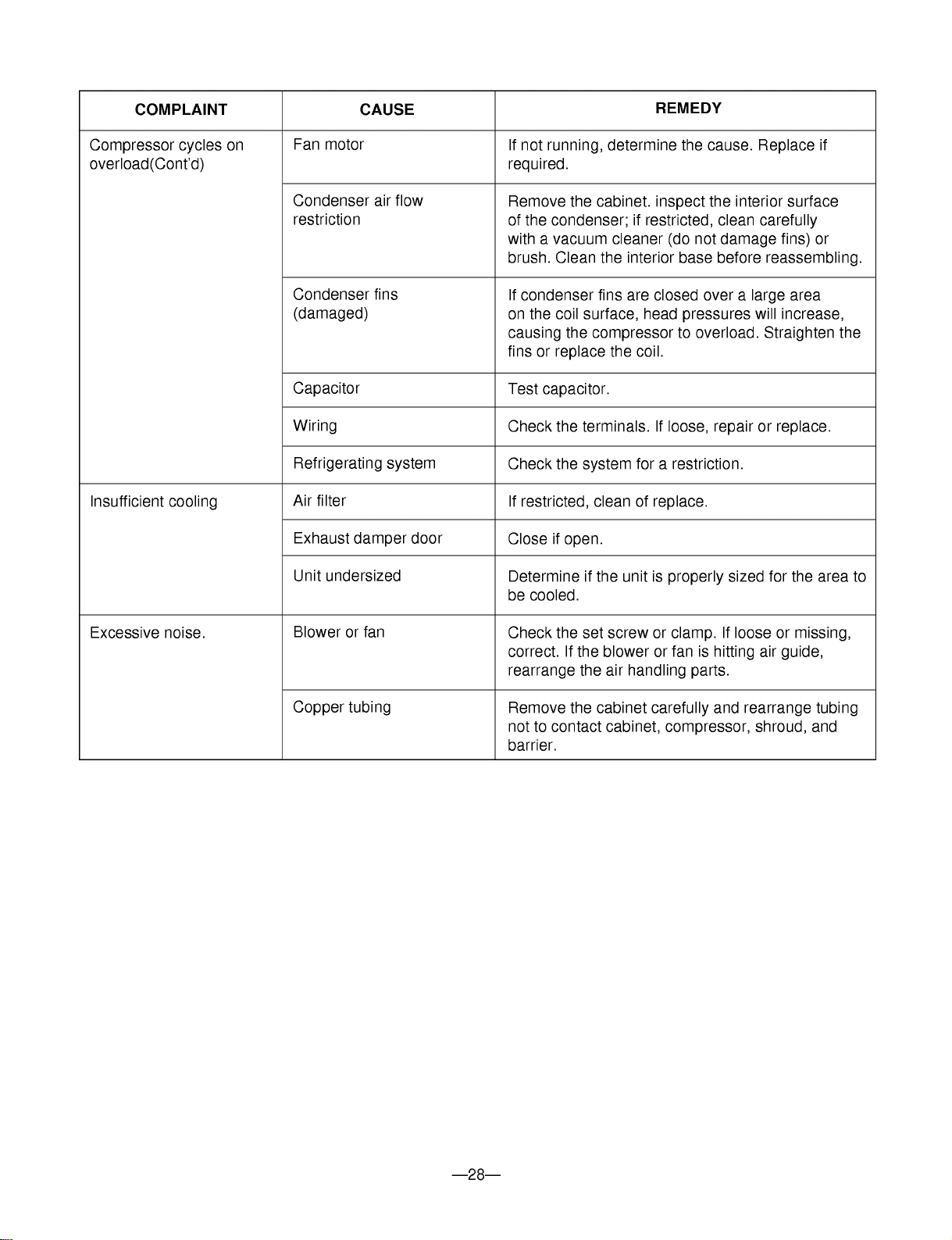
---28---
COMPLAINT
CAUSE
REMEDY
If
not
running,
determine
the
cause.
Replace
if
required.
Remove
the
cabinet.
inspect
the
interior
surface
of
the
condenser;
if
restricted,
clean
carefully
with
a
vacuum
cleaner
(do
not
damage
fins)
or
brush.
Clean
the
interior
base
before
reassembling.
If
condenser
fins
are
closed
over
a
large
area
on
the
coil
surface,
head
pressures
will
increase,
causing
the
compressor
to
overload.
Straighten
the
fins
or
replace
the
coil.
Test
capacitor.
Check
the
terminals.
If
loose,
repair
or
replace.
Check
the
system
for
a
restriction.
If
restricted,
clean
of
replace.
Close
if
open.
Determine
if
the
unit
is
properly
sized
for
the
area
to
be
cooled.
Check
the
set
screw
or
clamp.
If
loose
or
missing,
correct.
If
the
blower
or
fan
is
hitting
air
guide,
rearrange
the
air
handling
parts.
Remove
the
cabinet
carefully
and
rearrange
tubing
not
to
contact
cabinet,
compressor,
shroud,
and
barrier.
Fan
motor
Condenser
air
flow
restriction
Condenser
fins
(damaged)
Capacitor
Wiring
Refrigerating
system
Air
filter
Exhaust
damper
door
Unit
undersized
Blower
or
fan
Copper
tubing
Compressor
cycles
on
overload(Cont'd)
Insufficient
cooling
Excessive
noise.

---29---
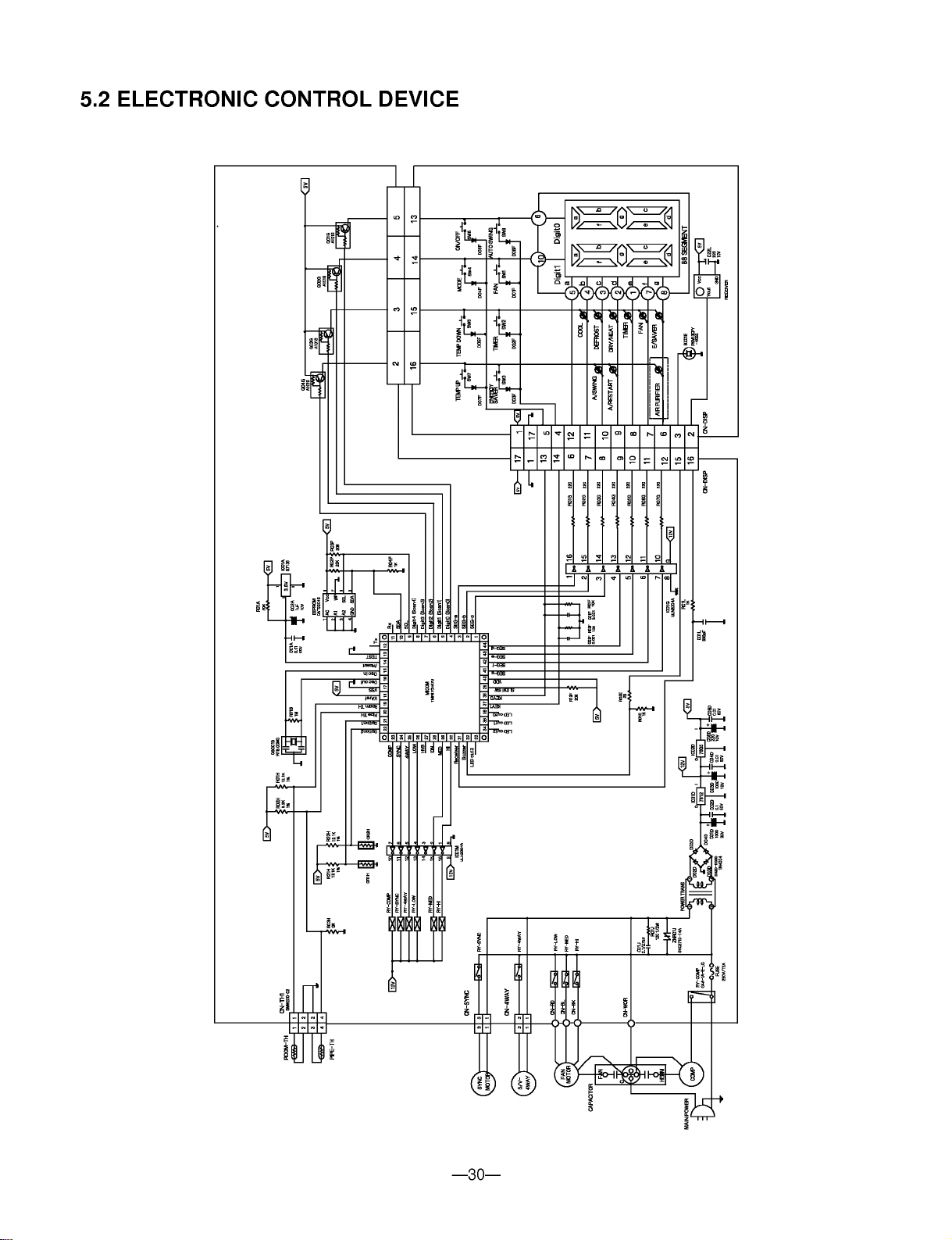
5.
SCHEMATIC
DIAGRAM
5.1
CIRCUIT
DIAGRAM
WH(BL)
POWER
INPUT
BK(BR)
(Ribbed)
(Plain)
GN/YL
(GN)
GN/YL(GN)
THERMISTOR
BK BK
BL
RD
BL
RD
CN-TH1
YL
YL
OR(BR) OR(BR)
OR(BR)
SYNC
MOTOR
RY-LO
RY-HI
CN-WORK
CN-SYNC CN-DISP
DISPLAY P.W.B ASM
RY-SYNC
250V/T2A
(115V/T2A)
TRANS
FORMER
ZNR
RY-COMP
MAIN P.W.B ASM
BK
BK
BR
BR
RD
BL BL
OLP
RD
MOTOR
CAPACITOR
F
RS
COMP.
C
C
H
3854AR2330P
WIRING
DIAGRAM
RY-MID
FUSE
RD
BK
PTC
43
---30---
5.2
ELECTRONIC
CONTROL
DEVICE

---31---
5.3
COMPONENTS
LOCATION(OF
MAIN
P.C.B
ASM)
5.4
COMPONENTS
LOCATION(OF
DISPLAY
P.C.B
ASM)
?
8K,
10K
Btu
?
12K
Btu

6.
EXPLODED
VIEW
---32---
731273
354210
135312
552113
552102
249950
263230
268712
264110
238310
237200 268714
135500
135510
146812
W0CZZ
135313
W48602
152302
359012
349001
130910
148000
346811
349600
149980
352390
W48602
559010
349480
35211A
554030
554031
567502
554160
352113
550140
W52106-2
W52106-1
130410
147582
147581
---33---
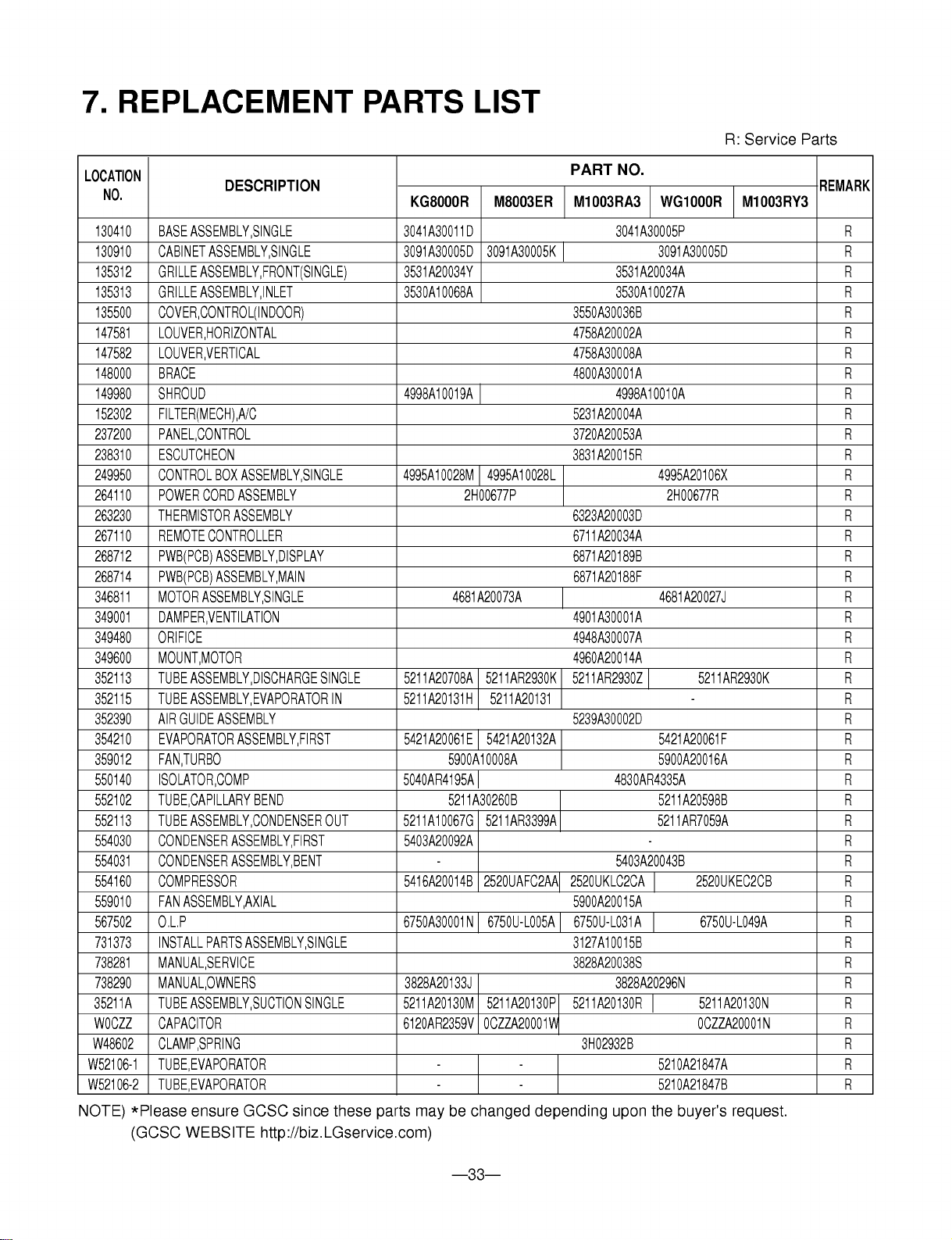
7.
REPLACEMENT
PARTS
LIST
R:
Service
Parts
130410
BASE
ASSEMBLY,SINGLE
3041A30011D
3041A30005P
R
130910
CABINET
ASSEMBLY,SINGLE
3091A30005D
3091A30005K 3091A30005D
R
135312
GRILLE
ASSEMBLY,FRONT(SINGLE)
3531A20034Y 3531A20034A
R
135313
GRILLE
ASSEMBLY,INLET
3530A10068A 3530A10027A
R
135500
COVER,CONTROL(INDOOR)
3550A30036B
R
147581
LOUVER,HORIZONTAL
4758A20002A
R
147582
LOUVER,VERTICAL
4758A30008A
R
148000
BRACE
4800A30001A
R
149980
SHROUD
4998A10019A 4998A10010A
R
152302
FILTER(MECH),A/C
5231A20004A
R
237200
PANEL,CONTROL
3720A20053A
R
238310
ESCUTCHEON
3831A20015R
R
249950
CONTROL
BOX
ASSEMBLY,SINGLE
4995A10028M
4995A10028L
4995A20106X
R
264110
POWER
CORD
ASSEMBLY
2H00677P
2H00677R
R
263230
THERMISTOR
ASSEMBLY
6323A20003D
R
267110
REMOTE
CONTROLLER
6711A20034A
R
268712
PWB(PCB)
ASSEMBLY,DISPLAY
6871A20189B
R
268714
PWB(PCB)
ASSEMBLY,MAIN
6871A20188F
R
346811
MOTOR
ASSEMBLY,SINGLE
4681A20073A
4681A20027J
R
349001
DAMPER,VENTILATION
4901A30001A
R
349480
ORIFICE
4948A30007A
R
349600
MOUNT,MOTOR
4960A20014A
R
352113
TUBE
ASSEMBLY,DISCHARGE
SINGLE
5211A20708A
5211AR2930K
5211AR2930Z
5211AR2930K
R
352115
TUBE
ASSEMBLY,EVAPORATOR
IN
5211A20131H
5211A20131
-
R
352390
AIR
GUIDE
ASSEMBLY
5239A30002D
R
354210
EVAPORATOR
ASSEMBLY,FIRST
5421A20061E
5421A20132A
5421A20061F
R
359012
FAN,TURBO
5900A10008A
5900A20016A
R
550140
ISOLATOR,COMP
5040AR4195A 4830AR4335A
R
552102
TUBE,CAPILLARY
BEND
5211A30260B
5211A20598B
R
552113
TUBE
ASSEMBLY,CONDENSER
OUT
5211A10067G
5211AR3399A 5211AR7059A
R
554030
CONDENSER
ASSEMBLY,FIRST
5403A20092A
-
R
554031
CONDENSER
ASSEMBLY,BENT
-
5403A20043B
R
554160
COMPRESSOR
5416A20014B
2520UAFC2AA
2520UKLC2CA
2520UKEC2CB
R
559010
FAN
ASSEMBLY,AXIAL
5900A20015A
R
567502
O.L.P
6750A30001N
6750U-L005A
6750U-L031A
6750U-L049A
R
731373
INSTALL
PARTS
ASSEMBLY,SINGLE
3127A10015B
R
738281
MANUAL,SERVICE
3828A20038S
R
738290
MANUAL,OWNERS
3828A20133J
3828A20296N
R
35211A
TUBE
ASSEMBLY,SUCTION
SINGLE
5211A20130M
5211A20130P
5211A20130R
5211A20130N
R
W0CZZ
CAPACITOR
6120AR2359V
0CZZA20001W
0CZZA20001N
R
W48602
CLAMP,SPRING
3H02932B
R
W52106-1
TUBE,EVAPORATOR
- -
5210A21847A
R
W52106-2
TUBE,EVAPORATOR
- -
5210A21847B
R
PART
NO.
DESCRIPTION
REMARK
LOCATION
NO.
KG8000R
M8003ER
M1003RA3
WG1000R
M1003RY3
NOTE)
*Please
ensure
GCSC
since
these
parts
may
be
changed
depending
upon
the
buyer's
request.
(GCSC
WEBSITE
http://biz.LGservice.com)
---34---
MEMO