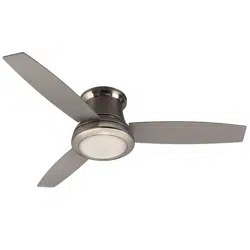
Harbor Breeze 41695 Questions & Answers
You can find answers or submit your question.
In ManualsFile, you can ask and answer questions about your issues. We - volunteers - or other people who own the product will help you.
You should also read the documentation for your own answers. Download documentation for this product here.
Remote not working. Tried troubleshooting tips. Fresh battery. Not working still.
Your remote may be out of sync. Please try the following remote resyncing instructions:
- Turn off the power at the wall switch (you do not have to turn off the power at the breaker box)
- Wait until the fan completely stops! (If there are multiple fans in the room be sure to turn off all power to those as well) - Turn the power back on at the wall switch (once the fan has completely stopped)
- Within 30 seconds, hold the learn button (this can be found on the back of the remote inside the battery compartment)
- The fan light will blink to confirm the remote has paired. - Check all buttons on the fan to confirm they are working.
If you are still having problems after this, please contact Harbor Breeze customer service at 1(800)643-0067 for help.
- Turn off the power at the wall switch (you do not have to turn off the power at the breaker box)
The light bulb in no longer functioning. What type of replacement size should I get since there are no markings on the frosted bulb. It is 2-1/2" long and has 2 "dimples"on each side of the bulb.
This fan does not use bulbs. It has an LED light board. Please contact Harbor Breeze customer service (800) 643-0067 to order exact replacement parts.
How. Do I get the globe off to change the lightbulb
The light kit does not have a bulb, but rather has an LED light engine. The turn the lowest section of the fan/light kit in a counterclockwise direction to remove the light kit. Please contact Harbor Breeze customer service (800) 643-0067 to order exact replacement parts.
How do I get cover off to replace light bulb
This fan does not use bulbs. It has an LED light board. To access the light board, twist the lowest section of the fan in a counterclockwise direction.
My light works but not my fan and I had an electrician here and there is power from both wires the fan and light.. For some reason the fan will not turn on.
1 likeWhere can buy a different light kit led to be bright it
No, the light kit comes with a LED light engine and doesn't come with options.
How do I replace the remote?
Our light stopped working. How can I troubleshoot this? Is it covered under the warranty? Can I order the replacement LED if it is needed?
You can order a replacement light kit. Please contact customer service (800) 643-0067 to order exact replacement parts.
glass replacement
There are no glass bowl options for this model.
How do I change the light bulb?
It has a LED light engine, not a bulb. If the board ever fails, you would need to replace the light kit.
I bought a Harbor Freeze fan at a garage sale and it didn't have a remote. Can I bypass the remote and how do I do it?
No. The fan requires the remote.
So I bought a Sail Stream at Lowes in Boise, ID and I would like to tlk with a service person in manufacturing. is there a number I can call?
Please contact Harbor Breeze customer service at 1(800)643-0067.
How to change direction switch from winter mode to summer
Can't find switchThe summer and winter reverse switch will be located in on the switch housing.
Husband had installed (first and foremost had instructions for Echolake fan #42080,48081-)but had to de install after only getting dim light inside machine . Trying to get correct instructions to see what to do. Local Lowe’s useless. Please send correct instructions and if anyone has similar issue of I stall and still just dim light in interior perhaps tell me what is wrong? Thank you
My light is not working with the remote
Has your remote become unsynced with the internal receiver? This will cause the fan to remain in the same state it was last set to before the disruption. To fix this, you simply need to resync your remote per the assembly instructions: 1. After installation is complete, switch the power off and back on again. Within 30 seconds, press and hold the “LEARN” button, located in the battery compartment, for 5 seconds. Fan will turn on at low speed and light off. This confirms that the SMART SYNC is active. 2. Insert new 12V battery in the battery compartment of the remote control. 3. If there are several fans in close proximity, turn the power off to other fans and re-sync the remote (see Corrective Action 1 above).
What time of replacement light can be used?

Submit your question
If you have any questions about this product, please ask here.