RCA RCR504BE Questions & Answers
You can find answers or submit your question.
In ManualsFile, you can ask and answer questions about your issues. We - volunteers - or other people who own the product will help you.
You should also read the documentation for your own answers. Download documentation for this product here.
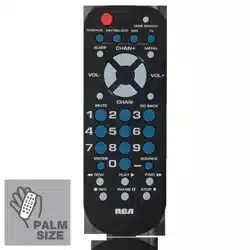
My remotes 'code search' button doesn't say code search but beside (lest side) the button it has a cube like square symbol, and when held doesn't result in a flashing light, the light just stays lit until release.
I have the same remote, looked all over for an answer to the same issue then it dawned on me.. -Press and hold the button you want to. program. (T.V.) -The indicator light will illuminate, your now in code search. -Press power repeatedly (leaving about 2 seconds in between each key press) untill the device your trying to program shuts off. -Press the same device key to set. Hope this helps
Is there a 5 digit code for a Craig Digital to analog tv converter?
On my RCR504BE, the top right button is not a code search button, it has a box next to it, what is it for?
1 likeHow do I activate the "Source" button?
Remote has “shift “ key where sleep key is suppose to be. This is the reason I bought this remote was for the sleep function. Is there a way to access the sleep function another way?
How can I program this remote to my GPX portable DVD player
How can I program my universal remote r.c.a to my GPX portable DVD player. Thanks...
Trying to program my Samsung TV to the remote

Submit your question
If you have any questions about this product, please ask here.