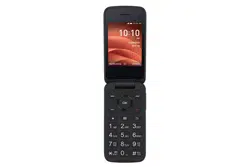
TCL 4056W Questions & Answers
You can find answers or submit your question.
In ManualsFile, you can ask and answer questions about your issues. We - volunteers - or other people who own the product will help you.
You should also read the documentation for your own answers. Download documentation for this product here.
How do I get the CCK code for TCL 4056W? I didn't software update and I was asked to put the code. I can access my phone any longer
2 likesHow do I get the cck code for my phone 4056W?
How do I block a phone number from calling
Press the Right Soft Key (-) to access Options:
To block this number, press the Center Soft Key (OK) to show Confirmation information, once confirmed, press the Right Soft Key (-) to Block.How do I type in names to add to my contact list when that predictive letters keep popping up so I am unable to type correctly? Is there a way to disable that function?
To turn off the Prediction text, repeat press the Text input (#) button to change text input method from Predictive text to Abc, ABC or 123.
how do I put the phone on speaker?
setting phone to vibrate
From the Home screen, press the Center Soft Key (OK) and select Clock > Alarm. Press the Left Soft Key (-) to add a new alarm. Then select Vibrate to activate the vibration. Press the Right Soft Key to Save.
How do I stop the voice talking and change to ring tone?
I can’t get my phone calls to ring in so I answer them they go directly to a voicemail how can I fix that
My pictures look like X-rays-how do i fix this
how do you turn the text sound off?
From the Home screen, press the Center Soft Key , select Settings > Personalization > Sound to adjust sounds.
HOW DO YOU PUT THE PHONE ON SPEAKER
Is there a flashing exterior light to tell if a text or call was received?
Why is the text so difficult?
How do you change the ring tone?
To change the ringtone, follow these steps: 1. Go to the Home screen. Press the Menu key. 2. Select Settings and press the Select key. 3. Select Sound & notifications and press the Select key. 4. Select Ringtones and press the Select key. 5. Select an option and press the OK key. 6. The ringtone has been changed. Return to the Home screen.
SYMBOLS EXCLAMATIONS MEANINGS ON A 4056W FLIP BOOST MOBILE CELL PHONE
You can see details at: https://manualsfile.com/product/p1ihnv3gln2.html#about-your-phone
Will the 4056w make the 5g upgrade
does it have a speaker setting?
i want to send a message
Please read user manual: https://manualsfile.com/download/p1ihnv3gln2.html

Submit your question
If you have any questions about this product, please ask here.