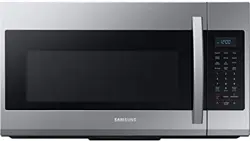
Samsung ME19R7041FS/AA Questions & Answers
You can find answers or submit your question.
In ManualsFile, you can ask and answer questions about your issues. We - volunteers - or other people who own the product will help you.
You should also read the documentation for your own answers. Download documentation for this product here.
Setting power level
After set desired cooking time, press Power Level button. Then press number for the level you want to cook. For example, 5 for 50%.
Pages 15 and 16 of the User Manual have details on how to change the power level settings: https://manualsfile.com/download/lrrtumoij.html
Do the numbers on the microwave light up? A back light ?
This model does not have backlighting on its buttons.
How can I set the clock time?
How do I set Microwave lock Samsung E19R7041FS
While heating a batch of popcorn the fan came on and would not shut down even with the fan switch. It lasted about 5 minutes before we were able to turn it off.
everything works except the heat
it runs , turntable turns but it does not heat.
If the microwave is in Demo mode, turn it off. Because you can use all the functions of the unit in Demo mode, but it won't heat anything.
it runs, the turntable turns but it does not heat
microwave runs, turntable turnss but it ;does not heat
If the microwave is in Demo mode, turn it off. Because you can use all the functions of the unit in Demo mode, but it won't heat anything.
I need the handle for the microwave
Do I have to press start after I put in the time every time? All my other microwaves start automatically after I press a number.
Yes, please press the OK/START button to set the options.
Are the two cardboard type coverings inside the microwave supposed to come off or do they remain on? One inside round on top and the other inside on right side.
The cardboard cover on the right top or side wall of the microwave interior is there by design. The cardboard (mica) covers the waveguide system that feeds microwave energy into the cavity and should not be removed.
New micro. Plugged it in. Opened the door. Closed it. The message door came up and now it won’t shut off??? Unplugged it, waited a half hour plugged it back in and it still is running.
what does error code c10 mean which occurs during reheating
If C10 error code appears during reheating but the microwave is heating normally, the code can be ignored. This error does not affect the microwave's usability or performance.
Can i dim the clock?
Yes, the light has 3 settings: High, Low, and Off.
clean filter after ,clean filter shows
The filter should be cleaned or replaced once every four months. When it is time to clean or replace the filter, the microwave displays the “Filter” message to remind you to clean or replace the filter. To remove the message, touch the number 0 when the microwave is in standby mode, or access Options.
clean filter
How do I change the options
Please read at: [mfurl]https://manualsfile.com/product/lrrtumoij.html#:~:text=displays%20the%20time-,OPTIONS,-You%20can%20customize[mfurl
How far off of stove is recomended
The bottom of the microwave should be at least 13 1/2 inches above the top of the stove for proper ventilation. Additionally, the bottom edge of the cabinet should be 30 inches or more from the cooking surface.
How far off of stove is recommended
What is the FILTER display on the upper R corner means?
What is the FILTER display on the upper R corner means?
The microwave displays the “FILTER” message which means the filter needs to be cleaned or replaced.
For the underside light, a 40W appliance bulb is recommended.
How to remove the word Filter from display
To remove the "Filter" message, touch the number 0 when the microwave is in standby mode.
What light bulb for underside
For the underside light, a 40W appliance bulb is recommended.
How to remove Filter on display
clean filter or if already done press 0 while on standby
Press 0 while on standby
When it is time to clean or replace the filter, the microwave displays the “Filter” message to remind you to clean or replace the filter. To remove the message, touch the number 0 when the microwave is in standby mode, or access Options.
How can I get the microwave off 24hour time? The power level does not offer am or pm choice
hi how do i get out off demo mode?
Please read the "OPTIONS" section in the User Manual below: https://manualsfile.com/product/lrrtumoij.html#:~:text=displays%20the%20time-,OPTIONS,-You%20can%20customize
Demo mode is option 6 in the menu - setting it to 2 will turn it off
How to change the clock from 24 hrs to 12 hrs settings
Please read the "OPTIONS" section in the User Manual below: https://manualsfile.com/product/lrrtumoij.html#:~:text=displays%20the%20time-,OPTIONS,-You%20can%20customize
How to unlock this model
Please read the "CHILD LOCK" section in the User Manual below: https://manualsfile.com/product/lrrtumoij.html#:~:text=time%20is%20set.-,CHILD%20LOCK,-The%20Child%20Lock
THE WORD "filter" SUDDENLY SHOWED UP ON OUR MICROWAVE.WHAT DOES IT MEAN AND HOW DO WE REMOVE IT???
The filter you're seeing on your control panel is an indicator light letting you know it's time to change or clean one of the filters in your microwave. https://manualsfile.com/product/lrrtumoij.html#:~:text=to%20lock%20it.-,REPLACING%20THE%20CHARCOAL%20FILTER,-1.%20Unplug%20the
we need to reinstall the microwave and i threw away the directions can you tell me where i can find that info
You can download the Installation Instructions from the following link: https://manualsfile.com/download/lrrtumoij/0.html
How do I set time. On microwave oven.hsving a hard time. I followed instructions I still don't get it me it tells you only press 3 numbers. What if the time is 12:30 pm now what.How do I set the time on this microwave model ?
does the display have a light(control panel)
The key pad does not light up.
Does display have a light?(control panel)
how i changed filter
Please read the "REPLACING THE CHARCOAL FILTER" section in the User Manual below: https://manualsfile.com/product/lrrtumoij.html#:~:text=to%20lock%20it.-,REPLACING%20THE%20CHARCOAL%20FILTER,-1.%20Unplug%20the
How do I unlock the microwave
I HAVE FOLLOWED THE INSTRUCTIONS AND STILL CANNOT UNLOCL THIS MICROWAVE.
To unlock the microwave, please press the Kitchen Timer button for 3 seconds.
Please read the "CHILD LOCK" section in the User Manual below: https://manualsfile.com/product/lrrtumoij.html#:~:text=time%20is%20set.-,CHILD%20LOCK,-The%20Child%20Lock
How do I change interior light bulb?
Please refer to the "REPLACING THE OVEN LIGHT" section of the User Manual below: https://manualsfile.com/product/lrrtumoij.html#:~:text=the%20microwave%20in.-,REPLACING%20THE%20OVEN%20LIGHT,-When%20replacing%20the
How do I turn off the filter notification light
how i changed filter and where is located
How do I turn off the Filter light
How to set 50% cook time?
If you want to cook something at 50% (half power), first enter the amount of time. Press OK. Then enter the power amount - 5 (for 50 percent). Then START.
Does the control panel have a light option ?
Yes, the Light button in the Control Panel allows you to select a light setting for your microwave. (High, Low, Off)
Do you make a forward facing vent or a air deflector for the vent to make it blow forward instead of up towards the ceiling?
My new Samsung microwave is not heating or cooking.
How do you get the filter reminder to go away?
Press zero
Unit is not heating
How do you unlock the number keys?
How do you unlock the keys?
Which bulb do these take
does display light up

Submit your question
If you have any questions about this product, please ask here.