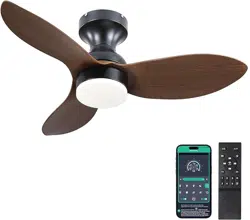
Surtime 8013-BROWN Questions & Answers
You can find answers or submit your question.
In ManualsFile, you can ask and answer questions about your issues. We - volunteers - or other people who own the product will help you.
You should also read the documentation for your own answers. Download documentation for this product here.
1 Questions
i have the Surtime 42" Ceiling Fans with Lights-Low Profile Ceiling Fan with Light and Remote/APP Control,Flush Mount,DC Reversible,LED Dimmable Black Ceiling Fans . i need to detach the blades. can someone . please tell me how to do ths.
To detach the blades:
- Turn off electrical power.
- Twist and pull down the light cover.
- Remove the light source.
- Then, unscrew the screws holding the light kit and remove the light kit.
- Locate the screws that are holding each blade to the motor housing, and unscrew each blade by removing the screws.
- Gently pull the blade away from the mounting holes once the screws are removed.
Please see the "Step 4 (Blades and Light kit installation)" section of the link below and follow in reverse:

Submit your question
If you have any questions about this product, please ask here.