TIMMKOO Q3E Questions & Answers
You can find answers or submit your question.
In ManualsFile, you can ask and answer questions about your issues. We - volunteers - or other people who own the product will help you.
You should also read the documentation for your own answers. Download documentation for this product here.
Q3E has an com.android.systemui error, I have tried resetting, but will not clear the issue. Any guidance would be appreciated.
SUPPLIED CABLE CHARGES BUT NOT RECOGNISED BY PC ANY IDEAS
CABLE SUPPLIED CHARGES BUT NOT RECGNISED BY PC ANY IDEA,S
- Check the cable orientation and reconnect it.
- Try a different USB port on your computer.
- When you connect the device, the screen on the MP3 player should show connection options. Select "File Transfer" mode.
how do i reset my m. p. three player if you reset button at the bottom doesn't work
Please try the following: Settings--System--Reset options--Erase all data (factory reset).
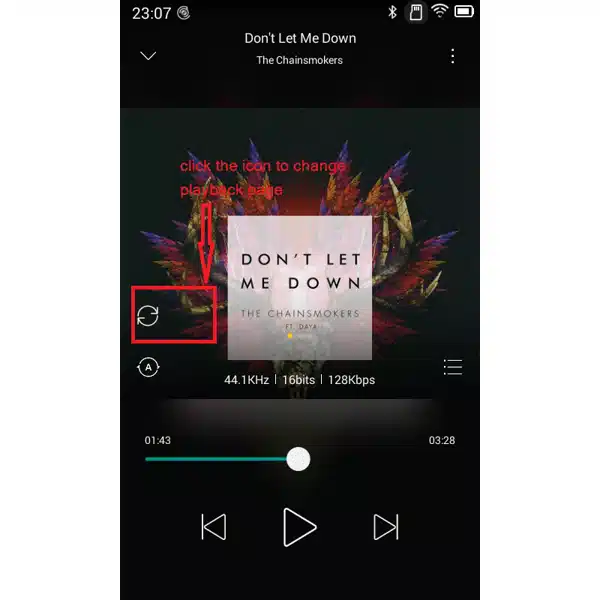
My apologies, 1 other question.....I had the older version of the Q3E bought back in 2021! Thats why i bought it again! The older version had a slider across the bottom of the screen when playing a song. U could , with your finger slide to a particular spot in the song. I dont notice that with the newer version? Can i still do that?
For the slider when playing songs, you may be able to click the icon (as shown in the image below https://manualsfile.com/images/appliances/k3/xo/k3xoi32zgeo_0_1749029222248.webp) in the playback page to set up the slider or circular progress bar.
1 likeVery nice! This worked!! Thank you so much!!!
Hello, i recently bought the Q3E MP3 player......luv it.....but, it times out to quickly, that is, it goes dark to quickly. Can i make it so it stays lit much longer?
Did you mean that your Q3E player runs the battery out too quickly?
No... nothing to do with the battery...i mean the screen being lit/on, it goes dark to quickly.. i am on a treadmill, pick a song from my list, it starts playing then the screen goes dark within 5 sec's unless i press or do something else....u know what i mean.....i prefer the screen to stay on, it times out to quickly. I have to press a side button to get the screen on again. Hope i described this right, lol
You can set the "Sleep" time longer by going to Settings → Display → Sleep, and choose a certain time you need.
See details on page 38 of the Manual at: https://manualsfile.com/product/k3xoi32zgeo.html#p38
Talking to you is EASIER than reading the manual, lol Thank you for your help!
I am connected to WiFi but when I try to get on the internet it says I am offline how do I fix it?
- Please reset the player and try to connect again.
- Turn on your cell phone hotspot to see if the player can connect to your cell phone hotspot.
- Check if the region and time in the player settings match your location.
If this issue persists, please contact TIMMKOO for assistance.
HOW TO DO FIRMWARE UPDATE Q3E
Please try to update the player's firmware on your Windows PC as shown in the link below:
come fare per resettare completamente il mioTIMMKOO Q5? non ricordo il pin di sblocco
There is a reset button a small hole next to the charging port, press and hold for about 3 seconds. That will reset back to factory default, please note this will erase everything you downloaded.
ho provato a resettarlo come mi hai detto di fare, non cambia nulla, fa come se l avessi semplicemente spento e riacceso
avevo impostato un pin di sblocco sul mio mp3 timmkoo, non avendolo utilizzato per diverso tempo ho dimenticato il pin, e adesso no so come fare per utilizzarlo di nuovo. come posso fare?
1 likeTry using a pin to press the reset button on the bottom and hold for 3-5 seconds. If that doesn't work you have to contact the seller directly.
Why Does my mp3 player just go black when I turned it on?
Please try to reset the mp3 player. The detail steps as follow:
- Please find a card pin.
- Find the restart hole on the right.
- Put the card pin insert into the restart hole.
The mp3 player can use again.
If you still can not turn on the mp3 player, please contact TIMMKOO for assistance.
why does my Q5 keep saying " unfortunately , Launcher 3 has stopped" how can i fix this problem. There is no interface...just settings tab
Could you please try the following:
- Reset the player. Settings--System--Reset options--Erase all data (factory reset)
- Update the player's firmware on your Windows PC as shown in the link Flashing tutorial below: https://manualsfile.com/download/k3xoi32zgeo/0.html
quelle est la version android
How do you set up parental controls or remove the internet (chrome)?
The mp3 player does not have internet. The unit has no parental controls feature.
télécharger un autre firmware sur adb
mais on peut modifier le firmware
How do I take photos with the TIMMKO Q5 Digital Player
brancher une mini caméra
how to sort songs by title in timmkoo playlist
To sort songs by title in a Timmkoo playlist, you can try these steps:
- Go to the Files menu
- File Manager
- Select "Sort" option to choose the sorting rules of folders and files.
- Choose Sort by Title
- Check the Sorted List
Once sorted, songs in folders should now be organized alphabetically by title.
When touching the 3 vertical dots at bottom right, the selection options are select file or folder, hide hidden files and sort. I cannot get to "select a folder". I can only get to select "All" the files. When selecting the sort button, the options are name (a-z), size (big-small) or time (new-old). I cannot get a screen to let me select a playlist folder.
How do i add music to a playlist
The MP3 player has five playlist.
To create a playlist: First, you need to enter the screen of playing the song, then click the icon in the top right corner and add the song into the playlist.how do i change the background of a song
The player can support changing home screen background. Please come to picture app and open the picture you like, and clik the upper right corner to set as desktop.
Only says timkoo when turned on how do I fix
You can hold a pin against the small hole at the bottom of the player for a few seconds, if that doesn't work, please contact the seller directly.
Hi, My timkoo has a problem. It has come up with a problem and i have no idea how to fix it. the screen has a comment: Unfortunately, VoiceCommand has stopped: with an OK button but nothing happens when I click on that. I am not able to use any other buttons such as settings. Is there something I can do to fix this problem. Most grateful if this can be sorted. Thank you
Try to fix it by clearing cache:
- Open ‘Settings’ on your Android device.
- Next, Scroll through the list or search for ‘Voice Command App’ and click on it.
- Scroll down the list of applications and find the dedicated app showing glitch.
- Tap on ‘Storage’ option followed by ‘Clear cache’ option.
This should clear the cache memory of the concerned Android application and will probably fix the issue.

Submit your question
If you have any questions about this product, please ask here.