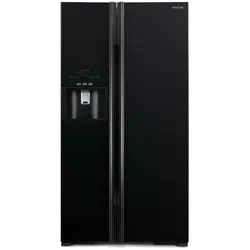

Instruction
Manual
HITACHI
Side
by
Side
Refrigerator
No
Frost
Thank
you
very
much
for purchasing the
HITACHI
refrigerator.
Before
using
this
please
read
the instruction
manual
carefully for the correct
usage.
Maintenance
work must only
be
carried out
at
workshop
by
well-trained
maintenance
worker

Warnings
and
Cautions
for
Safety
0
warnings
and
cautions
are
categorized
by
the
level
of
possible
thaf
occur
from
ignoring
directions.
A.
Caution
This
pictograph
indicates
"There
is
high
possibility
of
serious
injury
or
death,
if
ignored".
This
pictograph
indicates
"There
is
a
high
possibility
of
injury
or
damage
to
property
if
ignored".
•
This
refrigerator
uses
flammable
refrigerants
The
symbol
column
below
states
the
precautions
on
flammable
refrigerants.
~
This
symbol
denotes
the
precautions
on
flammable
refrigerants.
R
When
you
install
...
To
avoid
fire,
electric
shock,
and
injury.
1
Do
not
install
the
refrigerator
in
a
place
1
Ground
this
refrigerator
to
prevent
electric
shock
. .
where
it
may
come
in
contact
with
water.
. , "
~
I•
and
noise
interference.
Always
ground
this
FIX
With
earth
screws
•
Do
not
install
the
refrigerator
in
a
place
exposed
to
rain.
1
!'.;
" · "
refrigera!<>r
~~d
install
ea~h
l~akage
~r~uit
brea~er
(
n::.r
P.s
l
•
This
may
impair
electricity
insulation
and
J"~
l
when
us1ng
1!
1n
pl.aces
w1t~
h1gh
hum1d1ty
or
m~1sture.
cause
electric
shock
or
fire.
(Please
consult
w1th
a
reta1ler
or
HITACHI
serv1ce
center.)
•
0
to
any
wall
outlet
whose
power
capacity
Rated
is
less
than
the
refrigerato~s.
Also,
Voltage
do
not
use
power
sources
that
are
not
a
rated
voltage.
•
If
a
power
source
is
shared
with
other
appliances
using
double
or
multipoint
adapters,
the
adapter
may
heat
up
beyond
the
normal
level
and
cause
fire.
•
Do
not
use
a
damaged
or
loose
t<:\
power
plug
or
power
outlet.
This
\Y
may
cause
fire
or
electric
shock.
•
Do
not
insert
or
remove
~
the
power
plug
with
wet
hands.
~
•
Do
not
splash
water
on
or
inside
the
refrigerator.
~
•
This
may
impair
electricity
insulation
1
J,
causing
electric
shock
or
fire.
·
•
This
may
also
cause
the
gas
leakage
because
of
pipe
rust.
®
•
Do
not
disassemble,
repair,
or
modify
your
refrigerator
by
yourselves.
•
Please
consult
with
a
retailer
if
any
repair
is
required.
•
Connect
the
power
plug
firmly
to
a
~
A
power
outlet
with
the
cord
running
down.
II_
V •
Connection
of
the
power
plug
with
the
,.
cord
running
up
could
apply
stress
on
the
cord
and
cause
electrical
short
or
overheat,
which
could
result
in
electrical
shock
or
fire.
•
Incomplete
connection
of
the
power
plug
could
result
in
electrical
shock
or
fire
due
to
heat.
I
•
If
the
supply
cord
is
damaged,
~
A
it
must
be
replaced
by
the
manufacturer,
f;.
0
V
its
service
agent
or
similarly
""
•
qualified
persons
in
order
to
avoid
a
hazard
.
•
clean
the d
ust
on
the
power
plug
~
A
frequently
with
a
dry
cloth.
'r~.
V •
Unplug
the
power
plug
and
wipe
it
1
r(;
1
with
a
dry
cloth.
'
•
An
insulation
failure
due
to
moisture,
when
dust
collects
on
the
power
plug,
may
cause
fire.
I
•
Be
sure
to
unplug
the
power
~
.__
plug
before
maintaining
the
: *
~
refrigerator.
(liT
P.21
l
•
Be
sure
to
hold
the
power
plug
to
unplug.
•
Do
not
put
water
containers
or
foreign
~
·
· " •
t<:\
articles
on
the top
of
the
refrigerator.
' , '
\Y
•
Opening
and
closing
doors
etc.
~·
·
may
cause
the
articles
on
the
top
of
the
refrigerator
may
fall
down,
resulting
in
injury.
•
Do
not
use
the
refrigerator
in
the
atmosphereofflammablegas.
~~~>
·1
~t
•
Sparks
from
points
of
ele~trical
\
~
~
cLosE
contacts
such
as
door
sw1tches
may
ignite
a
fire.
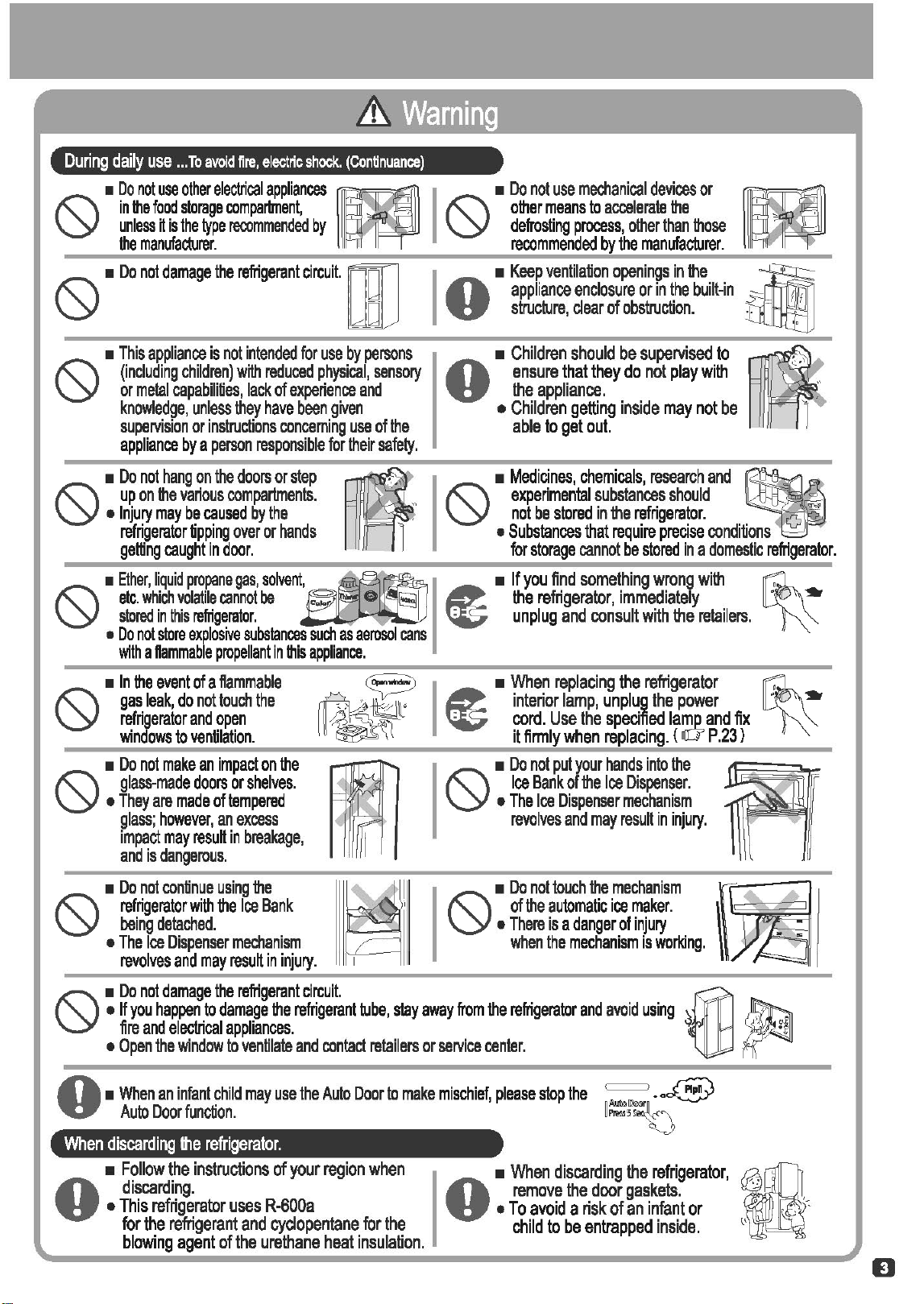
During
daily
use
...
To
avoid
fire,
electric
shock.
(Continuance)
•
Do
not
use
other
electrical
appliances
rm
in
the
food
storage
compartment,
' _ .
unless
it
is
the
type
recommended
by
the
manufacturer.
'
0
•
Do
oot
damage
the
reiigerant
Orcu~
n~J
0
•
This
appliance
is
not
intended
for
use
by
persons
(including
children)
with
reduced
physical,
sensory
or
metal
capabilities,
lack
of
experience
and
knowledge,
unless
they
have
been
given
supervision
or
instructions
concerning
use
of
the
appliance
by
a
person
responsible
for
their
safety.
0
•
Do
not
hang
on
the
doors
or
step
up
on
the
various
compartments.
•
Injury
may
be
caused
by
the
refrigerator
tipping
over
or
hands
gelling
caught
in
door.
•
Ether,
liquid
propane
gas,
solvent
~
etc.
which
volatile
cannot
be
c.o-
-.
e 1
stored
in
this
refrigerator.
•
Do
not
store
explosive
substances
such
as
aerosol
cans
with
a
ftammable
propellant
in
this
appliance.
0
•
In
the
event
of
a
ftammable
gas
leak,
do
not
touch
the
refrigerator
and
open
windows
to
ventilation.
•
Do
not
make
an
impact
on
the
t<::\
glass-made
doors
or
shelves.
\Y
•
They
are
made
of
tempered
glass;
however,
an
excess
impact
may
resuil
in
breakage,
and
is
dangerous.
•
Do
not
continue
using
the
refrigerator
with
the
Ice
Bank
being
detached.
•
The
Ice
Dispenser
mechanism
revolves
and
may
resuil
in
injury.
I
•
Do
not
use
mechanical
devices
or
~
t<::\
other
means
to
accelerate
the
' .
\Y
defrosting
process,
other
than
those
.
"'
recommended
by
the
manufacturer.
'
...
appliance
enclosure
or
in
the
built-in
s:=~
I
•
Keep
ventilation
openings
in
the
~
..
structure,
dear
of
obstruction.
tU:If:lJj
•
Children
should
be
supervised
to
~
·
·'
...
ensure
that
they
do
not
play
with
' ,
..
the
appliance.
,
:·
•
Children
getting
inside
may
not
be
l.
able
to
get
out.
0
•
Medicines,
chemicals,
research
and
~
experimental
substances
should
not
be
stored
in
the
refrigerator.
"'"'
•
Substances
that
require
precise
cond
i
tions
for
storage
cannot
be
stored
in
a
domestic
refrigerator.
.__
the
refrigerator,
immediately
1
~
•
If
you
find
something
wrong
with
~
~
unplug
and
consult
with
the
retailers.
I
•
When
replacing
the
refrigerator
~
interior
lamp,
unplug
the
power
~
cord.
Use
the
specified
lamp
and
fix
it
firmly
when
replacing.
(
.cr
P.23)
0 •
The
Ice
Dispenser
mechanism
-
If
•
Do
not
put
your
hands
into
the
A
Ice
Bank
of
the
Ice
Dispenser.
revolves
and
may
result
in
injury.
·
/1
•
Do
not
touch
~e
.mechanism
~
~
•
There
is
a
danger
of
injury
of
the
automatic
1ce
maker.
~
c
when
the
mechanism
is
working.
( a
~
•
Do
not
damage
the
refrigerant
circuit.
@
•
If
you
happen
to
damage
the
refrigerant
tube,
stay
away
from
the
refrigerator
and
avoid
using
~
~
·
fire
and
electrical
appliances.
• 2
•
Open
the
window
to
ventilate
and
contact
retailers
or
service
center
.
...
•
When
an
infant
child
may
use
the
Auto
Door
to
make
mischief,
please
stop
the
~
•
o~
..
Auto
Door
function.
l
f11>o1.!5
~
When
discarding
the
refrigerator.
•
Follow
the
instructions
of
your
region
when
...
discarding.
..
•
This
refrigerator
uses
R-600a
for
the
refrigerant
and
cyclopentane
for
the
blowing
agent
of
the
urethane
heat
insulation.
0
•
When
discarding
the
refrigerator,
remove
the
door
gaskets
.
•
To
avoid
a
risk
of
an
infant
or
child
to
be
entrapped
inside.
D
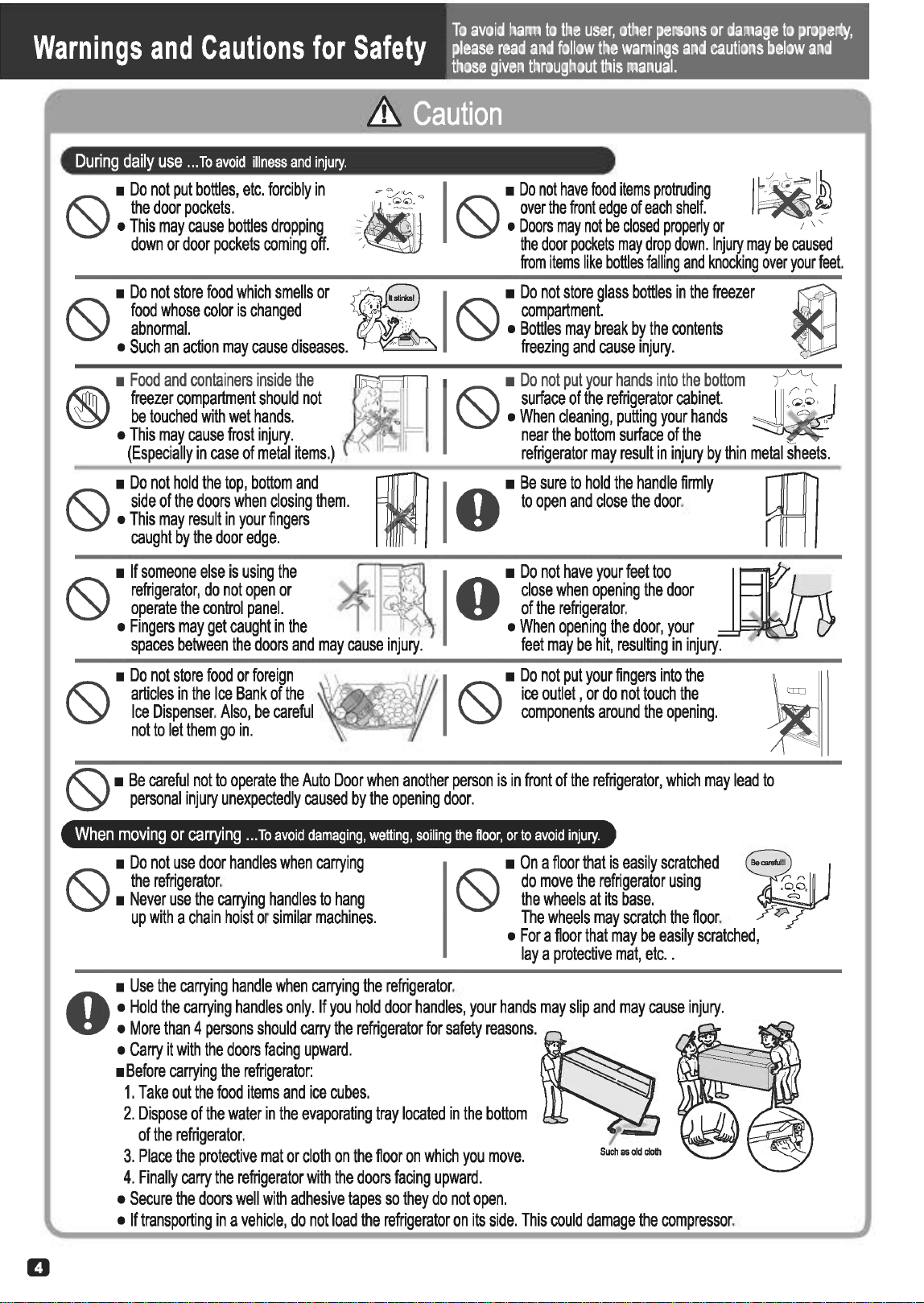
D
During
daily
use
...
To
avoid
illness
and
injury.
•
Do
not
put
bottles,
etc.
forcibly
in
the
door
pockets.
•
This
may
cause
bottles
dropping
down
or
door
pockets
coming
off.
J
I__
~
~
J'""
q I •
Do
not
have
food
items
protruding
.
Gl~
•
11
,
~
.
!(:\
over
the
front
edge
of
each
shelf.
I
~
_
~
"
\Y
•
Doors
may
not
be
closed
properly
or
1 ' '
••
the
door
pockets
may
drop
down.
Injury
may
be
caused
from
items
like
bottles
falling
and
knocking
over
your
feet.
•
Do
not
store
food
which
smells
or
~·
0 I
~
•
Do
not
store
glass
bottles
in
the
freezer
food
whose
color
is
changed
"'•
'y
compartment.
abnormal.
/ •
Bottles
may
break
by
the
contents
•
Such
an
action
may
cause
diseases.
-"·
__
..
freezing
and
cause
injury.
•
Do
not
hold
the
top,
bottom
and
~
I
0
•
Be
sure
to
hold
the
handle
firmly
RRl
!(:\
side
of
the
doors
when
closing
them.
to
open
and
close
the
door.
\Y
•
This
may
result
in
your
fingers
caught
by
the
door
edge.
·
•
If
someone
else
is
using
the
~
•
Do
not
have
your
feet
too
~
!(:\
refrigerator,
do
not
open
or
_ ::-
.~~
..
close
when
opening
the
door
\Y
operate
the
control
panel.
..
of
the
refrigerator.
•
Fingers
may
get
caught
in
the
I •
When
opening
the
door,
your
spaces
between
the
doors
and
may
cause
injury.
feet
may
be
hit,
resulting
in
injury.
•
Do
not
store
food
or
foreign
!(:\
articles
in
the
Ice
Bank
of
the
\Y
Ice
Dispenser.
Also,
be
careful
not
to
let
them
go
in.
!(:\
•
Be
careful
not
to
operate
the
Auto
Door
when
another
person
is
in
front
of
the
refrigerator,
which
may
lead
to
\Y
personal
injury
unexpectedly
caused
by
the
opening
door.
When
moving
or
carrying
...
To
avoid
damaging,
wetting,
soiling
the
floor,
or
to
avoid
injury.
•
Do
not
use
door
handles
when
carrying
the
refrigerator.
•
Never
use
the
carrying
handles
to
hang
up
with
a
chain
hoist
or
similar
machines.
•
On
a
floor
that
is
easily
scratched
do
move
the
refrigerator
using
the
wheels
at
its
base.
The
wheels
may
scratch
the
floor.
Y~
/
•
For
a
floor
that
may
be
easily
scratched,
lay
a
protective
mat,
etc
..
•
Use
the
carrying
handle
when
carrying
the
refrigerator
.
..
•
Hold
the
carrying
handles
only.
If
you
hold
door
handles,
your
hands
may
slip
and
may
cause
injury.
..
•
More
than
4
persons
should
carry
the
refrigerator
for
safety
reasons.
•
Carry
it
with
the
doors
facing
upward.
·
~y-~--
""'~
•
Before
carrying
the
refrigerator:
1.
Take
out
the
food
items
and
ice
cubes.
2.
Dispose
of
the
water
in
the
evaporating
tray
located
in
the
bottom
of
the
refrigerator.
3.
Place
the
protective
mat
or
cloth
on
the
floor
on
which
you
move.
4.
Finally
carry
the
refrigerator
with
the
doors
facing
upward.
•
Secure
the
doors
well
with
adhesive
tapes
so
they
do
not
open.
•
If
transporting
in
a
vehicle,
do
not
load
the
refrigerator
on
its
side.
This
could
damage
the
compressor.
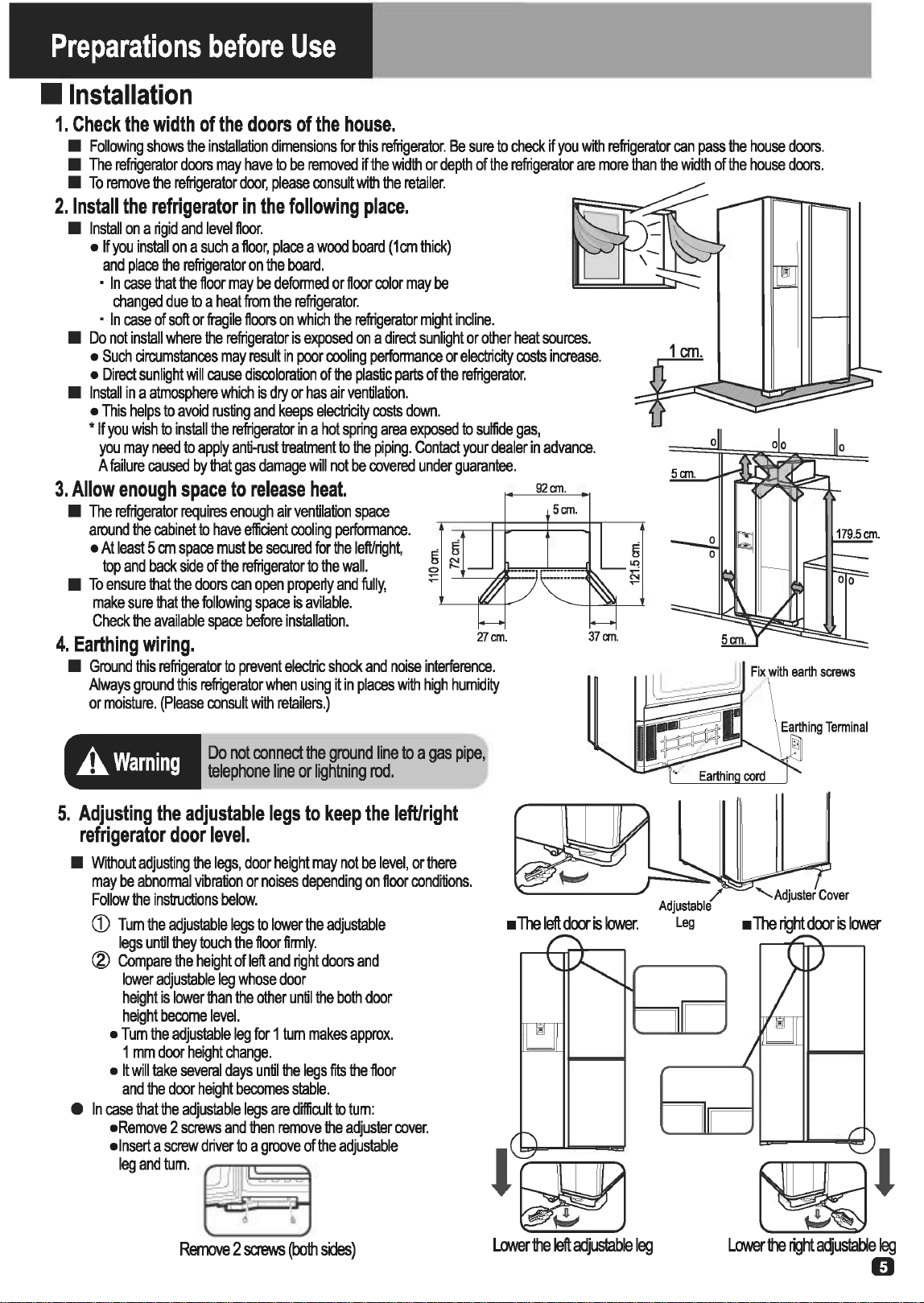
Preparations
before
Use
•
Installation
1.
Check
the
width
of
the
doors
of
the
house.
•
Following
shows
the
installation
dimensions
for
this
refrigerator.
Be
sure
to
check
if
you
wtth
refrigerator
can
pass
the
house
doors.
•
The
refrigerator
doors
may
have
to
be
removed
if
the
width
or
depth
of
the
refrigerator
are
more
than
the
width
of
the
house
doors.
•
To
remove
the
refrigerator
door,
please
consult
with
the
retailer.
2.
Install
the
refrigerator
in
the
following
place.
•
Install
on
a
rigid
and
level
floor.
•If
you
install
on
a
such
a
floor,
place
a
wood
board
(1cm
thick)
and
place
the
refrigerator
on
the
board.
•
In
case
that
the
floor
may
be
deformed
or
floor
color
may
be
changed
due
to
a
heat
from
the
refrigerator.
•
In
case
of
soft
or
fragile
floors
on
which
the
refrigerator
might
incline.
•
Do
not
install
where
the
refrigerator
is
exposed
on
a
direct
sunlight
or
other
heat
sources.
•
Such
circumstances
may
result
in
poor
cooling
performance
or
electrictty
costs
increase.
•
Direct
sunlight
will
cause
discoloration
of
the
plastic
parts
of
the
refrigerator.
•
Install
in
a
atmosphere
which
is
dry
or
has
air
ventilation.
•
This
helps
to
avoid
rusting
and
keeps
electricity
costs
down.
•
If
you
wish
to
install
the
refrigerator
in
a
hot
spring
area
exposed
to
sulfide
gas,
you
may
need
to
apply
anti-rust
treatment
to
the
piping.
Contact
your
dealer
in
advance.
A
failure
caused
by
that
gas
damage
will
not
be
covered
under
guarantee.
3.
Allow
enough
space
to
release
heat.
•
The
refrigerator
requires
enough
air
ventilation
space
around
the
cabinet
to
have
efficient
cooling
performance.
92cm.
5cm.
•
At
least
5
em
space
must
be
secured
for
the
left/right,
g g
top
and
back
side
of
the
refrigerator
to
the
wall.
~
~'::.t=:~=r~~~
•
To
ensure
that
the
doors
can
open
prope~y
and
fully,
make
sure
that
the
following
space
is
avilable.
Check
the
available
space
before
installation.
4.
Earthing
wiring.
'll
em.
•
Ground
this
refrigerator
to
prevent
electric
shock
and
noise
interference.
Always
ground
this
refrigerator
when
using
it
in
places
with
high
humidity
or
moisture.
(Please
consult
with
retailers.)
A.
Warning
Do
not
connect
the
ground
line
to
a
gas
pipe,
telephone
line
or
lightning
rod.
5.
Adjusting
the
adjustable
legs
to
keep
the
left/right
refrigerator
door
level.
•
Without
adjusting
the
legs,
door
height
may
not
be
level,
or
there
may
be
abnormal
vibration
or
noises
depending
on
floor
conditions.
Follow
the
instructions
below.
CD
Turn
the
adjustable
legs
to
lower
the
adjustable
legs
until
they
touch
the
floor
firmly.
®
Compare
the
height
of
left
and
right
doors
and
lower
adjustable
leg
whose
door
height
is
lower
than
the
other
until
the
both
door
height
become
level.
•
Tum
the
adjustable
leg
for
1
tum
makes
approx.
1
mm
door
height
change.
•
It
will
take
several
days
until
the
legs
fits
the
floor
and
the
door
height
becomes
stable.
37cm.
e
In
case
that
the
adjustable
legs
are
difficult
to
tum:
•Remove
2
screws
and
then
remove
the
adjuster
cover.
•Insert
a
screw
driver
to
a
groove
of
the
adjustable
klgandhJm.
~
~
·
~
Remove
2
S<reiNS
(both
sides)
Lower
the
left
adjuslable
leg
5cm.
~
·
Lower
the
right
adjustable
leg
D

Preparation
before
Use
(Continued)
•
Before
Use
A
refrigerator
is
not
an
appliance
that
increases
the
freshness
of
food
but
an
appliance
to
brake
the
food
being
spoiled
to
some
extent.
Please
follow
the
User's
Guide
carefully
and
take
proper
actions
to
keep
food
fresh.
1.
Cleaning
inside
the
refrigerator.
•
Wipe
the
surface
gently
with
wet
soft
cloth.
2.
Connect
the
refrigerator
to
an
exclusive
wall
power
outlet.
•
The
refrigerator
can
be
connected
to
an
outlet
soon
after
it
is
installed.
•
Surely
use
with
the
rated
voltage
and
exclusive
power
outlet.
emt@i
•
30
seconds
after
the
power
is
connected,
the
compressor
will
start.
3.
Allow
enough
duration
for
sufficient
cooling
before
storing
food.
•
It
may
take
about
4
hours
to
fully
cool
down
and
could
even
take
about
24
hours
when
the
ambient
temperature
is
high.
•
Optimal
Food
Storage
Keep
enou
h
space
between
food.
•
Several
food
placed
too
close
together
may
obstruct
the
flow
of
cold
air.
Keep
enough
space.
Do
not
block
the
Cold
Air
Vent.
•
This
will
adversely
affect
the
cool
air
flow
and
may
not
keep
the
temperature
inside
even.
Moreover,
it
could
result
in
food
near
the
vent
freezing.
• A
surprising
amount
of
unhygienic
substances
can
be
found
on
food.
Make
food
cool enou
h
before
puttin
it
in
the
refri
erator.
•
Putting
warm
food
in
the
refrigerator
raises
the
inside
temperature
and
wastes
electricity.
~
Kee
the
food
wra
ed
or
sealed
and
store.
•
Using
food
wrap
or
sealed
containers
prevents
the
food
from
drying
or
transition
of
smells.
) I /
@
~~···))
lJ
-
'
'
Do
not
place
warm
food
on
the
already
chilled
food.
•
ThO
will
warm
up
100
;~
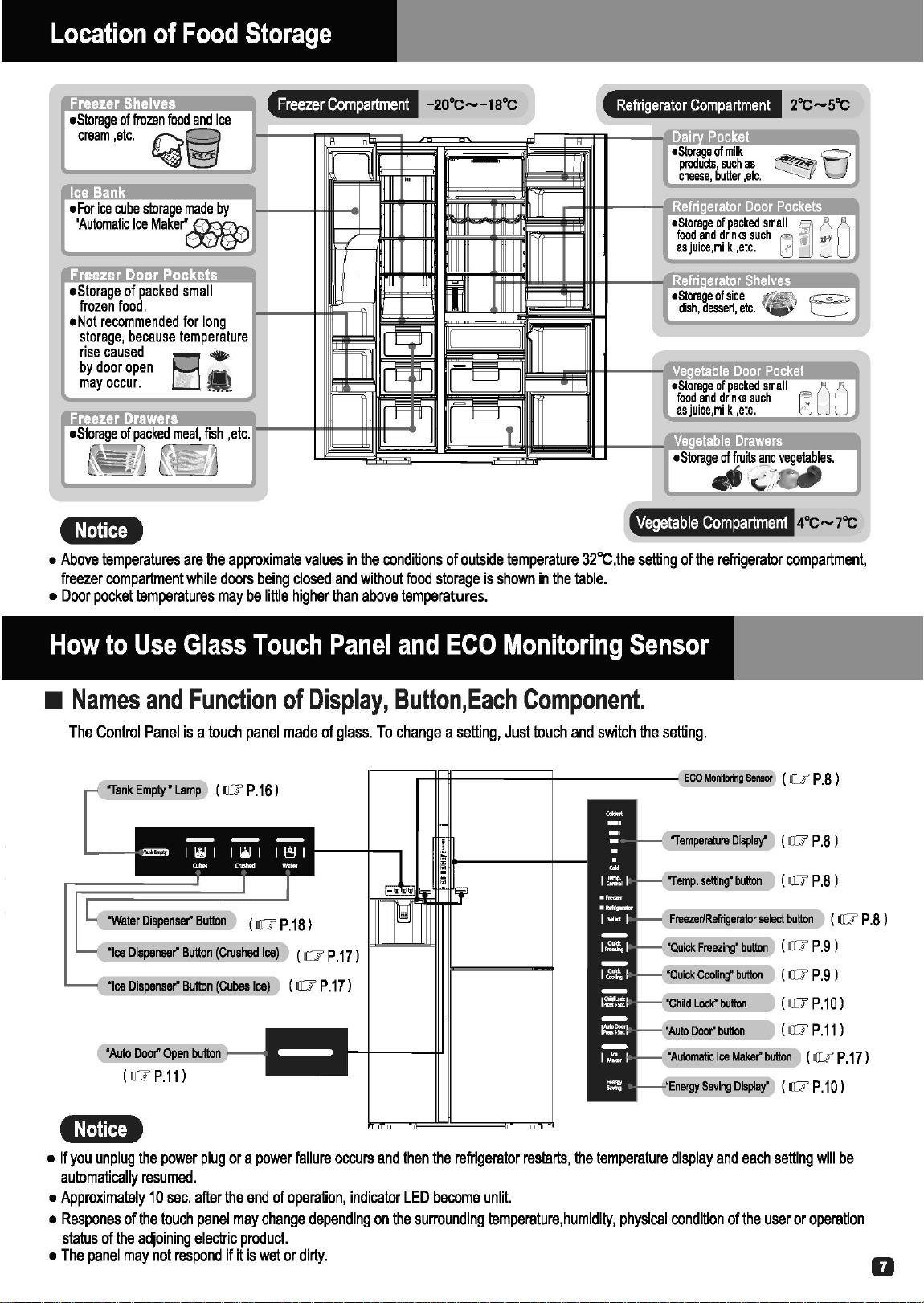
Location
of
Food
Storage
•
Storage
of
frozen
cream
,etc.
Q
•
Storage
of
packed
sma
II
frozen
food.
•
Not
recommended
for
long
storage,
because
temperature
rise
caused
B •
by
door
open
• .
may
occur.
.
..
Freezer Drawers
Freezer
Compartment
Refrigerator
Compartment
Vegetable
Compartment
emma»
40C-7''c
•
Above
temperatures
are
the
approximate
values
in
the
conditions
of
outside
temperature
32°C,the
sett
i
ng
of
the
refr
i
gerator
compartment
,
freezer
compartment
while
doors
be
i
ng
closed
and
without
food
storage
is
shown
in
the
table.
•
Door
pocket
temperatures
may
be
little
higher
than
above
temperatures.
How
to
Use
Glass
Touch
Panel
and
ECO
Monitoring
Sensor
•
Names
and
Function
of
Display,
Button,Each
Component.
The
Control
Panel
is a
touch
panel
made
of
glass.
To
change
a
setting,
Just
touch
and
sw
i
tch
the
setting.
'
Auto
Doof
Open
( I1J'
P.11
l
•:mnaJ
•
If
you
unplug
the
power
plug
or
a
power
failure
occurs
and
then
the
refrigerator
restarts,
the
temperature
display
and
each
setting
will
be
automatically
resumed.
•
Approx
i
mately
10
sec.
after
the
end
of
operation
,
indicator
LED
become
unlit.
•
Respones
of
the
touch
panel
may
change
depending
on
the
surrounding
temperature
,
humidity,
physical
condition
of
the
user
or
operation
status
of
the
adjoin
i
ng
electr
ic
product.
•
The
panel
may
not
respond
if~
is
wet
or
dirty.
0
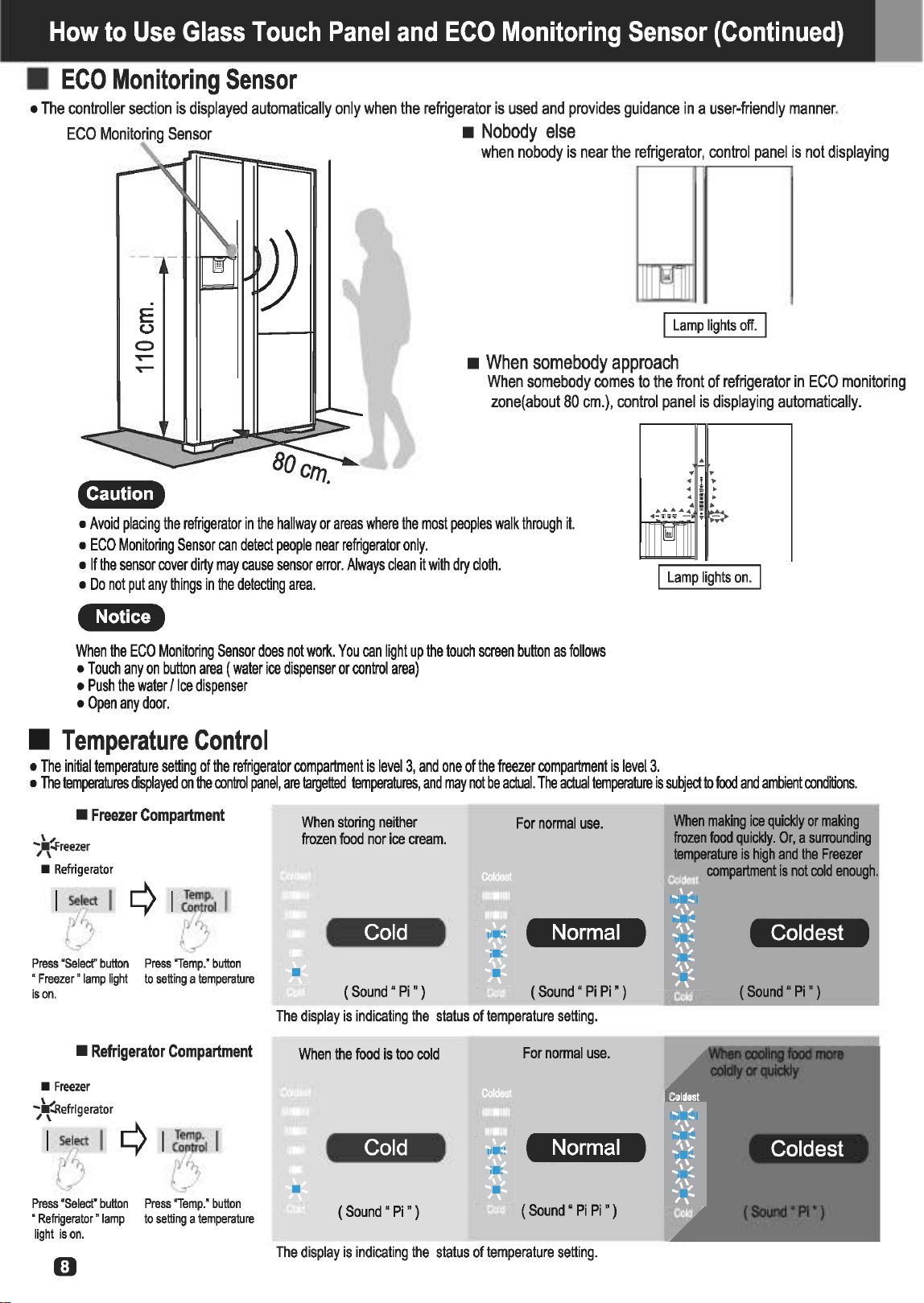
How
to
Use
Glass
Touch
Panel
and
ECO
Monitoring
Sensor
(Continued)
•
ECO
Monitoring
Sensor
•
The
controller
section
is
displayed
automatically
only
when
the
refrigerator
is
used
and
provides
guidance
in
a
user-friendly
manner.
ECO
•
Nobody
else
when
nobody
is
near
the
refrigerator,
control
panel
is
not
displaying
E
u
0
I
Lamp
lights
off.
I
.....--
.....--
•
When
somebody
approach
When
somebody
comes
to
the
front
of
refrigerator
in
ECO
monitoring
zone(
about
80
em.),
control
panel
is
displaying
automatically
.
Clfrt!W.!,+
•
Avoid
placing
the
refrigerator
in
the
hallway
or
areas
where
the
most
peoples
walk
through
it.
•
ECO
Monitoring
Sensor
can
detect
people
near
refrigerator
only.
•
If
the
sensor
cover
dirty
may
cause
sensor
error.
Always
clean
it
with
dry
cloth.
•
Do
not
put
any
things
in
the
detecting
area.
•mma+
When
the
ECO
Monitoring
Sensor
does
not
work.
You
can
light
up
the
touch
screen
button
as
follows
•
Touch
any
on
button
area
(water
ice
dispenser
or
control
area)
•
Push
the
water
/Ice
dispenser
•
Open
any
door.
•
Temperature
Control
•
The
initial
temperature
setting
of
the
refrigerator
compartment
is
level
3,
and
one
of
the
freezer
compartment
is
level3.
.
. .
•
The
temperatures
displayed
on
the
control
panel,
are
targetted
temperatures,
and
may
not
be
actual.
The
actual
temperature
is
subject
to
food
and
ambient
conditions.
•
Freezer
Compartment
*
reezer
•
Refrigerator
1131
¢115,1
Press
"Selecf'
button
Press
"Temp.'
button
"
Freezer"
lamp
light
to
setting
a
temperature
is
on.
•
Refrigerator
Compartment
•
Freezer
";
~
.Refrigerator
~~~71¢15"1
Press
'Select'
button
Press
'Temp."
button
"
Refrigerator"
lamp
to
setting
a
temperature
light
is
on.
0
•
When
storing
neither
frozen
food
nor
ice
cream.
Cold
(Sound
• Pi")
For
normal
use.
Normal
The
display
is
indicating
the
status
of
temperature
setting.
When
the
food
is
too
cold
For
normal
use.
Cold
Normal
(Sound"
Pi")
(
Sound
•
Pi Pi
• )
The
display
is
indicating
the
status
of
temperature
setting.
When
makilg
Ice
qulcldy
or
malclng
frozen
food
quickly
.
Or
, a
surrounding
temperalln
is
high
and
the
Freezer
compartment
is
not
cold
enough
.
Coldest
When
cooling
food
more
coldly
or
quickly
Coldest
(Sound
' Pi')
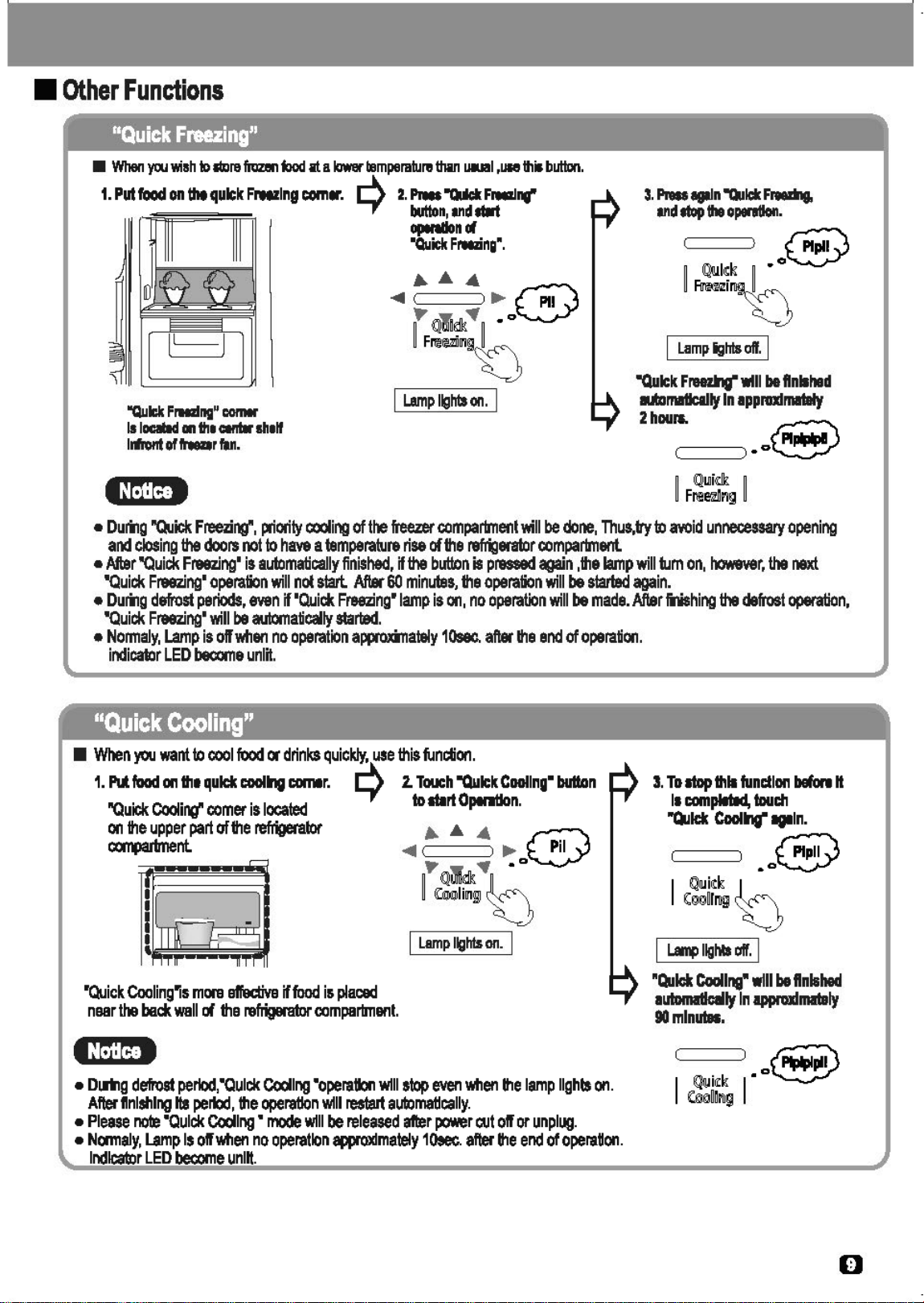
•
Other
Functions
"Quick
Freezing"
•
When
ycu
v.;ah
to
lllxlre
frozen
food
at a
lower
temperature
than
uaual,!llle
this
button.
1.
Put
food
on
tilt
quick
F,_lng
com•. .-l\
2.
Press
"Qdck
Free:&!...,
'-f
button,
and
tt1rt
"Qull:lt
FIHdng"
COIIIII'
Is
loalld
111
the
Cllltlr
slielf
lrfrol1t
of
hear
fan.
operetlonct
"Quick
FM!ing•.
I
Lamp
ights
off.
I
"Quick
FreeU!g"
will
be
flnllhed
mrnatlcllty
In
apprufrnataty
2hour..
~
c====:)•o~
•
Durilg
"Quick:
Freezi~.
priority
coolir>G
of
the
freezer
compartment
will
be
done,
Thus,tty
to
avoid
unnecessary
opening
and
closing
the
doors
not
to
have
a
temperature
rise
of
the
refi%1erator
compartment.
•
After
"Quick
Freezing•
is
automatically
finished,
if
the
bL11.1Dn
is
pnmed
again
,the
lamp
will
tum
on,
however,
the
next
'Quick
Freezing•
operation
will
not
start.
Afflll60
minutes,
the
operation
will
be
slatted
again.
•
Durilg
defrost
periods,
even
if
'Quick
Freezing"
lamp
is
on,
no
operation
will
be
made.
After
lilishir>G
the
defrost
operation,
'Quick
Freezing•
will
be
automatically
started.
•
Nonnaly,
Lamp
is
off
wflen
no
operation
approxinately
10sec.
after
the
end
of
operation.
indica1or
LED
become
unlit.
"Quick
Cooling"
•
When
you
want
to
oool
food
ot
drinks
quickly,
use
this
function.
1.
N
food
on
the
quiet
coolmg
comer.
Q
2.
Touch
"Quick
Cooling•
button
"Quic:lt
Cooli~
comer
is
located
to
art
Operation.
on
the
upper
part
of
the
refrigerator
/11..
~
4 @
~nt.
<411
....
Pil
,..
..,
.o
~
~~
~
b
•Quick
Cooling"is
mora
affec:tiva
if
food
is
placed
naar
the
back
wall
of
the
refrigerator
compartment.
I
Lamp
lights
on.
I
•
DIDlg
defrost
perlod,"Oulck
Cooling
•operation
wtllstop
even
wflen
the
lamp
lights
on.
Aftet'
finishing
Its
pertod,
the
operation
w111
restart
automatically.
•
Please
note
"Quick
Cooling
•
mode
will
be
released
after
power
eut
off
or
unplug.
•
Nocmaly,
Lamp
Is
off
wflen
no
operation
81lPf0Xlmately
10see.
aftet'
the
end
of
operaUon.
Indicator
LED
become
unlit.
3.
To
atop
thll
fundlon
before
H
II
complated,
toudl
"Quiet
Coolmg"
llflln.
.J~
I
Qlllid~
k
(;gg~frog
~
I
L.a1r4>
11g~~~a
off.
I
"Quiet
Cooling•
will
be
finished
autornl1:lcllly
In
apprufrna.taly
90mlnutee.
D

How
to
Use
Glass
Touch
Panel
and
ECO
Monitoring
Sensor
(Continued)
•
Other
Functions
(Continued)
"Child
Lock"
•
You
can
prevent
mischief
of
all
the
buttons
on
the
control
panel
by
children.
1.
Press
"Child
Lock"
button
for
5
seconds(to
lock).
2.
To
stop
this
function
,
press
5
seconds
"Child
Lock"
again
.
.....
···~
e ®
~
Y,
,
00
~
00
~
IC
hi
l
cr
l
~~
L..f
~
IC
M
I
~
l~
~
f~S
o
~
~~
~~
~
I
Lamp
lights
on.
I I
Lamp
lights
off.
I
e:t;jlgi •
When."C~ild
Loc~"
is
activated,
other
buttons
will
not
be
accepted
even
if
you
press,
but
Auto
Door
of
the
touch
operation
IS
poss1ble.
"Energy
Saving"
•
Energy
saving
function
will
operate
automatically
as
below
conditions.
•:m~m»
1.
Mode
"Energy
Saving"
ON
2.
Mode
"Energy
Saving"
OFF
•
Mode
"Energy
Saving"
ON
will
operate
automatically
as
below
conditions
finished
in
approximately
24
hours.
•
After
a
long
time
operation
of
"Energy
Saving"
ON,
~·
...
.....
IE
I'n
®
~!9Jlf
~
~i'U®~!9Jlf
Y'
@l
;
i'U
~
§@ll§ii'Ug]
I
Lamp
lights
on.
I
•
No
ECO
Monitoring
sensor
detection.
•
No
door
open
•
No
control
panel
operation.
•
No
Water/Ice
Dispenser
operation.
Lamp
lights
off.
•
Door
open.
•
Control
panel
operation
•
Water/Ice
Dispenser
operation.
Door
Alarm
and
ECO
Alarm
Functions
in
some
cases,
fatty
ice
cream
,etc.,
may
become
soft.
•
In
case
the
compartment
temperature
rises
up,
the
operation
will
be
back
to
a
normal
setting
temporarily.
•
If
"Energy
Saving"
operation
is
working
in
high
humidity
environment,
dew
may
appear
on
refrigerator
surface.
•
If
the
door
is
left
open
for
more
than
1
minute,
the
alarm
system
will
inform
the
user
by
the
sound
and
digital
display.
•
Door
Alarm:
Informs
by
Peeppeeppeep
sound.
•
Eco
Alarm
Display:
Indicates
the
door
opening
state
on
the
control
panel.
Duration
of
Door
Opening
Door
Alarm
Sound
ECO
Alarm
Display
After
1
minute
PeepPeepPeep
After
2
minute
PeepPeepPeepPeepPeep
All
LED
on
display
-
After
3
minute
Peeps
continuously.
are
Flashing
To
Disactivate
Alarm
and
Sound
1.
Keep
pressing
"Quick
Freezing"
button
for
approximately
5
seconds
until
the
sound
of
"Peep!"
is
heared.
•
.A.
""
rpji""'\ I
Lamp
lights
on.
I
.....
,
)
~
~
.
~Q
I'
~:
~
·
~
~
~~i
i'U!9]
L.:
~
U
~
"I
L-=a=m::-;p
1;:-:-ig;:-;hts:-o:nff,.,.
I
•:m~m»
•
Upon
shipment,
the
alarm
and
sound
are
set
"ON".
To
re-activate
Alarm
and
Sound
1.
Keep
pressing
"Quick
Freezing"
button
for
approximately
5
seconds
until
the
sound
of
"Pipi!"
is
heared.
•
.A.
""
~
I
Lamp
lights
on.
I
.....
~
~
•
...
.oo
~
~Q
J'
~~
~
~3
4 5
Seconds
Pipipipil
~
~~~
i'U
g]
~
-o
~
• o
U
-~
I
Lamp
lights
off.
I
•
In
case
of
Door
Alarm,
Eco
Alarm
Display
and
each
button
operation
sound
was
disactivated.
If
we
unplugging
and
inserting
the
power
plug
or
in
the
event
of
a
power
failure
the
refrigerator
will
still
set
the
alarm
and
sound
to
"OFF".

•
Auto
Door
You
can
open
the
door
easily
by
touching
the
door
lightly
with
your
fingers
thanks
to
the
Auto
Door
function.
Control
Panel
for
the
Auto
Door
(Automated).
Handle
(manual
operation)
Setting
the
"
Auto
Door
"
Door
open
assist
unit
C'!fM
H.
H •
•
When
an
infant
child
may
use
the
Auto
Door
of
make
mischief,
please
stop
the
Auto
Door
function.
•
Use
fingers
to
operate
the
control
panel.
•
Do
not
operate
the
Auto
Door
when
another
person
is
in
front
of
the
refrigerator
or
opening
door
(which
may
lead
to
personal
injury
unexpectedly
by
the
opening
door.)
•
Be
sure
to
unplug
the
power
before
cleaning
the
Auto
Door.
•
Do
not
put
any
item
on
the
refrigerator.
•
You
can
prevent
mischief
of
all
the
buttons
on
the
control
panel
by
children.
1.
To
activate
this
function,
press
5
seconds
"Auto
Door"
~
...
...
r:.:;:)
....
~
~
2.
To
stop
this
function,
press
5
seconds
"
Auto
Door"
again.
®
00
•mma»
.,
1
Am
'f
b
1l
~
o o
~mE~
§
~~
I
Lamp
lights
on.
I
l::!=k:)
Lamp
lights
off.
I
•
When
an
infant
child
may
use
the
Auto
Door
to
make
mischief
please
stop
the
Auto
Door
function.
Using
the
"Auto
Door"
•
When
touching
the
open
button
for
the
Auto
Door,
the
operation
sound
is
heard,
and
then
it
will
open
automatically.
When
closing
it,
use
the
handle
with
your
hand
to
do
so
(not
electrically
operate).
1.
Opening
one
door
on
either
side.
2.
Opening
both
doors
at
a
time
.
......
. .
Touch
the
open
button
Slide
your
finger
from
one
edge
of
the
of
the
door
to
be
opened
open
button
to
the
other.
4:
$!
igJ
(Doors
will
open
in
turn
from
the
side
your
touch.)
•
Auto
door
is
the
function
to
reduce
the
load
at
the
opening
operation
when
opening
the
refrigerator
door.
Opening
angle
of
the
door
may
vary
or
the
door
may
go
back
a
little
after
it
is
opened
automatically
depending
on
installation
conditions
of
the
refrigerator
how
beverages
or
foods
are
stored
in
the
door
pocket,
but
this
is
not
malfunction.
•
Auto
Door
of
the
Refrigerator
Compartment
will
not
be
open,
When
door
of
vegetable
compartment
opened.
•
After
touching
the
open
button
for
the
Auto
Door,
the
operation
sound
may
be
heard
when
opening
the
door,
but
this
is
not
malfunction.
•
If
open
button
for
the
Auto
door
is
wet
or
dirty,
it
may
not
respond.
Use
wet
cloth
to
wipe
off
dirt,
and
then
wipe
it
with
a
dry
cloth.
•
If
you
touch
the
open
button
for
the
Auto
Door
and
its
neighbouring
part
at
the
same
time,
or
you
touch
it
for
about
one
second
or
more,
the
Auto
Door
may
not
be
opened
automatically.
m
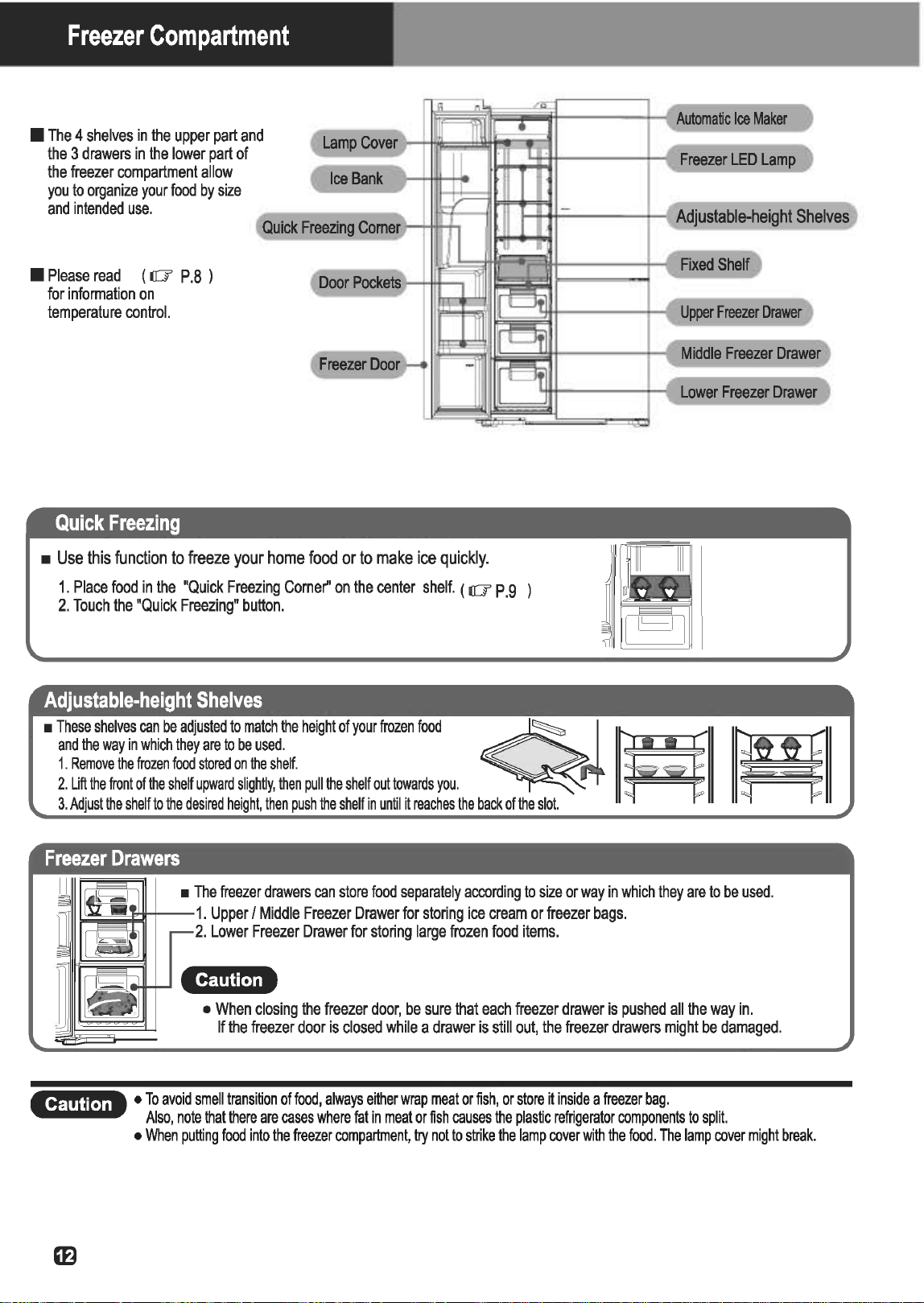
Freezer
Compartment
•
The
4
shelves
in
the
upper
part
and
the
3
drawers
in
the
lower
part
of
the
freezer
compartment
allow
you
to
organize
your
food
by
size
and
intended
use.
•
Please
read
( ilG'
P.B
)
for
information
on
temperature
control.
Quick
Freezing
•
Use
this
function
to
freeze
your
home
food
or
to
make
ice
quickly.
1.
Place
food
in
the
"Quick
Freezing
Corne~·
on
the
center
shelf.
( ilG' p
.9
2.
Touch
the
"Quick
Freezing"
button.
Adjustable-height
Shelves
•
These
shelves
can
be
adjusted
to
match
the
height
of
your
frozen
food
Freezer
Drawers
Cltffl1h.i
1
i
Middle
Freezer
Drawer
•
When
closing
the
freezer
door,
be
sure
that
each
freezer
drawer
is
pushed
all
the
way
in.
If
the
freezer
door
is
closed
while
a
drawer
is
still
out,
the
freezer
drawers
might
be
damaged.
Clf@j[.]li
•
To
avoid
smell
transition
of
food,
always
either
wrap
meat
or
fish,
or
store
it
inside
a
freezer
bag.
Also,
note
that
there
are
cases
where
fat
in
meat
or
fish
causes
the
plastic
refrigerator
components
to
split.
•
When
putting
food
into
the
freezer
compartment,
try
not
to
strike
the
lamp
cover
with
the
food.
The
lamp
cover
might
break.
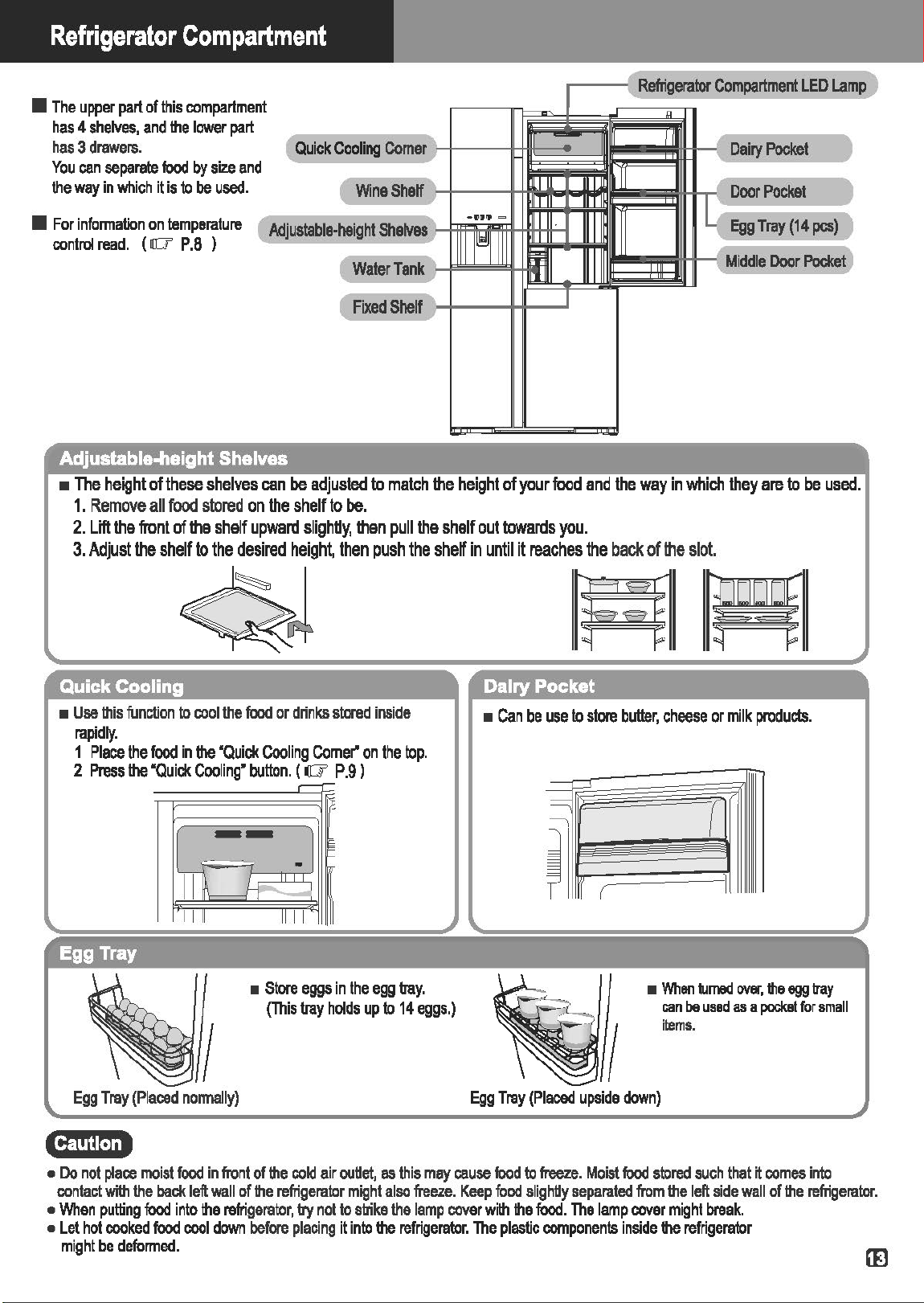
Refrigerator
Compartment
nt
•
The
upper
part
of
this
compartme
has
4
shelves,
and
the
lower
part
has
3
drawers.
d
You
can
separate
food
by
size
an
the
way
in
which
it
is
to
be
used.
(
Quick
Cooling
Comer
}
{
Wine
Shelf
~
,
Refrigerator
Compartment
LED
~
"
I
~
Dairy
Pocket
J
B
(
Door
Pocket
J
•IIIJPJ
<::::>
•
For
information
on
temperature
control
read.
(
rr::r
P
.8
)
{
Adjustable-height
Shelvas
J
(
Water
Tank
J
llll~llll
~
Egg
Tray
(14
pes)
J
il
-(
Midd
le
Door
Pocket
)
1
(
Fixed
Shelf
~
I
Adjustable-height Shelves
•
The
height
of
these
shelves
can
be
adjusted
to
match
the
height
of
your
food
and
the
way
in
which
they
are
to
be
used.
1.
Remove
all
food
stored
on
the
shelf
to
be.
2.
Lift
the
front
of
the
shelf
upward
slighdy,
then
pull
the
shelf
out
towards
you.
3.
Adjust
the
shelf
to
the
desired
height,
then
push
the
shelf
in
until
it
reaches
the
back
of
lt1e
slot.
~J
rMl
~
Quick Cooling
•
Use
this
function
to
cool
the
food
or
drinks
stored
inside
rapidly.
1
Place
the
food
in
the
"Quick
Cooling
Comer"
on
the
top.
2
Press
the
"Quick
Cooling"
button.
( a
P.9
J
Egg Tray
,-r-
-
1
~
-1
E
~
-;
1111 1111
•
Store
eggs
in
the
egg
tmy.
(This
tray
holds
up
to
14
eggs.)
Egg
Tray
(Placed
normally)
c:rnm.J.+
Dairy Pocket
•
Can
be
use
to
store
butter,
cheese
or
milk
products.
-
==;
\
~
Pr
1
1
•
When
turned
over,
the
egg
tray
can
be
used
as
a
pockat
for
small
items.
Egg
Tray
(Placed
upside
down)
•
Do
not
place
moist
food
in
front
of
the
cold
air
ouUet,
as
this
may
cause
food
to
freeze.
Moist
food
stored
such
that
it
comes
into
contact
with
the
back
left
wall
of
the
refrigerator
might
also
freeze.
Keep
food
slighUy
separated
from
the
left
side
wall
of
the
refrigerator.
•
When
putting
food
into
the
refrigerator,
try
not
to
strike
the
lamp
cover
with
the
food.
The
lamp
cover
might
break.
•
Let
hot
cooked
food
cool
down
before
placing
it
into
the
refrigerator.
The
plastic
components
inside
the
refrigerator
might
be
deformed.

Vegetable
Compartment
•
Store
vegetables
efficiently
according
to
their
size
and
shape.
Middle
Vegetable
Dravtw
Vegetable
Drawers
• Upper Vegetable Drawers
•
Store
partially
used
vegetables
or
small
vegetables
such
as
tomatoes
or
lemons.
This
drawer
has
a
door,
so
it
can
be
opened
and
closed
easily.
Wrap vegetables in the following situations.
yegetable
Co1J1)811ment
Door
• Middle and
Lower
Vegetable Drawers
•
Store
medium
and
large-sized
vegetables
such
as
cabbage
and
lettuce.
Vegetable
Drawers
(Middle/Lower)
•
When
storing
strong-smelling
vegetables
or
when
you
are
worried
that
odors
might
spread
to
other
food
•
When
storing
partially
used
vegetables
or
fruits
•
When
you
are
concerned
about
condensation
inside
the
drawer
•
When
there
are
few
vegetables
or
many
packaged
vegetables
•~mu:o
•
Depending
on
the
amount
and
type
of
vegetables
stored,
condensation
might
form
inside
or
on
the
ceiling
of
the
vegetable
drawers.
Wipe
off
any
condensation
with
a
dry
cloth
if
this
becomes
a
concem.
Cf$!1H.J.+
•
When
closing
the
vegetable
compartment
door,
be
sure
that
all
vegetable
drawers
are
pushed
al
l
the
way
in.
If
the
vegetable
compartment
door
is
closed
when
a
drawer
is
pulled
out,
it
might
be
damaged.
Door
Pocket
(Vegetable Compartment)
•
This
pocket
is
convenient
for
plastic
bottles
or
temporarily
stocking
beer.
Cttp1![.]
I.
•
Open
and
close
the
vegetable
compartment
door
slowly.
If
you
open
or
close
this
door
with
too
much
force,
the
plastic
bottles
or
glass
bottles
in
the
door
pocket
might
fall
out.

How
to
use
the
Ice
Dispenser
and
Water
Dispenser
You
can
pour
yourself
a
cold
glass
of
water
without
having
to
open
your
refrigerator
by
simply
filling
the
Water
Tank
with
water
and
pushing
the
button.
Furthermore,
ice
is
automatically
made
in
the
Ice
Bank,
allowing
you
to
dispense
either
cubed
or
crushed
ice
at
the
touch
of
a
button.
(
I((J'
P.7
)
•:m~m»
•
If
the
power
cord
is
unplugged
while
the
refrigerator
is
in
use,
or
if
there
is
a
power
failure,
each
component's
functions
will
automatically
be
restored
to
the
settings
previously
in
place
when
the
power
is
turned
back
on.
•
All
the
display
lights
turn
on
for
approx.
5
seconds
after
the
power
cord
is
plugged
in.
•
The
Automatic
Ice
Maker
is
set
to
operate
when
installed.
And,
the
Ice
Dispenser
is
set
to
make
"Crushed
Ice".
Be
careful,
as
the
Ice
Dispenser
rotates
and
may
cause
injury
to
the
fingers,
etc.
•
Do
not
insert
hands
into
the
bottom
of
the
Ice
Bank
in
the
Ice
Dispenser.
•
Do
not
use
the
Ice
Dispenser
with
the
Ice
Bank
detached.
•
When
someone
else
is
using
the
refrigerator,
refrain
from
opening
the
door
or
using
the
control
panel.
•
Do
not
touch
any
of
the
mechanical
parts
of
the
Automatic
Ice
Maker.
Since
the
Automatic
Ice
Maker
rotates,
there
is
a
risk
of
injury
to
the
fingers,
etc.
•
Do
not
let
small
children
operate
the
dispenser,
as
this
may
result
in
injury.
•
Do
not
hang
on
the
Ice
Bank.
•
Do
not
disassembly,
repair,
or
modify
your
refrigerator
by
yourselves.
Please
consult
with
a
retailer
if
any
repair
or
is
required.
•
Do
not
store
food
or
other
objects
other
than
ice
made
by
the
Automatic
Ice
Maker
in
the
Ice
Bank
(located
in
the
Ice
Dispenser).
Also,
be
sure
not
to
place
food
or
other
articles
into
the
ice
tray,
as
doing
so
can
cause
a
malfunction
of
the
Ice
Dispenser.
•
Do
not
touch
the
Ice
Level
Sensing
Lever
in
the
Automatic
Ice
Maker,
as
doing
so
may
cause
an
accident
to
occur.
•
Do
not
insert
fingers
into
the
ice
outlet
or
touch
any
parts
nearby.
Your
fingers
may
be
pinched
or
otherwise
injured.
•
Do
not
use
fragile
glassware
with
the
Automatic
Ice
Maker,
as
doing
so
could
cause
the
glass
to
shatter,
resulting
in
injury.
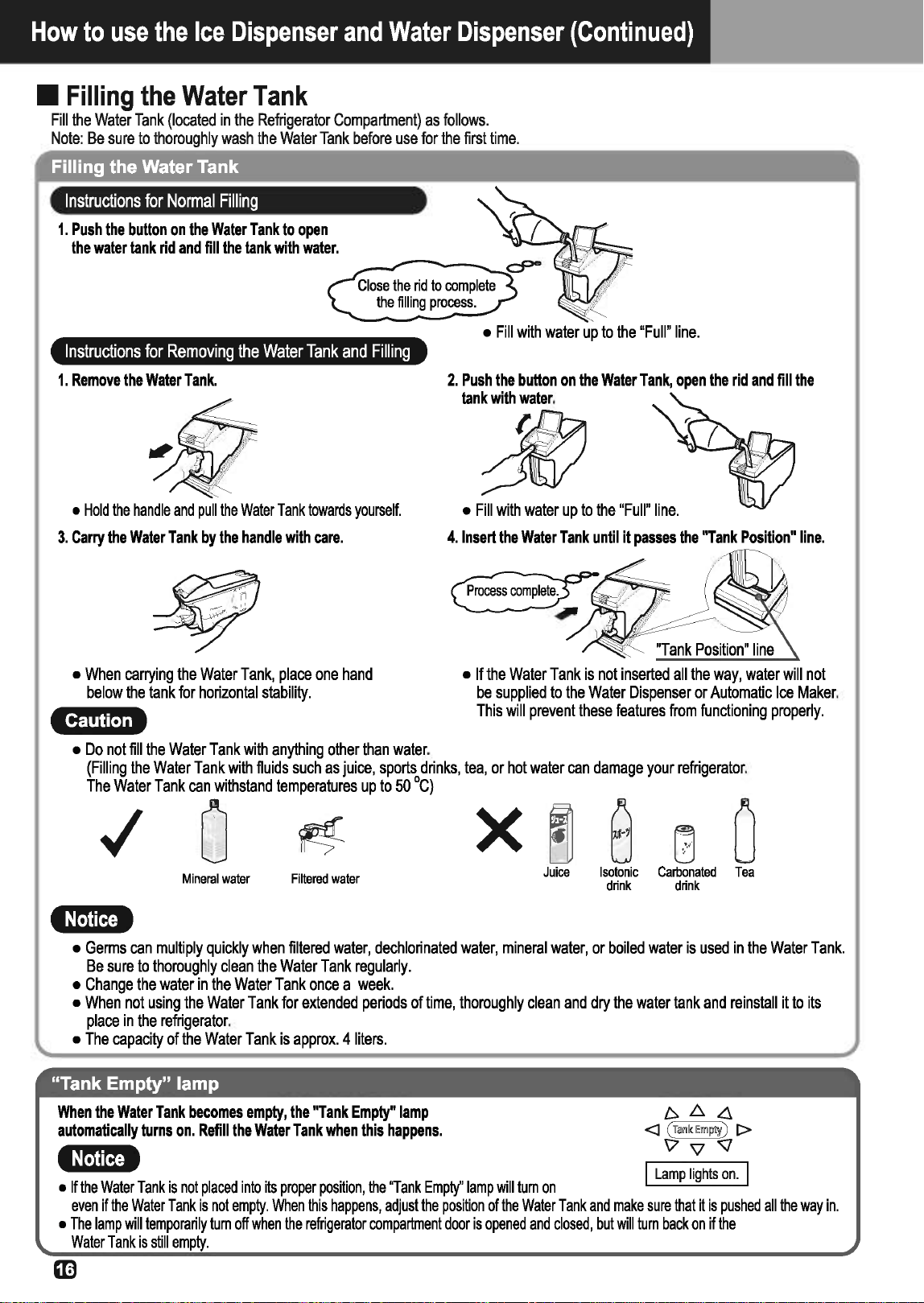
How
to
use
the
Ice
Dispenser
and
Water
Dispenser
(Continued)
•
Filling
the
Water
Tank
Fill
the
Water
Tank
{located
in
the
Refrigerator
Compartment)
as
follows.
Note:
Be
sure
to
thoroughly
wash
the
Water
Tank
before
use
for
the
first
time.
Filling the Water Tank
Instructions
for
Normal
Filling
1.
Push
the
button
on
the
Water
Tank
to
open
the
water
tank
rid
and
fill
the
tank
with
water.
Instructions
for
Removing
the
Water
Tank
and
Filling
1.
Remove
the
Water
Tank.
•
Hold
the
handle
and
pull
the
Water
Tank
towards
yourself.
3.
Carry
the
Water
Tank
by
the
handle
with
care.
•
When
carrying
the
Water
Tank,
place
one
hand
below
the
tank
for
horizontal
stability.
Clf!t!W.I
.+
•
Do
not
fill
the
Water
Tank
with
anything
other
than
water.
•
Fill
with
water
up
to
the
"Full"
line.
2.
Push
the
button
on
the
Water
Tank,
open
the
rid
and
fill
the
tank
with
water.
~
•
Fill
with
water
up
to
the
"Full"
line.
4.
Insert
the
Water
Tank
until
it
passes
the
"Tank
Position"
line.
•
If
the
Water
Tank
is
not
inserted
all
the
way,
water
will
not
be
supplied
to
the
Water
Dispenser
or
Automatic
Ice
Maker.
This
will
prevent
these
features
from
functioning
properly.
{Filling
the
Water
Tank
with
fluids
such
as
juice,
sports
drinks,
tea,
or
hot
water
can
damage
your
refrigerator.
The
Water
Tank
can
withstand
temperatures
up
to
50
°C)
0
~ x
~
B
l0
0
Mineral
water
Filtered
water
Juice
Isotonic
Carbonated
Tea
drink drink
•:r:ma»
•
Germs
can
multiply
quickly
when
filtered
water,
dechlorinated
water,
mineral
water,
or
boiled
water
is
used
in
the
Water
Tank.
Be
sure
to
thoroughly
clean
the
Water
Tank
regularly.
•
Change
the
water
in
the
Water
Tank
once
a
week.
•
When
not
using
the
Water
Tank
for
extended
periods
of
time,
thoroughly
clean
and
dry
the
water
tank
and
reinstall
it
to
its
place
in
the
refrigerator.
•
The
capacity
of
the
Water
Tank
is
approx.
4
liters.
"Tank Empty" lamp
When
the
Water
Tank
becomes
empty,
the
"Tank
Empty"
lamp
automatically
turns
on.
Refill
the
Water
Tank
when
this
happens.
•:ttt@i
•
If
the
Water
Tank
is
not
placed
into
its
proper
position,
the
"Tank
Empty"
lamp
will
tum
on
I
Lamp
lights
on.
I
even
if
the
Water
Tank
is
not
empty.
When
this
happens,
adjust
the
position
of
the
Water
Tank
and
make
sure
that
it
is
pushed
all
the
way
in.
•
The
lamp
will
temporarily
tum
off
when
the
refrigerator
compartment
door
is
opened
and
closed,
but
will
turn
back
on
if
the
Water
Tank
is
still
empty.
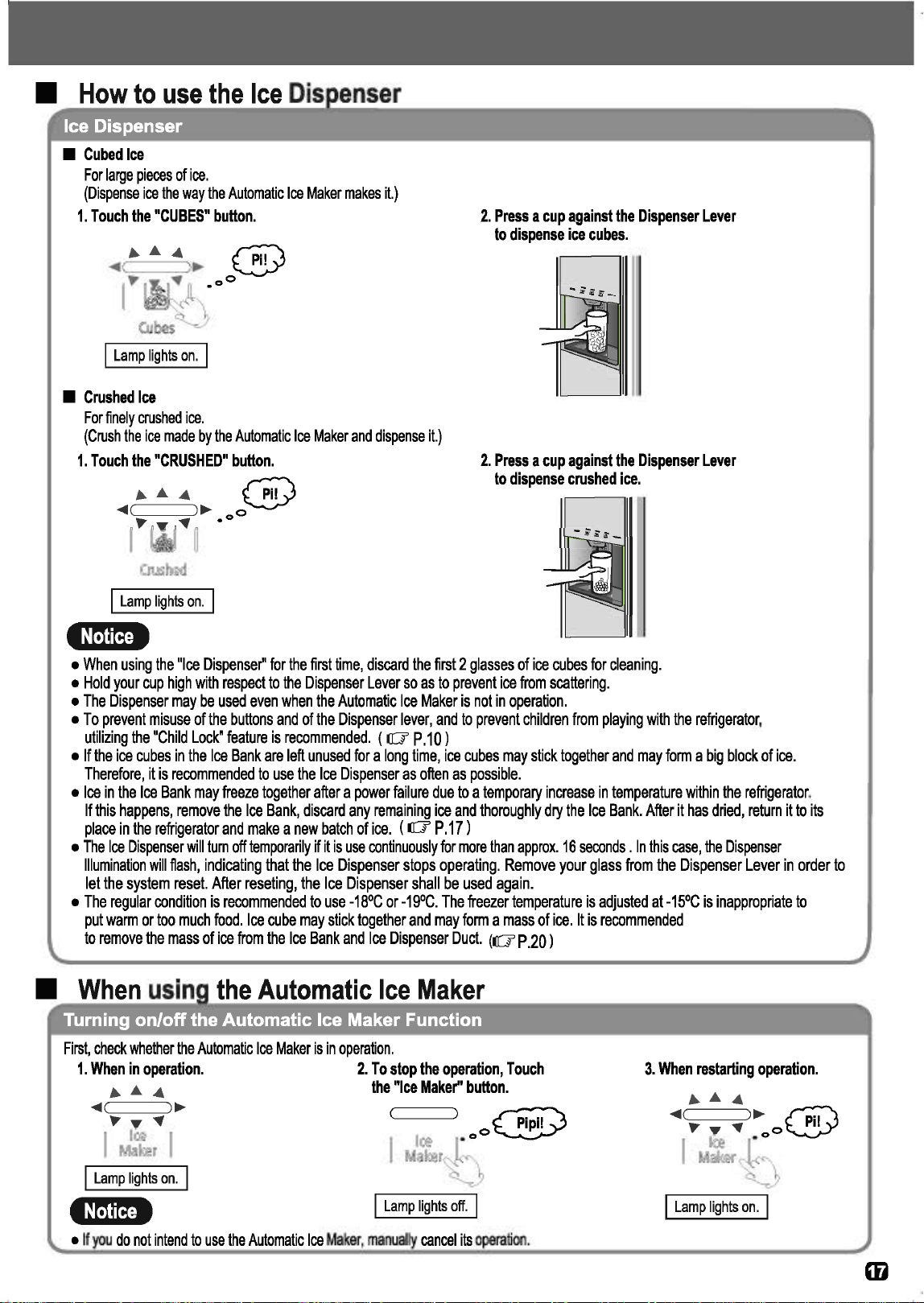
•
Cubed
Ice
For
large
pieces
of
ice.
(Dispense
ice
the
way
the
Automatic
Ice
Maker
makes
it.)
1.
Touch
the
"CUBES"
button.
2.
Press
a
cup
against
the
Dispenser
Lever
to
dispense
ice
cubes.
I
Lamp
lights
on.
I
•
Crushed
Ice
For
finely
crushed
ice.
(Crush
the
ice
made
by
the
Automatic
Ice
Maker
and
dispense
it.)
1.
Touch
the
"CRUSHED"
button.
.........
@
2.
Press
a
cup
against
the
Dispenser
Lever
to
dispense
crushed
ice
.
...
~
0
(
16
f"
~
.o
I
Lamp
lights
on.
I
•:ttt@i
•
When
using
the
"Ice
Dispenser"
for
the
first
time,
discard
the
first
2
glasses
of
ice
cubes
for
cleaning.
•
Hold
your
cup
high
with
respect
to
the
Dispenser
Lever
so
as
to
prevent
ice
from
scattering.
•
The
Dispenser
may
be
used
even
when
the
Automatic
Ice
Maker
is
not
in
operation.
•
To
prevent
misuse
of
the
buttons
and
of
the
Dispenser
lever,
and
to
prevent
children
from
playing
with
the
refrigerator,
utilizing
the
"Child
Lock"
feature
is
recommended.
(
lO'
P.10)
•
If
the
ice
cubes
in
the
Ice
Bank
are
left
unused
for
a
long
time,
ice
cubes
may
stick
together
and
may
form
a
big
block
of
ice.
Therefore,
it
is
recommended
to
use
the
Ice
Dispenser
as
often
as
possible.
•
Ice
in
the
Ice
Bank
may
freeze
together
after
a
power
failure
due
to
a
temporary
increase
in
temperature
within
the
refrigerator.
If
this
happens,
remove
the
Ice
Bank,
discard
any
remaining
ice
and
thoroughly
dry
the
Ice
Bank.
After
it
has
dried,
return
it
to
its
place
in
the
refrigerator
and
make
a
new
batch
of
ice.
(
lO'
P
.17
)
•
The
Ice
Dispenser
will
tum
off
temporarily
if
it
is
use
continuously
for
more
than
approx.
16
seconds
.
In
this
case,
the
Dispenser
Illumination
will
flash,
indicating
that
the
Ice
Dispenser
stops
operating.
Remove
your
glass
from
the
Dispenser
Lever
in
order
to
let
the
system
reset.
After
reseting,
the
Ice
Dispenser
shall
be
used
again.
•
The
regular
condition
is
recommended
to
use
-18°C
or
-19°C.
The
freezer
temperature
is
adjusted
at
-15°C
is
inappropriate
to
put
warm
or
too
much
food.
Ice
cube
may
stick
together
and
may
form
a
mass
of
ice.
It
is
recommended
to
remove
the
mass
of
ice
from
the
Ice
Bank
and
Ice
Dispenser
Duct.
(
lO'
P.20)
First,
check
whether
the
Automatic
Ice
Maker
is
in
operation.
1.
When
in
operation.
.........
...
~
........
~
1
11:
®
~
~
M©J~~~
~
I
Lamp
lights
on.
I
•:rtt@i
2.
To
stop
the
operation,
Touch
the
"Ice
Maker''
button
.
I
Lamp
lights
off.
I
•
If
you
do
not
intend
to
use
the
Automatic
Ice
Maker,
manually
cancel
its
operation.
3.
When
restarting
operation.
...
......
...
~
@
~
·
~
i~
f~
I
Lamp
lights
on.
I

How
to
use
the
Ice
Dispenser
and
Water
Dispenser
(Continued)
•
When
using
the
Automatic
Ice
Maker
(Continued)
Ice Making Time
When
you
wish
to
make
ice
especially
quickly,
use
the
"Quick
Freezing"
function.
(
liT
P.9
)
Quick
Freezing
•
The
Ice
Preparation
Time
shown
is
the
average
time
to
make
ice
when
the
ambient
temperature
is
32°C
and
the
door
is
not
opened
and
closed.
•mma»
e
Ice
cannot
be
made
until
the
interior
of
the
refrigerator
is
sufficiently
cool.
It
may
take
24
hours
or
longer
to
make
ice
for
the
first
time
after
installation.
Normally,
however,
it
only
takes
2
to
3
hours
to
make
B(eight)
ice
cubes.
•
The
Ice
Making
Time
will
be
longer
in
the
following
situations.
•
When
the
door
is
frequently
opened
and
closed
•
When
there
is
a
power
outage
•
When
a
large
amount
of
food
is
placed
inside
the
refrigerator
at
the
same
time
•
During
winter,
or
when
the
surrounding
temperature
is
low
•
How
use
the
Water
Dispenser
Water Dispenser
1.
Touch
the
''WATER"
button.
I
Lamp
lights
on.
I
2.
To
dispense
water,
simply
press
a
cup
against
the
"Dispenser
Lever''.
•
Hold
the
cup
up
when
pressing
it
4
:r:mgJ
against
the
"Dispenser
Lever".
If
"Tank
Empty"
lamp
is
turned
on
.
........
.....
(Tank
Empty)
~
~T
...
•
If
the
lamp
is
on,
fill
water.
•
Discard
the
first
cup
of
water
that
is
dispensed
just
after
installation,
as
the
system
needs
to
rinse
itself
out.
•
It
may
take
24
hours
or
longer
for
the
water
in
the
Water
Tank
to
cool
sufficiently
when
the
ambient
temperature
is
high,
such
as
during
summer.
Normally,
the
water
(4L
in
volume)
can
be
chilled
in
8
to
9
hours.
•
When
you
wish
to
have
cold
water
quickly,
use
the
Ice
Dispenser
to
put
ice
in
your
cup,
then
dispense
water
using
the
Water
Dispenser.
•
The
Water
Dispenser
will
tum
off
temporarily
if
used
continuously
for
more
than
approx.
60
seconds.
In
this
case,
the
Dispenser
Illumination
will
flash,
indicating
that
the
Water
Dispenser
has
been
stopped.
Remove
your
glass
from
the
Dispenser
Lever
in
order
to
let
the
system
reset.
After
the
reset,
the
Water
Dispenser
can
be
used
again.
cgtttm.i.t
•
Wait
for
2
to
3
seconds
before
removing
your
cup
from
the
dispensing
area
after
dispensing
water
or
ice.
If
you
remove
your
cup
without
waiting,
water
or
ice
may
fall
into
the
Water
Tray
or
on
the
floor.
•
Dry
any
water
that
accumulates
in
the
Water
Tray
with
a
dry
cloth
or
remove
the
Water
Tray
and
dispose
of
the
water.
Also,
wipe
up
any
water
droplets
on
the
surface
of
the
door
of
the
refrigerator
with
a
dry
cloth.
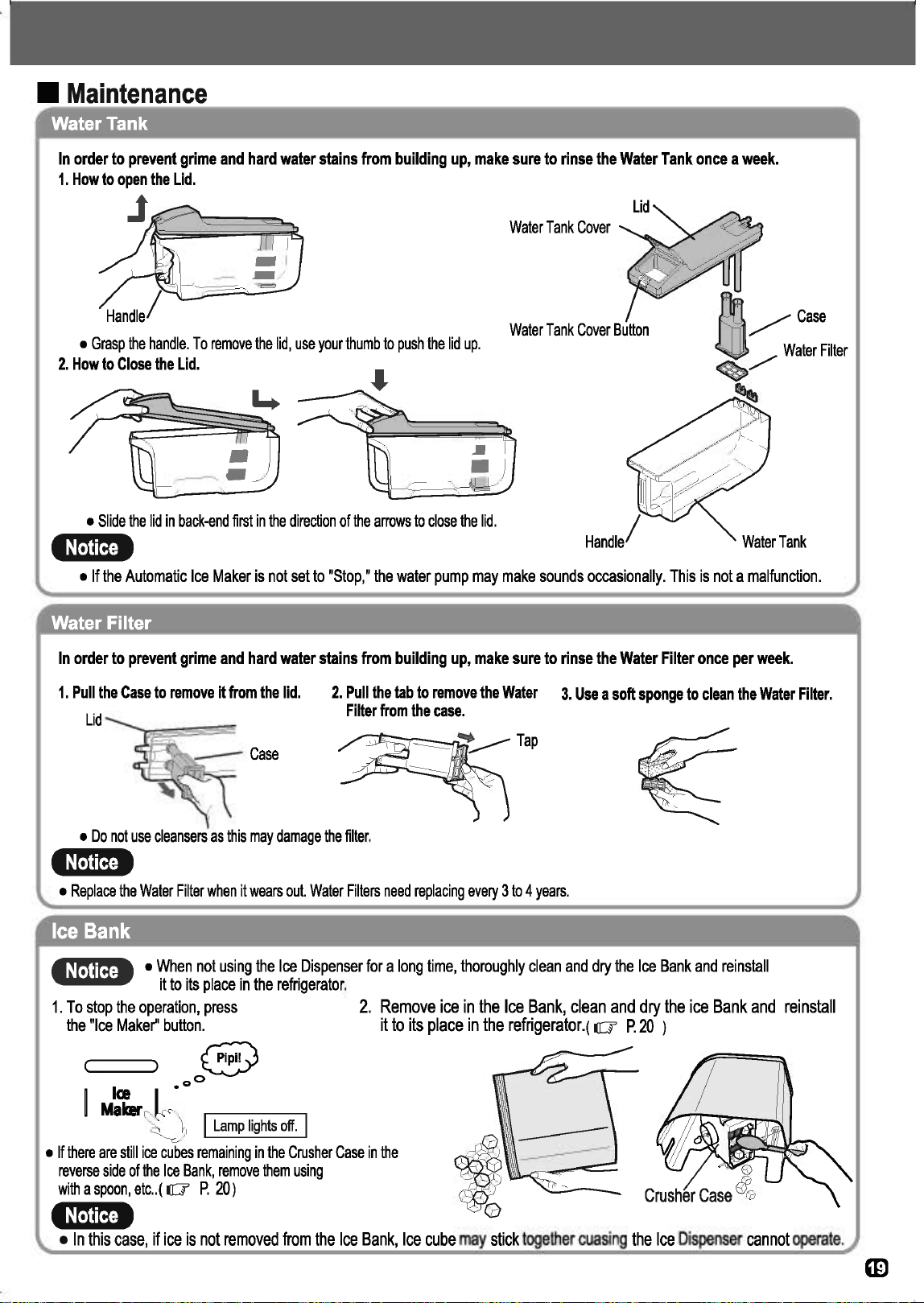
•
Maintenance
Water Tank
In
order
to
prevent
grime
and
hard
water
stains
from
building
up,
make
sure
to
rinse
the
Water
Tank
once
a
week.
1.
How
to
open
the
Lid.
J
~~~
Water
Tank
Cover
Water
Tank
Cover
Button
•
Grasp
the
handle.
To
remove
the
lid,
use
your
thumb
to
push
the
lid
up.
2.
How
to
Close
the
Lid.
•
Slide
the
lid
in
back-end
first
in
the
direction
of
the
arrows
to
close
the
lid.
•:m~mi
•
If
the
Automatic
Ice
Maker
is
not
set
to
"Stop,"
the
water
pump
may
make
sounds
occasionally.
This
is
not
a
malfunction.
Water
Filter
In
order
to
prevent
grime
and
hard
water
stains
from
building
up,
make
sure
to
rinse
the
Water
Filter
once
per
week.
1.
Pull
the
Case
to
remove
it
from
the
lid.
2.
Pull
the tab
to
remove
the
Water
3.
Use
a
soft
sponge
to
clean
the
Water
Filter.
Lid
Filter
from
the
case.
•
Do
not
use
cleansers
as
this
may
damage
the
filter.
•:m~mi
•
Replace
the
Water
Filter
when
it
wears
out.
Water
Filters
need
replacing
every
3
to
4
years.
Ice Bank
4
~
r!)J
lSi
•
When
not
using
the
Ice
Dispenser
for
a
long
time,
thoroughly
clean
and
dry
the
Ice
Bank
and
reinstall
it
to
its
place
in
the
refrigerator.
1.
To
stop
the
operation,
press
2.
Remove
ice
in
the
Ice
Bank,
clean
and
dry
the
ice
Bank
and
reinstall
the
"Ice
Make~·
button.
it
to
its
place
in
the
refrigerator.(
liT
P.
20
)
s
00
I •
~
M:.
~
L
~
I
Lamp
lights
off.
I
•
If
there
are
still
ice
cubes
remaining
in
the
Crusher
Case
in
the
reverse
side
of
the
Ice
Bank,
remove
them
using
with
a
spoon,
etc
..
(
liT
P.
20)
•:m~m•
•
In
this
case,
if
ice
is
not
removed
from
the
Ice
Bank,
Ice
cube
may
stick
together
cuasing
the
Ice
Dispenser
cannot
operate.

How
to
use
the
Ice
Dispenser
and
Water
Dispenser
(Continued)
•
Maintenance
(Continued)
Ice
Bank
Before
performing
maintenance,
make
sure
that
the
refrigerator
is
unplugged.
Instructions
for
Regular
Cleaning
1.
Wipe
the
Ice
Bank
dry
with
a
soft
cloth.
Instructions
for
Removing
and
Cleaning
the
Ice
Bank
1.
Grasp
the
top
of
the
Ice
Bank
with
both
hands.
Then,
lift it
up
and
pull
it
towards
yourself.
2.
After
removing
the
ice,
wipe
the
Ice
Bank
with
a
soft
cloth,
being
careful
to
remove
any
water
in
or
on
the
Ice
Bank.
Blade
e
If
there
are
still
ice
cubes
remaining
in
the
Crusher
Case
in
the
reverse
side
of
the
Ice
Bank,
remove
them
using
a
spoon,
etc
..
3.
When
installing
the
Ice
Bank,
be
sure
that
there
is
no
gap
at
the
bottom
of
the
Ice
Bank.
I
I
GAP
/_
Auger
e
If
there
is
a
gap,
rotate
the
Auger
90
degrees
and
then
install
the
Ice
Bank.
•
Be
careful,
as
the
Ice
Dispenser
rotates
and
may
cause
Injury.
e
Before
performing
maintenance,
make
sure
that
the
refrigerator
is
unplugged.
•
Do
not
put
your
hands
inside
the
Ice
Bank.
•
Do
not
use
the
Ice
Dispenser
when
the
Ice
Bank
is
removed
from
the
refrigerator.
•
Do
not
disassemble,
repair,
or
modify
this
equipment.
When
repairs
are
necessary,
contact
retailers
or
service
center.
A
Caution
•
Do
not
touch
the
blades
of
the
Ice
Bank
when
it
is
removed.
There
is
a
risk
of
injury.
Water Tray
If
the
Water
Tray
becomes
soiled,
remove
it
and
rinse
it
off.
1.
To
remove
the
Water
Tray,
pull
it
forward.
2.
To
install
the
Water
Tray,
insert
the
tabs
(2
tabs)
on
the
back
side
first,
then
insert
the
tabs
on
the
front
side
(3
tabs)
securely.
Water
•
Wipe
up
any
water
or
debris
in
the
dispenser
pit
(especially
the
bottom)
with
a
soft
cloth.
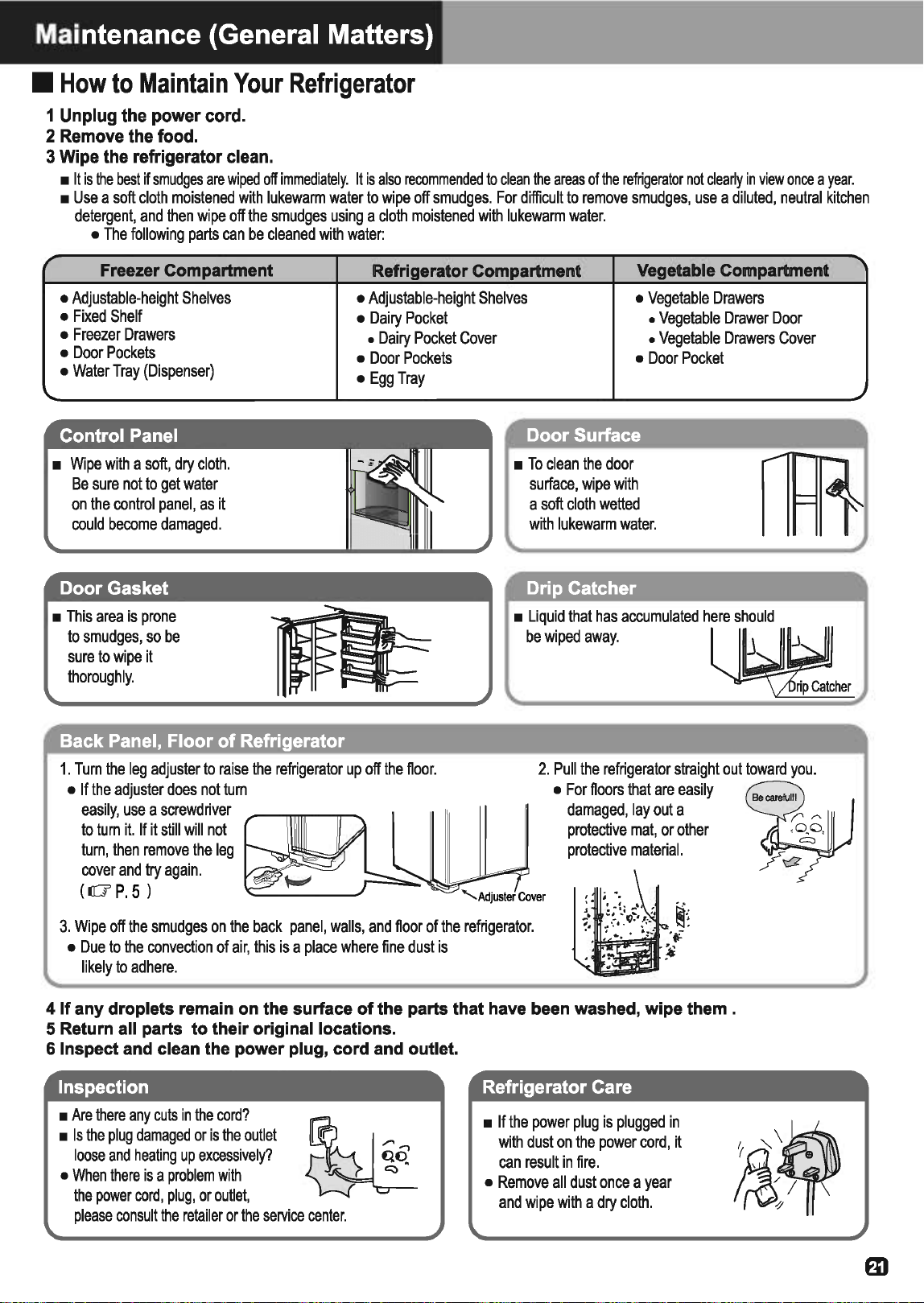
Maintenance {General Matters)
•
How
to
Maintain
Your
Refrigerator
1 Unplug the power cord.
2 Remove the food.
3 Wipe the refrigerator clean.
•
It
is
the
best
if
smudges
are
wiped
off
immediately.
It
is
also
recommended
to
clean
the
areas
of
the
refrigerator
not
clearly
in
view
once
a
year.
•
Use
a
soft
cloth
moistened
with
lukewarm
water
to
wipe
off
smudges.
For
difficult
to
remove
smudges,
use
a
diluted,
neutral
kitchen
detergent,
and
then
wipe
off
the
smudges
using
a
cloth
moistened
with
lukewarm
water.
•
The
following
parts
can
be
cleaned
with
water:
Freezer Compartment
Refrigerator Compartment
Vegetable Compartment
•
Adjustable-height
Shelves
•
Adjustable-height
Shelves
•
Vegetable
Drawers
•
Fixed
Shelf
•
Dairy
Pocket
•
Vegetable
Drawer
Door
•
Freezer
Drawers
•
Dairy
Pocket
Cover
•
Vegetable
Drawers
Cover
•
Door
Pockets
•
Water
Tray
(Dispenser)
•
Wipe
with
a
soft,
dry
cloth.
Be
sure
not
to
get
water
on
the
control
panel,
as
it
could
become
damaged.
Door
Gasket
•
This
area
is
prone
to
smudges,
so
be
sure
to
wipe
it
thoroughly.
Back
Panel,
Floor
of
Refrigerator
•
Door
Pockets
•
Egg
Tray
•
Door
Pocket
Door
Surface
•
To
clean
the
door
surface,
wipe
with
a
soft
cloth
wetted
with
lukewarm
water.
Drip
Catcher
•
Liquid
that
has
accumulated
here
should
be
wiped
away.
2.
Pull
the
refrigerator
straight
out
toward
you.
""-..
Adjuster
Cover
•
For
floors
that
are
easily
damaged,
lay
out
a
protective
mat,
or
other
protective
material.
3.
Wipe
off
the
smudges
on
the
back
panel,
walls,
and
floor
of
the
refrigerator.
•
Due
to
the
convection
of
air,
this
is
a
place
where
fine
dust
is
likely
to
adhere.
4 If any droplets remain
on
the surface of the parts that have been washed, wipe them .
5 Return all parts to their original locations.
6 Inspect and clean the power plug, cord and outlet.
Inspection
•
Are
there
any
cuts
in
the
cord?
~
loose
and
heating
up
excessively?
~
•
Is
the
plug
damaged
or
is
the
outlet
\Sr
~:
0
..,.
•
When
there
is
a
problem
with
the
power
cord,
plug,
or
outlet,
please
consult
the
retailer
or
the
service
center.
Refrigerator
Care
•
If
the
power
plug
is
plugged
in
with
dust
on
the
power
cord,
it
can
result
in
fire.
•
Remove
all
dust
once
a
year
and
wipe
with
a
dry
cloth.
m
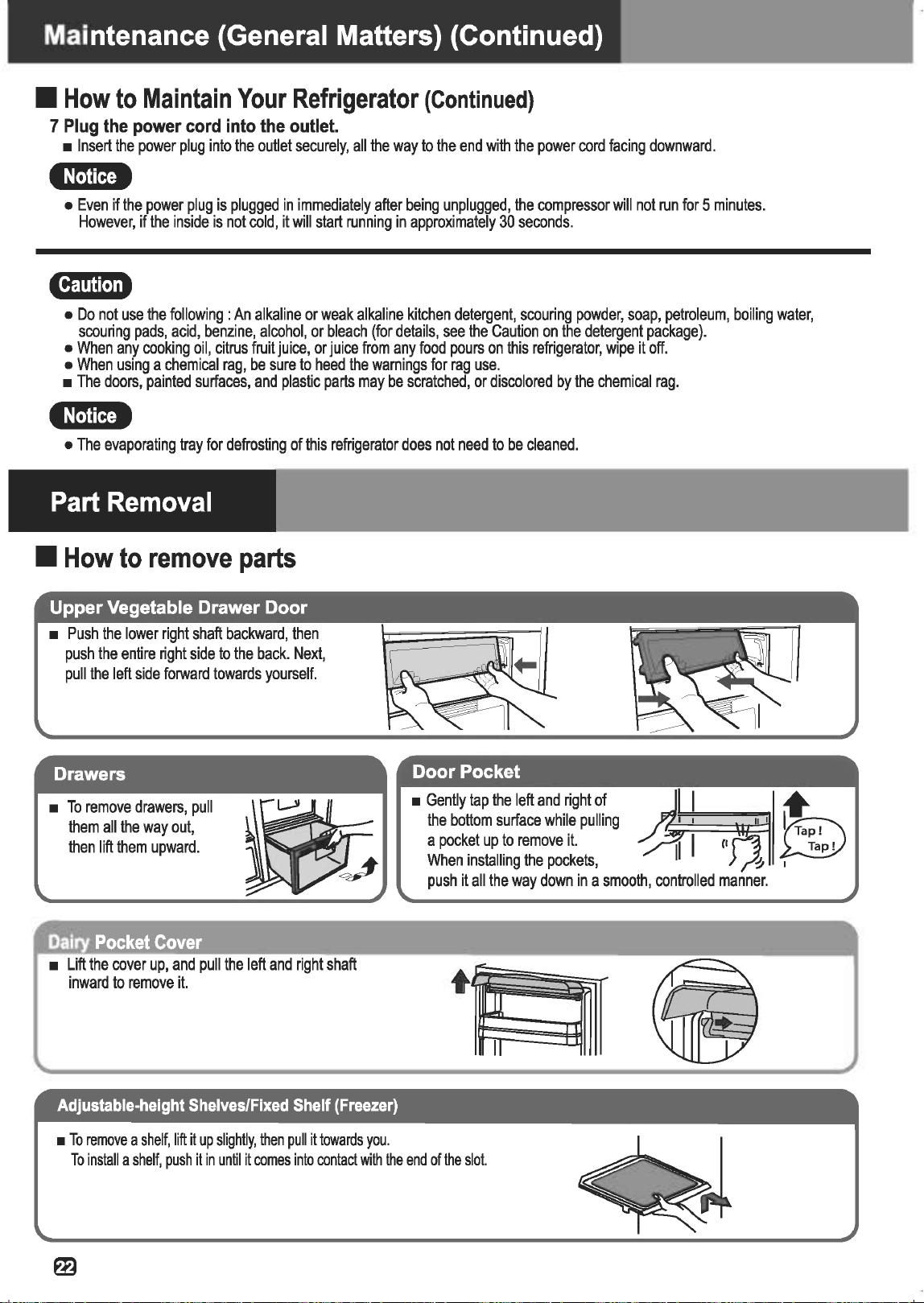
Maintenance {General Matters) {Continued)
•
How
to
Maintain
Your
Refrigerator
(Continued}
7
Plug
the
power
cord
into
the
outlet.
•
Insert
the
power
plug
into
the
outlet
securely,
all
the
way
to
the
end
with
the
power
cord
facing
downward.
•:trt@i
•
Even
if
the
power
plug
is
plugged
in
immediately
after
being
unplugged,
the
compressor
will
not
run
for
5
minutes.
However,
if
the
inside
is
not
cold,
it
will
start
running
in
approximately
30
seconds.
l'f1!U[.],.
•
Do
not
use
the
following
:An
alkaline
or
weak
alkaline
kitchen
detergent,
scouring
powder,
soap,
petroleum,
boiling
water,
scouring
pads,
acid,
benzine,
alcohol,
or
bleach
(for
details,
see
the
Caution
on
the
detergent
package).
•
When
any
cooking
oil,
citrus
fruit
juice,
or
juice
from
any
food
pours
on
this
refrigerator,
wipe
it
off.
•
When
using
a
chemical
rag,
be
sure
to
heed
the
warnings
for
rag
use.
•
The
doors,
painted
surfaces,
and
plastic
parts
may
be
scratched,
or
discolored
by
the
chemical
rag.
e:rfi!Mi
•
The
evaporating
tray
for
defrosting
of
this
refrigerator
does
not
need
to
be
cleaned.
Part
Removal
•
How
to
remove
parts
•
Push
the
lower
right
shaft
backward,
then
push
the
entire
right
side
to
the
back.
Next,
pull
the
left
side
forward
towards
yourself.
Drawers
•
To
remove
drawers,
pull
them
all
the
way
out,
then
lift
them
upward.
Dairy
Pocket
Cover
•
Lift
the
cover
up,
and
pull
the
left
and
right
shaft
inward
to
remove
it.
Adjustable-height
Shelves/Fixed
Shelf
(Freezer)
•
To
remove
a
shelf,
lift
it
up
slightly,
then
pull
it
towards
you.
•
Gently
tap the
left
and
right
of
the
bottom
surface
while
pulling
a
pocket
up
to
remove
it.
When
installing
the
pockets,
push
it
all
the
way
down
in
a
smooth,
controlled
manner.
II
To
install
a
shelf,
push
it
in
until
it
comes
into
contact
with
the
end
of
the
slot.
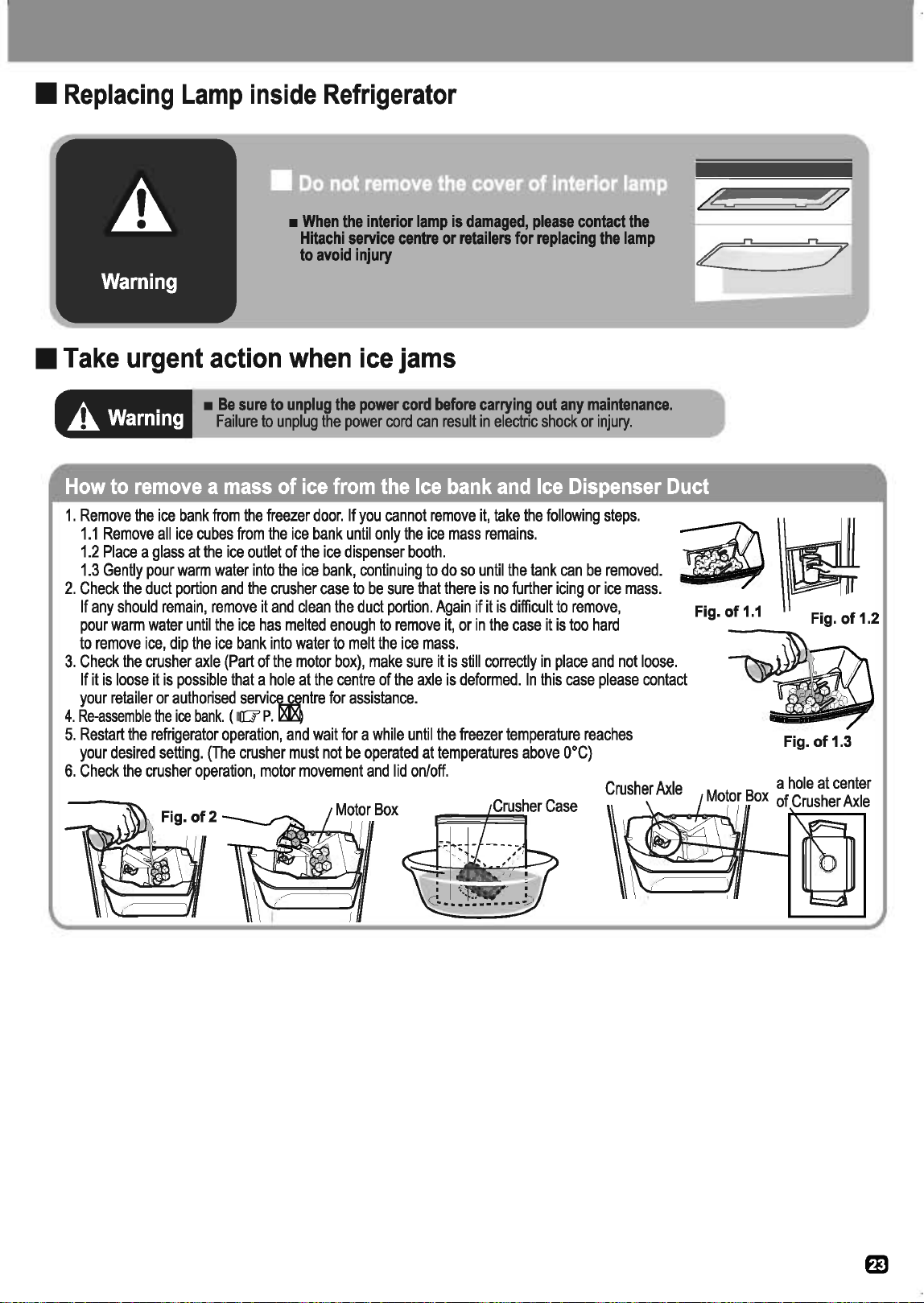
•
Replacing
Lamp
inside
Refrigerator
•
When
the
interior
lamp
is
damaged,
please
contact
the
Hitachi
service
centre
or
retailers
for
replacing
the
lamp
to
avoid
injury
•
Take
urgent
action
when
ice
jams
A
Warning
•
Be
sure
to
unplug
the
power
cord
before
carrying
out
any
maintenance.
Failure
to
unplug
the
power
cord
can
result
in
electric
shock
or
injury.
How
to
remove
a
mass
of
ice
from
the
Ice
bank
and
Ice
Dispenser
Duct
1.
Remove
the
ice
bank
from
the
freezer
door.
If
you
cannot
remove
it,
take
the
following
steps.
1.1
Remove
all
ice
cubes
from
the
ice
bank
until
only
the
ice
mass
remains.
1.2
Place
a
glass
at
the
ice
outlet
of
the
ice
dispenser
booth.
1.3
Gently
pour
warm
water
into
the
ice
bank,
continuing
to
do
so
until
the
tank
can
be
removed.
2.
Check
the
duct
portion
and
the
crusher
case
to
be
sure
that
there
is
no
further
icing
or
ice
mass.
If
any
should
remain,
remove
it
and
clean
the
duct
portion.
Again
if
it
is
difficult
to
remove,
pour
warm
water
until
the
ice
has
melted
enough
to
remove
it,
or
in
the
case
it
is
too
hard
to
remove
ice,
dip
the
ice
bank
into
water
to
melt
the
ice
mass.
ii\~
Fig.
of
1.1
Fig.
of
1.2
3.
Check
the
crusher
axle
(Part
of
the
motor
box),
make
sure
it
is
still
correctly
in
place
and
not
loose.
If
it
is
loose
it
is
possible
that
a
hole
at
the
centre
of
the
axle
is
deformed.
In
this
case
please
contact
your
retailer
or
authorised
servi~ntre
for
assistance.
4.
Re-assemble
the
ice
bank.
(
liT
P.
~
5.
Restart
the
refrigerator
operation,
and
wait
for
a
while
until
the
freezer
temperature
reaches
your
desired
setting.
(The
crusher
must
not
be
operated
at
temperatures
above
o•C)
6.
Check
the
crusher
operation,
motor
movement
and
lid
on/off.
Crusher
Axle
Fig.
of
1.3
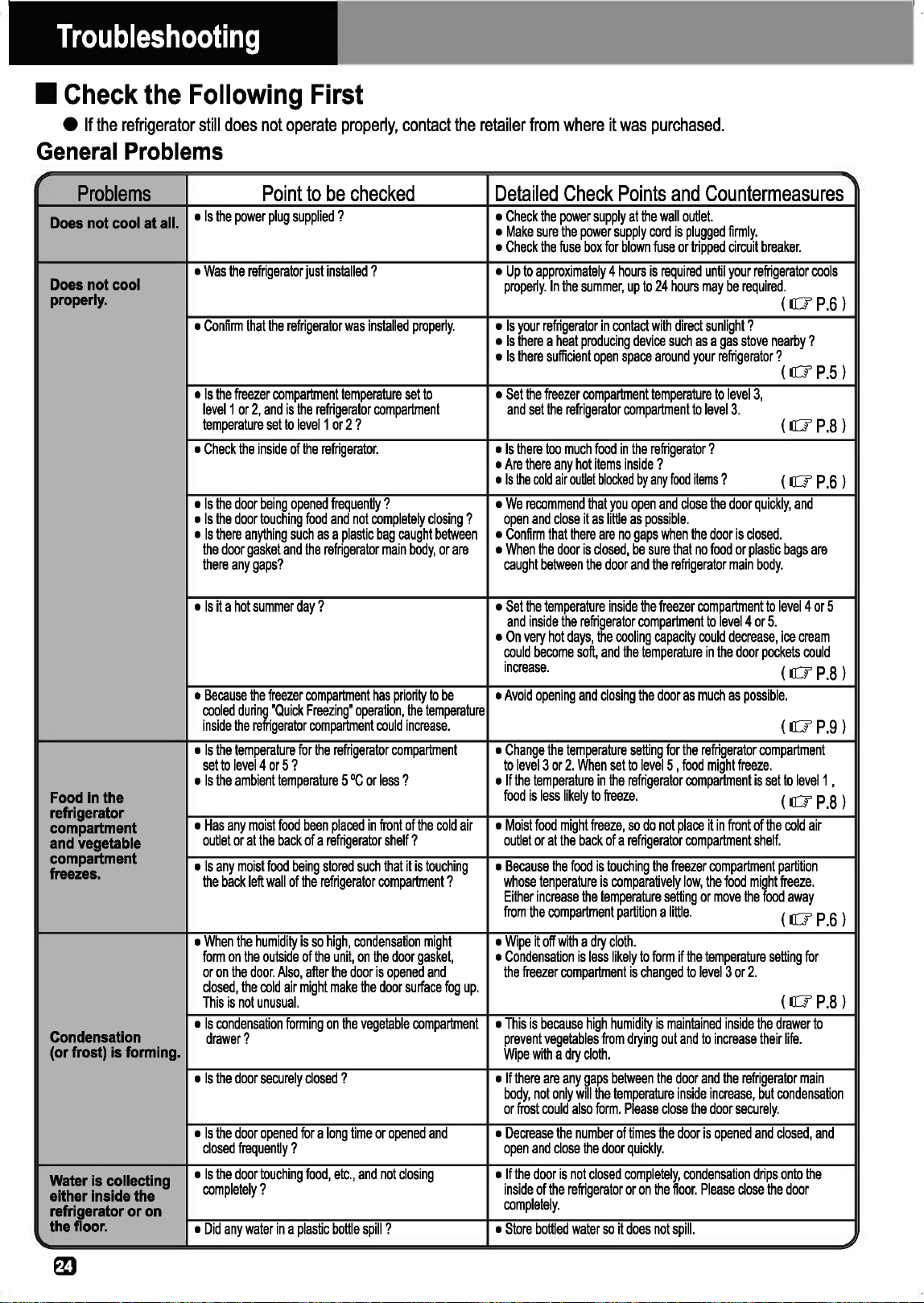
Troubleshooting
•
Check
the
Following
First
e
If
the
refrigerator
still
does
not
operate
properly,
contact
the
retailer
from
where
it
was
purchased.
General
Problems
Problems
Point
to
be
checked
Detailed
Check
Points
and
Countermeasures
Does
not cool at all.
•
Is
the
power
plug
supplied
? •
Check
the
power
supply
at
the
wall
outlet.
•
Make
sure
the
power
supply
cord
is
plugged
firmly.
•
Check
the
fuse
box
for
blown
fuse
or
tripped
circuit
breaker.
Does
not cool
•
Was
the
refrigerator
just
installed
? •
Up
to
approximately
4
hours
is
required
until
your
refrigerator
cools
properly.
In
the
summer,
up
to
24
hours
may
be
required.
property.
(
lO'
P.6)
•
Confirm
that
the
refrigerator
was
installed
properly.
•
Is
your
refrigerator
in
contact
with
direct
sunlight
?
•
Is
there
a
heat
producing
device
such
as
a
gas
stove
nearby?
•
Is
there
sufficient
open
space
around
your
refrigerator?
(
lO'
P.5)
•
Is
the
freezer
compartment
temperature
set
to
•
Set
the
freezer
compartment
temperature
to
level
3,
level1
or
2,
and
is
the
refrigerator
compartment
and
set
the
refrigerator
compartment
to
level
3.
temperature
set
to
level1
or
2 ?
(
lO'
P.8)
•
Check
the
inside
of
the
refrigerator.
•
Is
there
too
much
food
in
the
refrigerator
?
•
Are
there
any
hot
items
inside
?
•
Is
the
cold
air
outlet
blocked
by
any
food
items
?
(
lO'
P.6)
•
Is
the
door
being
opened
frequently?
•
We
recommend
that
you
open
and
close
the
door
quickly,
and
•
Is
the
door
touching
food
and
not
completely
closing
?
open
and
close
it
as
little
as
possible.
•
Is
there
anything
such
as
a
plastic
bag
caught
between
•
Confirm
that
there
are
no
gaps
when
the
door
is
closed.
the
door
gasket
and
the
refrigerator
main
body,
or
are
•
When
the
door
is
closed,
be
sure
that
no
food
or
plastic
bags
are
there
any
gaps?
caught
between
the
door
and
the
refrigerator
main
body.
•
Is
it
a
hot
summer
day
? •
Set
the
temperature
inside
the
freezer
compartment
to
level4
or
5
and
inside
the
refrigerator
compartment
to
level4
or
5.
•
On
very
hot
days,
the
cooling
capacity
could
decrease,
ice
cream
could
become
soft,
and
the
temperature
in
the
door
pockets
could
increase.
(
lO'
P.8)
•
Because
the
freezer
compartment
has
priority
to
be
•
Avoid
opening
and
closing
the
door
as
much
as
possible.
cooled
during
"
Quick
Freezing
"
operation,
the
temperature
inside
the
refrigerator
compartment
could
increase.
(
lO'
P.9)
•
Is
the
temperature
for
the
refrigerator
compartment
•
Change
the
temperature
setting
for
the
refrigerator
compartment
set
to
level4
or
5 ?
to
level3
or
2.
When
set
to
levelS
,
food
might
freeze.
•
Is
the
ambient
temperature
5
•c
or
less
? •
If
the
temperature
in
the
refrigerator
compartment
is
set
to
level1
,
Food
In
the
food
is
less
likely
to
freeze.
(
lO'
P.8)
refrigerator
compartment
•
Has
any
moist
food
been
placed
in
front
of
the
cold
air
•
Moist
food
might
freeze,
so
do
not
place
it
in
front
of
the
cold
air
and
vegetable
outlet
or
at
the
back
of
a
refrigerator
shelf
?
outlet
or
at
the
back
of
a
refrigerator
compartment
shelf.
compartment
•
Is
any
moist
food
being
stored
such
that
it
is
touching
•
Because
the
food
is
touching
the
freezer
compartment
partition
freezes.
the
back
left
wall
of
the
refrigerator
compartment
?
whose
ten
perature
is
comparatively
low,
the
food
might
freeze.
Either
increase
the
temperature
setting
or
move
the
food
away
from
the
compartment
partition
a
little.
(
lO'
P.6)
•
When
the
humidity
is
so
high,
condensation
might
•
Wipe
it
off
with
a
dry
cloth.
form
on
the
outside
of
the
unit,
on
the
door
gasket,
•
Condensation
is
less
likely
to
form
if
the
temperature
setting
for
or
on
the
door.
Also,
after
the
door
is
opened
and
the
freezer
compartment
is
changed
to
level
3
or
2.
closed,
the
cold
air
might
make
the
door
surface
fog
up.
(
lO'
P.8)
This
is
not
unusual.
CondensaUon
•
Is
condensation
forming
on
the
vegetable
compartment
•
This
is
because
high
humidity
is
maintained
inside
the
drawer
to
drawer?
prevent
vegetables
from
drying
out
and
to
increase
their
life.
(or frost) is forming.
Wipe
with
a
dry
cloth.
•
Is
the
door
securely
closed
?
•
If
there
are
any
gaps
between
the
door
and
the
refrigerator
main
body,
not
only
will
the
temperature
inside
increase,
but
condensation
or
frost
could
also
form.
Please
close
the
door
securely.
•
Is
the
door
opened
for
a
long
time
or
opened
and
•
Decrease
the
number
of
times
the
door
is
opened
and
closed,
and
closed
frequently
?
open
and
close
the
door
quickly.
Water
is collecting
•
Is
the
door
touching
food,
etc.,
and
not
closing
•
If
the
door
is
not
closed
completely,
condensation
drips
onto
the
either Inside the
completely
?
inside
of
the
refrigerator
or
on
the
floor.
Please
close
the
door
refrigerator or
on
completely.
the floor.
•
Did
any
water
in
a
plastic
bottle
spill
? •
Store
bottled
water
so
it
does
not
spill.

•
Check
the
Following
First
(Continued)
General
Problems
(Continued)
Problem
Point
to
be
checked
•
Is
the
floor
stable
?
The
refrigerator
•
Is
there
any
object
between
the
refrigerator
leg
and
Is
noisy.
the
floor
where
it
is
installed
?
•
Is
the
rear
face
touching
a
wall,
etc.
?
•
Did
the
leg
adjuster
cover
come
off
?
The
refrigerator
•
Sometimes
the
normal
operating
sound
of
the
refrigerator
gets
louder.
is
noisy.
• A
sound
like
running
water
is
emitted.
Some
kind
of
sound
• A
knocking
sound.
is
being
made.
• A
sound
like
something
is
boiling
(a
bubbling
sound).
(These
sounds
are
• A
sizzling
sound
like
when
meat
is
being
cooked.
not a sign
of
malfunction.)
• A
sound
like
something
stuck
in
a
machine.
• A
whirring
sound.
• A
cracking
sound.
(This
is
heard
inside
the
refrigerator
when
the
door
is
opened.
• A
hissing
sound
right
after
the
door
is
closed.
Unpleasant
•
Has
strong-smelling
food
been
put
inside
without
odor inside the
being
wrapped
?
refrigerator.
•
Food
smells
like
plastic.
The
front
and
back •
The
heat
exhaust
pipe
and
fan
release
the
heat
inside
of the refrigerator
the
refrigerator,
so
they
might
become
hot.
is
warm.
Warm
wind blows
out from the bottom.
Very
weak
electrical
•
The
refrigerator
occasionally
accumulates
static
shock
is
felt
when
electricity,
but
this
is
not
a
safety
concern.
touching
the
main
body.
The
door feels •
This
is
caused
by
a
temporary
drop
in
air
pressure
heavy
when
trying
due
to
the
suddenly
cooling
of
the
air
entering
inside
to
open
It right
the
refrigerator.
after being closed.
When
one
door
Is
•
The
compartments
are
connected
by
a
cold
air
closed, the other
pathway,
so
the
air
pressure
from
the
closing
of
one
door
opens.
door
might
cause
the
other
door
to
open
temporarily.
Ice
Dispenser
and
Water
Dispenser
Problems
Point
to
be
checked
Ice
is
not
dispensed.
•
Are
there
ice
cubes
in
the
Ice
Bank
?
•
Is
the
"WATER"
lamp
is
on
to
select
water
dispensing
?
•
Is
the
"Child
Lock"
lamp
on
?
(
IIT
P.10
l
•
Is
the
"Tank
Empty''
lamp
on
?
(
liT
P.16
l
•
Is
the
"Ice
Maker"
lamp
off?
(
liT
P.17l
•
Is
the
water
in
the
Water
Tank
frozen
?
•
Is
the
ice
dispensing
duct
is
stopped
up
with
food
or
fine
crushed
ice
?
•
Are
any
other
articles
such
as
food,
etc.
than
ice
stored
in
the
Ice
Bank
?
•
Is
the
Ice
Bank
placed
correctly
?
Is
there
any
gap
between
the
bottom
of
the
Ice
Bank
and
the
dispenser
mechanism
?
•
Have
you
been
using
the
Ice
Dispenser
for
more
than
1.5
minutes
?
Detailed
Check
Points
and
Countermeasures
•
Install
the
refrigerator
on
a
stable,
level
floor,
or
in
a
place
with
a
stable
board
under
it.
(
liT
P.5
l
•
Install
the
refrigerator
in
a
location
with
enough
(
liT
P.5
l
space
around
it.
•
Securely
attach
the
leg
adjuster
cover.
(
liT
P.5
l
•
After
installation,
the
refrigerator
operates
at
full
power
to
cool
its
interior,
so
it
will
make
a
louder
sound.
•
This
is
the
sound
of
the
cooling
fluid
(refrigerant)
flowing
through
the
cooling
device.
This
sound
might
also
be
heard
when
the
compressor
has
stopped.
•
This
is
the
sound
of
parts,
such
as
the
motor,
which
control
the
temperature
inside
the
refrigerator
running.
•
This
is
the
sound
of
the
plastic
creaking
due
to
a
change
in
temperature
(when
the
door
is
opened).
•
This
is
the
sound
of
a
temporary
drop
in
air
pressure
when
the
air
that
entered
into
the
refrigerator
is
suddenly
cooled.
•
The
deodorizing
function
will
not
remove
all
odor.
(
liT
P.6
l
•
Either
wrap
or
seal
such
foods.
•
This
is
because
many
plastic
parts
are
used
inside
the
refrigerator.
As
your
food
cools,
the
odor
will
gradually
go
away.
•
The
temperature
in
these
locations
might
reach
50
•c
to
60
•c
immediately
after
your
refrigerator
is
installed.
This
is
not
abnormal.
(
liT
P.3
l
•
If
this
becomes
an
annoyance,
earthing
the
refrigerator
main
body
is
recommended.
(
liT
P.5
l
•
The
door
might
feel
heavy
for
a
moment,
but
it
will
soon
feel
normal
again.
•
Closing
the
doors
slowly
will
eliminate
this
problem.
Detailed
Check
Points
and
Countermeasures
•
Wait
until
ice
cubes
are
made
and
try
again.
•
Touch
'CUBES"
or
"CRUSHED
button
to
select
(
liT
P.17l
ice
dispensing.
•
Reset
the
"Child
Lock"
function.
(IO'
P.10l
•
Fill
up
the
Water
Tank
with
water
to
the
"Full"
line.
•
If
there
is
enough
water,
Push
the
Water
Tank
into
the
"Tank
Position".
•
Activate
the
Automatic
Ice
Maker
and
use
this
function.
Check
the
"Ice
Maker"
lamp
is
on
to
make
sure
that
the
Automatic
Ice
Maker
is
activated.
•
If
frozen,
set
the
temperature
of
the
refrigerator
(
liT
P.8
l
compartment
to
level1
or
2.
•
Ged
rid
of
the
food
or
crushed
ice
by
using
a
spoon,
etc
..
Do
not
use
your
fingers,
since
the
Ice
Dispenser
may
revolve
and
result
in
injury.
•
Take
away
these
articles
and
store
in
other
locations
in
the
refrigerator.
•
If
there
is
a
gap
at
the
bottom
of
the
Ice
Bank,
remove
the
Ice
Bank
,
rotate
the
"Auger"
of
the
Ice
bank
for
approx.
90
degrees
and
place
the
Ice
Bank
again.
(
liT
P.20l
•
To
protect
the
electrical
components,
the
system
stops
the
operation
for
20
minutes
for
cooling
down.
If
the
Ice
Dispenser
is
used
during
this
period,
the
"Dispenser
Illumination"
flashes
to
inform
you
of
this
temporary
stop.

Troubleshooting
(Continued)
•
Check
the
Following
First
{Continued)
Ice
Dispenser
and
Water
Dispenser
(Continued)
Problems
Point
to
be
checked
Detailed
Check
Points
and
Countermeasures
Ice
Is
not
dispensed.
•
Do
ice
cubes
stick
together
in
the
Ice
Bank?
•
Remove
the
Ice
Bank,
discard
the
ice
cubes
,and
make
new
ones.
•
Is
the
Ice
Dispenser
outlet
stopped
up
with
ice
? •
If
the
outlet
is
stopped
up
with
ice,
get
rid
of
ice.
•
Have
the
doors
opened
so
often,
or
so
much
food
•
Do
not
open
the
doors
so
often.
have
been
stored
a
the
same
time
? •
Keep
the
distance
between
one
food
item
to
another
as
much
as
possible.
•
Have
the
refrigerator
just
been
started
up
? •
Ice
cannot
be
made
if
the
interior
of
the
refrigerator
is
not
cooled
•
Was
there
any
power
failure
?
down.
It
may
take
24
hours
to
complete
the
first
ice.
Ice
is not
made
•
Is
the
freezer
compartment
temperature
adjusted
•
Set
the
freezer
temperature
to
the
lower
position(level3
or
4).
quickly.
to
the
higher
temperature(level
2
or
1)
than
the
standard
position
?
(
lO'
P.8
l
•
Is
the
ambient
temperature
low?
Is
it
a
winter
time
? •
If
the
ambient
temperature
is
low
just
like
winter,
the
ice
making
time
can
be
longer.
•
Is
there
any
gap
between
the
door
gasket
and
•
Close
the
door
completely
,
if
there
is
a
gap.
refrigerator
body
?
The
ice
cubes
have
•
The
ice
tray
is
grooved
to
have
even
water
flow
for
all
areas.
projecting sections.
Therefore
this
groove
may
make
projecting
sections.
•
Was
there
any
power
failure
? •
Since
the
temperature
of
the
freezer
compartment
rose,
thus
the
•
Have
the
doors
been
opened
so
often?
ice
cubes
melted
and
stick
together.
Remove
the
Ice
Bank
,discard
Ice
cubes
stick
ice
cubes
,and
make
new
ice
cubes
again.
And,
make
the
together
In
the
door
opening/closing
frequency
as
little
as
possible.
Ice
Bank.
•
Has
the
Ice
Dispenser
not
been
used
for
a
long
time
? •
If
the
Ice
Dispenser
is
not
used
for
a
long
time,
the
ice
cubes
may
stick
together.
Therefore,
it
is
recommended
to
use
the
Ice
Dispenser
as
often
as
possible.
•
Is
there
any
gap
between
the
door
gasket
and
•
If
there
is
a
gap,
the
freezer
compartment
temperature
may
rise
and
refrigerator
body
?
the
ice
cubes
may
stick
together.
Close
the
door
completely.
•
Due
to
unevenness
of
ice
cubes,
some
small
ice
cubes
will
not
be
crushed
and
will
be
dispensed,
however,
this
not
an
abnormal
situation.
•
Is
the
water
in
the
Water
Tank
enough
?
If
the
water
•
If
the
water
is
not
much,
fill
up
the
Water
Tank
with
water
upto
is
not
sufficient,
the
ice
cubes
may
be
smaller
than
the
"Full"
line.
Even
when
usual
and
thus
may
not
be
crushed.
(
lO'
P.19
l
"CRUSHED"
Is
•
If
the
Ice
Dispenser
has
not
been
used
for
a
long
time,
•
Remove
the
Ice
Bank
,discard
old
ice
cubes
,and
make
new
ice
selected, not only
the
ice
cubes
may
become
samller
and
thus
may
not
cubes
again.
crushed
Ice
but
be
crushed.
also ice
cubes
•
"CUBES"
were
selected
just
before
dispensing
•
When
switching
from
"CUBES'
to
"CRUSHED",
ice
cubes
instead
of
(uncrushed
ice)
Is
dispensed.
"CRUSHED"
ice
?
crushed
ice
may
be
dispensed
for
the
first
moment.
On
the
other
hand,
when
switching
from"CRUSHED"to"CUBES",
crushed
ice
instead
of
ice
cubes
may
be
dispensed
for
the
first
moment.
They
are
not
abnormal.
•
Is
there
stopped-up
ice
cubes
in
the
ice
crusher
•
Remove
the
Ice
Bank
to
get
rid
of
the
ice
in
the
ice
crusher.
section
(at
the
reverse
bottom
side
of
the
Ice
Bank)
of
the
Ice
dispenser
and
the
flapper
to
feed
ice
to
be
crushed
kept
opened
?
•
Is
the
Water
Tank
or
water
purification
Water
Filter
•
In
order
to
prevent
grime
and
hard
water
stains
from
building
up,
dirty?
make
sure
to
rinse
the
Water
Tank
once
a
week.
(
lO'
P.19
l
•
Is
not
the
water
or
ice
fresh
? •
Replace
the
water
in
the
Water
Tank
once
a
week.
And,
first,
Ice
or water smells.
discard
the
existing
ice
cubes,
then
make
new
ice
cubes.
(
lO'
P.19)
•
Has
strong-smelling
food
been
put
inside
without
•
When
food
with
strong
smell
is
stored,
such
food
should
be
wrapped
being
wrapped
?
and
sealed
for
storage.
•
Is
the
"CUBES"or"CRUSHED"Iamp
is
on?
•
Touch
the
"WATER"
button
to
select
dispensing
water.
(
lO'
P
.18
)
Water
Is
not
•
Is
the
"Child
Lock"
lamp
on
? •
Reset
the
"Child
Lock"
function.
(
lO'
P.10
l
dispensed.
•
Is
the
'Tank
Empty"
lamp
on?
•
Fill
up
the
Water
Tank
with
water
to
the
"Full"
line.
•
If
there
is
water
in
the
Water
Tank,
surely
push
the
Water
Tank
into
the
"Tank
Position".
(
lO'
P.16
l
•
Is
the
water
in
the
Water
Tank
frozen
? •
If
frozen,
set
the
temperature
of
the
refrigerator
compartment
to
level1
or
2.
(
lO'
P.8
l
•
Has
the
Water
Dispenser
been
used
for
more
than
•
If
the
Water
Dispenser
is
used
for
approx.
1
minute,
the
system
1
minute
continuously?
temporarily
stop
dispensing
for
the
sake
of
safety
in
case
of
a
malfunction
of
dispenserswitch.
The
'Dispenser
Illumination"
flashes
to
inform
you
of
this
case.
To
use
again,
release
the
glass
from
the
Dispenser
Lever.

•
Check
the
Following
First
(Continued)
Ice
Dispenser
and
Water
Dispenser
(Continued)
Problems
Point
to
be
checked
Detailed
Check
Points
and
Countermeasures
•
Has
the
water
just
been
put
into
the
Water
Tank
? •
It
may
take
24
hours
or
even
more
to
chill
the
water
in
the
Water
Tank
Water
from the
completely
,if
the
ambient
temperature
is
high
in
the
summer
seasons,
etc
..
Water
Dispenser
However,
it
will
just
take
8
to
9
hours
to
chill
the
tank-full
of
water.
Is
not chilled.
•
If
you
need
chilled
water
immediately,
it
is
effective
to
put
ice
cubes
into
the
glass
by
using
the
Ice
Dispenser
and
then
to
use
the
Water
Dispenser.
•
When
using
the
Water
Dispenser,
the
water
dispensed
•
Chilled
water
is
supplied
from
the
Water
Tank
in
the
refrigerator
in
the
beginning
is
not
chilled
enough.
compartment
through
the
tubes
which
is
placed
in
the
compressor
compartment,
the
bottom
of
the
cabinet,
and
the
door.
Therefore,
the
water
in
the
beginning
may
not
be
chilled
,because
that
water
was
not
in
the
cold
sections,
however,
after
dispensing
half
of
glass
of
water,
chilled
water
will
be
dispensed.
Auto
Door
Problems
Point
to
be
checked
Detailed
Check
Points
and
Countermeasures
•
Hitting
sound
(thumping
sound).
•
This
is
operating
sound
of
the
Auto
Door
•
This
is
not
malfunction.
Noise loud.
•
Buzzing
sound
(whir)
(whir).
•
This
is
operating
sound
of
Electric
Refrigerator
Unit.
There
Is
an
abnormal
•
This
is
not
malfunction.
noise.
•
The
operation
sound
of
the
Auto
Door
differs
•
This
may
vary
depending
on
installation
conditions
of
the
refrigerator
depending
on
door
(left
or
right).
or
volume
of
foods
stored
in
the
door
pocket.
•
This
is
not
malfunction.
Lamp
of
open
•
Is
liiJ
iamp
not
lit?
•
Touch
IJi!ill
button
for
5
second
or
more
until
lamp
on.
button
Is
off or
•
Auto
Door
of
the
Refrigerator
Compartment
will
not
be
open,
Auto Door won't
•
Auto
Door
of
the
Refrigerator
Compartment
When
door
of
vegetable
compartment
opened.
(liT
P.11l
open
even
If touching.
can
not
open.
•
Is
any
food
or
food
bag
caught
on
the
compartment?
•
Remove
food
and
others
that
are
caught
in.
The
Auto Door
•
Did
a
power
failure
occur
or
did
the
compartment
knock
dose not close.
against
any
obstacle
during
electrical
operation?
•
Auto
Door
function
stops
on
the
way,
so
push
in
the
door
with
hand.
•
Don't
stored
foods
and
others
make
contact
with
the
•
Remove
food
and
others
make
contact
with
the
wall.
wall
in
the
Refrigerator
Compartment.
Auto Door dose
•
Opening
angle
of
the
Auto
Door
may
vary
or
the
door
may
go
back
not
open
widely.
•
Installation
site
may
not
be
levelled
out.
a
little
after
it
is
opened
automatically
depending
on
installation
conditions
of
the
refrigerator,
but
this
is
not
malfunction.
Auto Door
•
Auto
Door
function
can
not
be
locked
even
though
•
In
order
to
stop
Auto
Door
function,
unlock
"Child
Lock"
first
on
moves
even
though "
Child
Lock"
is
activated.
the
Control
Panel
first,
and
then
touch
li'J
button
for
5
seconds
"Child Lock"
or
more
until
lamp
off.
(
liT
p
.11)
Is
activated.
•
What
to
do
in
these
situations
This
is
not
a
malfunction
of
the
refrigerator.
The
surface
of
the
•
The
refrigerator
is
equipped
with
the
dew
prevention
and
heat
radiation
tubes.
refrigerator
is
hot
The
back
and
side
plates
may
be
heated
especially
when
starting
up
or
if
the
door
is
frequently
opened
and
closed.
If
a
door
is
shut,
•
The
two
compartments
are
connected
with
an
air
duct.
When
closing
one
of
the
doors,
the
door
may
be
opened
by
other
doors
may
open.
the
air
pressure
through
the
duct.
This
is
a
nonmal
phenomenon.
Does
the
refrigerator
make
any
•
The
sound
like
water
flowing
and
boiling
water
is
the
sound
of
the
cooling
liquid
(refrigerant).
abnormal
noises
(sound)?
• A
creaking
sound
comes
from
the
storage
compartment.
It
is
the
sound
caused
by
friction
of
the
parts
due
to
temperature
change.
Annoying
sound
is
generated
•
You
may
feel
that
the
operation
sound
is
larger
because
the
comppressor
operates
in
high-speed
under
the
following
conditions:
the
refrigerator
does
not
cool
fully
on
the
occasion
such
as
using
it
forth
by
the
refrigerator.
The
sound
becomes
more
quiet
after
cooling
fully.
The
compressor
operates
at
low
speed
at
night,
for
long
vacations
or
absences,
potentially
creating
large
vibrations.
Operation
sound
lasls
long.
•
It
is
because
the
compressor
operates
in
low-speed
for
conserving
energy.
Operation
sound
sometimes
•
It
is
because
the
system
changes
the
operating
power
of
the
refrigerator
according
to
the
temperature
change.
becomes
louder.
m

Troubleshooting
(Continued)
About
Non-fluorocarbon refrigerator.
•
This
refrigerator,
including
refrigerant
and
the
heat
insulator,
is
using
hydrocarbon
(non-fluorocarbon).
The
hydrocarbon
is
a
material
that
does
not
rip
up
the
ozone
and
have
very
little
influence
on
global
warming.
II
is
the
global
environment
concern
material).
•
R600a
refrigerant
is
flammable.
But
the
refrigerant
is
sealed
up
by
the
refrigerate
circuit,
and
never
leaks
by
usual
use.
In
case
of
the
refrigerant
circuit
being
damaged
by
any
chance,
please
avoid
the
use
of
fire
and
electric
product,
open
the
window
and
ventilate.
Afterwards,
please
contact
Hitachi
Service
Center.
Severe warning signs
for
Disposal
Cyclopenlane
is
used
as
in
the
insulation.
The
gases
in
insulation
material
require
a
special
disposal
procedure.
Please
contact
your
local
authorities
in
regard
to
the
environmentally
safe
disposal
of
this
product.
This
symbol
mark
means
that
used
electrical
and
electronic
products
shall
not
be
mixed
with
general
household
waste.
Do
not
try
to
dismanUe
the
system
and
unit
by
yourself
as
this
could
have
harmful
effects
on
your
health
and
the
environment.
Refrigerators
must
be
treated
at
a
specialized
treatment
facility
for
recycling
and
recovery
and
shall
not
be
disposed
of
in
the
-
municipal
waste
stream.
Please
contact
the
installer,
dealer
or
local
authority
for
more
information.
&warning
•
Children
should
be
supervised
to
ensure
that
they
do
not
play
with
the
appliance
or
get
in.
•
Children
getting
inside
may
not
be
able
to
get
out.
•
This
appearance
can
be
used
by
children
aged
from
8
years
and
above
and
persons
with
reduced
physical,
sensory
or
mental
capabilities
or
lack
of
experience
and
knowledge
if
they
have
been
given
supervision
or
instruction
concerning
use
of
the
appliance
in
a
safe
way
and
understand
the
hazards
involved.
•
Children
shall
not
play
with
the
appliance.
•
Cleaning
and
user
maintenance
shall
not
be
made
by
children
without
supervision.
Hitachi
Consumer
Products
(Thailand)
,
Ltd.