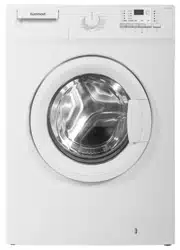
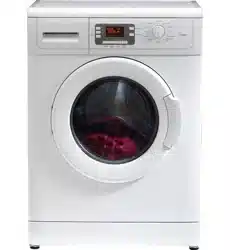
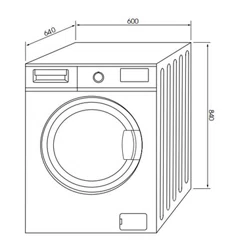
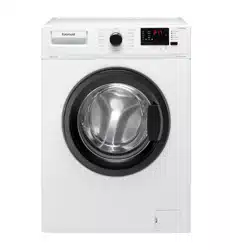
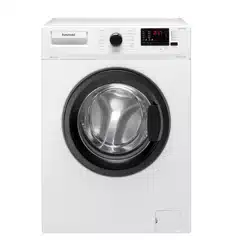
Euromaid WM5 5kg Front Load Washing Machine
Product's Documents
Below are documents related to this product, you can read online or download:
- User Manual - (English) Read Online | Download pdf
Tilt the machine to remove the packaging reinforcement. Remove the packaging reinforcement by pulling the ribbon.
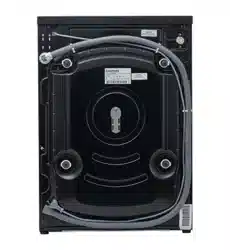
 Transportation safety bolts must be removed before operating the washing machine! Otherwise, the machine will be damaged!
1. Loosen all the bolts with a spanner until they rotate freely (“C”)
2. Remove transportation safety bolts by turning them gently.
3. Fit the covers (supplied in the bag with the Operation Manual) into the holes on the rear panel. (“P”)
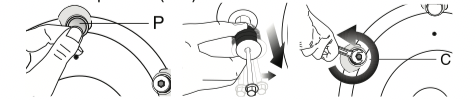
 Keep the transportation safety bolts in a safe place to reuse when the washing machine needs to be moved again in the future.
Never move the appliance without the transportation safety bolts properly fixed in place!
Do not use any tools to loosen the lock nuts. Otherwise, they can be damaged.
1. Manually (by hand) loosen the lock nuts on the feet.
2. Adjust them until the machine stands level and firmly.
3. Important: Tighten all lock nuts up again.
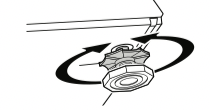
Important:
• The water supply pressure required to run the machine must be 1-10 bar (0,1 – 1 MPa).
• Connect the special hoses supplied with the machine to the water intake valves on the machine.
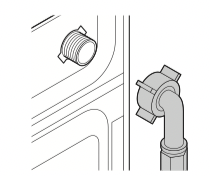
• If you are going to use your double waterinlet machine as a single (cold) water-inlet unit, you must install the stopper*, supplied with your machine to the hot water valve.
• If you want to use both water inlets of the product, you can connect the hot water hose after removing the stopper and gasket group from the hot water valve.
* Applies for the products supplied with a blind stopper group.
• Models with a single water inlet should not be connected to the hot water tap.
When returning the appliance to its place after maintenance or cleaning, care should be taken not to fold, squeeze or block the hoses.
The water discharge hose can be attached to the edge of a washbasin or bathtub. The drain hose should be firmly fitted into the drain as to not get out of its housing.
Important:
• The end of the drain hose must be directly connected to the wastewater drain or to the washbasin.
• The hose should be attached to a height of at least 40 cm, and 90 cm at most.
• In case the hose is elevated after laying it on the floor level or close to the ground (less than 40 cm above the ground), water discharge becomes more difficult and the laundry may come out wet.
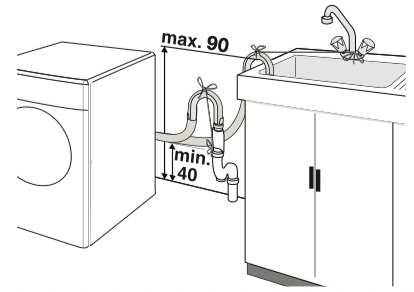
• The hose should be pushed into the drainage for more than 15 cm. If it is too long you may have it shortened.
• The maximum length of the combined hoses must not be longer than 3.2 m.
Connect the machine to an earthed outlet protected by a fuse of suitable capacity. Important:
• Connection should comply with national regulations.
• The voltage and the allowed fuse protection are specified in the section “Technical Specifications”.
• The specified voltage must be equal to your mains voltage.
• Connection via extension cords or multiplugs should not be made.
A damaged power cable must be replaced by a qualified electrician.
The appliance must not be operated unless it is repaired! There is the risk of electric shock!
Laundry items with metal attachments such as, bras, belt buckles and metal buttons will damage the machine. Remove metal attachments or place the items in a clothing bag, pillow case, or something similar.
• Sort the laundry according to type of fabric, color, and degree of soiling and permissible water temperature. Always follow the advice on the garment labels.
• Place small items like infants’ socks and nylon stockings, etc. in a laundry bag, pillow case or something similar. This will also save your laundry from getting lost.
• Wash “machine washable” or “hand washable” labeled products only with an appropriate program.
• Do not wash colors and whites together. New, dark colored cottons may release a lot of dye. Wash them separately.
• Use only dyes/color changers and lime removers suitable for machine wash. Always follow the instructions on the packaging.
• Wash trousers and delicate clothes turned inside out.
Please follow the information in the "Program Selection Table". Washing results will degrade when the machine is overloaded.
The door locks during program operation and the Door Locked Symbol lights up. The door can be opened when the symbol fades out.
Detergent Drawer
The detergent dra wer is composed of three compartments:
The detergent dispenser may be in two different types according to the model of your machine.
– (I) for prewash
– (II) for main wash
- (III) siphon
– ( ) for softener
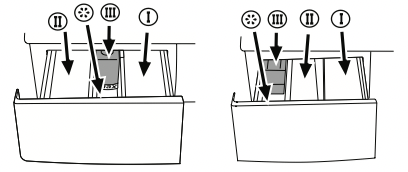
Detergent, softener and other cleaning agents
Add detergent and softener before starting the washing program.
Never open the detergent dispenser drawer while the washing program is running!
When using a program without pre-wash, no detergent should be put into the pre-wash compartment (Compartment no. I).
Detergent quantity
The amount of washing detergent to be used depends on the amount of laundry, the degree of soiling and water hardness.
• Do not use amounts exceeding the quantities recommended on the package to avoid problems of excessive foam, poor rinsing, financial savings and finally, environmental protection.
• Never exceed the (> max <) level marking; otherwise, the softener will be wasted without being used.
• Do not use liquid detergent if you want to wash using the time delay feature.
Figure 1
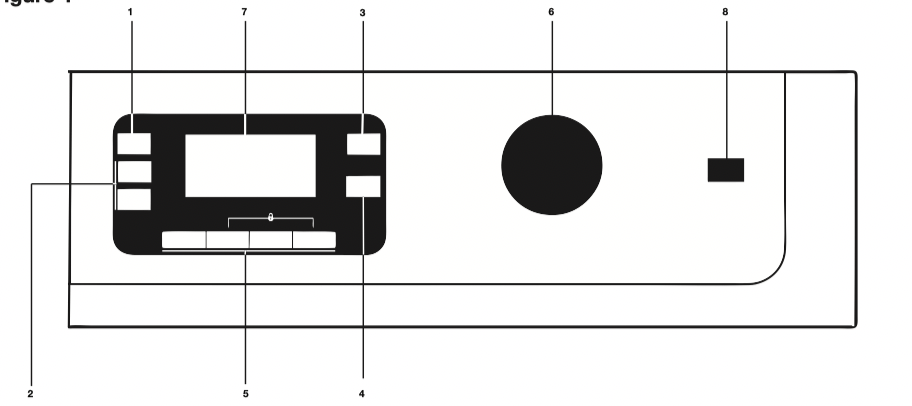
1 - Spin Speed Adjustment Button
2 - Time Delaying Button (+/-)
3 - Temperature Adjustment Button
4 - Start/Pause/Cancel Button
5 - Auxiliary Function Keys
6 - Program Selection Knob
7 - Display
8 - On/Off Button
Figure 2
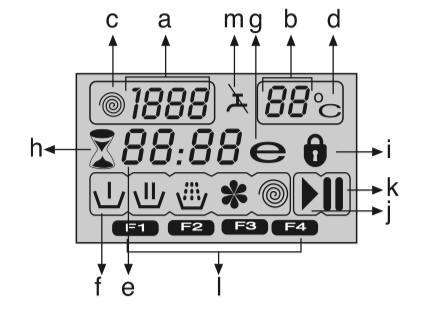
7.a - Spin Speed Indicator
7.b - Temperature Indicator
7.c - Spin Symbol
7.d - Temperature Symbol
7.e - Remaining Time and Delaying Time Indicator
7.f - Programme Indicator Symbols (prewash/main wash/rinse/softener/spin)
7.g - Economy Symbol
7.h - Time Delaying Symbol
7.i - Door Locked Symbol
7.j - Start Symbol
7.k - Standby Symbol
7.l - Auxiliary Function Symbols
7.m - Water cut-off Symbol (According to your machine’s model)
Plug in your machine. Turn the tap on completely. Check if the hoses are connected tightly. Place the laundry in the machine. Add detergent and softener. Press the “On/Off” button.
Turn the Programme Selection Knob to the program mode that you wish to wash your laundry.
The recommended temperature and spin speed for the selected program appear. Press “Start/Pause/Cancel” button to start the program.
Sort the laundry according to type of fabric, color, degree of soiling and permissible water temperature when choosing a program.
Main programs
Depending on the type of textile, the following main programs are available:
• Cotton
You can wash normally soiled durable cotton clothes with this program. Your laundry will be washed with vigorous washing movements during a longer washing cycle.
• Synthetics
You can wash your less durable clothes on this program. Lighter washing movements and shorter washing cycle is used compared to “Cottons” program. It is recommended for your synthetic clothes (such as shirts, blouses, synthetic/cotton blended garments, etc.). For curtains and lace, the “Synthetic 40” program with pre-wash and anti-creasing functions selected is recommended.
• Woollens
You can wash your machine-washable woolen garments on this program. Wash by selecting the proper temperature according to the labels of your clothes. It is recommended to use appropriate detergents for woolens.
For special cases, there are also extra programs available:
Additional programs may differ according to the model of your machine.
• Babycare
Increased hygiene is provided by a longer heating period and an additional rinse cycle. It is recommended for baby clothes and clothes worn by allergic people.
• Delicate
You can wash your delicate clothes on this program. It has more sensitive washing movements and does not make intermediate spinning compared to “Synthetic” program.
• Hand wash
You can wash your woolen/delicate clothes that bear “not machine- washable” labels for which hand wash is recommended on this program. It washes the laundry with very tender washing movements without damaging your clothes.
• Mix 40
This program washes for a longer period at 40°C and gives the same result as the “Cottons 60°C” program, thus it saves energy. It is suitable for clothes for which you cannot use the “Cottons 60°C” program.
• Intensive
You can wash your durable and heavily soiled clothes on this program. In this program, your clothes will be washed for a longer time and an extra rinse cycle will be made compared to the “Cottons” program.
• Darkcare
Use this programme to wash your dark coloured laundry, or the coloured laundry that you do not want them get faded. This programme washes your laundry with low mechanical movements and at low temperature. We recommend you to use liquid detergent or woolen shampoo for dark coloured laundry.
• Daily Xpress
This program is used to wash lightly soiled and unstained cotton garments in a short time.
• Xpress Super Short
You can use this program to quickly wash a small number of lightly soiled and unstained cotton garments. E.g.: bathrobes, duvet covers, sport wear, daily clothes and etc. used only once.
Economy Symbol
Shows energy saving programs and temperature selections.
As “Intensive” and “Baby” programs are long programs with higher temperature selections to ensure hygiene, “Economy” Symbol will not light up.
For specific applications, you can select any of the following programs:
• Rinse
This program is used when you want to rinse or starch separately.
• Spin+Drain
This program spins with maximum possible rpm in the default setting after the water drains from the machine.
Use a lower spin speed for delicate laundries.
Whenever a new program is selected, the temperature anticipated for that program appears on the temperature indicator.
To change the temperature, press the “Temperature” button. Temperature decreases in 10° increments.
Cold selection is shown with “-” symbol.
|
90˚C |
Heavily soiled, white cottons and linens. |
|
60˚C |
Normally soiled, fade proof colored linens, cottons or synthetic clothes and lightly soiled white linens |
|
40˚C 30°C Cold |
Blended clothes including synthetics and woolens as well as delicates. |
Whenever a new program is selected, the maximum spin speed of the selected program is displayed on the spin speed indicator.
To decrease the spin speed, press the “Spin” button. Spin speed decreases gradually. Then, rinse hold and no spin options are shown respectively.
Rinse hold is shown with “  ” and no spin is shown with “
  ” symbols.
If you do not want to unload your clothes immediately after the program, you may use the rinse hold function in order to prevent your clothes become wrinkled in an anhydrous condition. With this function, your laundry is kept in the final rinsing water. If you want to spin your laundry after the rinse hold function:
- Adjust the spin speed.
- Press “Start/Pause/Cancel” button. Program resumes. Your machine drains the water and spins your laundry.
You can use no spin function in order to drain the water without spinning at the end of the program.
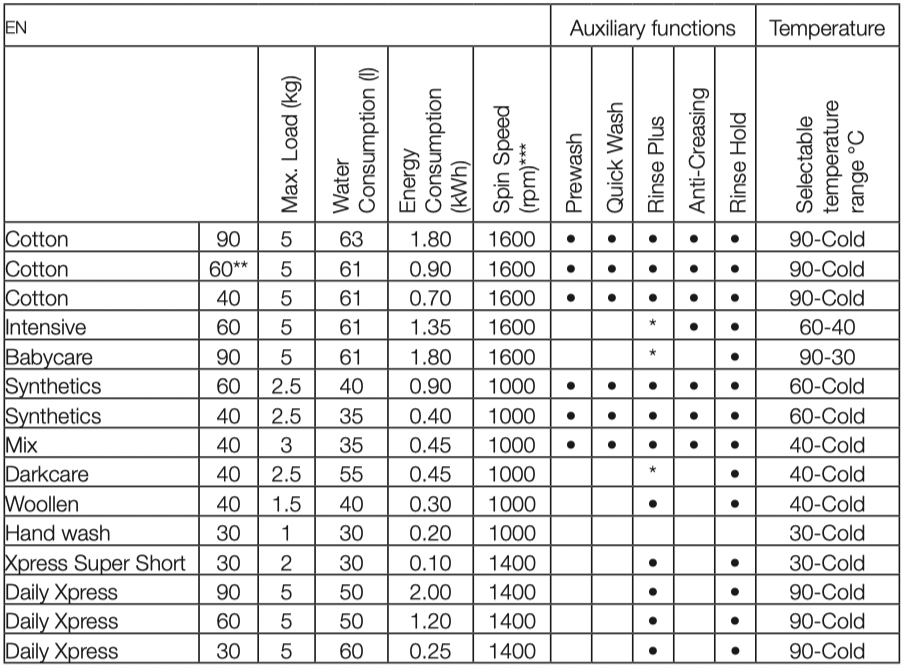
** Energy & Water labelling test programme according to AS/NZS 2040.1
 Selectable
* Automatically selected, not cancelable.
*** If maximum spin speed of your machine is lower, selection may be made until maximum spin speed.
Water and power consumption and programme duration may differ from the table shown, subject to changes in water pressure, water hardness and temperature, ambient temperature, type and amount of laundry, selection of auxiliary functions, and fluctuations in the supply voltage.
The auxiliary functions in the table may differ according to the model of your machine.
Programme duration will be displayed on the screen of your machine according to your selection.
Auxiliary Function Selection Buttons
Select the required auxiliary functions before starting the program.
Some combinations cannot be selected together. (Ex.: Pre-wash) (Figure 1-5a) and Quick Wash (Figure 1-5b).
Auxiliary function selection
If an auxiliary function that should not be selected together with a previously selected function is chosen, the first selected function will be cancelled and the last auxiliary function selection will remain active.
(Ex.: If you want to select pre-wash first and then quick wash, pre-wash will be cancelled and quick wash will remain active.
Auxiliary function that is not compatible with the program cannot be selected. (see, “Program Selection Table”)
• Prewash
When you select this function (5a), the display will indicate “1” symbol. A pre-wash is only worthwhile for heavily soiled laundry. Without pre-wash you save energy, water, detergent and time. Pre-wash without detergent is recommended for lace and curtains.
• Quick Wash
With this function (5b), the wash time is shortened. The “2” symbol will light up on the display. Use this function for smaller amounts or slightly soiled laundries.
• Rinse Plus
This function (5c) allows your machine to perform an extra rinsing in addition to the rinsing cycles performed by your machine after main washing cycle. Thus, the risk for sensitive skins (babies, allergic skins and etc.) to be effected by the minimal detergent remnants on the laundry is reduced. “3” symbol will light up on the display.
• Anti-Creasing
With this function (5d), drum movement will be lessened to prevent creasing and spinning speed is limited. In addition, washing is carried out at a higher water level. The “4” symbol will light up on the display.
Whenever you select this auxiliary function, load your machine with half of the maximum laundry specified in the program table.
The display shows the time remaining for the program to complete while a program is running. Program duration may differ from the values in the consumption table subject to the changes in the water pressure, water hardness and temperature, ambient temperature, type and amount of laundry, auxiliary functions selected, and changes in the supply voltage.
Time delay
With the “Time delay” function you can delay the program start up to 24 hours. Setting can be made in intervals of 30 minutes.
1. Press “Time delaying” buttons “+” and “-” to set your desired time delay.
2. Press “Start/Pause/Cancel” button. Then the time delay starts to count down.
More laundry may be loaded or taken out during the time delay period.
Changing the delay time
If you want to change the time during the countdown:
1. Press “Start/Pause/Cancel” button.
2. Press “Time delaying” buttons “+” or “-” to set the desired time delay.
3. Press “Start/Pause/Cancel” button.
Canceling the time delay
If you want to cancel the time delay countdown and start the program immediately:
1. Press “Start/Pause/Cancel” button.
2. Pres “Time Delaying” “-” button to decrease the time delay. Program duration after 30 minutes shall be displayed.
3. Press “Start/Pause/Cancel” button to start the program.
Starting the Program
1. Press “Start/Pause/Cancel” button to start the program.
2. The start symbol (Figure 2-7j) which indicates that the program has started will light up.
3. The door locks and the door locked symbol (Figure 2-7i) will light up.
4. The Symbol of the relevant step (prewash, main wash, rinse, softener and spin) that the program has started from will light up (Figure 2-7f).
If the machine is not spinning, the program may be in rinse hold mode or the automatic spin correction system has been activated due to an excessive unbalanced distribution of laundry in the machine.
The selected spin speed and program temperature fade out. An empty frame appears.
When the “Program selection” button is brought to the appropriate position, rpm and temperature data reappear.
Witching the machine to standby mode
Press “Start/Pause/Cancel” button momentarily to switch your machine to the standby mode. Auxiliary functions can be cancelled or selected in accordance with the step the program is at. The door can be opened if the water level is suitable. Laundry may be added / taken out by opening the door.
Door lock
The Door Locked Symbol (Figure 2-7i) lights up when the loading door is locked. This symbol will flash until the door is allowed to open. Do not force the door at this stage. You may open the door after the symbol fades out.
Child-proof lock
This function protects the appliance from being tampered by children. In this case, all of the buttons are inactive except On/Off button; by On/Off button you can whether stop or resume (while child-lock on) the program of your machine.
The machine is switched to child-lock by pressing the 2nd and 4th auxiliary functions for 3 sec. “C:on” (Child lock is activated) label appears on the screen. The same symbol will also be displayed whenever any button is pressed while the machine is child-locked.
To deactivate the child-proof lock, press the 2nd and 4th auxiliary function buttons for 3 sec. “C:OFF” (Child lock is deactivated) label appears on the screen.
“Start/Pause/Cancel” button is pressed for 3 seconds to cancel the program. Start symbol (Figure 2-7j) will flash during cancellation. After cancellation, the symbol of the corresponding step at which the cancellation was made will remain lit and “End” will appear on the screen.
When the program is finished, the symbols of the relevant steps will remain lit up and the auxiliary function, spin and temperature data selected at the start-up of the program will remain selected. “End” will appear on the display.
Remove any powder residue buildup in the drawer. To do this;
1. Press the dotted point on the siphon in the softener compartment and pull towards you until the compartment is removed from the machine.
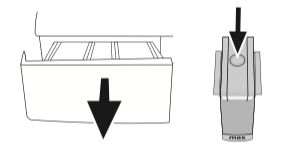
If more than a normal amount of water and softener mixture starts to gather in the softener compartment, the siphon must be cleaned.
2. Wash the dispenser drawer and the siphon with plenty of lukewarm water in a washbasin.
3. Replace the drawer into its housing after cleaning. Check if the siphon is in its original location.
There is a filter at the end of each water intake valve at the back side of the machine and also at the end of each water intake hose where they are connected to the tap. These filters prevent the foreign substances and dirt in the water to enter into the machine. Filters should be cleaned as they get dirty.
• Close the taps.
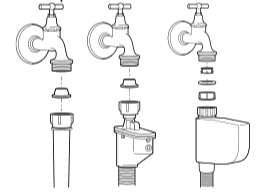
• Remove the nuts of the water intake hoses to clean the surfaces of the filters on the water intake valves with an appropriate brush.
• If the filters are very dirty, you can pull them out by means of pliers and clean them.
• Take out the filters on the flat ends of the water intake hoses together with the gaskets and clean thoroughly under streaming water.
• Replace the gaskets and filters carefully to their places and tighten the hose nuts by hand.
Your product is equipped with a filter system which ensures a cleaner water discharge that extends pump life by preventing solid items such as buttons, coins and fabric fibers from clogging the pump propeller during discharge of the washing water.
• If your machine fails to drain the water, the pump filter may be clogged. You may have to clean it every 2 years or whenever it is plugged. Water must be drained off to clean the pump filter.
In addition, water may have to be drained off completely in the following cases:
• before transporting the machine (e.g. when moving house)
• when there is the danger of frost In order to clean the dirty filter and discharge the water;
1- Unplug the machine to cut off the supply power.
There may be water at 90°C in the machine. Therefore, the filter must be cleaned only after the inside water is cooled down to avoid hazard of scalding.
2- Open the filter cap. The filter cap may be composed of one or two pieces according to the model of your machine.
If it is composed of two pieces, press the tab on the filter cap downwards and pull the piece out towards yourself.
If it is composed of one piece, hold it from both sides and open it by pulling out.
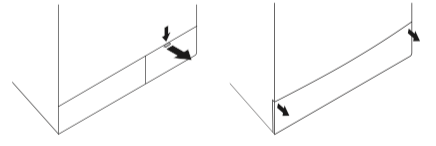
3- An emergency drain hose is supplied with some of our models. Others are not supplied with this item.
If your product is supplied with an emergency drain hose, do the following as shown in the figure below:
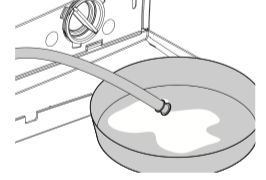
• Pull out the pump outlet hose from its housing.
• Place a large container at the end of the hose. Drain the water off into the container by pulling out the plug at the end of the hose. If the amount of water to be drained off is greater than the volume of the container, replace the plug, pour the water out, then resume the draining process.
• After draining process is completed, replace the plug into the end of the hose and fit the hose back into its place.
If your product is not supplied with an emergency drain hose, do the following as shown in the figure below:
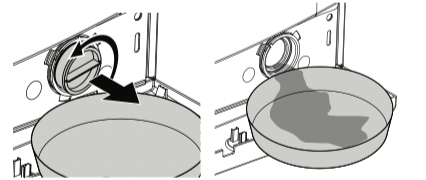
• Place a large container in front of the filter to receive water flowing from the filter.
• Loosen pump filter (anticlockwise) until water starts to flow out of it. Direct the flowing water into the container you have placed in front of the filter. You can use a piece of cloth to absorb any spilled water.
• When there is no water left, turn the pump filter until it is completely loose and remove it.
• Clean any residues inside the filter as well as fibers, if any, around the propeller region.
• If your product has a water jet feature, be sure to fit the filter into its housing in the pump. Never force the filter while replacing it into its housing. Fit the filter fully into its housing; otherwise, water may leak from the filter cap.
4- Close the filter cap.
Close the two-piece filter cap of your product by pushing the tab on it.
Close the one-piece filter cap of your product by fitting the tabs on the bottom into their positions and pushing the upper part of it.
|
Cause |
Explanation / Suggestion |
Program cannot be started or selected. |
|
|
• Machine may have switched to self protection mode due to an infrastructure problem (such as line voltage, water pressure, etc.). |
• Reset your machine by pressing “Start/ Pause/Cancel” button for 3 seconds. (see, Canceling a Program) |
There is water coming from the bottom of the machine. |
|
|
• There might be problems with hoses or the pump filter. |
• Be sure the seals of the water inlet hoses are securely fitted. • Tightly attach the drain hose to the tap. • Make sure that the pump filter is completely closed. |
Machine stopped shortly after the program started. |
|
|
• Machine can stop temporarily due to low voltage. |
• It will resume operating when the voltage is back to the normal level. |
It continuously spins. Remaining time does not count down. (For models with a display) |
|
|
• There may be an imbalance of laundry in the machine. |
• The automatic spin correction system might have been activated due to the unbalanced distribution of the laundry in the drum. • The laundry in the drum may be clustered (bundled laundry in a bag). Laundry should be rearranged and re-spun. • No spinning is performed when the laundry is not evenly distributed in the drum to prevent any damage to the machine and to its environment. |
It continuously washes. Remaining time does not count down. (For models with a display) |
|
|
• In the case of a paused countdown while taking in water: • Timer will not countdown until the machine is filled with the correct amount of water. |
• The machine will wait until there is a sufficient amount of water to avoid poor washing results due to lack of water. Then the timer will start to count down. |
|
• In the case of a paused countdown at the heating step: • Time will not count down until the selected temperature for the program is reached |
|
|
• In the case of a paused countdown at the spinning step: • There may be an imbalance of laundry in the machine. |
• The automatic spin correction system might have been activated due to the unbalanced distribution of the laundry in the drum. • The laundry in the drum may be clustered (bundled laundry in a bag). Laundry should be rearranged and re-spun. • No spinning is performed when the laundry is not evenly distributed in the drum to prevent any damage to the machine and to its environment. |
There is foaming over the detergent drawer |
|
|
• Too much detergent was used. |
• Mix 1 tablespoonful softener and ½ liter water and pour into the main wash compartment of the detergent drawer. |