
2
Your new washing machine
You have chosen a Bosch washing
machine.
Please take a few minutes to read and
become familiar with the advantages of
your washing machine.
To meet the high quality demands
required by Bosch, every washing
machine that leaves our factory is
carefully checked to ensure that it
functions correctly and is in perfect
condition.
For more information on our products,
accessories, replacement parts and
services, see our website www.bosch-
home.com or contact our after-sales
service centres.
If the operating and installation
instructions describe different models,
any differences will be pointed out at the
relevant points in the text.
Read these operating and installation
instructions before switching on the
washing machine.
Display rules
: Warning!
This combination of symbol and signal
word indicates a possibly dangerous
situation. Not heeding the warning can
cause death or injuries.
Caution!
This signal word indicates a possibly
dangerous situation. Not heeding the
caution can cause property and/or
environmental damage.
Note/tip
Information about the optimum use of
the appliance/any other useful
information.
1. 2. 3. / a) b) c)
The steps are represented by numbers
or letters.
■ / -
Lists are represented by a small box or
a dash.

en
3
Contents
enInstruction Manual and Installation Instructions
8 Intended use. . . . . . . . . . . . . . . . .5
( Safety instructions . . . . . . . . . . .6
Children/people/pets . . . . . . . . . . . . . 6
Installation. . . . . . . . . . . . . . . . . . . . . . 7
Operation . . . . . . . . . . . . . . . . . . . . . 10
Cleaning/Maintenance . . . . . . . . . . . 11
7 Environmental protection . . . . .13
Packaging/used appliance . . . . . . . . 13
Tips on economical use . . . . . . . . . . 13
5 Positioning and connecting . . .14
Included with the appliance . . . . . . . 14
Safety instructions. . . . . . . . . . . . . . . 15
Installation surface . . . . . . . . . . . . . . 15
Installation on a base or a wooden
joist floor. . . . . . . . . . . . . . . . . . . . . . 15
Installation on a platform with drawer 15
Installing the appliance in a kitchenette
. . . . . . . . . . . . . . . . . . . . . . . . . . . . . 16
Removing the transport locks . . . . . . 16
Hose and cable lengths . . . . . . . . . . 17
Water inlet. . . . . . . . . . . . . . . . . . . . . 18
Water outlet . . . . . . . . . . . . . . . . . . . 19
Levelling . . . . . . . . . . . . . . . . . . . . . . 20
Electrical connection. . . . . . . . . . . . . 21
Before washing for the first time . . . . 22
Transportation. . . . . . . . . . . . . . . . . . 23
Y Main points in brief . . . . . . . . . .24
* Getting to know the
appliance . . . . . . . . . . . . . . . . . .25
Washing machine . . . . . . . . . . . . . . . 25
Control panel . . . . . . . . . . . . . . . . . . 26
Display panel . . . . . . . . . . . . . . . . . . 27
Z Laundry. . . . . . . . . . . . . . . . . . . .29
Prepare the laundry . . . . . . . . . . . . . 29
Sorting laundry . . . . . . . . . . . . . . . . . 29
C Detergent . . . . . . . . . . . . . . . . . . 30
Correct selection of detergent . . . . . .30
Saving energy and detergent . . . . . .30
/ Overview of programmes . . . . . 31
Programmes on the programme
selector . . . . . . . . . . . . . . . . . . . . . . .31
Starching . . . . . . . . . . . . . . . . . . . . . .37
Dyeing/bleaching . . . . . . . . . . . . . . .37
Memory (depending on the model) . .37
0 Programme default settings. . . 38
Temperature . . . . . . . . . . . . . . . . . . .38
Spin speed . . . . . . . . . . . . . . . . . . . .38
Finished In. . . . . . . . . . . . . . . . . . . . .38
\ Additional programme settings/
options (* depending on the
model). . . . . . . . . . . . . . . . . . . . . 39
SpeedPerfect . . . . . . . . . . . . . . . . . .39
EcoPerfect . . . . . . . . . . . . . . . . . . . .39
Prewash *. . . . . . . . . . . . . . . . . . . . .39
Rinse Plus * . . . . . . . . . . . . . . . . . . .39
Aqua Plus * . . . . . . . . . . . . . . . . . . .39
Reduced Ironing * . . . . . . . . . . . . . .40
Soak * . . . . . . . . . . . . . . . . . . . . . . .40
Rinse Hold * . . . . . . . . . . . . . . . . . . .40
Silent Wash * . . . . . . . . . . . . . . . . . .40
AntiStain System . . . . . . . . . . . . . . .41
1 Operating the appliance . . . . . . 42
Preparing the washing machine . . . .42
Switching on the appliance/
selecting a programme . . . . . . . . . . .42
Change the programme default
settings . . . . . . . . . . . . . . . . . . . . . . .42
Select additional programme
settings . . . . . . . . . . . . . . . . . . . . . . .43
Placing laundry into the drum . . . . . .43
Measure and add detergent and
care products . . . . . . . . . . . . . . . . . .44
Start the programme . . . . . . . . . . . . .45
Child Lock 3 sec. . . . . . . . . . . . . . . .46
Adding laundry . . . . . . . . . . . . . . . . .46

en
4
Changing the programme . . . . . . . . 46
Cancel the programme . . . . . . . . . . 46
Programme end during rinse hold. . 47
Programme end. . . . . . . . . . . . . . . . 47
Removing laundry/switching off the
appliance . . . . . . . . . . . . . . . . . . . . . 47
o Home Connect . . . . . . . . . . . . . 48
Calling up the Home Connect menu 48
Connecting to the home network and
the Home Connect app . . . . . . . . . . 49
Activating/deactivating Wi-Fi . . . . . . 50
Resetting your network settings. . . . 51
Updating the software . . . . . . . . . . . 51
Information on data protection. . . . . 52
Declaration of Conformity . . . . . . . . 52
Q Appliance settings . . . . . . . . . . 53
H Sensors . . . . . . . . . . . . . . . . . . . 54
Automatic load sensing . . . . . . . . . . 54
Unbalanced load detection system . 54
AquaSensor . . . . . . . . . . . . . . . . . . . 54
Load sensor/display . . . . . . . . . . . . 54
Dosing recommendation . . . . . . . . . 54
2 Cleaning and maintenance . . . 55
Machine housing/control panel . . . . 55
Drum . . . . . . . . . . . . . . . . . . . . . . . . 55
Descaling. . . . . . . . . . . . . . . . . . . . . 55
Detergent drawer and housing . . . . 56
The drain pump is blocked,
emergency draining. . . . . . . . . . . . . 56
The drain hose at the siphon is
blocked . . . . . . . . . . . . . . . . . . . . . . 57
Filter in the water supply blocked . . 57
3 Faults and what to do about
them. . . . . . . . . . . . . . . . . . . . . . 58
Emergency release . . . . . . . . . . . . . 58
Information on the display panel . . . 59
Faults and what to do about them. . 60
4 After-sales service . . . . . . . . . . 62
[ Consumption rates . . . . . . . . . 63
Energy and water consumption,
programme duration and residual
moisture for the main washing
programmes. . . . . . . . . . . . . . . . . . . 63
Efficiency test programmes for
cotton fabrics . . . . . . . . . . . . . . . . . . 64
J Technical data . . . . . . . . . . . . . 64
r Aqua-Stop warranty . . . . . . . . . 65

Intended use en
5
8 Intended use
Intended use
■ This appliance is intended for private
domestic use only.
■ Do not install or operate this
appliance anywhere that is liable to
experience frost and/or outdoor
conditions. There is a risk that the
appliance will be damaged if
residual water in it freezes. If hoses
freeze up, they may crack/burst.
■ This appliance must only be used for
washing domestic laundry,
consisting of machine-washable
items and hand-washable woollens
(see label on item). Using the
appliance for any other purpose is
outside of the scope of its intended
application and is forbidden.
■ This appliance is suitable for
operation with mains water and
commercially available detergents
and care products (must be suitable
for use in washing machines).
■ This appliance is intended for use up
to a maximum height of
4000 metres above sea level.
Before you switch on the appliance:
Check that there is no visible damage to
the appliance. Do not operate the
appliance if it is damaged. Should you
have any problems, please contact your
specialist dealer or our customer
service.
Read and follow the operating and
installation instructions and all other
information provided with this appliance.
Retain the documents for subsequent
use or for subsequent owners.

en Safety instructions
6
( Safety instructions
Safety instructions
The following safety information
and warnings are provided to
protect you from injury and to
prevent material damage to
your surroundings.
It is nevertheless important to
take the necessary precautions
and to proceed with care when
installing, maintaining, cleaning
and operating the appliance.
Children/people/pets
:Warning
Risk of death!
Children and other people who
are unable to assess the risks
involved when using the
appliance may injure
themselves or may find
themselves in life-threatening
situations. Therefore please
note:
■ The appliance may be used
by children over the age of 8
years and by persons with
reduced physical, sensory or
mental capacity or by
persons with a lack of
experience or knowledge as
long as they are supervised
or have received instruction
on how to use the appliance
safely and they have
understood the potential
risks of using the appliance.
■ Children must not play with
this appliance.
■ Do not allow children to
clean or maintain this
appliance unsupervised.
■ Keep children under 3 years
and pets away from this
appliance.
■ Do not leave the appliance
unattended when children or
other people who are unable
to assess the risks are in the
vicinity.
:Warning
Risk of death!
Children may lock themselves
inside appliances and find
themselves in a life-threatening
situation.
■ Do not position the
appliance behind a door, as
this may obstruct the
appliance door or prevent it
from opening completely.
■ Once an appliance has
reached the end of its life,
pull the mains plug from the
socket before severing the
mains cable, and then
destroy the lock on the
appliance door.

Safety instructions en
7
:Warning
Risk of suffocation!
If allowed to play with the
packaging/plastic film or
packing components, children
may become caught in these or
pull them over their heads and
suffocate.
Keep packaging, plastic film
and packing components away
from children.
:Warning
Risk of poisoning!
Detergents and care products
may result in poisoning if
consumed.
If accidentally swallowed, seek
medical advice. Keep
detergents and care products
out of the reach of children.
:Warning
Risk of burns!
When washing at high
temperatures, the glass in the
appliance door becomes hot.
Stop children from touching the
appliance door when it is hot.
:Warning
Eye/skin irritation!
Contact with detergents or care
products may cause eye/skin
irritation.
Rinse eyes/skin thoroughly if
they/it come(s) into contact
with detergents or care
products. Keep detergents and
care products out of the reach
of children.
Installation
:Warning
Risk of electric shock/fire/
material damage/damage to
the appliance!
If the appliance is not installed
properly, this may lead to a
dangerous situation. Ensure
the following:
■ The mains voltage on your
power socket must match
the rated voltage specified
on the appliance
(identification plate). The
connected loads and the
required fuse protection are
specified on the identification
plate.
■ The mains plug and the
protective contact socket
must match and the earthing
system must be correctly
installed.
■ The installation must have an
adequate cross section.
■ The mains plug must be
freely accessible at all times.
If this is not possible, in
order to comply with the
relevant safety regulations, a
switch (all pole
disconnection) must be built
into the permanent
installation in accordance
with electrical installation
regulations.

en Safety instructions
8
■ If using a residual current
circuit breaker, only use one
that bears the following
mark: z. The presence of
this mark is the only way to
be sure that it fulfils all the
applicable regulations.
:Warning
Risk of electric shock/fire/
material damage/damage to
the appliance!
If the appliance's mains cable is
altered or damaged, this may
result in electric shock, short
circuiting or fire due to
overheating.
The mains cable must not be
kinked, crushed or altered, and
must not come into contact with
any heat sources.
:Warning
Risk of fire/material damage/
damage to the appliance!
The use of extension cords or
power strips may result in fire
due to overheating or short
circuiting.
Connect the appliance directly
to an earthed socket that has
been correctly installed. Do not
use extension cords, power
strips or multi-way couplers.
:Warning
Risk of injury/material
damage/damage to the
appliance!
■ The appliance may vibrate or
move when in operation,
potentially resulting in injury
or material damage.
Place the appliance on a
clean, even, solid surface
and, using a spirit level to
guide you, level it with the
screw-in feet.
Risk of injury/material damage/damage to the appliance!
■ If you take hold of any of the
appliance's protruding parts
(e.g. the appliance door) in
order to lift or move it, these
parts may break off and
cause injury.
Do not take hold of any of
the appliance's protruding
parts in order to move the
appliance.

Safety instructions en
9
:Warning
Risk of injury!
■ The appliance is very heavy.
Lifting it may result in injury.
Do not lift the appliance on
your own.
Risk of injury!
■ The appliance has sharp
edges on which you could
cut your hands.
Do not take hold of the
appliance by its sharp
edges. Wear protective
gloves to lift it.
Risk of injury!
■ If the hoses and mains
cables are not correctly
routed, they may constitute a
tripping hazard, which may
result in injury.
Route hoses and cables
such that they do not
constitute a tripping hazard.
Caution!
Material damage/damage to
the appliance
■ If the water pressure is too
high or too low, the
appliance may not be able to
operate properly, and it may
also result in material
damage or damage to the
appliance.
Make sure that the water
pressure in the water supply
facility is at least
100 kPa (1 bar), and does
not exceed
1000 kPa (10 bar).
Material damage/damage to the appliance
■ If the water hoses are altered
or damaged, this may result
in material damage or
damage to the appliance.
The water hoses must not be
kinked, crushed, altered or
severed.
Material damage/damage to the appliance
■ The use of hoses supplied
by other brands to connect
to the water supply may
result in material damage or
damage to the appliance.
Use the hoses supplied with
the appliance or genuine
spare part hoses only.
Material damage/damage to the appliance
■ The appliance is secured for
transportation by transport
locking devices. If the
transport locking devices are
not removed before the
appliance is operated, this
may result in damage to the
appliance.
It is important to completely
remove all transport locking
devices before using the
appliance for the first time.
Make sure that you retain
these transport locking
devices separately. It is
important to refit the
transport locking devices if
the appliance is to be
transported, in order to
prevent the appliance from
being damaged in transit.

en Safety instructions
10
Operation
:Warning
Risk of explosions/fire!
Laundry that has been
pretreated with cleaning agents
that contain solvents, e.g. stain
remover/cleaning solvent, may
cause an explosion in the drum.
Rinse the laundry thoroughly
with water before washing it in
the machine.
:Warning
Risk of poisoning!
Poisonous fumes may be given
off by cleaning agents that
contain solvents, e.g. cleaning
solvent.
Do not use cleaning agents that
contain solvents.
:Warning
Risk of injury!
■ If you support your weight/sit
on the appliance door when
it is open, the appliance may
tip over, which may result in
injury.
Do not support your weight
on the appliance door when
it is open.
Risk of injury!
■ If you climb onto the
appliance, the worktop may
break, which may result in
injury.
Do not climb onto the
appliance.
Risk of injury!
■ If you reach into the drum
while it is still rotating, you
risk injuring your hands.
Wait until the drum has
stopped rotating.
:Warning
Risk of scalding!
When washing at high
temperatures, there is a risk of
scalding if you come into
contact with hot detergent
solution (e.g. when draining hot
detergent solution into a
washbasin).
Do not reach into the hot
detergent solution.
:Warning
Eye/skin irritation!
Detergent and care products
may spray out if the detergent
drawer is opened while the
appliance is in operation.
Rinse eyes/skin thoroughly if
they/it come(s) into contact
with detergents or care
products. If accidentally
swallowed, seek medical
advice.

Safety instructions en
11
Caution!
Material damage/damage to
the appliance
■ If the amount of laundry in
the appliance exceeds its
maximum load capacity, it
may not be able to operate
properly, or this may result in
material damage or damage
to the appliance.
Do not exceed the maximum
load capacity of dry laundry.
Make sure you comply with
the maximum load capacities
specified for each of the
programs. ~ Page 31
Material damage/damage to the appliance
■ If you pour the wrong
quantity of detergent or
cleaning agent into the
appliance, this may result in
material damage or damage
to the appliance.
Use detergents/care
products/cleaning agents
and softeners in accordance
with the manufacturers'
instructions.
Cleaning/Maintenance
:Warning
Risk of death!
The appliance is powered by
electricity. There is a risk of
electric shock if you come into
contact with live components.
Therefore please note:
■ Switch off the appliance.
Disconnect the appliance
from the power supply (pull
out the plug).
■ Never take hold of the mains
plug with wet hands.
■ When removing the mains
plug from the socket, always
take hold of the plug itself
and never the mains cable,
otherwise this may damage
the mains cable.
■ Do not make any technical
modifications to the
appliance or its features.
■ Repairs and any other work
on the appliance must only
be conducted by our
customer service or by an
electrician. The same applies
for replacing the mains cable
(when necessary).
■ Spare mains cables can be
ordered from our customer
service.
:Warning
Risk of poisoning!
Poisonous fumes may be given
off by cleaning agents that
contain solvents, e.g. cleaning
solvent.
Do not use cleaning agents that
contain solvents.
:Warning
Risk of electric shock/material
damage/damage to the
appliance!
If moisture penetrates the
appliance, this may cause it to
short circuit.
Do not use a pressure washer,
steam cleaner, hose or spray
gun to clean your appliance.

en Safety instructions
12
:Warning
Risk of injury/material
damage/damage to the
appliance!
The use of spare parts and
accessories supplied by other
brands is dangerous and may
result in injury, material damage
or damage to the appliance.
For safety reasons, use
genuine spare parts and
accessories only.
Caution!
Material damage/damage to
the appliance
Cleaning agents and agents for
pretreating laundry (e.g. stain
removers, prewash sprays, etc.)
may cause damage if they
come into contact with the
surfaces of the appliance.
Therefore please note:
■ Do not allow these agents to
come into contact with the
surfaces of the appliance.
■ Clean the appliance with
nothing but water and a soft,
damp cloth.
■ Remove any detergent,
spray or other residues
immediately.

Environmental protection en
13
7 Environmental
protection
Environmental protection
Packaging/used appliance
Tips on economical use
■ Always fill the appliance with the
maximum amount of laundry for
each programme.
~ "/ Overview of programmes"
on page 31
■ Wash normally soiled laundry
without prewash.
■ For light and normal soiling in
laundry, you can save energy and
detergent. ~ Page 30
■ The selectable temperatures apply
to the care labels on the textiles. The
temperatures in the machine may
deviate from this so that you get the
optimum mix of energy-saving and
washing results.
■ Information on energy and water
consumption: ~ Page 27
The displays provide information
about the relative level of energy and
water consumption in the selected
programmes.
The more display segments are
visible, the higher the respective
consumption.
This enables you to compare the
consumption levels of the different
programmes when choosing your
programme settings and decide on
an energy- and water-saving
programme setting.
– é Energy consumption
– æ Water consumption
■ Energy-saving mode: The display
panel lighting goes out after a few
minutes and the A button flashes.
Press any button to activate the
lighting.
Energy-saving mode is not activated
if a programme is running.
■ Automatic switch off: If the
appliance is not operated for a
prolonged period, it may
automatically switch off before the
programme starts and when the
programme has ended to save
energy. Press the main switch again
to switch on the appliance.
~ "Q Appliance settings"
on page 53
■ If the washing will be dried in a
dryer, select the spin speed
according to the dryer
manufacturer's instructions.
)
Dispose of packaging in an
environmentally-responsible
manner.
This appliance is labelled in
accordance with European
Directive 2012/19/EU
concerning used electrical and
electronic appliances (waste
electrical and electronic
equipment - WEEE).
The guideline determines the
framework for the return and
recycling of used appliances
as applicable throughout the
EU.
´
9
9
en Positioning and connecting
14
5 Positioning and
connecting
Positioning and connecti ng
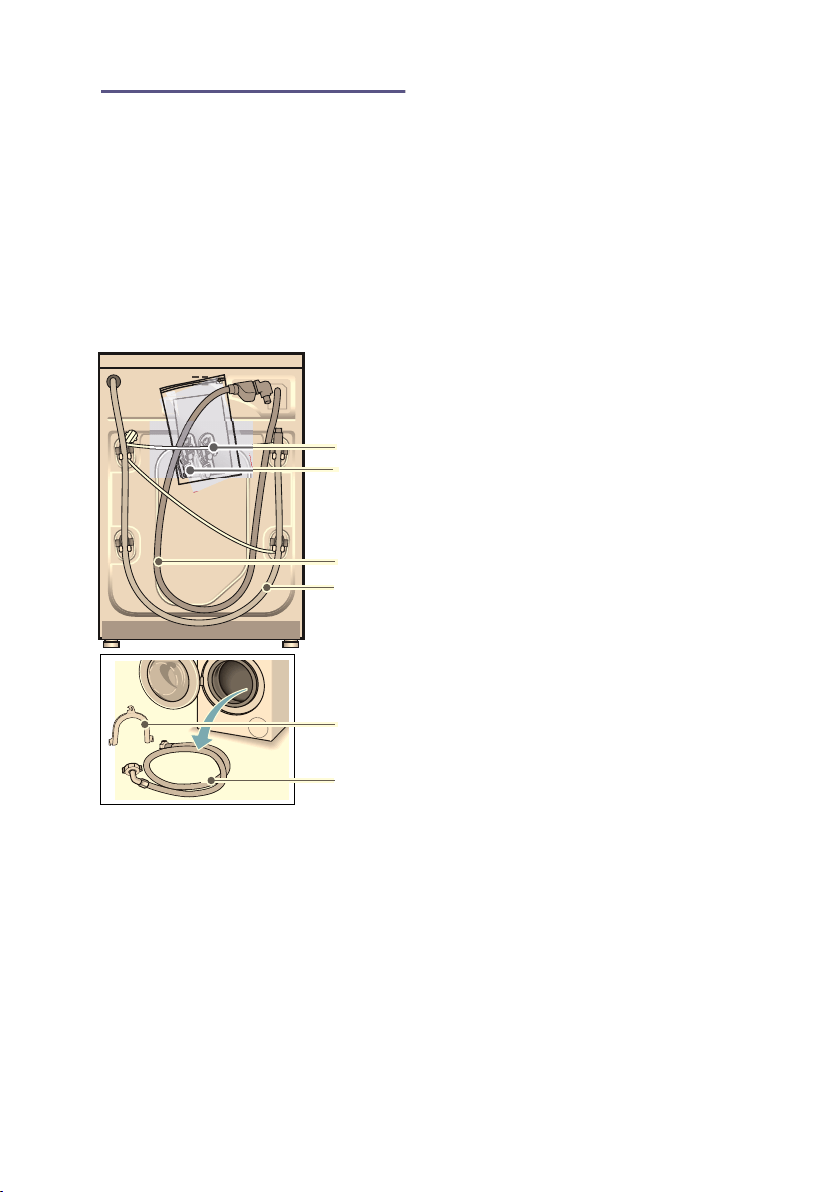
Included with the appliance
Note: Check the machine for transport
damage. Never use a damaged
machine. If you have any complaints,
contact the dealer from whom you
purchased the appliance or our
customer services. ~ Page 62
In addition, a hose clamp (24 - 40 mm
diameter, available from specialist
dealers) is required to connect the
water drain hose to a siphon.
Useful tools
■ Spirit level for aligning
■ Spanner with:
– WAF13 for loosening the
transport braces, and
– WAF17 for aligning the appliance
feet
3
+
#
( Mains cable
0 Bag:
■ Installation and operating
instructions
■ Customer services location
directory*
■ Warranty*
■ Cover caps for openings after
the transport braces have
been removed
■ Adaptor with sealing washer
from 21 mm = ½" to
26.4 mm = ¾" *
8 Water supply hose on Aqua-Stop
models
@ Water drain hose
H Elbow for securing the water
drain hose*
P Water supply hose on standard/
Aqua-Secure models
* depending on the model

Positioning and connecting en
15
Safety instructions
:Warning
Risk of injury!
■ The washing machine is very heavy.
Be careful when lifting/transporting
the washing machine.
■ When the washing machine is lifted
by its protruding parts (e.g. the
washing machine door), the
components may break off and
cause injuries.
Do not lift the washing machine by
protruding parts.
■ If the hose and mains cables are not
routed properly, there is a risk of
tripping and injury.
Lay hoses and cables in such a way
that there is no risk of tripping.
Caution!
Damage to the appliance
Frozen hoses may rip/burst.
Do not install the washing machine in
areas exposed to frost or outdoors.
Caution!
Water damage
The connection points for the water
supply hose and water drain hose are
under high water pressure. To prevent
leaks and water damage, you must
follow the instructions in this section.
Notes
■ In addition to the safety information
listed here, the local water and
electricity supplier may have special
requirements.
■ If in doubt, have the appliance
connected by a specialist.
Installation surface
Note: The washing machine be stable
so that it does not move around.
■ The installation surface must be firm
and level.
■ Soft floors/floor coverings are not
suitable.
Installation on a base or a
wooden joist floor
Caution!
Damage to the appliance
The washing machine may "wander"
and tip/topple from the base when
spinning.
The feet of the appliance must be
secured with holding brackets.
Order no. WMZ 2200, WX 9756,
Z 7080X0
Note: On wooden joist floors, install the
washing machine:
■ In a corner, if possible,
■ On a water-resistant wooden board
(min. 30 mm thick) which is screwed
tightly to the floor.
Installation on a platform with
drawer
Platform order no.: WMZ 20490,
WZ 20490, WZ 20510, WZ 20520
en Positioning and connecting
16
Installing the appliance in a
kitchenette
:Warning
Danger of death!
There is a risk of electric shock if you
touch live components.
Do not remove the appliance covering
plate.
Notes
■ Recess width of 60 cm required.
■ Only install the washing machine
underneath a continuous worktop
that is securely connected to
adjacent cabinets.
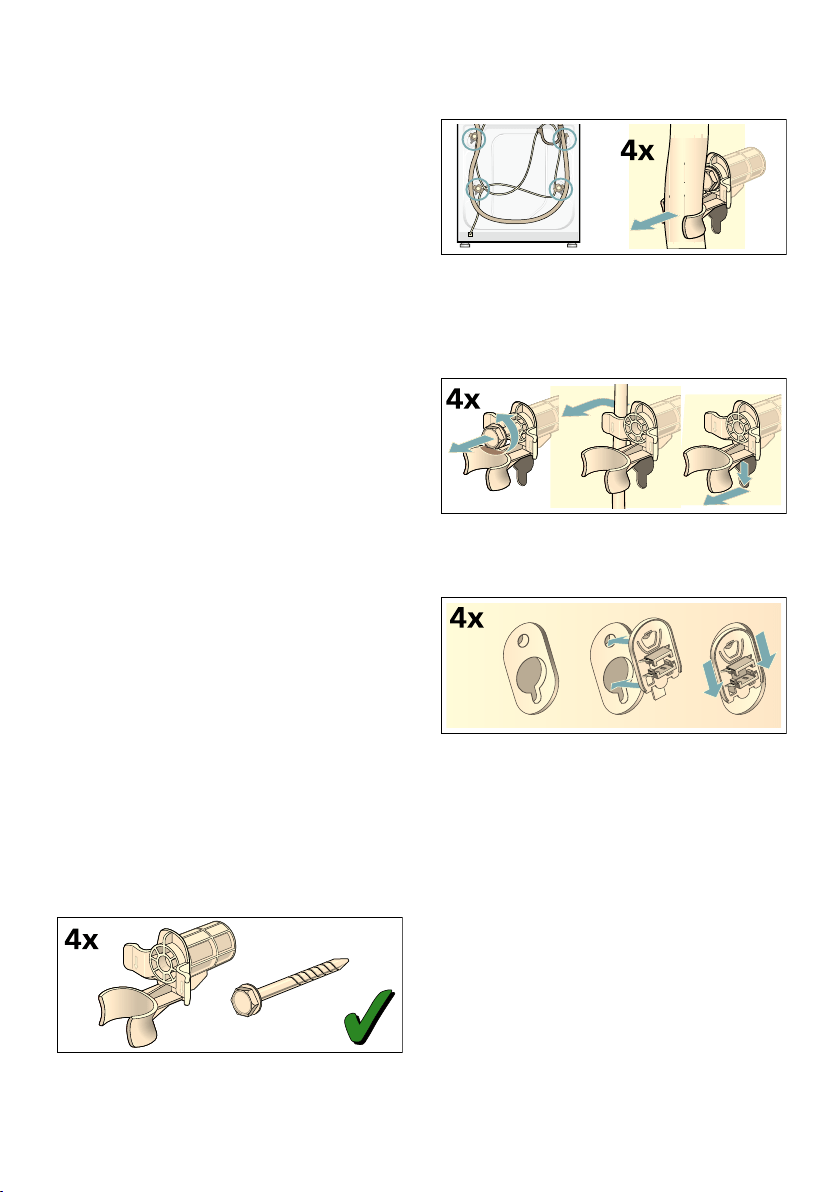
Removing the transport locks
Caution!
Damage to the appliance
■ The machine is secured for
transportation using transport locks.
If the transport locks are not
removed, the drum, for example,
may become damaged when the
machine is operated.
Before using the appliance for the
first time, make sure that you
completely remove all four transport
locks. Keep the locks in a safe
place.
■ To prevent transport damage from
occurring if the appliance is moved
at a later date, you must refit the
transport locks before transporting
the appliance.
Note: Keep the screws and sleeves in
a safe place.
1. Take the hoses out of the holders.
2. Unscrew and remove all four
transportation securing bolts with a
wrench (WAF 13).
Remove the sleeves. Remove the
mains cable from the holders.
3. Insert the covers. Lock the covers
firmly in place by applying pressure
to the snap-in hooks.
Positioning and connecting en
17
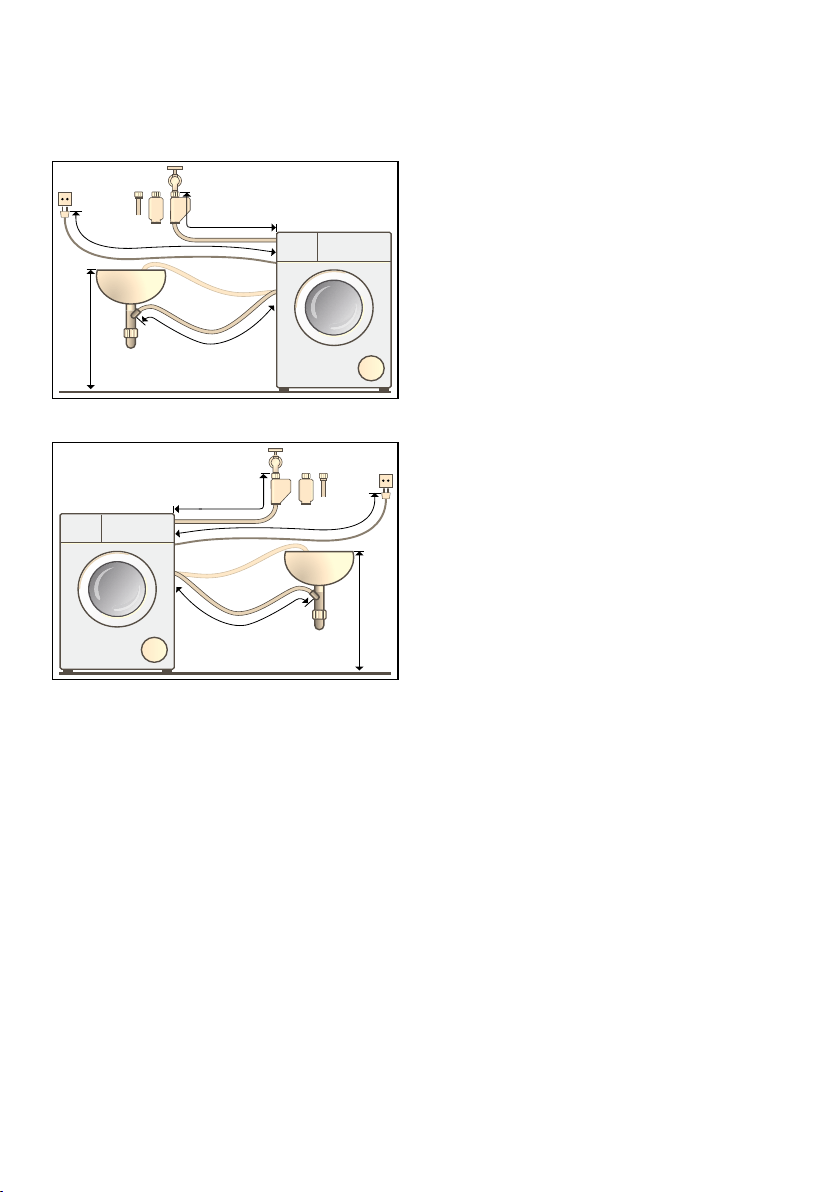
Hose and cable lengths
■ Left-hand connection
■ Right-hand connection
Tip: The following are available from
specialist dealers/customer services:
■ Extension for Aqua-Stop and cold
water supply hose (approx. 2.50 m);
order no. WM Z2380, WZ 10130,
CZ 11350, Z 7070X0
■ A longer supply hose (approx.
2.20 m) for standard models;
individual component number for
customer services: 00353925
PD[FP
aFP
aFP
aFP
aFP
PD[FP
aFP
aFP

en Positioning and connecting
18
Water inlet
:Warning
Danger of death!
There is a risk of electric shock if you
touch live components.
Do not immerse the Aqua-Stop safety
valve in water (it contains an electric
valve).
Notes
■ Only operate the washing machine
using cold mains water.
■ Do not connect the machine to the
mixer tap of an unpressurised hot-
water boiler.
■ Do not use a used supply hose. Only
use the supply hose supplied or one
that was purchased from an
authorised specialist retailer.
■ Do not kink or squash the water
supply hose.
■ Do not alter (shorten, cut through)
the water supply hose (otherwise its
strength is no longer guaranteed).
■ Only tighten the screw connections
by hand. If the screw connections
are tightened too much with a tool
(pliers), the thread may become
damaged.
■ When connecting to a 21 mm = ½"
tap, first fit an adapter* with a sealing
washer from 21 mm = ½" to
26.4 mm = ¾".
*supplied depending on the model
Optimum water pressure in the supply
network
At least 100 kPa (1 bar)
Maximum 1000 kPa (10 bar)
When the tap is open, the water flow
rate is at least 8 l/min.
If the water pressure is higher than this,
a pressure-reducing valve must be
installed.
Connection
Connect the water supply hose to the
tap (26.4 mm = ¾") and to the
appliance (not necessary for Aqua-Stop
models as this is permanently installed):
■ Model: Standard
■ Model: Aqua-Secure
■ Model: Aqua-Stop
Note: Turn on the tap carefully,
checking the leak tightness of the
connection points. The screw
connection is under mains water
pressure.
PLQPP
ê
ë
Positioning and connecting en
19
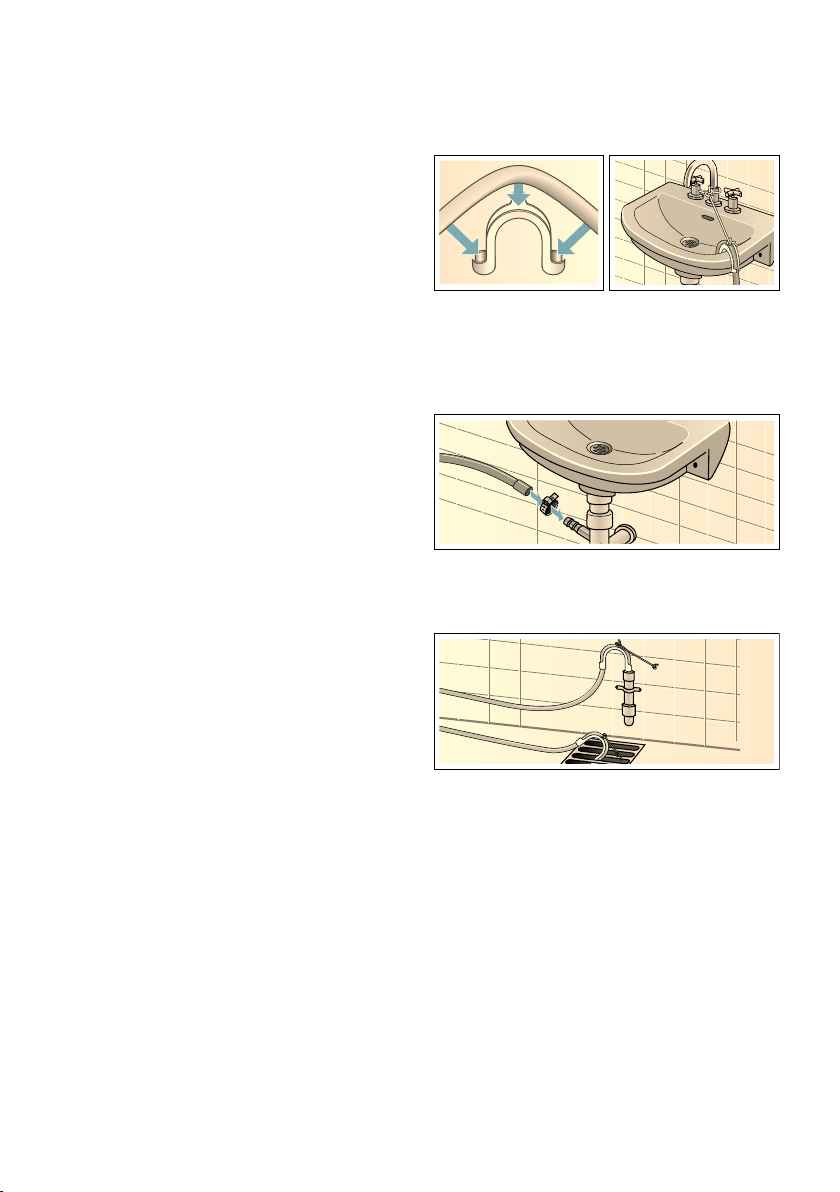
Water outlet
:Warning
Risk of scalding!
When you are washing at high
temperatures, there is a risk of scalding
if you come into contact with hot water
(e.g. when draining hot water into a
washbasin).
Do not reach into the hot water.
Caution!
Water damage
If the drain hose slips out of the
washbasin or the connection point
during draining due to high water
pressure, any escaping water may
cause water damage.
Secure the drain hose so that it cannot
slip out.
Caution!
Damage to the appliance/fabrics
If the end of the drain hose is immersed
in the drained water, water may be
sucked back into the appliance and
may damage the appliance/fabrics.
Make sure that:
■ The plug does not block drainage
from the washbasin.
■ The end of the drain hose is not
immersed in the drained water.
■ The water drains away quickly
enough.
Note: Do not kink the water drain hose
or put strain on it lengthways.
Connection
■ Drainage into a washbasin
■ Drainage into a siphon
The connection point must be
secured using a hose clamp with a
diameter of 24 - 40 mm (available
from specialist dealers).
■ Drainage into a plastic pipe with
rubber bushing or into a drainage
pit
en Positioning and connecting
20
Levelling
Align the appliance using a spirit level.
Incorrect alignment may result in loud
noises, vibrations and machine
"movement".
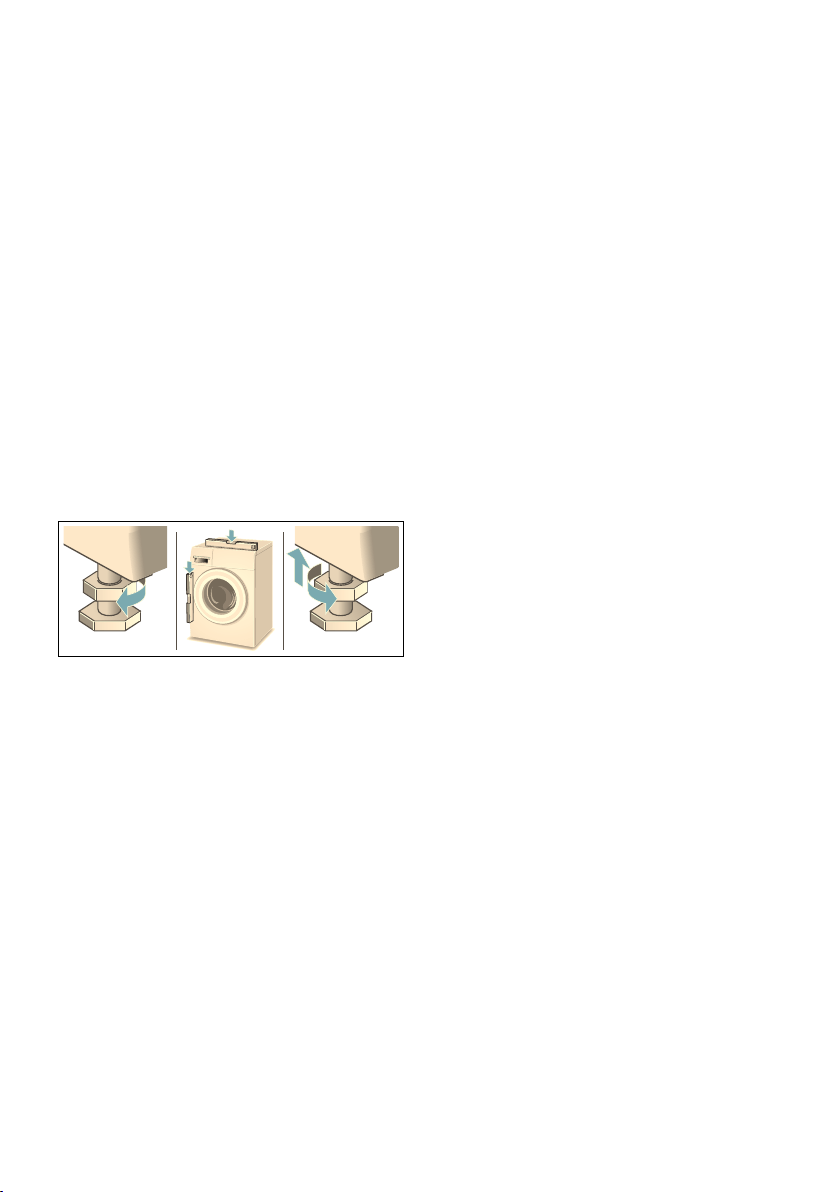
1. Loosen the lock nuts using a WAF17
spanner, by turning it in a clockwise
direction.
2. Check the alignment of the washing
machine with a spirit level, and
adjust it if necessary. Change the
height by turning the appliance feet.
All four appliance feet must stand
firmly on the ground.
3. The lock nuts on all four appliance
feet must be screwed tightly against
the housing using a suitable WAF17
spanner. In doing so, hold the foot
tight and do not adjust its height.

Positioning and connecting en
21
Electrical connection
:Warning
Danger of death!
There is a risk of electric shock if you
touch live components.
■ Never touch or hold the mains plug
with wet hands.
■ Only pull out the mains cable by the
plug and never by the cable, as this
could damage it.
■ Never unplug the mains plug during
operation.
Observe the following information and
ensure that:
Notes
■ The mains voltage and voltage
indicated on the washing machine
(rating plate) are the same.
The connected load and fuse
required are specified on the rating
plate.
■ The washing machine is only
connected to an alternating current
supply via a properly installed
earthed socket.
■ The mains plug fits the socket.
■ The cable cross-section is adequate.
■ The earthing system is properly
installed.
■ The mains cable is only replaced by
a qualified electrician (if this is
necessary). Replacement mains
cables are available from customer
services.
■ No multiple plugs/couplings or
extension cables are used.
■ If an earth-leakage circuit breaker is
used, only a type which displays the
z symbol is used.
Only this symbol guarantees
compliance with the currently
applicable regulations.
■ The mains plug can be accessed at
all times. If this is not possible, in
order to comply with the relevant
safety regulations, a switch (2-pole
switch-off) must be built into the
permanent installation in accordance
with electrical installation regulations.
■ The mains cable is not kinked,
squashed, altered or cut through.
■ The mains cable does not come into
contact with heat sources.

en Positioning and connecting
22
Before washing for the first
time
The washing machine was thoroughly
tested before leaving the factory.To
remove any water that may be left over
from the test, run the first wash cycle
without any laundry.
Notes
■ The washing machine must be
correctly installed and connected.
From ~ Page 14
■ Never use a machine if it is
damaged. Inform the after-sales
service.
Preparatory work:
1. Check the machine.
2. Remove the protective film from the
control panel.
3. Plug in the mains plug.
4. Turn on the tap.
Running the programme without
laundry:
1. Switch on the appliance.
2. Close the door (do not load any
laundry).
3. Set the Drum Clean 90 °C
programme.
4. Open the detergent drawer.
5. Pour approximately 1 litre of water
into compartment II.
6. Pour standard washing powder into
compartment II.
Note: To prevent foaming, only use
half the amount of detergent
recommended by the detergent
manufacturer.Do not use detergents
intended for woollens or delicates.
7. Close the detergent drawer.
8. Press the A button.
9. Switch off the appliance at the end of
the programme.
Your washing machine is now ready to
use.
Positioning and connecting en
23
Transportation
E.g. when moving house
Preparatory work:
1. Turn off the tap.
2. Reduce the water pressure in the
supply hose: ~ Page 57; Cleaning
and maintenance – filter in the water
supply blocked
3. Disconnect the washing machine
from the mains.
4. Drain the remaining water:
~ Page 56; cleaning and
maintenance – the drain pump is
blocked, emergency draining
5. Remove the hoses.
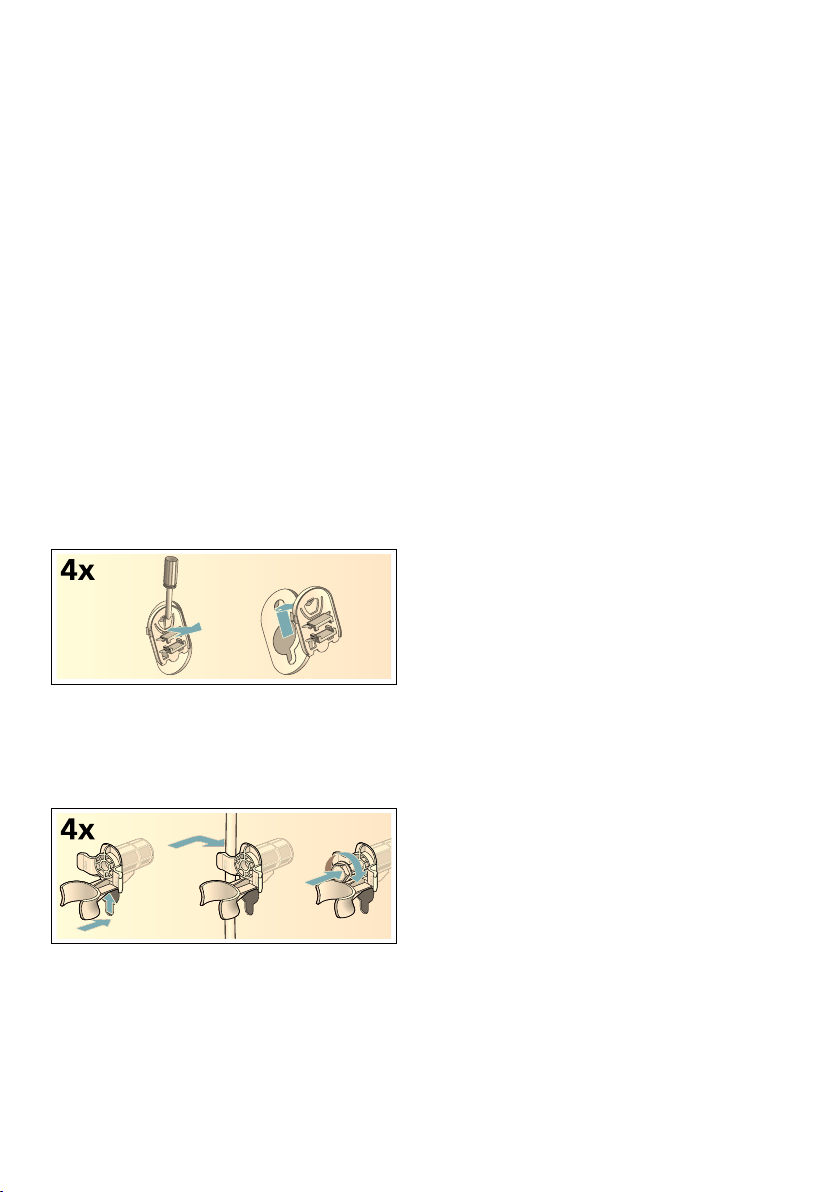
Fitting the transportation securing
means:
1. Remove the covers and keep them
in a safe place.
If required, use a screwdriver.
2. Insert all four sleeves.
Clip the mains cable securely in the
holders. Insert the transportation
securing bolts and tighten them with
a wrench (WAF 13).
Before switching on the appliance
again:
Notes
■ The transport braces must be
removed.
■ Pour approx. 1 litre of water into
compartment II, select the Drain
programme and start.
This will prevent detergent from
flowing unused into the drain during
the next wash.
en Main points in brief
24
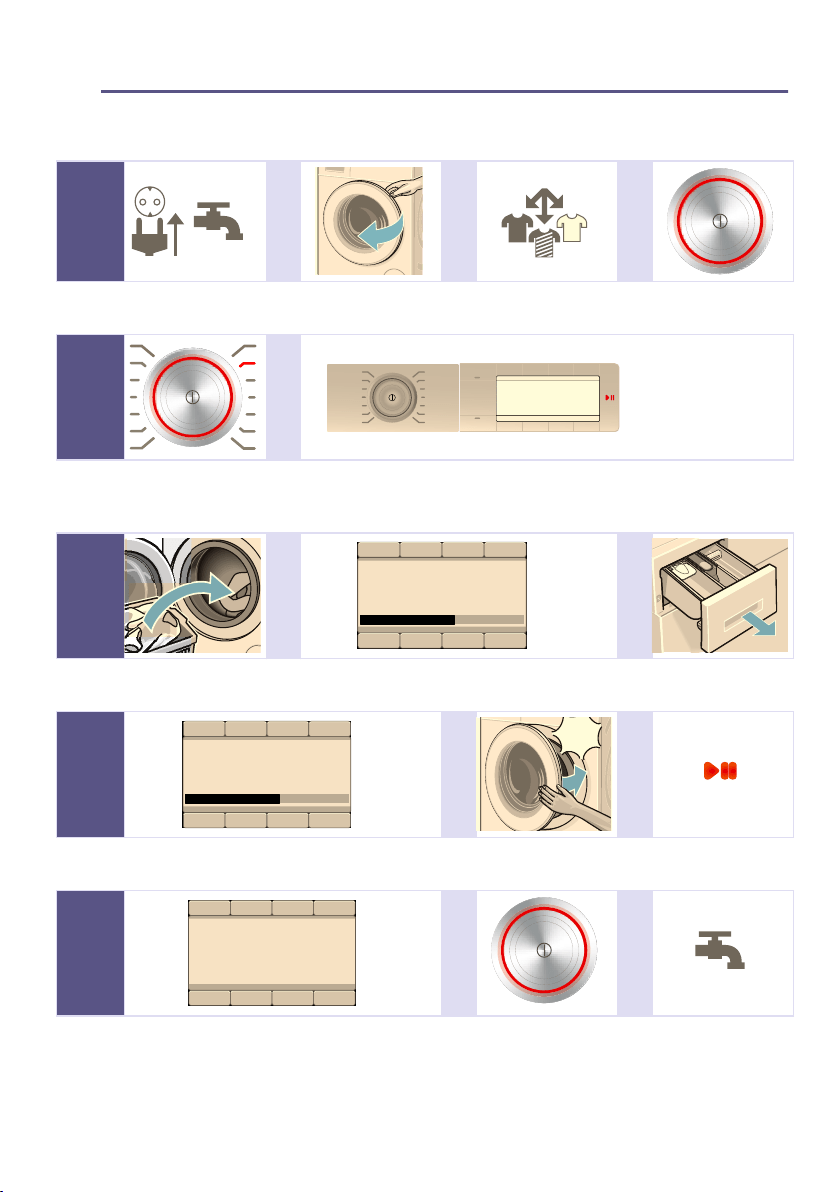
Y Main points in brief
Main points in bri ef
--------
--------
--------
--------
--------
1 @ @ @
Plug into the mains.
Turn on the tap.
Open the washing
machine door.
Sort the laundry. To switch on, press
the # button.
2 @
Select a
programme, e.g.
Easy-Care.
If required, change the programme settings of the selected programme
and select programme settings/options.
3 @ @
3OHDVHORDGODXQGU\PD[NJ
'RVDJH
öüü
Load the drum. Observe the maximum load (depending on the
model) on the display panel.
Open the detergent
drawer.
4 @ @
3OHDVHORDGODXQGU\PD[NJ
'RVDJH
FODFN
Dose the detergent according to the dosing
recommendation.
Close the washing
machine door.
Start the
programme.
5 @ @
)LQLVKHGUHPRYHZDVKLQJ
÷÷
Programme end To switch off, press
the # button.
Turn off the tap (for
models without
Aqua-Stop).
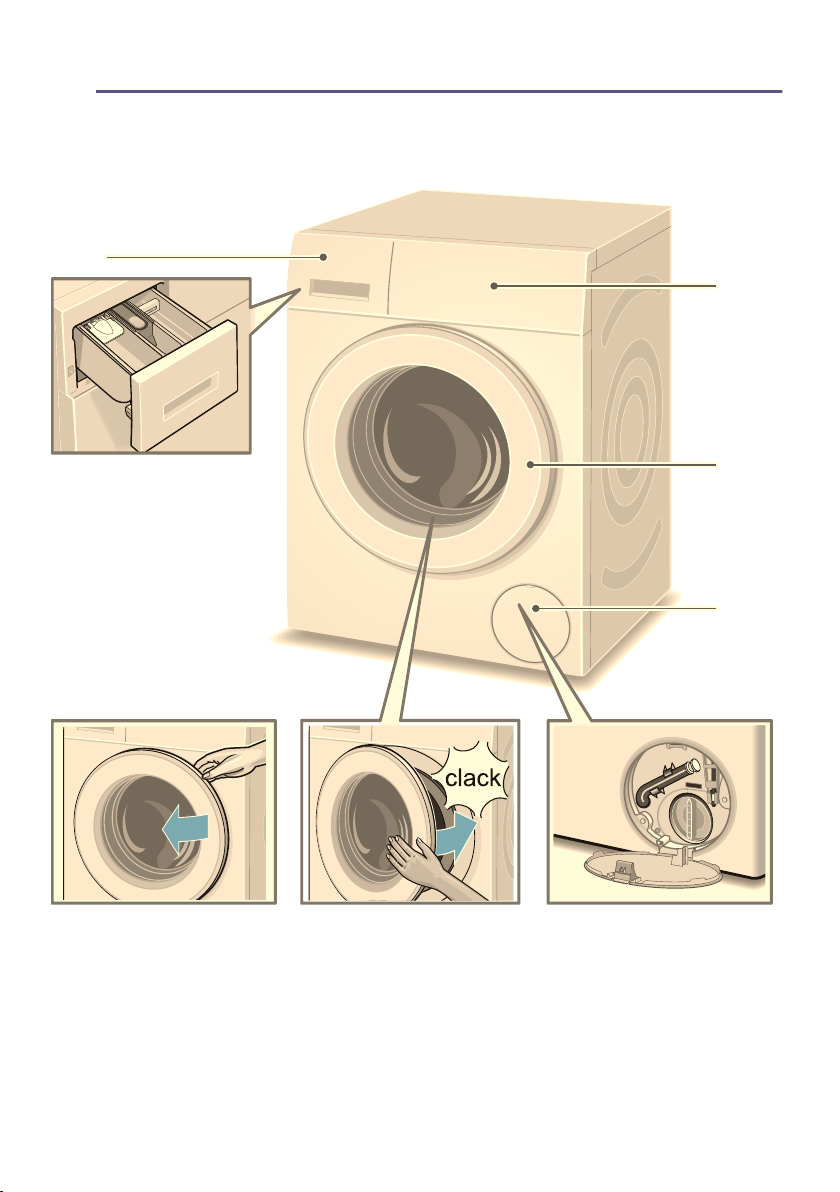
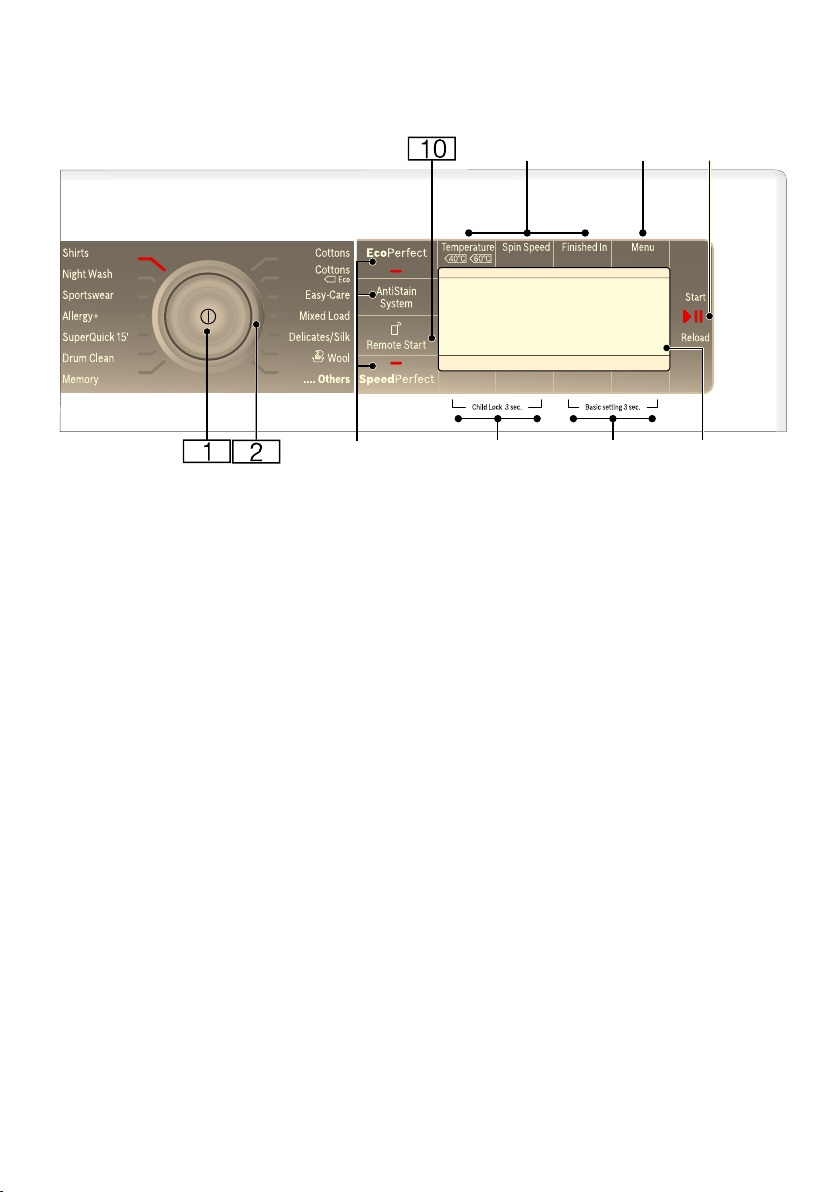
en Getting to know the appliance
26
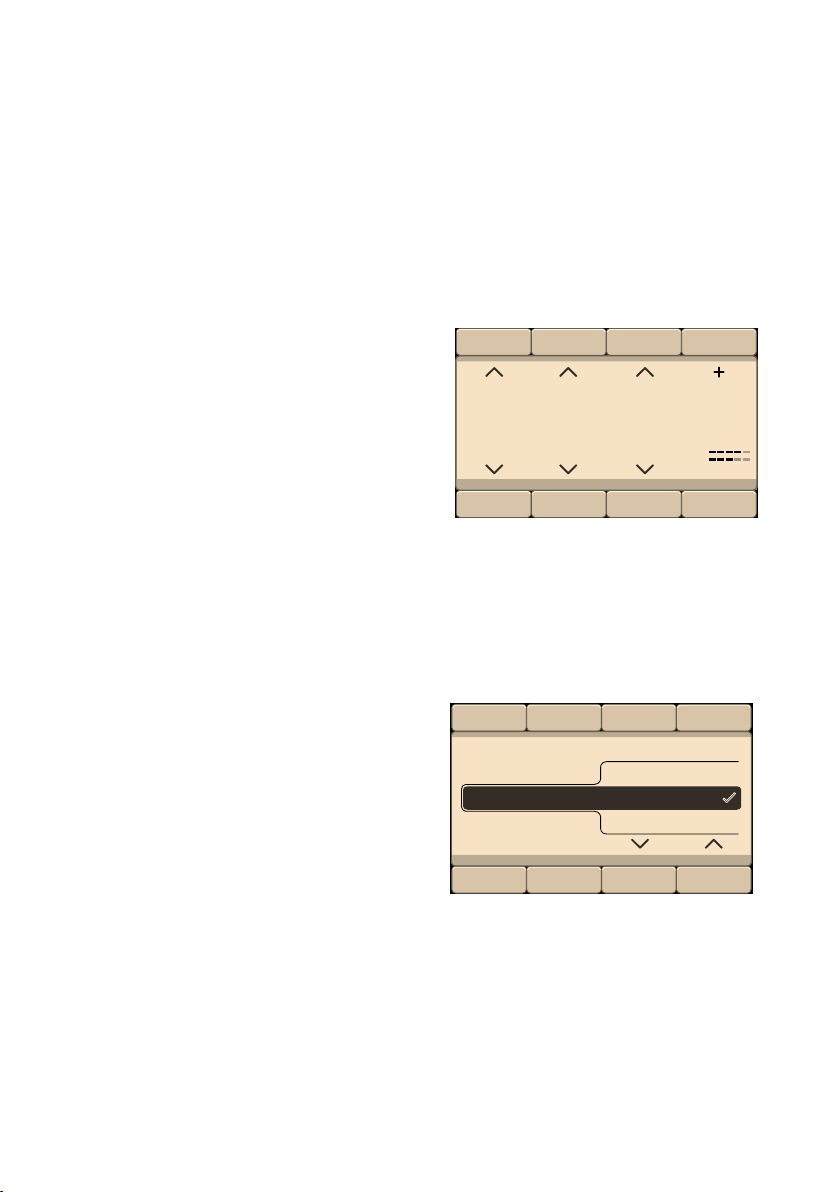
Control panel
Note: All the buttons are sensitive
(except for the main switch) and only
need to be pressed lightly.
#
+
K;C
3
( Main switch
To switch the appliance on/off:
Press the # button.
0 Programme selector
For selecting a programme.
The programme selector can be
turned in either direction.
Programme overview
~ Page 31
8 Buttons for selecting additional
programme settings:
EcoPerfect, SpeedPerfect,
AntiStain System
@ Buttons Child Lock 3 sec. for
activating/deactivating the
childproof lock ~ Page 46
H Basic settings 3 sec. buttons
for changing the appliance
settings ~ Page 28
P Display panel for settings and
information ~ Page 27
X A button for:
■ Starting a programme,
■ Interrupting a programme,
e.g. to add items of laundry
~ Page 46,
■ Cancelling a programme
~ Page 46
` Menu ~ Page 27, ~ Page 39
h Buttons for changing the
programme default settings:
■ Temperature,
■ Spin speed ,
■ Finished In
Getting to know the appliance en
27
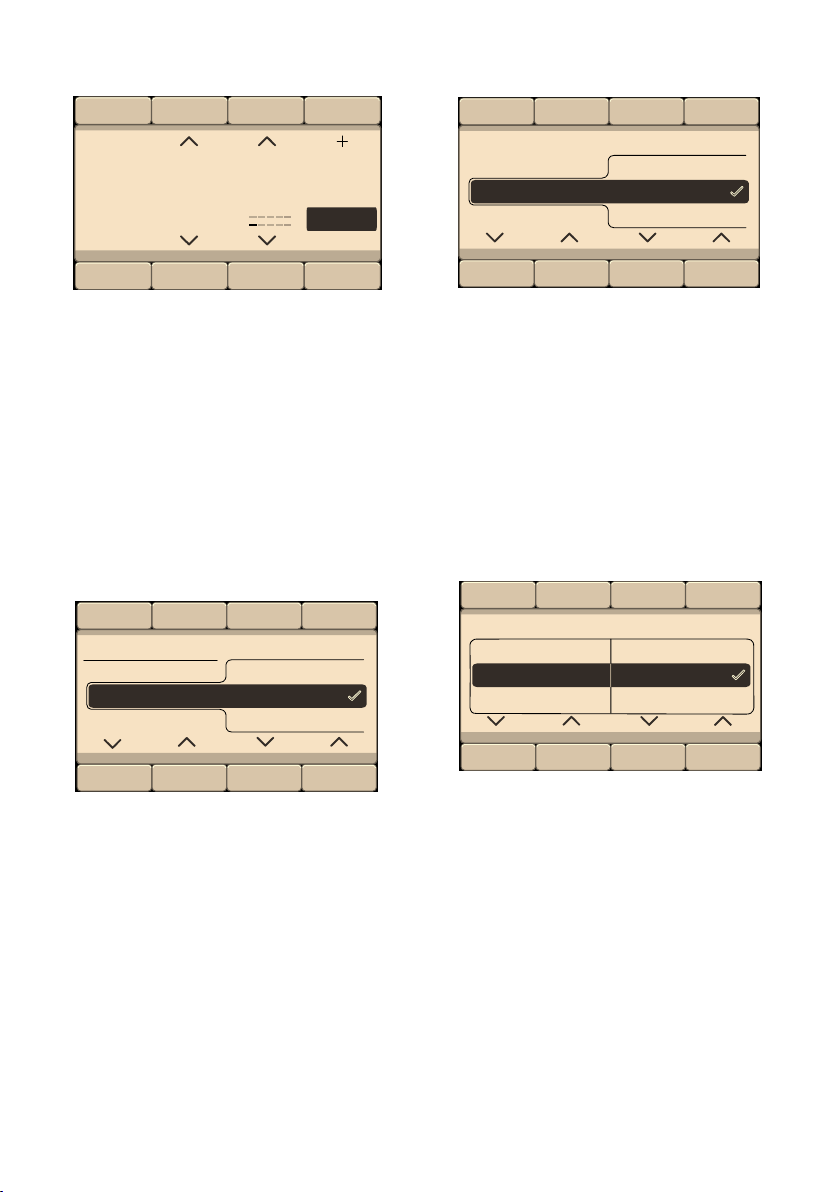
Display panel
Main menu after selecting the
programme
e.g. Easy-Care
The arrows on the display panel
indicate in which direction the
programme default settings can be
changed using the buttons located
above and below.
... Others Programmes selected
and select, for example, the Spin
programme:
Using the buttons below the arrows, you
can select the required programme. The
selection is acknowledged by a tick.
Wait or go back by pressing the Main
menu button; the selected programme
is displayed on the display panel.
)" The Remote Start } button
releases the appliance so that
the programme can be started
remotely via the
Home Connect app. Remote
start remains enabled for
24 hours after it has been
activated. It is automatically
deactivated if you do not start
the programme via the
Home Connect app during this
time. If you carry out any
operations on the appliance
itself, such as opening the door
or selecting a different
programme, the remote start
button is deactivated for safety
reasons.
Notes
■ Remote start can only be
activated if the door is
closed.
■ Remote start cannot be
activated if the childproof
lock is on.
Press and hold the button for
more than three seconds to
access the Home Connect
settings .
"
"
&
K
±
´
0DLQ0HQX
$GGLWLRQDOSURJUDPV
K
6SLQ
en Getting to know the appliance
28
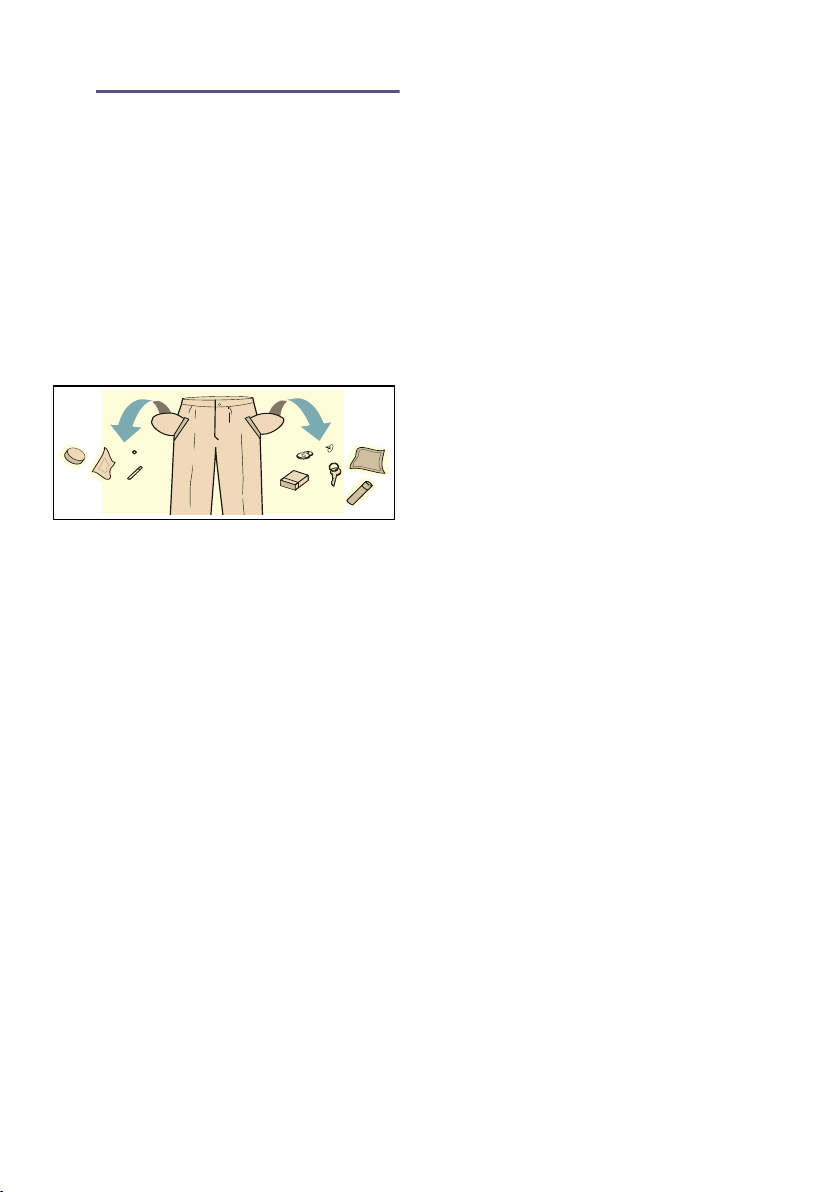
To change, select the button under the
programme highlighted in black and
change the programme.
Menu button selected
and select, for example, the Rinse Hold
($) option:
Using the buttons under the two left-
hand arrows, select the option. Using
the two right-hand arrows, select the
displayed value. The selected options
are active immediately and are
displayed on the display panel.
Wait or go back to the main menu by
pressing the Menu button.
AntiStain System (x) button selected
and select, for example, the grass·
stain type:
Using the two right-hand arrows, select
the stain type. The selected stain type is
active immediately and is displayed on
the display panel.
Wait or go back to the main menu by
pressing the Main menu or AntiStain
System (x) button.
Basic settings 3 sec. buttons selected
Change the appliance setting: e.g.
volume of the end signal ~ Page 53
Using the buttons under the two left-
hand arrows, select the setting. Using
the two right-hand arrows, select the
displayed value. The selection is
acknowledged by a tick.
Wait or go back to the main menu by
pressing the Basic settings 3 sec.
(press and hold again).
K
6SLQ
´
9
9
5LQVH+ROG
K
RQ
&
[6WDLQV
K
*UDVV
&
è
è
HQGVLJQDO RII
K
&
Laundry en
29
Z Laundry
Laundry
Prepare the laundry
Caution!
Damage to the appliance/fabrics
Foreign objects (e.g. coins, paperclips,
needles, nails) may damage the laundry
or components in the washing machine.
You should therefore note the following
tips when preparing your laundry:
■ Empty any pockets.
■ Look out for metal items (paperclips,
etc.) and remove them.
■ Wash delicates in a laundry bag
(tights, underwired bras, etc.).
■ Close any zips; button up any cover
buttons.
■ Brush sand out of pockets and
collars.
■ Remove curtain fittings or place
curtains in a laundry bag.
Sorting laundry
Sort your laundry according to the care
instructions and manufacturer's
information on the care labels,
depending on:
■ Type of fabric/fibre
■ Colour
Note: Laundry may discolour. Wash
white and coloured items separately.
Wash new coloured items separately
the first time you wash them.
■ Soiling
Wash laundry with the same level of
soiling together.
Some examples of soiling levels can
be found on ~ Page 30
– Light: Do not prewash, select the
SpeedPerfect setting if
necessary
– Normal
– Heavy: Load less laundry, select
a programme with prewash
– Stains: Remove/pretreat stains
while they are fresh. Firstly, dab
with soapy water; do not rub.
Then wash the items of laundry
with the appropriate programme.
Stubborn or dried-in stains can
sometimes only be removed by
washing several times.
■ Symbols on the care labels
Note: The numbers in the symbols
indicate the maximum washing
temperature that may be used.
M Suitable for normal washing
process;
e.g. Cottons programme
U A gentle washing process is
required;
e.g. Easy-Care programme
O An especially gentle washing
process is required; e.g.
Delicate/Silk programme
W Suitable for washing by hand;
e.g. W Woollens programme
Ž Do not machine wash.

en Detergent
30
C Detergent
Detergent
Correct selection of detergent
The care label is crucial for selecting
the correct detergent, temperature and
treatment of the laundry. ~ See also
www.sartex.ch
If you visit www.cleanright.eu, you will
find further information on detergents,
care products and cleaning agents for
domestic use.
■ Standard detergent with optical
brighteners
Suitable for boil-washable white
laundry made from linen or cotton
Programme: Cottons/
cold - max. 90 °C
■ Detergent for colours without
bleach or optical brighteners
Suitable for coloured laundry made
from linen or cotton
Programme: Cottons/
cold - max. 60 °C
■ Detergent for colours/delicates
without optical brighteners
Suitable for coloured laundry made
from easy-care fibres, synthetic
fibres
Programme: Easy-Care/
cold - max. 60 °C
■ Detergent for delicates
Suitable for delicate, fine fabrics, silk
or viscose
Programme: Delicate/Silk/
cold - max. 40 °C
■ Detergent for woollens
Suitable for wool
Wool programme/
cold - max. 40 °C
Saving energy and detergent
For light and normal soiling, you can
save energy (lower washing
temperature) and detergent.
Note: When measuring the amount of
all detergents/additives/care products
and cleaning agents, please always
check the manufacturer's instructions
and information. ~ Page 44
Saving Soiling/note
Reduced
temperature and
detergent quantity
as per the
recommended
dosage
Light
No visible dirt or stains.
Clothing has taken on some
body odour, e.g.:
■ Light summer/sports
clothing (worn for a few
hours)
■ T-shirts, shirts, blouses
(worn for up to one day)
■ Guest bed linen and hand
towels (used for one day)
Normal
Visible dirt or a few light
stains, e.g.:
■ T-shirts, shirts, blouses
(sweat soaked, worn a
few times)
■ Towels, bedding (used
for up to one week)
Temperature as
per the care label
and detergent
quantity as per the
recommended
dosage for heavy
soiling
Heavy
Dirt and/or stains clearly
visible, e.g. tea towels, baby
items, work clothing
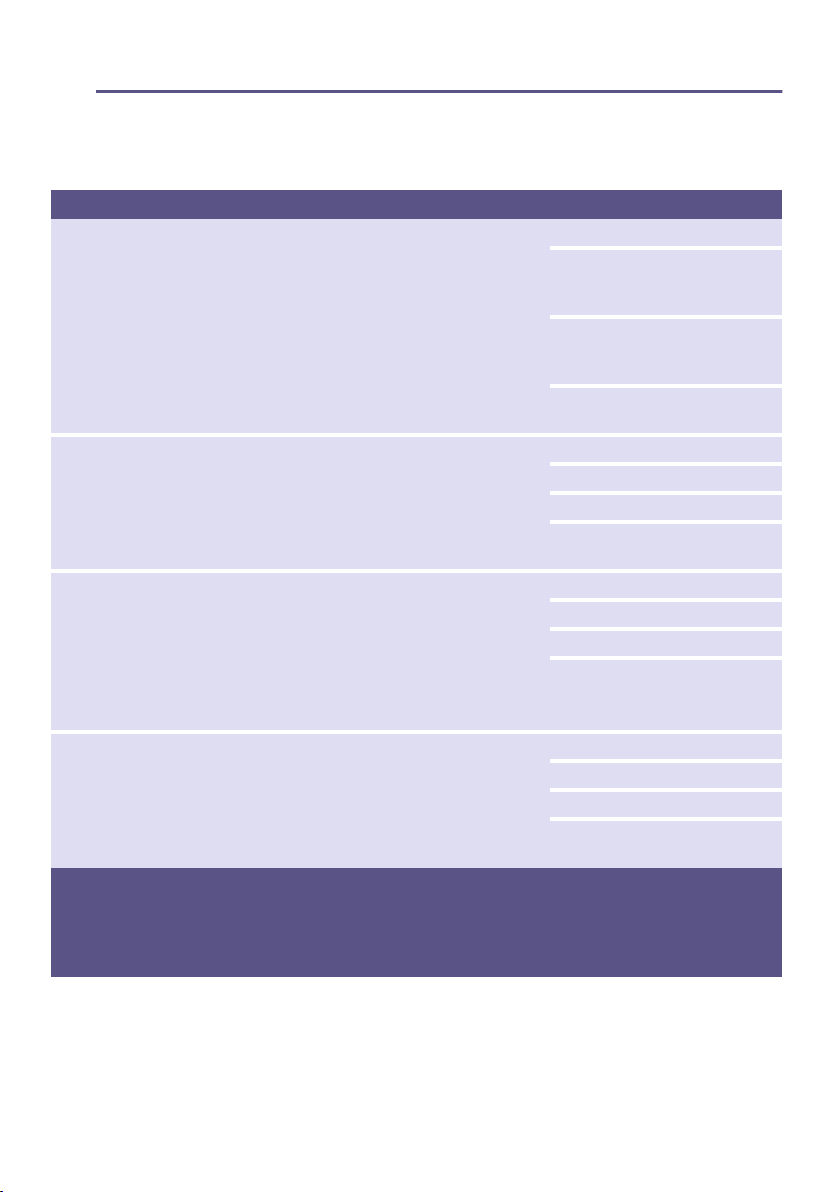
Overview of programmes en
31
/ Overview of programmes
Overview of programmes
Programmes on the programme selector
Programme/type of laundry/instructions Settings
Name of the programme
Brief explanation of the programme and the fabrics for which it is
suitable.
Max. load
Temperature that can be
selected;
(Ž = cold)
Spin speed that can be
selected;
0 = no spin cycle, draining only
Additional programme settings
that can be selected*
Cottons
Hard-wearing fabrics, heat-resistant fabrics made of cotton or linen
Note: . The SpeedPerfect (() setting is suitable as a short
programme for lightly soiled laundry.
Max. 9 kg/5*** kg
Ž-90 °C
0-1600** rpm
¦, (, x, !, Ï, Z, p,
%, $, Á
Cottons Eco ü
Hard-wearing fabrics, heat-resistant fabrics made of cotton or linen;
Energy-optimised washing by reducing the temperature while achieving
a comparable washing result for the Cottons programme.
Note: . The actual washing temperature may differ from the stated
programme temperature for energy-saving reasons; the washing
performance corresponds to the selected temperature.
Max. 9 kg
Ž-90 °C
0-1600** rpm
x, !, Ï, Z, p, %, $, Á
Easy-Care
Textiles made of synthetic materials or blended fabrics
Max. 4 kg
Ž - 60 °C
0-1200** rpm
¦, (, x, !, Ï, Z, p,
%, $, Á
* The programmes and additional programme settings are model-dependent. The programmes/settings
that are available can either be selected directly in the control panel or under ... Others Programmes
or Menu.
** Max. The maximum spin speed depends on the model and programme
*** Reduced load for the SpeedPerfect (() setting
en Overview of programmes
32
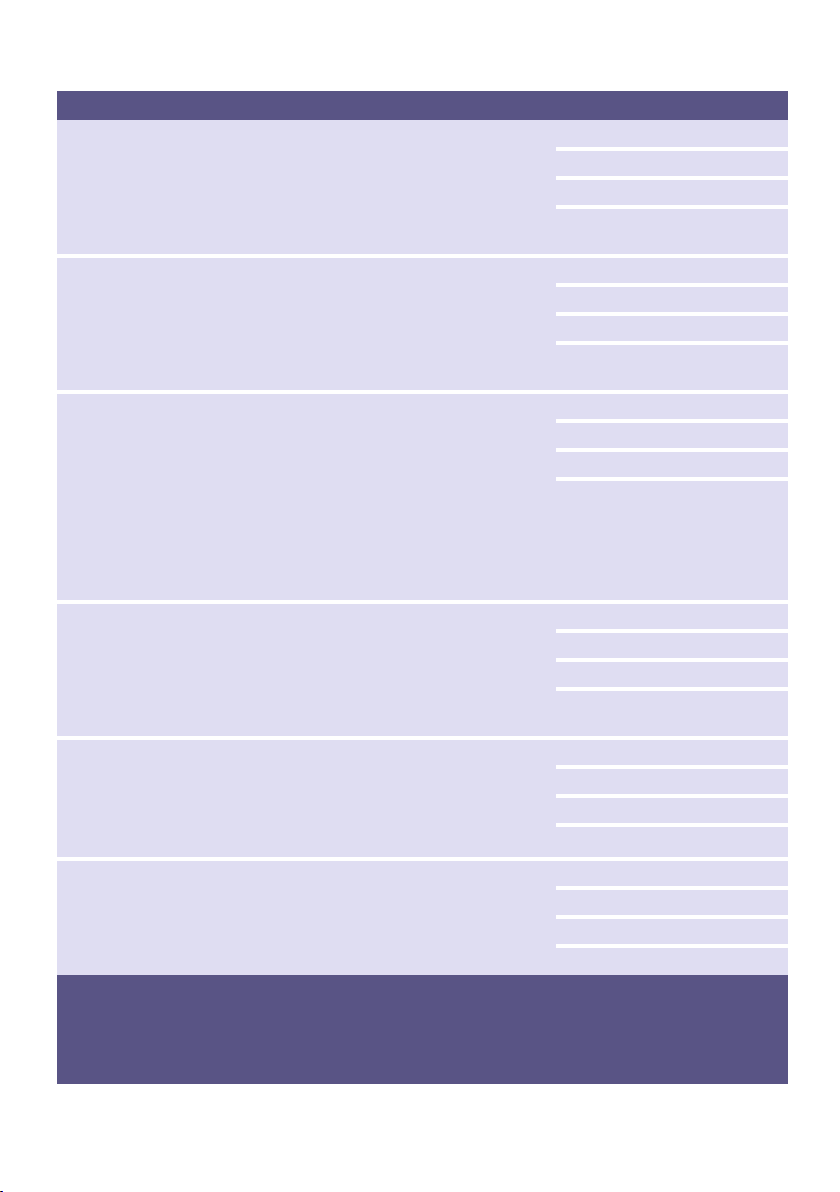
Mixed Load
Mixed load of cottons and synthetic fabrics
Max. 4 kg
Ž-40 °C
0-1600** rpm
¦, (, x, !, Ï, Z, p,
%, $, Á
Delicates / Silk
Delicate, washable fabrics, e.g. made of silk, satin, synthetic fibres or
blends (e.g. silk blouses, silk scarves)
Note: . Use a detergent suitable for machine washing delicate fabrics or
silk.
Max. 2 kg
Ž-40 °C
0-800** rpm
¦, (, x, !, Ï, Z, p,
$
W Wool
Hand- or machine-washable fabrics that are made of wool or contain
wool;
particularly gentle wash programme to prevent laundry from shrinking,
with longer pauses in the programme (during which the items rest in the
water)
Notes
■ Wool is of animal origin, e.g. angora, alpaca, llama, sheep.
■ Use a detergent that is suitable for machine-washing wool.
Max. 2 kg
Ž - 40 °C
0-800** rpm
$, Á
Allergy+
Hard-wearing fabrics made of cotton or linen
Note: . Particularly suitable for strict hygiene requirements or
particularly sensitive skin thanks to the extended wash cycle at a defined
temperature, higher water level and extended rinse cycle.
Max. 6,5kg
Ž - 60 °C
0-1600** rpm
¦, (, x, !, Ï, Z, p,
%, $, Á
SuperQuick 15’/30’ *
Extra-short programme of approx. 15/30 minutes, suitable for small
items of lightly soiled laundry
Note: . The SuperQuick 15’ programme is run for the
SpeedPerfect (() setting.
Max. 2/3,5 kg
Ž - 40 °C
0-1200** rpm
(, $, Á
SuperQuick 15’ *
Extra-short programme of approx. 15 minutes, suitable for small items
of lightly soiled laundry
Max. 2 kg
Ž - 40 °C
0-1200** rpm
$, Á
Programme/type of laundry/instructions Settings
* The programmes and additional programme settings are model-dependent. The programmes/settings
that are available can either be selected directly in the control panel or under ... Others Programmes
or Menu.
** Max. The maximum spin speed depends on the model and programme
*** Reduced load for the SpeedPerfect (() setting

Overview of programmes en
33
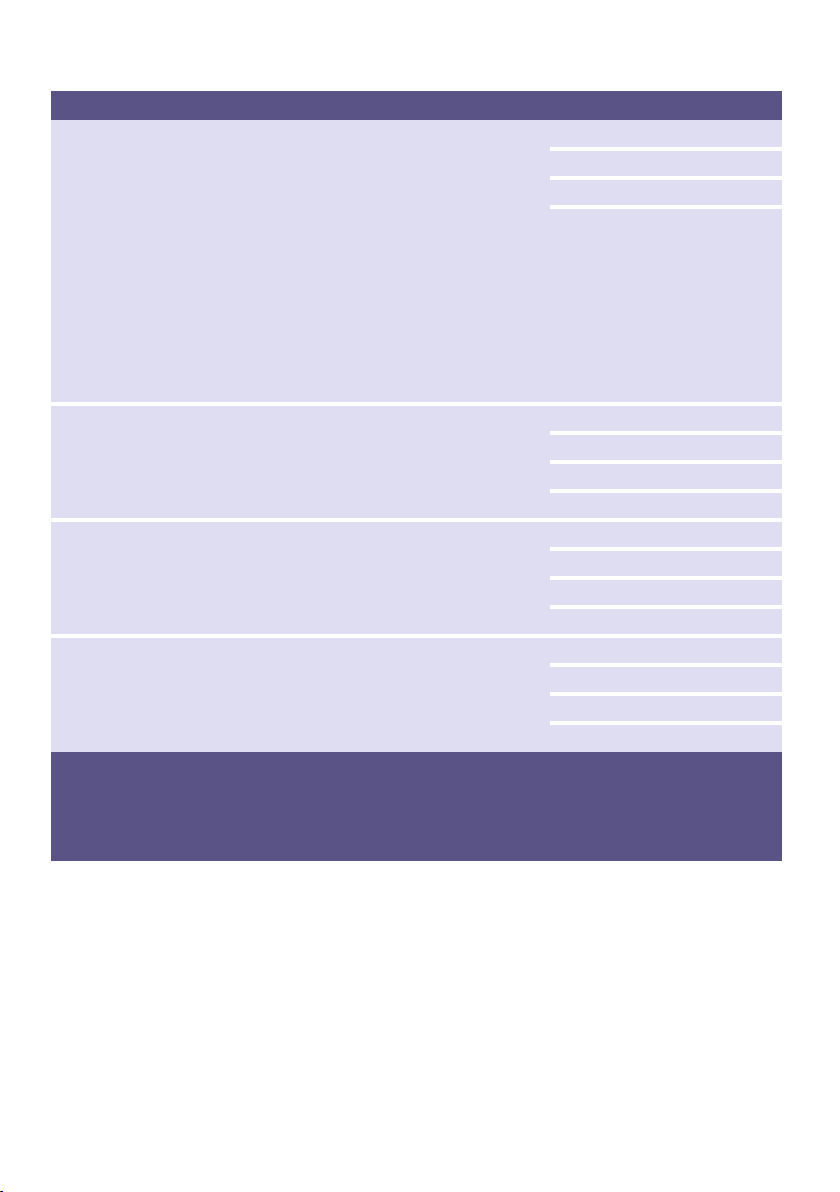
SuperQuick 60' *
Extra-short programme of approx. 60 minutes, suitable for small items
of lightly soiled laundry
Max. 5 kg
Ž - 60 °C
0-1600** rpm
x, !, Ï, Z, p, %, $, Á
Dark Wash
Dark-coloured cottons and dark-coloured easy-care fabrics;
Turn items inside-out before washing.
Max. 3.5 kg
Ž - 40 °C
0-1200** rpm
¦, (, x, !, Ï, Z, p,
%, $, Á
Outdoor *
Membrane-coated weatherproof or outdoor clothing and water-resistant
fabrics
Notes
■ Use special detergent suitable for machine washing; add the
correct dosage to compartment II in accordance with the
manufacturer's instructions.
■ Laundry must not be treated with fabric softener.
■ Before washing, clean the detergent drawer thoroughly (all
compartments) to remove fabric-softener residue.
Max. 2 kg
Ž-40 °C
0-800** rpm
¦, (, x, Ï, Z, $, Á
Night Wash *
Especially quiet programme for washing during the night; suitable for
cotton, linen, synthetic and blended fabrics
Notes
■ End signal deactivated,
■ reduced final spin speed set by default and shorter washing time
4 kg
Ž-40 °C
0-1200** rpm
¦, (, x, !, Ï, Z, p,
%, $
Duvet *
Machine-washable items stuffed with synthetic fibres, such as pillows,
quilts and bedspreads; also suitable for items stuffed with down
Note: . Wash large items separately. Use a detergent designed for
delicates and follow the instructions on the item's care label. Use
detergent sparingly.
Max. 2.5 kg (down: Max. 2 kg)
Ž - 60 °C
0-1200** rpm
¦, (, Ï, Z, $
Programme/type of laundry/instructions Settings
* The programmes and additional programme settings are model-dependent. The programmes/settings
that are available can either be selected directly in the control panel or under ... Others Programmes
or Menu.
** Max. The maximum spin speed depends on the model and programme
*** Reduced load for the SpeedPerfect (() setting

en Overview of programmes
34
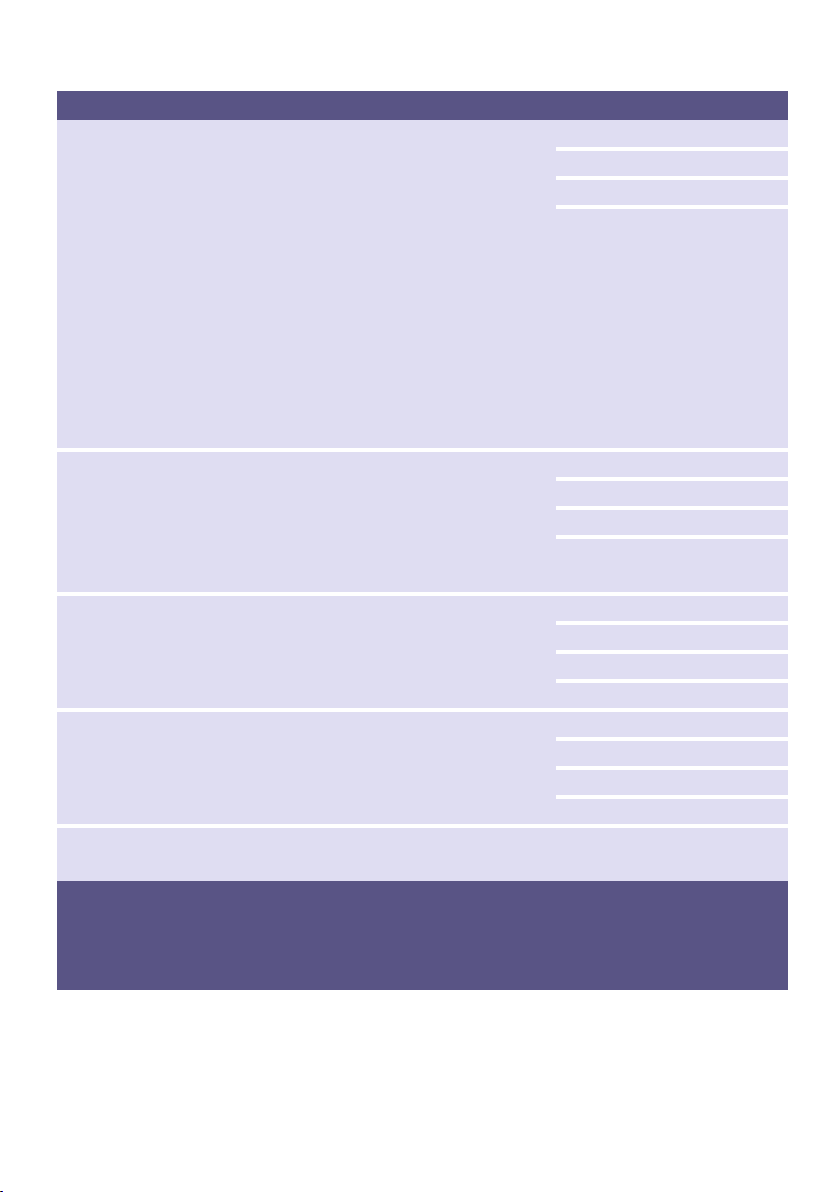
Shirts
Non-iron shirts or blouses made of cotton, linen, synthetic fibres or
blended fabrics
Notes
■ Shirts/blouses are only given a short spin on the
Reduced Ironing (p) setting. Hang them up to dry while still
dripping wet.
–> Self-smoothing effect
■ Use the Delicates / Silk programme to wash shirts/blouses made
of silk or delicate fabrics.
Max. 2 kg
Ž - 60 °C
0-800** rpm
¦, (, x, !, Ï, Z, p,
%, $, Á
Down *
Machine-washable fabrics stuffed with down, such as pillows and
duvets; also suitable for items stuffed with synthetic fibres
Note: . Wash large items separately. Use a detergent designed for
delicates and follow the instructions on the item's care label. Use
detergent sparingly.
Max. 2 kg
Ž - 60 °C
0-1200** rpm
¦, ( , Ï, Z, $
Lingerie *
For delicate, washable underwear, e.g. made of velvet, lace, Lycra, silk
or satin
Max. 1 kg
Ž-40 °C
0-600** rpm
¦, (, x, Ï, Z, p, %,
$, Á
Curtains *
3.5 kg heavy curtains or 25-30 m² lightweight drapes
Notes
■ Shorter rinse and final spin cycles.
■ Use a detergent that is suitable for machine-washing curtains.
■ The Prewash (T) button is preset by default. If you do not require
a pre-wash cycle, press the button to deactivate the function.
Max. 3.5 kg
Ž - 40 °C
0-800** rpm
¦, (, x, !, Ï, Z, % ,
$, Á
Programme/type of laundry/instructions Settings
* The programmes and additional programme settings are model-dependent. The programmes/settings
that are available can either be selected directly in the control panel or under ... Others Programmes
or Menu.
** Max. The maximum spin speed depends on the model and programme
*** Reduced load for the SpeedPerfect (() setting
Overview of programmes en
35
Drum Clean
Programme for cleaning and caring for the drum and the outer tub, e.g.
before running the first wash cycle, if washing frequently at a low
temperature (40 °C or lower) or if an odour has developed after a
prolonged period of non-use. The Drum Clean indicator lamp flashes
when you have not used a programme of 60 °C or higher for a long
time.
Notes
■ Run the drum-care programme without any laundry.
■ Use washing powder or a detergent that contains bleach. To
prevent foaming, only use half the amount of detergent
recommended by the detergent manufacturer. Do not use
detergents that are intended for woollens or delicates.
0 kg
80, 90 °C
1200 rpm
Á
Rinse
Rinse Plus with spin
-
-
0-1600** rpm
Z, Ï, $, p
Spin
Extra spin with selectable speed
-
-
0-1600** rpm
p
Drain
For the rinsing water, e.g. after the $ setting (Rinse Hold = no final spin
cycle)
-
-
-
-
Programme/type of laundry/instructions Settings
* The programmes and additional programme settings are model-dependent. The programmes/settings
that are available can either be selected directly in the control panel or under ... Others Programmes
or Menu.
** Max. The maximum spin speed depends on the model and programme
*** Reduced load for the SpeedPerfect (() setting
en Overview of programmes
36
Outdoor / Impregnation *
Wash cycle followed by waterproofing of membrane-coated
weatherproof and outdoor clothing or water-resistant items
1. Select a programme.
2. Add special detergent for outdoor clothing to compartment II.
3. Add a waterproofing agent (max. 170 ml) to compartment i.
4. Press the A button. After-treat the laundry in accordance with the
manufacturer's instructions.
Notes
■ Use a special detergent suitable for machine washing and add the
correct dosage in accordance with the manufacturer's instructions:
■ Laundry must not be treated with fabric softener.
■ Before washing, clean the detergent drawer thoroughly (all
compartments) to remove fabric-softener residue.
Max. 1 kg
Ž-40 °C
0-800** rpm
¦, (, x, Ï, Z, $, Á
Sportswear *
Sportswear and leisurewear made from microfibre fabrics
Notes
■ Laundry must not be treated with fabric softener.
■ Before washing, clean the detergent drawer thoroughly (all
compartments) to remove fabric-softener residue.
Max. 2 kg
Ž-40 °C
0-800** rpm
¦, (, x, !, Ï, Z, p,
%, $, Á
Automatic *
Hard-wearing fabrics;
The degree of soiling and the type of fabric are automatically detected
and the washing sequence are adjusted accordingly.
Max. 6 kg
40 °C
1400** rpm
x, $, Á
Automatic Soft *
Gentler treatment of the laundry;
The degree of soiling and the type of fabric are automatically detected
and the washing sequence are adjusted accordingly.
Max. 3.5 kg
30 °C
1000** rpm
x, $, Á
Memory *
For saving regularly used individual programme settings ~ Page 37
Settings as for the selected
programme
Programme/type of laundry/instructions Settings
* The programmes and additional programme settings are model-dependent. The programmes/settings
that are available can either be selected directly in the control panel or under ... Others Programmes
or Menu.
** Max. The maximum spin speed depends on the model and programme
*** Reduced load for the SpeedPerfect (() setting

Overview of programmes en
37
Starching
Note: Laundry should not be treated
with fabric softener.
Liquid starch can be used to stiffen
fabrics particularly in the Rinse and
Cottons programmes. Measure starch
into compartment M in accordance with
the manufacturer's instructions (clean
first if necessary).
Dyeing/bleaching
Dye should only be used in normal
household quantities. Salt may damage
stainless steel. Always follow the dye
manufacturer's instructions.
Do not use the washing machine to
bleach clothes.
Memory
(depending on the model)
The programme and all settings are
permanently stored under Memory.
To store:
1. Select the Memory programme.
2. If a programme has not yet been
selected for the Memory
programme, select a programme
according to the instructions on the
display panel. The selection of the
programme is automatically
acknowledged by a tick.
3. In the main menu, change the
temperature, spin speed and "ready
in" time and/or select additional
programme settings if required.
The programme is automatically saved
and displayed in the main menu.
Note: The saved programme can be
changed by pressing the button under
the programme. ~ "Display panel"
on page 27

en Programme default settings
38
0 Programme default
settings
Programme default sett ings
The programme default settings are
displayed in the main menu after
selecting the programme.
Display panel ~ Page 27
You can change the default settings as
long as the arrow is displayed in the
main menu.
An overview of all programme settings,
which can be selected depending on
the programme, can be found from
~ Page 31.
Temperature
Depending on what stage the
programme is in, you can change the
set temperature before and during the
programme.
The maximum temperature that can be
set depends on the programme that has
been selected.
Spin speed
Depending on what stage the
programme is in, you can change the
spin speed (in rpm; revolutions per
minute) before and during the
programme.
The maximum speed that can be set
depends on the model and programme
that has been selected.
Setting 0: No spin cycles, the water is
only drained. The laundry stays wet
inside the drum, e.g. for items that
should not be spun.
Finished In
The programme duration is shown after
selecting the programme.
Before starting the programme, you
can preselect the programme end in
hourly increments (h = hour) up to a
maximum of 24 hours.
After starting the programme, the
selected number of hours e.g. 8 h is
shown on the display panel and counts
down until the wash programme starts.
The duration of the programme is then
displayed.
Note: The programme duration is
automatically adjusted when the
programme is running. Changes to the
programme default settings or
programme settings, options, foam
detection function, unbalanced load
detection, the load or soiling may also
change the programme duration.
After starting the programme , you can
change the preselected number of
hours as follows:
1. Press the A button.
2. Use the Finished In button to
change the number of hours.
3. Press the A button.
After starting the programme, while the
programme is running, you can add or
remove laundry if necessary.
~ Page 46

Additional programme settings/options en
39
\ Additional programme
settings/options
(* depending on the
model)
Additional programme setti ngs/options
The settings/options that are available
depend on the model.
Depending on the programme selected,
you can select different settings/options
in order to better adapt the washing
process to your items of laundry.
The settings can be selected:
■ via the corresponding button on the
control panel or
■ via the Menu button. ~ Page 26
An overview of all additional settings,
which can be selected depending on
the programme, can be found from
~ Page 31.
SpeedPerfect
(()
Washing in a shorter time while
achieving a washing result that is
consistent with, but uses more energy
than, the selected programme, without
the SpeedPerfect setting.
Note: Do not exceed the maximum
load.
Overview of programmes ~ Page 31
EcoPerfect
(¦)
Energy-optimised washing by reducing
the temperature while achieving a
washing result that is consistent with the
selected programme, without the
EcoPerfect setting.
Prewash *
(T)
Settings that can be selected:
on – off
For heavily soiled laundry.
Note: Pour detergent into
compartments I and II.
Rinse Plus *
(Ï)
Settings that can be selected:
Additional rinse cycles for particularly
sensitive skin and/or for areas with very
soft water.
Longer program duration.
The number of rinse cycles that the
appliance actually runs depends on the
number that is set as a basic setting for
the program in question.
Aqua Plus *
(Z)
Settings that can be selected:
on – off
Increased water level, gentler treatment
of the laundry.
Ð + 1 rinse cycle
Î + 2 rinse cycles
Ñ + 3 rinse cycles
Off

en Additional programme settings/options
40
Reduced Ironing *
(p)
Settings that can be selected:
on – off
Reduces creasing thanks to a special
spin sequence followed by fluffing and
reduced spin speed.
Note: The washing's residual moisture
is increased.
Soak *
(%)
Settings that can be selected:
on – off
Before the main wash cycle starts, the
washing remains for longer in the water
to partially dissolve intensive soiling.
To be used for particularly stubborn
soiling; put detergent in dispenser I
before starting the appliance.
Notes
■ Load laundry of the same colour.
■ If your machine does not have this
option, you can soak as follows:
1. Select the Cottons30 °C
programme and the A button.
2. Press the A button after approx. 10
minutes. The laundry remains in the
soaking solution.
3. Leave the laundry to soak for as long
as required, then either press the A
button again to continue the
programme or change the
programme.
Note: No additional detergent is
required; the soaking solution is
used for washing.
Rinse Hold *
($)
Settings that can be selected:
on – off
The washing remains in the water after
the last rinse cycle. End the programme
~ Page 47
Silent Wash *
(Á)
Settings that can be selected:
on – off
Reduced noise values thanks to special
wash and spin cycle and deactivated
end signal. Especially suitable for
washing at night.
Note: Residual moisture of the washing
is slightly increased.

Additional programme settings/options en
41
AntiStain System
(x)
In total, there are 16 different types of
stain to choose from.
Types of stain that can be selected:
Do not let stains dry. Remove solid
substances beforehand.
Select a programme with a stain type:
1. Arrange items of washing as usual.
2. Select a programme.
3. Load the washing machine
4. Select a stain type (depending on
the selected programme).
~ Page 28
5. Start the programme.
The washing machine adjusts the
average washing temperature, drum
movement and soaking time to the
specific type of stain. Hot or cold water,
gentle or intensive washing and long or
short soaking ensure that the wash-
programme sequence is specially
adapted to each type of stain. This
makes sure that stains are treated in the
best possible way.
The treatment of two stains explained
in the following example:
Blood
Blood is first “dissolved” in cold water,
then the selected wash programme
starts.
Egg
Egg particles are removed by soaking
in the lukewarm water bath, selecting a
wash cycle with a high water level and
running additional rinse cycles.
Following intensive research, we have
developed comparable solutions for
other stains.
• Baby food
| Blood
Ç Egg
Ì Strawberry
¸ Soil + sand
· Grass
À Coffee
È Cosmetics
Í Orange
º Red wine
» Chocolate
y Sweat
É Dirty socks
Ê Grease + oil
Ë Tea
¹ Tomatoes
off
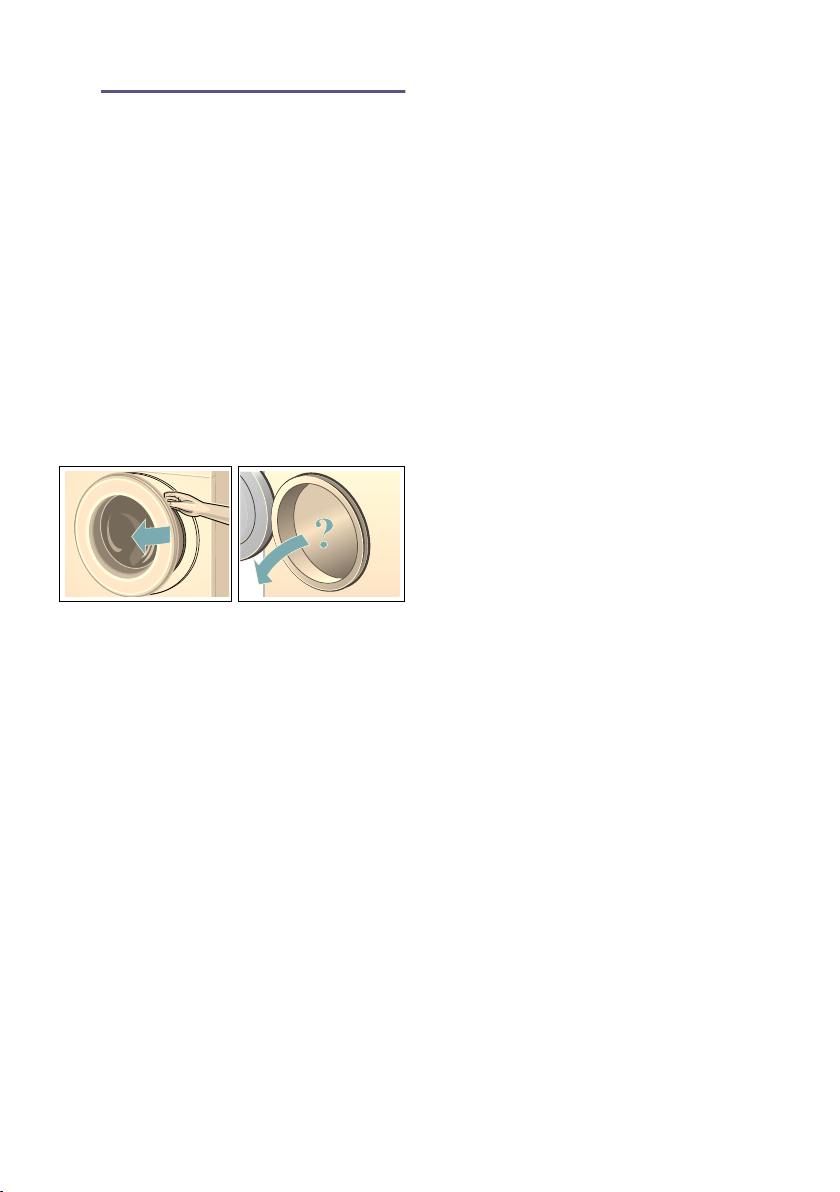
en Operating the appliance
42
1 Operating the
appliance
Operating the appliance
Preparing the washing
machine
Note: The washing machine must be
correctly installed and connected.
From ~ Page 14
1. Plug into the mains.
2. Turn on the tap.
3. Open the washing machine door.
4. Check that the drum is completely
drained. Drain if necessary.
Otherwise, the load display may
malfunction. ~ Page 54
Switching on the appliance/
selecting a programme
Press the # button. The appliance is
switched on.
The Bosch logo appears on the display
and all indicator lamps light up.
The Cottons programme set at the
factory is then always displayed.
You can:
■ use this programme or
■ select another programme on the
control panel or
■ select a programme under ...
Others. ~ Page 27
Note: If you have activated the
childproof lock, you must deactivate it
before you can set a programme.
~ Page 46
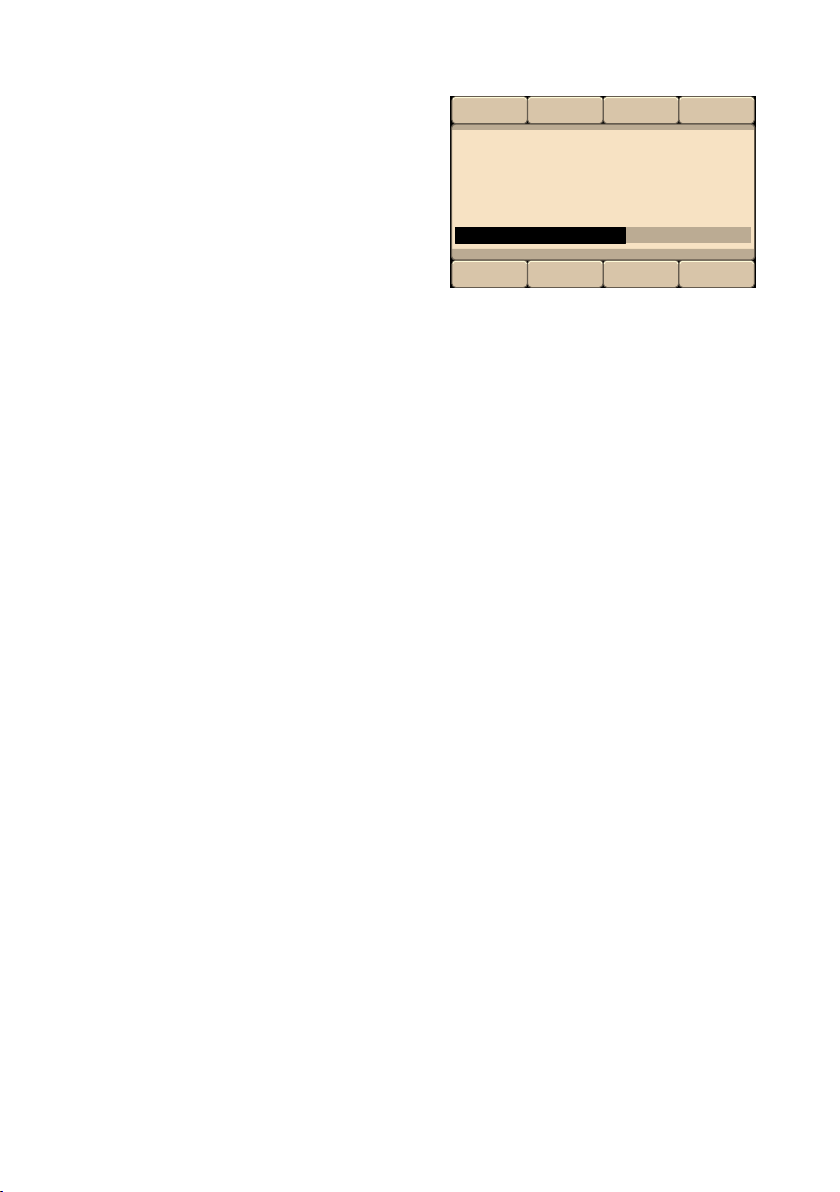
The indicator lamp on the programme
selector lights up and the main menu
with the programme default settings
for the selected programme appear on
the display panel: ~ Page 27
■ Temperature,
■ Spin speed,
■ Programme duration,
■ Any additional settings and
■ Information on water and energy
consumption. ~ Page 13
In appliances with a drum light:
The drum is lit after switching on the
appliance, after opening and closing the
door and after starting the programme.
The light switches off automatically.
You can:
■ use the programme default settings
and load laundry ~ Page 43,
■ or change the programme default
settings and/or select additional
settings.
Change the programme
default settings
You can use or change the default
settings for each washing cycle.
To do this, repeatedly press the
corresponding button until the required
setting is displayed. ~ Page 27
Note: Pressing and holding the buttons
automatically runs through the set
values.
The settings are activated without
needing to be confirmed.
The settings are not saved after the
washing machine is switched off.
Programme default settings
~ Page 38
Operating the appliance en
43
Select additional programme
settings
By selecting additional settings/options,
you can better adapt the washing
process to your items of laundry.
The settings can be selected or
deselected depending on the progress
of the programme. ~ Page 27
The EcoPerfect and SpeedPerfect
button indicator lamps light up if a
setting is activated.
The other settings are indicated by a
symbol on the display panel if the
setting is activated.
For multi-level settings, press and hold
the buttons to run through the settings
automatically.
The settings are not saved after the
washing machine is switched off.
Additional programme settings/options
~ Page 39
Placing laundry into the drum
:Warning
Risk of death!
Items of laundry pretreated with
cleaning agents that contain solvents,
e.g. stain remover/cleaning solvent,
may cause an explosion after being
loaded into the washing machine.
Hand-rinse these items of laundry
thoroughly beforehand.
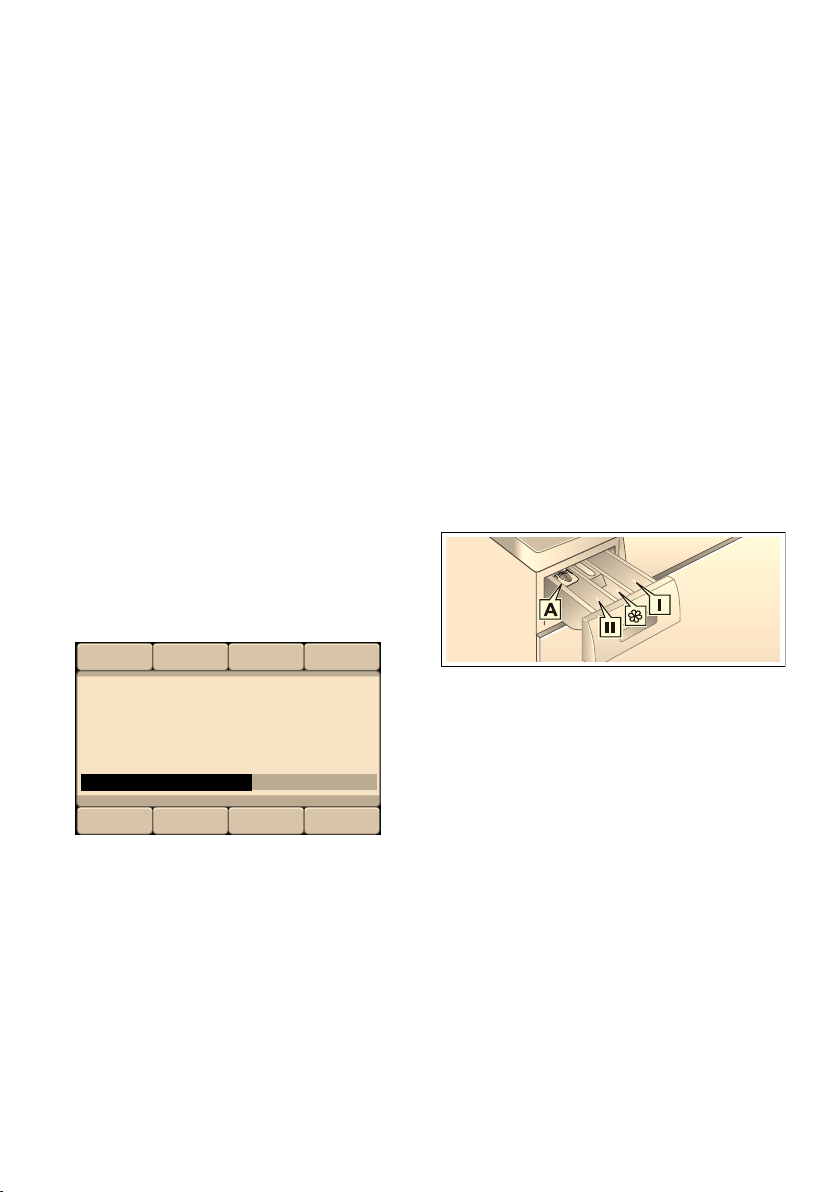
Load the pre-sorted, unfolded laundry
into the drum. The load screen for the
selected programme (e.g. for Easy-
Care) is indicated on the display panel.
The load bar fills as the laundry is
loaded. If the maximum load is
exceeded, the bar flashes. Observe the
maximum indicated load. Overfilling
adversely affects the washing result and
encourages creasing.
Notes
■ Mix items of laundry of varying sizes.
Laundry items of different sizes
distribute themselves better during
the spin cycle. Individual laundry
items may cause an unbalanced
load. ~ Page 54
■ Wait until the Bosch logo no longer
appears before adding laundry.
■ The load screen appears when the
door is opened or when the amount
of laundry is changed.
3OHDVHORDGODXQGU\PD[NJ
'RVDJH
öüü
en Operating the appliance
44
Measure and add detergent
and care products
Caution!
Damage to the appliance
Cleaning agents and agents for pre-
treating laundry (e.g. stain removers,
prewash sprays, etc.) may cause
damage if they come into contact with
the surfaces of the washing machine.
Do not allow these agents to come into
contact with the surfaces of the washing
machine. If necessary, immediately wipe
away spray residue and other residues/
droplets with a damp cloth.
Dosing
Dose detergents and care products
according to:
■ the dosing recommendation on the
display panel, e.g. for Easy-Care.
Depending on the amount of
washing in the washing machine, a
dosing recommendation is indicated
on the display panel.
■ soiling,
■ water hardness; (ask your water
supply company),
■ the manufacturer's specifications on
the packaging.
Filling
:Warning
Eye/skin irritation!
Detergents and care products may
spray out if the detergent drawer is
opened while the machine is in
operation.
Open the drawer carefully.
Rinse eyes/skin thoroughly if they come
into contact with detergents or care
products.
If accidentally swallowed, seek medical
advice.
Note: Dilute viscous fabric softener and
fabric conditioner with a little water. This
prevents blockages in the washing
machine's piping.
Pour the detergent and care products
into the appropriate compartments:
1. Pull out the detergent drawer as far
as possible.
2. Add detergent and/or care products.
3. Close the detergent drawer.
3OHDVHORDGODXQGU\PD[NJ
'RVDJH
Measuring aid A For liquid detergent
Compartment II Detergent for the main
wash, water softener,
bleach, stain remover
Compartment i Fabric softener, liquid
starch;
do not exceed max.
Compartment I Detergent for prewash

Operating the appliance en
45
Measuring aid* for liquid detergent
*depending on the model
Position the measuring aid for dosing
the correct amount of liquid detergent:
1. Pull out the detergent drawer. Press
down the insert and fully remove the
drawer.
2. Slide the measuring aid forwards,
fold it down and click it into place.
3. Reinsert the drawer.
Note: Do not use the measuring aid for
gel detergents and washing powder, or
for programmes with prewash or when
the “Ready in” time is selected.
For models without a measuring aid,
pour the liquid detergent into the
appropriate dispenser and place it in
the drum.
Start the programme
Make sure that no items of laundry are
trapped between the door and the
rubber seal, and close the door.
The main menu for the selected
programme is indicated again on the
display panel.
Press the A button to start the
programme.
During washing, the progress of the
programme is displayed in a bar on the
display panel. The bar fills in during the
washing cycle and provides information
about the current progress of the
programme.
The arrows fade in and out according to
the progress of the programme. They
indicate the programme settings/
options which can be changed/added
as the programme progresses.
Some programme sequence steps
explained:
■ Load adjust active ~ Page 54
■ Pre-washing, Washing, Rinsing,
Spin, Drain ... are displayed during
the wash cycle.
■ Extra rinse: foam
Note: Foam detection
If Foam has been detected also
appears on the display panel, the
washing machine has detected too
much foam during the wash
programme and has automatically
switched on one or more rinse
cycles in order to remove the foam.
Add less detergent to the next
washing cycle with the same load.
■ Other displays ~ Page 59
If you want to lock the programme to
prevent it from being inadvertently
adjusted, you can select the childproof
lock as follows.
/RDGDGMXVWDFWLYH
&
K
c

en Operating the appliance
46
Child Lock 3 sec.
You can lock the washing machine to
prevent the functions you have set from
being changed inadvertently.
To activate/deactivate, press and hold
both buttons Child Lock 3 sec. for
approx. three seconds. ~ Page 26
E Childproof lock activated appears in
the display panel.
After approx. three seconds, the display
reverts back to the main menu.
If you adjust the programme selector or
select a button when the childproof lock
is activated, E Childproof lock
activated appears in the display panel.
Notes
■ The childproof lock can be activated
regardless of the appliance's status.
■ The childproof lock remains active,
even once the washing machine has
been switched off. Before selecting
the next programme, deactivate the
childproof lock.
■ If the appliance is switched off while
the programme is running and
childproof lock is activated, the
programme continues when the
appliance is switched back on.
Adding laundry
After starting the programme, you can
add or remove laundry if necessary.
Press the A button to do this.
The A button indicator lamp flashes
and the machine checks whether it is
possible to add laundry.
It is possible to add laundry when
Pause: Reload is possible appears on
the display.
To continue the programme, press the
A button. The programme continues
automatically.
Notes
■ Do not leave the door open for too
long when adding laundry as water
from the laundry may leak out.
■ For safety reasons, the door remains
locked when the water level or
temperature is high, or while the
drum is turning, and it is not possible
to add laundry during this time.
Follow the information on the display
panel.
■ The load display is not active during
reloading.
Changing the programme
If you have started the wrong
programme by mistake, you can
change the programme as follows:
1. Press the A button.
2. Select another programme.
3. Press the A button. The new
programme starts from the
beginning.
Cancel the programme
For programmes at high temperatures:
1. Press the A button.
2. To cool down laundry: Select Rinse.
3. Press the A button.
For programmes at low temperatures:
1. Press the A button.
2. Select Spin or Drain.
3. Press the A button.
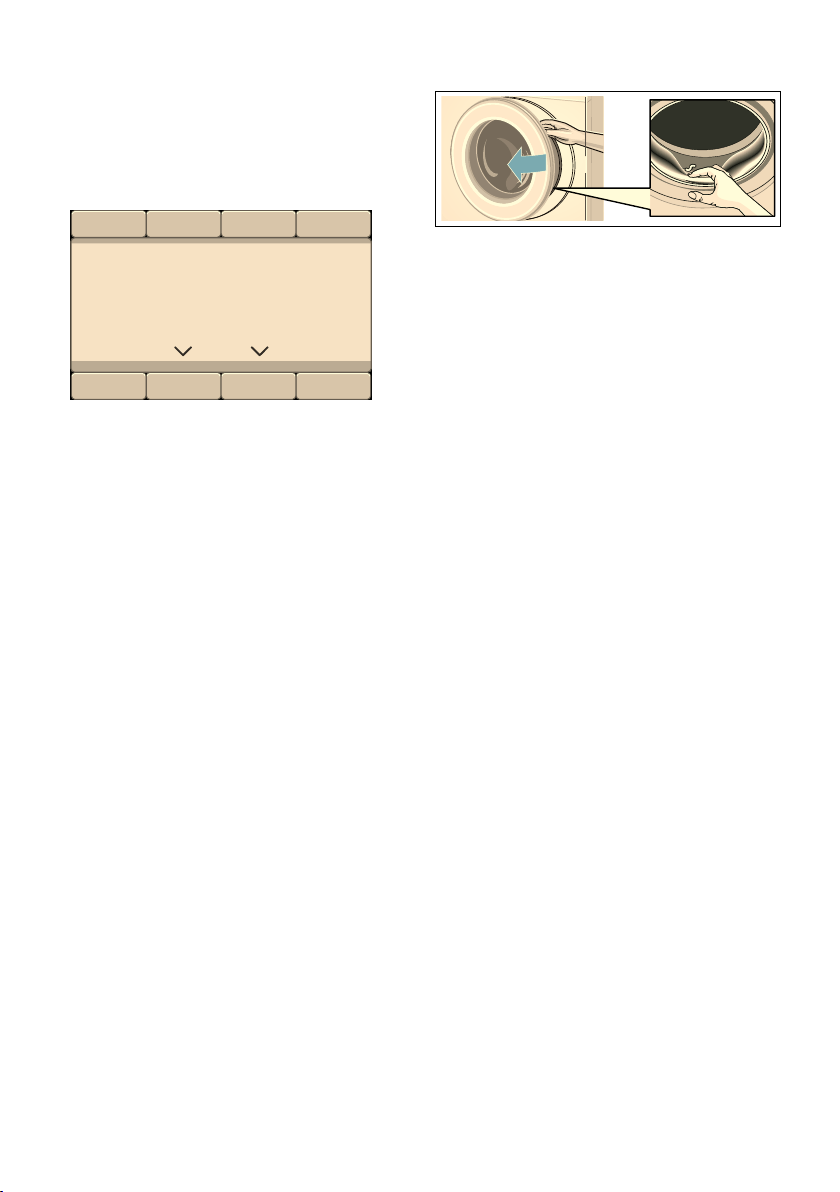
Operating the appliance en
47
Programme end during rinse
hold
The following appears on the display
panel:
Continue the programme by:
■ Select the Spin (change the spin
speed if necessary) or the Drain
programme.
■ Press the A button.
Programme end
ÿFinished, remove washing appears
on the display panel. The A button
indicator lamp is off.
Removing laundry/switching
off the appliance
1. Open the loading door and remove
the laundry. Follow the information
on the display panel.
2. Press the # button. The appliance is
switched off.
3. Turn off the tap.
Note: Not required for AquaStop
models.
Notes
■ Do not leave any items of laundry in
the drum. They may shrink in the
next wash or discolour another item.
■ Remove any foreign objects from the
drum and the rubber gasket – risk of
rusting.
■ Wipe the rubber gasket dry.
Notes
■ Leave the loading door and
detergent drawer open so that any
residual water can evaporate.
■ Always wait until the programme
ends, as the appliance could still be
locked. Then switch the appliance
on and wait for it to unlock.
■ If the display panel goes off at the
end of a programme, the energy-
saving mode is active. Press any
button to activate the panel.
6HOHFWVSLQRUGUDLQ
5LQVHKROGUHDFKHG
DQGWKHQVWDUW
6SLQ
'UDLQ

en Home Connect
48
o Home Connect
Home Connect
This appliance is Wi-Fi-capable and can
be remotely controlled using a mobile
device.
You can use the Home Connect app to
do the following on your appliance from
your mobile device:
■ Set up programs and launch them.
■ Adjust, activate and deactivate
program settings.
■ Query the status of programs.
■ Adjust, activate and deactivate
appliance settings.
■ Switch off the appliance.
Before you can use the Home Connect
functions, you will need to carry out the
following steps:
1. Install the Home Connect app on
your mobile device.
2. Register in the Home Connect app.
3. Connect your appliance to your
home network automatically or
manually (you only need to do this
the first time).
4. Connect your appliance to the Home
Connect app.
You can find information about the app
on our Home Connect website
www.home-connect.com
Home Connect services are not
available in every country. The
availability of the Home Connect
function depends on the availability of
Home Connect services in your country.
You can find information on this at:
www.home-connect.com
Notes
■ Please observe the safety
precautions in this instruction
manual and make sure that these
are complied with even when
operating the appliance via the
Home Connect app while you are
away from home. You must also
follow the instructions in the
Home Connect app.
■ You cannot use the
Home Connect app to make
changes while the controls on the
appliance are being operated.
However, you can use the
Home Connect app to see any
adjustments made directly on the
appliance itself.
Calling up the Home Connect
menu
In the Home Connect menu, you can
create and view network connections,
reset network settings, activate/
deactivate Wi-Fi and find other Home
Connect functions.
1. Switch on the appliance.
2. Press and hold Remote Start } for
at least 3 seconds.
Aut. network log-in appears in the
display.
You are now in the Home Connect
menu.
Note: Briefly press Remote Start } to
exit the Home Connect menu.

Home Connect en
49
Connecting to the home
network and the Home
Connect app
Connect your appliance to the home
network automatically or manually
(you only need to do this the first time).
Notes
■ If your home network router has a
WPS function, you can connect the
appliance to your home network
automatically.
■ If your home network router does not
have a WPS function, you need to
connect the appliance to your home
network manually.
You must then connect to the Home
Connect app.
Note: To connect your appliance to the
home network, Wi-Fi must be activated
on the appliance. Wi-Fi is deactivated
on the appliance by default and is
activated automatically when you
connect your appliance to your home
network.
Connecting to your home network
automatically
Step 2.1
Ensure that you are in the Home
Connect menu. ~ Page 48
1. Press Connect.
The appliance now attempts to connect
to your home network. | flashes in the
display.
2. Activate the WPS function on your
home network router within the next
2 minutes.
If the appliance has connected to your
home network successfully, Connected
è and | appear in the display and
light up continuously.
Note: If you are not able to establish a
connection, check whether your
appliance is within range of your home
network.Try connecting automatically
again or connect your appliance
manually.
Connecting to your home network
manually
Step 2.2
Ensure that you are in the Home
Connect menu. ~ Page 48
Make sure that you have opened the
Home Connect app and are logged in.
1. Press Man. network log-in.
2. Press Connect.
The appliance now sets up its own Wi-Fi
network with the name (SSID)
HomeConnect.
&RQQHFW
1RWFRQQHFWHG
0DQQHWZRUNORJLQ
$XWQHWZRUNORJLQ
&RQQHFWWRWKHDSS
0DQQHWZRUNORJLQ
1RWFRQQHFWHG
&RQQHFW
$XWQHWZRUNORJLQ
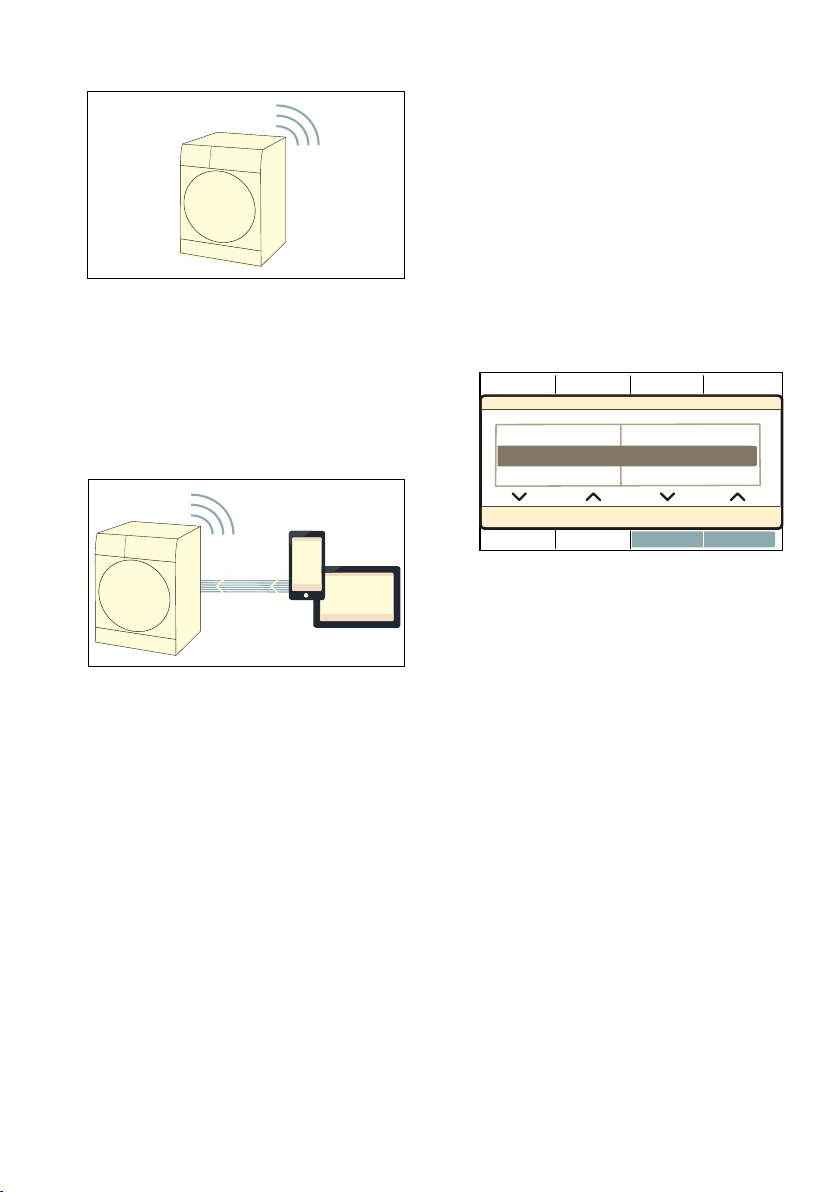
en Home Connect
50
3. Call up the Wi-Fi setting on the
mobile device.
4. Connect the mobile device to the
Home Connect Wi-Fi network and
enter the password (key)
HomeConnect.
Your mobile device now connects to
the appliance. The connection
process may take up to 60 seconds.
5. Once you have connected
successfully, open the
Home Connect app on your mobile
device and carry out the steps in the
app.
6. In the Home Connect app, enter the
network name (SSID) and password
(key) for your home network.
7. Carry out the last steps in the
Home Connect app to connect your
appliance.
If the appliance has connected to your
home network successfully, Connected
è and | appear in the display and
light up continuously.
Note: If you are not able to establish a
connection, check whether your
appliance is within range of your home
network. Try connecting manually again.
Connecting to the Home Connect app
Step 3
If your appliance is connected to your
home network, you can connect it to the
Home Connect app.
Ensure that you are in the Home
Connect menu. ~ Page 48
Make sure that you have opened the
Home Connect app and are logged in.
1. Press Connect to the app.
2. Press Connect app.
The appliance now attempts to connect
to the Home Connect app.
3. Once your appliance is displayed in
the app, carry out the last steps in
the Home Connect app.
Note: If you were not able to establish
a connection, check whether your
mobile end device is within range of
your home network or is connected to
this. Try connecting to the
Home Connect app again.
Activating/deactivating Wi-Fi
If your appliance is already connected
to your home network, you can activate
or deactivate Wi-Fi on your appliance.
Ensure that you are in the Home
Connect menu. ~ Page 48
1. Press Wi-Fi on/off.
2. Press on or off.
:L)LRQRII
&RQQHFWWRWKHDSS &RQQHFWDSS
0DQQHWZRUNORJLQ 1RWFRQQHFWHG

Home Connect en
51
Notes
■ If you connect to your home network,
Wi-Fi is activated automatically.
■ If Wi-Fi is activated, the appliance will
not switch itself off automatically.
■ If Wi-Fi is switched off on the
appliance, it is not possible to use
the Home Connect app to start or
control the appliance remotely.
■ If Wi-Fi is switched off and your
appliance was previously connected
to your home network, this
connection will be re-established
automatically when Wi-Fi is switched
back on.
■ If you activate this function, the
energy consumption increases in
comparison to the values specified
in the consumption value table.
Resetting your network
settings
You can reset all of the network
settings.
Ensure that you are in the Home
Connect menu. ~ Page 48
1. Press Network settings.
2. Press Reset.
Note: If you want to operate your
appliance via the Home Connect app
again, you will need to reconnect it to
your home network and to the
Home Connect app.
Updating the software
You can update the Home Connect
software on your appliance. As soon as
a new software update is available, a
note appears in the display: Software
update
Install the update directly via the
message in the display or manually as
follows:
Ensure that you are in the Home
Connect menu. ~ Page 48
1. Press Software update.
2. Press Install.
Note: The software update may take
several minutes. Do not switch the
appliance off while updates are being
installed.
Note: If no software update is available,
Not available appears in the display.
1HWZRUNVHWWLQJV
:L)LRQRII
RII
&RQQHFWWRWKHDSS
6RIWZDUHXSGDWH
1HWZRUNVHWWLQJV
5HVHW
:L)LRQRII
5HWDLQ
6RIWZDUHXSGDWH
,QVWDOOQRZ
1HWZRUNVHWWLQJV
$YDLODEOH

en Home Connect
52
Information on data protection
When your appliance is connected for
the first time to a Wi-Fi network, which is
connected to the Internet, your
appliance transmits the following
categories of data to the Home Connect
server (initial registration):
■ Unique appliance identification
(consisting of appliance codes as
well as the MAC address of the
installed Wi-Fi communication
module).
■ Security certificate of the Wi-Fi
communication module (to ensure a
secure data connection).
■ The current software and hardware
version of your household appliance.
■ Status of any previous resetting to
factory settings.
This initial registration prepares the
Home Connect functions for use and is
only required when you want to use
these Home Connect functions for the
first time.
Note: Ensure that the Home Connect
functions can be used only in
conjunction with the Home Connect
app. Information on data protection can
be accessed in the Home Connect app.
Declaration of Conformity
Robert Bosch Hausgeräte GmbH
hereby declares that the appliance with
Home Connect functionality meets the
basic requirements and other relevant
provisions of the Directive 2014/53/EU.
A detailed RED Declaration of
Conformity can be found online at
www.bosch-home.com among the
additional documents on the product
page for your appliance.
2.4 GHz band: max. 100 mW

Appliance settings en
53
Q Appliance settings
Appli ance settings
Settings that can be selected:
■ End signal
off – quiet – medium – loud – very
loud
Adjust the volume of the end signal.
■ Button signal
off – quiet – medium – loud – very
loud
Adjust the volume of the button
signals.
■ Auto power-off of the appliance
in 15 – 30 – 60 min – never
The appliance automatically
switches off after ... minutes (= 0
kWh energy consumption); to switch
on, press the # main switch button.
Note: If you have Wi-Fi switched on,
the automatic switch-off is set to
Never.
■ Language
Deutsch
English
...
Change the displayed language.
■ Info: Drum cleaning
on – off
This instruction reminds you to run a
drum-cleaning programme.
To change the appliance settings, press
and hold both Basic settings 3 sec.
buttons for approx. three seconds.
~ Page 28
Notes
■ The settings are retained after the
appliance is switched off.
■ If the buttons are held down, the
settings run through automatically.

en Sensors
54
H Sensors
Sensors
Automatic load sensing
Depending on the type of fabric and
load, the automatic load sensing
function optimally adjusts the water
consumption and programme duration
in each programme.
Unbalanced load detection
system
The automatic unbalanced load
detection system detects imbalances
and ensures even distribution of the
laundry by repeatedly starting and
stopping drum spinning.
If the laundry is extremely unevenly
distributed, the speed is reduced or the
spin cycle is not performed for safety
reasons.
Note: Place large and small items of
laundry evenly in the drum.
~ Page 43, ~ Page 60
AquaSensor
Depending on the program and model
During a rinse cycle, the Aqua sensor
checks the turbidity of the rinsing water
(turbidity is caused by dirt and
detergent residue). The duration and the
number of rinse cycles depend on the
turbidity of the water.
Load sensor/display
The load sensor detects the load level
in the washing machine when the door
is open. This is indicated by the bar
filling on the display panel.
Note: In order for the load sensor to
fully determine the amount of laundry,
the drum must be empty before the
washing machine is switched on.
Dosing recommendation
The dosing recommendation indicates a
recommended detergent dosage as a
percentage, depending on the selected
programme and the detected load. The
indicated % refers to the dosing
recommendation of the detergent
manufacturer.
Note: By adhering to the dosing
recommendation, you can help look
after both the environment and your
household budget.

Cleaning and maintenance en
55
2 Cleaning and
maintenance
Cleaning and maintenance
:Warning
Danger of death!
There is a risk of electric shock if you
touch live components.
Switch off the appliance and pull out the
mains plug.
:Warning
Risk of poisoning!
Toxic vapours can be produced by
cleaning agents that contain solvents,
e.g. cleaning solvent.
Do not use cleaning agents that contain
solvents.
Caution!
Damage to the appliance
Cleaning agents that contain solvents,
e.g. cleaning solvent, can damage
surfaces and components in the
machine.
Do not use cleaning agents that contain
solvents.
Prevent detergent residue from
building up and odours from forming
by following these instructions:
Notes
■ Ensure the room in which the
washing machine is set up is well
ventilated.
■ Leave the door and detergent
dispenser tray open slightly when
the washing machine is not in use.
■ Occasionally run a wash using the
Cottons 60 °C programme and
powder detergent.
Machine housing/control
panel
■ Wipe the housing and the control
panel with a soft, damp cloth.
■ Remove the detergent residue
immediately.
■ Do not clean with a water jet.
Drum
Use chlorine-free cleaning agents, do
not use steel wool.
If there are odours in the washing
machine, or to clean the drum, run the
Drum Clean 90 °C programme without
laundry. Add washing powder.
Descaling
Descaling should not be necessary if
the detergent is measured out correctly.
However, if it is required, follow the
manufacturer's instructions for the
descaling agent. Suitable descalers can
be obtained via our website or from
customer services. ~ Page 62
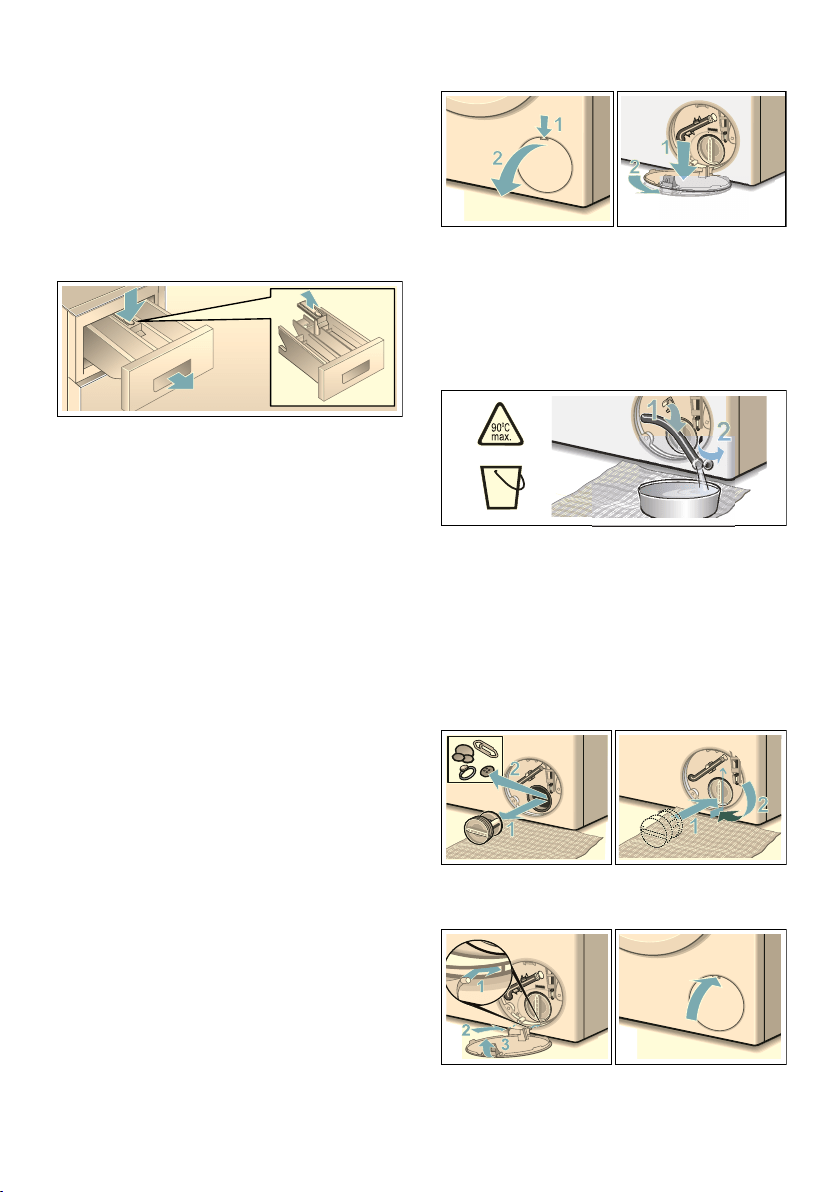
en Cleaning and maintenance
56
Detergent drawer and housing
If the washing machine contains
detergent or fabric softener residues:
1. Pull out the detergent drawer. Press
down the insert and fully remove the
drawer.
2. To remove the insert: Push the insert
upwards from below with your finger.
3. Clean the detergent dispenser tray
and insert with water and a brush,
and dry it. Clean the inside of the
housing as well.
4. Fit the insert and lock it in place
(push the cylinder onto the guide
pin).
5. Push in the detergent drawer.
Note: Leave the detergent drawer open
so that any residual water can
evaporate.
The drain pump is blocked,
emergency draining
:Warning
Risk of scalding!
When you wash at high temperatures,
the water gets very hot. If you come into
contact with the hot water, you may be
scalded.
Allow the water to cool down.
1. Turn off the tap so that no more
water can flow in and has to be
drained via the drain pump.
2. Switch off the appliance. Pull out the
mains plug.
3. Open and remove the service flap.
4. Take the drain hose out of the
retainer.
Remove the sealing cap and pour
the water out into a suitable
container.
Replace the sealing cap and place
the drain hose back in the retainer.
5. Carefully unscrew the pump cover;
residual water may leak out.
Clean the interior, pump-cover
thread and pump housing. The
impeller in the drain pump must be
able to rotate.
Refit the pump cover and screw it on
tightly. The handle must be in a
vertical position.
6. Place the service flap back on, lock
it into place, and close it.
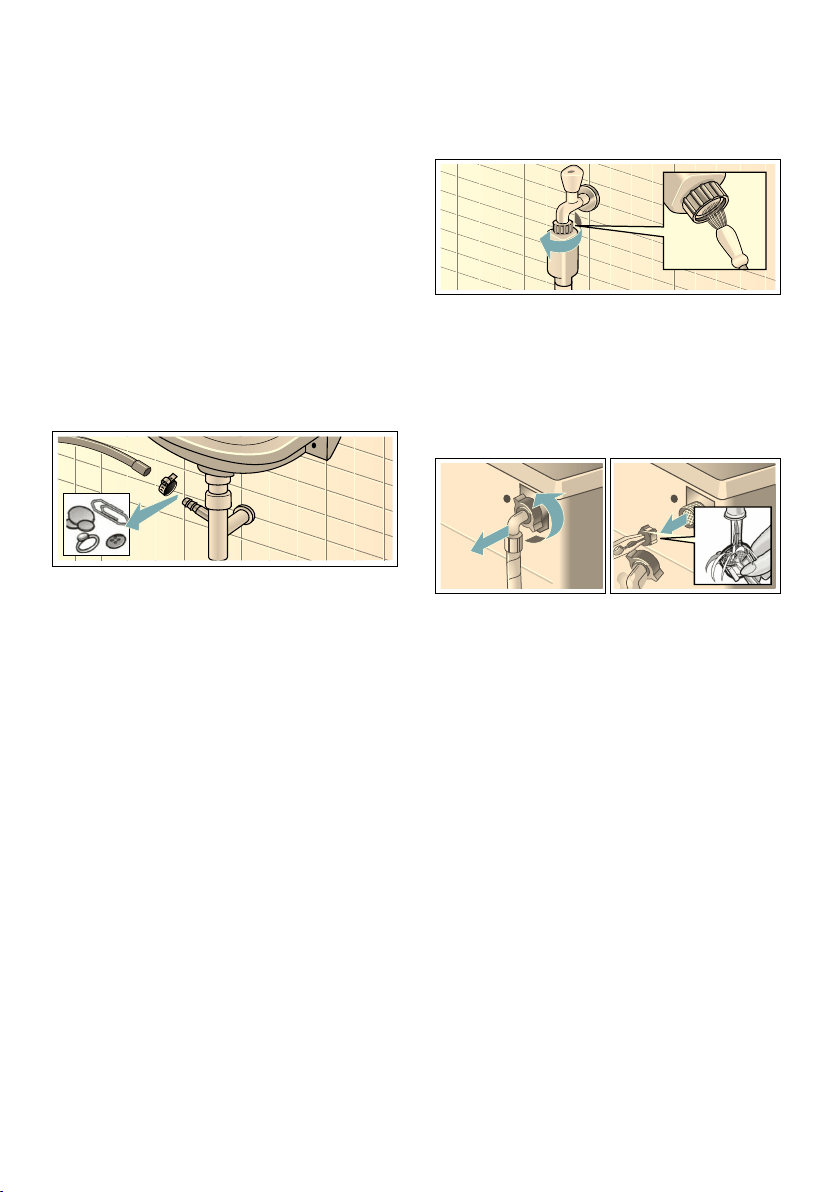
Cleaning and maintenance en
57
Note: To prevent unused detergent
from flowing straight into the drain
during the next wash: Pour 1 litre of
water into compartment II and start the
Drain programme.
The drain hose at the siphon
is blocked
1. Switch off the appliance. Pull out the
mains plug.
2. Loosen the hose clamp. Carefully
remove the drain hose; residual
water may leak out.
3. Clean the drain hose and siphon
connecting piece.
4. Re-attach the drain hose and secure
the connection point using the hose
clamp.
Filter in the water supply
blocked
First, reduce the water pressure in the
supply hose:
1. Turn off the tap.
2. Select any programme
(except Rinse/Spin/Empty).
3. Press the A button. Allow the
programme to run for approximately
40 seconds.
4. Press the # button. The appliance is
switched off.
5. Pull out the mains plug.
Then clean the filter:
1. Disconnect the hose from the tap.
Clean the filter with a small brush.
2. For standard and Aqua-Secure
models, clean the filter on the rear of
the appliance:
Remove the hose from the rear of
the appliance.
Use pliers to remove the filter and
then clean it.
3. Connect the hose and check for
leaks.
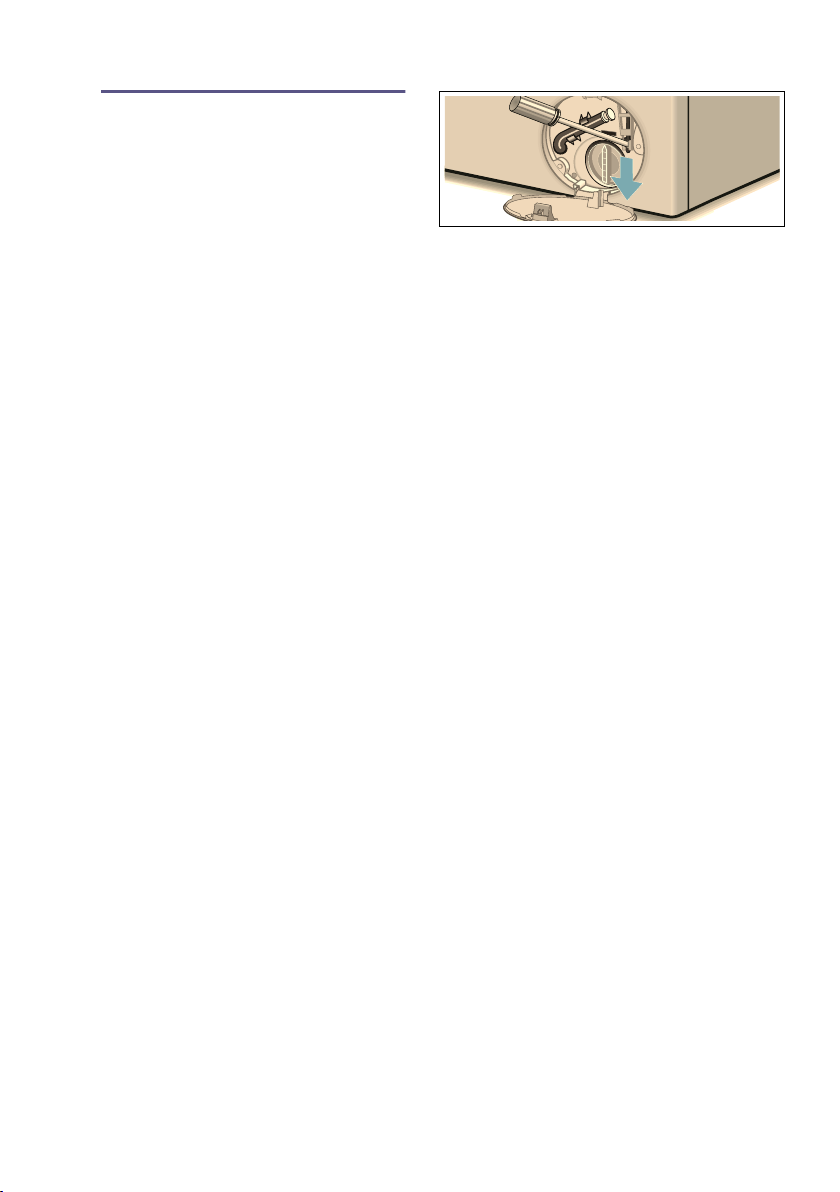
en Faults and what to do about them.
58
3 Faults and what to do
about them.
Faults and what to do about them.
Emergency release
E.g. in the event of a power cut
The programme continues when the
power supply is restored.
However, if the laundry has to be
removed, the washing machine door
can be opened as follows:
:Warning
Risk of scalding!
When you are washing at high
temperatures, there is a risk of scalding
if you come into contact with hot water
and laundry.
If possible, leave it to cool down first.
:Warning
Risk of injury!
You may injure your hands if you reach
into the drum while it is turning.
Do not reach into the drum when it is
turning.
Wait until the drum has stopped turning.
Caution!
Water damage
Any escaping water may cause water
damage.
Do not open the door if water can be
seen through the glass.
1. Switch off the appliance. Pull out the
mains plug.
2. Drain the water
. ~ Page 56
3. Pull the emergency release
downwards with a tool and release.
The door can then be opened.

Faults and what to do about them. en
59
Information on the display panel
Display Cause/remedy
Pause: Reload is not
possible
Temperature or water level is too high. Press the A button to continue the
programme.
Door cannot be
unlocked: Water level
or temperature is too
high
Temperature or water level is too high. Press the A button to continue the
programme.
The door cannot be
locked; please open
the door again, then
close it and select the
A button
■ Laundry may be caught. Open and close the door again and press the A
button.
■ If necessary, push the door closed or remove some laundry and then push it
closed again.
■ If necessary, switch the appliance off and on again; set the programme and
make your individual settings; start the programme.
Turn on the tap ■ Turn the tap on fully,
■ Supply hose kinked/trapped,
■ The water pressure is too low. Clean the filter. ~ Page 57
Clean the drain pump ■ The drain pump is blocked. Clean the drain pump. ~ Page 56
■ The drain hose/drain pipe is blocked. Clean the drain hose at the siphon.
~ Page 57
AquaStop has been
activated. Please call
the after-sales
service
Not applicable on models without AquaStop
There is water in the base trough; the appliance is leaking. Turn off the tap. Call the
after-sales service.
Auto power-off in ...
seconds,
Appliance automatically switches off after ... seconds if it is not operated for a
prolonged period. To cancel, press any button. ~ Page 53
Water cooling To protect the wastewater pipes, the hot detergent solution is cooled before being
drained.
Drum care
information:
This instruction reminds you to run the Drum Clean 90 °C programme or a 60 °C
programme to clean and care for the drum and the outer tub.
Notes
■ Run the programme without laundry.
■ Use washing powder or a detergent that contains bleach. To prevent foaming,
only use half the amount of detergent recommended by the detergent
manufacturer. Do not use detergents intended for woollens or delicates.
■ Switch reminder information on/off. ~ Page 53
} Remote start selected.
| Off: Wi-Fi is switched off and the appliance is not connected to your home network.
Flashing: The appliance is trying to connect to your home network.
Lit: Wi-Fi is switched on and the appliance is connected to your home network.
Other displays
Error E:XXX
Switch off the appliance, wait for five seconds and then switch it on again. If the
display appears again, call the after-sales service.
en Faults and what to do about them.
60
Faults and what to do about them.
Faults Cause/remedy
Water is leaking from the
machine.
■ Attach the drain hose correctly or replace it.
■ Tighten the threaded joint on the supply hose.
The appliance is not filling
with water.
Detergent is not being
dispensed.
■ Have you pressed the A button?
■ Is the tap turned on?
■ Could the filter be clogged? Clean the filter. ~ Page 57
■ Is the supply hose kinked or trapped?
The door will not open. ■ The safety function is activated. Stop the programme? ~ Page 47
■ Is the E childproof lock activated? Deactivate. ~ Page 46
■ Is $ selected (Rinse Stop = no final spin)? ~ Page 47
■ Can the door only be opened by the emergency release? ~ Page 58
The programme does not
start.
■ Have you pressed the A or Finished In button?
■ Is the door closed?
■ Is the E childproof lock activated? Deactivate. ~ Page 46
The drum briefly jerks or
judders after the
programme has started.
Not a fault – the internal motor test may cause the drum to jerk or judder
briefly when the wash programme starts.
The water is not draining. ■ Is $ selected (Rinse Stop = no final spin)? ~ Page 47
■ Clean the drain pump. ~ Page 56
■ Clean the drain pipe and/or the drain hose.
Water is not visible in the
drum.
Not a fault – the water is below the visible area.
The spin result is not
satisfactory.
Laundry wet/too damp.
■ Not a fault – the unbalanced load detection system has interrupted the
spin cycle because the laundry is unevenly distributed.
Distribute small and large items of laundry evenly in the drum.
■ Is Reduced Ironing selected (depending on the model)? ~ Page 40
■ Is the selected speed too low? ~ Page 38
The appliance restarts the
spin cycle several times.
Not a fault – the unbalanced load detection system is adjusting an imbalance.
The programme is taking
longer than usual.
■ Not a fault – the unbalanced load detection system is adjusting an
imbalance by repeatedly redistributing the laundry.
■ Not a fault – the foam detection system is active – a rinse cycle has been
switched on.
The length of the
programme changes
during the wash cycle.
Not a fault – the programme sequence is optimised for the specific washing
process. This may change the length of the programme shown on the display
panel.
Water remaining in the
care-product
compartment i .
■ Not a fault – the effectiveness of the care product is not affected.
■ Clean the insert if necessary. ~ Page 56
Faults and what to do about them. en
61
Odours in the washing
machine.
Run the Drum Clean 90 °C or Cottons 90 °C programme without laundry.
Add standard washing powder or a detergent that contains bleach.
Note: . To prevent foaming, only use half the amount of detergent
recommended by the detergent manufacturer. Do not use detergents that are
intended for woollens or delicates.
The Å symbol is lit in
the display panel. Foam
may also be leaking from
the detergent drawer.
Have you used too much detergent?
Mix one tablespoon of fabric softener with 1/2 litre of water and pour it into
compartment II (not suitable for outdoor clothing, sportswear or items made
with down).
Use less detergent for the next wash cycle.
¢ in the display panel Wi-Fi is switched on but the connection to the home network could not be
established. Check whether your home network is available or reconnect to
the home network.
Home Connect is not
working.
■ You can find solutions to problems with Home Connect at www.home-
connect.com.
■ The availability of the Home Connect functionality depends on the
availability of the Home Connect Services in your country. Home Connect
Services are not available in every country - for further information please
check: www.home-connect.com.
Loud noises, vibrations
and machine "wandering"
during the spin cycle.
■ Is the appliance level? Level the appliance. ~ Page 20
■ Are the appliance's feet secured? Secure the appliance's feet.
~ Page 20
■ Have the transport locks been removed? Remove the transport locks.
~ Page 16
The display panel/
indicator lights do not
work while the appliance
is running.
■ Has there been a power failure?
■ Have the fuses blown/has the circuit breaker tripped? Switch on the
circuit breaker/replace the fuses.
■ If the fault occurs repeatedly, call the after-sales service.
There is detergent
residue on the laundry.
■ Some phosphate-free detergents contain water-insoluble residue.
■ Select Rinse or brush the laundry after washing.
In the "Reload" status,
A flashes very quickly
and a signal sounds.
■ The water level is too high. It is not possible to add laundry. Close the door
immediately, if necessary.
■ Press the A button to resume the programme.
If you cannot rectify a fault yourself (after switching the machine off and on again) or a repair is required:
■ Switch off the appliance and pull the mains plug out of the socket.
■ Turn off the tap and call the after-sales service.
Faults Cause/remedy

en After-sales service
62
4 After-sales service
After-sales service
If you cannot rectify a fault yourself,
contact customer services. ~ Cover
page
We will always find an appropriate
solution in order to avoid unnecessary
visits by engineers.
Please give customer services the
product number (E no.) and the
production number (FD) of the
appliance.
You can find this information
*depending on the model:
On the inside of the door*/in the
opened service flap* and on the rear of
the appliance.
Trust the expertise of the
manufacturer.
Contact us for assistance. By doing so,
you will ensure that the repairs are
carried out by trained service personnel
using genuine spare parts.
E no. Product number
FD Production number
(1U )'
Consumption rates en
63
[ Consumption rates
Consumption rates
Energy and water consumption, programme duration and
residual moisture for the main washing programmes
(approximate values)
Programme Load Energy
consumption*
Water
consumption*
Programme
duration*
Cottons 20 °C 9 kg 0,25 kWh 90 l 2 _ h
Cottons 40 °C 9 kg 1,10 kWh 90 l 3 h
Cottons 60 °C 9 kg 1,16 kWh 90 l 2 _ h
Cottons 90 °C 9 kg 2,14 kWh 100 l 2 _ h
Easy-Care 40 °C 4 kg 0,71 kWh 64 l 2 h
Mixed Load 40 °C 4 kg 0,60 kWh 45 l 1 ] h
Delicates / Silk 30 °C 2 kg 0,19 kWh 37 l _ h
Wool 30 °C 2 kg 0,19 kWh 41 l _ h
Programme Approximate information on the residual moisture**
WAYH2... WAYH8... WAYH4... WAYH0...
Max. 1600
rpm
Max. 1400
rpm
Max. 1200
rpm
Max. 1000
rpm
Cottons 44% 48% 53% 62%
Easy-Care 40% 40% 40% 40%
Delicates / Silk 30% 30% 30% 30%
Wool 45% 45% 45% 45%
* Observed values may deviate from the indicated values due to influence of water pressure, hardness
and inlet temperature, ambient temperature, type, amount and soiling of laundry, detergent used,
fluctuations in power supply and selected additional functions.
** Information on residual moisture based on programme-dependent spin-speed limit and maximum
loads.

en Technical data
64
Efficiency test programmes for cotton fabrics
The following programmes (standard programmes, indicated by ü) are suitable for
cleaning normally soiled cotton fabrics and are the most efficient with respect to
combined energy and water consumption.
J Technical data
Technical data
Dimensions:
850 x 600 x 590 mm
(height x width x depth)
Weight:
70-85 kg (depending on the model)
Mains connection:
Mains voltage 220-240 V/50 Hz
Nominal current 10 A
Nominal power 1900-2300 W
Water pressure:
100-1000 kPa (1-10 bar)
Power consumption when switched
off:
0,12 W
Power consumption when it is left on:
0,43 W
Power consumption when networked
(Wi-Fi) in standby mode/duration:
1,4 W / 20 Min.
Standard programmes for cottons in accordance with Regulation (EU) no. 1015/2010
Programme + temperature Load Approximate programme
duration
Cottons Eco ü + ú 9 kg 4 _ h
Cottons Eco ü + ú 4,5 kg 4 _ h
Cottons Eco ü + û 4,5 kg 4 _ h
Programme setting at maximum speed for testing and energy labelling in accordance with Directive
2010/30/EU with cold water (15 °C).
The stated programme temperature is based on the temperature indicated on the care label in the
laundry items. The actual washing temperature may differ from the stated programme temperature for
energy-saving reasons; the washing performance corresponds to the selected temperature.

Aqua-Stop warranty en
65
r Aqua-Stop warranty
Aqua-Stop warranty
Only for appliances with Aqua-Stop
In addition to warranty claims against
the vendor based on the purchase
agreement and to our appliance
warranty, we will provide compensation
under the following conditions:
1. If water damage is caused due to a
fault in our Aqua-Stop system, we
will compensate domestic
customers for the damage caused.
2. The liability guarantee is valid for the
service life of the appliance.
3. It is a prerequisite of all warranty
claims that the appliance with Aqua-
Stop must have been installed and
connected correctly in accordance
with our instructions; this also
includes a correctly fitted Aqua-Stop
extension (genuine accessories).
Our warranty does not cover
defective feed lines or fittings
leading to the Aqua-Stop connection
at the tap.
4. Appliances with Aqua-Stop do not
need to be supervised during
operation, nor secured afterwards by
turning off the tap.
The tap only needs to be turned off if
you are away from home for a long
period, e.g. for several weeks'
holiday.

6

6

Robert Bosch Hausgeräte GmbH
Carl-Wery-Straße 34
81739 München, GERMANY
*9001269148*
9001269148 (9802)
You can find the contact information for all countries in the attached after-sales
service directory.
7 Advice and repair order in the event of faults
GB 0344 892 8979 (Calls charged at local or mobile rate.)
IE 01450 2655 (0.03 € per minute at peak. Off peak 0.0088 € per minute.)