: i
, I ;Iii!
;;_ { ,<
, ¢-'IQ_
!
I ii
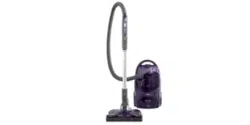
Vacuum Cleaner
READ THISMANUAL for important safety,
assembly and operating instructions.
ONTENTS
USE
How to Start, .............................................................
Vacuuming Tips........................................................
Suggested Pile Height Settings ...............................
A#achments ............................................................
Attachment Use Chart ............................................
Performance Features ............................................
7
8
8
9
9
]0
HOW YOUR VACUUM WORKS ..........................
CANISTER CARE ................................................
Bag Changing ...............................................
Motor Safety: Filter Cleaning ........................
Cleaning Exteflor and Attachments ...........
11
11
1]
]2
12
POWER-MATE _= CARE ...............................................................
Light Bulb Changing ..............................................................
Bett Changing and Brush Cleaning ......................................
Brush Servicing ................................
Brush Assembly .......
....................................... 12
............................................ t3
.......................................... ]3-]4
Proper assembly and safe use of your vacuum cleaner are your responsibilities. Your
cleaner is intended only for household use. The cleaner should be stored in a dry, indoor
area. Read this Owner's Manual carefully for important use and safety information.
ARRANTY
KENMO_E VACUUM CLEANE_
F! LLONE-YEA WARRANTY
When used for private household purposes, if within
one year from the dote of purchase, this vacuum
cleaner foils due to o defect in material or
workmanship, RETURNITTO THENEARESTSEARS
SERVICECENTER/DEPARTMENT IN THEUNITEDSTATES,
and Sears will repair if, free of charge.
If this vacuum cleaner isused for commercial or
rental purposes, the above warranty coverage
oppties for only 90 days from the dote of purchase.
Thiswarranty gives you specific Iego! rights, and you
may also have other rights which vary from state to
state.
SEA_S,ROEBUCKAND CO., D/8] 7WA
HOFFMAN ESTATES,IL6[Yl95
if you need service or parts, visit your local Sears service or
parts department, They will be able to solve your problem
and supply any needed replacement parts, Any service
needed other than described in this Owner's Manual
should be done by a Sears authorized service
representative,
When requesting assistance, parts or service, always give
the following information:
1. Canister model number and serial number;
2. POWER-MATE _ Model number and serial number;
3. Problem description;
4. Part number;
5o Name of part;
6. Location of part - Canister or POWER-MATE7 _
TANT$.4FETY
To reduce the risk of fire, electrical shock, injury to persons or damage when using
your vacuum cleaner, follow basic safety precautions including the following:
Read this manual before assembling or using
your vacuum cleaner,
Use your cleaner only as described in this
manual. Use only with recommended
attachments,
Do not use outdoors or on wet surfaces,
Electrical shock could occur.
Disconnect electrical supply before servicing
or cleaning out brush area. Failure to do so
could result in electrical shock or brush
suddenly starting,
Always turn cleaner off before connecting or
disconnecting the hose or POWER-MATEY M
Always turn cleaner off before unplugging,
Do not unplug by pulling on cord, To unplug,
grasp the plug, not the cord.
Hold plug when rewinding onto cord reel. Do
not allow plug to whip when rewinding,
Do not use with damaged cord or plug, If
cleaner is not working as it should, has been
dropped, damaged, left outdoors, or
dropped into water, return it to a Sears
Service Center/Department,
Do not pull or carry by cord, use cord as a
handle, close door on cord, or pul! cord
around sharp edges or corners, Do not run
cleaner over cord. Keep cord away from
heated surfaces.
Do not leave cleaner when plugged in,
Unplug from outlet when not in use and
before sen,icing.
Do not allow to be used as a toy, Close
attention is necessary when used by or
near children.
Do not handle plug or cleaner with wet hands.
Do not operate cleaner with a punctured
hose. The hose contains electrical wires,
Replace if cut or worn. Avoid picking up
sharp objects,
Do not put any objects into openings,
Do not use with any opening blocked; keep
free of dust, tint. hair and anything that may
reduce air flow,
Keep hair, loose clothing, fingers, and all
parts of body away from openings and
moving parts,
Do not use cleaner without dust bag and/or
filters in place, Always change the dust bag
after vacuuming carpet cleaners or
fresheners, powders and fine dust. These
products clog the bag, reduce airflow and
can cause the bag to burst. Failure to
change could cause permanent damage to
the cleaner.
Do not use the cleaner to pick up sharp hard
objects, small toys, pins, paper, etc. They
may damage the cleaner or dust bag.
Do not pick up anything that is burning or
smoking, such as cigarettes, matches, or
hot ashes,
Do not use cleaner to pick up flammable or
combustible liquids (gasoline, cleaning fluids,
perfumes, etc,), or use in areas where they
may be present. The fumes from these
substances can create a fire hazard or
explosion,
Use extra care when cleaning on stairs, Do
not put on chairs, tables, etc. Keep on floor,
You are responsible for making sure that your
vacuum cleaner is not used by anyone
unable to operate it properly,
2
ARTS
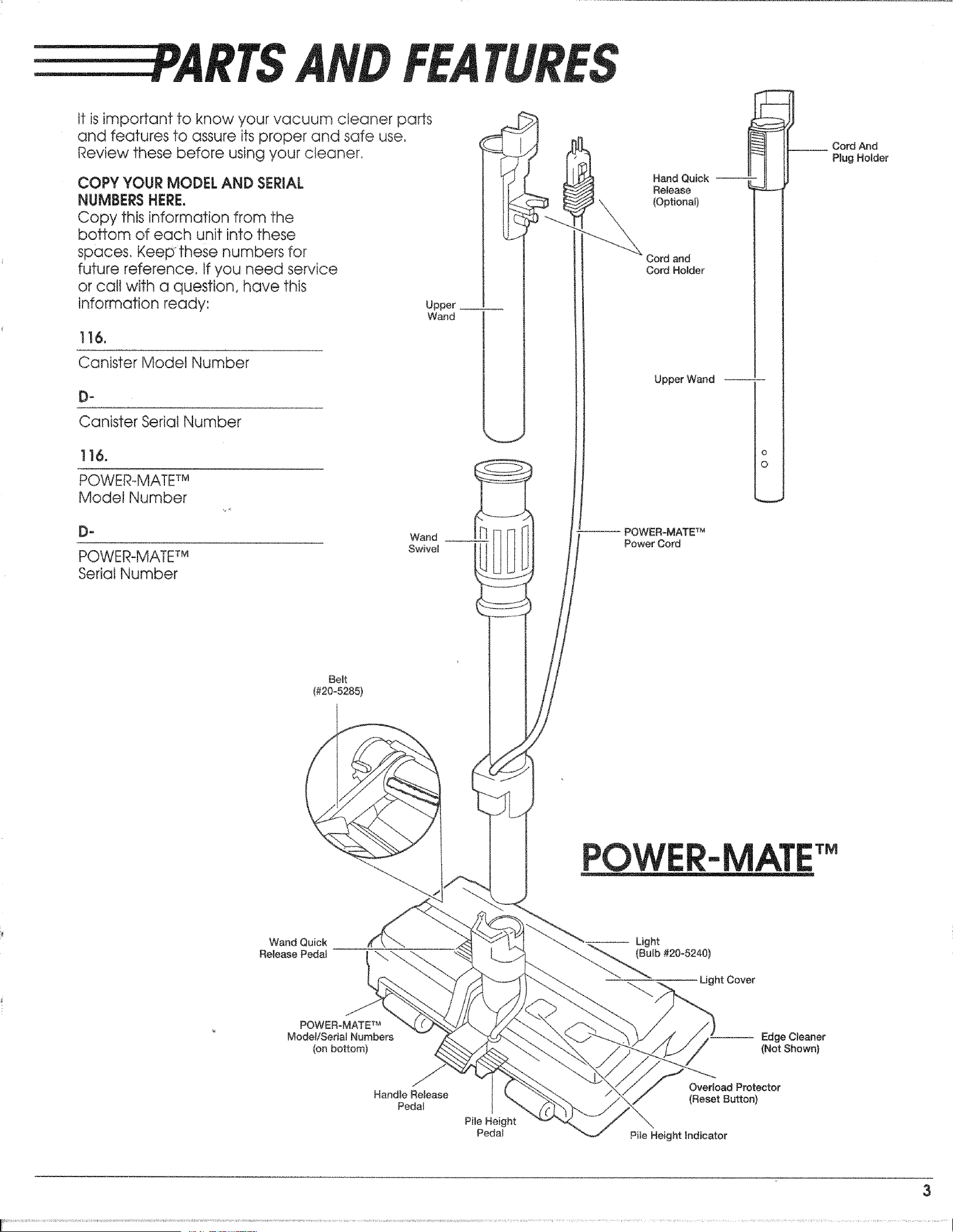
tt is important to know your vacuum cleaner parts
and features to assure its proper and safe use.
Review these before using your cleaner.
COPY YOUR MODEL AND SERIAL
NUMBERS HERE.
Copy this information from the
bottom of each unit into these
spaces. Keepthese numbers for
future reference. If you need service
or cal! with a question, have this
information ready'.
Upper
Wand
116.
Canister Model Number
_
Canister Serial Number
]16.
POWER-MATETM
Model [',lumber
D" Wand _ Ii
POWER_MATETM Swivel
Serial Number
Hand Quick
Release
(Optional)
Cord and
Cord Holder
Upper Wand
POWER-MATE TM
Power Cord
o
O
__ Cord And
Plug Holder
Belt
(#20-5285)
POWER-
Wand Quick
Release Pedal
Light
(Bulb #20-5240)
Ught Cover
POWER-MATE TM
Model/Serial Numbers
(on bottom)
Edge Cleaner
(Not Shown)
Handle Release
Pedal
Overload Protector
(Reset Button)
Pile Height indicator
3
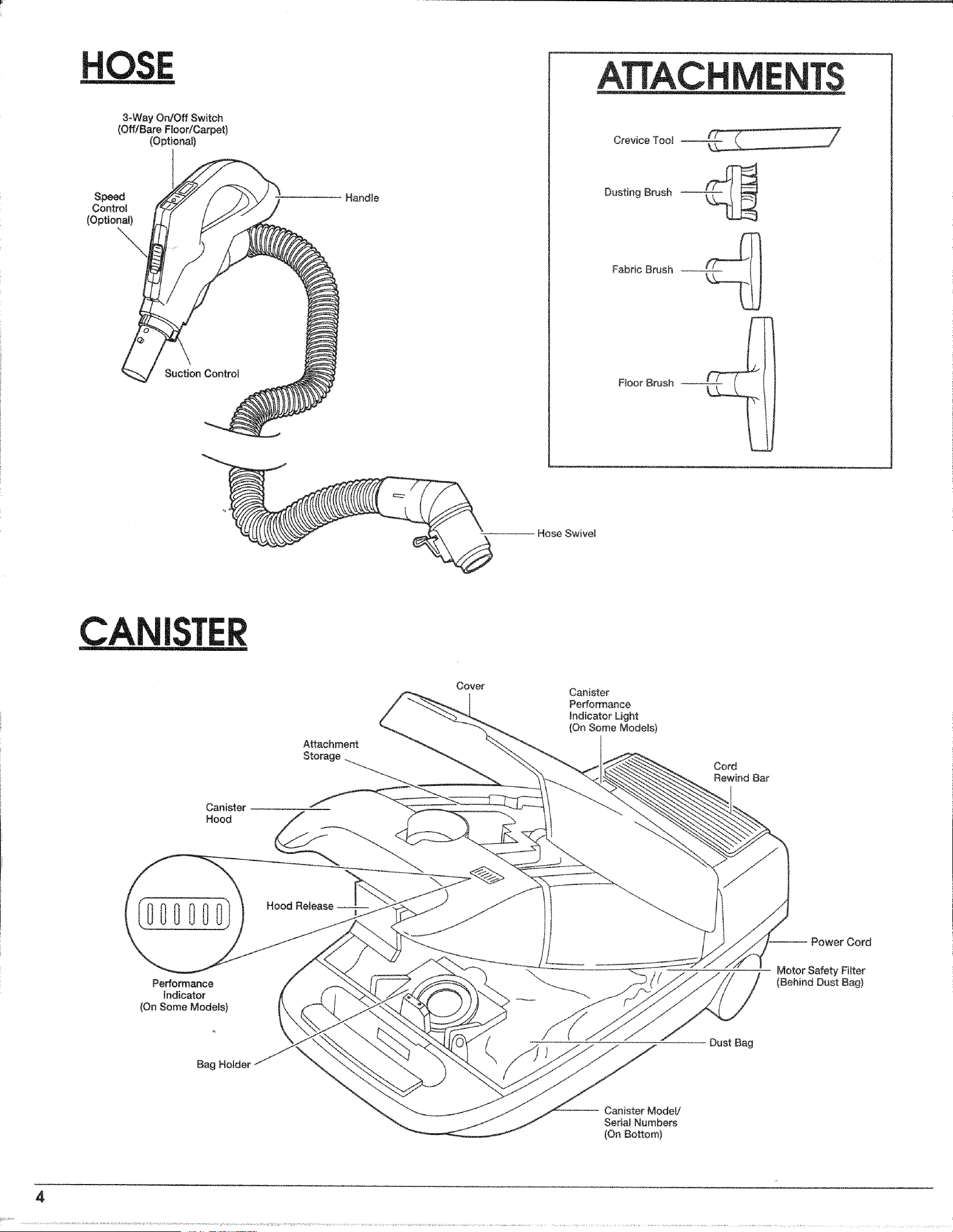
3-Way On/Off Switch
(Off!Bare Floor/Carpet)
(Optiona})
Speed
Control
(Optionat)
Suction Control
Handle
ATTACHM T$
Crevice TooJ
Dusting Brush
Fabric Brush
Floor Brush
Hose Swivel
Attachment
Canister - - --
Hood
Cover
Canister
Performance
indicator Light
(On Some Modets)
Cord
Rewind Bar
Performance
Indicator
(On Some Models)
Hood Release
Cord
Motor Safety Filter
(Behind Dust Bag)
Bag Holder
Dust Bag
Canister ModeJi
Sedal Numbers
(On Bottom)
4
Y
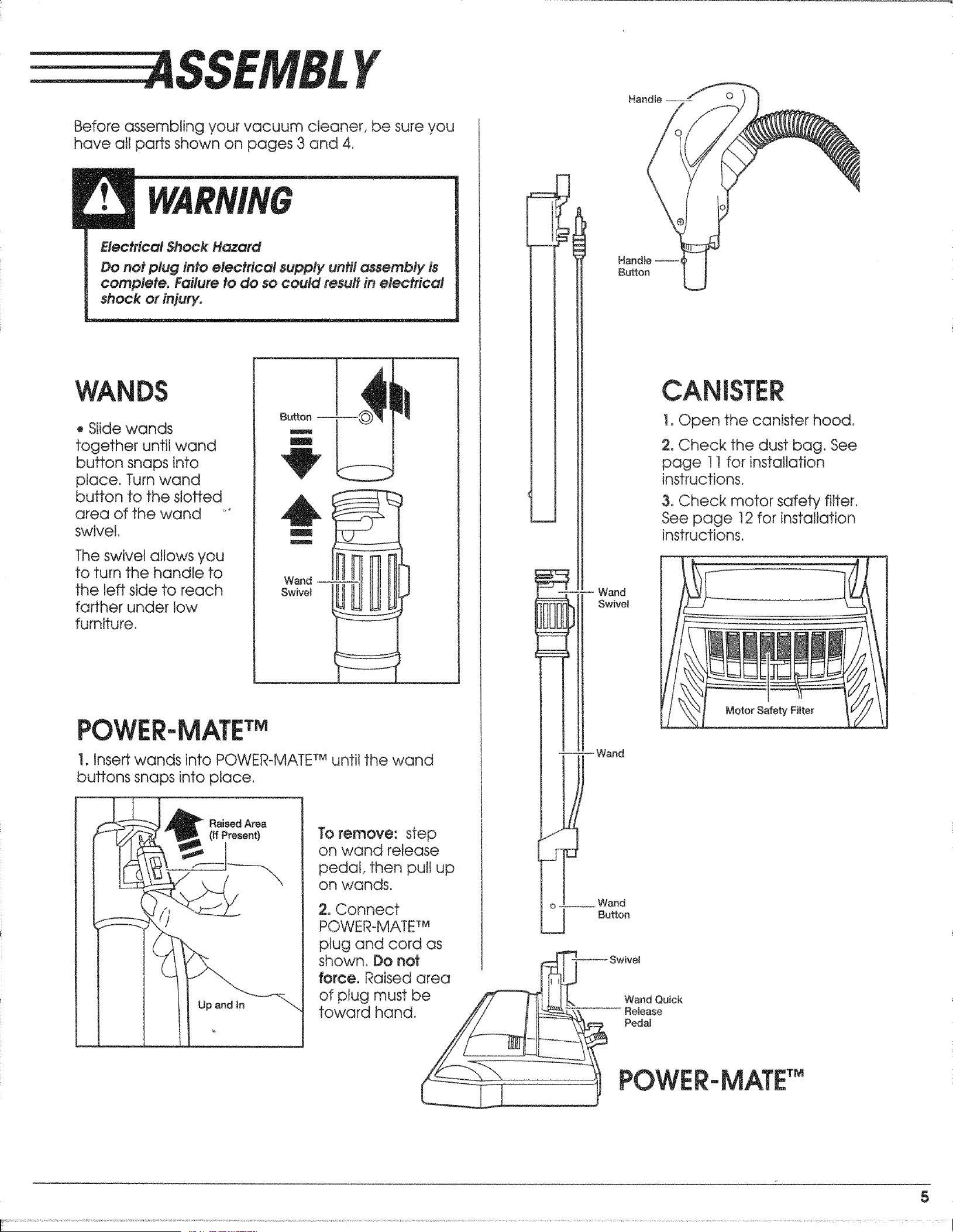
Before assembling your vacuum cleaner, be sure you
have all parts shown on pages 3 and 4,
Electrical Sock Hazard
Do not plug into electrical supply until assembly is
complete, Failure to do so could {esult in electrical
shock or injury.
WANDS
o Slide wands
together until wand
button snaps into
ptace. Turn wand
button to the slotted
area of the wand '_
swivel,
The swivel allows you
to turn the handle to
the left side to reach
farther under low
furniture,
Bu_on
B
m
POWER-MATETM
1, insert wands into POWER-MATE TMuntit the wand
buttons snaps into place.
Raised Area
(If Present) To remove: step
on wand release
pedal, then pult up
on wands,
2. Connect
POWER-MATE TM
plug and cord as
shown, Do not
force. Raised area
of ptug must be
toward hand.
?
'" . Wand
Swivel
Handle --
/
Handle ---1
Button
CANISTER
1. Open the canister hood,
2oCheck the dust bag. See
page t 1 for installation
instructions,
3. Check motor safety filter,
See page 12 for installation
instructions,
Motor Safety Filter
Wand
!
_ .__Wand
Button
Swivel
W_d Quick
Release
Pedal
POWER-MATE
5
HOOD
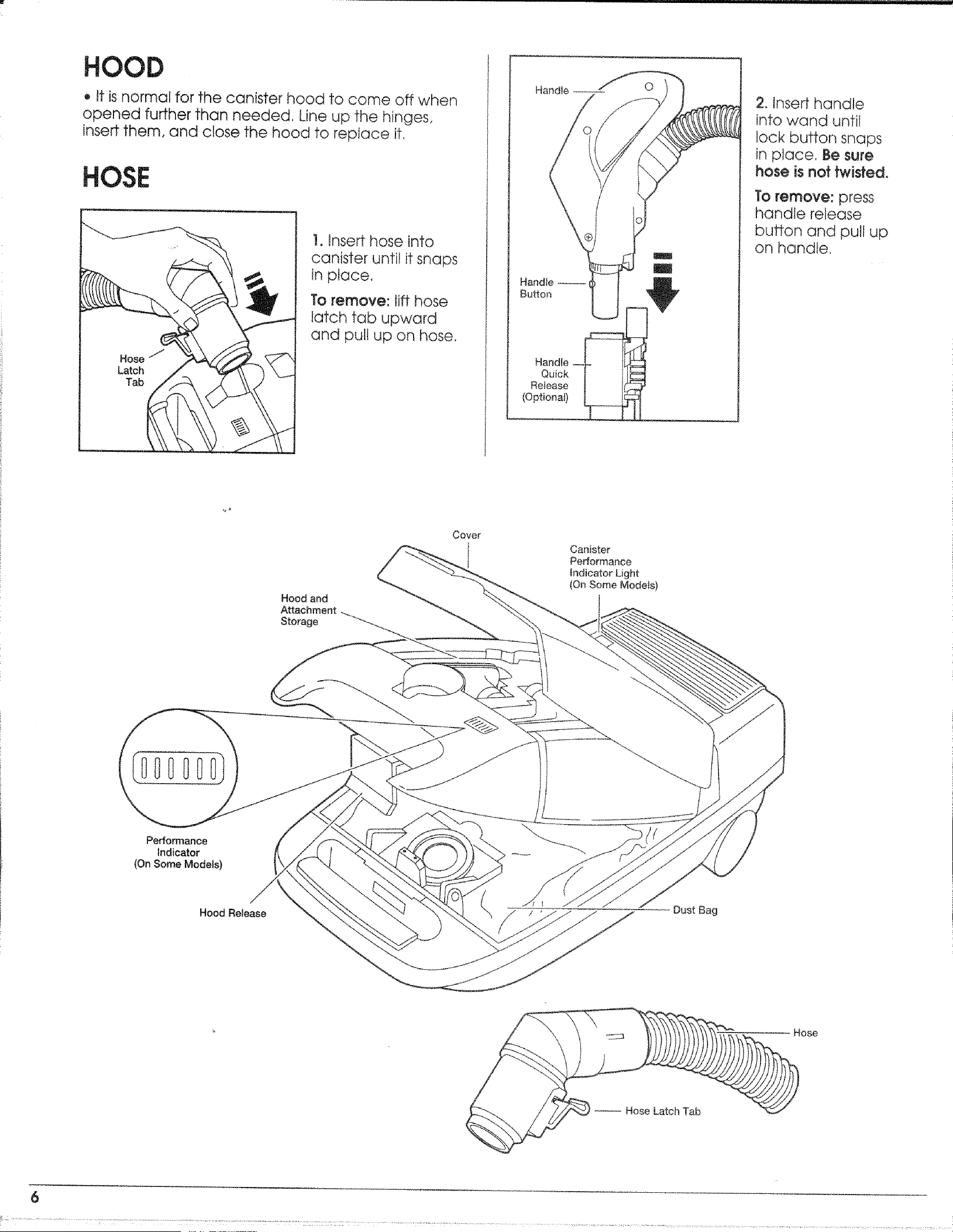
o it is normal for the canister hood to come off when
opened further than needed, Line up the hinges,
insert them, and close the hood to replace it,
HOSE
!, Insert hose into
canister until it snaps
in place.
To remove: lift hose
latch tab upward
and putt up on hose,
Handle
Quick
Re{ease
(Optional)
2. Insert handle
into wand until
lock button snaps
in place. Be sure
hose is not twisted.
To remove: press
handle release
button and pull up
on handle.
Performance
Indicator
{On Some Models)
Hood Release
Hood and
Attachment
Storage
Cover
Canister
Performance
Indicator Light
(On Some Mode{s)
Dust Bag
Hose
- Hose Latch Tab
6
............... .... i i_?' :'! " i' ...................... .............. .................... .......... ......
EEEEEEE OW
Personal injury and Product Damage Hazard
. DO NOT plug in if switch is in ON position.
Personal injury or damage ceutd resu#°
, The cord moves rapidly when rewinding. Keep
children away and provide a clear path when
rewinding the cord to prevent personal injury.
• DO NOT use outlets above counters. Damage to
items in surrounding area could occur.
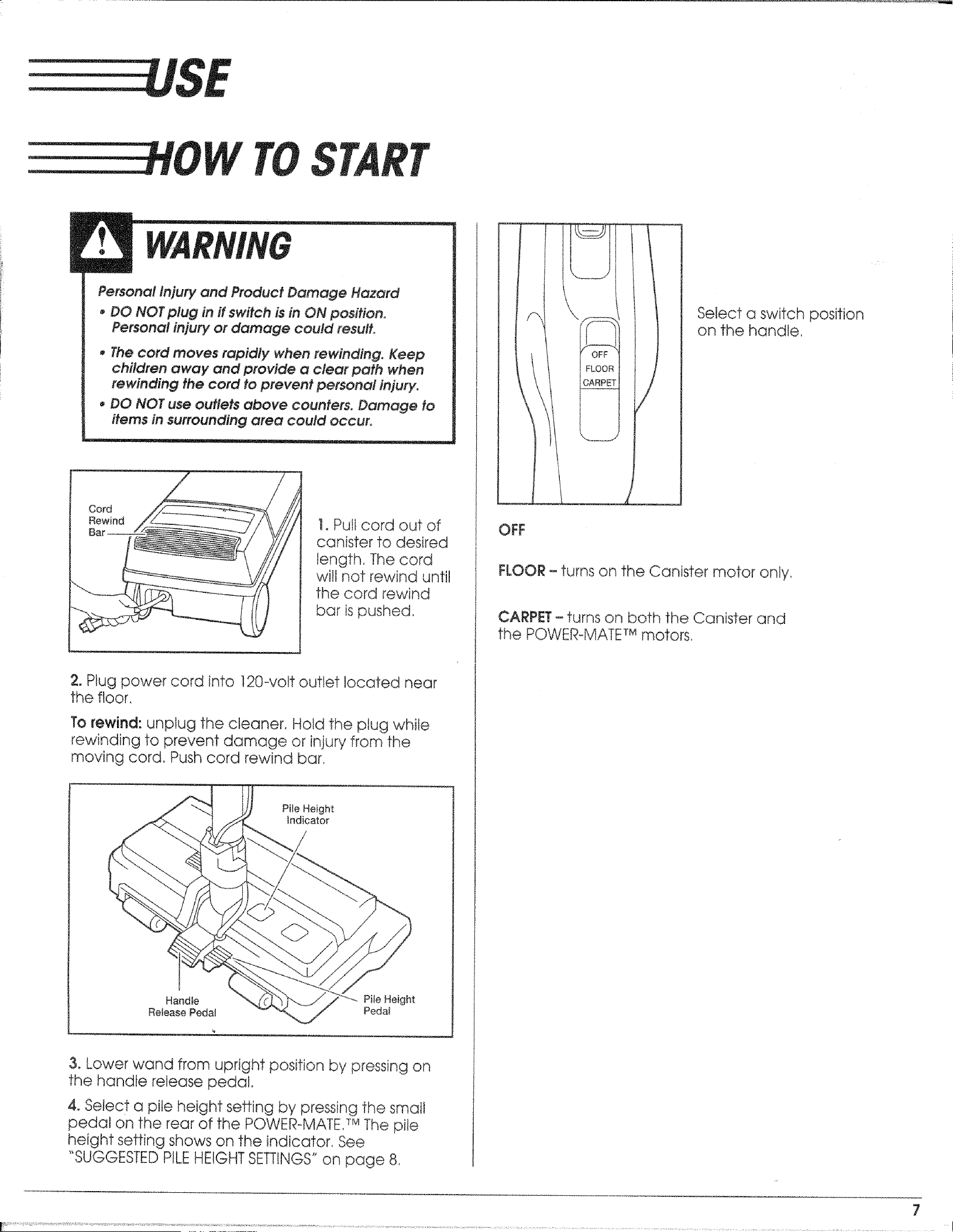
Cord
Rewind
Bar
!. Pull cord out of
canister to desired
length, The cord
wilt not rewind until
the cord rewind
bar ispushed,
2. Plug power cord into ]20-vo!t outlet located near
the floor,
To rewind:unplug the cleaner. Hold the plug while
rewinding to prevent damage or injury from the
moving cord. Push cord rewind bar.
Pile Height
Indicator
Handle
Release Pedal
Pile Height
Peda_
3. Lower wand from upright position by pressing on
the handle release pedal.
4. Select a pile height setting by pressing the small
pedal on the rear of the POWER-MATE, TMThe pile
height setting shows on the indicator. See
"SUGGESTED PILE HEIGHT SETTINGS" on page 8.
C
\
Select a switch position
on the handle,
OFF
FLOOR - turns on the Canister motor only,
CARPET- turns on both the Canister and
the POWER-MATETMmotors,
7
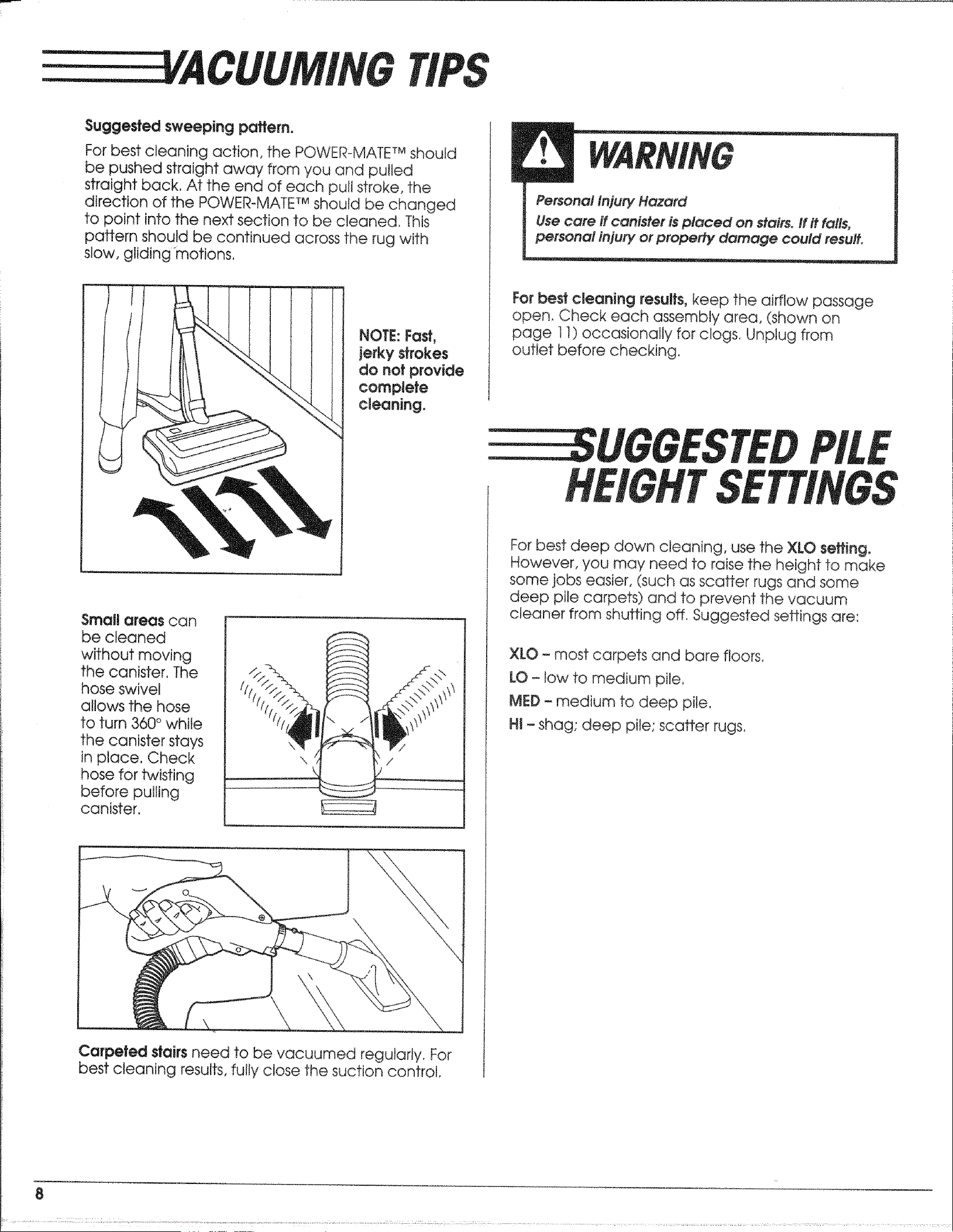
EEEEEEE A
Suggested sweeping pattern.
For best cleaning action, the POWER-MATE TMshould
be pushed straight away from you and pulled
straight back, At the end of each pull stroke, the
direction of the POWER°MATF Mshould be changed
to point into the next section to be cleaned. This
pattern should be continued across the rug with
slow, gliding motions.
NOTE: Fast,
jerkystrokes
do not provide
complete
cleaningo
For best cleaning results, keep the airflow passage
open_ Check each assembly area, (shown on
page ! 1) occasionally for ctogs, Unptug from
outlet before checking.
UGOESTED
Small areas can
be cleaned
without moving
the canister. The
hose swivel
allows the hose
to turn 360 ° while
the canister stays
in place. Check
hose for twisting
before pulling
canister,
\ /
\
/
Carpeted stairs need to be vacuumed regularly. For
best cleaning results, fully close the suction control.
For best deep down cleaning, use the XLO setting.
However, 'you may need to raise the height to make
some jobs easier, (such as scatter rugs and some
deep pile carpets) and to prevent the vacuum
cleaner from shutting off. Suggested settings are:
XLO - most carpets and bare floors.
LO - low to medium pite.
MED - medium to deep pile.
H! - shag; deep pile; scatter rugs.
8
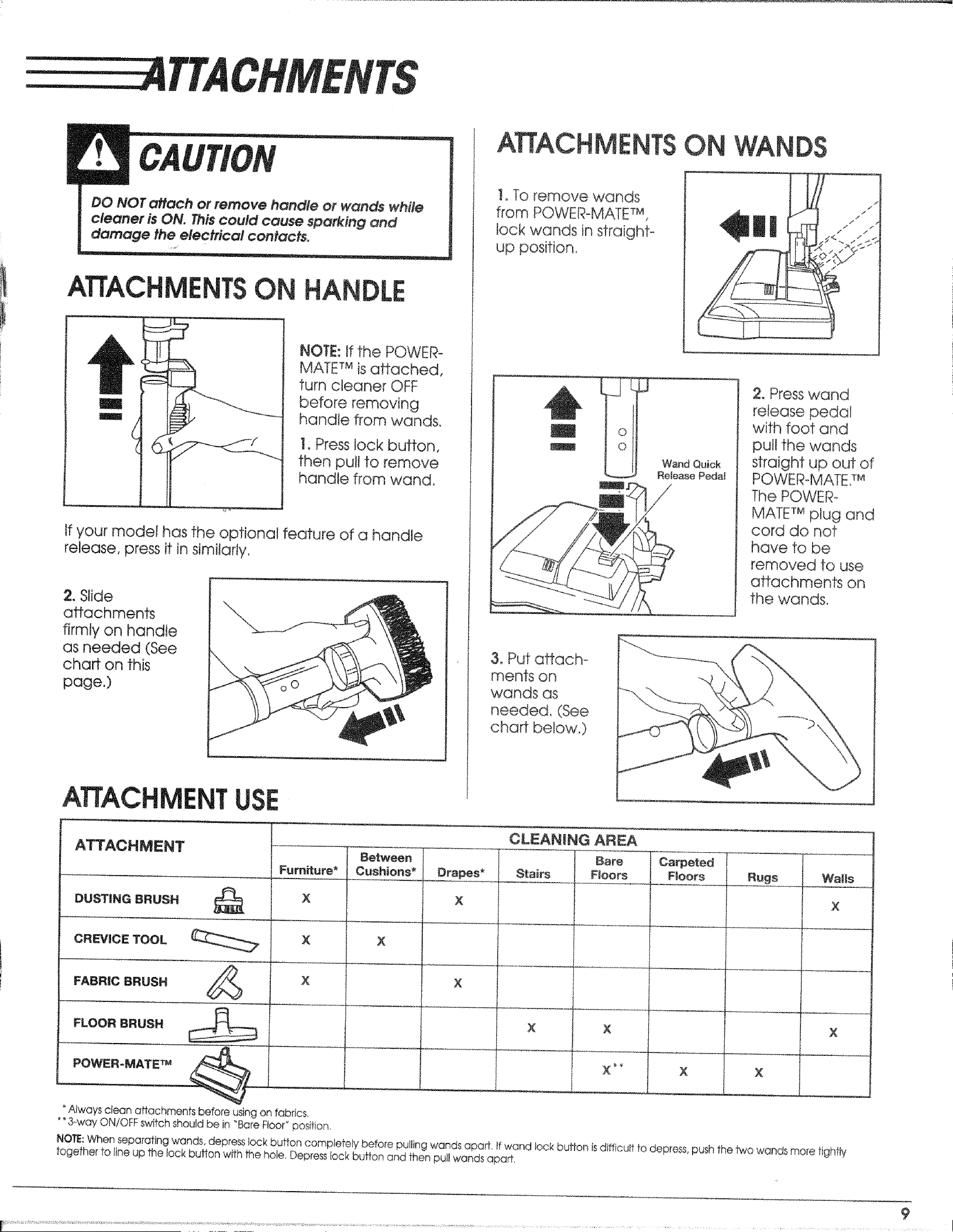
EEEE 4TTACHMENTS
DO NOT attach or remove handle or wands while
cleaner is ON. T,_iscould cause sparking and
damage the electrical contact&
ATTACHMENTSON
11'
l
I
NOTE: If the POWER-
MATE TM is attached,
turn cleaner OFF
before removing
handle from wands.
1 Press lock button.
then pull to remove
handle from wand,
If your model has the optional feature of a handle
release, press it in similarly,
2, Slide
attachments
firmly on handle
as needed (See
chart on this
page.)
ATTACH
!. To remove wands
from POWER-MATE TM,
lock wands in straight-
up position,
I
I
o
0
3. Put affach-
ments on
wands as
needed, (See
chaff below.)
ON WANDS
Wand Quick
Release Pedal
:2. Press wand
release pedal
with foot and
pull the wands
straight up out of
POWER-MATE7 M
The POWER-
MATE TM plug and
cord do not
have to be
removed to use
attachments on
the wands,
ATTACHMENT
ATTACHMENT
CLEANING AREA
Bare
Stairs Floors
BeWveen Carpeted
Furniture* Cushions* Drapes* Floors Rugs
DUSTING BRUSH _ X X
CREVICE TOOL __. X ×
×
FABRIC BRUSH _/_
FLOOR BRUSH
Always clean affachments before using on fabrics,
* *3-way ON/OFF switch should be in "Bare Floor_position
X
X X
× X
Y
I Walls
X
t
NOTE:When separating wands, depress lock button completely before pulling wands apart, if wand lock buffon isdifficult to depress,push the 1wewands more tightly
together to line up the lock button with the hole, Depressieck button and then pull wands apart,
9
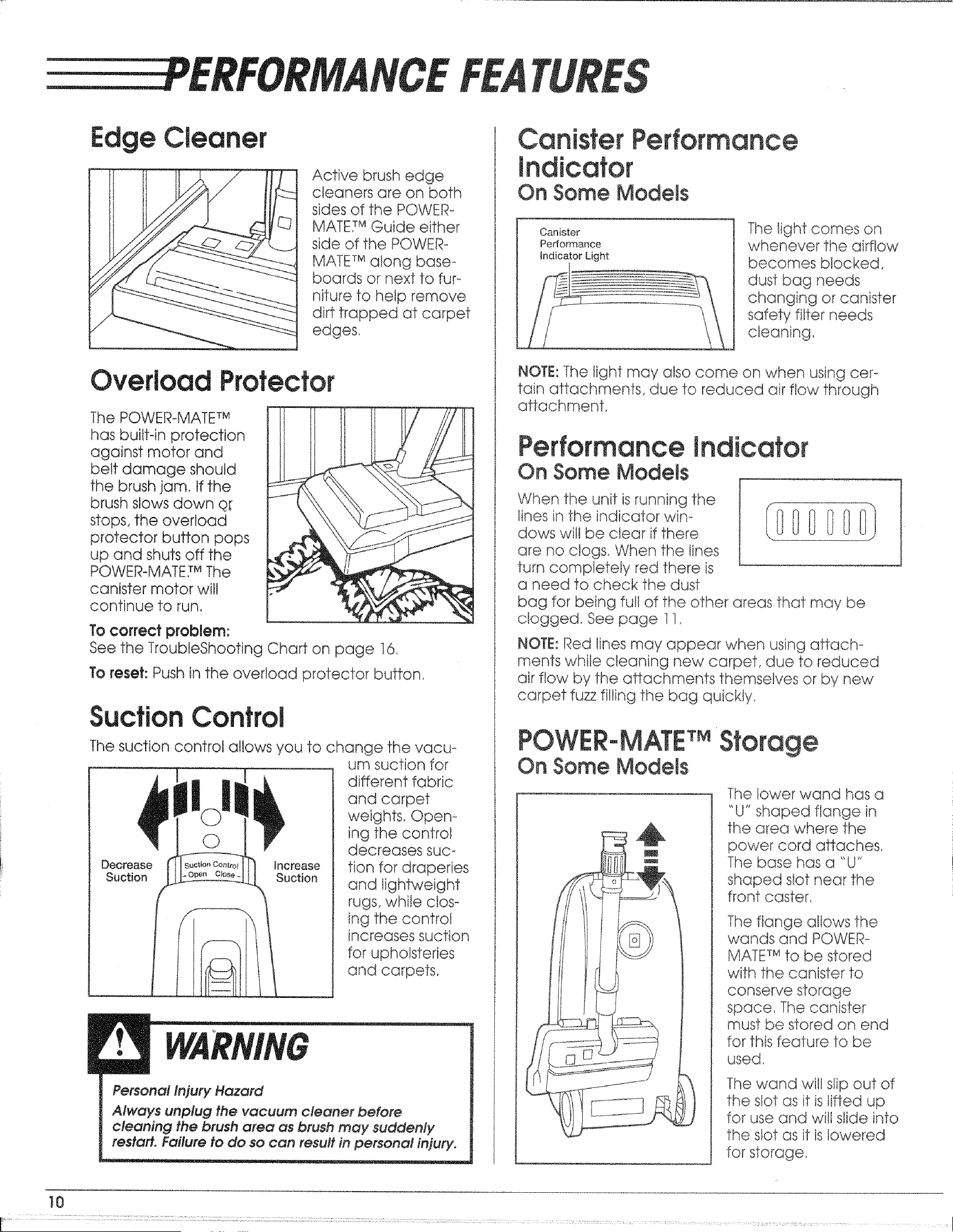
NCE
Edge Cleaner
Active brush edge
cleaners are on both
sides of the POWER-
MATE,TMGuide either
side of the POWER--
MATE TMalong base.-
boards or next to fur °
niture to help remove
dirt trapped at carpet
edges,
Overload Protector
The POWER-MATE TM
has built-in protection
against motor and
belt damage should
the brush .jam, If the
brush slows down Q[
stops, the overload
protector button pops
up and shuts off the
POWER-MATE7 MThe
canister motor will
continue to run,
To correct problem:
See the TroubleShooting Chart on page 16.
To reset: Push in the overload protector button.
SuctionControl
The suction control allows you to change the vacu-
|O
Decrease Increase
Suction Suction
i
um suction for
different fabric
and carpet
weights, Open-
ing the control
decreases suc-
tion for draperies
and Iightweight
rugs, while clos-
ing the control
increases suction
for upholsteries
and carpets,
Personal Injury Hazard
AIw'oys unplug the vacuum cleaner before
cleaning the brush area as brush may suddenly
testa#. Failure to do so con result in personal injury.
Canister
Indicator
On Some Models
Canister
Performance
_ndicator Light
_nce
The light comes on
whenever the airflow
becomes blocked,
dust bag needs
changing or canister
safety filter needs
cleaning_
NOTE: The light may also come on when using cer-
tain attachments, due to reduced air flow through
attachment.
Performance indicator
On Some Models
When the unit isrunning the
lines in the indicator win-
dows wilt be clear if there
are no clogs. When the lines
turn completely red there is
a need to check the dust
bag for being full of the other areas that may be
clogged. See page 11,
NOTE:Red lines may appear when using attach-
ments while cteaning new carpet, due to reduced
air flow by the attachments themselves or by new
carpet fuzz filling the bag quickly,
POWIER.-MATETM
On Some Models
e
The lower wand has a
"U" shaped flange in
the area where the
power cord attaches,
The base has a "U"
shaped slot near the
front caster,
The flange allows the
wands and POWER-
MATE TMto be stored
with the canister to
conserve storage
space, The canister
must be stored on end
for this feature to be
used,
The wand wilt slip out of
the slot as it is lifted up
for use and will slide into
the slot as it islowered
for storage,
10
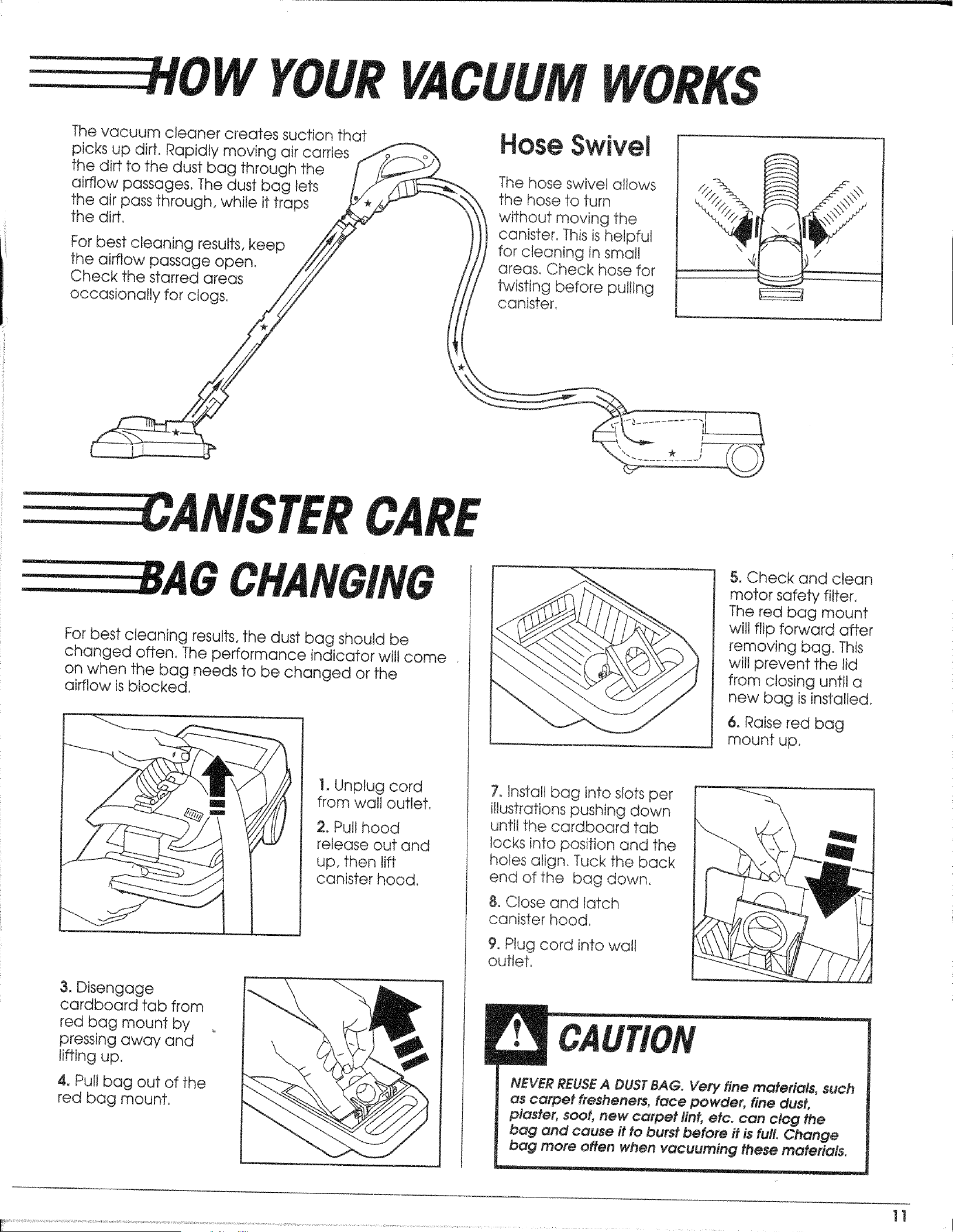
The vacuum cleaner creates suction that
picks up dirt. Rapidly moving air carries //_
the dirt to the dust bag through the / /_
airflow passages, The dust bag tots L/. _,
the air pass through, while it traps _*_
the dirt.
For best cleaning results, keep ///_,_
the airflow passage open, /'////
Check the starred areas //'/
OC
Hose Swivel
The hose swivel allows
the hose to turn
without moving the
canister. This is helpful
for cleaning in small
areas. Check hose for
twisting before pulling
canister,
ANISTER
For best cleaning results, the dust bag should be
changed often, The performance indicator will come
on when the bag needs to be changed or the
airflow is blocked.
1. Unplug cord
from wall outlet,
2, Pult hood
release out and
up, then lift
canister hood,
3, Disengage
cardboard tab from
red bag mount by
pressing away and
lifting up,
4, Puttbag out of the
red bag mount,
5, Check and clean
motor safety filter,
The red bag mount
will flip forward after
removing bag. This
will prevent the lid
from c!osing until a
new bag isinstalled,
6. Raise red bag
mount up,
7, Instatl bag into slots per
i!lusfrations pushing down
until the cardboard tab
locks into position and the
holes align_ Tuck the back
end of the bag down,
8. Close and latch
canister hood,
9, Plug cord into wall
outlefl
NEVER REUSEA DUST BAG. Very fine materials, such
as carpet #esheners, face powder, fine dust,
piaster, soot, new carpet lint, etc. can clog the
bag and cause it to burst before it is full. Change
bag more often when vacuuming these materials.
11
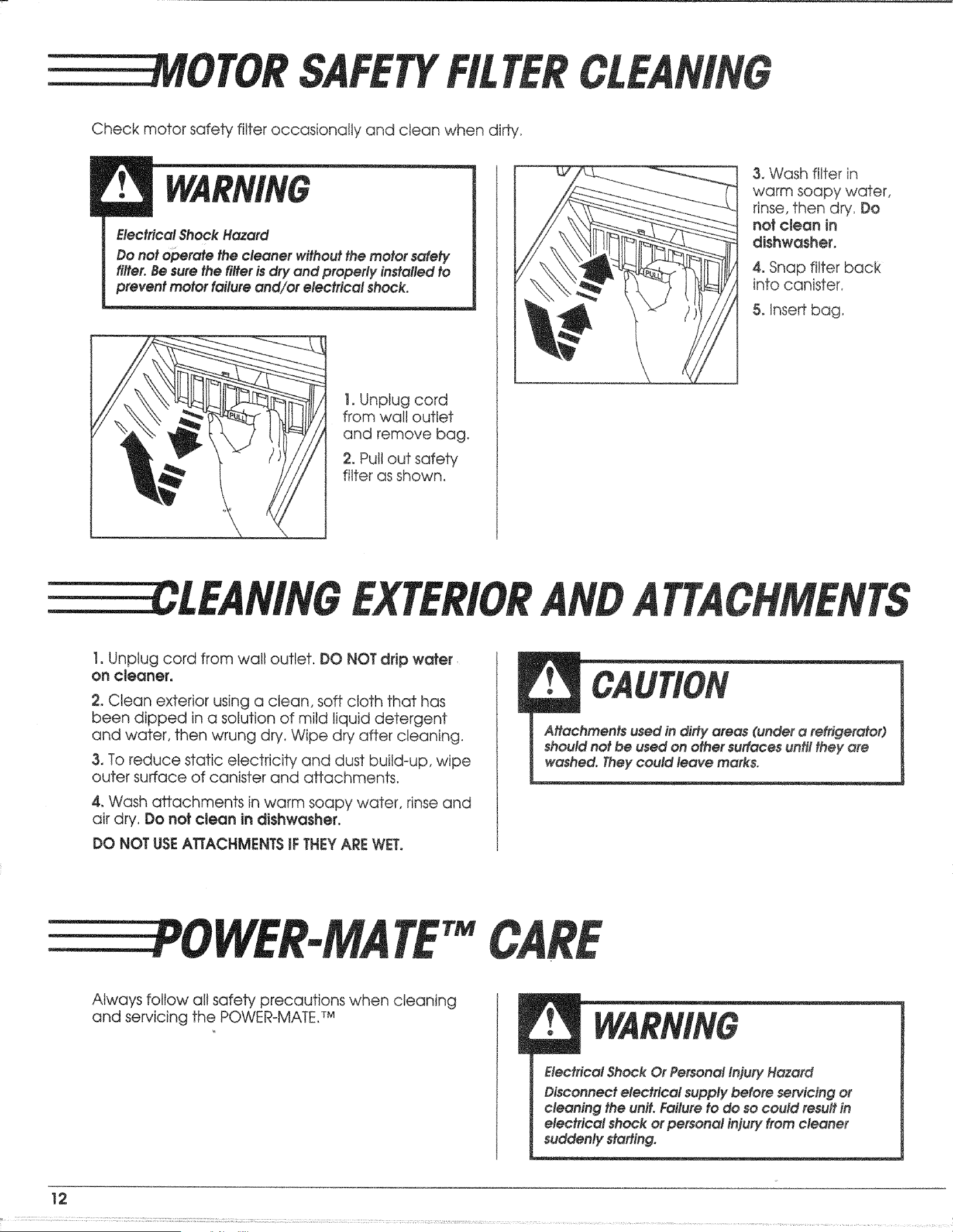
IOTOR
Check motor safety filter occasionally and clean when dirty,
Electrical Shock Hazard
Do not operate the cleaner without the motor safety
filter. Besure the filter isdry and properly instafled to
prevent motor failure and/or electrical shock.
]. Unplug cord
from wall outlet
and remove bag.
2, Pull out safety
filter as shown,
3. Wash filter in
warm soapy water,
rinse, then dr,!. Do
notclean in
dishwasher,
4, Snap filter bacR
into canister,
5°Insert bag,
LEAMNG
1, Unplug cord from wall outlet. DO NOT drip wafer
on cleaner.
2. Clean exterior using a clean, soft cloth that has
been dipped in a solution of mild liquid detergent
and water, then wrung dry, Wipe dry after cleaning.
3, To reduce static electricity and dust build-up, wipe
outer surface of canister and aHachments,
4, Wash attachments in warm soapy water, rinse and
air dry. Do not clean in dishwasher.
DO NOT USE ATTACHMENTS tFTHEY ARE WET.
I ttaohments used in dirty areas (under a refrigerator)
should not be used on other sudaees until they are
washed. They could leave marks°
EEEEE OWEE.MA
'TM
Always follow all safety precautions when cleaning
and servicing the POWER-MATE. TM
Electrical Shook Or Personal Iniury Hazard
Disconnect electrical supply before sewicing or
cleaning the unit. Failure to do so could result in
electrical shock or personal injury from cleaner
suddenly sta#ing_
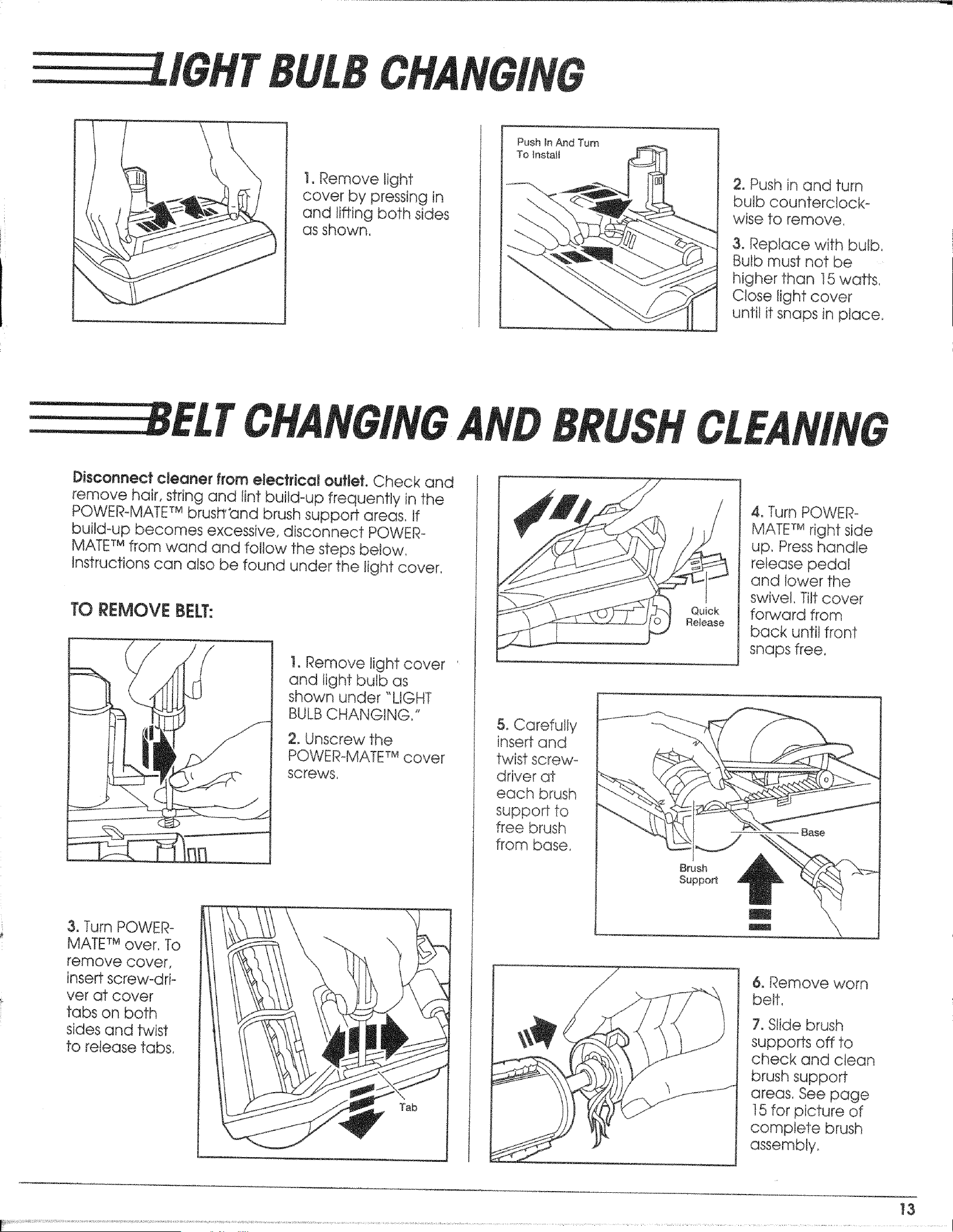
IGHT
!. Remove light
cover by pressing in
and lifting both sides
as shown,
Push In And Turn
To lnstalJ
2. Push in and turn
bulb counterctocko
wise to remove,
3. Replace with bulb,
Bulb must not be
higher than t5 wafts,
Close light cover
until it snaps in place.
ELT
Disconnect cleaner from electrical ouftet. Check and
remove hair, string and lint build-up frequently in the
POWER-MATETM brusbr'and brush support areas, If
build-up becomes excessive, disconnect POWER-
MATETM from wand and follow the steps below,
Instructions can also be found under the light cover,
TO REMOVE BELT:
1. Remove light cover
and light bulb as
shown under "LIGHT
BULBCHANGING,"
2. Unscrew the
POWER_MATETM cover
screws.
& Turn POWER-
MATETM over, To
remove cover.
insert screw-dri-
ver at cover
tabs on both
sides and twist
to release tabs,
5. Carefully
insert and
twist screw_
driver at
each brush
support to
free brush
from base,
Quick
Release
Brush
Support
4oTurn POWER°
MATETM right side
up, Presshandle
release pedal
and lower the
swivel, Tilt cover
forward from
back until front
snaps free,
6. Remove worn
belt,
7. Slide brush
supports off to
check and clean
brush support
areas, See page
]5 for picture of
complete brush
assembly_
13
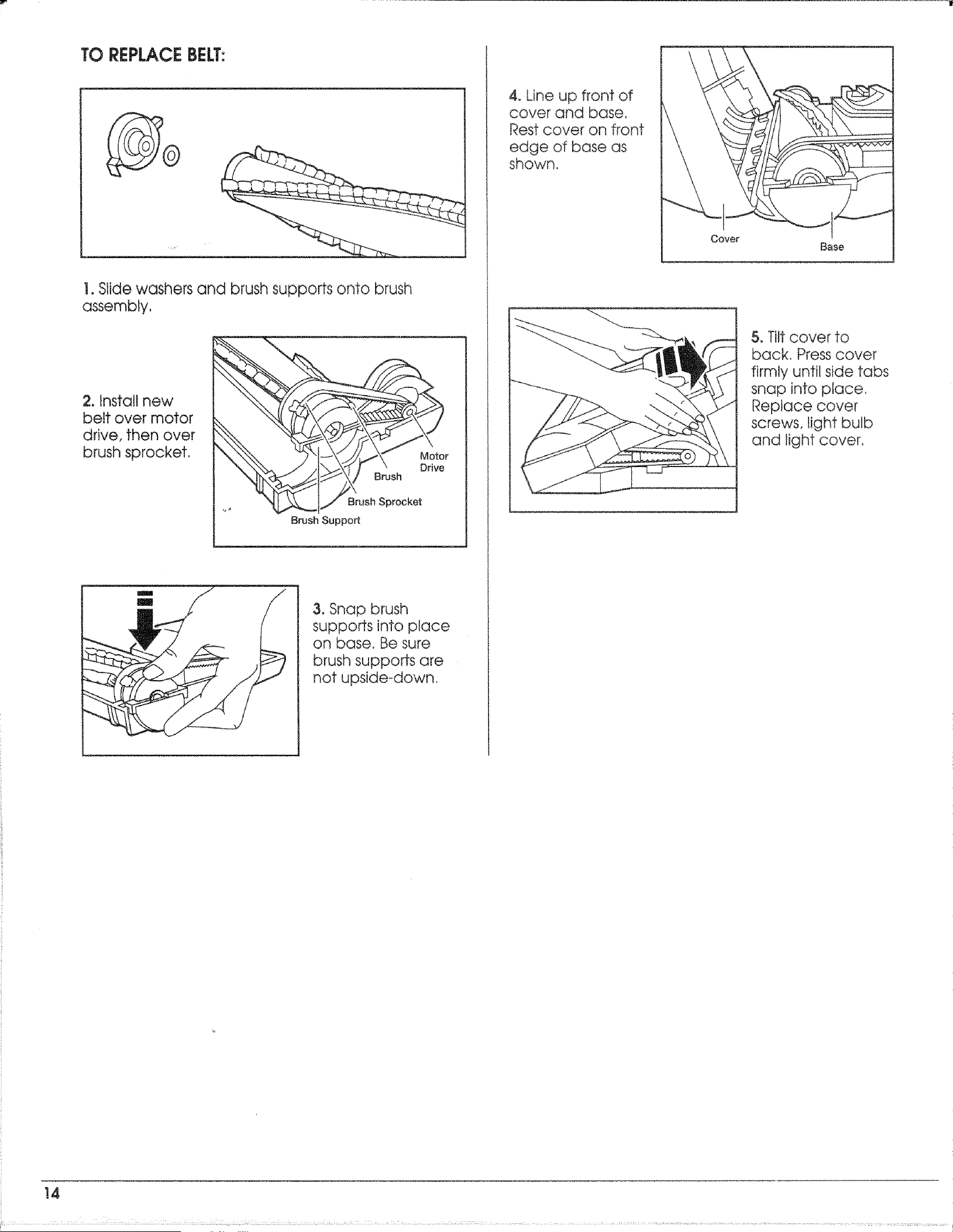
TOREPLACEBELT:
1. Slide washers and brush supports onto brush
assembly,
2. Instait new
belt over motor
drive, then over
brush sprocket.
Motor
Drive
Brush
Brush Sprocket
Brush Support
m
m
3. Snap brush
supports into place
on base. Be sure
brush supports are
not upside-down.
4. Line up front of
cover and base,
Rest cover on front
edge of base as
shown,
5. Titt cover to
back, Press cover
firmly until side tabs
snap into place,
Replace cover
screws, light bulb
and light cover,
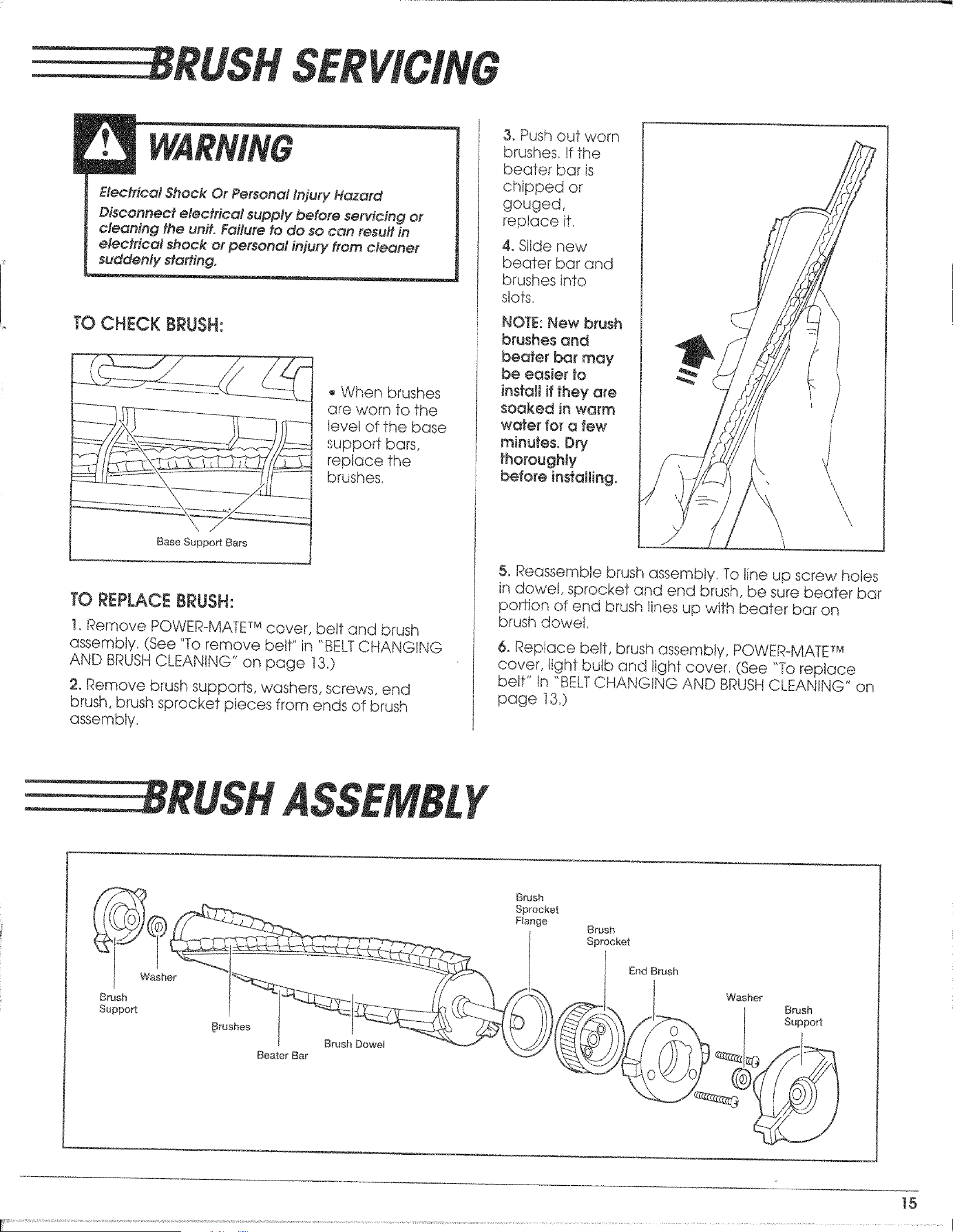
RLISH
Electrical Shock Or Personal }n]ury Hazard
Disoonttect electrical supply before servicing or
cleaning the unit. Failure to do so can result in
electrical shock or personal injury from cleaner
suddenly starting.
TO CHECK BRUSH:
Base Suppo_ Bars
,, When brushes
are worn to the
Ievet of the base
support bars,
replace the
brushes.
TO REPLACE BRUSH:
t. Remove POWER-MATETM cover, belt and brush
assembly. (See "To remove belt" in "BELTCHANGING
AND BRUSHCLEANING" on page t3.)
2. Remove brush supports, washers, screws, end
brush, brush sprocket pieces from ends of brush
assembly.
3. Push out worn
brushes./f the
beater bar is
chipped or
gouged,
replace if.
4, Slide new
beater bar and
brushes into
stats,
NOTE:New brush
brushes and
beater bar may
be easier to
instaJt if they are
soaked in warm
water for a few
minutes. Dry
thoroughly
before installing,
\
\
5. Reassemble brush assembly, To line up screw holes
in dowel, sprocket and end brush, be sure beater bar
po_Jon of end brush lines up with beater bar on
brush dowel,
6. Replace belt, brush assembly, POWER-MATETM
cover, light bulb and light cover. (See "To replace
belt" in "BELTCHANGING AND BRUSHCLEANING" on
page 13,)
RUSH Y
Washer
Brush
Suppo_
#rushes
t
l Brush Dowel
Boater Bar
Brush
Sprocket
Brush
Sprocket
End Brush
Washer
Support
15
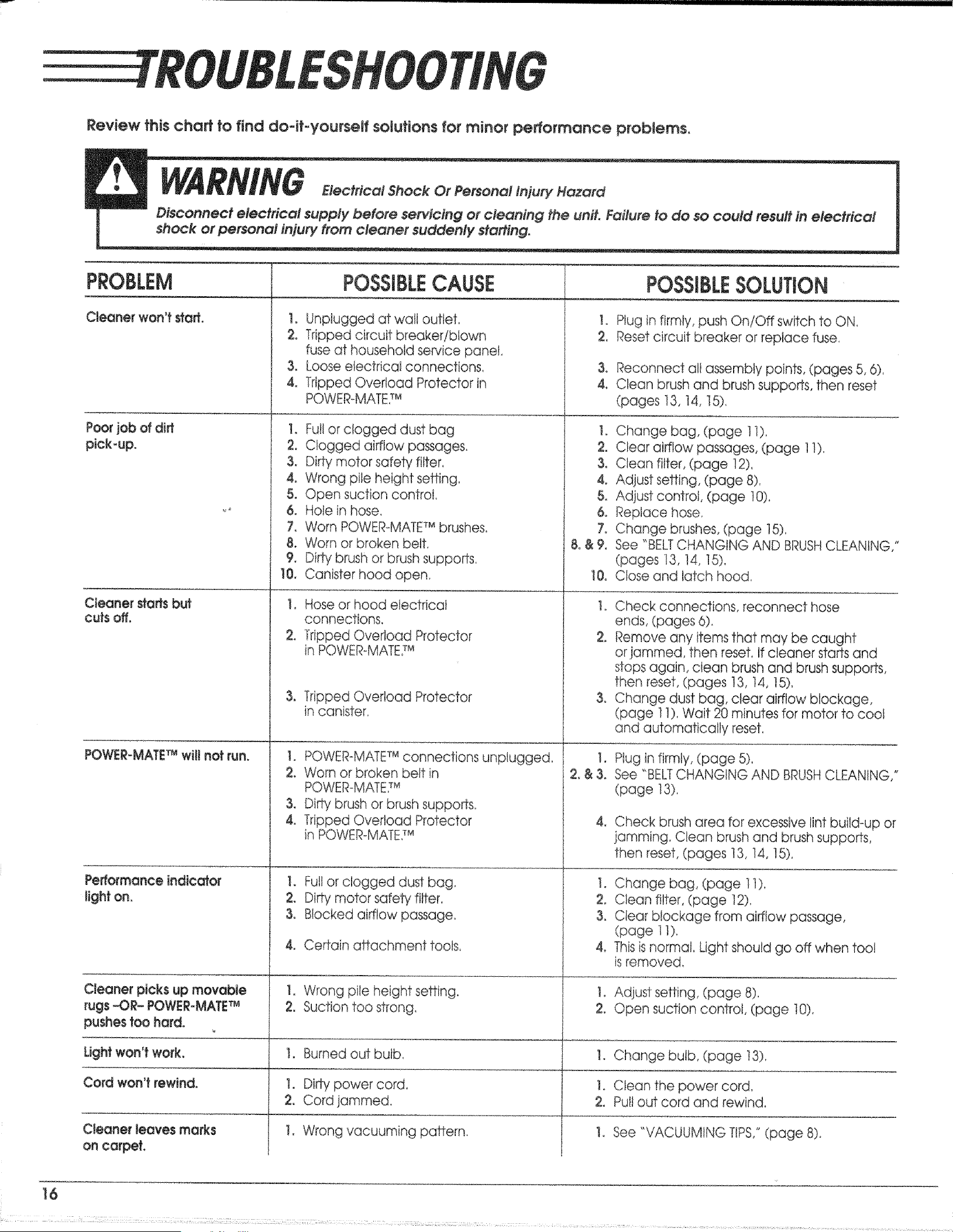
ROUBI.,
Review thischart to find dodt-yourself solutions for minor perlormQnc÷ problemso
I
shock or personal injur/ from cleaner suddenly #a#ing_
PROBLEM
Cleaner won't#arL
Cleaner staffsbut
cutsoff.
POWER-MATET_wiUnotrun.
Performance indicator
light on.
Cleaner picksup movable
rugs_OR- POWER_MATE _
pushes too hard.
POSSIBLESOLUTION
POSSIBLECAUSE
1. Unplugged at watt outlet, I.
2. Tripped circuit breaker!blown 2,
fuse at household service panel,
3, Loose electrical connections.
4, Tripped Overload Protector in
POWER-MATE7M
1, Full or clogged dust bag I,
2. Clogged airflow passages, 2,
3. Dirty motor safety filter, 3.
4. Wrong pile height setting. 4_
5. Open suction control, 5.
& Hole in hose, 6,
7, Worn POWERoMATETMbrushes, 7,
8. Worn or broken belt, 8. & 9,
9, Di_ brush or brush supports,
t0. Canister hood open, 10.
!, Hose or hood electrical t.
connections,
2. Tripped Overload Protector 2,
in POWER-MATE7M
3, Tripped Overload Protector 3,
in canister.
I, POWER-MATETMconnections unplugged, 1.
2. Worn or broken belt in 2_& 3,
POWER-MATE7M
3, Dirty brush or brush supports,
4, Tripped Overload Protector 4.
in POWER_MATE7M
I. Full or clogged dust bag, 1.
2, Dirty motor safety filter, 2,
3. Blocked airflow passage, 3,
4. Certain affachment tools, 4_
1, Wrong pile height setting, to
2. Suction too strong, 2,
1. Burned out bulb, 1,
1. Dirty power cord 1.
2, Cord jammed. 2,
1. Wrong vacuuming pattern_ 1.
Plug in firmly, push On/Off switch to ON.
Reset circuit breaker or replace fuse
3o Reconnect atl assembly points, (pages 5, 6),
4. Clean brush and brush supports, then reset
(pages 13, t4, 15),
Change bag, (page 1i),
Clear airflow passages, (page 11).
Clean filter, (page 12)_
Adjust setting, (page 8).
Adiust control, (page 10)
Replace hose,
Change brushes, (page t5).
See "BELTCHANGING AND BRUSHCLEANING,"
(pages 13, 14, 15),
Close and latch hood,
Check connections, reconnect hose
ends, (pages 6),
Remove any items that may be caught
or jammed, then reset, tf cleaner starts and
stops again, clean brush and brush supports,
then reset, (pages t3, t4, 15),
Change dust bag, clear airflow blockage,
(page 11). Wait 20 minutes for motor to cool
and automatically reset,
Plug in firmly, (page 5)_
See "BELTCHANGING AND BRUSHCLEANING,"
(page 13).
Check brush area for excessive lint build-up or
jamming. Clean brush and brush supports,
then reset, (pages 13, 14, !5),
Change bag, (page 1t),
Clean filter, (page 12),
Clear blockage from airflow passage,
(page 11).
Thisisnormal Light shoutd go off when tool
isremoved,
Adjust setting, (page 8),
Open suction control, (page 10).
Light won't work. Change bulb, (page t3),
Cord won't rewind. Clean the power cord,
Pull out cord and rewind,
Cleaner leaves marks See "VACUUMING TIPS,"(page 8).
on carpet.
16
; : :1 ; T :: ............. .................. ...................... ............ ...........

_+t ¢ ',
_i_q_'!___ _ _i:,<;:i¸
_,•_?_4t:_isi_:t _ _ •
i'_Sx: :k:_¸' _!/ _ _i_
_i; ;+__ _ ?_.;_<
Gt
i
SEARS, ROEBUCK AND CO., HOFFMAN ESTATES,I1 60195 U.S,A,
PARTNO. C@ 1ZST3@U@@-4369078C
Printed in U.S.A.