If you turn off the air conditioner, wait at least 3 minutes before turning it back on. This prevents the air conditioner from blowing a fuse or tripping a circuit breaker.
Do not try to operate your air conditioner in the Cool mode when outside temperature is below 65°F (18°C). The inside evaporator coil will freeze up, and the air conditioner will not operate properly.
NOTE: In the event of a power failure, your air conditioner will operate at the previous settings when the power is restored.
Display
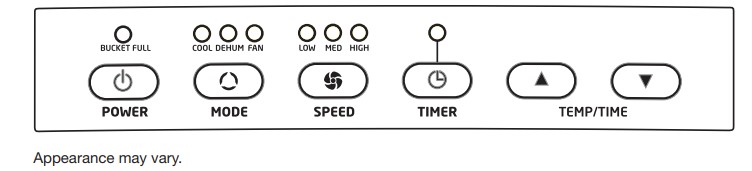
During normal operation display will show the current room temperature. When the TEMP/TIME and buttons are pressed, the unit will display the set temperature or delay time.
Selecting the Mode
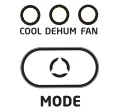
The Mode button has three settings:
■ Cool
■ Dehumidify
■ Fan
Press the MODE button until the indicator light above the desired setting is lit.
Cooling (COOL) Mode
In cooling mode, the air conditioner cools air from the room and vents hot air to the outdoors through the vent hose(s). Adjust fan speed and the temperature setting to fit your desired comfort level. Temperature-setting range is 61°F–90°F (16°C–32°C).
IMPORTANT: The vent hose(s) must exhaust to the outdoors when using Cool mode.
Dehumidify (DEHUM) Mode
Air is dehumidified as it passes through the unit, without being in full cooling mode. The fan will operate at medium speed. Fan speed is not adjustable in dehumidify mode.
IMPORTANT: The vent hose(s) must exhaust to the outdoors when using Dehumidify mode.
Fan (FAN) Mode
In this mode, only the fan will run. Air is circulated through the room with no cooling.
NOTE: The air conditioner does not need to be vented to the outdoors in Fan mode.
Selecting the Fan Speed
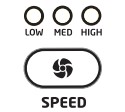
The Fan Speed has 3 settings:
■ LOW
■ Medium (MED)
■ HIGH
Press the SPEED button until the indicator light above the desired setting is lit.
Adjusting the Temperature
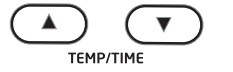
Press the TEMP/TIME and buttons to adjust the set temperature up or down in 1° increments. Temperature setting range is 61°F–90°F (16°C–32°C). After 10 seconds, the display will return to the current room temperature.
NOTE: Temperature may only be adjusted in cooling mode.
When in TIMER mode, pressing the TEMP/TIME and buttons will adjust the delay time for the air condtioner to shut off or turn on.
Switching between Fahrenheit and Celsius:
Press both and buttons at the same time to toggle the displayed units between °F and °C.
Using the Timer
Auto Shut-Off
You can set the air conditoner to shut off automatically after a set number of hours, up to 24 hours.
To set Auto Shut-Off:
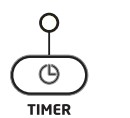
1. With the air conditioner in fan mode, press TIMER.
2. Use the TEMP/TIME and buttons select number of hours, up to 24 hours.
3. After the set time, the air conditioner will turn off automatically.
Auto Start
You can set the air conditioner with the TIMER to start automatically after a set number of hours.
1. With the air conditoner OFF, press TIMER.
2. Use the TEMP/TIME and buttons to select the number of hours before the air conditioner should turn on, up to 24 hours. The TIMER indicator light will remain lit to let you know the timer is set.
3. After the set time, the air conditioner will start automatically in Cool mode with the last temperature and fan settings used.
Other Functions
BUCKET FULL Indicator
This air conditioner has an internal tank to hold accumulated water from the condenser. Normally, this water is evaporated and exhausted to the outside. However, in periods of high humidity, the internal tank may become full. If this happens, the “Bucket Full” indicator will be lit and the air conditioner will turn off until the internal tank is emptied. See “Care and Cleaning”.
Normal Operating Sounds
When your air conditioner is operating normally, you may hear sounds such as:
Droplets of water hitting the condenser, causing a pinging or clicking sound. The water droplets help cool the condenser.
Air movement from the fan.
Clicks from the thermostat cycle.
Vibrations or noise due to poor wall or window construction.
A high-pitched hum or pulsating noise caused by the modern high-efficiency compressor cycling on and off.
Using the Remote Control
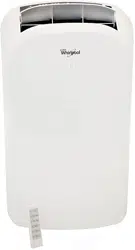
The functions on the remote control operate the same way as the touch controls on the air conditioner control panel.
NOTE: Remote control may vary in appearance.
Replacing the batteries in the remote
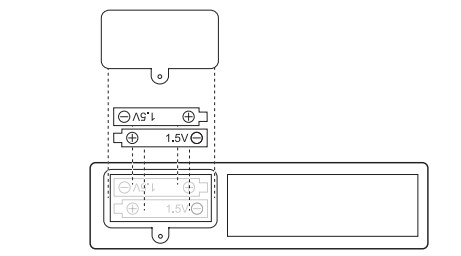
NOTE: The remote uses two AAA 1.5V batteries (included). Replace batteries after approximately 6 months of use.
To remove the batteries:
Remove the battery compartment cover and remove the batteries.
To reinstall the batteries:
Place the batteries into the battery compartment as shown, then reinstall the cover.
NOTE:
Do not drop the remote control; it may damage the remote control.
Remove the batteries if the remote control is not used for a month or longer.
Dispose of used batteries responsibly.
CARE AND CLEANING
Your new air conditioner is designed to give you many years of dependable service. This section tells you how to clean and care for your air conditioner properly.
Cleaning the Air Filter
The air filter is removable for easy cleaning. A clean filter helps remove dust, lint, and other particles from the air and is important for best cooling and operating efficiency. Check the filter every 2 weeks to see whether it needs cleaning.
NOTE: For best performance, do not operate the air conditioner without the filter in place.
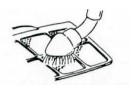
Use a vacuum cleaner to clean air filter. If the air filter is very dirty, wash it in warm water with a mild detergent.
NOTE: Do not wash the air filter in the dishwasher or use any chemical cleaners; it may damage the filter. Air dry the air filter completely before replacing to ensure maximum efficiency.
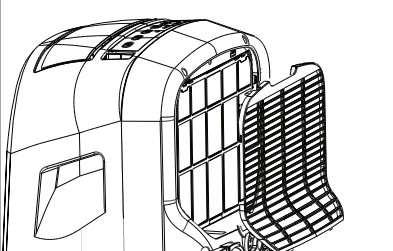
1. Removing the air intake cover
1. Turn off the air conditioner.
2. Remove the air intake cover by pulling the top of the cover away from the air conditioner, then lifting the bottom tabs out of the slots on the air conditioner.
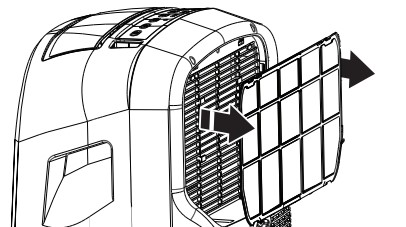
2. Removing the air filter
Pull the air filter straight out of the air conditioner.
Reinstalling the air filter:
1. Reinstall the air filter in the air conditioner.
2. Insert the tabs on the bottom of the air intake cover into the slots on the air conditioner, then press the top into place until it clicks to lock.
Cleaning the Air Conditioner Cabinet
1. Turn off the air conditioner.
2. Wipe the air conditioner cabinet with a soft, damp cloth.
3. Wipe dry with soft cloth.
Storing the Air Conditioner
If the air conditioner will not be used for an extended period of time, prepare it for storage with the following steps.
1. Run the air coditioner in Fan mode for a few hours to dry any moisture from the coils.
2. Turn off the air conditioner and unplug it. Remove the batteries from the remote.
3. Remove the drain plug from the internal tank to remove and drain any remaining water from the tank. See “Draining the Internal Tank”.
4. Remove, clean, and reinstall the air filter.
5. Remove the air hoses and window slider panel and store them in a safe place.
Draining the Internal Tank
If the air conditioner turns off and the “Bucket Full” indicator is lit, it is necessary to drain the internal tank before using the air conditoner again.
1. Draining the internal tank
1. Turn off and unplug the air conditioner.
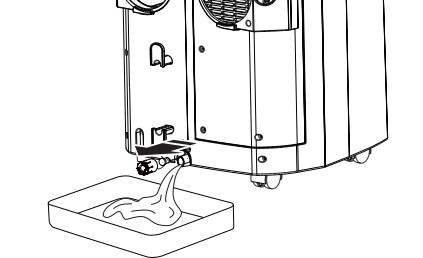
2. Place a pan or small bucket under the drain.
3. Remove the drain plug retainer by turning it counterclockwise.
4. Pull out the rubber drain plug.
5. Allow water to drain into pan or bucket.
6. Reinstall the rubber drain plug by pressing firmly into place.
7. Thread drain plug retainer clockwise onto drain, then tighten hand tight.
TROUBLESHOOTING
Air conditioner will not operate
The power supply cord is unplugged. Plug into a grounded 3-prong outlet. See “Electrical Requirements. ”
The power supply cord has tripped (Reset button has popped out). Press and release RESET to resume operation.
A household fuse has blown, or circuit breaker has tripped. Replace the fuse or reset the circuit breaker. If the problem continues, call an electrician. See “Electrical Requirements. ”
The Power button has not been pressed. Press POWER.
The local power has failed. Wait for power to be restored.
The internal water tank is full. If the “Bucket Full” indicator is lit, empty the internal tank. See “Draining the Internal Tank”.
Air conditioner blows fuses or trips circuit breakers
Too many appliances are being used on the same circuit. Unplug or relocate appliances that share the same circuit.
Time-delay fuse or circuit breaker of the wrong capacity is being used. Replace with a time-delay fuse or circuit breaker of the correct capacity. See “Electrical Requirements.”
You are trying to restart the air conditioner too soon after turning off the air conditioner. Wait at least 3 minutes after turning off the air conditioner before trying to restart the air conditioner.
Air conditioner power supply cord trips (Reset button pops out)
Disturbances in your electrical current can trip (Reset button will pop out) the power supply cord. Press and release RESET to resume operation.
Electrical overload, overheating, a pinched cord, or aging can trip the power supply cord (Reset button will pop out). After correcting the problem, press and release RESET to resume operation.
NOTE: A damaged power supply cord must be replaced with a new power supply cord obtained from the product manufacturer and must not be repaired.
Air conditioner seems to run too much
The current air conditioner replaced an older model. The use of more efficient components may cause the air conditioner to run longer than an older model, but the total energy consumption will be less. Newer air conditioners do not emit the “blast” of cold air you may be accustomed to from older air conditioners, but this is not an indication of lesser cooling capacity or efficiency. Refer to the efficiency rating (EER) and capacity rating (in BTU/h) marked on the air conditioner.
The air conditioner is in a heavily occupied room, or heatproducing appliances are in use in the room. Use exhaust vent fans while cooking or bathing and try not to use heatproducing appliances during the hottest part of the day. A higher-capacity air conditioner may be required, depending on the size of the room being cooled.
Air conditioner cycles on and off too much or does not cool room in cooling mode
The air conditioner is not properly sized for your room. Check the cooling capabilities of your room air conditioner. Room air conditioners are not designed to cool multiple rooms.
The filter is dirty or obstructed by debris. Clean the filter.
There is excessive heat or moisture (open container cooking, showers, etc.) in the room. Use a fan to exhaust heat or moisture from the room. Try not to use heat-producing appliances during the hottest part of the day.
The air intakes are blocked. Install the air conditioner in a location where the louvers are free from curtains, blinds, furniture, etc.
The temperature of the room you are trying to cool is extremely hot. Allow extra time for the air conditioner to cool off a very hot room.
Windows or doors to the outside are open. Close all windows and doors.
The temperature setting is not set to a cool enough setting. Adjust the temperature to a cooler setting by pressing the minus button to reduce the temperature. Set the Fan Speed control to the highest setting.
Error codes in display
If E1 or or E2 appears in the display, call for service.



 and
and  buttons are pressed, the unit will display the set temperature or delay time.