TQBM0093
Operating Instructions
Bedienungsanleitung
Mode d’emploi/Istruzioni per l’uso
Instrucciones de funcionamiento
Instrukcja obsługi
Kezelési útmutató
Návod k obsluze
Návod na obsluhu
Bruksanvisning
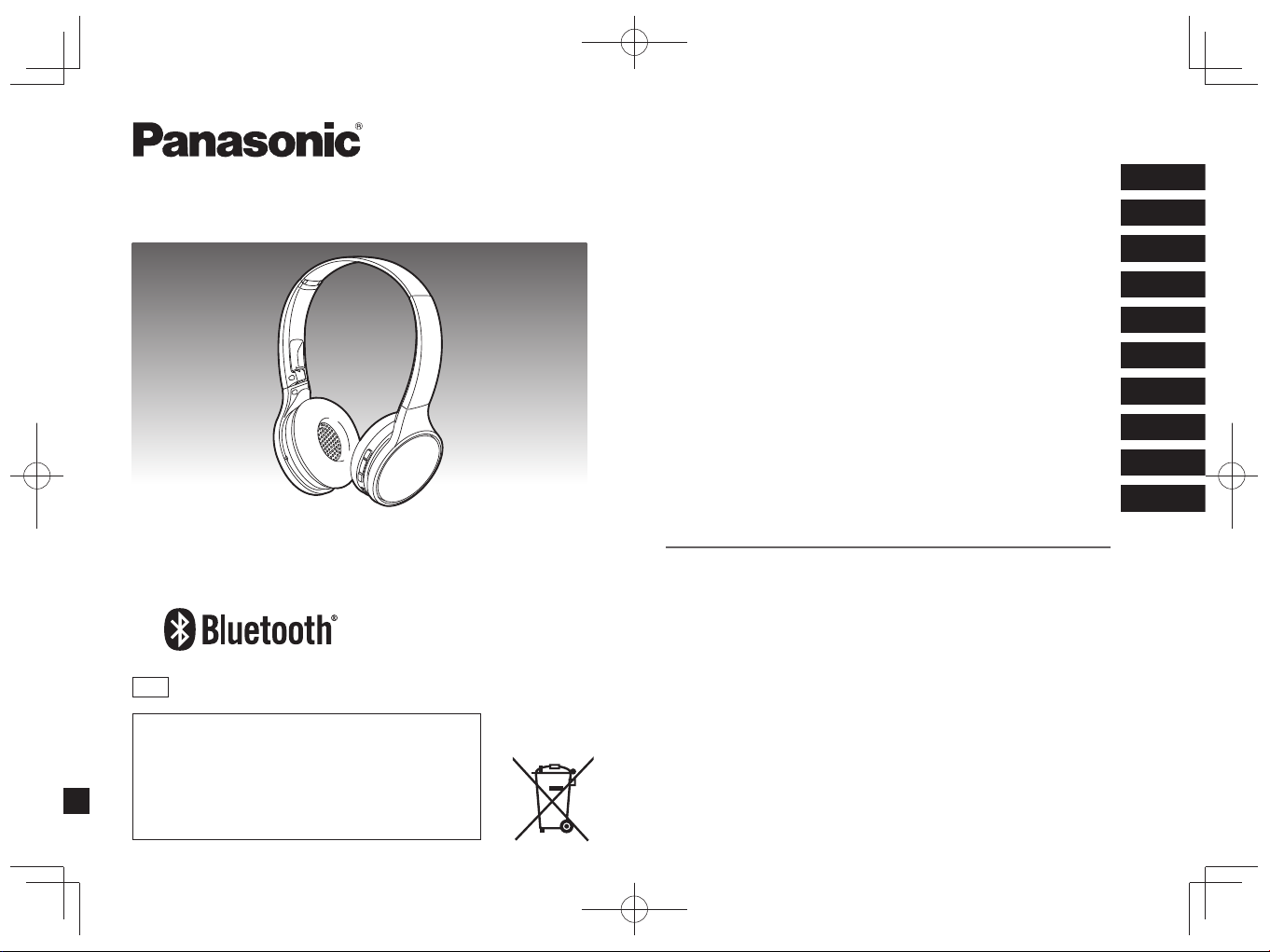
Digital Wireless Stereo Headphones
Digitale drahtlose Stereo-Kopfhörer
Casque d’écoute stéréo sans fil numérique
Cuffie stereo senza fili digitali
Cascos auriculares estéreo inalámbricos digitales
Bezprzewodowe cyfrowe słuchawki nagłowne stereo
Digitális vezeték nélküli sztereó fejhallgató
Digitální bezdrátová stereofonní sluchátka
Digitálne bezdrôtové stereo slúchadlá
Digitala trådlösa stereohörlurar
Model No. RP-HF400B
E
ENGLISH
DEUTSCH
FRANÇAIS
ITALIANO
ESPAÑOL
POLSKI
MAGYAR
ČESKY
SLOVENSKY
EU
Manufactured by:
Panasonic Corporation
Kadoma, Osaka, Japan
Importer for Europe:
Panasonic Marketing Europe GmbH
Panasonic Testing Centre
Winsbergring 15, 22525 Hamburg, Germany
SVENSKA
RP-HF400BE(TQBM0093).indb1RP-HF400BE(TQBM0093).indb1 2017/0 :07:5
TQBM0093
2
2
Please check and identify the supplied
accessories.
1 USB charging cord
For the United Kingdom and Ireland
customers
Sales and Support Information
Customer Communications Centre
• For customers within the U.K.:
0344 844 3899
• For customers within Ireland:
01289 8333
• Monday - Friday 9:00am - 5:00pm
(Excluding public holidays).
• For further support on your product,
please visit our website:
www.panasonic.co.uk
Direct Sales at Panasonic U.K.
• Order accessory and consumable
items for your product with ease and
confidence by phoning our Customer
Communications Centre -
Monday - Friday 9:00am - 5:00pm
(Excluding public holidays).
• Or go on line through our Internet
Accessory ordering application at
www.pas-europe.com
• Most major credit and debit cards
accepted.
• All enquiries transactions and
distribution facilities are provided
directly by Panasonic U.K.
• It couldn’t be simpler!
• Also available through our Internet is
direct shopping for a wide range of
finished products. Take a browse on
our website for further details.
Table of
contents
Before use
Accessories ........................................ 2
Safety precautions .............................. 2
Maintenance ....................................... 3
Part names ......................................... 3
Preparation
Charging ............................................. 4
Turning the power on/off ..................... 4
Connecting a Bluetooth
®
device ......... 4
Operation
Listening to music ............................... 5
Making a phone call............................ 6
Useful functions .................................. 6
Other
Restoring to the factory settings ......... 6
About Bluetooth
®
................................ 7
Specifications ..................................... 7
Troubleshooting guide ........................ 8
Copyright, etc. .................................... 9
To remove the battery when
disposing of this unit ........................... 9
Limited Warranty
(ONLY FOR AUSTRALIA)
....... Back cover
Dear customer
Thank you for purchasing this product.
Please read these instructions carefully
before using this product, and save this
manual for future use.
Accessories Safety precautions
■
Unit
• Avoid using or placing this unit near sources of heat.
• Do not listen with this unit at high volume in places where you need to hear
sounds from the surrounding environment for safety, such as at railroad
crossings, and construction sites.
• Wide band characteristic voltage equal or larger than 75 mV.
WARNING:
To reduce the risk of fire, electric shock or product damage,
• Do not expose this unit to rain, moisture, dripping or splashing.
• Do not place objects filled with liquids, such as vases, on this unit.
• Use only the recommended accessories.
• Do not remove covers.
• Do not repair this unit by yourself. Refer servicing to qualified service
personnel.
■
Allergies
• Discontinue use if you experience discomfort with the speakers or any other
parts that directly contact your skin.
• Continued use may cause rashes or other allergic reactions.
■
Precautions for listening with the Headphones
• Do not use your headphones at a high volume. Hearing experts advise against
continuous extended play.
• If you experience a ringing in your ears, reduce volume or discontinue use.
• Do not use while operating a motorised vehicle. It may create a traffic hazard
and is illegal in many areas.
• You should use extreme caution or temporarily discontinue use in potentially
hazardous situations.
This unit may receive radio interference caused by mobile telephones during use.
If such interference occurs, please increase separation between this unit and the
mobile telephone.
This unit is intended for use in moderate and tropical climates.
RP-HF400B_E(TQBM0093).indb 2RP-HF400B_E(TQBM0093).indb 2 2017/03/17 21:21:322017/03/17 21:21:32
TQBM0093
3
3
2
1
3
4
5
6
7
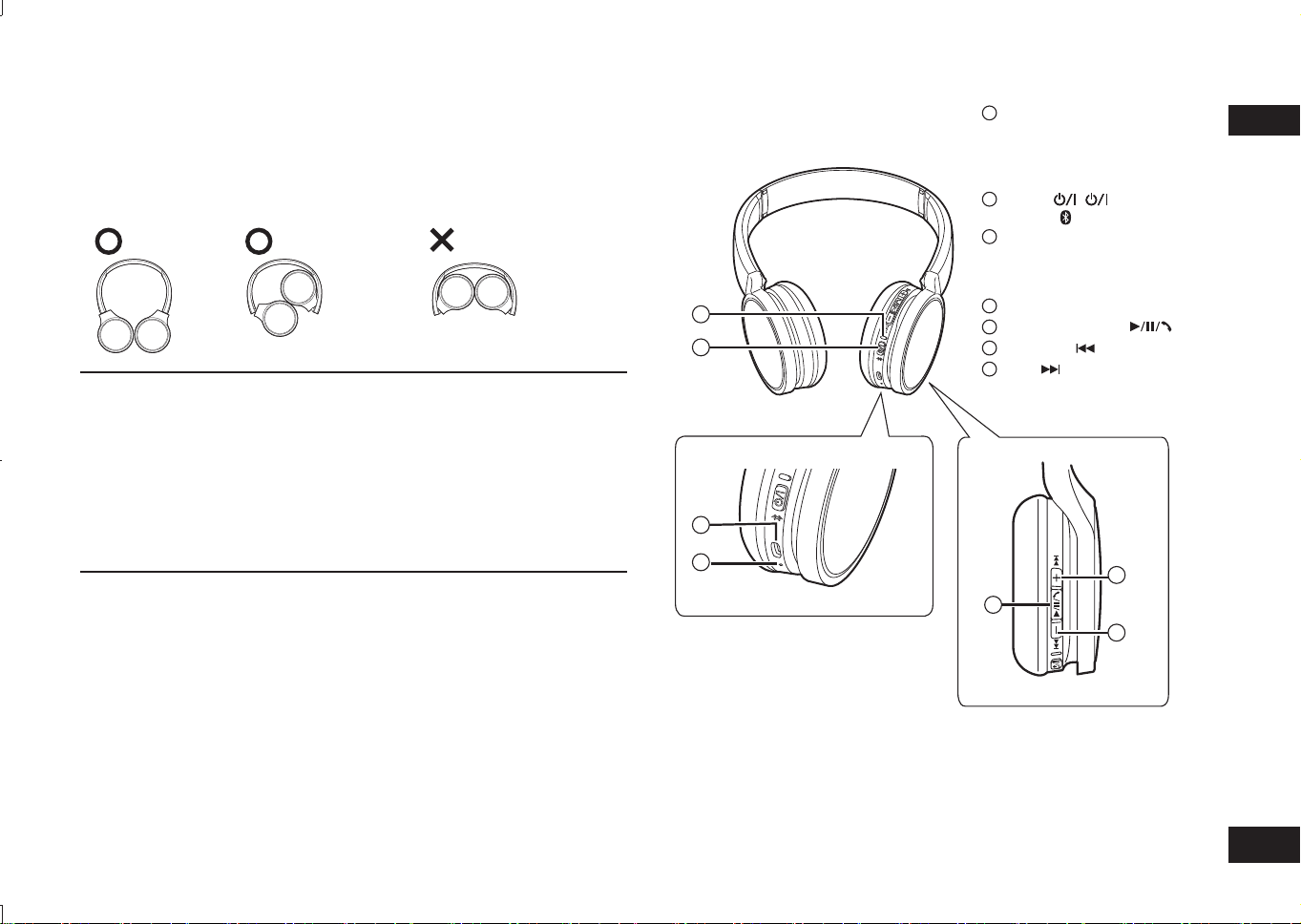
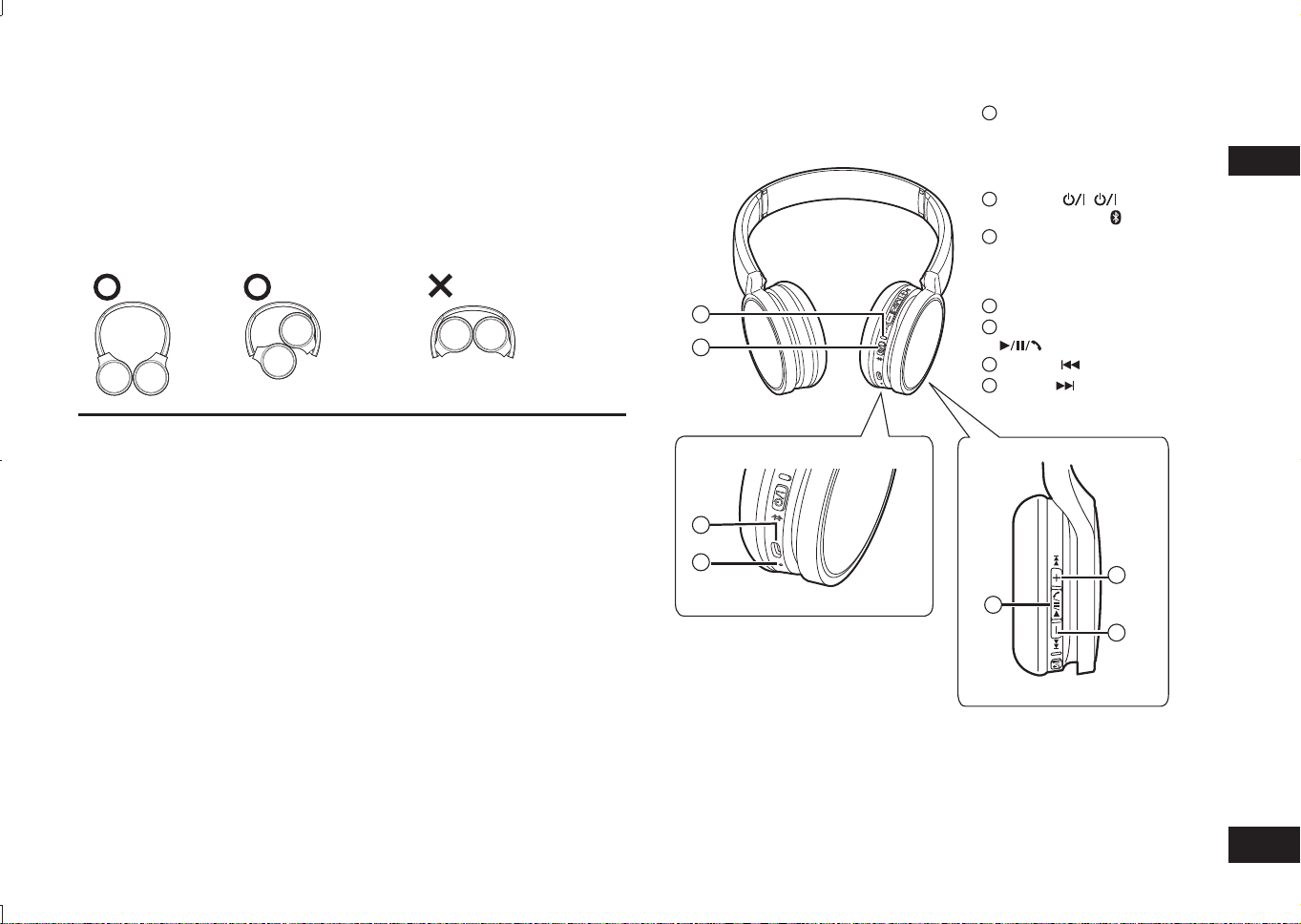
ENGLISH
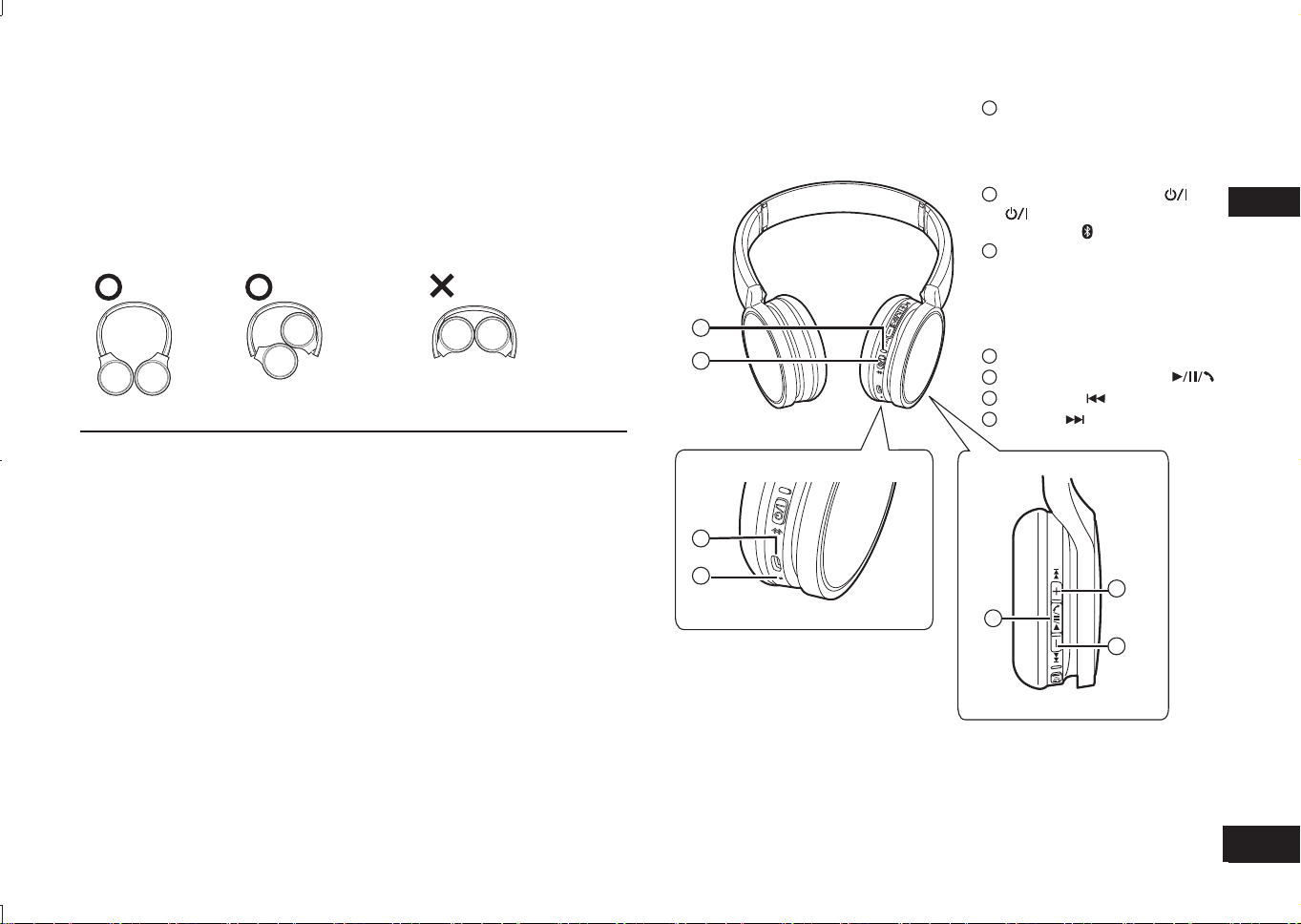
Part names
■
Note
• Do not use any other USB charging cords except the supplied one.
• When using the unit, do not cover the right speaker with the palm of your hand.
The Bluetooth
®
connection may be blocked.
The product illustrations may differ from the actual product.
1
LED indicator light*
• The number of blinks or colour
notifies the status of the unit.
(* hereafter referred to as
“LED”)
2
Power ( Standby/ON) /
Pairing button
3
Charging terminal (DC IN)
• Connect the USB charging
cord (supplied) to this terminal
when charging. (→ P. 4)
4
Microphone
5
Play/Pause/Call
6
Previous /Volume –
7
Next /Volume +
Maintenance
Clean this unit with a dry and soft cloth.
•
Do not use solvents including benzine, thinner, alcohol, kitchen detergent, a chemical
wiper, etc. This might cause the exterior case to be deformed or the coating to come off.
■
Folding this unit
Fold the headphones as shown below. Improper folding may result in a malfunction.
Do Do Not
Declaration of Conformity (DoC)
Hereby, “Panasonic Corporation” declares that this product is in compliance with
the essential requirements and other relevant provisions of Directive 2014/53/EU.
Customers can download a copy of the original DoC to our RE products from our
DoC server:
http://www.doc.panasonic.de
Contact to Authorised Representative:
Panasonic Marketing Europe GmbH, Panasonic Testing Centre,
Winsbergring 15, 22525 Hamburg, Germany
For Thailand only
This telecommunication equipment conforms to NTC/NBTC technical requirement.
RP-HF400B_E(TQBM0093).indb 3RP-HF400B_E(TQBM0093).indb 3 2017/03/17 21:21:322017/03/17 21:21:32
TQBM0093
4
4
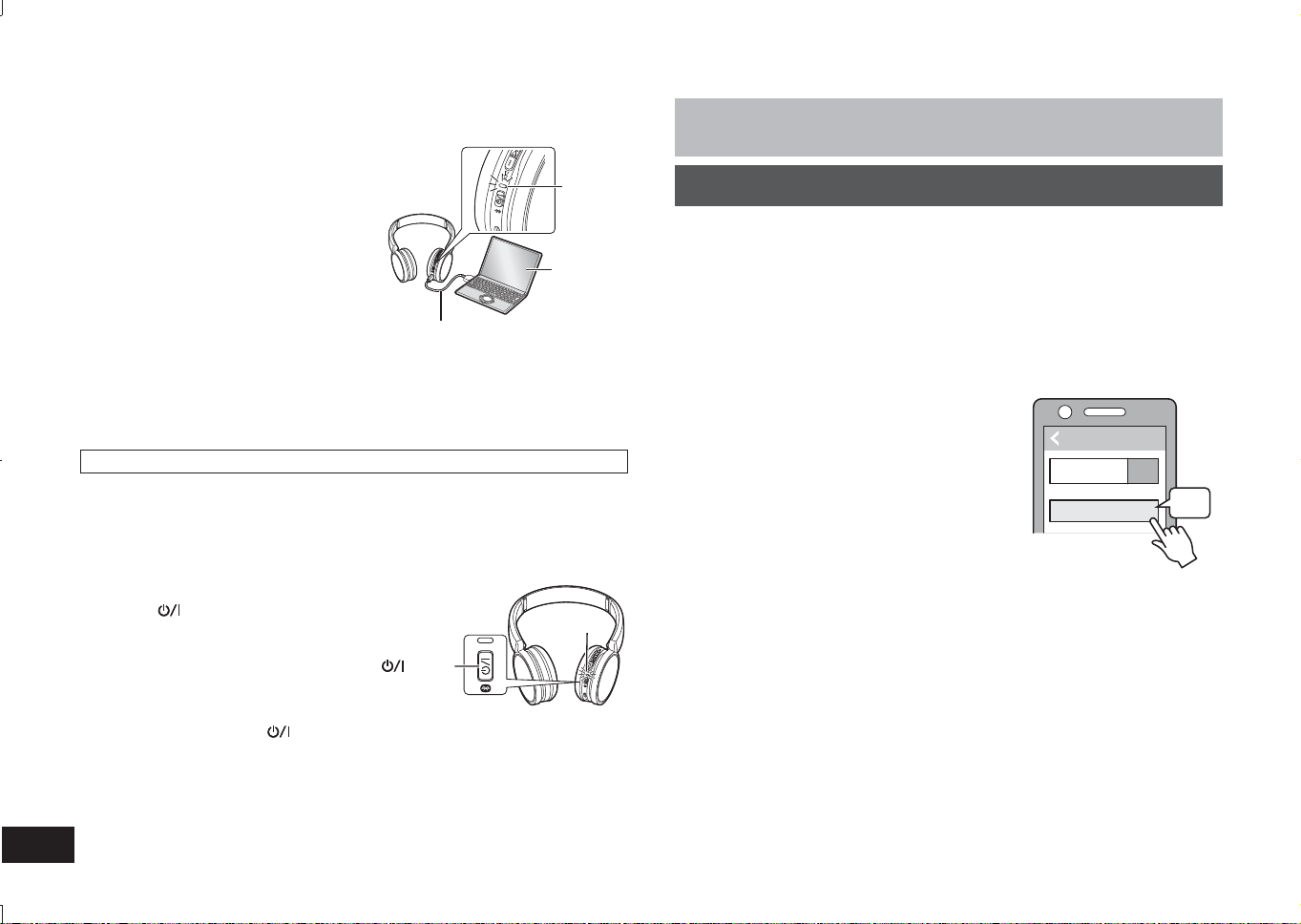
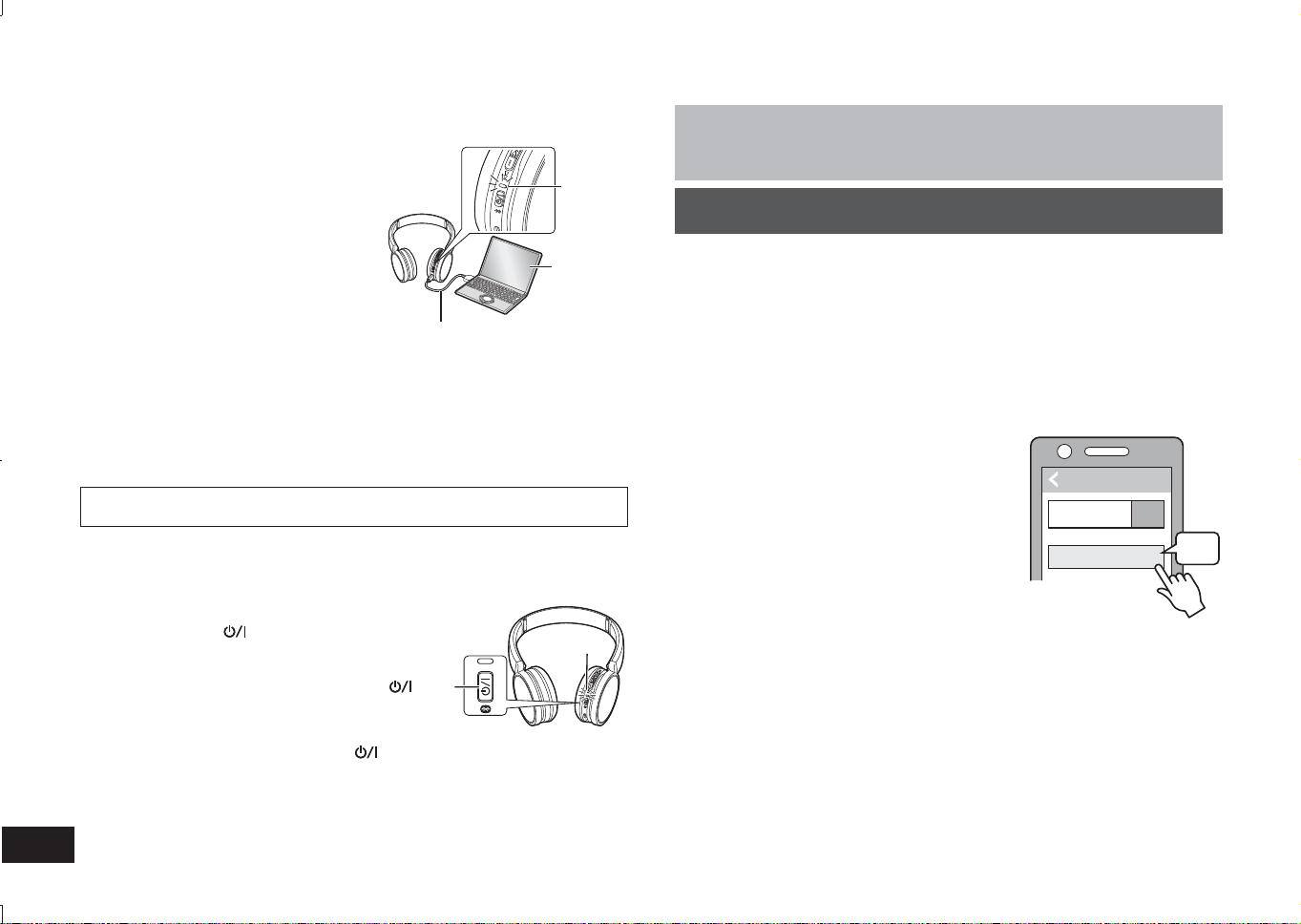
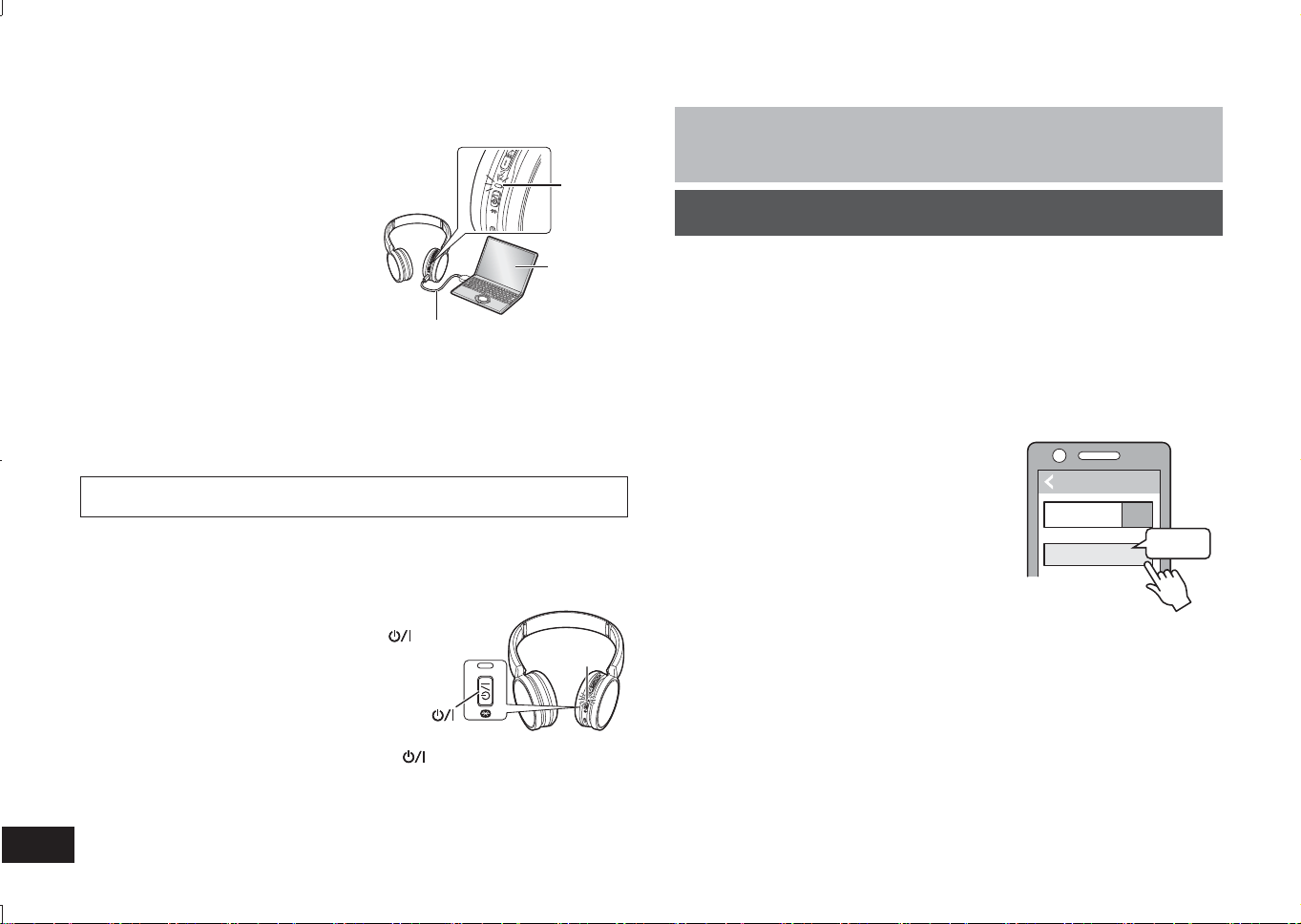
The rechargeable battery (installed in the unit) is not charged initially. Charge
the battery before using the unit.
1
Connect this unit to a computer
using the USB charging cord
• The LED will light in red.
• The LED lights in red when charging
is in progress. When charging is
completed, the LED will go out.
• Charging will take approximately
2.5 hours from empty state to fully
charged.
Computer
LED
USB charging cord (supplied)
■
Note
• The Bluetooth
®
feature cannot be used when this unit is connected to a computer
using the USB charging cord.
• Charge in a room temperature between 10 °C and 35 °C.
• The power cannot be turned on while charging.
• Do not use any other USB charging cords except the supplied one.
Caution: Use only the supplied USB charging cord when connecting to a computer.
Charging
Preparation
• Place the Bluetooth
®
device within approx. 1 m from the unit.
• Check the device operation using its operation instructions as required.
Pairing (Registration) this unit with the Bluetooth
®
device for
connection
1
Press and hold the power button of this unit until the LED blinks
When pairing a device for the first time : approx. 3 seconds
When pairing a second or subsequent devices : approx. 5 seconds
• The unit starts to search for the Bluetooth
®
device for connection, and the
LED will blink in blue and red alternately.
2
Turn on the power of the Bluetooth
®
unit, and enable the
Bluetooth
®
function
3
Select “RP-HF400B” from the
Bluetooth
®
device’s menu
• The MAC address “□□□□□□” (“□” stands for a
character that is unique to each set.) may be
displayed before “RP-HF400B” is displayed.
• If prompted for a passkey, input the passkey
“0000 (four zeros)” of this unit.
4
Check the connection with the
Bluetooth
®
device on the unit
• The LED will blink in blue and red alternately until the connection
with the device is completed. When the LED (blue) blinks twice
every approx. 2 seconds, pairing (registration) is completed.
(Connection established)
■
Note
• If connection to a device is not established within approximately 5 minutes, the
unit will be turned off. Perform pairing again.
• 2 or more Bluetooth
®
devices cannot be registered to the unit at the same time.
• You can pair up to 8 Bluetooth
®
devices with this unit. If a 9th device is paired,
the device with the oldest connection will be replaced. To use it, perform pairing
again.
Connecting a Bluetooth
®
device
1
In the power-off state, press and hold the
power button of this unit for approx.
3 seconds until the LED (blue) blinks
• A beep will sound, and the LED (blue) will blink
slowly.
Power button
LED
To turn the power off
• Press and hold the power
button for approximately 3 seconds. A beep will
sound and the power will be turned off.
■
Note
• When the unit is not operated for approximately 5 minutes, the power will
automatically turn off. (See “Auto power off” (→ P. 6))
Turning the power on/off
Bluetooth
Bluetooth
RP-HF400B
Device
ON
Select
(Ex.)
RP-HF400B_E(TQBM0093).indb 4RP-HF400B_E(TQBM0093).indb 4 2017/03/17 21:21:322017/03/17 21:21:32
TQBM0093
5
ENGLISH
5
Connecting a paired Bluetooth
®
device
1
Turn on the unit
• Press and hold the power button of this unit for approx. 3 seconds until the
LED (blue) blinks.
• A beep will sound, and the LED (blue) will blink slowly.
2
Perform steps 2 and 3 of “Pairing (Registration) this unit with the
Bluetooth
®
device for connection” (→ P. 4)
• When the LED (blue) blinks twice every approx. 2 seconds, pairing
(registration) is completed. (Connection established)
■
Note
• This unit remembers the device lastly connected. Connection may be
automatically established after step 1 (see above).
• If connection to a device is not established within approximately 5 minutes, the
unit will be turned off. Perform pairing again. (→ P. 4)
If the Bluetooth
®
compatible device supports the “A2DP” and “AVRCP” Bluetooth
®
profiles, music can be played back with remote control operations on the unit.
• A2DP (Advanced Audio Distribution Profile): Transmits audio to the unit.
• AVRCP (Audio/Video Remote Control Profile):
Allows remote control of the device using the unit.
1
Connect the Bluetooth
®
device and the unit (→ P. 4)
2
Select and play the music on the Bluetooth
®
device
• The selected music is output to the speakers of the unit.
Operating time of battery
Battery type Operating time
Rechargeable battery (installed in the unit) Approx. 20 hours
Operating time may be less depending on the operating conditions.
■
Attention
• The unit might leak sound depending on the volume level.
• When the volume is increased to near maximum level, music may sound
distorted. Decrease the volume until the distortion is cleared.
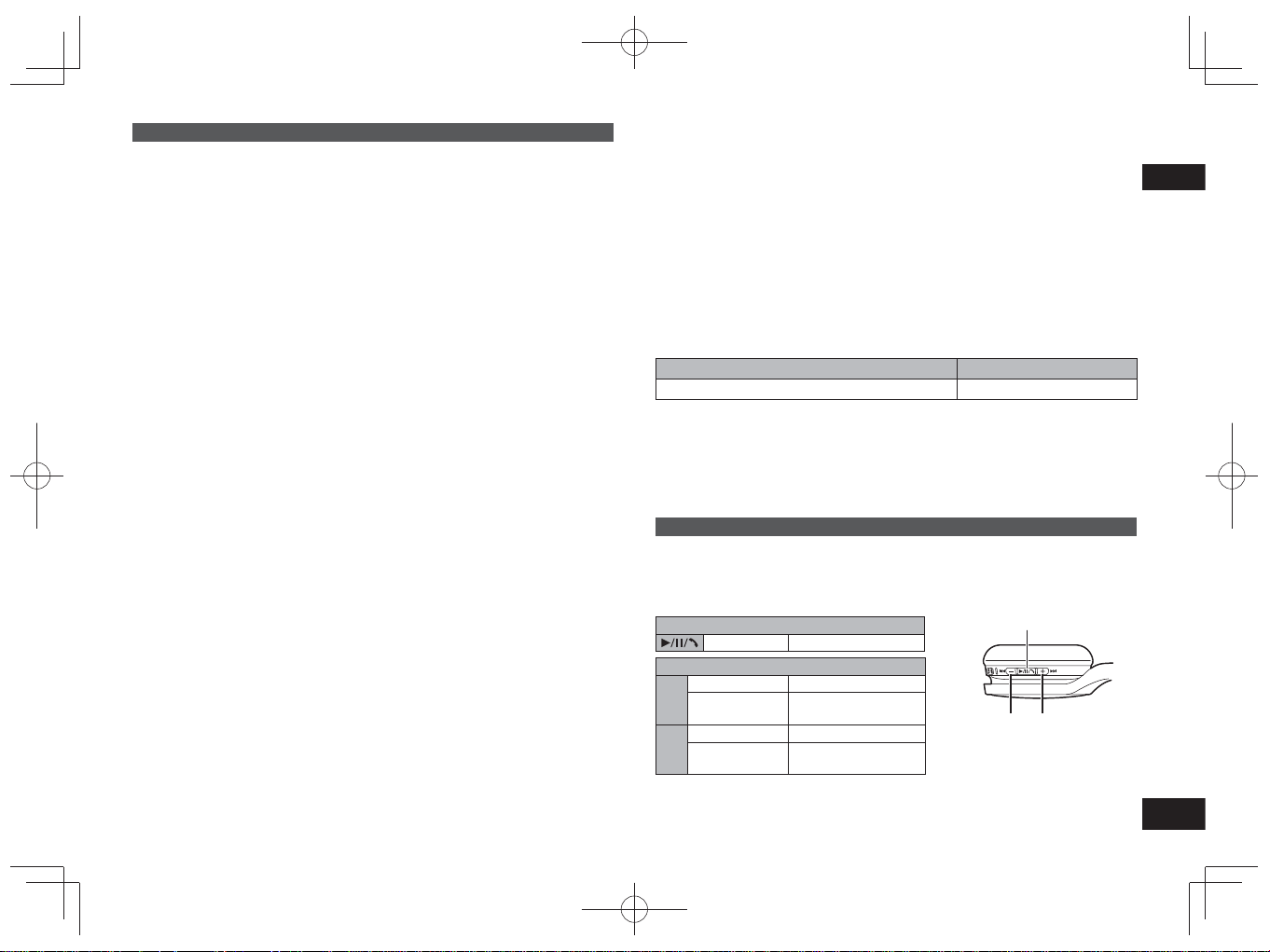
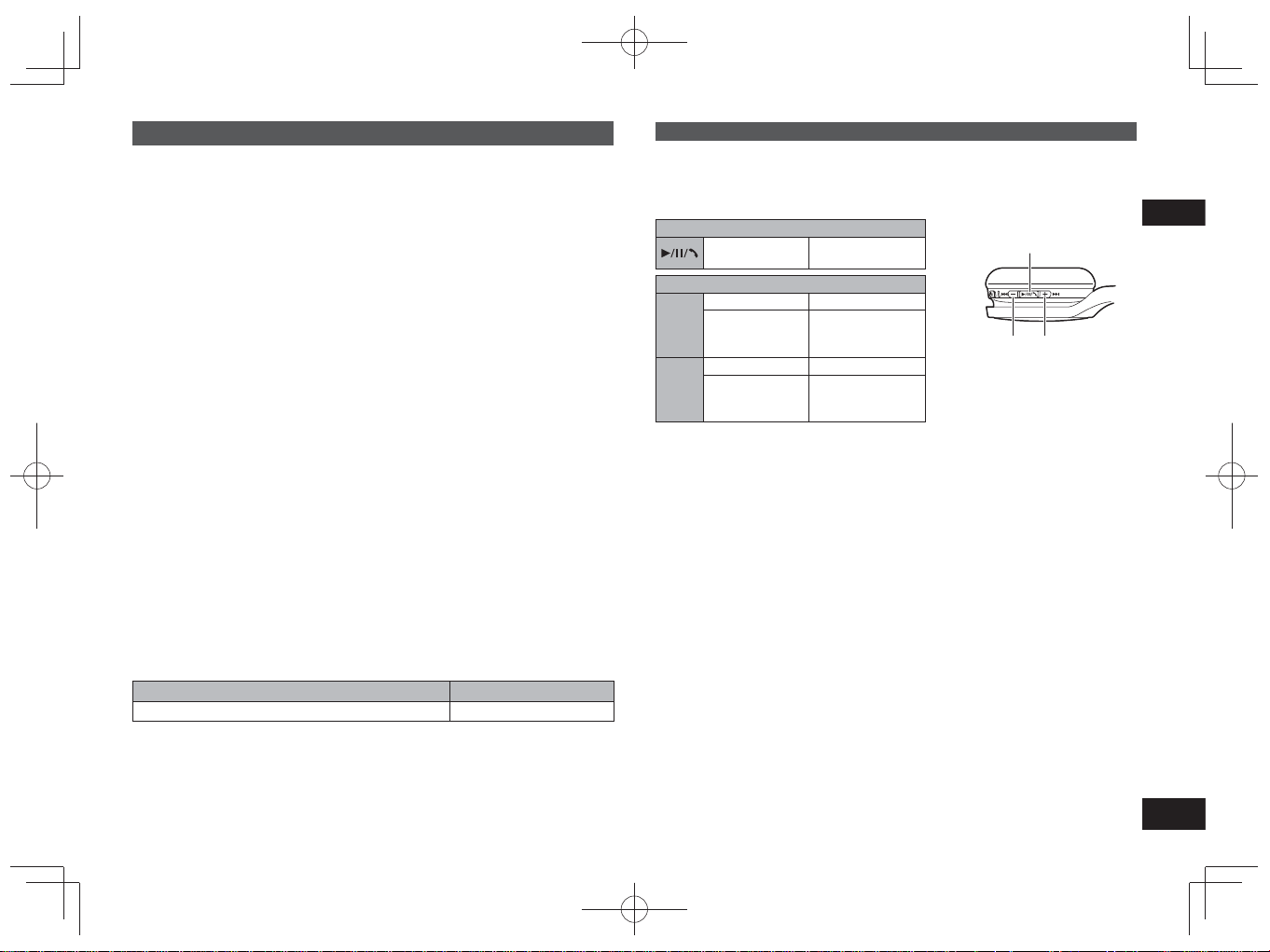
Remote controlling
You can control the Bluetooth
®
device using the unit.
• Depending on Bluetooth
®
devices, some functions below do not work, or work
differently via operation of the unit.
(Operation example)
Play/Pause/Call
Press Play/Pause/Call
Previous/Next/Volume
+
Press Increase the volume
Press and hold
Forward to the start
of next track
−
Press Decrease the volume
Press and hold
Return to the start of
current track
Play/Pause/Call
Volume –/
Previous
Volume +/
Next
■
Note
• The volume can be adjusted in 15 levels.
When the maximum or minimum volume is reached, a beep will sound.
Listening to music
RP-HF400B_E(TQBM0093).indb 5RP-HF400B_E(TQBM0093).indb 5 2017/03/17 21:21:332017/03/17 21:21:33
TQBM0093
6
6
With Bluetooth
®
enabled phones (cell phones or smartphones) that support the
“HSP” or “HFP” Bluetooth
®
profile, you can use the unit for phone calls.
• HSP (Headset Profile):
This profile can be used to receive monaural sounds and establish two-way
communication using the microphone on the unit.
• HFP (Hands-Free Profile):
In addition to the HSP functions, this profile has the incoming and outgoing calls
function.
• Connect the Bluetooth
®
enabled phone and unit (→ P. 4)
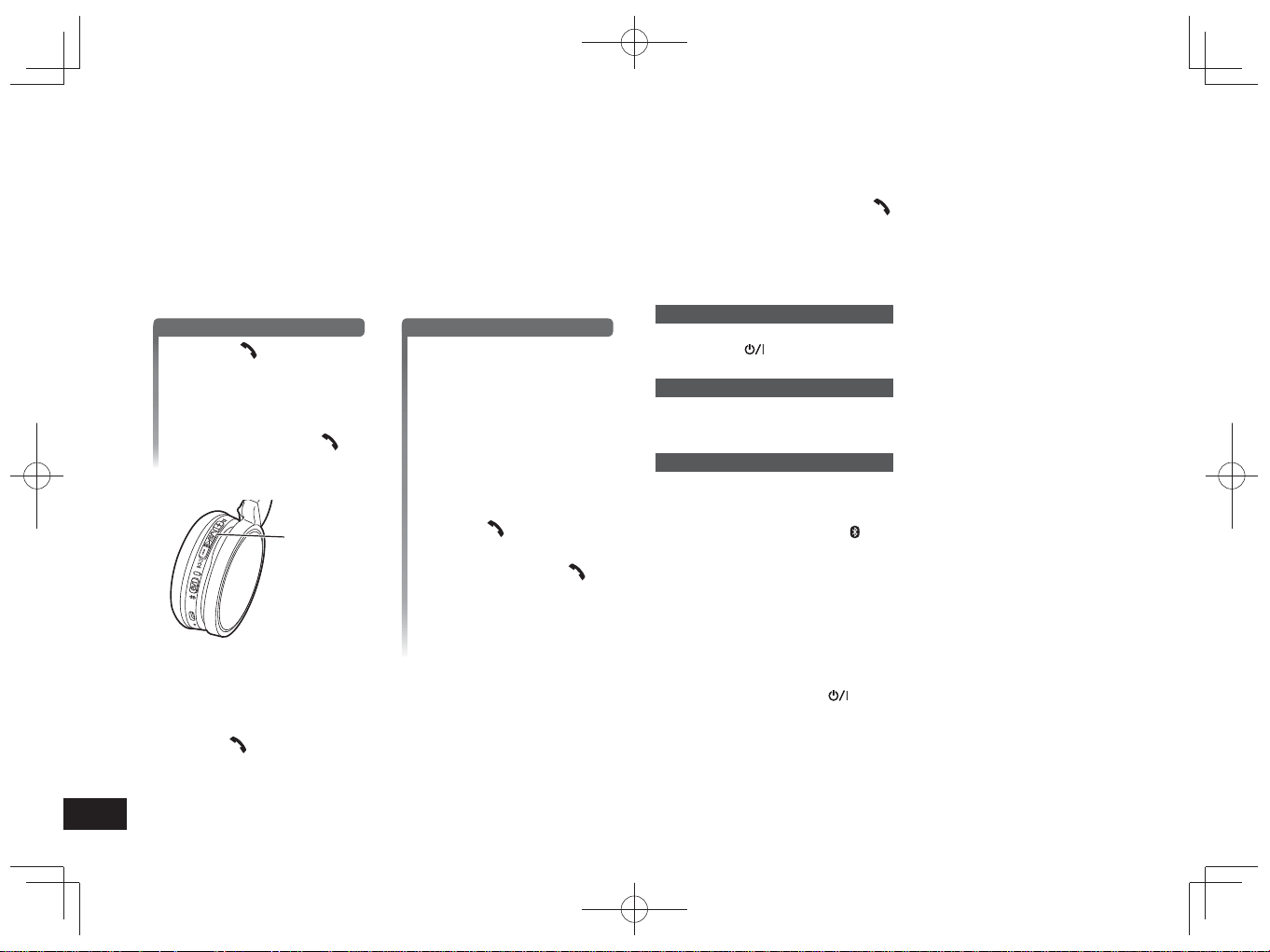
1
When answering an incoming call
Press Call on the unit
and answer the call
• During an incoming call,
ringtone will sound from the
speaker and the LED will blink.
•(HFP only) To reject the
incoming call, press Call
twice quickly.
Call
When making an outgoing call
Make an outgoing call on
the Bluetooth
®
enabled
phone
• Also refer to the operating
manual for the Bluetooth
®
enabled phone.
(Checking and operation steps on the
unit are explained below)
• During an outgoing call, ringtone
will sound from the speaker and
the LED will blink.
• To cancel the outgoing call,
press Call
.
A beep will sound.
•(HFP only) When the phone is
idle, press and hold Call
for
approximately 5 seconds. An
outgoing call will be made to the
last dialed number. One short
click will sound from the speaker
and the LED will blink.
2
Start talking
• The LED will repeatedly blink 2 times during a call.
• The volume can be adjusted during a phone call. For setting instructions, see
page 5.
3
Press Call to end the phone call
• A beep will sound.
Making a phone call
■
Note
• There may be instances when hands free setting needs to be done on the
Bluetooth
®
enabled phone.
• Depending on the Bluetooth
®
enabled phone, you may hear incoming and
outgoing call ringtones of the phone from the unit.
•(HFP only) The calling device will be switched between the Bluetooth
®
enabled
phone and the unit. (Press the Call
on the unit twice quickly to switch.)
Useful functions
Resetting the unit
This unit can be reset when all operations are rejected. To reset the unit, press and
hold the power
button for 10 seconds or more. All the previous operations will
be cancelled. (The pairing device information will not be deleted.)
Auto power off
If the unit is silent for approximately 5 minutes and operations for Bluetooth
®
devices are idle during that period, a beep will sound and the power will be
automatically turned off.
LED indicator light
When the battery level is low during use of the unit, the blue blinking LED will
change to red*. A beep will sound every 1 minute. When the battery runs out, the
power will turn off.
* If you press and hold the pairing
button when the battery level is low, the LED
will blink only in red.
Restoring to the factory settings
When you want to delete all pairing device information, etc., you can restore the
unit to the factory settings (original settings upon purchase). Charge the battery
before restoring the unit.
1 Press and hold the power
button for approximately 5 seconds
• Start searching for Bluetooth
®
devices to connect.
2 Press and hold + and − for 6 seconds or more simultaneously while
searching
• The LED will blink fast in blue. The unit will restore to the factory settings.
■
Attention
• When pairing a device again, delete the registering information (Device:
“RP-HF400B”) from the Bluetooth
®
device’s menu, and register this unit with the
Bluetooth
®
device again. (→ P. 4)
RP-HF400B_E(TQBM0093).indb 6RP-HF400B_E(TQBM0093).indb 6 2017/03/17 21:21:332017/03/17 21:21:33
TQBM0093
7
7
ENGLISH
Panasonic bears no responsibility for data and/or information that is
compromised during a wireless transmission.
■
Frequency band used
This unit uses the 2.4 GHz frequency band.
■
Certification of this unit
• This unit conforms to frequency restrictions and has received certification
based on frequency laws. Thus, a wireless permit is not necessary.
• The actions below are punishable by law in some countries:
– Taking apart/modifying the unit.
– Removing specification indications.
■
Restrictions of use
• Wireless transmission and/or usage with all Bluetooth
®
equipped devices is
not guaranteed.
• All devices must conform to standards set by Bluetooth SIG, Inc.
• Depending on the specifications and settings of a device, it can fail to connect
or some operations can be different.
• This system supports Bluetooth
®
security features. But depending on the
operating environment and/or settings, this security may not be sufficient.
Transmit data wirelessly to this system with caution.
• This system cannot transmit data to a Bluetooth
®
device.
■
Range of use
Use this unit at a maximum range of 10 m.
The range can decrease depending on the environment, obstacles or
interference.
■
Interference from other devices
• This unit may not function properly and troubles such as noise and sound
jumps may arise due to radio wave interference if this unit is located too close
to other Bluetooth
®
devices or the devices that use the 2.4 GHz band.
• This unit may not function properly if radio waves from a nearby broadcasting
station, etc. is too strong.
■
Intended usage
• This unit is for normal, general use only.
• Do not use this system near an equipment or in an environment that is
sensitive to radio frequency interference (example: airports, hospitals,
laboratories, etc).
About Bluetooth
®
■
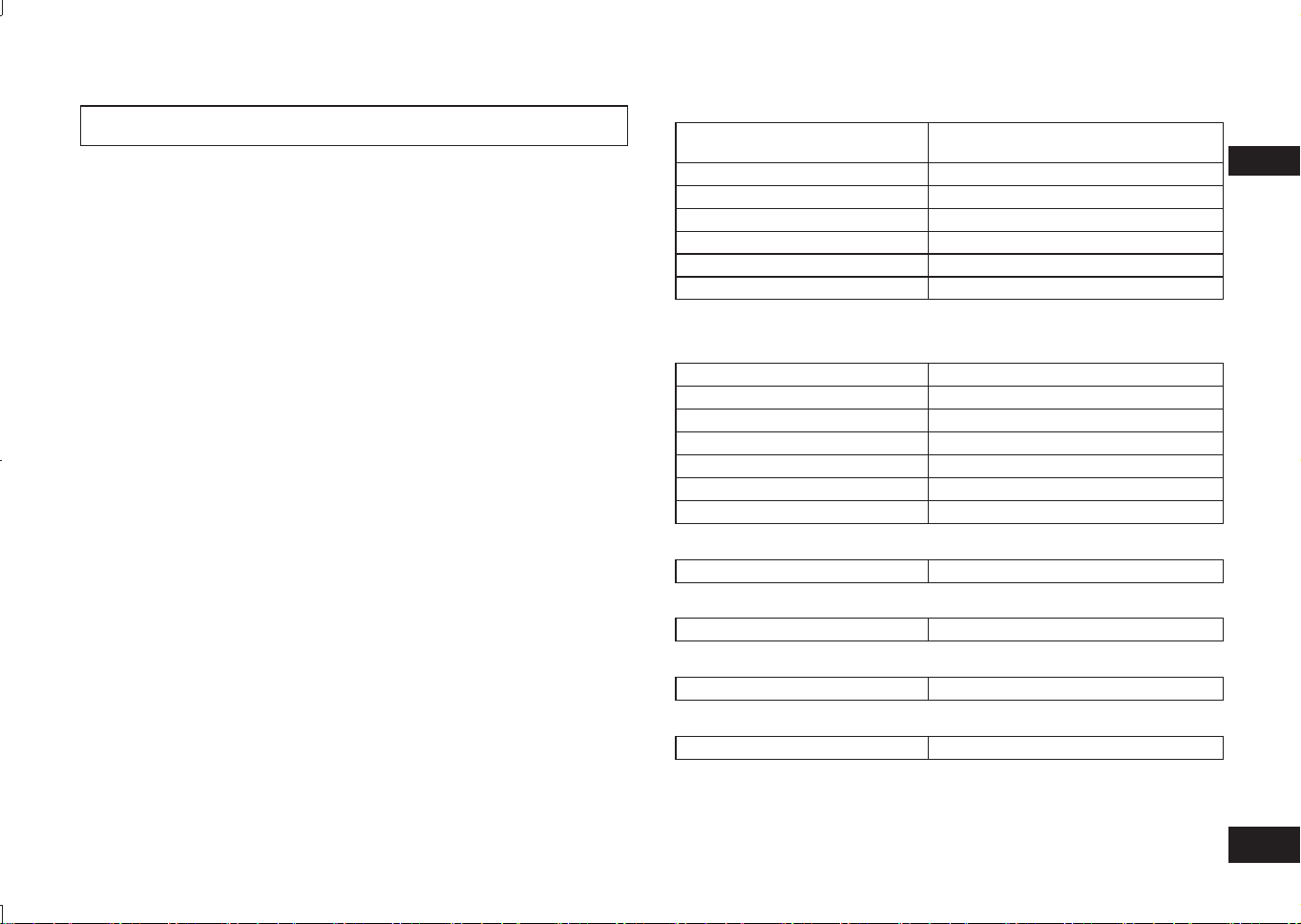
General
Power supply
DC 5 V, 330 mA
(Internal battery : 3.7 V
(Li-polymer 430 mAh))
Operating time*
1
Approx. 20 hours
Charging time*
2
(25 ºC) Approx. 2.5 hours
Charging temperature range 10 ºC to 35 ºC
Operating temperature range 0 ºC to 40 ºC
Operating humidity range 35%RH to 80%RH (no condensation)
Mass Approx. 130 g
*
1
It may be shorter depending on the operating conditions.
*
2
Time taken to recharge from empty to full.
■
Bluetooth
®
section
Bluetooth
®
system specification Ver. 4.1
Wireless equipment classification Class 2 (2.5 mW)
Frequency band 2402 MHz to 2480 MHz
Max RF power 4 dBm
Supported profiles A2DP, AVRCP, HSP, HFP
Supported codec SBC
Operating distance Up to 10 m
■
Speaker section
Driver units 30 mm
■
Terminal section
DC IN DC 5 V, 330 mA
■
Microphone section
Type Mono
■
Accessory section
USB charging cord 0.1 m
●
Specifications are subject to change without notice.
Specifications
RP-HF400B_E(TQBM0093).indb 7RP-HF400B_E(TQBM0093).indb 7 2017/03/17 21:21:332017/03/17 21:21:33
TQBM0093
8
8
Before requesting service, make the following checks. If you are in doubt about
some of the check points, or if the remedies indicated do not solve the problem,
consult your dealer for instructions.
General
The unit does not respond
• This unit can be reset when all operations are rejected. To reset the unit, press
and hold the power
button for 10 seconds or more. (→ P. 6)
Power supply and charging
Cannot charge the unit
• Make sure the computer is turned on and is not on standby or sleep mode.
• Is the USB port you are currently using working properly? If your computer has
other USB ports, unplug the connector from its current port and plug it into one of
the other ports.
• If the measures mentioned above are not applicable, unplug the USB charging
cord and plug it in again.
• If the charge time and operating time become shortened, the battery may have
run down. (Number of charging times of the installed battery: Approximately
500.)
LED does not light during charging / Charging takes longer
• Is the USB charging cord (supplied) connected firmly to the USB terminal of the
computer? (→ P. 4)
• Make sure to charge in a room temperature between 10 °C and 35 °C.
The power does not turn on
• Is the unit being charged? The power cannot be turned ON during charging.
(→ P. 4)
Bluetooth
®
device connection
The device cannot be connected
• Delete the pairing information for this unit from the Bluetooth
®
device, then pair
them again. (→ P. 4)
Troubleshooting guide
Sound and audio volume
No sound
•
Make sure that the unit and the Bluetooth
®
device are connected correctly. (→ P. 4)
• Check if music is playing on the Bluetooth
®
device.
• Make sure that the unit is turned on and the volume is not set too low.
• Pair and connect the Bluetooth
®
device and the unit again. (→ P. 4)
• Check if the Bluetooth
®
compatible device supports “A2DP” profile. For details on
profiles, see “Listening to music” (→ P. 5). Also refer to the operating manual for
the Bluetooth
®
compatible device.
Low volume
• Increase the volume of the unit. (→ P. 5)
• Increase the volume on the Bluetooth
®
device.
Sound from the device is cut off / Sound quality is bad
• Sound may be disrupted if signals are blocked. Do not fully cover this unit with
the palm of your hand, etc.
• The device may be out of the 10 m communication range. Move the device
closer to this unit.
• Remove any obstacle between this unit and the device.
• Switch off any wireless LAN device when not in use.
• A communication problem may arise if the battery is not fully charged. Charge
the unit. (→ P. 4)
Phone Calls
You cannot hear the other person
• Make sure that the unit and the Bluetooth
®
enabled phone are turned on.
• Check if the unit and the Bluetooth
®
enabled phone are connected. (→ P. 4)
• Check the audio settings of the Bluetooth
®
enabled phone. Switch the calling
device to the unit if it is set to the Bluetooth
®
enabled phone. (→ P. 4)
• If the volume of the other person’s voice is too low, increase the volume of both
the unit and the Bluetooth
®
enabled phone.
Cannot make a phone call
• Check if the Bluetooth
®
compatible device supports “HSP” or “HFP” profile. For
details on profiles, see “Listening to music” (→ P. 5) and “Making a phone call”
(→ P. 6). Also refer to the operating manual for the Bluetooth
®
enabled phone.
RP-HF400B_E(TQBM0093).indb 8RP-HF400B_E(TQBM0093).indb 8 2017/03/17 21:21:332017/03/17 21:21:33
TQBM0093
9
9
ENGLISH
●
The Bluetooth
®
word mark and logos are
registered trademarks owned by Bluetooth
SIG, Inc. and any use of such marks by
Panasonic Corporation is under license.
Other trademarks and trade names are those
of their respective owners.
●
Other system names and product names
appearing in this document are in general the
registered trademarks or trademarks of the
respective developer companies.
Note that the ™ mark and ® mark do not
appear in this document.
Copyright, etc.
To remove the battery when disposing of this unit
The following instructions are not intended for
repairing purposes but for the disposal of this unit.
This unit is not restorable once disassembled.
When disposing of this unit, take out the battery installed
in this unit and recycle it.
• Disassemble after the battery runs out.
• Keep disassembled parts out of reach of children.
Regarding the handling of used batteries
• Insulate the terminals with adhesive tape or similar material.
• Do not disassemble.
■
Batteries
• Do not heat or expose to flame.
• Do not leave the battery(ies) in a car exposed to direct
sunlight for a long period of time with doors and windows
closed.
• Battery mishandling can cause electrolyte leakage which
can damage items the leaked fluid comes into contact
with. If electrolyte leaks from the battery, consult your
dealer. Wash thoroughly with water if electrolyte comes in
contact with any part of your body.
• When disposing of the batteries, please contact your local
authorities or dealer and ask for the correct method of
disposal.
Disposal of Old Equipment and Batteries
Only for European Union and countries
with recycling systems
These symbols on the products,
packaging, and/or accompanying
documents mean that used
electrical and electronic products
and batteries must not be mixed
with general household waste.
For proper treatment, recovery and
recycling of old products and used
batteries, please take them to applicable
collection points in accordance with your
national legislation.
By disposing of them correctly, you will
help to save valuable resources and
prevent any potential negative effects
on human health and the environment.
For more information about
collection and recycling, please
contact your local municipality.
Penalties may be applicable for
incorrect disposal of this waste, in
accordance with national legislation.
Note for the battery symbol
(bottom symbol):
This symbol might be used in
combination with a chemical
symbol. In this case it complies
with the requirement set by the
Directive for the chemical involved.
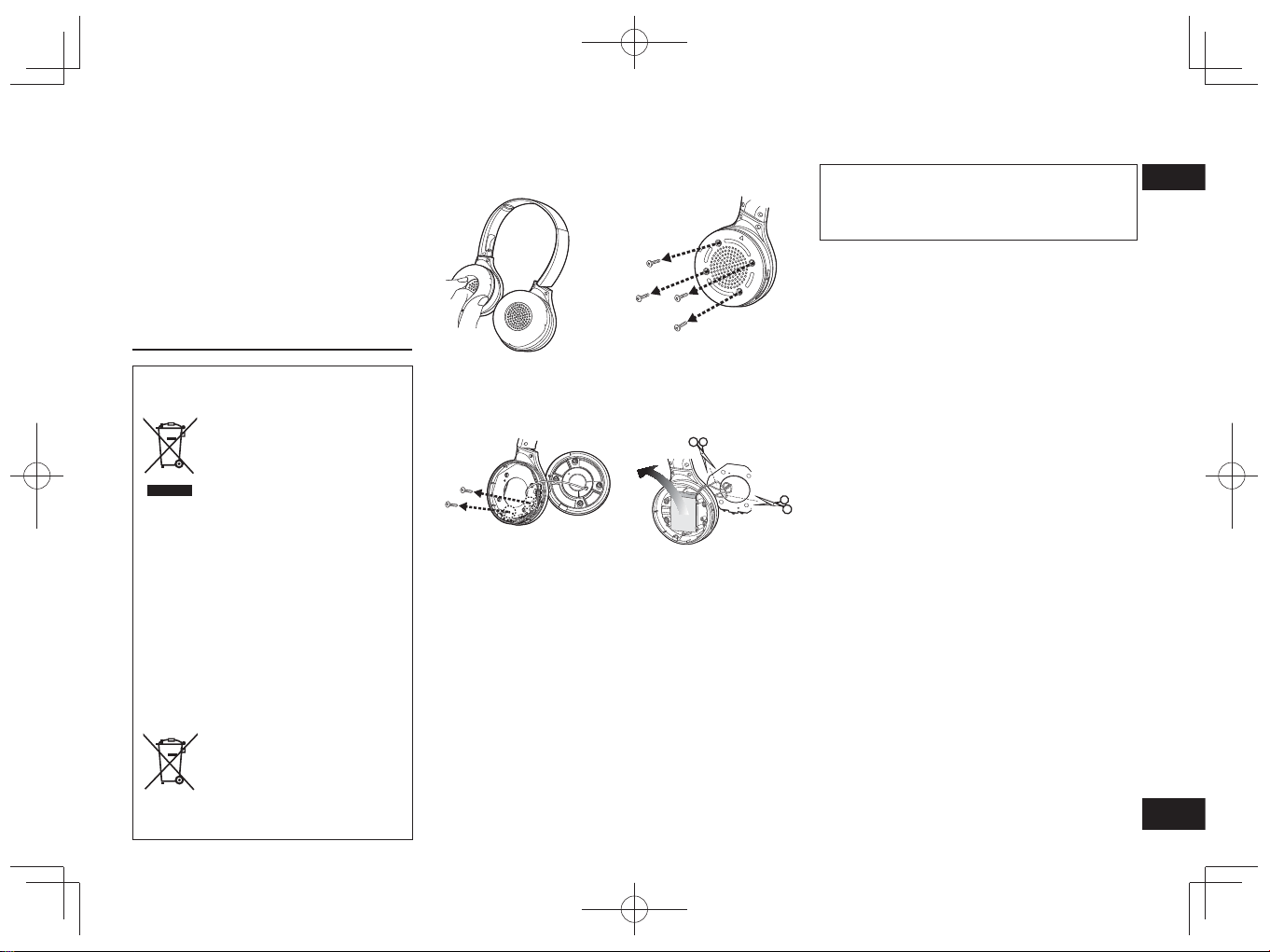
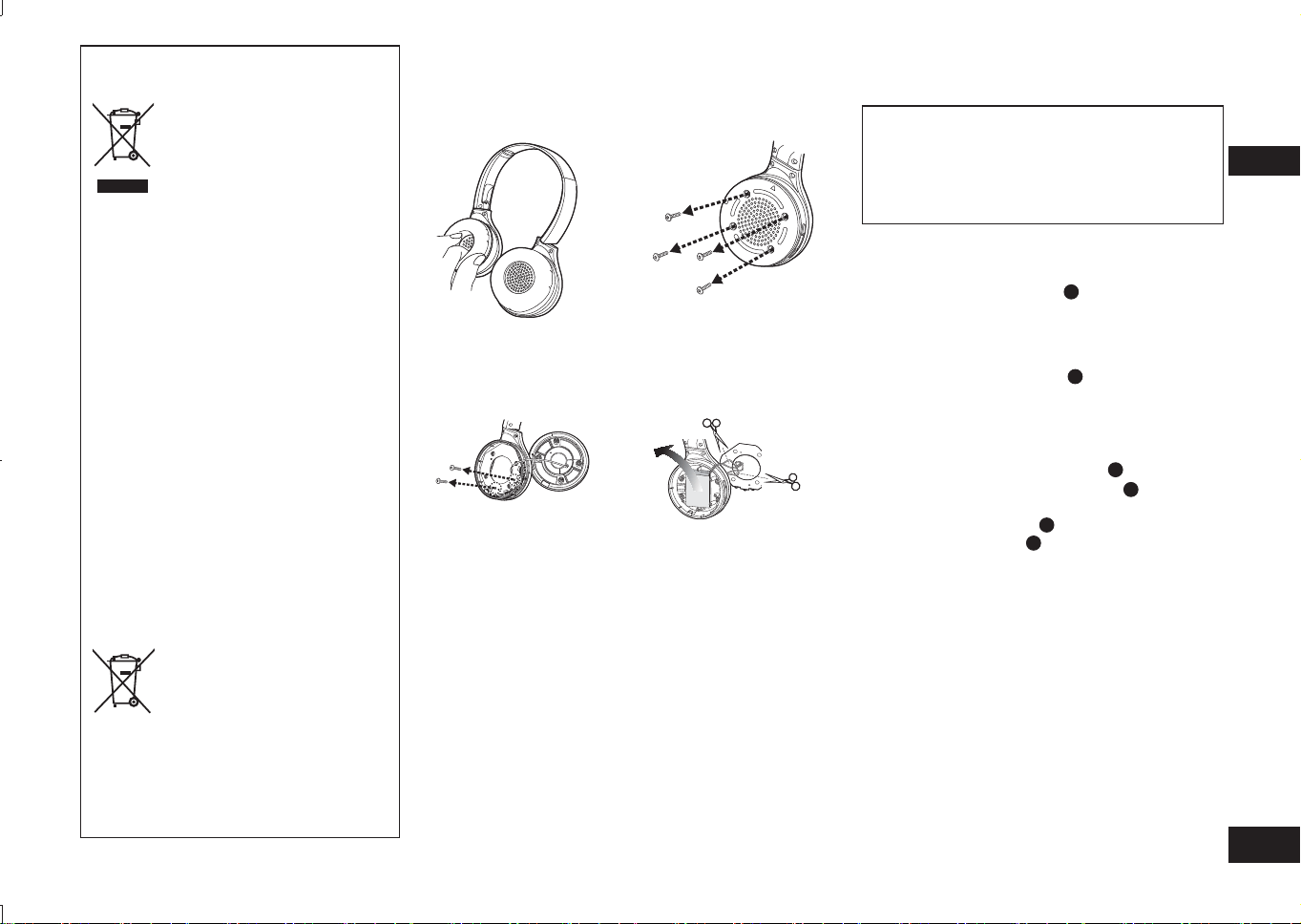
1
Remove the right ear pad
2
Remove the 4 screws
3
Remove the 2 screws,
and the board
4
Cut off the wires one by
one with scissors, and
remove the battery
RP-HF400B_E(TQBM0093).indb 9RP-HF400B_E(TQBM0093).indb 9 2017/03/17 21:21:332017/03/17 21:21:33
TQBM0093
X
10
2
Bitte überprüfen Sie das gelieferte
Zubehör auf Vollständigkeit.
1 USB-Ladekabel
Inhaltsverzeichnis
Sehr geehrter Kunde
Wir danken Ihnen, dass Sie sich
für dieses Produkt unseres Hauses
entschieden haben.
Bitte lesen Sie diese Anleitung vor
der Inbetriebnahme dieses Produkts
aufmerksam durch, und bewahren
Sie dieses Handbuch für spätere
Bezugnahme griffbereit auf.
Zubehör
●
Die Bluetooth
®
-Wortmarke
und -Logos sind eingetragene
Markenzeichen von Bluetooth
SIG, Inc. und jede Verwendung
dieser Marken durch Panasonic
Corporation erfolgt unter Lizenz.
Andere Warenzeichen und
Handelsnamen sind Eigentum der
jeweiligen Inhaber.
●
Bei allen anderen in diesem
Dokument erwähnten System- und
Produktbezeichnungen handelt
es sich generell um eingetragene
Marken bzw. Marken der
betreffenden Unternehmen.
Die Symbole ™ und
®
werden in
diesem Dokument nicht verwendet.
Copyright
usw.
Sicherheitshinweise
■
Kopfhörer
• Das Gerät nicht in der Nähe von Heiz- oder Wärmequellen ablegen.
• Die Lautstärke des Geräts nicht zu hoch stellen, wenn Sie aus
Sicherheitsgründen Geräusche und Töne aus der äußeren Umgebung hören
sollten, z. B. bei Eisenbahnübergängen und auf Baustellen.
• Breitband-Spannungseigenschaften gleich oder höher als 75 mV.
WARNUNG:
Um Brand- oder Stromschlaggefahr und Beschädigungen am Produkt zu
vermeiden, sollten folgende Regeln beachtet werden:
• Das Gerät nicht Regen oder Feuchtigkeit aussetzen, auch nicht in tropfender
oder spritzend Form.
• Kein mit Flüssigkeit gefülltes Gefäß wie z. B. eine Vase auf das Gerät setzen.
• Verwenden Sie nur empfohlenes Zubehör.
• Abdeckungen und Gehäuseteile nicht entfernen.
• Das Gerät nicht selber reparieren. Reparatur-und Instandsetzungsarbeiten
dürfen nur von dazu qualifiziertem und befugtem Personal durchgeführt
werden.
■
Allergien
• Falls Sie bemerken, dass der direkte Hautkontakt durch die Kopflautsprecher
oder durch andere Teile Ihnen nicht gut tut, dann sollten Sie das Gerät nicht
länger benutzen.
• Bei Weiterbenutzung drohen sonst Hautausschlag oder andere allergische
Reaktionen.
■
Sicherheitshinweise zur Benutzung von Kopfhörern
• Kopfhörer nur mit gemäßigter Lautstärke verwenden. Experten warnen vor zu
langem und ununterbrochenem Hören per Kopfhörer.
• Wenn Sie ein Klingeln im Ohr vernehmen, die Lautstärke reduzieren oder den
Gebrauch einstellen.
• Nicht in einem Kraftfahrzeug verwenden, wenn Sie am Steuer sitzen. Das
könnte eine Gefahr im Straßenverkehr sein und ist in vielen Gebieten
gesetzlich verboten.
• In möglicherweise gefährlichen Situationen sollten Sie äußerst vorsichtig sein
oder vorübergehend die Nutzung unterbrechen.
Bei Gebrauch kann das Gerät gegebenenfalls Funkstörungen ausgesetzt sein,
die durch Mobiltelefone verursacht werden. Falls solche Störungen auftreten,
vergrößern Sie den Abstand zwischen dem Gerät und dem Mobiltelefon.
Dieses Gerät ist für den Gebrauch in moderaten und tropischen Klimazonen gedacht.
Vor der Benutzung
Zubehör .............................................. 2
Copyright usw. .................................... 2
Sicherheitshinweise ............................ 2
Wartung ............................................. .3
Teilebezeichnungen ............................ 3
Vorbereitung
Aufladen ............................................. 4
Ein- und ausschalten .......................... 4
Ein Bluetooth
®
-Gerät verbinden .......... 4
Betrieb
Musik hören ........................................ 5
Telefonieren ........................................ 6
Praktische Funktionen ........................ 6
Andere
Wiederherstellen der
Werkseinstellungen ............................ 6
Über Bluetooth
®
.................................. 7
Technische Daten ............................... 7
Anleitung zur Fehlersuche .................. 8
Zur Entsorgung des Geräts sollte der
Akku entfernt werden.......................... 9
RP-HF400B_E(TQBM0093).indb 10RP-HF400B_E(TQBM0093).indb 10 2017/03/17 21:21:342017/03/17 21:21:34
TQBM0093
X
11
3
DEUTSCH
Teilebezeichnungen
■
Hinweis
• Zum Aufladen ausschließlich das zum Lieferumfang gehörende USB-Ladekabel
verwenden.
• Bei Benutzung des Kopfhörers darauf achten, dass der rechte Kopflautsprecher
nicht durch Ihre Handfläche abgedeckt wird. Die Bluetooth
®
-Verbindung könnte
blockiert werden.
Die Abbildungen können vom realen Aussehen des Produkts abweichen.
1
LED-Anzeige*
•
Der Status des Kopfhörers wird
signalisiert durch die Farbe der
LED und die Anzahl ihres Blinkens.
(* nachfolgend als „LED“ bezeichnet)
2
Ein/Aus ( Bereitschaft/
Ein) / Koppeln -Taste
3
Lade-Anschluss (DC IN)
• Zum Aufladen das
USB-Ladekabel (gelieferte)
hier anschließen. (→ S. 4)
4
Mikrofon
5
Wiedergabe/Pause/Anruf
6
Zurück /Lautstärke –
7
Weiter /Lautstärke +
Wartung
Zum Reinigen des Geräts ein sauberes und weiches Tuch verwenden.
• Keine Lösungsmittel wie Benzin, Verdünner, Alkohol, Küchen-Reinigungsmittel,
einen mit Chemikalien getränkten Abstreifer usw. benutzen. Sonst könnte das
Äußere des Gehäuses deformiert werden, oder die Beschichtung könnte sich
lösen.
■
Zusammenfalten des Geräts
Falten Sie die Kopfhörer wie unten gezeigt zusammen. Unsachgemäßes Falten
kann zu Fehlfunktionen führen.
Richtig Falsch
Konformitätserklärung (DoC)
Die “Panasonic Corporation” bestätigt hiermit, dass dieses Produkt den
grundlegenden Anforderungen und sonstigen relevanten Vorgaben der Richtlinie
2014/53/EU entspricht.
Kunden können eine Kopie der Original-DoC zu unseren RE-Produkten von
unserem DoC-Server herunterladen:
http://www.doc.panasonic.de
Wenden Sie sich an einen zugelassenen Vertragshändler:
Panasonic Marketing Europe GmbH, Panasonic Testing Centre,
Winsbergring 15, 22525 Hamburg, Deutschland
2
1
3
4
5
6
7
RP-HF400B_E(TQBM0093).indb 11RP-HF400B_E(TQBM0093).indb 11 2017/03/17 21:21:342017/03/17 21:21:34
TQBM0093
X
12
4
Zu Anfang ist der (im Kopfhörer installierte) Akku nicht aufgeladen. Laden
Sie erst den Akku auf, bevor Sie das Gerät in Betrieb nehmen.
1
Schließen Sie diesen Kopfhörer
mit dem USB-Ladekabel an einen
Computer an
• Die LED leuchtet rot auf.
• Während des Aufladens leuchtet die
LED in Rot. Sobald der Akku aufgeladen
ist, erlischt die LED.
•
Es dauert ungefähr 2,5 Stunden, um
einen leeren Akku vollständig aufzuladen.
Computer
LED
USB-Ladekabel (gelieferte)
■
Hinweis
• Solange dieses Gerät mit dem USB-Ladekabel an einem Computer
angeschlossen ist, kann die Bluetooth
®
-Funktion nicht benutzt werden.
• Das Aufladen sollte bei einer Raumtemperatur zwischen 10 °C und 35 °C
erfolgen.
• Während des Aufladens kann das Gerät nicht eingeschaltet werden.
• Zum Aufladen ausschließlich das zum Lieferumfang gehörende USB-Ladekabel
verwenden.
Vorsicht: Zum Anschließen an einen Computer nur das zum Lieferumfang
gehörende USB-Ladekabel verwenden.
Aufladen
1
Halten Sie im Ausschaltzustand die
Einschalttaste dieses Gerätes für
ca. 3 Sekunden gedrückt, bis die LED (blau)
blinkt
• Ein Signal ertönt, und die
LED (blau) blinkt langsam.
Ein/Aus -Taste
LED
Ausschalten
• Ungefähr 3 Sekunden lang die Ein/Aus
-Taste gedrückt halten. Es wird ein
Signalton ausgegeben, und das Gerät wird ausgeschaltet.
■
Hinweis
• Wird das Gerät ungefähr 5 Minuten lang nicht bedient oder betrieben, schaltet es
sich automatisch aus. (Siehe „Automatisches Ausschalten“ (→ S. 6))
Ein- und ausschalten
Vorbereitung
• Platzieren Sie das Bluetooth
®
-Gerät innerhalb von ca. 1 m vom Gerät.
• Prüfen Sie die Gerätefunktion unter Beachtung der Bedienungsanleitung, wenn
erforderlich.
Pairing (Registrierung) dieses Gerät mit dem Bluetooth
®
-Gerät
zur Verbindung
1
Halten Sie die Einschalttaste des Gerätes gedrückt, bis die LED
blinkt
Beim ersten Ausführen des Pairings : ca. 3 Sekunden
Beim zweiten oder nachfolgenden Ausführen des Pairings : ca. 5 Sekunden
• Das Gerät beginnt nach dem Bluetooth
®
-Gerät zur Verbindung zu suchen,
und die LED blinkt abwechselnd blau und rot.
2
Schalten Sie das Bluetooth
®
-Gerät ein und aktivieren Sie die
Bluetooth
®
-Funktion
3
Wählen Sie aus dem Bluetooth
®
-Menü
des Geräts „RP-HF400B“ aus
• Die MAC-Adresse „□□□□□□“ („□“ steht für
ein für jeden Satz eindeutiges Zeichen) wird
möglicherweise vor dem Anzeigen von „RP-
HF400B“ angezeigt.
• Wenn Sie zur Eingabe eines Zugangscodes
aufgefordert werden, geben Sie den
Zugangscode „0000 (vier Nullen)“ dieses
Geräts ein.
(Z.B.)
Bluetooth
Bluetooth
RP-HF400B
Gerät
ON
Wählen
4
Prüfen Sie die Verbindung mit dem
Bluetooth
®
-Gerät am Gerät
• Die LED blinkt abwechselnd blau und rot, bis die Verbindung zum Gerät
hergestellt ist. Wenn die LED (blau) zweimal etwa alle 2 Sekunden blinkt, ist
das Pairing (Registrierung) abgeschlossen. (Verbindung ist hergestellt)
■
Hinweis
• Wenn die Verbindung zu einem Gerät nicht innerhalb von ca. 5 Minuten
hergestellt wird, wird das Gerät ausgeschaltet. Führen Sie das Pairing erneut
aus.
• 2 oder mehr Bluetooth
®
-Geräte können nicht gleichzeitig auf dem Gerät
registriert werden.
• Sie können bis zu 8 Bluetooth
®
-Geräte mit diesem Gerät koppeln. Wenn ein
9. Gerät gekoppelt ist, wird das Gerät mit der ältesten Verbindung ersetzt. Um
dieses zu verwenden, führen Sie das Pairing erneut aus.
Anschließen eines Bluetooth
®
-Geräts
RP-HF400B_E(TQBM0093).indb 12RP-HF400B_E(TQBM0093).indb 12 2017/03/17 21:21:342017/03/17 21:21:34
TQBM0093
X
13
5
DEUTSCH
Fernbedienung
Sie können das Bluetooth
®
-Gerät mit dem Kopfhörer fernbedienen.
• Je nach Bluetooth
®
-Gerät ist es möglich, dass bei Bedienschritten am Kopfhörer
einige der unten angegebenen Funktionen nicht arbeiten oder anders reagieren.
(Fernbedienungs-Beispiel)
Wiedergabe/Pause/Anruf
Drücken
Wiedergabe/
Pause/Anruf
Zurück/Weiter/Lautstärke
+
Drücken Lauter
Gedrückt halten
Springt zum
Beginn des
nächsten Titels
−
Drücken Leiser
Gedrückt halten
Kehrt zu Beginn
des derzeitigen
Titels zurück
Wiedergabe/Pause/Anruf
Lautstärke –/
Zurück
Lautstärke +/
Weiter
■
Hinweis
• Zur Einstellung der Lautstärke gibt es 15 Stufen.
Wird das Maximum oder das Minimum der Lautstärke erreicht, wird ein Signalton
ausgegeben.
Musik hören
Wenn das Bluetooth
®
-kompatible Gerät die Bluetooth
®
-Profile „A2DP“ und
„AVRCP“ unterstützt, können Sie das Gerät mit dem Kopfhörer bei der Wiedergabe
fernbedienen.
• A2DP (Advanced Audio Distribution Profile):
Überträgt Audiosignale zum Kopfhörer.
• AVRCP (Audio/Video Remote Control Profile):
Ermöglicht, das Gerät per Kopfhörer fernzubedienen.
1
Das Bluetooth
®
-Gerät und den Kopfhörer verbinden (→ S. 4)
2
Beim Bluetooth
®
-Gerät die gewünschte Musik auswählen und
wiedergeben
• Die ausgewählte Musik wird über den Kopfhörer wiedergegeben.
Akku-Betriebsdauer
Batterie-Typ Betriebsdauer
Akku (wiederaufladbare Batterie) (im Gerät installiert) Ungefähr 20 Stunden
Je nach Betriebsbedingungen kann die Betriebsdauer kürzer sein.
■
Vorsicht
• Je nach Lautstärke kann das Gerät Töne nach außen abstrahlen.
• Wird die Lautstärke sehr hoch oder auf Maximum gestellt, ist es möglich,
dass der Ton verzerrt klingt. Stellen Sie dann die Lautstärke leiser, bis keine
Verzerrungen mehr zu hören sind.
Telefonieren
Zusammen mit einem Bluetooth
®
-fähigen Telefon (Mobiltelefon oder Smartphone),
das das Bluetooth
®
-Profil „HSP“ oder „HFP“ unterstützt, können Sie den Kopfhörer
zum Telefonieren benutzen.
• HSP (Headset Profile):
Dieses Profil kann zum einohrigen Hören und zum Einrichten einer Zweiweg-
Kommunikation mithilfe des im Gerät integrierten Mikrofons benutzt werden.
• HFP (Hands-Free Profile):
Zusätzlich zur HSP-Funktion verfügt dieses Profil über die Funktion für
eingehende und ausgehende Anrufe.
• Verbinden Sie das Bluetooth
®
-fähige Telefon mit dem Gerät (→ P. 4)
Anschließen eines gekoppelten Bluetooth
®
-Geräts
1
Schalten Sie das Gerät ein
• Halten Sie die Einschalttaste des Gerätes für ca. 3 Sekunden gedrückt, bis
die LED (blau) blinkt.
• Ein Signal ertönt, und die LED (blau) blinkt langsam.
2
Führen Sie die Schritte 2 und 3 von „Pairing (Registrierung)
dieses Gerät mit dem Bluetooth
®
-Gerät zur Verbindung“ (→ S. 4)
• Wenn die LED (blau) zweimal etwa alle 2 Sekunden blinkt, ist das Pairing
(Registrierung) abgeschlossen. (Verbindung ist hergestellt)
■
Hinweis
• Dieses Gerät merkt sich das zuletzt verbundene Gerät. Die Verbindung kann
nach Schritt 1 (siehe oben) automatisch hergestellt werden .
• Wenn die Verbindung zu einem Gerät nicht innerhalb von ca. 5 Minuten
hergestellt wird, wird das Gerät ausgeschaltet. Führen Sie das Pairing erneut
aus. (→ S. 4)
RP-HF400B_E(TQBM0093).indb 13RP-HF400B_E(TQBM0093).indb 13 2017/03/17 21:21:342017/03/17 21:21:34

TQBM0093
X
14
6
1
Einen eingehenden Anruf annehmen
Auf dem Kopfhörer auf
Anruf drücken und den
Anruf annehmen
• Bei der Signalisierung eines
eingehenden Anrufs wird
über die Kopflautsprecher
das Klingeln ausgegeben und
zusätzlich blinkt die LED.
•
(Nur bei HFP) Wollen Sie einen
eingehenden Anruf zurückweisen,
Drücken Sie zweimal schnell auf
die Taste Anruf
gedrückt.
Anruf
Einen ausgehenden Anruf durchführen
Mit dem Bluetooth
®
-fähigen
Telefon eine Gegenstelle
anrufen
• Informationen dazu finden Sie
in der Betriebsanleitung zum
Bluetooth
®
-fähigen Telefon.
(Wie ein Gespräch beendet wird und weitere
Bedienschritte werden unten erläutert)
•
Während der ausgehende Anruf
signalisiert wird, wird über die
Kopflautsprecher der Rufton
ausgegeben und zusätzlich blinkt
die LED.
•
Wollen Sie den ausgehende Anruf
beenden, auf Anruf
drücken.
Ein akustisches Signal wird
ausgegeben.
•
(Nur bei HFP) Wenn das Telefon
nicht belegt ist, die Taste Anruf
ungefähr 5 Sekunden lang gedrückt
halten. Die zuletzt angewählte
Rufnummer wird erneut angerufen.
Über die Kopflautsprecher wird ein
kurzes Klickgeräusch ausgegeben,
und zusätzlich blinkt die LED.
2
Sprechen Sie
• Während eines Telefonats blinkt die LED wiederholt 2 Mal.
• Während eines Telefonats kann die Lautstärke geändert werden.
Informationen zur Durchführung von Einstellungen siehe Seite 5.
3
Um das Telefonat zu beenden, auf Anruf drücken
• Ein akustisches Signal wird ausgegeben.
■
Hinweis
• Gegebenenfalls muss beim benutzten Bluetooth
®
-fähigen Telefon
Freisprechbetrieb eingeschaltet werden.
• Je nach Bluetooth
®
-fähigen Telefon kann es sein, dass die akustische
Signalisierung eines eingehenden oder ausgehenden Anrufs beim Telefon über
den Kopfhörer ausgegeben wird.
• (Nur bei HFP) Das zum Telefonieren benutzte Gerät wechselt zwischen
Bluetooth
®
-fähigen Telefon und dem Gerät. (Drücken Sie zweimal schnell auf
Anruf
am Gerät, um umzuschalten.)
Praktische Funktionen
Kopfhörer zurücksetzen
Falls der Kopfhörer auf Bedienschritte nicht mehr reagiert, kann er zurückgesetzt
werden. Um das Gerät zurückzusetzen, halten Sie die Einschalttaste
mindestens 10 Sekunden lang gedrückt. Alle zuvor ausgeführten Bedienschritte
werden aufgehoben. (Die Daten zum Koppeln von Geräten werden nicht gelöscht.)
Automatisches Ausschalten
Wenn der Kopfhörer ungefähr 5 Minuten keinen Ton überträgt und wenn während
dieser Zeit beim Bluetooth
®
-Gerät keine Bedienschritte ausgeführt werden, schaltet
sich der Kopfhörer nach Ausgabe eines Signaltons automatisch aus.
LED-Anzeige
Wenn die Akkustärke während des Gebrauchs des Geräts niedrig wird, wechselt
die blaue blinkende LED an dem rechten Lautsprecher auf rot um. Nach jeweils
1 Minute wird ein akustisches Signal ausgegeben. Wenn der Akku vollständig leer
ist, schaltet sich das Gerät aus.
* Wenn Sie bei niedrigem Akkuladestand die Kopplungstaste
gedrückt halten,
blinkt die LED nur in Rot.
Wiederherstellen der Werkseinstellungen
Wollen Sie alle Daten zu gekoppelten Geräten usw. löschen, können Sie den
Kopfhörer auf die Werkseinstellungen zurücksetzen (die Einstellungen, wie sie
vor dem Kauf bestanden haben). Laden Sie den Akku auf, bevor Sie das Gerät
zurücksetzen.
1 Halten Sie
ca. 5 Sekunden lang gedrückt
• Beginnen Sie die Suche nach Bluetooth
®
-Geräten, mit denen Sie sich
verbinden können.
2 Halten Sie + und − mindestens 6 Sekunden lang gedrückt, während Sie
gleichzeitig suchen
• Die LED blinkt schnell blau. Das Gerät wird auf Fabrikeinstellungen
zurückgesetzt.
■
Achtung
• Wenn Pairing für ein Gerät erneut ausgeführt wird, löschen Sie die
Registrierungsinformation (Gerät:„RP-HF400B“) aus dem Menü des Bluetooth
®
-
Geräts und registrieren Sie dieses Gerät mit erneut mit dem Bluetooth
®
-Gerät.
(→ S. 4)
RP-HF400B_E(TQBM0093).indb 14RP-HF400B_E(TQBM0093).indb 14 2017/03/17 21:21:352017/03/17 21:21:35
TQBM0093
X
15
7
DEUTSCH
Panasonic ist nicht verantwortlich zu machen, wenn bei einer drahtlosen
Übertragung Daten und/oder Informationen beeinträchtigt werden.
■
Verwendetes Frequenzband
Diese Gerät benutzt das 2,4 GHz-Frequenzband.
■
Zertifizierung dieses Geräts
• Dieses Gerät erfüllt die auferlegten Frequenzbeschränkungen und ist auf
Grundlage der entsprechenden Gesetze entsprechend zertifiziert. Darum ist
die Erteilung einer Funkerlaubnis nicht erforderlich.
• In einigen Ländern sind Handlungen, wie sie unten beschrieben sind,
gesetzlich verboten und können bestraft werden:
– Das Gerät auseinandernehmen/modifizieren.
– Das Etikett mit den Spezifikationen entfernen.
■
Nutzungseinschränkungen
• Die reibungslose drahtlose Übertragung zu oder von Bluetooth
®
-fähigen
Geräten und/oder deren Nutzung kann nicht in jedem Fall garantiert werden.
• Alle Geräte müssen den Standards entsprechen, die von Bluetooth SIG, Inc.
festgelegt sind.
•
Je nach Spezifikationen oder Einstellungen eines Gerätes kann möglicherweise keine
Verbindung hergestellt werden, oder einige Betriebsvorgänge unterscheiden sich.
• Dieses Gerät unterstützt Bluetooth
®
-Sicherheitsfunktionen. Aber je nach
Betriebsumgebung und/oder Einstellungen reichen diese
Sicherheitsfunktionen möglicherweise nicht aus. Seien Sie vorsichtig, wenn
Sie Daten drahtlos zu diesem System übertragen.
• Dieses System kann keine Daten zu einem Bluetooth
®
-Gerät übertragen.
■
Einsatzbereich
Verbindungen können nur im Umkreis von maximal 10 m hergestellt und aufrecht
erhalten werden.
Je nach Umgebung, Hindernissen oder Interferenzen kann der Bereich auch
kleiner sein.
■
Interferenzen durch andere Geräte
• Wird dieses Gerät in zu großer Nähe zu anderen Bluetooth
®
-Geräten oder
Geräten betrieben, die das 2,4 GHz-Frequenzband benutzen, kann es sein,
dass aufgrund von Funkwellen-Interferenzen, die durch diese Geräte
hervorgerufen werden, das Gerät nicht ordnungsgemäß arbeitet und dass
Störungen wie Störgeräusche oder Tonsprünge auftreten.
•
Dieses Gerät funktioniert möglicherweise nicht ordnungsgemäß, wenn die von einer
in der Nähe befindlichen Sendestation ausgestrahlten Funkwellen zu stark sind.
■
Bestimmungsgemäßer Gebrauch
• Dieses Gerät ist nur für den normalen, allgemeinen Einsatz.
• Benutzen Sie dieses Gerät nicht in der Nähe von Geräten oder in
Umgebungen, die auf Funkwellen-Interferenzen empfindlich regieren (zum
Beispiel in Flughäfen, in Hospitälern, in Forschungsstätten usw.)
Über Bluetooth
®
■
Allgemein
Stromversorgung
5 V DC, 330 mA
(Interner Akku: 3,7 V (Li-ion 430 mAh))
Betriebsdauer*
1
Ungefähr 20 Stunden
Aufladezeit*
2
(25 ºC) Ungefähr 2,5 Stunden
Temperaturbereich bei Aufladen 10 ºC bis 35 ºC
Temperaturbereich bei Betrieb 0 ºC bis 40 ºC
Luftfeuchtigkeit bei Betrieb 35%RH bis 80%RH (nicht kondensierend)
Masse Ungefähr 130 g
*
1
Je nach Betriebsbedingungen kann die Betriebsdauer kürzer sein.
*
2
Erforderliche Zeit für das Aufladen von Leer zu Voll.
■
Bluetooth
®
Bluetooth
®
-Systemspezifikationen Version 4.1
Klassifizierung des Funkgeräts Klasse 2 (2,5 mW)
Verwendetes Frequenzband 2402 MHz bis 2480 MHz
Max. RF-Leistung 4 dBm
Unterstützte Profile A2DP, AVRCP, HSP, HFP
Unterstützter Codec SBC
Betriebsdistanz Bis zu 10 m
■
Kopflautsprecher
Treiber-Einheiten 30 mm
■
Anschlüsse
DC EINGANG 5 V DC, 330 mA
■
Mikrofon
Typ Mono
■
Zubehör
USB-Ladekabel 0,1 m
●
Technische Daten können ohne vorherige Ankündigung jederzeit geändert
werden.
Technische Daten
RP-HF400B_E(TQBM0093).indb 15RP-HF400B_E(TQBM0093).indb 15 2017/03/17 21:21:352017/03/17 21:21:35

TQBM0093
X
16
8
Bevor Sie den Kundendienst in Anspruch nehmen, prüfen Sie erst folgende Punkte.
Falls Sie sich bei einigen Punkten nicht sicher sind oder falls die vorgeschlagenen
Maßnahmen das Problem nicht lösen, fragen Sie Ihren Fachhändler.
Allgemein
Das Gerät reagiert nicht
• Falls der Kopfhörer auf Bedienschritte nicht mehr reagiert, kann er zurückgesetzt
werden. Um das Gerät zurückzusetzen, halten Sie die Einschalttaste
mindestens 10 Sekunden lang gedrückt.(→ S. 6)
Stromversorgung und Aufladen
Das Gerät kann nicht aufgeladen werden
• Achten Sie darauf, dass der angeschlossene PC eingeschaltet ist und dass er
sich nicht im Standbymodus oder im Energiesparmodus befindet.
• Funktioniert der USB-Anschluss, den Sie derzeit benutzen? Falls Ihr PC weitere
USB-Anschlüsse hat, schließen Sie das Kabel an einen anderen USB-Anschluss
an.
• Falls diese Maßnahmen das Problem nicht lösen, ziehen Sie das
USB-Ladekabel vom Gerät ab und schließen Sie es dann wieder an.
• Falls die Aufladezeit und die Betriebsdauer kürzer werden, ist der Akku
möglicherweise zu abgenutzt. (Anzahl der Ladezyklen des eingebauten Akkus:
Ungefähr 500.)
Beim Aufladen leuchtet die LED nicht / Das Aufladen dauert länger
• Ist das (gelieferte) USB-Ladekabel fest am USB-Anschluss des Computers
angeschlossen? (→ S. 4)
• Stellen Sie sicher, dass der Akku bei einer Raumtemperatur zwischen
10 °C und 35 °C aufgeladen wird.
Das Gerät lässt sich nicht einschalten
• Ist das Gerät aufgeladen? Während des Aufladens kann das Gerät nicht
eingeschaltet werden. (→ S. 4)
Bluetooth
®
-Gerät verbinden
Zum Gerät kann keine Verbindung hergestellt werden
• Löschen Sie beim Bluetooth
®
-Gerät die Kopplungsinformationen zu diesem
Gerät und versuchen Sie es dann noch einmal. (→ S. 4)
Anleitung zur Fehlersuche
Ton und Audio-Lautstärke
Kein Ton
• Vergewissern Sie sich, dass dieses Gerät und das Bluetooth
®
-Gerät
ordnungsgemäß verbunden sind. (→ S. 4)
• Überzeugen Sie sich, dass auf dem Bluetooth
®
-Gerät Musik wiedergegeben
wird.
• Überzeugen Sie sich, dass das Gerät eingeschaltet ist und die Lautstärke nicht
zu leise gestellt ist.
• Koppeln Sie noch einmal das Bluetooth
®
-Gerät und den Kopfhörer und stellen
Sie die Verbindung her. (→ S. 4)
• Prüfen Sie, ob das Bluetooth
®
-kompatible Gerät das „A2DP“-Profil unterstützt.
Für weitere Informationen über Profile siehe „Musik hören“ (→ S. 5). Siehe auch
die Bedienungsanleitung bezüglich Bluetooth
®
-kompatibler Geräte.
Leise
• Stellen Sie das Gerät lauter. (→ S. 5)
• Stellen Sie die Lautstärke des Bluetooth
®
-Geräts lauter.
Aussetzer im Ton vom Gerät / Schlechte Tonqualität
• Werden Signale blockiert, können Aussetzer im Ton auftreten. Achten Sie darauf,
dass Sie das Gerät nicht mit Ihrer Handfläche usw. abdecken.
• Möglicherweise ist das Gerät weiter als 10 m entfernt. Bringen Sie die Geräte
näher zusammen.
• Beseitigen Sie Hindernisse, die sich zwischen den beiden Geräten befinden.
• Schalten Sie WLAN-Geräte aus, wenn sie nicht benutzt werden.
• Wenn der Akku erschöpft ist, kann es zu Übertragungsproblemen kommen.
Laden Sie das Gerät neu auf. (→ S. 4)
Telefonieren
Sie können die andere Person nicht hören
• Vergewissern Sie sich, dass dieses Gerät und das Bluetooth
®
-fähige Telefon
eingeschaltet sind.
• Vergewissern Sie sich, dass dieses Gerät und das Bluetooth
®
-fähige Telefon
miteinander verbunden sind. (→ S. 4)
• Überprüfen Sie die Audio-Einstellungen beim Bluetooth
®
-fähigen Telefon.
Schalten Sie das zum Telefonieren benutzte Gerät auf den Kopfhörer, falls es auf
das Bluetooth
®
-fähige Telefon geschaltet ist. (→ S. 4)
• Wenn Sie die Stimme der anderen Person zu leise vernehmen, dann stellen Sie
sowohl beim Kopfhörer aus auch beim Bluetooth
®
-fähigen Telefon die Lautstärke
lauter.
Tätigen eines Anrufs unmöglich
•
Prüfen Sie, ob das Bluetooth
®
-kompatible Gerät das Profil „HSP“ oder „HFP“
unterstützt. Für weitere Informationen über Profile siehe „Musik hören“ (→ S. 5) und
„Telefonieren“ (→ S. 5). Siehe auch die Bedienungsanleitung bezüglich Bluetooth
®
-
fähiger Telefone.
RP-HF400B_E(TQBM0093).indb 16RP-HF400B_E(TQBM0093).indb 16 2017/03/17 21:21:352017/03/17 21:21:35
TQBM0093
X
17
9
1
Entfernen Sie das rechte
Ohrpolster
2
Entfernen Sie die 4
Schrauben
3
Entfernen Sie die 2
Schrauben und die
Abdeckung
4
Schneiden Sie die Drähte
einzeln mit einer Schere
durch, und entfernen Sie
den Akku
DEUTSCH
Zur Entsorgung des Geräts sollte der Akku entfernt werden
Die folgenden Instruktionen dienen nicht
Reparaturzwecken, sondern der Entsorgung des
Geräts. Ist dieses Gerät auseinandergenommen
worden, kann es nicht wieder zusammengebaut werden.
Wenn Sie das Gerät entsorgen wollen, entfernen Sie
den darin installierten Akku und führen Sie ihn der
Wiederverwertung zu.
• Falls der Akku ausläuft, sollten Sie ihn herausnehmen.
• Demontierte Teile außerhalb der Reichweite von Kindern
aufbewahren.
1
Drehen Sie die Ohrkissen
A
nach oben und
legen Sie das Gerät auf eine flache Oberfläche
2
Halten Sie die Unterseite des rechten
Kopflautsprechers (R) fest und schieben Sie einen
(handelsüblichen) Kreuzschlitzschraubendreher
unter die obere Abdeckung
B
• Halten Sie Ihre Finger von der Spitze des
Schraubendrehers fern.
• Wählen Sie einen Schraubendreher, der groß genug für
den Bereich unter der oberen Abdeckung ist.
3
Verwenden Sie den Schraubendreher als Hebel und
drücken Sie die obere Abdeckung
B
nach oben
4
Nehmen Sie die obere Abdeckung
B
ab
5
Entfernen Sie die 4 Schrauben und nehmen Sie
die untere Abdeckung
C
ab
6
Halten Sie den Akku
D
fest und nehmen Sie ihn
heraus
Beachten Sie die Vorschriften zum Umgang mit
verbrauchten Akkus/Batterien
• Isolieren Sie die Anschlüsse mit Klebeband oder einem
ähnlichen Material.
• Nicht auseinandernehmen.
■
Akkus und Batterien
• Nicht Hitze oder offenem Feuer aussetzen.
• Batterien nicht für längere Zeit im Auto lassen, wenn
dieses direkter Sonnenbestrahlung ausgesetzt ist und
Türen und Fenster geschlossen sind.
•
Falscher Umgang mit Batterien kann dazu führen, dass die
Elektrolyt-Flüssigkeit ausläuft und Gegenstände beschädigt
werden, die mit dieser Flüssigkeit in Berührung kommen.
Falls eine Batterie ausläuft, fragen Sie Ihren Fachhändler,
was zu tun ist. Falls Elektrolyt-Flüssigkeit mit einem Körperteil
in Berührung kommt, diesen mit Wasser gründlich waschen.
• Informieren Sie sich bei den zuständigen Stellen vor
Ort oder bei Ihrem Fachhändler darüber, wie Batterien
vorschriftsmäßig entsorgt werden.
Entsorgung von Altgeräten und Batterien
Nur für die Europäische Union und
Länder mit Recyclingsystemen
Dieses Symbol, auf den
Produkten, der Verpackung und/
oder den Begleitdokumenten,
bedeutet, dass gebrauchte
elektrische und elektronische
Produkte sowie Batterien nicht
in den allgemeinen Hausmüll
gegeben werden dürfen.
Bitte führen Sie alte Produkte
und verbrauchte Batterien zur
Behandlung, Aufarbeitung bzw.
zum Recycling gemäß den
gesetzlichen Bestimmungen den
zuständigen Sammelpunkten zu.
Indem Sie diese Produkte und
Batterien ordnungsgemäß
entsorgen, helfen Sie dabei,
wertvolle Ressourcen zu
schützen und eventuelle
negative Auswirkungen auf die
menschliche Gesundheit und die
Umwelt zu vermeiden.
Für mehr Informationen
zu Sammlung und
Recycling, wenden Sie
sich bitte an Ihren örtlichen
Abfallentsorgungsdienstleister.
Gemäß Landesvorschriften
können wegen nicht
ordnungsgemäßer Entsorgung
dieses Abfalls Strafgelder
verhängt werden.
Hinweis für das Batteriesymbol
(Symbol unten):
Dieses Symbol kann in
Kombination mit einem
chemischen Symbol abgebildet
sein. In diesem Fall erfolgt
dieses auf Grund der
Anforderungen derjenigen
Richtlinien, die für die
betreffende Chemikalie erlassen
wurden.
RP-HF400B_E(TQBM0093).indb 17RP-HF400B_E(TQBM0093).indb 17 2017/03/17 21:21:352017/03/17 21:21:35
TQBM0093
X
18
2
Veuillez vérifier et identifier les
accessoires fournis.
1 Cordon de chargement USB
Table des
matières
Avant utilisation
Accessoires ........................................ 2
Droits d’auteur, etc.............................. 2
Précautions de sécurité ...................... 2
Entretien ............................................. 3
Noms des pièces ................................ 3
Préparation
Chargement ........................................ 4
Mettre sur marche/arrêt ...................... 4
Connexion d’un dispositif
Bluetooth
®
........................................... 4
Fonctionnement
Écouter de la musique ........................ 5
Passer un appel téléphonique ............ 6
Fonctions utiles................................... 6
Autre
Réinitialisation aux
réglages d’usine ................................. 6
À propos du Bluetooth
®
...................... 7
Spécifications ..................................... 7
Guide de dépannage .......................... 8
Pour retirer la batterie lors de la mise
aux rebuts de cet appareil .................. 9
Cher client
Merci d’avoir porté votre choix sur cet
appareil.
Veuillez lire attentivement les
présentes instructions avant d’utiliser
ce produit, et conserver ce manuel
pour utilisation ultérieure.
Accessoires
●
Le nom de la marque Bluetooth
®
ainsi que les logos sont des marques
déposées appartenant à Bluetooth
SIG, Inc. et toute utilisation de ces
marques par Panasonic Corporation
est effectuée sous licence.
Les autres marques et noms
commerciaux appartiennent à leurs
propriétaires respectifs.
●
En règle générale, les autres
noms de systèmes et de produits
mentionnés dans ce document sont
des marques, déposées ou non, de
leurs développeurs respectifs.
Noter que les symboles ™ et
® n’apparaissent pas dans ce
document.
Droits
d’auteur, etc.
Précautions de sécurité
■
Appareil
• Évitez d’utiliser ou de placer cet appareil près de sources de chaleur.
• N’écoutez pas cet appareil au niveau de volume maximum dans les endroits
dans lesquels vous devez entendre les sons alentours pour des raisons de
sécurité, comme à des carrefours et sur des chantiers.
• Tension caractéristique de la bande large équivalente ou supérieure à 75 mV.
AVERTISSEMENT :
Afin de réduire le risque d’incendie, de choc électrique ou de dommage,
• N’exposez pas cet appareil à la pluie, l’humidité, l’égouttement ou les
éclaboussures.
• Ne posez pas sur cet appareil des objets contenant des liquides, comme des
vases.
• Utilisez uniquement les accessoires recommandés.
• Ne retirez pas les couvercles.
• Ne réparez pas cet appareil vous-même. Faites appel à des professionnels
qualifiés.
■
Allergies
• Cessez d’utiliser l’appareil si les écouteurs ou toute autre partie en contact
avec votre peau cause une gêne.
• Une utilisation prolongée peut entraîner des éruptions cutanées ou d’autres
réactions allergiques.
■
Précautions d’utilisation du casque d’écoute
• N’utilisez pas votre casque d’écoute à un niveau de volume élevé. Les experts
de l’audition déconseillent l’écoute prolongée.
• Si vos oreilles bourdonnent, diminuez le volume ou cessez l’utilisation.
• Ne l’utilisez pas en conduisant un véhicule motorisé. Ceci peut être dangereux
et est interdit par la loi dans de nombreux pays.
• Veuillez prendre d’extrêmes précautions ou cesser temporairement l’utilisation
dans des situations potentiellement dangereuses.
Certains téléphones mobiles peuvent causer des interférences radio avec cet
appareil pendant l’utilisation. Dans ce cas, veuillez augmenter la distance entre
cet appareil et le téléphone mobile.
Cet appareil est prévu pour les climats modérés et tropicaux.
RP-HF400B_E(TQBM0093).indb 18RP-HF400B_E(TQBM0093).indb 18 2017/03/17 21:21:362017/03/17 21:21:36
TQBM0093
X
19
3
FRANÇAIS
Noms des pièces
■
Note
• N’utilisez pas d’autres cordons de chargement USB que celui fourni.
• Lorsque vous utilisez l’appareil, ne couvrez pas l’écouteur droite avec la paume
de la main. Ceci peut gêner la connexion Bluetooth
®
.
Les illustrations du produit peuvent différer du produit actuel.
1
Voyant LED*
• Le nombre de clignotements
ou la couleur indique l’état de
l’appareil.
(* ci-après appelé « voyant LED »)
2
Bouton Interrupteur
( Veille/Activé) /
Couplage
3
Borne de chargement
(DC IN)
• Branchez le cordon de
chargement USB (fourni)
à cette borne lors du
chargement. (→ P. 4)
4
Microphone
5
Lecture/Pause/Appel
6
Précédent /Volume –
7
Suivant /Volume +
Entretien
Nettoyez cet appareil avec un linge doux et sec.
• N’utilisez pas de solvants contenant du benzène, un diluant, de l’alcool, un
détergent de cuisine, une lingette nettoyante, etc. Ceci peut déformer le
logement extérieur ou peut faire se détacher le revêtement.
■
Pliage de l’appareil
Pliez le casque comme indiqué ci-dessous. Un pliage incorrect risque de causer
des dysfonctionnements.
Correct Incorrect
Déclaration de Conformité (DoC)
Par la présente, “Panasonic Corporation” déclare que ce produit est en conformité
avec les exigences essentielles et les autres clauses justificatives de la Directive
2014/53/EU.
Les clients peuvent télécharger une copie de la DoC originale de nos produits RE
sur notre serveur de DoC:
http://www.doc.panasonic.de
Pour contacter un Représentant Autorisé:
Panasonic Marketing Europe GmbH, Panasonic Testing Centre,
Winsbergring 15, 22525 Hamburg, Allemagne
2
1
3
4
5
6
7
RP-HF400B_E(TQBM0093).indb 19RP-HF400B_E(TQBM0093).indb 19 2017/03/17 21:21:362017/03/17 21:21:36
TQBM0093
X
20
4
La batterie rechargeable (installée dans l’appareil) est fournie déchargée.
Chargez la batterie avant d’utiliser l’appareil.
1
Connectez cet appareil à un
ordinateur en utilisant le cordon
de chargement USB
•
La LED s’allumera en rouge.
• Le voyant LED s’allume en rouge
pendant le chargement. Une fois le
chargement terminé, le voyant LED
s’éteint.
• Le chargement complet prend environ
2,5 heures une batterie complètement
déchargée.
Ordinateur
Voyant
LED
Cordon de chargement USB
(fourni)
■
Note
• La fonctionnalité Bluetooth
®
ne peut pas être utilisée lorsque cet appareil est
connecté à un ordinateur au moyen du cordon de chargement USB.
• Effectuez le rechargement dans une pièce dont la température est comprise
entre 10 °C et 35 °C.
• Vous ne pouvez pas mettre l’appareil en marche pendant le chargement.
• N’utilisez pas d’autres cordons de chargement USB que celui fourni.
Attention : Utilisez uniquement le cordon de chargement USB fourni pour la
connexion à un ordinateur.
Chargement
1
Dans l’état hors tension, appuyez et
maintenez le bouton d’interrupteur
enfoncé pendant environ 3 secondes
jusqu’à ce que la LED (bleue) clignote
• Un bip retentira et la LED (bleue) clignotera
lentement.
Bouton d’interrupteur
Voyant
LED
Pour mettre sur arrêt
• Appuyez et maintenez le bouton d’interrupteur
enfoncé pendant environ
3 secondes. Un signal sonore retentit et l’appareil s’éteint.
■
Note
• Au bout de cinq minutes d’inactivité, l’appareil s’éteint automatiquement.
(Voir « Arrêt automatique » (→ P. 6))
Mettre sur marche/arrêt
Préparation
• Placez le dispositif Bluetooth
®
dans un rayon d’un mètre de l’appareil.
• Contrôlez le fonctionnement du dispositif en consultant son mode d’emploi, le
cas échéant.
Jumelage (enregistrement) de cette unité avec le dispositif
Bluetooth
®
pour connexion
1
Appuyez et maintenez le bouton d’interrupteur enfoncé jusqu'à
ce que la LED clignote
Lors du jumelage d'un dispositif pour la première fois : env. 3 secondes
Lors du jumelage d'un deuxième dispositif ou de dispositifs suivants : env. 5 secondes
• L'unité commence à rechercher le dispositif Bluetooth
®
auquel se connecter,
et la LED clignotera en rouge et bleu alternativement.
2
Allumez l'appareil Bluetooth
®
et activez la fonction Bluetooth
®
3
Sélectionnez « RP-HF400B » dans le
menu du dispositif Bluetooth
®
• L'adresse MAC « □□□□□□ » (« □ » représente
un caractère qui est unique à chaque
ensemble.) peut s'afficher avant que
« RP-HF400B » ne soit affiché.
•
Si l’on vous demande une clé d’authentification,
saisir « 0000 (quatre zéros) ».
4
Vérifiez la connexion avec le dispositif
Bluetooth
®
sur l’appareil
• La LED clignote en bleu et en rouge, en alternance, jusqu'à ce que
la connexion avec le dispositif soit effectuée. Lorsque la LED (bleue) clignote
environ deux fois toutes les 2 secondes, le jumelage (enregistrement) est
terminé. (Connexion établie)
■
Remarque
• Si une connexion à un dispositif n’est pas établie dans un délai d'environ
5 minutes, l’appareil s’éteint. Recommencez le jumelage.
• Vous ne pouvez pas connecter en même temps plusieurs dispositifs Bluetooth
®
à l’appareil.
• Vous pouvez associer jusqu’à 8 dispositifs Bluetooth
®
à cet appareil. Si un 9ème
dispositif est associé, le dispositif dont la connexion est la plus ancienne est
remplacé. Pour l’utiliser, associez-le à nouveau.
Connexion d’un dispositif Bluetooth
®
Bluetooth
Bluetooth
RP-HF400B
ON
Dispositif
(Ex.)
Sélectionner
RP-HF400B_E(TQBM0093).indb 20RP-HF400B_E(TQBM0093).indb 20 2017/03/17 21:21:362017/03/17 21:21:36
TQBM0093
X
21
5
FRANÇAIS
Écouter de la musique
Si le dispositif compatible Bluetooth
®
prend en charge les profils Bluetooth
®
« A2DP » et « AVRCP », vous pouvez écouter de la musique en utilisant les
commandes à distance de l’appareil.
• A2DP (Profil de distribution audio avancé) : Transmet du son à l’appareil.
• AVRCP (Profil de contrôle à distance audio/vidéo) :
Permet de contrôler le dispositif à distance avec l’appareil.
1
Connectez le dispositif Bluetooth
®
et l’appareil (→ P. 4)
2
Sélectionnez et lisez la musique sur le dispositif Bluetooth
®
• La musique sélectionnée sort par les écouteurs de l’appareil.
Autonomie de la batterie
Type de batterie Autonomie
Batterie rechargeable (installée dans l’appareil) Environ 20 heures
L’autonomie de la batterie dépend des conditions d’utilisation.
■
Attention
• Le niveau sonore peut entraîner des fuites acoustiques de l’appareil.
• Le son de la musique peut être déformé si le volume est poussé au maximum.
Réduisez le volume jusqu’à ce qu’il n’y ait plus de déformations.
Télécommande
Vous pouvez contrôler le dispositif Bluetooth
®
en utilisant l’appareil.
•
Selon les dispositifs Bluetooth
®
, certaines des fonctions ci-dessous ne fonctionnent pas
ou fonctionnent différemment lorsqu’elles sont utilisées par l’intermédiaire de l’appareil.
(Exemple de fonctionnement)
Lecture/Pause/Appel
Appuyez
Lecture/Pause/
Appel
Précédent/Suivant/Volume
+
Appuyez
Augmenter le
volume
Appuyez et
maintenez enfoncé
Avance au début
de la piste suivante
−
Appuyez
Diminuer le
volume
Appuyez et
maintenez enfoncé
Retourner au
début de la piste
choisie
Lecture/Pause/Appel
Volume –/
Précédent
Volume +/
Suivant
■
Note
• Il existe 15 niveaux d’ajustement du volume.
Lorsque le volume minimum ou maximum est atteint, un signal sonore retentit.
Connexion d'un dispositif Bluetooth
®
apparié
1
Mettez l’appareil en marche
• Appuyez et maintenez le bouton d’interrupteur enfoncé pendant environ
3 secondes jusqu'à ce que la LED (bleue) clignote.
• Un bip retentira et la LED (bleue) clignotera lentement.
2
Effectuez les étapes 2 et 3 de « Jumelage (enregistrement) de
cette unité avec le dispositif Bluetooth
®
pour connexion » (→ P. 4)
• Lorsque la LED (bleue) clignote environ deux fois toutes les 2 secondes, le
jumelage (enregistrement) est terminé. (Connexion établie)
■
Remarque
• Cet appareil se souvient du dernier dispositif connecté. La connexion peut être
établie automatiquement après l'étape 1 (voir plus haut).
• Si une connexion à un dispositif n’est pas établie dans un délai d'environ
5 minutes, l’appareil s’éteint. Recommencez le jumelage. (→ P. 4)
RP-HF400B_E(TQBM0093).indb 21RP-HF400B_E(TQBM0093).indb 21 2017/03/17 21:21:362017/03/17 21:21:36
TQBM0093
X
22
6
Avec des téléphones équipés Bluetooth
®
(mobiles ou smartphones) prenant en
charge le profil Bluetooth
®
« HSP » ou « HFP », vous pouvez utiliser l’appareil pour
passer des appels.
• HSP (Profil casque d’écoute) :
Ce profil peut être utilisé pour recevoir des sons en mono et établir une
communication bidirectionnelle à l’aide du microphone de l’appareil.
• HFP (Profil mains libres) :
En plus des fonctions HSP, ce profil dispose de la fonction d’appels entrants et
sortants.
• Raccordez le téléphone compatible Bluetooth
®
et l’unité (→ P. 4)
1
Lorsque vous répondez à un appel entrant
Appuyez sur Appel sur
l’appareil et répondez à
l’appel
•
Lors d’un appel entrant, la
sonnerie retentit dans l’écouteur et
le voyant LED se met à clignoter.
•(HFP uniquement) Pour refuser
un appel entrant, Appuyez deux
fois rapidement sur Appel
.
Appel
Lorsque vous passez un appel sortant
Passer un appel sortant
sur le téléphone équipé
Bluetooth
®
• Veuillez également consulter
le mode d’emploi du téléphone
équipé Bluetooth
®
.
(Les étapes de contrôle et
d’utilisation de l’appareil sont
expliquées ci-dessous)
•
Lors d’un appel sortant, la
sonnerie retentit dans l’écouteur et
le voyant LED se met à clignoter.
•
Pour annuler un appel sortant,
appuyez sur Appel
.
Un signal sonore retentit.
•
(HFP uniquement) Lorsque le
téléphone est occupé, appuyez
et maintenez la touche Appel
enfoncée pendant environ cinq
secondes. Un appel sortant
sera passé au dernier numéro
composé. Un bref clic retentit dans
l’écouteur et le voyant LED se met
à clignoter.
2
Commencez à parler
• Le voyant LED clignote deux fois de suite pendant un appel.
• Le volume peut être ajusté pendant un appel téléphonique. Pour obtenir les
instructions de réglage, voir la page 5.
3
Appuyez sur Appel pour terminer l’appel téléphonique
• Un signal sonore retentit.
Passer un appel téléphonique
■
Note
• Vous devrez peut-être effectuer un paramétrage sur le téléphone équipé
Bluetooth
®
.
• Avec certains téléphones équipés Bluetooth
®
,vous entendrez les sonneries
entrantes et sortantes du téléphone dans l’appareil.
•(HFP uniquement) Le dispositif d’appel passera du téléphone équipé Bluetooth
®
à l’appareil. (Appuyez deux fois rapidement sur Appeler
sur l’unité pour
commuter.)
Fonctions utiles
Réinitialisation de l’appareil
Lorsque toutes les opérations sont refusées, vous pouvez réinitialiser cet appareil.
Pour réinitialiser l’appareil, maintenez le bouton d’alimentation
pendant au
moins 10 secondes. Toutes les opérations précédentes seront annulées. (Les
informations de couplage du dispositif ne seront pas supprimées.)
Arrêt automatique
Si l’appareil reste silencieux et si les dispositifs Bluetooth
®
restent inactifs pendant
environ cinq minutes, un signal sonore retentit et l’appareil s’arrête.
Voyant LED
Lorsque le niveau de batterie est bas durant l’utilisation de l’unité, la DEL clignotant
en bleu sur le haut-parleur droit passera au rouge*. Un signal sonore retentit toutes
les minutes. Une fois la batterie épuisée, l’appareil s’éteint.
* Si vous maintenez le bouton d’appairage
enfoncé alors que le niveau de la
batterie est bas, le voyant LED clignotera uniquement en rouge.
Réinitialisation aux réglages d’usine
Lorsque vous souhaitez supprimer toutes les informations de couplage des
dispositifs, etc., vous pouvez réinitialiser l’appareil aux réglages d’usine (réglages
au moment de l’achat). Chargez la batterie avant de réinitialiser l’appareil.
1 Maintenez le bouton d’alimentation
pendant au moins 5 secondes
• Lancez la recherche des périphériques Bluetooth
®
à connecter.
2 Maintenez le + et le − enfoncés simultanément pendant au moins
6 secondes pendant la recherche
• La DEL clignotera rapidement en bleu. L’appareil rétablira les réglages d’usine.
■
Attention
• Lorsque vous appariez à nouveau un dispositif, supprimez les informations
d’enregistrement (périphérique :« RP-HF400B ») du menu du dispositif
Bluetooth
®
et enregistrez à nouveau cette unité avec le dispositif Bluetooth
®
.
(→ P. 4)
RP-HF400B_E(TQBM0093).indb 22RP-HF400B_E(TQBM0093).indb 22 2017/03/17 21:21:372017/03/17 21:21:37
TQBM0093
X
23
7
FRANÇAIS
Panasonic ne sera en aucun cas responsable quant à toute interception de
données et/ou informations pendant une transmission sans fil.
■
Bande de fréquences utilisée
Cet appareil utilise une bande de fréquences de 2,4 GHz.
■
Certification de cet appareil
• Cet appareil se conforme aux limites relatives aux fréquences et a obtenu une
certification reposant sur les lois relatives aux fréquences. Par conséquent, un
permis sans fil n’est pas nécessaire.
•
Les actions ci-dessous peuvent être sanctionnées par les lois de certains pays :
– Démonter/modifier l’appareil.
– Retirer les indications des spécifications.
■
Limites d’utilisation
• La transmission sans fil et/ou l’utilisation avec des dispositifs équipés
Bluetooth
®
n’est pas garantie.
• Tous les dispositifs doivent se conformer aux normes définies par Bluetooth
SIG, Inc.
• Selon les spécifications et les réglages d’un dispositif particulier, la connexion
peut échouer ou certaines opérations peuvent différer.
• Ce système prend en charge les fonctionnalités de sécurité Bluetooth
®
.
Toutefois, en fonction de l’environnement d’utilisation et/ou des réglages, cette
sécurité peut ne pas suffire. Transmettez des données sans fil à ce système
avec précautions.
• Ce système ne peut pas transmettre de données à un dispositif Bluetooth
®
.
■
Portée d’utilisation
Utilisez cet appareil à une portée maximum de 10 m.
La portée peut diminuer en fonction de l’environnement, des obstacles ou des
interférences.
■
Interférences d’autres dispositifs
• Cet appareil peut ne pas fonctionner correctement et des problèmes comme
du bruit et des coupures de son peuvent survenir à cause d’interférences
radio si cet appareil est placé trop près d’autres dispositifs Bluetooth
®
ou de
dispositifs utilisant une bande de 2,4 GHz.
• Cet appareil peut ne pas fonctionner correctement si les ondes radio d’une
station de diffusion proche, etc. sont trop fortes.
■
Usage prévu
• Cet appareil est uniquement prévu à l’usage normal et général.
• N’utilisez pas ce système près d’un équipement ou dans un environnement
sensible à des interférences radio (exemple : aéroports, hôpitaux, laboratoires,
etc.).
À propos du Bluetooth
®
■
Généralités
Interrupteur électrique
CC 5 V, 330 mA
(Batterie interne : 3,7 V (Li-ion 430 mAh))
Autonomie*
1
Environ 20 heures
Temps de chargement*
2
(25 ºC) Environ 2,5 heures
Plage de températures de
chargement
10 °C à 35 °C
Plage de températures de
fonctionnement
0 °C à 40 °C
Gamme d’humidité de fonctionnement
35%HR à 80%HR (sans condensation)
Masse Environ 130 g
*
1
Peut être plus court selon les conditions d’utilisation.
*
2
Temps de recharge complet d’une batterie vide.
■
Section Bluetooth
®
Spécifications du système Bluetooth
®
Ver. 4.1
Classification de l’équipement sans fil
Classe 2 (2,5 mW)
Bande de fréquences 2402 MHz à 2480 MHz
Puissance RF max 4 dBm
Profils pris en charge A2DP, AVRCP, HSP, HFP
Codecs pris en charge SBC
Distance de fonctionnement Jusqu’à 10 m
■
Section écouteur
Excitateur 30 mm
■
Section borne
EN CC CC 5 V, 330 mA
■
Section microphone
Type Mono
■
Section accessoires
Cordon de chargement USB 0,1 m
●
Les spécifications sont soumises aux changements sans préavis.
Spécifications
RP-HF400B_E(TQBM0093).indb 23RP-HF400B_E(TQBM0093).indb 23 2017/03/17 21:21:372017/03/17 21:21:37

TQBM0093
X
24
8
Avant de contacter un réparateur, effectuez les contrôles suivants. Si vous avez
des doutes sur certains points de contrôle, ou si les solutions proposées ne
résolvent pas le problème, veuillez prendre contact avec votre revendeur.
Généralités
L’appareil ne répond pas
• Lorsque toutes les opérations sont refusées, vous pouvez réinitialiser cet
appareil. Pour réinitialiser l’appareil, maintenez le bouton d’alimentation
pendant au moins 10 secondes. (→ P. 6)
Interrupteur électrique et chargement
Chargement de l’appareil impossible
• Veillez à ce que l’ordinateur soit en marche et non pas en veille ou en veille
prolongée.
• Le port USB que vous utilisez fonctionne-t-il correctement ? Si votre ordinateur
dispose d’autres ports USB, débranchez le connecteur du port choisi et
branchez-le aux autres ports.
• Si les mesures susmentionnées ne s’appliquent pas, débranchez le cordon de
chargement USB et rebranchez-le.
• Si les temps de charge et de fonctionnement sont réduits, la batterie est peut-
être défaillante. (Nombre de chargements de la batterie incluse : Environ 500.)
Le voyant LED ne s’allume pas pendant le chargement /
Le chargement prend davantage de temps
• Le cordon de chargement USB (fourni) est-il bien branché à la borne USB de
l’ordinateur ? (→ P. 4)
• Veillez à effectuer le chargement dans une pièce où la température est comprise
entre 10 °C et 35 °C.
L’appareil ne s’allume pas
• L’appareil est-il en cours de chargement ? Vous ne pouvez pas mettre l’appareil
en MARCHE pendant le chargement. (→ P. 4)
Connexion du dispositif Bluetooth
®
Le dispositif ne peut pas être connecté
• Supprimez les informations de couplage de cet appareil du dispositif Bluetooth
®
,
puis associez-les à nouveau. (→ P. 4)
Guide de dépannage
Son et volume audio
Aucun son
•
Veillez à ce que l’appareil et le dispositif Bluetooth
®
soient bien connectés. (→ P. 4)
• Vérifiez que la musique est diffusée sur le dispositif Bluetooth
®
.
• Veillez à ce que l’appareil soit mis en marche et à ce que le volume ne soit pas
trop bas.
• Associez et connectez à nouveau le dispositif Bluetooth
®
et l’appareil. (→ P. 4)
•
Vérifiez que le dispositif compatible Bluetooth
®
prend en charge le profil « A2DP ».
Pour les détails sur les profils, consultez « Écouter de la musique » (→ P. 5).
Consultez également le mode d’emploi du dispositif compatible Bluetooth
®
.
Volume bas
• Augmentez le volume de l’appareil. (→ P. 5)
• Augmentez le volume du dispositif Bluetooth
®
.
Le son du dispositif est coupé / La qualité du son est mauvaise
• Le son peut être interrompu si les signaux sont bloqués. Ne couvrez pas
complètement cet appareil avec la paume de la main, etc.
• Le dispositif est peut-être hors de portée de communication 10 m. Rapprochez le
dispositif de cet appareil.
• Retirez tout obstacle entre cet appareil et le dispositif.
• Éteignez tous les dispositifs LAN non utilisés.
• Un problème de communication peut survenir si la batterie est déchargée.
Rechargez l’appareil. (→ P. 4)
Appels
Vous ne parvenez pas à entendre l’autre personne
• Veillez à ce que l’appareil et le téléphone équipé Bluetooth
®
soient en marche.
• Vérifiez que l’appareil et le téléphone équipé Bluetooth
®
sont connectés. (→ P. 4)
• Contrôlez les réglages audio du téléphone équipé Bluetooth
®
. Permutez le
dispositif d’appel sur l’appareil s’il est réglé sur le téléphone équipé Bluetooth
®
.
(→ P. 4)
• Si le volume de la voix de l’autre personne est trop bas, augmentez le volume de
l’appareil et du téléphone équipé Bluetooth
®
.
Impossible d’effectuer un appel
• Vérifiez que le dispositif compatible Bluetooth
®
prend en charge le profil « HSP »
ou le profil « HFP ». Pour des détails sur les profils, consultez « Écouter de la
musique » (→ P. 5) et « Passer un appel téléphonique » (→ P. 6). Consultez
également le mode d’emploi du dispositif compatible Bluetooth
®
.
RP-HF400B_E(TQBM0093).indb 24RP-HF400B_E(TQBM0093).indb 24 2017/03/17 21:21:372017/03/17 21:21:37
TQBM0093
X
25
9
FRANÇAIS
Pour retirer la batterie lors de la mise aux rebuts de cet appareil
Les instructions suivantes n’ont pas été conçues
pour la réparation mais pour la mise aux rebuts
de cet appareil. Cet appareil ne peut pas être
restauré une fois démonté.
Lorsque vous jetez cet appareil, retirez la batterie
installée dans cet appareil et recyclez-la.
• Démontez après l’extraction de la batterie.
• Gardez les pièces démontées hors de portée des enfants.
1
Tournez les écouteurs
A
vers le haut et placez
l’appareil sur une surface plane
2
Tenez le bas du haut-parleur droit (R) et mettez
un tournevis cruciforme (disponible dans le
commerce) sous le couvercle supérieur
B
• Veillez à ne pas laisser vos doigts sur l’embout du
tournevis.
• Choisissez un tournevis assez large pour l’espace situé
sous le couvercle supérieur.
3
Utilisez le tournevis pour soulever puis poussez
le couvercle supérieur
B
vers le haut
4
Retirez le couvercle supérieur
B
5
Retirez les 4 vis et le couvercle inférieur
C
6
Attrapez la batterie
D
puis retirez-la
Concernant la manipulation de batteries usagées
• Isolez les bornes avec du ruban adhésif ou un autre matériau
similaire.
• Ne démontez pas.
■
Batteries
• Ne les chauffez pas et ne les exposez pas à des flammes.
• Ne laissez pas la ou les batteries dans une voiture au
soleil pendant une période prolongée avec les portières et
les vitres fermées.
• Une mauvaise manipulation de la batterie peut entraîner
une fuite de l’électrolyte, susceptible d’endommager les
articles avec lesquels le liquide entre en contact. Si de
l’électrolyte fuit de la batterie, contactez votre revendeur.
Si de l’électrolyte entre en contact avec votre peau, lavez-
vous abondamment à l’eau.
• Lorsque vous jetez les batteries, veuillez contacter les
autorités locales ou votre revendeur pour connaître la
méthode d’élimination appropriée.
L’élimination des équipements et des
batteries usagés
Applicable uniquement dans les pays
membres de l’Union européenne et
les pays disposant de systèmes de
recyclage.
Apposé sur le produit lui-même,
sur son emballage, ou figurant
dans la documentation qui
l’accompagne, ce pictogramme
indique que les piles, appareils
électriques et électroniques
usagés, doivent être séparées
des ordures ménagères.
Afin de permettre le traitement,
la valorisation et le recyclage
adéquats des piles et des
appareils usagés, veuillez les
porter à l’un des points de
collecte prévus, conformément
à la législation nationale en
vigueur.
En les éliminant conformément
à la réglementation en vigueur,
vous contribuez à éviter le
gaspillage de ressources
précieuses ainsi qu’à
protéger la santé humaine et
l’environnement.
Pour de plus amples
renseignements sur la collecte
et le recyclage, veuillez
vous renseigner auprès des
collectivités locales.
Le non-respect de la
réglementation relative à
l’élimination des déchets est
passible d’une peine d’amende.
Note relative au pictogramme
à apposer sur les piles
(pictogramme du bas) :
Si ce pictogramme est
combiné avec un symbole
chimique, il répond également
aux exigences posées par la
Directive relative au produit
chimique concerné.
1
Retirez le coussinet droit
2
Retirez les 4 vis
3
Retirez les 2 vis et le
panneau
4
Coupez les fils un par
un avec des ciseaux, et
retirez la batterie
RP-HF400B_E(TQBM0093).indb 25RP-HF400B_E(TQBM0093).indb 25 2017/03/17 21:21:372017/03/17 21:21:37
TQBM0093
X
26
2
Controllare e identificare gli accessori
forniti.
1 Cavo di ricarica USB
Indice
Prima dell’uso
Accessori ............................................ 2
Copyright, ecc..................................... 2
Precauzioni di sicurezza ..................... 2
Manutenzione ..................................... 3
Definizione dei componenti ................ 3
Predisposizione
Carica ................................................. 4
Accensione e spegnimento ................ 4
Connessione di un dispositivo
Bluetooth
®
........................................... 4
Funzionamento
Riproduzione di musica ...................... 5
Esecuzione di una chiamata............... 6
Funzioni utili........................................ 6
Varie
Ripristino delle impostazioni di
fabbrica ............................................... 6
Informazioni su Bluetooth
®
................. 7
Specifiche ........................................... 7
Guida per la risoluzione dei problemi . 8
Rimozione della batteria in caso di
smaltimento dell’unità ......................... 9
Gentile cliente
Grazie per aver acquistato questo
prodotto.
Leggere attentamente queste istruzioni
prima di utilizzare il presente prodotto,
e conservare questo manuale per usi
futuri.
Accessori
●
Il marchio denominativo Bluetooth
®
e i loghi sono marchi registrati di
proprietà di Bluetooth SIG, Inc. e
qualsiasi utilizzo di tali marchi da
parte di Panasonic Corporation è
concesso in licenza.
Altri marchi e nomi di marchi sono di
proprietà dei rispettivi proprietari.
●
Altri nomi di sistemi e nomi di
prodotti che appaiono in questo
documento sono generalmente
marchi o marchi registrati delle
rispettive imprese di sviluppo.
Tenere presente che il marchio ™ e
il marchio ® non appaiono in questo
documento.
Copyright,
ecc.
Precauzioni di sicurezza
■
Unità
• Evitare l’utilizzo o il posizionamento dell’unità vicino a fonti di calore.
• Non utilizzare l’unità a volume alto in luoghi dove occorre sentire, per motivi di
sicurezza, i suoni provenienti dall’ambiente circostante, come in prossimità di
passaggi a livello e nei cantieri.
• Tensione di riconoscimento banda larga uguale o superiore a 75 mV.
AVVERTENZA:
Per ridurre il rischio di incendio, scosse elettriche o di danni al prodotto:
• Non esporre l’unità a pioggia, umidità, gocciolamento o schizzi.
• Non posizionare oggetti contenenti liquidi, come vasi, sull’unità.
• Utilizzare solo accessori raccomandati.
• Non rimuovere i coperchi.
• Non riparare autonomamente l’unità. Fare riferimento all’assistenza di
personale qualificato.
■
Allergie
• Sospendere l’utilizzo se si avverte fastidio con gli altoparlanti o con qualsiasi
altro componente a diretto contatto con la pelle.
• L’uso protratto può causare eruzioni cutanee o altre reazioni allergiche.
■
Precauzioni per l’ascolto con cuffie
• Non utilizzare le cuffie a volume elevato. Gli esperti dell’udito sconsigliano la
riproduzione continua prolungata.
• Se si avverte un ronzio nelle orecchie, ridurre il volume o sospendere l’utilizzo.
• Non utilizzare durante la marcia con un veicolo a motore: potrebbe creare un
rischio per il traffico stradale ed è illegale in molte aree.
• Prestare estrema attenzione o sospendere temporaneamente l’utilizzo in
situazioni potenzialmente pericolose.
L’unità può ricevere interferenze radio causate dall’utilizzo di telefoni cellulari. Se
si verifica tale circostanza, aumentare la distanza tra l’unità e il telefono cellulare.
L’unità è destinata a un utilizzo in aree con clima moderato e tropicale.
RP-HF400B_E(TQBM0093).indb 26RP-HF400B_E(TQBM0093).indb 26 2017/03/17 21:21:382017/03/17 21:21:38
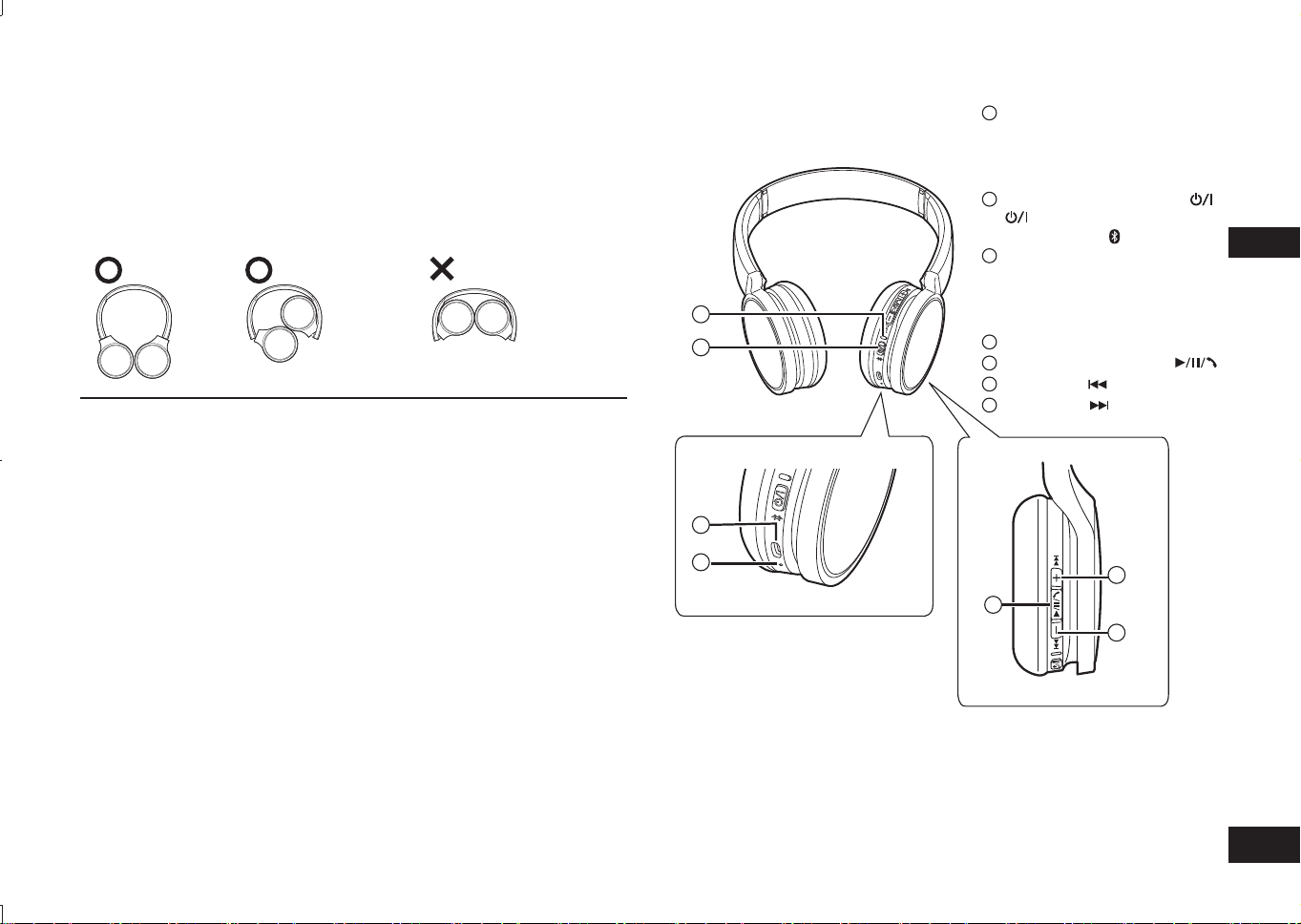
TQBM0093
X
27
3
ITALIANO
Definizione dei componenti
■
Nota
• Utilizzare esclusivamente il cavo di ricarica USB fornito in dotazione.
• Durante l’utilizzo dell’unità, non coprire l’altoparlante destro con il palmo della
mano. La connessione Bluetooth
®
potrebbe bloccarsi.
Le immagini del prodotto possono differire dal prodotto effettivo.
1
Spia di segnalazione LED*
• Il numero di lampeggi o il
colore notificano lo stato
dell’unità.
(* di seguito indicata come “LED”)
2
Pulsante di accensione
( Standby/Attivato) /
associazione
3
Terminale di carica (DC IN)
• Collegare il cavo di ricarica
USB (fornito in dotazione) al
presente terminale durante la
ricarica. (→ P. 4)
4
Microfono
5
Play/Pausa/Chiamata
6
Precedente /
Volume –
7
Successivo /
Volume +
Pulire l’unità con un panno morbido e asciutto.
• Non utilizzare solventi tra cui benzina, diluente, alcool, detergente per cucina,
tergicristalli chimico ecc.: questi ultimi possono causare la deformazione della
custodia esterna o la rimozione del rivestimento.
■
Come piegare le cuffie
Piegare le cuffie come indicato di seguito. Se le cuffie non vengono piegate
correttamente, possono insorgere anomalie di funzionamento.
Corretto Errato
Dichiarazione di Conformità (DoC)
Con la presente, “Panasonic Corporation” dichiara che questo prodotto è conforme
ai requisiti essenziali e alle altre disposizioni rilevanti della Direttiva 2014/53/UE.
I clienti possono scaricare una copia del DoC originale per i nostri prodotti RE dal
nostro server DoC:
http://www.doc.panasonic.de
Contatto del Rappresentante Autorizzato:
Panasonic Marketing Europe GmbH, Panasonic Testing Centre,
Winsbergring 15, 22525 Hamburg, Germania
Manutenzione
2
1
3
4
5
6
7
RP-HF400B_E(TQBM0093).indb 27RP-HF400B_E(TQBM0093).indb 27 2017/03/17 21:21:382017/03/17 21:21:38
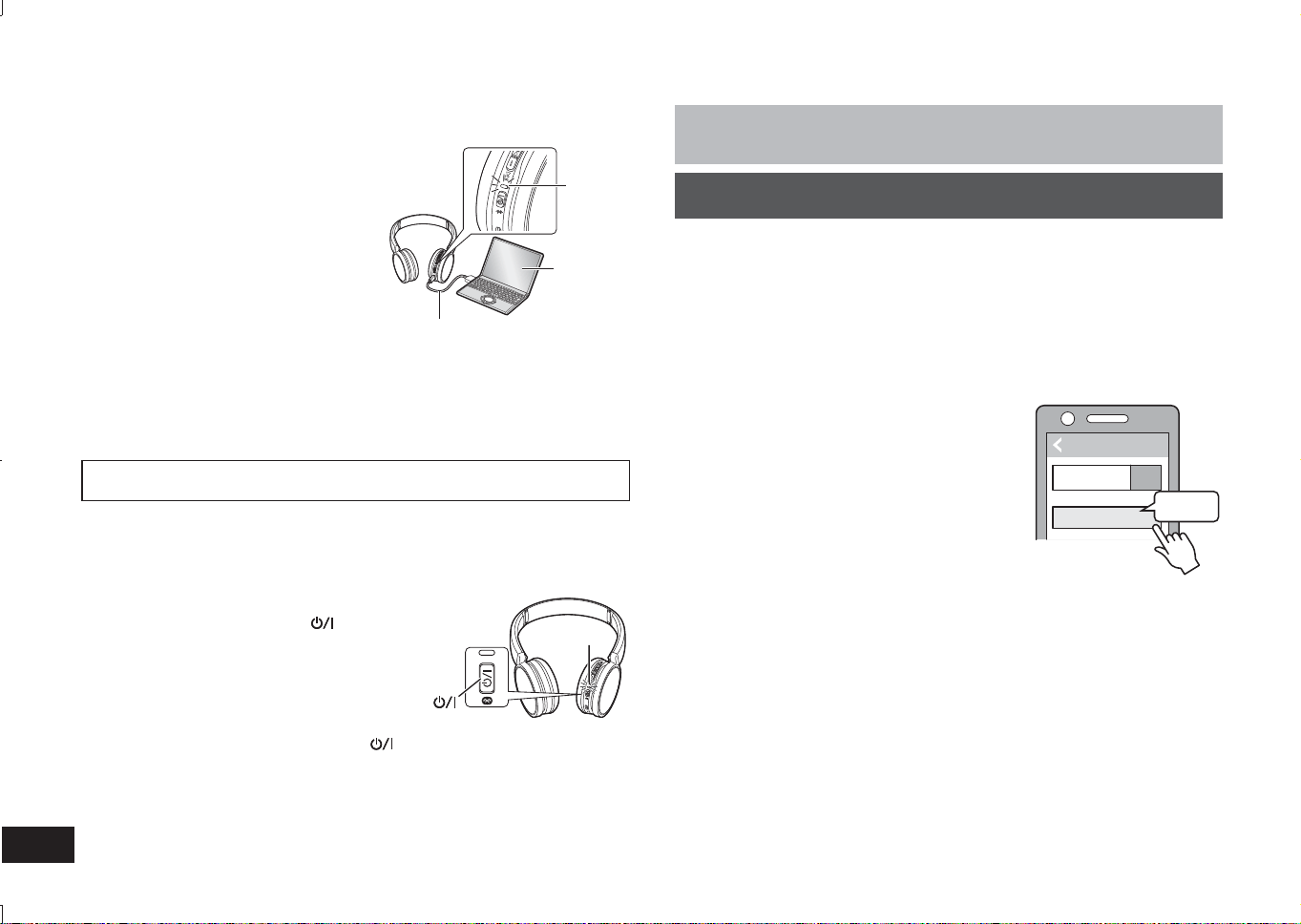
TQBM0093
X
28
La batteria ricaricabile (installata nell’unità) non è caricata inizialmente.
Caricare la batteria prima di utilizzare l’unità.
1
Collegare l’unità a un computer
utilizzando il cavo di ricarica USB
• Il LED si accende con luce rossa.
• Il LED si accende di colore rosso
quando la carica è in corso. Una volta
completata la carica, il LED si spegne.
• La carica dura 2,5 ore circa dallo stato di
batteria scarica a completamente carica.
Computer
LED
Cavo di ricarica USB
(fornito in dotazione)
■
Nota
• La funzione Bluetooth
®
non può essere utilizzata se tale unità è collegata a un
computer con un cavo di ricarica USB.
• Ricaricare a una temperatura ambiente compresa tra 10 °C e 35 °C.
• Non è possibile accendere l’unità durante la carica.
• Utilizzare esclusivamente il cavo di ricarica USB fornito in dotazione.
Attenzione: Utilizzare esclusivamente il cavo di ricarica USB fornito in dotazione
in caso di collegamento a un computer.
Carica
1
Nello stato spegnimento, tenere premuto
il pulsante di accensione dell’unità per
circa 3 secondi finché il LED (blu) non
lampeggia
• Si avverte un bip e il LED (blu) lampeggerà
lentamente.
Pulsante di accensione
LED
Spegnimento
• Tenere premuto il pulsante di accensione
per circa 3 secondi. Verrà emesso
un segnale acustico e l’unità si spegnerà.
■
Nota
• Se l’unità non viene azionata per un intervallo di circa 5 minuti, essa si spegnerà
automaticamente (consultare “Spegnimento automatico” (→ P. 6)).
Accensione e spegnimento
4
Predisposizione
• Posizionare il dispositivo Bluetooth
®
entro circa 1 m dall'unità.
• Verificare il funzionamento del dispositivo nelle istruzioni d'uso, se necessario.
Sincronizzazione (Registrazione) dell'unità con il dispositivo
Bluetooth
®
per la connessione
1
Tenere premuto il pulsante di accensione dell'unità finché il LED
non lampeggia
Quando si sincronizza un dispositivo per la prima volta : circa 3 secondi
Quando si sincronizza un secondo dispositivo o dispositivi successivi : circa 5 secondi
• L’unità inizia a cercare il dispositivo Bluetooth
®
a cui connettersi e il LED
lampeggia alternativamente con luce blu e rossa.
2
Accendere l'unità Bluetooth
®
e attivare la funzione Bluetooth
®
3
Selezionare “RP-HF400B” dal menu del
dispositivo Bluetooth
®
• L’indirizzo MAC “□□□□□□” (“□” indica un
carattere unico per ogni set) può essere
visualizzato prima di “RP-HF400B”.
• Se viene richiesta una chiave di accesso,
immettere la chiave di accesso “0000 (quattro
zeri)” dell'unità.
4
Verificare la connessione con il
dispositivo Bluetooth
®
sull'unità
• Il LED lampeggerà alternativamente con luce blu e rossa finché la
connessione con il dispositivo non sarà completata. Quando il LED (blu)
lampeggia due volte ogni 2 secondi circa, la sincronizzazione (registrazione)
è completata. (Connessione stabilita)
■
Nota
• Se la connessione a un dispositivo non viene stabilita entro circa 5 minuti, l'unità
si spegne. Eseguire di nuovo la sincronizzazione.
• Non è possibile registrare contemporaneamente 2 o più dispositivi Bluetooth
®
all'unità.
• È possibile sincronizzare fino a 8 dispositivi Bluetooth
®
con questa unità. Se
viene sincronizzato un 9° dispositivo, il dispositivo con la connessione più
vecchia verrà sostituito. Per utilizzarlo, eseguire di nuovo la sincronizzazione.
Connessione di un dispositivo Bluetooth
®
Bluetooth
Bluetooth
RP-HF400B
ON
(Ex.)
Selezionare
Dispositivo
RP-HF400B_E(TQBM0093).indb 28RP-HF400B_E(TQBM0093).indb 28 2017/03/17 21:21:382017/03/17 21:21:38
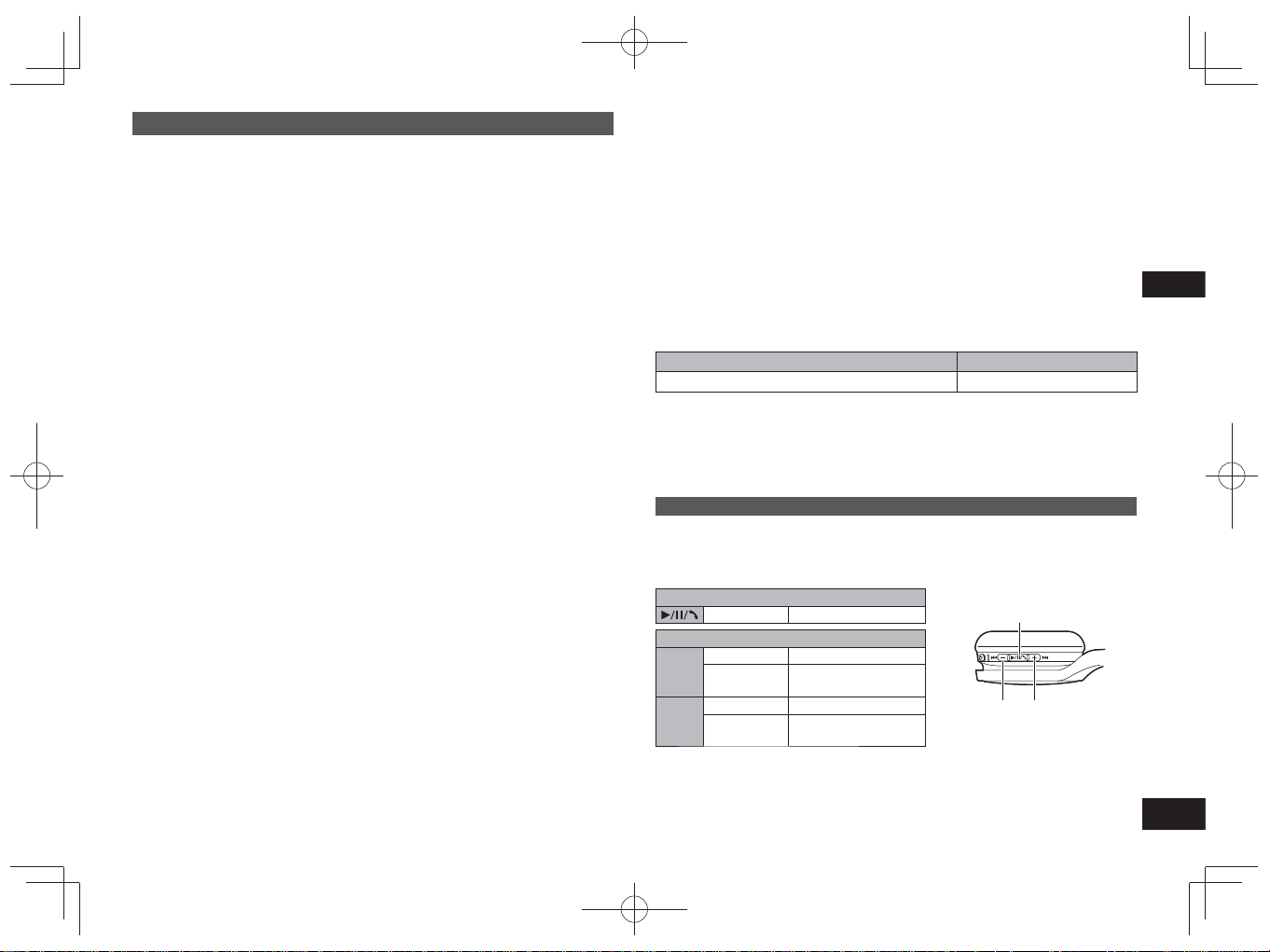
TQBM0093
X
29
5
ITALIANO
Riproduzione di musica
Se il dispositivo Bluetooth
®
compatibile supporta i profili Bluetooth
®
“A2DP” e
“AVRCP”, la musica può essere riprodotta con le funzioni di controllo remoto
dell’unità.
• A2DP (Profilo di distribuzione audio avanzata): Trasmette l’audio all’unità.
• AVRCP (Profilo di controllo remoto audio/video):
Consente il controllo remoto del dispositivo utilizzando l’unità.
1
Connettere il dispositivo Bluetooth
®
all’unità (→ P. 4)
2
Selezionare e riprodurre la musica sul dispositivo Bluetooth
®
• La musica selezionata viene trasmessa agli altoparlanti dell’unità.
Durata operativa della batteria
Tipo di batteria Durata operativa
Batteria ricaricabile (installata sull’unità) Circa 20 ore
La durata operativa può essere inferiore in base alle condizioni di esercizio.
■
Attenzione
• L’unità può disperdere il suono a seconda del livello del volume.
• Aumentando il volume fino al livello pressoché massimo, la musica può risultare
distorta. Ridurre il volume fino alla scomparsa della distorsione.
Controllo remoto
È possibile controllare il dispositivo Bluetooth
®
utilizzando l’unità.
• In base ai dispositivi Bluetooth
®
, alcune delle seguenti funzioni non sono
disponibili o operano in modo differente con il funzionamento dell’unità.
(Esempio operativo)
Play/Pausa/Chiamata
Pressione Play/Pausa/Chiamata
Precedente/Successivo/Volume
+
Pressione Aumento del volume
Pressione
continua
Avanti all’inizio della
traccia successiva
−
Pressione Riduzione del volume
Pressione
continua
Indietro all’inizio della
traccia attuale
Play/Pausa/Chiamata
Volume –/
Precedente
Volume +/
Successivo
■
Nota
• Il volume è regolabile in 15 livelli.
Raggiungendo il volume massimo o minimo, viene emesso un segnale acustico.
Connessione di un dispositivo Bluetooth
®
sincronizzato
1
Accendere l’unità
• Tenere premuto il pulsante di accensione dell'unità per circa 3 secondi finché
il LED (blu) non lampeggia.
• Si avverte un bip e il LED (blu) lampeggerà lentamente.
2
Eseguire le fasi 2 e 3 descritte nel paragrafo “Sincronizzazione
(Registrazione) dell'unità con il dispositivo Bluetooth
®
per la
connessione” (→ P. 4)
• Quando il LED (blu) lampeggia due volte ogni 2 secondi circa, la
sincronizzazione (registrazione) è completata. (Connessione stabilita)
■
Nota
• Questa unità memorizza l'ultimo dispositivo connesso. La connessione potrebbe
essere stabilita automaticamente dopo la fase 1 (vedi sopra).
• Se la connessione a un dispositivo non viene stabilita entro circa 5 minuti, l'unità
si spegne. Eseguire di nuovo la sincronizzazione. (→ P. 4)
RP-HF400B_E(TQBM0093).indb 29RP-HF400B_E(TQBM0093).indb 29 2017/03/17 21:21:382017/03/17 21:21:38
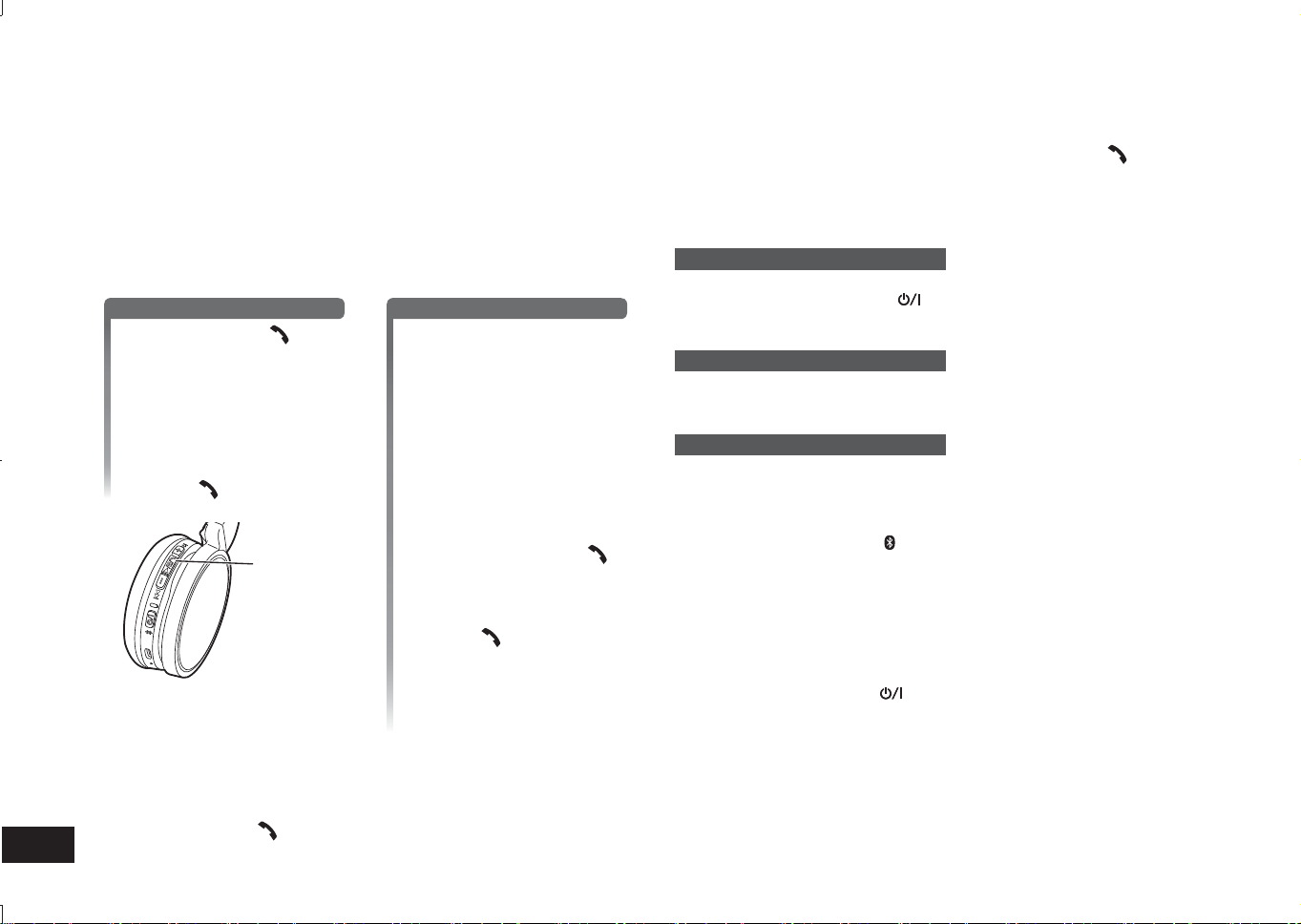
TQBM0093
X
30
6
I telefoni con funzione Bluetooth
®
(telefoni cellulari o smartphone), che supportano
il profilo Bluetooth
®
“HSP” o “HFP”, consentono l’utilizzo dell’unità per effettuare
chiamate.
• HSP (Profilo auricolare):
Questo profilo può essere utilizzato per ricevere suoni monoaurali e stabilire una
comunicazione bidirezionale utilizzando il microfono presente sull’unità.
• HFP (Profilo viva-voce):
Oltre alle funzioni HSP, questo profilo è dotato della funzione delle chiamate in
entrata e in uscita.
• Collegare il telefono abilitato Bluetooth
®
e l’unità (→ P. 4)
1
Risposta a una chiamata in entrata
Premere Chiamata
sull’unità e rispondere
• Durante una chiamata in
entrata, la suoneria verrà
emessa dall’altoparlante e il
LED lampeggerà.
• (Solo HFP) Per rifiutare una
chiamata in entrata, premere
due volte rapidamente
Chiamata
.
Chiamata
Esecuzione di una chiamata
Eseguire una chiamata
dal telefono con funzione
Bluetooth
®
• Fare riferimento anche al
manuale operativo del telefono
con funzione Bluetooth
®
.
(Le fasi operative e di controllo
sull’unità sono descritte a seguire)
• Durante una chiamata in
uscita, il tono verrà emesso
dall’altoparlante e il LED
lampeggerà.
• Per annullare la chiamata in
uscita, premere Chiamata
e verrà emesso un segnale
acustico.
• (Solo HFP) Se il telefono è
inattivo, mantenere premuto
Chiamata
per circa
5 secondi. Verrà eseguita una
chiamata all’ultimo numero
composto. Un solo scatto breve
verrà emesso dall’altoparlante e
il LED lampeggerà.
2
Avviare la comunicazione
• Il LED lampeggerà ripetutamente per due volte durante una chiamata.
• Il volume è regolabile durante una chiamata. Per le istruzioni di
impostazione, consultare pagina 5.
3
Premere Chiamata per terminare la telefonata
• Verrà emesso un segnale acustico.
Esecuzione di una chiamata
■
Nota
• In alcuni casi può essere necessario eseguire l’impostazione della funzione
viva-voce sul telefono con funzione Bluetooth
®
.
• In base alla telefono con funzione Bluetooth
®
, è possibile sentire dall’unità i toni
di chiamata in entrata e in uscita del telefono.
• (Solo HFP) Il dispositivo chiamante sarà commutato fra il telefono con funzione
Bluetooth
®
e l’unità. (Premere due volte rapidamente Chiamata sull’unità per
cambiare).
Funzioni utili
Ripristino dell’unità
L’unità può essere ripristinata se tutte le operazioni sono rifiutate. Per resettare
l’unità, tenere premuto il pulsante
per 10 secondi o più a lungo.Tutte le
operazioni precedenti saranno annullate. (Le informazioni del dispositivo associato
non verranno eliminate.)
Spegnimento automatico
Se l’unità è inattiva per circa 5 minuti e le operazioni per i dispositivi Bluetooth
®
sono sospese durante questo periodo, verrà emesso un segnale acustico e l’unità
si spegnerà automaticamente.
Spia di segnalazione LED
Quando il livello della batteria è basso durante l’utilizzo dell’unità, il LED
lampeggiante blu sull’altoparlante destro cambia colore diventando rosso*. Verrà
emesso un segnale acustico ogni minuto. Se la batteria si esaurisce, l’unità si
spegne.
* Se si tiene premuto il pulsante
di pairing quando la batteria è scarica, il LED
lampeggia soltanto in rosso.
Ripristino delle impostazioni di fabbrica
Se si desidera eliminare tutte le informazioni del dispositivo associato e altro
ancora, è possibile ripristinare l’unità alle impostazioni di fabbrica (impostazioni
originali al momento dell’acquisto). Caricare la batteria prima di ripristinare l’unità.
1 Tenere premuto il pulsante
per circa 5 secondi
• Iniziare la ricerca dei dispositivi Bluetooth
®
da collegare.
2 Tenere premuti contemporaneamente + e - per 6 secondi o più a lungo
durante la ricerca
• Il LED lampeggia in blu. L’unità viene resettata ai valori di fabbrica.
■
Attenzione
• Quando si sincronizza di nuovo un dispositivo, eliminare i dati di registrazione
(Dispositivo: “RP-HF400B”) dal menu del dispositivo Bluetooth
®
, e registrare di
nuovo questa unità con il dispositivo Bluetooth
®
. (→ P. 4)
RP-HF400B_E(TQBM0093).indb 30RP-HF400B_E(TQBM0093).indb 30 2017/03/17 21:21:392017/03/17 21:21:39
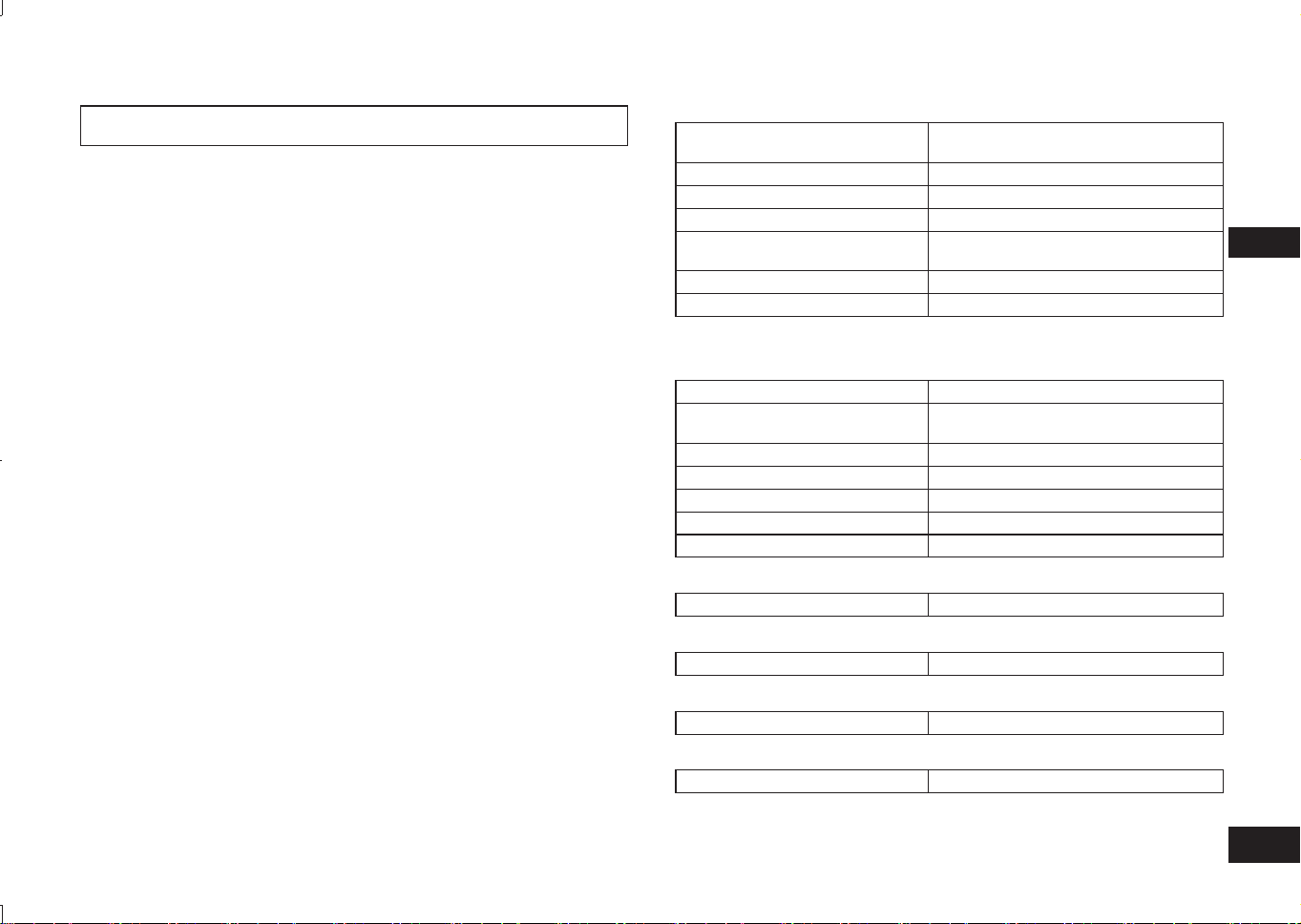
TQBM0093
X
31
7
ITALIANO
Panasonic declina qualsiasi responsabilità per dati e/o informazioni
compromesse durante una trasmissione wireless.
■
Banda di frequenza utilizzata
L’unità utilizza la banda di frequenza da 2,4 GHz.
■
Certificazione dell’unità
• L’unità è conforme alle limitazioni di frequenza e ha ottenuto la certificazione in
base alle leggi sulle frequenze. Pertanto, non è necessaria un’autorizzazione
wireless.
• Le azioni indicate a seguire sono punibili per legge in alcuni paesi:
– Smontare/modificare l’unità.
– Rimuovere le indicazioni delle specifiche.
■
Limitazioni d’uso
• Non è garantita la trasmissione wireless e/o l’utilizzo con tutti i dispositivi dotati
di Bluetooth
®
.
• Tutti i dispositivi devono essere conformi alle norme stabilite da Bluetooth SIG,
Inc.
• In base alle specifiche e alle impostazioni di un dispositivo, è possibile che
quest’ultimo non riesca a connettersi o che alcune operazioni siano differenti.
• Il sistema supporta le funzioni di sicurezza Bluetooth
®
. Tuttavia, in base
all’ambiente operativo e/o alle impostazioni, tale sicurezza può risultare
insufficiente. Trasmettere i dati al sistema via wireless con cautela.
• Il sistema non può trasmettere dati a un dispositivo Bluetooth
®
.
■
Raggio d’azione
Utilizzare l’unità a una distanza massima di 10 m.
La distanza può diminuire in base ad ambiente, ostacoli o interferenze.
■
Interferenze causate da altri dispositivi
• L’unità può non funzionare correttamente e possono verificarsi problemi
quali rumore o sbalzi sonori a causa di interferenze di onde radio se l’unità è
posizionata troppo vicino ad altri dispositivi Bluetooth
®
o ad altri dispositivi che
utilizzano la banda da 2,4 GHz.
• L’unità può non funzionare correttamente se le onde radio, provenienti da una
vicina stazione trasmittente ecc., sono troppo forti.
■
Utilizzo previsto
• L’unità è destinata esclusivamente a un utilizzo normale e generale.
• Non utilizzare il sistema in prossimità di un’apparecchiatura o in un ambiente
sensibile alle interferenze delle frequenze radio (ad es. aeroporti, ospedali,
laboratori ecc.).
Informazioni su Bluetooth
®
■
Informazioni generali
Alimentazione
DC 5 V, 330 mA
(Batteria interna: 3,7 V (Li-ion 430 mAh))
Durata operativa*
1
Circa 20 ore
Tempo di carica*
2
(25 ºC) Circa 2,5 ore
Intervallo di temperatura di carica 10 ºC a 35 ºC
Intervallo di temperatura di
esercizio
0 ºC a 40 ºC
Intervallo di umidità di esercizio 35%UR a 80%UR (assenza di condensa)
Peso Circa 130 g
*
1
Può essere inferiore in base alle condizioni operative.
*
2
Tempo impiegato per una ricarica completa.
■
Sezione Bluetooth
®
Specifiche del sistema Bluetooth
®
Ver. 4.1
Classificazione
dell’apparecchiatura wireless
Classe 2 (2,5 mW)
Banda di frequenza Da 2402 MHz a 2480 MHz
Alimentazione max RF 4 dBm
Profili supportati A2DP, AVRCP, HSP, HFP
Codec supportato SBC
Distanza operativa Fino a 10 m
■
Sezione altoparlanti
Unità driver 30 mm
■
Sezione terminale
DC IN DC 5 V, 330 mA
■
Sezione microfono
Modello Singolo
■
Sezione accessori
Cavo di ricarica USB 0,1 m
●
Le specifiche sono soggette a variazioni senza alcun preavviso.
Specifiche
RP-HF400B_E(TQBM0093).indb 31RP-HF400B_E(TQBM0093).indb 31 2017/03/17 21:21:392017/03/17 21:21:39
TQBM0093
X
32
8
Prima di richiedere assistenza, eseguire le seguenti verifiche. In caso di dubbi su
alcuni dei punti di verifica o se i rimedi indicati non risolvono il problema, rivolgersi
al rivenditore per ottenere istruzioni.
Informazioni generali
L’unità non risponde
• L’unità può essere ripristinata se tutte le operazioni sono rifiutate. Per resettare
l’unità, tenere premuto il pulsante
per 10 secondi o più a lungo. (→ P. 6)
Alimentazione e carica
Impossibile ricaricare l’unità
• Verificare che il computer sia acceso e non in modalità standby o sospensione.
• La porta USB, attualmente in uso, funziona correttamente? Se il computer
dispone di altre porte USB, scollegare il connettore dalla porta attualmente in
uso e collegarlo a una delle altre disponibili.
• Se le azioni sopracitate non sono applicabili, scollegare il cavo di ricarica USB e
ricollegarlo.
• Se il tempo di carica e la durata operativa diminuiscono, la batteria può essersi
esaurita (numero di ricariche della batteria inclusa: circa 500).
Il LED non si accende durante la ricarica / Il tempo di ricarica è
maggiore
• Il cavo di ricarica USB (fornito in dotazione) è ben collegato al terminale USB del
computer? (→ P. 4)
• Assicurarsi di effettuare il caricamento ad una temperatura ambiente compresa
tra 10 °C e 35 °C.
L’unità non si accende
• L’unità è sotto carica? Non è possibile accendere l’unità durante la carica.
(→ P. 4)
Connessione del dispositivo Bluetooth
®
Impossibile connettere il dispositivo
• Eliminare le informazioni di associazione per l’unità dal dispositivo Bluetooth
®
,
quindi riassociarli. (→ P. 4)
Guida per la risoluzione dei problemi
Volume suono e audio
Assenza di suono
• Verificare che l’unità e il dispositivo Bluetooth
®
siano collegati correttamente.
(→ P. 4)
• Verificare che la musica sia riprodotta sul dispositivo Bluetooth
®
.
• Verificare che l’unità sia accesa e che il volume non sia impostato a un valore
troppo basso.
• Associare e connettere nuovamente il dispositivo Bluetooth
®
e l’unità. (→ P. 4)
• Verificare che il dispositivo compatibile con Bluetooth
®
supporti il profilo “A2DP”.
Per i dettagli sui profili, consultare “Riproduzione di musica” (→ P. 5).
Fare riferimento anche al manuale operativo per verificare il dispositivo
compatibile con Bluetooth
®
.
Volume basso
• Aumentare il volume dell’unità. (→ P. 5)
• Aumentare il volume sul dispositivo Bluetooth
®
.
Il suono proveniente dal dispositivo è interrotto / La qualità del
suono è scadente
• Il suono può essere interrotto se i segnali sono bloccati. Non coprire
completamente l’unità con il palmo della mano ecc.
• Il dispositivo può trovarsi oltre la distanza di comunicazione di 10 m. Posizionare
il dispositivo più in prossimità dell’unità.
• Rimuovere qualsiasi ostacolo tra l’unità e il dispositivo.
• Spegnere tutti i dispositivi wireless LAN se non in funzione.
• Può verificarsi un problema di comunicazione se la batteria è esaurita. Caricare
l’unità. (→ P. 4)
Chiamate
Impossibile sentire l’interlocutore
• Verificare che l’unità e il telefono con funzione Bluetooth
®
siano accesi.
• Verificare che l’unità e il telefono con funzione Bluetooth
®
siano collegati.
(→ P. 4)
• Verificare le impostazioni audio del telefono con funzione Bluetooth
®
. Cambiare
il dispositivo chiamante all’unità se è impostato sul telefono con funzione
Bluetooth
®
. (→ P. 4)
• Se il volume della voce dell’interlocutore è troppo basso, aumentare il volume
dell’unità e del telefono con funzione Bluetooth
®
.
Impossibile eseguire una chiamata
• Verificare che il dispositivo compatile con Bluetooth
®
supporti il profilo “HSP”
o “HFP”. Per i dettagli sui profili, consultare “Riproduzione di musica” (→ P. 5)
e “Esecuzione di una chiamata” (→ P. 6). Fare riferimento anche al manuale
operativo per verificare il telefono abilitato al Bluetooth
®
.
RP-HF400B_E(TQBM0093).indb 32RP-HF400B_E(TQBM0093).indb 32 2017/03/17 21:21:392017/03/17 21:21:39
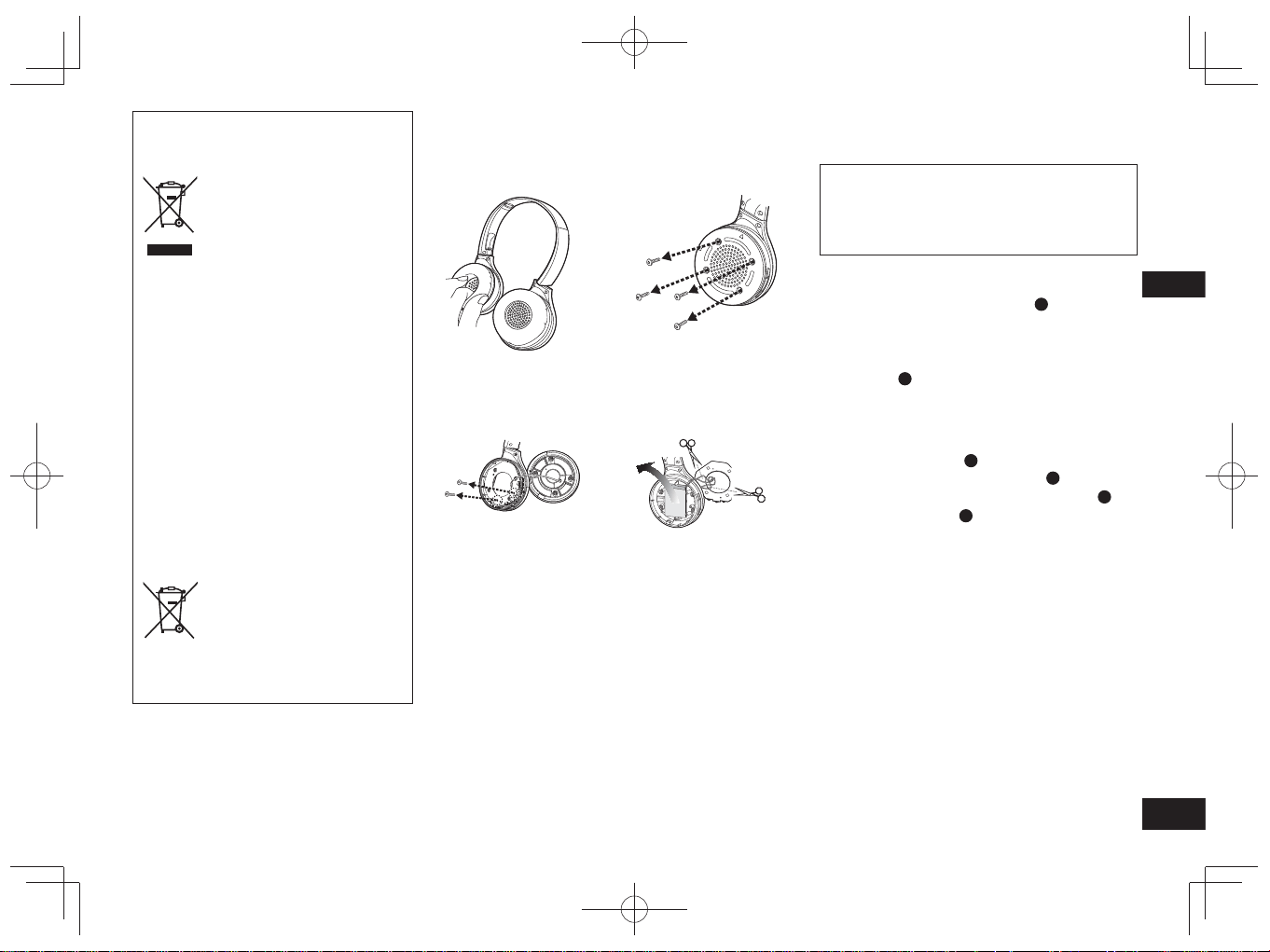
TQBM0093
X
33
9
ITALIANO
Rimozione della batteria in caso di smaltimento dell’unità
Le seguenti istruzioni non sono destinate a
interventi di riparazione bensì allo smaltimento
dell’unità. L’unità non è ripristinabile una volta
smontata.
Durante lo smaltimento, rimuovere la batteria installata
nell’unità e riciclarla.
• Smontare dopo l’esaurimento della batteria.
• Tenere le parti smontate fuori dalla portata dei bambini.
1
Ruotare i rivestimenti auricolari
A
verso l’alto, e
porre l’unità su di una superficie piana
2
Tenere la parte inferiore dell’altoparlante destro
(R) e inserire un cacciavite a intaglio a croce
(disponibile in commercio) sotto il coperchio
superiore
B
• Assicurarsi di tenere le dita lontane dalla punta del
cacciavite.
• Scegliere un cacciavite abbastanza grande per lo spazio
sotto il coperchio superiore.
3
Fare leva con il cacciavite e spingere il
coperchio superiore
B
verso l’alto
4
Rimuovere il coperchio superiore
B
5
Rimuovere le 4 viti e il coperchio inferiore
C
6
Afferrare la batteria
D
e rimuoverla
Informazioni relative alla gestione delle batterie
usate
• Isolare i terminali con nastro adesivo o materiale simile.
• Non smontare.
■
Batterie
• Non riscaldare o esporre a fiamme.
• Non lasciare la batteria all’interno di un’automobile con
porte e finestrini chiusi ed esposta a raggi solari diretti per
un periodo di tempo prolungato.
• L’utilizzo non conforme della batteria può causare la
perdita di elettroliti che, a sua volta, può danneggiare i
componenti entrati in contatto con il liquido. Se l’elettrolita
fuoriesce dalla batteria, rivolgersi al rivenditore. Lavare
con abbondante acqua se l’elettrolita entra in contatto con
parti del corpo.
• In caso di smaltimento delle batterie, contattare le autorità
locali o il rivenditore per conoscere il metodo corretto di
smaltimento.
Smaltimento di vecchie apparecchiature e
batterie usate
Solo per Unione Europea e Nazioni con
sistemi di raccolta e smaltimento
Questi simboli sui prodotti,
sull’imballaggio e/o sulle
documentazioni o manuali
accompagnanti i prodotti
indicano che i prodotti elettrici,
elettronici e le batterie usate non
devono essere buttati nei rifiuti
domestici generici.
Per un trattamento adeguato,
recupero e riciclaggio di vecchi
prodotti e batterie usate vi
invitiamo a portarli negli appositi
punti di raccolta secondo la
legislazione vigente nel vostro
paese.
Con uno smaltimento corretto,
contribuirete a salvare importanti
risorse e ad evitare i potenziali
effetti negativi sulla salute
umana e sull’ambiente.
Per ulteriori informazioni su
raccolta e riciclaggio, vi invitiamo
a contattare il vostro comune.
Lo smaltimento non corretto di
questi rifiuti potrebbe comportare
sanzioni in accordo con la
legislazione nazionale.
Note per il simbolo batterie
(simbolo sotto):
Questo simbolo può essere
usato in combinazione con un
simbolo chimico. In questo caso
è conforme ai requisiti indicati
dalla Direttiva per il prodotto
chimico in questione.
1
Rimuovere il cuscinetto
auricolare destro
2
Rimuovere le 4 viti
3
Rimuovere le 2 viti e la
scheda
4
Tagliare i cavi
singolarmente con le
forbici, e rimuovere la
batteria
RP-HF400B_E(TQBM0093).indb 33RP-HF400B_E(TQBM0093).indb 33 2017/03/17 21:21:392017/03/17 21:21:39
TQBM0093
X
34
2
Compruebe e identifique los
accesorios suministrados.
1 Cable de carga USB
Índice
Antes de la utilización
Accesorios .......................................... 2
Copyright, etc. .................................... 2
Precauciones de seguridad ................ 2
Mantenimiento .................................... 3
Nombres de las piezas ....................... 3
Preparación
Carga .................................................. 4
Encendido/Apagado de la
alimentación ....................................... 4
Conexión de un dispositivo
Bluetooth
®
........................................... 4
Operación
Escuchando música ........................... 5
Realizar una llamada telefónica ......... 6
Funciones útiles.................................. 6
Otros
Restauración de los ajustes
de fábrica ............................................ 6
Acerca de Bluetooth
®
.......................... 7
Especificaciones ................................. 7
Guía de resolución de problemas....... 8
Para sacar la batería cuando se
elimina esta unidad............................. 9
Estimado cliente
Le agradecemos haber adquirido este
producto.
Lea cuidadosamente estas
instrucciones antes de usar este
producto, y guarde este manual para
usarlo en el futuro.
Accesorios
●
La marca denominativa Bluetooth
®
y sus logos son marcas comerciales
registradas de Bluetooth SIG, Inc. y
cualquier uso de dichas marcas por
parte de Panasonic Corporation se
realiza bajo licencia.
Otros nombres de marcas y marcas
comerciales son propiedad de sus
respectivos propietarios.
●
Otros nombres de sistemas y
nombres de productos que aparecen
en este documento son en general
marcas registradas o marcas
comerciales de las empresas
desarrolladoras respectivas.
Tenga en cuenta que los símbolos
™ y ® no aparecen en este
documento.
Copyright,
etc.
■
Unidad
• Evite el uso o colocación de esta unidad cerca de fuentes de calor.
• No escuche con esta unidad a alto volumen en lugares donde necesita oír
sonidos del entorno colindante por seguridad, tal como cruces de ferrocarril y
lugares de construcción.
• La tensión característica de banda ancha es igual o superior a 75 mV.
ADVERTENCIA:
Para reducir el riesgo de incendio, descarga eléctrica o daños del producto,
• No exponga esta unidad a la lluvia, la humedad, goteo o salpicaduras.
• No coloque objetos llenos de líquidos, tal como jarrones, sobre esta unidad.
• Utilice solo los accesorios recomendados.
• No retire las cubiertas.
• No repare esta unidad usted mismo. Remita las reparaciones al personal del
servicio cualificado.
■
Alergias
• Interrumpa el uso si experimenta molestias con los altavoces o cualquier otra
parte que esté en contacto directo con su piel.
• El uso continuado puede provocar erupciones u otras reacciones alérgicas.
■
Precauciones para escuchar con los auriculares
• No haga funcionar sus auriculares a alto volumen. Los entendidos en el oído
aconsejan contra una audición prolongada y continua.
• Si Vd. experimenta un silbido en sus oídos, reduzca el volumen o descontinúe
el uso.
• No los utilice mientras maneja un vehículo motorizado. Podría ser causa de
un accidente de tráfico y es ilegal en muchos lugares.
• Tenga extrema precaución o eventualmente interrumpa su uso en situaciones
potencialmente peligrosas.
Este producto puede tener interferencias causadas por teléfonos móviles durante
su utilización. Si tales interferencias resultan evidentes, aumente la separación
entre el producto y el teléfono móvil.
Esta unidad está destinada para utilizarse en climas templados y tropicales.
Precauciones de seguridad
RP-HF400B_E(TQBM0093).indb 34RP-HF400B_E(TQBM0093).indb 34 2017/03/17 21:21:402017/03/17 21:21:40
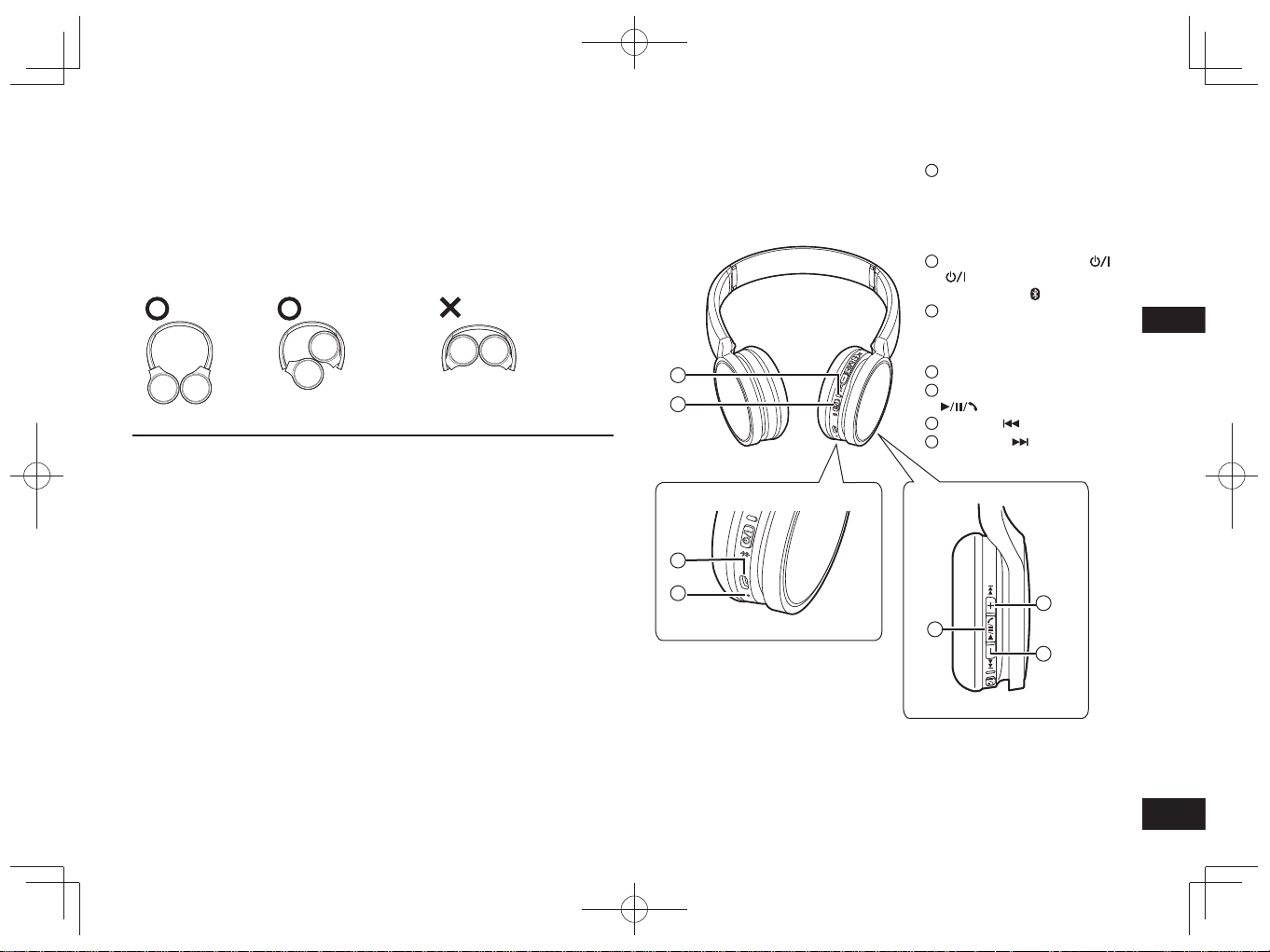
TQBM0093
X
35
3
ESPAÑOL
■
Nota
• No utilice ningún otro cable de carga USB salvo el suministrado.
• Cuando utilice la unidad, no cubra el altavoz derecho con la palma de la mano.
Se puede bloquear la conexión Bluetooth
®
.
Las ilustraciones del producto pueden variar del producto real.
Nombres de las piezas
1
Luz indicadora LED*
• El número de parpadeos o
colores notifica el estado de la
unidad.
(* en lo sucesivo se menciona
como “LED”)
2
Botón de Encendido
( Espera/Encendido) /
Emparejado
3
Terminal de carga (DC IN)
• Conecte el cable de carga USB
(suministrado) a este terminal
cuando cargue. (→ P. 4)
4
Micrófono
5
Reproducir/Pausa/Llamada
6
Anterior /Volumen –
7
Siguiente /Volumen +
Mantenimiento
Limpie esta unidad con un paño seco y suave.
• No utilice disolventes incluidos bencina, diluyente, alcohol, detergente de
cocina, un limpiador químico, etc. Esto podría provocar deformaciones en la caja
exterior o desprendimiento del recubrimiento.
■
Cómo plegar esta unidad
Pliegue los auriculares tal y como se muestra a continuación. Un plegado
incorrecto puede provocar un problema de funcionamiento.
Correcto Incorrecto
Declaración de conformidad (DoC)
Por la presente, “Panasonic Corporation” declara que este producto se encuentra
en conformidad con los requerimientos esenciales y otras disposiciones relevantes
de la Directiva 2014/53/EU.
Los clientes pueden descargar una copia de la DoC original para nuestros equipos
de RE desde nuestro servidor de DoC:
http://www.doc.panasonic.de
Contacto con el representante autorizado:
Panasonic Marketing Europe GmbH, Panasonic Testing Centre,
Winsbergring 15, 22525 Hamburg, Alemania
2
1
3
4
5
6
7
RP-HF400B_E(TQBM0093).indb 35RP-HF400B_E(TQBM0093).indb 35 2017/03/17 21:21:402017/03/17 21:21:40
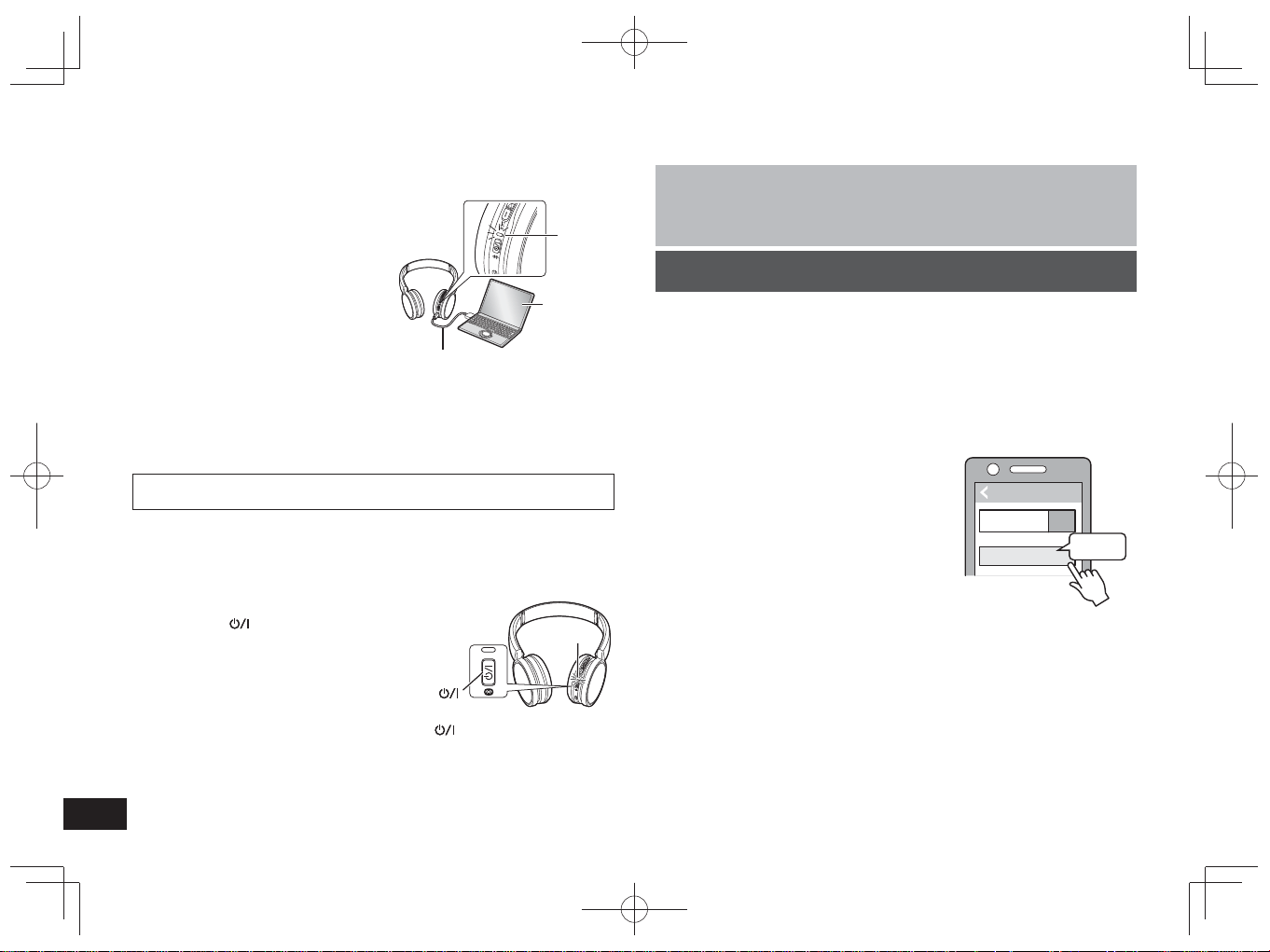
TQBM0093
X
36
4
La batería recargable (instalada en la unidad) se entrega sin carga. Cargue la
batería antes de usar la unidad.
1
Conecte esta unidad a un
ordenador usando el cable de
carga USB
• El LED se iluminará en rojo.
• El LED se ilumina en rojo cuando
la carga está en curso. Cuando se
haya completado la carga, el LED se
apagará.
• La carga tardará aproximadamente
2,5 horas desde el estado vacío a
totalmente cargado.
Ordenador
LED
Cable de carga USB
(suministrado)
■
Nota
• La característica Bluetooth
®
no se puede utilizar cuando esta unidad está
conectada a un ordenador con el cable de carga USB.
• Recargue a temperatura ambiente entre 10 °C y 35 °C.
• No se puede encender la alimentación durante la carga.
• No utilice ningún otro cable de carga USB salvo el suministrado.
Precaución: Utilice solamente el cable de carga USB cuando se conecte a un
ordenador.
Carga
1
En el estado de apagado, pulse el botón de
encendido de esta unidad durante
3 segundos aproximadamente, hasta que el
LED (azul) empiece a parpadear
• Sonará un pitido y el LED (azul) parpadeará
lentamente.
Botón de encendido
LED
Para apagar la alimentación
• Pulse y mantenga pulsado el botón de encendido
durante aproximadamente
3 segundos. Sonará un pitido y se apagará la alimentación.
■
Nota
•
Cuando la unidad no se opera durante aproximadamente 5 minutos, la
alimentación se apagará automáticamente. (Véase “Apagado automático” (→ P. 6))
Encendido/Apagado de la alimentación
Preparación
• Coloque el dispositivo Bluetooth
®
a una distancia aproximada de 1 m con
respecto a la unidad.
• Según sea necesario, compruebe el funcionamiento del dispositivo utilizando
sus instrucciones de funcionamiento.
Cómo sincronizar (Registro) esta unidad con el dispositivo
Bluetooth
®
para conectarse
1
Pulse el botón de encendido de esta unidad, hasta que el LED
empiece a parpadear
Al sincronizar un dispositivo por primera vez: aprox. 3 segundos
Al sincronizar un segundo dispositivo y subsiguientes: aprox. 5 segundos
• La unidad empezará a buscar el dispositivo Bluetooth
®
al que conectarse y el
LED parpadeará en azul y rojo alternativamente.
2
Encienda la unidad Bluetooth
®
y habilite la función Bluetooth
®
3
Seleccione “RP-HF400B” en el menú
del dispositivo Bluetooth
®
• La dirección MAC “□□□□□□” (“□” significa
un carácter único para cada grupo) puede
mostrarse antes de que aparezca
“RP-HF400B”.
• En caso de requerir una clave de acceso,
introduzca la clave de acceso “0000” (cuatro
ceros) de esta unidad.
4
Compruebe la conexión con el
dispositivo Bluetooth
®
de la unidad
• El LED parpadeará en azul y rojo alternativamente hasta completar la
conexión con el dispositivo. La sincronización (Registro) finaliza cuando
el LED (azul) parpadea dos veces cada 2 segundos aproximadamente.
(Conexión establecida)
■
Nota
• Si la conexión a un dispositivo no se establece en menos de 5 minutos
aproximadamente, la unidad se apagará. Sincronícela de nuevo.
• No se pueden registrar 2 o más dispositivos Bluetooth
®
en la unidad de forma
simultánea.
• Se pueden sincronizar hasta 8 dispositivos Bluetooth
®
con esta unidad. En
caso de sincronizar un noveno dispositivo, se cambiará por el dispositivo con la
conexión más antigua. Para utilizarlo, vuelva a realizar la sincronización.
Cómo conectar un dispositivo Bluetooth
®
Bluetooth
Bluetooth
RP-HF400B
ON
(Ex.)
Seleccionar
Dispositivo
RP-HF400B_E(TQBM0093).indb 36RP-HF400B_E(TQBM0093).indb 36 2017/03/17 21:21:402017/03/17 21:21:40
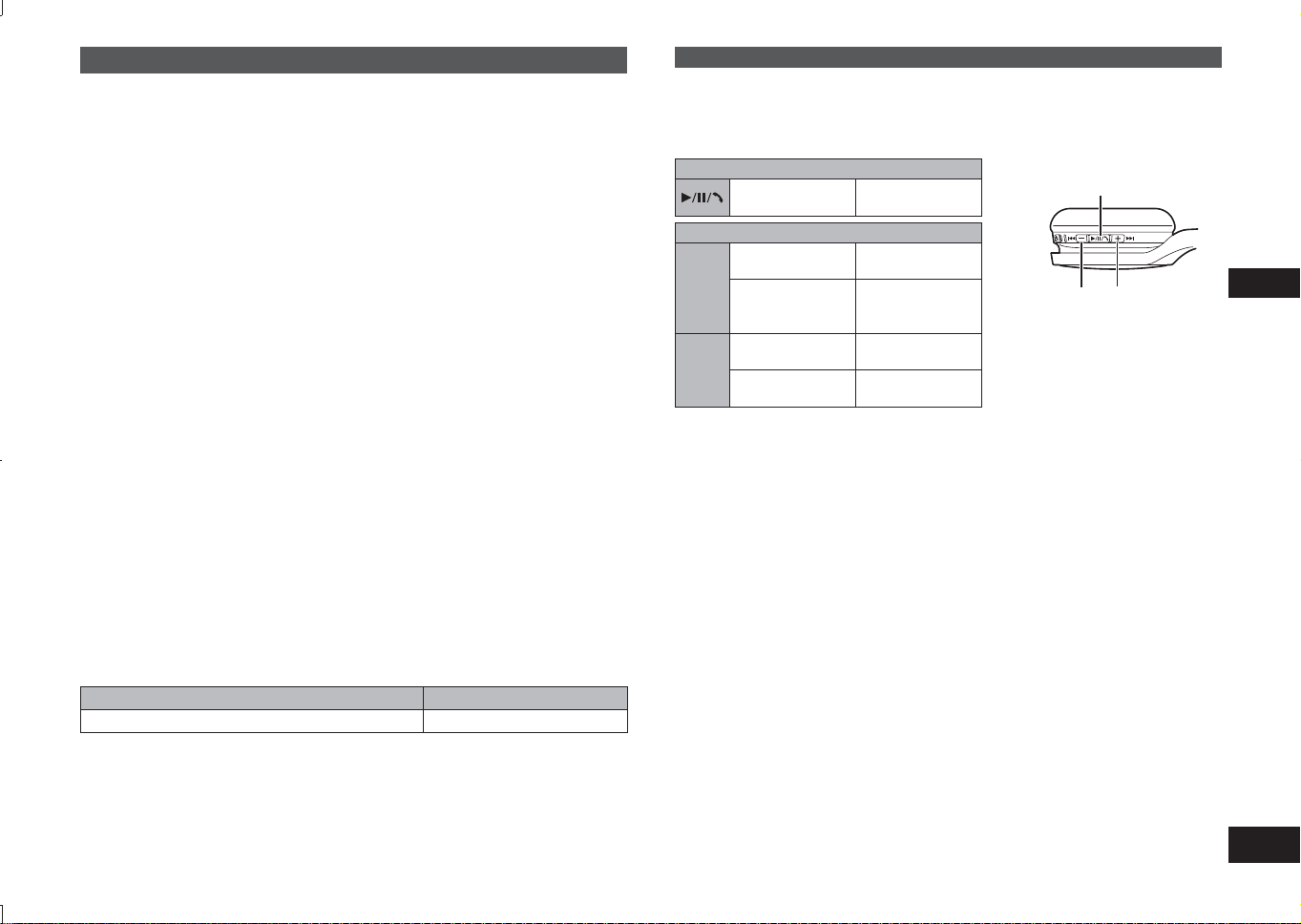
TQBM0093
X
37
5
ESPAÑOL
Escuchando música
Si el dispositivo compatible Bluetooth
®
soporta los perfiles Bluetooth
®
“A2DP” y
“AVRCP”, la música se puede reproducir con las operaciones de control remoto de
la unidad.
• A2DP (Perfil de distribución audio avanzado): Transmite audio a la unidad.
• AVRCP (Perfil de control remoto audio/vídeo):
Permite el control remoto del dispositivo usando la unidad.
1
Conecte el dispositivo Bluetooth
®
y la unidad (→ P. 4)
2
Seleccione y reproduzca la música en el dispositivo Bluetooth
®
• La música seleccionada sale por los altavoces de la unidad.
Tiempo de funcionamiento de la batería
Tipo de batería Tiempo de funcionamiento
Batería recargable (instalada en la unidad) Aprox. 20 horas
El tiempo de funcionamiento puede ser menos dependiendo de las condiciones de
funcionamiento.
■
Atención
• La unidad puede tener fugas de sonido dependiendo del nivel de volumen.
• Cuando el volumen se aumenta casi al máximo, la música puede sonar
distorsionada. Reduzca el volumen hasta que se elimine la distorsión.
Control remoto
Puede controlar el dispositivo Bluetooth
®
usando la unidad.
• Dependiendo de los dispositivos Bluetooth
®
, algunas de las funciones abajo no
funcionan o funcionan de manera diferente por la operación de la unidad.
(Ejemplo de funcionamiento)
Reproducir/Pausa/Llamada
Pulsar
Reproducir/
Pausa/Llamada
Anterior/Siguiente/Volumen
+
Pulsar
Aumenta el
volumen
Pulsar y
mantener
Avanza al inicio
de la siguiente
pista
−
Pulsar
Disminuye el
volumen
Pulsar y
mantener
Vuelve al inicio
de la pista actual
Reproducir/Pausa/Llamada
Volumen –/
Anterior
Volumen +/
Siguiente
■
Nota
• El volumen se puede ajustar en 15 niveles.
Cuando se alcanza el volumen máximo o mínimo, sonará un pitido.
Realizar una llamada telefónica
Con los teléfonos con Bluetooth
®
(móviles o teléfonos inteligentes) que son
compatibles con el perfil Bluetooth
®
“HSP” o “HFP”, puede utilizar la unidad para
llamadas telefónicas.
• HSP (Perfil de cascos):
Este perfil puede utilizarse para recibir sonidos monoaurales y establecer
comunicación bidireccional utilizando el micrófono de la unidad.
• HFP (Perfil manos libres):
Además de las funciones HSP, este perfil dispone de la función de llamadas
entrantes y salientes.
• Conecte el teléfono con Bluetooth
®
y la unidad (→ pág. 4)
Conexión de un dispositivo Bluetooth
®
sincronizado
1
Encienda la unidad
• Pulse el botón de encendido de esta unidad durante 3 segundos
aproximadamente, hasta que el LED (azul) empiece a parpadear.
• Sonará un pitido y el LED (azul) parpadeará lentamente.
2
Realice los pasos 2 y 3 de “Cómo sincronizar (Registro) esta
unidad con el dispositivo Bluetooth
®
para conectarse” (→ P. 4)
• La sincronización (Registro) finaliza cuando el LED (azul) parpadea dos
veces cada 2 segundos aproximadamente. (Conexión establecida)
■
Nota
• Esta unidad recuerda el dispositivo que se conectó por última vez. La conexión
se puede establecer automáticamente después del paso 1 (ver arriba).
• Si la conexión a un dispositivo no se establece en menos de 5 minutos
aproximadamente, la unidad se apagará. Sincronícela de nuevo. (→ P. 4)
RP-HF400B_E(TQBM0093).indb 37RP-HF400B_E(TQBM0093).indb 37 2017/03/17 21:21:412017/03/17 21:21:41
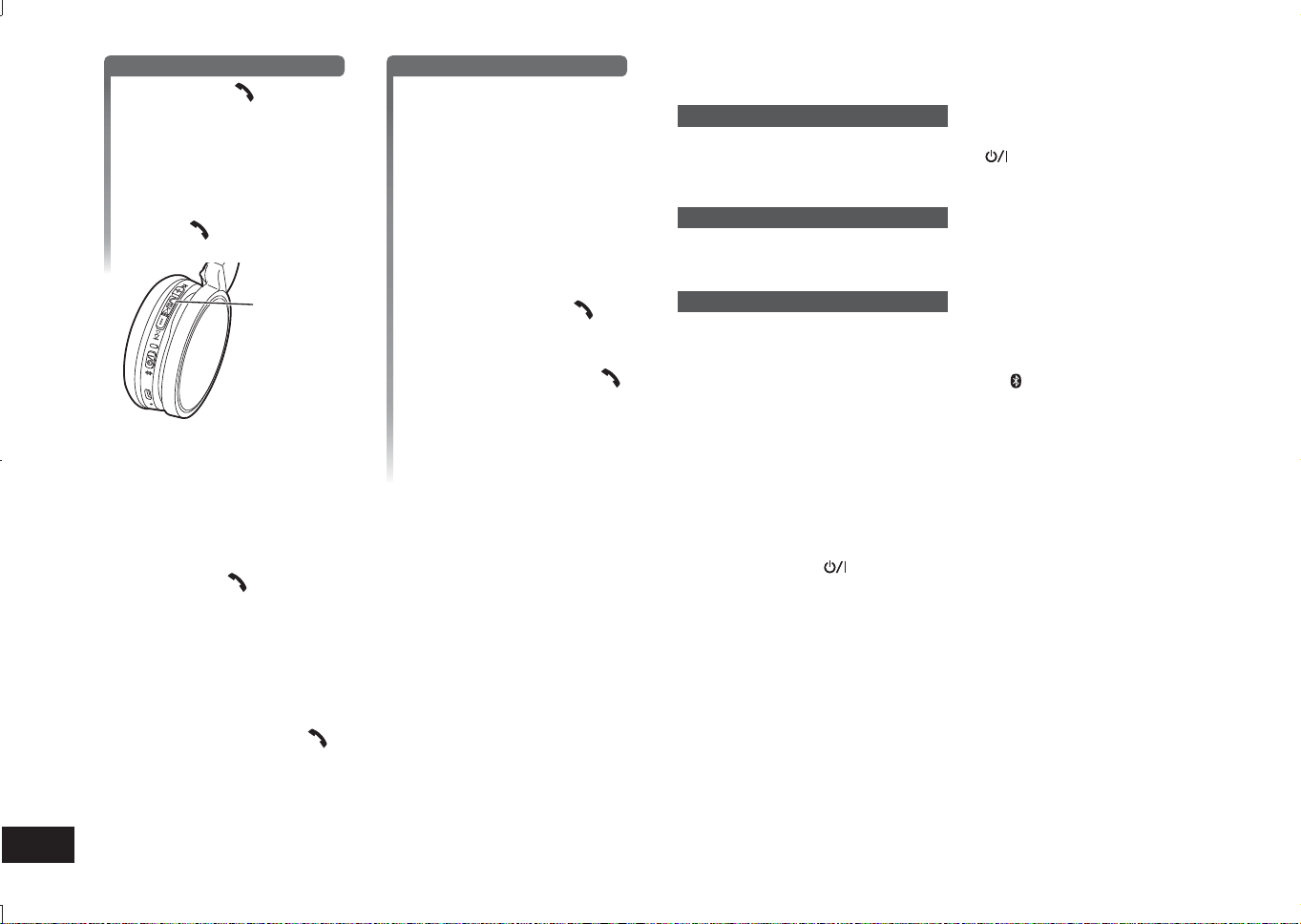
TQBM0093
X
38
6
1
Cuando se responde una llamada entrante
Pulse Llamada en la
unidad y responda la llamada
• Durante una llamada entrante,
el tono de llamada sonará
desde el altavoz y el LED
parpadeará.
•(HFP solamente) Para rechazar
una llamada entrante, pulse dos
veces el
Llamar.
Llamada
Cuando se realiza una llamada saliente
Realizar una llamada
saliente en el teléfono con
Bluetooth
®
• Asimismo consulte el manual de
funcionamiento para el teléfono
con Bluetooth
®
.
(Los pasos de comprobación y
funcionamiento en la unidad se
explican abajo)
• Durante una llamada saliente, el
tono de llamada sonará desde
el altavoz y el LED parpadeará.
• Para cancelar una llamada
saliente, pulse Llamada
.
Sonará un pitido.
•(HFP solamente) Cuando el
teléfono está en reposo, pulse y
mantenga pulsado Llamada
durante aproximadamente
5 segundos. Se realizará una
llamada saliente al último
número marcado. Sonará
un chasquido corto desde el
altavoz y el LED parpadeará.
2
Empiece a hablar
• El LED parpadeará repetidamente 2 veces durante una llamada.
• El volumen se puede ajustar durante una llamada de teléfono. Para obtener
las instrucciones de configuración, véase la página 5.
3
Pulse Llamada para terminar la llamada telefónica
• Sonará un pitido.
■
Nota
• Puede haber casos en que la configuración de manos libres se deba realizar en
el teléfono con Bluetooth
®
.
• Dependiendo del teléfono con Bluetooth
®
, puede oír los tonos de llamada de las
llamadas entrantes y salientes del teléfono desde la unidad.
•(HFP solamente) El dispositivo de llamada cambiará entre el teléfono Bluetooth
®
y la unidad. (Pulse dos veces el
Llamar de la unidad para cambiar.)
Funciones útiles
Reiniciar la unidad
Esta unidad se puede reiniciar cuando se rechazan todas las operaciones. Para
reiniciar la unidad, mantenga pulsado el botón
durante un mínimo de
10 segundos. Se cancelarán todas las operaciones anteriores. (La información de
emparejamiento de dispositivos no se borrará.)
Apagado automático
Si la unidad está silenciosa durante aproximadamente 5 minutos y las operaciones
para los dispositivos Bluetooth
®
están en reposo durante ese periodo, sonará un
pitido y la alimentación se apagará automáticamente.
Luz indicadora LED
Cuando el nivel de carga de la batería sea bajo durante el uso de la unidad, el LED
que parpadea en azul en el altavoz derecho cambiará a rojo*. Sonará un pitido
cada 1 minuto. Cuando la batería se agota, la alimentación se apaga.
* Si mantiene pulsado el botón de emparejamiento
cuando está bajo el nivel de
batería, el LED solo parpadeará en rojo.
Restauración de los ajustes de fábrica
Si desea borrar toda la información de emparejamiento de dispositivos, etc., puede
restaurar la unidad a los ajustes de fábrica (ajustes originales cuando lo adquirió).
Cargue la batería antes de restaurar la unidad.
1 Mantenga pulsado
durante 5 segundos aproximadamente
• Se empezará a buscar los dispositivos Bluetooth
®
a los que conectarse.
2 Mantenga pulsados + y − simultáneamente, durante un mínimo de
6 segundos durante la búsqueda
• El LED parpadeará rápidamente en azul. La unidad restablecerá los ajustes
de fábrica.
■
Atención
• Al sincronizar un dispositivo de nuevo, elimine la información de registro
(Dispositivo: “RP-HF400B”) del menú del dispositivo Bluetooth
®
y registre de
nuevo esta unidad con el dispositivo Bluetooth
®
. (→ P. 4)
RP-HF400B_E(TQBM0093).indb 38RP-HF400B_E(TQBM0093).indb 38 2017/03/17 21:21:412017/03/17 21:21:41
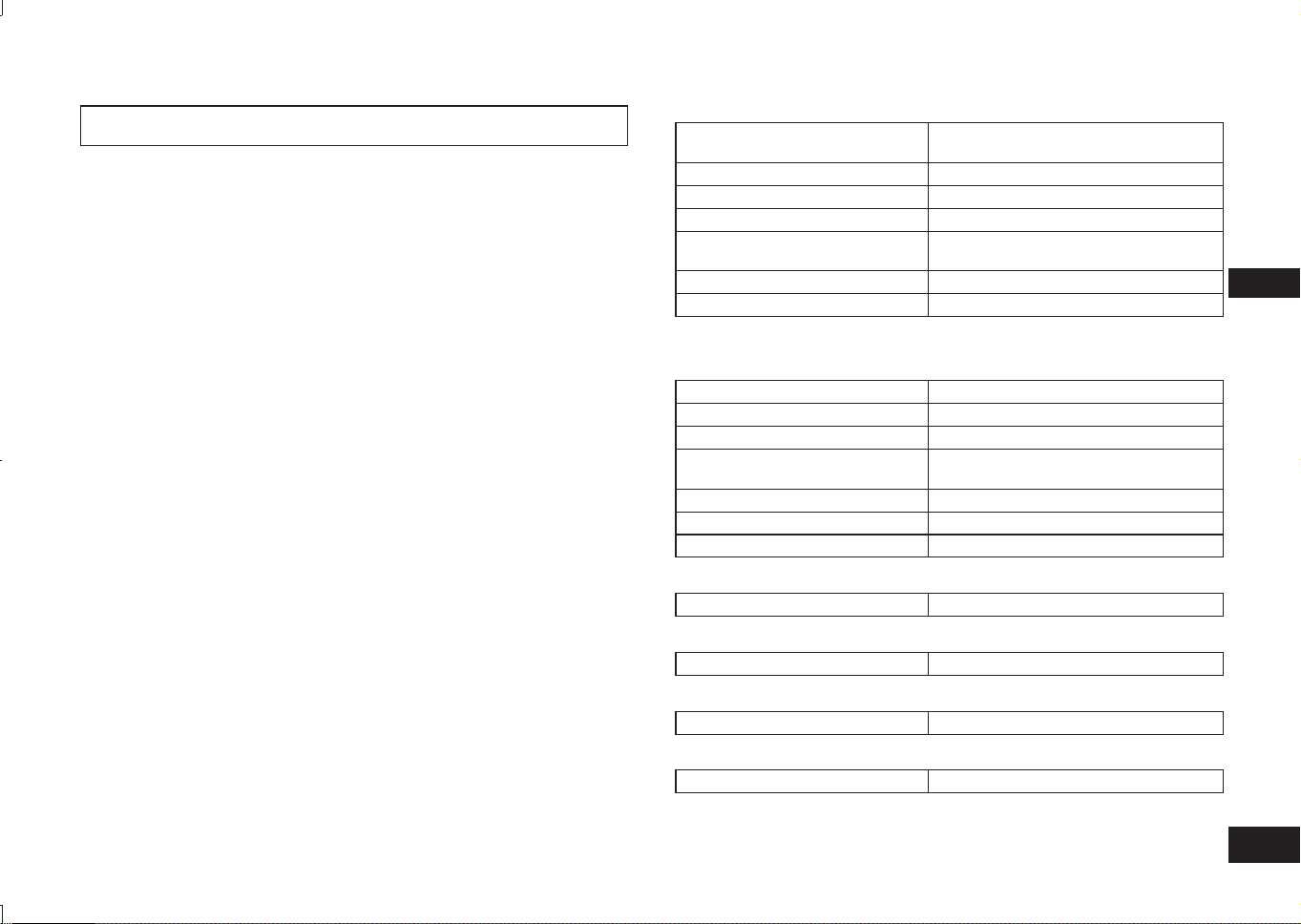
TQBM0093
X
39
7
ESPAÑOL
Panasonic no asume ninguna responsabilidad por datos y/o información que se
comprometan durante una transmisión inalámbrica.
■
Banda de frecuencia utilizada
Esta unidad usa la banda de frecuencia 2,4 GHz.
■
Certificación de esta unidad
• Esta unidad cumple las restricciones de frecuencia y ha sido certificada en
función de las leyes de uso de frecuencia. Por lo tanto, no es necesario un
permiso inalámbrico.
• Las acciones siguientes son penadas por la ley en algunos países:
– Desmontar/modificar la unidad.
– Eliminar las indicaciones de la especificación.
■
Restricciones de uso
• No se garantiza la transmisión inalámbrica y/o uso con todos los dispositivos
equipados con Bluetooth
®
.
• Todos los dispositivos deben cumplir las normas establecidas por Bluetooth
SIG Inc.
• Dependiendo de las especificaciones y ajustes de un dispositivo, puede fallar
al conectarse o algunas operaciones pueden ser diferentes.
• Este sistema es compatible con las funciones de seguridad de Bluetooth
®
.
Pero dependiendo del entorno y/o ajustes operativos, esta seguridad
posiblemente no es suficiente. Transmita datos inalámbricamente a este
sistema con precaución.
• Este sistema no puede transmitir datos a un dispositivo Bluetooth
®
.
■
Rango de aplicación
Utilice esta unidad en un rango máximo de 10 m.
El rango puede disminuir dependiendo del entorno, obstáculos o interferencias.
■
Interferencia de otros dispositivos
• Es posible que esta unidad no funcione correctamente y pueden surgir
problemas como ruidos y saltos de sonido debido a interferencias de ondas
de radio si esta unidad se coloca demasiado cerca de otros dispositivos
Bluetooth
®
o de los dispositivos que usan la banda de 2,4 GHz.
• Es posible que esta unidad no funcione correctamente si las ondas de radio
de las estaciones de radiodifusión cercanas etc. son demasiado fuertes.
■
Uso previsto
• Esta unidad sirve solo para el uso general, normal.
• No utilice este sistema cerca de un equipo o en un entorno que es sensible
a la interferencia entre radiofrecuencias (ejemplo: aeropuertos, hospitales,
laboratorios, etc.).
Acerca de Bluetooth
®
■
Generalidades
Suministro de alimentación
CC 5 V, 330 mA
(Batería interna: 3,7 V (Li-ion 430 mAh))
Tiempo de funcionamiento*
1
Aprox. 20 horas
Tiempo de carga*
2
(25 ºC) Aprox. 2,5 horas
Gama de temperatura de carga 10 ºC a 35 ºC
Gama de temperatura de
funcionamiento
0 ºC a 40 ºC
Rango de humedad de funcionamiento
35%HR a 80%HR (sin condensación)
Masa Aprox. 130 g
*
1
Puede ser mas corto dependiendo de las condiciones de funcionamiento.
*
2
Tiempo que tarda en recargar desde vacío a lleno.
■
Sección Bluetooth
®
Especificación del sistema Bluetooth
®
Ver. 4.1
Clasificación de equipo inalámbrico
Clase 2 (2,5 mW)
Banda de frecuencia 2402 MHz a 2480 MHz
Potencia de radiofrecuencia
máxima
4 dBm
Perfiles compatibles A2DP, AVRCP, HSP, HFP
Codec compatible SBC
Distancia de funcionamiento Hasta 10 m
■
Sección altavoz
Unidades del controlador 30 mm
■
Sección terminal
DC IN CC 5 V, 330 mA
■
Sección micrófono
Tipo Mono
■
Sección accesorios
Cable de carga USB 0,1 m
●
Las especificaciones están sujetas a cambios sin previo aviso.
Especificaciones
RP-HF400B_E(TQBM0093).indb 39RP-HF400B_E(TQBM0093).indb 39 2017/03/17 21:21:412017/03/17 21:21:41
TQBM0093
X
40
8
Antes de solicitar servicio, haga las comprobaciones siguientes. Si tiene dudas
sobre algunos de los puntos de comprobación, o si las soluciones indicadas en
la tabla no resuelven el problema, consulte con su concesionario para que le dé
instrucciones.
Generalidades
La unidad no responde
• Esta unidad se puede reiniciar cuando se rechazan todas las operaciones. Para
reiniciar la unidad, mantenga pulsado el botón
durante un mínimo de
10 segundos. (→ P. 6)
Suministro de alimentación y carga
No puede cargar la unidad
• Asegúrese de que el ordenador está encendido y no está en modo de espera o
de reposo.
• ¿Funciona correctamente el puerto USB que está usando actualmente? Si su
ordenador tiene otros puertos USB, desconecte el conector de su puerto actual
y conéctelo a otro de los demás puertos.
• Si las medidas mencionadas anteriormente no son aplicables, desconecte el
cable de carga USB y conéctelo de nuevo.
• Si el período de carga o el tiempo de funcionamiento se reducen, puede que la
batería se haya agotado. (Número de veces de recarga de la batería incluida:
aproximadamente 500.)
LED no se enciende durante la carga / La carga tarda más tiempo
• ¿Está conectado el cable de carga USB (suministrado) con firmeza al terminal
USB del ordenador? (→ P. 4)
• Asegúrese de realizar la carga a una temperatura ambiente de entre
10 °C y 35 °C.
La alimentación no se enciende
• ¿Se está cargando la unidad? NO se puede encender la alimentación durante la
carga. (→ P. 4)
Conexión del dispositivo Bluetooth
®
El dispositivo no se puede conectar
• Elimine la información de emparejamiento para esta unidad del dispositivo
Bluetooth
®
, a continuación emparéjelos de nuevo. (→ P. 4)
Guía de resolución de problemas
Volumen de sonido y audio
Sin sonido
• Asegúrese de que la unidad y el dispositivo Bluetooth
®
están conectados
correctamente. (→ P. 4)
• Compruebe si se está reproduciendo música en el dispositivo Bluetooth
®
.
• Asegúrese de que la unidad está encendida y el volumen no se ha ajustado
demasiado bajo.
• Empareje y conecte de nuevo el dispositivo Bluetooth
®
y la unidad. (→ P. 4)
• Compruebe si el dispositivo compatible con Bluetooth
®
admite el perfil “A2DP”.
Para obtener información detallada acerca de los perfiles, consulte “Escuchando
música” (→ P. 5). Consulte también el manual de funcionamiento del dispositivo
compatible con Bluetooth
®
.
Volumen bajo
• Aumente el volumen de la unidad. (→ P. 5)
• Aumente el volumen en el dispositivo Bluetooth
®
.
Sonido del dispositivo se corta / La calidad del sonido es mala
• El sonido se puede interrumpir si las señales se bloquean. No cubra
completamente esta unidad con la palma de la mano, etc.
• El dispositivo puede estar fuera del rango de comunicación de 10 m. Mueva el
dispositivo más cerca de esta unidad.
• Elimine cualquier obstáculo entre esta unidad y el dispositivo.
• Desconecte cualquier dispositivo LAN inalámbrico cuando no se use.
• Es posible que se produzca un problema de comunicación si la batería está
agotada. Cargue la unidad. (→ P. 4)
llamada telefónicas
No puede oír a la otra persona
• Asegúrese de que la unidad y el teléfono con Bluetooth
®
están encendidos.
• Compruebe si la unidad y el teléfono con Bluetooth
®
están conectados. (→ P. 4)
• Compruebe los ajustes de audio del teléfono con Bluetooth
®
. Cambie el
dispositivo que llama a la unidad si está ajustado al teléfono con Bluetooth
®
.
(→ P. 4)
• Si el volumen de la voz de la otra persona es demasiado bajo, aumente el
volumen tanto en la unidad como en el teléfono con Bluetooth
®
.
No se puede realizar una llamada telefónica
• Compruebe si el dispositivo compatible con Bluetooth
®
admite el perfil “HSP”
o “HFP”. Para obtener información detallada acerca de los perfiles, consulte
“Escuchando música” (→ P. 5) y “Realizar una llamada telefónica” (→ P. 5).
Consulte también el manual de funcionamiento del teléfono habilitado para
Bluetooth
®
.
RP-HF400B_E(TQBM0093).indb 40RP-HF400B_E(TQBM0093).indb 40 2017/03/17 21:21:412017/03/17 21:21:41
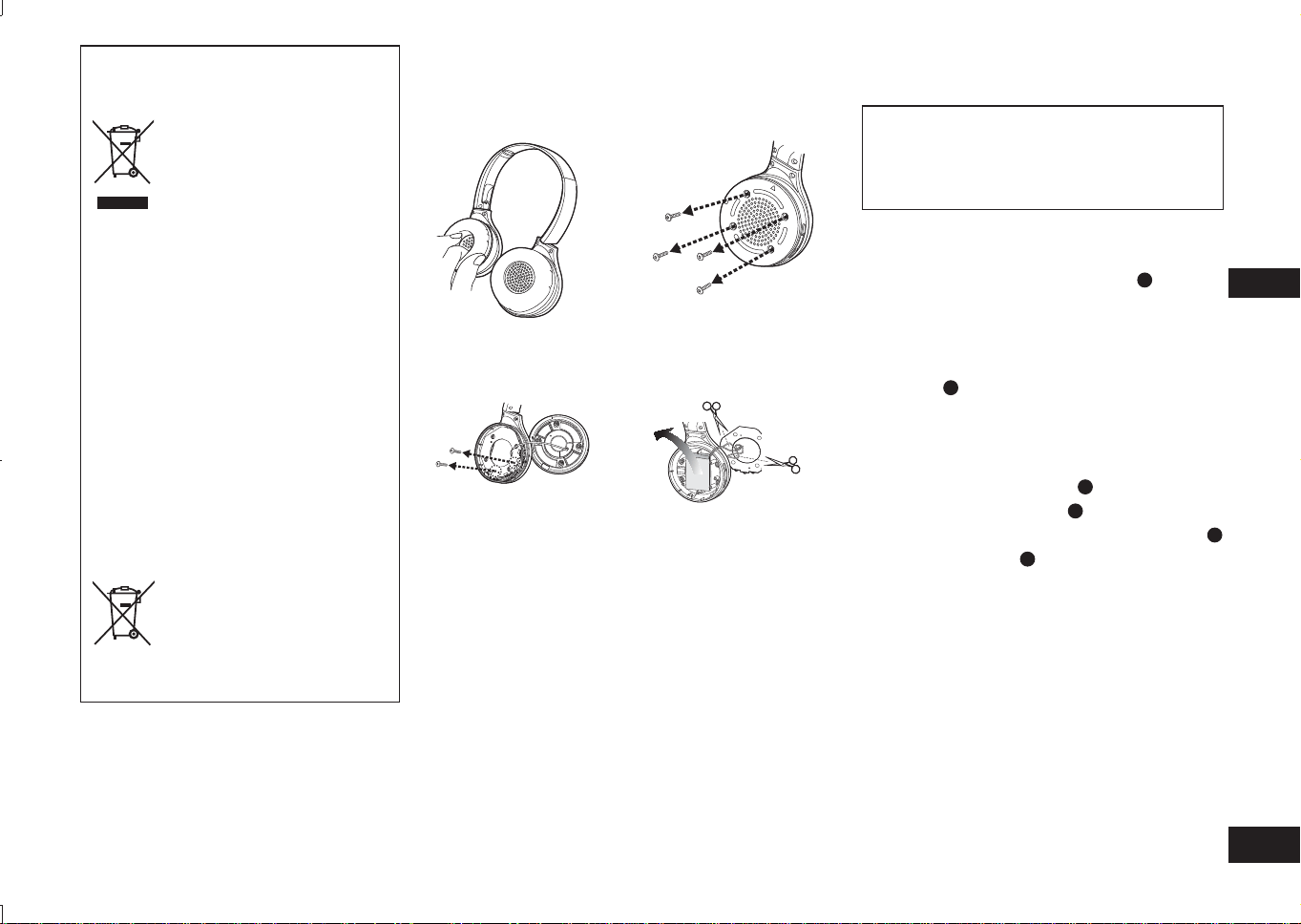
TQBM0093
X
41
99
ESPAÑOL
Para sacar la batería cuando se elimina esta unidad
Las siguientes instrucciones no están indicadas
para fines de reparación sino para la eliminación
de esta unidad. Esta unidad no se puede
restaurar una vez que se haya desmontado.
Cuando vaya a eliminar esta unidad, saque la batería
instalada en esta unidad y recíclela.
• Desmonte después de que se haya agotado la batería.
• Mantenga las piezas desmontadas fuera del alcance de los
niños.
1
Gire las almohadillas para los oídos
A
hacia
arriba, y coloque la unidad sobre una superficie
plana
2
Sostenga la parte inferior del altavoz derecho
(R), y coloque un destornillador de estrella
(disponible en el mercado) debajo de la cubierta
superior
B
• Asegúrese de mantener los dedos alejados de la punta
del destornillador.
• Elija un destornillador lo suficientemente grande como
para dejar espacio debajo de la cubierta superior.
3
Use el destornillador para hacer palanca, y
empuje la cubierta superior
B
hacia arriba
4
Retire la cubierta superior
B
5
Retire los 4 tornillos y retire la cubierta inferior
C
6
Sostenga la batería
D
y retírela
Respecto a la manipulación de baterías usadas
• Aísle los terminales con cinta adhesiva o similar.
• No desmonte.
■
Baterías
• No calentar ni exponer a llamas.
• No deje la/s batería/s en un coche, expuesta/s a la luz
solar directa con puertas y ventanas cerradas durante un
largo periodo de tiempo.
• La mala manipulación de la batería puede provocar fugas
de electrolitos que pueden dañar elementos con los que
el fluido fugado se ponga en contacto. Si hay escape de
electrolitos de la batería, consulte a su distribuidor. Lave
a fondo con agua si el electrolito entra en contacto con
cualquier parte del cuerpo.
• Cuando deseche la batería, póngase en contacto con las
autoridades locales o el distribuidor y pregunte el método
correcto de eliminación.
Eliminación de Aparatos Viejos y de Pilas
y Baterías
Solamente para la Unión Europea y
países con sistemas de reciclado.
Estos símbolos en los
productos, su embalaje o en los
documentos que los acompañen
significan que los productos
eléctricos y electrónicos y pilas
y baterías usadas no deben
mezclarse con los residuos
domésticos.
Para el adecuado tratamiento,
recuperación y reciclaje de
los productos viejos y pilas y
baterías usadas llévelos a los
puntos de recogida de acuerdo
con su legislación nacional.
Si los elimina correctamente
ayudará a preservar valuosos
recursos y evitará potenciales
efectos negativos sobre la salud
de las personas y sobre el medio
ambiente.
Para más información sobre la
recogida u reciclaje, por favor
contacte con su ayuntamiento.
Puede haber sanciones por
una incorrecta eliminación de
este residuo, de acuerdo con la
legislación nacional.
Nota para el símbolo de pilas
y baterías (símbolo debajo):
Este símbolo puede usarse en
combinación con el símbolo
químico. En este caso, cumple
con los requisitos de la Directiva
del producto químico indicado.
1
Retire la almohadilla
derecha para el oído
2
Retire los 4 tornillos
3
Retire los 2 tornillos y
la placa
4
Corte los cables uno en
uno con las tijeras, y
retire la batería
RP-HF400B_E(TQBM0093).indb 41RP-HF400B_E(TQBM0093).indb 41 2017/03/17 21:21:412017/03/17 21:21:41
TQBM0093
X
42
2
Sprawdź i zidentyfikuj dołączone
akcesoria.
1 Przewód ładujący USB
Spis treści
Przed użyciem
Akcesoria ............................................ 2
Prawa autorskie itp. ............................ 2
Środki ostrożności dotyczące
bezpieczeństwa .................................. 2
Konserwacja ....................................... 3
Nazwy części ...................................... 3
Przygotowanie
Ładowanie .......................................... 4
Włączanie/wyłączanie zasilania ......... 4
Połączanie zurządzeniem
z funkcją Bluetooth
®
............................ 4
Obsługa
Słuchanie muzyki................................ 5
Wykonywanie połączenia
telefonicznego .................................... 6
Funkcje użyteczne .............................. 6
Pozostałe informacje
Przywracanie ustawień
fabrycznych ........................................ 6
O Bluetooth
®
....................................... 7
Specyfikacje ....................................... 7
Wskazówki dotyczące wykrywania
i usuwania usterek .............................. 8
Demontaż baterii w przypadku
usuwania słuchawek........................... 9
Szanowni Klienci
Dziêkujemy za zakup opisywanego
produktu.
Przed przystąpieniem do eksploatacji
opisywanego produktu należy dokładnie
przeczytać niniejsze zalecenia i
zachować instrukcję obsługi do wglądu.
Akcesoria
●
Nazwa marki Bluetooth
®
i logotypy
są zarejestrowanymi znakami
towarowymi należącymi do firmy
Bluetooth SIG, Inc. i wszelkie ich
użycie przez firmę Panasonic
Corporation jest objęte licencją.
Pozostałe znaki towarowe i nazwy
handlowe są własnością ich
posiadaczy.
●
Nazwy innych systemów i wyrobów
pojawiające się w instrukcji obsługi
są zasadniczo zarejestrowanymi
znakami handlowymi lub znakami
handlowymi odpowiednich
podmiotów, które je opracowały.
Proszę zwrócić uwagę, że znaki ™
i ® nie pojawiają się w niniejszym
dokumencie.
Prawa
autorskie itp.
Środki ostrożności dotyczące bezpieczeństwa
■
Słuchawki
• Unikać używania słuchawek lub umieszczania ich w pobliżu źródeł ciepła.
• Nie słuchać bardzo głośno muzyki w słuchawkach w miejscach, w których
konieczne jest usłyszenie dźwięków pochodzących z otoczenia w celu
zapewnienia bezpieczeństwa, takich jak przejazdy kolejowe i place budowy.
• Napięcie szerokopasmowe jest równe lub większe od 75 mV.
OSTRZEŻENIE:
W celu zmniejszenia ryzyka pożaru, porażenia prądem elektrycznym lub
uszkodzenia produktu:
• Nie wystawiać słuchawek na działanie deszczu, wilgoci, cieknących lub
rozpryskiwanych płynów.
• Nie stawiać na słuchawkach przedmiotów napełnionych cieczą, takich jak
naczynia.
• Stosować wyłącznie zalecane akcesoria.
• Nie usuwać żadnych osłon.
• Nie naprawiać słuchawek we własnym zakresie. Przekazać słuchawki do
naprawy wykwalifikowanemu personelowi serwisowemu.
■
Alergie
• Zaprzestać użytkowania słuchawek w przypadku odczuwania dyskomfortu
związanego z głośnikami lub innymi częściami, które mają bezpośredni
kontakt ze skórą.
• Kontynuowanie użytkowania słuchawek może spowodować wysypkę lub
wywołać inne reakcje alergiczne.
■
Środki ostrożności dotyczące słuchania muzyki przez słuchawki
• Nie słuchać bardzo głośnej muzyki przez słuchawki. Eksperci ds. słuchu
odradzają słuchania muzyki przez dłuższy czas przez słuchawki.
• W przypadku wystąpienia dzwonienia w uszach należy zmniejszyć poziom
głośności lub zaprzestać użytkowania słuchawek.
• Nie korzystać ze słuchawek podczas prowadzenia pojazdów
zmotoryzowanych. Może to spowodować zagrożenie w ruchu i jest nie zgodne
z prawem na wielu obszarach.
• Należy zachować szczególną ostrożność lub tymczasowo zaprzestać
korzystania ze słuchawek w sytuacjach potencjalnie niebezpiecznych.
Słuchawki mogą być podatne na interferencje radiowe powodowane przez
telefony komórkowe znajdujące się w użytku. W przypadku wystąpienia
interferencji należy zwiększyć odległość pomiędzy słuchawkami a telefonem
komórkowym.
Urządzenie przeznaczone jest do używania w klimacie umiarkowanym i tropikalnym.
RP-HF400B_E(TQBM0093).indb 42RP-HF400B_E(TQBM0093).indb 42 2017/03/17 21:21:422017/03/17 21:21:42
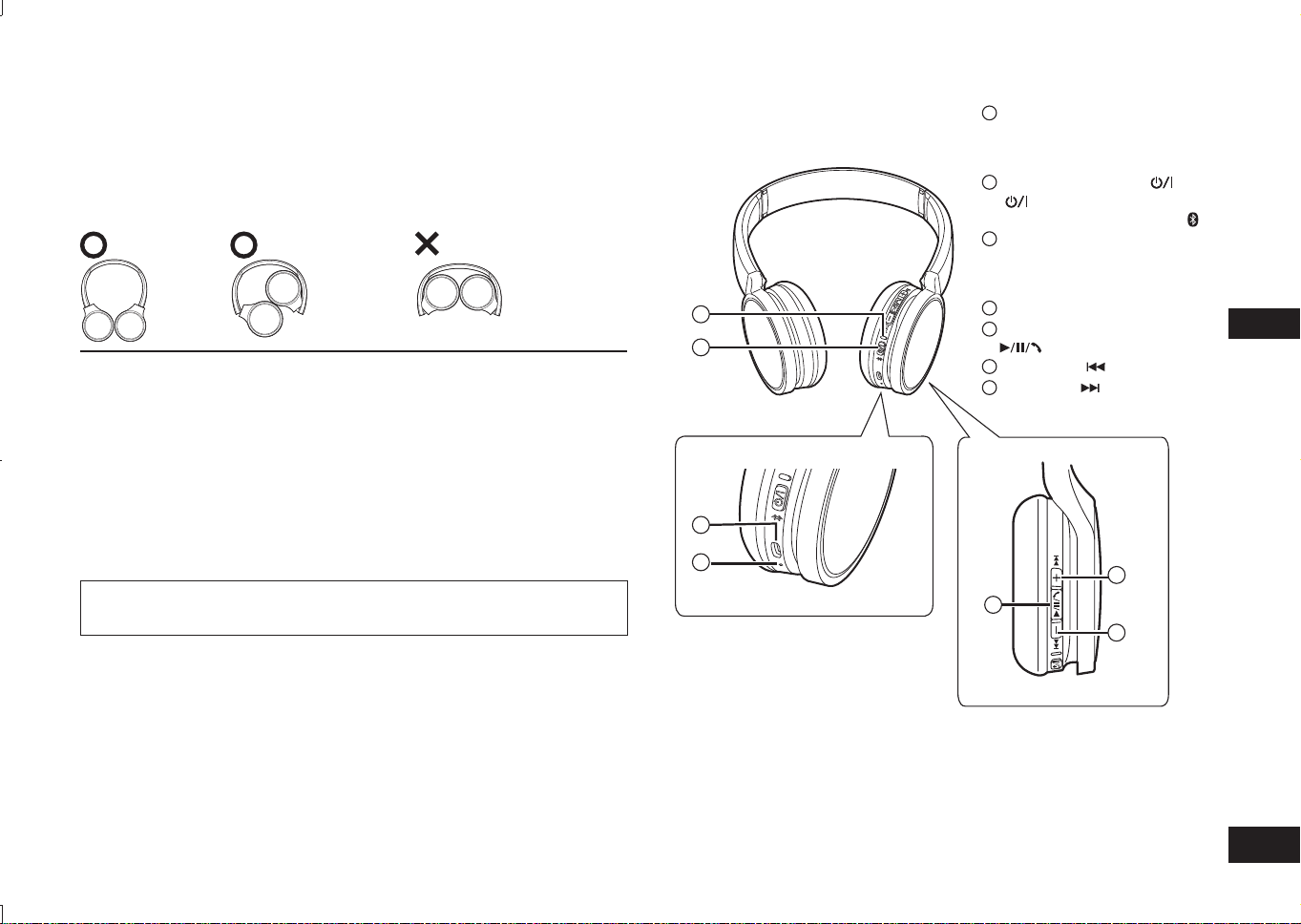
TQBM0093
X
43
3
POLSKI
Nazwy części
■
Uwaga
• Nigdy nie stosuj żadnych innych przewodów ładujących USB poza przewodem
dołączonym do opakowania.
• Podczas korzystania ze słuchawek nie zasłaniaj prawego głośnika dłonią.
Połączenie Bluetooth
®
może zostać zablokowane.
Rysunki produktu mogą odbiegać od jego rzeczywistego wyglądu.
1
Wskaźnik LED*
• Liczba mignięć lub kolor
informuje o stanie słuchawek.
(* dalej zwany „diodą LED”)
2
Przycisk Zasilanie
( Tryb gotowości/
Włączony) / Parowanie
3
Wejście ładowania (DC IN)
•
Podłącz przewód ładujący USB
(w zestawie) do tego wejścia, aby
rozpocząć ładowanie. (→ Pkt. 4)
4
Mikrofon
5
Odtwórz/Pauza/Połącz
6
Poprzedni /Głośność –
7
Następny /Głośność +
Konserwacja
Słuchawki należy czyścić suchą i miękką szmatką.
•
Nie należy stosować rozpuszczalników, włączając benzynę, rozcieńczalnik, alkohol, środki
kuchenne, chusteczki nasączone środkiem chemicznym itp. Stosowanie tych środków
mogłoby zdeformować zewnętrzną obudowę lub spowodować odchodzenie powłoki.
■
Składanie słuchawek
Złóż słuchawki w sposób pokazany poniżej. Nieprawidłowe złożenie może być przyczyną usterki.
Prawidłowo Nieprawidłowo
Deklaracja zgodności (DoC)
“Panasonic Corporation” niniejszym oświadcza, że ten produkt jest zgodny zzasadniczymi
wymogami oraz innymi właściwymi postanowieniami Dyrektywy 2014/53/UE.
Kopię oryginalnej DoC obejmującej nasz RE klienci mogą pobrać z naszego serwera DoC:
http://www.doc.panasonic.de
Kontakt z autoryzowanym przedstawicielem:
Panasonic Marketing Europe GmbH, Panasonic Testing Centre,
Winsbergring 15, 22525 Hamburg, Niemcy
Infolinia (Polska):
801 003 532 - numer dla połączeń z sieci stacjonarnej
22 295 37 27 - numer dla połączeń z sieci stacjonarnej oraz komórkowej
Produkt Panasonic
Produkt objęty jest E-Gwarancją Panasonic.
Prosimy o zachowanie dowodu zakupu.
Warunki gwarancji oraz informacje o produkcie są dostępne na stronie
www.panasonic.pl
lub pod numerami telefonów:
801 003 532 - numer dla połączeń z sieci stacjonarnej
22 295 37 27 - numer dla połączeń z sieci stacjonarnej oraz komórkowej
Dystrybucja w Polsce
Panasonic Marketing Europe GmbH
(Spółka z ograniczoną odpowiedzialnością)
Oddział w Polsce
ul. Wołoska 9A, 02-583 Warszawa
2
1
3
4
5
6
7
RP-HF400B_E(TQBM0093).indb 43RP-HF400B_E(TQBM0093).indb 43 2017/03/17 21:21:422017/03/17 21:21:42
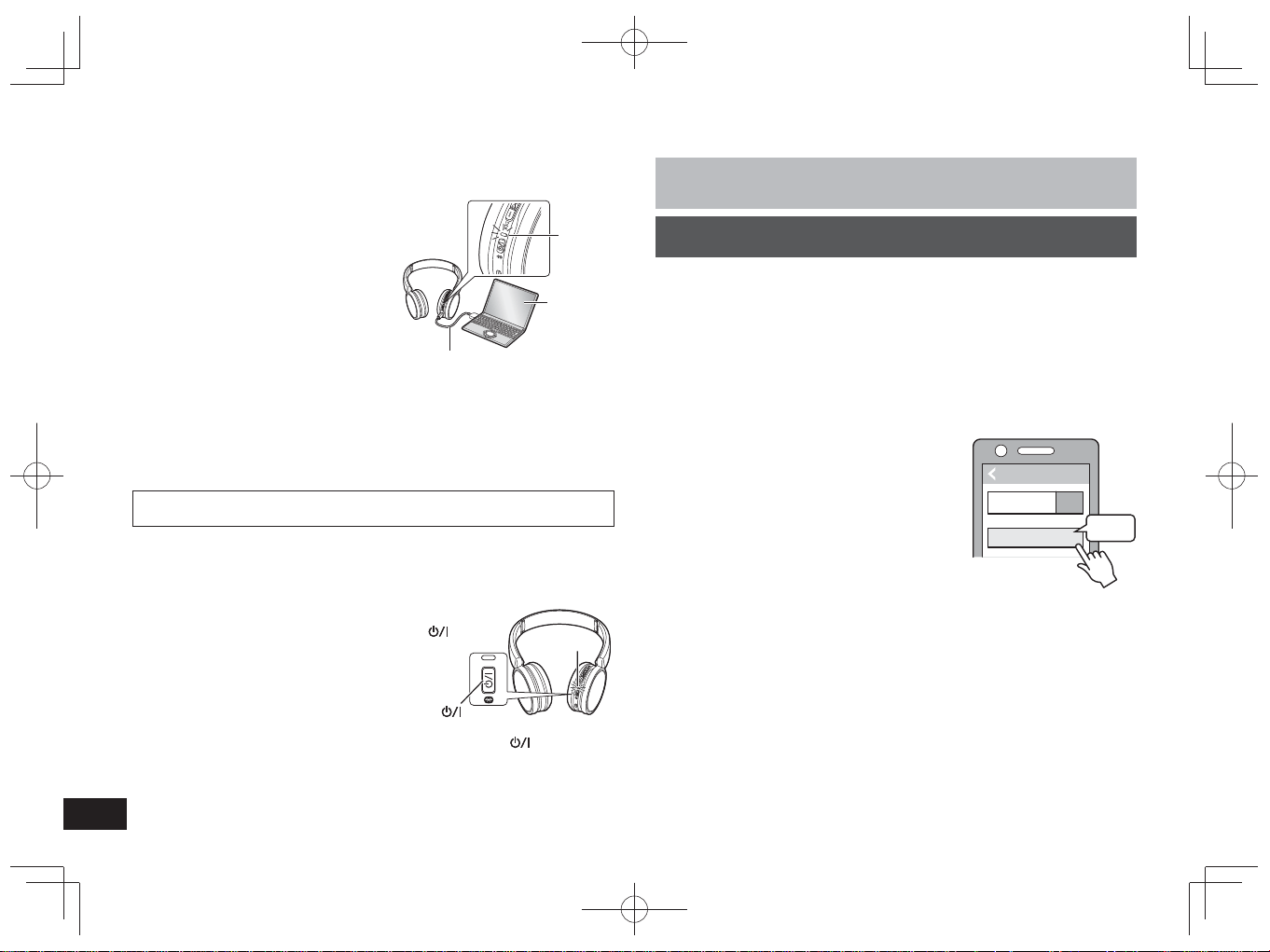
TQBM0093
X
44
4
Bateria wielokrotnego ładowania (zamontowana w słuchawkach) nie została
wstępnie naładowana. Naładuj baterię przed użyciem słuchawek.
1
Podłącz niniejsze słuchawki do
komputera przy użyciu przewodu
ładującego USB
• Dioda LED zaświeci się na czerwono.
•
Podczas ładowania dioda LED będzie
świeciła się na czerwono. Po zakończeniu
ładowania dioda LED zgaśnie.
• Czas ładowania wynosi około
2,5 godziny od stanu całkowitego
rozładowania do pełnego naładowania.
Komputer
Dioda
LED
Przewód ładujący USB
(w zestawie)
■
Uwaga
• Funkcji Bluetooth
®
nie można włączać podczas podłączenia słuchawek do
komputera przy użyciu przewodu ładującego USB.
•
Ładuj akumulator w pomieszczeniu o temperaturze w zakresie od 10 °C do 35 °C.
• Nie włączaj zasilania podczas ładowania.
• Nigdy nie stosuj żadnych innych przewodów ładujących USB poza przewodem
dołączonym do opakowania.
Uwaga! Podczas podłączania urządzenia do komputera stosuj wyłącznie
dołączony do zestawu przewód ładujący USB.
Ładowanie
1
W stanie wyłączonym naciśnij i przytrzymaj
przez ok. 3 sekundy przycisk zasilania
na słuchawkach, aż dioda LED (niebieska)
zacznie migać
• Zostanie odtworzony sygnał dźwiękowy, a dioda
LED (niebieska) będzie migać powoli.
Przycisk zasilanie
Dioda LED
Wyłączanie zasilania
• Naciśnij i przytrzymaj przez około 3 sekundy przycisk zasilanie
. Rozlegnie
się sygnał dźwiękowy, a zasilanie zostanie wyłączone.
■
Uwaga
•
W przypadku niekorzystania ze słuchawek przez około 5 minut zasilanie zostanie
automatycznie wyłączone. (Patrz „Automatyczne wyłączanie zasilania” (→ Pkt. 6))
Włączanie/wyłączanie zasilania
Przygotowanie
• Umieść urządzenie z funkcją Bluetooth
®
w promieniu do 1 metra od słuchawek.
• Sprawdź obsługę urządzenia w jego instrukcji obsługi, zgodnie z wymaganiami.
Parowanie (rejestracja) słuchawek z urządzeniem z funkcją
Bluetooth
®
w celu połączenia
1
Naciśnij i przytrzymaj przycisk zasilania na słuchawkach, aż
dioda LED zacznie migać
Podczas parowania z urządzeniem po raz pierwszy : przez ok. 3 sekundy
Podczas parowania z drugim lub kolejnym urządzeniem : przez ok. 5 sekund
• Słuchawki rozpoczną wyszukiwanie urządzenia z funkcją Bluetooth
®
, aby
się z nim połączyć, a dioda LED będzie migać na przemian na niebiesko
i czerwono.
2
Włącz zasilanie urządzenia z funkcją Bluetooth
®
, a następnie
włącz funkcję Bluetooth
®
3
Wybierz pozycję „RP-HF400B” w menu
Bluetooth
®
urządzenia
• Adres MAC „□□□□□□” („□” oznacza znak
unikatowy dla każdego zestawu) może być
wyświetlany przed nazwą „RP-HF400B”.
• W przypadku poproszenia o podanie kodu
wprowadź kod „0000 (cztery zera)” tych
słuchawek.
4
Sprawdź połączenie z urządzeniem z
funkcją Bluetooth
®
na słuchawkach
• Dioda LED będzie migać na przemian na niebiesko i czerwono do momentu
nawiązania połączenia z urządzeniem. Kiedy dioda LED (niebieska) zamiga
dwa razy przez ok. 2 sekundy, parowanie (rejestracja) zostało zakończone.
(Nawiązano połączenie)
■
Uwaga
• Jeśli połączenie z urządzeniem nie zostanie ustanowione w ciągu około 5 minut,
słuchawki zostaną wyłączone. Wykonaj ponownie parowanie.
• Jednoczesne podłączenie 2 lub więcej urządzeń z funkcją Bluetooth
®
do
słuchawek nie jest możliwe.
• Słuchawki można sparować maksymalnie z 8 urządzeniami z funkcją Bluetooth
®
.
W przypadku sparowania 9. urządzenia urządzenie z najstarszym połączeniem
zostanie nadpisane. Aby go użyć, należy je ponownie sparować.
Łączenie z urządzeniem z funkcją Bluetooth
®
Bluetooth
Bluetooth
RP-HF400B
ON
3U]\NáDG
Wybierz
8U]ąG]HQLH
RP-HF400B_E(TQBM0093).indb 44RP-HF400B_E(TQBM0093).indb 44 2017/03/17 21:21:422017/03/17 21:21:42
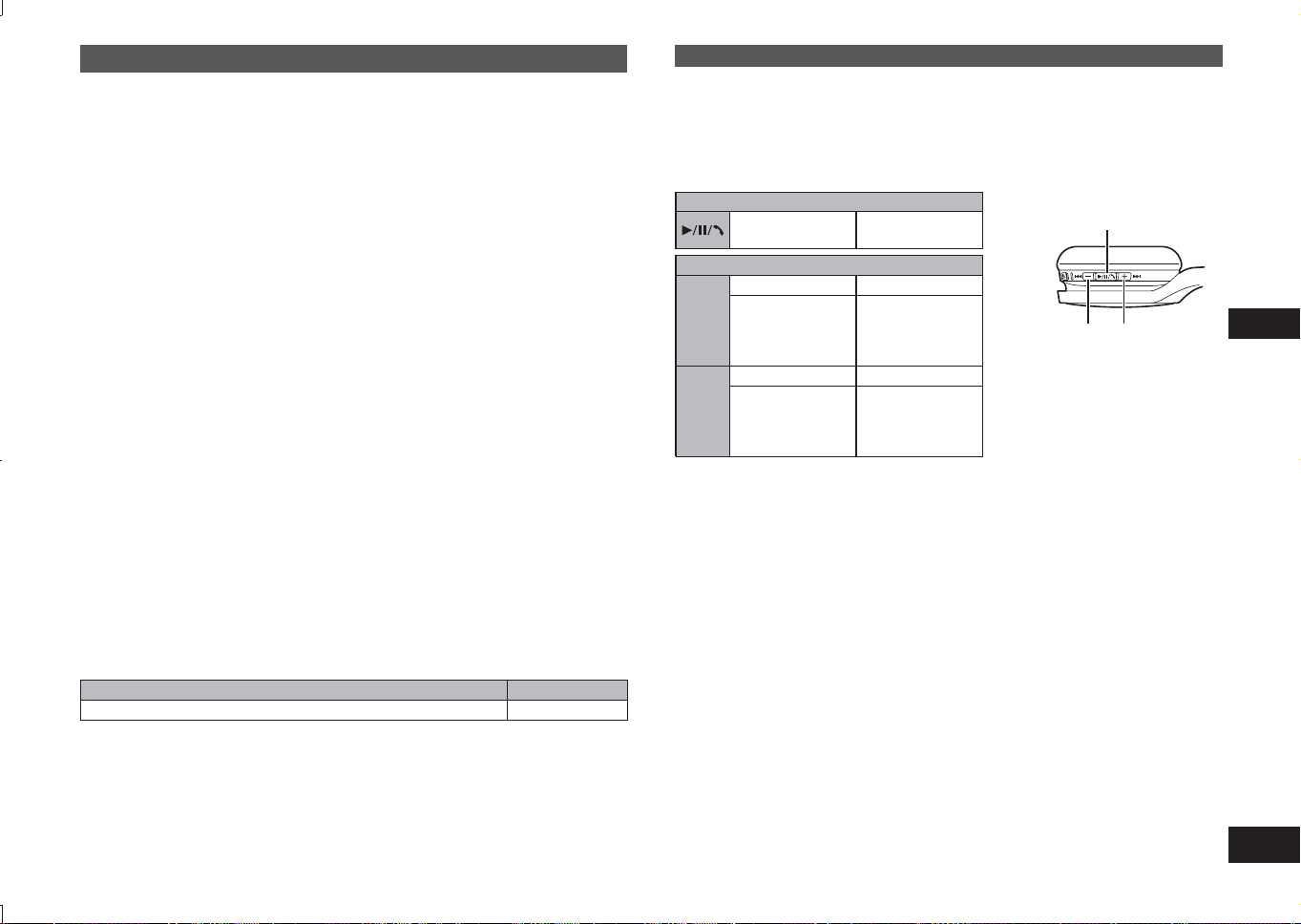
TQBM0093
X
45
5
POLSKI
Słuchanie muzyki
Jeśli urządzenie kompatybilne z funkcją Bluetooth
®
obsługuje profile Bluetooth
®
„A2DP” i „AVRCP”, istnieje możliwość odtwarzania muzyki poprzez zdalne
sterowanie bezpośrednio ze słuchawek.
•
A2DP (Profil Advanced Audio Distribution): Przesyła dźwięk do słuchawek.
• AVRCP (Profil Audio/Video Remote Control):
Umożliwia zdalne sterowanie urządzeniem przy użyciu słuchawek.
1
Połącz urządzenie z funkcją Bluetooth
®
ze słuchawkami (→ Pkt. 4)
2
Wybierz i odtwórz muzykę na urządzeniu z funkcją Bluetooth
®
• Wybrana muzyka jest przesyłana do głośników słuchawek.
Czas pracy baterii
Typ baterii Czas pracy
Bateria wielokrotnego ładowania (zamontowana w słuchawkach) Ok. 20 godzin
Czas pracy może być krótszy w zależności od warunków pracy.
■
Uwaga
• Słuchawki w zależności od poziomu głośności mogą powodować zniekształcenia
dźwięku.
• W przypadku ustawienia głośności blisko maksymalnego poziomu dźwięk
odtwarzanej muzyki może zostać zniekształcony. Zmniejsz poziom głośności do
momentu wyeliminowania zniekształceń dźwięku.
Zdalne sterowanie
Za pomocą tych słuchawek istnieje możliwość sterowania urządzeniem z funkcją
Bluetooth
®
.
• W zależności od urządzenia z funkcją Bluetooth
®
niektóre funkcje wymienione
poniżej mogą nie działać lub działać w inny sposób w wyniku obsługi za
pośrednictwem tych słuchawek.
(Przykład obsługi)
Odtwórz/Pauza/Połącz
Naciśnij
Odtwórz/Pauza/
Połącz
Poprzedni/Następny/Głośność
+
Naciśnij
Zwiększ głośność
Naciśnij i
przytrzymaj
Przesuń do
początku
następnej ścieżki
dźwiękowej
j
−
Naciśnij
Zmniejsz głośność
Naciśnij i
przytrzymaj
Powróć do
początku aktualnie
odtwarzanej
ścieżki dźwiękowe
Odtwórz/Pauza/Połącz
Głośność –/
Poprzedni
Głośność +/
Następny
■
Uwaga
• Głośność można regulować w zakresie 15 poziomów.
Po ustawieniu maksymalnej lub minimalnej głośności rozlegnie się sygnał
dźwiękowy.
Wykonywanie połączenia telefonicznego
W przypadku telefonów (telefonów komórkowych i smartfonów) z włączoną funkcją
Bluetooth
®
, które obsługują profil Bluetooth
®
„HSP” lub „HFP”, istnieje możliwość
użycia słuchawek do wykonywania połączeń telefonicznych.
• HSP (Profil Headset):
Profil ten może być używany do odbierania dźwięku monofonicznego oraz
nawiązywania dwukierunkowej komunikacji przy użyciu mikrofonu słuchawek.
• HFP (Profil Hands-Free):
Oprócz funkcji HSP profil ten obsługuje funkcję połączeń przychodzących i
wychodzących.
• Połącz telefon z funkcją Bluetooth
®
ze słuchawkami (→ Pkt. 4)
Łączenie ze sparowanym urządzeniem z funkcją Bluetooth
®
1
Włącz słuchawki
• Naciśnij i przytrzymaj przez ok. 3 sekundy przycisk zasilania na
słuchawkach, aż dioda LED (niebieska) zacznie migać.
• Zostanie odtworzony sygnał dźwiękowy, a dioda LED (niebieska) będzie
migać powoli.
2
Wykonaj kroki 2 i 3 procedury „Parowanie (rejestracja)
słuchawek z urządzeniem z funkcją Bluetooth
®
w celu
połączenia” (→Pkt. 4)
• Kiedy dioda LED (niebieska) zamiga dwa razy przez ok. 2 sekundy,
parowanie (rejestracja) zostało zakończone. (Nawiązano połączenie)
■
Uwaga
• Słuchawki zapamiętują ostatnie podłączone urządzenie. Połączenie może zostać
nawiązane automatycznie po wykonaniu kroku 1 (patrz powyżej).
• Jeśli połączenie z urządzeniem nie zostanie ustanowione w ciągu około 5 minut,
słuchawki zostaną wyłączone. Wykonaj ponownie parowanie. (→ Pkt. 4)
RP-HF400B_E(TQBM0093).indb 45RP-HF400B_E(TQBM0093).indb 45 2017/03/17 21:21:432017/03/17 21:21:43
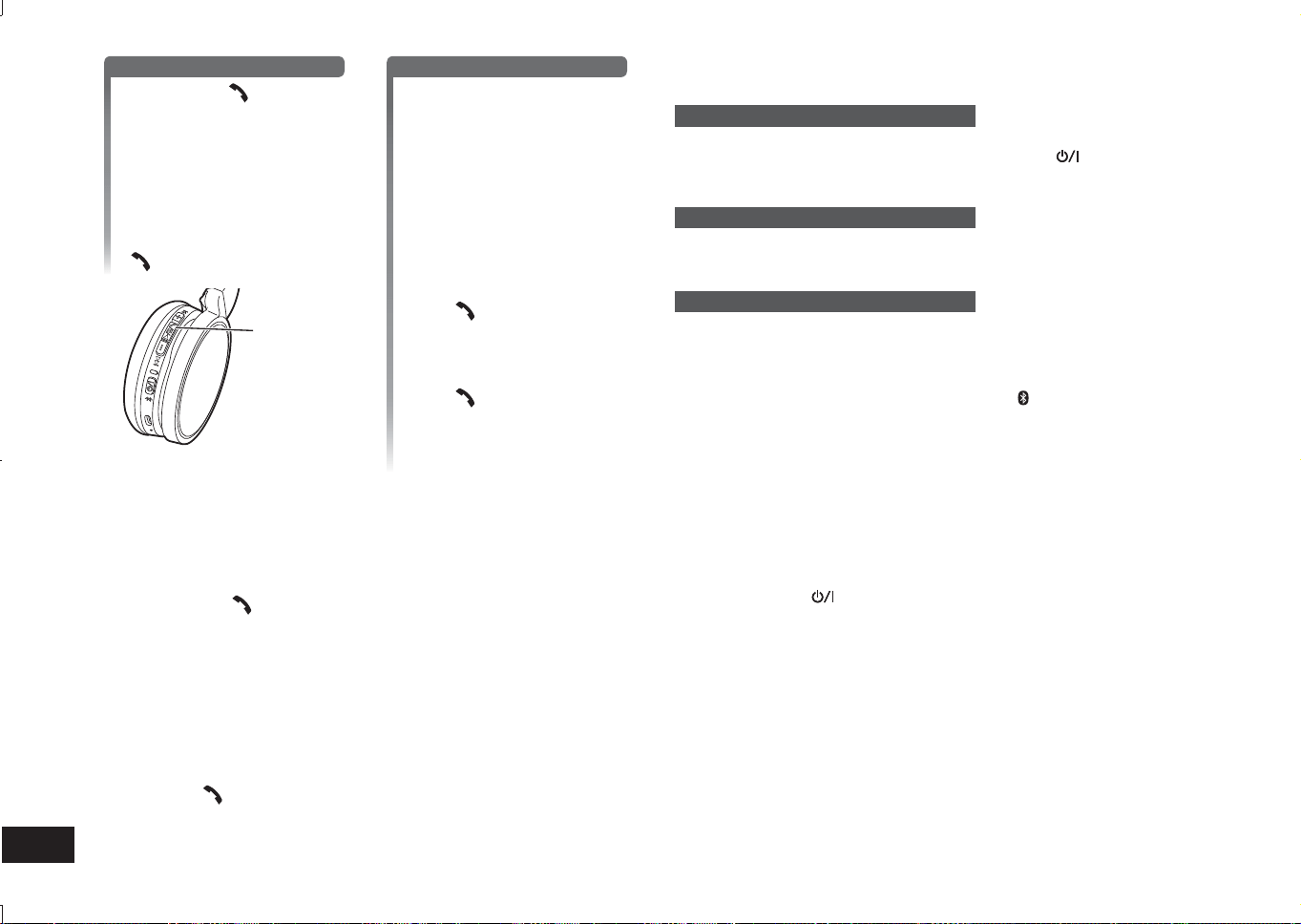
TQBM0093
X
46
6
1
Odbieranie połączenia przychodzącego
Naciśnij Połącz na
słuchawkach i odbierz rozmowę
• Podczas połączenia
przychodzącego rozlegnie się
sygnał dźwiękowy z głośnika, a
dioda LED zacznie migać.
• (Dotyczy tylko HFP)
Aby odrzucić połączenie
przychodzące, dwukrotnie
naciśnij szybko przycisk Połącz
.
Połącz
Wykonywanie połączenia wychodzącego
Wykonaj połączenie
wychodzące na telefonie z
włączoną funkcją Bluetooth
®
• Patrz również instrukcja obsługi
telefonu z włączoną funkcją
Bluetooth
®
.
(Instrukcja sprawdzania i obsługi
słuchawek została podana poniżej)
•
Podczas połączenia wychodzącego
rozlegnie się sygnał dźwiękowy z
głośnika, a dioda LED zacznie migać.
•
Aby anulować połączenie
wychodzące, naciśnij przycisk
Połącz
.
Rozlegnie się sygnał dźwiękowy.
•
(Dotyczy tylko HFP) Gdy telefon nie
jest używany, naciśnij i przytrzymaj
przez około 5 sekundy przycisk
Połącz
. Nawiązane zostanie
połączenie wychodzące z ostatnio
wybieranym numerem. Rozlegnie
się jeden krótki dźwięk kliknięcia z
głośnika, a dioda LED zacznie migać.
2
Rozpocznij rozmowę
• Dioda LED będzie wielokrotnie migać w cyklach po 2 mignięcia podczas
rozmowy telefonicznej.
• Podczas wykonywania połączenia telefonicznego istnieje możliwość
regulowania poziomu głośności. Aby uzyskać więcej informacji dotyczących
dalszych instrukcji patrz strona 5.
3
Naciśnij Połącz , aby zakończyć połączenie telefoniczne
• Rozlegnie się sygnał dźwiękowy.
■
Uwaga
• Może być wymagane ustawienie funkcji zestawu głośnomówiącego w telefonie z
włączoną funkcją Bluetooth
®
.
• W zależności od rodzaju telefonu z włączoną funkcją Bluetooth
®
użytkownik
może usłyszeć dźwięk połączenia przychodzącego i wychodzącego telefonu w
słuchawkach.
• (Dotyczy tylko HFP) Urządzenie dzwoniące zostanie przełączone pomiędzy
telefonem z włączoną funkcją Bluetooth
®
a słuchawkami. (Dwukrotnie naciśnij
szybko przycisk
na słuchawkach, aby przełączyć).
Funkcje użyteczne
Resetowanie słuchawek
Słuchawki można zresetować w przypadku odrzucenia wszystkich operacji. Aby
zresetować słuchawki, należy nacisnąć przycisk zasilania
i przytrzymać przez
co najmniej 10 sekund. Wszystkie poprzednie operacje zostaną anulowane.
(Informacje dotyczące urządzeń sparowanych nie zostaną usunięte.)
Automatyczne wyłączanie zasilania
Jeśli słuchawki nie będą używane przez około 5 minut, a urządzenia z funkcją
Bluetooth
®
nie będą działały podczas tego okresu, rozlegnie się sygnał dźwiękowy,
a zasilanie zostanie automatycznie wyłączone.
Wskaźnik LED
Gdy poziom naładowania baterii obniży się podczas używania urządzenia, kolor
diody LED migającej na niebiesko na prawej słuchawce zmieni się na czerwony*.
Co minutę rozlegnie się sygnał dźwiękowy. Po wyczerpaniu się baterii zasilanie
zostanie wyłączone.
* Jeśli naciśniesz i przytrzymasz przycisk parowania
, gdy poziom naładowania
baterii jest niski, dioda LED zacznie migać tylko na czerwono.
Przywracanie ustawień fabrycznych
W przypadku chęci usunięcia wszystkich informacji dotyczących sparowanych
urządzeń itp. możesz przywrócić ustawienia słuchawek do ustawień fabrycznych
(oryginalne ustawienia podczas zakupu słuchawek). Naładuj baterię przed
przechowywaniem słuchawek.
1 Naciśnij przycisk
i przytrzymaj przez około 5 sekund
• Rozpocznij wyszukiwanie urządzeń Bluetooth
®
, aby się z nim połączyć.
2 Podczas wyszukiwania naciśnij i przytrzymaj jednocześnie przyciski + i −
przez około 6 sekund lub dłużej
• Dioda LED będzie migać szybko na niebiesko. W słuchawkach zostaną
przywrócone ustawienia fabryczne.
■
Uwaga
• Podczas ponownego parowania urządzenia usuń informacje dotyczące
rejestracji (urządzenie: „RP-HF400B”) z menu Bluetooth
®
urządzenia, a
następnie ponownie zarejestruj słuchawki na urządzeniu z funkcją Bluetooth
®
.
(→ Pkt. 4)
RP-HF400B_E(TQBM0093).indb 46RP-HF400B_E(TQBM0093).indb 46 2017/03/17 21:21:432017/03/17 21:21:43
TQBM0093
X
47
7
POLSKI
Firma Panasonic nie ponosi odpowiedzialności za zakłócenia podczas transmisji
bezprzewodowej danych i/lub informacji.
■
Wykorzystywane pasmo częstotliwości
Słuchawki wykorzystują pasmo częstotliwości 2,4 GHz.
■
Świadectwo zgodności dotyczące słuchawek
• Niniejsze słuchawki są zgodne z ograniczeniami dotyczącymi częstotliwości
oraz posiadają świadectwo zgodności wydane w oparciu o przepisy
dotyczące częstotliwości. W związku z powyższym pozwolenie na transmisję
bezprzewodową nie jest konieczne.
• Poniższe postępowanie jest karalne w świetle prawa obowiązującego w
niektórych krajach:
– Demontaż/modyfikowanie słuchawek.
– Usuwanie etykiet specyfikacji.
■
Ograniczenia dotyczące użytkowania
• Bezprzewodowa transmisja i/lub użytkowanie wszystkich urządzeń z funkcją
Bluetooth
®
nie jest gwarantowane.
• Wszystkie urządzenia muszą spełniać normy ustanowione przez Bluetooth
SIG, Inc.
• W zależności od specyfikacji i ustawień urządzenia uzyskanie połączenia
może nie być możliwe lub niektóre funkcje mogą działać inaczej.
• Niniejszy system obsługuje funkcje zabezpieczające Bluetooth
®
. Jednak
w zależności od warunków pracy i/lub ustawień ochrona ta może nie być
wystarczająca. Dane do tego systemu należy przesyłać przy zachowaniu
ostrożności.
• System ten nie może przesyłać danych do urządzenia z funkcją Bluetooth
®
.
■
Zakres użytkowania
Słuchawki należy używać maksymalnie w promieniu 10 m.
Promień ten może ulec skróceniu w zależności od warunków otoczenia,
przeszkód lub interferencji.
■
Interferencje pochodzące od innych urządzeń
• Słuchawki mogą nie działać prawidłowo oraz może pojawić się hałas lub
przeskoki w odtwarzaniu muzyki w wyniku interferencji fal radiowych,
jeśli słuchawki będą znajdowały się zbyt blisko innych urządzeń z funkcją
Bluetooth
®
lub urządzeń wykorzystujących pasmo 2,4 GHz.
• Słuchawki mogą nie działać prawidłowo, jeśli fale radiowe z najbliższej stacji
radiowej itp. są zbyt silne.
■
Przeznaczenie
• Słuchawki przeznaczone są wyłącznie do standardowego, podstawowego
użytkowania.
• Nie stosować niniejszego systemu w pobliżu urządzenia lub w środowisku
wrażliwym na interferencje częstotliwości radiowej (na przykład: porty lotnicze,
szpitale, laboratoria itp.).
O Bluetooth
®
■
Informacje ogólne
Zasilanie
Prąd stały 5 V, 330 mA
(Bateria wewnętrzna: 3,7 V (Li-ion 430 mAh))
Czas pracy*
1
Ok. 20 godzin
Czas ładowania*
2
(25 °C) Ok. 2,5 godzin
Zakres temperatury ładowania Od 10 °C do 35 °C
Zakres temperatury pracy Od 0 °C do 40 °C
Zakres wilgotności pracy
Od 35% do 80% wilgotności względnej
(bez kondensacji)
Masa Ok. 130 g
*
1
Czas pracy może być krótszy w zależności od warunków pracy.
*
2
Czas ładowania baterii od poziomu całkowicie rozładowanego do pełnego
naładowania.
■
Bluetooth
®
Specyfikacja systemu Bluetooth
®
Wer. 4.1
Klasyfikacja urządzenia
bezprzewodowego
Klasa 2 (2,5 mW)
Pasmo częstotliwości Od 2402 MHz do 2480 MHz
Maks. moc sygnału radiowego 4 dBm
Obsługiwane profile A2DP, AVRCP, HSP, HFP
Obsługiwany kodek SBC
Zakres pracy Do 10 m
■
Głośniki
Średnica głośników 30 mm
■
Wejścia
Wejście DC IN Prąd stały 5 V, 330 mA
■
Mikrofon
Typ Mono
■
Akcesoria
Przewód ładujący USB 0,1 m
●
Dane w ramach specyfikacje podlegają zmianom bez powiadomienia.
Specyfikacje
RP-HF400B_E(TQBM0093).indb 47RP-HF400B_E(TQBM0093).indb 47 2017/03/17 21:21:432017/03/17 21:21:43

TQBM0093
X
48
8
Przed skontaktowaniem się z serwisem wykonaj poniższe czynności kontrolne. W
przypadku wątpliwości dotyczących niektórych punktów kontroli lub gdy zalecane
czynności naprawcze nie rozwiązały problemu, skontaktuj się ze sprzedawcą w
celu uzyskania dalszych zaleceń.
Informacje ogólne
Słuchawki nie reagują
• Słuchawki można zresetować w przypadku odrzucenia wszystkich operacji.
Aby zresetować słuchawki, należy nacisnąć przycisk zasilania
i przytrzymać
przez co najmniej 10 sekund. (→ Pkt. 6)
Zasilanie i ładowanie
Brak możliwość naładowania słuchawek
• Upewnij się, że komputer jest włączony i nie znajduje się w trybie czuwania ani
uśpienia.
• Czy port USB obecnie używany działa prawidłowo? Jeśli komputer został
wyposażony w inne porty USB, wyjmij wtyczkę z aktualnie używanego portu i
podłącz ją do innego portu.
• Jeśli powyższe czynności nie są możliwe do wykonania, odłącz wtyczkę
przewodu ładującego USB i podłącz ją ponownie.
• Jeśli czas ładowania i czas pracy ulegną skróceniu, może to oznaczać, że
bateria wyczerpała się. (Liczba ładowań wbudowanej baterii: około 500.)
Dioda LED nie pali się podczas ładowania / Ładowanie trwa dłużej
• Czy przewód ładujący USB (w zestawie) został prawidłowo podłączony do
wejścia USB w komputerze? (→ Pkt. 4)
• Słuchawki należy ładować w pomieszczeniu o temperaturze od 10 °C do 35 °C.
Zasilanie nie włącza się
• Czy słuchawki zostały naładowane? Nie można włączyć zasilania podczas
ładowania. (→ Pkt. 4)
Połączenie z urządzeniem z funkcją Bluetooth
®
Nie można podłączyć urządzenia
• Usuń dane parowania dot. słuchawek z urządzenia z funkcją Bluetooth
®
, a
następnie sparuj je ponownie. (→ Pkt. 4)
Wskazówki dotyczące
wykrywania i usuwania usterek
Głośność dźwięku i fonii
Brak dźwięku
• Upewnij się, że słuchawki i urządzenie z funkcją Bluetooth
®
zostały prawidłowo
połączone. (→ Pkt. 4)
• Sprawdź, czy muzyka jest odtwarzana w urządzeniu z funkcją Bluetooth
®
.
• Upewnij się, że słuchawki zostały włączone oraz że głośność nie jest ustawiona
na niski poziom.
• Ponownie sparuj i podłącz urządzenie z funkcją Bluetooth
®
ze słuchawkami.
(→ Pkt. 4)
• Sprawdź, czy urządzenie kompatybilne z funkcją Bluetooth
®
obsługuje profil
„A2DP”. Szczegółowe informacje o profilach znajdują się w sekcji „Słuchanie
muzyki” (→ Pkt. 5). Zapoznaj się także z instrukcją obsługi urządzenia
kompatybilnego z funkcją Bluetooth
®
.
Niski poziom głośności
• Zwiększ poziom głośności słuchawek. (→ Pkt. 5)
• Zwiększ poziom głośności urządzenia z funkcją Bluetooth
®
.
Dźwięk z urządzenia jest odłączany / Jakość dźwięku jest niska
• Mogą wystąpić zakłócenia dźwięku w przypadku zablokowanych sygnałów. Nie
zasłaniaj całkowicie słuchawek dłonią itp.
• Urządzenie może znajdować się poza zakresem komunikacji wynoszącym 10 m.
Umieść urządzenie bliżej słuchawek.
• Usuń wszelkie przeszkody pomiędzy słuchawkami i urządzeniem.
• Wyłącz wszelkie nieużywane bezprzewodowe urządzenia LAN.
• Może pojawić się problem z komunikacją, jeśli bateria jest częściowo
wyczerpana. Naładuj słuchawki. (→ Pkt. 4)
Połączenia telefoniczne
Nie słychać drugiej osoby
• Upewnij się, że słuchawki i telefon z włączoną funkcją Bluetooth
®
są włączone.
• Upewnij się, że słuchawki i telefon z włączoną funkcją Bluetooth
®
zostały
połączone. (→ Pkt. 4)
• Sprawdź ustawienia audio w telefonie z włączoną funkcją Bluetooth
®
. Przełącz
urządzenie dzwoniące na słuchawki, jeśli jest ustawione na telefon z włączoną
funkcją Bluetooth
®
. (→ Pkt. 4)
• Jeśli poziom głośności głosu drugiej osoby jest zbyt niski, zwiększ poziom
głośności zarówno w słuchawkach, jak i w telefonie z włączoną funkcją
Bluetooth
®
.
Nie można nawiązać połączenia telefonicznego
• Sprawdź, czy urządzenie kompatybilne z funkcją Bluetooth
®
obsługuje profil
„HSP” lub „HFP”. Szczegółowe informacje o profilach znajdują się w sekcjach
„Słuchanie muzyki” (→ Pkt. 5) i „Wykonywanie połączenia telefonicznego”
(→ Pkt. 5). Zapoznaj się także z instrukcją obsługi urządzenia telefonu z funkcją
Bluetooth
®
.
RP-HF400B_E(TQBM0093).indb 48RP-HF400B_E(TQBM0093).indb 48 2017/03/17 21:21:432017/03/17 21:21:43
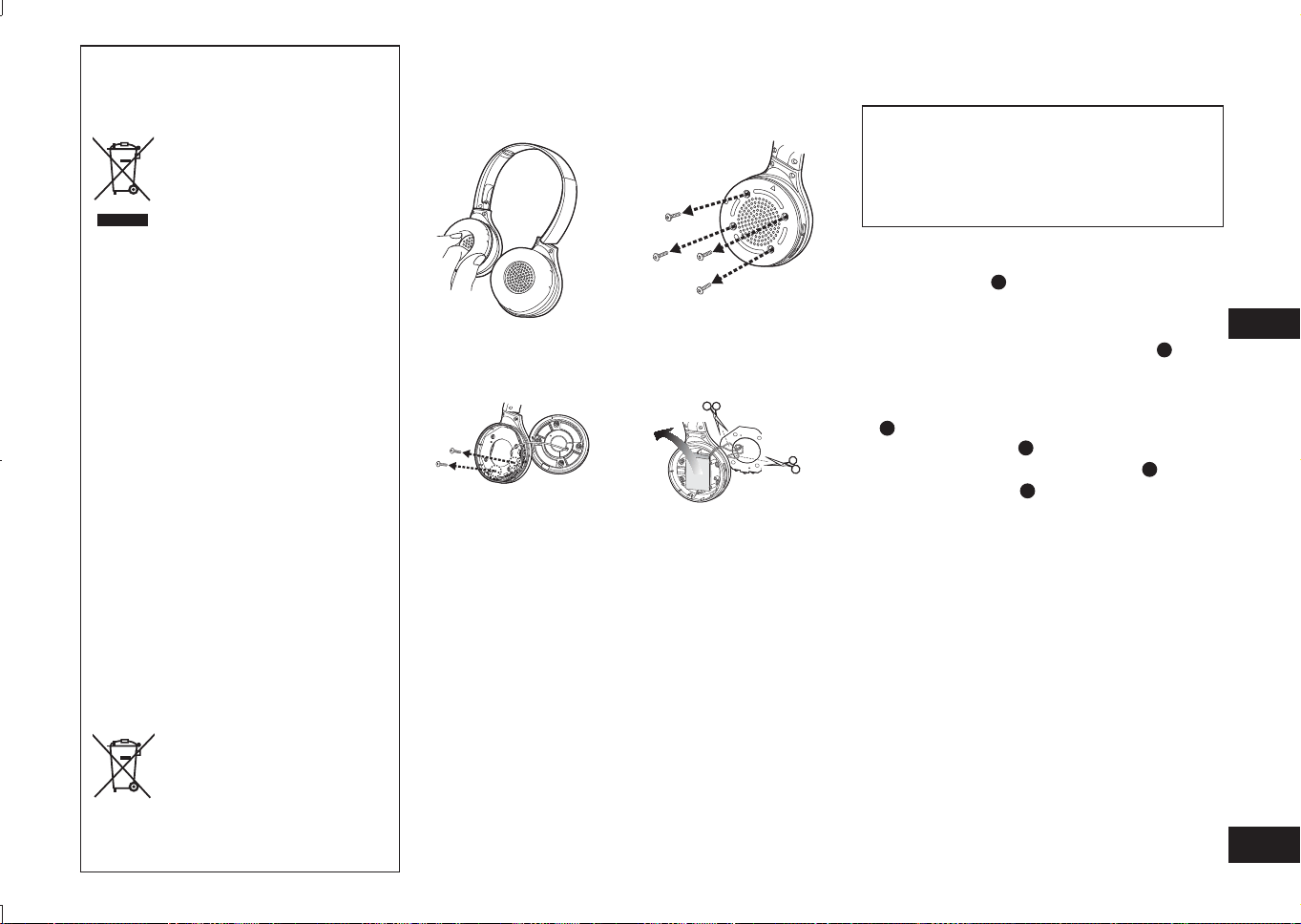
TQBM0093
X
49
9
POLSKI
Demontaż baterii w przypadku usuwania słuchawek
Poniższe zalecenia nie odnoszą się do
czynności naprawczych, a jedynie są związane
z usuwaniem słuchawek. Słuchawki te nie są
przeznaczone do ponownego montażu po ich
zdemontowaniu.
Przed usunięciem słuchawek należy wyjąć zamontowaną
w nich baterię i przekazać ją do utylizacji.
• Zdemontować po wyczerpaniu się baterii.
• Zdemontowane części przechowywać poza zasięgiem dzieci.
1
Obróć nakładki
A
do góry i umieść słuchawki
na płaskiej powierzchni
2
Przytrzymaj dolną część prawego głośnika
(R), a następnie wsuń śrubokręt krzyżakowy
(dostępny w handlu) pod górną osłonę
B
• Trzymaj palce z dala od końcówki śrubokręta.
• Wybierz odpowiedniej wielkości śrubokręt pasujący do
szczeliny pod górną osłoną.
3
Użyj śrubokręta do podważenia górnej osłony
B
, a następnie unieś ją do góry
4
Usuń górną osłonę
B
5
Odkręć 4 wkręty i usuń dolną osłonę
C
6
Przytrzymaj baterię
D
i usuń ją
Obchodzenie się ze zużytymi bateriami
• Zaizoluj wejścia za pomocą taśmy przylepnej lub podobnego
materiału.
• Nie demontuj.
■
Baterie
• Nie nagrzewaj ani nie wrzucaj baterii do ognia.
• Nie pozostawiaj baterii przez dłuższy czas w samochodzie
zaparkowanym w miejscu wystawionym na bezpośrednie
działanie promieni słonecznych, w którym drzwi i okna są
zamknięte.
• Nieprawidłowe obchodzenie się z baterią może prowadzić
do wycieku elektrolitu, który może spowodować
uszkodzenie części, z którymi ciecz miała kontakt.
W przypadku wycieku elektrolitu z baterii należy
skontaktować się ze sprzedawcą. Przemyj dokładnie wodą
części ciała, które miały kontakt elektrolitem.
• W celu usunięcia baterii należy skontaktować się z
władzami lokalnymi lub sprzedawcą w celu uzyskania
wytycznych dotyczących prawidłowej metody usuwania.
Pozbywanie się zużytych urządzeń
elektrycznych i elektronicznych oraz baterii.
Dotyczy wyłącznie obszaru Unii
Europejskiej oraz krajów posiadających
systemy zbiórki i recyklingu.
Niniejsze symbole umieszczane
na produktach, opakowaniach i/
lub w dokumentacji towarzyszącej
oznaczają, że nie wolno mieszać
zużytych urządzeń elektrycznych
i elektronicznych oraz baterii z
innymi odpadami domowymi/
komunalnymi.
W celu zapewnienia właściwego
przetwarzania, utylizacji oraz
recyklingu zużytych urządzeń
elektrycznych i elektronicznych oraz
zużytych baterii, należy oddawać
je do wyznaczonych punktów
gromadzenia odpadów zgodnie z
przepisami prawa krajowego.
Poprzez prawidłowe pozbywanie
się zużytych urządzeń
elektrycznych i elektronicznych
oraz zużytych baterii pomagasz
oszczędzać cenne zasoby
naturalne oraz zapobiegać
potencjalnemu negatywnemu
wpływowi na zdrowie człowieka
oraz na stan środowiska
naturalnego.
W celu uzyskania informacji o
zbiórce oraz recyklingu zużytych
urządzeń elektrycznych i
elektronicznych oraz baterii prosimy
o kontakt z władzami lokalnymi.
Za niewłaściwe pozbywanie się
tych odpadów mogą grozić kary
przewidziane przepisami prawa
krajowego.
Dotyczy symbolu baterii
(symbol poniżej):
Ten symbol może występować
wraz z symbolem pierwiastka
chemicznego. W takim
przypadku wymagania Dyrektywy
w sprawie określonego środka
chemicznego są spełnione.
1
Zdejmij prawą nakładkę
słuchawki
2
Wykręć 4 śruby
3
Wykręć 2 śruby i wyjmij
płytkę
4
Przetnij kolejno
przewody nożyczkami i
wyjmij baterię
RP-HF400B_E(TQBM0093).indb 49RP-HF400B_E(TQBM0093).indb 49 2017/03/17 21:21:432017/03/17 21:21:43
TQBM0093
X
50
2
Kérjük, ellenőrizze, és azonosítsa be a
csomagban található kiegészítőket.
1 USB-töltőkábel
Tartalomjegyzék
A használat előtt
Kiegészítők ......................................... 2
Szerzői jogok stb. ............................... 2
Biztonsági előírások ........................... 2
Karbantartás ....................................... 3
Az eszköz részei................................. 3
Előkészületek
Töltés .................................................. 4
Be- és kikapcsolás.............................. 4
Bluetooth
®
-eszköz csatlakoztatása ..... 4
Használat
Zenehallgatás ..................................... 5
Telefonhívás indítása .......................... 6
Hasznos funkciók ............................... 6
Egyéb
A gyári beállítások visszaállítása ........ 6
A Bluetooth
®
-ról .................................. 7
Műszaki jellemzők .............................. 7
Hibaelhárítási útmutató....................... 8
Az akkumulátor eltávolítása a
fejhallgató hulladékosítása előtt ......... 9
Tisztelt vásárló!
Köszönjük, hogy termékünket
választotta.
Mielőtt használatba venné a terméket,
olvassa el figyelmesen az utasításokat;
őrizze meg a kézikönyvet a jövőbeli
használat céljából.
Kiegészítők
●
A Bluetooth
®
szó, megjelölés és logó
a Bluetooth SIG, Inc. bejegyzett
védjegyei, és ezeknek a Panasonic
Corporation általi minden használata
licenc alapján történik.
A további védjegyek és nevek a
megfelelő tulajdonosok birtokában
állnak.
●
A dokumentumban előforduló
további rendszernevek és
terméknevek általában a megfelelő
fejlesztő vállalatok bejegyzett
védjegyei vagy védjegyei.
Kérjük, vegye figyelembe, hogy a
™ és az ® jelölést nem tüntetjük fel
ebben a dokumentumban.
Szerzői jogok
stb.
Biztonsági előírások
■
Fejhallgató
• Tartsa és használja a fejhallgatót a hőforrásoktól távol.
• Ne hallgassa magas hangerővel a fejhallgatót olyan helyeken, ahol a
biztonság érdekében figyelnie kell a környezet zajaira is, így például vasúti
átjáróknál és építkezéseken.
• A szélessávra jellemző feszültség 75 mV vagy annál több.
FIGYELEM:
A tűz, áramütés és termékkárosodás elkerülése érdekében:
• Ne tegye ki a fejhallgatót eső, nedvesség, csepegő vagy fröccsenő folyadék
hatásának.
• Ne helyezzen a fejhallgatóra semmilyen vízzel teli tárgyat, így például vázát.
• Csak a javasolt kiegészítőket használja.
• Ne távolítsa el a borításokat.
• Ne próbálja megjavítani a fejhallgatót. A javítást képesített szakemberrel
végeztesse.
■
Allergiák
• Hagyjon fel a használattal, ha a hangszórók vagy a termék bármely más,
bőrével érintkező része kellemetlen érzetet okoz.
• A további használat kiütéseket vagy más allergiás tüneteket okozhat.
■
Biztonságos zenehallgatás a fejhallgatóval
• Ne használja a fejhallgatót túl magas hangerő-beállítással. A hallásszakértők
ellenjavallják a huzamosabb időn át tartó, folyamatos lejátszást.
• Ha fülcsengést tapasztal, csökkentse a hangerőt, vagy hagyja abba a
fejhallgató használatát.
• Ne használja járművezetés közben. Az ilyen magatartás könnyen forgalmi
veszélyhez vezethet, így számos ország törvényei tiltják.
• Potenciálisan veszélyes helyzetekben különösen óvatosan járjon el, vagy
függessze fel a fejhallgató használatát.
A fejhallgatóban a használat során a mobiltelefonok rádióinterferenciát
okozhatnak. Ha ilyen interferencia lép fel, növelje a távolságot a fejhallgató és a
mobiltelefon között.
Ezt a készüléket mérsékelt és trópusi éghajlaton való használatra tervezték.
RP-HF400B_E(TQBM0093).indb 50RP-HF400B_E(TQBM0093).indb 50 2017/03/17 21:21:442017/03/17 21:21:44
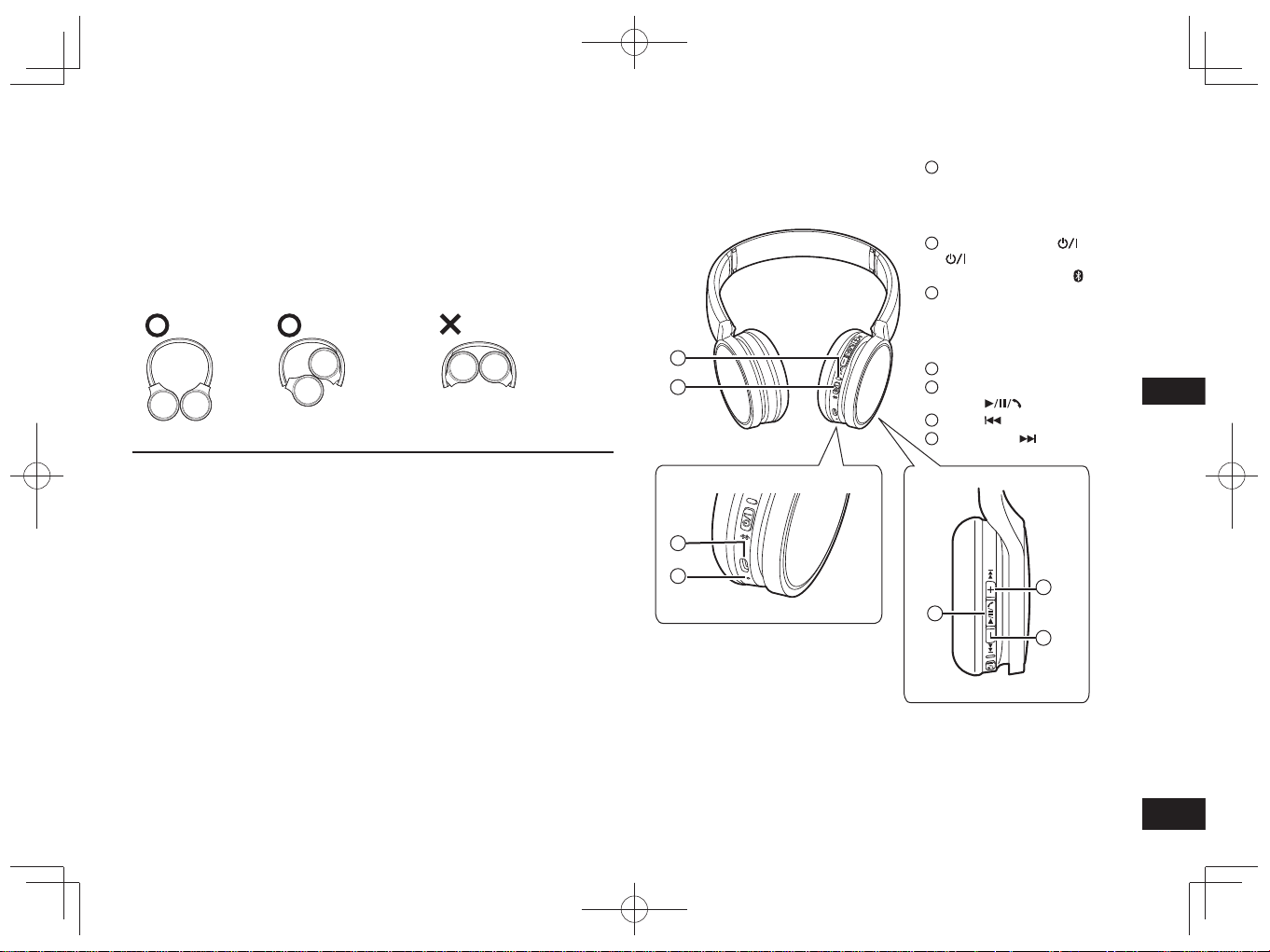
TQBM0093
X
51
3
MAGYAR
Az eszköz részei
■
Megjegyzés
• Csak a csomagban található USB-töltőkábelt használja.
• A fejhallgató használata közben ne takarja el tenyerével a jobb oldali hangszórót.
Ellenkező esetben előfordulhat, hogy leblokkolja a Bluetooth
®
-kapcsolatot.
Elképzelhető, hogy a termékillusztrációk nem teljesen felelnek meg magának a
terméknek.
1
LED-jelzőfény*
• A villanások száma és a fény
színe a jelzik a fejhallgató
állapotát.
(* a továbbiakban „LED”)
2
Be-/kikapcsolás
( Készenlét/Bekapcsolt
állapot) /Párosítás gomb
3
Töltőaljzat (DC IN)
• A feltöltés idejére ehhez az
aljzathoz kell csatlakoztatnia
az USB-töltőkábelt (tartozék).
(→ 4. oldal)
4
Mikrofon
5
Lejátszás/Szüneteltetés/
Hívás
6
Előző /Hangerő –
7
Következő /Hangerő +
Karbantartás
A fejhallgató tisztítását száraz, puha ruhával végezze.
• Ne használjon oldószereket, például benzint, hígítót, alkoholt, konyhai
tisztítószert, vegyi anyaggal átitatott törlőkendőt stb. Ellenkező esetben a
fejhallgató külső váza deformálódhat, vagy a borítás felválhat.
■
Az eszköz összehajtása
Hajtsa össze a fülhallgatót a lent látható módon. Helytelen összehajtás hibás
működést eredményezhet.
Tegye Ne tegye
Megfelelőségi nyilatkozat (DoC)
A “Panasonic Corporation” ezennel kijelenti, hogy ez a termék megfelel a
2014/53/EU irányelv lényeges követelményeinek és egyéb vonatkozó
rendelkezéseinek.
A vásárlók az alábbi címen elérhető DoC szerverünkről töltheti le az RE
termékeinkhez tartozó eredeti DoC másolatát:
http://www.doc.panasonic.de
A hivatalos képviselő elérhetősége:
Panasonic Marketing Europe GmbH, Panasonic Testing Centre,
Winsbergring 15, 22525 Hamburg, Németország
2
1
3
4
5
6
7
RP-HF400B_E(TQBM0093).indb 51RP-HF400B_E(TQBM0093).indb 51 2017/03/17 21:21:442017/03/17 21:21:44

TQBM0093
X
52
4
A tölthető akkumulátor (amely a fejhallgató beépített része) a csomag
kibontásakor nincs feltöltve. Töltse fel az akkumulátort a fejhallgató
használatának megkezdése előtt.
1
Csatlakoztassa a fejhallgatót
számítógéphez az USB-töltőkábel
használatával
• A LED pirosan világít.
• A töltés során a LED pirosan világít.
Amikor a töltés befejeződött, a LED
kialszik.
• A lemerült állapottól teljesen feltöltött
állapotig végzett töltés körülbelül
2.5 órát vesz igénybe.
Számítógép
LED
USB-töltőkábel (tartozék)
■
Megjegyzés
• A Bluetooth
®
funkció nem használható olyankor, amikor a fejhallgató az
USB-töltőkábelen keresztül számítógéppel áll kapcsolatban.
•
Az akkumulátor töltését 10 °C és 35 °C közötti hőmérsékletű helyiségben végezze.
• Az eszköz töltés közben nem kapcsolható be.
• Csak a csomagban található USB-töltőkábelt használja.
Figyelmeztetés: Csak a csomagban megtalálható USB-töltőkábelt használja a
számítógéphez való csatlakoztatáshoz.
Töltés
1
Kikapcsolt állapotban nyomja le a készülék
be-/kikapcsolás gombját , majd tartsa
azt körülbelül 3 másodpercen át lenyomva,
amíg a LED (kéken) villogni kezd
• Hangjelzés hallható és a LED (kéken) lassan villog.
Be-/kikapcsolás gomb
LED
Kikapcsolás
•
Nyomja le a be-/kikapcsolás gombot, majd tartsa azt körülbelül
3 másodpercen át lenyomva. Ekkor hangjelzés hallható, majd a fejhallgató
kikapcsolódik.
■
Megjegyzés
•
Ha a fejhallgatót mintegy 5 perces időtartamon keresztül nem használják, akkor az
automatikusan kikapcsol. (Lásd az „Automatikus kikapcsolás” című részt (→ 6. oldal))
Be- és kikapcsolás
Előkészületek
• Gondoskodjon arról, hogy a Bluetooth
®
-eszköz a fejhallgatótól kb. 1 m körzetén
belül legyen.
• Szükség szerint nézzen utána az eszköz megfelelő kezelésének annak
használati utasításában.
A készülék párosítása (regisztráció) Bluetooth
®
-eszközzel való
csatlakoztatáshoz
1
Nyomja le a készülék be-/kikapcsolás gombját, majd tartsa azt,
amíg a LED villogni kezd
Ha először párosít eszközt : körülbelül 3 másodperc
Ha második vagy további eszközöket párosít : körülbelül 5 másodperc
• Az eszköz Bluetooth
®
-eszközöket kezd el keresni, amelyekhez csatlakozhat
és a LED felváltva villogni kezd kéken és pirosan.
2
Kapcsolja be a Bluetooth
®
eszközt, és aktiválja a Bluetooth
®
-funkciót
3
Válassza ki a „RP-HF400B”-t a
Bluetooth
®
-eszköz menüjéből
• A MAC cím „□□□□□□” („□” minden beállításnál
egyedi karaktert jelöl.) jelenhet meg, mielőtt
az „RP-HF400B” megjelenik.
• Ha a rendszer jelszót kér be, írja be az
eszköz jelszavát, „0000-t (négy nulla)”.
4
Ellenőrizze a kapcsolatot Bluetooth
®
-
eszközzel a készüléken
• A LED a felváltva villog kéken és pirosan, amíg a kapcsolódás
az eszközzel befejeződik. Ha a LED (kéken) körülbelül 2
másodpercenként kétszer villog, a párosítás (regisztráció) befejeződött.
(Kapcsolat létrejött)
■
Megjegyzés
• Ha körülbelül 5 perc alatt semmilyen eszközhöz sem sikerül kapcsolódnia, akkor
a készülék kikapcsolódik. Hajtsa végre ismételten a párosítást.
• A készülékhez nem lehet regisztrálni egyszerre 2 vagy több Bluetooth
®
-eszközt.
• A készülékhez legfeljebb 8 Bluetooth
®
-eszköz párosítható. Ha 9. eszközt párosít,
úgy az új eszköz a legrégebbi kapcsolat helyét veszi át. A használathoz hajtsa
végre ismételten a párosítást.
Bluetooth
®
-eszköz csatlakoztatása
Bluetooth
Bluetooth
RP-HF400B
ON
(Pl.)
Kiválasztás
Eszköz
RP-HF400B_E(TQBM0093).indb 52RP-HF400B_E(TQBM0093).indb 52 2017/03/17 21:21:442017/03/17 21:21:44
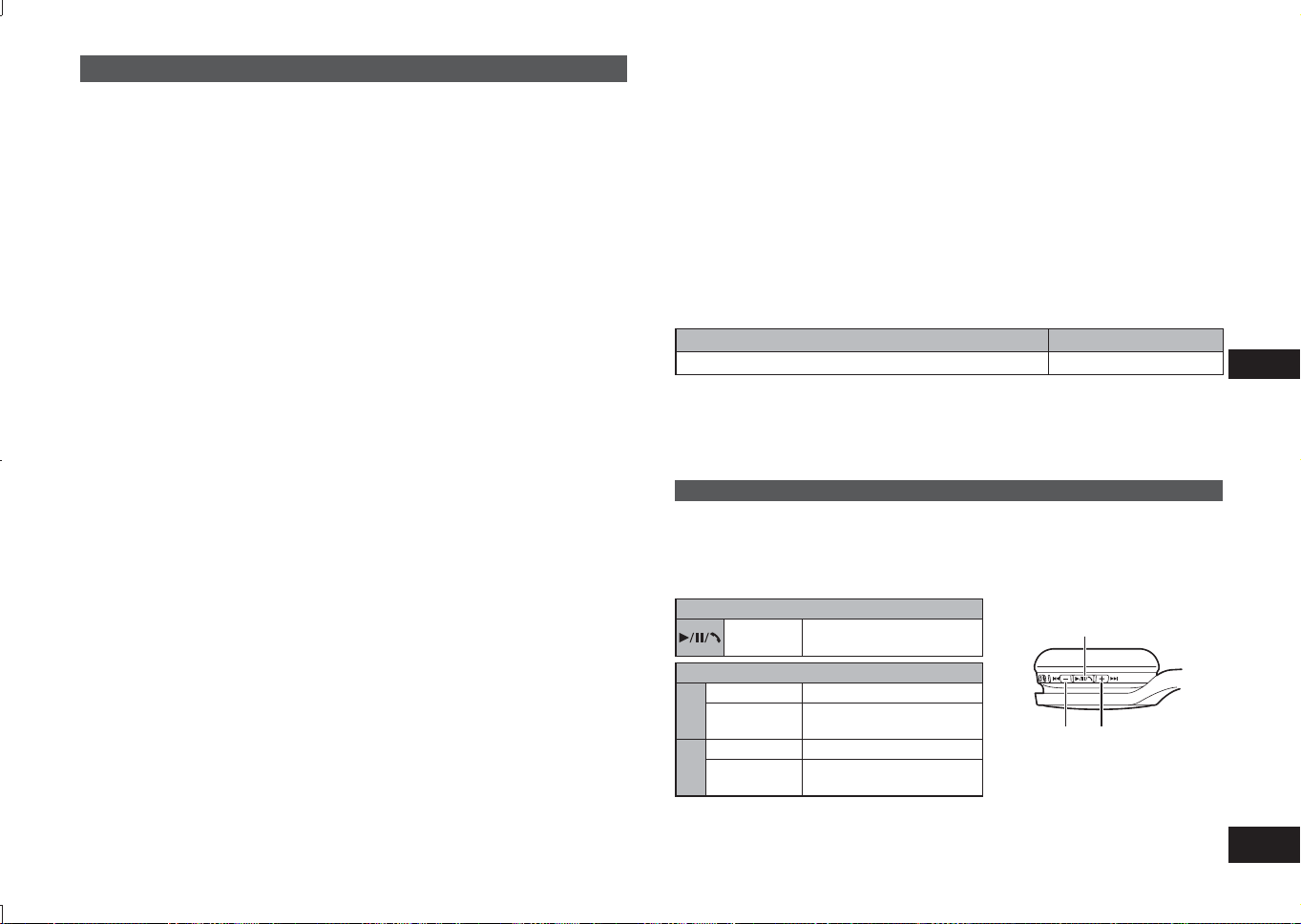
TQBM0093
X
53
5
MAGYAR
Zenehallgatás
Ha a Bluetooth
®
-kompatibilis eszköz támogatja az „A2DP” és „AVRCP” Bluetooth
®
-
profilokat, akkor a zenehallgatás távolról, a fejhallgatóról is irányítható.
• A2DP (Advanced Audio Distribution Profile – továbbfejlesztett audioközvetítő
képesség): Audiojeleket közvetít a fejhallgató felé.
• AVRCP (Audio/Video Remote Control Profile – audio/video távoli vezérlés profil):
Lehetővé teszi az eszköznek a fejhallgatóról való távirányítását.
1
Csatlakoztassa egymáshoz a fejhallgatót és a
Bluetooth
®
-eszközt (→ 4. oldal)
2
Válassza ki, majd játssza le a zeneszámot a Bluetooth
®
-eszközön
• A kijelölt zeneszám a fejhallgató hangszóróiból hallható.
Az akkumulátor üzemideje
Akkumulátor típusa Üzemidő
Újratölthető akkumulátor (a fejhallgató beépített része) Körülbelül 20 óra
Az üzemidő a működtetés körülményeitől függően rövidebb is lehet.
■
Figyelmeztetés
•
Magas hangerő-beállítás mellett előfordulhat, hogy a hang kiszűrődik a fejhallgatóból.
• A maximálishoz közeli hangerőszinten megtörténhet, hogy a zene eltorzulva
szól. Csökkentse a hangerőt, amíg meg nem szűnik a torzulás.
Irányítás távirányítással
A Bluetooth
®
-eszközt a fejhallgatóról is vezérelheti.
• A használt Bluetooth
®
-eszköztől függően előfordulhat, hogy az alábbi funkciók
némelyike nem működik, vagy máshogyan működik, amikor a fejhallgatóról
vezérli az eszközt.
(Példa a használatra)
Lejátszás/Szüneteltetés/Hívás
Lenyomás
Lejátszás/Szüneteltetés/
Hívás
Előző/Következő/Hangerő
+
Lenyomás A hangerő növelése
Lenyomva
tartás
Előretekerés a következő
szám elejéhez
−
Lenyomás A hangerő csökkentése
Lenyomva
tartás
Vissza a jelenlegi szám
elejéhez
Lejátszás/Szüneteltetés/Hívás
Hangerő –/
Előző
Hangerő +/
Következő
■
Megjegyzés
• A hangerő 15 fokozatban módosítható.
A maximális és a minimális szint elérésekor hangjelzés hallható.
Párosított Bluetooth
®
-eszköz csatlakoztatása
1
Kapcsolja be az eszközt
• Nyomja le a készülék be-/kikapcsolás gombját, majd tartsa azt körülbelül
3 másodpercen át lenyomva, amíg a LED (kéken) villogni kezd.
• Hangjelzés hallható és a LED (kéken) lassan villog.
2
Hajtsa végre „A készülék párosítása (regisztráció) Bluetooth
®
-
eszközzel való csatlakoztatáshoz” című fejezet 2 és 3 lépéseit
(→ 4. oldal)
• Ha a LED (kéken) körülbelül 2 másodpercenként kétszer villog, a párosítás
(regisztráció) befejeződött. (Kapcsolat létrejött)
■
Megjegyzés
• Ez a készülék megjegyzi az utoljára csatlakoztatott eszközt. A kapcsolat
automatikusan létrejöhet az 1. lépés után (lásd fentebb).
• Ha körülbelül 5 perc alatt semmilyen eszközhöz sem sikerül kapcsolódnia, akkor
a készülék kikapcsolódik. Hajtsa végre ismételten a párosítást. (→ 4. oldal)
RP-HF400B_E(TQBM0093).indb 53RP-HF400B_E(TQBM0093).indb 53 2017/03/17 21:21:452017/03/17 21:21:45
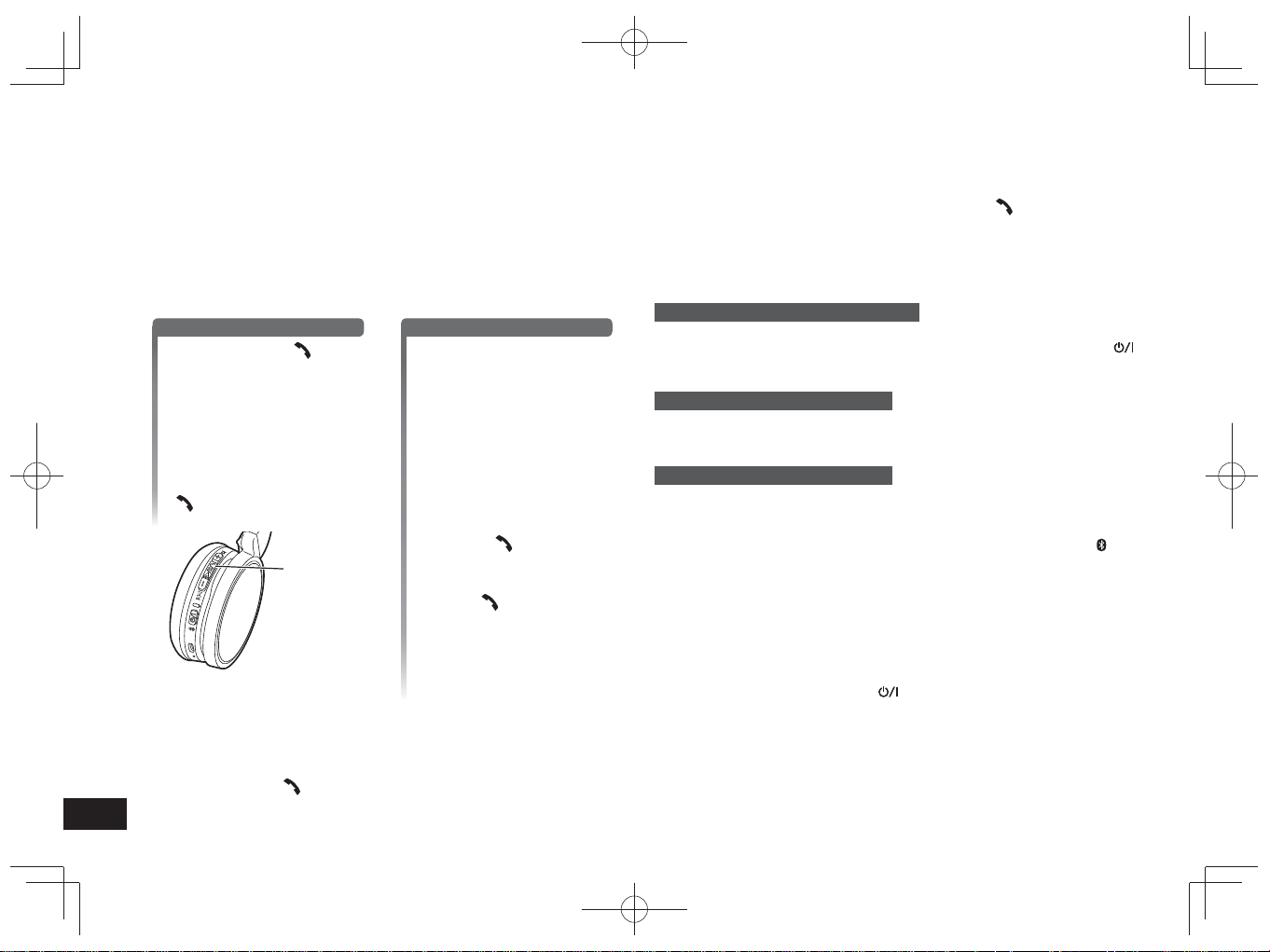
TQBM0093
X
54
6
A „HSP” és a „HFP” Bluetooth
®
-profilt támogató Bluetooth
®
-kompatibilis
telefonokkal (mobil- és okostelefonokkal) párosítva a fejhallgató telefonhívások
lebonyolítására is alkalmas.
• HSP (Headset Profile – fejhallgató profil):
Ezzel a profillal monó hangokat fogadhat, és kétirányú kommunikációt folytathat
a fejhallgatón lévő mikrofon segítségével.
• HFP (Hands-Free Profile – kéz nélküli profil):
A HSP-funkciókon kívül ez a profil bejövő és kimenő hívásokat is kezel.
• Csatlakoztassa az engedélyezett Bluetooth
®
telefont és készüléket (→ 4. oldal)
1
Bejövő hívások kezelése
Nyomja le a Hívás
gombot a fejhallgatón a
hívás fogadásához
• Beérkező hívás esetén a
fejhallgató hangszórójából
csengőhang hallatszik, és a
LED villog.
• (Csak HFP esetén) A beérkező
hívás elutasításához nyomja
meg gyorsan kétszer a Hívás
gombot.
Hívás
Kimenő hívások kezdeményezése
Kimenő hívások
kezdeményezése a
Bluetooth
®
-kompatibilis
telefonról
•
Olvassa el a Bluetooth
®
-kompatibilis
telefon használati útmutatóját is.
(Az alábbiakban a fejhallgatóról
végzett ellenőrzési és működtetési
lépések magyarázata szerepel)
•
Kimenő hívás esetén a fejhallgató
hangszórójából csengőhang
hallatszik, a LED pedig villog.
•
A kimenő hívás törléséhez nyomja
meg a Hívás
gombot.
Ekkor hangjelzés is hallható.
•
(Csak HFP esetén) Ha a telefon
éppen nincs használatban, nyomja
le a Hívás
gombot, majd tartsa
azt körülbelül 5 másodpercen át
lenyomva. Ekkor a telefon hívni
kezdi az utoljára tárcsázott számot.
A fejhallgató hangszórójából
egyetlen rövid kattanás hallatszik,
a LED pedig villog.
2
Kezdjen el beszélni
• A LED telefonhívás közben kétszer, ismétlődően villog.
• Hívás közben a hangerő szintje módosítható. A beállításokról a 5. oldalon
olvashat bővebben.
3
Nyomja le a Hívás gombot a hívás befejezéséhez
• Ekkor hangjelzés is hallható.
Telefonhívás indítása
■
Megjegyzés
• Előfordulhat, hogy Bluetooth
®
-kompatibilis telefonján be kell állítania a kéz nélküli
használatot.
• Alkalmas típusú Bluetooth
®
-kompatibilis telefon esetében a beérkező és a
kimenő hívások csengőhangjai hallhatók a fülhallgatóból.
• (Csak HFP esetén) A hívóeszköz a fejhallgatóról a Bluetooth
®
-kompatibilis
telefonra váltson. (Nyomja meg gyorsan kétszer a Hívás
gombot a
készüléken a váltáshoz.)
Hasznos funkciók
A fejhallgató alaphelyzetbe állítása
Olyankor, amikor semmilyen műveletet sem lehet rajta végrehajtani, a fejhallgató
alaphelyzetbe állítható. Az eszköz újraindításához, nyomja le a be-/kikapcsolás
gombot, majd tartsa azt 10 másodpercig vagy tovább lenyomva. Minden korábban
beállított művelet törlődni fog. (A párosított eszköz adatai nem törlődnek.)
Automatikus kikapcsolás
Ha a fejhallgató körülbelül 5 percen át nem közvetít hangot, és ez idő alatt a
Bluetooth
®
-eszközök sincsenek használatban, akkor a fejhallgató hangjelzés
kíséretében automatikusan kikapcsol.
LED-jelzőfény
Ha a készülék használata közben az akkumulátor lemerül, a kéken villogó LED a
jobboldali hangszórón*. Percenként 1 alkalommal hangjelzés is hallható. Ha az
akkumulátor teljesen lemerül, a fejhallgató kikapcsol.
* Ha alacsony akkumulátorszintnél nyomja meg és nyomva tartja a párosítás
gombot, a LED kizárólag piros fénnyel villog.
A gyári beállítások visszaállítása
Ha törölni kíván minden eszközpárosítási és egyéb adatot, akkor visszaállíthatja
a gyári beállításokat (a vásárláskor érvényes eredeti beállításokat). Töltse fel az
akkumulátort mielőtt visszaállítja a fejhallgatót.
1 Nyomja meg és tartsa lenyomva a
gombot. Körülbelül 5 másodpercig
• Csatlakoztatható Bluetooth
®
eszközök keresésének indítása.
2 Keresés közben nyomja meg és tartsa lenyomva a + és − gombokat
6 másodpercig vagy tovább
• A LED gyors ütemben kéken villog. Az eszköz visszaáll a gyári beállításokra.
■
Figyelem
• Az eszköz újrapárosításakor, törölje a párosítási adatokat (Eszköz:
„RP-HF400B”) a Bluetooth
®
eszköz menüjében, majd párosítsa újra ezt az
eszközt a Bluetooth
®
eszközzel. (→ 4. oldal)
RP-HF400B_E(TQBM0093).indb 54RP-HF400B_E(TQBM0093).indb 54 2017/03/17 21:21:452017/03/17 21:21:45
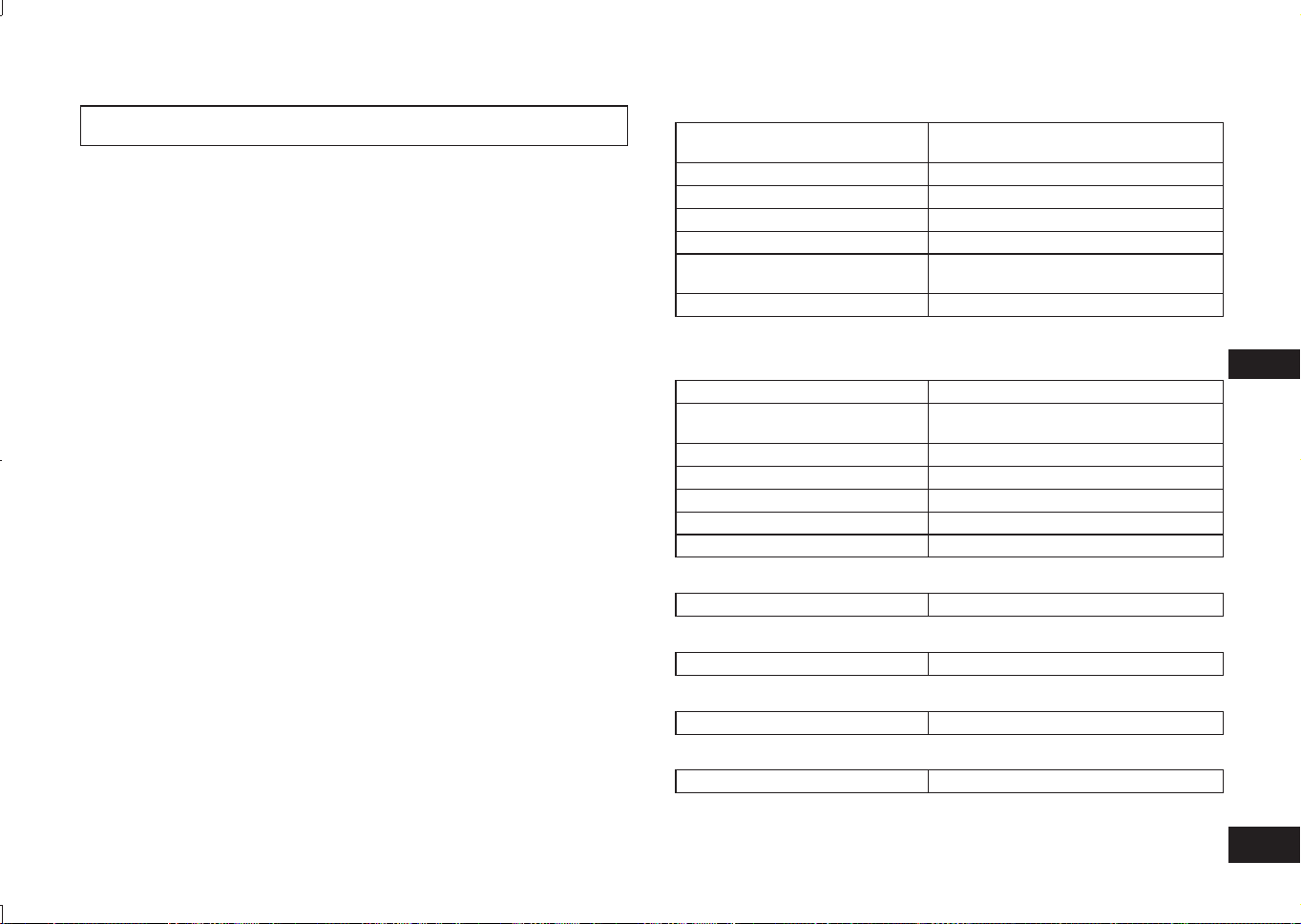
TQBM0093
X
55
7
MAGYAR
A Panasonic nem vállal felelősséget a vezeték nélküli átvitel során megsérült
adatokért és/vagy információkért.
■
A használt frekvenciatartomány
A fejhallgató a 2,4 GHz-es frekvenciasávot használja.
■
A fejhallgató tanúsítványa
• Ez a fejhallgató megfelel a frekvenciakorlátozásoknak, és a
frekvenciaszabályokon alapuló tanúsítványt is kapott. Ennek következtében
vezeték nélküli használata nem engedélyhez kötött.
• Az alábbi műveletek bizonyos országokban törvényellenesek:
– A fejhallgató szétszerelése/módosítása.
– A műszaki jellemzők azonosítóinak eltávolítása.
■
A használatra vonatkozó korlátozások
• A vezeték nélküli átvitel és/vagy használat nem minden egyes
Bluetooth
®
-eszköz esetében garantált.
• Minden eszköznek meg kell felelnie a Bluetooth SIG, Inc. által előírt
szabványoknak.
• Az eszköz specifikációitól és beállításaitól függően előfordulhat, hogy a
csatlakozás sikertelen lesz, vagy egyes funkciók eltérnek.
• Ez a rendszer támogatja a Bluetooth
®
biztonsági funkcióit. A használat
környezetétől és/vagy a beállításoktól függően azonban előfordulhat, hogy a
biztonsági beállítások nem elegendőek. Óvatosan járjon el, amikor vezeték
nélkül visz át adatokat erre a rendszerre.
• A rendszer nem képes adatok Bluetooth
®
-eszközre való továbbítására.
■
A használat hatóköre
A fejhallgatót 10 méteres távolságon belül használja.
Ez a távolság a környezettől, akadályoktól és interferenciától függően
csökkenhet.
■
Interferencia más eszközökkel
• Más Bluetooth
®
-eszközök, illetve a 2,4 GHz-es sávot használó egyéb
eszközök túlságosan szoros körzetén belül a fejhallgató nem feltétlenül
működik megfelelően, és ilyen körülmények között előfordulhat, hogy
problémák, például zörejek vagy hangakadozás tapasztalhatók.
• A közeli közvetítőállomásoktól stb. érkező, túlságosan erős rádiójelek képesek
a fejhallgató működésében zavart okozni.
■
Szándékolt használat
• A fejhallgatót csak normál, általános használatra tervezték.
• Ne használja a rendszert olyan berendezés közelében, vagy olyan
környezetben, amely érzékeny a rádiófrekvencia-interferenciára (pl.
repülőterek, kórházak, laboratóriumok stb.).
A Bluetooth
®
-ról
■
Általános
Tápellátás
DC 5 V, 330 mA
(Belső akkumulátor: 3,7 V (Li-ion 430 mAh))
Üzemidő*
1
Körülbelül 20 óra
Töltéshez szükséges idő*
2
(25 ºC) Körülbelül 2,5 óra
Töltési hőmérséklet-tartomány 10 ºC-tól 35 ºC-ig
Üzemi hőmérséklet-tartomány 0 ºC-tól 40 ºC-ig
Üzemi páratartalom-tartomány
35% tot 80% relatieve vochtigheid
(nem lecsapódó)
Tömeg Körülbelül 130 g
*
1
A működtetés körülményeitől függően rövidebb is lehet.
*
2
A lemerülttől a teljesen feltöltött állapotig végzett töltéshez szükséges idő.
■
Bluetooth
®
-adatok
A Bluetooth
®
-rendszer verziója 4.1- ás verzió
Vezeték nélküli berendezés
besorolása
2. osztály (2,5 mW)
Frekvenciatartomány 2402 MHz - 2480 MHz
Max. RF teljesítmény 4 dBm
Támogatott profilok A2DP, AVRCP, HSP, HFP
Támogatott kodekek SBC
Hatótávolság Legfeljebb 10 m
■
Hangszórók adatai
Hangszórófejek átmérője 30 mm
■
Bemenetek adatai
DC IN DC 5 V, 330 mA
■
Mikrofonadatok
Típus Mono
■
Kiegészítők adatai
USB-töltőkábel 0,1 m
●
A műszaki adatok külön bejelentés nélkül megváltozhatnak.
Műszaki jellemzők
RP-HF400B_E(TQBM0093).indb 55RP-HF400B_E(TQBM0093).indb 55 2017/03/17 21:21:452017/03/17 21:21:45
TQBM0093
X
56
8
Mielőtt a szervizhez fordulna, hajtsa végre a következő ellenőrzéseket. Ha az
ellenőrzés valamely pontjával kapcsolatban bizonytalan, illetve ha a feltüntetett
műveletek nem oldják meg a problémát, forduljon kereskedőjéhez.
Általános
A fejhallgató nem válaszol
• Olyankor, amikor semmilyen műveletet sem lehet rajta végrehajtani, a fejhallgató
alaphelyzetbe állítható. Az eszköz újraindításához, nyomja le a be-/kikapcsolás
gombot, majd tartsa azt 10 másodpercig vagy tovább lenyomva. (→ 6. oldal)
Tápellátás és töltés
Nem sikerül feltölteni a fejhallgatót
• Győződjön meg arról, hogy a számítógép be van kapcsolva, és nem készenléti
vagy alvó állapotban van.
• Megfelelően működik az az USB port, amelyet jelenleg használ? Ha
számítógépén több USB port is található, húzza ki a kábelt a jelenlegi aljzatból,
és dugja be egy másikba.
• Ha a fenti műveletek végrehajtására nincs mód, húzza ki az USB-töltőkábelt,
majd dugja vissza újra.
• Ha a töltés ideje és a készenléti idő lerövidült, akkor elképzelhető, hogy az
akkumulátor élettartamának végéhez közeledik. (A fejhallgatóhoz mellékelt
akkumulátor újratöltési kapacitása: körülbelül 500 alkalom.)
A LED nem világít töltés közben / A töltés a szokásosnál hosszabb
ideig tart
• Megfelelően csatlakozik az USB-töltőkábel (tartozék) a számítógép USB
bemenetéhez? (→ 4. oldal)
• A töltést szobahőmérsékleten, 10 °C és 35 °C között végezze.
Nem kapcsolódik be a fejhallgató
• Töltés alatt áll a fejhallgató? Az eszköz töltés közben nem kapcsolható BE.
(→ 4. oldal)
Bluetooth
®
-eszköz csatlakoztatása
Az eszköz nem csatlakoztatható
• Törölje a fejhallgatóra vonatkozó párosítási adatokat a Bluetooth
®
-eszközről,
majd párosítsa össze azokat újra. (→ 4. oldal)
Hibaelhárítási útmutató
Hang és hangerő
Nincs hang
• Győződjön meg arról, hogy megfelelő a kapcsolat a fejhallgató és a Bluetooth
®
-
eszköz között. (→ 4. oldal)
• Ellenőrizze, játszik-e le zenét a Bluetooth
®
-eszköz.
• Győződjön meg arról, hogy a fejhallgató be van kapcsolva, és a beállított
hangerőszint nem túl alacsony.
• Párosítsa, majd csatlakoztassa újra a fejhallgatót és a Bluetooth
®
-eszközt.
(→ 4. oldal)
• Ellenőrizze, hogy a Bluetooth
®
-kompatibilis eszköz támogatja-e az „A2DP”
profilt. A profilokról részletek a „Zenehallgatás” (→ 5. Oldal) című fejezetben
olvashatók. Olvassa el a Bluetooth
®
-kompatibilis eszköz használati útmutatóját
is.
A hangerő túl alacsony
• Növelje a fejhallgató hangerejét. (→ 5. oldal)
• Növelje a hangerőt a Bluetooth
®
-eszközön.
Az eszközről érkező hang leáll / Rossz a hangminőség
• Ha a jel átvitele nem megfelelő, akkor a hang eltűnhet. A fejhallgatót se a
tenyerével, se más módon ne takarja el.
• Lehet, hogy az eszköz kívül esik a 10 méteres kommunikációs hatókörön.
Helyezze az eszközt közelebb a fejhallgatóhoz.
• Távolítsa el az esetleges akadályokat a fejhallgató és az eszköz közül.
• Kapcsolja ki az összes használaton kívüli vezeték nélküli eszközt.
• Kommunikációs probléma léphet fel olyankor is, amikor az akkumulátor lemerül.
Töltse fel a fejhallgatót. (→ 4. oldal)
Telefonhívások
Nem hallja a másik személyt
• Győződjön meg arról, hogy a fejhallgató és a Bluetooth
®
-kompatibilis telefon is
be van kapcsolva.
• Ellenőrizze, hogy van-e kapcsolat a fejhallgató és a Bluetooth
®
-kompatibilis
telefon között. (→ 4. oldal)
• Ellenőrizze a Bluetooth
®
-kompatibilis telefon audiobeállításait. Állítsa be
hívóeszközként a fejhallgatót, ha az párosítva van a Bluetooth
®
-kompatibilis
telefonhoz. (→ 4. oldal)
• Ha a másik személy hangereje túl alacsony, a fejhallgató és a Bluetooth
®
-
kompatibilis telefon hangerejét is növelje meg.
Nem lehet telefonhívást kezdeményezni
• Ellenőrizze, hogy a Bluetooth
®
-kompatibilis eszköz támogatja-e a „HSP” vagy
„HFP” profilokat. A profilokról részletek a „Zenehallgatás”(→ 5. Oldal) és a
„Telefonhívás indítása” (→ 6. oldal) című fejezetben olvashatók. Olvassa el a
Bluetooth
®
telefon használati útmutatóját is.
RP-HF400B_E(TQBM0093).indb 56RP-HF400B_E(TQBM0093).indb 56 2017/03/17 21:21:452017/03/17 21:21:45
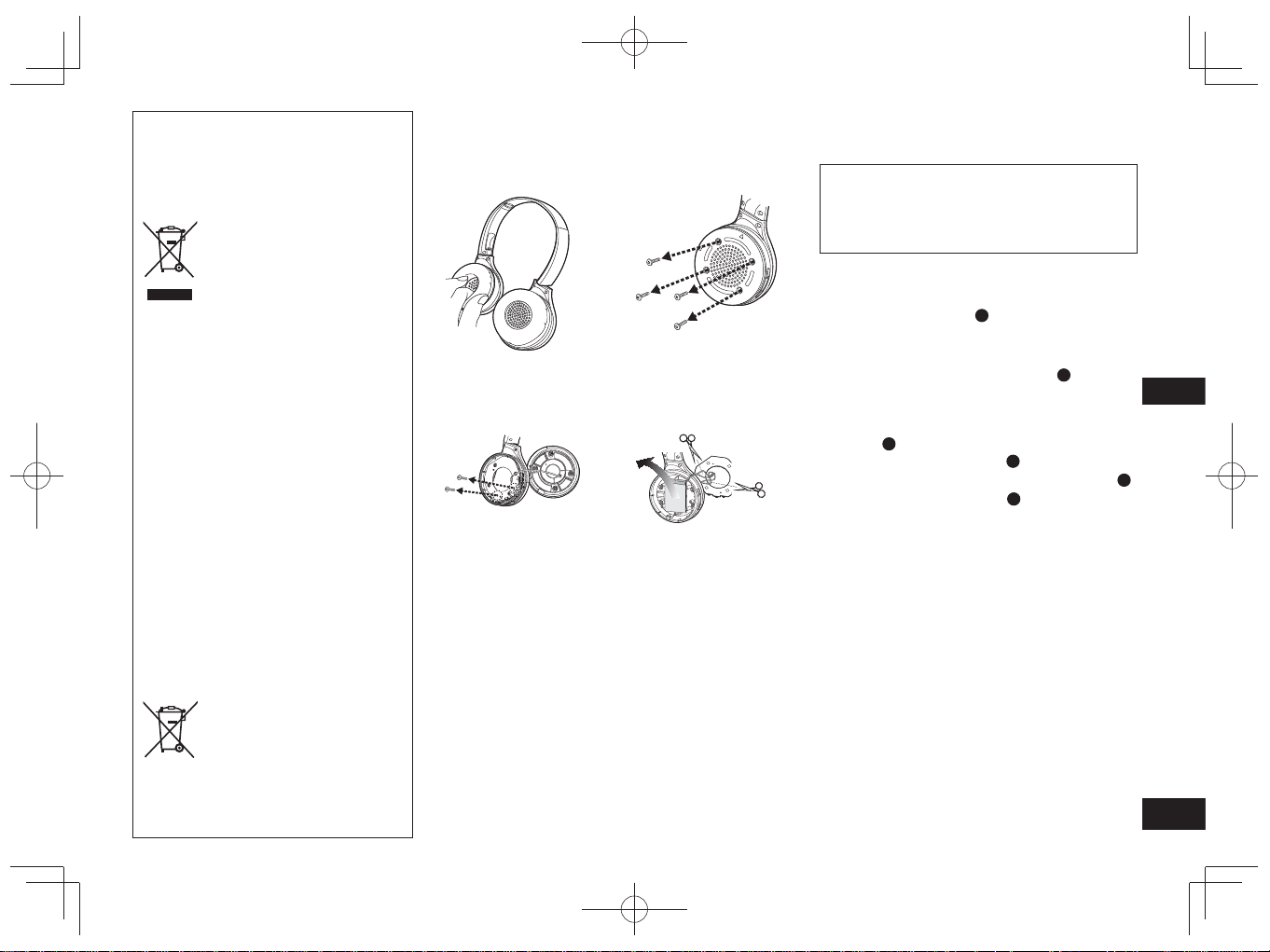
TQBM0093
X
57
9
MAGYAR
Az akkumulátor eltávolítása a fejhallgató hulladékosítása előtt
Az itt következő utasítások nem a javítás, hanem
az ártalmatlanítás célját szolgálják. A fejhallgató
a szétszerelés után már nem állítható helyre.
Mielőtt ártalmatlanítaná a fejhallgatót, vegye ki a benne
található akkumulátort, és vigye azt el egy újrahasznosító
gyűjtőponthoz.
• A szétszerelést azután végezze el, hogy az akkumulátor
lemerült.
• A szétszerelt részek gyermekektől távol tartandók.
1
Fordítsa a fülpárnákat
A
felfelé és helyezze a
fejhallgatót egy lapos felületre
2
A jobb oldali hangszóró alját (R) megragadva
csúsztasson egy laposfejű csavarhúzót (külön
megvásárolható) a felső borítás alá
B
• A csavarhúzót tartsa távol az ujjaitól.
• Olyan csavarhúzót válasszon, ami befér a felső borítás
alá.
3
Használja a csavarhúzó emelőerejét a felső
borítás
B
kiemeléséhez
4
Távolítsa el a felső borítást
B
5
Távolítsa el a 4 csavart, majd az alsó borítást
C
6
Fogja meg az akkumulátort
D
és távolítsa el
Az elhasználódott akkumulátorok kezeléséről
• Az érintkezőket szigetelje ragasztószalaggal vagy más,
hasonló anyaggal.
• Ne szerelje szét.
■
Akkumulátor
• Ne tegye ki hőhatásnak, és ne dobja tűzbe.
• Ne hagyja az akkumulátort/akkumulátorokat közvetlen
napfénynek kitett autóban hosszabb ideig úgy, hogy nem
hagyja nyitva az ajtókat és ablakokat.
• Az akkumulátor nem megfelelő kezelése az elektrolit
kiszivárgásához, így az a vele érintkezésbe lépő
tárgyak károsodásához vezethet. Ha elektrolit szivárog
az akkumulátorból, forduljon a helyi kereskedőhöz.
Amennyiben az elektrolit rákerül teste bármely részére, az
érintett területet alaposan, tiszta vízzel mossa le.
• Kérjük, az akkumulátor ártalmatlanításakor forduljon a
helyi hatósághoz vagy kereskedéshez, és kérdezze meg,
mi a helyes eljárás.
Tájékoztatás felhasználók számára az
elhasználódott készülékek, szárazelemek
és akkumulátorok begyűjtéséről és
ártalmatlanításáról.
Csak az Európai Unió és olyan országok
részére, amelyek begyűjtő rendszerekkel
rendelkeznek
A termékeken, a
csomagoláson és/vagy a
kísérő dokumentumokon
szereplő szimbólumok azt
jelentik, hogy az elhasználódott
elektromos és elektronikus
termékeket, szárazelemeket és
akkumulátorokat tilos az általános
háztartási hulladékkal keverni.
Az elhasználódott
készülékek, szárazelemek
és akkumulátorok megfelelő
kezelése, hasznosítása és
újrafelhasználása céljából, kérjük,
hogy a helyi törvényeknek,
megfelelően juttassa el azokat a
kijelölt gyűjtőhelyekre.
E termékek, szárazelemek és
akkumulátorok előírásszerű
ártalmatlanításával Ön
hozzájárul az értékes erőforrások
megóvásához, és megakadályozza
az emberi egészség és a
környezet károsodását.
Amennyiben a begyűjtéssel
és újrafelhasználással
kapcsolatban további kérdése
lenne, kérjük, érdeklődjön a helyi
önkormányzatnál.
E hulladékok szabálytalan
elhelyezését a nemzeti
jogszabályok büntethetik.
Megjegyzés a szárazelem- és
akkumulátor-szimbólummal
kapcsolatban (alsó
szimbólumpélda):
Ezek a szimbólumok kémiai
szimbólummal együtt
alkalmazhatók. Ebben az esetben
teljesíti az EU irányelvnek vegyi
anyagra vonatkozó követelményét.
1
Távolítsa el a jobb
fülhallgató párnázását
2
Távolítsa el a 4 csavart
3
Távolítsa el a 2 csavart
és a panelt
4
Vágja el egyesével a
vezetékeket, és távolítsa
el az akkumulátort
RP-HF400B_E(TQBM0093).indb 57RP-HF400B_E(TQBM0093).indb 57 2017/03/17 21:21:452017/03/17 21:21:45

TQBM0093
X
58
2
Zkontrolujte a ověřte dodané
příslušenství.
1 Nabíjecí kabel USB
Obsah
Před použitím
Příslušenství ....................................... 2
Autorská práva apod. ......................... 2
Bezpečnostní opatření........................ 2
Údržba ................................................ 3
Názvy součástí ................................... 3
Příprava
Nabíjení .............................................. 4
Zapnutí/vypnutí ................................... 4
Připojení zařízení Bluetooth
®
.............. 4
Používání
Poslech hudby .................................... 5
Telefonování ....................................... 6
Užitečné funkce .................................. 6
Ostatní
Obnova výrobních nastavení .............. 6
O funkci Bluetooth
®
............................. 7
Specifikace ......................................... 7
Průvodce řešením problémů .............. 8
Odstranění baterie při likvidaci
jednotky .............................................. 9
Vážený zákazníku
Blahopøejeme vám ke koupi tohoto
produktu.
Před použitím tohoto produktu si
pečlivě přečtěte tyto pokyny a celý
návod si uložte pro pozdější použití.
Příslušenství
●
Slovní označení a loga Bluetooth
®
jsou registrované ochranné známky
v majetku společnosti Bluetooth
SIG, Inc. a veškeré jejich používání
společností Panasonic Corporation
se řídí licenčními podmínkami.
Ostatní obchodní značky a názvy
jsou majetkem příslušných majitelů.
●
Jiné názvy systémů a jména výrobků
uvedených v tomto dokumentu jsou,
všeobecně, registrované obchodní
známky nebo obchodní značky
příslušných vývojových společností.
Upozorňujeme, že v tomto
dokumentu se nevyskytují značky
™ a ®.
Autorská
práva apod.
Bezpečnostní opatření
■
Jednotka
• Jednotku nepoužívejte ani neumisťujte v blízkosti zdrojů tepla.
• Neposlouchejte zvuk z této jednotky při vysokých hlasitostech na místech,
kde je z důvodu bezpečnosti nutné, abyste slyšeli okolní zvuky, například na
železničních přejezdech a stavbách.
• Širokopásmové charakteristické napětí rovné nebo větší než 75 mV.
VAROVÁNÍ:
Abyste omezili nebezpečí požáru, úrazu elektrickým proudem nebo poškození
produktu:
• Nevystavujte tuto jednotku dešti, vlhkosti, kapajícím nebo stříkajícím
kapalinám.
• Nestavte na tuto jednotku předměty naplněné kapalinami, například vázy.
• Používejte pouze doporučené příslušenství.
• Neodstraňujte kryty.
• Nepokoušejte se jednotku opravovat sami. Servis přenechte kvalifikovaným
pracovníkům servisu.
■
Alergie
• Pokud začnete mít nepříjemné pocity, zatímco budou reproduktory nebo jiné
části v přímém kontaktu s vaší kůží, přestaňte jednotku používat.
• Pokračující používání by mohlo mít za následek vznik vyrážek nebo
alergických reakcí.
■
Bezpečnostní opatření pro poslech se sluchátky
• Nepoužívejte sluchátka při nastavení vysoké hlasitosti. Odborníci na sluch
varují před dlouhodobým poslechem.
• Pokud vám začne zvonit v uších, snižte hlasitost nebo jednotku přestaňte
používat.
• Jednotku nepoužívejte při řízení motorového vozidla. Mohlo by dojít k
nebezpečné dopravní situaci, v mnoha oblastech je to navíc proti zákonu.
• V potenciálně nebezpečných situacích buďte extrémně opatrní nebo jednotku
přestaňte dočasně používat.
Jednotka může být během používání ovlivněná rádiovým rušením z mobilních
telefonů. Pokud dojde k takovému rušení, zvyšte vzdálenost mezi touto jednotkou
a mobilním telefonem.
Jednotka je určena k používání v mírném a tropickém podnebí.
RP-HF400B_E(TQBM0093).indb 58RP-HF400B_E(TQBM0093).indb 58 2017/03/17 21:21:462017/03/17 21:21:46
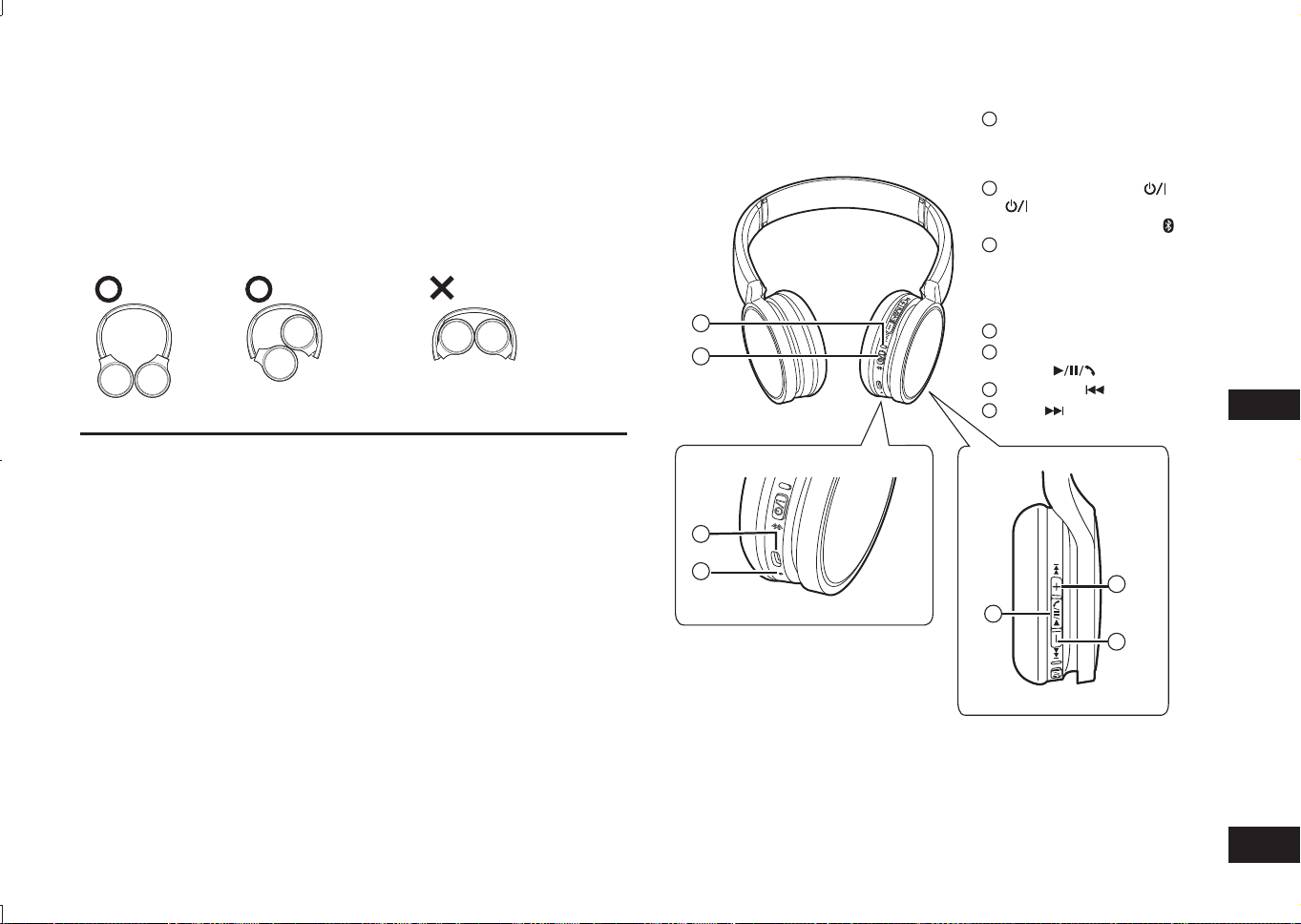
TQBM0093
X
59
3
ČESKY
Názvy součástí
■
Poznámka
• Nepoužívejte jiný nabíjecí kabel USB než dodaný kabel.
• Když jednotku používáte, nezakrývejte pravý reproduktor dlaní ruky. Mohlo by
dojít k blokování připojení Bluetooth
®
.
Obrázky produktu se mohou od skutečného produktu lišit.
1
LED kontrolka*
• Počet zablikání nebo barva
popisují stav jednotky.
(* dále označována výrazem „LED“)
2
Tlačítko Napájení
( Pohotovostní režim/
Zapnuto) / Párování
3
Nabíjecí konektor (DC IN)
• Při nabíjení připojte nabíjecí
kabel USB (je součástí
dodávky) k tomuto konektoru.
(→ S. 4)
4
Mikrofon
5
Přehrávání/Pozastavení/
Hovor
6
Předchozí /Hlasitost –
7
Další /Hlasitost +
Údržba
Tuto jednotku čistěte suchým a měkkým hadříkem.
• Nepoužívejte rozpouštědla, jako je benzín, ředidla, alkohol, kuchyňské čistící
prostředky, chemické utěrky apod. Mohlo by dojít k deformaci vnějšího povrchu
nebo k odloupnutí laku.
■
Skládání této jednotky
Sluchátka složte, jak je zobrazeno níže. Nesprávné složení může mít za
následek poruchu.
Co dělat Co NEDĚLAT
Prohlášení o shodě (DoC)
Společnost “Panasonic Corporation” tímto prohlašuje, že tento výrobek je ve shodě
se základními požadavky a dalšími příslušnými ustanoveními směrnice
2014/53/EU.
Zákazníci si mohou stáhnout originál DoC pro naše produkty RE z našeho serveru DoC:
http://www.doc.panasonic.de
Kontakt na Autorizovaného obchodního zástupce:
Panasonic Marketing Europe GmbH, Panasonic Testing Centre,
Winsbergring 15, 22525 Hamburg, Německo
2
1
3
4
5
6
7
RP-HF400B_E(TQBM0093).indb 59RP-HF400B_E(TQBM0093).indb 59 2017/03/17 21:21:462017/03/17 21:21:46
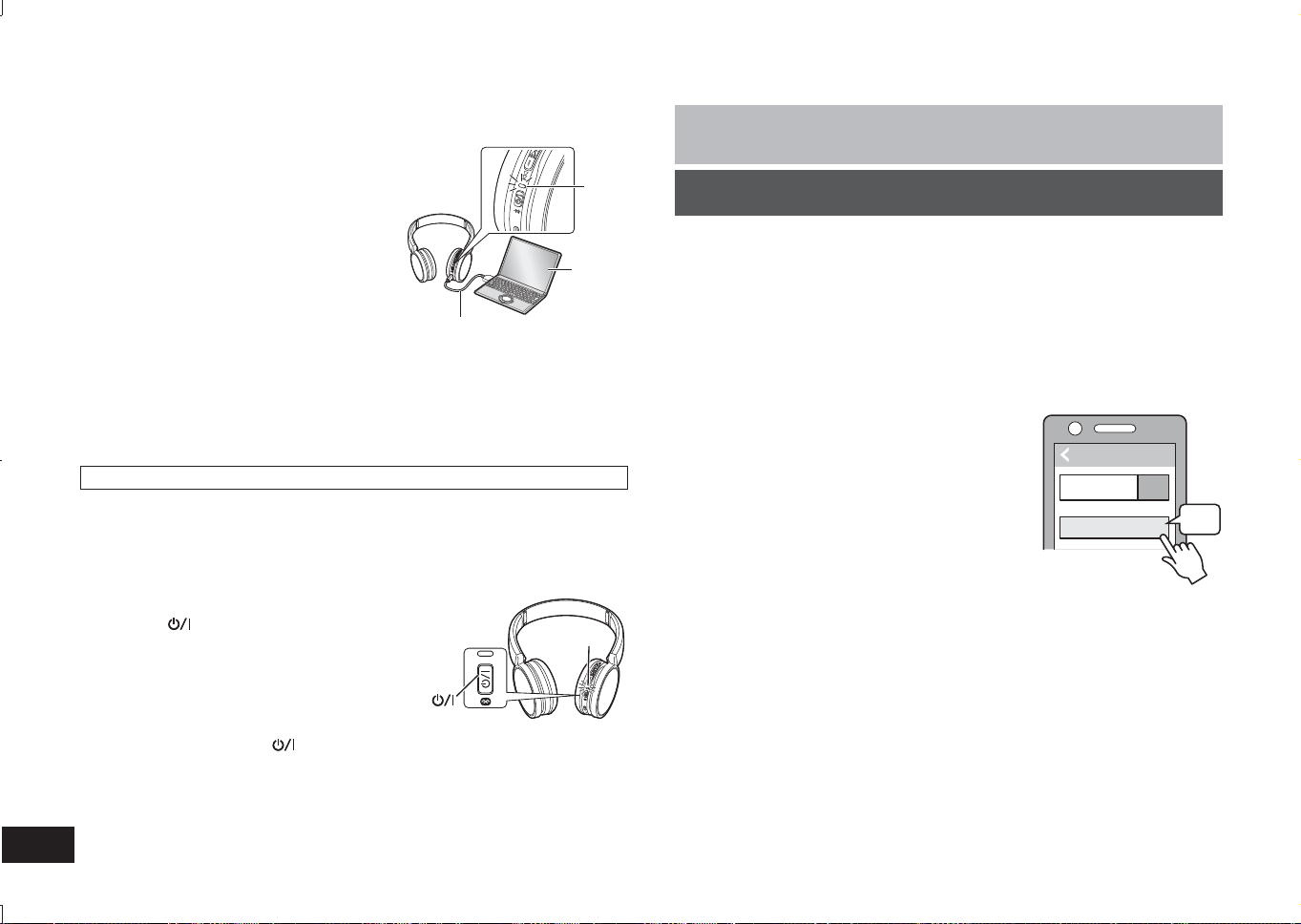
TQBM0093
X
60
4
Nabíjecí baterie (instalovaná v jednotce) není v okamžiku zakoupení nabitá.
Před použitím jednotky baterii nabijte.
1
Připojte tuto jednotku k počítači
pomocí nabíjecího kabelu USB
• Kontrolka LED se rozsvítí červeně.
• Během nabíjení LED svítí červeně.
Jakmile bude nabíjení dokončeno, LED
zhasne.
• Nabití vybité baterie do plně nabitého
stavu trvá přibližně 2,5 hodiny.
Počítač
LED
Nabíjecí kabel USB
(je součástí dodávky)
■
Poznámka
• Funkci Bluetooth
®
nelze použít, když je tato jednotka připojena k počítači pomocí
nabíjecího kabelu USB.
• Nabíjení provádějte při okolní teplotě v rozmezí od 10 °C do 35 °C.
• Během nabíjení nelze zapnout napájení.
• Nepoužívejte jiný nabíjecí kabel USB než dodaný kabel.
Upozornění: Při připojování k počítači použijte pouze dodané nabíjecí kabel USB.
Nabíjení
1
Ve stavu vypnutí, stiskněte a přidržte
tlačítko pro zapnutí tohoto zařízení
zhruba na 3 sekundy, dokud se kontrolka
LED (modrá) nerozbliká
• Ozve se pípnutí a kontrolka LED (modrá) se
pomalu rozbliká.
Tlačítko napájení
LED
Vypnutí
• Stiskněte tlačítko napájení
a přidržte je stisknuté po dobu přibližně 3 sekund.
Ozve se pípnutí a napájení se vypne.
■
Poznámka
• Když nebudete jednotku po dobu přibližně 5 minut používat, napájení se
automaticky vypne. (Viz „Automatické vypnutí“ (→ S. 6))
Zapnutí/vypnutí
Příprava
• Zařízení Bluetooth
®
umístěte přibližně 1 m od zařízení.
• S využitím návodu k použití zkontrolujte provoz zařízení.
Spárování (Registrace) tohoto zařízení se zařízením Bluetooth
®
za
účelem připojení
1
Stiskněte a přidržte tlačítko pro zapnutí tohoto zařízení dokud se
kontrolka LED nerozbliká
Při prvním spárování zařízení : přibl. 3 sekundy
Při druhém nebo následném spárování zařízení : přibl. 5 sekund
• Jednotka začne vyhledávat zařízení Bluetooth
®
, k nimž je možno se připojit,
přičemž kontrolka LED bude blikat střídavě modře a červeně.
2
Zapněte zařízení Bluetooth
®
a aktivujte funkci Bluetooth
®
3
Z nabídky zařízení Bluetooth
®
vyberte
„RP-HF400B“
• Adresu MAC „□□□□□□“ („□“ zastupuje znak,
jedinečný pro každou sadu.) je možno
zobrazit předtím, než se zobrazí „RP-
HF400B“.
• Budete-li požádáni o kód, zadejte na zařízení
kód „0000“ (čtyři nuly).
4
Zkontrolujte připojení se zařízením
Bluetooth
®
na zařízení
• Dokud nebude připojení zařízení dokončeno, LED bude střídavě blikat
červeně a modře. Když kontrolka LED (modrá) blikne dvakrát zhruba každé
2 sekundy, spárování (registrace) je dokončeno. (Spojení navázáno)
■
Poznámka
• Pokud není připojení k zařízení navázáno přibližně do 5 minut, zařízení se
vypne. Spárování proveďte znovu.
• Na jedno zařízení nelze zaregistrovat 2 nebo více zařízení Bluetooth
®
.
• S tímto zařízením můžete spárovat až 8 zařízení Bluetooth
®
. Je-li spárováno 9.
Zařízení, dojde k nahrazení za zařízení s nejstarším připojením. Abyste ho mohli
použít, proveďte spárování znovu.
Připojení zařízení Bluetooth
®
Bluetooth
Bluetooth
RP-HF400B
ON
3Ĝ
Vyberte
=DĜt]HQt
RP-HF400B_E(TQBM0093).indb 60RP-HF400B_E(TQBM0093).indb 60 2017/03/17 21:21:462017/03/17 21:21:46
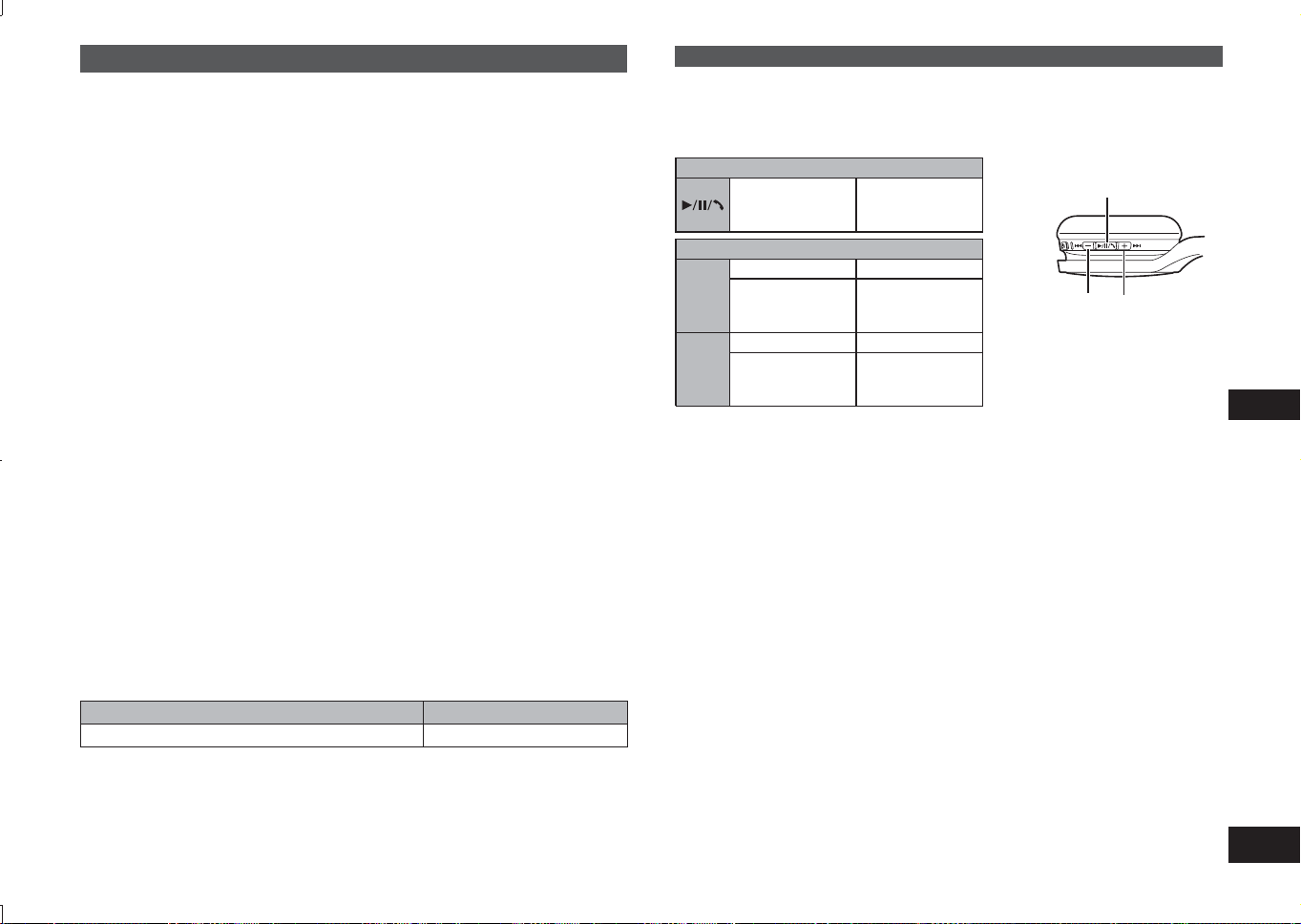
TQBM0093
X
61
5
ČESKY
Poslech hudby
Pokud zařízení kompatibilní s funkcí Bluetooth
®
podporuje Bluetooth
®
profily
„A2DP“ a „AVRCP“, lze hudbu přehrávat pomocí funkcí dálkového ovládání
jednotky.
• A2DP (Advanced Audio Distribution Profile): Přenáší hudbu do jednotky.
• AVRCP (Audio/Video Remote Control Profile):
Umožňuje dálkové ovládání zařízení pomocí jednotky.
1
Spojte zařízení Bluetooth
®
a jednotku (→ S. 4)
2
Zvolte a přehrajte hudbu na zařízení Bluetooth
®
• Zvolená hudba bude vysílána do reproduktorů jednotky.
Provozní doba baterie
Typ baterie Provozní doba
Nabíjecí baterie (instalovaná v jednotce) Přibl. 20 hodin
Provozní doba může být kratší v závislosti na podmínkách používání.
■
Pozor
• Z jednotky může v závislosti na úrovni hlasitosti unikat zvuk ven.
• Když se úroveň hlasitosti přiblíží maximální úrovni, může znít hudba zkresleně.
Snižujte hlasitost, dokud zkreslení nezmizí.
Dálkové ovládání
Pomocí této jednotky můžete ovládat zařízení Bluetooth
®
.
• V závislosti na zařízeních Bluetooth
®
nemusí některé z funkcí uvedených níže
fungovat, případně mohou při použití s jednotkou fungovat jinak.
(Příklad používání)
Přehrávání/Pozastavení/Hovor
Stiskněte
Přehrávání/
Pozastavení/
Hovor
Předchozí/Další/Hlasitost
+
Stiskněte Zvýšení hlasitosti
Stiskněte a
přidržte
Posun na
počátek další
stopy
−
Stiskněte Snížení hlasitosti
Stiskněte a
přidržte
Návrat na
počátek aktuální
stopy
Přehrávání/Pozastavení/Hovor
Hlasitost –/
Předchozí
Hlasitost +/
Další
■
Poznámka
• Hlasitost lze upravit v 15 úrovních.
Když bude dosaženo maximální úrovně hlasitosti, ozve se pípnutí.
S telefony (mobilními telefony nebo smartphony) s aktivní funkcí Bluetooth
®
,
které podporují Bluetooth
®
profil „HSP“ nebo „HFP“, můžete pomocí této jednotky
telefonovat.
• HSP (Headset Profile):
Tento profil lze použít k příjmu monofonního zvuku a navázání obousměrné
komunikace s využitím mikrofonu na jednotce.
• HFP (Hands-Free Profile):
Kromě funkcí HSP tento profil obsahuje funkce příchozích a odchozích hovorů.
• Připojte telefon s povolenou funkcí Bluetooth
®
a jednotku (→ s. 4)
Telefonování
Připojení spárovaného zařízení Bluetooth
®
1
Zapněte jednotku
• Stiskněte a přidržte tlačítko pro zapnutí tohoto zařízení zhruba na 3 sekundy,
dokud se kontrolka LED (modrá) nerozbliká.
• Ozve se pípnutí a kontrolka LED (modrá) se pomalu rozbliká.
2
Proveďte kroky 2 a 3 „Spárování (Registrace) tohoto zařízení se
zařízením Bluetooth
®
za účelem připojení“ (→ S. 4)
• Když kontrolka LED (modrá) blikne dvakrát zhruba každé 2 sekundy,
spárování (registrace) je dokončeno. (Spojení navázáno)
■
Poznámka
• Toto zařízení si pamatuje zařízení, které bylo připojeno naposledy. Připojení
může být automaticky navázáno po provedení kroku 1 (viz výše).
• Pokud není připojení k zařízení navázáno přibližně do 5 minut, zařízení se
vypne. Spárování proveďte znovu. (→ S. 4)
RP-HF400B_E(TQBM0093).indb 61RP-HF400B_E(TQBM0093).indb 61 2017/03/17 21:21:472017/03/17 21:21:47
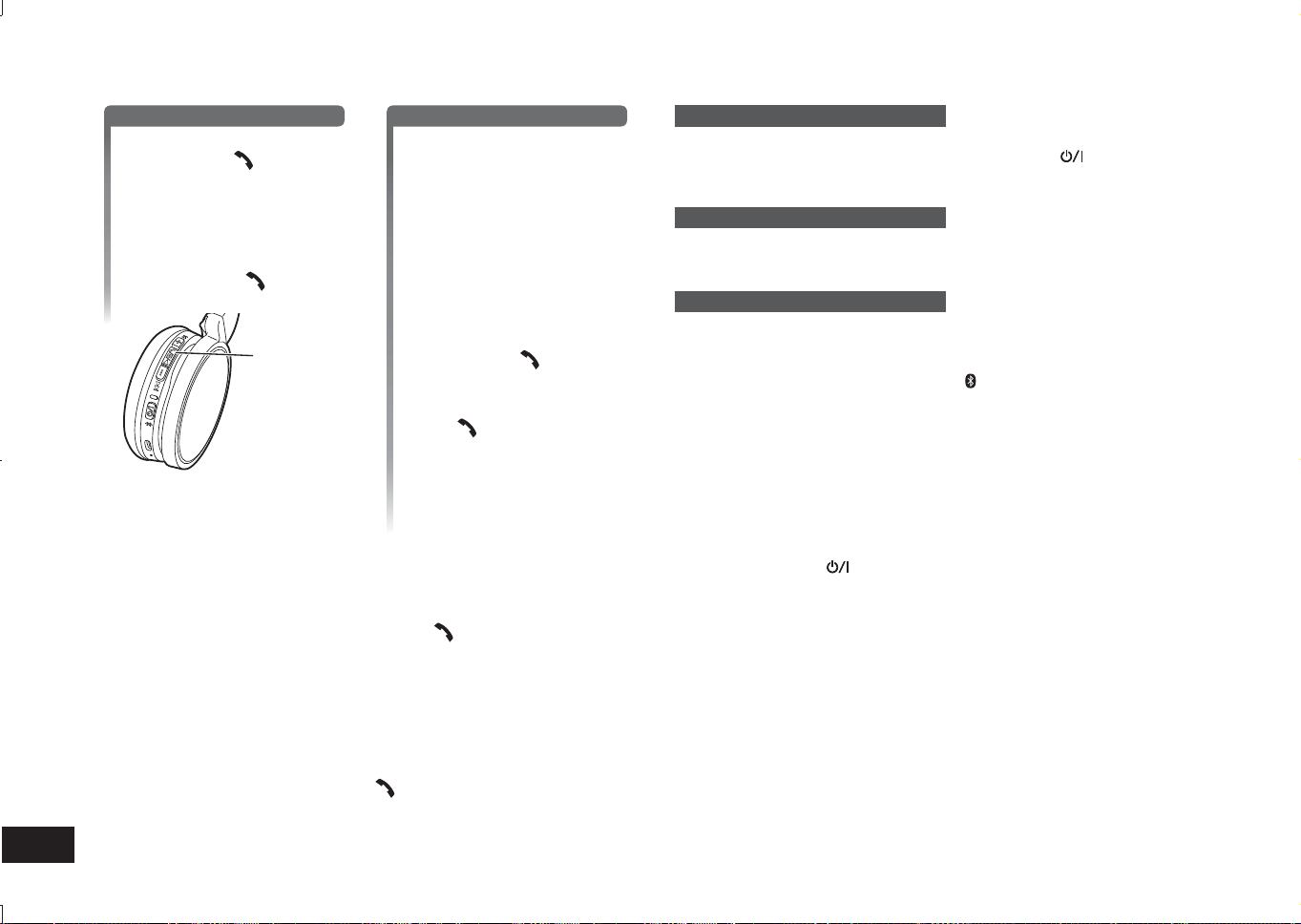
TQBM0093
X
62
6
1
Přijetí příchozího hovoru
Stiskněte na jednotce
tlačítko Hovor a přijměte
hovor
• Během příchozího hovoru
se bude zvonění ozývat z
reproduktoru a LED bude blikat.
• (Pouze pro HFP) Chcete-li
příchozí hovor odmítnout,
stiskněte Hovoru
dvakrát,
rychle.
Hovor
Navázání odchozího hovoru
Navažte odchozí hovor
prostřednictvím telefonu s
aktivní funkcí Bluetooth
®
• Další informace naleznete v
návodu k použití telefonu s
aktivní funkcí Bluetooth
®
.
(Kroky pro navázání a ovládání
hovoru pomocí jednotky jsou
vysvětleny níže)
• Během odchozího hovoru
se bude zvonění ozývat z
reproduktoru a LED bude blikat.
• Chcete-li odchozí hovor zrušit,
stiskněte Hovor
.
Ozve se pípnutí.
• (Pouze pro HFP) Když je telefon
nečinný, stiskněte tlačítko
Hovor
a přidržte je stisknuté
po dobu přibližně 5 sekund.
Bude navázán odchozí hovor
na naposledy vytočené číslo.
Z reproduktoru se ozve jedno
krátké cvaknutí a LED bude
blikat.
2
Začněte hovořit
• LED bude během hovoru opakovaně 2krát blikat.
• Během telefonátu můžete upravovat hlasitost. Pokyny pro nastavení
naleznete na straně 5.
3
Pro ukončení telefonátu stiskněte Hovor
• Ozve se pípnutí.
■
Poznámka
• V některých případech může být nezbytné nastavit funkci hands free na telefonu
s aktivní funkcí Bluetooth
®
.
• V závislosti na telefonu s aktivní funkcí Bluetooth
®
se může zvonění příchozích a
odchozích hovorů telefonu ozývat z jednotky.
• (Pouze pro HFP) Volající zařízení se přepne mezi telefonem s aktivní funkcí
Bluetooth
®
a jednotkou. (Stiskněte Hovoru na zařízení dvakrát, rychle, a
zařízení zapněte)
Užitečné funkce
Resetování jednotky
Když dochází k odmítnutí všech operací, můžete tuto jednotku resetovat. Jednotku
resetujete stiskem a přidržením tlačítka hlavního vypínače
na dobu 10 sekund
nebo delší. Všechny předchozí operace budou zrušeny. (Informace o párování se
zařízeními nebudou vymazány.)
Automatické vypnutí
Pokud tato jednotka po dobu přibližně 5 minut nepřehrává zvuk a pokud během
této doby nedochází k ovládání zařízení Bluetooth
®
, ozve se pípnutí a napájení
bude automaticky vypnuto.
LED kontrolka
Pokud během používání jednotky klesne míra nabití baterie, modře blikající
kontrolka LED na pravém sluchátku zčervená*. Každou 1 minutu se ozve pípnutí.
Když se baterie vybije, vypne se napájení.
* Pokud stiknete a podržíte párovací tlačítko
pří nízkém stavu baterie, LED dioda
bude blikat pouze červeně.
Obnova výrobních nastavení
Pokud budete chtít vymazat všechny informace o párování se zařízeními apod.,
můžete obnovit výrobní nastavení jednotky (původní nastavení, která platila v
okamžiku jejího zakoupení). Před obnovením zařízení nabijte baterii.
1 stiskněte a přidržte
přibližně na 5 sekund
• Začněte vyhledávat zařízení Bluetooth
®
, k nimž je možno se připojit.
2 Během hledání stiskněte a současně přidržte tlačítka + a − na 6 nebo více
sekund
• Kontrolka LED rychle bliká modře. Jednotka bude obnovena do továrního
nastavení.
■
Upozornění
• Při opakovaném spárování zařízení vymažte registrační informace (Zařízení:
„RP-HF400B“) z menu zařízení Bluetooth
®
a toto zařízení zaregistrujte na
zařízení Bluetooth
®
znovu. (→ S. 4)
RP-HF400B_E(TQBM0093).indb 62RP-HF400B_E(TQBM0093).indb 62 2017/03/17 21:21:472017/03/17 21:21:47
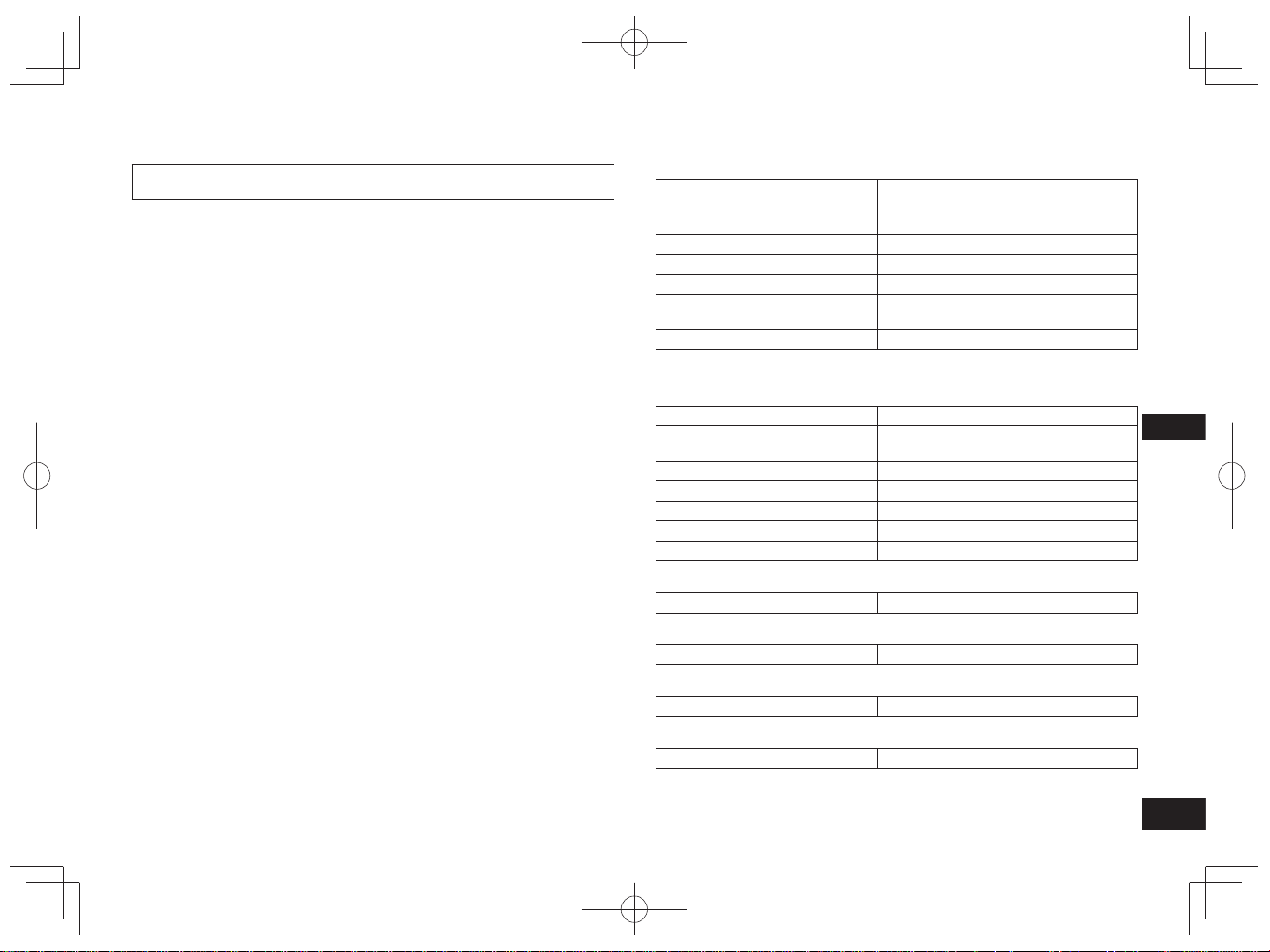
TQBM0093
X
63
7
ČESKY
Společnost Panasonic nenese žádnou odpovědnost za vyzrazení dat a/nebo
informací během bezdrátového přenosu.
■
Použité kmitočtové pásmo
Tato jednotka využívá kmitočtové pásmo 2,4 GHz.
■
Certifikace této jednotky
• Tato jednotka odpovídá omezením kmitočtů a získala certifikaci založenou na
zákonech týkajících se kmitočtů. Povolení pro bezdrátový přenos proto není
zapotřebí.
• Činnosti uvedené níže jsou v některých zemích postihovány podle zákona:
– Rozebírání/úpravy této jednotky.
– Odstranění štítků se specifikacemi.
■
Omezení používání
• Bezdrátový přenos a/nebo použití se všemi zařízeními s funkcí Bluetooth
®
nejsou zaručeny.
• Všechna zařízení musí odpovídat standardům stanoveným společností
Bluetooth SIG, Inc.
• V závislosti na specifikacích a nastaveních zařízení se může stát, že se
připojení nepodaří navázat nebo že budou některé operace odlišné.
• Tento systém podporuje bezpečnostní funkce Bluetooth
®
. V závislosti na
prostředí používání a/nebo nastaveních však toto zabezpečení nemusí být
dostatečné. Bezdrátový přenos dat do tohoto systému provádějte opatrně.
• Tento systém nemůže přenášet data do zařízení Bluetooth
®
.
■
Dosah pro používání
Tuto jednotku používejte na vzdálenost maximálně 10 m.
Dosah se může snížit v závislosti na prostředí, překážkách nebo rušení.
■
Rušení z jiných zařízení
• Tato jednotka nemusí fungovat správně nebo se mohou objevovat problémy,
jako je šum nebo přeskakování zvuku, pokud bude docházet k rušení
rádiovými vlnami v situaci, kdy se bude jednotka nacházet příliš blízko
k dalším zařízením Bluetooth
®
nebo k zařízením, která využívají pásmo
2,4 GHz.
• Tato jednotka nemusí fungovat správně, pokud budou rádiové vlny z nedaleké
vysílací stanice apod. příliš silné.
■
Účel použití
• Tato jednotka slouží pouze k normálnímu běžnému používání.
• Nepoužívejte tento systém v blízkosti vybavení nebo v prostředí, které je citlivé
na rušení rádiovými vlnami (například na letištích, v nemocnicích, laboratořích
apod.).
O funkci Bluetooth
®
■
Obecné
Napájení
DC 5 V, 330 mA
(Vestavěná baterie 3,7 V (Li-ion 430 mAh))
Provozní doba*
1
Přibl. 20 hodin
Doba nabíjení*
2
(25 ºC) Přibl. 2,5 hodin
Rozsah teplot pro nabíjení 10 ºC až 35 ºC
Rozsah provozních teplot 0 ºC až 40 ºC
Rozsah provozní vlhkosti
Relativní vlhkost 35% až 80%
(bez kondenzace)
Hmotnost Přibl. 130 g
*
1
Může být kratší v závislosti na podmínkách používání.
*
2
Doba nezbytná pro plné nabití vybité baterie.
■
Sekce Bluetooth
®
Specifikace systému Bluetooth
®
Ver. 4.1
Klasifikace bezdrátového
vybavení
Třída 2 (2,5 mW)
Kmitočtové pásmo 2402 MHz až 2480 MHz
Max výkon RF 4 dBm
Podporované profily A2DP, AVRCP, HSP, HFP
Podporovaný kodek SBC
Provozní vzdálenost Až 10 m
■
Sekce reproduktorů
Měniče 30 mm
■
Sekce konektorů
DC IN DC 5 V, 330 mA
■
Sekce mikrofonu
Typ Monofonní
■
Sekce příslušenství
Nabíjecí kabel USB 0,1 m
●
Specifikace se mohou měnit bez upozornění.
Specifikace
RP-HF400B_E(TQBM0093).indb 63RP-HF400B_E(TQBM0093).indb 63 2017/03/17 21:21:472017/03/17 21:21:47

TQBM0093
X
64
8
Než si vyžádáte opravu, zkontrolujte následující. Pokud máte o některých
kontrolních bodech pochybnosti nebo pokud uvedená řešení problém nevyřeší,
zeptejte se svého prodejce, jak máte postupovat.
Obecné
Jednotka nereaguje
• Když dochází k odmítnutí všech operací, můžete tuto jednotku resetovat.
Jednotku resetujete stiskem a přidržením tlačítka hlavního vypínače
na dobu
10 sekund nebo delší. (→ S. 6)
Napájení a nabíjení
Jednotku nelze nabít
• Ujistěte se, že je počítač zapnutý a že se nenachází v pohotovostním režimu
nebo v režimu spánku.
• Je USB port, který právě používáte, funkční? Pokud je počítač vybaven dalšími
USB porty, odpojte konektor ze stávajícího portu a zapojte ho do některého z
ostatních portů.
• Pokud nelze problém vyřešit pomocí opatření uvedených výše, odpojte nabíjecí
kabel USB a poté jej znovu zapojte.
• Pokud se doba nabíjení a provozní doba zkrátí, že baterie dosáhla konce své
životnosti. (Počet nabití vestavěné baterie: přibližně 500.)
LED během nabíjení nesvítí / Nabíjení trvá déle
• Je nabíjecí kabel USB (je součástí dodávky) pevně připojen ke konektoru USB
počítače? (→ S. 4)
• Nabíjení je třeba provádět v místnostech s teplotou v rozmezí 10 °C až 35 °C.
Napájení nelze zapnout
• Neprobíhá nabíjení jednotky? Během nabíjení nelze zapnout napájení. (→ S. 4)
Připojení zařízení Bluetooth
®
Zařízení nelze připojit
• Vymažte informace o párování této jednotky ze zařízení Bluetooth
®
, potom je
znovu spárujte. (→ S. 4)
Průvodce řešením problémů
Zvuk a hlasitost
Neozývá se zvuk
• Ujistěte se, že jsou jednotka a zařízení Bluetooth
®
správně spojeny. (→ S. 4)
• Zkontrolujte, zda na zařízení Bluetooth
®
probíhá přehrávání hudby.
• Ujistěte se, že je jednotka zapnutá a že není hlasitost nastavena na příliš nízkou
úroveň.
• Znovu spárujte a připojte zařízení Bluetooth
®
a jednotku. (→ S. 4)
• Zkontrolujte, zda kompatibilní zařízení Bluetooth
®
podporuje profil „A2DP“.
Podrobnosti o profilech naleznete v části „Poslech hudby“ (→ S. 5). Rovněž si
přečtěte návod k obsluze kompatibilního zařízení Bluetooth
®
.
Nízká hlasitost
• Zvyšte hlasitost jednotky. (→ S. 5)
• Zvyšte hlasitost na zařízení Bluetooth
®
.
Zvuk ze zařízení je přerušovaný / Kvalita zvuku je špatná
• Zvuk může být přerušovaný, pokud je signál blokovaný. Nezakrývejte tuto
jednotku dlaní apod.
• Zařízení se může nacházet mimo 10 m dosah pro komunikaci. Přesuňte zařízení
blíže k jednotce.
• Odstraňte překážky mezi touto jednotkou a zařízením.
• Vypněte bezdrátová zařízení LAN, která nepoužíváte.
• Pokud je vybitá baterie, může docházet k problémům s komunikací. Nabijte
jednotku. (→ S. 4)
Telefonní hovory
Druhá osoba není slyšet
• Ujistěte se, že jsou jednotka a telefon s aktivní funkcí Bluetooth
®
zapnuté.
• Zkontrolujte, zda jsou jednotka a telefon s aktivní funkcí Bluetooth
®
spojené.
(→ S. 4)
• Zkontrolujte nastavení zvuku telefonu s aktivní funkcí Bluetooth
®
. Pokud je
zařízení pro hovor nastaveno na telefon s aktivní funkcí Bluetooth
®
, nastavte je
na jednotku. (→ S. 4)
• Pokud je hlasitost hlasu druhé osoby příliš nízká, zvyšte hlasitost na jednotce i
na telefonu s aktivní funkcí Bluetooth
®
.
Telefonický hovor nelze uskutečnit
• Zkontrolujte zda kompatibilní zařízení Bluetooth
®
podporuje profil „HSP“ nebo
„HFP“. Podrobnosti o profilech naleznete v části „Poslech hudby“ (→ S. 5)
a „Telefonování“ (→ S. 5). Rovněž si přečtěte návod k obsluze telefonu s
aktivovaným Bluetooth
®
.
RP-HF400B_E(TQBM0093).indb 64RP-HF400B_E(TQBM0093).indb 64 2017/03/17 21:21:472017/03/17 21:21:47
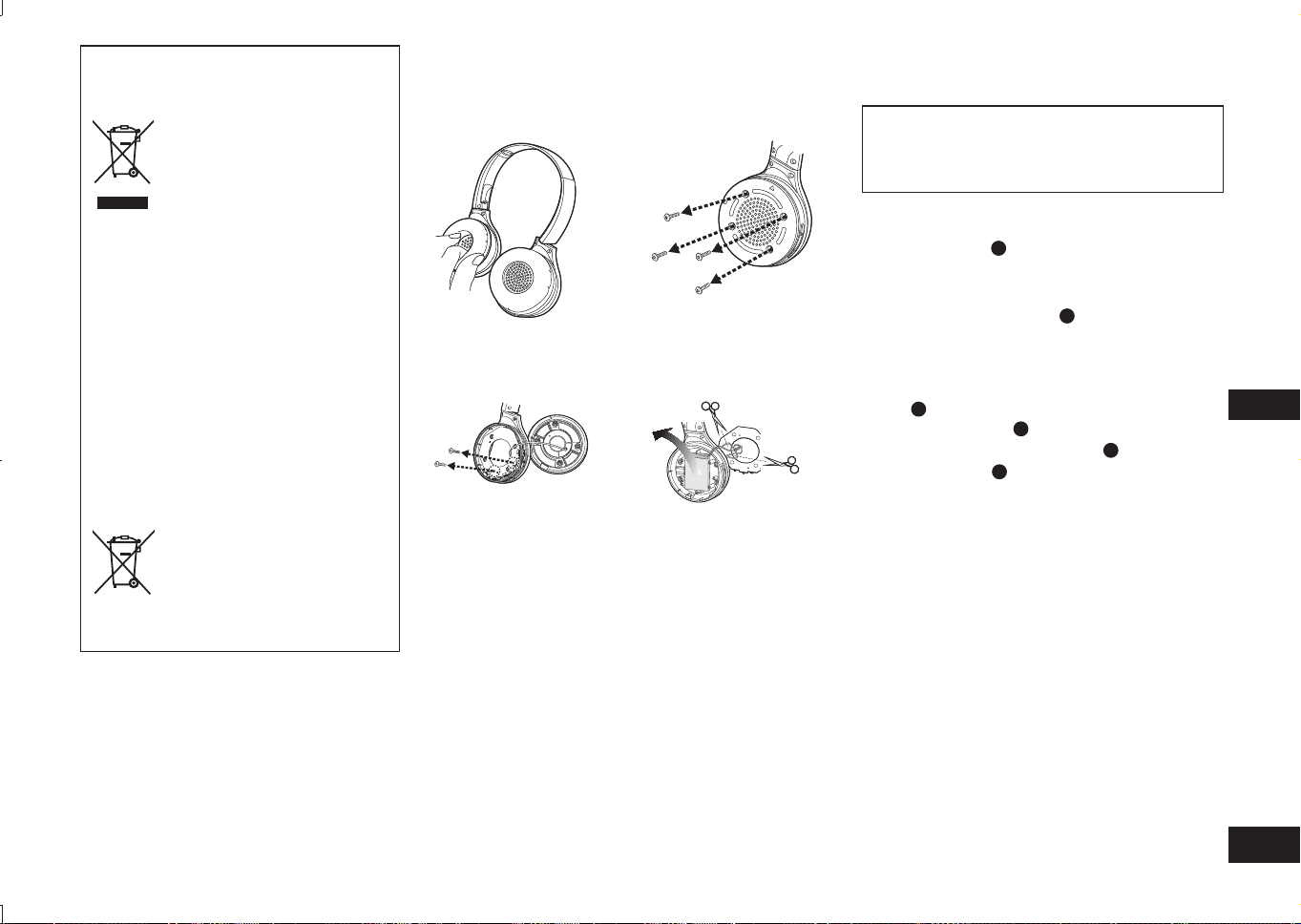
TQBM0093
X
65
9
ČESKY
Odstranění baterie při likvidaci jednotky
Následující pokyny se netýkají oprav, ale
likvidace výrobku. Jakmile bude jednotka
rozebrána, není ji možné obnovit.
Při likvidaci této jednotky vyjměte baterii, která je v
jednotce umístěna, a recyklujte ji.
• Rozebírání provádějte, až bude baterie vybitá.
• Rozebrané části uchovávejte mimo dosah dětí.
1
Otočte náušník
A
nahoru a umístěte jednotku
na plochý povrch
2
Přidržte spodní část pravého reproduktoru
(R) a umístěte křížový šroubovák (komerčně
dostupný) pod horní kryt
B
• Dávejte pozor na to, aby se vám prsty nedostaly ke hrotu
šroubováku.
• Vyberte dostatečně velký šroubovák pro prostor pod
horním krytem.
3
Použijte šroubovák jako páčidlo a zatlačte horní
kryt
B
nahoru
4
Sejměte horní kryt
B
5
Sejměte 4 šrouby a spodní kryt
C
6
Uchopte baterii
D
a vyndejte ji
Manipulace s použitými bateriemi
• Konektory izolujte lepicí páskou nebo podobným materiálem.
• Baterii nerozebírejte.
■
Baterie
• Nevystavujte teplu ani ohni.
• Baterii/baterie nenechávejte po delší dobu v autě
vystaveném přímému slunečnímu světlu se zavřenými
okny a dveřmi.
• Nesprávné zacházení s baterií může způsobit únik
elektrolytu, který může poškodit předměty, se kterými
by přišel do kontaktu. Pokud z baterie uniká elektrolyt,
obraťte se na prodejce. Pokud se elektrolyt dostane do
kontaktu s některou částí vašeho těla, důkladně ji omyjte
vodou.
• Při likvidaci baterií se obraťte na místní úřady nebo na
prodejce a informujte se na správný způsob likvidace.
Likvidace použitých zařízení a baterií
Jen pro státy Evropské unie a země
s fungujícím systémem recyklace a
zpracování odpadu.
Tyto symboly na výrobcích,
jejich obalech a v doprovodné
dokumentaci upozorňují na
to, že se použitá elektrická a
elektronická zařízení, včetně
baterií, nesmějí likvidovat jako
běžný komunální odpad.
Aby byla zajištěna správná
likvidace a recyklace použitých
výrobků a baterií, odevzdávejte
je v souladu s národní
legislativou na příslušných
sběrných místech.
Správnou likvidací přispějete
k úspoře cenných přírodních
zdrojů a předejdete možným
negativním dopadům na lidské
zdraví a životní prostředí.
O další podrobnosti o sběru
a recyklaci odpadu požádejte
místní úřady.
Při nesprávné likvidaci tohoto
druhu odpadu se vystavujete
postihu podle národní legislativy.
Poznámka k symbolu baterie
(značka pod symbolem):
Tento symbol může být použitý v
kombinaci s chemickou značkou.
Takový případ je souladu
s požadavky směrnice pro
chemické látky.
1
Odstraňte pravý
reproduktor
2
Vyjměte 4 šrouby
3
Vyjměte 2 šrouby a
desku
4
Odstřihněte dráty jeden
po druhé, pomocí nůžek,
a vyjměte baterii
RP-HF400B_E(TQBM0093).indb 65RP-HF400B_E(TQBM0093).indb 65 2017/03/17 21:21:482017/03/17 21:21:48
TQBM0093
X
66
2
Skontrolujte a identifikujte dodané
príslušenstvo.
1 USB nabíjací kábel
Obsah
Pred použitím
Príslušenstvo ...................................... 2
Autorské práva, atď. ........................... 2
Bezpečnostné opatrenia ..................... 2
Údržba ................................................ 3
Názvy dielov ....................................... 3
Príprava
Nabíjanie ............................................ 4
Zapnutie/vypnutie ............................... 4
Pripájanie zariadenia Bluetooth
®
........ 4
Prevádzka
Počúvanie hudby ................................ 5
Uskutočnenie telefonátu ..................... 6
Užitočné funkcie ................................. 6
Iné
Obnovenie výrobných nastavení ........ 6
Informácie o Bluetooth
®
...................... 7
Špecifikácie ........................................ 7
Pokyny k odstraňovaniu porúch ......... 8
Odstránenie batérie pri likvidácii tejto
jednotky .............................................. 9
Vážený zákazník
Ďakujeme, že ste si zakúpili tento
výrobok.
Prosím, pred používaním tohto
výrobku si dôkladne prečítajte tieto
pokyny a tento návod uschovajte pre
možnú potrebu v budúcnosti.
Príslušenstvo
●
Slovné označenie Bluetooth
®
a logá
sú registrované obchodné známky
spoločnosti Bluetooth SIG, Inc. a
akékoľvek použitie takých označení
spoločnosťou Panasonic Corporation
je možné na základe licencie.
Iné ochranné známky a obchodné
názvy patria ich príslušným
majiteľom.
●
Mená iných systémov a mená
výrobkov objavujúce sa v tomto
dokumente sú vo všeobecnosti
registrovanými ochrannými
známkami alebo ochrannými
známkami príslušných vývojárskych
spoločností.
Všimnite si, že značenia ™ a ® sa v
tomto dokumente neobjavujú.
Autorské
práva, atď.
Bezpečnostné opatrenia
■
Jednotka
• Nepoužívajte ani neumiestňujte túto jednotku v blízkosti zdrojov tepla.
• Nepoužívajte jednotku pri vysokej hlasitosti na miestach, kde z
bezpečnostných dôvodov musíte počuť zvuky z okolitého prostredia, napríklad
na železničných priecestiach a staveniskách.
• Charakteristický prúd širokého pásma sa rovná alebo je väčší ako 75 mV.
VAROVANIE:
Pre zníženie rizika požiaru, elektrického šoku alebo poškodenia výrobku:
• Nevystavujte túto jednotku dažďu, vlhku, kvapkajúcej alebo striekajúcej
tekutine.
• Neumiestňujte predmety naplnené kvapalinami, napríklad vázy, na túto
jednotku.
• Používajte len odporúčané príslušenstvo.
• Neodstraňujte kryty.
• Sami neopravujte túto jednotku. Opravu prenechajte kvalifikovanému
personálu.
■
Alergie
• V prípade, že vám reproduktory alebo ktorékoľvek iné časti prichádzajúce
do styku s vašou pokožkou spôsobujú nepríjemný pocit, prestaňte jednotku
používať.
• Pretrvávajúce používanie môže spôsobiť vyrážky alebo iné alergické reakcie.
■
Preventívne opatrenia týkajúce sa počúvania so slúchadlami
• Nepoužívajte slúchadlá pri vysokej hlasitosti. Odborníci na sluch neodporúčajú
nepretržité nadmerné prehrávanie.
• V prípade, že začujete zvonenie v ušiach, znížte hlasitosť alebo prestaňte
slúchadlá používať.
• Nepoužívajte pri vedení motorového vozidla. Môže to viesť k dopravnej
nehode a v mnohých oblastiach je to zakázané.
• V potenciálne nebezpečných situáciách by ste mali byť mimoriadne opatrní
alebo by ste ich dočasne mali prestať používať.
Počas použitia môže táto jednotka zachytiť rušenie rádiovými vlnami spôsobené
mobilnými telefónmi. V prípade výskytu spomínaného rušenia, zvýšte, prosím,
vzdialenosť medzi touto jednotkou a mobilným telefónom.
Táto jednotka je určená na použitie v miernom a tropickom klimatickom pásme.
RP-HF400B_E(TQBM0093).indb 66RP-HF400B_E(TQBM0093).indb 66 2017/03/17 21:21:482017/03/17 21:21:48

TQBM0093
X
67
3
SLOVENSKY
Názvy dielov
■
Poznámka
• Okrem dodaného nabíjacieho kábla nepoužívajte žiaden iný USB nabíjací kábel.
• Pri používaní jednotky nezakrývajte dlaňou pravý reproduktor. Spojenie
Bluetooth
®
môže byť blokované.
Zobrazenia výrobku sa môžu líšiť od samotného výrobku.
1
Svetelný LED indikátor*
• Počet bliknutí alebo farba
udáva stav jednotky.
(* ďalej označovaný ako „LED“)
2
Tlačidlo hlavného vypínača
( Pohotovostný režim/
Zapnutý) / párovania
3
Koncovka pre nabíjanie
(DC IN)
• Pri nabíjaní zapojte USB
nabíjací kábel (pribalený) do
tejto koncovky. (→ Str. 4)
4
Mikrofón
5
Prehrávanie/Pauza/Volať
6
Predchádzajúce
/
Hlasitosť –
7
Ďalšie /
Hlasitosť +
Údržba
Jednotku čistite mäkkou suchou utierkou.
• Nepoužívajte rozpúšťadlá ako benzín, riedidlo, alkohol, kuchynské čistiace
prostriedky, chemické prípravky a podobne. Ich použitie by mohlo spôsobiť
deformácie vonkajšieho puzdra a odlupovanie povrchovej vrstvy.
■
Zložene tejto jednotky
Slúchadlá zložte podľa obrázka nižšie. Nesprávne zloženie môže spôsobiť
poruchu.
Správne Nesprávne
Vyhlásenie o zhode (DoC)
“Panasonic Corporation” týmto vyhlasuje, že tento výrobok je v súlade so
základnými požiadavkami a ďalšími príslušnými ustanoveniami smernice
2014/53/EU.
Zákazníci si môžu prevziať kópiu pôvodného dokumentu DoC pre naše výrobky RE
z nášho servera DoC:
http://www.doc.panasonic.de
Kontakt na splnomocneného zástupcu:
Panasonic Marketing Europe GmbH, Panasonic Testing Centre,
Winsbergring 15, 22525 Hamburg, Nemecko
2
1
3
4
5
6
7
RP-HF400B_E(TQBM0093).indb 67RP-HF400B_E(TQBM0093).indb 67 2017/03/17 21:21:482017/03/17 21:21:48
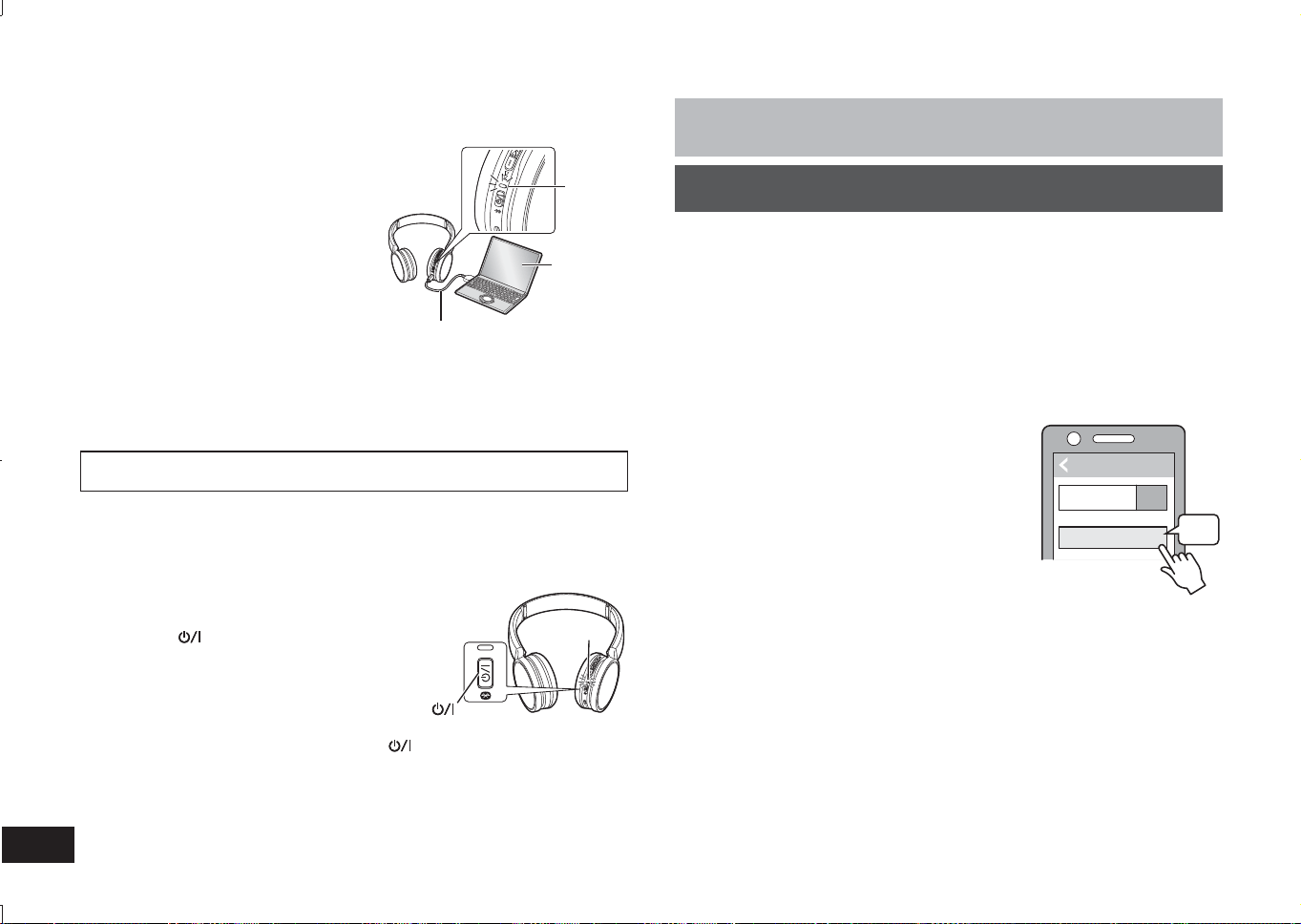
TQBM0093
X
68
4
Nabíjateľná batéria (nainštalovaná v jednotke) nie je zo začiatku nabitá. Pred
používaním jednotky batériu nabite.
1
Pripojte jednotku k počítaču
pomocou USB nabíjacieho kábla
• LED indikátor sa rozsvieti na červeno.
• Počas nabíjania svieti LED na červeno.
Po dokončení nabíjania LED zhasne.
• Nabíjanie zo stavu vybitia po plné
nabitie bude trvať približne 2,5 hodiny.
Počítač
LED
USB nabíjací kábel (pribalený)
■
Poznámka
• Funkcia Bluetooth
®
sa nedá používať keď je jednotka pripojená k počítaču
pomocou USB nabíjacieho kábla.
• Jednotku nabíjajte pri teplote medzi 10 °C a 35 °C.
• Počas nabíjania sa zariadenie nedá zapnúť.
• Okrem dodaného nabíjacieho kábla nepoužívajte žiaden iný USB nabíjací kábel.
Pozor: Pri pripájaní jednotky k počítaču používajte len dodaný USB nabíjací
kábel.
Nabíjanie
1
V stave vypnutia na približne 3 sekundy
stlačte a podržte hlavný vypínač tejto
jednotky , až kým nezačne LED indikátor
(modrý) blikať
• Budete počuť pípnutie a LED indikátor (modrý)
bude blikať pomaly.
Tlačidlo hlavného vypínača
LED
Vypnutie slúchadiel
• Stlačte a podržte tlačidlo hlavného vypínača
približne na 3 sekundy. Ozve sa
pípnutie a indikátor LED na pravom reproduktore zhasne.
■
Poznámka
• Jednotka sa automaticky vypne, ak nie je v prevádzke po dobu približne 5 minút.
(Pozri „Automatické vypnutie“ (→ Str. 6))
Zapnutie/vypnutie
Príprava
•
Zariadenie s rozhraním Bluetooth
®
umiestnite vo vzdialenosti do 1 m od jednotky.
• V prípade potreby skontrolujte prevádzku zariadenia v návode na použitie.
Párovanie (registrácia) tejto jednotky so zariadením s rozhraním
Bluetooth
®
na nadviazanie spojenia
1
Stlačte a podržte hlavný vypínač tejto jednotky, až kým nezačne
LED indikátor blikať
Pri prvom párovaní zariadenia: približne 3 sekundy
Pri párovaní druhého a ďalších zariadení: približne 5 sekúnd
• Jednotka začne vyhľadávať zariadenie s rozhraním Bluetooth
®
na pripojenie
a LED indikátor bude striedavo blikať na modro a na červeno.
2
Zapnite jednotku s rozhraním Bluetooth
®
a zapnite funkciu
rozhrania Bluetooth
®
3
V ponuke rozhrania Bluetooth
®
v zariadení zvoľte „RP-HF400B“
• Adresa MAC „□□□□□□“ („□“ je znak, ktorý
je pre každú súpravu jedinečný.) sa môže
zobraziť ešte pred zobrazením „RP-HF400B“.
• Po vyzvaní na zadanie prístupového kódu
zadajte prístupový kód tejto jednotky „0000
(štyri nuly)“.
4
Na jednotke skontrolujte spojenie so
zariadením s rozhraním Bluetooth
®
• Až do dokončenia pripojenia so zariadením bude LED indikátor
striedavo blikať na modro a červeno. Keď LED indikátor (modrý) blikne
dvakrát približne každé 2 sekundy, párovanie (registrácia) sa skončilo.
(Došlo k nadviazaniu spojenia.)
■
Poznámka
• Ak sa približne do 5 minút nenadviaže spojenie so zariadením, jednotka sa
vypne. Znova vykonajte párovanie.
• K jednotke nemôžu byť pripojené 2 alebo viac zariadení s rozhraním Bluetooth
®
zároveň.
• S touto jednotkou môžete spárovať maximálne 8 zariadení s rozhraním
Bluetooth
®
. Ak sa jednotka spáruje s deviatym zariadením, najstaršie spojenie
bude nahradené. V prípade opätovného použitia zariadenie znova spárujte.
Pripojenie zariadenia s rozhraním Bluetooth
®
Bluetooth
Bluetooth
RP-HF400B
ON
(Pr.)
V\EUDĢ
Zariadenie
RP-HF400B_E(TQBM0093).indb 68RP-HF400B_E(TQBM0093).indb 68 2017/03/17 21:21:492017/03/17 21:21:49
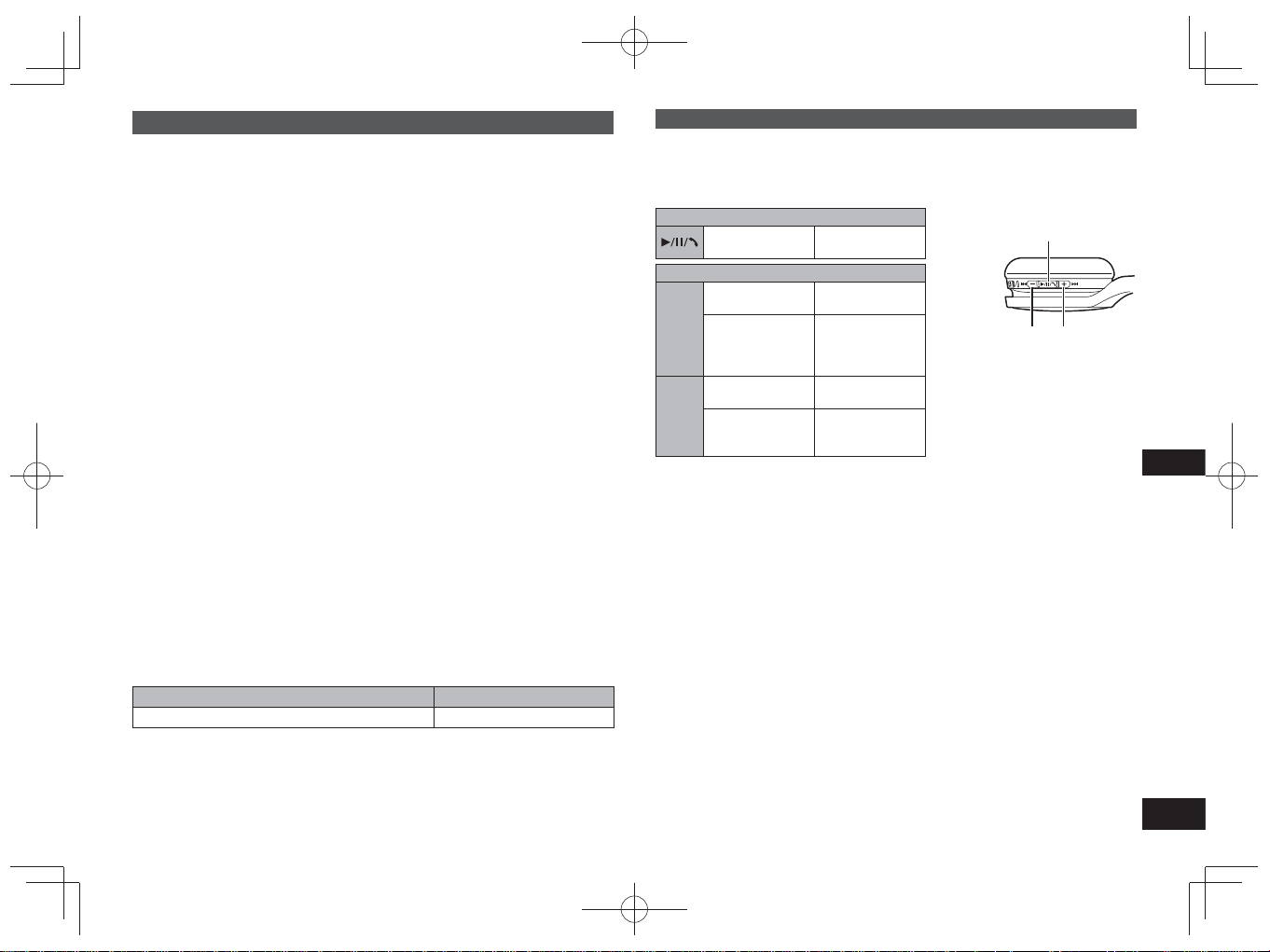
TQBM0093
X
69
5
SLOVENSKY
Počúvanie hudby
Ak zariadenie kompatibilné s Bluetooth
®
podporuje profily Bluetooth
®
„A2DP“ a
„AVRCP“, hudbu môžete prehrávať pomocou diaľkového ovládania na jednotke.
• A2DP (Profil pokročilej distribúcie zvuku): Vysiela zvuk k jednotke.
• AVRCP (Profil diaľkového ovládania zvuku/videa):
Umožňuje diaľkové ovládanie zariadenia pomocou jednotky.
1
Pripojte zariadenie s funkciou Bluetooth
®
k jednotke (→ Str. 4)
2
Zvoľte a spustite hudbu na zariadení Bluetooth
®
• Zvolená hudba sa prehráva cez reproduktory jednotky.
Doba prevádzky batérie
Typ batérie Doba prevádzky
Nabíjateľná batéria (nainštalovaná v jednotke) Pribl. 20 hodín
Doba prevádzky môže byť kratšia v závislosti od prevádzkových podmienok.
■
Pozor
• Jednotka môže byť príliš hlučná, v závislosti od úrovne hlasitosti.
• Keď sa hlasitosť zvýši na takmer maximálnu úroveň, hudba môže znieť rušivo.
Znížte úroveň hlasitosti, kým rušenie nezmizne.
Diaľkové ovládanie
Zariadenie Bluetooth
®
môžete ovládať pomocou slúchadiel.
• V závislosti od zariadení Bluetooth
®
niektoré nižšie uvedené funkcie cez jednotku
nefungujú alebo fungujú odlišne.
(Príklad prevádzky)
Prehrávanie/Pauza/Volať
Stlačenie
Prehrávanie/
Pauza/Volať
Predchádzajúce/Ďalšie/Hlasitosť
+
Stlačenie
Zvýšenie
hlasitosti
Stlačenie a
podržanie
Dopredu
na začiatok
nasledujúcej
skladby
−
Stlačenie
Zníženie
hlasitosti
Stlačenie a
podržanie
Návrat na
začiatok
aktuálnej skladby
Prehrávanie/Pauza/Volať
Hlasitosť –/
Predchádzajúce
Hlasitosť +/
Ďalšie
■
Poznámka
• Nastavenie hlasitosti sa uskutočňuje na 15 úrovniach.
Keď sa dosiahne maximálna alebo minimálna hlasitosť, ozve sa pípnutie.
Uskutočnenie telefonátu
Jednotku môžete použiť na telefonovanie spolu s telefónmi s funkciou Bluetooth
®
(mobilné telefóny alebo smartfóny), ktoré podporujú profil Bluetooth
®
„HSP“ alebo
„HFP“.
• HSP (Profil Headset):
Tento profil je možné použiť na prijímanie monoaurálnych zvukov a nastavenie
dvojcestnej komunikácie pomocou mikrofónu jednotky.
• HFP (Profil Hands-Free):
Okrem funkcií HSP má tento profil aj funkciu prijímania a uskutočňovania
hovorov.
• Pripojte telefón so zapnutým rozhraním Bluetooth
®
a jednotku (→ Str. 4)
Pripojenie spárovaného zariadenia s rozhraním Bluetooth
®
1
Zapnite jednotku
• Na približne 3 sekundy stlačte a podržte hlavný vypínač tejto jednotky, až
kým nezačne LED indikátor (modrý) blikať.
• Budete počuť pípnutie a LED indikátor (modrý) bude blikať pomaly.
2
Vykonajte krok 2 a 3 podľa časti „Párovanie (registrácia) tejto
jednotky so zariadením s rozhraním Bluetooth
®
na nadviazanie
spojenia“ (→ Str. 4)
• Keď LED indikátor (modrý) blikne dvakrát približne každé 2 sekundy,
párovanie (registrácia) sa skončilo. (Došlo k nadviazaniu spojenia.)
■
Poznámka
• Táto jednotka si pamätá naposledy pripojené zariadenie. Pripojenie môže byť
automaticky vytvorené po kroku 1 (pozrite si vyššie).
• Ak sa približne do 5 minút nenadviaže spojenie so zariadením, jednotka sa
vypne. Znova vykonajte párovanie. (→ Str. 4)
RP-HF400B_E(TQBM0093).indb 69RP-HF400B_E(TQBM0093).indb 69 2017/03/17 21:21:492017/03/17 21:21:49
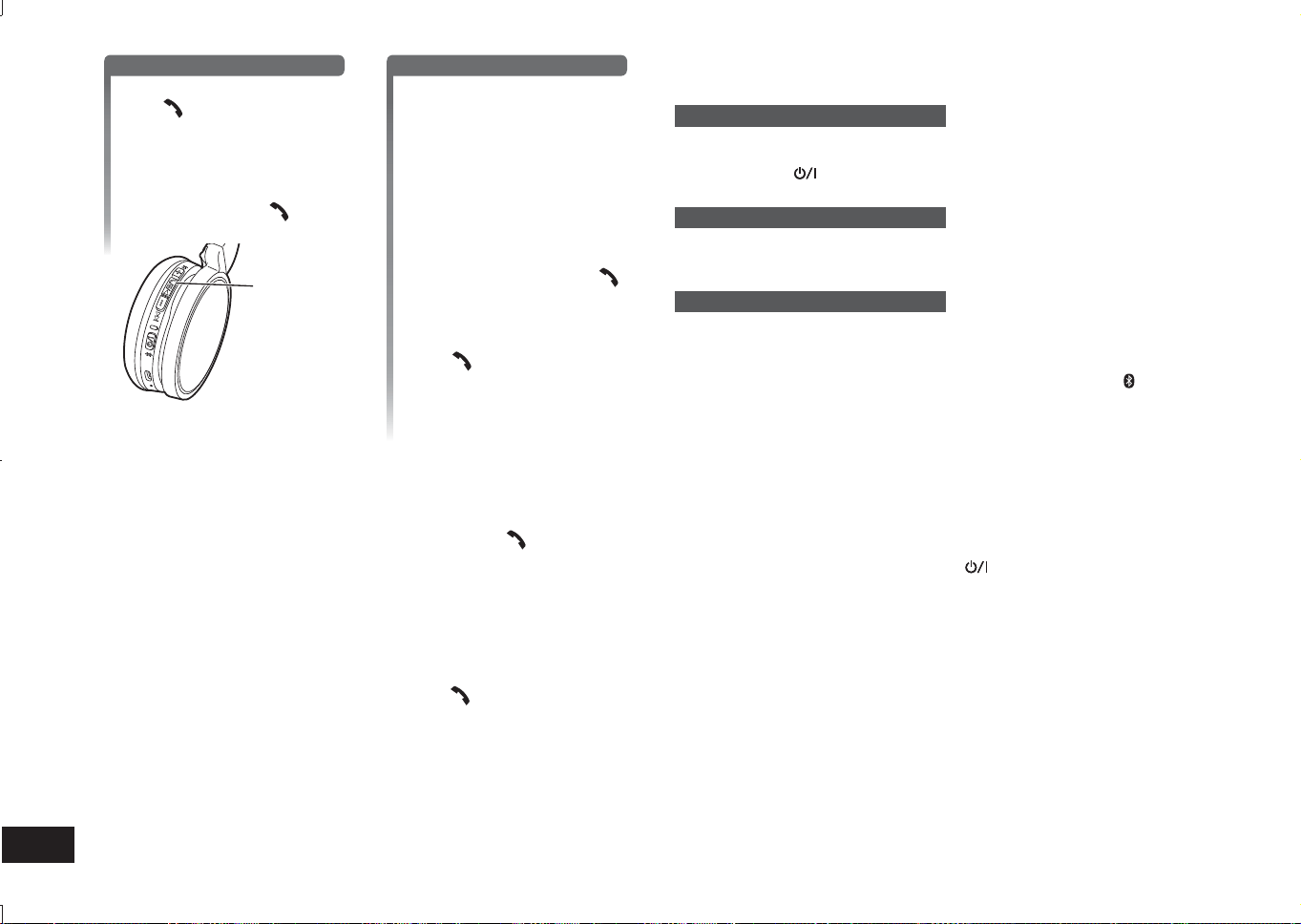
TQBM0093
X
70
6
1
Prijatie prichádzajúceho hovoru
Na jednotke stlačte tlačidlo
Volať a prijmite hovor
• Pri prichádzajúcom hovore bude
z reproduktora znieť vyzváňací
tón a blikať indikátor LED.
• (Len HFP) Na odmietnutie
prichádzajúceho hovoru rýchlo
dvakrát stlačte Volať
.
Volať
Uskutočnenie odchádzajúceho hovoru
Uskutočnite hovor
pomocou telefónu s
funkciou Bluetooth
®
• Pozrite si aj návod na použitie
telefónu s funkciou Bluetooth
®
.
(Kontrola a používateľské kroky na
jednotke sú vysvetlené nižšie)
• Pri odchádzajúcom hovore bude
z reproduktora znieť vyzváňací
tón a indikátor LED bude blikať.
• Pre zrušenie odchádzajúceho
hovoru stlačte tlačidlo Volať
.
Ozve sa pípnutie.
• (Len HFP) Keď je telefón
nečinný, približne na 5 sekundy
stlačte a podržte tlačidlo
Volať
. Uskutoční sa
odchádzajúci hovor na posledné
volané číslo. Z reproduktora
bude znieť tón klikania a
indikátor LED bude blikať.
2
Začnite hovoriť
• LED počas telefonátu 2-krát zabliká.
• Hlasitosť môžete nastaviť počas telefonátu. Pokyny týkajúce sa nastavenia
nájdete na strane 5.
3
Ak chcete telefonát ukončiť, stlačte tlačidlo Volať
• Ozve sa pípnutie.
■
Poznámka
• V niektorých prípadoch bude potrebné nastaviť prevádzku typu hands free na
telefóne s funkciou Bluetooth
®
.
• V závislosti od telefónu s funkciou Bluetooth
®
môžete z jednotky slúchadiel počuť
prichádzajúce a odchádzajúce vyzváňacie tóny.
• (Len HFP) Volajúce zariadenie sa prepne medzi telefónom s funkciou Bluetooth
®
a jednotkou. (Na jednotke rýchlo dvakrát stlačte Volať
na prepnutie.)
Užitočné funkcie
Resetovanie jednotky
Táto jednotka môže byť resetovaná, keď sú odmietnuté všetky operácie. Ak
chcete vykonať resetovanie jednotky, na aspoň 10 sekúnd stlačte a podržte
tlačidlo napájania
. Všetky predchádzajúce operácie sa zrušia. (Informácie o
spárovaných zariadeniach nebudú vymazané.)
Automatické vypnutie
Ak je jednotka nečinná na približne 5 minút a operácie všetkých Bluetooth
®
zariadení sú počas tejto doby taktiež nečinné, ozve sa pípnutie a hlavný vypínač sa
automaticky vypne.
Svetelný LED indikátor
Ak bude úroveň nabitia batérie počas používania jednotky nízka, LED indikátor na
pravom reproduktore prestane blikať na modro a začne blikať na červeno*. Každú
1 minútu zaznie pípnutie. Keď bude batéria vybitá, jednotka sa vypne.
* Keď je batéria takmer vybitá a stlačíte a podržíte tlačidlo párovania
, dióda LED
bude blikať len na červeno.
Obnovenie výrobných nastavení
Keď chcete vymazať informácie o všetkých spárovaných zariadeniach a pod.,
môžete obnoviť výrobné nastavenia jednotky (pôvodné nastavenia pri kúpe). Pred
obnovením jednotky nabite batériu.
1 Na približne 5 sekúnd stlačte a podržte
• Spusťte vyhľadávanie zariadení s rozhraním Bluetooth
®
, ku ktorým sa chcete
pripojiť.
2 Počas vyhľadávania na aspoň 6 sekúnd súčasne stlačte a podržte + a −
• LED indikátor bude rýchlo blikať na modro. V jednotke sa obnovia výrobné
nastavenia.
■
Upozornenie
• Pri opätovnom párovaní zariadenia odstráňte informácie o zaregistrovaní
(Zariadenie: „RP-HF400B“) z ponuky zariadenia s funkciou Bluetooth
®
a znova
zaregistrujte túto jednotku so zariadením s funkciou Bluetooth
®
. (→ Str. 4)
RP-HF400B_E(TQBM0093).indb 70RP-HF400B_E(TQBM0093).indb 70 2017/03/17 21:21:492017/03/17 21:21:49
TQBM0093
X
71
7
SLOVENSKY
Spoločnosť Panasonic nenesie žiadnu zodpovednosť za údaje a/alebo
informácie skompromitované počas bezdrôtového prenosu.
■
Použité frekvenčné pásmo
Táto jednotka využíva frekvenčné pásmo 2,4 GHz.
■
Certifikácia tejto jednotky
• Táto jednotka vyhovuje frekvenčným obmedzeniam a certifikácia jej bola
udelená na základe frekvenčných zákonov. Z toho dôvodu nie je potrebné
povolenie na bezdrôtový prenos.
• Nižšie uvedené činnosti sú v niektorých krajinách postihnuteľné zákonom:
– Rozobratie/úprava jednotky,
– Odstránenie údajov o špecifikácii.
■
Obmedzenia vzťahujúce sa na použitie
• Bezdrôtový prenos a/alebo možnosť použitia so všetkými zariadeniami
vybavenými funkciou Bluetooth
®
nie sú garantované.
• Všetky zariadenia musia vyhovovať štandardom stanoveným spoločnosťou
Bluetooth SIG, Inc.
• Pripojenie zariadenia môže zlyhať, prípadne sa môžu niektoré operácie líšiť v
závislosti od jeho špecifikácií a nastavení.
• Tento systém podporuje bezpečnostné prvky Bluetooth
®
. V závislosti od
operačného prostredia a/alebo nastavení je však možné, že táto bezpečnosť
niekedy nie je dostatočná. Buďte opatrní pri bezdrôtovom prenose údajov na
tento systém.
• Tento systém nedokáže preniesť údaje na zariadenie Bluetooth
®
.
■
Rozsah použitia
Túto jednotku používajte v maximálnom rozsahu 10 m.
Rozsah sa môže znížiť v závislosti od prostredia, prekážok alebo rušenia.
■
Rušenie z iných zariadení
• V prípade, že je táto jednotka umiestnená v blízkosti iných zariadení
Bluetooth
®
alebo zariadení, ktoré využívajú pásmo 2,4 GHz, nemusí táto
jednotka náležite fungovať a môžu sa vyskytnúť problémy, ako napríklad šum
alebo výkyvy zvuku z dôvodu rušenia rádiovými vlnami.
• V prípade, že rádiové vlny z neďalekej vysielacej stanice a pod. sú príliš silné,
nemusí táto jednotka náležite fungovať.
■
Určené použitie
• Táto jednotka je určená len na bežné, všeobecné použitie.
• Nepoužívajte tento systém v blízkosti príslušenstva alebo v prostredí,
ktoré je citlivé na rušenie rádiovými frekvenciami (napríklad: na letiskách, v
nemocniciach, laboratóriách atď.).
Informácie o Bluetooth
®
■
Všeobecné informácie
Napájanie
DC 5 V, 330 mA
(Vnútorná batéria: 3,7 V (Li-ion 430 mAh))
Prevádzková doba*
1
Pribl. 20 hodín
Doba nabíjania*
2
(25 ºC) Pribl. 2,5 hodín
Rozsah teploty nabíjania 10 ºC až 35 ºC
Rozsah prevádzkovej teploty 0 ºC až 40 ºC
Rozsah prevádzkovej vlhkosti 35%RH až 80%RH (bez kondenzácie)
Hmotnosť Približne 130 g
*
1
Môže byť kratšia v závislosti od prevádzkových podmienok.
*
2
Doba nabíjania z prázdneho na plný stav.
■
Časť týkajúca sa Bluetooth
®
Systémové špecifikácie
Bluetooth
®
Verzia 4.1
Klasifikácie bezdrôtového
zariadenia
Trieda 2 (2,5 mW)
Frekvenčné pásmo 2402 MHz až 2480 MHz
Maximálny RF výkon 4 dBm
Podporované profily A2DP, AVRCP, HSP, HFP
Podporovaný kodek SBC
Prevádzková vzdialenosť Do 10 m
■
Časť týkajúca sa reproduktora
Riadiace jednotky 30 mm
■
Časť týkajúca sa koncovky
DC IN DC 5 V, 330 mA
■
Časť týkajúca sa mikrofónu
Typ Mono
■
Časť týkajúca sa príslušenstva
USB nabíjací kábel 0,1 m
●
Špecifikácie podliehajú zmenám bez upozornenia.
Špecifikácie
RP-HF400B_E(TQBM0093).indb 71RP-HF400B_E(TQBM0093).indb 71 2017/03/17 21:21:502017/03/17 21:21:50
TQBM0093
X
72
8
Pred vyžiadaním servisu vykonajte nasledujúce kontroly. V prípade pochybností
týkajúcich sa niektorých kontrolných bodov, prípadne nevyriešenia problému
naznačenými opatreniami, sa obráťte na svojho obchodného zástupcu ohľadom
ďalších pokynov.
Všeobecné informácie
Jednotka nereaguje
• Táto jednotka môže byť resetovaná, keď sú odmietnuté všetky operácie. Ak
chcete vykonať resetovanie jednotky, na aspoň 10 sekúnd stlačte a podržte
tlačidlo napájania
. (→ Str. 6)
Prívod elektrického prúdu a nabíjanie
Jednotka sa nedá nabiť
• Uistite sa, že počítač je zapnutý a nie je v úspornom režime alebo v režime
spánku.
• Funguje port USB, ktorý momentálne používate, správne? V prípade, že má
váš počítač ďalšie porty USB, odpojte konektor z portu, v ktorom je momentálne
zapojený, a zapojte ho do jedného z ďalších portov.
• V prípade, že sa vyššie uvedené opatrenia nedajú použiť, odpojte USB nabíjací
kábel a znova ho zapojte.
• Ak sa skráti čas nabíjania a čas používania jednotky, mohlo dôjsť k degradácii
batérie. (Počet možných nabíjaní priloženej batérie: približne 500.)
LED počas nabíjania nesvieti / Nabíjanie trvá dlhšie
• Je USB nabíjací kábel (pribalený) pevne zapojený do USB koncovky počítača?
(→ Str. 4)
• Uistite sa, že sa nabíja pri izbovej teplote v rozsahu od 10 °C do 35 °C.
Zariadenie sa nezapne
• Nabíja sa v tejto chvíli jednotka? Zariadenie počas nabíjania nemôže byť
ZAPNUTÉ. (→ Str. 4)
Pripojenie zariadenia Bluetooth
®
Zariadenie sa nedá pripojiť
• Zo zariadenia Bluetooth
®
vymažte párovacie informácie o tejto jednotke, a potom
ich znova spárujte. (→ Str. 4)
Pokyny k odstraňovaniu porúch
Zvuk a hlasitosť
Žiadny zvuk
• Uistite sa, že jednotka a zariadenie Bluetooth
®
sú správne pripojené. (→ Str. 4)
• Skontrolujte, či na zariadení Bluetooth
®
hrá hudba.
• Uistite sa, že je jednotka zapnutá a hlasitosť nie je nastavená príliš nízko.
• Znova spárujte a pripojte zariadenie Bluetooth
®
a jednotku. (→ Str. 4)
• Skontrolujte, či zariadenie kompatibilné s funkciou Bluetooth
®
podporuje profil
„A2DP“. Podrobnosti o profiloch nájdete v časti „Počúvanie hudby“ (→ Str. 5).
Pozrite si aj návod na použitie zariadenia kompatibilného s funkciou Bluetooth
®
.
Nízka hlasitosť
• Zvýšte hlasitosť jednotky. (→ Str. 5)
• Zvýšte hlasitosť na zariadení Bluetooth
®
.
Zvuk zo zariadenia je prerušený / Kvalita zvuku je zlá
• V prípade blokovania signálov môže byť zvuk prerušovaný. Nezakrývajte úplne
túto jednotku svojou dlaňou a pod.
• Zariadenie sa môže nachádzať mimo komunikačného rozsahu 10 m. Posuňte
zariadenie bližšie k tejto jednotke.
• Odstráňte akékoľvek prekážky medzi touto jednotkou a zariadením.
• Keď sa akékoľvek bezdrôtové zariadenie LAN nepoužíva, vypnite ho.
• V prípade vybitej batérie môže vzniknúť komunikačný problém. Nabite jednotku.
(→ Str. 4)
Telefónne hovory
Nepočujete druhú osobu
• Uistite sa, že jednotka a telefón podporujúci funkciu Bluetooth
®
sú zapnuté.
• Skontrolujte, či jednotka a telefón podporujúci funkciu Bluetooth
®
sú spojené.
(→ Str. 4)
• Skontrolujte nastavenia zvuku na telefóne podporujúcom funkciu Bluetooth
®
.
Pripojte telefonické zariadenie k jednotke, ak je nastavená na telefón podporujúci
funkciu Bluetooth
®
. (→ Str. 4)
• V prípade, že hlasitosť hlasu druhej osoby je príliš nízka, zvýšte hlasitosť
jednotky aj telefónu podporujúceho funkciu Bluetooth
®
.
Nemožno uskutočniť telefonát
• Skontrolujte, či zariadenie kompatibilné s funkciou Bluetooth
®
podporuje profil
„HSP“ alebo „HFP“. Podrobnosti o profiloch nájdete v časti „Počúvanie hudby“
(→ Str. 5) a „Uskutočnenie telefonátu“ (→ Str. 5). Pozrite si aj návod na použitie
telefónu s funkciou Bluetooth
®
.
RP-HF400B_E(TQBM0093).indb 72RP-HF400B_E(TQBM0093).indb 72 2017/03/17 21:21:502017/03/17 21:21:50
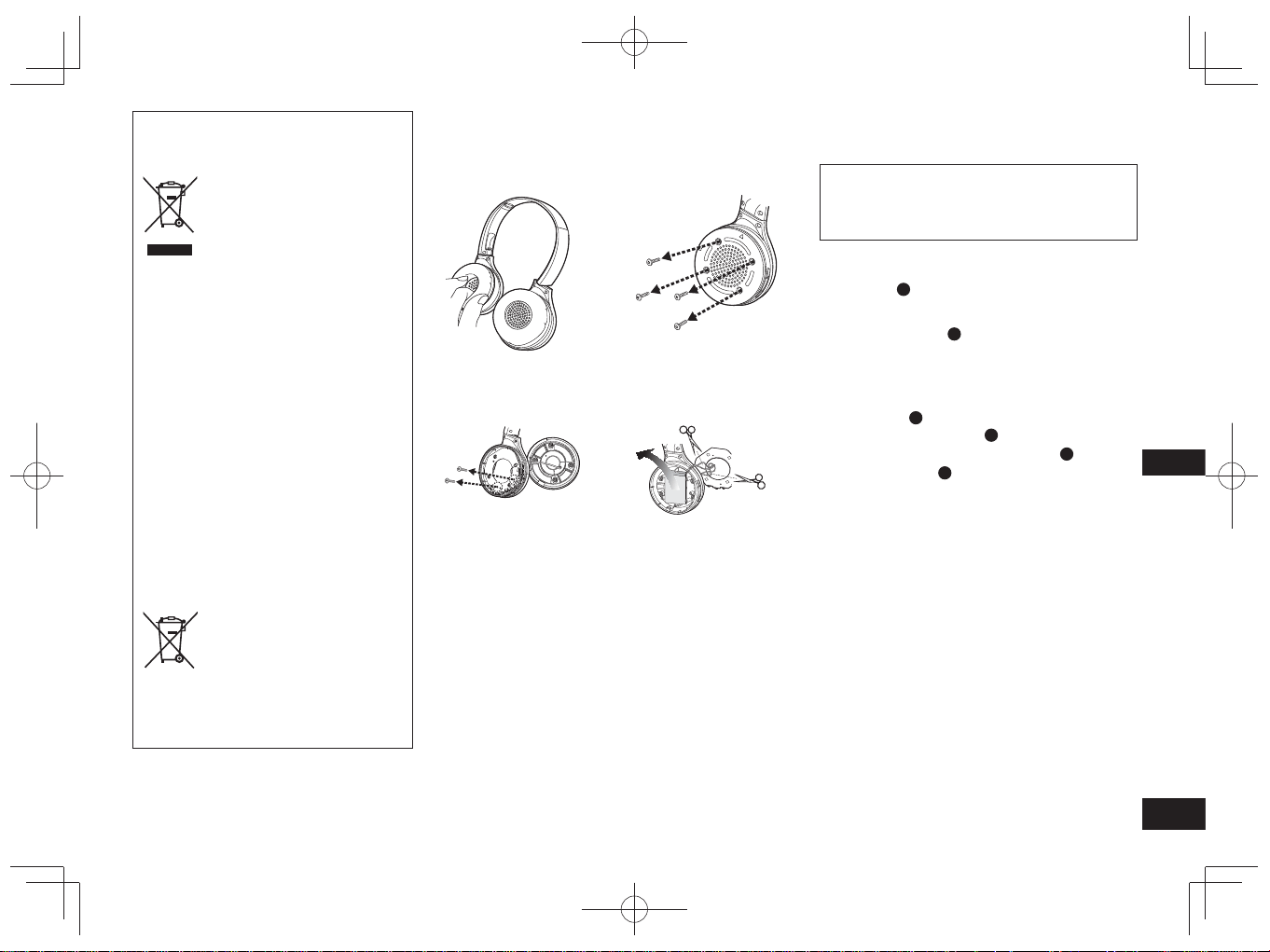
TQBM0093
X
73
9
SLOVENSKY
Odstránenie batérie pri likvidácii tejto jednotky
Nasledujúce pokyny nie sú určené na účely
opráv, ale na likvidáciu tejto jednotky. Po
demontovaní nie je táto jednotka obnoviteľná.
Pri likvidácii tejto jednotky z nej vyberte nainštalovanú
batériu a odovzdajte ju na recykláciu.
• Jednotku demontujte po vybití batérie.
• Demontované časti udržiavajte mimo dosahu detí.
1
Náušníky
A
otočte smerom nahor a jednotku
položte na vodorovný povrch
2
Uchopte spodnú časť pravého reproduktora (R)
a pod vrchný kryt
B
zasuňte krížový skrutkovač
(dostupný v maloobchodnej sieti)
• K hrotu skrutkovača neklaďte prsty.
• Použite skrutkovač, ktorý sa zmestí do priestoru pod
vrchným krytom.
3
Pomocou skrutkovača vyviňte páku a zatlačte
vrchný kryt
B
smerom nahor
4
Demontujte vrchný kryt
B
5
Demontujte 4 skrutky a spodný kryt
C
6
Uchopte batériu
D
a vyberte ju z jednotky
Informácie týkajúce sa zaobchádzania s použitými
batériami
• Izolujte koncovky lepiacou páskou alebo podobným
materiálom.
• Nerozoberajte.
■
Batérie
• Nezohrievajte alebo nevystavujte otvorenému ohňu.
• Nenechávajte batériu(ie) v aute dlho vystavenú(é)
priamemu slnečnému žiareniu pri zatvorených oknách a
dverách.
• Nesprávne použitie batérií môže spôsobiť vytekanie
elektrolytu, ktorý môže poškodiť predmety prichádzajúce
do kontaktu s vytekajúcim elektrolytom. V prípade, že z
batérie vyteká elektrolyt, obráťte sa na svojho obchodného
zástupcu. V prípade, že elektrolyt príde do kontaktu s
ktoroukoľvek časťou vášho tela, umyte ju dôkladne vodou.
• Keď likvidujete batérie, kontaktujte, prosím, svoje miestne
úrady alebo obchodného zástupcu a informujte sa o
správnych spôsoboch likvidácie.
Likvidácia opotrebovaných zariadení a
batérií
Len pre Európsku úniu a krajiny so
systémom recyklácie
Tieto symboly uvádzané na
výrobkoch, balení a/alebo
v sprievodnej dokumentácii
informujú o tom, že
opotrebované elektrické a
elektronické výrobky a batérie
sa nesmú likvidovať ako bežný
domový odpad.
V záujme zabezpečenia
správneho spôsobu likvidácie,
spracovania a recyklácie
odovzdajte opotrebované
výrobky a batérie na
špecializovanom zbernom
mieste v súlade s platnou
legislatívou.
Správnym spôsobom likvidácie
týchto výrobkov a batérií
prispejete k zachovaniu cenných
zdrojov a predídete prípadným
negatívnym dopadom na ľudské
zdravie a životné prostredie.
Podrobnejšie informácie o
zbere a recyklácii vám poskytnú
miestne úrady.
Pri nesprávnej likvidácii tohto
druhu odpadu môžu byť v súlade
s platnou legislatívou udelené
pokuty.
Poznámka týkajúca sa
symbolu batérie
(spodný symbol):
Tento symbol môže byť použitý
spolu so symbolom chemickej
značky. V takom prípade
vyhovuje požiadavke stanovenej
Smernicou týkajúcou sa
príslušnej chemikálie.
1
Demontujte pravý
náušník
2
Odskrutkujte 4 skrutky
3
Odskrutkujte 2 skrutky
a platňu
4
Odstrihnite postupne
nožničkami drôty
a vyberte batériu
RP-HF400B_E(TQBM0093).indb 73RP-HF400B_E(TQBM0093).indb 73 2017/03/17 21:21:502017/03/17 21:21:50
TQBM0093
X
74
2
Var vänlig kontrollera och identifiera de
medföljande tillbehören.
1 USB-laddningssladd
Innehållsförteckning
Före användning
Tillbehör .............................................. 2
Upphovsrätt etc. ................................. 2
Försiktighetsåtgärder .......................... 2
Underhåll ............................................ 3
Delarnas namn ................................... 3
Förberedelser
Laddning ............................................. 4
Slå på/stänga av enheten ................... 4
Ansluta en Bluetooth
®
-anordning ........ 4
Drift
Lyssna på musik ................................. 5
Ringa ett samtal.................................. 6
Användbara funktioner ....................... 6
Övrigt
Återställa till fabriksinställningarna ..... 6
Om Bluetooth
®
.................................... 7
Specifikationer .................................... 7
Felsökningsguide................................ 8
Ta bort batteriet vid kassering av
enheten............................................... 9
Bästa kund
Tack för att du har köpt den här
produkten.
Läs igenom de här anvisningarna
noggrant innan du använder produkten
och spara bruksanvisningen för
framtida bruk.
Tillbehör
●
Bluetooth
®
-ordmärket och
logotyperna är registrerade
varumärken och ägs av Bluetooth
SIG, Inc. och all användning som
Panasonic Corporation gör av
sådana märken sker under licens.
Andra varumärken och varunamn
tillhör deras respektive ägare.
●
Andra systemnamn och
produktnamn som förekommer i
det här dokumentet är i allmänhet
de registrerade varumärkena eller
varumärken som tillhör respektive
utvecklingsföretag.
Observera att ™-märket och
®-märket inte förekommer i det här
dokumentet.
Upphovsrätt
etc.
Försiktighetsåtgärder
■
Enhet
• Undvik att placera den här enheten nära värmekällor.
• Lyssna inte på enheten på hög volym på platser där du måste höra ljud
från omgivningen för att vara säker, såsom järnvägsövergångar och
byggarbetsplatser.
• Bredbandsspänningen är lika med eller större än 75 mV.
VARNING:
För att minska risken för brand, elstötar eller skador på produkten,
• Exponera inte enheten för regn, fukt eller droppande eller skvättande vatten.
• Placera inte objekt fyllda med vätska, såsom vaser, ovanpå den här enheten.
• Använd endast rekommenderade tillbehör.
• Ta inte bort höljena.
• Reparera inte enheten själv. Överlåt service till kvalificerad servicepersonal.
■
Allergier
• Sluta använda enheten om du upplever obehag av hörlurarna eller andra delar
som är i direkt kontakt med din hud.
• Fortsatt användning kan orsaka hudutslag eller andra allergiska reaktioner.
■
Försiktighetsåtgärder för att lyssna med hörlurarna
• Använd inte hörlurarna på hög volym. Hörselexperter avråder från att lyssna
kontinuerligt på hög volym.
• Om du upplever att det ringer i öronen bör du minska volymen eller sluta
använda enheten.
• Använd inte när du driver ett motoriserat fordon. Det kan leda till trafikfara och
är olagligt i många områden.
• Du bör nyttja extrem försiktighet eller sluta använda enheten tillfälligt i
potentiellt farliga situationer.
Enheten kan ta emot radiostörningar som orsakas av mobiltelefoner vid
användning. Om sådana störningar förekommer, öka avståndet mellan enheten
och mobiltelefonen.
Denna enhet är avsedd att användas i måttliga och tropiska klimat.
RP-HF400B_E(TQBM0093).indb 74RP-HF400B_E(TQBM0093).indb 74 2017/03/17 21:21:502017/03/17 21:21:50
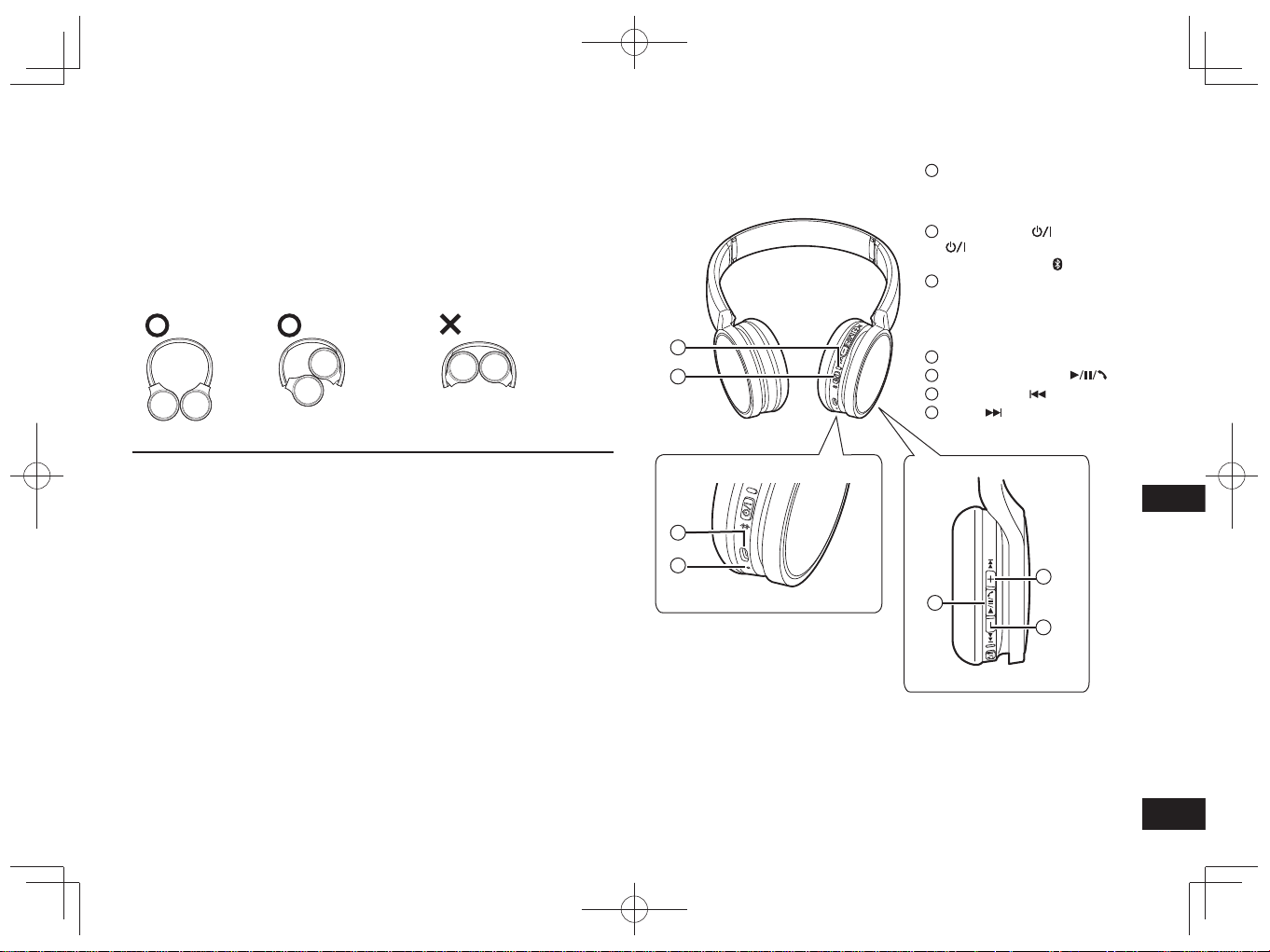
TQBM0093
X
75
3
SVENSKA
Delarnas namn
■
Obs
• Använd inte andra USB-laddningssladdar än den medföljande.
• Täck inte för höger hörlur med handflatan när du använder enheten. Bluetooth
®
-
anslutningen kan blockeras.
Produktillustrationerna kan skilja sig åt från den faktiska produkten.
1
LED-indikatorlampa*
• Antalet blinkningar eller färg
meddelar enhetens status.
(* hädanefter kallad ”LED”)
2
Strömknapp
( Viloläge/På) /
Parningsknapp
3
Laddningsterminal (DC IN)
• Anslut USB-laddningssladden
(medföljer) till den här
terminalen vid laddning.
(→ s. 4)
4
Mikrofon
5
Spela/Pausa/Ring
6
Föregående /Volym –
7
Nästa /Volym +
Underhåll
Rengör enheten med en torr och mjuk trasa.
• Använd inte lösningsmedel, inklusive tvättbensin, thinner, alkohol,
köksrengöringsmedel, kemiskt rengöringsmedel etc. Detta kan leda till att
ytterhöljet kan deformeras eller att beläggningen kan lossna.
■
Fälla ihop denna enhet
Fäll ihop hörlurarna som visas nedan. Felaktig hopfällning kan leda till felaktig
funktion.
Rätt Fel
Försäkran om Överensstämmelse (DoC)
Härmed garanterar “Panasonic Corporation” att denna produkt överensstämmer
med tillämpbara krav och andra föreskrifter i enlighet med direktiv 2014/53/EU.
Kunder kan hämta en kopia av den ursprungliga DoC för våra RE-produkter från
vår DoC-server:
http://www.doc.panasonic.de
Kontakt till Auktoriserad Representant:
Panasonic Marketing Europe GmbH, Panasonic Testing Centre,
Winsbergring 15, 22525 Hamburg, Tyskland
2
1
3
4
5
6
7
RP-HF400B_E(TQBM0093).indb 75RP-HF400B_E(TQBM0093).indb 75 2017/03/17 21:21:502017/03/17 21:21:50
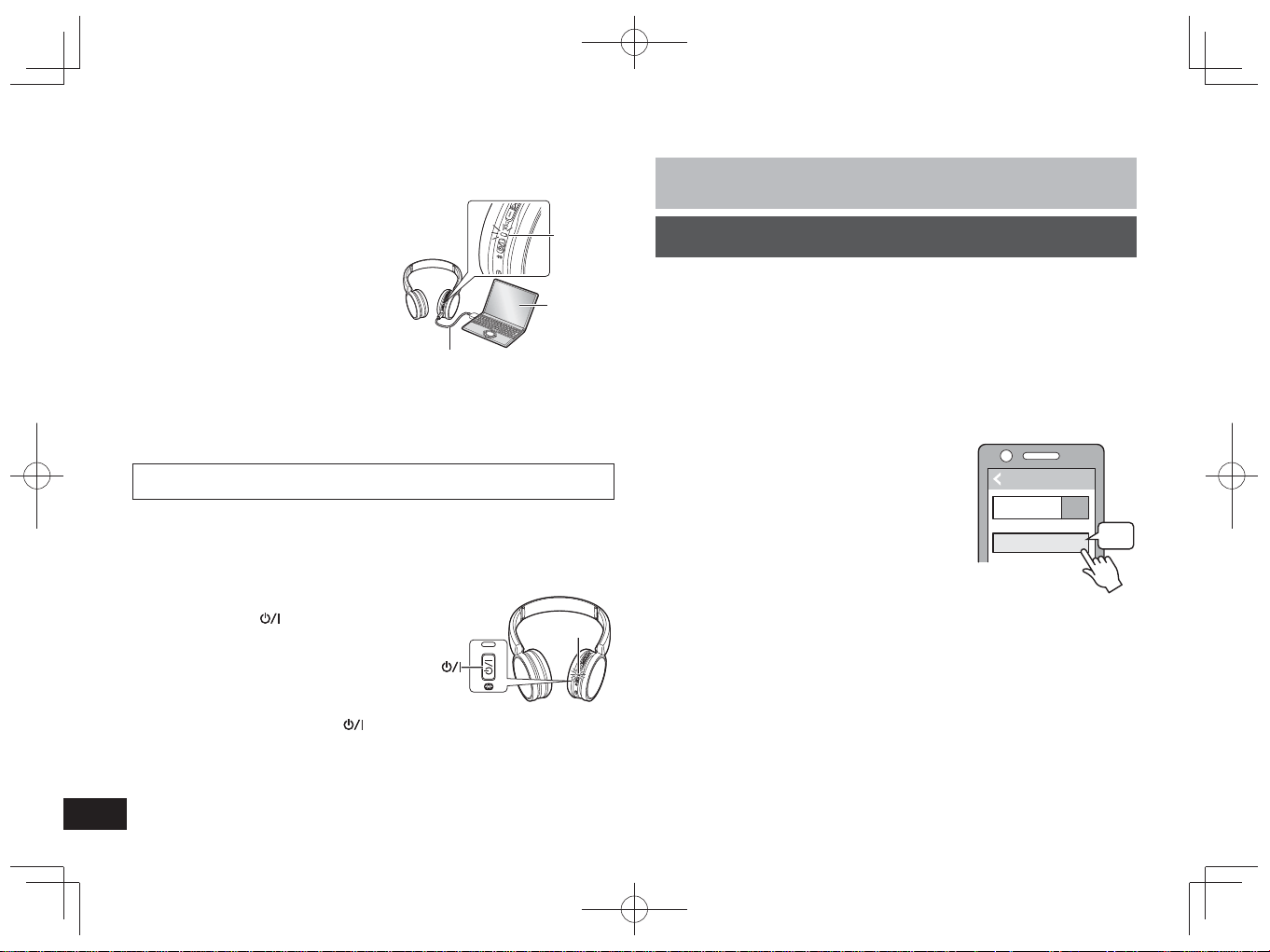
TQBM0093
X
76
4
Det laddningsbara batteriet (installerat i enheten) är inte laddat i förväg.
Ladda batteriet innan du använder enheten.
1
Anslut enheten till en dator med
hjälp av USB-laddningssladden
• LED kommer att lysa rött.
• Led-indikeringarna lyser rött vid
laddning. När laddningen är klar
kommer LED-lampan att slockna.
• Laddningen tar ca 2,5 timme från tomt
läge till fulladdat.
Dator
LED
USB-laddningssladd (medföljer)
■
Obs
• Bluetooth
®
-funktionen kan inte användas när den här enheten är ansluten till en
dator med hjälp av USB-laddningssladden.
• Ladda i rumstemperatur mellan 10 °C och 35 °C.
• Strömmen kan inte slås på vid laddning.
• Använd inte andra USB-laddningssladdar än den medföljande.
Försiktighet: Använd endast den medföljande USB-laddningssladden för
anslutning till en dator.
Laddning
1
I avstängt läge, tryck och håll inne
strömknappen på denna enhet i ca
3 sekunder till dess att LED (blått) blinkar
• Ett pipljud kommer att höras och LED (blått)
kommer att blinka sakta.
Strömknapp
LED
För att stänga av enheten
• Tryck och håll inne strömknappen
i ca 3 sekunder. Ett pip kommer att ljuda
och strömmen kommer att stängas av.
■
Obs
• När enheten inte har använts på ca 5 minuter kommer strömmen automatiskt att
stängas av. (Se ”Automatisk avstängning” (→ s. 6))
Slå på/stänga av enheten
Förberedelser
• Placera Bluetooth
®
-anordningen inom ca 1 m från enheten.
• Kontrollera vid behov anordningens användning i dess bruksanvisning.
Para (Registrera) denna enhet med Bluetooth
®
-anordningen för
anslutning
1
Tryck och håll inne strömknappen på denna enhet till dess att
LED blinkar
När en anordning paras för första gången : ca 3 sekunder
När en andra eller följande anordning paras : ca 5 sekunder
• Enheten börjar söka efter Bluetooth
®
-anordning för att ansluta till och LED
kommer att blinka alternativt i blått och rött.
2
Slå på strömmen på Bluetooth
®
-enheten och upprätta
Bluetooth
®
-funktionen
3
Välj ”RP-HF400B” från Bluetooth
®
-
anordningens meny
• MAC-adressen ”□□□□□□” (“□” står för ett
tecken som är unikt för varje uppsättning.)
kan visas innan ”RP-HF400B” visas.
• Om du ombeds att ange ett lösenord, ange
”0000” (fyra nollor) på denna enhet.
4
Kontrollera Bluetooth-anslutningen
mes Bluetooth
®
-anordningen på enheten
• LED kommer att blinka alternativt i blått och rött till dess att
anslutning med anordningen är upprättad. När LED (blått) blinkar två
gånger per 2 sekunder är parning (registrering) slutförd.
(Anslutning upprättad)
■
Obs
• Om anslutning till en anordning inte upprättas inom ca 5 minuter kommer
enheten att slås av. Utför parning på nytt.
• 2 eller fler Bluetooth
®
anordningar kan inte registreras till enheten samtidigt.
• Du kan para upp till 8 Bluetooth
®
-anordningar till den här enheten. Om en nionde
anordning paras kommer den äldsta anslutningen att ersättas. Para den igen för
att använda den.
Ansluta en Bluetooth
®
-anordning
Bluetooth
Bluetooth
RP-HF400B
ON
(Ex.)
Välj
Anordning
RP-HF400B_E(TQBM0093).indb 76RP-HF400B_E(TQBM0093).indb 76 2017/03/17 21:21:512017/03/17 21:21:51

TQBM0093
X
77
5
SVENSKA
Lyssna på musik
Om den Bluetooth
®
-kompatibla anordningen stöder Bluetooth
®
-profilerna ”A2DP”
och ”AVRCP” kan musik spelas medan enheten fjärrstyrs.
• A2DP (Profil för avancerad ljuddistribution): Överför ljud till enheten.
• AVRCP (Profil för fjärrstyrning av ljud/video):
Möjliggör fjärrstyrning av anordningen via enheten.
1
Anslut Bluetooth
®
-anordningen till enheten (→ s. 4)
2
Välj och spela musik på Bluetooth
®
-anordningen
• Den valda musiken skickas till enhetens hörlurar.
Batteriets drifttid
Batterityp Drifttid
Laddningsbart batteri (installerat i enheten) Ca 20 timmar
Drifttiden kan påverkas något av driftförhållandena.
■
Varning
• Enheten kan läcka ljud beroende på volymnivå.
• När volymen ökar till nära maximal nivå kan musiken låta förvrängd. Minska
volymen tills förvrängningen försvinner.
Fjärrstyrning
Du kan kontrollera Bluetooth
®
-anordningen med hjälp av den här enheten.
• Beroende på Bluetooth
®
-anordningarna kanske vissa av funktionerna nedan inte
fungerar eller fungerar på andra sätt via användningen av enheten.
(Driftexempel)
Spela/Pausa/Ring
Tryck
Spela/Pausa/
Ring
Föregående/Nästa/Volym
+
Tryck Öka volymen
Tryck och håll
inne
Gå vidare till
början av nästa
spår
−
Tryck Minska volymen
Tryck och håll
inne
Återgå till början
av aktuellt spår
Spela/Pausa/Ring
Volym –/
Föregående
Volym +/
Nästa
■
Obs
• Volymen kan justeras i 15 nivåer.
När max- eller miniminivån har nåtts kommer ett pip att ljuda.
Ringa ett samtal
Med Bluetooth
®
-aktiverade telefoner (mobiltelefoner eller smarta telefoner) som
stöder Bluetooth
®
-profilerna ”HSP” eller ”HFP” kan du använda den här enheten till
telefonsamtal.
• HSP (Headset-profil):
Den här profilen kan användas för att ta emot monoljud och för att upprätta
tvåvägskommunikation via mikrofonen på enheten.
• HFP (Handsfree-profil):
Utöver HSP-funktionerna har den här profilen även funktionerna inkommande
och utgående samtal.
• Anslut telefonen med Bluetooth
®
till enheten (→ sid. 4)
Ansluta en parad Bluetooth
®
-anordning
1
Slå på enheten
• Tryck och håll inne strömknappen på denna enhet i ca 3 sekunder till dess att
LED (blått) blinkar.
• Ett pipljud kommer att höras och LED (blått) kommer att blinka sakta.
2
Utför steg 2 och 3 för ”Para (Registrera) denna enhet med
Bluetooth
®
-anordningen för anslutning” (→ s. 4)
• När LED (blått) blinkar två gånger per 2 sekunder är parning (registrering)
slutförd. (Anslutning upprättad)
■
Obs
• Denna enhet kommer ihåg anordningen som var ansluten senast. Anslutning kan
upprättas automatiskt efter steg 1 (se ovan).
• Om anslutning till en anordning inte upprättas inom ca 5 minuter kommer
enheten att slås av. Utför parning på nytt. (→ s. 4)
RP-HF400B_E(TQBM0093).indb 77RP-HF400B_E(TQBM0093).indb 77 2017/03/17 21:21:512017/03/17 21:21:51
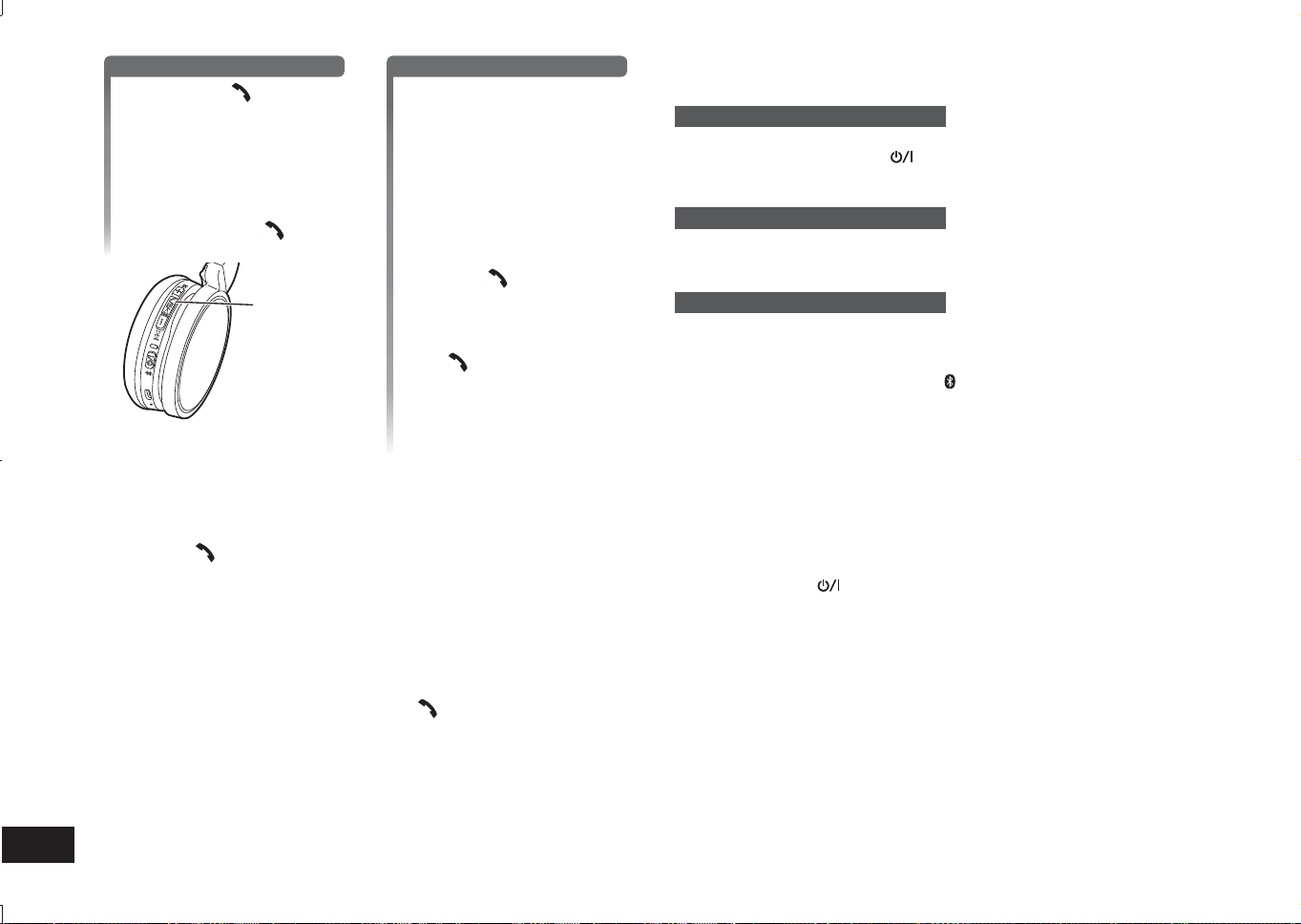
TQBM0093
X
78
6
1
Svara på inkommande samtal
Tryck på Ring på enheten
för att ta emot samtalet
• Under ett inkommande samtal
kommer ringsignalen att ljuda
i hörlurarna och LED-lampan
kommer att blinka.
• (Endast HFP) För att avvisa det
inkommande samtalet, tryck två
gånger snabbt Ring
.
Ring
Ringa ett utgående samtal
Att ringa ett utgående
samtal på en Bluetooth
®
-
aktiverad telefon
• Se även bruksanvisningen för
Bluetooth
®
-aktiverade telefoner.
(Stegen för kontroll och användning
av enheten förklaras nedan)
• Under ett utgående samtal
kommer ringsignalen att ljuda
i hörlurarna och LED-lampan
kommer att blinka.
• Tryck Ring
för att avbryta det
utgående samtalet.
Ett pip kommer att höras.
• (Endast HFP) När telefonen är
i viloläge, tryck och håll inne
Ring
i ca 5 sekunder. Ett
utgående samtal kommer att
ringas till det senast uppringda
numret. Ett kort klick kommer
att ljuda i hörlurarna och
LED-lampan kommer att blinka.
2
Börja prata
• LED-lampan kommer att blinka 2 gånger i rad under ett samtal.
• Volymen kan justeras under ett telefonsamtal. Se sida 5 för instruktioner om
inställningar.
3
Tryck Ring för att avsluta telefonsamtalet
• Ett pip kommer att höras.
■
Obs
• Det kan förekomma fall då handsfree-inställning måste göras på den
Bluetooth
®
-aktiverade telefonen.
• Beroende på den Bluetooth
®
-aktiverade telefonen kan du höra ringsignaler för
inkommande och utgående samtal från telefonen från enheten.
• (Endast HFP) Samtalsanordningen kommer att växla mellan den Bluetooth
®
-
aktiverade telefonen och enheten. (Tryck in Ring
på enheten två gånger
snabbt för att växla.)
Användbara funktioner
Återställning av enheten
Den här enheten kan återställas när alla åtgärder inte fungerar. För att återställa
enheten tryck och håll ner ström
knappen i 10 sekunder eller mer. Alla tidigare
åtgärder kommer att återställas. (Informationen om parningen av anordningen
kommer inte att tas bort.)
Automatisk avstängning
Om enheten är tyst i ca 5 minuter och funktionen hos Bluetooth
®
-anordningar är i
viloläge under den tidsperioden kommer ett pip att ljuda och enheten kommer att
stängas av automatiskt.
LED-indikatorlampa
När batterinivån är låg under användning av enheten kommer det blått blinkande
LED på höger hörlur att ändras till rött*. En pip kommer att ljuda varje minut. När
batteriet tar slut kommer enheten att stängas av.
* Om du trycker på parkopplingsknappen
och håller ned när batterinivån är låg
blinkar LED-lampan bara rött.
Återställa till
fabriksinställningarna
När du vill ta bort all information om parade anordningar etc. kan du återställa
enheten till fabriksinställningarna (originalinställningarna vid köp). Ladda batteriet
innan du återställer enheten.
1 Tryck och håll ner
i cirka 5 sekunder
• Starta sökning för Bluetooth
®
apparater att ansluta.
2 Tryck och håll ner + och − i 6 sekunder eller längre under sökning
• LED kommer att blinka snabbt i blått. Enheten kommer att återställas till
fabriksinställningarna.
■
Observera
• När en anordning paras igen, radera registreringsinformationen (Anordning:
”RP-HF400B”) från Bluetooth
®
-anordningens meny och registrera denna enhet
med Bluetooth
®
-anordningen igen. (→ s. 4)
RP-HF400B_E(TQBM0093).indb 78RP-HF400B_E(TQBM0093).indb 78 2017/03/17 21:21:512017/03/17 21:21:51
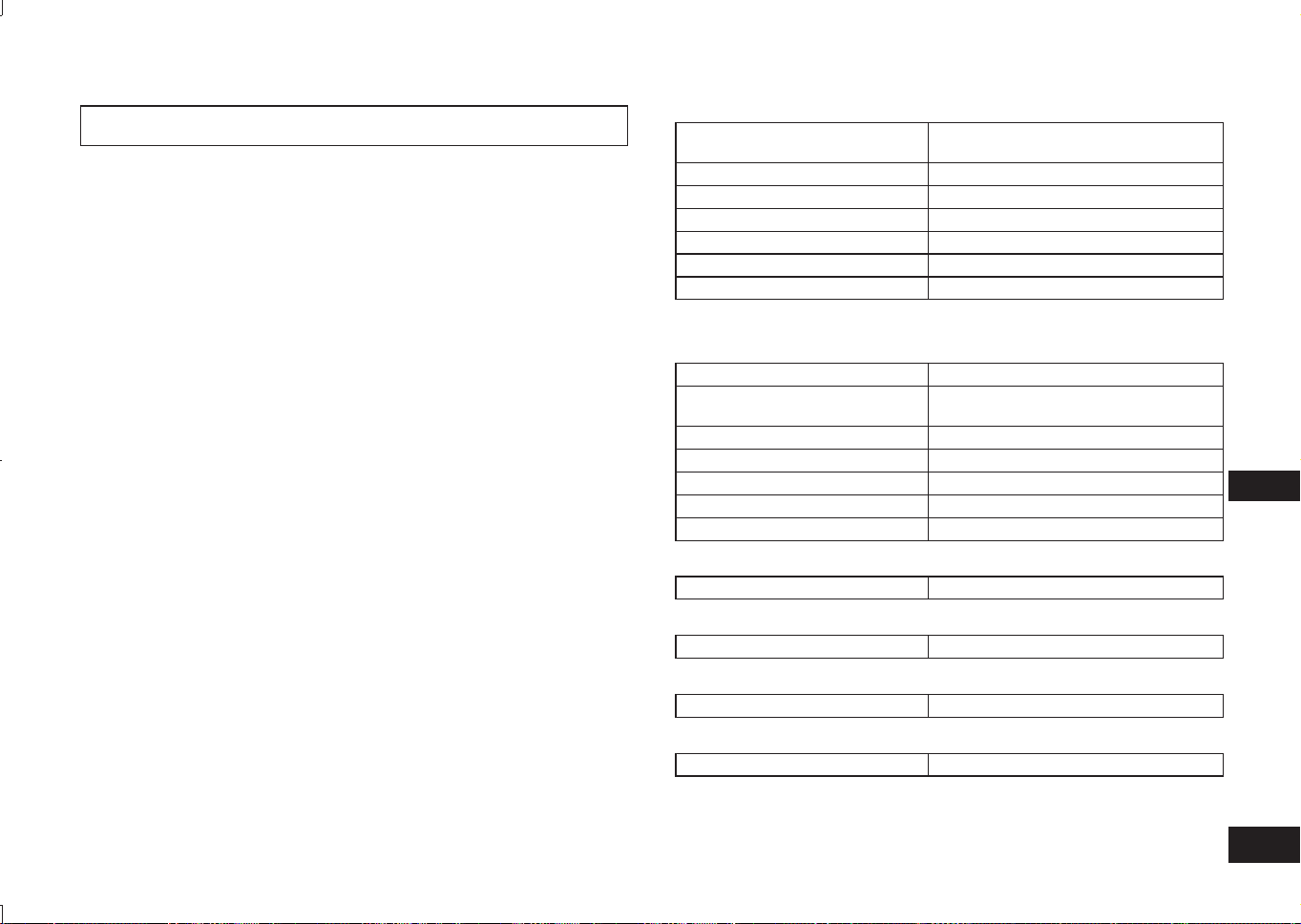
TQBM0093
X
79
7
SVENSKA
Panasonic frånsäger sig ansvar för data och/eller information som äventyras
under trådlös överföring.
■
Använt frekvensband
Den här enheten använder frekvensbandet 2,4 GHz.
■
Enhetens certifiering
• Den här enheten efterföljer frekvensrestriktioner och har certifierats baserat på
frekvenslagar. Därmed är ett trådlöst tillstånd inte nödvändigt.
• Åtgärderna nedan är straffbara enligt lag i vissa länder:
– Att ta isär/modifiera enheten.
– Att ta bort specifikationsindikationer.
■
Användningsrestriktioner
• Trådlös överföring och/eller användning med alla Bluetooth
®
-utrustade
anordningar garanteras inte.
• Alla anordningar måste efterfölja de standarder som har fastställts av
Bluetooth SIG, Inc.
• Beroende på en anordnings specifikationer och inställningar kanske den inte
fungerar eller så kan vissa användningar vara annorlunda.
• Det här systemet stödjer Bluetooth
®
-säkerhetsfunktioner. Men beroende på
användningsområdet och/eller inställningar kanske den här säkerheten inte
räcker till. Överför information trådlöst till det här systemet med försiktighet.
• Det här systemet kan inte överföra information till en Bluetooth
®
-anordning.
■
Räckvidd för användning
Den här enheten har en maximal räckvidd på 10 m.
Räckvidden kan minska beroende på miljön, hinder eller störningar.
■
Störningar från andra anordningar
• Den här enheten kanske inte fungerar ordentligt och problem såsom oljud
eller ljudhopp kan förekomma på grund av störningar från radiovågor om den
här enheten befinner sig för nära andra Bluetooth
®
-anordningar eller andra
anordningar som använder 2,4 GHz-bandet.
• Den här enheten kanske inte fungerar ordentligt om radiovågor från en
närliggande sändningsstation etc. är för starka.
■
Avsedd användning
• Den här enheten är endast till för normalt, allmänt bruk.
• Använd inte systemet nära en utrustning eller i en miljö som är känslig för
störningar från radiofrekvenser (till exempel: flygplatser, sjukhus, laboratorier,
etc.).
Om Bluetooth
®
■
Allmänt
Strömförsörjning
DC 5 V, 330 mA
(Internt batteri: 3,7 V (Li-ion 430 mAh))
Drifttid*
1
Ca 20 timmar
Laddningstid*
2
(25 ºC) Ca 2,5 timmar
Intervall för laddningstemperatur 10 ºC till 35 ºC
Intervall för drifttemperatur 0 ºC till 40 ºC
Intervall för luftfuktighet vid drift 35%RH till 80%RH (ingen kondens)
Massa Ca 130 g
*
1
Den kan vara kortare beroende på driftförhållandena.
*
2
Tid som krävs för att ladda från tomt till fullt.
■
Bluetooth
®
-sektion
Bluetooth
®
systemspecifikationer Ver. 4.1
Klassificering av trådlös
utrustning
Klass 2 (2,5 mW)
Frekvensband 2402 MHz till 2480 MHz
Max RF-effekt 4 dBm
Profiler som stöds A2DP, AVRCP, HSP, HFP
Kodec som stöds SBC
Räckvidd för drift Upp till 10 m
■
Hörlurssektion
Drivrutinsenheter 30 mm
■
Terminalsektion
DC IN DC 5 V, 330 mA
■
Mikrofonsektion
Typ Mono
■
Sektion för tillbehör
USB-laddningssladd 0,1 m
●
Specifikationer kan ändras utan föregående meddelande.
Specifikationer
RP-HF400B_E(TQBM0093).indb 79RP-HF400B_E(TQBM0093).indb 79 2017/03/17 21:21:522017/03/17 21:21:52
TQBM0093
X
80
8
Gör följande kontroller innan du begär service. Om du har tvivel om några av
kontrollpunkterna eller om de åtgärder som anges inte löser problemet, rådfråga
din återförsäljare för instruktioner.
Allmänt
Enheten svarar inte
• Den här enheten kan återställas när alla åtgärder inte fungerar. För att återställa
enheten tryck och håll ner ström
knappen i 10 sekunder eller mer. (→ s. 6)
Strömförsörjning och laddning
Kan inte ladda enheten
• Se till att datorn på påslagen och att den inte är i viloläge.
• Fungerar den USB-port du använder för närvarande? Om din dator har andra
USB-portar, koppla från kontakten från dess nuvarande port och anslut den i en
av de andra portarna.
• Om åtgärderna ovan inte är tillämpliga, koppla från USB-laddningssladden och
anslut den igen.
• Om laddningstiden och drifttiden har blivit förkortad, kan batteriet ha slitits ut.
(Antalet uppladdningar för det medföljande batteriet: ca 500.)
LED-lampan lyser inte vid laddning / Laddning tar längre tid
• Är USB-laddningssladden (medföljer) ansluten ordentligt till USB-terminalen på
datorn? (→ s. 4)
• Ladda i en rumstemperatur mellan 10 °C och 35 °C.
Strömmen slås inte på
• Laddas enheten? Strömmen kan inte slås PÅ vid laddning. (→ s. 4)
Anslutning av Bluetooth
®
-anordningen
Anordningen kan inte anslutas
• Radera parningsinformationen för denna enhet från Bluetooth
®
-anordningen och
para dem sedan igen. (→ s. 4)
Felsökningsguide
Ljud och ljudvolym
Inget ljud
• Se till att enheten och Bluetooth
®
-anordningen är korrekt anslutna. (→ s. 4)
• Kontrollera om musik spelas på Bluetooth
®
-anordningen.
• Se till att enheten på påslagen och att volymen inte är för låg.
• Para och anslut Bluetooth
®
-anordningen och enheten igen. (→ s. 4)
• Kontrollera om Bluetooth
®
-kompatibel anordning stöder ”A2DP”-profil. För mer
information om profiler se ”Lyssna på musik” (→ s. 5). Se även bruksanvisningen
för den Bluetooth
®
-kompatibla anordningen.
Låg volym
• Öka volymen på enheten. (→ s. 5)
• Öka volymen på Bluetooth
®
-anordningen.
Ljudet från anordningen avbryts / Ljudkvaliteten är dålig
• Ljud kan avbrytas om signaler blockeras. Täck inte över enheten helt med
handflatan etc.
• Anordningen kan vara utanför kommunikationsgränsen på 10 m. Flytta
anordningen närmre enheten.
• Ta bort alla hinder mellan den här anordningen och enheten.
• Stäng av alla trådlösa LAN-enheter när de inte används.
• Ett kommunikationsproblem kan förekomma om batteriet är urladdat. Ladda
enheten. (→ s. 4)
Telefonsamtal
Du kan inte höra den andra personen
• Se till att enheten och den Bluetooth
®
-aktiverade telefonen är påslagna.
• Kontrollera om enheten och Bluetooth
®
-aktiverade telefonen är anslutna.
(→ s. 4)
• Kontrollera ljudinställningarna på den Bluetooth
®
-aktiverade telefonen.
Ställ in den ringande anordningen till enheten om den är inställd på den
Bluetooth
®
-aktiverade telefonen. (→ s. 4)
• Öka volymen både på enheten och den Bluetooth
®
-aktiverade telefonen om den
andra personens röstvolym är för låg.
Kan inte ringa
• Kontrollera om den Bluetooth
®
-kompatibla anordningen stöder ”HSP”- eller
”HFP”-profilen. För mer information om profiler, se ”Lyssna på musik” (→ s. 5)
och ”Ringa ett samtal” (→ s. 5). Se även bruksanvisningen för den Bluetooth
®
-
aktiverad telefon.
RP-HF400B_E(TQBM0093).indb 80RP-HF400B_E(TQBM0093).indb 80 2017/03/17 21:21:522017/03/17 21:21:52
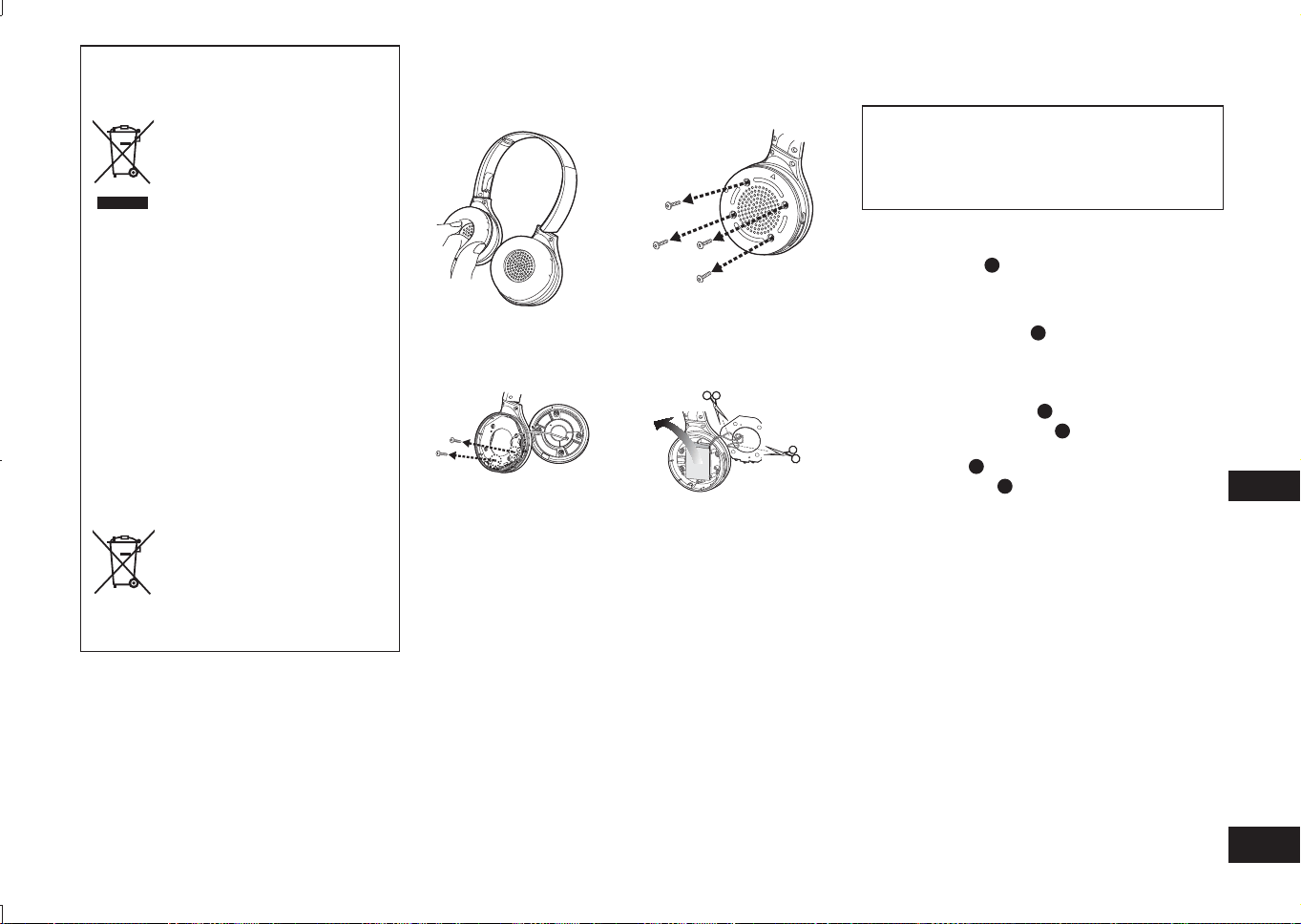
TQBM0093
X
81
9
SVENSKA
Ta bort batteriet vid kassering av enheten
Följande instruktioner är inte avsedda för
reparationssyften utan för kassering av den här
enheten. Den här enheten kan inte lagas när den
är demonterad.
Ta ut det installerade batteriet ur den här enheten och
återvinn det vid kassering av den här enheten.
• Demontera efter att batteriet slits ut.
• Förvara demonterade delar utom räckhåll för barn.
1
Vänd hörluren
A
uppåt, och placera den på en
plan yta
2
Håll i den nedre delen av den högra hörluren (R),
och placera en kryssmejsel (finns i handeln)
under det övre höljet
B
• Håll fingrarna borta från skruvmejselns spets.
• Välj en skruvmejsel som är stor nog för utrymmet under
det övre locket.
3
Använd skruvmejseln som hävstång, och
pressa det övre höljet
B
uppåt
4
Avlägsna det övre höljet
B
5
Avlägsna de fyra skruvarna, och avlägsna det
undre höljet
C
6
Ta tag i batteriet
D
, och avlägsna det
Gällande hanteringen av använda batterier
• Isolera terminalerna med vidhäftande tejp eller liknande
material.
• Demontera inte.
■
Batterier
• Värm inte upp eller exponera för lågor.
• Lämna inte batteri(er) i en bil som exponeras för direkt
solljus under lång tid med dörrar och fönster stängda.
• Felaktig hantering av batterier kan orsaka
elektrolytläckage som kan skada föremål som den läckta
vätskan kommer i kontakt med. Rådfråga återförsäljaren
om elektrolyt läcker från batteriet. Tvätta noggrant med
vatten om elektrolyt kommer i kontakt med någon del av
din kropp.
• Kontakta de lokala myndigheterna eller återförsäljaren
vid kassering av batterierna och fråga om korrekt
kasseringsmetod.
Avfallshantering av produkter och
batterier
Endast för Europeiska Unionen och
länder med återvinningssystem
Dessa symboler på produkter,
förpackningar och/eller
medföljande dokument betyder
att förbrukade elektriska och
elektroniska produkter och
batterier inte får blandas med
vanliga hushållssopor.
För att gamla produkter och
använda batterier ska hanteras
och återvinnas på rätt sätt
ska dom lämnas till passande
uppsamlingsställe i enlighet med
nationella bestämmelser.
Genom att ta göra det korrekt
hjälper du till att spara värdefulla
resurser och förhindrar
eventuella negativa effekter på
människors hälsa och på miljön.
För mer information om
insamling och återvinning
kontakta din kommun.
Olämplig avfallshantering kan
beläggas med böter i enlighet
med nationella bestämmelser.
Notering till batterisymbolen
(nedanför):
Denna symbol kan användas
i kombination med en kemisk
symbol. I detta fall uppfyller den
de krav som ställs i direktivet för
den aktuella kemikalien.
1
Ta bort höger örondyna
2
Ta bort de 4 skruvarna
3
Ta bort de 2 skruvarna
och kretsen
4
Kapa kablarna en och en
med en sax och ta bort
batteriet
RP-HF400B_E(TQBM0093).indb 81RP-HF400B_E(TQBM0093).indb 81 2017/03/17 21:21:522017/03/17 21:21:52

82
RP-HF400B_E(TQBM0093).indb 82RP-HF400B_E(TQBM0093).indb 82 2017/03/17 21:21:532017/03/17 21:21:53

83
RP-HF400B_E(TQBM0093).indb 83RP-HF400B_E(TQBM0093).indb 83 2017/03/17 21:21:532017/03/17 21:21:53
TQBM0093
M0317KZ0
Cz
Sw
SpItFrGeEn
SkHuPo
Limited Warranty (ONLY FOR AUSTRALIA)
Panasonic Warranty
1. The product is warranted for 12 months from the date of purchase. Subject to the conditions of this warranty
Panasonic or its Authorised Service Centre will perform necessary service on the product without charge for
parts or labour, if in the opinion of Panasonic, the product is found to be faulty within the warranty period.
2. This warranty only applies to Panasonic products purchased in Australia and sold by Panasonic Australia or
its Authorised Distributors or Dealers and only where the products are used and serviced within Australia or
it's territories. Warranty cover only applies to service carried out by a Panasonic Authorised Service Centre
and only if valid proof of purchase is presented when warranty service is requested.
3. This warranty only applies if the product has been installed and used in accordance with the manufacturer’s
recommendations (as noted in the operating instructions) under normal use and reasonable care (in the
opinion of Panasonic). The warranty covers normal domestic use only and does not cover damage,
malfunction or failure resulting from use of incorrect voltages, incorrect installation, accident, misuse, neglect,
build-up of dirt or dust, abuse, maladjustment of customer controls, mains supply problems, thunderstorm
activity, infestation by insects or vermin, tampering or repair by unauthorised persons (including unauthorised
alterations), introduction of sand, humidity or liquids, commercial use such as hotel, offi ce, restaurant, or other
business or rental use of the product, exposure to abnormally corrosive conditions or any foreign object or
matter having entered the product.
4. This warranty does not cover the following items unless the fault or defect existed at the time of purchase:
(a) Cabinet Part(s) (e) DVD, Blu-ray or Recordable Discs
(b) Video or Audio Tapes (f) Video / Audio Heads from wear and tear in normal use
(c) SD cards or USB devices (g) Information stored on Hard Disk Drive, USB stick or SD card
(d) User replaceable Batteries (h) DTV reception issues caused by TV Aerial / Cabling / Wall socket(s)
etc
5. Some products may be supplied with Ethernet connection hardware. The warranty is limited on such products
and will not cover
(a) Internet and or DLNA connection / setup related problems
(b) Access fees and or charges incurred for internet connection
(c) The use of incompatible software or software not specifi cally stipulated in the product operations manual;
and
(d) Any indirect or consequential costs associated with the incorrect use or misuse of the hardware, its
connection to the internet or any other device.
6. To claim warranty service, when required, you should:
• Telephone Panasonic’s Customer Care Centre on 132600 or visit our website referred to below and use
the Service Centre Locator for the name/address of the nearest Authorised Service Centre.
• Send or take the product to a Panasonic Authorised Service Centre together with your proof of purchase
receipt as a proof of purchase date. Please note that freight and insurance to and / or from your nearest
Authorised Service Centre must be arranged by you.
• Note that home or pick-up/delivery service is available for the following products in the major metropolitan
areas of Australia or the normal operating areas of the nearest Authorised Service Centres:
- Plasma/LCD televisions / displays (screen size greater than 103 cm)
7. The warranties hereby conferred do not extend to, and exclude, any costs associated with the installation, de-
installation or re-installation of a product, including costs related to the mounting, de-mounting or remounting
of any screen, (and any other ancillary activities), delivery, handling, freighting, transportation or insurance of
the product or any part thereof or replacement of and do not extend to, and exclude, any damage or loss
occurring by reason of, during, associated with, or related to such installation, de-installation, re-installation or
transit.
Panasonic Authorised Service Centres are located in major metropolitan areas and most regional centres of
Australia, however, coverage will vary dependant on product. For advice on exact Authorised Service Centre
locations for your product, please telephone our Customer Care Centre on 132600 or visit our website and use
the Service Centre Locator.
In addition to your rights under this warranty, Panasonic products come with consumer guarantees that cannot be
excluded under the Australian Consumer Law. If there is a major failure with the product, you can reject the
product and elect to have a refund or to have the product replaced or if you wish you may elect to keep the goods
and be compensated for the drop in value of the goods. You are also entitled to have the product repaired or
replaced if the product fails to be of acceptable quality and the failure does not amount to a major failure.
If there is a major failure in regard to the product which cannot be remedied then you must notify us within a
reasonable period by contacting the Panasonic Customer Care Centre. If the failure in the product is not a major
failure then Panasonic may choose to repair or replace the product and will do so in a reasonable period of time
from receiving notice from you.
THIS WARRANTY CARD AND THE PURCHASE DOCKET (OR SIMILAR PROOF OF PURCHASE)
SHOULD BE RETAINED BY THE CUSTOMER AT ALL TIMES
If you require assistance regarding warranty conditions or any other enquiries, please visit the
Panasonic Australia website
www.panasonic.com.au
or contact by phone on
132 600
If phoning in, please ensure you have your operating instructions available.
Panasonic Australia Pty. Limited
ACN 001 592 187 ABN 83 001 592 187
1 Innovation Road, Macquarie Park NSW 2113
PRO-031-F11 Issue: 4.0 01-01-2011
Web Site: http://www.panasonic.com
© Panasonic Corporation 2017
RP-HF400B_E(TQBM0093).indb 84RP-HF400B_E(TQBM0093).indb 84 2017/03/17 21:21:532017/03/17 21:21:53