User Manual
Setting up your French Door Refrigerator
GETTING READY TO INSTALL THE REFRIGERATOR
Congratulations on your purchase of this Samsung French Door Refrigerator.
We hope you enjoy the state-of-art features and efficiencies that this new appliance offers.
Selecting the best location for the refrigerator
Choose:
- A location with easy access to a water supply.
- A location without direct exposure to sunlight.
- A location with a level floor.
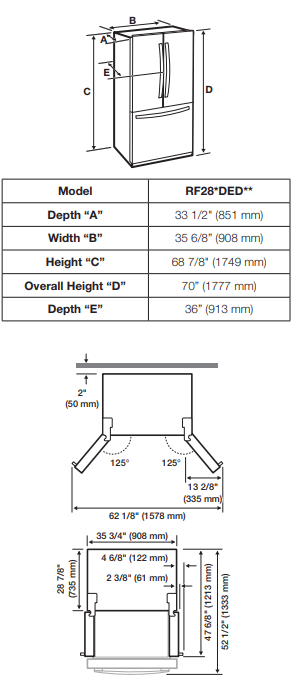
- A location with enough space for the refrigerator doors to open easily.
- A location that allows sufficient space to the right, left, back and top for air circulation. If the refrigerator does not have enough space, it can cause the bad infl uence to refrigeration effi ciency and power consumption.
- A location that allows you to move the refrigerator easily if it needs maintenance or service.
- Do not install the refrigerator in locations where the temperature is over 110 °F (43 °C) or below 50 °F (10 °C ).
When moving your refrigerator
To prevent floor damage, be sure the front adjusting legs are in the up position (above the floor). Refer to ‘Adjusting the Level’ in the manual (on page 10).

FLOORING
For proper installation, you must place this refrigerator on a level, hard surface that is the same height as the rest of the floor. This surface should be strong enough to support a fully loaded refrigerator, or approximately 335lbs (152kg).
To protect the finish of the flooring, cut a large section of the cardboard carton and place it under the refrigerator where you are working. When moving the refrigerator, you need to pull and push it straight forwards or back. Do not wiggle it from side to side.

ACCESSORIES AND REQUIRED TOOLS
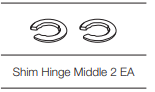
The following accessory is included with your refrigerator:
Required Tools (Not provided)
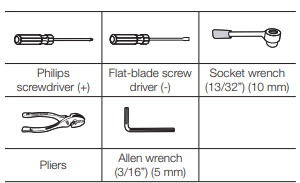
You need the following tools to complete the installation of your refrigerator:
REMOVING THE REFRIGERATOR DOORS
For some installations you need to remove the fridge and freezer drawers so you can move the refrigerator to its final location. Do not remove the doors/drawer if you don’t need to. If you do not need to remove the refrigerator doors, go to ‘Leveling the Refrigerator’ . If you need to remove the doors. continue below. Before removing the door/drawer, make sure you read the following items:
Disassembling the refrigerator doors
WARNING: Be careful not to drop and scratch the doors while removing them.
With the door opened
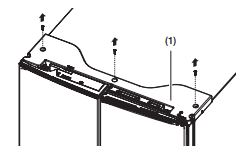
1. Remove the 3 screws holding down the TOP TABLE ( 1 ) and separate the connected wires.
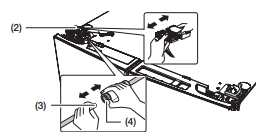
2. Disconnect two connector ( 2 ) on the left side door. To remove the water coupler from the hinge, twist and pull it from the hinge, twist and pull it from the hinge. Remove the water line ( 3 ) while pressing the marked part ( 4 ) of the water line coupler.
3. Pull and remove the hinge lever ( 5 ) . Remove the ground screw ( 6 ) attached to the upper left door hinges with a philips screwdriver (+). Remove the upper left and right door hinges ( 7 ).

4. Lift the door straight up to remove.

5. Remove the screw ( 8 ) attached to the lower left and right door hinges with a philips screwdriver (+). Remove the 2 hex head bolts ( 9 ) attached to the lower left and right door hinges with an allen wrench (3/16”). Remove the lower left and right door hinges (10 )

REATTACHING THE REFRIGERATOR DOORS
To reattach the fridge doors after you have moved the fridge to its final location, assemble the parts in reverse order.
- The Water Line must be fully inserted into the center of the transparent coupler (Type A) or the Guide Lines (Type B) to prevent water leakage from the dispenser.
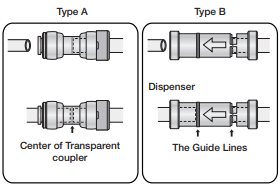
DISASSEMBLE THE FREEZER DRAWER
1. Take out the upper drawer by lifting it up.

2. Remove the freeze room guard ( 1 ) by lifting the guard up.
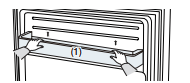
3. Take out the lower basket ( 2 ) by lifting the basket up from the rail system.

4. Press the fixing hook of rail system.

5. Holding the top of the Freezer Drawer, pull it out all the way and then remove it from the rail system.

CAUTION: Be careful not to scratch or dent the sliding rail by letting it strike the floor.
CAUTION: Make sure that you mount the freezer basket in the right position when removing / installing the freezer door. Failing to do so may result in the door not opening or closing properly. Do not overload the bottom basket or the top drawer. Overloading prevents the Freezer drawer from closing properly and will eventually cause frost build-up.
CAUTION Putting too much food into the freezer drawers can prevent the freezer from closing completely and can cause frost build-up.

RE-ASSEMBLE THE FREEZER DRAWER
To reattach the drawer after you have moved the fridge to its final location, assemble the parts in reverse order.
LEVELING THE REFRIGERATOR
Make sure the refrigerator is level so that you can make final adjustments. Use a level to test if the refrigerator is level both side to side and back to front. If the refrigerator is not level, it will not be possible to get the doors perfectly even, which may cause moisture condensation and increased energy bills. Below is an example of how to level the refrigerator if the left side of the refrigerator is lower than the right side.
How to adjust the level
1. Open the freezer drawer and remove the lower basket.
2. Insert a flat-blade screwdriver (-) into the notch on the left control lever, and then turn it counter-clockwise to level the refrigerator. (You turn the lever clockwise to lower the refrigerator and counterclockwise to raise it

CAUTION: Both control levers must be touching the floor to avoid possible personal injury or property damage because of tipping.

MAKING MINOR ADJUSTMENTS BETWEEN DOORS
Remember, a leveled refrigerator is necessary for getting the doors perfectly even. If you need help, review the previous section on leveling the refrigerator.

- The left door is fixed. To make minor adjustments between doors, adjust only the right door.
1. Pull out the freezer drawer ( 1 ), then you can see the lower hinge ( 2 ).
2. Insert a philips screwdriver (+) ( 3 ) into the shaft ( 4 ) of the lower hinge.
3. Adjust the height by turning a philips screwdriver (+) ( 3 ) clockwise ( ) or counterclockwise (
 ).
).
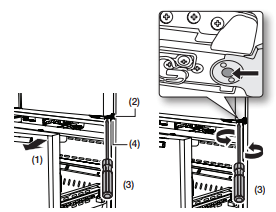
- When you turn a philips screwdriver (+) counterclockwise ( ), the door will move up.
MAKING MINOR ADJUSTMENTS BETWEEN OUT DOOR AND IN DOOR
After raising the out door, insert the supplied SHIM HINGE MIDDLE in the gap between the OUT DOOR and the HINGE-SHAFT.
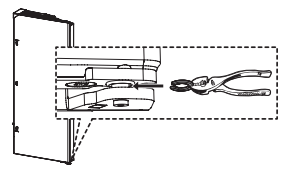
SHIM HINGE MIDDLE are enclosed with the refrigerator. The thickness of RING is 0.04” (1 mm).
INSTALLING THE WATER DISPENSER LINE
A water dispenser with a filter is one of the helpful features on your new refrigerator. To help promote better health, the water filter removes unwanted particles from your water. However, it does not sterilize or destroy microorganisms. You may need to purchase a water purifying system to do that.
The water line also connects to the ice maker. For the ice maker to operate properly, water pressure of 20~125psi (138~862 kPa) is required.
If the refrigerator is installed in an area with low water pressure (below 20psi), you can install a booster pump to compensate for the low pressure. After you have connected the water line, make sure the water storage tank inside the refrigerator is properly filled.
To do this, press the water dispenser lever until the water runs from the water outlet.
Connecting to the water supply line
1. First, shut off the main water supply.

2. Locate the nearest cold water drinking line and install the pipe clamp and shut off valve.

3. Connect the water line installation kit to the shut off valve.

Connecting the water supply line to the refrigerator.
There are several items that you need to purchase to complete this connection. You may find these items sold as a kit at your local hardware store.

1. Connect the household water line to the assembled compression fitting.
- If you are using copper tubing, slip the compression nut ( B ) (not supplied) and ferrule (not supplied) on the copper tubing (not supplied) as shown.
- If you are using plastic tubing ( B ) , insert the molded end (Bulb) of the plastic tubing ( B ) into the compression fitting.
2. Tighten the compression nut ( B ) onto the compression fitting.Do not over-tighten the compression nut ( B ).
3. Turn the water on and check for any leakage. If you find water drops or leakage in the connection areas, turn off the main water supply. Check the connections and, if necessary, tighten.
4. Flush 1 gallon of water through the filter before drinking or using the water from the refrigerator. (Flush approximately 6 minutes.) To flush, press a large glass or cup against the water dispenser lever. Fill the glass, empty it into the kitchen sink after it is filled, and then repeat.
5. After you turn on the refrigerator, let the ice maker make ice for 1 to 2 days. Over that period of time, throw out the first 1 or 2 buckets of ice the freezer makes to ensure all impurities have been removed from the water line.
COMPLETING THE SET UP
Now that you have your new refrigerator installed in place, you are ready to set up and enjoy the features and functions of the appliance. By completing the following steps, your refrigerator should be fully operational.
1. Make sure your refrigerator is in an appropriate location with reasonable clearance between it and the wall. Refer to installation instructions in this manual.
2. Once the refrigerator is plugged in, make sure the interior light comes on when you open the doors.
3. Set the Temperature control to the coldest temperature and wait for an hour. The freezer will get slightly chilled and the motor will run smoothly. Reset the refrigerator and freezer to the temperatures you want.
4. After you plug the refrigerator in, it will take a few hours to reach the appropriate temperature. You can store food and drinks in the refrigerator after the temperature is sufficiently cool.
- If condensation or water drops appear on both sides of the fridge door’s central part, turn the Energy Saver mode off after removing the condensation. (See the explanation of the Energy Saver button in “Using the Control Panel”.)
Operating your French Door Refrigerator
USING THE CONTROL PANEL
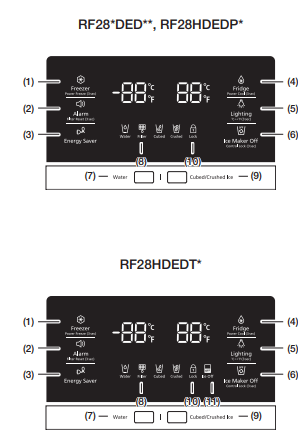
 (1) Freezer / Power Freeze (3sec)
The Freezer button serves two purposes:
- To set the Freezer to your desired temperature.
- To turn the Power Freeze function on and off.
- To set the Freezer temperature, touch the Freezer button. You can set the temperature between 5°F (-15 °C C) and -8 °F (-23 °C).
- Power Freeze function
Touch and hold this button for 3 seconds to decrease the time needed to freeze products in the Freezer.
It can be helpful if you need to quickly freeze easily spoiled items or if the temperature in the freezer has warmed dramatically.
(For example, if the door was left open.)
When you use this function, the energy consumption of the refrigerator will increase.
Remember to turn it off when you don’t need it and return the freezer to your original temperature setting.
If you need to freeze a large amount of food, activate the Power Freeze function at least 24 hours before you put the food into the freezer
 ( 2 ) Alarm / Filter Reset (3sec)
The Alarm button serves two purposes:
- To turn the door open alarm on and off
- To reset the water filter life indicator.
1. Door Alarm Function
If the door alarm is set to On, an alarm beeps if any refrigerator door is left open for more than three minutes.
The beeping stops when you close the door.
The door alarm function is pre-set to On in the factory.
You can turn it off by pressing and then releasing the Alarm button.
You can turn it back on in the same fashion.The icon lights up when the function is on.
When the Door Alarm function is on and the alarm sound is triggered, the Door Alarm Icon will blink while the alarm sounds.
2. Water Filter Life Indicator Function
After you replace the water filter, touch and hold this button for 3 seconds to reset the water filter life indicator.
When you reset the water filter life indicator, the Filter icon on the panel turns Off.
The Filter icon will turn red to let you know it is time to change the water filter after six months (about 300 gallons).
Some areas have large amounts of lime in their water, which causes the water filter to clog more quickly.
If this is the case in your area, you will have to change the filter more frequently than every six months.
 ( 3 ) Energy Saver
Touching this button turns Energy Saver mode on and off.
When you turn Energy Saver on, the Energy Saver icon lights.
Turn Energy Saver off and the icon goes off.
The Energy Saver function automatically turns on when power is supplied to the refrigerator.
If condensation or water drops appear on the doors, turn the Energy Saver mode off.
 ( 4 ) Fridge / Power Cool (3sec)
The Fridge button serves two purposes:
- To set the Fridge to your desired temperature.
- To turn the Power Cool function on and off.
1. To set the Fridge temperature, press the Fridge button.
You can set the temperature between 44 °F (7 °C) and 34 °F (1 °C).
2. Power Cool function
Touch and hold this button for 3 seconds to decrease the time needed to cool products in the Refrigerator.
It can be helpful if you need to quickly cool easily spoiled items or if the temperature in the fridge has warmed dramatically. for example, if the door was left open)
 ( 5 ) Lighting / °C↔°F (3sec)
The Lighting button serves two purposes:
- To turn the dispenser light on and off
- To switch the temperature units between ºC and ºF.
1. Light Function
Touching the Lighting button turns on the Dispenser LED lamp in continuous mode so that it stays on continuously.
The button also lights up.
If you want the Dispenser lamp to come on only when some one uses the dispenser, press the
Lighting button to turn the continuous mode off.
2. To switch the temperature units between ºC and ºF.
Touch and hold this button for 3 seconds to select the temperature display you want.
Each time you press and hold the button, the ºC and ºF temperature modes alternate and the ºC or ºF icon lights up, indicating your selection.
 ( 6 ) Ice Maker Off/ Control Lock (3 sec)
The Ice Maker Off button serves two purposes:
- To turn the Ice maker on and off.
- To turn the Control Lock Function on and off.
1. Ice Off Function
If you don’t want to make more ice, press the Ice Maker Off button. The icon lights and the Ice Maker stops making ice.
If the ice maker function is ON, and the water Line is not connected, there will be a water valve noise from the back of the unit. Press the Ice Maker Off (Control Lock (3 sec)) button for less than 3 seconds until the Ice Off Indicator (  ) illuminates.
2. Control Lock Function
Touch and hold this button for 3 seconds to lock the display and the dispenser buttons so the buttons cannot be used. When Control Lock is on, the refrigerator does not dispense ice or water, even if the Dispenser Lever is pressed.
The Control Lock icon lights to indicate you’ve activated the Control Lock function. Touch and hold the button 3 seconds to unlock.
 ( 7 ) Water
Touch this button to dispense water.
This mode can not be used with the Ice Type mode simultaneously.
Water mode shuts off when you touch the Cubed / Crushed Ice button.
To save electricity, the Panel Display turns off automatically under the following conditions:
When no button has been pressed, when no doors are open, or when no Dispenser Lever has been pushed.
However, the icon indicating your cubed or crushed ice selection, will stay on.
When you press a button, open a door, or push a Dispenser Lever, the Panel Display will turn on again.
Except for the Energy Saver, Water, and Cubed/Crushed Ice buttons, all function buttons will become operational after you remove your finger from the button you are currently pressing.
 (8) Filter
Water filter usage
This icon lights up when you need to change the filter, usually after the refrigerator has dispensed about 300 gallons of water (after about 6 months). After you install the new water filter, reset the filter indicator by touching and holding the Hold 3sec for Filter Reset button for seconds.
The icon will blink red for several seconds when you open or close the door.
- If water is not dispensing or dispensing slowly, you need to replace the water filter because the water filter is clogged.
- Some areas have large amounts of lime in their water, which causes the water filter to clog more quickly.
 (9) Ice Type
Touch this button to select your desired ice type. Cubed and crushed ice modes alternate when you press the button.
This mode can not be used with the Water mode simultaneously.
 (10) Control Lock
The Control Lock icon lights when you’ve activated the Control Lock function. Press and hold the Ice Maker Off / Control Lock button for 3 seconds to turn Control Lock off and re-activate the panel buttons.
 Cooling Off Mode
Cooling Off mode (also called Shop mode), is designed for use by retailers when they are displaying refrigerators on the shop floor.
In Cooling Off mode, the refrigerator’s fan motor and lights work normally, but the compressors do not run, and the refrigerator and freezer do not get cold.
To start Cooling Off mode, touch and hold the during normal operation.
The refrigerator chime sounds and the temperature display flashes OFF.
To cancel Cooling Off mode, touch and hold the Freezer, Alarm and Fridge buttons again for 5 seconds.
CHANGING THE WATER FILTER
WARNING: To reduce risk of water damage to your property DO NOT use generic brands of water filters in your SAMSUNG Refrigerator.
USE ONLY SAMSUNG BRAND WATER FILTERS. SAMSUNG will not be legally responsible for any damage, including, but not limited to property damage caused by water leakage from the use of a generic water filter. SAMSUNG Refrigerators are designed to work ONLY WITH SAMSUNG Water Filter.
The Filter light turns red to let you know when it is time to change your water filter cartridge.
To give you time to get a new filter, the red light comes on just before the capacity of the current filter runs out. 
Changing the filter on time provides you with the freshest, cleanest water from your refrigerator.
1. Shut off the water supply. Then, turn the water filter ( 1 ) about 1/4 turn, counter-clockwise.
2. Pull the water filter ( 1 ) from the case filter ( 2 ).

- To change the water filter more easily, shut off the water supply valve.
- Sometimes, it is hard to disassemble the water filter because impurities in the water cause it to stick. If you are having difficulties, grip the water filter firmly and pull it hard.
- When you pull the water filter, a little water can leak from the opening. This is normal. To minimize the water leaks, keep the filter cartridge horizontal when you pull it.
- To prevent overflow, empty the water filter tray ( 3 ) and dry around the filter case ( 2 ).

3. Insert the new filter into the filter case ( 4 ).

4. Push the filter, and then turn it clockwise until it locks.
- If you have trouble inserting the water filter because of high water pressure, shut off the water supply valve.

- The locked symbol should be lined up with the indicator line.
5. Touch and hold the “Alarm / hold 3 sec for Filter Reset” button ( (Filter Reset) ) for about seconds to reset the water filter indicator.The indicator’s red light will turn off.
6. If you turned off the water supply, turn it back on.
Removing any residual matter inside the water supply line after installing the water filter.
1. Turn ON the main water supply y if you turned it off when you installed the water filter.
2. Run of water through the dispenser until the water runs clear (approx. 6 to 7 minutes). This will clean the water supply system and remove air from the lines.
3. Additional flushing may be required in some households.
4. Open the Refrigerator door and make sure there are no water leaks coming from the water filter.

Reverse Osmosis Water Supply
IMPORTANT :
The pressure of the water supply coming out of a reverse osmosis system going to the water inlet valve of the refrigerator needs to be between 35 and 120 psi (241 and 827 kPa). If a reverse osmosis water filtration system is connected to your cold water supply, the water pressure to the reverse osmosis system needs to be a minimum of 40 to 60 psi (276 to 414 kPa.) If the water pressure to the reverse osmosis system is less than 40 to 60 psi (276 to 414 kPa):
- Check if the sediment filter in the reverse osmosis system is blocked. Replace the filter if necessary.
- Allow the storage tank on the reverse osmosis system to refill after heavy usage.
- If your refrigerator has a water filter, it may further reduce the water pressure when used in conjunction with a reverse osmosis system. Remove the water filter.
If you have questions about your water pressure, call a licensed, qualified plumber.
CONTROLLING THE TEMPERATURE
Basic temperature of Freezer and fridge compartments
The basic temperature and recommended temperatures of the Freezer and Refrigerator Compartments are 0 °F and 37 °F(or -18 °C and 3 °C) respectively. If the temperature of the Freezer and Refrigerator Compartments are too high or low, adjust the temperature manually.
Controlling the Freezer temperature
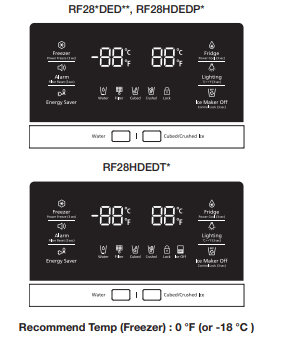
The Freezer temperature can be set between 5 °F(or between -23 °C and -15 °C) to suit your particular needs. Press the Freezer button repeatedly until the desired temperature is shown in the temperature display.
The temperature display will change by 1 °F (or 1 °C) with each press. See below.
Fahrenheit : 0 °F ➞ -1 °F ➞ -2 °F ➞ -3 °F ➞ -4 °F ➞ -5 °F ➞ -6 °F ➞ -7 °F ➞ -8 °F ➞ 5 °F ➞ 4 °F ➞ 3 °F ➞ 2 °F ➞ 1 °F ➞ 0 °F.
Centigrade : -18 °C ➞ -19 °C ➞ -20 °C ➞ -21 °C ➞ -22 °C ➞ -23 °C ➞ -15 °C ➞ -16 °C ➞ -17 °C ➞ -18 °C.
Keep in mind that foods such as ice cream may/ melt at 4 °F (or -15.5 °C).
The temperature display will move sequentially from -8 °F to 5 °F (or from -23 °C to -15 °C).
Controlling the fridge temperature
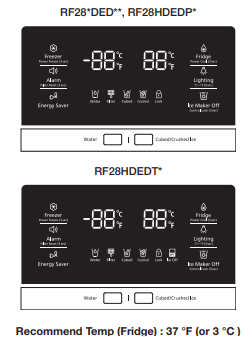
The fridge temperature can be set between 34 °F and 44 °F (or between 1 °C and 7 °C) to suit your particular needs. Press the Fridge button repeatedly until the desired temperature is shown in the temperature display.
The temperature will change by 1 °F (or 1 °C) with each press. See below.
Fahrenheit : 37 °F ➞ 36 °F ➞ 35 °F ➞ 34 °F ➞ 44 °F ➞ 43 °F ➞ 42 °F ➞ 41 °F ➞ 40 °F ➞ 39 °F ➞ 38 °F ➞37 °F.
Centigrade : 3 °C ➞ 2 °C ➞ 1 °C ➞ 7 °C ➞ 6 °C ➞ 5 °C ➞ 4 °C ➞ 3 °C.
The temperature control process for the Fridge works just like the Freezer process. Press the Fridge button to set your desired temperature. After a few seconds, the Fridge will begin adjusting towards the newly set temperature. This will be refl ected in the digital display.
USING THE COLD WATER DISPENSER
Push the appropriate ice type button to select what you want dispensed.

Using the ice Dispenser
Place a glass underneath the ice dispenser and push gently against the dispenser lever with your glass.
Make sure the glass is in line with the dispenser to prevent the ice from bouncing out.

- To select water, press the water button on the display, and then press the dispenser lever.
- To select Ice, press the ICE type button of your choice on the display, and then press the dispenser lever.
- If you have selected cubed ice, when you press the lever, the dispenser may dispense a small amount of crushed ice first.
- If ice doesn’t come out, pull out the ice bucket and press the test button located on the right side of ice maker.

- Do not press the test button continuously when the tray is filled with ice or water. Water may overflow or ice may jam the bucket.
- When you press the Test button, you will hear the refrigerator chime (ding-dong). When the chime sounds, release the Test button.
- The chime sounds automatically again to let you know the ice maker is working well.
- Replace the ice bucket.
Ice Making
To fill the ice bucket to maximum capacity after installation, follow these steps:
- Allow your refrigerator to operate and cool down for 24 hours (or 1 full day). Waiting 24 hours will allow your ice maker to cool properly.
- Dispense 4 to 6 ice cubes into a glass.
- After 8, and then 16 hours, dispense a full glass of ice.
If There is a Power Failure
If a power failure occurs, ice cubes may melt, and then freeze together when the power comes back on, preventing the dispenser from working properly.
To prevent this problem, after a power failure, pull out the ice bucket and discard the residual ice or water.
After you dump the ice from the ice bucket, you should press the dispenser lever once with the 'Water’ or ‘Ice Type’ function ON.
The ice maker will make new ice faster after you return the ice bucket to the refrigerator.

- If you use all the ice at once, you must repeat Steps 2 and 3 under Ice Making. However, only wait 8 hours before dispensing the first 4 to 6 ice cubes. This will replenish the ice cubes and ensure maximum ice production.
Using the ice off Function
When you select the Ice Off mode, remove all ice cubes from the bucket.
If you leave the ice cubes in the bucket, the ice cubes may clump together, making it difficult to remove them.
To remove the ice bucket safely and avoid injury, hold the bottom of the bucket with one hand and the side of the bucket with the other.
Then, lift up on the ice bucket, and pull it straight out.
To put the ice bucket back in, push it firmly straight back.
- If the ice bucket is not pushed firmly into place, ice in the bucket can melt.
If the bucket does not fit, turn the helix 90 degree (see the last illustration on the right, below) and try again.

Going on vacation...
If you are going on a long vacation or business trip and won’t use the water or ice dispensers for a long time:
- Close the water valve. Otherwise, water leakage may occur.
- Remove all food and ice in the ice bucket.
- Unplug the refrigerator.
- Wipe excess moisture from inside and leave the doors open. Otherwise, odor and mold may develop.
Ice Maker Do’s and Don’ts
- Do not put your fingers, hands or any other unsuitable objects in the chute or ice-maker bucket.
- It may result in personal injury or material damage.
- Never put your finger or any other objects in the dispenser opening.
- Do not try to disassemble the ice maker.
- Do not wash or spray the ice bucket with water while it is in the refrigerator. Remove it to clean it.
Water clouding phenomenon
- All water provided to refrigerators flows through the core filter which is an alkaline water filter. In this process, the pressure in the water that has flowed out of the filter gets increased, and oxygen and nitrogen become saturated. When this water flows out in the air, the pressure plummets and the oxygen and nitrogen get supersaturated so that they turn into gas bubbles. The water could look misty due to these oxygen bubbles. The water may look temporarily cloudy due to these oxygen bubbles. After a few seconds, the water will look clear.
- Please wait 1 second before removing the cup after dispensing water to prevent spills. Do not pull out the lever dispenser after dispensing ice or water. It comes back automatically. Ice is made in cubes. When you select “Crushed”, the ice maker grinds the ice cubes into crushed ice.
PARTS AND FEATURES
Use this page to become more familiar with the parts and features of the refrigerator
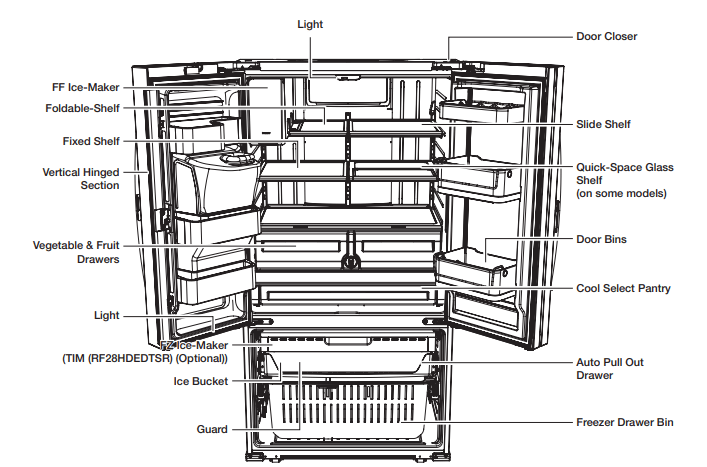
- When closing the door, make sure the Vertical Hinged Section is in the correct position to avoid scratching the other door. If the Vertical Hinged Section is reversed, put it back to the right position and close the door. Moisture may appear at times on the Vertical Hinged Section. The door handle may become loose over time. If this happens, tighten the bolts found on the inside of the door. If you close one door with a lot of force, the other door may open.
- When the door opens, the interlock switch automatically turns off the auger motor in the ice maker for safety reasons.
- When the interior or exterior LED lamp has gone out, please contact Samsung Customer Support.
USING THE COOL SELECT PANTRY
The Cool Select Pantry is a full-width drawer with adjustable temperature control. This pantry can be used for large party trays, deli items, pizza, beverages or miscellaneous items. There is a temperature control which can adjust the amount of cold air allowed into the pantry. The control is located on the right side of the pantry.

- The Pantry has three modes: The Fresh mode, Chilled mode, and Deli mode. Fresh mode is the default. Press the Temp button repeatedly until the mode you want is lit. Once you select a mode, the temperature will change to match the mode you selected.
- The Pantry temperature may change depending on the number of items inside and where they are located, the ambient temperature, and how often the door is opened.
The Pantry Selection Button
1. When you select “Deli”, the temperature of the pantry will be kept around 41 °F (or 5 °C). This feature helps keep food fresh for a long time.
2. When you select “Fresh”, the temperature of the pantry will be kept around 38 °F (or 3 °C). This feature helps keep food fresh for a longer time.
3. When you select “Chilled”, the temperature of the pantry will be kept around 34 °F (or 1 °C). This feature also helps keep meat or fish fresh for a longer time. The table below lists the Pantry modes and the kinds of foods that can be stored safely for each mode.

- Fruits and vegetables may be damaged when the “Chilled” mode is set. Do not store lettuce or other leafy produce in this pantry.
REMOVING THE REFRIGERATOR ACCESSORIES
1. Door Bins
- Door Bins (1)
- To remove - Simply lift the bin up and pull straight out.
- To relocate - Slide it in above the desires location and push down until it stops.
- Door Bins ( 2 )
- To remove : Take the right side of the bin out by lifting it at an angle along the guide, and then take the left side out by pulling it from the door.
- To relocate : Slide it into the original location and push down until it sticks.
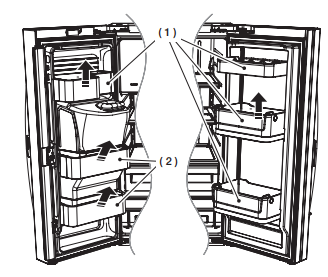
CAUTION: Do not adjust a bin full of food. Remove the food first.
To remove dust from the bins - Remove the guard and wash in water.
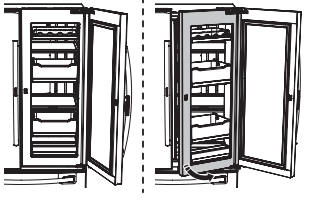
CAUTION When Out Door opens more than normal OPEN angle (105°), Indoor is able to touch the Out Door.
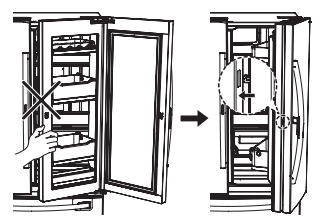
CAUTION
- Do not open the Indoor when Outdoor is open, close the Out door to hang the Handle Latch and then open the In / Out Door together.
- When close the outdoor, check the “click” sounds of a latch.
How to use the Multi Supporter
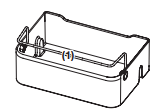
1. When not in use, leave the Multi Supporter flipped over as shown in the diagram.
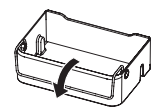
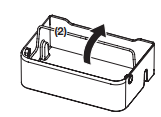
2. Flip the Multi Supporter to position ( 1 ) to prevent items from falling out and over. (1)
3. Flip the Multi Supporter to position ( 2 ) to use it as a divider.
2. Tempered Glass shelves
- To remove - Tilt up the front of the shelf in the direction shown ( 1 ) and lift it up vertically ( 2 ). Pull the shelf out.
- To relocate - Tilt the front of the shelf up and guide the shelf hooks into the slots at a desired height.

3. Vegetable & Fruit Drawers

- Door Bins Before removing the Vegetable and Fruit drawers, remove the bottom door bins on the left and right doors as shown in the next column.
To remove the door bins
- Simply lift the bin up and pull straight out.

To remove the Vegetable and Fruit Drawers
- Tilt up the front of the drawer and pull straight out, and pull out the drawer after moving slightly in the direction of the arrow.

To re-install
- Insert the drawer into the frame rails, and then push back into place.
- Slide each bin in above the desired location, and then push down until it stops.
4. Cool select pantry
- To remove the pantry - Pull the pantry out to full extension. Tilt up the front side of the pantry and pull straight out.
- To relocate the pantry – Push the rails to the back of the refrigerator. Place the drawer onto the rails and slide the pantry back until it is in place.

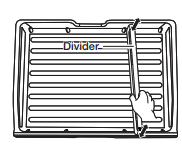
- To remove the divider : Pull the pantry completely out to full extension and raise the front side of the divider to unhook it from the rear wall of the pantry, then lift the divider out.
- To relocate the divider : Hook the back of the divider over the rear wall of the pantry and push the divider down.
Using the doors
Ensure that the doors close all the way and are securely sealed.
When the refrigerator door is only partially open, it will automatically close. But, the door will stay open when opened more than the auto close range and you must close it manually.
REMOVING THE FREEZER ACCESSORIES
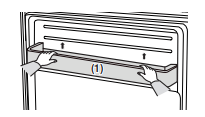
1. Freezer Room Guard
- To remove : Remove the freezer room guard ( 1 ) by lifting the guard up.
- To relocate : Push down until the guard ( 1 ) locks into place.
2. Ice Bucket
- To remove : Lift the ice bucket ( 1 ).
- To relocate : Place the ice bucket into the Super extended drawer ( 2 ).
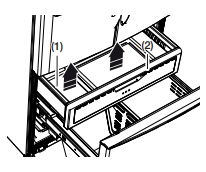
3. Super Extended Drawer
To remove - Pull the drawer out to full extension. Tilt up the rear of the drawer and lift straight out.
To relocate - Place the drawer onto the rails ( 4 ) by tilting it up. Lower the drawer into place until it is horizontal and slide the Drawer ( 3 ) in.

4. Freezer Drawer
To remove the freezer drawer - Pull the freezer drawer out fully. Tilt up the rear of the bin and lift it out to remove.
To relocate the freezer drawer - Place the bin into the rail assembly.

CLEANING THE REFRIGERATOR
Caring for your Samsung French Door Refrigerator prolongs the life of your appliance and helps keep the refrigerator free of odor and germs.
Cleaning the Interior
Clean the inside walls and accessories with a mild detergent and then wipe dry with a soft cloth. You can remove the drawers and shelves for a more thorough cleaning. Just make sure to dry drawers and shelves before putting them back into place.

Cleaning the Exterior
Wipe the control panel and digital display with a damp, clean, soft cloth. Do not spray water directly on the surface of the refrigerator. The doors, handles, and cabinet surfaces should be cleaned with a mild detergent and then wiped dry with a soft cloth. To keep your appliance looking its best, polish the exterior once or twice a year.

CAUTION: Do not spray water directly on the refrigerator. Use a clean, damp cloth to clean.
CAUTION: Do not use benzene, thinner, or Clorox for cleaning. They may damage the surface of the appliance and may cause a fire.
CAUTION: You can erase the printed letters on the display if you apply stainless cleaner directly to the area where the letters are printed.

Cleaning the Ice / Water Dispenser
Push down one end of the tray dispenser and remove it. Wipe the Ice / Water Dispenser with a clean and soft cloth.

Cleaning the Rubber door seals
If the rubber door seals are dirty, the doors may not close properly, and the refrigerator will not operate efficiently. Keep the door seals free of dust or stains by cleaning the doors with a mild detergent and damp cloth. Wipe dry with a clean, soft cloth.

CAUTION: Do not clean the refrigerator with benzene, thinner, or car detergent. These substance could cause a fire.
Cleaning the rear side of the refrigerator
To keep cords and exposed parts free of dust and dirt accumulation. Vacuum the rear side of the appliance once or twice a year.
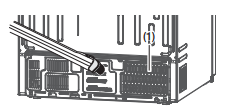
CAUTION: Do not remove the back cover ( 1 ). You could suffer an electric shock
FOOD STORAGE TIPS


Troubleshooting
The refrigerator does not work at all or it does not chill sufficiently.
- Check if the power plug is properly connected.
- Check if the set temperature on the digital display is warmer than the freezer or fridge inner temperature. If it is, set the refrigerator colder.
- Is the refrigerator in direct sunlight or located near a heat source?
- Is the back of the refrigerator too close to the wall, preventing proper ventilation? If so, it may not be able to cool sufficiently. Keep it an appropriate distance from the wall.
- Is there too much food inside so that the food is blocking the outlet vent? To keep the refrigerator at a suitable temperature, do not fill the refrigerator with too much food.
The food in the fridge is frozen.
- Check if the set temperature on the digital display is too low. If so, raise the set temperature inside the refrigerator.
- Is the temperature in the room too low? Set the refrigerator warmer.
- Did you store the food which is juicy in the coldest part of the refrigerator? Try moving those items to the other shelves in the fridge instead of keeping them in the colder areas or bins.
You hear unusual noise or sounds.
- Check if the refrigerator is level and stable.
- Is the back of the refrigerator too close to the wall, preventing proper ventilation? Try moving the back of the refrigerator at least 2 inches from the wall.
- Was anything dropped behind or under the refrigerator?
- If you hear a “ticking” sound from inside the refrigerator, this is normal. It occurs because various parts contract or expand in response to temperature changes in the refrigerator interior.
- If it sounds as if something is hitting something else inside the refrigerator, this is normal. The sound is caused by the compressor operating at high capacity.
The cabinet-door sealing area of the appliance is hot and condensation is occurring.
- Some heat is normal as anti-condensators are installed in the vertical hinged section of the refrigerator to prevent condensation.
- Is the refrigerator door ajar? Condensation can occur when you leave the door open for a long time.
The ice Maker is not producing ice.
- It may take longer to make ice if it is not sufficiently cool, such as when first installed.
- Is the water line connected and the shut-off valve opened?
- Ice maker turn on? If Ice maker off is illuminated in panel, press the button, ice maker off will disappear.
- Did you manually stop the ice making function?
- Check if the filter is properly installed. If it is not properly installed, the ice making function may not work.
You can hear water bubbling in the refrigerator.
- This is normal. The bubbling comes from refrigerant circulating through the refrigerator.
There is a bad smell in the refrigerator.
- Check for spoiled food.
- Foods with strong odors (for example, fish) should be tightly covered.
- Clean out your freezer periodically and throw away any spoiled or suspicious food. When cleaning the inside of the fridge, store food elsewhere and unplug the appliance. Wipe with a dry dishcloth after 2-3 hours and then circulate air inside the refrigerator.
Frost forms on the walls of the freezer.
- Is the air vent blocked? Remove any obstructions so air can circulate freely.
- Allow sufficient space between the stored foods for efficient air circulation.
- Is the freezer drawer closed properly? If the freezer drawer is not completely closed or is blocked, humidity from outside may enter and cause severe frost to form.
The water dispenser is not functioning.
- Is the water line connected and the shut-off valve opened?
- Has the water supply line tubing been crushed or kinked?
- Make sure the tubing is free and clear of any obstruction.
- Is the water tank frozen because the fridge temperature is too low? Try selecting a warmer setting on the Digital display.
- Is the Child Lock on?
- Check if the filter is properly installed. If it is not properly installed, the water dispenser may not work
The auto close system does not work with the freezer door.
- Is there an imbalance between the right and left parts of the door?
- Open and close the door smoothly 1~2 times. After you do this, the auto close system usually works properly again
- Try opening the door smoothly to avoid unbalancing the right and the left part of the door.
Condensation or water drops forms on both sides of fridge door’s central part.
- Condensation or water drops may form if the humidity is too high while the refrigerator is operating.
- If condensation or water drops appears on both sides of fridge door’s central part, turn the Energy Saver mode off after removing the condensation. (See the explanation of the Energy Saver button in “Using the Control Panel” .)