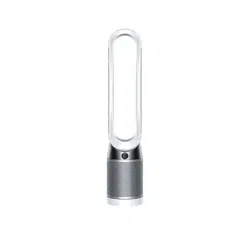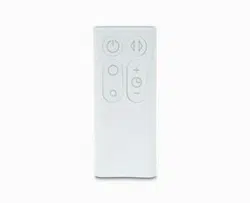
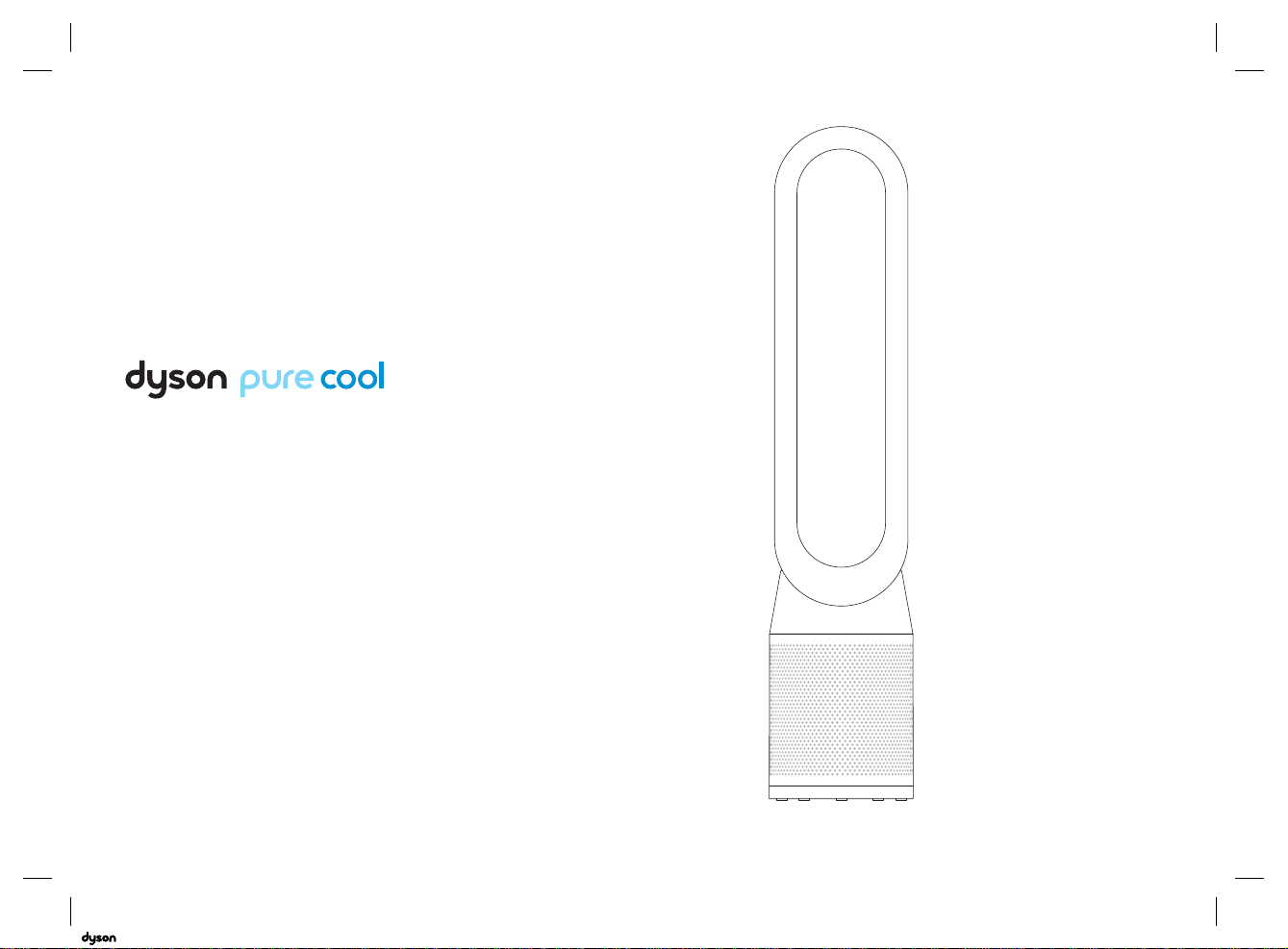
Operating manual
TP04
06.07.2018 11:40 - C93644_TP04_OPMAN_ANZ_X438-OPMAN-93644.indd_15_4c0s

2
Maintenance
Changing the glass HEPA filters
Changing the carbon filters
Cleaning
Important information
Troubleshooting
Additional information
Getting started
Registration
Important safety instructions
Assembly
Controls
Additional functions
Connecting to the Dyson Link app
Information menu
Auto mode
Airflow
Oscillation
Night mode
4
6
9
10
11
12
14
16
17
18
19
20
22
24
25
26
Contents
06.07.2018 11:40 - C93644_TP04_OPMAN_ANZ_X438-OPMAN-93644.indd_15_4c0s
3
We're here to help
Support centre
AU: 1800 239 766
NZ: 0800 397 667
Online
AU: www.dyson.com.au/support
NZ: www.dyson.co.nz/support
Download the
Dyson Link app
The Dyson Link app allows you to
control, monitor, customise and get
automatic setting upgrades for your
appliance on your mobile device.
Search for the Dyson Link app on
the App Store or Google Play.
Thank you for choosing to
buy a Dyson purifying fan
06.07.2018 11:40 - C93644_TP04_OPMAN_ANZ_X438-OPMAN-93644.indd_15_4c0s
4
Registration
After registering your 2 year guarantee, your Dyson
appliance will be covered for parts and labour
(excluding filters) for 2 years from the date of purchase,
subject to the terms of the Dyson guarantee.
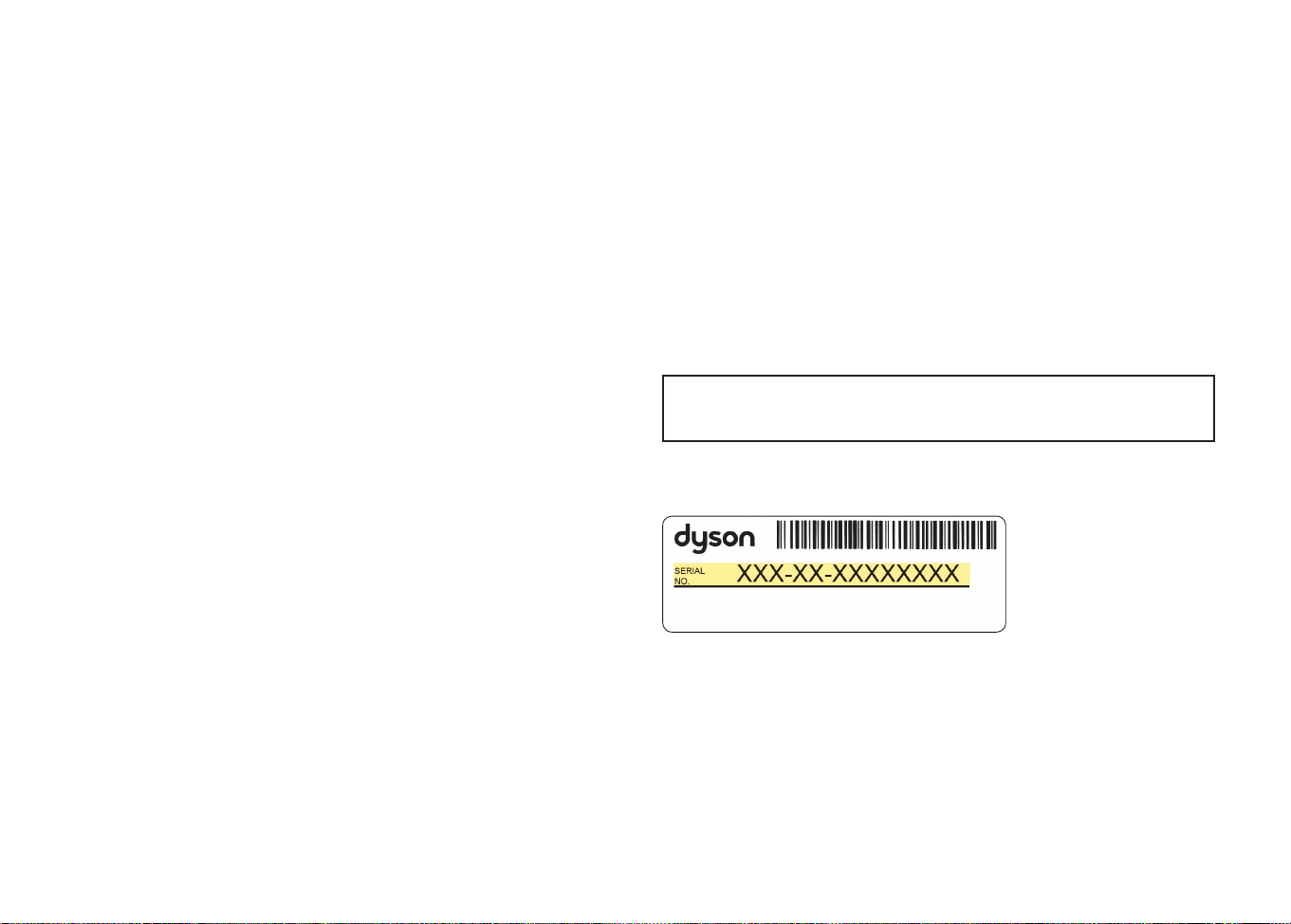
Your serial number can be found on your rating plate
which is on the base of the appliance.
Note your serial number for future reference.
This illustration is for example purposes only.
Small details may vary slightly from those shown.
06.07.2018 11:40 - C93644_TP04_OPMAN_ANZ_X438-OPMAN-93644.indd_15_4c0s
5
Register by mail
Complete and return the form to
Dyson in the envelope supplied.
Register by phone
Call our dedicated Helpline.
AU: 1800 239 766
NZ: 0800 397 667
Register online
Visit our website to register your
Dyson full parts and labour
guarantee online.
AU: www.dyson.com.au/register
NZ: www.dyson.co.nz/register
Register with your smartphone
Download the Dyson Link app
and you will be taken through
registration as part of the set up.
4 easy ways to register
your 2 year guarantee
06.07.2018 11:40 - C93644_TP04_OPMAN_ANZ_X438-OPMAN-93644.indd_15_4c0s

6
IMPORTANT SAFETY
INSTRUCTIONS
BEFORE USING THIS APPLIANCE READ
ALL INSTRUCTIONS AND CAUTIONARY
MARKINGS IN THIS MANUAL AND ON THE
APPLIANCE
When using an electrical appliance, basic
precautions should always be followed, including
the following:
WARNING
THE FAN AND THE REMOTE CONTROL BOTH
CONTAIN MAGNETS.
1. Pacemakers and defibrillators may be affected
by strong magnetic fields. If you or someone in
your household has a pacemaker or defibrillator,
avoid placing the remote control in a pocket or
near to the device.
2. Credit cards and electronic storage media may
also be affected by magnets and should be kept
away from the remote control and the top of
the appliance.
WARNING
These warnings apply to the appliance, and
also where applicable, to all tools, accessories,
chargers or mains adaptors.
TO REDUCE THE RISK OF FIRE, ELECTRIC
SHOCK, OR INJURY:
3. This Dyson appliance is not intended for
use by children, or persons with reduced
physical, sensory or mental capabilities, or
lack of experience and knowledge, unless
they are supervised and/or given instruction
by a responsible person concerning use of the
appliance to ensure that they can use it safely.
Cleaning and user maintenance should not be
performed by children without supervision.
4. Ensure that the appliance is fully assembled in
line with the instructions before use.
5. Do not allow to be used as a toy. Close attention
is necessary when used by or near children.
Children should be supervised to ensure that
they do not play with the appliance.
6. Use only as described in this Dyson Operating
Manual. Do not carry out any maintenance other
than that shown in this manual, or advised by the
Dyson Customer Care Helpline.
06.07.2018 11:40 - C93644_TP04_OPMAN_ANZ_X438-OPMAN-93644.indd_15_4c0s

7
7. Suitable for dry location ONLY. Do not use
outdoors or on wet surfaces and do not expose
to water or rain.
8. Do not handle any part of the plug or appliance
with wet hands.
9. Do not operate any appliance with a damaged
cable or plug. Discard the appliance or return
to an authorised service facility for examination
and/or repair. If the supply cable is damaged
it must be replaced by Dyson, its service agent
or similarly qualified person in order to avoid
a hazard.
10. If the appliance is not working as it should,
has received a sharp blow, has been dropped,
damaged, left outdoors, or dropped into water,
do not use and contact the Dyson Customer
Care Helpline.
11. Do not stretch the cable or place the cable under
strain. Keep cable away from heated surfaces.
12. Do not run cable under carpeting. Do not
cover cable with throw rugs, runners or similar
coverings. Arrange cable away from traffic area
and where it will not be tripped over.
13. Do not unplug by pulling on the cable.
To unplug, grasp the plug, not the cable. The use
of an extension cable is not recommended.
14. Do not put any object into openings or the inlet
grille. Do not use with any opening blocked;
keep free of dust, lint, hair, and anything that
may reduce airflow.
15. Do not use any cleaning agents or lubricants
on this appliance. Unplug before cleaning or
carrying out any maintenance.
16. Always carry the appliance by the base, do not
carry it by the loop amplifier.
17. Turn off all controls before unplugging. Unplug
from socket when not in use for extended
periods. To avoid a tripping hazard, safely coil
the cable.
18. Do not use near furnaces, fireplaces, stoves or
other high temperature heat sources.
19. Do not use in conjunction with or directly next
to an air freshener or similar products. Do not
spray or apply perfumes directly on or near the
filter. Keep essential oils and chemicals away
from the appliance.
20. WARNING: Chemical Burn and Choking
Hazard. Keep batteries away from children.
This product contains a lithium button/coin cell
battery. If a new or used lithium button/coin cell
battery is swallowed or enters the body, it can
cause severe internal burns and can lead to
death in as little as 2 hours. Always completely
06.07.2018 11:40 - C93644_TP04_OPMAN_ANZ_X438-OPMAN-93644.indd_15_4c0s
8
secure the battery compartment. If the battery
compartment does not close securely, stop using
the product, remove the batteries, and keep it
away from children. If you think batteries might
have been swallowed or placed inside any part
of the body, seek immediate medical attention.
21. This appliance is only to be used with the power
supply unit provided with it.
READ AND SAVE THESE
INSTRUCTIONS
THIS DYSON APPLIANCE IS INTENDED FOR
HOUSEHOLD USE ONLY
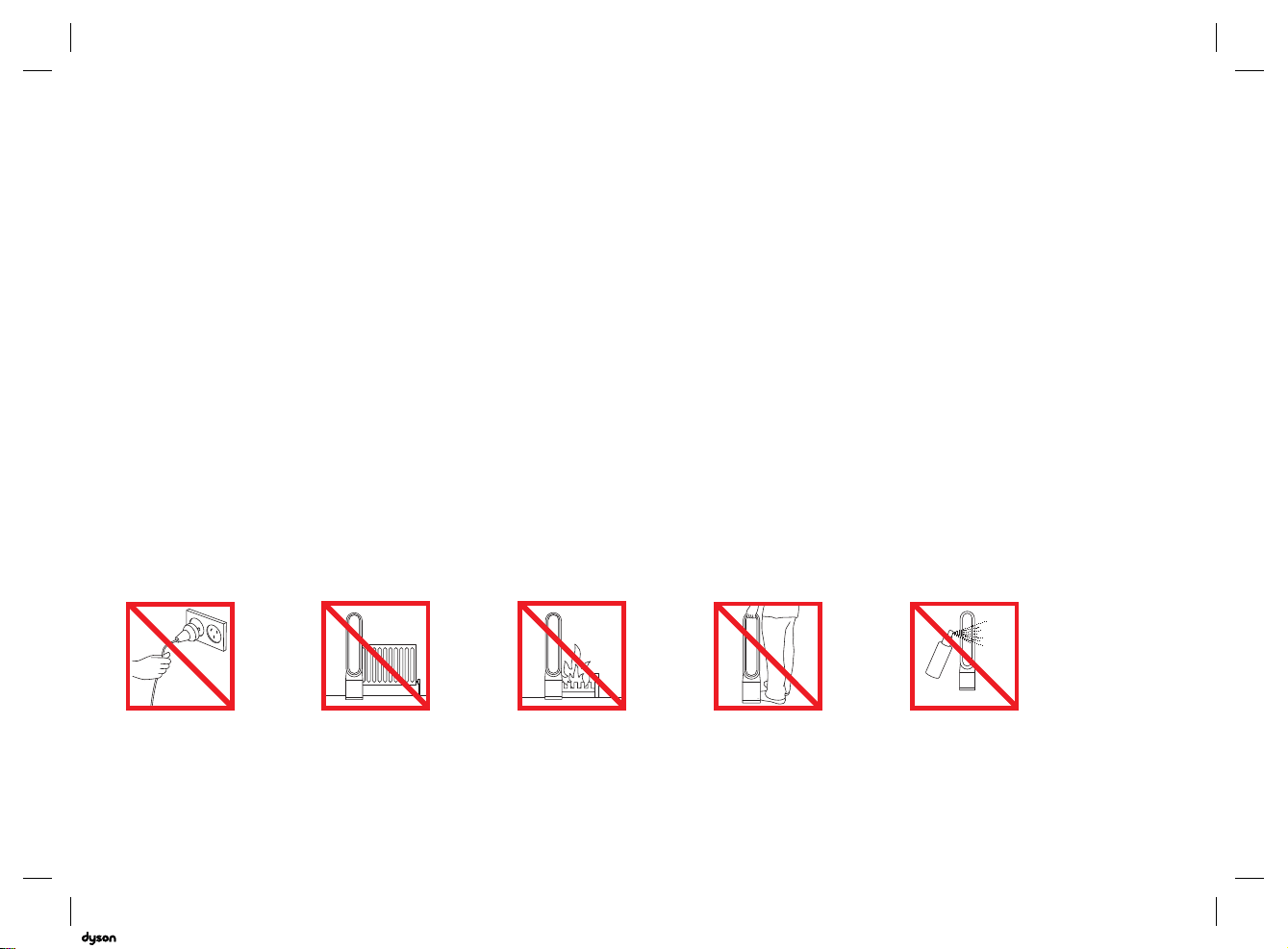
Do not pull on the cable. Do not store near
heat sources.
Do not use near
naked flames.
Do not carry by the air
loop amplifier. The air
loop amplifier is not
a handle.
Do not spray scented
products such as air
freshener or perfume
near the filter or
the appliance.
06.07.2018 11:40 - C93644_TP04_OPMAN_ANZ_X438-OPMAN-93644.indd_15_4c0s
9
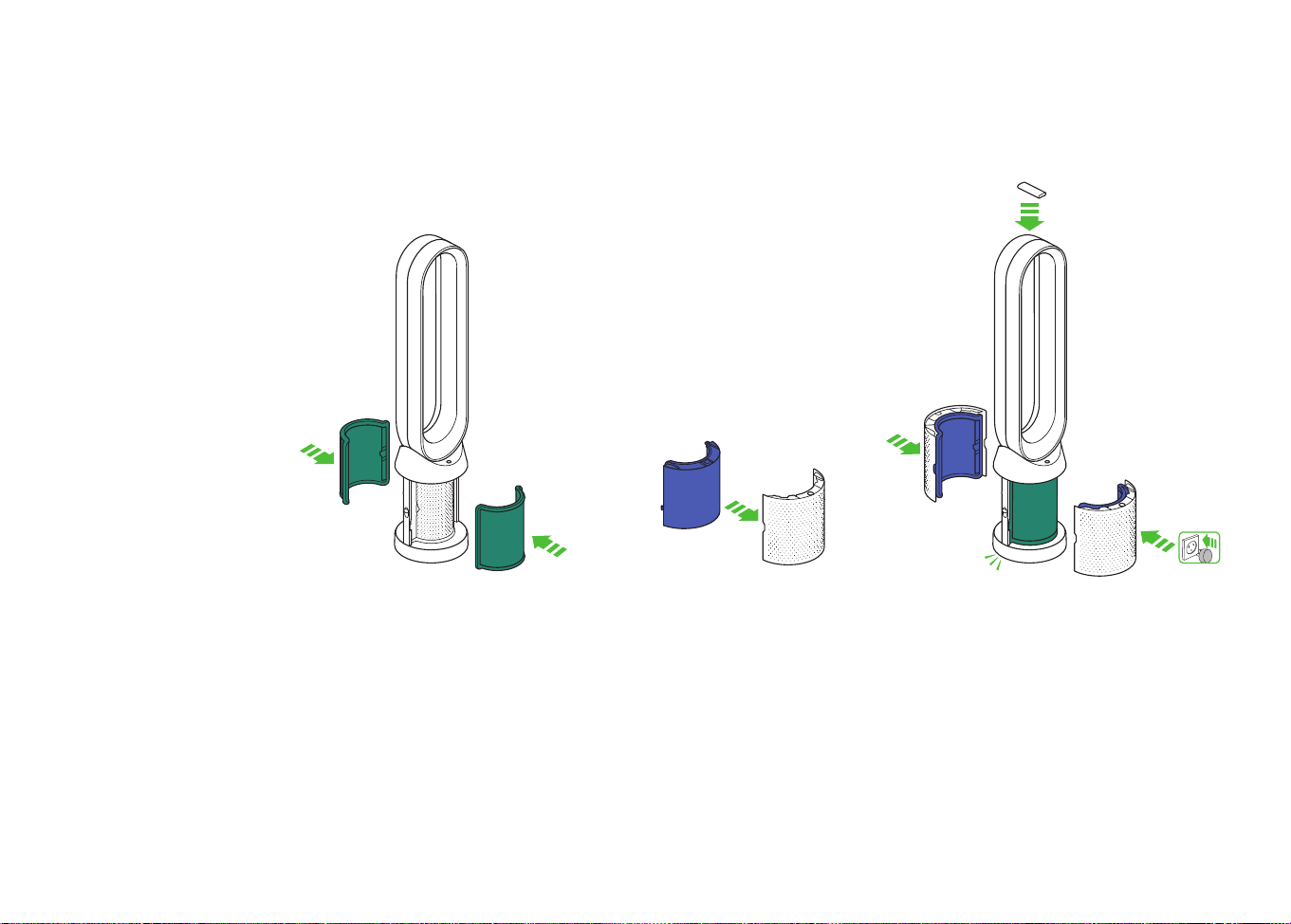
Remove the glass HEPA
filters from their protective
packaging and push into the
shrouds until secure.
Use both hands to lift the
appliance out of the box, taking
care to hold by the base of the
appliance only.
Do not lift out by the
amplifier loop.
Take the carbon filters out
of the box and remove the
protective packaging.
Attach both carbon filters to
the appliance.
Position the shrouds onto the base
and push gently until they click
securely into place.
Place the remote control on the top
of the appliance with the buttons
facing down.
Plug in and switch on.
Assembly
x2
x2
x2
x2
clik
clik
x2
x2
x2
x2
clik
clik
x2
x2
x2
x2
click
click
06.07.2018 11:40 - C93644_TP04_OPMAN_ANZ_X438-OPMAN-93644.indd_15_4c0s
10
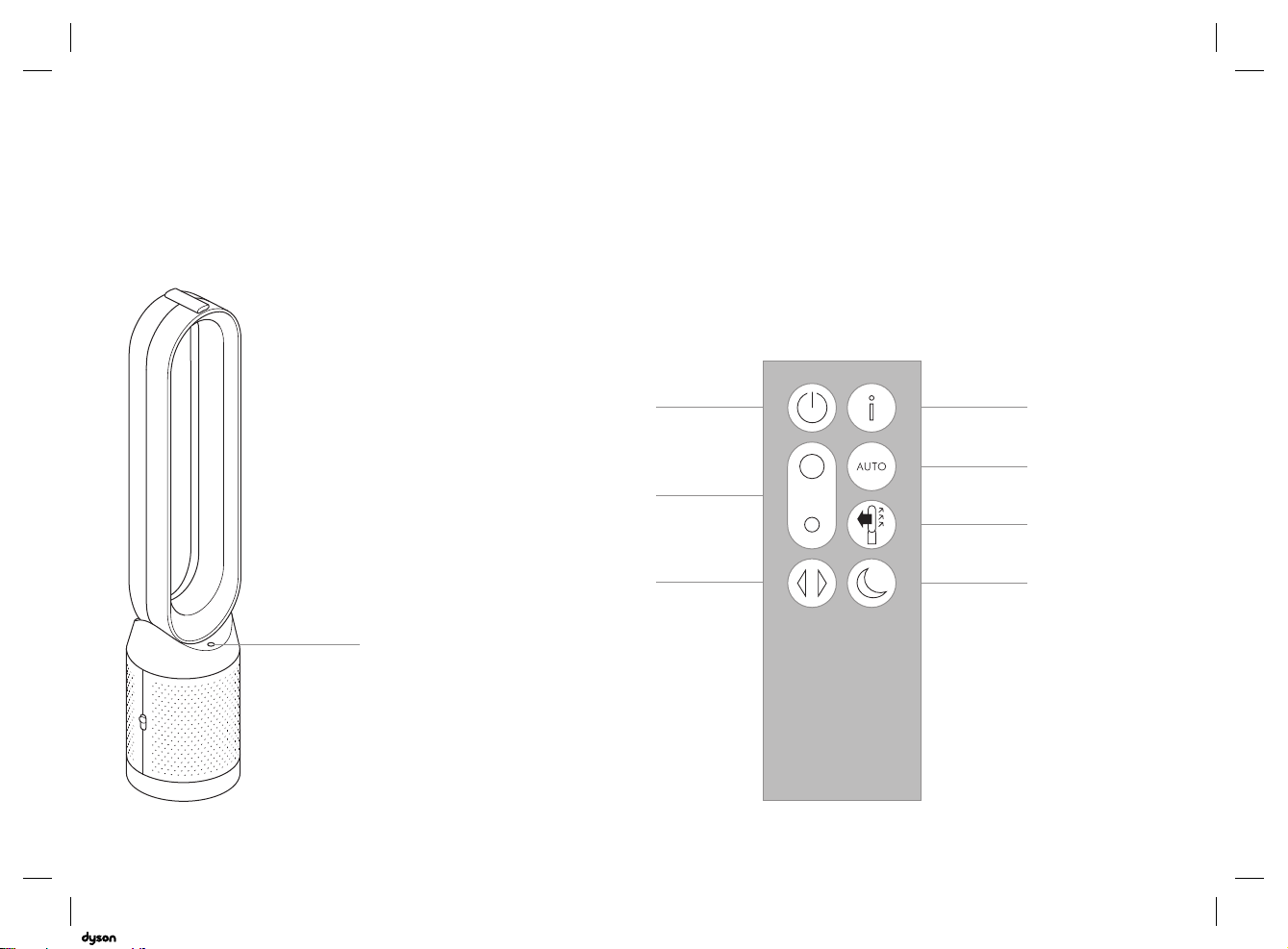
Controls
x2
x2
x2
x2
clik
clik
Airflow
direction
Auto
mode
Night
mode
Information
menu
Airflow
speed
Oscillation
ON/OFF
Standby
ON/OFF
Standby
ON/OFF
06.07.2018 11:40 - C93644_TP04_OPMAN_ANZ_X438-OPMAN-93644.indd_15_4c0s

11
Additional functions
Standby ON/OFF
Press the Standby ON/OFF button on the appliance or
remote control to stop the purifying fan. The appliance
will continue to monitor the air quality if the continuous
monitoring function has been enabled, otherwise it will
go in to standby.
To reactivate the appliance press the Standby ON/OFF
button on the appliance or remote control.
Continuous monitoring
The continuous monitoring function will:
• Collect extensive environmental information (see the
"Information menu" section).
• Allow historical air quality information to be displayed
on the screen and in the Dyson Link app.
To enable/disable continuous monitoring, press and
hold the Auto mode button for 5 secs.
06.07.2018 11:40 - C93644_TP04_OPMAN_ANZ_X438-OPMAN-93644.indd_15_4c0s
12
Connecting to the Dyson Link app
The Dyson Link app allows you to
control, schedule, monitor, and
customise your settings for your
appliance from your mobile device.
Wi-Fi is enabled by default. To
disable or enable the Wi-Fi press
and hold the ON/OFF button on the
appliance for 5 Seconds.
Plug in your appliance to the mains
electricity supply and turn on
the power.
Check your mobile device
is compatible with the app,
switched on, connected to a Wi-Fi
network and Bluetooth
®
wireless
technology enabled.
If you do not already have the
Dyson Link app you will need to
download it from the App Store or
Google Play.
Open the Dyson Link app and
follow the instructions to create a
new account if you do not already
have one.
Follow the on-screen instructions
to pair your appliance to the Dyson
Link app.
You will now be able to use the
Dyson Link app to create custom
settings, monitor information
from the appliance, control
your appliance, schedule use
and also keep up to date with
system upgrades.
If you experience problems
downloading the Dyson Link app
or pairing your device; first check
that you are connected to a Wi-Fi
network and Bluetooth
®
wireless
technology is enabled on your
mobile device and try again.
If you continue to experience
problems downloading the app or
pairing your device, please contact
the Dyson Helpline.
Google Play and the Google Play logo are
trademarks of Google Inc.
Apple and the Apple logo are trademarks of
Apple Inc., registered in the U.S. and other
countries. App Store is a service mark of Apple
Inc., registered in the U.S. and other countries.
App functionality may vary by location.
Requires WiFi and a smart phone. Standard
data and messaging rates may apply.
The Bluetooth
®
word mark and logos are
registered trade marks owned by the Bluetooth
SIG, Inc. and any use of such marks by Dyson is
under license.
06.07.2018 11:40 - C93644_TP04_OPMAN_ANZ_X438-OPMAN-93644.indd_15_4c0s

13
06.07.2018 11:40 - C93644_TP04_OPMAN_ANZ_X438-OPMAN-93644.indd_15_4c0s

14
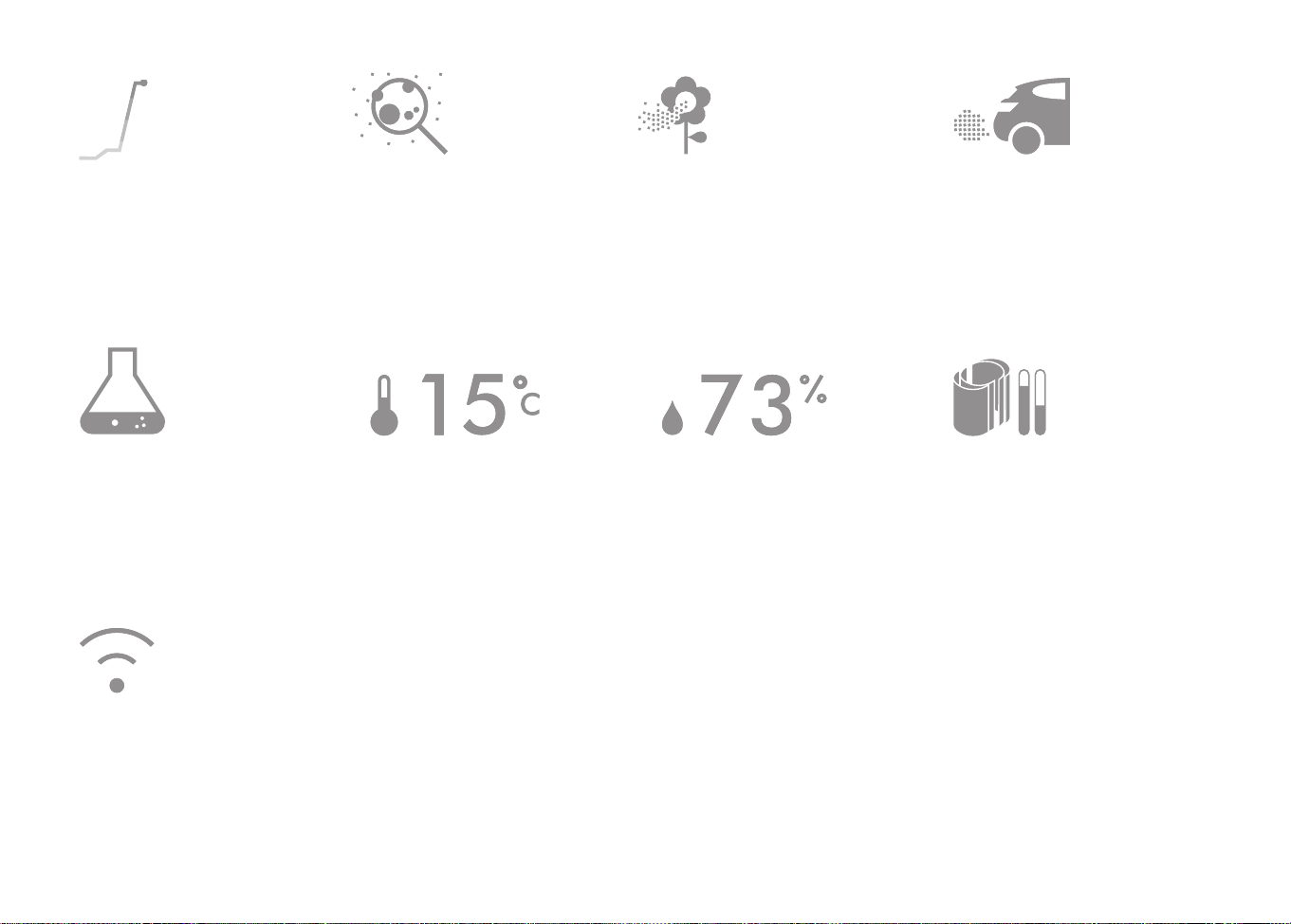
Information menu
Scroll through the options to monitor
the performance of your appliance.
The menu will also allow you
to access information about
the pollutants in the air and the
temperature and humidity levels.
When a particular type of pollutant
causes air quality to decrease, the
symbol for that pollutant will show in
the display.
Small details may vary slightly from
those shown.
06.07.2018 11:40 - C93644_TP04_OPMAN_ANZ_X438-OPMAN-93644.indd_15_4c0s
15
Indoor air quality - 12 seconds
Monitor the current air quality with a
graph showing the last 12 seconds
of data.
Particulate matter (PM2.5)
Microscopic particles up to 2.5
microns in size, suspended in the air
we breathe. These include smoke,
bacteria and allergens.
Particulate matter (PM10)
Larger microscopic particles up to
10 microns in size, suspended in the
air we breathe. These include dust,
mould and pollen.
Nitrogen dioxide and other
oxidising gases
These potentially harmful gases are
released into the air by combustion,
for example the burning gas
when cooking and in vehicle
exhaust emissions.
Volatile organic compounds
VOC’s are typically odours that may
be potentially harmful. These can be
found in cleaning products, paints
and new furnishings.
Indoor temperature
Monitor the ambient
temperature to help maintain a
comfortable environment.
Indoor humidity
The amount of water vapour in the
air, shown as a percentage of the
maximum possible humidity at the
current temperature.
Filters
The remaining filter life is shown in
the display and will indicate when
either filter needs replacing.
Wi-Fi
The current status of connection
to the Wi-Fi network.
06.07.2018 11:40 - C93644_TP04_OPMAN_ANZ_X438-OPMAN-93644.indd_15_4c0s
16
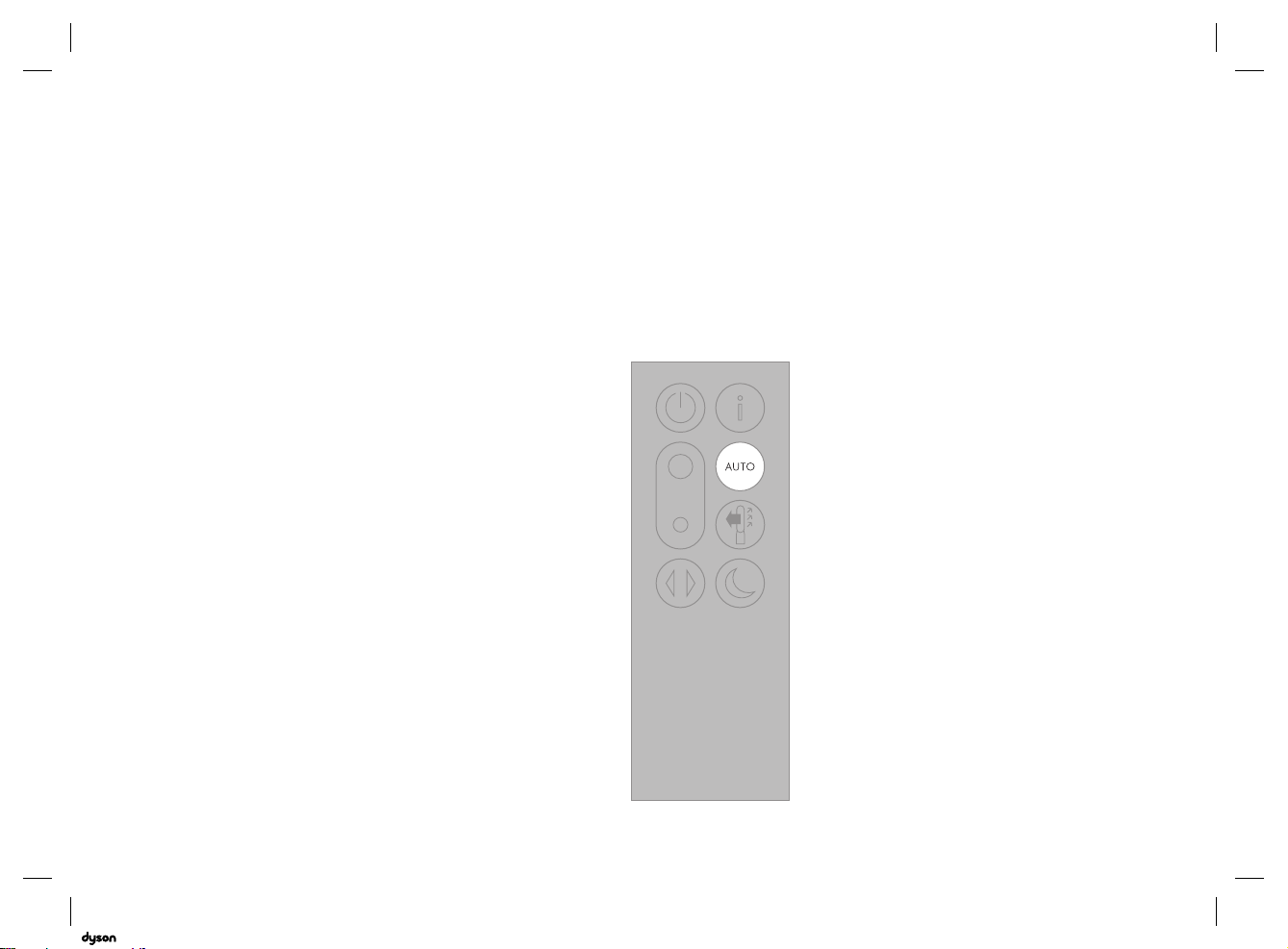
Auto mode
When Auto mode is selected the
on-board sensors will intelligently
adjust the settings of the appliance
according to the quality of air.
The appliance will pause once the
sensors detect that the target air
quality level has been reached.
The sensors will continue to monitor
the air quality, switching the
appliance back on when air quality
levels have dropped.
06.07.2018 11:40 - C93644_TP04_OPMAN_ANZ_X438-OPMAN-93644.indd_15_4c0s
17
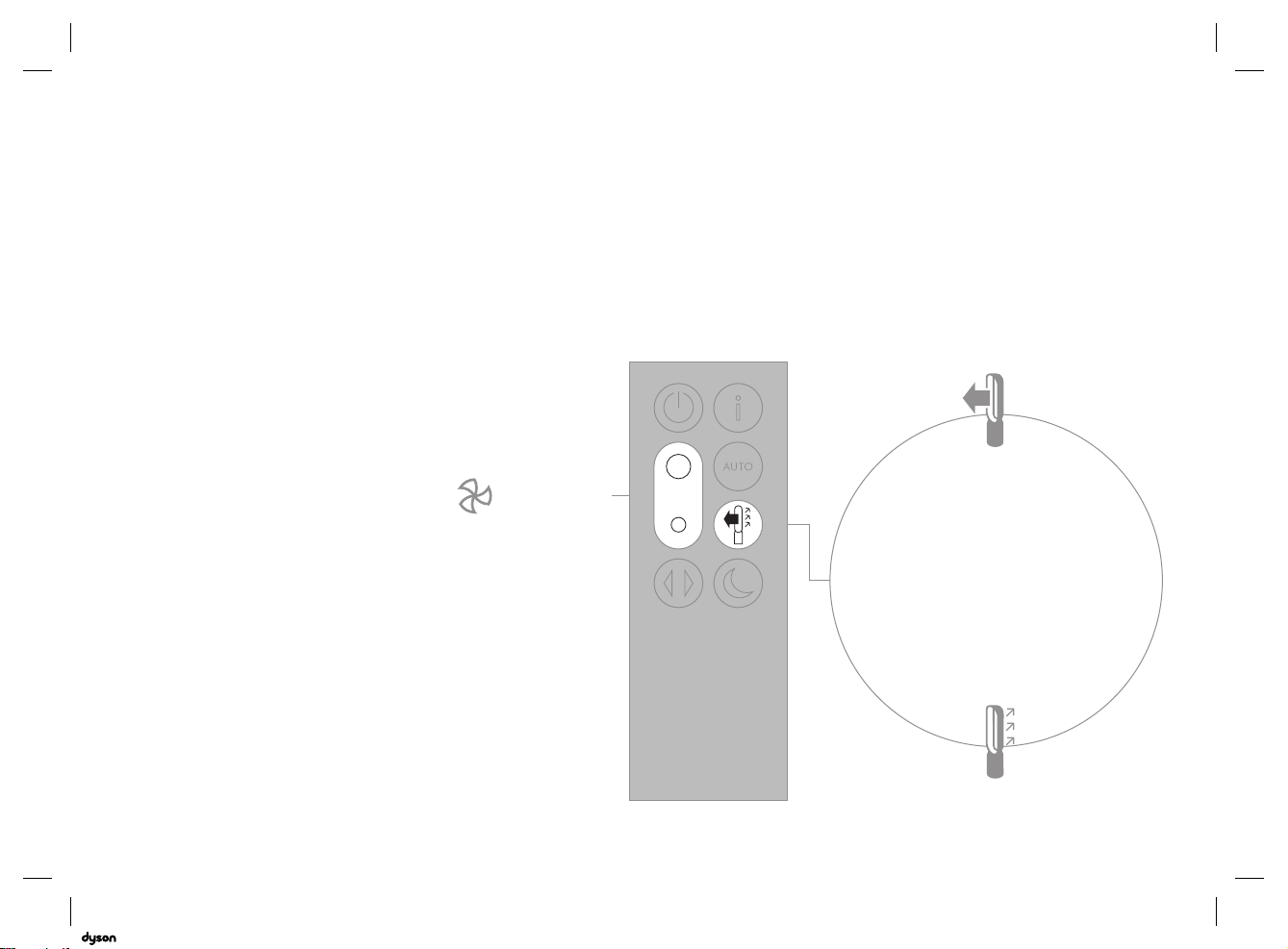
Airflow
Air will be purified continuously,
whether the air is set to flow from the
front or the back.
For purification and cool airflow,
select the airflow direction to
the front.
For purification without cool airflow
from the front, select the airflow
direction to the back.
Press the Airflow speed button
to increase and decrease the
airflow speed.
1-10
1-10
06.07.2018 11:40 - C93644_TP04_OPMAN_ANZ_X438-OPMAN-93644.indd_15_4c0s
18
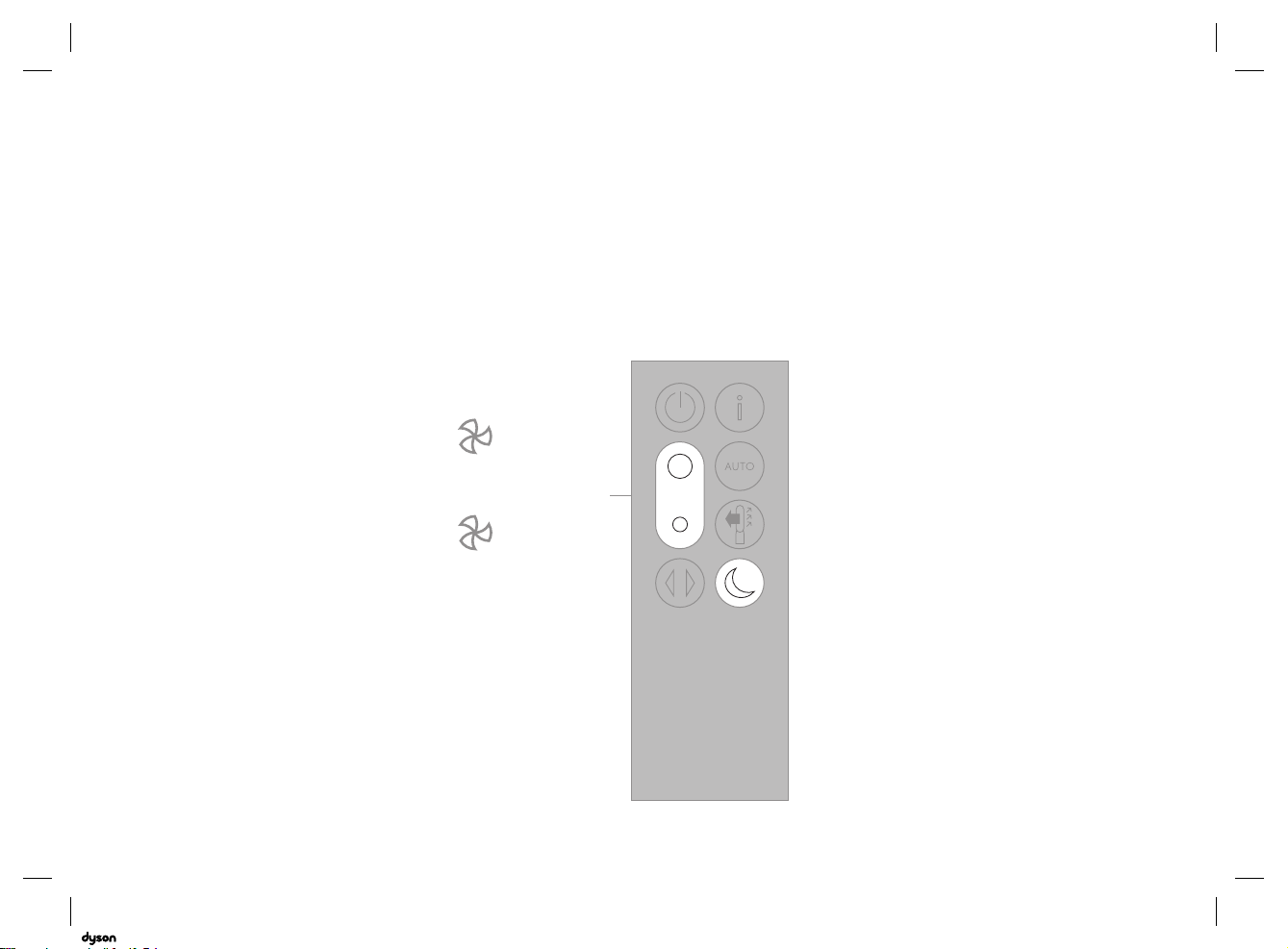
Night mode
Night mode will dim the display
and the appliance will run more
quietly, making it ideal for use
while sleeping.
If Auto mode has been set,
Night mode will reduce airflow
speeds to range from 1 to 4.
You can manually change the
airflow from 1-10.
Press the Night mode button
multiple times to scroll through the
timer options.
1-4
1-10
Manual
AUTO mode
06.07.2018 11:40 - C93644_TP04_OPMAN_ANZ_X438-OPMAN-93644.indd_15_4c0s
19
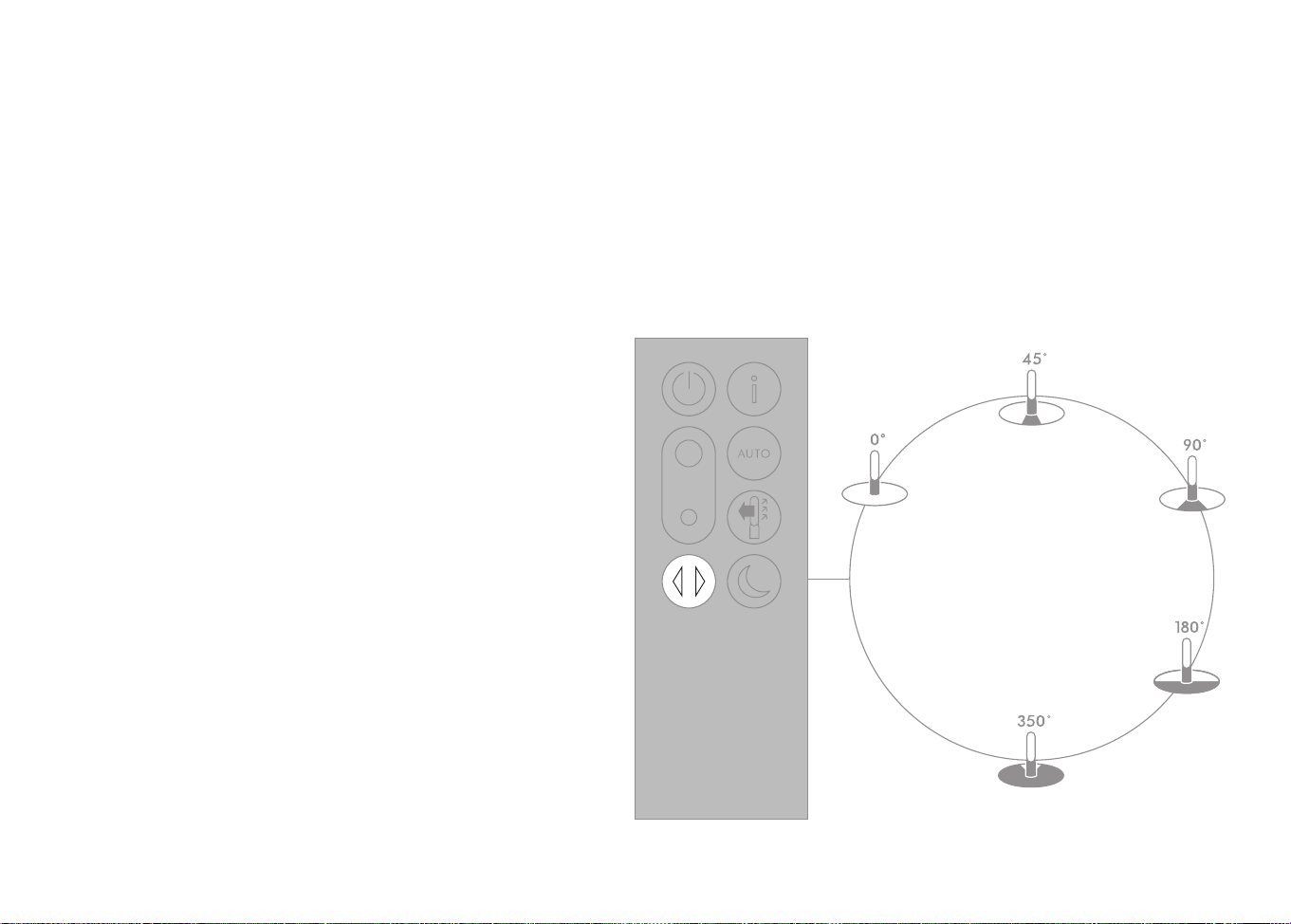
Oscillation
Press the Oscillation button to scroll
through the options from 0° to 350°.
Customise your oscillation settings
in the Dyson Link app.
Small details may vary slightly from
those shown.
06.07.2018 11:40 - C93644_TP04_OPMAN_ANZ_X438-OPMAN-93644.indd_15_4c0s
20
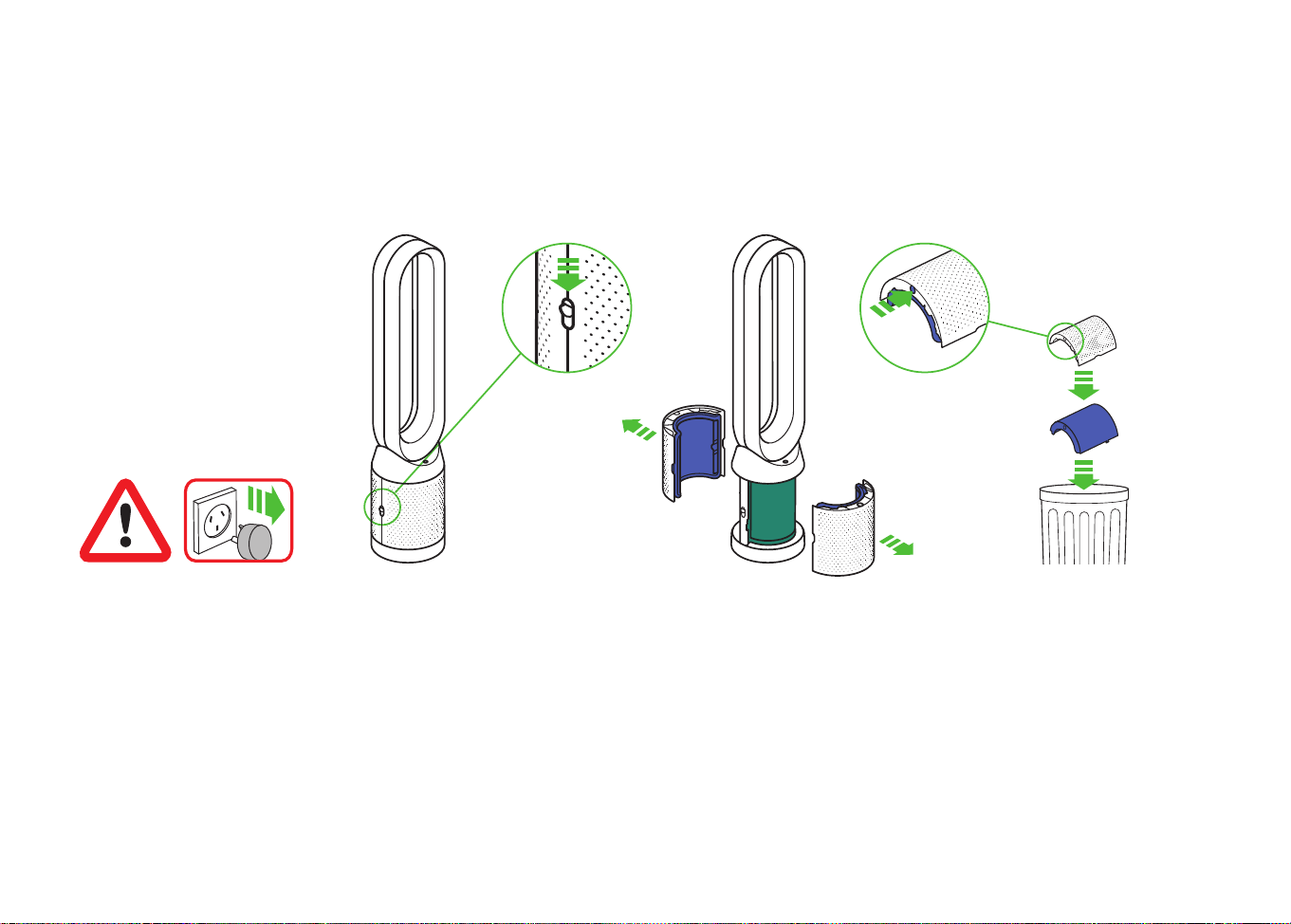
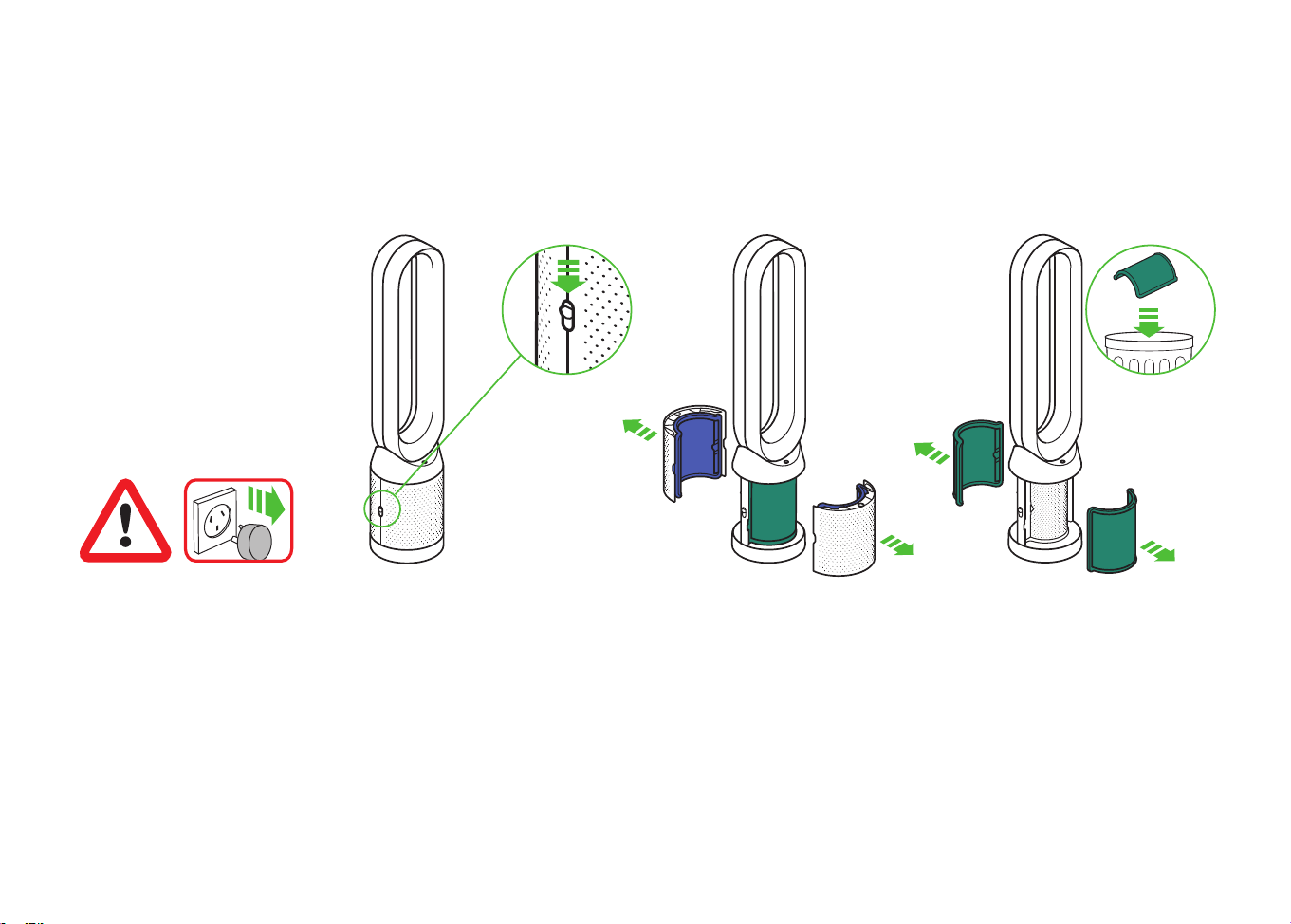
Changing the glass HEPA filters
The shrouds will release
with the glass HEPA
filters attached.
Unplug the appliance from
the mains electricity supply.
Slide the buttons down on
both sides of the shrouds.
Important: Always unplug the
appliance before changing filters.
The remaining filter life is shown in
the display and will indicate when
the non-washable glass HEPA filter
needs replacing.
Dispose of used filter units in
accordance with local regulations.
Empty the glass HEPA filters
directly into the bin by pushing
in both the purple tabs on
the shrouds.
clik
x2
clik
x2
x2
x2
clik
x2
clik
x2
x2
x2
clik
x2
clik
x2
x2
x2
x2
x2
x2
x2
clik
clik
x2
x2
x2
x2
clik
clik
1 2 3
06.07.2018 11:40 - C93644_TP04_OPMAN_ANZ_X438-OPMAN-93644.indd_15_4c0s
21
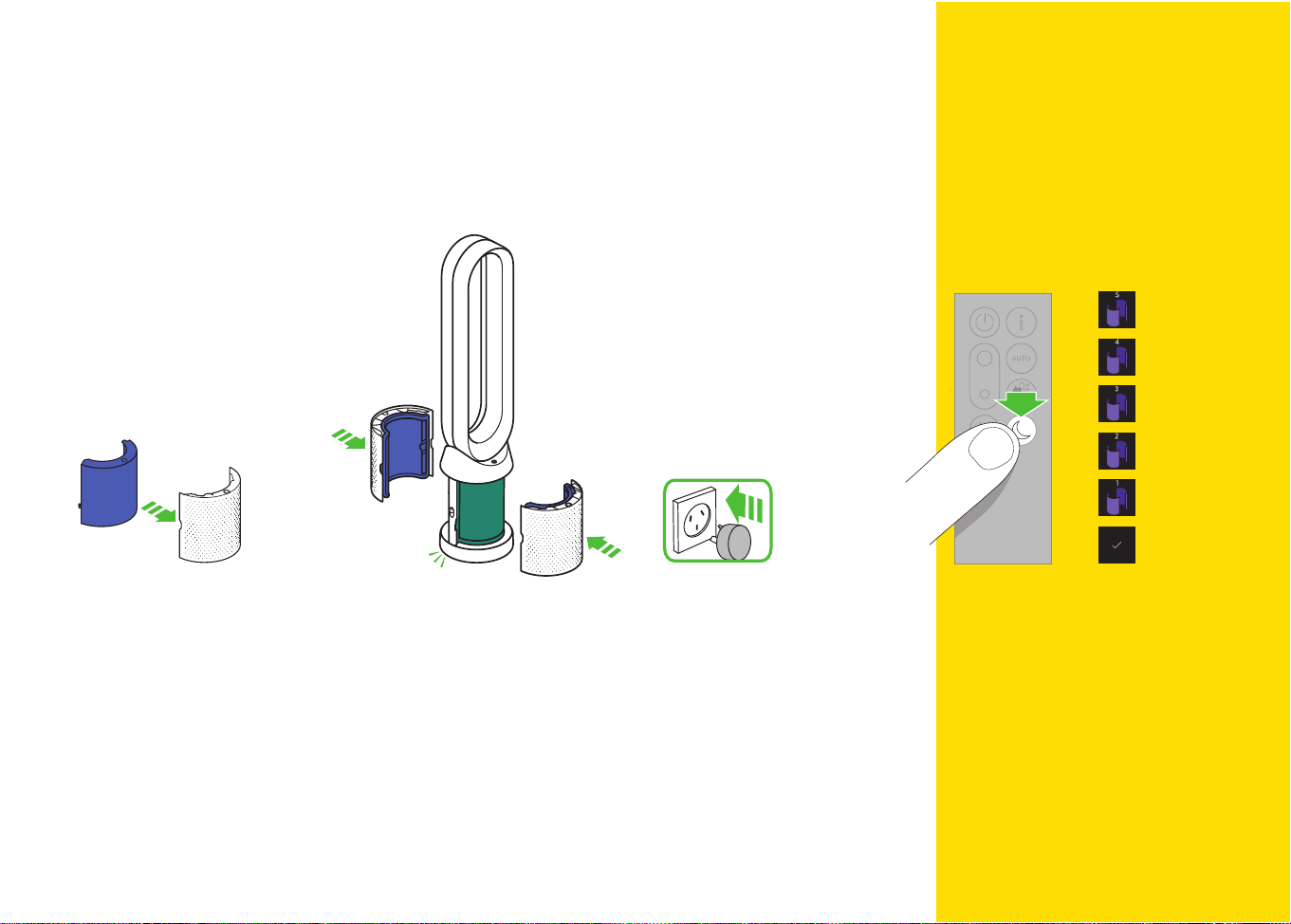
Plug the appliance in to the mains
electricity supply and switch on.
Press and hold the Night mode
button on the remote control.
The display on the appliance will
countdown from five, finishing with
the default screen. The glass HEPA
filter level will be reset and the
appliance is ready to use.
Push the new glass HEPA filters
into the shrouds until secure.
Push the shrouds until they click back
into position in the base.
clik
x2
clik
x2
x2
x2
x2
x2
x2
x2
click
click
4 5 6 7
5
sec
Important
06.07.2018 11:40 - C93644_TP04_OPMAN_ANZ_X438-OPMAN-93644.indd_15_4c0s
22
Changing the carbon filters
To remove the carbon filters:
pull the tabs on both sides of
the filters.
Dispose of the carbon filters in
the bin.
The shrouds will release with the
glass HEPA filters attached.
Unplug the appliance from
the mains electricity supply.
Slide the buttons down on
both sides of the shrouds.
Important: Always unplug the
appliance before changing filters.
The remaining filter life is shown in
the display and will indicate when
the non-washable carbon filter
needs replacing.
x2
x2
x2
x2
clik
clik
x2
x2
x2
x2
clik
clik
x2
x2
x2
x2
clik
clik
1 2 3
clik
x2
clik
x2
x2
x2
clik
x2
clik
x2
x2
x2
06.07.2018 11:40 - C93644_TP04_OPMAN_ANZ_X438-OPMAN-93644.indd_15_4c0s
23
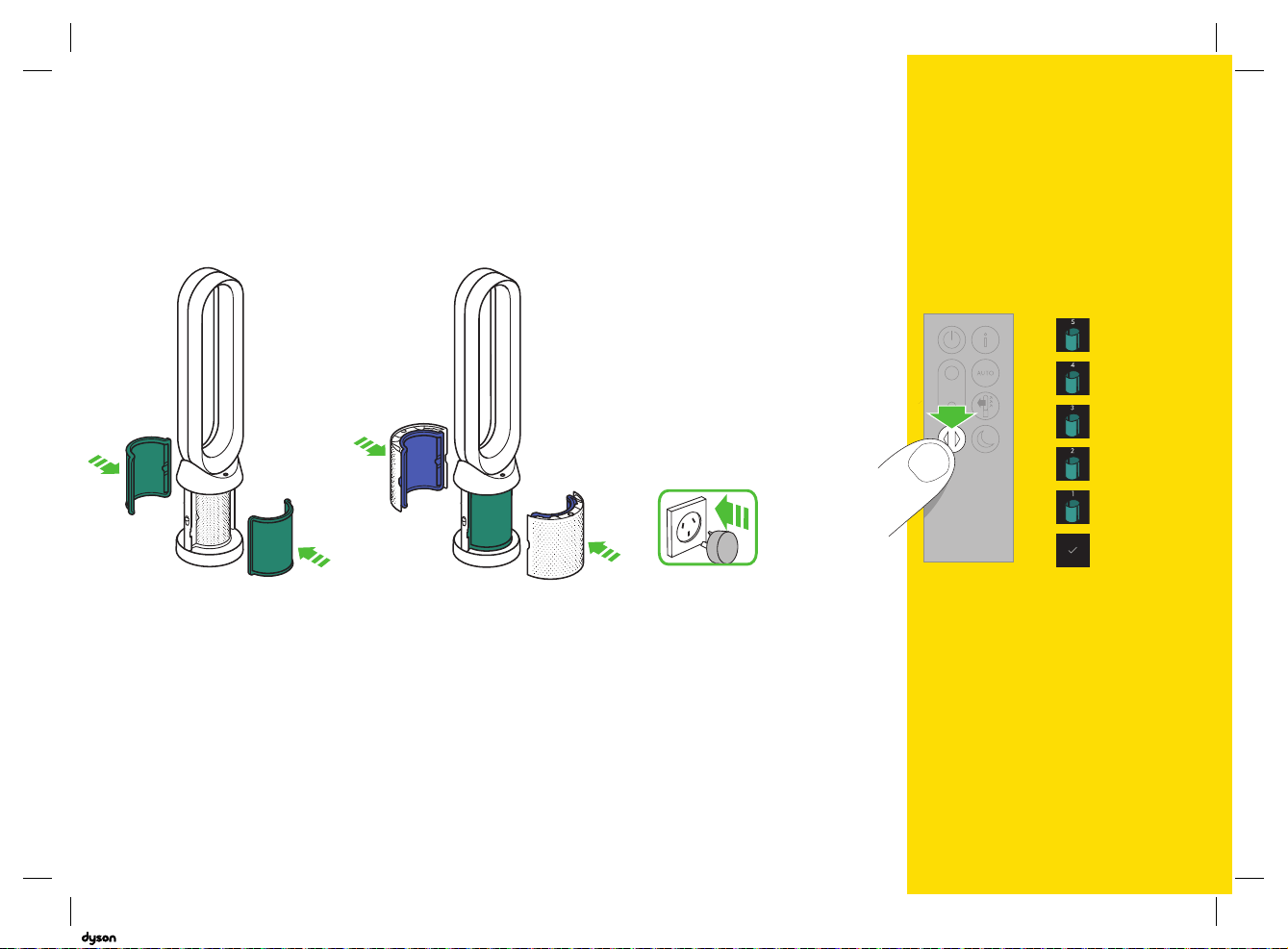
Push the shrouds until they click
back into position in the base.
Plug the appliance in to the mains
electricity supply and switch on.
Push the new carbon filters onto
the base until secure.
Press and hold the Oscillation button
on the remote control.
The display on the appliance will
countdown from five, finishing with
the default screen. The carbon filter
level will be reset and the appliance
is ready to use.
x2
x2
x2
x2
clik
clik
x2
x2
x2
x2
clik
clik
4 5 6 7
5
sec
Important
06.07.2018 11:40 - C93644_TP04_OPMAN_ANZ_X438-OPMAN-93644.indd_15_4c0s
24
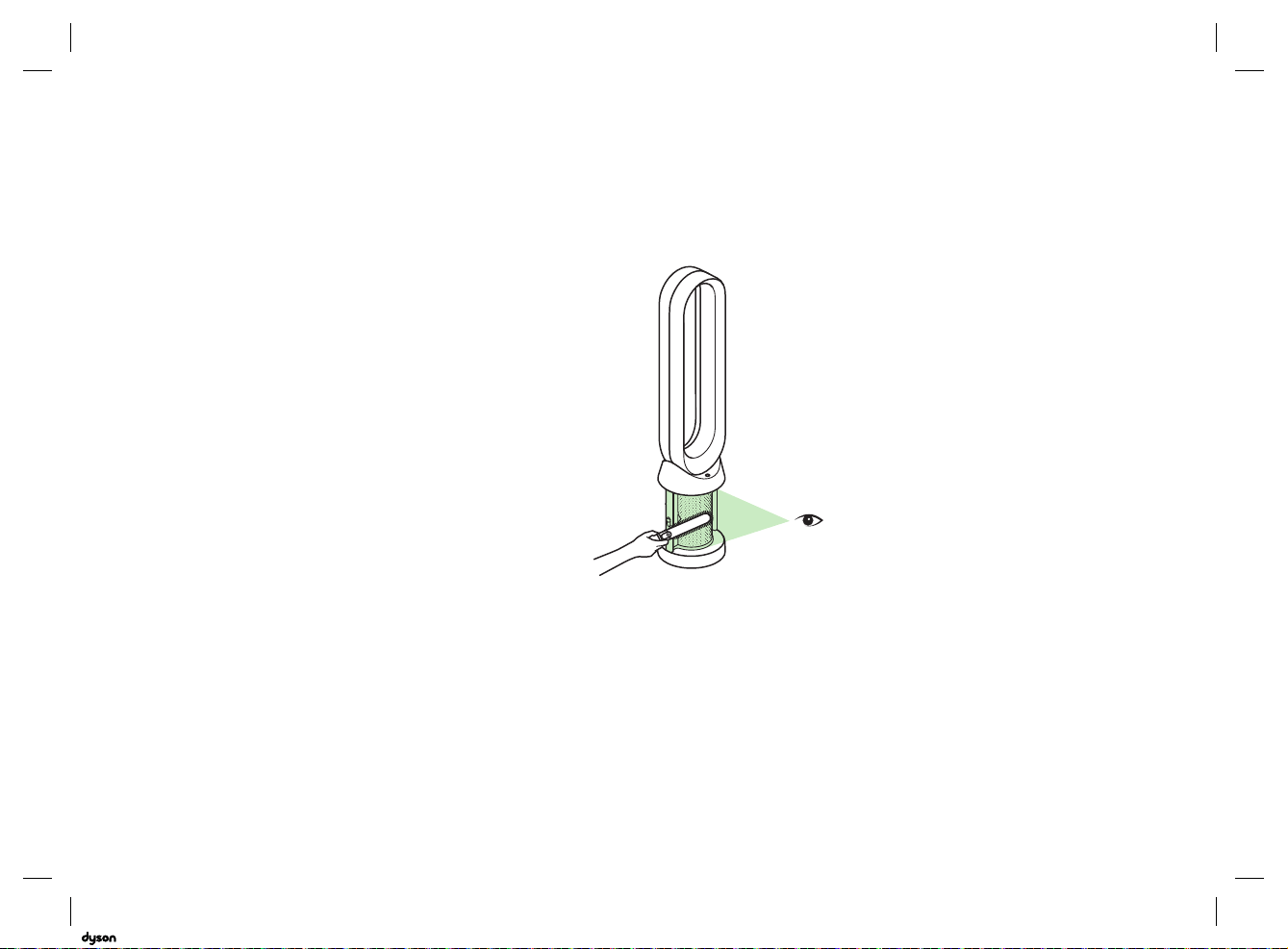
Cleaning
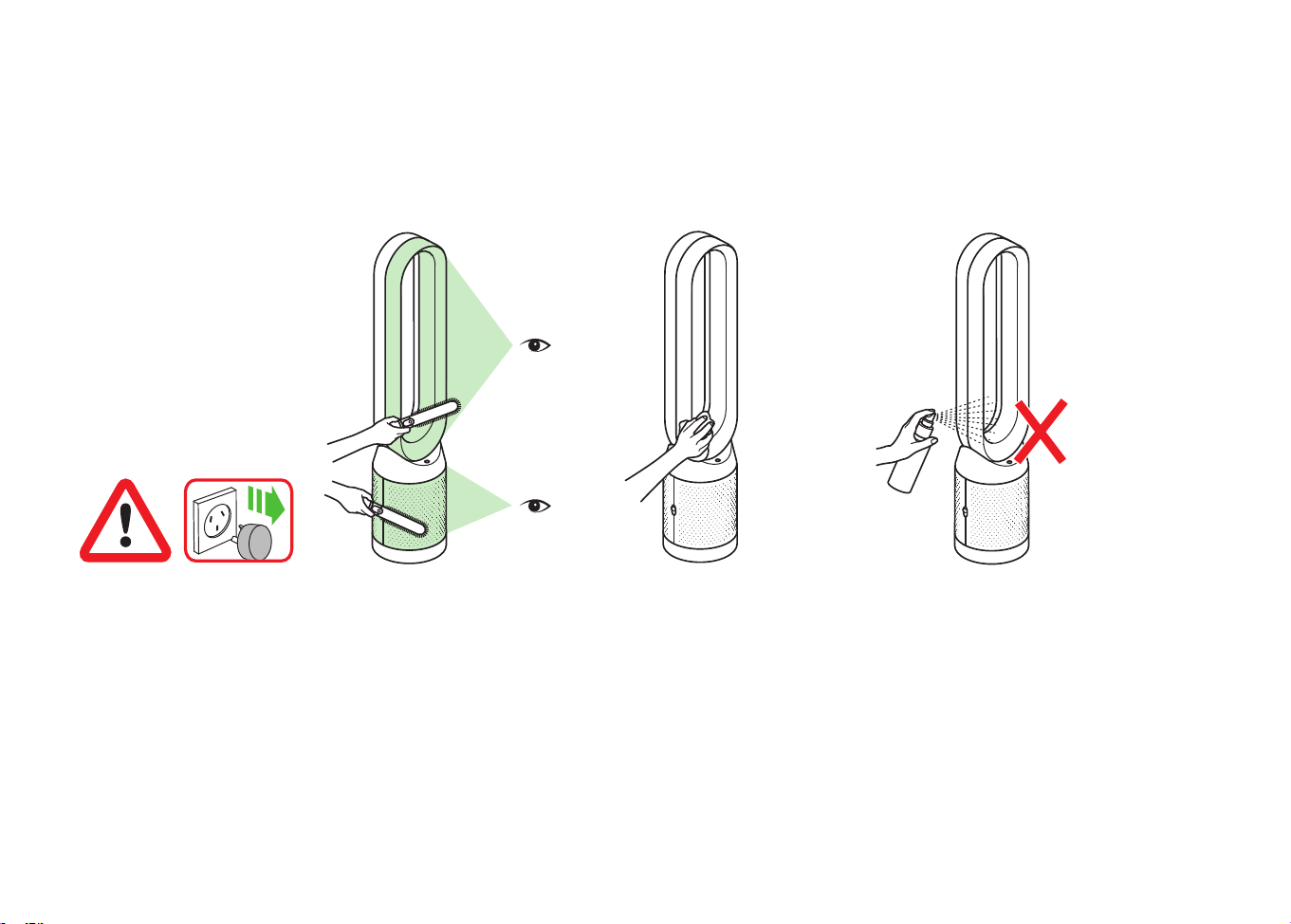
Dust may accumulate on the surface
of the machine. Wipe dust from the
loop amplifier, filter unit and other
parts with a dry or damp cloth.
Do not use detergents or polishes to
clean the appliance.
Look for blockages in the air inlet
holes on the filter and the small
aperture inside the loop amplifier.
Use a soft brush to remove dust
and debris.
To ensure that your appliance works
efficiently, it is important to clean
and check for blockages regularly.
Unplug your appliance from
the mains electricity supply
before cleaning.
x2
x2
x2
x2
clik
clik
x2
x2
x2
x2
clik
clik
x2
x2
x2
x2
clik
clik
06.07.2018 11:40 - C93644_TP04_OPMAN_ANZ_X438-OPMAN-93644.indd_15_4c0s
25
Troubleshooting
If the appliance has been used
without a filter in place or the filters
have not been changed when
prompted, blockages may occur.
For further information and
support:
Online:
AU: www.dyson.com.au/support
NZ: www.dyson.co.nz/support
On the phone:
AU: 1800 239 766
NZ: 0800 397 667
To remove a blockage:
Remove the filter shrouds and
look for blockages in the air
inlet holes under the filters.
Use a soft brush to remove dust
and debris.
If an error code is displayed,
first try unplugging the
appliance and plugging it
in again.
If an error code continues
to be displayed, contact the
Dyson Helpline.
x2
x2
x2
x2
clik
clik
06.07.2018 11:40 - C93644_TP04_OPMAN_ANZ_X438-OPMAN-93644.indd_15_4c0s

26
CONTROL WITHOUT THE REMOTE
• The appliance can be controlled through your Dyson Link app.
DYSON LINK APP CONNECTIVITY
• You must have a live Internet connection in order for the Dyson Link app to work.
• The appliance can connect to either 2.4GHz or 5GHz networks which includes most
modern routers. Check your router documentation for compatibility.
• The Dyson Link app requires an iOS device with at least iOS version 10* or an Android
device with at least Android version 5.
• Your mobile device must have Bluetooth
®
wireless technology 4.0 support (Bluetooth
®
wireless technology Low Energy) in order to set up a connection with the appliance. Check
your device specification for compatibility.
– Supported Wi-Fi protocols:
– IEEE802.11a
– IEEE802.11b (Not recommended)
– IEEE802.11g
– IEEE802.11n
REPLACEABLE PARTS
BATTERY REPLACEMENT
CAUTION
• Unscrew the battery compartment on the remote control. Loosen the base and pull to
remove the battery.
• Do not install backwards or short circuit the batteries.
• Do not attempt to dismantle or charge the batteries. Keep away from fire.
• Follow battery manufacturers' instructions when installing new batteries
(battery type CR 2032).
• Always replace the screw in the remote control and refer to the battery hazard in the
warning section.
NON-WASHABLE FILTER UNITS
• Your filter units are non-washable and non-recyclable.
• To replace your filter units follow the steps as shown.
• Failure to replace the filter units when prompted may result in changes to product
performance and appearance.
• New filter units can be purchased at www.dyson.com.au/support (AU) or
www.dyson.co.nz/support (NZ).
AUTO MODE
• A period of 6 days is required after the appliance is first used for the sensor to calibrate.
During this period the appliance may be more sensitive to VOCs (such as odours)
than normal.
DISPOSAL INFORMATION
Dyson products are made from high grade recyclable materials. Please dispose of this
product responsibly and recycle where possible.
When your Dyson appliance reaches the end of its life, we are responsible for its safe
disposal. You can send your old Dyson appliance back to us (at our cost) and we will
organise for it to be recycled.*
*Please note that not all parts are recyclable. Recycling of parts is subject to the
capabilities of 3rd party suppliers. Available in Australia only.
Simply:
1. Box up your old Dyson appliance.
2. Take the package to your local post office and send to the address below:
Dyson We Recycle
Reply Paid 83215
Dyson Service Centre
8–10 Mangrove Lane
Taren Point, NSW 2229
• Keep the used batteries away from children as these can still harm children if swallowed.
• Your filter units are non-washable and non-recyclable.
• Dispose of the exhausted filter units in accordance with local ordinances or regulations.
• The battery should be removed from the product before disposal.
DYSON CUSTOMER CARE
THANK YOU FOR CHOOSING TO BUY A DYSON APPLIANCE.
After registering your 2 year Dyson guarantee, your Dyson appliance will be covered
for parts and labour for 2 years from the date of purchase, subject to the terms of the
guarantee. If you have any questions about your Dyson appliance, call the Dyson Helpline
with your serial number and details of where/when you bought the appliance. Most
questions can be solved over the phone by one of our trained Dyson Helpline staff.
Your serial number can be found on your rating plate which is on the base of
the appliance.
• If your Dyson appliance needs a service, call the Dyson Customer Care Helpline so we can
discuss the available options.
REGISTERING YOUR DYSON GUARANTEE
To help us ensure that you receive prompt and efficient service, please register as a Dyson
appliance owner. There are four ways to do this:
Additional information
06.07.2018 11:40 - C93644_TP04_OPMAN_ANZ_X438-OPMAN-93644.indd_15_4c0s

27
• Online:
AU: www.dyson.com.au/register
NZ: www.dyson.co.nz/register
• By calling the Dyson Customer Care Helpline.
AU: 1800 239 766
NZ: 0800 397 667
• By completing and returning the enclosed form to us by mail.
• SMARTPHONE. Download the Dyson Link app and you will be taken through registration
as part of the set up.
This will confirm ownership of your Dyson appliance in the event of an insurance loss, and
enable us to contact you if necessary.
DYSON 2 YEAR GUARANTEE
TERMS AND CONDITIONS OF THE DYSON 2 YEAR GUARANTEE
WHAT IS COVERED
• The repair or replacement of your Dyson appliance (at Dyson’s discretion) if it is found to
be defective due to faulty materials, workmanship or function within 2 years of purchase
or delivery (if any part is no longer available or out of manufacture Dyson will replace it
with a functional replacement part).
• This Dyson guarantee will only be valid if the appliance is used in the country in which it
was sold.
WHAT IS NOT COVERED
• Replacement filter units. The appliance's filter units are not covered by the guarantee.
Under your Dyson guarantee, Dyson shall not be liable for costs of repair or replacement
of a product incurred as a result of:
• Damage caused by not carrying out the recommended appliance maintenance.
• Accidental damage, faults caused by negligent use or care, misuse, neglect, careless
operation or handling of the Dyson appliance which is not in accordance with this Dyson
Operating Manual.
• Use of the Dyson appliance for anything other than normal domestic purposes in the
country of purchase.
• Use of parts not assembled or installed in accordance with the instructions of Dyson.
• Use of parts and accessories other than those produced or recommended by Dyson.
• Faulty installation (except where installed by Dyson).
• Repairs or alterations carried out by parties other than Dyson or its authorised agents.
• Blockages – Please refer to the 'Troubleshooting‘ section and illustrations in this Dyson
Operating Manual for details of how to look for and clear blockages.
• Normal wear and tear (e.g. fuse etc.).
• Reduction in battery discharge time due to battery age or use (cordless machines only).
• Whether or not your Dyson guarantee applies, you may have statutory rights and
remedies available to you as a consumer. If you are in any doubt as to what is covered by
your Dyson guarantee, please call the Dyson Helpline.
OTHER TERMS RELATING TO THE DYSON GUARANTEE
• The Dyson guarantee becomes effective from the date of purchase.
• All work will be carried out by Dyson Appliances (Aust.) Pty Limited, Dyson New Zealand
Limited (NZ) or their authorised agents.
• Any parts replaced by Dyson or its service agents will become the property of Dyson
Appliances (Aust.) Pty Limited or Dyson New Zealand Limited (NZ).
• You must provide proof of (both the original and any subsequent) delivery/purchase
before any work can be carried out on your Dyson appliance. Without this proof, any
work carried out pursuant to the Dyson guarantee and any associated delivery charges
(both to and from us) will be at your cost, subject to your statutory rights and remedies as a
consumer. Please keep your receipt or delivery note.
• Whether or not your Dyson guarantee applies, you may have statutory rights and
remedies available to you as a consumer. If you are in any doubt as to what is covered by
your Dyson guarantee, please call the Dyson Helpline.
AUSTRALIAN CONSUMER LAW
In addition to your rights under the Dyson guarantee, we also provide the following
statement as required by the Australian Consumer Law: In Australia, your Dyson
appliance comes with statutory guarantees that cannot be excluded under the Australian
Consumer Law. You are entitled to a replacement or refund for a major failure and for
compensation for any other reasonably foreseeable loss or damage. You are also entitled
to have your Dyson appliance repaired or replaced if it fails to be of acceptable quality
and the failure does not amount to a major failure.
ABOUT YOUR PRIVACY
PRIVACY AND PERSONAL DATA PROTECTION
You will need to provide us with basic contact information when you register your Dyson
Product or the Dyson Link app;
WHEN REGISTERING YOUR DYSON APPLIANCE
• You will need to provide us with basic contact information to register your appliance and
enable us to support your Dyson guarantee.
WHEN REGISTERING VIA THE DYSON LINK APP
You will need to provide us with basic contact information to register the Dyson Link app;
this enables us to securely link your product to your instance of the app.
• When you register, you will have the opportunity to choose whether you would like to
receive communications from us. If you opt-in to communications from Dyson, we will
send you details of special offers and news of our latest innovations. We never sell your
information to third parties and only use information that you share with us as defined by
our privacy policies which are available on our website privacy.dyson.com
06.07.2018 11:40 - C93644_TP04_OPMAN_ANZ_X438-OPMAN-93644.indd_15_4c0s

28
06.07.2018 11:40 - C93644_TP04_OPMAN_ANZ_X438-OPMAN-93644.indd_15_4c0s

29
06.07.2018 11:40 - C93644_TP04_OPMAN_ANZ_X438-OPMAN-93644.indd_15_4c0s

JN.93644 PN.310802-13-02 25.05.18
06.07.2018 11:40 - C93644_TP04_OPMAN_ANZ_X438-OPMAN-93644.indd_15_4c0s
Dyson Appliances Ltd (Dyson) may collect and use your personal information
to provide you updates on latest products and services, to analyze and
research customer’s choice on products, to provide products and services
you have requested and for other purposes relating or incidental to warranty
(e.g. warranty registration, product recalls) (“the Purposes”). To do so, Dyson
may disclose your personal information to its related bodies, business partners
or third parties. Some of the recipients are located overseas, including
United States of America, Amsterdam and United Kingdom.
If Dyson does not collect your personal information, then it may not be able
to fulfil the Purposes.
Our privacy policy, located at www.dyson.com.au/support/privacy-policy.aspx,
contains information about how you may access and correct your personal
information held by Dyson, and the privacy complaints handling process
of Dyson.
You may contact Dyson at [email protected]
If you wish to receive information and updates about Dyson’s products
and services, please tick this box.
Under the Australian Privacy Principles, before Dyson discloses personal
information overseas, Dyson will take such steps as are reasonable in the
circumstances to ensure that the overseas recipient does not breach the
Australian Privacy Principles. However, an individual may consent to such
disclosure without this requirement. If you consent to Dyson disclosing your
personal information to business partners or third parties overseas for the
Purposes, please tick this box.
Note: If you do not provide consent, then Dyson may not be able to fulfil
the Purposes.
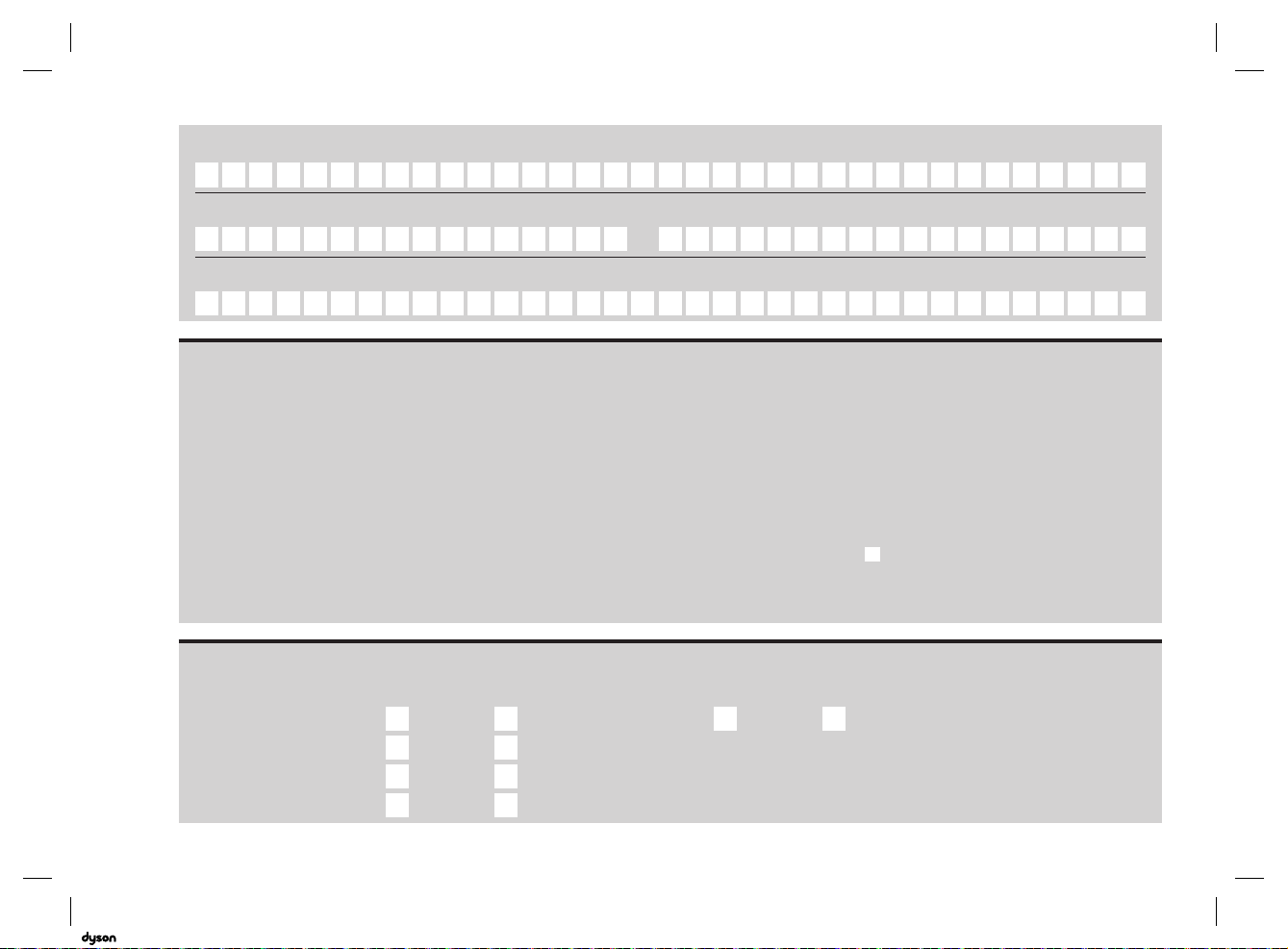
Telephone
email
Mobile
Store of purchase
By mail Yes No
By phone Yes No
By email Yes No
By text message Yes No
Yes No
As a Dyson appliance owner, you can hear about Dyson inventions,
services and products before anyone else. If it’s okay to contact you,
please let us know how we may do this.
We sometimes ask other companies (such as market researchers) to contact
owners on our behalf. We do this to get feedback on ideas or ask you to try
new products and services. Would this be okay?
Privacy statement
06.07.2018 11:40 - C93644_TP04_OPMAN_ANZ_X438-OPMAN-93644.indd_15_4c0s
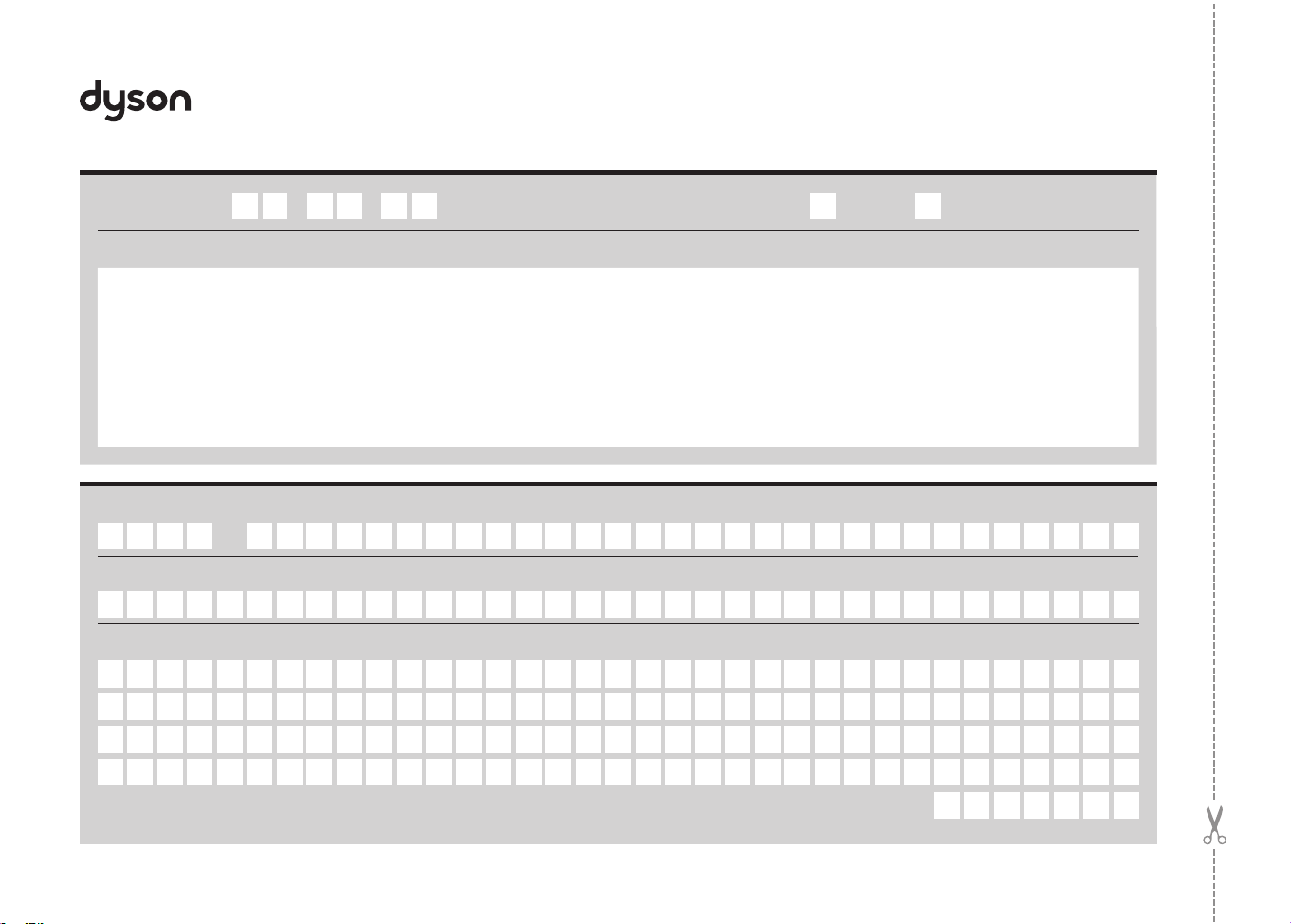
Guarantee form
Date of purchase
/ /
Country of purchase
Australia New Zealand
Serial number
Title
Surname
First name
Postcode
Address
06.07.2018 11:40 - C93644_TP04_OPMAN_ANZ_X438-OPMAN-93644.indd_15_4c0s