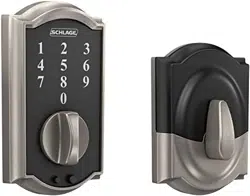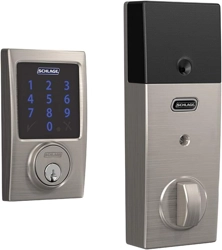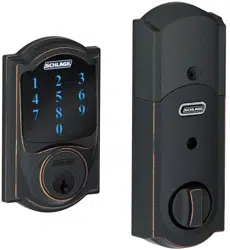
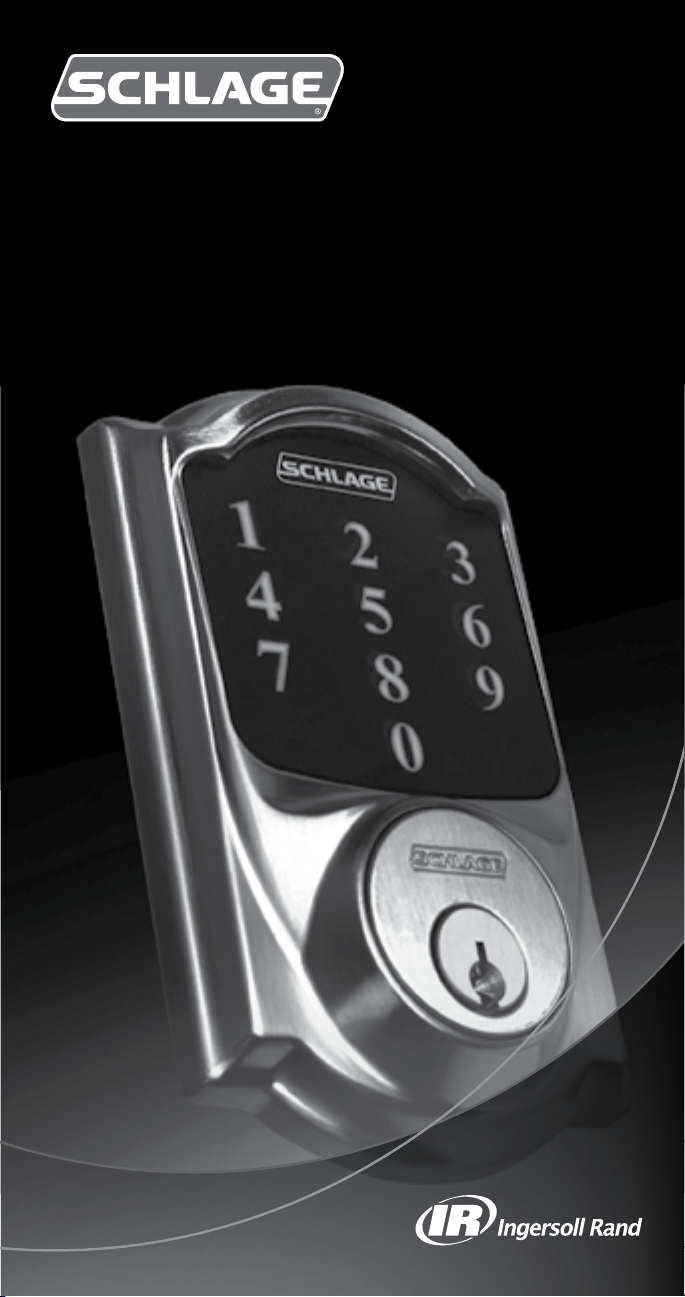
Touchscreen Deadbolt with Alarm
Installation Guide
2
ENGLISH
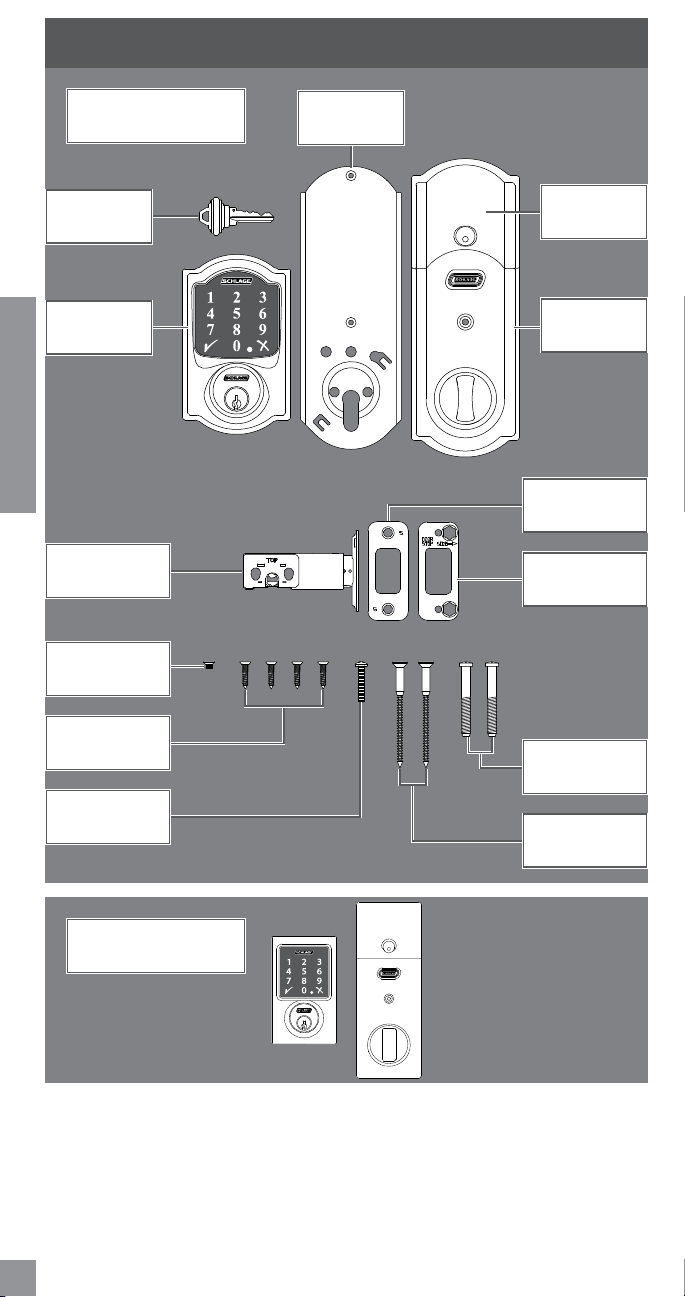
PACKAGE CONTENTS
Touchscreen
Assembly
Set Screw (2)
(1 spare)
Battery Cover
Reinforcement
Plate
Reinforcement
Screws (2)
Strike
Bolt/Strike
Screws (4)
Bolt
Key
Alarm
Assembly
Support Plate
Alarm Assembly
Screw
Support Plate
Screws (2)
Century Style
Camelot Style Shown
Throughout Guide

3
ENGLISH
LET’S GET STARTED!
Once you have all your tools together, please follow each step carefully and in order. Because
this is an electronic lock, the order of steps is very important. If you skip a step, you may
have to perform a factory default reset and start over.
You will denitely need this tool:
• Phillips screwdriver
You can use a manual or electric
screwdriver, but please DO NOT use a
power drill!
You may also need these tools:
• Tape Measure
• Flathead Screwdriver
• Pencil
• Wood Block
• Hammer
INSTALLATION NOTES PLEASE READ!
• DO NOT use a power drill for installation! This could damage the lock.
• Please read all the instructions before calling customer support.
• Please call customer support before returning the product to the store.
• DO NOT install the batteries before installing the lock! Follow the instructions in
order!
• If you have previously installed this lock on another door, you MUST perform a
Factory Default Reset FIRST! See the User’s Guide for more information.
• This lock is designed for the following operating temperatures:
• OutsideLockBody(exteriormounted):-31˚F(-35˚C)to151˚F(66˚C)
• InsideLockBody(interiormounted):14˚F(-10˚C)to120˚F(49˚C)
STEPS AT A GLANCE
1 Check current door/frame alignment. ............................................................... 4
2 Remove the current deadbolt from the door. .................................................... 4
3 Check door/frame dimensions. .......................................................................... 5
4 Locate programming and User Codes. ............................................................... 5
5 Install Bolt and Strike ........................................................................................ 6
5a Adjustboltlength,ifnecessary. ....................................................................... 6
5b Changetotheroundboltfaceplate,ifnecessary. ............................................. 6
5c Installtheboltintothedoor. ............................................................................ 7
5d Installthestrikeintotheframe. ....................................................................... 7
5e Testboltalignment........................................................................................... 8
6 Install the Touchscreen Assembly. ..................................................................... 8
6a InstalltheTouchscreenontheoutsideofthedoor. .......................................... 8
6b InstalltheSupportPlateontheinsideofthedoor. .......................................... 9
7 Install the Alarm Assembly ................................................................................ 9
7a Remove the battery cover from the Alarm Assembly. ....................................... 9
7b Connect the cable to the Alarm Assembly....................................................... 10
7c Install the Alarm Assembly. ............................................................................. 10
7d Secure the Alarm Assembly to the Support Plate............................................ 11
8 Install the Batteries.......................................................................................... 11
8a Install the batteries into the battery tray. ....................................................... 11
8b Install the battery cover. ................................................................................. 11
9 Set up the Lock. ............................................................................................... 12
10 Test the Lock. ................................................................................................... 12
10a Extendthebolt(lock)usingtheinsidethumbturn. ........................................ 12
10b Extendthebolt(lock)usingtheTouchscreen. ................................................ 13
10c Retractthebolt(unlock)usingtheTouchscreen. ........................................... 13
10d Ifthelockfailedtolockorunlock: ................................................................. 13
11 Continue to the User’s Guide ........................................................................... 14
4
ENGLISH
1 Check current door/frame alignment.
Because the bolt on this lock is extended automatically, it is important that the door and
frame are aligned. Use this checklist to determine if your current alignment will work without
anyadjustment.
I can lock the door without pushing, pulling or lifting the door.
My door alignment— the ability to lock the door easily and smoothly— stays the same
with changing seasons.
When the door is closed, there is space for the deadbolt to extend 1” into the frame when
locked.
Ifyoucouldnotcheckeveryboxinthechecklist,youwillneedtoadjustyourdoorand/or
frame. Please visit answers.schlage.com for more information.
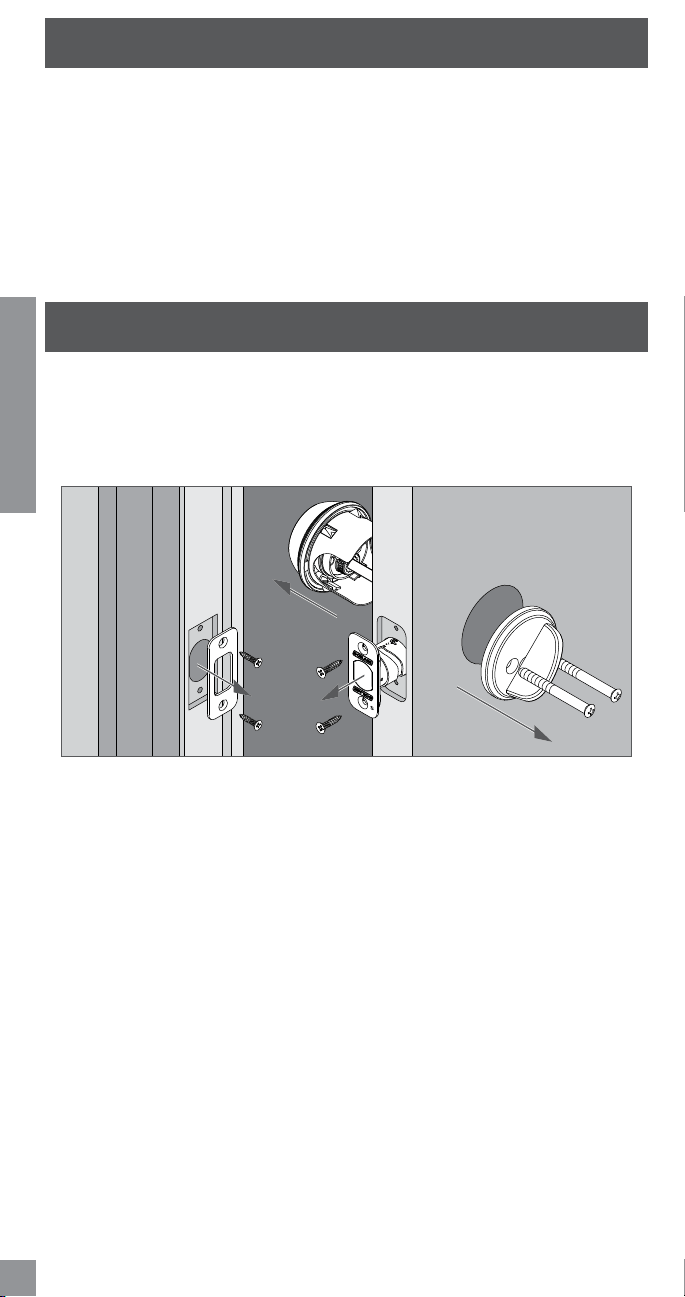
2 Remove the current deadbolt from the door.
Remove the entire deadbolt, including the bolt. You may also want to remove the strike.
L In order to maintain BHMA Grade 1, you must install the included reinforcement plate and
strike (see step 5d on page 7).
L AstandardSchlagedeadboltisshown.Checkwithyourspecicdeadboltmanufacturerif
you need help.
5
ENGLISH
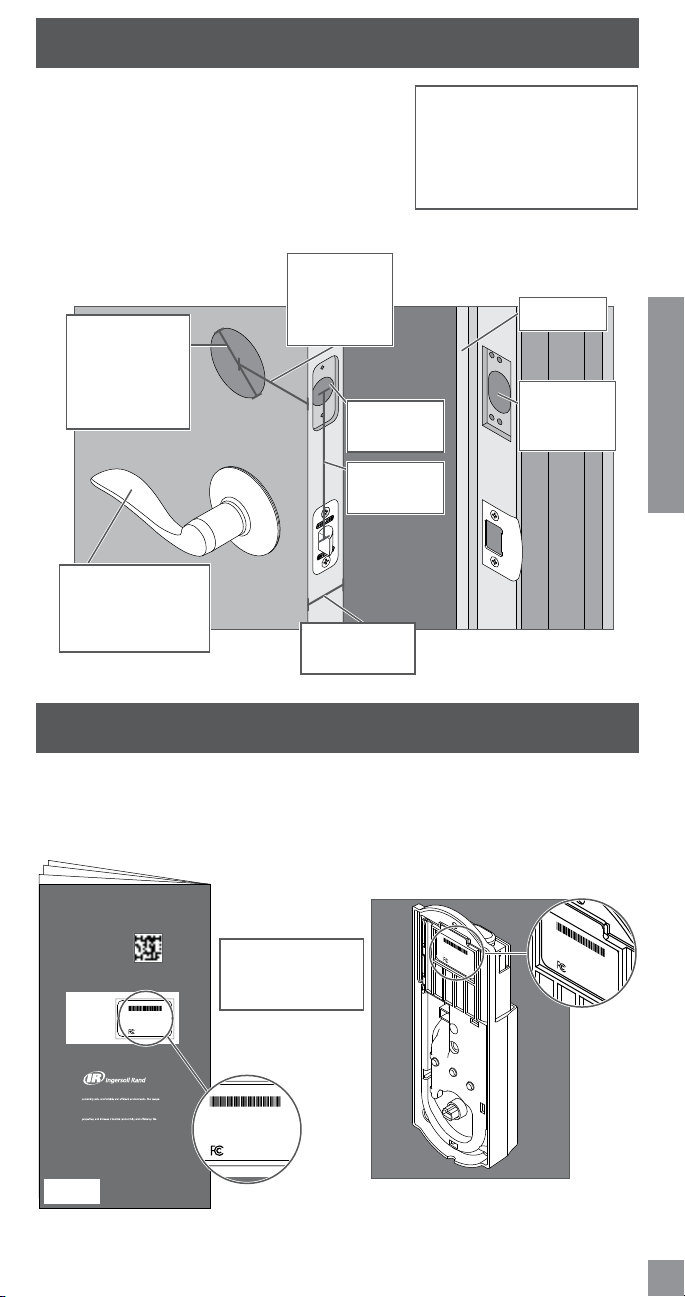
3 Check door/frame dimensions.
• Measure the dimensions shown. If your door
dimensions do not match, you will need to change your
door preparation. Go to answers.schlage.com for
drilling instructions.
L If your door is thicker than 1C\v”, you will need a thick
door kit. Please call Customer Service:
L Remember your backset measurement. You will need
thisforthenextstep.Eithermeasurementisnormal.
Backset
2C\,”(60mm)
OR
2C\v”(70mm)
Minimum5"
(127 mm)
This lever represents
your current knob or
lever, which may be
already installed.
Door Thickness
1C\,” to 1C\v”
Crossbore
Diameter
2Z\,”(53mm)
OR
1Z\x"(38mm)
1”(25mm)
Hole
Door Stop
Hole at least
1”(25mm)
deep.
4 Locate programming and User Codes.
Codes are located on the sticker on the back of the User’s Guide. You will need these
codes to operate the lock. They are also located on the back of the Alarm Assembly.
L Do NOT remove the sticker from the back of the lock! If you lose your Programming Code,
you can reset your lock back to these default codes.
installation or programming, don’t return
the Keypad Lock to the store. Our Schlage
Customer Service representatives are ready
to help.
Toll-Free: 1.888.805.9837
Live Chat: schlage.com
Ingersoll Rand (NYSE:IR) advances the quality of life by creating and
and our family of brands—including Club Car®, Ingersoll Rand®,
Schlage®, Thermo King® and Trane® —work together to enhance
the quality and comfort of air in homes and buildings; transport
and protect food and perishables; secure homes and commercial
are a $14 billion global business committed to a world of sustainable
progress and enduring results.
800-847-1864 www.ingersollrand.com
www.schlage.com
www.trane.com
© 2012 Ingersoll Rand
All rights reserved.
Printed in Country
24060840 Rev. 10/12-a
24060840
If you have questions about any part of
installation or programming, don’t return the
Touchscreen Deadbolt with Alarm to the store.
Our Schlage Customer Service representatives
are ready to help.
Toll-Free: 1.888.805.9837
Live Chat: schlage.com
To learn more about this
product, scan the code with
your smartphone.
Download the app at
scanlife.com.
Default Programming Code
Default User Codes
Default Codes
SCHLAGE
00000000
BE469
Firmware Ver.: xxx-x
Programming Code: 000000
User Code A: 0000
User Code B: 0000
0000000-000
00000000
FCC ID: xxxxxxxx
SCHLAGE
00000000
BE469
Firmware Ver.: xxx-x
Programming Code: 000000
User Code A: 0000
User Code B: 0000
0000000-000
00000000
FCC ID: xxxxxxxx
The same codes
are located in both
places.
SCHLAGE
00000000
BE469
Firmware Ver.: xxx-x
Programming Code: 000000
User Code A: 0000
User Code B: 0000
0000000-000
00000000
FCC ID: xxxxxxxx
installation or programming, don’t return
the Keypad Lock to the store. Our Schlage
Customer Service representatives are ready
to help.
Toll-Free: 1.888.805.9837
Live Chat: schlage.com
Ingersoll Rand (NYSE:IR) advances the quality of life by creating and
and our family of brands—including Club Car®, Ingersoll Rand®,
Schlage®, Thermo King® and Trane® —work together to enhance
the quality and comfort of air in homes and buildings; transport
and protect food and perishables; secure homes and commercial
are a $14 billion global business committed to a world of sustainable
progress and enduring results.
800-847-1864 www.ingersollrand.com
www.schlage.com
www.trane.com
© 2012 Ingersoll Rand
All rights reserved.
Printed in Country
24060840 Rev. 10/12-a
24060840
If you have questions about any part of
installation or programming, don’t return the
Touchscreen Deadbolt with Alarm to the store.
Our Schlage Customer Service representatives
are ready to help.
Toll-Free: 1.888.805.9837
Live Chat: schlage.com
To learn more about this
product, scan the code with
your smartphone.
Download the app at
scanlife.com.
Default Programming Code
Default User Codes
Default Codes
SCHLAGE
00000000
BE469
Firmware Ver.: xxx-x
Programming Code: 000000
User Code A: 0000
User Code B: 0000
0000000-000
00000000
FCC ID: xxxxxxxx
Toll-Free Calling From:
U.S.A.: (888)805-9837
Canada: (800)997-4734
Mexico: 018005067866
6
ENGLISH
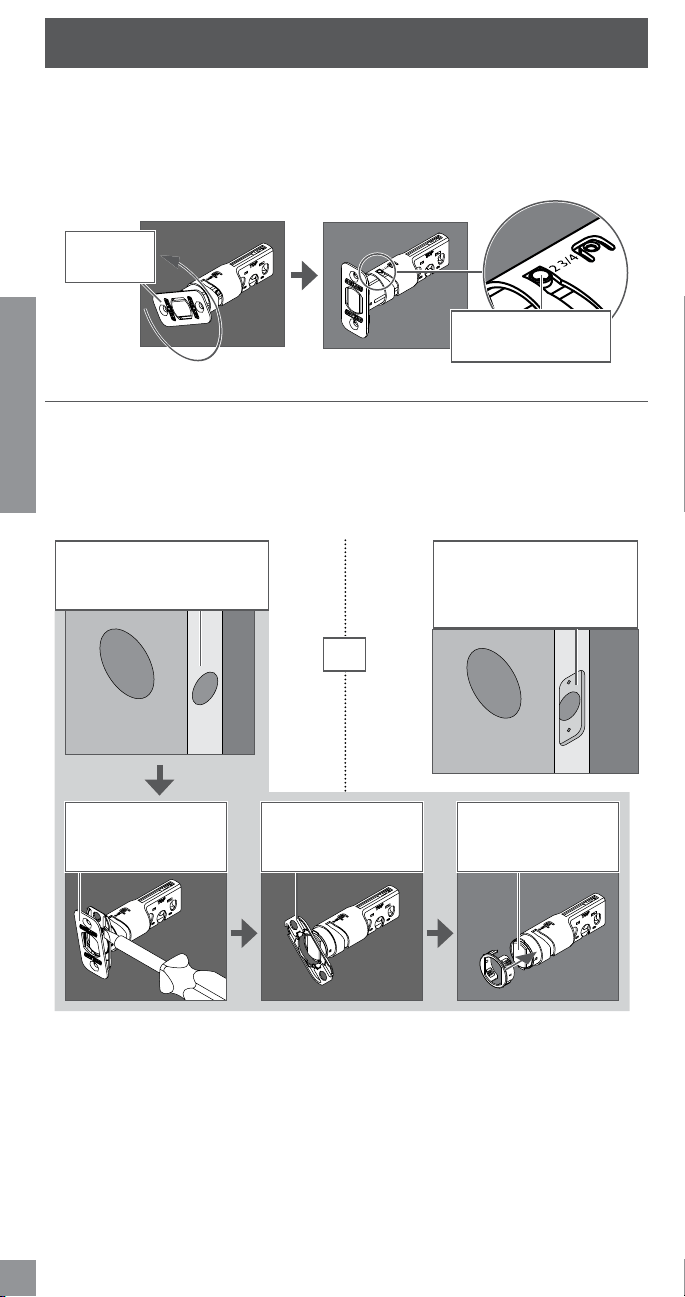
5 Install bolt and strike.
5a Adjust bolt length, if necessary.
• If the backset (see step 3) of your door was 2C\,” (60 mm), you do not need to do
anything. Proceed to step 5b.
• If the backset (see step 3) of your door was 2C\v”(70mm),youneedtoadjustyourbolt.
Twist the faceplate until the button pops into the 2C\v” space.
Twist the
faceplate.
Make sure the button
pops into place.
5b Change to the round bolt faceplate, if necessary.
• If the edge of your door has a mortise, you do not need to do anything. Proceed to step
5c.
• If the edge of your door has no mortise, change the faceplate on your bolt.
L In step 5c, your installation will depend on which kind of door edge you had in this step.
No Mortise
If your door looks like this,
complete the steps below.
1. Useaathead
screwdriver to pry
the faceplate off.
2. Remove the
backplate.
3. Slide the round
faceplate into
place.
Mortise
If your door looks like
this, you don’t need to do
anything. Proceed to step 5c.
OR
7
ENGLISH
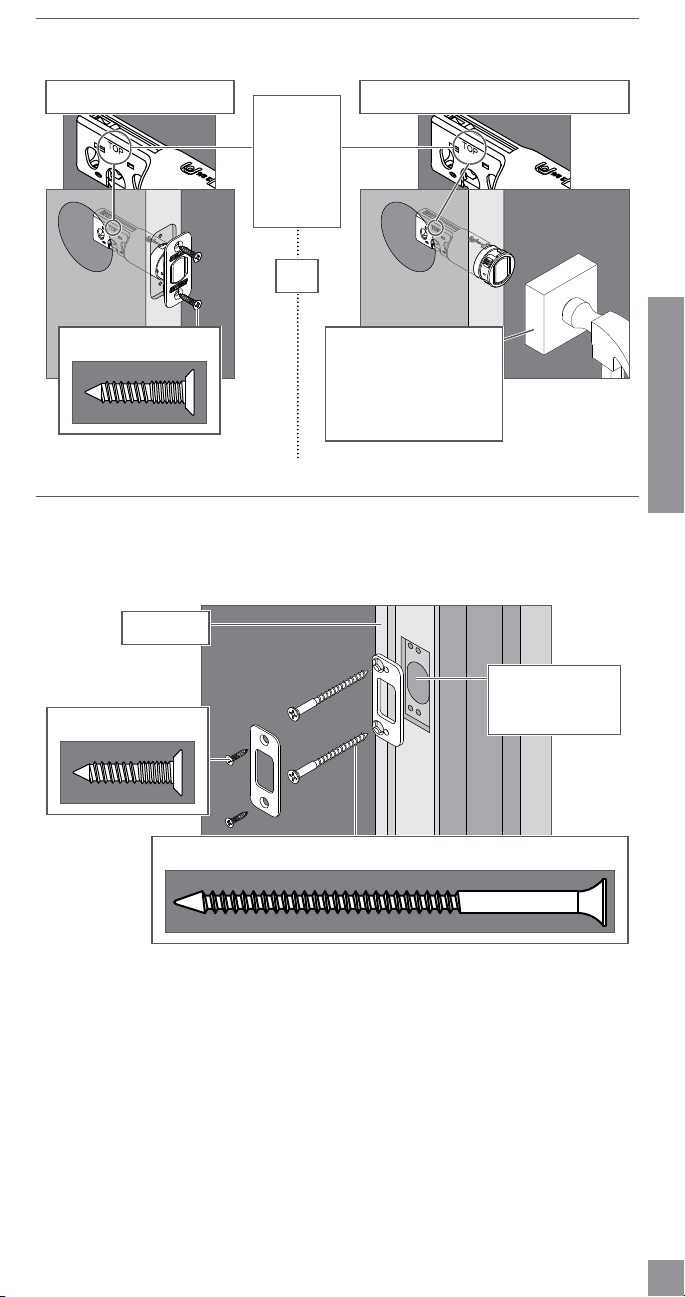
5c Install the bolt into the door.
Chose the picture below that matches your door.
Mortise No Mortise
Use a block of wood and
a hammer (not included)
to tap the bolt into place.
You don’t need to use
the screws.
Actual Size (2)
OR
Make sure
the word
TOP faces
up when
installing
the bolt.
5d Install the strike into the frame.
Install all the parts shown for maximum security.
L In order to maintain BHMA Grade 1, you must install the included reinforcement plate and
strike.
Actual Size (2)
Reinforcement Screws: Actual Size (2)
Door Stop
Make sure this
hole is at least 1”
(25mm)deep.
L Thereinforcementscrewsmaynottondoorswithsidelights.
8
ENGLISH
5e Test bolt alignment.
1. Close the door.
2. Insertaatheadscrewdriverintotheslotinthebolt,asshown.
3. Rotate the screwdriver toward the door edge to extend the bolt into the hole in the frame.
Thisoperationshouldbesmooth.Youshouldbeabletorotatethescrewdriver90˚,fully
extending the bolt.
4. Iftheoperationwasnotsmooth,oriftheboltdidnotfullyextend,adjustyourframeand/
or door preparation. Go to answers.schlage.com for further instructions.
5.Retract(unlock)theboltbeforecontinuingtostep6.
Retract the bolt
before continuing
tostep6.
CAUTION
Test from the inside to
avoid being locked out!
If you can rotate the
screwdriver a full
90˚,thentheboltis
fully extended.
6 Install the Touchscreen Assembly.
6a Install the Touchscreen on the outside of the door.
L The clips snap into the crossbore (see step 3 on page 5) to assist in holding the
keypad on the door.
L The Touchscreen Assembly should install smoothly. If it does not, check that the bolt is set
to the correct backset (see step 5a on page 6).
Clips snap into
the crossbore.
Align the tab
with the notch.
Route the cable
under the bolt.
L NOTE:Ifyouhavea1Z\x” (38 mm) crossbore (see step 3 on page 5), please see
Spacer Removalonpage15.
9
ENGLISH
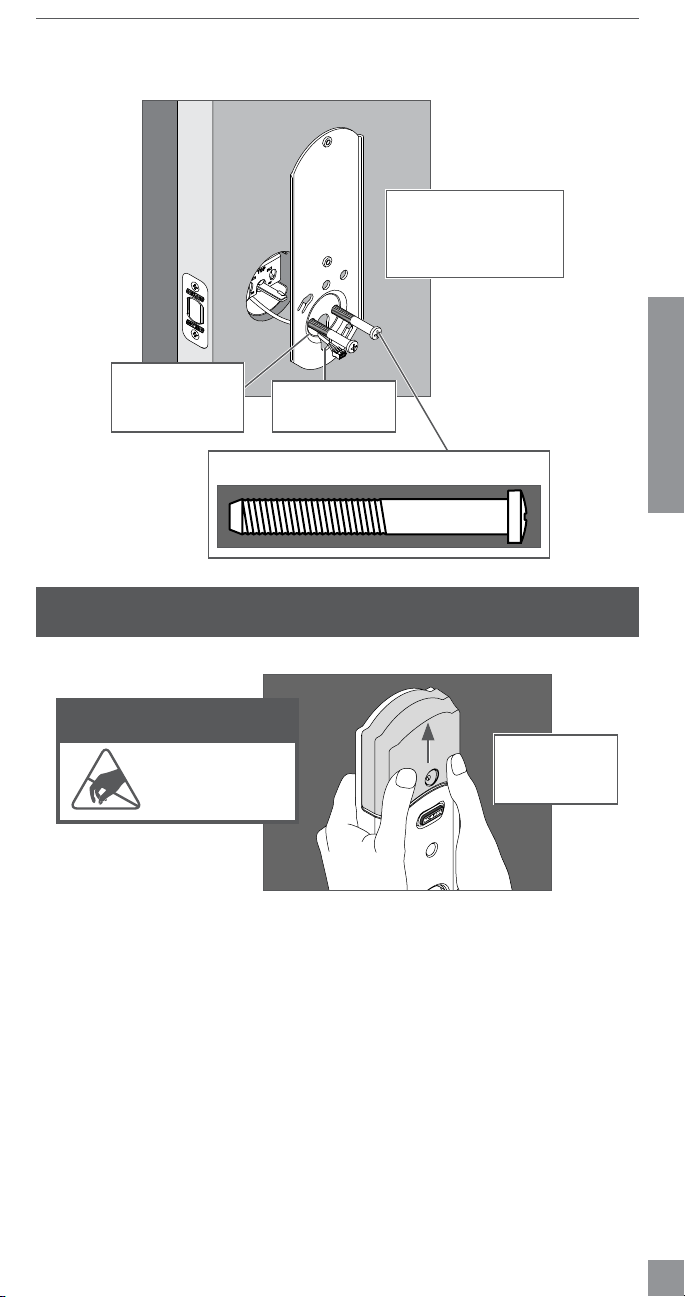
6b Install the Support Plate on the inside of the door.
L Make sure the Touchscreen and Support Plate are straight on the door before tightening
the screws. Tighten screws fully to prevent the lock from moving over time.
TOP
Make sure the
indented circle is
facing the door.
Have someone hold
the Touchscreen on the
outside of the door while
you tighten the screws.
Actual Size (2)
Route the cable
through the slot.
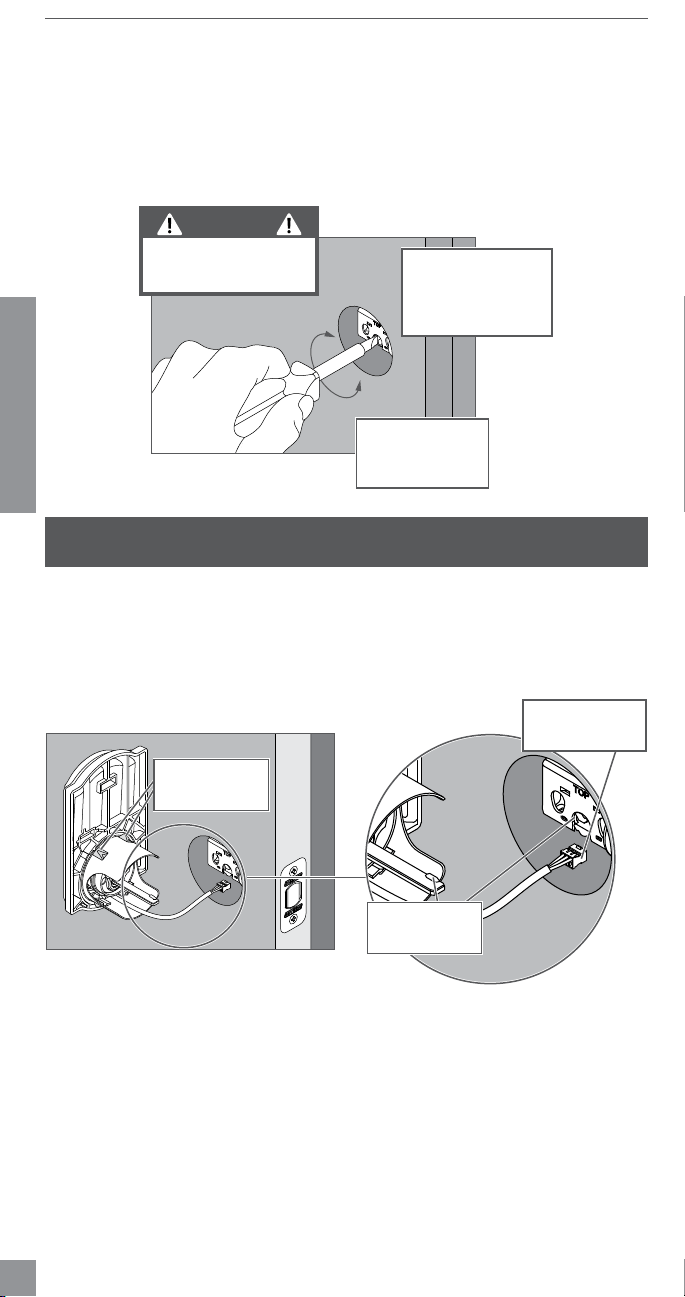
7 Install the Alarm Assembly.
7a Remove the battery cover from the Alarm Assembly.
DO NOT remove
the battery tray
(not shown)!
ELECTROSTATIC DISCHARGE
WARNING!
DO NOT TOUCH the
circuit board! You may
damage the lock.
10
ENGLISH
7b Connect the cable to the Alarm Assembly.
L Locate the screws in step 7d before beginning this step so they will be handy when you
need them.
Theconnectortsonlyone
way. Match the white dot on
the connector with the white
dot on the circuit board.
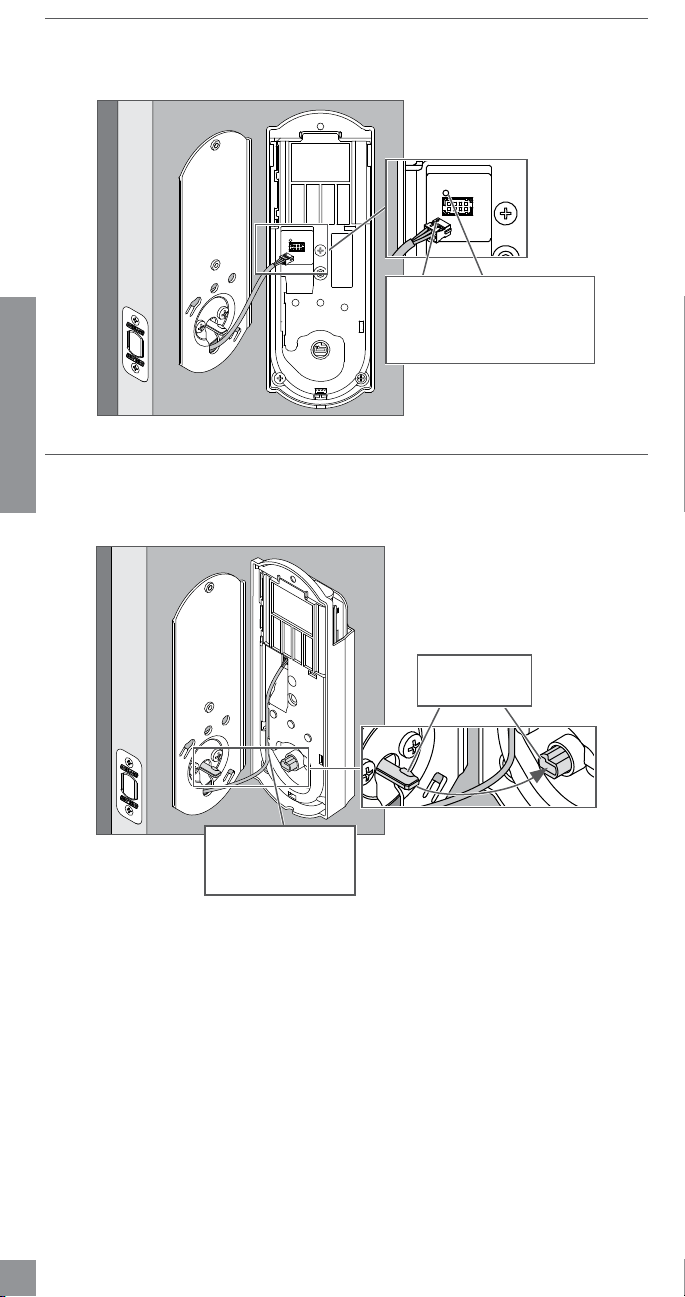
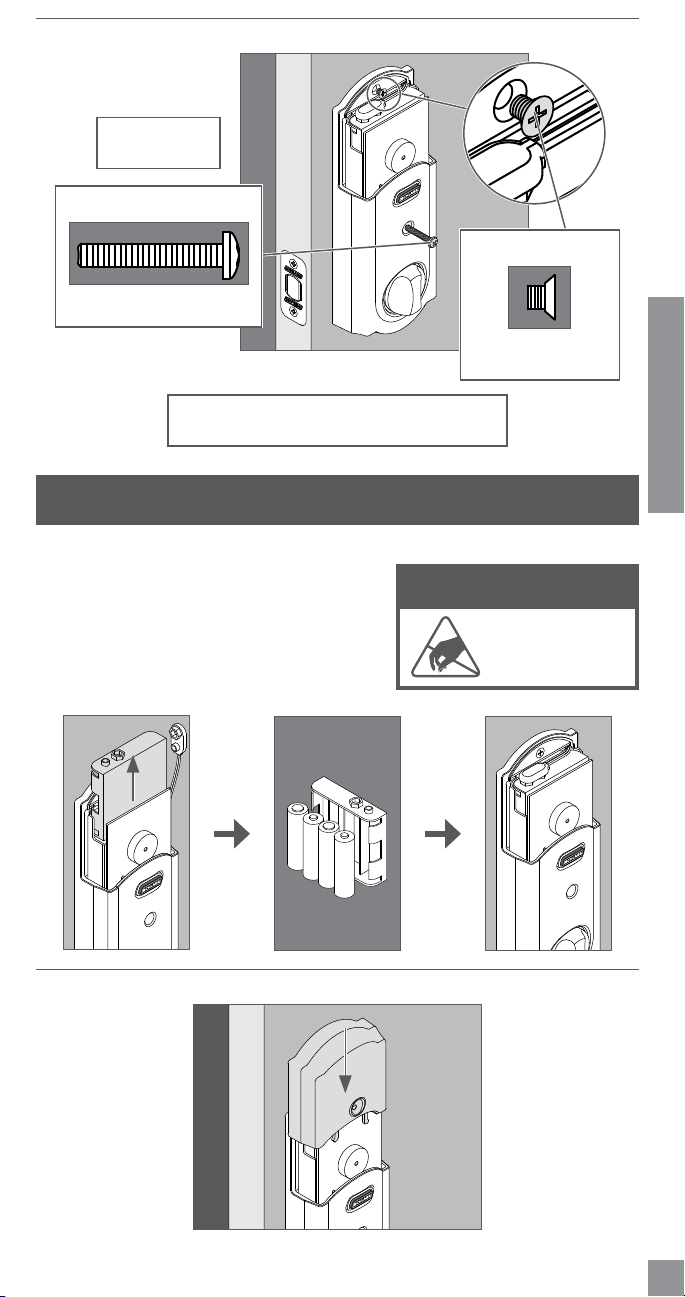
7c Install the Alarm Assembly.
1. Align the tab with the notch as shown.
2. Route the cable into the channel.
3. Then slide the Alarm Assembly towards the door.
Align tab with
notch.
Route the cable into
the channel to avoid
crimping the cable.
11
ENGLISH
7d Secure the Alarm Assembly to the Support Plate.
Actual Size
8-32 x 1Z\,”
Actual Size
8-32 x .187 UP FHMS
(1 spare is included)
Install the lower
screwrst.
Do not turn the thumbturn at this time. Testing will
be completed after the lock is completely installed.
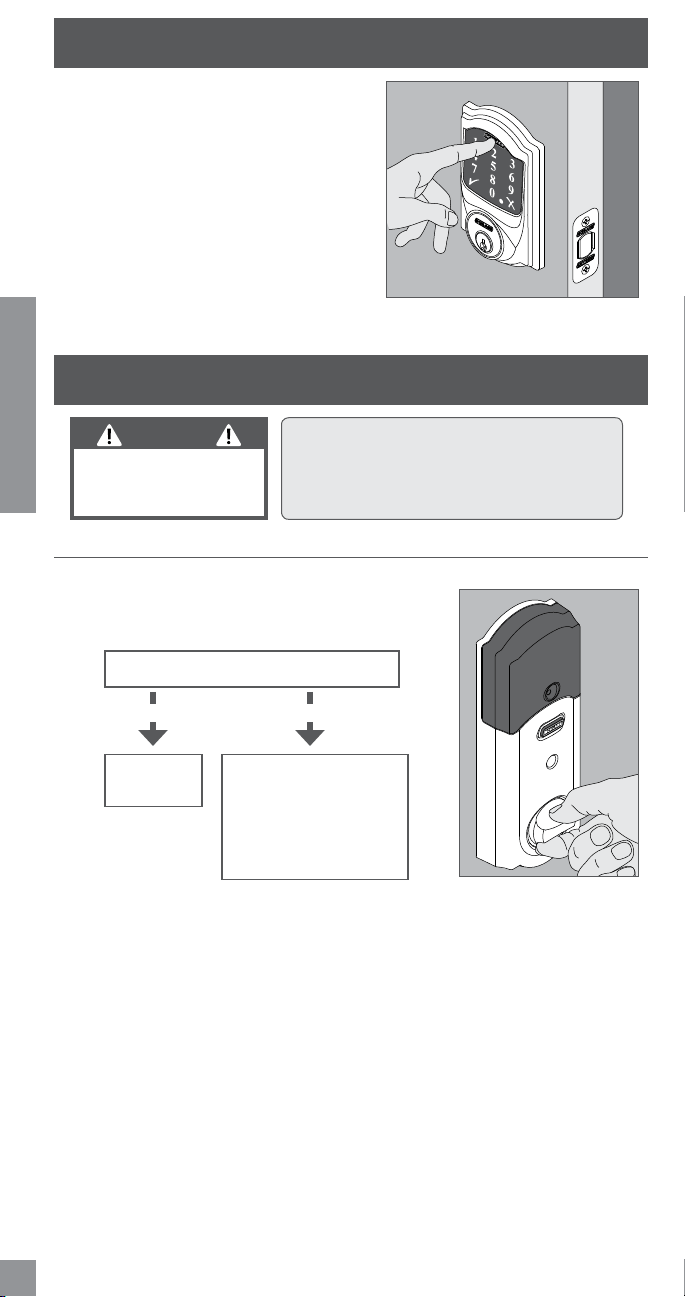
8 Install the Batteries.
8a Install the batteries into the battery tray.
1. Unsnap the connector.
2. Remove the battery tray.
3. Install four high-quality alkaline AA batteries.
L Lithium batteries may cause undesirable
operation.
4. Carefully replace the battery tray, with the
batteries facing the door.
5.Snap the connector back into place.
-
+
-
+
-
+
-
+
8b Install the battery cover.
ELECTROSTATIC DISCHARGE
WARNING!
DO NOT TOUCH the
circuit board! You may
damage the lock.
12
ENGLISH
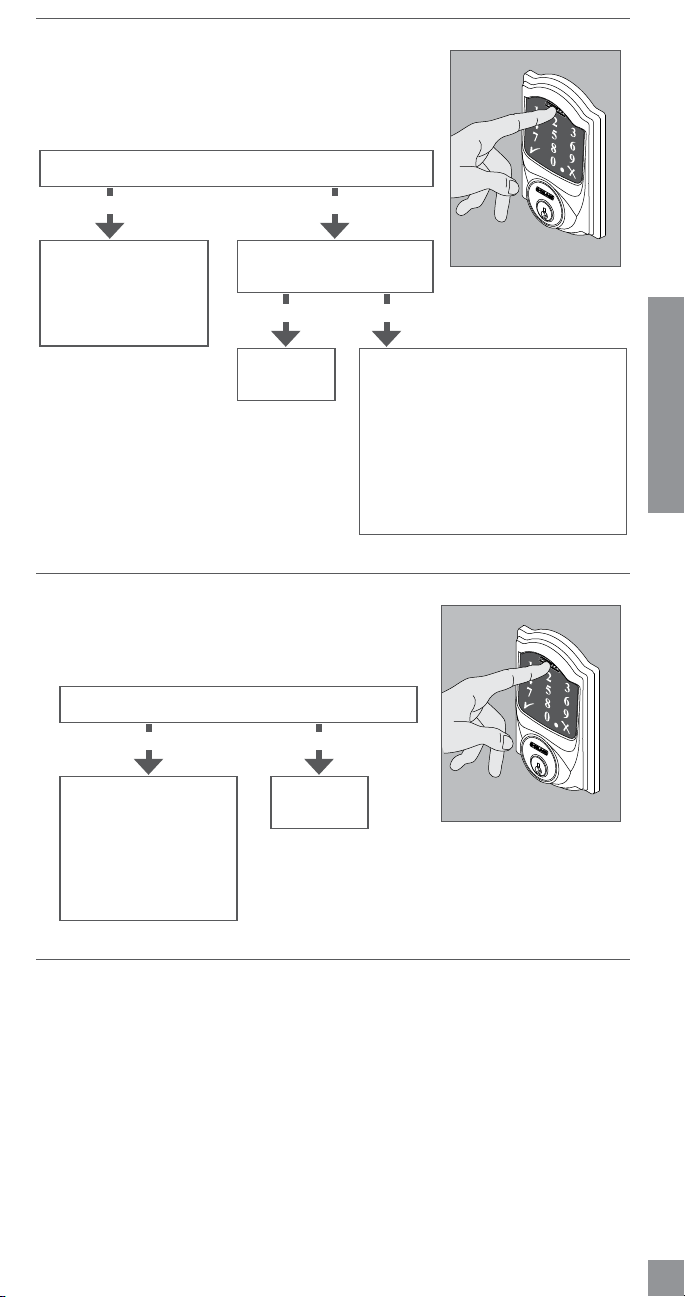
9 Set up the Lock.
1. Open the door if it is not already open.
2. Press the Outside Schlage Button.
3. EnteroneoftheDefaultUserCodesintothe
lock (see step 4 on page 5).
4. The lock will perform a setup routine. Wait
until the bolt stops moving before continuing.
L If the Touchscreen did not light up during this
step, you may have a power problem. Install
fresh batteries and make sure the battery wires
are connected (see step 8a on page 11).
If that does not help, make sure the cable is
connected and is not crimped (see step 7b on
page 10).
10 Test the Lock.
CAUTION
Keep the key with you
during testing to avoid
being locked out!
L For complete information about programming
and light/beep patterns, see the Programming
the Touchscreen and Troubleshooting
sections in the User’s Guide.
10a Extend the bolt (lock) using the inside thumbturn.
1. Close the door.
2. Rotatethethumbturntowardthedoorjambtoextendthe
bolt.
Was this operation smooth?
Continue to
step 10b.
Youmayneedtoadjust
your door/frame.
Continue to step 10b for
further testing, or go to
answers.schlage.com for
adjustmentinstructions.
NOYES
13
ENGLISH
10b Extend the bolt (lock) using the Touchscreen.
1. Unlock the door using the thumbturn if you have
not already.
2. Take the key with you! Go outside and close the door.
3. Press the Outside Schlage Button.
4. The bolt should extend.
Alignment is
correct.
Youneedtoadjustyour
door/frame. Go to
answers.schlage.com
foradjustment
instructions.
YESNO
The lock has both a low power and
high power mode. It will try low
powerrstandthenhighpowerwhen
unsuccessful. After three times using
high power, it will always use the high
power mode instead of trying twice
eachtime.Youmaywanttoadjustyour
door/frame to conserve battery power,
but it is not necessary.
YES
NO
Did the bolt extend (is the door locked)?
Did the bolt take two tries
to extend?
10c Retract the bolt (unlock) using the Touchscreen.
1. Press the Schlage button.
2. EnteroneofthedefaultUserCodesintothelock(see
step 4 on page 5).
3. The bolt should retract.
Alignment is
correct.
Use the key to unlock
the door. You need to
adjustyourdoor/frame.
Go to
answers.schlage.com
foradjustment
instructions.
YES
NO
Did the bolt retract (is the door unlocked)?
10d If the lock failed to lock or unlock:
1. If the Touchscreen did not light up, you may have a power problem. Install fresh batteries
and make sure the battery connector is connected (see step 8a on page 11). If
that does not help, make sure the cable is connected to the Alarm Assembly and is not
crimped (see step 7b on page 10).
2. Ifthelockhadpowerbutyouneedtoadjustyourdoor/frame,pleasegoonlineto
answers.schlage.comforcompleteadjustmentinstructionsandvideos.

14
ENGLISH
11 Continue to the User’s Guide.
Your lock is installed and functional. Continue to the User’s Guide for complete information
abouthowtocongureandoperatethelockandalarm.
15
ENGLISH
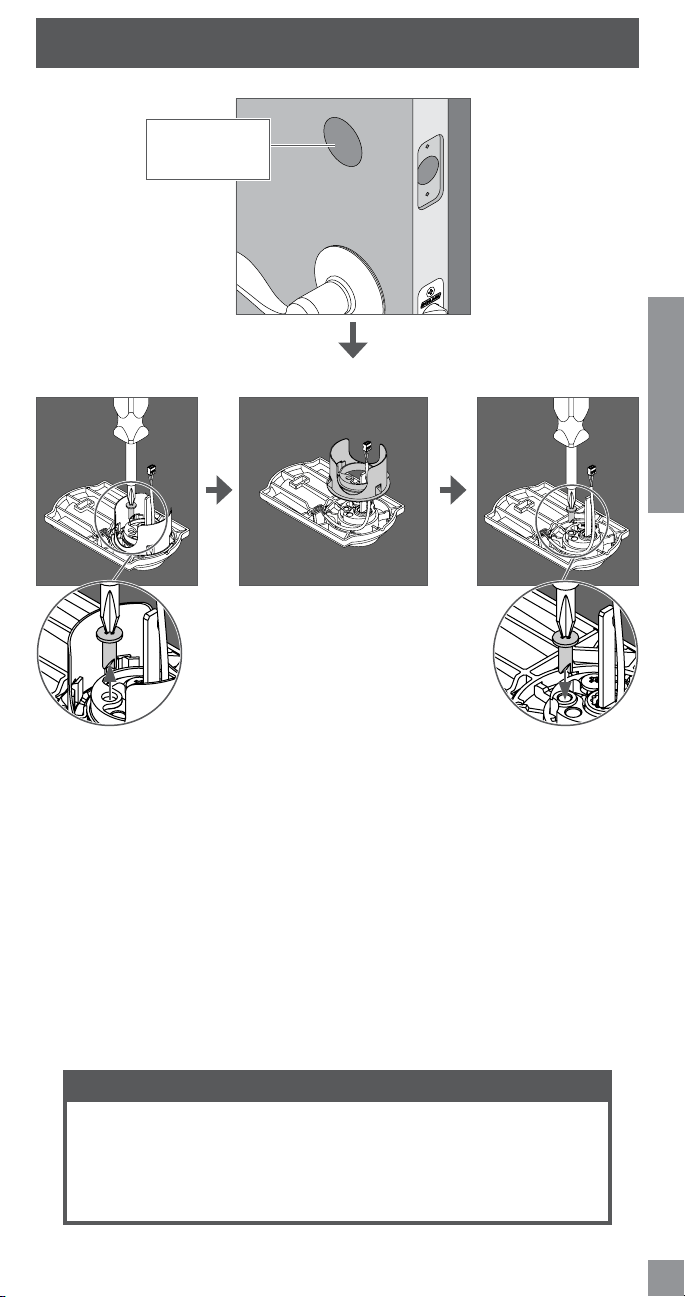
SPACER REMOVAL
ONLY if your door has a 1Z\x"(38mm)crossbore, remove the spacer as shown.
1. Remove screw. 2. Rotate and remove spacer. 3. Replace screw.
1Z\x"(38mm)
Crossbore
NEED HELP?
Please call customer support before returning the product to the store.
Toll-Free Calling From: U.S.A.: (888)805-9837
Canada: (800)997-4734
Mexico: 018005067866
Visit our web site for videos, FAQs and more: answers.schlage.com
©2012IngersollRand
All rights reserved. 24060840Rev.12/12-b
*24060840*
24060840
Ingersoll Rand (NYSE:IR) advances
the quality of life by creating and
sustaining safe, comfortable and efcient
environments. Our people and our family
of brands—including Club Car®, Ingersoll
Rand®, Schlage®, Thermo King® and
Trane® —work together to enhance the
quality and comfort of air in homes and
buildings; transport and protect food and
perishables; secure homes and commercial
properties; and increase industrial
productivity and efciency. We are a
$14 billion global business committed
to a world of sustainable progress and
enduring results.
800-847-1864
www.ingersollrand.com
www.schlage.com
www.trane.com
Ingersoll Rand (NYSE:IR) mejora la
calidad de vida por medio de la creación
y el sostenimiento de entornos seguros,
confortables y ecaces. Nuestro personal y
nuestra familia de marcas —que incluye Club
Car®, Ingersoll Rand®, Schlage®, Thermo King®
y Trane®— trabajan en conjunto para mejorar
la calidad y el confort del aire en casas y
edicios, transportan y protegen alimentos
y productos perecederos, aseguran hogares
y propiedades comerciales y aumentan la
productividad y la eciencia industrial. Somos
una empresa mundial de 14.000 millones
de dólares comprometida con un mundo de
progreso sostenible y resultados duraderos.
800-847-1864
www.ingersollrand.com
www.schlage.com
www.trane.com
Ingersoll Rand (NYSE:IR) améliore la qualité
de vie en créant et en entretenant des
milieux sains, confortables et efcients.
Notre personnel et notre famille de
marques (dont Club Car
MD
, Hussmann
MD
,
Ingersoll Rand
MD
, Schlage
MD
, Thermo King
MD
et Trane
MD
) collaborent pour améliorer
la qualité de l’air et le confort dans les
maisons et les immeubles, le transport et
la protection des aliments et des denrées
périssables, la sécurité des maisons et des
propriétés commerciales et la productivité
et le rendement industriels. Nous sommes
une entreprise de 14 milliards qui croit en un
monde de progrès et de résultats durables.
800-847-1864
www.ingersollrand.com
www.schlage.com
www.trane.com
If you have questions about
any part of installation or
programming, don’t return
the Touchscreen Deadbolt
with Alarm to the store. Our
Schlage Customer Service
representatives are ready
to help.
Toll-Free:
1.888.805.9837
Live Chat: schlage.com
Si tiene dudas acerca de
cualquier parte de la instalación
o programación, no devuelva
el cerrojo de pantalla táctil con
alarma a la tienda. Nuestros
representantes del Departamento
de Servicio de Asistencia al Cliente
de Schlage están listos para
ayudarlo.
Línea gratuita:
1.888.805.9837
Chat en vivo: schlage.com
Si vous avez des questions
concernant l’installation ou
programmation, ne ramenez pas
le pêne dormant avec écran tactile
muni d’une alarme au magasin.
Les représentants du service à la
clientèle de Schlage sont à votre
service.
Sans frais :
1.888.805.9837
Clavardage en direct :
schlage.com
To learn more about this
product, scan the code with
your smartphone.
Download the app at
scanlife.com.
Para obtener más
información sobre este
producto, escanee el código
con un teléfono inteligente.
Descargue la aplicación en
scanlife.com.
Pour de plus amples
renseignements sur ce produit,
numérisez le code avec votre
téléphone intelligent.
Téléchargez l’application au
scanlife.com.