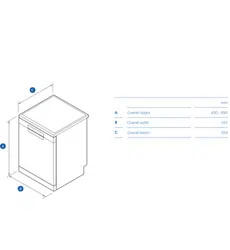
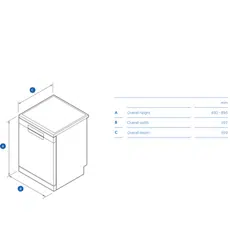
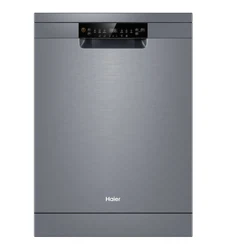
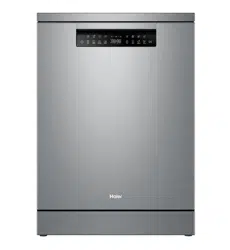
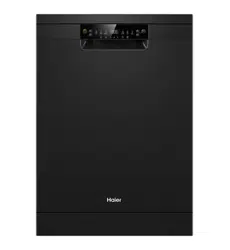
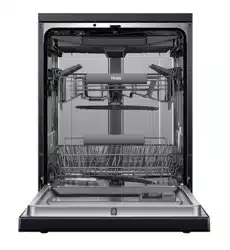
Haier HDW14G2W Freestanding Dishwasher
Product's Documents
Below are documents related to this product, you can read online or download:
- Owner's manual - (English) Read Online | Download pdf
Accessories
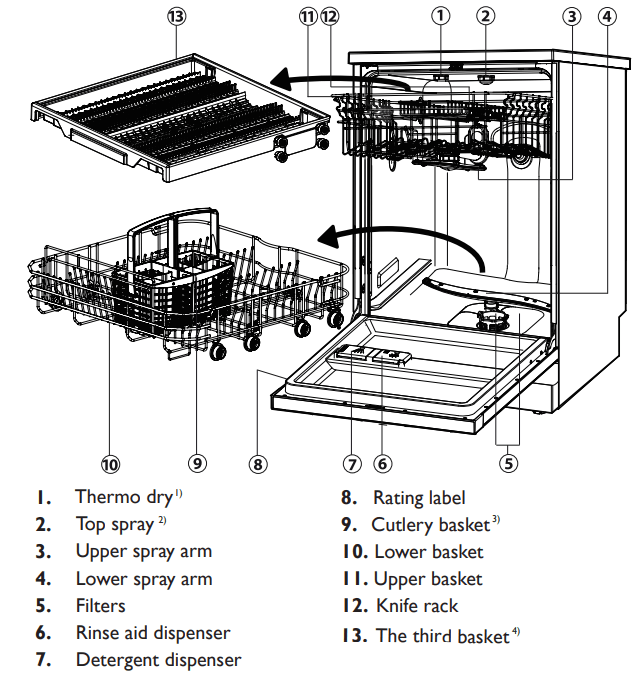
Check the accessories and literature in accordance with this list:
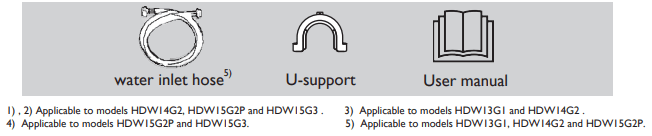
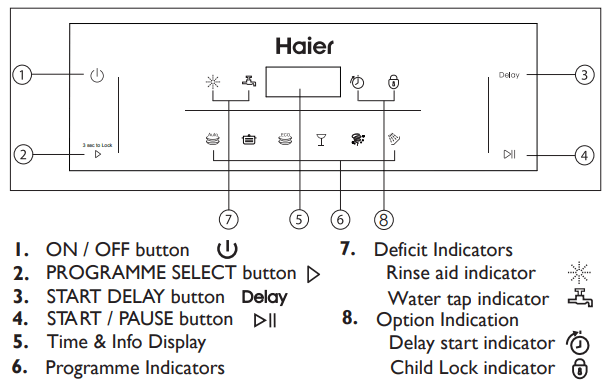
HDW13G1/HDW14G2/HDW15G2P :
HDW15G3 :
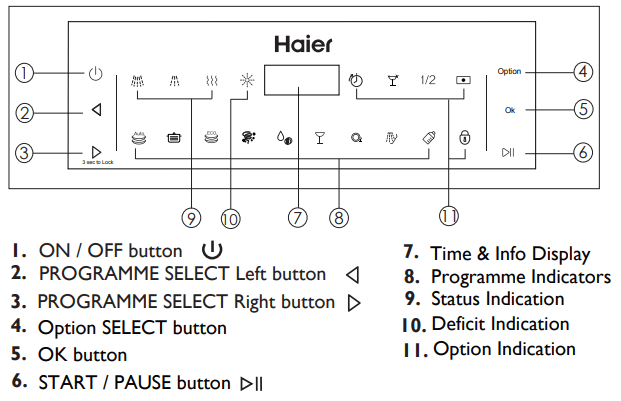
During any selection the display shows by flashing related information like
► Programme cycle time
► Programme start delay time
► Error codes and service information
After start of an operation it displays without flashing:
► Remaining time in hours of a delayed programme starts, e.g. 24h
► Remaining programme cycle time in hours + minutes, e.g. 1:59
While running it may vary due to local conditions and daily working load.
Deficit Indicators
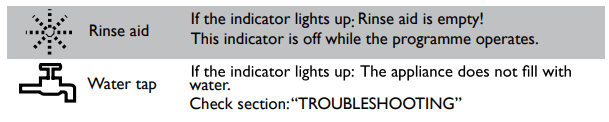
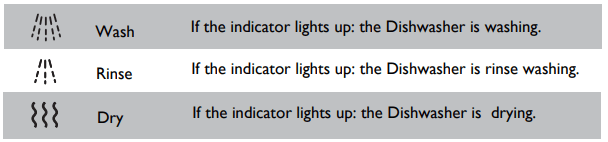
Status Indicators
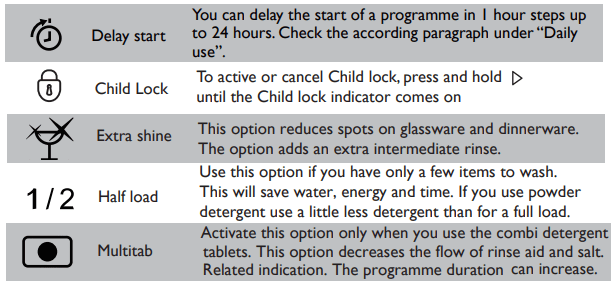
Option Indication
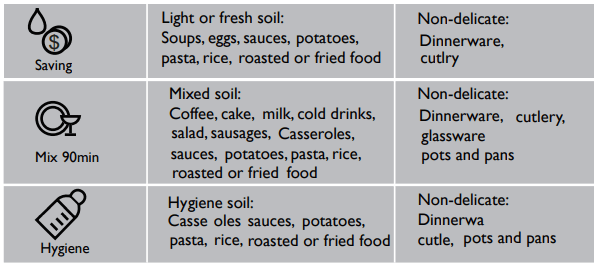
On some models :
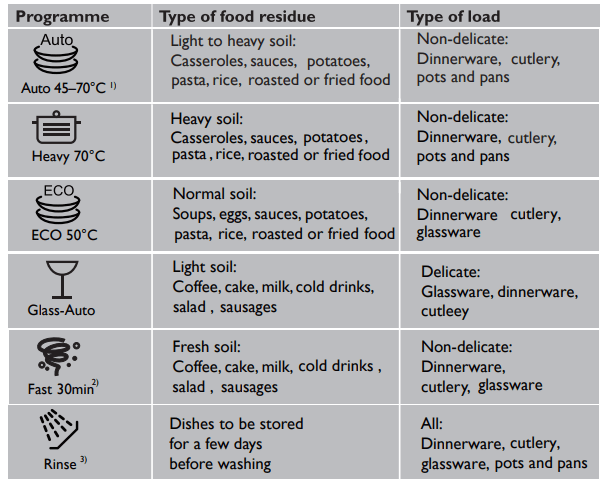
1) The appliance senses the type of soil and the quantity of items in the baskets. It automatically adjusts the temperature and quantity of water, energy consumption and programme duration.
2) With this programme you can wash a load with fresh soil. It gives good washing results in a short time.
3) Use this programme to quickly rinse the dishes. This prevents the remaining food to bond on the dishes and bad odours to come out from the appliance. Do not use detergent with this programme!
Remove all packaging materials, keep them out of childrens reach and dispose them in an environmentally friendly manner.There could be water residue inside the appliance due to quality checks in the factory.
Perform the following steps:
1. Install the appliance.
► Refer to section INSTALLATION. 2. 3. 4.
2. Only for use of Multitabs:Adjust the rinse aid setting.
► Refer to section DIFFERENT SETTINGS FOR RINSE AID.
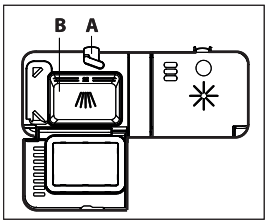
3. Fill the rinse aid dispenser.
► Refer to section HOWTO FILL THE RINSE AID DISPENSER.
4. Open the water tap.
5. Start any wash programme (apart from 20 minutes programme) with detergent but no load to remove possible manufacturing residues.
An accoustic signal informs about the end of a programme.This signal can be switched off.
Refer to section HOWTO ADJUST SETTINGS and select the -setting:
► If the display shows b0 the signal is switched off.
► If the display shows b1 the signal is switched on.
Rinse aid is added during the last rinsing phase to dry the dishes without streaks and stains.
Detergent (e.g. powder, tabs, ...)
► requires separate rinse aid:
Factory default setting: . No settings are necessary.
The rinse aid is added from the rinse aid dispenser only.
Detergent with multifunction (e.g. Multitabs)
► combine detergent and rinse aid: The rinse aid setting should be adjust to . Please use the setting instructions in section HOWTO ADJUST SETTINGS and select the -setting.
The rinse aid is added from the rinse aid dispenser in addition to the multitabs rinse aid.
Setting cuts off the rinse aid dosage and the rinse aid indication. The higher the value for the higher the dosage.
Usually the recommended setting performs well. In case of streaks, stains, shimmer etc.;refer to section TROUBLESHOOTING.
CAUTION!
Only use rinse aid for dishwashers. Other product can cause damage to the appliance!
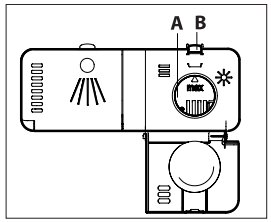
To adjust the Rinse Aid level
1. The appliance is switched off.
2. Press and hold “  and Delay ”about 3 seconds until (for HDW15G3,
Press and hold “ and Option”):
►The display shows the current Rinse Aid setting (the default is d6 ).
3. Press (for HDW15G3, Press OK) to change the Rinse Aid setting in steps between d1 (minimum dispense) and d7 (maximum dispense).
4. To exit the Rinse Aid menu,press and hold 1 second .
1. The appliance is switched off.
2. Press and hold and about 3 seconds until (for HDW15G3 ,
Press and hold " and Option")
►The display shows the current Rinse Aid setting.
3. Press (for HDW15G3, press Option) to scroll to the buzzer menu.
4. The display will show b0 (buzzer off) or b1(buzzer on).
5. Press (for HDW15G3, press OK) to toggle between b0 (buzzer off) or b1 (buzzer on).
6. To exit ,press and hold 1 second .
This feature disables all the buttons on the dishwasher. If any other buttons are pressed while Child lock is activated, the the Child lock indicator will flash for a few seconds.
1.To activate Child lock, press and hold that Child lock has been activated.
2.The display will remain on (if no programme has been started it will continue to flash while the control panel is locked).
3.To cancel Child lock, press and hold that Child lock has been cancelled.
Please note that not all sales models comes with identical features and options. So pictures of that chapter are sometimes different to your dishwasher model. Explanations try only to point out basic model variants.
1. Load the baskets.
2. Open the water tap.
3. Press the ON/OFF button to activate the appliance.
4. Add the detergent;refer to section DETERGENT.
5. Close the door.
6. Set the programme according to the type of load and how dirty the dishes, cups and cutlery are.
7. Maybe select a start delay time.
8. Press the START / PAUSE button  to start the programme.
9. After programme end close the water tap.
10. After programme end the appliance change to auto off. Unload the baskets.
The appliance is switched on.
The rinse aid indicator is on:
until the indicators light up. The programme starts.With delicate glasses and porcelain make sure they are labelled dishwasher-proof.
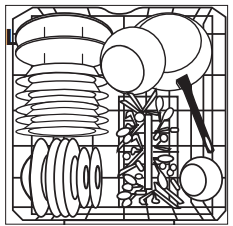
Place heavily soiled items (like pots and pans or dinner plates) in the bottom basket. The more powerful spray jet provides a better dishwashing result.
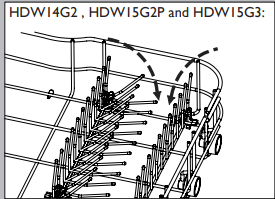
The lower basket has folding spikes. Fold down these spikes to improve arrangement of pots, pans and bowls.
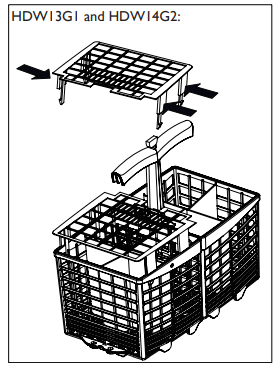
CAUTION! Put sharp and pointed items with the blade pointing downward to keep them out of harms way
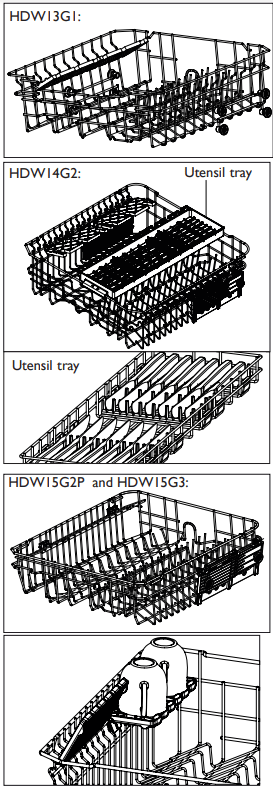
►The upper basket is designed to hold items like glasses, cups, saucers, plates, small bowls and shallow pans.
►Use the utensil tray to securely hold long or sharp items like knives, chopsticks, or ladles. Ensure that knife blades are facing down.
►Slide or remove the utensil tray if you need the space for other items below.
►You can adjust the height of the upper basket to create more space for tall items in the lower basket.
► For best washing results place the table knifes in the knife rack.
Place small items on the foldable cup holder
CAUTION! Place sharp and pointed items with the blade pointing downward into the knife rack,to keep them out of harms way.
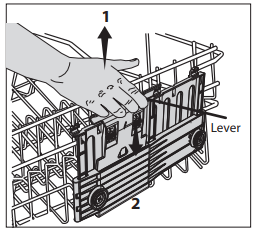
Model with lever for easy height adjustment of the upper basket.
HDW13G1 :
To create more space in the upper or lower basket the height of the upper basket can be adjusted.
CAUTION!
Only adjust the height if the basket is empty (weight)
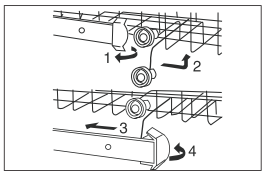
HDW14G2 / HDW15G2P / HDW15G3 :
Lift the basket
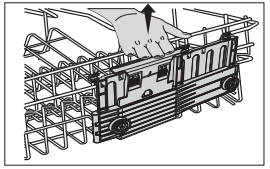
Lower the basket
The third basket can be pulled out, it is easy to put down and take out the cutlery.
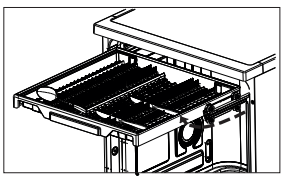
Depengding on the model, you can take out the third basket.
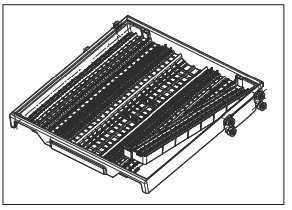
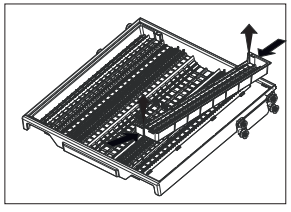
Depengding on the model, you can take out the left and right side shelves to provide more room for taller goblet.
Please use only a dedicated dishwasher detergent and follow the related instructions and dosage on its package.
Multitabs
These combi detergent tablets could include too different agents for water softening,rinse aid and other functions.The softener and rinse aid setting must be adjusted acc. to section BEFORE FIRST USE.
Usually the default setting performs well. If there are streaks, stains, shim- mer etc.;refer to sectionTROUBLESHOOTING and BEFORE FIRST USE.
Detergent tablets do not fully dissolve with short programmes.That may cause bad washing results and detergent residues.
If detergent without multifunction should be used again:
 .
. until the required programme indicator lights up. Additionally the display flashes the programme run-time. to activate the programme or the delay start. The programme starts.The display acts now as countdown of the remaining run-time. The appliance remembers the last programme you used.The next time the appliance will switch on, the appliance pre-selects the programme last used.
To interrupt a programme run:
Press the START/PAUSE button . In the display is flashing. and/or
Open the door. The displayed cycle time is flashing.
Press the START/PAUSE button and/or close the door to continue the programme from the point of interruption. Longer breaks may cause bad cleaning results.
On some models, the combination of all options is possible with all programmes. You can set one option or combine all options.
Set a start time by the following procedure in order to delay a programme start:
For HDWI5G3 model:
press and hold the button Option until the display flashes, Option then press the button , the display shows 0h. press Left PROGRAMME SELECT buttonor Right PROGRAMME SELECT button until the display flashes the set time, then press button.
3. Press the START/PAUSE button .
► The display shows the countdown of the start delay.The countdown decreases with steps of 1 hour.
► When the countdown is completed, the programme starts.
Press sequentially the START DELAY button until the display shows for a short time. Afterwards the display flashes with the duration time for the set programme
.For HDW15G3 model: press the START/PAUSE button, press Option button, then press Left PROGRAMME SELECT button or Right PROGRAMME SELECT button until the dispaly shows for a short time, then press button. Afterwards the display flashes with the duration time for the set programme. OK The selected programme starts after a few seconds.
1. Press the ON/OFF button for about 1 second.
► The start delay is cancelled.
► The programme is aborted.
► The appliance is switched off.
2. Start a new programme and a delayed start if desired.
CAUTION! If a programme will be aborted in the process of washing dishes, the residue of detergent remains on the dishes.These can cause damage to health! Make sure to rinse off the detergent residues completely before using these dishes again. Make sure that there is detergent in the detergent dispenser before start a new programme.
When the programme is completed, the display shows 0:00and an ac- coustic signal is heard (if it is not switched off).The display switches off.
to switch off the appliance or the appliance switches into standby mode automatically after 2 minutes.CAUTION! If the door will be opened immediately after the end of programme, hot steam can escape. Danger of scalding! Open the door carefully!
3. Close the water tap.
4. Remove dishes:
► Open the door slightly and leave it ajar (about 100 mm) to help the drying process.
► Let the dishes become cold before removing them from the appli- ance. Hot dishes damage more easily.
► First remove the items from the lower basket, then from the upper basket.
There can be water on the sides and on the door of the appliance. Stainless steel becomes cool more quickly than the dishes.
The switched on appliance will go into standby mode if it is not activated within 2 minutes before starting a programme, or at the end of a programme. This save enery. The display switches off. To interrupt the standby mode push one button.
Inspect and clean your appliance at regular intervals.Basically any detergent and food residues may cause diverse problems. But especially dirty filters, clogged or blocked spray arms sinificantly decrease the washing results.
There are three filters (A1, A2, B) to be checked and cleaned.
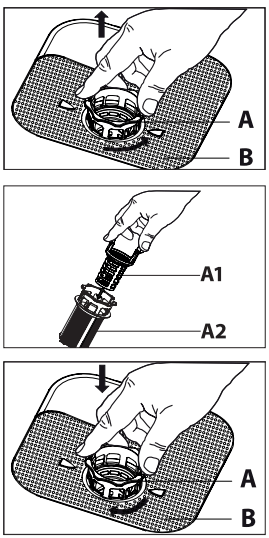
An incorrect assembly or position of the filters will cause bad washing results and possibly serious damage to the appliance.
If any filter is removed make sure that no solid object of any size is left beyond these filters!
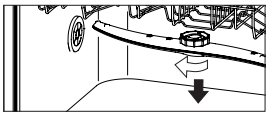
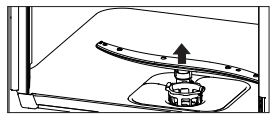
Spray arms should be regularly inspected for dirt. If needed the spray arms could be removed.
Upper spray arm
Lower spray arm
CAUTION!
Never clean the appliance with a steam cleaner. Never use bleach or other chlorinated detergents.
► Clean the appliance with a damp soft cloth.
► Only use neutral detergents. Do not use abrasive products, abrasive cleaning pads or solvents.
► Clean the door seal with a damp soft cloth.
CAUTION!
► Before maintenance, deactivate the appliance and disconnect the mains plug from the mains socket.
► Electrical equipment should be serviced only by qualified experts, because improper repairs can cause considerable consequential damages.
The appliance does not start or it stops during operation
Rinse Aid Indicator is lighted.
Acoustic alarm, display shows ALARMCODE The appliance does not fill with water.
Acoustic alarm, display shows ALARMCODE The appliance does not drain sufficiently
Acoustic alarm, display shows ALARMCODE Leak:The drain pump runs permanently!
Anti-flood device is on:
• There are water leakages in the appliance.
• The water inlet valve is open and blocked.
• The drainage is blocked.
1 Close the water tap.
2 Disconnect appliance from power supply.
3 Contact Service.
All other Alarmcodes:
Whitish streaks, stains or bluish layers on glasses and dishes.
Dry water drop stains on glasses and dishes.
The dishes are wet.
The dishes are wet and matt.
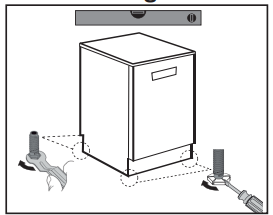
1. Install the appliance on solid ground. Adjust accurately all feet to get a firm, horizonal position.
INFORMATION! Only with a correct level the appliance door closes and seals correctly.
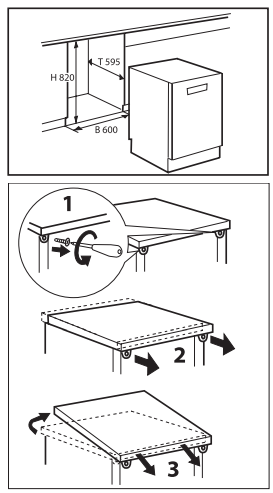
WARNING! If used as free standing appliance again, the worktop must be remounted.
IMPORTANT
The appliance should be connected to the water main using the new water inlet hose supplied. Old hoses should not be used.
Do not shorten the inlet hose.
1. Take note of water connection requirements.
2. Take note of the permitted water pressure extremes.
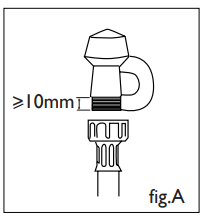
3. Connect the water inlet hose to an accessible water tap with a 3/4” BSP connector (see fig.A). Ensure that there is no kink in the inlet hose that could restrict the flow of water. A 90° bend requires a minimum height of 200 mm for a kink-free curve.
4. Tighten the hose coupling a further half turn after seal contact.
5. Check that the connection does not leak.
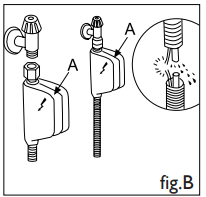
The dishwasher is equipped with a system that stops the supply of water in the event of a problem with the water supply hose, or leaks within the unit, in order to prevent damage to your home. If for any reason the box containing the electrical components happens to get damaged, turn off the power supply and remove the piug for the appliance from the socket immediately. In order to guarantee that the anti-flooding feature operates properly,the “A” box with water supply hose must be attached to the water supply tap as shown in fig.B. No other type of connection is acceptable.The water supply hose must not, under any circumstances, be cut, as it contains electrical parts which are live. If the length of the hose is not adequate to make a proper connection, the hose must be replaced with one which is long enough. This hose is available upon request from specialised ratailers and approved service center.
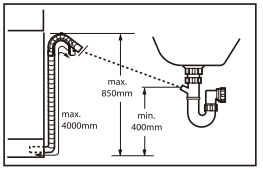
Fix the water drain hose properly to the piping.The hose has to reach at one point a height between 400 and 850 mm above the appliance bottom line!
An extension hose for the water drain hose must not exceed a total length of 4 m and must have the same diameter as the water drain hose.
Following connections are possible:
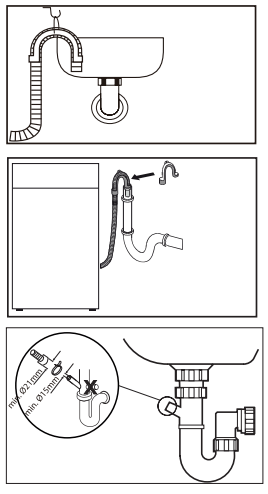
Drain hose to sink
Drain hose to waste water connection
Drain hose to sink connection
CAUTION!
Ensure always that all connections (power supply, drain and fresh water hose) are firm, dry and leak free!
Take care these parts are never to be crushed, kinked, or twisted If the supply cord is damaged, it must be replaced by the service agent (see warranty card) in order to avoid a hazard.
Reference file: Haier HDW14G2W Freestanding Dishwasher
Additionally, the document applies to other Haier models: HDW13G1, HDW14G2, HDW15G2P, HDW15G3