담 당
관리자
Model Description
MODEL
BRAND
Printing Specification
1. Trim Size (Format) : 182mm x 257 mm (B5)
2. Printing Colors
• Cover : 1 COLOR (BLACK)
• Inside : 1 COLOR (BLACK)
3. Stock (Paper)
• Cover : Coated paper , S/White 150 g/㎡
• Inside : Uncoated paper , Wood-Free Paper ( 백상지) 60 g/㎡
4. Printing Method : Off set
5. Bindery : Saddle stitch
6. Language : English (1)
7. Number of pages : 36
Part No.
1.
2.
Owner’s Manual Specification
Owner’s Manual Specification
Changes
4.
REV.
NO.
MM/DD/YY
SIGNATURE
CHANGE NO.
CHANGE CONTENTS
1
2
3
4
5
7
6
SUFFIX
LD/LE series
LG
MFL62882708
(1005-REV06)
KANG
KWANG SUK
09.12.28
8
9
Special Instructions3.
Product Name
USA
Park SY
09.12.28
“This part contains Eco-hazardous substances (Pb, Cd, Hg, Cr6+, PBB, PBDE, etc.) within LG standard level,
Details should be followed Eco-SCM management standard[LG(56)-A-2524].
Especially, Part should be followed and controlled the following specification.
(1)Eco-hazardous substances test report should be submitted
when Part certification test and First Mass Production.
(2) Especially, Don’t use or contain lead(Pb) and cadmium(Cd) in ink.
N
O
T
E
(1) Origin Notification
* LGERS : Printed in Mexico
* LGEAZ : Printed in Brazil
* LGESP : Printed in Brazil
* LGESY : Printed in China
* LGEND : Printed in China
* LGEIL : Printed in India
* LGEIN : Printed in Indonesia
* LGETH : Printed in Thailand
* LGEMA : Printed in Poland
* LGEWR : Printed in Poland
* LGEVN : Printed in Vietnam
* LGEEG : Printed in Egypt
* LGERA : Printed in Russia
* LGEAK : Printed in Kazakhstan
LD/LE series
Jan./15/10 Park sun young S0-73199
Changed the Music list OSD.
Jan./18/10 Park sun young S0-74726
Changed the 19/22/26LE5300 power requirement mark
by LGERS request.
Feb./27/10 Park sun young S0-78288
Changed stand installation part (55LD520 screw contents).
Mar./09/10 Park sun young S0-80361
Changed manual for
37/42/47/55LE53/LE73/32LD520/LD630/LD420-U).
Apr./19/10 Hwang dong mi S0-86112
Added model names, Updated manual contents.
May./31/10 Hwang dong mi S0-90279
CD manual is revised to REV06 (Updated the manual for
37/42/47LD450C.
Pagination sheet
Pagination sheet
P/NO.MFL62882708
Total pages :
36 pages
2
….
Front cover
35
LG(EN)
P/NO.
Rear cover
34…. ….

P/NO : MFL62882708 (1005-REV06)
www.lg.com
This product qualifies for ENERGY STAR in the
“factory default (Home Use)” setting.
Changing the factory default settings or enabling other
features may increase power consumption that could
exceed the limits necessary to quality for ENERGY STAR.
(For 19/22/26/37/42/47/55LE5300, 22/26LE5500,
42/47/55LE7300, 37/42/47LD450C, 55LD520C)
The model and serial number of the TV is located
on the back and one side of the TV.
Record it below should you ever need service.
MODEL
SERIAL
The extended owner’s manuals that contain informa-
tion on the advanced features of this LG TV are
located on the CD-ROM provided in an electronic
version.
To read these files, you will need to use the personal
computer (PC) equipped with a CD-ROM drive.
www.lg.com
1-800-243-0000
1-888-865-3026
1-888-542-2623
USA, Consumer
USA, Commercial
CANADA
For inquires or comments, visit www.lg.com or call;
LG Customer Information Center
Register your product Online!
OWNER’S MANUAL
LED LCD TV / LCD TV
Please read this manual carefully before operating
your set and retain it for future reference.
32LE5300
37LE5300
42LE5300
47LE5300
55LE5300
42LE7300
47LE7300
55LE7300
32LD450
37LD450
42LD450
47LD450
37LD450C
42LD450C
47LD450C
LED LCD TV MODELS
19LE5300
22LE5300
26LE5300
22LE5500
26LE5500
LCD TV MODELS
32LD420
42LD420
47LD420
32LD520
42LD520
47LD520
55LD520
55LD520C
42LD630
47LD630
55LD630
2
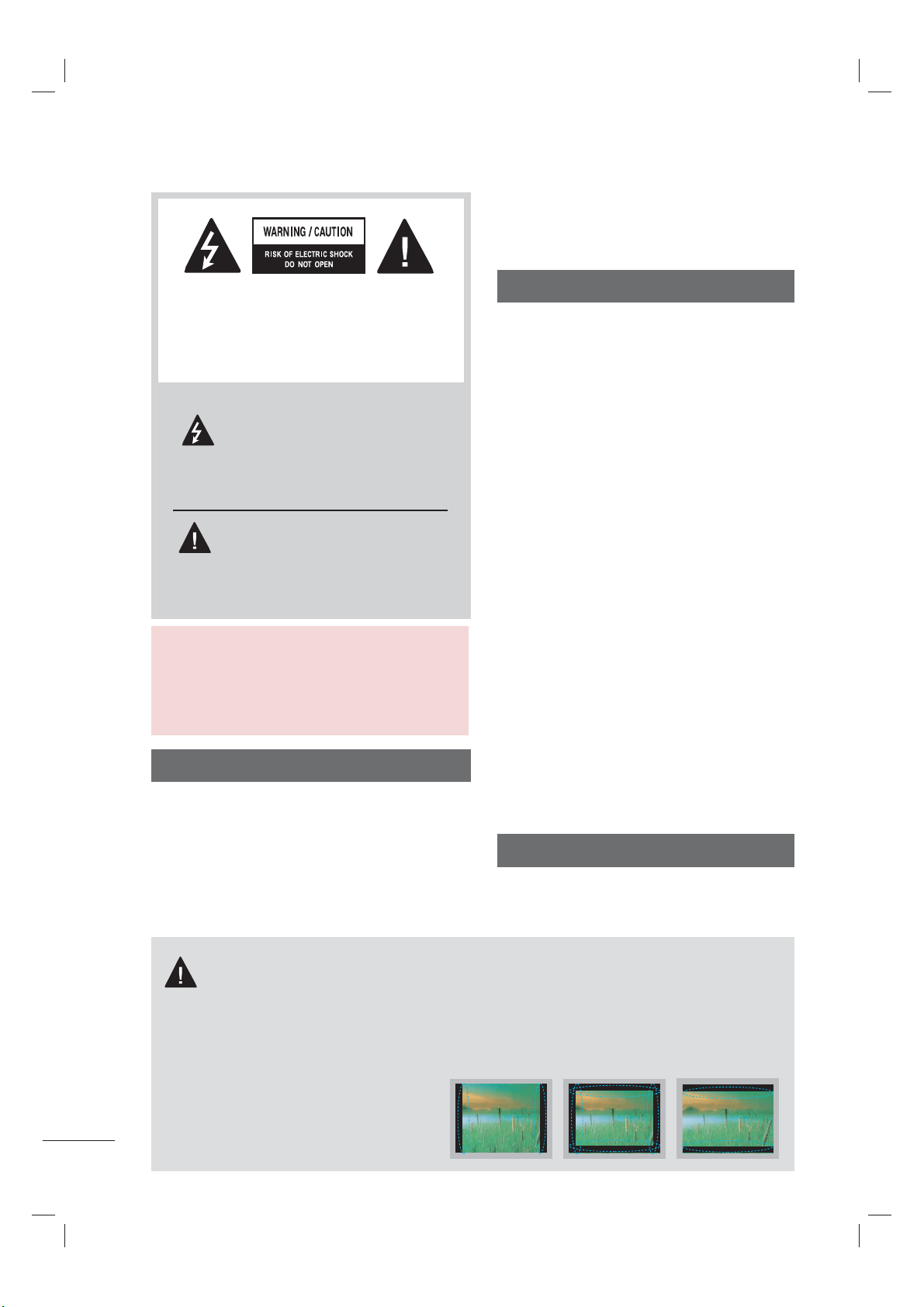
The lightning flash with arrowhead
symbol, within an equilateral trian-
gle, is intended to alert the user to
the presence of uninsulated “dan-
gerous voltage” within the product’s enclo-
sure that may be of sufficient magnitude to
constitute a risk of electric shock to persons.
The exclamation point within an equi-
lateral triangle is intended to alert
the user to the presence of impor-
tant operating and maintenance
(servicing) instructions in the literature
accompanying the appliance.
TO REDUCE THE RISK OF ELECTRIC
SHOCK DO NOT REMOVE COVER (OR
BACK). NO USER SERVICEABLE PARTS
INSIDE. REFER TO QUALIFIED SERVICE
PERSONNEL.
WARNING/CAUTION
TO REDUCE THE RISK OF FIRE AND
ELECTRIC SHOCK, DO NOT EXPOSE THIS
PRODUCT TO RAIN OR MOISTURE.
NOTE TO CABLE/TV INSTALLER
This reminder is provided to call the CATV system
installer’s attention to Article 820-40 of the National
Electric Code (U.S.A.). The code provides guide-
lines for proper grounding and, in particular, speci-
fies that the cable ground shall be connected to the
grounding system of the building, as close to the
point of the cable entry as practical.
WARNING / CAUTION
To prevent fire or shock hazards, do not expose
this product to rain or moisture.
FCC Notice
Class B digital device
This equipment has been tested and found to
comply with the limits for a Class B digital device,
pursuant to Part 15 of the FCC Rules. These
limits are designed to provide reasonable pro-
tection against harmful interference in a residen-
tial installation. This equipment generates, uses
and can radiate radio frequency energy and, if not
installed and used in accordance with the
instructions, may cause harmful interference to
radio communications. However, there is no
guarantee that interference will not occur in a
particular installation. If this equipment does
cause harmful interference to radio or television
reception, which can be determined by turning
the equipment off and on, the user is encour-
aged to try to correct the interference by one or
more of the following measures:
- Reorient or relocate the receiving antenna.
- Increase the separation between the equip-
ment and receiver.
- Connect the equipment to an outlet on a circuit
different from that to which the receiver is con-
nected.
- Consult the dealer or an experienced radio/TV
technician for help.
This device complies with part 15 of the FCC Rules.
Operation is subject to the following two condi-
tions: (1) This device may not cause (harmful)
interference, and (2) this device must accept
any interference received, including interference
that may cause undesired operation (of the
device).
Any changes or modifications in construction of
this device which are not expressly approved by
the party responsible for compliance could void
the user’s authority to operate the equipment.
CAUTION
Do not attempt to modify this product in any
way without written authorization from LG
Electronics. Unauthorized modification could
void the user’s authority to operate this product.
IMPORTANT INFORMATION TO PREVENT “IMAGE
BURN / BURN-IN” ON YOUR TV SCREEN
ꔛ
When a fixed image (e.g. logos, screen menus, video game, and computer display) is displayed on
the TV for an extended period, it can become permanently imprinted on the screen. This phenom-
enon is known as “image burn” or “burn-in.” Image burn is not covered under the manufacturer’s
warranty.
ꔛ
In order to prevent image burn, avoid displaying a fixed image on your TV screen for a prolonged
period (2 or more hours for LCD, 1 or more
hours for Plasma).
ꔛ
Image burn can also occur on the letter-
boxed areas of your TV if you use the 4:3
aspect ratio setting for an extended period.
WARNING / CAUTION
3
SAFETY INSTRUCTIONS
IMPORTANT SAFETY INSTRUCTIONS
Read these instructions.
Keep these instructions.
Heed all warnings.
Follow all instructions.
1
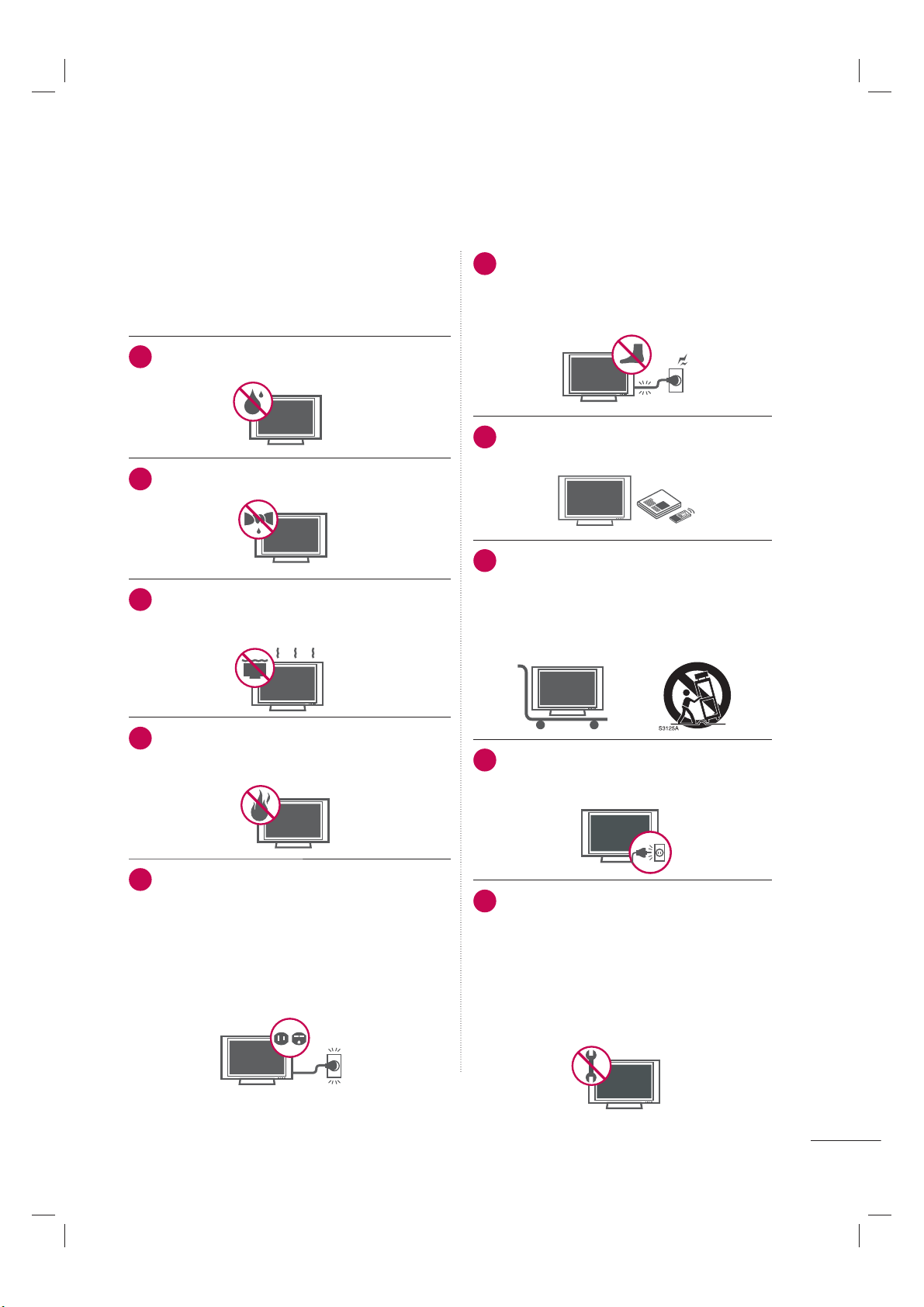
Do not use this apparatus near water.
2
Clean only with dry cloth.
3
Do not block any ventilation openings. Install in
accordance with the ma nufacturer’s instruc-
tions.
4
Do not install near any heat sources such as
radiators, heat registers, stoves, or other appa-
ratus (including amplifiers) that produce heat.
5
Do not defeat the safety purpose of the polarized
or grounding-type plug. A polarized plug has
two blades with one wider than the other. A
grounding type plug has two blades and a third
grounding prong, The wide blade or the third
prong are provided for your safety. If the provided
plug does not fit into your outlet, consult an elec-
trician for replacement of the obsolete outlet.
6
Protect the power cord from being walked
on or pinched particularly at plugs, conve-
nience receptacles, and the point where
they exit from the apparatus.
7
Only use attachments/accessories speci-
fied by the manufacturer.
8
Use only with the cart, stand, tripod, bracket,
or table specified by the manufacturer, or
sold with the apparatus. When a cart is
used, use caution when moving the cart/
apparatus combination to avoid injury from
tip-over.
9
Unplug this apparatus during lighting
storms or when unused for long periods
of time.
10
Refer all servicing to qualified service per-
sonnel. Servicing is required when the
apparatus has been damaged in any way,
such as power-supply cord or plug is dam-
aged, liquid has been spilled or objects
have fallen into the apparatus, the appara-
tus has been exposed to rain or moisture,
does not operate normally, or has been
dropped.
4
11
Never touch this apparatus or antenna during
a thunder or lighting storm.
12
When mounting a TV on the wall, make sure
not to install the TV by the hanging power
and signal cables on the back of the TV.
13
Do not allow an impact shock or any objects
to fall into the product, and do not drop onto
the screen with something.
14
CAUTION concerning the Power Cord:
It is recommend that appliances be placed
upon a dedicated circuit; that is, a single
outlet circuit which powers only that appli-
ance and has no additional outlets or
branch circuits. Check the specification page
of this owner's manual to be certain.
Do not connect too many appliances to the
same AC power outlet as this could result in
fire or electric shock.
Do not overload wall outlets. Overloaded wall
outlets, loose or damaged wall outlets, exten-
sion cords, frayed power cords, or damaged
or cracked wire insulation are dangerous . Any
of these conditions could result in electric
shock or fire. Periodically examine the cord of
your appliance, and if its appearance indicates
damage or deterioration, unplug it, discon-
tinue use of the appliance, and have the cord
replaced with an exact replacement part by
an authorized servicer. Protect the power cord
from physical or mechanical abuse, such as
being twisted, kinked, pinched, closed in a
door, or walked upon. Pay particular attention
to plugs, wall outlets, and the point where the
cord exits the appliance.
Do not use a damaged or loose power cord.
Do not pull on the power cord to unplug the
TV. Grasp the plug when unplugging the
power cord.
15
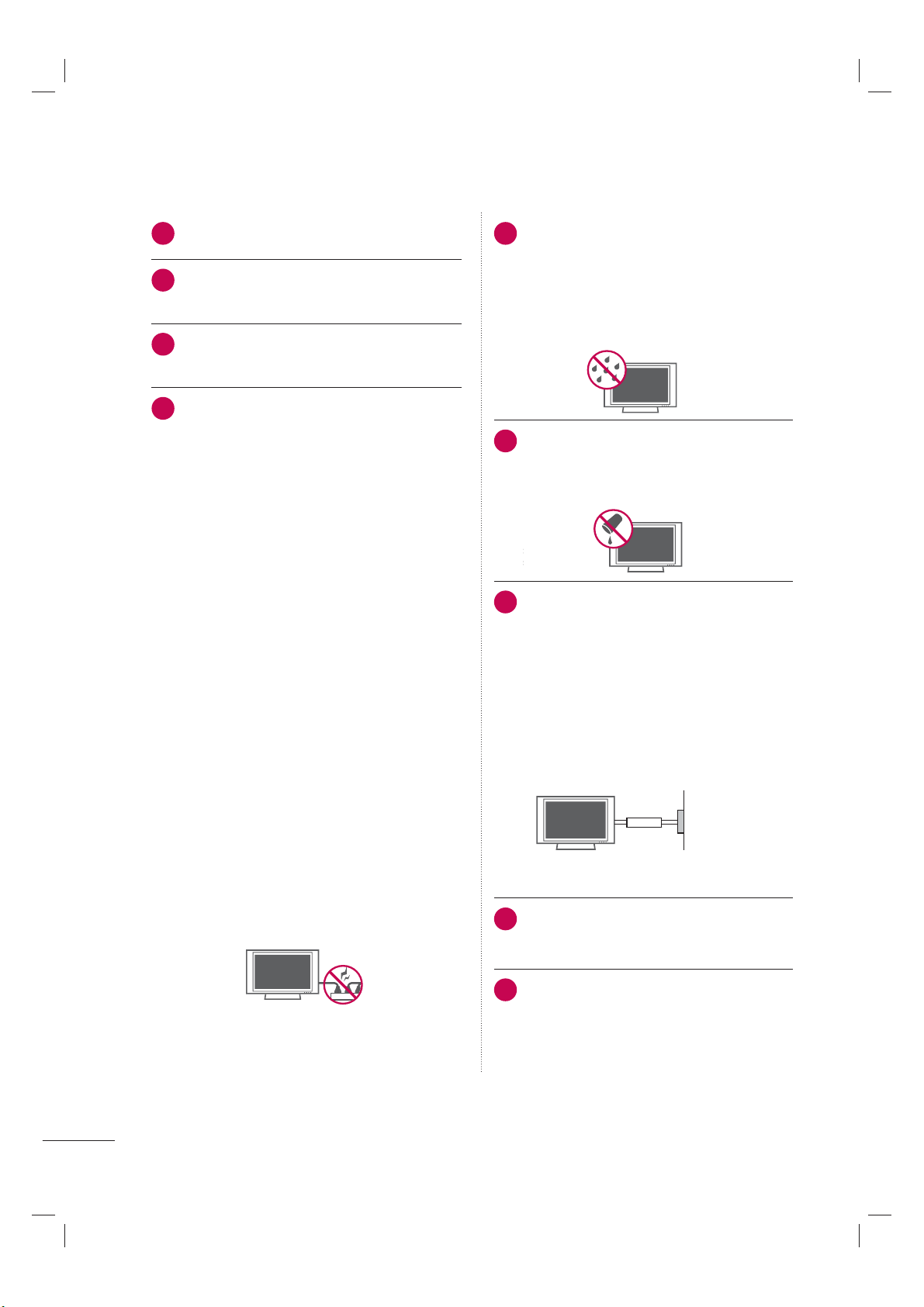
WARNING - To reduce the risk of fire or elec-
trical shock, do not expose this product to
rain, moisture or other liquids. Do not touch
the TV with wet hands. Do not install this
product near flammable objects such as
gasoline or candles or expose the TV to
direct air conditioning.
16
Do not expose to dripping or splashing and
do not place objects filled with liquids, such
as vases, cups, etc. on or over the appara-
tus (e.g. on shelves above the unit).
17
GROUNDING
Ensure that you connect the earth ground
wire to prevent possible electric shock (i.e. a
TV with a three-prong grounded AC plug
must be connected to a three-prong ground-
ed AC outlet). If grounding methods are not
possible, have a qualified electrician install a
separate circuit breaker.
Do not try to ground the unit by connecting it
to telephone wires, lightening rods, or gas
pipes.
Power
Supply
Short-circuit
Breaker
18
DISCONNECTING DEVICE FROM MAINS
Mains plug is the disconnecting device. The
plug must remain readily operable.
19
As long as this unit is connected to the AC
wall outlet, it is not disconnected from AC
power even if you turn off the power switch
on the unit.
SAFETY INSTRUCTIONS
5
20
ANTENNAS
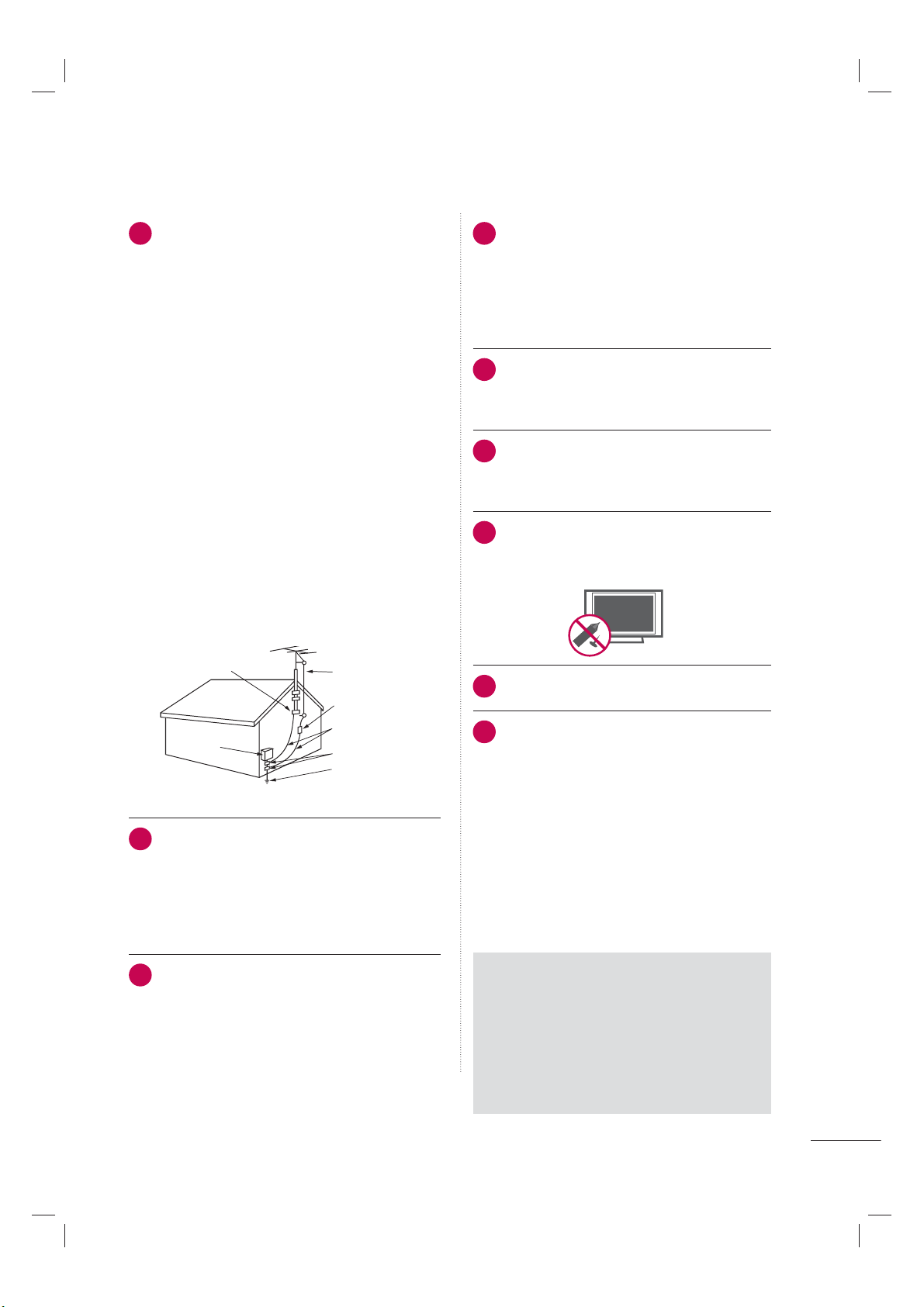
Outdoor antenna grounding
If an outdoor antenna is installed, follow the
precautions below. An outdoor antenna sys-
tem should not be located in the vicinity of
overhead power lines or other electric light or
power circuits, or where it can come in contact
with such power lines or circuits as death or
serious injury can occur.
Be sure the antenna system is grounded so as
to provide some protection against voltage
surges and built-up static charges.
Section 810 of the National Electrical Code
(NEC) in the U.S.A. provides information with
respect to proper grounding of the mast and
supporting structure, grounding of the lead-in
wire to an antenna discharge unit, size of
grounding conductors, location of antenna
discharge unit, connection to grounding elec-
trodes and requirements for the grounding
electrode.
Antenna grounding according to the National
Electrical Code, ANSI/NFPA 70
Antenna Lead in Wire
Antenna Discharge Unit
(NEC Section 810-20)
Grounding Conductor
(NEC Section 810-21)
Ground Clamps
Power Service Grounding
Electrode System (NEC
Art 250, Part H)
Ground Clamp
Electric Service
Equipment
NEC: National Electrical Code
21
Cleaning
When cleaning, unplug the power cord and
rub gently with a soft cloth to prevent
scratching. Do not spray water or other liquids
directly on the TV as electric shock may occur.
Do not clean with chemicals such as alcohol,
thinners or benzene.
22
Moving
Make sure the product is turned off, unplugged
and all cables have been removed. It may take
2 or more people to carry larger TVs. Do not
press against or put stress on the front panel
of the TV.
23
Ventilation
Install your TV where there is proper ventila-
tion. Do not install in a confined space such
as a bookcase. Do not cover the product
with cloth or other materials (e.g.) plastic
while plugged in. Do not install in exces-
sively dusty places.
24
Take care not to touch the ventilation open-
ings. When watching the TV for a long
period, the ventilation openings may
become hot.
25
If you smell smoke or other odors coming
from the TV or hear strange sounds, unplug
the power cord contact an authorized service
center.
26
Do not press strongly upon the panel with
hand or sharp object such as nail, pencil or
pen, or make a scratch on it.
27
Keep the product away from direct sunlight.
28
For LED LCD TV/LCD TV
If the TV feels cold to the touch, there may be
a small “flicker” when it is turned on. This is
normal, there is nothing wrong with TV.
Some minute dot defects may be visible on
the screen, appearing as tiny red, green, or
blue spots. However, they have no adverse
effect on the monitor's performance.
Avoid touching the LCD screen or holding
your finger(s) against it for long periods of
time. Doing so may produce some tempo-
rary distortion effects on the screen.
ON DISPOSAL
(Only Hg lamp used LCD TV)
The fluorescent lamp used in this product
contains a small amount of mercury. Do not
dispose of this product with general house-
hold waste. Disposal of this product must be
carried out in accordance to the regulations of
your local authority.
6
CONTENTS
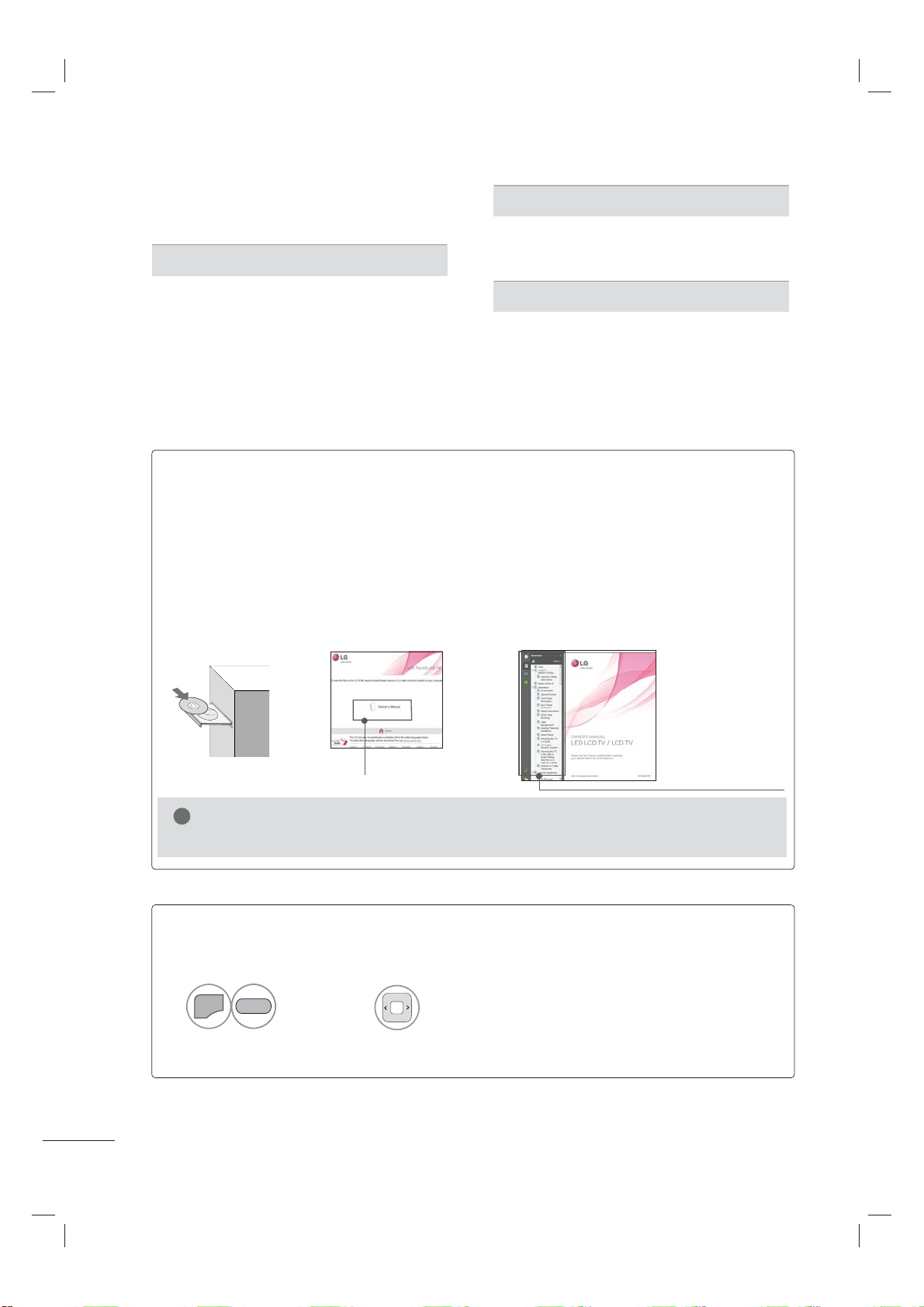
HOW TO USE THE OWNER'S MANUAL ON THE CD-ROM
To view the Owner's Manual on the CD-ROM, Adobe Acrobat Reader must be installed on your PC.
The “ACRORD" folder on the CD-ROM contains the installation programs for them.
If you want to install those programs, Open the “My Computer”
➜ Open the “LG”➜ Open the
“ACRORD”
➜ double-click your language.
TO VIEW THE OWNER'S MANUAL ON THE CD-ROM
The Owner's Manual files are included in the supplied CD-ROM.
Load the supplied CD-ROM into the CD-ROM drive of your PC.
After a while, the web page of the CD-ROM will open automatically. (for Windows only)
►If the web page does not appear automatically, open the Owner's Manual file
directly.
Open the “My computer”
➜ Open the “LG”➜ Open the “index.htm” file.
!
NOTE
When you click, display the PDF file.
You can find the
desired contents
easily using the
bookmark.
WARNING / CAUTION
. . . . . . . . . . . . . . . . . . . . . . . 2
SAFETY INSTRUCTIONS
. . . . . . . . . . . . . . . . . . . . 3
PREPARATION
Accessories . . . . . . . . . . . . . . . . . . . . . . . . . . . . . . . . . . . . . . . . . . . . . . . . 7
Stand Instruction
. . . . . . . . . . . . . . . . . . . . . . . . . . . . . . . . . . . . . . . . 9
VESA Wall Mounting
. . . . . . . . . . . . . . . . . . . . . . . . . . . . . . . . . 16
Cable Management
. . . . . . . . . . . . . . . . . . . . . . . . . . . . . . . . . . 18
Desktop Pedestal Installation
. . . . . . . . . . . . . . . . . . . . 20
Swivel Stand
. . . . . . . . . . . . . . . . . . . . . . . . . . . . . . . . . . . . . . . . . . . . 20
Attaching the TV to a Desk
. . . . . . . . . . . . . . . . . . . . . . . 21
Kensington Security System
. . . . . . . . . . . . . . . . . . . . . . 22
WATCHING TV
Connecting your TV . . . . . . . . . . . . . . . . . . . . . . . . . . . . . . . . . . 23
Turning On TV
. . . . . . . . . . . . . . . . . . . . . . . . . . . . . . . . . . . . . . . . . . 24
Initial Setting
. . . . . . . . . . . . . . . . . . . . . . . . . . . . . . . . . . . . . . . . . . . 24
On-Screen Menus Selection
. . . . . . . . . . . . . . . . . . . . . 25
APPENDIX
Troubleshooting . . . . . . . . . . . . . . . . . . . . . . . . . . . . . . . . . . . . . . . . 26
Maintenance
. . . . . . . . . . . . . . . . . . . . . . . . . . . . . . . . . . . . . . . . . . . . . 29
Open Source Software Notice
. . . . . . . . . . . . . . . . . . 30
Product Specifications
. . . . . . . . . . . . . . . . . . . . . . . . . . . . . . 31
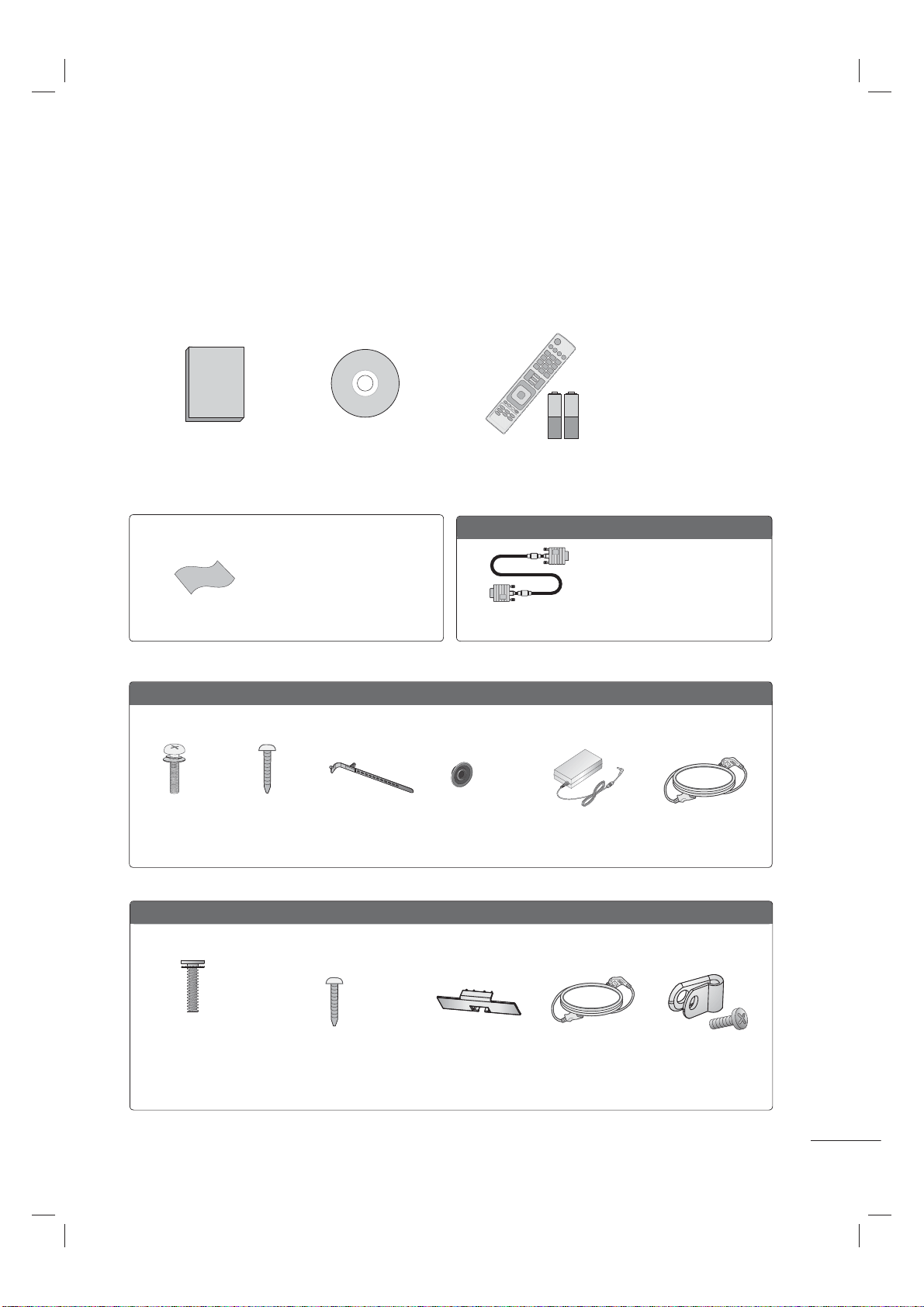
TO VIEW THE SIMPLE MANUAL
You can easily and effectively access the TV information by
viewing a simple manual on the TV.
Select
Simple Manual.
Select the part of the manual you
want to see.
CONTENTS
➜
➜
➜
1
MENU
2
GREEN
7
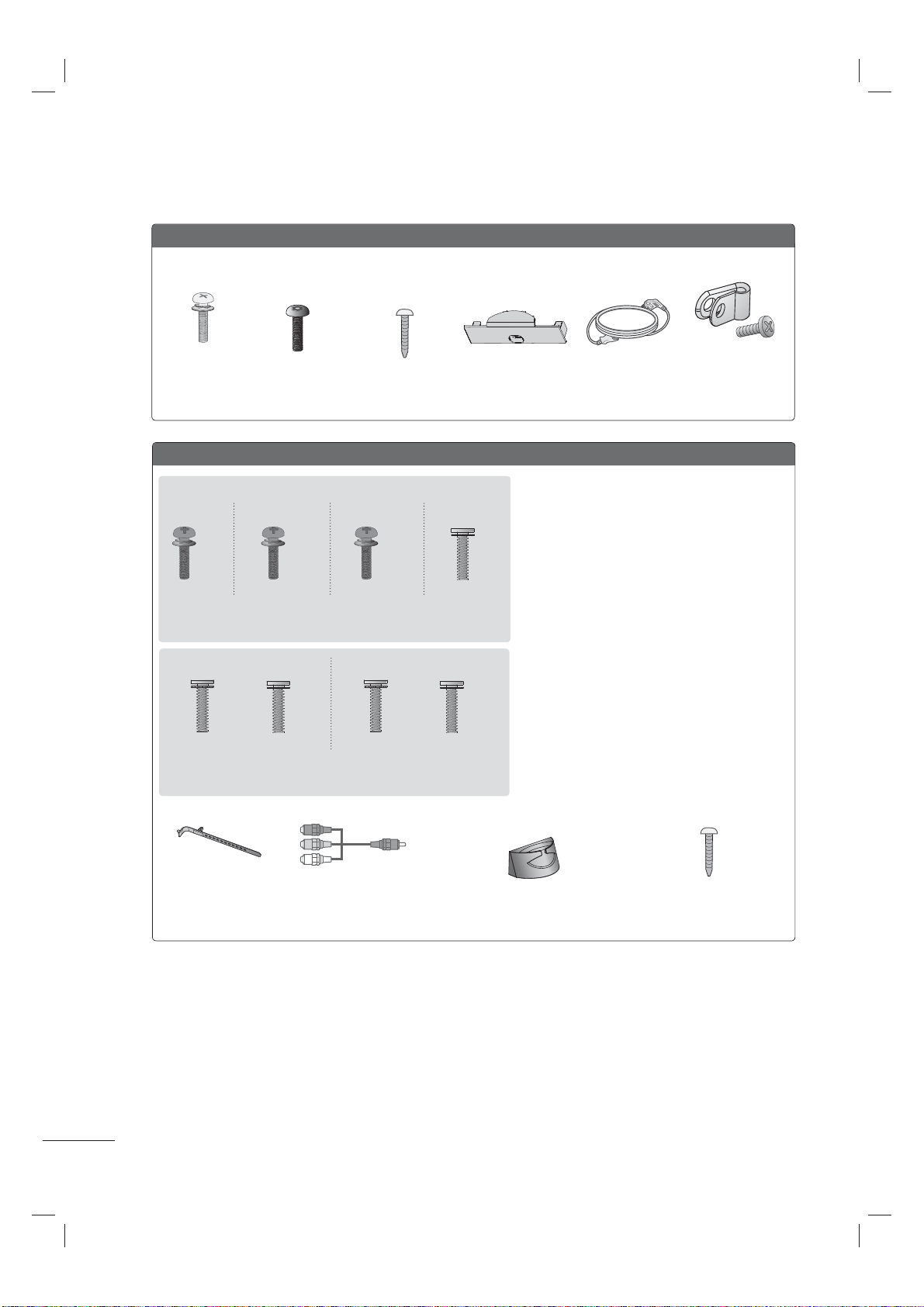
Ensure that the following accessories are included with your TV. If an accessory is missing, please con-
tact the dealer where you purchased the TV.
The accessories included may differ from the images below.
PREPARATION
ACCESSORIES
Option Extras
* Wipe spots on the exterior only
with the polishing cloth.
* Do not wipe roughly when remov-
ing stain. Excessive pressure may
cause scratch or discoloration.
Polishing Cloth
Not included with all models
D-sub 15 pin Cable
When using the VGA (D-sub 15
pin cable) PC connection, the
user must use shielded signal
interface cables with ferrite cores
to maintain standards compli-
ance.
1.5V 1.5V
Owner’s Manual CD Manual
Remote Control,
Batteries (AAA)
19/22/26LE5300, 22/26LE5500
Cable Holder
(Refer to p.19)
Screws for stand assembly
(Refer to P.9, 10)
x 4 x 4
(M4 x 14) (M4 x 20)
AC/DC AdapterRing spacers
(Refer to p.17)
(For 26LE5300,
26LE5500)
x 4
Power Cord
(For 26LE5300,
26LE5500)
32/37/42/47LD450, 37/42/47LD450C, 42/47/55LD630
(M4 x 20)
Screws for stand
assembly
(Refer to P.12)
Screws for stand fixing
(Refer to P.21)
x 8
Protection Cover
(Refer to P.13)
(For 32/37/42LD450,
37/42/47LD450C,
42LD630)
Power Cord Protective Bracket
and Screw for
Power Cord
(Refer to P.18)
PREPARATION
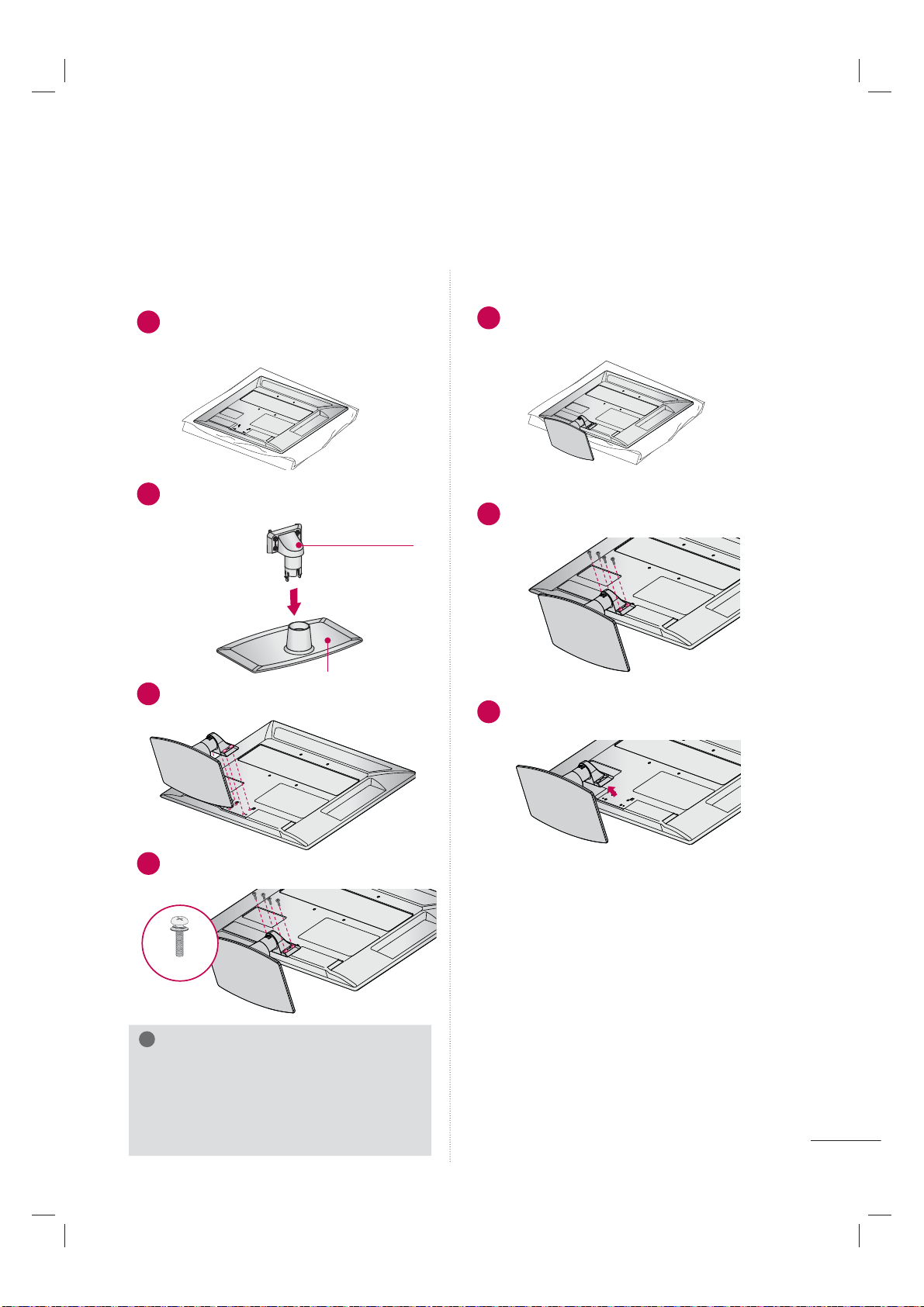
8
32/37/42/47/55LE5300, 42/47/55LE7300
Cable Holder
(Refer to p.19)
Component gender cable,
AV gender cable
x 2
Screws for stand assembly
(Refer to P.10)
x 4x 4x 4 x 4
(M4 x 22) (M4 x 26) (M4 x 16)(M4 x 24)
(32LE5300) (47/55LE5300)(37/42LE5300)
Screw for stand fixing
(Refer to P.21)
(For 32LE5300)
(For 42/47/55LE7300)
Cable Management Clip
(Refer to p.19)
(32/37/42/47/55LE5300)
Screws for stand assembly
(Refer to P.11)
x 4 x 4x 3 x 3
(M4 x 12) (M4 x 16)(M4 x 20) (M4 x 26)
(42/47LE7300) (55LE7300)
32/42/47LD420, 32/42/47/55LD520, 55LD520C
Protection Cover
(Refer to P.15)
Screws for stand
assembly
(Refer to P.14)
(M4 x 24)
x 4
Power Cord
(Except 47LD420,
47/55LD520)
Screw for stand
fixing
(Refer to P.21)
Protective Bracket
and Screw for
Power Cord
(Refer to P.18)
Torx plus Star
head screw
(Refer to P.14)
x 2
(For 55LD520C)
9
STAND INSTRUCTIONS
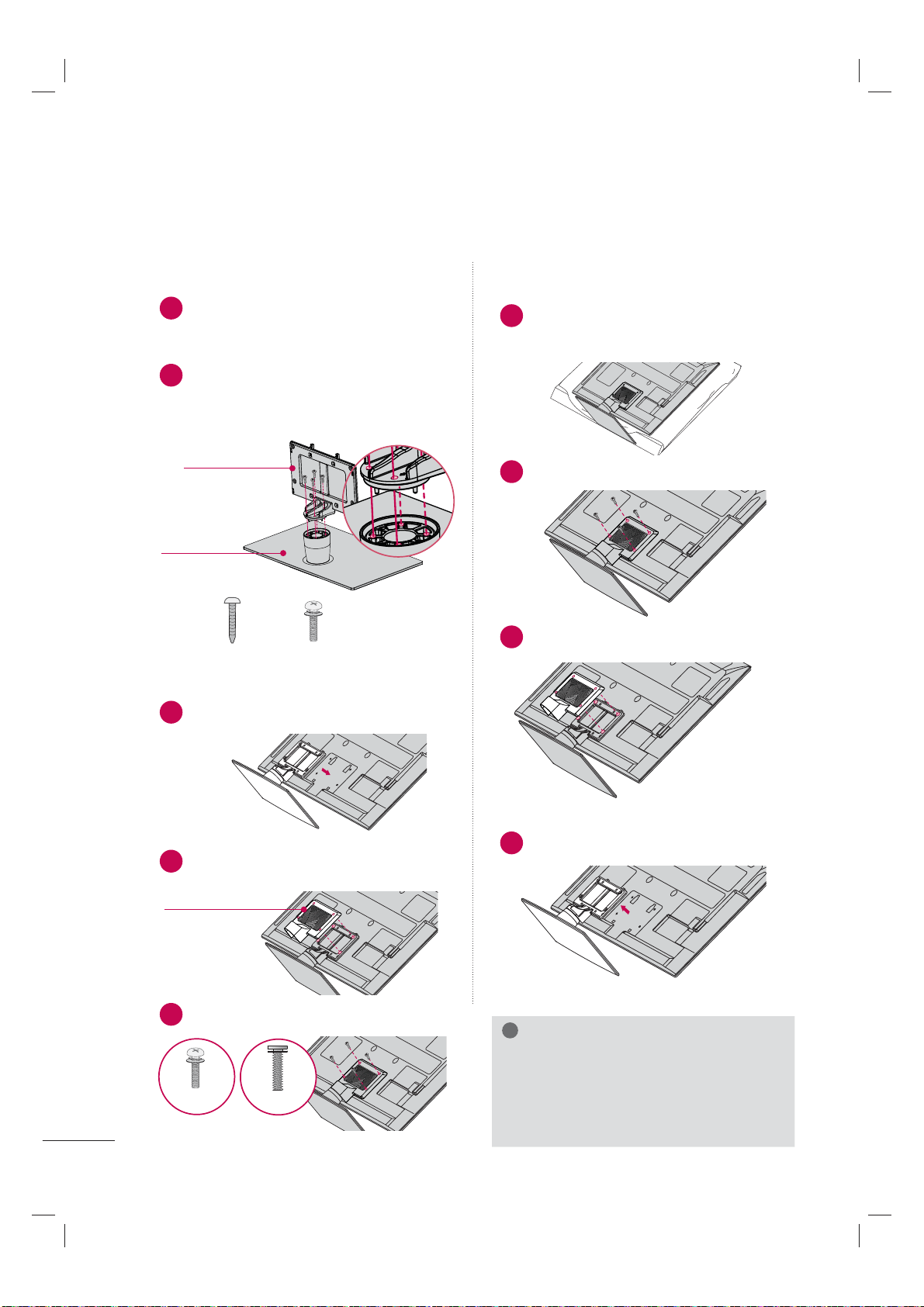
(For 19/22LE5300, 22LE5500)
ꔛ
Image shown may differ from your TV.
!
NOTE
► When assembling the desk type stand,
make sure the screws are fully tightened (If
not tightened fully, the TV can tilt forward
after the product installation). Do not over
tighten.
1
Carefully place the TV screen side down on
a cushioned surface to protect the screen
from damage.
2
Assemble the parts of the STAND BODY
with the STAND BASE of the TV.
INSTALLATION
1
Carefully place the TV screen side down on
a cushioned surface to protect the screen
from damage.
2
Remove the screws that hold the stand on.
3
Detach the stand from TV.
DETACHMENT
3
Assemble the TV as shown.
4
Install the 4 screws into the holes shown.
STAND BASE
STAND BODY
M4 x 14
PREPARATION
10
INSTALLATION
DETACHMENT
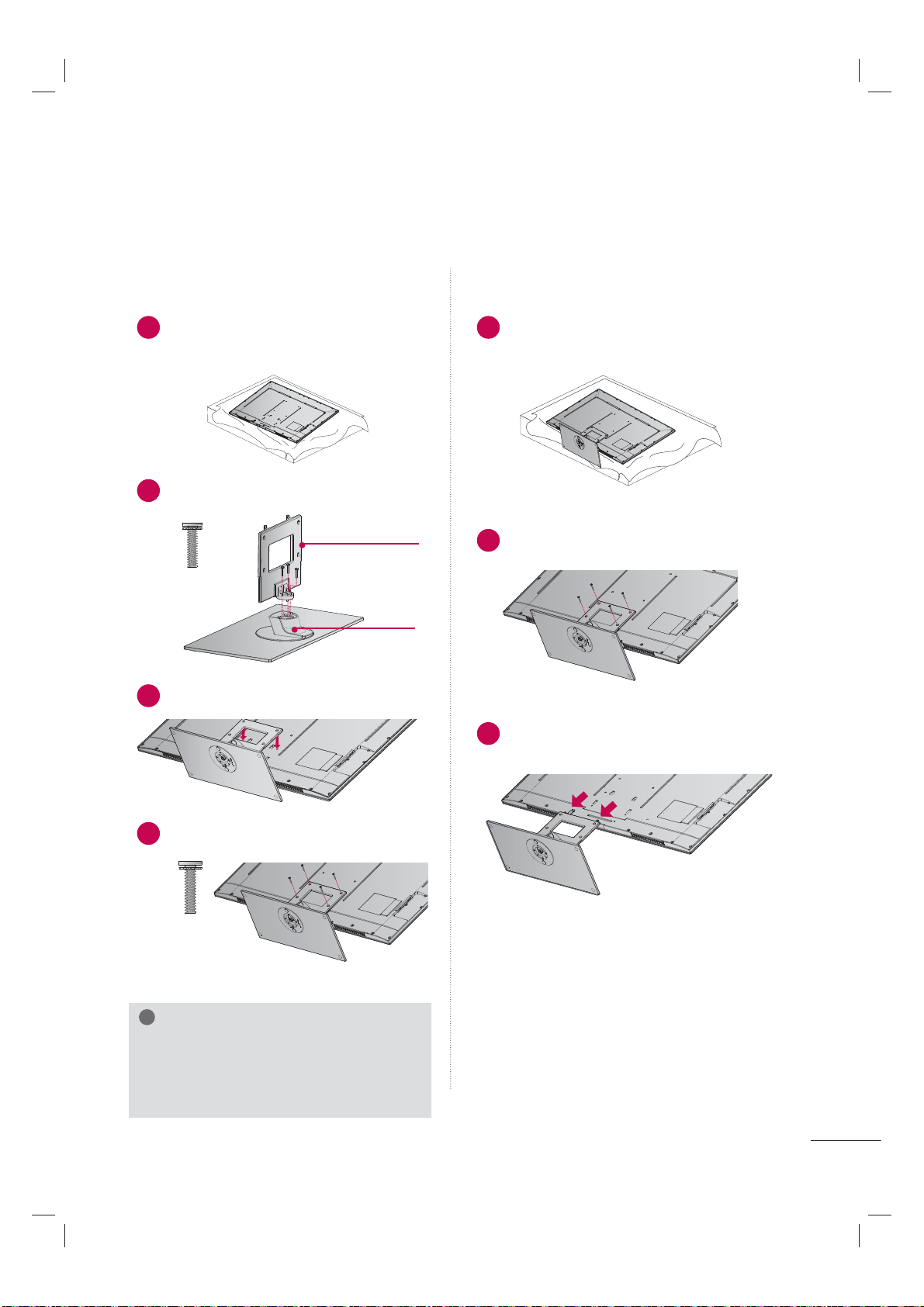
ꔛ
Image shown may differ from your TV.
!
NOTE
► When assembling the desk type stand,
make sure the screws are fully tightened (If
not tightened fully, the TV can tilt forward
after the product installation). Do not over
tighten.
1
Carefully place the TV screen side down on
a cushioned surface to protect the screen
from damage.
2
Assemble the parts of the STAND BODY
with the STAND BASE of the TV. At this
time, tighten the screws that hold the
STAND BODY on.
3
Assemble the TV as shown.
4
Assemble the part of the STAND REAR
COVER with the TV.
5
Install the 4 screws into the holes shown.
1
Carefully place the TV screen side down on
a cushioned surface to protect the screen
from damage.
2
Remove the screws that hold the stand on.
3
Detach the STAND REAR COVER from TV.
4
Detach the stand from TV.
STAND INSTRUCTIONS
(For 26/32/37/42/47/55LE5300, 26LE5500)
STAND BASE
STAND BODY
STAND REAR
COVER
M4 x 16
M4 x 14
26LE5300,
26LE5500
Other models
M4 x 22 (32LE5300)
M4 x 24 (37/42LE5300)
M4 x 26 (47/55LE5300)
M4 x 20
26LE5300,
26LE5500
11
STAND INSTRUCTIONS
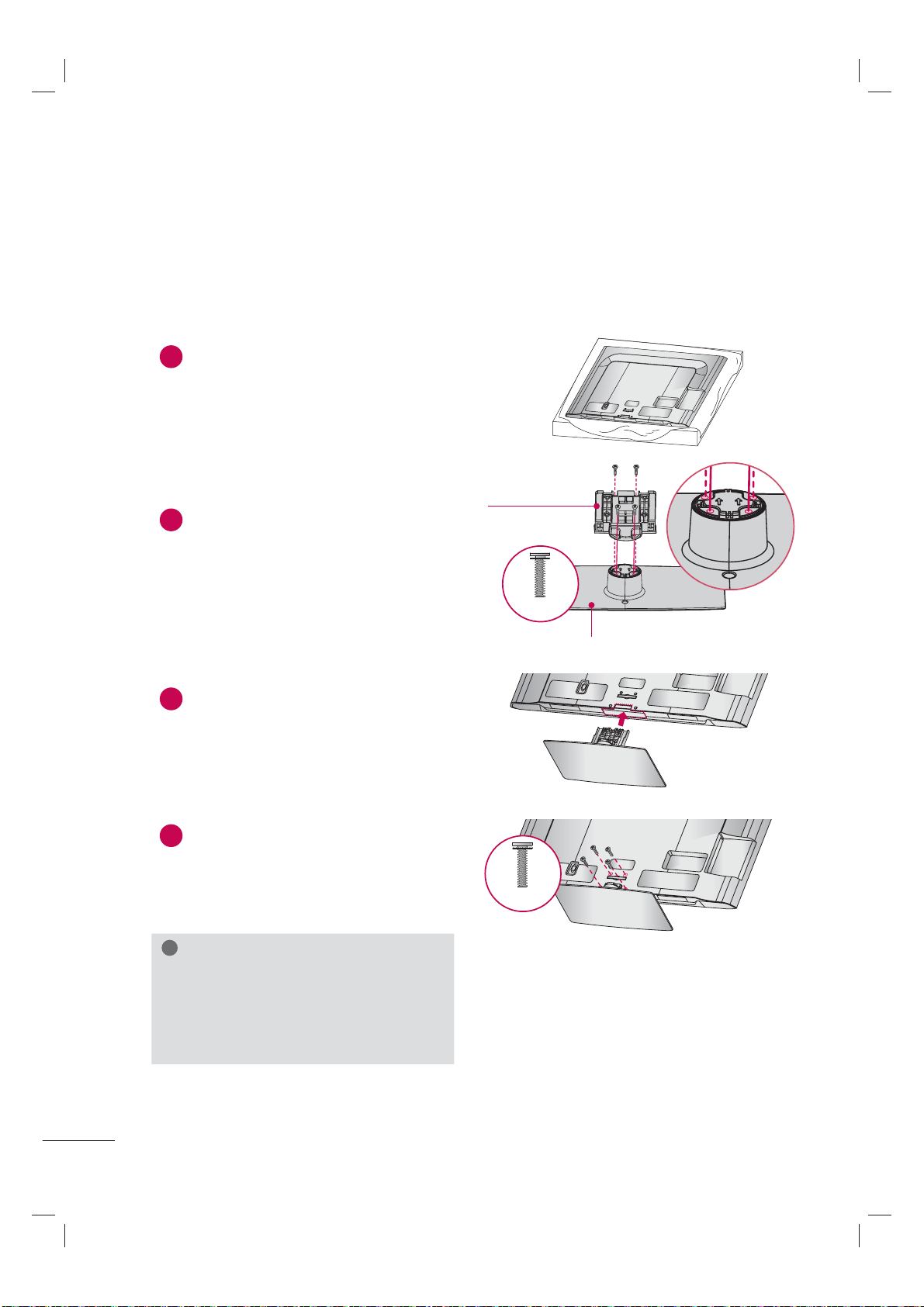
(For 42/47/55LE7300)
ꔛ
Image shown may differ from your TV.
INSTALLATION DETACHMENT
!
NOTE
► When assembling the desk type stand,
make sure the screws are fully tightened (If
not tightened fully, the TV can tilt forward
after the product installation). Do not over
tighten.
1
Carefully place the TV screen side down
on a cushioned surface to protect the
screen from damage.
3
Assemble the TV as shown.
STAND BODY
STAND BASE
2
Assemble the parts of the STAND BODY
with the STAND BASE of the TV.
4
Install the 4 screws into the holes shown.
1
Carefully place the TV screen side down on
a cushioned surface to protect the screen
from damage.
2
Remove the screws from the TV.
3
Detach the stand from TV.
M4 x 20
M4 x 26
42/47LE7300
55LE7300
M4 x 12
M4 x 16
42/47LE7300
55LE7300
PREPARATION
12
STAND INSTRUCTIONS
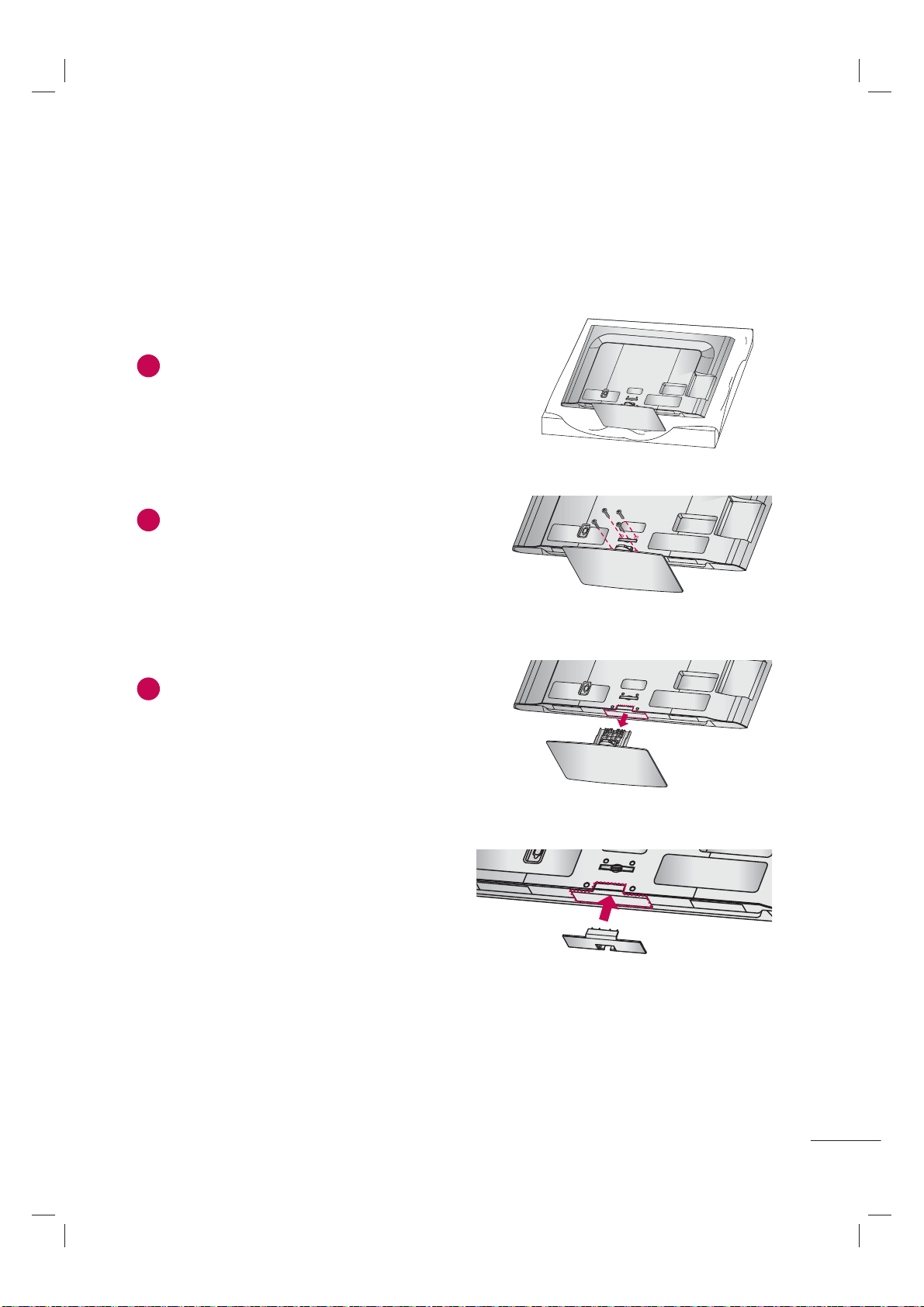
(For 32/37/42/47LD450, 37/42/47LD450C, 42/47/55LD630)
ꔛ
Image shown may differ from your TV.
!
NOTE
► When assembling the desk type stand,
make sure the screws are fully tightened (If
not tightened fully, the TV can tilt forward
after the product installation). Do not over
tighten.
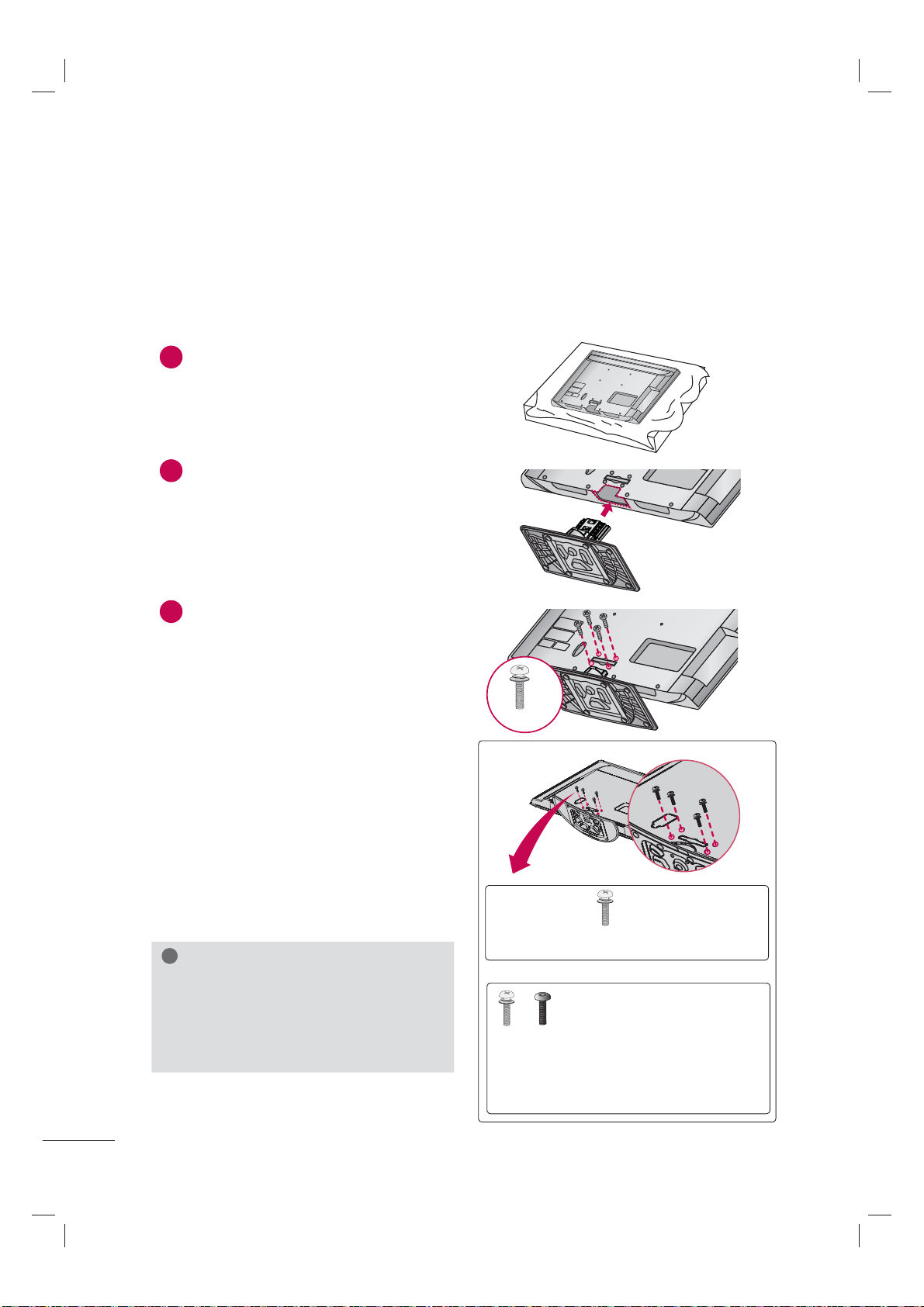
1
Carefully place the TV screen side down on
a cushioned surface to protect the screen
from damage.
2
Assemble the parts of the STAND BODY
with the STAND BASE of the TV.
3
Assemble the TV as shown.
4
Install the 4 screws into the holes shown.
AC I
N
C
A
BLE MANA
G
EMENT
AC IN
CABLE MANAGEMENT
AC IN
CABLE MANAGEM
ENT
STAND BASE
STAND BODY
INSTALLATION
M4 x 20
M4 x 20
13
AC IN
CABLE MANAGEMENT
AC IN
CABLE MANAGEMENT
DETACHMENT
AC
I
N
C
A
B
L
E
M
ANAG
EM
ENT
PROTECTION COVER
After removing the stand, install the included
PROTECTION COVER over the hole for the
stand.
Press the PROTECTION COVER into the TV until
you hear it click.
When installing the wall mounting bracket, use
the PROTECTION COVER.
1
Carefully place the TV screen side down on
a cushioned surface to protect the screen
from damage.
2
Remove the screws from the TV.
3
Detach the stand from TV.
PREPARATION
14
STAND INSTRUCTIONS
(For
32/42/47LD420, 32/42/47/55LD520, 55LD520C)
ꔛ
Image shown may differ from your TV.
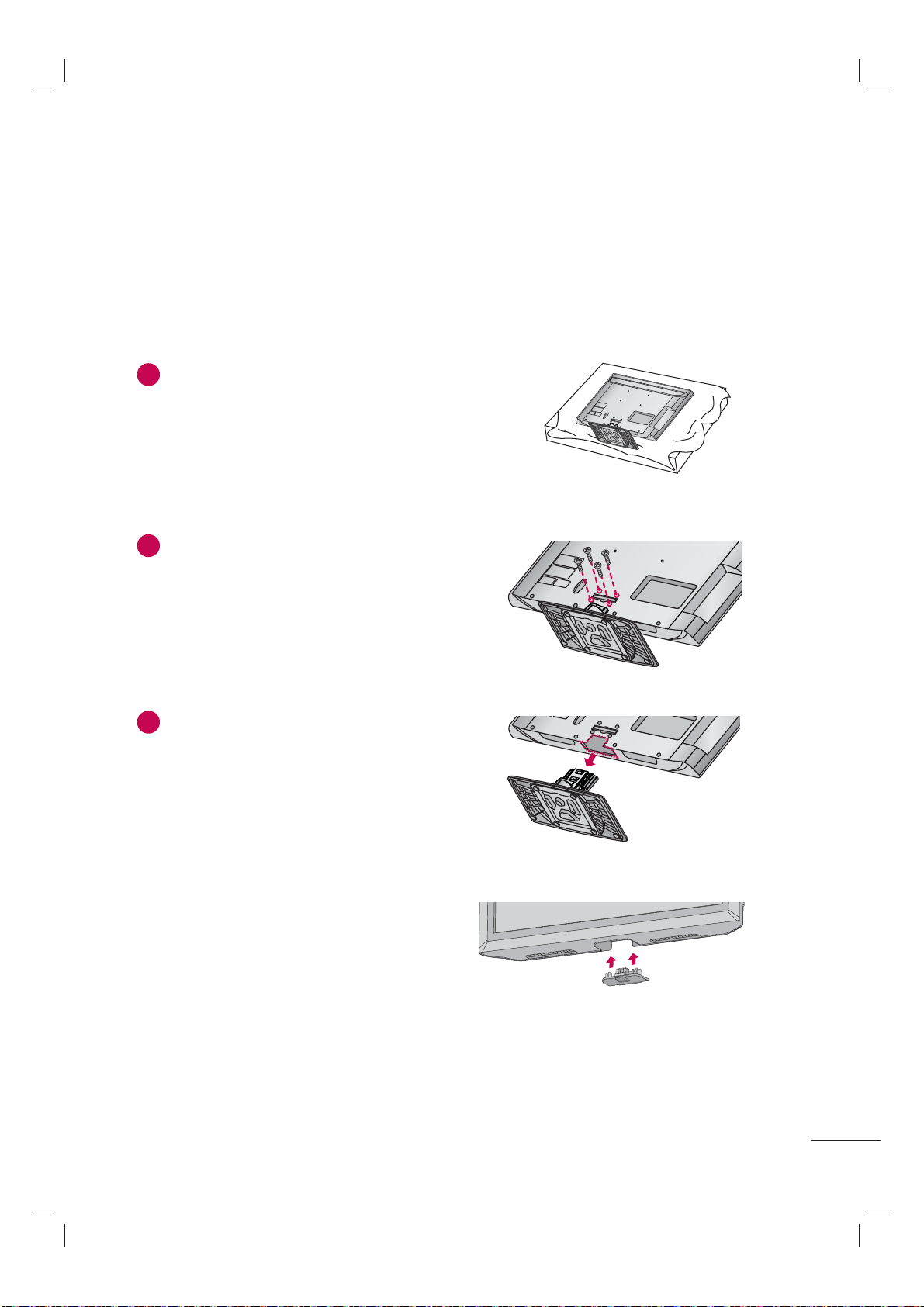
1
Carefully place the TV screen side down on
a cushioned surface to protect the screen
from damage.
2
Assemble the TV as shown.
INSTALLATION
!
NOTE
► When assembling the desk type stand,
make sure the screws are fully tightened (If
not tightened fully, the TV can tilt forward
after the product installation). Do not over
tighten.
3
Install the 4 screws into the holes shown.
M4 x 24
Tighten the stand with the four screws
(provided as parts of the TV).
x 4
or
Tighten the two of these four
screws and the two Torx plus
star head screws (provided as
parts of the TV) to secure the TV. Tighten
the two Torx plus star head screws with a
star head driver bit (not provided as parts
of the TV).
x 2
x 2
For 55LD520C
15
ꔛ
Image shown may differ from your TV.
DETACHMENT
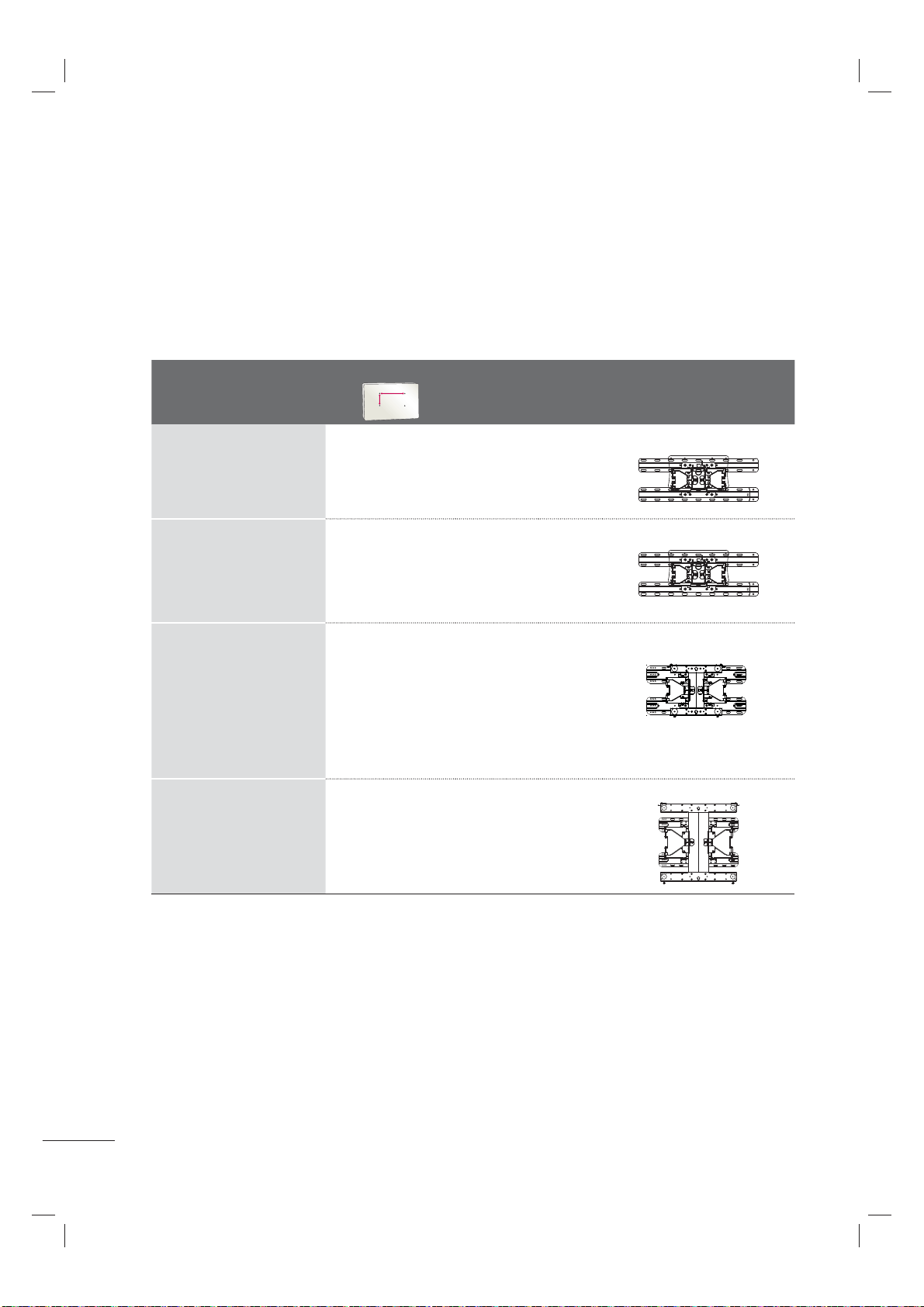
PROTECTION COVER
After removing the stand, install the included
PROTECTION COVER over the hole for the
stand.
Press the PROTECTION COVER into the TV until
you hear it click.
When installing the wall mounting bracket, use
the PROTECTION COVER.
1
Carefully place the TV screen side down on
a cushioned surface to protect the screen
from damage.
2
Remove the screws from the TV.
3
Detach the stand from TV.
PREPARATION
16
VESA WALL MOUNTING
Install your wall mount on a solid wall perpendicular to the floor. When attaching to other building mate-
rials, please contact your nearest installer.
If installed on a ceiling or slanted wall, it may fall and result in severe personal injury.
We recommend that you use an LG brand wall mount when mounting the TV to a wall.
LG recommends that wall mounting be performed by a qualified professional installer.
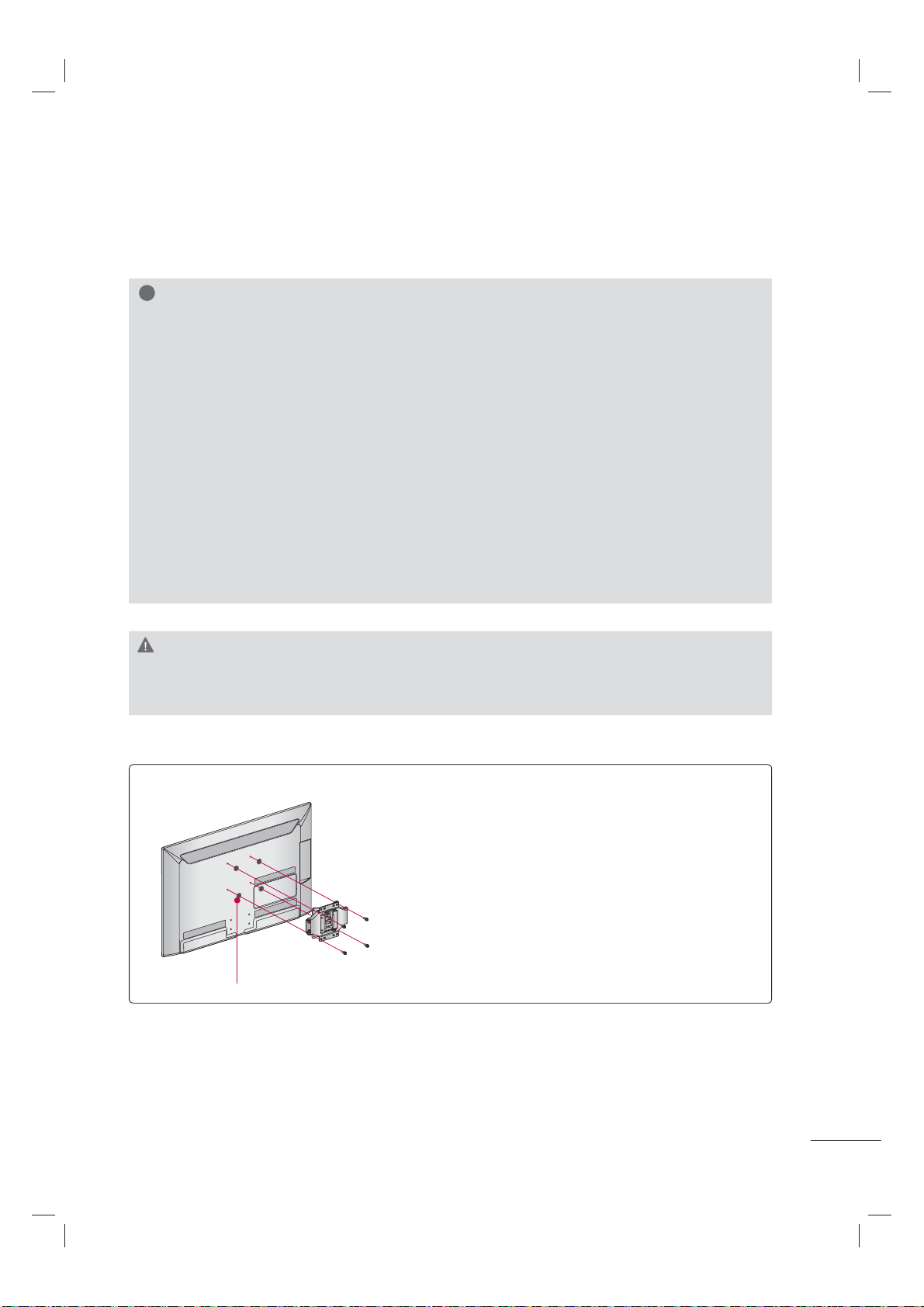
Model
VESA (A
*
B)
A
B
Standard
Screw
Quantity
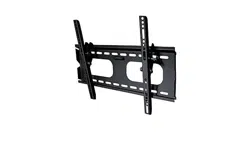
Wall Mounting Bracket
(sold separately)
19LE5300,
22LE5300,
22LE5500,
26LE5300,
26LE5500
100
*
100 M4 4
LSW100B, LSW100BG
32LE5300,
32LD420,
32LD450,
32LD520
200
*
100 M4 4
LSW100B, LSW100BG
37LE5300, 42LE5300,
47LE5300,
37LD450, 37LD450C,
42LE7300, 47LE7300,
42LD450, 42LD450C,
47LD450, 47LD450C,
42LD420, 47LD420,
42LD520, 47LD520,
42LD630, 47LD630
200
*
200 M6 4
LSW200B, LSW200BG
55LE5300,
55LE7300,
55LD520, 55LD520C,
55LD630
400
*
400 M6 4
LSW400B, LSW400BG
17
CAUTION
► Do not install your wall mount kit while your TV is turned on. It may result in personal injury due to
electric shock.
!
NOTE
► Screw length needed depends on the wall
mount used. For further information, refer to
the instructions included with the mount.
► Standard dimensions for wall mount kits are
shown in the table.
► When purchasing our wall mount kit, a detailed
installation manual and all parts necessary for
assembly are provided.
► Do not use screws longer than the standard
dimension, as they may cause damage to the
inside to the TV.
► For wall mounts that do not comply with the
VESA standard screw specifications, the length
of the screws may differ depending on their
specifications.
► Do not use screws that do not comply with the
VESA standard screw specifications.
Do not use fasten the screws too strongly, this
may damage the TV or cause the TV to a fall,
leading to personal injury. LG is not liable for
these kinds of accidents.
► LG is not liable for TV damage or personal
injury when a non-VESA or non specified wall
mount is used or the consumer fails to follow
the TV installation instructions.
Place the ring spacers on the set before installing the wall
mounting bracket so that the inclination of the backside
of the set can be adjusted perpendicularly.
For 26LE5300, 26LE5500
4-RING SPACERS
PREPARATION
18
32/37/42/47LD450, 37/42/47LD450C, 32/42/47LD420, 32/42/47/55LD520, 55LD520C, 42/47/55LD630
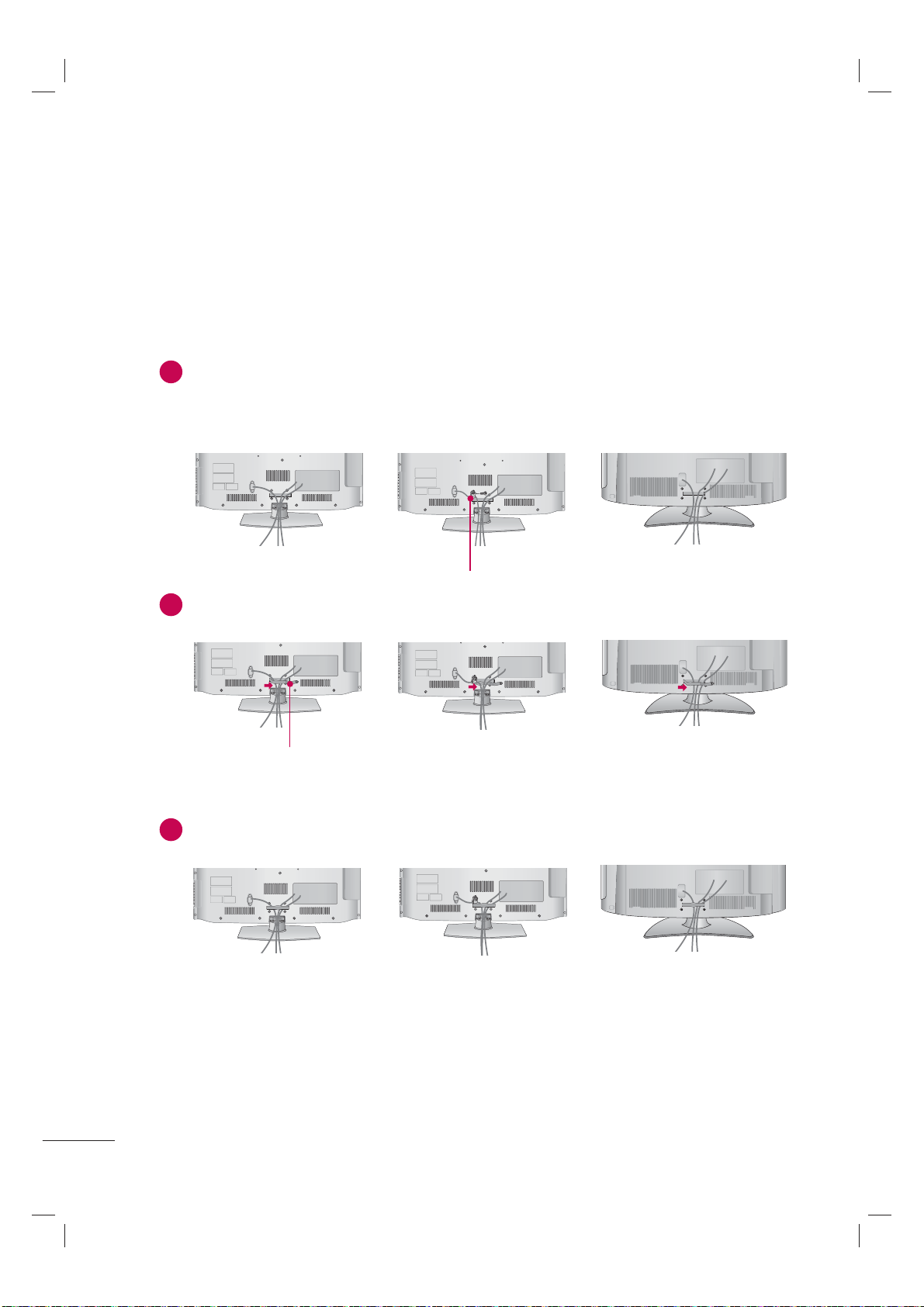
CABLE MANAGEMENT
ꔛ
Image shown may differ from your TV.
1
Connect the cables as necessary.
To connect additional equipment, see the EXTERNAL EQUIPMENT SETUP section.
For 37/42/47LD450C, 55LD520C: Secure the power cord with the PROTECTIVE BRACKET/
SCREW on the TV back cover. It will help prevent the power cable from being removed by acci-
dent.
2
Open the CABLE MANAGEMENT CLIP as shown.
3
Put the cables inside the CABLE MANAGEMENT CLIP and snap it closed.
CABLE MANAGEMENT CLIP
PROTECTIVE BRACKET/SCREW
19
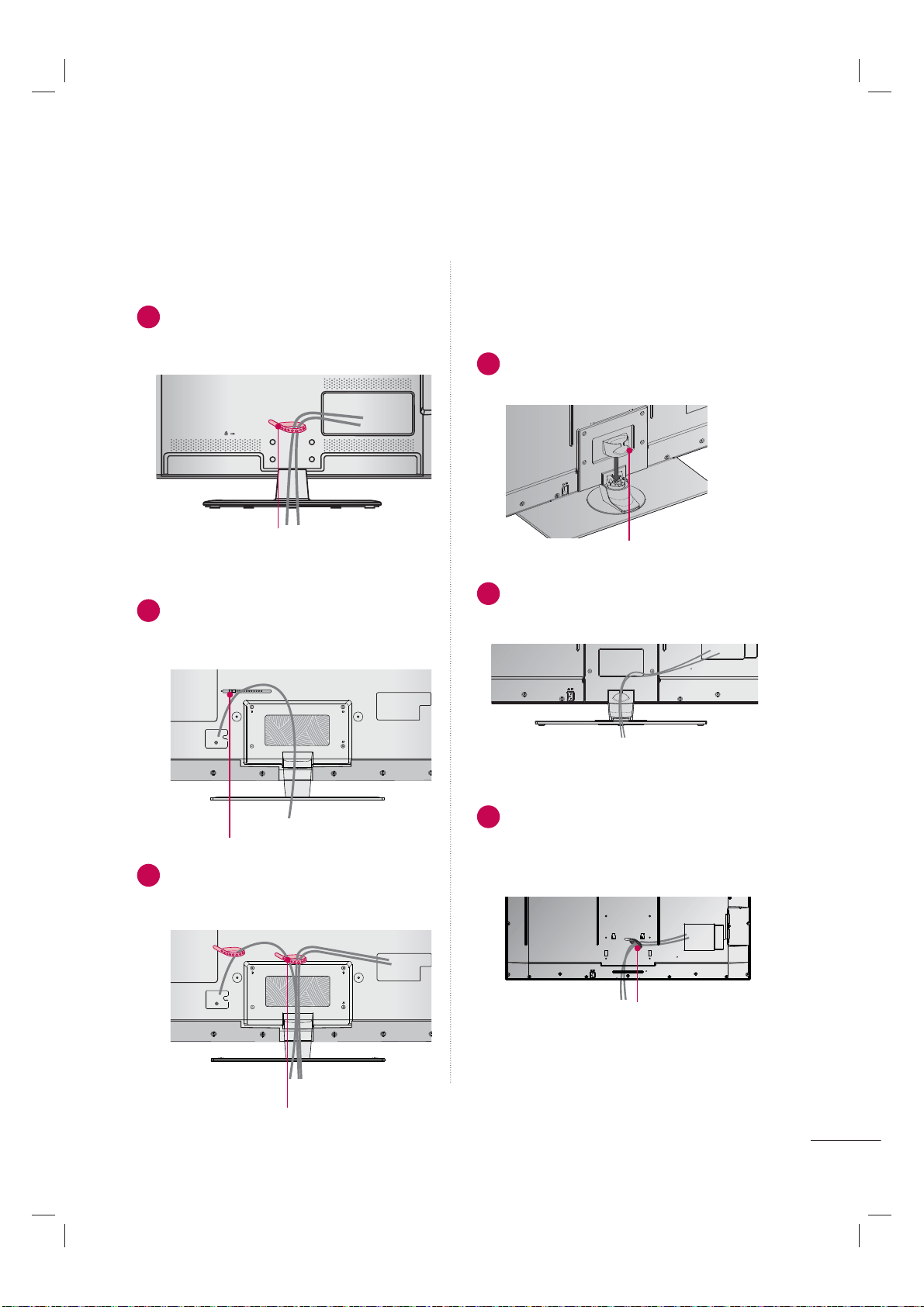
CABLE HOLDER
CABLE HOLDER
2
After connecting the cables as necessary,
install the CABLE HOLDER as shown and
bundle the cables.
1
Secure the power cord with the CABLE
HOLDER on the TV back cover.
It will help prevent the power cable from
being removed by accident.
32/37/42/47/55LE5300
42/47/55LE7300
19/22/26LE5300, 22/26LE5500
1
After connecting the cables as necessary,
install the CABLE HOLDER as shown and
bundle the cables.
1
Install the CABLE MANAGEMENT CLIP
as shown.
2
Connect the cables as necessary.
To connect additional equipment, see the
EXTERNAL EQUIPMENT SETUP section.
1
Connect the cables as necessary.
To connect additional equipment, see the
EXTERNAL EQUIPMENT SETUP section.
Install CABLE HOLDER as shown and
bundle the cables.
CABLE HOLDER
FOR DESK-TYPE STAND
FOR WALL MOUNT
CABLE MANAGEMENT CLIP
CABLE HOLDER
PREPARATION
20
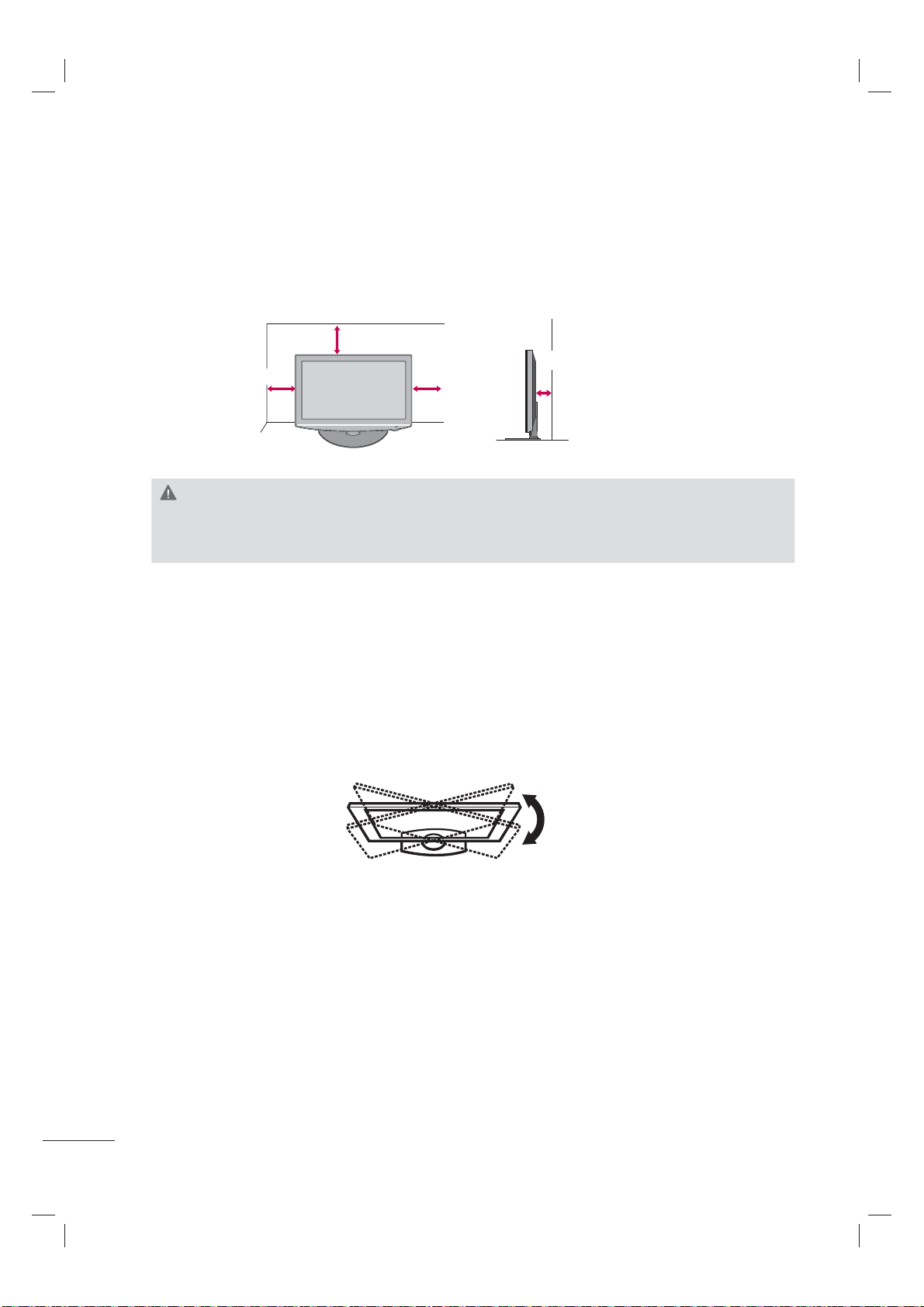
DESKTOP PEDESTAL INSTALLATION
SWIVEL STAND
(Except
19/22LE5300, 22LE5500
)
After installing the TV, you can adjust the TV set manually to the left or right direction by 20 º to suit
your viewing position.
ꔛ
Image shown may differ from your TV.
For proper ventilation, allow a clearance of 4 inches on all four sides from the wall.
4 inches
4 inches
4 inches
4 inches
CAUTION
► Ensure adequate ventilation by following the clearance recommendations.
► Do not mount near or above any type of heat source.
21
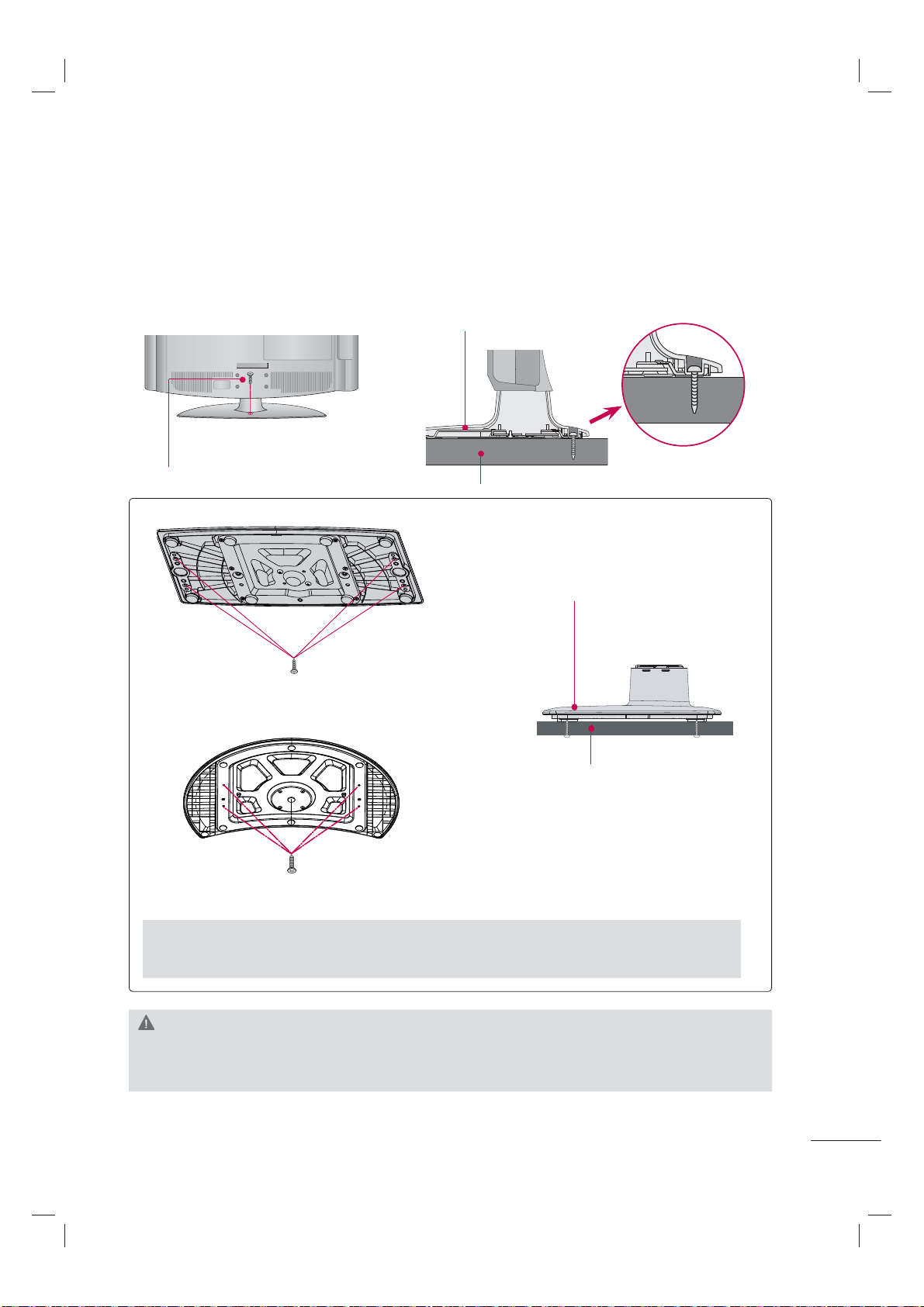
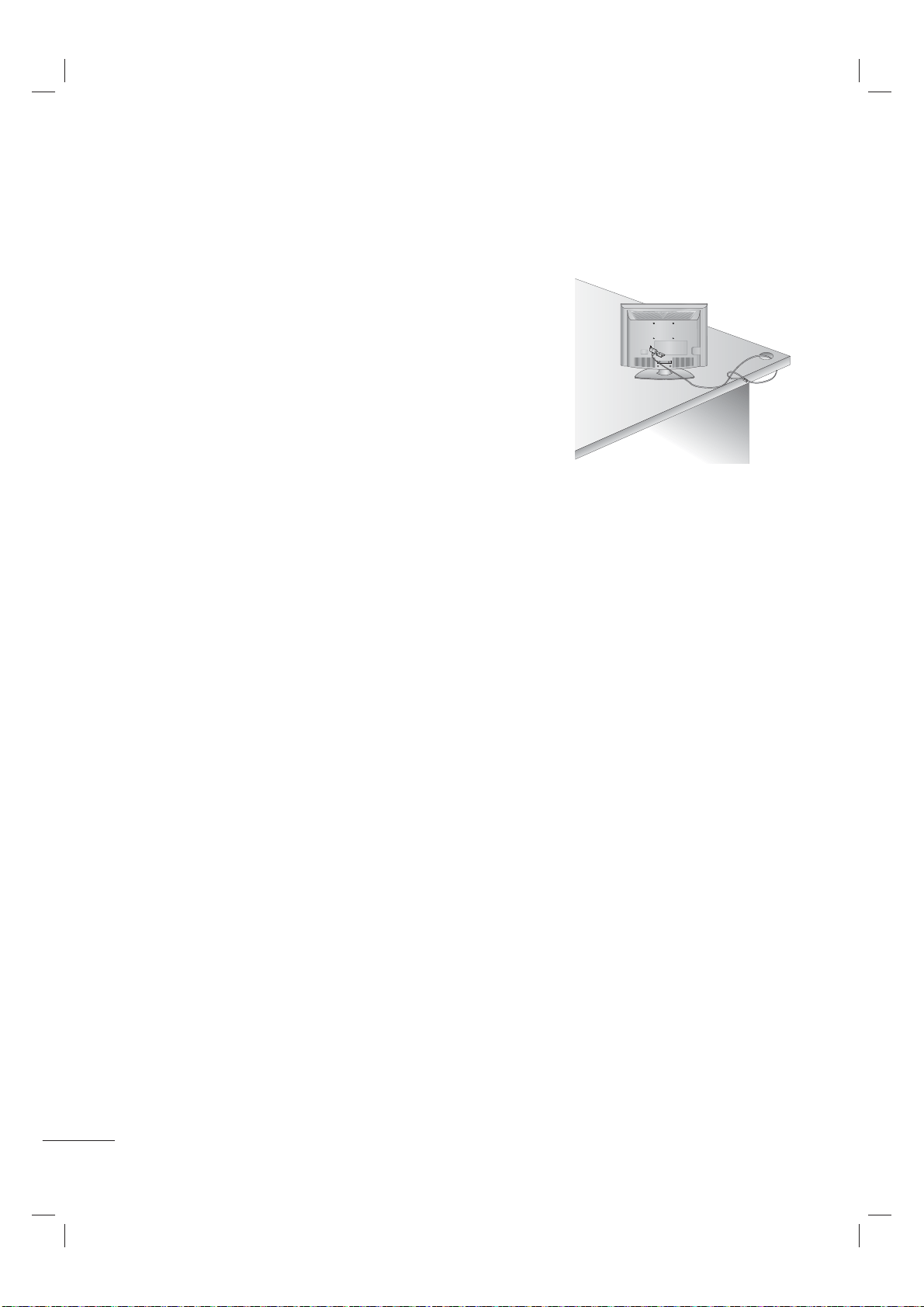
ATTACHING THE TV TO A DESK
(For 32/42LD420, 32/37/42LD450, 37/42/47LD450C, 32/42LD520, 55LD520C, 42LD630, 32LE5300)
The TV must be attached to a desk so it cannot be pulled in a forward/backward direction, poten-
tially causing injury or damaging the product.
ꔛ
Image shown may differ from your TV.
1-Screw
( provided as parts of the product)
Desk
Stand
WARNING
► To prevent TV from falling over, the TV should be securely attached to the floor/wall per installa-
tion instructions. Tipping, shaking, or rocking the machine may cause injury.
4-Screws
(not provided as parts of the product)
Desk
Stand
For 37/42/47LD450C
► Recommended screw size: M5 x L (*L: Table depth + 8~10 mm)
ex) Table depth: 15mm, Screw: M5 x 25
For 55LD520C
4-Screws
(not provided as parts of the product)
PREPARATION
22
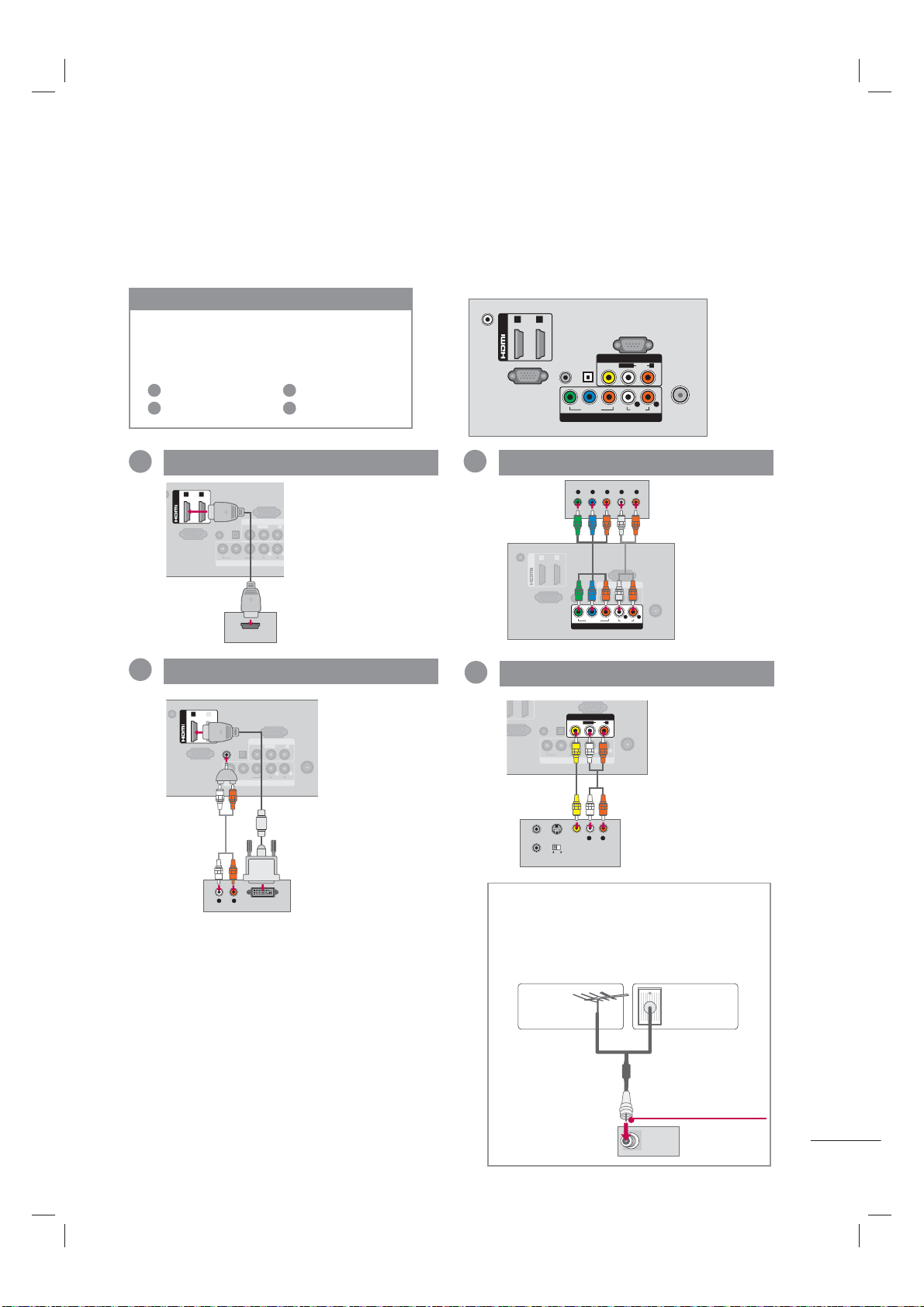
KENSINGTON SECURITY SYSTEM
ꔛ
This feature is not available for all models.
- The TV is equipped with a Kensington Security System con-
nector on the back panel. Connect the Kensington Security
System cable as shown below.
- For the detailed installation and use of the Kensington Security
System, refer to the user’s guide provided with the Kensington
Security System.
For further information, contact http://www.kensington.com,
the internet homepage of the Kensington company. Kensington
sells security systems for expensive electronic equipment such
as notebook PCs and LCD projectors.
NOTE: The Kensington Security System is an optional accessory.
23
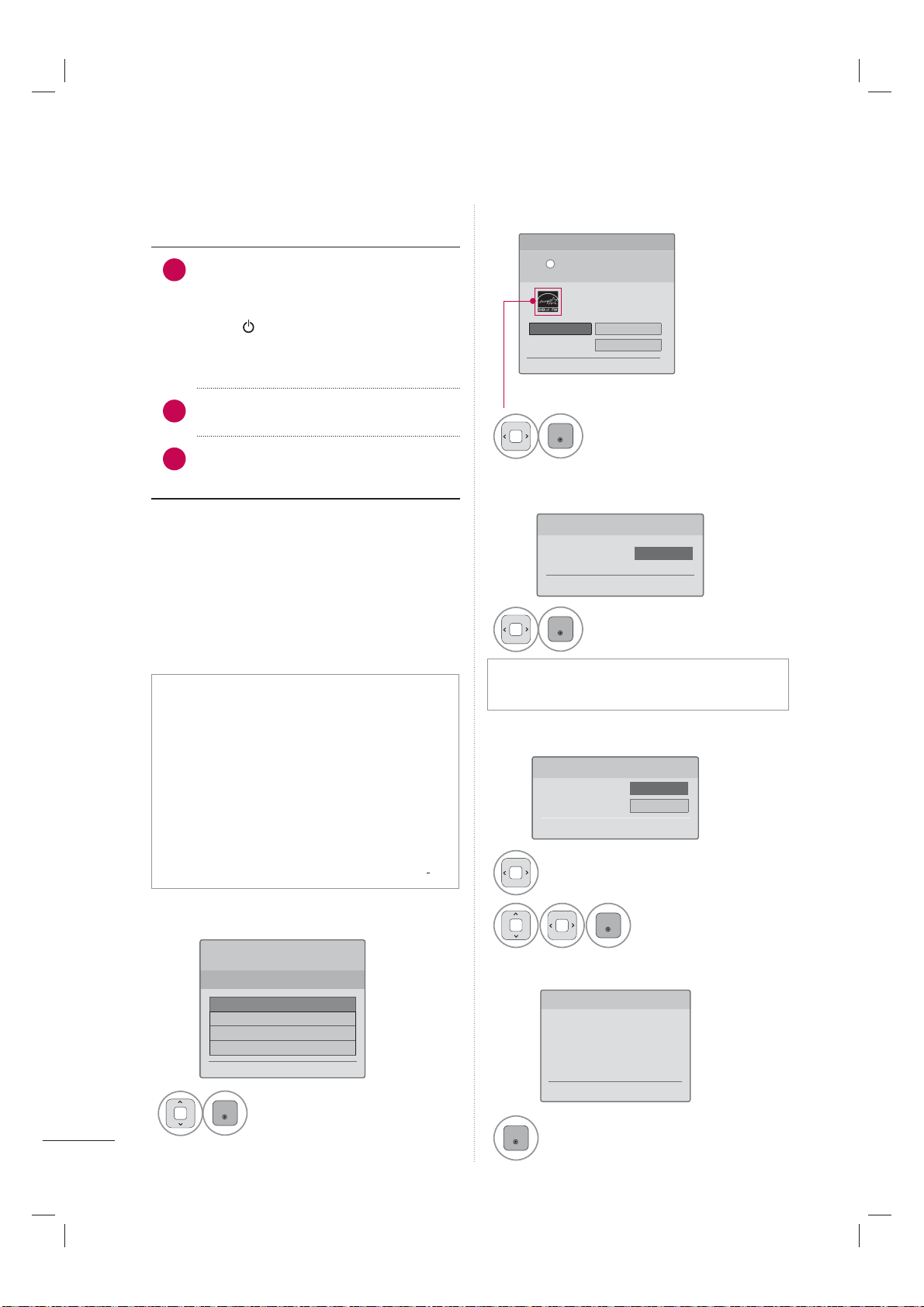
To connect an additional equipment, see the External Equipment Setup section in CD Manual.
ANTENNA/
CABLE IN
DC-IN
RGB IN (PC)
AUDIO IN
RGB/DVI
(DVI)
OPTICAL
DIGITAL
AUDIO OUT
/DVI IN
AV I N
RS-232C IN
(
CONTROL&SERVICE)
1 2
VIDEO
AUDIO
L(MONO)
R
VIDEO
AUDIO
YPB PR
L R
COMPONENT IN
Y L RPB PR
Component
3
Composite
4
You can use a adapter to connect
DVI to HDMI, but you will only
have 2 channel stereo for sound.
The adapter is not needed when
connecting a PC.
* Typical Layout
Make sure
you don't
mix up the
colors.
DVI
2
Sorry, A phone
Jack to stereo
1/8" (0.32 cm)
headphone plug
adapter is not
included. It is
available from
most stores that
carry electronics.
ANTENNA/
CABLE IN
RGB IN (PC)
AUDIO IN
RGB/DVI
OPTICAL
DIGITAL
AUDIO OUT
COMPONENT IN
VIDEO
AUDIO
YP
B
P
R
L R
AV I N
VIDEO
AUDIO
L(MONO)
R
S-VIDEO
OUTPUT
SWITCH
ANT IN
ANT OUT
L R
VIDEO
AUDIO
Use Composite
for the video
connection if
available.
Match the jack
colors.
IN
RGB IN (PC)
AUDIO IN
RGB/DVI
OPTICAL
DIGITAL
AUDIO OUT
COMPONENT IN
AV I N
RS-232C IN
(
CONTROL&SERVICE)
VIDEO
AUDIO
L(MONO)
R
VIDEO
AUDIO
YPB PR
L R
(DVI)
/DVI IN
1 2
HDMI OUTPUT
ANTENNA/
CABLE IN
DC-IN
RGB IN (PC)
AUDIO IN
RGB/DVI
OPTICAL
DIGITAL
AUDIO OUT
COMPONENT IN
AV I N
RS-232C IN
(
CONTROL&SERVICE)
VIDEO
AUDIO
L(MONO)
R
VIDEO
AUDIO
YPB PR
L R
(DVI)
/DVI IN
1 2
L R
DVI OUTPUT
AUDIO
HDMI
1
Use HDMI to connect
external devices when
available. If not avail-
able, use DVI or
Component.
Connection Order
1
2
HDMI is the best way to connect a
device. If it's not available, move down
the list in order until you find a con-
nection that's available on each device.
HDMI
DVI
3
4
Component
Composite
ANTENNA/
CABLE IN
Use this connection when you need to
connect directly to an antenna or cable
system instead of using a cable box.
Antenna/Cable
Antenna
RF Coaxial
Wire (75 Ω)
Be careful not
to bend the
copper wire.
Cable TV
OR
WATCHING TV
ANTENNA/
CABLE IN
DC-IN
RGB IN (PC)
AUDIO IN
RGB/DVI
(DVI)
OPTICAL
DIGITAL
AUDIO OUT
/DVI IN
VIDEO
AUDIO
L(MONO)
R
VIDEO
AUDIO
YP
B
P
R
L R
COMPONENT IN
AV IN
RS-232C IN
(
CONTROL&SERVICE)
1 2
CONNECTING YOUR TV
WATCHING TV
24
TURNING ON THE TV
1
First, connect power cord correctly.
At this moment, the TV switches to
standby mode.
ꔛ
In standby mode to turn TV on, press
the
/ I, INPUT, CH (ꕌ or ꕍ) button
on the TV or press the
POWER, INPUT,
CH (ꕌ or ꕍ), Number (0~9) button on
the remote control.
2
Select the viewing source by using the
INPUT button on the remote control.
3
When finished using the TV, press the
POWER button on the remote control.
The TV reverts to standby mode.
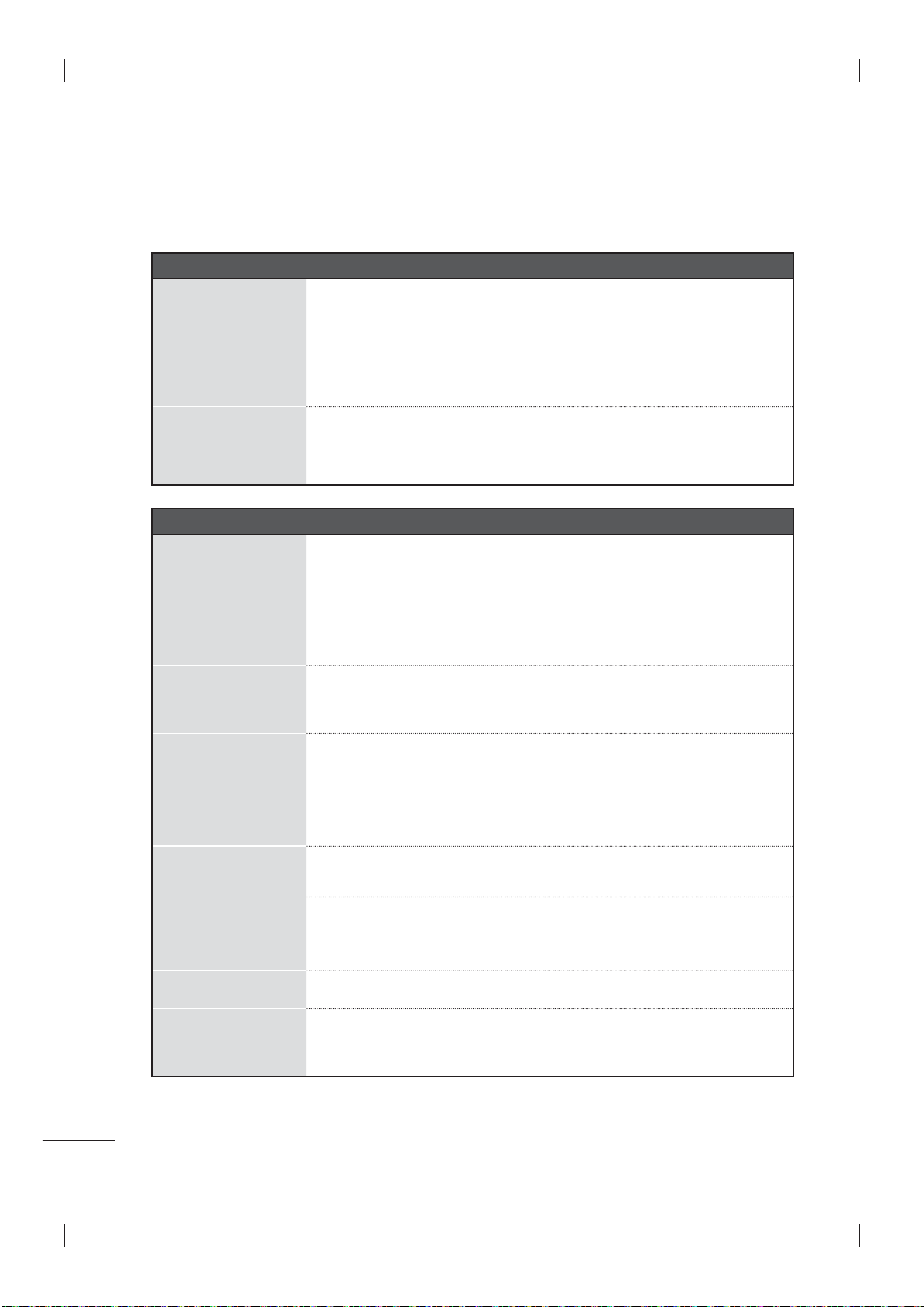
INITIAL SETTING
This Function guides the user to easily set the
essential items for viewing the TV for the first
time when purchasing the TV. It will be displayed
on the screen when turning the TV on for the first
time. It can also be activated from the user
menus.
ꔛ
Default selection is “Home Use”. We recom-
mend setting the TV to “Home Use” mode
for the best picture in your home environ-
ment.
ꔛ
“Store Demo” Mode is only intended for use
in retail environments. Customers can adjust
the “Picture menu - Picture mode” manu-
ally while inspecting the TV, but the TV will
automatically return to preset in-store mode
after 5 minutes.
ꔛ
“Store Demo” Mode is an optimal setting for
displaying at stores. “Store Demo” mode
initializes the TV to set the image quality.
Step2. Mode setting
Step4. Time Zone
1
ENTER
Select Menu Language.
1
ENTER
Select On or Off.
1
ENTER
Select Home Use.
Step 3. Time Zone
ꕉ Previous ꔉ Next
Time Zone ◀ Eastern ▶
Daylight Saving Auto
Step5. Auto Tuning
1
ENTER
Check your antenna connection and
start Auto Tuning.
Step1. Selecting Language
WELCOME!
Thank you for choosing LG
ꔉ Next
Step 1. Language
English
Español
Français
한국어
Step 5. Auto Tuning
ꕉ Previous ꔉ Next
Before starting,
be sure that the
TV antenna is connected.
Step3. Power Indicator
(For LED LCD TV)
Step 3. Power Indicator
ꕉ Previous ꔉ Next
Standby Light ◀ Off ▶
ꔛ
This function is disable in “Step2. Mode
Setting - Store Demo”.
1
Select Time Zone option.
2
ENTER
Select Daylight Saving
option.
Step 2. Mode Setting
Selecting the environment.
Choose the setting mode you want.
Select [Home Use] when setting TV up
in-home. You can adjust picture quality
accordingly through Picture Mode menu
option.
ꕉ Previous ꔉ Next
i
Home Use Store Demo
• Demo Mode Off
For 19/22/26/37/42/47/55LE5300, 22/26LE5500,
42/47/55LE7300, 37/42/47LD450C, 55LD520C

25
Your TV's OSD (On Screen Display) may differ slightly from that shown in this manual.
Some of these features are not available on all models. For further information, refer to the CD Manual.
ON-SCREEN MENUS SELECTION
CHANNEL
ꔛ
Auto Tuning:
All available TV channels are
searched and stored automatically.
ꔛ
Manual Tuning:
User can do manual channel
selection and add or delete individual channels.
ꔛ
Channel Edit:
You can add or delete in the chan-
nel list.
PICTURE
ꔛ
Aspect Ratio: Selects the desired picture format
.
ꔛ
Picture Wizard: This feature lets you adjust the
picture quality of the original image.
ꔛ
Energy Saving: It reduces the TV’s power con-
sumption by lowering the backlight level.
ꔛ
Picture Mode: Selects a picture mode that is best
suited for the program you are currently watching.
ꔛ
TruMotion: It provides clears, smoother images, even
during fast action scenes creating a more stable
structure for a crisper picture.
ꔛ
Screen (RGB-PC): Adjust the screen Resolution,
Auto config, Position, Size, Phase, Reset.
AUDIO
ꔛ
Auto Volume: Auto Volume makes sure that the
volume level remains consistent whether you are
watching a commercial or a regular TV program.
ꔛ
Clear Voice II: By differentiating the human sound
range from others, it helps users listen to human
voices better.
ꔛ
Balance: Adjust the left/right sound of speaker.
ꔛ
Sound Mode: Select the sound mode to Standard,
Music, Cinema, Sport, and Game.
ꔛ
TV Speaker: Turn the TV speakers off if using
external audio equipment.
TIME
ꔛ
Clock: Set the current time Auto or Manual.
ꔛ
Off Time: Set the time the TV will automatically
be turned off.
ꔛ
On Time: Set the time the TV will automatically be
turned on.
ꔛ
Sleep Timer: Select the amount of time before
your TV turns off automatically.
LOCK
ꔛ
Set Password: Change the password.
ꔛ
Lock System: Select On or Off to use Lock
System menu option.
ꔛ
Downloadable Rating: This function is available
only for digital channel signal.
ꔛ
Input Block: Enables you to select a source to
block from the external source devices you have
hooked up.
ꔛ
Key Lock: This feature can be used to prevent
unauthorized viewing by locking out the front
panel controls.
OPTION
ꔛ
Language
- Menu Language: The menus can be shown on
the screen in the selected language.
-
Audio Language: Selects your desired language
in the digital broadcasting.
ꔛ
Caption: Selects and displays a caption. Captions
are provided to help people with hearing loss
watch TV.
ꔛ
Power Indicator: Adjust the power/standby indica-
tor light of TV front.
ꔛ
Initial Setting: Reset the TV to factory default and
erase all stored channels.
ꔛ
Mode Setting: Select either Store Demo or Home
Use.
INPUT
ꔛ
Select desired input sources.
MY MEDIA
ꔛ
Movie List: Play movies from option device (USB).
ꔛ
Photo List: View photos from option device (USB).
ꔛ
Music List: Play songs (USB).
APPENDIX
26
TROUBLESHOOTING
APPENDIX
Abnormal Operation
The remote control
doesn’t work
ꔛ
Check to see if there is any object between the product and the remote
control causing obstruction. Ensure you are pointing the remote control
directly at the TV.
ꔛ
Ensure that the batteries are installed with correct polarity (+ to +, - to -).
ꔛ
Ensure that the correct remote operating mode is set: TV, VCR etc.
ꔛ
Install new batteries.
TV turns off suddenly
ꔛ
Is the sleep timer set?
ꔛ
Check the power control settings. Power interrupted.
ꔛ
If there is no signal, the TV turns off automatically in 15 minutes.
Video Problems
No picture &No sound
ꔛ
Check whether the product is turned on.
ꔛ
Try another channel. The problem may be with the broadcast.
ꔛ
Is the power cord inserted into wall power outlet?
ꔛ
Check your antenna direction and/or location.
ꔛ
Test the wall power outlet, plug another product’s power cord into the
outlet where the product’s power cord was plugged in.
Picture appears slowly
after switching on
ꔛ
This is normal, the image is muted during the product startup process.
Please contact your service center, if the picture has not appeared after
five minutes.
No or poor color or
poor picture
ꔛ
Adjust Color in menu option.
ꔛ
Keep a sufficient distance between the product and the VCR.
ꔛ
Try another channel. The problem may be with the broadcast.
ꔛ
Are the video cables installed properly?
ꔛ
Activate any function to restore the brightness of the picture.
Horizontal/vertical bars
or picture shaking
ꔛ
Check for local interference such as an electrical appliance or power
tool.
Poor reception on
some channels
ꔛ
Station or cable product experiencing problems, tune to another station.
ꔛ
Station signal is weak, reorient antenna to receive weaker station.
ꔛ
Check for sources of possible interference.
Lines or streaks in pic-
tures
ꔛ
Check antenna (Change the direction of the antenna).
No picture when con-
necting HDMI
ꔛ
If an HDMI cable doesn’t support High Speed HDMI, it can cause flick-
ers or no screen display. In this case use the latest cables that support
High Speed HDMI.
*This feature is not available for all models.
27
Audio Problems
No output from one
of the speakers
ꔛ
Adjust Balance in menu option.
Unusual sound from
inside the product
ꔛ
A change in ambient humidity or temperature may result in an unusual
noise when the product is turned on or off and does not indicate a fault
with the product.
No sound
when connecting
HDMI/USB
ꔛ
Check High Speed HDMI cable.
ꔛ
Check USB cable over version 2.0.
ꔛ
Use normal MP3 file.
PC Mode Problems
The signal is out of
range
ꔛ
Adjust resolution, horizontal frequency, or vertical frequency on the PC.
ꔛ
Check the input source.
Vertical bar or stripe
on
background &
Horizontal Noise &
Incorrect position
ꔛ
Activate the Auto configure feature or adjust size, phase, or H/V position.
(Option)
Screen color is unsta-
ble or single color
ꔛ
Check the signal cable.
ꔛ
Reinstall the PC video card.
When connecting the
HDMI cable to the PC,
there is no audio.
ꔛ
Check the manual for the video card in the PC to see if it supports
HDMI audio and how to set it up properly.
*This feature is not available for all models.
APPENDIX
28
Movie List Problems
The file does not
appear on the Movie
List.
ꔛ
Check whether the file extension is supported.
Message is displayed
saying “This file is
invalid” or the audio is
working normally but
the video is not work-
ing normally.
ꔛ
Check whether the file is playing normally on a PC. (Check whether the
file is damaged.)
ꔛ
Check whether the resolution is supported.
ꔛ
Check whether the video/audio codec is supported.
ꔛ
Check whether the frame rate is supported.
Message is displayed
saying “Unsupported
Audio” or the video is
working normally but
the audio is not work-
ing normally.
ꔛ
Check whether the file is playing normally on a PC. (Check whether the
file is damaged.)
ꔛ
Check whether the audio codec is supported.
ꔛ
Check whether the bit rate is supported.
ꔛ
Check whether the sample rate is supported.
Subtitle is not working.
ꔛ
Check whether the file is playing normally on a PC. (Check whether the
file is damaged.)
ꔛ
Check whether the video file and subtitle file name are the same.
ꔛ
Check whether the video file and subtitle file are located in the same
folder.
ꔛ
Check whether the subtitle file is supported.
ꔛ
Check whether the language is supported. (When you open the subtitle
file on a PC, you can check the language of the subtitle file.)
29
MAINTENANCE
Early malfunctions can be prevented. Careful and regular cleaning can extend the amount of time you
can enjoy your new TV.
Caution: Be sure to turn the power off and unplug the power cord before you begin any cleaning.
Cleaning the Screen
Here’s a great way to keep the dust off your screen for a while. Wet a soft cloth in a mixture of
lukewarm water and a little fabric softener or dish washing detergent. Wring the cloth until it’s
almost dry, and then use it to wipe the screen.
Make sure the excess water is off the screen, and then let it air-dry before you turn on your TV.
Cleaning the Cabinet
ꔛ
To remove dirt or dust, wipe the cabinet with a soft, dry, lint-free cloth.
ꔛ
Please be sure not to use a wet cloth.
Extended Absence
2
1
CAUTION
► If you expect to leave your TV dormant for a long time (such as a vacation), it’s a good idea to
unplug the power cord to protect against possible damage from lightning or power surges.

APPENDIX
30
OPEN SOURCE SOFTWARE NOTICE
The following GPL executables and LGPL, MPL libraries used in this product are subject to the GPL2.0/
LGPL2.1/MPL1.1 License Agreements:
GPL EXECUTABLES:
Linux kernel 2.6, busybox, e2fsprogs, gdbserver, jfsutils, mtd-utils, procps, u-boot, udhcpc
LGPL LIBRARIES:
cairo, directFB, gettext, glib, glibc, iconv, pixman
MPL LIBRARIES:
Nanox
LG Electronics offers to provide source code to you on CD-ROM for a charge covering the cost of per-
forming such distribution, such as the cost of media, shipping and handling upon e-mail request to LG
Electronics at: [email protected]
This offer is valid for a period of three (3) years from the date of the distribution of this product by LG
Electronics.
You can obtain a copy of the GPL, LGPL, MPL licenses on the CD-ROM provided with this product.
This product includes
► expat:
- copyright © 1998, 1999, 2000 Thai Open Source Software Center Ltd and Clark Cooper
- copyright © 2001, 2002, 2003, 2004, 2005, 2006 Expat maintainers.
► freetype: copyright © 2003 The FreeType Project (www.freetype.org).
► ICU: copyright © 1995-2008 International Business Machines Corporation and others.
► libcurl: copyright © 1996 - 2008, Daniel Stenberg.
► libjpeg: This software is based in part on the work of the Independent JPEG Group copyright © 1991
– 1998, Thomas G. Lane.
► libmng: copyright © 2000-2007 Gerard Juyn, Glenn Randers-Pehrson
► libpng: copyright © 1998-2008 Glenn Randers-Pehrson
► md5: copyright © 1991-2, RSA Data Security, Inc
► md5 checksum : copyright © 1999, 2000, 2002 Aladdin Enterprises
► ncurses: copyright © 1998 Free Software Foundation, Inc.
► openSSL:
- cryptographic software written by Eric Young.
- software written by Tim Hudson.
- software developed by the OpenSSL Project for use in the OpenSSL Toolkit. (http://www.openssl.org)
► strace :
- copyright © 1991, 1992 Paul Kranenburg.
- copyright © 1993 Branko Lankester.
- copyright © 1993 Ulrich Pegelow.
- copyright © 1995, 1996 Michael Elizabeth Chastain.
- copyright © 1993, 1994, 1995, 1996 Rick Sladkey.
- copyright © 1998-2003 Wichert Akkerman.
- copyright © 2002-2008 Roland McGrath.
- copyright © 2003-2008 Dmitry V. Levin.
- copyright © 2007-2008 Jan Kratochvil.
► tinyxml: copyright © 2000-2006 Lee Thomason
► xyssl: Copyright (C) 2009 Paul Bakker
► zlib: copyright © 1995-2005 Jean-loup Gailly and Mark Adler
All rights reserved.
Permission is hereby granted, free of charge, to any person obtaining a copy of this software and asso-
ciated documentation files (the "Software"), to deal in the Software without restriction, including without
limitation the rights to use, copy, modify, merge, publish, distribute, sublicense, and/or sell copies of the
Software, and to permit persons to whom the Software is furnished to do so, subject to the following
conditions:
THE SOFTWARE IS PROVIDED "AS IS", WITHOUT WARRANTY OF ANY KIND, EXPRESS OR IMPLIED,
INCLUDING BUT NOT LIMITED TO THE WARRANTIES OF MERCHANTABILITY, FITNESS FOR A
PARTICULAR PURPOSE AND NONINFRINGEMENT. IN NO EVENT SHALL THE AUTHORS OR
COPYRIGHT HOLDERS BE LIABLE FOR ANY CLAIM, DAMAGES OR OTHER LIABILITY, WHETHER IN
AN ACTION OF CONTRACT, TORT OR OTHERWISE, ARISING FROM, OUT OF OR IN CONNECTION
WITH THE SOFTWARE OR THE USE OR OTHER DEALINGS IN THE SOFTWARE.
31
PRODUCT SPECIFICATIONS
MODELS 19LE5300 (19LE5300-UE)
22LE5300 (22LE5300-UE)
22LE5500 (22LE5500-UA)
Dimensions
(Width x
Height
x Depth)
With stand
471.2 mm x 365.9 mm x 155.4 mm
(18.5 inch x 14.4 inch x 6.1 inch)
542.9 mm x 407.1 mm x 155.4 mm
(21.3 inch x 16.0 inch x 6.1 inch)
Without stand
471.2 mm x 315.5 mm x 34.4 mm
(18.5 inch x 12.4 inch x 1.3 inch)
542.9 mm x 357.6 mm x 34.4 mm
(21.3 inch x 14.0 inch x 1.3 inch)
Weight With stand
3.4 kg (7.4 lbs)
4.2 kg (9.2 lbs)
Without stand
3.2 kg (7.0 lbs)
3.9 kg (8.5 lbs)
Power Requirement 19LE5300: 24V , 1.6A
22LE5300: 24V , 1.7 A
26LE5300: 24V , 1.8 A
Adapter (DC Power) In: AC100-240 V ~ 50/60 Hz
Out: DC 24 V, 3.42 A
Television System NTSC-M, ATSC, 64 & 256 QAM
Program Coverage VHF 2-13, UHF 14-69, CATV 1-135, DTV 2-69, CADTV 1-135
External Antenna Impedance 75 Ω
Environment
condition
Operating Temperature 0 °C to 40 °C (32 °F to 104 °F)
Operating Humidity Less than 80 %
Storage Temperature -20 °C to 60 °C (-4 °F to 140 °F)
Storage Humidity Less than 85 %
ꔛ
The specifications shown above may be changed without prior notice for quality improvement.
MODELS
26LE5300 (26LE5300-UE)
26LE5500 (26LE5500-UA)
Dimensions
(Width x
Height
x Depth)
With stand
652.0 mm x 480.8 mm x 191.4 mm
(25.6 inch x 18.9 inch x 7.5 inch)
Without stand
652.0 mm x 420.3 mm x 34.4 mm
(25.6 inch x 16.5 inch x 1.3 inch)
Weight With stand
6.1 kg (13.4 lbs)
Without stand
5.1 kg (11.2 lbs)
APPENDIX
32
MODELS
32LE5300
(32LE5300-UC)
37LE5300
(37LE5300-UC)
Dimensions
(Width x
Height
x Depth)
With stand
784.6 mm x 558.1 mm x 221.0 mm
(30.8 inch x 21.9 inch x 8.7 inch)
905.0 mm x 630.0 mm x 270.0 mm
(35.6 inch x 24.8 inch x 10.6 inch)
Without stand
784.6 mm x 499.5 mm x 39.9 mm
(30.8 inch x 19.6 inch x 1.5 inch)
905.0 mm x 568.0 mm x 39.9 mm
(35.6 inch x 22.3 inch x 1.5 inch)
Weight With stand
12.4 kg (27.3 lbs)
15.3 kg (33.7 lbs)
Without stand
10.5 kg (23.1 lbs)
12.8 kg (28.2 lbs)
MODELS
42LE5300
(42LE5300-UC)
47LE5300
(47LE5300-UC)
Dimensions
(Width x
Height
x Depth)
With stand
1016.0 mm x 692.0 mm x 270.0 mm
(40.0 inch x 27.2 inch x 10.6 inch)
1126.6 mm x 757.9 mm x 284.4 mm
(44.3 inch x 29.8 inch x 11.1 inch)
Without stand
1016.0 mm x 630.0 mm x 29.3 mm
(40.0 inch x 24.8 inch x 1.1 inch)
1126.6 mm x 692.0 mm x 29.3 mm
(44.3 inch x 27.2 inch x 1.1 inch)
Weight With stand
19.2 kg (42.3 lbs)
22.6 kg (49.8 lbs)
Without stand
16.7 kg (36.8 lbs)
19.6 kg (43.2 lbs)
Power Requirement AC 120 V ~ 50 / 60 Hz
Television System NTSC-M, ATSC, 64 & 256 QAM
Program Coverage VHF 2-13, UHF 14-69, CATV 1-135, DTV 2-69, CADTV 1-135
External Antenna Impedance 75 Ω
Environment
condition
Operating Temperature 0 °C to 40 °C (32 °F to 104 °F)
Operating Humidity Less than 80 %
Storage Temperature -20 °C to 60 °C (-4 °F to 140 °F)
Storage Humidity Less than 85 %
ꔛ
The specifications shown above may be changed without prior notice for quality improvement.
MODELS
55LE5300
(55LE5300-UC)
Dimensions
(Width x
Height
x Depth)
With stand
1306.0 mm x 867.0 mm x 345.0 mm
(51.4 inch x 34.1 inch x 13.5 inch)
Without stand
1306.0 mm x 797.0 mm x 30.7 mm
(51.4 inch x 31.3inch x 1.2 inch)
Weight With stand
34.05 kg (75.0 lbs)
Without stand
28.8 kg (63.4 lbs)
33
Power requirement AC 120 V ~ 50 / 60 Hz
Television System NTSC-M, ATSC, 64 & 256 QAM
Program Coverage VHF 2-13, UHF 14-69, CATV 1-135, DTV 2-69, CADTV 1-135
External Antenna Impedance 75 Ω
Environment
condition
Operating Temperature 0 °C to 40 °C (32 °F to 104 °F)
Operating Humidity Less than 80 %
Storage Temperature -20 °C to 60 °C (-4 °F to 140 °F)
Storage Humidity Less than 85 %
ꔛ
The specifications shown above may be changed without prior notice for quality improvement.
MODELS
42LE7300
(42LE7300-UA)
47LE7300
(47LE7300-UA)
Dimensions
(Width x
Height
x Depth)
With stand
1009.2 mm x 694.5 mm x 286.5 mm
(39.7 inch x 27.3 inch x 11.2 inch)
1119.6 mm x 757.1 mm x 286.5 mm
(44.0 inch x 29.8 inch x 11.2 inch)
Without stand
1009.2 mm x 629.7 mm x 29.3 mm
(39.7 inch x 24.7 inch x 1.1 inch)
1119.6 mm x 691.3 mm x 29.3 mm
(44.0 inch x 27.2 inch x 1.1 inch)
Weight With stand
25.5 kg (56.2 lbs) 29.7 kg (65.4 lbs)
Without stand
21.0 kg (46.2 lbs) 25.2 kg (55.5 lbs)
MODELS
55LE7300
(55LE7300-UA)
Dimensions
(Width x
Height
x Depth)
With stand
1305.2 mm x 874.9 mm x 320.2 mm
(51.3 inch x 34.4 inch x 12.6 inch)
Without stand
1305.2 mm x 799.4 mm x 32.4 mm
(51.3 inch x 31.4 inch x 1.2 inch)
Weight With stand
44.5 kg (98.1 lbs)
Without stand
37.1 kg (81.7 lbs)
APPENDIX
34
MODELS
42LD420
(42LD420-UA)
47LD420
(47LD420-UA)
Dimensions
(Width x
Height
x Depth)
With stand
1028.0 mm x 715.4 mm x 297.0 mm
(40.4 inch x 28.1 inch x 11.6 inch)
1140.6 mm x 784.8 mm x 337.4 mm
(44.9 inch x 30.8 inch x 13.2 inch)
Without stand
1028.0 mm x 658.6 mm x 87.8 mm
(40.4 inch x 25.9 inch x 3.4 inch)
1140.6 mm x 722.9 mm x 99.0 mm
(44.9 inch x 28.4 inch x 3.8 inch)
Weight With stand
16.6 kg (36.5 lbs) 21.6 kg (47.6 lbs)
Without stand
14.8 kg (32.6 lbs) 19.0 kg (41.8 lbs)
Power requirement AC 100-240 V ~ 50 / 60 Hz
Television System NTSC-M, ATSC, 64 & 256 QAM
Program Coverage VHF 2-13, UHF 14-69, CATV 1-135, DTV 2-69, CADTV 1-135
External Antenna Impedance 75 Ω
Environment
condition
Operating Temperature 0 °C to 40 °C (32 °F to 104 °F)
Operating Humidity Less than 80 %
Storage Temperature -20 °C to 60 °C (-4 °F to 140 °F)
Storage Humidity Less than 85 %
ꔛ
The specifications shown above may be changed without prior notice for quality improvement.
MODELS 32LD450 (32LD450-UA)
37LD450 (37LD450-UA),
37LD450C (37LD450C-UA)
Dimensions
(Width x
Height
x Depth)
With stand
799.0 mm x 555.0 mm x 207.0 mm
(31.4 inch x 21.8 inch x 8.1 inch)
916.0 mm x 625.0 mm x 261.0 mm
(36.0 inch x 24.6 inch x 10.2 inch)
Without stand
799.0 mm x 506.0 mm x 73.5 mm
(31.4 inch x 19.9 inch x 2.8 inch)
916.0 mm x 575.0 mm x 77.4 mm
(36.0 inch x 22.6 inch x 3.0 inch)
Weight With stand
9.1 kg (20.0 lbs) 12.5 kg (27.5 lbs)
Without stand
8.1 kg (17.8 lbs) 10.8 kg (23.8 lbs)
MODELS
42LD450 (42LD450-UA),
42LD450C (42LD450C-UA)
47LD450 (47LD450-UA),
47LD450C (47LD450C-UA)
Dimensions
(Width x
Height
x Depth)
With stand
1023.0 mm x 685.0 mm x 261.0 mm
(40.2 inch x 26.9 inch x 10.2 inch)
1136.0 mm x 757.0 mm x 270.0 mm
(44.7 inch x 29.8 inch x 10.6 inch)
Without stand
1023.0 mm x 635.0 mm x 76.6 mm
(40.2 inch x 25.0 inch x 3.0 inch)
1136.0 mm x 698.0 mm x 76.5 mm
(44.7 inch x 27.4 inch x 3.0 inch)
Weight With stand
15.1 kg (33.2 lbs) 19.5 kg (42.9 lbs)
Without stand
13.5 kg (29.7 lbs) 17.5 kg (38.5 lbs)
MODEL
32LD420
(32LD420-UA)
Dimensions
(Width x
Height
x Depth)
With stand
805.0 mm x 583.0 mm x 224.0 mm
(31.6 inch x 22.9 inch x 8.8 inch)
Without stand
805.0 mm x 531.0 mm x 79.9 mm
(31.6 inch x 20.9 inch x 3.1 inch)
Weight With stand
10.8 kg (23.8 lbs)
Without stand
9.7 kg (21.3 lbs)
35
Power requirement AC 100-240 V ~ 50 / 60 Hz
Television System NTSC-M, ATSC, 64 & 256 QAM
Program Coverage VHF 2-13, UHF 14-69, CATV 1-135, DTV 2-69, CADTV 1-135
External Antenna Impedance 75 Ω
Environment
condition
Operating Temperature 0 °C to 40 °C (32 °F to 104 °F)
Operating Humidity Less than 80 %
Storage Temperature -20 °C to 60 °C (-4 °F to 140 °F)
Storage Humidity Less than 85 %
ꔛ
The specifications shown above may be changed without prior notice for quality improvement.
MODELS
42LD630
(42LD630-UC)
47LD630
(47LD630-UC)
Dimensions
(Width x
Height
x Depth)
With stand
1024.0 mm x 685.0 mm x 261.0 mm
(40.3 inch x 26.9 inch x 10.2 inch)
1137.0 mm x 758.0 mm x 270.0 mm
(44.7 inch x 29.8 inch x 10.6 inch)
Without stand
1024.0 mm x 621.0 mm x 76.8 mm
(40.3 inch x 24.4 inch x 3.0 inch)
1137.0 mm x 685.0 mm x 76.8 mm
(44.7 inch x 26.9 inch x 3.0 inch)
Weight With stand
15.5 kg (34.1 lbs)
20.3 kg (44.7 lbs)
Without stand
13.9 kg (30.6 lbs)
18.3 kg (40.3 lbs)
MODELS
55LD630
(55LD630-UC)
Dimensions
(Width x
Height
x Depth)
With stand
1329.0 mm x 872.0 mm x 330.0 mm
(52.3 inch x 34.3 inch x 12.9 inch)
Without stand
1329.0 mm x 796.0 mm x 96.5 mm
(52.3 inch x 31.3 inch x 3.7 inch)
Weight With stand
33.0 kg (72.7 lbs)
Without stand
29.8 kg (65.6 lbs)
MODELS
32LD520
(32LD520-UA)
42LD520
(42LD520-UA)
Dimensions
(Width x
Height
x Depth)
With stand
815.0 mm x 585.6 mm x 210.9 mm
(32.0 inch x 23.0 inch x 8.3 inch)
1052.2 mm x 720.1 mm x 270.6 mm
(41.4 inch x 28.3 inch x 10.6 inch)
Without stand
815.0 mm x 529.6 mm x 82.0 mm
(32.0 inch x 20.8 inch x 3.2 inch)
1052.2 mm x 657.3 mm x 90.8 mm
(41.4 inch x 25.8 inch x 3.5 inch)
Weight With stand
12.6 kg (27.7 lbs) 19.0 kg (41.8 lbs)
Without stand
11.4 kg (25.1 lbs) 17.2 kg (37.9 lbs)
MODELS
47LD520
(47LD520-UA)
55LD520 (55LD520-UA),
55LD520C (55LD520C-UA)
Dimensions
(Width x
Height
x Depth)
With stand
1173.4 mm x 791.4 mm x 319.0 mm
(46.1 inch x 31.1 inch x 12.5 inch)
1357.0 mm x 901.0 mm x 423.0 mm
(53.4 inch x 35.4 inch x 16.6 inch)
Without stand
1173.4 mm x 723.4 mm x 100.8 mm
(46.1 inch x 28.4 inch x 3.9 inch)
1357.0 mm x 835.4 mm x 109.6 mm
(53.4 inch x 32.8 inch x 4.3 inch)
Weight With stand
23.6 kg (52.0 lbs) 36.4 kg (80.2 lbs)
Without stand
20.8 kg (45.8 lbs) 32.9 kg (72.5 lbs)
P/NO : MFL62882708 (1004-REV05)
www.lg.com
This product qualifies for ENERGY STAR in the
“factory default (Home Use)” setting.
Changing the factory default settings or enabling other
features may increase power consumption that could
exceed the limits necessary to quality for ENERGY STAR.
(For 19/22/26/37/42/47/55LE5300, 22/26LE5500,
42/47/55LE7300, 37/42/47LD450C, 55LD520C)
The model and serial number of the TV is located
on the back and one side of the TV.
Record it below should you ever need service.
MODEL
SERIAL
The extended owner’s manuals that contain informa-
tion on the advanced features of this LG TV are
located on the CD-ROM provided in an electronic
version.
To read these files, you will need to use the personal
computer (PC) equipped with a CD-ROM drive.
www.lg.com
1-800-243-0000
1-888-865-3026
1-888-542-2623
USA, Consumer
USA, Commercial
CANADA
For inquires or comments, visit www.lg.com or call;
LG Customer Information Center
Register your product Online!
OWNER’S MANUAL
LED LCD TV / LCD TV
Please read this manual carefully before operating
your set and retain it for future reference.
LED LCD TV MODELS
19LE5300
22LE5300
26LE5300
22LE5500
26LE5500
32LE5300
37LE5300
42LE5300
47LE5300
55LE5300
42LE7300
47LE7300
55LE7300
LCD TV MODELS
32LD420
42LD420
47LD420
32LD450
37LD450
42LD450
47LD450
37LD450C
42LD450C
47LD450C
32LD520
42LD520
47LD520
55LD520
42LD630
47LD630
55LD630