
Camera User Guide
• Makesureyoureadthisguide,includingthe“Safety
Precautions”section,beforeusingthecamera.
• Readingthisguidewillhelpyoulearntousethecamera
properly.
• Storethisguidesafelysothatyoucanuseitinthefuture.
ENGLISH
COPY
2
Package Contents
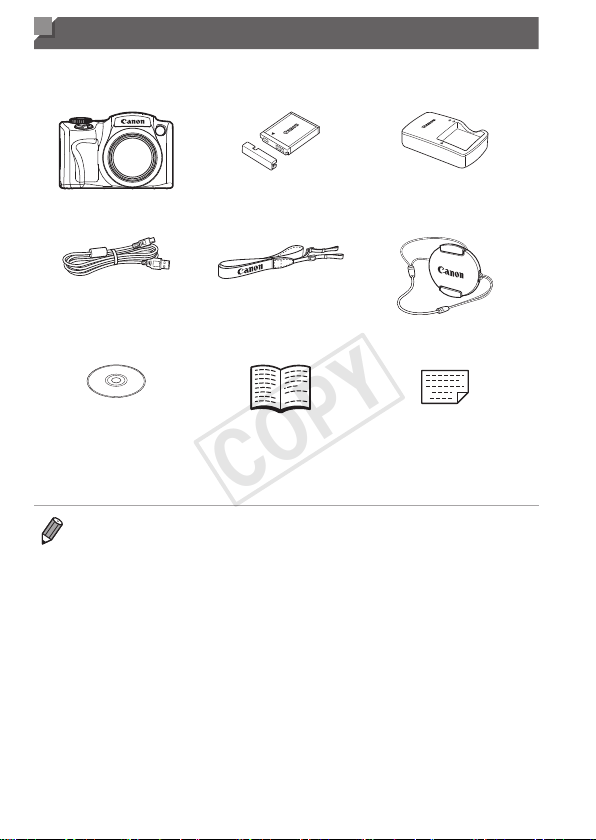
Beforeuse,makesurethefollowingitemsareincludedinthepackage.
Ifanythingismissing,contactyourcameradealer.
Camera
BatteryPackNB-6L
(withterminalcover)
BatteryCharger
CB-2LY/CB-2LYE
InterfaceCable
IFC-400PCU
NeckStrap
NS-DC11
LensCap
(withcord)
DIGITALCAMERA
SolutionDisk*
(CD-ROM)
GettingStarted
WarrantyCard
*ContainssoftwareandPDFmanuals(=
31).
• Amemorycardisnotincluded.
• Anysupplementsorrevisionstothe
CameraUserGuide
areincludedatthe
endofthisguide.
COPY

3
Compatible Memory Cards
Thefollowingmemorycards(soldseparately)canbeused,regardlessof
capacity.
• SDmemorycards*
• SDHCmemorycards*
• SDXCmemorycards*
• Eye-Ficards
*ConformstoSDspecications.However,notallmemorycardshavebeenveriedto
workwiththecamera.
AboutEye-FiCards
ThisproductisnotguaranteedtosupportEye-Ficardfunctions(including
wirelesstransfer).IncaseofanissuewithanEye-Ficard,pleasecheck
withthecardmanufacturer.
AlsonotethatanapprovalisrequiredtouseEye-Ficardsinmanycountries
orregions.Withoutapproval,useofthecardisnotpermitted.Ifitisunclear
whetherthecardhasbeenapprovedforuseinthearea,pleasecheckwith
thecardmanufacturer.
COPY

4
Preliminary Notes and Legal
Information
• Takeandreviewsometestshotsinitiallytomakesuretheimageswere
recordedcorrectly.PleasenotethatCanonInc.,itssubsidiariesand
afliates,anditsdistributorsarenotliableforanyconsequentialdamages
arisingfromanymalfunctionofacameraoraccessory,includingmemory
cards,thatresultsinthefailureofanimagetoberecordedortobe
recordedinawaythatismachinereadable.
• Imagesrecordedbythecameraareintendedforpersonaluse.Refrain
fromunauthorizedrecordingthatinfringesoncopyrightlaw,andnotethat
evenforpersonaluse,photographymaycontravenecopyrightorother
legalrightsatsomeperformancesorexhibitions,orinsomecommercial
settings.
• Thecamerawarrantyisvalidonlyintheareaofpurchase.Incaseof
cameraproblemswhileabroad,returntotheareaofpurchasebefore
contactingaCanonCustomerSupportHelpDesk.
• AlthoughtheLCDmonitorisproducedunderextremelyhigh-precision
manufacturingconditionsandmorethan99.99%ofthepixelsmeet
designspecications,inrarecasessomepixelsmaybedefectiveormay
appearasredorblackdots.Thisdoesnotindicatecameradamageor
affectrecordedimages.
• TheLCDmonitormaybecoveredwithathinplasticlmforprotection
againstscratchesduringshipment.Ifcovered,removethelmbefore
usingthecamera.
• Whenthecameraisusedoveranextendedperiod,itmaybecomewarm.
Thisdoesnotindicatedamage.
COPY

5
Organization of Camera User Guide
Thefollowingguidesareincluded,eachusedfordifferentpurposes.
BasicGuide(=
17)
• Givesbasicinstructions,frominitialpreparationstoshooting,playback,
andsavingonacomputer
AdvancedGuide(=
41)
• Practicalguidethatintroducesothercamerabasicsanddescribes
shootingandplaybackoptions
COPY
6
Part Names and Conventions in This
Guide
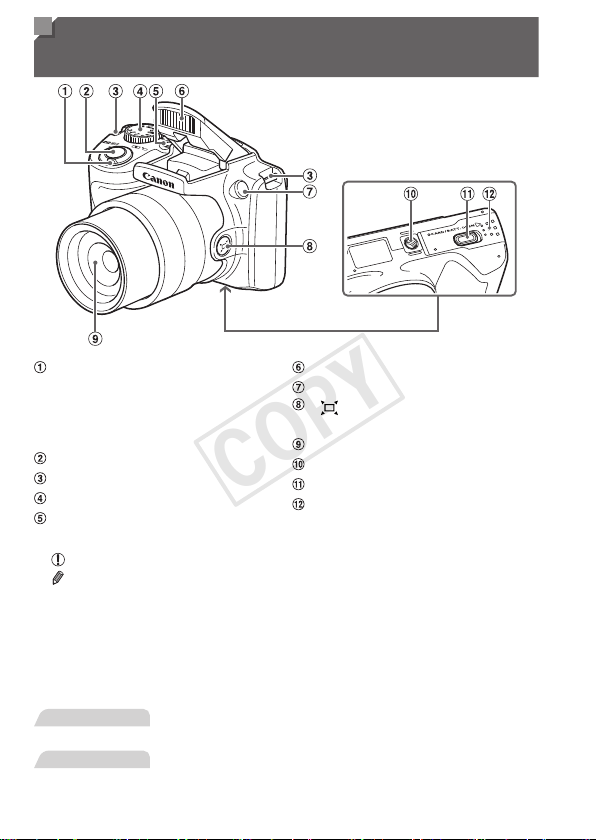
Zoomlever
Shooting:<i(telephoto)>/
<j(wideangle)>
Playback:<k(magnify)>/
<g(index)>
Shutterbutton
Strapmount
Modedial
Powerbutton
Flash
Lamp
< (FramingAssist–Seek)>
button
Lens
Tripodsocket
DCcouplerterminalcover
Memorycard/batterycover
• Shootingmodesandon-screeniconsandtextareindicatedinbrackets.
•
:Importantinformationyoushouldknow
•
:Notesandtipsforexpertcamerause
• =xx:Pageswithrelatedinformation(inthisexample,“xx”representsa
pagenumber)
• Instructionsinthisguideapplytothecameraunderdefaultsettings.
• Forconvenience,allsupportedmemorycardsaresimplyreferredtoas
“thememorycard”.
• Thetabsshownabovetitlesindicatewhetherthefunctionisusedforstill
images,movies,orboth.
StillImages
: Indicatesthatthefunctionisusedwhenshootingor
viewingstillimages.
Movies
: Indicatesthatthefunctionisusedwhenshootingor
viewingmovies.
COPY
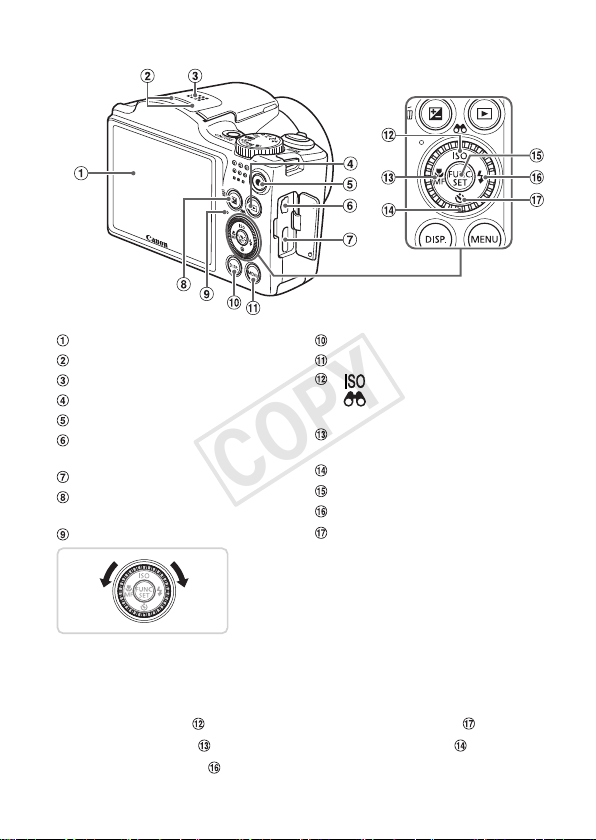
7
PartNamesandConventionsinThisGuide
Screen(LCDmonitor)
Microphone
Speaker
<1(Playback)>button
Moviebutton
AVOUT(Audio/videooutput)/
DIGITALterminal
HDMI
TM
terminal
<b(Exposurecompensation)>/
<a(Singleimageerase)>button
Indicator
<l(Display)>button
<n>button
< (ISOspeed)>/
<
(Filterimagedisplay)>/
Upbutton
<e(Macro)>/<f(Manual
focus)>/Leftbutton
Controldial
FUNC./SETbutton
<h(Flash)>/Rightbutton
<Q(Self-timer)>/Downbutton
Turningthecontroldialisonewayto
choosesettingitems,switchimages,and
performotheroperations.Mostofthese
operationsarealsopossiblewiththe
<o><p><q><r>buttons.
• Inthisguide,iconsareusedtorepresentthecorrespondingcamera
buttonsanddialsonwhichtheyappearorwhichtheyresemble.
• Thefollowingcamerabuttonsandcontrolsarerepresentedbyicons.
<o> Upbutton
onback <p> Downbutton onback
<q> Leftbutton
onback <5> Controldial onback
<r> Rightbutton
onback
COPY

8
Table of Contents
PackageContents.........................2
CompatibleMemoryCards............3
PreliminaryNotesandLegal
Information.....................................4
OrganizationofCamera
UserGuide.....................................5
PartNamesandConventionsin
ThisGuide......................................6
TableofContents...........................8
Contents:BasicOperations.........10
SafetyPrecautions.......................12
Basic Guide .................... 17
InitialPreparations.......................18
TryingtheCameraOut................26
IncludedSoftware,PDF
Manuals.......................................31
Accessories..................................39
Advanced Guide ............. 41
1 CameraBasics.....................41
On/Off..........................................42
ShutterButton..............................43
ShootingModes...........................44
ShootingDisplayOptions............45
FUNC.Menu................................46
MENUMenu................................47
IndicatorDisplay..........................49
Clock............................................49
2 SmartAutoMode.................51
Shooting(SmartAuto).................52
Common,ConvenientFeatures...60
ImageCustomizationFeatures....67
HelpfulShootingFeatures...........72
CustomizingCamera
Operation.....................................75
3 OtherShootingModes........77
DiscreetMode..............................78
Brightness/ColorCustomization
(LiveViewControl).......................79
SpecicScenes...........................80
ImageEffects(CreativeFilters)...82
SpecialModesforOther
Purposes......................................87
ShootingVariousMovies.............88
4 Pmode.................................91
ShootinginProgramAEMode
(<P>Mode)..................................92
ImageBrightness
(ExposureCompensation)...........93
ColorandContinuousShooting...98
ShootingRangeand
Focusing....................................103
Flash.......................................... 111
OtherSettings............................ 114
5 Tv,Av,andMMode............115
SpecicShutterSpeeds
(<Tv>Mode).............................. 116
SpecicApertureValues
(<Av>Mode).............................. 117
SpecicShutterSpeedsand
ApertureValues(<M>Mode)..... 118
6 PlaybackMode..................121
Viewing......................................122
BrowsingandFiltering
Images.......................................126
COPY

9
TableofContents
ImageViewingOptions..............129
ProtectingImages......................132
ErasingImages..........................136
RotatingImages.........................140
ImageCategories......................142
EditingStillImages....................146
EditingMovies............................153
7 SettingMenu......................155
AdjustingBasicCamera
Functions...................................156
8 Accessories.......................169
TipsonUsingIncluded
Accessories................................170
OptionalAccessories.................171
UsingOptionalAccessories.......173
PrintingImages..........................179
UsinganEye-FiCard.................193
9 Appendix............................195
Troubleshooting.........................196
On-ScreenMessages................200
On-ScreenInformation..............202
FunctionsandMenuTables.......206
HandlingPrecautions.................216
Specications.............................217
Index..........................................221
COPY
10
Contents: Basic Operations
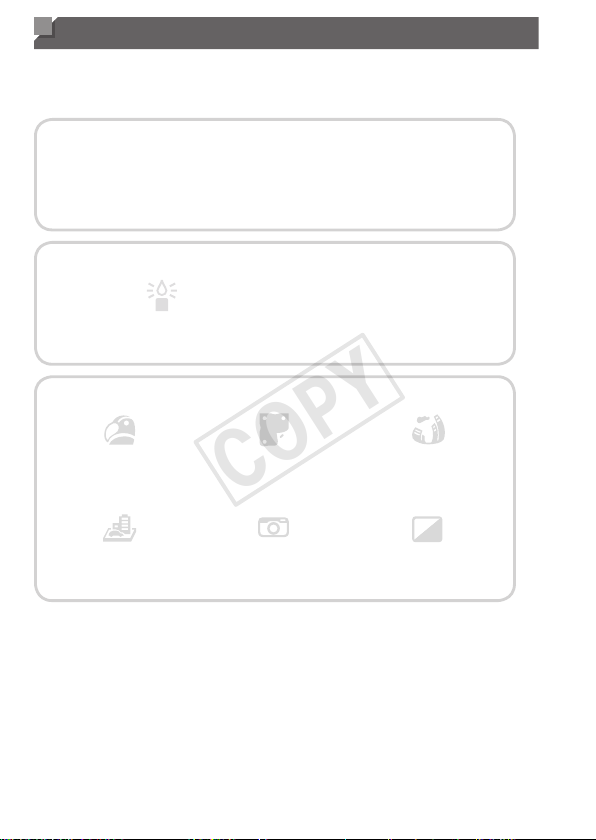
4 Shoot
Usecamera-determinedsettings(AutoMode).................................... 52
Shootingpeoplewell
I
Portraits
(=
80)
P
AgainstSnow
(=
81)
Matchingspecicscenes
LowLight
(=
80)
t
Fireworks
(=
81)
Applyingspecialeffects
VividColors
(=
82)
PosterEffect
(=
82)
Fish-EyeEffect
(=
83)
MiniatureEffect
(=
83)
ToyCameraEffect
(=
85)
Monochrome
(=
86)
Wheresoundandasharenotallowed(DiscreetMode).................... 78
Whileadjustingimagesettings(LiveViewControl)............................. 79
Focusonfaces....................................................................... 52,80,106
Withmyselfintheshot(Self-Timer)............................................... 62,87
Addadatestamp................................................................................. 65
COPY

11
Contents:BasicOperations
1 View
Viewimages(PlaybackMode)........................................................... 122
Automaticplayback(Slideshow)........................................................ 130
OnaTV.............................................................................................. 173
Onacomputer..................................................................................... 32
Browsethroughimagesquickly......................................................... 126
Eraseimages..................................................................................... 136
E Shoot/ViewMovies
Shootmovies................................................................................. 52,88
Viewmovies(PlaybackMode)........................................................... 122
c Print
Printpictures...................................................................................... 179
Save
Saveimagestoacomputer................................................................. 32
COPY

12
Safety Precautions
• Beforeusingtheproduct,pleaseensurethatyoureadthesafety
precautionsdescribedbelow.Alwaysensurethattheproductisused
correctly.
• Thesafetyprecautionsnotedonthefollowingpagesareintended
topreventinjuriestoyourselfandotherpersons,ordamagetothe
equipment.
• Besuretoalsochecktheguidesincludedwithanyseparatelysold
accessoriesyouuse.
Warning
Denotesthepossibilityofseriousinjuryordeath.
• Donottriggertheashincloseproximitytopeople’seyes.
Exposuretotheintenselightproducedbytheashcoulddamageeyesight.
Inparticular,remainatleast1meter(39inches)awayfrominfantswhen
usingtheash.
• Storethisequipmentoutofthereachofchildrenandinfants.
Strap:Puttingthestraparoundachild’sneckcouldresultinasphyxiation.
• Useonlyrecommendedpowersources.
• Donotattempttodisassemble,alterorapplyheattotheproduct.
• Avoiddroppingorsubjectingtheproducttosevereimpacts.
• Toavoidtheriskofinjury,donottouchtheinterioroftheproductif
ithasbeendroppedorotherwisedamaged.
• Stopusingtheproductimmediatelyifitemitssmoke,astrange
smell,orotherwisebehavesabnormally.
• Donotuseorganicsolventssuchasalcohol,benzine,orthinnerto
cleantheproduct.
• Donotlettheproductcomeintocontactwithwater(e.g.seawater)
orotherliquids.
• Donotallowliquidsorforeignobjectstoenterthecamera.
Thiscouldresultinelectricalshockorre.
Ifliquidsorforeignobjectscomeintocontactwiththecamerainterior,
immediatelyturnthecameraoffandremovethebattery.
Ifthebatterychargerbecomeswet,unplugitfromtheoutletandconsult
yourcameradistributororaCanonCustomerSupportHelpDesk.
COPY

13
SafetyPrecautions
• Useonlytherecommendedbattery.
• Donotplacethebatterynearorindirectame.
• Unplugthepowercordperiodically,andusingadrycloth,wipeaway
anydustanddirtthathascollectedontheplug,theexteriorofthe
poweroutlet,andthesurroundingarea.
• Donothandlethepowercordwithwethands.
• Donotusetheequipmentinamannerthatexceedstherated
capacityoftheelectricaloutletorwiringaccessories.Donotuseif
thepowercordorplugaredamaged,ornotfullypluggedintothe
outlet.
• Donotallowdirtormetalobjects(suchaspinsorkeys)tocontact
theterminalsorplug.
Thebatterymayexplodeorleak,resultinginelectricalshockorre.This
couldcauseinjuryanddamagethesurroundings.Intheeventthatabattery
leaksandthebatteryelectrolytecontactseyes,mouth,skinorclothing,
immediatelyushwithwater.
• Turnthecameraoffinplaceswherecamerauseisprohibited.
Theelectromagneticwavesemittedbythecameramayinterferewiththe
operationofelectronicinstrumentsandotherdevices.Exerciseadequate
cautionwhenusingthecamerainplaceswhereuseofelectronicdevicesis
restricted,suchasinsideairplanesandmedicalfacilities.
• DonotplaythesuppliedCD-ROM(s)inanyCDplayerthatdoesnot
supportdataCD-ROMs.
Itispossibletosufferhearinglossfromlisteningwithheadphonestothe
loudsoundsofaCD-ROMplayedonanaudioCDplayer(musicplayer).
Additionally,thiscoulddamagethespeakers.
Caution
Denotesthepossibilityofinjury.
• Whenholdingthecamerabythestrap,becarefulnottobangit,
subjectittostrongimpactsorshocks,orletitgetcaughtonother
objects.
• Becarefulnottobumporpushstronglyonthelens.
Thiscouldleadtoinjuryordamagethecamera.
• Becarefulnottosubjectthescreentostrongimpacts.
Ifthescreencracks,injurymayresultfromthebrokenfragments.
COPY

14
SafetyPrecautions
• Whenusingtheash,becarefulnottocoveritwithyourngersor
clothing.
Thiscouldresultinburnsordamagetotheash.
• Avoidusing,placingorstoringtheproductinthefollowingplaces:
-Placessubjecttostrongsunlight
-Placessubjecttotemperaturesabove40°C(104°F)
-Humidordustyareas
Thesecouldcauseleakage,overheatingoranexplosionofthebattery,
resultinginelectricalshock,re,burnsorotherinjuries.
Hightemperaturesmaycausedeformationofthecameraorbatterycharger
casing.
• Theslideshowtransitioneffectsmaycausediscomfortwhenviewed
forprolongedperiods.
Caution
Denotesthepossibilityofdamagetotheequipment.
• Donotaimthecameraatbrightlightsources(suchasthesunona
clearday).
Doingsomaydamagetheimagesensor.
• Whenusingthecameraonabeachoratawindylocation,becareful
nottoallowdustorsandtoenterthecamera.
Thismaycausetheproducttomalfunction.
• Inregularuse,smallamountsofsmokemaybeemittedfromthe
ash.
Thisisduetothehighintensityoftheashburningdustandforeign
materialsstucktothefrontoftheunit.Pleaseuseacottonswabtoremove
dirt,dustorotherforeignmatterfromtheashtopreventheatbuild-upand
damagetotheunit.
• Removeandstorethebatterywhenyouarenotusingthecamera.
Ifthebatteryisleftinsidethecamera,damagecausedbyleakagemay
occur.
• Beforeyoudiscardthebattery,covertheterminalswithtapeorother
insulators.
Contactingothermetalmaterialsmayleadtoreorexplosions.
COPY
15
SafetyPrecautions
• Unplugthebatterychargerfromthepoweroutletafterchargingis
complete,orwhenyouarenotusingit.
• Donotplaceanything,suchascloth,ontopofthebatterycharger
whileitischarging.
Leavingtheunitpluggedinforalongperiodoftimemaycauseitto
overheatanddistort,resultinginre.
• Donotplacethebatterynearpets.
Petsbitingthebatterycouldcauseleakage,overheatingorexplosion,
resultinginreordamage.
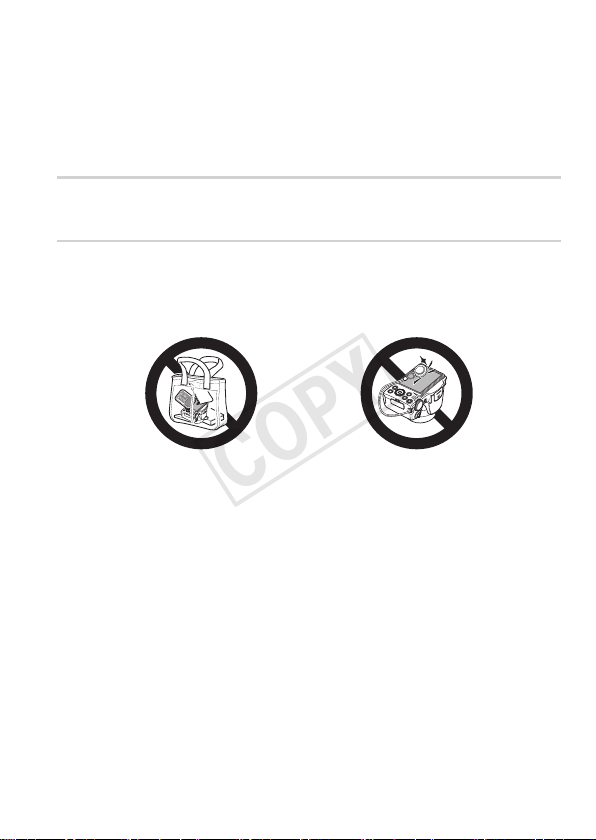
• Whenputtingthecamerainyourbag,ensurethathardobjectsdo
notcomeintocontactwiththescreen.
• Donotattachanyhardobjectstothecamera.
Doingsomaycausemalfunctionsordamagethescreen.
COPY

16
COPY

17
Basic Guide
Givesbasicinstructions,frominitial
preparationstoshooting,playback,and
savingonacomputer
COPY
18
Initial Preparations
Prepareforshootingasfollows.
Attaching the Strap
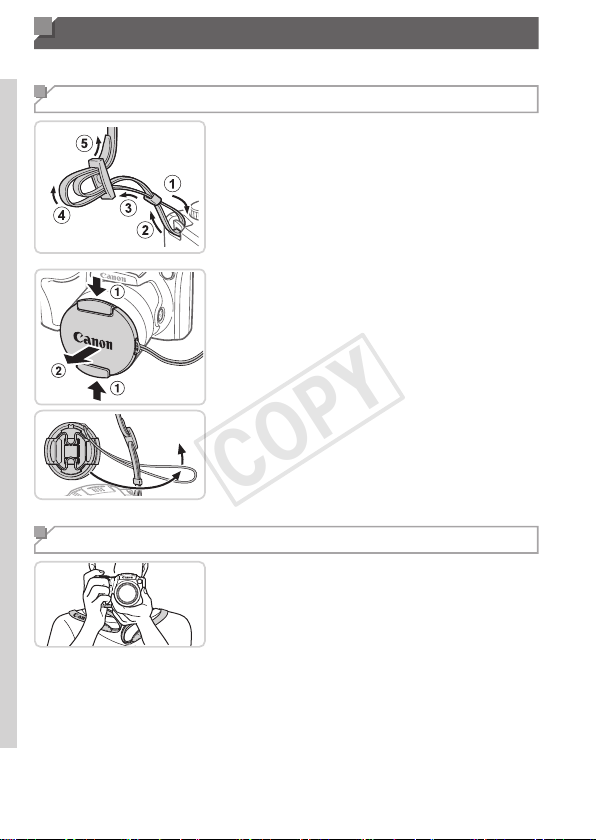
1 Attachthestrap.
Attachtheincludedstraptothecamera
asshown.
Ontheothersideofthecamera,attach
thestrapthesameway.
2 Attachthelenscaptothestrap.
Removethelenscapfromthecamera
andattachthelenscapcordtothestrap.
Alwaysremovethelenscapbefore
turningthecameraon.
Keepthelenscaponthelenswhenthe
cameraisnotinuse.
Holding the Camera
Placethestraparoundyourneck.
Whenshooting,keepyourarmscloseto
yourbodyandholdthecamerasecurely
topreventitfrommoving.Ifyouhave
raisedtheash,donotrestyourngers
onit.
COPY
19
InitialPreparations
Charging the Battery
Beforeuse,chargethebatterywiththeincludedcharger.Besuretocharge
thebatteryinitially,becausethecameraisnotsoldwiththebatterycharged.
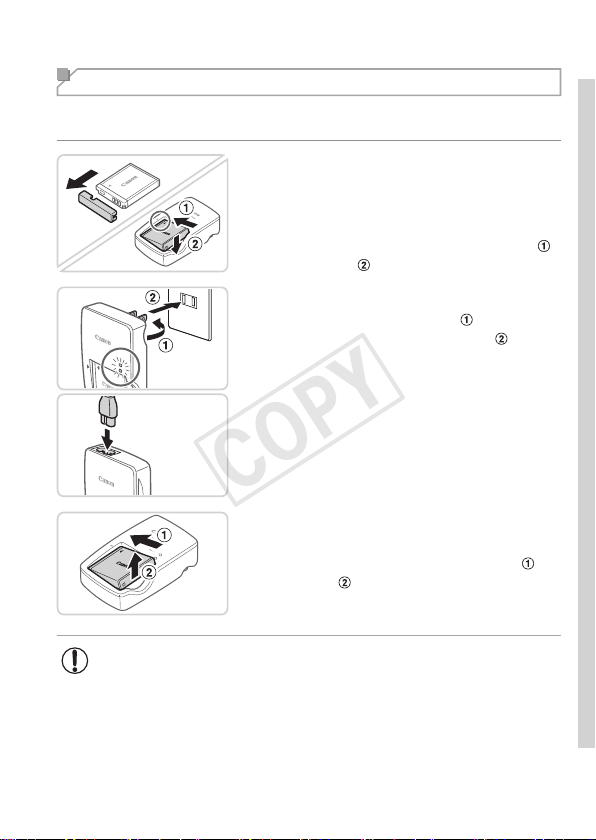
1 Removethebatterycoverand
insertthebatteryinthecharger.
Removethecoverfromthebattery,align
themarksonthebatteryandcharger,
andinsertthebatterybypushingitin(
)
anddown(
).
CB-2LY
CB-2LYE
2 Chargethebattery.
CB-2LY:Flipouttheplug( )andplug
thechargerintoapoweroutlet(
).
CB-2LYE:Plugthepowercordintothe
charger,thenplugtheotherendintoa
poweroutlet.
Thecharginglampturnsorangeand
chargingbegins.
Whenthechargingisnished,thelamp
turnsgreen.
3 Removethebattery.
Afterunpluggingthebatterycharger,
removethebatterybypushingitin(
)
andup(
).
• Toprotectthebatteryandkeepitinoptimalcondition,donot
chargeitcontinuouslyformorethan24hours.
• Forbatterychargersthatuseapowercord,donotattach
thechargerorcordtootherobjects.Doingsocouldresultin
malfunctionordamagetotheproduct.
COPY
20
InitialPreparations
• Fordetailsonchargingtimeandthenumberofshotsandrecordingtime
possiblewithafullychargedbattery,see“Specications”(=
217).
Inserting the Battery and Memory Card
Inserttheincludedbatteryandamemorycard(soldseparately).
Notethatbeforeusinganewmemorycard(oramemorycardformatted
inanotherdevice),youshouldformatthememorycardwiththiscamera
(=
160).
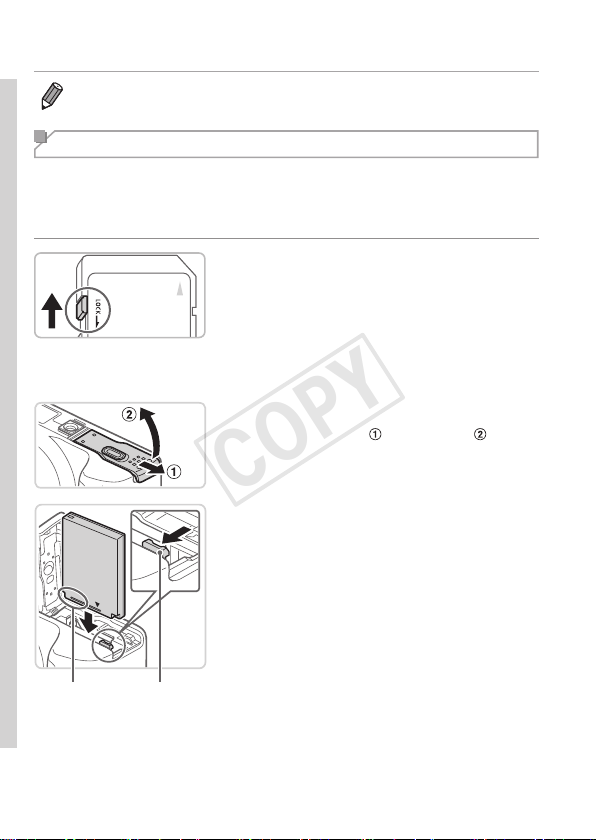
1 Checkthecard’swrite-protect
tab.
Recordingisnotpossibleonmemory
cardswithawrite-protecttabwhenthe
tabisinthelocked(downward)position.
Slidethetabupuntilitclicksintothe
unlockedposition.
2 Openthecover.
Slidethecover( )andopenit( ).
Terminals Battery
Lock
3 Insertthebattery.
Whilepressingthebatterylockinthe
directionofthearrow,insertthebattery
asshownandpushitinuntilitclicksinto
thelockedposition.
Ifyouinsertthebatteryfacingthewrong
way,itcannotbelockedintothecorrect
position.Alwaysconrmthatthebattery
isfacingtherightwayandlockswhen
inserted.
COPY
21
InitialPreparations
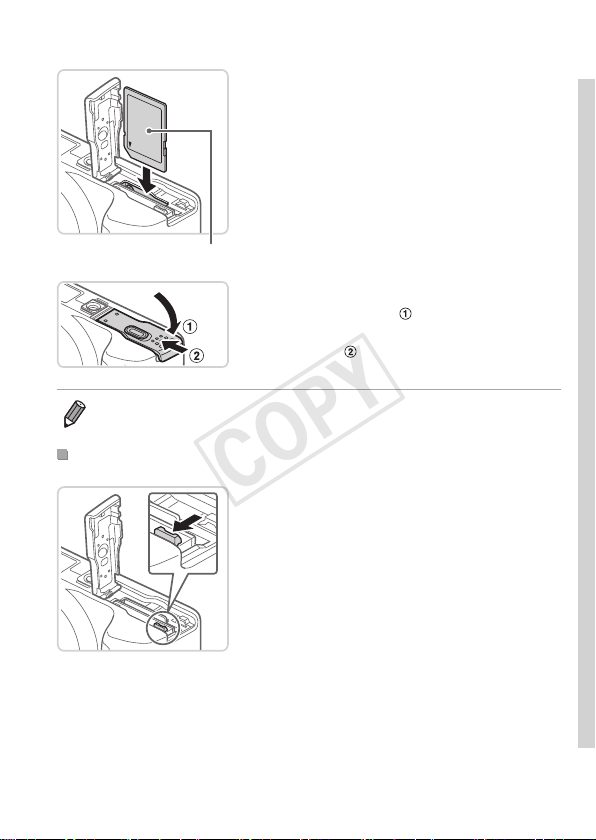
Label
4 Insertthememorycard.
Insertthememorycardfacingasshown
untilitclicksintothelockedposition.
Makesurethememorycardisfacingthe
rightwaywhenyouinsertit.Inserting
memorycardsfacingthewrongwaymay
damagethecamera.
5 Closethecover.
Lowerthecover( )andholditdownas
youslideit,untilitclicksintotheclosed
position(
).
• Forguidelinesonhowmanyshotsorhoursofrecordingcanbesavedon
onememorycard,see“Specications”(=
217).
RemovingtheBatteryandMemoryCard
Removethebattery.
Openthecoverandpressthebattery
lockinthedirectionofthearrow.
Thebatterywillpopup.
COPY
22
InitialPreparations
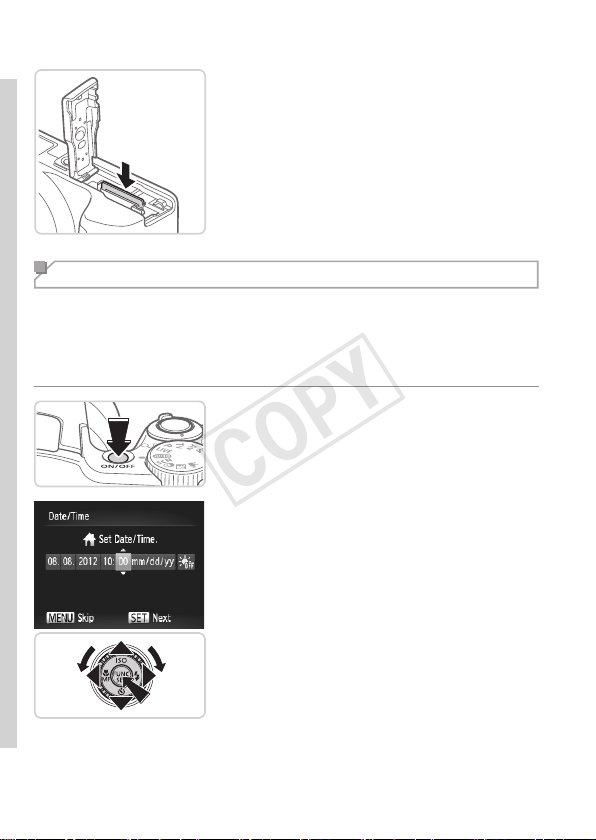
Removethememorycard.
Pushthememorycardinuntilitclicks,
andthenslowlyreleaseit.
Thememorycardwillpopup.
Setting the Date and Time
Setthecurrentdateandtimecorrectlyasfollowsifthe[Date/Time]screen
isdisplayedwhenyouturnthecameraon.Informationyouspecifythisway
isrecordedinimagepropertieswhenyoushoot,anditisusedwhenyou
manageimagesbyshootingdateorprintimagesshowingthedate.
Youcanalsoaddadatestamptoshots,ifyouwish(=
65).
1 Turnthecameraon.
Pressthepowerbutton.
The[Date/Time]screenisdisplayed.
2 Setthedateandtime.
Pressthe<q><r>buttonstochoosean
option.
Pressthe<o><p>buttonsorturnthe
<5>dialtospecifythedateandtime.
Whennished,pressthe<m>button.
COPY
23
InitialPreparations
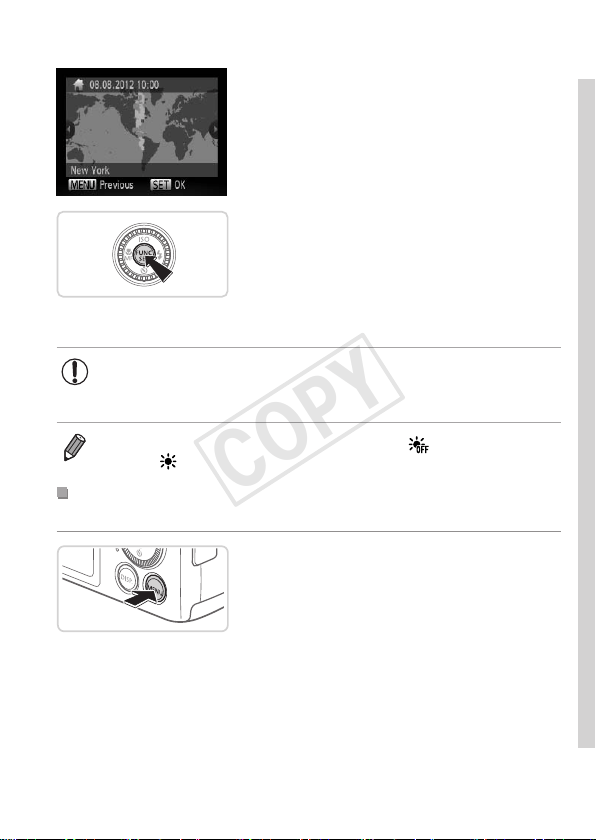
3 Setthehometimezone.
Pressthe<q><r>buttonsorturnthe
<5>dialtochooseyourhometime
zone.
4 Finishthesetupprocess.
Pressthe<m>buttontocompletethe
setting.Thesettingscreenisnolonger
displayed.
Toturnoffthecamera,pressthepower
button.
• Unlessyousetthedate,time,andhometimezone,the[Date/
Time]screenwillbedisplayedeachtimeyouturnthecameraon.
Specifythecorrectinformation.
• Tosetdaylightsavingtime(1hourahead),choose[ ]instep2andthen
choose[
]bypressingthe<o><p>buttonsorturningthe<5>dial.
ChangingtheDateandTime
Adjustthedateandtimeasfollows.
1 Accessthecameramenu.
Pressthe<n>button.
COPY
24
InitialPreparations
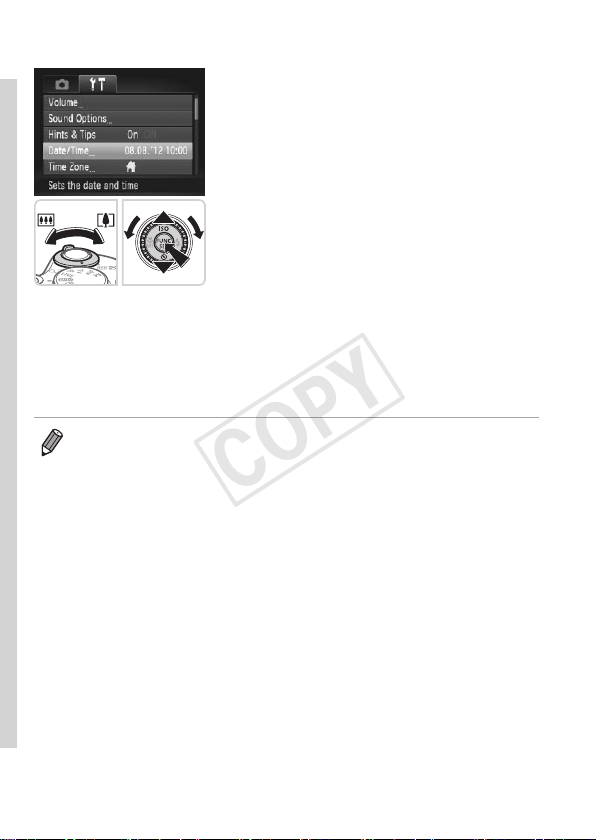
2 Choose[Date/Time].
Movethezoomlevertochoosethe[3]
tab.
Pressthe<o><p>buttonsorturnthe
<5>dialtochoose[Date/Time],and
thenpressthe<m>button.
3 Changethedateandtime.
Followstep2on=
22toadjustthe
settings.
Pressthe<n>buttontoclosethe
menu.
• Date/timesettingscanberetainedforabout3weeksbythecamera’sbuilt-in
date/timebattery(backupbattery)afterthebatterypackisremoved.
• Thedate/timebatterywillbechargedinabout4hoursonceyouinserta
chargedbatteryorconnectthecameratoanACadapterkit(soldseparately,
=
171),evenifthecameraisleftoff.
• Oncethedate/timebatteryisdepleted,the[Date/Time]screenwillbe
displayedwhenyouturnthecameraon.Followthestepson=
2 2 toset
thedateandtime.
COPY
25
InitialPreparations
Display Language
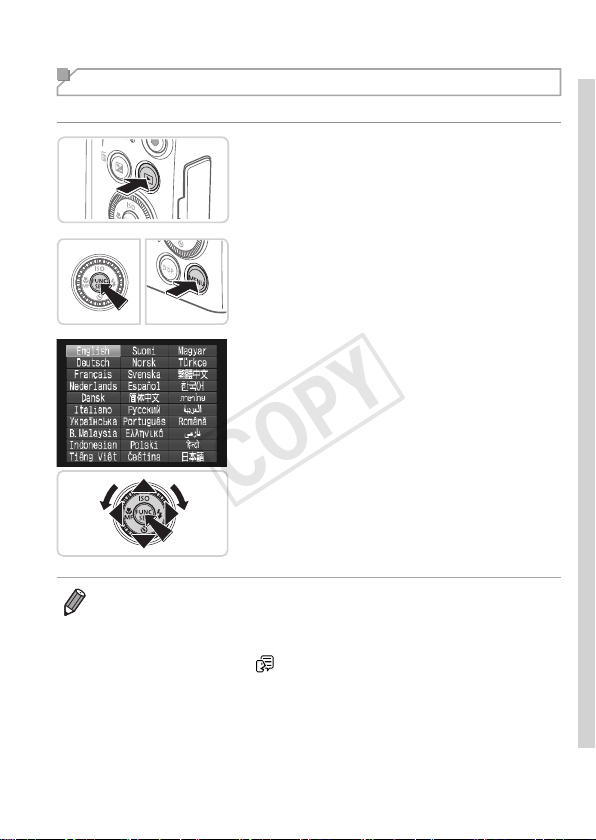
Thedisplaylanguagecanbechangedasneeded.
1 EnterPlaybackmode.
Pressthe<1>button.
2 Accessthesettingscreen.
Pressandholdthe<m>button,and
thenimmediatelypressthe<n>
button.
3 Setthedisplaylanguage.
Pressthe<o><p><q><r>buttonsor
turnthe<5>dialtochoosealanguage,
andthenpressthe<m>button.
Oncethedisplaylanguagehasbeenset,
thesettingscreenisnolongerdisplayed.
• Thecurrenttimeisdisplayedifyouwaittoolonginstep2afterpressingthe
<
m
>buttonbeforeyoupressthe<n>button.Inthiscase,pressthe
<
m
>buttontodismissthetimedisplayandrepeatstep2.
• Youcanalsochangethedisplaylanguagebypressingthe<n>button
andchoosing[Language
]onthe[3]tab.
COPY
26
StillImages Movies
Trying the Camera Out
Followtheseinstructionstoturnthecameraon,shootstillimagesor
movies,andthenviewthem.
Shooting (Smart Auto)
Forfullyautomaticselectionoftheoptimalsettingsforspecicscenes,
simplyletthecameradeterminethesubjectandshootingconditions.
1 Turnthecameraon.
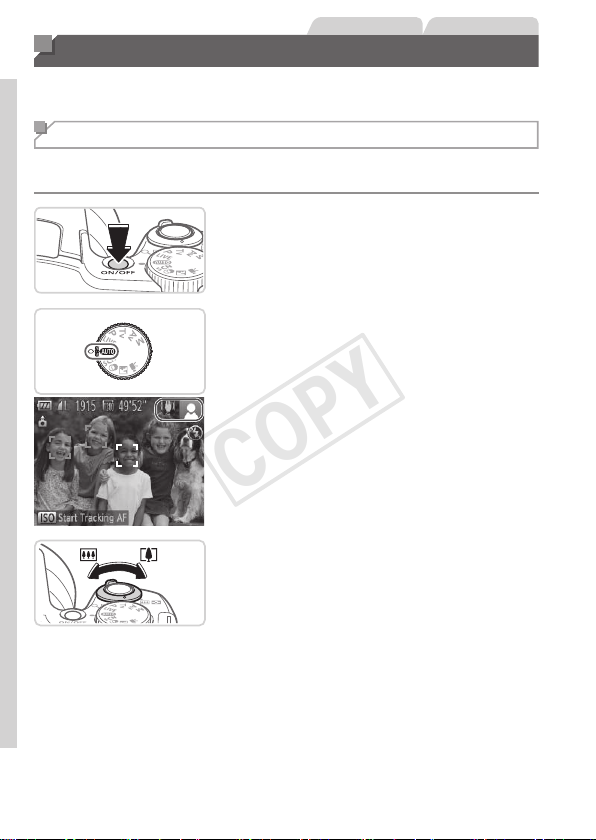
Pressthepowerbutton.
Thestartupscreenisdisplayed.
2 Enter<A>mode.
Setthemodedialto<A>.
Aimthecameraatthesubject.The
camerawillmakeaslightclickingnoise
asitdeterminesthescene.
Iconsrepresentingthesceneandimage
stabilizationmodearedisplayedinthe
upperrightofthescreen.
Framesdisplayedaroundanydetected
subjectsindicatethattheyareinfocus.
3 Composetheshot.
Tozoominandenlargethesubject,move
thezoomlevertoward<i>(telephoto),
andtozoomawayfromthesubject,move
ittoward<j>(wideangle).
COPY
27
TryingtheCameraOut
4 Shoot.
ShootingStillImages
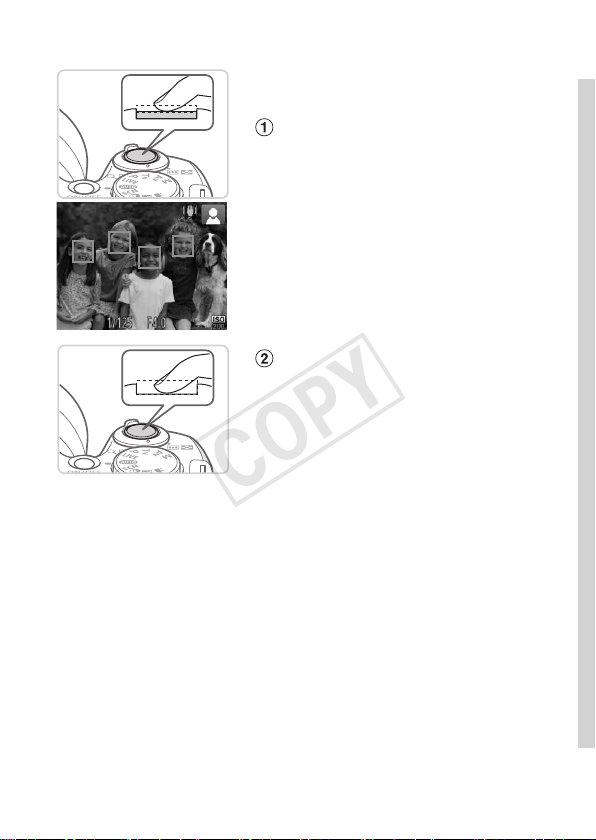
Focus.
Presstheshutterbuttonlightly,halfway
down.Thecamerabeepstwiceafter
focusing,andgreenframesaredisplayed
toindicateimageareasinfocus.
If[Raisetheash]isdisplayed,liftthe
ashwithyourngertoprepareitforuse.
Ifyouprefernottousetheash,pushit
downwithyournger,intothecamera.
Shoot.
Presstheshutterbuttonalltheway
down.
Asthecamerashoots,ashuttersound
isplayed,andinlow-lightconditions
whenyouhaveraisedtheash,itres
automatically.
Keepthecamerastilluntiltheshutter
soundends.
Yourshotremainsdisplayedonthe
screenforabouttwoseconds.
Evenwhiletheshotisdisplayed,youcan
takeanothershotbypressingtheshutter
buttonagain.
COPY
28
TryingtheCameraOut
ElapsedTime
ShootingMovies
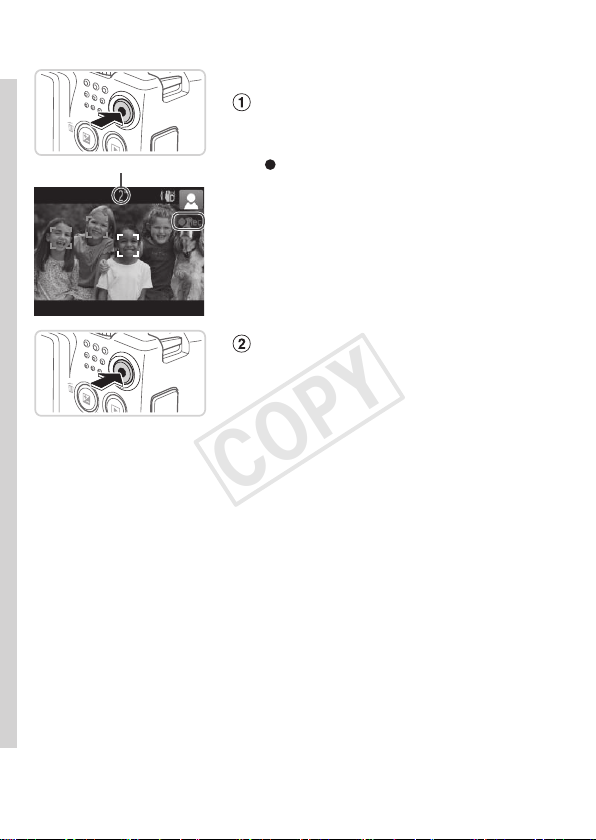
Startshooting.
Pressthemoviebutton.Thecamera
beepsonceasrecordingbegins,and
[
Rec]isdisplayedwiththeelapsedtime.
Blackbarsdisplayedonthetopand
bottomedgesofthescreenindicate
imageareasnotrecorded.
Framesdisplayedaroundanydetected
facesindicatethattheyareinfocus.
Oncerecordingbegins,youcantakeyour
ngeroffthemoviebutton.
Finishshooting.
Pressthemoviebuttonagaintostop
shooting.Thecamerabeepstwiceas
recordingstops.
COPY
29
TryingtheCameraOut
Viewing
Aftershootingimagesormovies,youcanviewthemonthescreenas
follows.
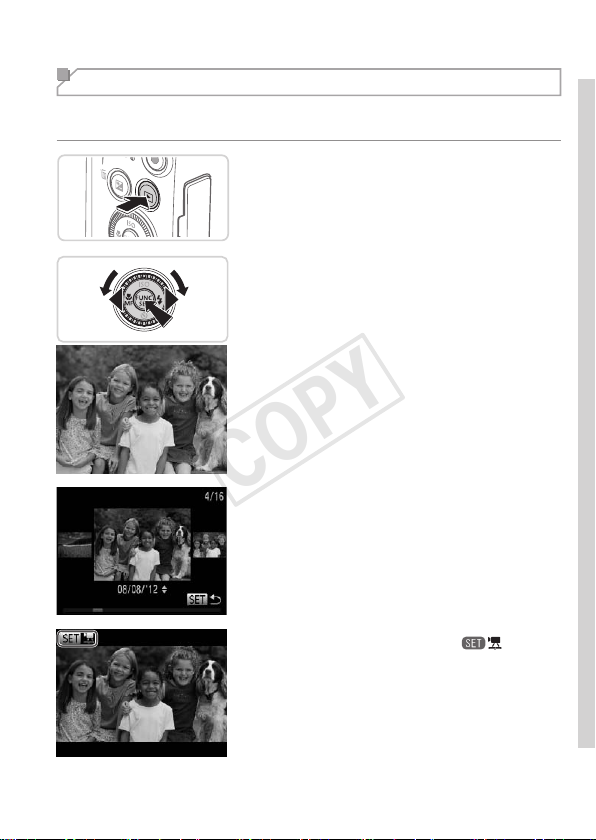
1 EnterPlaybackmode.
Pressthe<1>button.
Yourlastshotisdisplayed.
2 Browsethroughyourimages.
Toviewthepreviousimage,press
the<q>buttonorturnthe<5>dial
counterclockwise.Toviewthenext
image,pressthe<r>buttonorturnthe
<5>dialclockwise.
Pressandholdthe<q><r>buttonsto
browsethroughimagesquickly.Images
appeargrainyatthistime.
ToaccessScrollDisplaymode,turnthe
<
5
>dialrapidly.Inthismode,turnthe
<
5
>dialtobrowsethroughimages.
Toreturntosingle-imagedisplay,press
the<m>button.
Moviesareidentiedbya[ ]icon.To
playmovies,gotostep3.
COPY
30
TryingtheCameraOut
Volume
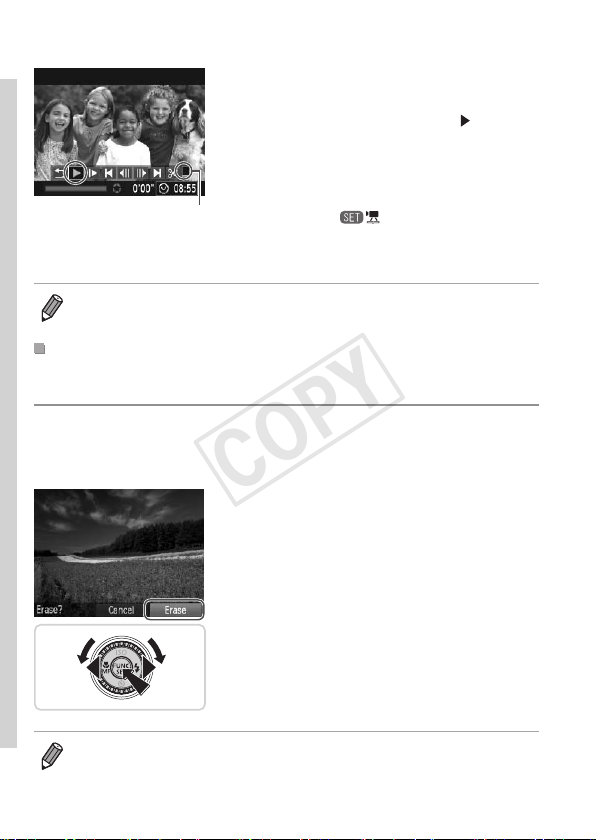
3 Playmovies.
Pressthe<m>buttontoaccessthe
moviecontrolpanel,choose[
](either
pressthe<q><r>buttonsorturnthe
<5>dial),andthenpressthe<m>
buttonagain.
Playbacknowbegins,andafterthemovie
isnished,[
]isdisplayed.
Toadjustthevolume,pressthe<
o
><
p
>
buttons.
• ToswitchtoShootingmodefromPlaybackmode,presstheshutterbutton
halfway.
ErasingtheImages
Youcanchooseanderaseunneededimagesonebyone.Becarefulwhen
erasingimages,becausetheycannotberecovered.
1 Chooseanimagetoerase.
Pressthe<q><r>buttonsorturnthe
<5>dialtochooseanimage.
2 Erasetheimage.
Pressthe<a>button.
After[Erase?]isdisplayed,pressthe
<q><r>buttonsorturnthe<5>dialto
choose[Erase],andthenpressthe<m>
button.
Thecurrentimageisnowerased.
Tocancelerasure,pressthe<q><r>
buttonsorturnthe<5>dialtochoose
[Cancel],andthenpressthe<m>
button.
• Youcanalsoeraseallimagesatonce(=
137).
COPY

31
Included Software, PDF Manuals
ThesoftwareandPDFmanualsontheincludedDIGITALCAMERASolution
Disk(CD-ROM)(=
2)areintroducedbelow,withinstructionsfor
installation,andsavingimagestoacomputer.
Software
AfterinstallingthesoftwareontheCD-ROM,youcandothefollowing
thingsonyourcomputer.
CameraWindow
Importimagesandchangecamerasettings
ImageBrowserEX
Manageimages:view,search,andorganize
Printandeditimages
AutoUpdateFunction
Usingtheincludedsoftware,youcanupdatetothelatestversion,and
downloadnewfunctionsviatheInternet(somesoftwareexcluded).Besure
toinstallthesoftwareonacomputerwithanInternetconnectionsoyoucan
usethisfunction.
• Internetaccessisrequiredtousethisfunction,andanyISP
accountchargesandaccessfeesmustbepaidseparately.
PDF Manuals
CameraUserGuide
Refertothisguideforamorein-depthunderstandingofcamera
operation.
SoftwareGuide
Refertothisguidewhenusingtheincludedsoftware.Theguidecanbe
accessedfromthehelpsystemofincludedsoftware(somesoftware
excluded).
COPY

32
IncludedSoftware,PDFManuals
System Requirements
Theincludedsoftwarecanbeusedonthefollowingcomputers.Adobe
ReaderisrequiredtoviewthePDFmanuals.
Operating
System
Windows Macintosh
Windows7SP1
WindowsVistaSP2
WindowsXPSP3
MacOSX10.6–10.7
Computer
Computersrunningoneoftheaboveoperatingsystems
(preinstalled),withanincludedUSBportandInternetconnection*
Processor
Stillimages
1.6GHzorhigher
Movies
Core2Duo1.66GHzorhigher
MacOSX10.7:
Core2Duoorhigher
MacOSX10.6:
CoreDuo1.83GHzorhigher
RAM
Stillimages
Windows7(64bit):
2GBormore
Windows7(32bit),Vista:
1GBormore
WindowsXP:
512MBormore
Movies
1GBormore
MacOSX10.7:2GBormore
MacOSX10.6:1GBormore
Interfaces USB
FreeHardDisk
Space
440MBormore* 550MBormore
Display 1024x768resolutionorhigher
*Silverlight4orlater(max.100MB)mustbeinstalled,andinWindowsXP,
Microsoft.NETFramework3.0orlater(max.500MB)mustbeinstalled.Installation
maytakesometime,dependingoncomputerperformance.
• ChecktheCanonwebsiteforthelatestsystemrequirements,including
supportedOSversions.
COPY
33
IncludedSoftware,PDFManuals
Installing the Software
Windows7andMacOSX10.6areusedhereforthesakeofillustration.
Usingthesoftwareautoupdatefunction,youcanupdatetothelatest
versionanddownloadnewfunctionsviatheInternet(somesoftware
excluded),sobesuretoinstallthesoftwareonacomputerwithanInternet
connection.
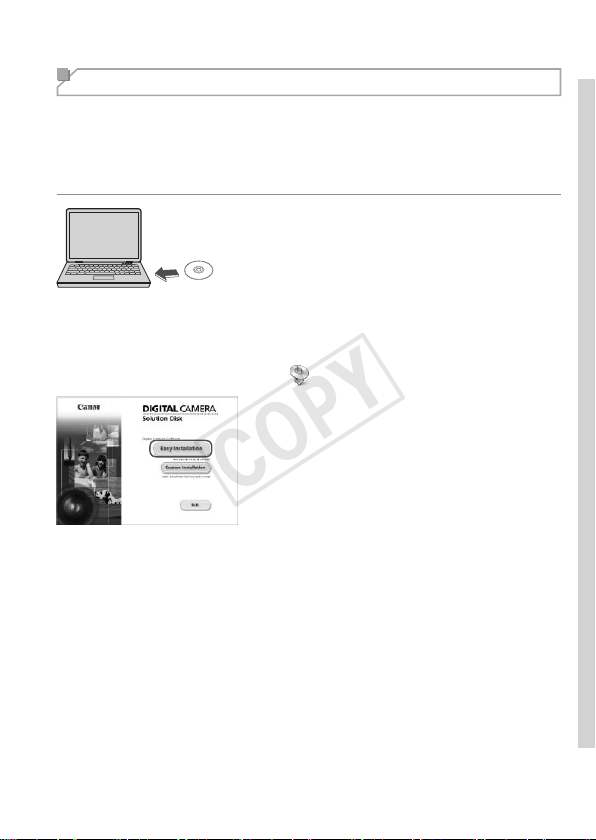
1 InserttheCD-ROMinthe
computer’sCD-ROMdrive.
InserttheincludedCD-ROM(DIGITAL
CAMERASolutionDisk)(=
2)inthe
computer’sCD-ROMdrive.
OnaMacintoshcomputer,afterinserting
thedisc,double-clickthedesktopdisc
icontoopenit,andthendouble-clickthe
[
]icondisplayed.
2 Begintheinstallation.
Click[EasyInstallation]andfollowthe
on-screeninstructionstocompletethe
installationprocess.
COPY
34
IncludedSoftware,PDFManuals
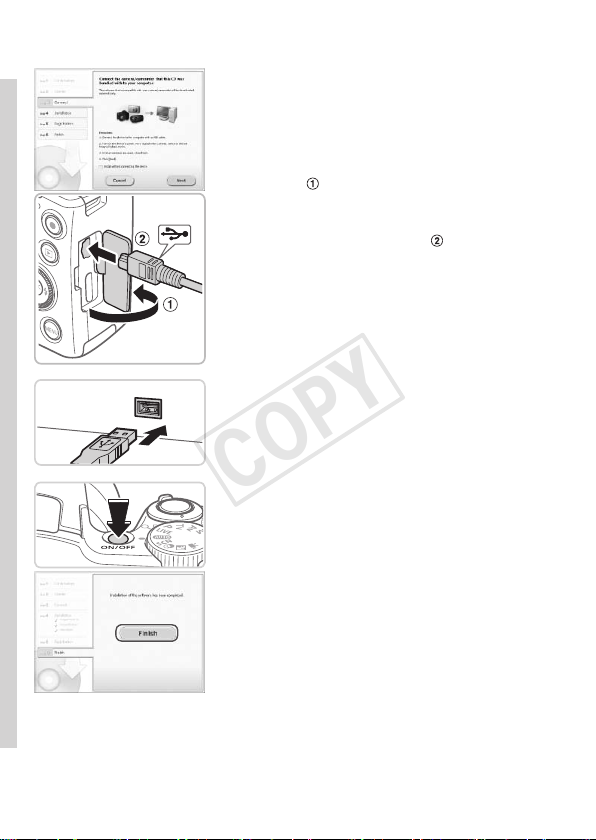
3 Whenamessageisdisplayed
promptingyoutoconnect
thecamera,connectittoa
computer.
Withthecameraturnedoff,openthe
cover(
).Withthesmallerplugofthe
includedinterfacecable(=
2)inthe
orientationshown,inserttheplugfully
intothecameraterminal(
).
Insertthelargerplugoftheinterface
cableinthecomputer’sUSBport.For
detailsaboutUSBconnectionsonthe
computer,refertothecomputeruser
manual.
4 Installtheles.
Turnthecameraon,andfollowthe
on-screeninstructionstocompletethe
installationprocess.
ThesoftwarewillconnecttotheInternet
toupdatetothelatestversionand
downloadnewfunctions.Installationmay
takesometime,dependingoncomputer
performanceandtheInternetconnection.
Click[Finish]or[Restart]onthescreen
afterinstallationandremovetheCD-
ROMwhenthedesktopisdisplayed.
Turnthecameraoffanddisconnectthe
cable.
COPY

35
IncludedSoftware,PDFManuals
• WhennotconnectedtotheInternet,therearethefollowinglimitations.
-Thescreeninstep3willnotbedisplayed.
-Somefunctionsmaynotbeinstalled.
• Thersttimeyouconnectthecameratothecomputer,driverswillbe
installed,soitmaytakeafewminutesuntilcameraimagesareaccessible.
• IfyouhaveseveralcamerasthatwerebundledwithImageBrowserEXon
theincludedCD-ROMs,besuretouseeachcamerawiththeirincludedCD-
ROMandfollowtheon-screeninstallationinstructionsforeach.Doingsowill
ensurethateachcamerawillreceivethecorrectupdatesandnewfunctions
viatheautoupdatefunction.
COPY
36
IncludedSoftware,PDFManuals
Saving Images to a Computer
Windows7andMacOSX10.6areusedhereforthesakeofillustration.
1 Connectthecameratothe
computer.
Followstep3on=
34toconnectthe
cameratoacomputer.
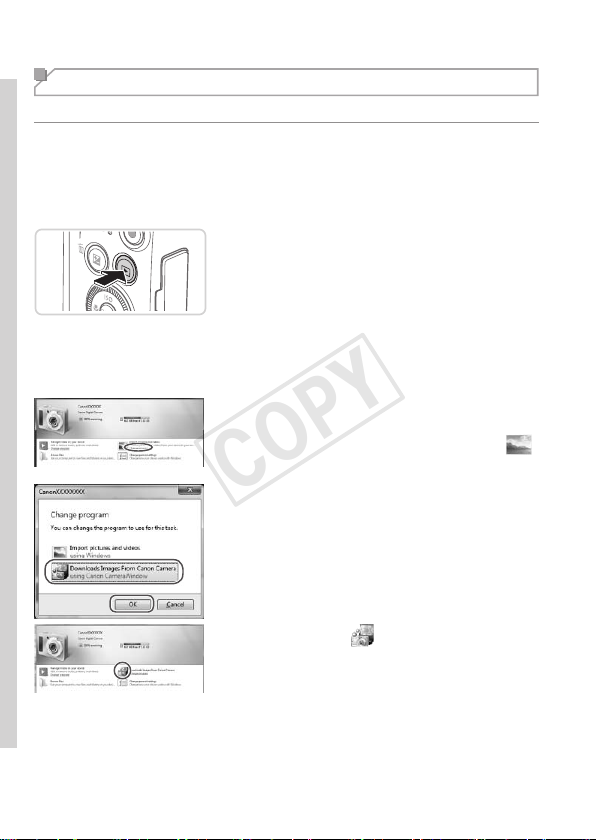
2 Turnthecameraontoaccess
CameraWindow.
Pressthe<1>buttontoturnthecamera
on.
OnaMacintoshcomputer,
CameraWindowisdisplayedwhena
connectionisestablishedbetweenthe
cameraandcomputer.
ForWindows,followthestepsintroduced
below.
Inthescreenthatdisplays,clickthe[ ]
linktomodifytheprogram.
Choose[DownloadsImagesFromCanon
CamerausingCanonCameraWindow]
andthenclick[OK].
Doubleclick[ ].
COPY

37
IncludedSoftware,PDFManuals
CameraWindow
3 Savetheimagestothe
computer.
Click[ImportImagesfromCamera],and
thenclick[ImportUntransferredImages].
ImagesarenowsavedtothePictures
folderonthecomputer,inseparate
foldersnamedbydate.
Afterimagesaresaved,close
CameraWindow,pressthe<1>button
toturnthecameraoff,andunplugthe
cable.
Forinstructionsonviewingimageson
acomputer,refertotheSoftware Guide
(=
31).
COPY

38
IncludedSoftware,PDFManuals
• InWindows7,ifthescreeninstep2isnotdisplayed,clickthe[ ]iconin
thetaskbar.
• TostartCameraWindowinWindowsVistaorXP,click[DownloadsImages
FromCanonCamerausingCanonCameraWindow]onthescreendisplayed
whenyouturnthecameraoninstep2.IfCameraWindowisnotdisplayed,
clickthe[Start]menuandchoose[AllPrograms]►[CanonUtilities]►
[CameraWindow]►[CameraWindow].
• OnaMacintoshcomputer,ifCameraWindowisnotdisplayedafterstep2,
clickthe[CameraWindow]iconintheDock(thebaratthebottomofthe
desktop).
• Althoughyoucansaveimagestoacomputersimplybyconnectingyour
cameratothecomputerwithoutusingtheincludedsoftware,thefollowing
limitationsapply.
-Itmaytakeafewminutesafteryouconnectthecameratothecomputer
untilcameraimagesareaccessible.
-Imagesshotinverticalorientationmaybesavedinhorizontalorientation.
-Imageprotectionsettingsmaybeclearedfromimagessavedtoa
computer.
-Someproblemsmayoccurwhensavingimagesorimageinformation,
dependingontheoperatingsystemversion,thesoftwareinuse,orimage
lesizes.
-Somefunctionsprovidedbytheincludedsoftwaremaynotbeavailable,
suchaseditingmoviesorreturningimagestothecamera.
Using the PDF Manuals
CameraUserGuide
Accessthisguidebydouble-clickingthedesktopshortcuticon.
SoftwareGuide
Theguidecanbeaccessedfromthehelpsystemofincludedsoftware
(somesoftwareexcluded).
• ItmaynotbepossibletoinstallthePDFmanualsoncomputersthatdo
notmeetthesystemrequirements(=
32).However,youcanviewthe
manualsonacomputerthatsupportsAdobeReaderbycopyingthePDF
lesintheReadmefolderontheCD-ROMdirectlytoaconvenientlocation
onthecomputer.
COPY
39
Accessories
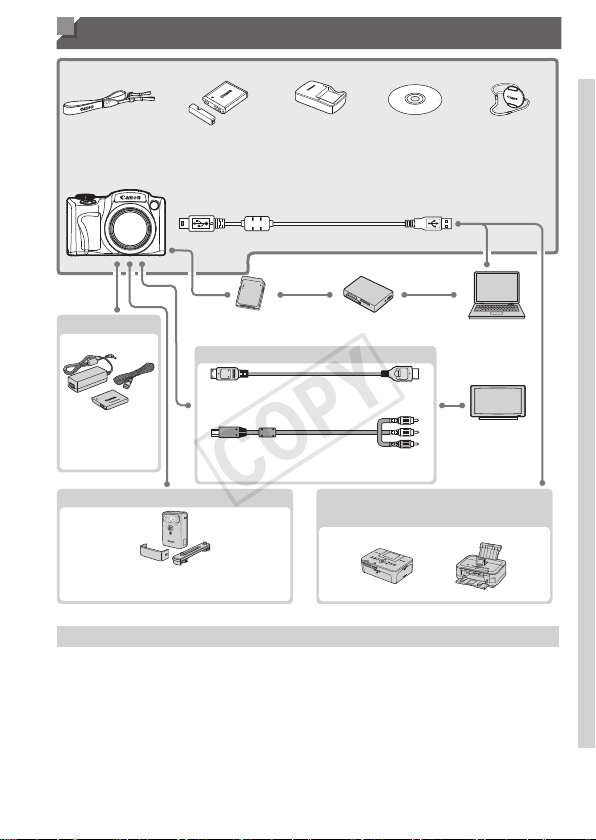
NeckStrap
NS-DC11
BatteryPack
NB-6L*
(withterminal
cover)
Battery
Charger
CB-2LY/
CB-2LYE*
InterfaceCableIFC-400PCU*
1
MemoryCard
CardReader
Windows/
Macintosh
Computer
TV/Video
System
ACAdapterKit
ACK-DC40
IncludedAccessories
Power
Cable
HDMICableHTC-100
StereoAVCableAVC-DC400ST
FlashUnit
High-PowerFlash
HF-DC2
CanonPictBridge-Compatible
Printers
DIGITAL
CAMERA
SolutionDisk
LensCap
(withcord)
* Alsoavailableforpurchaseseparately.
UseofgenuineCanonaccessoriesisrecommended.
Thisproductisdesignedtoachieveexcellentperformancewhenusedwithgenuine
Canonaccessories.
Canonshallnotbeliableforanydamagetothisproductand/oraccidentssuchasre,
etc.,causedbythemalfunctionofnon-genuineCanonaccessories(e.g.,aleakage
and/orexplosionofabatterypack).Pleasenotethatthiswarrantydoesnotapplyto
repairsarisingoutofthemalfunctionofnon-genuineCanonaccessories,althoughyou
mayrequestsuchrepairsonachargeablebasis.
COPY

40
COPY

41
Camera Basics
Practicalguidethatintroducesothercamerabasicsand
describesshootingandplaybackoptions
1
Advanced
Guide
COPY
42
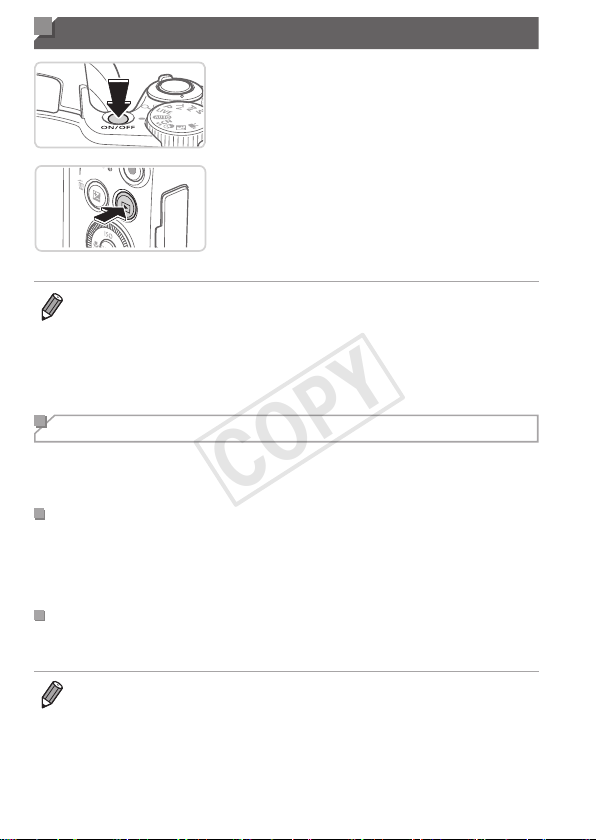
On/Off
ShootingMode
Pressthepowerbuttontoturnthe
cameraonandprepareforshooting.
Toturnthecameraoff,pressthepower
buttonagain.
PlaybackMode
Pressthe<1>buttontoturnthecamera
onandviewyourshots.
Toturnthecameraoff,pressthe<1>
buttonagain.
• ToswitchtoPlaybackmodefromShootingmode,pressthe<1>button.
• ToswitchtoShootingmodefromPlaybackmode,presstheshutterbutton
halfway(=
43).
• Thelenswillberetractedafteraboutoneminuteoncethecameraisin
Playbackmode.Youcanturnthecameraoffwhenthelensisretractedby
pressingthe<1>button.
Power-Saving Features (Auto Power Down)
Asawaytoconservebatterypower,thecameraautomaticallydeactivates
thescreen(DisplayOff)andthenturnsitselfoffafteraspecicperiodof
inactivity.
PowerSavinginShootingMode
Thescreenisautomaticallydeactivatedafteraboutoneminuteofinactivity.
Inabouttwomoreminutes,thelensisretractedandthecameraturnsitself
off.Toactivatethescreenandprepareforshootingwhenthescreenisoff
butthelensisstillout,presstheshutterbuttonhalfway(=
43).
PowerSavinginPlaybackMode
Thecameraturnsitselfoffautomaticallyafteraboutveminutesof
inactivity.
• Adjustthetimingofautomaticcameraandscreendeactivationasneeded
(=
163).
• Powersavingisnotactivewhilethecameraisconnectedtoacomputer
(=
36).
COPY
43
Shutter Button
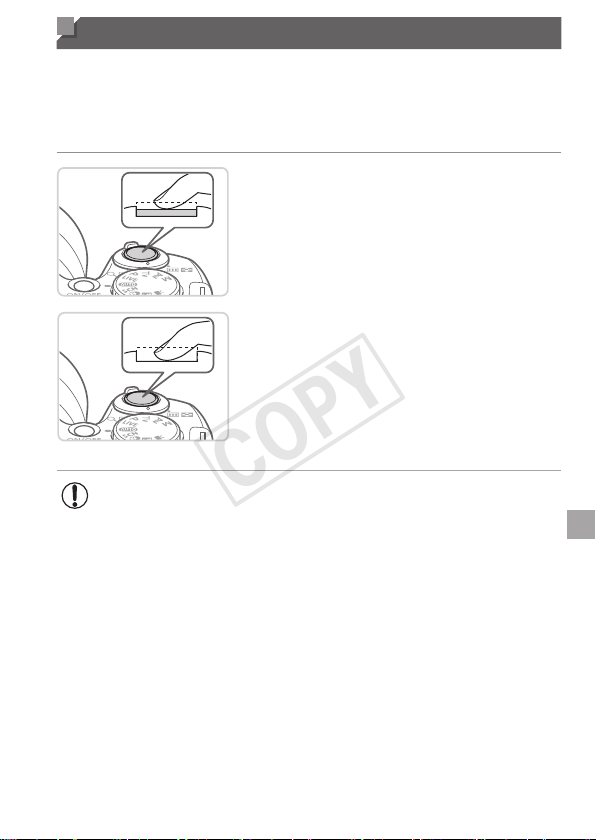
Toensureyourshotsareinfocus,alwayspresstheshutterbuttonlightly
(halfway)initially.Oncethesubjectisinfocus,pressthebuttonalltheway
downtoshoot.
Inthismanual,shutterbuttonoperationsaredescribedaspressingthe
buttonhalfwayorall the way down.
1 Presshalfway.(Presslightlyto
focus.)
Presstheshutterbuttonhalfway.The
camerabeepstwice,andAFframesare
displayedaroundimageareasinfocus.
2 Pressallthewaydown.(From
thehalfwayposition,pressfully
toshoot.)
Thecamerashoots,asashuttersound
isplayed.
Keepthecamerastilluntiltheshutter
soundends.
• Imagesmaybeoutoffocusifyoushootwithoutinitiallypressing
theshutterbuttonhalfway.
• Lengthofshuttersoundplaybackvariesdependingonthetime
requiredfortheshot.Itmaytakelongerinsomeshootingscenes,
andimageswillbeblurryifyoumovethecamera(orthesubject
moves)beforetheshuttersoundends.
COPY

44
Shooting Modes
Usethemodedialtoaccesseachshootingmode.
LiveViewControlMode
Customizeimagebrightnessor
colorswhenshooting(=
79).
MovieMode
Forshootingmovies
(=
88).
Youcanalsoshoot
movieswhenthe
modedialisnotsetto
Moviemode,simply
bypressingthemovie
button.
P,Tv,Av,andMModes
Takeavarietyofshots
usingyourpreferred
settings(=
91,115).
AutoMode
Fullyautomaticshooting,with
camera-determinedsettings
(=
26,52).
SceneMode
Shootwithoptimalsettingsfor
specicscenes(=
80).
CreativeFiltersMode
Addavarietyofeffectstoimages
whenshooting(=
82).
DiscreetMode
Shootwithouttheashor
camerasounds(=
78).
• YoucanturnthemodedialtoswitchtoShootingmodefromPlaybackmode.
COPY

45
Shooting Display Options
Pressthe<l>buttontoviewotherinformationonthescreen,ortohide
theinformation.Fordetailsontheinformationdisplayed,see=
202.
Informationisdisplayed Noinformationisdisplayed
• Screenbrightnessisautomaticallyincreasedbythenightdisplayfunction
whenyouareshootingunderlowlight,makingiteasiertocheckhowshots
arecomposed.However,on-screenimagebrightnessmaynotmatchthe
brightnessofyourshots.Notethatanyon-screenimagedistortionorjerky
subjectmotionwillnotaffectrecordedimages.
• Forplaybackdisplayoptions,see=
124.
COPY
46
FUNC. Menu
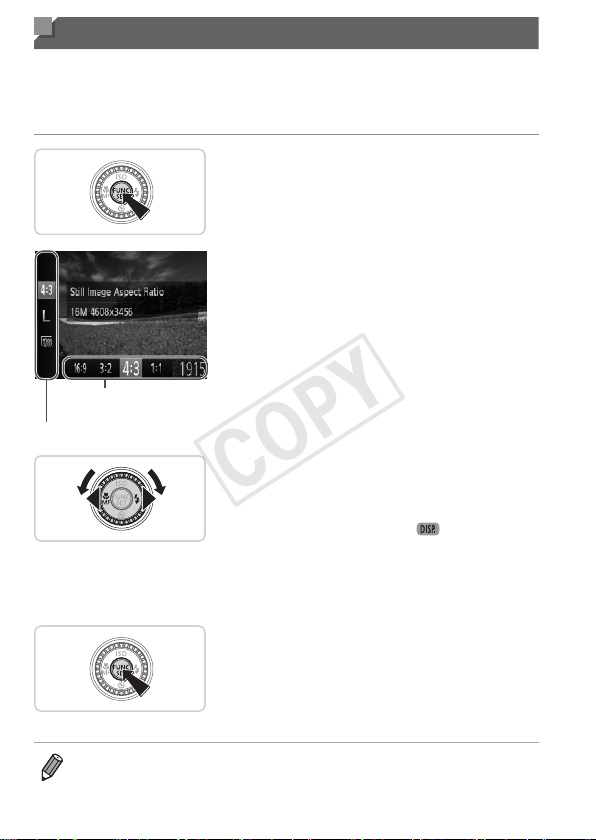
CongurecommonlyusedshootingfunctionsthroughtheFUNC.menuas
follows.
Notethatmenuitemsandoptionsvarydependingontheshootingmode
(=
208–209).
1 AccesstheFUNC.menu.
Pressthe<m>button.
MenuItems
Options
2 Chooseamenuitem.
Pressthe<o><p>buttonstochoosea
menuitem.
Availableoptionsareshownatthebottom
ofthescreen.
3 Chooseanoption.
Pressthe<q><r>buttonsorturnthe
<5>dialtochooseanoption.
Optionslabeledwitha[ ]iconcan
beconguredbypressingthe<l>
button.
Toreturntothemenuitems,pressthe
<l>button.
4 Finishthesetupprocess.
Pressthe<m>button.
Thescreenbeforeyoupressedthe
<m>buttoninstep1isdisplayedagain,
showingtheoptionyoucongured.
• Toundoanyaccidentalsettingchanges,youcanrestorethecamera’s
defaultsettings(=
167).
COPY
47
MENU Menu
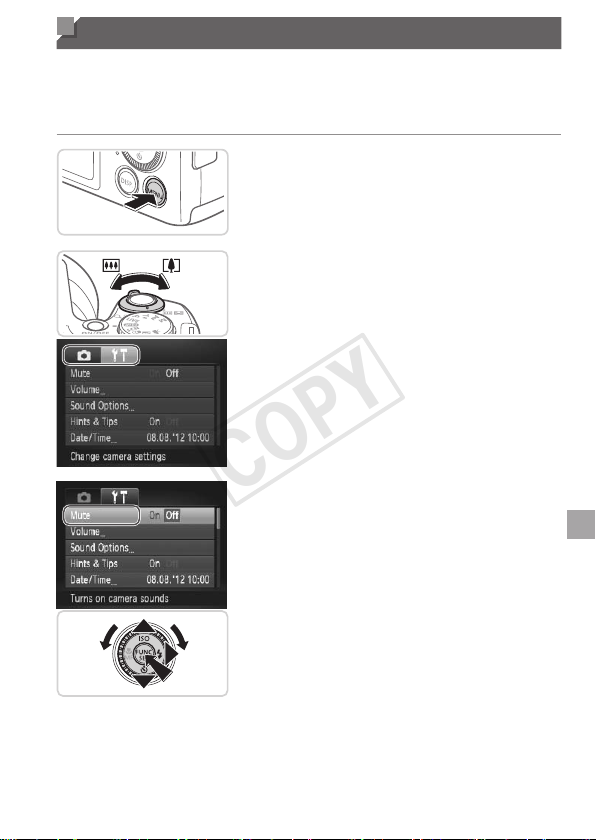
Congureavarietyofcamerafunctionsthroughothermenusasfollows.
Menuitemsaregroupedbypurposeontabs,suchasshooting[4],
playback[1],andsoon.Notethatavailablesettingsvarydependingon
theselectedshootingorplaybackmode(=
210–215).
1 Accessthemenu.
Pressthe<n>button.
2 Chooseatab.
Movethezoomlevertochooseatab.
Afteryouhavepressedthe<o><p>
buttonstochooseatabinitially,youcan
switchbetweentabsbypressingthe
<q><r>buttons.
3 Chooseasetting.
Pressthe<o><p>buttonsorturnthe
<5>dialtochooseasetting.
Tochoosesettingswithoptionsnot
shown,rstpressthe<m>or<r>
buttontoswitchscreens,andtheneither
pressthe<o><p>buttonsorturnthe
<5>dialtoselectthesetting.
Toreturntothepreviousscreen,press
the<n>button.
COPY
48
MENUMenu
4 Chooseanoption.
Pressthe<q><r>buttonstochoosean
option.
5 Finishthesetupprocess.
Pressthe<n>buttontoreturntothe
screendisplayedbeforeyoupressedthe
<n>buttoninstep1.
• Toundoanyaccidentalsettingchanges,youcanrestorethecamera’s
defaultsettings(=
167).
COPY
49
Indicator Display
Theindicatoronthebackofthecamera(=
7)lightsuporblinks
dependingonthecamerastatus.
Color
Indicator
Status
CameraStatus
Green
On
Connectedtoacomputer(=
36),ordisplayoff
(=
42,163)
Blinking Startingup,recording/reading/transmittingimages
• Whentheindicatorblinksgreen,neverturnthecameraoff,open
thememorycard/batterycover,orshakeorjoltthecamera,which
maycorruptimagesordamagethecameraormemorycard.
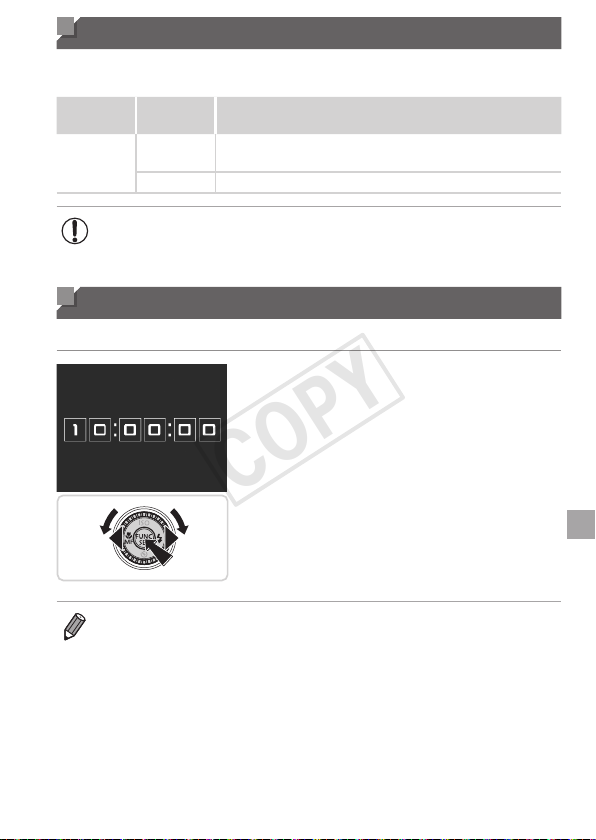
Clock
Youcancheckthecurrenttime.
Pressandholdthe<m>button.
Thecurrenttimeappears.
Ifyouholdthecameraverticallywhile
usingtheclockfunction,itwillswitch
toverticaldisplay.Pressthe<q><r>
buttonsorturnthe<5>dialtochange
thedisplaycolor.
Pressthe<m>buttonagaintocancel
theclockdisplay.
• Whenthecameraisoff,pressandholdthe<m>button,thenpressthe
powerbuttontodisplaytheclock.
COPY

50
COPY

51
Smart Auto Mode
Convenientmodeforeasyshotswithgreatercontrol
overshooting
2
COPY
52
StillImages Movies
Shooting (Smart Auto)
Forfullyautomaticselectionatoptimalsettingsforspecicscenes,simply
letthecameradeterminethesubjectandshootingconditions.
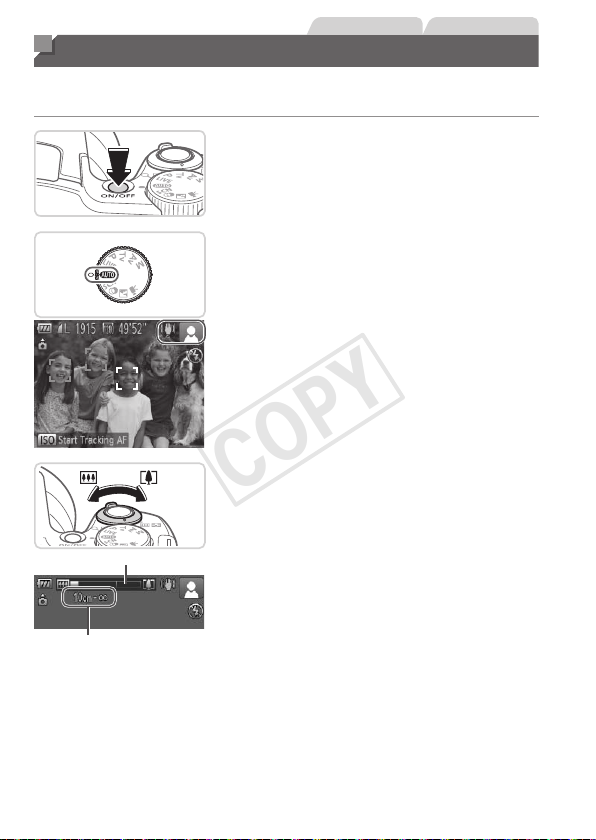
1 Turnthecameraon.
Pressthepowerbutton.
Thestartupscreenisdisplayed.
2 Enter<A>mode.
Setthemodedialto<A>.
Aimthecameraatthesubject.The
camerawillmakeaslightclickingnoise
asitdeterminesthescene.
Iconsrepresentingthesceneandimage
stabilizationmodearedisplayedinthe
upperrightofthescreen(=
57,58).
Framesdisplayedaroundanydetected
subjectsindicatethattheyareinfocus.
ZoomBar
FocusRange(approx.)
3 Composetheshot.
Tozoominandenlargethesubject,move
thezoomlevertoward<i>(telephoto),
andtozoomawayfromthesubject,move
ittoward<j>(wideangle).(Azoombar
showingthezoompositionisdisplayed.)
Tozoominoroutquickly,movethezoom
leverallthewaytoward<i>(telephoto)
or<j>(wideangle),andtozoomin
oroutslowly,moveitjustalittleinthe
desireddirection.
COPY
53
Shooting(SmartAuto)
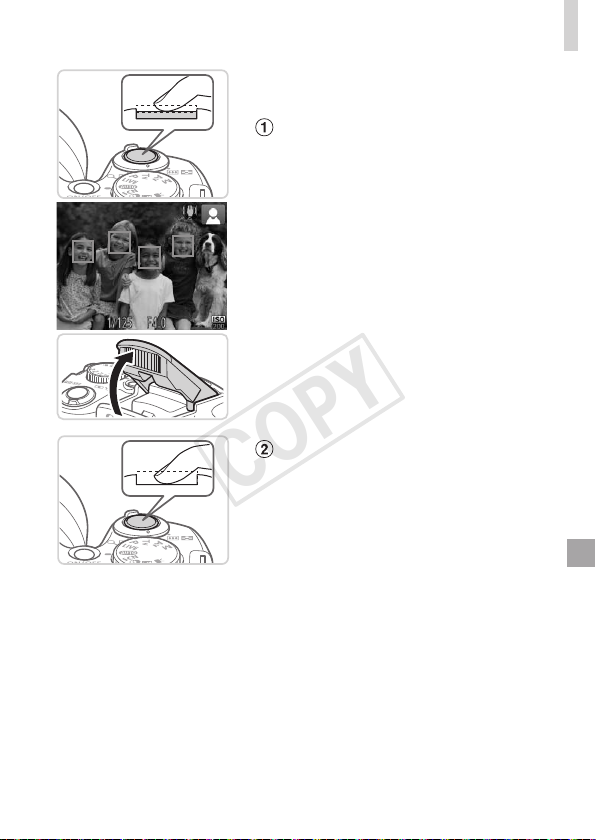
4 Shoot.
ShootingStillImages
Focus.
Presstheshutterbuttonhalfway.The
camerabeepstwiceafterfocusing,and
greenframesaredisplayedtoindicate
imageareasinfocus.
Severalgreenframesaredisplayedwhen
multipleareasareinfocus.
If[Raisetheash]isdisplayed,liftthe
ashwithyourngertoprepareitforuse.
Ifyouprefernottousetheash,pushit
downwithyournger,intothecamera.
Shoot.
Presstheshutterbuttonalltheway
down.
Asthecamerashoots,ashuttersound
isplayed,andinlow-lightconditions
whenyouhaveraisedtheash,itres
automatically.
Keepthecamerastilluntiltheshutter
soundends.
Yourshotremainsdisplayedonthe
screenforabouttwoseconds.
Evenwhiletheshotisdisplayed,youcan
takeanothershotbypressingtheshutter
buttonagain.
COPY
54
Shooting(SmartAuto)
ElapsedTime
ShootingMovies
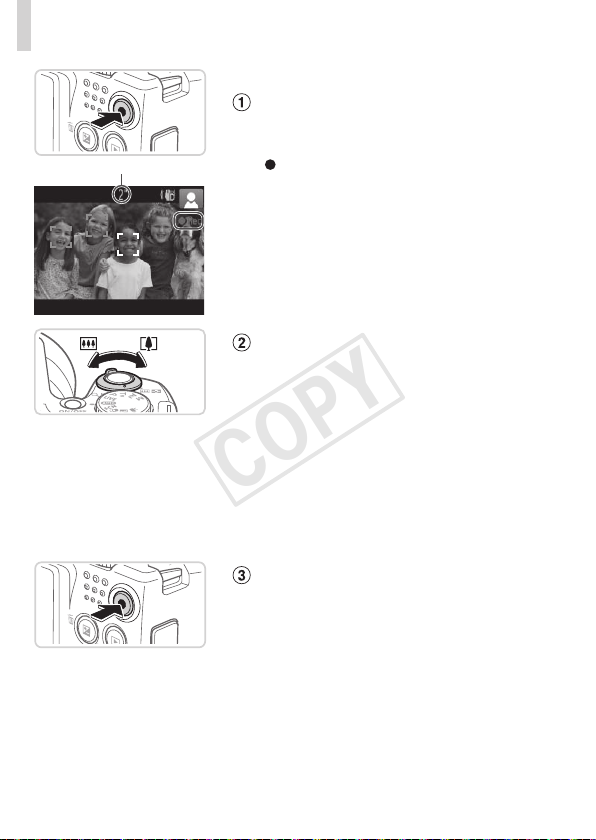
Startshooting.
Pressthemoviebutton.Thecamera
beepsonceasrecordingbegins,and
[
Rec]isdisplayedwiththeelapsedtime.
Blackbarsdisplayedonthetopand
bottomedgesofthescreenindicate
imageareasnotrecorded.
Framesdisplayedaroundanydetected
facesindicatethattheyareinfocus.
Oncerecordingbegins,youcantakeyour
ngeroffthemoviebutton.
Resizethesubjectand
recomposetheshotasneeded.
Toresizethesubject,dothesamething
asinstep3on=
52.
However,notethatthesoundofcamera
operationswillberecorded,andmovies
shotatzoomfactorsshowninbluewill
lookgrainy.
Whenyourecomposeshots,the
focus,brightness,andcolorswillbe
automaticallyadjusted.
Finishshooting.
Pressthemoviebuttonagaintostop
shooting.Thecamerabeepstwiceas
recordingstops.
Recordingwillstopautomaticallywhen
thememorycardbecomesfull.
COPY

55
Shooting(SmartAuto)
StillImages/Movies
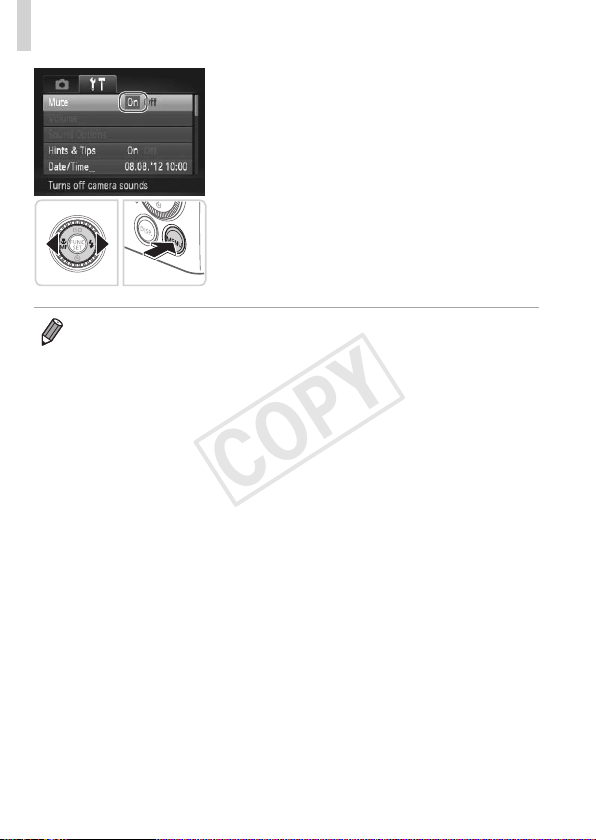
• Torestorecamerasoundifyouhaveaccidentallydeactivatedit
(byholdingthe<l>buttondownwhileturningthecameraon),
pressthe<n>buttonandchoose[Mute]onthe[3]tab,and
thenpressthe<q><r>buttonstochoose[Off].
StillImages
• Aashing[ ]iconwarnsthatimagesaremorelikelytobeblurred
bycamerashake.Inthiscase,mountthecameraonatripodor
takeothermeasurestokeepitstill.
• Ifyourshotsaredarkdespitetheashring,movecloserto
thesubject.Fordetailsontheashrange,see“Specications”
(=
217).
• Thesubjectmaybetoocloseifthecameraonlybeepsoncewhen
youpresstheshutterbuttonhalfway.Fordetailsonthefocusing
range(shootingrange),see“Specications”(=
217).
• Toreducered-eyeandtoassistinfocusing,thelampmaybe
activatedwhenshootinginlow-lightconditions.
• Ablinking[h]icondisplayedwhenyouattempttoshootindicates
thatshootingisnotpossibleuntiltheashhasnishedrecharging.
Shootingcanresumeassoonastheashisready,soeitherpress
theshutterbuttonallthewaydownandwait,orreleaseitand
pressitagain.
COPY

56
Shooting(SmartAuto)
Movies
Microphone
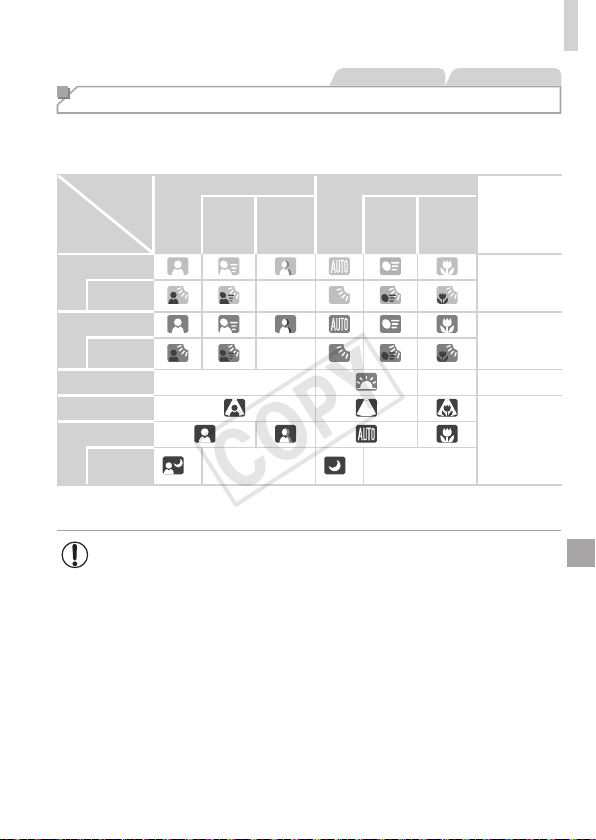
• Beforeshootingamovie,lowerthe
ashwithyournger.Becarefulnotto
touchthemicrophonewhenshooting
amovie.Leavingtheashraised,or
blockingthemicrophonemayprevent
audiofrombeingrecordedormay
causetherecordingtosoundmufed.
• Avoidtouchingcameracontrolsotherthanthemoviebuttonwhen
shootingmovies,becausesoundsmadebythecamerawillbe
recorded.
• Audioisrecordedinstereo.
COPY
57
Shooting(SmartAuto)
StillImages Movies
Scene Icons
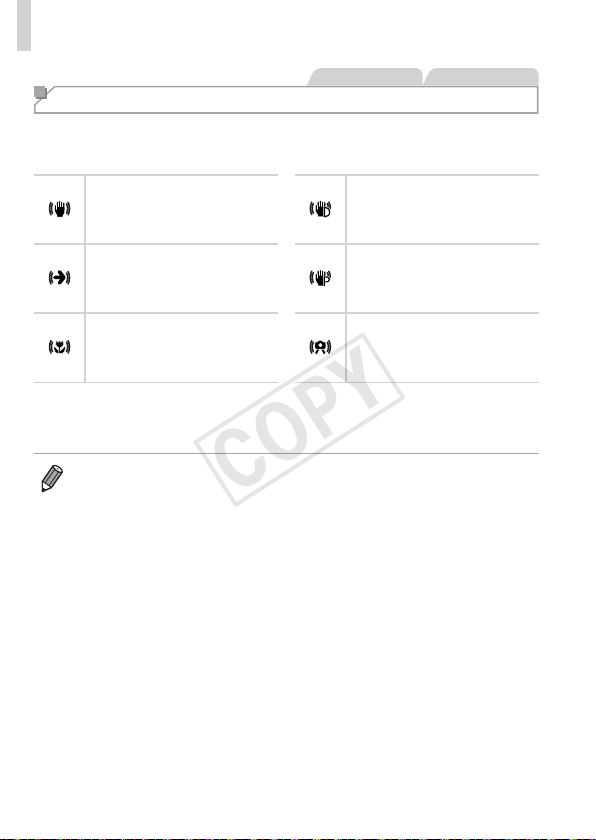
In<A>mode,shootingscenesdeterminedbythecameraareindicated
bytheicondisplayed,andcorrespondingsettingsareautomatically
selectedforoptimalfocusing,subjectbrightness,andcolor.
Subject
Background
People OtherSubjects
Icon
Background
Color
In
Motion*
1
Shadows
onFace*
1
In
Motion*
1
AtClose
Range
Bright
Gray
Backlit
–
WithBlueSky
LightBlue
Backlit
–
Sunsets
–
– Orange
Spotlights
DarkBlue
Dark
Tripod
Used
*
2
–
*
2
–
*1Notdisplayedformovies.
*2Displayedindarksceneswhenthecameraisheldstill,aswhenmountedonatripod.
• Tryshootingin<G>mode(=
91)ifthesceneicondoesnot
matchactualshootingconditions,orifitisnotpossibletoshoot
withyourexpectedeffect,color,orbrightness.
COPY
58
Shooting(SmartAuto)
StillImages Movies
Image Stabilization Icons
Optimalimagestabilizationfortheshootingconditionsisautomatically
applied(IntelligentIS).Additionally,thefollowingiconsaredisplayedin
<A>mode.
Imagestabilizationforstill
images
Imagestabilizationformovies,
reducingstrongcamerashake,
aswhenshootingwhilewalking
(DynamicIS)
Imagestabilizationforstill
images,whenpanning*
Imagestabilizationforslow
camerashake,suchaswhen
shootingmoviesattelephoto
(PoweredIS)
Imagestabilizationformacro
shots(HybridIS)
Noimagestabilization,because
thecameraismountedon
atripodorheldstillbyother
means
*Displayedwhenyoupan,followingmovingsubjectswiththecamera.Whenyoufollow
subjectsmovinghorizontally,imagestabilizationonlycounteractsverticalcamera
shake,andhorizontalstabilizationstops.Similarly,whenyoufollowsubjectsmoving
vertically,imagestabilizationonlycounteractshorizontalcamerashake.
• Tocancelimagestabilization,set[ISMode]to[Off](=
114).Inthiscase,
anISiconisnotdisplayed.
COPY

59
Shooting(SmartAuto)
StillImages Movies
On-Screen Frames
Avarietyofframesaredisplayedoncethecameradetectssubjectsyouare
aimingthecameraat.
• Awhiteframeisdisplayedaroundthesubject(orperson’sface)
determinedbythecameratobethemainsubject,andgrayframesare
displayedaroundotherdetectedfaces.Framesfollowmovingsubjects
withinacertainrangetokeeptheminfocus.
However,ifthecameradetectssubjectmovement,onlythewhiteframe
willremainonthescreen.
• Whenyouarepressingtheshutterbuttonhalfwayandthecamera
detectssubjectmovement,ablueframeisdisplayed,andthefocusand
imagebrightnessareconstantlyadjusted(ServoAF).
• Tryshootingin<G>mode(=
91)ifnoframesaredisplayed,if
framesarenotdisplayedarounddesiredsubjects,orifframesare
displayedonthebackgroundorsimilarareas.
COPY
60
Common, Convenient Features
StillImages Movies
Zooming In Closer on Subjects (Digital Zoom)
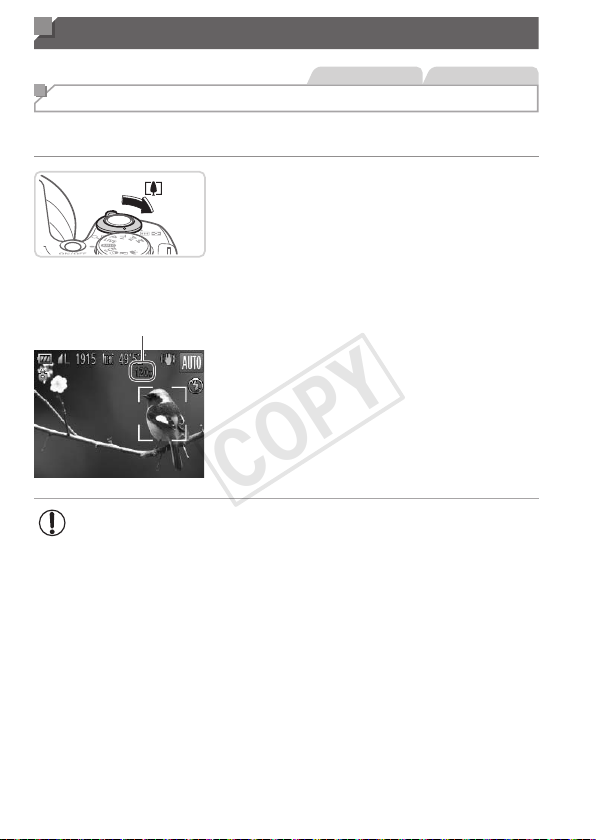
Whendistantsubjectsaretoofarawaytoenlargeusingtheopticalzoom,
usedigitalzoomforuptoabout120xenlargement.
1 Movethezoomlevertoward
<i>.
Holdtheleveruntilzoomingstops.
Zoomingstopsatthelargestpossible
zoomfactor(beforetheimagebecomes
noticeablygrainy),whichisthenindicated
onthescreen.
ZoomFactor
2 Movethezoomlevertoward
<i>again.
Thecamerazoomsinevencloseronthe
subject,usingdigitalzoom.
• Movingthezoomleverwilldisplaythezoombar(whichindicates
thezoomposition).Thecolorofthezoombarwillchange
dependingonthezoomrange.
-Whiterange:opticalzoomrangewheretheimagewillnotappear
grainy.
-Yellowrange:digitalzoomrangewheretheimageisnot
noticeablygrainy(ZoomPlus).
-Bluerange:digitalzoomrangewheretheimagewillappear
grainy.
Becausethebluerangewillnotbeavailableatsomeresolution
settings(=
68)themaximumzoomfactorcanbeachievedby
followingstep1.
• Zoomedimagesmaylookgrainy,undersomeresolutionsettings
(=
68)andzoomfactors.Inthiscase,thezoomfactorisshown
inblue.
COPY
61
Common,ConvenientFeatures
• Focallengthwhenopticalanddigitalzoomarecombinedisasfollows
(35mmlmequivalent).
24–2880mm(24–720mmwithopticalzoomalone)
• Todeactivatedigitalzoom,pressthe<n>button,choose[DigitalZoom]
onthe[4]tab,andthenchoose[Off].
StillImages Movies
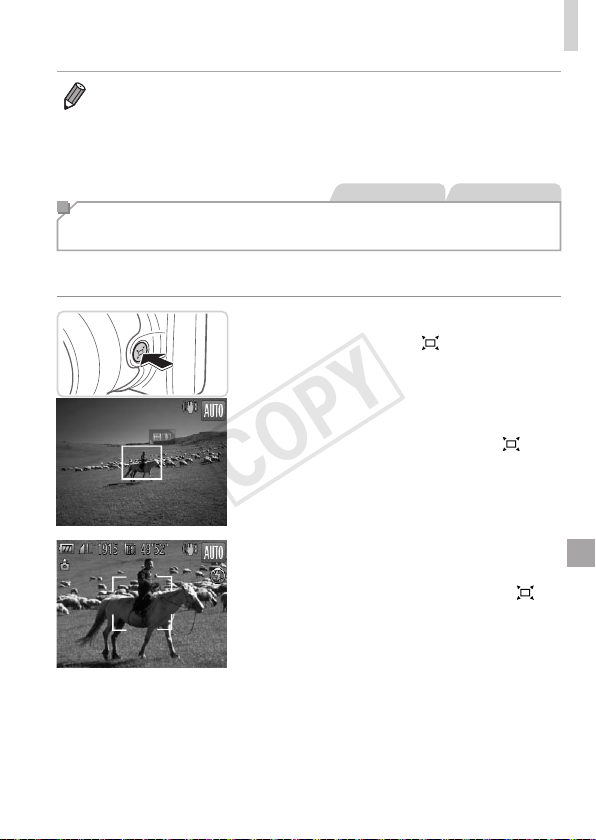
Reacquiring Subjects Lost After Zooming
(Framing Assist – Seek)
Ifyoulosetrackofasubjectwhilezoomingin,youcannditmoreeasilyby
temporarilyzoomingout.
1 Lookforthelostsubject.
Pressandholdthe< >button.
Thecamerazoomsoutanddisplaysa
whiteframearoundtheareapreviously
shown(beforeyoupressedthe<
>
button).
2 Reacquirethesubject.
Aimthecamerasothatthesubjectinthe
whiteframe,andthenreleasethe<
>
button.
Thepreviousmagnicationisnow
restored,sothattheareaoutlinedin
whitellsthescreenagain.
COPY
62
Common,ConvenientFeatures
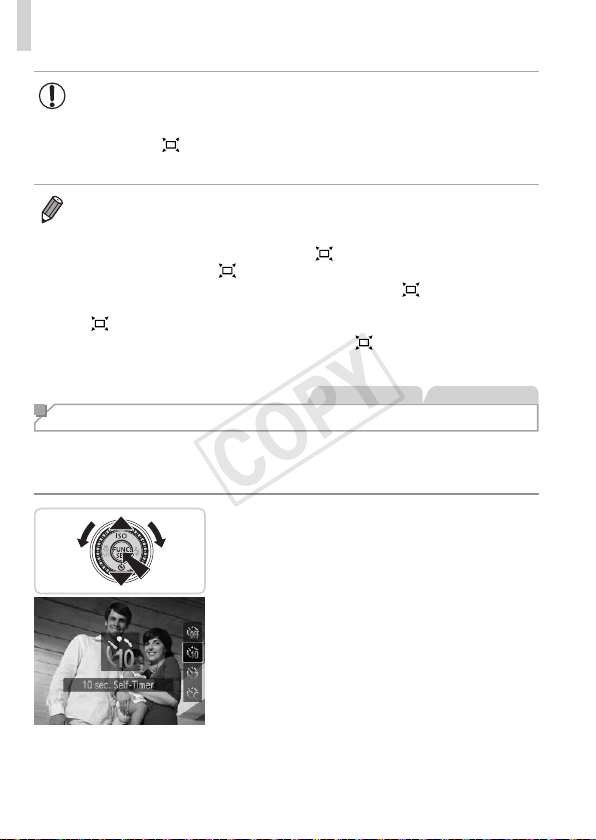
• Someshootinginformationisnotdisplayedwhilethecamerais
zoomedout.
• Duringmovieshooting,thewhiteframeisnotdisplayedifyou
pressthe<
>button.Alsonotethatcameraoperatingsounds
suchaszoomingwillberecorded.
• Ifyouprefertoshootatthezoomfactorofthescreeninstep1,pressthe
shutterbuttonallthewaydown.
• YoucanadjustthezoomfactorthatthecamerawillreverttoafterZoom
FramingAssist(whenyoureleasethe<
>button)bymovingthezoom
leverasyouholdthe<
>buttontoresizethewhiteframe.
• Toadjusthowmuchthecamerazoomsoutwhenthe<
>buttonis
pressed,pressthe<n>buttonandchooseoneofthethreelevelsin
[
DisplayArea]onthe[4]tab.
• Thezoomfactorcannotbechangedwiththe<
>buttonafteryoupress
theshutterbuttonallthewaydowninself-timermode(seebelow).
StillImages Movies
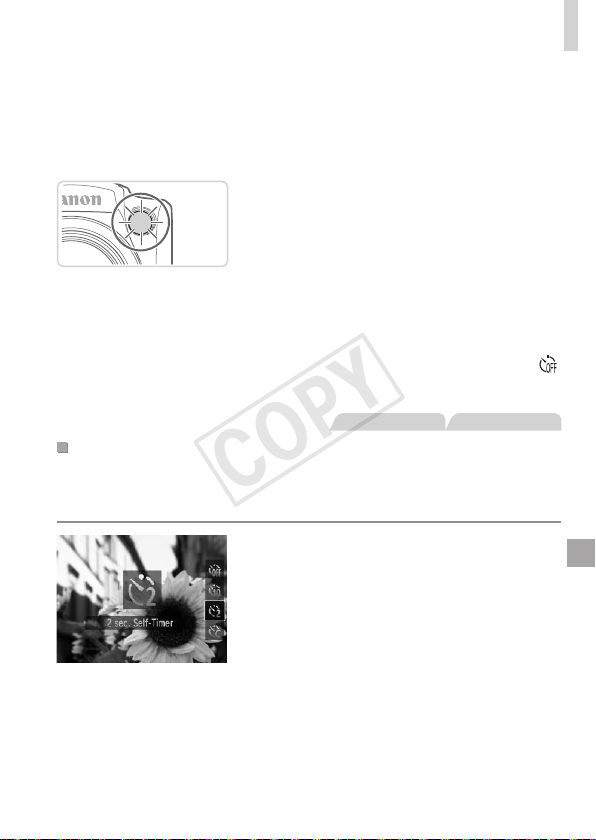
Using the Self-Timer
Withtheself-timer,youcanincludeyourselfingroupphotosorothertimed
shots.Thecamerawillshootabout10secondsafteryoupresstheshutter
button.
1 Congurethesetting.
Pressthe<p>button,choose[]](either
pressthe<o><p>buttonsorturnthe
<5>dial),andthenpressthe<m>
button.
Oncethesettingiscomplete,[]]is
displayed.
COPY
63
Common,ConvenientFeatures
2 Shoot.
ForStillImages:Presstheshutterbutton
halfwaytofocusonthesubject,andthen
pressitallthewaydown.
ForMovies:Pressthemoviebutton.
Onceyoustarttheself-timer,thelamp
willblinkandthecamerawillplayaself-
timersound.
Twosecondsbeforetheshot,theblinking
andsoundwillspeedup.(Thelampwill
remainlitincasetheashres.)
Tocancelshootingafteryouhave
triggeredtheself-timer,pressthe
<n>button.
Torestoretheoriginalsetting,choose[ ]
instep1.
StillImages Movies
UsingtheSelf-TimertoAvoidCameraShake
Thisoptiondelaysshutterreleaseuntilabouttwosecondsafteryouhave
pressedtheshutterbutton.Ifthecameraisunsteadywhileyouarepressing
theshutterbutton,itwillnotaffectyourshot.
Congurethesetting.
Followstep1on
=
6 2
andchoose[
[].
Oncethesettingiscomplete,[[]is
displayed.
Followstep2on=
63toshoot.
COPY
64
Common,ConvenientFeatures
StillImages Movies
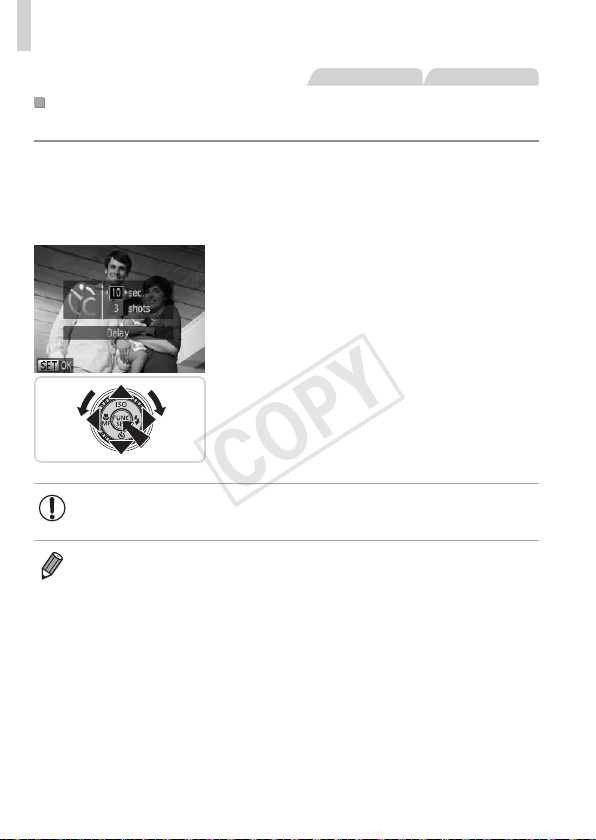
CustomizingtheSelf-Timer
Youcanspecifythedelay(0–30seconds)andnumberofshots(1–10).
1 Choose[$].
Followingstep1on=
62,choose
[$]andpressthe<n>button
immediately.
2 Congurethesetting.
Pressthe<o><p>buttonstochoose
[Delay]or[Shots].
Pressthe<q><r>buttonsorturnthe
<5>dialtochooseavalue,andthen
pressthe<m>button.
Oncethesettingiscomplete,[$]is
displayed.
Followstep2on=
63toshoot.
• Formoviesshotusingtheself-timer,[Delay]representsthedelay
beforerecordingbegins,butthe[Shots]settinghasnoeffect.
• Whenyouspecifymultipleshots,imagebrightnessandwhitebalanceare
determinedbytherstshot.Moretimeisrequiredbetweenshotswhenthe
ashresorwhenyouhavespeciedtotakemanyshots.Shootingwillstop
automaticallywhenthememorycardbecomesfull.
• Whenadelaylongerthantwosecondsisspecied,twosecondsbeforethe
shot,thelampblinkingandself-timersoundwillspeedup.(Thelampwill
remainlitincasetheashres.)
COPY
65
Common,ConvenientFeatures
StillImages
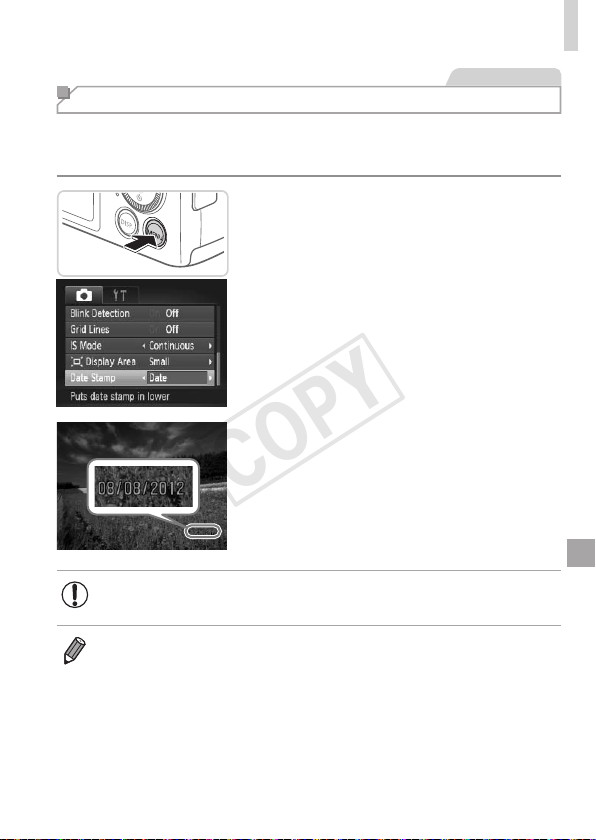
Adding a Date Stamp
Thecameracanaddtheshootingdatetoimages,inthelower-rightcorner.
However,notethatdatestampscannotbeeditedorremoved,soconrm
beforehandthatthedateandtimearecorrect(=
22).
1 Congurethesetting.
Pressthe<n>button,choose[Date
Stamp]onthe[4]tab,andthenchoose
thedesiredoption(=
47).
Oncethesettingiscomplete,[DATE]is
displayed.
2 Shoot.
Asyoutakeshots,thecameraaddsthe
shootingdateortimetothelower-right
cornerofimages.
Torestoretheoriginalsetting,choose
[Off]instep1.
• Datestampscannotbeeditedorremoved.
• Shotstakenwithoutaddingadatestampcanbeprintedwithoneasfollows.
However,addingadatestampthiswaytoimagesthatalreadyhaveonemay
causeittobeprintedtwice.
-Usetheincludedsoftwaretoprint
Fordetails,refertotheSoftware Guide(=
31).
-Printusingprinterfunctions(=
179)
-UsecameraDPOFprintsettings(=
186)toprint
COPY
66
Common,ConvenientFeatures
StillImages
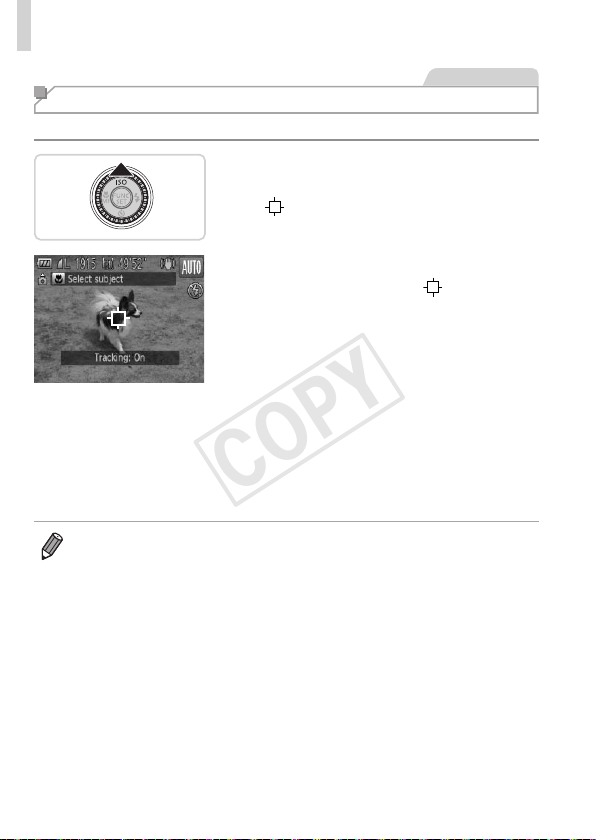
Choosing Subjects to Focus On (Tracking AF)
Shootafterchoosingasubjecttofocusonasfollows.
1 SpecifyTrackingAF.
Pressthe<o>button.
[ ]isdisplayedinthecenterofthe
screen.
2 Chooseasubjecttofocuson.
Aimthecamerasothat[ ]isonthe
desiredsubject,andthenpressthe
shutterbuttonhalfway.
Ablueframeisdisplayed,andthe
camerawillkeepthesubjectinfocusand
imagebrightnessadjusted(ServoAF).
3 Shoot.
Presstheshutterbuttonallthewaydown
toshoot.
Pressthe<o>buttontocancelTracking
AF.
• Trackingmaynotbepossiblewhensubjectsaretoosmallormovetoo
rapidly,orwhensubjectcolororbrightnessmatchesthatofthebackground
tooclosely.
COPY
67
Image Customization Features
StillImages
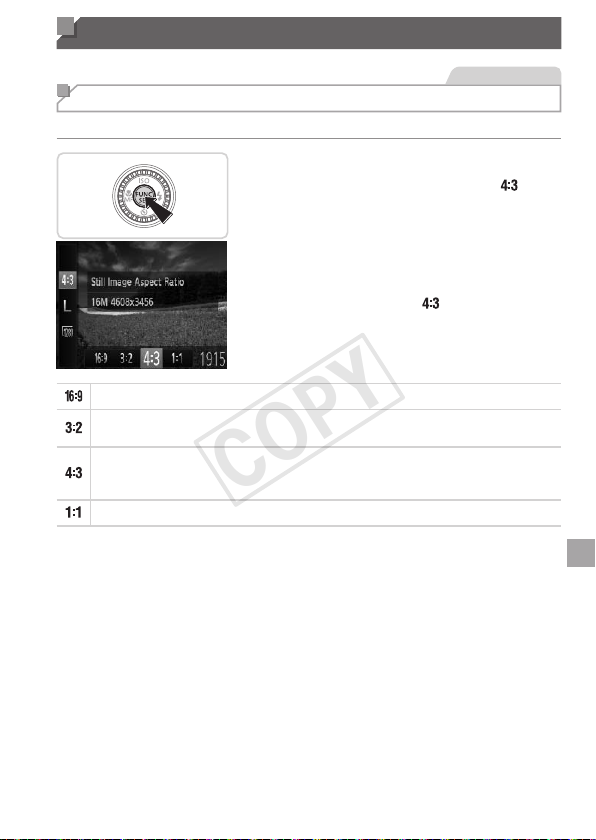
Changing the Aspect Ratio
Changetheimageaspectratio(ratioofwidthtoheight)asfollows.
Congurethesetting.
Pressthe<m>button,choose[ ]in
themenu,andchoosethedesiredoption
(=
46).
Oncethesettingiscomplete,thescreen
aspectratiowillbeupdated.
Torestoretheoriginalsetting,repeatthis
processbutchoose[
].
UsedfordisplayonwidescreenHDTVsorsimilardisplaydevices.
Sameaspectratioas35mmlm,usedforprintingimagesat5x7-inchor
postcardsizes.
Nativeaspectratioofthecamerascreen,alsousedfordisplayonstandard-
denitiontelevisionsorsimilardisplaydevices,orforprintingimagesat3.5x
5-inchorA-seriessizes.
Squareaspectratio.
COPY
68
ImageCustomizationFeatures
StillImages
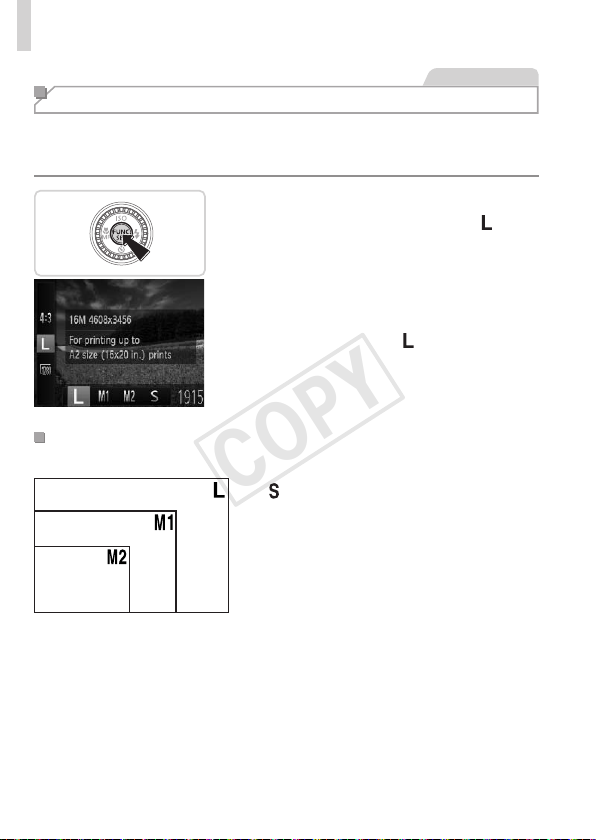
Changing Image Resolution (Size)
Choosefrom4levelsofimageresolution,asfollows.Forguidelineson
howmanyshotsateachresolutionsettingcantonamemorycard,see
“Specications”(=
217).
Congurethesetting.
Pressthe<m>button,choose[ ]in
themenu,andchoosethedesiredoption
(=
46).
Theoptionyouconguredisnow
displayed.
Torestoretheoriginalsetting,repeatthis
processbutchoose[
].
GuidelinesforChoosingResolutionBasedonPaper
Size(for4:3Images)
A2(16.5x23.4in.)
A3–A5(11.7x
16.5–5.8x8.3in.)
5x7in.
Postcard
3.5x5in.
[ ]:Fore-mailingimages.
COPY
69
ImageCustomizationFeatures
StillImages
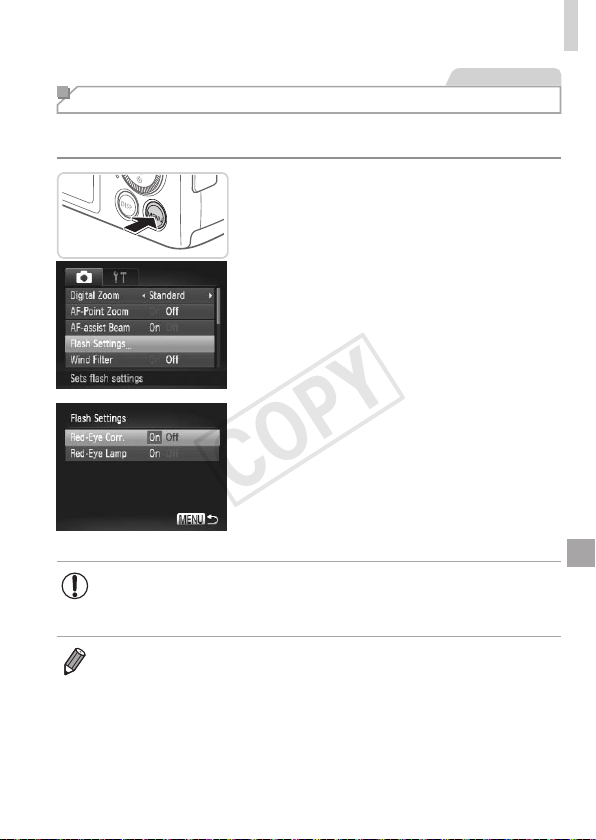
Red-Eye Correction
Red-eyethatoccursintheashphotographycanbeautomatically
correctedasfollows.
1 Accessthe[FlashSettings]
screen.
Pressthe<n>button,choose[Flash
Settings]onthe[4]tab,andthenpress
the<m>button(=
47).
2 Congurethesetting.
Choose[Red-EyeCorr.],andthen
choose[On](=
47).
Oncethesettingiscomplete,[R]is
displayed.
Torestoretheoriginalsetting,repeatthis
processbutchoose[Off].
• Red-eyecorrectionmaybeappliedtoimageareasotherthan
eyes(ifthecameramisinterpretsredeyemakeupasredpupils,
forexample).
• Youcanalsocorrectexistingimages(=
151).
• Youcanalsoaccessthescreeninstep2whentheashisupbypressing
the<r>buttonandimmediatelypressingthe<n>button.
COPY
70
ImageCustomizationFeatures
Movies
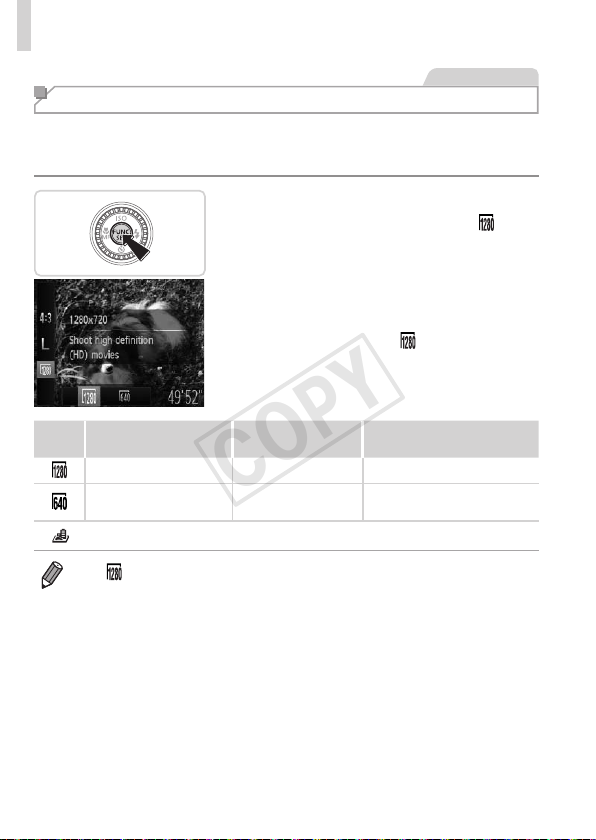
Changing Movie Image Quality
2imagequalitysettingsareavailable.Forguidelinesonthemaximum
movielengthateachlevelofimagequalitythatwilltonamemorycard,
see“Specications”(=
217).
Congurethesetting.
Pressthe<m>button,choose[ ]in
themenu,andchoosethedesiredoption
(=
46).
Theoptionyouconguredisnow
displayed.
Torestoretheoriginalsetting,repeatthis
processbutchoose[
].
Image
Quality
Resolution FrameRate Details
1280x720 25fps* ForshootinginHD
640x480 30fps
Forshootinginstandard
denition
* [
]moviesareplayedbackat30fps.
• In[ ]mode,blackbarsdisplayedonthetopandbottomedgesofthe
screenindicateimageareasnotrecorded.
COPY
71
ImageCustomizationFeatures
Movies
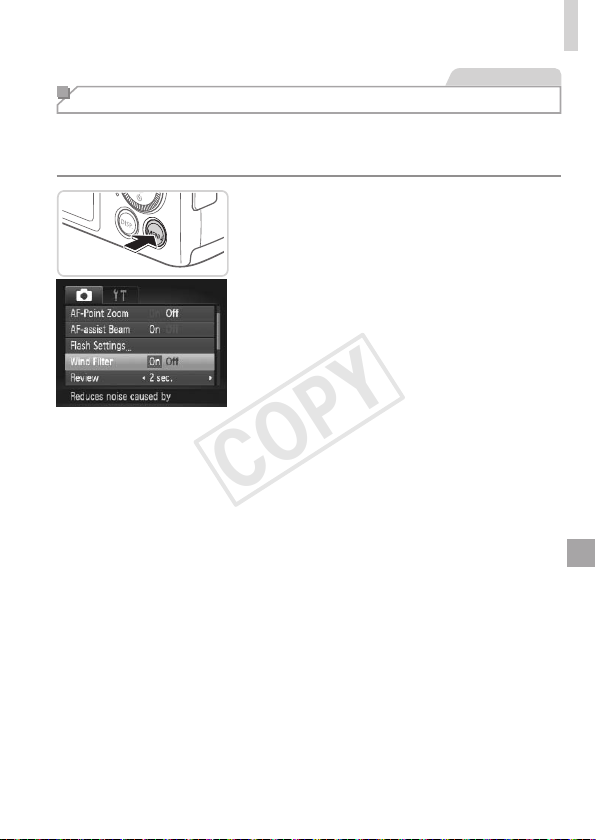
Using the Wind Filter
Distortedaudiocausedbyrecordingwhenthewindisstrongcanbe
reduced.However,therecordingmaysoundunnaturalwhenthisoptionis
usedwhenthereisnowind.
Congurethesetting.
Pressthe<n>button,choose[Wind
Filter]onthe[4]tab,andthenchoose
[On](=
47).
Torestoretheoriginalsetting,repeatthis
processbutchoose[Off].
COPY
72
Helpful Shooting Features
StillImages Movies
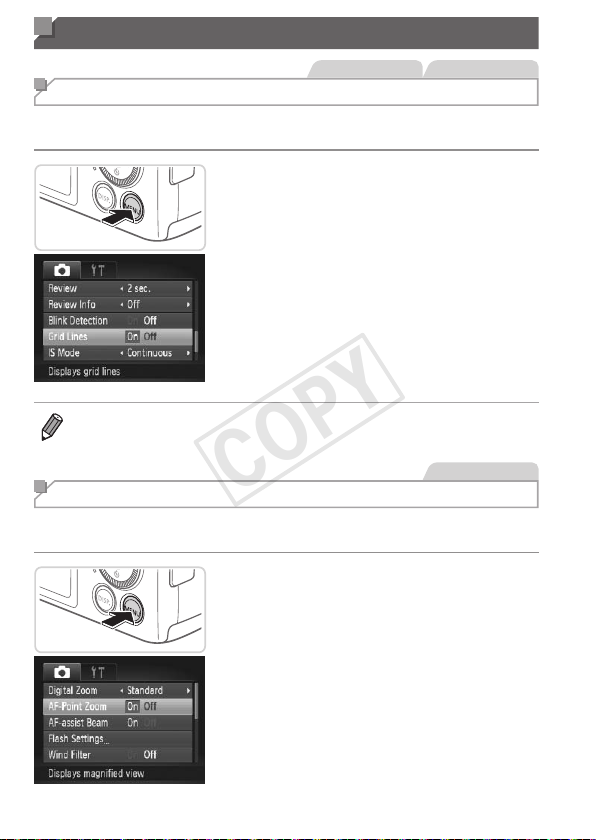
Displaying Grid Lines
Gridlinescanbedisplayedonthescreenforverticalandhorizontal
referencewhileshooting.
Congurethesetting.
Pressthe<n>button,choose[Grid
Lines]onthe[4]tab,andthenchoose
[On](=
47).
Oncethesettingiscomplete,gridlines
aredisplayedonthescreen.
Torestoretheoriginalsetting,repeatthis
processbutchoose[Off].
• Gridlinesarenotrecordedinyourshots.
StillImages
Magnifying the Area in Focus
Youcancheckthefocusbypressingtheshutterbuttonhalfway,whichwill
enlargetheportionoftheimageinfocusintheAFframe.
1 Congurethesetting.
Pressthe<n>button,choose[AF-
PointZoom]onthe[4]tab,andthen
choose[On](=
47).
COPY

73
HelpfulShootingFeatures
2 Checkthefocus.
Presstheshutterbuttonhalfway.The
facedetectedasthemainsubjectisnow
magnied.
Torestoretheoriginalsetting,choose
[Off]instep1.
• Theareainfocuswillnotbemagniedwhenyoupresstheshutter
buttonhalfwayifafacewasnotdetected,ifthepersonistooclose
tothecameraandtheirfaceistoolargeforthescreen,orifthe
cameradetectssubjectmovement.
• Thedisplaywillnotmagnifywhenusingthedigitalzoom(=
60)or
TrackingAF(=
107).
COPY
74
HelpfulShootingFeatures
StillImages
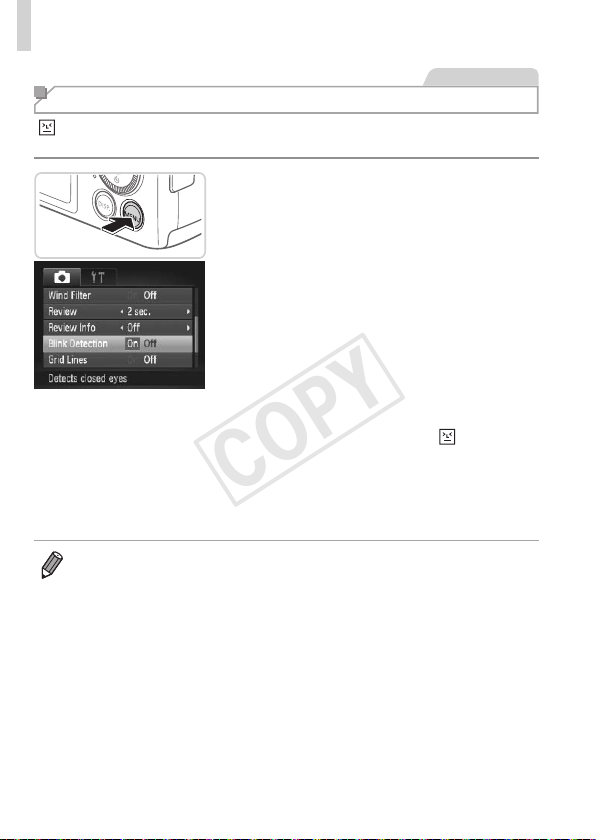
Checking for Closed Eyes
[ ]isdisplayedwhenthecameradetectsthatpeoplemayhaveclosed
theireyes.
1 Congurethesetting.
Pressthe<n>button,choose[Blink
Detection]onthe[4]tab,andthen
choose[On](=
47).
2 Shoot.
Aframe,accompaniedby[ ],is
displayedwhenthecameradetectsa
personwhoseeyesareclosed.
Torestoretheoriginalsetting,choose
[Off]instep1.
• Whenyouhavespeciedmultipleshotsin[$]mode,thisfunctionisonly
availableforthenalshot.
• Theframeisnotdisplayedwhen[Review]issetto[Quick](=
76).
COPY
75
Customizing Camera Operation
Customizeshootingfunctionsonthe[4]tabofthemenuasfollows.
Forinstructionsonmenufunctions,see“nMenu”(=
47).
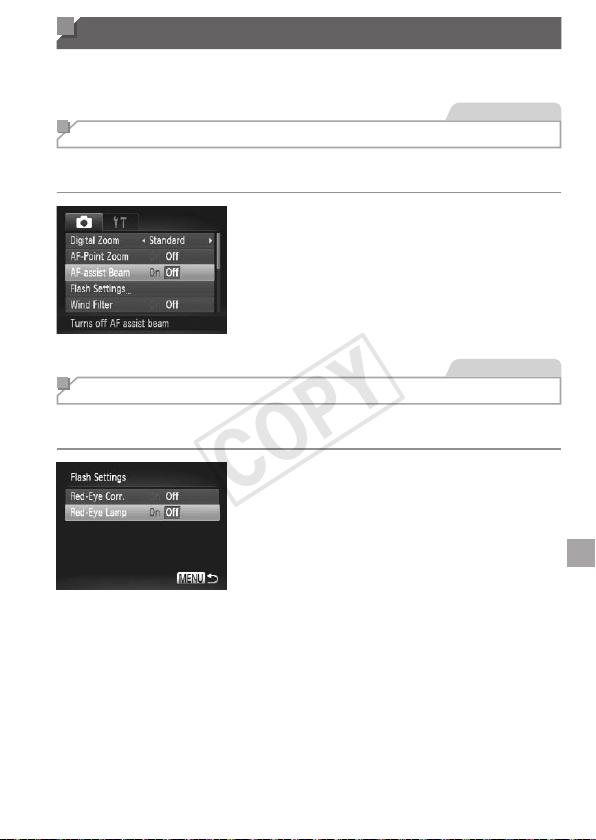
StillImages
Deactivating the AF Assist Beam
Youcandeactivatethelampthatnormallylightsuptohelpyoufocuswhen
youpresstheshutterbuttonhalfwayinlow-lightconditions.
Congurethesetting.
Pressthe<n>button,choose[AF-
assistBeam]onthe[4]tab,andthen
choose[Off](=
47).
Torestoretheoriginalsetting,repeatthis
processbutchoose[On].
StillImages
Deactivating the Red-Eye Reduction Lamp
Youcandeactivatethered-eyereductionlampthatlightsuptoreducered-
eyewhentheashisusedinlow-lightshots.
1 Accessthe[FlashSettings]
screen.
Pressthe<n>button,choose[Flash
Settings]onthe[4]tab,andthenpress
the<m>button(=
47).
2 Congurethesetting.
Choose[Red-EyeLamp],andthen
choose[Off](=
47).
Torestoretheoriginalsetting,repeatthis
processbutchoose[On].
COPY
76
CustomizingCameraOperation
StillImages
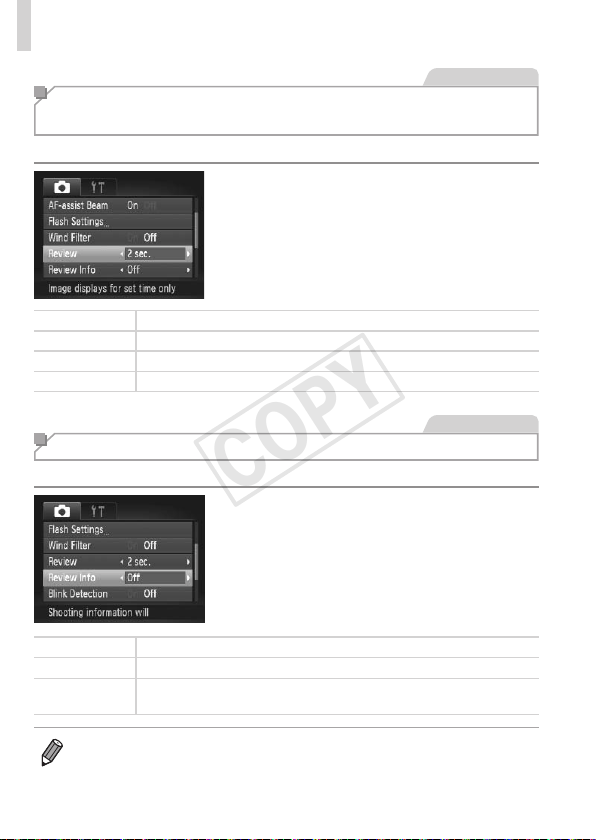
Changing the Image Display Period After
Shots
Changehowlongimagesaredisplayedaftershotsasfollows.
Congurethesetting.
Pressthe<n>button,choose
[Review]onthe[4]tab,andthen
choosethedesiredoption(=
47).
Torestoretheoriginalsetting,repeatthis
processbutchoose[2sec.].
Quick Displaysimagesonlyuntilyoucanshootagain.
2–10sec. Displaysimagesforthespeciedtime.
Hold Displaysimagesuntilyoupresstheshutterbuttonhalfway.
Off Noimagedisplayaftershots.
StillImages
Changing the Image Display Style After Shots
Changethewayimagesaredisplayedaftershotsasfollows.
Congurethesetting.
Pressthe<n>button,choose
[ReviewInfo]onthe[4]tab,andthen
choosethedesiredoption(=
47).
Torestoretheoriginalsetting,repeatthis
processbutchoose[Off].
Off Displaysonlytheimage.
Detailed
Displaysshootingdetails(=
204).
FocusCheck
ShowstheareaintheAFframemagnied,enablingyoutocheckthe
focus.Followthestepsin
“CheckingtheFocus”(=
125)
.
• Thissettingissetto[Off]andcannotbechangedwhen[Review](seeabove)
issetto[Quick]or[Off].
COPY

77
Other Shooting Modes
Shootmoreeffectivelyinvariousscenes,andtakeshots
enhancedwithuniqueimageeffectsorcapturedusing
specialfunctions
3
COPY

78
StillImages Movies
Discreet Mode
Shootwithoutactivatingcamerasounds,theash,orlampasfollows.Use
thismodewherecamerasounds,theash,andlightsareprohibited.
1 Enter< >mode.
Setthemodedialto< >.
2 Shoot.
• In< >mode,evenplaybacksoundsaremuted.Soundsofcamera
operationsaremuted,andmovieaudioisalsomuted.
COPY
79
StillImages Movies
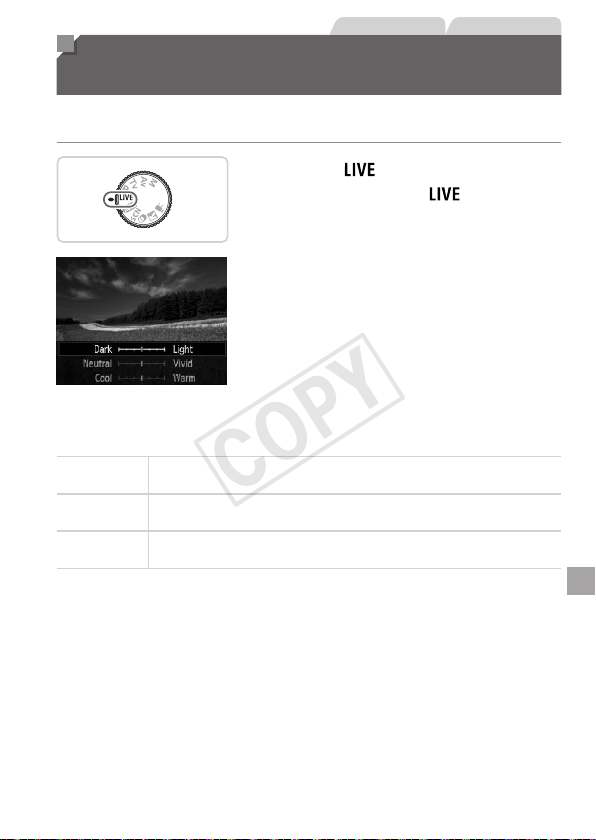
Brightness/Color Customization
(Live View Control)
Imagebrightnessorcolorswhenshootingcanbeeasilycustomizedas
follows.
1 Enter< >mode.
Setthemodedialto< >.
2 Congurethesetting.
Pressthe<m>buttontoaccessthe
settingscreen.Pressthe<o><p>
buttonstochooseasettingitem,and
thenpressthe<q><r>buttonsorturn
the<5>dialtoadjustthevalueasyou
watchthescreen.
Pressthe<m>button.
3 Shoot.
Brightness
Forbrighterimages,adjusttheleveltotheright,andfordarker
images,adjustittotheleft.
Color
Formorevividimages,adjusttheleveltotheright,andformore
subduedimages,adjustittotheleft.
Tone
Forawarm,reddishtone,adjusttheleveltotheright,andforacool,
bluishtone,adjustittotheleft.
COPY
80
Specic Scenes
Chooseamodematchingtheshootingscene,andthecamerawill
automaticallycongurethesettingsforoptimalshots.
1 Enter<K>mode.
Setthemodedialto<K>.
2 Chooseashootingmode.
Pressthe<m>button,choose[I]inthe
menu,andthenchooseashootingmode
(=
46).
3 Shoot.
StillImages Movies
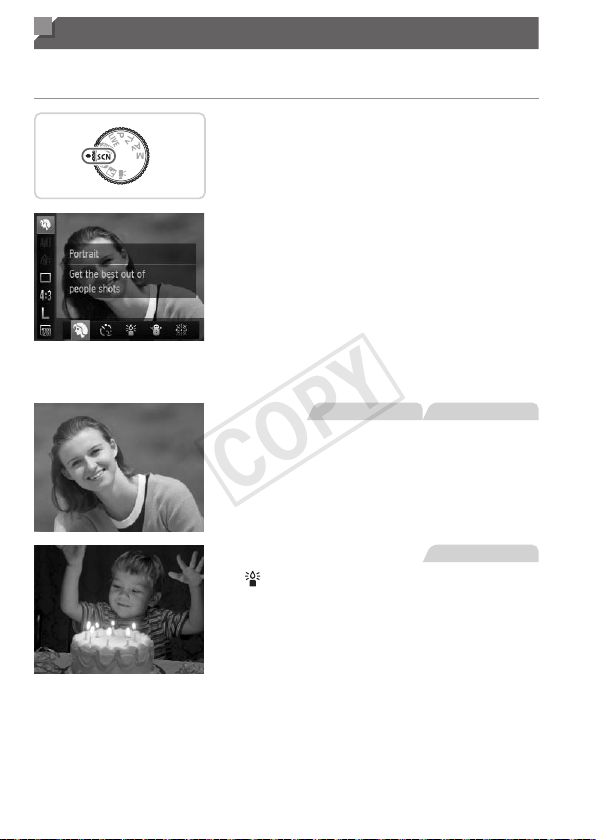
IShootportraits(Portrait)
Takeshotsofpeoplewithasoftening
effect.
StillImages
Shootunderlowlight(Low
Light)
Shootwithminimalcamerashakeand
subjectblureveninlow-lightconditions.
COPY
81
SpecicScenes
StillImages Movies
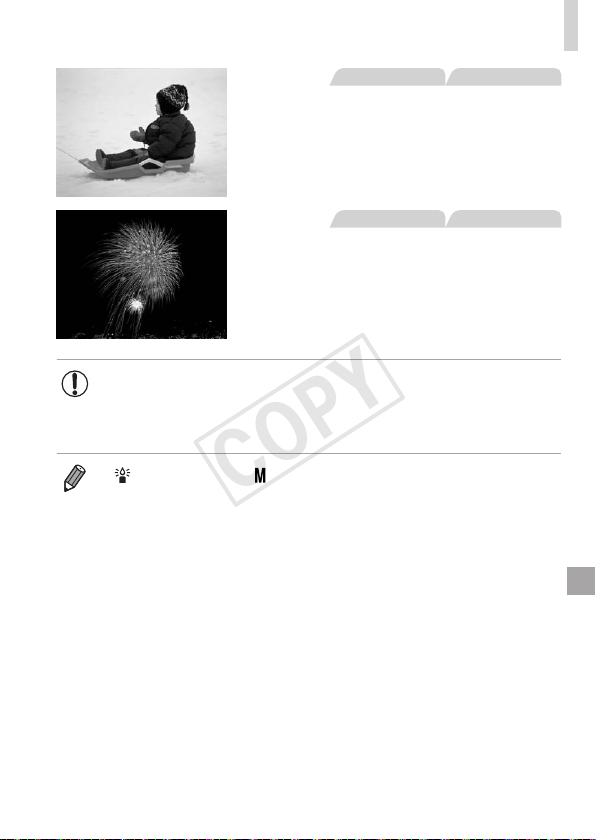
PShootwithsnowybackgrounds
(Snow)
Bright,natural-coloredshotsofpeople
againstsnowybackgrounds.
StillImages Movies
tShootreworks(Fireworks)
Vividshotsofreworks.
• In[t]mode,mountthecameraonatripodortakeother
measurestokeepitstillandpreventcamerashake.Additionally,
youshouldset[ISMode]to[Off]whenusingatripodorother
meanstoholdthecamerastill(=
114).
• [ ]moderesolutionis[ ](2304x1728)andcannotbechanged.
COPY
82
Image Effects (Creative Filters)
Addavarietyofeffectstoimageswhenshooting.
1 Enter< >mode.
Setthemodedialto< >.
2 Chooseashootingmode.
Pressthe<m>button,choose[ ]in
themenu,andthenchooseashooting
mode(=
46).
3 Shoot.
StillImages Movies
Shootinvividcolors(Super
Vivid)
Shotsinrich,vividcolors.
StillImages Movies
Posterizedshots(PosterEffect)
Shotsthatresembleanoldposteror
illustration.
• In[ ]and[ ]modes,trytakingsometestshotsrst,tomake
sureyouobtainthedesiredresults.
COPY
83
ImageEffects(CreativeFilters)
StillImages
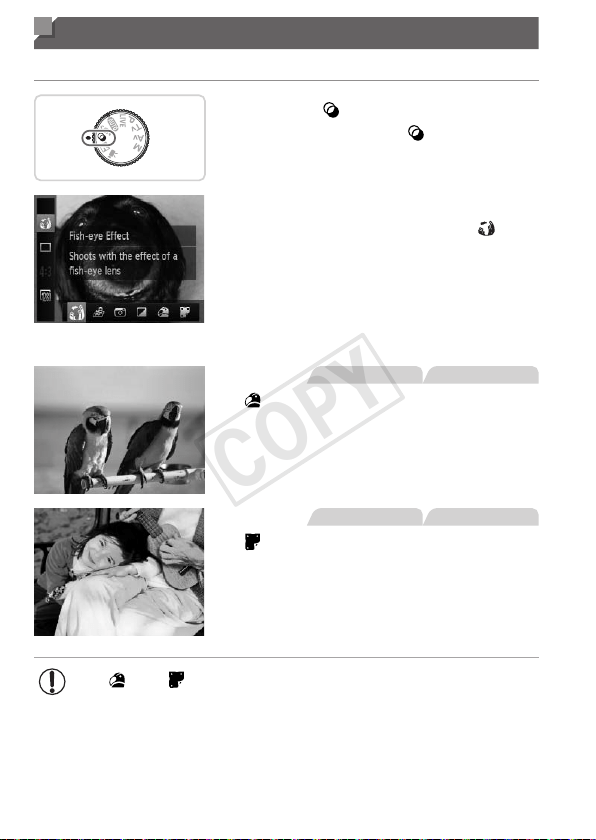
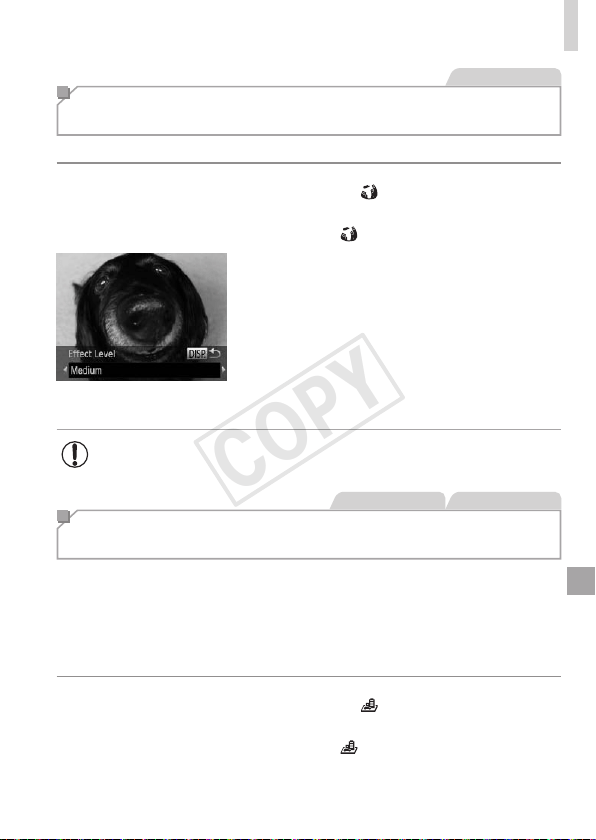
Shooting with a Fish-Eye Lens Effect
(Fish-eye Effect)
Shootwiththedistortingeffectofash-eyelens.
1 Choose[ ].
Followsteps1–2on=
82and
choose[
].
2 Chooseaneffectlevel.
Pressthe<l>button,choosean
effectlevel(eitherpressthe<q><r>
buttonsorturnthe<5>dial),andthen
pressthe<l>buttonagain.
Apreviewisshownofhowyourshotwill
lookwiththeeffectapplied.
3 Shoot.
• Trytakingsometestshotsrst,tomakesureyouobtainthe
desiredresults.
StillImages Movies
Shots Resembling Miniature Models
(Miniature Effect)
Createstheeffectofaminiaturemodel,byblurringimageareasaboveand
belowyourselectedarea.
Youcanalsomakemoviesthatlooklikescenesinminiaturemodelsby
choosingtheplaybackspeedbeforethemovieisrecorded.Peopleand
objectsinthescenewillmovequicklyduringplayback.Notethatsoundis
notrecorded.
1 Choose[ ].
Followsteps1–2on=
82and
choose[
].
Awhiteframeisdisplayed,indicatingthe
imageareathatwillnotbeblurred.
COPY
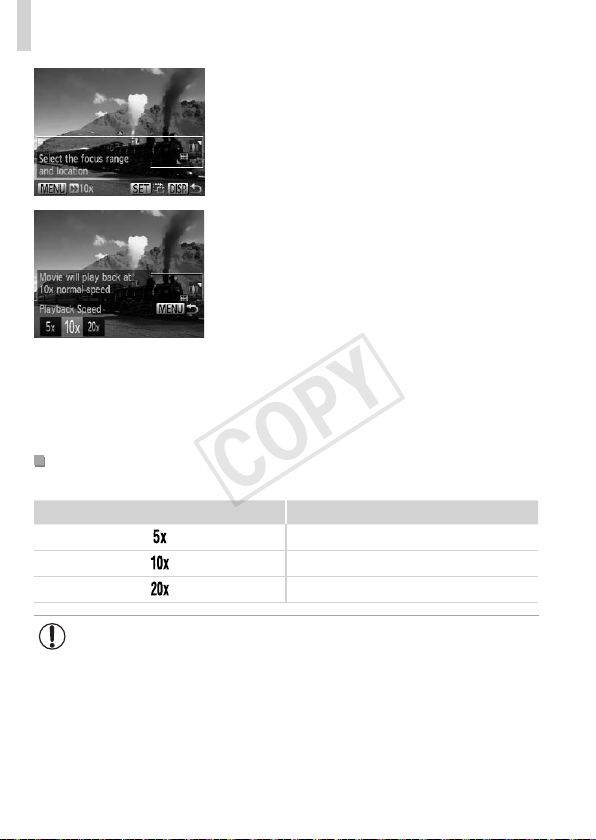
84
ImageEffects(CreativeFilters)
2 Choosetheareatokeepin
focus.
Pressthe<l>button.
Movethezoomlevertoresizetheframe,
andpressthe<o><p>buttonstomove
it.
3 Formovies,choosethemovie
playbackspeed.
Pressthe<n>button,andthen
choosethespeedbypressingthe
<q><r>buttonsorturningthe<5>
dial.
4 Returntotheshootingscreen
andshoot.
Pressthe<n>buttontoreturntothe
shootingscreen,andthenshoot.
PlaybackSpeedandEstimatedPlaybackTime
(forOne-MinuteClips)
Speed PlaybackTime
Approx.12sec.
Approx.6sec.
Approx.3sec.
• Thezoomisnotavailablewhenshootingmovies.Besuretoset
thezoombeforeshooting.
• Trytakingsometestshotsrst,tomakesureyouobtainthe
desiredresults.
COPY
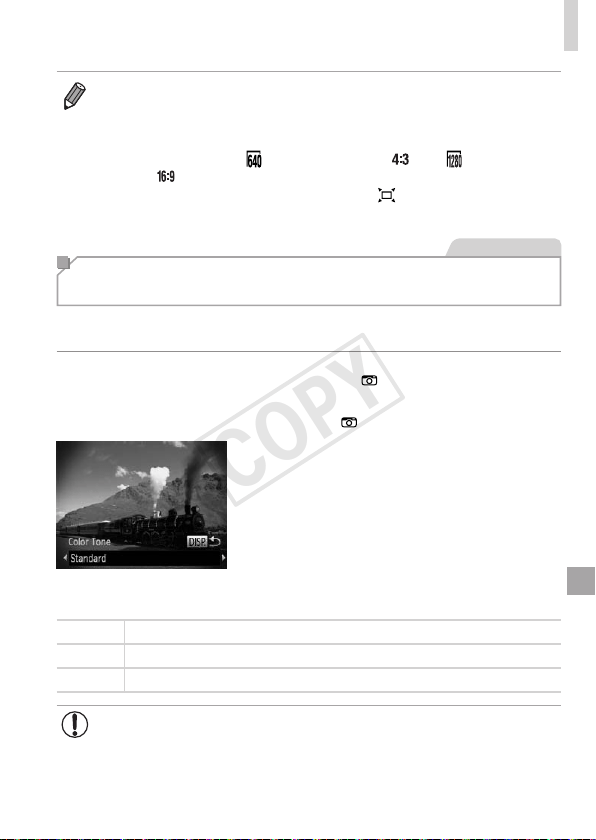
85
ImageEffects(CreativeFilters)
• Toswitchtheorientationoftheframe(fromhorizontaltoverticalorvice-
versa),pressthe<m>buttoninstep2.Youcanmovetheframeinvertical
orientationbypressingthe<q><r>buttons.
• Holdingthecameraverticallywillchangetheorientationoftheframe.
• Movieimagequalityis[
]atanaspectratioof[ ]and[ ]atanaspect
ratioof[
](=
67).Thesequalitysettingscannotbechanged.
• Thezoomfactorcannotbechangedwiththe<
>buttononthescreensin
steps2and3,orwhileshootingmovies.
StillImages
Shooting with a Toy Camera Effect
(Toy Camera Effect)
Thiseffectmakesimagesresembleshotsfromatoycamerabyvignetting
(darker,blurredimagecorners)andchangingtheoverallcolor.
1 Choose[ ].
Followsteps1–2on=
82and
choose[
].
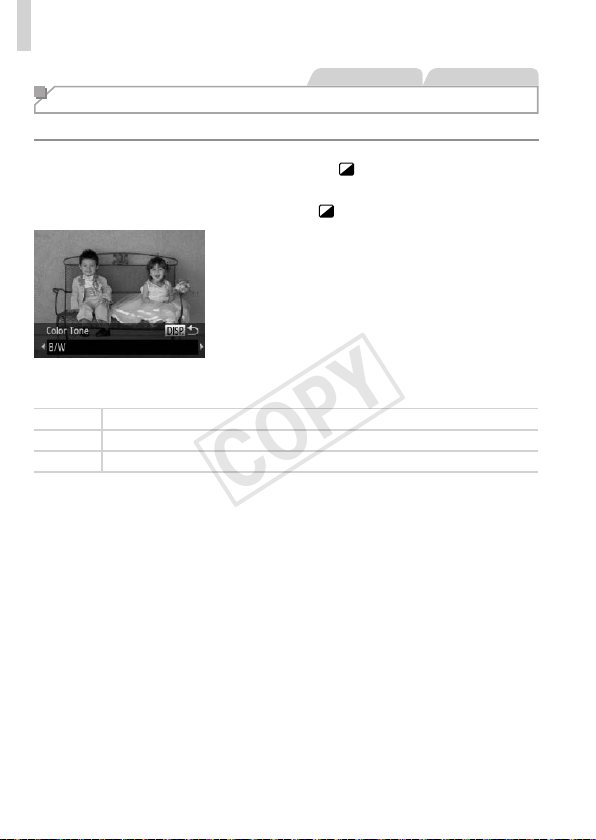
2 Chooseacolortone.
Pressthe<l>button,chooseacolor
tone(eitherpressthe<q><r>buttonsor
turnthe<5>dial),andthenpressthe
<l>buttonagain.
Apreviewisshownofhowyourshotwill
lookwiththeeffectapplied.
3 Shoot.
Standard Shotsresembletoycameraimages.
Warm Imageshaveawarmertonethanwith[Standard].
Cool Imageshaveacoolertonethanwith[Standard].
• Trytakingsometestshotsrst,tomakesureyouobtainthe
desiredresults.
COPY
86
ImageEffects(CreativeFilters)
StillImages Movies
Shooting in Monochrome
Shootimagesinblackandwhite,sepia,orblueandwhite.
1 Choose[ ].
Followsteps1–2on=
82and
choose[
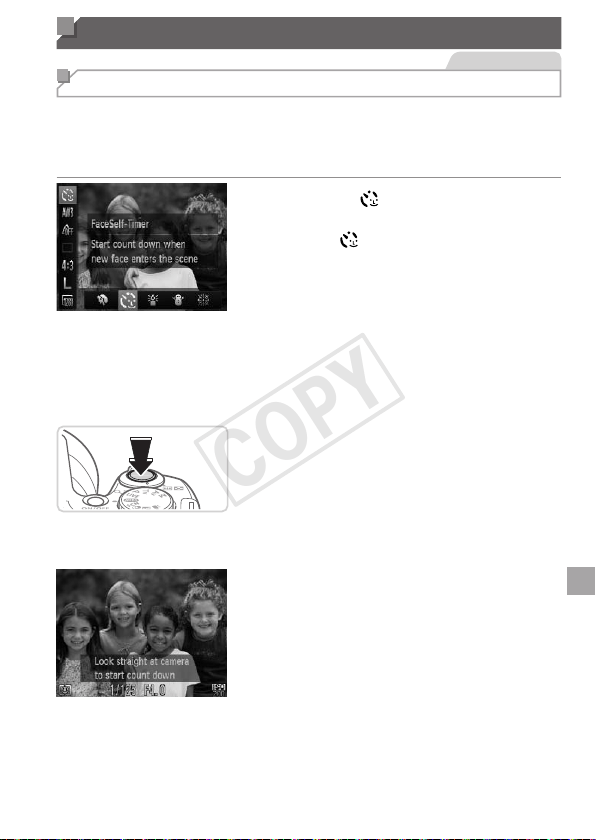
].
2 Chooseacolortone.
Pressthe<l>button,chooseacolor
tone(eitherpressthe<q><r>buttonsor
turnthe<5>dial),andthenpressthe
<l>buttonagain.
Apreviewisshownofhowyourshotwill
lookwiththeeffectapplied.
3 Shoot.
B/W Blackandwhiteshots.
Sepia Sepiatoneshots.
Blue Blueandwhiteshots.
COPY
87
Special Modes for Other Purposes
StillImages
Using the Face Self-Timer
Thecamerawillshootabouttwosecondsafterdetectingthatthefaceof
anotherperson(suchasthephotographer)hasenteredtheshootingarea
(=
106).Thisisusefulwhenincludingyourselfingroupphotosorsimilar
shots.
1 Choose[ ].
Followsteps1–2on=
80and
choose[
].
2 Composetheshotandpress
theshutterbuttonhalfway.
Makesureagreenframeisdisplayed
aroundthefaceyoufocusonandwhite
framesaroundotherfaces.
3 Presstheshutterbuttonallthe
waydown.
Thecameranowentersshootingstandby
mode,and[Lookstraightatcamerato
startcountdown]isdisplayed.
Thelampblinksandtheself-timersound
isplayed.
4 Jointhesubjectsinthe
shootingareaandlookatthe
camera.
Afterthecameradetectsanewface,the
lampblinkingandself-timersoundwill
speedup.(Whentheashres,thelamp
willremainlit.)Abouttwosecondslater,
thecamerawillshoot.
Tocancelshootingafteryouhave
triggeredtheself-timer,pressthe
<n>button.
COPY
88
ShootingVariousMovies
• Evenifyourfaceisnotdetectedafteryoujointheothersintheshooting
area,thecamerawillshootabout15secondslater.
• Tochangethenumberofshots,afterchoosing[
]insteps1–2on
=
80,pressthe<l>button,andtheneitherpressthe<q><r>
buttonsorturnthe<5>dialtochooseavalue,andthenpressthe<l>
buttonagain.
• Thezoomfactorcannotbechangedwiththe<
>buttonafteryoupress
theshutterbuttonallthewaydown.
Movies
Shooting Various Movies
Movies
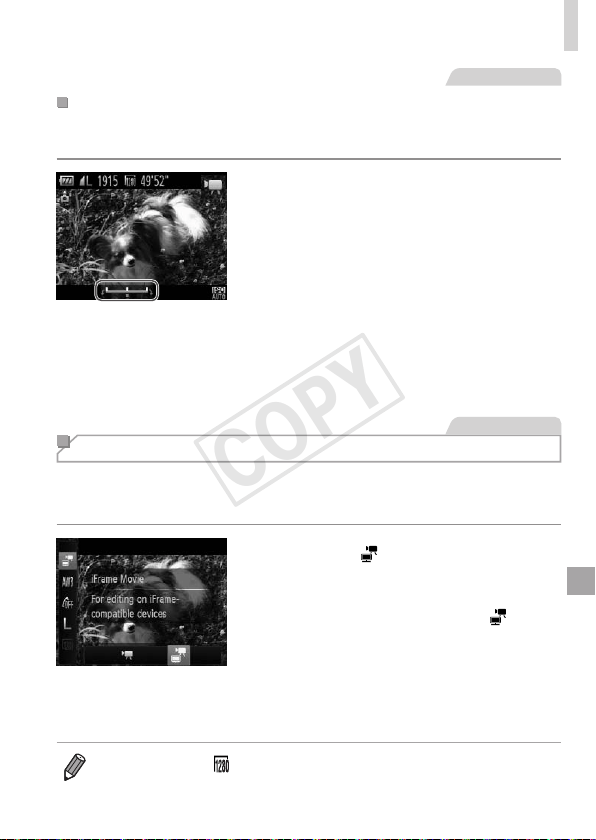
Shooting Movies in <E> Mode
1 Enter<E>mode.
Setthemodedialto<E>.
Blackbarsdisplayedonthetopand
bottomedgesofthescreenindicate
imageareasnotrecorded.
2 Congurethesettingstosuit
themovie(=
206–213).
3 Shoot.
Pressthemoviebutton.
Tostopmovierecording,pressthemovie
buttonagain.
COPY
89
ShootingVariousMovies
Movies
LockingorChangingImageBrightnessBeforeShooting
Beforeshooting,youcanlocktheexposureorchangeitin1/3-stop
incrementswithinarangeof–2to+2.
1 Locktheexposure.
Pressthe<o>buttontolocktheexposure.
Theexposureshiftbarisdisplayed.
Tounlocktheexposure,pressthe<o>
buttonagain.
2 Adjusttheexposure.
Turnthe<5>dialtoadjustthe
exposure,asyouwatchthescreen.
3 Shoot(=
88).
Movies
Shooting iFrame Movies
ShootmoviesthatcanbeeditedwithiFrame-compatiblesoftwareor
devices.Youcanquicklyedit,save,andmanageiFramemoviesusingthe
includedsoftware(=
31).
1 Choose[ ].
Setthemodedialto<E>.
Pressthe<m>button,choose[E]
inthemenu,andthenchoose[
]
(=
46).
Blackbarsdisplayedonthetopand
bottomedgesofthescreenindicate
imageareasnotrecorded.
2 Shoot(=
88).
• Theresolutionis[ ](=
70)andcannotbechanged.
• iFrameisavideoformatdevelopedbyApple.
COPY

90
COPY

91
P mode
Morediscerningshots,inyourpreferredshootingstyle
• Instructionsinthischapterapplytothecamerawiththemodedialsetto
<G>mode.
• <G>:ProgramAE;AE:AutoExposure
• Beforeusingafunctionintroducedinthischapterinmodesotherthan
<G>,makesurethefunctionisavailableinthatmode(=
206–213).
4
COPY
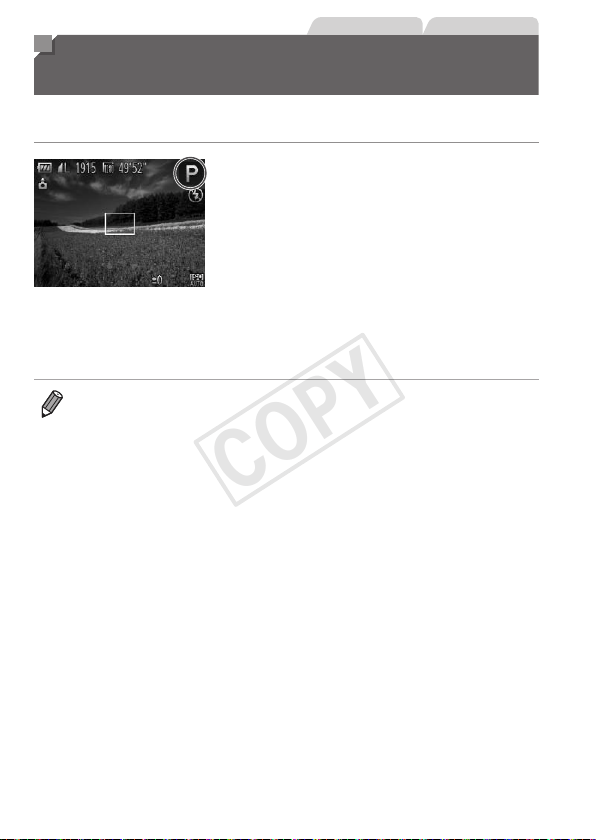
92
StillImages Movies
Shooting in Program AE Mode
(<P> Mode)
Youcancustomizemanyfunctionsettingstosuityourpreferredshooting
style.
1 Enter<G>mode.
Setthemodedialto<G>.
2 Customizethesettingsas
desired(=
93–114),and
thenshoot.
• Ifadequateexposurecannotbeobtainedwhenyoupresstheshutterbutton
halfway,shutterspeedsandaperturevaluesaredisplayedinorange.To
obtainadequateexposure,tryadjustingthefollowingsettings.
-Activatetheash(=
111)
-ChangetheISOspeed(=
96)
• Moviescanberecordedin<G>modeaswell,bypressingthemoviebutton.
However,someFUNC.(=
46)andMenu(=
47)settingsmaybe
automaticallyadjustedformovierecording.
• Fordetailsontheshootingrangein<G>mode,see“Specications”
(=
217).
COPY
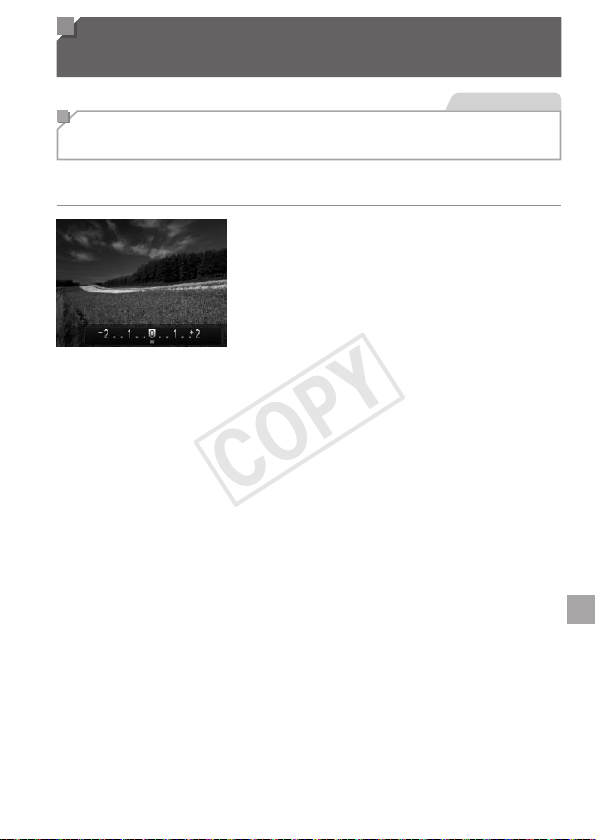
93
Image Brightness
(Exposure Compensation)
StillImages
Adjusting Image Brightness
(Exposure Compensation)
Thestandardexposuresetbythecameracanbeadjustedin1/3-stop
increments,inarangeof–2to+2.
Pressthe<b>button.Asyouwatch
thescreen,turnthe<5>dialtoadjust
brightness,andthenpressthe<b>
buttonagainwhennished.
Thecorrectionlevelyouspeciedisnow
displayed.
COPY
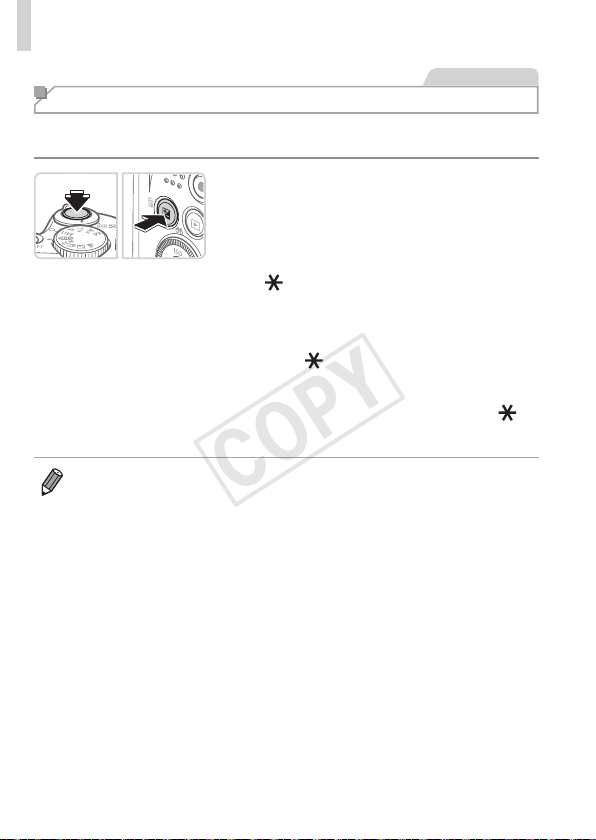
94
ImageBrightness(ExposureCompensation)
StillImages
Locking Image Brightness/Exposure (AE Lock)
Beforeshooting,youcanlocktheexposure,oryoucanspecifyfocusand
exposureseparately.
1 Locktheexposure.
Aimthecameraatthesubjecttoshoot
withtheexposurelocked.Withthe
shutterbuttonpressedhalfway,pressthe
<b>button.
[ ]isdisplayed,andtheexposureis
locked.
TounlockAE,releasetheshutterbutton
andpressthe<b>buttonagain.Inthis
case,[
]isnolongerdisplayed.
2 Composetheshotandshoot.
Afteroneshot,AEisunlockedand[ ]is
nolongerdisplayed.
• AE:AutoExposure
• Aftertheexposureislocked,youcanadjustthecombinationofshutter
speedandaperturevaluebyturningthe<5>dial(ProgramShift).
COPY
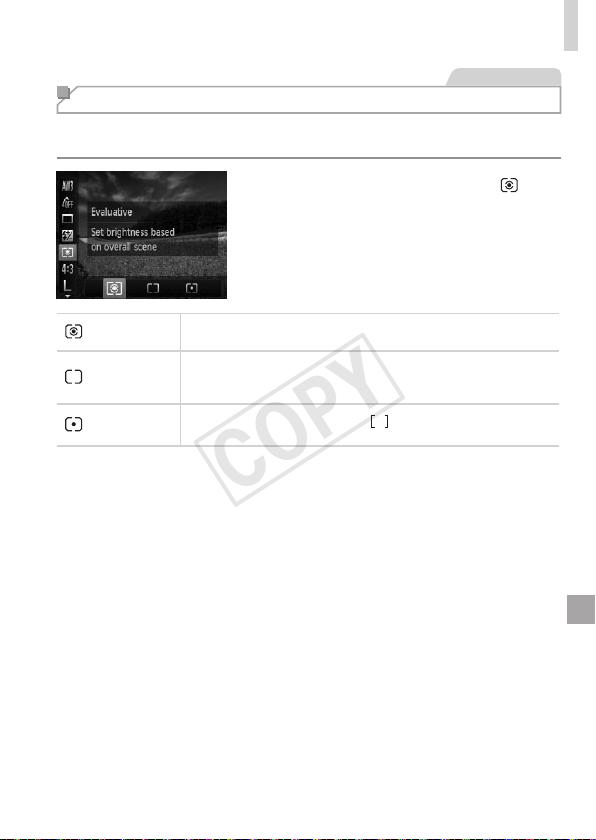
95
ImageBrightness(ExposureCompensation)
StillImages
Changing the Metering Method
Adjustthemeteringmethod(howbrightnessismeasured)tosuitshooting
conditionsasfollows.
Pressthe<m>button,choose[ ]in
themenu,andchoosethedesiredoption
(=
46).
Theoptionyouconguredisnow
displayed.
Evaluative
Fortypicalshootingconditions,includingbacklitshots.
Automaticallyadjustsexposuretomatchtheshootingconditions.
Center
WeightedAvg.
Determinestheaveragebrightnessoflightacrosstheentire
imagearea,calculatedbytreatingbrightnessinthecentralarea
asmoreimportant.
Spot
Meteringrestrictedtowithinthe[
](SpotAEPointframe),
displayedinthecenterofthescreen.
COPY
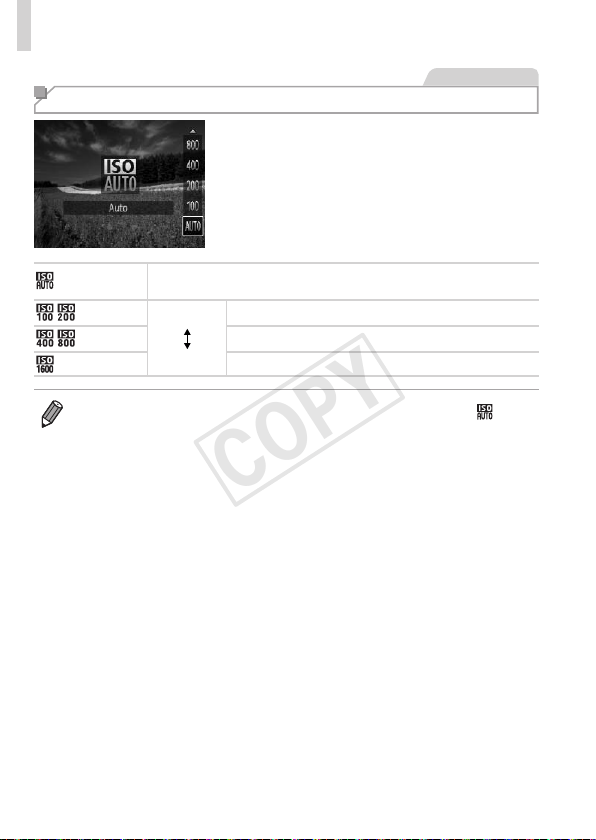
96
ImageBrightness(ExposureCompensation)
StillImages
Changing the ISO Speed
Pressthe<o>button,chooseanoption
(eitherpressthe<o><p>buttonsor
turnthe<5>dial),andthenpressthe
<m>button.
Theoptionyouconguredisnow
displayed.
AutomaticallyadjuststheISOspeedtosuittheshootingmodeand
conditions.
Low
High
Forshootingoutdoorsinfairweather.
Forshootingincloudyconditions,orattwilight.
Forshootingnightscenes,orindarkrooms.
• ToviewtheautomaticallysetISOspeedwhenthecameraissetto[ ],
presstheshutterbuttonhalfway.
• AlthoughchoosingalowerISOspeedmayreduceimagegraininess,there
maybeagreaterriskofsubjectblurrinessinsomeshootingconditions.
• ChoosingahigherISOspeedwillincreaseshutterspeed,whichmayreduce
subjectblurrinessandincreasetheashrange.However,shotsmaylook
grainy.
COPY
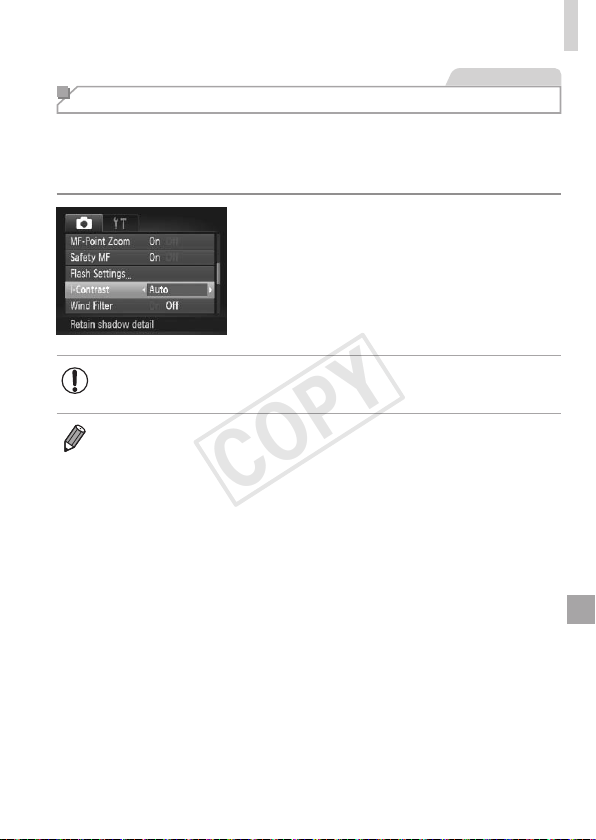
97
ImageBrightness(ExposureCompensation)
StillImages
Correcting Image Brightness (i-Contrast)
Beforeshooting,excessivelybrightordarkimageareas(suchasfacesor
backgrounds)canbedetectedandautomaticallyadjustedtotheoptimal
brightness.Insufcientoverallimagecontrastcanalsobeautomatically
correctedbeforeshootingtomakesubjectsstandoutbetter.
Pressthe<n>button,choose
[i-Contrast]onthe[4]tab,andthen
choose[Auto](=
47).
Oncethesettingiscomplete,[@]is
displayed.
• Undersomeshootingconditions,correctionmaybeinaccurateor
maycauseimagestoappeargrainy.
• Youcanalsocorrectexistingimages(=
150).
COPY
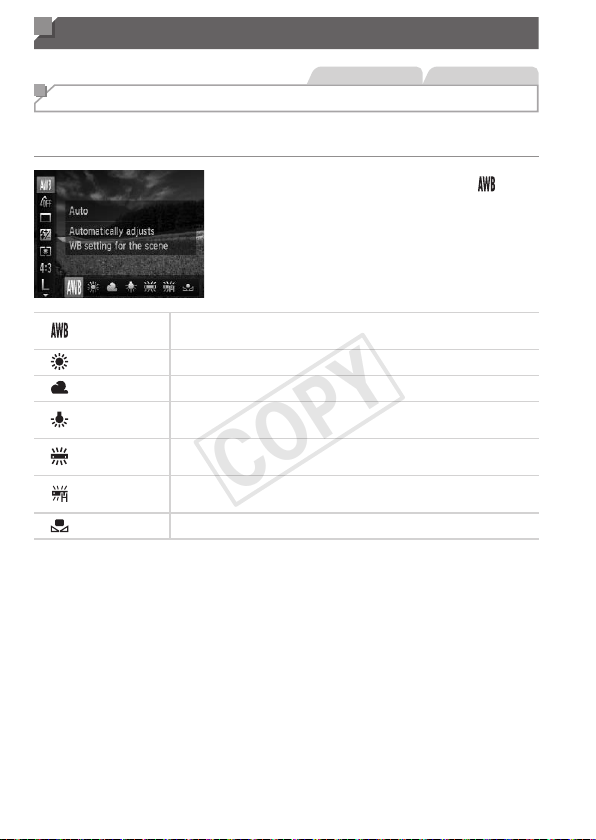
98
Color and Continuous Shooting
StillImages Movies
Adjusting White Balance
Byadjustingwhitebalance(WB),youcanmakeimagecolorslookmore
naturalforthesceneyouareshooting.
Pressthe<m>button,choose[ ]in
themenu,andchoosethedesiredoption
(=
46).
Theoptionyouconguredisnow
displayed.
Auto
Automaticallysetstheoptimalwhitebalancefortheshooting
conditions.
DayLight Forshootingoutdoorsinfairweather.
Cloudy Forshootingincloudyconditions,intheshade,orattwilight.
Tungsten
Forshootingunderordinaryincandescent(tungsten)lighting
andsimilarlycoloreduorescentlighting.
Fluorescent
Forshootingunderwarm-white(orsimilarlycolored)orcool-
whiteuorescentlighting.
FluorescentH
Forshootingunderdaylightuorescentandsimilarlycolored
uorescentlighting.
Custom
Formanuallysettingacustomwhitebalance(=
99).
COPY
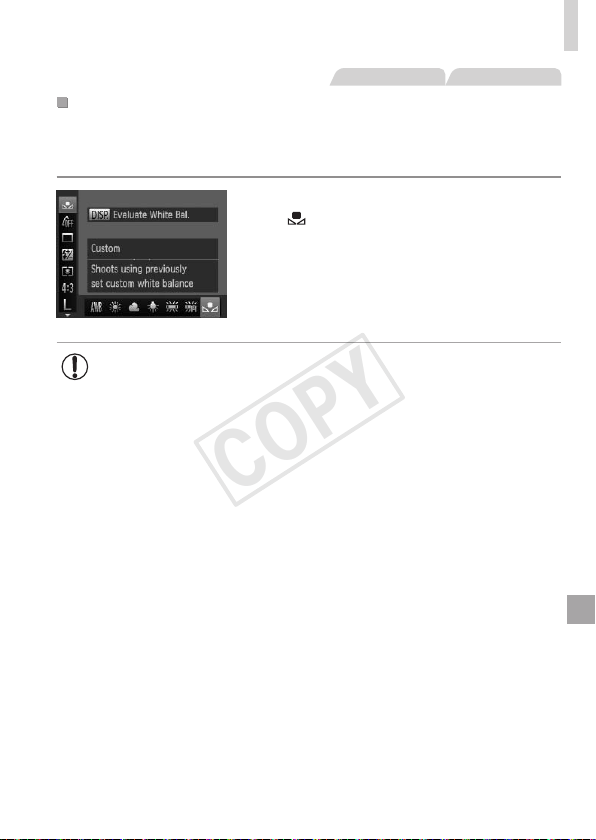
99
ColorandContinuousShooting
StillImages Movies
CustomWhiteBalance
Forimagecolorsthatlooknaturalunderthelightinyourshot,adjustwhite
balancetosuitthelightsourcewhereyouareshooting.Setthewhite
balanceunderthesamelightsourcethatwillilluminateyourshot.
Followthestepson=
98tochoose
[
].
Aimthecameraataplainwhitesubject,
sothattheentirescreeniswhite.Press
the<l>button.
Thetintofthescreenchangesoncethe
whitebalancedatahasbeenrecorded.
• Colorsmaylookunnaturalifyouchangecamerasettingsafter
recordingwhitebalancedata.
COPY
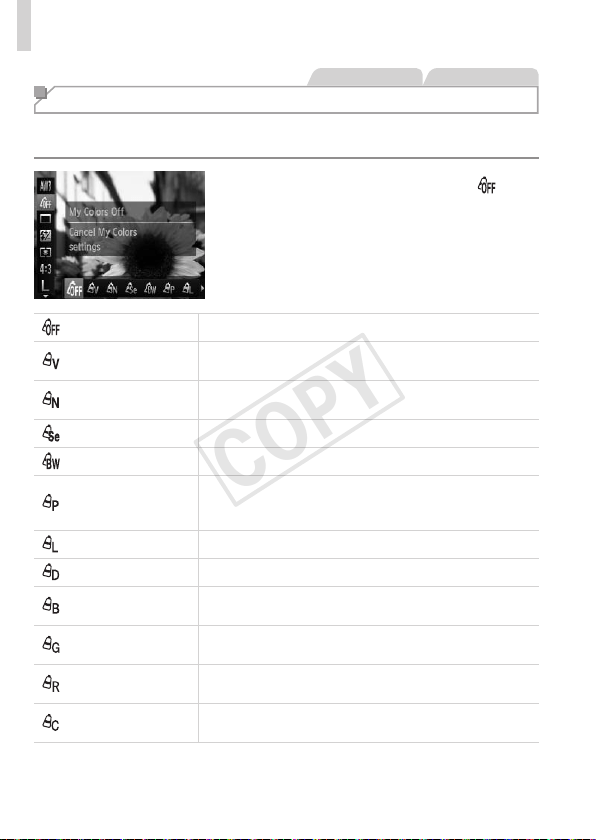
100
ColorandContinuousShooting
StillImages Movies
Changing Image Color Tones (My Colors)
Changeimagecolortonesasdesired,suchasconvertingimagestosepia
orblackandwhite.
Pressthe<m>button,choose[ ]in
themenu,andchoosethedesiredoption
(=
46).
Theoptionyouconguredisnow
displayed.
MyColorsOff –
Vivid
Emphasizescontrastandcolorsaturation,makingimages
sharper.
Neutral
Tonesdowncontrastandcolorsaturationforsubdued
images.
Sepia Createssepiatoneimages.
B/W Createsblackandwhiteimages.
PositiveFilm
CombinestheeffectsofVividBlue,VividGreen,and
VividRedtoproduceintenseyetnatural-lookingcolors
resemblingimagesonpositivelm.
LighterSkinTone Lightensskintones.
DarkerSkinTone Darkensskintones.
VividBlue
Emphasizesbluesinimages.Makesthesky,ocean,and
otherbluesubjectsmorevivid.
VividGreen
Emphasizesgreensinimages.Makesmountains,foliage,
andothergreensubjectsmorevivid.
VividRed
Emphasizesredsinimages.Makesredsubjectsmore
vivid.
CustomColor
Adjustcontrast,sharpness,colorsaturation,andother
qualitiesasdesired(=
101).
COPY
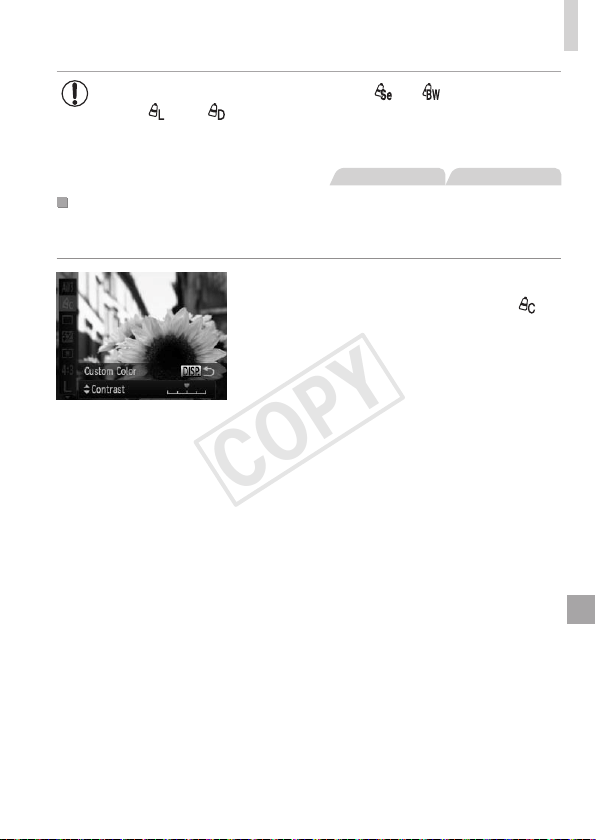
101
ColorandContinuousShooting
• Whitebalance(=
98)cannotbesetin[ ]or[ ]modes.
• With[
]and[ ]modes,colorsotherthanpeople’sskintone
maybemodied.Thesesettingsmaynotproducetheexpected
resultswithsomeskintones.
StillImages Movies
CustomColor
Choosethedesiredlevelofimagecontrast,sharpness,colorsaturation,
red,green,blue,andskintonesinarangeof1–5.
1 Accessthesettingscreen.
Followthestepson
=
100
tochoose[ ],
andthenpressthe<
l
>button.
2 Congurethesetting.
Pressthe<o><p>buttonstochoose
anoption,andthenspecifythevalueby
pressingthe<q><r>buttonsorturning
the<5>dial.
Forstronger/moreintenseeffects(or
darkerskintones),adjustthevalueto
theright,andforweaker/lightereffects
(orlighterskintones),adjustthevalueto
theleft.
Pressthe<l>buttontocompletethe
setting.
COPY
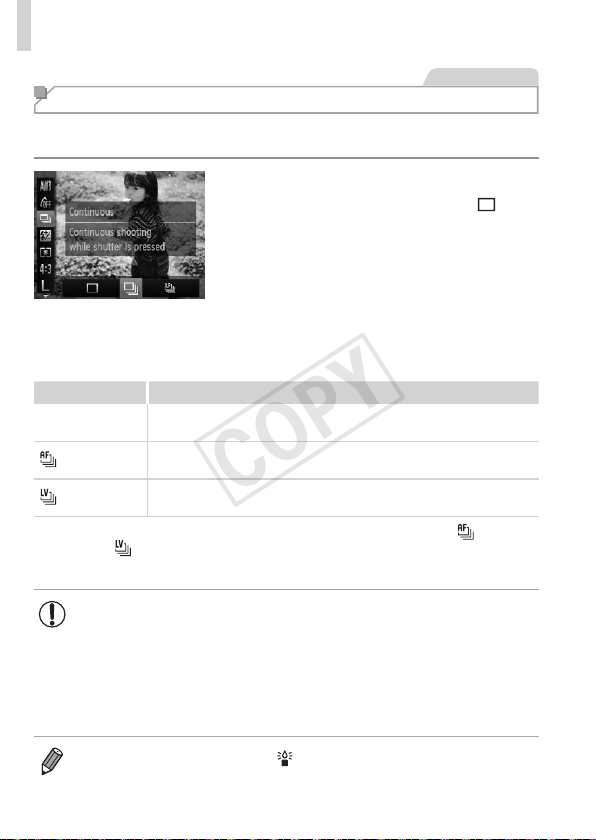
102
ColorandContinuousShooting
StillImages
Continuous Shooting
Holdtheshutterbuttonallthewaydowntoshootcontinuously.
Fordetailsonthecontinuousshootingspeed,see“Specications”(=
217).
1 Congurethesetting.
Pressthe<m>button,choose[ ]in
themenu,andchoosethedesiredoption
(=
46).
Theoptionyouconguredisnow
displayed.
2 Shoot.
Holdtheshutterbuttonallthewaydown
toshootcontinuously.
Mode Description
W
Continuous
Continuousshooting,withthefocusandexposuredetermined
whenyoupresstheshutterbuttonhalfway.
Continuous
ShootingAF
Continuousshootingandfocusing.
[AFFrame]issetto[Center]andcannotbechanged.
Continuous
ShootingLV*
Continuousshooting,withthefocusxedatthepositiondetermined
inmanualfocusing.In[
t
]mode,focusisdeterminedbytherstshot.
*In[t]mode(=
81),AFlock(=
110),ormanualfocusmode(=
103),[ ]is
changedto[
].
*Fordetailsonthecontinuousshootingspeedineachmode,see,“Specications”
(=
217).
• Cannotbeusedwiththeself-timer(=
62)or[BlinkDetection]
(=
74).
• Shootingmaystopmomentarilyorcontinuousshootingmayslow
downdependingonshootingconditions,camerasettings,andthe
zoomposition.
• Asmoreshotsaretaken,shootingmayslowdown.
• Shootingmayslowdowniftheashres.
• Continuousshootingisfasterin[ ]mode(=
80).
COPY
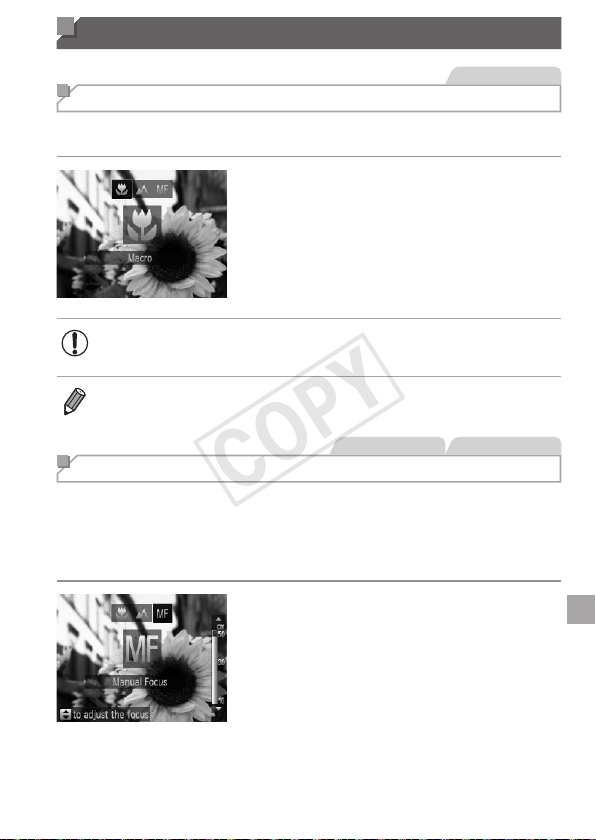
103
Shooting Range and Focusing
StillImages
Shooting Close-ups (Macro)
Torestrictthefocustosubjectsatcloserange,setthecamerato[e].For
detailsonthefocusingrange,see“Specications”(=
217).
Pressthe<q>button,choose[e](either
pressthe<q><r>buttonsorturnthe
<5>dial),andthenpressthe<m>
button.
Oncethesettingiscomplete,[e]is
displayed.
• Intheyellowbardisplayareabelowthezoombar,[e]willturn
grayandthecamerawillnotfocus.
• Topreventcamerashake,trymountingthecameraonatripodandshooting
withthecamerasetto[[](=
63).
StillImages Movies
Shooting in Manual Focus Mode
WhenfocusingisnotpossibleinAFmode,usemanualfocus.Youcan
specifythegeneralfocalpositionandthenpresstheshutterbuttonhalfway
tohavethecameradeterminetheoptimalfocalpositionneartheposition
youspecied.Fordetailsonthefocusingrange,see“Specications”
(=
217).
1 Choose[f].
Pressthe<q>button,choose[f]
(eitherpressthe<q><r>buttonsorturn
the<5>dial),andthenpressthe<m>
button.
[f]andtheMFindicatoraredisplayed.
COPY
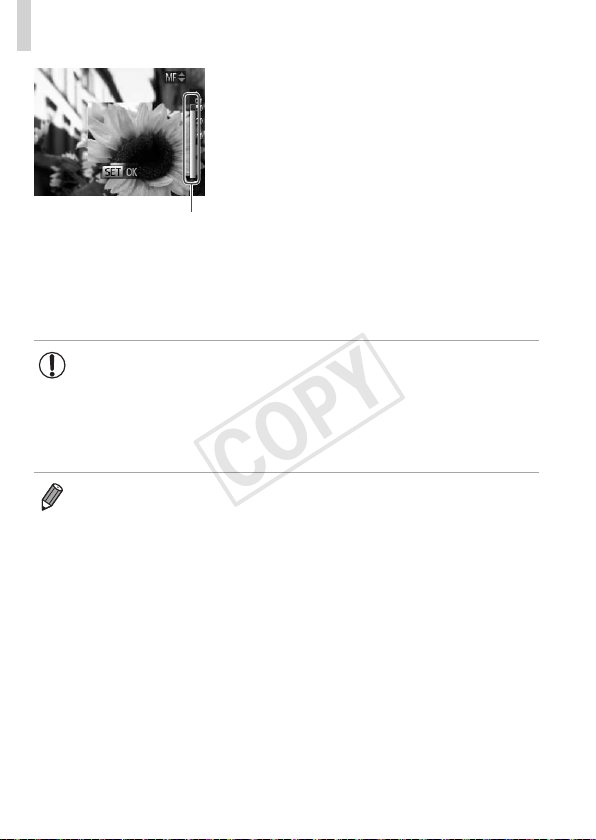
104
ShootingRangeandFocusing
MFIndicator
2 Specifythegeneralfocal
position.
Referringtotheon-screenMFindicator
bar(whichshowsthedistanceandfocal
position)andthemagnieddisplayarea,
pressthe<o><p>buttonsorturnthe
<5>dialtospecifythegeneralfocal
position.
3 Fine-tunethefocus.
Presstheshutterbuttonhalfwaytohave
thecamerane-tunethefocalposition
(SafetyMF).
• AFframemodeorsizecannotbechangedwhilefocusing
manually(=
105).IfyouwanttochangetheAFframemodeor
size,cancelmanualfocusmoderst.
• Focusingispossiblewhenusingthedigitalzoom(=
60)or
digitaltele-converter(=
105),butthemagnieddisplaywillnot
appear.
• Tofocusmoreaccurately,tryattachingthecameratoatripodtostabilizeit.
• Tohidethemagnieddisplayarea,pressthe<n>buttonandset[MF-
PointZoom]onthe[4]tabto[Off](=
47).
• Todeactivateautomaticfocusne-tuningwhentheshutterbuttonispressed
halfway,pressthe<n>buttonandset[SafetyMF]onthe[4]tabto
[Off](=
4 7 ).
COPY
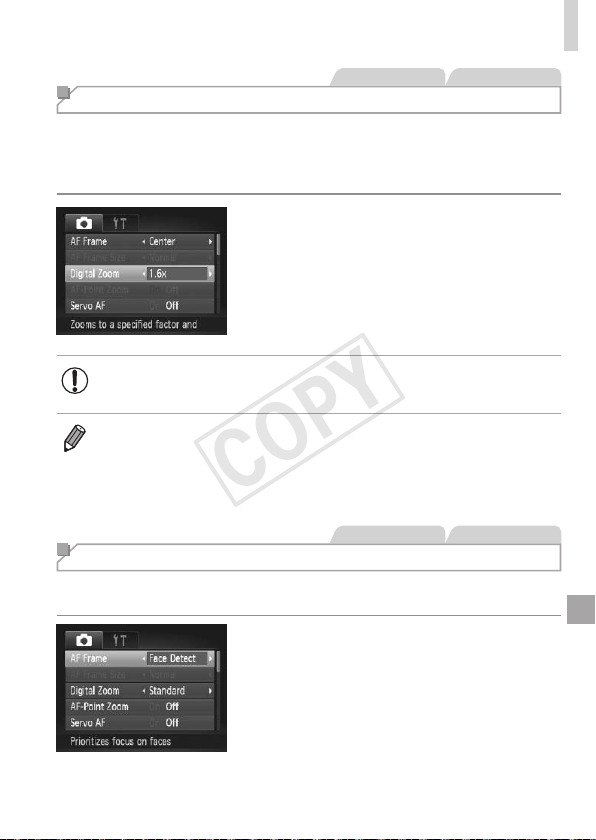
105
ShootingRangeandFocusing
StillImages Movies
Digital Tele-Converter
Thefocallengthofthelenscanbeincreasedbyapproximately1.6xor2.0x.
Thiscanreducecamerashakebecausetheshutterspeedisfasterthanit
wouldbeifyouzoomed(includingusingdigitalzoom)intothesamezoom
factor.
Pressthe<n>button,choose
[DigitalZoom]onthe[4]tab,andthen
choosethedesiredoption(=
47).
Theviewisenlargedandthezoomfactor
isdisplayedonthescreen.
• Thedigitaltele-convertercannotbeusedwithdigitalzoom
(=
60)andAF-pointzoom(=
72).
• Therespectivefocallengthswhenusing[1.6x]and[2.0x]are38.4–
1152mmand48–1440mm(35mmlmequivalent).
• Theshutterspeedmaybeequivalentwhenyoumovethezoomleverallthe
waytoward<i>formaximumtelephoto,andwhenyouzoomintoenlarge
thesubjecttothesamesizefollowingstep2on=
60.
StillImages Movies
Changing the AF Frame Mode
ChangetheAF(autofocus)framemodetosuittheshootingconditionsas
follows.
Pressthe<n>button,choose[AF
Frame]onthe[4]tab,andthenchoose
thedesiredoption(=
47).
COPY

106
ShootingRangeandFocusing
StillImages Movies
Center
OneAFframeisdisplayedinthecenter.Effectiveforreliablefocusing.
• AyellowAFframeisdisplayedwith[ ]ifthecameracannot
focuswhenyoupresstheshutterbuttonhalfway.NotethatAF-
pointzooming(=
72)isnotpossible.
• ToreducetheAFframesize,pressthe<n>buttonandset[AFFrame
Size]onthe[4]tabto[Small](=
47).
• TheAFframesizeissetto[Normal]whenyouusethedigitalzoom(=
60)
ordigitaltele-converter(=
105),andinmanualfocusmode(=
103).
• Tocomposeshotssothatsubjectsarepositionedattheedgeorinacorner,
rstaimthecameratocapturethesubjectinanAFframe,andthenhold
theshutterbuttonhalfwaydown.Asyoucontinuetoholdtheshutterbutton
halfway,recomposetheshotasdesired,andthenpresstheshutterbuttonall
thewaydown(FocusLock).
StillImages Movies
FaceDetect
• Detectspeople’sfaces,andthensetsthefocus,exposure(evaluative
meteringonly),andwhitebalance([ ]only).
• Afteryouaimthecameraatthesubject,awhiteframeisdisplayed
aroundtheperson’sfacedeterminedbythecameratobethemain
subject,anduptotwograyframesaredisplayedaroundotherdetected
faces.
• Whenthecameradetectsmovement,frameswillfollowmovingsubjects,
withinacertainrange.
• Afteryoupresstheshutterbuttonhalfway,uptoninegreenframesare
displayedaroundfacesinfocus.
COPY
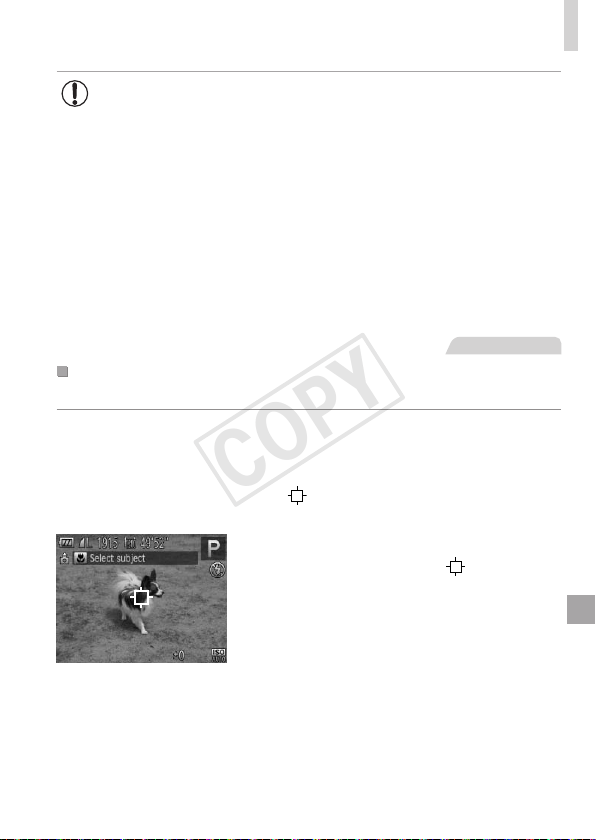
107
ShootingRangeandFocusing
• Iffacesarenotdetected,orwhenonlygrayframesaredisplayed
(withoutawhiteframe),anAFframeisdisplayedinthecenterof
thescreenwhenyoupresstheshutterbuttonhalfway.
• IffacesarenotdetectedwhenServoAF(=
109)issetto[On],
theAFframeisdisplayedinthecenterofthescreenwhenyou
presstheshutterbuttonhalfway.
• Examplesoffacesthatcannotbedetected:
-Subjectsthataredistantorextremelyclose
-Subjectsthataredarkorlight
-Facesinprole,atanangle,orpartlyhidden
• Thecameramaymisinterpretnon-humansubjectsasfaces.
• NoAFframesaredisplayedifthecameracannotfocuswhenyou
presstheshutterbuttonhalfway.
StillImages
ChoosingSubjectstoFocusOn(TrackingAF)
Shootafterchoosingasubjecttofocusonasfollows.
1 Choose[TrackingAF].
Followthestepson=
105tochoose
[TrackingAF].
[ ]isdisplayedinthecenterofthe
screen.
2 Chooseasubjecttofocuson.
Aimthecamerasothat[ ]isonthe
desiredsubject,andthenpressthe<q>
button.
COPY
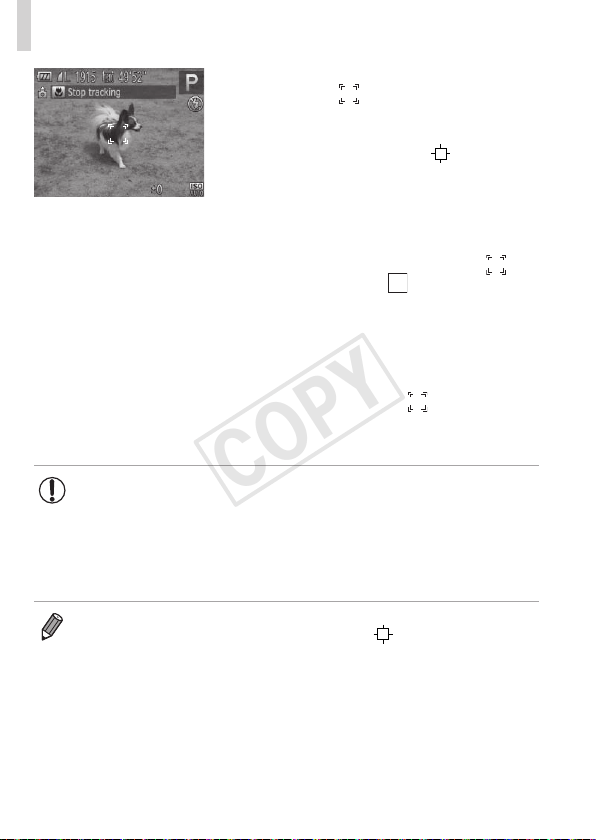
108
ShootingRangeandFocusing
Whenthesubjectisdetected,thecamera
beepsand[
]isdisplayed.Evenifthe
subjectmoves,thecamerawillcontinue
totrackthesubjectwithinacertainrange.
Ifnosubjectisdetected,[ ]is
displayed.
Tocanceltracking,pressthe<q>button
again.
3 Shoot.
Presstheshutterbuttonhalfway.[ ]
changestoablue[
],whichfollows
thesubjectasthecameracontinuesto
adjustthefocusandexposure(ServoAF)
(=
109).
Presstheshutterbuttonallthewaydown
toshoot.
Evenafteryourshot,[ ]isstill
displayedandthecameracontinuesto
trackthesubject.
• [ServoAF](=
109)issetto[On]andcannotbechanged.
• Trackingmaynotbepossiblewhensubjectsaretoosmallormove
toorapidly,orwhensubjectcolororbrightnessmatchesthatofthe
backgroundtooclosely.
• [AF-PointZoom]onthe[4]tabisnotavailable.
• [e]isnotavailable.
• Thecameracandetectsubjectsevenifyoupresstheshutterbuttonhalfway
withoutpressingthe<q>button.Afteryourshot,[
]isdisplayedinthe
centerofthescreen.
• Whenshootingin[f]mode(=
103),pressandholdthe<q>buttonforat
leastonesecond.
COPY
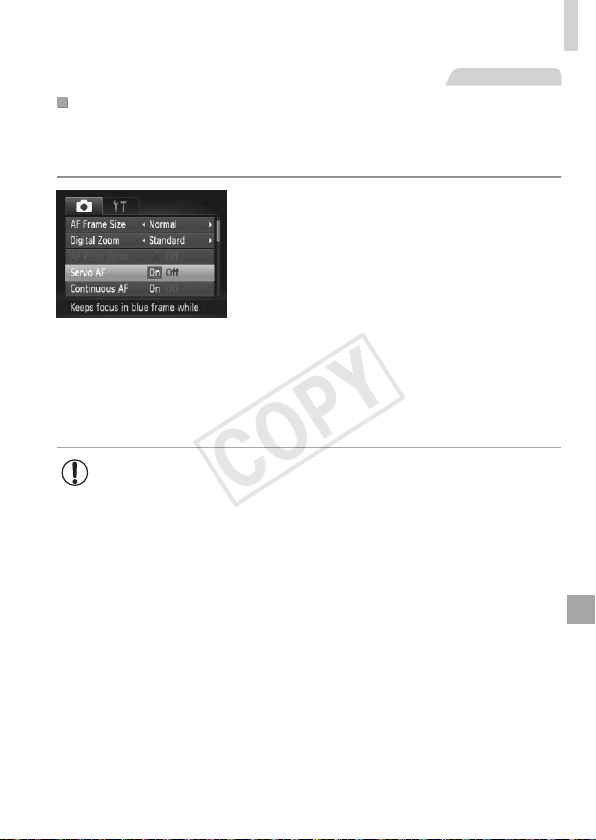
109
ShootingRangeandFocusing
StillImages
ShootingwithServoAF
Thismodehelpsavoidmissingshotsofsubjectsinmotion,becausethe
cameracontinuestofocusonthesubjectandadjusttheexposureaslong
asyoupresstheshutterbuttonhalfway.
1 Congurethesetting.
Pressthe<n>button,choose
[ServoAF]onthe[4]tab,andthen
choose[On](=
47).
2 Focus.
Thefocusandexposurearemaintained
wheretheblueAFframeisdisplayed
whileyouarepressingtheshutterbutton
halfway.
• Focusingmaynotbepossibleinsomeshootingconditions.
• Inlow-lightconditions,ServoAFmaynotbeactivated(AFframes
maynotturnblue)whenyoupresstheshutterbuttonhalfway.
Inthiscase,thefocusandexposurearesetaccordingtothe
speciedAFframemode.
• Ifadequateexposurecannotbeobtained,shutterspeedsand
aperturevaluesaredisplayedinorange.Releasetheshutter
button,andthenpressithalfwayagain.
• AFlockshootingisnotavailable.
• [AF-PointZoom]onthe[4]tabisnotavailable.
• Notavailablewhenusingtheself-timer(=
62).
COPY
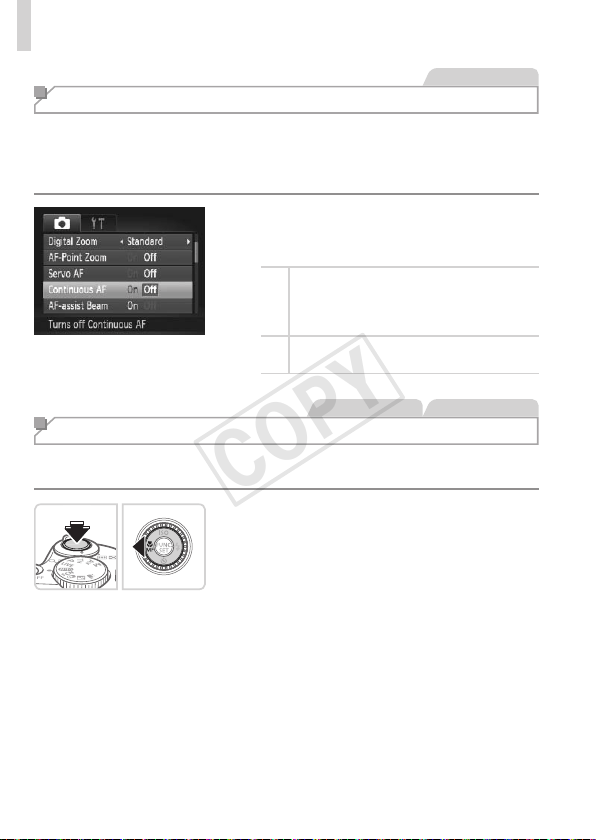
110
ShootingRangeandFocusing
StillImages
Changing the Focus Setting
Youcanchangedefaultcameraoperationofconstantlyfocusingon
subjectsitisaimedat,evenwhentheshutterbuttonisnotpressed.Instead,
youcanlimitcamerafocusingtothemomentyoupresstheshutterbutton
halfway.
Pressthe<n>button,choose
[ContinuousAF]onthe[4]tab,andthen
choose[Off](=
47).
On
Helpsavoidmissingsuddenphoto
opportunities,becausethecamera
constantlyfocusesonsubjectsuntilyou
presstheshutterbuttonhalfway.
Off
Conservesbatterypower,becausethe
cameradoesnotfocusconstantly.
StillImages Movies
Shooting with the AF Lock
Thefocuscanbelocked.Afteryoulockthefocus,thefocalpositionwillnot
changeevenwhenyoureleaseyourngerfromtheshutterbutton.
1 Lockthefocus.
Withtheshutterbuttonpressedhalfway,
pressthe<q>button.
Thefocusisnowlocked,and[f]and
theMFindicatoraredisplayed.
TocancelAFlock,releasetheshutter
button,holdtheshutterbuttonhalfway
downagain,andpressthe<q>button.
2 Composetheshotandshoot.
COPY
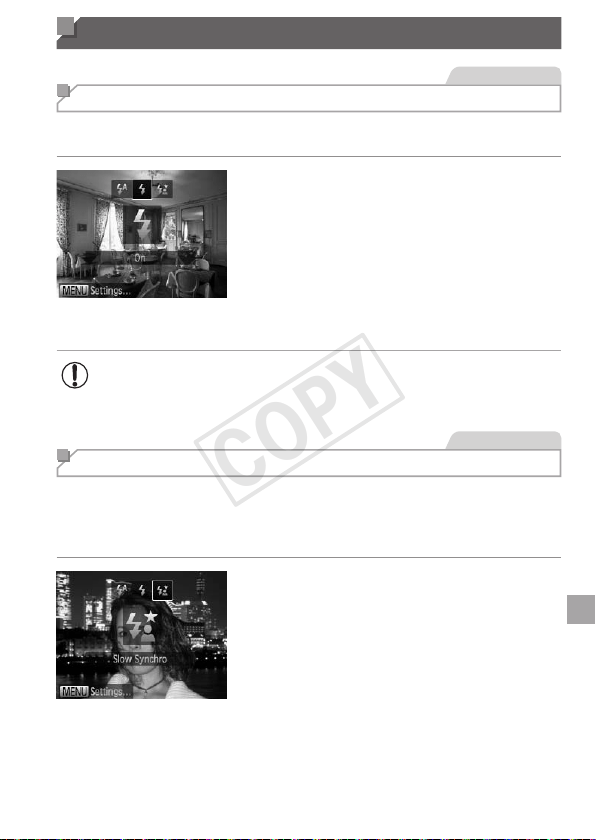
111
Flash
StillImages
Activating Flash
Youcanhavetheashreforeachshot.Fordetailsontheashrange,see
“Specications”(=
217).
1 Lifttheash.
2 Congurethesetting.
Pressthe<r>button,choose[h](either
pressthe<q><r>buttonsorturnthe
<5>dial),andthenpressthe<m>
button.
Oncethesettingiscomplete,[h]is
displayed.
• Thesettingscreencannotbeaccessedbypressingthe<r>
buttonwhentheashislowered.Lifttheashwithyourngerin
advance.
StillImages
Shooting with Slow Synchro
Withthisoption,theashrestoincreasethebrightnessofthemain
subject(suchaspeople)whilethecamerashootsataslowshutterspeedto
increasethebrightnessofthebackgroundthatisoutoftheashrange.
Fordetailsontheashrange,see“Specications”(=
217).
1 Lifttheash.
2 Congurethesetting.
Pressthe<r>button,choose[Z](either
pressthe<q><r>buttonsorturnthe
<5>dial),andthenpressthe<m>
button.
Oncethesettingiscomplete,[Z]is
displayed.
COPY
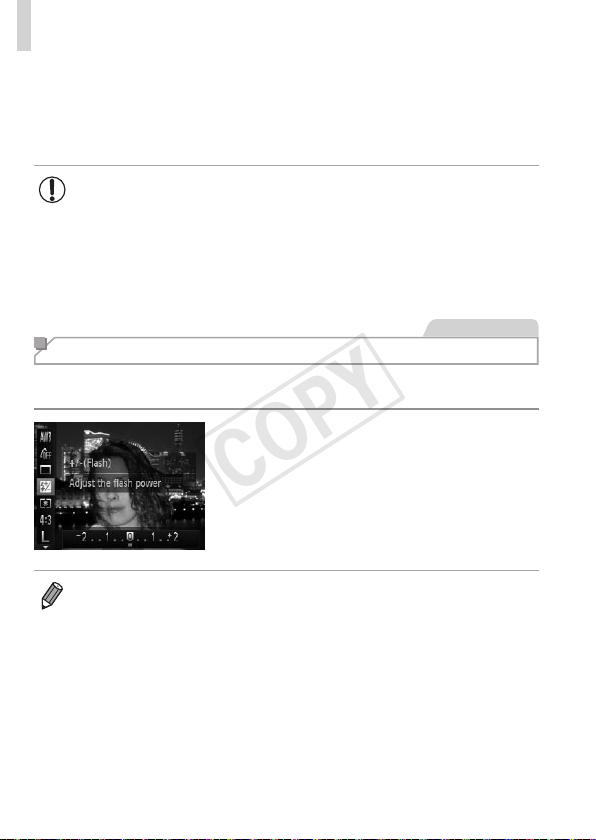
112
Flash
3 Shoot.
Evenaftertheashres,ensurethat
themainsubjectdoesnotmoveuntilthe
shuttersoundisnishedplaying.
• Mountthecameraonatripodortakeothermeasurestokeepit
stillandpreventcamerashake.Additionally,youshouldset[IS
Mode]to[Off]whenusingatripodorothermeanstoholdthe
camerastill(=
114).
• Thesettingscreencannotbeaccessedbypressingthe<r>
buttonwhentheashislowered.Lifttheashwithyourngerin
advance.
StillImages
Adjusting the Flash Exposure Compensation
Justaswithregularexposurecompensation(=
93),youcanadjustthe
ashexposurefrom–2to+2stops,in1/3-stopincrements.
Pressthe<m>button,choose[X]in
themenu,andadjustthesettingbyeither
pressingthe<q><r>buttonsorturning
the<5>dial(=
46).
Oncethesettingiscomplete,[X]is
displayed.
• Whenthereisariskofoverexposure,thecameraautomaticallyadjuststhe
shutterspeedoraperturevalueduringtheashshotstoreducewashed-
outhighlightsandshootatoptimalexposure.However,youcandeactivate
automaticadjustmentoftheshutterspeedandaperturevaluebyaccessing
<n>(=
47)andsetting[SafetyFE]in[FlashSettings]onthe[4]
tabto[Off].
• Youcanalsoconguretheashexposurecompensationbyaccessing
<n>(=
47)andchoosing[FlashExp.Comp]in[FlashSettings]on
the[4]tab.
• Youcanalsoaccessthe[FlashSettings]<n>screenwhentheash
isupbypressingthe<r>buttonandimmediatelypressingthe<n>
button.
COPY
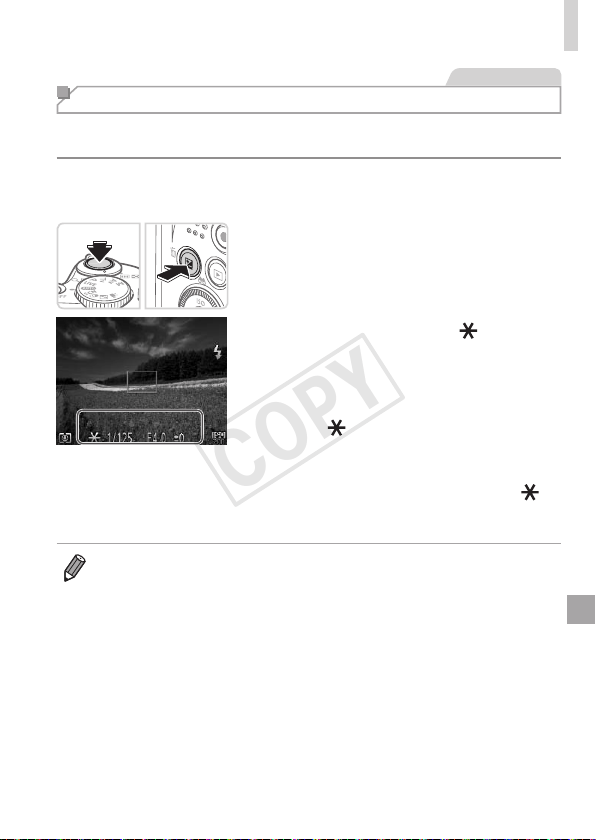
113
Flash
StillImages
Shooting with the FE Lock
JustaswiththeAElock(=
94),youcanlocktheexposurefortheash
shots.
1 Lifttheashandsettheashto
[h](=
111).
2 Locktheashexposure.
Aimthecameraatthesubjecttoshoot
withtheexposurelocked.Withthe
shutterbuttonpressedhalfway,pressthe
<b>button.
Theashres,andwhen[ ]is
displayed,theashoutputlevelis
retained.
TounlockFE,releasetheshutterbutton
andpressthe<b>buttonagain.Inthis
case,[
]isnolongerdisplayed.
3 Composetheshotandshoot.
Afteroneshot,FEisunlockedand[ ]is
nolongerdisplayed.
• FE:FlashExposure
COPY
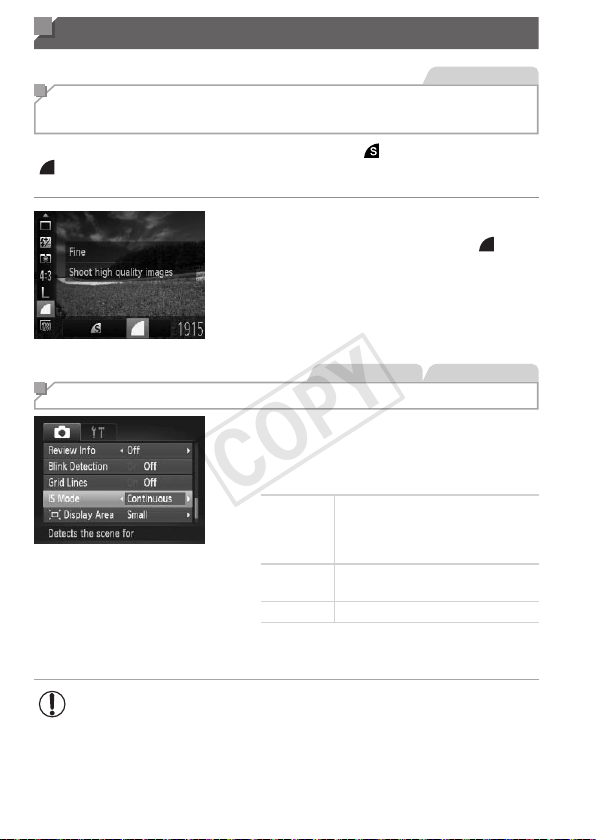
114
Other Settings
StillImages
Changing the Compression Ratio
(Image Quality)
Choosefromtwocompressionratios,asfollows:[ ](SuperFine),
[ ](Fine).Forguidelinesonhowmanyshotsateach
compressionratiocantonamemorycard,see“Specications”(=
217).
Congurethesetting.
Pressthe<m>button,choose[ ]in
themenu,andchoosethedesiredoption
(=
46).
StillImages Movies
Changing the IS Mode Settings
Pressthe<n>button,choose[IS
Mode]onthe[4]tab,andthenpressthe
<q><r>buttonstochoosethedesired
option(=
47).
Continuous
Optimalimagestabilization
fortheshootingconditionsis
automaticallyapplied(Intelligent
IS)(=
58).
ShootOnly*
Imagestabilizationisactiveonlyat
themomentofshooting.
Off Deactivatesimagestabilization.
*Thesettingischangedto[Continuous]formovie
recording.
• Ifimagestabilizationcannotpreventcamerashake,mountthe
cameraonatripodortakeothermeasurestoholditstill.Inthis
case,set[ISMode]to[Off].
COPY

115
Tv, Av, and M Mode
Takesmarter,moresophisticatedshots
• Instructionsinthischapterapplytothecameraassettotherespective
mode.
5
COPY
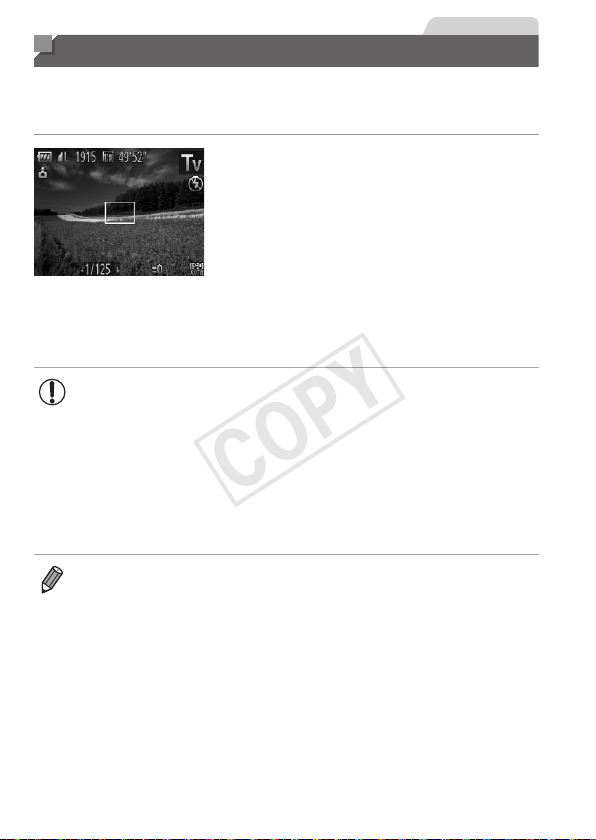
116
StillImages
Specic Shutter Speeds (<Tv> Mode)
Setyourpreferredshutterspeedbeforeshootingasfollows.Thecamera
automaticallyadjuststheaperturevaluetosuityourshutterspeed.
Fordetailsonavailableshutterspeeds,see“Specications”(=
217).
1 Enter<M>mode.
Setthemodedialto<M>.
2 Settheshutterspeed.
Turnthe<5>dialtosettheshutter
speed.
• Withshutterspeedsof1.3secondsorslower,therewillbeadelay
beforeyoucanshootagain,asimagesareprocessedtoremove
noise.
• Whenshootingatlowshutterspeedsonatripod,youshouldset
[ISMode]to[Off](=
114).
• Orangedisplayofaperturevalueswhenyoupresstheshutter
buttonhalfwayindicatesthatthesettingsdeviatefromstandard
exposure.Adjusttheshutterspeeduntiltheaperturevalueis
displayedinwhite,orusesafetyshift(=
117).
• <M>:Timevalue
COPY
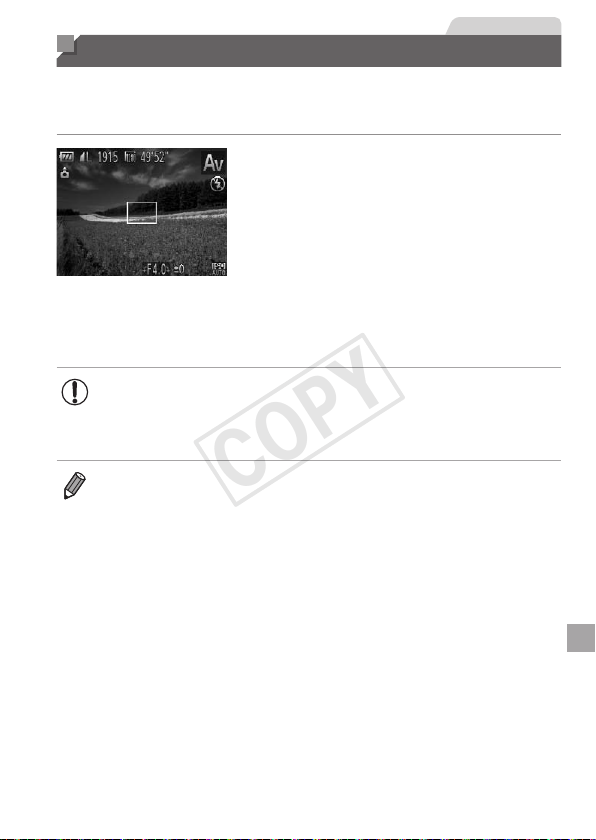
117
StillImages
Specic Aperture Values (<Av> Mode)
Setyourpreferredaperturevaluebeforeshootingasfollows.Thecamera
automaticallyadjuststheshutterspeedtosuityouraperturevalue.
Fordetailsonavailableaperturevalues,see“Specications”(=
217).
1 Enter<B>mode.
Setthemodedialto<B>.
2 Settheaperturevalue.
Turnthe<5>dialtosettheaperture
value.
• Orangedisplayofshutterspeedswhenyoupresstheshutter
buttonhalfwayindicatesthatthesettingsdeviatefromstandard
exposure.Adjusttheaperturevalueuntiltheshutterspeedis
displayedinwhite,orusesafetyshift(seebelow).
• <B>:Aperturevalue(sizeoftheopeningmadebytheirisinthelens)
• Toavoidexposureproblemsin<M>and<B>modes,youcanhavethe
cameraautomaticallyadjusttheshutterspeedoraperturevalue,evenwhen
standardexposurecannototherwisebeobtained.Pressthe<n>button
andset[SafetyShift]onthe[4]tabto[On](=
47).
However,safetyshiftisdisabledwhentheashres.
COPY
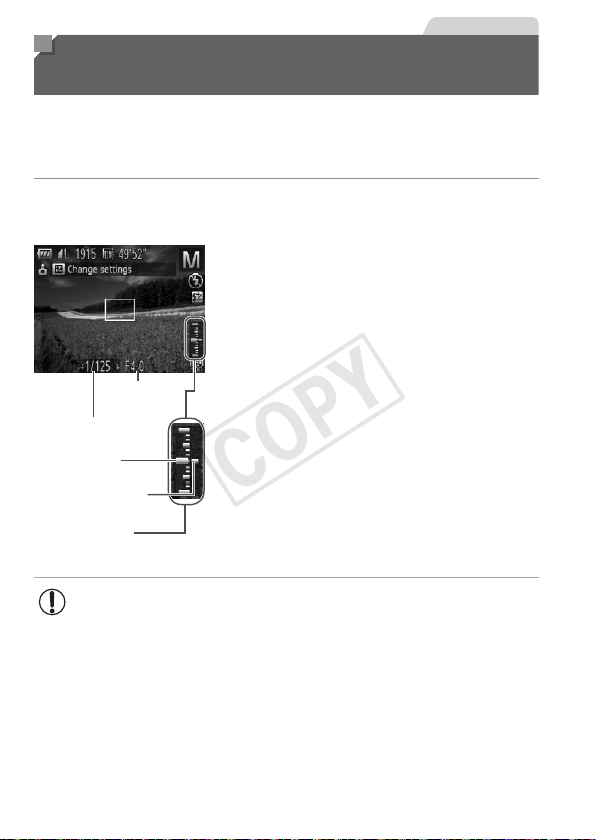
118
StillImages
Specic Shutter Speeds and Aperture
Values (<M> Mode)
Followthesestepsbeforeshootingtosetyourpreferredshutterspeedand
aperturevaluetoobtainthedesiredexposure.
Fordetailsonavailableshutterspeedsandaperturevalues,see
“Specications”(=
217).
1 Enter<D>mode.
Setthemodedialto<D>.
Aperture
Value
ShutterSpeed
Standard
Exposure
Level
ExposureLevel
Mark
ExposureLevel
Indicator
2 Congurethesetting.
Pressthe<b>button,choose
adjustmentofshutterspeedoraperture
value,andturnthe<5>dialtospecify
avalue.
Anexposurelevelmarkbasedonyour
speciedvalueisshownontheexposure
levelindicatorforcomparisontothe
standardexposurelevel.
Theexposurelevelmarkisshown
inorangewhenthedifferencefrom
standardexposureexceeds2stops.“–2”
or“+2”isdisplayedinorangeinthelower
rightwhenyoupresstheshutterbutton
halfway.
• Afteryousettheshutterspeedoraperturevalue,theexposure
levelmaychangeifyouadjustthezoomorrecomposetheshot.
• Screenbrightnessmaychangedependingonyourspecied
shutterspeedoraperturevalue.However,screenbrightness
remainsthesamewhentheashisupandthemodeissetto[h].
• Tohavethesettingyoudidnotcongureinstep2(whethershutter
speedoraperturevalue)automaticallyadjustedtoobtainstandard
exposure,holdtheshutterbuttonhalfwayandpressthe<b>
button.Notethatstandardexposuremaynotbepossiblewith
somesettings.
COPY
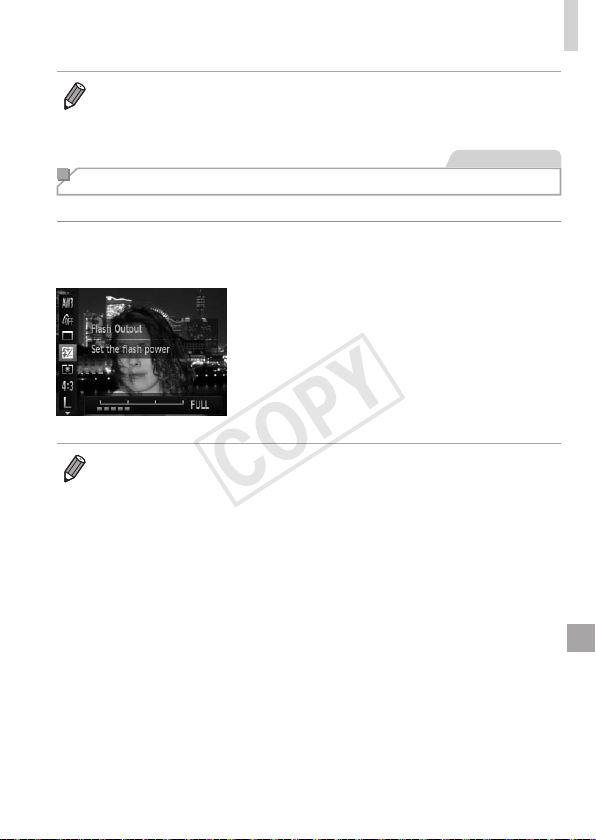
119
SpecicShutterSpeedsandApertureValues(<M>Mode)
• <D>:Manual
• Calculationofstandardexposureisbasedonthespeciedmeteringmethod
(=
95).
StillImages
Adjusting the Flash Output
Choosefromthethreeashlevelsin<D>mode.
1 Enter<D>mode.
Setthemodedialto<D>.
2 Congurethesetting.
Pressthe<m>button,choose[X]in
themenu,andadjustthesettingbyeither
pressingthe<q><r>buttonsorturning
the<
5
>dial(=
46).
Oncethesettingiscomplete,[X]is
displayed.
• Youcanalsosettheashlevelbyaccessing<n>(=
47)and
choosing[FlashOutput]in[FlashSettings]onthe[4]tab.
• Youcansettheashlevelin<M>or<B>modebyaccessing<n>
(=
47),choosing[FlashSettings]onthe[4]tab,andthensetting[Flash
Mode]to[Manual].
• Youcanalsoaccessthe[FlashSettings]<n>screenasfollows.
-Whentheashisup,pressthe<r>buttonandimmediatelypressthe
<n>button.
COPY

120
COPY

121
Playback Mode
Havefunreviewingyourshots,andbrowseoreditthem
inmanyways
• Topreparethecamerafortheseoperations,pressthe<1>buttonto
enterPlaybackmode.
• Itmaynotbepossibletoplaybackoreditimagesthatwere
renamedoralreadyeditedonacomputer,orimagesfromother
cameras.
6
COPY
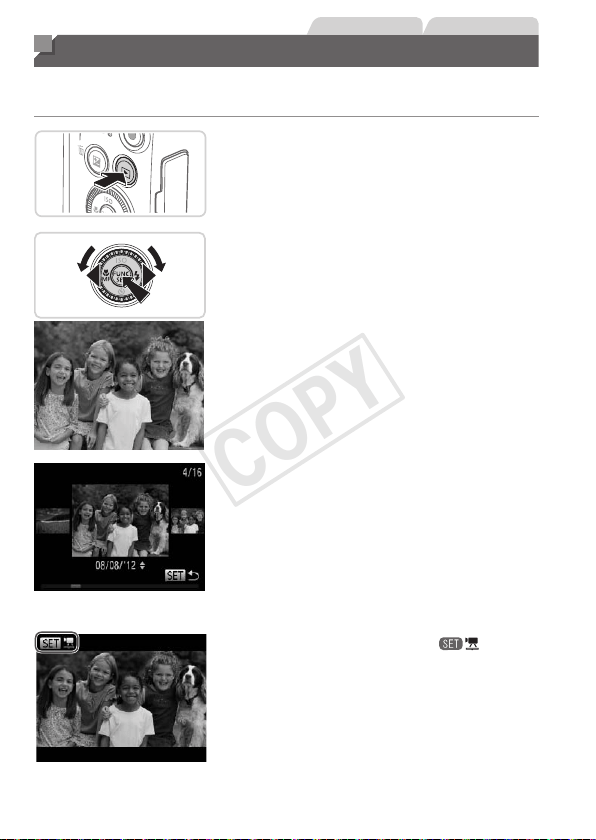
122
StillImages Movies
Viewing
Aftershootingimagesormovies,youcanviewthemonthescreenas
follows.
1 EnterPlaybackmode.
Pressthe<1>button.
Yourlastshotisdisplayed.
2 Browsethroughyourimages.
Toviewthepreviousimage,press
the<q>buttonorturnthe<5>dial
counterclockwise.Toviewthenext
image,pressthe<r>buttonorturnthe
<5>dialclockwise.
Pressandholdthe<q><r>buttonsto
browsethroughimagesquickly.Images
appeargrainyatthistime.
ToaccessScrollDisplaymode,turnthe
<
5
>dialrapidly.Inthismode,turnthe
<
5
>dialtobrowsethroughimages.
Toreturntosingle-imagedisplay,press
the<m>button.
Tobrowseimagesgroupedbyshooting
date,pressthe<o><p>buttonsin
ScrollDisplaymode.
Moviesareidentiedbya[ ]icon.To
playmovies,gotostep3.
COPY
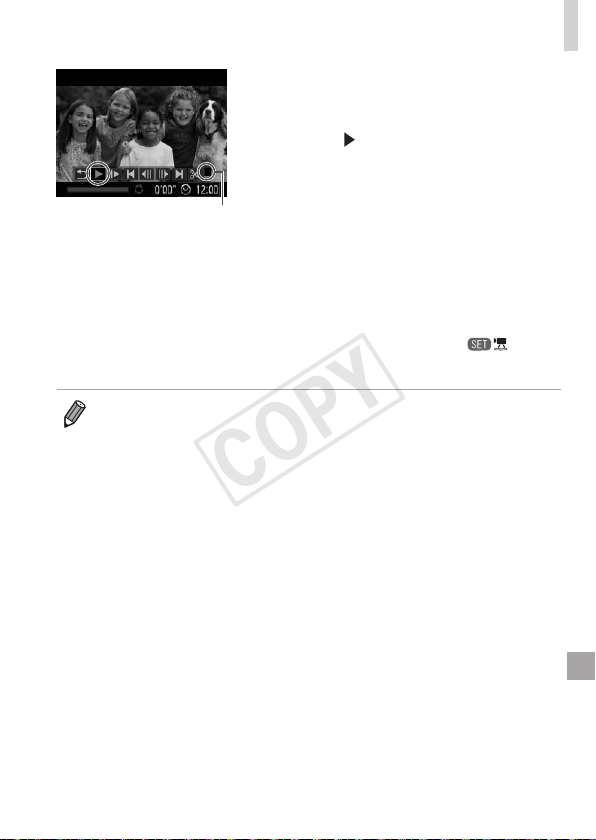
123
Viewing
Volume
3 Playmovies.
Tostartplayback,pressthe<m>button
toaccessthemoviecontrolpanel,
choose[
](eitherpressthe<q><r>
buttonsorturnthe<5>dial),andthen
pressthe<m>buttonagain.
4 Adjustthevolume.
Pressthe<o><p>buttonstoadjustthe
volume.
5 Pauseplayback.
Topauseorresumeplayback,pressthe
<m>button.
Afterthemovieisnished,[ ]is
displayed.
• ToswitchtoShootingmodefromPlaybackmode,presstheshutterbutton
halfway.
• TodeactivateScrollDisplay,pressthe<n>button,choose[Scroll
Display]onthe[1]tab,andthenchoose[Off].
• Ifyouprefertohavethemostrecentshotdisplayedwhenyouenterplayback
mode,pressthe<n>button,andonthe[1]tab,choose[Resume]and
then[Lastshot].
• Tochangethetransitionshownbetweenimages,pressthe<n>button,
choose[Transition]onthe[1]tab,andthenpressthe<q><r>buttonsto
choosetheeffect.
COPY
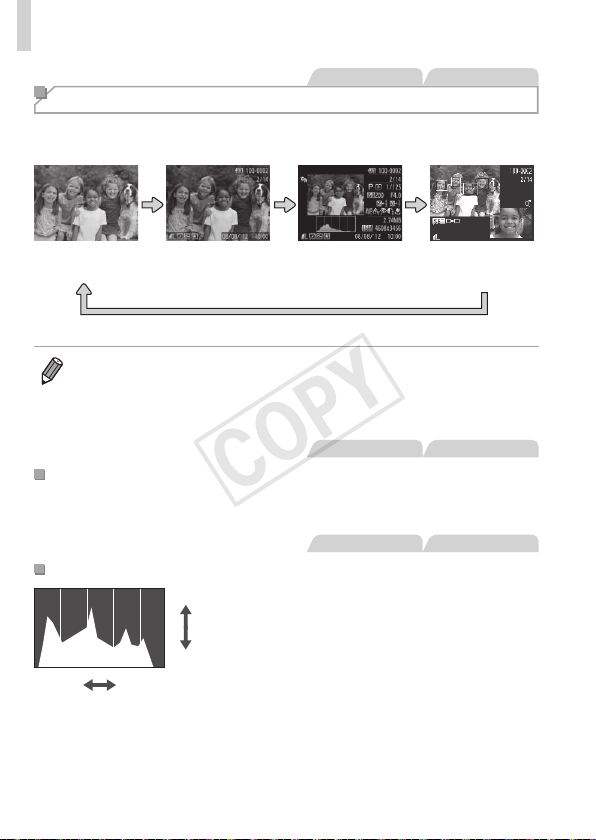
124
Viewing
StillImages Movies
Switching Display Modes
Pressthe<l>buttontoviewotherinformationonthescreen,ortohide
theinformation.Fordetailsontheinformationdisplayed,see=
202.
Noinformationis
displayed
SimpleInformation
Display
Detailed
InformationDisplay
Enablesyouto
checkthefocus
(=
125)*
*Notshownformovies.
• Switchingdisplaymodesbypressingthe<l>buttonisalsopossible
immediatelyafteryoushoot,whileyourshotisdisplayed.However,simple
informationdisplayisnotavailable.Tochangetheinitialdisplaymode,press
the<n>buttonandchoose[ReviewInfo]onthe[4]tab(=
76).
StillImages Movies
OverexposureWarning(forImageHighlights)
Washed-outhighlightsintheimageashonthescreenindetailed
informationdisplay.
StillImages Movies
Histogram
High
Dark
Low
Bright
Thegraphindetailedinformationdisplay
isahistogramshowingthedistributionof
brightnessintheimage.Thehorizontal
axisrepresentsthedegreeofbrightness,
andtheverticalaxis,howmuchofthe
imageisateachlevelofbrightness.
Viewingthehistogramisawaytocheck
exposure.
COPY
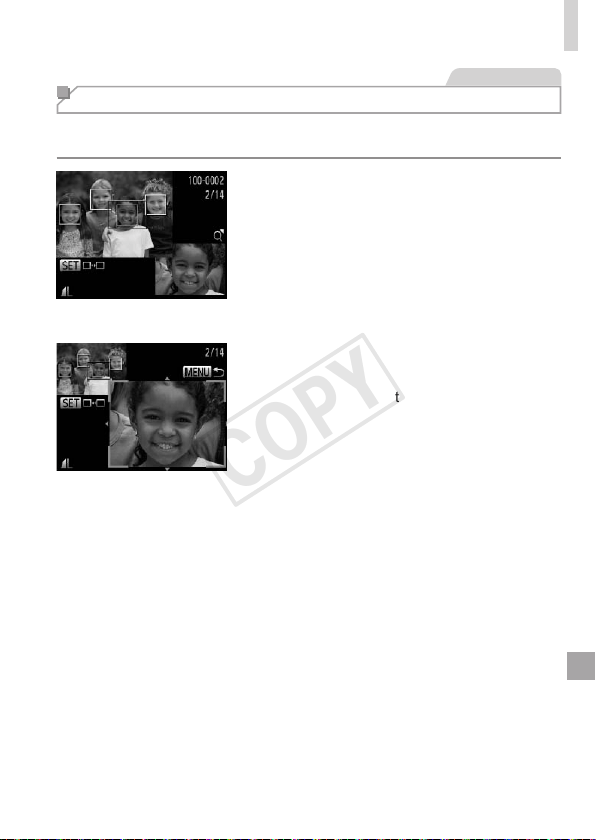
125
Viewing
StillImages
Checking the Focus
Tocheckthefocusofyourshots,youcanmagnifytheareaoftheimage
thatwasintheAFframeatthetimeofshooting.
1 AccessFocusCheck.
Pressthe<l>button(=
124).
AwhiteframeisdisplayedwheretheAF
framewaswhenthefocuswasset.
Grayframesaredisplayedoverfaces
detectedlater,inPlaybackmode.
Theportionoftheimageintheorange
frameismagnied.
2 Switchframes.
Movethezoomlevertoward<k>once.
Thescreenatleftisdisplayed.
Toswitchtoadifferentframewhenthere
aremultipleframes,pressthe<m>
button.
3 Zoominorout,orviewother
imageareas.
Asyouexaminethefocus,usethe
zoomlevertozoominorout.Pressthe
<o><p><q><r>buttonstoadjustthe
displayposition.
Pressthe<n>buttontorestorethe
originaldisplayinstep1.
COPY
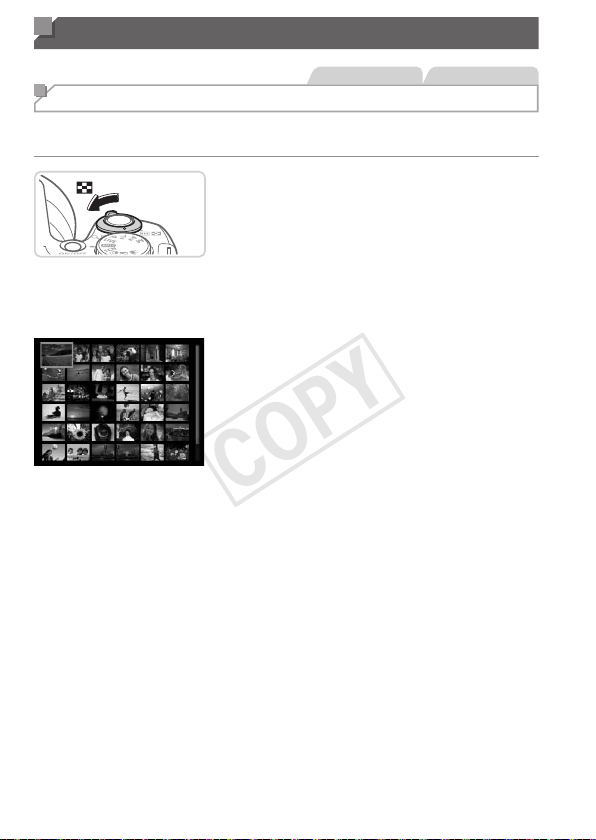
126
Browsing and Filtering Images
StillImages Movies
Navigating Through Images in an Index
Bydisplayingmultipleimagesinanindex,youcanquicklyndtheimages
youarelookingfor.
1 Displayimagesinanindex.
Movethezoomlevertoward<g>to
displayimagesinanindex.Movingthe
leveragainwillincreasethenumberof
imagesshown.
Todisplayfewerimages,movethezoom
levertoward<k>.Fewerimagesare
showneachtimeyoumovethelever.
2 Chooseanimage.
Turnthe<5>dialtoscrollthroughthe
images.
Pressthe<o><p><q><r>buttonsto
chooseanimage.
Anorangeframeisdisplayedaroundthe
selectedimage.
Pressthe<m>buttontoviewthe
selectedimageinsingle-imagedisplay.
COPY
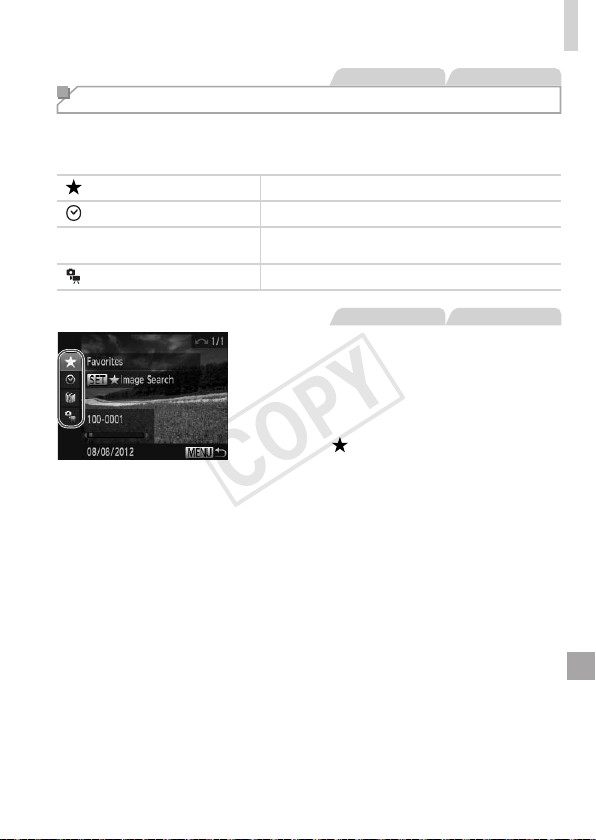
127
BrowsingandFilteringImages
StillImages Movies
Finding Images Matching Specied Conditions
Finddesiredimagesquicklyonamemorycardfullofimagesbyltering
imagedisplayaccordingtoyourspeciedconditions.Youcanalsoprotect
(=
132)ordelete(=
136)theseimagesallatonce.
Favorites
Displaysimagestaggedasfavorites(=
142).
ShotDate Displaystheimagesshotonaspecicdate.
;
MyCategory
Displaystheimagesofaspeciccategory
(=
143).
Stillimage/Movie Displaysonlystillimagesormovies.
StillImages Movies
1 Choosetherstconditionfor
imagedisplayornavigation.
Insingle-imagedisplay,pressthe<o>
button,andthenpressthe<o><p>
buttonstochooseadisplaylter.
When[ ]isselected,youcanview
onlyimagesmatchingthisconditionby
pressingthe<q><r>buttons.Toperform
anactionforalloftheseimagestogether,
pressthe<m>buttonandgotostep3.
2 Choosethesecondcondition
andchecktheimagesfound.
Pressthe<q><r>buttonstochoose
anothercondition.Onceyouturnthe
<5>dial,youcanviewtheimages
narroweddownbyyourconditions.
Tocancelthismode,pressthe<n>
button.
Toswitchtolteredimagedisplay,press
the<m>buttonandgotostep3.
COPY

128
BrowsingandFilteringImages
3 Viewthelteredimages.
Imagesmatchingyourconditionsare
displayedinyellowframes.Toview
onlytheseimages,pressthe<q><r>
buttons,orturnthe<5>dial.
Toexitlteredimagedisplay,pressthe
<o>button,andafter[Imagesearch
canceled]isdisplayed,pressthe<m>
button.
• Whenthecamerahasfoundnocorrespondingimagesforsome
conditions,thoseconditionswillnotbeavailable.
• Toshoworhideinformation,pressthe<l>buttoninstep2.
• Optionsforviewingtheimagesfound(instep3)include“Navigating
ThroughImagesinanIndex”(=
126),“ViewingSlideshows”(=
130),
and“MagnifyingImages”(=
129).Youcanprotect,erase,orprintall
imagesfoundoraddthemtoaphotobookbychoosing[SelectAllImages
inSearch]in“ProtectingImages”(=
132),“ErasingAllImages”(=
137),
“AddingImagestothePrintList(DPOF)”(=
186),or“AddingImagestoa
Photobook”(=
190).
• However,ifyourecategorizeimages(=
143)oreditthemandsavethem
asnewimages(=
146–154),amessageisdisplayedandlteredimage
displayends.
COPY
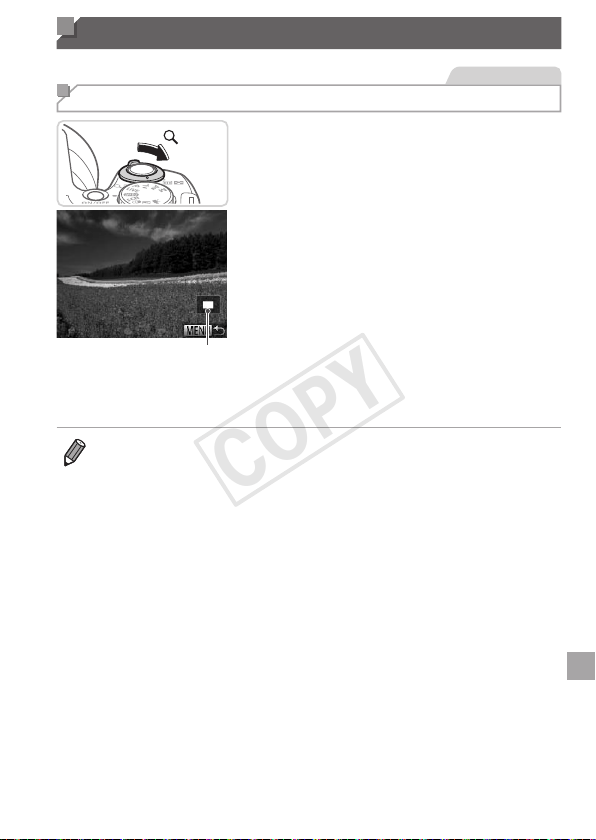
129
Image Viewing Options
StillImages
Magnifying Images
ApproximatePositionof
DisplayedArea
1 Magnifyanimage.
Movingthezoomlevertoward<k>will
zoominandmagnifytheimage.You
canmagnifyimagesuptoabout10xby
continuingtoholdthezoomlever.
Tozoomout,movethezoomlever
toward<g>.Youcanreturntosingle-
imagedisplaybycontinuingtoholdit.
2 Movethedisplaypositionand
switchimagesasneeded.
Tomovethedisplayposition,pressthe
<o><p><q><r>buttons.
Toswitchtootherimageswhilezoomed,
turnthe<5>dial.
• Youcanreturntosingle-imagedisplayfrommagnieddisplaybypressing
the<n>button.
COPY
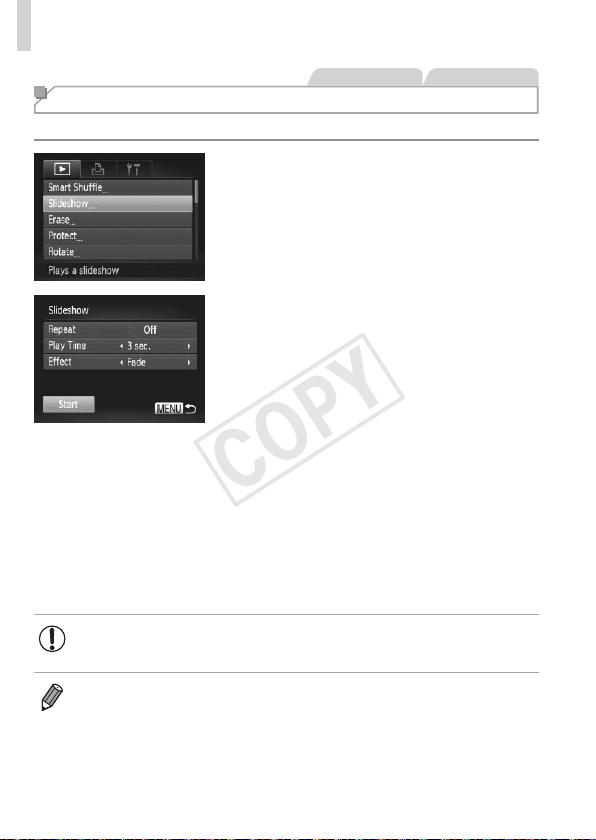
130
ImageViewingOptions
StillImages Movies
Viewing Slideshows
Automaticallyplaybackimagesfromamemorycardasfollows.
1 Accessthesettingscreen.
Pressthe<n>button,andthen
choose[Slideshow]onthe[1]tab
(=
47).
2 Congurethesetting.
Chooseamenuitemtocongure,and
thenchoosethedesiredoption(=
47).
3 Startautomaticplayback.
Pressthe<o><p>buttonsorturnthe
<5>dialtochoose[Start],andthen
pressthe<m>button.
Theslideshowwillstartafewseconds
after[Loadingimage...]isdisplayed.
Pressthe<n>buttontostopthe
slideshow.
• Thecamera’spower-savingfunctions(=
42)aredeactivated
duringslideshows.
• Topauseorresumeslideshows,pressthe<m>button.
• Youcanswitchtootherimagesduringplaybackbypressingthe<q><r>
buttonsorturningthe<5>dial.Forfast-forwardorfast-rewind,holdthe
<q><r>buttonsdown.
• [PlayTime]cannotbemodiedwhen[Bubble]ischosenin[Effect].
COPY
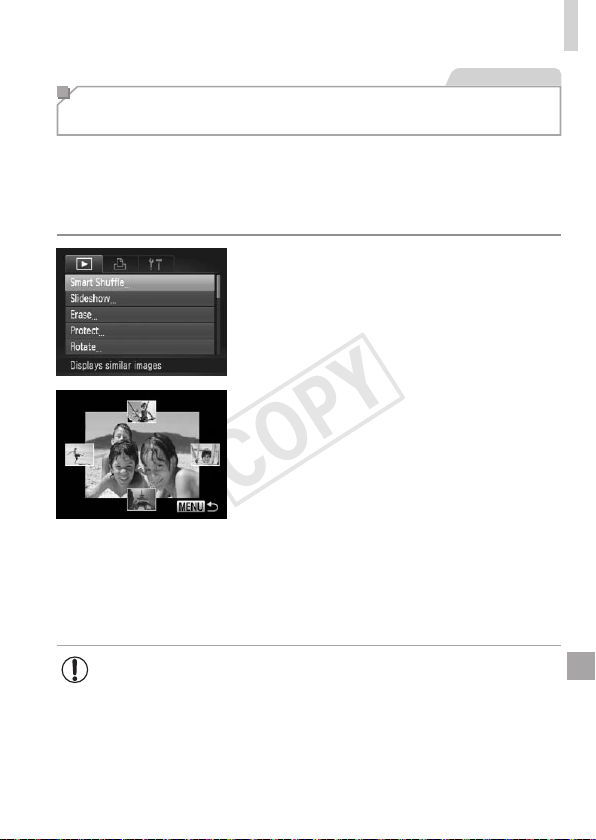
131
ImageViewingOptions
StillImages
Auto Playback of Similar Images
(Smart Shufe)
Basedonthecurrentimage,thecameraoffersfourimagessimilartoit
thatyoumaywishtoview.Afteryouchoosetoviewoneofthoseimages,
thecameraoffersfourmoreimages.Thisisanenjoyablewaytoplayback
imagesinanunexpectedorder.Trythisfeatureafteryouhavetakenmany
shots,inmanykindsofscenes.
1 ChooseSmartShufe.
Pressthe<n>button,choose
[SmartShufe]onthe[1]tab,andthen
pressthe<m>button(=
47).
Fourcandidateimagesaredisplayed.
2 Chooseanimage.
Pressthe<o><p><q><r>buttonsto
choosetheimageyouwanttoviewnext.
Yourchosenimageisdisplayedinthe
center,surroundedbythenextfour
candidateimages.
Forfull-screendisplayofthecenter
image,pressthe<m>button.Torestore
theoriginaldisplay,pressthe<m>
buttonagain.
Pressthe<n>buttontorestore
single-imagedisplay.
• Onlystillimagesshotwiththiscameraareplayedbackusing
SmartShufe.
• [SmartShufe]isnotavailableinthefollowingcases:
-Therearelessthan50shotstakenwiththiscamera
-Anunsupportedimageiscurrentlydisplayed
-Imagesareshowninltereddisplay(=
127)
COPY
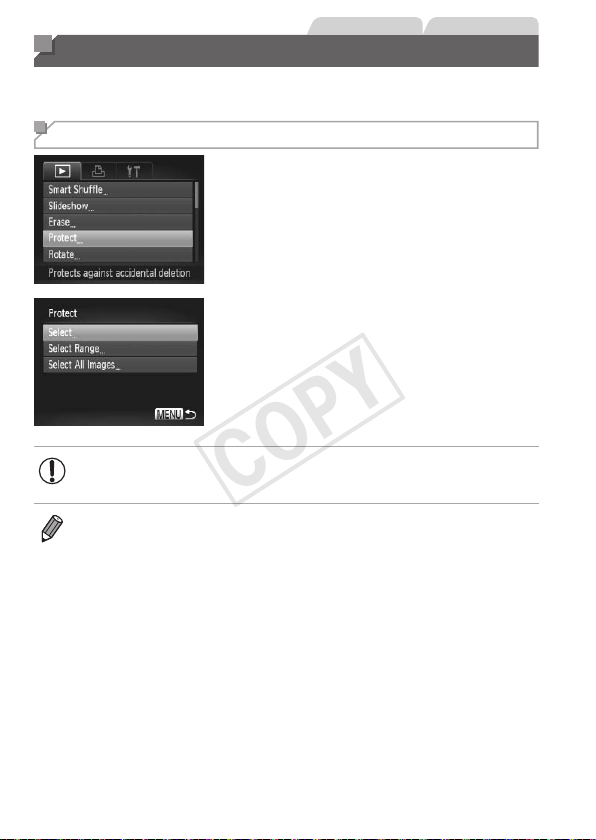
132
StillImages Movies
Protecting Images
Protectimportantimagestopreventaccidentalerasurebythecamera
(=
136,137).
Choosing a Selection Method
1 Accessthesettingscreen.
Pressthe<n>buttonandchoose
[Protect]onthe[1]tab(=
47).
2 Chooseaselectionmethod.
Chooseamenuitemandasettingas
desired(=
47).
Toreturntothemenuscreen,pressthe
<n>button.
• Protectedimagesonamemorycardwillbeerasedifyouformat
thecard(=
160,161).
• Protectedimagescannotbeerasedusingthecamera’serasurefunction.To
erasethemthisway,rstcancelprotection.
COPY
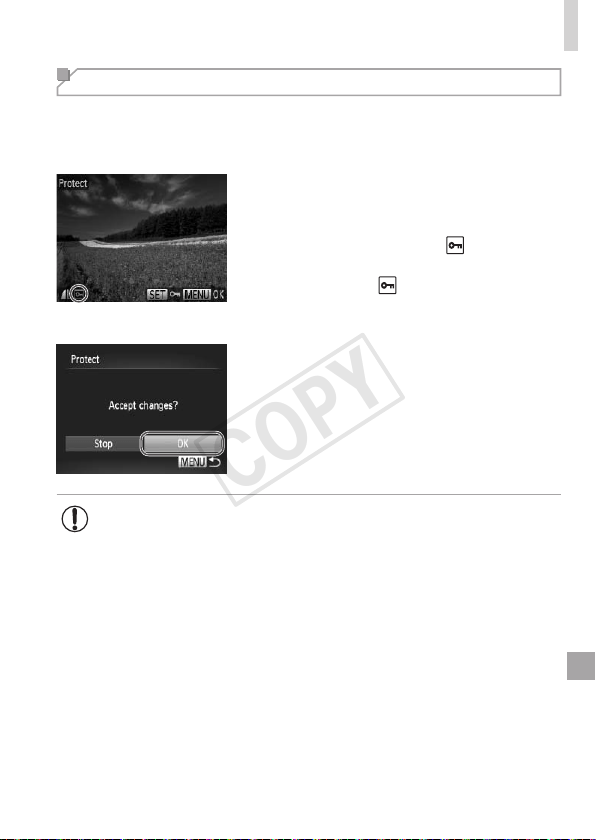
133
ProtectingImages
Choosing Images Individually
1 Choose[Select].
Followingstep2on=
132,choose
[Select]andpressthe<m>button.
2 Choosetheimages.
Pressthe<q><r>buttonsorturnthe
<5>dialtochooseanimage,andthen
pressthe<m>button.[
]isdisplayed.
Tocancelprotection,pressthe<m>
buttonagain.[
]isnolongerdisplayed.
Repeatthisprocesstospecifyother
images.
3 Protecttheimage.
Pressthe<n>button.A
conrmationmessageisdisplayed.
Pressthe<q><r>buttonsorturnthe
<5>dialtochoose[OK],andthenpress
the<m>button.
• ImageswillnotbeprotectedifyouswitchtoShootingmodeorturn
thecameraoffbeforenishingthesetupprocessinstep3.
COPY
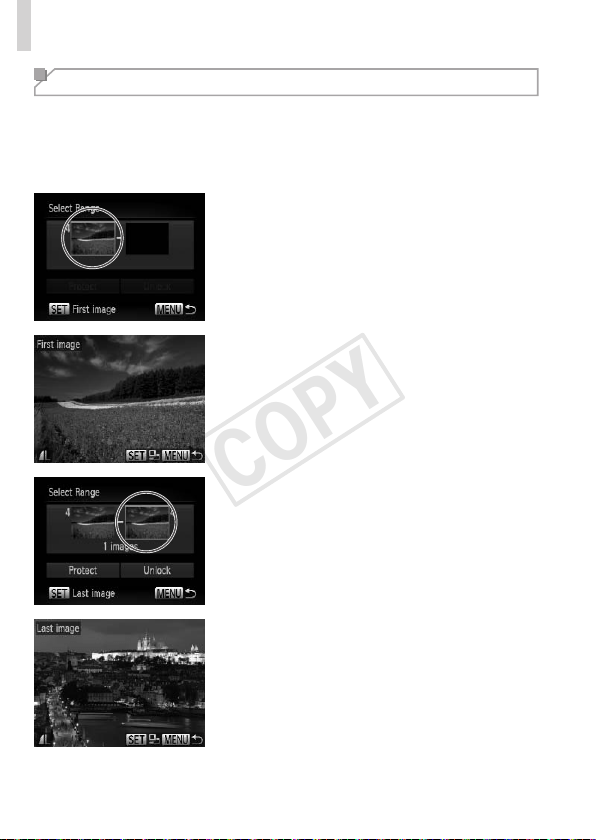
134
ProtectingImages
Selecting a Range
1 Choose[SelectRange].
Followingstep2on=
132,choose
[SelectRange]andpressthe<m>
button.
2 Chooseastartingimage.
Pressthe<m>button.
Pressthe<q><r>buttonsorturnthe
<5>dialtochooseanimage,andthen
pressthe<m>button.
3 Chooseanendingimage.
Pressthe<r>buttontochoose[Last
image],andthenpressthe<m>button.
Pressthe<q><r>buttonsorturnthe
<5>dialtochooseanimage,andthen
pressthe<m>button.
Imagesbeforetherstimagecannotbe
selectedasthelastimage.
COPY
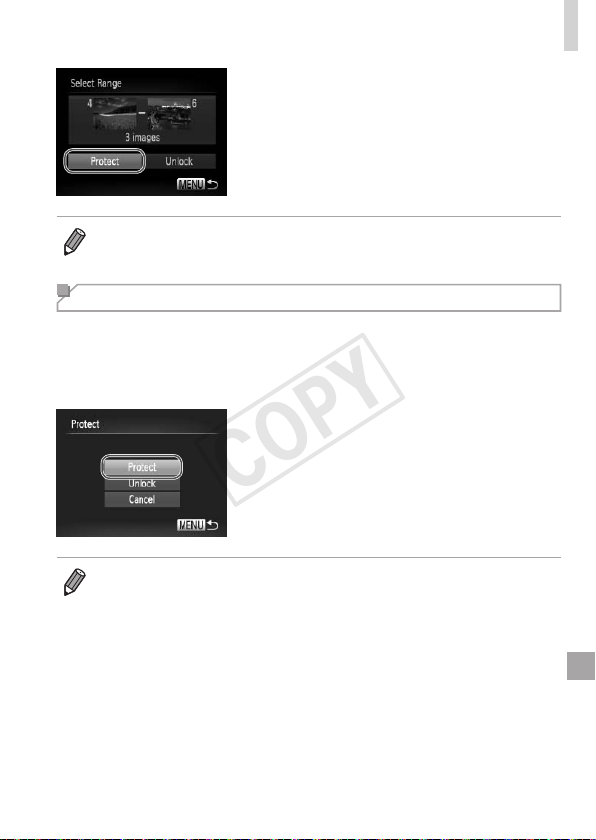
135
ProtectingImages
4 Protecttheimages.
Pressthe<p>buttontochoose
[Protect],andthenpressthe<m>
button.
• Youcanalsochoosetherstorlastimagebyturningthe<5>dialwhenthe
topscreeninsteps2and3isdisplayed.
Specifying All Images at Once
1 Choose[SelectAllImages].
Followingstep2on=
132,choose
[SelectAllImages]andpressthe<m>
button.
2 Protecttheimages.
Pressthe<o><p>buttonsorturnthe
<5>dialtochoose[Protect],andthen
pressthe<m>button.
• Tocancelprotectionforgroupsofimages,choose[Unlock]instep4of
“SelectingaRange”orinstep2of“SpecifyingAllImagesatOnce”.
COPY
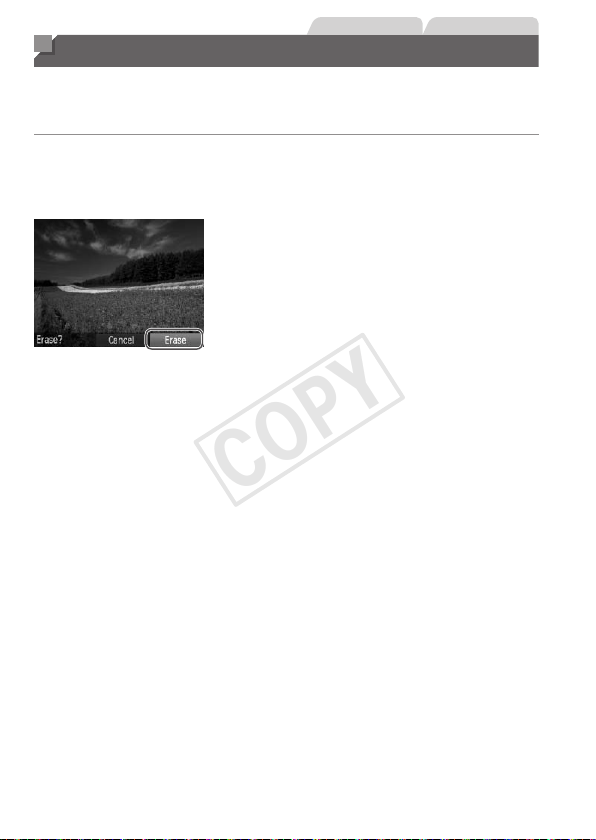
136
StillImages Movies
Erasing Images
Youcanchooseanderaseunneededimagesonebyone.Becarefulwhen
erasingimages,becausetheycannotberecovered.However,protected
images(=
132)cannotbeerased.
1 Chooseanimagetoerase.
Pressthe<q><r>buttonsorturnthe
<5>dialtochooseanimage.
2 Erasetheimage.
Pressthe<a>button.
After[Erase?]isdisplayed,pressthe
<q><r>buttonsorturnthe<5>dialto
choose[Erase],andthenpressthe<m>
button.
Thecurrentimageisnowerased.
Tocancelerasure,pressthe<q><r>
buttonsorturnthe<5>dialtochoose
[Cancel],andthenpressthe<m>
button.
COPY
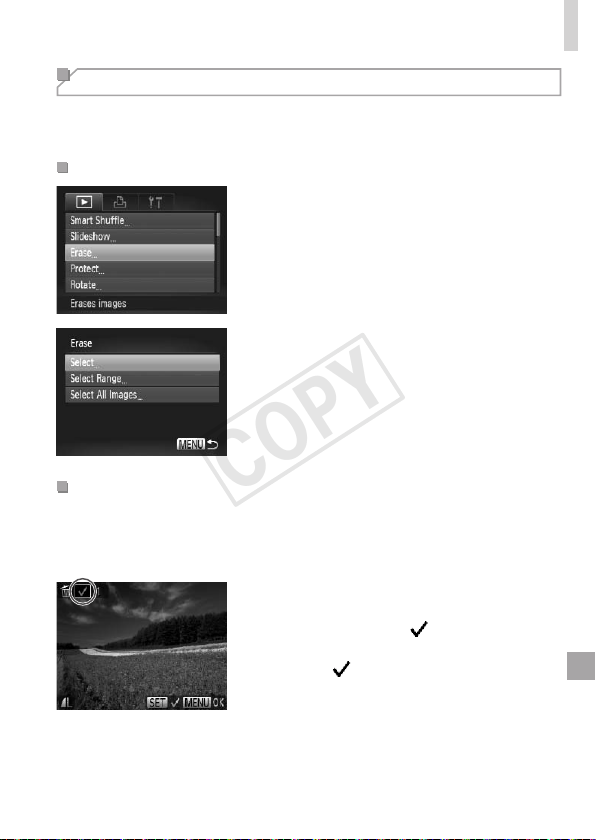
137
ErasingImages
Erasing All Images
Youcaneraseallimagesatonce.Becarefulwhenerasingimages,
becausetheycannotberecovered.However,protectedimages(=
132)
cannotbeerased.
ChoosingaSelectionMethod
1 Accessthesettingscreen.
Pressthe<n>button,andthen
choose[Erase]onthe[1]tab(=
47).
2 Chooseaselectionmethod.
Chooseamenuitemandasettingas
desired(=
47).
Toreturntothemenuscreen,pressthe
<n>button.
ChoosingImagesIndividually
1 Choose[Select].
Followingstep2above,choose[Select]
andpressthe<m>button.
2 Chooseanimage.
Onceyoufollowstep2on=
133to
chooseanimage,[
]isdisplayed.
Tocancelerasure,pressthe<m>button
again.[
]isnolongerdisplayed.
Repeatthisprocesstospecifyother
images.
COPY
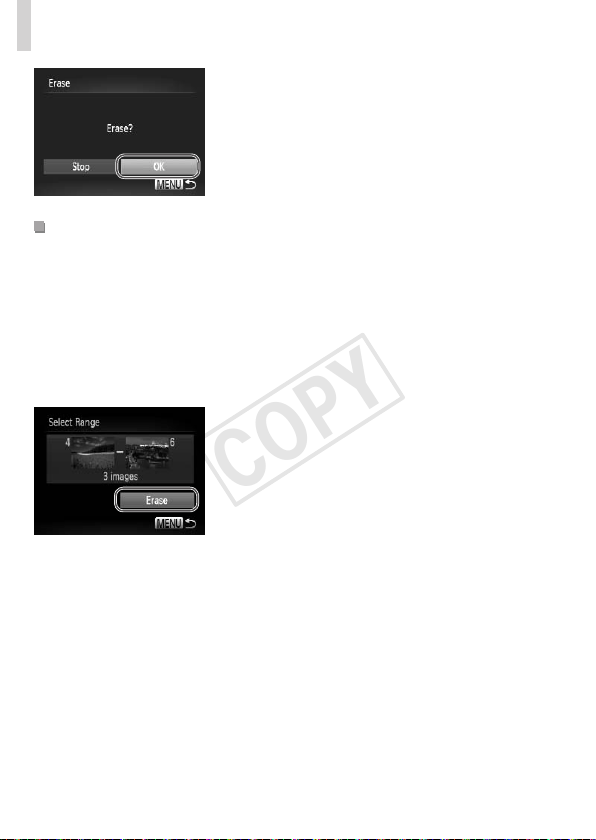
138
ErasingImages
3 Erasetheimage.
Pressthe<n>button.A
conrmationmessageisdisplayed.
Pressthe<q><r>buttonsorturnthe
<5>dialtochoose[OK],andthenpress
the<m>button.
SelectingaRange
1 Choose[SelectRange].
Followingstep2in“ChoosingaSelection
Method”(=
137),choose[Select
Range]andpressthe<m>button.
2 Chooseimages.
Followsteps2–3on=
134tospecify
images.
3 Erasetheimages.
Pressthe<p>buttontochoose[Erase],
andthenpressthe<m>button.
COPY

139
ErasingImages
SpecifyingAllImagesatOnce
1 Choose[SelectAllImages].
Followingstep2in“ChoosingaSelection
Method”(=
137),choose[SelectAll
Images]andpressthe<m>button.
2 Erasetheimages.
Pressthe<q><r>buttonsorturnthe
<5>dialtochoose[OK],andthenpress
the<m>button.
COPY
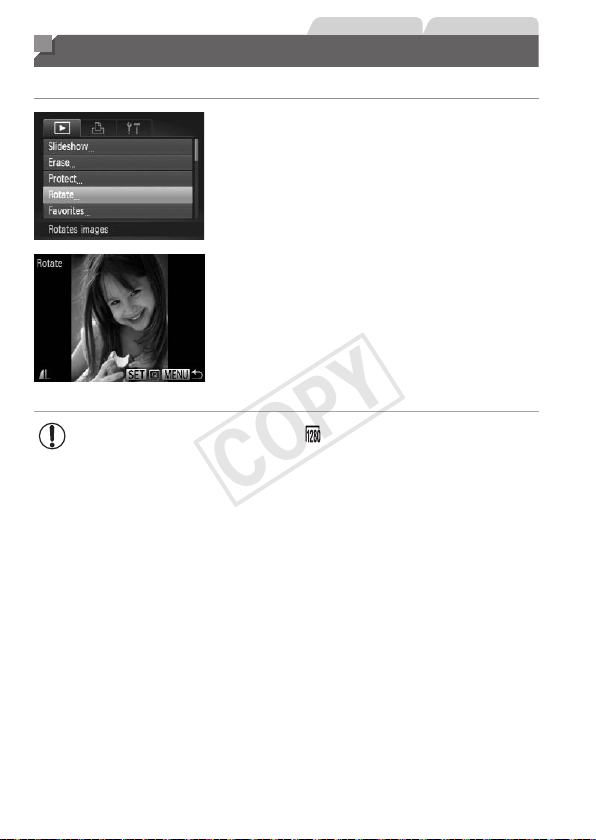
140
StillImages Movies
Rotating Images
Changetheorientationofimagesandsavethemasfollows.
1 Choose[Rotate].
Pressthe<n>buttonandchoose
[Rotate]onthe[1]tab(=
47).
2 Rotatetheimage.
Pressthe<q><r>buttonsorturnthe
<5>dialtochooseanimage.
Theimageisrotated90°eachtimeyou
pressthe<m>button.
Toreturntothemenuscreen,pressthe
<n>button.
• Movieswithanimagequalityof[ ]cannotberotated.
• Rotationisnotpossiblewhen[AutoRotate]issetto[Off]
(=
141).
COPY
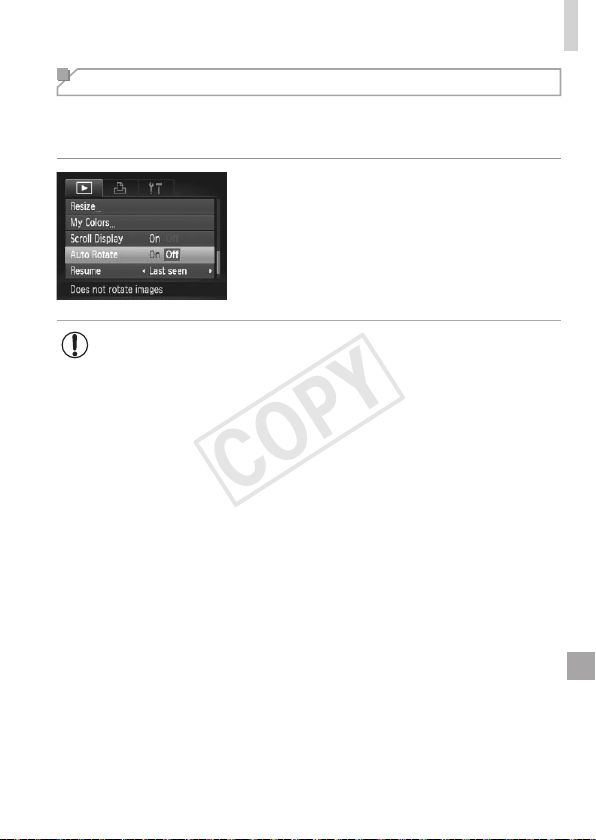
141
RotatingImages
Deactivating Auto Rotation
Followthesestepstodeactivateautomaticrotationbythecamera,which
rotatesimagesshotinverticalorientationsotheyaredisplayedverticallyon
thecamera.
Pressthe<n>button,choose[Auto
Rotate]onthe[1]tab,andthenchoose
[Off](=
47).
• Imagescannotberotated(=
140)whenyouset[AutoRotate]to
[Off].Additionally,imagesalreadyrotatedwillbedisplayedinthe
originalorientation.
• InSmartShufe(=
131)mode,evenif[AutoRotate]issetto
[Off],imagesshotverticallywillbedisplayedvertically,androtated
imageswillbedisplayedintherotatedorientation.
COPY
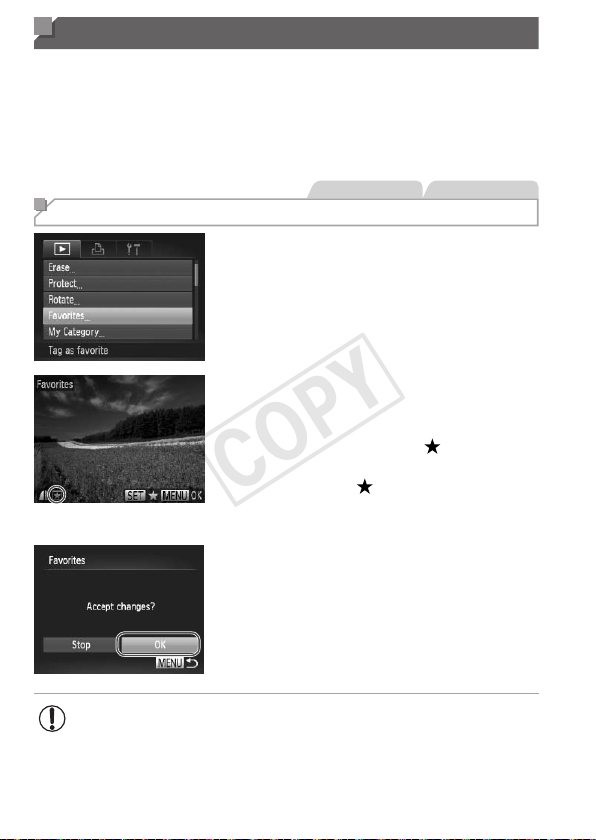
142
Image Categories
YoucantagimagesasfavoritesorassignthemtoMyCategory(=
143)
groups.Bychoosingacategoryinlteredplayback,youcanrestrictthe
followingoperationstoallofthoseimages.
• Viewing(=
122),ViewingSlideshows(=
130),ProtectingImages
(=
132),ErasingImages(=
136),AddingImagestothePrintList
(DPOF)(=
186),AddingImagestoaPhotobook(=
190)
StillImages Movies
Tagging Images as Favorites
1 Choose[Favorites].
Pressthe<n>buttonandchoose
[Favorites]onthe[1]tab(=
47).
2 Chooseanimage.
Pressthe<q><r>buttonsorturnthe
<5>dialtochooseanimage,andthen
pressthe<m>button.[
]isdisplayed.
Tountagtheimage,pressthe<m>
buttonagain.[
]isnolongerdisplayed.
Repeatthisprocesstochooseadditional
images.
3 Finishthesetupprocess.
Pressthe<n>button.A
conrmationmessageisdisplayed.
Pressthe<q><r>buttonsorturnthe
<5>dialtochoose[OK],andthenpress
the<m>button.
• ImageswillnotbetaggedasfavoritesifyouswitchtoShooting
modeorturnthecameraoffbeforenishingthesetupprocessin
step3.
COPY
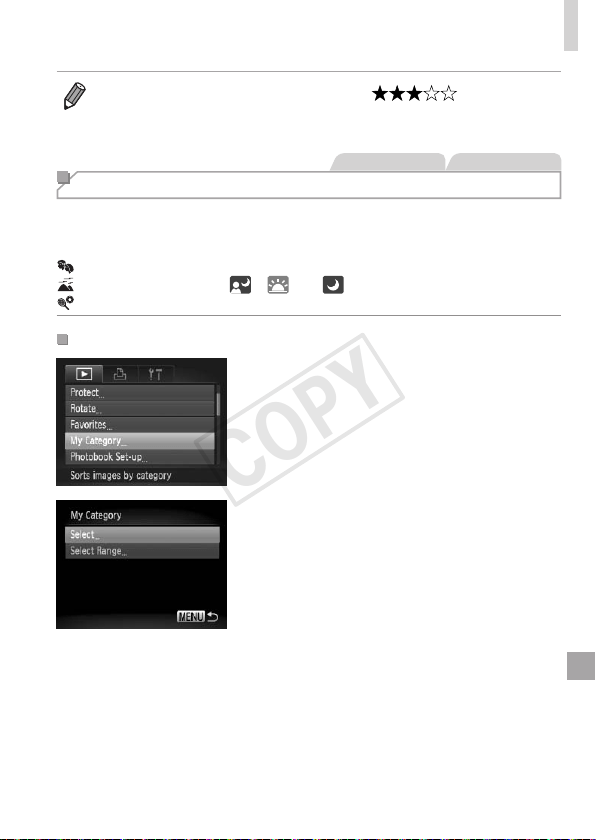
143
ImageCategories
• Favoriteimageswillhaveathree-starrating( )when
transferredtocomputersrunningWindows7orWindowsVista.(Doesnot
applytomovies.)
StillImages Movies
Organizing Images by Category (My Category)
Youcanorganizeimagesintocategories.Notethatimagesare
automaticallycategorizedatthetimeofshooting,accordingtoshooting
conditions.
: Imageswithdetectedfaces,orimagesshotin[I]mode.
: Imagesdetectedas[ ],[ ],or[ ]in<A>mode.
: Imagesshotin[P]or[t]mode.
ChoosingaSelectionMethod
1 Accessthesettingscreen.
Pressthe<n>button,andthen
choose[MyCategory]onthe[1]tab
(=
47).
2 Chooseaselectionmethod.
Chooseamenuitemandasettingas
desired(=
47).
Toreturntothemenuscreen,pressthe
<n>button.
COPY
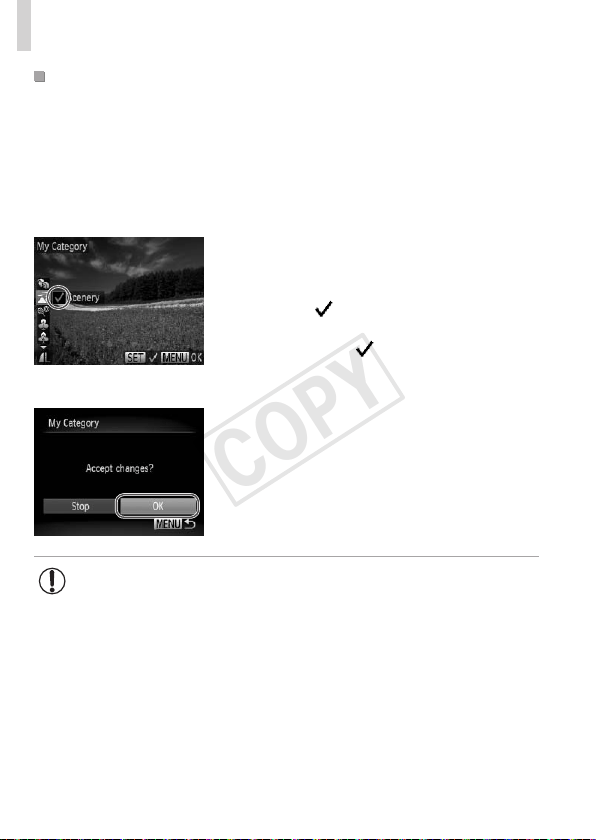
144
ImageCategories
ChoosingImagesIndividually
1 Choose[Select].
Followingstep2on=
143,choose
[Select]andpressthe<m>button.
2 Chooseanimage.
Pressthe<q><r>buttonsorturnthe
<5>dialtochooseanimage.
3 Chooseacategory.
Pressthe<o><p>buttonstochoose
acategoryandthenpressthe<m>
button.[
]isdisplayed.
Tocancelselection,pressthe<m>
buttonagain.[
]isnolongerdisplayed.
Repeatthisprocesstochooseadditional
images.
4 Finishthesetupprocess.
Pressthe<n>button.Aconrmation
messageisdisplayed.Pressthe<q><r>
buttonsorturnthe<5>dialtochoose
[OK],andthenpressthe<m>button.
• ImageswillnotbeassignedtoacategoryifyouswitchtoShooting
modeorturnthecameraoffbeforenishingthesetupprocessin
step4.
COPY
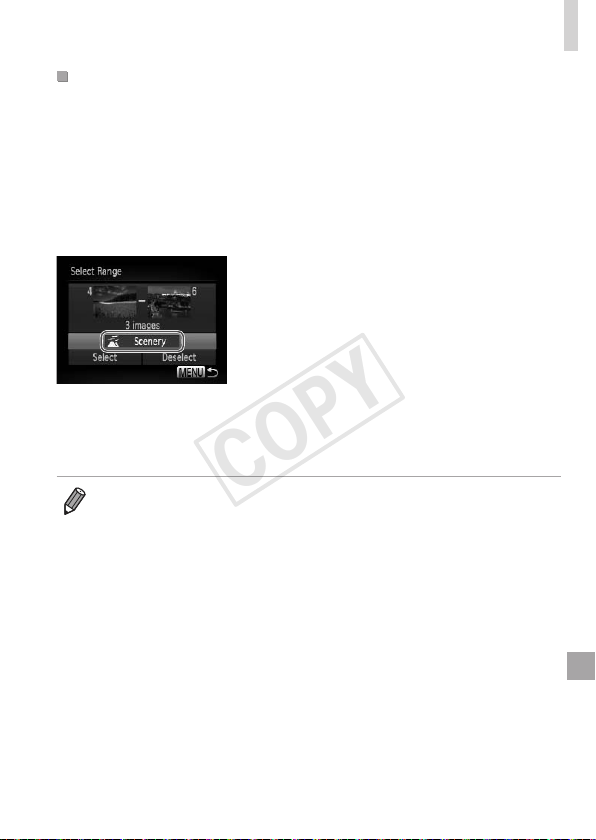
145
ImageCategories
SelectingaRange
1 Choose[SelectRange].
Followingstep2on=
143,choose
[SelectRange]andpressthe<m>
button.
2 Chooseimages.
Followsteps2–3on=
134tospecify
images.
3 Chooseacategory.
Pressthe<p>buttontochoosethetype
ofimage,andthenpressthe<q><r>
buttonsorturnthe<5>dialtochoose
acategory.
4 Finishthesetupprocess.
Pressthe<p>buttontochoose[Select],
andthenpressthe<m>button.
• Youcancleartheselectionofallimagesinthe[SelectRange]categoryby
choosing[Deselect]instep4.
COPY
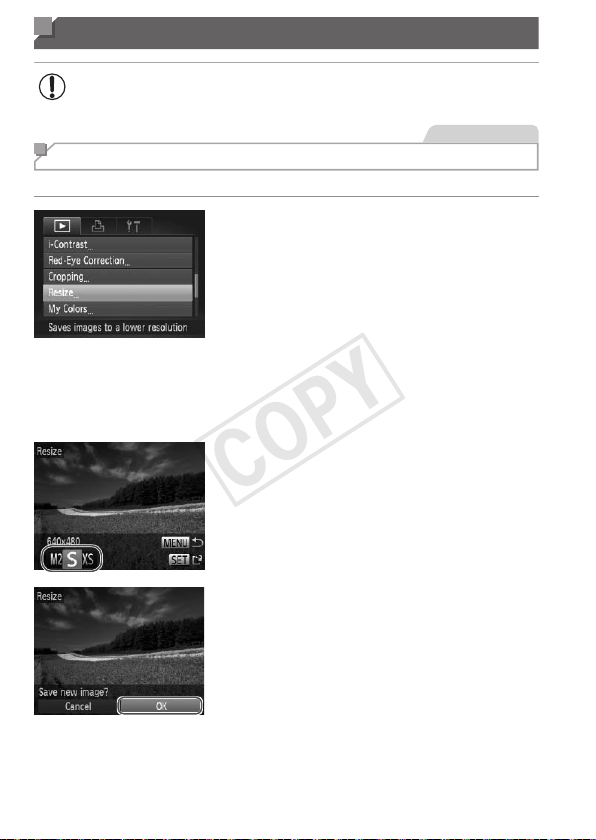
146
Editing Still Images
• Imageediting(=
146–151)isonlyavailablewhenthememory
cardhassufcientfreespace.
StillImages
Resizing Images
Saveacopyofimagesatalowerresolution.
1 Choose[Resize].
Pressthe<n>buttonandchoose
[Resize]onthe[1]tab(=
47).
2 Chooseanimage.
Pressthe<q><r>buttonsorturnthe
<5>dialtochooseanimage,andthen
pressthe<m>button.
3 Chooseanimagesize.
Pressthe<q><r>buttonsorturnthe
<5>dialtochoosethesize,andthen
pressthe<m>button.
[Savenewimage?]isdisplayed.
4 Savethenewimage.
Pressthe<q><r>buttonsorturnthe
<5>dialtochoose[OK],andthenpress
the<m>button.
Theimageisnowsavedasanewle.
COPY
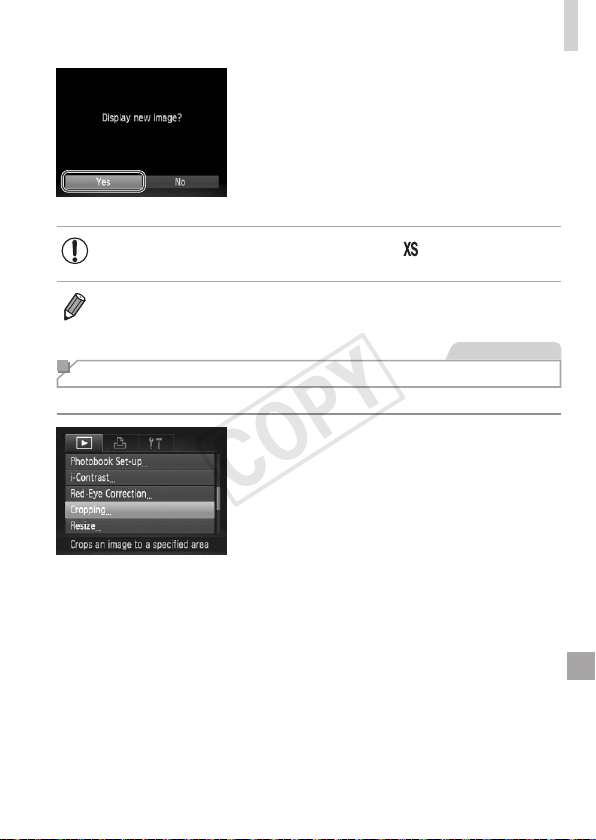
147
EditingStillImages
5 Reviewthenewimage.
Pressthe<n>button.[Displaynew
image?]isdisplayed.
Pressthe<q><r>buttonsorturnthe
<5>dialtochoose[Yes],andthen
pressthe<m>button.
Thesavedimageisnowdisplayed.
• Editingisnotpossibleforimagessavedas[ ]instep3.
• Imagescannotberesizedtoahigherresolution.
StillImages
Cropping
Youcanspecifyaportionofanimagetosaveasaseparateimagele.
1 Choose[Cropping].
Pressthe<n>button,andthen
choose[Cropping]onthe[1]tab
(=
47).
2 Chooseanimage.
Pressthe<q><r>buttonsorturnthe
<5>dialtochooseanimage,andthen
pressthe<m>button.
COPY
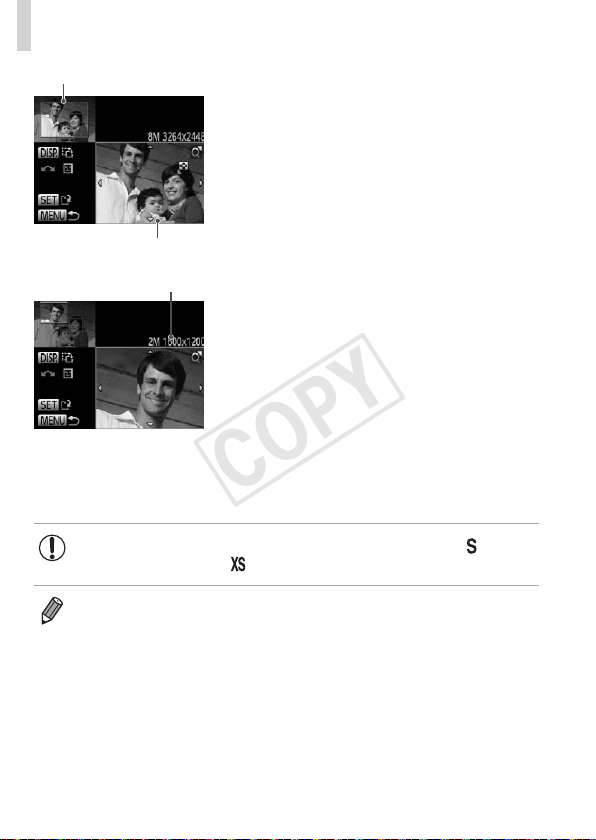
148
EditingStillImages
PreviewofImageAfterCropping
CroppingArea
ResolutionAfterCropping
3 Adjustthecroppingarea.
Aframeisdisplayedaroundtheportionof
theimagetobecropped.
Theoriginalimageisshownintheupper
left,andapreviewoftheimageas
croppedisshowninthelowerright.
Toresizetheframe,movethezoom
lever.
Tomovetheframe,pressthe
<o><p><q><r>buttons.
Tochangetheframeorientation,press
the<l>button.
Facesdetectedintheimageare
enclosedingrayframesintheupper-left
image.Tocroptheimagebasedonthis
frame,turnthe<5>dialtoswitchtothe
otherframe.
Pressthe<m>button.
4 Saveasanewimageand
review.
Followsteps4–5on=
146–147.
• Editingisnotpossibleforimagesshotataresolutionof[ ]
(=
68)orresizedto[ ](=
146).
• Imagessupportedforcroppingwillhavethesameaspectratioafter
cropping.
• Croppedimageswillhaveasmallerresolutionthanuncroppedimages.
COPY
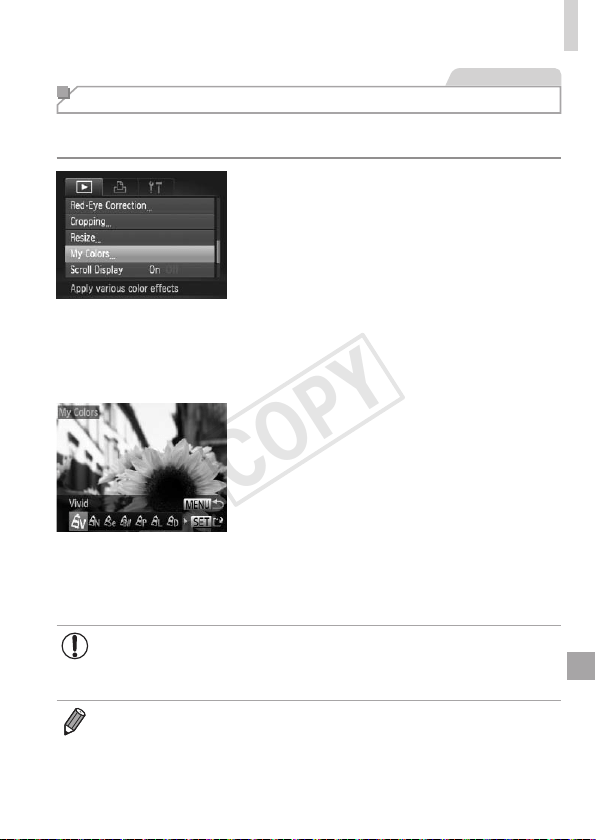
149
EditingStillImages
StillImages
Changing Image Color Tones (My Colors)
Youcanadjustimagecolorsandthensavetheeditedimageasaseparate
le.Fordetailsoneachoption,see=
100.
1 Choose[MyColors].
Pressthe<n>button,andthen
choose[MyColors]onthe[1]tab
(=
47).
2 Chooseanimage.
Pressthe<q><r>buttonsorturnthe
<5>dialtochooseanimage,andthen
pressthe<m>button.
3 Chooseanoption.
Pressthe<q><r>buttonsorturnthe
<5>dialtochooseanoption,andthen
pressthe<m>button.
4 Saveasanewimageand
review.
Followsteps4–5on=
146–147.
• Imagequalityofpicturesyourepeatedlyeditthiswaywillbealittle
lowereachtime,andyoumaynotbeabletoobtainthedesired
color.
• Thecolorofimageseditedusingthisfunctionmayvaryslightlyfromthe
colorofimagesshotusingMyColors(=
100).
COPY
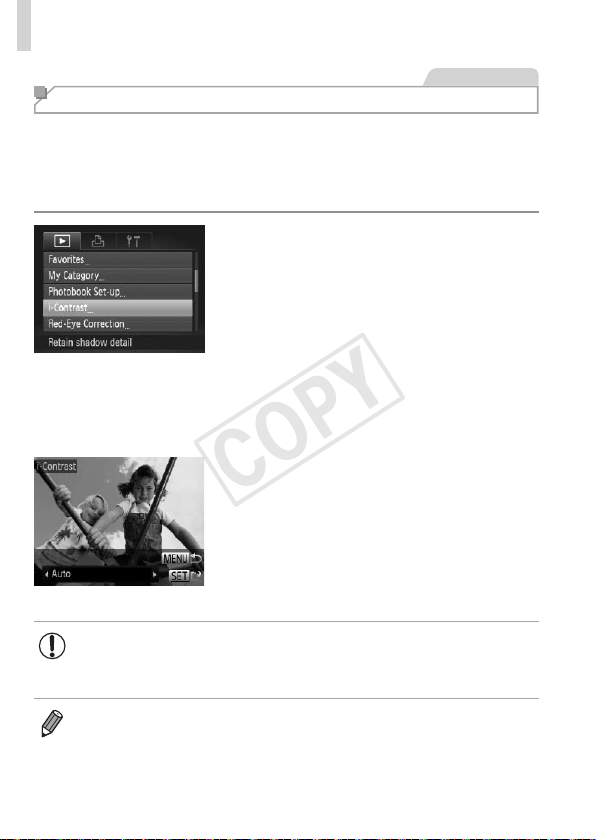
150
EditingStillImages
StillImages
Correcting Image Brightness (i-Contrast)
Excessivelydarkimageareas(suchasfacesorbackgrounds)canbe
detectedandautomaticallyadjustedtotheoptimalbrightness.Insufcient
overallimagecontrastisalsoautomaticallycorrected,tomakesubjects
standoutbetter.Choosefromfourcorrectionlevels,andthensavethe
imageasaseparatele.
1 Choose[i-Contrast].
Pressthe<n>button,andthen
choose[i-Contrast]onthe[1]tab
(=
47).
2 Chooseanimage.
Pressthe<q><r>buttonsorturnthe
<5>dialtochooseanimage,andthen
pressthe<m>button.
3 Chooseanoption.
Pressthe<q><r>buttonsorturnthe
<5>dialtochooseanoption,andthen
pressthe<m>button.
4 Saveasanewimageand
review.
Followsteps4–5on=
146–147.
• Forsomeimages,correctionmaybeinaccurateormaycause
imagestoappeargrainy.
• Imagesmaylookgrainyafterrepeatededitingusingthisfunction.
• If[Auto]doesnotproducetheexpectedresults,trycorrectingimagesusing
[Low],[Medium],or[High].
COPY
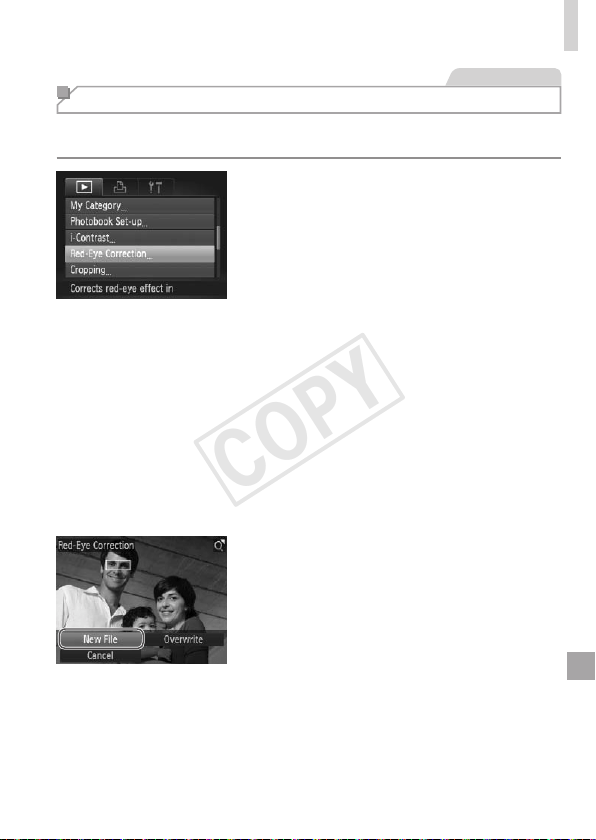
151
EditingStillImages
StillImages
Correcting Red-Eye
Automaticallycorrectsimagesaffectedbyred-eye.Youcansavethe
correctedimageasaseparatele.
1 Choose[Red-EyeCorrection].
Pressthe<n>button,andthen
choose[Red-EyeCorrection]onthe[1]
tab(=
47).
2 Chooseanimage.
Pressthe<q><r>buttonsorturnthe
<5>dialtochooseanimage.
3 Correcttheimage.
Pressthe<m>button.
Red-eyedetectedbythecameraisnow
corrected,andframesaredisplayed
aroundcorrectedimageareas.
Enlargeorreduceimagesasneeded.
Followthestepsin=
129.
4 Saveasanewimageand
review.
Pressthe<o><p><q><r>buttonsor
turnthe<5>dialtochoose[NewFile],
andthenpressthe<m>button.
Theimageisnowsavedasanewle.
Followstep5on=
147.
COPY

152
EditingStillImages
• Someimagesmaynotbecorrectedaccurately.
• Tooverwritetheoriginalimagewiththecorrectedimage,choose
[Overwrite]instep4.Inthiscase,theoriginalimagewillbe
erased.
• Protectedimagescannotbeoverwritten.
COPY
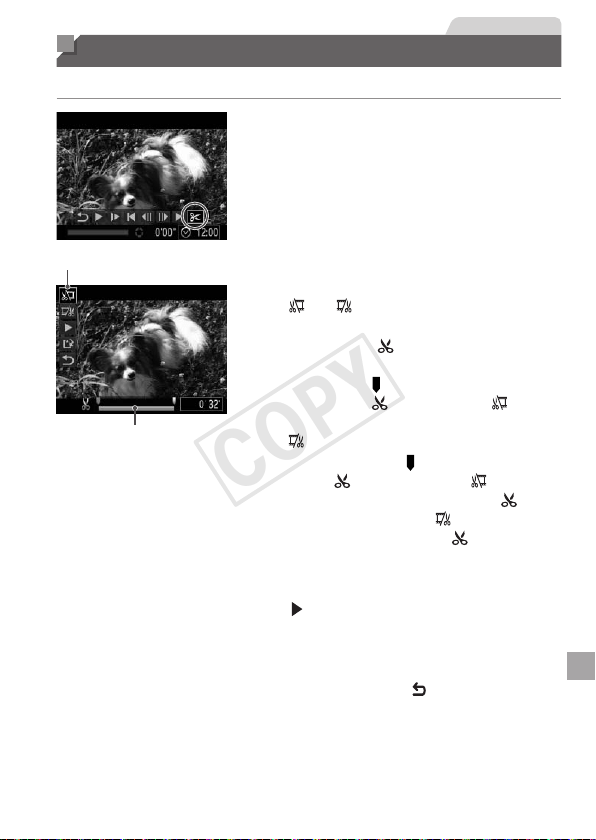
153
Movies
Editing Movies
Youcancutmoviestoremoveunneededportionsatthebeginningorend.
1 Choose[*].
Followingsteps1–5on=
122–123,
choose[*]andpressthe<m>button.
Themovieeditingpanelandeditingbar
arenowdisplayed.
MovieEditingPanel
MovieEditingBar
2 Specifyportionstocut.
Pressthe<o><p>buttonstochoose
[
]or[ ].
Toviewtheportionsyoucancut
(identiedby[
]onthescreen),press
the<q><r>buttonsorturnthe<5>
dialtomove[
].Cutthebeginningofthe
movie(from[
])bychoosing[ ],and
cuttheendofthemoviebychoosing
[
].
Evenifyoumove[ ]toapositionother
thana[
]mark,choosing[ ]willonly
cuttheportionfromthenearest[
]to
theleft,andchoosing[
]willcutthe
portionfromthenearest[
]totheright.
3 Reviewtheeditedmovie.
Pressthe<o><p>buttonstochoose
[
],andthenpressthe<m>button.
Theeditedmovieisnowplayed.
Toeditthemovieagain,repeatstep2.
Tocancelediting,pressthe<o><p>
buttonstochoose[
].Pressthe<m>
button,choose[OK](eitherpressthe
<q><r>buttonsorturnthe<5>dial),
andthenpressthe<m>buttonagain.
COPY

154
EditingMovies
4 Savetheeditedmovie.
Pressthe<o><p>buttonstochoose
[
],andthenpressthe<m>button.
Pressthe<o><p><q><r>buttonsor
turnthe<5>dialtochoose[NewFile],
andthenpressthe<m>button.
Themovieisnowsavedasanewle.
• Tooverwritetheoriginalmoviewiththecutone,choose
[Overwrite]instep4.Inthiscase,theoriginalmoviewillbeerased.
• [Overwrite]isonlyavailablewhenmemorycardslacksufcient
freespace.
• Moviesmaynotbesavedifthebatteryrunsoutwhilesavingisin
progress.
• Wheneditingmovies,youshoulduseafullychargedbatteryoran
ACadapterkit(soldseparately,=
171).
COPY

155
Setting Menu
Customizeoradjustbasiccamerafunctionsforgreater
convenience
7
COPY
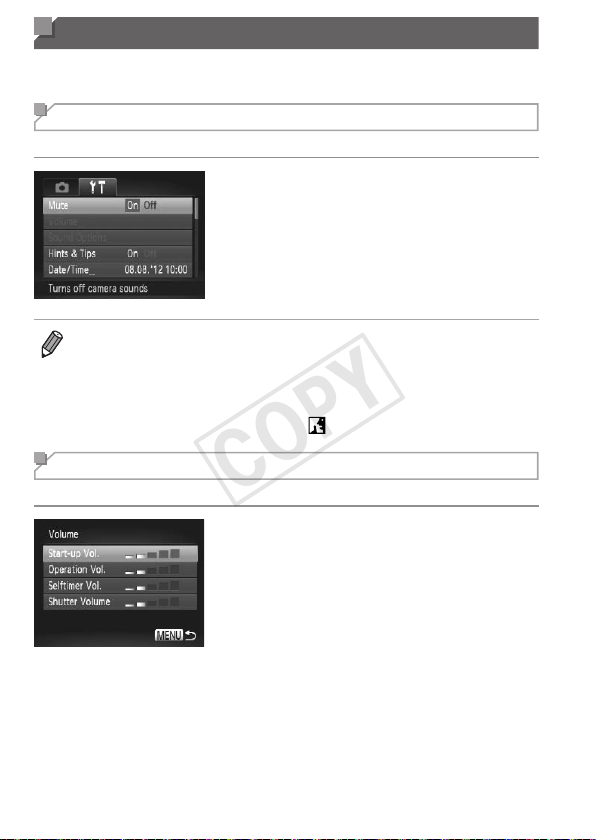
156
Adjusting Basic Camera Functions
Functionscanbeconguredonthe[3]tab.Customizecommonlyused
functionsasdesired,forgreaterconvenience(=
47).
Silencing Camera Operations
Silencecamerasoundsandmoviesasfollows.
Choose[Mute],andthenchoose[On].
• Operationcanalsobesilencedbyholdingdownthe<l>buttonasyou
turnthecameraon.
• Soundisnotplayedduringmoviesifyoumutecamerasounds(=
122).To
restoresoundduringmovies,pressthe<o>button.Adjustvolumewiththe
<o><p>buttons,asneeded.
• Soundsettingscannotbechangedin[
]mode(=
78).
Adjusting the Volume
Adjustthevolumeofindividualcamerasoundsasfollows.
Choose[Volume],andthenpressthe
<m>button.
Chooseanitem,andthenpressthe
<q><r>buttonstoadjustthevolume.
COPY
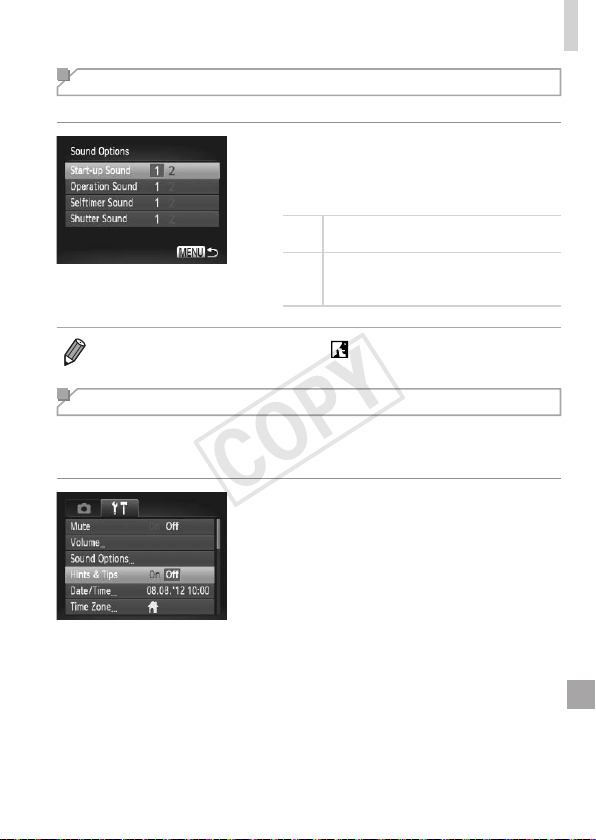
157
AdjustingBasicCameraFunctions
Customizing Sounds
Customizecameraoperatingsoundsasfollows.
Choose[SoundOptions],andthenpress
the<m>button.
Chooseanitem,andthenpressthe
<q><r>buttonstochooseanoption.
1
Presetsounds
(cannotbemodied)
2
Presetsounds
Canbechangedbyusingtheincluded
software.
• Soundsettingscannotbechangedin[ ]mode(=
78).
Hiding Hints and Tips
HintsandtipsarenormallyshownwhenyouchooseFUNC.menu
(=
46)orMenu(=
47)items.Ifyouprefer,youcandeactivatethis
information.
Choose[Hints&Tips],andthenchoose
[Off].
COPY
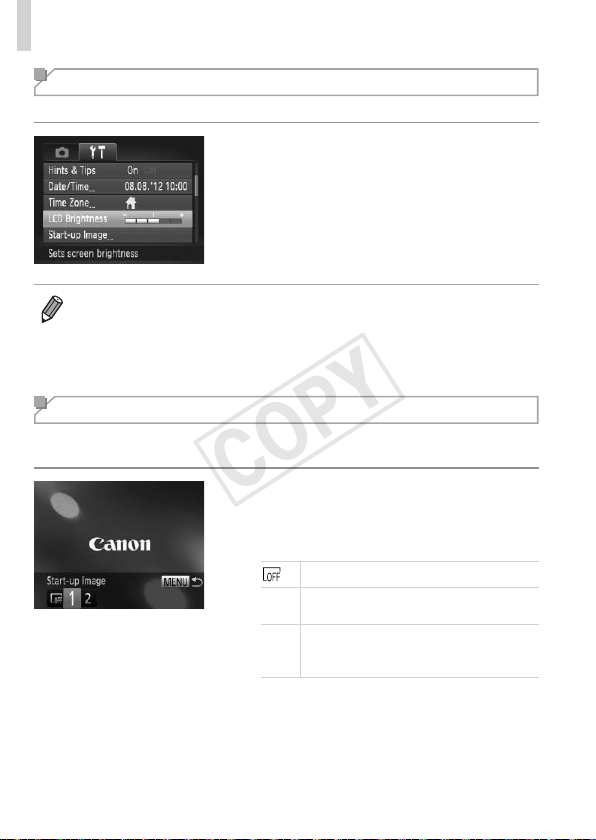
158
AdjustingBasicCameraFunctions
Screen Brightness
Adjustscreenbrightnessasfollows.
Choose[LCDBrightness],andthen
pressthe<q><r>buttonstoadjustthe
brightness.
• Formaximumbrightness,pressandholdthe<l>buttonforatleast
onesecondwhentheshootingscreenisdisplayedorwheninsingle-image
display.(Thiswilloverridethe[LCDBrightness]settingonthe[3]tab.)To
restoretheoriginalbrightness,pressandholdthe<l>buttonagainfor
atleastonesecondorrestartthecamera.
Start-up Screen
Customizethestart-upscreenshownafteryouturnthecameraonas
follows.
Choose[Start-upImage],andthenpress
the<m>button.
Pressthe<q><r>buttonsorturnthe
<5>dialtochooseanoption.
Nostart-upimage
1
Presetimage
(cannotbemodied)
2
Presetimage
Assignadesiredshot,orusethe
includedsoftwaretochangetheimage.
COPY
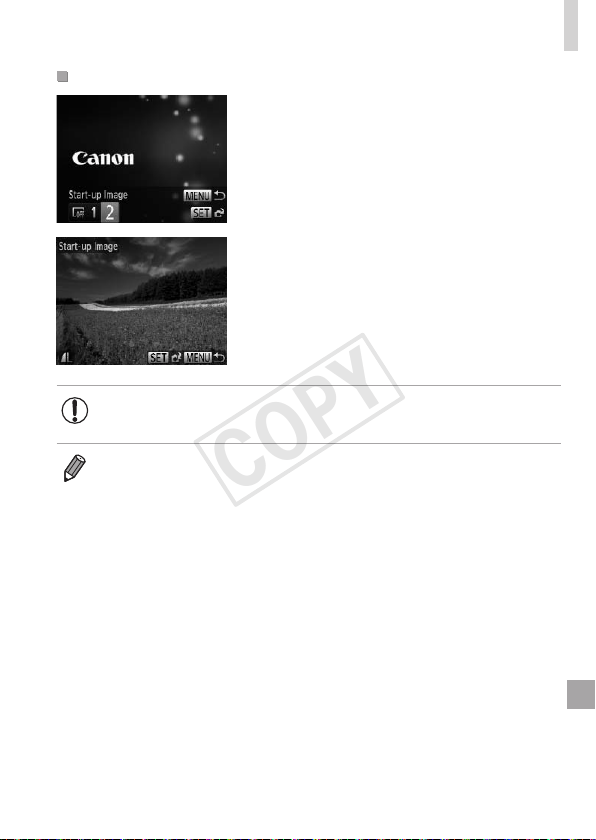
159
AdjustingBasicCameraFunctions
CustomizingtheStart-upScreen
1 Accessthe[Start-upImage]
screeninPlaybackmode.
Pressthe<1>button.
Followingthepreviousprocedure,choose
[2]andpressthe<m>button.
2 Chooseoneofyourshots.
Chooseanimageandpressthe<m>
button.After[Register?]isdisplayed,
choose[OK](eitherpressthe<q><r>
buttonsorturnthe<5>dial),andthen
pressthe<m>button.
• Thepreviousstart-upsettingisoverwrittenwhenyouassignanew
start-upimage.
• Youcanassigntheoperatingsoundsandstart-upimageforyourcamera
fromtheincludedsoftware.RefertotheSoftware Guide(=
31)fordetails.
COPY
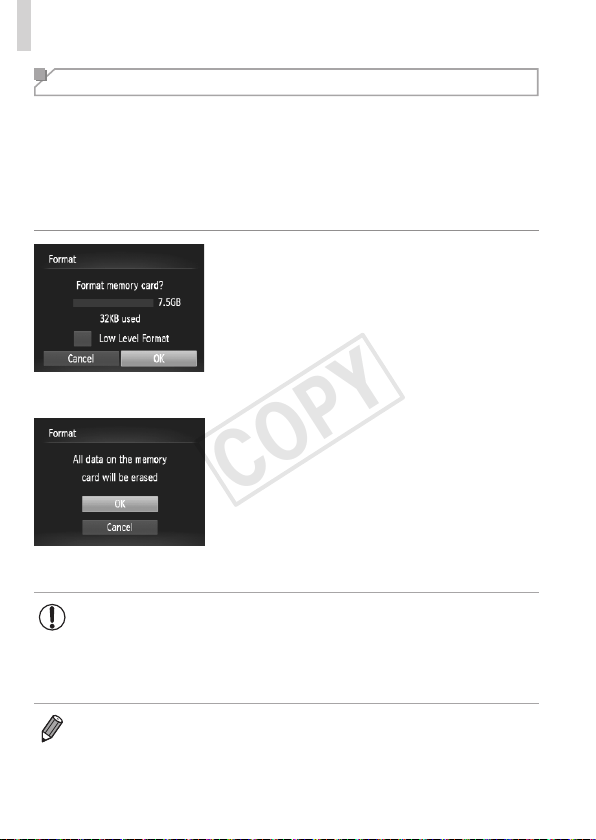
160
AdjustingBasicCameraFunctions
Formatting Memory Cards
Beforeusinganewmemorycardoracardformattedinanotherdevice,you
shouldformatthecardwiththiscamera.
Formattingerasesalldataonamemorycard.Beforeformatting,copy
imagesonthememorycardtoacomputer,ortakeotherstepstobackthem
up.
AnEye-Ficard(=
193)containssoftwareonthecarditself.Before
formattinganEye-Ficard,installthesoftwareonacomputer.
1 Accessthe[Format]screen.
Choose[Format],andthenpressthe
<m>button.
2 Choose[OK].
Pressthe<o><p>buttonstochoose
[Cancel],choose[OK](eitherpressthe
<q><r>buttonsorturnthe<5>dial),
andthenpressthe<m>button.
3 Formatthememorycard.
Tobegintheformattingprocess,press
the<o><p>buttonsorturnthe<5>
dialtochoose[OK],andthenpressthe
<m>button.
Whenformattingisnished,[Memory
cardformattingcomplete]isdisplayed.
Pressthe<m>button.
• Formattingorerasingdataonamemorycardonlychangesle
managementinformationonthecardanddoesnoterasethedata
completely.Whentransferringordisposingofmemorycards,take
stepstoprotectpersonalinformationifnecessary,asbyphysically
destroyingcards.
• Thetotalcardcapacityindicatedontheformattingscreenmaybelessthan
theadvertisedcapacity.
COPY
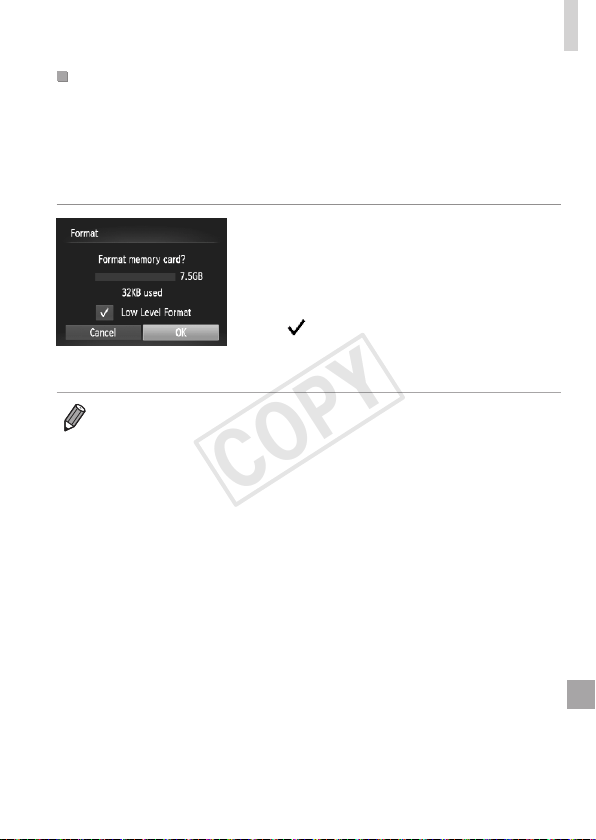
161
AdjustingBasicCameraFunctions
Low-LevelFormatting
Performlow-levelformattinginthesecases:[Memorycarderror]is
displayed,thecameraisnotworkingcorrectly,cardimagereading/writingis
slower,continuousshootingisslower,ormovierecordingsuddenlystops.
Low-levelformattingerasesalldataonamemorycard.Beforelow-level
formatting,copyimagesonthememorycardtoacomputer,ortakeother
stepstobackthemup.
Performlow-levelformatting.
Onthescreeninstep2on=
160,
pressthe<o><p>buttonsorturnthe
<5>dialtochoose[LowLevelFormat],
andthenselectthisoption(markwitha
[
])bypressingthe<q><r>buttons.
Followsteps2–3on=
160tocontinue
withtheformattingprocess.
• Low-levelformattingtakeslongerthan“FormattingMemoryCards”
(=
160),becausedataiserasedfromallstorageregionsofthememory
card.
• Youcancancellow-levelformattinginprogressbychoosing[Stop].Inthis
case,alldatawillbeerased,butthememorycardcanbeusednormally.
COPY
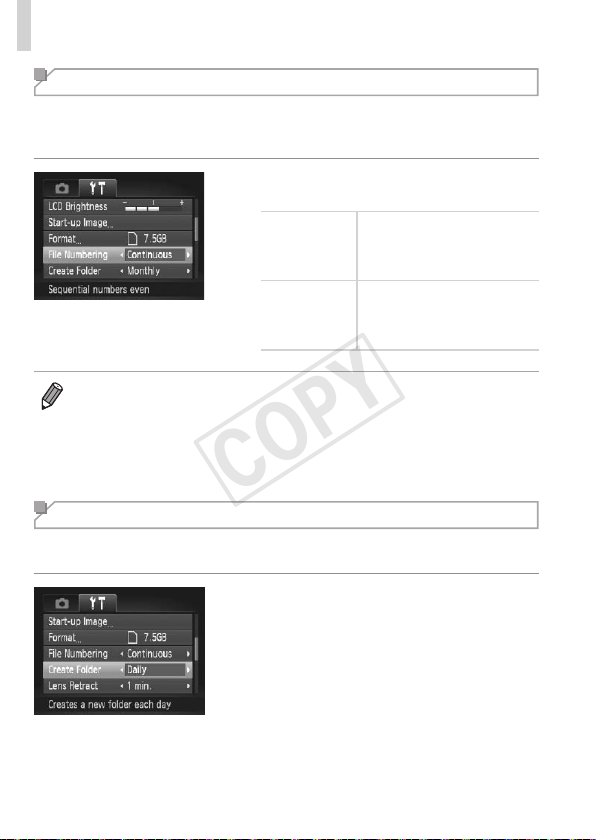
162
AdjustingBasicCameraFunctions
File Numbering
Yourshotsareautomaticallynumberedinsequentialorder(0001–9999)
andsavedinfoldersthatstoreupto2,000imageseach.Youcanchange
howthecameraassignslenumbers.
Choose[FileNumbering],andthen
chooseanoption.
Continuous
Imagesarenumbered
consecutively(untilthe9999th
shotistaken/saved)evenif
youswitchmemorycards.
AutoReset
Imagenumberingisresetto
0001ifyouswitchmemory
cards,orwhenanewfolderis
created.
• Regardlessoftheoptionselectedinthissetting,shotsmaybenumbered
consecutivelyafterthelastnumberofexistingimagesonnewlyinserted
memorycards.Tostartsavingshotsfrom0001,useanempty(orformatted
(=
160))memorycard.
• RefertotheSoftware Guide(=
31)forinformationonthecardfolder
structureandimageformats.
Date-Based Image Storage
Insteadofsavingimagesinfolderscreatedeachmonth,youcanhavethe
cameracreatefolderseachdayyoushoottostoreshotstakenthatday.
Choose[CreateFolder],andthenchoose
[Daily].
Imageswillnowbesavedinfolders
createdontheshootingdate.
COPY
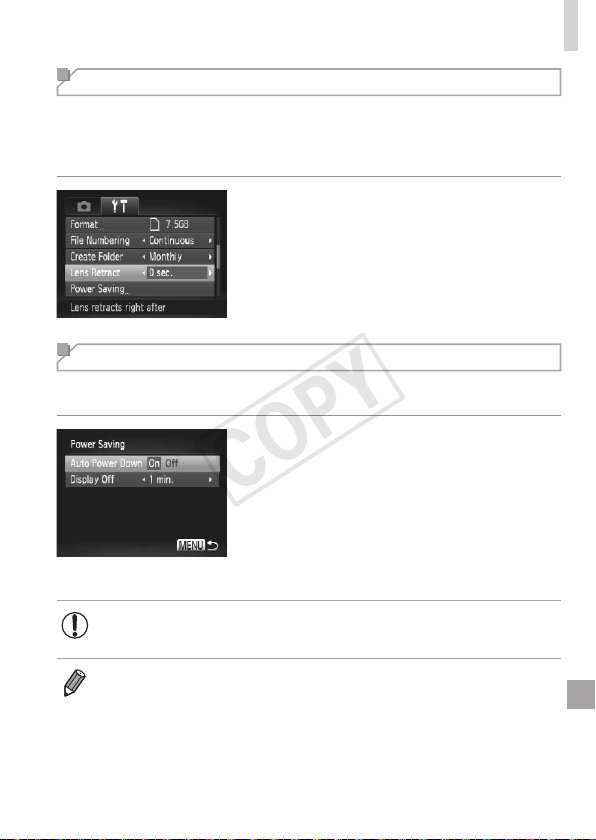
163
AdjustingBasicCameraFunctions
Lens Retraction Timing
Thelensisnormallyretractedforsafetyaboutoneminuteafteryoupress
the<1>buttoninShootingmode(=
42).Tohavethelensretracted
immediatelyafteryoupressthe<1>button,settheretractiontimingto
[0sec.].
Choose[LensRetract],andthenchoose
[0sec.].
Power-Saving Adjustment
Adjustthetimingofautomaticcameraandscreendeactivation(AutoPower
DownandDisplayOff,respectively)asneeded(=
42).
1 Accessthe[PowerSaving]
screen.
Choose[PowerSaving],andthenpress
the<m>button.
2 Congurethesettings.
Afterchoosinganitem,pressthe
<q><r>buttonstoadjustitasneeded.
• Toconservebatterypower,youshouldnormallychoose[On]for
[AutoPowerDown]and[1min.]orlessfor[DisplayOff].
• The[DisplayOff]settingisappliedevenifyouset[AutoPowerDown]to
[Off].
COPY
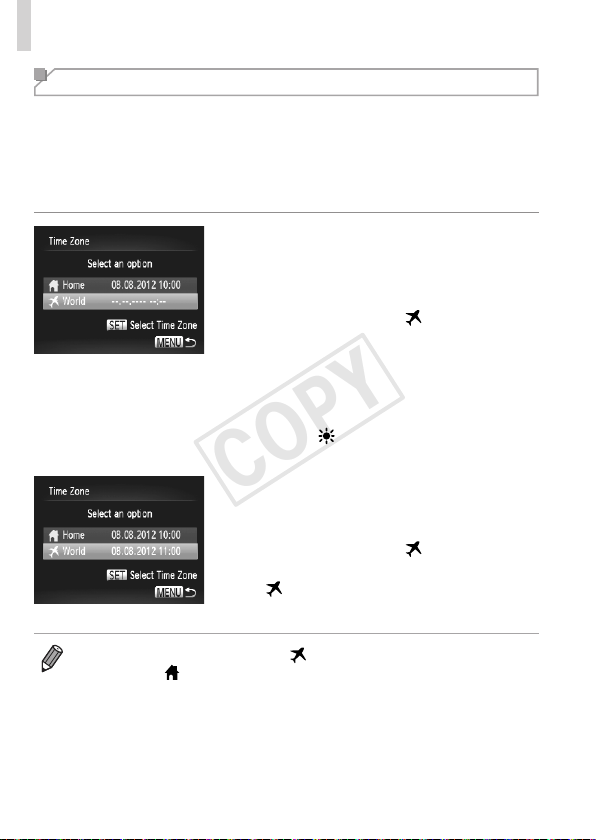
164
AdjustingBasicCameraFunctions
World Clock
Toensurethatyourshotswillhavethecorrectlocaldateandtimewhenyou
travelabroad,simplyregisterthedestinationinadvanceandswitchtothat
timezone.ThisconvenientfeatureeliminatestheneedtochangetheDate/
Timesettingmanually.
Beforeusingtheworldclock,besuretosetthedateandtimein“Settingthe
DateandTime”(=
22)andyourhometimezone.
1 Specifyyourdestination.
Choose[TimeZone],andthenpressthe
<m>button.
Pressthe<o><p>buttonsorturnthe
<5>dialtochoose[
World],andthen
pressthe<m>button.
Pressthe<q><r>buttonsorturnthe
<5>dialtochoosethedestination.
Tosetdaylightsavingtime(1hour
ahead),pressthe<o><p>buttonsto
choose[
].
Pressthe<m>button.
2 Switchtothedestinationtime
zone.
Pressthe<o><p>buttonsorturnthe
<5>dialtochoose[
World],andthen
pressthe<n>button.
[ ]isnowshownontheshootingscreen
(=
202).
• Adjustingthedateortimewhilein[ ]mode(=
23)willautomatically
updateyour[
Home]timeanddate.
COPY
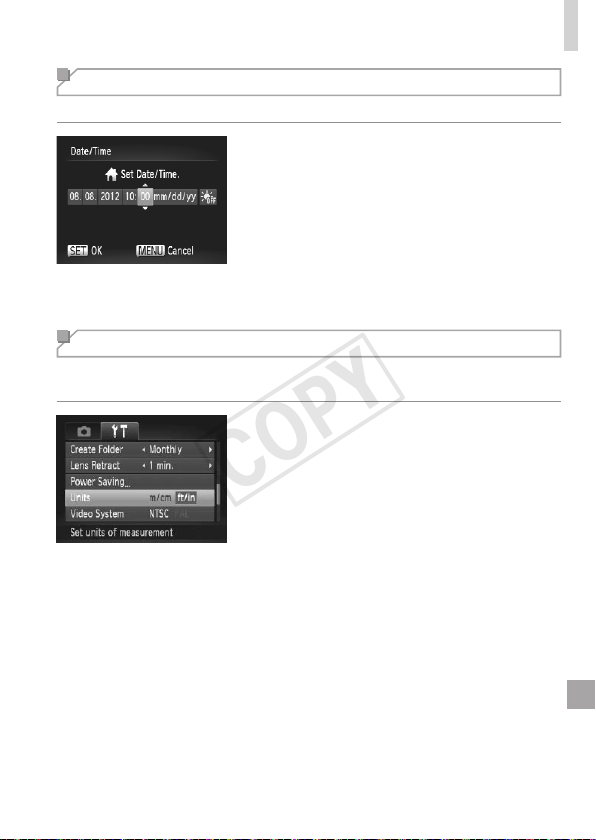
165
AdjustingBasicCameraFunctions
Date and Time
Adjustthedateandtimeasfollows.
1 Accessthe[Date/Time]screen.
Choose[Date/Time],andthenpressthe
<m>button.
2 Congurethesetting.
Pressthe<q><r>buttonstochoosean
item,andthenadjustthesetting,either
bypressingthe<o><p>buttonsor
turningthe<5>dial.
Metric/Non-Metric Display
ChangetheunitofmeasurementshownintheMFindicator(=
104)and
zoombar(=
52)fromm/cmtoft/inasneeded.
Choose[Units],andthenchoose[ft/in].
COPY
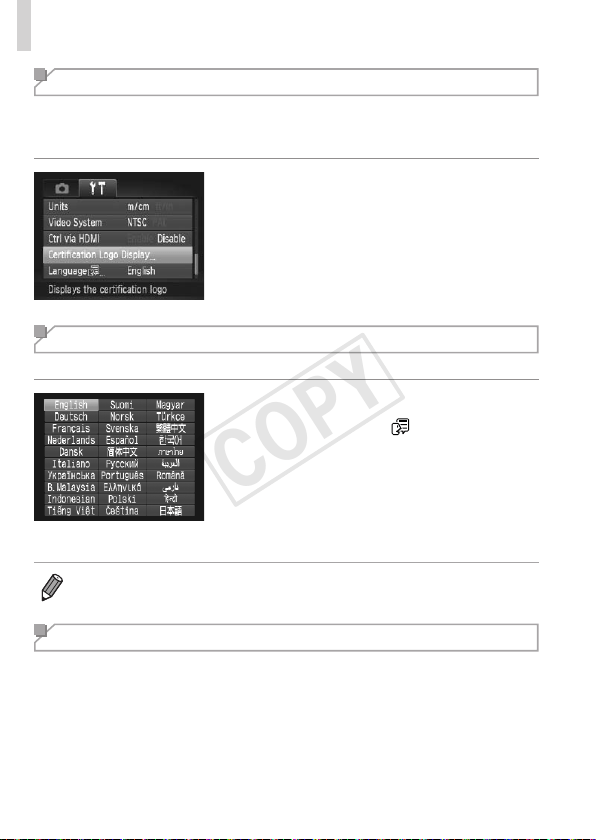
166
AdjustingBasicCameraFunctions
Checking Certication Logos
Somelogosforcerticationrequirementsmetbythecameracanbeviewed
onthescreen.Othercerticationlogosareprintedinthisguide,onthe
camerapackaging,oronthecamerabody.
Choose[CerticationLogoDisplay],and
thenpressthe<m>button.
Display Language
Changethedisplaylanguageasneeded.
1 Accessthe[Language]screen.
Choose[Language ],andthenpress
the<m>button.
2 Congurethesetting.
Pressthe<o><p><q><r>buttonsor
turnthe<5>dialtochoosealanguage,
andthenpressthe<m>button.
• Youcanalsoaccessthe[Language]screeninPlaybackmodebypressing
andholdingthe<m>buttonandimmediatelypressingthe<n>button.
Adjusting Other Settings
Thefollowingsettingscanalsobeadjustedonthe[3]tab.
• [VideoSystem](=
176)
• [CtrlviaHDMI](=
174)
• [Eye-FiSettings](=
193)
COPY
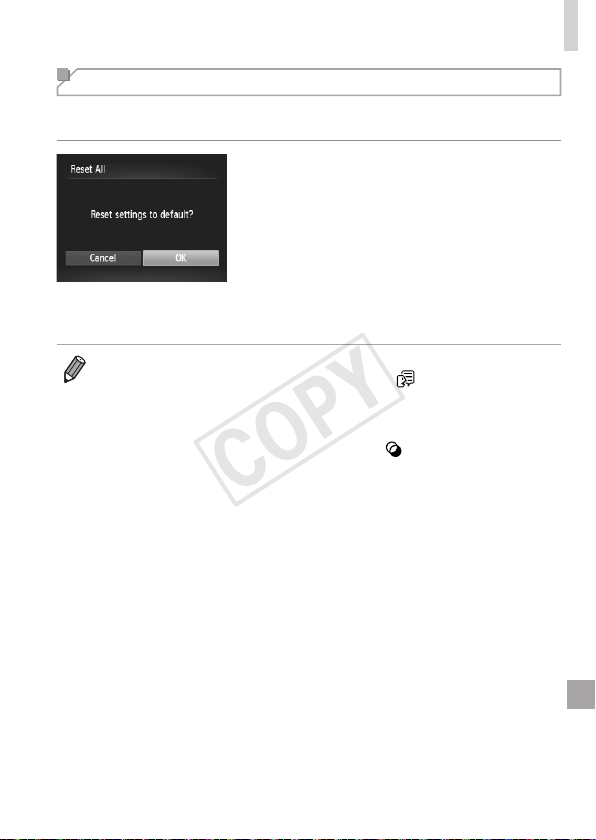
167
AdjustingBasicCameraFunctions
Restoring Defaults
Ifyouaccidentallychangeasetting,youcanrestoredefaultcamera
settings.
1 Accessthe[ResetAll]screen.
Choose[ResetAll],andthenpressthe
<m>button.
2 Restoredefaultsettings.
Pressthe<q><r>buttonsorturnthe
<5>dialtochoose[OK],andthenpress
the<m>button.
Defaultsettingsarenowrestored.
• Thefollowingfunctionsarenotrestoredtodefaultsettings.
-[3]tabsettings[Date/Time](=
22),[Language ](=
25),[Time
Zone](=
164),[VideoSystem](=
176),andtheimageassignedto
[Start-upImage](=
158)
-Customwhitebalancedatayouhaverecorded(=
9 9 )
-Shootingmodechosenin<K>(=
80)or< >(=
82)mode
-Themoviemode(=
88)
COPY

168
COPY

169
Accessories
Useincludedaccessorieseffectivelyandenjoythe
camerainmorewayswithoptionalCanonaccessories
andothercompatibleaccessoriessoldseparately
8
COPY

170
Tips on Using Included Accessories
Effective Battery and Charger Use
• Chargethebatteryon(orimmediatelybefore)the
dayofuse
Chargedbatteriesgraduallylosetheircharge,evenwhen
theyarenotused.
Youcaneasilycheckthechargestateofthebatteryby
attachingthecoversothatisvisibleonacharged
battery,andattachingitsothatisnotvisibleonan
unchargedbattery.
• Long-termbatterystorage
Afterusingupallremainingbatterypower,removethebatteryfromthecamera.Store
thebatterywiththecoverattached.Storingapartiallychargedbatteryoverextended
periods(aboutayear)mayshortenitslifeoraffectperformance.
• Usingthebatterychargerabroad
Thechargercanbeusedinareaswith100–240VACpower(50/60Hz).Forpower
outletsinadifferentformat,useacommerciallyavailableadapterfortheplug.Never
useanelectricaltransformerdesignedfortraveling,whichmaydamagethebattery.
COPY
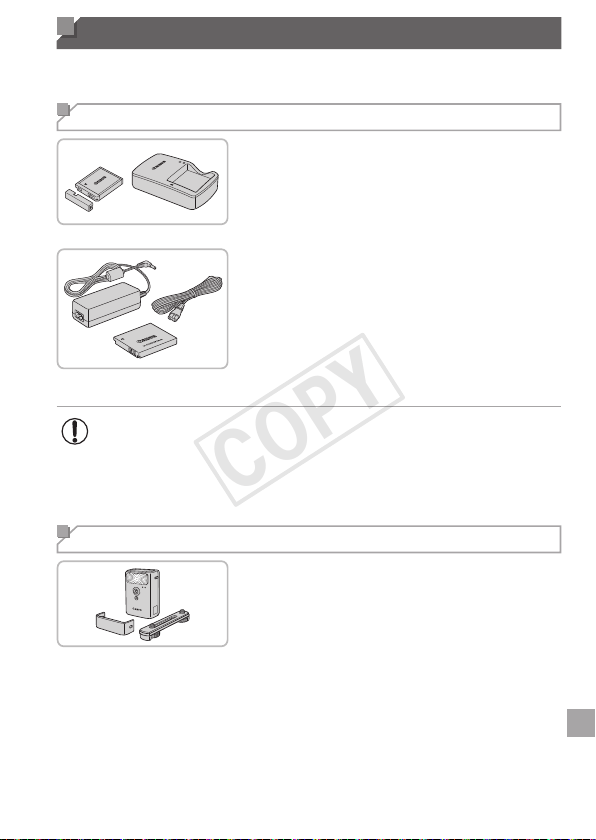
171
Optional Accessories
Thefollowingcameraaccessoriesaresoldseparately.Notethatavailability
variesbyarea,andsomeaccessoriesmaynolongerbeavailable.
Power Supplies
BatteryPackNB-6L
Rechargeablelithium-ionbattery
BatteryChargerCB-2LY/CB-2LYE
ChargerforBatteryPackNB-6L
ACAdapterKitACK-DC40
Forpoweringthecamerausing
householdpower.Recommendedwhen
usingthecameraoverextendedperiods,
orwhenconnectingthecameratoa
printerorcomputer.Cannotbeusedto
chargethecamerabattery.
• ThebatterychargerandACadapterkitcanbeusedinareaswith
100–240VACpower(50/60Hz).
• Forpoweroutletsinadifferentformat,useacommercially
availableadapterfortheplug.Neveruseanelectricaltransformer
designedfortraveling,whichmaydamagethebattery.
Flash Unit
High-PowerFlashHF-DC2
Externalashforilluminatingsubjects
thatareoutofrangeofthebuilt-inash.
COPY

172
OptionalAccessories
Other Accessories
StereoAVCableAVC-DC400ST
ConnectthecameratoaTVtoenjoy
playbackonthelargerTVscreen.
HDMICableHTC-100
ForconnectingthecameratoanHDMI
inputofahigh-denitionTV.
Printers
CanonPictBridge-Compatible
Printers
Printingimageswithoutacomputeris
possiblebyconnectingthecameratoa
CanonPictBridge-compatibleprinter.
Fordetails,visityournearestCanon
dealer.
COPY
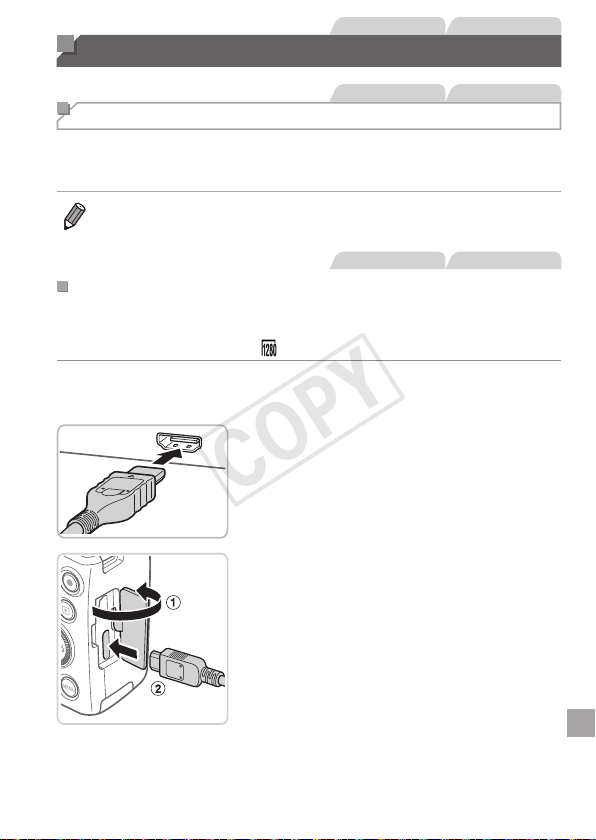
173
StillImages Movies
Using Optional Accessories
StillImages Movies
Playback on a TV
ByconnectingthecameratoaTV,youcanviewyourshotsonthelarger
screenoftheTV.
Fordetailsonconnectionorhowtoswitchinputs,refertotheTVmanual.
• SomeinformationmaynotbedisplayedontheTV(=
204).
StillImages Movies
PlaybackonaHigh-DenitionTV
ConnectingthecameratoanHDTVwiththeHDMICableHTC-100(sold
separately)enablesyoutoviewyourshotsonthelargerscreenoftheTV.
Moviesshotataresolutionof[ ]canbeviewedinhigh-denition.
1 MakesurethecameraandTV
areoff.
2 ConnectthecameratotheTV.
OntheTV,insertthecableplugfullyinto
theHDMIinputasshown.
Onthecamera,opentheterminalcover
andinsertthecableplugfullyintothe
cameraterminal.
COPY
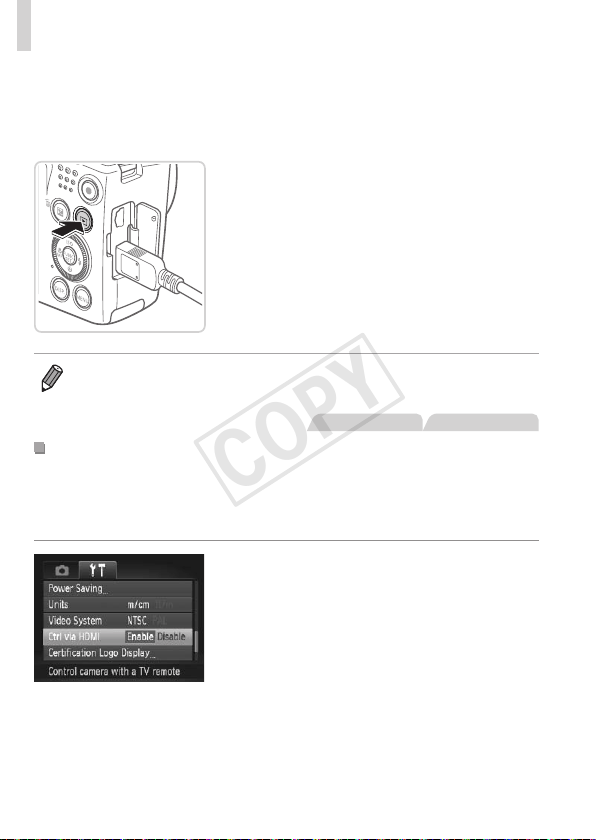
174
UsingOptionalAccessories
3 TurntheTVonandswitchto
videoinput.
SwitchtheTVinputtothevideoinputyou
connectedthecabletoinstep2.
4 Turnthecameraon.
Pressthe<1>buttontoturnthecamera
on.
Imagesfromthecameraarenow
displayedontheTV.(Nothingis
displayedonthecamerascreen.)
Whennished,turnoffthecameraand
TVbeforedisconnectingthecable.
• Cameraoperatingsoundsarenotplayedwhilethecameraisconnectedto
anHDTV.
StillImages Movies
ControllingtheCamerawithaTVRemote
ConnectingthecameratoanHDMICEC-compatibleTVenablesplayback
(includingslideshowplayback)usingtheTVremotecontrol.
Inthiscase,youwillneedtoadjustsomeTVsettings.Fordetails,referto
theTVusermanual.
1 Congurethesetting.
Pressthe<n>button,choose
[CtrlviaHDMI]onthe[3]tab,andthen
choose[Enable](=
47).
2 ConnectthecameratotheTV.
Followsteps1–2on=
173toconnect
thecameratotheTV.
COPY
175
UsingOptionalAccessories
3 Displayimages.
TurnontheTV.Onthecamera,pressthe
<1>button.
Imagesfromthecameraarenow
displayedontheTV.(Nothingis
displayedonthecamerascreen.)
4 ControlthecamerawiththeTV
remote.
Pressthe<q><r>buttonsontheremote
tobrowseimages.
Todisplaythecameracontrolpanel,
presstheOK/Selectbutton.Select
controlpanelitemsbypressingthe
<q><r>buttonstochooseanitem,and
thenpressingtheOK/Selectbuttonagain.
CameraControlPanelOptionsShownontheTV
Return Closesthemenu.
PlayMovie
Startsmovieplayback.(Onlydisplayedwhenamovie
isselected.)
.
Slideshow
Startsslideshowplayback.Toswitchimagesduring
playback,pressthe<q><r>buttonsontheremote
control.
IndexPlayback Displaysmultipleimagesinanindex.
l
ChangeDisplay
Switchesdisplaymodes(=
45).
• Pressingthe<n>buttononthecamerawillswitchcontroltothe
cameraitself,whichwillpreventremotecontroluntilyoureturntosingle-
imagedisplay.
• Movingthezoomleveronthecamerawillswitchcontroltothecameraitself,
whichwillpreventremotecontroluntilyoureturntosingle-imagedisplay.
• Thecameramaynotalwaysrespondcorrectlyeveniftheremoteisforan
HDMICEC-compatibleTV.
COPY
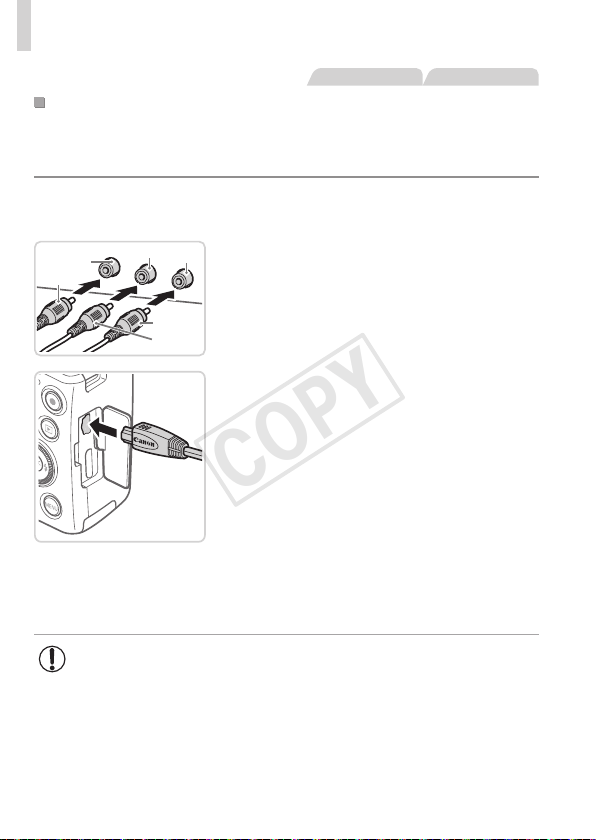
176
UsingOptionalAccessories
StillImages Movies
PlaybackonaStandard-DenitionTV
ConnectingthecameratoaTVwiththeStereoAVCableAVC-DC400ST
(soldseparately)enablesyoutoviewyourshotsonthelargerscreenofthe
TVasyoucontrolthecamera.
1 MakesurethecameraandTV
areoff.
Red
Red
White
Yellow
Yellow
White
2 ConnectthecameratotheTV.
OntheTV,insertthecableplugsfullyinto
thevideoinputsasshown.
Onthecamera,opentheterminalcover
andinsertthecableplugfullyintothe
cameraterminal.
3 Displayimages.
Followsteps3–4on=
174todisplay
images.
• Correctdisplayisnotpossibleunlessthecameravideooutput
format(NTSCorPAL)matchestheTVformat.Tochangethe
videooutputformat,pressthe<n>buttonandchoose[Video
System]onthe[3]tab.
COPY
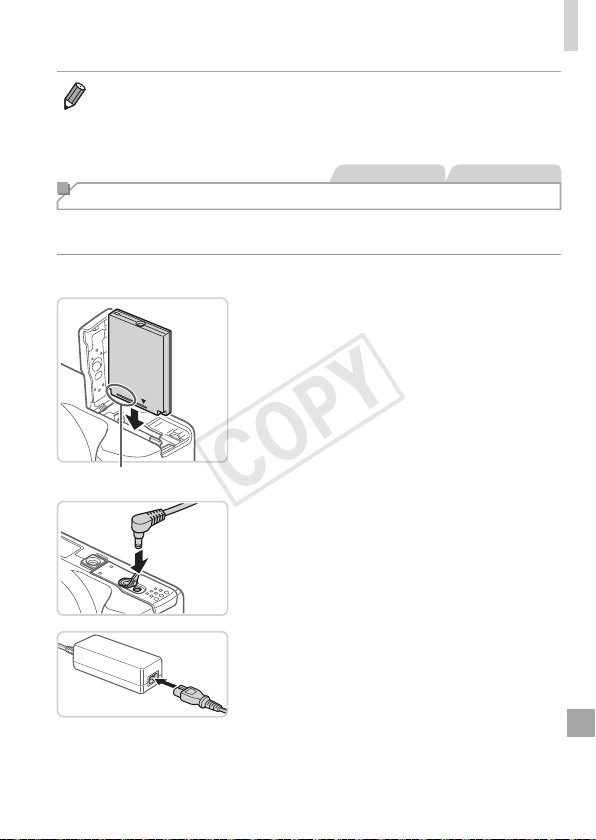
177
UsingOptionalAccessories
• WhenthecameraandTVareconnected,youcanalsoshootwhile
previewingshotsonthelargerscreenoftheTV.Toshoot,followthesame
stepsaswhenusingthecamerascreen.However,AF-PointZoom(=
72)
andMF-PointZoom(=
103)arenotavailable.
StillImages Movies
Powering the Camera with Household Power
PoweringthecamerawithACAdapterKitACK-DC40(soldseparately)
eliminatestheneedtomonitortheremainingbatterylevel.
1 Makesurethecameraisoff.
Terminals
2 Insertthecoupler.
Followstep2on=
20toopenthe
cover.
Insertthecouplerfacingthedirection
shown,justasyouwouldabattery
(followingstep3on=
20).
Followstep5on=
21toclosethe
cover.
3 Connecttheadaptertothe
coupler.
Openthecoverandinserttheadapter
plugfullyintothecoupler.
4 Connectthepowercord.
Insertoneendofthepowercordintothe
compactpoweradapter,andthenplug
theotherendintoapoweroutlet.
Turnthecameraonanduseitasdesired.
Whennished,turnthecameraoffand
unplugthepowercordfromtheoutlet.
COPY

178
UsingOptionalAccessories
• Donotdisconnecttheadapterorunplugthepowercordwhile
thecameraisstillon.Thismayeraseyourshotsordamagethe
camera.
• Donotattachtheadapteroradaptercordtootherobjects.Doing
socouldresultinmalfunctionordamagetotheproduct.
COPY
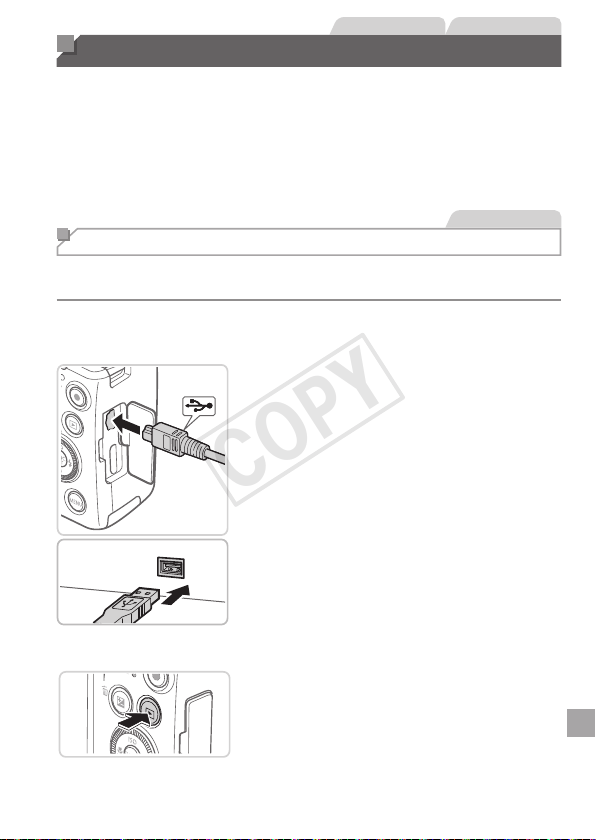
179
StillImages Movies
Printing Images
Yourshotscaneasilybeprintedbyconnectingthecameratoaprinter.On
thecamera,youcanspecifyimagestosetupbatchprinting,prepareorders
forphotodevelopmentservices,andprepareordersorprintimagesfor
photobooks.
ACanonSELPHYCPseriescompactphotoprinterisusedhereforthe
sakeofillustration.Screensdisplayedandavailablefunctionsvaryby
printer.Alsorefertotheprintermanualforadditionalinformation.
StillImages
Easy Print
EasilyprintyourshotsbyconnectingthecameratoaPictBridge-compatible
printer(soldseparately)withtheincludedinterfacecable(=
2).
1 Makesurethecameraand
printerareoff.
2 Connectthecameratothe
printer.
Openthecover.Holdingthesmaller
cableplugintheorientationshown,insert
theplugfullyintothecameraterminal.
Connectthelargercableplugtothe
printer.Forotherconnectiondetails,refer
totheprintermanual.
3 Turntheprinteron.
4 Turnthecameraon.
Pressthe<1>buttontoturnthecamera
on.
COPY
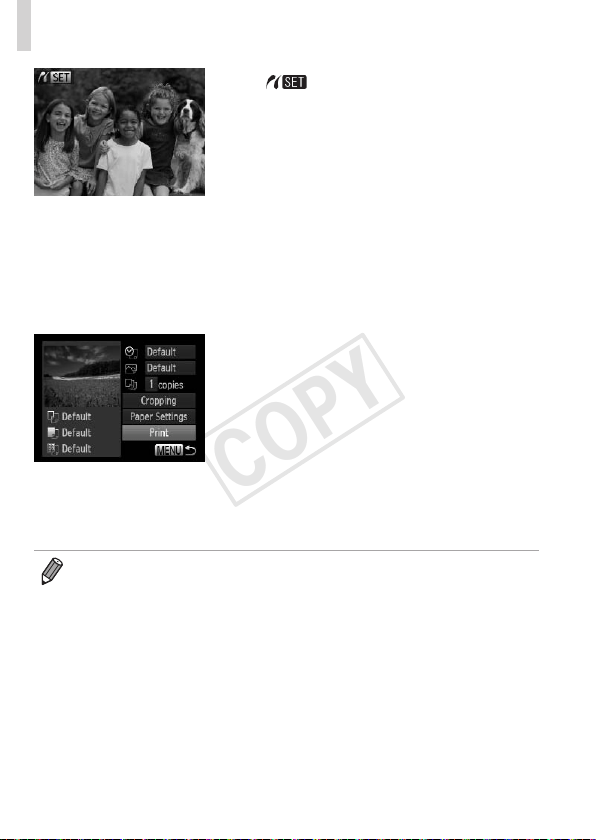
180
PrintingImages
[ ]isdisplayed.
5 Chooseanimage.
Pressthe<q><r>buttonsorturnthe
<5>dialtochooseanimage.
6 Accesstheprintingscreen.
Pressthe<m>button.
7 Printtheimage.
Pressthe<o><p>buttonsorturnthe
<5>dialtochoose[Print],andthen
pressthe<m>button.
Printingnowbegins.
Toprintotherimages,repeatsteps5–7
afterprintingisnished.
Whenyouarenishedprinting,turnthe
cameraandprinteroffanddisconnectthe
interfacecable.
• ForCanonPictBridge-compatibleprinters(soldseparately),see=
172.
COPY
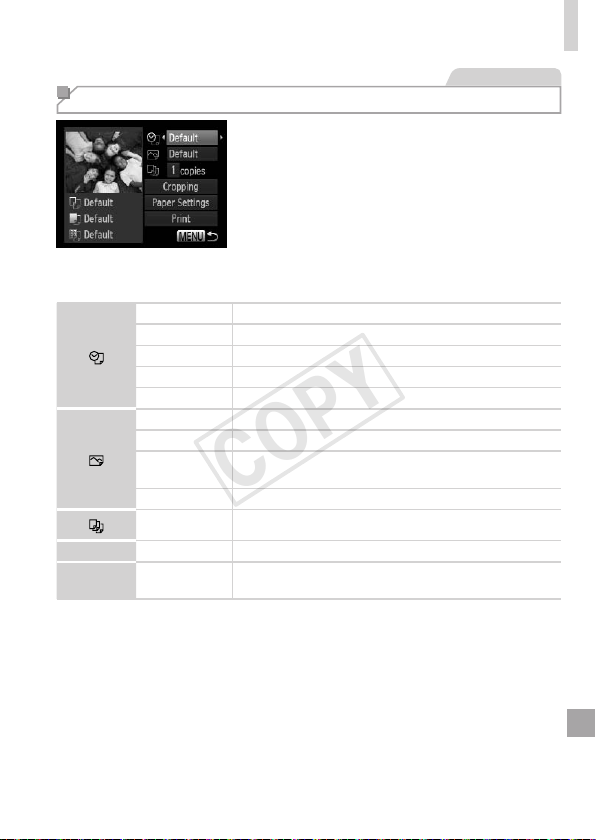
181
PrintingImages
StillImages
Conguring Print Settings
1 Accesstheprintingscreen.
Followsteps1–6on=
179–180to
accessthescreenatleft.
2 Congurethesettings.
Pressthe<o><p>buttonsorturn
the<5>dialtochooseanitem,and
thenchooseanoptionbypressingthe
<q><r>buttons.
Default Matchescurrentprintersettings.
Date Printsimageswiththedateadded.
FileNo. Printsimageswiththelenumberadded.
Both Printsimageswithboththedateandlenumberadded.
Off
–
Default Matchescurrentprintersettings.
Off
–
On
Usesinformationfromthetimeofshootingtoprintunder
optimalsettings.
Red-Eye1 Correctsred-eye.
No.ofCopies Choosethenumberofcopiestoprint.
Cropping
–
Specifyadesiredimageareatoprint(=
182).
Paper
Settings
–
Specifythepapersize,layout,andotherdetails
(=
183).
COPY
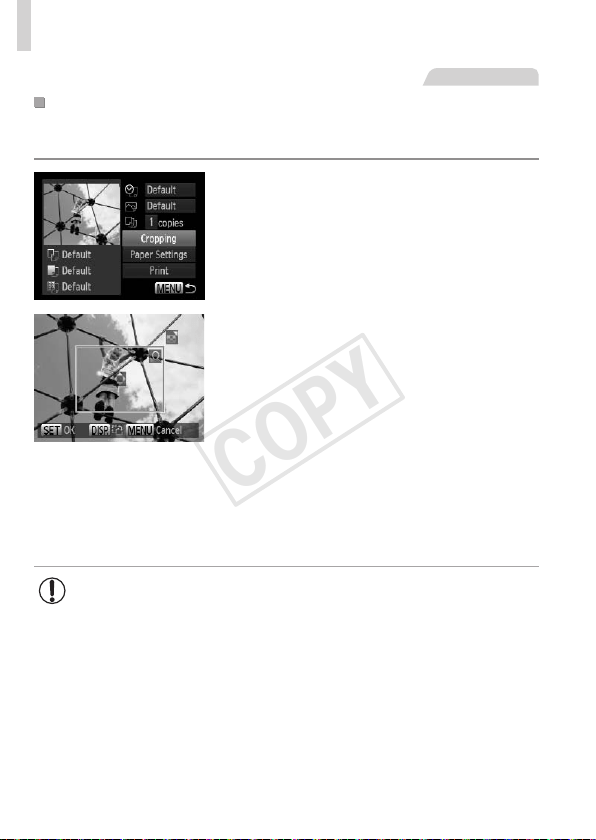
182
PrintingImages
StillImages
CroppingImagesBeforePrinting(Cropping)
Bycroppingimagesbeforeprinting,youcanprintadesiredimagearea
insteadoftheentireimage.
1 Choose[Cropping].
Afterfollowingstep1on=
181to
accesstheprintingscreen,choose
[Cropping]andpressthe<m>button.
Acroppingframeisnowdisplayed,
indicatingtheimageareatoprint.
2 Adjustthecroppingframeas
needed.
Toresizetheframe,movethezoomlever
orturnthe<5>dial.
Tomovetheframe,pressthe
<o><p><q><r>buttons.
Torotatetheframe,pressthe<l>
button.
Whennished,pressthe<m>button.
3 Printtheimage.
Followstep7on=
180toprint.
• Croppingmaynotbepossibleatsmallimagesizes,oratsome
aspectratios.
• Datesmaynotbeprintedcorrectlyifyoucropimagesshotwith
[DateStamp]selected.
COPY
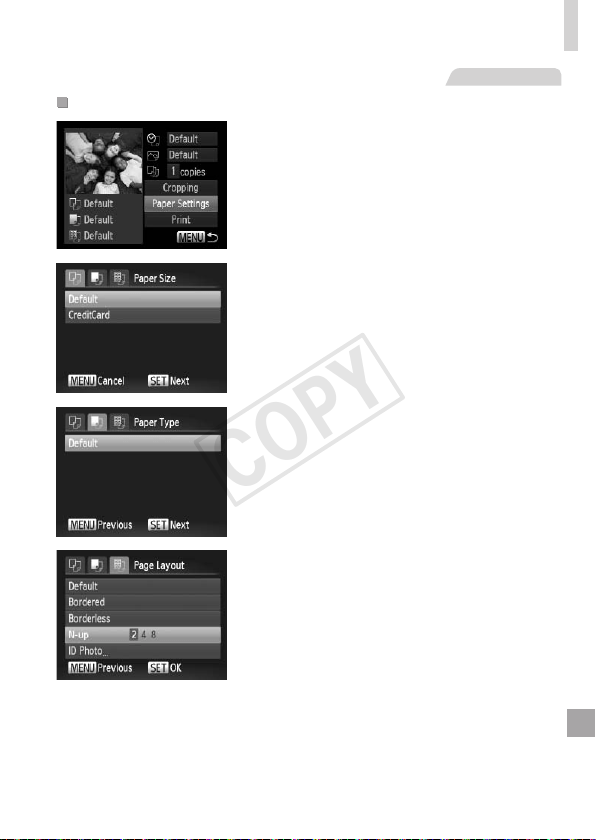
183
PrintingImages
StillImages
ChoosingPaperSizeandLayoutBeforePrinting
1 Choose[PaperSettings].
Afterfollowingstep1on=
181to
accesstheprintingscreen,choose
[PaperSettings]andpressthe<m>
button.
2 Chooseapapersize.
Pressthe<o><p>buttonsorturnthe
<5>dialtochooseanoption,andthen
pressthe<m>button.
3 Chooseatypeofpaper.
Pressthe<o><p>buttonsorturnthe
<5>dialtochooseanoption,andthen
pressthe<m>button.
4 Choosealayout.
Pressthe<o><p>buttonsorturnthe
<5>dialtochooseanoption.
Whenchoosing[N-up],pressthe
<q><r>buttonstospecifythenumberof
imagespersheet.
Pressthe<m>button.
5 Printtheimage.
COPY
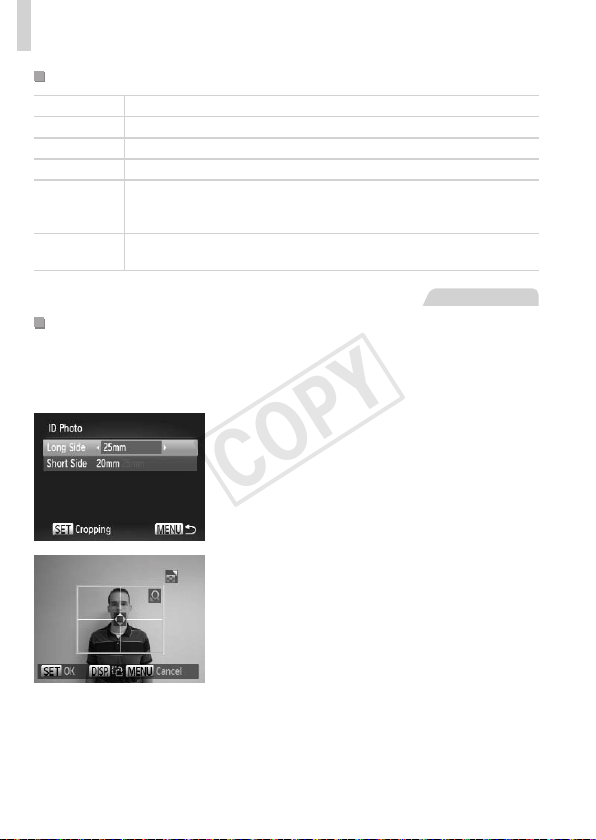
184
PrintingImages
AvailableLayoutOptions
Default Matchescurrentprintersettings.
Bordered Printswithblankspacearoundtheimage.
Borderless Borderless,edge-to-edgeprinting.
N-up Choosehowmanyimagestoprintpersheet.
IDPhoto
Printsimagesforidenticationpurposes.
OnlyavailableforimageswitharesolutionofLandanaspectratioof
4:3.
FixedSize
Choosetheprintsize.
Choosefrom3.5x5in.,postcard,orwide-formatprints.
StillImages
PrintingIDPhotos
1 Choose[IDPhoto].
Followingsteps1–4on=
183,choose
[IDPhoto]andpressthe<m>button.
2 Choosethelongandshortside
length.
Pressthe<o><p>buttonsorturnthe
<5>dialtochooseanitem.Choosethe
lengthbypressingthe<q><r>buttons,
andthenpressthe<m>button.
3 Choosetheprintingarea.
Followstep2on=
182tochoosethe
printingarea.
4 Printtheimage.
COPY
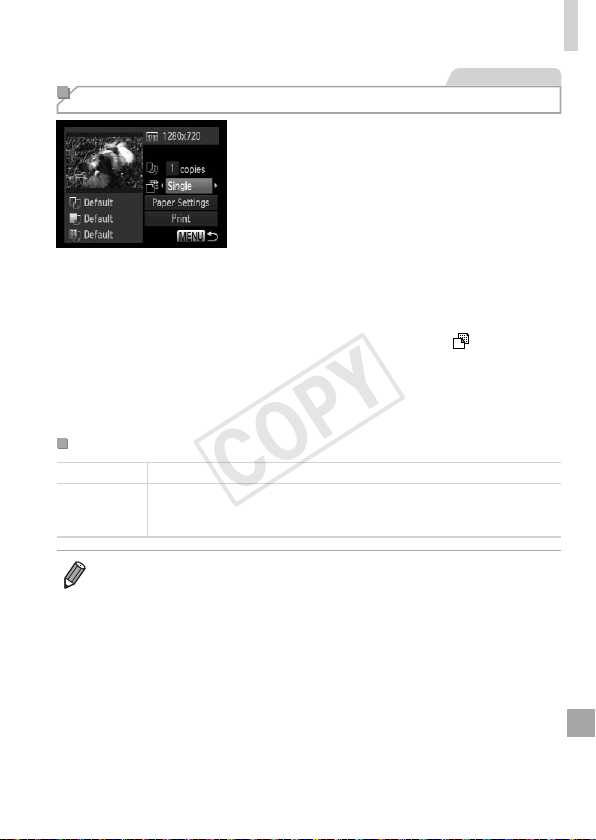
185
PrintingImages
Movies
Printing Movie Scenes
1 Accesstheprintingscreen.
Followsteps1–5on=
179–180
tochooseamovie,andthenpressthe
<m>button.
Pressthe<q><r>buttonsorturnthe
<5>dialtochoose[c],andthenpress
the<m>button.Thescreenatleftis
displayed.
2 Chooseaprintingmethod.
Pressthe<o><p>buttonsorturn
the<5>dialtochoose[
],andthen
pressthe<q><r>buttonstochoosethe
printingmethod.
3 Printtheimage.
MoviePrintingOptions
Single Printsthecurrentsceneasastillimage.
Sequence
Printsaseriesofscenes,acertainintervalapart,onasinglesheetof
paper.Youcanalsoprintthefoldernumber,lenumber,andelapsed
timefortheframebysetting[Caption]to[On].
• Tocancelprintinginprogress,pressthe<m>button.
• [IDPhoto]and[Sequence]cannotbechosenonCanonPictBridge-
compatibleprintersfromCP720/CP730andearliermodels.
COPY
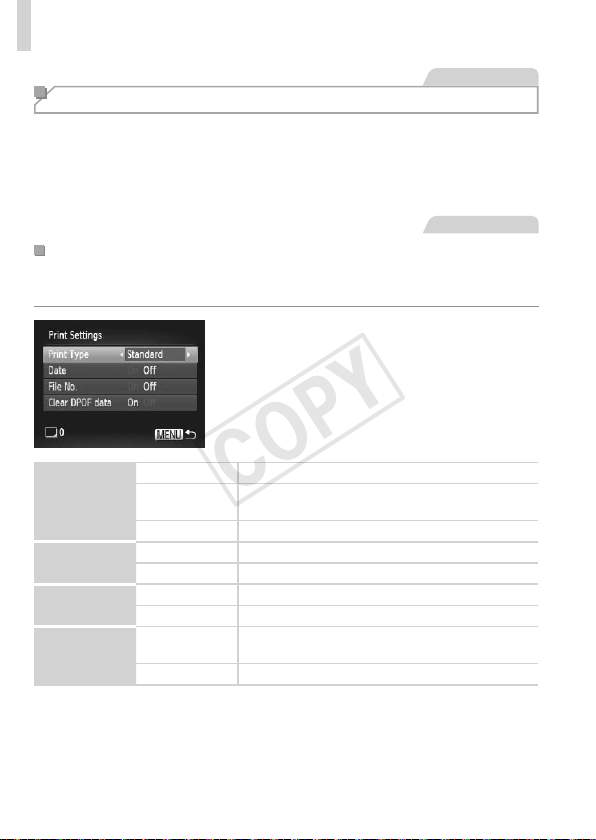
186
PrintingImages
StillImages
Adding Images to the Print List (DPOF)
Batchprinting(=
190)andorderingprintsfromaphotodevelopment
servicecanbesetuponthecamera.Chooseupto998imagesona
memorycardandcongurerelevantsettings,suchasthenumberofcopies,
asfollows.TheprintinginformationyoupreparethiswaywillconformDPOF
(DigitalPrintOrderFormat)standards.
StillImages
ConguringPrintSettings
Specifytheprintingformat,whethertoaddthedateorlenumber,and
othersettingsasfollows.Thesesettingsapplytoallimagesintheprintlist.
Pressthe<n>button,andthen
choose[PrintSettings]onthe[2]tab.
Chooseandconguresettingsasdesired
(=
47).
PrintType
Standard Oneimageisprintedpersheet.
Index
Smallerversionsofmultipleimagesareprinted
persheet.
Both Bothstandardandindexformatsareprinted.
Date
On Imagesareprintedwiththeshootingdate.
Off
–
FileNo.
On Imagesareprintedwiththelenumber.
Off
–
ClearDPOF
data
On
Allimageprintlistsettingsareclearedafter
printing.
Off
–
COPY
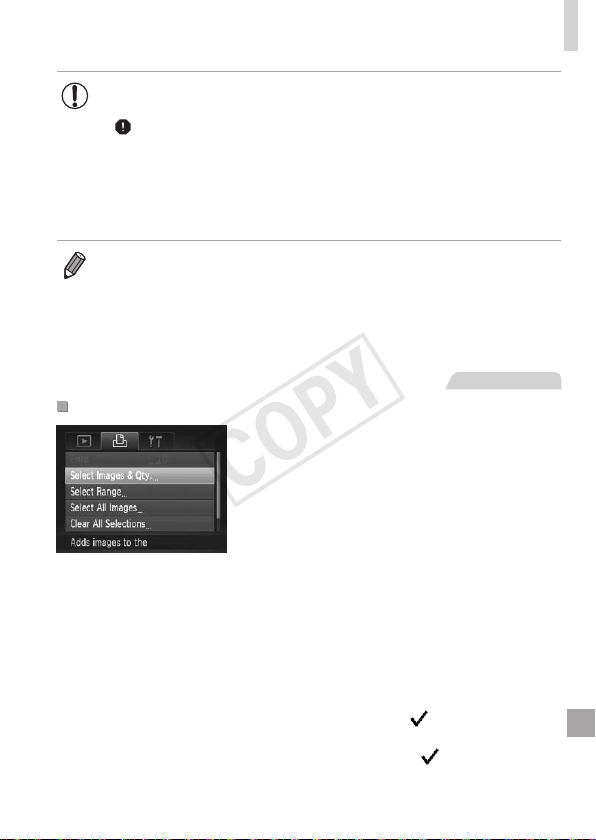
187
PrintingImages
• NotallofyourDPOFsettingsmaybeappliedinprintingbythe
printerorphotodevelopmentservice,insomecases.
• [
]maybedisplayedonthecameratowarnyouthatthememory
cardhasprintsettingsthatwereconguredonanothercamera.
Changingtheprintsettingsusingthiscameramayoverwriteall
previoussettings.
• Setting[Date]to[On]maycausesomeprinterstoprintthedate
twice.
• Specifying[Index]willpreventyoufromchoosing[On]forboth[Date]and
[FileNo.]atthesametime.
• Thedateisprintedinaformatmatchingsettingdetailsin[Date/Time]onthe
[3]tab,accessiblebypressingthe<n>button(=
22).
• IndexprintingisnotavailableonsomeCanonPictBridge-compatibleprinters
(soldseparately).
StillImages
SettingUpPrintingforIndividualImages
1 Choose[SelectImages&Qty.].
Pressthe<n>button,choose
[SelectImages&Qty.]onthe[2]tab,
andthenpressthe<m>button.
2 Chooseanimage.
Pressthe<q><r>buttonsorturnthe
<5>dialtochooseanimage,andthen
pressthe<m>button.
Youcannowspecifythenumberof
copies.
Ifyouspecifyindexprintingfortheimage,
itislabeledwitha[
]icon.Tocancel
indexprintingfortheimage,pressthe
<m>buttonagain.[
]isnolonger
displayed.
COPY
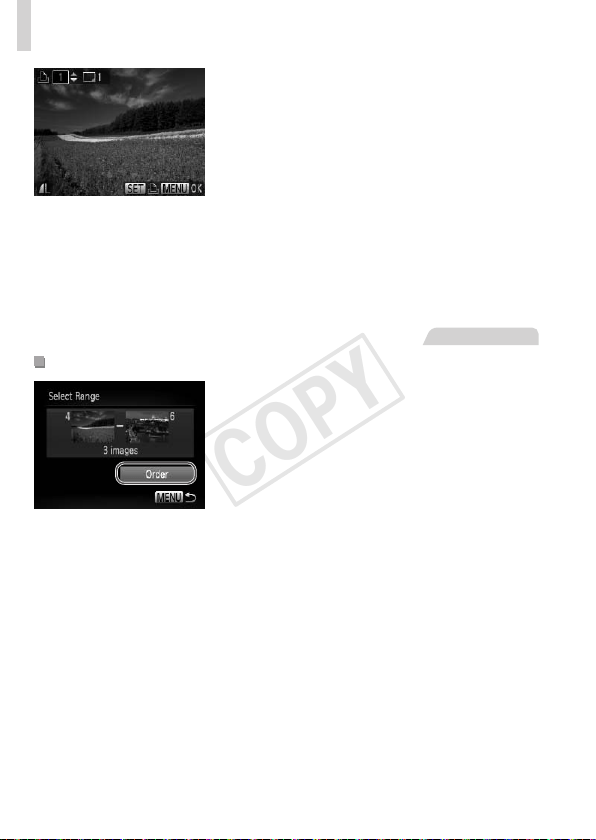
188
PrintingImages
3 Specifythenumberofprints.
Pressthe<o><p>buttonsorturnthe
<5>dialtospecifythenumberofprints
(upto99).
Tosetupprintingforotherimagesand
specifythenumberofprints,repeatsteps
2–3.
Printingquantitycannotbespeciedfor
indexprints.Youcanonlychoosewhich
imagestoprint,byfollowingstep2.
Whennished,pressthe<n>button
toreturntothemenuscreen.
StillImages
SettingUpPrintingforaRangeofImages
1 Choose[SelectRange].
Followingstep1on=
187,choose
[SelectRange]andpressthe<m>
button.
2 Chooseimages.
Followsteps2–3on=
134tospecify
images.
3 Conguretheprintsettings.
Pressthe<o><p>buttonstochoose
[Order],andthenpressthe<m>button.
COPY
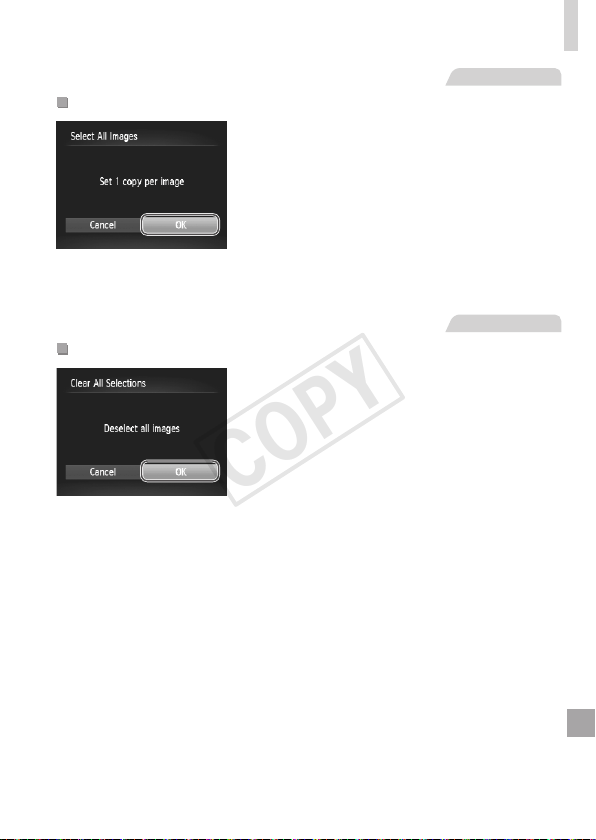
189
PrintingImages
StillImages
SettingUpPrintingforAllImages
1 Choose[SelectAllImages].
Followingstep1on=
187,choose
[SelectAllImages]andpressthe<m>
button.
2 Conguretheprintsettings.
Pressthe<q><r>buttonsorturnthe
<5>dialtochoose[OK],andthenpress
the<m>button.
StillImages
ClearingAllImagesfromthePrintList
1 Choose[ClearAllSelections].
Followingstep1on=
187,choose
[ClearAllSelections]andpressthe<m>
button.
2 Conrmclearingtheprintlist.
Pressthe<q><r>buttonsorturnthe
<5>dialtochoose[OK],andthenpress
the<m>button.
COPY
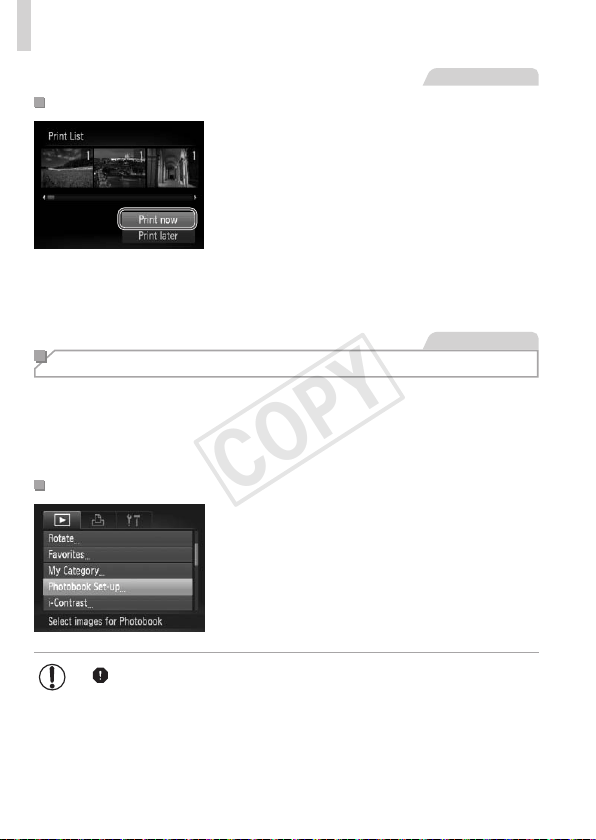
190
PrintingImages
StillImages
PrintingImagesAddedtothePrintList(DPOF)
Whenimageshavebeenaddedtothe
printlist(=
186–189),thescreen
atleftisdisplayedafteryouconnect
thecameratoaPictBridge-compatible
printer.Pressthe<o><p>buttonsto
choose[Printnow],andthensimplypress
the<m>buttontoprinttheimagesinthe
printlist.
AnyDPOFprintjobthatyoutemporarily
stopwillberesumedfromthenextimage.
StillImages
Adding Images to a Photobook
Photobookscanbesetuponthecamerabychoosingupto998images
onamemorycardandimportingthemintotheincludedsoftwareonyour
computer,wheretheyarestoredintheirownfolder.Thisisconvenient
whenorderingprintedphotobooksonlineorprintingphotobookswithyour
ownprinter.
ChoosingaSelectionMethod
Pressthe<n>button,choose
[PhotobookSet-up]onthe[1]tab,and
thenchoosehowyouwillselectimages.
• [ ]maybedisplayedonthecameratowarnyouthatthememory
cardhasprintsettingsthatwereconguredonanothercamera.
Changingtheprintsettingsusingthiscameramayoverwriteall
previoussettings.
COPY
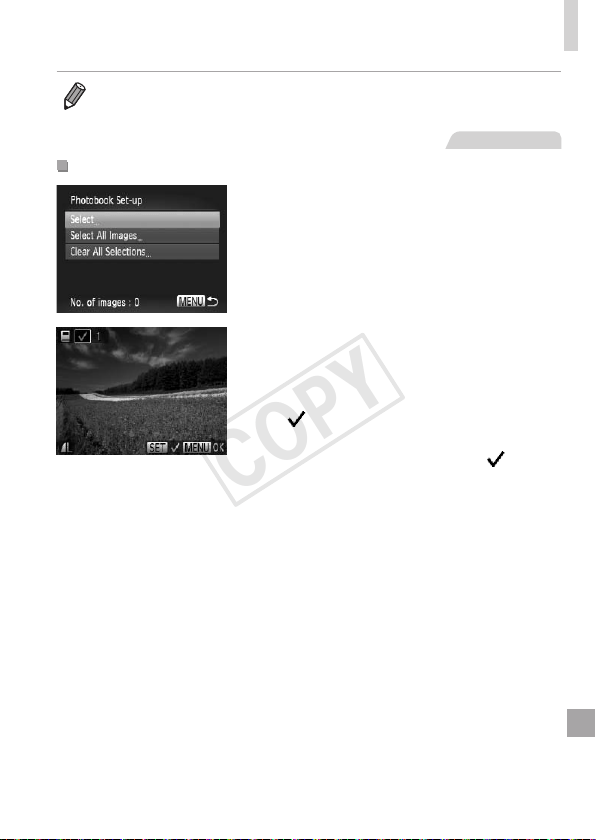
191
PrintingImages
• Afterimportingimagestoyourcomputer,alsorefertotheSoftware Guide
(=
31)andtheprintermanualforfurtherinformation.
StillImages
AddingImagesIndividually
1 Choose[Select].
Followingtheprocedureon=
190,
choose[Select]andpressthe<m>
button.
2 Chooseanimage.
Pressthe<q><r>buttonsorturnthe
<5>dialtochooseanimage,andthen
pressthe<m>button.
[ ]isdisplayed.
Toremovetheimagefromthephotobook,
pressthe<m>buttonagain.[
]isno
longerdisplayed.
Repeatthisprocesstospecifyother
images.
Whennished,pressthe<n>button
toreturntothemenuscreen.
COPY
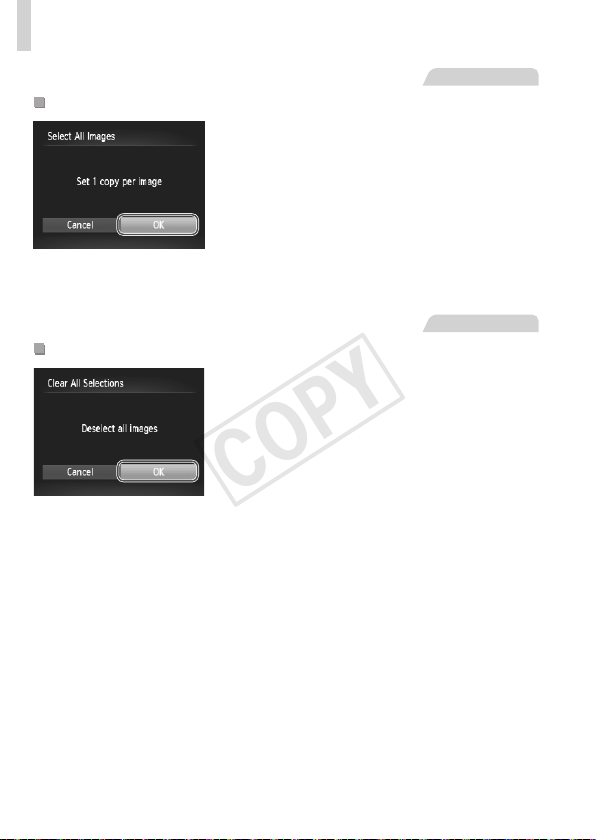
192
PrintingImages
StillImages
AddingAllImagestoaPhotobook
1 Choose[SelectAllImages].
Followingtheprocedureon=
190,
choose[SelectAllImages]andpressthe
<m>button.
2 Conguretheprintsettings.
Pressthe<q><r>buttonsorturnthe
<5>dialtochoose[OK],andthenpress
the<m>button.
StillImages
RemovingAllImagesfromaPhotobook
1 Choose[ClearAllSelections].
Followingtheprocedureon=
190,
choose[ClearAllSelections]andpress
the<m>button.
2 Conrmclearingthephotobook.
Pressthe<q><r>buttonsorturnthe
<5>dialtochoose[OK],andthenpress
the<m>button.
COPY
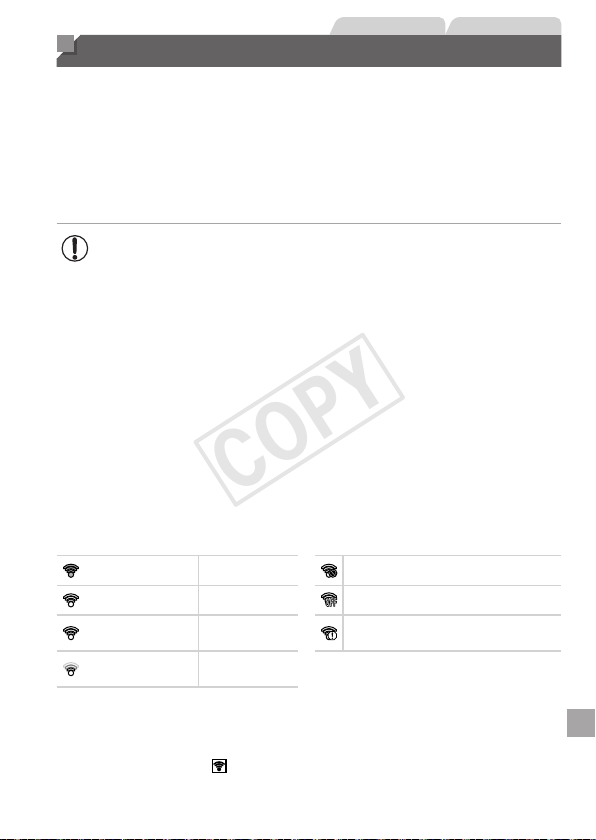
193
StillImages Movies
Using an Eye-Fi Card
BeforeusinganEye-Ficard,alwaysconrmthatlocaluseispermitted
(=
3).
InsertingapreparedEye-Ficardenablesautomaticwirelesstransferof
imagestoacomputeroruploadingtoaphoto-sharingwebsite.
ImagesaretransferredbytheEye-Ficard.Refertothecard’susermanual
orcontactthemanufacturerforinstructionsonpreparingandusingcardsor
resolvingtransferproblems.
• WhenusinganEye-Ficard,keepthefollowingpointsinmind.
-Cardsmaycontinuetotransmitradiowavesevenwhen[Eye-
Fitrans.]issetto[Disable](=
194).RemovetheEye-Fi
cardbeforeenteringhospitals,aircraft,orotherareaswhere
transmissionisprohibited.
-Whentroubleshootingimagetransferissues,checkthecardand
computersettings.Fordetails,refertothecard’susermanual.
-PoorEye-Ficonnectionsmaycauseimagetransfertotakealong
time,andtransfermaybeinterruptedinsomecases.
-Eye-Ficardsmaybecomehot,duetotheirtransferfunctions.
-Batterypowerwillbeconsumedfasterthaninnormaluse.
-Cameraoperationmaybecomesluggish.Toresolvethis,try
setting[Eye-Fitrans.]to[Disable].
ConnectionstatusofEye-Ficardsinthecameracanbecheckedonthe
shootingscreen(inregularinformationdisplaymode)orplaybackscreen(in
simpleinformationdisplaymode).
(Gray) Notconnected Interrupted
(Blinkingwhite) Connecting Notcommunicating
(White) Connected
ErroracquiringEye-Ficard
information*
2
(Animated)
Transferin
progress*
1
*1Powersaving(=
42)onthecameraistemporarilydisabledduringimage
transfer.
*2Restartthecamera.Repeateddisplayofthisiconmayindicateaproblemwiththe
card.
Imageslabeledwitha[ ]iconhavebeentransferred.
COPY
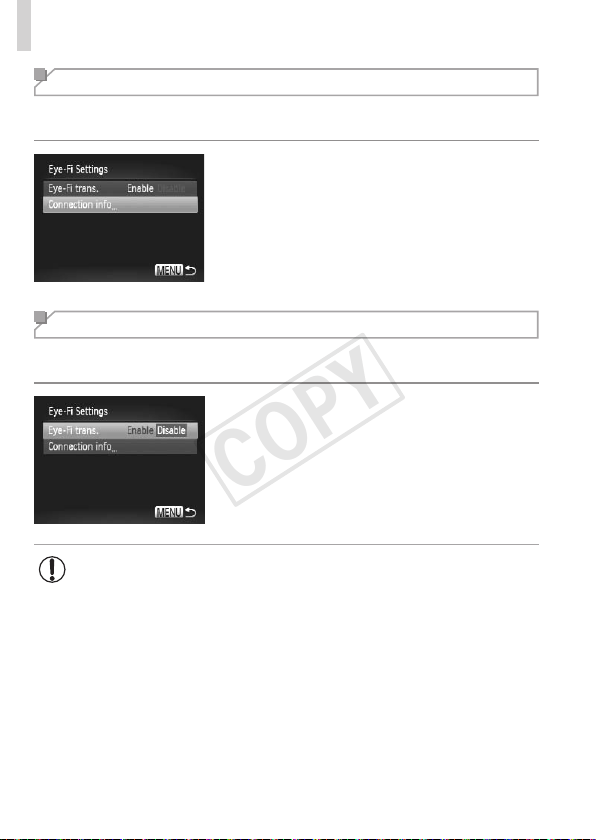
194
UsinganEye-FiCard
Checking Connection Information
ChecktheaccesspointSSIDusedbytheEye-Ficardortheconnection
status,asneeded.
Pressthe<n>button,choose
[Eye-FiSettings]onthe[3]tab,andthen
pressthe<m>button.
Choose[Connectioninfo],andthenpress
the<m>button.
Theconnectioninformationscreenis
displayed.
Disabling Eye-Fi Transfer
CongurethesettingasfollowstodisableEye-Fitransferbythecard,if
necessary.
Choose[Disable]in[Eye-Fitrans.].
Pressthe<n>button,choose
[Eye-FiSettings]onthe[3]tab,andthen
pressthe<m>button.
Choose[Eye-Fitrans.],andthenchoose
[Disable].
• [Eye-FiSettings]isnotshownunlessanEye-Ficardisinthe
camerawithitswrite-protecttabintheunlockedposition.Forthis
reason,youcannotchangesettingsforaninsertedEye-Ficardif
thewrite-protecttabisinthelockedposition.
COPY

195
Appendix
Helpfulinformationwhenusingthecamera
9
COPY

196
Troubleshooting
Ifyouthinkthereisaproblemwiththecamera,rstcheckthefollowing.
Iftheitemsbelowdonotsolveyourproblem,contactaCanonCustomer
SupportHelpDesk.
Power
Nothinghappenswhenthepowerbuttonispressed.
• Conrmthatthebatteryischarged(=
19).
• Conrmthatthebatteryisinsertedfacingthecorrectway(=
20).
• Conrmthatthememorycard/batterycoverisfullyclosed(=
21).
• Dirtybatteryterminalsreducebatteryperformance.Trycleaningtheterminalswitha
cottonswabandreinsertingthebatteryafewtimes.
Thebatteryisdepletedquickly.
• Batteryperformancedecreasesatlowtemperatures.Trywarmingthebatteryalittle
byputtingitinyourpocket,forexample,withtheterminalcoveron.
• Ifthesemeasuresdonothelpandthebatteryisstilldepletedsoonaftercharging,it
hasreachedtheendofitslife.Purchaseanewbattery.
Thelensisnotretracted.
• Donotopenthememorycard/batterycoverwhilethecameraison.Closethecover,
turnthecameraon,andthenturnitoffagain(=
21).
Thebatteryisswollen.
• Batteryswellingisnormalanddoesnotposeanysafetyconcerns.However,ifbattery
swellingpreventsthebatteryfromttinginthecamera,contactaCanonCustomer
SupportHelpDesk.
Display on a TV
CameraimageslookdistortedornotdisplayedonaTV(=
176).
Shooting
Cannotshoot.
• InPlaybackmode(=
25),presstheshutterbuttonhalfway(=
43).
Strangedisplayonthescreenunderlowlight(=
45).
Strangedisplayonthescreenwhenshooting.
Notethatthefollowingdisplayproblemsarenotrecordedinstillimagesbutare
recordedinmovies.
• Thescreenmaydarkenunderbrightlight.
• ThescreenmayickerunderuorescentorLEDlighting.
• Purplishbandingmayappearonthescreenifyoucomposeashotthatincludesa
brightlightsource.
COPY

197
Troubleshooting
Nodatestampisaddedtoimages.
• Congurethe[DateStamp]setting(=
65).Notethatdatestampsarenotadded
toimagesautomatically,merelybecauseyouhaveconguredthe[Date/Time]setting
(=
22).
• Datestampsarenotaddedinshootingmodes(=
212)inwhichthissettingcannot
becongured(=
65).
[
h
]ashesonthescreenwhentheshutterbuttonispressed,and
shootingisnotpossible(=
55).
[ ]isdisplayedwhentheshutterbuttonispressedhalfway.
• Set[ISMode]to[Continuous](=
114).
• Raisetheashandsettheashmodeto[h](=
111).
• IncreasetheISOspeed(=
96).
• Mountthecameraonatripodortakeothermeasurestokeepitstill.Inthiscase,you
shouldset[ISMode]to[Off](=
114).
Shotsareoutoffocus.
• Presstheshutterbuttonhalfwaytofocusonsubjectsbeforepressingitalltheway
downtoshoot(=
43).
• Makesuresubjectsarewithinfocusingrange(=
217).
• Set[AF-assistBeam]to[On](=
75).
• Conrmthatunneededfunctionssuchasmacroaredeactivated.
• TryshootingwithfocuslockorAFlock(=
106,110).
NoAFframesaredisplayedandthecameradoesnotfocuswhenthe
shutterbuttonispressedhalfway.
• TohaveAFframesdisplayedandthecamerafocuscorrectly,trycomposingthe
shotwithhigher-contrastsubjectareascenteredbeforeyoupresstheshutterbutton
halfway.Otherwise,trypressingtheshutterbuttonhalfwayrepeatedly.
Subjectsinshotslooktoodark.
• Raisetheashandsettheashmodeto[h](=
111).
• Adjustbrightnessbyusingexposurecompensation(=
93).
• Adjustcontrastbyusingi-Contrast(=
97,150).
• UseAElockorspotmetering(=
94,95).
Subjectslooktoobright,highlightsarewashed-out.
• Lowertheashandsettheashmodeto[!](=
27).
• Adjustbrightnessbyusingexposurecompensation(=
93).
• UseAElockorspotmetering(=
94,95).
• Reducethelightingonsubjects.
COPY

198
Troubleshooting
Shotslooktoodarkdespitetheashring(=
55).
• Shootwithinashrange(=
217).
• Adjustbrightnessbyusingashexposurecompensationorchangingtheashoutput
level(=
112).
• IncreasetheISOspeed(=
96).
Subjectsinashshotslooktoobright,highlightsarewashed-out.
• Shootwithinashrange(=
217).
• Lowertheashandsettheashmodeto[!](=
27).
• Adjustbrightnessbyusingashexposurecompensationorchangingtheashoutput
level(=
112).
Whitedotsorsimilarimageartifactsappearinashshots.
• Thisiscausedbylightfromtheashreectingoffdustorairborneparticles.
Shotslookgrainy.
• LowertheISOspeed(=
96).
Subjectsareaffectedbyred-eye(=
69).
• Set[Red-EyeLamp]to[On](=
75)toactivatethered-eyereductionlamp
(=
6)inashshots.Forbestresults,havesubjectslookatthered-eyereduction
lamp.Alsotryincreasingthelightinginindoorscenesandshootingatcloserrange.
• Editimagesusingred-eyecorrection(=
151).
Recordingtothememorycardtakestoolong,orcontinuousshooting
isslower.
• Usethecameratoperformlow-levelformattingofthememorycard(=
161).
ShootingsettingsorFUNC.menusettingsarenotavailable.
• Availablesettingitemsvarybyshootingmode.Referto“FunctionsAvailableinEach
ShootingMode”,“FUNC.Menu”,and“ShootingMenu”(=
206–213).
Shooting Movies
Theelapsedtimeshownisincorrect,orrecordingisinterrupted.
• Usethecameratoformatthememorycard,orswitchtoacardthatsupportshigh-
speedrecording.Notethateveniftheelapsedtimedisplayisincorrect,thelengthof
moviesonthememorycardcorrespondstotheactualrecordingtime(=
160).
[ ]isdisplayedandshootingstopsautomatically.
Thecamera’sinternalmemorybufferlledupasthecameracouldnotrecordtothe
memorycardquicklyenough.Tryoneofthefollowingmeasures.
• Usethecameratoperformlow-levelformattingofthememorycard(=
161).
• Lowertheimagequality(=
70).
• Switchtoamemorycardthatsupportshigh-speedrecording(=
217).
COPY

199
Troubleshooting
Zoomingisnotpossible.
• Zoomingisnotpossiblewhenshootingmoviesin[ ]mode.
Playback
Playbackisnotpossible.
• Imageormovieplaybackmaynotbepossibleifacomputerisusedtorenamelesor
alterthefolderstructure.RefertotheSoftware Guide(=
31)fordetailsonfolder
structureandlenames.
Playbackstops,oraudioskips.
• Switchtoamemorycardthatyouhaveperformedlow-levelformattingonwiththe
camera(=
161).
• Theremaybebriefinterruptionswhenplayingmoviescopiedtomemorycardsthat
haveslowreadspeeds.
• Whenmoviesareplayedonacomputer,framesmaybedroppedandaudiomayskip
ifcomputerperformanceisinadequate.
Soundisnotplayedduringmovies.
• Adjustthevolume(=
30,123)ifyouhaveactivated[Mute](=
156)orthe
soundinthemovieisfaint.
• Nosoundisplayedformoviesshotin[
](=
83)modebecauseaudioisnot
recordedinthismode.
Memory Card
Thememorycardisnotrecognized.
• Restartthecamera,withthememorycardinit(=
20).
Computer
Cannottransferimagestoacomputer.
Whenattemptingtotransferimagestothecomputerviaacable,tryreducingthe
transferspeedasfollows.
• Pressthe<1>buttontoenterPlaybackmode.Holdthe<n>buttondownas
youpressthe<o>and<m>buttonsatthesametime.Onthenextscreen,press
the<q><r>buttonstochoose[B],andthenpressthe<m>button.
Eye-Fi Cards
Cannottransferimages(=
193).
COPY

200
On-Screen Messages
Ifanerrormessageisdisplayed,respondasfollows.
Nomemorycard
• Thememorycardmaybeinsertedfacingthewrongway.Reinsertthememorycard
facingthecorrectway(=
21).
Memorycardlocked
• Thewrite-protecttabofthememorycardissettothelockedposition.Switchthe
write-protecttabtotheunlockedposition(=
20).
Cannotrecord!
• Shootingwasattemptedwithoutamemorycardinthecamera.Toshoot,inserta
memorycardfacingthecorrectway(=
21).
Memorycarderror(=
161)
• Ifthesameerrormessageisdisplayedevenwhenyouhaveinsertedaformatted
memorycardfacingthecorrectway,contactaCanonCustomerSupportHelpDesk
(=
21).
Insufcientspaceoncard
• Thereisnotenoughfreespaceonthememorycardtoshoot(=
51,77,91,
115)oreditimages(=
146–151).Eithereraseunneededimages(=
136,
137)orinsertamemorycardwithenoughfreespace(=
20).
Chargethebattery(=
20)
NoImage.
• Thememorycarddoesnotcontainanyimagesthatcanbedisplayed.
Protected!(=
132)
UnidentiedImage/IncompatibleJPEG/Imagetoolarge./Cannotplay
backAVI/RAW
• Unsupportedorcorruptimagescannotbedisplayed.
• Itmaynotbepossibletodisplayimagesthatwereeditedorrenamedonacomputer,
orimagesshotwithanothercamera.
Cannotmagnify!/CannotplaybackthiscontentinSmartShufe/
Cannotrotate/Cannotmodifyimage/Cannotregisterthisimage!/
Cannotmodify/Cannotassigntocategory/Unselectableimage.
• Thefollowingfunctionsmaybeunavailableforimagesthatwererenamedoralready
editedonacomputer,orimagesshotwithanothercamera.Notethatstarred(*)
functionsarenotavailableformovies.
Magnify*(=
129),SmartShufe*(=
131),Categorize(=
143),Rotate
(=
140),Edit*(=
146–151),AssignasStart-upImage*(=
159),PrintList*
(=
186),andPhotobookSet-up*(=
190).
Invalidselectionrange
• Whenspecifyingarangeforimageselection(=
134,138,145,188),you
attemptedtochooseaninitialimagethatwasafterthenalimage,orvice-versa.
COPY

201
On-ScreenMessages
Exceededselectionlimit
• Morethan998imageswereselectedforPrintList(=
186)orPhotobookSet-up
(=
190).Choose998imagesorless.
• PrintList(=
186)orPhotobookSet-up(=
190)settingscouldnotbesaved
correctly.Reducethenumberofselectedimagesandtryagain.
• Youattemptedtochoosemorethan500imagesinProtect(=
132),Erase
(=
136),Favorites(=
142),MyCategory(=
143),PrintList(=
186),or
PhotobookSet-up(=
190).
Communicationerror
• Anexcessiveamountofimages(approx.1,000)onthememorycardprevented
printingorimagetransfertoacomputer.Totransfertheimages,useacommercially
availableUSBcardreader.Toprint,insertthememorycarddirectlyintotheprinter
cardslot.
Namingerror!
• Thefoldercouldnotbecreatedorimagescouldnotberecorded,becausethehighest
supportedfoldernumber(999)forstoringimagesonthecardhasbeenreachedand
thehighestsupportedimagenumber(9999)forimagesinfoldershasbeenreached.
Inthe[3]menu,change[FileNumbering]to[AutoReset](=
162),orformatthe
memorycard(=
160).
LensError
• Thiserrormayoccurifthelensisheldwhileitismoving,orwhenthecameraisused
industyorsandylocations.
• Frequentdisplayofthiserrormessagemayindicatecameradamage.Inthiscase,
contactaCanonCustomerSupportHelpDesk.
Acameraerrorwasdetected(error number)
• Ifthiserrormessageisdisplayedimmediatelyafterashot,theimagemaynothave
beensaved.SwitchtoPlaybackmodetocheckfortheimage.
• Frequentdisplayofthiserrormessagemayindicatecameradamage.Inthiscase,
writedowntheerrornumber(Exx)andcontactaCanonCustomerSupportHelp
Desk.
FileError
• Correctprinting(=
179)maynotbepossibleforphotosfromothercamerasor
imagesthathavebeenalteredusingcomputersoftware,evenifthecamerais
connectedtotheprinter.
Printerror
• Checkthepapersizesetting(=
183).Ifthiserrormessageisdisplayedwhenthe
settingiscorrect,restarttheprinterandcompletethesettingonthecameraagain.
Inkabsorberfull
• ContactaCanonCustomerSupportHelpDesktorequestassistancewithink
absorberreplacement.
COPY
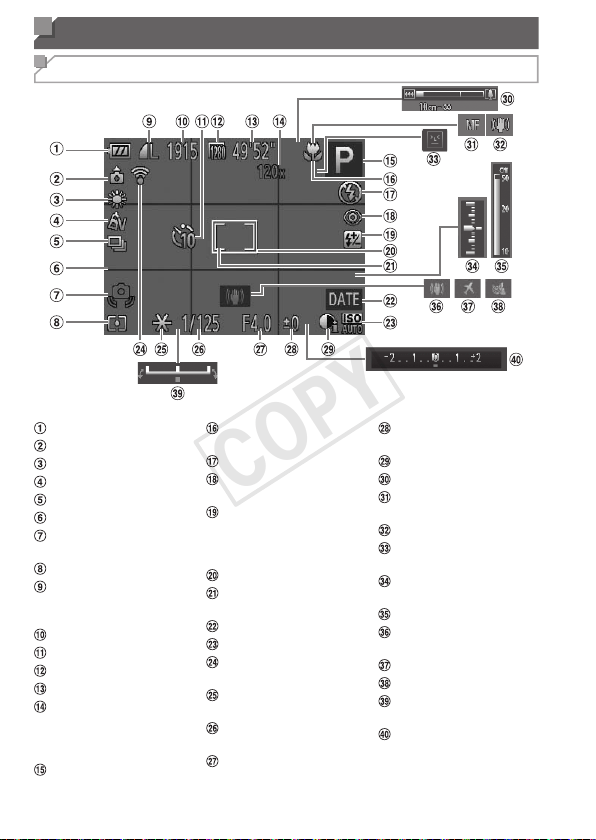
202
On-Screen Information
Shooting (Information Display)
Batterylevel(=
203)
Cameraorientation*
Whitebalance(=
98)
MyColors(=
100)
Drivemode(=
102)
Gridlines(=
72)
Camerashakewarning
(=
55)
Meteringmethod(
=
95)
Stillimagecompression
(=
114),Resolution
(=
68)
Recordableshots
Self-timer(=
62)
Movieresolution(
=
70)
Remainingtime
Digitalzoom
magnication(=
60),
Digitaltele-converter
(=
105)
Shootingmode(
=
206),
Sceneicon(
=
57)
Focusingrange
(=
103)
Flashmode(=
111)
Red-eyecorrection
(=
69)
Flashexposure
compensation/Flash
outputlevel(=
112,
119)
AFframe(=
105)
SpotAEpointframe
(=
95)
Datestamp(=
65)
ISOspeed(=
96)
Eye-Ficonnection
status(=
193)
AElock(=
94),FE
lock(=
113)
Shutterspeed(=
116,
118)
Aperturevalue
(=
117,118)
Exposurecompensation
level(=
93)
i-Contrast(=
97)
Zoombar(=
52)
AFlock(=
110),
Manualfocus(=
103)
ISmodeicon(=
58)
Blinkdetection
(=
74)
Exposurelevel
(=
118)
MFindicator(=
104)
Imagestabilization
(=
114)
Timezone(=
164)
Windlter(=
71)
Exposureshiftbar
(=
89)
Exposurecompensation
bar(=
93)
COPY
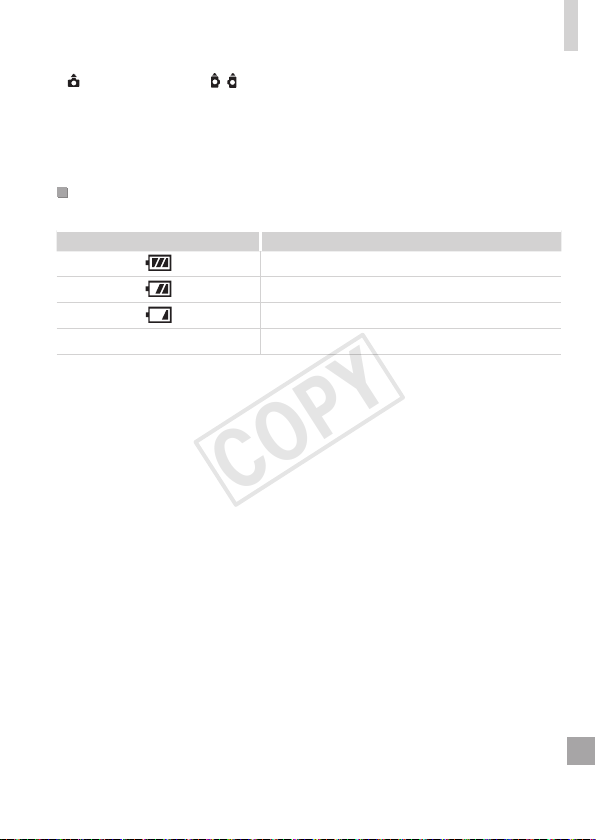
203
On-ScreenInformation
* :Regularorientation, :Heldvertically
Thecameradetectstheshootingorientationandadjustssettingsforoptimalshots.
Orientationisalsodetectedduringplayback,andineitherorientation,thecamera
automaticallyrotatesimagesasneeded.
However,theorientationmaynotbedetectedcorrectlywhenthecameraispointed
straightupordown.
BatteryLevel
Anon-screeniconormessageindicatesthebatterychargelevel.
Display Details
Sufcientcharge
Slightlydepleted,butsufcient
(Blinkingred)
Nearlydepleted–chargethebatterysoon
[Chargethebattery] Depleted–chargethebatteryimmediately
COPY
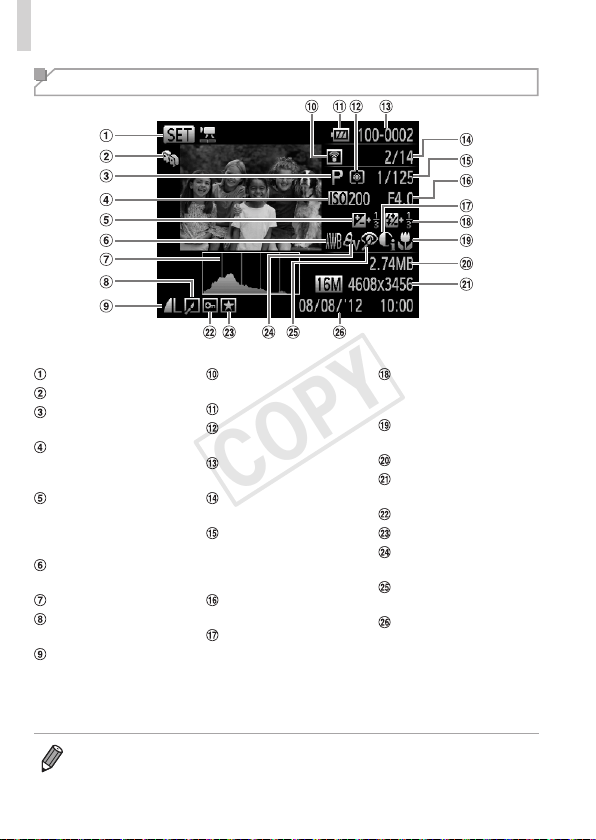
204
On-ScreenInformation
Playback (Detailed Information Display)
Movies(=
52,122)
MyCategory(=
143)
Shootingmode
(=
206)
ISOspeed(=
96),
Playbackspeed
(=
84)
Exposurecompensation
level(=
93),
Exposureshiftlevel
(=
89)
Whitebalance
(=
98)
Histogram(=
124)
Imageediting(=
146
–151)
Compression(image
quality)(=
114)/
Resolution(=
68),
MOV(movies)
TransferredviaEye-Fi
(=
193)
Batterylevel(=
203)
Meteringmethod
(=
95)
Foldernumber–File
number(=
162)
Currentimageno./
Totalno.ofimages
Shutterspeed(still
images)(=
116,118),
Imagequality/Frame
rate(movies)(=
70)
Aperturevalue
(=
117,118)
i-Contrast(=
97,
150)
Flash(=
111),Flash
exposurecompensation
(=
112)
Focusingrange
(=
103)
Filesize
Stillimages:Resolution
Movies:Playbacktime
Protection(=
132)
Favorites(=
142)
MyColors(=
100,
149)
Red-eyecorrection
(=
69,151)
Shootingdate/time
(=
22)
• SomeinformationmaynotbedisplayedwhenviewingimagesonaTV
(=
173).
COPY

205
On-ScreenInformation
SummaryofMovieControlPanelin“Viewing”(=
122)
Exit
Play
SlowMotion(Toadjusttheplaybackspeed,pressthe<q><r>buttonsorturn
the<5>dial.Nosoundisplayed.)
SkipBackward*(Tocontinueskippingbackward,keepholdingdownthe<m>
button.)
PreviousFrame(Forfast-rewind,keepholdingdownthe<m>button.)
NextFrame(Forfast-forward,keepholdingdownthe<m>button.)
SkipForward*(Tocontinueskippingforward,keepholdingdownthe<m>
button.)
* Edit(=
153)
c
ShownwhenthecameraisconnectedtoaPictBridge-compatibleprinter
(=
179).
*Displaystheframeapprox.4sec.beforeorafterthecurrentframe.
• Toskipforwardorbackduringmovieplayback,pressthe<q><r>buttons.
COPY
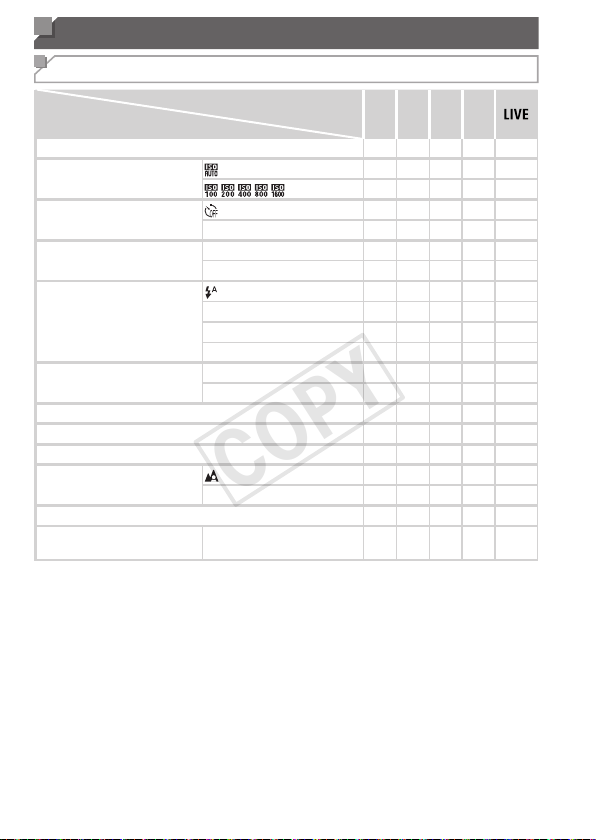
206
Functions and Menu Tables
Functions Available in Each Shooting Mode
ShootingMode
Function
D B M G
ExposureCompensation(=
93)
–
O O O O
ISOSpeed(=
96)
–
O O O O
O O O O
–
Self-Timer(=
62)
O O O O O
][$
O O O O O
Self-TimerSettings(=
64)
Delay*
1
O O O O O
Shots*
2
O O O O O
Flash(=
111)
– – –
O O
h
O O O O O
Z
–
O
–
O O
!
– – – – –
Av/TvSettings(
=
116,117)
ApertureValue
O O
– – –
ShutterSpeed
O
–
O
– –
ProgramShift(=
94)
–
O O O
–
AELock/FELock(=
9 4 ,113)*
4
–
O O O
–
AELock(Movie)/ExposureShift(=
89)
– – – – –
FocusingRange(=
103)
O O O O O
ef
O O O O O
TrackingAF(=
66,107)
O O O O O
ScreenDisplay(=
45)
InformationDisplay/
NoInformationDisplay
O O O O O
*1Cannotbesetto0secondsinmodeswithoutselectionofthenumberofshots.
*2Oneshot(cannotbemodied)inmodeswithoutselectionofthenumberofshots.
*3Notavailable,butswitchesto[Z]insomecases.
*4FElocknotavailablein[!]ashmode.
COPY
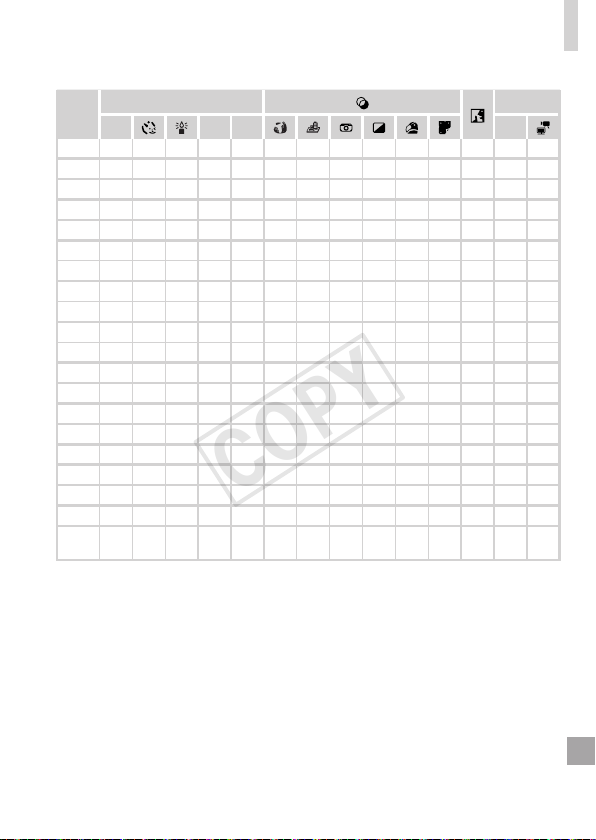
207
FunctionsandMenuTables
A
SCN
E
I
P t E
–
O O O O O O O O O O
–
O
– –
O O O O O O O O O O O O O O O
– – – – – – – – – – – – – – –
O O O O O O O O O O O O O O O
O O
–
O O O O O O O O O
–
O O
O O
–
O O O O O O O O O
–
O O
O O
–
O O O O O O O O O
– – –
O O O O O
–
O O O O O O
– – –
–
O O
–
O
–
O O O O O O
– – –
*3 – – – – – – – – – – – – – –
– – – – –
O
– – – – – –
O O O
– – – – – – – – – – – – – – –
– – – – – – – – – – – – – – –
– – – – – – – – – – – – – – –
– – – – – – – – – – – – – – –
– – – – – – – – – – – – –
O O
O O O O O O O O O O O O O O O
–
O
–
O O
–
O O O O O O O O O
O O
–
O O
– – – –
O O O O
– –
O O
–
O O O
– – – –
O O O O O
OAvailableorsetautomatically.
–
Notavailable.
COPY
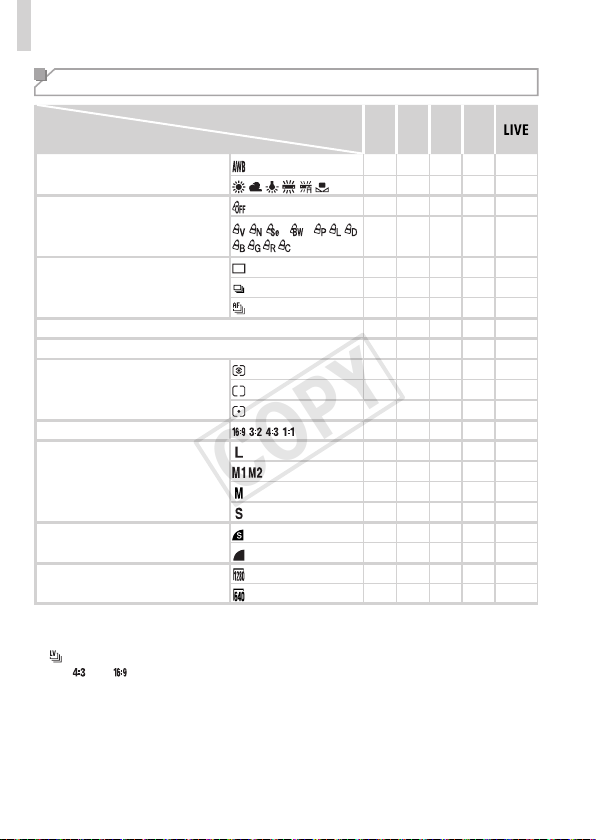
208
FunctionsandMenuTables
FUNC. Menu
ShootingMode
Function
D B M G
WhiteBalance(=
98)
O O O O O
O O O O
–
MyColors(=
100)
O O O O O
*
1
*
1
*
2
O O O O
–
DriveMode(=
102)
O O O O O
O O O O
–
*
3
O O O O
–
FlashExposureCompensation(=
112)
–
O O O
–
FlashOutputLevel(=
1 1 9 )*
4
O O O
– –
MeteringMethod(=
95)
O O O O O
O O O O
–
O O O O
–
StillImageAspectRatio(=
67)
O O O O
–
Resolution(=
68)
O O O O O
O O O O
–
– – – – –
O O O O
–
Compression(=
70)
O O O O
–
O O O O O
MovieQuality(=
70)
O O O O O
O O O O
–
*1Whitebalanceisnotavailable.
*2Setinarangeof1–5:contrast,sharpness,colorsaturation,red,green,blue,andskintone.
*3[ ]issetwith[f],AFlock,or[t].
*4Only[ ]and[ ]areavailable.
*5Synchronizeswiththeaspectratiosettingandisautomaticallyset(=
85).
COPY
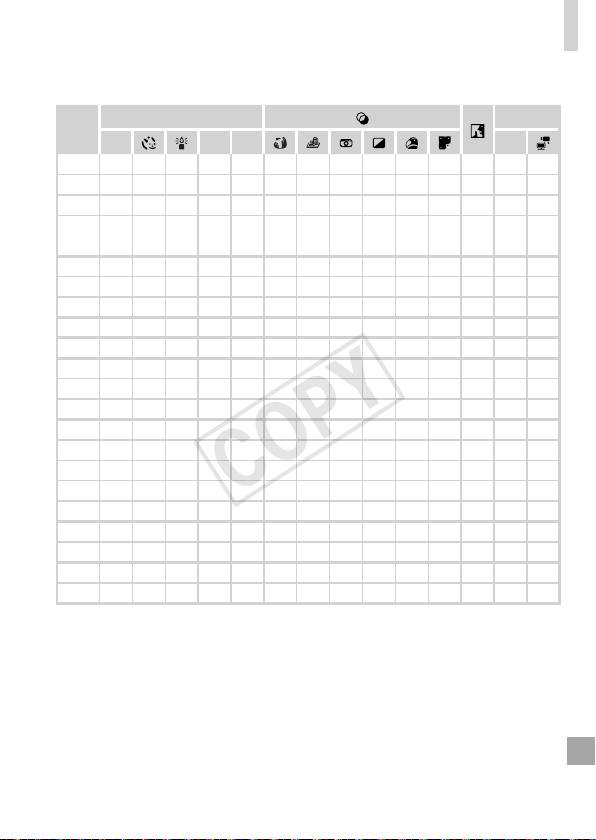
209
FunctionsandMenuTables
A
SCN
E
I
P t E
O O O O O O O O O O O O O O O
– –
O O
– – – – – – – –
O O O
O O O O O O O O O O O O O O O
– –
O
– – – – – – – – –
O O O
O O O O O O O O O O O O O O O
–
O
–
O O O O O O O O O O
– –
–
O
–
O O O O O O O O O O
– –
– – – – – – – – – – – – – – –
– – – – – – – – – – – – – – –
O O O O O O O O O O O O O O O
– – – – – – – – – – – – – – –
– – – – – – – – – – – – – – –
O O O
–
O O
–
*4
–
O O O O
– –
O O O
–
O O O O O O O O O O O
O O O
–
O O
– – – – – –
O O O
– – –
O
– – – – – – – – – – –
O O O
–
O O
– – – – – –
O O O
– – – – – – – – – – – – – – –
O O O O O O O O O O O O O O O
O O O O O O O
*5
O O O O O O O
O O O O O O O
*5
O O O O O O
–
O
Availableorsetautomatically.–Notavailable.
COPY

210
FunctionsandMenuTables
4 Shooting Menu
ShootingMode
Function
D B M G
AFFrame(=
105)
FaceDetect*
1
O O O O O
TrackingAF
O O O O O
Center
O O O O O
AFFrameSize
(
=
106)*
3
Normal
O O O O O
Small
O O O O O
DigitalZoom(=
60)
Standard
O O O O O
Off
O O O O O
DigitalTele-converter(1.6x/2.0x)
O O O O O
AF-PointZoom
(=
72)
On
O O O O O
Off
O O O O O
ServoAF(=
109)
On
O O O O O
Off*
4
O O O O O
ContinuousAF
(=
110)
On
O O O O O
Off
O O O O O
AF-assistBeam
(=
75)
On
O O O O O
Off
O O O O O
MF-PointZoom
(=
103)
On
O O O O O
Off
O O O O O
SafetyMF(=
104)
On
O O O O O
Off
O O O O O
*1Operationwhennofacesaredetectedvariesbyshootingmode.
*2Onlyavailablebypressingthe<o>button(=
66).
*3AvailablewhentheAFframeissetto[Center].
*4[On]whensubjectmovementisdetectedin<A>mode.
COPY
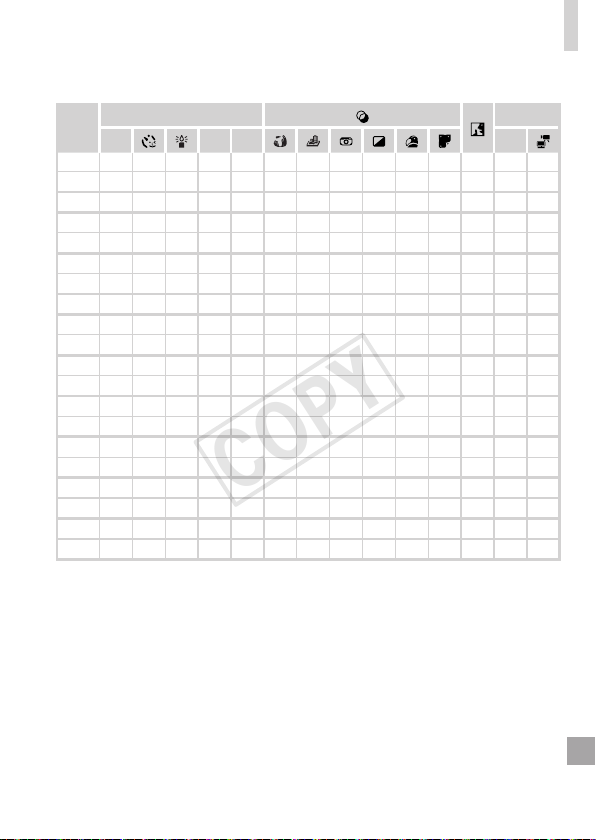
211
FunctionsandMenuTables
A
SCN
E
I
P t E
O O O O O
– – –
O O O O O O O
*2
O
–
O O
– – – –
O O O O
– –
–
O
–
O O O O
–
O O O O O O O
–
O
–
O O O O
–
O O O O O O O
–
O
–
O O
– – –
O O O O O O O
O O O
–
O O
– – – – – –
O O O
O O O O O O O O O O O O O O O
– – – – – – – – – – – – – – –
O O O O O
– – – –
O O O O
– –
O O O O O O O O O O O O O O O
–
O
–
O O
– – – –
O O O O
– –
O O O O O O O O O O O O O O O
O O O
–
O
–
O O O O O O O O O
–
O
–
O O O O O O O O O O
– –
O O O O O
–
O O O O O O
–
O O
O O O O O O O O O O O O O O O
–
O
–
O O
– – – –
O O O O
– –
O O O O O O O O O O O O O O O
–
O
–
O O
–
O O O O O O O O O
O O O O O O O O O O O O O O O
OAvailableorsetautomatically.
–
Notavailable.
COPY
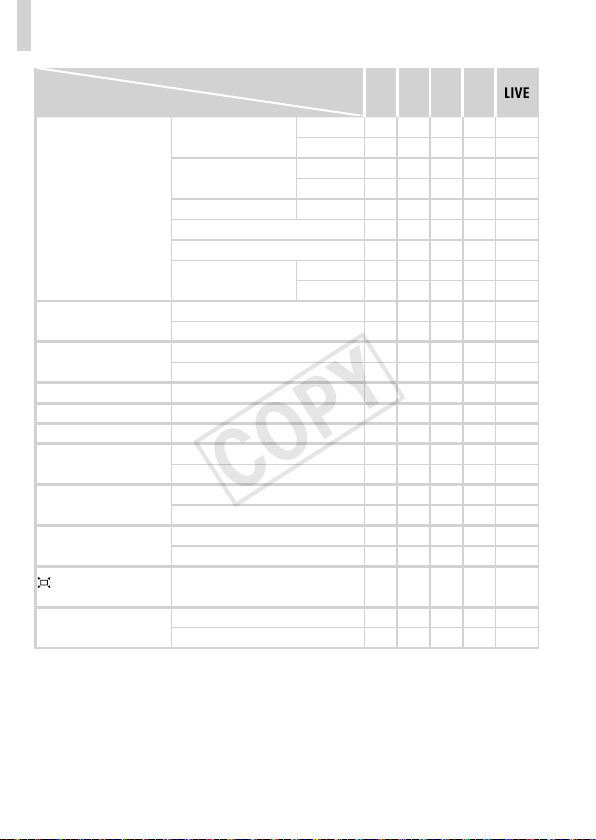
212
FunctionsandMenuTables
ShootingMode
Function
D B M G
FlashSettings(=
69,
75,112,119)
FlashMode
Auto
–
O O O O
Manual
O O O
– –
Red-EyeCorr.
On
O O O O
–
Off
O O O O O
Red-EyeLamp On/Off
O O O O O
FlashExp.Comp
–
O O O
–
FlashOutput
O O O
– –
SafetyFE
On
–
O O O O
Off
O O O O O
i-Contrast(=
97)
Auto
O O O O
–
Off
O O O O O
SafetyShift(=
117)
On
–
O O
– –
Off
O O O O O
WindFilter(=
71)
On/Off
O O O O O
Review(=
76)
Off/Quick/2–10sec./Hold
O O O O O
ReviewInfo(=
76)
Off/Detailed/FocusCheck
O O O O O
BlinkDetection
(=
74)
On
O O O O O
Off
O O O O O
GridLines(=
72)
On
O O O O O
Off
O O O O O
ISMode(=
114)
Off/Continuous
O O O O O
ShootOnly
O O O O O
FramingAssist
(=
61)
Large/Medium/Small
O O O O O
DateStamp(=
65)
Off
O O O O O
Date/Date&Time
O O O O O
COPY
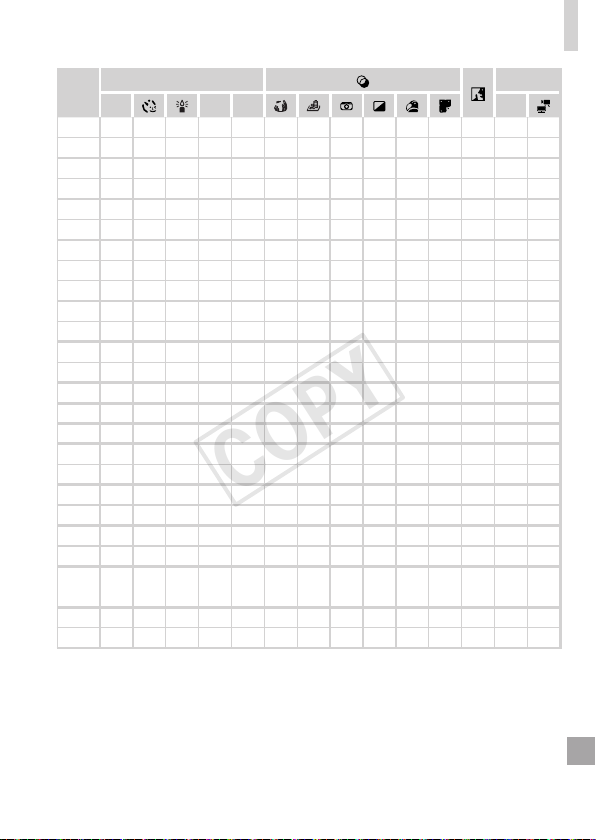
213
FunctionsandMenuTables
A
SCN
E
I
P t E
O O O O O
–
O O O O O O
– – –
– – – – – – – – – – – – – – –
O O O O O
– – – – – – – – – –
O O O O O
–
O O O O O O
– – –
O O O O O
–
O O O O O O
– – –
– – – – – – – – – – – – – – –
– – – – – – – – – – – – – – –
O O O O O
–
O O O O O O
– – –
– – – – – – – – – – – – – – –
O
– –
O
– – – – – – – – – – –
–
O O
–
O O O O O O O O O O O
– – – – – – – – – – – – – – –
O O O O O O O O O O O O O O O
O O O O O O O
–
O O O O O O O
O O O O O O O O O O O O O
– –
O O O O O O O O O O O O O
– –
O O O O O
– – – – –
O O O
– –
O O O O O O O O O O O O O O O
O O O O O O O O O O O O O O O
O O O O O O O O O O O O O O O
O O O O O O O O O O O O O O O
–
O O O O O O O O O O O O
– –
O O O O O O O O O O O O O O O
O O O O O O O O O O O O O O O
O O O
–
O O
– – – – – –
O
– –
OAvailableorsetautomatically.
–
Notavailable.
COPY

214
FunctionsandMenuTables
3 Set up Menu
Item Ref.Page Item Ref.Page
Mute
=
156
CreateFolder
=
162
Volume
=
156
LensRetract
=
163
SoundOptions
=
157
PowerSaving
=
42,163
Hints&Tips
=
157
Units
=
165
Date/Time
=
2 2
VideoSystem
=
176
TimeZone
=
164
CtrlviaHDMI
=
174
LCDBrightness
=
158
Eye-FiSettings
=
193
Start-upImage
=
158,
159
CerticationLogoDisplay
=
166
Format
=
160,161
Language
=
2 5
FileNumbering
=
162
ResetAll
=
167
COPY

215
FunctionsandMenuTables
1 Playback Menu
Item Ref.Page Item Ref.Page
SmartShufe
=
131
Red-EyeCorrection
=
151
Slideshow
=
130
Cropping
=
147
Erase
=
136
Resize
=
146
Protect
=
132
MyColors
=
149
Rotate
=
140
ScrollDisplay
=
122
Favorites
=
142
AutoRotate
=
141
MyCategory
=
143
Resume
=
123
PhotobookSet-up
=
190
Transition
=
123
i-Contrast
=
150
2 Print Menu
Item Ref.Page Item Ref.Page
Print
–
SelectAllImages
=
189
SelectImages&Qty.
=
187
ClearAllSelections
=
189
SelectRange
=
188
PrintSettings
=
186
COPY

216
Handling Precautions
• Thecameraisahigh-precisionelectronicdevice.Avoiddroppingitor
subjectingittostrongimpact.
• Neverbringthecameranearmagnets,motors,orotherdevicesthat
generatestrongelectromagneticelds,whichmaycausemalfunctionor
eraseimagedata.
• Ifwaterdropletsordirtadherestothecameraorscreen,wipewithadry
softcloth,suchasaneyeglasscloth.Donotrubhardorapplyforce.
• Neverusecleanerscontainingorganicsolventstocleanthecameraor
screen.
• Useablowerbrushtoremovedustfromthelens.Ifcleaningisdifcult,
contactaCanonCustomerSupportHelpDesk.
• Topreventcondensationfromformingonthecameraaftersudden
temperaturechanges(whenthecameraistransferredfromcoldtowarm
environments),putthecamerainanairtight,resealableplasticbagand
letitgraduallyadjusttothetemperaturebeforeremovingitfromthebag.
• Ifcondensationdoesformonthecamera,stopusingitimmediately.
Continuingtousethecamerainthisstatemaydamageit.Removethe
batteryandmemorycard,andwaituntilthemoisturehasevaporated
beforeresuminguse.
COPY

217
Specications
CameraEffective
Pixels(Max.)
Approx.16millionpixels
LensFocalLength
30xzoom:4.3(W)–129.0(T)mm
(35mmlmequivalent:24(W)–720(T)mm)
LCDMonitor
3.0typecolorTFTLCD
EffectivePixels:Approx.461,000dots
FileFormat
DesignruleforCameraFilesystem,DPOF(version1.1)
compliant
DataType
StillImages:Exif2.3(JPEG)
Movies:MOV(Imagedata:H.264;Audiodata:LinearPCM
(stereo))
Interface
Hi-speedUSB
HDMIoutput
Analogaudiooutput(stereo)
Analogvideooutput(NTSC/PAL)
PowerSource
BatteryPackNB-6L
ACAdapterKitACK-DC40
Dimensions(Based
onCIPAGuidelines)
104.0x69.5x80.2mm(4.09x2.74x3.16in.)
Weight(Basedon
CIPAGuidelines)
Approx.341g(approx.12.0oz.;includingthebatteryand
memorycard)
Approx.318g(approx.11.2oz.;camerabodyonly)
NumberofShots/RecordingTime,PlaybackTime
NumberofShots Approx.195
MovieRecordingTime*
1
Approx.50min.
Continuous
Shooting*
2
Approx.1hr.30min.
PlaybackTime Approx.4hr.
*1Timeunderdefaultcamerasettings,whennormaloperationsareperformed,suchas
shooting,pausing,turningthecameraonandoff,andzooming.
*2Timeavailablewhenshootingthemaximummovielength(untilrecordingstops
automatically)repeatedly.
•Thenumberofshotsthatcanbetakenisbasedonmeasurementguidelinesofthe
Camera&ImagingProductsAssociation(CIPA).
•Undersomeshootingconditions,thenumberofshotsandrecordingtimemaybeless
thanmentionedabove.
•Numberofshots/timewithafullychargedbattery.
COPY
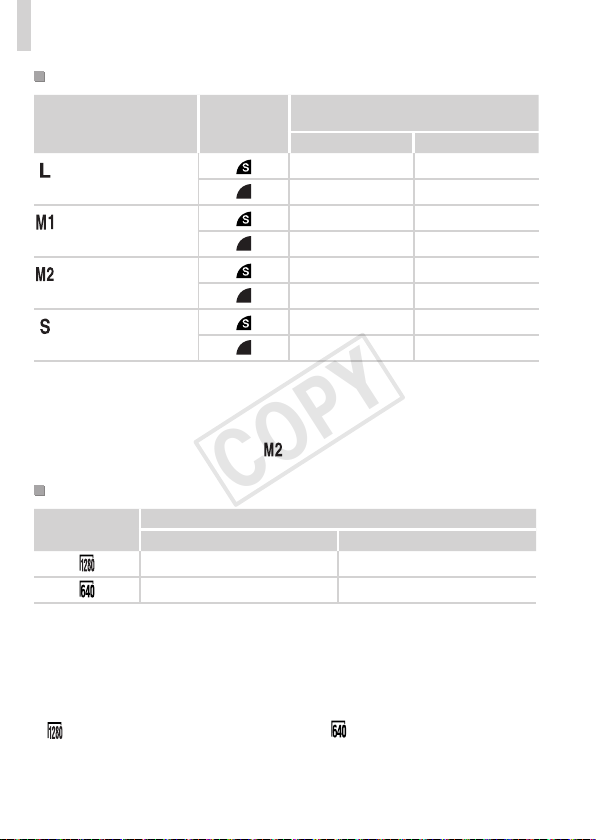
218
Specications
Numberof4:3ShotsperMemoryCard
RecordingPixels
Compression
Ratio
NumberofShotsperMemoryCard
(Approx.shots)
8GB 32GB
(Large)
16M/4608x3456
1131 4567
1903 7684
(Medium1)
8M/3264x2448
2252 9094
3721 15020
(Medium2)
2M/1600x1200
7442 30040
12927 52176
(Small)
0.3M/640x480
27291 110150
40937 165225
•ThevaluesinthetablearemeasuredaccordingtoCanonstandardsandmaychange
dependingonthesubject,memorycardandcamerasettings.
•Thevaluesinthetablearebasedon4:3aspectratio.Iftheaspectratioischanged
(=
67),moreimagescanbeshotbecausethedatasizeperimagewillbesmaller
thanwith4:3images.However,since[
]16:9imageshaveasettingof1920x1080
pixels,theirdatasizewillbelargerthan4:3images.
RecordingTimeperMemoryCard
ImageQuality
RecordingTimeperMemoryCard
8GB 32GB
49min.18sec.*
1
3hr.19min.03sec.*
2
1hr.28min.59sec. 5hr.59min.10sec.
*127min.28sec.foriFramemovies(=
89).
*21hr.50min.52sec.foriFramemovies(=
89).
•ThevaluesinthetablearemeasuredaccordingtoCanonstandardsandmaychange
dependingonthesubject,memorycardandcamerasettings.
•Recordingwillautomaticallystopwhenthecliplesizereaches4GB,orwhenthe
recordingtimereachesapproximately29minutesand59secondswhenshootingin
[
],andapproximately1hourwhenshootingin[ ].
•Recordingmaystopevenifthemaximumcliplengthhasnotbeenreachedonsome
memorycards.SDSpeedClass6orhighermemorycardsarerecommended.
COPY
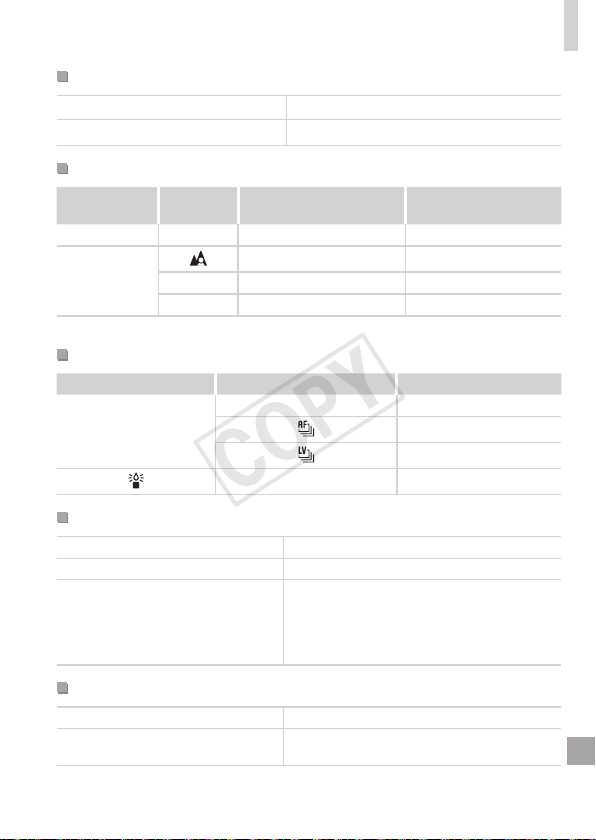
219
Specications
FlashRange
Maximumwideangle(j)
50cm–5.0m(1.6–16ft.)
Maximumtelephoto(i)
1.4–3.0m(4.6–9.8ft.)
ShootingRange
ShootingMode
Focusing
Range
MaximumWideAngle
(j)
MaximumTelephoto
(i)
A
–
0cm(0in.)–innity 1.4m(4.6ft.)–innity
Othermodes
5cm(2.0in.)–innity 1.4m(4.6ft.)–innity
e*
0–50cm(0–1.6ft.)
–
f*
0cm(0in.)–innity 1.4m(4.6ft.)–innity
*Notavailableinsomeshootingmodes.
ContinuousShootingSpeed
ShootingMode ContinuousShootingMode Speed
G
W
Approx.0.8shots/sec.
Approx.0.5shots/sec.
Approx.0.6shots/sec.
–
Approx.2.8shots/sec.
ShutterSpeed
<A>mode,automaticallysetrange
1–1/1600sec.
Rangeinallshootingmodes 15–1/1600sec.
<M>modeavailablevalues(sec.)
15,13,10,8,6,5,4,3.2,2.5,2,1.6,1.3,1,0.8,
0.6,0.5,0.4,0.3,1/4,1/5,1/6,1/8,1/10,1/13,
1/15,1/20,1/25,1/30,1/40,1/50,1/60,1/80,
1/100,1/125,1/160,1/200,1/250,1/320,1/400,
1/500,1/640,1/800,1/1000,1/1250,1/1600
Aperture
f/number f/3.4,f/8.0(W),f/5.8,f/8.0(T)
<B>modeavailablevalues*
f/3.4,f/4.0,f/4.5,f/5.0,f/5.6,f/5.8,f/6.3,f/7.1,
f/8.0
*Dependingonthezoomposition,someaperturevaluesmaynotbeavailable.
COPY

220
Specications
BatteryPackNB-6L
Type: Rechargeablelithium-ionbattery
RatedVoltage: 3.7VDC
RatedCapacity: 1000mAh
ChargingCycles: Approx.300times
OperatingTemperature:0–40°C(32–104°F)
Dimensions: 34.4x41.8x6.9mm(1.35x1.65x0.27in.)
Weight: Approx.21g(approx.0.74oz.)
BatteryChargerCB-2LY/CB-2LYE
RatedInput: 100–240VAC(50/60Hz),0.085A(100V)–0.05A(240V)
RatedOutput: 4.2VDC,0.7A
ChargingTime: Approx.1hour55min.(whenusingNB-6L)
ChargeIndicator: Charging:orange/Fullycharged:green(two-indicatorsystem)
OperatingTemperature:0–40°C(32–104°F)
Dimensions: 58.6x86.4x24.1mm(2.31x3.40x0.95in.)
Weight: CB-2LY: Approx.70g(approx.2.47oz.)
CB-2LYE:Approx.61g(approx.2.15oz.)(excludingpowercord)
• AlldataisbasedontestsbyCanon.
• Cameraspecicationsorappearancearesubjecttochangewithout
notice.
COPY

221
Index
A
ACadapterkit............................ 171,177
Accessories....................................... 171
AElock................................................ 94
AFframes.............................. 27,53,105
AFlock................................................110
Aspectratio.......................................... 67
AUTOmode
(shootingmode)....................... 26,44,52
AVcable............................................ 173
Av(shootingmode)............................117
B
Battery
Charging........................................ 19
Date/timebattery........................... 24
Level............................................ 203
Powersaving................................. 42
Batterycharger.............................. 2,171
Blackandwhiteimages..................... 100
Blinkdetection..................................... 74
C
Camerashake....................................114
Center(AFframemode).................... 106
Clock.................................................... 49
Color(whitebalance)........................... 98
Compressionratio(imagequality)......114
Continuousshooting.......................... 102
Creativelters(shootingmode)........... 82
Cropping............................................ 147
Customwhitebalance......................... 99
D
Date/time
Addingtoimages.......................... 65
Changing....................................... 23
Setting........................................... 22
Worldclock.................................. 164
DCcoupler......................................... 177
DefaultsResetall
DIGITALCAMERASolutionDisk........... 2
Digitaltele-converter.......................... 105
Digitalzoom......................................... 60
Discreetmode(shootingmode).......... 78
Displaylanguage................................. 25
DPOF................................................. 186
Drivemode........................................ 102
E
Editing
Cropping...................................... 147
i-Contrast..................................... 150
MyColors.................................... 149
Red-eyecorrection...................... 151
Resizingimages.......................... 146
Erasing.............................................. 136
Errormessages................................. 200
Exposure
AElock.......................................... 94
Compensation............................... 93
FElock.........................................113
Eye-Ficards.................................. 3,193
F
Facedetect(AFframemode)............ 106
Faceself-timer(shootingmode).......... 87
Favorites............................................ 142
FElock................................................113
Filenumbering................................... 162
Filteringimagedisplay....................... 127
Fireworks(shootingmode).................. 81
Fish-eyeeffect(shootingmode).......... 83
Flash
Flashexposurecompensation.....112
On................................................111
COPY

222
Index
Slowsynchro................................ 111
Focuscheck...................................... 125
Focusing
AFframes.................................... 105
AFlock.........................................110
AF-pointzoom............................... 72
ServoAF..................................... 109
Focusingrange
Macro.......................................... 103
Manualfocus............................... 103
Focuslock......................................... 106
Framingassist–seek.......................... 61
FUNC.menu
Basicoperations............................ 46
Table............................................ 208
G
Gridlines............................................. 72
H
Householdpower............................... 177
I
i-Contrast..................................... 97,150
iFramemovies(moviemode).............. 89
ImagequalityCompressionratio
(imagequality)
Images
Displayperiod............................... 76
Erasing........................................ 136
PlaybackSingle-imagedisplay
Protecting.................................... 132
Indicator........................................... 7,49
Interfacecable......................... 2,34,179
ISOspeed............................................ 96
L
Lamp.................................................... 75
LiveViewControl(shootingmode)...... 79
Low-light(shootingmode)................... 80
M
Macro(focusmode)........................... 103
Magnieddisplay............................... 129
Manualfocus(focusmode)............... 103
Memorycards........................................ 3
Menu
Basicoperations............................ 47
Table............................................ 206
Meteringmethod.................................. 95
Miniatureeffect(shootingmode)......... 83
Monochrome(shootingmode)............. 86
Movies
Editing......................................... 153
Imagequality
(resolution/framerate)................... 70
Recordingtime............................ 218
M(shootingmode)..............................118
MyCategory...................................... 143
MyColors.................................. 100,149
N
NeckstrapStrap
P
Packagecontents.................................. 2
Photobookset-up.............................. 190
PictBridge.................................. 172,179
PlaybackViewing
Portrait(shootingmode)...................... 80
Postereffect(shootingmode)............. 82
PowerBattery,ACadapterkit
Powersaving....................................... 42
Printing.............................................. 179
ProgramAE......................................... 92
Protecting.......................................... 132
P(shootingmode)............................... 92
COPY

223
Index
R
Red-eyecorrection...................... 69,151
Resetall............................................. 167
Resizingimages................................ 146
Resolution(imagesize)....................... 68
Rotating............................................. 140
S
Screen
Displaylanguage........................... 25
Icons.................................... 202,204
MenuFUNC.menu,Menu
SD/SDHC/SDXCmemorycards
Memorycards
Self-timer............................................. 62
2-secondself-timer........................ 63
Customizingtheself-timer............. 64
Faceself-timer(shootingmode)... 87
Sepiatoneimages............................. 100
ServoAF............................................ 109
Shooting
Shootingdate/timeDate/time
Shootinginformation................... 202
Single-imagedisplay........................... 29
Slideshow.......................................... 130
SmartShufe..................................... 131
Snow(shootingmode)......................... 81
Software
DIGITALCAMERASolutionDisk.... 2
Installation..................................... 33
Sounds.............................................. 156
StereoAVcable................................. 173
Strap................................................ 2,18
Supervivid(shootingmode)................ 82
T
Terminal............... 34,173,176,177,179
Toycameraeffect(shootingmode)..... 85
TrackingAF................................. 66,107
Travelingwiththecamera......... 164,170
Troubleshooting................................. 196
TVdisplay.......................................... 173
Tv(shootingmode).............................116
V
Viewing................................................ 29
Imagesearch.............................. 127
Indexdisplay............................... 126
Magnieddisplay........................ 129
Slideshow.................................... 130
SmartShufe.............................. 131
TVdisplay................................... 173
W
Whitebalance(color)........................... 98
Worldclock........................................ 164
Z
Zoom....................................... 26,52,60
COPY

224
MEMO
COPY

225
CAUTION
RISKOFEXPLOSIONIFBATTERYISREPLACEDBYANINCORRECTTYPE.
DISPOSEOFUSEDBATTERIESACCORDINGTOLOCALREGULATION.
BatteryChargerCB-2LY
IMPORTANTSAFETYINSTRUCTIONS-
SAVETHESEINSTRUCTIONS.
DANGER-TOREDUCETHERISKOF
FIREORELECTRICSHOCK,CAREFULLY
FOLLOWTHESEINSTRUCTIONS.
ForconnectiontoasupplynotintheU.S.A.,useanattachmentplugadapterofthe
propercongurationforthepoweroutlet,ifneeded.
USAandCanadaonly:
TheLithiumion/polymerbatterythatpowerstheproductisrecyclable.
Pleasecall1-800-8-BATTERYforinformationonhowtorecyclethis
battery.
COPY

226
FCCNotice
(DigitalCamera,ModelPC1818systems)
ThisdevicecomplieswithPart15oftheFCCRules.Operationissubjecttothe
followingtwoconditions;
(1)thisdevicemaynotcauseharmfulinterference,and
(2)thisdevicemustacceptanyinterferencereceived,includinginterferencethatmay
causeundesiredoperation.
Note:ThisequipmenthasbeentestedandfoundtocomplywiththelimitsforClass
Bdigitaldevices,pursuanttoPart15oftheFCCrules.Theselimitsaredesigned
toprovidereasonableprotectionagainstharmfulinterferenceinaresidential
installation.
Thisequipmentgenerates,usesandcanradiateradiofrequencyenergyand,if
notinstalledandusedinaccordancewiththeinstructions,maycauseharmful
interferencetoradiocommunications.However,thereisnoguaranteethat
interferencewillnotoccurinaparticularinstallation.Ifthisequipmentdoescause
harmfulinterferencetoradioortelevisionreception,whichcanbedetermined
byturningtheequipmentoffandon,theuserisencouragedtotrytocorrectthe
interferencebyoneormoreofthefollowingmeasures:
•Reorientorrelocatethereceivingantenna.
•Increasetheseparationbetweentheequipmentandreceiver.
•Connecttheequipmentintoanoutletonacircuitdifferentfromthattowhichthe
receiverisconnected.
•Consultthedealeroranexperiencedradio/TVtechnicianforhelp.
Thecablewiththeferritecoreprovidedwiththedigitalcameramustbeusedwiththis
equipmentinordertocomplywithClassBlimitsinSubpartBofPart15oftheFCC
rules.
Donotmakeanychangesormodicationstotheequipmentunlessotherwise
speciedinthemanual.Ifsuchchangesormodicationsshouldbemade,youcould
berequiredtostopoperationoftheequipment.
CanonU.S.A.,Inc.
OneCanonPlaza,LakeSuccess,NY11042,U.S.A.
TelNo.(516)328-5600
CanadianRadioInterferenceRegulations
ThisClassBdigitalapparatuscomplieswithCanadianICES-003.
ForCA,USAonly
IncludedlithiumbatterycontainsPerchlorateMaterial-specialhandlingmayapply.
Seewww.dtsc.ca.gov/hazardouswaste/perchlorate/fordetails.
COPY

227
TrademarkAcknowledgments
• TheSDXClogoisatrademarkofSD-3C,LLC.
• ThisdeviceincorporatesexFATtechnologylicensedfromMicrosoft.
• HDMI,theHDMIlogoandHigh-DenitionMultimediaInterfaceare
trademarksorregisteredtrademarksofHDMILicensingLLC.
• TheiFramelogoandtheiFramesymbolaretrademarksofAppleInc.
AboutMPEG-4Licensing
ThisproductislicensedunderAT&TpatentsfortheMPEG-4standard
andmaybeusedforencodingMPEG-4compliantvideoand/ordecoding
MPEG-4compliantvideothatwasencodedonly(1)forapersonaland
non-commercialpurposeor(2)byavideoproviderlicensedundertheAT&T
patentstoprovideMPEG-4compliantvideo.
NolicenseisgrantedorimpliedforanyotheruseforMPEG-4standard.
*NoticedisplayedinEnglishasrequired.
Disclaimer
• Reprinting,transmitting,orstoringinaretrievalsystemanypartofthis
guidewithoutthepermissionofCanonisprohibited.
• Canonreservestherighttochangethecontentsofthisguideatanytime
withoutpriornotice.
• Illustrationsandscreenshotsinthisguidemaydifferslightlyfromthe
actualequipment.
• Theaboveitemsnotwithstanding,Canonacceptsnoliabilityfordamages
duetomistakenoperationoftheproducts.
COPY

CDD-E493-010 ©CANONINC.2012
COPY