MANUAL
Owner’
®
WELCOME TO THE COOLEST FAMILY
ACCESSORIZE
Congratulations on your Coolest Cooler! Loaded with unique, useful
and unexpectedly cool features, the Coolest Cooler is designed to help
you maximize your enjoyment outdoors. Please read these instructions
to ensure proper use and care. Now let’s walk through the piece-by-
piece awesomeness that is YOUR Coolest Cooler.
CONNECT ONLINE
Want to learn about your Coolest? We have some great videos online
showing you how to get the most out of your Coolest.
While at Cooolest.com, If you haven’t already, sign up for our Life’s
Better Outside email newsletter. It’s the best way to learn about new
products, contests, and promotions first!
Make sure to get connected to our Facebook and Instagram pages.
We want to stay in touch and make Life Better Outside for you and
those you entertain. We love seeing Coolests out in the wild so share
your good times online with #coolestcooler
Be sure to check out Coolest.com to keep up with our latest
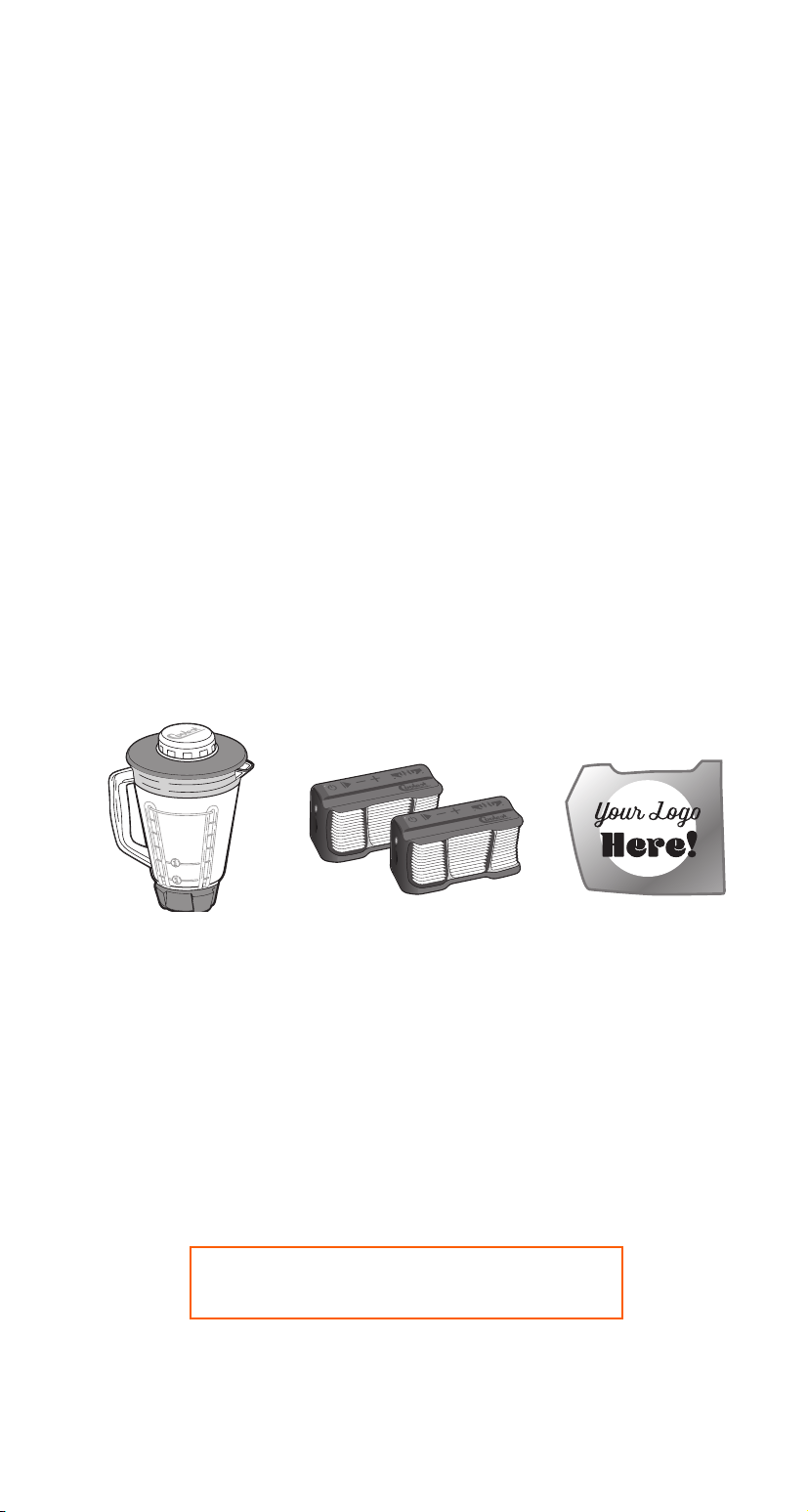
innovations. There you’ll find everything you need to accessorize and
customize your Coolest. From extra plates and utensils to one of our
easy-to-install powered lid options, we have you covered.
SHOP AT COOLEST.COM
EXTRA PITCHERS,
BATTERIES & LID OPTIONS
EXTRA Party Pairing
®
BLUETOOTH
®
SPEAKERS
CUSTOM FACEPLATES
& SPECIAL OFFERS
AND MORE!
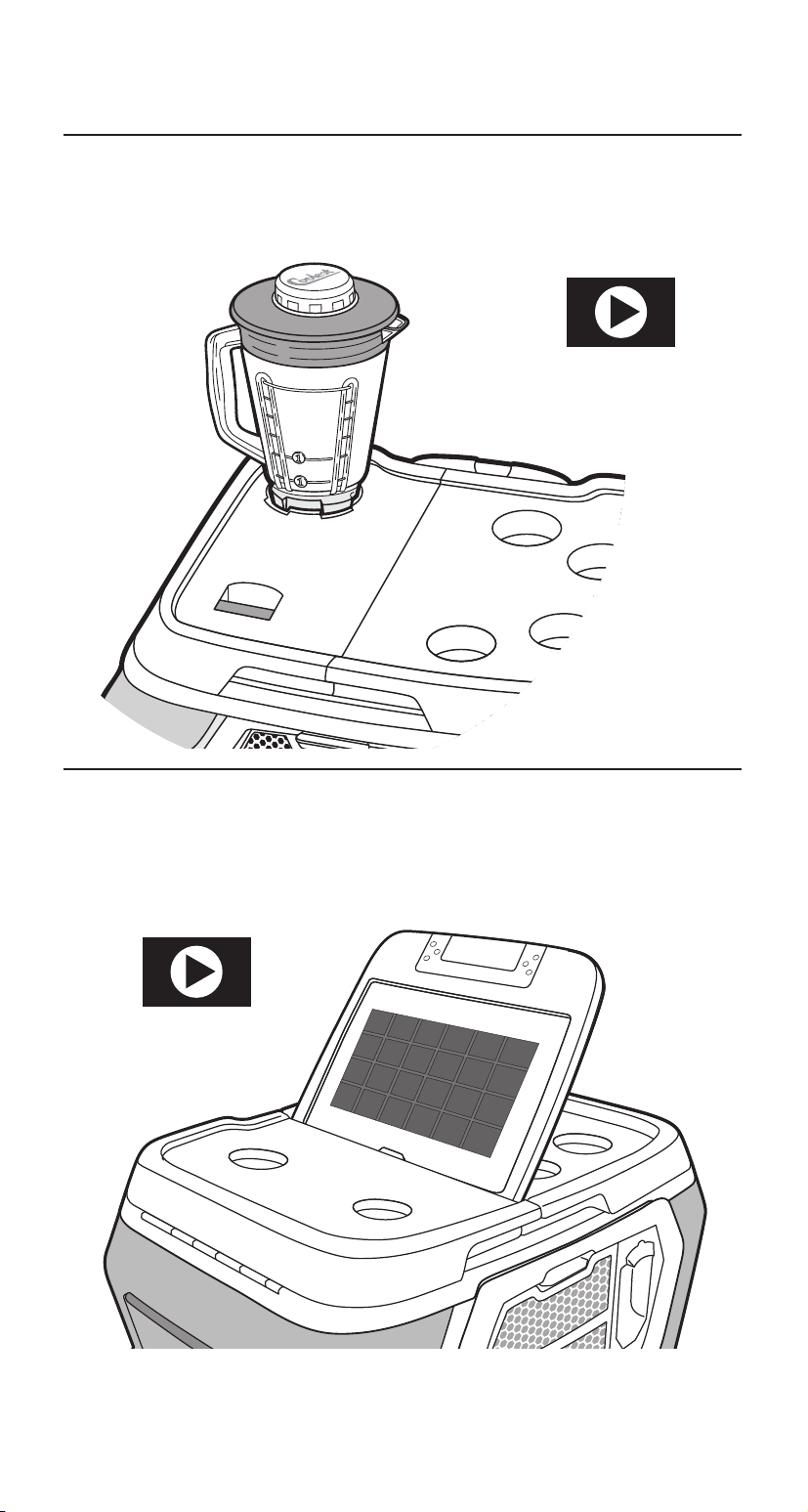
POWERED LID OPTIONS
HIGH-PERFORMANCE BLENDER Page 17
BRING BLENDING TO THE BEACH
SOLAR PANEL Page 14
SOLAR POWER FOR ALL YOUR DEVICES
LEARN MORE AT
COOLEST.COM
LEARN MORE AT
COOLEST.COM

COOLEST FEATURES:
Essential Coolest Cooler at a Glance
Essential Coolest Features
Done-In-One™ Tie Down
Coolest Speaker
Coolest Speaker at a Glance
Bluetooth® Speaker Connection
Party Pairing® Instructions
Optimize Bluetooth® Connection
Maintenance
Coolest Cooler Cleaning & Maintenance
COOLEST SOLAR USB LID (optional)
Solar Lid Important Safeguards
Solar Lid at a Glance
Solar USB Panel
Bartop Table Setup
COOLEST BLENDER LID (optional)
Blender Lid Important Safeguards
Blender Lid at a Glance
Using the Blender
USB Charger
LED Light
Coolest Battery
Charging the Batteries
Battery Maintenance and Storage
Battery Recycling
Maintenance
Left Blender Lid Cleaning
Pitcher Cleaning & Maintenance
WARRANTY
Warranty Information
FCC Statement
pg 6
pg 7
pg 8
pg 9
pg 10
pg 10
pg 11
pg 12
pg 13
pg 14
pg 15
pg 15
pg 16
pg 17
pg 18
pg 19
pg 19
pg 20
pg 21
pg 22
pg 22
pg 23
pg 24
pg 26
CONTENTS

READ ALL INSTRUCTIONS, SAFEGUARDS, AND WARNINGS
BEFORE USING THIS PRODUCT.
WARNING:
To avoid the risk of serious injury when using your
Coolest, basic safety precautions should be followed,
including:
1. The Coolest Cooler is not a toy, which means you should never
allow children or impaired adults to play with it.
2. The bungee cord should be kept in the stored position when not
in use to prevent any possible risk of strangulation. Keep away
from small children.
3. The knife is very sharp. Be careful while handling or removing
the knife from the sheath.
4. This product contains magnetic material. Contact your physician
if you have questions on whether this might aect the operation
of your implantable medical device.
5. Misuse or alteration of the product can be unsafe and may void
the warranty.
6. Do not attempt to replace the speaker battery.
No user-serviceable parts are contained in the speaker.
7. Do not stand, sit or jump on top of lids when open.
IMPORTANT SAFEGUARDS
!
6
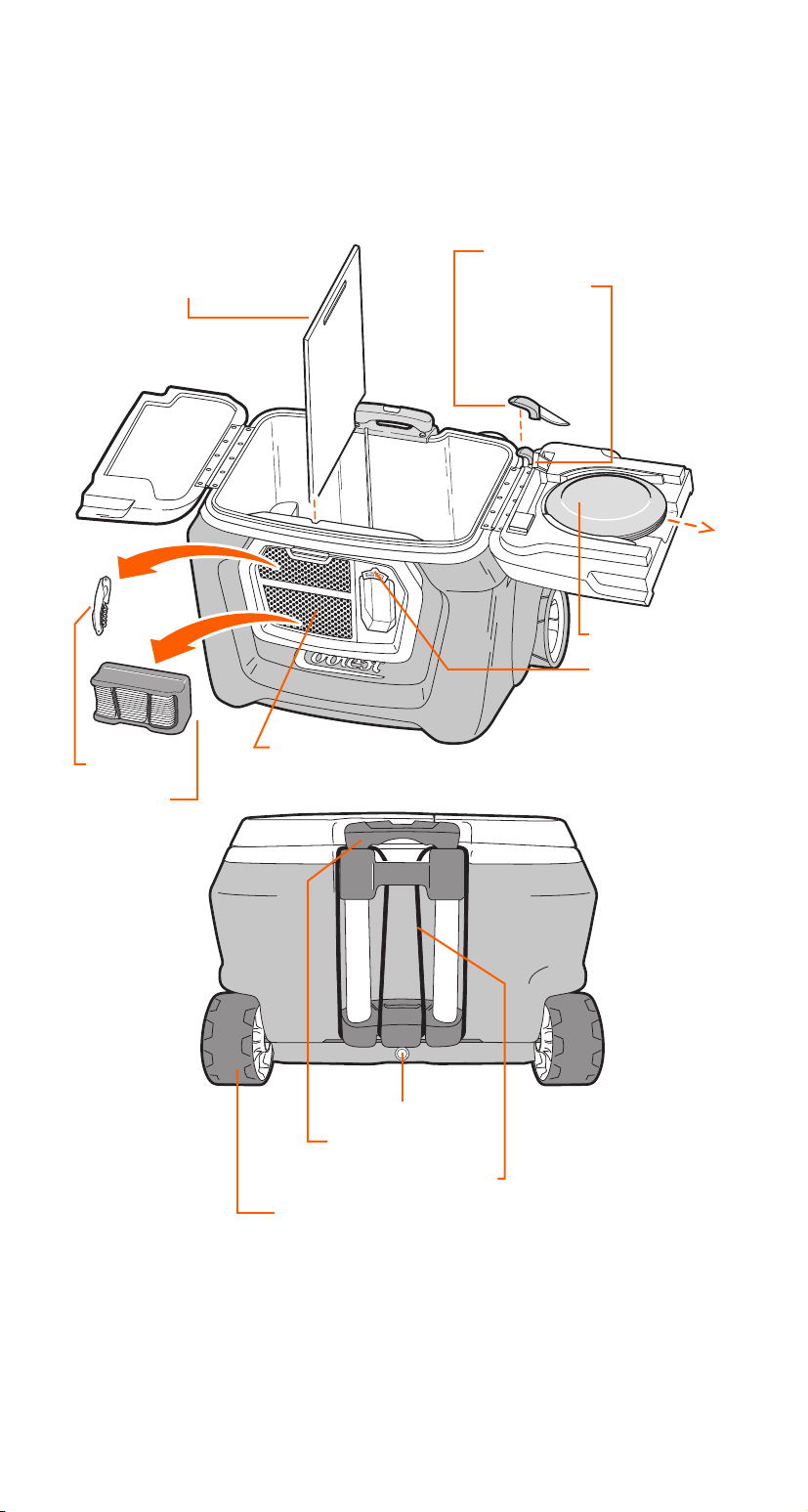
Drain Plug
Telescoping Handle
“Done in One” Bungee
Double Wide Rubberized Wheels
55 Quart Capacity
Cutting Board / Divider
Ceramic Knife
Knife Sheath
4 Plates
Bottle Opener
To learn more about the optional Solar Lid see page 14 and for the optional
Blender Lid turn to page 16.
ESSENTIAL COOLEST COOLER
AT A GLANCE
Coolest Tip!
Keep one side of your Coolest Dry. Only put ice in one side of the
divider and pull the drain plug. The melting ice will drain out
leaving the other side cool and dry. Say goodbye to soggy
sandwiches.
Corkscrew
Bluetooth
Speaker
Accessory Deck

7
4 Plates
Bottle Opener
ICE RETENTION & CONSTRUCTION
Coolest coolers are built tough for outdoor fun. Each Coolest has a
55 quart capacity and amazing 4-5 day ice retention.
PLATES
Four reusable, dishwasher safe plates are located inside the right lid.
To remove, open the right lid and slide all the plates out as shown.
These plates have a fun secret identity... they have been designed to
serve double-duty as frisbees!
CERAMIC KNIFE
A rustproof ceramic knife is stored in a flip-up knife sheath located
beside the plate storage. To remove, pull the red lever toward you
while pushing down on the back part of the knife sheath. The sheath
will flip up then you may cautiously remove the knife. It’s seriously
sharp so please handle with care.
CORKSCREW
Never forgotten and always at hand. You’ll find it attached magnetically
inside the Accessory Deck. You’ll also find that the magnet is a perfect
spot for securing your keys.
CUTTING BOARD/DIVIDER
The cutting board is located inside the Coolest and also serves as a
handy divider for keeping your cocktail ice for blending drinks
separated from food items. Always be sure to clean the divider before
putting it back to avoid contaminating your ice.
MAGNETIC BOTTLE OPENER
A bottle opener is located conveniently on the front of your Coolest.
We’ve magnetized the back plate to catch the caps for you.
You’re welcome.
STAINLESS STEEL HINGES
Your Coolest’s hinges are over-engineered and built with strength,
good looks, and durability in mind.
TELESCOPING HANDLE
The aluminum handle is flexible and strong. We engineered a bit of
play into the arms. Why? So you can flush out any sand or spilled
cocktails that could bind up the functionality. We even enginneered
holes into the bottom to ensure quick draining.
DONE-IN-ONE™ BUNGEE
It’s got wheels and a handle. Load it up and get there in one trip.
Learn more on page 8.
DOUBLE WIDE RUBBERIZED WHEELS
Smooth, quiet, and ready to deal with anything you can roll at it. Plus
the body is engineered with a sled-shaped bottom to glide over deep
sand.
ESSENTIAL COOLEST FEATURES
8
STOWING GEAR
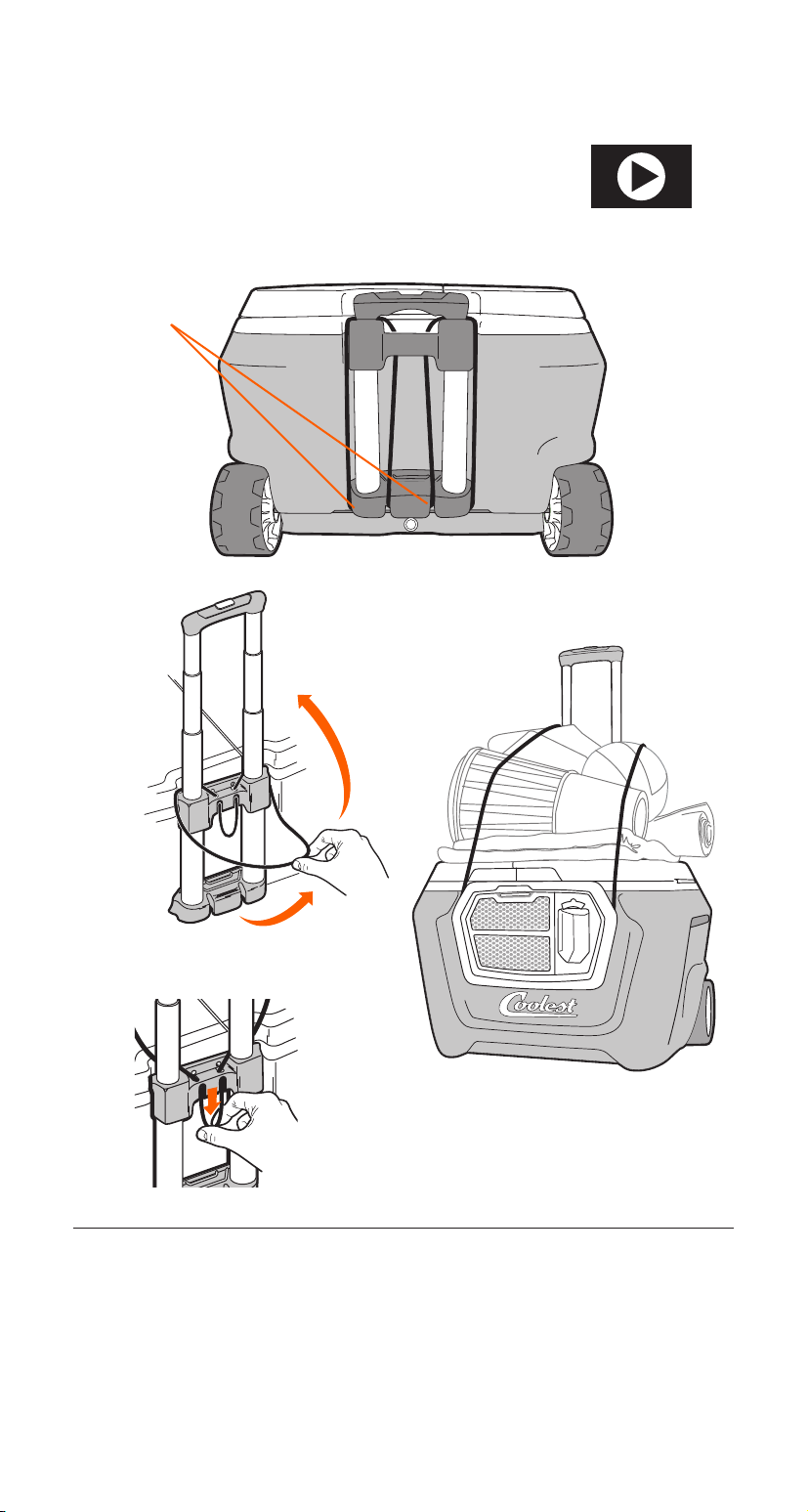
The Done-In-One tie-down bungee cord is
located on the back of the handle assembly.
DONE-IN-ONE
™
TIE-DOWN
CAUTION:
Bungee cords and elastic devices used for securing equipment can cause serious
damage to the eye that may result in future vision problems if they are not used
carefully. Do not allow children to play with bungee cords due to potential risk of acci-
dental choking or strangulation.
• Always use extreme caution when stretching the bungee cord over a load
• Ensure the loop is securely fastened
• Never extend the cord beyond its capacity of length or load
• Keep your face and other vulnerable body parts out of the cord’s rebound path
• Do not use the cord to hold an item susceptible to air movement or wind
If additional tension is needed, pull the
bungee down at the rear of the Coolest.
If you pull straight down and release, the
cord will self-lock. To release, pull down
and towards yourself.
Unhook both
ends of the
bungee from it’s
holder.
Stretch bungee over
cargo and loop around
the Coolest’s Accessory
Deck to secure.
2.
1.
3.
WATCH DEMO AT
COOLEST.COM
9
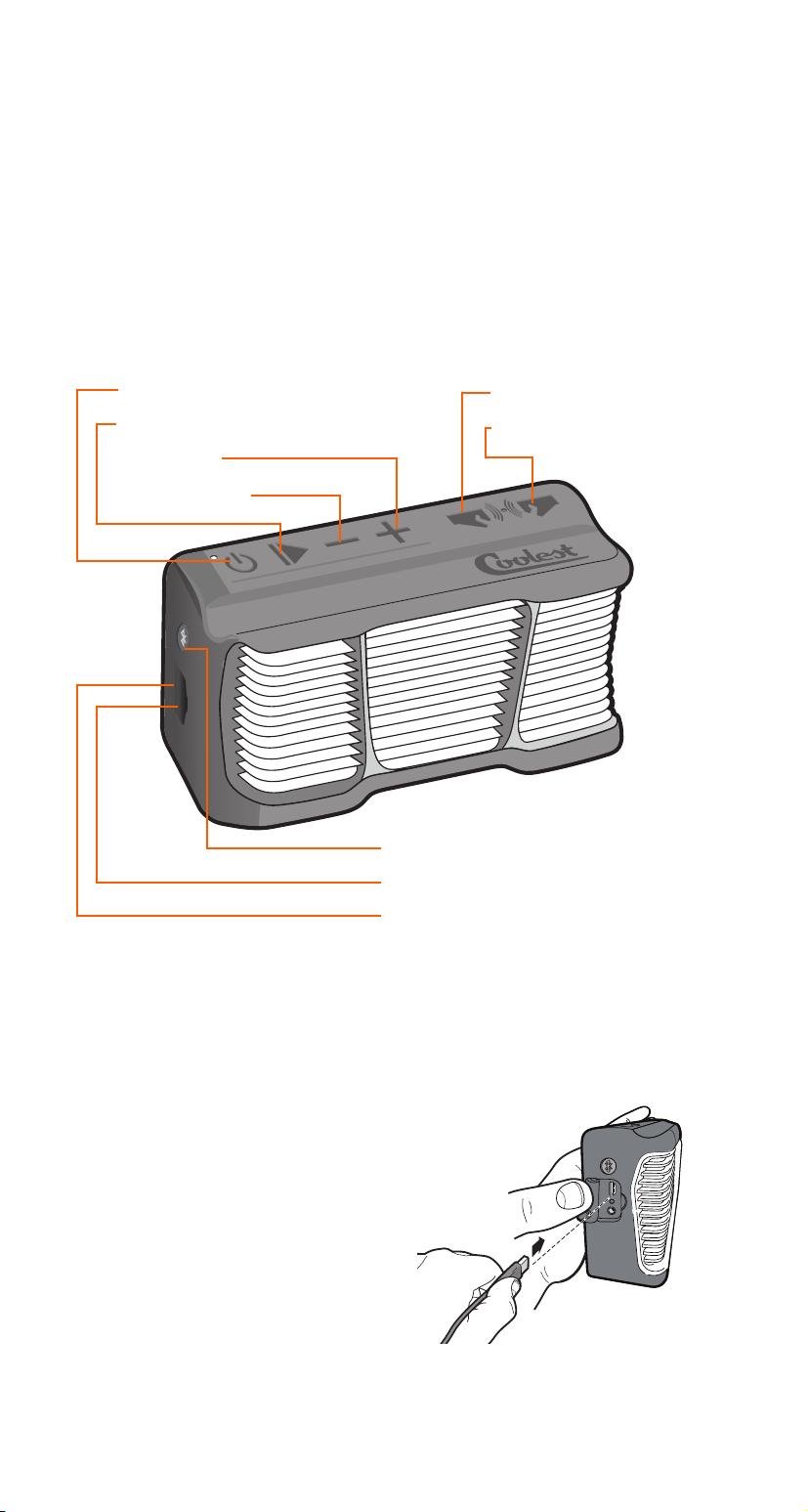
COOLEST SPEAKER AT A GLANCE
BLUETOOTH® ENABLED
For use with Bluetooth
®
equipped devices such as phones,
tablets, laptops and desktop computers.
BATTERY SPECS:
BATTERY: Built in rechargeable lithium-ion
CHARGE TIME: Less than 2.5 hours
PLAY TIME: Aprox 8 hours
CHARGING INSTRUCTIONS:
Connect the USB cable to a USB port.
RED LED = Charging
LED OFF = Charged
Coolest Tip!
The Bluetooth
®
speaker
can be used while the unit
is charging.
The Coolest Speaker is designed for outdoor fun with a splash-
proof, shock-resistant rubber casing and recessed buttons. Stores
easily in the front Accessory Deck or take it along in your backpack.
This innovative speaker utilizes powerful dual drivers and a resonator
plate for as much bass, volume and clarity as physics allow. And our
Bluetooth
®
Party Pairing feature lets you stream music from your
devices to two speakers up to 30 feet apart!
POWER AND VOLUME
CONTROLS:
POWER BUTTON / LED
PLAY / PAUSE BUTTON
VOLUME UP
VOLUME DOWN
BLUETOOTH
®
CONNECTIVITY:
BLUETOOTH
®
BUTTON
USB CHARGING INPUT
3.5mm AUX INPUT
PARTY PAIRING
CONTROLS:
BUTTON A (Search)
BUTTON B (Accept)
10
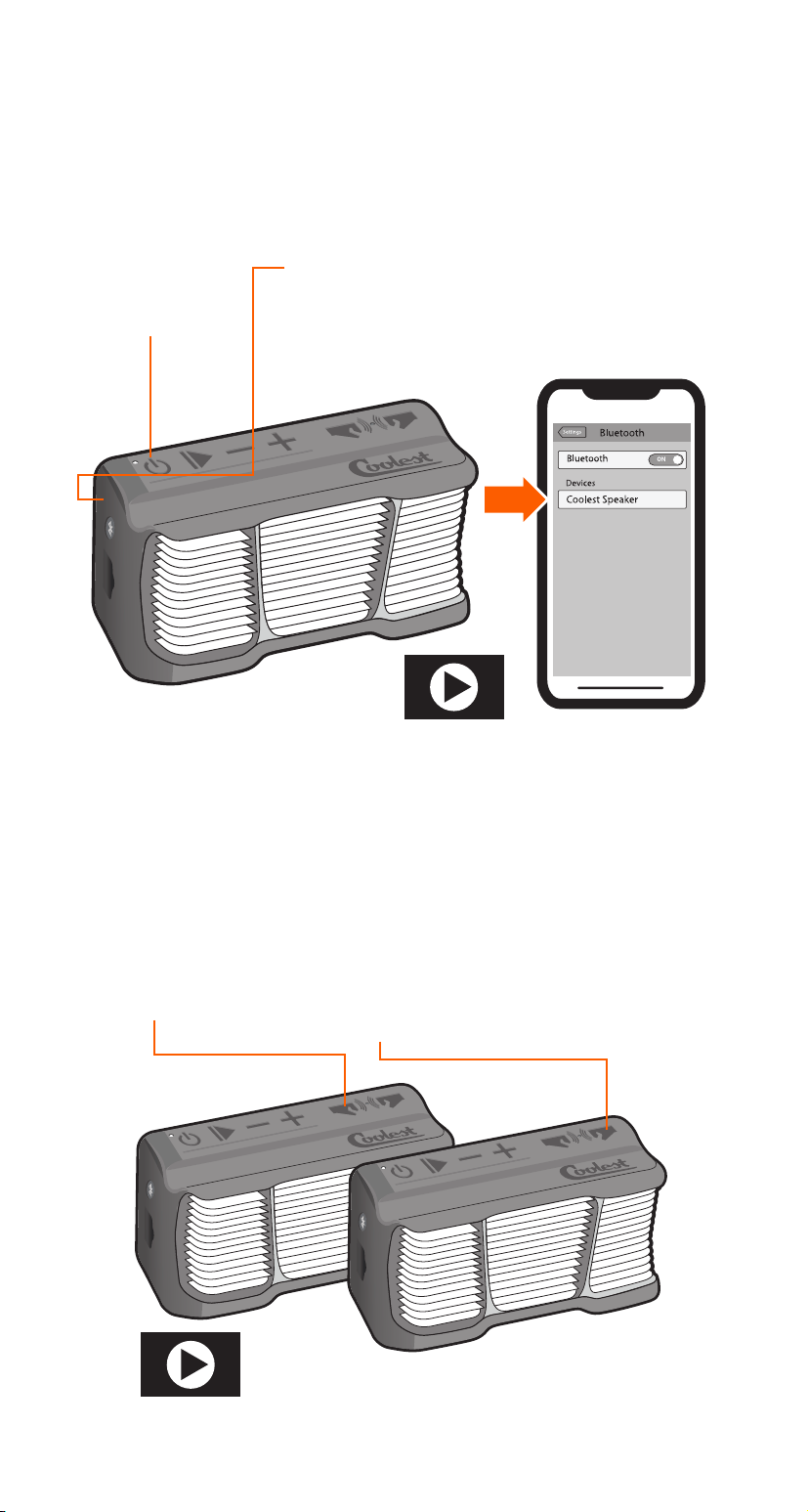
BLUETOOTH® SPEAKER CONNECTION
Order a Second Coolest
Speaker at COOLEST.com
SEARCH
Press and hold
until
LED Flashes
RED & BLUE.
CONNECT
Turn on Bluetooth
®
Settings on your device
and select
“Coolest Speaker”
POWER UP
Press and hold
to power on.
SEARCH
Press and hold
until vocal prompt
“Party Pairing
Initiated.
PAIR
Press and hold
until vocal prompt
“Listening for a
Second Party Pairing
Speaker.”
PLAY
Pairing successful.
both Speakers’
vocal prompt
“Party Pairing
Successful.”
Always make sure your Coolest speaker is charged or connected to a
USB power source for successful Bluetooth
®
or Party Pairing.
BLUETOOTH® CONNECTION STEPS
PARTY PAIRING INSTRUCTIONS
1.
1.
2.
2.
3.
3.
WATCH DEMO AT
COOLEST.COM
WATCH DEMO AT
COOLEST.COM
Stream music to two speakers up to 30 feet apart. Make sure only
one Coolest Speaker is Bluetooth
®
connected to your music playing
device. Party Pairing is enabled 10 seconds after each unit is powered
on.
11
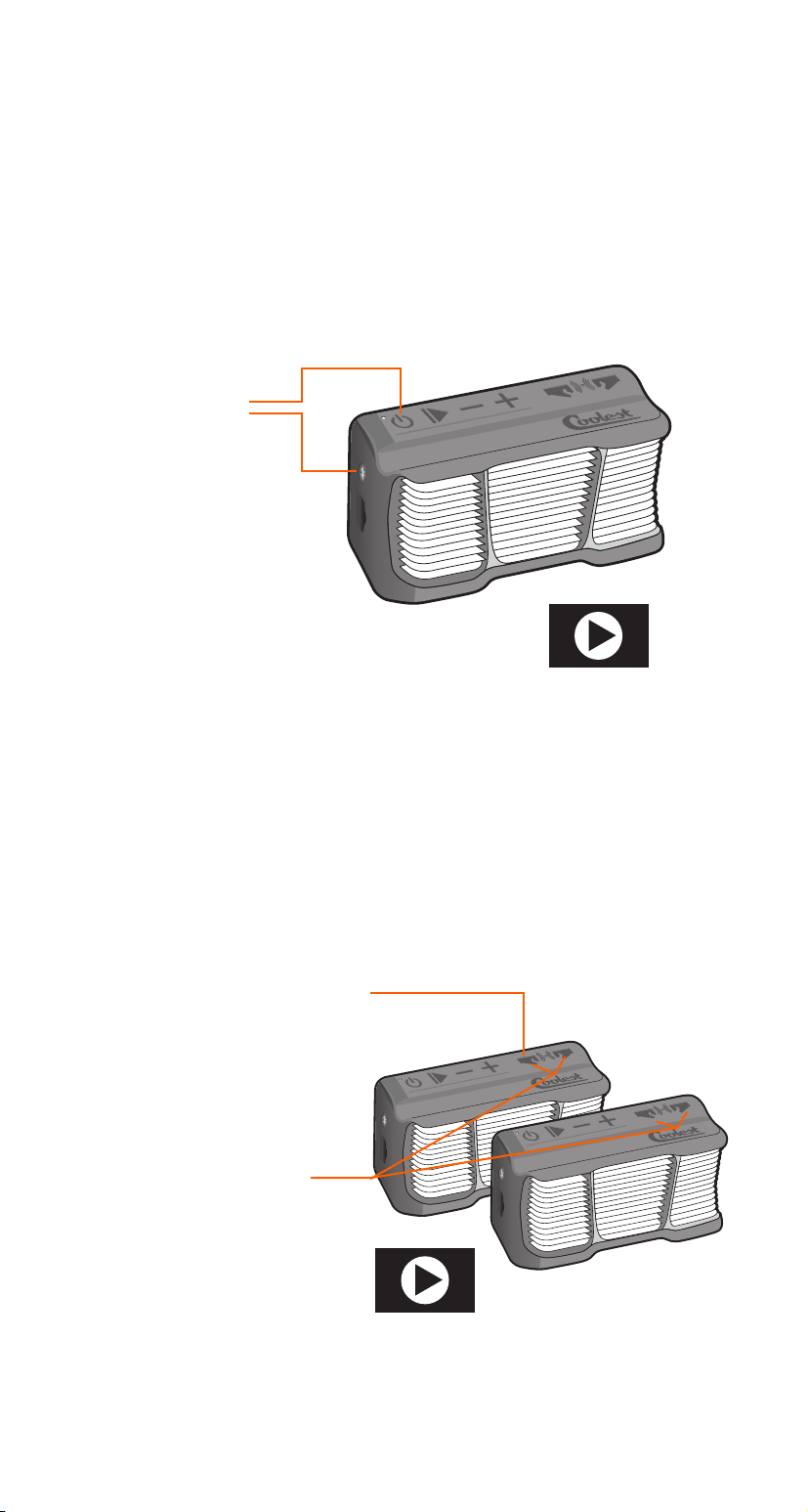
OPTIMIZE BLUETOOTH® CONNECTION
PRESS & HOLD
both buttons
simultaneously
BLUETOOTH
®
RESET
LED Flashes 2X and
speaker Beeps to
confirm.
TURN OFF PARTY PAIRING
Press & hold Party Pairing
button for at least 3 sec.
PARTY PAIRING RESET
Press and hold both
buttons until
LED Flashes 2X
and speaker Beeps
to confirm.
POWER OFF
Without USB
Connected
POWER ON THE SPEAKER
If Party Pairing is turned on, it will need to turned o first.
1.
1.
2.
3.
3.
2.
RESET BLUETOOTH® CONNECTION
Your Coolest Speaker can remember past Bluetooth® connections.
For convenience it will automatically reconnect. To prevent
connecting and searching for unwanted devices follow these steps.
Once reset, you’ll need to recconnect your devices.
RESET PARTY PAIRED SPEAKERS
Your Coolest Speaker also remembers the speakers it was paired to in
the past for your convenience. If you wish to unpair them, follow these
steps.
WATCH DEMO AT
COOLEST.COM
WATCH DEMO AT
COOLEST.COM
Volume cuing in and out?
Follow these steps to fix.
12
COOLEST CLEANING AND MAINTENANCE
To Clean your Coolest, simply wipe inside and out with a damp cloth
or sponge. Use a mild dish soap and warm water to clean inside and
out, avoid abrasive and harsh cleaners.
Especially dirty coolers can be hosed o. Just be sure you remove the
battery, close the battery compartment, and secure the USB plug if
you have a blender lid; remove the solar panel if you have a solar lid.
Double check that you’ve removed any valuables from the accessory
deck.
Coolest Tip!
Many stains and scus can be
bued out with a standard eraser.
• Dry the cooler after each use, avoid leaving any fluids inside.
• Store your battery outside of the cooler, especially if
there is any moisture inside the cooler.
• Recharge battery if depleted, DO NOT allow battery to
remain fully uncharged.
• Clean your cooler and accessories after each use to
prevent contamination.
• DO NOT use a power washer on the Coolest Cooler.
• Excessive UV exposure may color to fade over time.

13
SOLAR USB LID
IMPORTANT SAFEGUARDS
READ ALL INSTRUCTIONS, SAFEGUARDS, AND WARNINGS
BEFORE USING THIS PRODUCT.
WARNING:
To avoid the risk of serious injury when using your
Solar Panel, basic safety precautions should be fol-
lowed, including:
1. Inserting the USB cable AFTER placing the panel in direct,
strong sunlight. If Sunlight becomes too weak, you may have
to reinsert the cable to activate the charge again in stronger
sunlight.
2. To prevent your devices from interrupting the charging
cycle due to overheating, place devices in a cool and well
ventilated area. Place Solar Panel under direct sunlight and
connect device with USB cable.
3. Even though the solar charger has water-resistant
functionality, minimizing moisture exposure to protect
electrical components is recommended.
!
14
SOLAR USB LID AT A GLANCE
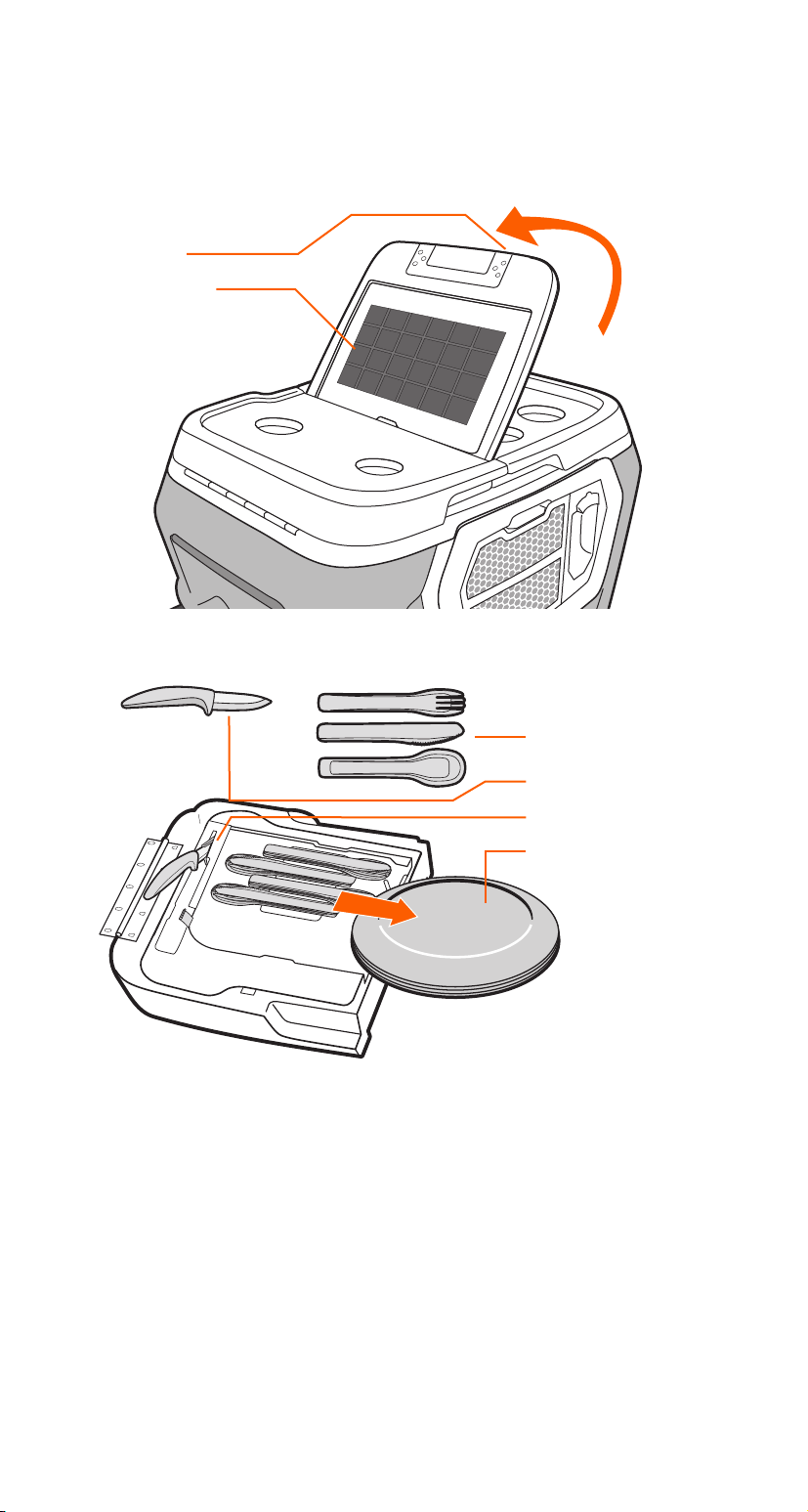
PLATES & UTENSILS
There are two sides to every lid here at Coolest. Our Solar Right Lid
adds in four sets of utensils under the plate set.
It all clicks... another feature is the magnetized utensils that can stick
together for maximizing space and convenience.
Coolest Tip!
All work and no play is no fun
at all. Coolest plates agree
completely and are designed
to do double-duty as frisbees!
Solar Lid upgrades as well as extra plates and utensils
are available at Coolest.com
USB PORT
SOLAR PANEL
4 MAGNETIC
UTENSIL SETS
CERAMIC KNIFE
KNIFE SHEATH
4 PLATES
15
SOLAR USB LID
Being outdoors shouldn’t mean you can’t power your phones and
keep your Coolest Speaker pumping out the tunes. O-the-grid or
around the block, the Coolest’s optional water-resistant and
incredibly durable Solar USB lid has you covered.
The solar panel will take a charge on your Coolest lid in direct
sunlight, plus it is removable so you can place it in the brightest
available light. Super handy if you’re away from camp but still want
dependable power for your USB powered devices.
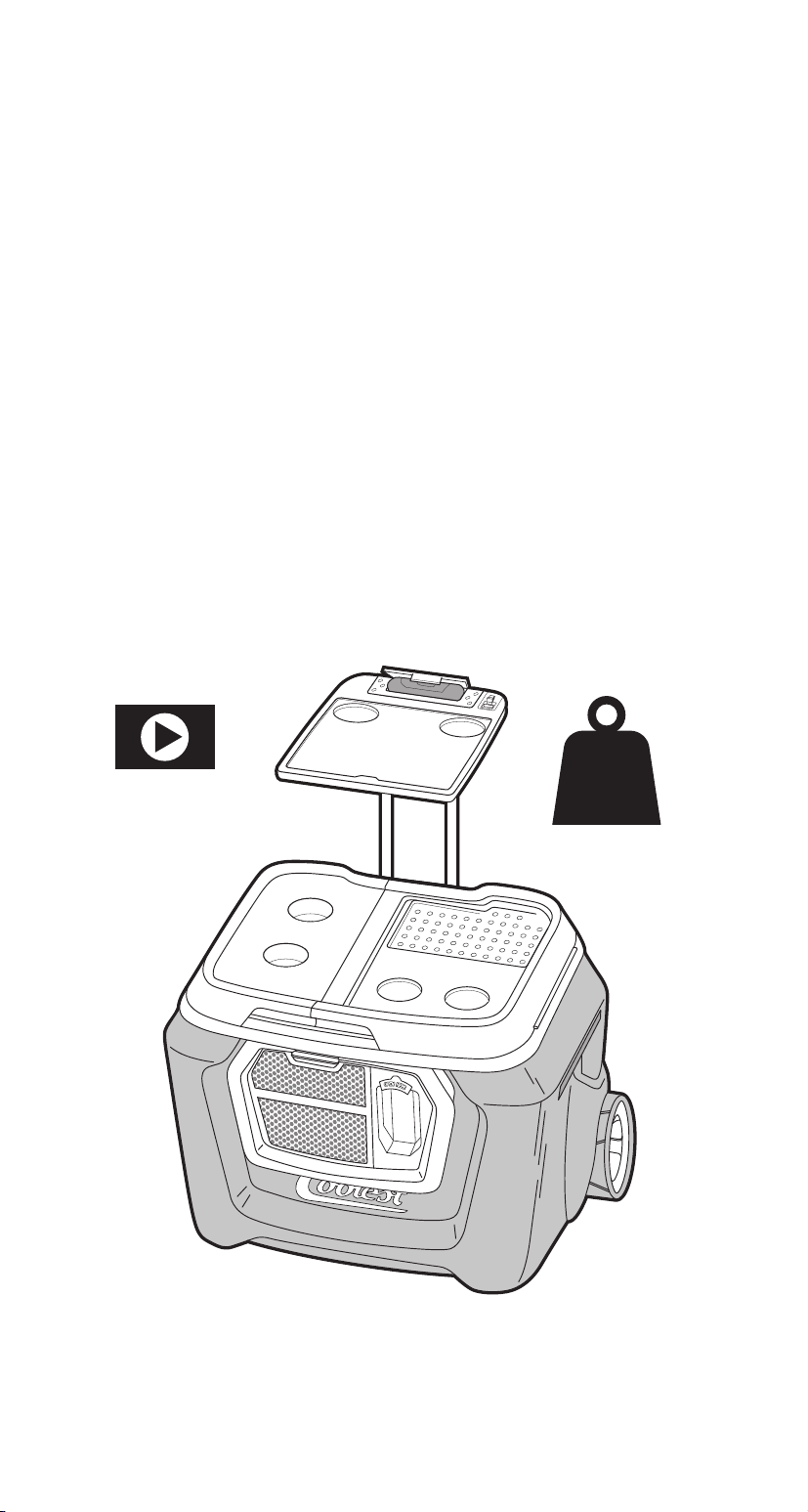
BARTOP TABLE MOUNTING
You know what nature doesn’t make much of? Flat surfaces at an
ideal height. And with all the opening and closing of Coolest Lids,
an extra little table will make things a bit more civilized out there.
CAUTION:
The Bartop Table is rated to hold up to 4lbs. Do not exceed weight limit.
RELEASE
the panel from
lid. Fold the panel
to 90° and lift
straight up.
EXTEND
the telescoping
handle.
SECURE
With the solar panel
facing down, open
the paddles and
place directly onto
the extended handle.
1. 2. 3.
WATCH DEMO AT
COOLEST.COM
4lbs
MAXIMUM
LOAD

16
READ ALL INSTRUCTIONS, SAFEGUARDS, AND WARNINGS
BEFORE USING THIS PRODUCT.
WARNING:
To avoid the risk of serious injury when using your Coolest Blender,
basic safety precautions should be followed, including:
1. Keep hands and utensils out of pitcher while blending to reduce the risk
of severe injury to persons or damage to the blender and pitcher.
2. Close supervision is necessary when blender is used near children.
3. DO NOT blend hot liquids in the pitcher.
4. DO NOT use any attachments or pitchers other than the one that came
with your Coolest.
5. The pitcher lid MUST be firmly in place when blending.
6. The blades are sharp. Handle the blade base with extreme care.
7. Do not place blade base onto motor without pitcher and lid
securely attached.
8. Avoid contacting moving parts.
9. Misuse or alteration of the product can be unsafe and may
void the warranty.
COOLEST BLENDER
IMPORTANT SAFEGUARDS
!
17
COOLEST BLENDER
IMPORTANT SAFEGUARDS
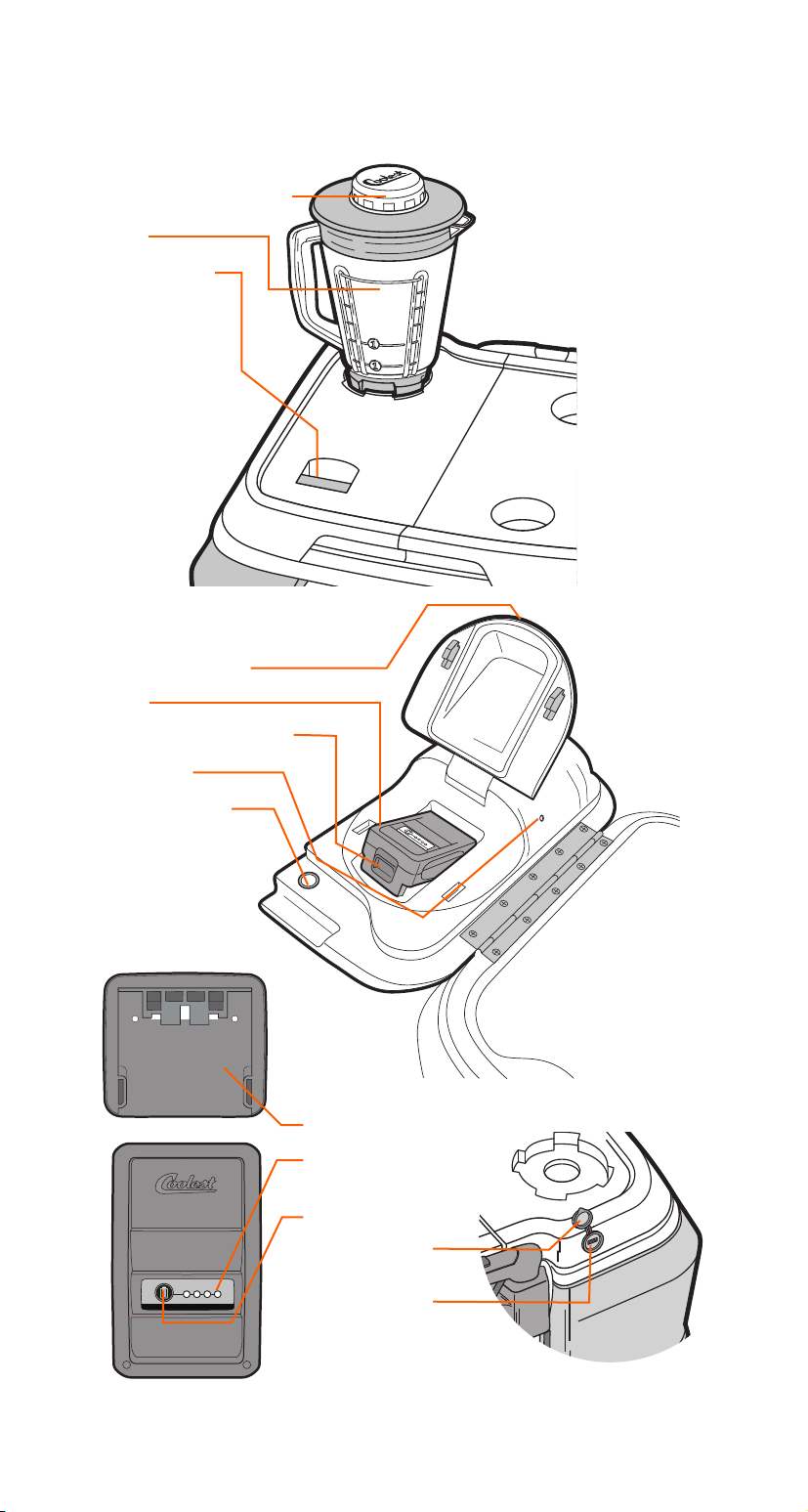
COOLEST BLENDER LID AT A GLANCE
BATTERY POWER LEVEL
MEASURING CUP (1/2 CUP)
PITCHER
POWER TRIGGER
BATTERY LID RELEASE
BATTERY
BATTERY RELEASE BUTTON
LED LID LIGHT
LED LIGHT SWITCH
BATTERY CHARGER
BATTERY CHARGE
INDICATOR LIGHTS
BATTERY BUTTON
WATER-PROOF
CAP
USB CHARGER
18
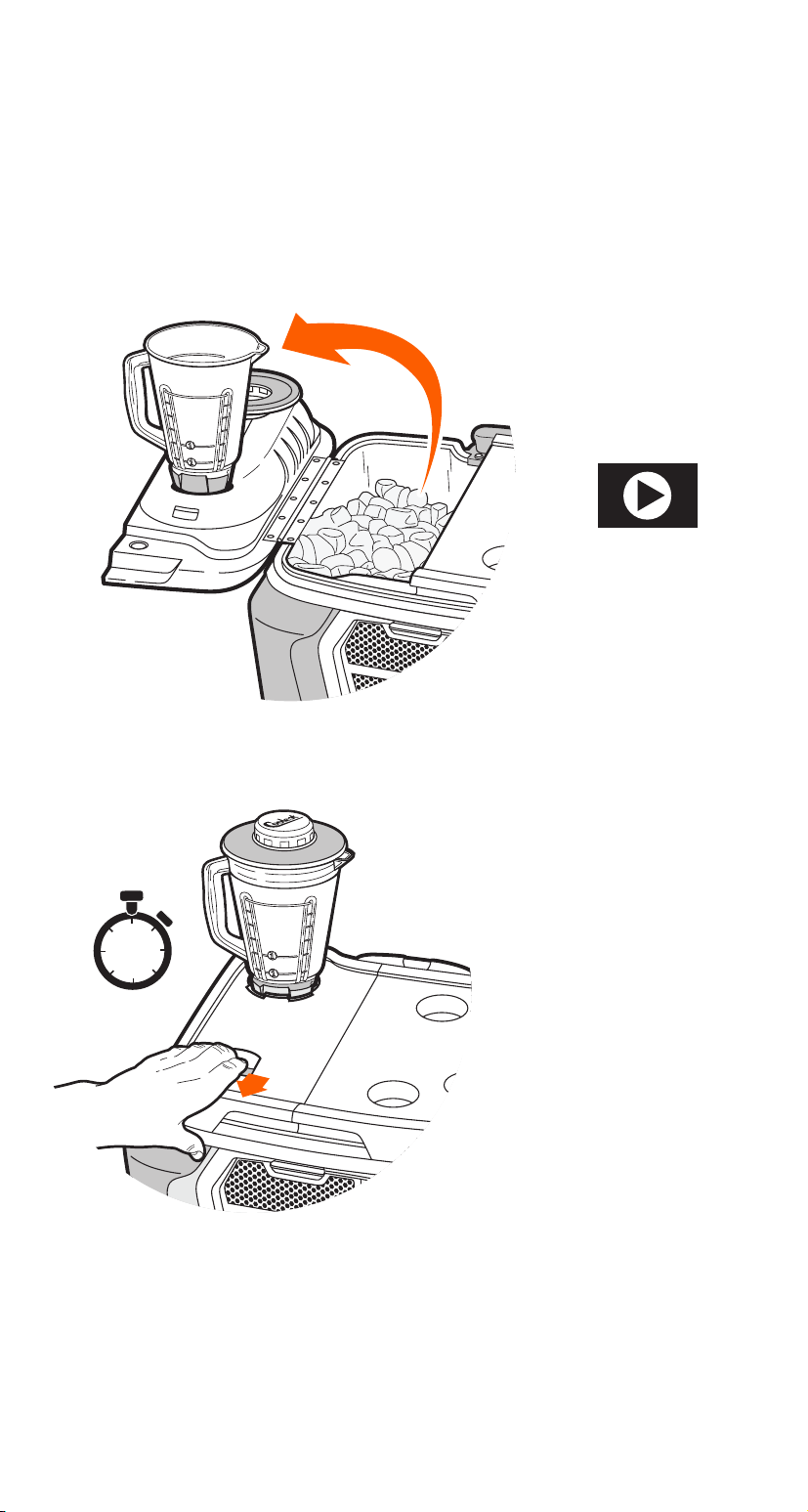
BLENDER GENERAL USAGE
The blender is located on the top of the left lid, and there’s a handy
tabletop filling station on the other side when the lid is open.
USING THE BLENDER
ICE UP
Add delicious contents to
the pitcher and pop on the
the lid. Be sure not to
overfill.
BLEND ON!
Pull and hold the trigger
to commence blending.
Blending cycle lasts
20 seconds.
1.
2.
SAFETY PRECAUTIONS:
• Be sure to keep fingers and utensils out of the pitcher.
Cool Feature
Your Coolest is designed with a
hidden magnetically activated
safety switch so that without
the pitcher in place, the motor
will not engage.
WATCH DEMO AT
COOLEST.COM
20 sec.
19
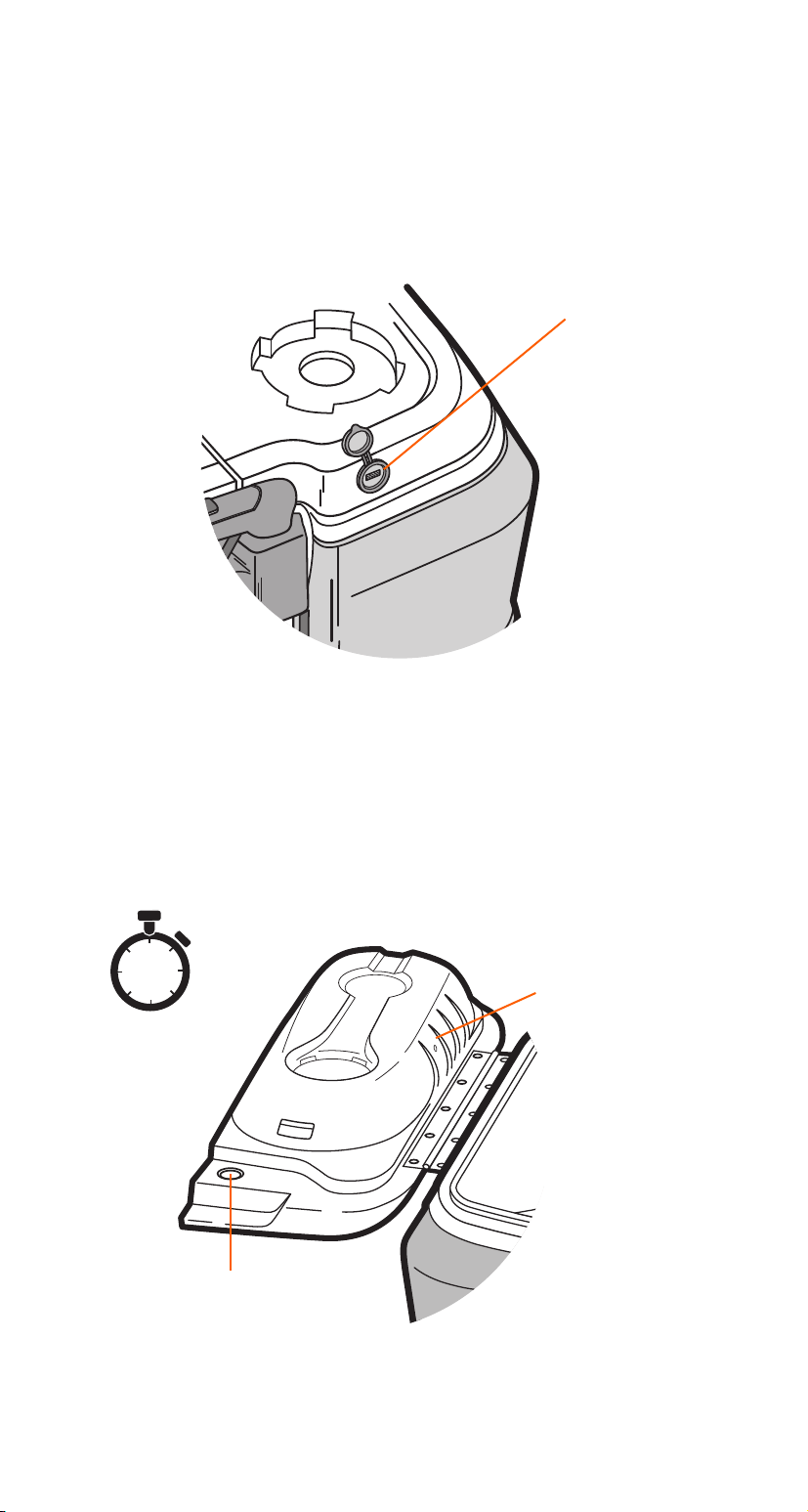
USING THE USB PORT
The USB charger is located on the back of the left lid. This USB
charger is designed to recharge cameras, phones, tablets and many
other electronic devices such as your Coolest Speaker. To use, open
the water-proof cap and plug in any USB device.
LED LIGHT
To turn on, flip open the lid and push the silver button located there.
Push again to turn o. If you happen to forget to turn o the light, it
will turn o automatically after five minutes.
USB CHARGER
5 min.
LED LIGHT
ON / OFF SWITCH
USB CHARGER
20
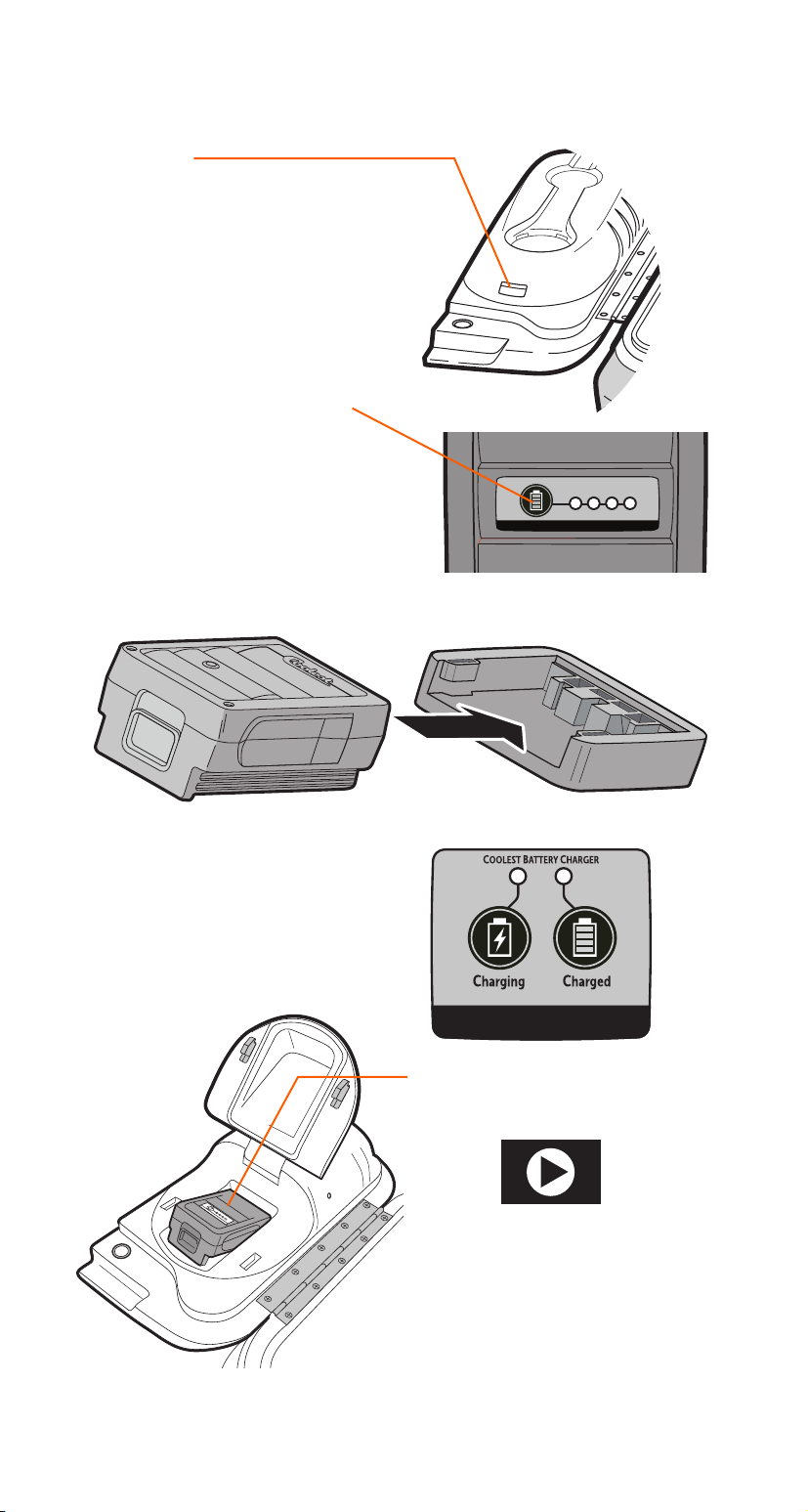
CHARGING THE BATTERY
Coolest Tip!
Be sure to charge up your
Coolest’s battery as soon as
you receive the product.
RELEASE
Press the battery lid release
button and depress red button
on battery to slide battery out.
POWER UP
Plug the Coolest battery
charger into included AC
power adapter and insert
battery.
CHECK POWER
Press the button to check the
battery’s state of charge.
CHARGE
LED lights indicate charging
status. Once the battery is fully
charged, the “Charged” LED
with illuminate.
BLEND ON!
Insert battery and close lid.
1.
3.
2.
4.
5.
BATTERY POWER LEVEL
WATCH DEMO AT
COOLEST.COM

21
COOLEST BATTERY
Lithium-ion rechargeable batteries require basic care in their use and
handling so please read and follow these guidelines.
STORAGE
The run time of your battery may vary depending on storage
conditions, extreme temperatures, and total life use. We advise that
you check the battery’s charge status before you head to the beach
or keep a spare on hand (available at coolest.com).
• Remove the battery and store it separately from the
Coolest Cooler and Charger.
• If you allow the battery to remain around 0% charge for too
long it will sustain irreversible damage.
• Charge or discharge the battery to approximately 50% capacity
before storage. Since lithium-ion batteries slowly self-discharge
while in storage, recharge to approximately 50% of capacity at
least once every six months during storage.
• Higher temperatures reduce the battery storage life,
so shoot for 40 °F - 70 °F.
HANDLING PRECAUTIONS
1. DO NOT submerse the Coolest battery in water.
2. DO NOT attempt to charge or operate a wetted battery
3. DO NOT disassemble, crush, or puncture a battery.
4. DO NOT expose a battery to temperatures above 140°F.
5. DO NOT use a damaged battery.
6. Avoid exposing the battery to excessive shock or vibration.
7. Keep the battery away from children.
8. If a battery pack has leaking fluids, do not touch any fluids.
Dispose of a leaking battery pack (following recommended
disposal).
9. In case of eye contact with fluid, do not rub eyes. Immediately
flush eyes thoroughly with water and seek medical attention.
10. Dispose of old batteries following recommended disposal
guidelines from your local sanitation department.
BATTERY MAINTENANCE AND STORAGE
P Tip!
Following these instructions will
dramatically extend the output of
your battery.
22
LEFT BLENDER LID CLEANING
With the battery compartment door shut and the USB plug in place,
the left-lid motor unit is sealed against spills and splashes. It is water
resistant, not waterproof.
The blender port atop the left lid will likely collect fluids during the
course of normal usage. Excess fluids will seep under the coupler and
pass through the left lid to the drain outlet on the bottom side. As
such, the blender port and coupler can be washed liberally with warm
soapy water. Be sure to allow ample time to drain and dry afterwards.
The whole left lid may be cleaned with mild detergents and water.
Stains and scus can almost always be bued out with a standard
rubber eraser.
BATTERY RECYCLING
The batteries in this product must not be discarded as household
waste, and should be delivered to an appropriate collection facility
for recycling.
Proper disposal and recycling helps protect natural resources,
human health and the environment.
For more information on disposal and recycling of this product,
contact your local municipality, disposal service.
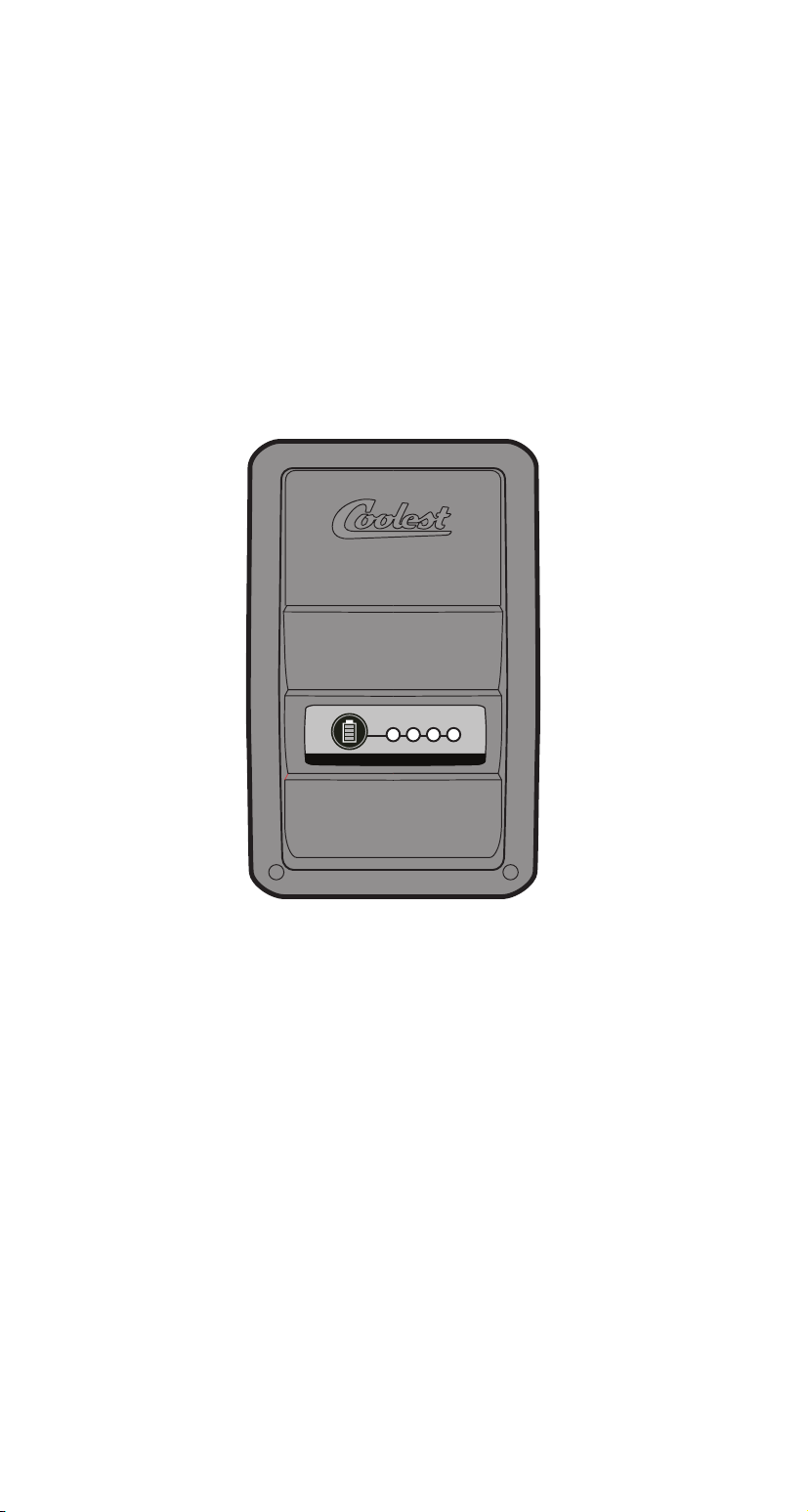
BATTERY POWER LEVEL
23
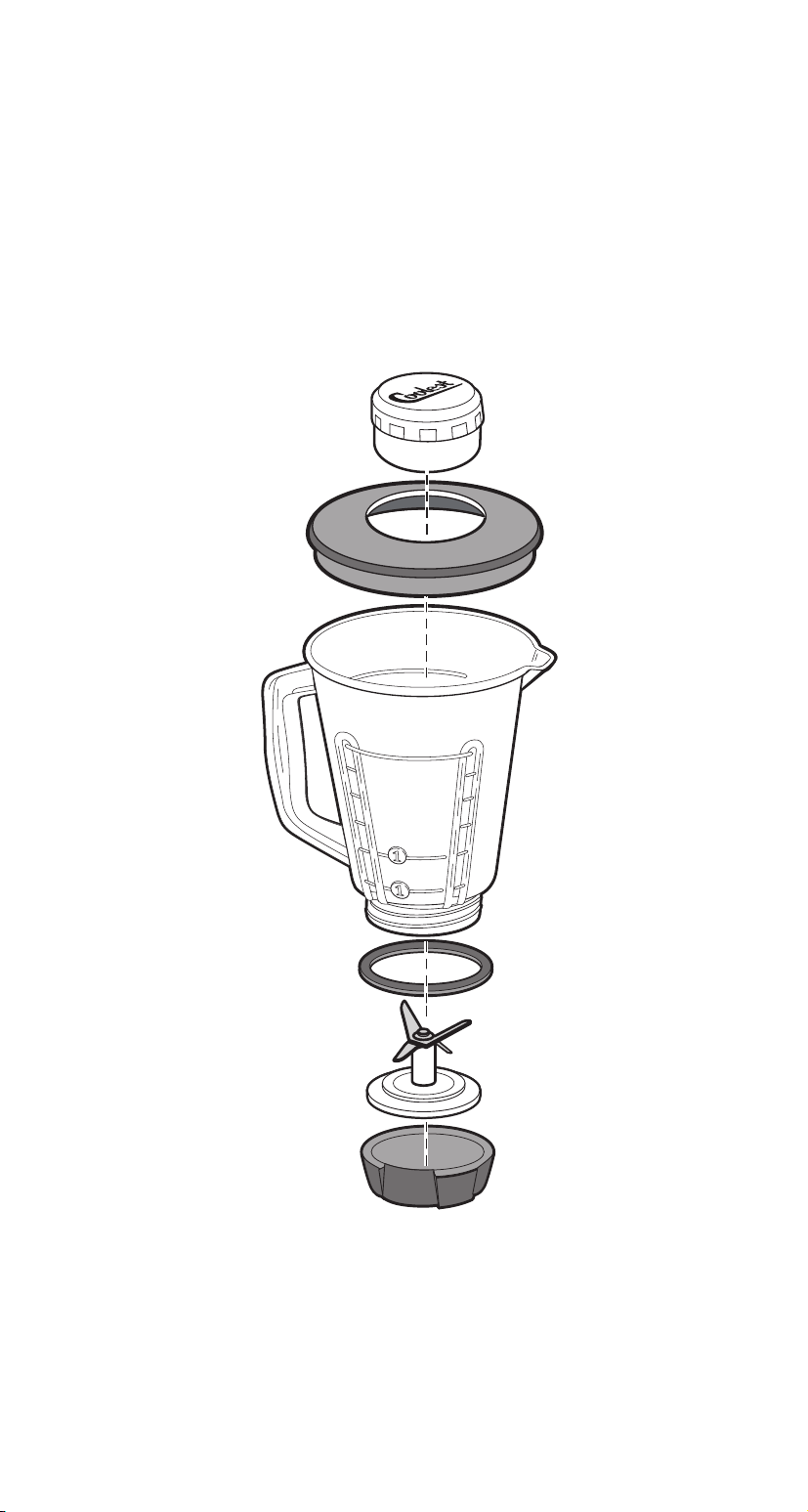
PITCHER MAINTENANCE AND CLEANING
The entire pitcher assembly is top rack dishwasher safe. The parts
may become damaged if they washed on the bottom rack.
Remove the blade base from the container after blending. Clean the
threads on the blade base and then close tightly to avoid ingredient
build up between outings. Ingredient build up might cause problems
when trying to remove the blade base from the pitcher if it has been
attached and allowed to sit for a long period of time. To hand clean,
wash with a mild soap. Do not use harsh or abrasive
cleaners.
FCC STATEMENT
This device complies with Part 15 of the FCC Rules. Operation is subject to the following 2 conditions:
(1) this device may not cause harmful interference, and (2) this device must accept any interference
received, including interference that may cause undesired operation.
This Class B digital apparatus complies with Canadian ICES-003.
Maintenance Tip
The threads on the Blender
are reversed to prevent the
blender from becoming loose
during use.
An easy way to disassemble
is to place the Pitcher on the
blender port and twist
clockwise to loosen.

24
COOLEST LIMITED WARRANTY
WHAT THIS WARRANTY COVERS
Coolest LLC (“Coolest”) warrants its products to be free from defects in material
or workmanship under normal use and service for one (1) year from the date of
original receipt. If during this period a Coolest product is determined to be defec-
tive following our inspection, Coolest will repair or replace your product at our
sole discretion. These are the exclusive and sole remedies under this warranty.
This limited warranty is applicable to Coolest products sold in the United States
only. Products sold in other countries may be subject to certain legal guarantees
and rights that cannot be disclaimed or excluded.
WARRANTY EXCLUSIONS
This warranty applies only to the original owner and is void if the product is used
commercially, structurally altered or subjected to stress beyond the physical limits
of the materials used in body or components. This warranty does not include any
manufacturer responsibility for any incidental or consequential damages resulting
from its use. All liability is limited to the amount of the purchase price.
Our warranty does not apply to any product failure arising from the following:
• Repairs when the product is used in other than personal use
• Damage resulting from accident, alteration, misuse (including failure
to follow product documentation), neglect, disassembly or abuse
• Use of improper or unregulated voltage or power supply
• Normal wear and tear
• Commercial use
Coolest reserves the right to change products and designs without incurring any
obligations to incorporate such changes into already completed products, or
those in the hands of dealers or consumers. Products repaired or replaced under
this warranty may or may not incorporate these changes.
This is the only express warranty for this product and is in lieu of any other war-
ranty or condition. Coolest does not oer an extended warranty. This warranty
extends to the original purchaser of a Coolest product in the United States only.
LIMITATION OF REMEDIES
Coolest’s sole and exclusive responsibility under this warranty is to, at its sole
discretion, either repair or replace the cooler or any part or component that is
deemed defective. Any replacement may be, at the option of Coolest, a new or
remanufactured cooler or component. If Coolest in its sole discretion determines
it is not reasonable to replace the defective component, Coolest may refund the
purchase price paid. Any refunds or liability is limited to the purchase price only.
The manufacturer is not liable for incidental or consequential loss or damage due
directly or indirectly to the use of this product. Some States do not allow exclu-
sions or limitations to incidental or consequential damages, so the above dis-
claimer may not apply to you.
HOW TO GET WARRANTY SERVICE
Verify your product is within the 1-year warranty period provided by Coolest. If
you do not have an original receipt you may verify your warranty eligibility with
[email protected] if you purchased your unit from Coolest.com or registered
your warranty at Coolest.com within 30 days of purchase.
Visit coolest.com/support or send an email to [email protected] detailing
the issue you’re experiencing. In addition to a description of the problem you will
need to provide: proof of purchase, serial number, and preferred shipping address.
One of our renowned service technicians will confirm warranty eligibility,
WARRANTY INFORMATION

25
diagnose the issue and suggest a solution. We may make arrangements to have a
(1) a replacement part sent out, (2) return parts for service, (3) send an invoice to
purchase replacement part(s) in the event an issue is not warrantable.
If a return is deemed necessary we will send you a prepaid shipping label. Do
not return your product to us without a RMA. All returned products must be sent
directly to Coolest in the original box or adequate cardboard packaging. Products
with missing or damaged packaging may be assessed an additional fee.
Products returned to Coolest LLC. under a misrepresented condition may not
be eligible for refund. Coolest is not responsible for products lost or damaged in
shipment.
For your records, please save your original sales receipt with this manual and
record your 10 digit serial number below:
——————————
SERIAL NUMBER
DISCLAIMER OF IMPLIED WARRANTIES
TO THE EXTENT ALLOWED BY LAW, ALL IMPLIED WARRANTIES, INCLUDING ANY
IMPLIED WARRANTY OF MERCHANTABILITY AND/OR ANY IMPLIED WARRANTY
OF FITNESS FOR A PARTICULAR PURPOSE ARE EXCLUDED OR ARE LIMITED TO
ONE (1) YEAR OR TO THE SHORTEST PERIOD ALLOWED BY LAW. SOME STATES
DO NOT ALLOW EXCLUSIONS OR LIMITATIONS TO IMPLIED WARRANTIES, SO
THE ABOVE DISCLAIMER MAY NOT APPLY TO YOU.
This warranty gives you specific legal rights and you may also have other rights
that vary from state to state.
Copyright © 2015 COOLEST LLC. All rights reserved. COOLEST and the Coolest
Logo Design are among the registered trademarks of COOLEST LLC. in the United
States and/or select foreign countries.
US and international patents pending.
Designed with care in Portland, OR, U.S.A. Made in China.

26
FCC STATEMENT
This equipment has been tested and found to comply with the limits for a Class B dig-
ital device, pursuant to Part 15 of the FCC Rules. These limits are designed to provide
reasonable protection against harmful interference in a residential installation. This
equipment generates, uses, and can radiate radio frequency energy and, if not in-
stalled and used in accordance with the instructions, may cause harmful interference
to radio communications. However, there is no guarantee that interference will not
occur in a
particular installation. If this equipment does cause harmful
interference to radio or television reception, which can be
determined by turning the equipment o and on, the user is
encouraged to try to correct the interference by one of the
following measures:
• Reorient or relocate the receiving antenna.
• Increase the separation between the equipment and receiver.
• Connect the equipment into an outlet on a circuit dierent from
that to which the receiver is connected.
• Consult the dealer or an experienced radio/TV technician for help.
FCC NOTICE
This device complies with Part 15 of the FCC Rules and Canadian Industry license
exempt RSS standard(s). Operation is subject to the following two conditions:
1. This device may not cause harmful interference, and
2. This device must accept any interference received, including
interference that may cause undesired operation.
FCC CAUTION
Any changes or modifications not expressly approved by the party
responsible for compliance could void the user’s authority to operate this equipment.
This device and its antenna(s) must not be co-located or operating in conjunction
with any other antenna or transmitter.
Le présent appareil est conforme aux CNR d’Industrie Canada
applicables aux appareils radio exempts de licence. L’exploitation est autorisée aux
deux conditions suivantes :
(1) l’appareil ne doit pas produire de brouillage, et
(2) l’utilisateur de l’appareil doit accepter tout brouillage
radioélectrique subi, même si le brouillage est susceptible d’en
compromettre le fonctionnement. CAN ICES-3 (B)/NMB-3(B)
RADIATION EXPOSURE STATEMENT
This equipment complies with FCC radiation exposure limits set forth for an uncon-
trolled environment and it also complies with Part 15 of FCC RF Rules and RSS-102.
The separation distance between the user and/or bystander and the device’s radiating
element is greater
than 20mm.
CAUTION:
To comply with the limits of the Class B digital device, pursuant to Part 15 of the FCC
Rules, this device is comply with Class B limits. All peripherals must be shielded and
grounded. Operation with
non-certified peripherals or non-shielded cables may results in
interference to radio or reception.
MODIFICATION:
Any changes or modifications not expressly approved by the grantee of this device
could void the user’s authority to operate the device.
This device and its antenna(s) must not be co-located or operating
in conjunction with any other antenna or transmitter.
FCC ID: 2AEZTSPE101
IC: 20298SPE101
Coolest Model: Coolest SPE101

27

28
Visit Coolest.com
For support: Coolest.com/support | For warranty info: Coolest.com/warranty
©2015 Coolest LLC. ALL RIGHTS RESERVED.