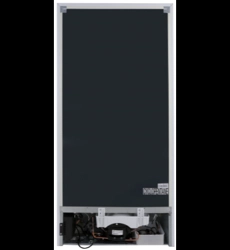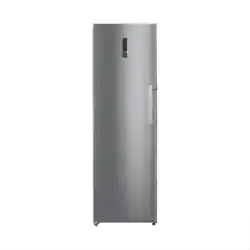
MFR411W
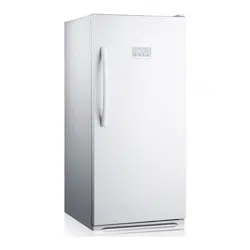
Upright Freezer/Refrigerator
USER MANUAL
Dual Function
CONTENTS
1
Safety Information
Identifying Parts of the Freezer/Refrigerator
Transporting
Installation
Control Features and Functions
Cleaning & Maintenance
Energy Saving Tips
Disconnection of the Appliance
Troubleshooting Guide
Repairs, Service & Warranty
Specifications
........................................
........................................
........................................
........................................
........................................
........................................
........................................
........................................
........................................
........................................
........................................
2-3
4
5
5-6
7-9
9-10
11
11
12
13
14
SAFETY INFORMATION
CAUTION
WARNING
Congratulations on your new eezer/refrigerator. This manual contains Midea dual function upright fr
important information on the installation, use and care of your appliance. Please read this manual
carefully before use. Follow instructions and keep the manual for future reference.
The appliance is specifically constructed for domestic use and is therefore suitable for the storage of
frozen food and the production of ice-cubes or fresh food. The appliance has not been designed or
manufactured for professional use. Midea declines all responsibility for damage deriving from improper
use of the appliance. The freezer/refrigerator has undergone the necessary tests on the tightness of the
refrigeration circuit and complies with the safety regulations.
WARNING
The WARNING symbol indicates information that concerns your personal safety
CAUTION
The CAUTION symbol indicates information on avoiding damage to the appliance
2
· Young children should be supervised to ensure that they do not play with the appliance.
· Packing (e.g. plastic wraps, polystyrene etc.) can be dangerous for children. There is a
risk of suffocation. Keep packaging materials away from children.
Most of the packing material used is recyclable. Please separate the plastic and cardboard and dispose
through your local recycling depot or place in appropriate recycling collection bins.
If disposing of this appliance, please contact your local authority for safe disposal. Incorrect disposal
may cause injury to the user or flammable gases may cause environmental damage. Remove the door,
cut off the main cable, break or remove spring or bolt catches to prevent children from getting trapped
or harming themselves.
WARNING
Safety of children
Information on disposal
SAFETY INFORMATION
3
- The freezer/refrigerator is designed to operate on a single phase power supply within a voltage
range of 230V/50Hz.
- Do not allow any sharp objects to come in contact with the refrigerant system to avoid damage to the
refrigerant circuit.
- Keep ventilation openings, in the appliance enclosure or in the built in structure, clear of obstruction.
- Do not use mechanical devices or other means to accelerate the defrosting process, other than
those recommended by the manufacturer.
- This product is for indoor use only.
- Do not place electrical items or cooking equipment nearby. Keep away from substances which could
cause ignition and ensure good ventilation is always available.
- Do not electrical appliances inside the place or operate any appliance.
- Do not place objects on top of the appliance which are magnetic, heavy or filled with water.
- If the supply cord is damaged, it must be replaced by authorised Midea service personnel, service
agent or similarly qualified persons in order to avoid a hazard.
- Do not store flammable, explosive, volatile and highly corrosive materials in the appliance.
Containers with flammable gases or liquids can leak at low temperature. There is a risk of explosion
or fire.
- Do not splash water on the appliance. It may cause malfunction or electric shock.
- Always switch off and unplug the appliance before cleaning.
- This appliance is not intended for use by persons (including children) with reduced physical, sensory
or mental capabilities, or lack of experience and knowledge, unless they have been given
supervision or instruction concerning use of the appliance by a person responsible for their safety.
Safety Precautions
IDENTIFYING PARTS OF THE FREEZER/REFRIGERATOR
4
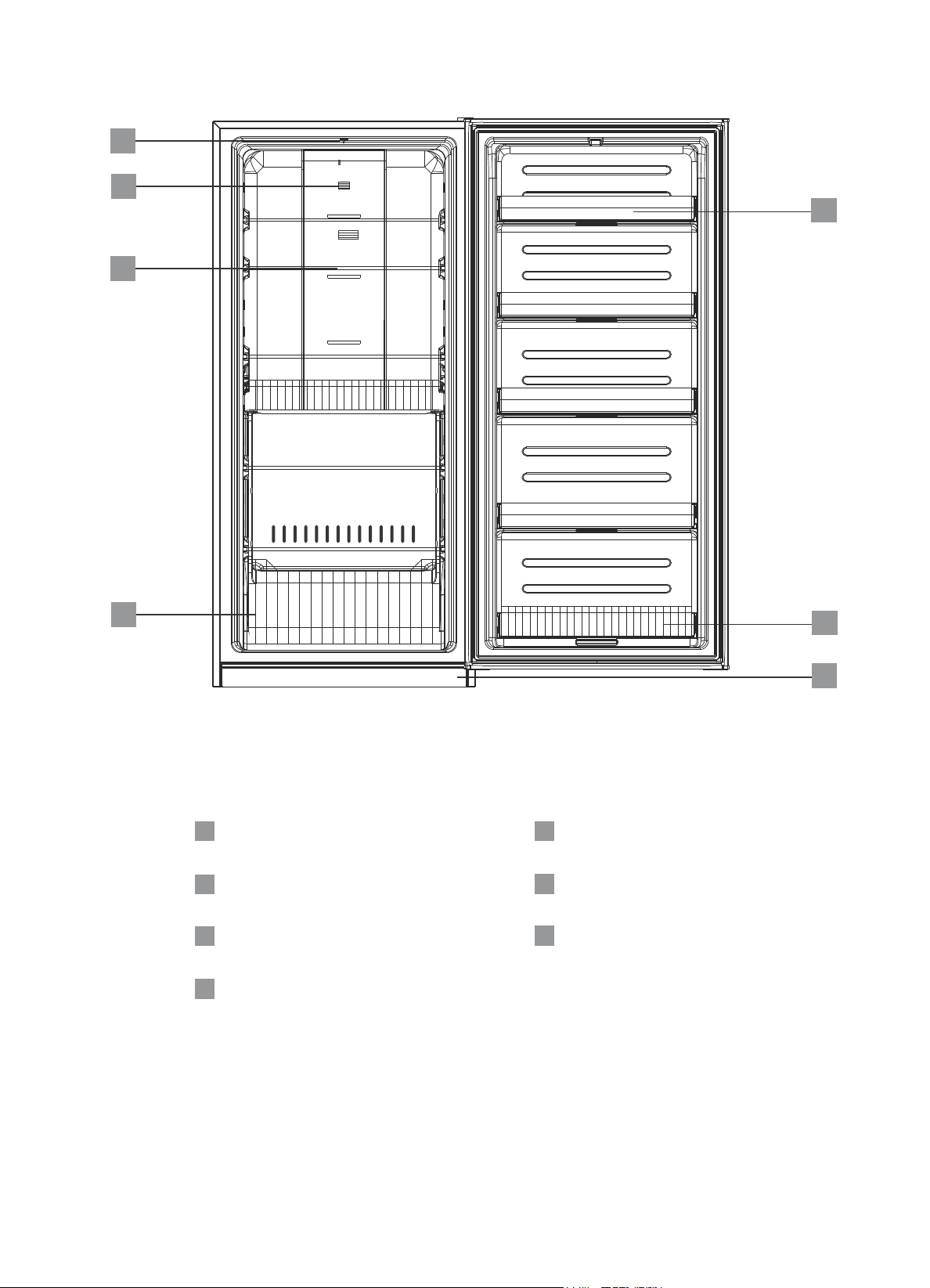
Light switch
Temperature sensor
Wire shelf
Wire drawer
1
2
1
5
6
7
3
4
2
3
4
Door bin
Wire door bin
Kick panel
5
6
7
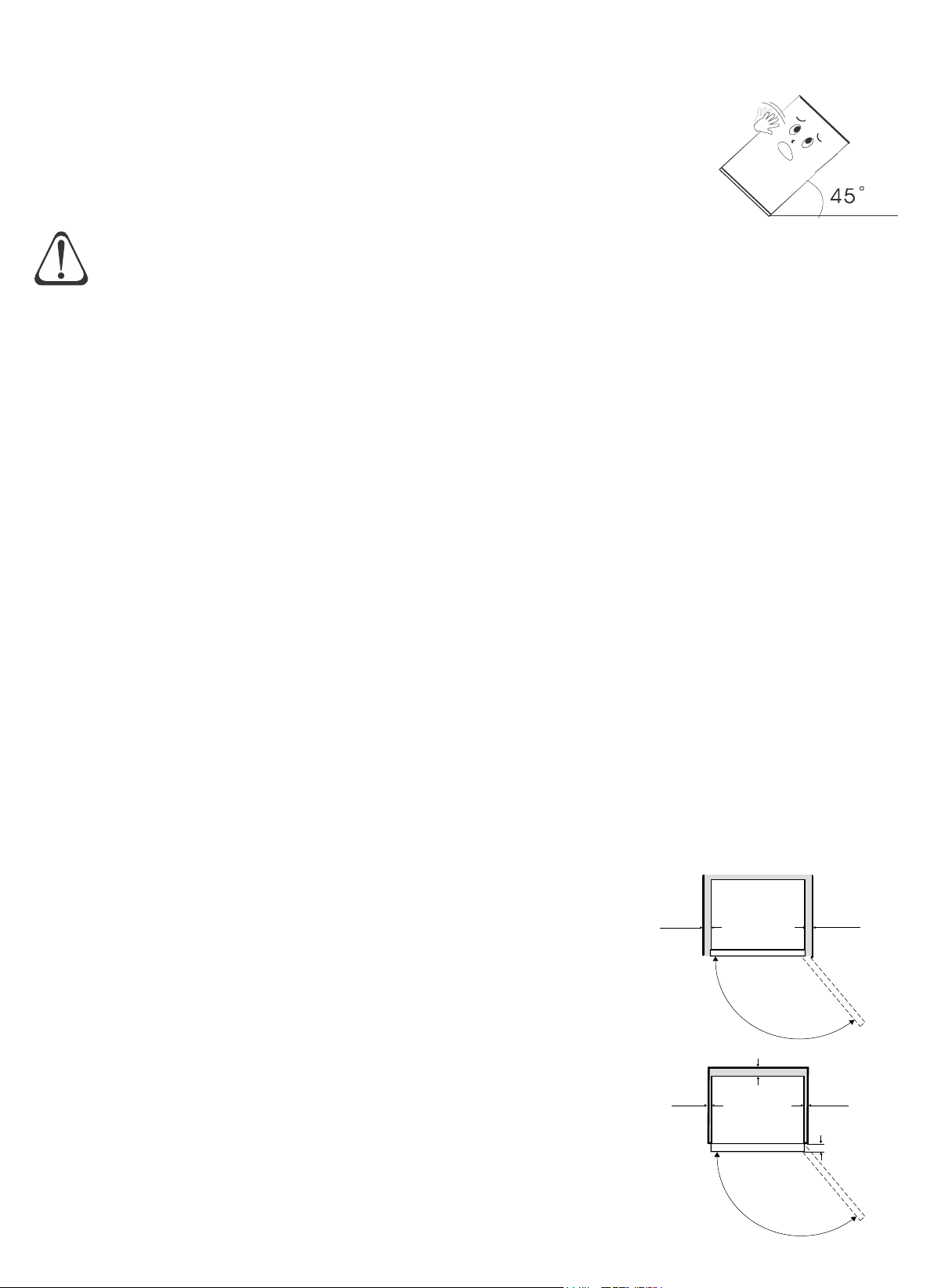
TRANSPORTING
Remove all packaging material before using new and adhesive tape your
freezer/refrigerator. This includes the foam base and all adhesive tape holding the
freezer/refrigerator accessories inside and outside.
Clean both the inside and outside of the unit with a cloth lukewarm soapy water.soft and
Keep the appliance upright and avoid squeezing or vibration
during transport. Avoid a slanting angle over 45 degrees during
handling. Avoid the door or top cap from being under excessive
stress when moving, otherwise it may become deformed.
5
Positioning your freezer/refrigerator
Place your in a well ventilated area away from a heat source and freezer/refrigerator
direct sunlight. Do not install the in a damp or wet location as this may cause appliance
damage to the insulation and result in leakage. Condensation may also build up on the
outer cabinet causing rust.
Use the front two adjustable feet to level the . Rotate the feet in a freezer/refrigerator
clockwise direction to raise the and anti-clockwise to lower. Ensure the unit appliance
slightly tilts backwards so that the door self-close to provide a consistent closed seal.
There should be a clearance of at least 200mm from the
top of your unit, and 50mm from either the sides of the
freezer/refrigerator (or) the back of the unit. If the appliance
is to sit flush with the cabinetry, then a 50mm clearance
must be available to allow the door to open freely and
enable the removal of baskets.
The minimum clearance recommended at each side is
5mm, if this is the case the door must sit proud of the
cabinetry by 50mm (not flush). A 5mm side clearance will
require 50mm of airspace at the back of the unit to allow for
adequate ventilation.
50mm
5mm
DOOR
5mm
50mm
50mm
CAUTION
Allow for adequate ventilation around your freezer/refrigerator
INSTALLATION
Do not connect your unit to the power supply immediately after it is placed
vertically. You should keep it standing for at least 3 hours before connection to let
it settle.
50mm
Minimum
recommended
airspace around
freezer/refrigerator
screw
INSTALLATION
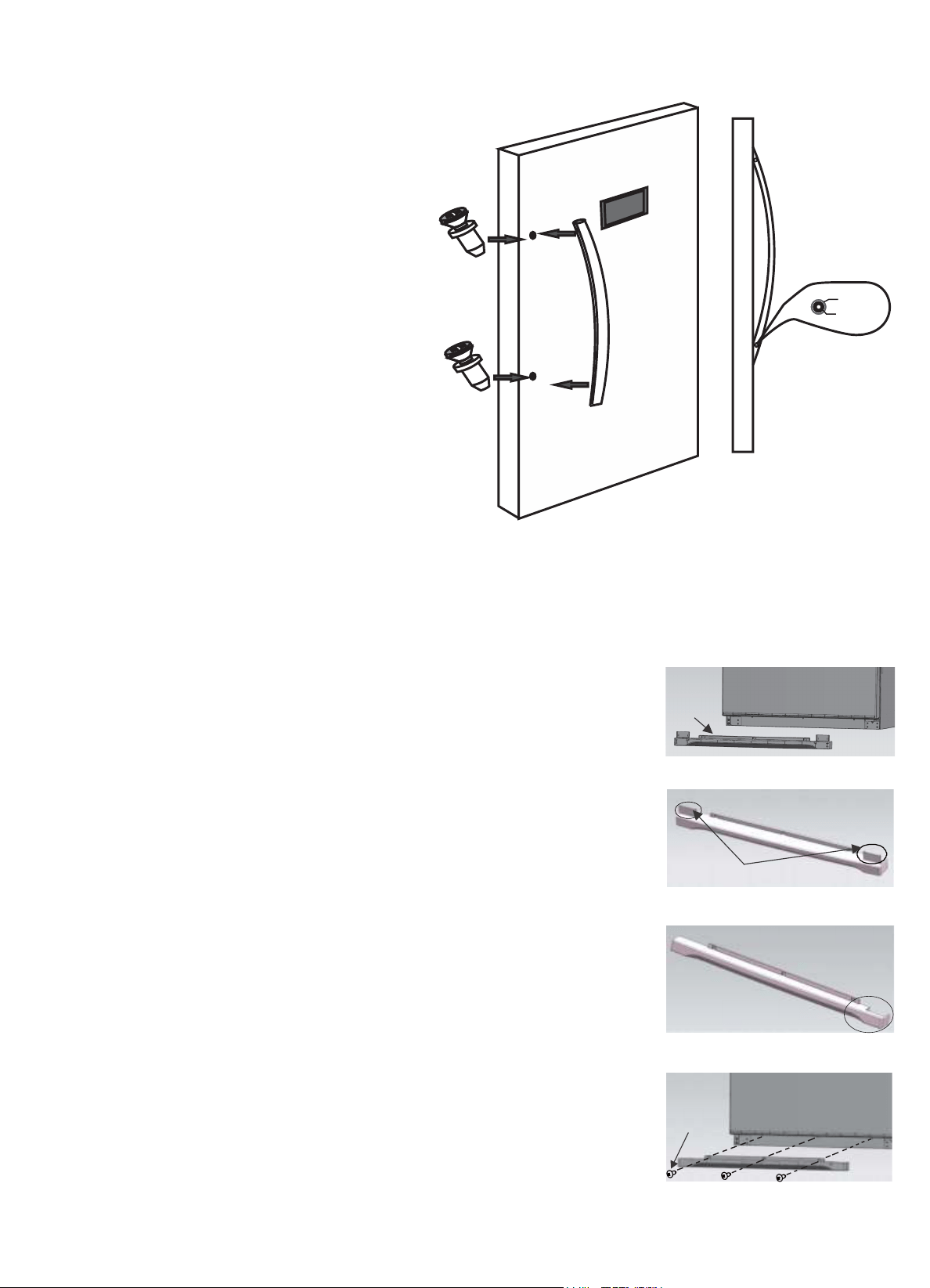
Door Handle assembly
1. Remove the hexagonal key and
the two screws from the plastic
bag supplied inside the
freezer/refrigerator and set the
screws into the door holes.
Position the door handle over the
screws.
Tighten the head cap screws in
the side of the handle until
secured in place on the door.
2.
6
hole
screw
1 2
1 2
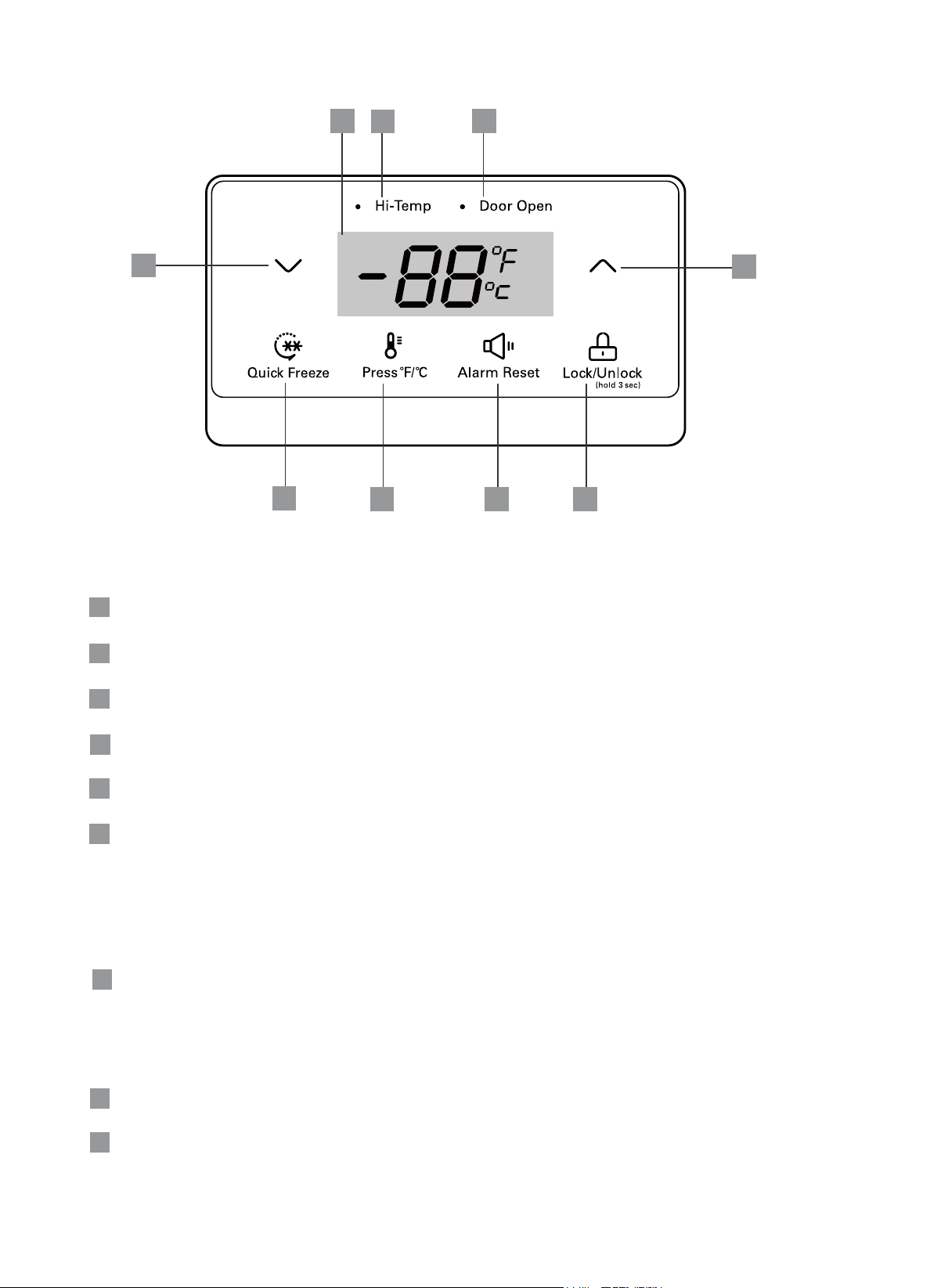
Kick Panel assembly
cover plate locations
3.
kick
panel
1. Remove the kick panel and screws from inside the
freezer/refrigerator.
Position the kick panel to the bottom of the
freezer/refrigerator and remove the cover plate on
the hinge side of the unit.
Fit the kick panel in place and screw into holes.
2.
3.
7
CONTROL FEATURES AND FUNCTIONS
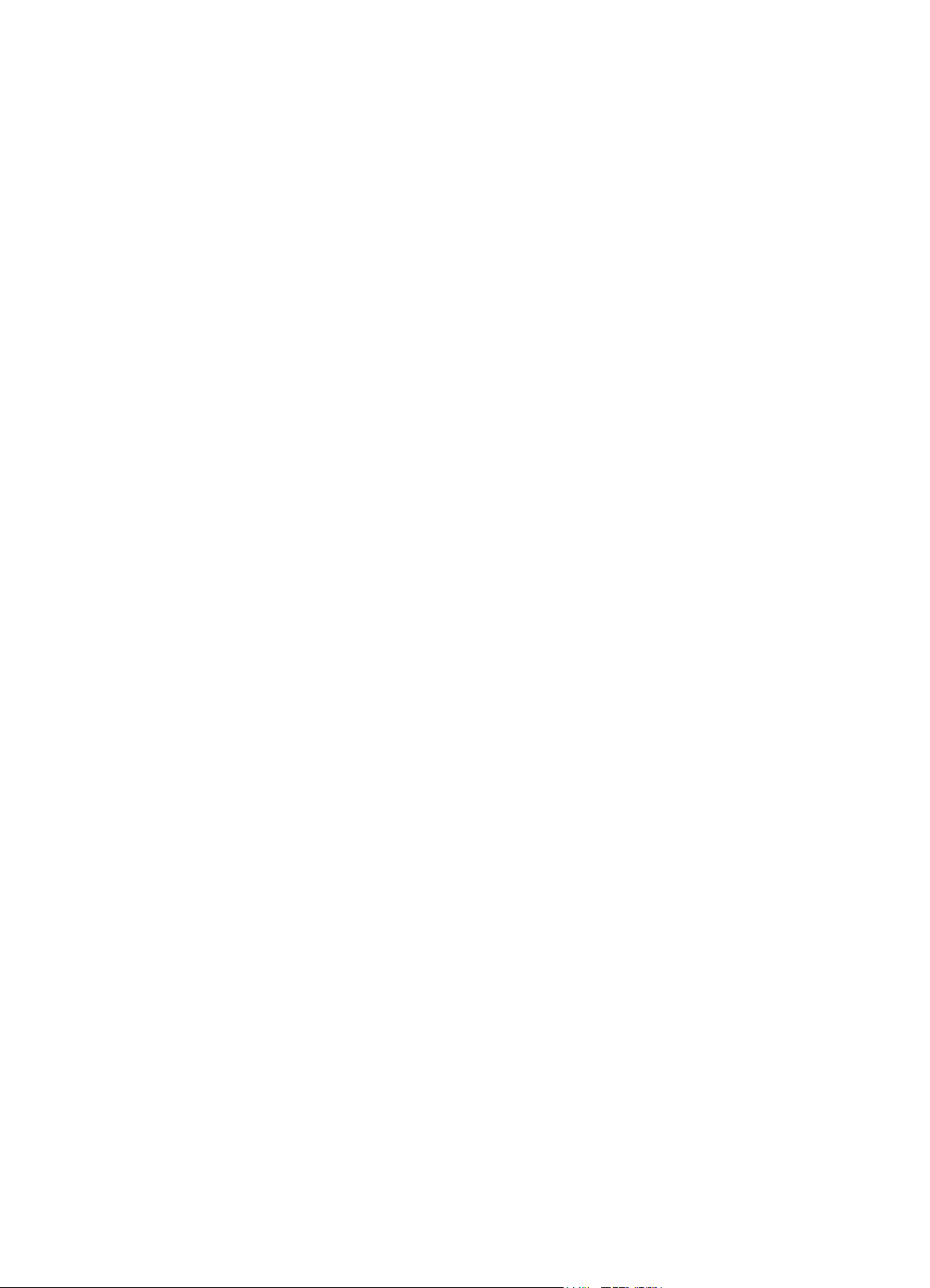
1
8
1
Quick freeze
2
4
Temperature setting / Quick Freeze time setting down (decrease)
5
7
Numeric display panel
Buttons
Display
Temperature display format (°C or °F)
Lock / Unlock
2 3 4
5
6
7 9
3
Temperature setting / Quick Freeze time setting up (increase)
6
Alarm Reset
8
High temperature alarm
Alarm
9
Door open alarm
CONTROL FEATURES AND FUNCTIONS
8
Locking and unlocking the display panel
When in the non-lock state, long press the Lock / Unlock Button (4) for 3 seconds to lock,
other keys are invalid.
When in the lock state, long press the Lock / Unlock Button (4) for 3 seconds to unlock.
When in the temperature setting or Quick Freeze setting states, press the Lock / Unlock
Button (4), the setting temperature or Quick Freeze mode will immediately come into
operation.
Controlling the temperature
Quick Freeze Mode
The Quick Freeze mode quickly reduces the temperature of the freezer.
To enter this mode press the Quick Freeze button (1), the quick freeze temperature of
-24°C (-11°F) will display. The default Quick Freeze time is 6 hours. Press button (5) or
(6) if you want to decrease or increase this time. Once the desired time is reached, press
the Lock / Unlock button (4) to activate the selection. To exit press the Quick Freeze
button (1).
Note: It is not advisable to use Quick Freeze for 48 hours or more.
Adjusting temperature - Switch between Freezer & Refrigerator
To enter the temperature setting mode press either button (5) or (6) until the temperature
flashes on the display (7). Setting the temperature also acts as the switch between
Freezer and Refrigerator.
Unlock the control panel, then press button (5) to decrease temperature or button (6) to
increase temperature.
Adjust temperature from -24°C (-11°F) to -12°C (10°F) to set the appliance to Freezer
mode. Change temperature between 2°C (36°F) and 8°C (46°F) will set the appliance to
Refrigerator mode. Once the desired temperature is reached, press the Lock / Unlock
button (4) to activate the selection. Note: If no button is pressed within 30 seconds, the
temperature setting mode will be exited.
Setting temperature °C or °F format
Press button (2) to switch between Celsius and Fahrenheit display formats.
Alarm reset
Press button (3) to cancel the alarm when triggered by high temperature or if the door is
left open for 60 seconds.

CONTROL FEATURES AND FUNCTIONS
Error Codes display
The error codes listed below may appear on the display. Firstly press Alarm Reset and
contact Midea Customer Care if the error code still displays after you have reset the
alarm.
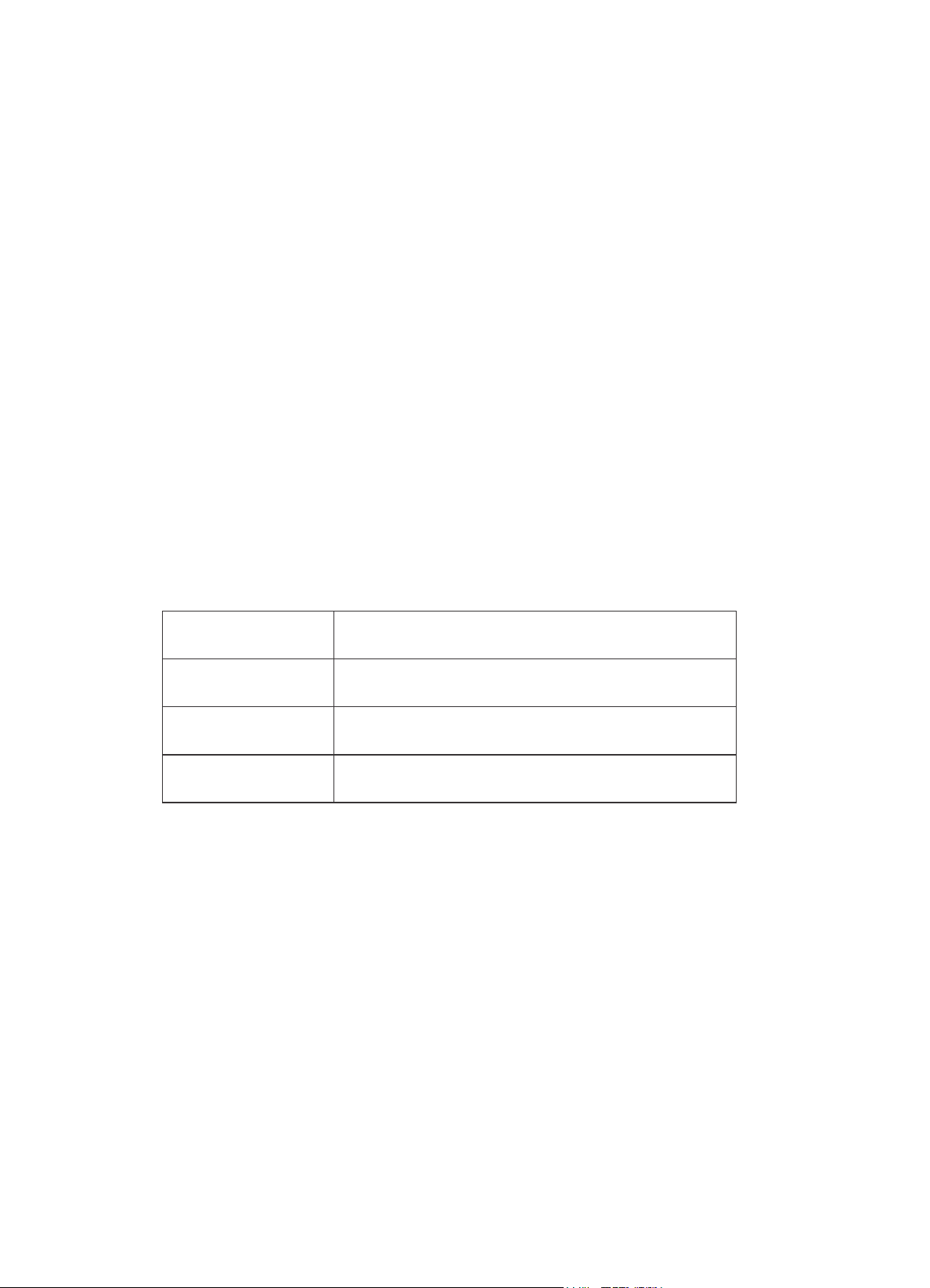
ERROR CODE
DESCRIPTION
E1
Temperature sensor failure
E5
Defrosting sensor failure
E6
Communication failure
E7
Ambient temperature sensor failure
E9
Freezer high temperature alert
9
CLEANING & MAINTENANCE
Cleaning the appliance
Interior
Clean the appliance interior regularly. Turn power off. Wipe the interior with a soft cloth
and lukewarm soapy water. Wipe away any food spills thoroughly. Dry all surfaces and
removable parts. Avoid getting water on the controls. If you have taken out any
removable parts, replace them and switch on the power before re-stocking the
freezer/refrigerator.
Exterior
Clean the appliance with only lukewarm soapy water and a soft cloth. Rinse with clean
water and then wipe the surface with a soft clean cloth to remove any soap residue.
Door seal
Take care to keep the door seal clean. Sticky food and drink can cause the seal to stick
to the cabinet and tear when you open the door. Wash the seal with a mild detergent
and warm water. Rinse thoroughly and dry.
WARNING
Before cleaning: Turn appliance off at the power point, then remove the power
cord from the outlet. This will make sure there is no chance of electric shock.
CLEANING & MAINTENANCE
Please check the points below after maintenance:
(1) Is there any damage to the power lead?
(2) Can the power plug be inserted into the power socket correctly?
(3) Is the power plug and/or lead heating up?
10
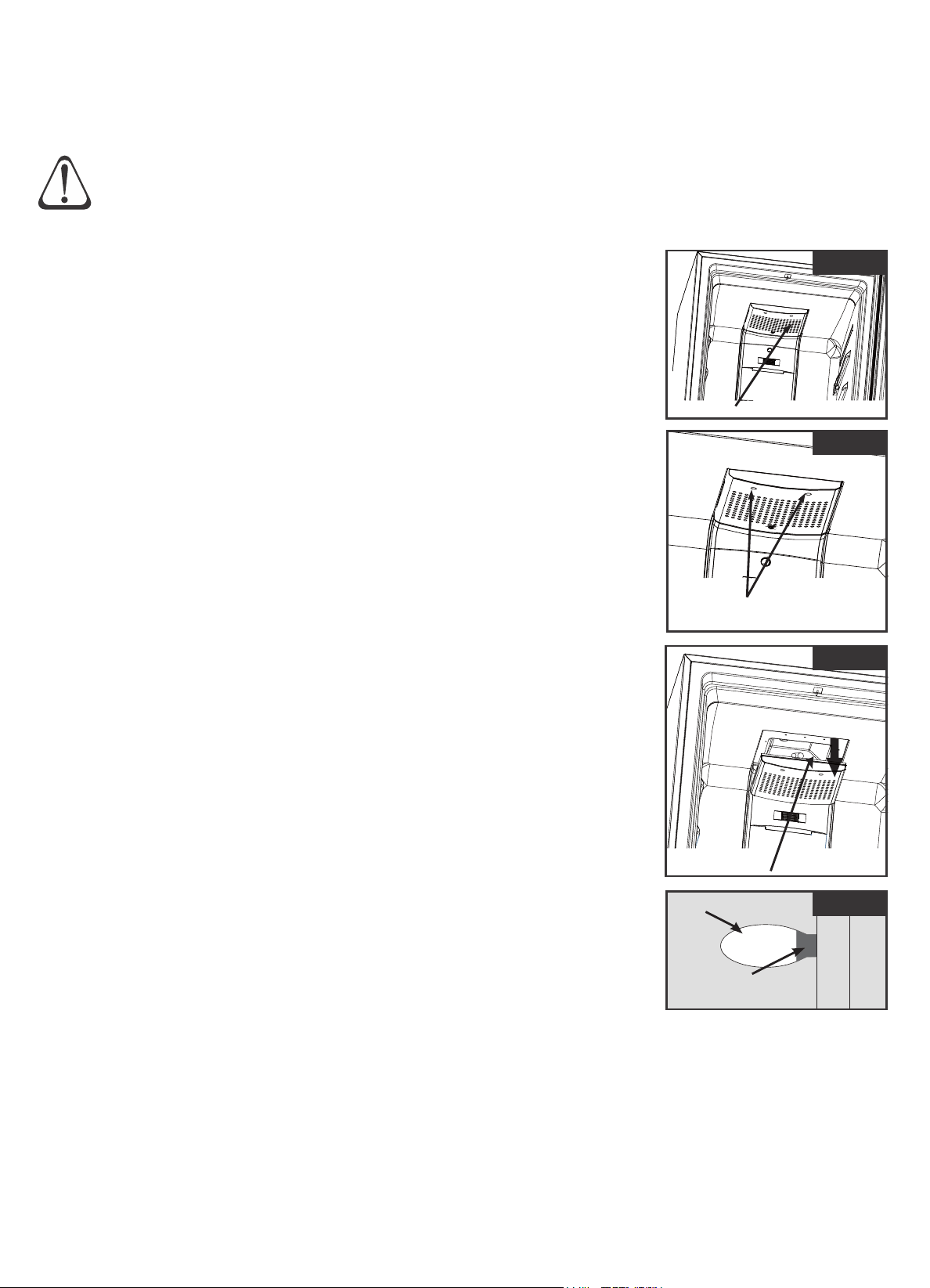
Replacing the Interior light
Open the freezer/refrigerator door and locate the lamp
cover at the roof of the freezer/refrigerator cavity.
Remove the two screws holding the lamp cover. Place
the screws in a safe place while replacing the bulb.
Carefully remove the lamp cover. Place the cover in a
safe place.
Ensure the bulb is cool to the touch before unscrewing.
Replace the old bulb with an AC230V / Max. 40W bulb.
Refit the cover and secure with the two screws. Replace
the mains power and switch on the appliance.
1.
2.
3.
Remove cover
step 3
step 2
Lamp cover
step 1
Bulb
Bulb base
step 4
4.
5.
To replace the internal light, follow these steps. Note: Before
replacing the bulb, disconnect the appliance from the mains
power.
WARNING
Before replacing the light: Turn appliance off at the power point, then remove
the power cord from the outlet. This will make sure there is no chance of electric
shock.
Remove the two screws
from the lamp cover
11
Reduce opening the door frequently. This will increase the appliance efficien and cy
reduce power consumption.
Be sure to wrap foods properly, and wipe containers dry before placing them in the
appliance. This cuts down on frost build-up inside the unit.
There should always be some space between food items for proper air circulation.
Hot food should be cooled down before placing into the appliance, otherwise the
interior temperature and power consumption will increase.
Adjust the temperature control to a setting that is acceptable for the storage of the
food. This will reduce the power consumption.
1.
2.
3.
ENERGY SAVING TIPS
4.
5.
DISCONNECTION OF THE APPLIANCE
1. Power failure
During a power failure, do not put additional food in the appliance and reduce opening
the door.
If power failure is anticipated beforehand, place several ice cubes into a container and
place in the top of the appliance.
2. Power failure during vacation
Before departure of a short vacation, remove any items that could spoil if a power
failure occurs, and ensure the doors are closed firmly.
If going on a long vacation, remove all items, clean and wipe dry the internal of the
appliance, disconnect the power and leave the doors open.
3. Storage of appliance
If the freezer/refrigerator needs to be switched off for a long period of time (storage),
remove all items, unplug the appliance from the power outlet, clean and wipe dry the
interior. The door should be wedged open slightly for air circulation in order to prevent
unpleasant odours.
Use extreme caution in the case of children. The unit should not be accessible to child’s
play.
If unplugging the appliance from the power outlet, please leave at least 5
minutes before re-connection.
CAUTION
12
TROUBLESHOOTING GUIDE
If you think so e ing may be wrong with your freezer/refrigerator, you can carry out some easy checks m th
before calling for service. Y o a cat e problem and spare yourself from inconvenience, saving u m y lo e th
time and money.
SYMPTOM SUGGESTION
Free is not zer/refrigerator
operating
· Check that the power cord is plugged into the power outlet properly
and that the outlet is switched “ON”.
· Try running another appliance from the power outlet. If no power is
coming from the outlet you may have blown a fuse or tripped a
circuit of your household power supply.
· Try adjusting the temperature control to a slightly “colder” position.
Unusual noise
· The flow of refrigerant through the pipeline coil could cause
gurgling, similar to water boiling. This is the normal function of the
appliance.
· Metal parts undergo expansion and contraction, as in hot water
pipes. This is normal. Sound will level off or disappear as appliance
continues to run.
· I appliance t is quite normal for noise to seem louder just after the
starts operating.
· Other strange sounds may mean that you need to check and take
action. For example, noises may mean that:
- The cabinet is not level.
- The floor is uneven or weak.
There are vibrations from an object on top of or behind or beside
the appliance.
- The back of the unit cabinet is touching the wall.
Compressor seems to run
more than expected
· Is door kept open too long or too often?
· Is control set too cold?
· Have large amounts of warm food just recently been stored?
· If the day is hot or the room is very warm, the appliance will need to
run more than normal.
· The appliance will run more than normal just after you install it or
when it has been turned off for a long time.
Temperature in the
freezer/refrigerator is too warm
· Check that the appliance has enough clearance at the sides, back
and top. Refer to installation instruction on page 5.
· Controlling the temperature 8Refer to “ ” on page .
· You may have kept the door open too long or too frequently.
· Food containers or packaging may be holding a door open.
The door will not close
· Check whether the front of the unit is tilted back slightly to allow the
door to self close.
· Check whether something is holding the door open.
The following cases are not malfunctions:
Moisture may form as condensation on the outside of the appliance during humid conditions. To remove
excess moisture, wipe clean.
It is normal that the sides of the appliance will get warm as a result of the refrigeration system operation.
13
REPAIRS, SERVICE & WARRANTY
It is hazardous for anyone installing, removing, altering, repairing servicing testing or ,
certifying the gas system of a gas device (i.e. charging, discharging or breaking into
the refrigeration system that uses hydrocarbon refrigerants). Only an Authorised
Service Person can carry out servicing or repairs to this appliance.
If service is required
If you have a problem which persists after you have made the checks listed in the
Troubleshooting Guide, please contact:
Midea Customer Care on 1300 132 371
Please refer to the enclosed warranty card or visit www.mideaappliances.com.au for
warranty information. Ensure you have the appliance model number and proof of
purchase handy before calling Midea Customer Care to enquire about a warranty
claim.
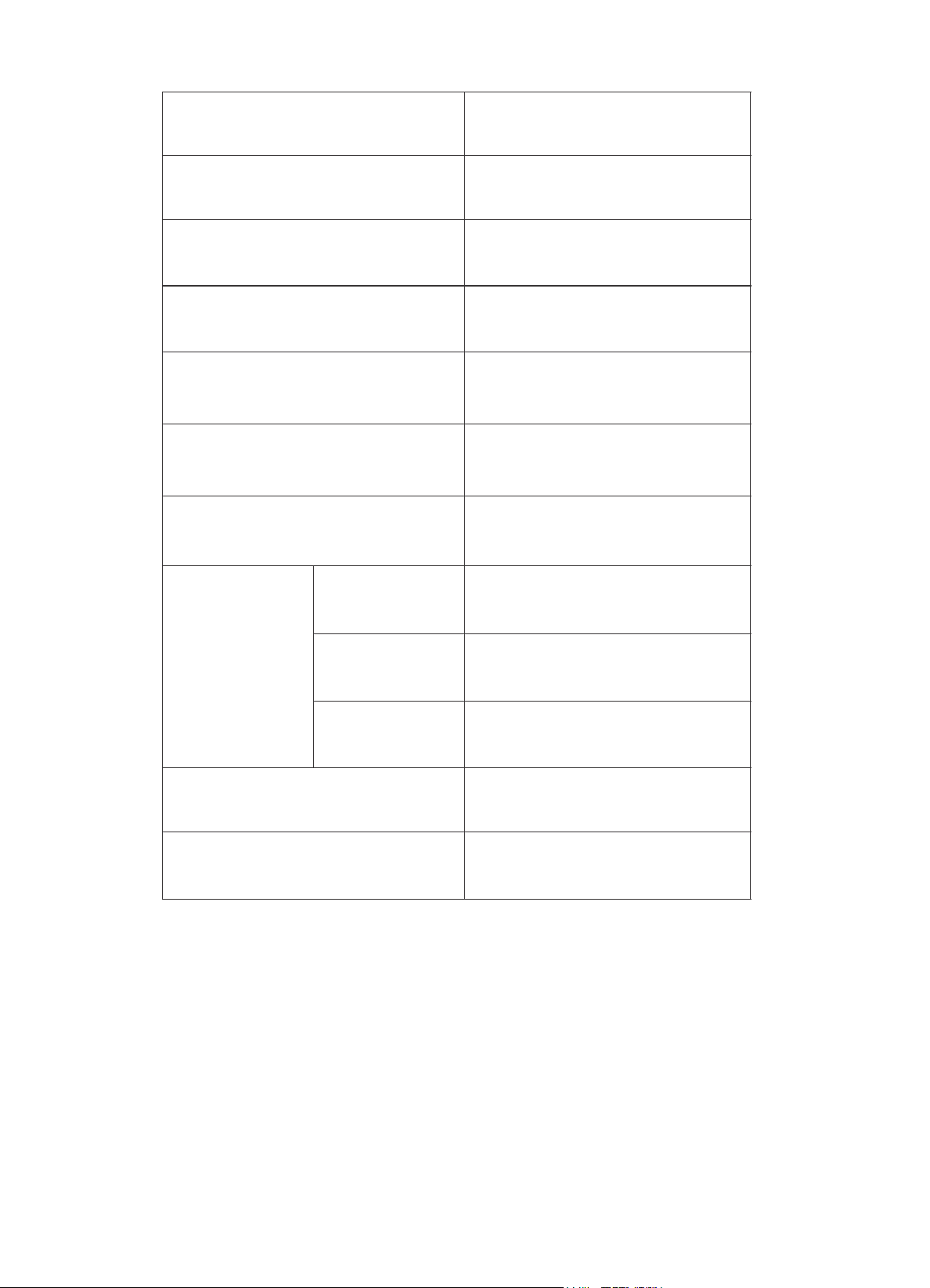
Complete and retain the following information for your records:
Please retain proof of purchase for warranty claims.
Model No.
Serial No.
Date of purchase
Retailer
14
SPECIFICATIONS
NOTE:
· Product specifications are subject to change without prior notice.
· This product is subject to continuous improvement, which may not be completely
consistent with the manual, however the functions and operating methods will not
change.
Model
MFR411W
Climate class
T
Classification of installation and
use
Class 1
Indoor use only
Rated Total Gross Volume
411L
Voltage
230V / 50Hz
Noise Level
44dB
Refrigerant type
R134a
Dimensions
Height
1550mm
Width
711mm
Depth
750mm
IP rating
IPX0
Net Weight
69Kg
V 09/16