User manual Induction Cooktop
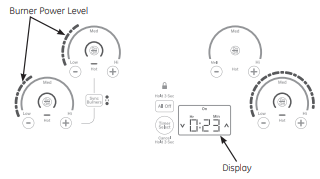
Cooktop Features
Throughout this manual, features and appearance may vary from your model.
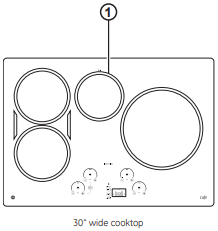
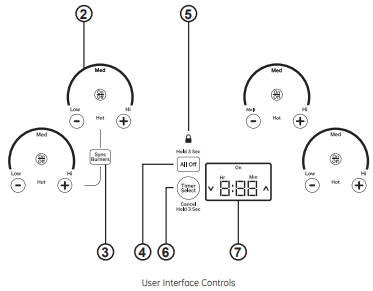
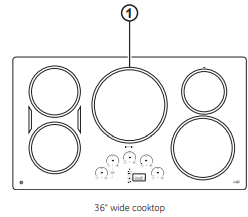
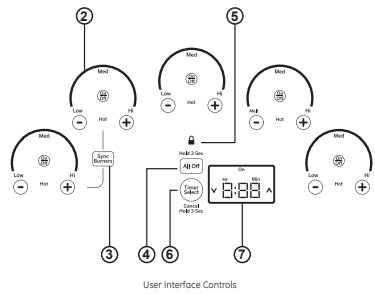
1. Cooking Element(s): See page 7.
2. Power Level Arc: See page 7.
3. Sync Burners: See page 8.
4. All Off: See page 7.
5. Lock: See page 9.
6. Timer Select: See page 9.
7. Display: See page 9.
Operating The Cooking Elements
Turn Burner(s) On: Touch and hold On/Off pad about half a second. A chime can be heard with each touch to any pad.
Power level can be selected in any of the following ways:
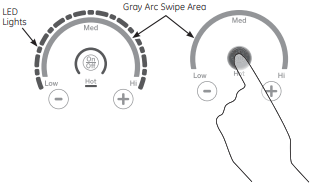
1. Swipe the gray arc (on the graphics) to the desired power level. There is no sensor on the LEDs. or;
2. Touch Anywhere along the gray arc. or;
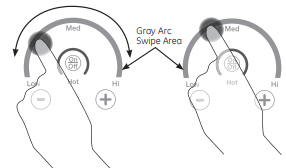
3. Touch + or - pads to adjust power level. or;
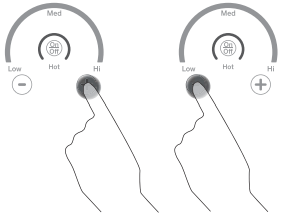
4. Shortcut to Hi: Immediately after turning unit on. touch the + pad. or;
5. Shortcut to Low: Immediately after turning unit on. touch the - pad.
Turn Burner(s) Off
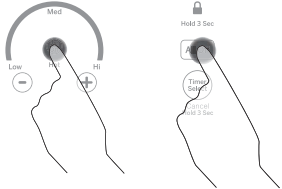
Touch On/Off pad for an individual burner or touch the All Off pad.
Selecting Cooktop Settings
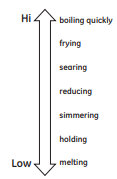
Choose the element/burner that is best fit to the cookware size. Each element/burner on your new cooktop has its own power levels ranging from low to high. Power level settings necessary for cooking will vary depending on the cookware being used. the type and quantity of food. and the desired outcome. In general use lower settings for meetings. holding and simmering and use higher settings for heating quickly. searing and frying. When keeping foods warm confirm selected setting is sufficient to maintain food temperature above 140°F. Larger elements and elements marked "Keep Warm” are not recommended for melting.
Hi is the highest power level. designed for large quantity rapid cooking and boiling. Hi will operate for a maximum. of 10 minutes. Hi may be repeated after the initial 10 minute cycle by pressing the + pad.
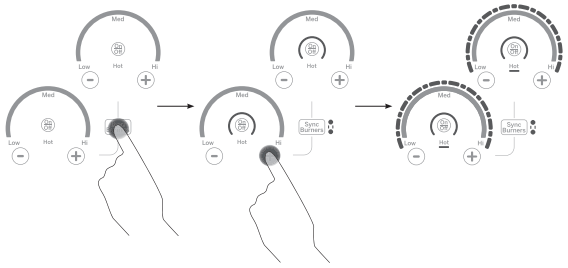
How To Synchronize Left Elements
To Turn On
Hold the Syne Burners pad for about half a second to connect the two burners. Operate either element as described on page 7 to adjust power level.
To Turn Off
- Touch the OnvOff pad on either burner to tum off the Syne Burners.
- Touch the Syne Burners to turn both burners off.
Power Sharing
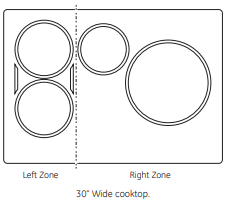
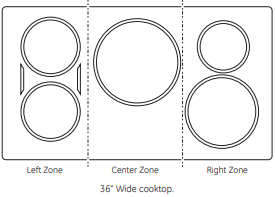
A 36" cooktop has 3 cooking zones and a 30° cooktop has 2 cooking zones. If two elements in the same zone are in use and at least one element is at the maximum power level (Hi). the Hi setting will operate at a reduced power level. Note that the display will not change. This is how power is shared between two elements in the same cooking zone.
Cooktop Lockout
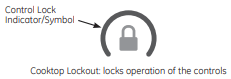
Lock
Touch Control Lock pad for 3 seconds.
Unlock
Touch Control Lock pad again for 3 seconds.
See Custom Settings section to activate Auto Lock feature.
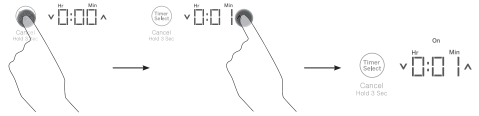
Single Kitchen Timer
To Turn On
Touch the Timer Select pad. Touch the  or
or  arrows. to choose the desired number of minutes. Timer automatically starts 3 seconds after pad is touched. The “ON" LED will appear automatically when timer is set
To Turn Off
Hold Timer Select pad for 3 seconds to cancel timer. Alarm will sound continuously when time is up until user tums timer off
NOTE: Use the kitchen timer to measure cooking time or as a reminder. The kitchen timer does not control the cooking elements. Timer turns off if there is no activity for 30 seconds.
Multiple Timers
Timer Mode
For more information see Custom Settings. Timer Mode section for Multi-Timer feature. Each burner can be linked to a timer. Burner must be on to set the timer. When more than one burner is on. the order of the timer is from left to right.
To Turn ON Multiple Timers
- Touch the Timer Select pad. The corresponding burner power level and the display will blink. Touch the or arrows to adjust time. Timer automatically starts after 3 seconds if there is no further action. The “ON” LED will ight when timer is on.
- To set timer for the next burner. touch the Timer Select pad. The corresponding burner power level and the display will blink. Touch the or arrows to adjust time. Timer automatically starts after 3 seconds if there is no further action. The “ON” LED will light when timer is on. Repeat the steps for the remaining timers.
To Turn OFF Multiple Timers
Hold Timer Select pad for 3 seconds to cancel timer. The corresponding burner power level and display will blink. When the burner times out. the corresponding timer also times out.
Hot Light Indicator
Hot Light Indicator
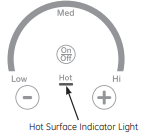
A hot surface indicator light (one for each cooking element) will glow when the glass surface is hot and will remain on until the surface has cooled to a temperature that is safe to touch.
Pan Detection Removal
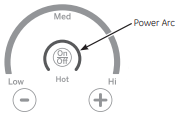
When a pan is removed from the cooktop surface. Burner level turns off; Power arc starts to blink. If a pan is not detected for 25 seconds. the control tums off automatically. lights turn off.
Custom Settings
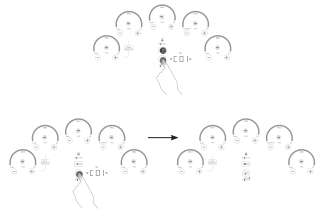
- Press and hold Alll Off pad for 3 seconds. then immediately press and hold the Timer Select pad for 3 seconds to enter custom settings. Those two pads must be pressed within 30 seconds. Any other pad will cancel mode.
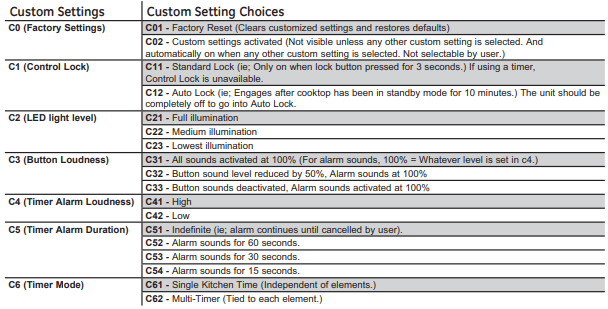
- “C - -" appears on display. To navigate through the Custom Settings. use the (up) or (down) pads. If (up) is selected the display cycle starts at “C01”. If (down) is selected. the display cycle starts at “C62”.
- To activate a new Custom Setting the user will touch and hold the Timer Select pad for 3 sec. Only ONE of the Custom Setting Choices can be activated for each Custom Setting. The red On” LED will turn on and a sound will go off once a new custom setting is. activated.
- The cooktop will exit Custom Settings if it for 3 minutes.
- To exit Custom Settings and save any changes. touch. and hold the All Off pad for 3 seconds. active
Custom Settings Chart
How Induction Cooking Works
The elements beneath the cooking surface produce a magnetic field that causes the electrons in the ferrous metal pan to vibrate and produce heat.
The cooking surface itself does not heat. Heat is produced in the cooking pan. and cannot be generated until a pan is placed on the cooking surface.
When the element is activated. the pan begins to heat. immediately and in turn heats the contents of the pan.
Magnetic induction cooking requires the use of cookware made of ferrous metals—metals to which magnets will stick. such as iron or steel.
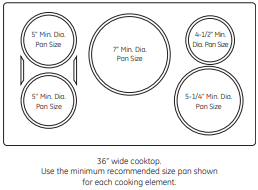
Use pans that fit the element size. The pan must be large enough for the safety sensor to activate an element.
The cooktop will not operate if a very small steel or iron utensil (less than the minimum size across the bottom) is placed on the cooking surface when the unit is turned on—items such as steel spatulas. cooking spoons. knives and other small utensils.
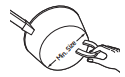
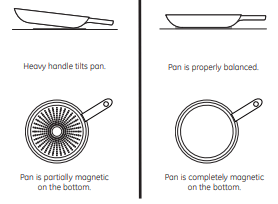
Use the minimum size pan for the element. The pan material is correct if a magnet sticks to the bottom.
Cooking Noise
Cookware “noise”
Slight sounds may be produced by different types of cookware. Heavier pans such as enameled cast iron produce less noise than a lighter weight multiply stainless steel pan. The size of the pan. and the amount of contents. can also contribute to the sound level.
When using adjacent elements that are set at certain power level settings. magnetic fields may interact and produce a low whistle or intermitted “hum”. These noises can be reduced or eliminated by lowering or raising the power level settings of one or both of the elements. Pans that completely cover the element ring will produce less noise.
A low “humming” noise is normal particularly on high settings.
Sounds you may here: You may hear a slight “Buzz” when cooking with Hi mode. This is normal. The sound depends on the type of pot being used. Some pots will “Buzz” louder depending on the material. A “Buzz’ sound may be heard if the pan contents are cold. As the pan heats. the sound will decrease. If the power level is reduced. the sound level will go down.
Choosing The Correct Cookware To Use
Using the correct size cookware
Pans that are not ferrous or are too small will not allow the induction element to tum on. and the ON indicator for that element location will flash for 25 seconds and then tum off. If a pan is removed for more than 25 seconds. the power will be shut off
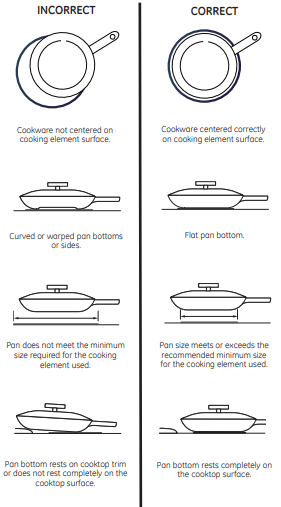
Cookware larger than the element ring may be used; however. heat will only occur above the element.
For best results. the cookware must make FULL contact. with the glass surface.
Do not allow the bottom of the pan or cookware to touch the surrounding metal cooktop trim or to overlap the cooktop controls.
For best performance. match the pan size to the element size. Using a smaller pot on a larger burner will generate less power at any given setting.
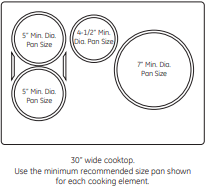
Suitable Cookware
Use quality cookware with heavier bottoms for better heat distribution and even cooking results. Choose cookware made of magnetic stainless steel. enamel-coated cast iron. enameled steel and combinations of these materials.
Some cookware is specifically identified by the manufacturer for use with induction cooktops. Use a magnet to test if the cookware will work.
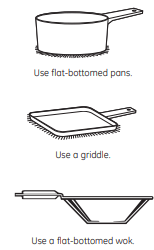
Flat-bottomed pans give best results. Pans with rims or slight ridges can be used.
Round pans give best results. Pans with warped or curved bottoms will not heat evenly.
For wok cooking. use a flat-bottomed wok. Do not use a wok with a support ring.
Choosing The Correct Cookware To Use
Cookware recommendations
Cookware must fully contact the surface of the cooking element.
Use fiat-bottomed pans sized to fit the cooking element and also to the amount of food being prepared.
Induction interface disks are NOT recommended.
Griddle
Using the Griddle
Before using this cookware for the first time. wash it to make sure it is clean. Then season it lightly. rubbing cooking oil onto the cooking surface.
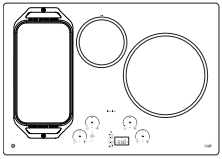
How To Place The Griddle
IMPORTANT: Always place and use your griddle at the designated location on the cooktop.
IMPORTANT NOTES
- Clean the griddle with a sponge and mild detergent in warm water. DO NOT use blue or green scrubbing pads or steel wool
- Avoid cooking extremely greasy foods and be careful of grease spillover while cooking
- Never place or store any items on the griddle. even when it is not in use. The griddle can become heated when using the surrounding surface units
- Avoid using metal utensils with sharp points or rough. edges. which might damage the griddle. Do not cut foods on the griddle
- Do not use cookware as a storage container for food or oil. Permanent staining and or craze lines could result
- Your griddle will discolor over time with use
- Do not clean the griddle in a self-cleaning oven
- Always allow the cookware to cool before immersing in water
- Do not overheat the griddle.
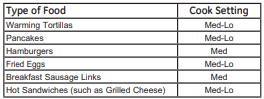
Griddle settings are intended to be a guideline and may need to be adjusted based on individual cooking preferences.
Griddle Operation
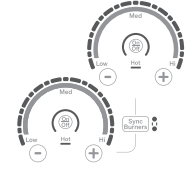
To turn on the surface units for the entire griddle. use the Sync Burner control feature. Touch the Syne Burner pad and then adjust power level to desired setting as described on page 8.
Cleaning the Glass Cooktop
Normal Daily Use Cleaning
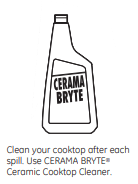
ONLY use CERAMA BRYTE Ceramic Cooktop Cleaner on the glass cooktop. Other creams may not be as effective.
To maintain and protect the surface of your glass cooktop. follow these steps:
- Before using the cooktop for the first time. clean it with CERAMA BRYTE Ceramic Cooktop Cleaner. This helps protect the top and makes cleanup easier.
- Daily use of CERAMA BRYTE Ceramic Cooktop Cleaner will help keep the cooktop looking new.
- Shake the cleaning cream well. Apply a few drops of CERAMA BRYTE Ceramic Cooktop Cleaner directly to the cooktop.
- Use a paper towel or CERAMA BRYTE Cleaning Pad for Ceramic Cooktops to clean the entire cooktop surface.
- Use a dry cloth or paper towel to remove all cleaning residue. No need to rinse.
NOTE: It is very important that you DO NOT heat the cooktop until it has been cleaned thoroughly.
Burned-On Residue
NOTE: DAMAGE to your glass surface may occur if you use scrub pads other than those recommended.
- Allow the cooktop to cool.
- Spread a few drops of CERAMA BRYTE Ceramic Cooktop Cleaner on the entire burned residue area.
- Using the included CERAMA BRYTE Cleaning Pad for Ceramic Cooktops. rub the residue area. applying pressure as needed.
- If any residue remains. repeat the steps listed above as needed.
- For additional protection. after all residue has been removed. polish the entire surface with CERAMA. BRYTE Ceramic Cooktop Cleaner and a paper towel.
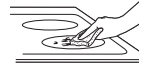
Use a CERAMABRYTE Cleaning Pad for Ceramic Cooktops.
Heavy. Burned-On Residue
- Allow the cooktop to cool.
- Use a single-edge razor blade scraper at approximately a 45° angle against the glass surface and scrape the soil. It will be necessary to apply pressure to the razor scraper in order to remove the residue.
- After scraping with the razor scraper. spread a few drops of CERAMA BRYTE Ceramic Cooktop Cleaner on the entire burned residue area. Use the CERAMA BRYTE Cleaning Pad to remove any residue.
- For additional protection, after all residue has been. removed. polish the entire surface with CERAMA BRYTE Ceramic Cooktop Cleaner and a paper towel.
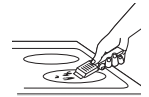
The CERAMA BRYTE Ceramic Cooktop Scraper and all recommended supplies are available through our Parts Center. See instructions under “Assistance / Accessories" section.
NOTE: Do not use a dull or nicked blade.
Metal Marks and Scratches
1. Be careful not to slide pots and pans across your cooktop. It will leave metal markings on the cooktop surface.
These marks are removable using the CERAMA. BRYTE Ceramic Cooktop Cleaner with the CERAMA BRYTE Cleaning Pad for Ceramic Cooktops.
2. If pots with a thin overlay of aluminum or copper are allowed to boil dry. the overlay may leave black discoloration on the cooktop.
This should be removed immediately before heating again or the discoloration may be permanent.
NOTE: Carefully check the bottom of pans for roughness that would scratch the cooktop.
Damage from Sugary Spills and Melted Plastic
Special care should be taken when removing hot substances to avoid permanent damage of the glass surface. Sugary spillovers (such as jellies. fudge. candy. syrups) or melted plastics can cause pitting of the surface of your cooktop (not covered by the warranty) unless the spill is removed while still hot. Special care should be taken when removing hot substances.
Be sure to use a new. sharp razor scraper.
Do not use a dull or nicked blade.
1. Tum off all surface units. Remove hot pans.
2. Wearing an oven mitt:
a. Use a single-edge razor blade scraper (CERAMA BRYTE Ceramic Cooktop Scraper) to move the spill a cool area on the cooktop.
b. Remove the spill with paper towels.
3. Any remaining spillover should be left until the surface of the cooktop has cooled.
4. Don't use the surface units again until all of the residues has been completely removed
NOTE: If opting or indentation in the glass surface has already occurred. the cooktop glass will have to be replaced. In this case. service will be necessary.
Troubleshooting tips
Surface elements will not maintain a rolling boil or cooking is slow
- Improper cookware being used.
Use pans that are recommended for induction. have flat bottoms and match the size of the surface element.
Surface elements do not work properly
- Cooktop controls improperly set.
Check to be sure the correct control is set for the surface element you are using.
Power arc ON indicator blinking
Use a magnet to check that cookware Is induction compatible.
Blinking “ON” indicator — pan size is below the minimum size for the element. See the Using the correct size cookware section.
- Pan not positioned correctly.
Center the pan in the cooking ring.
- +, -, or control lock pads have been touched before an element is turned on.
See the Operating the Cooking Elements section.
Scratches on cooktop glass surface
- Incorrect cleaning methods being used.
Use recommended cleaning procedures. See the Cleaning the glass cooktop section.
- Cookware with rough bottoms being used or coarse particles (salt or sand) were between the cookware and the surface of the cooktop. Cookware has been slid across the cooktop surface.
To avoid scratches. use the recommended cleaning procedures. Make sure bottoms (of cookware are clean before use. and use cookware with smooth bottoms.
Areas of discoloration on the cooktop
- Food spillovers not cleaned before next use
See the Cleaning the glass cooktop section.
- Hot surface on a model with a light-colored glass cooktop.
“This is normal. The surface may appear
Plastic melted to the surface
- Hot cooktop came into contact with plastic placed on the hot cooktop.
See the Glass surface — potential for permanent damage section in the Cleaning the glass cooktop section.
Pitting (or indentation) of the cooktop
- Hot sugar mixture spilled on the cooktop.
Call a qualified technician for replacement.
Unresponsive keypad
Clean the keypad.
- A fuse in your home may be blown or the circuit breaker tripped.
Replace the fuse or reset the circuit breaker.
Pan detection/sizing not working properly
- Improper cookware being used.
Use a fiat induction capable pan that meets the minimum size for the element being used. See the Using The Correct Size Cookware section.
- Pan is improperly placed.
Make sure the pan is centered on the corresponding surface element
- Cooktop control improperly set.
Check to see that the control is set properly
Noise
- Sounds you may hear: Buzzing, whistling, and humming.
These sounds are normal. See Cooking Noise section.