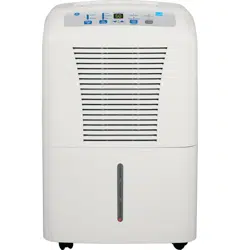
User Manual
Operating Instructions
About the controls on the dehumidifier.
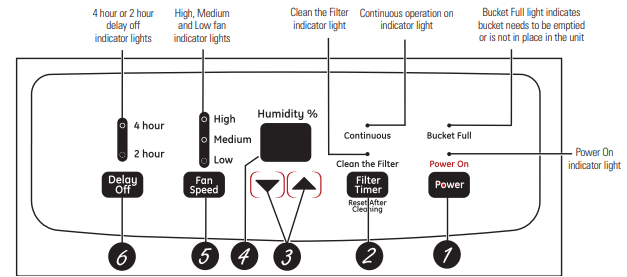
Controls
NOTE: When the bucket is full or removed, the controls cannot be set.
1 Power Pad
Press to turn the dehumidifier on and off.
2 Filter Timer After 250 hours of operation, the Clean the Filter indicator light will glow to remind you to clean the filter. Remove the filter and clean it. Press to turn off the Clean the Filter light. See the Care and Cleaning section.
3 Humidity Set Control Pads
The humidity level can be set within a range of 35% RH (Relative Humidity) to 80% RH (Relative Humidity) in 5% increments or at CO for continuous operation. To set the unit for continuous operation, press the  pad until the screen reads CO.
NOTE: If CO (Continuous) is selected, the dehumidifier will operate continuously at its maximum dehumidification settings if attached to a hose to drain or until the bucket is full.
For drier air, press the  pad and set to a lower percent value (%).
For damper air, press the  pad and set to a higher percent value (%).
When you first use the dehumidifier, set the humidity control to 45% or 50%. Allow at least 24 hours for the dehumidifier to achieve the humidity level. If you still have damper air than desired, set the humidity level to a lower setting or select Continuous for maximum dehumidification.
4 Display
Shows the set % humidity level while setting, then shows the actual (+/– 5% accuracy) room % humidity level.
5 Fan Speed Pad
Controls the fan speed. Press to select either High, Medium or Low fan speed. Set the fan control to High for maximum moisture removal. When the humidity has been reduced and quiet operation is preferred, set the fan control to Medium or Low.
6 Delay Off
While the dehumidifier is in operation, press this pad to set it to automatically turn off in 2 hours or 4 hours.
Other Features
BUCKET FULL Light
Glows when the bucket is ready to be emptied, or when the bucket is removed or not replaced in the proper position.
Alarm
If the bucket is full or missing for more than 3 minutes, an alarm will sound for about 10 seconds to remind you to empty and replace the bucket.
Auto Shut Off
The Water Level Control Switch shuts off the dehumidifier when the bucket is full, or when the bucket is removed or not replaced in the proper position. NOTE: Fan will continue to run approximately 3 minutes after bucket is removed.
Auto Defrost
When frost builds up on the evaporator coils, the compressor will cycle off and the fan will continue to run until the frost disappears.
Power Outage
In the case of a power outage or interruption, the unit will automatically restart, in the settings last used, after the power is restored.
Using the dehumidifier.
How the Dehumidifier Operates
Moist, humid air is drawn over a cold refrigerated dehumidifying coil. Moisture in the air condenses on this coil and drains into a bucket (or through a hose and drain).
Dry, clean air is drawn through the condenser where it is heated and discharged out the top grille into the room.
It is normal for the surrounding air to become slightly warmer as the dehumidifier operates.
Automatic Defrost
When frost builds up on the evaporator coils, the compressor will cycle off and the fan will continue to run until the frost disappears.
When the coil is defrosted, the compressor or fan will automatically restart and dehumidifying will resume.
Choosing a Location
A dehumidifier operating in a basement will have little or no effect in drying an adjacent enclosed storage area, such as a closet, unless there is adequate circulation of air in and out of the area.
- Do not use outdoors.
- This dehumidifier is intended for indoor residential applications only. This dehumidifier should not be used for commercial or industrial applications.
- Place the dehumidifier on a smooth, level floor strong enough to support the unit with a full bucket of water.
- Allow at least 12–18 inches of air space on all sides of the unit for good air circulation.
- Place the dehumidifier in an area where the temperature will not fall below 41°F (5°C). The coils can become covered with frost at temperatures below 41°F, which may reduce performance.
- Use the dehumidifier in cooking, laundry, bathing and dishwashing areas that have excessive moisture.
NOTE: Place the dehumidifier away from the clothes dryer.
- Use the dehumidifier to prevent moisture damage anywhere books or valuables are stored.
- Use the dehumidifier in a basement to help prevent moisture damage.
- The dehumidifier must be operated in an enclosed area to be most effective.
- Close all doors, windows and other outside openings to the room.
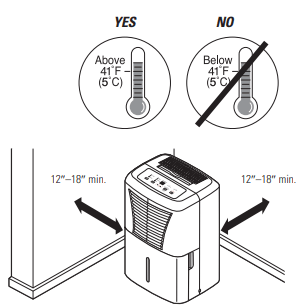
NOTE: The dehumidifier has rollers to aid placement, but it should only be rolled on smooth, flat surfaces. Do not attempt to roll the dehumidifier on carpet or over objects.
Removing Collected Water
There are 2 ways to remove collected water:
1 Use the bucket. When the bucket is removed, the unit will shut off. Empty and replace the bucket.
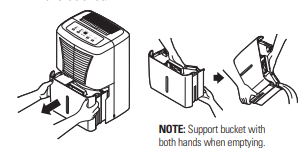
IMPORTANT: Do not use the hose if using the bucket to collect water. When the hose is connected, water will flow through it onto the floor instead of into the bucket.
NOTES:
- Do not remove the bucket while the dehumidifier is operating or if it has just stopped operating. This might cause some water to drip from the drain pan.
- The bucket must be in place and securely seated for the dehumidifier to operate.
2 Use a hose. Water can be automatically emptied into a floor drain by attaching a garden water hose (not included).
1. Remove the bucket from the front of the unit.
2. Open the drain cover on the side of the unit.
3. Thread a garden hose (not supplied) onto the nozzle, cut to length, and lead it to the floor drain.
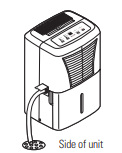
4. Replace the bucket in the unit.
NOTE: The bucket must be in place and securely seated for the dehumidifier to operate.
Water Level
The dehumidifier will turn off automatically when the bucket is full, or when the bucket is removed or not replaced in the proper position.
The bucket must be replaced in the proper position for the dehumidifier to work. The light will be on and the dehumidifier will not run if the bucket is not in the proper position.
Bucket Operation
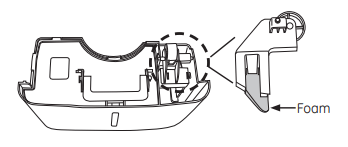
DO NOT remove the foam piece in the bucket assembly. If removed the Dehumidifier will not work properly.
Care and cleaning of the dehumidifier.
Turn off the dehumidifier and remove the plug from the wall outlet before cleaning.
Grille and Case
To clean the case:
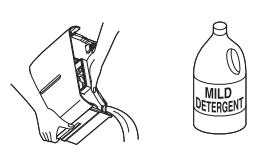
Use water and a mild detergent. Do not use bleach or abrasives.
To clean the front grille:
Use a vacuum attachment or brush.
Water Bucket
To clean:
Every few weeks, clean the bucket to prevent growth of mold, mildew and bacteria. Partially fill the bucket with clean water and add a little mild detergent. Swish it around in the bucket, empty and rinse.
NOTE: Do not use a dishwasher to clean the water bucket.
To remove:
Remove the bucket and pour out any water.
To replace:
Slide the bucket into the dehumidifier.
NOTE: The bucket must be in place and securely seated for the dehumidifier to operate.
Air Filter
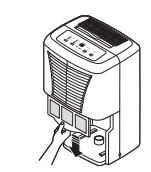
The air filter behind the front grille should be checked and cleaned at least every 250 hours of operation or more often if necessary.
After 250 hours of operation, the Clean the Filter indicator light will glow to remind you to clean the filter. Remove the filter and clean it. Replace the filter and press the Filter Timer pad to turn off the Clean the Filter light.
To remove:
Remove the bucket. Grasp the filter edge, and pull it straight down and out.
To clean:
Clean the filter with warm, soapy water. Rinse and let the filter dry before replacing it.
NOTE: DO NOT rinse or put the filter in an automatic dishwasher.
CAUTION:
DO NOT operate the dehumidifier without a filter because dirt and lint will clog it and reduce performance.
Troubleshooting
Troubleshooting tips…Save time and money! Review the chart below first and you may not need to call for service.
Dehumidifier does not start
- The dehumidifier is unplugged.
- Make sure the dehumidifier’s plug is pushed completely into the outlet.
- The fuse is blown/circuit breaker is tripped.
- Check the house fuse/circuit breaker box and replace the fuse or reset the breaker.
- Dehumidifier has reached its preset level or bucket is full.
- The dehumidifier automatically turns off when either condition occurs. Change to a lower setting or empty the bucket and replace properly.
- Bucket is not in the proper position.
- The bucket must be in place and securely seated for the dehumidifier to operate.
- Power failure.
- There is a protective time delay (up to 3 minutes) to prevent tripping of the compressor overload. For this reason, the unit may not start normal dehumidifying for 3 minutes after it is turned back on.
Dehumidifier does not dry the air as it should
- Did not allow enough time to remove the moisture.
- When first installed, allow at least 24 hours to maintain the desired dryness.
- Airflow is restricted.
- Make sure there are no curtains, blinds or furniture blocking the front or back of the dehumidifier. See the Choosing a Location section.
- Dirty filter.
- See the Care and Cleaning section.
- The Humidity Control may not be set low enough.
- For drier air, press the
 pad and set to a lower percent value (%) or at CO (continuous) for maximum dehumidification.
- Doors and windows may not be closed tightly.
- Check that all doors, windows and other openings are securely closed.
- Clothes dryer may be blowing moisture-laden air into the room.
- Install the dehumidifier away from the dryer. The dryer should be vented to the outside.
- Room temperature is too low.
- Moisture removal is best at higher room temperatures. Lower room temperatures will reduce the moisture removal rate. Models are designed to be operated at temperatures above 41°F (5°C).
Dehumidifier runs too much
- Area to be dehumidified is too large.
- The capacity of your dehumidifier may not be adequate.
- Doors and windows are open.
- Close all doors and windows to the outside.
Frost appears on the coils
- Dehumidifier has been turned on recently, or room temperature is below 41°F (5°C).
- This is normal. Frost will usually disappear within 60 minutes. See the Automatic Defrost section.
Controls cannot be set
- The compressor will turn off and the fan will automatically continue to run for approximately 3 minutes at a fixed setting.
- This is normal. Wait approximately 3 minutes and set the fan as desired.
Fan noise
- Air is moving through the dehumidifier.
Water on floor
- Hose connection may be loose.
- Check the hose connection. See the Removing Collected Water section.
- Intended to use the bucket to collect water, but a hose as attached.
- Disconnect the hose if using the bucket to collect water. See the Removing Collected Water section
Bucket Full LED light flashing and alarm sounds while drain hose is connected
- Drain hose not tight on fitting
- Check drain hose connection.
- Drain hose is kinked
- Ensure the drain hose is pointed straight down to the floor and is not kinked in anyway.