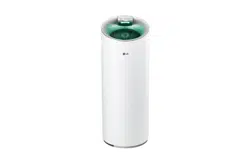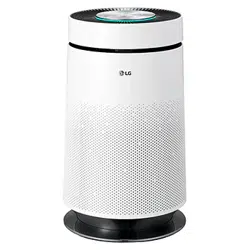
www.lg.com
Copyright © 2016 - 2018 LG Electronics Inc. All Rights Reserved.
P/NO : MFL68181320
OWNER’S MANUAL
Model name: AS401VSA0 / AS401VGA1
AIR PURIFIER
Read this owner's manual thoroughly before operating the appli-
ance and keep it handy for reference at all times.
ENGLISH
ESPAÑOL
1,MFL68181320,영영 2018. 2. 7. 영영 1:35 Page 1
2
TABLE OF CONTENTS
ENGLISH
TABLE OF CONTENTS
3
PRODUCT FEATURES
4
SAFETY INSTRUCTIONS
8
PRODUCT OVERVIEW
8 Front
8 Back
9 Control Panel and Display
10 PuriCare Filtration System
11
INSTALLATION
11 Choosing the Proper Location
11 Tips for Using the Air Purifier
12 Initial Installation of Filter
13
OPERATION
13 Air Purification
14 Turbo Function
14 PM Indicator Display
14 Air Quality Indicator Light
16 Off Timer Function
17 Lock Function
18 Filter Life Light
19
MAINTENANCE
19 Cleaning the Filters
21 Filter Maintenance Schedule
21 Cleaning the Exterior
22 Cleaning the Sensor
23 Storing the Product
24
TROUBLESHOOTING
26
WARRANTY
1,MFL68181320,영영 2018. 2. 7. 영영 1:35 Page 2

PRODUCT FEATURES
3
ENGLISH
SMART AIR QUALITY SYSTEM
The air quality display senses and shows indoor particulate levels in real time. It can sense fine
particulate matter as small as 1.0 micron.
PURICARE FILTRATION SYSTEM
The combination of the washable pre-filter, PuriCare Main Filter, and deodorizing filter provide
fresh indoor air by removing invisible air pollutants. Remove irritants ranging from pet hair and
pollen to tobacco smoke odors and VOCs (volatile organic compounds).
LODECIBEL QUIET OPERATION
In the sleep mode, the air purifier runs at only 23 dB and can be scheduled to shut off
automatically, making falling asleep easy.
PURICARE MAIN FILTER
The PuriCare Main Filter captures particles as small as 0.3 microns. This particulate matter can
include pollen and dust.
PRODUCT FEATURES
1,MFL68181320,영영 2018. 2. 7. 영영 1:35 Page 3
4
SAFETY INSTRUCTIONS
ENGLISH
SAFETY INSTRUCTIONS
READ AND SAVE THESE INSTRUCTIONS
Your safety and the safety of others are very important.
We have provided many important safety messages in this manual and on the appliance. Always
read and follow all safety messages.
This is the safety alert symbol. This symbol alerts you to potential hazards that can kill or
injure you or others. All safety messages will follow the safety alert symbol and either the
word WARNING or CAUTION.
These words mean:
WARNING
If you do not follow instructions, it could result in death or serious injury.
CAUTION
If you do not follow instructions, it could result in minor or moderate injury or damage to the
product.
All safety messages will tell you what the potential hazard is, tell you how to reduce the
chance of injury, and tell you what may happen if the instructions are not followed.
IMPORTANT SAFETY INSTRUCTIONS
WARNING
To reduce the risk of explosion, fire, death, electric shock, scalding, or injury to persons
when using this appliance, follow basic precautions, including the following:
Installation
• Do not modify or extend the power cord.
• Do not plug the product into an outlet which is loose or damaged.
• Never attempt to operate this appliance if it is damaged, malfunctioning, partially
disassembled, or has missing or broken parts, including a damaged cord or plug.
• Do not use the product in locations where it will be exposed to high humidity, moisture, or oil
splatter such as in the bathroom, laundry, or near the stove.
• Connect the product to a properly rated, protected, and sized power circuit to avoid electrical
overload.
• In the event of a gas leak (propane gas, LP gas, etc.) do not operate this or any other
appliance. Open a window or door to ventilate the area immediately.
• Do not store or use gasoline or other flammable vapors and liquids in the vicinity of this or any
other appliance.
• If you detect a strange sound, a chemical or burning smell, or smoke coming from the
product, unplug it immediately and contact an LG Electronics customer information center.
!
!
!
!
1,MFL68181320,영영 2018. 2. 7. 영영 1:35 Page 4

SAFETY INSTRUCTIONS
5
ENGLISH
• Be careful not to allow the power cord to be pinched, crushed or damaged under heavy
objects.
• Do not install the product in direct sunlight, near heat sources such as furnaces or ovens, near
fireplaces or other open flames, or in wet or humid locations.
• Keep packing materials out of the reach of children. Packaging material can be dangerous for
children. There is a risk of suffocation.
• Store and install the product where it will not be exposed to temperatures below freezing or
exposed to outdoor weather conditions.
Operation
Read all instructions before using the product and save these instructions.
• Use this product only for its intended purpose.
• Do not tamper with controls.
• Do not allow children to play on or with the product. Close supervision of children is
necessary when the product is used near children.
• Repair or immediately replace all power cords that have become damaged. Do not use a cord
that shows cracks or abrasion damage along its length or at either end.
• Do not grasp the power cord or touch the appliance controls with wet hands.
• Do not modify or extend the power cord.
• If the product has been submerged, contact LG Electronics customer information center for
instructions before resuming use.
• This appliance is not intended for use by persons (including children) with reduced physical,
sensory or mental capabilities, or lack of experience and knowledge, unless they have been
given supervision or instruction concerning the use of the appliance by a person responsible
for their safety.
• If the electrical supply cord is damaged, it must only be replaced by the manufacturer or its
service agent or a similar qualified person in order to avoid a hazard.
• Never unplug the appliance by pulling on the power cord. Always grip the plug firmly and pull
straight out from the outlet.
• Do not place obstacles at the air suction port or discharge port of the product.
• Do not move the product while it is under operation.
• Do not put hands , glue or metal objects near the air suction port or discharge port of the
product.
• Do not install the product in locations with excessive industrial oil smoke or metallic dust.
Doing so may result in fire or product failure.
• Use only the handle to move the product.
• Do not repair or replace any part of the appliance. All repairs and servicing must be performed
by qualified service personnel unless specifically recommended in this owner's manual. Use
only authorized factory parts.
• Disconnect the appliance from the power supply before cleaning and attempting any user
maintenance. Turning the controls to the OFF position does not disconnect the appliance
from the power supply.
1,MFL68181320,영영 2018. 2. 7. 영영 1:35 Page 5
6
SAFETY INSTRUCTIONS
ENGLISH
• Do not disassemble or repair the appliance by yourself.
• Avoid any impact to the front panel of the appliance.
CAUTION
To reduce the risk of injury to persons, malfunction, or damage to the product or property
when using the appliance, follow basic safety precautions, including the following:
Installation
• Avoid installing within 3 1/4 ft (1 m) of any TV or audio equipment.
• Do not use this appliance as a substitute for a ventilation fan or hood for a range.
• Unplug the appliance and wait for the fan to stop rotating before servicing or cleaning. The fan
rotates at a high speed and may cause injury.
• Do not use the product to remove toxic gas such as carbon monoxide.
• Install the product on a firm and level surface. Avoid dropping or impacts to the product.
• Provide clearance of at least 5 ft (1.5 m) from lighting appliances and at least 4 in. (10 cm)
from walls. Failure to do so may result in product discoloration or loss of cleaning
performance.
• Use only 115 V.
• This appliance is not designed for maritime use or for mobile installations such as in RVs,
trailers, or aircraft.
Operation
• This product is not intended for use in preserving animals/plants, precision equipment, art
pieces, etc. Use this appliance only for its intended purpose.
• Do not use solvents or strong detergents to clean the product. Doing so may result in fire and
product deformation.
• Unplug the product if it will remain unused for a long time.
• Do not place objects on or step on the Air Purifier.
• Insert all filters (including the pre-filter) before operating, and clean the filter regularly
following the schedule suggested in this owner's manual. Failure to do so may shorten the
effective life of the filter.
• Remove the tie from the power cord before use.
!
1,MFL68181320,영영 2018. 2. 7. 영영 1:35 Page 6
SAFETY INSTRUCTIONS
7
ENGLISH
• Allow the pre-filter to dry completely, out of direct sunlight, after washing. Do not operate
appliance with a damp filter. Do not operate appliance without pre-filter.
• Do not insert inflammables inside the product.
• Do not place the appliance where it can come into contact with the moisture from a
humidifier.
• Do not open the back panel while the product is in operation.
1,MFL68181320,영영 2018. 2. 7. 영영 1:35 Page 7
8
PRODUCT OVERVIEW
ENGLISH
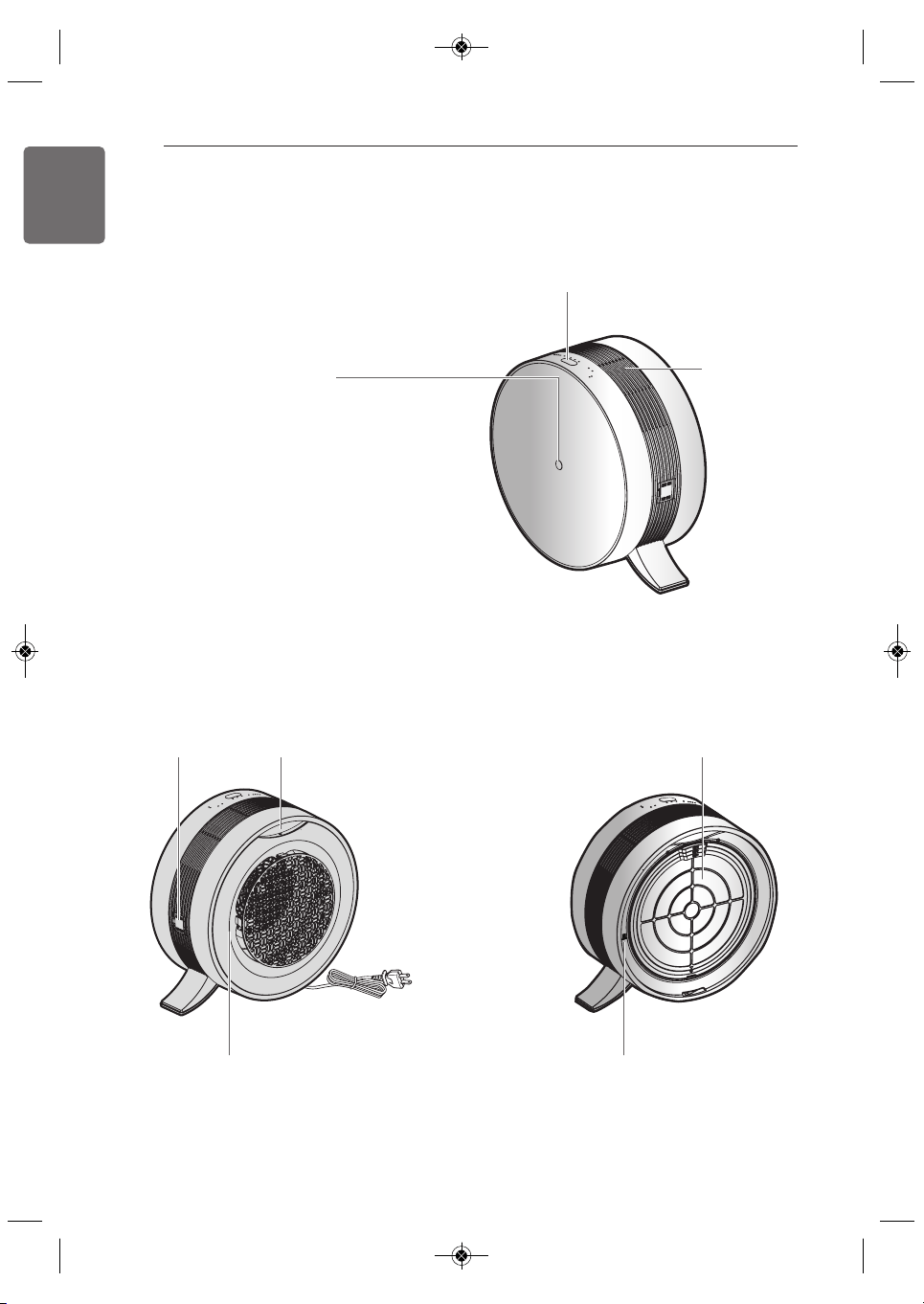
Dust sensor Handle
Filtration System
(Pre-Filter + PuriCare Main Filter
+ Deodorizing Filter)
Rear panel Gas sensor
Power cord
Display
Air outlet
Air quality indicator light
Lights to indicate the overall indoor air quality as
detected by the dust / gas sensor.
• Air Quality Levels
(contaminated) red → orange → yellow → green (clean)
❈
At start up, the air quality indicator light blinks white
for 30 seconds. After the sensor stabilizes, the
indicator displays the indoor air quality.
Back
Front
PRODUCT OVERVIEW
1,MFL68181320,영영 2018. 2. 7. 영영 1:35 Page 8
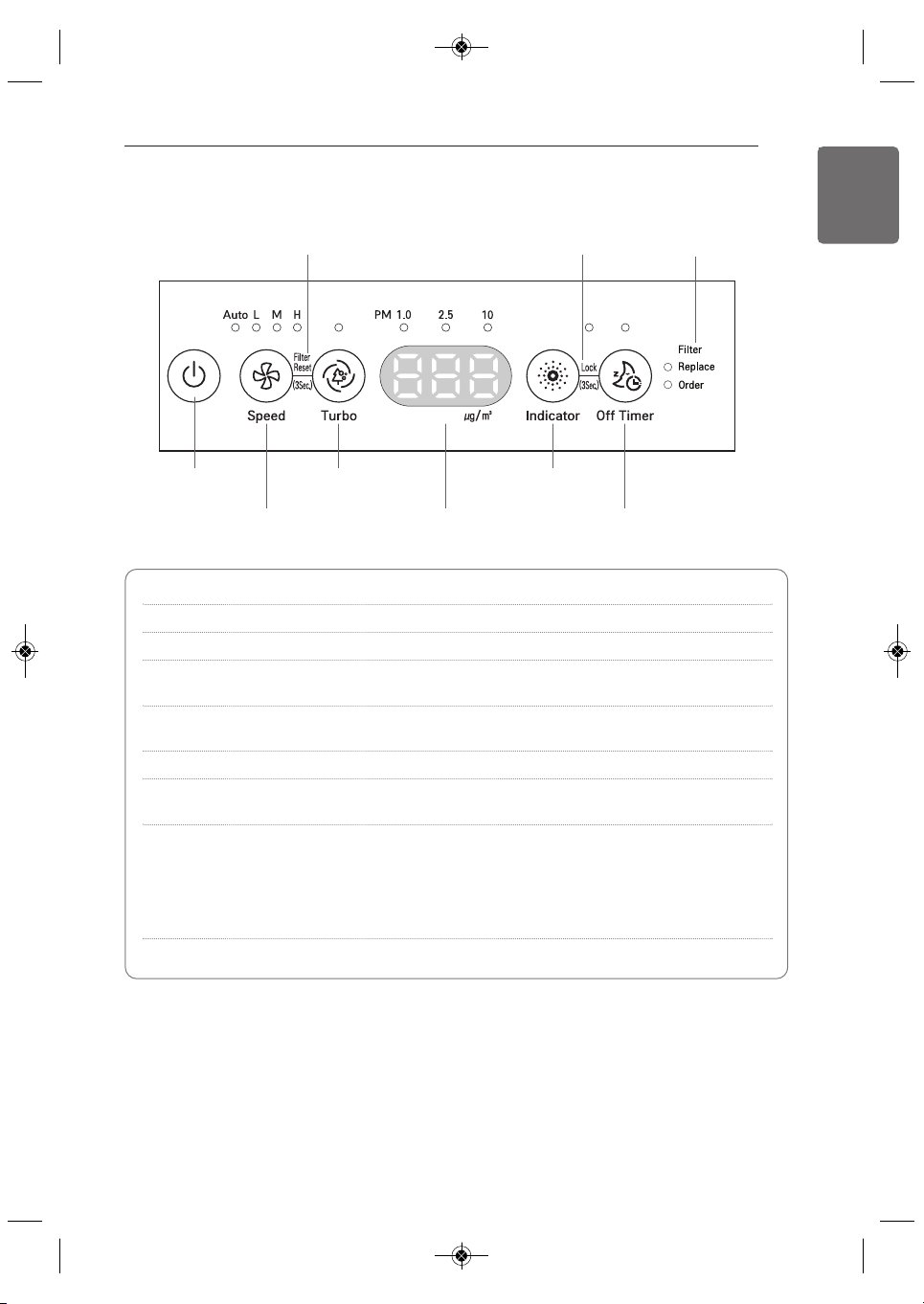
Filter Reset function Lock function
Start/Stop
button
Speed button PM indicator display Off Timer button
Filter Life light
Turbo button Indicator button
PRODUCT OVERVIEW
9
ENGLISH
Start/Stop button Starts and stops the product.
Speed button Adjusts the speed and volume of the fan.
Turbo button Cleans indoor air faster for 30 minutes.
Indicator button Toggles between PM density results for different dust particle
sizes.
Off Timer button Sets the appliance to sleep mode and automatically turns it off after
the selected amount of time.
Filter Reset function Resets operating time after replacing the filter.
Lock function Locks control panel so product won't be accidentally turned off or
settings changed by children or others.
Filter Life light Orange (Operating time: 3,600~4,000 hr)
- Time to order a replacement filter.
Red (Operating time: over 4,000 hr)
- Replace the filter.
* After replacing the filter, use the Filter Reset function to reset the
operating time.
PM density display Shows the density of dust for three different particle sizes.
Control Panel and Display
h Guide to PM (Particulate Matter)
PM10: dust particle size is equal or below 10
μ
m
(Sources include nearby fires and dust stirred up by vehicles on roads.)
PM2.5: dust particle size is equal or below 2.5
μ
m
(Sources include exhaust from motor vehicles or power plants, wood burning fires, and
some industrial processes.)
PM1.0: dust particle size is equal or below 1.0
μ
m (Sources include cigarette smoke and smog.)
1,MFL68181320,영영 2018. 2. 7. 영영 1:35 Page 9
10
PRODUCT OVERVIEW
ENGLISH
NOTE
!
• The effective life of the filters varies depending on the operational environment.
• The composition of filters can vary by model.
• Replacement filters can be purchased from a nearby LG service center or online through
LG.com.
• Use only the filters designed and approved by the manufacturer for use with this product.
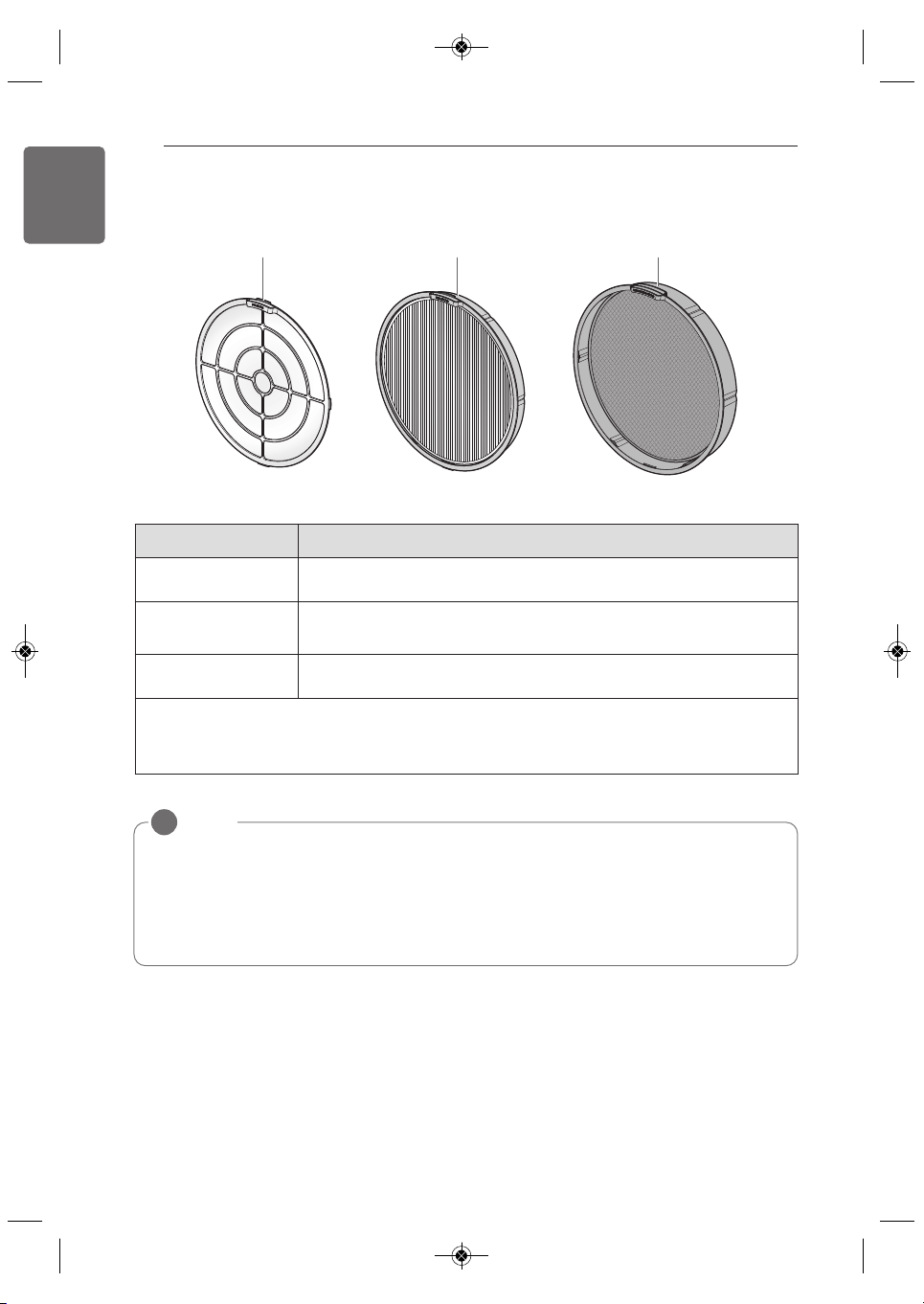
Pre-Filter PuriCare Main Filter Deodorizing Filter
Filter name Function
Pre-Filter
Filters out large particles to prolong the lifespan of the PuriCare Main
Filter.
PuriCare Main Filter
Removes fine particles such as pollen, cigarette smoke (particulates),
micro dust motes and animal fur.
Deodorizing Filter
Comprehensively removes odors from cigarette smoke, garbage, pets,
strong acids or bases (vinegar, bleach).
h The life-expectancy of the filters depends on the usage environment of the air purifier.
h Do not discard the filter case. Replacement filters do not include a new case.
PuriCare Filtration System
1,MFL68181320,영영 2018. 2. 7. 영영 1:35 Page 10
INSTALLATION
11
ENGLISH
This product is not designed for maritime use or for mobile installations such as in RVs,
trailers, or aircraft. Failure to follow this warning can result in product failure.
• Place within reach of a power outlet.
• Make sure air inlet and outlet are free from obstacles.
• Place on a level, stable surface where air circulates freely.
• Elevate air purifier on a stable table for more efficient operation.
Tips for Using the Air Purifier
• Avoid using the air purifier while cooking strong-smelling or fried foods such as fish.
- The vaporized oil from the cooking may affect the performance and life-expectancy of the
filters and the odors may cling to the filter.
• Do not place the air purifier closer than 3 1/4 ft (1 m) to the bed.
- The fan speed in sleep mode is low, but it could cause an unwanted draft.
• Do not place the air purifier in a corner.
- Avoid surrounding the appliance with furniture and electronic equipment or crowding it into a
corner. The air purifier works best when air is free to circulate around it.
!
WARNING
This appliance is not intended for use by persons (including children) with reduced physical,
sensory or mental capabilities, or lack of experience and knowledge, unless they have been
given supervision or instruction concerning use of the appliance by a person responsible for
their safety.
Children should be supervised to ensure that they do not play with the appliance.
!
WARNING
This appliance has a polarized plug (one blade is wider than the other). To reduce the risk of
electric shock, this plug is intended to fit in a polarized outlet only one way. If the plug does
not fit fully in the outlet, reverse the plug. If it still does not fit, contact a qualified electrician.
Do not attempt to defeat this safety feature.
!
WARNING
INSTALLATION
Choosing the Proper Location
1,MFL68181320,영영 2018. 2. 7. 영영 1:35 Page 11
12
INSTALLATION
ENGLISH
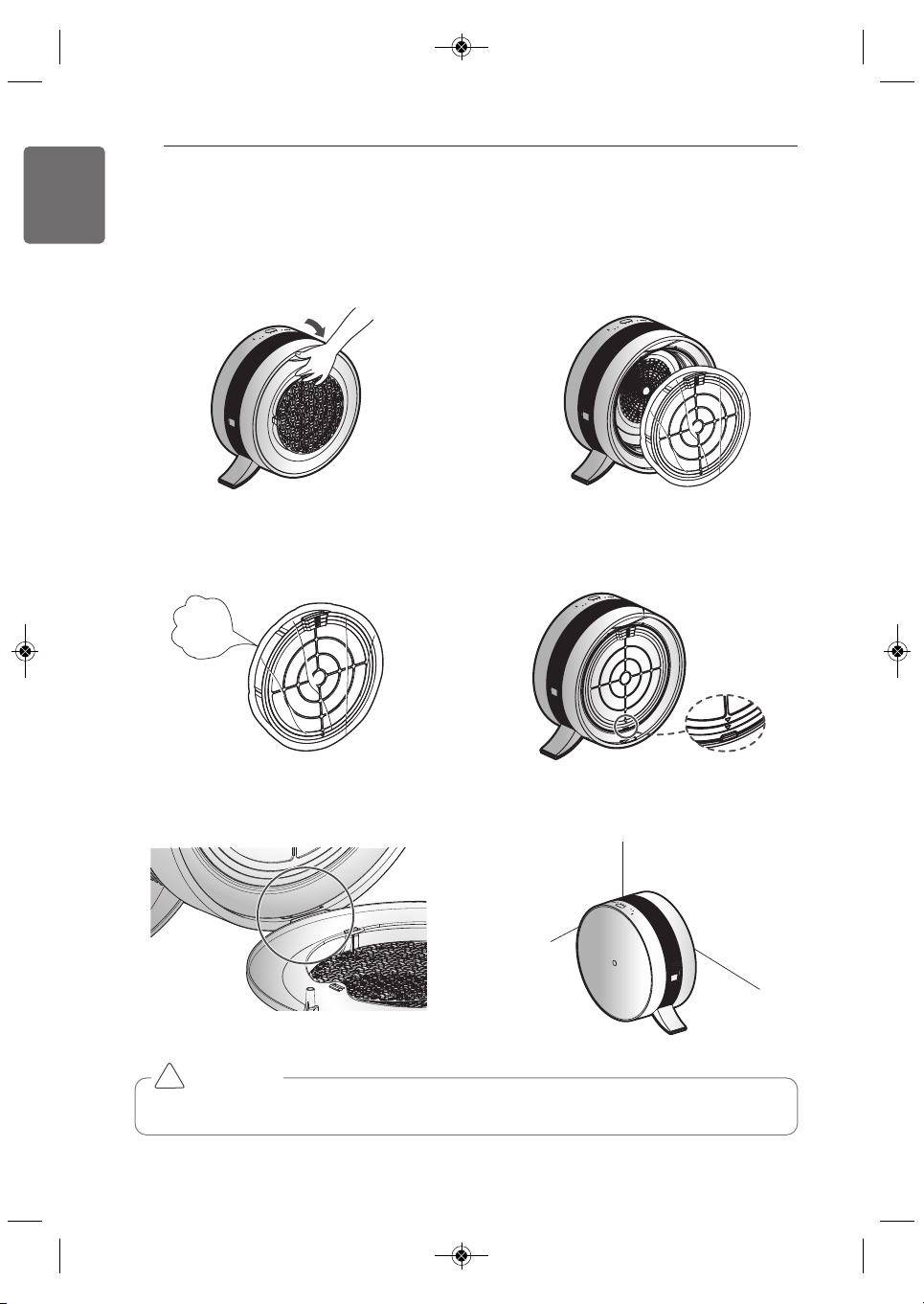
1. Pull to open the back panel.
3. Remove the filter from its packaging.
5. Align the back panel at the bottom and then
push it back into place.
2. Remove the filter from the appliance.
4. Insert the filter behind the bottom tab and
snap it into place at the top.
6. Place the air purifier on a stable, level
surface with a clear area around it for air to
circulate.
Remove
the vinyl.
Initial Installation of Filter
Remove the packaging before installing the filter.
Remove packaging from the filter before use or the product will not be able to circulate air.
!
CAUTION
1,MFL68181320,영영 2018. 2. 7. 영영 1:35 Page 12

OPERATION
13
ENGLISH
Air Purification
The air purifier cleans and refreshes indoor air.
1. Press the button to turn on the air purifier.
• A chime sounds, the operation mode indicator LED lights up, and the air quality indicator light
turns on.
2. Press the Speed button to select the desired fan speed.
• Press the button repeatedly to toggle through the settings: Auto → Low → Medium → High
→ Auto.
• The default mode is AUTO.
(The AUTO mode controls fan speed based on the air quality.)
• The sensor takes 30 seconds on initial startup to stabilize and prepare an air quality level
reading. After 30 seconds, the indoor air quality and PM density levels are displayed.
Indoor Air Quality Color Range
(contaminated) red → orange → yellow → green (clean)
OPERATION
…
1,MFL68181320,영영 2018. 2. 7. 영영 1:35 Page 13
14
OPERATION
ENGLISH
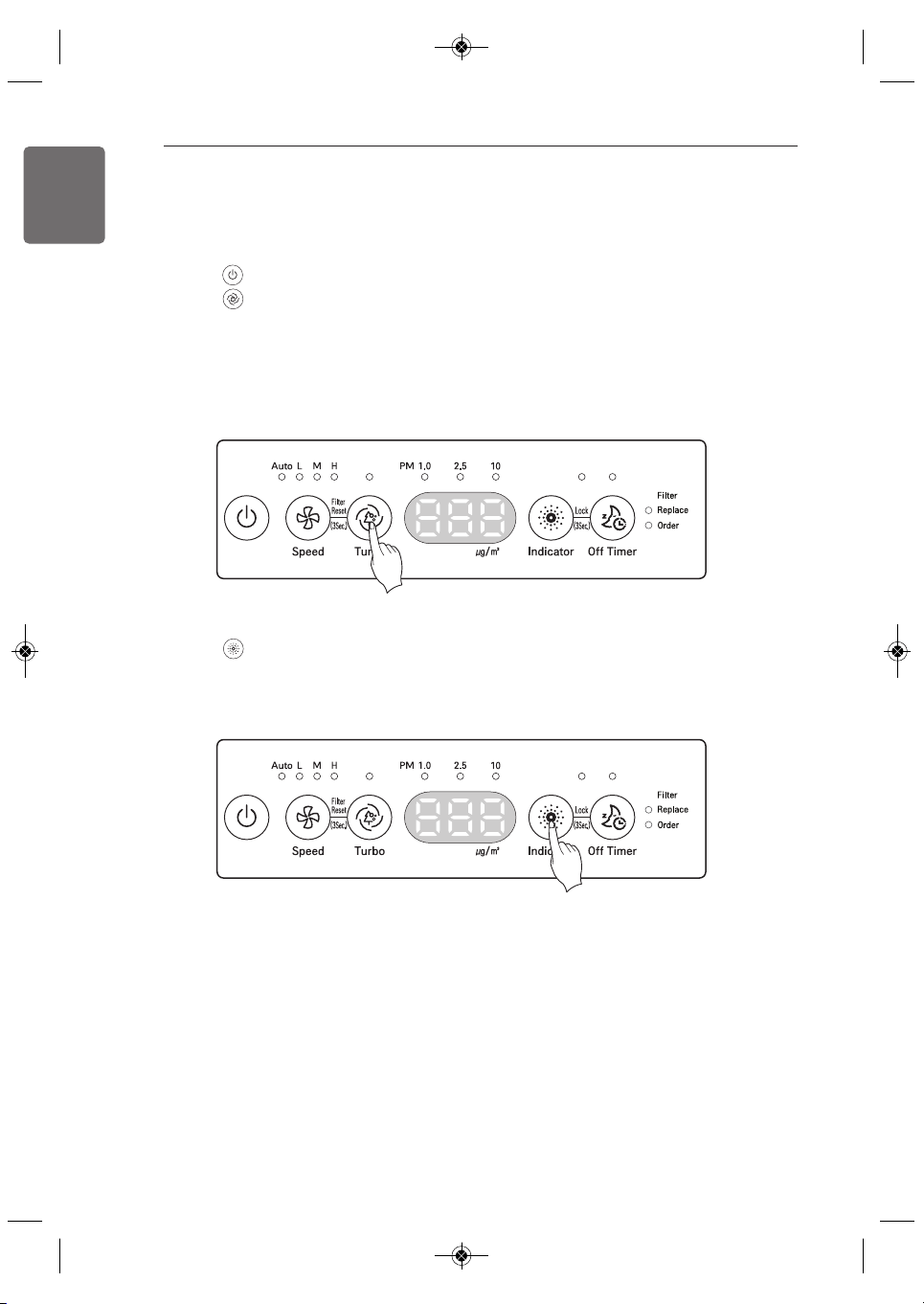
PM Indicator Display
1. Press the Indicator button to check the density of PM10/PM2.5/PM1.0.
• Pressing the button repeatedly toggles through to check the density of PM10 → PM2.5 →
PM1.0 in turn. The selected density displays for 10 seconds before the display reverts to the
highest measured PM level.
2. Check the dust particle size LED indicators.
• PM density is displayed based on the dust density result with the highest contamination
level.
For example, if PM10 density is 100 (normal), PM2.5 is 50 (bad), and PM1.0 is 30 (normal),
the value for PM2.5 is displayed for PM density.
Air Quality Indicator Light
Overall indoor air quality is displayed as one of four colors depending on the contamination level
of PM10, PM2.5, PM1.0, and odors.
(contaminated) red → orange → yellow → green (clean)
• The color that the air quality indicator light displays is based on the worst level among PM10,
PM2.5, PM1.0, and odor.
Turbo Function
Use this function to set the air purifier at the highest setting for 30 minutes.
1. Press the button.
2. Press the Turbo button.
• The air purifier operates at the highest setting for 30 minutes and then returns to the
previous setting.
• If the Turbo function is selected while the air purifier is in the sleep mode, the PM density
display turns off after 3 seconds, the Turbo function operates for 30 minutes, and then the
product returns to the sleep mode.
1,MFL68181320,영영 2018. 2. 7. 영영 1:35 Page 14

OPERATION
15
ENGLISH
•
In the example above, the PM1.0 density displays at 50 ug/m³ (a bad or orange level) and the dust particle
size LED indicator for PM1.0 is lit. This indicates that the PM1.0 level is higher than the PM10 or PM2.5
levels. If all the PM density levels are normal/good and the air quality indicator light is orange/red, the level
of odors is very high.
NOTE
• PM10 and PM2.5 density levels follow standards provided by the U.S. EPA (Environmental Protection
Agency).
- The overall air quality level displayed on the product may differ from the level announced by the EPA.
• The PM density level for PM1.0 is displayed in the same manner as the PM density level for PM2.5 (using
standards developed by LG Electronics).
• The displayed density of PM10 / PM2.5 could differ from the forecast of the EPA and from other
measurement devices or products.
- Indicated dust concentration values can differ from each other depending on the differences in dust
measuring methods and also from real dust concentration levels.
- The assessment of dust density was made against dust used for LG Electronics standards tests.
• The use of products which generate steam and micro particles (humidifiers, cooling devices, sprayers, etc.)
can change the micro dust density.
• Because the indoor air quality display shows the overall dust and odor level, it could differ from the density
value of PM10, PM2.5, and PM1.0
• Even in the same space, the PM10 density value could differ from other products due to air circulation.
• The displayed PM density value could change depending on the installation environment (including the
presence of sofas, beds, carpets, vacuum cleaners, humidity, smoke, oils, and other factors).
• The displayed density value of PM10/PM2.5/PM1.0 could change depending on the surrounding
environment (construction site, roadside, factory, etc.)
• The density of micro dust could be higher near exit doors, windows, and vents or anywhere where outside
air enters.
• Do not clean the sensor with anything but water. Doing so may cause product failure.
Indoor Air Quality Levels
h PM density ranges from 8 to 999 in increments of 1. PM density values follow the data
sheets provided by the sensor supplier.
Overall
air quality
Red
Orange
Yellow
Green
Status
Dust density (unit
μ
g/m
3
)
Odor density
PM 10 PM 2.5 PM 1.0 Odor
Very Bad
Equal or above
255
Equal or above
56
Equal or above
56
Strong
Weak
Bad 155~254 36~55 36~55
Normal 55~154 13~35 13~35
Good 0~54 0~12 0~12
↕
1,MFL68181320,영영 2018. 2. 7. 영영 1:35 Page 15
16
OPERATION
ENGLISH
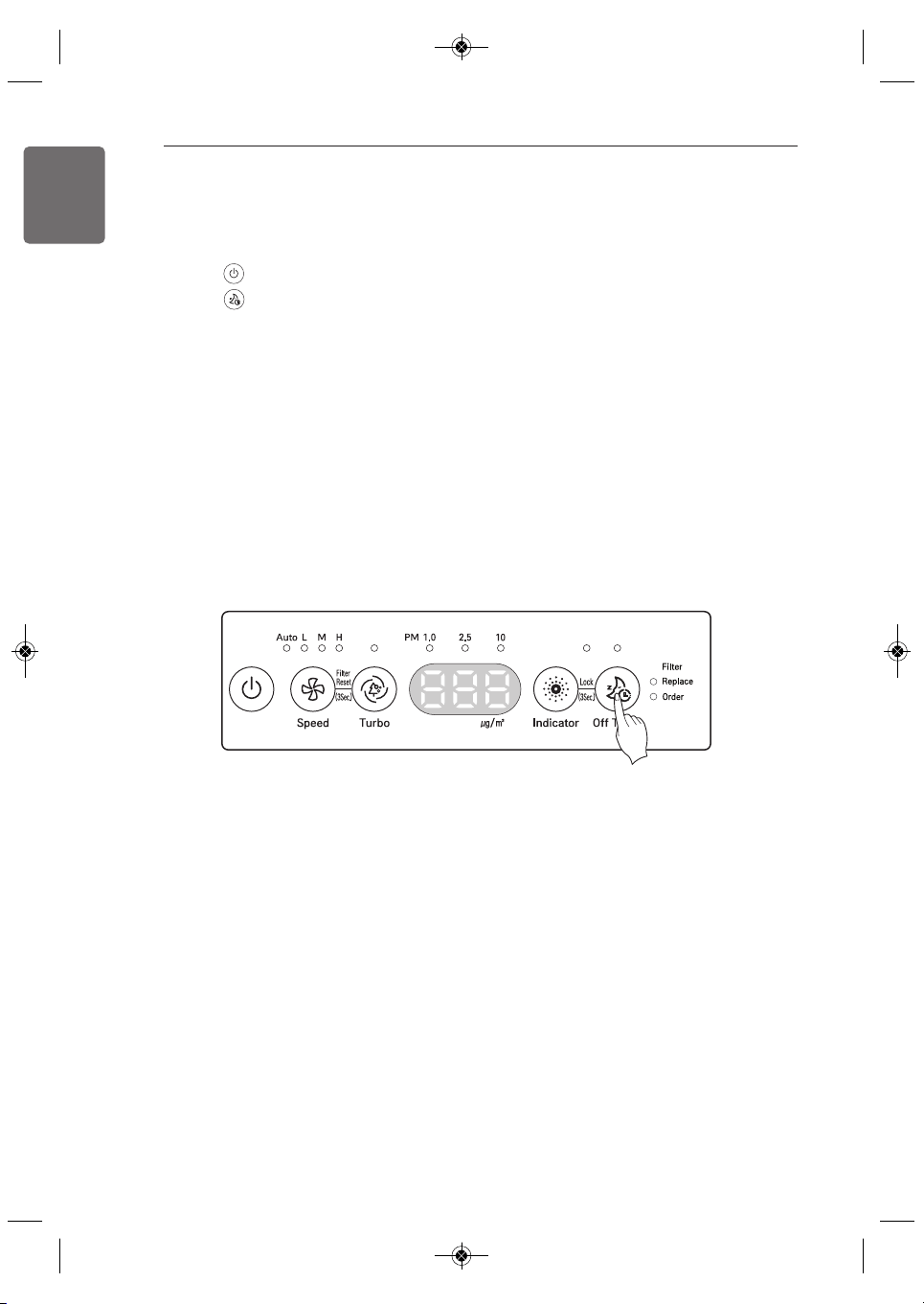
Off Timer Function
Use this to set the air purifier in sleep mode before it turns off automatically.
1. Press the button to turn on the air purifier.
2. Press the Off Timer button to set the amount of time in sleep mode until the air purifier
automatically turns off.
• The amount of time in sleep mode can be set by pressing the Off Timer button repeatedly to
toggle through the options: 2 hours, 4 hours, 8 hours, 12 hours, disabled (reverts to normal
display).
• For example, if set for two hours the product operates for two hours in sleep mode then
automatically turns off.
Once Off Timer is set, only the Off Timer LED is lighted. All other lights on the product,
including the air quality light, are turned off. The fan is maintained at a low speed to keep noise
to a minimum. Once Off Timer is set, pressing the Off Timer button again displays the set turn
off time and wakes the display up.
3. To disable the Off Timer function, press the Off Timer button repeatedly until 12 appears in the
display. Press once more to disable the function and return the display to normal.
1,MFL68181320,영영 2018. 2. 7. 영영 1:35 Page 16
OPERATION
17
ENGLISH
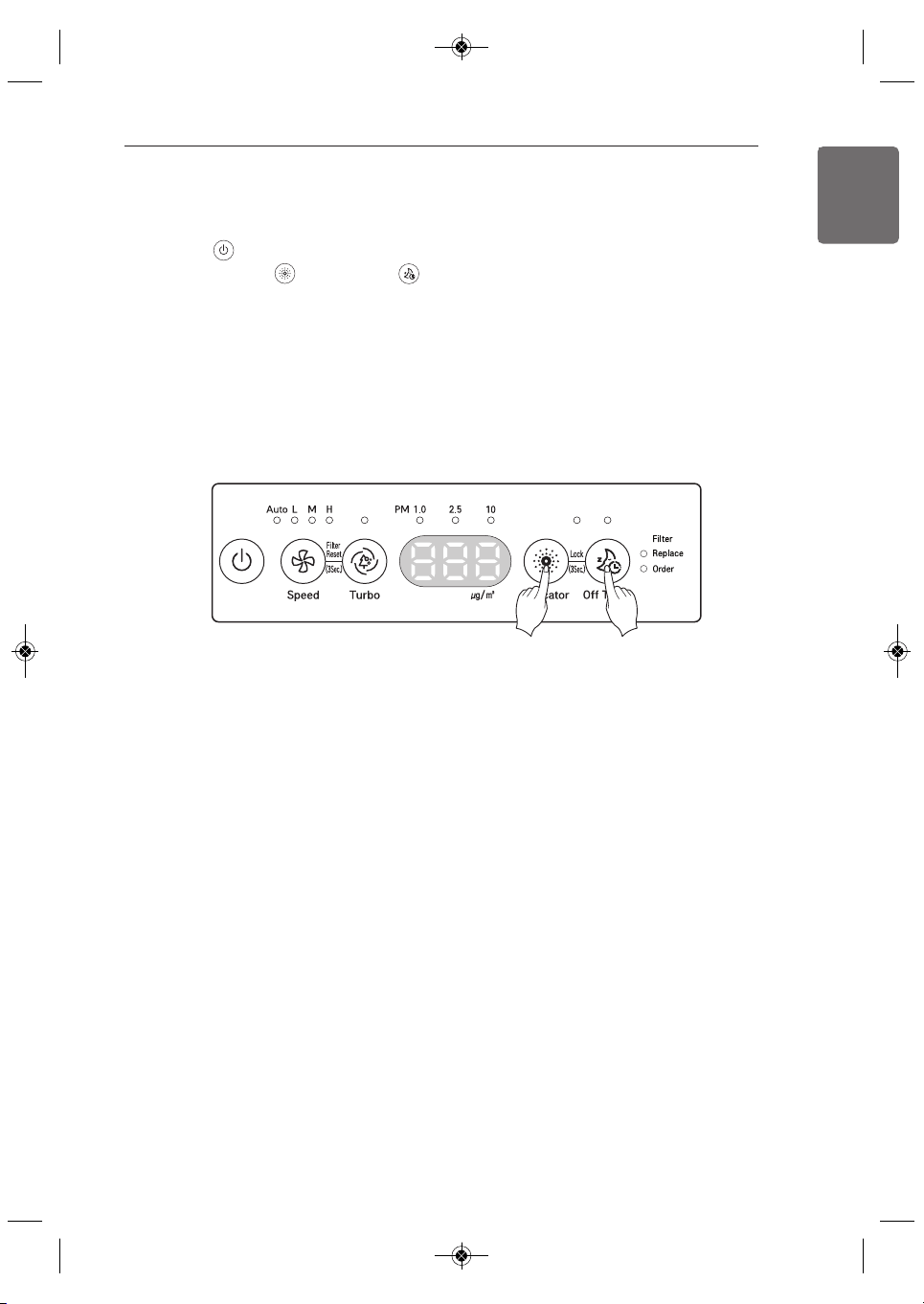
Lock Function
1. Press the button.
2. Press and hold the Indicator and Off Timer buttons at the same time for 3 seconds or
until a beep sounds and the LED lights up.
• The Lock function helps protect the product from unwanted operation by children or others.
• To disable the Lock function, press and hold the Indicator and Off Timer buttons at the same
time for three seconds. A beep sounds and the LED turns off when the Lock function is
disabled.
• The Lock function cannot be set while the power cord is unplugged.
1,MFL68181320,영영 2018. 2. 7. 영영 1:35 Page 17
18
OPERATION
ENGLISH
Filter Life Light
The Filter Life light turns on based on the operating time.
The orange light turns on after 3,600 - 4,000 hours.
It is time to order a replacement filter.
The red light turns on after 4,000 hours.
It is time to replace the filter.
If the Light is Red
1.
Press the power button to turn off the product and then unplug the product
2. Open the back panel of the product and check the filter. If the filters are contaminated, clean
or replace them.
Refer to the Maintenance section of this manual for instructions on cleaning and replacing the
filters.
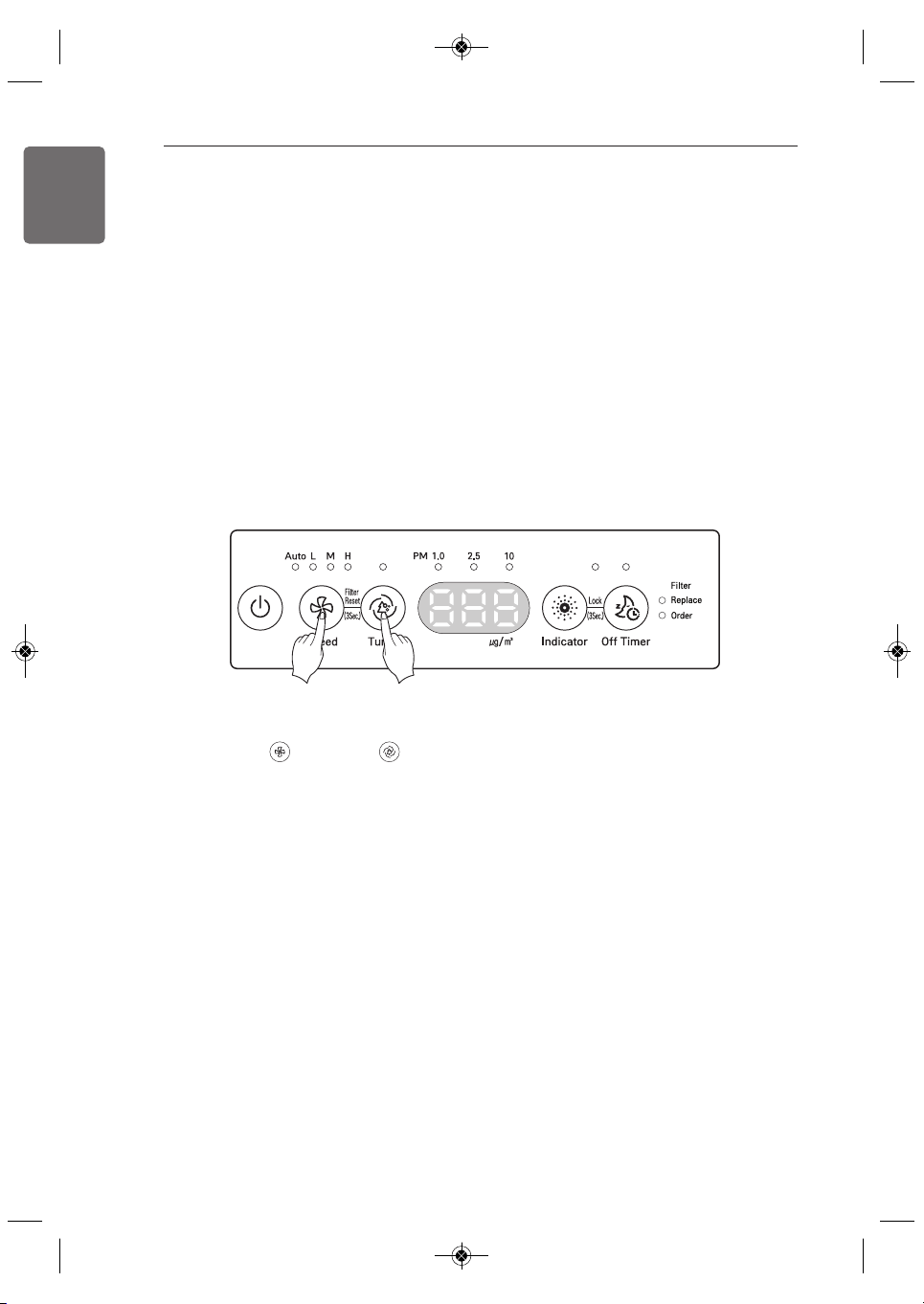
Resetting the Filter Life Light
Press and hold the Speed and Turbo buttons at the same time for 3 seconds or longer
(Filter Reset function).
1,MFL68181320,영영 2018. 2. 7. 영영 1:35 Page 18
MAINTENANCE
19
ENGLISH
MAINTENANCE
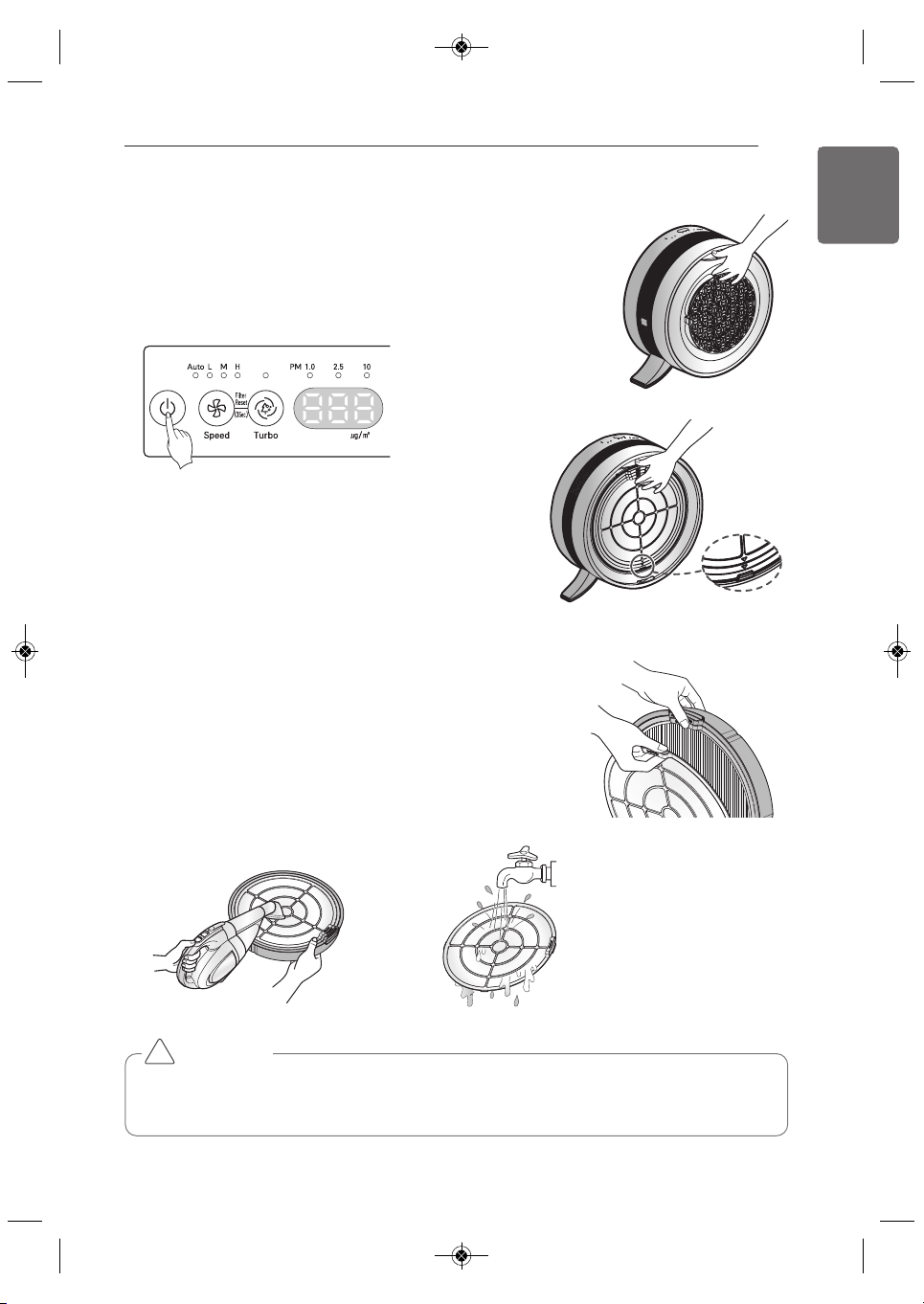
Cleaning the Filters
1. Turn off the power and unplug the appliance.
Then pull open the back panel.
2. Pull the filter set by the top handle to remove it from
the appliance.
• Dust may accumulate on the filter net.
• Before disassembling filter set, move the filters
to a convenient location for vacuuming.
• Place a newspaper or paper towel down to catch
any loose dust.
3. While holding the filter case over the newspaper,
press downward on the handle of the pre-filter to
separate it from the filter set.
Clean the pre-filter using a vacuum cleaner or brush.
If the filter is very dirty, rinse it under running water
after cleaning it with a vacuum cleaner.
• Allow pre-filter to dry completely, out of direct sunlight, before reinstalling.
• Do not use pre-filter while damp. Doing so may cause odor.
• Do not operate air purifier without pre-filter installed.
!
CAUTION
1,MFL68181320,영영 2018. 2. 7. 영영 1:35 Page 19
20
MAINTENANCE
ENGLISH
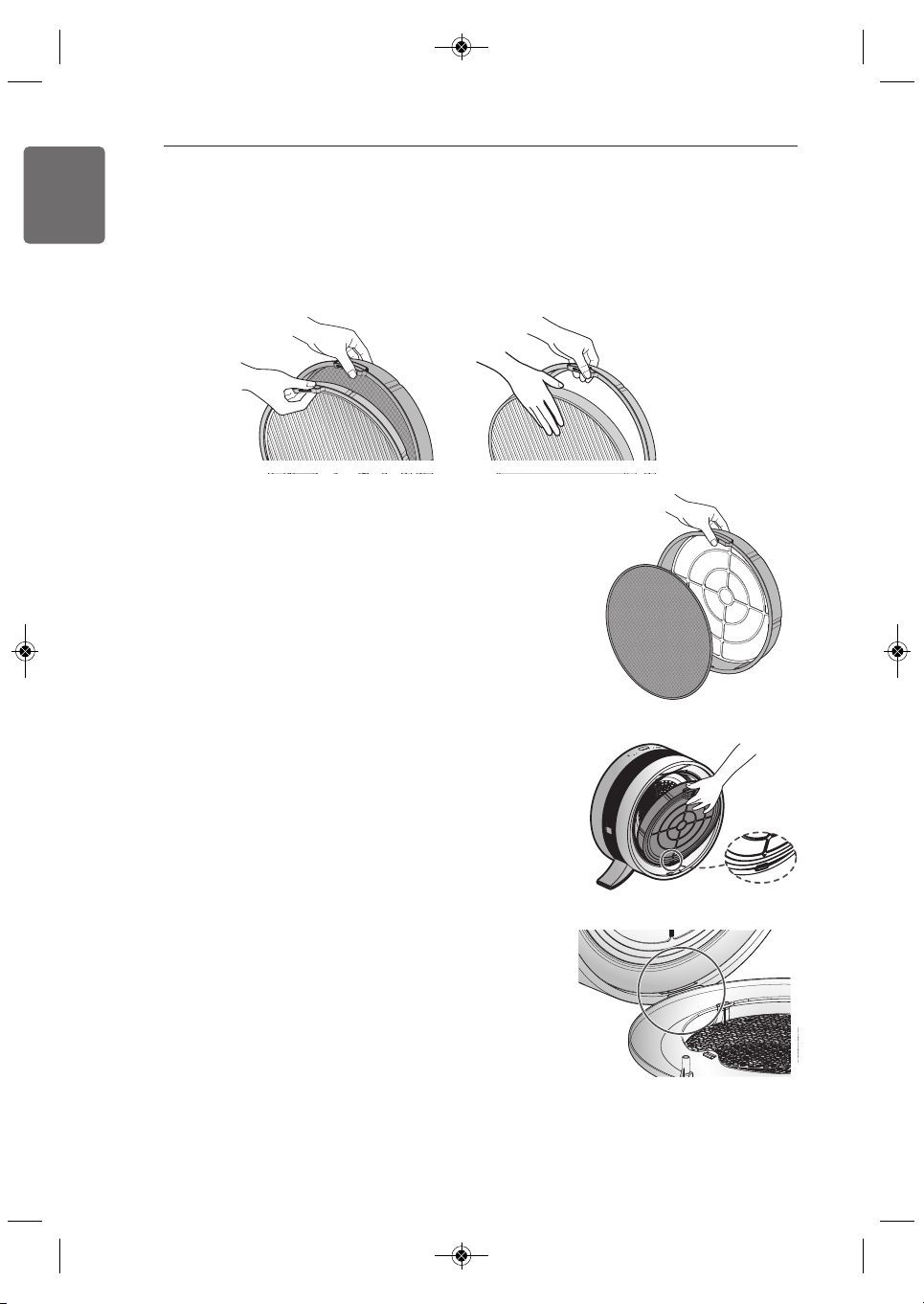
5. Finally, disassemble the deodorizing filter
(if replacing the entire filter set).
6. After cleaning or replacing filters, assemble the filters in the
set in the reverse order from removing them. Be sure to insert
the filters behind the bottom tab and align the filter handles at
the top of the product.
7. Reassemble the back panel by aligning the bottom and then
snapping the panel up into place.
• Do not wash the PuriCare Main Filter or the deodorizing filter with water. Replace them when
they become very dirty. Do not expose them to water during operation.
• The life-expectancy of filters may differ depending on the usage environment.
4. Next, remove the PuriCare Main Filter (if replacing the entire filter set).
1,MFL68181320,영영 2018. 2. 7. 영영 1:35 Page 20
MAINTENANCE
21
ENGLISH
CAUTION
• Do not clean the body or display using products containing bleach or other alkalines.
• Do not clean the surface of the Air Purifier using sulfuric acid, hydrochloric acid or organic
solvents (thinners, kerosene, or others). Do not put stickers on the surface. Doing so may
damage the surface of the product.
• Do not use abrasive pads or cloths when cleaning. They may scratch the surface of the
product.
• Do not allow water inside product while cleaning the exterior. Turn off power and unplug
the power cord before cleaning. (Always check whether fan is moving.)
!
Cleaning the Exterior
Wipe the Air Purifier with a soft cloth and warm water.
The air inlet especially can accumulate dust and should be cleaned periodically.
* Contact an LG Customer Information Center for replacement filters.
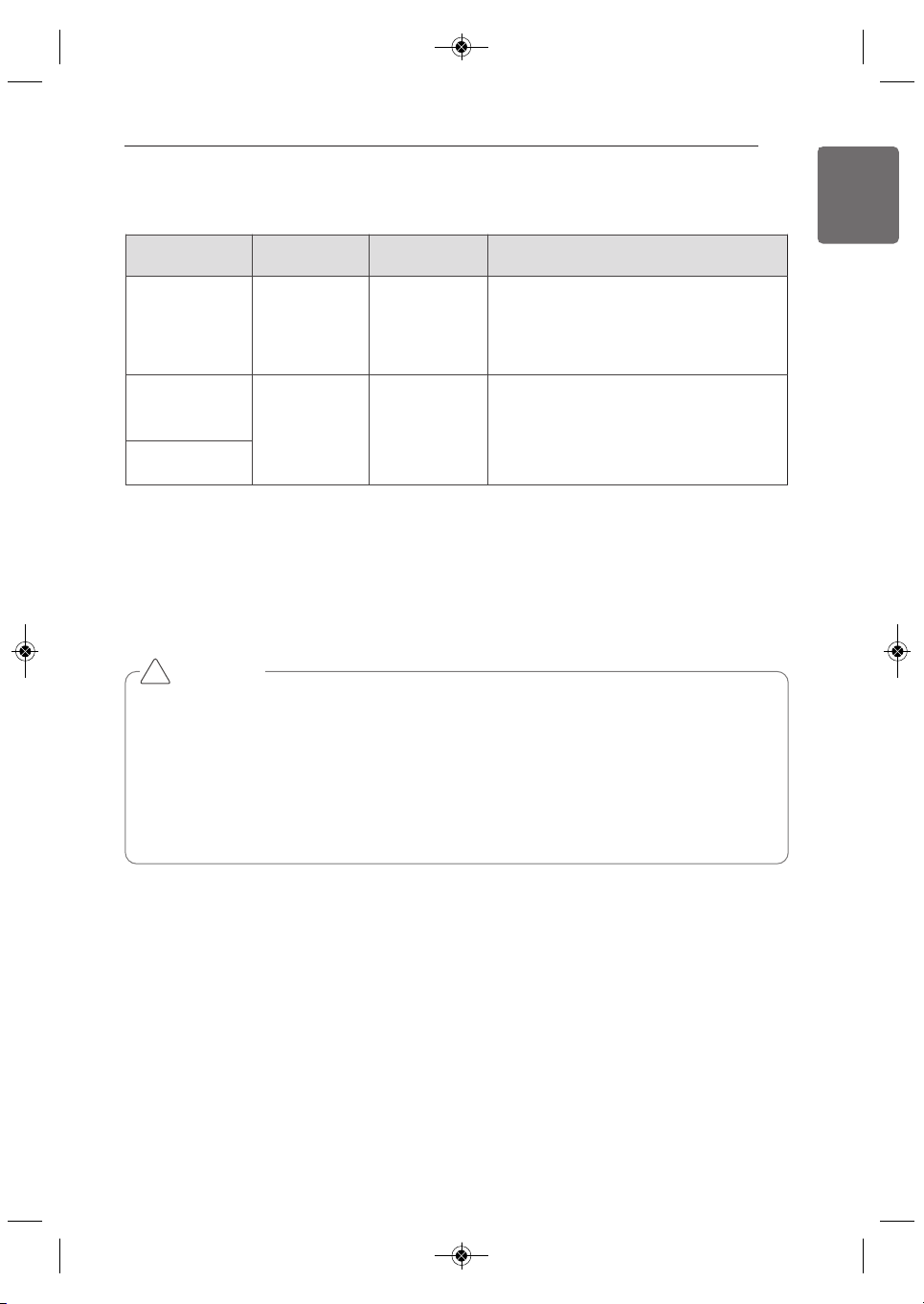
Filter Maintenance Schedule
Filter types Classification Cleaning cycle Cleaning Method
Pre-Filter washable
about every
month
Clean pre-filter with vacuum cleaner or
brush, followed by rinsing under running
water if very dirty.
PuriCare Main
Filter
not washable,
replace
about every
year
* The replacement cycle for PuriCare
Main Filter and Deodorizing Filter may
vary depending on the usage
environment.
Deodorizing Filter
1,MFL68181320,영영 2018. 2. 7. 영영 1:35 Page 21
22
ENGLISH
MAINTENANCE
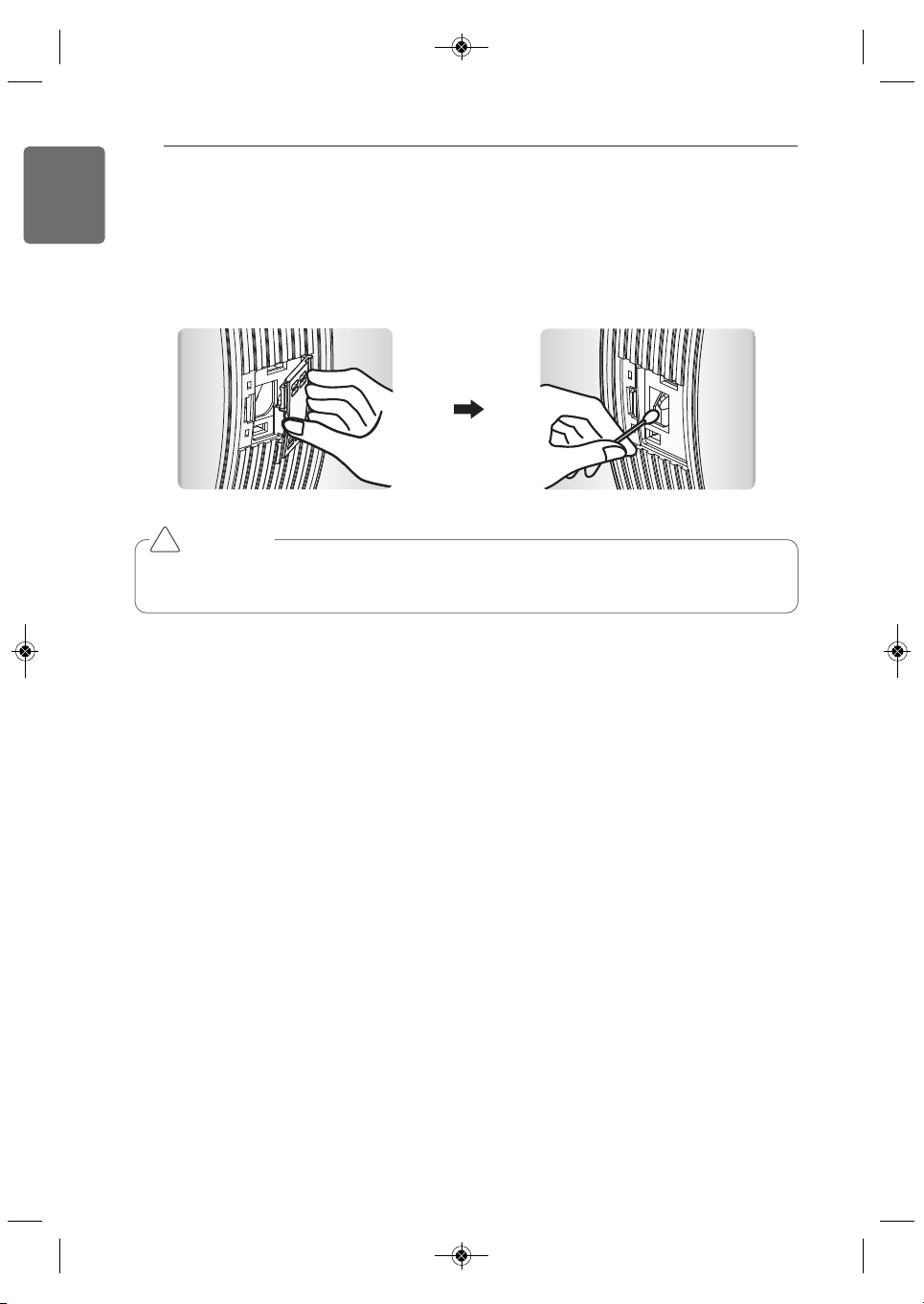
Cleaning the Sensor
Turn off and unplug the product.
Open the dust sensor cover.
Clean the dust sensor lens with cotton swab.
(Clean once every six months.)
CAUTION
• Use only water to clean the sensor. Failure to follow this warning can result in product
failure.
!
1,MFL68181320,영영 2018. 2. 7. 영영 1:35 Page 22
MAINTENANCE
23
ENGLISH
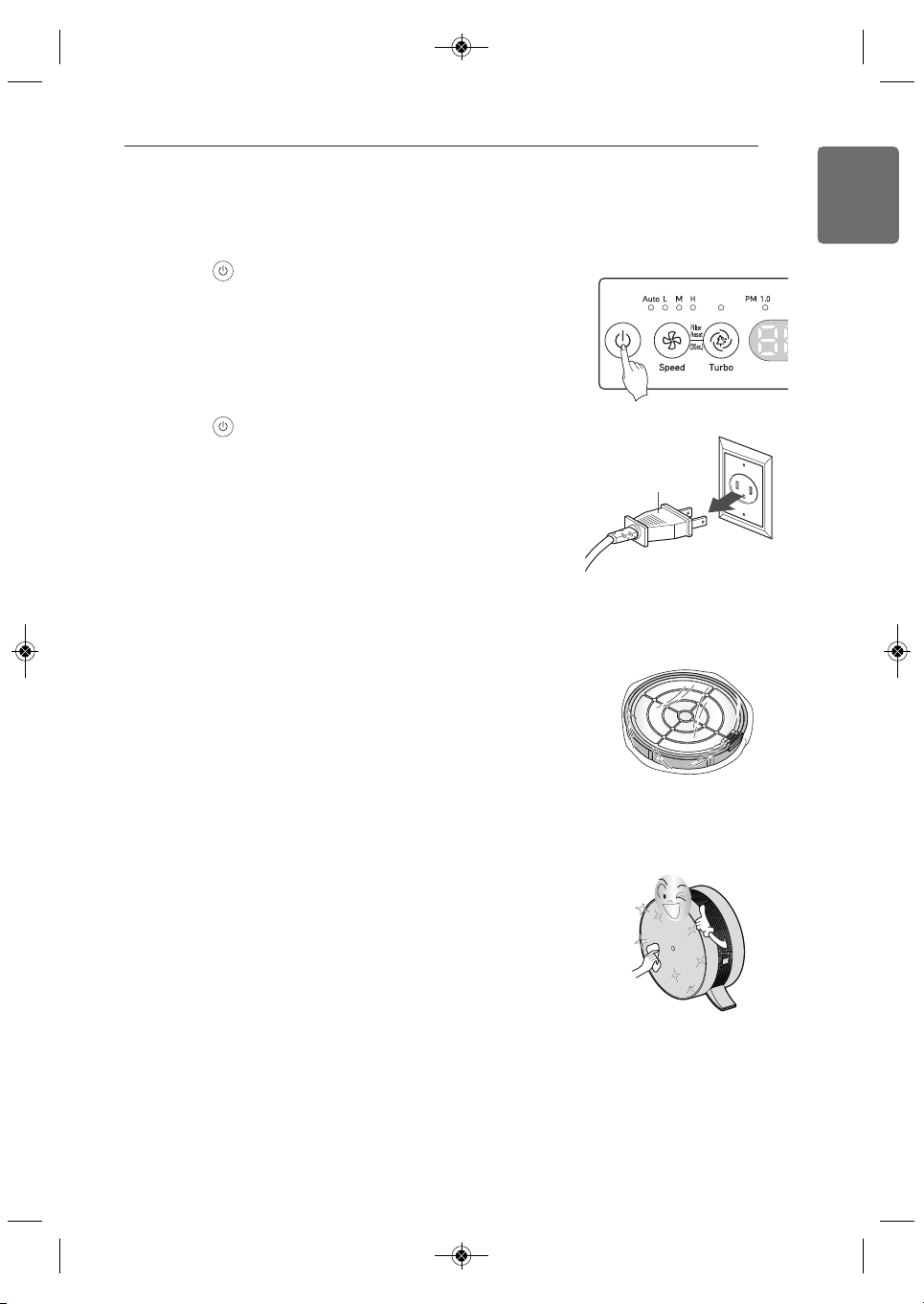
Storing the Product
If the product will not be used for an extended period, store it in a dry place out of direct sunlight.
1. Press the button to turn on the air purifier.
• Run the air purifier for an hour on a clear day to remove
any musty odor inside the product.
2. Press the button to turn off the air purifier and then
unplug it.
3. Remove the filters and store them tightly in a vinyl bag out
of direct sunlight.
• If the filters are stored in a humid place, they may take
on a musty or mildewy odor.
4. Clean the air purifier before storing it. Store the appliance in its vinyl cover to prevent any dust
or foreign objects from getting inside.
• Use a soft cloth when cleaning the appliance to avoid
scratching the surface.
• Store the appliance in a cool area out of direct sunlight.
5. Do not store the product where it will be exposed to high
humidity or direct sunlight.
• Doing so may result in odor, product deformation, or product malfunction.
Power plug
1,MFL68181320,영영 2018. 2. 7. 영영 1:35 Page 23
24
TROUBLESHOOTING
ENGLISH
TROUBLESHOOTING
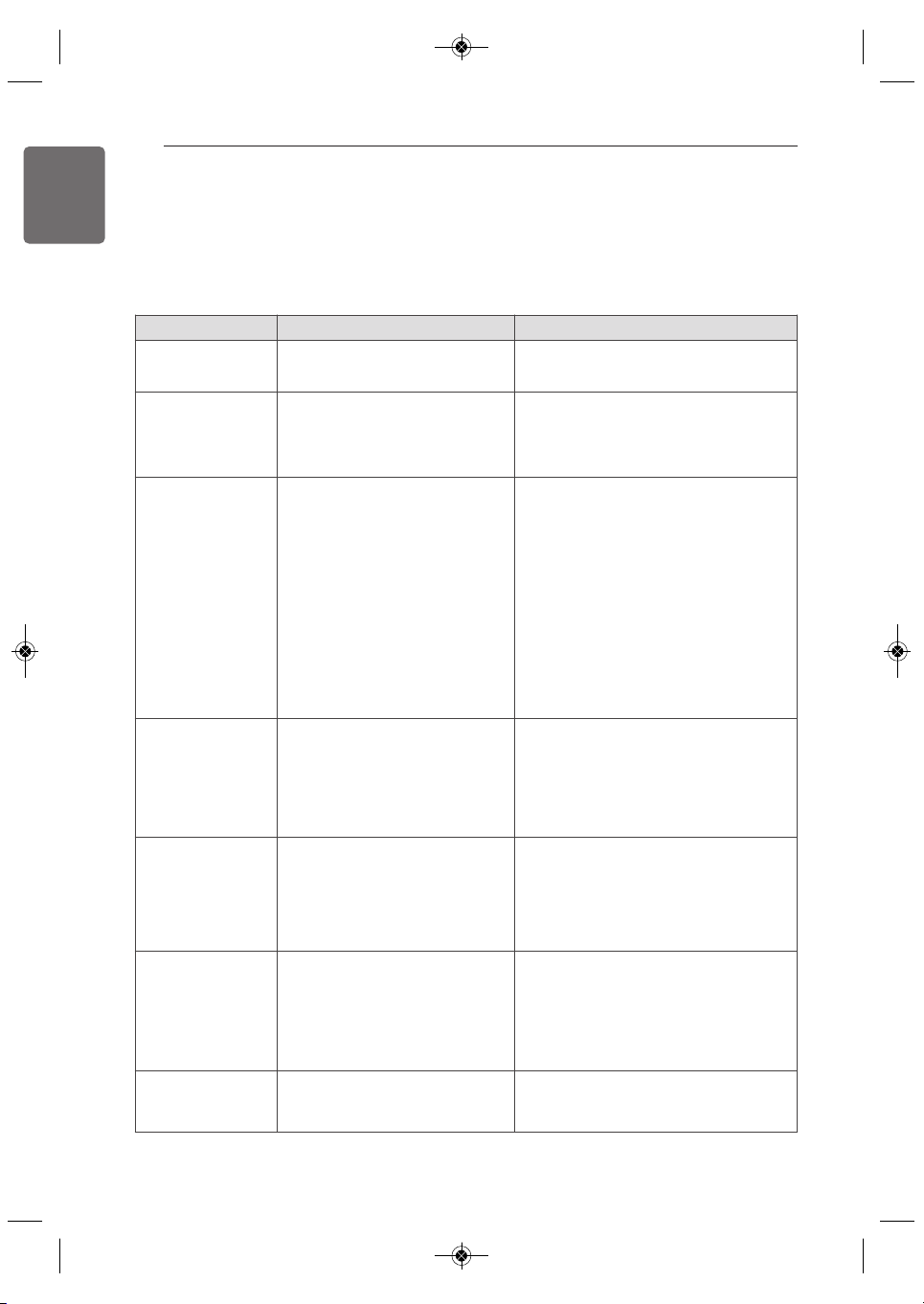
Before Calling for Service
Problem Possible Cause Solutions
Air purifier does
not turn on
• Power cord not plugged in
• Incorrect power rating
• Plug cord securely into socket.
• Make sure outlet is rated for 115V.
Air output is weak,
product makes a
noise
• Pre-filter is clogged
• Dust accumulation on the pre-
filter
• Clean the pre-filter.
• Replace the pre-filter.
Air purification
does not work well
• Indoor air quality is very bad
• Dust has built up on the pre-
filter
• Usage area is too large
• Nearby objects are blocking air
circulation
• The product is installed in a
corner
• Ventilate the room before using the air
purifier.
• Clean or replace the pre-filter.
• Use the product in a smaller area or an
area more protected from the influx of
outside air.
• Remove nearby obstacles or move the
product to a different location.
• Move the product.
Strange odor
coming from air
outlet
• Installed in area with heavy
smoke or odors
• Odor coming from deodorizing
filter
• Very heavy smoke or odors may
degrade the performance of the filters.
Ventilate the area before using the air
purifier.
• Replace the deodorizing filter.
There is an odor,
but the Indicator
lamp does not
change.
• Gas sensor may not respond
to food odors as harmful
• Gas sensor may not respond to food
odors as harmful, but odors are
removed by the deodorizing filter.
Air quality shows
red continuously
• Air purifier may be unable to
process amount of
contamination in air
• Water or oil sprayed near air
purifier
• Try moving product to another room to
clear the indicator.
• Do not spray water or oil near the air
purifier.
Buttons do not
work
• Lock function is enabled
• Press and hold Indicator and Off Timer
for 3 seconds to disable the Lock
function.
If there is a problem with the product, check the following first before calling for service.
1,MFL68181320,영영 2018. 2. 7. 영영 1:35 Page 24
TROUBLESHOOTING
25
ENGLISH
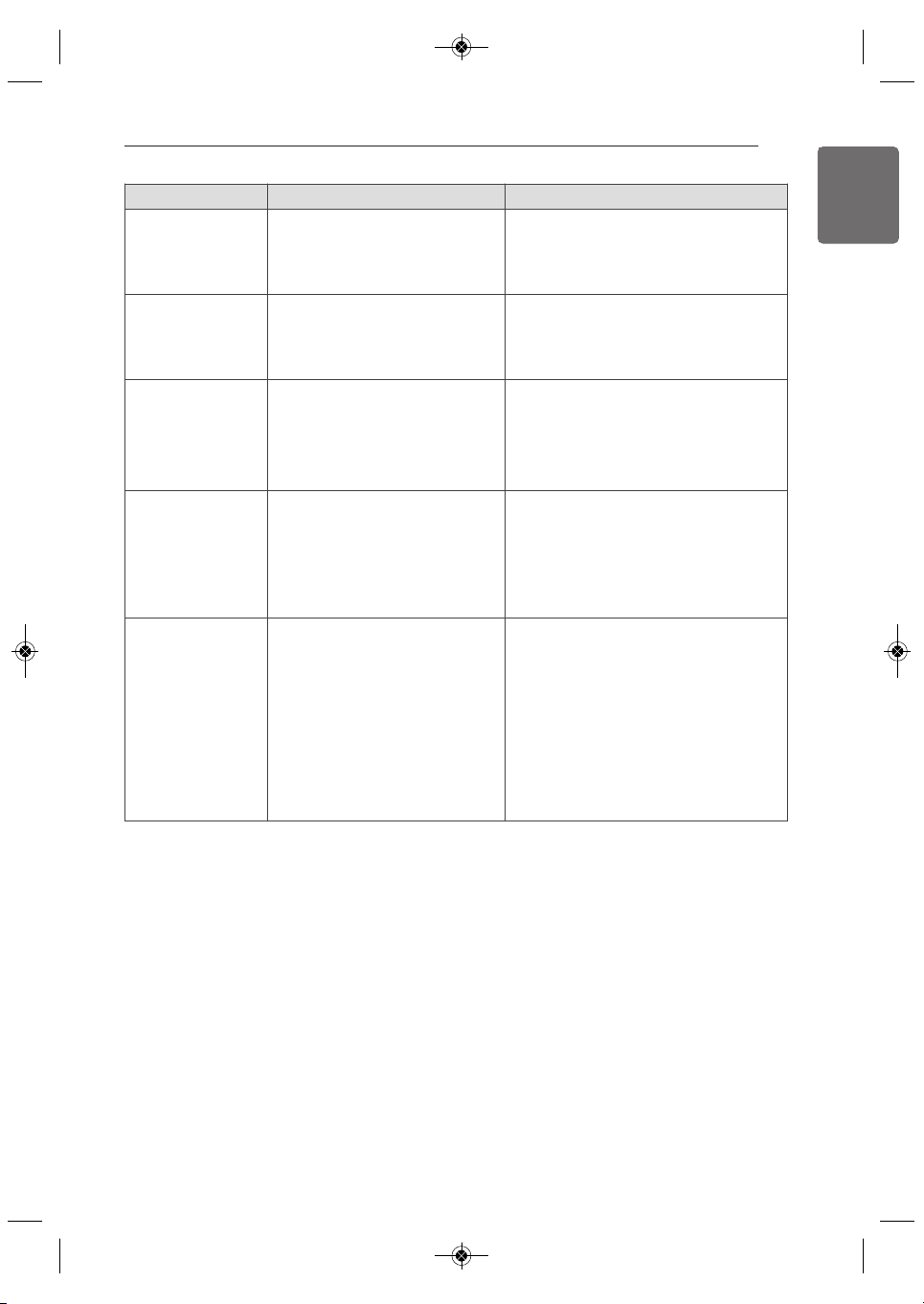
Problem Possible Cause Solutions
There has been no
change in micro
dust
concentration.
• Sensor may be dirty or blocked
by foreign material
• Air purifier may be in enclosed
area
• See instructions for cleaning sensor.
• Indoor air quality may stay the same in
an enclosed area.
The fine dust
concentration
value keeps
showing high.
• Air purifier installed in area
with constant influx of outside
air
• Levels can remain high in areas where
there is a constant influx of outside air.
Air quality light
remains
red/orange while
PM levels show
low/normal
• Air quality issue is from odor
• The air quality indicator is an overall
evaluation based on odor and dust. If
an odor is strong while PM levels are
low, the light may remain on
red/orange.
The air quality
indicator differs
from the EPA
guide
• The air purifier and EPA air
quality values are measured
differently
• The EPA guide indicates an average
value during a given time period and
the air purifier's air quality indicator
measures and displays on a real-time
basis.
The filter produces
odors.
• The deodorizing filter has
become dirty
• The air purifier is being used
instead of a vent hood while
cooking
• Replace the filter. Filter life-expectancy
can vary based on usage environment.
• Filter life can be greatly reduced if the
air purifier is used while cooking
strong-smelling or oily food. Do not
use the product in place of a vent
hood. Ventilate the area during
cooking to remove strong odors and
oily splatter, then use the air purifier to
eliminate any remaining odors.
1,MFL68181320,영영 2018. 2. 7. 영영 1:35 Page 25
26
WARRANTY
ENGLISH
WARRANTY (USA)
ARBITRATION NOTICE: THIS LIMITED WARRANTY CONTAINS AN ARBITRATION PROVISION
THAT REQUIRES YOU AND LG TO RESOLVE DISPUTES BY BINDING ARBITRATION INSTEAD
OF IN COURT, UNLESS YOU CHOOSE TO OPT OUT. IN ARBITRATION, CLASS ACTIONS AND
JURY TRIALS ARE NOT PERMITTED. PLEASE SEE THE SECTION TITLED “PROCEDURE FOR
RESOLVING DISPUTES” BELOW.
Should your LG Air Purifier fail due to a defect in materials or workmanship under normal home
use, during the warranty period set forth below, LG will at its option repair or replace the product.
This limited warranty is valid only to the original retail purchaser of the product and applies only
when purchased and used within the United States, including U.S. Territories. Proof of original
retail purchase is required to obtain warranty service under this limited warranty.
• Replacement products and parts are warranted for the remaining portion of the original
warranty period or ninety (90) days, whichever is greater.
• Replacement products and parts may be new or remanufactured.
THIS WARRANTY IS IN LIEU OF ANY OTHER WARRANTY, EXPRESS OR IMPLIED, INCLUDING
WITHOUT LIMITATION, ANY WARRANTY OF MERCHANTABILITY OR FITNESS FOR A
PARTICULAR PURPOSE. TO THE EXTENT ANY IMPLIED WARRANTY IS REQUIRED BY LAW, IT
IS LIMITED IN DURATION TO THE EXPRESS WARRANTY PERIOD ABOVE. NEITHER THE
MANUFACTURER NOR ITS U.S. DISTRIBUTOR SHALL BE LIABLE FOR ANY INCIDENTAL,
CONSEQUENTIAL, INDIRECT, SPECIAL, OR PUNITIVE DAMAGES OF ANY NATURE,
INCLUDING WITHOUT LIMITATION, LOST REVENUES OR PROFITS, OR ANY OTHER DAMAGE
WHETHER BASED IN CONTRACT, TORT, OR OTHERWISE.
Some states do not allow the exclusion or limitation of incidental or consequential damages or
limitations on how long an implied warranty lasts, so the above exclusion or limitation may not
apply to you. This warranty gives you specific legal rights and you may also have other rights that
vary from state to state.
THIS LIMITED WARRANTY DOES NOT COVER:
• Service trips to deliver, pick up, or install or repair the product; instruction to the customer on
operation of the product; repair or replacement of fuses or correction of wiring or plumbing, or
correction of unauthorized repairs/installation.
• Failure of the product to perform during power failures and interrupted or inadequate electrical
service.
• Damage caused by leaky or broken water pipes, frozen water pipes, restricted drain lines,
inadequate or interrupted water supply or inadequate supply of air.
• Damage resulting from operating the product in a corrosive atmosphere or contrary to the
instructions outlined in the product’s owner’s manual.
• Damage to the product caused by accidents, pests and vermin, lightning, wind, fire, floods, or
acts of God.
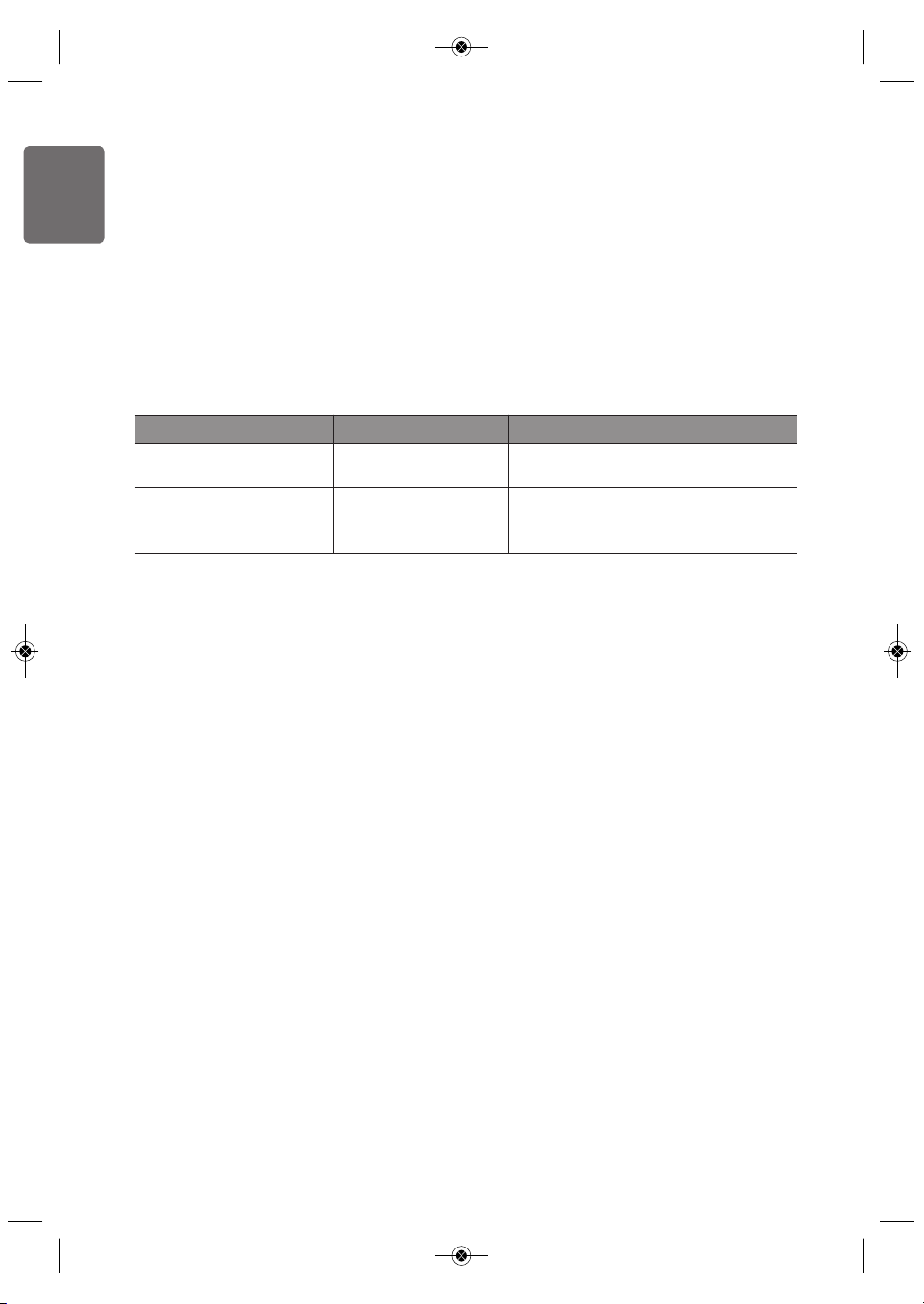
Warranty Period Scope of Warranty Remark
One (1) year from date of
original retail purchase
Any internal / functional
Parts and Labor
LG will provide parts and labor to repair
or replace defective parts.
Ten (10) years from date of
original retail purchase
Smart Inverter Motor
Parts Only. Customer will be responsible
for any labor or in-home service to
replace defective parts.
1,MFL68181320,영영 2018. 2. 7. 영영 1:35 Page 26

WARRANTY
27
ENGLISH
• Damage or failure caused by unauthorized modification or alteration, or if it is used for other
than the intended purpose, or any water leakage where the unit was not properly installed.
• Damage or failure caused by incorrect electrical current, voltage, or plumbing codes,
commercial or industrial use, or use of accessories, components, or consumable cleaning
products that are not approved by LG.
• Damage caused by transportation and handling, including scratches, dents, chips, and/or other
damage to the finish of your product, unless such damage results from defects in materials or
workmanship and is reported within one (1) week of delivery.
• Damage or missing items to any display, open box, discounted, or refurbished product.
• Products with original serial numbers that have been removed, altered, or cannot be readily
determined. Model and serial numbers, along with original retail sales receipts, are required for
warranty validation.
• Increases in utility costs and additional utility expenses.
• Repairs when your product is used for other than normal and usual household use (e.g.
commercial use, in offices and recreational facilities) or contrary to the instructions outlined in
the product’s owner’s manual.
• Costs associated with removal of your product from your home for repairs.
• The removal and reinstallation of the product if it is installed in an inaccessible location or is not
installed in accordance with published installation instructions, including LG’s owner’s and
installation manuals.
• Damage resulting from misuse, abuse, improper installation, repair, or maintenance. Improper
repair includes use of parts not approved or specified by LG.
The cost of repair or replacement under these excluded circumstances shall be borne by the
consumer.
TO OBTAIN WARRANTY SERVICE AND ADDITIONAL INFORMATION
For additional product information, visit the LG website at http://www.lg.com
For assistance using this product or to schedule service,
contact LG Electronics at 1-800-243-0000 (US).
For further assistance, write:
LG Electronics
201 James Record Road
Huntsville, Alabama 35813
1,MFL68181320,영영 2018. 2. 7. 영영 1:35 Page 27
28
WARRANTY
ENGLISH
PROCEDURE FOR RESOLVING DISPUTES:
ALL DISPUTES BETWEEN YOU AND LG ARISING OUT OF OR RELATING IN ANY WAY TO THIS
LIMITED WARRANTY OR THE PRODUCT SHALL BE RESOLVED EXCLUSIVELY THROUGH
BINDING ARBITRATION, AND NOT IN A COURT OF GENERAL JURISDICTION. BINDING
ARBITRATION MEANS THAT YOU AND LG ARE EACH WAIVING THE RIGHT TO A JURY TRIAL
AND TO BRING OR PARTICIPATE IN A CLASS ACTION.
Definitions. For the purposes of this section, references to “LG” mean LG Electronics U.S.A.,
Inc., its parents, subsidiaries and affiliates, and each of their officers, directors, employees,
agents, beneficiaries, predecessors in interest, successors, assigns and suppliers; references to
“dispute” or “claim” shall include any dispute, claim or controversy of any kind whatsoever
(whether based in contract, tort, statute, regulation, ordinance, fraud, misrepresentation or any
other legal or equitable theory) arising out of or relating in any way to the sale, condition or
performance of the product or this Limited Warranty.
Notice of Dispute. In the event you intend to commence an arbitration proceeding, you must first
notify LG in writing at least 30 days in advance of initiating the arbitration by sending a letter to
LG at LG Electronics, USA, Inc. Attn: Legal Department- Arbitration 1000 Sylvan Ave, Englewood
Cliffs 07632. You and LG agree to engage in good faith discussions in an attempt to amicably
resolve your claim. The notice must provide your name, address, and telephone number; identify
the product that is the subject of the claim; and describe the nature of the claim and the relief
being sought. If you and LG are unable to resolve the dispute within 30 days, either party may
proceed to file a claim for arbitration.
Agreement to Binding Arbitration and Class Action Waiver. Upon failure to resolve the dispute
during the 30 day period after sending written notice to LG, you and LG agree to resolve any
claims between us only by binding arbitration on an individual basis, unless you opt out as
provided below. Any dispute between you and LG shall not be combined or consolidated with a
dispute involving any other person’s or entity’s product or claim. More specifically, without
limitation of the foregoing, any dispute between you and LG shall not under any circumstances
proceed as part of a class or representative action. Instead of arbitration, either party may bring
an individual action in small claims court, but that small claims court action may not be brought
on a class or representative basis.
Arbitration Rules and Procedures. To begin arbitration of a claim, either you or LG must make a
written demand for arbitration. The arbitration will be administered by the American Arbitration
Association (“AAA”) and will be conducted before a single arbitrator under the AAA’s Consumer
Arbitration Rules that are in effect at the time the arbitration is initiated (referred to as the “AAA
Rules”) and under the procedures set forth in this section. The AAA Rules are available online at
www.adr.org/consumer. Send a copy of your written demand for arbitration, as well as a copy of
this provision, to the AAA in the manner described in the AAA Rules. You must also send a copy
of your written demand to LG at LG Electronics, USA, Inc. Attn: Legal Department- Arbitration
1000 Sylvan Avenue Englewood Cliffs, NJ 07632. If there is a conflict between the AAA Rules
and the rules set forth in this section, the rules set forth in this section will govern. This
arbitration provision is governed by the Federal Arbitration Act. Judgment may be entered on the
arbitrator’s award in any court of competent jurisdiction. All issues are for the arbitrator to decide,
except that issues relating to the scope and enforceability of the arbitration provision and to the
arbitrability of the dispute are for the court to decide. The arbitrator is bound by the terms of this
provision.
Governing Law. The law of the state of your residence shall govern this Limited Warranty and
any disputes between us except to the extent that such law is preempted by or inconsistent with
applicable federal law.
1,MFL68181320,영영 2018. 2. 7. 영영 1:35 Page 28

WARRANTY
29
ENGLISH
Fees/Costs. You do not need to pay any fee to begin an arbitration. Upon receipt of your written
demand for arbitration, LG will promptly pay all arbitration filing fees to the AAA unless you seek
more than $25,000 in damages, in which case the payment of these fees will be governed by the
AAA Rules. Except as otherwise provided for herein, LG will pay all AAA filing, administration and
arbitrator fees for any arbitration initiated in accordance with the AAA Rules and this arbitration
provision. If you prevail in the arbitration, LG will pay your attorneys’ fees and expenses as long
as they are reasonable, by considering factors including, but not limited to, the purchase amount
and claim amount. Notwithstanding the foregoing, if applicable law allows for an award of
reasonable attorneys’ fees and expenses, an arbitrator can award them to the same extent that a
court would. If the arbitrator finds either the substance of your claim or the relief sought in the
demand is frivolous or brought for an improper purpose (as measured by the standards set forth
in Federal Rule of Civil Procedure 11(b)), then the payment of all arbitration fees will be governed
by the AAA Rules. In such a situation, you agree to reimburse LG for all monies previously
disbursed by it that are otherwise your obligation to pay under the AAA Rules. Except as
otherwise provided for, LG waives any rights it may have to seek attorneys’ fees and expenses
from you if LG prevails in the arbitration.
Hearings and Location. If your claim is for $25,000 or less, you may choose to have the
arbitration conducted solely on the basis of (1) documents submitted to the arbitrator, (2) through
a telephonic hearing, or (3) by an in-person hearing as established by the AAA Rules. If your claim
exceeds $25,000, the right to a hearing will be determined by the AAA Rules. Any in-person
arbitration hearings will be held at a location within the federal judicial district in which you reside
unless we both agree to another location or we agree to a telephonic arbitration.
Opt Out. You may opt out of this dispute resolution procedure. If you opt out, neither you nor LG
can require the other to participate in an arbitration proceeding. To opt out, you must send notice
to LG no later than 30 calendar days from the date of the first consumer purchaser’s purchase of
the product by either: (i) sending an e-mail to [email protected], with the subject line: “Arbitration
Opt Out” or (ii) calling 1-800-980-2973. You must include in the opt out e-mail or provide by
telephone: (a) your name and address; (b) the date on which the product was purchased; (c) the
product model name or model number; and (d) the serial number (the serial number can be found
(i) on the product; or (ii) online by accessing https://www.lg.com/us/support/repair-
service/schedule-repair-continued and clicking on “Find My Model & Serial Number”).
You may only opt out of the dispute resolution procedure in the manner described above (that is,
by e-mail or telephone); no other form of notice will be effective to opt out of this dispute
resolution procedure. Opting out of this dispute resolution procedure will not affect the coverage
of the Limited Warranty in any way, and you will continue to enjoy the full benefits of the Limited
Warranty. If you keep this product and do not opt out, then you accept all terms and conditions of
the arbitration provision described above.
1,MFL68181320,영영 2018. 2. 7. 영영 1:35 Page 29

30
ENGLISH
1,MFL68181320,영영 2018. 2. 7. 영영 1:35 Page 30