MODEL
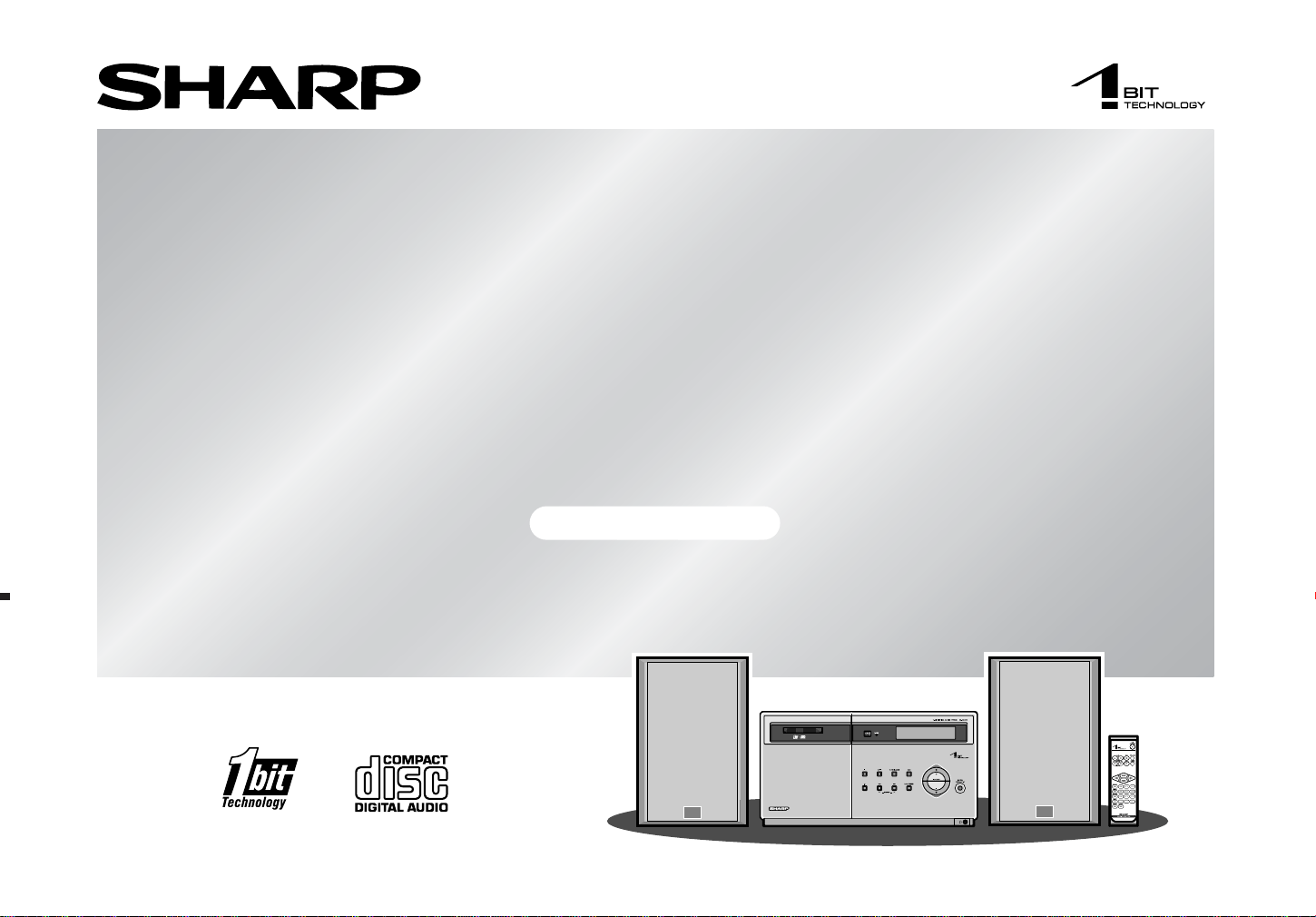
SD-EX200
1-BIT DIGITAL AUDIO SYSTEM
OPERATION MANUAL
SD-EX200_sec
TINSZ0523AWZZ
2
SD-EX200
03/3/14
SD-EX200_sec.fm
TINSZ0523AWZZ
Important Instruction
- Special Notes -
SPECIAL NOTES
NOTE
This equipment has been tested and found to comply with the limits for a Class B dig-
ital device, pursuant to Part 15 of the FCC Rules. These limits are designed to provide
reasonable protection against harmful interference in a residential installation. This
equipment generates, uses, and can radiate radio frequency energy and, if not in-
stalled and used in accordance with the instructions, may cause harmful interference
to radio communications. However, there is no guarantee that interference will not oc-
cur in a particular installation. If this equipment does cause harmful interference to ra-
dio or television reception, which can be determined by turning the equipment off and
on, the user is encouraged to try to correct the interference by one or more of the fol-
lowing measures:
z Reorient or relocate the receiving antenna.
z Increase the separation between the equipment and receiver.
z Connect the equipment into an outlet on a circuit different from that to which the
receiver is connected.
z Consult the dealer or an experienced radio/TV technician for help.
WARNING
FCC Regulations state that any unauthorized changes or modifications to this equip-
ment not expressly approved by the manufacturer could void the user's authority to
operate this equipment.
Note to CATV system installer:
This reminder is provided to call the CATV system installer's attention to Article 820-
40 of the National Electrical Code that provides guidelines for proper grounding and,
in particular, specifies that the cable ground shall be connected to the grounding sys-
tem of the building, as close to the point of cable entry as practical.
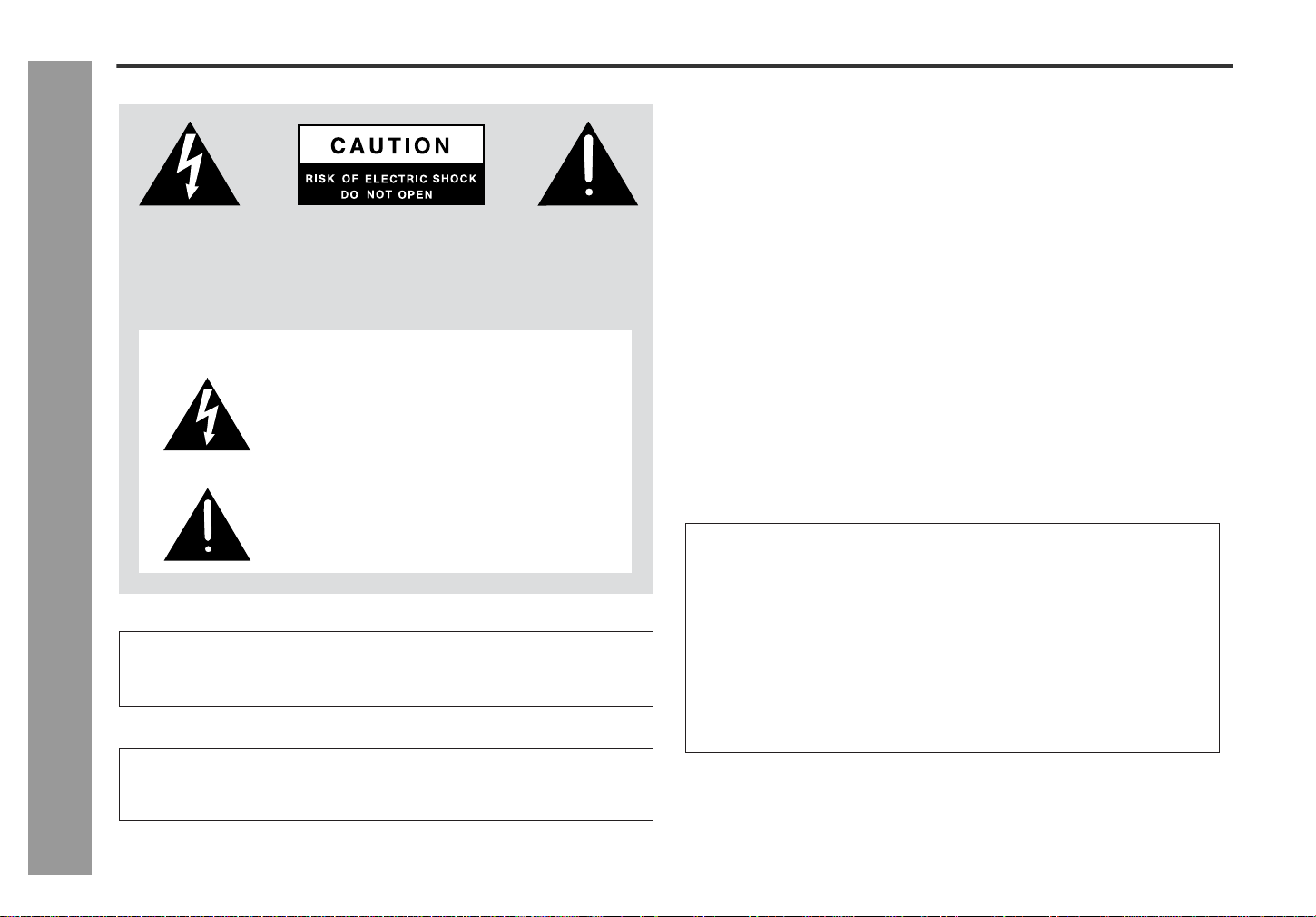
CAUTION: TO REDUCE THE RISK OF ELECTRIC SHOCK, DO NOT
REMOVE COVER (OR BACK).
NO USER-SERVICEABLE PARTS INSIDE. REFER SERVICING TO
QUALIFIED SERVICE PERSONNEL.
Explanation of Graphical Symbols:
The lightning flash with arrowhead symbol, within an
equilateral triangle, is intended to alert the user to the
presence of uninsulated “dangerous voltage” within
the product’s enclosure that may be of sufficient mag-
nitude to constitute a risk of electric shock to persons.
The exclamation point within an equilateral triangle is
intended to alert the user to the presence of important
operating and maintenance (servicing) instructions in
the literature accompanying the appliance.
0010
FOR YOUR RECORDS
For your assistance in reporting this unit in case of loss or theft, please record
below the model number and serial number which are located on the rear of the
unit.
Please retain this information.
Model number .................................................................................
Serial number .................................................................................
Date of purchase .................................................................................
Place of purchase .................................................................................
0010
WARNING: TO REDUCE THE RISK OF FIRE OR ELECTRIC
SHOCK, DO NOT EXPOSE THIS APPLIANCE TO RAIN OR
MOISTURE.
0010
Caution - use of controls or adjustments or performance of proce-
dures other than those specified herein may result in hazardous
radiation exposure.
0010
3
SD-EX200
03/3/14
SD-EX200_sec.fm
TINSZ0523AWZZ
2
3
4
5
6
7
8
1
Important Instruction
- Important safety instructions -
IMPORTANT SAFETY INSTRUCTIONS
1
Read Instructions - All the safety and operating instructions should
be read before the product is operated.
2
Retain Instructions - The safety and operating instructions should be
retained for future reference.
3
Heed Warnings - All warnings on the product and in the operating
instructions should be adhered to.
4
Follow Instructions - All operating and use instructions should be
followed.
5
Cleaning - Unplug this product from the wall outlet before cleaning.
Do not use liquid cleaners or aerosol cleaners. Use a damp cloth for
cleaning.
6
Attachments - Do not use attachments not recommended by the prod-
uct manufacturer as they may cause hazards.
7
Water and Moisture - Do not use this product near water - for ex-
ample, near a bath tub, wash bowl, kitchen sink, or laundry tub; in a
wet basement; or near a swimming pool; and the like.
8
Accessories - Do not place this product on an unstable cart, stand,
tripod, bracket, or table. The product may fall, causing serious injury to
a child or adult, and serious damage to the product. Use only with a
cart, stand, tripod, bracket, or table recommended by the manufac-
turer, or sold with the product. Any mounting of the product should
follow the manufacturer’s instructions, and should use a mounting ac-
cessory recommended by the manufacturer.
9
A product and cart combination should be moved with
care. Quick stops, excessive force, and uneven surfaces
may cause the product and cart combination to over-
turn.
10
Ventilation - Slots and openings in the cabinet are provided for venti-
lation and to ensure reliable operation of the product and to protect it
from overheating, and these openings must not be blocked or cov-
ered. The openings should never be blocked by placing the product on
a bed, sofa, rug, or other similar surface. This product should not be
placed in a built-in installation such as a bookcase or rack unless proper
ventilation is provided or the manufacturer’s instructions have been
adhered to.
11
Power Sources - This product should be operated only from the type
of power source indicated on the marking label. If you are not sure of
the type of power supply to your home, consult your product dealer or
local power company. For products intended to operate from battery
power, or other sources, refer to the operating instructions.
12
Grounding or Polarization - This product may be equipped with a
polarized alternating-current line plug (a plug having one blade wider
than the other). This plug will fit into the power outlet only one way.
This is a safety feature. If you are unable to insert the plug fully into the
outlet, try reversing the plug. If the plug should still fail to fit, contact
your electrician to replace your obsolete outlet. Do not defeat the safety
purpose of the polarized plug.
Alternate Warnings - This product is equipped with a three-wire
grounding-type plug, a plug having a third (grounding) pin. This plug
will only fit into a grounding-type power outlet. This is a safety feature.
If you are unable to insert the plug into the outlet, contact your electri-
cian to replace your obsolete outlet. Do not defeat the safety purpose
of the grounding-type plug.
13
Power-Cord Protection - Power-supply cords should be routed so
that they are not likely to be walked on or pinched by items placed
upon or against them, paying particular attention to cords at plugs,
convenience receptacles, and the point where they exit from the product.
14
Protective Attachment Plug - The product is equipped with an at-
tachment plug having overload protection. This is a safety feature. See
Instruction Manual for replacement or resetting of protective device. If
replacement of the plug is required, be sure the service technician has
used a replacement plug specified by the manufacturer that has the
same overload protection as the original plug.
0109
4
SD-EX200
03/3/14
SD-EX200_sec.fm
TINSZ0523AWZZ
Important Instruction
- Important safety instructions -
IMPORTANT SAFETY INSTRUCTIONS (continued)
15
Outdoor Antenna Grounding - If an outside antenna or cable system
is connected to the product, be sure the antenna or cable system is
grounded so as to provide some protection against voltage surges and
built-up static charges. Article 810 of the National Electrical Code, ANSI/
NFPA 70, provides information with regard to proper grounding of the
mast and supporting structure, grounding of the lead-in wire to an an-
tenna discharge unit, size of grounding conductors, location of antenna-
discharge unit, connection to grounding electrodes, and requirements
for the grounding electrode.
16
Lightning - For added protection for this product during a lightning
storm, or when it is left unattended and unused for long periods of
time, unplug it from the wall outlet and disconnect the antenna or cable
system. This will prevent damage to the product due to lightning and
power-line surges.
17
Power Lines - An outside antenna system should not be located in the
vicinity of overhead power lines or other electric light or power circuits,
or where it can fall into such power lines or circuits. When installing an
outside antenna system, extreme care should be taken to keep from
touching such power lines or circuits as contact with them might be
fatal.
18
Overloading - Do not overload wall outlets, extension cords, or integral
convenience receptacles as this can result in a risk of fire or electric shock.
19
Object and Liquid Entry - Never push objects of any kind into this
product through openings as they may touch dangerous voltage points
or short-out parts that could result in a fire or electric shock. Never spill
liquid of any kind on the product.
20
Servicing - Do not attempt to service this product yourself as opening
or removing covers may expose you to dangerous voltage or other
hazards. Refer all servicing to qualified service personnel.
21
Damage Requiring Service - Unplug this product from the wall outlet
and refer servicing to qualified service personnel under the following
conditions:
a)When the power-supply cord or plug is damaged,
b)If liquid has been spilled, or objects have fallen into the product,
c)If the product has been exposed to rain or water,
d)If the product does not operate normally by following the operating
instructions. Adjust only those controls that are covered by the op-
erating instructions as an improper adjustment of other controls may
result in damage and will often require extensive work by a qualified
technician to restore the product to its normal operation,
e)If the product has been dropped or damaged in any way, and
f) When the product exhibits a distinct change in performance - this
indicates a need for service.
22
Replacement Parts - When replacement parts are required, be sure
the service technician has used replacement parts specified by the
manufacturer or have the same characteristics as the original part.
Unauthorized substitutions may result in fire, electric shock, or other
hazards.
23
Safety Check - Upon completion of any service or repairs to this prod-
uct, ask the service technician to perform safety checks to determine
that the product is in proper operating condition.
24
Wall or Ceiling Mounting - The product should be mounted to a wall
or ceiling only as recommended by the manufacturer.
25
Heat - The product should be situated away from heat sources such
as radiators, heat registers, stoves, or other products (including ampli-
fiers) that produce heat.
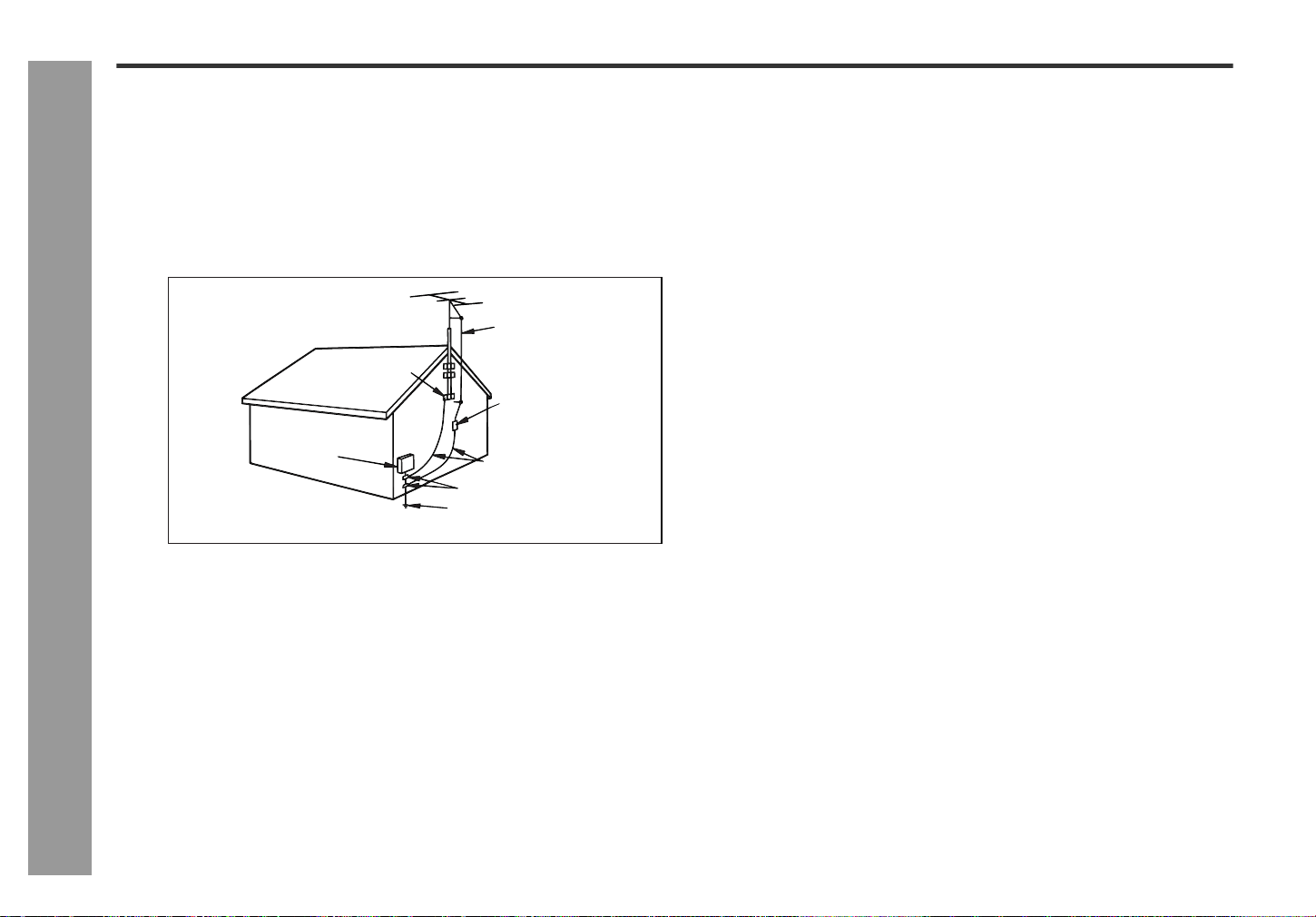
ANTENNA LEAD IN WIRE
POWER SERVICE GROUNDING
ELECTRODE SYSTEM
(NEC ART 250, PART H)
GROUNDING CONDUCTORS
(NEC SECTION 810-21)
GROUND CLAMPS
NEC - NATIONAL ELECTRICAL CODE
S2898A
ELECTRIC
SERVICE
EQUIPMENT
GROUND
CLAMP
Example of antenna grounding as per
National Electrical Code, ANSI/NFPA 70
ANTENNA DISCHARGE UNIT
(NEC SECTION 810-20)
0109
5
SD-EX200
03/3/14
SD-EX200_sec.fm
TINSZ0523AWZZ
2
3
4
5
6
7
8
1
General Information
- Notes / Contents -
Notes Contents
Page
General Information
Introduction . . . . . . . . . . . . . . . . . . . . . . . . . . . . . . . . . . . . . . . . . . . . . . . 6
Accessories . . . . . . . . . . . . . . . . . . . . . . . . . . . . . . . . . . . . . . . . . . . . . . . 6
Precautions . . . . . . . . . . . . . . . . . . . . . . . . . . . . . . . . . . . . . . . . . . . . . . . . 7
Controls and indicators . . . . . . . . . . . . . . . . . . . . . . . . . . . . . . . . . . 8 - 10
Preparation for Use
Remote control . . . . . . . . . . . . . . . . . . . . . . . . . . . . . . . . . . . . . . . . . . . . 11
System connections . . . . . . . . . . . . . . . . . . . . . . . . . . . . . . . . . . . 12 - 13
General control . . . . . . . . . . . . . . . . . . . . . . . . . . . . . . . . . . . . . . . . . . . . 14
Setting the clock . . . . . . . . . . . . . . . . . . . . . . . . . . . . . . . . . . . . . . . . . . . 15
CD Playback
Listening to a CD . . . . . . . . . . . . . . . . . . . . . . . . . . . . . . . . . . . . . . 16 - 17
Advanced CD Playback . . . . . . . . . . . . . . . . . . . . . . . . . . . . . . . . . 17 - 19
Radio
Listening to the radio . . . . . . . . . . . . . . . . . . . . . . . . . . . . . . . . . . . 20 - 21
Advanced Features
Timer and sleep operation . . . . . . . . . . . . . . . . . . . . . . . . . . . . . . . 22 - 24
Enhancing your system . . . . . . . . . . . . . . . . . . . . . . . . . . . . . . . . . . . . . 25
References
Troubleshooting chart . . . . . . . . . . . . . . . . . . . . . . . . . . . . . . . . . . 26 - 27
Maintenance . . . . . . . . . . . . . . . . . . . . . . . . . . . . . . . . . . . . . . . . . . . . . . 28
Error messages . . . . . . . . . . . . . . . . . . . . . . . . . . . . . . . . . . . . . . . . . . . 28
Specifications . . . . . . . . . . . . . . . . . . . . . . . . . . . . . . . . . . . . . . . . . . . . . 29
CONSUMER LIMITED WARRANTY . . . . . . . . . . . . . . . . . . . . Back cover
ENERGY STAR® Program Information
ENERGY STAR® is a U.S. registered mark.
0303
As an ENERGY STAR® Partner, SHARP has determined that this product
meets the
ENERGY STAR® guidelines for energy efficiency.
ENERGY STAR® is a U.S. registered mark.
By using
ENERGY STAR® labeled products, you will save money on your
electric bills and use less energy.
That makes good economic sense and it’s good for our environment.
WHY PURCHASE
ENERGY STAR® LABELED
PRODUCTS?
Many Electrical/Electronic Products use energy
both when they are on and when they are off.
Americans spend more than $3 billion a year on
energy consumed by home electronic products when
they are not in use. The new
ENERGY STAR®
labeled models will reduce that energy “leakage” by
up to 75 percent. Ultimately, this will mean more
than $1 billion a year in energy savings for
consumers.
The energy savings will help reduce the burning of
fossil fuels and the related carbon dioxide pollution
that contributes to global warming. If every American
family replaced their electronic equipment with
ENERGY STAR® labeled models, it would reduce
air pollution equivalent to eliminating more than two
million cars.
6
SD-EX200
03/3/14
SD-EX200_sec.fm
TINSZ0523AWZZ
General Information
- Introduction / Accessories -
Introduction
Accessories
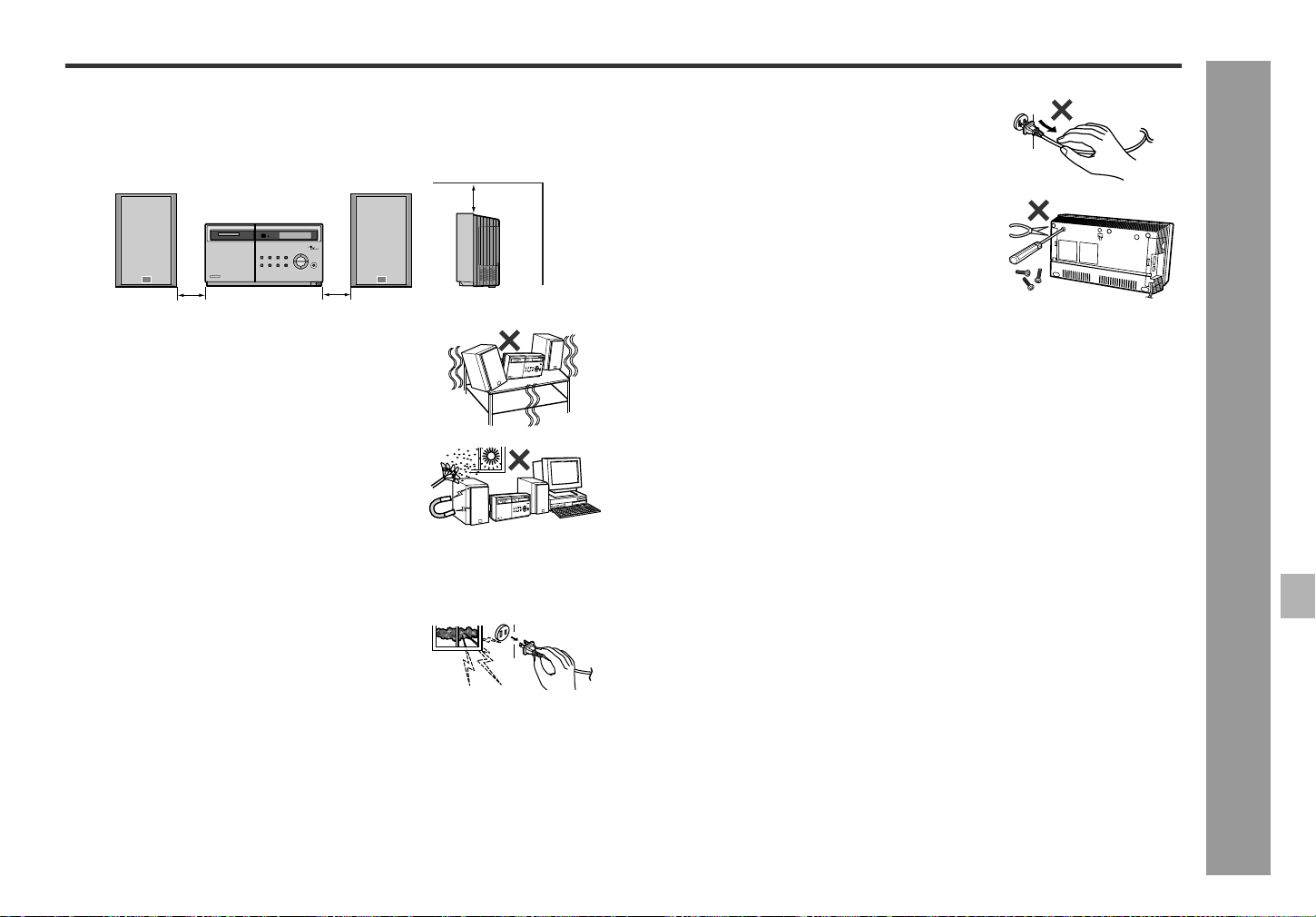
Please confirm that the following accessories are included.
Note:
Only the above accessories are included.
Thank you for purchasing this SHARP product. To obtain the best performance from this product, please read this manual carefully. It will guide you in operating your
SHARP product.
z SD-EX200 1-Bit Digital Audio System consisting of SD-EX200 (main unit) and CP-EX200 (speaker system).
Remote control 1 "AA" size battery (UM/SUM-3, R6, HP-7 or similar) 2
RRMCG0375AWSA UBATU0001AWZZ
Speaker wire 2 FM antenna 1 AM loop antenna 1
QCNWH0009AWZZ 92LFANT1535A QANTL0014AWZZ
7
SD-EX200
03/3/14
SD-EX200_sec.fm
TINSZ0523AWZZ
2
3
4
5
6
7
8
1
General Information
- Precautions -
Precautions
General
Warning:
z The voltage used must be the same as that specified on this unit. Using this prod-
uct with a higher voltage other than that which is specified is dangerous and may
result in a fire or other type of accident causing damage. SHARP will not be held
responsible for any damage resulting from use of this unit with a voltage other than
that which is specified.
z CD players use a laser pickup which can damage the eyes if viewed directly.
Do not look at the pickup, and do not touch the pickup directly.
Volume control
The sound level at a given volume setting depends on speaker efficiency, location
and various other factors. It is advisable to avoid exposure to high volume levels,
which occurs while turning the unit on with the volume control setting up high, or
while continually listening at high volumes.
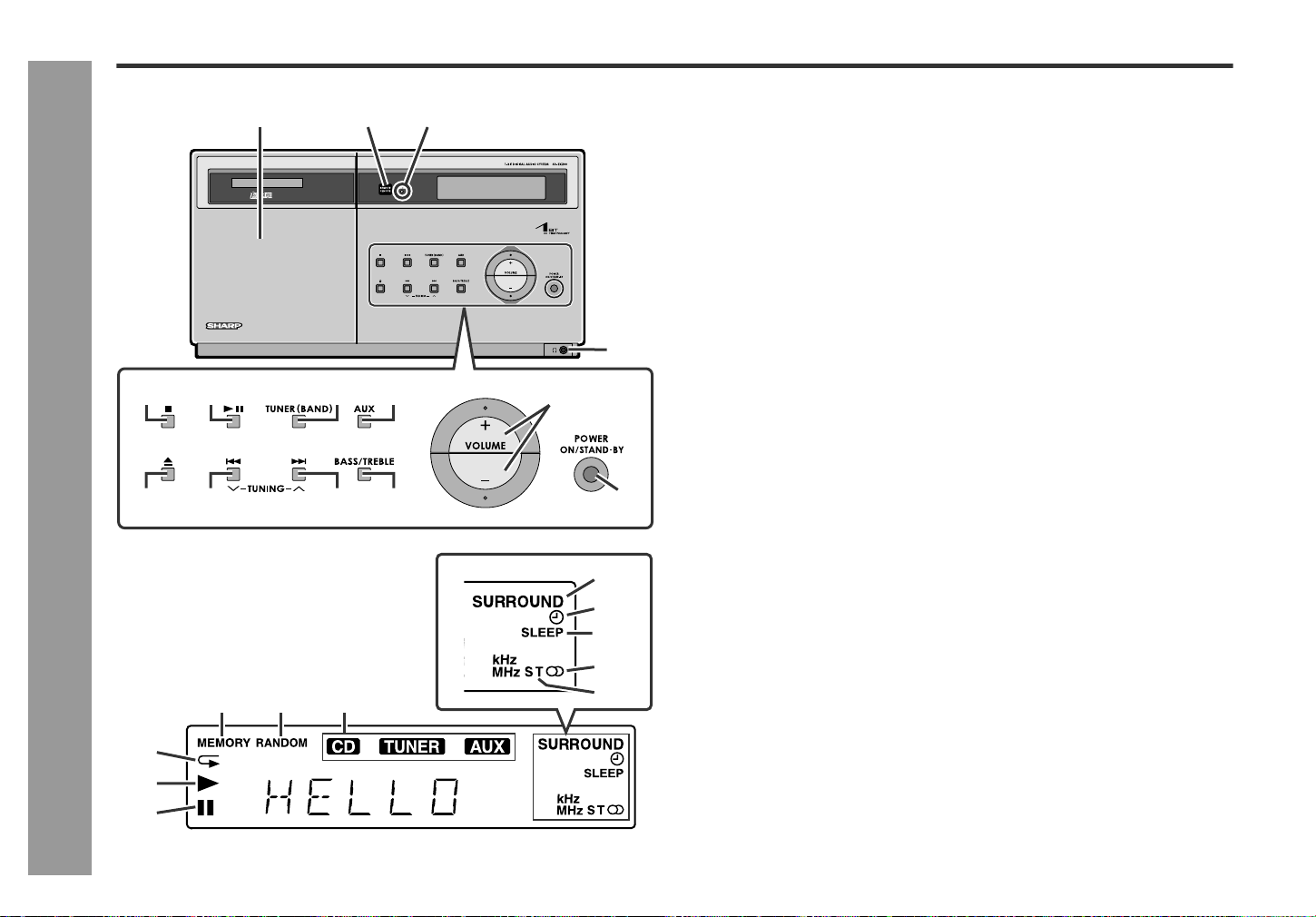
z Please ensure that the equipment is positioned in a well-ventilated area and en-
sure that there is at least 4" (10 cm) of free space along the top and sides of the
equipment.
z Use the unit on a firm, level surface free from vibra-
tion.
z Keep the unit away from direct sunlight, strong mag-
netic fields, excessive dust, humidity and electronic/
electrical equipment (home computers, facsimiles,
etc.) which generates electrical noise.
z Do not place anything on top of the unit.
z Do not expose the unit to moisture, to temperatures higher than 140°F (60°C) or to
extremely low temperatures.
z If your system does not work properly, disconnect the AC power cord from the AC
outlet. Plug the AC power cord back in, and then turn on your system.
z In case of an electrical storm, unplug the unit for safe-
ty.
4" (10 cm) 4" (10 cm)
4" (10 cm)
z Hold the AC power plug by the head when removing it
from the AC outlet, as pulling the cord can damage in-
ternal wires.
z Do not remove the outer cover, as this may result
in electric shock. Refer internal service to your lo-
cal SHARP service facility.
z This unit should only be used within the range of 41°F - 95°F (5°C - 35°C).
8
SD-EX200
03/3/14
SD-EX200_sec.fm
TINSZ0523AWZZ
General Information
- Controls and indicators -
Controls and indicators
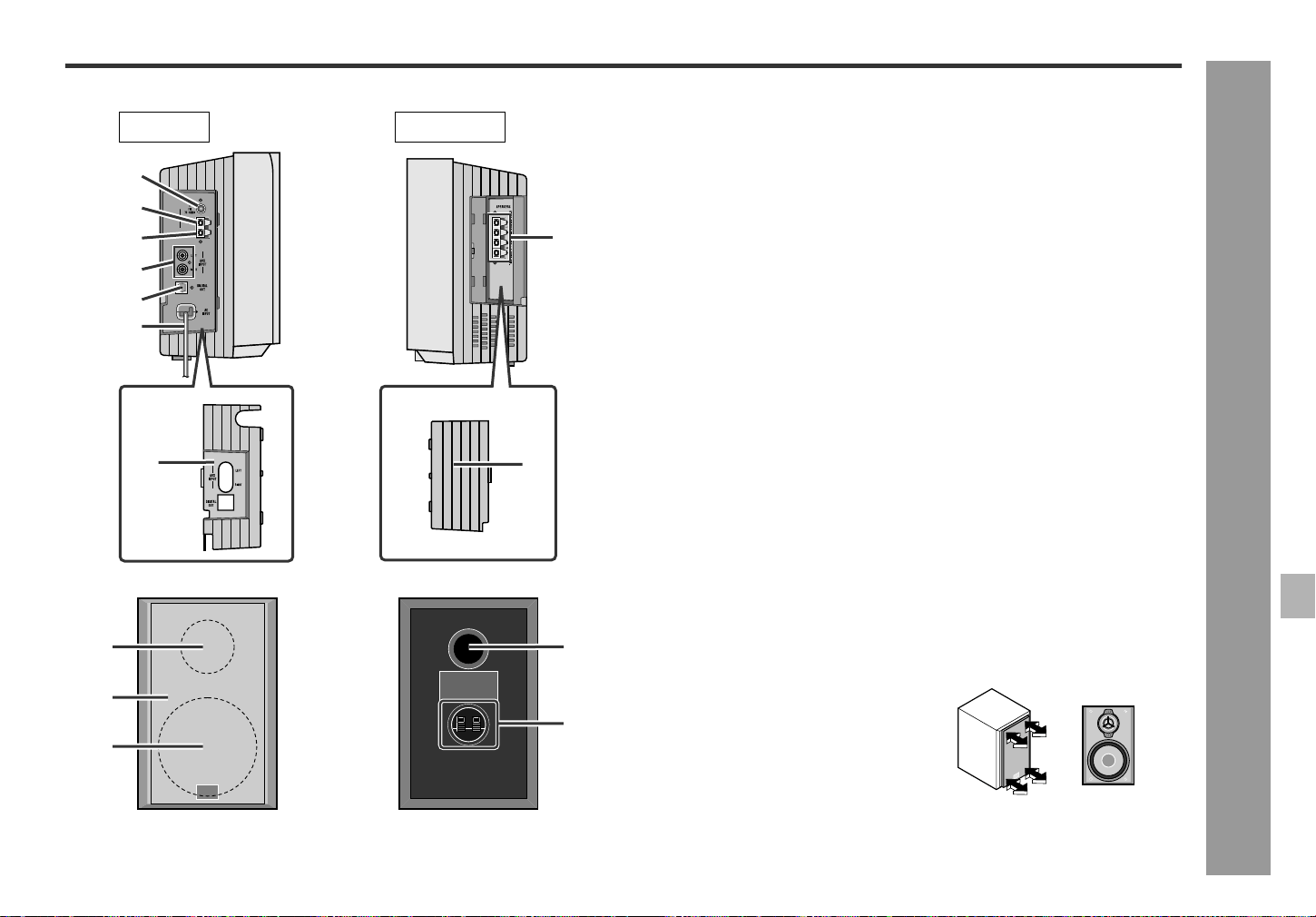
Front panel
Reference page
1.CD Cover . . . . . . . . . . . . . . . . . . . . . . . . . . . . . . . . . . . . . . . . . . . . . . .16
2.Remote Sensor . . . . . . . . . . . . . . . . . . . . . . . . . . . . . . . . . . . . . . . . .11
3.Timer Set Indicator . . . . . . . . . . . . . . . . . . . . . . . . . . . . . . . . . . . . . .23
4.Headphone Jack . . . . . . . . . . . . . . . . . . . . . . . . . . . . . . . . . . . . . . . .25
5.CD Stop Button . . . . . . . . . . . . . . . . . . . . . . . . . . . . . . . . . . . . . . . . .16
6.CD Play/Pause Button . . . . . . . . . . . . . . . . . . . . . . . . . . . . . . . . . . . .16
7.Tuner (Band) Button . . . . . . . . . . . . . . . . . . . . . . . . . . . . . . . . . . . . .20
8.Auxiliary Button . . . . . . . . . . . . . . . . . . . . . . . . . . . . . . . . . . . . . . . . .25
9.Volume Up and Down Buttons . . . . . . . . . . . . . . . . . . . . . . . . . . . . .14
10.CD Cover Open/Close Button . . . . . . . . . . . . . . . . . . . . . . . . . . .16, 17
11.CD Track Down or Fast Reverse/Tuning Down Button . . . . . . .17, 20
12.CD Track Up or Fast Forward/Tuning Up Button . . . . . . . . . . . .17, 20
13.Bass/Treble Button . . . . . . . . . . . . . . . . . . . . . . . . . . . . . . . . . . . . . .14
14.Power On/Stand-by Button . . . . . . . . . . . . . . . . . . . . . . . . . . . . . . . .14
Display
1.Surround Indicator
2.Timer Play Indicator
3.Sleep Indicator
4.FM Stereo Receiving Indicator
5.FM Stereo Mode Indicator
6.CD Memory Indicator
7.Random Play Indicator
8.Function Indicators
9.CD Repeat Play Indicator
10.CD Play Indicator
11.CD Pause Indicator
2
6 7 8
56 8
97
10 11 13
14
12
3
2
1
3
4
5
4
9
10
11
1
9
SD-EX200
03/3/14
SD-EX200_sec.fm
TINSZ0523AWZZ
2
3
4
5
6
7
8
1
General Information
- Controls and indicators -
Side panel
Reference page
1.FM 75 Ohms Antenna Jack . . . . . . . . . . . . . . . . . . . . . . . . . . . . 12, 13
2.AM Antenna Ground Terminal . . . . . . . . . . . . . . . . . . . . . . . . . . 12, 13
3.AM Antenna Terminal . . . . . . . . . . . . . . . . . . . . . . . . . . . . . . . . . 12, 13
4.Auxiliary Input Jacks . . . . . . . . . . . . . . . . . . . . . . . . . . . . . . . . . . . . 25
5.Digital Output Jack . . . . . . . . . . . . . . . . . . . . . . . . . . . . . . . . . . . . . . 25
6.AC Power Cord . . . . . . . . . . . . . . . . . . . . . . . . . . . . . . . . . . . . . . . . . 13
7.Speaker Terminals . . . . . . . . . . . . . . . . . . . . . . . . . . . . . . . . . . . . . . 12
8.Left Side Cover . . . . . . . . . . . . . . . . . . . . . . . . . . . . . . . . . . . . . . 12, 13
9.Right Side Cover . . . . . . . . . . . . . . . . . . . . . . . . . . . . . . . . . . . . . 12, 13
Note:
For details on opening side covers, see page 12.
Speaker system
Reference page
1.Tweeter
2.Speaker Grille
3.Woofer
4.Bass Reflex Duct
5.Speaker Terminals . . . . . . . . . . . . . . . . . . . . . . . . . . . . . . . . . . . . . . 12
1
2
3
4
5
6
1
3
2
4
5
7
Left side Right side
8
9
Speaker grilles are removable:
Make sure nothing comes into contact with
the speaker diaphragms when you remove
the speaker grilles.
10
SD-EX200
03/3/14
SD-EX200_sec.fm
TINSZ0523AWZZ
General Information
- Controls and indicators -
Controls and indicators (continued)
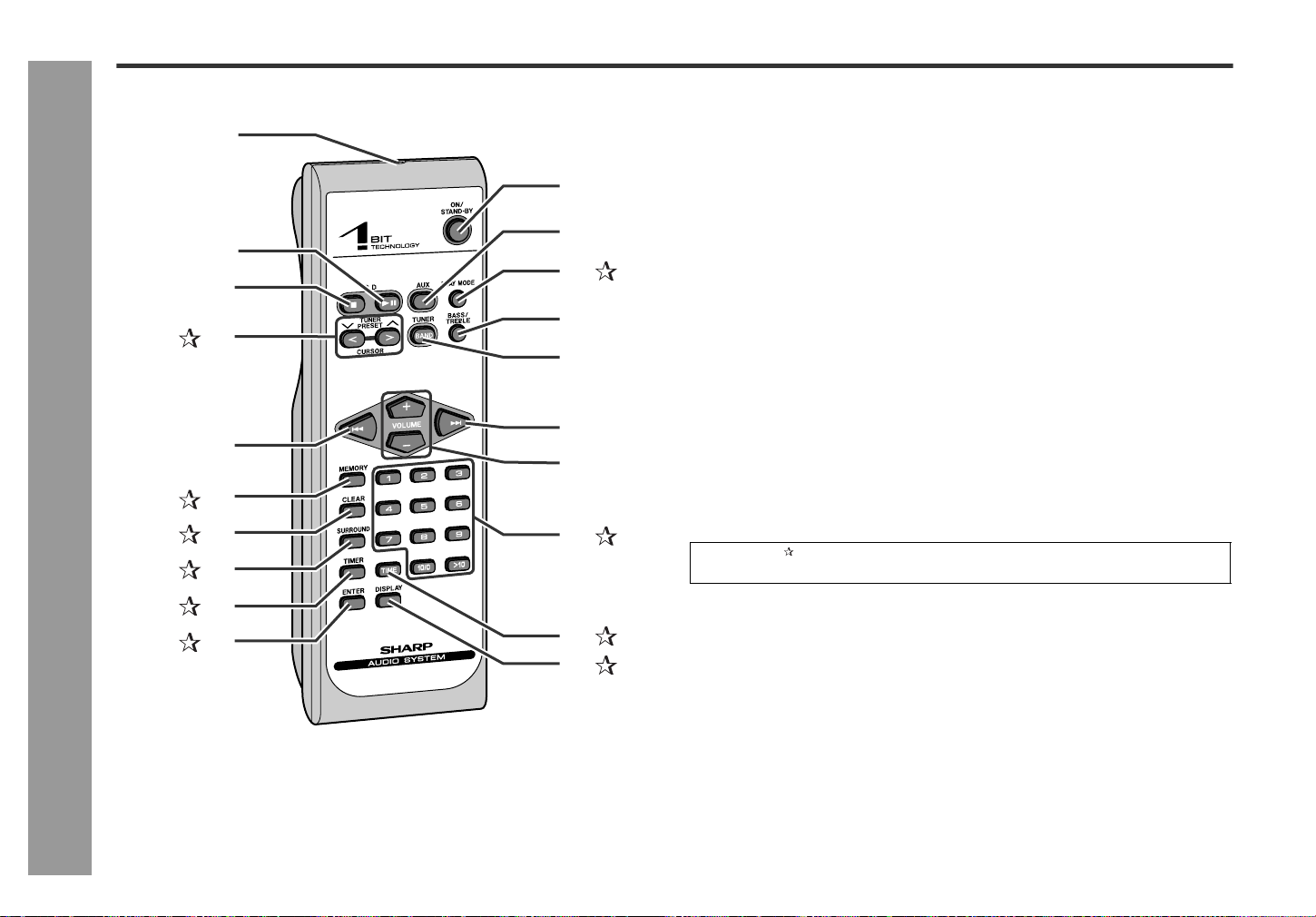
Remote control
Reference page
1.Remote Control Transmitter . . . . . . . . . . . . . . . . . . . . . . . . . . . . . . . . .11
2.CD Play/Pause Button . . . . . . . . . . . . . . . . . . . . . . . . . . . . . . . . . . . . .16
3.CD Stop Button . . . . . . . . . . . . . . . . . . . . . . . . . . . . . . . . . . . . . . . . . .16
4.Cursor/Tuner Preset Buttons . . . . . . . . . . . . . . . . . . . . . . . . . . .15, 21
5.CD Track Down or Fast Reverse/Tuning Down Button . . . . . . . . . .17, 20
6.CD Memory Button . . . . . . . . . . . . . . . . . . . . . . . . . . . . . . . . . . . . . .19
7.Program Clear Button . . . . . . . . . . . . . . . . . . . . . . . . . . . . . . . . . . . .19
8.Surround Button . . . . . . . . . . . . . . . . . . . . . . . . . . . . . . . . . . . . . . . .14
9.Timer Button . . . . . . . . . . . . . . . . . . . . . . . . . . . . . . . . . . . . . . . . .15, 22
10.Enter Button . . . . . . . . . . . . . . . . . . . . . . . . . . . . . . . . . . . . . . . . .15, 22
11.Power On/Stand-by Button . . . . . . . . . . . . . . . . . . . . . . . . . . . . . . . . .14
12.Auxiliary Button . . . . . . . . . . . . . . . . . . . . . . . . . . . . . . . . . . . . . . . . . .25
13.CD Play Mode Select Button . . . . . . . . . . . . . . . . . . . . . . . . . . . . . . .18
14.Bass/Treble Button . . . . . . . . . . . . . . . . . . . . . . . . . . . . . . . . . . . . . . . .14
15.Tuner (Band) Button . . . . . . . . . . . . . . . . . . . . . . . . . . . . . . . . . . . . . . .20
16.CD Track Up or Fast Forward/Tuning Up Button . . . . . . . . . . . . . .17, 20
17.Volume Up and Down Buttons . . . . . . . . . . . . . . . . . . . . . . . . . . . . . . .14
18.CD/Tuner Direct Buttons . . . . . . . . . . . . . . . . . . . . . . . . . . . . . . .18, 21
19.CD Time Display Button . . . . . . . . . . . . . . . . . . . . . . . . . . . . . . . . . .18
20.Clock Display/Dimmer Button . . . . . . . . . . . . . . . . . . . . . . . . . .14, 15
2
1
3
4
5
6
8
9
10
14
15
11
12
13
17
18
16
7
19
20
Buttons with " " mark in the illustration or highlighted in bold on the list can be op-
erated on the remote control only.
11
SD-EX200
03/3/14
SD-EX200_sec.fm
TINSZ0523AWZZ
2
3
4
5
6
7
8
1
Preparation for Use
- Remote control -
Remote control
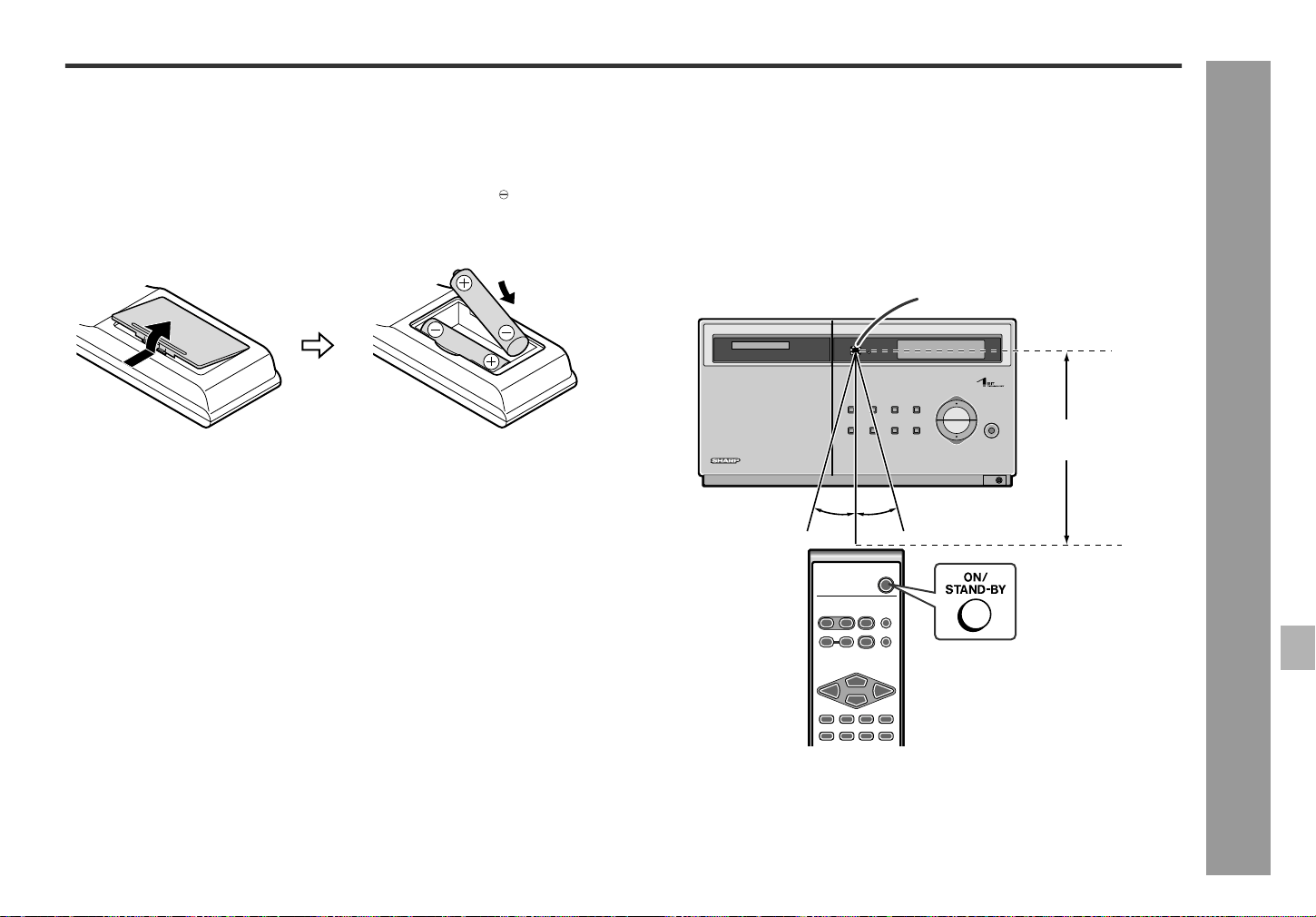
Battery installation
1
Remove the battery cover.
2
Insert the supplied batteries according to the direction indicated in
the battery compartment.
3
Replace the cover.
Precautions for battery use:
z Replace all old batteries with new ones at the same time.
z Do not mix old and new batteries.
z Remove the batteries if the unit will not be used for long periods of time. This will
prevent potential damage due to battery leakage.
Caution:
z Do not use rechargeable batteries (nickel-cadmium battery, etc.).
z Installing the batteries incorrectly may cause the unit to malfunction.
Notes concerning use:
z Replace the batteries if the operating distance is reduced or if the operation
becomes erratic. Purchase 2 "AA" size batteries (UM/SUM-3, R6, HP-7 or simi-
lar).
z Periodically clean the transmitter on the remote control and the sensor on the unit
with a soft cloth.
z Exposing the sensor on the unit to strong light may interfere with operation.
Change the lighting or the direction of the unit.
z Keep the remote control away from moisture, heat, shock, and vibrations.
Test of the remote control
Check the remote control after verifying all the connections (see pages 12 - 13).
Point the remote control directly at the remote sensor on the unit.
The remote control can be used within the range shown below:
Press the ON/STAND-BY button. Does the power turn on? Now, you can enjoy the
music.
When inserting or removing the batteries, push them toward the battery termi-
nals.
Remote sensor
15˚
15˚
8" - 20'
(0.2 m - 6 m)
12
SD-EX200
03/3/14
SD-EX200_sec.fm
TINSZ0523AWZZ
Preparation for Use
- System connections -
System connections
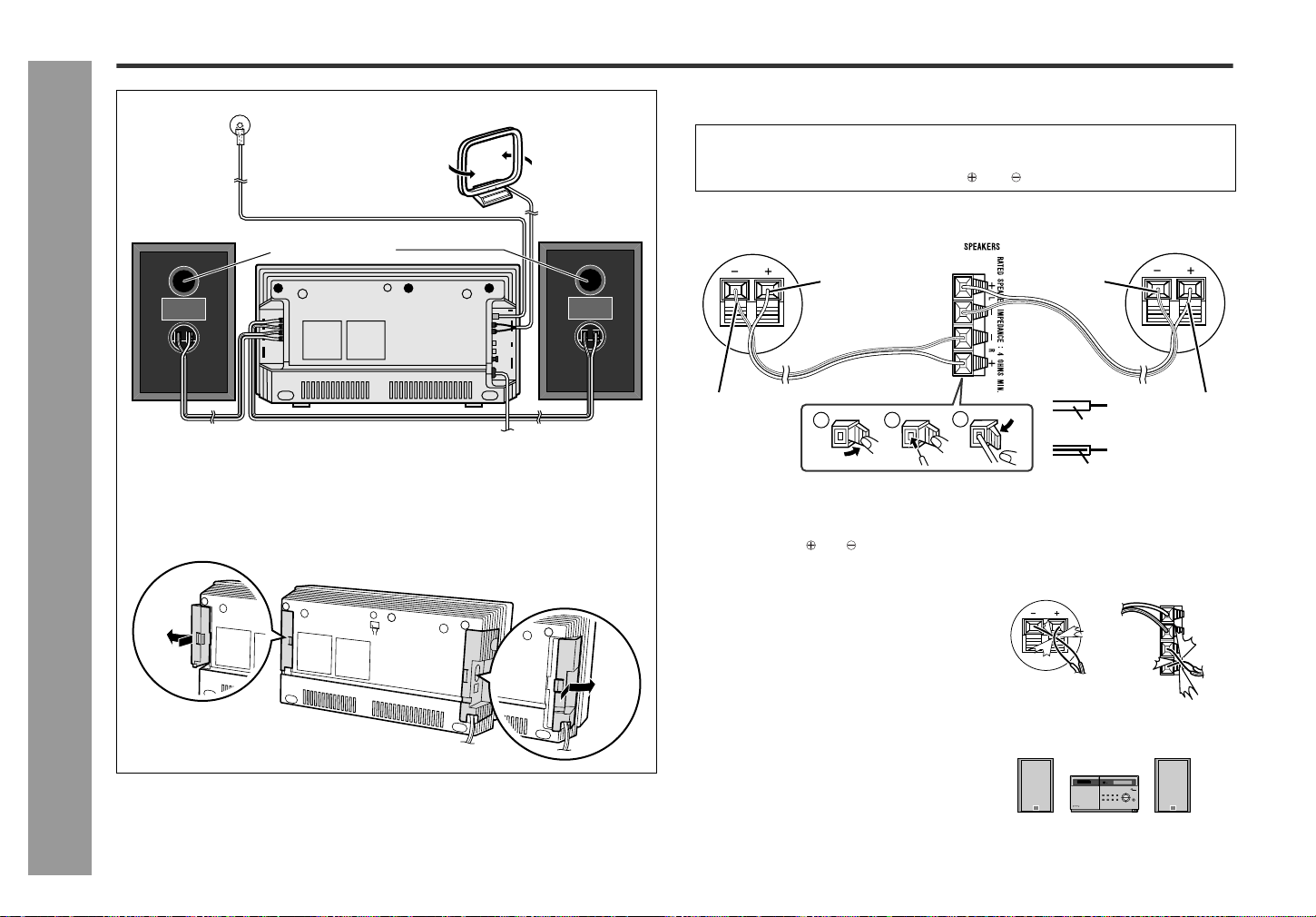
Speaker connection
Connect the wire with the black line to the (-) and the transparent one to the (+).
Caution:
How to open side covers
Open the right and left side covers to connect the system.
Right speaker Left speaker
AM loop antenna
FM antenna
Bass Reflex Duct
z Make sure to unplug the AC power cord before connecting the speaker
wires.
z Connect the speaker wires to the speakers first, then to the unit.
This prevents short circuit between and terminals.
z Use speakers with an impedance of 4 ohms or more, as lower impedance speak-
ers can damage the unit.
z Do not mistake and , and right and left terminals of the speaker wires. (The right
speaker is placed on the right when you face the unit.)
z Do not let the bare speaker wires touch
each other.
z Do not short-circuit the speaker wires. If
the power is turned on, malfunction may
occur.
z Do not allow any objects to fall into or to be
placed in the bass reflex ducts.
z Do not stand or sit on the speakers. You may
be injured.
Note:
Left speaker Right speaker
There is no physical distinction between the
right and the left speakers.
2
1
3
Right speaker
Left speaker
Black line
Transparent Black line
Transparent
Transparent
Black line
IncorrectIncorrect
13
SD-EX200
03/3/14
SD-EX200_sec.fm
TINSZ0523AWZZ
2
3
4
5
6
7
8
1
Preparation for Use
- System connections -
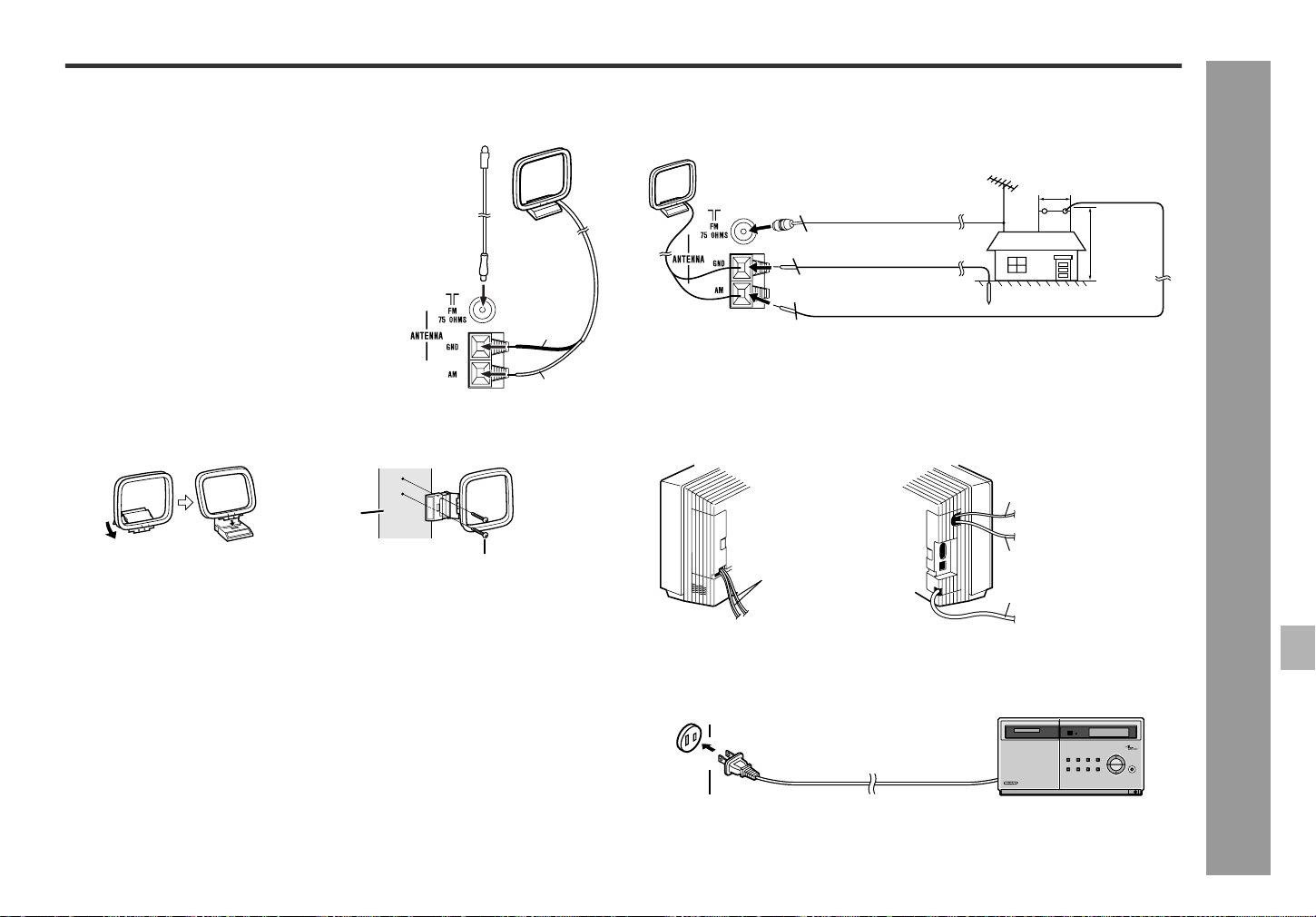
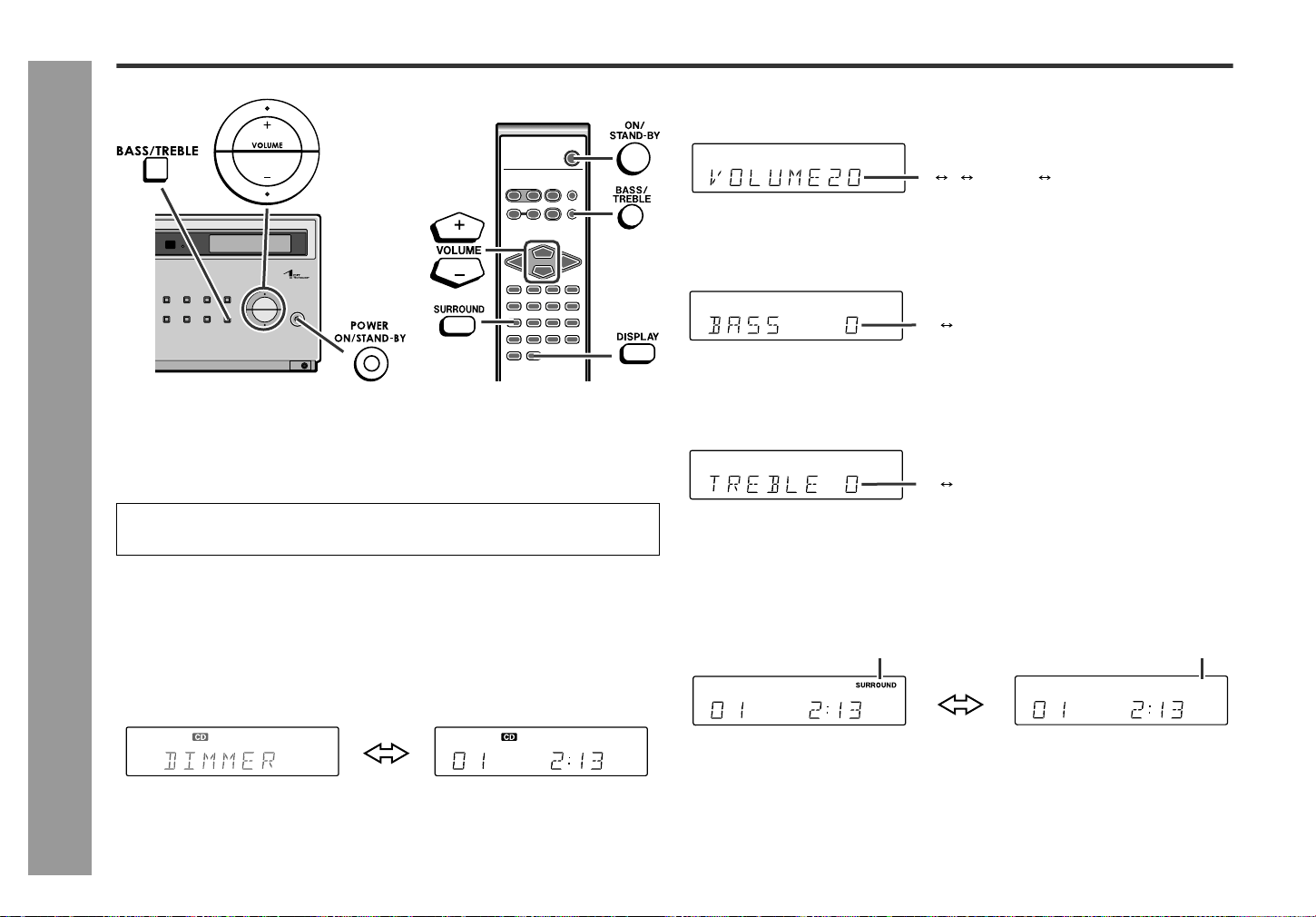
Antenna connection
Installing the AM loop antenna:
Outdoor FM or AM antenna:
Use an outdoor FM or AM antenna if you require better reception. Consult your
dealer.
Note:
When using an outdoor AM antenna, be sure to keep the wire of the AM loop antenna
connected.
How to close side covers
When completing the connection, close the side covers (be careful not to trap the
wires).
Connecting the AC power cord
After checking all the connections have been made correctly, plug the AC power cord
of this unit into the AC outlet.
Note:
Unplug the AC power cord from the AC outlet if the unit will not be in use for a pro-
longed period of time.
Supplied FM antenna:
Connect the FM antenna wire to the FM 75 OHMS
jack and position the FM antenna wire in the direction
where the strongest signal can be received.
Supplied AM loop antenna:
Connect the AM loop antenna wire to the AM and
GND terminals. Position the AM loop antenna for op-
timum reception. Place the AM loop antenna on a
shelf, etc., or attach it to a stand or a wall with screws
(not supplied).
Note:
Placing the antenna on the unit or near the AC power
cord may cause noise pickup. Place the antenna
away from the unit for better reception.
< Assembling > < Attaching to the wall >
Black
White
Wall
Screws (not supplied)
Outdoor AM antenna
49 feet (15 m)
25 feet
(7.5 m)
Outdoor FM antenna
Ground wire
Ground rod
75 ohm coaxial
cable
Speaker wire
FM antenna wire
AM loop antenna wire
AC power cord
AC outlet
(AC 120V, 60 Hz)
14
SD-EX200
03/3/14
SD-EX200_sec.fm
TINSZ0523AWZZ
Preparation for Use
- General control -
General control
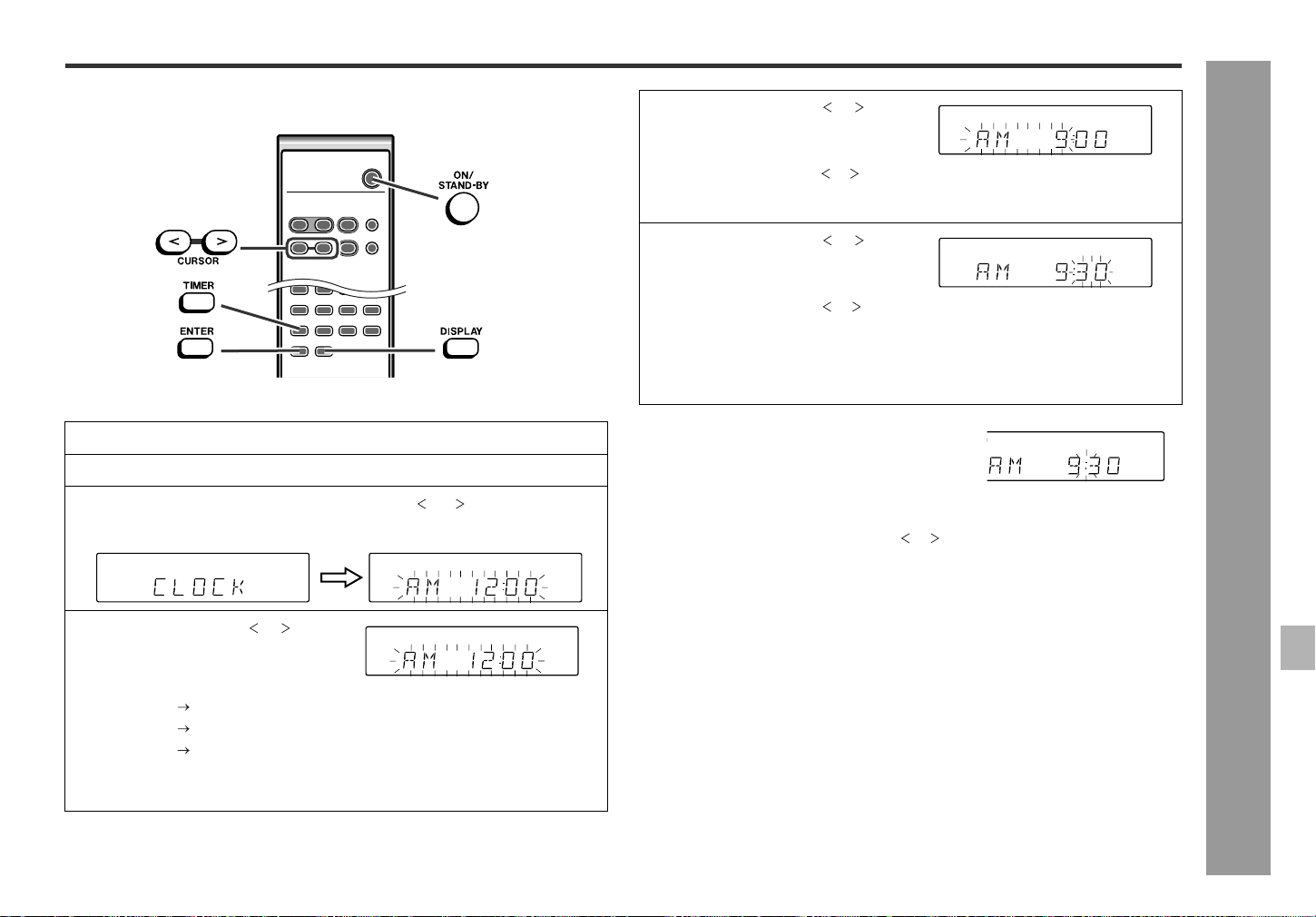
To turn the power on
Press the ON/STAND-BY button to turn the power on.
If the power does not turn on, check the AC power cord is plugged in properly.
Note:
When turning on the power right after it is set to the stand-by mode, wait a few sec-
onds.
To change the display brightness (2 levels)
When the power is on, you can switch the display brightness by pressing the DIS-
PLAY button on the remote control.
Volume control
Press the VOLUME (+ or -) button to increase or decrease the volume.
Bass control
Treble control
Surround
Press the SURROUND button to enjoy music that seems to surround you. "SUR-
ROUND" will appear.
To cancel the surround mode, press the SURROUND button again.
After use:
Press the ON/STAND-BY button to enter the power stand-by mode.
For example, CD function
Dimmer on Dimmer off
1Press the BASS/TREBLE button to select "BASS".
2Within 3 seconds, press the VOLUME (+ or -) button to adjust the bass.
1Press the BASS/TREBLE button to select "TREBLE".
2Within 3 seconds, press the VOLUME (+ or -) button to adjust the treble.
SURROUND indicator "SURROUND" will go out.
21 39 400
.....
+5
-
5
+5
-
5
15
SD-EX200
03/3/14
SD-EX200_sec.fm
TINSZ0523AWZZ
2
3
4
5
6
7
8
1
Preparation for Use
- Setting the clock -
Setting the clock
By setting the unit to the correct time, you can use it not only as a clock but also for
timer playback.
In this example, the clock is set for the 12-hour (AM 12:00) display.
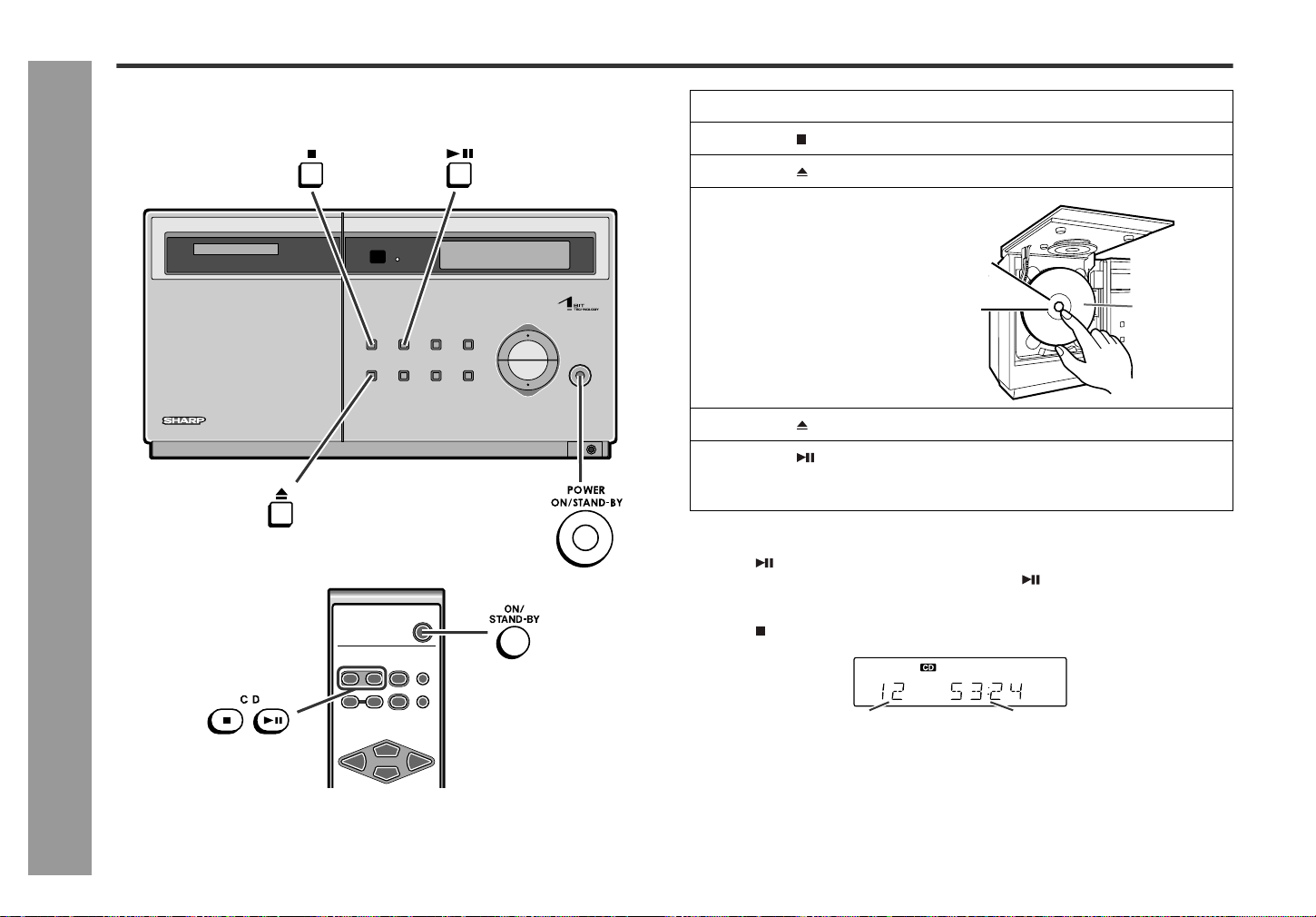
[When the power is on]
Press the TIMER button.
Within 10 seconds, press the CURSOR ( or ) button to display the time.
The time display will appear for about 10 seconds.
Note:
The "CLOCK" will appear at the push of the DISPLAY button when the AC power sup-
ply is restored after a power failure or unplugging the unit.
Readjust the clock as follows.
To readjust the clock:
Perform "Setting the clock" from the beginning.
To change the 12-hour or 24-hour display:
1
Press the ON/STAND-BY button to turn the power on.
2
Press the TIMER button.
3
Within 10 seconds, press the CURSOR ( or ) button to select
"CLOCK", and press the ENTER button.
4
Press the CURSOR ( or ) but-
ton to select 12-hour or 24-
hour display and then press
the ENTER button.
"AM 12:00" The 12-hour display will appear. (AM 12:00 - PM 11:59)
"AM 0:00" The 12-hour display will appear. (AM 0:00 - PM 11:59)
"0:00" The 24-hour display will appear. (0:00 - 23:59)
Note that this can only be set when the unit is first installed or it has been reset.
[Refer to "Clearing all the memory (reset)" on page 27 for details.]
5
Press the CURSOR ( or ) but-
ton to adjust the hour and then
press the ENTER button.
z Press the CURSOR ( or ) button once to advance the time by 1 hour. Hold
it down to advance continuously.
z When the 12-hour display is selected, "AM" will change automatically to "PM".
6
Press the CURSOR ( or ) but-
ton to adjust the minutes and
then press the ENTER button.
z Press the CURSOR ( or ) button once to advance the time by 1 minute.
Hold it down to advance by 5 minutes.
z The hour will not advance even if minutes advance from "59" to "00".
z The clock begins counting from "0" seconds. (Seconds are not displayed.)
The time display will disappear after a few seconds.
To confirm the time display:
[When the unit is in the stand-by mode]
Press the DISPLAY button on the remote control.
The time display will appear for about 5 seconds.
1. Clear all the programmed contents. [Refer to "Clearing all the memory (reset)" on
page 27 for details.]
2. Perform "Setting the clock" from the beginning.
16
SD-EX200
03/3/14
SD-EX200_sec.fm
TINSZ0523AWZZ
CD Playback
- Listening to a CD -
Listening to a CD
This system can also play audio CD-R and CD-RW discs, but cannot record.
Some audio CD-R and CD-RW discs may not be playable due to the state of disc or
the device that was used for recording.
To interrupt playback:
Press the button.
To resume playback from the same point, press the button again.
To stop playback:
Press the button.
After use:
Press the ON/STAND-BY button to enter the power stand-by mode.
1
Press the ON/STAND-BY button to turn the power on.
2
Press the button.
3
Press the button to open the CD cover.
4
Place a CD on the spindle.
z Face the label side toward you.
z Place a CD on the spindle properly
to avoid scratches.
5
Press the button to close the CD cover.
6
Press the button to start playback.
When the last track on the disc has finished playing, the CD player will automat-
ically stop.
Total number of tracks Total playing time
Click
sound
Label side up
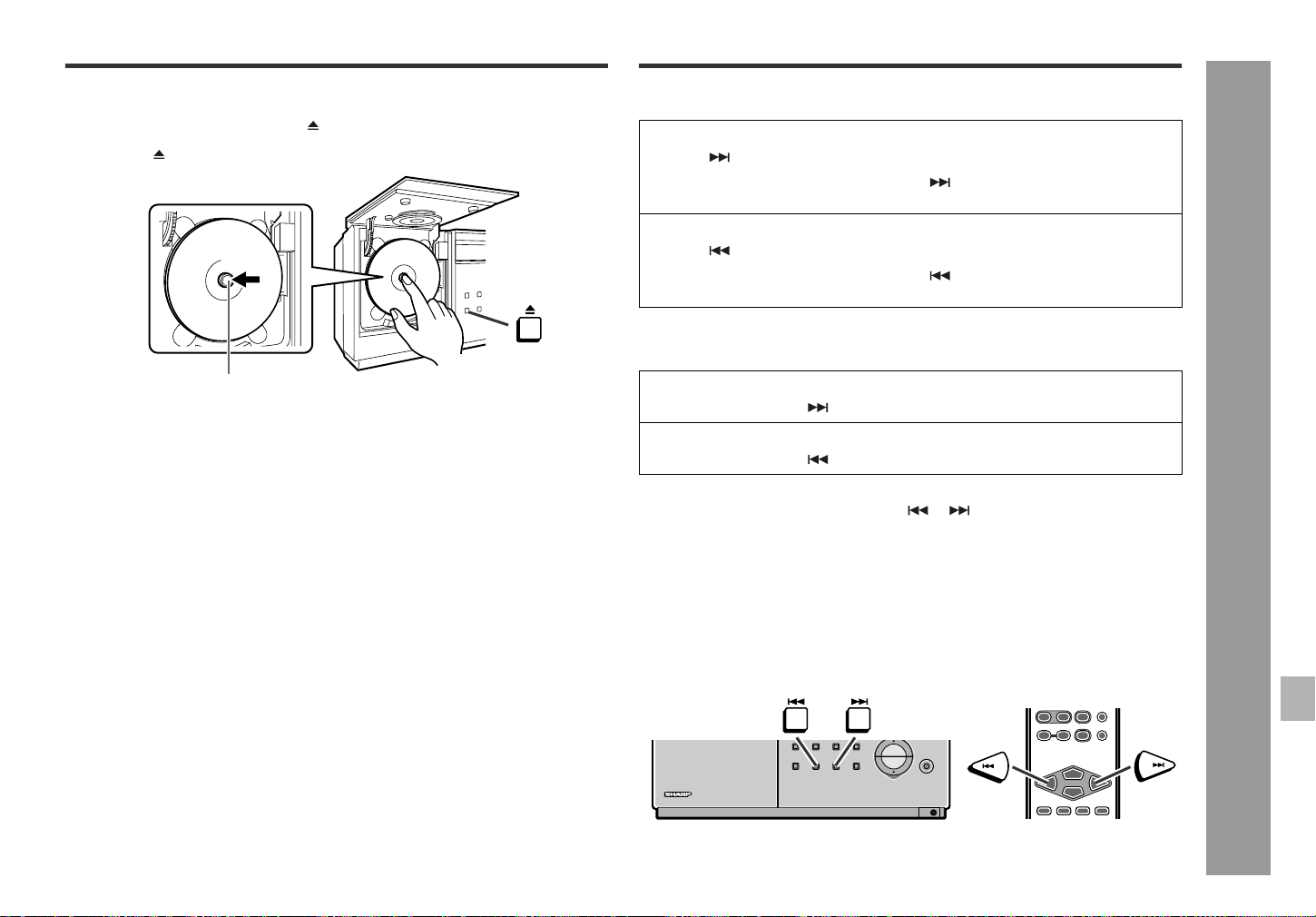
17
SD-EX200
03/3/14
SD-EX200_sec.fm
TINSZ0523AWZZ
2
3
4
5
6
7
8
1
CD Playback
- Listening to a CD / Advanced CD Playback -
To remove the CD
Caution:
z Do not open or close the CD cover manually. It may cause malfunctions to
the unit.
z Be careful not to jam your fingers in the CD cover.
z Do not play discs with special shapes (heart- or octagon-shaped). It may cause
malfunctions.
z If the power fails while the CD cover is open, wait until the power is restored.
z Keep foreign objects out of the CD compartment.
z When the unit is not being used, be sure to close the CD cover. If it is left open, the
lens may be covered with dust and the unit may not operate properly.
z When the unit enters the stand-by mode, the opened CD cover will be close auto-
matically.
Notes:
z Subjecting the unit to shock or vibration may cause mistracking.
z Playing certain CD at a high volume may cause mistracking. In this case, lis-
ten at a lower volume.
z If the recorded side of the CD is touched or becomes dirty, refer to "Care of com-
pact discs" (page 28) and clean it.
z If a disc is damaged or dirty, the sound may skip.
z If an error message is displayed during CD operation, see "Error messages" on
page 28.
z If TV or radio interference occurs during CD operation, move the unit away from
the TV or radio.
Advanced CD Playback
To locate the beginning of a track
To locate the desired portion
Notes:
z Normal playback will resume when the or button is released.
z When the end of the last track is reached during fast forward, "END" will appear on
the display and CD operation will be paused. When the beginning of the first track
is reached during fast reverse, the unit will enter the playback mode.
To search very quickly:
When fast forward or fast reverse is used while in the pause mode, the playback point
will move more quickly than when using audible fast forward or audible fast reverse
playback.
z In this mode, no sound is heard. Therefore, you should refer to the time display.
z When you lift your finger, the unit will re-enter the pause mode.
1While in the stop mode, press the button.
2Press the CD eject button and remove the CD.
3Press the button to close the CD cover.
CD Eject Button
Push
To move to the beginning of the next track:
Press the button during playback.
z You can skip to any track by pressing the button repeatedly until the desired
track number appears.
To restart the track being played:
Press the button during playback.
z You can skip to any track by pressing the button repeatedly until the desired
track number appears.
For audible fast forward:
Press and hold down the button during playback.
For audible fast reverse:
Press and hold down the button during playback.
18
SD-EX200
03/3/14
SD-EX200_sec.fm
TINSZ0523AWZZ
CD Playback
- Advanced CD Playback -
Advanced CD Playback (continued)
Direct play
By using the direct buttons, the desired tracks can be played.
Notes:
z After pressing the " 10" button, the two digits must be entered within 5 seconds of
each other.
z It is not possible to enter a track number higher than the total tracks of the CD.
z You cannot select a track with the direct buttons while in random or program play.
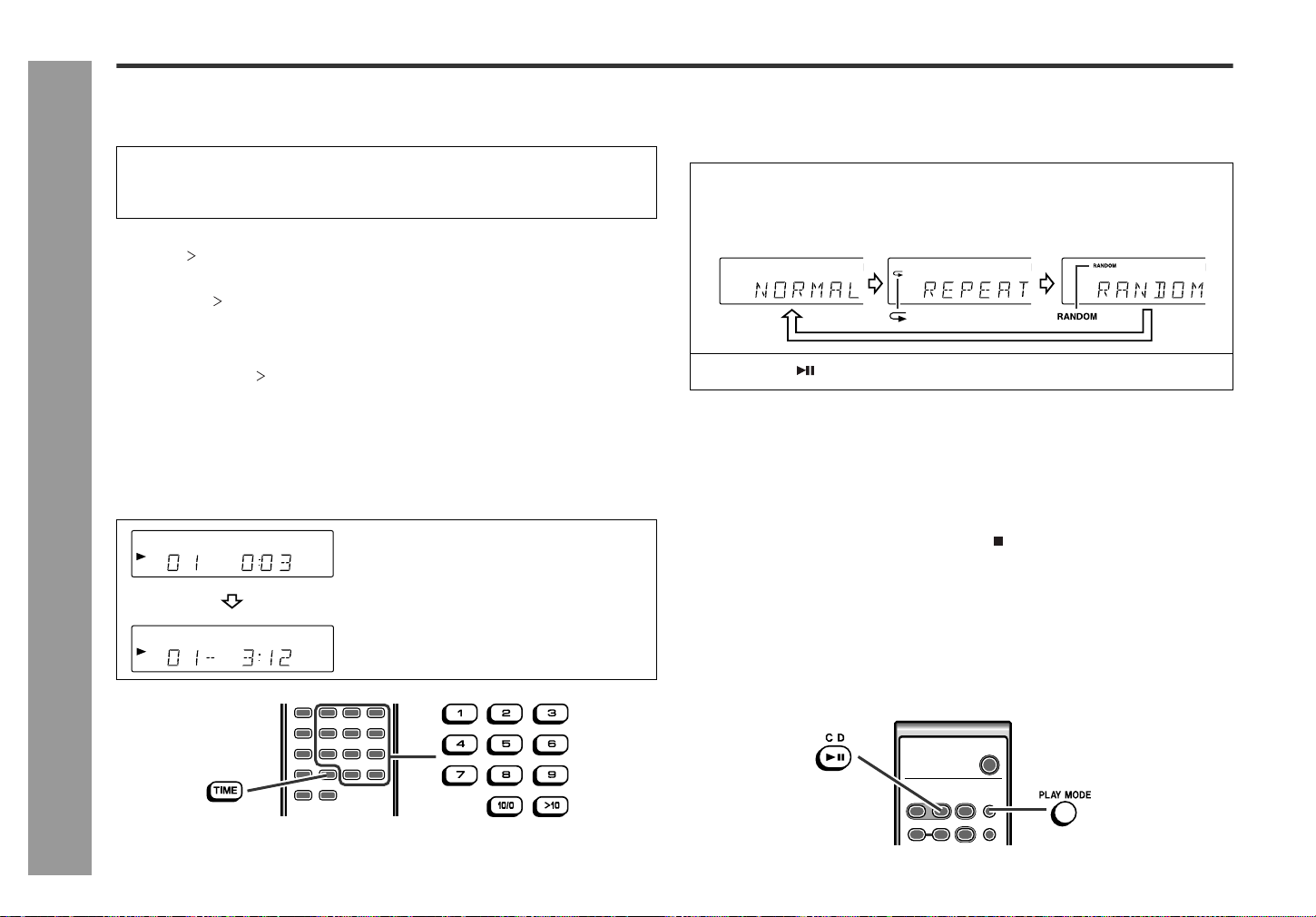
Switching the time display
Each time the TIME button on the remote control is pressed during playback, the dis-
play will change.
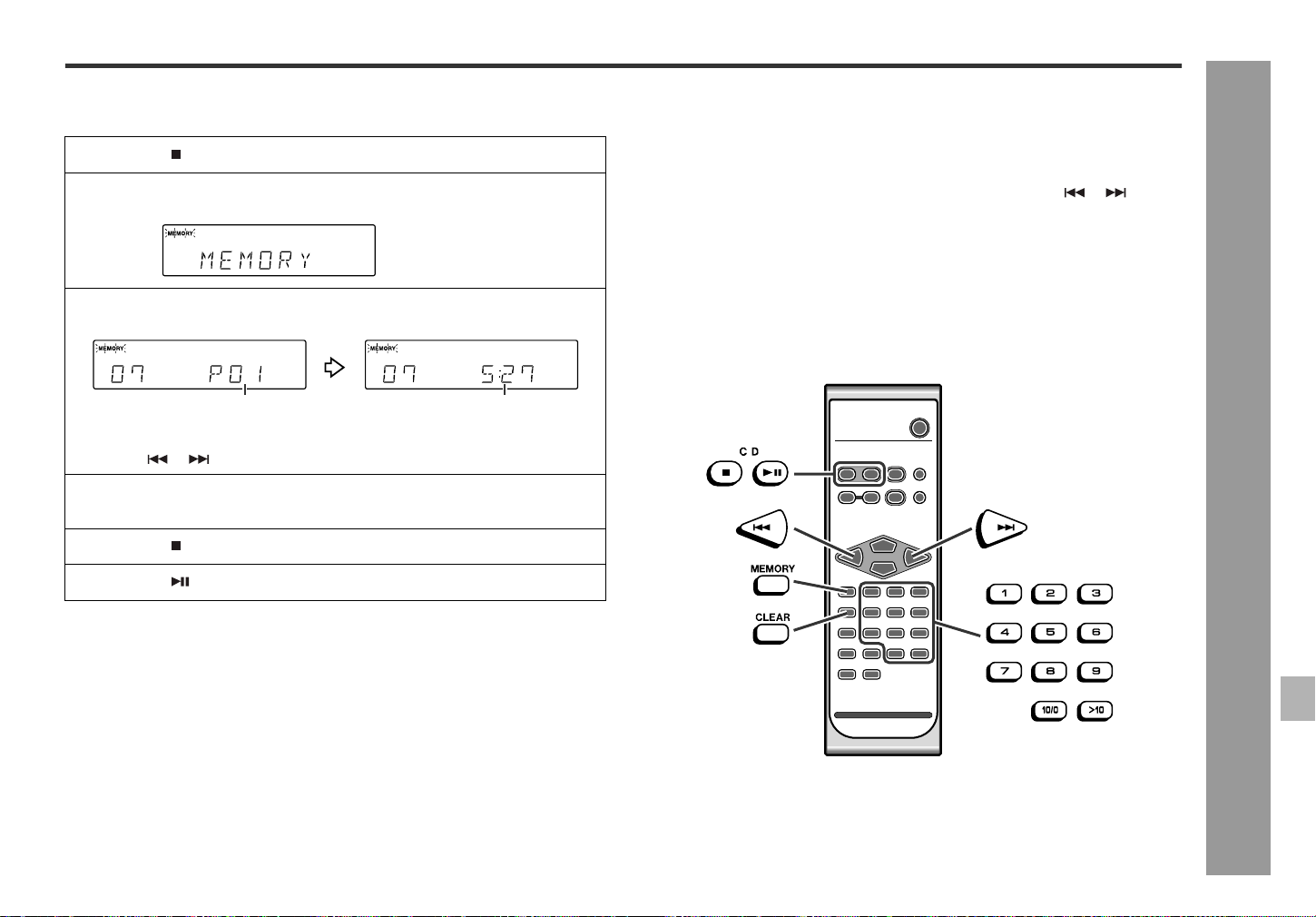
Repeat or random play
You can select one of the CD playback mode; "Repeat play", "Random play" and
"Normal play".
To repeat a programmed sequence:
Perform steps 1 - 5 in the "Programmed Play" section and then select the repeat play-
back.
Notes:
z During program operation, the random mode cannot be selected by the PLAY
MODE button.
z After using repeat play, be sure to press the button. Otherwise, the disc will play
continuously.
z The random play will stop automatically when all tracks are played once. (The
same track will not be played back twice.)
z In random play, the CD player will select and play tracks automatically. (You cannot
select the order of the tracks.)
To cancel repeat or random play:
Press the PLAY MODE button repeatedly to select the normal play mode.
Press the direct buttons to select the desired track.
The direct buttons will allow you to select and play any track from 1 to 10 automati-
cally.
To select a track between 11 and 99:
Press the " 10" button followed by the two digits of the track number.
For example, to choose 28
1Press the " 10" button.
2Press the "2" button.
3Press the "8" button.
The elapsed playing time for the current track will
be displayed.
The remaining playing time for the current track
will be displayed.
1
When in the CD mode, press the PLAY MODE button repeatedly to
select the playback mode.
2
Press the button to start playback.
Normal play Repeat play Random play
19
SD-EX200
03/3/14
SD-EX200_sec.fm
TINSZ0523AWZZ
2
3
4
5
6
7
8
1
CD Playback
- Advanced CD Playback -
Programmed play
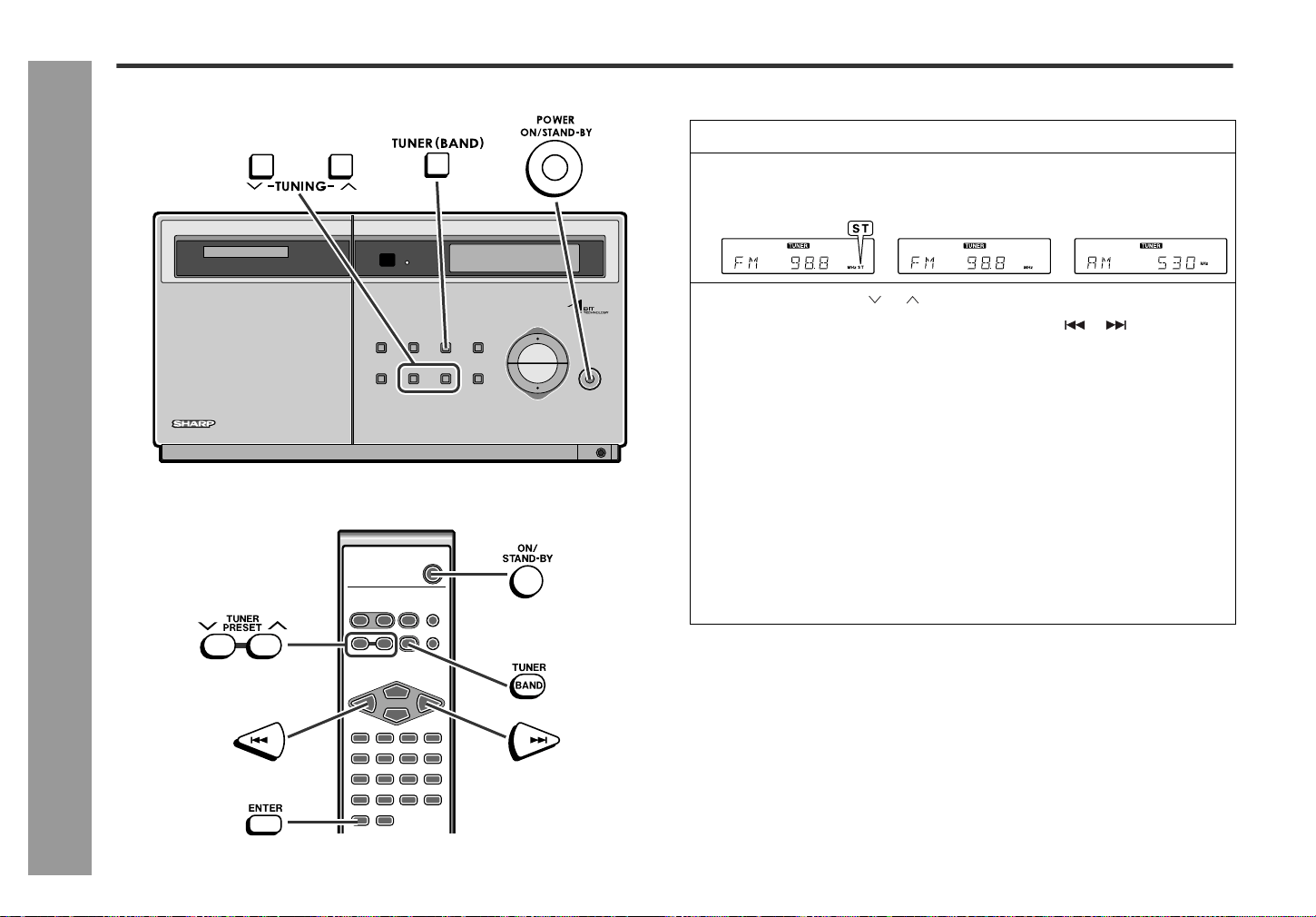
You can choose up to 20 selections for playback in the order you like.
To clear the programmed selections:
Press the CLEAR button while the "MEMORY" indicator is flashing.
Each time the button is pressed, one track will be cleared, beginning with the last
track programmed.
To cancel the programmed play mode:
While in the stop mode and the "MEMORY" indicator is lit, press the CLEAR button
on the remote control. The "MEMORY" indicator will disappear and all the pro-
grammed contents will be cleared.
Adding tracks to the program:
If a program has been previously stored, the "MEMORY" indicator will be displayed.
Then follow steps 1 - 5 to add tracks. The new tracks will be stored after the last track
of the original program.
To check which tracks are programmed:
While the unit is stopped in the programmed play mode, press the or button.
Each time the button is pressed, track numbers will be displayed in order.
Notes:
z Ejecting a CD automatically cancels the programmed sequence.
z Even if you press the ON/STAND-BY button to enter the stand-by mode or the
function is changed from CD to some other, the programmed selections will not be
cleared.
z During program operation, random play is not possible.
z Programmed tracks will be erased if the unit is unplugged or a power failure
occurs.
1
Press the button.
2
Press the MEMORY button to enter the programming save mode.
3
Press the direct buttons to select the desired track.
Playback order Playback time
You can program the track by pressing the MEMORY button after selecting it
with the or button.
4
Repeat step 3 for any other track. Up to 20 tracks can be pro-
grammed.
5
Press the button.
6
Press the button to start playback.
20
SD-EX200
03/3/14
SD-EX200_sec.fm
TINSZ0523AWZZ
Radio
- Listening to the radio -
Listening to the radio
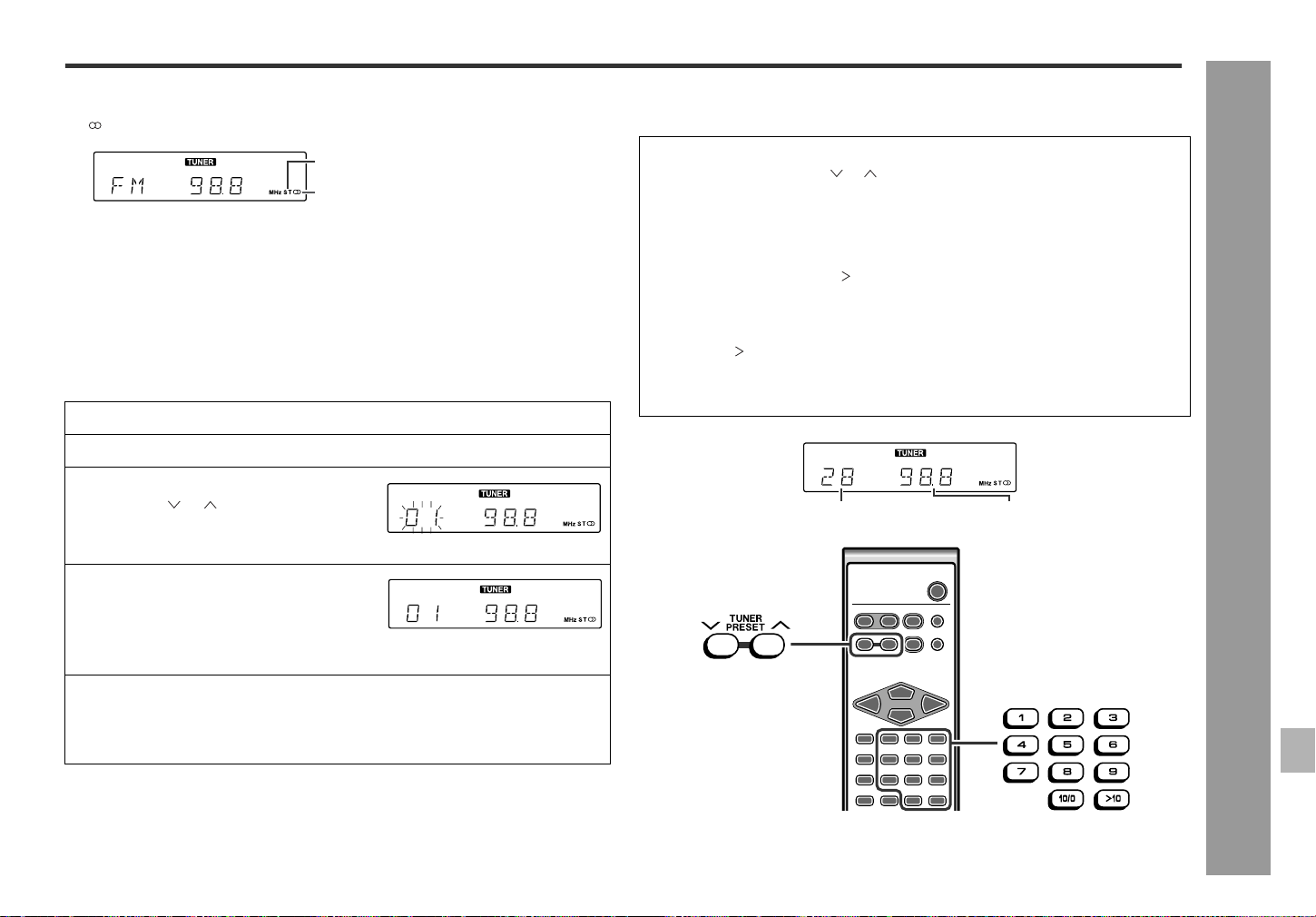
Manual or Auto tuning
1
Press the ON/STAND-BY button to turn the power on.
2
Press the TUNER (BAND) button repeatedly to select the desired
frequency band.
3
Press the TUNING ( or ) button to tune in to the desired station.
You can tune in to the desired station by pressing the or button on the
remote control.
Manual tuning:
Press the TUNING button as many times as required to tune in to the desired sta-
tion.
Auto tuning:
When the TUNING button is pressed for 0.5 seconds or more, scanning will start
automatically and the tuner will stop at the first receivable broadcast station.
Notes:
z When radio interference occurs, auto scan tuning may stop automatically at
that point.
z Auto scan tuning will skip weak signal stations.
z To stop the auto tuning, press the TUNING button again.
FM stereo FM monaural AM
21
SD-EX200
03/3/14
SD-EX200_sec.fm
TINSZ0523AWZZ
2
3
4
5
6
7
8
1
Radio
- Listening to the radio -
To receive an FM stereo transmission:
Press the TUNER (BAND) button to display the "ST" indicator.
z "" will appear when an FM broadcast is in stereo.
z If the FM reception is weak, press the TUNER (BAND) button to extinguish the
"ST" indicator. The reception changes to monaural, and the sound becomes
clearer.
After use:
Press the ON/STAND-BY button to enter the power stand-by mode.
Memorizing a station
You can store 40 AM and FM stations in memory and recall them at the push of a but-
ton. (Preset tuning)
Note:
The backup function protects the memorized stations for a few hours should there be
a power failure or if the AC power cord is disconnected.
To recall a memorized station
This may be operated only with the remote control.
FM stereo mode indicator
FM stereo receiving indicator
1
Perform steps 1 - 3 in "Manual or Auto tuning" on page 20.
2
Press the ENTER button to enter the preset tuning saving mode.
3
Within 5 seconds, press the TUNER
PRESET ( or ) button to select the
preset channel number.
Store the stations in memory, in order, starting with preset channel 1.
4
Within 5 seconds, press the ENTER
button to store that station in memo-
ry.
If the preset number indicator goes out before the station is memorized, repeat
the operation from step 2.
5
Repeat steps 1 - 4 to set other stations, or to change a preset sta-
tion.
When a new station is stored in memory, the station previously memorized will
be erased.
To select a preset station with the TUNER PRESET buttons:
Press the TUNER PRESET ( or ) button to select the desired station.
To select a preset station with the direct buttons:
Station 1 - 10: press the corresponding number ("1" - "10/0").
Station 11 - 40: press the " 10" button followed by the two-digit number.
For example, to choose 28
1Press the " 10" button.
2Press the "2" button.
3Press the "8" button.
Preset channel Frequency and frequency band
22
SD-EX200
03/3/14
SD-EX200_sec.fm
TINSZ0523AWZZ
Advanced Features
- Timer and sleep operation -
Timer and sleep operation
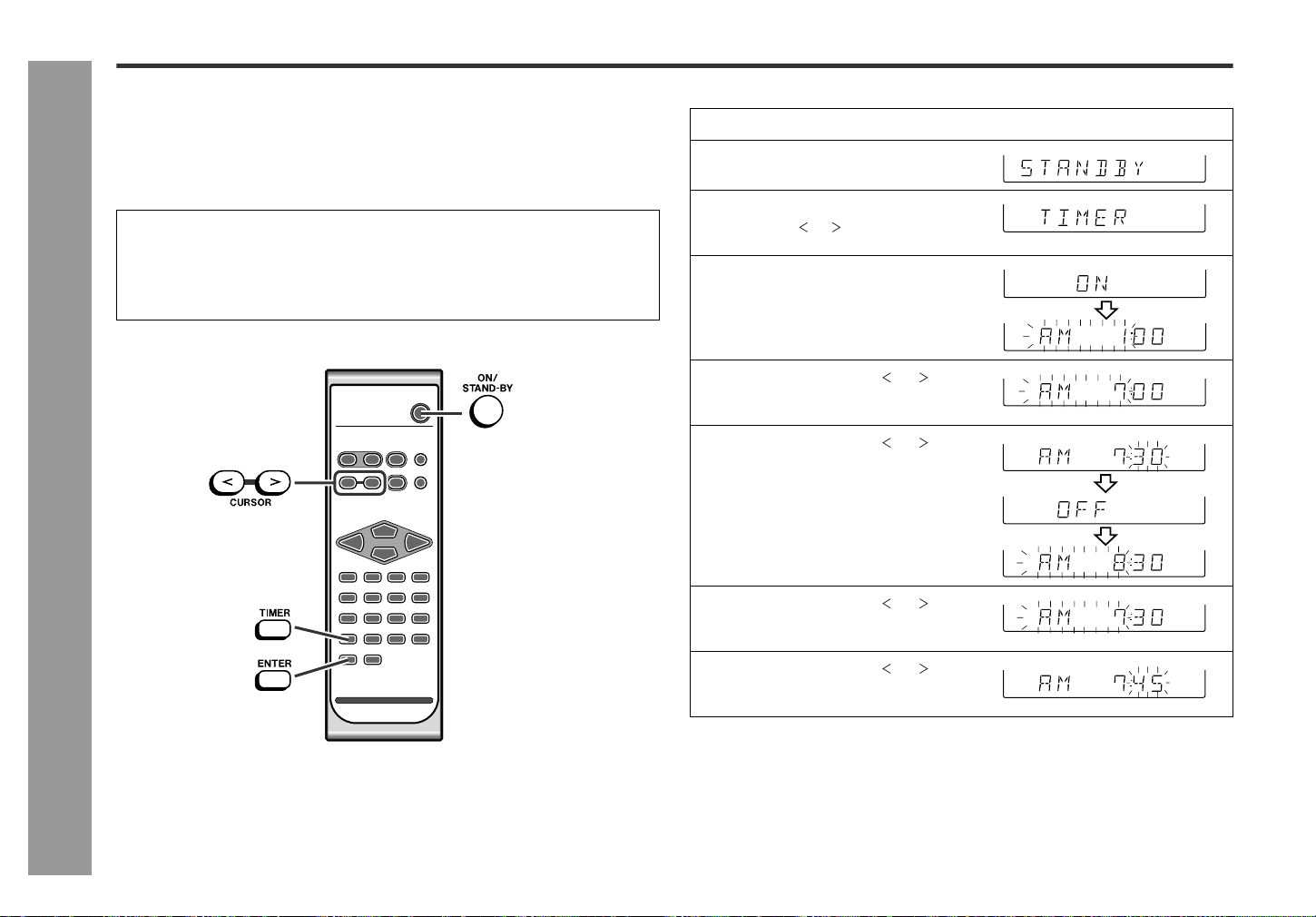
This may be operated only with the remote control.
Timer playback:
The unit turns on and plays the desired source (CD, tuner) at the preset time.
Sleep operation:
The radio and compact disc player can be turned off automatically.
Timer playback
Before setting timer:
1Set the unit to the correct time (page 15).
If it is not set, you cannot use the timer function.
2Prepare the sound source for playback.
3Store radio stations (page 21).
1
Press the ON/STAND-BY button to turn the power on.
2
Press the TIMER button.
3
Within 10 seconds, press the
CURSOR ( or ) button to select
"TIMER".
4
Within 10 seconds, press the EN-
TER button.
5
Press the CURSOR ( or ) but-
ton to specify the hour to start,
and press the ENTER button.
6
Press the CURSOR ( or ) but-
ton to specify the minutes, and
press the ENTER button.
Unless the timer setting is changed, the
ending time will automatically be set for
one hour after the starting time.
7
Press the CURSOR ( or ) but-
ton to specify the hour to stop,
and press the ENTER button.
8
Press the CURSOR ( or ) but-
ton to specify the minutes, and
press the ENTER button.
23
SD-EX200
03/3/14
SD-EX200_sec.fm
TINSZ0523AWZZ
2
3
4
5
6
7
8
1
Advanced Features
- Timer and sleep operation -
To check the timer setting:
Reusing the memorized timer setting:
The timer setting will be memorized once it is entered. To reuse the same setting,
perform the following operations.
Changing the timer setting:
Tu rn the power on, and repeat the operation from step 2 in "Timer playback" (see
pages 22 - 23).
Canceling the timer playback:
Timer playback is canceled by turning the power on while in the timer playback stand-
by mode. The same operation can be performed in the following procedure without
turning the power on.
Caution:
The contents of the setting will be erased if the unit is unplugged or a power failure
occurs. In such cases, set the timer again.
Notes:
z The timer playback is possible with a CD even if the repeat, random, or pro-
grammed playback is set.
z When performing timer playback using another unit connected to the AUX IN
jacks, select "AUX" in step 9. At this time, only this unit will be turned on or enter
the power stand-by mode automatically. (Another unit will not be turned on or off.)
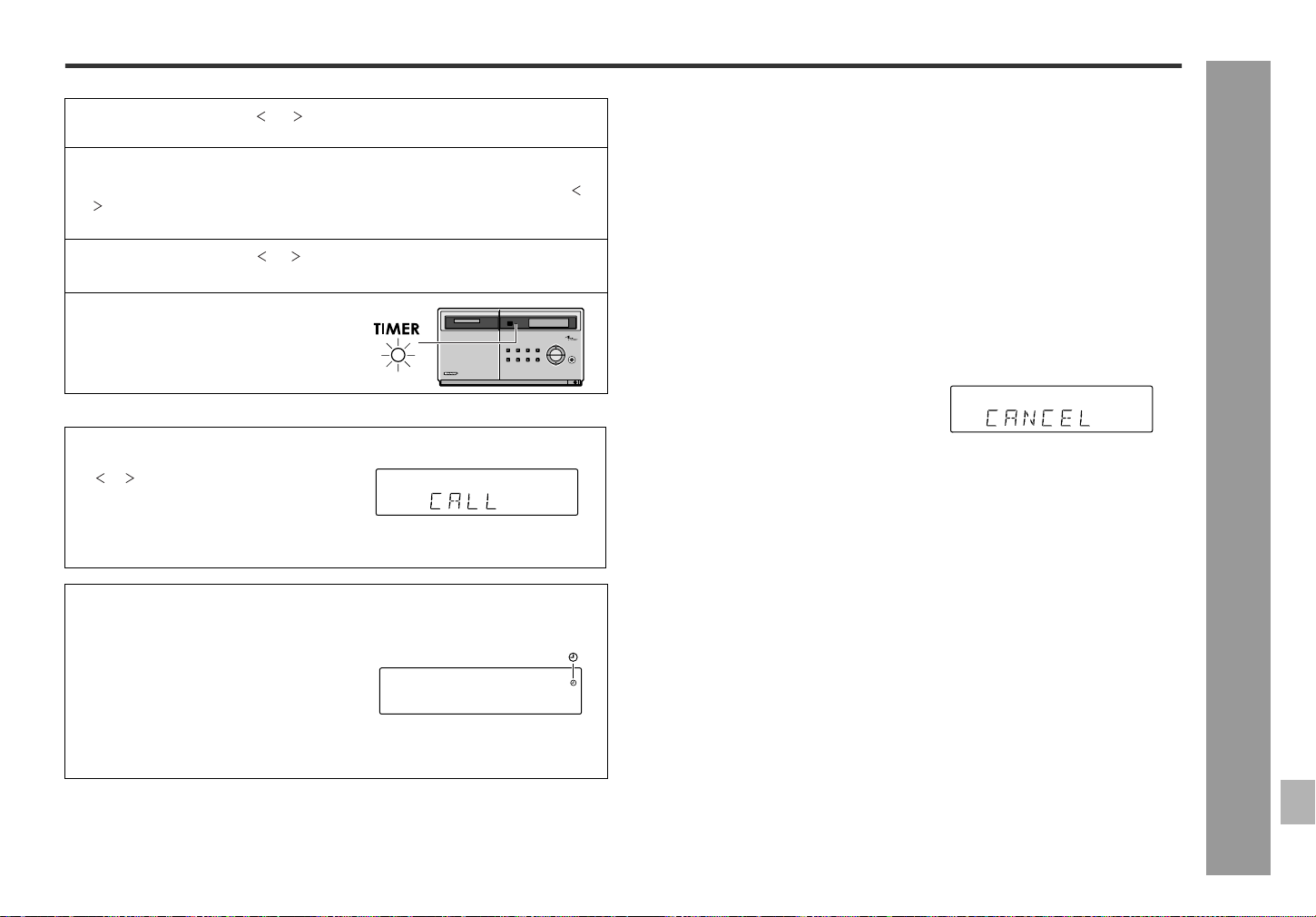
9
Press the CURSOR ( or ) button to select the desired function
(CD, TUNER or AUX).
10
Press the ENTER button.
When you select the tuner, select a station by pressing the CURSOR ( or
) button, and then press the ENTER button.
If a station has not been programmed, "NO P-SET" will appear.
11
Press the CURSOR ( or ) button to adjust the volume.
Be careful not to turn the volume up too high.
12
Press the ENTER button.
Settings are displayed in order and the
unit will enter the timer stand-by mode.
1While in the timer playback stand-by mode, press the TIMER button.
2Within 10 seconds, press the CURSOR
( or ) button to select "CALL", and
press the ENTER button.
The unit returns to the timer playback stand-by mode after the setting contents
are displayed in order.
When the start time is reached:
Playback starts automatically and the vol-
ume increases gradually.
Timer Play Indicator
The timer playback indicator flashes.
When the finish time is reached:
The unit is set to the power stand-by mode automatically.
1Turn the power on and press the TIMER button.
Set the unit to the correct time if "STANDBY" does not appear.
2Within 10 seconds, press the ENTER button.
After the setting contents are displayed in order, the unit is set to the timer play-
back stand-by mode.
1Press the TIMER button.
"CANCEL" will appear.
2Within 10 seconds, press the ENTER button.
Timer playback will be canceled (the contents of the setting will not be canceled).
24
SD-EX200
03/3/14
SD-EX200_sec.fm
TINSZ0523AWZZ
Advanced Features
- Timer and sleep operation -
Timer and sleep operation (continued)
Sleep operation
The radio and CD can be turned off automatically.
To confirm the remaining sleep time:
z The remaining sleep time is displayed for about 10 seconds.
z You can change the remaining sleep time while it is displayed by pressing the
ENTER button (steps 5 - 6).
To cancel the sleep operation:
The sleep timer is canceled when the unit enters the power stand-by mode.
To c ancel only the sleep timer without setting the unit to the power stand-by mode,
proceed as follows.
To use timer and sleep operation together
Example: You can fall asleep to the radio and wake up with the sound from a CD.
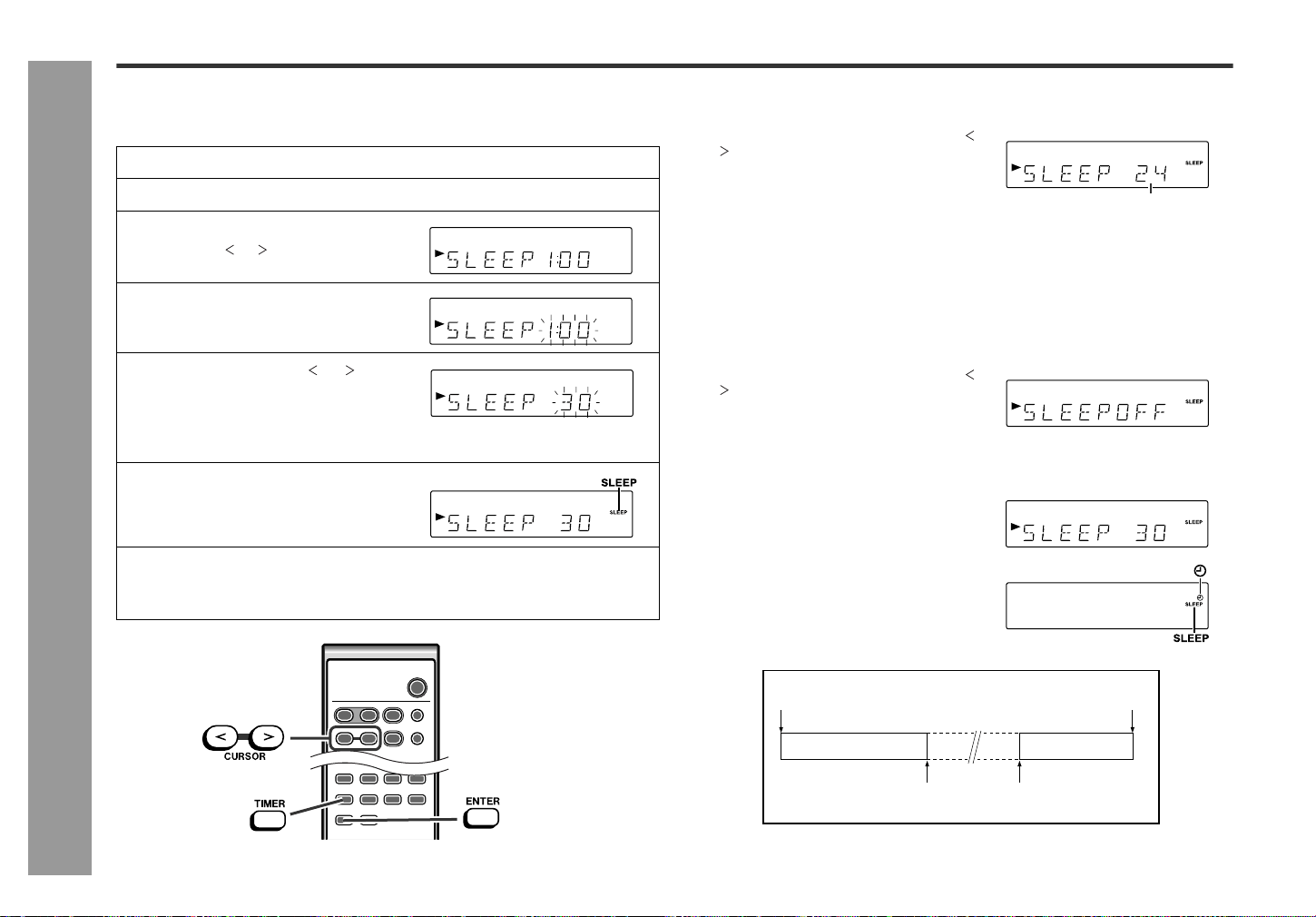
1
Play back the desired sound source.
2
Press the TIMER button.
3
Within 10 seconds, press the
CURSOR ( or ) button to select
"SLEEP".
4
Within 10 seconds, press the EN-
TER button.
5
Press the CURSOR ( or ) but-
ton to specify the sleep time.
(Maximum: 2 hours - Minimum: 1
minute)
6
Press the ENTER button.
7
Your system will enter the power stand-by mode automatically af-
ter the preset time has elapsed.
The volume will be turned down 1 minute before the sleep operation finishes.
1Press the TIMER button while the sleep timer is set.
2Within 10 seconds, press the CURSOR (
or ) button to select "SLEEP".
Remaining sleep time
1Press the TIMER button while the sleep timer is set.
2Within 10 seconds, press the CURSOR (
or ) button to select "SLEEPOFF".
3Within 10 seconds, press the ENTER but-
ton.
1Set the sleep time (steps 1 - 6, page 24).
2Set the timer playback (steps 1 - 12, pages
22 - 23).
1.
Sleep timer setting
2.
Timer playback setting
Timer playback
start time
1 minute - 2 hours
Desired time
Sleep operation will
automatically stop.
End time
25
SD-EX200
03/3/14
SD-EX200_sec.fm
TINSZ0523AWZZ
2
3
4
5
6
7
8
1
Advanced Features
- Enhancing your system -
Enhancing your system
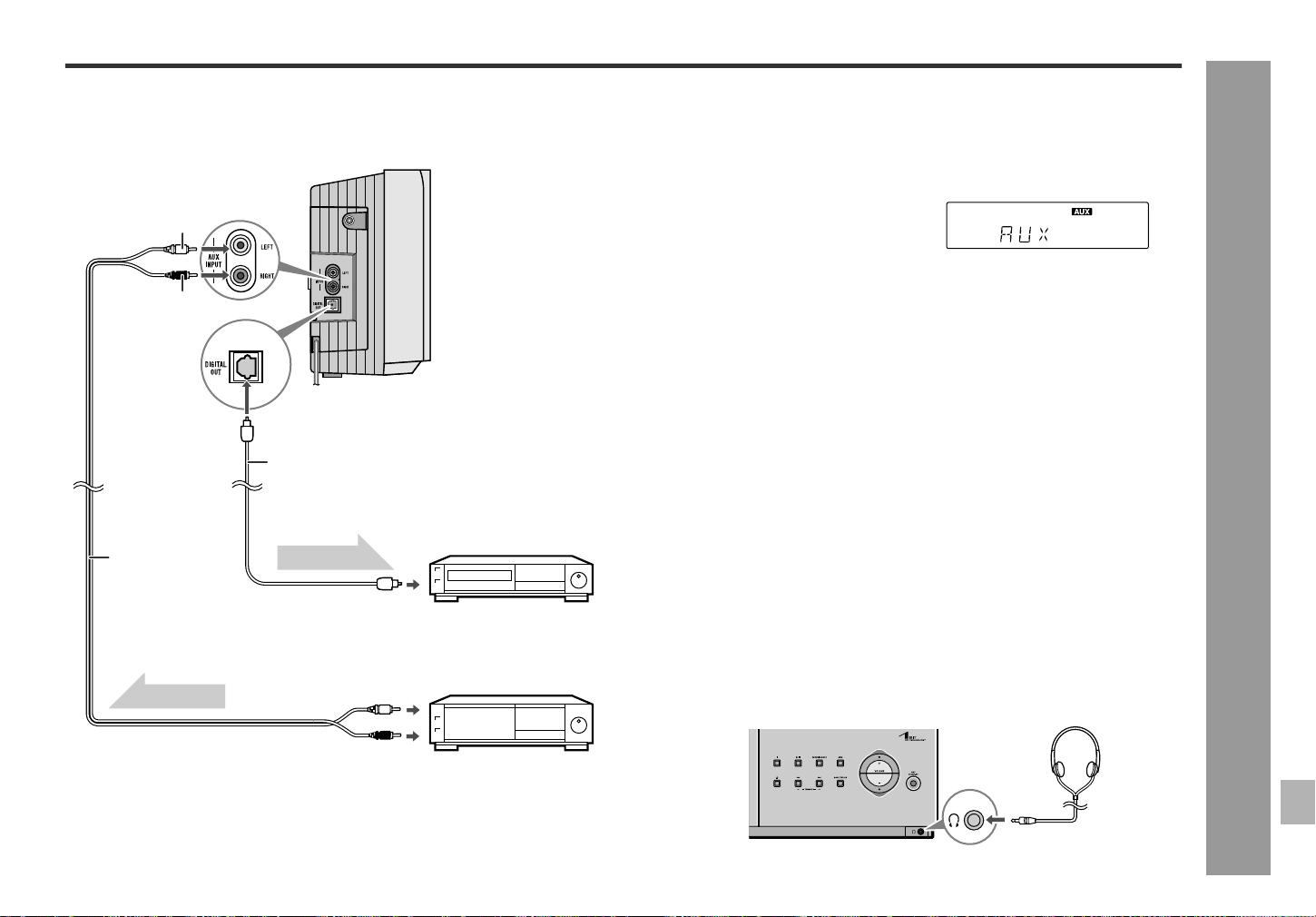
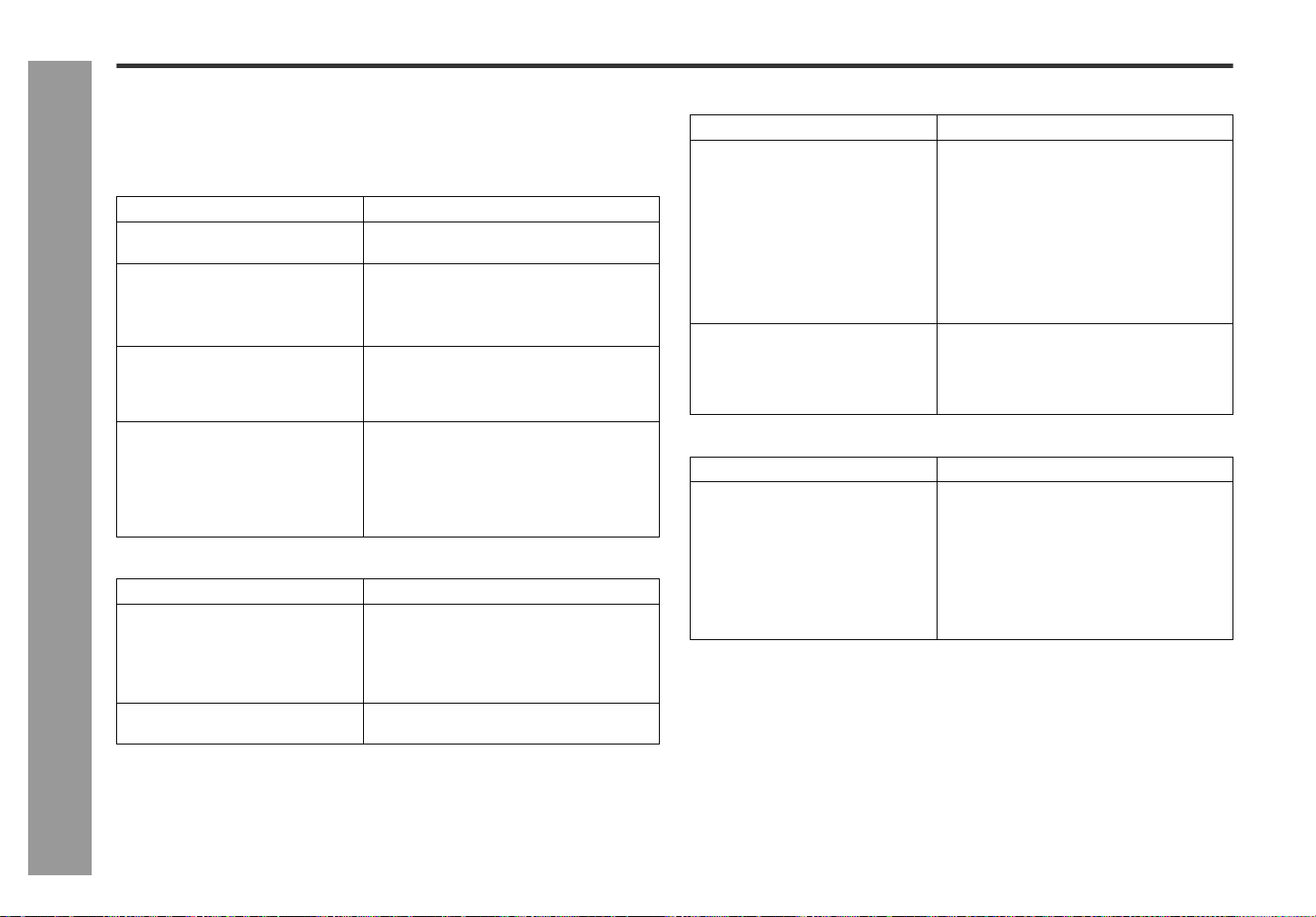
z The connection cord is not included. Purchase a commercially available cord as
shown below.
z Before connecting external units, set this unit to the power stand-by mode and turn
off the power to the external units.
Listening to the playback sounds from
VCR, DVD, etc.
Note:
To prevent hum interference, place this unit away from a television.
To record CD signals on external digital
audio recorders
The digital signal from this unit can be recorded by digital audio recorders, MiniDisc
recorders and other devices equipped with an optical digital audio input.
Notes:
z When using the optical digital jack, remove the cap first. After using the jack,
replace the cap.
z Only CD signals can be output.
Headphones
z Before plugging in or unplugging the headphones, reduce the volume.
z Be sure your headphones have a 1/8" (3.5 mm) diameter plug and are between 16
ohms and 50 ohms impedance. The recommended impedance is 32 ohms.
z Plugging in the headphones disconnects the speakers automatically. Adjust the
volume using the VOLUME buttons.
VCR, DVD etc.
Digital audio recorder
To the optical
line input jack
Connection cable for digital recording
(not supplied)
(CD only)
To the line
output jacks
RCA cord
(not supplied)
White
Red
Audio signal
Audio signal
1Use a connection cord to connect the VCR, DVD, etc. to the AUX INPUT jacks.
When using video equipment, connect the audio output to this unit and the video
output to a television.
2Press the ON/STAND-BY button to turn the power on.
3Press the AUX button.
4Play the VCR, DVD, etc.
1Open the left side cover and then remove the DIGITAL OUT jack cover.
2 Close the left side cover (see page 13).
3Use an optical connection cable for digital recording to connect the unit to the OP-
TICAL IN jack of digital audio recorders, etc.
4Press the ON/STAND-BY button to turn the power on.
5Put the MiniDisc recorder, etc. in the recording mode.
6Play a CD on this unit.
Headphones
26
SD-EX200
03/3/14
SD-EX200_sec.fm
TINSZ0523AWZZ
References
- Troubleshooting chart -
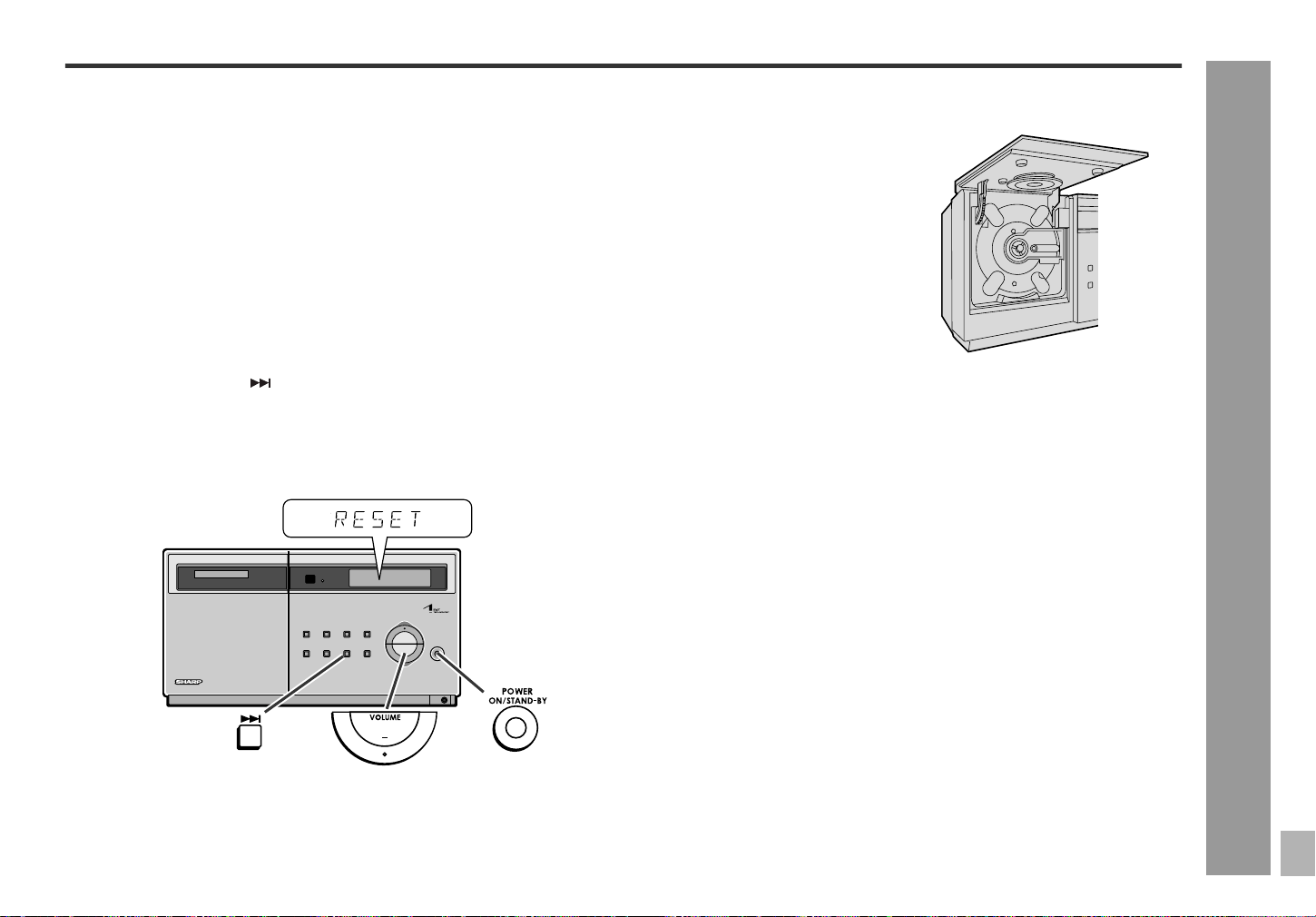
Troubleshooting chart
Many potential problems can be resolved by the owner without calling a service tech-
nician.
If something is wrong with this product, check the following before calling your autho-
rized SHARP dealer or service center.
General
Tuner
CD player
Remote control
Symptom Possible cause
z "CLOCK" appears when the clock
time is checked.
z Did a power failure occur? Reset the
clock. (Refer to page 15.)
z When a button is pressed, the unit
does not respond.
z Set this unit to the power stand-by mode
and then turn it back on.
z If the unit still malfunctions, reset it. (Refer
to page 27.)
z No sound is heard. z Is the volume level set to "0"?
z Are the headphones connected?
z Are the speaker wires disconnected?
z The picture on the TV screen is
distorted.
z When a radio or TV which uses an indoor
antenna is placed near the unit, the picture
on the TV screen may be distorted or the
radio may not function properly.
z It is recommended that you use an out-
door antenna.
Symptom Possible cause
z The radio makes unusual noises
continuously.
z Is the unit placed near the TV or comput-
er?
z Is the FM/AM loop antenna placed proper-
ly? Move the antenna away from the AC
power cord if located near.
z The preset channel cannot be re-
called.
z Did a power failure occur? Preset the
channel again.
Symptom Possible cause
z Even though a disc has been load-
ed, "NO DISC" is displayed.
z Is the disc very dirty?
z Is the unit located near excessive vibra-
tions?
z Has condensation formed inside the unit?
z Playback does not start. z Is the disc loaded with the label side to-
ward you?
z Playback stops in the middle or is
not performed properly.
z Does the disc satisfy the standards?
z Is the disc distorted or scratched?
z Playback sounds are skipped, or
stopped in the middle of a track.
z Is the unit located near excessive vibra-
tions?
z Is the disc very dirty?
z Has condensation formed inside the unit?
Symptom Possible cause
z The remote control does not oper-
ate.
z Is the AC power cord of the unit plugged
in?
z Is the battery polarity correct?
z Are the batteries dead?
z Is the distance or angle incorrect?
z Does the remote control sensor receive
strong light?
27
SD-EX200
03/3/14
SD-EX200_sec.fm
TINSZ0523AWZZ
2
3
4
5
6
7
8
1
References
- Troubleshooting chart -
If trouble occurs
When this product is subjected to strong external interference (mechanical shock,
excessive static electricity, abnormal supply voltage due to lightning, etc.) or if it is
operated incorrectly, it may malfunction.
If such a problem occurs, do the following:
Note:
If neither operation above restores the unit, clear all the memory by resetting it.
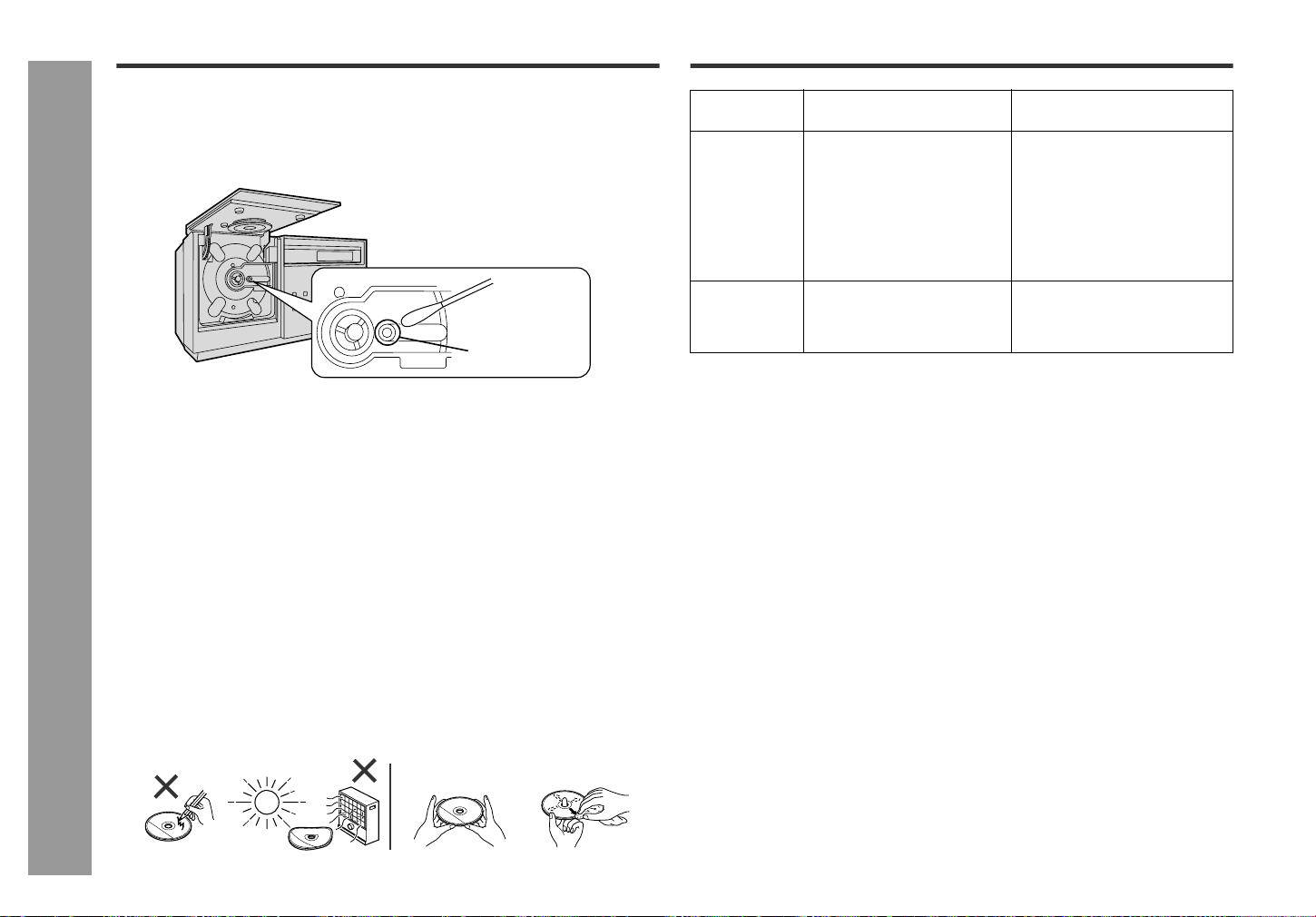
Clearing all the memory (reset)
Caution:
This operation will erase all data stored in memory including clock, timer settings,
tuner preset, and CD program.
Before transporting the unit
Condensation
Sudden temperature changes, storage or operation in an extremely humid environ-
ment may cause condensation inside the cabinet (CD pickup, etc.) or on the transmit-
ter on the remote control.
Condensation can cause the unit to malfunction. If this happens, leave the power on
with no disc in the unit until normal playback is possible (about 1 hour). Wipe off any
condensation on the transmitter with a soft cloth before operating the unit.
1Set the unit to the power stand-by mode and turn the power on again.
2If the unit is not restored in the previous operation, unplug and plug in the unit, and
then turn the power on.
1Press the ON/STAND-BY button to enter the power stand-by mode.
2While pressing down the button and the VOLUME (-) button, press the ON/
STAND-BY button until "RESET" appears.
Carrying the unit with a CD inside can cause
damage to the unit or the CD.
Please open the CD cover to check the CD
compartment is empty before transportation.
(Refer to page 17.)
28
SD-EX200
03/3/14
SD-EX200_sec.fm
TINSZ0523AWZZ
References
- Maintenance / Error messages -
Maintenance
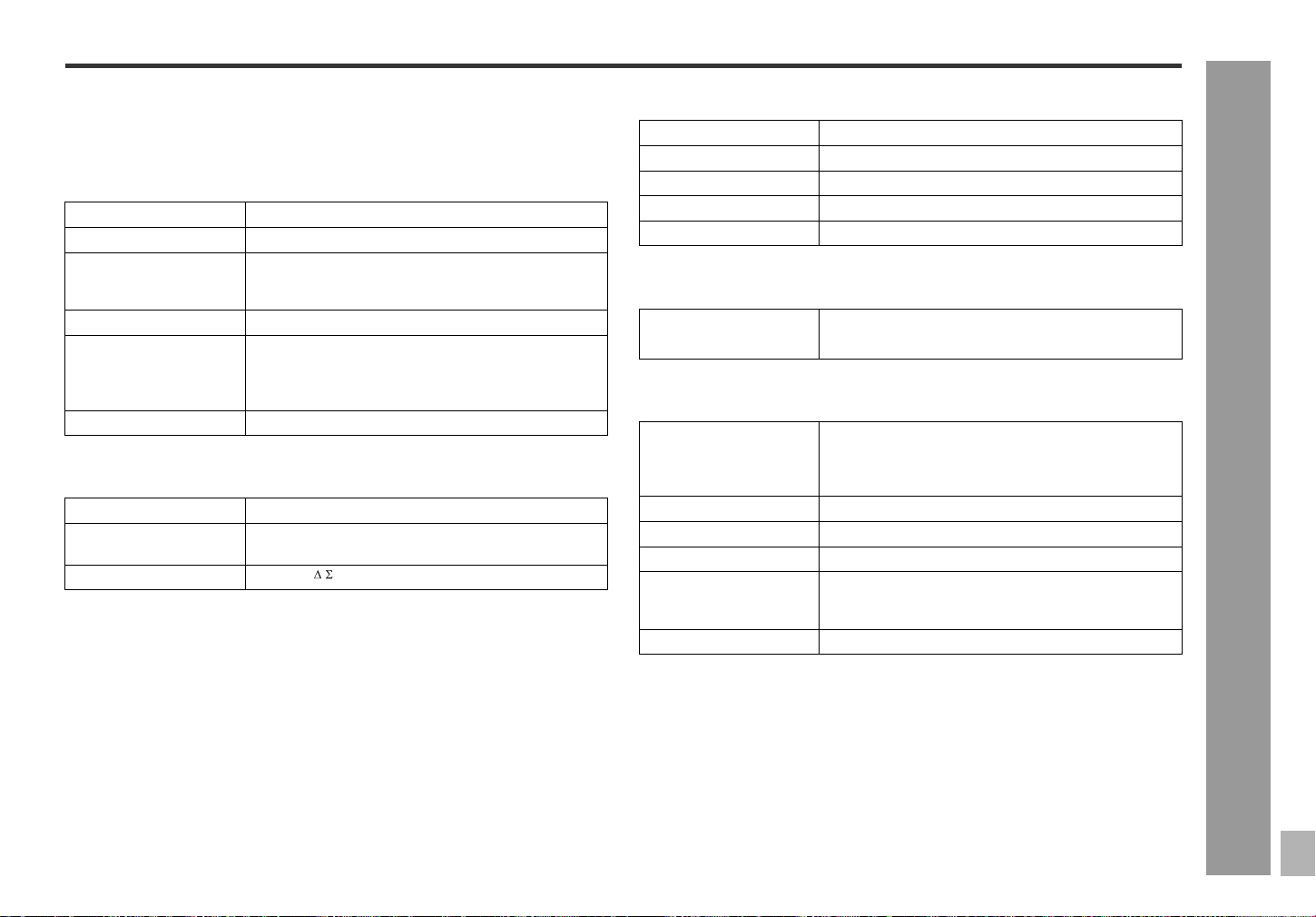
Cleaning the CD pickup lens
Poor performance during CD playback (skipping or jumping) can be caused by a dirty
or contaminated CD laser pickup lens, in this case cleaning may be required. Clean
the lens gently with a dry cotton swab taking care not to touch the lens with your fin-
gers.
Cleaning the cabinet
Care of compact discs
Compact discs are fairly resistant to damage, however mistracking can occur due to
an accumulation of dirt on the disc surface. Follow the guidelines below for maximum
enjoyment from your CD collection and player.
z Do not write on either side of the disc, particularly the non-label side from which
signals are read. Do not mark this surface.
z Keep your discs away from direct sunlight, heat, and excessive moisture.
z Always hold the CDs by the edges. Fingerprints, dirt, or water on the CDs can
cause noise or mistracking. If a CD is dirty or does not play properly, clean it with a
soft, dry cloth, wiping straight out from the center, along the radius.
Error messages
Periodically wipe the cabinet with a soft cloth and a diluted soap solution, then with a
dry cloth.
Caution:
z Do not use chemicals for cleaning (gasoline, paint thinner, etc.). It may damage the
cabinet finish.
z Do not apply oil to the inside of the unit. It may cause malfunctions.
Pickup lens
NO
YES Correct
Error messag-
es
Meaning Remedy
NO DISC z The disc is damaged. z Replace it with another disc.
z Eusure that the CD is correctly
inserted with the label side to-
ward you.
z A CD has not been loaded. z Load a CD.
z The CD data cannot be
read.
z Reload the CD.
FAN LOCK z The cooling fan inside the
unit does not run due to for-
eign objects around the fan.
z Set this unit to the stand-by
mode and remove the foreign
objects around the fan.
29
SD-EX200
03/3/14
SD-EX200_sec.fm
TINSZ0523AWZZ
2
3
4
5
6
7
8
1
References
- Specifications -
Specifications
As part of our policy of continuous improvement, SHARP reserves the right to make
design and specification changes for product improvement without prior notice. The
performance specification figures indicated are nominal values of production units.
There may be some deviations from these values in individual units.
General
Amplifier
CD player
Tuner
Speaker
Power source AC 120 V, 60 Hz
Power consumption 76 W
Dimensions Width: 15"(380 mm)
Height: 7-7/8"(200 mm)
Depth: 4-3/4"(120 mm)
Weight 7.5 lbs. (3.4 kg)
Output terminals Speakers: 4 ohms
Headphones: 16 - 50 ohms (recommended: 32 ohms)
Digital output (optical)
Input terminals Auxiliary input: 500 mV/47 k ohms
Amplification system 64fs 1-bit switching (Remarks: fs = 44.1 kHz)
Power output 100 watts minimum RMS per channel into 4 ohms from
40 Hz to 20 kHz, 2 % total harmonic distortion
A/D noise shaping 7th-order (delta - sigma) modulation
Type 1-disc vertical type compact disc player
Signal readout Non-contact, 3-beam semiconductor laser pickup
D/A converter 24-bit/96 k D/A converter
Frequency response 20 - 20,000 Hz
Dynamic range 101 dB (1 kHz)
Frequency range FM: 87.5 - 108 MHz
AM: 530 - 1.720 kHz
Type 2-way type speaker system
2" (5 cm) Tweeter
5-7/8" (15 cm) Woofer
Maximum input power 200 W
Rated input power 100 W
Impedance 4 ohms
Dimensions Width: 7-1/2" (190 mm)
Height: 11-7/16" (290 mm)
Depth: 9-5/16" (235 mm)
Weight 8.4 lbs. (3.8 kg)/each
TINSZ0523AWZZ
03C R AO 1
SD-EX200 1-Bit Digital Audio System
SHARP ELECTRONICS CORPORATION
Sharp Plaza, Mahwah, New Jersey 07430-2135
SHARP CORPORATION
9910
CONSUMER LIMITED WARRANTY
This warranty does not apply to any appearance items of the Product nor to the additional excluded item(s) set forth below nor to any Product the exterior of which has been damaged or
defaced, which has been subjected to improper voltage or other misuse, abnormal service or handling, or which has been altered or modified in design or construction.
In order to enforce the rights under this limited warranty, the purchaser should follow the steps set forth below and provide proof of purchase to the servicer.
The limited warranty described herein is in addition to whatever implied warranties may be granted to purchasers by law. ALL IMPLIED WARRANTIES INCLUDING THE WARRANTIES OF
MERCHANTABILITY AND FITNESS FOR USE ARE LIMITED TO THE PERIOD(S) FROM THE DATE OF PURCHASE SET FORTH BELOW. Some states do not allow limitations on how
long an implied warranty lasts, so the above limitation may not apply to you.
Neither the sales personnel of the seller nor any other person is authorized to make any warranties other than those described herein, or to extend the duration of any warranties beyond
the time period described herein on behalf of Sharp.
The warranties described herein shall be the sole and exclusive warranties granted by Sharp and shall be the sole and exclusive remedy available to the purchaser. Correction of defects,
in the manner and for the period of time described herein, shall constitute complete fulfillment of all liabilities and responsibilities of Sharp to the purchaser with respect to the Product, and
shall constitute full satisfaction of all claims, whether based on contract, negligence, strict liability or otherwise. In no event shall Sharp be liable, or in any way responsible, for any damages
or defects in the Product which were caused by repairs or attempted repairs performed by anyone other than an authorized servicer. Nor shall Sharp be liable or in any way responsible for
any incidental or consequential economic or property damage. Some states do not allow the exclusion of incidental or consequential damages, so the above exclusion may not apply to you.
THIS WARRANTY GIVES YOU SPECIFIC LEGAL RIGHTS. YOU MAY ALSO HAVE OTHER RIGHTS WHICH VARY FROM STATE TO STATE.
Model Specific Section
Your Product Model Number & Description:
(Be sure to have this information available when you need service for your Product.)
Warranty Period for this Product:
One (1) year parts and labor from the date of purchase.
Additional Item(s) Excluded from Warranty Coverage (if any):
Non-functional accessories, supplies, and consumable items.
Where to Obtain Service: At a Sharp Authorized Servicer located in the United States.
To find a location of the nearest Sharp Authorized Servicer, call Sharp toll free at 1-800-BE-SHARP.
What to do to Obtain Service: Ship prepaid or carry in your Product to a Sharp Authorized Servicer.
Be sure to have Proof of Purchase available. If you ship the Product, be sure it is insured and packaged
securely.
TO OBTAIN SUPPLY, ACCESSORY OR PRODUCT INFORMATION, CALL 1-800-BE-SHARP.
0207
SHARP ELECTRONICS CORPORATION warrants to the first consumer purchaser that this Sharp brand product (the “Product”), when shipped in its original container, will be free from
defective workmanship and materials, and agrees that it will, at its option, either repair the defect or replace the defective Product or part thereof with a new or remanufactured equivalent
at no charge to the purchaser for parts or labor for the period(s) set forth below.
SD-EX200_sec
TINSZ0523AWZZ
Printed in Malaysia
Impreso en Malaysia