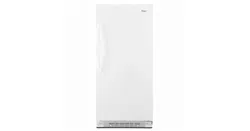
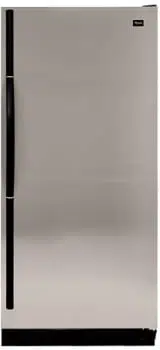
User Manual Refrigerator
INSTALLING YOUR REFRIGERATOR
Unpacking
Remove Packaging Materials
- Remove tape and glue residue from surfaces before turning on the refrigerator. Rub a small amount of liquid dish soap over the adhesive with your fingers. Wipe with warm water and dry.
- Do not use sharp instruments, rubbing alcohol, flammable fluids, or abrasive cleaners to remove tape or glue. These products can damage the surface of your refrigerator. For more information, see “Safety” section.
Clean Before Using
After you remove all of the packaging materials, clean the inside of your refrigerator before using it. See the cleaning instructions in “Caring For Your Refrigerator.”
Location Requirements
Ventilation and Clearance
- Keep flammable materials and vapors, such as gasoline, away from refrigerator.
- Do not cover the refrigerator with items such as blankets, sheets, tablecloths, etc. This reduces air circulation.
- Allow at least 1" (2.5 cm) between the back of the refrigerator and the wall. If the refrigerator is to be next to a fixed wall, leave extra space on the hinge side so the door can open wider.
Temperature
Your refrigerator operates most efficiently when located in an area where the temperature will not fall below 40°F (5°C). Place your refrigerator in a location where the temperature will not fall below this recommended temperature.
Upon Moving to Final Location
NOTE: This refrigerator may be installed side by side with another freezer or refrigerator. Allow for a 1" (2.54 cm) space behind the refrigerator and a ¹⁄₄" (6.4 mm) clearance between the appliances.
Electrical Requirements
Before you move your refrigerator into its final location, it is important to make sure you have the proper electrical connection.
Recommended Grounding Method
A 115 Volt, 60 Hz., AC only, 15- or 20-amp fused, grounded electrical supply is required. It is recommended that a separate circuit serving only your refrigerator be provided. Use an outlet that cannot be turned off by a switch. Do not use an extension cord.
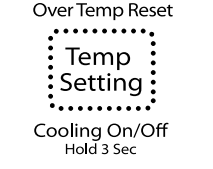
NOTE: Before performing any type of installation, cleaning, or removing a light bulb, press and hold TEMP SETTING for 3 seconds to turn off cooling, and then disconnect the refrigerator from the electrical source.
Refrigerator Door
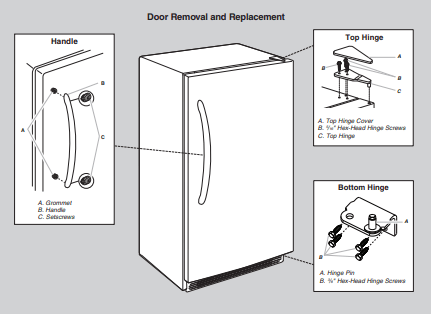
Tools Needed: ⁵⁄₁₆" hex-head socket wrench, ³⁄₈" hex-head socket wrench, flat 2" putty knife.
IMPORTANT:
- Depending on the width of the opening, you may need to remove the handle or door to move the refrigerator into the house.
- All graphics referenced in the following instructions are included later in this section after “Final Steps.” The graphic may be reversed if door swing is reversed.
- Before you begin, turn the control OFF, and remove food and adjustable door or utility bins from door
Remove and Replace the Handle
To Remove the Handle:
1. Loosen the setscrews located on the side of handle at each end. See Handle graphic.
2. Remove the handle from the grommets.
To Replace the Handle:
1. Place the handle onto the grommets making sure the grommets are fitted into the handle holes.
2. Tighten the upper and lower setscrews with the hex key provided. See Handle graphic. Do not over tighten the setscrews.
Remove Door and Hinges
1. Unplug refrigerator or disconnect power.
2. Keep the refrigerator door closed until you are ready to lift it free from the cabinet. NOTE: Provide additional support for the door while the hinges are being moved. Do not depend on the door magnets to hold the door in place while you are working.
3. Remove the parts for the top hinge as shown in Top Hinge graphic.
4. Lift the refrigerator door free from the lower hinge and cabinet and set aside.
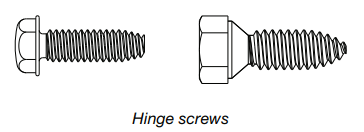
5. Remove the four hex-head hinge screws and bottom hinge assembly. See Bottom Hinge graphic.
Replace Door and Hinges
NOTE: Graphic may be reversed if door swing is reversed.
1. Replace the parts for the bottom hinge as shown and tighten screws. See Bottom Hinge graphic. Replace the refrigerator door.
NOTE: Provide additional support for the door while the hinges are being moved. Do not depend on the door magnets to hold the door in place while you are working.
2. Assemble the parts of the top hinge as shown in the Top Hinge graphic. Do not tighten the screws completely
Final Steps
1. Plug into a grounded 3 prong outlet.
2. Reset the control. See “Using the Control.”
3. Return all removable door parts to door and food to refrigerator.
Refrigerator Leveling and Door Closing
Your refrigerator has two front adjustable legs — one on each side. The back of the refrigerator rests on two fixed rollers. The base grille covers the adjustable brake feet and roller assemblies located at the bottom of the refrigerator below the refrigerator door. Before making any adjustments, remove the base grille and move the refrigerator to its final location.
Tools Needed: ¹⁄₄" hex driver, Phillips screwdriver
1. Remove the base grille screws. Grasp the grille firmly and pull it toward you. Open the refrigerator door to access the brake feet. NOTE: To allow the refrigerator to roll more easily, raise the brake feet by turning them counterclockwise. The front rollers will be touching the floor.
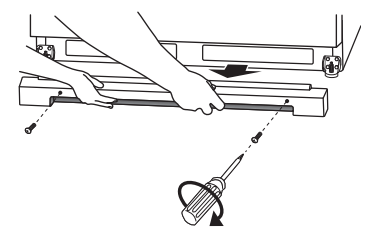
2. Move the refrigerator to its final location.
3. Lower the brake feet, by turning them clockwise, until the rollers are off the floor and both brake feet are snug against the floor. This keeps the refrigerator from rolling forward when opening the refrigerator door.
IMPORTANT: If you need to make further adjustments involving the brake feet, you must turn both brake feet the same amount to keep the refrigerator level.
4. Make sure the door closes easily. If you are satisfied with the door opening and closing, skip the next section. If, however, the door does not close easily or the door pops open, adjust the tilt.
To Adjust the Cabinet Tilt:
NOTE: Having someone push against the top of the refrigerator takes some weight off the brake feet. This makes it easier to turn them.
- Open the refrigerator door. Use a ¹⁄₄" hex driver to turn both brake feet clockwise the same amount. This will raise the front of the refrigerator. It may take several turns to allow the door to close more easily
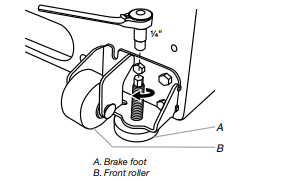
5. Make sure the refrigerator is steady. If the refrigerator seems unsteady or rolls forward when the door is pulled open, adjust the brake feet.
To Steady the Refrigerator:
- Open the refrigerator door. Using a ¹⁄₄" hex driver, turn both brake feet clockwise the same amount until the brake feet are snug against the floor. Check again. If not satisfied, continue to adjust the brake feet by half turns of the screw until the refrigerator does not roll forward when the door is opened.
6. Replace the base grille by aligning the ends of the grille with the leveling assemblies on each side and snapping the grille into place. Reinstall the Phillips screws
Normal Sounds
Your new refrigerator may make sounds that your old one didn’t make. Because the sounds are new to you, you might be concerned about them. Most of the new sounds are normal. Hard surfaces, like the floor, walls, and cabinets, can make the sounds seem louder. The following describes the kinds of sounds and what may be making them.
- Your refrigerator is designed to run more efficiently to keep your food items at the desired temperatures and to minimize energy usage. The high efficiency compressor and fans may cause your refrigerator to run longer than your old one. You may also hear a pulsating or high-pitched sound from the compressor or fans adjusting to optimize performance.
- You may hear the evaporator fan motor circulating air through the refrigerator compartment. The fan speed may increase as you open the doors or add warm food.
- Rattling noises may come from the flow of refrigerant or items stored on top of the refrigerator.
- Water dripping on the defrost heater during a defrost cycle may cause a sizzling sound.
- As each cycle ends, you may hear a gurgling sound due to the refrigerant flowing in your refrigerator.
- Contraction and expansion of the inside walls may cause a popping noise.
- You may hear air being forced over the condenser by the condenser fan.
- You may hear water running into the drain pan during the defrost cycle.
OPERATING YOUR REFRIGERATOR
Ensuring Proper Air Circulation
In order to ensure proper temperature, you need to permit proper airflow in the refrigerator. As shown in the illustration, cool air enters from the refrigerator wall and moves down. The air then recirculates through the vent near the bottom
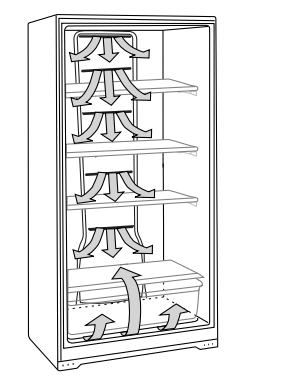
Do not block any of these vents with food packages. If the vents are blocked, airflow will be restricted, and temperature and moisture problems may occur.
IMPORTANT: To avoid odor transfer and drying out of food, wrap or cover foods tightly.
Using the Control
The temperature control is located at the top front of the refrigerator compartment.
Temperature Control
For your convenience, the temperature control is preset at the factory. When you first install your refrigerator, check that the control is still set to the recommended setting as shown.
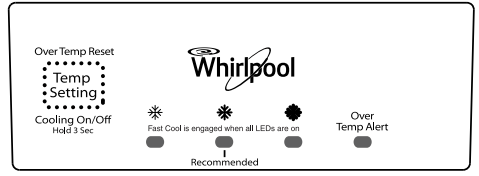
IMPORTANT:
- The recommended setting is designed to maintain the temperature at or near 37°F (3°C) under normal operating conditions.
- Wait 24 hours before you put food into the refrigerator. If you add food before the refrigerator has cooled completely, your food may spoil.
NOTE: Adjusting the temperature set point to a colder than recommended setting will not cool the refrigerator any faster.
- If the temperature is too warm or too cold in the refrigerator, first check the air vents to be sure they are not blocked before adjusting the control.
- The preset temperature setting should be correct for normal household usage. The control is set correctly when milk or juice is as cold as you like.
- When the refrigerator is first started, the compressor will run constantly until the refrigerator is cooled. It may take up to 6 or 8 hours (or longer), depending on room temperature and number of times the refrigerator door is opened. After the refrigerator is cooled, the compressor will turn on and off as needed to keep the refrigerator at the proper temperature.
- The outside of your refrigerator may feel warm. This is normal. The refrigerator’s design and main function is to remove heat from packages and air space inside the refrigerator. The heat is transferred to the room air, making the outside of the refrigerator feel warm.
Adjusting Control
If you need to adjust the temperature in the refrigerator compartment, press the TEMP SETTING button to display the desired temperature setting from the snowflake on the left (least cold) to the snowflake on the right (coldest).
NOTE: Except when starting the refrigerator, do not adjust the control more than one setting at a time. Wait 24 hours between adjustments for the temperature to stabilize.
Cooling On/Off
Your refrigerator will not cool when cooling is turned off. To turn cooling off, press and hold the TEMP SETTING button for 3 seconds. In the off condition, none of the lights on the control panel will be illuminated. The main refrigerator light bulb will still operate. To turn cooling on, press and hold the TEMP SETTING button for 3 seconds. When cooling is on, the control panel lights will be illuminated.
Fast Cool
Use this feature to assist with periods of high refrigerator use, full grocery loads or temporarily warm room temperature. To activate Fast Cool, press the TEMP SETTING button until all the snowflake positions are illuminated simultaneously. The refrigerator will remain in the Fast Cool setting for 24 hours after the extra-low temperature is reached. Once the time has expired, the refrigerator will return to the previous temperature setting. Fast Cool may be manually turned off by pressing the TEMP SETTING button to select the desired temperature setting from the snowflake on the left (least cold) to the snowflake on the right (coldest).
Over Temperature Alert (on some models)
The Over Temperature Alert lets you know if the refrigerator temperature has risen to 54°F (12°C) or higher. This alert feature will sound a continuous alert tone and repeatedly flash a red light on the control panel. The tone can be turned off by pressing the TEMP SETTING button on the control panel once. As you press the TEMP SETTING button, the red light will then also change from flashing to continuously illuminated. The red light will remain illuminated until the refrigerator temperature falls below 54°F (12°C).
NOTE: If the red light on the control panel is repeatedly flashing, but the alert tone is not sounding, this means that an over temperature condition has occurred but the refrigerator temperature has since returned to below 54°F (12°C). To turn off the red light indicator for this condition, press the TEMP SETTING button on the control panel once.
Door Ajar Alarm (on some models)
The Door Ajar alarm lets you know when the refrigerator door has been open for 5 minutes or longer and the cooling is turned on. This alarm feature will sound an alert tone that will repeat every 2 minutes. Close the door to turn off the tone. The feature is reset and will reactivate when the door is again left open for 5 minutes. NOTE: To mute the alert tone while keeping the door open, such as while cleaning the inside of the refrigerator, press TEMP SETTING button on the control panel. The alert tone will be temporarily turned off.
Key Eject Lock (on some models)
To lock or unlock the refrigerator, you must hold the key in the lock while turning. The lock is spring loaded, so the key cannot be left in the lock.
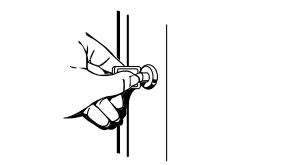
If the key is lost, contact your dealer for a replacement. Always give the model and serial number of your refrigerator when requesting a replacement key.
NOTE: Keep the key out of the reach of children. Do not keep the key close to the refrigerator.
Refrigerator Features
Important information to know about glass shelves and covers: Do not clean glass shelves or covers with warm water when they are cold. Shelves and covers may break if exposed to sudden temperature changes or impact, such as bumping. Tempered glass is designed to shatter into many small, pebble-size pieces. This is normal. Glass shelves and covers are heavy. Use both hands when removing them to avoid dropping.
Refrigerator Shelves
Store similar foods together and adjust the shelves to fit different heights. This reduces the time the refrigerator door is open and saves energy.
To Remove and Replace a Shelf:
1. Remove the shelf by lifting straight up, and pulling the shelf out.
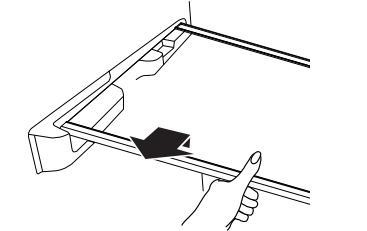
2. Replace the shelf by lowering the shelf onto the supports on the side wall.
Crispers Drawers
To Remove and Replace a Drawer:
1. Slide drawer straight out to the stop. Lift the front of the drawer and slide it out the rest of the way.
2. Replace a drawer by sliding it back in, fully past the stop.
Crisper Cover
To Remove the Crisper(s) Cover:
1. Remove crisper(s). Hold the glass, insert firmly with one hand and press up in the center of the glass insert until it rises above the plastic frame. Slowly slide the glass insert forward to remove.
2. Lift the cover frame and remove it.
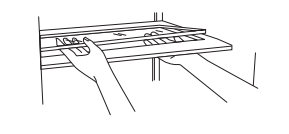
To Replace Crisper Cover:
1. Fit the back of the cover frame into the supports on the side walls of the refrigerator. Lower the front of the cover frame into place.
2. Slide the rear of the glass insert into the cover frame and lower the front into place
Crisper Humidity Control (on some models)
You can adjust the amount of humidity in the moisture-sealed crisper using the settings between “+” and “-”.
“-” (open) lets moist air out of the crisper for best storage of fruits and vegetables with skins.
- Fruit: Wash, let dry and store in refrigerator in plastic bag in crisper. Do not wash or hull berries until they are ready to use. Sort and keep berries in original container in crisper.
- Vegetables with skins: Place in plastic bag or plastic container and store in crisper. “+” (closed) keeps moist air in the crisper for best storage of fresh, leafy vegetables.
- Leafy vegetables: Wash in cold water, drain and trim or tear off bruised and discolored areas. Place in plastic bag or plastic container and store in crisper.
Door Bin
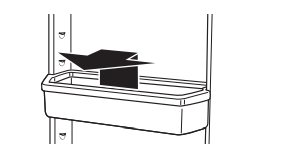
To Remove and Replace the Bin:
1. Remove the bin by tipping the front of the bin forward and sliding out.
2. Replace the bin by sliding it in above the desired support tilting it back into place
CARING FOR YOUR REFRIGERATOR
Cleaning Your Refrigerator
Clean the refrigerator about once a month to keep odors from building up. Wipe up spills immediately.
To Clean Your Refrigerator:
1. Press and hold TEMP SETTING for 3 seconds to turn off cooling.
2. Unplug refrigerator or disconnect power.
3. Remove all removable parts from inside, such as shelves, crispers, etc.
4. Hand wash, rinse, and dry removable parts and interior surfaces thoroughly. Use a clean sponge or soft cloth and a mild detergent in warm water.
- Do not use abrasive or harsh cleaners such as window sprays, scouring cleansers, flammable fluids, cleaning waxes, concentrated detergents, bleaches or cleansers containing petroleum products on plastic parts, interior and door liners or gaskets. Do not use paper towels, scouring pads, or other harsh cleaning tools. These can scratch or damage materials.
- To help remove odors, you can wash interior walls with a mixture of warm water and baking soda (2 tbs to 1 qt [26 g to 0.95 L] of water).
5. Replace removable parts.
6. Use the appropriate cleaning method for your exterior finish. Painted Metal: Wash exteriors with a clean sponge or soft cloth and a mild detergent in warm water. Do not use abrasive or harsh cleaners or cleaners designed for stainless steel. Dry thoroughly with a soft cloth.
7. Clean the condenser coils regularly. Coils may need to be cleaned as often as every other month. This may help save energy.
- Open the refrigerator door and remove the base grille by removing 2 Phillips-head screws and pulling the grille toward you.
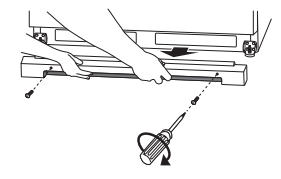
- Use a vacuum with an extended attachment to clean the condenser coils when they are dusty or dirty.
- Replace the base grille by aligning the ends of the grille with the leveling assemblies on each side and snapping the grille into place. Reinstall the screws.
8. Plug in refrigerator or reconnect power.
9. Set temperature control to desired setting. See “Using the Control.”
Changing the Light Bulb
NOTE: Not all appliance bulbs will fit your freezer. Be sure to replace the bulb with an appliance bulb of the same size, shape, and wattage.
1. Unplug refrigerator or disconnect power.
2. Remove the light shield by squeezing the lens from the sides, pushing back and pulling down.
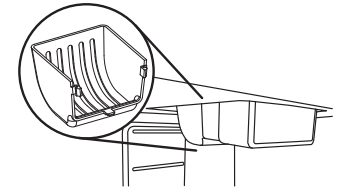
3. Replace bulb with a 40-watt maximum appliance bulb or an NOTE: Some LED replacement light bulbs are not recommended for wet/damp environments. Refrigerator fresh food and freezer compartments are considered wet/damp environments. Read and follow all instructions on the LED packaging when replacing the factory installed LED bulb. A replacement LED bulb can be purchased from an authorized dealer.
4. Replace the light shield.
5. Plug in refrigerator or reconnect power.
Power Interruptions
If the power will be out for 24 hours or less, keep the door closed to help food stay cold and frozen. If the power will be out for more than 24 hours, consume or can perishable food at once.
REMEMBER: If the condition of the food is poor, dispose of it.
Vacation and Moving Care
Vacations
If you choose to leave the refrigerator on while you’re away, use up any perishables and freeze other items. If you choose to turn the refrigerator off before you leave, follow these steps.
1. Remove all food from the refrigerator.
2. Turn the control to the off position. See “Using the Control.”
3. Clean refrigerator, wipe it, and dry well.
4. Tape rubber or wood blocks to the tops of both doors to prop them open far enough for air to get in. This stops odor and mold from building up.
Moving
When you are moving your refrigerator to a new home, follow these steps to prepare it for the move.
1. Remove all food from the refrigerator.
2. Turn the control to the off position. See “Using the Control.”
3. Unplug refrigerator.
4. Empty water from the defrost pan.
5. Clean, wipe, and dry thoroughly.
6. Take out all removable parts, wrap them well, and tape them together so they don’t shift and rattle during the move.
7. Tape the doors shut and the power cord to the refrigerator cabinet. When you get to your new home, put everything back and refer to “Installing Your Refrigerator” for preparation instructions
PROBLEM SOLVER
Refrigerator Will Not Operate
- Check that it is plugged into a grounded 3 prong outlet. Check that the temperature control is turned on. Check that the refrigerator is not running an automatic defrost cycle. Replace the fuse or reset the circuit breaker. NOTE: If problems continue, contact an electrician.
Lights Do Not Work
- Check that it is plugged into a grounded 3 prong outlet. Check that the light bulb is tight in the socket and is not burned out.
Water in Defrost Drain Pan
- It is normal for water to drip into the defrost drain pan when refrigerator is defrosting. When humidity is high, it is normal for water in the defrost pan to take longer to evaporate.
Motor Seems to Run Too Much
- Check that door closes properly. Adding a large amount of food warms the refrigerator causing the unit to run longer to cool back down. If this is the situation, wait approximately 6 to 8 hours to allow the refrigerator to reach the correct temperature. Get all items out at one time, keep food organized and close door as soon as possible. Check that the condenser coils are clean. Check that space around refrigerator meets air circulation requirements. See “Location Requirements.” Warmer than normal room temperature will cause the motor to run longer. NOTE: If none of the above, your new refrigerator will run longer than your old one due to its high-efficiency motor.
Temperature Is Too Warm
- Check that air vents are clear. See “Ensuring Proper Air Circulation” for air vent locations. Get all items out at one time, keep food organized and close door as soon as possible. Adding a large amount of food warms the refrigerator causing the refrigerator to run longer to cool back down. Check that the temperature control is set correctly for surrounding conditions.
The Door Will Not Close Completely or Is Difficult To Open
- Check that there are no food packages blocking the door. On some models, check that the crisper covers, pans, shelves, bins and baskets are in the correct position. Check that gaskets are clean. See “Caring for Your Refrigerator.” Check that the refrigerator is stable. See “Refrigerator Leveling and Door Closing.”
Noisy
- The sounds may be normal. See “Normal Sounds.”
Refrigerator Makes Loud Buzzing/Clicking Sound
- If the refrigerator has recently been plugged in or turned on following a defrost or product move, or if there has been an extended power failure, turn off the temperature alarm for the next 24 hours. Adding a large amount of food warms the refrigerator. It can take several hours for the refrigerator to return to normal temperature. Turn the temperature alarm off for the next 24 hours.
SAFETY
IMPORTANT SAFETYINSTRUCTIONS
WARNING: To reduce the risk of fire, electric shock, or injury when using your refrigerator, follow these basic precautions:
- Plug into a grounded 3 prong outlet.
- Do not remove ground prong.
- Do not use an adapter.
- Do not use an extension cord.
- Disconnect power before servicing.
- Replace all parts and panels before operating.
- Remove doors from your old refrigerator.
- Use nonflammable cleaner.
- Keep flammable materials and vapors, such as gasoline, away from refrigerator.
- Use two or more people to move and install refrigerator