User Manual
PRODUCT DESCRIPTION
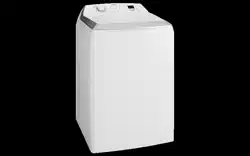
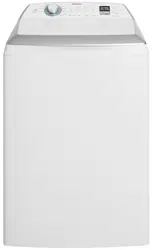
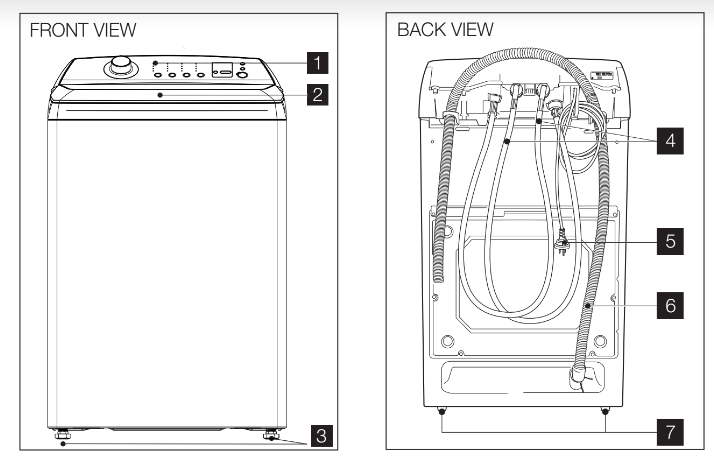
WASHING MACHINE PARTS **SWT8043 , SWT9043 , SWT1043
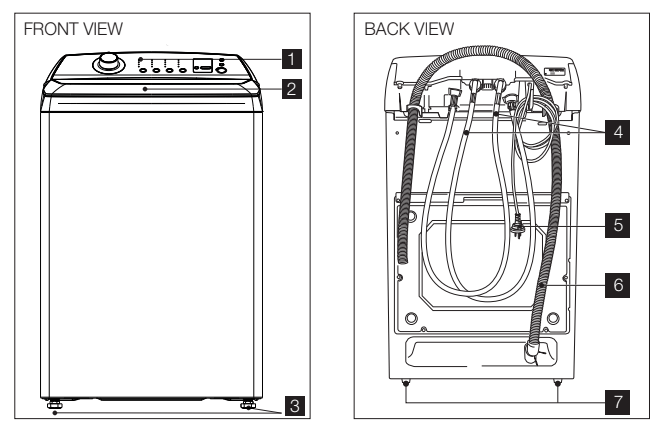
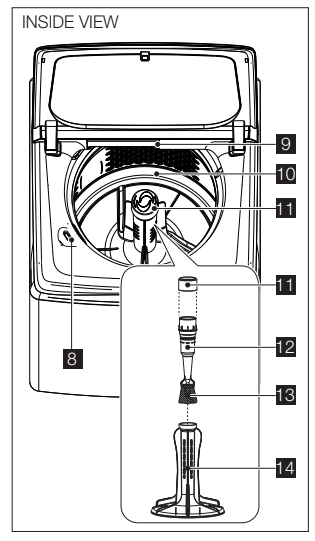
PARTS LIST
- Control Pane
- Machine Lid
- Front Feet
- Water Inlet Hose
- RED fittings (Hot Water)
- BLUE fittings (Cold Water
5. Mains Cable
6. Outlet Hose/Drain Hose (See installation instructions to fit & position drain hose)
7. Back Feet
8. Bleach Dispenser,See Page 21
9. Detergent Dispenser Drawer See Page 19
10. Wash Bowl
11. Cap Agitator
12. Frame Filter
13. Lint Filter See page 24
14. Agitator
WASHING MACHINE PARTS **SWT9043A , SWT1023A
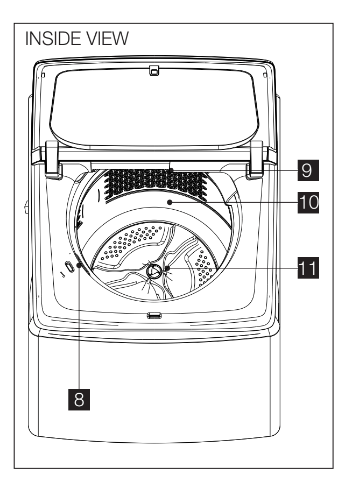
PARTS LIST
- Control Panel
- Machine Lid
- Front Feet
- Water Inlet Hose
- RED fittings (Hot Water)
- BLUE fittings (Cold Water)
5. Mains Cable
6. Outlet Hose/Drain Hose (See installation instructions to fit & position drain hose)
7. Back Feet
8. Bleach Dispenser,See Page 21
9. Detergent Dispenser Drawer See Page 19
10. Wash Bowl
11. Gentle Wash Agitator (Low Profile Agitator)
ABOUT YOUR WASHING MACHINE
- Out of Balance Interruption
The out of balance has 2 level which are low level and high level.
The high level: Machine will be stopped, caused by an uneven distribution of clothes in the wash bowl. To rectify the out of balance condition, open the lid and redistribute the clothes evenly in the wash bowl. Closing the spin stage of the wash.
The low level: The washing machine try to optimize by reduce spin speed to avoid out of balance to finish the cycle.
If you have frequent out of balance interruptions, it may be due to your washing machine not standing firm and level on the floor. This can be corrected by adjust the washing machine legs as described in the Installation Instructions supplied with your machines.
- Touchpad Response and Lights Always press touchpads gently
Watch the lights on the control panel to see the effect pressing a touchpad or turning a program selector knob has, and listen for "BEEPS”.
When you press a touchpad you will get a short “BEEP” to acknowledge the entry.
If the option is not available at the time, the machine will not allow you to select it. After the machine has started, the entire wash option touchpad will be disabled and machine will give three short beeps to indicate the touchpad is disabled. The Star/Pause To Pause touchpad is still active but you need to press and hold the touchpad for minimum 1.2 seconds to pause machine.This is to confirm that you really want to pause the machine.
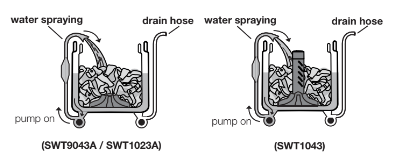
 ActiveBoost™ (Only for SWT1043/SWT9043A/SWT1023A)
This product features the new ActiveBoost Wash System that uses less amount of water, and is more energy efficient,during the washing process. It achieves this with just the right amount of water needed, and by a detergent pre-mixing system that minimizes detergent residue even during cold wash to give you a cleaner wash result.
Water at 35 C is combined with detergent to dissolve and activate it. Depending on model, this concentrated solution is then circulated or showered over the clothes in combination with unique bowl and agitator rotations to provide wash action at the selected wash temperature.
After the wash operation is completed, the bowl is filled with more water. The low profile agitator or agitator then moves in an energy efficient mode, generating additional mechanical actions.
Your washing machine has selectable "Auto” sensing water level option as well as allowing you to choose a manual water level if you wish. We recommend you to use the Auto water level option to ensure there is just the right amount of water for the wash load in the machine. In other words, it will usually give you the best wash while also being the most efficient in terms of water usage.
SAVING WATER AND ENERGY
This washing machine features water and energy saving options.
To save energy, the wash time can be shortened for a load of less dirty clothes by selecting the appropriate wash program e.g. Fast Wash.
The washing machine is energy efficient and most water efficient when used with a full load of clothes and with Eco Rinse selected. You should use
Eco Rinse (where available) instead of Deep Rinse to reduce the amount of water used for rinsing clothes.
Your machine is most water efficient when Eco Rinse is used as the rinse option.
Each time you switch on your washing machine the machine will select most suitable rinse option for the selected program. You can change rinse option if you wish. The difference between Deep rinse and Eco rinse is explained on the page 13.
POWER FAILURE RECOVERY
When there is power failure while machine is washing or rinsing or spinning. The machine tries to save the settings at which stage the machine is doing and then when the power returns back the machine will starts washing from the stage where it is left off.
CONTROL PANEL
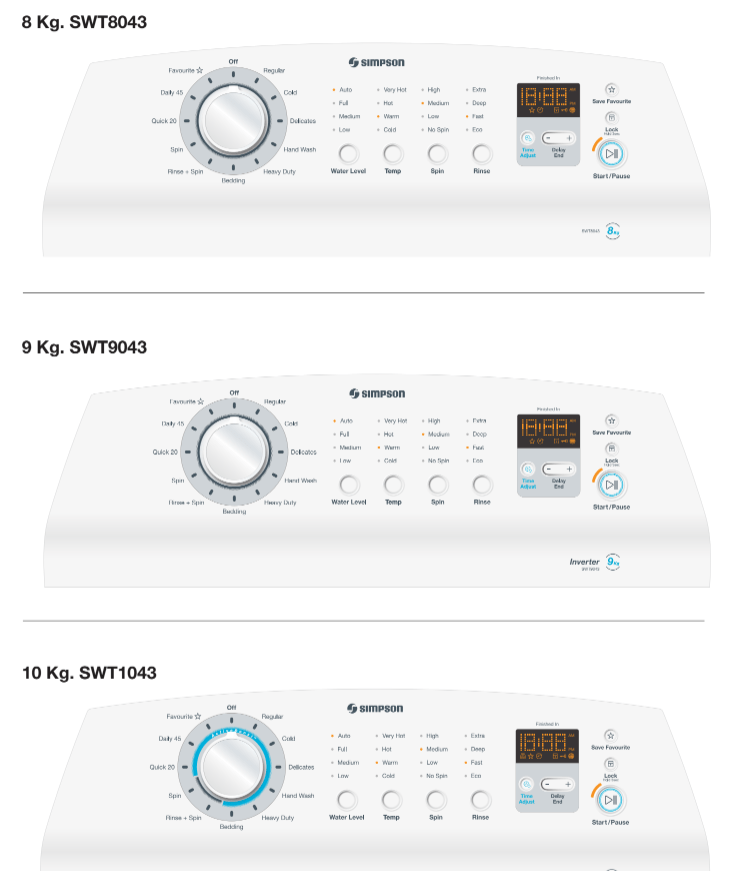
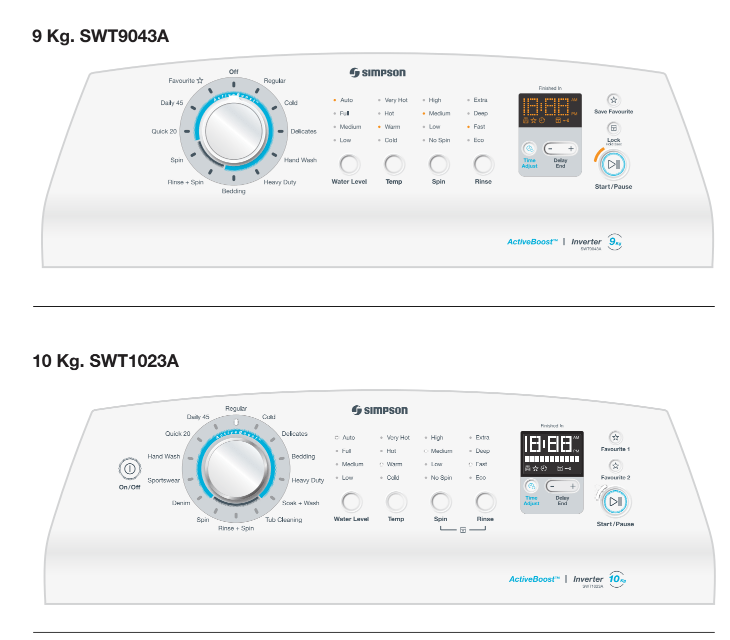
PROGRAM SELECTOR KNOB
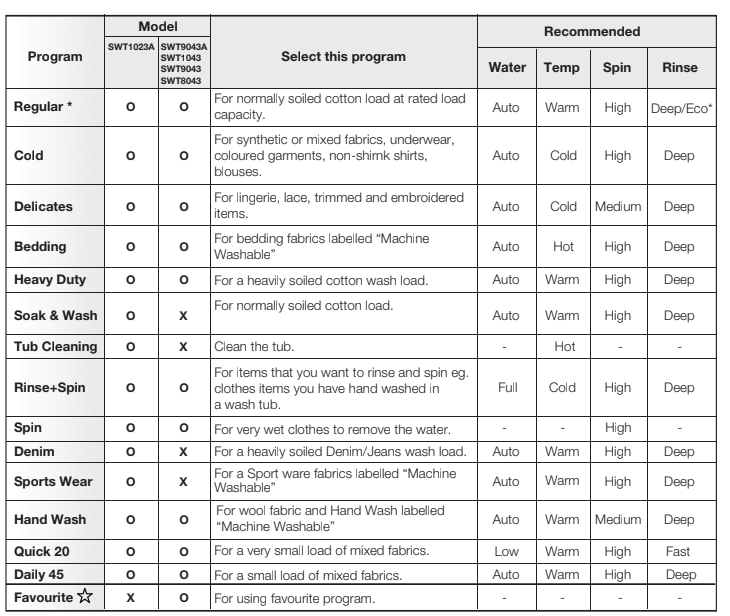
Turn the Program Selector knob to choose the wash program you want. The table “Your Program Guide” shown on page 16 will help you in selecting the right program.
The Program Selector knob is not a timer. Once you select a wash program, the Program Selector knob will stay at that position for the whole wash cycle.
WATER TEMPERATURES BUTTON
For each wash program your washing machine automatically selects a suitable fill water temperature. If you want to use a different wash water temperature, press the Temperature button repeatedly.
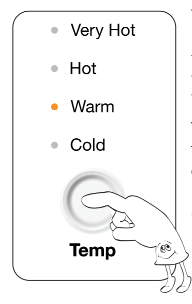
The water temp lights will tell you the temperature for each press of the button.
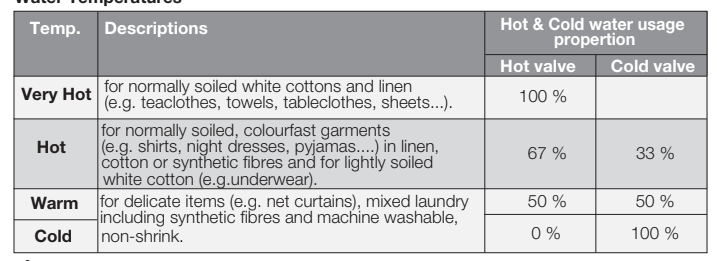
You have four temperatures to choose from Very Hot, Hot, Warm and Cold.
The temperature of warm water will depend on the temperature and pressure of your hot and cold water supplies. The recommended temperature for warm is 35°C You can adjust the flow rate of the water supplies to adjust the Warm temperature. All rinse water temperatures are cold.
Always check your label for the washing temperature symbols which the International Care Labelling Code now uses

NOTE:
If you have a cold water connection
ONLY and the hot inlet valve is capped off (refer installation instructions) you must select Cold washes only. To fill detergent, you must follow steps as below:
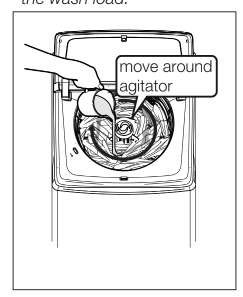
- Measure the correct amount of powder detergent by following the recommendations on the package.
- Mix powder detergent in one litre of hot or warm water.
- Add the pre-mixed detergent to the wash load.
Water Temperatures
Flood diagnostic is explained on page 32. You should refer to this if you have water pouring onto the floorThe display will show “ ” and you will hear rapid short beep continuously to remind you about this problem.
WATER LEVEL BUTTON
Choose the water level by pressing Water Level button. Use only the amount of water you need for the wash load.
CHOOSE THE WATER LEVEL
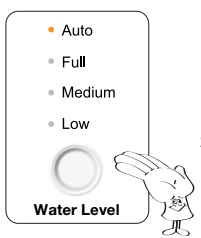
1. Choose the water level by pressing Water Level touchpad
You can select:
- Auto, Full, Medium and Low
(2. Auto level: the exact water level required to wash your clothes effectively is determined and set for you automatically, ensuring no water is wasted.)
Use only the amount of water you need for the wash load.
CHOOSE THE SPIN
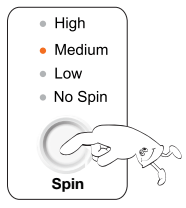
TOUCH THE OPTIONS BUTTON TO SELECT THE SPIN OPTION.
Regular, Cold, Bedding,Heavy Duty,Rinse+Spin,Spin,Quick 20, Daily 45,Heavy Duty,Denim(*SWT1023A),Hand Wash, Sportswear (*SWT1023A) : Can select all spin options Delicates : Can select Medium, Low and No Spin
RINSE OPTION BUTTON
Pressing the “Rinse Option” touchpad allows you to change the rinse type.
For most washes the machine automatically selects “Deep Rinse” for you
There are four rinses to choose from... Fast rinse, Eco rinse, Deep rinse and Extra rinse.
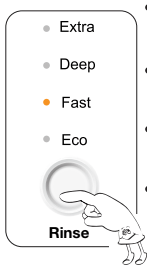
- Extra : Extra rinse, the machine fills twice, giving you two deep rinses.
- Deep : Deep rinse the machine fills once, giving you one deep rinse.
- Eco : Eco rinse is a spray rinse giving you maximum water saving.
- Fast : Fast rinse uses less time then Eco rinse by performing only 3 Eco sprays but the amount of water in each spray is increased.
How does Eco Rinse work ?
When Eco rinse is used, rinse water is sprayed into the washbowl in pulses. After each pulse the washbowl will spin to remove detergent laden water from the clothes.
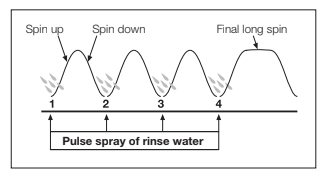
The machine will go through a series of maximum four pulses spray and short spin cycles in this manner, depending on program selection, followed by a final long spin that removes the water from the clothes to complete the full wash program.
DISPLAY
The display shows the following information:
MACHINE IN PAUSE MODE
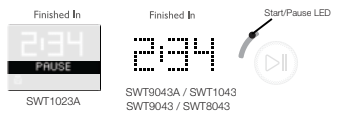
User needs to touch [Start / Pause] button once to pause the appliance.
Under the remaining time is show text <PAUSE>The Start/Pause button LED will blink.
WASH CYCLE IN PROGRESS
After selecting a program, the duration is displayed in hours and minutes for example 2:34 which means 2 hour and 34 minutes)
The duration is calculated automatically on the basis of the maximum recommended load for each type of fabric.
After the program has started, the time remaining is updated every minute.
The Start/Pause button LED will always light not blink) to indicate that now machine is in executing mode.
END OF PROGRAM
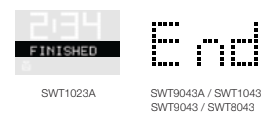
When the wash program is completed, the display shows text<FINISH> or <END> .
The Start/Pause button LED will turn Off.
LID LOCK FEATURE
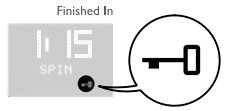
This is a safety feature so as to prevent anyone from opening the door lid when the drum is spinning.
To unlock the lid, user needs to tap [Start / Pause] button once to pause the appliance and the display will turn Off the lid lock icon.
The mechanical lock unlocks when the drum stops spinning.
The Lid Lock indicator  will light up when the feature activate (Except SWT8043)
ENABLING/DISABLING END OF WASH BEEP
User can also disable the buzzer by pressing the [Water Level] button + [Spin] button down for 3 sec and release. it will disable power on sound also.
The volume level is set in the factory and cannot be adjusted by the user.
START/PAUSE BUTTON
TO START THE WASH CYCLE / PROGRAM
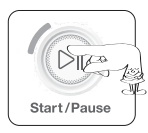
Press the Start/Pause button to Pause.
Start/Pause to Pause is used to Start, Stop and Continue the wash.
If you have started your wash and you wish to stop it for some reason, press the Start/PauseTo Pause touchpad and hold it for 1.2 secounds to enter pause mode.
FAVOURITE , CHILD LOCK , TIME ADJUST , DELAY END BUTTON
FAVOURITE
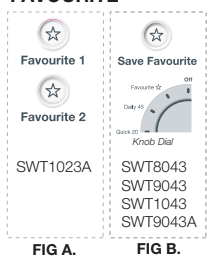
The favourite function is the ability to tailor individual wash features and save them as a custom programme until the next time.
FIG A : Select the Favourite 1 or 2, choose wash method, spin , temperature ,Rinse, then touch and hold the Favourite button for seconds .“Beep sound”is activated and the programme is stored for later use with a single button press.
FIG B : Select the Save Favourite, choose wash method, spin , temperature ,Rinse, then touch and hold the Favourite button for seconds .“Beep sound”is activated and the programme is stored for later use with select Favourite program on Knob Dial.
The Favourite indicator  will light up when this feature is activated.
CHILD LOCK
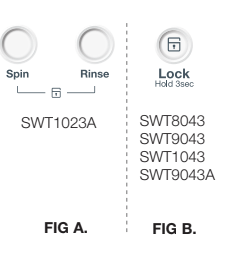
Your appliance is provided with CHILD SAFETY LOCK which permits you to leave the appliance unsupervised with the door closed without having to worry that children might be injured by or cause damage to the appliance.
To Activate the child lock :
FIG A : Hold down the “Spin” and “Rinse” at the same time for 3 seconds.
FIG B : Hold down the “Lock” for 3 seconds.
The child lock indicator  will light up when this feature is activated.
To Deactivate the child lock :
FIG A : Hold down the “Spin” and “Rinse” at the same time for 3 seconds.
FIG B : Hold down the “Lock” for 3 seconds,
The child lock indicator  will disappear when this feature is deactivated.
When child lock is activated, the door will be locked all the time during the machine is working
TIME ADJUST
This option allows you to increase/decrease washing time by  changing the 3 different levels. medium > maximum > minimum
DELAY END

You can set your washing machine to finish your wash at a later time you specify, choosing a delay of between 1 to 19 hours in hour increments. The hour displayed indicates the time when the cycle will finish. After selecting the wash program, tapping on either the [-] or [+] button once will start the delay end and set the 1-19 hours of the end time of the entire wash cycle.
Tapping [+] button increases the end time.
Tapping [-] button decreases the end time.
Press the Start / Pause button
The Delay end indicator  will light up and the clock will begin counting down until it reaches the set time.
YOUR PROGRAM GUIDE (KNOB DIAL)
WASHING INSTRUCTIONS
These Washing Instructions are of a general nature and you should get good wash results by following them.
However, due to the variables of fabric types, soil levels, detergent types and available program settings you may find some combinations of these which do not always result in the perfect wash.
If for example you see residuals of detergent or soils on some items, please read the section Residues on washed items paragraph.
Over time you will learn what is the best set-up of programs, detergent and load sorting for different load types and soils.
SORT YOUR WASHING INTO SEPARATE WASH LOADS
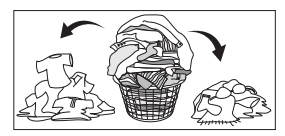
- Each load of washing should contain clothing which needs the same washing conditions. For example, you should not wash delicate clothes with very dirty work clothes.
- Colour fast and non-colourfast fabrics should be separated. Knowing the type of fabrics you have and how dirty they are will help when you make selections from the wash program options.
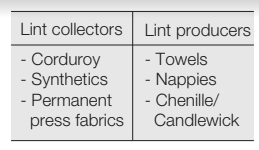
- Some fabrics are lint collectors and can pick up lint, dirt and colour from other fabrics which are lint producers. Some examples are listed below:
PRE-TREATMENT SPRAYS AND STAIN REMOVERS
DETERGENT
Good washing results also depend on the choice of detergent and use of the correct quantities to avoid waste and protect the environment.
Although biodegradable, detergents contain substances which, in large quantities, can upset the delicate balance of nature.
The choice of detergent will depend on the type of fabric delicates, cottons, etc.), the colour, washing temperature and degree of soiling.
- Don’t use the wrong type of detergent. You must use a low sudsing detergent designed for front load washing machines or high efficiency top loaders, such as Cold Power for Front
- Loaders and High Efficiency Top Loaders or detergents labelled “Matic”.
- Don’t use soap-based products in your washing machine.
- Don’t use too much detergent. This can result in excessive suds that can cause low spin speeds, poor rinsing and overloading the motor during spin stages of the wash program.
- Don’t use too little detergent because you will get a poor wash. If you think you need more, increase dosages by only small amounts to avoid excessive suds.
Quantity of detergent to be used
The type and quantity of detergent will depend on the type of fabric, load size, degree of soiling and hardness of the water used.
Water hardness is classified in so-called degrees” of hardness.
Information on hardness of the water in your area can be obtained from the relevant water supply company, or from your local authority.
Follow the product manufacturers’ instructions on quantities to use.
- Not enough washing powder causes: the washload to turn grey, greasy clothes.
- Too much washing powder causes: sudsing, reduced washing effect, inadequate rinsing.
- Use less detergent if: you are washing a small load, the laundry is lightly soiled, large amounts of foam form during washing.
DAILY USE
STARTING YOUR WASHING MACHINE
- Connect the mains plug to the mains socket.
- Turn the water tap on.
LOAD THE WASHING MACHINE
When loading the clothes into your washing machine, there are four things to remember:
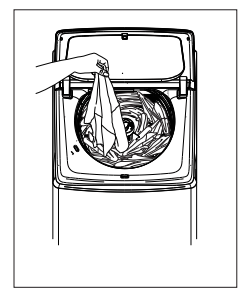
1. Clothes must be loaded evenly around the agitator
For best result load small items first, followed by large items.
For example, a typical load should be loaded using the following sequence : handkerchiefs, wash cloths, undershorts, pillow cases, T-shirts, business shirts, tablecloths, sheets, bath towels.
2. Clothes must not be wrapped around the agitator.
3. The washing machine must not be overloaded. Clothes must be able to move during wash.
4. The load should contain only three or four large items, for example sheets. The rest of the load should be small items. A mixed load of large and small items will wash cleaner than a load of all large items.
ADD THE DETERGENT
When using the washing machine for the first time,check that the dispenser is set for the type of detergent you will use. To do this, proceed as follows:
1. Pull the dispenser drawer forward until it stops.
2. Lift the front of the drawer up and forward to
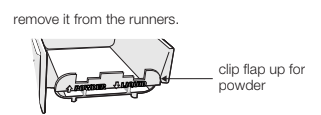
3. Check the position of the flap at the rear of the detergent compartment in the dispenser drawer. (Factory setting is flap up for powder.)
4. Clip the flap down if you intend to use liquid detergent.
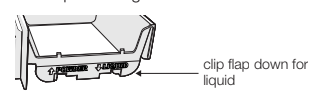
5. Refit the dispenser back into its runners.
Remember: If you change the type of detergent you use, the position of the flap will need changing. See picture.
6. You are now ready to add detergent. Measure the amount required and pour it into the detergent compartment of the dispenser drawer.
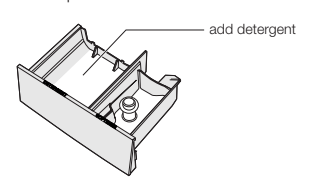
When using liquid detergent, some may leadk out of the dispenser into the wash load earlier than expected through small openings in the back of the dispenser.
The openings are to help flushing out of detergent.
7. If you want to use fabric softener, see
Add fabric softener”.
8. Close the drawer by pushing it backwards into the top panel of the washing machine when you have finished adding detergent.
ADD FABRIC SOFTENER
Before adding softener to the dispenser, make sure the siphon cap is pushed firmly down onto the spigot in the drawer.
The softener will not siphon out if the cap is incorrectly fitted, is missing or blocked with residue. You are now ready to add fabric softener.
Measure the correct amount as recommended on the softener package into a cup and then pour it into the softener compartment of the dispenser drawer.
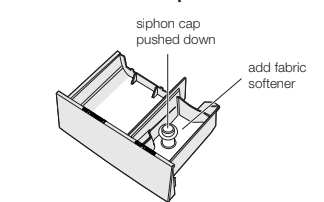
Overfilling and then siphoning out too early can cause softener and detergent to mix resulting in staining problems.
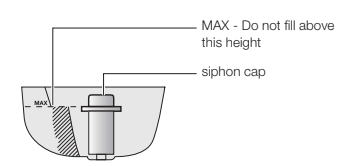
The softener dispenser holds 90ml when filled up to the MAX marker. Any level lower than MAX will function correctly
ADDING BLEACH
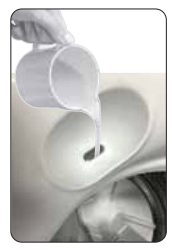
Bleaching of clothes can help to remove stains, heavy soiling and to kill bacteria.
Oxygen type - This is generally a powder type bleach. Mix the required quantity with water and pour down the hole in the top panel during the fill when there is some water in the wash bowl.
Refer to the instructions on the bleach container.
Chlorine type - This type of bleach should NOT be mixed with detergent. Mix the bleach with water as per
- Turn Program Selector to a Regular Wash position.
- Press the Start/Pasue To Pause touchpad to commence water fill.
- Pour the bleach solution down the hole in the top panel during fill when there is some water in the wash bowl.
- Allow the machine to agitate for a few minutes, then let it stand for the required time by pressing and holding the Star/Hold To Pause touchpad for 1.2 seconds to pause machine.
- Turn Program Select to Drain & Spin position and press the Star/Hold To Pause touchpad to empty the wash bowl.
- You can now wash the clothes load using detergent and your selected wash program.
Lid Soft Landing Feature
When the lid is fully opened, to close just pull down initially the lid then the lid will close down slowly by itself.
Lid soft landing device will not be working if opened less than 80 degree (Please keep your hand away, lid will close rapidly and hurt your hand).
SETTING A PROGRAM
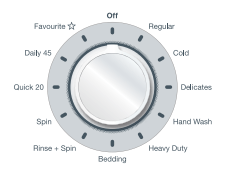
1. Turn the program selector to the required program.
- Your washing machine is now in STAND-BY-MODE and ready to wash your clothes.
- Press the ON/OFF button SWT1023A)
- The relevant light will light up.
- The buzzer will sound.
- The selector dial can be turned either clockwise or anticlockwise.
- Once you selected a program, the program selected will stay at that position for the whole of the cycle.
- The display shows the program duration.
If the settings shown on the control panel are what you want to use, press the
Start/Pause button to start your wash.
2. If you want your laundry to be washed with functions different from the one proposed by the machine, press Temperature, Water Level, Spin Time and Rinse Option buttons.
3. If you want to define the end of the washing program, press the “Delay End” button repeatedly to choose your machine end time.
STARTING A PROGRAM
To start a program, press the
Start/Pause button, a default program duration will be displayed on the screen.
INTERRUPTION OF A PROGRAM
If you have started your wash and you wish to stop it for some reason, press the Start/Pause button to enter PAUSE mode. The time remaining is shown then “ PAUSE ”
Press the Start/Pause again. The program will continue.
CHANGING A PROGRAM
You can turn the Program Selector Knob to a new program position at any time. If you do move the
Program Selector Knob the effect will be different depending on the status of the machine at the time you do this, as follows:
- When the machine is in PAUSE mode, moving the Knob to a new position 3 short beeps to remind you that cannot change the program in pause mode.
- When the machine is running, moving the Knob to a new position will result in the machine continuing the wash and beeps to remind you that this option is not allowed.
CHANGING THE OPTIONS
It is possible to change only before start the program.
AT THE END OF THE PROGRAM
The appliance stops automatically.
The display will show
SWT1023A : “ FINISHED ”
SWT1043 / SWT9043 / SWT8043
SWT9043A : “ END ” and with End sound every second in 2 minutes.
Turn the Program Selector knob to the position “ Off ” or Press the ON/OFF button (SWT1023A)
Remove the laundry from the appliance. Make sure that the washing tub is empty.
Keep the lid ajar, to prevent the mildew and odours.
Turn off the water tap
AUTO OFF
After 5 min without any user interaction with the appliance, during the machine is in stand by or after the end of the cycle, the appliance receives no further instructions, it will automatically turned Off for energy savings in conformity with the standards on energy consumption).
All the settings are stored so that when the appliance is turned back on, the program is ready or if the auto-off mode was triggered after the end of the cycle, the user can see that the cycle ended normally, and can restart it.
CARING FOR YOUR WASHING MACHINE
Your washing machine will give you long and trouble-free service, if you follow the instructions in this section. These instructions show you how to care for your washing machine.
WHAT TO DO AFTER YOU HAVE FINISHED YOUR WASHING
- Turn the Program Selector knob to the position “Off”.
- Switch off the electricity at the power point.
- Turn off the water taps. This will extend the life of the inlet hoses
- Leave lid open for a while. This allows time for moisture inside the washing machine to evaporate and for any odours to disperse.
CLEANING THE LINT FILTER
Lint is a collection of threads and fluff which comes off your clothes during washing. Your washing machine collects this lint in the lint filter. It is important to clean out this lint filter preferably after each wash.
How to clean the lint filter:
(SWT8043 , SWT9043 , SWT1043)
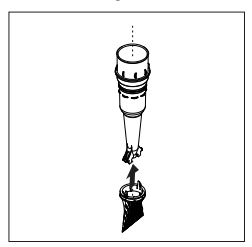
1. Remove the Cap Agitator and filter column from the centre of the agitator.
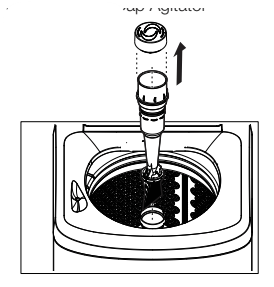
2. Unclip the filter bag from the column.
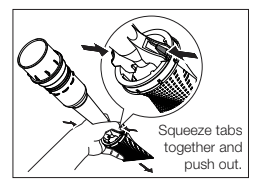
3. Turn the bag inside out and remove the lint.
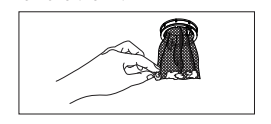
4. Wash the filter bag and dispenser cup in hot water.
5. Reassemble the filter to the column and place it back in the centre of the agitator.
CLEANING THE DISPENSER
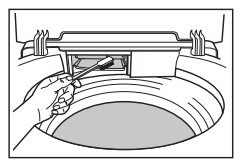
The dispenser needs to be cleaned regularly, preferably after each wash. Inspect the dispenser after each wash to see if there is any residue of detergent.
To do this proceed as follows:
- Pull the dispenser drawer forward until it stops.
- Lift the front of the drawer up and forward to remove it from the runners.
- Clean the dispenser drawer with hot water and a brush, eg. an old toothbrush.
- Dry the drawer.
- Before replacing the dispenser back in its recess, clean the inside of the drawer with an old toothbrush.
- Put the dispenser back into its runners and close the drawer.
CLEANING YOUR WASHING MACHINE
To clean the inside and outside of your washing machine you should:
- Wipe the surface with a mild dishwashing detergent and warm water
- Wipe dry with a soft cloth.
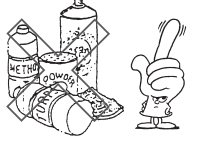
Never use solvents, aerosol cleaners, spray pack cleaners, glass, cleaners, metal polishes, caustic materials, scourers or general household cleaners on or near top panel and lid, control panel or other parts of your washing machine.
CLEANING STAINS IN THE WASHBOWL
Stains in the wash bowl can be caused by:
- metal objects such as bobby pins, dressmaking pins and nails;
- salt;
- body oils and grease from very dirty or sweaty clothes being deposited around the top of the washbowl;
- excessive foam during wash if incorrect or too much detergent is used.
How To Clean the Stainless Steel Wash Bowl :
- Wipe with a cleaning product which is marked suitable for stainless steel.
- Oily deposits can be removed by wiping surfaces with a mild dishwashing detergent and warm water.
AVOIDING BUILD UP OF UNDISSOLVED DETERGENTS
If you only wash with cold water, undissolved detergent and body oils will build up in the washing machine. This build-up can cause spotting on your clothes.
To avoid this build-up :
- do not use too much fabric softener with cold water;
- select a hot water wash at least once a month;
- always dissolve the detergent in one litre of warm water.
HELPFUL HINTS IN DEALING WITH WASHING PROBLEMS
RESIDUES ON WASHED ITEMS
Some detergents have ingredients which do not fully dissolve and as a consequence, may leave white residue or particles evident on the surface of darker clothes in the finished wash load. Similarly some soils may not dissolve fully, resulting in residue evident on lighter coloured clothes.
If you are experiencing residue on some clothes, the following tips will help:
- Check that you are using frontload type detergent to minimise over-sudsing. You may find different brands of detergent give better results. Liquid detergent may be better than powder in your situation.
- Pre-mix the detergent thoroughly in warm or hot water to improve the dissolving.
- Reduce detergent dosage to between a 1/2 and 2/3 of the manufacturer’s standard recommendation to avoid over concentration (the lower water usage requires lower detergent usage.)
- Some residue maybe re-deposited lint, so be careful not to have lint-producing items in a load which has darker clothes.
- Select deep rinse and not eco rinse to help flush more particles away.
- Reduce the clothes load size per wash to give more freedom for the clothes to move around in the wash bowl.
- Use another program as below, which has been designed to minimise residual particles (they are in order of increasing benefit and will help you choose the best program for your wash load.)
- The Colours Program
- The Heavy Duty Program
STAINED CLOTHES - HINTS FOR REMOVING STAINS
The guide to stain removal on page may assist you in stain removal.
Treat all stains as soon as possible.
The longer you leave a stain the harder it will be to remove. Try soakers and stain removers first.
If you use pre-treatment sprays or stain removers, apply them to the clothes items in a well ventilated area away from your washing machine.
- Avoid the use of hot water on stains as hot water will set stains.
- Use light strokes and don’t rub the stain remover into the fabric.
- If you use a chlorine bleach, follow the instructions on the bottle and dilute it before putting it on clothing.
- Test coloured fabrics on an inside seam for colour fastness before using any stain removers or bleaches.
- Test synthetic fabric on an inside seam before using any chemicals or bleaches.
YELLOWING OR GREYING CLOTHES
Greyness
- Incorrect wash times and using insufficient detergent which can cause redepositing of detergent on clothes.
- Using incorrect type or too much detergent can cause poor rinsing and poor spin performance.
- Mixing whites with very dirty clothes, eg work clothes.
- Using soap flakes instead of laundry detergent.
- ONLY use low sudsing, front load washer detergent in this machine, such as Cold Power for Front Loaders and High Efficiency Top Loaders or detergent labelled “Matic”.
- Re-sort load, then re-wash using program selections suitable for the fabric using hot or warm water.
- If the water is very dirty or very sudsy, repeat 2 above reducing the amount of detergent you use.
Yellowing
- A build-up of oils in clothes that come into close contact with the skin, eg underwear, T-shirts.
- Ageing of clothes. Iron deposits in the wash water.
- Use of chlorine bleaches on fabrics with resin finishes.
- Incorrect drying.
- Incorrect water temperatures ie. too hot or too cold.
- Re-sort load, then re-wash using wash program selections suitable for the fabric using hot or warm water.
- If the water is very dirty or very sudsy, repeat 1 above reducing the amount of detergent you use.
A GUIDE TO STAIN REMOVAL
Ball Point Pen Ink
- Spong with methylated spirit. Bleach if required.
- Same as for whites - use oxygen type bleach.
Beetroot
- Rinse as soon as possible under cold water. Bleach if necessary.
- Same as for whites - use oxygen type bleach.
Blood, Meat Juice, Egg (Dry Stain)
- Cover area with meat tenderiser msg). Apply warm water to make a paste. Wait 15-20 minutes. Sponge with cool water or with diluted bleach.
- Same as for whites but select water temperature suitable to fabric - use oxygen type bleach.
Blood, Meat Juice, Egg (Fresh Stain)
- Rinse in cold water. If stain remains, sprinkle with meat tenderiser (msg). Let stand for minutes. If stain still remains, then sponge with diluted bleach. Wash using hot water.
- Same as for whites but select water temperature suitable to fabric - use oxygen type bleach.
Candle Wax
- Scrape off excess, place stain between clean white blotter or several layers of facial tissue. Sponge with dry cleaning fluid. If spot remains, bleach.
- Same as for whites - use oxygen type bleach.
Chewing Gum
- Rub with ice to harden. Scrape off excess with blunt knife. Sponge with dry cleaning fluid.
Chocolate
- Soak in warm water with pre-soak product, and wash in lukewarm water. Use dry cleaning fluid (white spirits) to remove any grease spots.
- Soak in warm water with pre-soak or detergent solution. Treat any remaining stain with oxygen bleach.
Coffee/tea (Milk Or Cream)
- Rinse or soak in cold water. Work detergent into stain. Thoroughly rinse and dry. If a stain remains, sponge with dry cleaning fluid. If stain remains, bleach.
- Same as for whites - use oxygen type bleach.
Coffee/tea (Black), Fruit Juice, White Wine
- Pour boiling water through stain. Bleach if necessary.
- Soak or rinse in cold water or sponge with warm water and detergent. Use oxygen type bleach.
Correcting Fluid
- Scrape off as much as possible. Rub clean with paint thinner or white spirits.
Cosmetics
- Sponge with prewash stain remover, liquid detergent or rub with soap. If greasy stain persists, soak in enzyme product then wash.
Curries
- Soak/rinse in lukewarm water until a majority of the colour is removed. Sponge with solvent to break down any remaining fats and oils then wash.
- Same as for whites. Check for colour fastness before applying solvent.
Fat/Grease/Oil
- Sponge with dry cleaning fluid white spirits).
Fruit
- Sponge with warm water and wash. Bleach remaining stain with oxygen bleach.
- Pour boiling water through stain. Bleach remaining stain.
Grass, Green Vegetables
- Sponge with methylated spirit. Wash using warm water.
- Same as for whites. Check colourfastness before applying methylated spirit. For acetate, sponge with dry cleaning fluid.
Ice Cream, Cream Milk
- Rinse or soak in cold water then wash. If ice cream contains fruit or chocolate treat as such.
Iodine
Iron Rust
- Apply oxalic acid and place in sun.
- Apply lemon juice and place in sun.
Lipstick
- Rub with lard and wash using hot water. Bleach if necessary.
- Rub with lard and wash using warm water.
Mildew
- Wash using hot water. Moisten with lemon juice and let dry in sun. If stain persists, bleach. Old stains are hard to remove.
- Same as for whites but select water temperature to suit fabric.
Mustard
- Wash using hot water and bleach.
- Wash using warm water and use oxygen bleach.
Nail Polish
- Sponge with dry cleaning fluid or nail polish remover. Bleach remove dye.
- Sponge with dry cleaning fluid
Paint (Oil Based)
- Scrape off fresh paint. Soften dry paint with lard or oil, then sponge with turpentine (turps).
Red Wine
- Rub salt into the stain. Pour boiling water through stain. Bleach if necessary.
Scorch
- Moisten and place in sunlight. Bleach if necessary.
- Usually a permanent stain. Brush wools lightly with sandpaper.
Tomato Sauce
- Soak in cool water for 10 minutes. Rub in liquid detergent then wash. If stain persists, try dry cleaning fluid or bleach.
- Same as for whites - use oxygen type bleach.
TROUBLE SHOOTING
DO NOT call for service until you have checked the points listed below.
If you call for service and there is nothing wrong with your washing machine, you will have to pay for the service call.
You will have to pay even when your washing machine is under warranty. Before you call for service, check the points in the table below.
Machine not working.
- Power not switched on.
- No electricity supply through the power point.
- Check power point with another appliance.
- Machine not switched on.
- Press power switch on at the back of a washing machine.

- Water taps not turned on.

- Out of balance switch off
- Open lid, redistribute load and close lid.

Machine has washed load but will not spin. Water in washbowl.

- Out of balance.
- Open lid, redistribute load, close lid.
- Too much suds causing motor temperature overload.
- Wait a short while, the wash will continue.
- In future, reduce detergent dose or use low sudsing (front load) detergent.


- Drain hose blocked.
- Check drain hose for blockage.
Will not fill with water

- Water taps not turned on Inlet hoses blocked.
- Turn taps on.Clean tap filters/washers.
Water flowing into washbowl indefinitely.

- Drain hose too low.
- Raise drain hose or fit a syphon break.
- Refer to installation instructions for correct positioning of hose.
Machine goes out of balance or vibrates excessively when spinning.

- Machine not level
- Levelling feet not adjusted
- Adjust feet to touch the floor
- Clothes not evenly distributed.
- Redistribute clothes evenly.
- Too much water for load size.
Water on floor.
- Loose inlet hose connections.
- Check connections at taps and rear of machine.
- Incorrect water level for size of load.
- Condensation from hot water.
Clothes still dirty after wash program.
- Not enough or no detergent.
- Check detergent use and rewash clothes.
- Too many clothes in load.
- Remove some clothes and rewash.
- Incorrect wash program or temperature selected.
- Reselect program or temperature and rewash.
- Incorrect water level selected.
- Use a higher water level.
Scraping noise on spin.
- Bra wire or other thin items caught between inner and outer washbowls.
- If the item is visible, remove it with pliers.
- Use a wash bag in future.
Humming, clicking and other noises.
- Bowl rotation at start of wash.
- Brake activation when stopping after spin.
Detergent residue.
- Overloaded laundry.
- Put appropriate load in washer
- Cold water temperature less than
- Correct supply water temperature.
- Detergent overdosage.
- Check detergent use and rewash clothes.
Bad smell or mold on clothes.
OTHER DIAGNOSTIC HELP AND A GUIDE FOR WHEN YOU SHOULD CALL FOR SERVICE
Not filling with water.
- Make sure both wall taps are on and hose filters are not blocked.
- Raise drain hose if water is flowing out of drain hose.
- Press Start/Hold To Pause to re-start wash. If problem remains, call Service.
Flood.

- If the water is pouring onto the floor, turn OFF both wall taps.
- Wait a few minutes to see if the fault is corrected.If not, call Service.
Draining problem.
- Wait a few minutes to see if the fault is corrected. If not, press the Start/Hold To Pause touchpad and hold it for 1.2 second to enter pause mode then check the drain hose for blockage.
- Press Start/Hold To Pause to continue the wash. If problem remains, call Service.
Loss of water, while washing.
- If water level in wash bowl is low and water is flooding the floor, turn Program Selector Knob to Drain & Spin position, then press Start/Hold To Pause.
- Should this make things worse, press the power button off (some models) and call Service.
- Otherwise, press Start/Hold To Pause to continue the wash.
Water level problem.

- Wait, this fault may clear itself.
- If not, turn Program Selector Knob to Drain & Spin position, then press Start/Hold To Pause to drain the wash bowl.
- If this problem is repeated, call Service.
Motor fault.

- Wait, this fault may clear itself.
- If not, turn Program Selector Knob to Drain & Spin position to drain the wash bowl.
- If this problem is repeated, call Service
Lid can’t lock / can’t unlock

- If this problem is repeated, call Service.