

IMPORTANT NOTICE
FOR COMPETITION USE ONLY
This vehicle is designed, manufactured and sold for closed-course
competition use only. It does not conform to Federal Motor Vehicle
Safety Standards or U.S. EPA Noise and Emission Standards.
Operation on public streets, roads, highways or for off-road
recreation is illegal.
State and federal laws prohibit operation of this vehicle except in an
organized racing or competitive event on a closed course, or by
permit issued by the local governmental jurisdiction. This vehicle is
sold “as is” with no warranties.
FOR EXPERIENCED RIDERS, NO PASSENGERS
This vehicle is designed as an operator-only vehicle and for use by
experienced riders only. The load limit and seating configuration do
not safely permit the carrying of a passenger.
Welcome
Congratulations on your purchase of a new
Honda vehicle. Your selection of a Honda
makes you part of a worldwide family of
satisfied customers who appreciate Honda's
reputation for building quality into every
product.
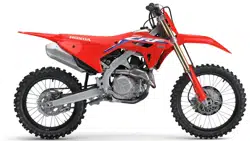
Your vehicle is a high performance racing
motorcycle that utilizes the latest off-road
racing/motocross technology and is intended
for competition use in sanctioned,
closedcourse events by experienced riders
only.
Be aware that off-road racing/motocross is a
physically demanding sport that requires
more than just a fine vehicle. To do well, you
must be in excellent physical condition and
be a skillful rider. For the best results, work
diligently on your physical conditioning and
practice frequently.
To ensure your safety and riding pleasure:
● Read this owner's manual and
competition handbook carefully.
● Follow all recommendations and
procedures contained in this owner's
manual and competition handbook.
● Pay close attention to safety messages
contained in this owner's manual,
competition handbook and on the
vehicle.
To protect your investment, we urge you to
take responsibility for keeping your vehicle
well serviced and maintained. Also, observe
the break-in guidelines, and always perform
the pre-ride inspection and other periodic
checks in this manual.

When service is required, remember that
your Honda dealer knows your vehicle best.
If you have the required mechanical “know-
how” and tools, you can purchase an official
Honda Service Manual to help you perform
many maintenance and repair tasks. 2 P. 67
You may also want to visit our website at
www.powersports.honda.com.
Canada
www.honda.ca.
Happy riding!
A Few Words About Safety
Your safety, and the safety of others, is very
important. Operating this vehicle safely is an
important responsibility.
To help you make informed decisions about
safety, we have provided operating
procedures and other information on safety
labels, in this owner's manual and
competition handbook. This information
alerts you to potential hazards that could
hurt you or others.
Of course, it is not practical or possible to
warn you about all hazards associated with
operating or maintaining a vehicle. You must
use your own good judgment.
You will find important safety information in a
variety of forms, including:
● Safety labels on the vehicle
●
Safety Messages preceded by a safety alert
symbol and one of three signal words:
DANGER, WARNING, or CAUTION.
These signal words mean:
3DANGER
You WILL be KILLED or SERIOUSLY
HURT if you don’t follow instructions.
3WARNING
You CAN be KILLED or SERIOUSLY
HURT if you don’t follow instructions.
3CAUTION
You CAN be HURT if you don’t follow
instructions.
Other important information is
provided under the following titles:
NOTICE
Information to help you avoid
damage to your vehicle, other
property, or the environment.

Safety Guidelines................................................. P. 3
Safety Labels.........................................................P. 6
Safety Precautions............................................... P. 7
Riding Precautions .............................................. P. 8
Accessories & Modifications........................... P. 10
This section contains important information for safe riding of your vehicle.
Please read this section carefully.
Vehicle Safety
Safety Guidelines
Follow these guidelines to enhance your safety:
● Perform all routine and regular inspections
specified in this owner's manual and
competition handbook.
● Stop the engine and keep sparks and flame
away before filling the fuel tank.
● Do not run the engine in enclosed or partly
enclosed areas. Carbon monoxide in
exhaust gases is toxic and can kill you.
Always Wear a Helmet
It's a proven fact: helmets and protective
apparel significantly reduce the number and
severity of head and other injuries. So always
wear an approved helmet and protective
apparel. 2 P. 7
Before Riding
Make sure that you are physically fit, mentally
focused and free of alcohol and drugs. Check
that you are wearing an approved helmet and
protective apparel.
Take Time to Get to Know Your Vehicle
Because every motorcycle is unique, take time
to become thoroughly familiar with how this
one operates and responds to your commands
before placing your machine, and yourself, in
competition.
Ride within Your Limits
Never ride beyond your personal abilities or
faster than conditions warrant. Fatigue and
inattention can impair your ability to use good
judgment and ride safely.
Never Carry a Passenger
There are no handholds, seat, or footrests to
carry a passenger.
Safety Guidelines
Vehicle Safety
3
Continued
Don't Drink or Use Drugs and Ride
Alcohol or drugs and riding don't mix. Even one
alcoholic drink can reduce your ability to
respond to changing conditions, and your
reaction time gets worse with every additional
drink. The same is true for drug use. Don't drink
or use and ride, and don't let your friends do it
either.
Keep Your Honda in Safe Condition
Maintaining your vehicle properly is critical to
your safety. A loose bolt, for example, can cause
a breakdown in which you can be seriously
injured.
Lithium-Ion (Li-Ion) Battery
If you smell an unusual odor coming from the
lithium-ion (li-ion) battery, park your vehicle in a
safe place outside and away from flammable
objects, then stop the engine. Have your vehicle
inspected by your dealer immediately.
Safety Guidelines
Vehicle Safety
4
Carbon Monoxide Hazard
Exhaust contains poisonous carbon monoxide, a
colorless, odorless gas. Breathing carbon
monoxide can cause loss of consciousness and
may lead to death.
If you run the engine in confined or even partly
enclosed area, the air you breathe could
contain a dangerous amount of carbon
monoxide.
Never run your vehicle inside a garage or other
enclosure.
3WARNING
Running the engine of your vehicle
while in an enclosed or even partially
enclosed area can cause a rapid build-
up of toxic carbon monoxide gas.
Breathing this colorless, odorless gas
can quickly cause unconsciousness and
lead to death.
Only run your vehicle's engine when it
is located in a well ventilated area
outdoors.
Safety Guidelines
Vehicle Safety
5
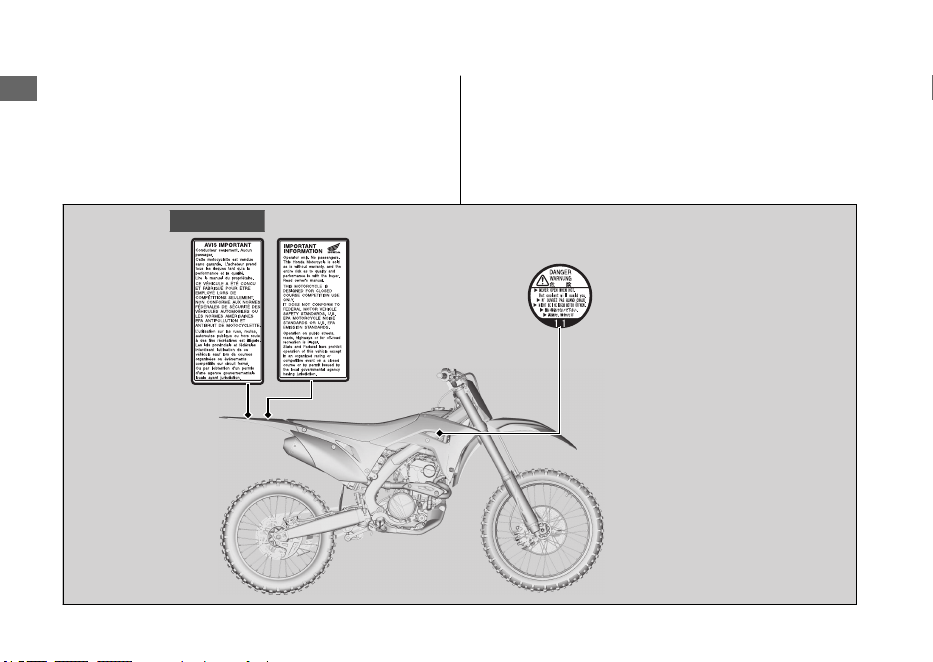
Safety Labels
Safety and information labels on your vehicle
provide important safety information and may
warn you of potential hazards that could cause
serious injury. Read these labels carefully and
don't remove them.
If a label comes off or becomes hard to read,
contact your dealer for a replacement.
Safety Labels
Vehicle Safety
6
For Canada
Safety Precautions
Protective Apparel
Make sure that you are wearing an approved
helmet, eye protection, and other appropriate
riding gear.
#
Helmet
Should be safety-standard certified, high-
visibility, and correct size for your head
● Must fit comfortably but securely, with the
chin strap fastened.
● Approved eye protection
USA
Look for a DOT (Department of
Transportation) certification label on any helmet
you buy.
3WARNING
Not wearing a helmet increases the
chance of serious injury or death in a
crash.
Make sure that you always wear an
approved helmet, eye protection, and
protective apparel.
#
Protective Gear
Whether you’re practicing to improve your skills,
or riding in competition, always wear an
approved helmet, eye protection, and proper
protective gear.
Safety Precautions
Vehicle Safety
7
Riding Precautions
Break-in Period
During the first operating day or 15 miles (25
km) of running, follow these guidelines to
ensure your vehicle's future reliability and
performance.
● Avoid full-throttle starts and rapid
acceleration.
● Avoid hard braking and rapid down-shifts.
● Ride conservatively.
This same procedure should be followed each
time when:
● Piston is replaced
● Piston rings are replaced
● Cylinder is replaced
● Crankshaft or crank bearings are replaced
Parking
CRF250RX
● Park on a firm, level surface.
● If you must park on a slight incline or loose
surface, park so that the vehicle cannot
move or fall over.
● Make sure that high-temperature parts
cannot come into contact with flammable
materials.
● Do not touch the engine, muffler, brakes
and other high-temperature parts until they
cool down.
#
Parking with the Side Stand
1.
Stop the engine.
2.
Push the side stand down.
3.
Slowly lean the vehicle to the left until its
weight rests on the side stand.
4.
Turn the handlebar fully to the left.
u Turning the handlebar to the right
reduces stability and may cause the
vehicle to fall.
Riding Precautions
Vehicle Safety
8
Refueling and Fuel Guidelines
Follow these guidelines to protect the engine
and fuel system:
● Use only unleaded gasoline.
● Use recommended octane number. Using
lower octane gasoline will result in
decreased engine performance.
● Do not use fuels containing a high
concentration of alcohol. 2 P. 66
● Do not use stale or contaminated gasoline
or an oil/gasoline mixture.
● Avoid getting dirt or water in the fuel tank.
Riding Precautions
Vehicle Safety
9
Accessories &
Modifications
We strongly advise that you do not add any
accessories that were not specifically designed
or approved for your vehicle by Honda or make
modifications to your vehicle from its original
design. Doing so can make it unsafe.
3WARNING
Improper accessories or modifications
can cause a crash in which you can be
seriously hurt or killed.
Follow all instructions in this owner's
manual regarding accessories and
modifications.
Do not pull a trailer with, or attach a sidecar to,
your vehicle. Your vehicle was not designed for
these attachments, and their use can seriously
impair your vehicle's handling.
Do not attempt modify the vehicle to carry a
passenger. The subframe was not designed to
carry the additional weight of a passenger.
Accessories & Modifications
Vehicle Safety
10

Vehicle Safety
11
BLANK PAGE
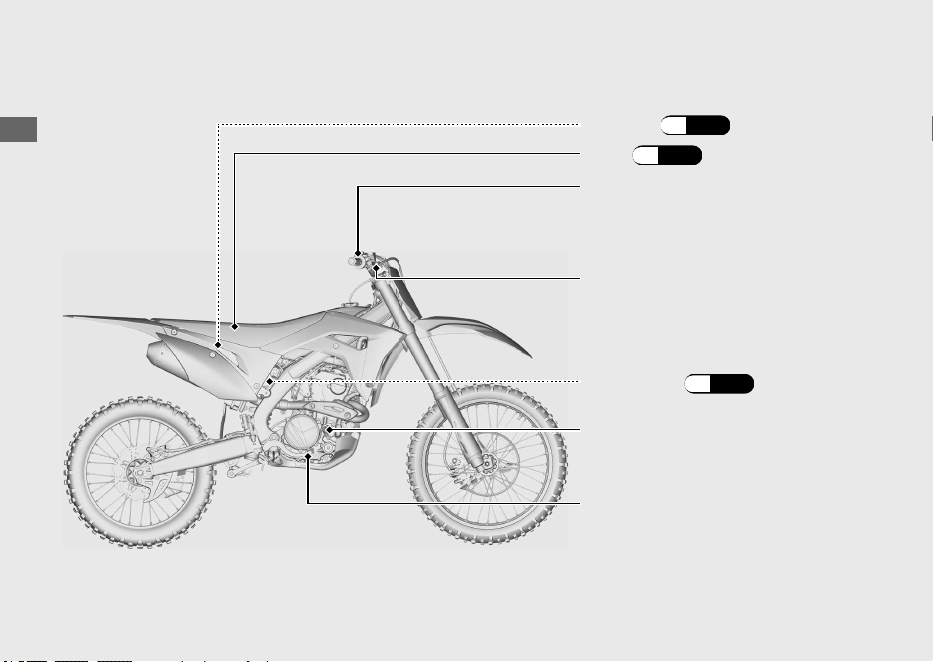
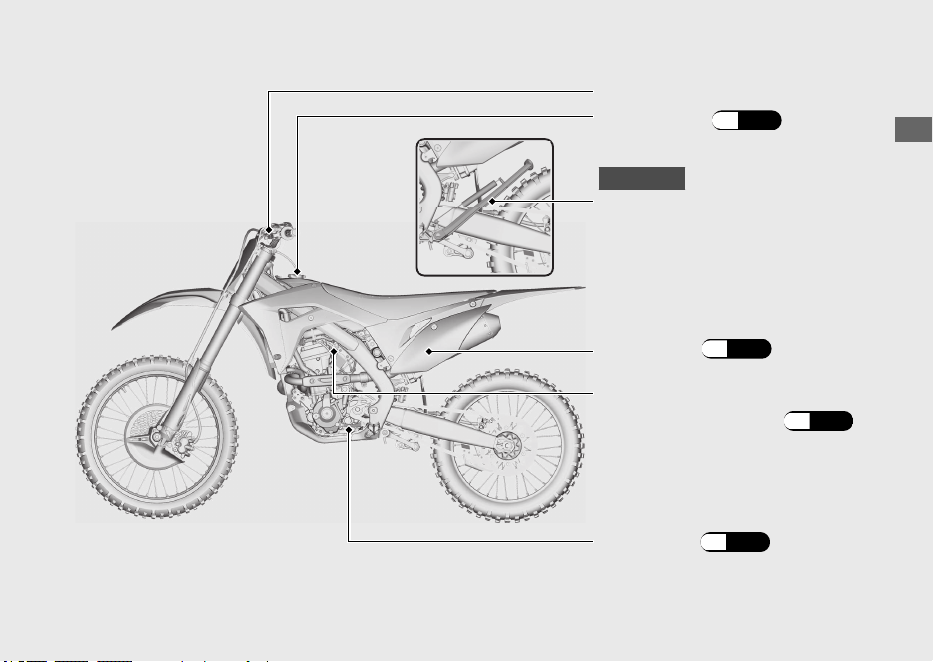
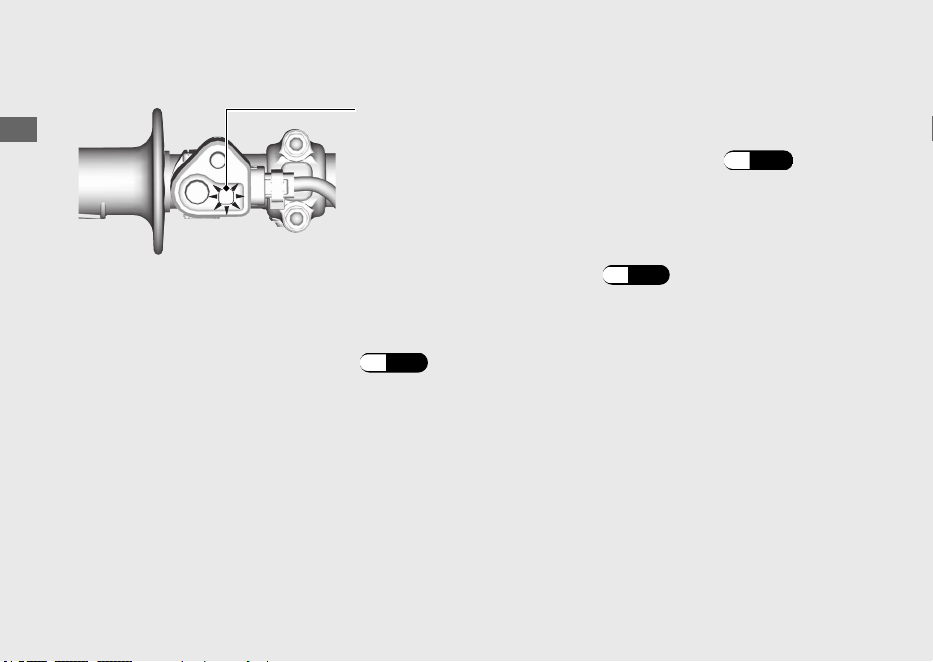
Indicators
Operation Guide
14
PGM-FI malfunction indicator lamp (MIL) (amber)
If it comes on while engine is running: (P.52)
Engine mode indicator (blue)
Launch control system indicator (purple)
Indicates the condition of HRC-Launch Control System.
(P.19
)
Indicates the currently selected mode by blinking the
mode number once when the engine is started. Indicates
the currently selected mode.
(P.16
)
Comes on briefly when the engine is started.
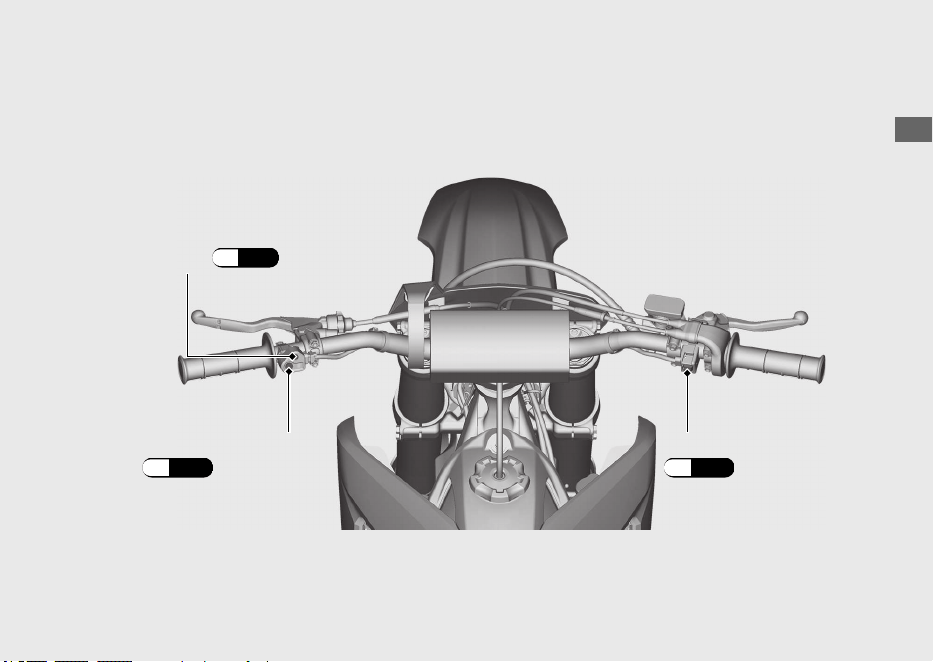
Operation Guide
16
Switches (Continued)
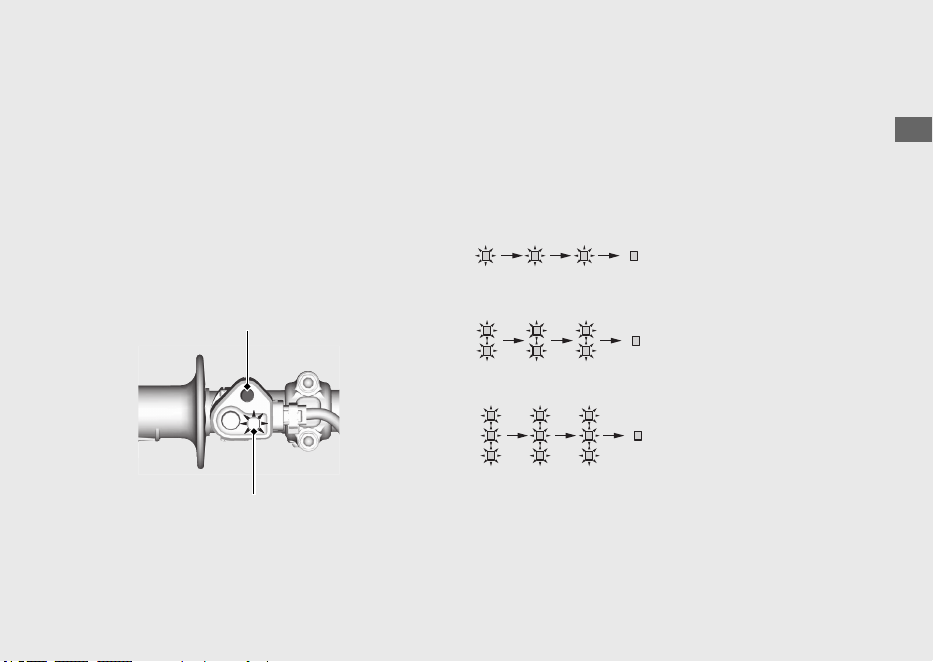
Engine mode select button
Engine mode indicator (blue)
You can change engine output
characteristic depending on track
conditions by using the engine mode
select button.
● PGM-FI mode 1: standard setting
● PGM-FI mode 2: smooth setting
(reduce throttle response from the
standard setting)
● PGM-FI mode 3: aggressive setting
(increase throttle response from the
standard setting)
#
Engine Mode
Operation Guide
17
Continued
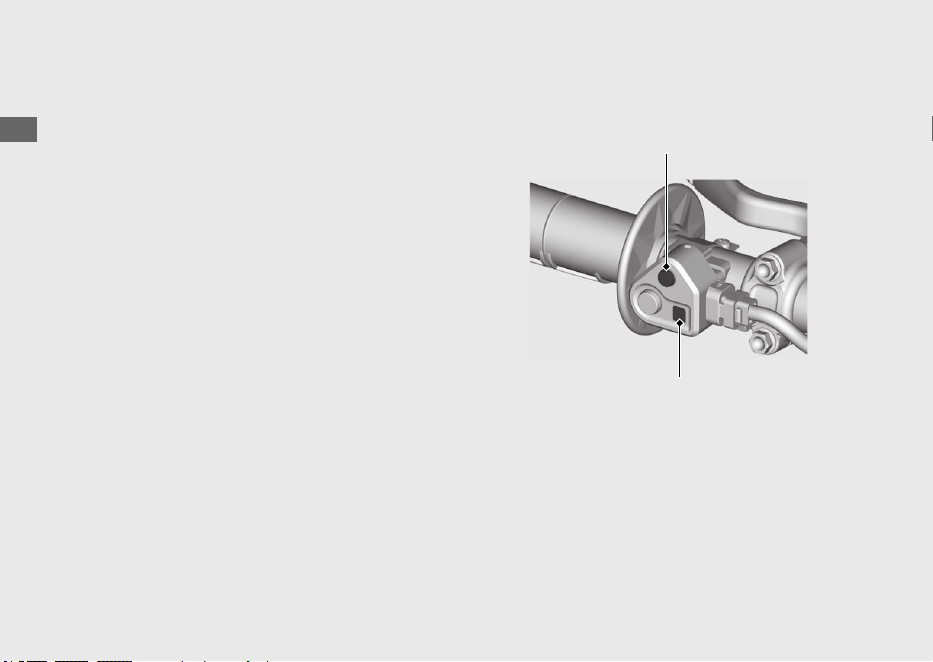
Engine mode select button
Engine mode indicator (blue)
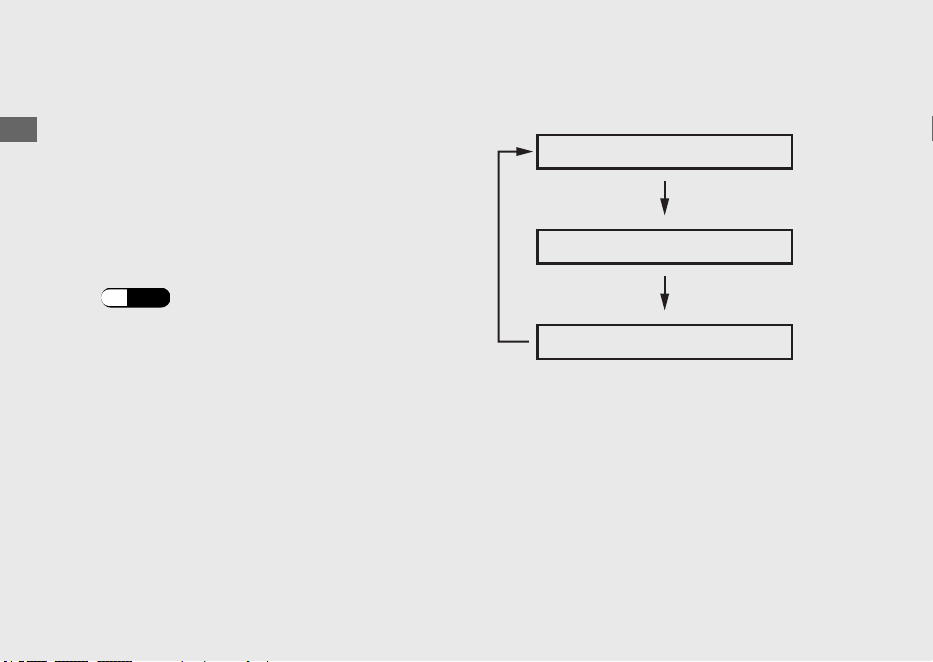
Start the engine and push the engine mode
select button with your vehicle stopped. The
engine mode indicator under the engine
mode select button indicates the selected
mode by blinking the mode number in blue
3 times.
#
Current Mode
The engine mode indicator also indicates the
currently selected mode by blinking the mode
number once when the engine is started.
PGM-FI mode 1:
The indicator blue blinks
once and repeats it 3 times.
PGM-FI mode 2:
The indicator blue blinks 2
times and repeats it 3 times.
PGM-FI mode 3:
The indicator blue blinks 3
times and repeats it 3 times.
If the engine mode indicator stays on or does
not come on when it should, have your dealer
check it for problems.
Operation Guide
18
Switches (Continued)
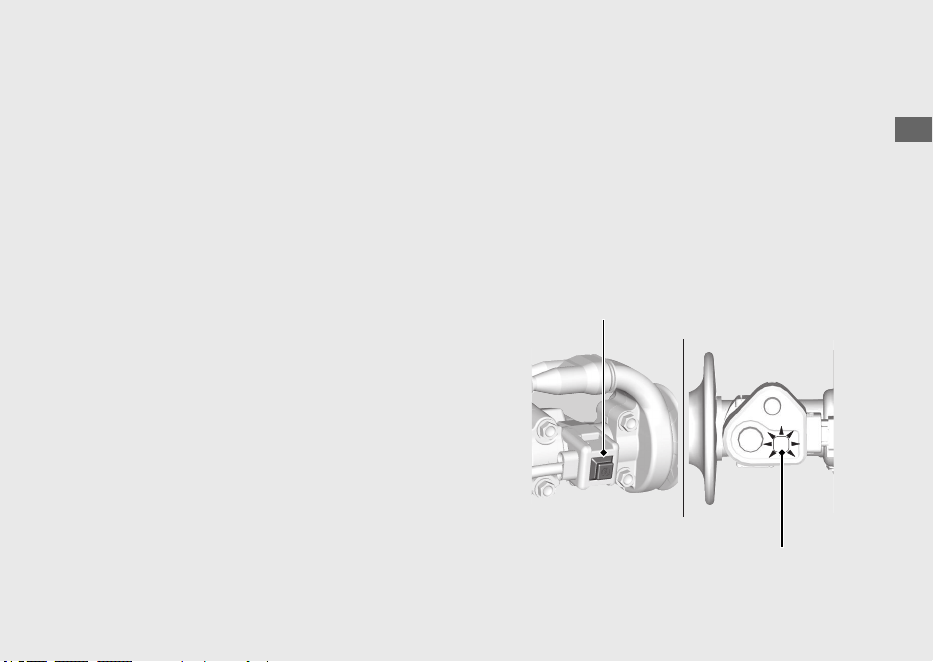
Mode Selection
a
Start the engine.
b
With your vehicle stopped and the throttle
closed, push and hold the engine mode
select button for 1 or more second.
Make sure that the fast idle knob is pushed
in.
(P.22
)
c
Release the engine mode select button. The
engine mode indicator will indicate a
selected mode by the number of times the
indicator blue blinks.
d
Repeat steps 2 – 3 until the desired mode is
indicated.
PGM-FI mode 1
PGM-FI mode 2
PGM-FI mode 3
If the fast idle knob is pulled out, the engine
mode will not change.
HRC-Launch Control System
The HRC-Launch Control System reduces slip
and assists for an effective start by
temporarily decreasing the rev limit when
starting.
You can select the rev limit level while the
system is operating according to your skill
and track conditions.
#
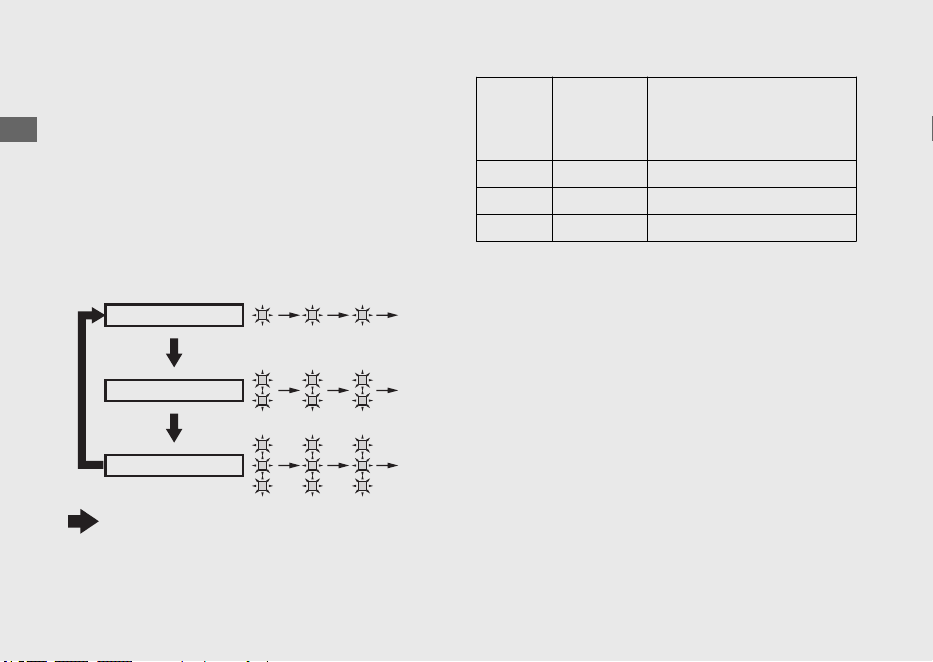
To change the level
a
Start the engine and wait more than 2
seconds.
b
Close the throttle completely, press and
hold the start button while pulling the clutch
lever in until the launch control system
indicator blinks (purple).
u
The system goes into standby, and the
launch control system indicator indicates
the selected level by blinking (purple).
u
From standby, the control to decrease
the rev limit starts.
u The system may become disabled if you
snap the throttle excessively.
u If the idle speed is low, the system may
not go into standby. Set the idle speed
to standard rpm.
u To disable the system, quickly press the
start button. The launch control system
indicator stops blinking.
Operation Guide
19
Continued
Start button
Launch control system indicator
(purple)
c
Press and hold the start button. The level
changes every time you press and hold.
u The level selected last is saved.
u The factory setting is level 2.
d
To continue using the system, refer to step 2
in “To operate the system” (next page). To
disable the system, quickly press the start
button. The launch control system indicator
stops blinking and the system is disabled.
Level
Rev limit
during
launch
control
Number of launch control
system indicator blinks
1 High 1
2 Middle 2
3 Low 3
Operation Guide
20
HRC-Launch Control System (Continued)
Level 1
Level 2
Level 3
Press and hold the start button while the launch
control system is in standby

#
To operate the system
a
Perform steps 1 and 2 in “To change the
level”.
b
Shift into 1st or 2nd gear.
c
When launching, open the throttle halfway
or more. The system operates.
u The reduced rev limit is controlled and
will gradually return to normal in a few
seconds. Once the rev limit returns to
normal, the system is disabled.
u The launch control system indicator
comes on (purple) while the system is
operating.
u If you open the throttle halfway or more
before starting, control system stops
before starting and there is no effect.
u If you close the throttle immediately, the
system may not operate.
u When the launch control system
operates, these following conditions will
disable launch control:
● Vehicle is in 3rd gear
● The throttle completely closed
d
Make sure that the launch control system
indicator is off. If it is not off, the system is
not disabled. Quickly press the start button
to disable the system.
Operation Guide
21
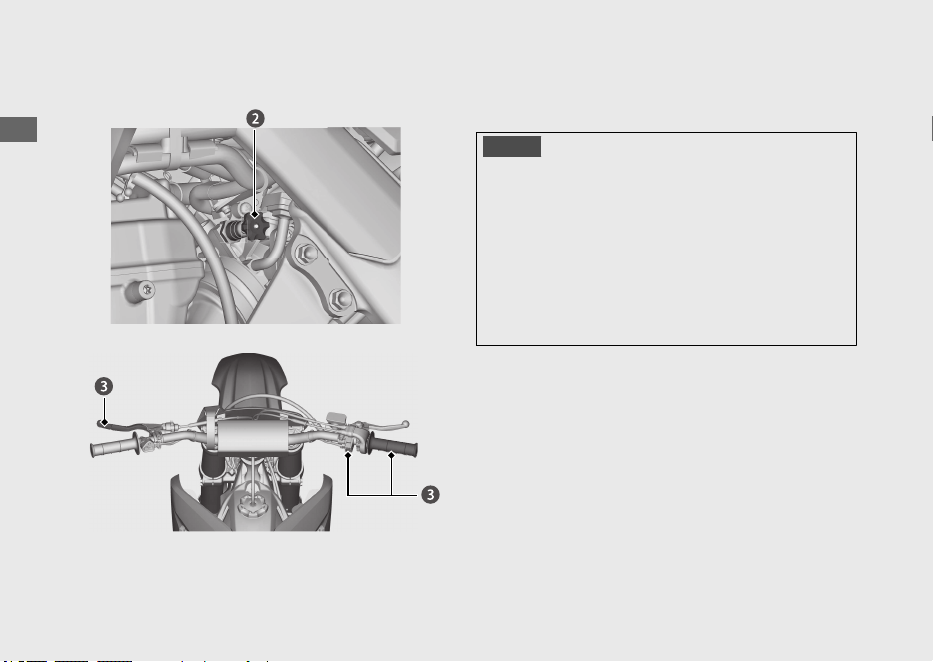
Starting the Engine
Start your engine using the following procedure.
To restart a warm engine, follow the
procedure for “Warm Engine Starting”.
NOTICE
• If the engine does not start within 5 seconds,
wait 10 seconds before trying to start the
engine again to recover battery voltage.
•
Extended fast idling and revving the engine can
damage the engine, and the exhaust system.
•
Snapping the throttle or fast idling for more
than about 5 minutes may cause exhaust
pipe discoloration.
Operation Guide
22

Cold Engine Starting
a
Shift the transmission to neutral.
b
If the temperature is 50 °F (10 °C) or below,
pull the fast idle knob fully up.
c
With the throttle closed. Pull the clutch lever
all the way in, and press the start button.
d
About a minute after the engine starts, push
the fast idle knob back all the way to fully
off. If idling is unstable, open the throttle
slightly.
Warm Engine Starting
a
Shift the transmission into neutral.
b
Pull the clutch lever and press the start
button. (Do not open the throttle.)
Starting the engine excessively charged
with fuel by throttle blipping or other
reasons
a
Shift the transmission into neutral.
b
With the throttle fully opened, pull the clutch
lever and press the start button for 5
seconds to discharge excessive fuel from the
engine.
c
Pull the clutch lever and press the start
button. (Do not open the throttle.)
Operation Guide
23
Continued
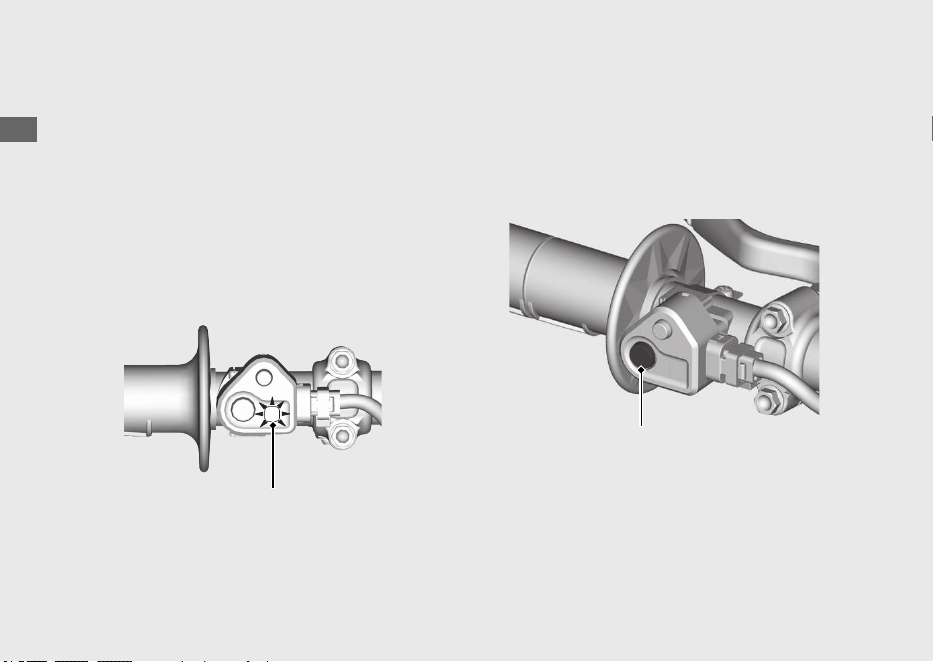
When starting the engine, the PGM-FI
malfunction indicator lamp (MIL) (amber) will
stay on for 2 seconds, then go off. And then
the engine mode indicator (blue) indicates
the current engine mode for 0.8 seconds,
then goes off. If the PGM-FI malfunction
indicator lamp (MIL)/engine mode indicator
does not come on or go off when it should,
have your dealer check it for problems.
When you stop the engine
#
Normal Engine Stop
a
Shift the transmission into neutral.
b
Push and hold the engine stop button until
the engine stops completely.
#
Emergency Engine Stop
To stop the engine in an emergency, push
and hold the engine stop button.
Operation Guide
24
Starting the Engine (Continued)
PGM-FI malfunction indicator lamp
(MIL) (amber)/
engine mode indicator (blue)
Engine stop button
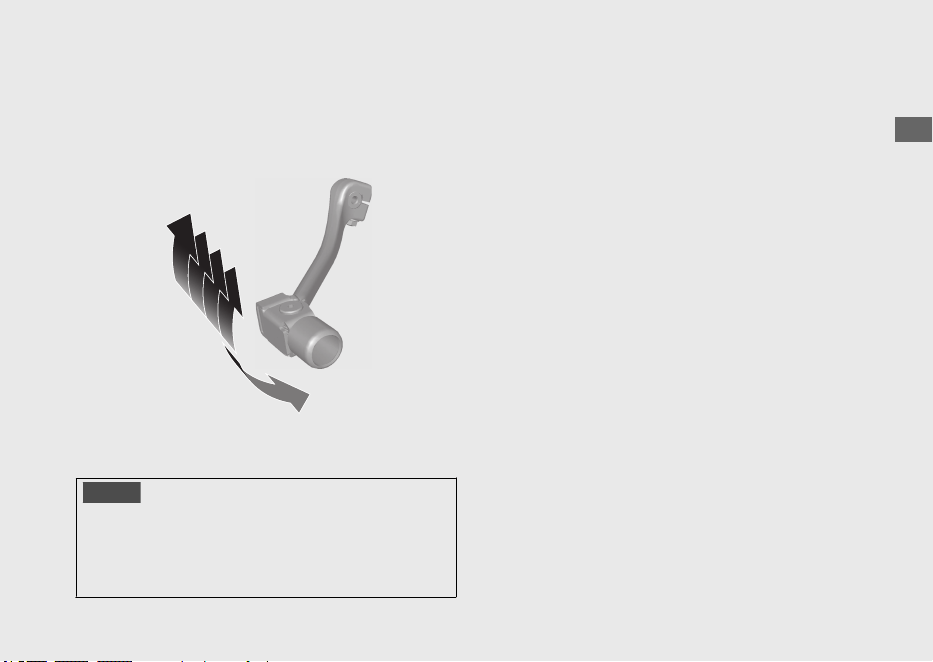
Shifting Gears
Your vehicle transmission has 5 forward
gears in a one-down, four-up shift pattern.
NOTICE
Improper shifting can damage the engine,
transmission, and drive train. Also, coasting or
towing the vehicle for long distances with the
engine off can damage the transmission.
Operation Guide
25
N
1
4
3
2
5
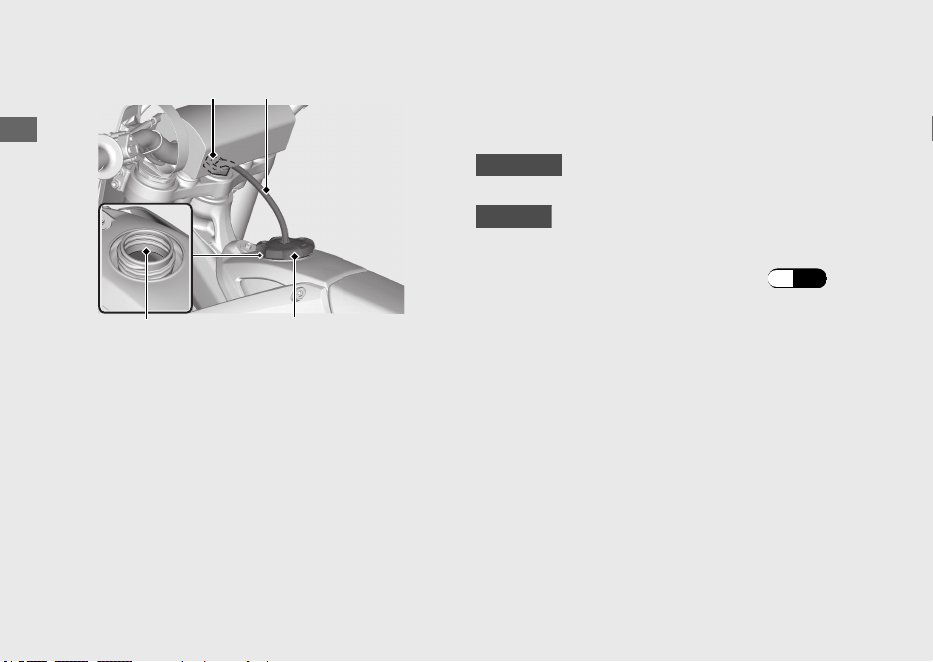
Refueling
Be careful not to damage the fuel pump
while filling the fuel tank.
Avoid overfilling the tank. There should be no
fuel in the filler neck.
Fuel type: Unleaded gasoline only
Recommended fuel octane number:
Pump Octane Number (PON) 91 or higher.
CRF250RX
Tank capacity: 2.25 US gal (8.5 L)
CRF250R
Tank capacity: 1.66 US gal (6.3 L)
#
Refueling and Fuel Guidelines (P.9)
Opening the Fuel Fill Cap
a
Pull the breather tube out of the steering
stem nut.
b
Turn the fuel fill cap counterclockwise and
remove it.
Operation Guide
26
Fuel fill capFiller neck bottom
Steering stem nut Breather tube
Closing the Fuel Fill Cap
a
After refueling, close the fuel fill cap
securely.
b
Insert the breather tube into the steering
stem nut.
3WARNING
Gasoline is highly flammable and
explosive. You can be burned or
seriously injured when handling fuel.
• Stop the engine, and keep heat,
sparks, and flame away.
• Handle fuel only outdoors.
• Wipe up spills immediately.
Operation Guide
27

Importance of Maintenance ...........................P. 29
Maintenance Schedule.....................................P. 31
Maintenance Fundamentals ...........................P. 36
Removing & Installing Body Components..P. 46
Battery.................................................................... P. 46
Seat ......................................................................... P. 48
Side Cover.............................................................P. 49
Please read “Importance of Maintenance”, “Maintenance Fundamentals” and Competition
Handbook carefully before attempting any maintenance. Refer to “Competition Handbook”
for service data.
Maintenance
Importance of Maintenance
Importance of Maintenance
Keeping your vehicle well-maintained is
absolutely essential to your safety and to
protect your investment, obtain maximum
performance, avoid breakdowns, and reduce air
pollution. Maintenance is the owner's
responsibility. Be sure to inspect your vehicle
before each ride, and perform the periodic
checks specified in the Maintenance Schedule.
2 P. 31
3WARNING
Improperly maintaining your vehicle or
failing to correct a problem before you
ride can cause a crash in which you can
be seriously hurt or killed.
Always follow the inspection and
maintenance recommendations and
schedules in this owner's manual and
competition handbook.
Maintenance Safety
Always read the maintenance instructions
before you begin each task, and make sure that
you have the tools, parts, and skills required.
We cannot warn you of every conceivable
hazard that can arise in performing
maintenance. Only you can decide whether or
not you should perform a given task.
Follow these guidelines when performing
maintenance.
●
Stop the engine.
●
CRF250RX
Place your vehicle on a firm, level surface
using the side stand, an optional workstand
or a maintenance stand to provide support.
CRF250R
Place your vehicle on a firm, level surface
using an optional workstand or a
maintenance stand to provide support.
Maintenance
29
Continued
● Allow the engine, muffler, brakes, and other
high-temperature parts to cool before
servicing as you can get burned.
● Run the engine only when instructed, and
do so in a well-ventilated area.
Importance of Maintenance
Maintenance
30
Maintenance Schedule
To maintain the safety and reliability of your
vehicle, regular inspection and service is
required as shown in the Maintenance Schedule
that follows.
The Maintenance Schedule lists items that can
be performed with basic mechanical skills and
hand tools. Procedures for these items are
provided in Competition Handbook. The
Maintenance Schedule also includes items that
involve more extensive procedures and may
require special training, tools, and equipment.
Therefore, we recommend that you have your
dealer perform these tasks unless you have
advanced mechanical skills and the required
tools. Procedures for items in this schedule are
provided in an official Honda Service Manual
available for purchase from your dealer. 2 P. 67
CRF250RX
Service intervals in the maintenance schedule
are expressed in terms of races and riding
hours. To avoid overlooking required service,
we urge you to develop a convenient way to
record the number of races and/or hours you
ride.
CRF250R
Service intervals in the maintenance schedule
are expressed in terms of motos and riding
hours. To avoid overlooking required service,
we urge you to develop a convenient way to
record the number of motos and/or hours you
ride.
If you do not feel capable of performing a given
task or need assistance, remember that your
Honda dealer knows your vehicle best and is
fully equipped to maintain and repair it. If you
decide to do your own maintenance, use only
Honda Genuine Parts or their equivalents for
repair or replacement to ensure the best quality
and reliability.
Maintenance
31
Continued
Make sure whoever performs the scheduled
maintenance completes the maintenance
record. Retain all service documents. If you sell
your vehicle, these service documents should
be transferred with the vehicle to the new
owner.
Maintenance Schedule
Maintenance
32
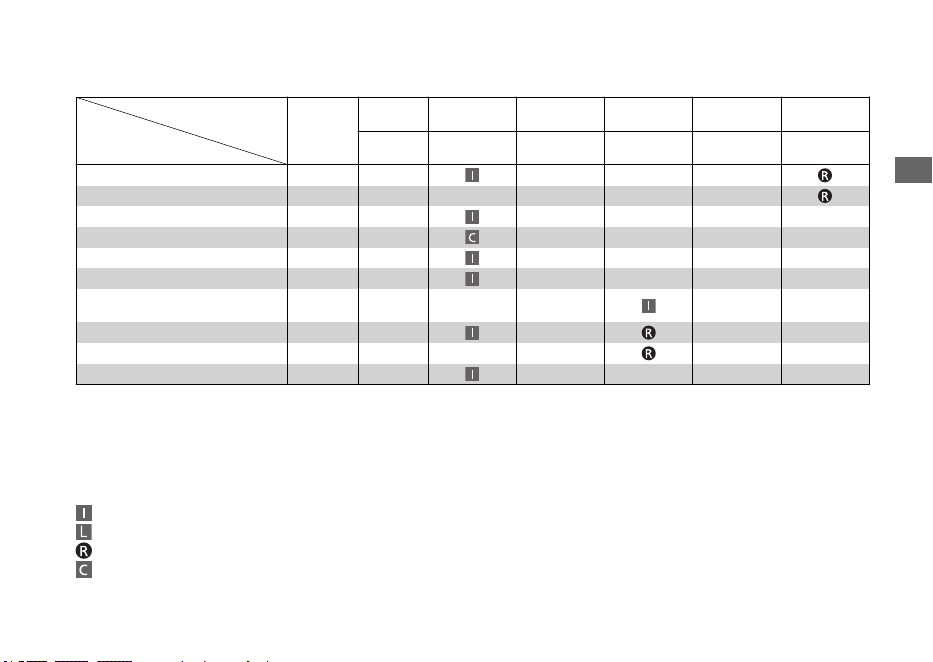
Perform the Pre-ride Inspection (2 P. 36) at each scheduled maintenance period.
FREQUENCY
ITEMS
NOTE
CRF250R
Each race or
about 2.5 hours
Every 3 races or
about 7.5 hours
Every 6 races or
about 15.0 hours
Every 9 races or
about 22.5 hours
Every 12 races or
about 30.0 hours
CRF250RX
Each race or
about 3.5 hours
Every 2 races or
about 7.5 hours
Every 4 races or
about 15.0 hours
Every 6 races or
about 22.5 hours
Every 8 races or
about 30.0 hours
Fuel Line
NOTE 6
Fuel Pump Filter
NOTE 6
Throttle Operation
Air Filter
NOTE 1
Crankcase Breather
Spark Plug
Valve Clearance/Decompressor
System
NOTE 4
Engine Oil
NOTE 3, 5
Engine Oil Filter
NOTE 3
Engine Idle Speed
WE RECOMMEND THESE ITEMS BE SERVICED BY REFERRING TO THE OFFICIAL HONDA SERVICE
MANUAL.
This maintenance schedule is based upon average riding condition. Machine subjected to severe use
require more frequent servicing.
Maintenance Legend
:
:
:
:
Inspect (clean, adjust, lubricate, or replace, if necessary)
Lubricate
Replace
Clean
Maintenance Schedule
Maintenance
33
Continued
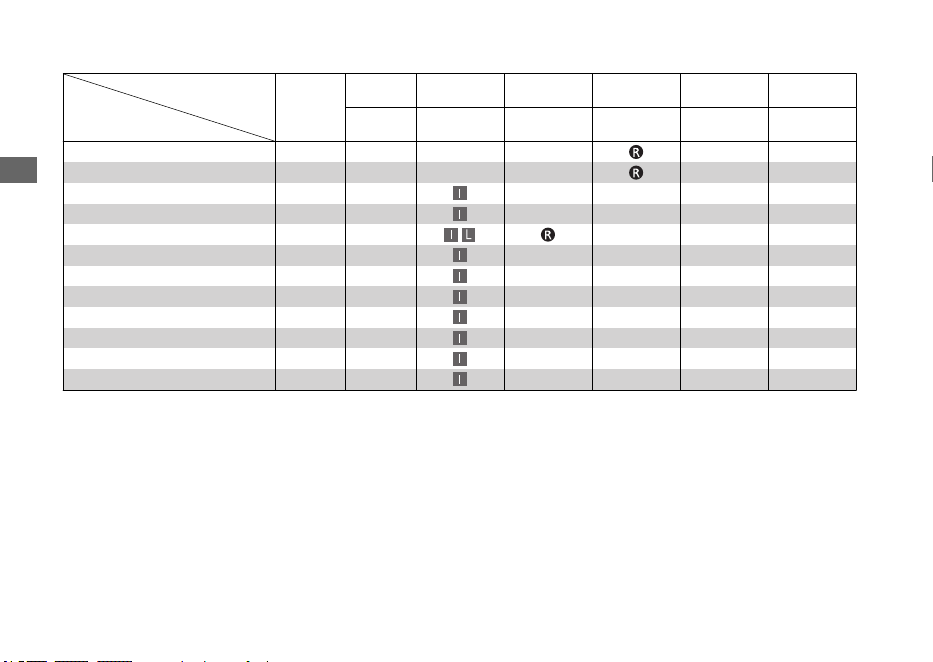
FREQUENCY
ITEMS
NOTE
CRF250R
Each race or
about 2.5 hours
Every 3 races or
about 7.5 hours
Every 6 races or
about 15.0 hours
Every 9 races or
about 22.5 hours
Every 12 races or
about 30.0 hours
CRF250RX
Each race or
about 3.5 hours
Every 2 races or
about 7.5 hours
Every 4 races or
about 15.0 hours
Every 6 races or
about 22.5 hours
Every 8 races or
about 30.0 hours
Piston and Piston Rings
Piston Pin
Radiator Coolant
NOTE 2
Cooling System
Drive Chain
Drive Chain Slider
Drive Chain Roller
Drive Sprocket
Driven Sprocket
Brake Fluid
NOTE 2
Brake Pads Wear
Brake System
Maintenance Schedule
Maintenance
34
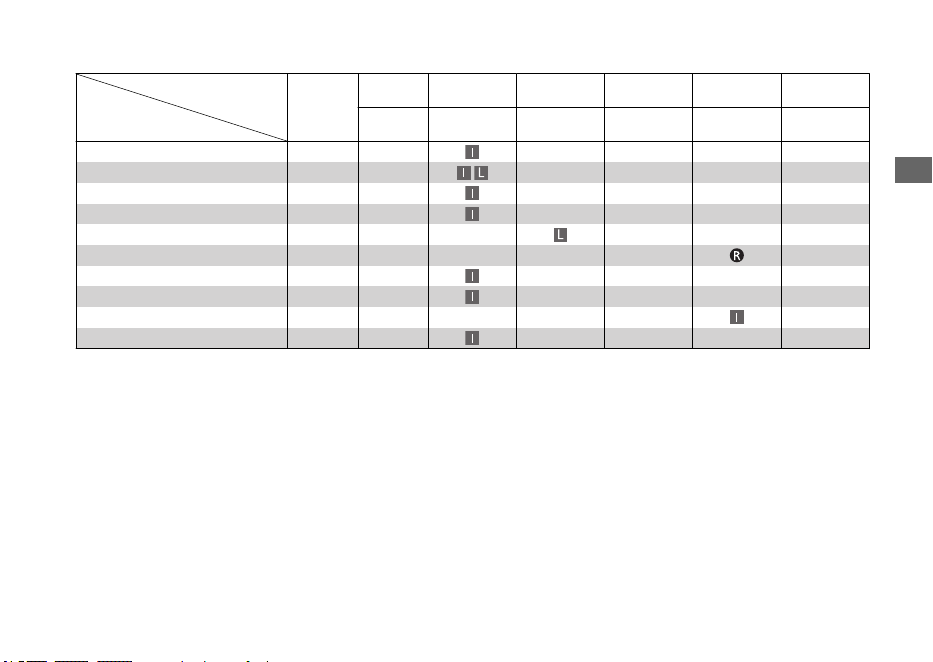
FREQUENCY
ITEMS
NOTE
CRF250R
Each race or
about 2.5 hours
Every 3 races or
about 7.5 hours
Every 6 races or
about 15.0 hours
Every 9 races or
about 22.5 hours
Every 12 races or
about 30.0 hours
CRF250RX
Each race or
about 3.5 hours
Every 2 races or
about 7.5 hours
Every 4 races or
about 15.0 hours
Every 6 races or
about 22.5 hours
Every 8 races or
about 30.0 hours
Clutch System
NOTE 5
Control Cables
Exhaust Pipe/Muffler
Suspension
Swingarm/Shock Linkage
Fork Oil
NOTE 3
Nuts, Bolts, Fasteners
Wheels/Tires
Steering Head Bearings
Side Stand
NOTE 7
Notes: 1 : Clean after every race for dusty riding condition. 4 : Inspect after the first break-in ride.
2 : Replace every 2 years. Replacement requires
mechanical skill.
5 : Replace the engine oil, if the clutch discs and plates
are replaced.
3 : Replace after the first break-in ride. 6 : Replace every year.
7 : Only RX type.
Maintenance Schedule
Maintenance
35
Maintenance Fundamentals
Pre-ride Inspection
To ensure safety, it is your responsibility to
perform a pre-ride inspection and make sure
that any problem you find is corrected. A pre-
ride inspection is a must, not only for safety, but
because having a breakdown, or even a flat tire,
can be a major inconvenience.
Refer to Competition Handbook for procedures.
Competitive riding can be tough on a
motorcycle, so it’s important to inspect your
vehicle and correct any problems you find
before each ride.
Check the following before each ride:
●
Engine oil level.
●
Fuel line for condition.
●
Coolant for proper level.
●
Cooling system and hoses for condition.
● Spark plug for proper heat range, carbon
fouling and spark plug wire terminal for
looseness.
●
Air cleaner for condition and contamination.
● Clutch lever freeplay.
● Breather drain for cleaning.
●
Steering head bearing and related parts for
condition.
● Throttle operation.
●
Tires for damage or improper inflation pressure.
●
Spokes for looseness.
●
Rim locks for looseness.
●
Front and rear suspension for proper operation.
●
Front and rear brakes, check operation.
● Drive chain for correct slack and adequate
lubrication.
● Drive chain sliders and drive chain rollers for
damage or wear.
● Exhaust pipe/Muffler for looseness.
●
Every possible part for looseness (such as
cylinder head bolts, engine mounting bolts/
nuts, axle nuts, handlebar holder bolts, fork
bridge pinch bolts, drive chain adjuster, lock
nuts, drive chain roller bolt/nut, wire harness
connectors).
●
PGM-FI malfunction indicator lamp (MIL)
operation.
Maintenance
36
Between Races/Motos & Practice
Maintenance
CRF250RX
After practice or between races you have a
chance to make additional checks and
adjustments.
CRF250R
After practice or between motos you have a
chance to make additional checks and
adjustments.
• Clean accumulated dirt from under the
fenders and off the wheels, suspension
components, handgrips, controls, and
footpegs. A stiff, nylon parts cleaning brush
works well.
• Check tire air pressure.
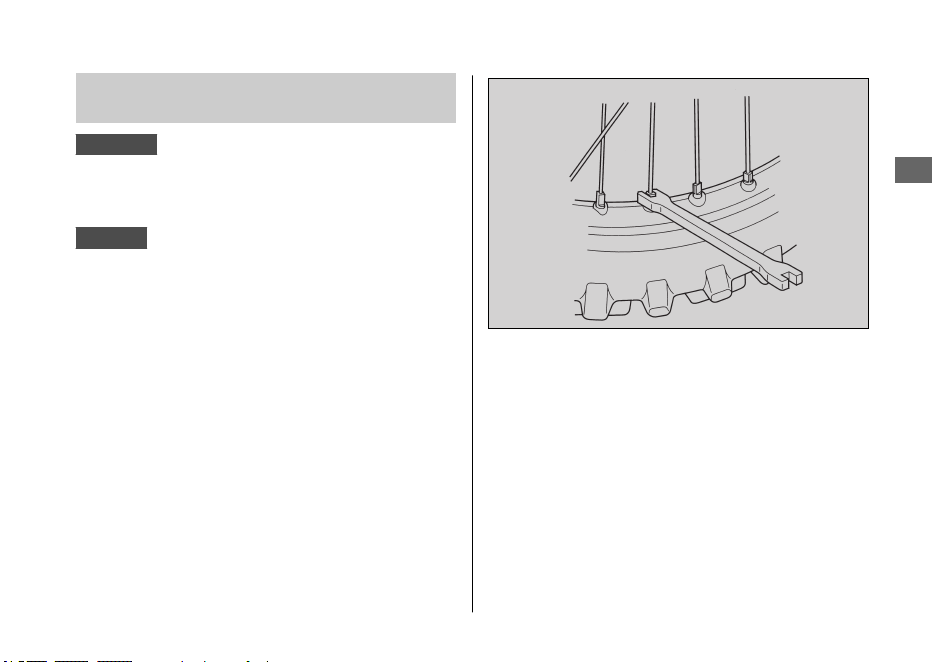
• Check spoke tension, and make sure the rim
locks are secure.
•
Check to make sure the sprocket bolts and
nuts are secure.
• Clean the sides of the drive chain with a stiff,
nylon parts-cleaning brush. Lubricate and
adjust the chain as necessary.
Do not perform maintenance while engine is
running. Injury to your fingers or hands may
result.
Maintenance Fundamentals
Maintenance
37
Continued
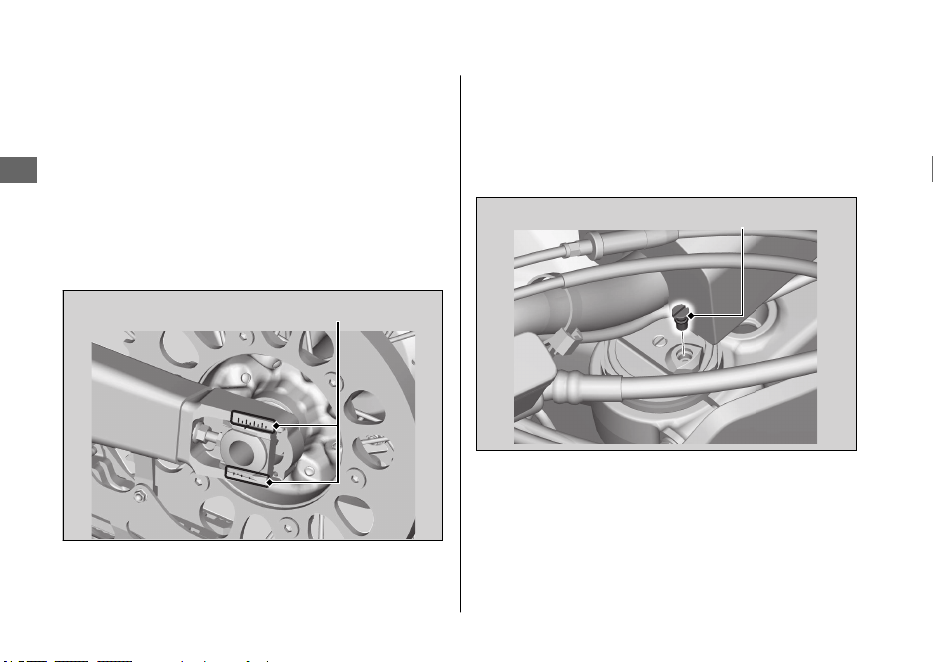
• After adjustment, check that the chain
adjuster index marks are in the same
position on each side. This will ensure that
the rear wheel is in proper alignment and
allow maximum performance from the rear
disc brake.
Maintaining proper wheel alignment will also
extend brake pad lifespan.
• Suspend the front wheel above the ground
and use the pressure release screws to
release the built-up pressure in the forks.
This pressure is caused by normal fork
action while riding.
Maintenance Fundamentals
Maintenance
38
Chain adjuster index marks
Pressure release screw
After Competition Maintenance
It is important to the long term performance of
your vehicle to practice a consistent
maintenance program. Right after the event is a
good time to begin your next maintenance
cycle.
#
After Race (CRF250RX)/Moto (CRF250R)
Lubrication
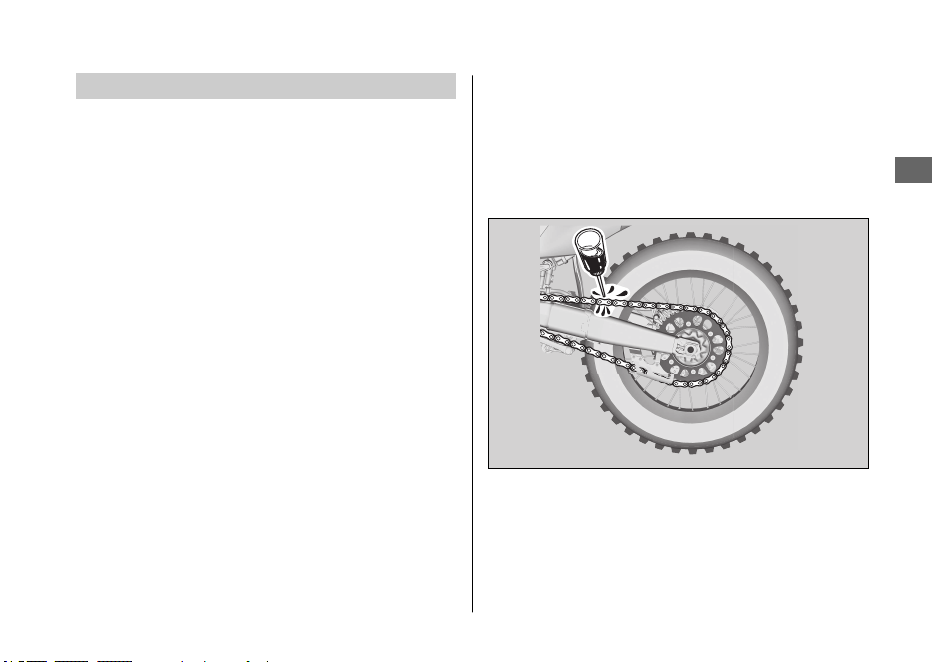
Apply a light coating of rust-inhibiting oil to the
drive sprocket and any steel portions of the
chassis or engine where the paint has worn
away.
This will prevent rusting of the exposed metal.
Apply rust-inhibiting oil more heavily if the
event was particularly wet or muddy. Take care
to avoid spraying any oil near the brake pads or
the brake discs.
Take care to prevent catching your fingers
between the chain and sprocket.
Remove the drive chain, clean and lubricate it.
Be sure the chain is wiped clean and is dry
before lubricating the chain.
#
Routine Cleaning
If your vehicle is only slightly dirty, it is best to
clean it by hand with the aid of a stiff bristled
nylon brush and some clean rags.
Maintenance Fundamentals
Maintenance
39
Continued
Take care to prevent catching your fingers
between the chain and sprocket.
A variety of reasonably priced cleaning brushes
are available from variety, drug, food, and
hardware stores. Some of these brushes are
extremely useful in removing dirt from the many
tight contours of the metal pieces of your
vehicle.
Avoid using stiff, abrasive brushes on the plastic
or rubber parts.
If your vehicle was exposed to sea air or salt
water, rinse it as soon as possible after the
event, dry it, and apply a spray lubricant to all
metal parts.
If you decide to wash your vehicle or use
cleaners, refer to "Caring for Your Vehicle".
2 P. 57
Replacing Parts
Always use Honda Genuine Parts or their
equivalents to ensure reliability and safety.
3WARNING
Installing non-Honda parts may make
your vehicle unsafe and cause a crash in
which you can be seriously hurt or
killed.
Always use Honda Genuine Parts or
equivalents that have been designed
and approved for your vehicle.
Maintenance Fundamentals
Maintenance
40
Lithium-Ion (Li-Ion) Battery
Your vehicle has a lithium-ion (li-ion) battery.
Clean the battery terminals if they become dirty
or corroded.
NOTICE
An improperly disposed of battery can be
harmful to the environment and human health.
Always confirm local regulations for proper
battery disposal instruction.
#
What to do in an emergency
If any of the following occurs, immediately see
your doctor.
●
Electrolyte splashes into your eyes:
u Wash your eyes repeatedly with cool
water for at 15 minutes. Using water
under pressure can damage your eyes.
●
Electrolyte splashes onto your skin:
u Remove affected clothing and wash your
skin thoroughly using water.
● Electrolyte splashes into your mouth
u Rinse mouth thoroughly with water, and
do not swallow.
3WARNING
The battery contains flammable organic
solvent as electrolyte.
You can be burned or seriously injured
if the battery is handled improperly.
● Keep the battery away from heat,
sparks, and flame.
● Keep the battery out of the reach of
children.
● Do not disassemble or modify the
battery or battery terminals.
● Do not short-circuit the battery with
metal tools or other metal objects.
● Do not subject the battery to
impacts.
Maintenance Fundamentals
Maintenance
41
Continued
#
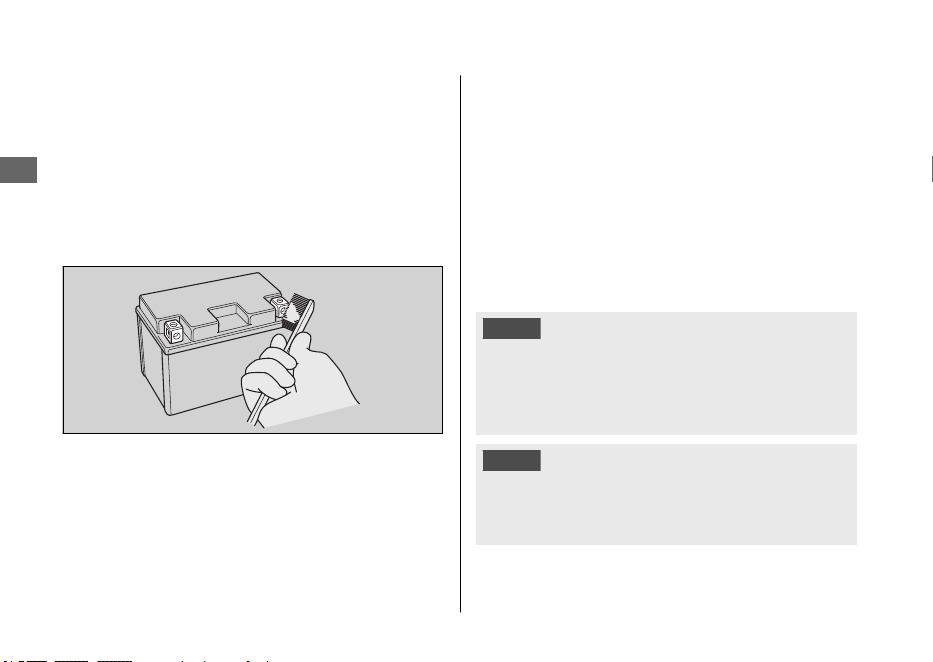
Cleaning the Battery Terminals
1.
Remove the battery. 2 P. 46
2.
If the terminals are starting to corrode and
are coated with a white substance, wash
with warm water and wipe clean.
3.
If the terminals are heavily corroded, clean
and polish the terminals with a wire brush or
sandpaper. Wear safety glasses.
4.
After cleaning, reinstall the battery.
The battery has a limited life span. Consult your
dealer about when you should replace the
battery. Always replace the battery with another
lithium-ion (li-ion) battery of the same type.
#
Charging
If you use electrical accessories that drain the
battery or you do not ride frequently, we
recommend that you charge the battery every
30 days using a charger recommended by your
lithium-ion (li-ion) battery manufacturer.
Contact your dealer before charging the
battery.
Make sure the battery terminals are
disconnected before charging the battery.
NOTICE
Only use a charger recommended by your
lithium-ion (li-ion) battery manufacturer. Using a
battery charger that is not recommended can
cause permanent damage to your battery.
NOTICE
Improper charging can damage the battery. If
you can’t charge the battery or it appears unable
to hold a charge, contact your dealer.
Maintenance Fundamentals
Maintenance
42
NOTICE
Do not jump-start, as this can damage your
vehicle's electrical system and battery.
Bump starting is not recommended.
NOTICE
Installing non-Honda electrical accessories can
overload the electrical system, discharging the
battery and possibly damaging the system.
Fuses
Fuses protect the electrical circuits on your
vehicle. If something electrical on your vehicle
stops working, check for and replace any blown
fuses. 2 P. 54
#
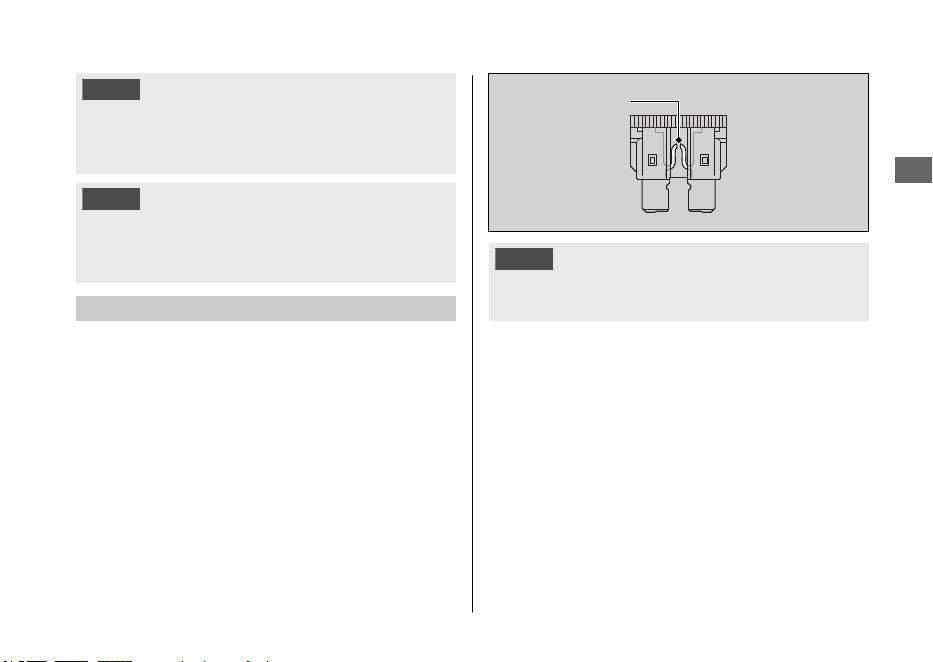
Inspecting and Replacing Fuses
Turn the engine off to remove and inspect the
fuses. If a fuse is blown, replace with a fuse of
the same rating. For fuse ratings, see
“Specifications.” 2 P. 72
NOTICE
Replacing a fuse with one that has a higher rating greatly
increases the chance of damage to the electrical system.
If a fuse fails repeatedly, you likely have an
electrical fault. Have your vehicle inspected by
your dealer.
Maintenance Fundamentals
Maintenance
43
Blown fuse
Tires (Inspecting/Replacing)
#
Checking the Air Pressure
Visually inspect your tires and use an air
pressure gauge to measure the air pressure
before each ride.
Always check air pressure when your tires are
cold.
If you decide to adjust the tire pressure for a
particular riding condition, make changes a little
at a time.
#
Inspecting for Damage
Inspect the tires for cuts, slits, or cracks that
exposes fabric or cords, or nails or other foreign
objects embedded in the side of the tire or the
tread. Also inspect for any unusual bumps or
bulges in the side walls of the tires.
#
Inspecting for Abnormal Wear
Inspect the tires for signs of abnormal wear on
the contact surface.
#
Inspecting Rims and Valve Stems
Inspect the rims for damage and loose spokes.
Also inspect the valve stems for their positions.
A tilted valve stem indicates the tube is slipping
inside the tire or the tire is slipping on the rim.
See your dealer.
3WARNING
Riding on tires that are excessively worn
or improperly inflated can cause a crash
in which you can be seriously hurt or
killed.
Follow all instructions in this owner's
manual regarding tire inflation and
maintenance.
Maintenance Fundamentals
Maintenance
44
Have your tires replaced by your dealer.
For recommended tires and air pressure, see
“Specifications.” 2 P. 70
Follow these guidelines whenever you replace
tires.
● Use the recommended tires or equivalents
of the same size, construction, speed rating,
and load range.
● Remember to replace the inner tube
whenever you replace a tire. The old tube
will probably be stretched, and it could fail if
installed in a new tire.
●
If a tube is punctured or damaged, you
should replace it as soon as possible. A
repaired tube may not have the same
reliability as a new one, and it may fail while
you are riding.
Use a replacement tube equivalent to the
original.
3WARNING
Installing improper tires on your vehicle
can adversely affect handling and
stability, and can cause a crash in which
you can be seriously hurt or killed.
Always use the size and type of tires
recommended in this owner's manual.
Maintenance Fundamentals
Maintenance
45
Removing & Installing Body Components
Battery
#
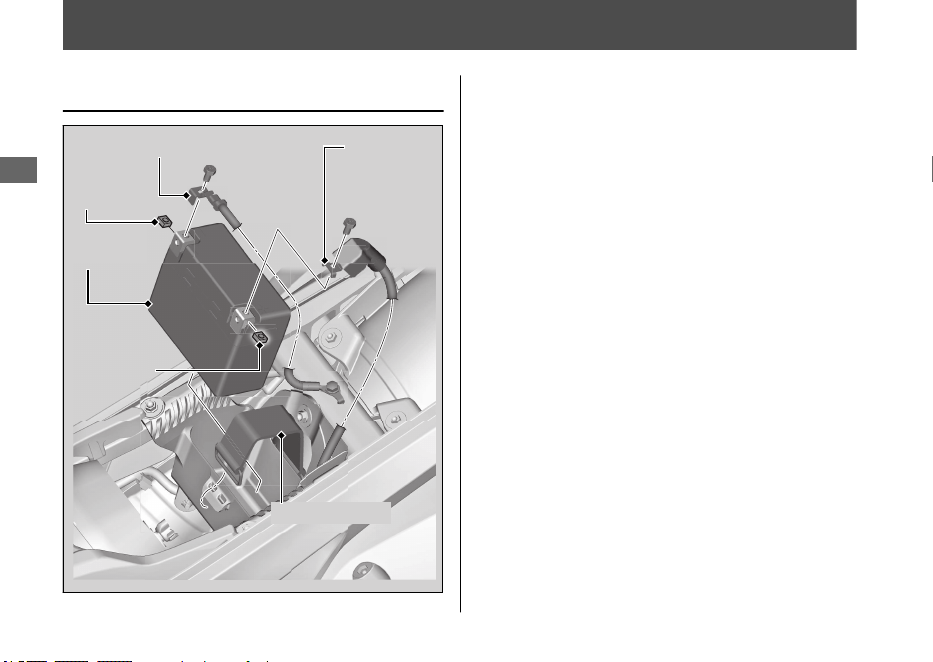
Removal
1.
Remove the seat. 2 P. 48
2.
Remove the battery band.
3.
Disconnect the negative - terminal from
the battery.
4.
Disconnect the positive + terminal from
the battery.
5.
Remove the battery taking care not to
drop the terminal nuts.
Maintenance
46
Negative terminal
Battery
Battery band
Positive
terminal
Terminal
nut
Terminal
nut
#
Installation
1.
Install the parts in the reverse order of
removal. Always connect the positive +
terminal first. Make sure that bolts and
nuts are tight.
2.
Tighten the positive + terminal bolt and
negative - terminal bolt to the specified
torque:
Torque: 1.5 lbf·ft (2.0 N·m, 0.2 kgf·m)
3.
Install the battery band and seat.
For proper handling of the battery, see
“Maintenance Fundamentals.” 2 P. 41
“Battery Goes Dead.” 2 P. 53
Removing & Installing Body Components u Battery
Maintenance
47
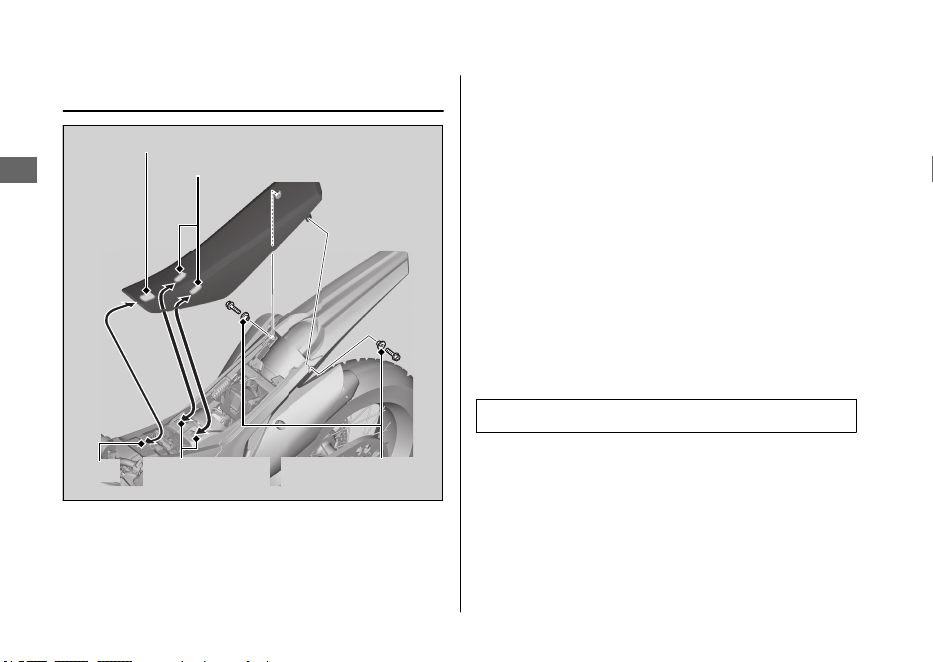
Seat
#
Removal
1.
Remove the seat mounting bolts and
collars.
2.
Remove the seat by pulling it backward.
#
Installation
1.
Install the seat while aligning the seat
front prong with the slot of the fuel tank
and seat center prongs with the seat
support base slots.
2.
Install and tighten the collars and seat
mounting bolts to the specified torque:
Torque: 19 lbf·ft (26 N·m, 2.7 kgf·m)
Removing & Installing Body Components u Seat
Maintenance
48
Seat center prongs
Slot
Seat support
base slots
Seat front prong
Seat mounting
bolts/Collars
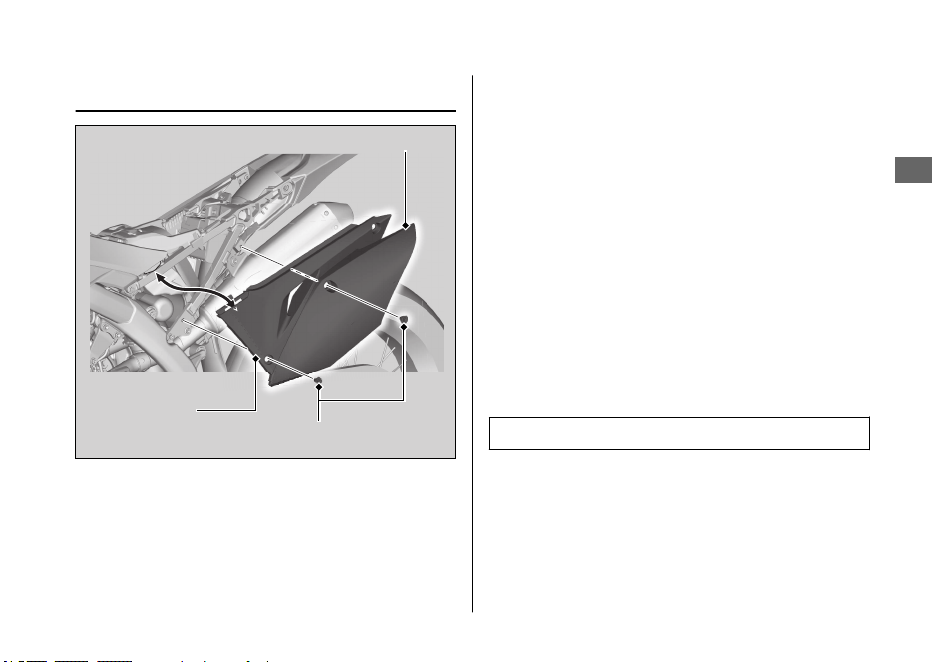
Side Cover
The procedure is the same for the both right
and left side.
#
Removal
1.
Remove the seat. 2 P. 48
2.
Remove the side cover and air cleaner
housing cover by removing the bolts.
#
Installation
Install the air cleaner housing covers and side
covers, and then tighten the bolts to the
specified torque:
Torque: 7 lbf·ft (10 N·m, 1.0 kgf·m)
Removing & Installing Body Components u Side Cover
Maintenance
49
Side cover
Bolts
Air cleaner
housing cover

Engine Will Not Start........................................ P. 51
Warning Indicators On or Flashing...............P. 52
PGM-FI (Programmed Fuel Injection)
Malfunction Indicator Lamp (MIL).................P. 52
Electrical Trouble............................................... P. 53
Battery Goes Dead ..............................................P. 53
Blown Fuse ............................................................ P. 54
Troubleshooting
Engine Will Not Start
Starter Motor Operates But
Engine Does Not Start
Check the following items:
● Check the correct engine starting
sequence. 2 P. 22
●
Check that there is gasoline in the fuel
tank.
● Check if the PGM-FI malfunction indicator
lamp (MIL) is on.
Starter Motor Does Not
Operate
Check the following items:
● Check the correct engine starting
sequence. 2 P. 22
●
Check for a blown fuse. 2 P. 54
● Check for a loose battery connection
(2 P. 46) or battery terminal corrosion
(2 P. 42).
● Check the condition of the battery.
2 P. 53
If the problem continues, have your vehicle
inspected by your dealer as soon as possible
or refer to an official Honda Service Manual
available for purchase from your dealer.
2 P. 67
Troubleshooting
51
Warning Indicators On or Flashing
PGM-FI (Programmed Fuel
Injection) Malfunction
Indicator Lamp (MIL)
If the indicator comes on while riding, you
may have a serious problem with the PGM-FI
system.
Reduce speed and have your vehicle
inspected by your dealer as soon as possible
or refer to an official Honda Service Manual
available for purchase from your dealer.
2 P. 67
Troubleshooting
52
Electrical Trouble
Battery Goes Dead
Battery charging is needed.
A battery charger recommended by your
lithium-ion (li-ion) battery manufacturer is
needed for battery charging.
Contact your dealer before charging the
battery.
Remove the battery from the vehicle before
charging.
NOTICE
Only use a charger recommended by your
lithium-ion (li-ion) battery manufacturer. Using a
battery charger that is not recommended can
cause permanent damage to your battery.
If the battery does not recover after
recharging, contact your dealer.
NOTICE
Do not jump-start, as this can damage your
vehicle's electrical system and battery.
Bump starting is not recommended.
Check the battery voltage using a digital
multi meter with the cable connected.
Below 1V: The battery has failed; replace the
battery.
Between 1V and 8V: The battery may have
failed; charge the battery and then recheck.
If you can’t charge the battery or it appears
unable to hold a charge, see your dealer.
Troubleshooting
53
Blown Fuse
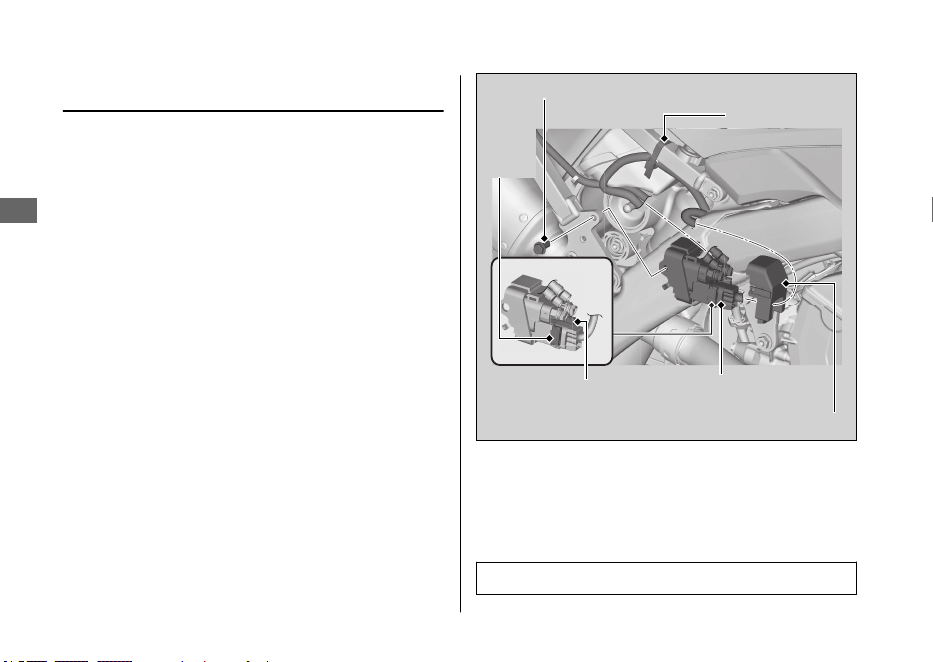
Before handling fuses, see “Inspecting and
Replacing Fuses.” 2 P. 43
#
Main fuse
1.
Remove the seat. 2 P. 48
2.
Disconnect the negative - terminal.
2 P. 46
3.
Remove the right side cover and right air
cleaner housing cover. 2 P. 49
4.
Remove the starter magnetic switch stay
bolt and plastic wire band.
5.
Pull out the starter magnetic switch.
6.
Remove the starter magnetic switch
cover.
7.
Pull the main fuse and check for a blown
fuse. Always replace a blown fuse with a
spare of the same rating.
8.
Install the starter magnetic switch cover.
9.
Install the starter magnetic switch. Install
and tighten the starter magnetic switch
stay bolt to the specified torque:
Torque: 7 lbf·ft (10 N·m, 1.0 kgf·m)
Electrical Trouble u Blown Fuse
Troubleshooting
54
Starter magnetic switch
Wire band
Starter magnetic switch stay bolt
Starter magnetic switch cover
Main fuse
Spare
main
fuse
10.
Install the plastic wire band.
11.
Connect the negative - terminal.
12.
Install the right side cover, right air
cleaner housing cover and bolts.
13.
Install the seat.
NOTICE
If a fuse fails repeatedly, you likely have an
electrical problem. Have your vehicle inspected
by your dealer.
Electrical Trouble u Blown Fuse
Troubleshooting
55

Caring for Your Vehicle.................................... P. 57
Storing Your Vehicle.........................................P. 61
Transporting Your Vehicle ..............................P. 62
You & the Environment.................................... P. 64
Vehicle Identification Number.......................P. 65
Oxygenated Fuels..............................................P. 66
Authorized Manuals ......................................... P. 67
Honda Contacts ................................................. P. 68
Information
Caring for Your Vehicle
Frequent cleaning and polishing is important to
ensure the life of your Honda. A clean vehicle
makes it easier to spot potential problems.
While you're cleaning, be sure to look for
damage, wear, and gasoline or oil leaks.
Washing
Allow the engine, muffler, brakes, and other
high-temperature parts to cool before washing.
1.
Rinse your vehicle thoroughly using a low
pressure garden hose to remove loose dirt.
2.
If necessary, use a sponge or a soft towel
with mild cleaner to remove road grime.
u Clean the plastic components with extra
care to avoid scratching them.
Avoid directing water into the air cleaner,
muffler, and electrical parts.
u Do not use steel wool to clean the frame
as it could damage or discolor the frame
surface. Scotch Brite Hand Pad #7447-
maroon is for removing stains on the
non-coated aluminum frame only.
3.
Thoroughly rinse your vehicle with plenty of
clean water and dry with a soft, clean cloth.
4.
After the vehicle dries, lubricate any moving
parts.
u
Make sure that no lubricant spills onto
the brakes or tires. Brake discs, pads,
drum or shoes contaminated with oil will
suffer greatly reduced braking
effectiveness and can lead to a crash.
5.
Lubricate the drive chain immediately after
washing and drying the vehicle.
6.
Apply a coat of wax to prevent corrosion.
u Avoid products that contain harsh
detergents or chemical solvents. These
can damage the metal, paint, and plastic
on your vehicle.
Keep the wax clear of the tires and brakes.
u If your vehicle has any matte painted
parts, do not apply a coat of wax to the
matte painted surface.
Caring for Your Vehicle
Information
57
Continued
#
Washing Precautions
Follow these guidelines when washing:
● Do not use high-pressure washers:
u High-pressure water cleaners can
damage moving parts and electrical
parts, rendering them inoperable.
u Water in the air intake can be drawn into
the throttle body and/or enter the air
cleaner.
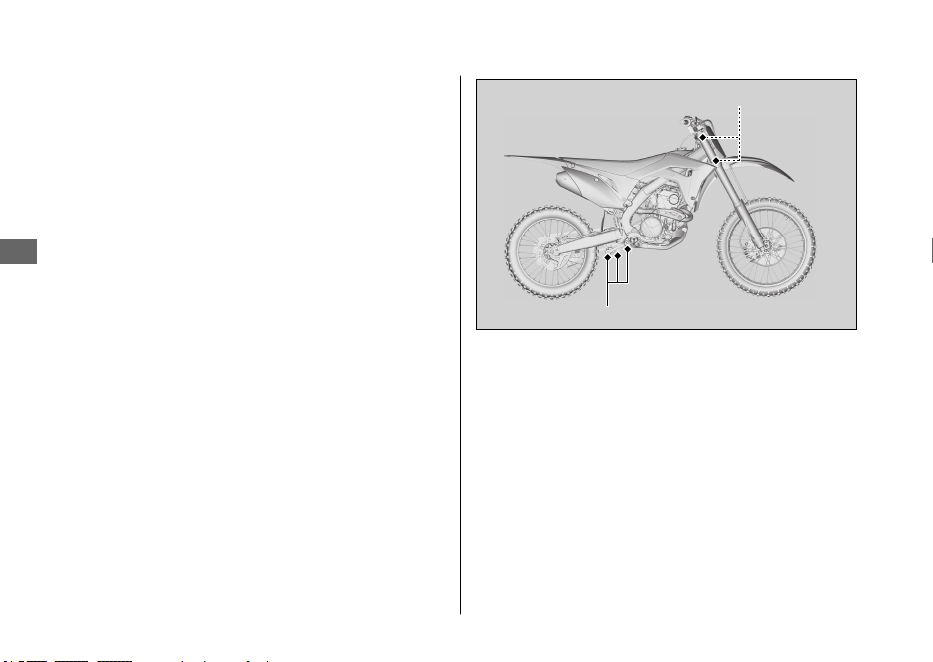
u If you use a high pressure washer, avoid
spraying the following areas:
brake master cylinders
drive chain
electrical circuit
engine stop button
muffler outlet
steering head bearings
suspension pivot points
throttle body
under fuel tank
under seat
●
Do not direct water at the muffler:
u Water in the muffler can prevent starting
and causes rust in the muffler.
●
Dry the brakes:
u Water adversely affects braking
effectiveness. After washing, apply the
brakes intermittently at low speed to
help dry them.
●
Do not direct water at the air cleaner:
u Water in the air cleaner can prevent the
engine from starting.
Caring for Your Vehicle
Information
58
Steering head bearings
Suspension pivot points
● Do not use wax or polishing compounds on
matte painted surface:
u Use a soft cloth or sponge, plenty of
water, and a mild detergent to clean
matte painted surfaces. Dry with a soft
clean cloth.
Aluminum Frame Maintenance
Aluminum corrodes when it comes in contact
with dust, mud and road salt.
To remove stains, use Scotch Brite Hand Pad
#7447 (maroon) or an equivalent. Wet the pad
and polish the surface using strokes parallel to
the length of the frame.
Clean the frame using a wet sponge and a mild
detergent, then rinse well with clean water. Dry
the frame with a soft clean cloth, using strokes
parallel to the length of the frame.
NOTICE
Do not use steel wool to clean the frame as it
could damage or discolor the frame surface.
Scotch Brite Hand Pad #7447-maroon is for
removing stains on the non-coated aluminum
frame only.
Titanium Fuel Tank Maintenance
CRF250R
The fuel tank is made of titanium material.
To remove mud or dust, use a sponge or soft
cloth and a stainless steel kitchen detergent,
then rinse well with clean water.
After washing, rinse with plenty of water and dry
with a clean cloth.
Caring for Your Vehicle
Information
59
Continued
Exhaust Pipe and Muffler
The exhaust pipe and muffler are stainless steel
but may become stained by mud or dust.
To remove mud or dust, use a wet sponge and
a liquid kitchen abrasive, then rinse well with
clean water. Dry with chamois or a soft towel.
If necessary, remove heat stains by using a
commercially available fine texture compound.
Then rinse by the same manner as removing
mud or dust.
NOTICE
Even though the exhaust is made of stainless
steel, it can become stained. Remove all marks
and blemishes as soon as they are noticed.
Caring for Your Vehicle
Information
60

Storing Your Vehicle
If you won't be riding for an extended period,
follow these guidelines:
● Wash your vehicle.
● Drain the coolant.
● Lubricate the drive chain.
● Place your vehicle on an optional workstand
or equivalent to raise both tires off the
ground.
● Relieve the fuel pressure and drain the fuel
from the fuel tank into an approved gasoline
container.
●
Remove the battery (2 P. 46) to prevent
discharge. Fully charge the battery and then
place it in a shaded, well-ventilated area.
u If you leave the battery in place,
disconnect the negative - terminal to
prevent discharge.
●
Stuff a rag into the muffler outlet. Then tie a
plastic bag over the end of the muffler to
prevent moisture from entering.
● Store your vehicle in an unheated area, free
of dampness, away from sunlight, with a
minimum of daily temperature variation.
● Cover your vehicle with a porous material.
Avoid using plastic or similar non-breathing,
coated materials that restrict air flow and
allow heat and moisture to accumulate.
Storing Your Vehicle
Information
61
Continued
To remove your vehicle from storage, follow
these guidelines:
● Uncover and clean your vehicle.
● Change the engine oil if more than 4
months have passed since the start of
storage.
● Uncover the end of the muffler and remove
the rag from the muffler outlet.
● Fill the fuel tank with the recommended fuel.
2 P. 26
● Charge the battery as required. 2 P. 41
Install the battery.
●
Pour a fresh recommended coolant mixture
slowly into the radiator fill hole up to the
filler neck.
●
Increase the fuel pressure.
●
Perform all maintenance checks. 2 P. 36
Transporting Your Vehicle
If your vehicle needs to be transported, it
should be carried on a motorcycle trailer or a
flatbed truck or trailer that has a loading ramp
or lifting platform, and motorcycle tie-down
straps. Never try to tow your vehicle with a
wheel or wheels on the ground.
NOTICE
Towing your vehicle can cause serious damage
to the transmission.
Transporting Your Vehicle
Information
62
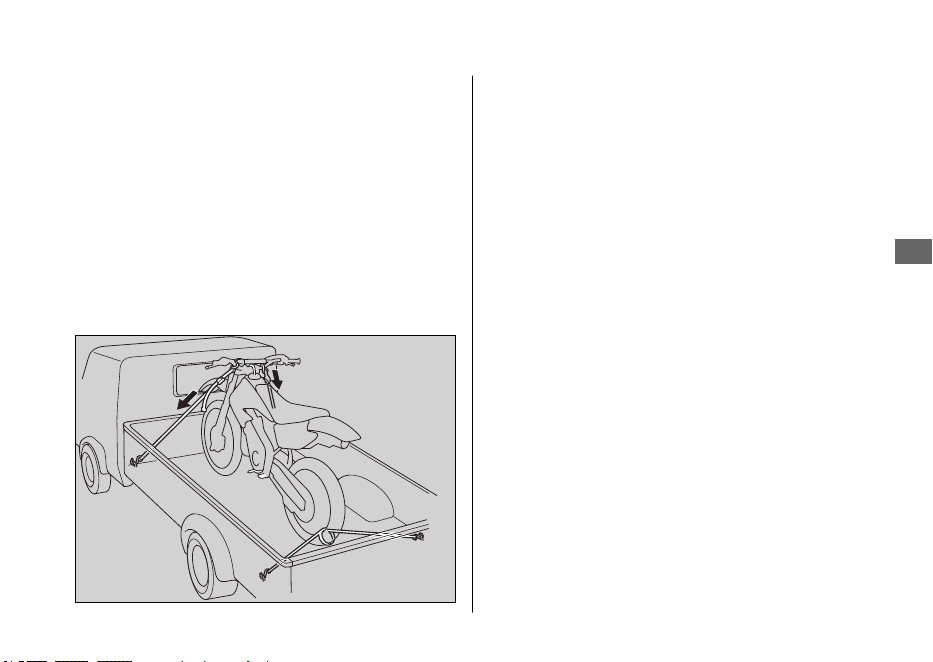
If you use a truck or motorcycle trailer to
transport your vehicle, we recommend that you
follow these guidelines:
● Use a loading ramp.
● Relieve the fuel pressure and drain the fuel
from the fuel tank into an approved gasoline
container.
● Secure the vehicle in an upright position,
using motorcycle tie-down straps. Avoid
using rope, which can loosen and allow the
vehicle to fall over.
To secure your vehicle, brace the front wheel
against the front of the truck bed or trailer rail.
Attach the lower ends of two straps to the tie-
down hooks on truck bed or trailer rail. Attach
the upper ends of the straps to the handlebar
(one on the right side, the other on the left),
close to the fork.
Check that the tie-down straps do not contact
any control cables or electrical wiring.
Tighten both straps until the front suspension is
compressed about half-way. Too much pressure
is unnecessary and could damage the fork seals.
Use another tie-down strap to keep the rear of
the vehicle from moving.
We recommend that you do not transport your
vehicle on its side. This can damage the vehicle,
and leaking gasoline could be a hazard.
Transporting Your Vehicle
Information
63
You & the Environment
Owning and riding a vehicle can be enjoyable,
but you must do your part to protect the
environment.
Choose Sensible Cleaners
Use a biodegradable detergent when you wash
your vehicle. Avoid aerosol spray cleaners that
contain chlorofluorocarbons (CFCs) which
damage the atmosphere's protective ozone
layer.
Recycle Wastes
Put oil and other toxic wastes in approved
containers and take them to a recycling center.
Call your local or state office of public works or
environmental services to find a recycling center
in your area, and to get instructions on how to
dispose of non-recyclable wastes. Do not place
used engine oil in the trash, or pour it down a
drain or on the ground. Used oil, gasoline,
coolant, and cleaning solvents contain poisons
that can hurt refuse workers and contaminate
drinking water, lakes, rivers, and oceans.
You & the Environment
Information
64
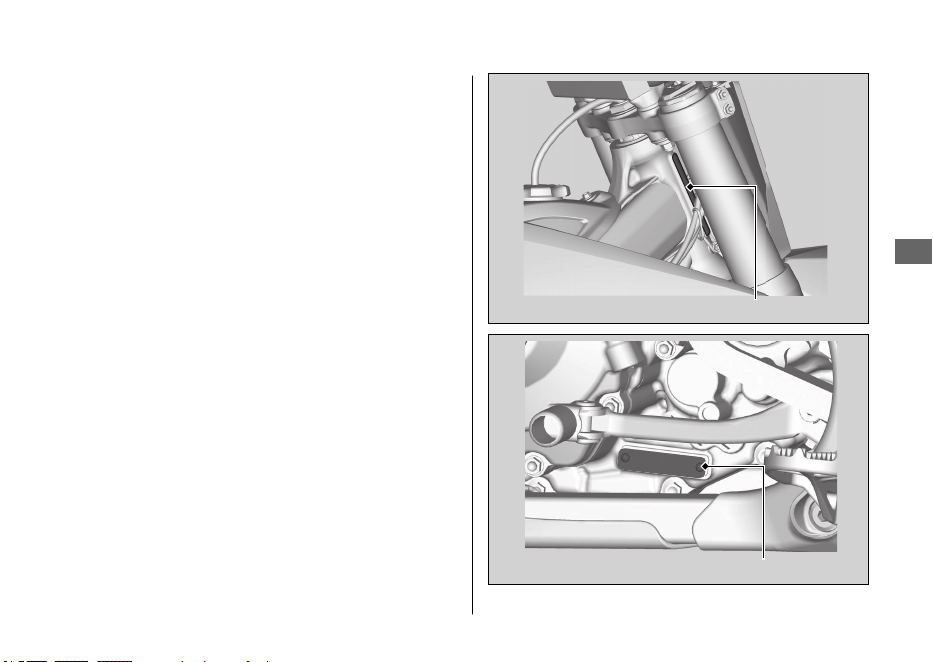
Vehicle Identification
Number
The VIN and engine serial number uniquely
identify your vehicle and are required in order
to register your vehicle. They may also be
required when ordering replacement parts.
You should record these numbers and keep
them in a safe place.
Vehicle Identification Number
Information
65
VIN
Engine number
Oxygenated Fuels
Some conventional fuels blended with alcohol
or an ether compound are available in some
locales to help reduce emissions to meet clean
air standards. These gasolines are collectively
referred to as oxygenated fuels. If you plan to
use oxygenated fuel, check that it is unleaded
and meets the minimum octane rating and
blend requirement.
The following fuel blends have been approved
for use in your vehicle:
●
Ethanol (ethyl alcohol) up to 10% by volume.
u Gasoline containing ethanol may be
marketed under the name Gasohol.
●
Do not use gasoline containing methanol
(methyl alcohol).
If you accidentally fill your fuel tank with an
oxygenated fuel containing higher percentages,
you may experience performance problems. To
resolve the problem, have your dealer drain the
fuel tank and replace with the correct fuel. Fuel
system or performance problems resulting from
the use of an oxygenated fuel containing higher
percentages are not covered by your warranty.
NOTICE
Improper use of oxygenated fuels can damage
metal, rubber, and plastic parts of your fuel
system.
Oxygenated fuel can also damage paint.
If you notice any undesirable operating
symptoms or performance problems, try a
different brand of gasoline.
Oxygenated Fuels
Information
66
Description
2021 CRF250R/RX Service Manual
Common Service Manual (61CSM00)
USA
Winter Storage Guide (S9507)
2021 CRF250R/RX Owner’s Manual
2021 CRF250R/RX Competition Handbook
Authorized Manuals
USA
The Service Manual used by your authorized
dealer is available from your Honda dealer or
Helm, Inc.
Canada
See your dealer to order authorized
manuals.
Also available, but not necessary to service your
model, is the Honda Common Service Manual,
which explains basic service information for
various systems on Honda motorcycles, scooters,
and ATV.
USA
The Winter Storage Guide in conjunction with
the Owner's Manual and Service Manual can help
you prepare your Honda motorcycle, scooter,
ATV, and SxS for winter storage.
These Honda manuals are written for the
professional technician. However, if you possess
the proper tools, observe the safety standards,
and are mechanically capable, you should find
them easy to use.
Special Honda tools are necessary for some
procedures.
USA
Order online: www.helminc.com
Order Toll Free: 1-888-CYCLE93
(1-888-292-5393)
(NOTE: For Credit Card Orders Only)
Monday - Friday 8:00 AM - 6:00 PM EST
Authorized Manuals
Information
67
Honda Contacts
American Honda Motor Co., Inc.
If you wish to contact Honda directly to
comment on your experiences with your vehicle
or with your dealer, please send your comments
to the following address:
Powersports Customer Relations
American Honda Motor Co., Inc.,
P.O. Box 2200, Torrance,
CA 90509-2200
Mailstop: 100-4W-5F,
Telephone: (866) 784-1870
Website: https://powersports.honda.com/
contact-us
Canada
Honda Canada Inc.
Customer Relations Department,
180 Honda Boulevard
Markham, Ontario
L6C 0H9
Telephone: (888) 946-6329
Fax: (877) 939-0909
E-mail: [email protected]
Please include the following information in your
letter:
●
Name, address, and telephone number
●
Product model, year, and VIN
●
Date of purchase
●
Dealer name and address
We will likely ask your Honda dealer to respond,
or possibly acknowledge your comments
directly.
Honda Contacts
Information
68
Your Honda Dealer
The service department of your Honda dealer
offers trained personnel to perform regular
maintenance and unexpected repairs. It has the
latest available service information from Honda.
The parts department offers Honda Genuine
Parts, Pro Honda products, Honda Genuine
Accessories (USA only), and Honda accessories
and products (Canada only) that provide the
same quality that went into your vehicle.
Your Honda dealer can also supply information
about, riding events, and information about
safety training available in your local area.
Honda Contacts
Information
69
Specifications
■ Dimension
Overall length
CRF250RX
86.0 in (2,185 mm)
CRF250R
85.9 in (2,181 mm)
Overall width 32.6 in (827 mm)
Overall height
CRF250RX
49.7 in (1,262 mm)
CRF250R
49.6 in (1,260 mm)
Wheelbase 58.5 in (1,486 mm)
Seat height
CRF250RX
37.8 in (961 mm)
CRF250R
37.7 in (957 mm)
Footpeg height
CRF250RX
16.5 in (419 mm)
CRF250R
16.4 in (416 mm)
Minimum ground
clearance
CRF250RX
13.0 in (329 mm)
CRF250R
12.9 in (327 mm)
Caster angle
CRF250RX
27°18'
CRF250R
27°29'
Trail length
CRF250RX
4.5 in (115 mm)
CRF250R
4.6 in (116 mm)
■ Frame
Tire size
Front
CRF250RX
90/90-21 54M
CRF250R
80/100-21 51M
Rear
CRF250RX
110/100-18 64M
CRF250R
100/90-19 57M
Tire type Bias-ply, tube
Recommended
tire
Front
CRF250RX
DUNLOP AT81F
CRF250R
DUNLOP MX3SF
Rear
CRF250RX
DUNLOP AT81
CRF250R
DUNLOP MX3S
Tire pressure
(cold)
Front 15 psi (100 kPa, 1.0 kgf/cm
2
)
Rear 15 psi (100 kPa, 1.0 kgf/cm
2
)
Fuel
Unleaded gasoline, pump octane number of 91
or higher
Fuel tank capacity
CRF250RX
2.25 US gal (8.5 L)
CRF250R
1.66 US gal (6.3 L)
Specifications
70
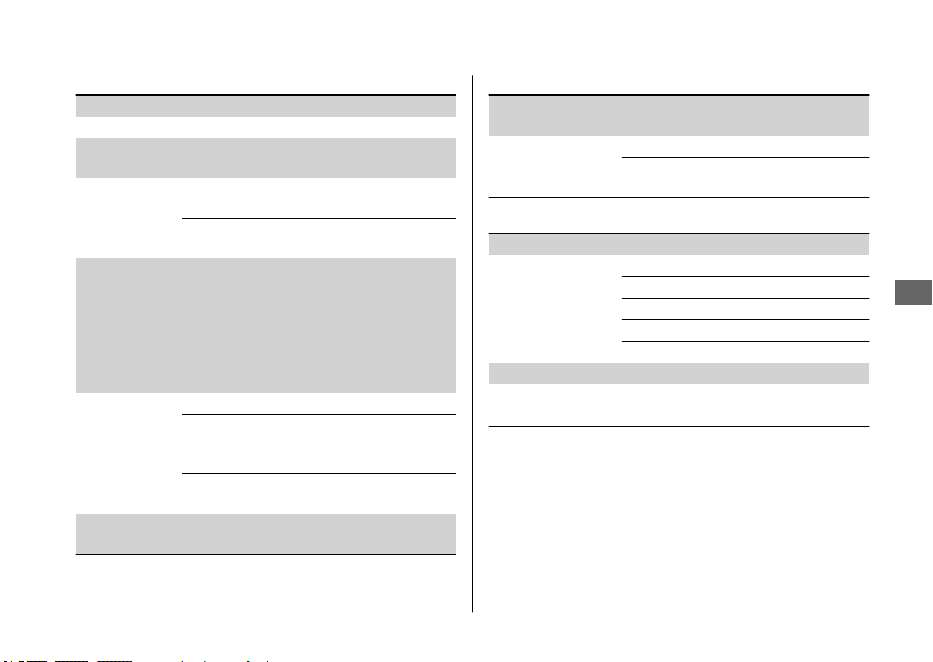
■ Engine
Bore x stroke 3.1102 x 2.0034 in (79.000 x 50.887 mm)
Displacement 15.215 cu-in (249.43 cm
3
)
Compression
ratio
13.9 : 1
Valve clearance
(cold)
Intake
0.004 ± 0.001 in (0.09 ± 0.03
mm)
Exhaust
0.007 ± 0.001 in (0.19 ± 0.03
mm)
Recommended
engine oil
API Service Classification SG or higher except
oils labeled as energy conserving or resource
conserving on the circular API service label,
SAE 10W-30, JASO T 903 standard MA, Pro
Honda GN4 4-stroke oil (USA & Canada) or
Honda 4-stroke oil, or an equivalent
motorcycle oil
Engine oil
capacity
After draining 1.14 US qt (1.08 L)
After draining
and oil filter
change
1.18 US qt (1.12 L)
After
disassembly
1.43 US qt (1.35 L)
Idle speed
(non-adjustable)
2,000 ± 100 rpm
■ Cooling system
Recommended
coolant
Pro Honda HP Coolant
Cooling capacity
After draining 0.99 US qt (0.94 L)
After
disassembly
1.15 US qt (1.09 L)
■ Drive train
Primary reduction 3.473
Gear ratio
1st 2.230
2nd 1.750
3rd 1.470
4th 1.227
5th 1.043
Final reduction 3.692
Gear shift pattern
Left foot-operated return system
1-N-2-3-4-5
Specifications
Specifications
71
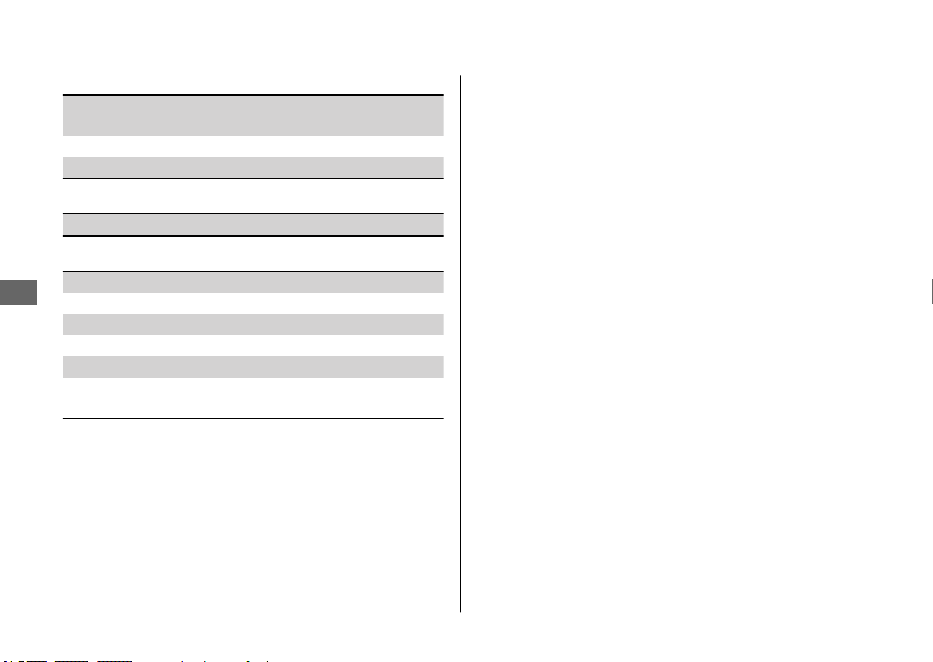
■ Electrical
Battery
HY85S lithium-ion (li-ion)
12 V-2.0 Ah (20 HR)
Spark plug NGK R0451B-9
Spark plug gap 0.024 - 0.028 in (0.60 - 0.70 mm)
■ Fuses
Main fuse 10 A
■ Torque specifications
Fork air pressure release screw 1.0 lbf·ft (1.3 N·m, 0.1 kgf·m)
Seat mounting bolt 19 lbf·ft (26 N·m, 2.7 kgf·m)
Side cover bolt 7 lbf·ft (10 N·m, 1.0 kgf·m)
Air cleaner housing cover bolt 7 lbf·ft (10 N·m, 1.0 kgf·m)
Battery terminal bolt 1.5 lbf·ft (2.0 N·m, 0.2 kgf·m)
Starter magnetic switch stay
bolt
7 lbf·ft (10 N·m, 1.0 kgf·m)
Specifications
Specifications
72
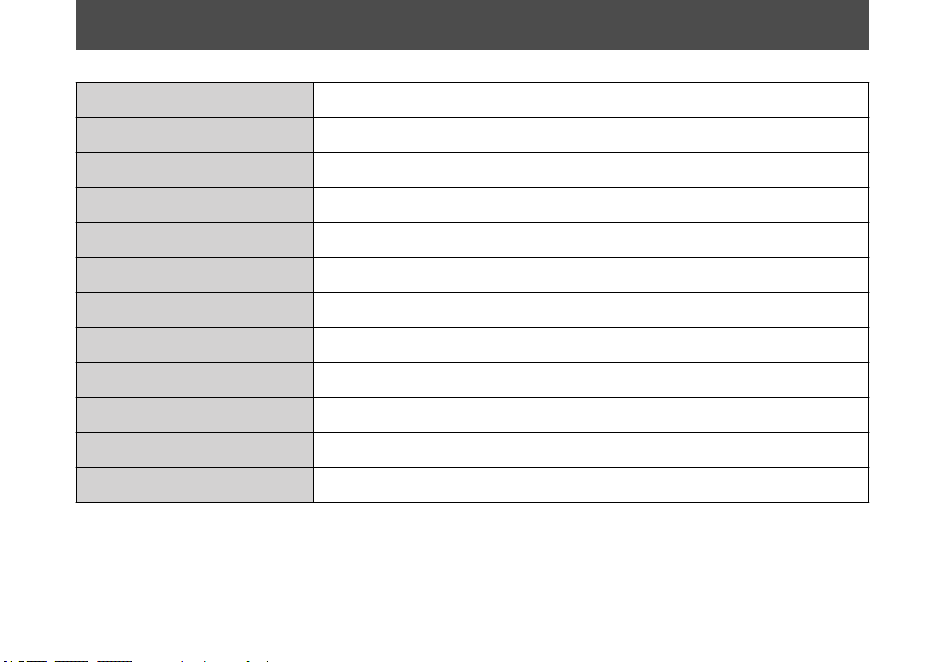
Information Record
VIN
Engine No.
Color Label & Code
Owner's Name
Address
City/State
Phone
Dealer's Name
Address
City/State
Phone
Service Manager
73
California Proposition 65 Warning
WARNING: Operating, servicing and maintaining a passenger vehicle
or off-highway motor vehicle can expose you to chemicals including
engine exhaust, carbon monoxide, phthalates, and lead, which are known
to the State of California to cause cancer and birth defects or other
reproductive harm. To minimize exposure, avoid breathing exhaust, do not
idle the engine except as necessary, service your vehicle in a well-
ventilated area and wear gloves or wash your hands frequently when
servicing your vehicle. For more information go to
www.P65Warnings.ca.gov/passenger-vehicle.