We use NSF42 certifi ed
activated carbon.
我們使用 NSF42 認證的活性碳.
COMPONENT / 成分
Activated carbon (APG-05TGA
60/200) manufactured by
Kuraray Co.,Ltd. used in this
product is Tested and Certifi ed
by NSF International against
NSF/ANSI Standard 42 for
material requirements only.
(Check Date (2017.2.1))
本產品使用的活性碳由 Kuraray
Co.,Ltd. 製造的(APG-05TGA
60/200)物料需求由 NSF 國際通
過 NSF/ANSI Standard 42 檢測
和認證。
(檢 查日期(2 017年 2月1日))
Use properly to economize on electricity
正確使用,節省用電
Model No.
TK-AS66-ZEX
Instruction Manual
使用說明書
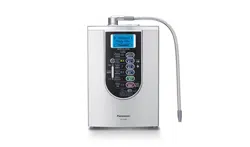
Alkaline Ionizer
Household Use
電解水機
家庭用
Thank you very much for purchasing our Alkaline Ionizer.
感謝您選購 Panasonic 電解水機。
Please read through this manual carefully before using the product to
ensure proper operation.
Be absolutely sure to read the “Safety Precautions” (P. EN3 ~ EN6)
before use to ensure that you will use the product safely.
After
reading the manual, keep it in a safe place along with the warranty in
case you need to refer to it later.
Be absolutely sure to check that the purchase date has been entered
on the warranty.
Please keep in mind that the manufacturer of the product will not be
responsible for any product malfunctioning or accidents resulting from
the improper installation or operation of the product.
使用前請詳閱本說明書,詳閱說明書後再正確使用。特別是「安全注意事項」
(TC3 ~ TC6 頁),請務必在使用前詳細閱讀,以便安全操作。閱讀後請妥
善保管並與保證書放在一起,以備不時之需。
保證書上的「購買日期」請務必填寫。
因安裝錯誤或不正確使用,而造成產品故障或發生事故時,本公司恕不負責。
English
中文(繁體)
TK-AS66-ZEXEn.indb1TK-AS66-ZEXEn.indb1 2017/01/3015:04:102017/01/3015:04:10
EN2
The Alkaline Ionizer
eliminates turbidity and odors, and makes your water tasty.
The Alkaline Ionizer produces alkaline ion water and weak acidic water by electrolysis.
It eliminates the following substances so that the water you drink will be tasty.
13 substances specifi ed by JIS standards
Free residual chlorine, turbidity, total trihalomethane, chloroform, bromodichloromethane,
dibromochloromethane, bromoform, tetrachloroethylene, trichloroethylene,
1,1,1-trichloroethane, CAT, 2-MIB (mold smell), soluble lead
Japan Water Purifi er Association voluntary class 4 substances
Iron (particulate form), Aluminum (neutral), Geosmin (mold smell), Phenols
Contents
Introduction
Safety Precautions ................................ EN3
Operating Precautions .......................... EN7
Supplied Accessories ............................EN8
Checking the Faucet ............................. EN8
Names of the Parts and Steps to Take
Before Operation ................................... EN9
Preparations
Attaching the Bypass Selector ............ EN10
Outside-screwed faucet ........................ EN10
Inside-screwed faucet ............................EN11
Faucet without an aerator ......................EN12
Installing the Alkaline Ionizer ............... EN13
Preparations ...........................................EN13
Checks after installation ........................ EN16
Measuring the pH Level
(Ion Concentration) .............................. EN17
Before Use
Before Operation ................................. EN18
Tips on operating the Alkaline Ionizer ...EN18
Selecting the language of the LCD
displays ..................................................EN19
LCD displays which appear during
operation ................................................EN19
Electrolysis signal ..................................EN19
Operation
Operation............................................. EN20
Using alkaline ion water, weak acidic
water or purifi ed water .......................... EN20
Using the unpurifi ed water
(tap water) ............................................. EN23
Finely adjusting the pH level
(ion concentration) ................................ EN24
For Your Operating Convenience ........ EN25
Measuring the water output volume ...... EN25
Monitoring the water fl ow ...................... EN29
Using the timer ...................................... EN29
Setting mode and check mode ............. EN30
Others
Maintenance ........................................ EN34
Before Replacing the Cartridge ...........EN35
Replacing the Cartridge ...................... EN37
When Moving the Alkaline Ionizer ....... EN38
When not in use for a long time ..........EN39
Automatic Electrode Cleaning ............. EN40
When the Power or Water Supply is
Cut Off .................................................EN40
Q&A ..................................................... EN41
Error Code ...........................................EN44
Troubleshooting ...................................EN45
Optional Accessories .......................... EN49
Specifi cations ...................................... EN50
TK-AS66-ZEXEn.indb2TK-AS66-ZEXEn.indb2 2017/01/3015:04:112017/01/3015:04:11
EN3
Safety Precautions
English
Please make sure to follow these instructions
In order to prevent accidents or injuries to the user, other people, and damage to property, please
follow the instructions below.
The following charts indicate the degree of damage caused by wrong operation.
WARNING
Indicates serious injury
or death.
CAUTION
Indicates risk of injury or
property damage.
The symbols are classifi ed and explained as follows.
(The following are examples of symbols.)
This symbol indicates prohibition.
This symbol indicates requirement that
must be followed.
WARNING
Power cord and power plug
Do not damage the power cord or power plug.
(It may cause a fi re or electric shock due to short circuits, faulty insulation, deterioration or other.)
• Using staples (
) to secure it • Damaging it • Re-working it • Bending it unnaturally
• Twisting it • Pulling it • Positioning it too close to a heating appliance
• Placing heavy objects on top it • Bundling it • Pinching it • Sandwiching it. etc.
When removing the power plug from the power outlet, hold the molded part of the plug rather than
the cord itself, and pull the plug free.
If the supply cord is damaged, it must be replaced by the manufacturer, its service agent or
similarly qualifi ed persons in order to avoid a hazard.
Do not use in a manner that exceeds the rating of the power outlet or connected
equipment.
(Connecting too many appliances to a power outlet may cause a fi re due to heat generation.)
Do not connect or disconnect the power plug with wet hands.
(It may cause an electric shock.)
Use 220 V - 240 V AC voltage.
Insert the power plug fi rmly.
(It may cause smoking, a fi re or electric shock.)
Do not use a damaged plug or loose power outlet.
Remove the dust or other foreign matter on the power plug periodically.
(If dust or other foreign matter is allowed to build up on the plug, moisture or other factors may lead
to defective insulation which, in turn, may cause a fi re.)
Disconnect the power plug, and wipe it with a dry cloth.
If the Alkaline Ionizer falls into water by accident, disconnect its power plug from
the power outlet, and take the Alkaline Ionizer out of the water.
(Otherwise it may cause an electric shock.)
Please contact an authorized dealer for a check or repair.
Discontinue using the appliance immediately and unplug when abnormality or
breaking down occurs.
(It may cause smoking, a fi re or electric shock.)
<e.g. for abnormality or breaking down>
The lamp indicator is abnormal. (P. EN21)
Abnormal noise generated during operation
The main unit becomes abnormally hot or deformed.
Please contact an authorized dealer for a check or repair.
TK-AS66-ZEXEn.indb3TK-AS66-ZEXEn.indb3 2017/01/3015:04:112017/01/3015:04:11
EN4
Safety Precautions (continued)
WARNING
CAUTION
Disassembly prohibited
Do not disassemble, repair or
remodel the Alkaline Ionizer.
(Doing so can lead to a fi re and/or
electric shocks.)
Please contact an authorized dealer
for a check or repair.
Water supply
Use only water (such as tap water)
which has been approved for
consumption.
(Consuming non-approved water may cause
health problems as this Alkaline Ionizer does
not have sterilization capabilities and cannot
eliminate toxic substances other than those it
can remove (P. EN2).
Existing conditions and health problems
People with kidney disease (users who have renal failure or who have diffi culty in
eliminating potassium from their systems) should not drink alkaline ion water.
(Doing so may cause health problems.)
This appliance is not intended for use by persons (including children) with reduced
physical, sensory or mental capabilities, or lack of experience and knowledge,
unless they have been given supervision or instruction concerning use of the
appliance by a person responsible for their safety. Children should be supervised
to ensure that they do not play with the appliance. Keep this instruction manual in a
safe place.
(Otherwise it may cause an accident or health problems.)
People with the following conditions should consult a doctor before drinking
alkaline ion water.
(Otherwise it may cause health problems.)
People who is receiving medical treatment from a doctor
People with health problems or weakened constitution (People who is not feeling well)
People with kidney diseases other than renal failure or potassium elimination
People in the following situations should consult a doctor before applying weak
acidic water to their skin.
(Otherwise it may cause health problems.)
People with sensitive skin
People susceptible to allergic dermatitis
First-time users should consume small quantities (1 to 2 cupfuls) starting at the
“Alkaline Level 1” setting for about two weeks, and then start using the “Alkaline
Level 2” or “Alkaline Level 3” settings when their body has become accustomed to
alkaline ion water.
(Drinking too high a level or too much (3 or more cupfuls) alkaline ion water at the start may cause
health problems.)
TK-AS66-ZEXEn.indb4TK-AS66-ZEXEn.indb4 2017/01/3015:04:112017/01/3015:04:11
EN5
English
CAUTION
Installation location
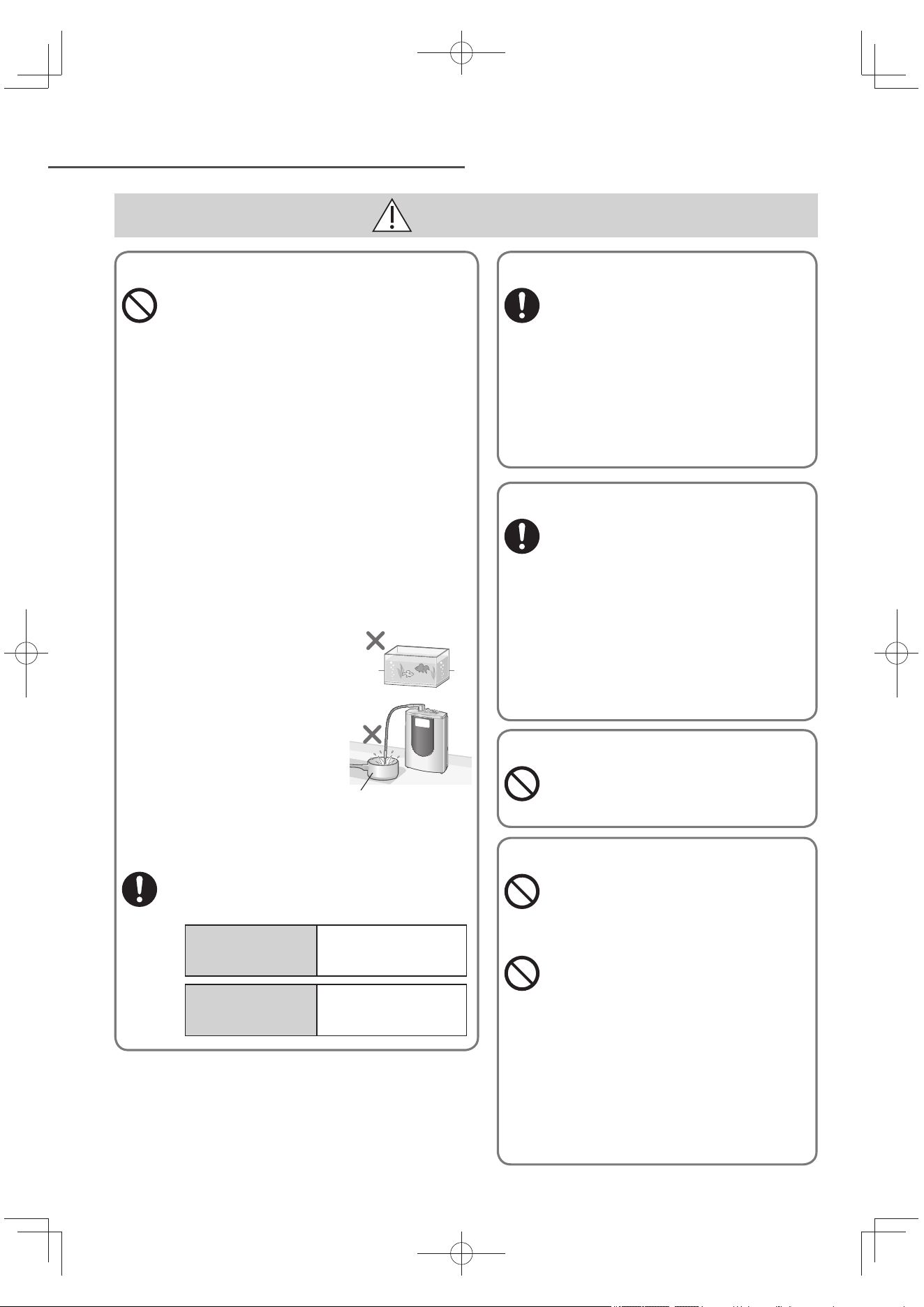
Do not block the main spout or bend, twist, fl atten,
pull or clamp the hose.
(Doing so may cause water to leak, prevent the output of
water or cause other malfunctioning.)
Do not connect a hose or any other appliances to
main spout, acidic water spout or drain outlet.
(Doing so may cause water leaks or malfunctions.)
Do not use the Alkaline Ionizer if the outlet pipe is
loose.
(Doing so may cause water leaks or damage.)
If it has come loose, screw it in securely.
Do not connect the Alkaline Ionizer to a hot water
supply system which is not equipped with a
directional control check valve (for preventing the
backfl ow of the water).
(Doing so may lead to malfunction in the hot water supply
system.)
Do not connect the Alkaline Ionizer to a main stop
system water boiler (whose construction does not
permit the water to be stopped at the hot water
outlet) [such as an instantaneous water heater].
(Doing so may lead to malfunction in the water boiler.)
Install the main unit on a level surface.
(Failure to do so may cause the main unit to topple over and
possibly cause injury.)
When mounting the main unit on a wall for use, be
absolutely sure to ask your dealer or a contractor
to do the installation work.
(If you try to do the work yourself, the main unit may fall off ,
possibly causing an accident.)
The location where the main unit is to be installed
must be able to support a weight of over 6 kg.
If the installation location does not have enough strength to
support the main unit, the Alkaline Ionizer may fall, resulting
in an accident and kitchen damage.
Maintenance
Do not splash water
or wash the main
unit.
(It may cause an
electrical leakage,
electric shock or
malfunction.)
Accidental ingestion
Do not leave
the supplied
accessories within
reach of infants or
toddlers.
(Doing so may result
in accessories being
swallowed by mistake.)
Consult a doctor
immediately if you
suspect that an
accessory has been
swallowed.
Do not allow infants
and children to play
with packaging
material.
(It may cause
suff ocation.)
TK-AS66-ZEXEn.indb5TK-AS66-ZEXEn.indb5 2017/01/3015:04:112017/01/3015:04:11
EN6
Safety Precautions (continued)
CAUTION
Non-consumable alkaline ion water, applications
Do not drink the following kinds of water:
(Doing so may cause health problems.)
Weak acidic or acidic water
Water which comes out of the drain outlet
Water which comes out of the main spout in
the “Preparation time” status or during the
automatic cleaning of the electrodes.
Water which contains pH test liquid.
Do not directly consume water whose
pH level exceeds 10.
(Doing so may cause health problems.)
Consuming water which has a pH level of
around 9.5 “Alkaline Level 3” (Drinking water
in daily life) is recommended. Keep the
general amount of water consumed daily at
around 0.5 liter to 1 liter.
Do not take medicine with alkaline ion water.
(Doing so may cause health problems.)
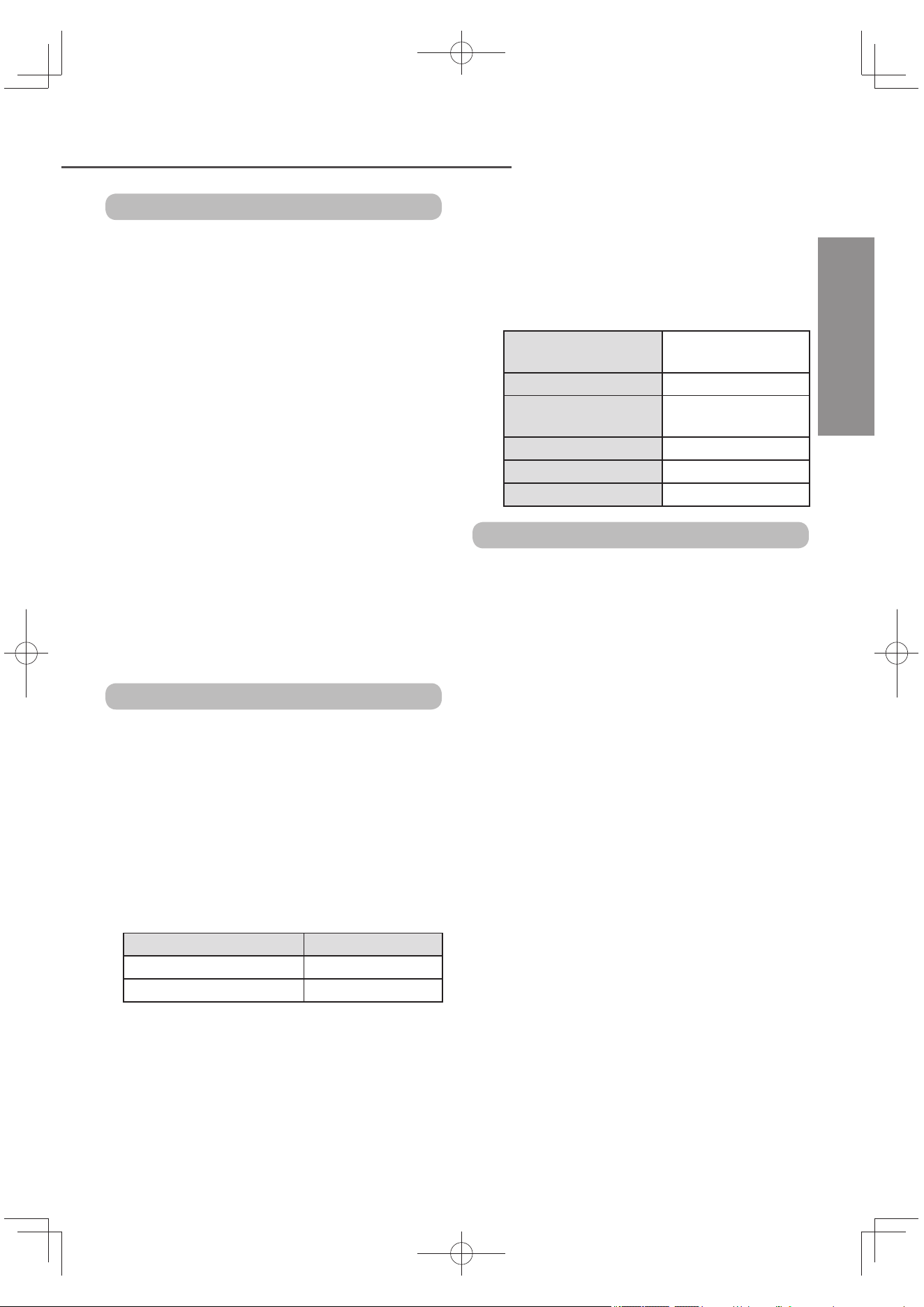
Do not use alkaline ion water, acidic
water, or purifi ed water for the care of
fi sh or other pets.
(The environment may
change as a result, and
the fi sh, etc. may die.)
Do not use aluminum
containers that
do not stand up to
alkalis or copper
containers that do
not stand up to acids.
(Doing so may cause
discoloration of the
containers or damage them.)
When starting to use the Alkaline Ionizer, drain
out the water which has collected inside.
(Otherwise it may cause health problems.)
When starting use
every day
Run about 0.6 liter (about
15 seconds) of water
through the Alkaline Ionizer.
When the Alkaline
Ionizer has not been
used for 2 or more days
Run about 8 liters (about 3
minutes) of water through
the Alkaline Ionizer.
Aluminum or copper
containers
Storing alkaline ion water and purifi ed water
Use alkaline ion water or purifi ed water
immediately after it is produced, or
when storing it for future consumption,
pour into a clean sealed container, and
consume it within 1 day if it is kept at
room temperature or within 2 days if it
is kept in the refrigerator.
(The Alkaline Ionizer removes sterilizers
(such as chlorine) so the water may go bad
over time, possibly causing health problems.)
If feeling unwell
If you have drunk alkaline ion water
and do not feel well as a result, or if
the symptoms do not improve after
continued use, stop drinking the
water and consult a doctor.
(Otherwise it may cause health problems.)
If you have applied weak acidic water
to your skin and you experience skin
problems, stop use immediately, and
consult a doctor.
(Otherwise it may cause health problems.)
Hot water
Do not allow water above 60 °C in temperature
to pass through the Alkaline Ionizer.
(It may cause a burn.)
pH test liquid
Do not bring the pH test liquid
near a naked fl ame.
(Doing so may cause it to ignite,
causing a fi re.)
Do not drink the pH test liquid
or the water containing the test
liquid or put in your eyes.
(Keep these liquids away from children.)
(Doing so may cause health problems.)
If the reagent or water containing it has
been accidentally swallowed, drink copious
amounts of water; if it has made contact
with your eyes, rinse thoroughly with clean
water and, in either case, consult a doctor.
Place the cap on the test liquid container, and
keep it out of the reach of infants and toddlers.
TK-AS66-ZEXEn.indb6TK-AS66-ZEXEn.indb6 2017/01/3015:04:112017/01/3015:04:11
EN7
Operating Precautions
English
Do not run the following types of water
through the Alkaline Ionizer.
(Doing so may shorten the service life of the
cartridge.)
Water which is very turbid
Water containing a great deal of red rust
Do not run well water containing sea water
or other salt content (from wells near
coastal area) through the Alkaline Ionizer.
(Doing so may cause malfunction.)
When using the Alkaline Ionizer in areas
where the water is very hard*
Once a day, run weak acidic water through the
Alkaline Ionizer for about a minute before use
(otherwise calcium will build up on the main
spout and along the water lines, hindering the
passage of the water).
*: In areas where the water is very hard, soap will
not lather easily and white deposits (calcium) will
build up in kettles and pans.
Depending on the region and water
quality, it may not be possible to acquire
the designated pH level.
Usage
Do not place this product upside down.
(Doing so may cause that lead to malfunction.)
Do not connect the Alkaline Ionizer to a
hot water-only faucet.
(Doing so may cause malfunction.)
The table below shows the temperatures
of water that can be used. Use water at
these temperatures.
(Failure to do so may cause damage or adhesion
to the cartridge, resulting in part of the total
trihalomethane being discharged.)
Position of bypass selector Water temperature
Purifi ed Under 35 °C
Unpurifi ed/Shower Under 80 °C
Do not lift the main unit by taking hold
of the outlet pipe, or forcefully move the
main unit.
(Doing so may cause damage.)
Do not continuously produce alkaline ion
water or weak acidic water beyond the
time spans given in the table below.
If water is produced for longer periods than
the ones shown below, the “U27” error code
(P. EN44) will appear on the LCD display, and
electrolysis will be suspended.
Alkaline 4
(Strongly Alkaline)
Approx. 10 minutes
Stronger for Alkaline 3 Approx. 10 minutes
Standard or Milder for
Alkaline 3
Approx. 30 minutes
Alkaline 2 Approx. 30 minutes
Alkaline 1 Approx. 30 minutes
Weak Acidic Approx. 10 minutes
Installation location
Do not install the Alkaline Ionizer in any of
the following locations.
Near hot areas such as heating appliances
(above 60 °C)
(Doing so may cause it to become deformed.)
In an area in direct sunlight or where it may
be exposed to wind and rain
(Doing so may cause incorrect operation or
malfunctions.)
Where it may freeze
(Doing so may cause cracking in the water pipes
or cartridge.)
Where it may be covered with oil
(Doing so may cause cracking in the case.)
In a bathroom or where the Alkaline Ionizer
will be exposed to water or steam
(Doing so may cause incorrect operation or
malfunctions.)
In areas lower than the kitchen counter
(such as the fl oor)
(Doing so may cause insuffi cient draining of
cleaning water through the pipes.)
Near radios
(Doing so may generate static in the radio.)
Do not use a hose or other commercially
available product to extend the water
outlet.
(Doing so may cause malfunction.)
Water supply
TK-AS66-ZEXEn.indb7TK-AS66-ZEXEn.indb7 2017/01/3015:04:122017/01/3015:04:12
EN8
Supplied Accessories
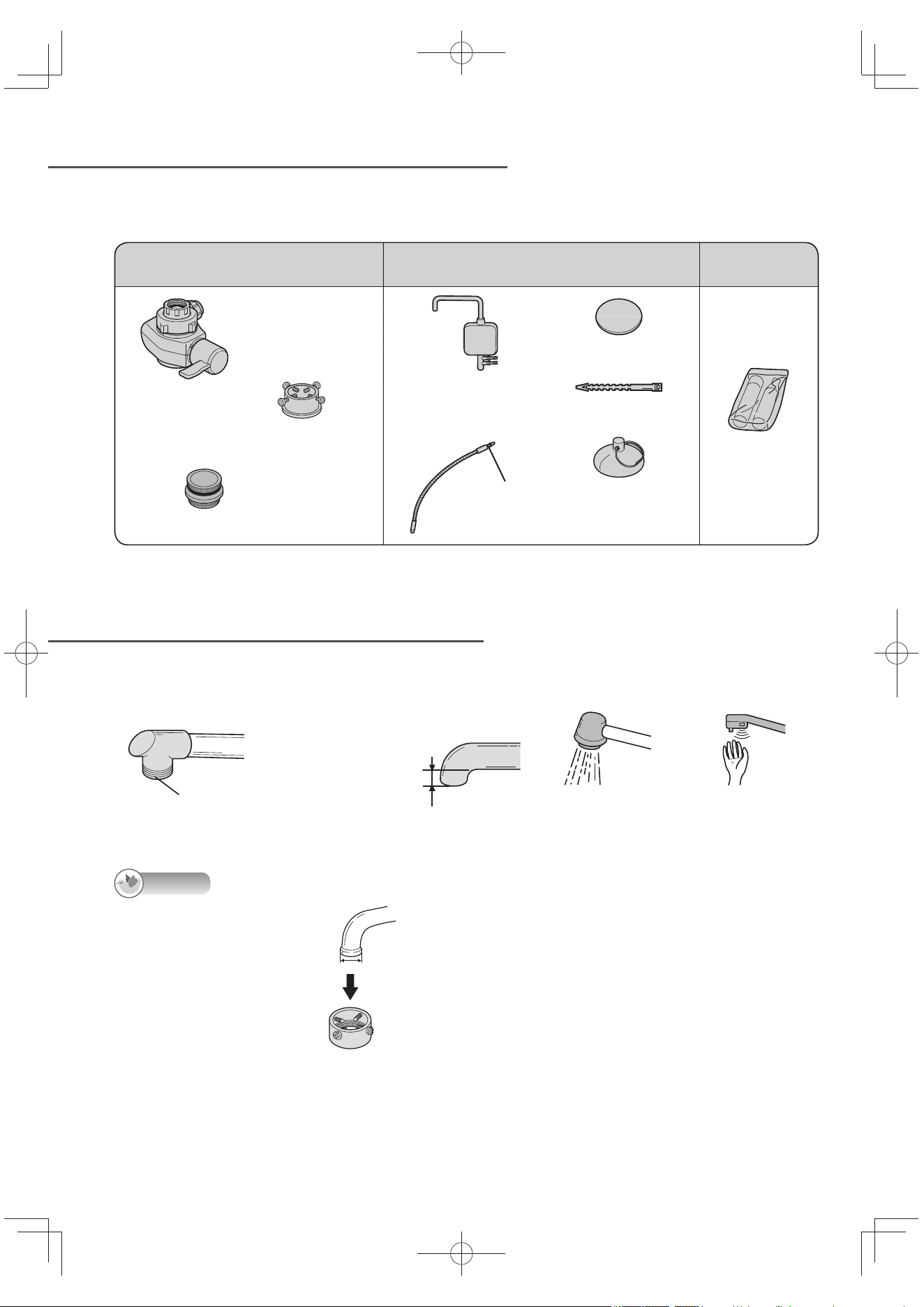
Checking the Faucet
Note
Faucet with a fl aring end
• Water faucet which can
attach the Alkaline Ionizer
using options.
Diameter of faucet end:
24 ~ 32 mm
OPTION
Large-diameter Faucet Fitting
Model No.: P-06JRC (P. EN49)
Before using this unit, check that the following supplied accessories are accounted for. If any are
missing, contact your dealer.
For Use in Attaching
the Bypass Selector
For Use in Installing
the Main Unit
Consumables
Bypass Selector
Installation Adaptor
(with 4 screws)
Bushing (with gasket)
Acidic Water Stand
(with drain outlet
and suction disc)
With gasket
Outlet Pipe
Mounting Disc
Hose Strap
Suction Disc
(for acidic water and
drain hoses)
pH Test Kit
Water faucet which cannot install the Alkaline Ionizer
• Faucet without a metal
lip end
• Faucet with an end of
10 mm or less
• Shower nozzle • Faucet with sensor
Plastic or other
material
10 mm or less
TK-AS66-ZEXEn.indb8TK-AS66-ZEXEn.indb8 2017/01/3015:04:122017/01/3015:04:12
EN9
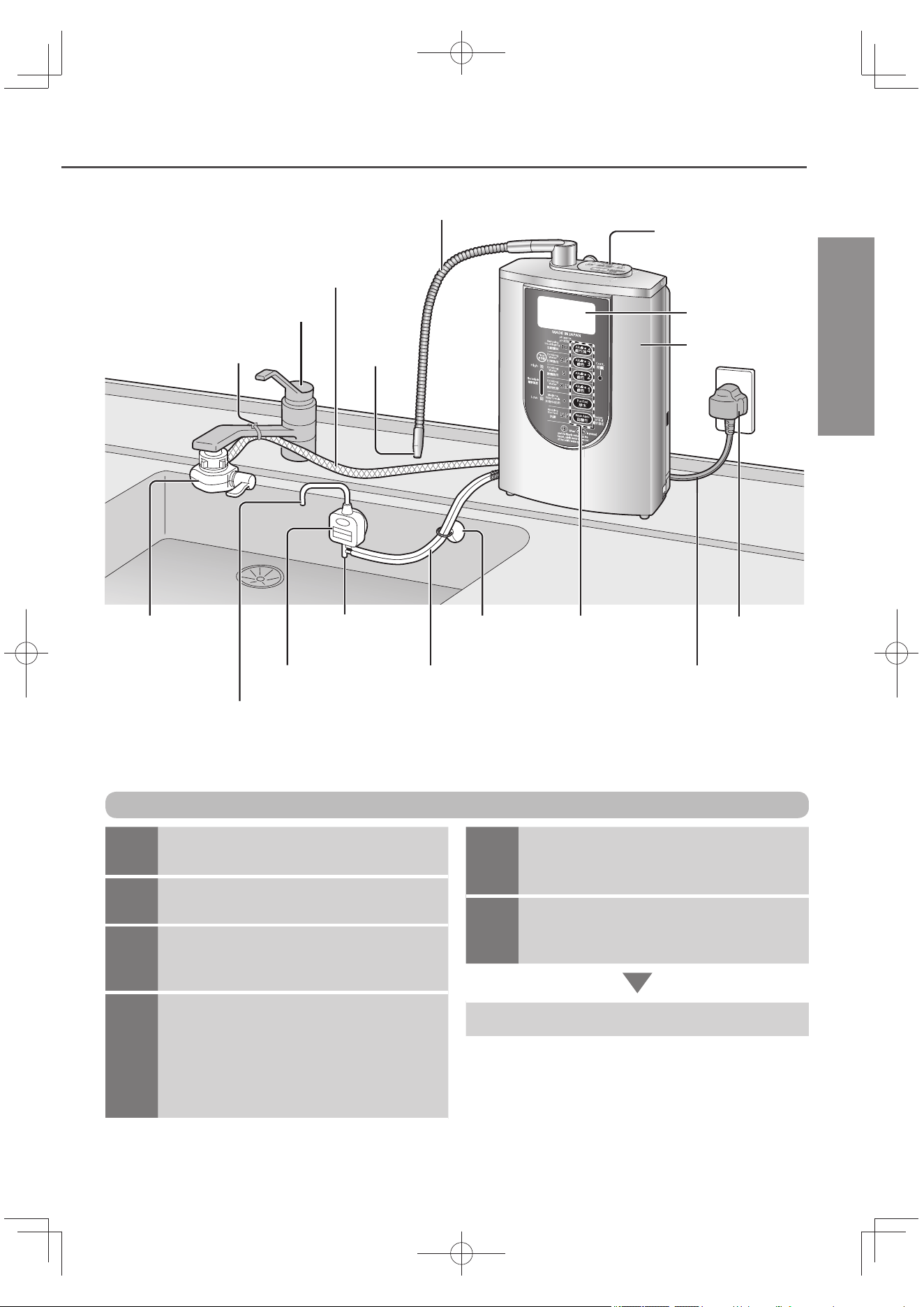
Names of the Parts and Steps to Take Before Operation
Outlet pipe (length: approx. 45 cm)
Control panel
(P. EN30)
LCD display
Main unit
Water supply hose
(length: approx. 90 cm)
Faucet
(not included)
Hose strap
Bypass
selector
Drain outlet
Acidic water and drain hoses
(length: approx. 60 cm)
Suction
disc
Water quality selector
buttons (P. EN20)
Power plug
Power cord
(length: approx. 3 m)
Acidic water stand
(with drain outlet)
Acidic water spout
Acidic water will come out while the Alkaline Ionizer is producing
alkaline ion water. (Use it to wash dishes, vegetables, etc.)
Main spout
English
1
Checking the faucet
(P. EN8)
2
Attaching the bypass selector
(P. EN10 ~ EN12)
3
Installing the Alkaline Ionizer and
plug in.
(P. EN13 ~ EN15)
4
Check after installation (P. EN16)
Run alkaline ion water through the
Alkaline Ionizer for about 3 to 4 minutes
to expel the air inside the main unit.
“Preparation time” blinks for about 20
seconds on the LCD display.
Steps to take before operation
5
Measuring the pH level
(ion concentration)
(P. EN17)
6
Selecting the language of the LCD
displays
(P. EN19)
Operation (P. EN20 ~ EN22)
TK-AS66-ZEXEn.indb9TK-AS66-ZEXEn.indb9 2017/01/3015:04:122017/01/3015:04:12
EN10
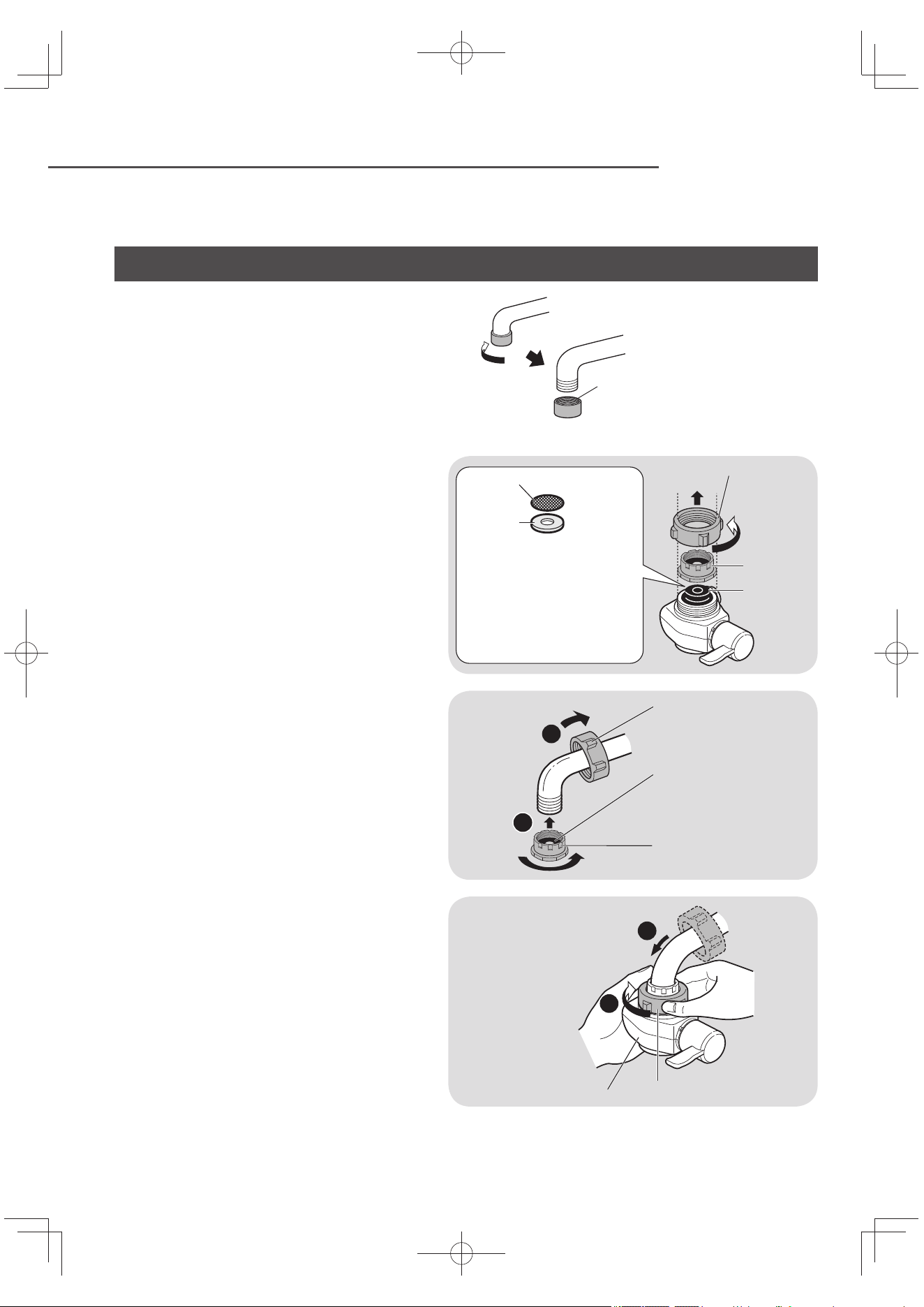
Attaching the Bypass Selector
Keep all parts that are not used during installation, as they may be needed later if the unit is moved or the faucet
is changed.
Outside-screwed faucet
• Water faucet which can attach the Alkaline
Ionizer without an accessory.
1
Remove the mounting nut and
adaptor.
When the fi lter or gasket washer (made
of metal) drops off , please return to the
original position (P. EN34).
Make sure any foreign matter is not
attached on the end of the faucet and
gasket inside of the bypass selector.
Mounting nut
Adaptor
Gasket
Do not remove the gasket washer
inside the bypass selector.
If it is moved, return to the
original position.
Make sure foreign matter is
not attached to the fi lter and
the gasket is not inclined.
Filter
Gasket
washer
2
Attach the mounting nut and
adaptor.
1
2
Mounting nut
Gasket
Adaptor
3
Attach the bypass selector and
tighten the mounting unit until
the bypass selector does not
turn.
Do not use any tools. (This may
damage the mounting nut.)
Make sure the bypass selector is
not inclined.
1
2
Bypass selector
Mounting nut
Aerator (not used)
Do not use the
removed aerator.
TK-AS66-ZEXEn.indb10TK-AS66-ZEXEn.indb10 2017/01/3015:04:122017/01/3015:04:12
EN11
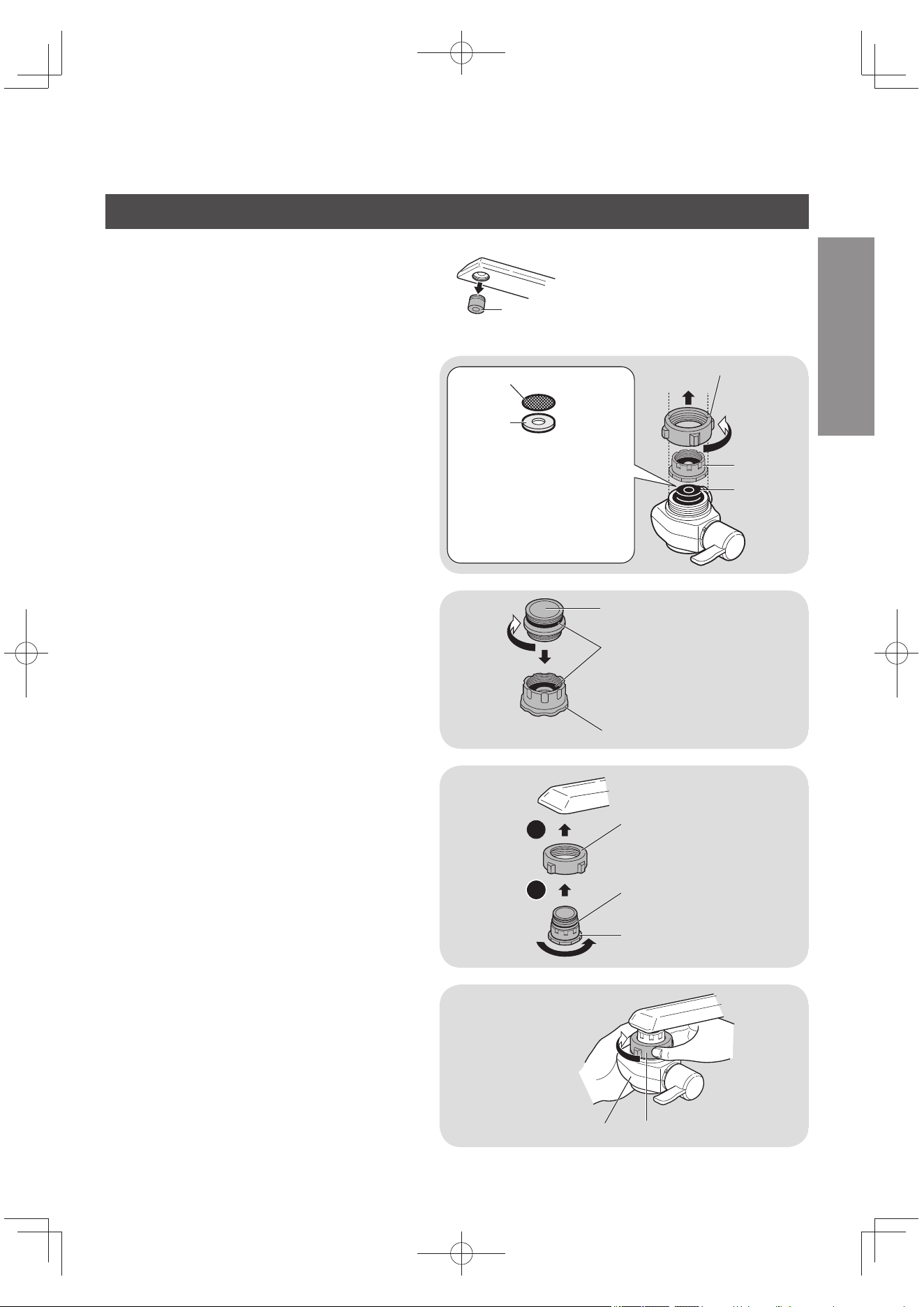
English
Inside-screwed faucet
• Water faucet which can attach the Alkaline
Ionizer with an accessory.
Aerator (not used)
Do not use the removed aerator.
1
Remove the mounting nut and
adaptor.
When the fi lter or gasket washer (made
of metal) drops off , please return to the
original position (P. EN34).
Make sure any foreign matter is not
attached on the end of the faucet and
gasket inside of the bypass selector.
Mounting nut
Adaptor
Gasket
Do not remove the gasket washer
inside the bypass selector.
If it is moved, return to the
original position.
Make sure foreign matter is
not attached to the fi lter and
the gasket is not inclined.
Filter
Gasket
washer
2
Screw in the bushing. Insert into
the adaptor.
Bushing (Accessory)
Gasket
Adaptor
3
Attach the mounting nut and
adaptor.
The adaptor should be screwed on
straight. Screwing it on tilted may
strip the threads, resulting in water
leaks.
1
2
Mounting nut
Gasket
Adaptor
4
Attach the bypass selector and
tighten the mounting unit until
the bypass selector does not
turn.
Do not use any tools. (This may
damage the mounting nut.)
Make sure the bypass selector is
not inclined.
Mounting nut
Bypass selector
TK-AS66-ZEXEn.indb11TK-AS66-ZEXEn.indb11 2017/01/3015:04:132017/01/3015:04:13
EN12
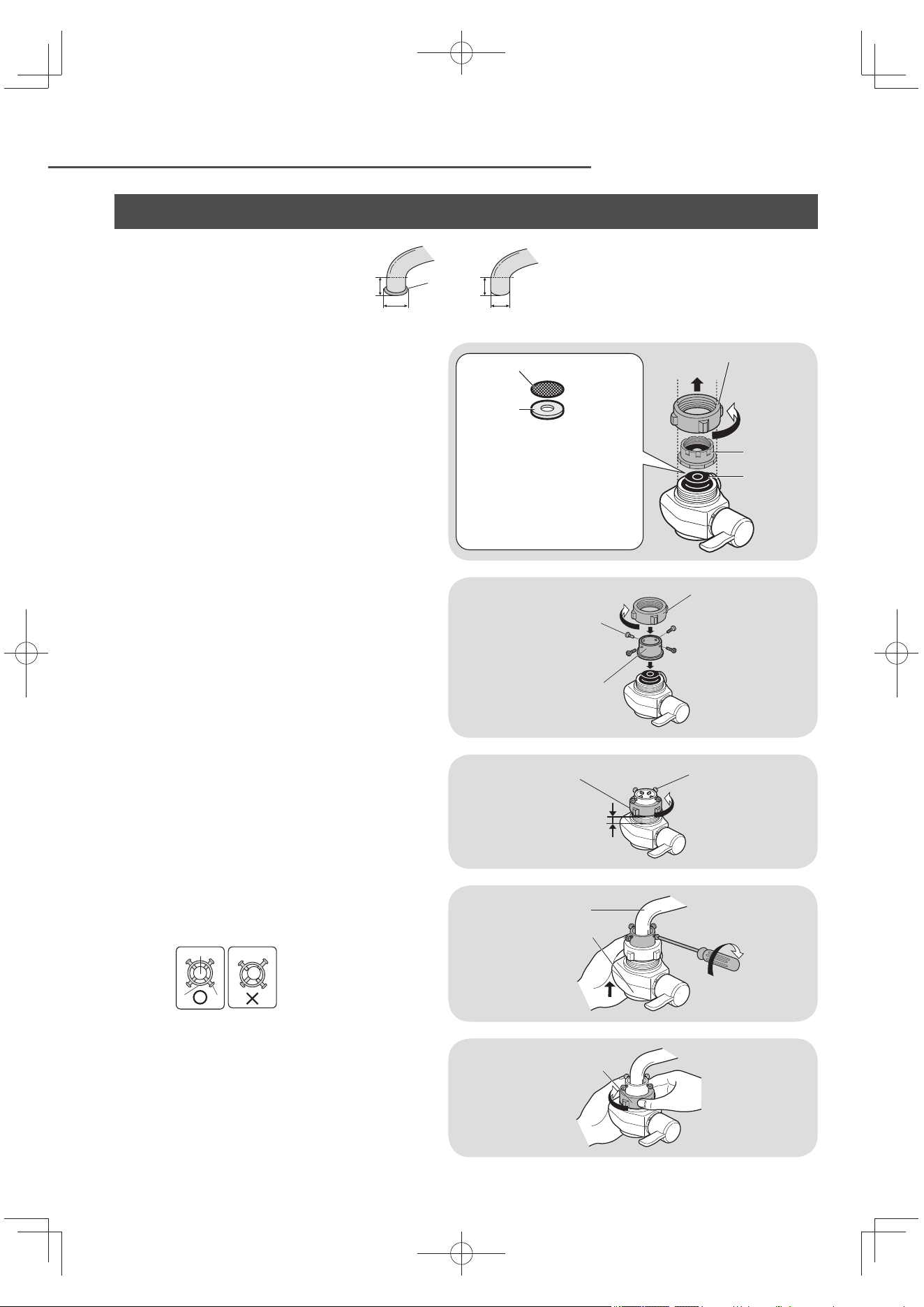
Attaching the Bypass Selector (continued)
Faucet without an aerator
• Water faucet which can attach the
Alkaline Ionizer with accessory.
Bulge
more than 10 mm
13 mm or more, less than 24 mm
1
Remove the mounting nut and
adaptor.
When the fi lter or gasket washer (made
of metal) drops off , please return to the
original position (P. EN34).
Make sure any foreign matter is not
attached on the end of the faucet and
gasket inside of the bypass selector.
Mounting nut
Adaptor
Gasket
Do not remove the gasket washer
inside the bypass selector.
If it is moved, return to the
original position.
Make sure foreign matter is
not attached to the fi lter and
the gasket is not inclined.
Filter
Gasket
washer
2
Insert the installation adaptor,
and tighten it with the mounting
nut.
Mounting nut
Remove the screws
(4 pcs.)
Installation adaptor
(Accessory)
3
Tighten the 4 screws temporarily
and loosen the mounting nut to
leave a 3 ~ 4 mm gap.
Mounting nut
3 ~ 4 mm
Screws
(4 pcs.)
4
Push the bypass selector against the faucet
and install the 4 screws as shown below.
Top view
Water faucet
Installation adaptor
Screws
Water faucet
Bypass selector
5
Tighten the mounting unit until
the bypass selector does not turn.
Do not use any tools. (This may
damage the mounting nut.)
Make sure the bypass selector is
not inclined.
Mounting nut
TK-AS66-ZEXEn.indb12TK-AS66-ZEXEn.indb12 2017/01/3015:04:132017/01/3015:04:13
EN13
Installing the Alkaline Ionizer
English
Preparations
1
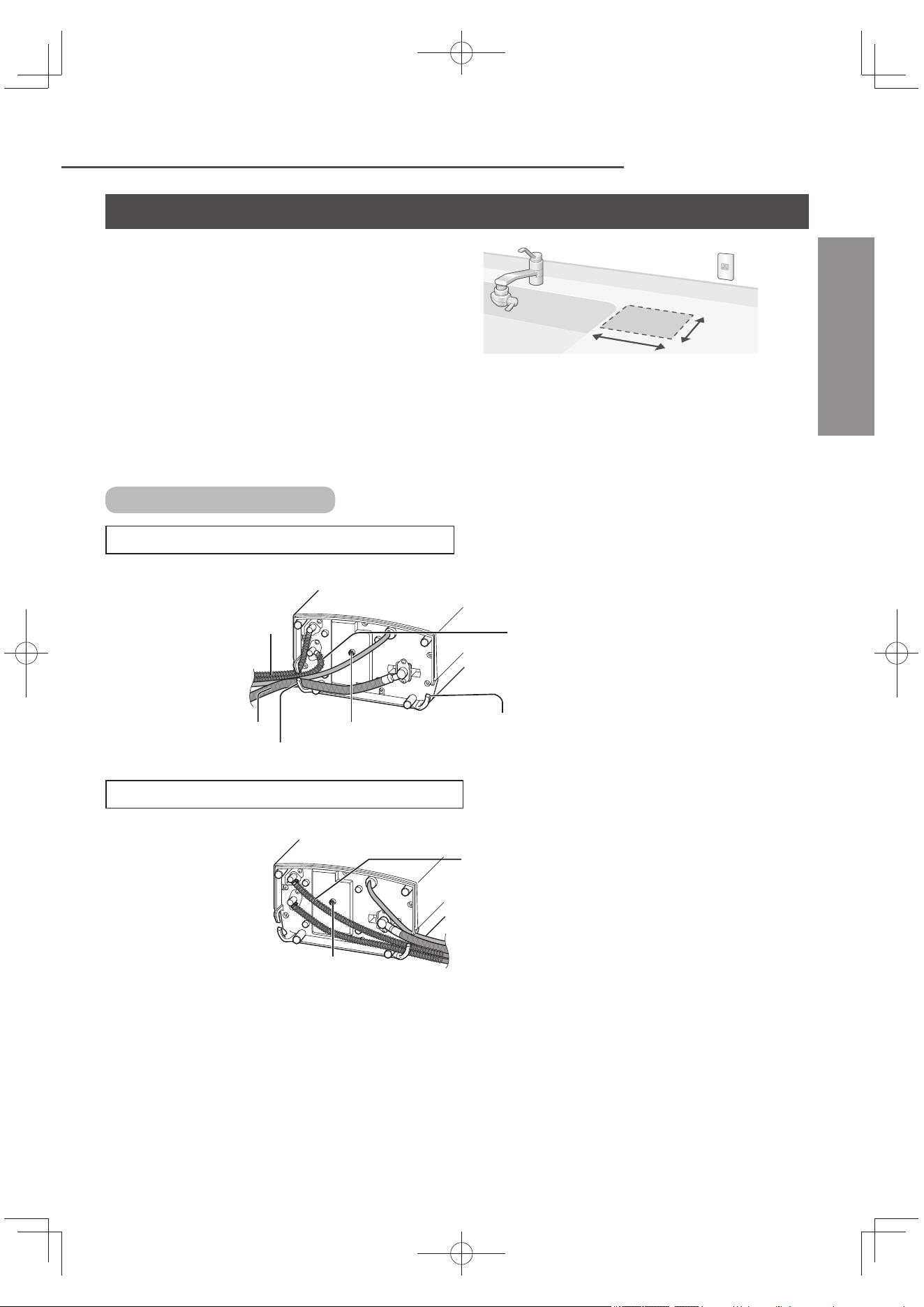
Choose a stable, level surface.
21 cm
or more
13 cm
or more
2
Extend the power cord and hose in the manner that best suits the
location where the unit is installed.
Do not fl atten or bend the cord or hose.
Bottom of the unit
When extending the cord and hose from the left
Spring (to prevent
the hose from being
bent)
Wedge the hoses into this cutout
Condensation water outlet
Cutout
Pulling the drain hose slightly toward
the inside as shown in the fi gure takes
up any slack between this hose and
the acidic water hose
Water supply hose
Front panel of the main unit
When extending the cord and hose from the right
Condensation water outlet
Front panel of the unit
Position the acidic water hose so that it
will not go over the condensation water
outlet (since the unit will be unstable
when it is placed right side up).
TK-AS66-ZEXEn.indb13TK-AS66-ZEXEn.indb13 2017/01/3015:04:132017/01/3015:04:13
EN14
Installing the Alkaline Ionizer (continued)
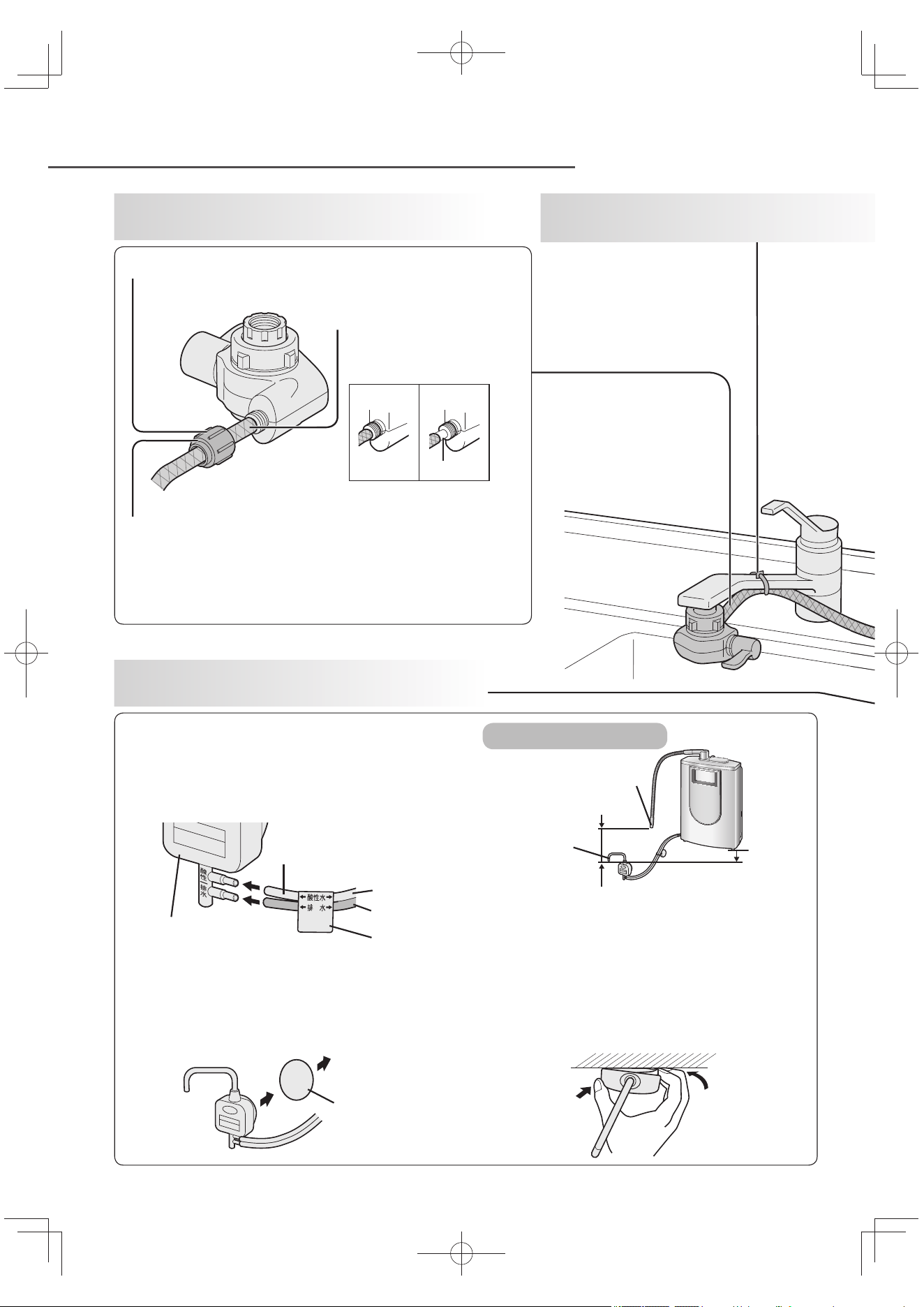
Remove the hose fastening nut from the bypass
selector, and pass the hose through the nut.
Insert the water supply
hose into the bypass
selector as far as it will go.
Tighten up the hose fastening nut securely.
1
After completing the preparations,
connect the water supply hose.
4
Install the acidic water stand.
2
Secure the water supply
hose
(using the hose strap).
Insert the acidic water and drain hoses securely.
Attach the stand to the side of the sink.
(If the suction disc slips off , stick the
mounting disc onto the side of the sink.)
Connect the hoses as instructed on the label.
Do not place a waste container or other such
objects underneath the acidic water stand.
The acidic water spout must be below the level
of the bottom of the unit and the diff erence
in height between the main spout and acidic
water spout must be greater than 10 cm and
less than 50 cm (so that the appropriate pH
level (ion concentration) is achieved).
Mounting
disc
Adhere to the
side of the sink.
Acidic
water spout
Bottom
of unit
Height diff erence
Main spout
Acidic water and
drain hoses
Acidic water
stand
Light gray
Dark gray
Label
Hold here
Detach here
How to remove the acidic water stand
Do not use any tools for this assembly (since the
hose fastening nut may be damaged).
OK NG
Gap
Installation position
TK-AS66-ZEXEn.indb14TK-AS66-ZEXEn.indb14 2017/01/3015:04:142017/01/3015:04:14
EN15
English
Note
If the hose is too long, it is recommended
that you cut it to the proper length (cut it
straight down).
Immediately after the Alkaline Ionizer has
been installed, “Preparation time” blinks
for about 20 seconds on the LCD display
when water is run through the Alkaline
Ionizer. (P. EN9)
The language of the LCD displays can be
selected from English or Chinese.
(P. EN19)
Important
The power plug is normally kept connected
to the power outlet (to keep the automatic
electrode cleaning function working).
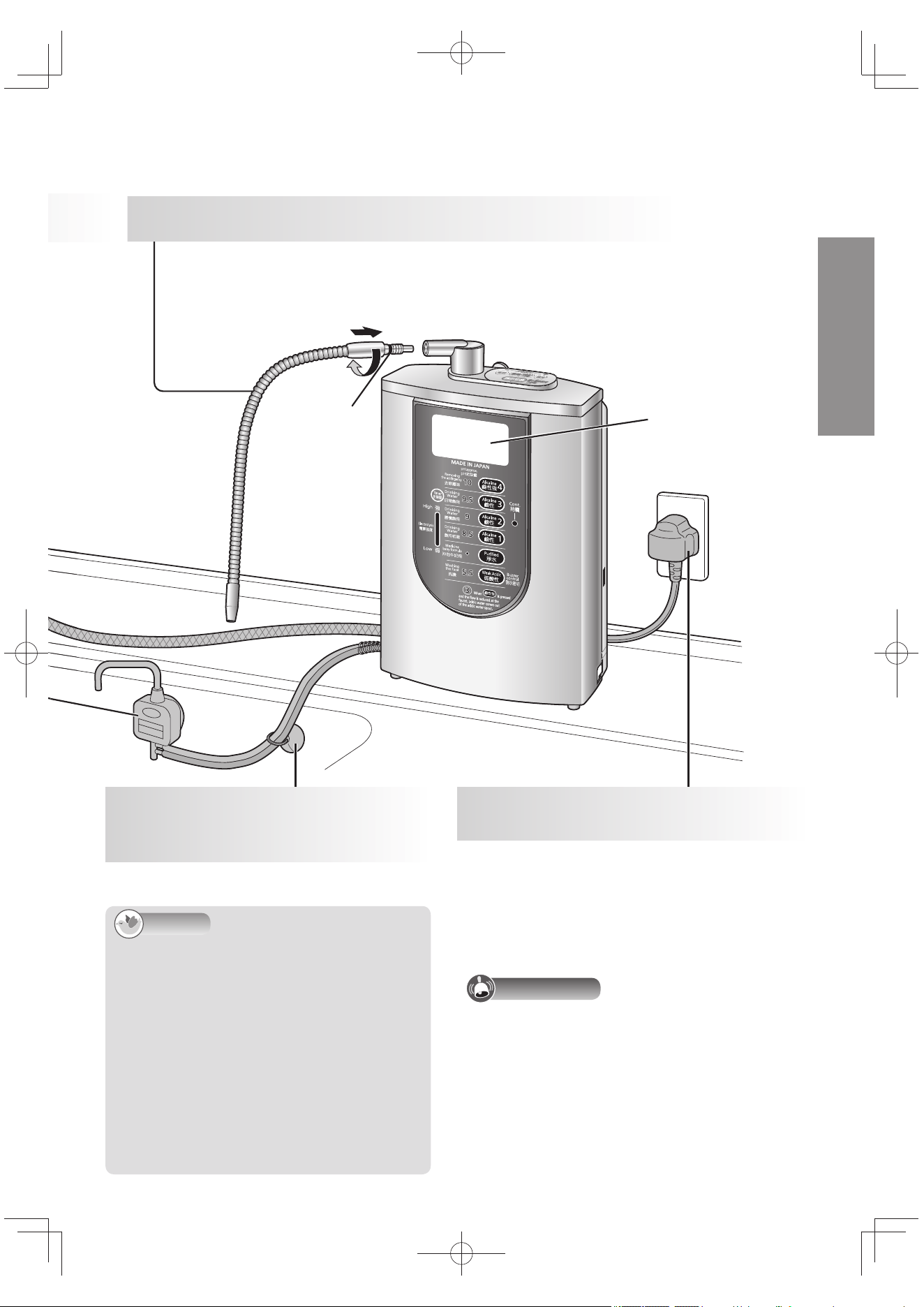
3
Screw in the outlet pipe until it is secured fi rmly.
Do not use any tools for this assembly (since the pipe may be damaged).
Ensure that the gasket is not twisted (since this may cause the water to leak).
Do not lift the unit by taking hold of the outlet pipe (otherwise damage may
result).
Secure the hoses so that they will not
move out of place.
The buzzer sounds, about 15 seconds
later the LCD display lights up in blue,
and “鹼性1(飲用初期)” appears on the
display
The Alkaline Ionizer’s power consumption
is 1 W even in the standby status.
LCD display
Gasket
5
Secure the acidic water
and drain hoses using the
suction disc.
6
Connect the power plug to
the power outlet
(AC 220 V - 240 V).
TK-AS66-ZEXEn.indb15TK-AS66-ZEXEn.indb15 2017/01/3015:04:142017/01/3015:04:14
EN16
Installing the Alkaline Ionizer (continued)
Checks after installation
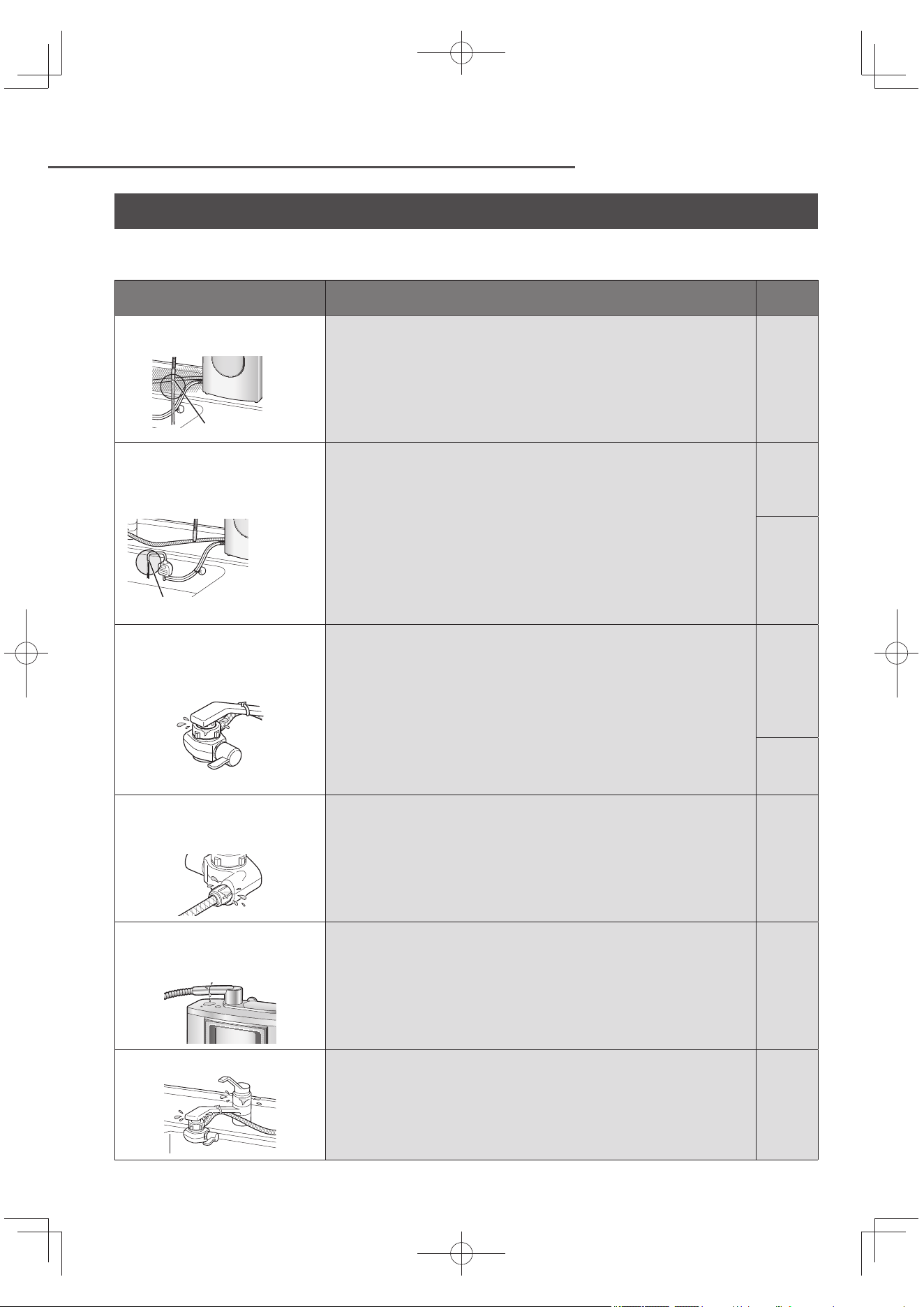
After installing the Alkaline Ionizer, run alkaline ion water through the unit for about 3 or 4 minutes to
expel the air inside the main unit.
Check item Trouble inspection location and remedial action
Reference
page
Is water coming out of the
main spout?
Main spout
Is the water supply hose bent or fl attened.
If it is, straighten it out.
EN13
~
EN15
Is water coming out of the
acidic water spout when
alkaline ion water has passed
through the Alkaline Ionizer?
Acidic water spout
Are the acidic water and drain hoses bent or fl attened?
If they are, straighten them out.
Have the acidic water and drain hoses been connected properly.
If not, check their connections to the acidic water stand.
EN13
~
EN15
Does “Reduce fl ow” appear on the LCD display?
If so, gradually reduce the fl ow at the faucet until the display
is cleared.
If water coming out of the acidic water spout is interrupted,
increase the height diff erence of the main spout and acidic
water spout.
EN22
Is any water leaking
from where the bypass
selector is connected?
Has the bypass selector been installed securely on the faucet?
Check again the instructions for “Attaching the Bypass
Selector”, and install it securely.
Have the parts inside the bypass selector been inserted
properly?
If not, install them properly.
EN10
~
EN12
Are there any cracks at the end of the faucet (in the insulating
cap, for instance)?
Consult a plumber.
–
Is there any water leaking
from where the water supply
hose is connected?
Has the water supply hose been attached securely to the
bypass selector?
Insert it as far as it will go, and use the hose fastening nut to
secure it.
EN14
Is there any water leaking
from where the outlet pipe
is connected?
Has the outlet pipe been attached securely to the unit?
Insert it securely as far as it will go.
Is the gasket installed on the outlet pipe or is it twisted?
Install the gasket properly.
EN15
Is water leaking from the faucet?
Is the gasket on the faucet old?
Consult a plumber.
Are there any cracks in the faucet (in the insulating cap, for
instance)?
Consult a plumber.
–
TK-AS66-ZEXEn.indb16TK-AS66-ZEXEn.indb16 2017/01/3015:04:142017/01/3015:04:14
EN17
Measuring the pH Level (Ion Concentration)
English
After the Alkaline Ionizer has been installed or after it has not
been used for a prolonged period (generally, a week or more),
be absolutely sure to measure the pH level, and check that it
is within the “pH standard” before using the Alkaline Ionizer.
Remember to measure the pH level periodically
(at least once a month).
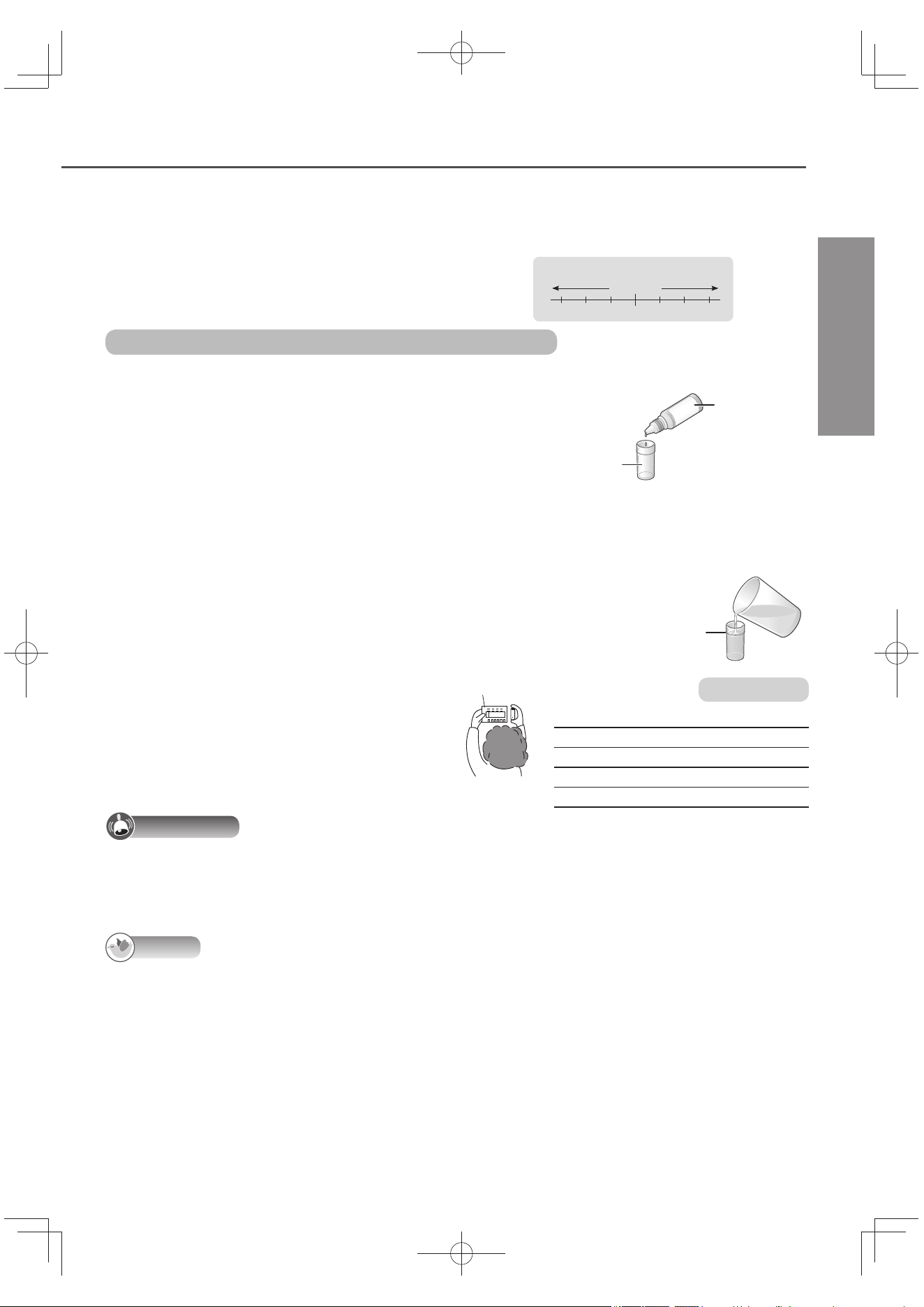
What is the pH level (ion concentration)?
The pH level indicates the degree of alkalinity, neutrality or acidity of
water (aqueous solutions), and stands for “hydrogen ion exponent.”
Hp
Neutrality
Acidic Alkaline
Strong Mild Mild Strong
789
10
456
Acidic Alkaline
Strong Mild Mild Strong
Neutrality
pH
What to have ready: pH test kit (supplied accessory)
Procedure for measurement
1
Put 2 drops of pH test liquid in to the
test tube.
(The pH cannot be determined accurately any amount
other than 2 drops.)
pH test liquid
Test tube
2
Run alkaline ion water or weak acidic water for approximately
10 seconds, then keep the sample water in a cup.
(In order to obtain a stable pH value.)
3
Put the sample water into the test tube.
Fill up to the line.
4
Under the enough light,
compare the result with the
pH Chart.
pH Chart
pH standard
Alkaline 4 (Strongly Alkaline)
9.5 ~ 10.5
Alkaline 3 9.0 ~ 10.0
Alkaline 2 8.5 ~ 9.5
Alkaline 1 8.0 ~ 9.0
Weak Acidic 5.0 ~ 6.5
Important
The color of the test water will change as time passes. Compare its pH level against the pH Chart right away.
The pH level cannot be measured accurately using litmus paper available on the market. Be absolutely sure to measure it using the pH test kit.
To dispose of the pH test liquid, dilute it with water before pouring it down the drain.
The pH test liquid and pH Chart will become discolored if they are exposed to sunlight so store them in a dark place.
Note
The pH test kit is for measuring the rough pH level.
The main components of the reagent are ethanol, methyl red, bromothymol blue and phenolphthalein.
Depending on the water quality, the water treated by the Alkaline Ionizer may not be within the pH
standard range or the alkaline ion water may not be alkaline (a liquid which appears blue or dark
blue may change to a green or yellow color). If this is the case, take the following action.
Use “pH Fine Adjustment” to set the alkalinity or slight acidity to “Stronger”. (P. EN24)
In addition, when the unpurifi ed water is measured, the color of the test water may diff er from
what is on the pH Chart (due to the eff ects of carbonic acid or other components in the water).
If the pH level is high, change the water quality to weak alkaline or mix the water with purifi ed water before using it.
When the cartridge is new (about a week old), the pH level may be somewhat higher: this is normal and does not indicate any trouble.
TK-AS66-ZEXEn.indb17TK-AS66-ZEXEn.indb17 2017/01/3015:04:152017/01/3015:04:15
EN18
Before Operation
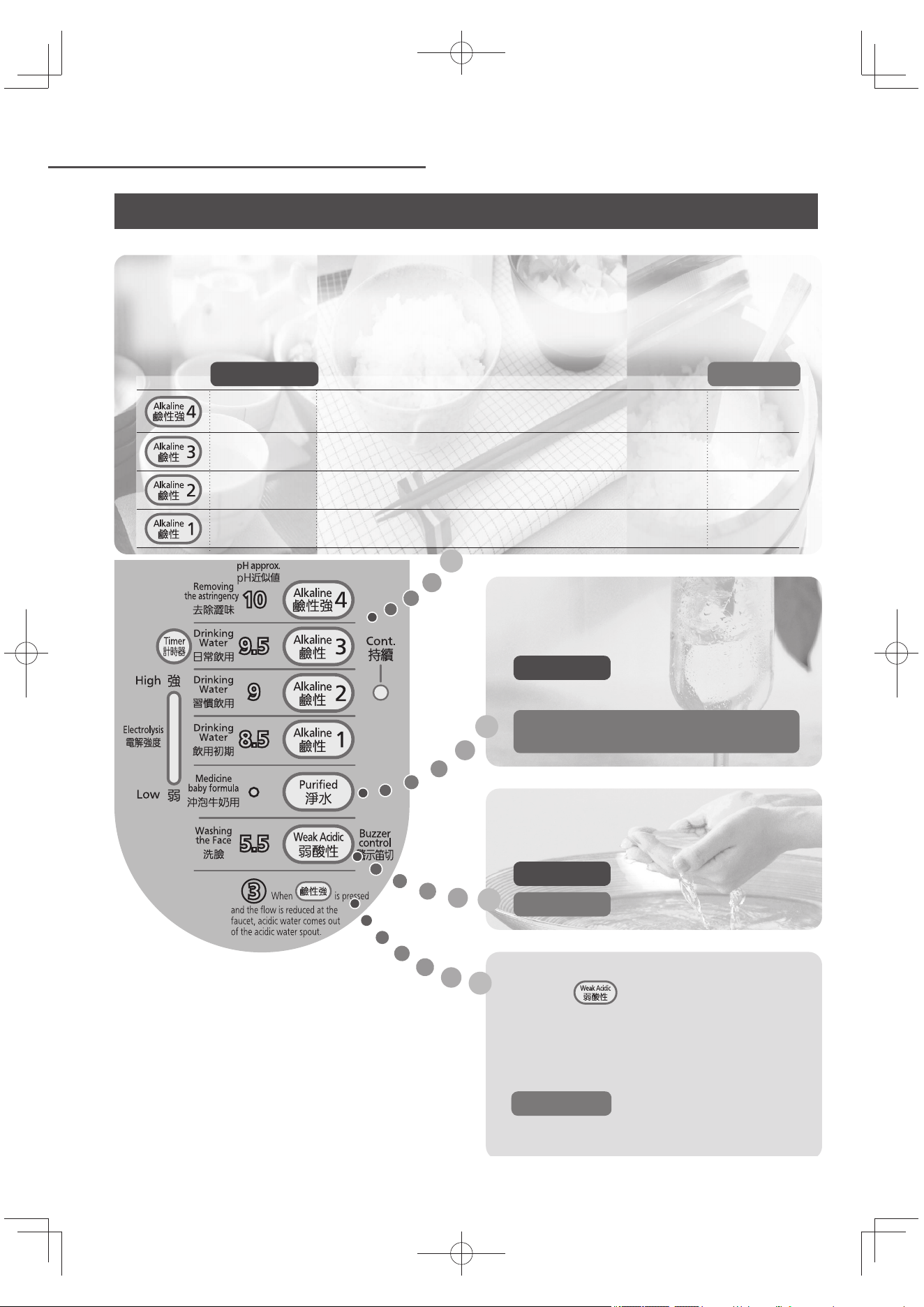
Tips on operating the Alkaline Ionizer (using it to suit the intended application)
Alkaline ion water:
The pH level of alkaline ion water increases by about 0.5 per setting in the following sequence: Alkaline
1 → Alkaline 2 → Alkaline 3 → Alkaline 4 (Strongly Alkaline). In these instructions, “Alkalines 1 to 3” are
collectively referred to as “Alkaline”.
Keep the amount of water consumed daily at around 0.5 liter to 1 liter at the “Alkaline 3”.
Application pH standard
Removing
astringency,
boiling vegetables
When removing the astringency from burdock and
spinach, etc. (Do not drink this water.)
9.5 ~ 10.5
Drinking water in
daily life
For coff ee, tea, boiling or stewing food,
cooking food in pots at the table, soups
9.0 ~ 10.0
Drinking water for
Experienced user
When cooking rice 8.5 ~ 9.5
Drinking water for
new user
When starting to drink alkaline ion water
(fi rst two weeks or so)
8.0 ~ 9.0
Purifi ed water:
This is fi ltered water which contains
minimal impurities.
Applications Taking medicine or
making baby formula, etc.
The water has not been subjected to
electrolysis.
Weak acidic water:
The mild acidity of this water is close
to the acidity of the human skin.
Applications Washing the face
pH standard 5.0 to 6.5
Acidic water:
When is pressed and the fl ow is
reduced at the faucet, acidic water with a pH
level of 3 or so comes out of the acidic water
spout.
(For removing tea stains from tableware,
odors left behind by cooking fi sh dishes, etc.)
pH standard 2.8 to 3.5*
*: When the pH3 water quality indicator lights
up.
TK-AS66-ZEXEn.indb18TK-AS66-ZEXEn.indb18 2017/01/3015:04:162017/01/3015:04:16
EN19
English
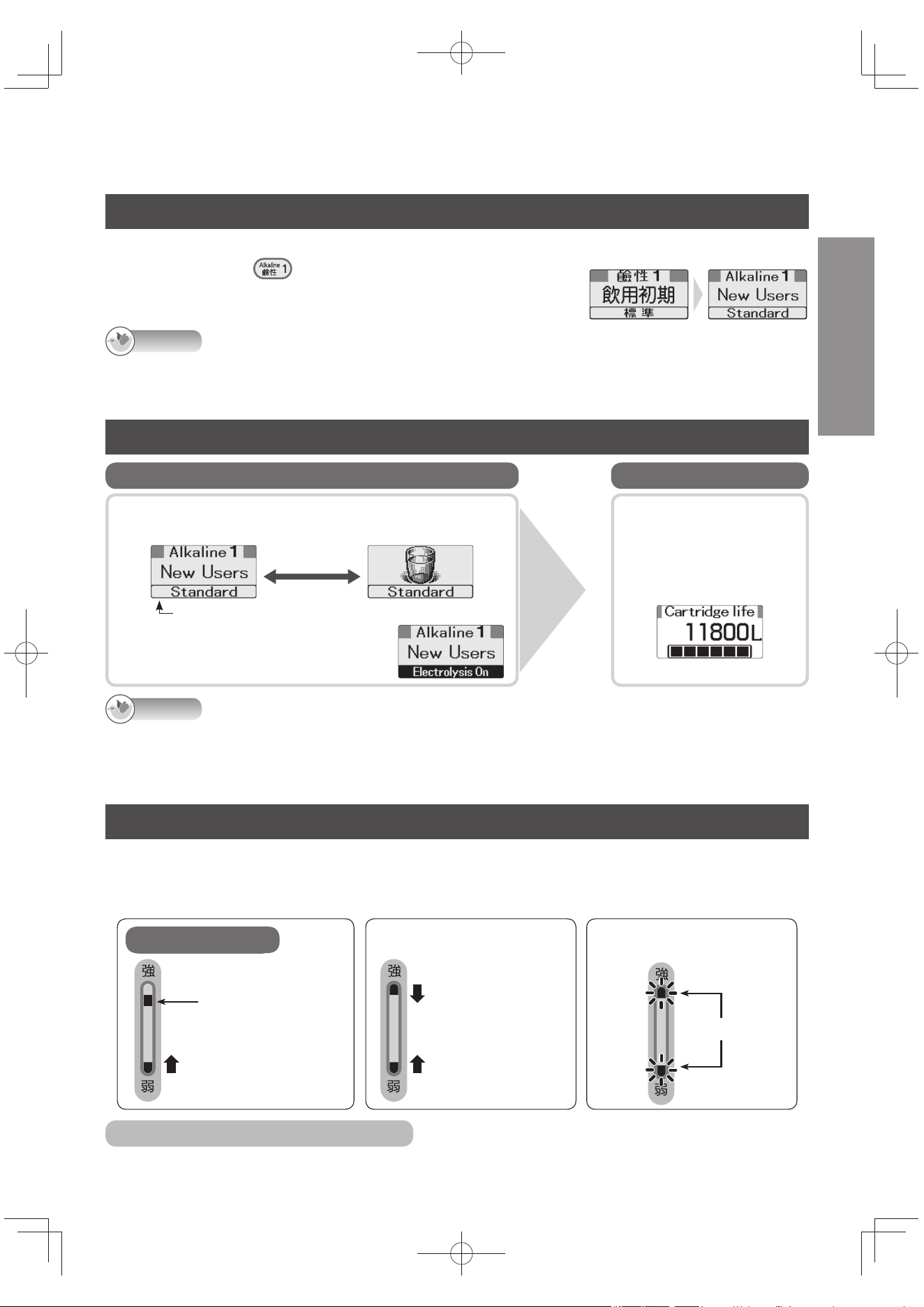
Selecting the language of the LCD displays
The language of the LCD displays can be selected from English or Chinese. The default setting is Chinese.
Turn off the faucet, and press down until the buzzer beeps four times (about 3 seconds).
When the button is pressed again for about 3 seconds, the
language of the LCD displays returns to Chinese.
Note
The steps to switch the displays to English cannot be taken while water is running through the Alkaline Ionizer
or while the setting mode or check mode is established.
Even if the displays are switched to English, displays in the setting or check mode will remain in Chinese.
LCD displays which appear during operation
Characters and pictographs indicating the application are displayed alternately.
e.g.) When the “Alkaline 1” (Drinking water for new user) is selected
At intervals of
approx. 2 seconds
pH fi ne adjustment setting
displayed here (P. EN24)
“Electrolysis On” is displayed while the Alkaline Ionizer
is making alkaline ion water or weak acidic water.
During use Standby status
The remaining cartridge
life is displayed
(P. EN35).
e.g.)
When the
faucet is
turned off ...
Note
The LCD displays will be cleared about 30 to 45 seconds after a button has been operated or after the faucet has been turned
off (in order to conserve power). They light up when another button is operated or the water fl ows to the Alkaline Ionizer.
When the water fl ow has dropped (to less than 1.0 liter or so a minute), the remaining cartridge life is displayed even while water
is running through the Alkaline Ionizer. In a case like this, the water is not electrolyzed (no electrolysis and no water treatment).
Electrolysis signal
While “Electrolysis On” is displayed, a display is provided to indicate roughly the electrolytic strength (amount of power
used for the electrolysis). It does not appear while the water is turned off or while purifi ed water is being produced.
The electrolytic strength changes (in 8 steps) depending on the water quality selector buttons and water fl ow
(amount of water being electrolyzed) used.
Electrolysis On
Lighted
Indicates the
electrolytic strength.
Lights one block at a
time from bottom to top.
During preparations
Lights one block
at a time from
the top and
bottom toward
the center.
When the “Reduce fl ow” message
appears on the LCD display
Blink
To turn off the electrolysis signal
Refer to “How to set” (P. EN32), and set “Electrolysis Signal” to “OFF”.
TK-AS66-ZEXEn.indb19TK-AS66-ZEXEn.indb19 2017/01/3015:04:162017/01/3015:04:16
EN20
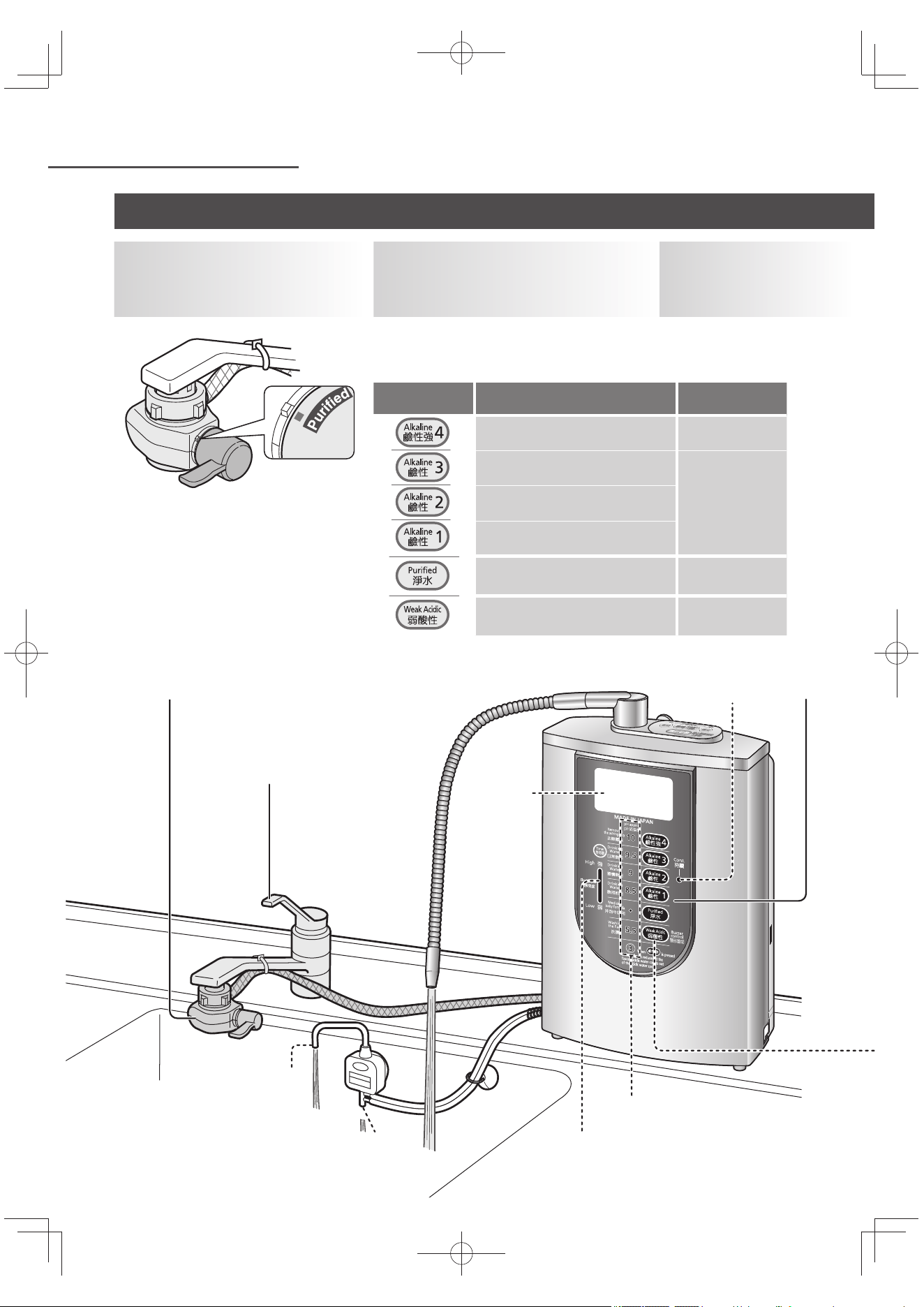
Operation
2
1
3
Continue lamp
LCD
display
Water quality indicators
Acidic water
spout
Drain outlet
Electrolysis signal (P. EN19)
1
Set the bypass
selector to
“Purifi ed”.
3
Open the
faucet.
2
Press the water
quality selector button
corresponding to the type of
water required.
The buzzer beeps, and the water
quality indicator and LCD
display light.
“Preparation time”
now appears on the
display.
Water quality
selector button
Application
LCD display
color
When removing the astringency
from food or boiling vegetables
Orange
Drinking water in daily life
Blue
Drinking water for Experienced
user
Drinking water for new user
Medicine, milk Green
Washing the face Pink
Using alkaline ion water, weak acidic water or purifi ed water
TK-AS66-ZEXEn.indb20TK-AS66-ZEXEn.indb20 2017/01/3015:04:162017/01/3015:04:16
EN21
English
The “Preparation time” display is cleared, and the buzzer beeps
three times. This indicates that the Alkaline Ionizer is now ready
to be used.
While weak acidic water is selected, the warning buzzer (weak
acidic buzzer) continues to beep to warn you not to drink the
water by mistake.
While alkaline ion water is selected
Acidic water comes out of the acidic water spout.
(For the pH standard, see P. EN51.)
To obtain acidic water with a pH level of 3 or so
from the acidic water spout
Press , and gradually reduce the fl ow of water at the
faucet until the pH3 water quality indicator lights.
When the faucet is turned off
after use:
When Alkaline 4 (Strongly Alkaline),
weak acidic or purifi ed water
has been used, the water quality
is automatically returned to the
“Alkaline” setting used last (because
the “Alkaline priority” setting is “ON”)
After the Continue lamp has gone
off , water will continue to come
out of the drain outlet for about 90
seconds (because the water inside
the Alkaline Ionizer is draining).
Note
You can collect the water that comes
out from the acidic water spout or
drain outlet while the Alkaline Ionizer
is being used and use it to do the
dishes or laundry or fi ll the bathtub.
Do not use it to rinse dishes or
clothes.
When using a container to
collect water, ensure that the
water level in the container does
not rise above the bottom of the
Alkaline Ionizer.
Even after the faucet has been
turned off , a small amount of water
will continue to come out of the main
spout. This is normal and does not
indicate any trouble.
Important
If the Alkaline Ionizer has not
been used for more than 24
hours, continuous beep will
sound when alkaline ion water or
purifi ed water passes through the
unit, and the automatic electrode
cleaning is started (this will last
for about 15 seconds). During
this period, do not use the water
which comes out of the main
spout. (P. EN40)
4
Start using the Alkaline Ionizer.
No water comes out of the acidic
water spout or drain outlet.
Alkaline ion water comes out of
the drain outlet (do not drink this
water).
Turn off the faucet after use.
The Continue lamp does not light with Alkaline 4 (Strongly
Alkaline) or weak acidic water.
The Continue lamp will go off :
When “Alkaline” has been switched to “Purifi ed Water”, “Weak
Acidic” or “Alkaline 4 (Strongly Alkaline)”
When “Purifi ed Water” has been switched to another water quality
When 10 minutes have elapsed after the faucet was turned off .
When washing rice
When fi lling glasses with water and drinking
more than one glass of water, etc.
Use it:
To stop the weak acidic buzzer
Press .
When weak acidic water is used again, the buzzer will sound.
To turn off the weak acidic buzzer
Refer to “How to set” (P. EN31), and set “Weak acidic buzzer” to “OFF”.
Buzzer volume
The volume can be adjusted to “High”, “Medium” or “Low”. (P. EN32)
Continue lamp
The Continue lamp lights when “Alkaline” or “Purifi ed Water” is selected. While
it is lighted, the Alkaline Ionizer can be used as soon as the faucet is opened.
This is a useful function for continuing to use the Alkaline
Ionizer to produce the same water quality from the main spout.
While purifi ed water
is selected
While weak acidic water is
selected
TK-AS66-ZEXEn.indb21TK-AS66-ZEXEn.indb21 2017/01/3015:04:162017/01/3015:04:16
EN22
Operation (continued)
Using alkaline ion water, weak acidic water or purifi ed water (continued)
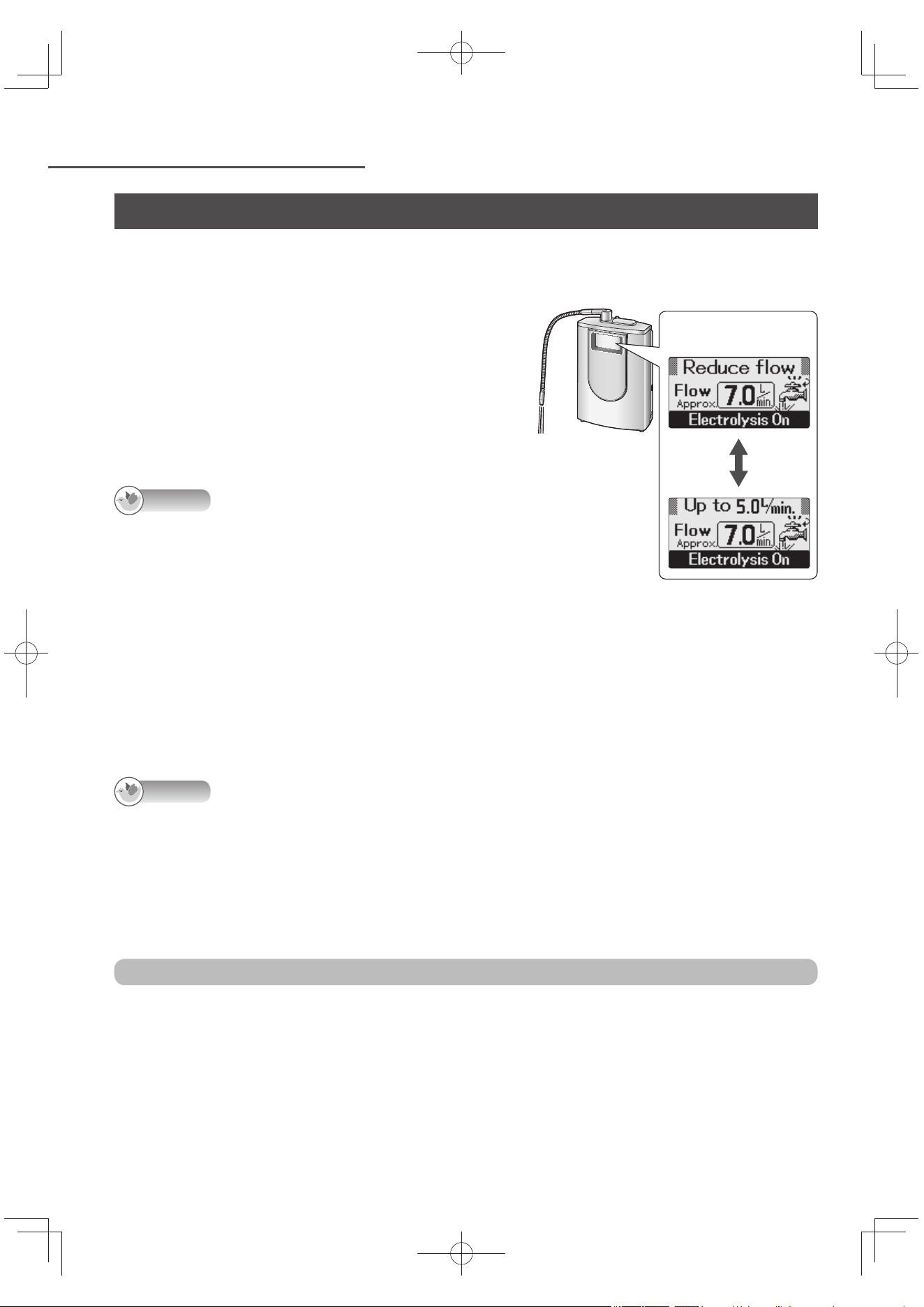
When the “Reduce fl ow” display appears
(only while “Alkaline” or “Weak Acidic” is selected)
This message appears when too much water is
fl owing (in this case, it may not be possible to
achieve a high enough pH level).
Gradually reduce the fl ow from the faucet until
the display is cleared*.
*: For “Alkaline”: Flow of about 5.0 liters/minute
For “Weak Acidic”:
Flow of about 3.2 liters/minute
Note
If the Alkaline Ionizer is used with the water
quality/Application Pictogram displayed, the
Flow will be indicated while the “Reduce fl ow”
message is displayed. (This serves to provide a
guideline for the fl ow adjustment.)
When “Alkaline 4 (Strongly Alkaline)” is
selected, the “Reduce fl ow” message tends to
appear more often. (In this case, it is cleared at
a rate of about 2.2 liters/minutes.)
To fi nd out what the pH level is
Measure the pH level using the supplied pH test kit. (P. EN17)
Note
The remaining cartridge life is displayed when the fl ow drops (to less than 1.0 liter/min or so)
because the fl ow at the faucet has been overly reduced or because of changes in the tap water
pressure. (Electrolysis will be suspended if “Alkaline” or “Weak Acidic” is selected.) If one of the
water quality selector buttons is pressed in this status, the water quality is displayed for about 4
seconds, after which the “Flow reduced” and “Too much tightened at the faucet?” displays appear
alternately. To use the Alkaline Ionizer again, open the faucet until the water quality display is
restored.
To prevent the setting from returning to “Alkaline” after turning off the faucet
Refer to “How to set” (P. EN32), and set “Alkaline priority” to “OFF”.
“Alkaline priority” will be set to “OFF” for purifi ed water only.
(“Alkaline” is restored after producing Alkaline 4 (Strongly Alkaline) or weak acidic and turning off
the faucet.)
e.g.) When “Alkaline”
is selected
Displayed
alternately
TK-AS66-ZEXEn.indb22TK-AS66-ZEXEn.indb22 2017/01/3015:04:172017/01/3015:04:17
EN23
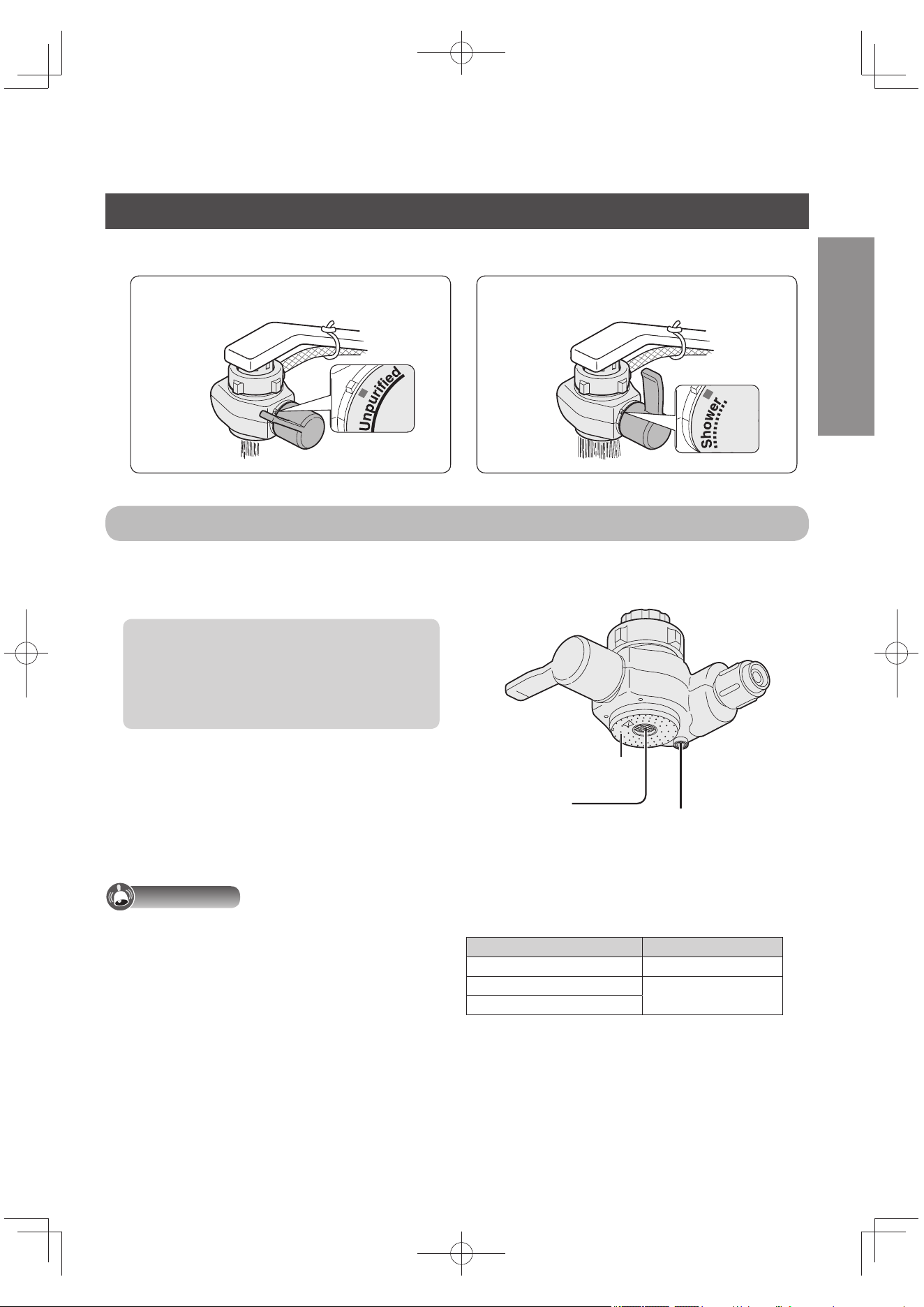
The water comes straight out. The water comes out as a shower.
English
Using the unpurifi ed water (tap water) By “unpurifi ed water” is meant here the untreated tap water.
Set the bypass selector to “Unpurifi ed” or “Shower”.
Bypass selector
If hot water has been run through
the Alkaline Ionizer by mistake, it will
come out of the hot water opening.
The hot water guard mechanism is
activated (at temperatures over 60 °C) to
protect the cartridge.
A beep may be heard at this time: this is
normal and does not indicate any trouble.
Shut off the hot water immediately, and
run about 0.4 liter of cool water (for
about 10 seconds) through the Alkaline
Ionizer to cool it down.
Water will still come out of the hot water
opening for a few moments: this is
normal and does not indicate any trouble.
Important
The table on the right shows the
temperatures at which water can be used
by the Alkaline Ionizer. Use water at these
temperatures (otherwise trouble may result).
(Bypass selector as seen from below)
Unpurifi ed water
shower holes
Source water
opening (straight)
Hot water opening
Position of bypass selector Water temperature
Purifi ed Under 35 °C
Unpurifi ed
Under 80 °C
Shower
TK-AS66-ZEXEn.indb23TK-AS66-ZEXEn.indb23 2017/01/3015:04:172017/01/3015:04:17
EN24
Operation (continued)
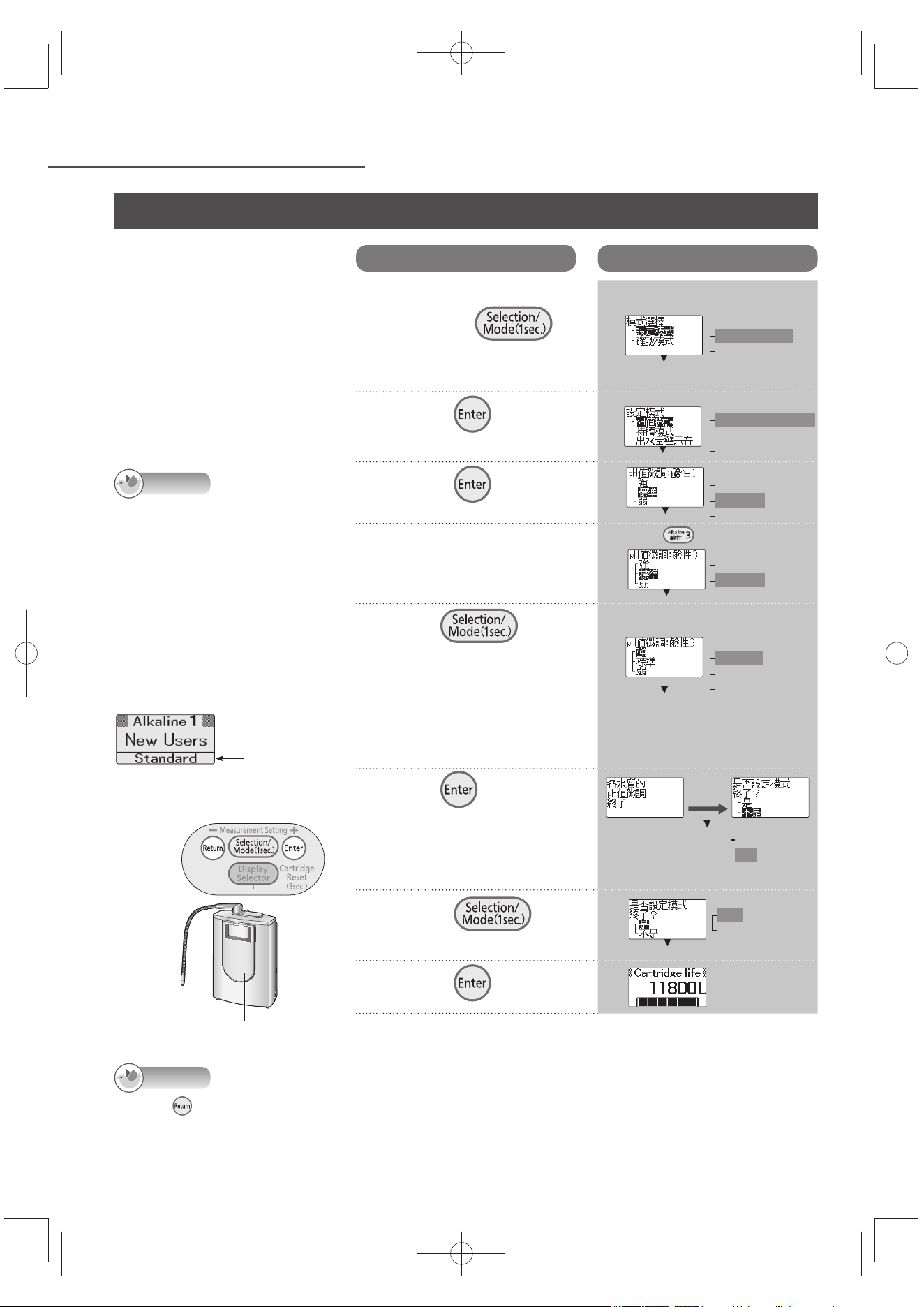
To bring the pH level of the
water processed through the
Alkaline Ionizer closer to the
pH standard (water quality
indicator number), the pH
levels set for the “Alkaline”
or “Weak Acidic” water
quality selector buttons can
be fi nely adjusted in 3 steps:
“Stronger”, “Standard” or
“Milder”.
Note
The pH level fi ne adjustment
changes the pH level in a
range from 0.2 to 1.5 for
“Stronger” or “Milder” from
the “Standard” setting.
(Depending on the water
quality and usage conditions,
there is some latitude in the
amount of the change.)
When it is
purchased,
“Standard” is
selected.
Control panel
LCD
display
Water quality selector buttons
Finely adjusting the pH level (ion concentration)
Operation
LCD displays
1
Turn off the faucet,
and press
on the control panel
for 1 second.
2
Press .
3
Press .
4
To fi nely adjust the pH
level, press one of the water
quality selector buttons.
5
Press , and
select the pH fi ne
adjustment setting.
If there is more than one
button for which the pH
level is to be fi nely adjusted,
repeat steps 4 and 5.
6
Press .
<The setting is fi nished>
Adjustment of all the water
quality pH levels set in
steps 4 and 5 is completed.
7
Press ,
and select “ 是 ”.
8
Press .
9
Check the pH level using the pH test kit.
(P. EN17)
e.g.)
After about
3 seconds
Note
When is pressed in steps 2 to 5, the previous screen is restored. The previous screen will not be restored
when it is pressed after the settings are completed.
Displays on the screens indicated will be in Chinese even if the English display mode is established.
e.g.)
When is pressed
e.g.)
To set to “Stronger”
Fine adjustment
of the water
quality pH level
completed
e.g.)
Mode selection
Setting mode
Check mode
Setting mode
pH fi ne adjustment
Continue mode
Water output buzzer
pH fi ne adjustment: Alkaline 1
Stronger
Standard
Milder
pH fi ne adjustment: Alkaline 3
Stronger
Standard
Milder
pH fi ne adjustment: Alkaline 3
Stronger
Standard
Milder
Exit the setting mode?
Yes
No
Exit the setting mode?
Yes
No
TK-AS66-ZEXEn.indb24TK-AS66-ZEXEn.indb24 2017/01/3015:04:172017/01/3015:04:17
EN25
For Your Operating Convenience
English
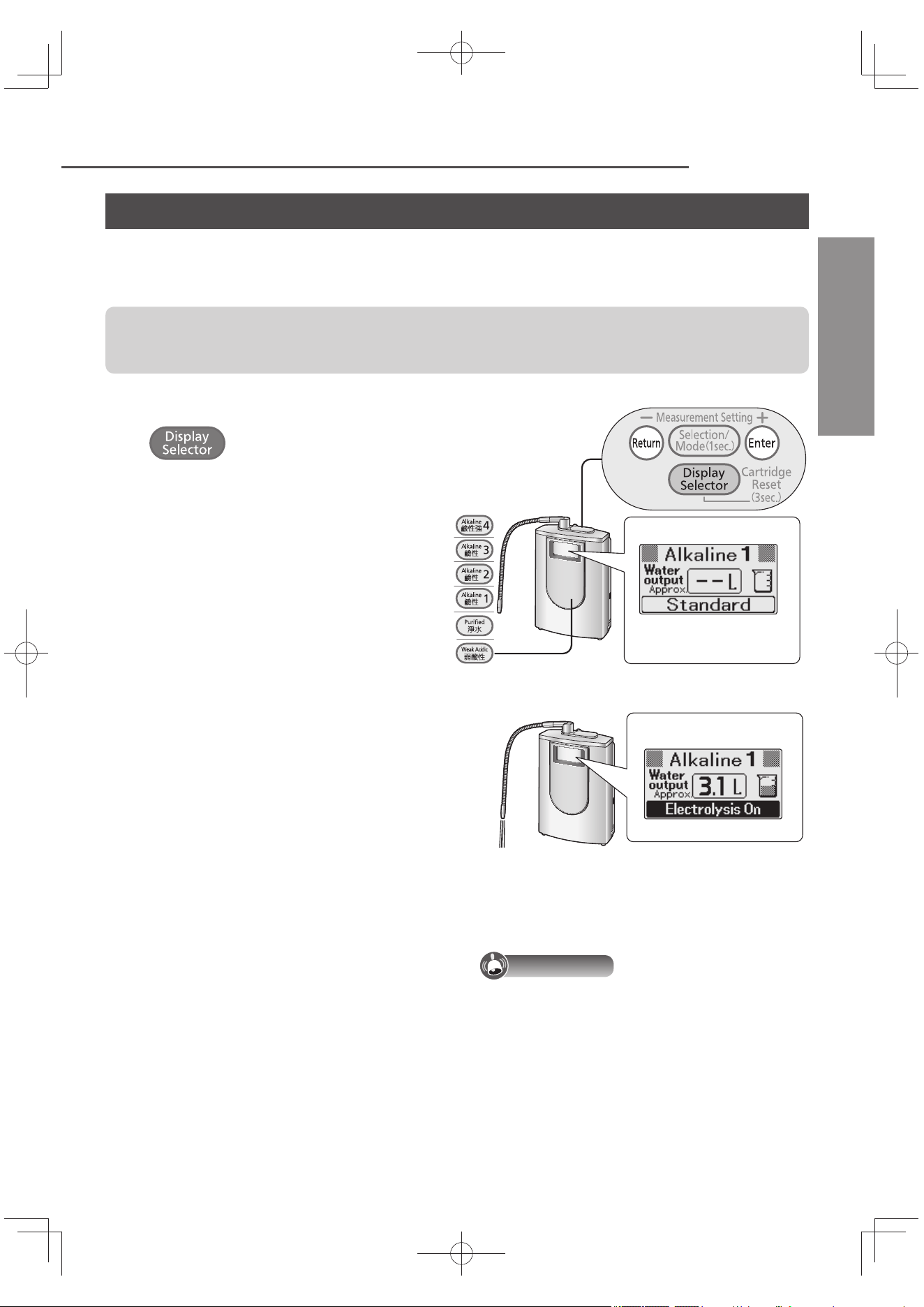
Each time water is run through the Alkaline Ionizer, the total water output (amount of water that comes
out of the main spout) is calculated and indicated on the LCD display in 0.1-liter increments. (Water
output display)
In measuring the water output, it is recommended that you set the main spout and acidic water
spout as instructed in the procedure on P. EN26 (in order to improve the accuracy of the water
output display).
1
Turn off the faucet, and press
repeatedly until “Water
output” is displayed.
Each time the button is pressed, the
display on the LCD changes.
2
Press the desired water quality
selector button, and then turn on the
faucet.
As soon as the “Preparation time” display
is cleared, the measuring begins.
3
Measure the water output.
While the output is being measured, the
water output buzzer sounds once for
every 0.2 liter or so of water output.
4
Turn off the faucet when the water
output display reaches the fi gure to
be measured.
e.g.)
To turn off the water output buzzer
Refer to “How to set” (P. EN31), and set “Water
output buzzer” to “OFF”.
Important
If there is too large a discrepancy between
the water output display and actual water
output, perform “Correcting the water output
display” (P. EN28).
Water quality selector buttons
Water output display
e.g.)
Measuring the water output volume
TK-AS66-ZEXEn.indb25TK-AS66-ZEXEn.indb25 2017/01/3015:04:182017/01/3015:04:18
EN26
For Your Operating Convenience (continued)
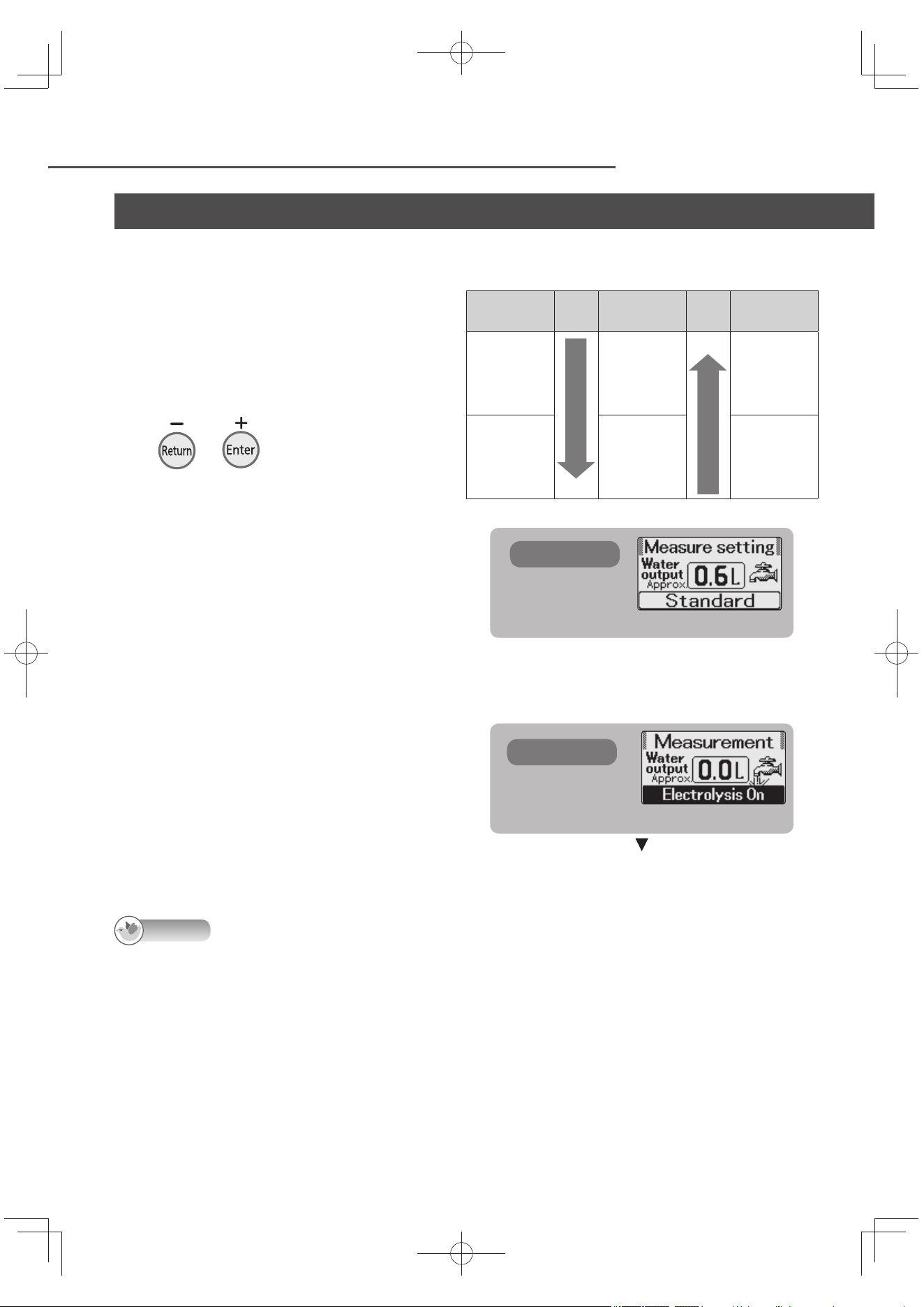
To sound the advisory buzzer when the amount to be measured is reached
1
Press the water quality selector
button corresponding to the water
quality that is to be selected.
Each time the button is pressed, the
display on the LCD changes.
2
With the faucet turned off , press
or repeatedly until the
amount to be measured is reached.
The LCD display changes to the
“Measure setting” screen.
The water output amount which can be
set ranges from 0.6 to 5.0 liters.
Figures in a range from 0.6 to 2.0 liters
can be set in 0.2-liter increments.
Figures in a range from 2.0 to 5.0 liters
can be set in 0.5-liter increments.
(See table on the right.)
To stop the setting
Press another control button or another
water quality selector button.
3
Open the faucet.
As soon as the “Preparation time” display
is cleared, the measurement begins.
4
When the advisory buzzer beeps,
turn off the faucet.
Setting
range
+
Display
-
Display
0.6 to 2.0
liters
Increased in
increments
of 0.2
Reduced in
increments
of 0.2
2.0 to 5.0
liters
Increased in
increments
of 0.5
Reduced in
increments
of 0.5
Each time button is pressed
Higher
Each time button is pressed
Lower
Note
If the faucet is not turned off even when the set amount is passed, the measurement will continue and the
water output displayed. In this case, the water output buzzer will beep once for each 0.2 liter of water output.
Measuring the water output volume (continued)
e.g.) 0.6 liter
The previously set fi gure is displayed for the
second and subsequent times.
LCD displays
LCD display
The advisory buzzer beeps when the set
amount is reached.
LCD displays
TK-AS66-ZEXEn.indb26TK-AS66-ZEXEn.indb26 2017/01/3015:04:182017/01/3015:04:18
EN27
English
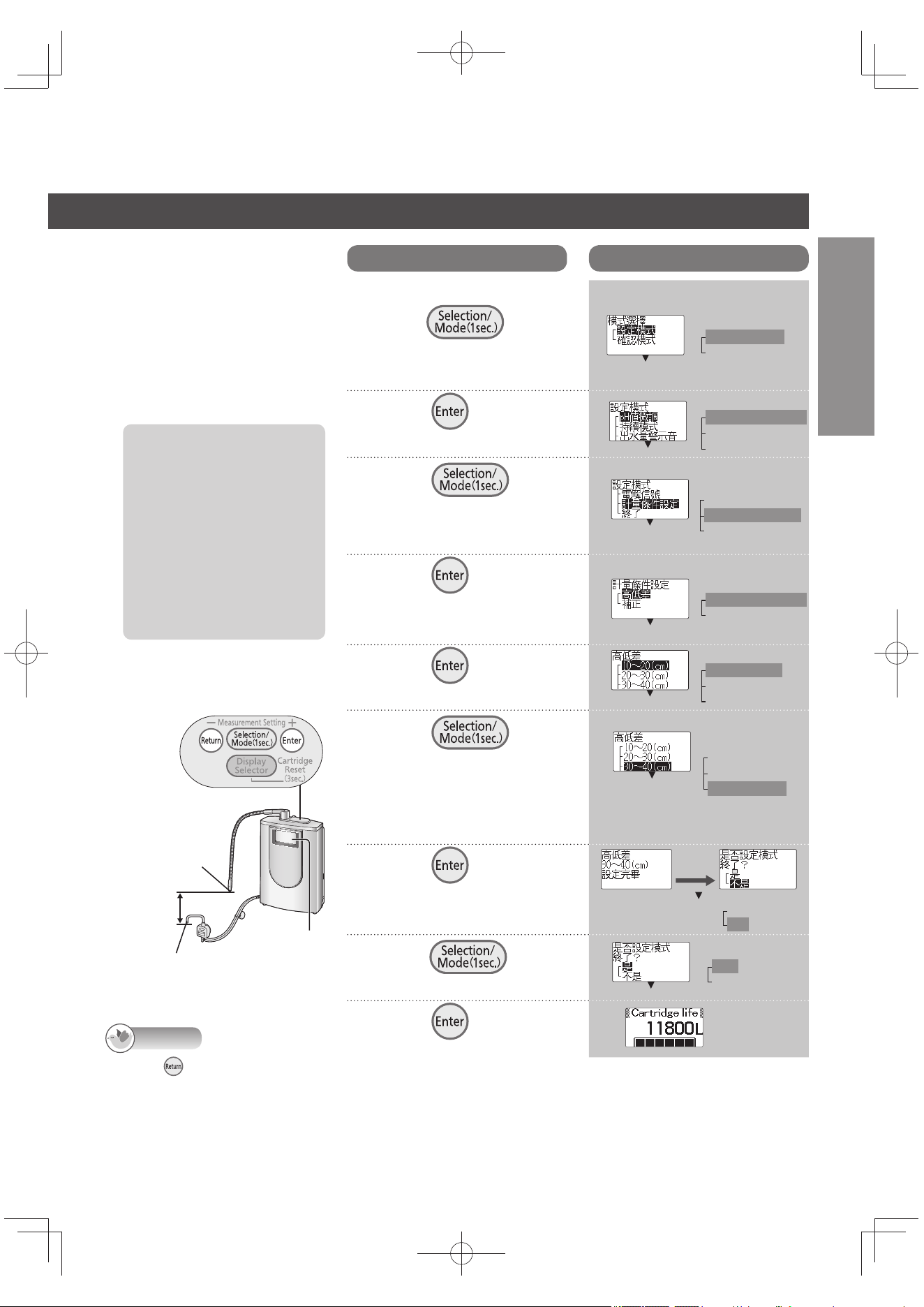
Setting the diff erence
in height between the
main spout and acidic
water spout
It is recommended that this
height be set in order to
improve the accuracy of the
water output display.
Before proceeding with
the setting, check the
diff erence in height
between the main spout
and acidic water spout
without fail.
Use the Alkaline Ionizer
with a height diff erence
between the two spouts
of 10 to 50 cm.
Note
When is pressed in steps 2 to 6, the previous screen is restored. After the settings are completed, the
previous screen will not be restored even when the button is pressed.
Once the settings have been set, they will be stored in the memory until other settings are established (until
they are changed).
Displays on the screens indicated will be in Chinese even if the English display mode is established.
Control panel
Main spout
LCD display
Acidic water spout
Height
diff erence
Operation
LCD displays
1
Turn off the faucet, and
press on
the control panel for 1
second.
2
Press .
3
Press , and
select the “ 計量條件
設定 ”.
4
Press .
To perform “Correcting the
water output display”, proceed
to step 5 on P. EN28.
5
Press .
6
Press ,
and select the height
diff erence setting.
Set a value in accordance
with the height diff erence
which you measured.
e.g.) To select “30 to 40 (cm)”
7
Press .
<The setting is fi nished>
8
Press , and
select “ 是 ”.
9
Press .
After about
3 seconds
Height diff erence is now
set to 30 to 40 (cm)
e.g.)
Mode selection
Setting mode
Check mode
Setting mode
pH fi ne adjustment
Continue mode
Water output buzzer
Setting mode
Electrolysis signal
Measurement condition setting
Exit
Measurement condition setting
Height diff erence
Compensation
Measurement condition setting
10 to 20 (cm)
20 to 30 (cm)
30 to 40 (cm)
Measurement condition setting
10 to 20 (cm)
20 to 30 (cm)
30 to 40 (cm)
Exit the setting mode?
Yes
No
Exit the setting mode?
Yes
No
TK-AS66-ZEXEn.indb27TK-AS66-ZEXEn.indb27 2017/01/3015:04:192017/01/3015:04:19
EN28
For Your Operating Convenience (continued)
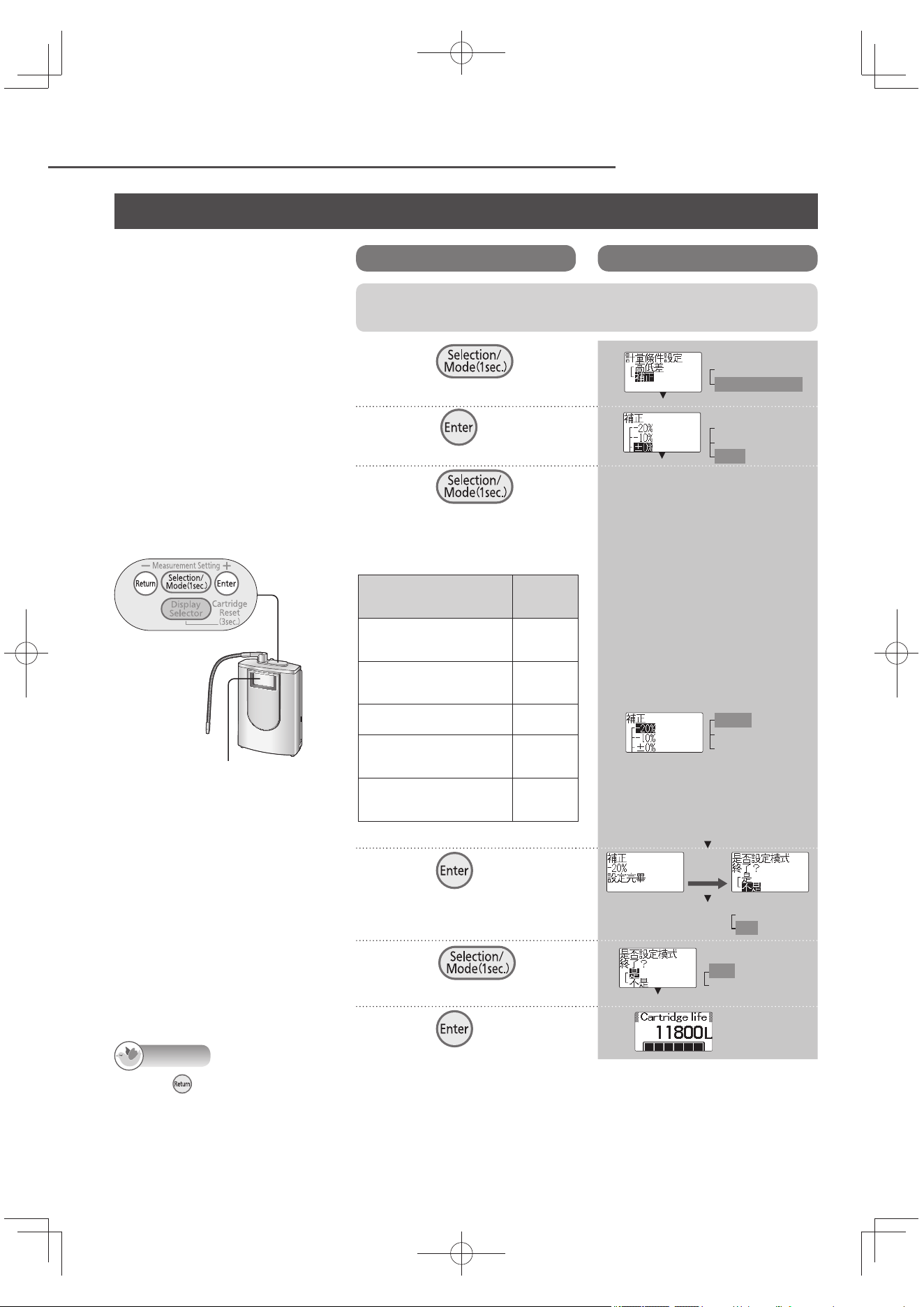
Correcting the water
output display
There is a slight diff erence
between the water output
display and actual output
of water. (This depends
on the usage conditions,
water pressure and other
factors.) If there is a
signifi cant diff erence,
correct the water output
display.
Note
When is pressed in steps 5 to 7, the previous screen is restored. After the settings are completed, the
previous screen will not be restored even when the button is pressed.
Once the settings have been set, they will be stored in the memory until other settings are established (until
they are changed).
Displays on the screens indicated will be in Chinese even if the English display mode is established.
Control panel
LCD display
Measuring the water output volume (continued)
Operation
LCD displays
After performing steps 1 to 4 of “Setting the diff erence in height between the
main spout and acidic water spout” on P. EN27, perform the steps below.
5
Press , and
select “ 補正 ”.
6
Press .
7
Press ,
and select one of the
correction values listed
in the table.
e.g.) When the water output
display is 0.5 liter, and
the actual water output
is 0.6 liter (the water
output is about 20% more
than the display)
Diff erence between
water output displayed
and actual water output
Correction
value
When the actual water
output is about 20% more
than the display
–20%
When the actual water
output is about 10% more
than the display
–10%
When the diff erence is
less than 10%
±0% *
When the actual water
output is about 10% less
than the display
+10%
When the actual water
output is about 20% less
than the display
+20%
*: No compensation
8
Press .
<The setting is fi nished>
9
Press , and
select “ 是 ”.
10
Press .
After about
3 seconds
Compensation now
set to –20%
e.g.)
Measurement condition setting
Height diff erence
Compensation
Compensation
–20%
–10%
±0%
Compensation
–20%
–10%
±0%
Exit the setting mode?
Yes
No
Exit the setting mode?
Yes
No
TK-AS66-ZEXEn.indb28TK-AS66-ZEXEn.indb28 2017/01/3015:04:192017/01/3015:04:19
EN29
English
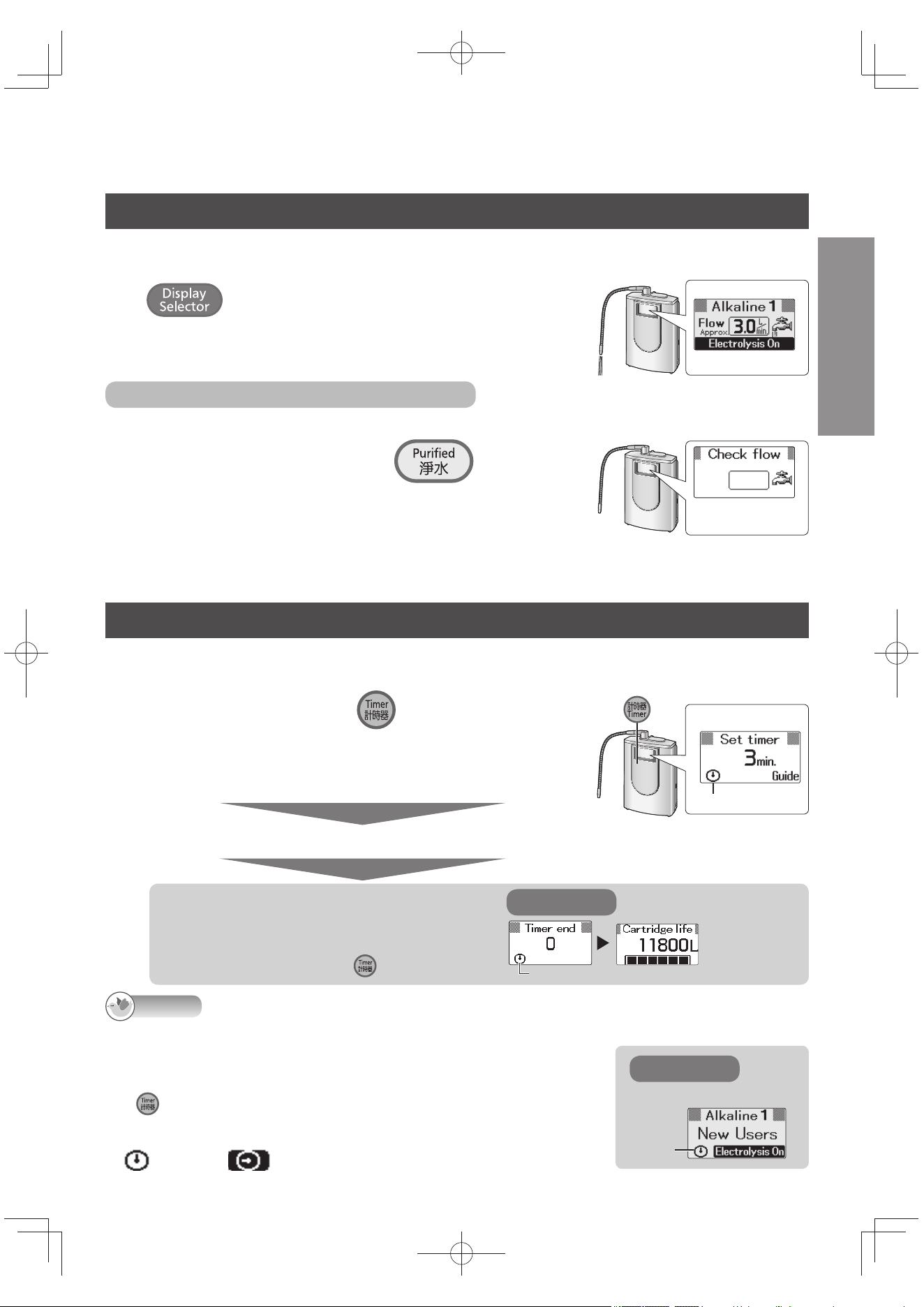
Monitoring the water fl ow
While water is running through the Alkaline Ionizer, the water fl ow (total fl ow of water coming out of the main
spout, acidic water spout and drain outlet per minute) is displayed and can be monitored. (Flow display)
Press repeatedly until “Flow” appears on the LCD display.
Each time the button is pressed, the LCD display changes.
No fi gure for the fl ow will be displayed when the supply of water has
been turned off or when the fl ow is under about 1.0 liter/minute.
When the water fl ow cannot be displayed
When the fl ow cannot be displayed (such as when the water pressure is too low), it can be monitored on the “Check fl ow” display.
1
Turn off the faucet, and press down until
the buzzer beeps four times (about 3 seconds).
When the button is pressed again for about 3 seconds, the display returns to the previous
screen. The water quality is automatically returned to the “Alkaline” setting used last.
Check fl ow
display
2
Open the faucet.
When the faucet is turned off , the display returns to the previous screen.
Using the timer
The buzzer beeps (for about 10 seconds) when the set time is reached.
This is useful when setting cooking times.
1
Turn off the faucet, press , and set the time.
The LCD display changes to the “Set timer” screen.
Each time the button is pressed, the time is increased in per 1-minute.
When the button is held down, the time is increased in per 5-minute.
Any time from 1 to 60 minutes can be set.
After about 3 seconds
The buzzer beeps twice to signal the start of the countdown.
e.g.)
Blinks.
When the set time is reached,
the buzzer beeps
(for about 10 seconds).
To stop the buzzer, press .
e.g.)
Lights
LCD displays
Note
The Alkaline Ionizer can be used while the time is being counted down.
(The LCD display changes to what is shown on the right, for example.)
The timer setting is released when:
Water is run through the Alkaline Ionizer during the timer setting operation.
is pressed while the time is being counted down.
(
No timer operations can be performed while water is running through the Alkaline Ionizer.)
The error code has appeared (P. EN44).
changes to when 10 seconds remain for the time set.
e.g.)
Blinks.
LCD displays
TK-AS66-ZEXEn.indb29TK-AS66-ZEXEn.indb29 2017/01/3015:04:202017/01/3015:04:20
EN30
For Your Operating Convenience (continued)
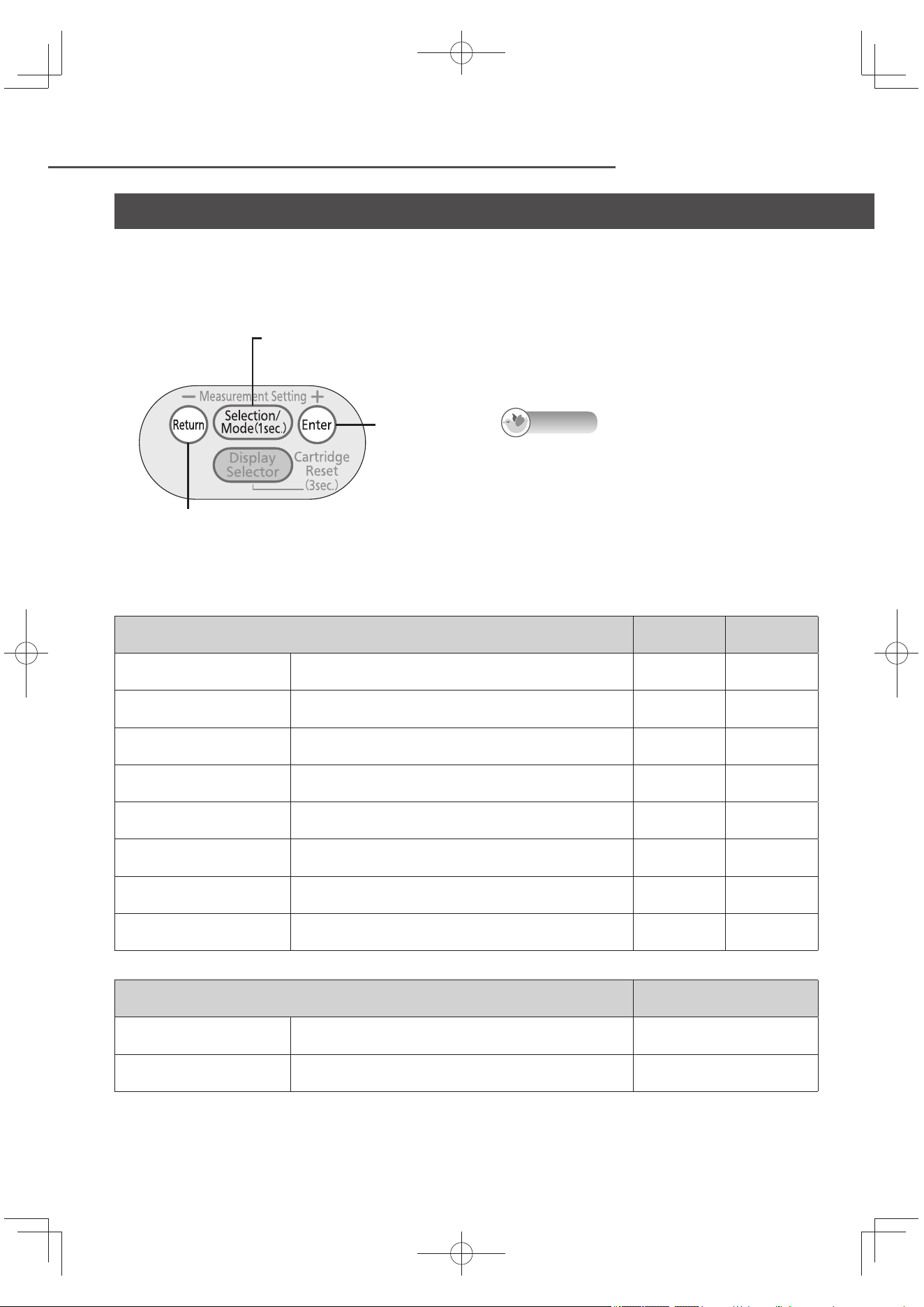
Setting mode and check mode
The following items can be set and checked in the setting mode and check mode. (No setting or
checking operations can be performed while water is running through the Alkaline Ionizer.)
The settings established when purchased can be used for this mode.
Control panel
Selector button
The setting mode and check mode is started by pressing this button for 1 second.
Enter button
Return button
Press this to return to the previous screen.
After the settings are completed, the previous screen
will not be restored even when the button is pressed.
Note
The settings and checks will be stopped when:
None of the buttons has been operated for 2
or more minutes.
Water is run through the Alkaline Ionizer.
One of the water quality selector buttons has
been pressed.
Items which can be set
Setting method
(page)
Default
settings
Stronger, Standard or Milder
for “pH fi ne adjustment”
The pH standard set in the “Alkaline” and “Weak acidic”
water quality selector buttons can be adjusted in 3 levels.
EN24 Standard
“Continue mode” ON and
OFF
When OFF is set, the “Continue” mode is released, and
the continue lamp (P. EN21) goes off .
EN31 ON
“Water output buzzer” ON
and OFF
When OFF is set, the buzzer does not beep during the
water output count.
EN31 ON
“Weak acidic buzzer“ ON and
OFF
When OFF is set, the buzzer does not beep while weak
acidic water is selected.
EN31 ON
“Alkaline priority” ON and
OFF
When OFF is set, the “Alkaline” setting is not restored
after using purifi ed water and turning off the faucet.
EN32 ON
“Buzzer volume” High,
Medium and Low
The buzzer volume can be adjusted in 3 steps. EN32 Medium
“Electrolysis Signal” ON and
OFF
When OFF is set, the electrolysis signal (P. EN19) does
not light.
EN32 ON
Measurement condition
setting
This setting is performed to improve the accuracy of the
water output display (P. EN24).
EN27 ~ EN28 –
Items which can be checked
Check method
(page)
Optional accessories
The model number of the optional replacement cartridge
can be checked.
EN33
Setting check
The settings established in the setting mode can be
checked.
EN33
TK-AS66-ZEXEn.indb30TK-AS66-ZEXEn.indb30 2017/01/3015:04:202017/01/3015:04:20
EN31
English
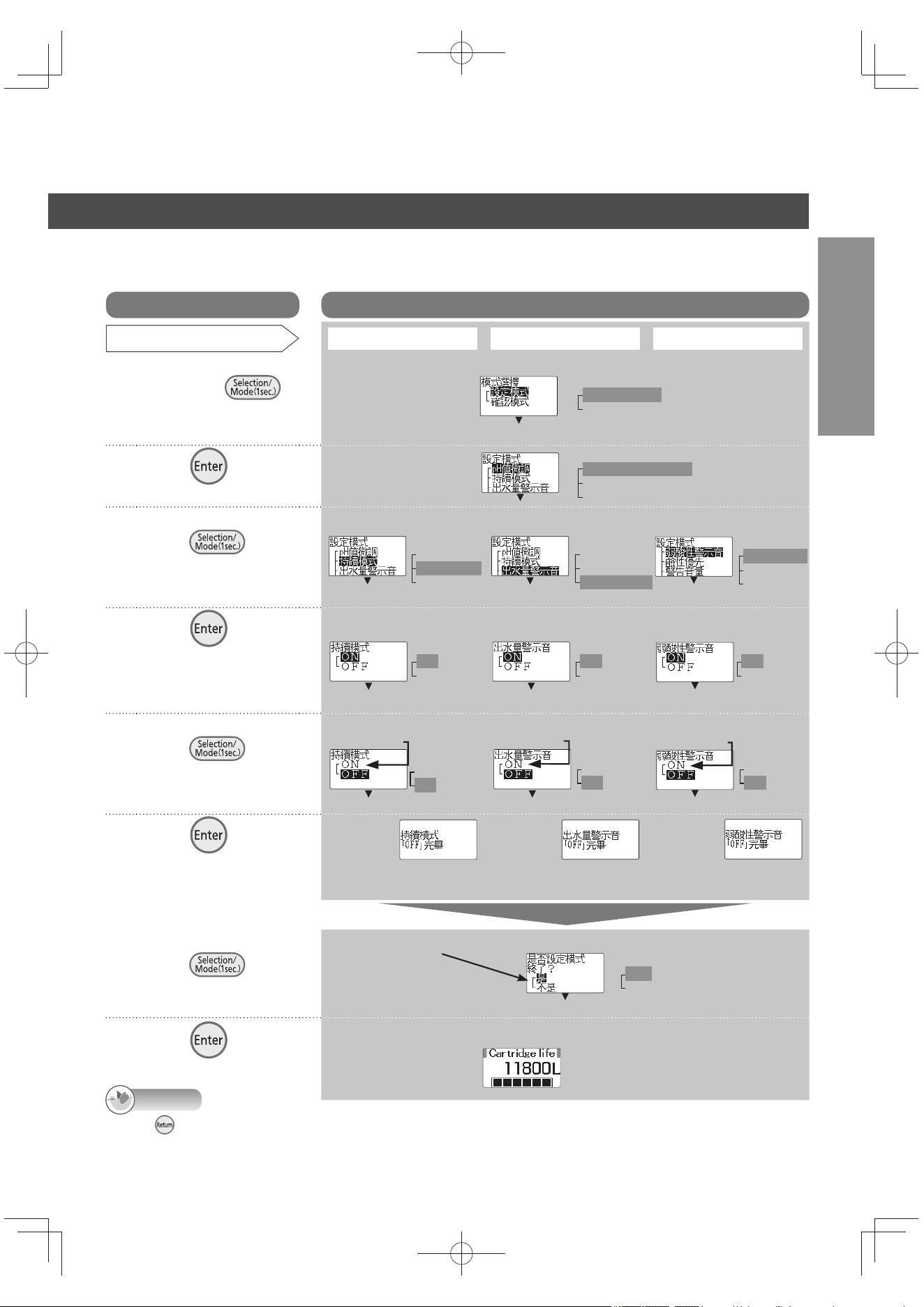
How to set
(For details on the items which can be set and the settings established when
purchased, see P. EN30.)
Note
When is pressed in steps 2 to 5, the previous screen is restored. After the settings are completed, the previous screen
will not be restored even when the button is pressed.
Displays on the screens indicated will be in Chinese even if the English display mode is established.
Operation
LCD displays
Item set
Continue mode OFF (ON)
Water output buzzer OFF (ON)
Weak acidic buzzer OFF (ON)
1
Turn off the faucet,
and press
on the control
panel for 1 second.
2
Press .
3
Select the item
using
.
Each time this button
is pressed, the
selection changes.
4
Press .
The current setting
is displayed in white
lettering against a black
background.
5
Select the item
using
.
Each time this button
is pressed, the
selection changes.
6
Press .
<The setting is fi nished>
If “ON” was
selected, the
“ 持續模式「ON」
完畢 ” message
appears.
If “ON” was
selected, the
“ 出水量警示音「ON」
完畢 ” message
appears.
If “ON” was
selected, the
“ 弱酸性警示音「ON」
完畢 ” message
appears.
After about 3 seconds
7
Select the item
using
.
Each time this button is
pressed, the selection changes.
8
Press .
Select “ON” to set
this item ON
Select “ON” to set
this item ON
Select “ON” to set
this item ON
Continue mode
set to OFF.
Water output
buzzer set to OFF.
Weak acidic
buzzer set to OFF.
Select “ 不是 ” to set
another item.
If “ 不是 ” was selected,
go back to step 3.
e.g.)
Remaining cartridge life display (standby status)
Mode selection
Setting mode
Check mode
Setting mode
pH fi ne adjustment
Continue mode
Water output buzzer
Setting mode
pH fi ne adjustment
Continue mode
Water output buzzer
Setting mode
pH fi ne adjustment
Continue mode
Water output buzzer
Setting mode
Weak acidic buzzer
Alkaline priority
Buzzer volume
Continue mode
On
Off
Water output buzzer
On
Off
Weak acidic buzzer
On
Off
Continue mode
On
Off
Water output buzzer
On
Off
Weak acidic buzzer
On
Off
Exit the setting mode?
Yes
No
TK-AS66-ZEXEn.indb31TK-AS66-ZEXEn.indb31 2017/01/3015:04:212017/01/3015:04:21
EN32
For Your Operating Convenience (continued)
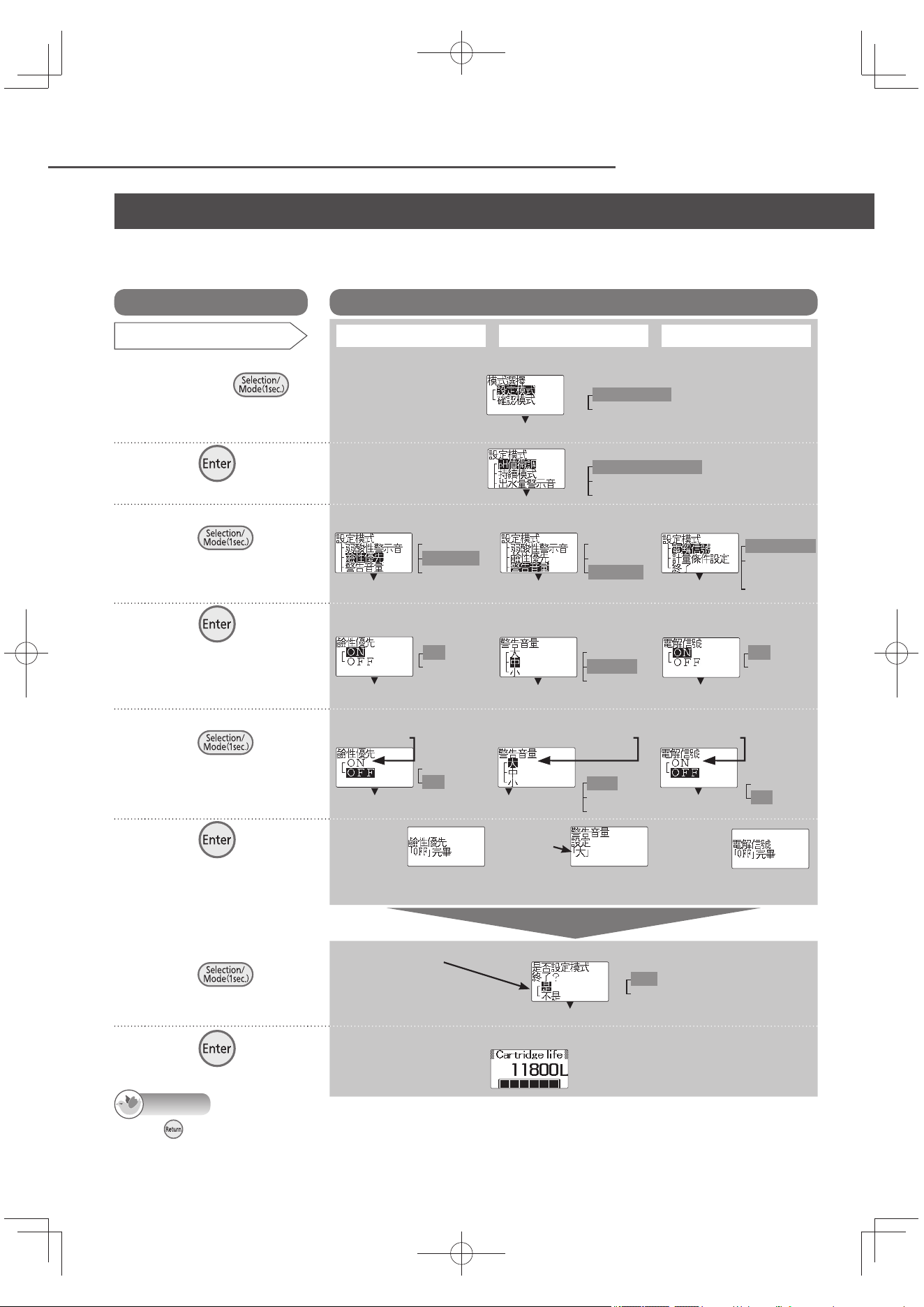
How to set
(For details on the items which can be set and the settings established when
purchased, see P. EN30.)
Note
When is pressed in steps 2 to 5, the previous screen is restored. After the settings are completed, the previous screen
will not be restored even when the button is pressed.
Displays on the screens indicated will be in Chinese even if the English display mode is established.
Setting mode and check mode (continued)
Operation
LCD displays
Item set
Alkaline priority OFF (ON)
Buzzer volume High, Medium, Low
Electrolysis signal OFF (ON)
1
Turn off the faucet,
and press
on the control
panel for 1 second.
2
Press .
3
Select the item
using
.
Each time this button
is pressed, the
selection changes.
4
Press .
The current setting
is displayed in white
lettering against a
black background.
5
Select the item
using
.
Each time this button
is pressed, the
selection changes.
6
Press .
<The setting is fi nished>
If “ON” was
selected, the
“ 鹼性優先「ON」
完畢 ” message
appears.
If “ON” was
selected, the
“ 電解信號「ON」
完畢 ” message
appears.
After about 3 seconds
7
Select the item
using
.
Each time this button is
pressed, the selection changes.
8
Press .
Select “ON” to set
this item ON
Select the desired volume level.
e.g.) Set the level to High.
Select “ON” to set
this item ON
The selected
volume level
is displayed
here.
Alkaline priority
set to OFF.
Buzzer volume
now set to High.
Electrolysis signal
now set to OFF.
Select “ 不是 ” to set
another item.
If “ 不是 ” was selected,
go back to step 3.
e.g.)
Remaining cartridge life display (standby status)
Mode selection
Setting mode
Check mode
Setting mode
pH fi ne adjustment
Continue mode
Water output buzzer
Setting mode
Weak acidic buzzer
Alkaline priority
Buzzer volume
Setting mode
Weak acidic buzzer
Alkaline priority
Buzzer volume
Setting mode
Electrolysis signal
Measurement
condition setting
Exit
Alkaline priority
On
Off
Electrolysis signal
On
Off
Alkaline priority
On
Off
Buzzer volume
High
Medium
Low
Electrolysis signal
On
Off
Exit the setting mode?
Yes
No
Buzzer volume
High
Medium
Low
TK-AS66-ZEXEn.indb32TK-AS66-ZEXEn.indb32 2017/01/3015:04:212017/01/3015:04:21
EN33
English
Note
When is pressed in steps 2 to 6, the previous screen is restored.
After step 7, the previous screen will not be restored when the button is pressed.
Displays on the screens indicated will be in Chinese even if the English display mode is established.
Operation
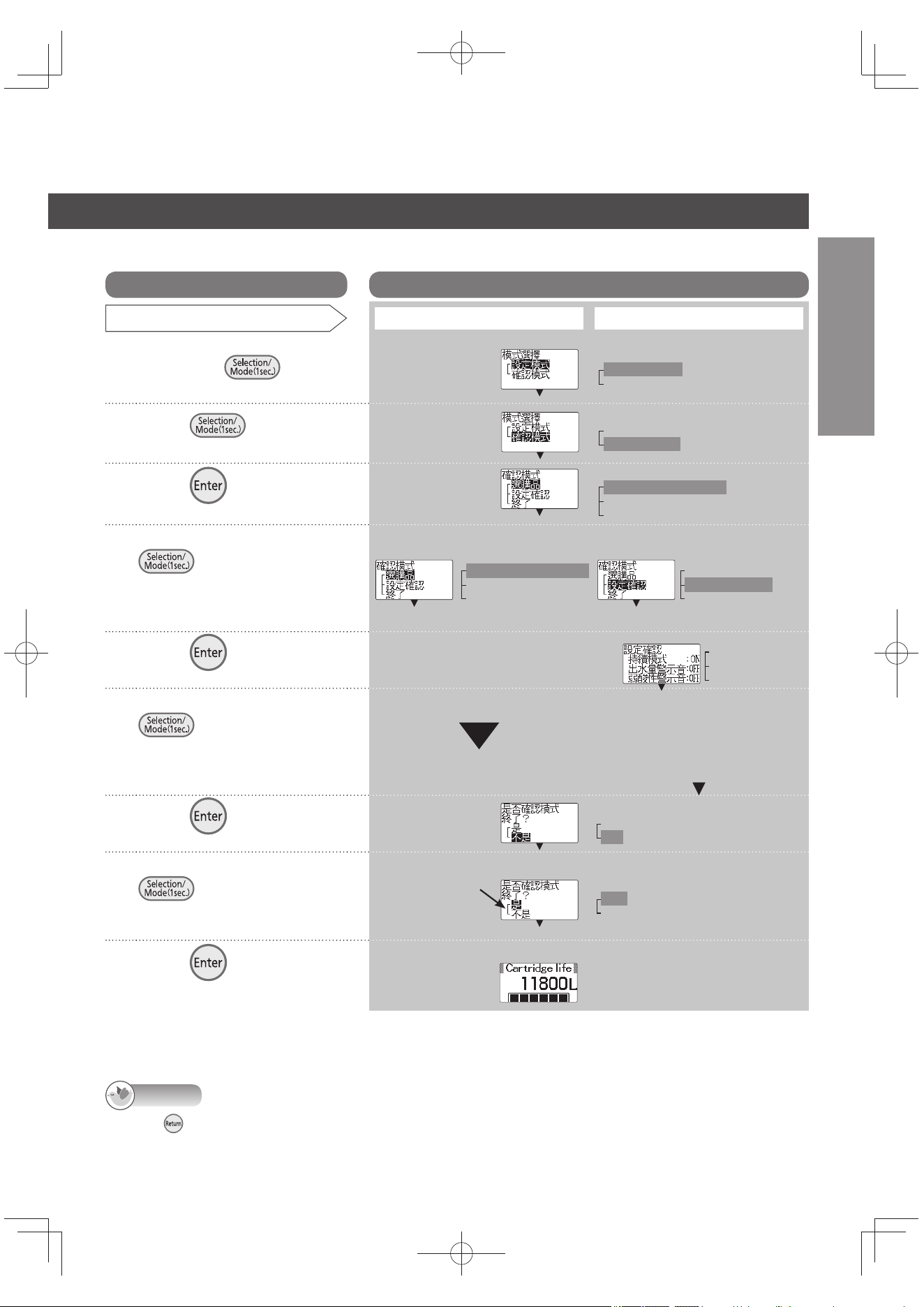
LCD displays
Item checked
Optional accessory: Cartridge Setting checks
1
Turn off the faucet,
and press
for
1 second.
2
Press , and select
“ 確認模式 ”.
3
Press .
4
Select the item using
.
Each time this button is
pressed, the selection
changes.
5
Press .
Check the model
number.
6
Select the item using
.
Each time this button is
pressed, the selection
changes.
Check the settings.
7
Press .
8
Select the item using
.
Each time this button is pressed,
the selection changes.
9
Press .
e.g.)
(Go to step 7)
Select “ 不是 ” to
set another item.
If “ 不是 ” was
selected, go back
to step 4.
How to set
(For details on the items which can be checked, see P. EN30.)
Remaining cartridge life display (standby status)
e.g.)
Mode selection
Setting mode
Check mode
Mode selection
Setting mode
Check mode
Check mode
Optional accessories
Setting checks
Exit
Check mode
Optional accessories
Setting checks
Exit
Check mode
Optional accessories
Setting checks
Exit
Setting checks
Continue mode: ON
Water outlet buzzer: OFF
Weak acidic buzzer: OFF
Exit the check mode?
Yes
No
Exit the check mode?
Yes
No
TK-AS66-ZEXEn.indb33TK-AS66-ZEXEn.indb33 2017/01/3015:04:222017/01/3015:04:22
EN34
Maintenance
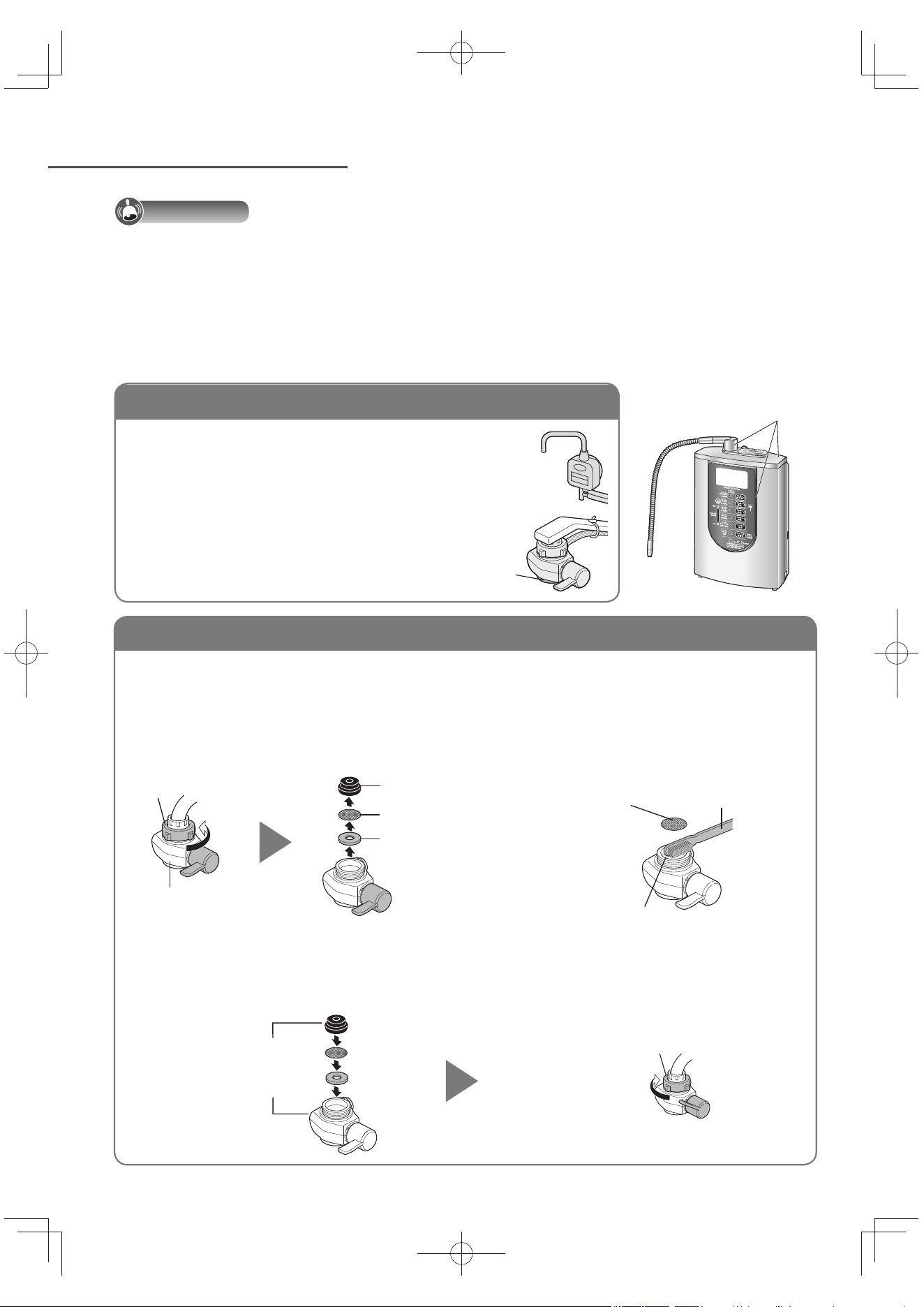
Bypass selector mount coupling (fi lter and water intake)
Important
Do not use detergents, cleansers, paint thinners, benzine, alcohol or kerosene for cleaning purposes. If, for instance,
a detergent has been used by mistake, wipe the surface with a damp cloth to remove all traces of the detergent.
(Otherwise, the detergent may get mixed in with the water running through the Alkaline Ionizer or the plated
parts may be damaged or peel off or the plastic parts may become damaged, discolored or deformed.)
Use of cleansers may also impair the workings of the outlet pipe and cause trouble.
Do not use brushes or other implements made of metal (since they may leave scratch marks).
Do not use a tool to tighten up the nut (since the nut may be damaged).
1
Loosen the nut, remove the bypass selector,
and take out the fi lter.
Set the bypass selector to “Purifi ed”.
2
Wash the fi lter and
water intake.
3
Install the bypass selector.
Make sure any foreign matter is not attached on the end of the faucet and gasket inside of the bypass selector.
Install the fi lter without fail.
After installing the bypass selector, run water for about 5 seconds at the “Unpurifi ed” or “Shower” setting.
Plated part
Main unit, bypass selector and acidic water stand
Soak a soft cloth in water, wring it out well, and use
it to wipe the units and parts.
Use a toothbrush or other implement to remove
foreign matter at the shower part.
Shower part
Nut
Bypass selector
Gasket
Filter
Gasket washer
Clean using a
toothbrush or
other implement.
Filter
Water intake
Install the parts
in the correct
sequence
The water volume will be reduced if foreign matter is allowed to clog the fi lter at the bypass
selector mount coupling. Follow the steps below to clean the fi lter.
Tighten up the nut until the
bypass selector does not turn.
Make sure the bypass
selector is not inclined.
TK-AS66-ZEXEn.indb34TK-AS66-ZEXEn.indb34 2017/01/3015:04:222017/01/3015:04:22
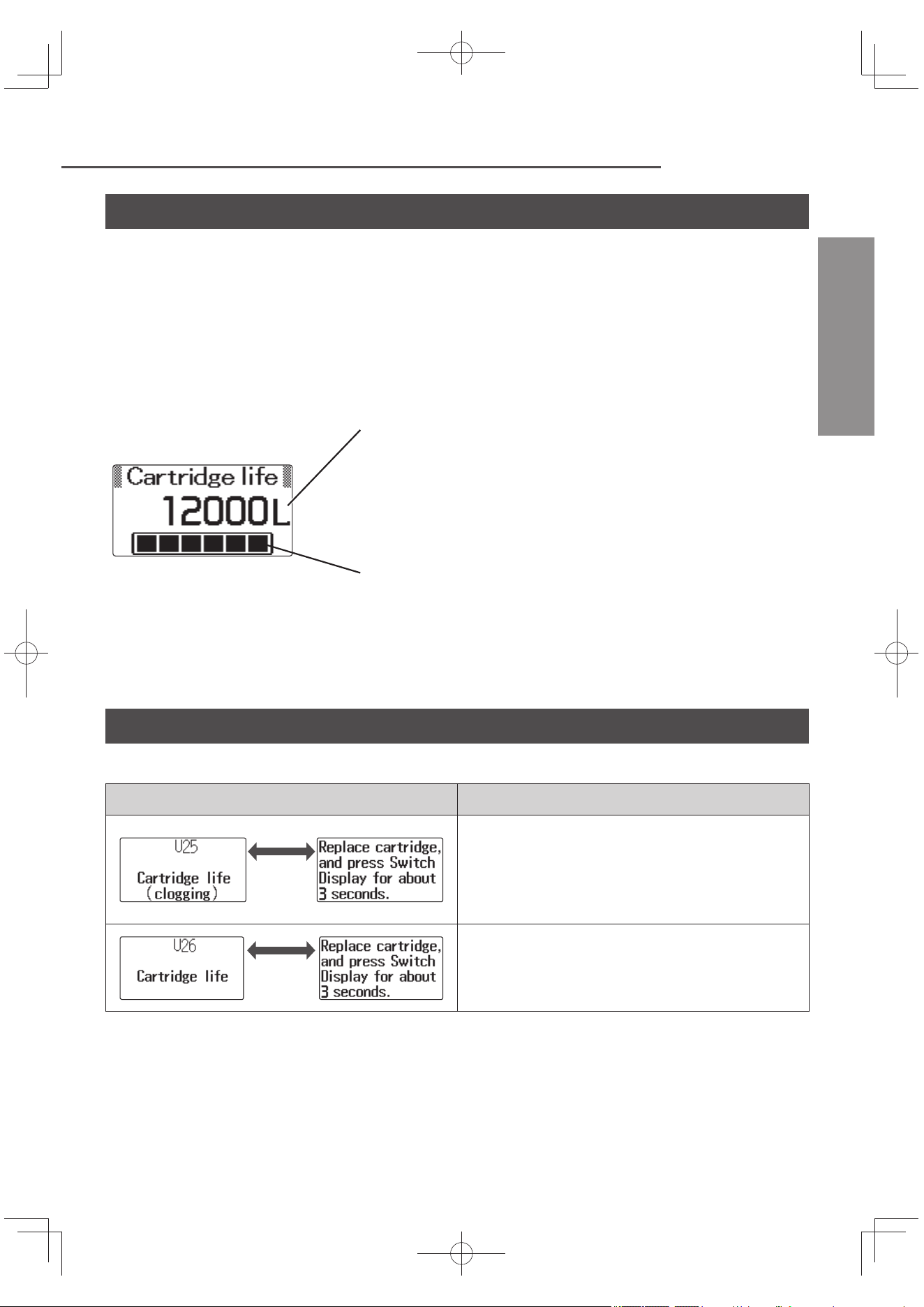
EN35
Before Replacing the Cartridge
English
Replacement display
The volume of water which has run through the Alkaline Ionizer is totalized, and the remaining
cartridge life is indicated on the LCD display. Use this display as a general guideline for when to
replace the cartridge.
The cartridge life (12 000 liters) is a fi gure based on tests involving a standard water quality and
water pressure (JIS S 3201: Testing methods for household water purifi ers), and with tap water
in general there may a signifi cant diff erence in the clogging time depending on the water quality
(turbidity, iron rust, etc.) and water pressure.
e.g.)
Indicator
As the remaining cartridge life becomes shorter and shorter, the
black blocks "■" in the bar display disappears.
Remaining cartridge life display
This indicates in per 1-liter the remaining volume of water which
can be processed by the cartridge until the total run-through
water volume serving as the general guideline for when to
replace the cartridge.
When the display shows “150 L“ or less, the “Cartridge near end
of life” message appears.
Obtain a replacement cartridge.
Time for replacement of cartridge
Replace the cartridge when the following is indicated on the LCD display.
Displays (shown alternately)
Description
About
2 seconds
This display indicates that the cartridge has
come to the end of its life due to internal
clogging.
When water is run through the Alkaline
Ionizer, the LCD display changes to “Flow”.
About
2 seconds
This display indicates that the total run
through water volume has reached 12 000
liters.
TK-AS66-ZEXEn.indb35TK-AS66-ZEXEn.indb35 2017/01/3015:04:232017/01/3015:04:23
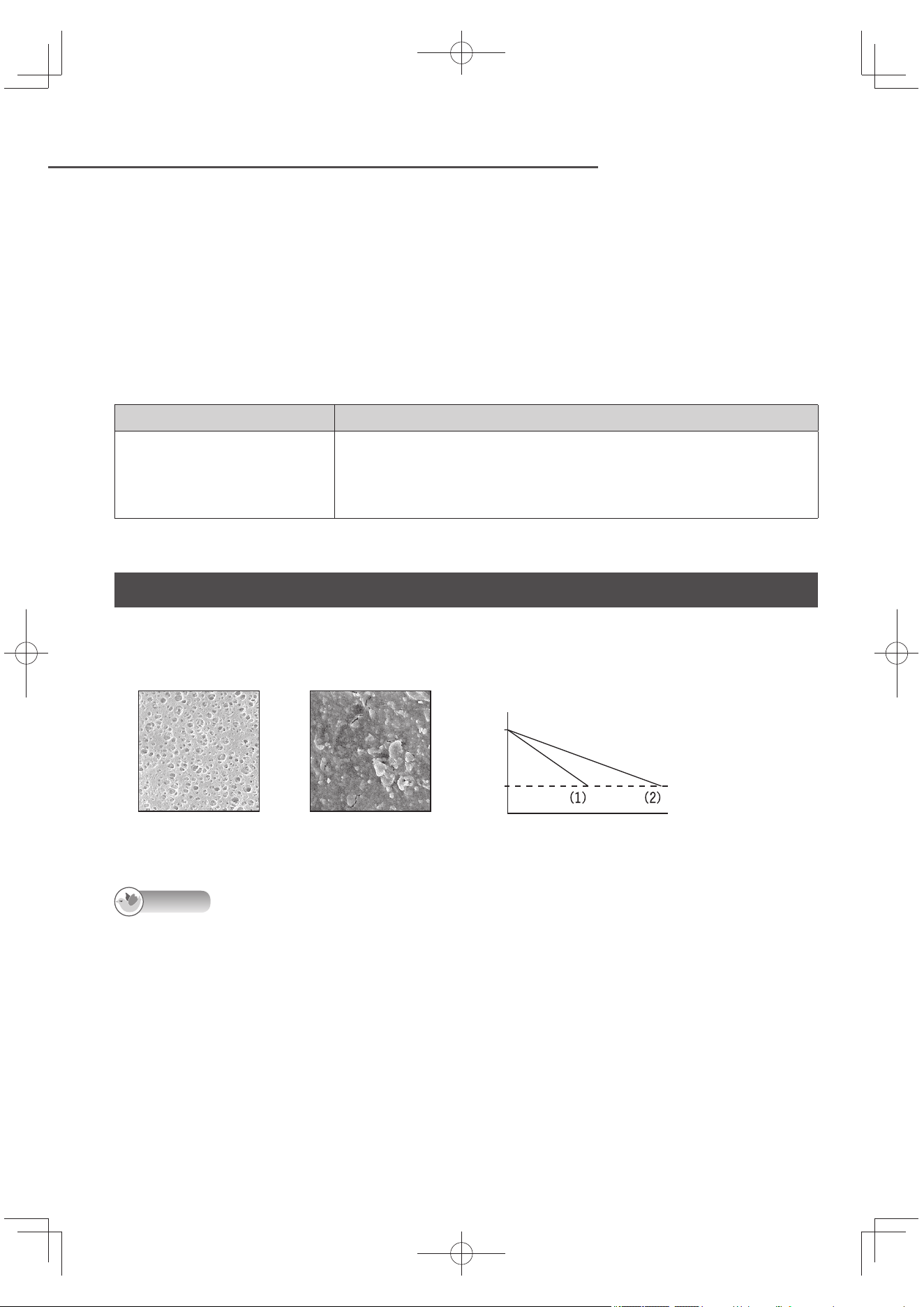
EN36
Before Replacing the Cartridge (continued)
Even if U25 or U26 is not displayed, replace the cartridge when:
The water has an unpleasant odor or taste (this means that the cartridge’s ability to fi lter out these
impurities has deteriorated).
The period of time (about 1 year) that serves as a general guideline for when to replace the
cartridge has passed.
Period of time serving as a general guideline for when to replace the cartridge (for
a year using 30 liters per day)
(Replacement cartridge: Model number TK-AS45C1-EX) (P. EN49)
Replacement guideline Substances removed by cartridge
About 1 year
Free residual chlorine, turbidity, total trihalomethane, chloroform,
bromodichloromethane, dibromochloromethane, bromoform,
tetrachloroethylene, trichloroethylene, 1,1,1-trichloroethane, CAT,
2-MIB (mold smell), soluble lead
Diff erences in usage period by water quality
Inside the cartridge is a hollow fi ber membrane fi lter for removing microscopic dirt. The cartridge’s life
will be shortened when the Alkaline Ionizer is used with a quality of water containing many clogging
substances.
Hollow fi ber membrane
surface (new fi lter)
Clogged hollow fi ber
membrane surface
Clogging
guideline
Volume of
water purifi ed
Total volume of
run-through water
(1) Water containing
many clogging
substances
(2) Water with
standard quality
Note
The volume of water coming out of the Alkaline Ionizer may be reduced when:
The water temperature is low (because the water does not run through the cartridge so easily).
The Alkaline Ionizer is used in areas where the water pressure is low (under 70 kPa).
The pressure of the tap water has dropped because of the demand for tap water in the area concerned.
Immediately after a period when the water supply was shut off such as during plumbing work.
TK-AS66-ZEXEn.indb36TK-AS66-ZEXEn.indb36 2017/01/3015:04:232017/01/3015:04:23
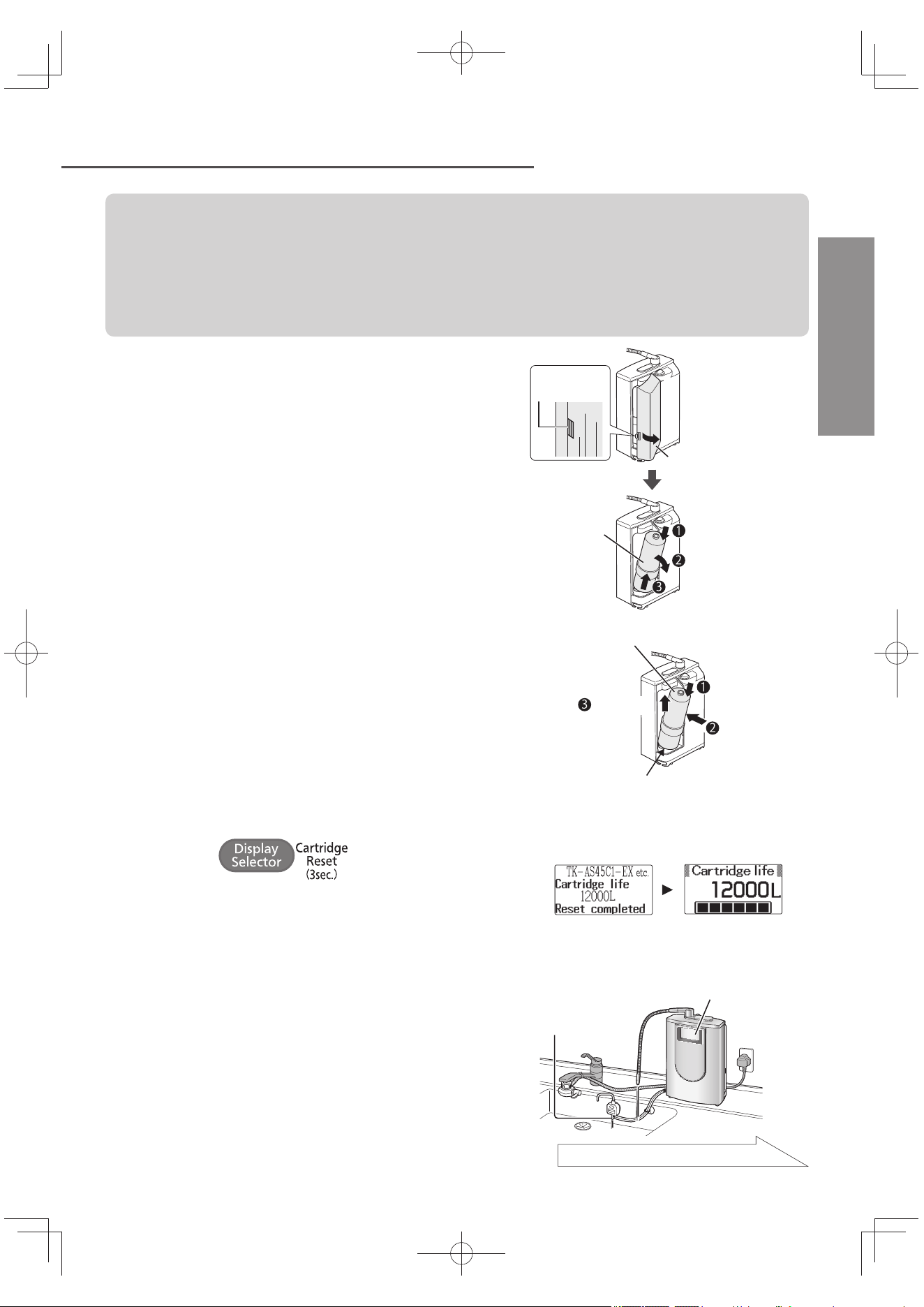
EN37
Replacing the Cartridge
English
Replace the cartridge without disconnecting the power plug.
(The cartridge life cannot be reset when the power plug is disconnected.)
Do not replace the cartridge with the condition of main unit fl at.
Do not place the main spout upwards.
Before replacing the cartridge, turn off the faucet. Do not run water through the
Alkaline Ionizer with the cartridge removed. (Doing so will cause the water to overfl ow.)
1
Remove the cover, and then
remove the cartridge.
Take care since water will drip from the
cartridge. Water may also emerge from the
bottom of the unit (this does not indicate that
there is a leak).
Do not place the unit on its side or upside down
with the cartridge removed (since water may get
inside the unit and cause malfunction).
Push
slightly
Cover
Push down on the top
Pull toward you
Pull up and out
Cartridge
2
Install the new cartridge.
After putting the cartridge in place, push it up.
New cartridge
Push up
Align the center of the bottom of the cartridge
with the center of the cartridge hole, and
while pressing it down, push the cartridge in.
3
Press
(for about 3 seconds).
The “Reset completed” display appears, and about
3 seconds later the “Cartridge life” display appears.
Refer to the displays on the right, and check whether
the remaining cartridge life has been reset correctly.
Reset completed
screen
Cartridge life
display
4
Open the faucet, and
run purifi ed water through the Alkaline
Ionizer (for about 3 or 4 minutes).
When water is run through the Alkaline Ionizer, “Preparation
time” blinks for about 20 seconds on the LCD display.
While water is running through the Alkaline Ionizer, check
that water is not leaking from the area where the cartridge
was installed and that water is coming out of the drain outlet.
Continued on next page
Drain outlet
LCD display
TK-AS66-ZEXEn.indb37TK-AS66-ZEXEn.indb37 2017/01/3015:04:232017/01/3015:04:23
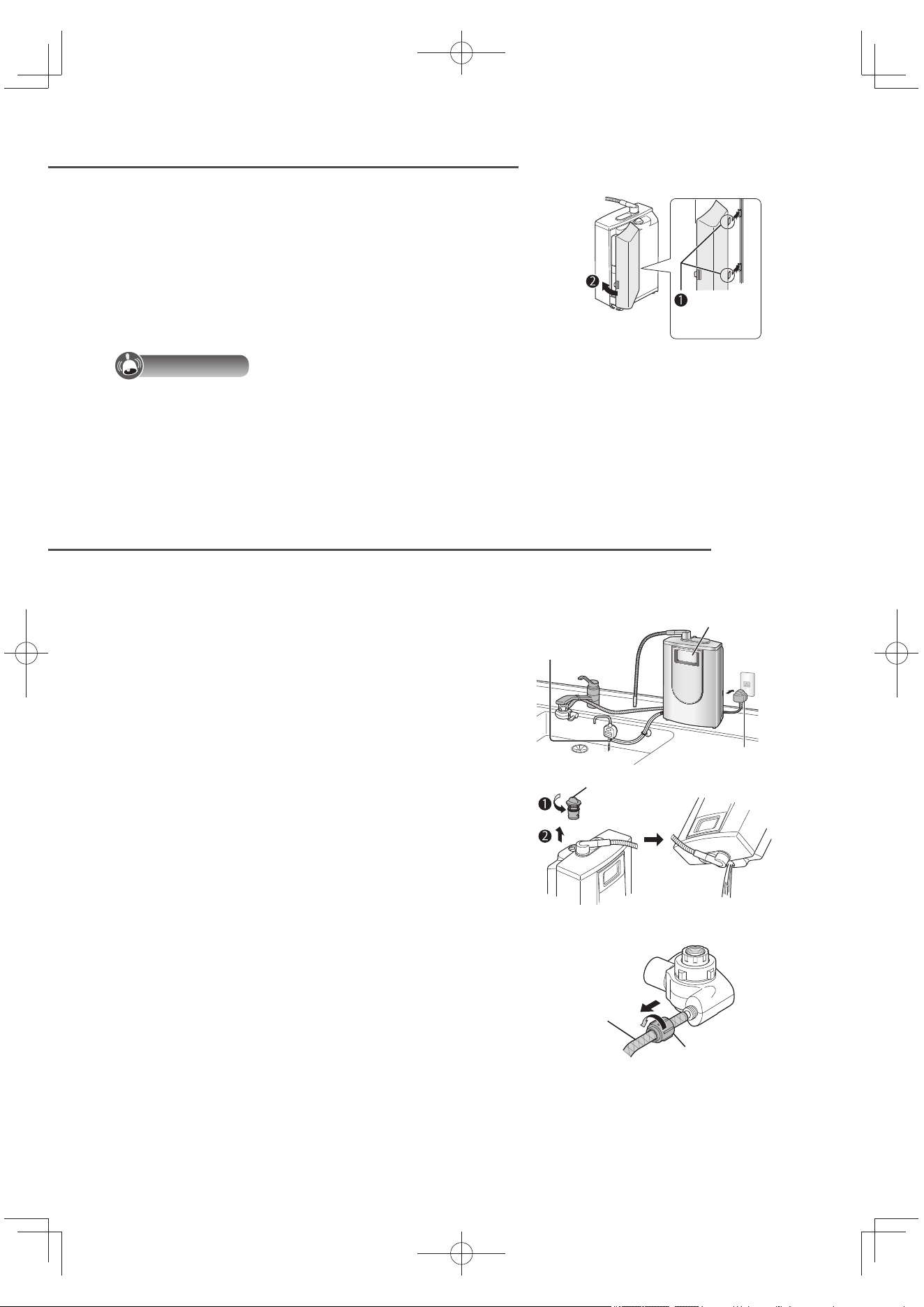
EN38
Replacing the Cartridge (continued)
When Moving the Alkaline Ionizer
5
Turn off the faucet, and
put the cover back on.
Engage the
tabs here.
Important
Dispose of the used cartridge in accordance with the applicable ordinances in the area
concerned.
Even replacing the cartridge before U25 or U26 is displayed, the cartridge life display should be
reset according to step 3 in order to display the remaining cartridge life correctly.
Follow the steps below to drain off the water in the Alkaline Ionizer.
1
Disconnect the power plug,
and connect it again.
“Preparation time” blinks for about 15
seconds on the LCD display, and water
comes out of the drain outlet.
Repeat this step two or three times, and
disconnect the power plug.
LCD display
Power plug
Drain outlet
2
Remove the cap, turn the unit upside
down, and
drain off the inside water.
Cap
3
Disconnect the water supply
hose from the bypass
selector.
After disconnecting the water supply
hose, put the hose fastening nut back on
the bypass selector (to ensure that the nut
is not misplaced or lost).
Drain off the water inside the bypass
selector.
Loosen the hose
fastening nut
Water supply hose
TK-AS66-ZEXEn.indb38TK-AS66-ZEXEn.indb38 2017/01/3015:04:242017/01/3015:04:24
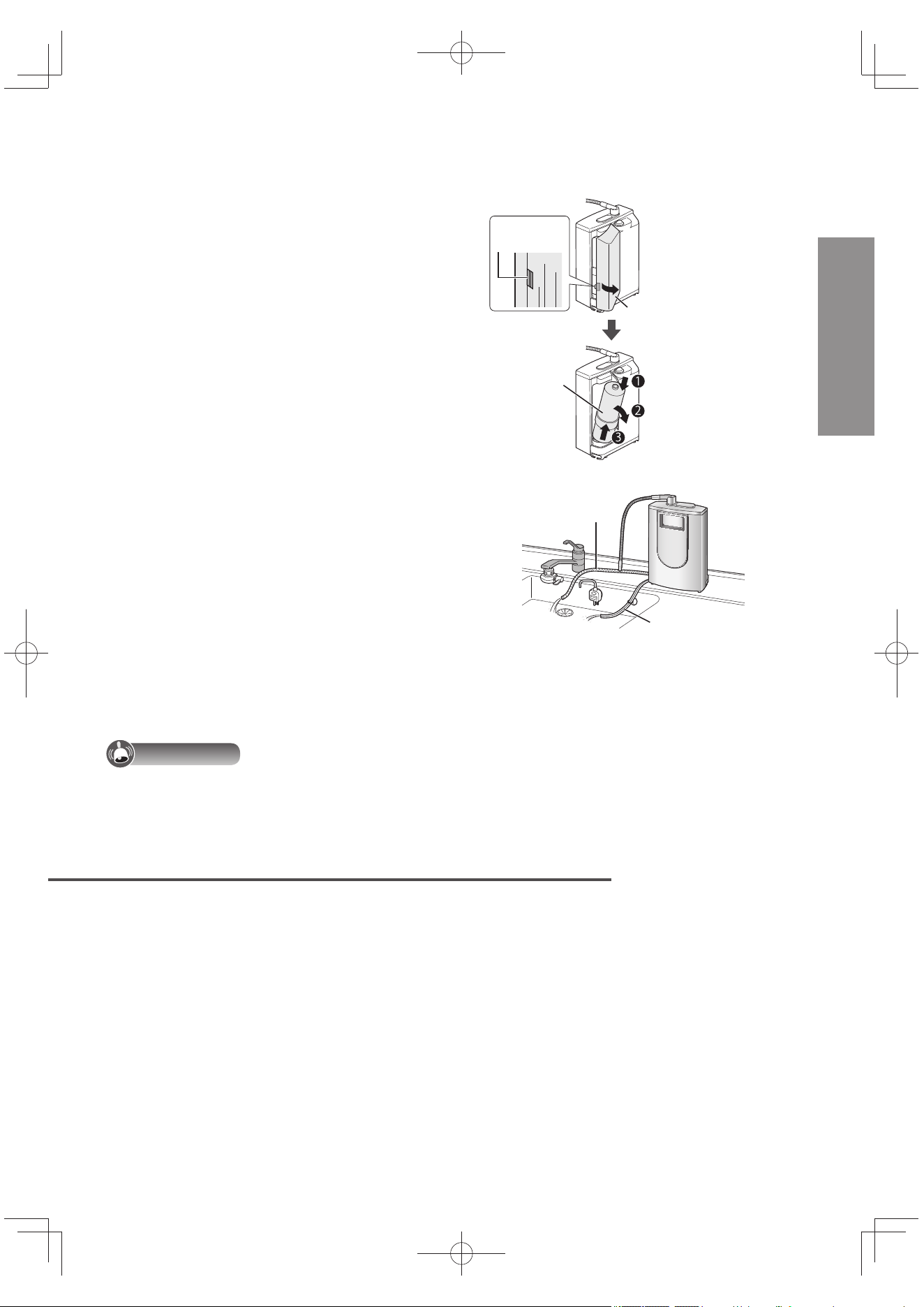
EN39
English
4
Remove the cartridge.
Do not place the unit on its side or upside
down with the cartridge removed (since
water may get inside the unit and cause
trouble).
Push
slightly
Cover
Push down on the top
Pull toward you
Pull up and out
Cartridge
5
Put the end of the water supply hose
at a position lower than the bottom of
the unit, and
drain off the water inside the
hose.
Disconnect the acidic water and drain
hoses from the acidic water stand, and
put them at a position lower than the
bottom of the unit.
Return the cap and cartridge to their
original positions.
Acidic water and
drain hoses
Water supply
hose
Important
Not all the water may be adequately drained off in this process so factor in water leaks and pack the
Alkaline Ionizer accordingly when transporting it.
When not in use for a long time
If you will not use this unit for a week or more, make sure to follow the instructions below.
1
Remove the cartridge from the unit (P. EN37), put it inside a
plastic bag, and then store the bag in the refrigerator.
Remove the air from the bag before closing it.
2
Disconnect the power plug.
To use this unit again
1) Install the cartridge. (P. EN37)
2) Connect the power plug.
3) Run water through the Alkaline Ionizer for about 3 minutes.
If you are not going to use the Alkaline Ionizer for a month or more, the water inside the
cartridge may have gone bad so it is recommended that you replace the cartridge.
TK-AS66-ZEXEn.indb39TK-AS66-ZEXEn.indb39 2017/01/3015:04:242017/01/3015:04:24
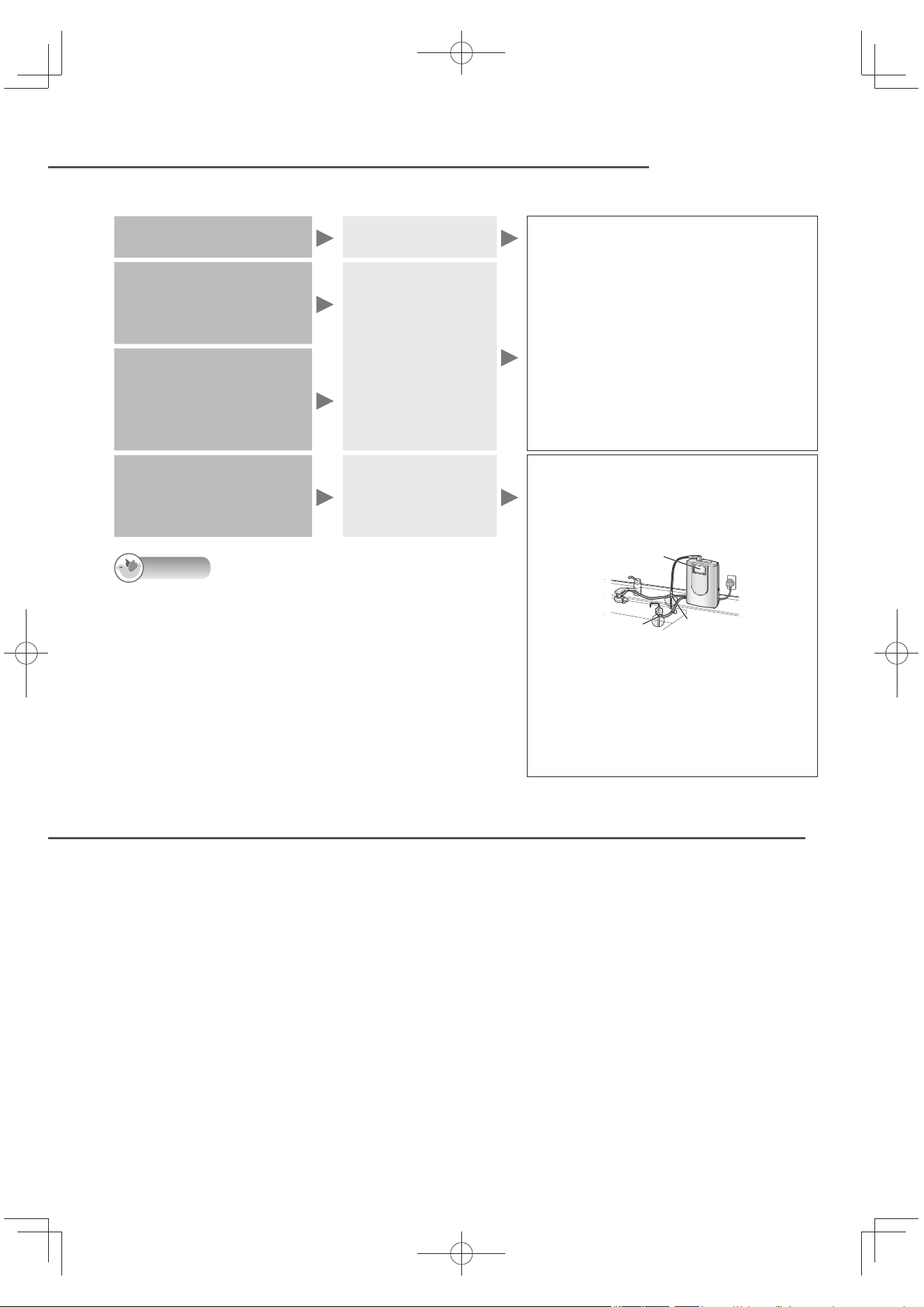
EN40
Automatic Electrode Cleaning
When the Power or Water Supply is Cut Off
This operation automatically removes the calcium deposits on the electrode plates inside the main unit.
After producing weak
acidic water
When the faucet
is turned off
Automatic electrode cleaning is
performed for up to 50 seconds or so.
“Electrode cleaning” blinks on the
LCD display.
Water comes out of the drain outlet,
but do not use it.
Do not run water through the Alkaline
Ionizer during automatic electrode cleaning.
Automatic electrode cleaning is not
performed while the timer is being used.
Whenever alkaline
ion water or weak
acidic water has been
produced 10 times
When the faucet
is turned off
If, while the
Continue lamp
is lighted, the
lamp goes off
Whenever total run
through volume of
alkaline ion water or
weak acidic water
reaches about 10 liters
When the Alkaline
Ionizer has not been
used for 24 or more
hours
When alkaline ion
water or purifi ed
water runs through
the Alkaline Ionizer
Automatic electrode cleaning is
performed for about 15 seconds.
The buzzer beeps for about 3 seconds.
“Electrode cleaning” blinks for about 10 seconds.
Main spout
Drain outlet
Do not turn off the water supply
until automatic electrode cleaning is
completed.
Do not use the water which comes out
of the main spout or drain outlet. Start
using it after the buzzer has beeped
three times.
Note
Water may drip or trickle from the main spout during
automatic electrode cleaning: this is normal and does not
indicate any trouble.
Even after the “Electrode cleaning” display has stopped
blinking, water may still come out of the drain outlet.
Automatic electrode cleaning is not performed while the
Continue lamp is lighted
.
When the power supply is cut off
Turn off the faucet if the power is cut off while the Alkaline Ionizer is being used.
Purifi ed water comes out of the main spout if water is run through the Alkaline Ionizer while the
power is off .
After the power is restored, the Alkaline Ionizer can be used again as usual. (After the power
comes back on, the “Alkaline 1” (New Users) setting is automatically restored.)
Even when the power has failed, the settings establishing in the setting mode will not be lost.
When the water supply is cut off
The Alkaline Ionizer cannot be used.
If the water is cut off during use, turn off the faucet.
When the water supply is restored, set the bypass selector to “Unpurifi ed” or “Shower”, and fi rst
run unpurifi ed water (tap water) into the sink to run out the air and turbid water inside the pipes.
The Alkaline Ionizer may then be used again as usual.
(This is because the cartridge life will be signifi cantly reduced if water with air or turbidity is run
through the Alkaline Ionizer.)
TK-AS66-ZEXEn.indb40TK-AS66-ZEXEn.indb40 2017/01/3015:04:242017/01/3015:04:24
EN41
Q&A
English
Before use
Isn’t it possible to use underground water for the Alkaline Ionizer?
Underground water cannot be used.
The quality of underground water is unstable, so please use the tap water.
What is the point of the eff ects that the properties of source water (tap water) have on the
water produced by the Alkaline Ionizer?
Consult the table below.
The water obtained using the Alkaline Ionizer may not be suffi ciently alkaline if the water has a high carbonic acid
content.
In a case like this, boil the alkaline ion water to remove the carbonic acid and obtain the intended alkalinity. Also, in
areas where the hardness of water* is high , the water may be turbid and white.
With underground water or source water containing underground water, set the alkalinity to “Stronger” using the “pH
fi ne adjustment” since alkalinity may be hard to obtain when using the Alkaline Ionizer.
Coastal areas,
islands
Hot spring areas
Water with a high
concentration of carbonic
acid (underground water)
Hard water Soft water
Properties of
source water
Salt water may
be mixed in
with the source
water.
The source water
contains sulfur so it
tends to be acidic.
Carbonic acid gas is mixed in
with the source water which
tends to be acidic; the water
has a high concentration of
minerals so it is easier for
electricity to be conducted.
The water has a
high concentration
of minerals so it is
easier for electricity
to be conducted.
The water has a
low concentration
of minerals so
it is diffi cult for
electricity to be
conducted.
Properties of
electrolyzed
alkaline ion
water
Tends to more
alkaline.
Tends to make
alkaline ion water
more neutral due to
the sulfate ions.
Tends to be more neutral
due to the carbonic acid gas.
Tends to more
alkaline.
Tends to less
alkaline.
Points on
using alkaline
ion water
Use the “Milder”
setting for the
alkalinity.
Use the “Stronger”
setting for the
alkalinity. Reduce the
fl ow of water at the
faucet so that only a
small volume of water
is run through the
Alkaline Ionizer.
Use the “Stronger” setting
for the alkalinity. Reduce the
fl ow of water at the faucet
so that only a small volume
of water is run through the
Alkaline Ionizer.
Use the “Milder”
setting for the
alkalinity.
Use the “Stronger”
setting for the
alkalinity. Reduce
the fl ow of water at
the faucet so that
only a small volume
of water is run
through the Alkaline
Ionizer.
*: Hardness of water:
Whether water is classifi ed as hard or soft depends on the concentration of the calcium and
magnesium in the water.
During use
I just drank some acidic water by mistake.
It is OK?
Small quantities (a glassful or so) will not cause any
problems.
However, you should not keep drinking acidic water.
If you have drunk large quantities by mistake and do
not feel well, consult a doctor.
Will the Alkaline Ionizer remove lead
(soluble lead) from the water?
Yes, it will.
What does a service life of 850 hours for
the electrolyzer mean?
This fi gure represents the total time that electrolysis
can be performed by the electrolyzer, and it means
that the electrolyzer will last for about 7 years when
the Alkaline Ionizer is used for 20 minutes a day.
The electrode plates are worn down by the electricity
passing to the electrolyzer. If the “H31” code appears
on the display, it means that the electrolyzer has
come to the end of its service life. Ask your dealer to
replace the electrolyzer.
Continued on next page
TK-AS66-ZEXEn.indb41TK-AS66-ZEXEn.indb41 2017/01/3015:04:252017/01/3015:04:25
EN42
Q&A (continued)
What should I do when I’m not going to
use the Alkaline Ionizer for a prolonged
period (more than a week or so as a
general guide)?
See P. EN39.
Do I leave the Alkaline Ionizer’s power on
when I won’t be using the Alkaline Ionizer?
Leave the power on even while you’re not using the
Alkaline Ionizer.
One reason is so that the electrodes need to be
automatically cleaned. Another reason is that the
volume of all the water which has run through the
Alkaline Ionizer will not be totalized if the Alkaline
Ionizer is used with its power off and, as a result, the
cartridge life will not displayed correctly.
What are the proportions of the water
that comes out of the main spout and
the water that drains out of the Alkaline
Ionizer?
See P. EN51.
What’s the maximum temperature of the
hot water that can be run through the
Alkaline Ionizer?
You can use hot water up to 35 °C. (P. EN23)
When you set the bypass selector on “Unpurifi ed” or
“Shower”, you can use hot water up to 80 °C.
Why has the “U25” code (end of cartridge
life due to clogging) appeared on the
LCD display before the general guideline
for when to replace the cartridge has
appeared?
“U25” will also appear when the volume of water
passing through the Alkaline Ionizer or its pressure
has dropped. (P. EN35 ~ EN36)
Check whether the water volume has dropped
because of a reduction in water pressure or whether
the water supply hose is bent or fl attened. Also, the
cartridge may already be clogged due to the kind
of water source used, in which case replace the
cartridge.
Why does the weak acidic water have
an odor (it smells like swimming pool
water)?
It’s because weak acidic water contains a lot of
hypochlorous acid. There’s no problem if you use it
as is.
Electrolysis causes the chlorine ions in the water to
collect in weak acidic water, forming hypochlorous
acid.
Will I get noise in my radio if I put a radio
near an Alkaline Ionizer?
Yes, you may. If so, move the radio away from the
Alkaline Ionizer.
Alkaline ion water
I’m a new user of alkaline ion water. What
steps do I need to take?
If you’re a new user, use the Alkaline Ionizer at the
“Alkaline 1” (Drinking water for new user) setting fi rst.
Use small volume (1 to 2 cupfuls) every day for about
two weeks to get used to alkaline ion water. Then
change the setting to “Alkaline 2” (Drinking water for
Experienced user) setting or “Alkaline 3” (Drinking
water in daily life).
Is it ok to take a medication with the
alkaline ion water?
Use the Purifi ed Water setting for the water to take
your medicine with.
You can use alkaline ion water for drinking, cooking
and purposes other than taking medicine.
What should I do if I get diarrhea or a
rash after I start drinking alkaline ion
water?
Stop drinking alkaline ion water, and consult a doctor.
While consulting the doctor, say that:
The alkaline ion water you’ve been drinking has
more calcium, magnesium, sodium, potassium
and other minerals than tap water.
The water you’ve been drinking has an alkalinity
with a pH level of 8 to 9 (at the New Users setting).
I have kidney trouble. Is it ok for me to
drink alkaline ion water?
Consult a doctor before drinking alkaline ion water.
While consulting the doctor, say that:
The alkaline ion water you are thinking of
drinking has more calcium, magnesium, sodium,
potassium and other minerals than tap water.
The water you are thinking of drinking has an
alkalinity with a pH level of 9.5 or so.
How much calcium is contained in
alkaline ion water?
Due to electrolysis, there are 20 to 30% more
calcium ions in alkaline ion water than in the source
water.
TK-AS66-ZEXEn.indb42TK-AS66-ZEXEn.indb42 2017/01/3015:04:252017/01/3015:04:25
EN43
English
How long do the alkaline ion water and
purifi ed water “keep”?
Use it within 24 hours at room temperature.
When alkaline ion water is produced, the chlorine
(sterilizer) in the tap water is removed off , making it
easier for bacteria to proliferate.
Even when storing alkaline ion water in the
refrigerator, keep it in a clean sealed container, and
use it within 2 days.
Also use weak acidic water within 2 days.
Can I use alkaline ion water to make
ice?
Yes, you can.
Use the ice made from alkaline ion water in the same
you would with the ice made from tap water.
If you store alkaline ion water in the tank of a
refrigerator equipped with an automatic ice-making
function, change the water within 2 days.
What else can I do with alkaline ion water
besides drinking it?
You can use it for cooking, making rice, making
tea or coff ee just as you would with regular water.
(P. EN18)
What is the white powder that’s deposited
on the inside of the kettle and thermos
fl asks?
It’s the calcium from the water.
There is no problem if you drink the water, but if it
bothers you, clean the containers concerned. If the
white powder is not removed by cleaning, obtain
some citric acid from a pharmacy, mix 50 g with 1
liter of water, leave to soak in the containers for 2 or 3
days, and then rinse the deposit off .
What is the white stuff that fl oats in the
water which is produced when ice made
using alkaline ion water has melted?
These are minerals contained in the water.
When water is frozen, the minerals solidify on the
surfaces of the ice. There is no problem if you
swallow the white bits.
When I use alkaline ion water to cook
rice, the rice becomes sticky. What can I
do about this?
The rice may be sticky or yellow depending on
the amount of water and the type of rice and rice
cooker used. Either reduce the pH (hydrogen ion
concentration) level of the alkaline ion water or use
the Alkaline Ionizer at the “Purifi ed Water” setting.
What kind of water should babies be
drinking?
Water produced at the “Purifi ed Water” setting is
recommended for babies.
As babies are weaned, start using alkaline ion water
gradually with the “Alkaline 1” (Drinking water for new
user) setting.
Cartridge
I’ve been using the cartridge for over a
year and the replace cartridge display
has still not appeared. Does this mean I
don’t have to replace the cartridge?
You should replace the cartridge.
Although it has seen less use and its fi ltering
performance is still satisfactory, its activated carbon
may deteriorate rapidly due to changes in the water
quality or other factors so replace it after using it for
a year.
I want to replace the cartridge.
What type should I use?
Use the cartridge with the TK-AS45C1-EX model
number.
Acidic water
What is the pH level of the acidic water
which comes out of the acidic water
spout while alkaline ion water is coming
out of the main spout?
See P. EN51.
TK-AS66-ZEXEn.indb43TK-AS66-ZEXEn.indb43 2017/01/3015:04:262017/01/3015:04:26
EN44
Error Code
When one of the following codes appears on the LCD display, take the suggested action described
below. If a code from H31 to H39 has appeared, do NOT attempt to disassemble and repair the
Alkaline Ionizer yourself, but contact your dealer.
Error code Cause and remedial action
U21 • U27
Depending on the water quality and environment, electrolysis may be
suspended in order to protect the Alkaline Ionizer. (Purifi ed water will
come out of the main spout.)
Turn off the faucet, wait about 3 minutes, and then resume use.
U22 • U23
Depending on the water quality and environment, electrolysis may be
suspended in order to protect the Alkaline Ionizer. (Purifi ed water will
come out of the main spout.)
Turn off the faucet, discontinue use, and wait about 30 minutes.
(Depending on the water quality and environment, you may have to wait
more than 30 minutes.)
U25
This appears
alternately with the
“Replace Cartridge”
message.
The cartridge has reached at the end of its service life due to
clogging. (The water fl ow does not exceed 1.2 liters/minute.)
Replace the cartridge after checking water fl ow shortage due to
decrease in water pressure, bend or collapse of the hose.
U26
This appears
alternately with the
“Replace Cartridge”
message.
The total run-through volume of water serving as the guideline for
cartridge replacement (12 000 liters) has been exceeded.
Replace the cartridge. (P. EN37 ~ EN38)
U28
This is the electrolyzer service life warning. (It warns that the total
electrolysis time has reached about 847 hours.)
Consult your dealer.
The service life of the electrolyzer is about 850 hours. When the water
supply is shut off and the power plug disconnected and then re-
connected, the electrolyzer can be used for the remaining hours of its
service life (for about 3 weeks at a daily rate of 10 minutes).
H31
The electrolyzer has reached the end of its service life.
Total electrolysis time: About 850 hours (only the ion water production time
and cleaning time)
Ask your dealer to replace the electrolyzer.
H32 ~ H39
The Alkaline Ionizer has failed.
Disconnect the power plug, and consult your dealer.
TK-AS66-ZEXEn.indb44TK-AS66-ZEXEn.indb44 2017/01/3015:04:262017/01/3015:04:26
EN45
Troubleshooting
English
If you think that something is wrong with the Alkaline Ionizer, check out the following points before
requesting repairs. If you decide that trouble has occurred, do NOT attempt to disassemble and repair
the Alkaline Ionizer yourself, but contact your dealer.
Sometimes suspected trouble is remedied by disconnecting the power plug and then re-connecting
it.
When the LCD display shows the following:
Symptom Check following point
Reference
page
English is not displayed on
the LCD.
This is because the English display mode has not been
selected.
Take the steps to switch to the English display mode.
EN19
English is displayed on the
LCD.
This is because switching to the English display mode has
been undertaken.
Take the steps to switch the display language, and return to
the Chinese display mode.
EN19
The displays in the setting
and check modes are not in
English.
The displays cannot be shown in English in the setting and
check modes.
(This is not a malfunction.)
EN19
No display at all or LCD
display is cleared suddenly
The display is cleared automatically when the Alkaline Ionizer
is not being used.
(This is not a malfunction.)
EN19
Is the power plug disconnected?
If it is, connect it.
–
The “Preparation time”
display blinks
This display appears for about 20 seconds when water runs
through the Alkaline Ionizer immediately after installation or
cartridge replacement.
The air inside the cartridge is being expelled. Keep running
the water for 3 or 4 minutes.
EN9
EN37
The “Electrode cleaning”
display blinks
The electrodes are being automatically cleaned.
Keep running the water for about 15 seconds.
EN40
The display changes to
“Alkaline” after “Alkaline 4
(Strongly Alkaline)”, “Weak
Acidic” or “Purifi ed Water”
was used
When the faucet is turned off after the Alkaline Ionizer is used
at the “Alkaline 4 (Strongly Alkaline)”, “Weak Acidic” or “Purifi e d
Water” setting, the “Alkaline” setting is automatically restored.
(This is not a malfunction.)
EN21
The display does not return
to “Alkaline” after the
Alkaline Ionizer was used at
the “Purifi ed Water” setting
Has “OFF” been selected for “Alkaline priority” so that the
Alkaline setting will not be returned?
Set “Alkaline priority” to ON.
EN32
Does this happen while the Continue lamp is lighted?
(This is not a malfunction. The “Alkaline” setting will be
returned after about 10 minutes.)
EN21
When the water fl ow is
reduced at the faucet during
use, the display suddenly
changes to “Cartridge life”
This happens when the water fl ow is reduced too much or the
fl ow is diminished due to a change in the water pressure.
When using the Alkaline Ionizer at the “Alkaline 4 (Strongly
Alkaline)”, “Weak Acidic” or “Purifi ed Water” setting, press
the water quality selector button again, turn on the faucet,
and adjust the fl ow.
EN22
Continued on next page
TK-AS66-ZEXEn.indb45TK-AS66-ZEXEn.indb45 2017/01/3015:04:262017/01/3015:04:26
EN46
Troubleshooting (continued)
Symptom Check following point
Reference
page
“Replace cartridge and
press switch display for
about 3 seconds.” message
appears on the display
The fl ow has diminished because of cartridge clogging or some
other reason.
Disconnect the power plug and then re-connect it. If
operation is continued and the “U25” code appears, replace
the cartridge.
EN35
The “U25” or “U26” code is
not cleared even after the
cartridge is replaced
Have you forgotten to reset the cartridge life?
Refer to step 3 in the procedure of “Replacing the cartridge”,
and reset the cartridge life.
Did you reset the cartridge life with the power plug
disconnected?
Connect the power plug, and then reset the cartridge life.
EN37
The “U26” code does
not appear even after
the time (approx. 1 year)
representing the guideline
for when to replace the
cartridge has passed
Has the Alkaline Ionizer seen less use so that the total
run-through volume of water serving as the guideline for
cartridge replacement (12 000 liters) has not been reached
yet?
(This is not a malfunction. Check the cartridge life display.)
Although the fi ltering performance is still satisfactory, the
cartridge’s activated carbon may deteriorate rapidly due to
changes in the water quality or other factors so replace it
after using it for a year.
EN35
~
EN36
Is this a malfunction?
Symptom Check following point
Reference
page
Drain outlet
Water comes out after
the faucet has been
turned off
The water inside the outlet pipe is draining off . EN21
No water comes out
from the acidic water
spout when using
other than purifi ed
water
Are the acidic water and drain hoses bent or fl attened?
If water keeps running, it may cause malfunction. Also It can
not electrolysis correctly.
EN13
~
EN15
Has the “Reduce fl ow” appeared on the LCD display?
Reduce the water fl ow at the faucet slowly until the message
is cleared.
EN22
Acidic water spout
No water comes out
when the Alkaline
Ionizer is used at the
“Alkaline” or “Alkaline
4 (Strongly Alkaline)”
setting
Are the acidic water and drain hoses bent or fl attened?
Straighten out the hoses.
Have the acidic water and drain hoses been connected
correctly?
Check the connection of the hoses to the acidic water stand.
EN13
~
EN15
Has the “Reduce fl ow” appeared on the LCD display?
Reduce the water fl ow at the faucet slowly until the message
is cleared.
EN22
Bypass selector
Water is leaking from
a place other than the
selected spout
The build-up of calcium or other minerals inside the bypass
selector may be to blame.
Obtain some citric acid from a pharmacy, dissolve 50 g in
one liter of water, and after immersing the bypass selector in
the solution for about 12 hours, rinse with water.
–
When the LCD display shows the following: (continued)
TK-AS66-ZEXEn.indb46TK-AS66-ZEXEn.indb46 2017/01/3015:04:262017/01/3015:04:26
EN47
English
Continued on next page
Symptom Check following point
Reference
page
Other
Very little or no water
is discharged from the
Alkaline Ionizer
“Flow reduced”,
“Too much
tightened at the
faucet?” or “Bent
hose?” displays
appear alternately.
Has the fl ow at the faucet been reduced too much?
Open up the faucet.
EN29
Is the water pressure too low?
Open up the faucet all the way and increase the water fl ow
at the main water supply.
Is the fi lter of the bypass selector clogged?
If it is, clean the fi lter.
EN34
Has the cartridge been installed properly?
EN37
~
EN38
Has the water supply been cut off ? EN40
Is the water supply hose bent or fl attened?
EN13
~
EN15
If the display appears again even after taking the above action,
the fl ow has diminished because of a clogged cartridge or other
such reason. Replace the cartridge.
–
Much water comes out
The water amount from the main spout varies depending on
the kind of water and/or selection of the water quality even
though the amount of source water stays constant.
–
“Reduce fl ow” has
become more likely to
be displayed
Maximum fl ow varies depending on the kind of water and/or
selection of the water quality.
The water comes out
from the main spout is
warm.
When water starts to run through the Alkaline Ionizer, water
which was kept at room temperature while no water was
fl owing to the Alkaline Ionizer or water warmed by the heat
inside the Alkaline Ionizer may come out.
Allow the water to keep fl owing for about 0.6 liter (about
15 seconds) before uses.
–
The buzzer does not
sound even when
using the “Weak
Acidic” setting
Has “OFF” been set for the “Weak acidic buzzer” setting? EN31
The water produced by
the Alkaline Ionizer has
an odor or unpleasant
taste or is turbid
The ability of the cartridge to remove odors, unpleasant tastes
and turbidity has deteriorated.
Replace the cartridge.
EN37
~
EN38
The pH level of the
water produced by the
Alkaline Ionizer is not
within the rough pH
level range
The pH level may be a little high when a new cartridge is used
(for the fi rst week or so).
(This is not a malfunction. Measure the pH level again after a
week.)
–
The pH level of weak
acidic water is neutral
If the pH level of weak acidic water is 6.5 or so, it may not be
possible to distinguish it from the pH 7 level (neutral) in the pH Chart.
Test the water coming out of the drain outlet while using the
“Weak Acidic” setting, and if it is 10 to 11, it means that the
pH level for weak acidic water is 6.5 or so.
–
TK-AS66-ZEXEn.indb47TK-AS66-ZEXEn.indb47 2017/01/3015:04:262017/01/3015:04:26
EN48
Troubleshooting (continued)
Symptom Check following point
Reference
page
Others
Sounds are heard from
the unit after the faucet
has been turned off
These sounds are made by the water inside the unit draining
off .
–
There is a big
diff erence between the
water output display
and actual output of
water
Are the acidic water and drain hoses bent or fl attened?
If they are, straighten them out.
Is the height diff erence between the main spout and acidic
water spout more than 10 cm and under 50 cm?
Adjust the height diff erence to a value ranging from 10 to
50 cm.
EN13
~
EN15
Have you set the height diff erence between the main spout and
acidic water spout?
Set the height diff erence.
EN27
If there is still a big diff erence between the water output display
and actual output of water even after taking the above action,
follow the steps of “Correcting the water output display”.
EN28
When a dryer is used,
sounds are heard from
the unit
Sounds may be heard with some dryers.
(This is not a malfunction.)
–
The pH level of alkaline
ion water does not
indicate alkalinity
Is “Alkaline” set for the water quality (or has “Weak Acidic” or
“Purifi ed Water” been set)?
Switch to “Alkaline” using one of the water quality selector
buttons.
EN20
Depending on the water quality, the water’s alkalinity may not
be indicated (because of the eff ects of carbonic acid in the
water).
(This is not a malfunction. Using “pH fi ne adjustment”, set the
alkalinity to “Stronger” for use.)
EN24
EN41
Are the acidic water and drain hoses bent or fl attened?
If they are, straighten them out because otherwise
electrolysis will not be performed properly.
EN13
~
EN15
It is becoming diffi cult
for the pH level to rise
Calcium has built up inside the Alkaline Ionizer, causing a
deterioration in the electrolytic performance.
–
The weak acidic water
has an odor (it smells
like swimming pool
water)
Electrolysis causes the chlorine ions in the water to collect in
weak acidic water, forming hypochlorous acid.
(This is not a malfunction.)
EN42
White suspended
matter is mixed in with
the alkaline ion water
This is calcium which has built up inside the Alkaline Ionizer.
(It can be used.)
–
Not much water comes
out of the Alkaline
Ionizer after the
cartridge has been
replaced
Did you fl ow water for 3 to 4 minutes? (This is necessary to
expel air inside the cartridge.)
EN37
Water drips or trickles
out of the main spout
even when the water is
cut off
The water inside the outlet pipe is being expelled.
(This is not a malfunction.)
EN21
Is this a malfunction? (continued)
TK-AS66-ZEXEn.indb48TK-AS66-ZEXEn.indb48 2017/01/3015:04:262017/01/3015:04:26
EN49
English
When there is a water leak
Place where the water leaks
Check following point
Reference
page
Area where the bypass
selector is connected
Has the bypass selector been installed on the faucet securely?
If not, install it securely.
EN10
~
EN12
Have the parts inside the bypass selector been inserted
properly?
If not, insert them properly.
EN34
Area where the water supply
hose is connected
Has the water supply hose been connected securely to the
bypass selector?
Insert the hose as far as it will go, and tighten it using the
hose fastening nut.
EN14
Area where the outlet pipe
is connected
Has the outlet pipe been connected to the unit securely?
If not, screw it in securely until it will go no further.
Did you install the gasket? Or is the gasket twisted?
Install the gasket properly.
EN15
Top of the unit Has the cap been installed securely on the unit? EN39
Bottom of the unit
Has the cartridge been installed securely?
If not, install it securely.
Depending on the temperature and humidity conditions, water
formed from condensation may collect inside the unit.
(This is not a malfunction.)
EN37
~
EN38
Faucet area
Is the faucet gasket old?
Call in a plumber.
Is the faucet (insulating cap, etc.) cracked?
Call in a plumber.
–
Optional Accessories
Obtain all optional accessories from your dealer.
For details on how they are used, refer to the accompanying instructions.
Consumables
Replacement cartridge
Model No.: TK-AS45C1-EX
For use with large faucet
Large-diameter Faucet Fitting (inside diameter 32.5 mm)
Model No.: P-06JRC
For faucets whose end diameter is 24 ~ 32 mm
Wall mounting bracket
Model No.:
P-A3303ZEX
Used when
mounting the unit
on a wall
CAUTION
If you want to install the unit on a wall, ask an authorised
dealer or service personnel to do the job.
Installing the unit yourself may cause the unit to fall and result in an accident.
The location where the unit is to be installed must be able
to support a weight of over 6 kg.
If the installation location does not have enough strength to
support the unit, the Alkaline Ionizer may fall, resulting in an
accident and kitchen damage.
TK-AS66-ZEXEn.indb49TK-AS66-ZEXEn.indb49 2017/01/3015:04:262017/01/3015:04:26
EN50
Specifi cations
Rating 220-240 V ~ , 50 Hz, 0.8 A
Power consumption Approx. 130 W (approx. 1 W during standby)
Main unit
Dimensions Approx. 200(W) × 123(D) × 318(H) mm
Weight Approx. 4.1 kg (approx. 4.6 kg when full of water)
Temperature of water used by Alkaline Ionizer Under 35 °C (under 80 °C for bypass selector)
Pressure of water used by Alkaline Ionizer
(dynamic pressure)
70 kPa to 350 kPa
Usable water service pressure
(static pressure)
70 kPa to 750 kPa
Electrolysis
Electrolysis method Continuous electrolysis
Output water volume
(fl ow of water produced)
2.0 L/min. (at 100 kPa water pressure)
3.0 L/min. (at 200 kPa water pressure)
Electrolysis capability
selection
Alkaline: 4 levels; weak acidic: 2 levels
Continuous operation
capability
Approx. 30 minutes at room temperature (approx. 10 minutes
for Stronger at Alkaline 3 (Drinking water in daily life), Alkaline
4 capability (Strongly Alkaline), Weak Acidic) (Note 2)
Electrolyzer life
Approx. 850 hours cumulative (ion water production time,
cleaning time only)
Electrolytic cleaning
Auto cleaning method (cleaning time: approx. 35 seconds,
waste water drain time: approx. 15 seconds)
Purifi ed water output volume 2.5 L/min. (at 100 kPa water pressure)
Filtration fl ow volume 2.5 L/min. (at 100 kPa water pressure)
Cartridge Installed In the unit TK-AS45C1-EX
Purifi cation
capacity
(Note 1)
Free residual chlorine 12 000 L (Note 3)
Turbidity 12 000 L (Note 4)
Total trihalomethane 12 000 L (Note 3)
Chloroform 12 000 L (Note 3)
Bromodichloromethane 12 000 L (Note 3)
Dibromochloromethane 12 000 L (Note 3)
Bromoform 12 000 L (Note 3)
Tetrachloroethylene 12 000 L (Note 3)
Trichloroethylene 12 000 L (Note 3)
1,1,1-Trichloroethane 12 000 L (Note 3)
CAT 12 000 L (Note 3)
2-MIB (mold smell) 12 000 L (Note 3)
Soluble lead 12 000 L (Note 3)
Substances
other than
above that can
be removed
Iron (particulate form) Can be removed (Note 5)
Aluminium (neutral) Can be removed (Note 5)
Geosmin (mold smell) 12 000 L (Note 5)
Phenols 12 000 L (Note 5)
Guide for time to replace cartridge Approx. 1 year (Note 6)
Filter material
Non-woven fabric, granular activated carbon, ceramic,
powdered activated carbon, hollow fi ber membrane
Components which cannot be fi ltered out
Iron dissolved in water, heavy metals (silver, copper, etc.), salt
(seawater)
Length of power cord Approx. 3 m
Power protection device Current fuse: 2.5 A
Overheating protection devices
(inside isolation transformer)
Overheating protector (automatic resetting type, activated at
temperature of 120 °C)
Thermal fuse (activated at temperature of 145 °C) × 1
TK-AS66-ZEXEn.indb50TK-AS66-ZEXEn.indb50 2017/01/3015:04:262017/01/3015:04:26
EN51
English
Proportions of water from the main
spout and drain outlet
Ratio
Alkaline 1/2/3 4:1
Alkaline 4
(Strongly Alkaline)
4:1
Weak Acidic 4:1
pH level of acidic water from acidic
water spout
Water quality pH level of acidic water
Alkaline 4
(Strongly Alkaline)
2.8 to 3.5
(pH3 or so when the “pH3” water
quality indicator has lighted)
Alkaline 3 3.0 to 4.5
Alkaline 2 4.0 to 5.5
Alkaline 1 5.0 to 6.5
The pH level diff ers depending on the quality and
volume of the water and pH fi ne adjustment level.
All fi gures given are for a water temperature of 20 °C.
This product cannot convert hard water into soft water.
The total volume of water coming out of the main spout, acidic water spout and drain outlet is given as the run
through water volume and daily volume of water used.
Note 1: The water which can be used as alkaline ion water and weak acidic water is equivalent to about 80% of
the fi ltration fl ow volume.
Note 2: This period may be shorter depending on the water quality and usage environment.
Note 3: This value is for a removal rate of 80% based on JIS S 3201 tests.
Note 4: This value is for a fi ltration fl ow volume of 50% based on JIS S 3201 tests.
Note 5: This value is for a removal rate of 80% based on specifi cation standard tests (JWPAS B standards)
stipulated by the Japan Water Purifi er Association (JWPA). Note that the removal of iron (particulate
form) and aluminum (neutral) are not stipulated as part of purifi cation capacity.
Note 6: This period applies when 30 liters of water are used a day. If 60 liters are used a day, the cartridge
usage limit will be approximately one-half. The period may also be signifi cantly less depending on the
amount of water used and on its quality and pressure.
TK-AS66-ZEXEn.indb51TK-AS66-ZEXEn.indb51 2017/01/3015:04:272017/01/3015:04:27
Inspection Check the Alkaline Ionizer you’ve been using for years!
Are any of
the following
symptoms
applicable?
• Nothing appears on the
LCD display even though
the power plug has been
connected.
• An error code (U21 to U28)
has appeared, and it re-
appears even after taking
remedial action.
• An error code (H31 to H39)
has appeared.
• Some other trouble or
failure has occurred.
If any of these symptoms
have occurred, disconnect
the power plug from the
power outlet in order to
prevent accidents, and be
absolutely sure to ask your
dealer to check out your unit.
愛心檢查 請對長年累月使用的鹼性離子整水器進行檢查
是否有這樣的
現象?
•就算已將電源插頭插入,仍 沒
有任何顯示出現
•出現異常顯示(U21
~
U28),
即使處理異常顯示依舊出現
•出現異常顯示(H31 ~ H39)
•出現其他異常現象或故障
出現以上現象時,請停止使用,
避免故障或事故發生。從插座
拔下電源插頭,務必委託經銷
商或Panasonic直屬服務站人
員檢查。
Panasonic Corporation
1006, Kadoma, Osaka 571-8501, Japan
http://www.panasonic.com
© Panasonic Corporation 2017
ZGS0TKAS660Z
H0217H0
Printed in Japan
TK-AS66-ZEXEn.indb52TK-AS66-ZEXEn.indb52 2017/01/3015:04:272017/01/3015:04:27
TC2
使用電解水機
去除污濁物和氣味,使水更清新美味。
電解水機通過電解生成鹼性離子水和弱酸性水。
為您排除以下物質,讓您喝到乾淨美味的水。
JIS標準指定的13種物質
殘留氯、污濁物、總三鹵甲烷、三氯甲烷、二氯一溴甲烷、二溴一氯甲烷、三溴甲烷、四氯乙
烯、三氯乙烯、1,1,1-三氯乙烷、CAT、2-MIB(黴菌臭)、溶解性鉛
日本淨水器協會(4級過濾物質)
鐵(微粒形成)、鋁(中性)、土臭素(黴菌臭)、酚
目錄
前言
安全注意事項 ....................... TC3
使用上的注意事項 ................... TC7
配件 ............................... TC8
查看水龍頭 ......................... TC8
各配件名稱和準備 ................... TC9
配件及準備
安裝分水開關 ...................... TC10
外螺紋水龍頭 ........................TC10
內螺紋水龍頭 ........................TC11
無充氧器的水龍頭時 ..................TC12
安裝本體 .......................... TC13
配件及準備 ..........................TC13
安裝後的確認 ........................TC16
測定 pH 值(離子濃度) ............ TC17
使用前
使用前 ............................ TC18
為了使用方便 ........................TC18
選擇液晶顯示的語言 ..................TC19
關於使用中的液晶顯示 ................TC19
電解信號 ............................TC19
操作
操作 .............................. TC20
使用鹼性離子水、弱酸性水、淨水 ......TC20
使用原水(自來水) ..................TC23
微調 pH 值(離子濃度) ..............TC24
方便使用 .......................... TC25
測量出水量 ..........................TC25
觀察水流量 ..........................TC29
使用計時器 ..........................TC29
設定、確認模式 ......................TC30
其他
維修保養 .......................... TC34
更換濾芯前 ........................ TC35
更換濾芯 .......................... TC37
移動本體時 ........................ TC38
長期間不使用 ...................... TC39
自動電極清洗 ...................... TC40
停電、停水時 ...................... TC40
問題與回答 ........................ TC41
異常顯示內容 ...................... TC43
故障排除 .......................... TC44
另購配件 .......................... TC47
規格 .............................. TC48
TK-AS66-ZEXW.indb2TK-AS66-ZEXW.indb2 2017/01/3020:17:302017/01/3020:17:30
TC3
安全注意事項
中文(繁體)
請確保依照這些指示
為避免發生意外或導致用家或其他人受傷,並損毀財產,請依照以下指示。
以下圖表顯示錯誤操作而招致的受損程度。
警告
表示嚴重受傷亡。
注意
表示受傷風險或財產損毀。
符號分類說明如下。
(以下為符號範例。)
此符號表示禁止。 此符號表示謹遵條件。
警告
電源線和電源插頭
請勿損壞電源線、電源插頭。
(避免因短路、絕緣事故、惡化或其它原因而引致火災或觸電。)
•不用(
)型釘子以固定 •勿讓受損 •不加工 •不彎曲
•不扭折 •不強拉 •不靠近發熱之處
•不放置重物 •不夾住 •不束成一捆使用等
拔除電源時,不可只拉電源線,請握著電源插頭部分拔掉。
若電源線損壞時,必須由製造商、其服務處或具有相關資格的人員加以更換以避免危險。
請勿超載使用多孔插座或配線器具。
(避免多孔插座等超載使用,而因發熱釀成火災。)
請勿用濕的手插拔電源插頭。
(避免引致觸電。)
使用交流 220 V–240 V 的電源。
請確實將電源插頭完全插入插座內。
(可能會冒煙、火災或觸電。)
切勿使用損壞插頭或鬆脫電源插座。
請定期清除電源插頭上的灰塵等。
(當插頭上堆積灰塵時,會因濕氣等而造成絕緣不良,釀成火災。)
拔掉電源插頭,用乾布擦拭。
本體不小心掉落水中時,請先將電源插頭拔掉,再取出本體並停止使用。
(避免發生觸電。)
檢查或維修請聯絡授權經銷商。
出現異常或故障時、請立刻停止使用並拔掉電源插頭。
(可能會冒煙、火災或觸電。)
< 例) 異常操作或故障 >
指示器燈異常。(參閱 TC21 頁)
操作時發出異常噪音。
本體異常地發熱或變形。
檢查或維修請聯絡授權經銷商。
TK-AS66-ZEXW.indb3TK-AS66-ZEXW.indb3 2017/01/3020:17:302017/01/3020:17:30
TC4
安全注意事項 (接續)
供水
請勿使用自來水以外的水源。
由於沒有殺菌處理及沒有去除有害物質,飲用之
後易損害健康(參閱 TC2 頁)
警告
注意
禁止拆卸
請勿自行拆解、修理、改造。
(避免發生火災或觸電。)
檢查或維修請聯絡授權經銷商。
現有狀況和健康問題
患有腎臟病者(特別是對腎功能不全或鉀排泄有障礙者)切勿飲用鹼性離子水。
(避免危害身體健康。)
本產品不預期供生理、感知、心智能力、經驗或知識不足之使用者(包含孩童)使用,除非
在對其負有安全責任的人員之監護或指導下安全使用。
孩童應受監護,以確保孩童不嬉玩產品。請將此使用說明書放於安全的位置。
(否則可能發生事故或危害身體健康。)
符合以下條件者,在飲用鹼性離子水前,請先諮詢醫師。
(否則可能危害身體健康。)
正在接受醫師治療者
帶病者或身體虛弱者(感覺異常者)
腎功能不全和鉀排泄障礙以外的腎臟病患者
符合以下條件者,在使用弱酸性水前,請先諮詢醫師。
(否則可能危害身體健康。)
肌膚脆弱者
過敏性體質者
剛開始飲用的方法,是先由「鹼性 1」開始少量飲用(
約
1 ~ 2 杯),維期 2 週,當身體適
應鹼性離子水後,再以「鹼性 2」或「鹼性 3」。
(開始時飲用鹼性水份量偏高或太多(3 杯以上),會危害身體健康。)
TK-AS66-ZEXW.indb4TK-AS66-ZEXW.indb4 2017/01/3020:17:302017/01/3020:17:30
TC5
中文(繁體)
注意
安裝場所
請勿堵塞出水口,或彎曲、扭曲擠壓、強拉或夾緊水
管。
(避免漏水或阻塞水流水而發生故障。)
出水口處請勿將水管或其他器具接駁到出水口、酸性水
出水口或排水口。
(避免造成漏水或故障。)
如出水管鬆脫,請勿使用本體。
(避免造成漏水或損毀。)
鬆脫的狀況下,請確實鎖緊。
請勿安裝於沒有配備方向控制活門的防逆流裝置熱水
器。
(避免造成熱水器故障。)
請勿安裝在熱水器專用的水龍頭上(無法控制熱水的出
水設計)。
(避免造成熱水器故障。)
本體請設置於平坦的地方。
(避免本體翻落,造成傷害。)
欲將本體設置於壁面時,務必請經銷商或水電行施工。
(避免自己設置,導致掉下或發生事故。)
壁掛設置的場所,必須選擇能夠承受 6 公斤以上重量的
地方。
如安裝場所力度不夠支撐本體,可能會掉下,造成意外及損毀
廚房。
維修保養
請勿濺濕或清洗本
體。
(避免引致漏電、觸電
或故障。)
意外吞下
切勿將配件請放置於
兒童手拿到的地方。
(避免意外吞下配件。)
萬一吞下配件,請立
即找醫師。
請勿讓嬰孩和小童將
包裝當作玩具。
(可能導致窒息。)
TK-AS66-ZEXW.indb5TK-AS66-ZEXW.indb5 2017/01/3020:17:302017/01/3020:17:30
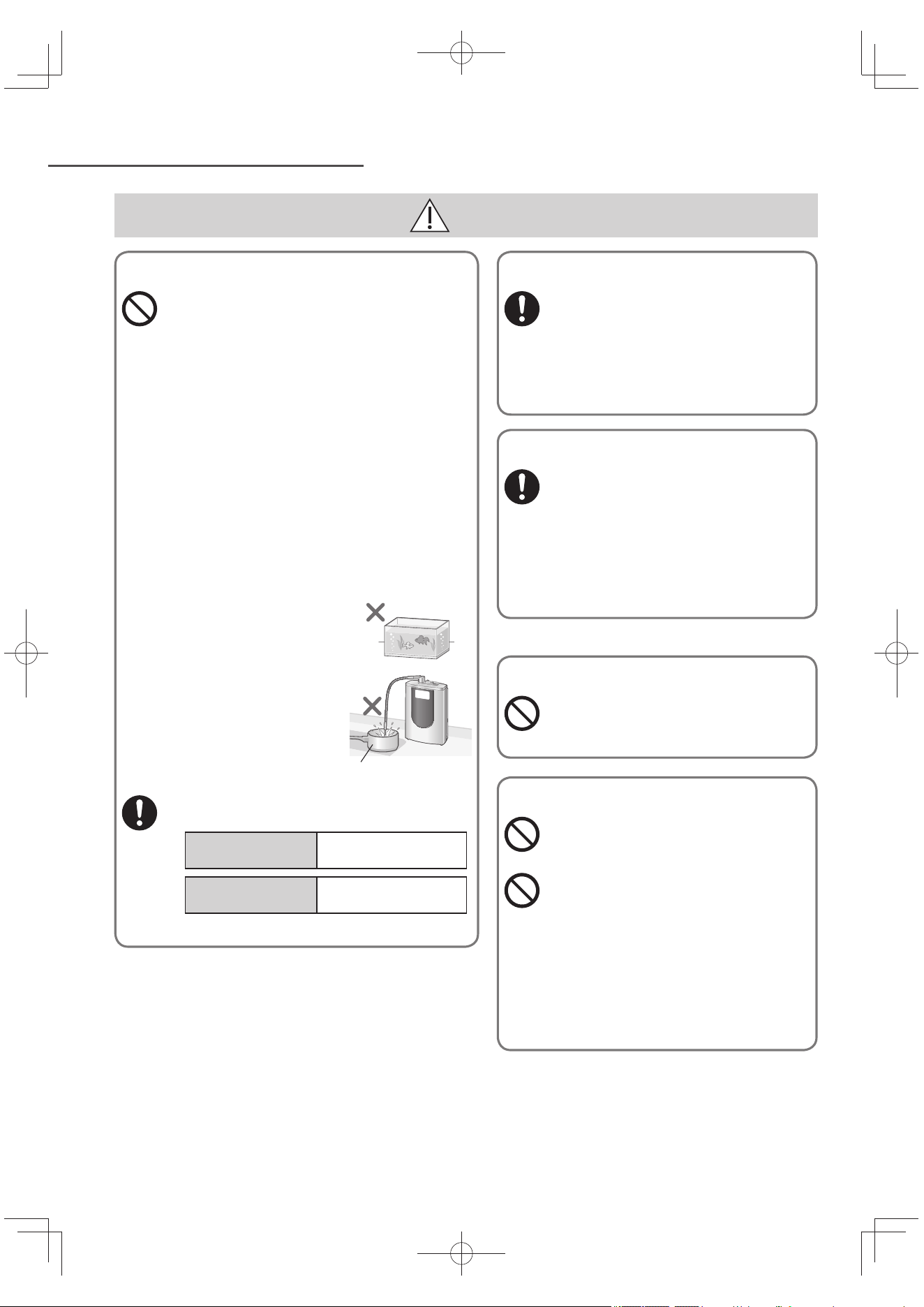
TC6
安全注意事項 (接續)
注意
未飲用鹼性離子水,用途
請勿飲用符合以下條件的水:
(避免危害身體健康。)
弱酸性水或酸性水
由排水口流出的水
「準備中」或電極自動洗淨中由出水口所流
出的水。
含 pH 測試液體的水。
請勿直接飲用 pH 值超過 10 的水。
(避免危害身體健康。)
建議飲用 pH 值約 9.5 的「鹼性級別 3」
(日常生活喝水)。此外,1天的飲用量請控
制在 0.5 公升至 1 公升的範圍。
請勿以鹼性離子水服用藥物。
(避免危害身體健康。)
請勿將鹼性離子水、酸性水、或淨水等養
魚或其牠寵物。
(避免造成生態環境改
變,導致養殖魚類死
亡。)
請勿使用不耐鹼性鋁製
容器或不耐酸性銅製容
器等。
(避免容器變色、損
壞。)
當開始使用本體時, 排出收集在內部的水。
(否則可能危害身體健康。)
當每天開始使用
時:
通過本體運行約 0.6
公升(約 15 秒)的水。
當本體沒有使用2
天或以上
通過本體運行約 8 公
升(約 3 分鐘)的水。
鋁製或銅製容器
保存鹼性離子水和淨水
鹼性離子水或淨水生成後,立即飲
用,或放置時,請以乾淨的密閉容
器裝入,常溫下可保存1天,冰箱內
可保存2天。
(已去除氯,水容易變質,易導致健康
損害。)
感到不適
飲用鹼性離子水而感覺身體異常
時,或者持續飲用仍末見症狀改善
時,請停止使用,並諮詢醫師。
(否則可能危害身體健康。)
使用弱酸性水而感覺肌膚異常時,
請停止使用 , 並諮詢醫師。
(否則可能危害身體健康。)
熱水
請勿讓 60 ℃ 以上的熱水流經本
體。
(避免造成灼傷。)
pH 試劑
請勿將 pH 值測試液靠近火源處
(避免點火,造成火災。)
請勿將 pH 值測試液或含有 測試液
的水,飲用或滴入眼中。
(不要讓兒童接觸這些液體。)
(避免危害身體健康。)
如果誤飲時,請多喝水,進入眼睛時
請充分地以水沖洗,並立即洽詢醫
師。
請確實蓋緊上蓋,並放置於孩童手拿
不到的地方妥善保管。
TK-AS66-ZEXW.indb6TK-AS66-ZEXW.indb6 2017/01/3020:17:312017/01/3020:17:31
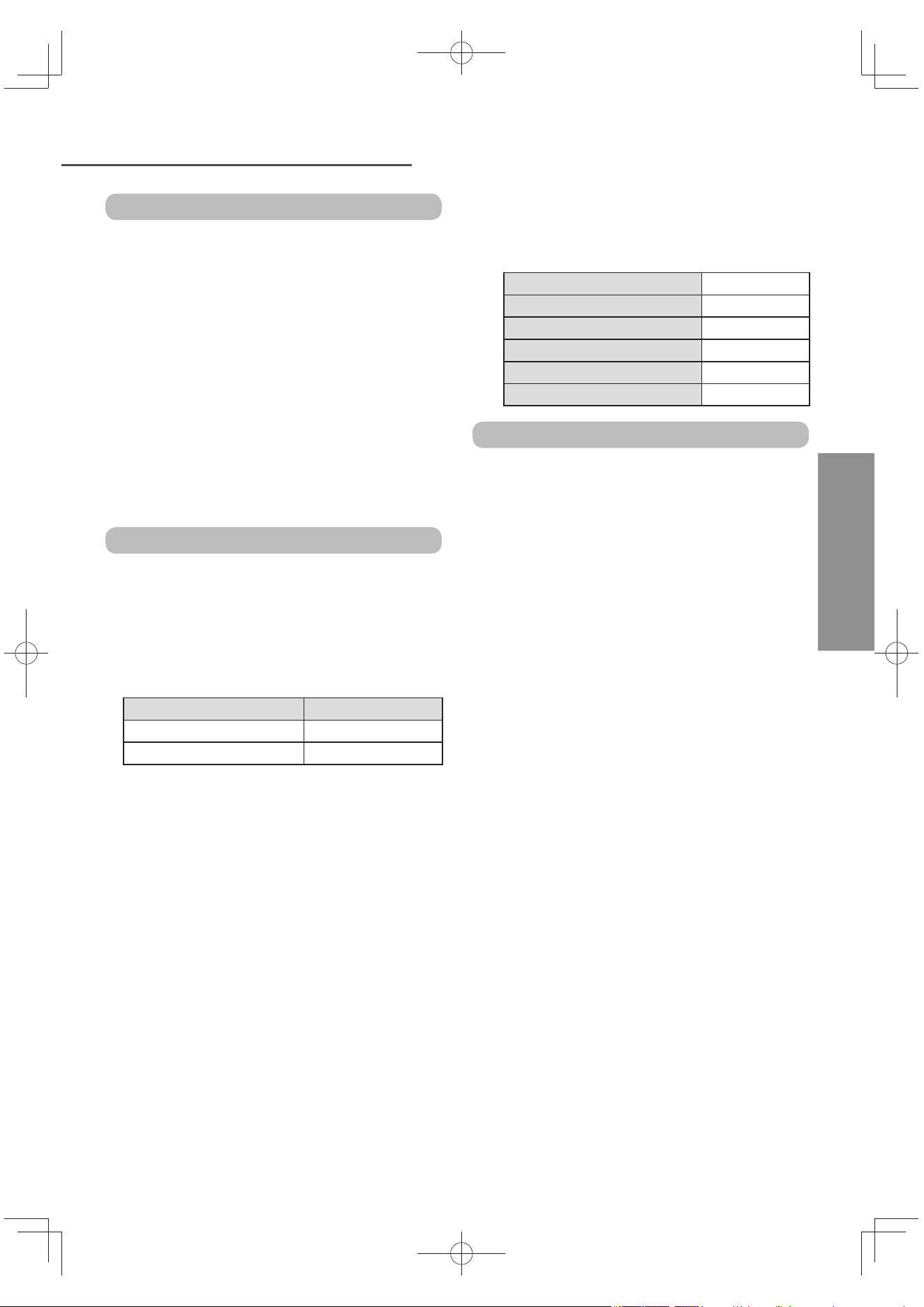
TC7
使用上的注意事項
中文(繁體)
符合以下條件的水請勿使用。
(避免縮短濾芯壽命。)
混濁的水
鐵銹過多的水
如海水等含有鹽分的井水(靠近海邊的井水)請
勿使用。
(避免造成故障。)
在水質硬度偏高地區使用時。
*
每天一次,使用前約一分鐘,請以弱酸性水通水
使用。(因出水口或通水管線內附著鈣物質時,出
水狀況會惡化)。
*: 硬度偏高的地區,肥皂的起泡效果會變差、水壼
或鍋具等會殘留白色鈣礦物質沉澱物。
依區域、水質不同,有可能無法取得指定的
pH 值。
使用方法
切勿將此產品上下倒轉擺放。
(避免引致故障。)
請勿安裝於熱水專用的水龍頭。
(避免造成故障。)
以下列表顯示可用的水溫。請使用這個溫度。
(否則會損毀或黏著濾芯,導致部分總三鹵甲烷流
出。)
分水開關位置 水溫
Purified 不超過 35 ℃
Unpurified/Shower 不超過 80 ℃
請勿手持出水管,將本體抬起,或強行移動本
體。
(避免引致損毀。)
鹼性離子水或弱酸性水,請勿連續使用如下表
的時間以上。
如使用時間長於下表所示時,液晶會顯示「U27」
(參閱 TC43 頁)及終止電氣分解。
鹼性強 約 10 分鐘
鹼性 3 的「強」 約 10 分鐘
鹼性 3 的「標準」「弱」 約 30 分鐘
鹼性 2 約 30 分鐘
鹼性 1 約 30 分鐘
弱酸性 約 10 分鐘
安裝場所
請勿在以下場合安裝。
靠近火的地方、靠近其它高溫處 (60 ℃ 以上)
(避免造成變形。)
直接照射陽光,或風吹雨打的地方
(避免造成錯誤操作或故障。)
可能會凍結的地方
(避免水管或濾芯爆裂。)
黏附油污的地方
(避免發生爆裂情況。)
浴室內或主體容易碰到水或蒸氣的地方
(避免造成錯誤操作或故障。)
廚櫃下的地方(如地下)
(避免阻礙清水排出水管。)
靠近收音機
(避免產生無線電靜電。)
請勿使用喉或購買市面上的產品延長水出口。
(避免造成故障。)
供水
TK-AS66-ZEXW.indb7TK-AS66-ZEXW.indb7 2017/01/3020:17:312017/01/3020:17:31
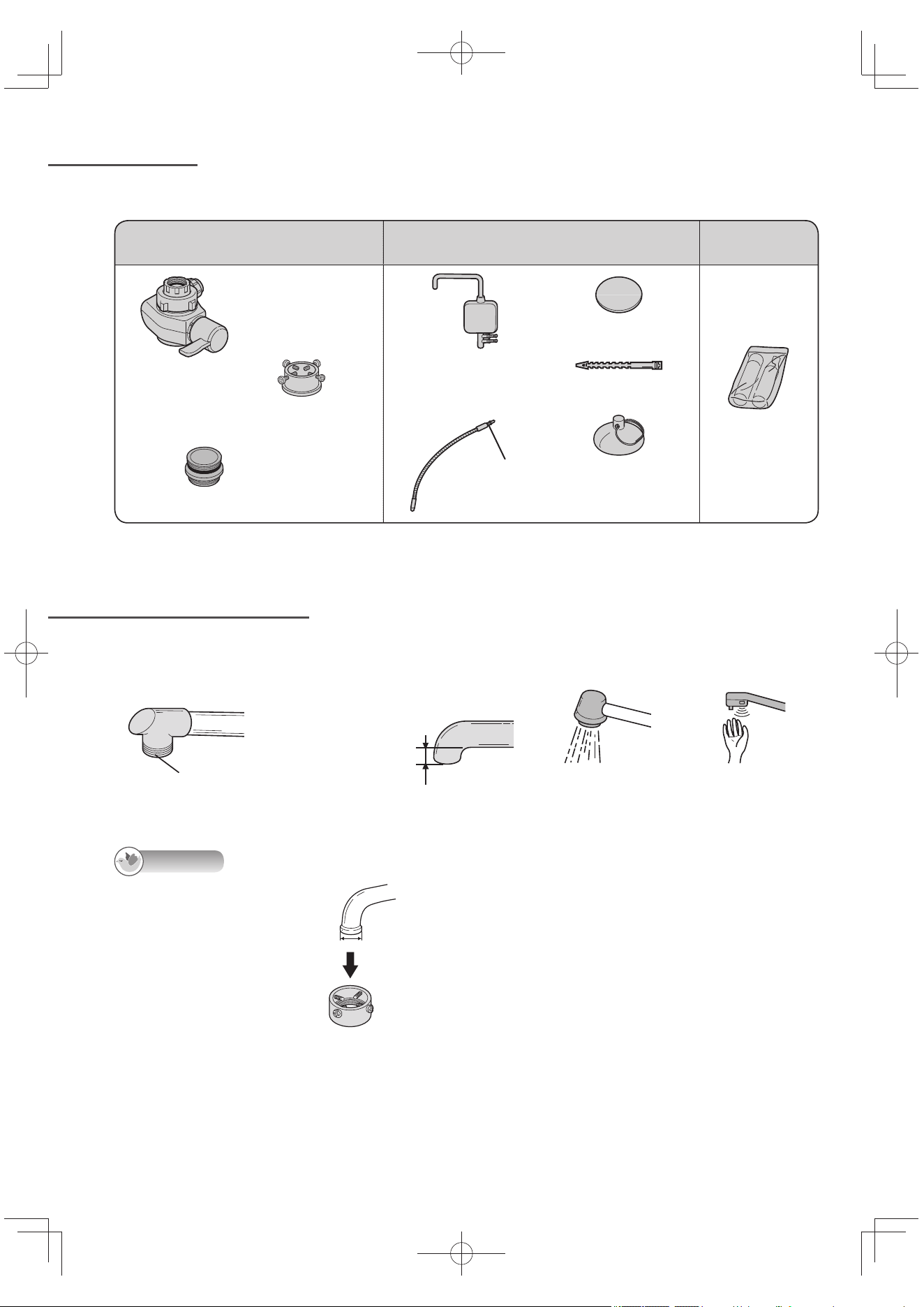
TC8
配件
查看水龍頭
告知
端部呈喇叭形的水龍頭
• 需要另購配件才能將電解水機
連接到水龍頭上。
水龍頭端部管徑:24 ~ 32 mm
另購配件
大型水龍頭用金屬蛇口
型號:P-06JRC(參閱 TC47 頁)
使用前請先查看下列的配件。若有品項不齊時, 請向購買經銷商索取。
分水開關安裝用 本體安裝用 消耗品
分水開關
安裝轉接器
(附有4個螺絲)
密封套 (附有墊片)
酸性水座
(附排水口和吸盤)
附有墊片
出水管
安裝板
軟管固定綁帶
吸盤
(酸性水排水管用)
pH 值測試套件
不能安裝電解水機的水龍頭
• 無金屬管唇端部的水龍頭 • 水龍頭的端部在 10 mm
以下者
• 噴頭嘴 • 附感應器的水龍頭
塑膠或其它材質
10 mm以下
TK-AS66-ZEXW.indb8TK-AS66-ZEXW.indb8 2017/01/3020:17:312017/01/3020:17:31
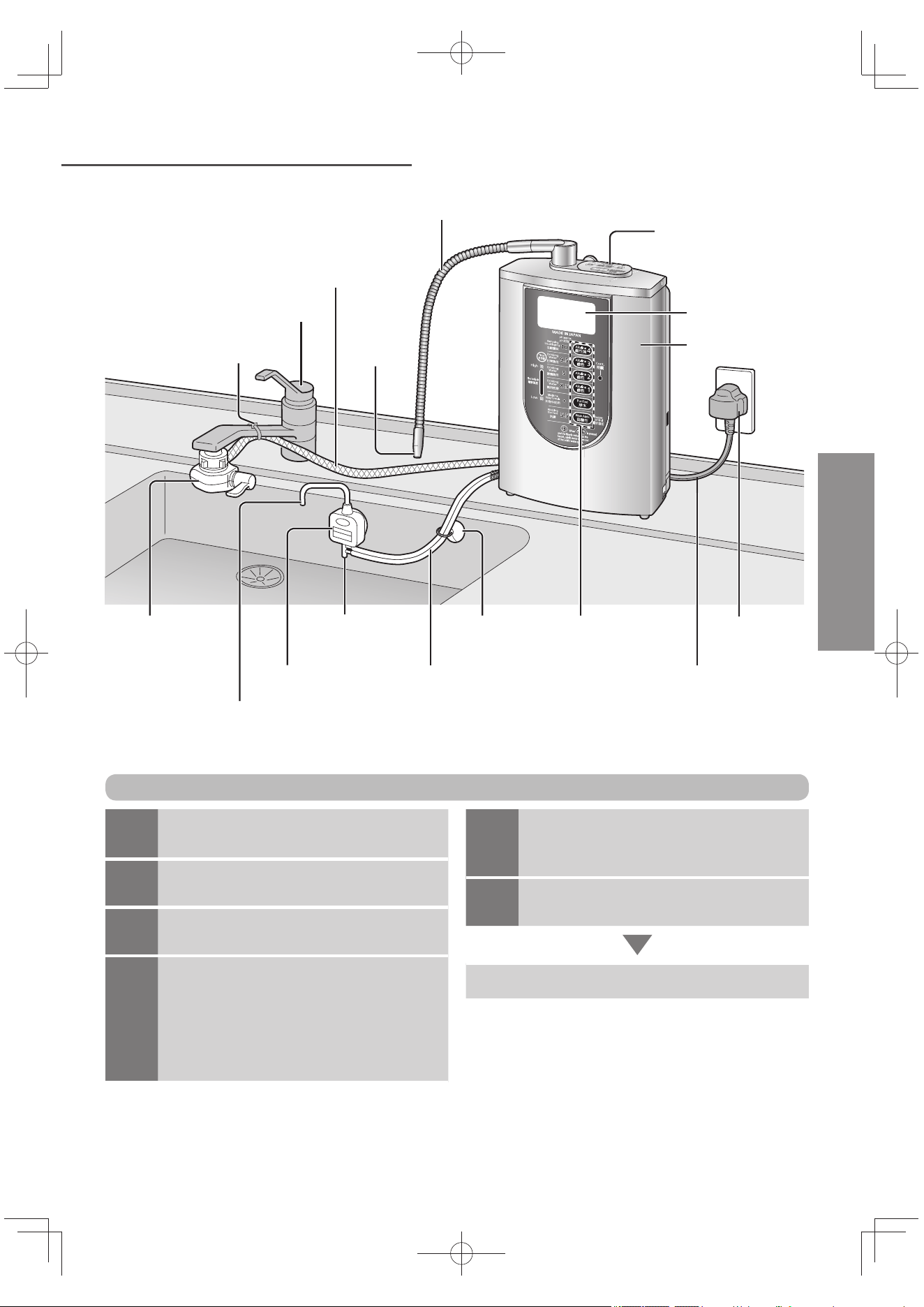
TC9
各配件名稱和準備
出水管 (長:約 45 cm)
操作面板
(參閱 TC30 頁)
液晶顯示
本體
供水管
(長:約 90 cm)
水龍頭
(非配件)
軟管固定綁帶
分水開關 排水口
酸性水排水管
(長:約 60 cm)
吸盤 水質切換鈕
(參閱 TC20 頁)
電源插頭
電源線
(長度:約 3 m)
酸性水座
(附排水口)
酸性水出水口
使用 鹼性離子水時會流出酸性水。(可以用來洗碗、洗菜等。)
出水口
中文(繁體)
1
查看水龍頭
(參閱 TC8 頁)
2
安裝分水開關
(參閱 TC10 ~ TC12 頁)
3
安裝本體,插入電源。
(參閱 TC13 ~ TC15 頁)
4
安裝後的確認(參閱 TC16 頁)
以鹼性離子水通水約 3 ~ 4 分鐘(為排
出本體內的空氣)。
液晶顯示出現「準備中」閃燈約
20 秒。
操作前的準備步驟
5
測定 pH 值
(離子濃度)
(參閱 TC17 頁)
6
選擇液晶顯示的語言
(參閱 TC19 頁)
使用方法(參閱 TC20 ~ TC22 頁)
TK-AS66-ZEXW.indb9TK-AS66-ZEXW.indb9 2017/01/3020:17:322017/01/3020:17:32
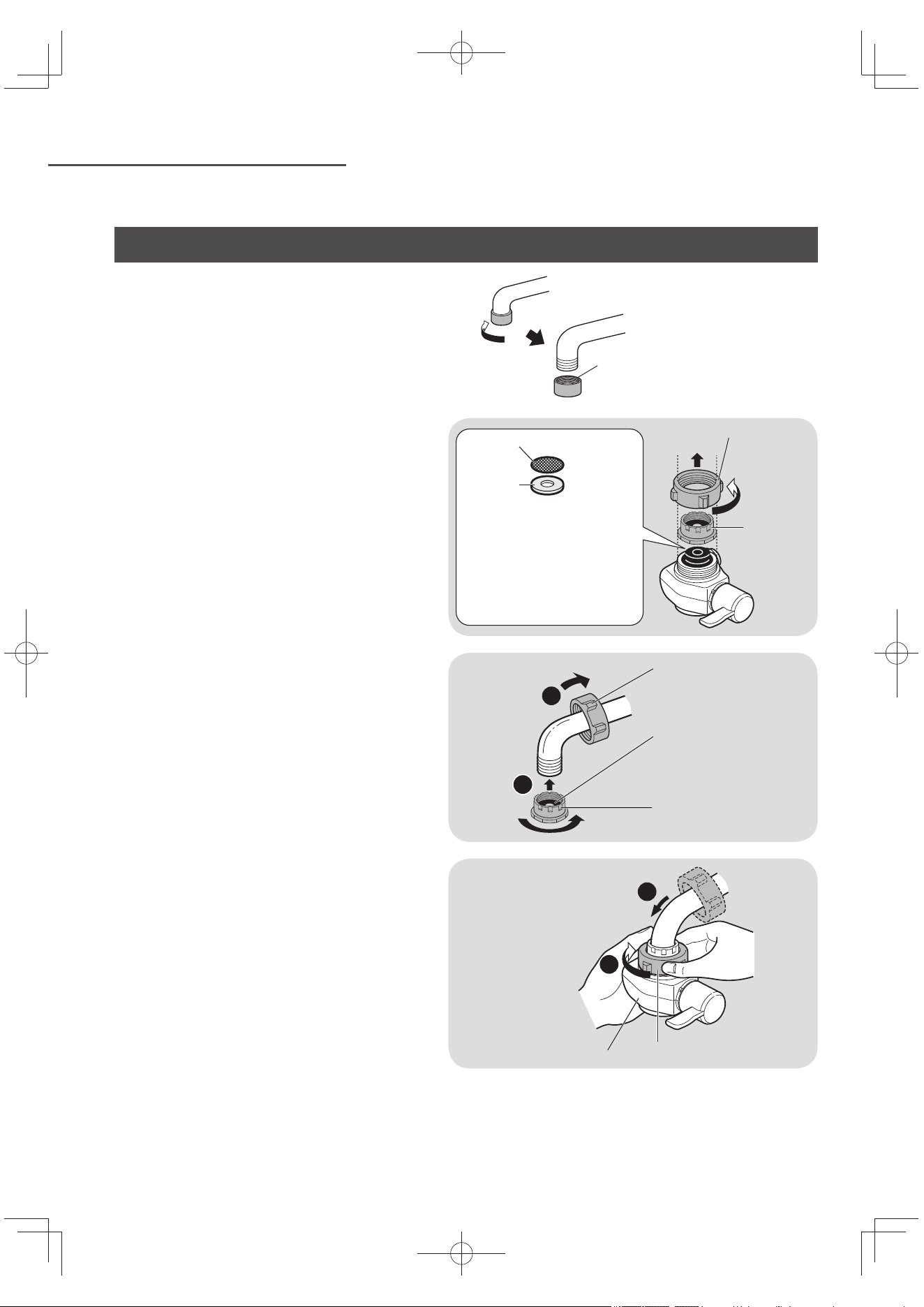
TC10
安裝分水開關
沒有使用到的零件,請妥善保存,以備搬家或購買新水龍頭時之需求。
外螺紋水龍頭
• 不需附件即可將電解水機連接至水龍頭上。
1
卸下螺帽和轉接器。
過濾網或分水開關用墊片座(金屬製)掉
下時,將其放回原位(參閱 TC34 頁)。
確保沒有外來物件附在水龍頭端和分水
開關內的墊片。
螺帽
轉接器
不要卸下分水開關內的分水
開關用墊片座。
卸下後,將其放回原位。
請確保沒有外來物件附在過
濾網,墊片沒有傾斜。
過濾網
分水開關
用墊片座
2
安上螺帽和轉接器。
1
2
螺帽
墊片
轉接器
3
安裝分水開關,然後緊固螺帽,直
至分水開關不能再轉動。
不必使用任何工具。(這會損壞螺
帽。)
確保分水開關不是傾斜的。
1
2
分水開關
螺帽
充氧器(不使用)
勿使用卸下來的充氧器。
TK-AS66-ZEXW.indb10TK-AS66-ZEXW.indb10 2017/01/3020:17:322017/01/3020:17:32
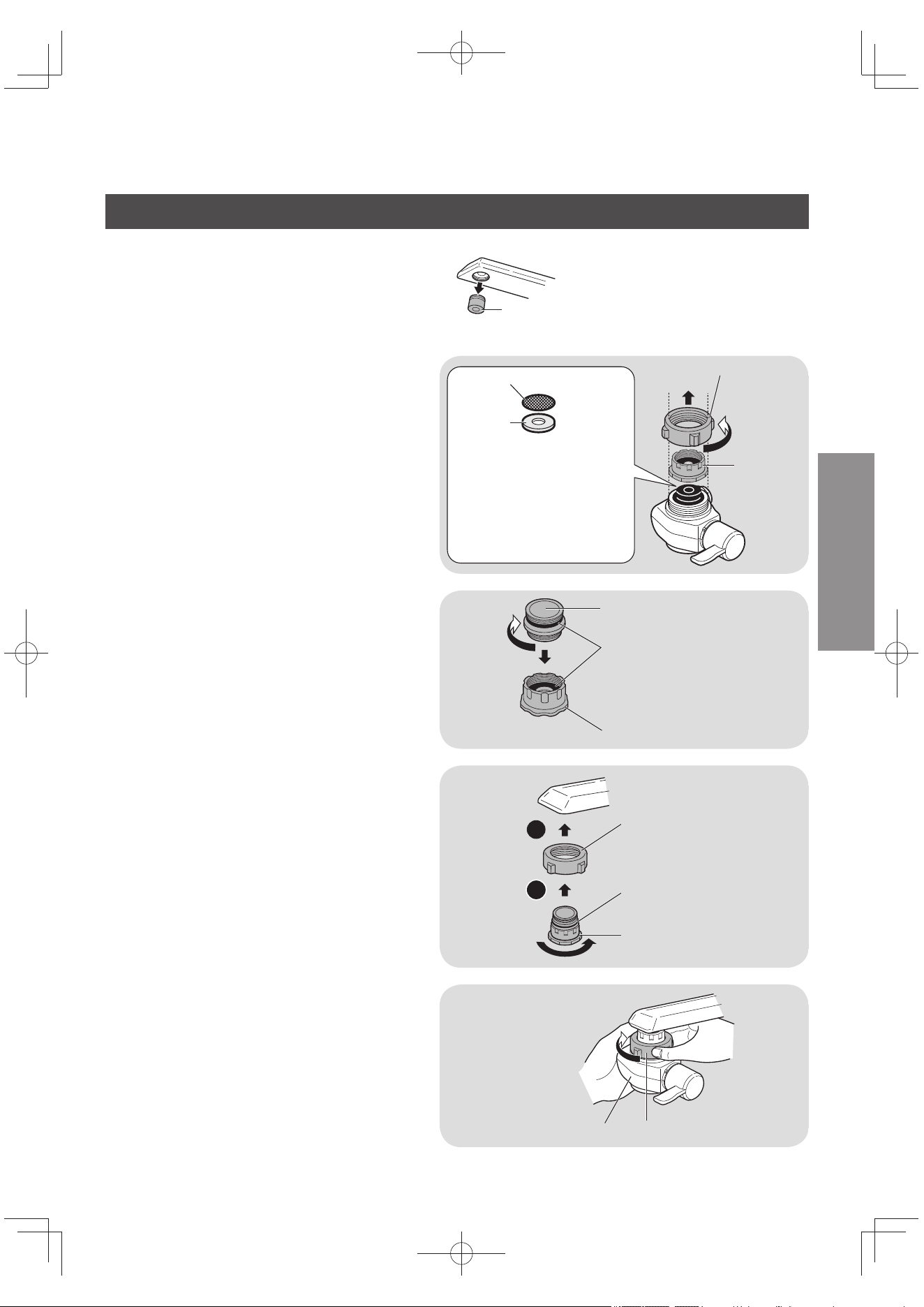
TC11
中文(繁體)
內螺紋水龍頭
• 使用配件即可將電解水機連接至水龍頭上。
充氧器(不使用)
勿使用卸下來的充氧器。
1
卸下螺帽和轉接器。
過濾網或分水開關用墊片座(金屬製)掉
下時,將其放回原位(參閱 TC34 頁)。
確保沒有外來物件附在水龍頭端和分水
開關內的墊片。
螺帽
轉接器
不要卸下分水開關內的分水
開關用墊片座。
卸下後,將其放回原位。
請確保沒有外來物件附在過
濾網,墊片沒有傾斜。
過濾網
分水開關
用墊片座
2
擰入密封套。插入轉接器。
密封套(附件)
墊片
轉接器
3
安上螺帽和轉接器。
要將轉接器垂直擰緊。斜著擰入的
話,會損壞其螺紋,造成漏水。
1
2
螺帽
墊片
轉接器
4
安裝分水開關,然後緊固螺帽,直
至分水開關不能再轉動。
不必使用任何工具。(這會損壞螺
帽。)
確保分水開關不是傾斜的。
螺帽
分水開關
TK-AS66-ZEXW.indb11TK-AS66-ZEXW.indb11 2017/01/3020:17:322017/01/3020:17:32
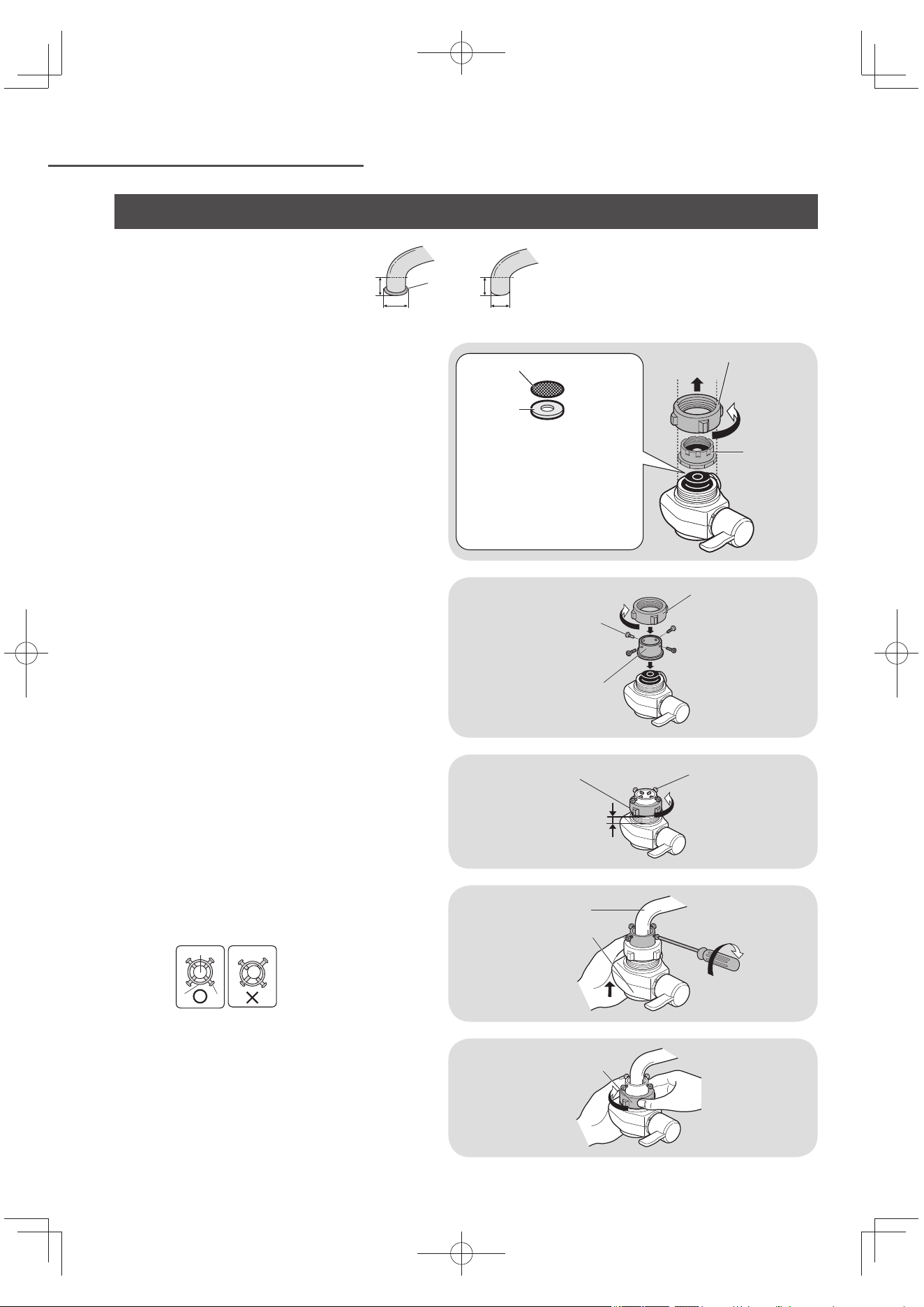
TC12
安裝分水開關 (接續)
無充氧器的水龍頭時
• 需用一附件才能將電解水機連接到水
龍頭上。
膨脹部
10 mm以上
13 mm以上及
不超過 24 mm
1
卸下螺帽和轉接器。
過濾網或分水開關用墊片座(金屬製)掉
下時,將其放回原位(參閱 TC34 頁)。
確保沒有外來物件附在水龍頭端和分水
開關內的墊片。
螺帽
轉接器
不要卸下分水開關內的分水
開關用墊片座。
卸下後,將其放回原位。
請確保沒有外來物件附在過
濾網,墊片沒有傾斜。
過濾網
分水開關
用墊片座
2
插入安裝轉接器並用螺帽將其緊
固。
螺帽
卸下螺絲(4個)。
安裝轉接器(附件)
3
先暫時緊固4個螺絲,然後再鬆動螺
帽,留出3 ~ 4 mm的空隙。
螺帽
3 ~ 4 mm
螺絲(4個)
4
將分水開關用力推入到水龍頭上並
用下述4個螺絲加以固定。
上視圖
水龍頭
安裝轉接器
螺絲
水龍頭
分水開關
5
緊固螺帽,直至分水開關不能再轉
動。
不必使用任何工具。(這會損壞螺
帽。)
確保分水開關不是傾斜的。
螺帽
TK-AS66-ZEXW.indb12TK-AS66-ZEXW.indb12 2017/01/3020:17:322017/01/3020:17:32
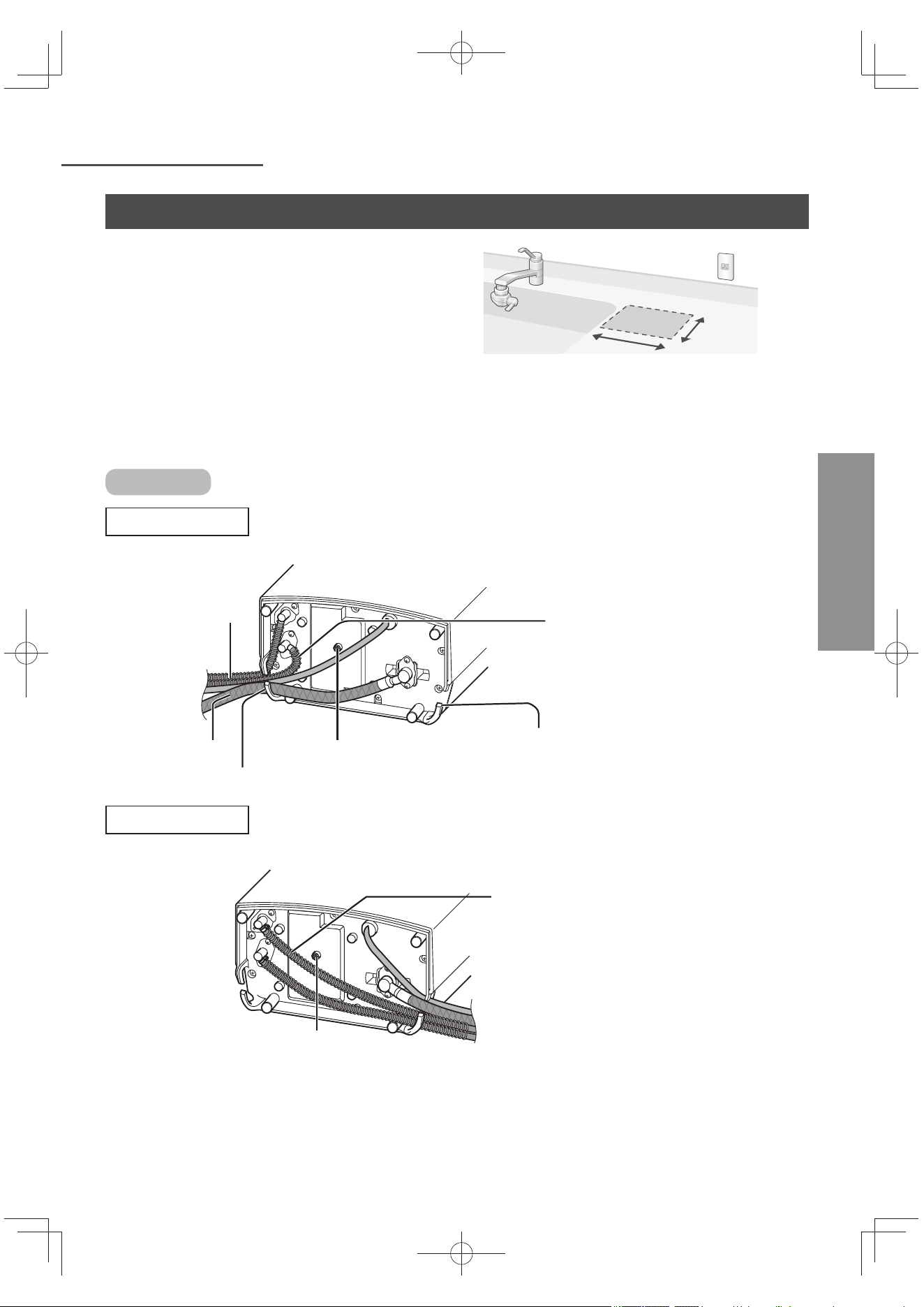
TC13
安裝本體
中文(繁體)
配件及準備
1
選擇平穩,平坦地方。
21 cm
或以上
13 cm
或以上
2
配合設置場所,拉出電源線和水管。
請勿壓扁或曲折。
本體底面
從左側拉出的狀況
由缺口處插入水管
結露水排水口
缺口處
排水管如圖示稍微拉
到內側,在酸性水
水管之間比較不會垂
下來。
供水管
本體前面
彈簧(防止水管折到)
從右側拉出的狀況
本體前面
請勿重疊酸性水水管於結露水排水口。
(本體右側向上放置,會造成不平穩)。
結露水排水口
TK-AS66-ZEXW.indb13TK-AS66-ZEXW.indb13 2017/01/3020:17:332017/01/3020:17:33
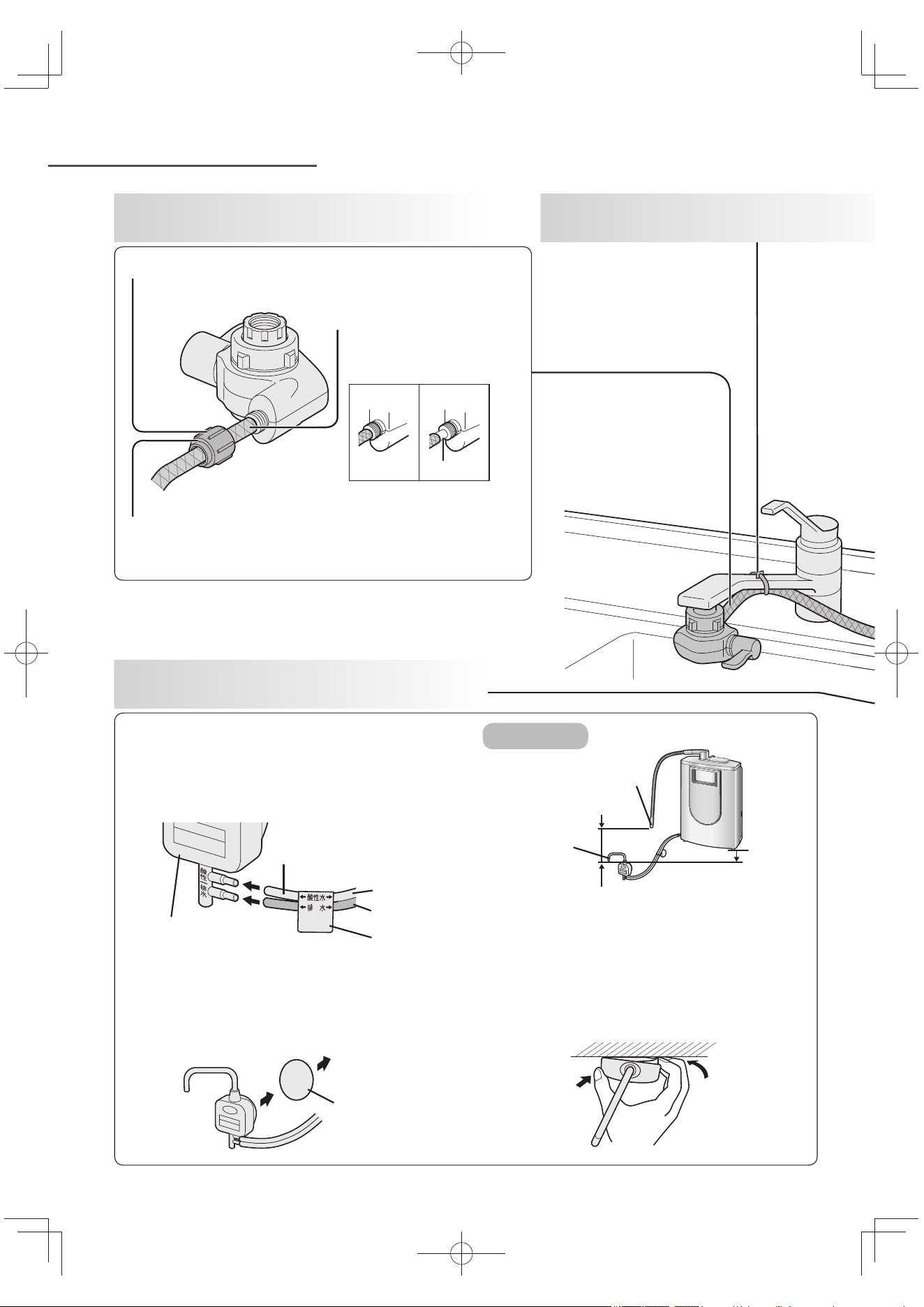
TC14
安裝本體 (接續)
由分水開關拆掉鎖緊水管用的螺帽,使供
水管流通。
供水管插入到底。
確實鎖緊鎖水管用的螺帽。
1
準備完畢時,
連接供水管。
4
安裝酸性水座。
2
固定供水管
(使用軟管固定綁帶)。
插入酸性水排水管,直至穩固。
安裝於洗滌槽內。
(當吸盤脫落時, 請將附屬的
安裝板貼於洗滌槽內。)
請依循標籤所示,連接水管。
酸性水座下請勿放置垃圾桶等雜物。
使酸性水出水口位於比本體底面更低的位置,
和出水口與酸性水出水口的高低差為 10 cm
以上及不超過 50 cm(為了取得適當的 pH 值
(離子濃度))。
安裝板
貼於洗滌槽。
酸性水出水口
本體
底面
高低差
出水口
酸性水排水管
酸性水座
淺灰色
深灰色
標籤
壓住
取出
酸性水座的卸除方法
請勿使用工具(避免鎖上水管的螺帽損壞)。
正確範例 錯誤範例
空隙
安裝位置
TK-AS66-ZEXW.indb14TK-AS66-ZEXW.indb14 2017/01/3020:17:332017/01/3020:17:33
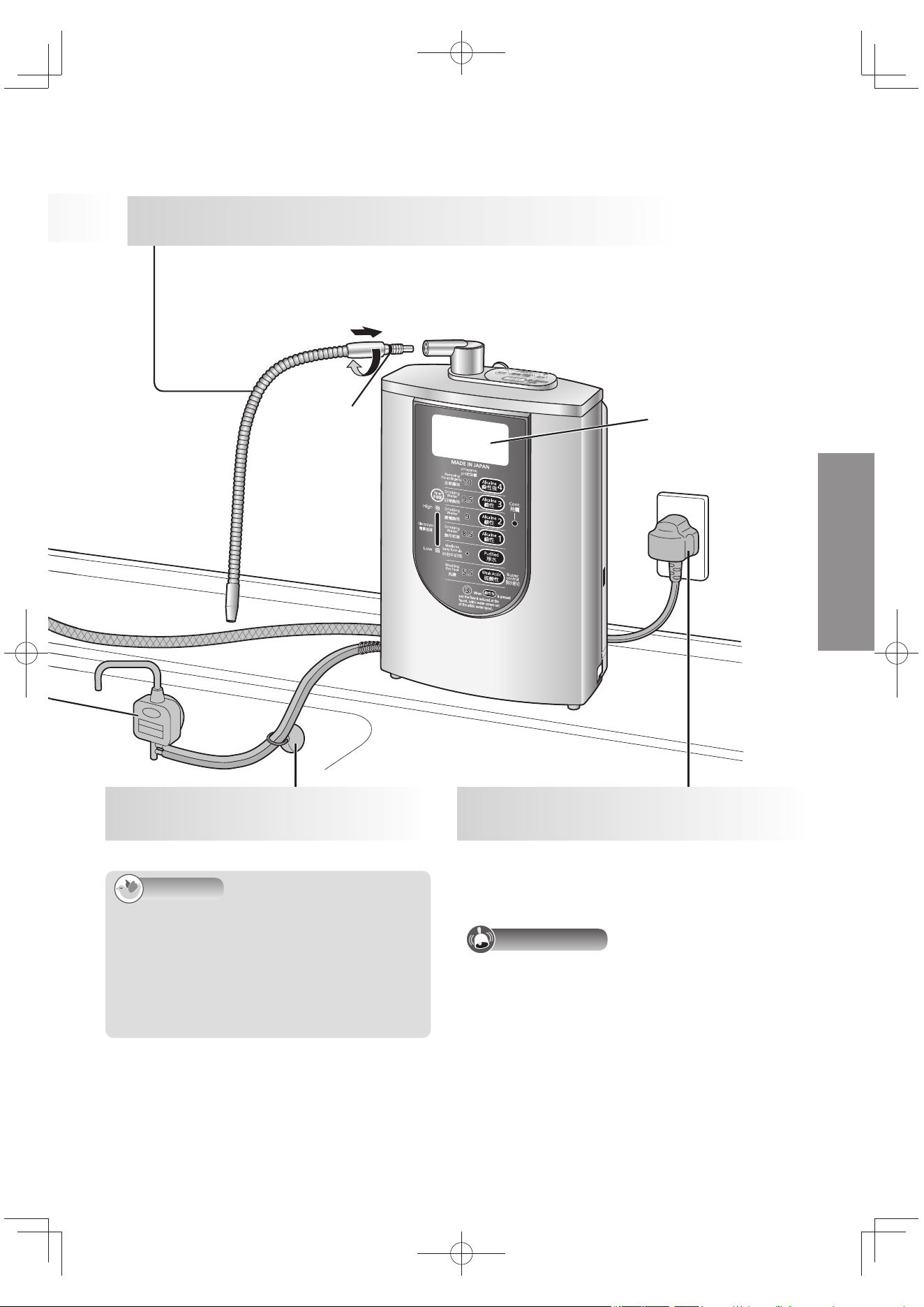
TC15
中文(繁體)
告知
當水管過長時,建議您將水管剪短至適合長
度(請直線切除)。
設置後通水時,液晶畫面顯示「準備中」閃
燈約 20 秒左右。(參閱 TC9 頁)
液晶顯示的語言可選擇英文或中文。
(參閱 TC19 頁)
注意事項
平常請勿拔掉電源插頭。(為能運轉電極自
動洗淨機能)。
3
確實鎖入出水管到底為止。
請勿使用工具組合。(避免水管損壞)
請勿扭曲墊片。(避免漏水)
請勿手持出水管,將本體往上抬起。(避免造成損壞)
請固定水管避免搖晃。
警告聲「嗶」響起約 15 秒後,液晶顯示
藍燈亮起,顯示「鹼性1(飲用初期)」
待機時間消耗約 1 W 的電力。
液晶顯示
墊片
5
使用吸盤固定酸性水
排水管。
6
插入電源插頭
(交流電源 220 V–240 V)。
TK-AS66-ZEXW.indb15TK-AS66-ZEXW.indb15 2017/01/3020:17:342017/01/3020:17:34
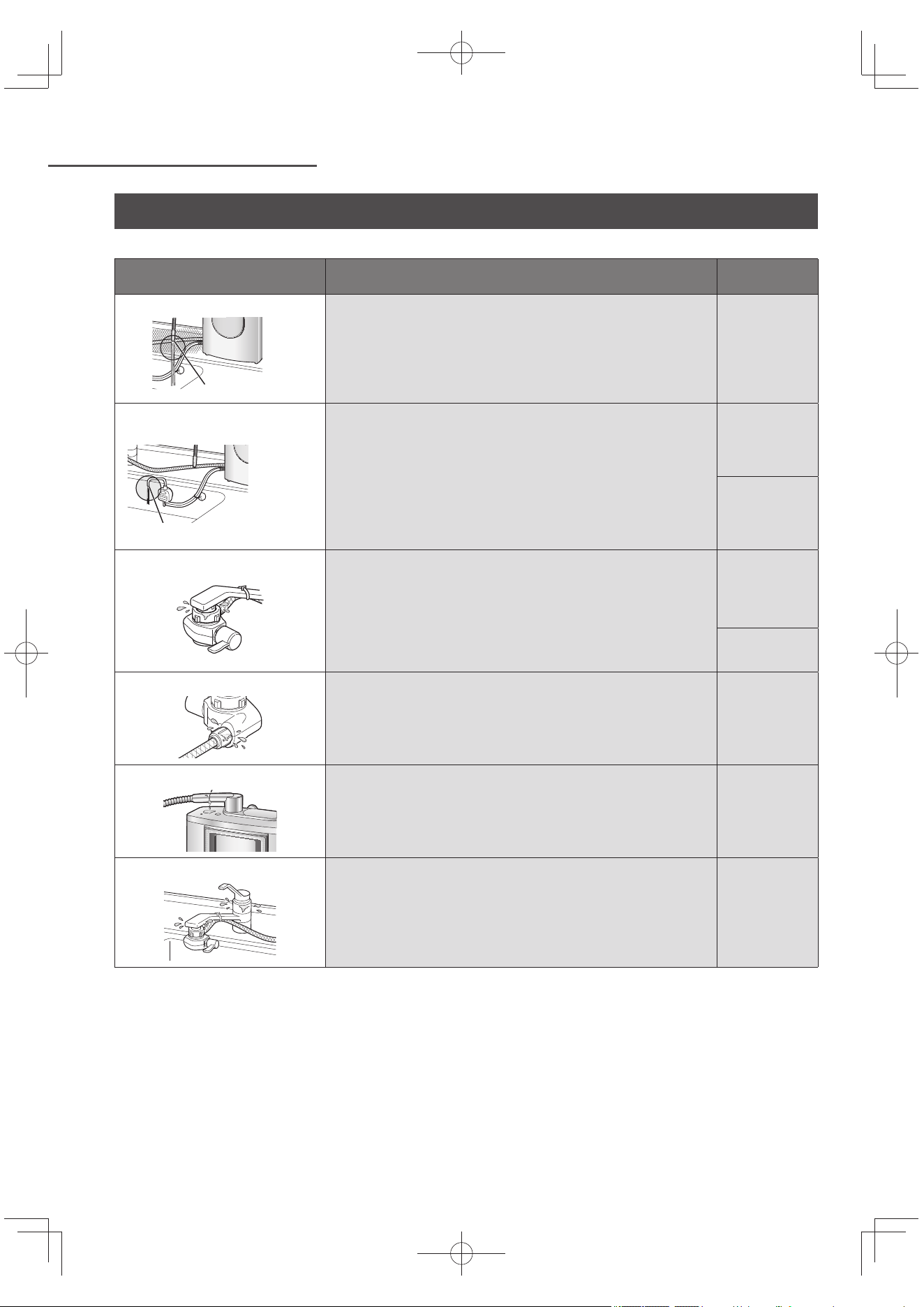
TC16
安裝本體 (接續)
安裝後的確認
設置後,請運行 3 ~ 4 分鐘鹼性離子水,排出本體內的空氣。
確認項目 異常時檢查項目與處置 參閱頁數
出水口是否有水流出?
出水口
供水管是否扭曲變形。
請拉直使用。
TC13 頁
~
TC15 頁
鹼性離子水通水時,酸性水出
水口是否有水流出?
酸性水出水口
酸性水排水管是否扭曲或壓扁?
請拉直使用。
酸性水排水管是否正確連接安裝。
請確認連接酸性水座方向。
TC13 頁
~
TC15 頁
液晶顯示是否顯示「調小出水量」?
請逐漸扭緊水龍頭減少水流,直到顯示消失為止。
酸性水出水口流出的水有阻塞,請增加出水口和酸性水出
水口之間的高度。
TC22 頁
分水開關連接處是否漏水?
是否確實安裝分水開關於水龍頭上?
請再度確認並確實安裝「安裝分水開關」。
分水開關內的配件是否正確放入?
請正確安裝配件。
TC10 頁
~
TC12 頁
水龍頭的尾端(斷熱蓋頭等)是否有破損斷裂?
請諮詢水電行。
–
供水管連接處是否漏水?
供水管是否確實安裝於分水開關?
請插入到底並以螺帽鎖緊水管。
TC14 頁
出水管連接處是否漏水?
出水管是否確實安裝於本體上?
請確實鎖入到底為止。
出水管上是否安裝了墊片或扭曲變形?
請正確安裝墊片。
TC15 頁
水龍頭是否漏水?
水龍頭的墊片是否已經老化?
請諮詢水電行。
水龍頭(斷熱蓋頭等)是否有破損斷裂?
請諮詢水電行。
–
TK-AS66-ZEXW.indb16TK-AS66-ZEXW.indb16 2017/01/3020:17:342017/01/3020:17:34
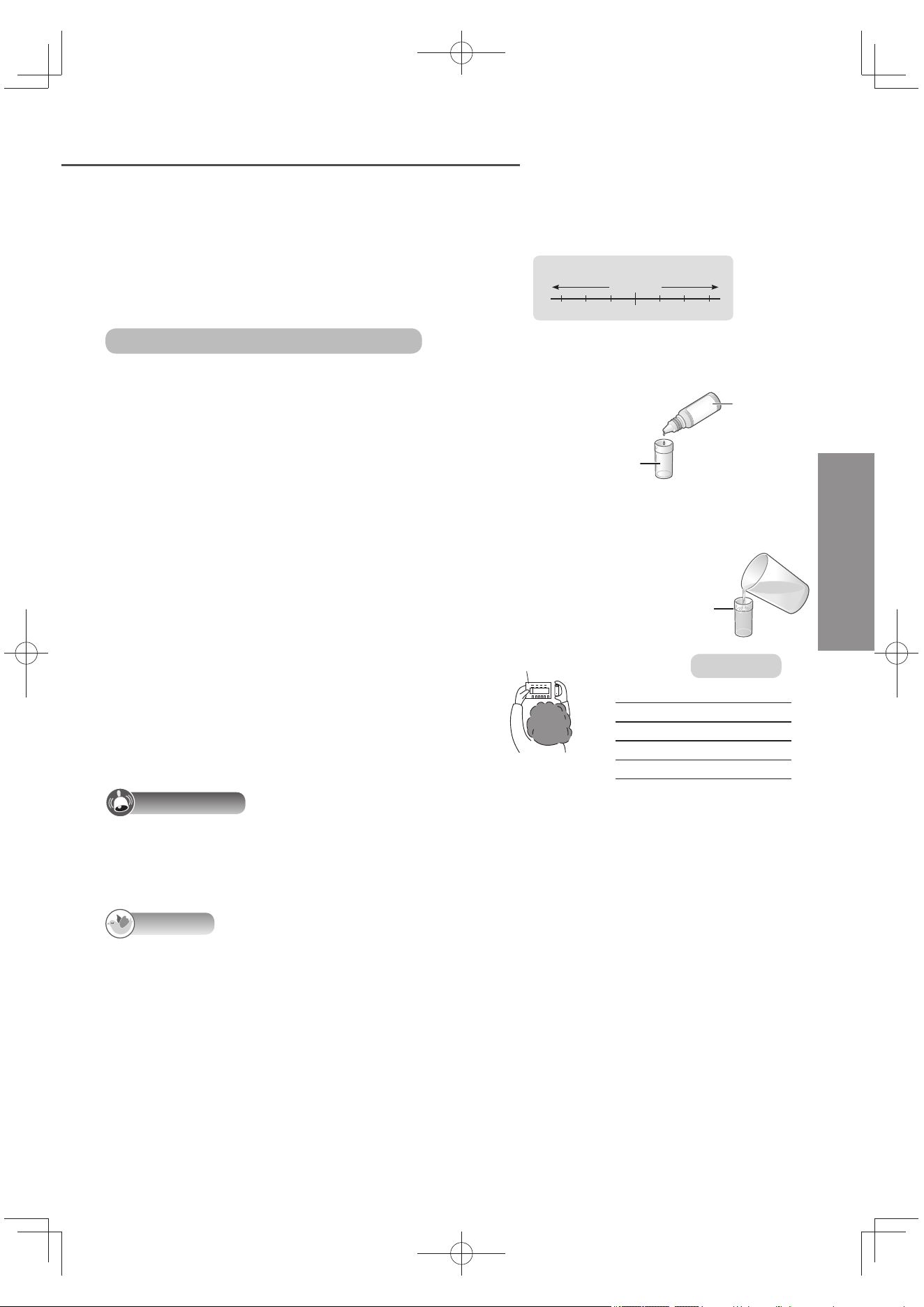
TC17
測定 pH 值(離子濃度)
中文(繁體)
設置後或長時間(標準:約一星期以上)停止使用
時,務必測試 pH 值,請確認是否為「pH 的標
準」範圍內後再使用。
日後請定期測試(一個月一次以)。
何謂 pH 值(離子濃度)?
表示水(水溶液)的鹼性、中性、酸性的程度,等同
離子指數。
Hp
Neutrality
Acidic Alkaline
Strong Mild Mild Strong
789
10
456
酸性 鹼性
強 弱 弱 強
中性
pH
準備的物品:pH 值測試套件(配件)
測試的方法
1
將 2 滴 pH 試劑滴入試管。
(必須僅放 2 滴,否則無法準確地判定。)
pH 試劑
試管
2
讓鹼性離子水或弱酸性水流過
約
10 秒鐘,將樣本水裝入杯子。
(為取得穩定 pH 值。)
3
倒入樣本水到試管。
加至線為止。
4
在光線明亮的地方與 pH 值圖表相
比較。
pH 值圖表
pH 的標準
鹼性強 9.5 ~ 10.5
鹼性 3 9.0 ~ 10.0
鹼性 2 8.5 ~ 9.5
鹼性 1 8.0 ~ 9.0
弱酸性 5.0 ~ 6.5
注意事項
經過一段時間測試水的顏色會產生變化。請勿置放過久時間立即與 pH 值圖表比對測試結果。
使用市面的石蕊測試紙等無法正確測試。務必以 pH 值測試套件來檢測水質。
丟棄 pH 試劑的原液時,請先以水稀釋。
pH 試劑以及 pH 值圖表受到陽光照射後會變色,因此請將其保管在避光之處。
告知
此 pH 值測試套件供測試大約 pH 標準值。
藥劑的主要成為乙醇、甲基紅、溴化麝香酚藍和酚酞。
視乎水質,生成水的 pH 值可能不在「pH 的標準」範圍內,或者鹼性離子水不呈現鹼性(由藍色或
深藍的液體,可能會轉變為綠色或黃色)。此時,請依照以下處理方式。
「pH 值微調」,設定鹼性或弱酸性「強」。(參閱 TC24 頁)
另外,測試原水時,測試水的顏色將依 pH 值圖表而不同。(受到水中碳酸與各種成分的影響)。
pH 值過高時,請切換為弱鹼性水質與淨水混合使用。
使用新的濾芯(約一個星期)時,pH 值會有稍微偏高的情況發生,這屬正常現象。
TK-AS66-ZEXW.indb17TK-AS66-ZEXW.indb17 2017/01/3020:17:342017/01/3020:17:34
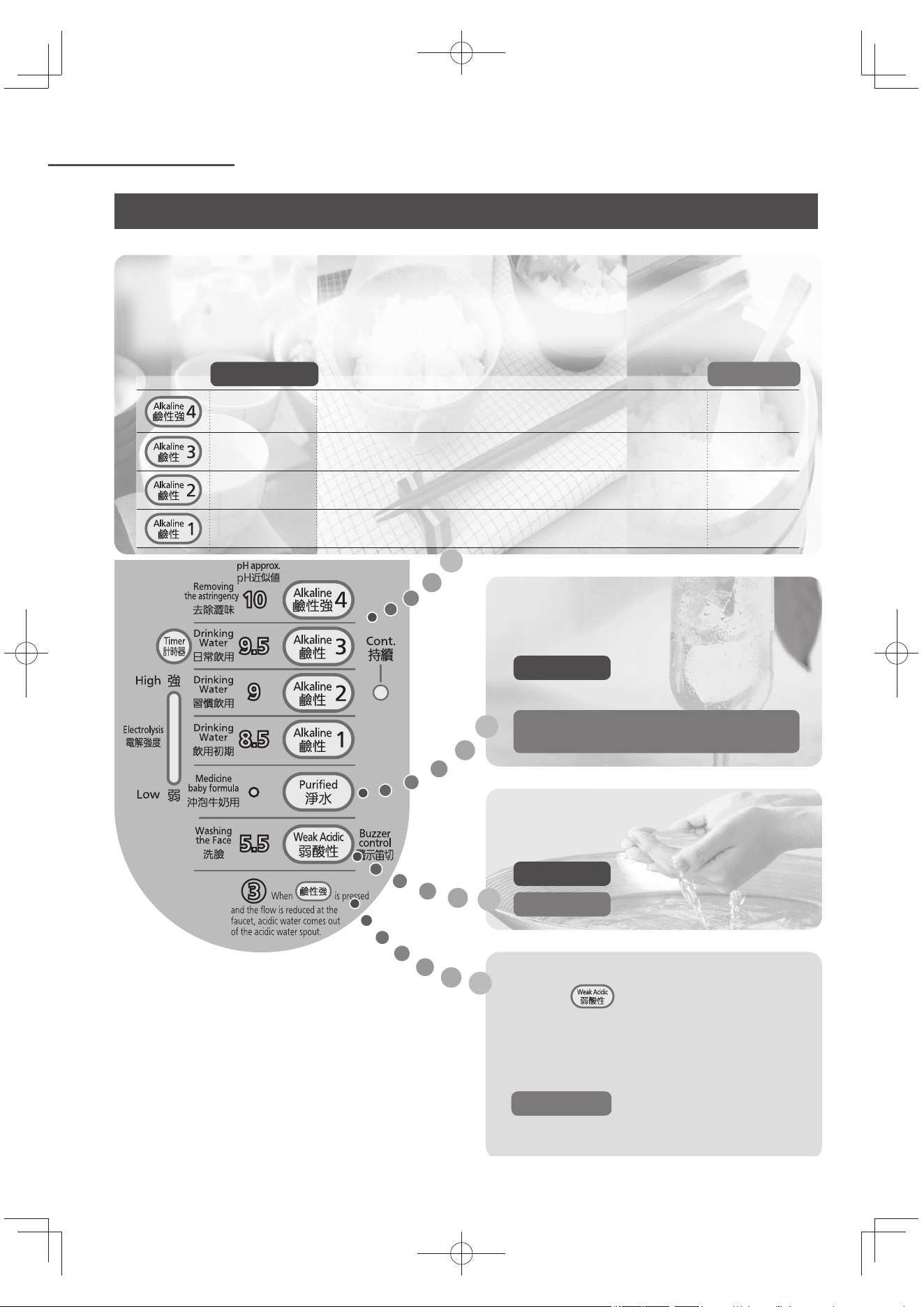
TC18
使用前
鹼性離子水:
pH 值依以下次序每次增強約 0.5 左右:「鹼性 1」「鹼性 2」「鹼性 3」「鹼性強」。此份使用說明書將依
鹼性 1 ~ 3 總稱「鹼性」表示。
每天的標準飲用量約「鹼性 3」0.5 公升到 1 公升。
用途 pH 的標準
去除澀味,川燙蔬菜
去除牛蒡和蔬菜的澀汁等(請勿直接飲用) 9.5 ~ 10.5
日常飲用
咖啡、茶、煮燘菜、火鍋、煮湯等 9.0 ~ 10.0
習慣飲用
煮飯時 8.5 ~ 9.5
飲用初期
初次飲用鹼性離子水時(
約二
星期左右)
8.0 ~ 9.0
淨水:
過濾過雜質較少的水。
用途 服用藥物時或沖泡牛奶等
飲用
不經電氣分解。
弱酸性水:
近肌膚的弱酸性水。
用途 洗臉
pH 的標準 5.0 ~ 6.5
為了使用方便
(請配合用途使用)
酸性水:
按下 時,減少出水量後會由酸性
水出水口流出 pH 值 3 的酸性水。
(去除茶具上的茶垢、料理魚之後所留
下的腥味等)
pH 的標準 2.8 ~ 3.5
*
*: pH 值 3 的水質顯示燈亮燈時。
TK-AS66-ZEXW.indb18TK-AS66-ZEXW.indb18 2017/01/3020:17:352017/01/3020:17:35
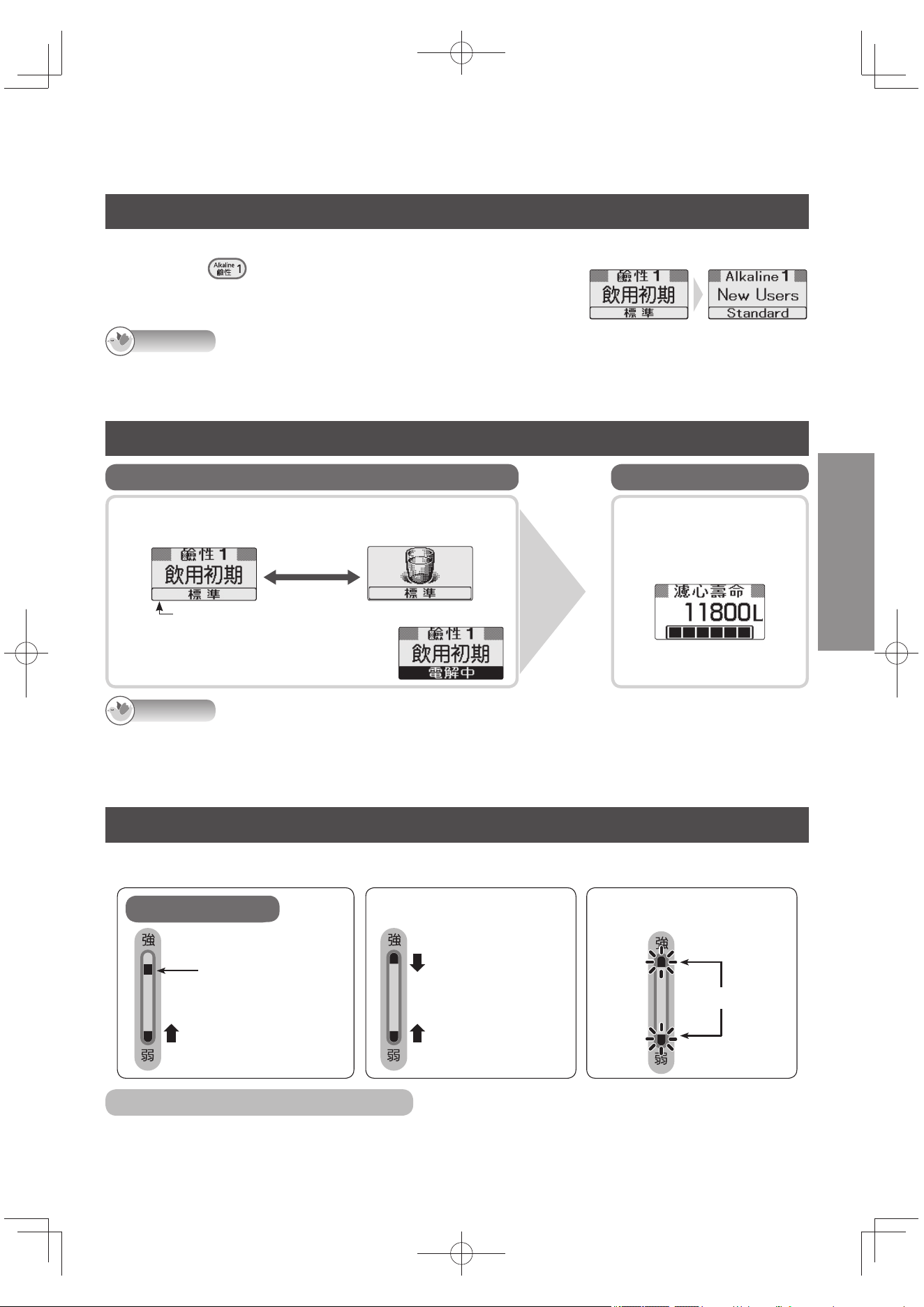
TC19
中文(繁體)
選擇液晶顯示的語言
液晶顯示的語言可選擇英文或中文。購買時設定為中文。
關水龍頭,按下 直到發出「嗶嗶嗶嗶」聲 4 次 (約 3 秒鐘)。
再按3 秒鐘,即可回到中文顯示。
告知
通水期間、設定時或確認模式時無法進行切換英文顯示。
即使切換成英文顯示,設定、確認模式的顯示仍為中文。
關於使用中的液晶顯示
以文字或圖示的交替顯示使用用途。
(例)鹼性 1(首次飲用)的狀態
約
間隔 2 秒
pH 值微調的設定顯示
(參閱 TC24 頁)
鹼性離子水、弱酸性水的生成中以
「電解中」顯示。
使用中 待機狀態
剩餘濾芯壽命顯示
(參閱 TC35 頁)。
例)
關緊水龍
頭時…
告知
液晶顯示,按鈕操作完畢時,或由關閉水龍頭後,約 30 ~ 45 秒後自動消失。(省電裝置)操作按鈕或本體通水
時,將亮燈顯示。
流量降低(低於約 1.0 公升/分)時,通水中依然會顯示濾芯壽命。這時候不進行電解(電解、生成)。
電解信號
在「電解中」,顯示電解強度(電解的電力量)的標準。停水或使用淨水中時不顯示。
電解強度,視乎使用水質切換鈕或水流量(電解水的流量)而變化(8 段式)。
電解中
亮燈
顯示 電解強度。
由下往上逐漸亮燈。
準備中
上下往中央逐漸
亮燈。
當液晶顯示「調小出水量」
的顯示出現時
閃燈
不想顯示電解信號時
請參閱「設定的方法」(參閱 TC32 頁),請關閉「電解信號」。
TK-AS66-ZEXW.indb19TK-AS66-ZEXW.indb19 2017/01/3020:17:352017/01/3020:17:35
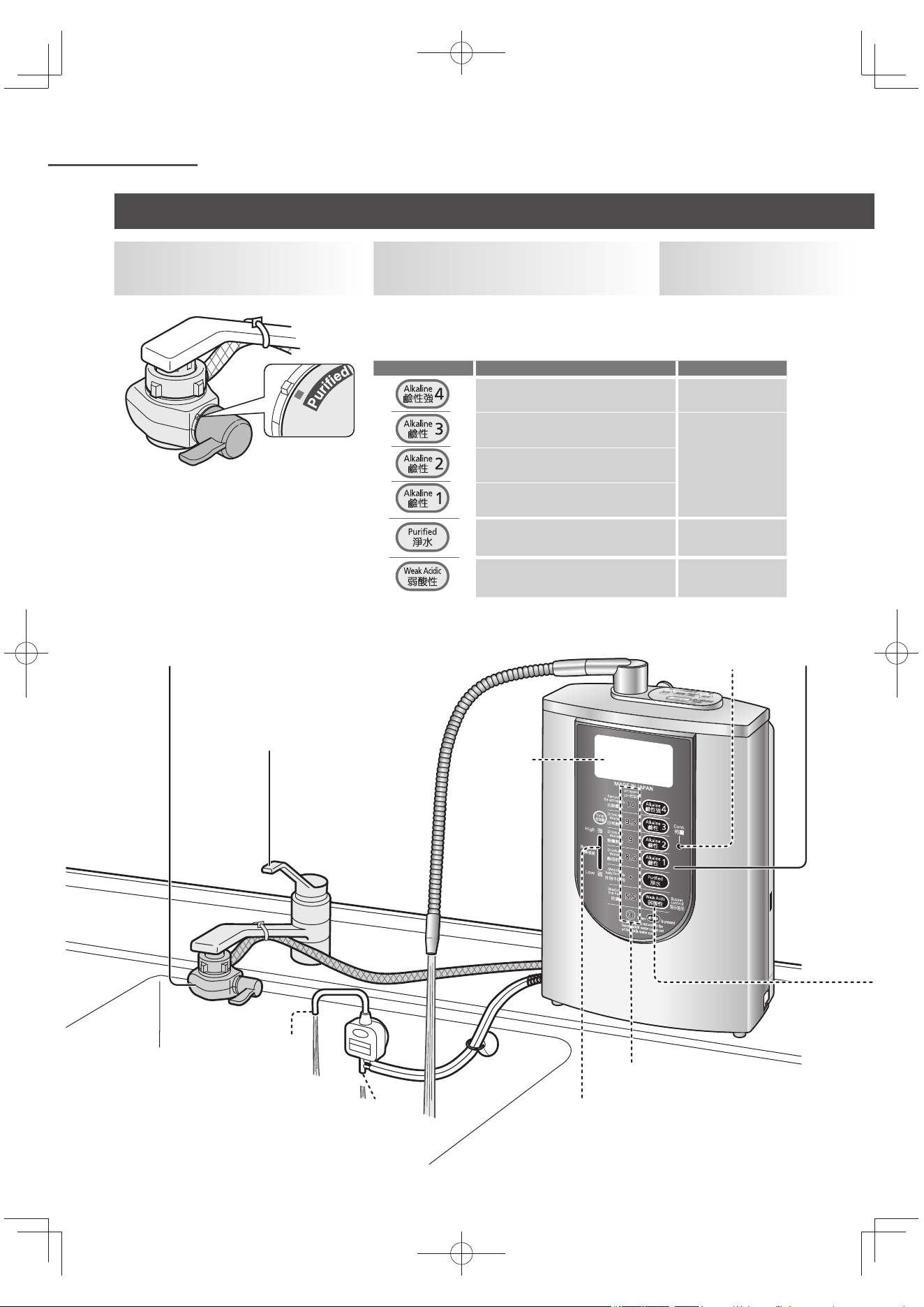
TC20
操作
2
1
3
持續模式顯示燈
液晶顯示
水質顯示燈
酸性水出水口
排水口
電解信號(參閱 TC19 頁)
1
請將分水開關切換在
「Purified」的位置。
3
打開水龍頭。
2
依相應的水類型需要,
按下水質切換鈕。
發出「嗶」警告聲 水質顯示燈 與
液晶顯示 會亮起。
顯示「準備中」。
水質切換鈕 用途 液晶顯示色
去除澀味、川燙蔬菜 橙色
日常飲用
藍色習慣飲用
飲用初期
服藥、沖奶 綠色
洗臉 粉紅色
使用鹼性離子水、弱酸性水、淨水
TK-AS66-ZEXW.indb20TK-AS66-ZEXW.indb20 2017/01/3020:17:362017/01/3020:17:36
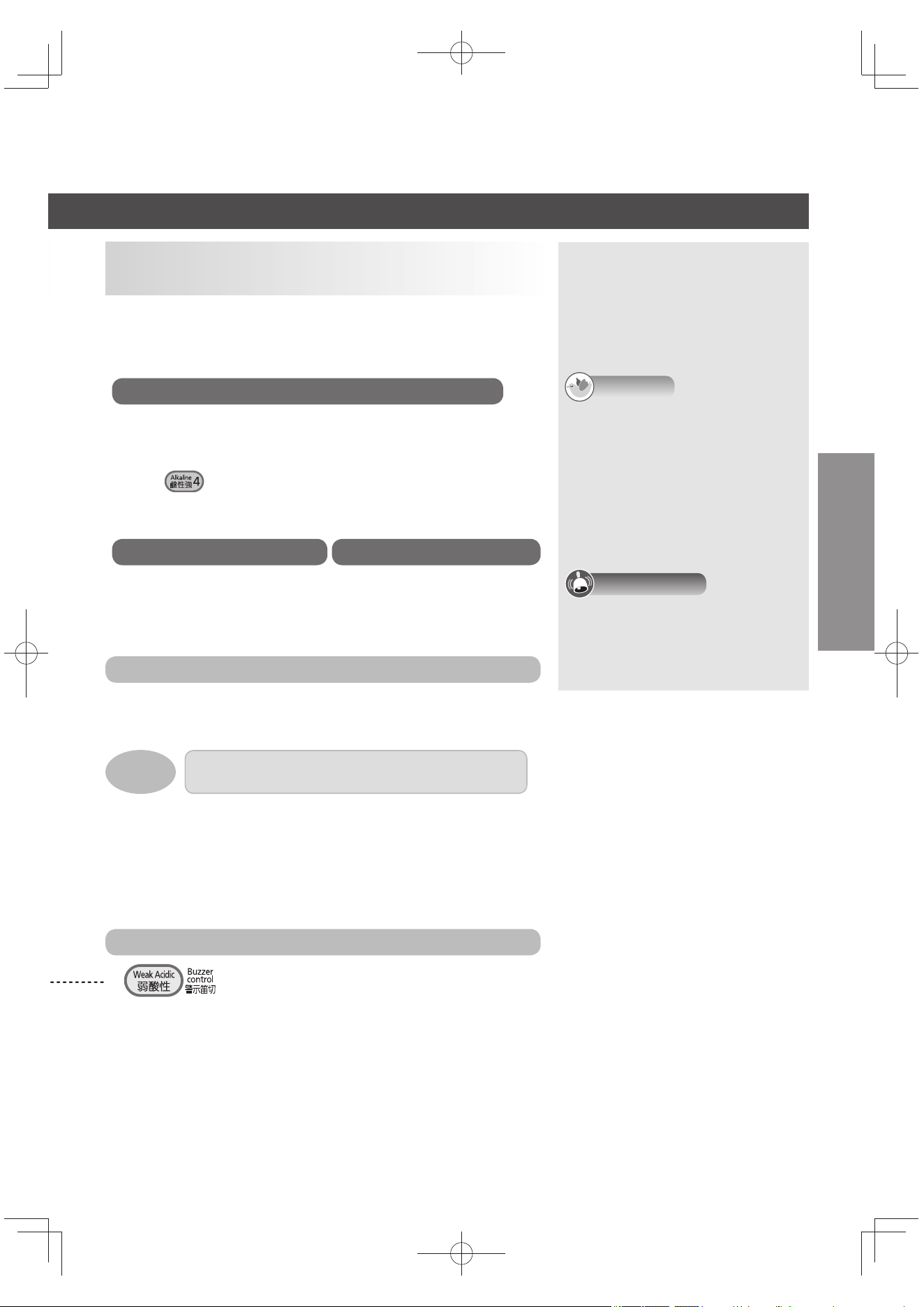
TC21
中文(繁體)
當「準備中」的顯示消失,警告聲「嗶嗶嗶」響 3 次後即可使
用。
為避免誤飲,使用弱酸性水時會持續響起警告聲(弱酸性警示音)。
鹼性離子水使用中時
由酸性水出水口流出酸性水。
(關於 pH 的標準,請參閱 TC49 頁)
要從酸性水出水口流出 pH 值
約
3 的酸性水時
按下 鈕,將水龍頭逐漸扭緊,減少水流,直至 pH 值 3 的
水質顯示燈亮。
使用後關緊水龍頭時:
使用鹼性強、弱酸性、淨水時,水質將
自動恢復到上一次使用的「鹼性」。
(因已先設定為「鹼性優先」ON)
持續模式顯示燈熄燈後,將從排水口
流出約 90 秒的水。(為排出本體內
殘留的水)
告知
使用中由酸性水出水口或排水口所流
出的水,可蓄水使用於清洗物品或洗
澡等用途。
請勿使用於清洗衣物。
使用容器收集水時,請確認容器
中水的高度,不高於本體的底
面。
關緊水龍頭後,會由出水口流出少許
的水,此狀況為正常現象。
注意事項
當停止使用時間超過 24 小時,鹼性
離子水或淨水通水時,嗶聲會持續響
起,並自動進入電極洗淨(
約
15 秒
鐘)。請勿使用此時出水口所流出的
水。(參閱 TC40 頁)
4
開始使用。
不會由酸性水出水口及排水口出
水。
由排水口流出鹼性離子水(非飲
用水。)
使用後關緊水龍頭。
鹼性強或弱酸性水時,持續模式顯示燈不會亮燈。
持續模式顯示燈在下列情形時會熄滅:
由「鹼性」切換為「淨水」、「弱酸性」或「鹼性強」時
由「淨水」切換為其他水質時
關上水龍頭約 10 分鐘後
洗米時
持續用杯子喝好幾杯時
範例:
停止弱酸性警示音時
按 。
再度使用弱酸性水時,警告聲會再響起。
欲關閉弱酸性警示音
請參閱「設定的方法」(參閱 TC31 頁),請設定「弱酸性警示音」
為 OFF。
警告音量
「大」「中」「小」3 段式調節。(參閱 TC32 頁)
持續模式顯示燈
持續模式顯示燈在「鹼性」、「淨水」使用時亮燈。亮燈時,打開水龍
頭即可使用。
便於持續使用同樣水質時。
淨水使用時 弱酸性水使用中時
TK-AS66-ZEXW.indb21TK-AS66-ZEXW.indb21 2017/01/3020:17:362017/01/3020:17:36
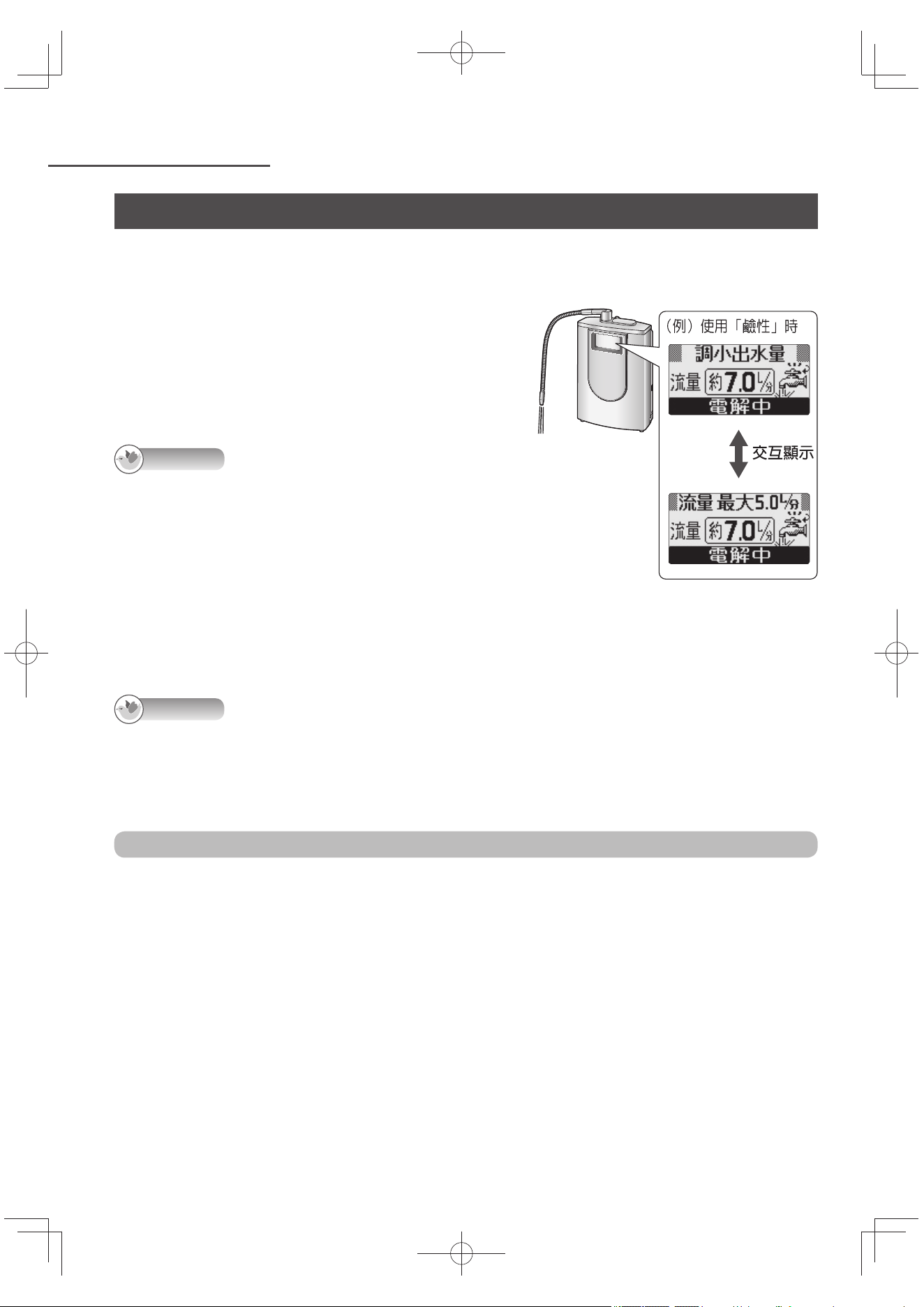
TC22
操作 (接續)
使用鹼性離子水、弱酸性水、淨水(接續)
出現「調小出水量」的顯示時(僅限於鹼性、弱酸性使用)
顯示水流量過多(有可能無法完全取得充分的
pH 值)。
請慢慢關緊水龍頭,直至顯示消失
*
。
*: 「鹼性」的狀況下:流量約 5.0 公升/分
「弱酸性」的情況下:
流量約 3.2 公升/分
告知
使用水質/用途顯示的時候,出現「調小出水
量」的顯示之間,會變為流量顯示。(為了當
作流量調節的標準)
使用「鹼性強」時,比較容易出現「調小出水
量」的顯示。(此時,調整到 2.2 公升/分的
流量顯示便會消失。)
想知道 pH 值的時候
請使用附屬的 pH 值測試套件測試。(參閱 TC17 頁)
告知
使用中,當水龍頭關的過緊,或因水道水壓的變化迫使流量變低(低於1.0 公升/分)時,會顯示濾
芯的使用壽命。(鹼性、弱酸性的狀況下將停止電解)保持此狀態下,按下水質切換鈕時,約有 4
秒出現水質顯示後,會交互顯示「流量會變低」與「水龍頭是否鎖太緊」顯示。當再度使用恢復水質
顯示為止前,請打開水龍頭。
在關閉水龍頭後,防止設置返回"鹼性"
請參閱「設定的方法」(參閱 TC32 頁),將「鹼性優先」設定為 「OFF」。
只限使用淨水狀態下才能關閉「鹼性優先」的設定。
(使用鹼性強、弱酸性及關閉水龍頭後,將自動恢復到「鹼性」。)
TK-AS66-ZEXW.indb22TK-AS66-ZEXW.indb22 2017/01/3020:17:362017/01/3020:17:36
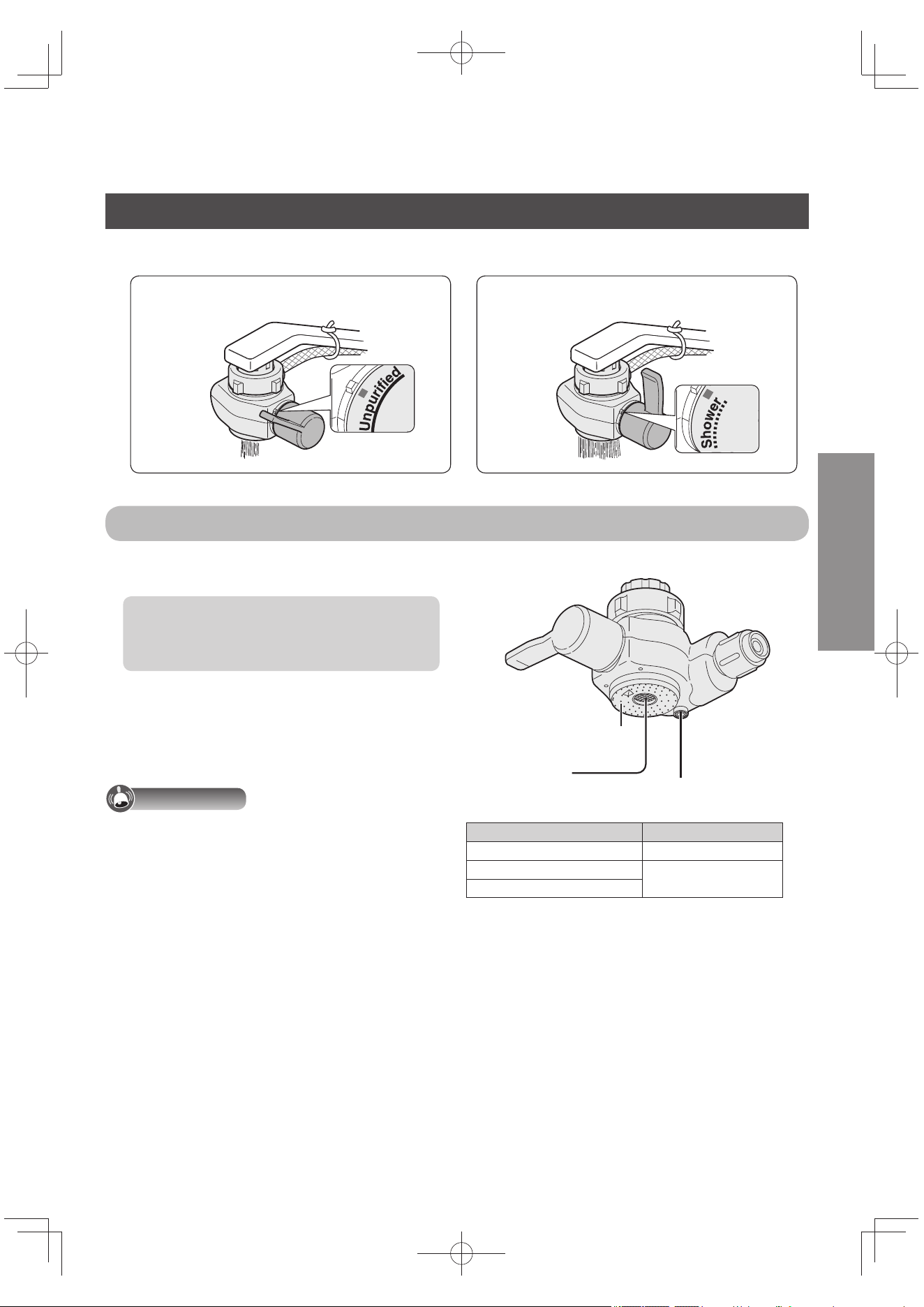
TC23
直式 水流。 淋灑式 水流。
中文(繁體)
使用分水開關切換為「Unpurified」或「Shower」。
分水開關
不小心將熱水通向本體時,熱水會從熱水
排水口流出。
為保護濾芯,熱水防護機制將啟動(溫度:
約 60 ℃ 以上)。
此時會發出嗶聲,是正常現象。
立即停用熱水,為快速冷卻請運行
約
0.4 公
升(
約
10 秒鐘)水於本體。
稍後水會由熱水排水口流出,非異常現
象。
注意事項
適用水溫請參照右表。請使用這個溫度(避免
造成故障)。
(由下往上看時)
原水淋灑式水流孔
原水口(直式)
熱水排水口
分水開關位置 水溫
Purified 不超過 35 ℃
Unpurified
不超過 80 ℃
Shower
使用原水(自來水)
原水就是自來水。
TK-AS66-ZEXW.indb23TK-AS66-ZEXW.indb23 2017/01/3020:17:372017/01/3020:17:37
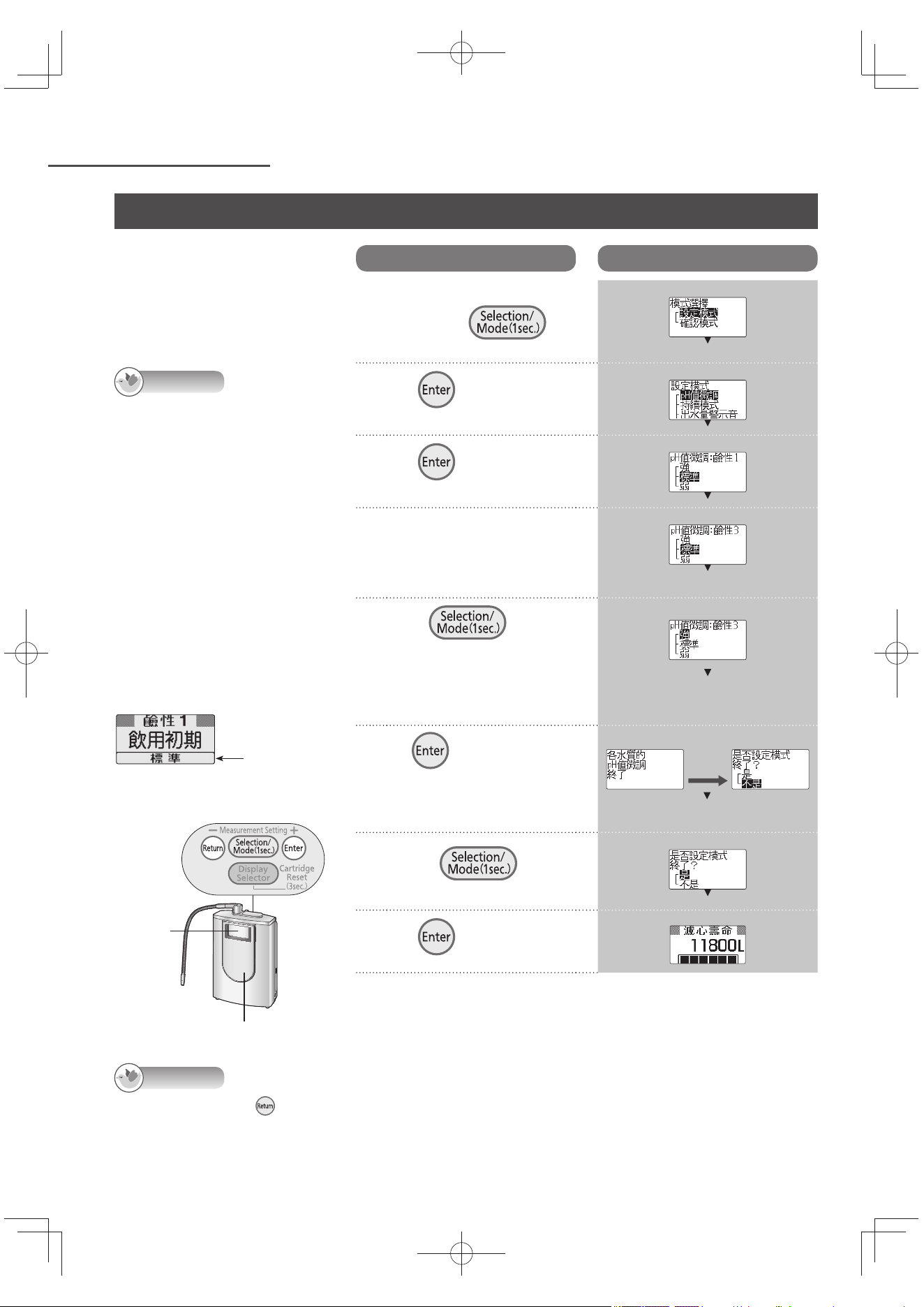
TC24
操作 (接續)
為了貼近新生成中的 pH 值「pH
的標準(水質顯示燈的數值)」
,而將「鹼性」「弱酸性」的水
質切換鈕設定成 pH 值標準,並
區分為「強」「標準」「弱」3
段式微調。
告知
pH 值微調的範圍,對照
「標準」的設定分別以「強」
「弱」pH 值 0.2 ~ 1.5 程度
變化。(依水質或不同使用
條件,變化量會有不同的幅
度。)
購買時已設定
為「標準」。
操作面板
液晶
顯示
水質切換鈕
微調 pH 值(離子濃度)
操作
液晶顯示
1
關閉水龍頭,在操作面
板上 按下
1 秒。
2
按 。
3
按 。
4
微調 pH 值,按下水質
切換鈕。
5
按下 ,選擇
pH 值微調的設定。
需要多次微調 pH 值水質切
換鈕的狀況時,請重複操作
4與5。
6
按 。
【設定完畢】
設定4、5的順序後即完成所
有 pH 值的微調。
約 3 秒後
7
按下 , 選
擇「是」。
8
按 。
9
使用 pH 值測試套
件來確認 pH 值。
(參閱 TC17 頁)
例)
告知
在步驟 2 ~ 5 按下 ,就會回到前一個畫面。完成設定後,按下也不會回到前面的畫面。
即使是英文顯示模式,畫面仍以中文顯示。
例)
設定「強」
例)
TK-AS66-ZEXW.indb24TK-AS66-ZEXW.indb24 2017/01/3020:17:372017/01/3020:17:37
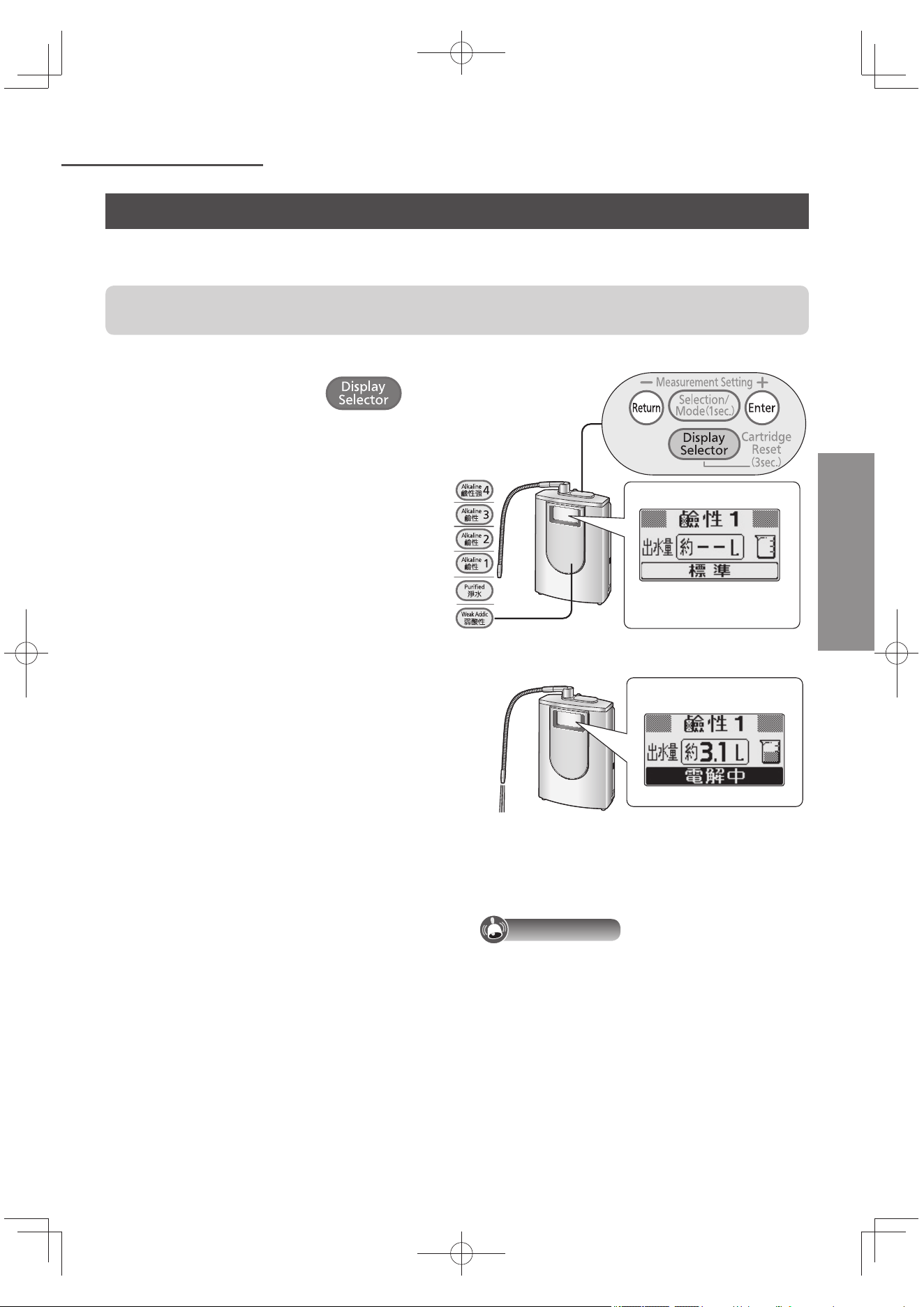
TC25
方便使用
中文(繁體)
每次通水時,累算出水量(由出水口流出的水量),液晶顯示以 0.1 公升為單位計算。(出水量顯
示)
測量出水量時,先按次序參閱第 TC26 頁,進行「設定出水口和酸性水出水口的高低差」(為了提昇
出水量顯示的精確度)。
1
關緊水龍頭,重複按下 直至
「出水量」顯示。
每按 1 次,液晶顯示就會變化。
2
按了切換後,打開水龍頭。
「準備中」的顯示字幕消失時,即時開始
計量。
3
測量出水量。
計量中,每逢出水量到 0.2 公升時,出水
量警示音 會發出「嗶」聲。
4
出水量顯示出現理想測量的數值後,關水
龍頭。
例)
不想讓出水量警示音鳴叫時
參閱「設定的方法」(參閱 TC31 頁),請將「出
水量警示音」設定為 OFF。
注意事項
出水量顯示和實際出水量差異很大時,請做
「出水量顯示的補正」(參閱 TC28 頁)。
水質切換鈕
出水量顯示
例)
測量出水量
TK-AS66-ZEXW.indb25TK-AS66-ZEXW.indb25 2017/01/3020:17:382017/01/3020:17:38
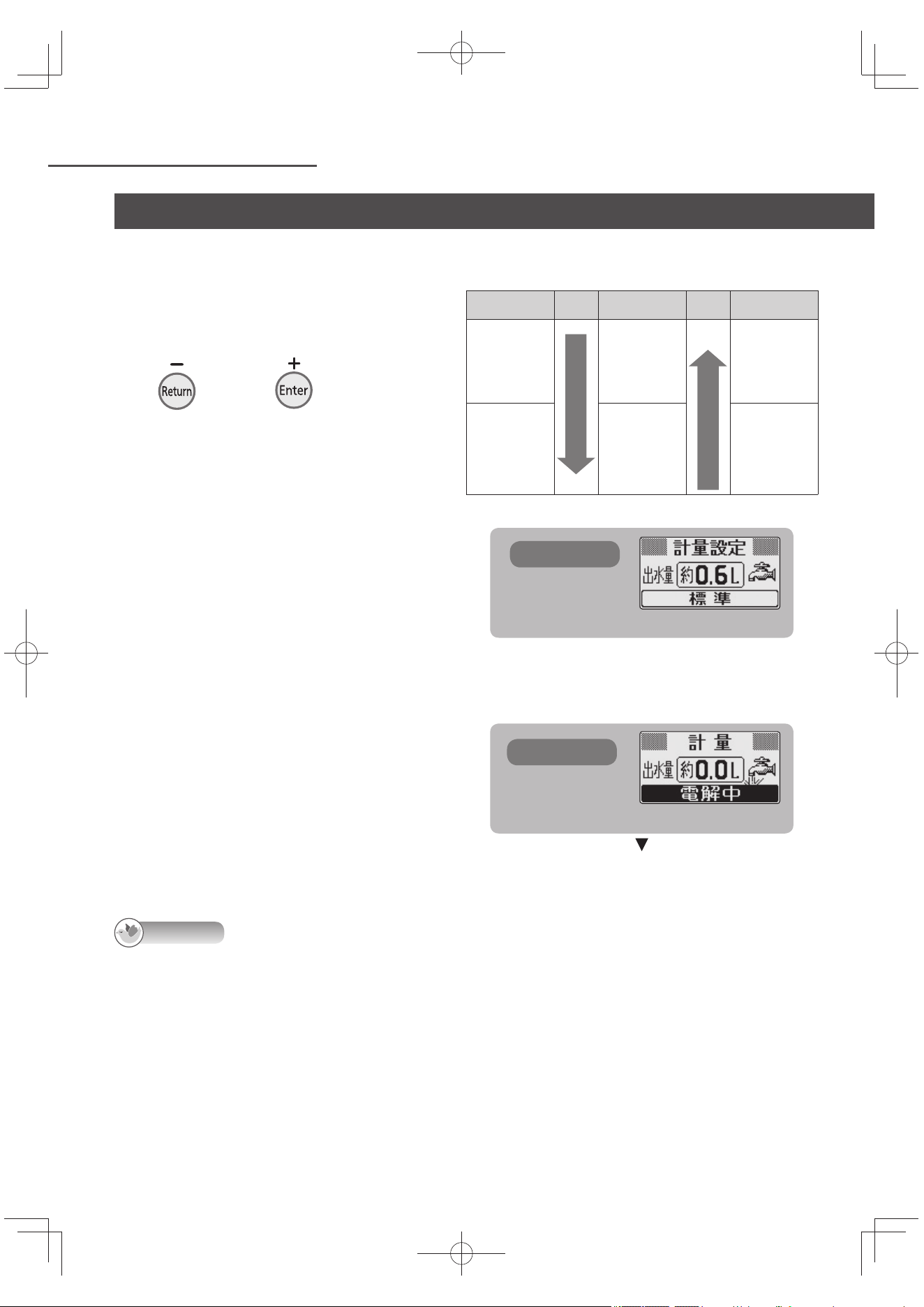
TC26
方便使用 (接續)
出現測量的數值達到時,設定警告響起
1
按欲使用的水質切換鈕。
每按 1 次,液晶顯示就會變化。
2
將水龍頭關緊,按
或重複按 直到出現想測量的
數值。
液晶顯示變成「計量條件設定」畫面。
可設定範圍是 0.6 ~ 5.0 公升。
可設定的數值是 0.6 ~ 2.0 公升, 單位
是 0.2 公升。
可設定的數值是 2.0 ~ 5.0 公升, 單位
是 0.5 公升。
(參照右表)
中止設定時
請按其他操作鈕或水質切換鈕。
3
打開水龍頭。
「準備中」的顯示字幕消失時,即時始計
量。
4
告知警告聲發出「嗶一」聲時,請關緊水
龍頭。
設定的範圍
+
顯示
-
顯示
0.6 ~ 2.0
公升
按
一
次
變大
每次增加
0.2 公升
按
一
次
變小
每次減少
0.2 公升
2.0 ~ 5.0
公升
每次增加
0.5 公升
每次減少
0.5 公升
告知
就算超過設定的數值,沒有關上水龍頭的話,還是會繼續計量,顯示出水量。這時候每逢出水量約達 0.2 公升
時,出水量警示音發出「嗶」聲。
例) 0.6 公升
第 2 次以後,會顯示上一次設定的數值。
液晶顯示
液晶顯示
出水量到達設定的數值後,通知警告聲會發出嗶
一聲。
液晶顯示
測量出水量(接續)
TK-AS66-ZEXW.indb26TK-AS66-ZEXW.indb26 2017/01/3020:17:382017/01/3020:17:38
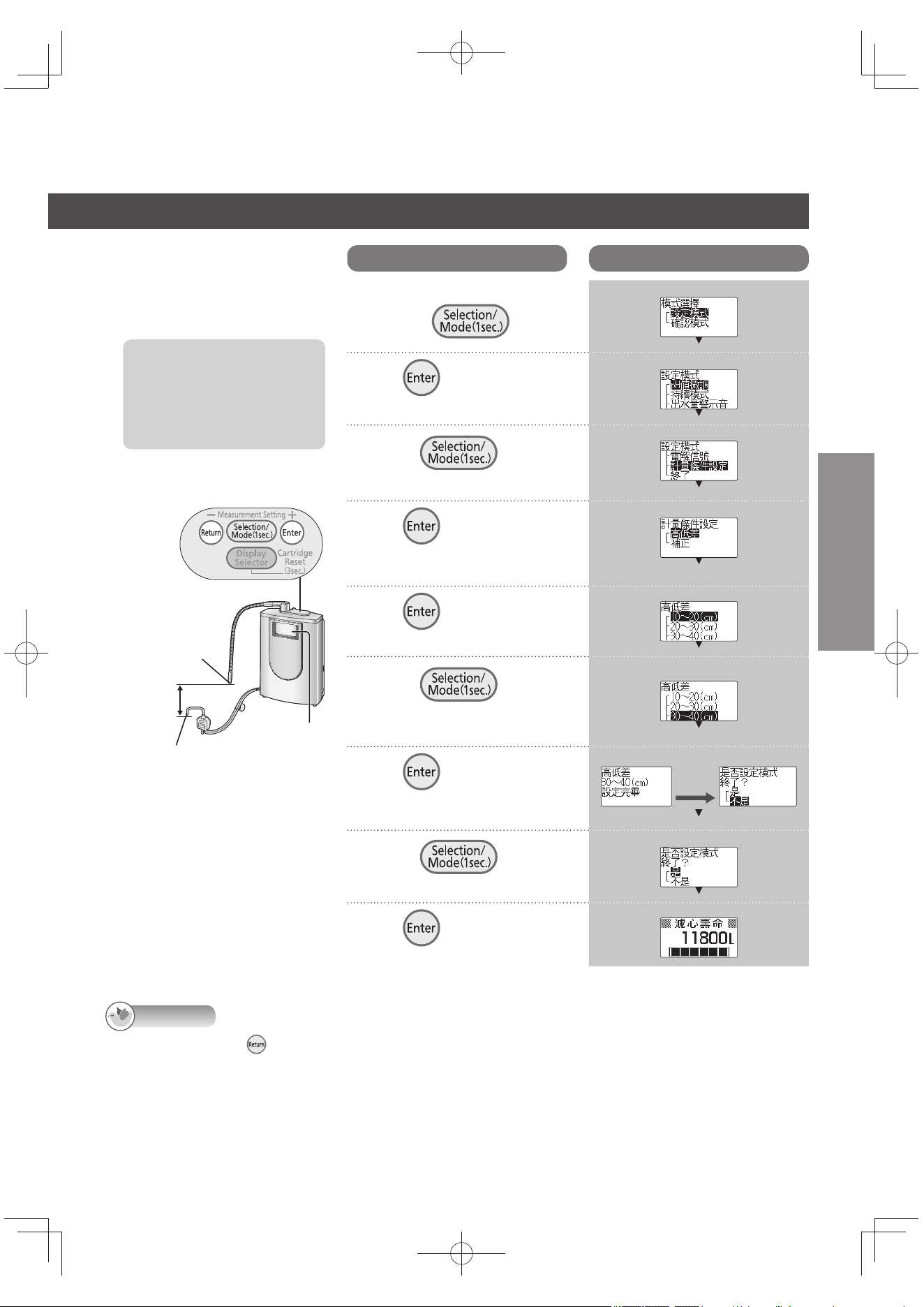
TC27
中文(繁體)
設定出水口和酸性水出水
口的高低差
建議您為了提高出水量的精確
度,請設定。
設定前,一定要先確認出
水口和酸性水出水口的高
低差。
2個出水口之間的高低差
為 10 ~ 50 cm。
告知
在步驟 2 ~ 6 按下 ,就會回到前1個畫面。設定完畢後,不會回到前面的畫面。
一旦設有的內容,到再度設定(變更)之前,都會被記憶著。
即使是英文顯示模式,畫面仍以中文顯示。
操作面板
出水口
液晶顯示
酸性水出水口
高低差
操作
液晶顯示
1
關閉水龍頭,在操作面板
上按下 1 秒。
2
按 。
3
按下 ,選擇
「 計量條件設定」。
4
按 。
「出水量顯示的補正」時,
參閱 TC28 頁的步驟 5。
5
按 。
6
按下 ,選擇
高低度差設定。
依量度的差別設定1個值。
例)設定為 30 ~ 40 cm時
7
按 。
【設定完畢】
約 3 秒後
8
按下 , 選擇
「是」。
9
按 。
例)
TK-AS66-ZEXW.indb27TK-AS66-ZEXW.indb27 2017/01/3020:17:382017/01/3020:17:38
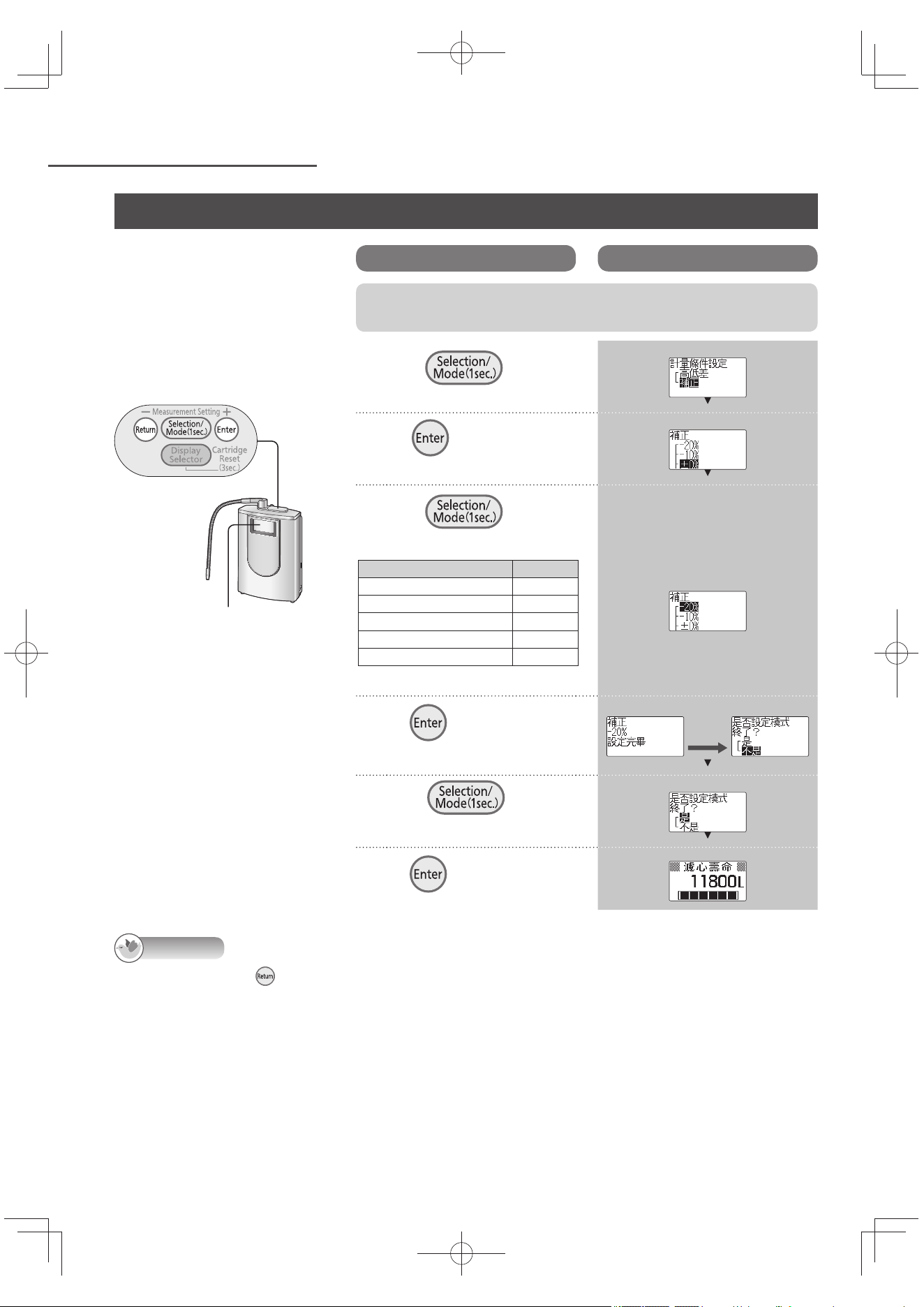
TC28
方便使用 (接續)
出水量顯示的補正
出水量顯示和實際的出水量有
差異時。(會受到使用狀態或
水壓的影響。)差異大時,請
做出水量顯示補正。
告知
在步驟 5 ~ 7 按下 ,就會回到前一個畫面。設定完畢後,不會回到前面的畫面。
一旦設有的內容,到再度設定(變更)之前,都會被記憶著。
即使是英文顯示模式,畫面仍以中文顯示。
操作面板
液晶顯示
測量出水量(接續)
操作
液晶顯示
參閱 TC27 頁「設定出水口和酸性水出水口的高低差」執行步驟
1 ~ 4 後,再繼續以下的操作步驟。
5
按下 , 選擇
「補正」。
6
按 。
7
按下 , 依表選
擇 補正值。
例) 出水量顯示為「0.5公升」,
實際的出水量為 0.6 公升
時(出水量多了 20%)
出水量顯示和出水量的差 補正值
出水量多 20% 左右 -20%
出水量多 10% 左右 -10%
差異在 10% 以內 ±0%
*
出水量少 10% 左右 +10%
出水量少 20% 左右 +20%
*: 無補正
8
按 。
【設定完畢】
約 3 秒後
9
按下 , 選擇
「是」。
10
按 。
例)
TK-AS66-ZEXW.indb28TK-AS66-ZEXW.indb28 2017/01/3020:17:392017/01/3020:17:39
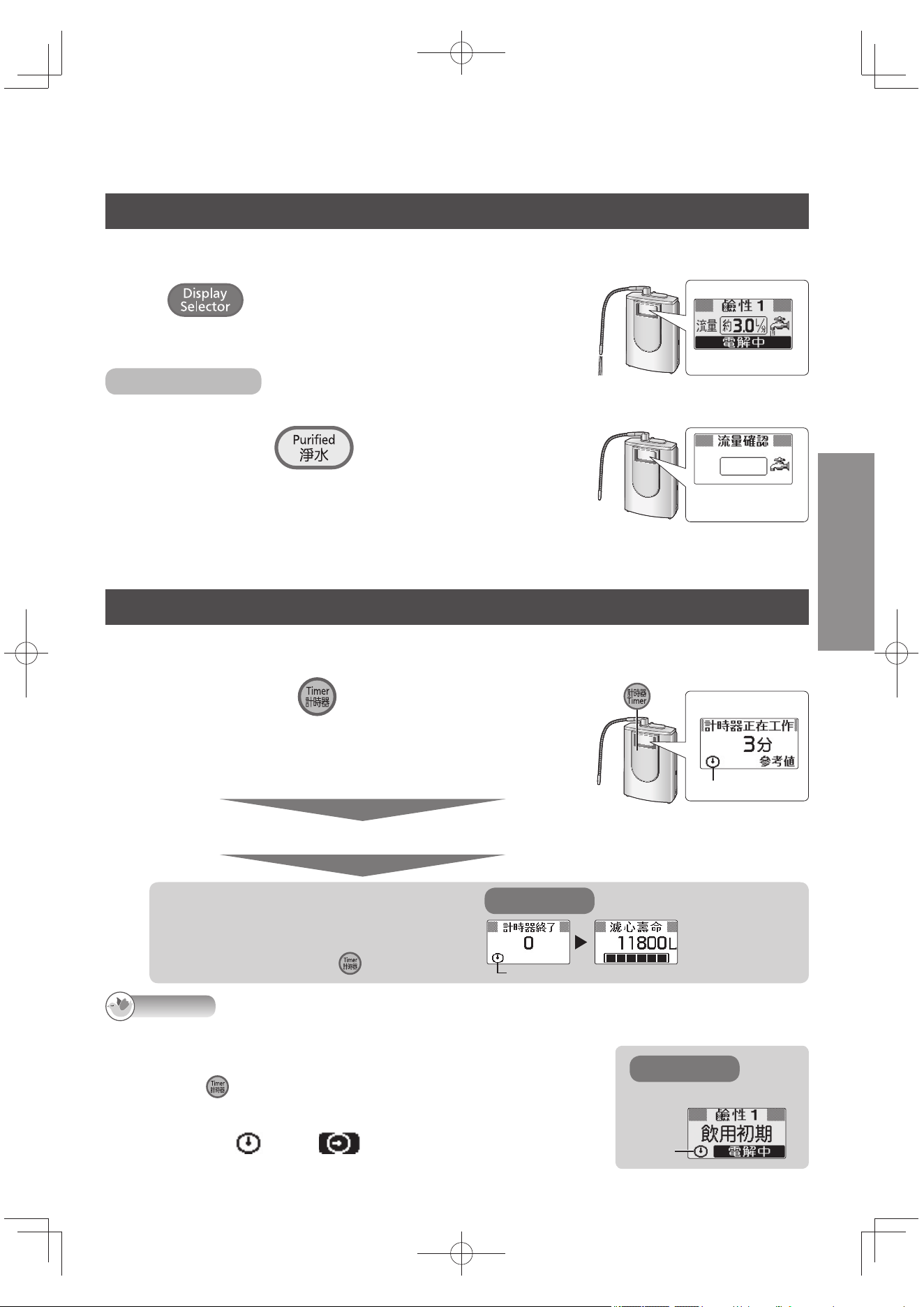
TC29
中文(繁體)
觀察水流量
通水中,會顯示水流量(每 1 分鐘由出水口、酸性水出水口和排水口流出的合計量),可以加以確
認。(流量顯示)
重複按 直至「流量」出現在液晶顯示。
每按一次,液晶顯示就會變化。
止水中或流量未達約 1.0 公升/分的話,不會顯示流量數值。
無法流量顯示時
無法流量顯示時(水壓太低等),可用「流量確認」顯示來確認流量。
1
關水龍頭,按下 直到發出「嗶嗶嗶嗶」聲
4 次 (約 3 秒鐘)。
再按 3 秒鐘,回到原來的顯示。或水質會自動回到上次使
用的「鹼性」。
流量確認顯示
2
打開水龍頭。
關了水龍頭,就會回到原來的顯示。
使用計時器
當設定時間到時,警告音會鳴叫通知(約 10 秒)。
計時料理或煮飯時非常方便。
1
關緊水龍頭時,按 ,設定計時的時間。
液晶顯示畫面變為「計時器設定」。
每按下一次,就會增加 1 分鐘。
持續按時,以 5 分鐘為單位增加。
可設定 由 1 ~ 60 分鐘 的範圍。
約 3 秒後
警告發出兩下嗶響,開始倒數。
例)
閃爍。
設定時間到時,
會發出嗶響
(約 10 秒鐘)。
想要關閉警告聲,按下 。
例)
亮燈
液晶顯示
告知
倒數時,本體可繼續使用。(液晶顯示如右所示。)
以下的狀況,計時器設定會解除:
計時器設定操作中,水會通過本體。
倒數時按下
。
(本體通水時,無法進行操作。)
出現「異常顯示」時(參閱 TC43 頁)。
剩下 10 秒鐘時,
會轉成 。
例)
閃爍。
液晶顯示
TK-AS66-ZEXW.indb29TK-AS66-ZEXW.indb29 2017/01/3020:17:402017/01/3020:17:40
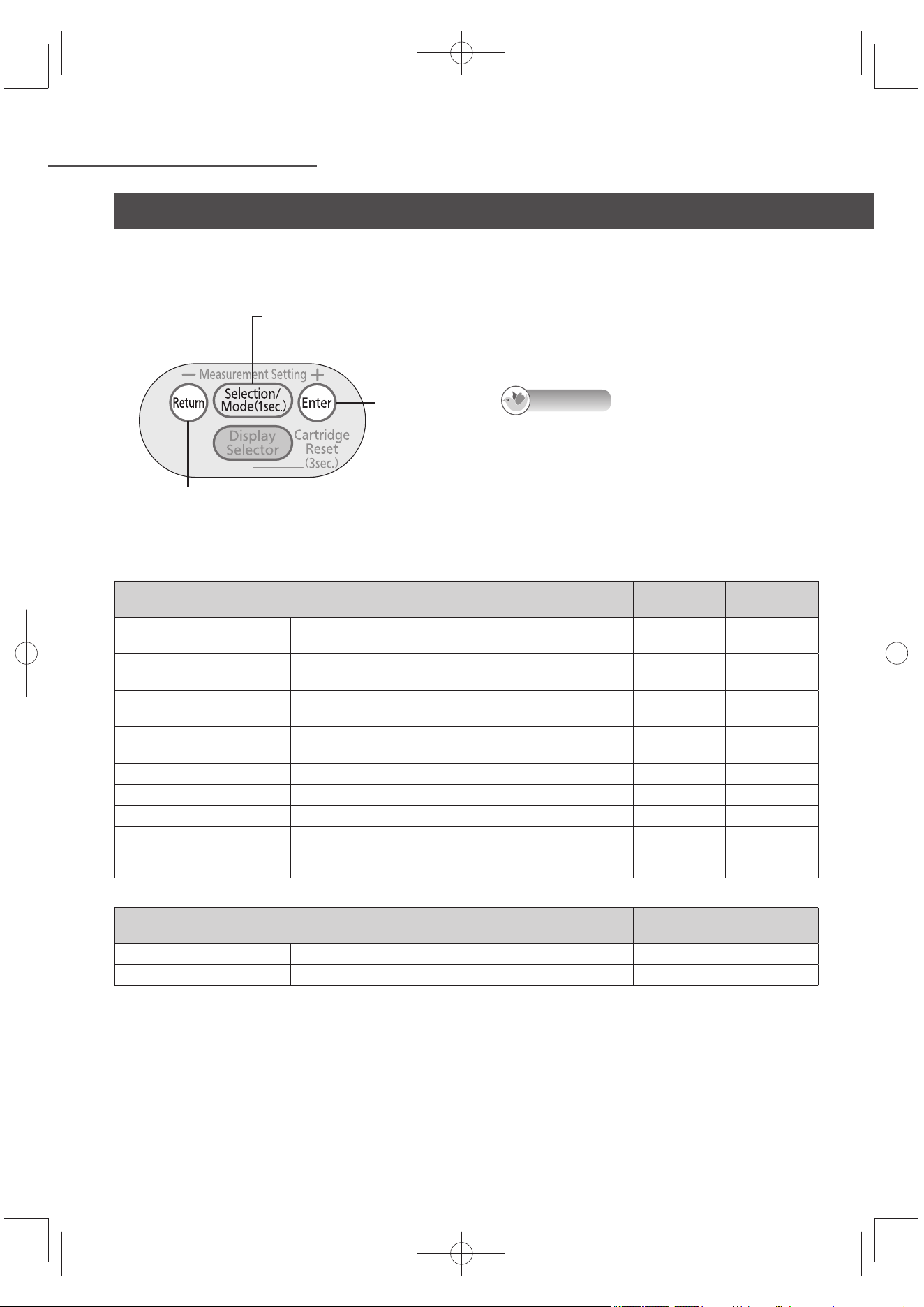
TC30
方便使用 (接續)
在設定、確認模式下,可以進行下表目的設定。(通水中不能設定或操作。)
購買時就已設定好,請直接使用。
操作面板
切換鈕
按1 秒,進入設定、確認模式。
確定鈕
返回鈕
回到前一個畫面。
設定完畢後,不會回到前面的畫面。
告知
以下情況時,會中止設定、確認:
不操作按鈕2 分鐘以上時。
本體通水時。
按下水質切換鈕時。
設定項目
設定方法
(參閱頁數)
購買時的設定
「pH 值微調」的強、標準、
弱
鹼性、弱酸性水質切換鈕設定的 pH 的標準可 3 階段微
調。
TC24 頁 標準
「持續模式」的 ON 及 OFF
OFF 設定時,持續模式解除,顯示燈(參閱 TC21 頁)不
會變亮。
TC31 頁 ON
「出水量警示音」的 ON 及
OFF
OFF設定時,出水量計量中的警示音不會發出聲響。 TC31 頁 ON
「弱酸性警示音」的 ON 及
OFF
OFF 設定時,
弱酸性水使用中的警示音不會發出聲響。
TC31 頁 ON
「 鹼性優先」的 ON 及 OFF
OFF 設定時,使用淨水,關水龍頭後,不會回到「鹼性」。
TC32 頁 ON
「警告音量」的大中小 警告音量分為 3 階段可自由調節。 TC32 頁 中
「電解信號」的 ON 及 OFF 變為 OFF 時,電解信號(參閱 TC19 頁)不會亮燈。 TC32 頁 ON
計量條件設定 為了提昇出水量顯示(參閱 TC24 頁)精準度的設定。
TC27 頁
~
TC28 頁
–
可確認項目
確認方法
(參閱頁數)
選購品 可確認濾芯等選購品型號。 TC33 頁
設定確認 可確認設定模式下已設定的內容。 TC33 頁
設定、確認模式
TK-AS66-ZEXW.indb30TK-AS66-ZEXW.indb30 2017/01/3020:17:402017/01/3020:17:40
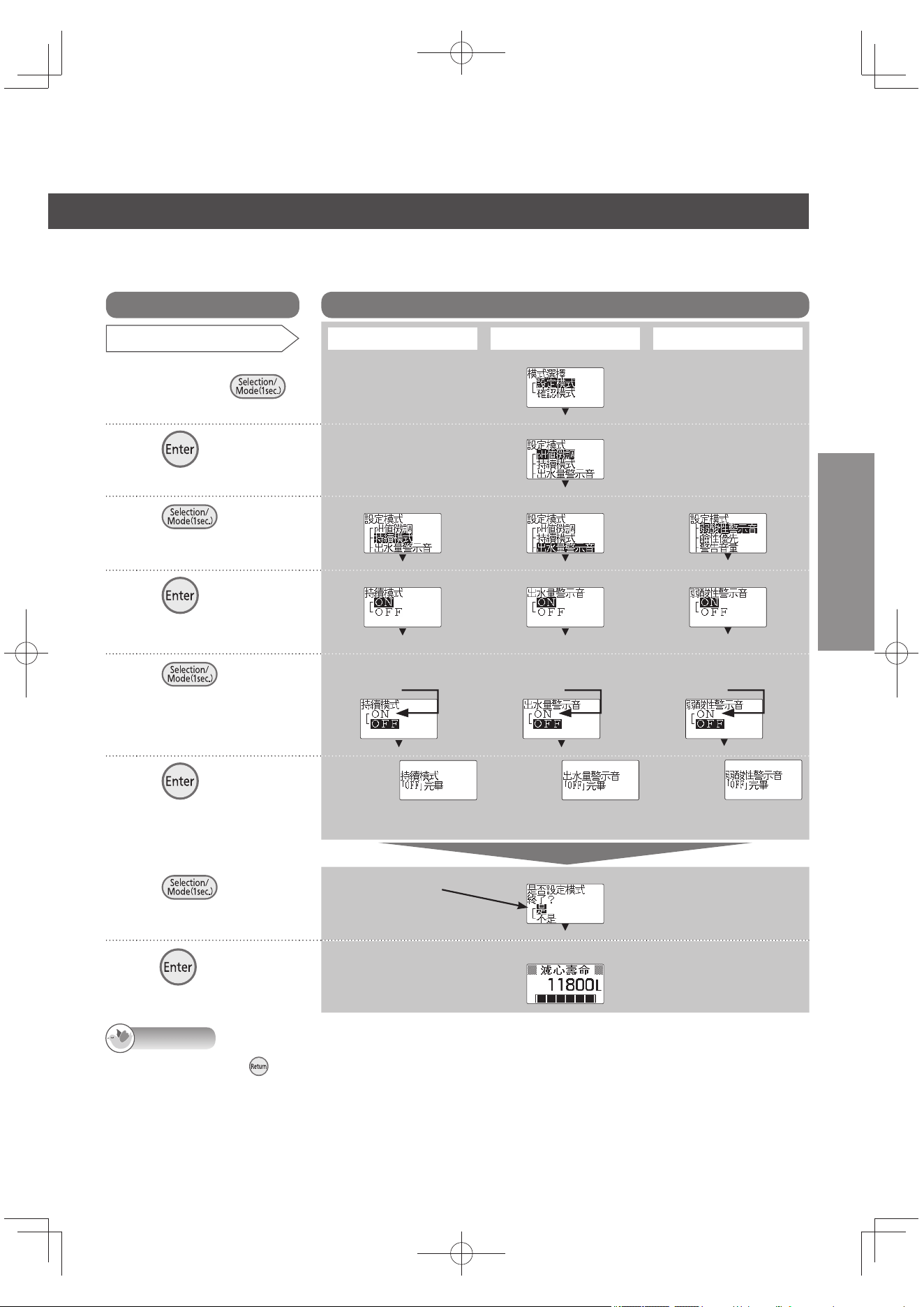
TC31
中文(繁體)
操作
液晶顯示
設定項目
「持續模式」的 OFF (ON)
「出水量警示音」的 OFF (ON) 「弱酸性警示音」的 OFF (ON)
1
關閉水龍頭,在操作
面板上按下
1秒。
2
按 。
3
以 做選擇。
每按一次該鈕就切換
一次。
4
按 。
以反白色文字顯示現在的
設定。
5
以 做選擇。
每按一次該鈕就切換
一次。
ON 時選擇
「ON」
ON 時選擇
「ON」
ON 時選擇
「ON」
6
按 。
【設定完畢】
選「ON」時,
「 持續模式「ON」
完畢 」顯示。
選「ON」時,
「出水量警示音「ON」
完畢」顯示。
選「ON」時,
「弱酸性警示音「ON」
完畢」顯示。
約
3 秒後
7
以 做選擇。
每按一次該鈕就切換
一次。
8
按 。
設定的方法
(關於詳細設定項目和購買時的設定請參閱 TC30 頁。)
告知
在步驟 2 ~ 5 按下 ,就會回到前一個畫面。設定完畢後,不會回到前面的畫面。
即使是英文顯示模式,畫面仍以中文顯示。
繼續設定其他項目時,選擇
「不是」。
選「不是」時到步驟 3。
例)
剩餘濾芯壽命顯示(待機狀態)
TK-AS66-ZEXW.indb31TK-AS66-ZEXW.indb31 2017/01/3020:17:402017/01/3020:17:40
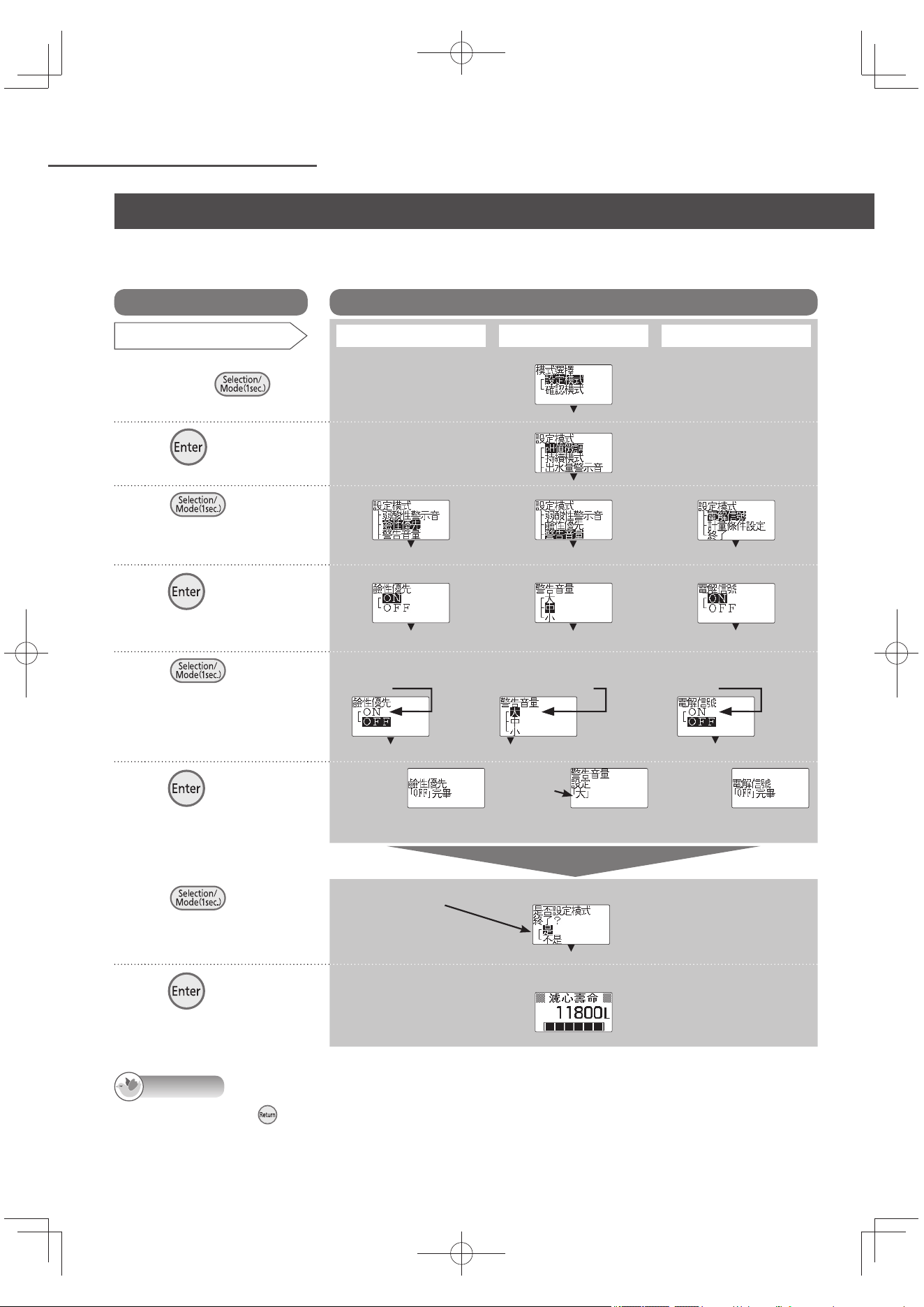
TC32
方便使用 (接續)
設定的方法
(關於詳細設定項目和購買時的設定請參閱 TC30 頁。)
告知
在步驟 2 ~ 5 按下 ,就會回到前一個畫面。設定完畢後,不會回到前面的畫面。
即使是英文顯示模式,畫面仍以中文顯示。
操作
液晶顯示
設定項目
「鹼性優先」的 OFF (ON)
「警告音量」的大中小
「電解信號」的 OFF (ON)
1
關閉水龍頭,在操作面
板上按下
1秒。
2
按 。
3
以 做選擇。
每按一次該鈕就切換
一次。
4
按 。
以反白色文字顯示現在
的設定。
5
以 做選擇。
每按一次該鈕就切換
一次。
ON 時選擇
「ON」
選擇欲設定音量。
(例)設定「大」。
ON 時選擇
「ON」
6
按 。
【設定完畢】
選「ON」時,
「鹼性優先「ON」
完畢」顯示。
選「ON」時,
顯示「電解信號
「ON」 完畢」
顯示。
約
3 秒後
7
以 做選擇。
每按一次該鈕就切換
一次。
8
按 。
顯示選擇的
警告音量。
繼續設定其他項目時,選擇
「不是」。
選「不是」時到步驟 3。
例)
剩餘濾芯壽命顯示(待機狀態)
設定、確認模式(接續)
TK-AS66-ZEXW.indb32TK-AS66-ZEXW.indb32 2017/01/3020:17:412017/01/3020:17:41
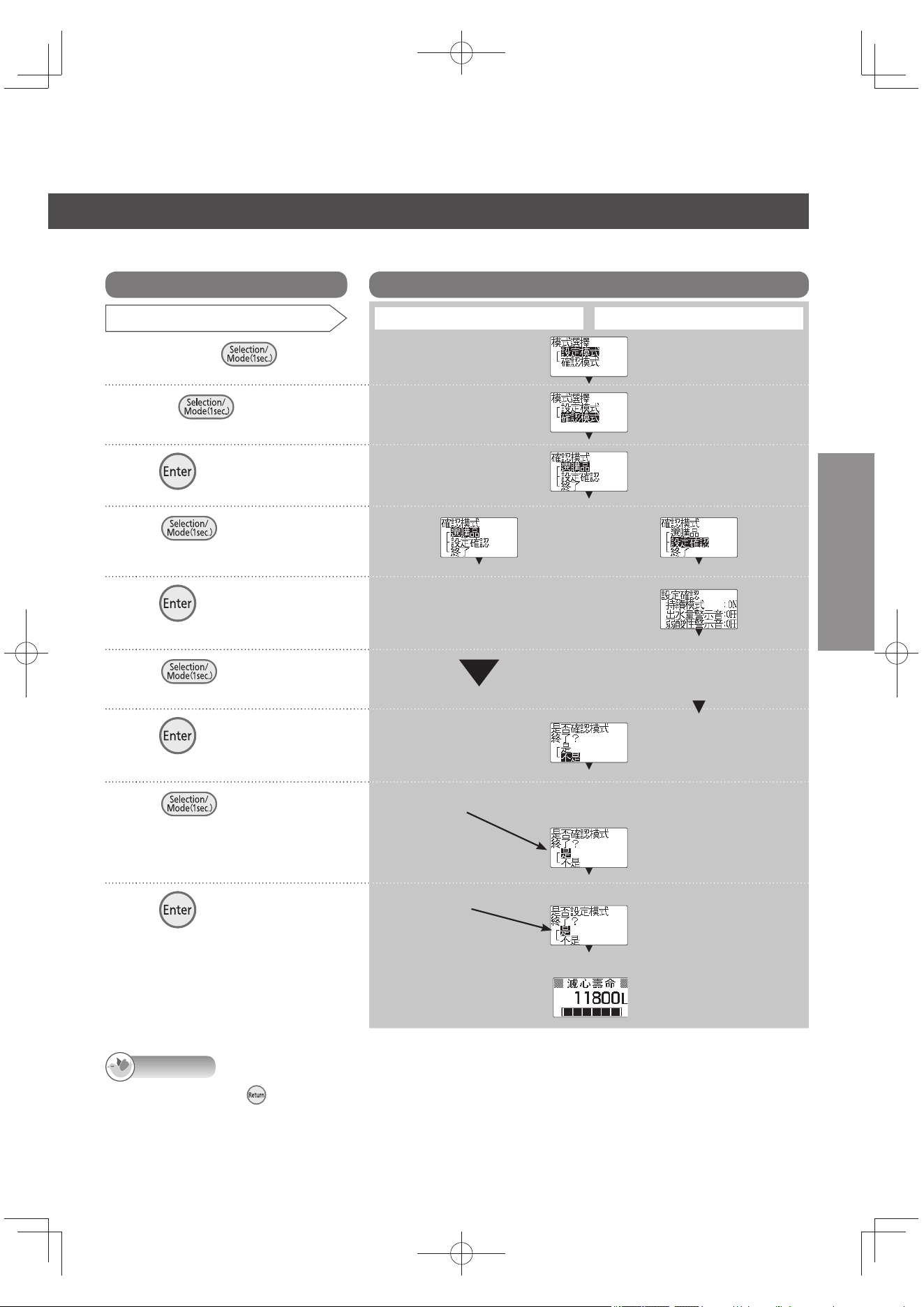
TC33
中文(繁體)
操作
液晶顯示
項目確認
選購品:濾芯 設定確認
1
關緊水龍按 1 秒。
2
按下 ,選擇「確認
模式」。
3
按 。
4
以 做選擇。
每按一次該鈕就切換一次。
5
按 。
確認型號。
6
以 做選擇。
每按一次該鈕就切換一次。
設定確認。
7
按 。
8
以 做選擇。
每按一次該鈕就切換一次。
9
按 。
例)
(到步驟 7)
告知
在步驟 2 ~ 6 按下 ,就會回到前一個畫面。
完成步驟7之後,按鍵也不會回到先前畫面。
即使是英文顯示模式,畫面仍以中文顯示。
設定的方法
(關於詳細設定項目和購買時的設定請參閱 TC30 頁)
繼續設定其他項目時,選擇
「不是」。
選「不是」時到步驟 3。
剩餘濾芯壽命顯示(待機狀態)
例)
繼續設定其他項目時,
選擇「不是」。
選「不是」時到
步驟 4 關。
TK-AS66-ZEXW.indb33TK-AS66-ZEXW.indb33 2017/01/3020:17:422017/01/3020:17:42
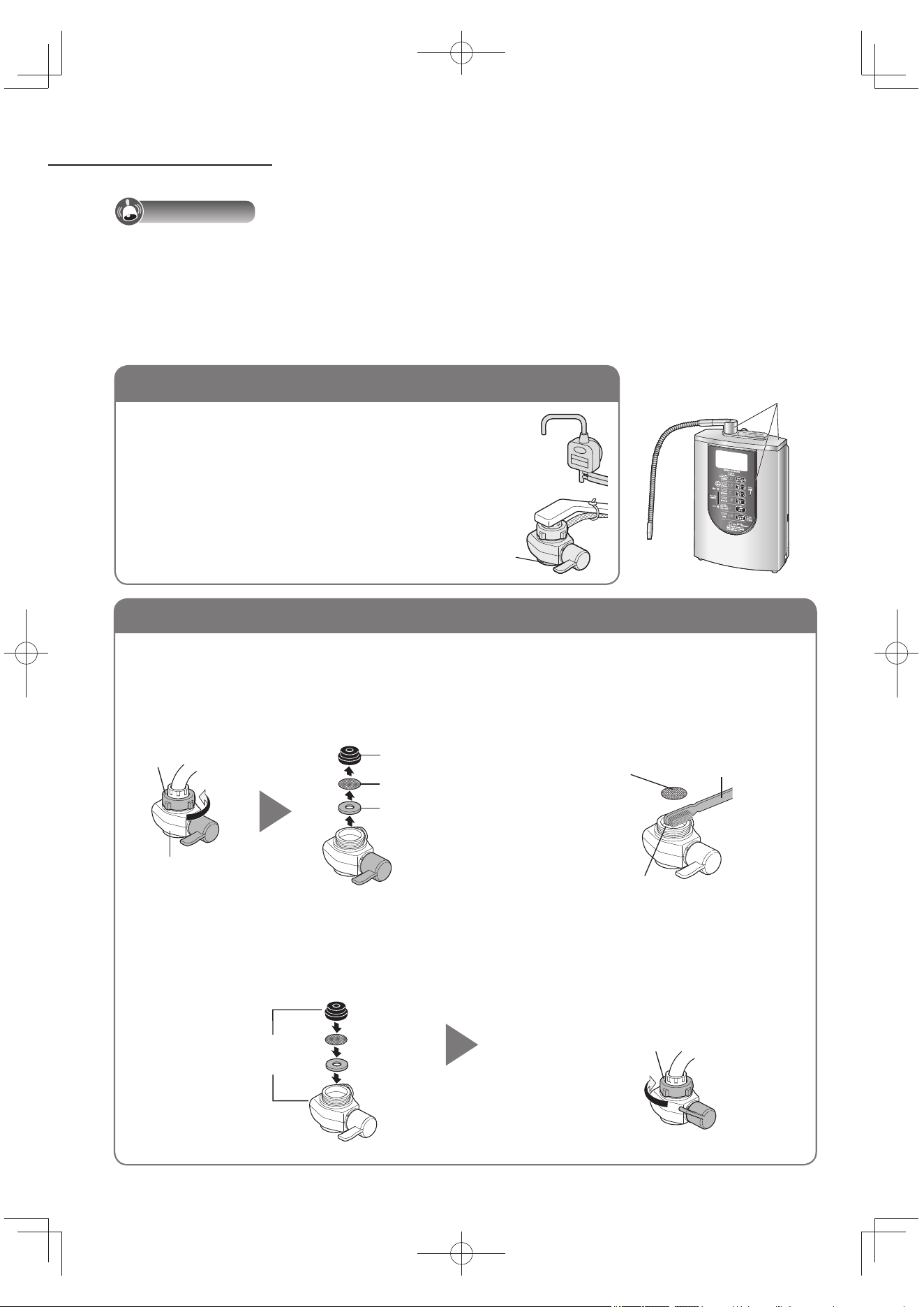
TC34
維修保養
分水開關安裝口(過濾網、注水口)
確保分水開關不是傾斜的。
注意事項
請勿使用清潔劑、去污粉、稀釋劑、揮發油、酒精或燈油等清洗。誤用時,馬上用水擦淨,將表面的
清潔劑擦掉。
(本體有沾到清潔劑的時候,亦可能導致鍍金部分受損或剝落、樹脂割裂、變色、變形的原因。)
使用去污清潔劑的話,出水管會出水不順,導致故障。
請勿使用金屬製的刷子等。(避免留下刮損痕跡)
扭緊螺帽時,請勿使用工具。(避免造成螺帽破損)
1
鬆開螺帽後,再拆下開關,
取下過濾網。
請將分水開關切換在「Purified」的位置。
2
清洗過濾網和注水
口。
3
安裝分水開關。
確保沒有外來物件附在水龍頭端和分水開關內的墊片。
請務必安裝過濾網。
安裝後,將開關切換至「Unpurified」或「Shower」的位置,讓水流
約
5 秒鐘。
鍍金部分
本體、分水開關、酸性水座
以柔軟的布沾水,用力擰乾之後擦拭。
花灑部分骯髒時,請用牙刷等工具將污物刷除。
淋浴部
螺帽
分水開關
墊片
過濾網
分水開關用墊片座
使用牙刷或
其它工具。
過濾網
注水口
請按次順
安裝部件
緊固螺帽,直至分水開
關不能轉動。
分水開關裝口的過濾網若囤積污垢和雜物,流量就會變小。請依照下記順序來清掃過濾網。
TK-AS66-ZEXW.indb34TK-AS66-ZEXW.indb34 2017/01/3020:17:422017/01/3020:17:42
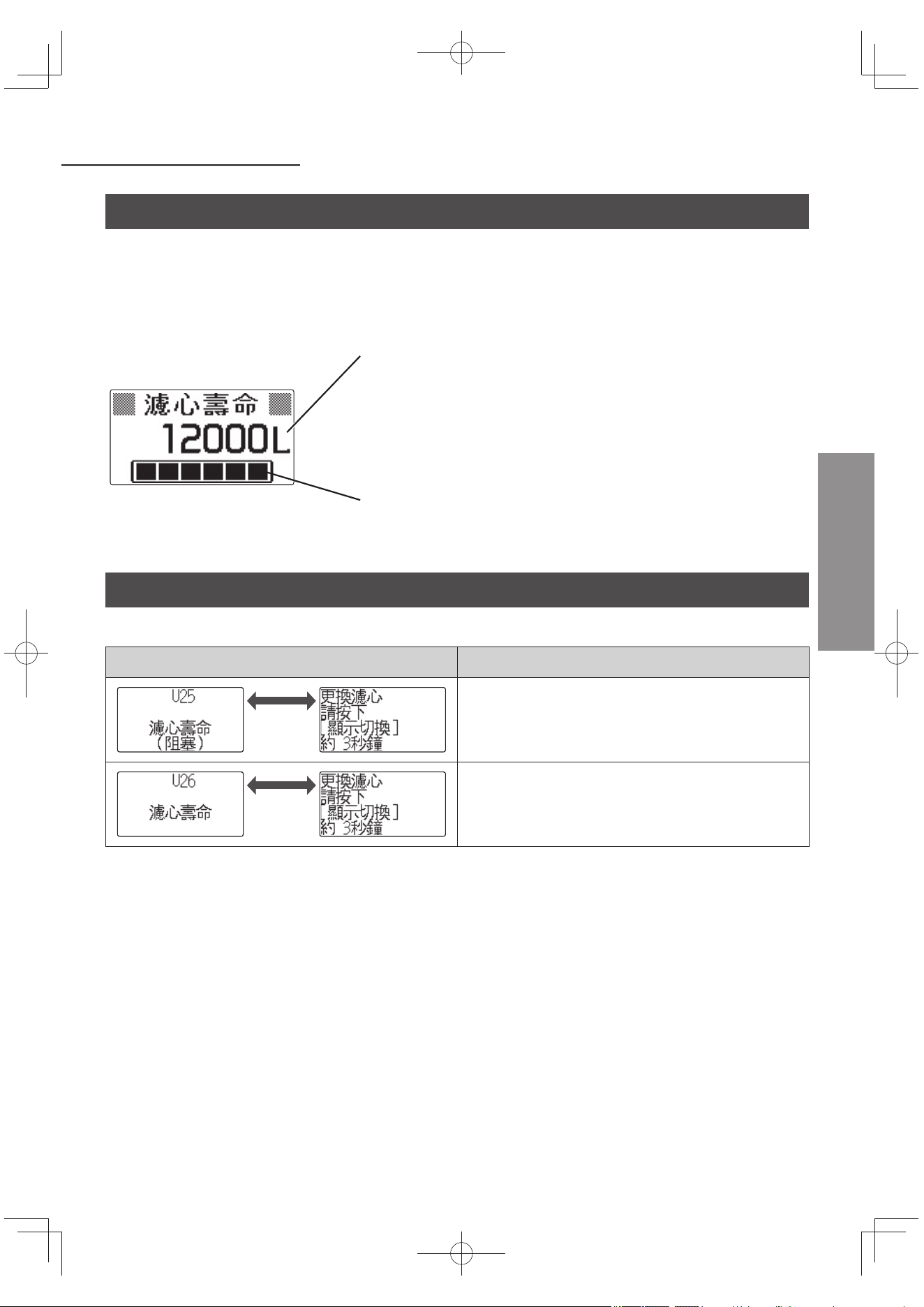
TC35
更換濾芯前
中文(繁體)
關於更換顯示
根據總通水量,液晶顯示會顯示濾芯的壽命,請依照更換標準進行更換。
濾芯壽命(12 000 公升)是以根據標準水質和水壓測試(JIS S 3201:適用於家用淨水器的試驗方
法)所得的數值,一般自來水因水質(污濁物、鐵銹等)、水壓等因素,而造成的阻塞狀況有很大差
異。
例)
指示器
依濾芯壽命減少,顯示條中的黑色燈號「■」將會消失。
剩餘濾芯壽命顯示
達濾芯更換標準的總通水量的剩餘水量以 1 公升的單位顯示。
「150 L」以下的話,會有「濾心壽命將近」的顯示出現。
請準備更換新濾芯。
更換濾芯時間
液晶顯示出現以下指示時請更換濾芯。
顯示 (交互顯示) 說明
約 2 秒
因內部阻塞,顯示依照情況顯示濾芯的壽命。
通水時,液晶顯示變為「流量」。
約 2 秒
總通水量為12 000 公升。
TK-AS66-ZEXW.indb35TK-AS66-ZEXW.indb35 2017/01/3020:17:432017/01/3020:17:43
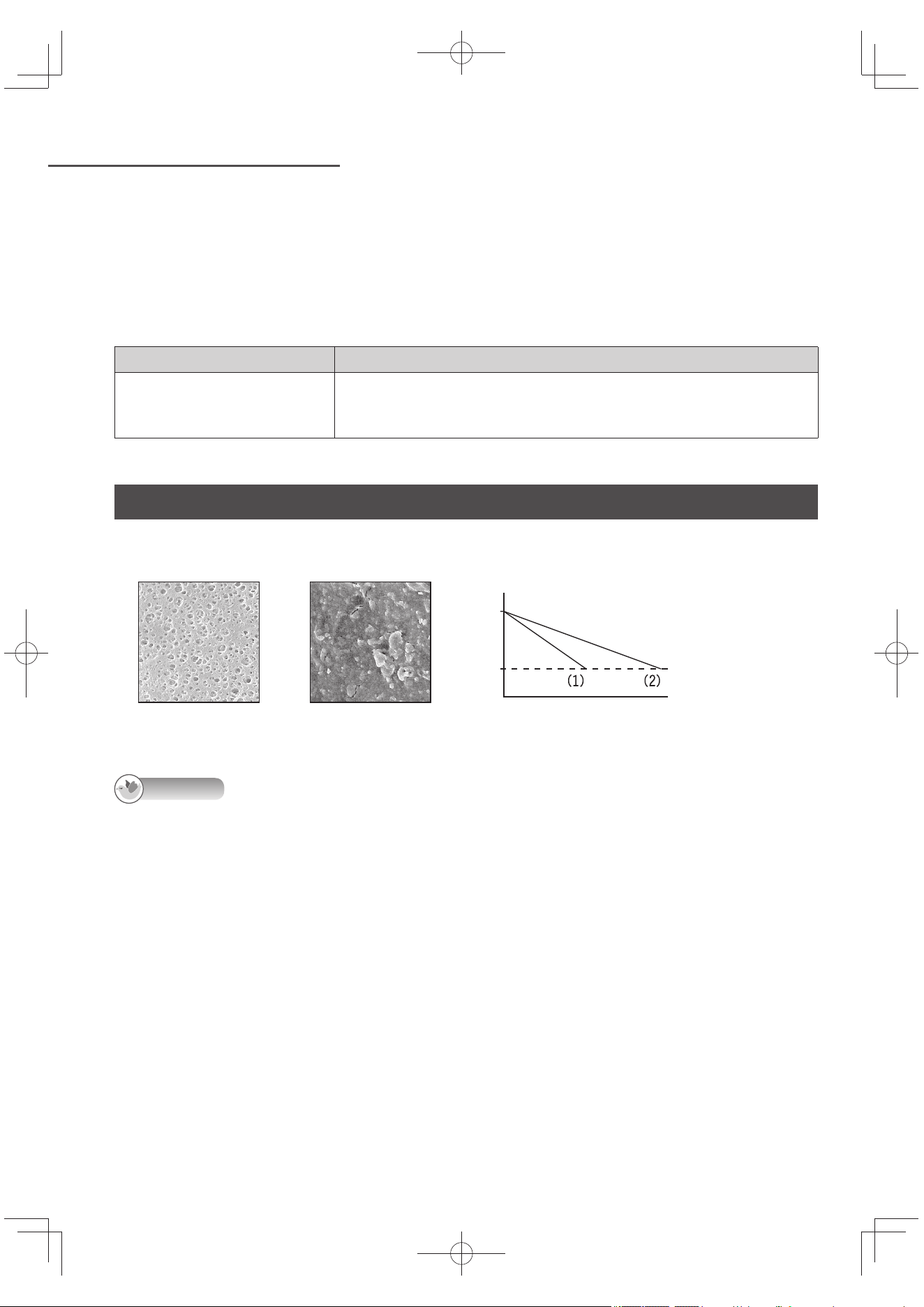
TC36
更換濾芯前 (接續)
即使「U25」或「U26」沒有顯示,請依以下情況更換濾芯:
水發出異味或味道異常時(即表示濾芯過濾能力下降)。
更換濾芯的標準期為(約 1 年)。
更換濾芯的標準期為(每天使用 30 公升,為期一年)
(更換濾芯:型號 TK-AS45C1-EX)(參閱 TC47 頁)
更換指引 成功過濾的物質
約 1 年
殘留氯、污濁物、總三鹵甲烷、三氯甲烷、二氯一溴甲烷、二溴一氯
甲烷、三溴甲烷、四氯乙烯、三氯乙烯、1,1,1-三氯乙烷、CAT、2-
MIB(黴菌臭)、溶解性鉛
有關依水質而使用期間不同
使用的濾芯,為了去除細微的髒污,內層附有中空絲膜過濾網,因此阻塞物質含量較多的水質,使用時
間會縮短。
空心絲膜表層
(新過濾網)
阻塞的空心絲膜表層
ߣ༭ዀྦ
淨水量
總通水量
(1)阻塞物質含量較多
的水質
(2)標準的水質
告知
出現下面的情況時,出水量會減少:
水溫低(水不容易通過濾芯)。
水壓低的地區(70 kPa 以下)使用的情況。
依照區域的自來水使用狀況,自來水水壓會下降。
水電行施工前後等,停水之後。
TK-AS66-ZEXW.indb36TK-AS66-ZEXW.indb36 2017/01/3020:17:432017/01/3020:17:43
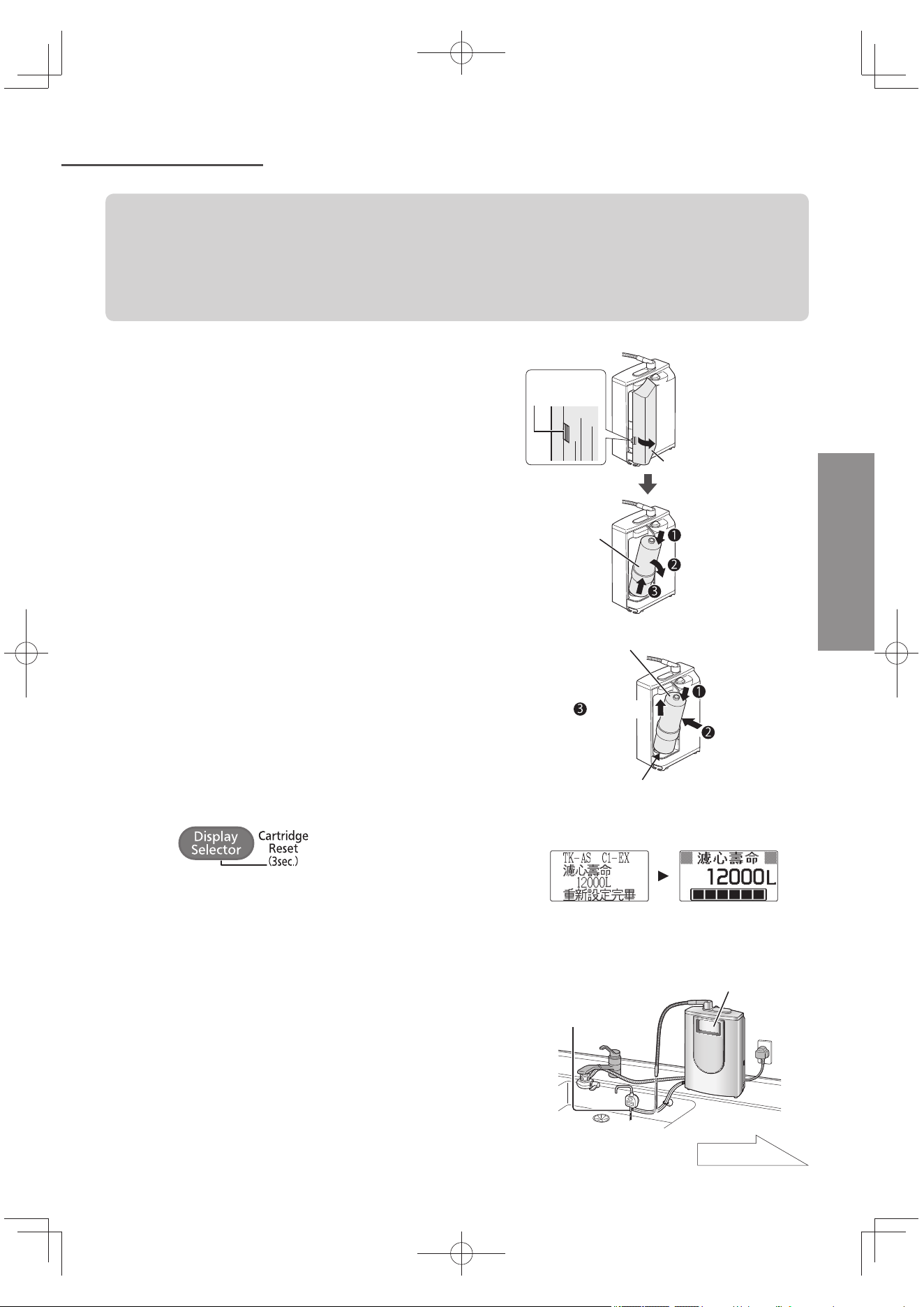
TC37
更換濾芯
中文(繁體)
請勿拔掉電源插頭,進行更換。
(若拔掉電源插頭,則無法重設濾芯壽命。)
更換濾芯時,切勿將本體平放。
切勿將出水口朝上放置。
更換濾芯前請先關閉水龍頭。濾心拆卸後,請勿進行通水。(否則水會溢出)
1
打開本體外蓋,拆下舊的濾芯。
濾芯內的水會溢出來,請注意。水亦可能會從本
體底部流出(並非漏水)。
將濾芯拆下時,請勿將本體斜放或上下倒轉放
(避免水逆流到機器內,造成故障)。
一邊稍微
按一下
外蓋
從上面往下壓
往前拉
往上拉出
濾芯
2
安裝新濾芯。
安裝後,請將濾芯向上推。
新濾芯
向上推
對齊底部中心,一邊向下按壓一邊將濾
芯推入。
3
按
(約 3 秒鐘)。
「重新設定完畢畫面」訊息顯示,
約
3 秒後,
「濾芯壽命」隨即顯示。
請參閱右方顯示,確認濾芯壽命正確地重設。
重新設定完畢畫面 濾芯壽命顯示
45
๊
4
打開水龍頭,
讓淨水通過本體(約 3 ~ 4 分鐘)。
通水時,「準備中」顯示會閃燈 20 秒。
通水期間,請確認濾芯連接部分是否漏水,和排
水口是否流水。
排水口
液晶顯示
接下頁
TK-AS66-ZEXW.indb37TK-AS66-ZEXW.indb37 2017/01/3020:17:432017/01/3020:17:43
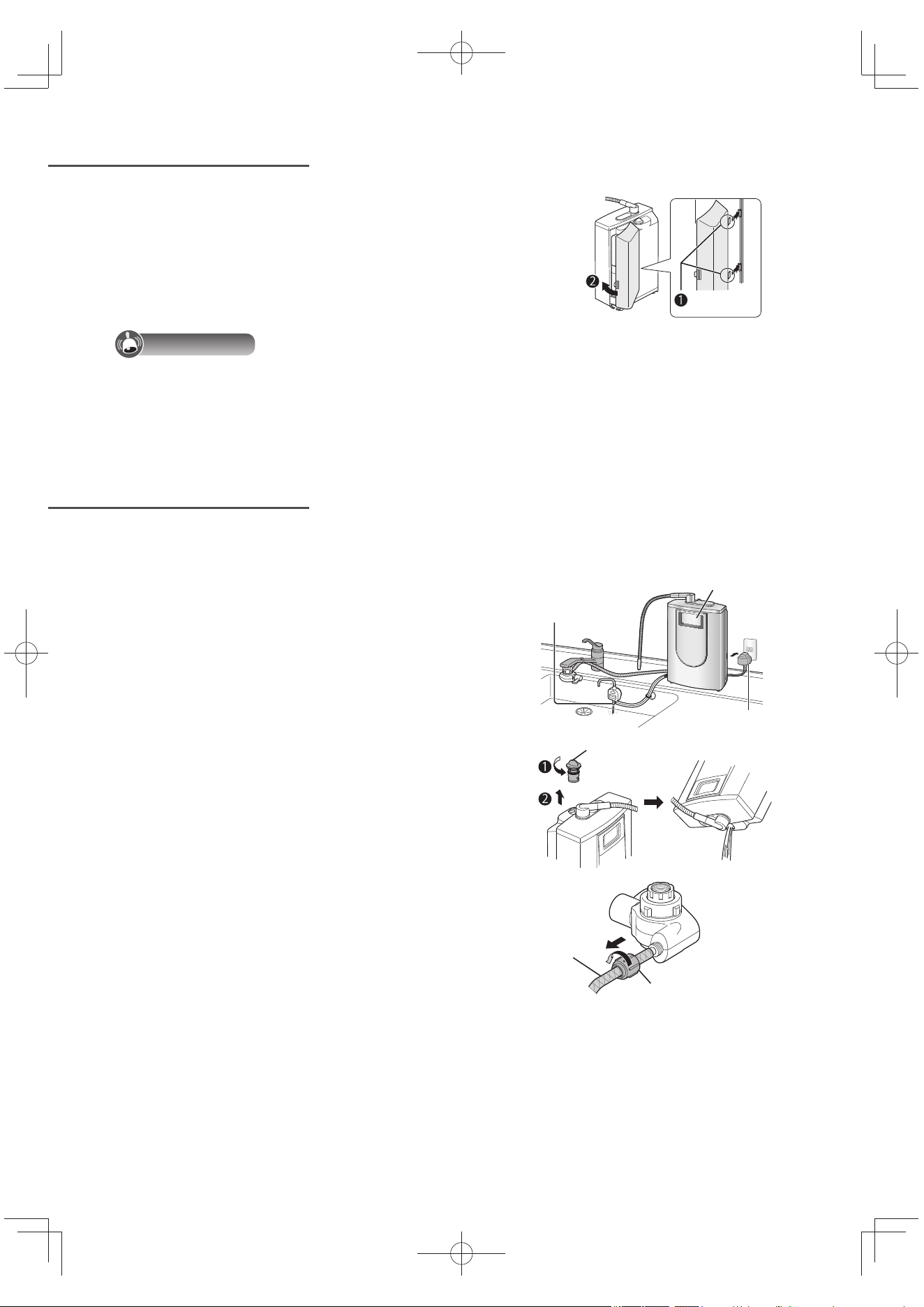
TC38
更換濾芯(接續)
移動本體時
5
關緊水龍頭,
裝回本體外蓋。
卡入
注意事項
使用過的濾芯請依當地指定的條例予以廢棄丟置。
即使在顯示 U25 或 U26 前已更換濾芯,為了能夠正確顯示濾芯的壽命,務必依照步驟 3 再設定濾
芯使用壽命。
請遵照以下的次序排出本體內部的水。
1
拔除電源插頭,再插入。
液晶顯示「準備中」會閃燈 15 秒,排水
口有水流出。
重複這個步驟 2 ~ 3 次,請拔除電源插
頭。
液晶顯示
電源插頭
排水口
2
取下蓋子,把本體上下倒轉,
排掉內部的水。
蓋子
3
從分水開關卸下供水管。
供水管卸下後,螺帽請鎖在分水開關上。
(以防鎖緊水管的螺帽或丟失)。
請倒出分水開關內的水。
鬆開水管的螺帽
供水管
TK-AS66-ZEXW.indb38TK-AS66-ZEXW.indb38 2017/01/3020:17:442017/01/3020:17:44
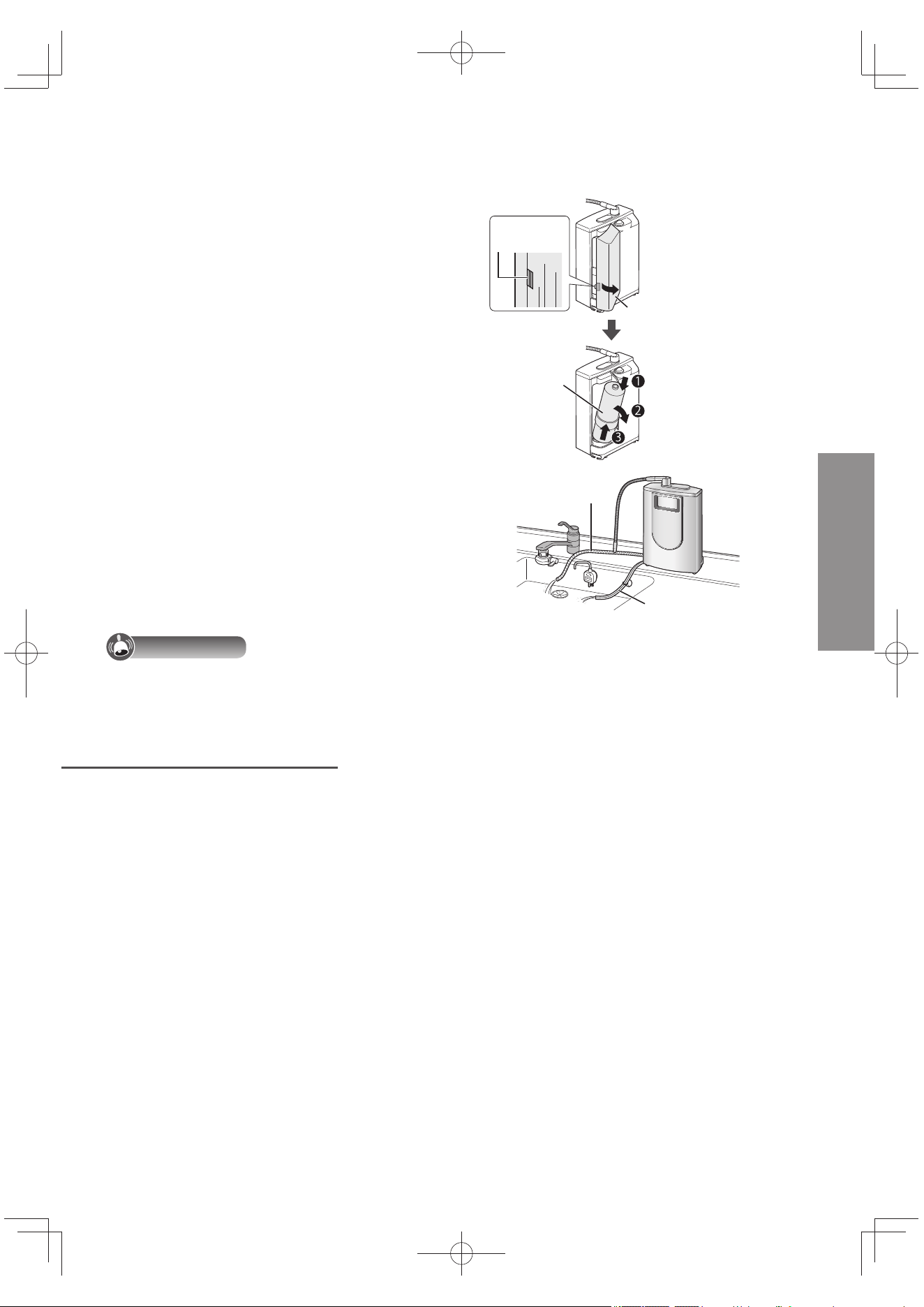
TC39
中文(繁體)
4
拆下舊的濾芯。
將濾芯取出後,請不要將本體倒置或斜放。
(水會逆流到機器內部,發生故障)。
一邊稍微
按一下
外蓋
從上面往下壓
往前拉
往上拉出
濾芯
5
把供水管放置於本體稍低位置
以排除水管內的水。
將酸性水排水管從酸性水座拔下,請將本
體置放於更低的位置。
卸下的蓋子和濾心,請安裝回原位。
供水管
酸性水排水管
注意事項
用此方法也可能無法徹底疏水,故運送時恐有漏水之虞,請先加以包裝。
長期間不使用
一星期或以上沒有使用本體,請確保執行以下指示。
1
請從本體取下濾芯(參閱 TC37 頁),放入塑膠袋內,再放入冰箱保
存。
在放入冰箱前釋放空氣,紮緊封口。
2
拔掉電源插頭。
再次使用本體時
1) 安裝濾芯。(參閱 TC37 頁)
2) 接駁電源插頭。
3) 通水約 3 分鐘。
此外,若一個月以上未有使用,濾芯內的水會變質,建議換新濾芯。
TK-AS66-ZEXW.indb39TK-AS66-ZEXW.indb39 2017/01/3020:17:442017/01/3020:17:44
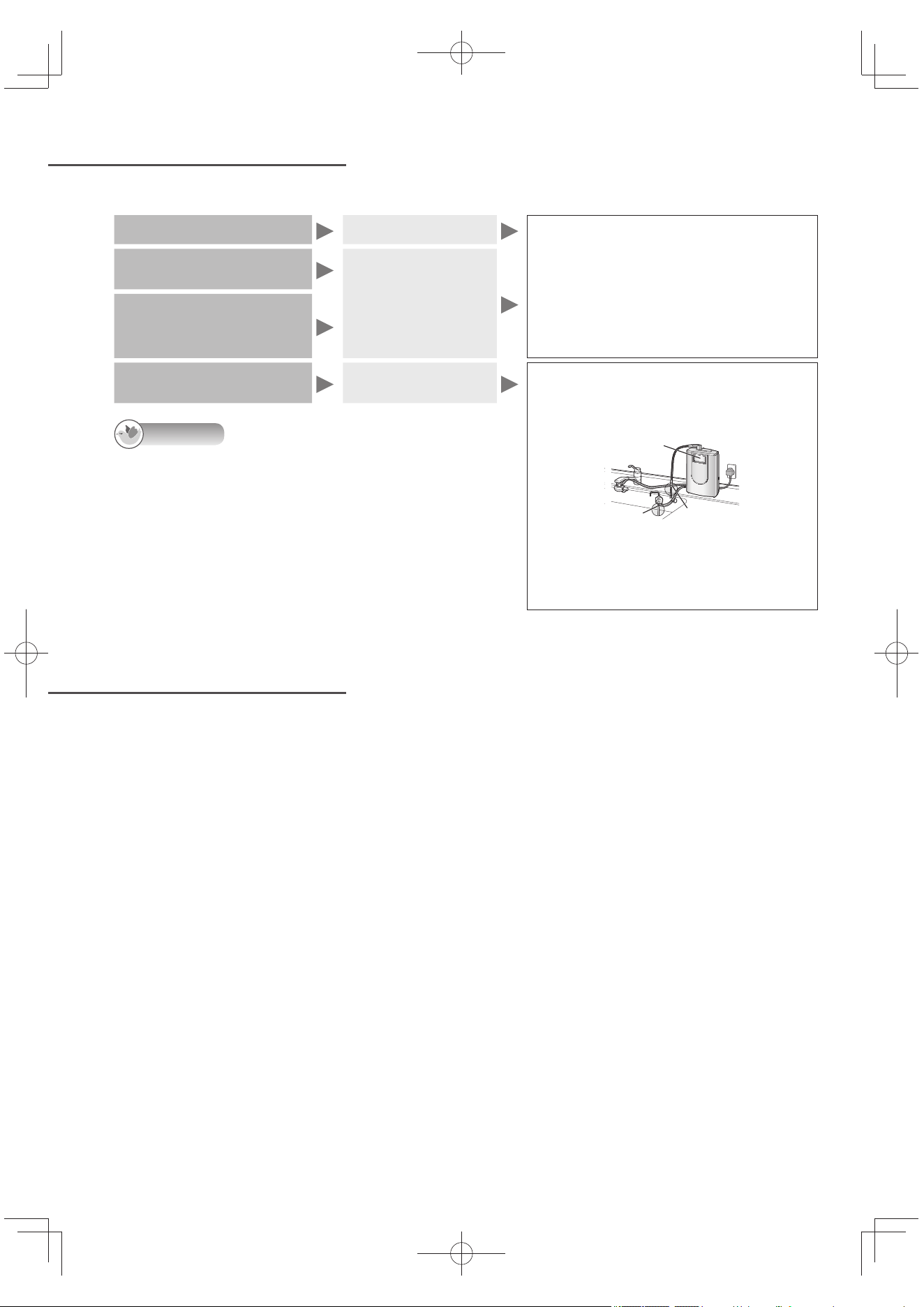
TC40
自動電極清洗
停電、停水時
為消除鈣化現象,電極板會自動洗淨主體內部。
使用弱酸性水後
水龍頭關緊時
最多進行
約
50 秒鐘的清洗。
顯示部的「電極洗淨中」的顯示閃
燈。
從排水口排出的水,請勿使用。
進行自動電極清洗期間,切勿通水。
使用計時器時,不會進行自動電極
清洗。
鹼性離子水或弱酸性水
每使用 10 次
水龍頭關緊時
若持續模式顯
示燈亮起,燈
會熄掉
鹼性離子水弱酸性水總
流水量到 10 公升
超過 24 小時未使用時
鹼性離子水或淨
水 通水時
自動電極清洗過程進行
約
15 秒鐘。
警示鐘響起嗶嗶聲約 3 秒鐘。
「電極洗淨中」顯示閃燈約 10 秒鐘。
出水口
排水口
清洗束時,請勿關水。
從出水口和排水口所流出的水,請勿使
用。發出警告聲「嗶嗶嗶」3 次後再使
用。
告知
電極清洗期間,出水口的水會「滴答」漏水,這是正常現
象。
即使「電極洗淨中」顯示停止閃燈,排水口仍然會有水流
出。
持續模式顯示燈亮燈中時,不會進行電極清洗。
停電時
使用中停電時,請關上水龍頭。
供水停用期間,如通水中,淨水會流出出水口。
通電後,請按照一般使用方法使用。(通電後,會自動回到「鹼性 1」(初次飲用))
即使發生電力故障,已設定的內容會維持不變。
停水時
無法使用。
使用中停水時,請關上水龍頭。
恢復供水後,請先將分水開關切換到「Unpurified」或「Shower」位置,首先要流出自來水(原
水),好讓配管內的空氣或污濁物流出來。
之後可如常使用。
(因為空氣或污濁物流入本體內,就會大幅縮短濾芯壽命。)
TK-AS66-ZEXW.indb40TK-AS66-ZEXW.indb40 2017/01/3020:17:442017/01/3020:17:44
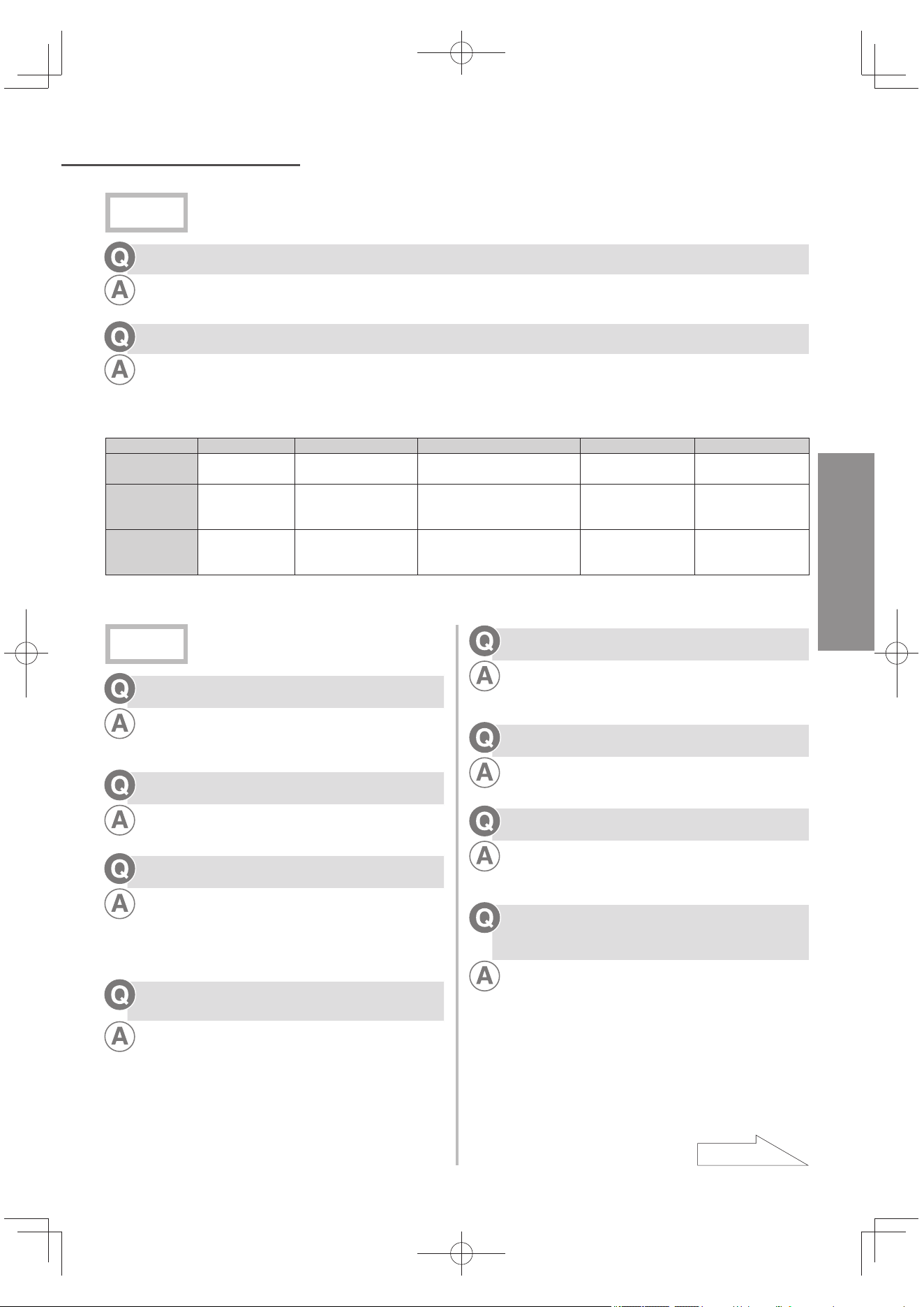
TC41
問題與回答
中文(繁體)
使用前
不可使用地下水嗎?
不可使用。
因地下水水質差異大建議使用自來水。
使用不同水源(自來水)的水質會有什麼影響?
請參閱下表。
若水含碳酸量過多時,有可能無法顯示鹼性的狀況。
此時,請煮沸鹼性離子水去除碳酸,恢復原來的鹼性。另外水質硬度
*
高的水可能會有白色渾濁物沉澱。
地下水或含地下水的水源很難轉為鹼水,請在「pH 值微調」上設定鹼性「強」使用。
海邊或島嶼 溫泉地區 含過多碳酸的水(地下水) 硬度高的水 硬度低的水
水源性質
有可能混入鹽
水。
含硫磺偏酸性。
混入碳酸瓦斯有酸性傾向礦物
成分多容易通電。
礦物成分多容易通
電。
礦物成分少較難通
電。
經電氣分解過
的鹼性離子水
性質
較易轉為鹼性。
由於硫酸離子,鹼性
離子水偏中性。
碳酸瓦斯鹼性離子水偏中性。 較易轉為鹼性。 較難轉為鹼性。
使用鹼性離子水
重點
使用弱鹼性功
能。
使用較強的鹼性。關
緊水龍頭,減少通水
量。
使用較強的鹼性。關緊水龍
頭,減少通水量。
使用弱鹼性功能。
使用較強的鹼性。關
緊水龍頭,減少通
水量。
*: 水質硬度: 水中含有鈣與鎂的濃度,依此濃度可區分水質硬度高低。
使用中
誤飲酸性水,有沒有問題?
飲用少量(約 1 杯)不會有問題。
不過請立即停止飲用。
若身體不適時,請盡速求醫。
可否去除溶解性鉛?
可以。
電解槽壽命850小時什麼意思?
顯示電解槽電氣分解的累計時間,一天使用 20 分鐘的
話,約有 7 年壽命。
電解槽通電時,電極板將處於消耗狀態。顯示上出現
「H31」代碼,即表示電解槽壽命已耗盡。請委託經銷
商更換電解槽。
長期(標準
約
一星期以上)沒有使用時,該怎
麼辦?
參閱 TC39 頁。
不使用時也要插電嗎?
不使用時也請插電。
這樣才能夠電極板自動進行洗淨運轉。若不插電,則無
法累計通水量,也無法顯示濾芯的使用壽命。
出水口流出的水與排水的出水比例是多少?
參閱 TC49 頁。
通水使用的熱水最高溫度為?
可以使用高達 35 ℃。(參閱 TC23 頁)
當設定分水開關為「Unpurified」或「Shower」,可以
使用高達 80 ℃。
為什麼在更換濾芯的一般指引限期未到前,液
晶顯示會出現「U25」(阻塞導致濾芯壽命耗
盡)的情況?
當通水量或通水壓力下降時,也會出現「U25」的顯
示。(參閱 TC35 ~ TC36 頁)
請確認是否因水壓太低,或水管扭曲或壓扁而導致通水
量不足。視乎使用的水質,有時候濾芯會提早阻塞,這
情況應更換濾芯。
接下頁
TK-AS66-ZEXW.indb41TK-AS66-ZEXW.indb41 2017/01/3020:17:452017/01/3020:17:45
TC42
問題與回答 (接續)
為什麼弱酸性水會發出異味(類似遊泳池的味
道)?
因為弱酸性水的氯酸含量偏高。照常使用是沒有問題
的。
因電解中水中的氯離子會吸收弱酸性水產生次氯酸。
將電解水機放在收音機附近是否會發出雜音?
靠近本體確實會導致收音機產生雜音,請勿將收音機
靠近本體。
鹼性離子水
我第一次使用鹼性離子水,該怎麼做?
第一次使用鹼性離子水的方法,請由「鹼性 1」開始
飲用。
初期少量飲用,每天(1 ~ 2 杯),約 2 週過後,視
身體情況將設定改為「鹼性 2」(習慣飲用)或
「鹼性 3」(日常飲用)。
能飲用鹼性離子水服藥嗎?
服藥時請飲用「淨水」。
非服藥時,烹調和其它用途,請使用鹼性離子水。
開始飲用鹼性離子水後,出現拉肚子或發疹現
象?
請立即停止飲用,然後求醫。
看醫生時請提供以下資料:
喝下的水的鈣質、鎂、鈉、鉀等的礦物質含量比自
來水多。
飲用的水 pH 值在 8 ~ 9(飲用初期)之間,屬鹼
性。
患有腎病的人,能飲用鹼性離子水嗎?
飲用前請詢問醫生。
看醫生時請提供以下資料:
欲飲用的水的鈣質、鎂、鈉、鉀等的礦物質含量比
自來水多。
欲飲用的水 pH 值是 9.5,屬鹼性。
鹼性離子水中,含有多少鈣離子量?
與源水相較下水中的鈣離子經過電解後會增加20 ~ 30%。
鹼性離子水和淨水「保存時間」是多久?
常溫下可保存24小時以內。
鹼性離子水時,因已去除自來水中的氯(殺菌劑),較
容易滋生細菌。
使用冰箱保存時,請裝入乾淨的密閉容器內可保存2天
以內。
使用弱酸性水時,也可保存2天以內。
鹼性離子水可以拿來製冰嗎?
可以使用的。
製成冰的時候,請採用與自來水一樣的方式製冰。
若冰箱附有自動製冰備用水槽時,請 2 天內替換一次。
鹼性離子水,除了可直接飲用之外,不能有其
他用途嗎?
做菜或煮飯使用的水,泡茶或咖啡等,採用與一般水的
方式。(參閱 TC18 頁)
水壺或熱水瓶等容器中附著一層白色物質,不
知道是什麼?
這是水中的鈣。
請安心飲用,有需要可清洗容器。如果容器上的白色物
質無法洗掉時,可到西藥房購買檸檬酸,以 1 公升 50
公克的比例,浸泡 2 ~ 3 天後用水清洗。
倒於杯內的鹼性離子水會出現白色泡沬,是什
麼?
那是水中的礦物質成分。
當水結凍時,礦物質會凝固在冰表面,即使喝下去也不
會有問題。
用鹼性離子水煮飯時米飯會變黏性,應該怎
辦?
有時會因水份量、米或電鍋的種類,使煮出來的飯黏稠
或變黃。如果有這樣情況的話,可以將 pH 值(離子濃
度)降低,或使用「淨水」。
嬰幼兒適合飲用那類水?
嬰幼兒請使用「淨水」。
由於嬰幼兒未斷奶,請依次序逐漸使用「鹼性 1」(初
次飲用)設定。
濾芯
使用 1 年的濾芯沒有出現更換顯示的情況,是
否需要更換?
請更換濾芯。
因使用量較少,雖然還有過濾機能,但因為水質的變
化,會使活性碳急劇損壞的情況發生,請更換使用 1
年的濾芯。
想換濾芯,
我應該選擇那類型濾芯?
請使用 TK-AS45C1-EX 型號的濾芯。
酸性水
鹼性離子水從出水口排出期間,由酸性水出水
口排出的酸性水 pH 值是多少?
參閱 TC49 頁。
TK-AS66-ZEXW.indb42TK-AS66-ZEXW.indb42 2017/01/3020:17:452017/01/3020:17:45
TC43
異常顯示內容
中文(繁體)
當液晶出現以下顯示時,請執行以下建議動作,若出現 H31 ~ H39 的顯示時,切勿自行拆解修理,請
與經銷商聯絡。
異常顯示內容 原因和處置方法
U21 • U27
因水質、環境改變等因素,請停止使用以保護機器。
(由出水口流出淨水。)
關緊水龍頭,請等約 3 分鐘後再使用。
U22 • U23
因水質、環境改變等因素,請停止使用以保護機器。
(由出水口流出淨水。)
關緊水龍頭中止使用,請等約 30 分鐘。
(因水質、使用環境需時 30 分鐘以上)
U25
與要求「更換濾心」
之訊息交互顯示。
濾芯已到使用期限。(流量不超過 1.2 公升/分鐘。)
因水壓下降、水管扭曲或摺疊,造成水流不足,需要更換濾芯。
U26
與要求「更換濾心」
之訊息交互顯示。
超過更換標準的總通水量(12 000 公升)。
更換濾芯。(參閱 TC37 ~ TC38 頁)
U28
電解槽壽命預告。(電解時間:累積約 847 小時)
請洽經銷商。
電解槽的壽命約到達 850 小時,請關閉水龍頭,並拔掉插頭,再次插上
電源時,電解槽的使用壽命約剩 3 個小時(每日使用 10 分鐘,可繼續
使用 3 週)。
H31
電解槽使用壽命已盡。
總電解時間:累積約 850 小時(僅離子水生成時間、清洗時間)
請委託經銷商更換電解槽。
H32 ~ H39
機器故障。
拔掉電源插頭洽詢經銷商。
TK-AS66-ZEXW.indb43TK-AS66-ZEXW.indb43 2017/01/3020:17:462017/01/3020:17:46
TC44
故障排除
萬一發現故障時,在未送達維修前,請先檢查下述情況。另外,如果發生異常現象時,絕對不可自行拆
解機器,請洽經銷商。
有時出現疑似問題可以拔掉插頭,再插一次即可如常運作。
出現這樣的液晶顯示時:
症狀 檢查以下事項 參閱頁數
液晶顯示不以英文顯示。
因為沒有切換成英文顯示的模式。
請切換成英文顯示模式。
TC19 頁
液晶顯示以英文顯示。
因為已切換成英文顯示的模式。
請進行切換手續以回到中文顯示
TC19 頁
設定、確認模式的顯示沒有變
成英文。
設定、確認模式無法以英文顯示。
(並非故障。)
TC19 頁
燈不亮或液晶顯示突然消失
根據省電功能,在未使用時,機體會自動關掉顯示。
(並非故障。)
TC19 頁
是否拔掉電源插頭?
請插上電源插頭。
–
「準備中」的顯示燈閃燈
安裝後或換濾芯後進行通水,顯示會維持約 20 秒。
為使濾芯的空氣排出,請通水後流 3 ~ 4 分鐘。
TC9 頁
TC37 頁
「電極洗淨中」的顯示燈閃燈
進行電極自動清洗期間,
請通水約 15 秒。
TC40 頁
「鹼性強」「弱酸性」或「淨
水」使用後,顯示變為「鹼
性」
「鹼性強」「弱酸性」或「淨水」使用後,關了水龍頭
後,會自動回到「鹼性」。
(並非故障。)
TC21 頁
「淨水」使用後,顯示無法回
到「鹼性」
「鹼性優先」設定為「OFF」,所以無法回轉「鹼性」設
定?
請設定「鹼性優先」為 ON。
TC32 頁
持續模式顯示燈亮燈?
(並非故障。約過了 10 分鐘後,會回到「鹼性」。)
TC21 頁
使用期間,水龍頭的水流量減
少,隨時顯示「濾心壽命」
因水壓改變,造成水龍頭流量大幅減少或滴水。
使用「鹼性強」「弱酸性」或「淨水」時,再按一下水
質切換鈕,打開水龍頭,調整流量。
TC22 頁
“更換過濾心請按下「顯示切
換」
約
3 分鐘"訊息顯示
因為濾芯阻塞,導致流量變小。
請拔掉電源插頭,再重新插入。持續使用出現「U25」
時,請更換濾芯。
TC35 頁
就算更換濾芯後,仍舊無法讓
「U25」或「U26」消失
有沒有重新設定濾芯壽命?
依照「更換濾芯」步驟 3,請再重新設定。
已拔掉電源插頭,重新設定濾芯壽命時?
插入插頭,請重新設定濾芯壽命。
TC37 頁
已經超過濾芯更換日期(
約
1 年)了,卻沒有出現「U26」
的顯示
使用量少,未達該換濾芯的總 通水量(12 000 公升)標
準吧?
(並非故障。請確認濾芯壽命顯示。)
雖然還有過濾功能,但因為水質變化使用活性碳急劇損
傷,請更換使用 1 年的濾芯。
TC35 頁
~
TC36 頁
接下頁
TK-AS66-ZEXW.indb44TK-AS66-ZEXW.indb44 2017/01/3020:17:462017/01/3020:17:46
TC45
中文(繁體)
是否出現故障?
症狀 檢查以下事項 參閱頁數
排水口
使用後,水龍頭關閉,有
水流出
出水管內的水排出。 TC21 頁
不使用淨水,酸性水出水
口沒有水流出
酸性水排水管是否扭曲或壓扁?
水流出期間,可能造成故障。也有可能錯誤進行電解。
TC13 頁
~
TC15 頁
液晶顯示出現「調小出水量」字幕時?
再慢慢關緊水龍頭,到字幕消失為止。
TC22 頁
酸性水出水口
「鹼性」或「鹼性強」使
用中,水不會排出
酸性水排水管是否扭曲或壓扁?
請拉直。
酸性水排水管是否正確接合?
請確認是否正確和酸性水座接合。
TC13 頁
~
TC15 頁
液晶顯示出現「調小出水量」字幕時?
再慢慢關緊水龍頭,到字幕消失為止。
TC22 頁
分水開關
水不從所選出口漏出
罪魁禍首可能是分水開關內部附著的有鈣質分子。
請到藥局買檸檬酸,以 1 公升的水溶解 50 公克的檸
檬酸,浸泡分水開關 12 小時後,以水清洗乾淨。
–
其他
出水量少,或水沒有排出
「流量會變低」、「水
龍頭是否鎖太緊」或
「水管是否折到」的顯
示會相互出現。
水龍頭是否太緊?
請開水龍頭。
TC29 頁
水壓是否太低?
全程開著水龍頭並加大總供水處的水流。
分水開關的濾網是否阻塞?
請清潔濾網。
TC34 頁
濾芯是否正確地安裝?
TC37 頁
~
TC38 頁
供水系統是否暫停? TC40 頁
供水管是否扭曲或壓扁?
TC13 頁
~
TC15 頁
如果照以上指示處理過,顯示還是依舊出現的話,可能是濾
芯阻塞導致水流量變小。更換濾芯。
–
出水口流量大
視乎不同水種類及/或選用水質,即使源水量維持不變,出
水口的流水量會不同。
–
很大機會顯示「調小出
水量」
視乎不同水種類及/或選用水質,最大流水量會不同。
出水口流出暖水。
剛通水時,在止水的情況下,因室溫或本體內的溫度,有
時會流出溫水。
使用前,讓水流量約 0.6 公升(約 15 秒鐘)。
–
即使使用「弱酸性」警示
音也不會鳴叫
「弱酸性警示音」是否設定為 OFF?
TC31 頁
有異味或異常味道時,以
及混濁物無法去除
濾芯的過濾功能下降,出現異味和污濁物。
更換濾芯。
TC37 頁
~
TC38 頁
TK-AS66-ZEXW.indb45TK-AS66-ZEXW.indb45 2017/01/3020:17:462017/01/3020:17:46
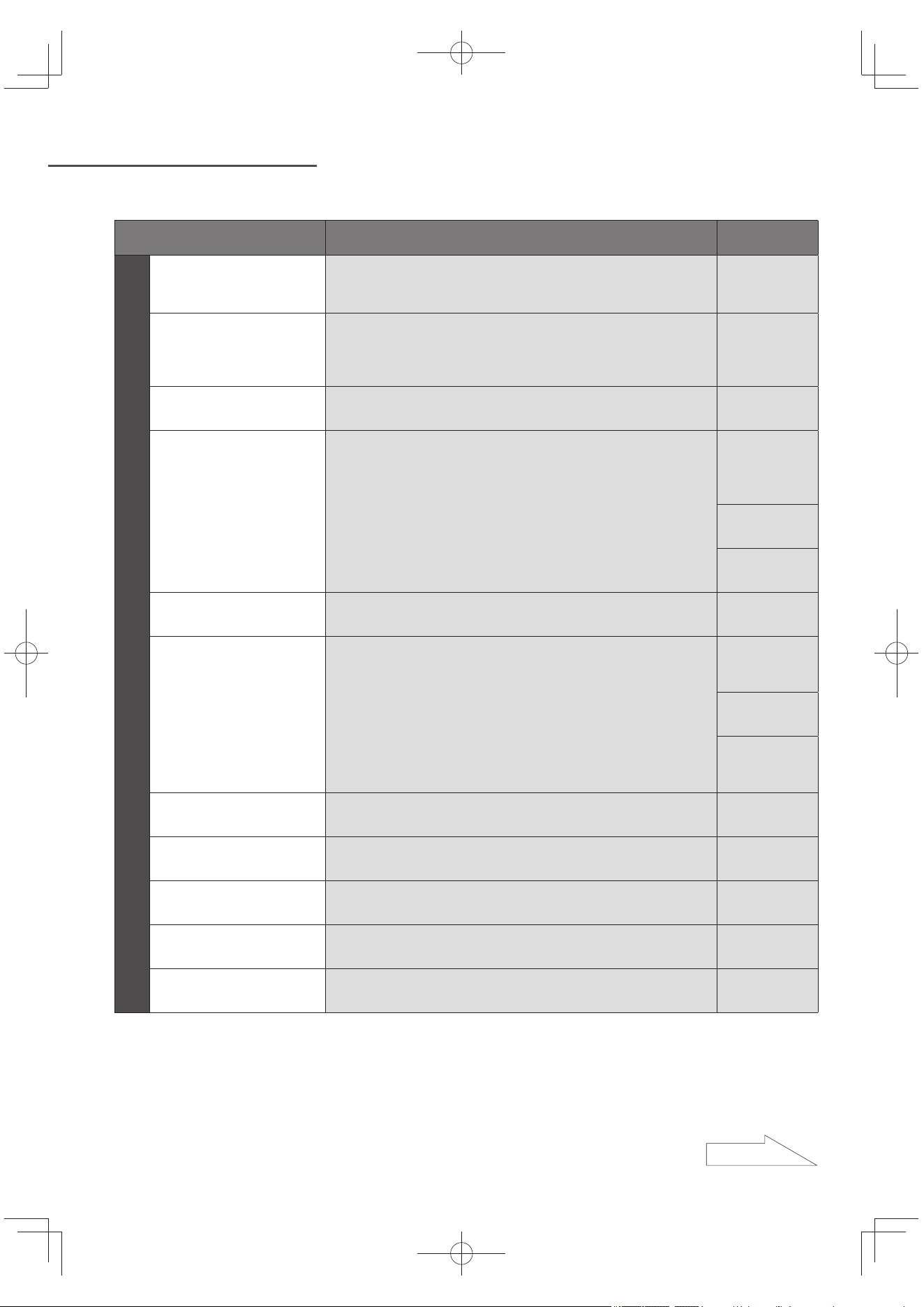
TC46
故障排除 (接續)
症狀 檢查以下事項 參閱頁數
其他
離子水的 pH 值不在「pH
值標準」範圍內
換上新濾芯時,(約一週),pH 值會稍微偏高不合乎標
準。
(並非故障。約一週後,請在測試 pH 值。)
–
弱酸性水的 pH 值以中
性表示
弱酸性水的 pH 值為 6.5 左右時和 pH 值圖表的 pH7(中
性)很難區分。
使用「弱酸性水」時,排水口排出的水的 pH 值為
10 ~ 11 時,弱酸性即為 pH 值 6.5 程度。
–
使用後,關緊水龍頭後,
從本體會發出聲音
是本體內排水的聲音。 –
出水量顯示和實際的出水
量差異太大時
酸性水排水管是否扭曲或壓扁?
請拉直使用。
出水口和酸性水出水口的高低差是否在 10 ~ 50 cm之間?
將高低差設定為 10 ~ 50 cm。
TC13 頁
~
TC15 頁
是否在出水口和酸性水出水口之間設置高度差別?
設定高度差別。
TC27 頁
就算做了以上處理,出水量顯示和實際的出水量差異仍
大時,請做「出水量顯示的補正」。
TC28 頁
使用風筒期間,本體會發
出雜音
會因風筒的不同種類,而發出雜音。
(並非故障。)
–
鹼性離子水的 pH 值沒有
顯示「鹼性」
是否設定「鹼性」水質(或設定「弱酸性」或「淨水」)
?
請設定切換鈕為「鹼性」。
TC20 頁
依不同水質,亦有無法呈現「鹼性」。
(並非故障。請操作「pH 值微調」,將鹼性設定為「強」。)
TC24 頁
TC41 頁
酸性水排水管是否扭曲或壓扁?
會造成無法正確分解,請拉直。
TC13 頁
~
TC15 頁
pH 值提升出現問題 因本體內附著鈣礦物質,使電解能力下降。 –
弱酸性水有氣味(好像游
泳池發出的氣味)
因電解中水中的氯離子會吸收弱酸性水產生次氯酸。
(並非故障。)
TC42 頁
鹼性離子水中混合白色
浮游物
鹼性離子水累積鈣物質。
(可使用。)
–
更換新濾芯後,出水量
減少
有沒有讓水流動 3 ~ 4 分鐘?
(否則濾芯內的空氣無法排出。)
TC37 頁
停水後,出水口會滴水
出水管內排水的綠故。
(並非故障。)
TC21 頁
是否出現故障?(接續)
接下頁
TK-AS66-ZEXW.indb46TK-AS66-ZEXW.indb46 2017/01/3020:17:462017/01/3020:17:46
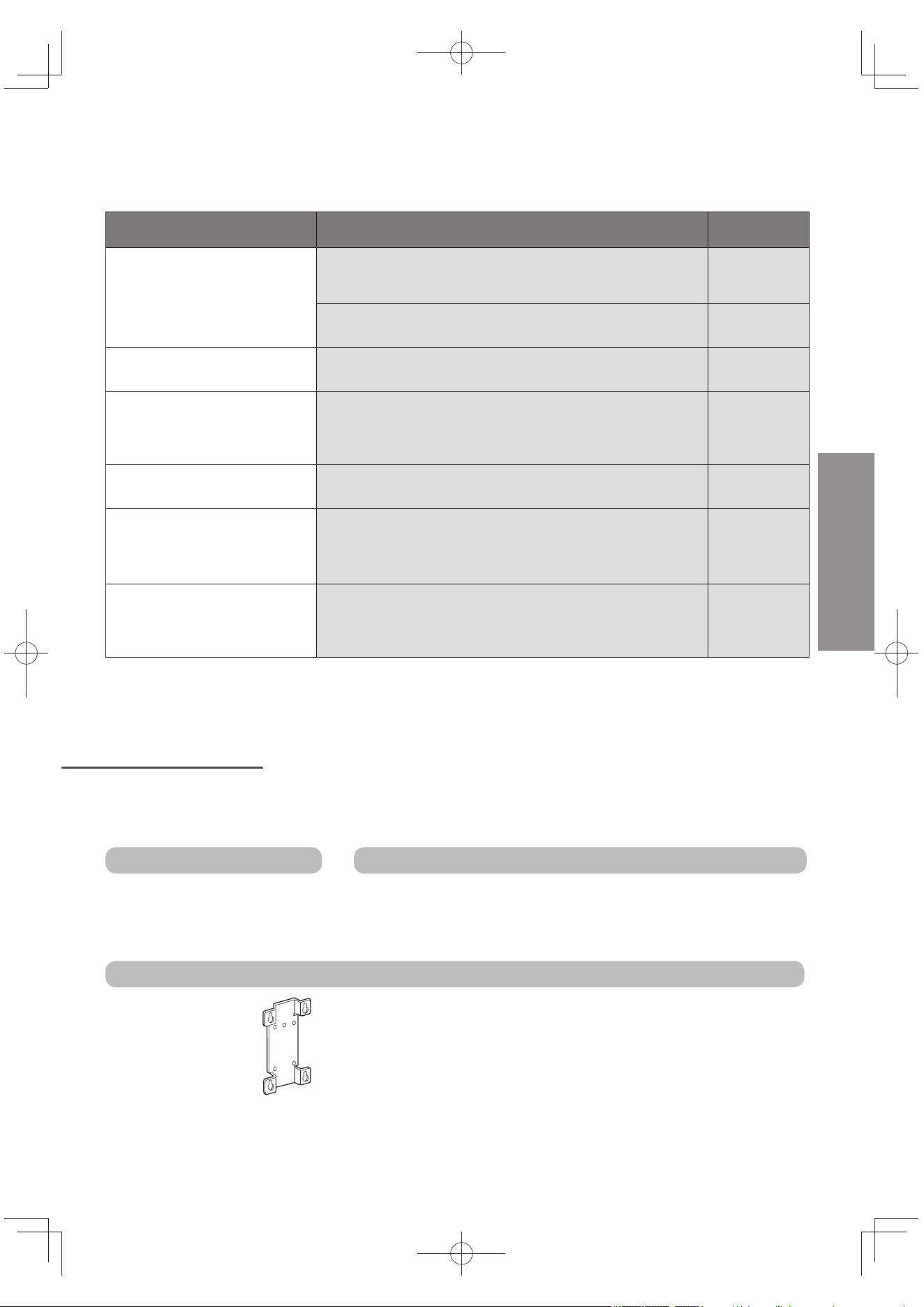
TC47
中文(繁體)
發生漏水事故
漏水處 檢查以下事項 參閱頁數
分水開關接口處
是否確實安裝分水開關?
請確實安裝。
TC10 頁
~
TC12 頁
分水開關內的配件是否正確放入?
請正確安裝。
TC34 頁
供水管接口處
供水管是否確實安裝於分水開關上?
請確實插入到底並以螺帽鎖緊水管。
TC14 頁
出水管接口處
是否確實安裝出水管於本體?
到無法鎖緊為止,請確實鎖入。
是否安裝了墊片?或者墊片扭曲變形?
請正確安裝墊片。
TC15 頁
本體上部 蓋子是否確實安裝於本體上? TC39 頁
本體底面
是否確實將濾芯已安裝?
請確實安裝。
視乎溫度和濕度情況,本體內可能收集凝結的水。
(並非故障。)
TC37 頁
~
TC38 頁
水龍頭部分
水龍頭部位的墊片是否太舊?
請洽水電行。
水龍頭(斷熱蓋等)是否有裂痕?
請洽水電行。
–
另購配件
關於另購配件,請洽經銷商。
關於使用方法,請參閱產品隨附的操作手冊。
消耗品
更換濾芯
型號:TK-AS45C1-EX
水龍頭為大型時
大型水龍頭用金屬蛇口(內徑:32.5 mm)
型號:P-06JRC
裝於前端徑 24 ~ 32 mm水龍頭上
壁掛金屬板
注意
若欲採用入牆方式,必須請代理商認可之經銷商或水電維修技工
進行安裝。
切勿自行安裝,避免發生意外。
入牆式設置的場所,必須選擇能夠承受6 公斤以上重量的地方。
如果壁掛安裝部強度不夠,是導致電解水機掉落,造成事故以及
廚房破損的原因。
型號:P-A3303ZEX
當在壁面設置本體
時使用
TK-AS66-ZEXW.indb47TK-AS66-ZEXW.indb47 2017/01/3020:17:472017/01/3020:17:47
TC48
規格
定額 220-240 V ~ , 50 Hz, 0.8 A
消耗電力 約 130 W(備用時約 1 W)
本體
尺吋 約 200(寬) × 123(深) × 318(高) mm
重量
約 4.1 kg(注滿水時約 4.6 kg)
本體使用的水溫 不超過 35 ℃(分水開關 80 ℃ 以下)
使用水壓(動態壓力) 70 kPa ~ 350 kPa
可用水壓服務(靜態壓力) 70 kPa ~ 750 kPa
電解
電解方式 持續電解
水輸出量(排水流量)
2.0 L/分(水壓 100 kPa)
3.0 L/分(水壓 200 kPa)
電解能力選擇 鹼性:4 級別;弱酸性:2 級別
持續操作能力
溫室(約 30 分鐘),鹼性 3 的「強」(日常飲用)
(約 10 分鐘),鹼性強能力(強鹼性)、弱酸性) (註 2)
電解槽壽命 累積約 850 小時(僅離子水生成時間、清洗時間)
電解清洗 自動清洗方法(清洗時間:約 35 秒,排污水時間:約 15 秒)
淨水輸出量 2.5 L/分(水壓 100 kPa)
過濾流量 2.5 L/分(水壓 100 kPa)
本體內的濾芯 TK-AS45C1-EX
淨化能力
(註 1)
殘留氯 12 000 L (註 3)
污濁物 12 000 L (註 4)
總三鹵甲烷 12 000 L (註 3)
三氯甲烷 12 000 L (註 3)
二氯一溴甲烷 12 000 L (註 3)
二溴一氯甲烷 12 000 L (註 3)
三溴甲烷 12 000 L (註 3)
四氯乙烯 12 000 L (註 3)
三氯乙烯 12 000 L (註 3)
1,1,1-三氯乙烷 12 000 L (註 3)
CAT 12 000 L (註 3)
2-MIB(黴菌臭) 12 000 L (註 3)
溶解性鉛 12 000 L (註 3)
過濾其它物質
鐵(微粒狀) 可去除 (註 5)
鋁(中性) 可去除 (註 5)
土臭素(黴菌臭) 12 000 L (註 5)
酚 12 000 L (註 5)
更換濾芯時間指引 約 1 年 (註 6)
過濾網物料 非紡織物、粒狀活性炭、陶瓷、粉狀活性炭、空心纖維隔膜
無法過濾的元件 水中溶解的鐵、重金屬(銀、銅等)、鹽(海鹽)
電源線長度 約 3 m
電源保護裝置 電流保險絲:2.5 A
過熱保護裝置(隔離變壓器內)
過熱保護裝置(自動重設類型,溫度到達 120 ℃ 自動啟用)
熱保險絲(溫度到達 145 ℃ 啟用)× 1
TK-AS66-ZEXW.indb48TK-AS66-ZEXW.indb48 2017/01/3020:17:472017/01/3020:17:47
TC49
中文(繁體)
出水口和排水口流出的口比例
比例
鹼性 1/2/3 4:1
鹼性
強
4:1
弱酸性 4:1
由酸性水出水口流出的酸性水 pH 值
水質 酸性水 pH 值
鹼性強
2.8 ~ 3.5
(「pH3」的水質顯示燈亮燈
時,pH 為 3)
鹼性 3 3.0 ~ 4.5
鹼性 2 4.0 ~ 5.5
鹼性 1 5.0 ~ 6.5
pH 值會因水質,流量,pH 微調標準而有所差異。
數值是指在水溫20 ℃ 時適用。
無法將硬水轉變為軟水。
供水量和一天的用水量是指出水口、酸性水出水口、排水口流出的總水量。
註 1: 使用鹼性離子水、弱酸性水時,過濾流量及過濾能力約 80%。
註 2: 因水質及使用環境不同,有可能縮短。
註 3: 依據 JIS S 3201 試驗,去除率為 80%。
註 4: 依據 JIS S 3201 試驗,為過濾流量 50% 的值。
註 5: 這個 80% 去除率的值,是依據日本淨水協會(JWPA)規管的(JWPAS B 標準) 標準試驗規格獲得。請注
意,去除鐵(微粒狀)和鋁(中性)的淨化能力不受保證。
註 6: 一天使用量為 30 公升時。若一天使用量為 60 公升時,濾芯使用期限為 1/2。因地區、水質、水壓等因
素,更換時間會有明顯差異。
TK-AS66-ZEXW.indb49TK-AS66-ZEXW.indb49 2017/01/3020:17:472017/01/3020:17:47