www.philips.com/support
Always there to help you
Register your product and get support at
D160
D165
Extended user
documentation
Question?
Contact
Philips

1EN
Contents
1 Important safety instructions 3
2 Your phone 4
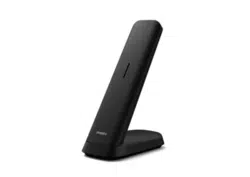
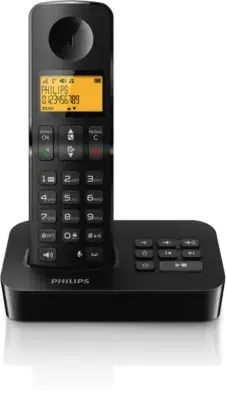
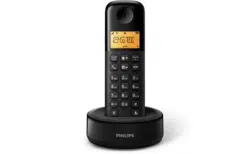
What is in the box 4
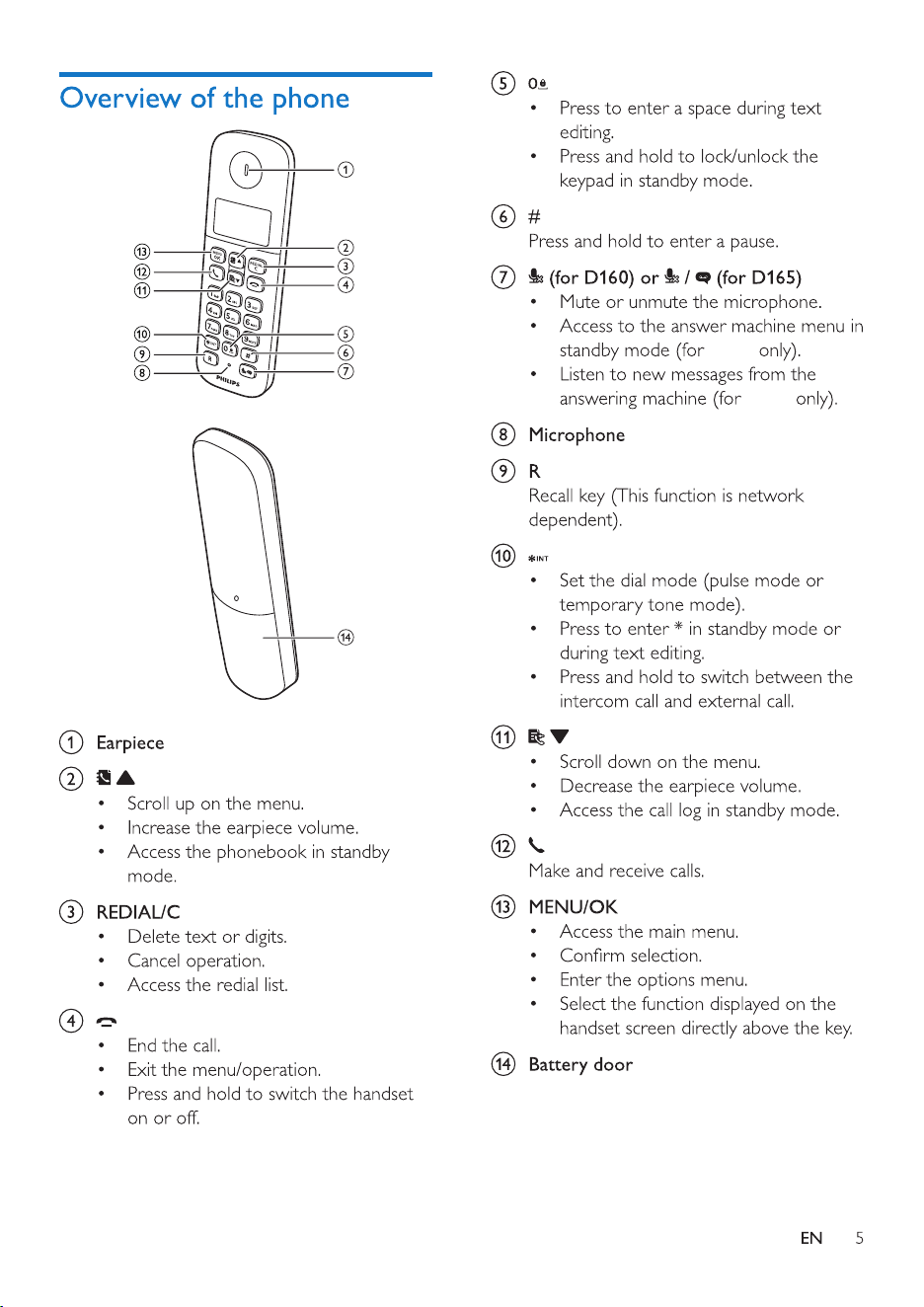
Overview of the phone 5
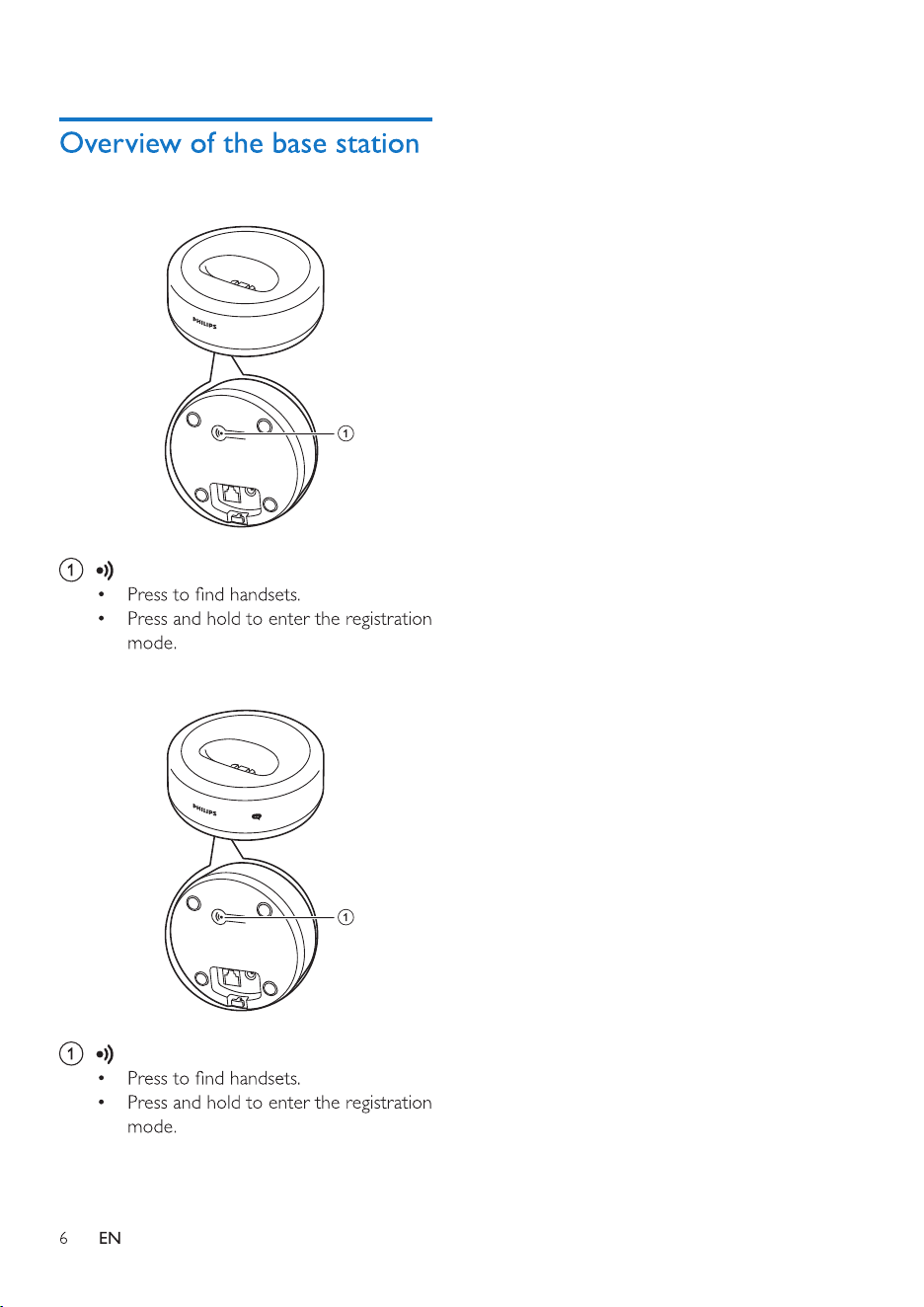
Overview of the base station 6
3 Get started 7
Connect the base station 7
Install the supplied batteries 8
dependent) 8
Change the remote access PIN code
(for D165) 9
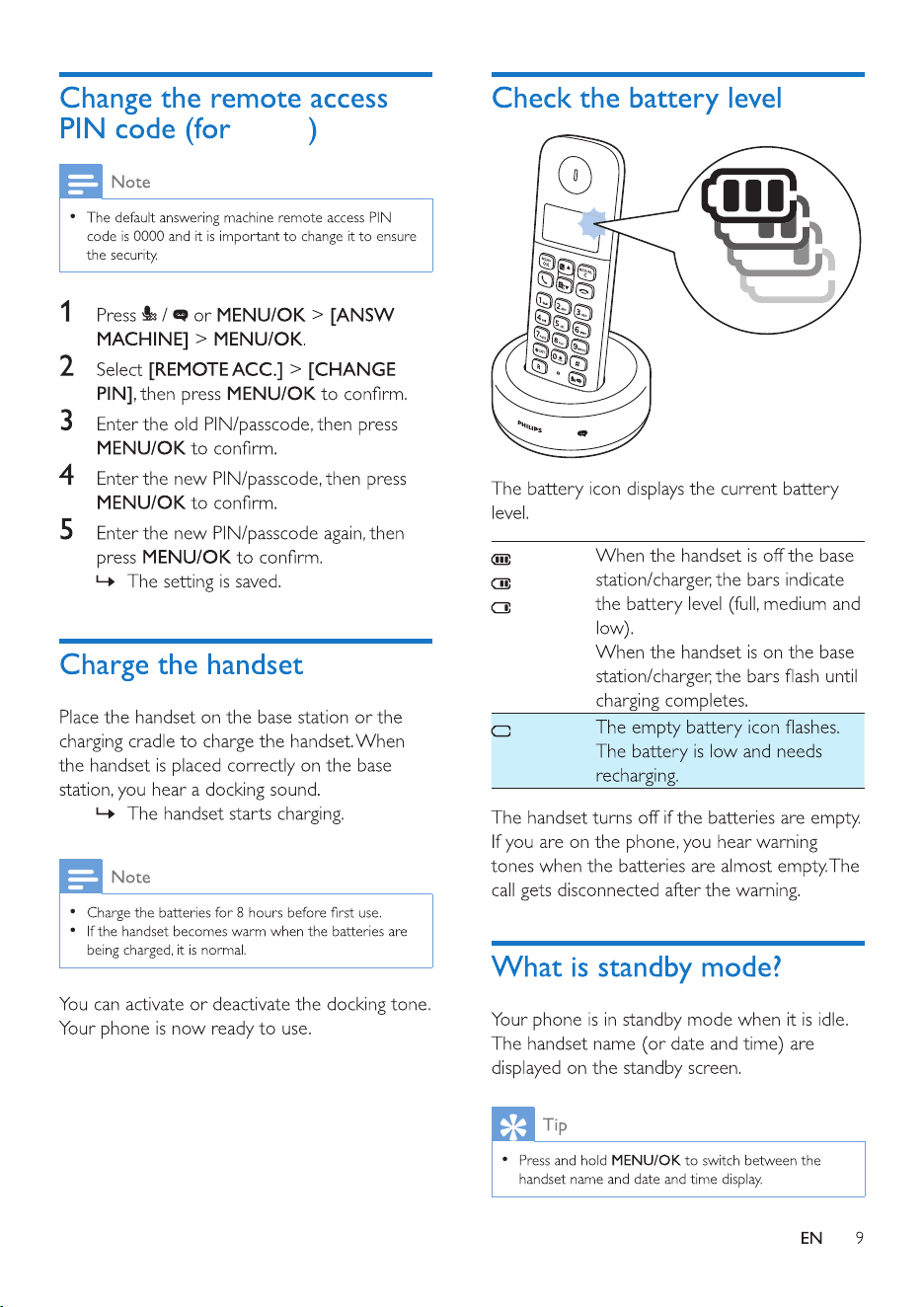
Charge the handset 9
Check the battery level 9
What is standby mode? 9
Display icons 10
Check the signal strength 10
Switch the handset on or off 10
4 Calls 11
Make a call 11
Answer a call 11
End a call 11
Adjust the earpiece volume 12
Mute the microphone 12
Make a second call 12
Answer a second call 12
Switch between two calls 12
Make a conference call with the
external callers 12
5 Intercom and conference calls 13
Make a call to another handset 13
Make a conference call 13
6 Text and numbers 15
Enter text and numbers 15
7 Phonebook 16
View the phonebook 16
Search a record 16
Call from the phonebook 16
Add a record 16
Edit a record 17
Delete a record 17
Delete all records 17
8 Call log 18
View the call records 18
Save a call record to the phonebook 18
Return a call 18
Delete a call record 18
Delete all call records 18
9 Redial list 20
View the redial records 20
Redial a call 20
Save a call record to the phonebook 20
Delete a redial record 20
Delete all redial records 20
10 Phone settings 21
Sound settings 21
Name the handset 21
Set the date and time 21
Set the display language 21
11 Telephone answering machine 23
Turn the answering machine on or off 23
Set the answering machine language 23
Announcements 23
Incoming messages 24
Set the ring delay 25
Remote access 25
12 Services 27
Auto conference 27
27
Network type 27
Select the recall duration 27
Dial mode 28

2 EN
Auto clock 28
5HJLVWHUDGGLWLRQDOKDQGVHWV
8QUHJLVWHUWKHKDQGVHWV
5HVWRUHGHIDXOWVHWWLQJV
13 Technical data 30
14 Notice 31
Declaration of conformity 31
8VH*$3VWDQGDUGFRPSOLDQFH
Compliance with EMF 31
Disposal of your old product and battery 31
15 Frequently asked questions 33
16 Appendix 35
Text and number input tables 35

3EN
1 Important safety
instructions
Power requirements
• This product requires an electrical supply
of 100-240 volts AC. In case of power
failure, the communication can be lost.
• 7KHYROWDJHRQWKHQHWZRUNLVFODVVLÀHG
DV7197HOHFRPPXQLFDWLRQ1HWZRUN
9ROWDJHVDVGHÀQHGLQWKHVWDQGDUG(1
Warning
•
7KH(OHFWULFDOQHWZRUNLVFODVVLÀHGDVKD]DUGRXV7KH
RQO\ZD\WRSRZHUGRZQWKHFKDUJHULVWRXQSOXJWKH
power supply from the electrical outlet. Ensure that the
electrical outlet is always easily accessible.
To avoid damage or malfunction
Caution
•
Use only the power adapter listed in the user
instructions.
• Use only the batteries listed in the user instructions.
• 'RQRWGLVSRVHRIEDWWHULHVLQÀUH
• 'RQRWDOORZWKHFKDUJLQJFRQWDFWVRUWKHEDWWHU\WR
come into contact with metal objects.
• 'RQRWRSHQWKHKDQGVHWEDVHVWDWLRQRUFKDUJHUDV
\RXFRXOGEHH[SRVHGWRKLJKYROWDJHV
• Do not allow the product to come into contact with
liquids.
• Risk of explosion if battery is replaced by an incorrect
type.
• 'LVSRVHRIXVHGEDWWHULHVDFFRUGLQJWRWKHLQVWUXFWLRQV
• Always use the cables provided with the product.
• )RUSOXJJDEOHHTXLSPHQWWKHVRFNHWRXWOHWVKDOO
be installed near the equipment and shall be easily
accessible.
• 7KLVHTXLSPHQWLVQRWGHVLJQHGWRPDNHHPHUJHQF\
calls when the power fails. An alternative has to be
PDGHDYDLODEOHWRDOORZHPHUJHQF\FDOOV
• Do not expose the phone to excessive heat caused by
KHDWLQJHTXLSPHQWRUGLUHFWVXQOLJKW
• Do not drop your phone or allow objects to fall on
your phone.
• 'RQRWXVHDQ\FOHDQLQJDJHQWVFRQWDLQLQJDOFRKRO
DPPRQLDEHQ]HQHRUDEUDVLYHVDVWKHVHPD\KDUP
the set.
• Do not use the product in places where there are
H[SORVLYHKD]DUGV
• Do not let small metal objects come into contact with
the product. This can deteriorate audio quality and
GDPDJHWKHSURGXFW
• Active mobile phones in the vicinity may cause
interference.
• Metallic objects may be retained if placed near or on
the handset receiver.
About operating and storage temperatures
• Operate in a place where temperature is
DOZD\VEHWZHHQ&WR&)WR
)
• Store in a place where temperature is
DOZD\VEHWZHHQ&DQG&)
to 113° F).
• Battery life may be shorter in low
temperature conditions.
4 EN
2 Your phone
Congratulations on your purchase and welcome
to Philips!
offers, register your product at www.philips.
com/welcome.
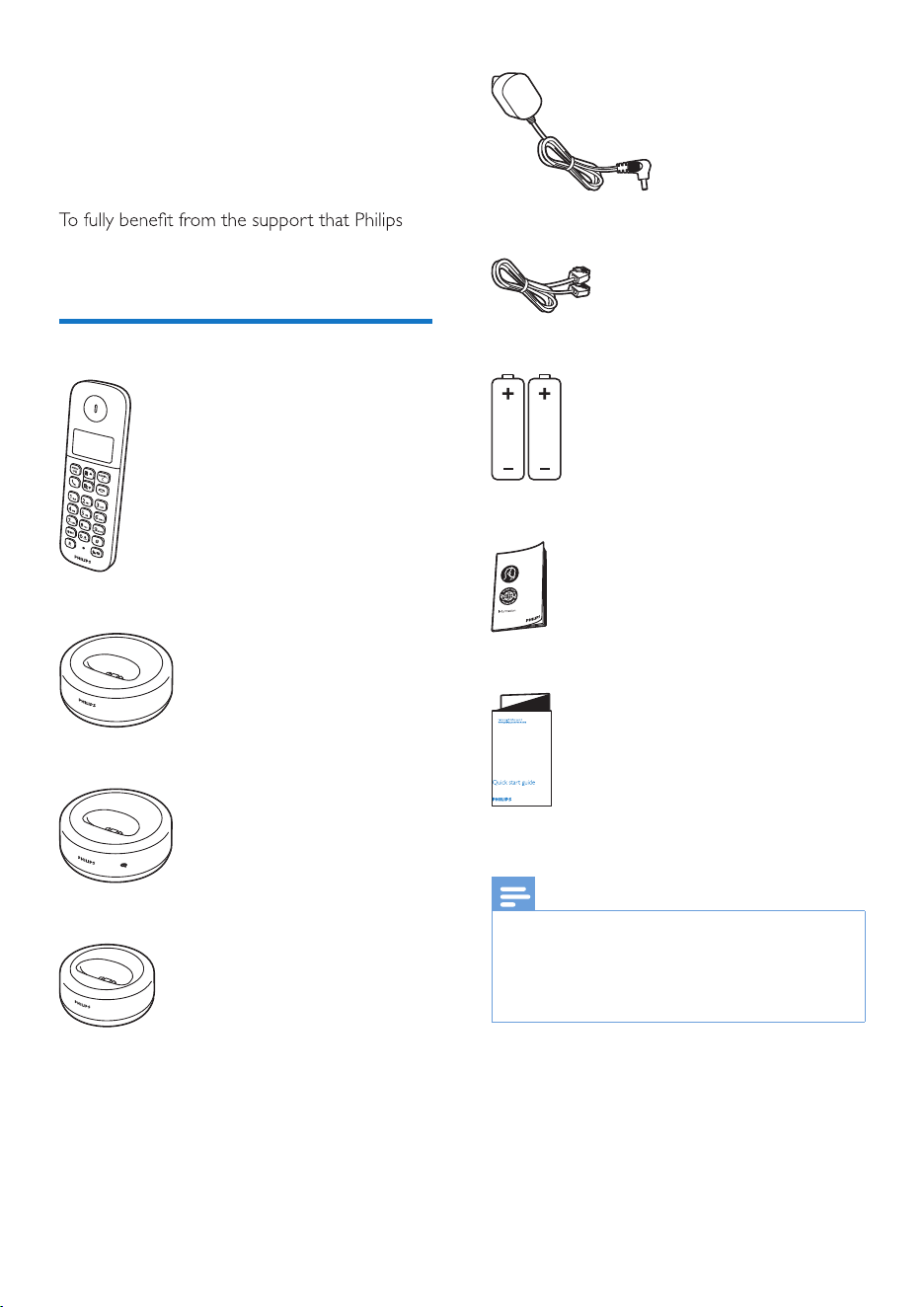
What is in the box
Handset **
Base station (D160)
Base station (D165)
Charger**
Power adapter**
Line cord*
2 x AAA rechargeable batteries**
Guarantee
Short user manual
Note
•
* In some countries, you have to connect the line
adapter to the line cord, then plug the line cord to the
telephone socket.
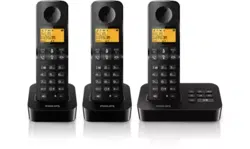
• ** In multi-handset packs, there are additional handsets,
chargers, power adapters and batteries.
D165
D165
D160
D165
7EN
3 Get started
Caution
•
Make sure that you have read the safety instructions in
the 'Important safety instructions' section before you
connect and install your handset.
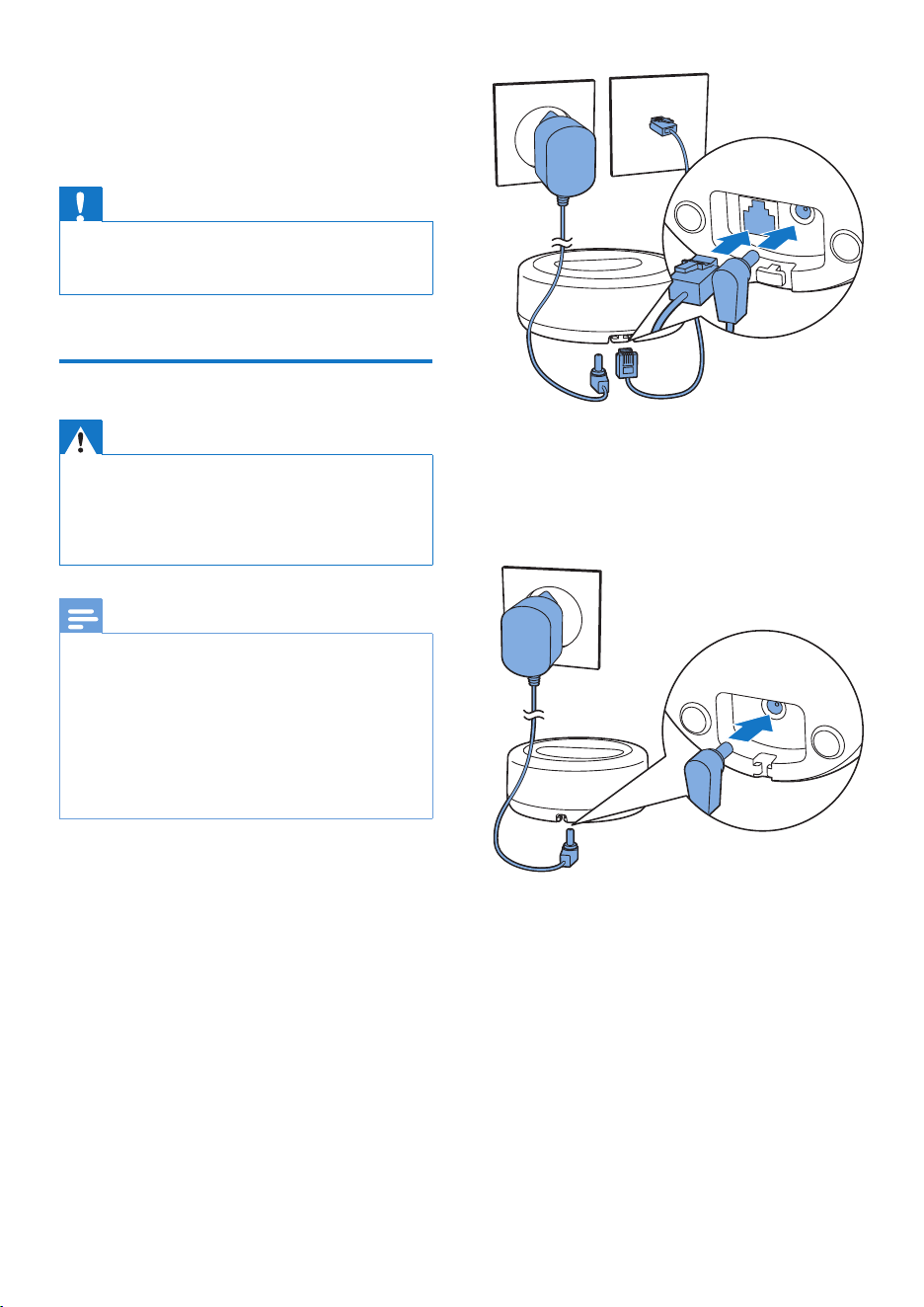
Connect the base station
Warning
•
5LVNRISURGXFWGDPDJH(QVXUHWKDWWKHSRZHUVXSSO\
YROWDJHFRUUHVSRQGVWRWKHYROWDJHSULQWHGRQWKHEDFN
or the underside of the phone.
• 8VHRQO\WKHVXSSOLHGSRZHUDGDSWHUWRFKDUJHWKH
batteries.
Note
•
,I\RXVXEVFULEHWRWKHGLJLWDOVXEVFULEHUOLQH'6/KLJK
VSHHGLQWHUQHWVHUYLFHWKURXJK\RXUWHOHSKRQHOLQH
HQVXUH\RXLQVWDOOD'6/ÀOWHUEHWZHHQWKHWHOHSKRQH
OLQHFRUGDQGWKHSRZHUVRFNHW7KHÀOWHUSUHYHQWV
noise and caller ID problems caused by the DSL
LQWHUIHUHQFH)RUPRUHLQIRUPDWLRQRQWKH'6/ÀOWHUV
contact your DSL service provider.
• The type plate is located on the bottom of the base
station.
1 Connect each end of the power adapter
to:
• the DC input jack at the bottom of the
base station;
• the power socket on the wall.
2 Connect each end of the line cord to:
• the telephone socket at the bottom of
the base station;
• the telephone socket on the wall.
3 Connect each end of the power adapter
WRIRUPXOWLKDQGVHWYHUVLRQRQO\
• the DC input jack at the bottom of the
H[WUDKDQGVHWFKDUJHU
• the power socket on the wall.
8 EN
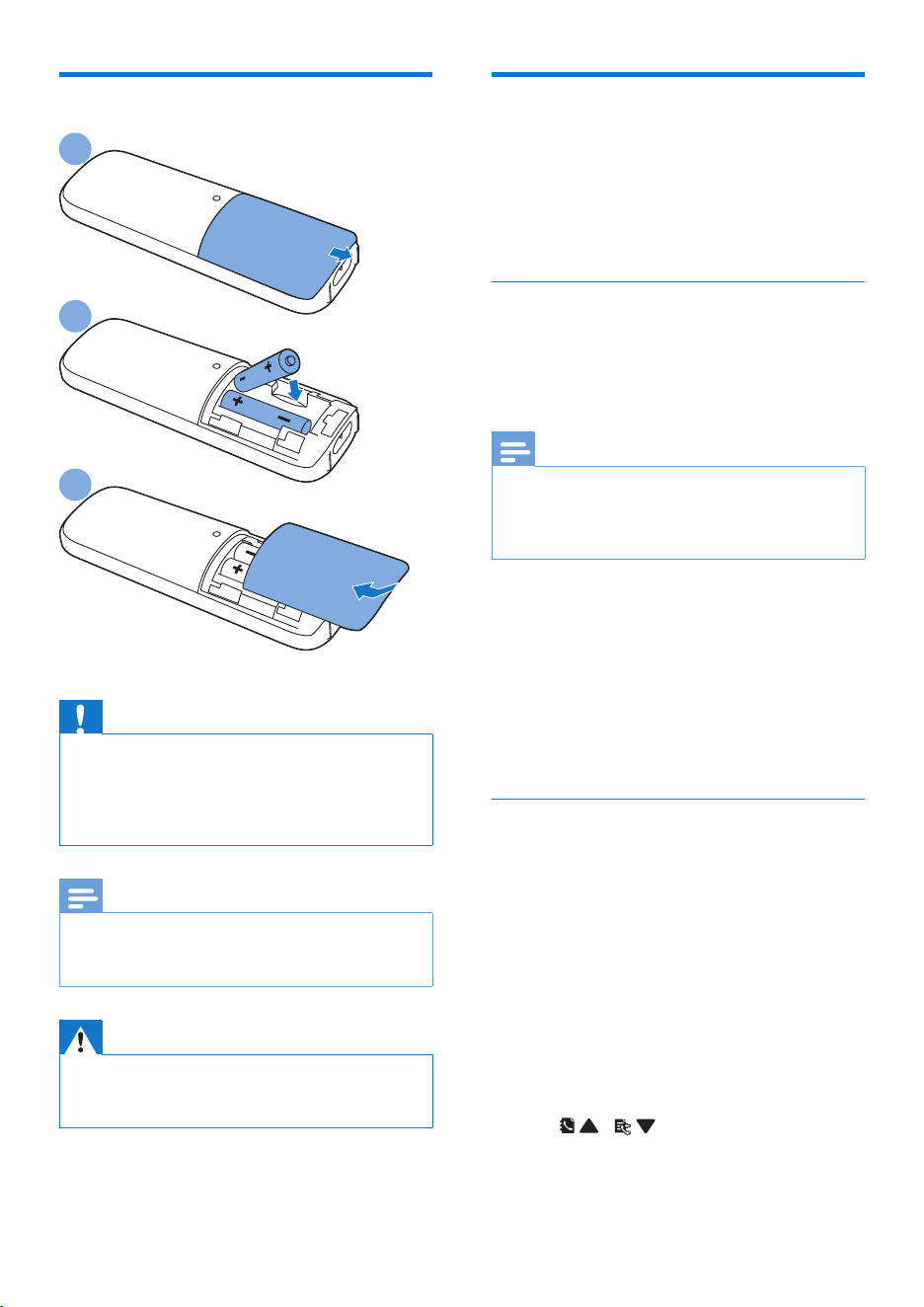
Install the supplied batteries
Caution
•
5LVNRIH[SORVLRQ.HHSEDWWHULHVDZD\IURPKHDW
VXQVKLQHRUÀUH1HYHUGLVFDUGEDWWHULHVLQÀUH
• Use only the supplied batteries.
• 5LVNRIGHFUHDVHGEDWWHU\OLIH1HYHUPL[GLIIHUHQW
brands or types of batteries.
Note
•
&KDUJHWKHEDWWHULHVIRUKRXUVEHIRUHÀUVWXVH
• If the handset becomes warm when the batteries are
FKDUJLQJLWLVQRUPDO
Warning
•
&KHFNWKHEDWWHU\SRODULW\ZKHQLQVHUWLQJLQWKH
EDWWHU\FRPSDUWPHQW,QFRUUHFWSRODULW\PD\GDPDJH
the product.
1
2
3
&RQÀJXUH\RXUSKRQH
(country dependent)
1
:KHQXVLQJ\RXUSKRQHIRUWKHÀUVWWLPH
\RXVHHDZHOFRPHPHVVDJH
2 3UHVVMENU/OK.
Set the country/language
6HOHFW\RXUFRXQWU\ODQJXDJHWKHQSUHVV
MENU/OKWRFRQÀUP
» 7KHFRXQWU\ODQJXDJHVHWWLQJLVVDYHG
Note
•
7KHFRXQWU\ODQJXDJHVHWWLQJRSWLRQLVFRXQWU\
GHSHQGHQW,IQRZHOFRPHPHVVDJHLVGLVSOD\HGLW
PHDQVWKHFRXQWU\ODQJXDJHVHWWLQJLVSUHVHWIRU\RXU
country.
7RUHVHWWKHODQJXDJHVHHWKHIROORZLQJVWHSV
1 Select MENU/OK > [PHONE SETUP] >
[LANGUAGE], then press MENU/OK to
FRQÀUP
2 6HOHFWDODQJXDJHWKHQSUHVVMENU/OK
WRFRQÀUP
» 7KHVHWWLQJLVVDYHG
Set the date and time
1 3UHVVMENU/OK.
2 Select [PHONE SETUP] > [DATE/TIME],
then press MENU/OKWRFRQÀUP
3 3UHVVWKHQXPHULFEXWWRQVWRHQWHUWKH
date, then press MENU/OKWRFRQÀUP
» 7KHWLPHVHWWLQJPHQXLVGLVSOD\HGRQ
the handset.
4 3UHVVWKHQXPHULFEXWWRQVWRHQWHUWKH
time.
• If the time is in 12-hour format, press
/ to select [AM] or [PM].
5 3UHVVMENU/OKWRFRQÀUP
D165
10 EN
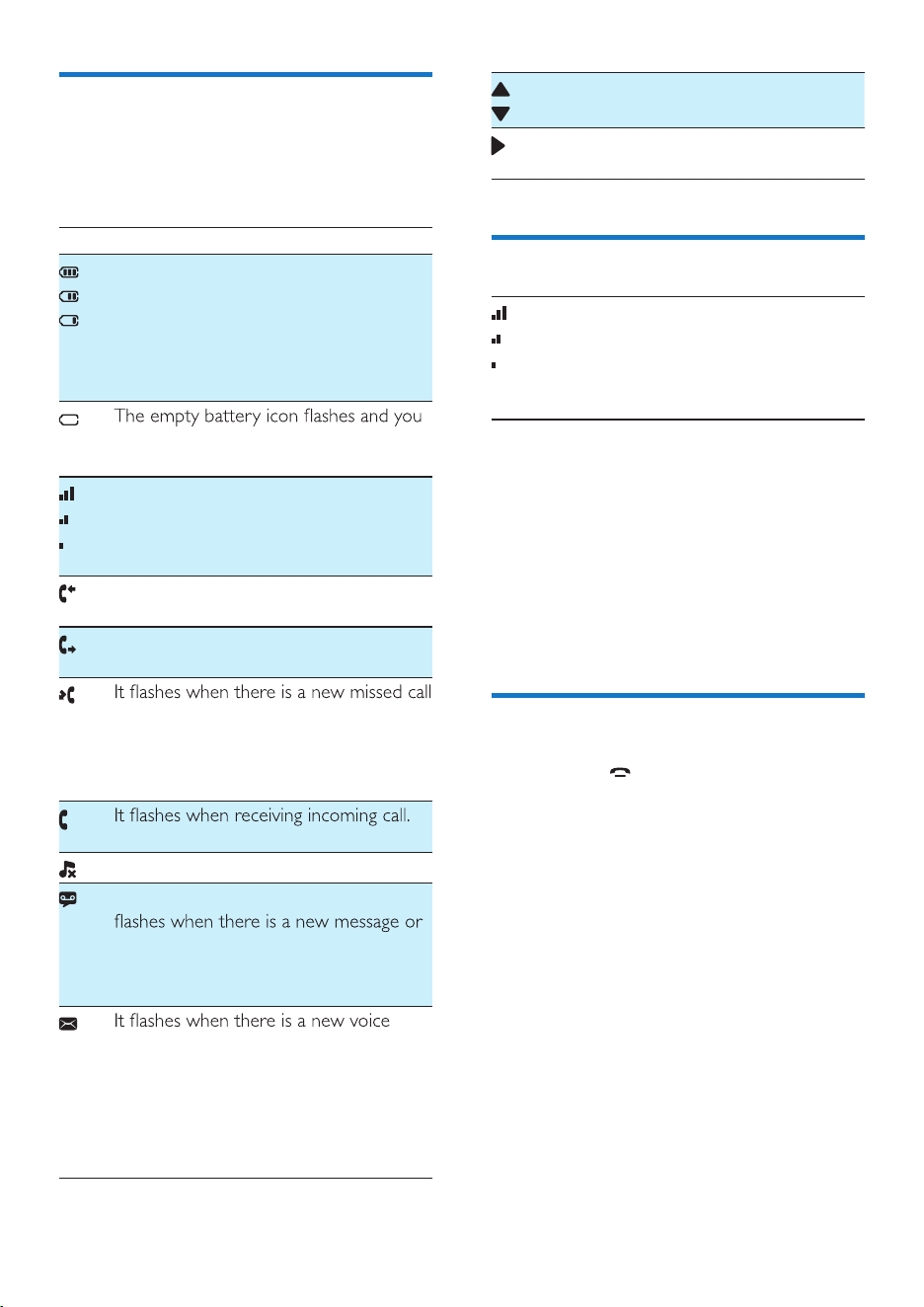
Display icons
In standby mode, the icons shown on the main
screen tell you what features are available on
your handset.
Icon Descriptions
When the handset is off the base
station/charger, the bars indicate the
battery level (from full to low).
When the handset is on the base
station/charger, the bars keep scrolling
until charging is complete.
hear an alert tone.
The battery is low and needs recharging.
It displays the connection status between
the handset and base station. The more
bars are shown, the better the signal
strength is.
It remains steadily on when browsing
incoming calls in the call log.
It indicates an outgoing call in the redial
list.
or when browsing new missed calls.
It remains steadily on when browsing the
missed calls in call log that are already
read.
It remains steadily on during a call.
The ringer is off.
Answering machine (D165 only): it
when the memory is full. It is displayed
when the telephone answering machine
is turned on.
message.
It remains steadily on when the voice
messages are already viewed in the call
log.
The icon is not shown when there is no
voice message.
/
It is displayed when you scroll up/down a
list/increase and decrease the volume.
There are more digits on the right. Press
REDIAL/C to read.
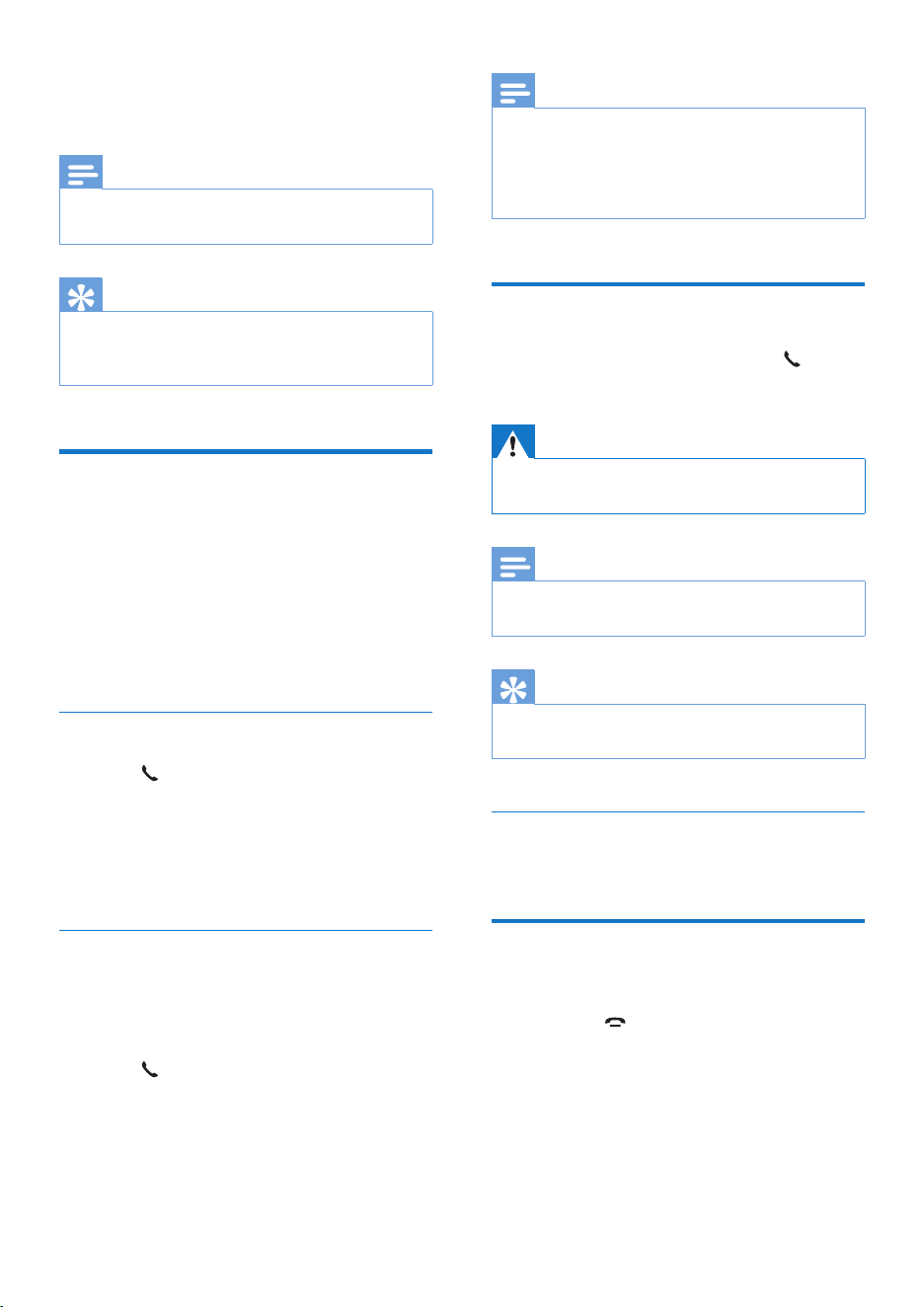
Check the signal strength
The number of bars indicates
the connection status between
the handset and base station. The
more bars are shown, the better
the connection is.
• Make sure the handset is connected to the
base station before you make or receive
calls and carry out the phone functions
and features.
• If you hear warning tones when you are
on the phone, the handset is almost out
of battery or the handset is out of range.
Charge the battery or move the handset
close to the base station.
Switch the handset on or off
Press and hold to switch the handset on or
off.
11EN
4 Calls
Note
•
When the power fails, the phone cannot access
HPHUJHQF\VHUYLFHV
Tip
•
&KHFNWKHVLJQDOVWUHQJWKEHIRUH\RXPDNHDFDOORU
when you are in a callVHH&KHFNWKHVLJQDOVWUHQJWK
RQSDJH10).
Make a call
You can make a call in these ways:
• 1RUPDOFDOO
• 3UHGLDOFDOO
You can also make a call from the redial listVHH
5HGLDODFDOORQSDJH20), phonebook listVHH
&DOOIURPWKHSKRQHERRNRQSDJH16) and call
ORJVHH5HWXUQDFDOORQSDJH18).
Normal call
1 3UHVV .
2 Dial the phone number.
» The number is dialed out.
» The duration of your current call is
displayed.
Predial call
1 Dial the phone number.
• 7RHUDVHDGLJLWSUHVVREDIAL/C.
• To enter a pause, press and hold #.
2 3UHVV to dial out the call.
Note
•
The talk time of your current call is displayed on the
call timer.
• ,I\RXKHDUZDUQLQJWRQHVWKHSKRQHLVDOPRVWRXWRI
EDWWHU\RURXWRIUDQJH&KDUJHWKHEDWWHU\RUPRYH
the phone close to the base station.
Answer a call
:KHQWKHUHLVDQLQFRPLQJFDOOSUHVV to
answer the call.
Warning
•
:KHQWKHKDQGVHWULQJVNHHSWKHKDQGVHWDZD\IURP
\RXUHDUWRDYRLGHDUGDPDJH
Note
•
7KHFDOOHU,'VHUYLFHLVDYDLODEOHLI\RXKDYHUHJLVWHUHG
to the caller ID service with your service provider.
Tip
•
:KHQWKHUHLVDPLVVHGFDOODQRWLÀFDWLRQPHVVDJH
appears.
Turn off the ringer of an incoming call
:KHQWKHSKRQHULQJVSUHVVREDIAL/C.
End a call
You can end a call in these ways:
• 3UHVV
;
• 3ODFHWKHKDQGVHWWRWKHEDVHVWDWLRQ
RUFKDUJLQJFUDGOH
12 EN
Adjust the earpiece volume
3UHVV / WRDGMXVWWKHYROXPHGXULQJ
a call.
» The earpiece volume is adjusted and
the phone is back to the call screen.
Mute the microphone
1
3UHVV GXULQJDFDOO
» [MUTE ON] is displayed on the
handset.
» The caller cannot hear you, but you
can still hear his voice.
2 3UHVV DJDLQWRXQPXWHWKHPLFURSKRQH
» You can now communicate with the
caller.
Make a second call
Note
•
This service is network dependent. Check with your
network provider for operation.
1 3UHVVRGXULQJDFDOO
» 7KHÀUVWFDOOLVSXWRQKROG
2 Dial the second number.
» The number displayed on the screen is
dialed out.
Answer a second call
Note
•
This service is network dependent. Check with your
network provider for operation.
When there is a periodical beep to notify you
RIDQLQFRPLQJFDOO\RXFDQDQVZHUWKHFDOOLQ
these ways:
1 3UHVVR and to answer the call.
» 7KHÀUVWFDOOLVSXWRQKROGDQG\RX
are now connected to the second call.
2 3UHVVR and to end the current call and
DQVZHUWKHÀUVWFDOO
Switch between two calls
Note
•
This service is network dependent. Check with your
network provider for operation.
3UHVVR and .
» The current call is put on hold, and you
are now connected to the other.
Make a conference call with
the external callers
Note
•
This service is network and country dependent. Check
with the service provider for operation and additional
FKDUJHV
When you are connected to two calls, press R,
then
.
» The two calls are combined and a
conference call is established.
13EN
5 Intercom and
conference calls
An intercom call is a call to another handset
that shares the same base station. A conference
call involves a conversation between you,
another handset user and the outside callers.
Make a call to another
handset
Note
•
,IWKHEDVHVWDWLRQRQO\KDVUHJLVWHUHGKDQGVHWVSUHVV
and hold
to make a call to another handset.
1 3UHVVDQGKROG .
» For multi-handset versions, the
handsets available for intercom are
GLVSOD\HGWKHQJRWRVWHS
» For two-handset versions, the other
KDQGVHWULQJVWKHQJRWRVWHS
2 Select a handset, then press MENU/OK to
FRQÀUP
» 7KHVHOHFWHGKDQGVHWULQJV
3 3UHVV on the selected handset.
» The intercom is established.
4 3UHVVREDIAL/C or to cancel or end
the intercom call.
While you are on the phone
<RXFDQJRIURPRQHKDQGVHWWRDQRWKHUGXULQJ
a call:
1 3UHVVDQGKROG .
» The current caller is put on hold.
» For multi-handset versions, the
handsets available for intercom are
GLVSOD\HGWKHQJRWRVWHS
2 Select a handset, then press MENU/OK to
FRQÀUP
» Wait for the other side to answer your
call.
Switch between calls
3UHVVDQGKROG to switch between the
outside call and the intercom call.
Make a conference call
A 3-way conference call is between you,
another handset user and the outside callers. It
requires two handsets to share the same base
station.
During an external call
1 3UHVVDQGKROG to initiate an internal call.
» The external caller is put on hold.
» For multi-handset versions, the
handsets available for intercom are
GLVSOD\HGWKHQJRWRVWHS
» For two-handset versions, the other
KDQGVHWULQJVWKHQJRWRVWHS
2 Select a handset, then press MENU/OK to
FRQÀUP
» 7KHVHOHFWHGKDQGVHWULQJV
3 3UHVV on the selected handset.
» The intercom is established.
4 3UHVVMENU/OK.
» You are now in a 3-way conference
call with an external call and a selected
handset.
5 3UHVV to end the conference call.
Note
•
3UHVV WRMRLQDQRQJRLQJFRQIHUHQFHZLWKDQRWKHU
handset if [SERVICES] > [CONFERENCE] is set to
[AUTO].
14 EN
During the conference call
1 3UHVVDQGKROG to put the internal call
RQKROGDQGJREDFNWRWKHH[WHUQDOFDOO
» The internal call is put on hold.
2 3UHVVDQGKROG DJDLQWRSXWWKHH[WHUQDO
FDOORQKROGDQGJREDFNWRWKHLQWHUQDOFDOO
» The external call is put on hold.
3 3UHVVMENU/OKWRJREDFNWRWKH
conference call.
Note
•
,IDKDQGVHWKDQJVXSGXULQJWKHFRQIHUHQFHFDOOWKH
other handset remains connected to the external call.
15EN
6 Text and
numbers
You can enter text and numbers for handset
name, phonebook records, and other menu
items.
Enter text and numbers
1
3UHVVRQFHRUVHYHUDOWLPHVRQWKH
alphanumeric key to enter the selected
character.
2 3UHVVREDIAL/C to delete a character.
3UHVVDQGKROGREDIAL/C to delete all
FKDUDFWHUV3UHVV
and to move
WKHFXUVRUOHIWDQGULJKW
3 3UHVV to add a space.
Note
•
)RULQIRUPDWLRQRQNH\PDSSLQJRIFKDUDFWHUVDQG
numbers, see the chapter 'Appendix'.
16 EN
7 Phonebook
This phone has a phonebook that stores up to
50 records. You can access the phonebook from
the handset. Each record can have a name up
WRFKDUDFWHUVORQJDQGDQXPEHUXSWR
GLJLWVORQJ
<RXKDYHXSWRGLUHFWDFFHVVPHPRULHV.H\V
DQG'HSHQGLQJRQ\RXUFRXQWU\NH\V
and 2 are preset to the voice mail number and
information service number of your service
provider respectively. When you press and hold
on the key in standby mode, the saved phone
number is dialed automatically.
Note
•
The availability of direct access memory is country
dependent.
View the phonebook
Note
•
You can view the phonebook on one handset only
each time.
1 3UHVV or press MENU/OK >
[PHONEBOOK] > [VIEW] to access the
phonebook list.
2 Select a contact and view the available
information.
Search a record
You can search the phonebook records in these
ways:
• Scroll the contacts list.
• (QWHUWKHÀUVWFKDUDFWHURIWKHFRQWDFW
Scroll the contact list
1 3UHVV or press MENU/OK >
[PHONEBOOK] > [VIEW] to access the
phonebook list.
2 3UHVV and WRVFUROOWKURXJKWKH
phonebook list.
(QWHUWKHÀUVWFKDUDFWHURIDFRQWDFW
1 3UHVV or press MENU/OK >
[PHONEBOOK] > [VIEW] to access the
phonebook list.
2 3UHVVWKHDOSKDQXPHULFDONH\WKDWPDWFKHV
the character.
» 7KHÀUVWUHFRUGWKDWVWDUWVZLWKWKLV
character is displayed.
Call from the phonebook
1
3UHVV or press MENU/OK >
[PHONEBOOK] > [VIEW] to access the
phonebook list.
2 Select a contact in the phonebook list.
3 3UHVV to make the call.
Add a record
Note
•
If your phonebook memory is full, the handset displays
DQRWLÀFDWLRQPHVVDJH'HOHWHVRPHUHFRUGVWRDGG
new ones.
• :KHQ\RXFKDQJHWKHQXPEHURIDUHFRUGWKHQHZ
number will overwrite the old number.
1 3UHVVMENU/OK.
2 Select [PHONEBOOK] > [ADD NEW],
then press MENU/OKWRFRQÀUP
3 Enter the name, then press MENU/OK to
FRQÀUP

17EN
4 Enter the number, then press MENU/OK
WRFRQÀUP
» Your new record is saved.
Tip
•
3UHVVDQGKROG# to insert a pause.
• 3UHVVRQFHRUVHYHUDOWLPHVRQWKHDOSKDQXPHULFNH\WR
enter the selected character.
• 3UHVVREDIAL/CWRGHOHWHWKHFKDUDFWHU3UHVV
or
WRPRYHWKHFXUVRUOHIWDQGULJKW
Edit a record
1
3UHVVMENU/OK.
2 Select [PHONEBOOK] > [EDIT], then
press MENU/OKWRFRQÀUP
3 Select a contact, then press MENU/OK to
FRQÀUP
4 Edit the name, then press MENU/OK to
FRQÀUP
5 Edit the number, then press MENU/OK to
FRQÀUP
» The record is saved.
Delete a record
1
3UHVVMENU/OK.
2 Select [PHONEBOOK] > [DELETE], then
press MENU/OKWRFRQÀUP
3 Select a contact, then press MENU/OK to
FRQÀUP
» $FRQÀUPDWLRQUHTXHVWLVGLVSOD\HGRQ
the handset.
4 3UHVVMENU/OKWRFRQÀUP
» The record is deleted.
Delete all records
3UHVVMENU/OK.
1 Select [PHONEBOOK] > [DELETE ALL],
press MENU/OKWRFRQÀUP
» $FRQÀUPDWLRQUHTXHVWLVGLVSOD\HGRQ
the handset.
2 3UHVVMENU/OKWRFRQÀUP
» All records are deleted.
18 EN
8 Call log
7KHFDOOORJVWRUHVWKHFDOOKLVWRU\RIDOOPLVVHG
RUUHFHLYHGFDOOV7KHLQFRPLQJFDOOKLVWRU\
includes the name and number of the caller,
call time and date. This feature is available if you
KDYHUHJLVWHUHGWRWKHFDOOHU,'VHUYLFHZLWK
your service provider.
Your phone can store up to 20 call records. The
FDOOORJLFRQRQWKHKDQGVHWÁDVKHVWRUHPLQG
you of any unanswered calls. If the caller allows
the display of his identity, you can view his
name or number. The call records are displayed
LQFKURQRORJLFDORUGHUZLWKWKHPRVWUHFHQW
received call at the top of the list.
Note
•
Make sure that the number in the call list is valid before
you can call back directly from the call list.
The icons shown on the screen tell you
whether they are missed/received calls.
Icons Description
,WUHPDLQVVWHDGLO\RQZKHQEURZVLQJ
LQFRPLQJFDOOVLQWKHFDOOORJ
,WÁDVKHVZKHQWKHUHLVDQHZPLVVHG
call.
,WUHPDLQVVWHDGLO\RQZKHQEURZVLQJ
WKHPLVVHGFDOOVLQFDOOORJ
View the call records
1
3UHVV .
» 7KHLQFRPLQJFDOOORJLVGLVSOD\HG
2 Select a record, then press MENU/OK
and select [VIEW] for more available
information.
Save a call record to the
phonebook
1
3UHVV .
» 7KHLQFRPLQJFDOOORJLVGLVSOD\HG
2 Select a record, then press MENU/OK to
FRQÀUP
3 Select [SAVE NUMBER], then press
MENU/OKWRFRQÀUP
4 Enter and edit the name, then press
MENU/OKWRFRQÀUP
5 Enter and edit the number, then press
MENU/OKWRFRQÀUP
» The record is saved.
Return a call
1
3UHVV .
2 Select a record on the list.
3 3UHVV to make the call.
Delete a call record
1
3UHVV .
» 7KHLQFRPLQJFDOOORJLVGLVSOD\HG
2 Select a record, then press MENU/OK to
FRQÀUP
3 Select [DELETE], then press MENU/OK
WRFRQÀUP
» $FRQÀUPDWLRQUHTXHVWLVGLVSOD\HGRQ
the handset.
4 3UHVVMENU/OKWRFRQÀUP
» The record is deleted.
Delete all call records
1
3UHVV .

EN
» 7KHLQFRPLQJFDOOORJLVGLVSOD\HG
2 3UHVVMENU/OK to enter the options
menu.
3 Select [DELETE ALL], then press MENU/
OKWRFRQÀUP
» $FRQÀUPDWLRQUHTXHVWLVGLVSOD\HGRQ
the handset.
4 3UHVVMENU/OKWRFRQÀUP
» All records are deleted.

20 EN
9 Redial list
The redial list stores the call history of dialed
calls. It includes the names and/or numbers you
have called. This phone can store up to 10 redial
records.
View the redial records
3UHVVREDIAL/C.
Redial a call
1
3UHVVREDIAL/C.
2 Select a record, then press .
» The number is dialed out.
Save a call record to the
phonebook
1
3UHVVREDIAL/C to enter the list of dialed
calls.
2 Select a record, then press MENU/OK to
FRQÀUP
3 Select [SAVE NUMBER], then press
MENU/OKWRFRQÀUP
4 Enter and edit the name, then press
MENU/OKWRFRQÀUP
5 Enter and edit the number then press
MENU/OKWRFRQÀUP
» The record is saved.
Delete a redial record
1
3UHVVREDIAL/C to enter the list of dialed
calls.
2 Select a record, then press MENU/OK to
FRQÀUP
3 Select [DELETE], then press MENU/OK
WRFRQÀUP
» $FRQÀUPDWLRQUHTXHVWLVGLVSOD\HGRQ
the handset.
4 3UHVVMENU/OKWRFRQÀUP
» The record is deleted.
Delete all redial records
1
3UHVVREDIAL/C to enter the list of dialed
calls.
2 Select a record, then press MENU/OK to
FRQÀUP
3 Select [DELETE ALL], then press MENU/
OKWRFRQÀUP
» $FRQÀUPDWLRQUHTXHVWLVGLVSOD\HGRQ
the handset.
4 3UHVVMENU/OKWRFRQÀUP
» All records are deleted.

21EN
10 Phone settings
<RXFDQFXVWRPL]HWKHVHWWLQJVWRPDNHLW\RXU
own phone.
Sound settings
Set the handset's ringtone volume
<RXFDQVHOHFWDPRQJULQJWRQHYROXPHOHYHOV
or [OFF].
1 3UHVVMENU/OK.
2 Select [PHONE SETUP] >[SOUNDS] >
[RING VOLUME], then press MENU/OK
WRFRQÀUP
3 Select a volume level, then press MENU/
OKWRFRQÀUP
» 7KHVHWWLQJLVVDYHG
Set the handset's ringtone
<RXFDQVHOHFWIURPULQJWRQHV
1 3UHVVMENU/OK.
2 Select [PHONE SETUP] > [SOUNDS] >
[RING TONES], then press MENU/OK to
FRQÀUP
3 6HOHFWDULQJWRQHWKHQSUHVVMENU/OK
WRFRQÀUP
» 7KHVHWWLQJLVVDYHG
Set the key tone
.H\WRQHLVWKHVRXQGPDGHZKHQ\RXSUHVVD
key on the handset.
1 3UHVVMENU/OK.
2 Select [PHONE SETUP] > [SOUNDS] >
[KEY TONE], then press MENU/OK to
FRQÀUP
3 Select [ON]/[OFF], then press MENU/OK
WRFRQÀUP
» 7KHVHWWLQJLVVDYHG
Set the docking tone
'RFNLQJWRQHLVWKHVRXQGPDGHZKHQ\RX
place the handset on the base station or
FKDUJHU
1 3UHVVMENU/OK.
2 Select [PHONE SETUP] > [SOUNDS] >
[DOCKING TONE], then press MENU/
OKWRFRQÀUP
3 Select [ON]/[OFF], then press MENU/OK
WRFRQÀUP
» 7KHVHWWLQJLVVDYHG
Name the handset
The name of the handset can be up to 10
characters. It is displayed on the handset screen
in standby mode. You can press MENU/OK to
switch between and handset name and date
and time display.
1 3UHVVMENU/OK.
2 Select [PHONE SETUP] > [PHONE
NAME], then press MENU/OKWRFRQÀUP
3 Enter or edit the name. To erase a
character, press REDIAL/C.
4 3UHVVMENU/OKWRFRQÀUP
» 7KHVHWWLQJLVVDYHG
Set the date and time
For information, see 'Set the date and time'.
Set the display language
Note
•
This feature only applies to models with multiple-
ODQJXDJHVXSSRUW
• /DQJXDJHVDYDLODEOHYDU\IURPFRXQWU\WRFRXQWU\
1 3UHVVMENU/OK.

22 EN
2 Select [PHONE SETUP] > [LANGUAGE],
then press MENU/OKWRFRQÀUP
3 6HOHFWDODQJXDJHWKHQSUHVVMENU/OK
WRFRQÀUP
» 7KHVHWWLQJLVVDYHG
23EN
11 Telephone
answering
machine
Note
•
Available only for D165.
Your phone includes a telephone answering
machine that records unanswered calls when it
is on. By default, the answering machine is set
to the [RECORD ALSO] mode. You can access
the answering machine remotely and change
the settings through the answering machine
menu on the handset.
Turn the answering machine
on or off
1
Press / or MENU/OK > [ANSW
MACHINE] > MENU/OK.
2 Select [ON/OFF] > [ON]/[OFF], then
press MENU/OK
3 Select [RECORD ALSO]/ [ANSWER
ONLY] when the answer machine is on,
then press MENU/OK
The setting is saved.
Note
•
[RECORD ALSO] means calls are answered and
messages are recorded. [ANSWER ONLY] means calls
are only answered, messages are not recorded.
Set the answering machine
language
Note
•
This feature only applies to models with multiple-
language support.
The answering machine language is the language
for the announcements.
1 Press / or MENU/OK > [ANSW
MACHINE] > MENU/OK.
2 Select [LANGUAGE], then press MENU/
OK
3 Select a language, then press MENU/OK
The setting is saved.
Announcements
The announcement is the message your caller
hears when the answering machine picks up
the call. The answering machine has 2 default
announcements: the [RECORD ALSO] mode
and [ANSWER ONLY] mode.
Record an announcement
The maximum length of the announcement you
can record is 3 minutes. The newly recorded
announcement automatically replaces the old
one.
1 Press / or MENU/OK > [ANSW
MACHINE] > MENU/OK.
2 Select [ANNOUNCEMENT], then press
MENU/OK
3 Select [RECORD ALSO] or [ANSWER
ONLY], then press MENU/OK
4 Select [RECORD], then press MENU/OK
5 Start recording close to the microphone
after the beep.
24 EN
6 3UHVVMENU/OKWRVWRSUHFRUGLQJRUWKH
UHFRUGLQJVWRSVDIWHUPLQXWHV
Note
•
Make sure that you speak close to the microphone
when you record an announcement.
Listen to the announcement
1 3UHVV / or MENU/OK > [ANSW
MACHINE] > MENU/OK.
2 Select [ANNOUNCEMENT], then press
MENU/OKWRFRQÀUP
3 Select [RECORD ALSO] or [ANSWER
ONLY], then press MENU/OKWRFRQÀUP
4 Select [PLAY], then press MENU/OK to
FRQÀUP
» You can listen to the current
announcement.
Note
•
<RXFDQQRORQJHUOLVWHQWRWKHDQQRXQFHPHQWZKHQ
\RXSLFNXSDQLQFRPLQJFDOO
Restore the default announcement
1 3UHVV / or MENU/OK > [ANSW
MACHINE] > MENU/OK.
2 Select [ANNOUNCEMENT], then press
MENU/OKWRFRQÀUP
3 Select [RECORD ALSO] or [ANSWER
ONLY], then press MENU/OKWRFRQÀUP
4 Select [USE DEFAULT], then press MENU/
OKWRFRQÀUP
» $FRQÀUPDWLRQUHTXHVWLVGLVSOD\HGRQ
the handset.
5 3UHVVMENU/OKWRFRQÀUP
» The default announcement is restored.
Incoming messages
(DFKPHVVDJHFDQEHXSWRPLQXWHVORQJ
:KHQ\RXUHFHLYHQHZPHVVDJHVWKHQHZ
PHVVDJHLQGLFDWRURQWKHKDQGVHWÁDVKHV
Note
•
If you pick up the phone when the caller leaves a
PHVVDJHWKHUHFRUGLQJVWRSVDQG\RXFDQWDONWRWKH
caller directly.
• ,IWKHPHPRU\LVIXOOWKHDQVZHULQJPDFKLQHVZLWFKHVWR
[ANSWER ONLY]DXWRPDWLFDOO\'HOHWHROGPHVVDJHV
to receive new ones.
Listen to the incoming message
<RXFDQOLVWHQWRWKHLQFRPLQJPHVVDJHVLQWKH
sequence they are recorded.
• ,IWKHUHDUHQHZPHVVDJHVSUHVV
/ to
listen.
• ,IWKHUHLVQRQHZPHVVDJHSUHVV
/
or [ANSW MACHINE] > [PLAY], then
MENU/OKWROLVWHQWRROGPHVVDJHV
• 3UHVVMENU/OK > [ANSW MACHINE]
> [PLAY], then press MENU/OK to
FRQÀUP
» 1HZPHVVDJHVVWDUWSOD\LQJ2OG
PHVVDJHVVWDUWSOD\LQJLIWKHUHLVQR
QHZPHVVDJH
• 3UHVVREDIAL/CWRVWRSOLVWHQLQJ
• 3UHVVMENU/OK to enter the options
menu.
• 3UHVV
/ to increase/decrease
the volume.
Delete an incoming message
1 :KHQ\RXOLVWHQWRWKHPHVVDJHSUHVV
MENU/OK to enter the options menu.
2 Select [DELETE], then press MENU/OK
WRFRQÀUP
» 7KHFXUUHQWPHVVDJHLVGHOHWHG
25EN
Delete all old incoming messages
1 3UHVV / or MENU/OK > [ANSW
MACHINE] > MENU/OK.
2 Select [DELETE ALL], then press MENU/
OKWRFRQÀUP
» $FRQÀUPDWLRQUHTXHVWLVGLVSOD\HGRQ
the handset.
3 3UHVVMENU/OKWRFRQÀUP
» $OOROGPHVVDJHVDUHSHUPDQHQWO\
deleted.
Note
•
<RXFDQGHOHWHWKHUHDGPHVVDJHVRQO\1RGHOHWHG
PHVVDJHVFDQEHUHFRYHUHG
Set the ring delay
You can set the number of times the phone
ULQJVEHIRUHWKHDQVZHULQJPDFKLQHSLFNVXS
the call.
1 3UHVV / or MENU/OK > [ANSW
MACHINE] > MENU/OK.
2 Select [RING DELAY], then press MENU/
OKWRFRQÀUP
3 6HOHFWDQHZVHWWLQJWKHQSUHVVMENU/
OKWRFRQÀUP
» 7KHVHWWLQJLVVDYHG
Note
•
0DNHVXUHWKDWWKHDQVZHULQJPDFKLQHLVVZLWFKHGRQ
before this feature can be applied.
Tip
•
:KHQ\RXDFFHVVWKHDQVZHULQJPDFKLQHUHPRWHO\
\RXDUHUHFRPPHQGHGWRVHWWKHULQJGHOD\WR[TOLL
SAVER]PRGH7KLVLVDFRVWHIIHFWLYHZD\WRPDQDJH
\RXUPHVVDJHV:KHQWKHUHDUHQHZPHVVDJHVWKH
DQVZHULQJPDFKLQHSLFNVXSWKHFDOODIWHUULQJV:KHQ
WKHUHLVQRPHVVDJHVLWSLFNVXSWKHFDOODIWHUULQJV
Remote access
<RXFDQRSHUDWH\RXUDQVZHULQJPDFKLQHZKHQ
you are away from home. Simply make a call to
your phone with a touch tone phone and enter
\RXUGLJLW3,1FRGH
Note
•
7KHUHPRWHDFFHVV3,1FRGHLVWKHVDPHDV\RXU
V\VWHP3,17KHSUHVHW3,1LV
Activate/deactivate the remote access
You can allow or block remote access to the
DQVZHULQJPDFKLQH
1 3UHVV / or MENU/OK > [ANSW
MACHINE] > MENU/OK.
2 Select [REMOTE ACC.], then press
MENU/OKWRFRQÀUP
3 Select [ACTIVATE]/[DEACTIVATE], then
press MENU/OKWRFRQÀUP
» 7KHVHWWLQJLVVDYHG
Change the PIN/passcode
1 3UHVV / or MENU/OK > [ANSW
MACHINE] > MENU/OK.
2 Select [REMOTE ACC.] > [CHANGE
PIN], then press MENU/OKWRFRQÀUP
3 (QWHUWKHROG3,1SDVVFRGHWKHQSUHVV
MENU/OKWRFRQÀUP
4 (QWHUWKHQHZ3,1SDVVFRGHWKHQSUHVV
MENU/OKWRFRQÀUP
5 (QWHUWKHQHZ3,1SDVVFRGHDJDLQWKHQ
press MENU/OKWRFRQÀUP
» 7KHVHWWLQJLVVDYHG
26 EN
Access the answering machine
remotely
1 Make a call to your home number with a
touch tone phone.
2 Enter # when you hear the announcement.
3 (QWHU\RXU3,1FRGH
» You now have access to your
DQVZHULQJPDFKLQHDQG\RXFDQOLVWHQ
WRWKHQHZPHVVDJHV
Note
•
<RXKDYHFKDQFHVWRHQWHUWKHFRUUHFW3,1FRGH
EHIRUH\RXUSKRQHKDQJVXS
4 3UHVVDNH\WRFDUU\RXWDIXQFWLRQ6HHWKH
Remote access commands table below for
a list of available functions.
Note
•
:KHQWKHUHLVQRPHVVDJHWKHSKRQHKDQJVXS
automatically if no key is pressed for 8 seconds.
Remote access commands
.H\ Function
1 /LVWHQWRWKHSUHYLRXVPHVVDJH
2 /LVWHQWRPHVVDJHV
3 6NLSWRWKHQH[WPHVVDJH
6 'HOHWHWKHFXUUHQWPHVVDJH
7 6ZLWFKWKHDQVZHULQJPDFKLQHRQ
QRWDYDLODEOHZKHQ\RXOLVWHQWRWKH
PHVVDJHV
8 6WRSOLVWHQLQJWRWKHPHVVDJH
6ZLWFKWKHDQVZHULQJPDFKLQHRII
QRWDYDLODEOHZKHQ\RXOLVWHQWRWKH
PHVVDJHV
27EN
12 Services
The phone supports a number of features that
KHOS\RXKDQGOHDQGPDQDJHWKHFDOOV
Auto conference
To join an external call with another handset,
press
.
Activate/Deactivate auto conference
1 3UHVVMENU/OK.
2 Select [SERVICES] > [CONFERENCE],
then press MENU/OKWRFRQÀUP
3 Select [AUTO]/[OFF], then press MENU/
OKWRFRQÀUP
» 7KHVHWWLQJLVVDYHG
$XWRSUHÀ[
7KLVIHDWXUHFKHFNVDQGIRUPDWV\RXURXWJRLQJ
FDOOQXPEHUEHIRUHLWLVGLDOHGRXW7KHSUHÀ[
number can replace the detect number you
set in the menu. For example, you set 604 as
WKHGHWHFWQXPEHUDQGDVWKHSUHÀ[
When you have dialed out a number such as
\RXUSKRQHFKDQJHVWKHQXPEHU
to 12503338888 when it dials out.
Note
•
7KHPD[LPXPOHQJWKRIDGHWHFWQXPEHULVGLJLWV
7KHPD[LPXPOHQJWKRIDQDXWRSUHÀ[QXPEHULV
GLJLWV
• This is a country dependent feature.
6HWDXWRSUHÀ[
1 3UHVVMENU/OK.
2 Select [SERVICES] > [AUTO PREFIX],
then press MENU/OKWRFRQÀUP
3 3UHVVMENU/OK. Enter the detect number,
then press MENU/OKWRFRQÀUP
4 3UHVVMENU/OK(QWHUWKHSUHÀ[QXPEHU
then press MENU/OKWRFRQÀUP
» 7KHVHWWLQJLVVDYHG
Note
•
To enter a pause, press and hold #.
• ,IWKHSUHÀ[QXPEHULVVHWDQGWKHGHWHFWQXPEHULVOHIW
HPSW\WKHSUHÀ[QXPEHULVDGGHGWRDOORXWJRLQJFDOOV
• The feature is unavailable if the dialed number starts
with * and #.
Network type
Note
•
This is a country dependent feature. It only applies to
models with network type support.
1 3UHVVMENU/OK.
2 Select [SERVICES] > [NETWORK TYPE],
then press MENU/OK.
3 Select a network type, then press MENU/
OK.
» 7KHVHWWLQJLVVDYHG
Select the recall duration
Make sure that the recall time is set correctly
before you can answer a second call. In normal
case, the phone is already preset for the recall
GXUDWLRQ<RXFDQVHOHFWDPRQJRSWLRQV
[SHORT], [MEDIUM] and [LONG]. The
number of available options varies with different
countries. For details, consult your service
provider.
1 3UHVVMENU/OK.
28 EN
2 Select [SERVICES] > [RECALL TIME],
then press MENU/OKWRFRQÀUP
3 Select an option, then press MENU/OK to
FRQÀUP
» 7KHVHWWLQJLVVDYHG
Dial mode
Note
•
This feature only applies to models that support both
tone and pulse dial.
'LDOPRGHLVWKHWHOHSKRQHVLJQDOXVHGLQ\RXU
FRXQWU\7KHSKRQHVXSSRUWVWRQH'70)DQG
SXOVHURWDU\GLDO&RQVXOWWKHVHUYLFHSURYLGHU
for detailed information.
Set the dial mode
1 3UHVVMENU/OK.
2 Select [SERVICES] > [DIAL MODE], then
press MENU/OKWRFRQÀUP
3 Select a dial mode, then press MENU/OK
WRFRQÀUP
» 7KHVHWWLQJLVVDYHG
Note
•
If your phone is in pulse dial mode, press GXULQJD
FDOOIRUWHPSRUDU\WRQHPRGH'LJLWVHQWHUHGIRUWKLV
FDOODUHWKHQVHQWRXWDVWRQHVLJQDOV
Auto clock
Note
•
This service is network dependent.
• Make sure you have subscribed to the caller ID service
before you use this feature.
,WV\QFKURQL]HVWKHGDWHDQGWLPHRQ\RXU
phone with the public switched telephone
QHWZRUN3671DXWRPDWLFDOO\)RUWKHGDWHWR
EHV\QFKURQL]HGPDNHVXUHWKHFXUUHQW\HDULV
set.
1 3UHVVMENU/OK.
2 Select [SERVICES] > [AUTO CLOCK],
then press MENU/OKWRFRQÀUP
3 Select [ON]/[OFF], then press MENU/OK.
» 7KHVHWWLQJLVVDYHG
Register additional handsets
<RXFDQUHJLVWHUDGGLWLRQDOKDQGVHWVWRWKHEDVH
VWDWLRQ7KHEDVHVWDWLRQFDQUHJLVWHUXSWR
handsets.
1 <RXFDQUHJLVWHU\RXUKDQGVHWDVIROORZV
• ,IWKHKDQGVHWLVLQ>8QUHJLVWHUHG@
status, press MENU/OK.
• If the handset is in [SEARCHING] and
[UNAVAILABLE] status, press MENU/
OK > [SERVICES] > [REGISTER] >
MENU/OK.
2 3UHVVDQGKROG on the base station for
10 seconds.
Note
•
)RUPRGHOVZLWKDQDQVZHULQJPDFKLQH\RXKHDUD
FRQÀUPDWLRQEHHSLQGLFDWLQJWKDWWKHEDVHLVQRZLQ
UHJLVWUDWLRQPRGH
3 (QWHUWKHV\VWHP3,13UHVVREDIAL/C to
make corrections. Then press MENU/OK
WRFRQÀUPWKH3,1
» 5HJLVWUDWLRQLVFRPSOHWHLQOHVVWKDQ
PLQXWHV7KHEDVHDXWRPDWLFDOO\DVVLJQV
a handset number to the handset.
EN
Note
•
,IWKH3,1LVLQFRUUHFWRUQREDVHLVIRXQGZLWKLQD
FHUWDLQSHULRGDQRWLÀFDWLRQPHVVDJHZLOOEHGLVSOD\HG
on your handset.
• ,IUHJLVWUDWLRQIDLOVXQSOXJWKHSRZHUDGDSWHUIURPWKH
EDVHVWDWLRQDQGSOXJLWEDFN:DLWIRUVHFRQGVDQG
WKHQUHSHDWWKHUHJLVWUDWLRQSURFHGXUH
• 7KHSUHVHW3,1LV1RFKDQJHFDQEHPDGHRQLW
Unregister the handsets
If two handsets share the same base station, you
FDQXQUHJLVWHUDKDQGVHWZLWKDQRWKHUKDQGVHW
1 3UHVVMENU/OK.
2 Select [SERVICES] > [UNREGISTER],
then press MENU/OKWRFRQÀUP
3 (QWHUWKHV\VWHP3,17KHSUHVHW3,1LV
3UHVVREDIAL/C to remove the
number.
4 Select the handset number to be
XQUHJLVWHUHG
5 3UHVVMENU/OKWRFRQÀUP
» 7KHKDQGVHWLVXQUHJLVWHUHG
Tip
•
The handset number is displayed beside the handset
name in standby mode.
Note
•
$KDQGVHWFDQQRWXQUHJLVWHULWVHOI
Restore default settings
<RXFDQUHVHW\RXUSKRQHVHWWLQJVWRWKH
RULJLQDOIDFWRU\VHWWLQJV
1 3UHVVMENU/OK.
2 Select [SERVICES] > [RESET], then press
MENU/OKWRFRQÀUP
» $FRQÀUPDWLRQUHTXHVWLVGLVSOD\HGRQ
the handset.
3 3UHVVMENU/OKWRFRQÀUP
» $OOVHWWLQJVDUHUHVHW
30 EN
13 Technical data
• Talk time: 10 hours
• Standby time: 200 hours
• Range indoor: 50 meters
• Range outdoor: 300 meters
• Phonebook list with 50 entries
• Redial list with 10 entries
• Call log with 20 entries
• Answering machine with 25 minutes
recording time
•
DTMF
Battery
• Philips: 2 x AAA Ni-MH 1.2V 300 mAh
rechargeable batteries
Power adapter
Base and charger
• Tenpao: S003IB0600040 , input: 100-240
V~, 50/60 Hz 150 mA, output: 6 Vdc 400
mA
• Meic: MN-A102-U130 , input: 100-240 V~,
50/60 Hz 200 mA, output: 6 Vdc 400 mA
Power consumption
• Power consumption in idle mode: around
0.70 W (D160); 0.75 W (D165)
Weight and dimensions
• Handset: 83.8 grams
154.4 x 48 x 25.2 mm (H x W x D)
• Base: 63.8 grams
94.50 x 94.50 x 32.10 mm (H x W x D)
• Charger: 40.8 grams
79.40 x 79.40 x 31.0 mm (H x W x D)
31EN
14 Notice
Declaration of conformity
Hereby, TP Vision Europe B.V. declares that this
product is in compliance with the essential
requirements and other relevant provisions
Declaration of Conformity on www.p4c.philips.
com.
Use GAP standard
compliance
The GAP standard guarantees that all DECT™
GAP handsets and base stations comply with
a minimum operating standard irrespective of
their make. The handset and base station are
GAP compliant, which means they guarantee
the minimum functions: register a handset,
take the line, make a call and receive a call. The
advanced features may not be available if you
use them with other makes. To register and use
this handset with a GAP compliant base station
described in the manufacturer's instructions,
then follow the procedure described in this
manual for registering a handset. To register a
handset from different make to the base station,
put the base station in registration mode, then
follow the procedure described in the handset
manufacturer's instructions.
Compliance with EMF
This product complies with all applicable
standards and regulations regarding exposure to
Disposal of your old product
and battery
Your product is designed and manufactured
with high quality materials and components,
which can be recycled and reused.
This symbol on a product means that the
product is covered by European Directive
2012/19/EU.
This symbol means that the product contains
batteries covered by European Directive
2013/56/EU which cannot be disposed of with
normal household waste.
Inform yourself about the local separate
collection system for electrical and electronic
products and batteries. Follow local rules and
never dispose of the product and batteries
with normal household waste. Correct disposal
of old products and batteries helps prevent
negative consequences for the environment and
human health.
Removing the disposable batteries
To remove the disposable batteries, see section
‘Install the supplied batteries’.
When this logo is attached to a product, it
the associated national recovery and recycling
system.
Environmental information
All unnecessary packaging has been omitted.
We have tried to make the packaging easy to
separate into three materials: cardboard (box),
2014/53/EU

32 EN
SRO\VW\UHQHIRDPEXIIHUDQGSRO\HWK\OHQH
EDJVSURWHFWLYHIRDPVKHHW
Your system consists of materials which can
be recycled and reused if disassembled by
DVSHFLDOL]HGFRPSDQ\3OHDVHREVHUYHWKH
ORFDOUHJXODWLRQVUHJDUGLQJWKHGLVSRVDORI
SDFNDJLQJPDWHULDOVH[KDXVWHGEDWWHULHVDQGROG
equipment.
33EN
15 Frequently
asked questions
No signal bar is displayed on the screen.
• 7KHKDQGVHWLVRXWRIUDQJH0RYHLWFORVHU
to the base station.
• If the handset displays [UNREGISTERED],
UHJLVWHU\RXUKDQGVHW
Tip
•
For further information, see the chapter 'Services',
VHFWLRQ5HJLVWHUDGGLWLRQDOKDQGVHWV
If I fail to pair (register) the additional
handsets to the base station, what do I do?
<RXUEDVHPHPRU\LVIXOO8QUHJLVWHUWKHXQXVHG
KDQGVHWVDQGWU\DJDLQ
Tip
•
For further information, see the chapter 'Services',
VHFWLRQ8QUHJLVWHUWKHKDQGVHWV
My handset is in searching or unavailable
status, what do I do?
• Make sure that the base station has power
supply.
• 5HJLVWHUWKHKDQGVHWWRWKHEDVHVWDWLRQ
• Move the handset closer to the base
station.
I have chosen a wrong language which I cannot
read, what do I do?
1 3UHVV WRJREDFNWRWKHVWDQGE\VFUHHQ
2 3UHVVMENU/OK to access the main menu
screen.
3 Select [PHONE SETUP] > [LANGUAGE],
WKHQ\RXVHHRQHRIWKHIROORZLQJWH[WV
appear on the screen:
CONFIG. TÉL > LANGUE
PHONE SETUP > LANGUAGE
CONFIG. TEL. > IDIOMA
4 6HOHFWLWWRDFFHVVWKHODQJXDJHRSWLRQV
5 6HOHFW\RXURZQODQJXDJH
No dialing tone.
• Check your phone connections.
• 7KHKDQGVHWLVRXWRIUDQJH0RYHLWFORVHU
to the base station.
No docking tone.
• The handset is not placed properly on the
EDVHVWDWLRQFKDUJHU
• 7KHFKDUJLQJFRQWDFWVDUHGLUW\'LVFRQQHFW
WKHSRZHUVXSSO\ÀUVWDQGFOHDQWKH
contacts with a damp cloth.
I cannot change the settings of my voice mail,
what do I do?
7KHYRLFHPDLOVHUYLFHLVPDQDJHGE\\RXU
service provider but not the phone itself.
&RQWDFW\RXUVHUYLFHSURYLGHUWRFKDQJHWKH
VHWWLQJV
The handset on the charger does not charge.
• Make sure the batteries are inserted
correctly.
• Make sure the handset is placed properly
RQWKHFKDUJHU7KHEDWWHU\LFRQDQLPDWHV
ZKHQFKDUJLQJ
• 0DNHVXUHWKHGRFNLQJWRQHVHWWLQJLV
turned on. When the handset is placed
FRUUHFWO\RQWKHFKDUJHU\RXFDQKHDUD
GRFNLQJWRQH
• 7KHFKDUJLQJFRQWDFWVDUHGLUW\'LVFRQQHFW
WKHSRZHUVXSSO\ÀUVWDQGFOHDQWKH
contacts with a damp cloth.
• %DWWHULHVDUHGHIHFWLYH3XUFKDVHQHZRQHV
ZLWKWKHVDPHVSHFLÀFDWLRQV
No display.
• 0DNHVXUHWKHEDWWHULHVDUHFKDUJHG
• Make sure there is power and the phone is
connected.
Bad audio (crackles, echo, etc.).
• 7KHKDQGVHWLVQHDUO\RXWRIUDQJH0RYHLW
closer to the base station.
• The phone receives interference from the
nearby electrical appliances. Move the base
station away from them.
• The phone is at a location with thick walls.
Move the base away from them.
The handset does not ring.

34 EN
• 0DNHVXUHWKHKDQGVHWULQJWRQHLVWXUQHG
on.
• 0DNHVXUHWKHKDQGVHWLVUHJLVWHUHGWRWKH
base station.
The caller ID does not display.
• The service is not activated. Check with
your service provider.
• The caller's information is withheld or
unavailable.
Note
•
If the above solutions do not help, disconnect the
power supply from both the handset and base station.
7U\DJDLQDIWHUPLQXWH

35EN
16 Appendix
Text and number input tables
key &KDUDFWHUVIRU(QJOLVK/DWLQ
0 space 0
1 - 1
2 A B C 2
3 D E F 3
4 G H I 4
5 -./
6 012
7 3456
8 T U V 8
:;<=
* "?
# # ' , - &
key &KDUDFWHUVIRU1RUZHJLDQ'DQLVK3ROLVK
0 space 0
1 - 1
2 A Æ B C 2
3 D E F 3
4 G H I 4
5 -./
6 012
7 3456
8 T U V 8
:;<=
* "?
# # ' , - &
.H\ &KDUDFWHUVIRU*UHHN
0 space 0
1 - 1
2 $%Ƅ
3 ƅ(=
4 +Ɖ_
5 .ƌ0
6 1Ə2
7 Ƒ3Ɠ
8 7<Ɩ
;Ƙƙ
* "?
# # ' , - &
key &KDUDFWHUVIRU3ROLVK
0 space 0
1 - 1
2 A B C 2
3 D E F 3
4 G H I 4
5 -./â
6 012
7 3456
8 T U V 8
:;<=
* "?
# # ' , - &

UM_D160_165_EN_V1.0
2021 © MMD Hong Kong Holding Limited. All rights reserved. Specications are subject to change
without notice.
Philips and the Philips Shield Emblem are registered trademarks of Koninklijke Philips N.V. and are
used under license. This product has been manufactured by and is sold under the responsibility of
MMD Hong Kong Holding Limited or one of its aliates, and MMD Hong Kong Holding Limited is
the warrantor in relation to this product.